 BambooForge Labs
Document Management System (DMS) & Cloud Sync
Document management with folders, per-group access, tags, versions with one-click revert and locking - synced to Nextcloud, ownCloud, S3, Google Drive or OneDrive / SharePoint.
Available for Odoo 16.0, Odoo 17.0, Odoo 18.0, Odoo 19.0, Odoo 20.0. Technical name bambooforge_dms.
Transcript of the walkthrough (Odoo 20)
Document Management System (DMS) & Cloud Sync. Document management with folders, per-group access, tags, versions with one-click revert and locking - synced to Nextcloud, ownCloud, S3, Google Drive or OneDrive / SharePoint. Attachments scattered over chatter are not a filing system. This app gives Odoo folders with per-group access, files with versions and locks — and a sync engine that mirrors every folder to Nextcloud, ownCloud or an S3-compatible bucket and is honest about being two-way.
In the next few minutes: document management system (dms) & cloud sync, then what syncing actually means here, then folders, then files, then storages. Then what this app deliberately does not do, so you can tell before you buy whether it fits. Everything lives under DMS then Files then Folders then Configuration. 1.
Install BambooForge DMS & Cloud Sync (depends on Discuss only). 2. Give document librarians DMS: Manager — they configure storages and folders and bypass locks. Everyone else gets DMS: User.
3. The DMS menu appears with Files, Folders, and (for managers) Configuration. Document Management System (DMS) & Cloud Sync. Attachments scattered over chatter are not a filing system.
This app gives Odoo folders with per-group access, files with versions and locks — and a sync engine that mirrors every folder to Nextcloud, ownCloud or an S3-compatible bucket and is honest about being two-way. What syncing actually means here. Most "cloud sync" modules upload and hope. This one keeps a ledger: Local changes are pushed.
Uploading, renaming, moving or editing a file flags it To Push; the next sync run (scheduled every 30 minutes, or the Sync Now button) uploads it and remembers the server's ETag. Remote edits are detected and pulled — the reconcile pass compares the stored ETag with the server's. A colleague who edited the file straight in Nextcloud does not overwrite anything: the remote copy comes back as a new version on top of the history. When both sides changed, nothing is guessed.
The file is flagged Conflict, an activity is scheduled for its owner, and the form offers two buttons: Keep Odoo Version or Pull Remote Version. Whichever you pick, the losing content is still there as a version. Nothing is overwritten blind. Before every push the engine re-checks the remote ETag; a remote edit it has not seen yet turns the push into a conflict instead of a lost update.
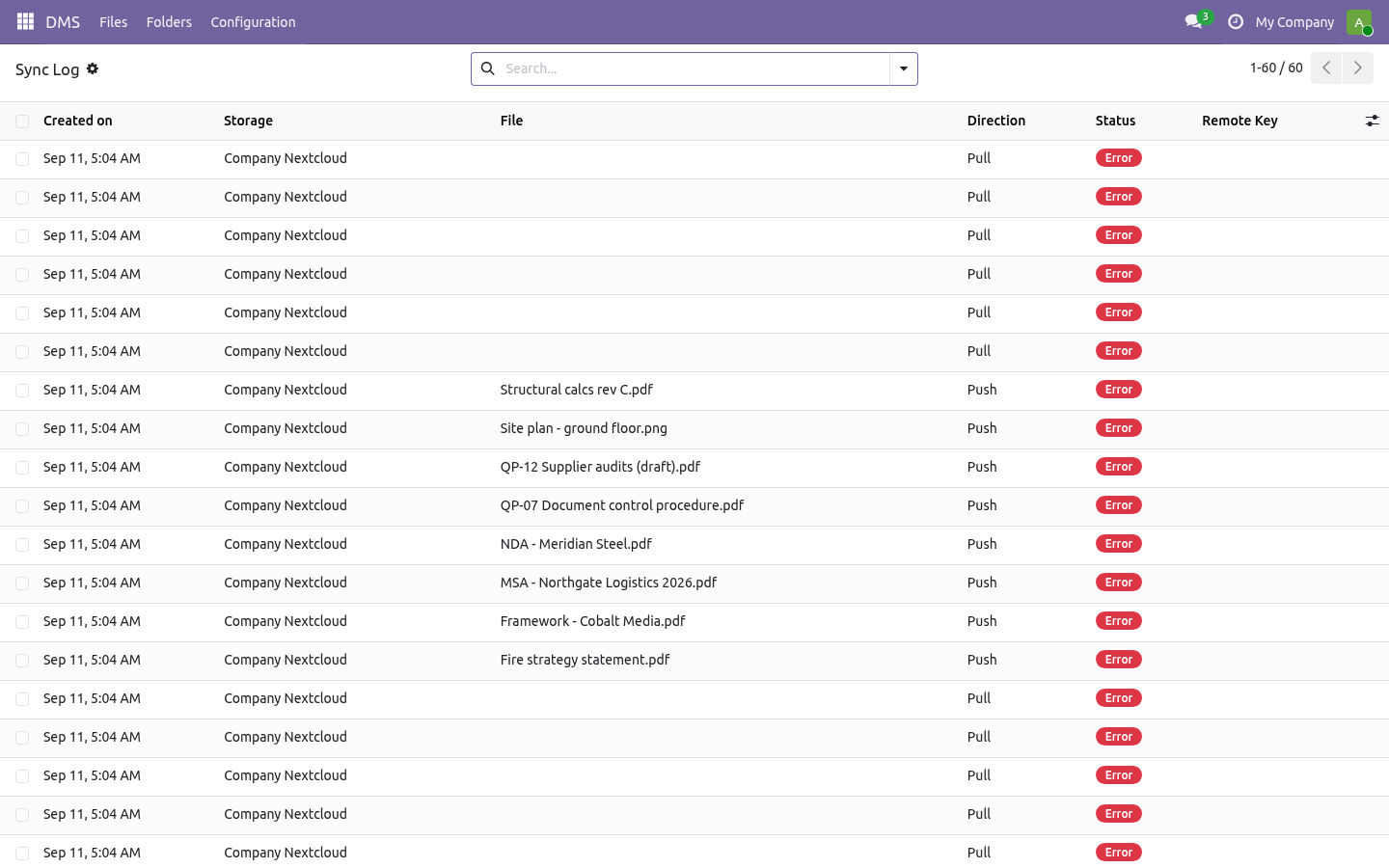
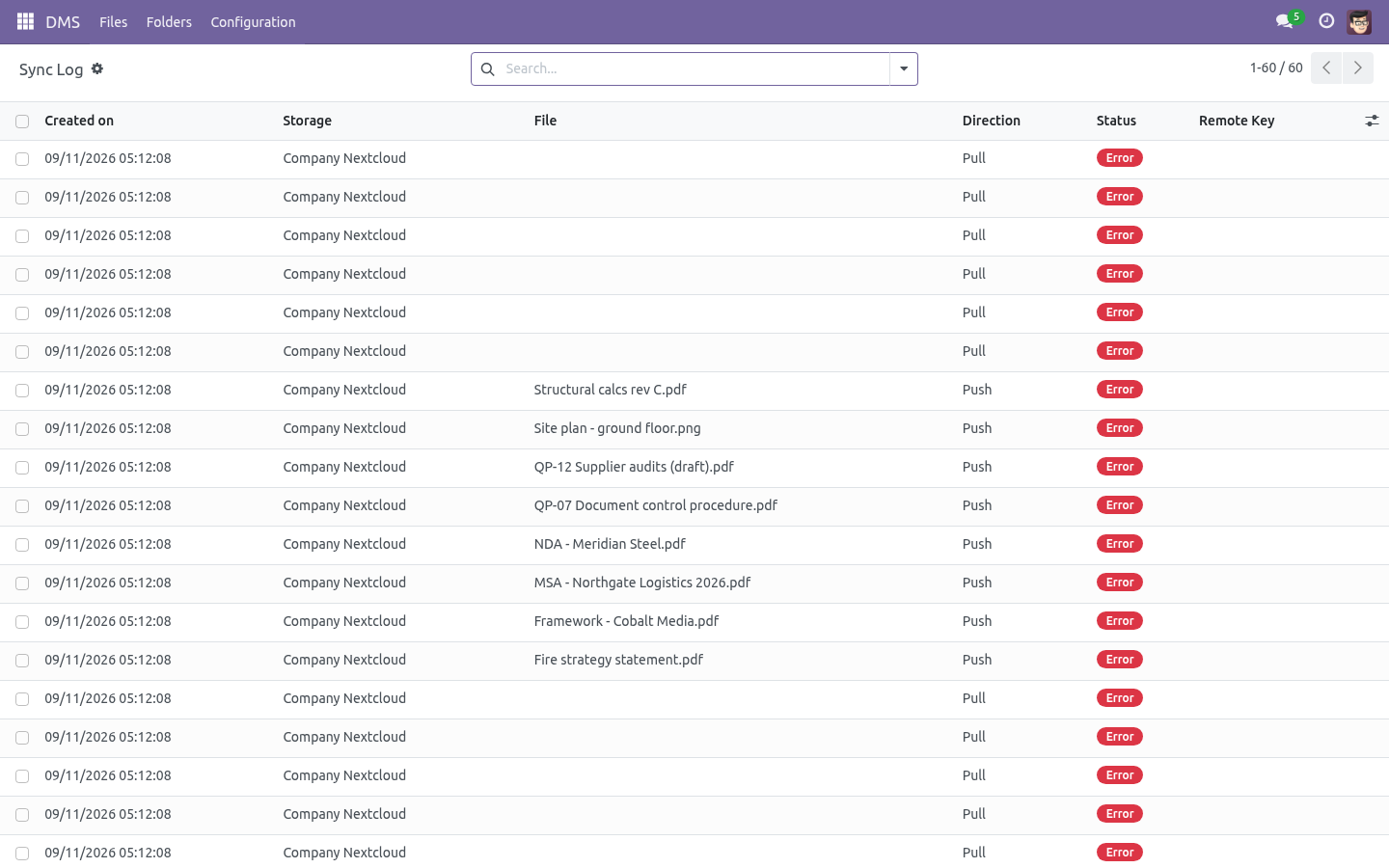
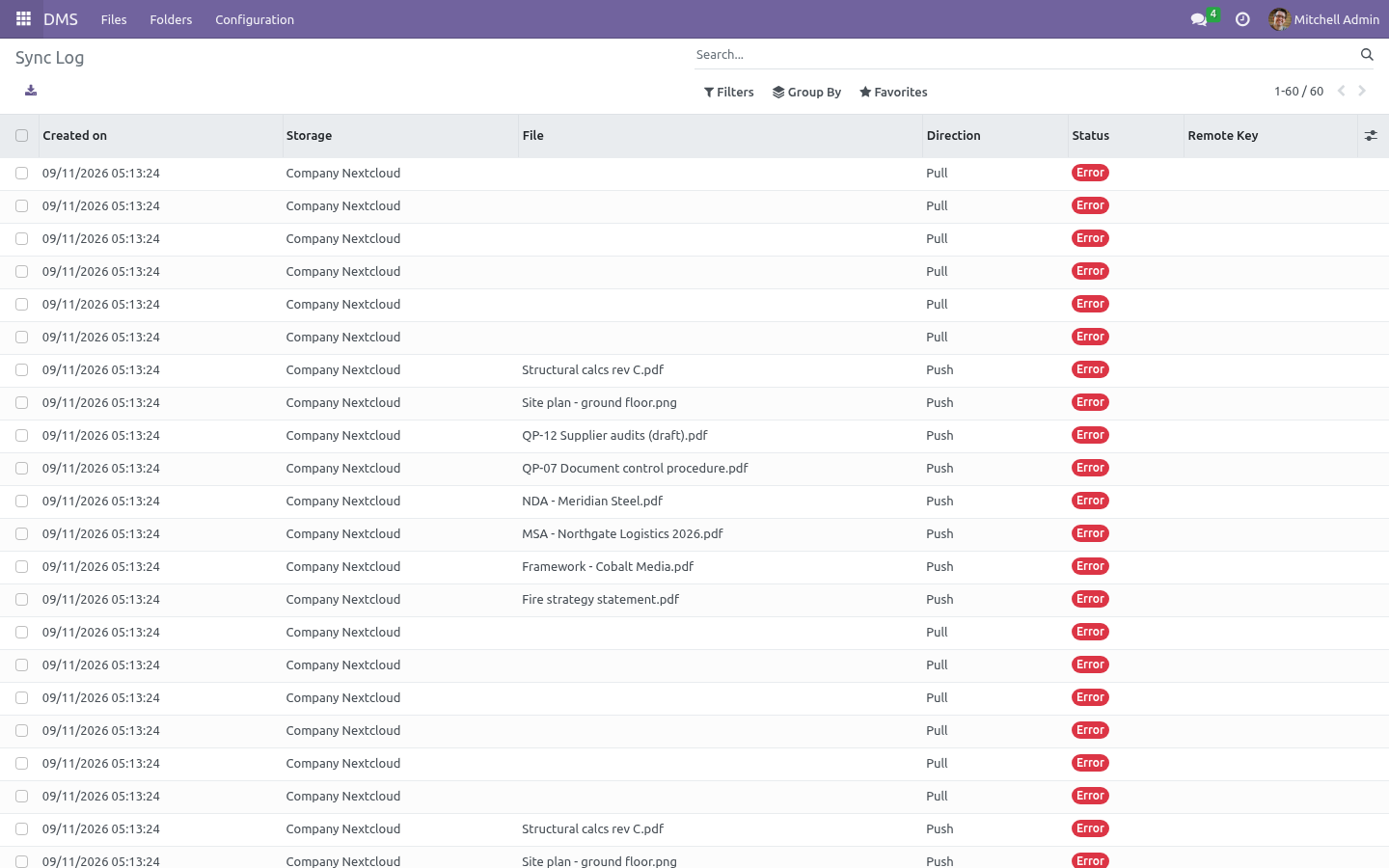
Deletions wait their turn. Deleting a file in Odoo queues the remote deletion in the sync log; the next run executes it. No network calls ever run inside your database transaction. Every byte that moves is a line in DMS → Configuration → Sync Log.
Folders Name and parent build the tree; the full path becomes the remote directory when the folder syncs. Access groups — leave empty and every DMS user sees the folder; pick groups and only their members (plus DMS managers) do. Files, versions and searches all obey the folder's groups. Storage decides where the files physically live.
Sub-folders suggest their parent's storage; renaming or moving a folder re-locates every file under it on the remote server on the next sync. Files. DMS → Files → New, or just drop a file in. Every upload is a version; the Versions tab shows who, when, size and checksum, lets you download any of them and revert — which stacks the old content on top as a new version instead of rewriting history.
Lock a file while you work on it; other users cannot modify, move or delete it until you unlock (a manager can always break a lock). Tags and the folder panel on the left make the Files view a browser. The Related Record tab links a file to any business document (an invoice, a project task…) and the smart button jumps straight to it. sha256 checksums are computed on every version — the same fingerprint the sync engine uses to detect changes.
Storages. Odoo filestore is the default: files stay local, nothing syncs. URL is the DAV files endpoint, e.g. https://cloud.example.com/remote.php/dav/files/odoo, plus the login of a dedicated sync user.
Test Connection does a real PROPFIND. Missing remote directories are created automatically (MKCOL) on the first push. Works with AWS S3, MinIO, Wasabi and anything that speaks the S3 API. Endpoint, region, bucket and a key pair — that is all.
The Signature V4 signer is built into the module. No boto3, no extra Python packages on your server. Sync root — the remote directory / key prefix everything lives under. Scheduled sync — untick to keep a storage manual-only.
On remote delete — when a file vanishes on the server, either upload it again (default) or archive it in Odoo and follow the remote's lead. Google Drive and OneDrive / SharePoint. Two more storage types, spoken to with the company's own OAuth app, so nothing but a refresh token is kept in Odoo: Google Drive. In Google Cloud, create an OAuth client of type web application, add the redirect address shown on the storage as an authorised redirect URI, enable the Drive API, and paste the client id and secret on the storage.
Press Connect, sign in as the account that owns the folder, and the storage shows who it is connected as. Files land under My Drive / the sync root, or under the folder whose id you put in Root folder id - a shared folder or a shared drive. The folder tree is walked by name and created as needed. Day to day The Files list shows each file's sync badge: To Push, In Sync, Conflict, Error.
Filters for each are one click away. Sync Now on a storage pushes everything pending and reconciles the rest; the same button on a single file does just that file. The scheduled job DMS: sync cloud storages runs every 30 minutes and works through every storage with scheduled sync enabled. One broken server never starves the others.
Sync log rows older than 90 days are cleaned up automatically — except queued deletions, which are work, not history. What changed in 1.1 Retention schedules (ISO 15489). A folder keeps its files n years (from upload or from the effective date); expiry flags the file and asks a person to archive or waive. Nothing is ever deleted automatically.
What changed in 1.2 Document codes. Give a folder a prefix (QP, SOP, WI) and every file created there receives a sequential code - QP-001, QP-002 - independent of the filename, searchable, quotable in an audit. Content search. Plain-text formats are indexed on upload and the Files search gains a Content filter; PDFs are indexed too when pdfminer.six is installed on the server (stated plainly: without it, PDFs are not).
What changed in 1.3 Now the part most videos leave out: what this does not do. Sync is per-folder-tree by binding folders to a storage; there is no per-file cherry-picking. Remote files that never existed in Odoo are not imported automatically — the mirror is Odoo-outward, with remote edits (not remote creations) flowing back. WebDAV servers that return no ETag get a synthetic one; change detection then relies on push bookkeeping only.
The complete manual is at docs dot bambooforge dot dev, the demo database is linked from the store page, and support answers within twenty-four hours. Links are in the description.
Transcript of the walkthrough (Odoo 19)
Document Management System (DMS) & Cloud Sync. Document management with folders, per-group access, tags, versions with one-click revert and locking - synced to Nextcloud, ownCloud or S3. Attachments scattered over chatter are not a filing system. This app gives Odoo folders with per-group access, files with versions and locks — and a sync engine that mirrors every folder to Nextcloud, ownCloud or an S3-compatible bucket and is honest about being two-way.
In the next few minutes: document management system (dms) & cloud sync, then what syncing actually means here, then folders, then files, then storages. Then what this app deliberately does not do, so you can tell before you buy whether it fits. Everything lives under DMS then Files then Folders then Configuration. 1.
Install BambooForge DMS & Cloud Sync (depends on Discuss only). 2. Give document librarians DMS: Manager — they configure storages and folders and bypass locks. Everyone else gets DMS: User.
3. The DMS menu appears with Files, Folders, and (for managers) Configuration. Document Management System (DMS) & Cloud Sync. Attachments scattered over chatter are not a filing system.
This app gives Odoo folders with per-group access, files with versions and locks — and a sync engine that mirrors every folder to Nextcloud, ownCloud or an S3-compatible bucket and is honest about being two-way. What syncing actually means here. Most "cloud sync" modules upload and hope. This one keeps a ledger: Local changes are pushed.
Uploading, renaming, moving or editing a file flags it To Push; the next sync run (scheduled every 30 minutes, or the Sync Now button) uploads it and remembers the server's ETag. Remote edits are detected and pulled — the reconcile pass compares the stored ETag with the server's. A colleague who edited the file straight in Nextcloud does not overwrite anything: the remote copy comes back as a new version on top of the history. When both sides changed, nothing is guessed.
The file is flagged Conflict, an activity is scheduled for its owner, and the form offers two buttons: Keep Odoo Version or Pull Remote Version. Whichever you pick, the losing content is still there as a version. Nothing is overwritten blind. Before every push the engine re-checks the remote ETag; a remote edit it has not seen yet turns the push into a conflict instead of a lost update.
Deletions wait their turn. Deleting a file in Odoo queues the remote deletion in the sync log; the next run executes it. No network calls ever run inside your database transaction. Every byte that moves is a line in DMS → Configuration → Sync Log.
Folders Name and parent build the tree; the full path becomes the remote directory when the folder syncs. Access groups — leave empty and every DMS user sees the folder; pick groups and only their members (plus DMS managers) do. Files, versions and searches all obey the folder's groups. Storage decides where the files physically live.
Sub-folders suggest their parent's storage; renaming or moving a folder re-locates every file under it on the remote server on the next sync. Files. DMS → Files → New, or just drop a file in. Every upload is a version; the Versions tab shows who, when, size and checksum, lets you download any of them and revert — which stacks the old content on top as a new version instead of rewriting history.
Lock a file while you work on it; other users cannot modify, move or delete it until you unlock (a manager can always break a lock). Tags and the folder panel on the left make the Files view a browser. The Related Record tab links a file to any business document (an invoice, a project task…) and the smart button jumps straight to it. sha256 checksums are computed on every version — the same fingerprint the sync engine uses to detect changes.
Storages. Odoo filestore is the default: files stay local, nothing syncs. URL is the DAV files endpoint, e.g. https://cloud.example.com/remote.php/dav/files/odoo, plus the login of a dedicated sync user.
Test Connection does a real PROPFIND. Missing remote directories are created automatically (MKCOL) on the first push. Works with AWS S3, MinIO, Wasabi and anything that speaks the S3 API. Endpoint, region, bucket and a key pair — that is all.
The Signature V4 signer is built into the module. No boto3, no extra Python packages on your server. Sync root — the remote directory / key prefix everything lives under. Scheduled sync — untick to keep a storage manual-only.
On remote delete — when a file vanishes on the server, either upload it again (default) or archive it in Odoo and follow the remote's lead. Day to day The Files list shows each file's sync badge: To Push, In Sync, Conflict, Error. Filters for each are one click away. Sync Now on a storage pushes everything pending and reconciles the rest; the same button on a single file does just that file.
The scheduled job DMS: sync cloud storages runs every 30 minutes and works through every storage with scheduled sync enabled. One broken server never starves the others. Sync log rows older than 90 days are cleaned up automatically — except queued deletions, which are work, not history. What changed in 1.1 Retention schedules (ISO 15489).
A folder keeps its files n years (from upload or from the effective date); expiry flags the file and asks a person to archive or waive. Nothing is ever deleted automatically. What changed in 1.2 Document codes. Give a folder a prefix (QP, SOP, WI) and every file created there receives a sequential code - QP-001, QP-002 - independent of the filename, searchable, quotable in an audit.
Content search. Plain-text formats are indexed on upload and the Files search gains a Content filter; PDFs are indexed too when pdfminer.six is installed on the server (stated plainly: without it, PDFs are not). What changed in 1.3 Support. support@bambooforge.dev — answered within two business days.
This module is licensed OPL-1; one purchase covers one production database plus its staging copies. Now the part most videos leave out: what this does not do. Sync is per-folder-tree by binding folders to a storage; there is no per-file cherry-picking. Remote files that never existed in Odoo are not imported automatically — the mirror is Odoo-outward, with remote edits (not remote creations) flowing back.
WebDAV servers that return no ETag get a synthetic one; change detection then relies on push bookkeeping only. The complete manual is at docs dot bambooforge dot dev, the demo database is linked from the store page, and support answers within twenty-four hours. Links are in the description.
Transcript of the walkthrough (Odoo 18)
Document Management System (DMS) & Cloud Sync. Document management with folders, per-group access, tags, versions with one-click revert and locking - synced to Nextcloud, ownCloud or S3. Attachments scattered over chatter are not a filing system. This app gives Odoo folders with per-group access, files with versions and locks — and a sync engine that mirrors every folder to Nextcloud, ownCloud or an S3-compatible bucket and is honest about being two-way.
In the next few minutes: document management system (dms) & cloud sync, then what syncing actually means here, then folders, then files, then storages. Then what this app deliberately does not do, so you can tell before you buy whether it fits. Everything lives under DMS then Files then Folders then Configuration. 1.
Install BambooForge DMS & Cloud Sync (depends on Discuss only). 2. Give document librarians DMS: Manager — they configure storages and folders and bypass locks. Everyone else gets DMS: User.
3. The DMS menu appears with Files, Folders, and (for managers) Configuration. Document Management System (DMS) & Cloud Sync. Attachments scattered over chatter are not a filing system.
This app gives Odoo folders with per-group access, files with versions and locks — and a sync engine that mirrors every folder to Nextcloud, ownCloud or an S3-compatible bucket and is honest about being two-way. What syncing actually means here. Most "cloud sync" modules upload and hope. This one keeps a ledger: Local changes are pushed.
Uploading, renaming, moving or editing a file flags it To Push; the next sync run (scheduled every 30 minutes, or the Sync Now button) uploads it and remembers the server's ETag. Remote edits are detected and pulled — the reconcile pass compares the stored ETag with the server's. A colleague who edited the file straight in Nextcloud does not overwrite anything: the remote copy comes back as a new version on top of the history. When both sides changed, nothing is guessed.
The file is flagged Conflict, an activity is scheduled for its owner, and the form offers two buttons: Keep Odoo Version or Pull Remote Version. Whichever you pick, the losing content is still there as a version. Nothing is overwritten blind. Before every push the engine re-checks the remote ETag; a remote edit it has not seen yet turns the push into a conflict instead of a lost update.
Deletions wait their turn. Deleting a file in Odoo queues the remote deletion in the sync log; the next run executes it. No network calls ever run inside your database transaction. Every byte that moves is a line in DMS → Configuration → Sync Log.
Folders Name and parent build the tree; the full path becomes the remote directory when the folder syncs. Access groups — leave empty and every DMS user sees the folder; pick groups and only their members (plus DMS managers) do. Files, versions and searches all obey the folder's groups. Storage decides where the files physically live.
Sub-folders suggest their parent's storage; renaming or moving a folder re-locates every file under it on the remote server on the next sync. Files. DMS → Files → New, or just drop a file in. Every upload is a version; the Versions tab shows who, when, size and checksum, lets you download any of them and revert — which stacks the old content on top as a new version instead of rewriting history.
Lock a file while you work on it; other users cannot modify, move or delete it until you unlock (a manager can always break a lock). Tags and the folder panel on the left make the Files view a browser. The Related Record tab links a file to any business document (an invoice, a project task…) and the smart button jumps straight to it. sha256 checksums are computed on every version — the same fingerprint the sync engine uses to detect changes.
Storages. Odoo filestore is the default: files stay local, nothing syncs. URL is the DAV files endpoint, e.g. https://cloud.example.com/remote.php/dav/files/odoo, plus the login of a dedicated sync user.
Test Connection does a real PROPFIND. Missing remote directories are created automatically (MKCOL) on the first push. Works with AWS S3, MinIO, Wasabi and anything that speaks the S3 API. Endpoint, region, bucket and a key pair — that is all.
The Signature V4 signer is built into the module. No boto3, no extra Python packages on your server. Sync root — the remote directory / key prefix everything lives under. Scheduled sync — untick to keep a storage manual-only.
On remote delete — when a file vanishes on the server, either upload it again (default) or archive it in Odoo and follow the remote's lead. Day to day The Files list shows each file's sync badge: To Push, In Sync, Conflict, Error. Filters for each are one click away. Sync Now on a storage pushes everything pending and reconciles the rest; the same button on a single file does just that file.
The scheduled job DMS: sync cloud storages runs every 30 minutes and works through every storage with scheduled sync enabled. One broken server never starves the others. Sync log rows older than 90 days are cleaned up automatically — except queued deletions, which are work, not history. What changed in 1.1 Retention schedules (ISO 15489).
A folder keeps its files n years (from upload or from the effective date); expiry flags the file and asks a person to archive or waive. Nothing is ever deleted automatically. What changed in 1.2 Document codes. Give a folder a prefix (QP, SOP, WI) and every file created there receives a sequential code - QP-001, QP-002 - independent of the filename, searchable, quotable in an audit.
Content search. Plain-text formats are indexed on upload and the Files search gains a Content filter; PDFs are indexed too when pdfminer.six is installed on the server (stated plainly: without it, PDFs are not). What changed in 1.3 Support. support@bambooforge.dev — answered within two business days.
This module is licensed OPL-1; one purchase covers one production database plus its staging copies. Now the part most videos leave out: what this does not do. Sync is per-folder-tree by binding folders to a storage; there is no per-file cherry-picking. Remote files that never existed in Odoo are not imported automatically — the mirror is Odoo-outward, with remote edits (not remote creations) flowing back.
WebDAV servers that return no ETag get a synthetic one; change detection then relies on push bookkeeping only. The complete manual is at docs dot bambooforge dot dev, the demo database is linked from the store page, and support answers within twenty-four hours. Links are in the description.
Transcript of the walkthrough (Odoo 17)
Document Management System (DMS) & Cloud Sync. Document management with folders, per-group access, tags, versions with one-click revert and locking - synced to Nextcloud, ownCloud or S3. Attachments scattered over chatter are not a filing system. This app gives Odoo folders with per-group access, files with versions and locks — and a sync engine that mirrors every folder to Nextcloud, ownCloud or an S3-compatible bucket and is honest about being two-way.
In the next few minutes: document management system (dms) & cloud sync, then what syncing actually means here, then folders, then files, then storages. Then what this app deliberately does not do, so you can tell before you buy whether it fits. Everything lives under DMS then Files then Folders then Configuration. 1.
Install BambooForge DMS & Cloud Sync (depends on Discuss only). 2. Give document librarians DMS: Manager — they configure storages and folders and bypass locks. Everyone else gets DMS: User.
3. The DMS menu appears with Files, Folders, and (for managers) Configuration. Document Management System (DMS) & Cloud Sync. Attachments scattered over chatter are not a filing system.
This app gives Odoo folders with per-group access, files with versions and locks — and a sync engine that mirrors every folder to Nextcloud, ownCloud or an S3-compatible bucket and is honest about being two-way. What syncing actually means here. Most "cloud sync" modules upload and hope. This one keeps a ledger: Local changes are pushed.
Uploading, renaming, moving or editing a file flags it To Push; the next sync run (scheduled every 30 minutes, or the Sync Now button) uploads it and remembers the server's ETag. Remote edits are detected and pulled — the reconcile pass compares the stored ETag with the server's. A colleague who edited the file straight in Nextcloud does not overwrite anything: the remote copy comes back as a new version on top of the history. When both sides changed, nothing is guessed.
The file is flagged Conflict, an activity is scheduled for its owner, and the form offers two buttons: Keep Odoo Version or Pull Remote Version. Whichever you pick, the losing content is still there as a version. Nothing is overwritten blind. Before every push the engine re-checks the remote ETag; a remote edit it has not seen yet turns the push into a conflict instead of a lost update.
Deletions wait their turn. Deleting a file in Odoo queues the remote deletion in the sync log; the next run executes it. No network calls ever run inside your database transaction. Every byte that moves is a line in DMS → Configuration → Sync Log.
Folders Name and parent build the tree; the full path becomes the remote directory when the folder syncs. Access groups — leave empty and every DMS user sees the folder; pick groups and only their members (plus DMS managers) do. Files, versions and searches all obey the folder's groups. Storage decides where the files physically live.
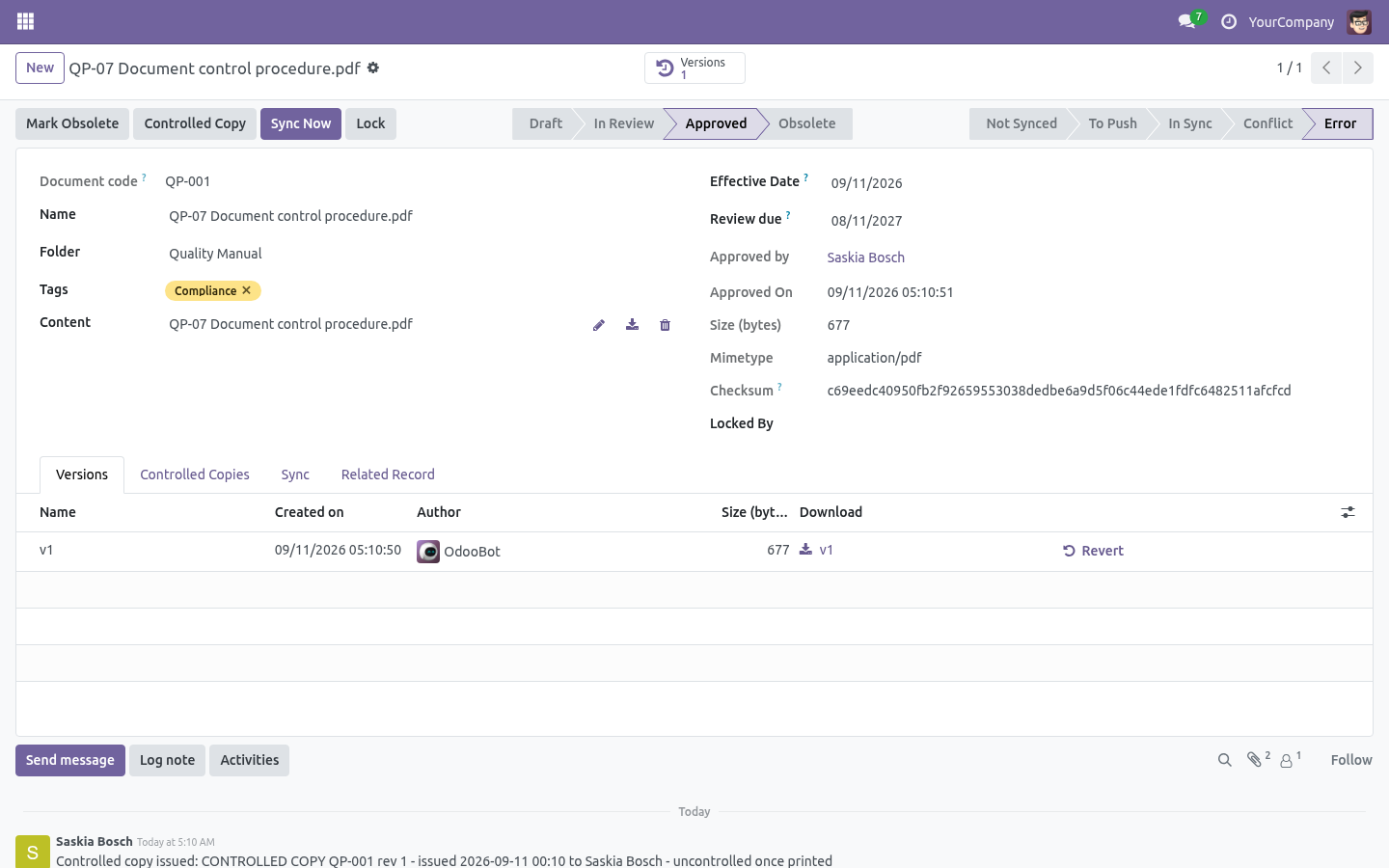
Sub-folders suggest their parent's storage; renaming or moving a folder re-locates every file under it on the remote server on the next sync. Files. DMS → Files → New, or just drop a file in. Every upload is a version; the Versions tab shows who, when, size and checksum, lets you download any of them and revert — which stacks the old content on top as a new version instead of rewriting history.
Lock a file while you work on it; other users cannot modify, move or delete it until you unlock (a manager can always break a lock). Tags and the folder panel on the left make the Files view a browser. The Related Record tab links a file to any business document (an invoice, a project task…) and the smart button jumps straight to it. sha256 checksums are computed on every version — the same fingerprint the sync engine uses to detect changes.
Storages. Odoo filestore is the default: files stay local, nothing syncs. URL is the DAV files endpoint, e.g. https://cloud.example.com/remote.php/dav/files/odoo, plus the login of a dedicated sync user.
Test Connection does a real PROPFIND. Missing remote directories are created automatically (MKCOL) on the first push. Works with AWS S3, MinIO, Wasabi and anything that speaks the S3 API. Endpoint, region, bucket and a key pair — that is all.
The Signature V4 signer is built into the module. No boto3, no extra Python packages on your server. Sync root — the remote directory / key prefix everything lives under. Scheduled sync — untick to keep a storage manual-only.
On remote delete — when a file vanishes on the server, either upload it again (default) or archive it in Odoo and follow the remote's lead. Day to day The Files list shows each file's sync badge: To Push, In Sync, Conflict, Error. Filters for each are one click away. Sync Now on a storage pushes everything pending and reconciles the rest; the same button on a single file does just that file.
The scheduled job DMS: sync cloud storages runs every 30 minutes and works through every storage with scheduled sync enabled. One broken server never starves the others. Sync log rows older than 90 days are cleaned up automatically — except queued deletions, which are work, not history. What changed in 1.1 Retention schedules (ISO 15489).
A folder keeps its files n years (from upload or from the effective date); expiry flags the file and asks a person to archive or waive. Nothing is ever deleted automatically. What changed in 1.2 Document codes. Give a folder a prefix (QP, SOP, WI) and every file created there receives a sequential code - QP-001, QP-002 - independent of the filename, searchable, quotable in an audit.
Content search. Plain-text formats are indexed on upload and the Files search gains a Content filter; PDFs are indexed too when pdfminer.six is installed on the server (stated plainly: without it, PDFs are not). What changed in 1.3 Support. support@bambooforge.dev — answered within two business days.
This module is licensed OPL-1; one purchase covers one production database plus its staging copies. Now the part most videos leave out: what this does not do. Sync is per-folder-tree by binding folders to a storage; there is no per-file cherry-picking. Remote files that never existed in Odoo are not imported automatically — the mirror is Odoo-outward, with remote edits (not remote creations) flowing back.
WebDAV servers that return no ETag get a synthetic one; change detection then relies on push bookkeeping only. The complete manual is at docs dot bambooforge dot dev, the demo database is linked from the store page, and support answers within twenty-four hours. Links are in the description.
Transcript of the walkthrough (Odoo 16)
Document Management System (DMS) & Cloud Sync. Document management with folders, per-group access, tags, versions with one-click revert and locking - synced to Nextcloud, ownCloud or S3. Attachments scattered over chatter are not a filing system. This app gives Odoo folders with per-group access, files with versions and locks — and a sync engine that mirrors every folder to Nextcloud, ownCloud or an S3-compatible bucket and is honest about being two-way.
In the next few minutes: document management system (dms) & cloud sync, then what syncing actually means here, then folders, then files, then storages. Then what this app deliberately does not do, so you can tell before you buy whether it fits. Everything lives under DMS then Files then Folders then Configuration. 1.
Install BambooForge DMS & Cloud Sync (depends on Discuss only). 2. Give document librarians DMS: Manager — they configure storages and folders and bypass locks. Everyone else gets DMS: User.
3. The DMS menu appears with Files, Folders, and (for managers) Configuration. Document Management System (DMS) & Cloud Sync. Attachments scattered over chatter are not a filing system.
This app gives Odoo folders with per-group access, files with versions and locks — and a sync engine that mirrors every folder to Nextcloud, ownCloud or an S3-compatible bucket and is honest about being two-way. What syncing actually means here. Most "cloud sync" modules upload and hope. This one keeps a ledger: Local changes are pushed.
Uploading, renaming, moving or editing a file flags it To Push; the next sync run (scheduled every 30 minutes, or the Sync Now button) uploads it and remembers the server's ETag. Remote edits are detected and pulled — the reconcile pass compares the stored ETag with the server's. A colleague who edited the file straight in Nextcloud does not overwrite anything: the remote copy comes back as a new version on top of the history. When both sides changed, nothing is guessed.
The file is flagged Conflict, an activity is scheduled for its owner, and the form offers two buttons: Keep Odoo Version or Pull Remote Version. Whichever you pick, the losing content is still there as a version. Nothing is overwritten blind. Before every push the engine re-checks the remote ETag; a remote edit it has not seen yet turns the push into a conflict instead of a lost update.
Deletions wait their turn. Deleting a file in Odoo queues the remote deletion in the sync log; the next run executes it. No network calls ever run inside your database transaction. Every byte that moves is a line in DMS → Configuration → Sync Log.
Folders Name and parent build the tree; the full path becomes the remote directory when the folder syncs. Access groups — leave empty and every DMS user sees the folder; pick groups and only their members (plus DMS managers) do. Files, versions and searches all obey the folder's groups. Storage decides where the files physically live.
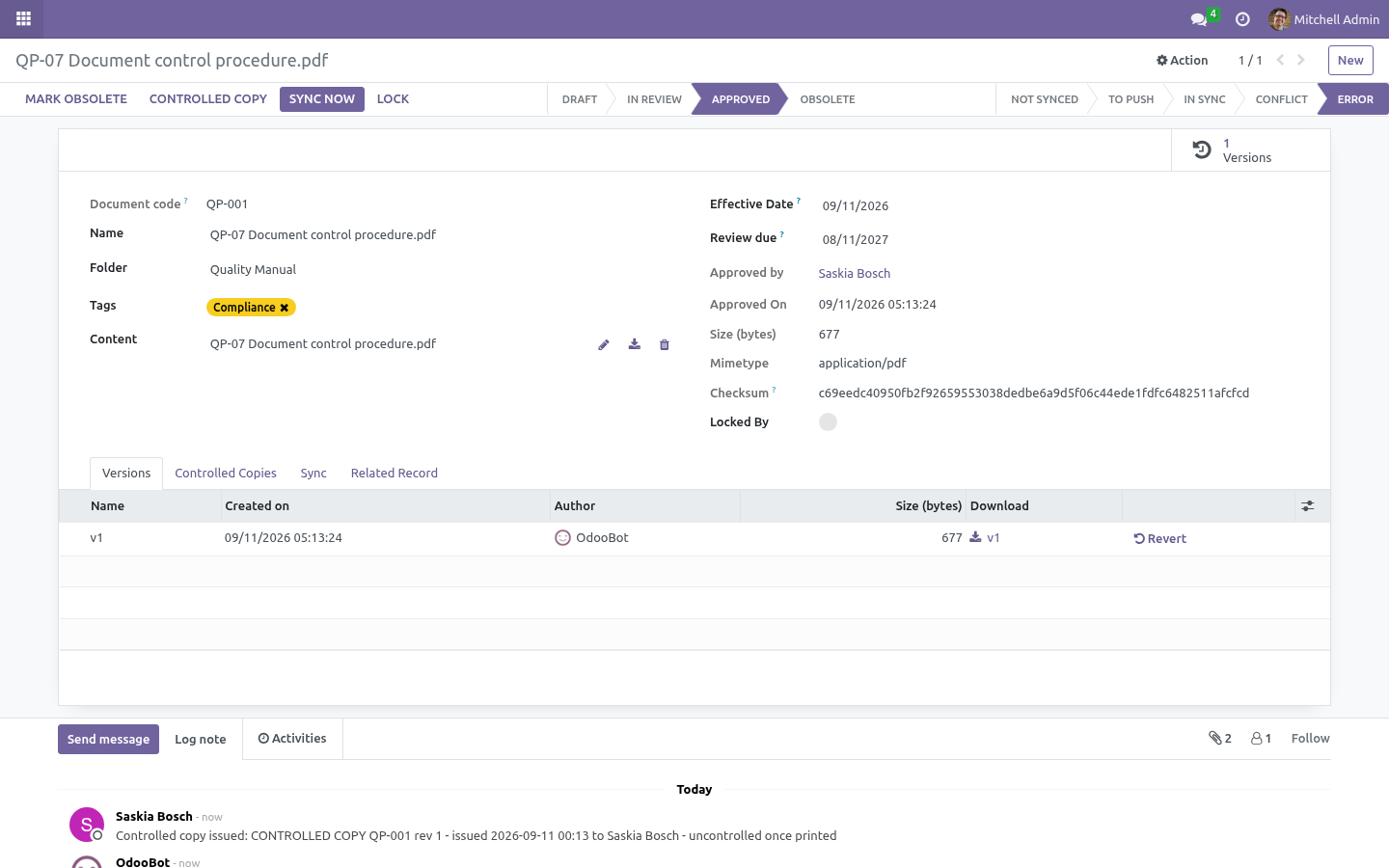
Sub-folders suggest their parent's storage; renaming or moving a folder re-locates every file under it on the remote server on the next sync. Files. DMS → Files → New, or just drop a file in. Every upload is a version; the Versions tab shows who, when, size and checksum, lets you download any of them and revert — which stacks the old content on top as a new version instead of rewriting history.
Lock a file while you work on it; other users cannot modify, move or delete it until you unlock (a manager can always break a lock). Tags and the folder panel on the left make the Files view a browser. The Related Record tab links a file to any business document (an invoice, a project task…) and the smart button jumps straight to it. sha256 checksums are computed on every version — the same fingerprint the sync engine uses to detect changes.
Storages. Odoo filestore is the default: files stay local, nothing syncs. URL is the DAV files endpoint, e.g. https://cloud.example.com/remote.php/dav/files/odoo, plus the login of a dedicated sync user.
Test Connection does a real PROPFIND. Missing remote directories are created automatically (MKCOL) on the first push. Works with AWS S3, MinIO, Wasabi and anything that speaks the S3 API. Endpoint, region, bucket and a key pair — that is all.
The Signature V4 signer is built into the module. No boto3, no extra Python packages on your server. Sync root — the remote directory / key prefix everything lives under. Scheduled sync — untick to keep a storage manual-only.
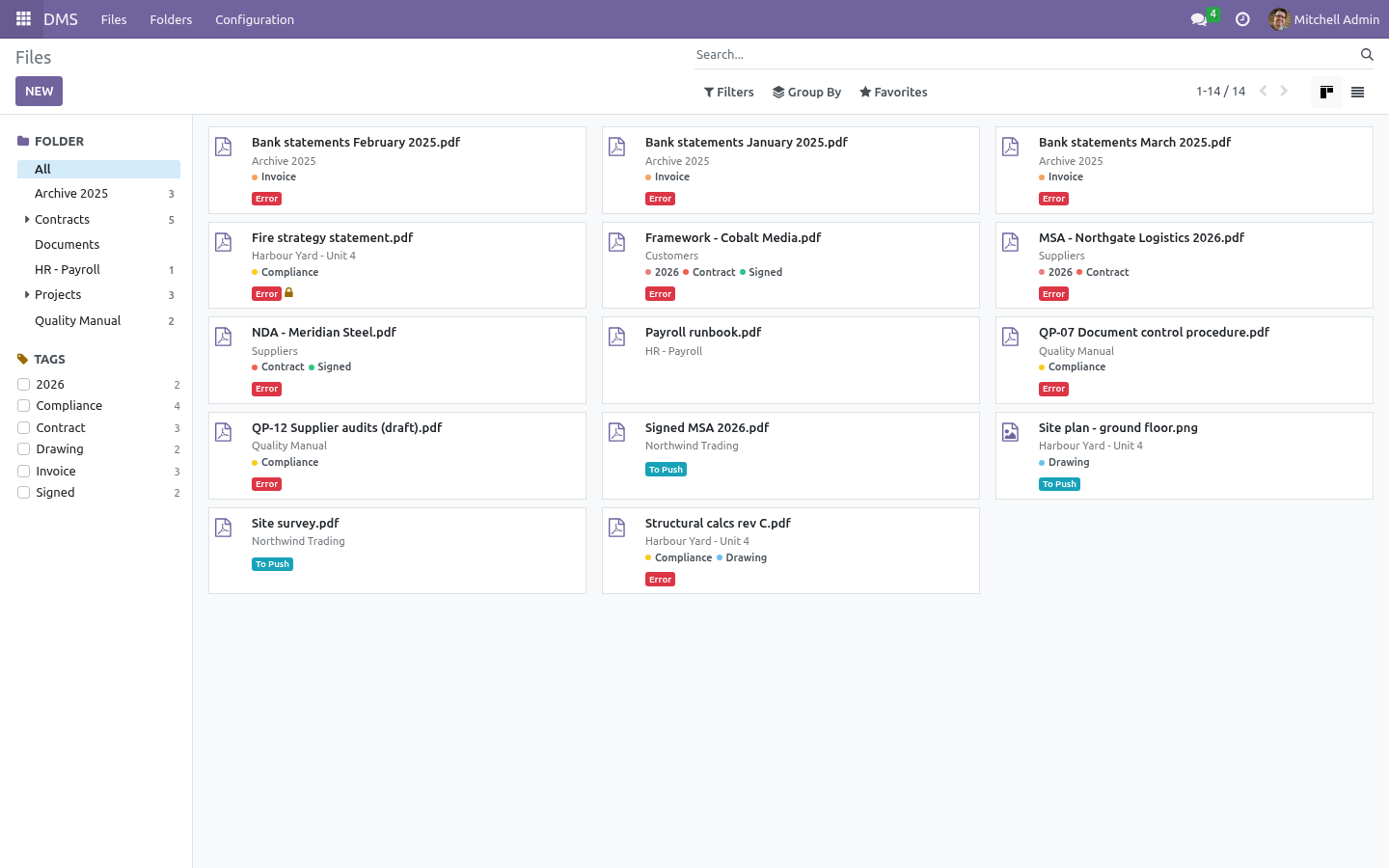
On remote delete — when a file vanishes on the server, either upload it again (default) or archive it in Odoo and follow the remote's lead. Day to day The Files list shows each file's sync badge: To Push, In Sync, Conflict, Error. Filters for each are one click away. Sync Now on a storage pushes everything pending and reconciles the rest; the same button on a single file does just that file.
The scheduled job DMS: sync cloud storages runs every 30 minutes and works through every storage with scheduled sync enabled. One broken server never starves the others. Sync log rows older than 90 days are cleaned up automatically — except queued deletions, which are work, not history. What changed in 1.1 Retention schedules (ISO 15489).
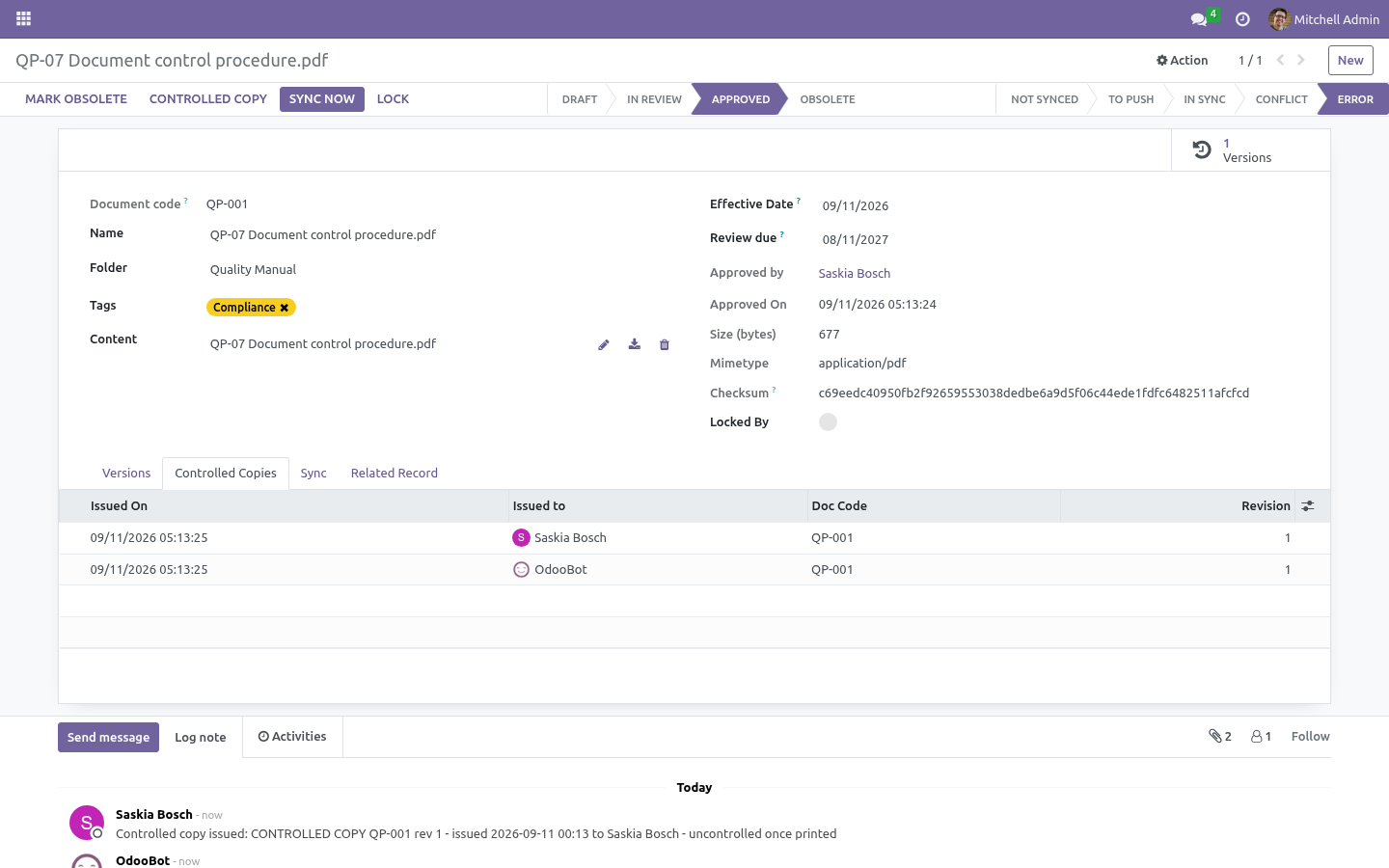
A folder keeps its files n years (from upload or from the effective date); expiry flags the file and asks a person to archive or waive. Nothing is ever deleted automatically. What changed in 1.2 Document codes. Give a folder a prefix (QP, SOP, WI) and every file created there receives a sequential code - QP-001, QP-002 - independent of the filename, searchable, quotable in an audit.
Content search. Plain-text formats are indexed on upload and the Files search gains a Content filter; PDFs are indexed too when pdfminer.six is installed on the server (stated plainly: without it, PDFs are not). What changed in 1.3 Support. support@bambooforge.dev — answered within two business days.
This module is licensed OPL-1; one purchase covers one production database plus its staging copies. Now the part most videos leave out: what this does not do. Sync is per-folder-tree by binding folders to a storage; there is no per-file cherry-picking. Remote files that never existed in Odoo are not imported automatically — the mirror is Odoo-outward, with remote edits (not remote creations) flowing back.
WebDAV servers that return no ETag get a synthetic one; change detection then relies on push bookkeeping only. The complete manual is at docs dot bambooforge dot dev, the demo database is linked from the store page, and support answers within twenty-four hours. Links are in the description.
Key facts
- What it is
- Document management with folders, per-group access, tags, versions with one-click revert and locking - synced to Nextcloud, ownCloud, S3, Google Drive or OneDrive / SharePoint.
- For
- Document Management
- Odoo versions
- 16.0, 17.0, 18.0, 19.0, 20.0 - Community and Enterprise
- Runs on
- Odoo.sh or Odoo you host yourself - not Odoo Online, which accepts no third-party apps
- Price
- 169 EUR, one-time, on the Odoo Apps Store
- Technical name
- bambooforge_dms
- Not for
- Sync is per-folder-tree by binding folders to a storage; there is no per-file cherry-picking.; Remote files that never existed in Odoo are brought in only where Bring in new remote files is ticked, on the storage or the folder; with it off the mirror is Odoo-outward, with remote edits (not remote creations) flowing back.; WebDAV servers that return no ETag get a synthetic one; change detection then relies on push bookkeeping only.
- Compared with the alternatives
- https://docs.bambooforge.dev/bambooforge_dms/compare/
- Manual last updated
- 2026-10-15
Document Management System (DMS) & Cloud Sync
Attachments scattered over chatter are not a filing system. This app gives Odoo folders with per-group access, files with versions and locks — and a sync engine that mirrors every folder to Nextcloud, ownCloud or an S3-compatible bucket and is honest about being two-way.
What syncing actually means here
Most "cloud sync" modules upload and hope. This one keeps a ledger:
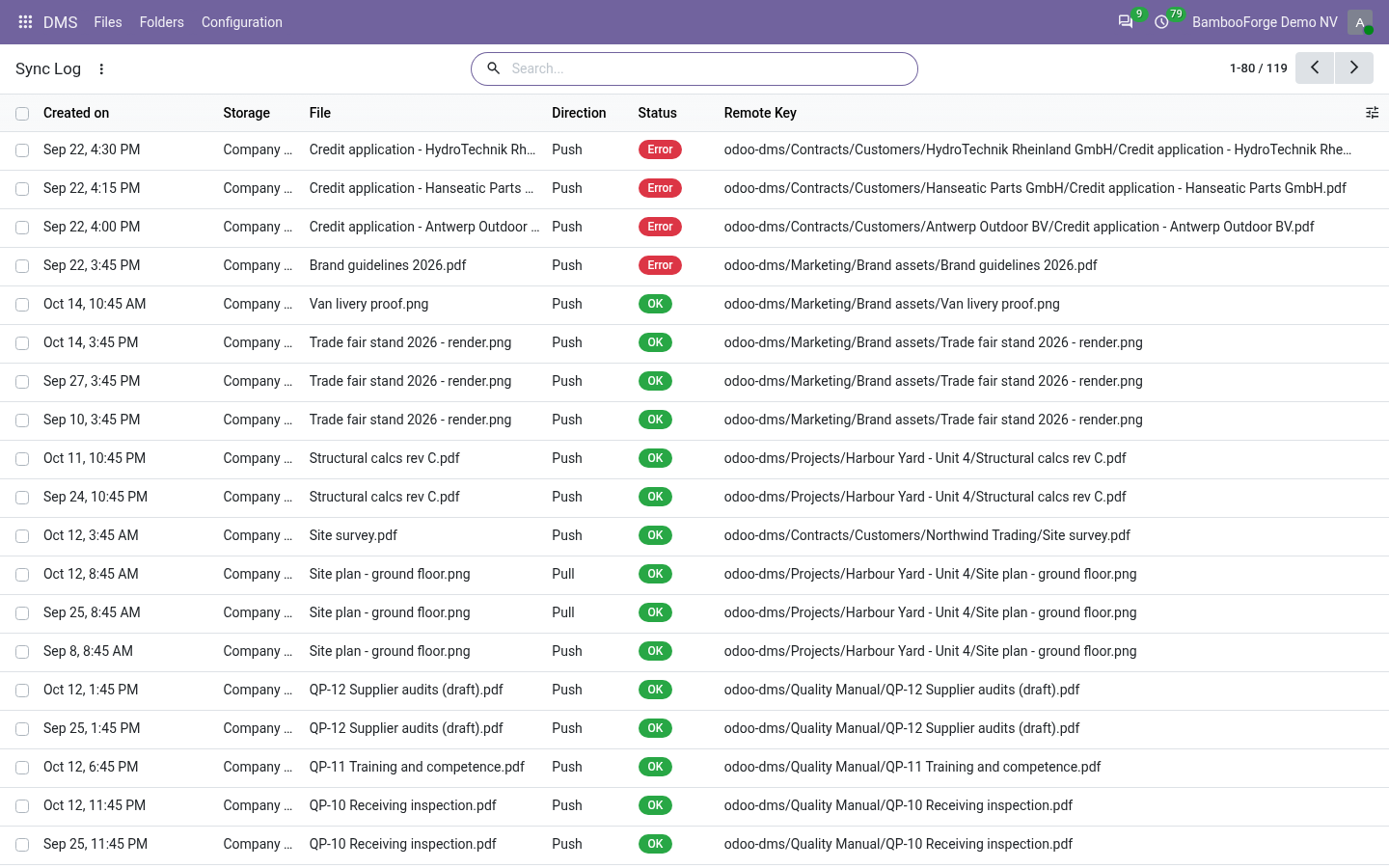
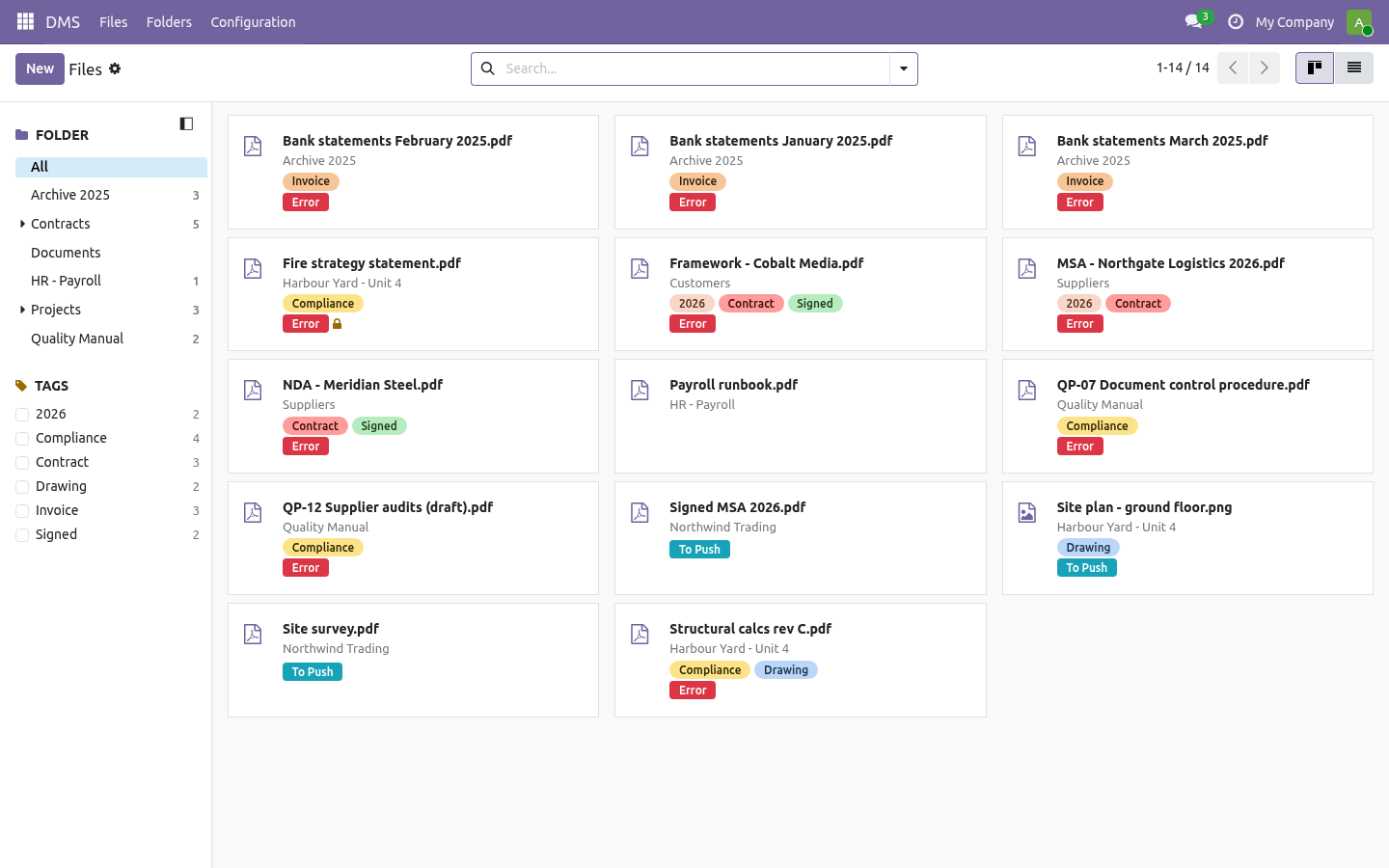
Local changes are pushed. Uploading, renaming, moving or editing a file flags it To Push; the next sync run (scheduled every 30 minutes, or the Sync Now button) uploads it and remembers the server's ETag.
Remote edits are detected and pulled — the reconcile pass compares the stored ETag with the server's. A colleague who edited the file straight in Nextcloud does not overwrite anything: the remote copy comes back as a new version on top of the history.
When both sides changed, nothing is guessed. The file is flagged Conflict, an activity is scheduled for its owner, and the form offers two buttons: Keep Odoo Version or Pull Remote Version. Whichever you pick, the losing content is still there as a version.
Nothing is overwritten blind. Before every push the engine re-checks the remote ETag; a remote edit it has not seen yet turns the push into a conflict instead of a lost update.
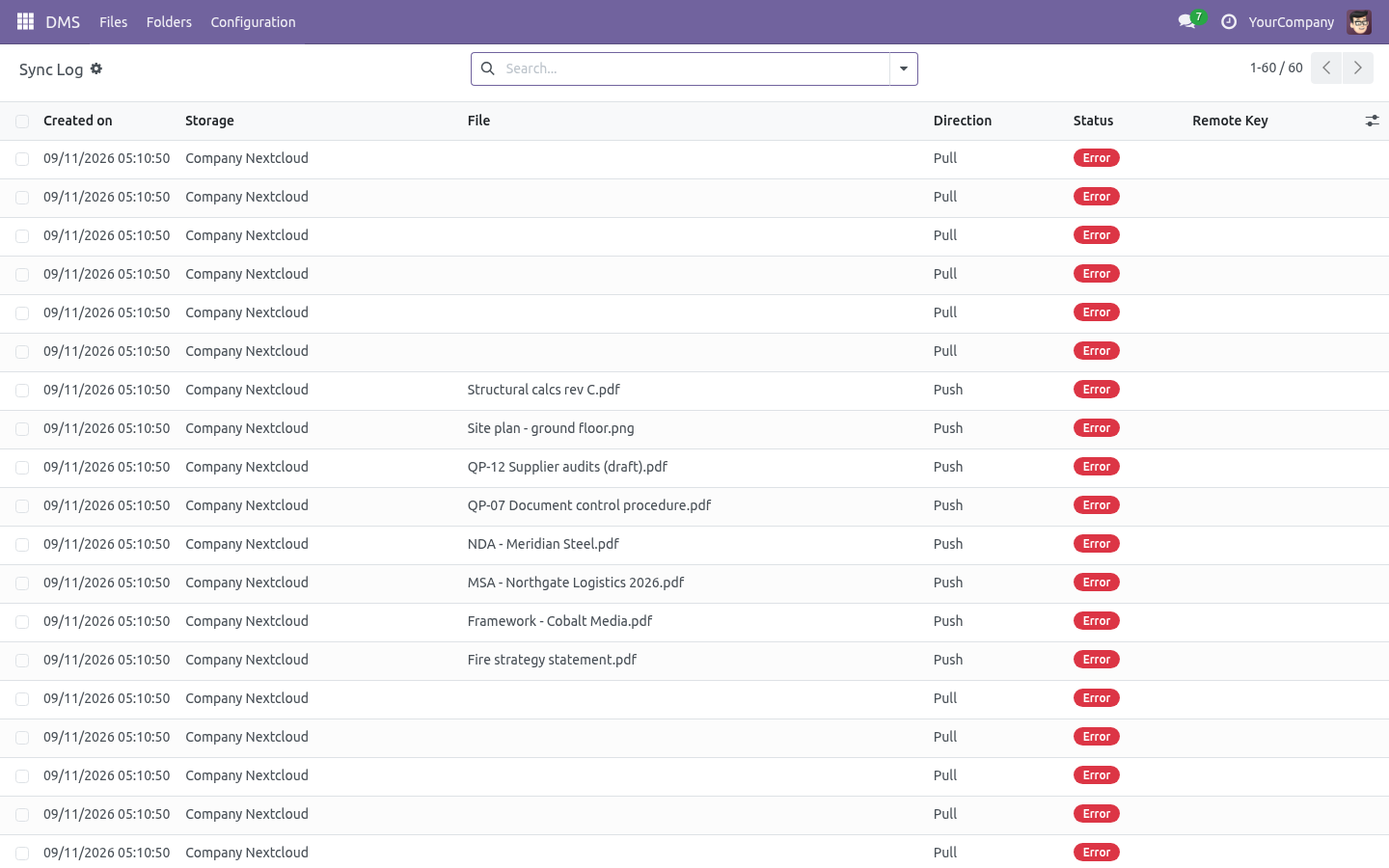
Deletions wait their turn. Deleting a file in Odoo queues the remote deletion in the sync log; the next run executes it. No network calls ever run inside your database transaction.
Every byte that moves is a line in DMS → Configuration → Sync Log.
Install
Install BambooForge DMS & Cloud Sync (depends on Discuss only).
Give document librarians DMS: Manager — they configure storages and folders and bypass locks. Everyone else gets DMS: User.
The DMS menu appears with Files, Folders, and (for managers) Configuration.
Folders
DMS → Folders → New
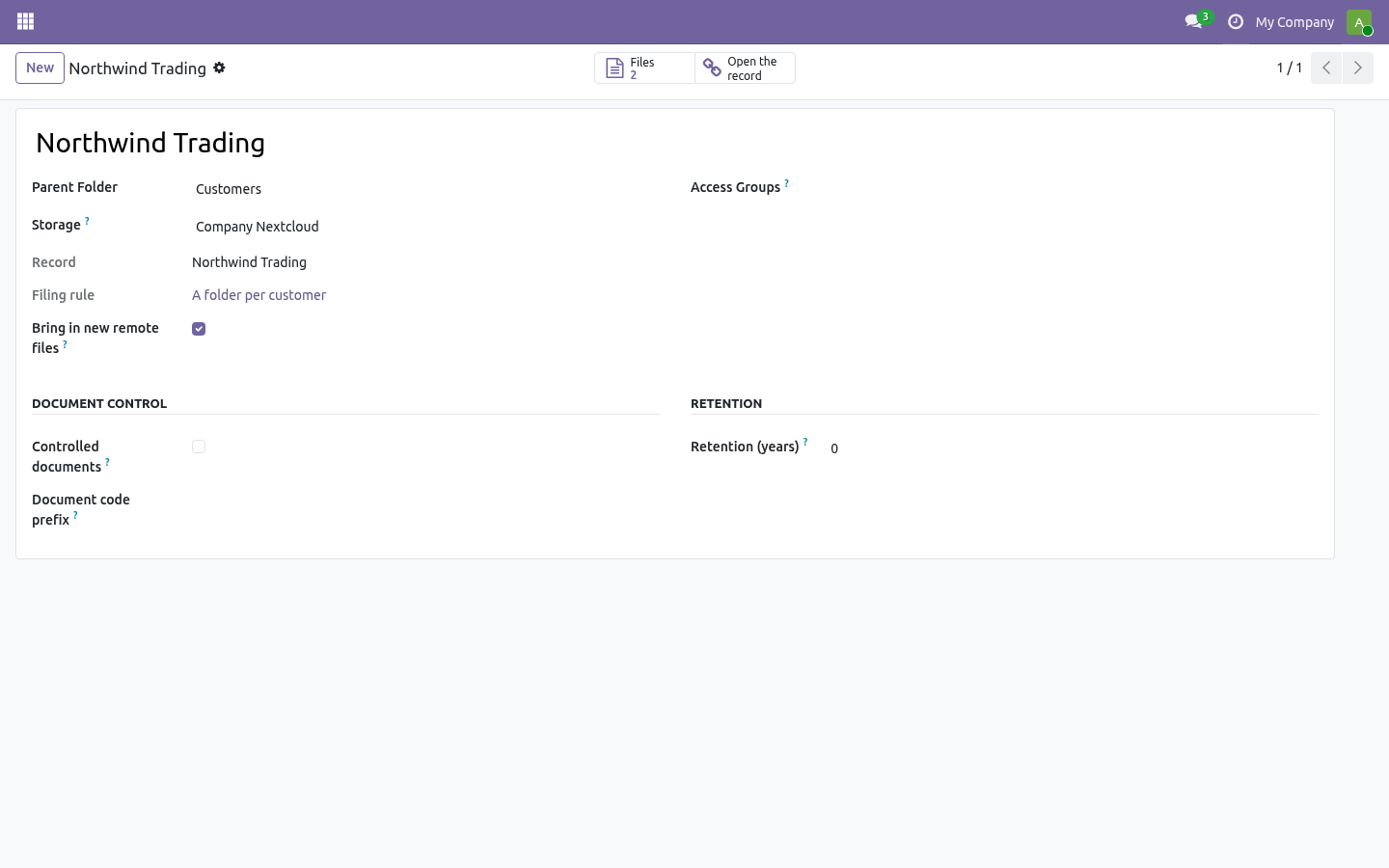
Name and parent build the tree; the full path becomes the remote directory when the folder syncs.
Access groups — leave empty and every DMS user sees the folder; pick groups and only their members (plus DMS managers) do. Files, versions and searches all obey the folder's groups.
Storage decides where the files physically live. Sub-folders suggest their parent's storage; renaming or moving a folder re-locates every file under it on the remote server on the next sync.
Files
DMS → Files → New, or just drop a file in.
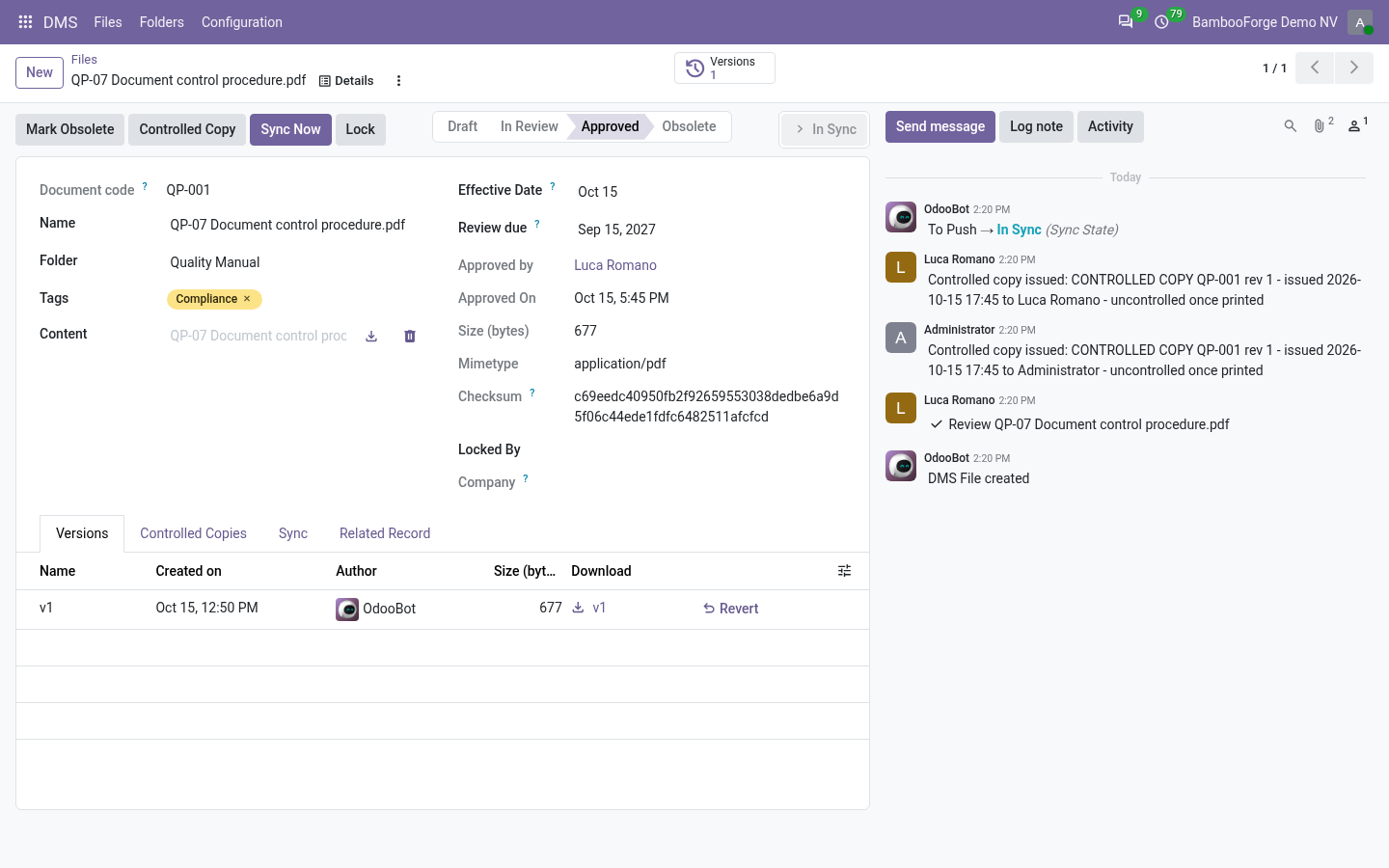
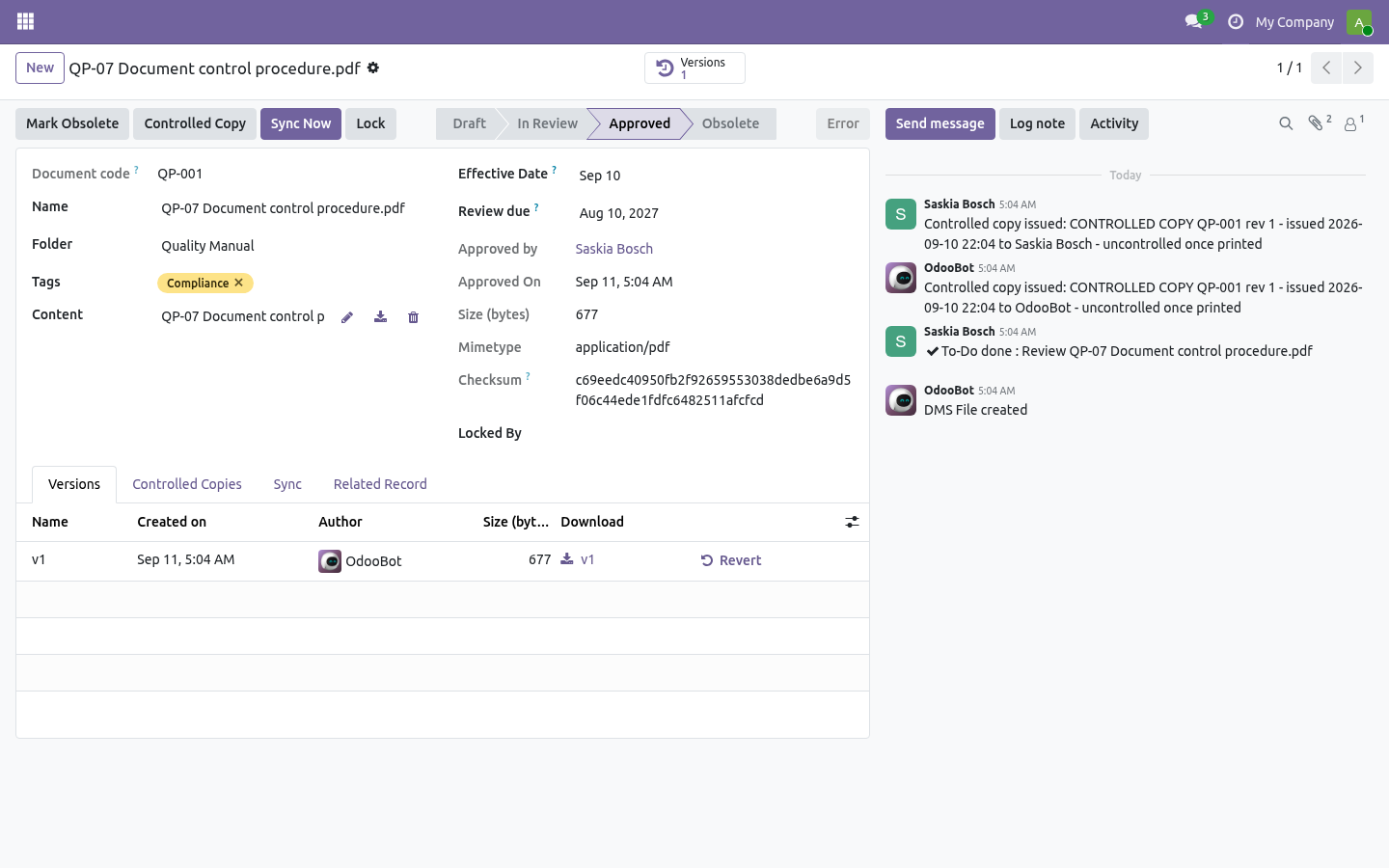
Every upload is a version; the Versions tab shows who, when, size and checksum, lets you download any of them and revert — which stacks the old content on top as a new version instead of rewriting history.
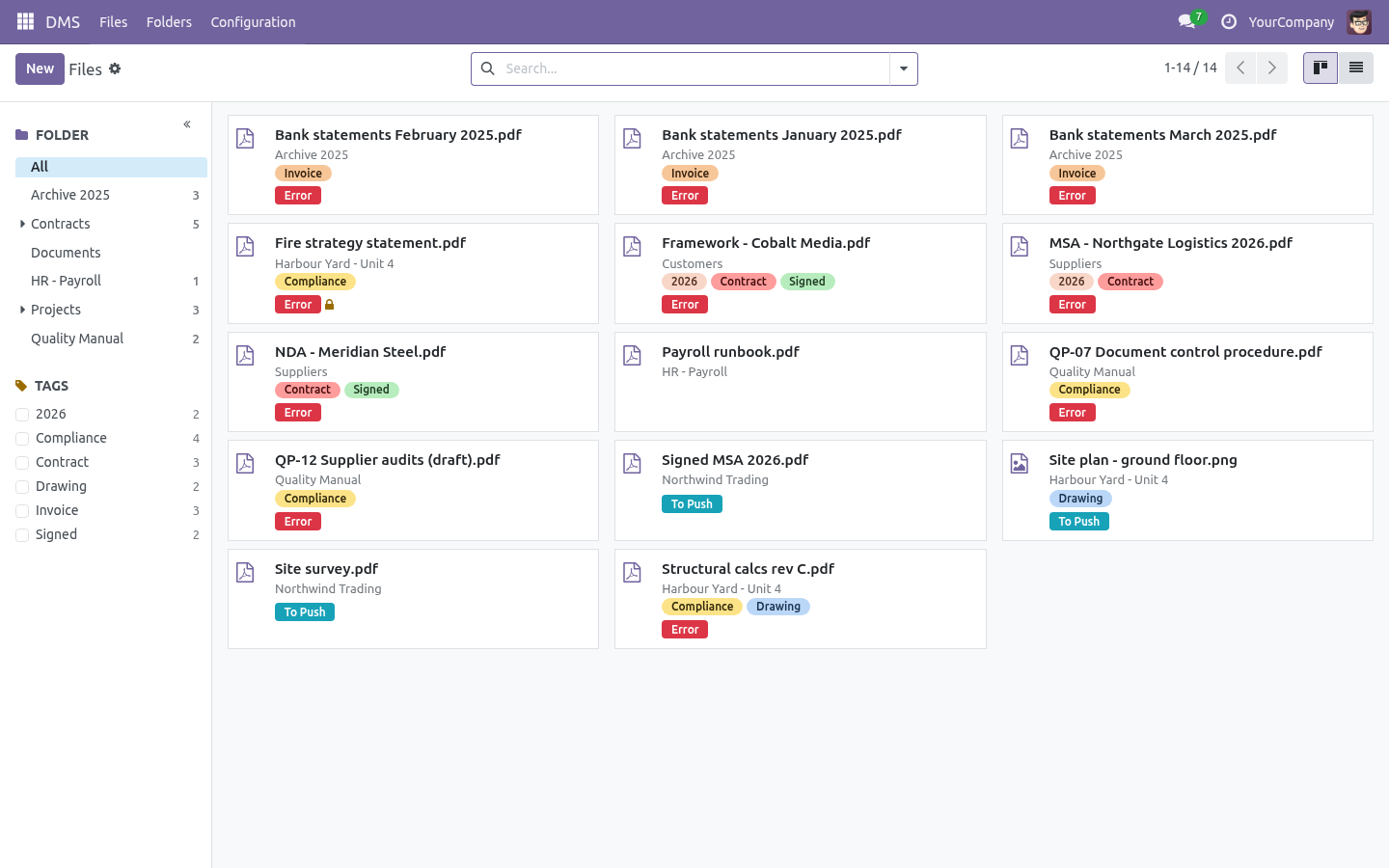
Lock a file while you work on it; other users cannot modify, move or delete it until you unlock (a manager can always break a lock).
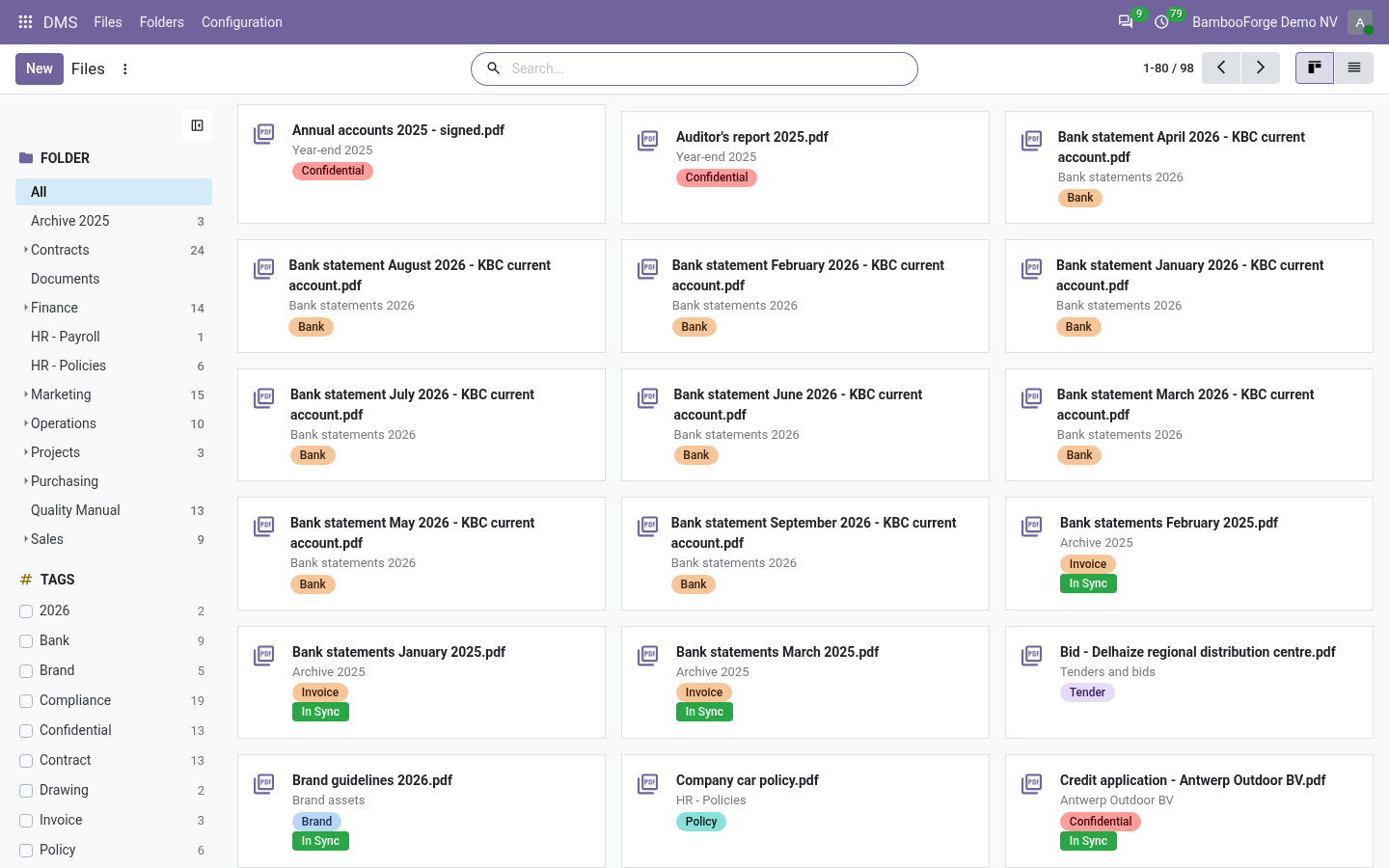
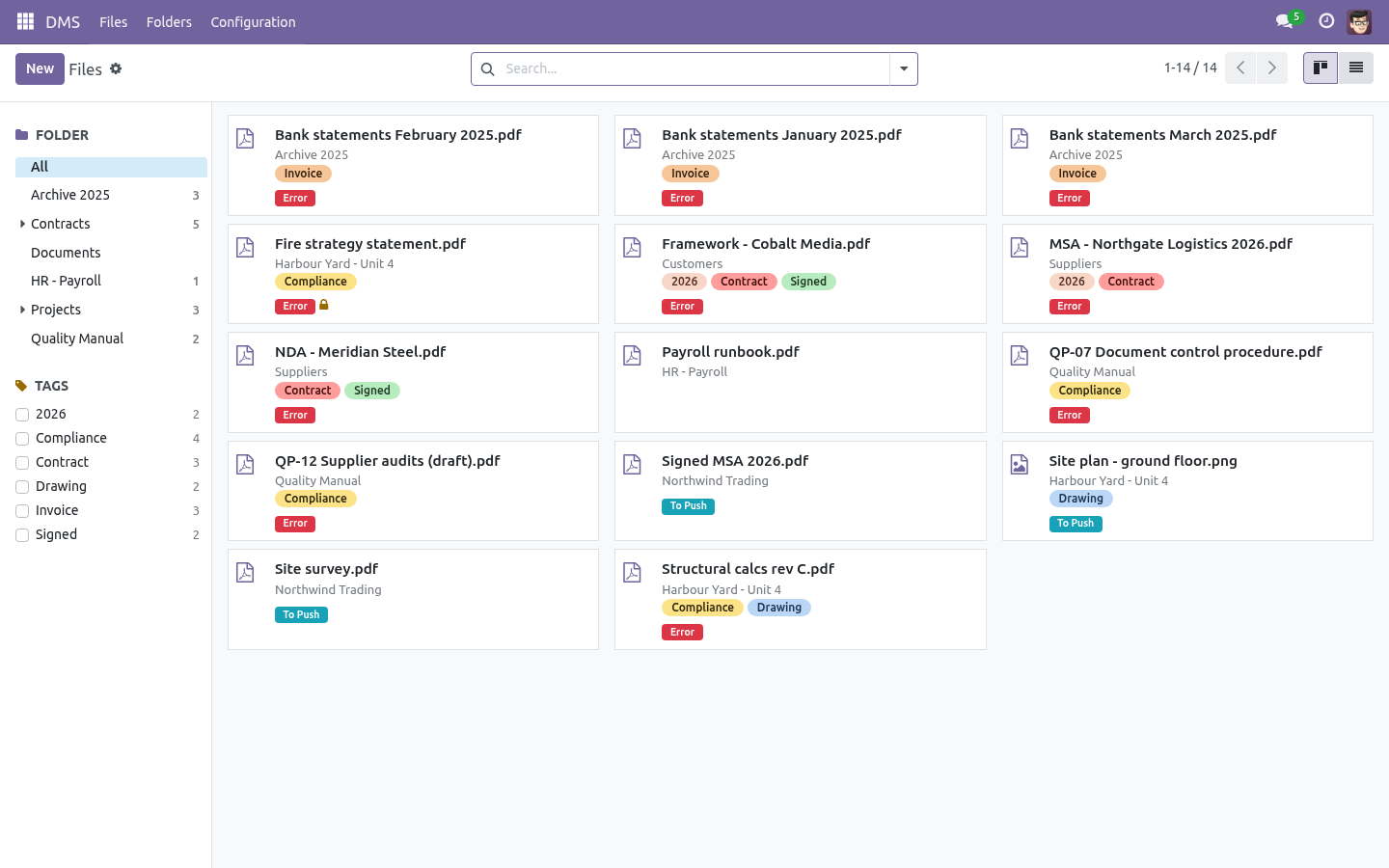
Tags and the folder panel on the left make the Files view a browser.
The Related Record tab links a file to any business document (an invoice, a project task…) and the smart button jumps straight to it.
sha256 checksums are computed on every version — the same fingerprint the sync engine uses to detect changes.
Storages
DMS → Configuration → Storages → New
Odoo filestore is the default: files stay local, nothing syncs.
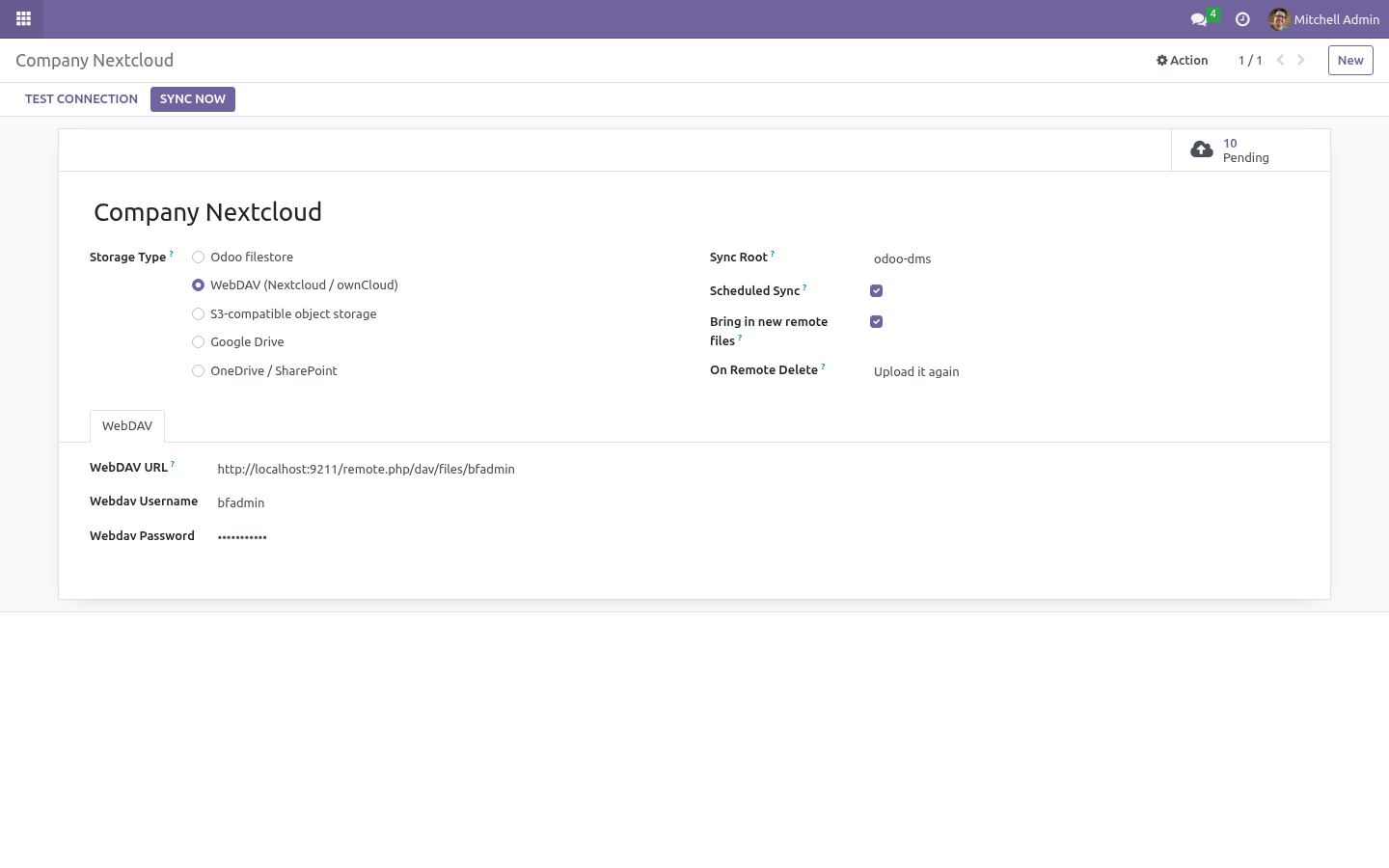
WebDAV (Nextcloud / ownCloud)
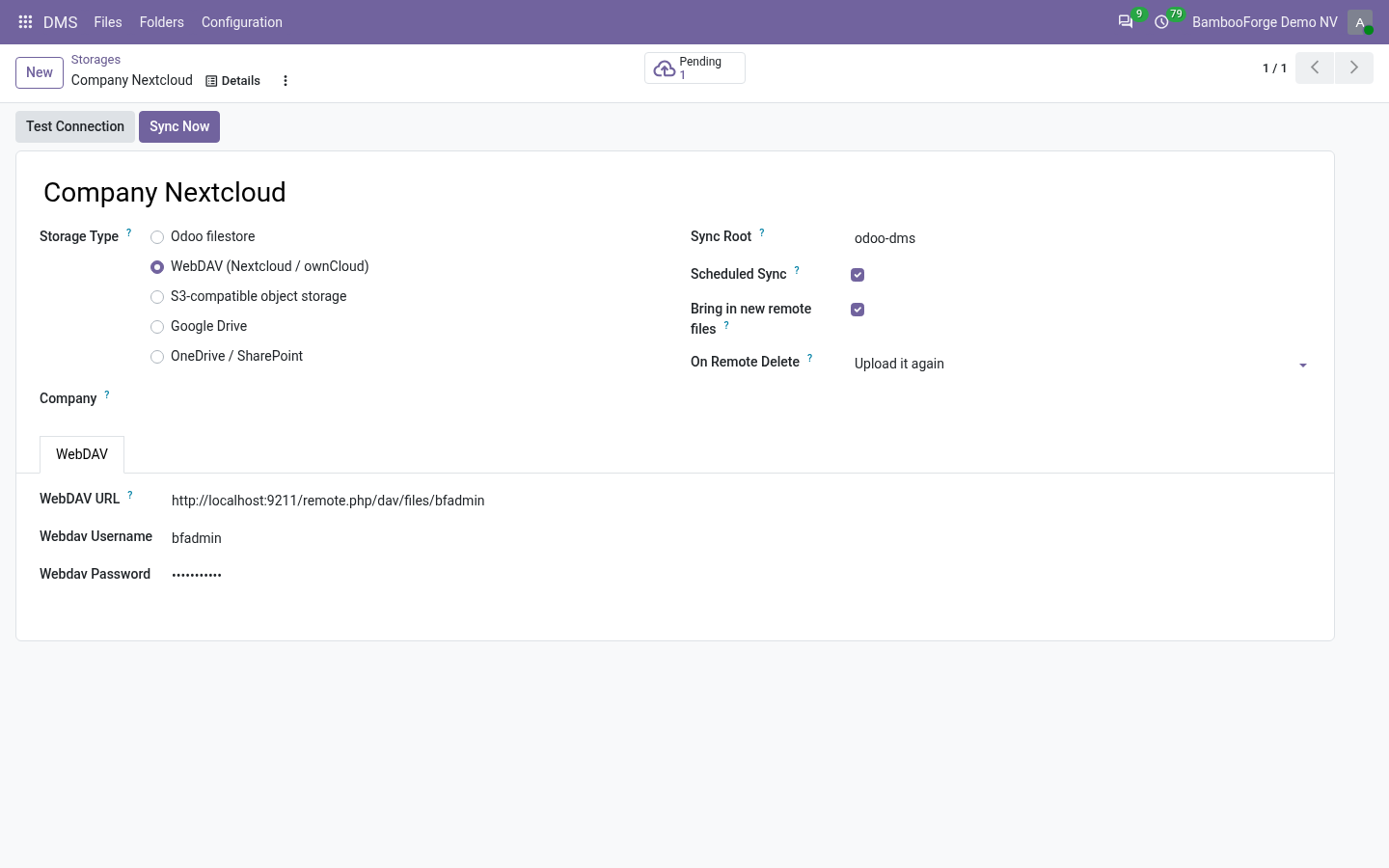
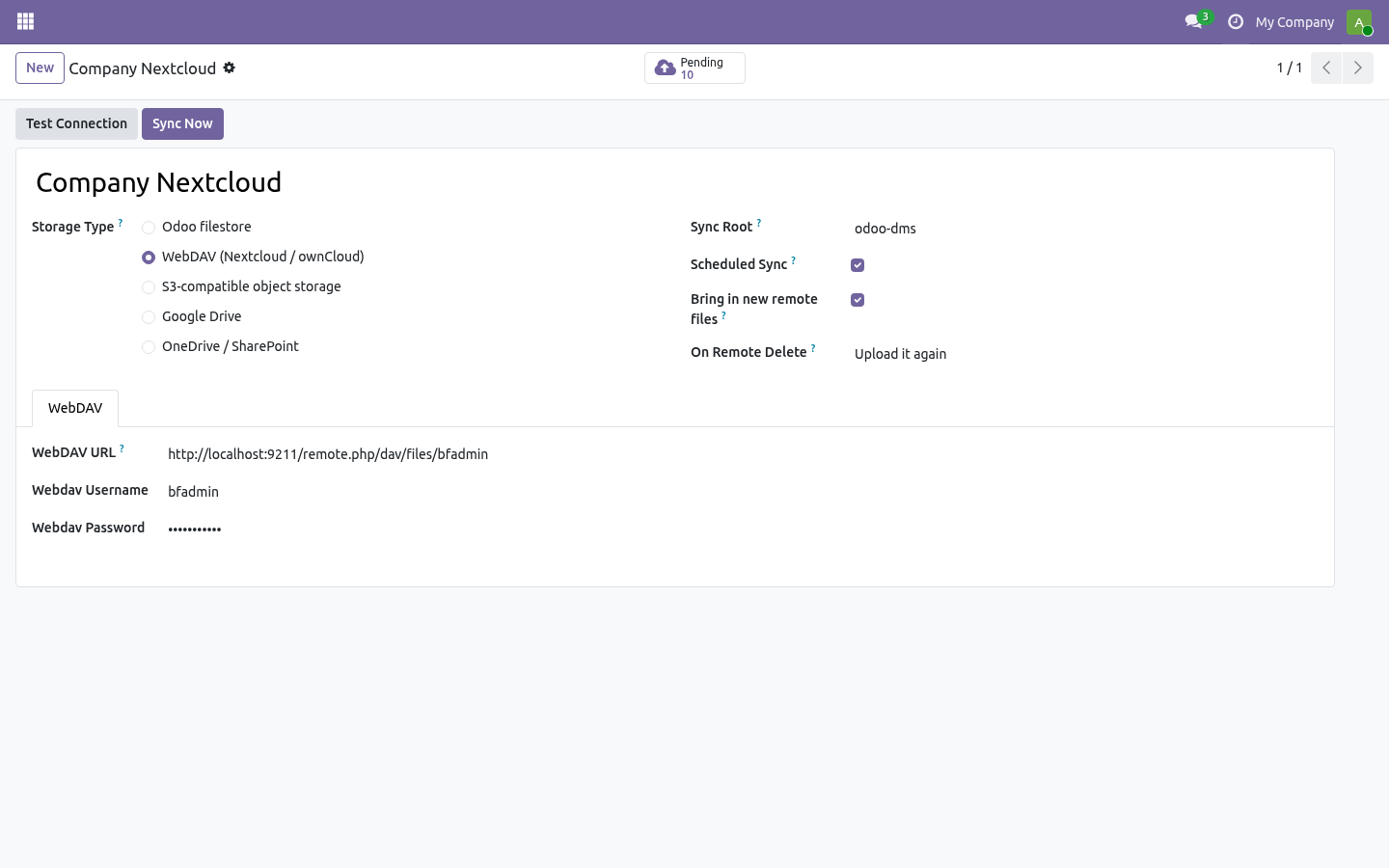
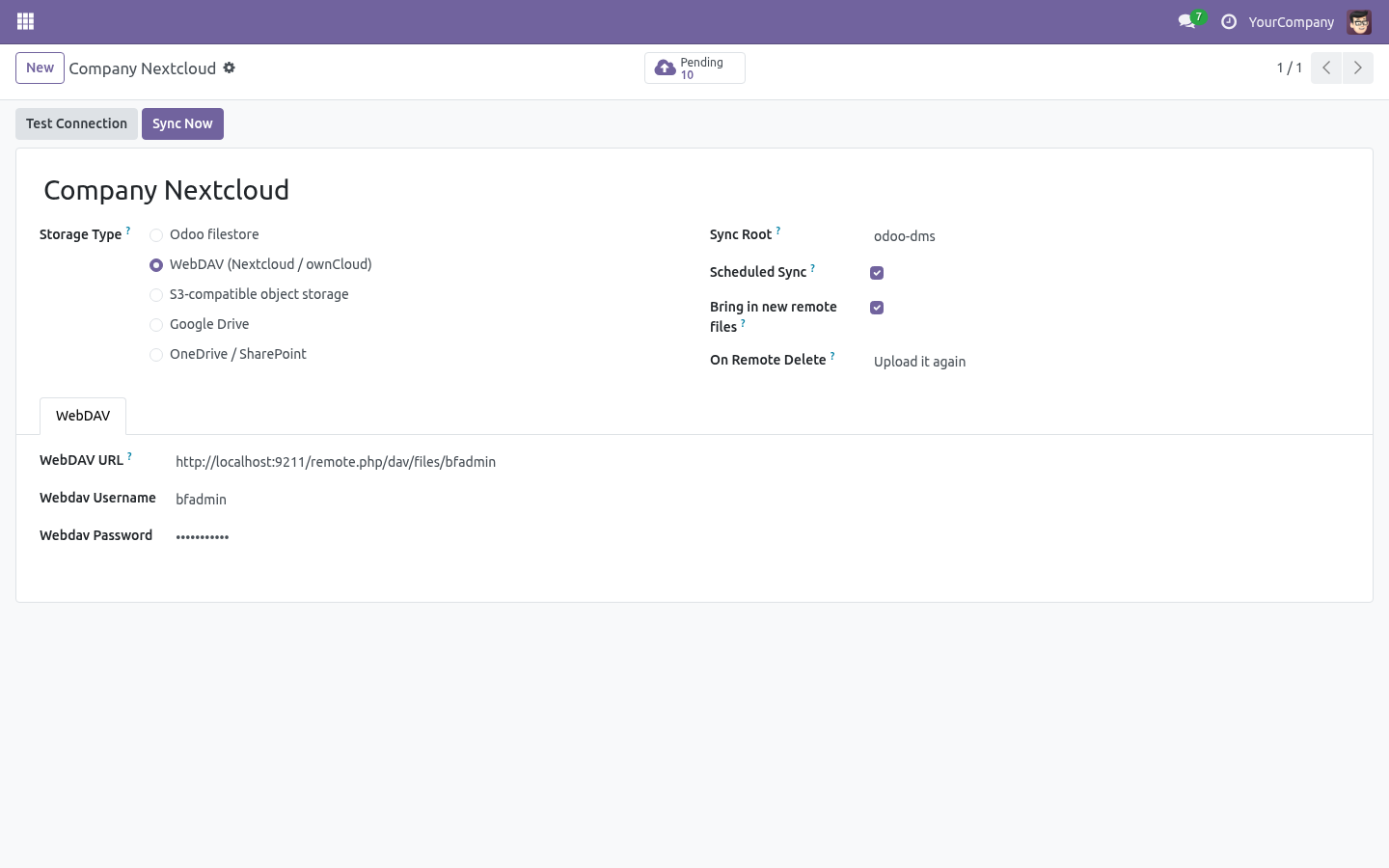
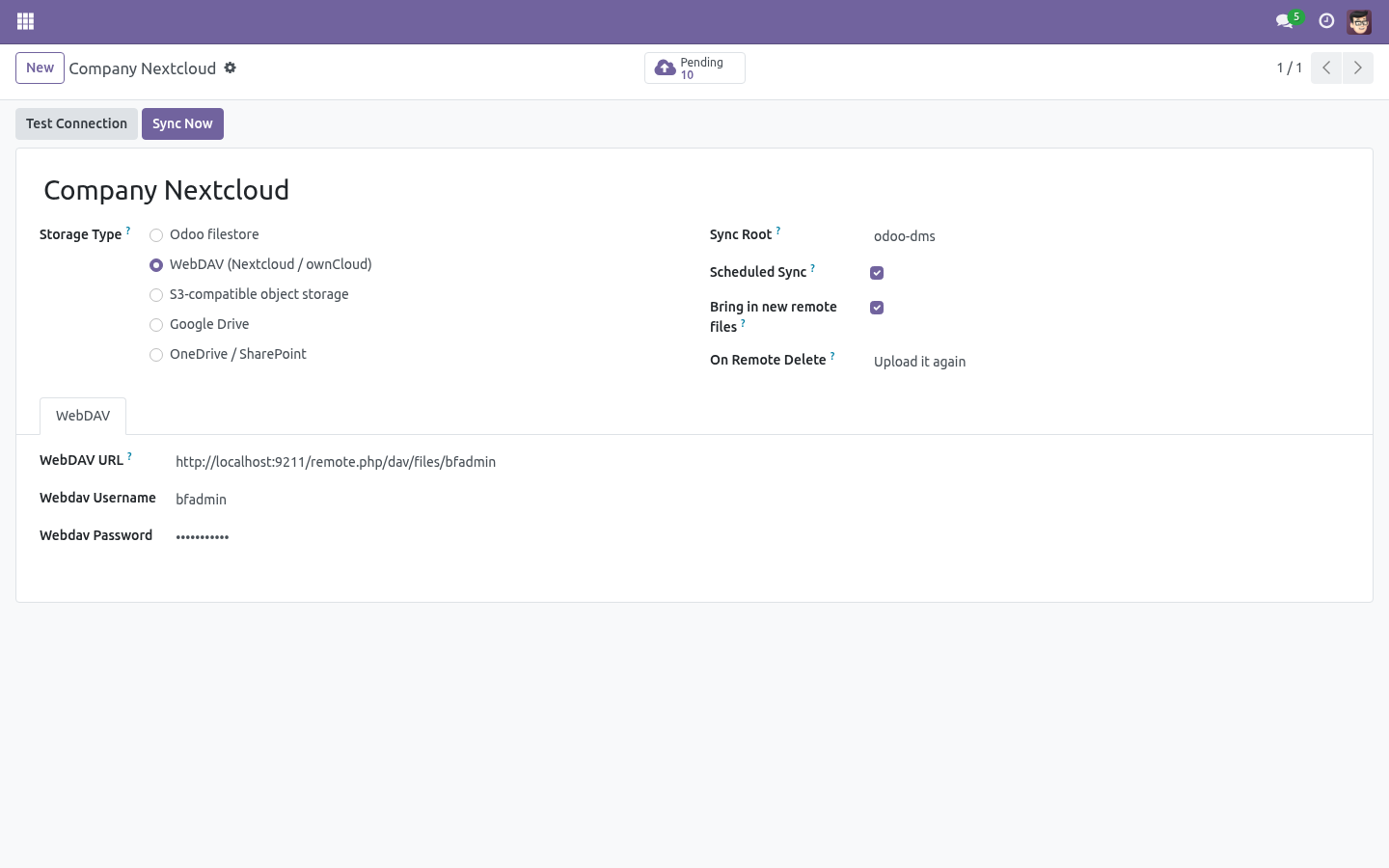
URL is the DAV files endpoint, e.g. https://cloud.example.com/remote.php/dav/files/odoo, plus the login of a dedicated sync user. Test Connection does a real PROPFIND.
Missing remote directories are created automatically (MKCOL) on the first push.
S3-compatible object storage
Works with AWS S3, MinIO, Wasabi and anything that speaks the S3 API. Endpoint, region, bucket and a key pair — that is all.
The Signature V4 signer is built into the module. No boto3, no extra Python packages on your server.
Common options:
Sync root — the remote directory / key prefix everything lives under.
Scheduled sync — untick to keep a storage manual-only.
On remote delete — when a file vanishes on the server, either upload it again (default) or archive it in Odoo and follow the remote's lead.
Day to day
The Files list shows each file's sync badge: To Push, In Sync, Conflict, Error. Filters for each are one click away.
Sync Now on a storage pushes everything pending and reconciles the rest; the same button on a single file does just that file.
The scheduled job DMS: sync cloud storages runs every 30 minutes and works through every storage with scheduled sync enabled. One broken server never starves the others.
Sync log rows older than 90 days are cleaned up automatically — except queued deletions, which are work, not history.
Limits, stated plainly
Sync is per-folder-tree by binding folders to a storage; there is no per-file cherry-picking.
Remote files that never existed in Odoo are brought in only where Bring in new remote files is ticked, on the storage or the folder; with it off the mirror is Odoo-outward, with remote edits (not remote creations) flowing back.
WebDAV servers that return no ETag get a synthetic one; change detection then relies on push bookkeeping only.
What changed in 1.1
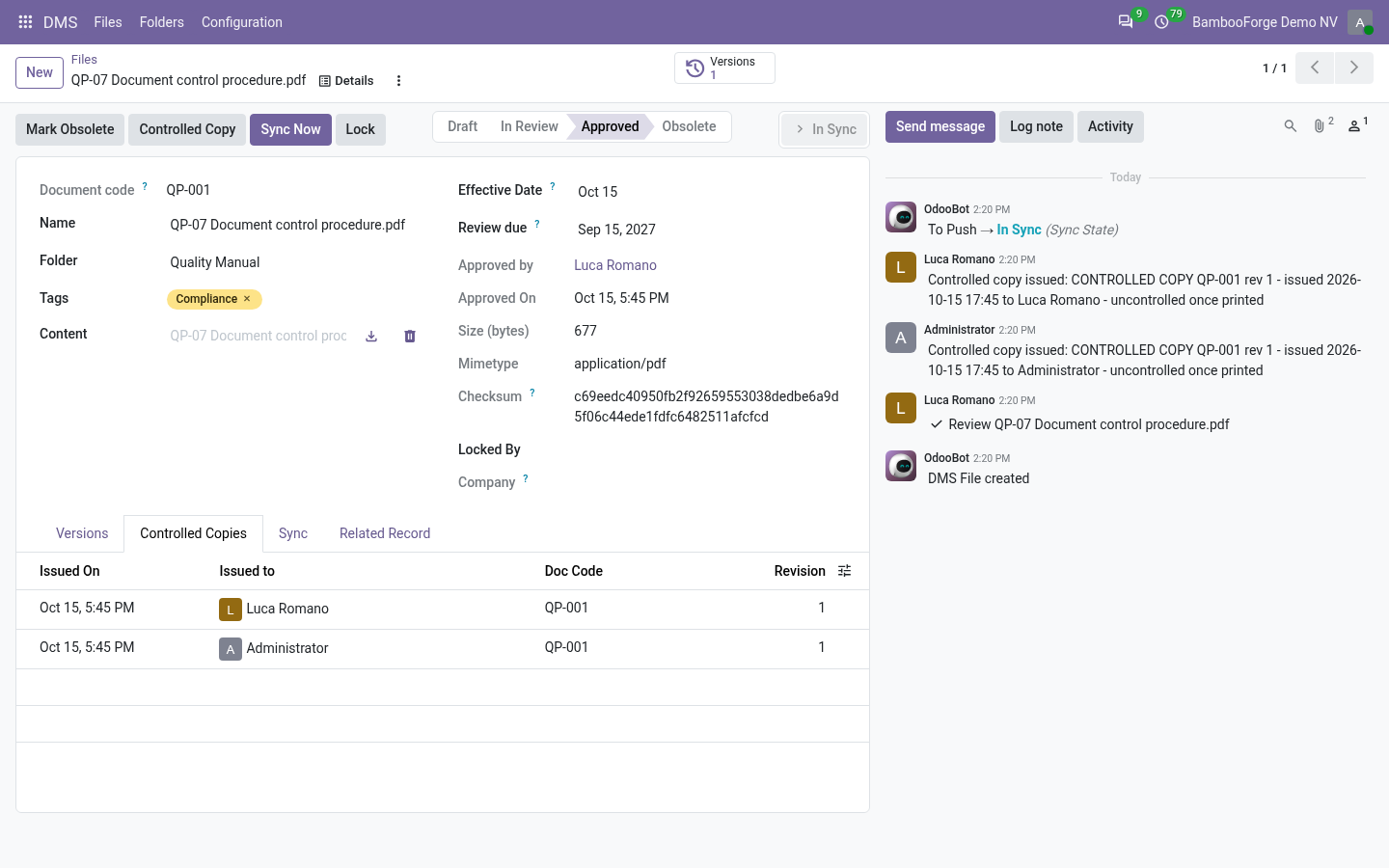
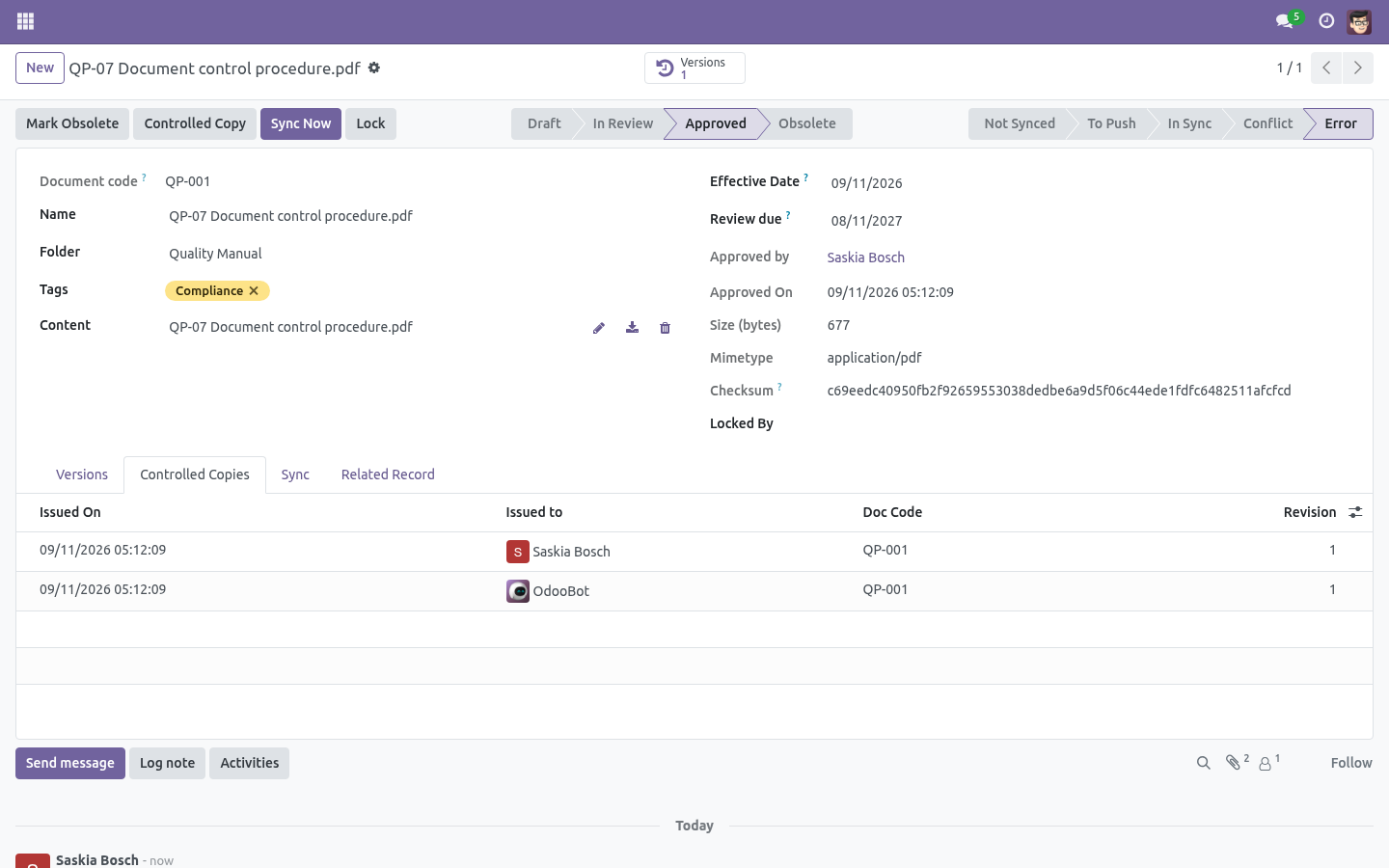
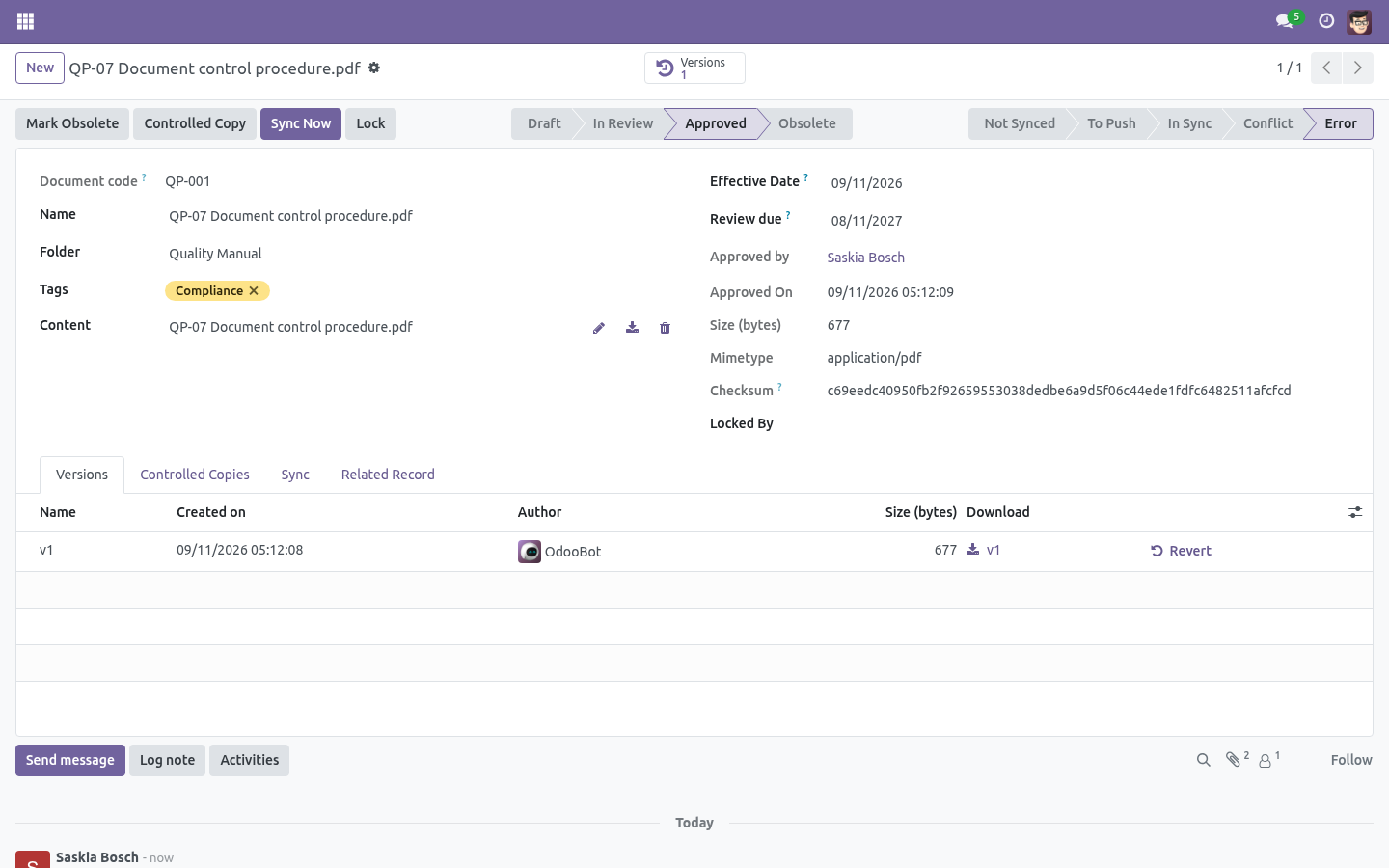
Controlled documents (ISO 9001). Folders can require approval: draft -> in review -> approved -> obsolete, with named approvers, an activity trail, and one honest rule - editing an approved file sends it back to draft, even when the new content arrived from the cloud sync. Review due dates remind the approver a week ahead.
Retention schedules (ISO 15489). A folder keeps its files n years (from upload or from the effective date); expiry flags the file and asks a person to archive or waive. Nothing is ever deleted automatically.
What changed in 1.2
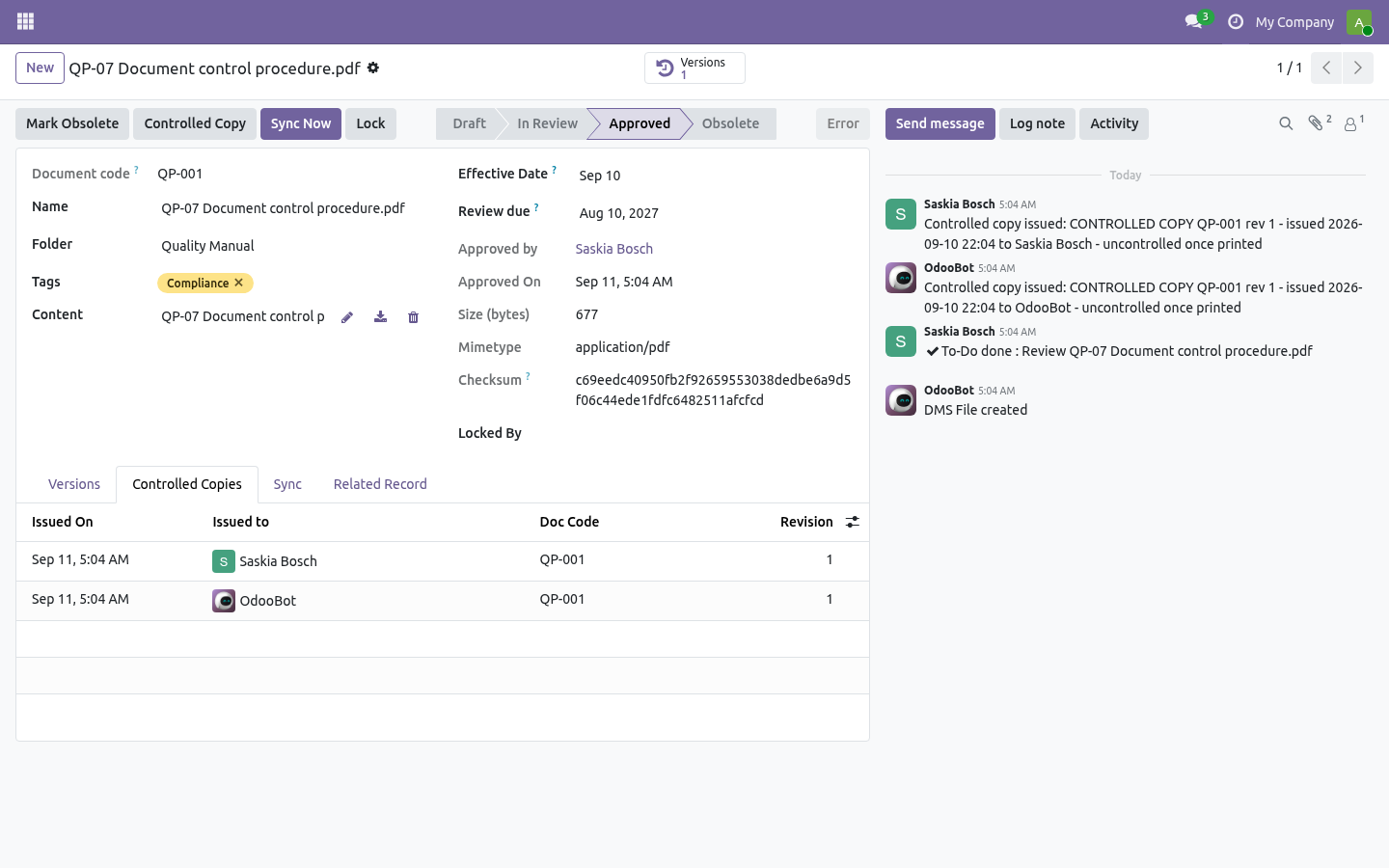
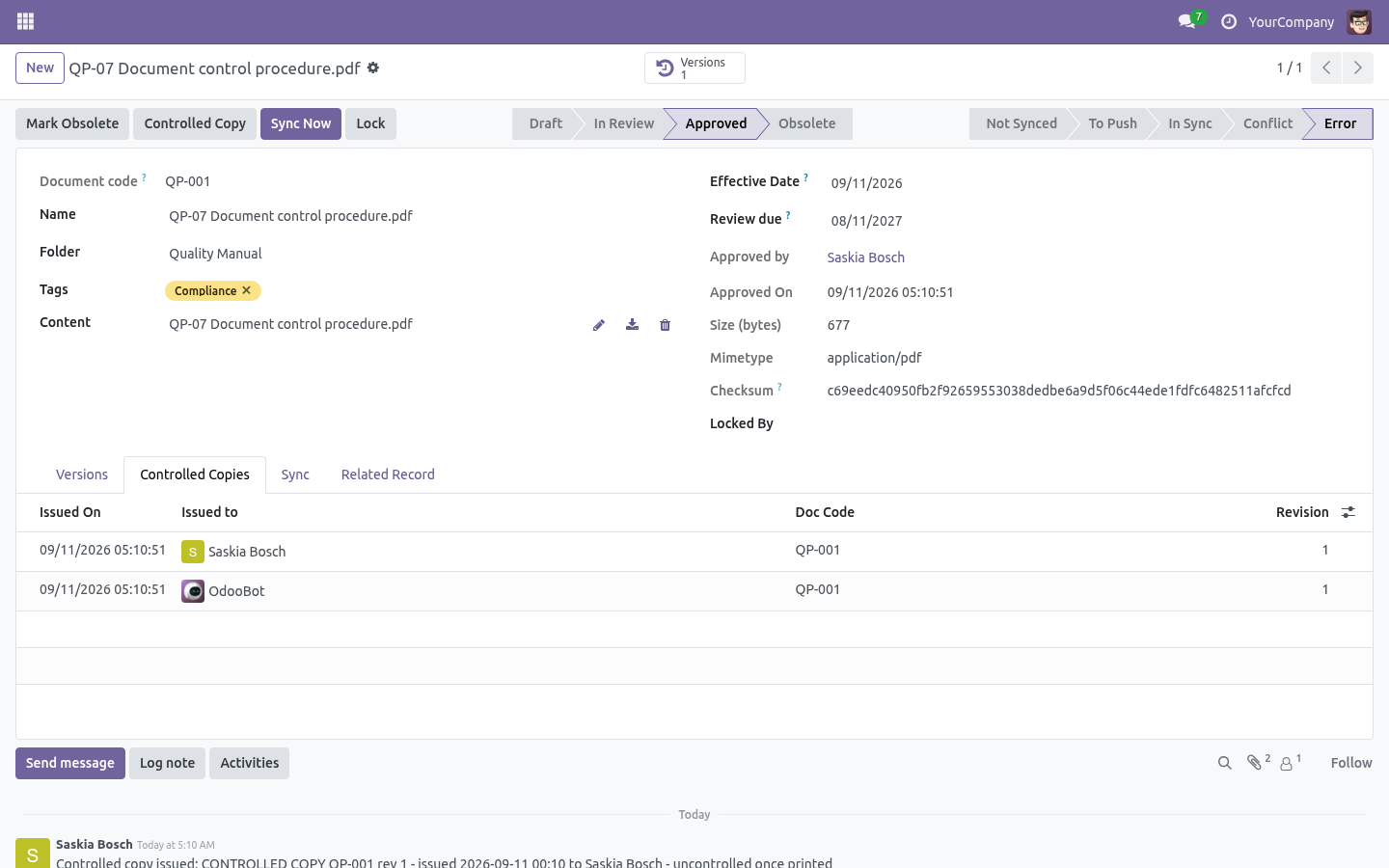
Document codes. Give a folder a prefix (QP, SOP, WI) and every file created there receives a sequential code - QP-001, QP-002 - independent of the filename, searchable, quotable in an audit.
Content search. Plain-text formats are indexed on upload and the Files search gains a Content filter; PDFs are indexed too when pdfminer.six is installed on the server (stated plainly: without it, PDFs are not).
What changed in 1.3
Controlled copies (ISO 9001 7.5.3). One button stamps an approved PDF on every page - document code, revision, who took it, when, and "uncontrolled once printed" - and writes the issue into a register on the document, so an auditor can see which revision is out there on paper. The register prunes itself after two years.
How we make sure it works
Before every release, 80 automated checks run against this app on Odoo 16, 17, 18, 19 and 20. Among them:
A dead server is one line in the log not one per folder.
A second rule for the same model is refused.
The sync engine does not know which cloud.
The dms own attachments are not documents.
A frozen folder keeps its name.
The complete list is in the source you receive.
Questions people ask
- Which Odoo versions does it run on?
Odoo 16.0, 17.0, 18.0, 19.0, 20.0, on the series you buy it for; each series is its own listing.
- Community or Enterprise?
Both. It needs no Enterprise app.
- What does it need?
The standard Discuss app. No extra Python package.
- Where does it show up?
Under the DMS menu (Files, Folders, Configuration).
- Does anything leave my server?
It makes calls outside your server only where its manual says so - read the section on that service before you connect it.
- What happens if I uninstall it?
Odoo drops the app's own tables and fields; the standard records it worked on (contacts, orders, products) stay as they are.
Support
support@bambooforge.dev — answered within two business days. This module is licensed OPL-1; one purchase covers one production database plus its staging copies.
A folder per record, both ways
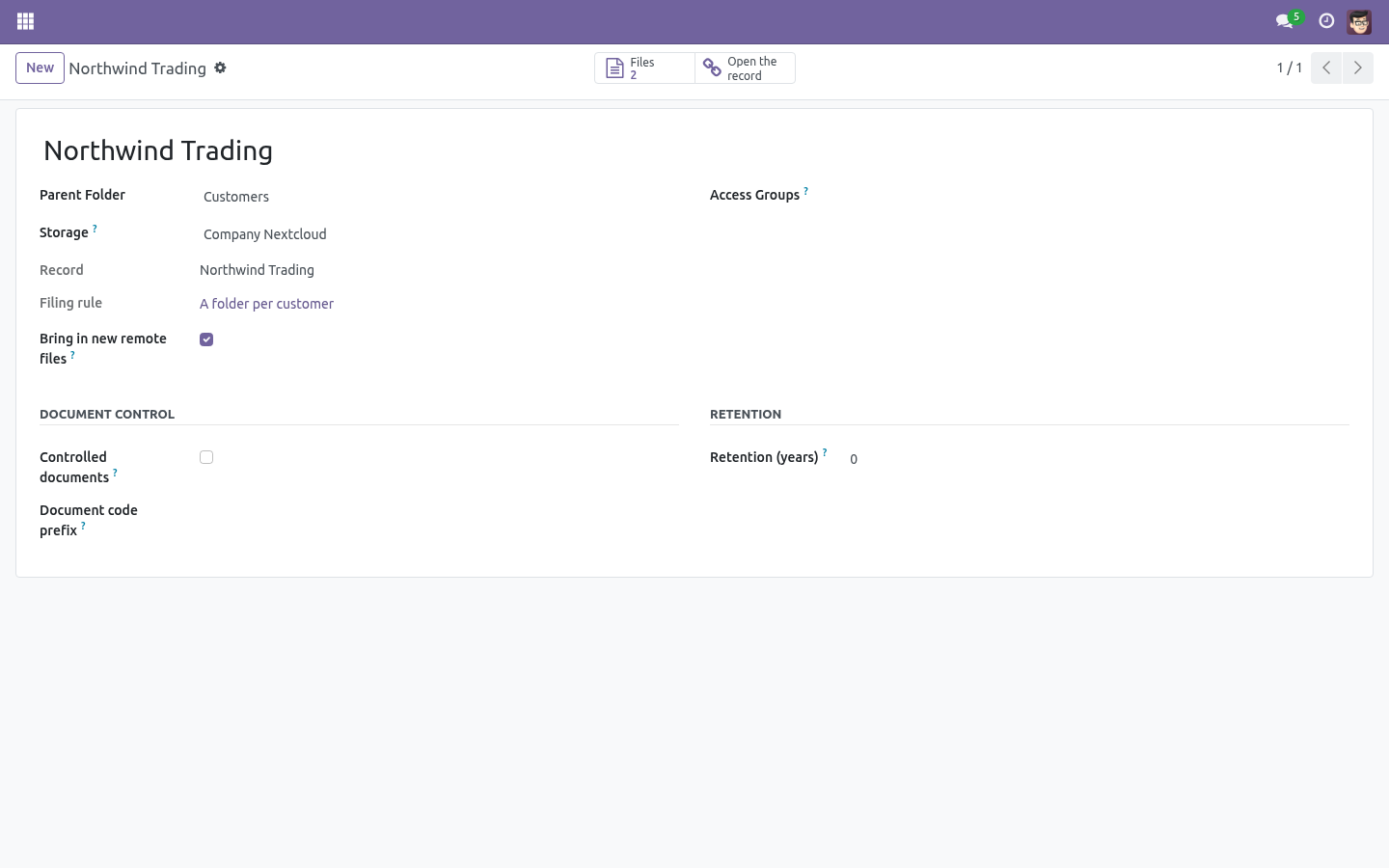
Configuration > Folder per record. Name a model, say which folder its records live under, and every record that matches gets a folder of its own:
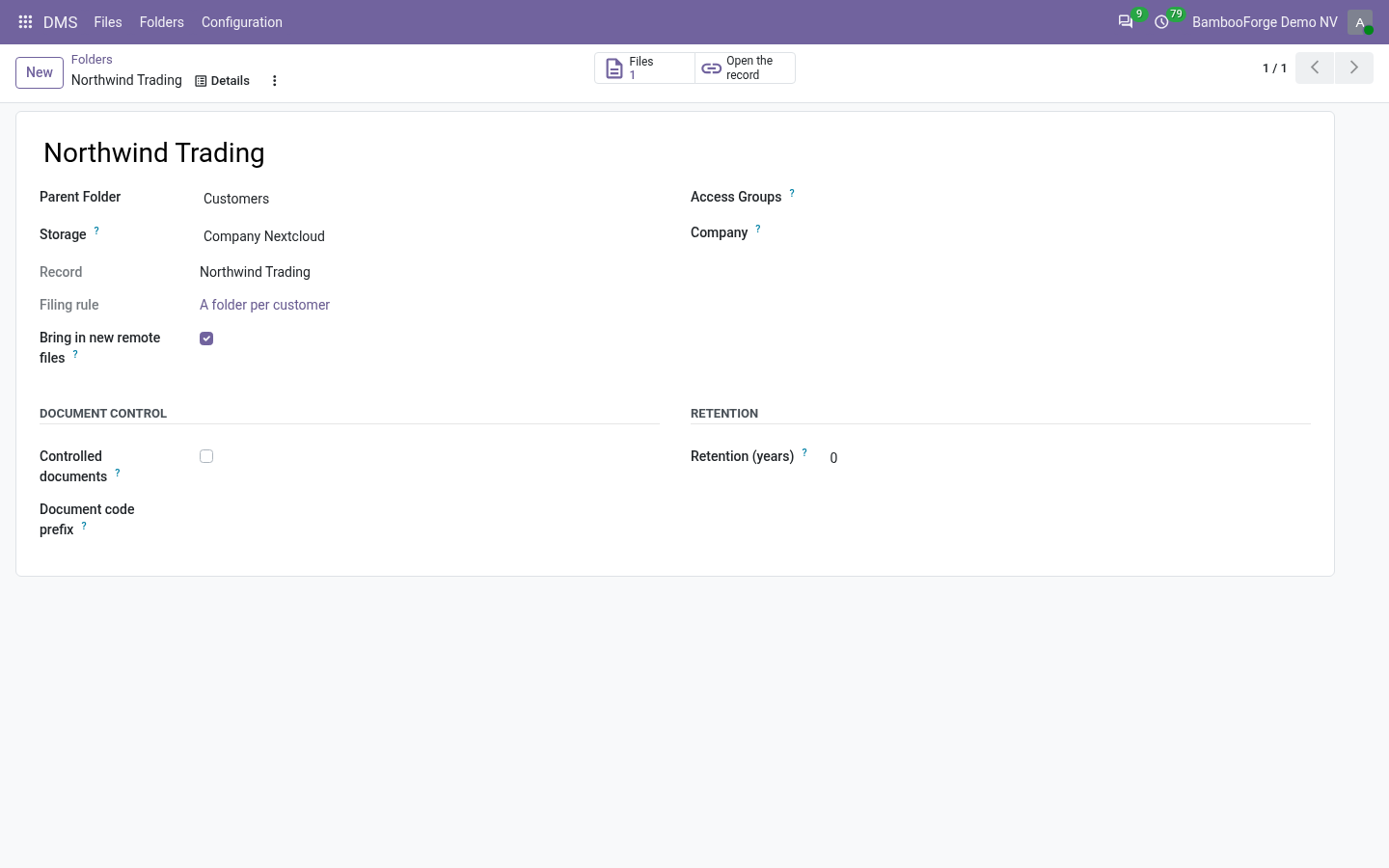
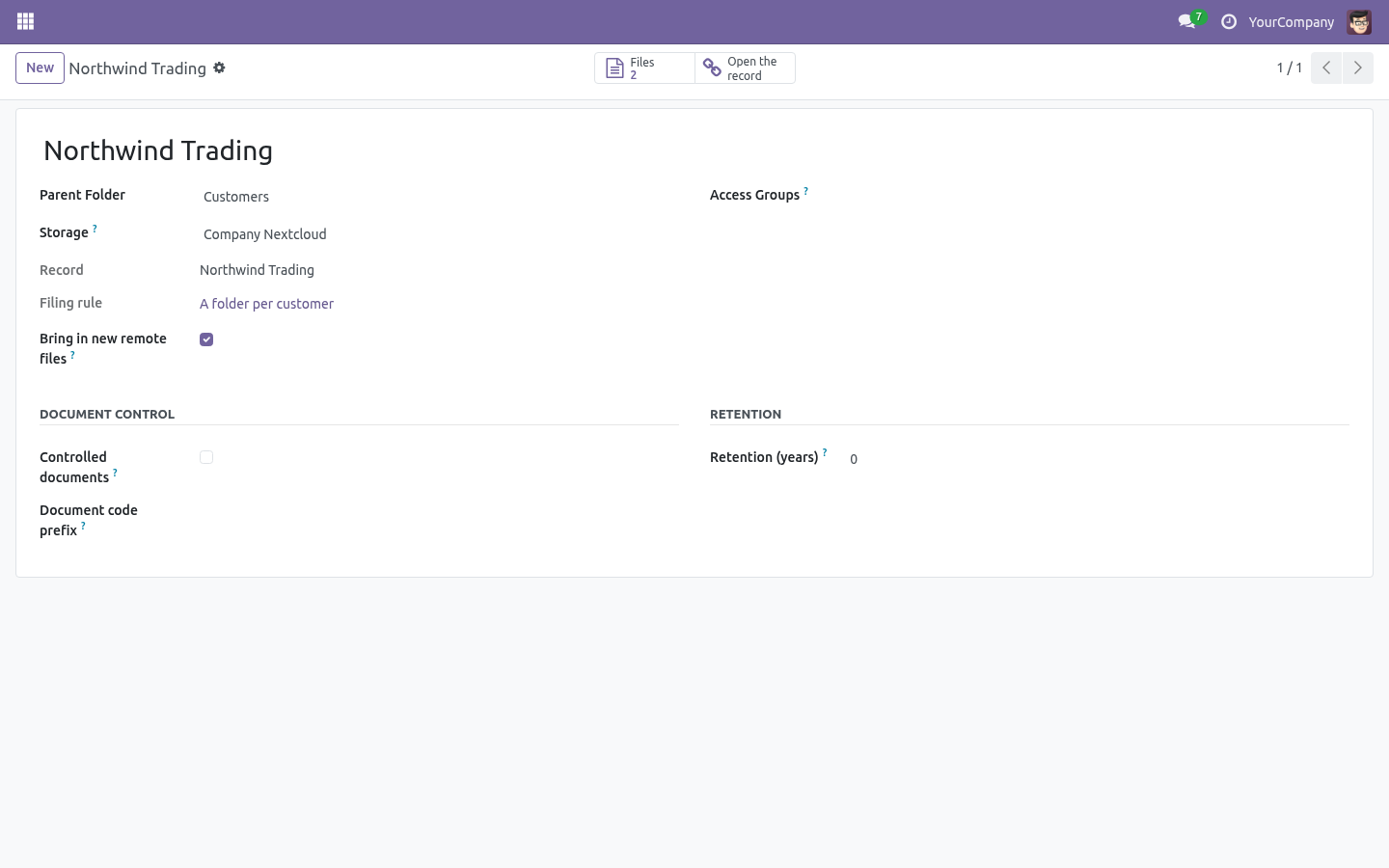
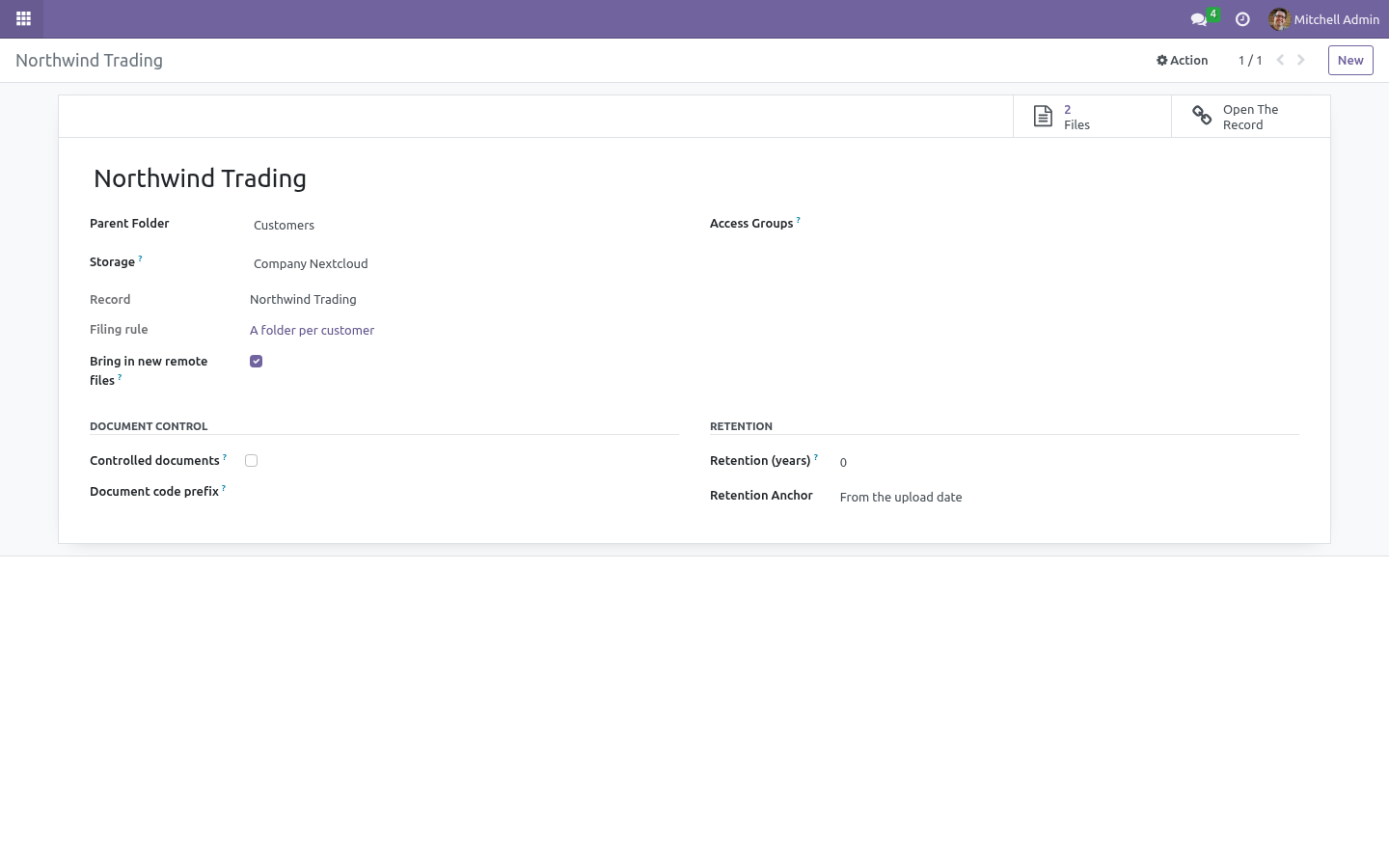
Customers > Northwind Trading, Projects > Customer Portal 2.0, Employees > Ada Boateng. The folder is made the first time a document arrives, or all at once with File what is already there when you write the rule for a model that has eight years of attachments behind it.
The name comes from a pattern - {display_name} by default, or {ref} - {name}, or any field of the record in braces. A record renamed renames its folder overnight, and the files move with it on the next sync. Two customers really called Delta Ltd get two folders, because a folder name is unique among its siblings.
The folder is a DMS folder like any other: access groups, retention, document control, and the storage of its parent - so a folder per customer on a Google Drive or SharePoint storage is a folder per customer on Google Drive or SharePoint.
With Mirror attachments on, the documents travel both ways:
an attachment on the record becomes a file in the record's folder - versioned, tagged, retained and synced, instead of living in a chatter nobody backs up;
a file put in the record's folder becomes an attachment on the record, where the salesperson works;
a file dropped into that folder on Drive, SharePoint, OneDrive or Nextcloud by somebody who has never seen Odoo is brought in by the next sync run and lands on the record like the others.
That last one is what Bring in new remote files does, on the storage and on each folder. Each sync run lists what is in the remote folder, and anything Odoo has never seen is created here - already marked as synced against the remote copy, so it is not pushed straight back over the file somebody has just put there. Untick it for a bucket that other systems write and nobody here reads.
Deleting the document in the DMS takes the copy off the record. Deleting the attachment on the record leaves the document in the DMS: the filing system is the archive, and an archive that empties itself when somebody tidies a chatter is not one.
What changed in 1.4
Google Drive and OneDrive / SharePoint as storage back-ends: the company's own OAuth app, Connect once, the same two-way sync, conflict rule and ledger as WebDAV and S3.
What changed in 1.5
A folder per record: a rule per model - Customers, Projects, Employees - with the folder named from the record and renamed with it.
Documents both ways: an attachment on the record is a file in its folder, a file in the folder is an attachment on the record, and a file dropped into that folder on Drive, SharePoint, OneDrive or Nextcloud is brought in by the next sync and lands on the record.