 BambooForge Labs
Warehouse Barcode Scanner (WMS)
Scan receipts, deliveries and internal transfers on a phone or handheld, with a log of every scan - the refused ones included. Community only.
Available for Odoo 16.0, Odoo 17.0, Odoo 18.0, Odoo 19.0, Odoo 20.0. Technical name bambooforge_wms_scan.
Transcript of the walkthrough (Odoo 20)
Warehouse Barcode Scanner (WMS). Scan receipts, deliveries and internal transfers on a phone or handheld, with a log of every scan - the refused ones included. Community only. Said before you buy, because it is the half that decides whether the app fits: In the next few minutes: warehouse barcode scanner (wms), then it starts at zero, then scan where you are, what you hold, then what you pick, then what it refuses, out loud, then every scan is written down, the refusals included.
Then what this app deliberately does not do, so you can tell before you buy whether it fits. Everything lives under Sessions then Every Scan then Scanning. 1. Copy bambooforge_wms_scan into your addons path and update the app list, or install the ZIP from the Odoo Apps Store.
2. Install Warehouse Barcode Scanner (WMS). 3. Open Sessions - its menus are Every Scan, Scanning.
Warehouse Barcode Scanner (WMS). Odoo's Barcode app is Enterprise. Community ships the pieces — the barcode service, the camera scanner, the ZXing library — and no screen to use them on. This is that screen, and the rules behind it.
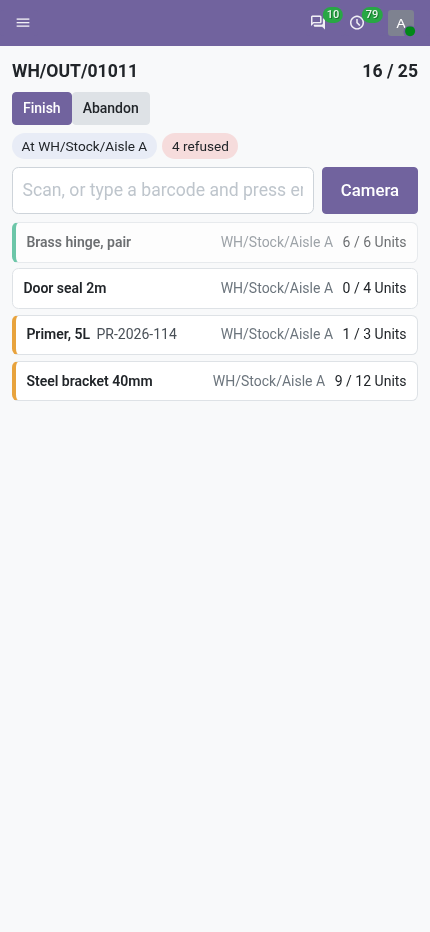
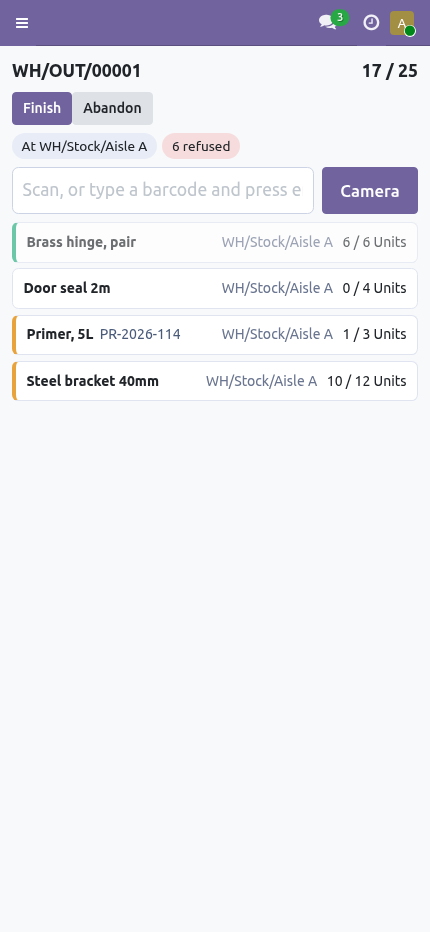
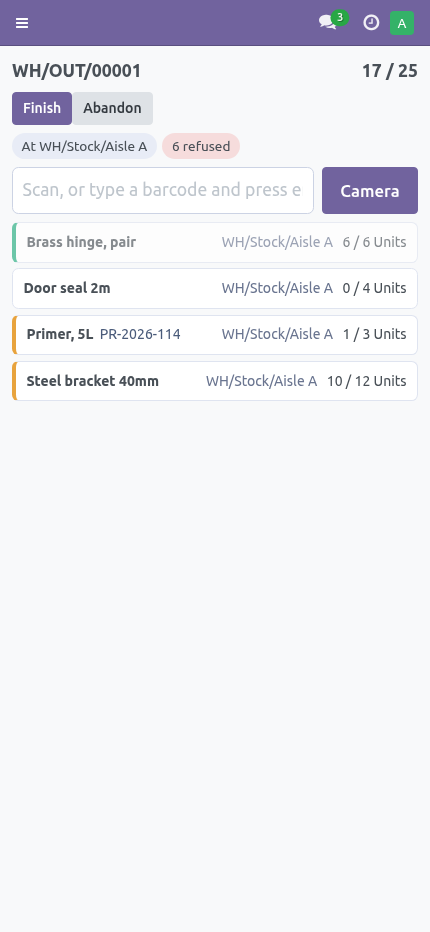
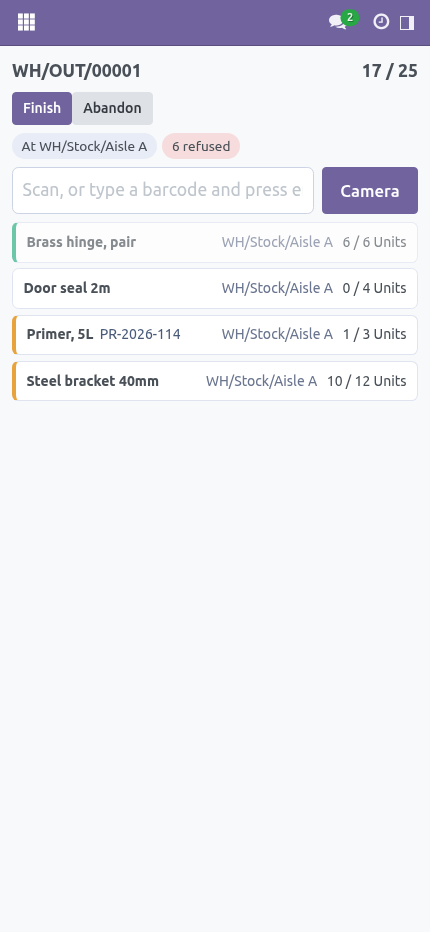
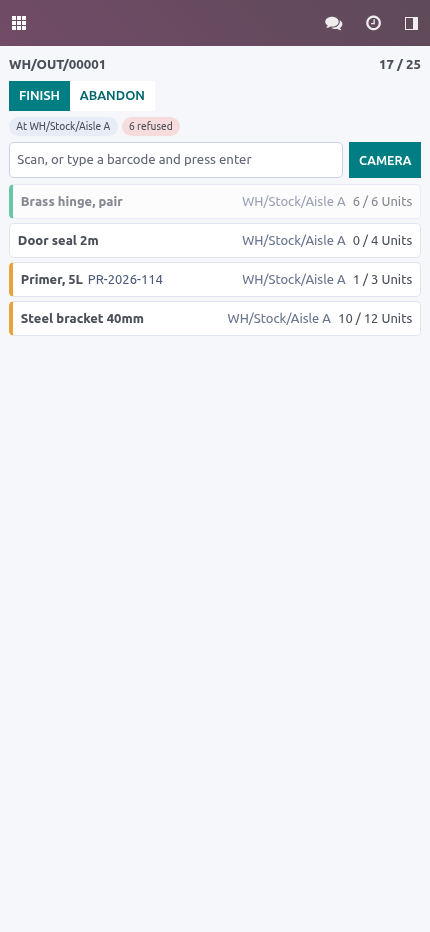
It starts at zero. Opening a session clears the quantities on the transfer and counts up from nothing. That is the whole difference between a scanner and a rubber stamp. From 17.0 on, Odoo pre-fills the quantity on every move line from what it reserved, so a screen that simply shows those numbers reports the transfer complete before anybody has touched a box.
What ends up on the transfer here is what somebody actually put in the box. Scan where you are, what you hold, then what you pick. The lot in your hand is spent as soon as it is used. A lot that stays selected is how the second pallet ends up under the first pallet's number.
A location says where you are standing. A lot or a serial says what you are holding. A product goes on the right line — the one at your location, under the lot in your hand, that still has room. A hardware scanner and the camera both work, on the same screen, on a phone or on a handheld.
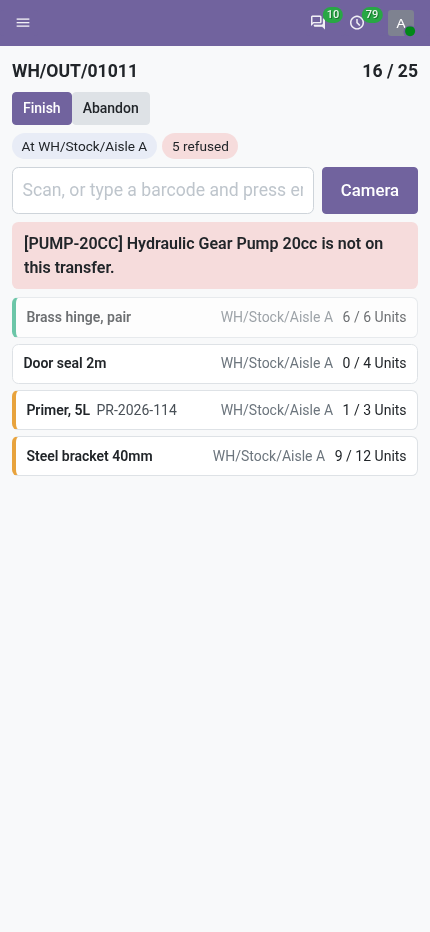
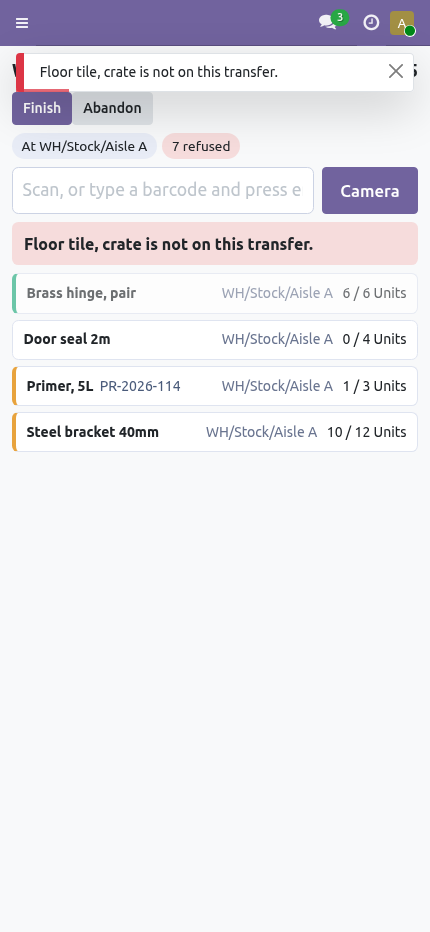
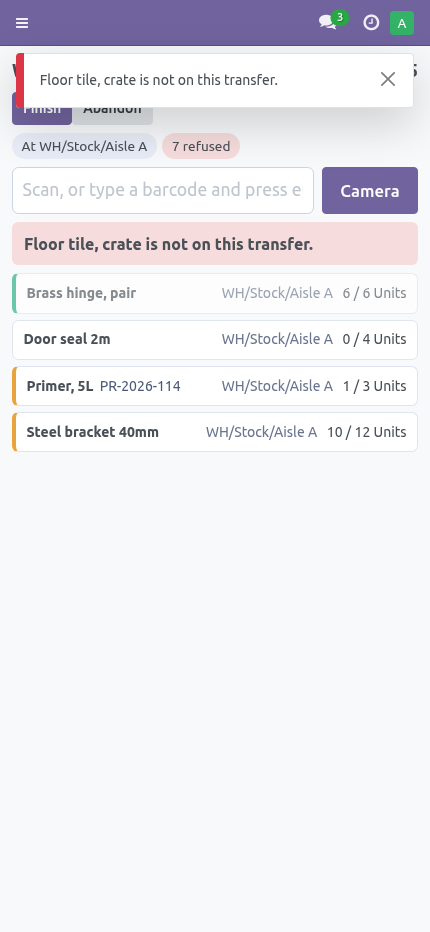
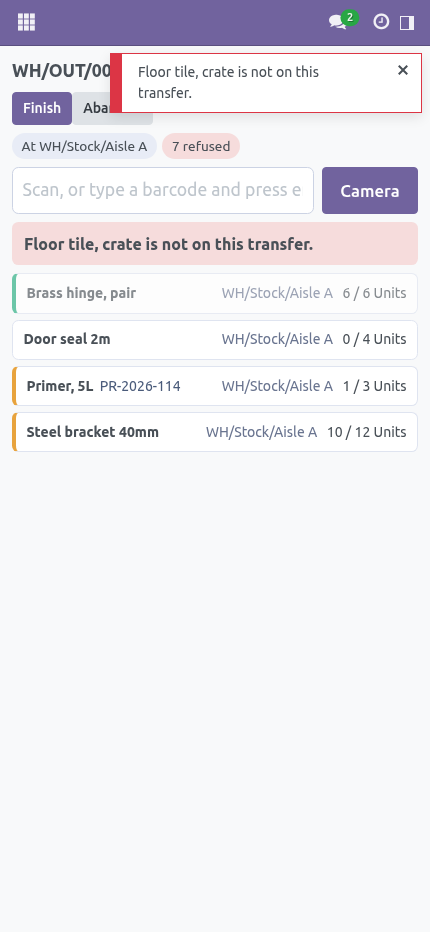
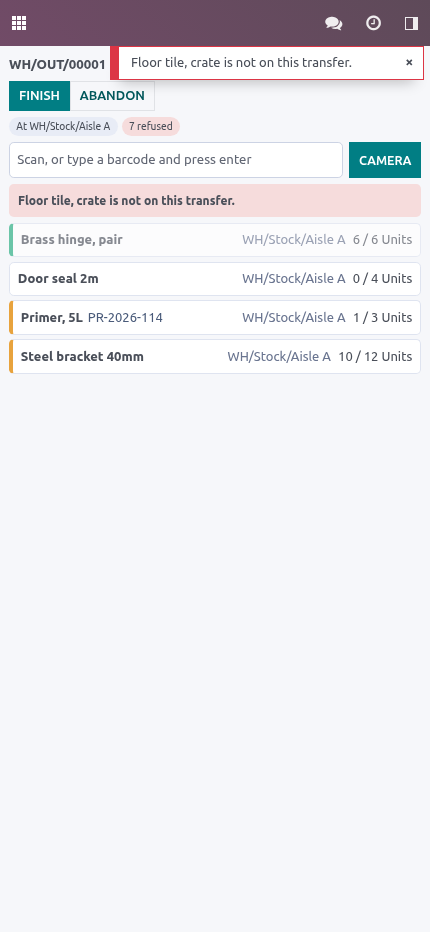
What it refuses, out loud A product that is not on this transfer. A product that is already complete — unless somebody has turned on allow more than asked, and then it is taken and recorded as such, never taken quietly. A tracked product with no lot in your hand, and a lot that belongs to a different product than the one just scanned. A serial scanned twice.
A serial number is one thing. A package, which says so rather than going silent — the products inside it are what this screen counts. A second person on a transfer somebody else is already scanning. Two people on one transfer count the same pallet twice, and neither of them finds out until it is short.
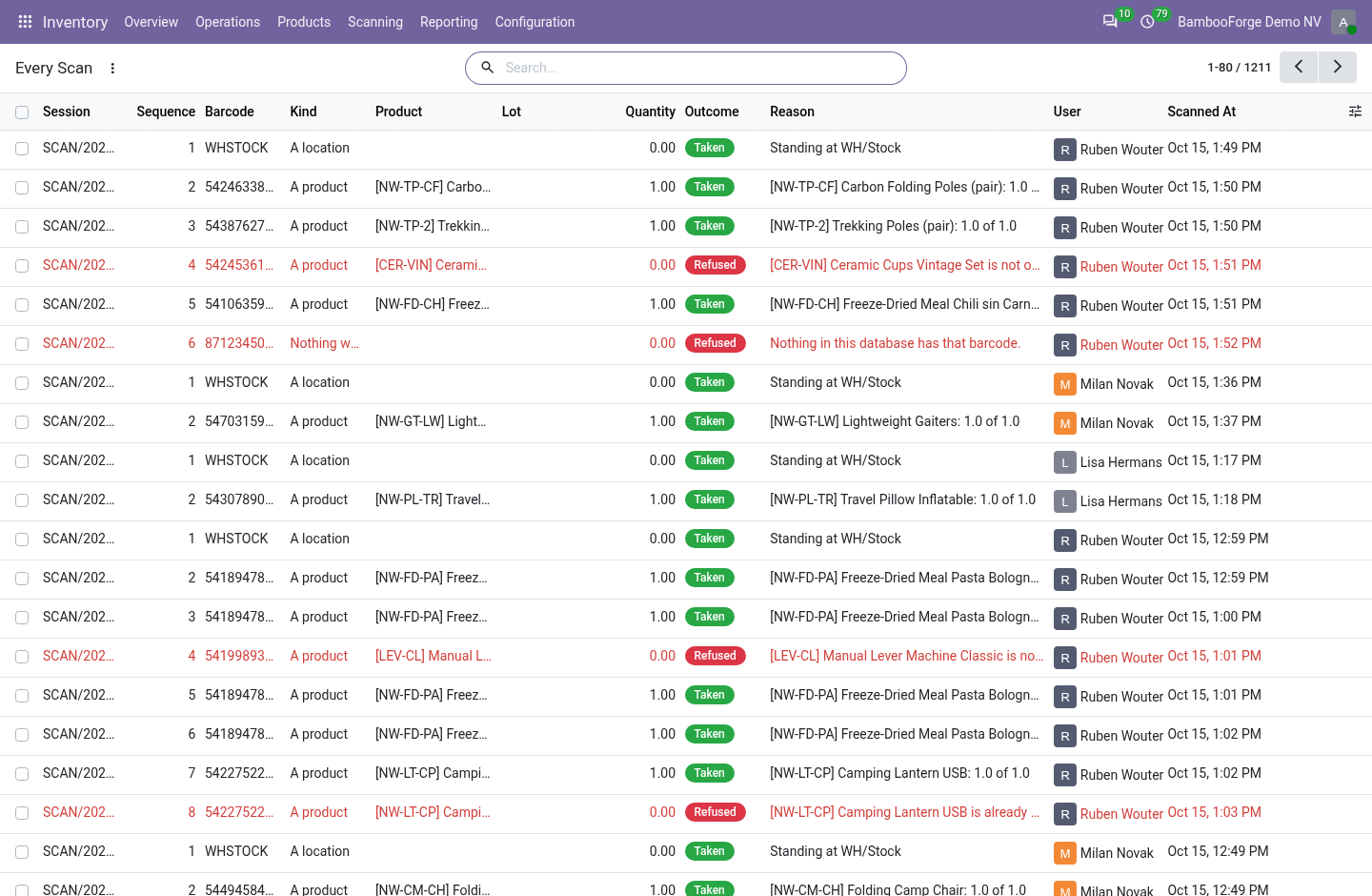
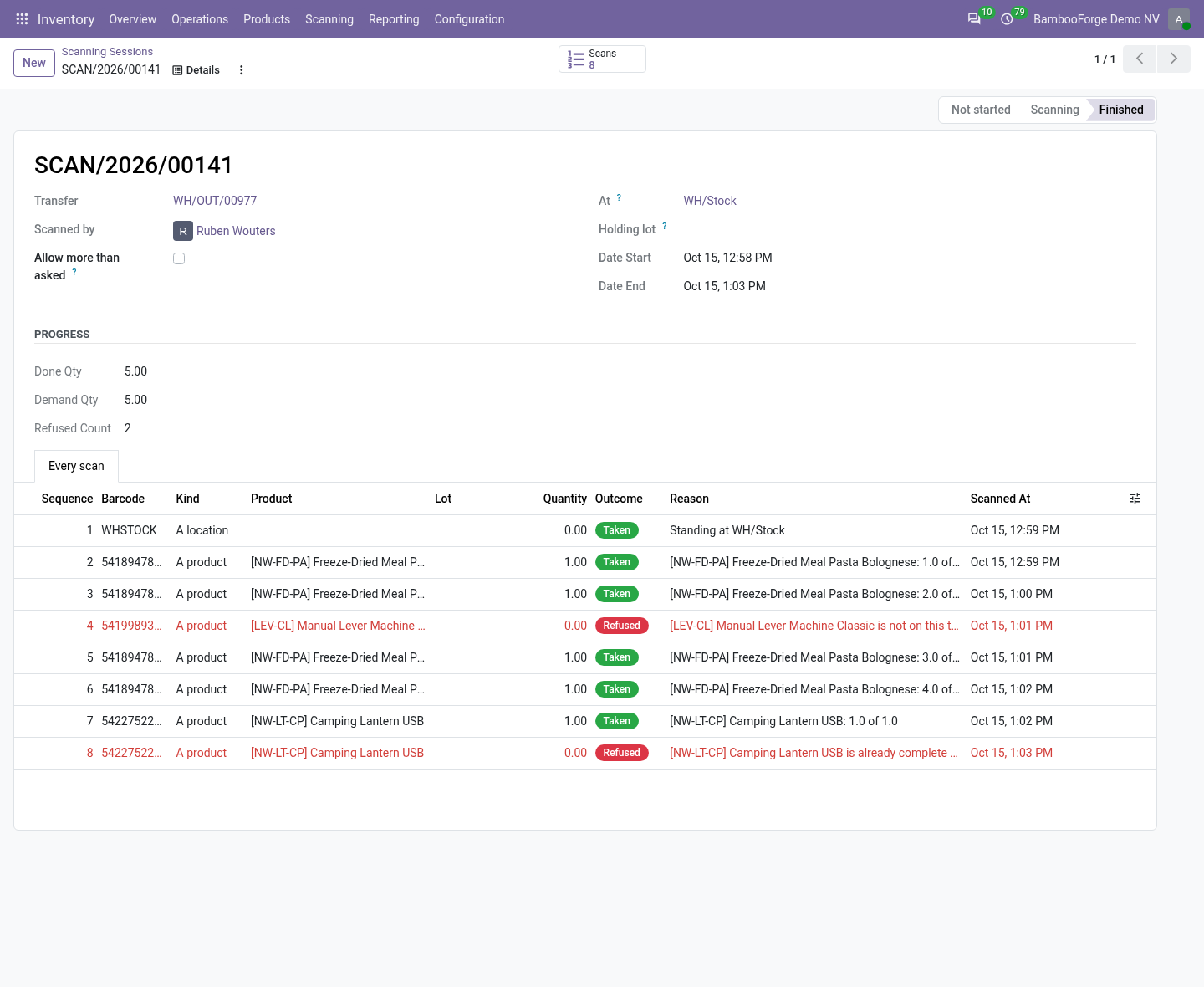
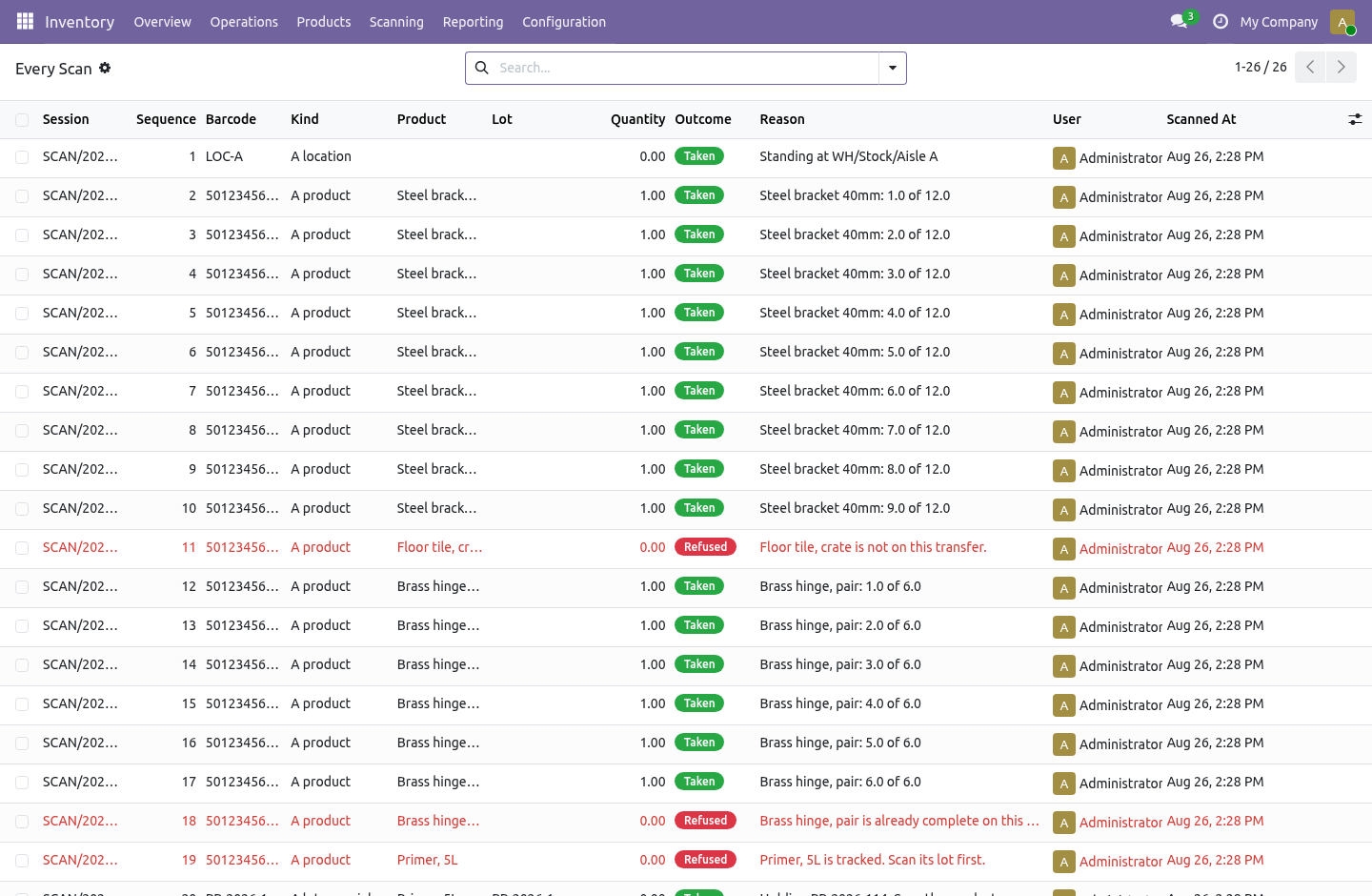
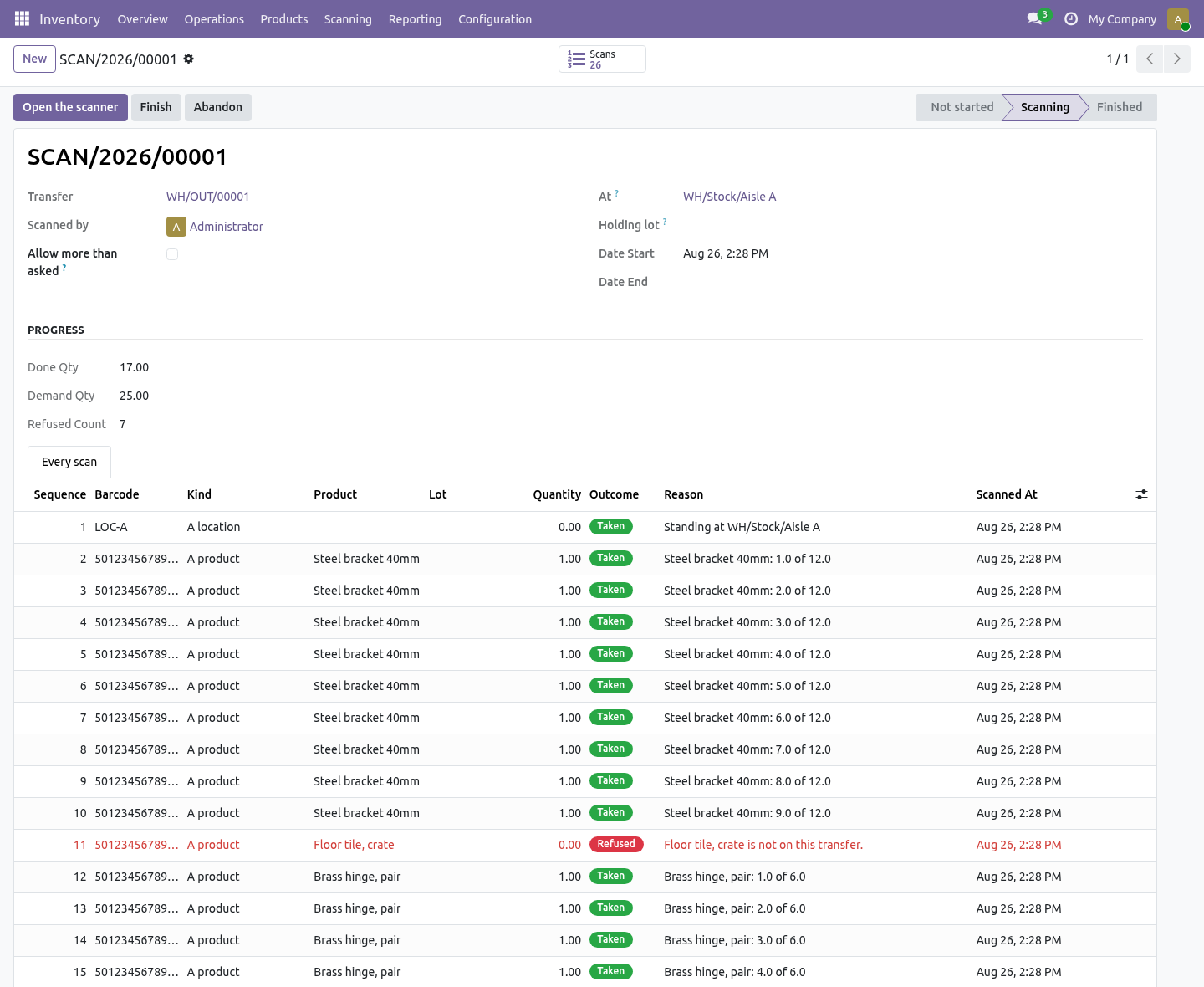
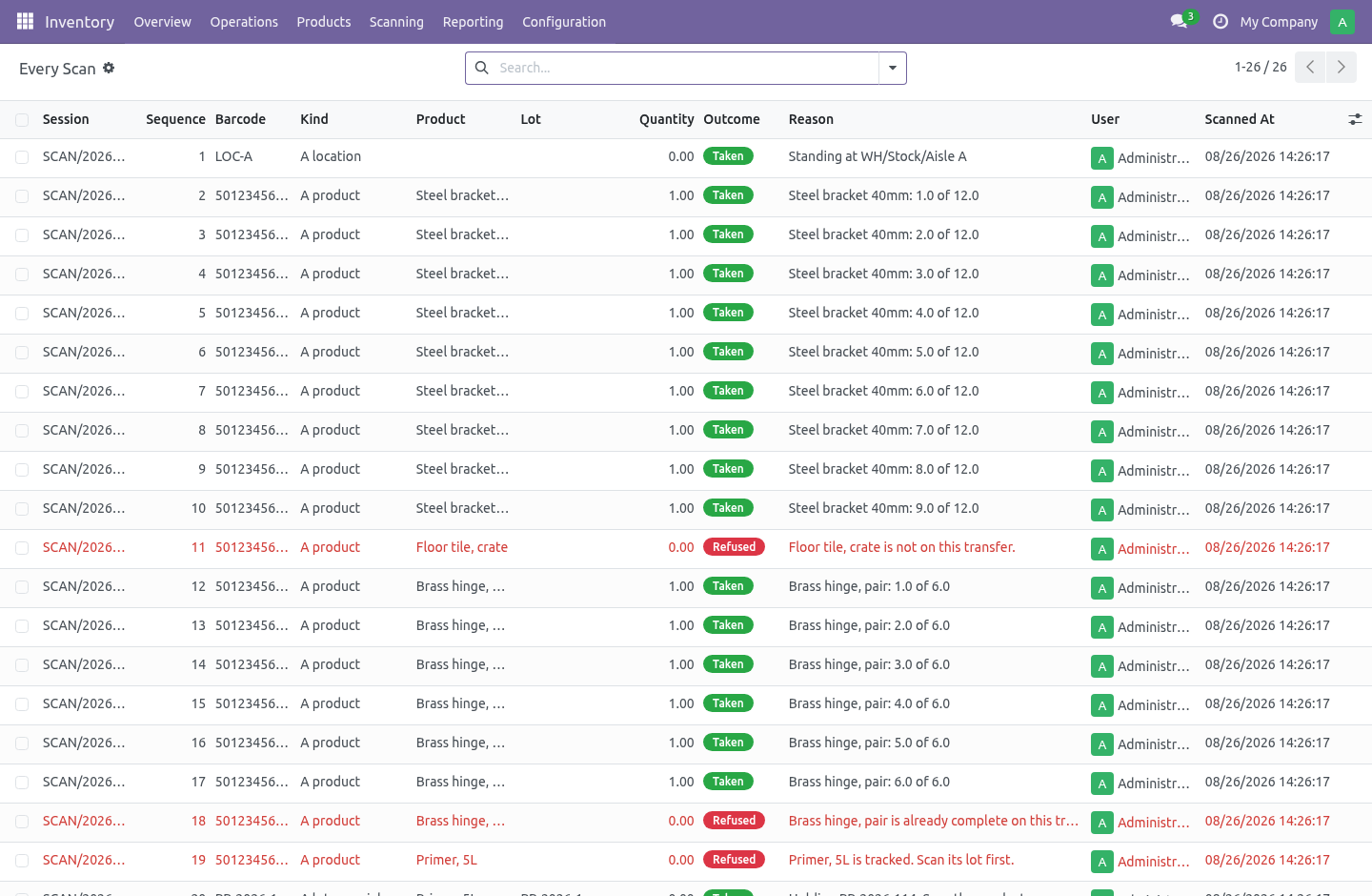
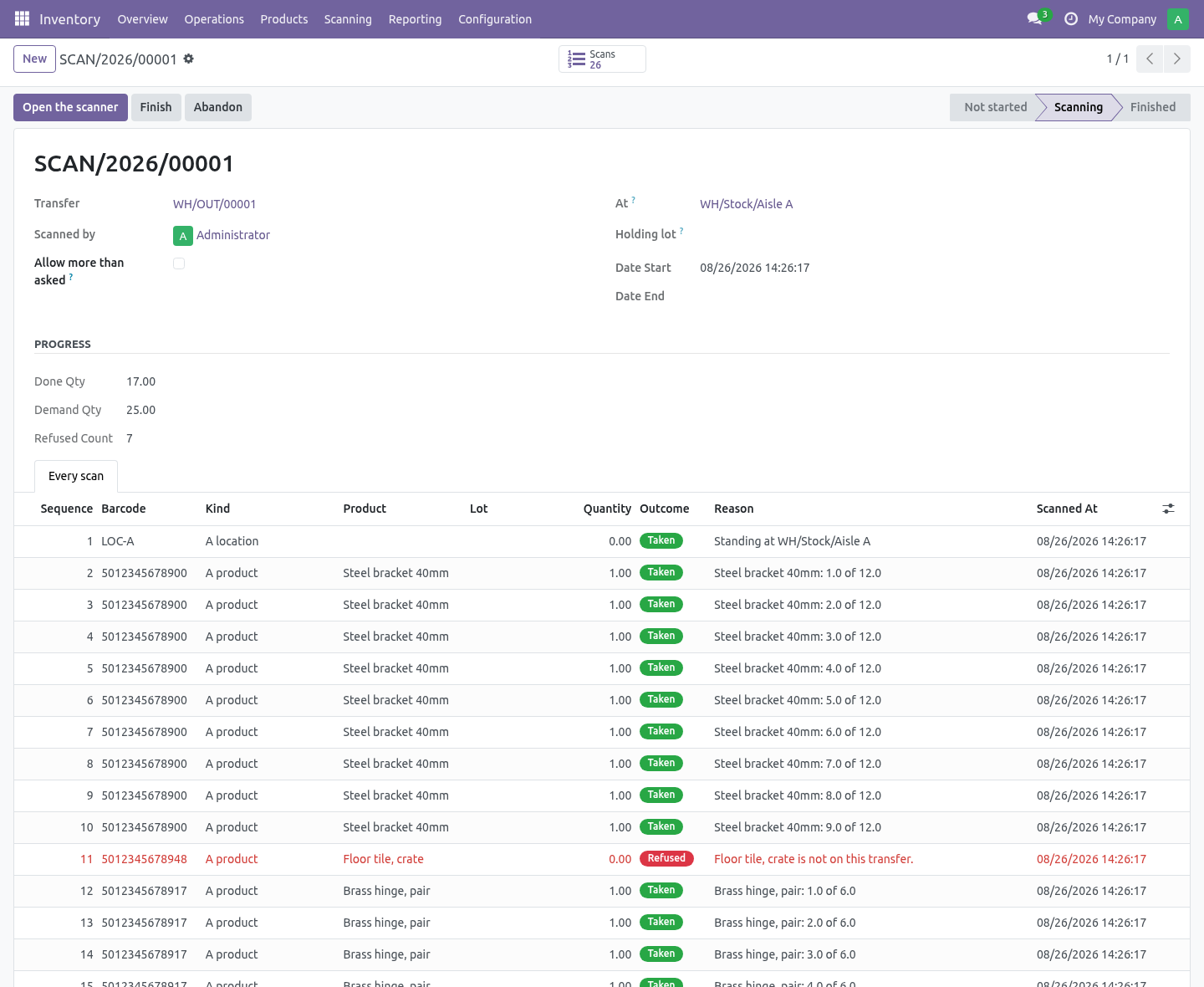
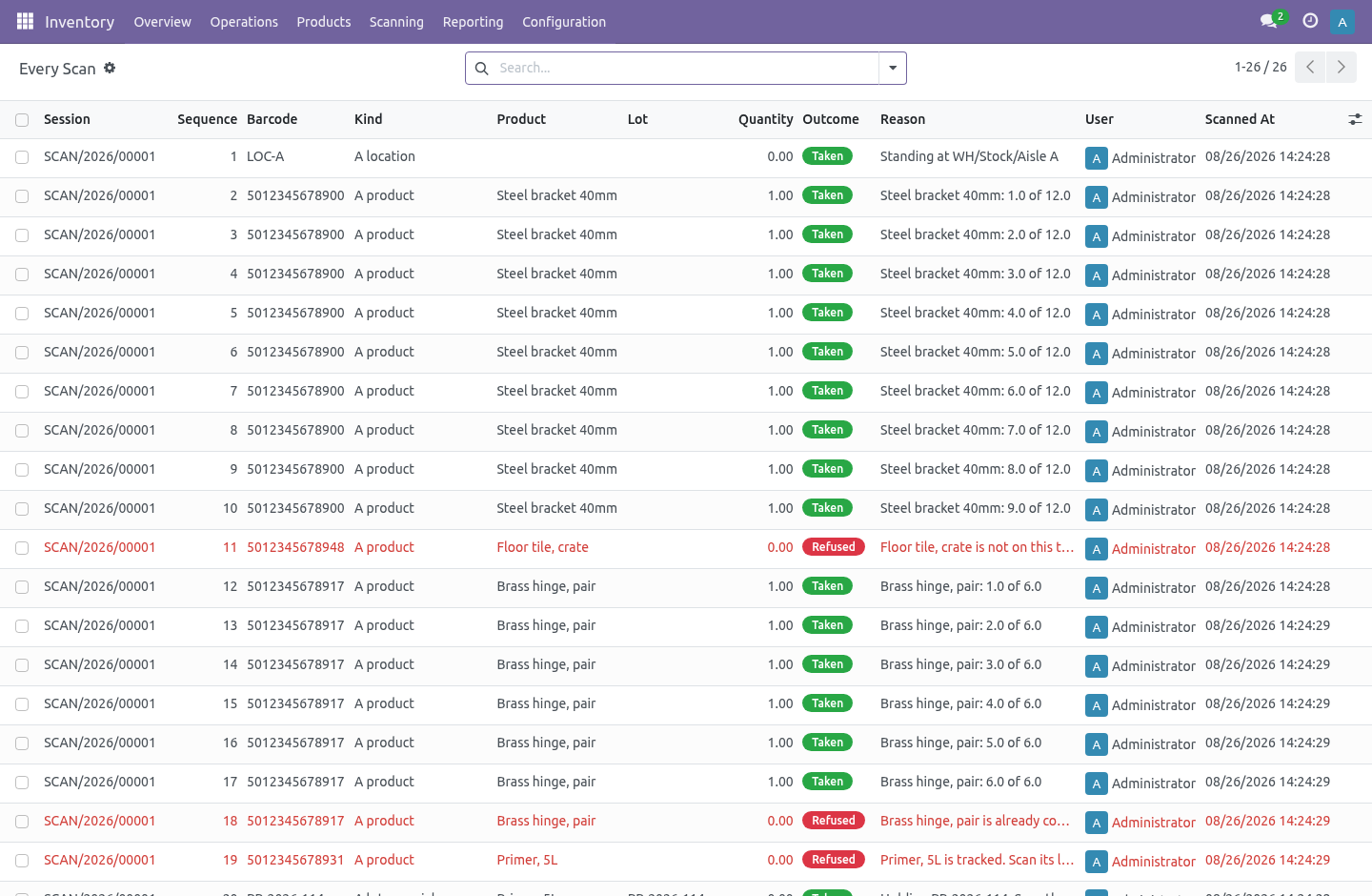
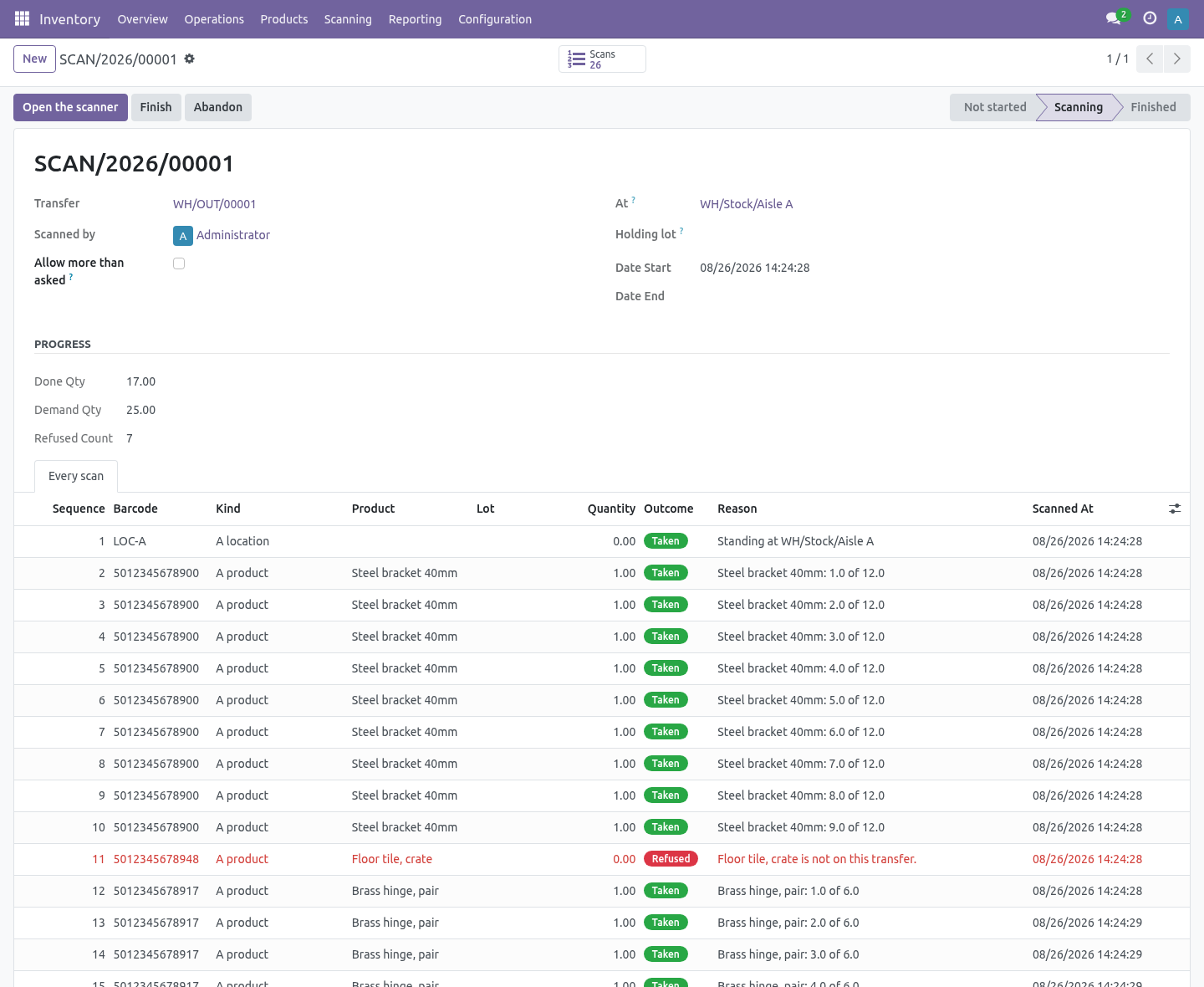
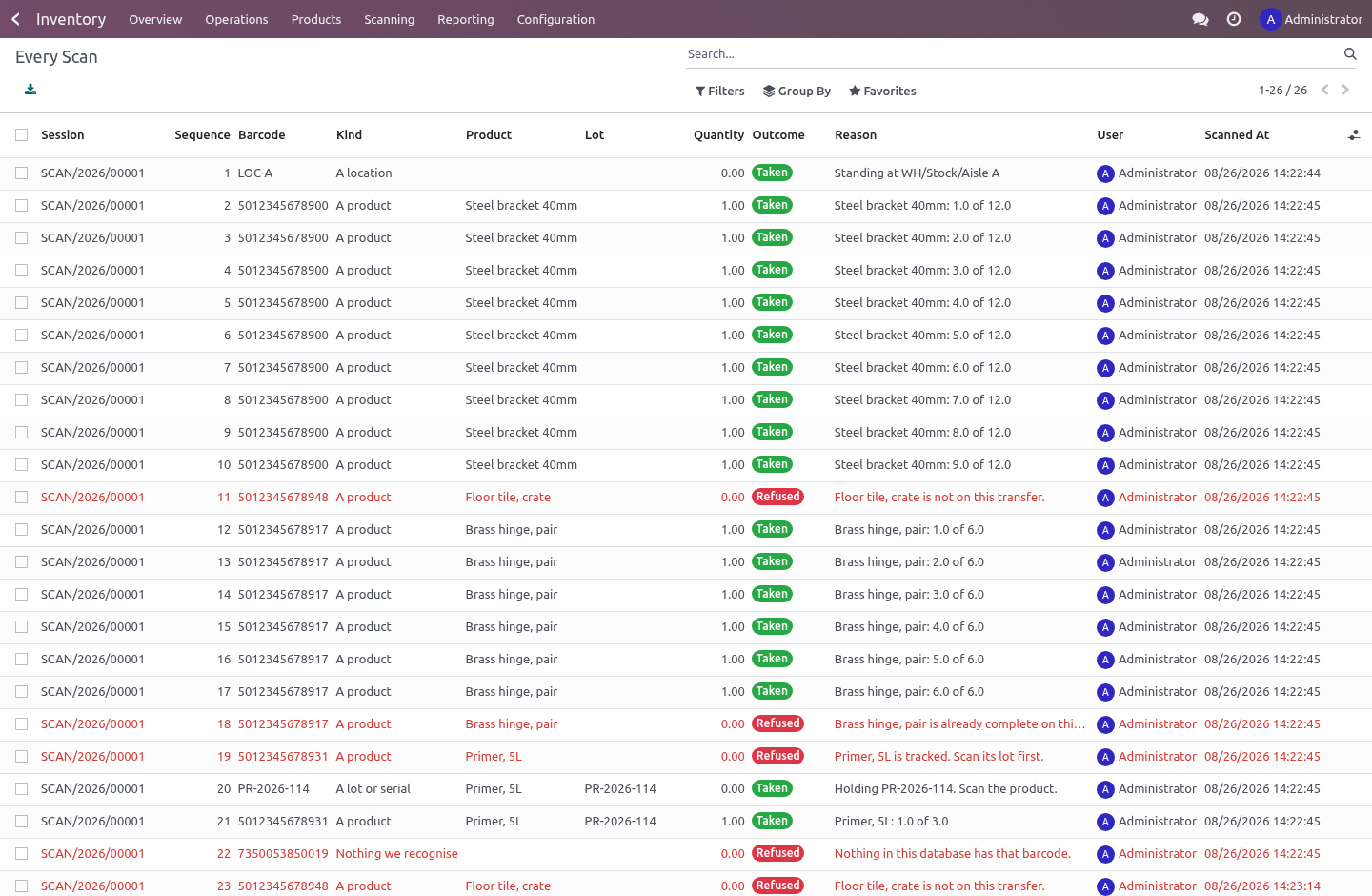
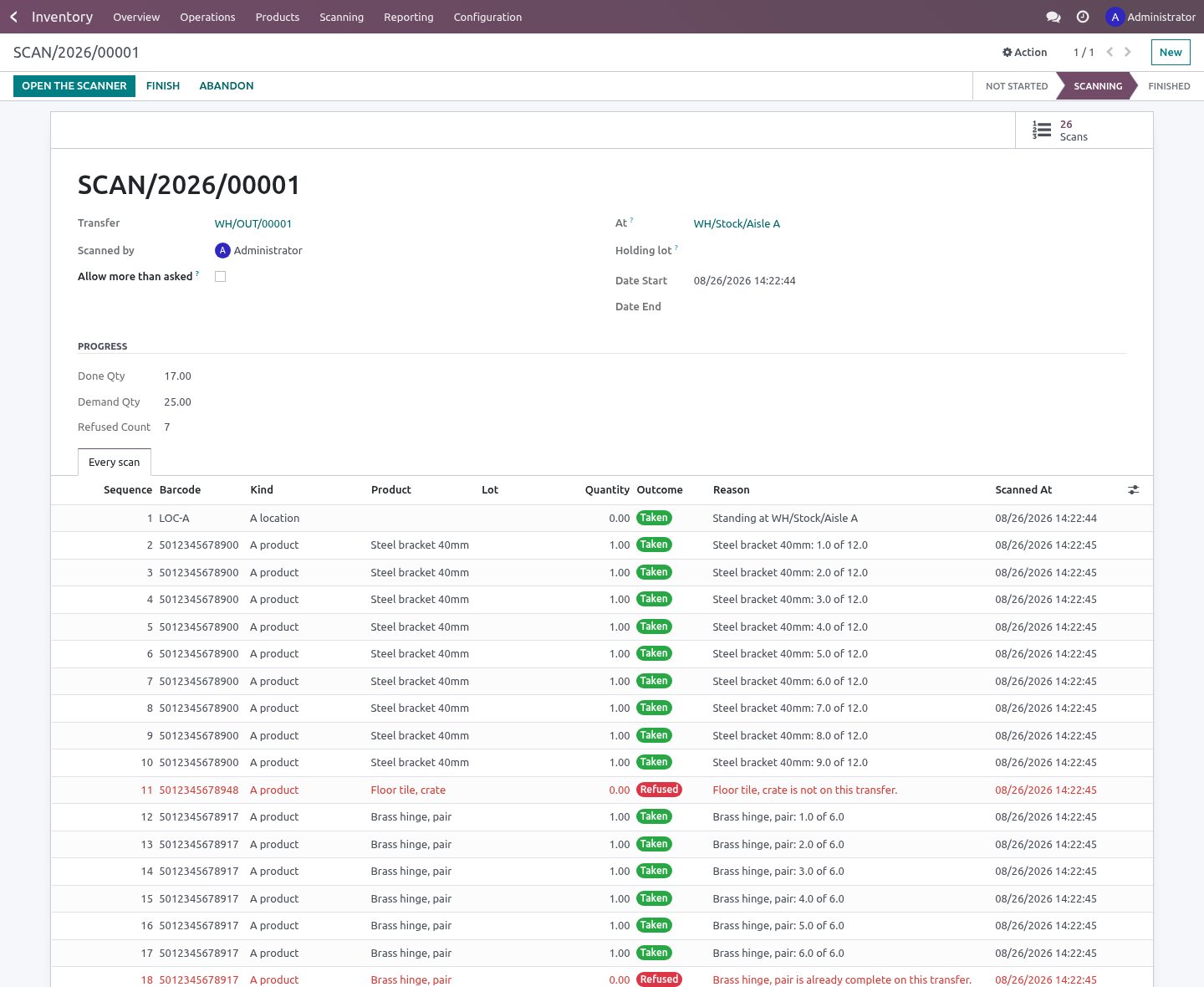
Every scan is written down, the refusals included. This is the half nobody builds and everybody needs. When a transfer comes out two short, the question is never what the count is — it is what happened. A log of the successful scans answers "eighteen were scanned".
This one answers "the picker scanned the pallet in aisle C four times and it was refused each time, because that pallet is not on this order." The screen cannot lie to the server. It sends a barcode string and nothing else — never a quantity, never a line. Everything that decides how much moves happens on the server, so a handheld somebody has opened the console on can still only do what a scanner can do, which is say "I saw this barcode". Who can do what Scanning › Scanner — scans transfers, sees their own sessions.
Scanning › Supervisor — sees every session and every scan including the refused ones. Cannot edit a scan: nobody can. Nothing from Enterprise. Depends on stock and barcodes, both Community.
The camera uses the ZXing library Odoo already ships. No Enterprise module is required or used, and no third-party JavaScript is bundled. How we make sure it works. Before every release, 41 automated checks run against this app on Odoo 16, 17, 18, 19 and 20.
Among them: A second person cannot open the same transfer. A serial cannot be scanned twice. A transfer that does not make lots still refuses a new one. A product not on the transfer is refused and recorded.
A picker cannot allow themselves to over scan. The complete list is in the source you receive. Questions people ask. Which Odoo versions does it run on?
Odoo 16.0, 17.0, 18.0, 19.0, 20.0, on the series you buy it for; each series is its own listing. Community or Enterprise? Both. It needs no Enterprise app.
The complete manual is at docs dot bambooforge dot dev, the demo database is linked from the store page, and support answers within twenty-four hours. Links are in the description.
Transcript of the walkthrough (Odoo 19)
Warehouse Barcode Scanner (WMS). Scan receipts, deliveries and internal transfers on a phone or handheld, with a log of every scan - the refused ones included. Community only. Odoo's Barcode app is Enterprise.
Community ships the pieces — the barcode service, the camera scanner, the ZXing library — and no screen to use them on. This is that screen, and the rules behind it. In the next few minutes: warehouse barcode scanner (wms), then it starts at zero, then scan where you are, what you hold, then what you pick, then what it refuses, out loud, then every scan is written down, the refusals included. Then what this app deliberately does not do, so you can tell before you buy whether it fits.
Everything lives under Sessions then Every Scan then Scanning. Warehouse Barcode Scanner (WMS). Odoo's Barcode app is Enterprise. Community ships the pieces — the barcode service, the camera scanner, the ZXing library — and no screen to use them on.
This is that screen, and the rules behind it. It starts at zero. Opening a session clears the quantities on the transfer and counts up from nothing. That is the whole difference between a scanner and a rubber stamp.
From 17.0 on, Odoo pre-fills the quantity on every move line from what it reserved, so a screen that simply shows those numbers reports the transfer complete before anybody has touched a box. What ends up on the transfer here is what somebody actually put in the box. Scan where you are, what you hold, then what you pick. The lot in your hand is spent as soon as it is used.
A lot that stays selected is how the second pallet ends up under the first pallet's number. A location says where you are standing. A lot or a serial says what you are holding. A product goes on the right line — the one at your location, under the lot in your hand, that still has room.
A hardware scanner and the camera both work, on the same screen, on a phone or on a handheld. What it refuses, out loud A product that is not on this transfer. A product that is already complete — unless somebody has turned on allow more than asked, and then it is taken and recorded as such, never taken quietly. A tracked product with no lot in your hand, and a lot that belongs to a different product than the one just scanned.
A serial scanned twice. A serial number is one thing. A package, which says so rather than going silent — the products inside it are what this screen counts. A second person on a transfer somebody else is already scanning.
Two people on one transfer count the same pallet twice, and neither of them finds out until it is short. Every scan is written down, the refusals included. This is the half nobody builds and everybody needs. When a transfer comes out two short, the question is never what the count is — it is what happened.
A log of the successful scans answers "eighteen were scanned". This one answers "the picker scanned the pallet in aisle C four times and it was refused each time, because that pallet is not on this order." The screen cannot lie to the server. It sends a barcode string and nothing else — never a quantity, never a line. Everything that decides how much moves happens on the server, so a handheld somebody has opened the console on can still only do what a scanner can do, which is say "I saw this barcode".
Who can do what Scanning › Scanner — scans transfers, sees their own sessions. Scanning › Supervisor — sees every session and every scan including the refused ones. Cannot edit a scan: nobody can. Nothing from Enterprise.
Depends on stock and barcodes, both Community. The camera uses the ZXing library Odoo already ships. No Enterprise module is required or used, and no third-party JavaScript is bundled. The complete manual is at docs dot bambooforge dot dev, the demo database is linked from the store page, and support answers within twenty-four hours.
Links are in the description.
Transcript of the walkthrough (Odoo 18)
Warehouse Barcode Scanner (WMS). Scan receipts, deliveries and internal transfers on a phone or handheld, with a log of every scan - the refused ones included. Community only. Odoo's Barcode app is Enterprise.
Community ships the pieces — the barcode service, the camera scanner, the ZXing library — and no screen to use them on. This is that screen, and the rules behind it. In the next few minutes: warehouse barcode scanner (wms), then it starts at zero, then scan where you are, what you hold, then what you pick, then what it refuses, out loud, then every scan is written down, the refusals included. Then what this app deliberately does not do, so you can tell before you buy whether it fits.
Everything lives under Sessions then Every Scan then Scanning. Warehouse Barcode Scanner (WMS). Odoo's Barcode app is Enterprise. Community ships the pieces — the barcode service, the camera scanner, the ZXing library — and no screen to use them on.
This is that screen, and the rules behind it. It starts at zero. Opening a session clears the quantities on the transfer and counts up from nothing. That is the whole difference between a scanner and a rubber stamp.
From 17.0 on, Odoo pre-fills the quantity on every move line from what it reserved, so a screen that simply shows those numbers reports the transfer complete before anybody has touched a box. What ends up on the transfer here is what somebody actually put in the box. Scan where you are, what you hold, then what you pick. The lot in your hand is spent as soon as it is used.
A lot that stays selected is how the second pallet ends up under the first pallet's number. A location says where you are standing. A lot or a serial says what you are holding. A product goes on the right line — the one at your location, under the lot in your hand, that still has room.
A hardware scanner and the camera both work, on the same screen, on a phone or on a handheld. What it refuses, out loud A product that is not on this transfer. A product that is already complete — unless somebody has turned on allow more than asked, and then it is taken and recorded as such, never taken quietly. A tracked product with no lot in your hand, and a lot that belongs to a different product than the one just scanned.
A serial scanned twice. A serial number is one thing. A package, which says so rather than going silent — the products inside it are what this screen counts. A second person on a transfer somebody else is already scanning.
Two people on one transfer count the same pallet twice, and neither of them finds out until it is short. Every scan is written down, the refusals included. This is the half nobody builds and everybody needs. When a transfer comes out two short, the question is never what the count is — it is what happened.
A log of the successful scans answers "eighteen were scanned". This one answers "the picker scanned the pallet in aisle C four times and it was refused each time, because that pallet is not on this order." The screen cannot lie to the server. It sends a barcode string and nothing else — never a quantity, never a line. Everything that decides how much moves happens on the server, so a handheld somebody has opened the console on can still only do what a scanner can do, which is say "I saw this barcode".
Who can do what Scanning › Scanner — scans transfers, sees their own sessions. Scanning › Supervisor — sees every session and every scan including the refused ones. Cannot edit a scan: nobody can. Nothing from Enterprise.
Depends on stock and barcodes, both Community. The camera uses the ZXing library Odoo already ships. No Enterprise module is required or used, and no third-party JavaScript is bundled. The complete manual is at docs dot bambooforge dot dev, the demo database is linked from the store page, and support answers within twenty-four hours.
Links are in the description.
Transcript of the walkthrough (Odoo 17)
Warehouse Barcode Scanner (WMS). Scan receipts, deliveries and internal transfers on a phone or handheld, with a log of every scan - the refused ones included. Community only. Odoo's Barcode app is Enterprise.
Community ships the pieces — the barcode service, the camera scanner, the ZXing library — and no screen to use them on. This is that screen, and the rules behind it. In the next few minutes: warehouse barcode scanner (wms), then it starts at zero, then scan where you are, what you hold, then what you pick, then what it refuses, out loud, then every scan is written down, the refusals included. Then what this app deliberately does not do, so you can tell before you buy whether it fits.
Everything lives under Sessions then Every Scan then Scanning. Warehouse Barcode Scanner (WMS). Odoo's Barcode app is Enterprise. Community ships the pieces — the barcode service, the camera scanner, the ZXing library — and no screen to use them on.
This is that screen, and the rules behind it. It starts at zero. Opening a session clears the quantities on the transfer and counts up from nothing. That is the whole difference between a scanner and a rubber stamp.
From 17.0 on, Odoo pre-fills the quantity on every move line from what it reserved, so a screen that simply shows those numbers reports the transfer complete before anybody has touched a box. What ends up on the transfer here is what somebody actually put in the box. Scan where you are, what you hold, then what you pick. The lot in your hand is spent as soon as it is used.
A lot that stays selected is how the second pallet ends up under the first pallet's number. A location says where you are standing. A lot or a serial says what you are holding. A product goes on the right line — the one at your location, under the lot in your hand, that still has room.
A hardware scanner and the camera both work, on the same screen, on a phone or on a handheld. What it refuses, out loud A product that is not on this transfer. A product that is already complete — unless somebody has turned on allow more than asked, and then it is taken and recorded as such, never taken quietly. A tracked product with no lot in your hand, and a lot that belongs to a different product than the one just scanned.
A serial scanned twice. A serial number is one thing. A package, which says so rather than going silent — the products inside it are what this screen counts. A second person on a transfer somebody else is already scanning.
Two people on one transfer count the same pallet twice, and neither of them finds out until it is short. Every scan is written down, the refusals included. This is the half nobody builds and everybody needs. When a transfer comes out two short, the question is never what the count is — it is what happened.
A log of the successful scans answers "eighteen were scanned". This one answers "the picker scanned the pallet in aisle C four times and it was refused each time, because that pallet is not on this order." The screen cannot lie to the server. It sends a barcode string and nothing else — never a quantity, never a line. Everything that decides how much moves happens on the server, so a handheld somebody has opened the console on can still only do what a scanner can do, which is say "I saw this barcode".
Who can do what Scanning › Scanner — scans transfers, sees their own sessions. Scanning › Supervisor — sees every session and every scan including the refused ones. Cannot edit a scan: nobody can. Nothing from Enterprise.
Depends on stock and barcodes, both Community. The camera uses the ZXing library Odoo already ships. No Enterprise module is required or used, and no third-party JavaScript is bundled. The complete manual is at docs dot bambooforge dot dev, the demo database is linked from the store page, and support answers within twenty-four hours.
Links are in the description.
Transcript of the walkthrough (Odoo 16)
Warehouse Barcode Scanner (WMS). Scan receipts, deliveries and internal transfers on a phone or handheld, with a log of every scan - the refused ones included. Community only. Odoo's Barcode app is Enterprise.
Community ships the pieces — the barcode service, the camera scanner, the ZXing library — and no screen to use them on. This is that screen, and the rules behind it. In the next few minutes: warehouse barcode scanner (wms), then it starts at zero, then scan where you are, what you hold, then what you pick, then what it refuses, out loud, then every scan is written down, the refusals included. Then what this app deliberately does not do, so you can tell before you buy whether it fits.
Everything lives under Sessions then Every Scan then Scanning. Warehouse Barcode Scanner (WMS). Odoo's Barcode app is Enterprise. Community ships the pieces — the barcode service, the camera scanner, the ZXing library — and no screen to use them on.
This is that screen, and the rules behind it. It starts at zero. Opening a session clears the quantities on the transfer and counts up from nothing. That is the whole difference between a scanner and a rubber stamp.
From 17.0 on, Odoo pre-fills the quantity on every move line from what it reserved, so a screen that simply shows those numbers reports the transfer complete before anybody has touched a box. What ends up on the transfer here is what somebody actually put in the box. Scan where you are, what you hold, then what you pick. The lot in your hand is spent as soon as it is used.
A lot that stays selected is how the second pallet ends up under the first pallet's number. A location says where you are standing. A lot or a serial says what you are holding. A product goes on the right line — the one at your location, under the lot in your hand, that still has room.
A hardware scanner and the camera both work, on the same screen, on a phone or on a handheld. What it refuses, out loud A product that is not on this transfer. A product that is already complete — unless somebody has turned on allow more than asked, and then it is taken and recorded as such, never taken quietly. A tracked product with no lot in your hand, and a lot that belongs to a different product than the one just scanned.
A serial scanned twice. A serial number is one thing. A package, which says so rather than going silent — the products inside it are what this screen counts. A second person on a transfer somebody else is already scanning.
Two people on one transfer count the same pallet twice, and neither of them finds out until it is short. Every scan is written down, the refusals included. This is the half nobody builds and everybody needs. When a transfer comes out two short, the question is never what the count is — it is what happened.
A log of the successful scans answers "eighteen were scanned". This one answers "the picker scanned the pallet in aisle C four times and it was refused each time, because that pallet is not on this order." The screen cannot lie to the server. It sends a barcode string and nothing else — never a quantity, never a line. Everything that decides how much moves happens on the server, so a handheld somebody has opened the console on can still only do what a scanner can do, which is say "I saw this barcode".
Who can do what Scanning › Scanner — scans transfers, sees their own sessions. Scanning › Supervisor — sees every session and every scan including the refused ones. Cannot edit a scan: nobody can. Nothing from Enterprise.
Depends on stock and barcodes, both Community. The camera uses the ZXing library Odoo already ships. No Enterprise module is required or used, and no third-party JavaScript is bundled. The complete manual is at docs dot bambooforge dot dev, the demo database is linked from the store page, and support answers within twenty-four hours.
Links are in the description.
Key facts
- What it is
- Scan receipts, deliveries and internal transfers on a phone or handheld, with a log of every scan - the refused ones included. Community only.
- For
- Warehouse
- Odoo versions
- 16.0, 17.0, 18.0, 19.0, 20.0 - Community and Enterprise
- Runs on
- Odoo.sh or Odoo you host yourself - not Odoo Online, which accepts no third-party apps
- Price
- 149 EUR, one-time, on the Odoo Apps Store
- Technical name
- bambooforge_wms_scan
- Not for
- Said before you buy, because it is the half that decides whether the app fits:; Write straight into move lines while scanning - it validates and reserves through Odoo's own flow.; Accept a scan it cannot place: a refused scan is logged with its reason.
- Manual last updated
- 2026-10-15
Warehouse Barcode Scanner (WMS)
Odoo's Barcode app is Enterprise. Community ships the pieces — the barcode service, the camera scanner, the ZXing library — and no screen to use them on. This is that screen, and the rules behind it.
It starts at zero
Opening a session clears the quantities on the transfer and counts up from nothing.
That is the whole difference between a scanner and a rubber stamp. From 17.0 on, Odoo pre-fills the quantity on every move line from what it reserved, so a screen that simply shows those numbers reports the transfer complete before anybody has touched a box. What ends up on the transfer here is what somebody actually put in the box.
On 16.0 the field already starts at zero and nothing changes.
Scan where you are, what you hold, then what you pick
A location says where you are standing.
A lot or a serial says what you are holding.
A product goes on the right line — the one at your location, under the lot in your hand, that still has room.
The lot in your hand is spent as soon as it is used. A lot that stays selected is how the second pallet ends up under the first pallet's number.
A hardware scanner and the camera both work, on the same screen, on a phone or on a handheld.
What it refuses, out loud
A product that is not on this transfer.
A product that is already complete — unless somebody has turned on allow more than asked, and then it is taken and recorded as such, never taken quietly.
A tracked product with no lot in your hand, and a lot that belongs to a different product than the one just scanned.
A serial scanned twice. A serial number is one thing.
A package, which says so rather than going silent — the products inside it are what this screen counts.
A second person on a transfer somebody else is already scanning. Two people on one transfer count the same pallet twice, and neither of them finds out until it is short.
Every scan is written down, the refusals included
This is the half nobody builds and everybody needs.
When a transfer comes out two short, the question is never what the count is — it is what happened. A log of the successful scans answers "eighteen were scanned". This one answers "the picker scanned the pallet in aisle C four times and it was refused each time, because that pallet is not on this order."
Group the log by reason and you get the week's problems in one screen: the barcodes nobody can read, the products staged in the wrong aisle, the serials that came round twice.
The log is append-only. No group has write access to it at all; the scanning code writes it and nothing else does.
The screen cannot lie to the server
It sends a barcode string and nothing else — never a quantity, never a line. Everything that decides how much moves happens on the server, so a handheld somebody has opened the console on can still only do what a scanner can do, which is say "I saw this barcode".
Who can do what
Scanning › Scanner — scans transfers, sees their own sessions.
Scanning › Supervisor — sees every session and every scan including the refused ones. Cannot edit a scan: nobody can.
Nothing from Enterprise
Depends on stock and barcodes, both Community. The camera uses the ZXing library Odoo already ships. No Enterprise module is required or used, and no third-party JavaScript is bundled.
How we make sure it works
Before every release, 41 automated checks run against this app on Odoo 16, 17, 18, 19 and 20. Among them:
A second person cannot open the same transfer.
A serial cannot be scanned twice.
A transfer that does not make lots still refuses a new one.
A product not on the transfer is refused and recorded.
A picker cannot allow themselves to over scan.
The complete list is in the source you receive.
What it does not do
Said before you buy, because it is the half that decides whether the app fits:
Write straight into move lines while scanning - it validates and reserves through Odoo's own flow.
Accept a scan it cannot place: a refused scan is logged with its reason.
Install
Copy bambooforge_wms_scan into your addons path and update the app list, or install the ZIP from the Odoo Apps Store.
Install Warehouse Barcode Scanner (WMS).
Open Sessions - its menus are Every Scan, Scanning.
Questions people ask
- Which Odoo versions does it run on?
Odoo 16.0, 17.0, 18.0, 19.0, 20.0, on the series you buy it for; each series is its own listing.
- Community or Enterprise?
Both. It needs no Enterprise app.
- What does it need?
The standard Inventory, barcodes apps. No extra Python package.
- Where does it show up?
Under the Sessions menu (Every Scan, Scanning).
- Does anything leave my server?
No. It makes no call outside your Odoo server: no telemetry, no licence check, no third-party service.
- What happens if I uninstall it?
Odoo drops the app's own tables and fields; the standard records it worked on (contacts, orders, products) stay as they are.