 BambooForge Labs
Website & Domain Tools
A domain lab that shows what a filter really matches before it ships, alias domains that reach the right website, and a config copy wizard.
Available for Odoo 16.0, Odoo 17.0, Odoo 18.0, Odoo 19.0, Odoo 20.0. Technical name bambooforge_website_tools.
Transcript of the walkthrough (Odoo 20)
Website & Domain Tools. A domain lab that shows what a filter really matches before it ships, alias domains that reach the right website, and a config copy wizard. Three tools for the person who runs several websites on one Odoo — and for everybody who has ever typed a domain filter and shipped it wrong. In the next few minutes: website & domain tools, then the domain lab, then alias domains, then copying a website's configuration, then what it deliberately does not do.
Then what this app deliberately does not do, so you can tell before you buy whether it fits. Everything lives under Domain Lab then Domain Snippets then Copy Website Configuration. 1. Copy bambooforge_website_tools into your addons path and update the app list, or install the ZIP from the Odoo Apps Store.
2. Install Website & Domain Tools. 3. Open Domain Lab - its menus are Domain Snippets, Copy Website Configuration.
Website & Domain Tools. Three tools for the person who runs several websites on one Odoo — and for everybody who has ever typed a domain filter and shipped it wrong. The Domain Lab. Website › Configuration › Domain Lab.
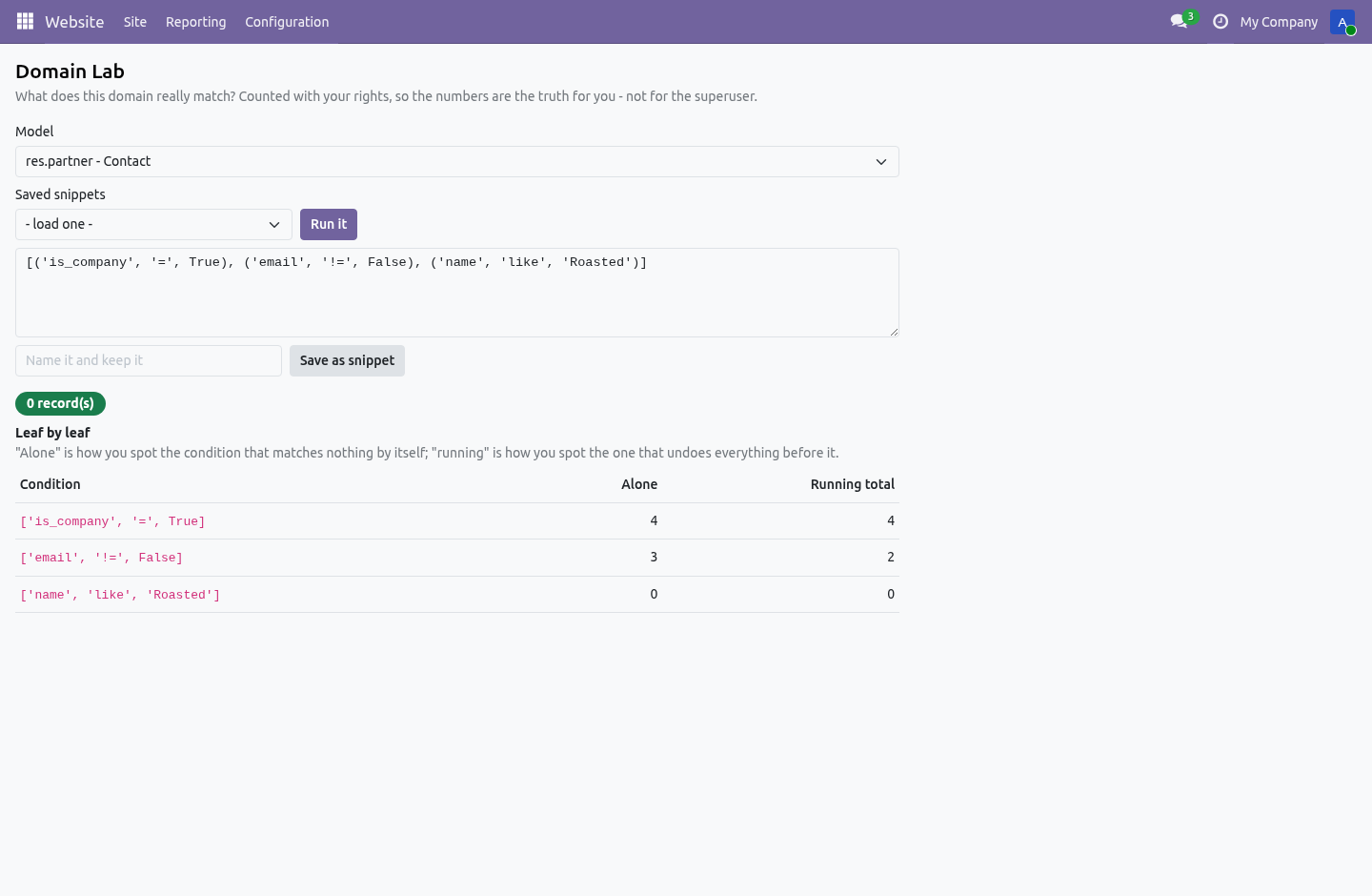
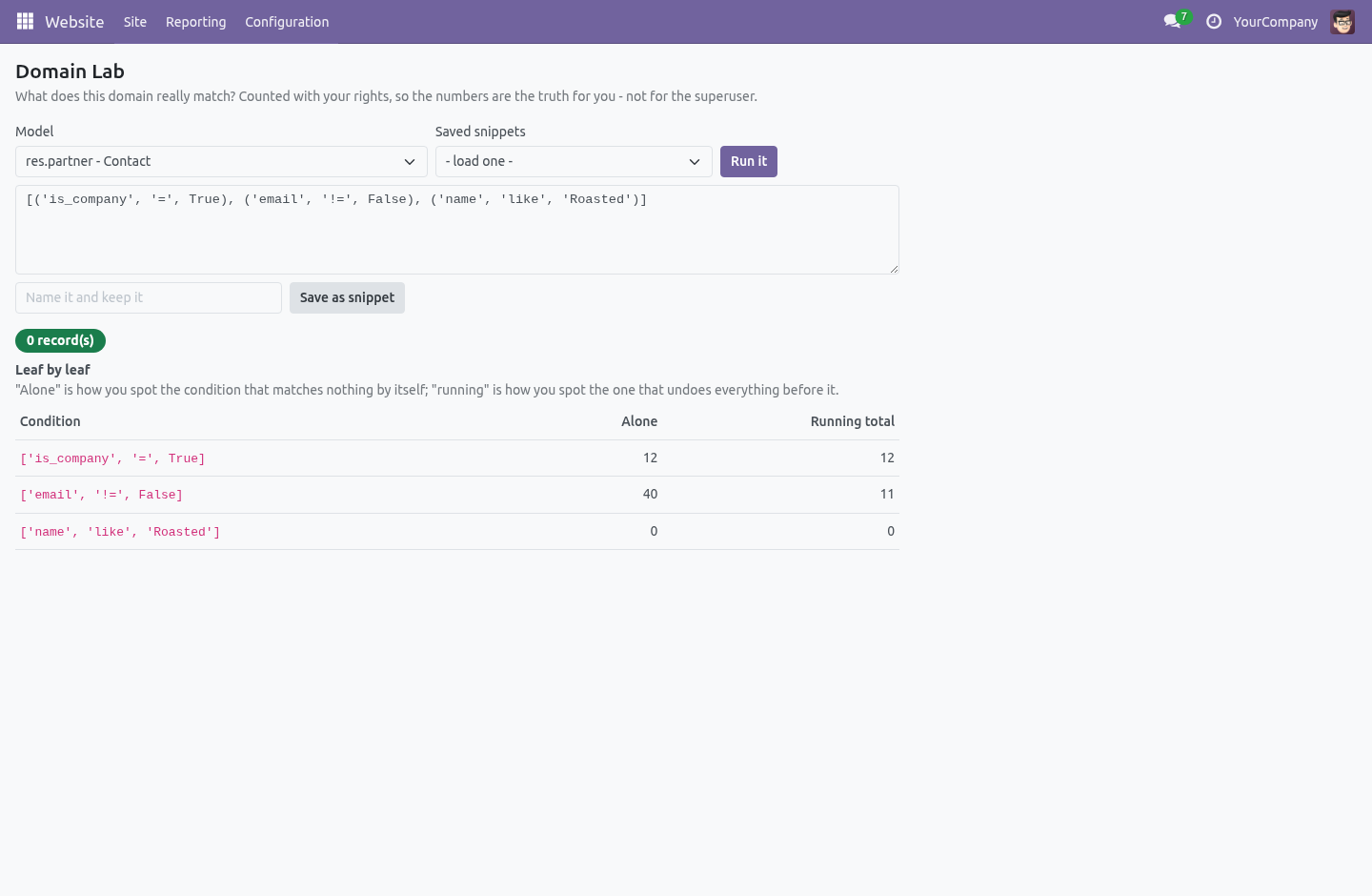
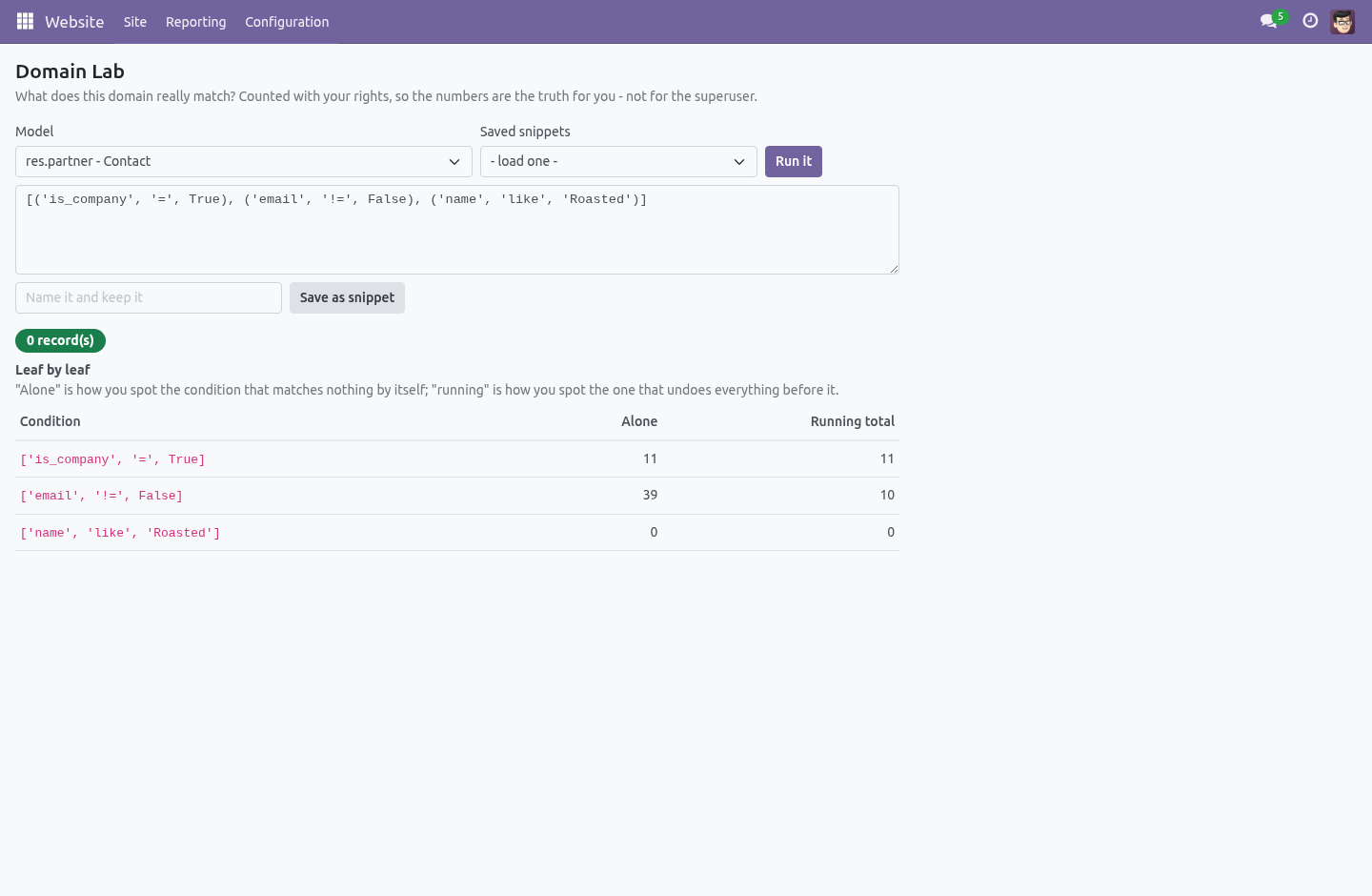
Paste any domain, pick any model, press Run it. You get three answers: The count — how many records the domain really matches. A sample — the first few of them, by name, so "1,204 records" stops being an abstraction. Everything is counted with your rights: the ACLs and the record rules that apply to you apply to the lab.
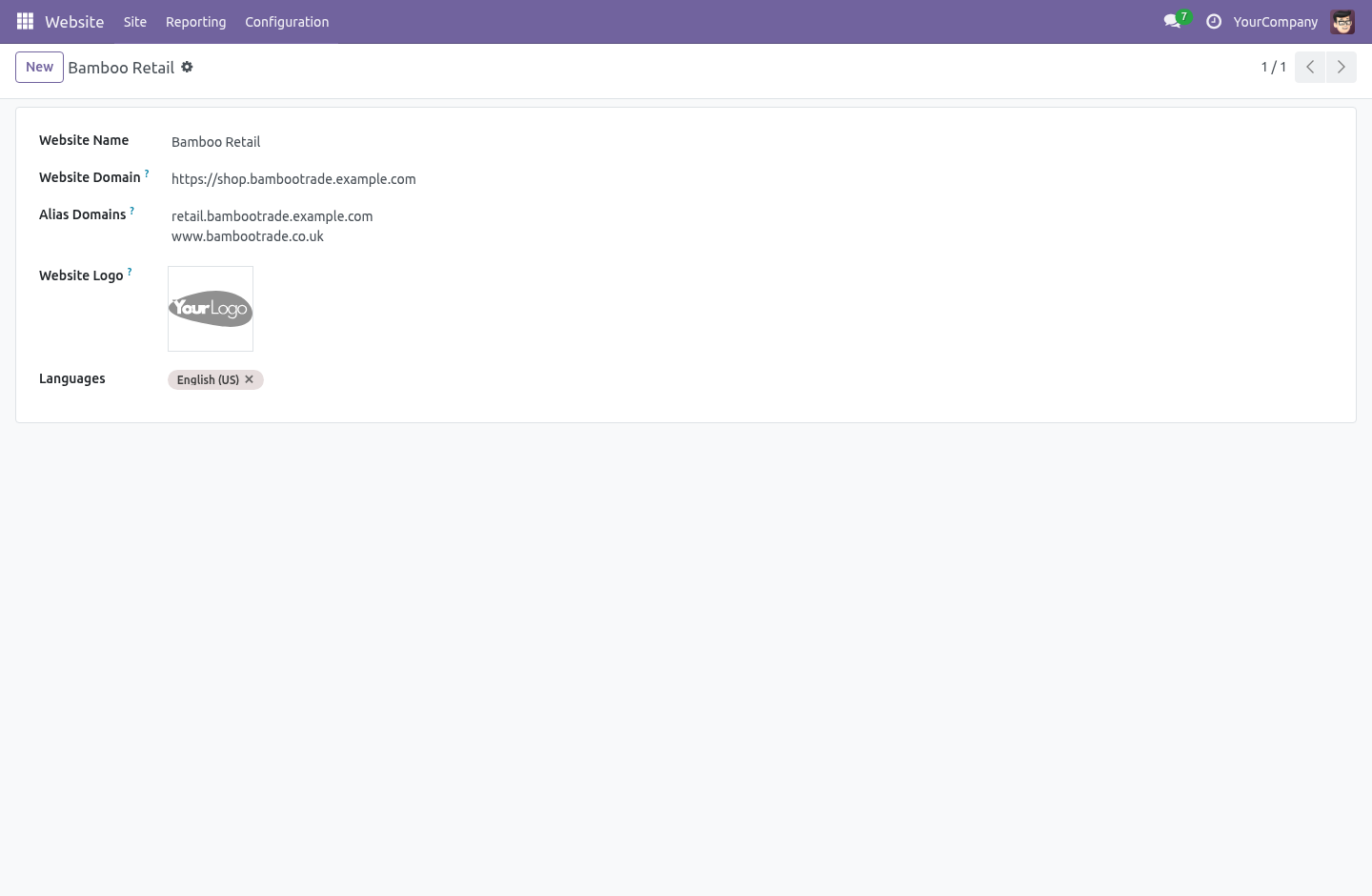
A count you cannot reproduce in a list view would teach you the wrong thing, so the lab never shows you one. Alias domains. Each website carries a list of alias hostnames next to its canonical domain — one per line, on the website form. A request arriving on any alias is routed to that website exactly as if it had used the real domain: shop.example.com and www.example.co.uk reach the same site without anybody editing nginx.
Schemes, ports and case do not confuse it — hostnames arrive however the proxy felt like writing them. An alias cannot collide with another website's real domain or another alias: the form refuses it, so one site can never silently hijack another's traffic. The alias map is cached and rebuilt only when a website changes, so the routing costs a dictionary lookup, not a query, on every request. Copying a website's configuration.
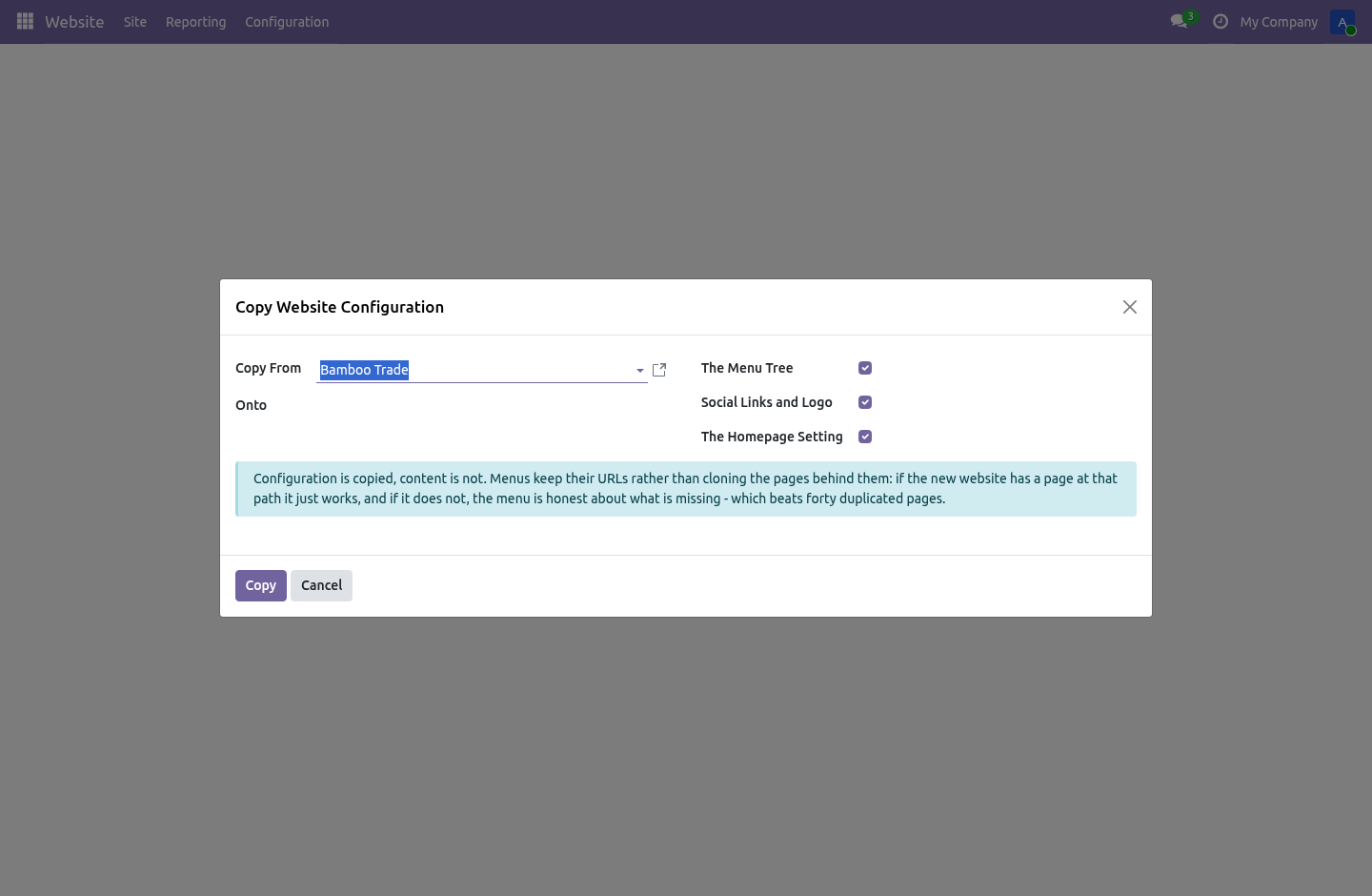
The second website always starts empty. Website › Configuration › Copy Website Configuration starts it right instead: pick a source, a target, and what to carry over — The social links and the logo. A deliberate whitelist, not a pattern match — a field a future version adds is copied only after somebody decides it should be. The homepage setting.
The wizard says exactly what it copied, and copying a website onto itself is refused. What it deliberately does not do It does not clone pages, products or any content. Configuration only. It does not copy configuration across companies — a website of one company onto a website of another is refused, because it is almost never what is meant.
It does not validate a snippet's domain at save time — the lab is where domains are tested, and a draft is allowed to be wrong there. The lab is an internal tool: portal and public users are refused at the server, not just hidden from the menu. How we make sure it works. Before every release, 27 automated checks run against this app on Odoo 16, 17, 18, 19 and 20.
Among them: A model the caller cannot read refuses. A plain user reads snippets but cannot write them. A typo is an answer not a traceback. Ports schemes and case do not confuse it.
What was not asked for is not touched. The complete list is in the source you receive. Questions people ask. Which Odoo versions does it run on?
Odoo 16.0, 17.0, 18.0, 19.0, 20.0, on the series you buy it for; each series is its own listing. Community or Enterprise? Both. It needs no Enterprise app.
The complete manual is at docs dot bambooforge dot dev, the demo database is linked from the store page, and support answers within twenty-four hours. Links are in the description.
Transcript of the walkthrough (Odoo 19)
Website & Domain Tools. A domain lab that shows what a filter really matches before it ships, alias domains that reach the right website, and a config copy wizard. Three tools for the person who runs several websites on one Odoo — and for everybody who has ever typed a domain filter and shipped it wrong. In the next few minutes: website & domain tools, then the domain lab, then alias domains, then copying a website's configuration, then what it deliberately does not do.
Then what this app deliberately does not do, so you can tell before you buy whether it fits. Everything lives under Domain Lab then Domain Snippets then Copy Website Configuration. Website & Domain Tools. Three tools for the person who runs several websites on one Odoo — and for everybody who has ever typed a domain filter and shipped it wrong.
The Domain Lab. Website › Configuration › Domain Lab. Paste any domain, pick any model, press Run it. You get three answers: The count — how many records the domain really matches.
A sample — the first few of them, by name, so "1,204 records" stops being an abstraction. Everything is counted with your rights: the ACLs and the record rules that apply to you apply to the lab. A count you cannot reproduce in a list view would teach you the wrong thing, so the lab never shows you one. Alias domains.
Each website carries a list of alias hostnames next to its canonical domain — one per line, on the website form. A request arriving on any alias is routed to that website exactly as if it had used the real domain: shop.example.com and www.example.co.uk reach the same site without anybody editing nginx. Schemes, ports and case do not confuse it — hostnames arrive however the proxy felt like writing them. An alias cannot collide with another website's real domain or another alias: the form refuses it, so one site can never silently hijack another's traffic.
The alias map is cached and rebuilt only when a website changes, so the routing costs a dictionary lookup, not a query, on every request. Copying a website's configuration. The second website always starts empty. Website › Configuration › Copy Website Configuration starts it right instead: pick a source, a target, and what to carry over — The social links and the logo.
A deliberate whitelist, not a pattern match — a field a future version adds is copied only after somebody decides it should be. The homepage setting. The wizard says exactly what it copied, and copying a website onto itself is refused. What it deliberately does not do It does not clone pages, products or any content.
Configuration only. It does not copy configuration across companies — a website of one company onto a website of another is refused, because it is almost never what is meant. It does not validate a snippet's domain at save time — the lab is where domains are tested, and a draft is allowed to be wrong there. The lab is an internal tool: portal and public users are refused at the server, not just hidden from the menu.
The complete manual is at docs dot bambooforge dot dev, the demo database is linked from the store page, and support answers within twenty-four hours. Links are in the description.
Transcript of the walkthrough (Odoo 18)
Website & Domain Tools. A domain lab that shows what a filter really matches before it ships, alias domains that reach the right website, and a config copy wizard. Three tools for the person who runs several websites on one Odoo — and for everybody who has ever typed a domain filter and shipped it wrong. In the next few minutes: website & domain tools, then the domain lab, then alias domains, then copying a website's configuration, then what it deliberately does not do.
Then what this app deliberately does not do, so you can tell before you buy whether it fits. Everything lives under Domain Lab then Domain Snippets then Copy Website Configuration. Website & Domain Tools. Three tools for the person who runs several websites on one Odoo — and for everybody who has ever typed a domain filter and shipped it wrong.
The Domain Lab. Website › Configuration › Domain Lab. Paste any domain, pick any model, press Run it. You get three answers: The count — how many records the domain really matches.
A sample — the first few of them, by name, so "1,204 records" stops being an abstraction. Everything is counted with your rights: the ACLs and the record rules that apply to you apply to the lab. A count you cannot reproduce in a list view would teach you the wrong thing, so the lab never shows you one. Alias domains.
Each website carries a list of alias hostnames next to its canonical domain — one per line, on the website form. A request arriving on any alias is routed to that website exactly as if it had used the real domain: shop.example.com and www.example.co.uk reach the same site without anybody editing nginx. Schemes, ports and case do not confuse it — hostnames arrive however the proxy felt like writing them. An alias cannot collide with another website's real domain or another alias: the form refuses it, so one site can never silently hijack another's traffic.
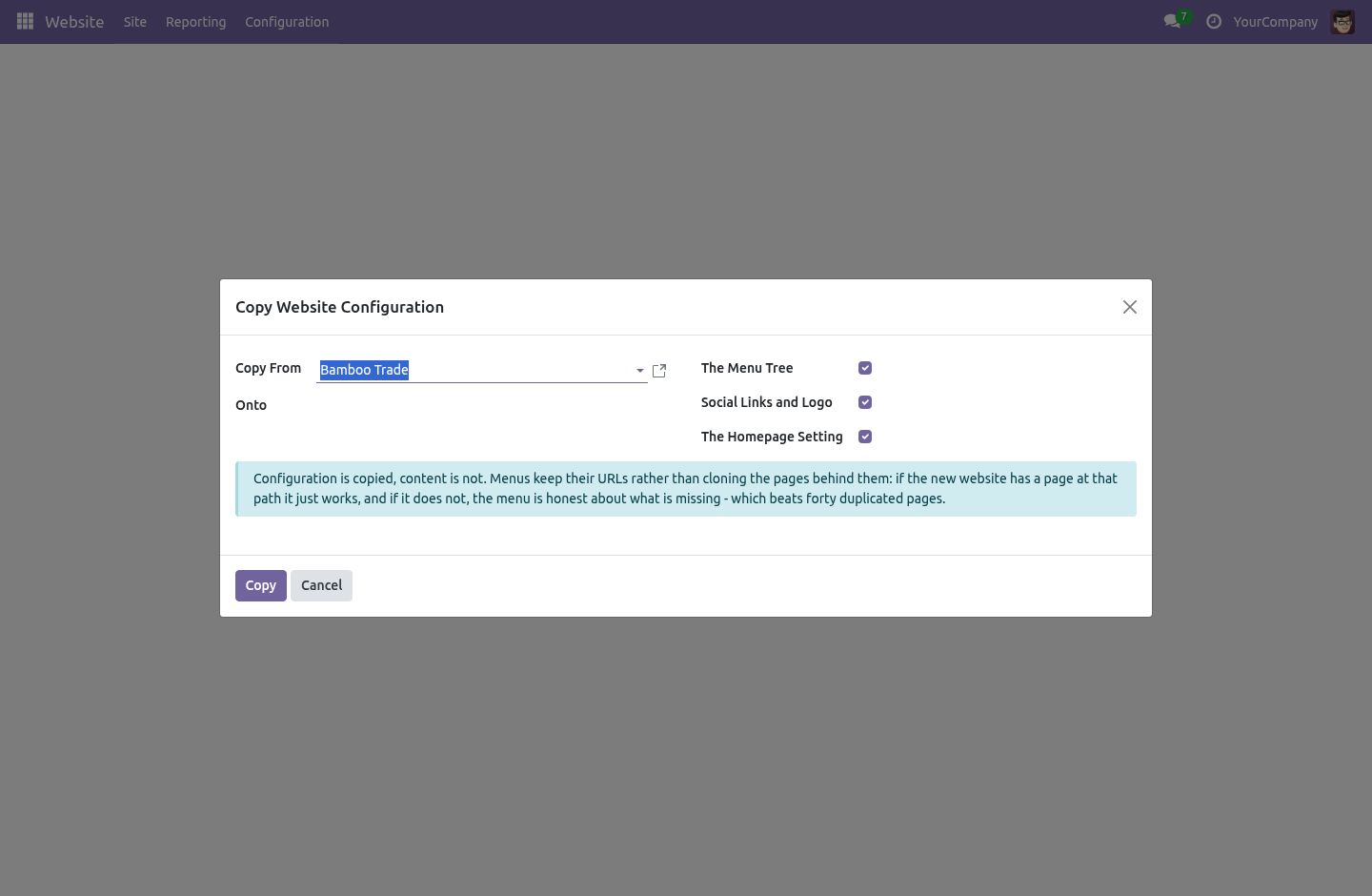
The alias map is cached and rebuilt only when a website changes, so the routing costs a dictionary lookup, not a query, on every request. Copying a website's configuration. The second website always starts empty. Website › Configuration › Copy Website Configuration starts it right instead: pick a source, a target, and what to carry over — The social links and the logo.
A deliberate whitelist, not a pattern match — a field a future version adds is copied only after somebody decides it should be. The homepage setting. The wizard says exactly what it copied, and copying a website onto itself is refused. What it deliberately does not do It does not clone pages, products or any content.
Configuration only. It does not copy configuration across companies — a website of one company onto a website of another is refused, because it is almost never what is meant. It does not validate a snippet's domain at save time — the lab is where domains are tested, and a draft is allowed to be wrong there. The lab is an internal tool: portal and public users are refused at the server, not just hidden from the menu.
The complete manual is at docs dot bambooforge dot dev, the demo database is linked from the store page, and support answers within twenty-four hours. Links are in the description.
Transcript of the walkthrough (Odoo 17)
Website & Domain Tools. A domain lab that shows what a filter really matches before it ships, alias domains that reach the right website, and a config copy wizard. Three tools for the person who runs several websites on one Odoo — and for everybody who has ever typed a domain filter and shipped it wrong. In the next few minutes: website & domain tools, then the domain lab, then alias domains, then copying a website's configuration, then what it deliberately does not do.
Then what this app deliberately does not do, so you can tell before you buy whether it fits. Everything lives under Domain Lab then Domain Snippets then Copy Website Configuration. Website & Domain Tools. Three tools for the person who runs several websites on one Odoo — and for everybody who has ever typed a domain filter and shipped it wrong.
The Domain Lab. Website › Configuration › Domain Lab. Paste any domain, pick any model, press Run it. You get three answers: The count — how many records the domain really matches.
A sample — the first few of them, by name, so "1,204 records" stops being an abstraction. Everything is counted with your rights: the ACLs and the record rules that apply to you apply to the lab. A count you cannot reproduce in a list view would teach you the wrong thing, so the lab never shows you one. Alias domains.
Each website carries a list of alias hostnames next to its canonical domain — one per line, on the website form. A request arriving on any alias is routed to that website exactly as if it had used the real domain: shop.example.com and www.example.co.uk reach the same site without anybody editing nginx. Schemes, ports and case do not confuse it — hostnames arrive however the proxy felt like writing them. An alias cannot collide with another website's real domain or another alias: the form refuses it, so one site can never silently hijack another's traffic.
The alias map is cached and rebuilt only when a website changes, so the routing costs a dictionary lookup, not a query, on every request. Copying a website's configuration. The second website always starts empty. Website › Configuration › Copy Website Configuration starts it right instead: pick a source, a target, and what to carry over — The social links and the logo.
A deliberate whitelist, not a pattern match — a field a future version adds is copied only after somebody decides it should be. The homepage setting. The wizard says exactly what it copied, and copying a website onto itself is refused. What it deliberately does not do It does not clone pages, products or any content.
Configuration only. It does not copy configuration across companies — a website of one company onto a website of another is refused, because it is almost never what is meant. It does not validate a snippet's domain at save time — the lab is where domains are tested, and a draft is allowed to be wrong there. The lab is an internal tool: portal and public users are refused at the server, not just hidden from the menu.
The complete manual is at docs dot bambooforge dot dev, the demo database is linked from the store page, and support answers within twenty-four hours. Links are in the description.
Transcript of the walkthrough (Odoo 16)
Website & Domain Tools. A domain lab that shows what a filter really matches before it ships, alias domains that reach the right website, and a config copy wizard. Three tools for the person who runs several websites on one Odoo — and for everybody who has ever typed a domain filter and shipped it wrong. In the next few minutes: website & domain tools, then the domain lab, then alias domains, then copying a website's configuration, then what it deliberately does not do.
Then what this app deliberately does not do, so you can tell before you buy whether it fits. Everything lives under Domain Lab then Domain Snippets then Copy Website Configuration. Website & Domain Tools. Three tools for the person who runs several websites on one Odoo — and for everybody who has ever typed a domain filter and shipped it wrong.
The Domain Lab. Website › Configuration › Domain Lab. Paste any domain, pick any model, press Run it. You get three answers: The count — how many records the domain really matches.
A sample — the first few of them, by name, so "1,204 records" stops being an abstraction. Everything is counted with your rights: the ACLs and the record rules that apply to you apply to the lab. A count you cannot reproduce in a list view would teach you the wrong thing, so the lab never shows you one. Alias domains.
Each website carries a list of alias hostnames next to its canonical domain — one per line, on the website form. A request arriving on any alias is routed to that website exactly as if it had used the real domain: shop.example.com and www.example.co.uk reach the same site without anybody editing nginx. Schemes, ports and case do not confuse it — hostnames arrive however the proxy felt like writing them. An alias cannot collide with another website's real domain or another alias: the form refuses it, so one site can never silently hijack another's traffic.
The alias map is cached and rebuilt only when a website changes, so the routing costs a dictionary lookup, not a query, on every request. Copying a website's configuration. The second website always starts empty. Website › Configuration › Copy Website Configuration starts it right instead: pick a source, a target, and what to carry over — The social links and the logo.
A deliberate whitelist, not a pattern match — a field a future version adds is copied only after somebody decides it should be. The homepage setting. The wizard says exactly what it copied, and copying a website onto itself is refused. What it deliberately does not do It does not clone pages, products or any content.
Configuration only. It does not copy configuration across companies — a website of one company onto a website of another is refused, because it is almost never what is meant. It does not validate a snippet's domain at save time — the lab is where domains are tested, and a draft is allowed to be wrong there. The lab is an internal tool: portal and public users are refused at the server, not just hidden from the menu.
The complete manual is at docs dot bambooforge dot dev, the demo database is linked from the store page, and support answers within twenty-four hours. Links are in the description.
Key facts
- What it is
- A domain lab that shows what a filter really matches before it ships, alias domains that reach the right website, and a config copy wizard.
- For
- Website
- Odoo versions
- 16.0, 17.0, 18.0, 19.0, 20.0 - Community and Enterprise
- Runs on
- Odoo.sh or Odoo you host yourself - not Odoo Online, which accepts no third-party apps
- Price
- 99 EUR, one-time, on the Odoo Apps Store
- Technical name
- bambooforge_website_tools
- Not for
- It does not clone pages, products or any content. Configuration only.; It does not copy configuration across companies — a website of one company onto a website of another is refused, because it is almost never what is meant.; It does not validate a snippet's domain at save time — the lab is where domains are tested, and a draft is allowed to be wrong there.; The lab is an internal tool: portal and public users are refused at the server, not just hidden from the menu.
- Manual last updated
- 2026-10-15
Website & Domain Tools
Three tools for the person who runs several websites on one Odoo — and for everybody who has ever typed a domain filter and shipped it wrong.
The Domain Lab
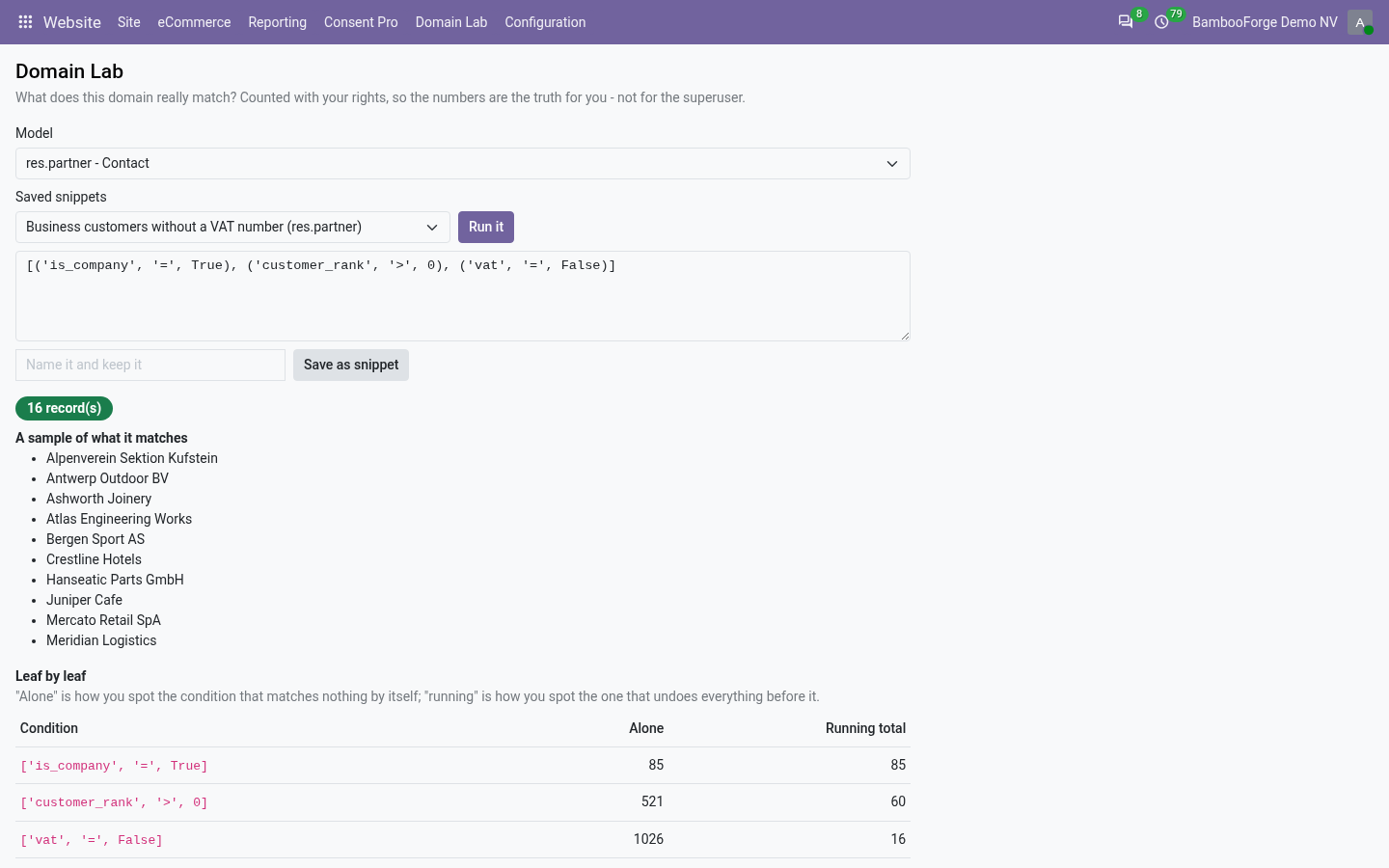
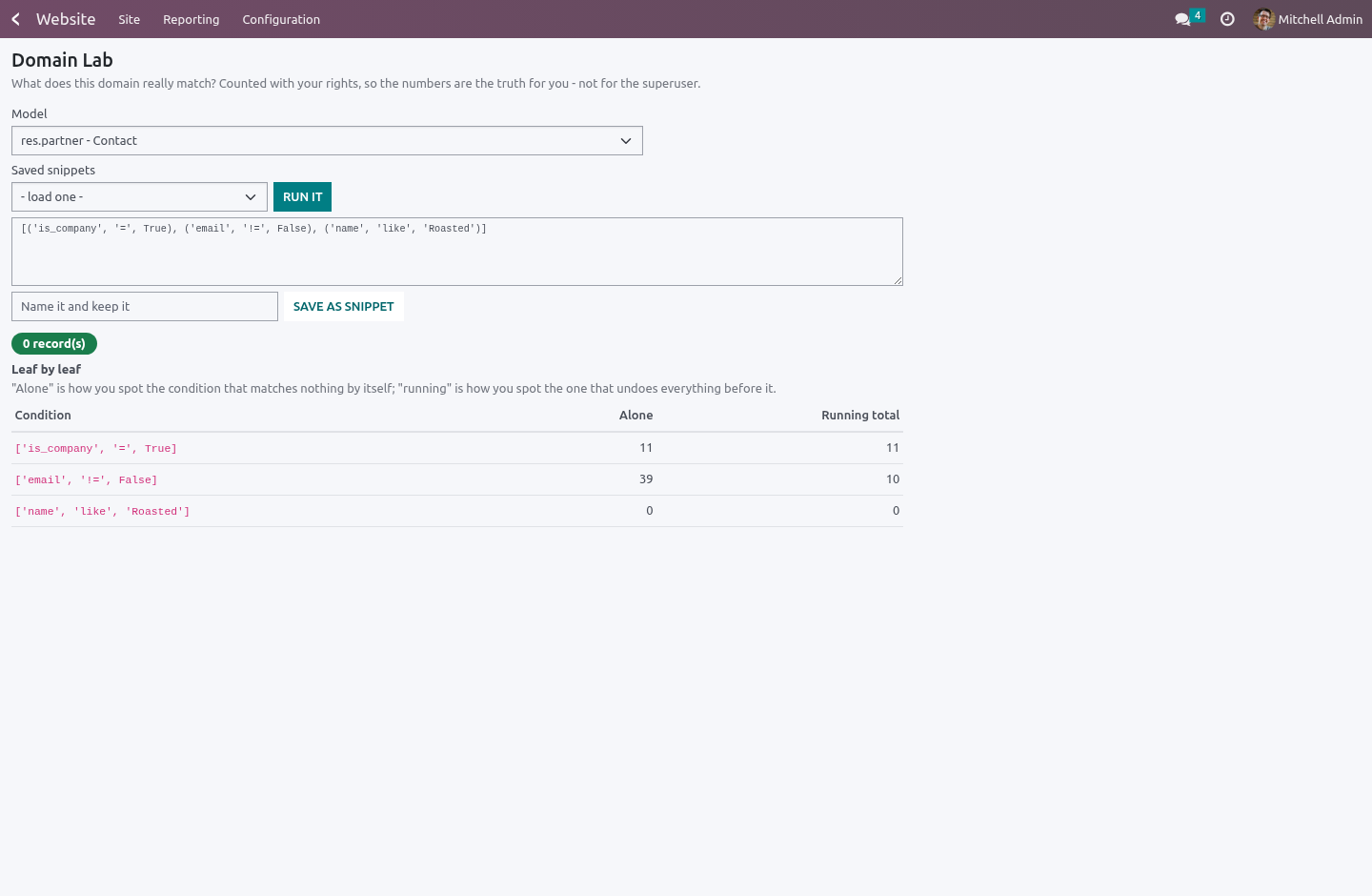
Website › Configuration › Domain Lab. Paste any domain, pick any model, press Run it. You get three answers:
The count — how many records the domain really matches.
A sample — the first few of them, by name, so "1,204 records" stops being an abstraction.
Leaf by leaf — every condition with two numbers next to it: what it matches alone, and the running total with everything before it applied. The lonely count is how you spot the condition that matches nothing by itself — the typo'd value, the wrong operator. The running one is how you spot the condition that undoes everything before it.
Everything is counted with your rights: the ACLs and the record rules that apply to you apply to the lab. A count you cannot reproduce in a list view would teach you the wrong thing, so the lab never shows you one.
Errors come back as answers, not tracebacks. A domain lab where a typo raises a 500 is a lab nobody pastes drafts into.
The eval context carries the scalars record rules and filters use — uid, company_ids, company_id, context_today(), datetime, relativedelta — so the domain you test is the domain you ship. It deliberately does not put a user record in scope: this is a free-text box any internal user can type into, and a live recordset there would be a way to read and write the whole database through it. Write uid, not user.id.
Snippets. A domain somebody got right once is worth keeping. Name it, save it, and the next person loads it instead of retyping it slightly differently into their fourth record rule. Snippets are readable by every internal user and written by website designers.
Alias domains
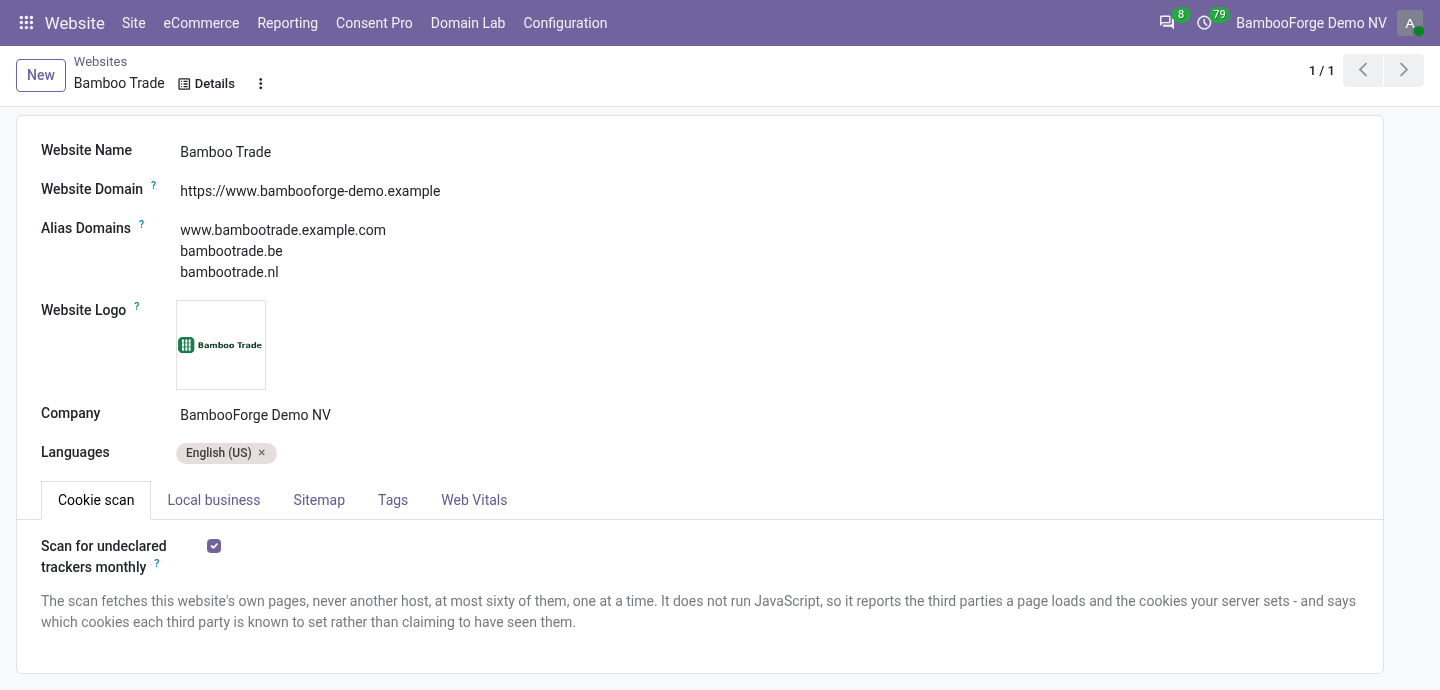
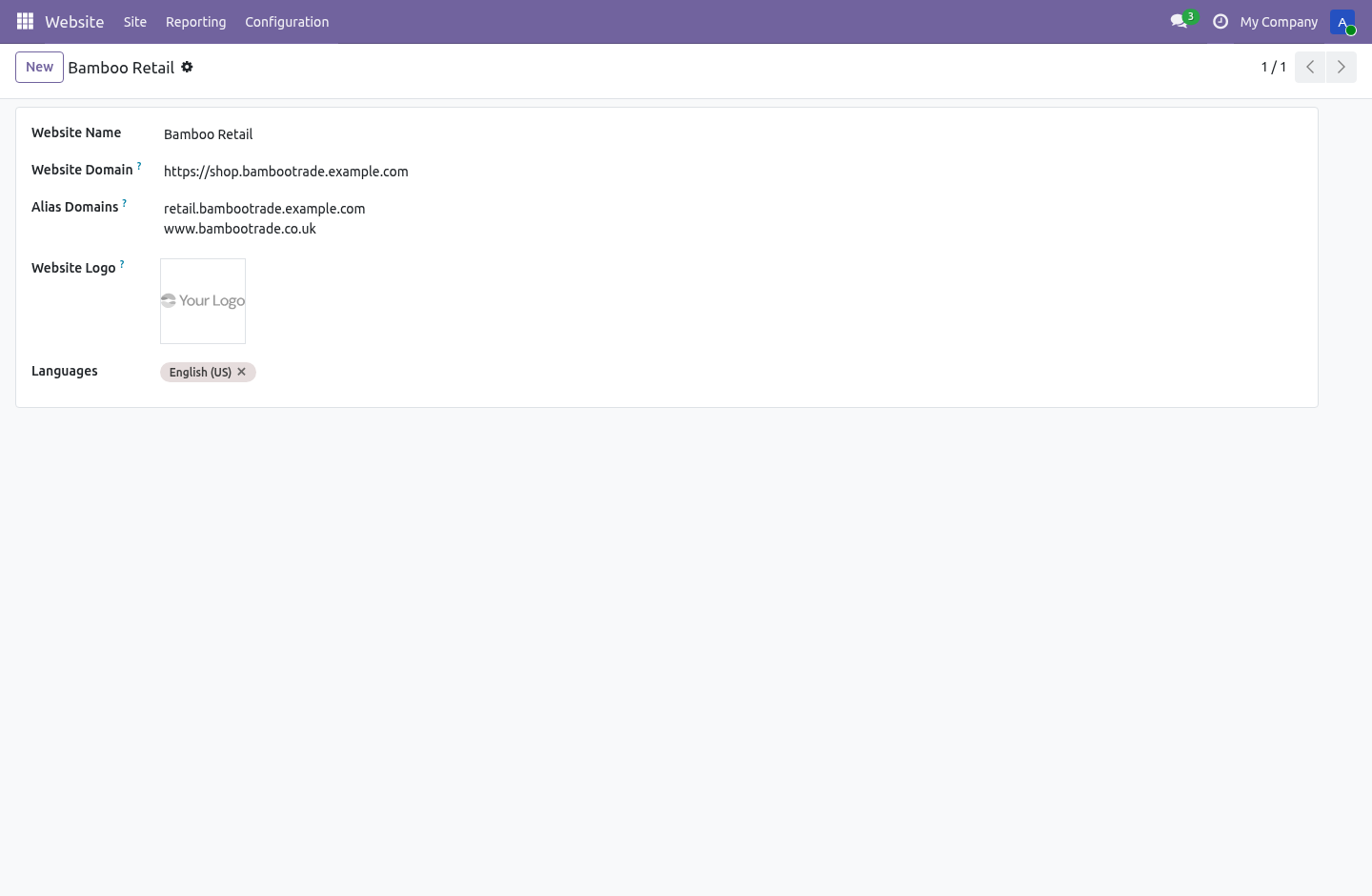
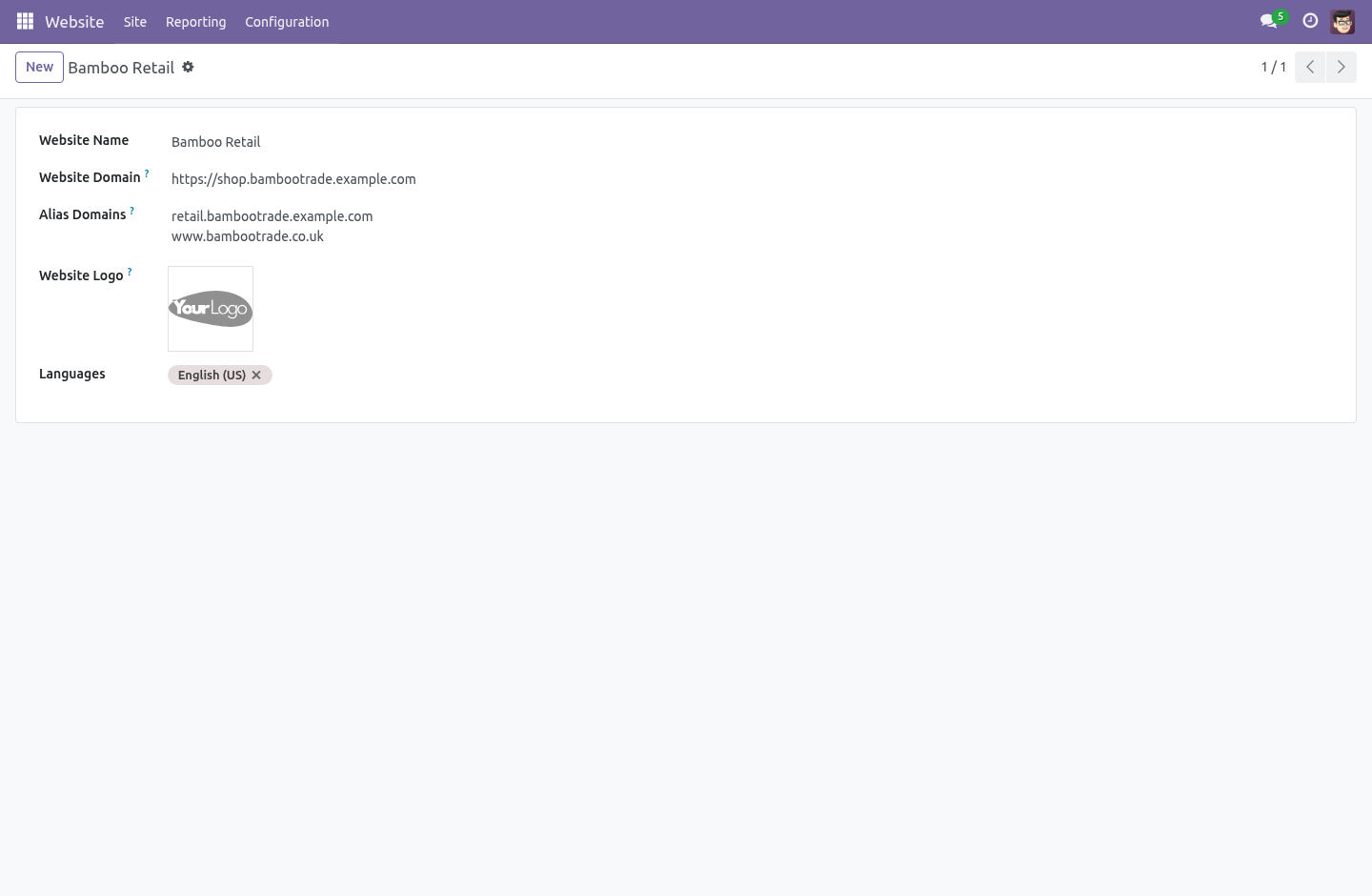
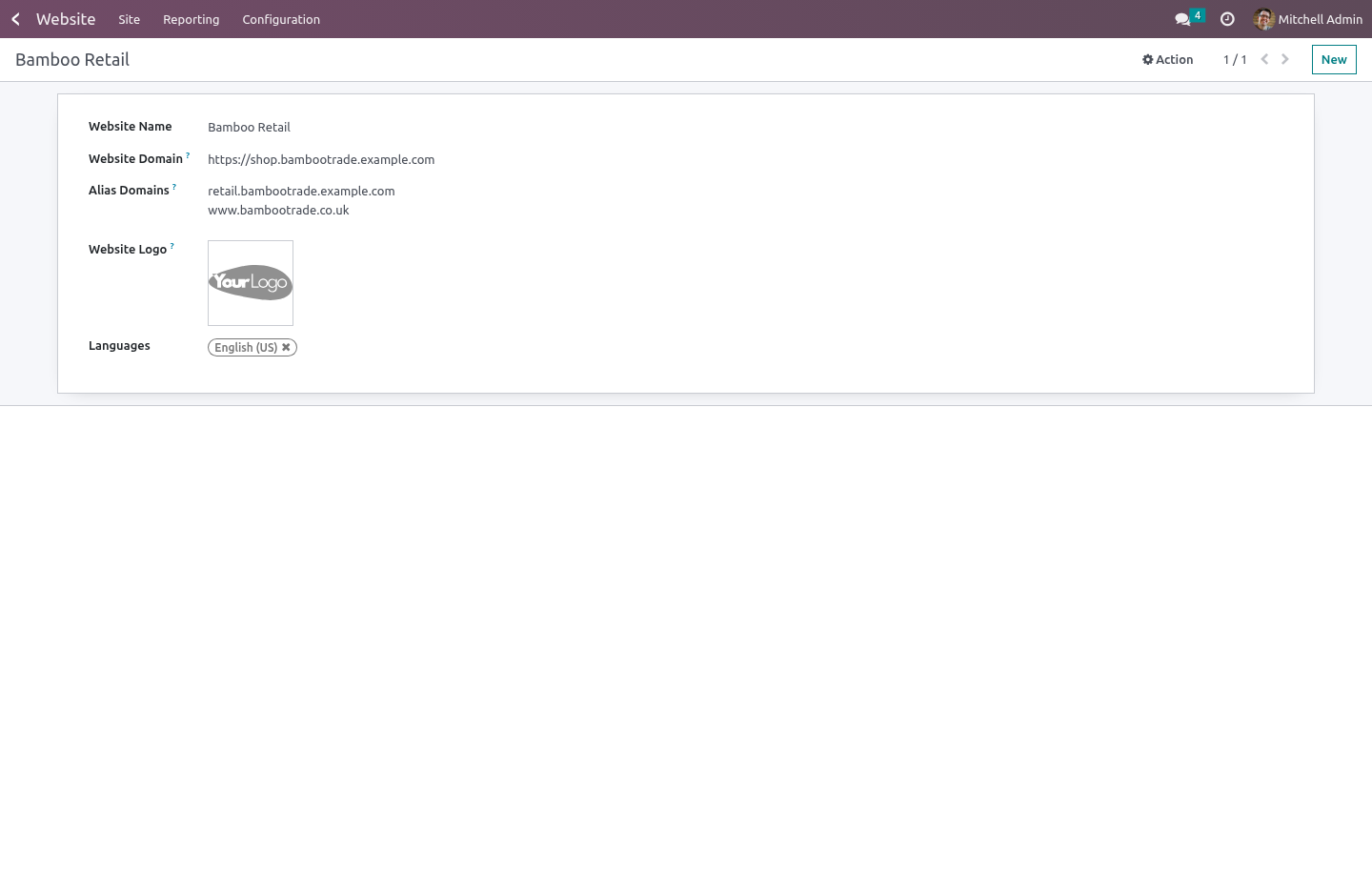
Each website carries a list of alias hostnames next to its canonical domain — one per line, on the website form. A request arriving on any alias is routed to that website exactly as if it had used the real domain: shop.example.com and www.example.co.uk reach the same site without anybody editing nginx.
Schemes, ports and case do not confuse it — hostnames arrive however the proxy felt like writing them. An alias cannot collide with another website's real domain or another alias: the form refuses it, so one site can never silently hijack another's traffic. The alias map is cached and rebuilt only when a website changes, so the routing costs a dictionary lookup, not a query, on every request.
Copying a website's configuration
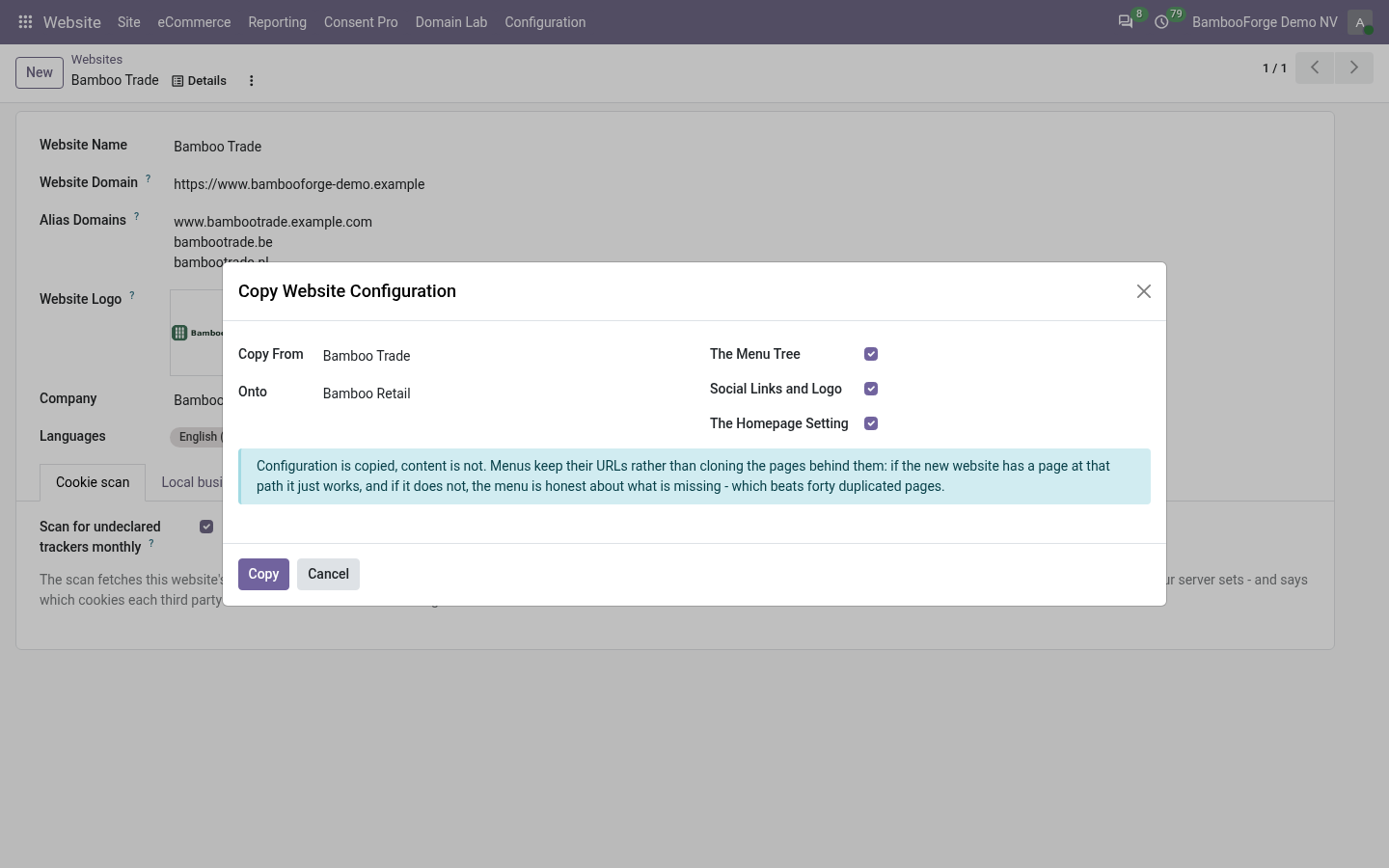
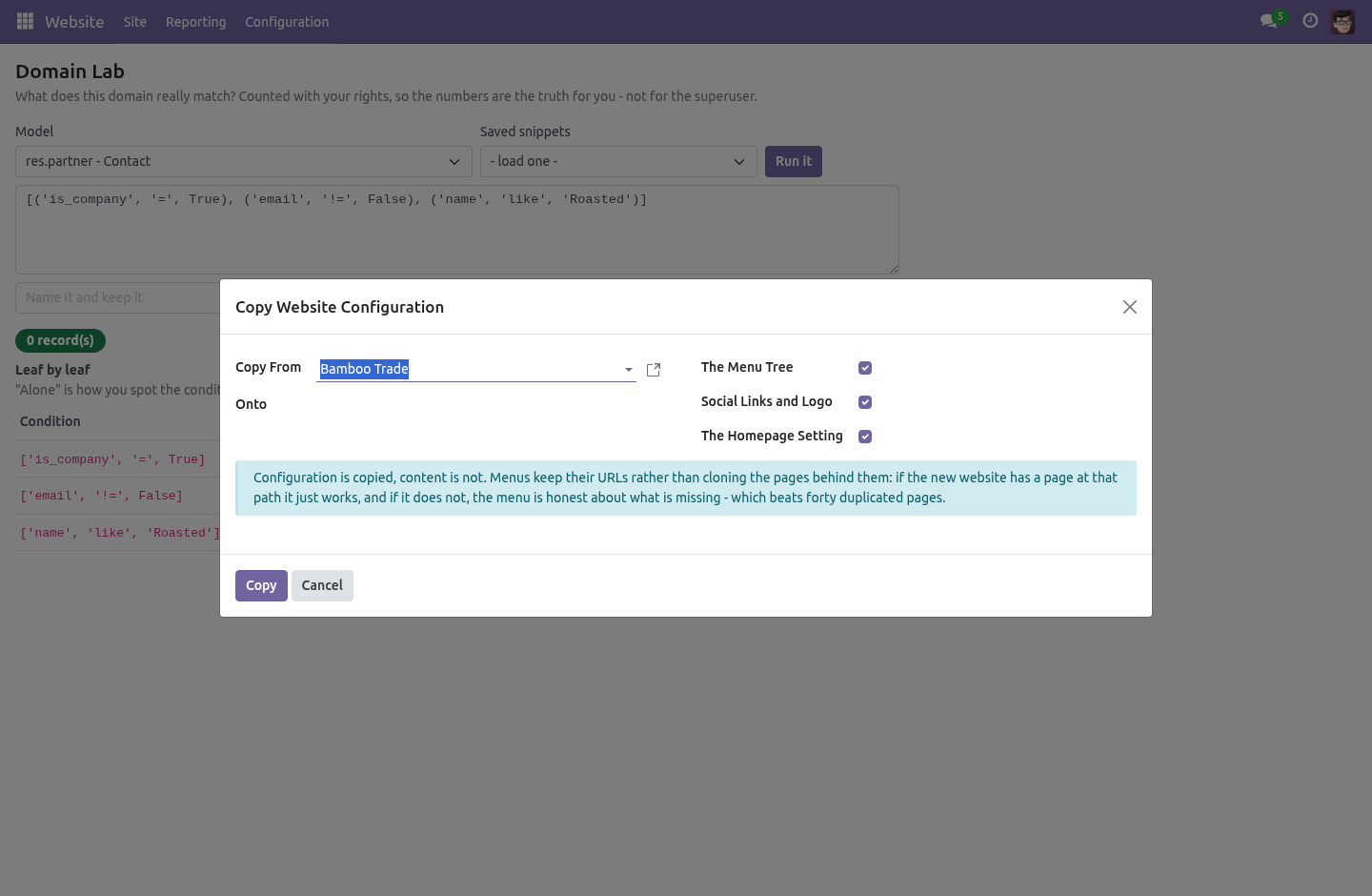
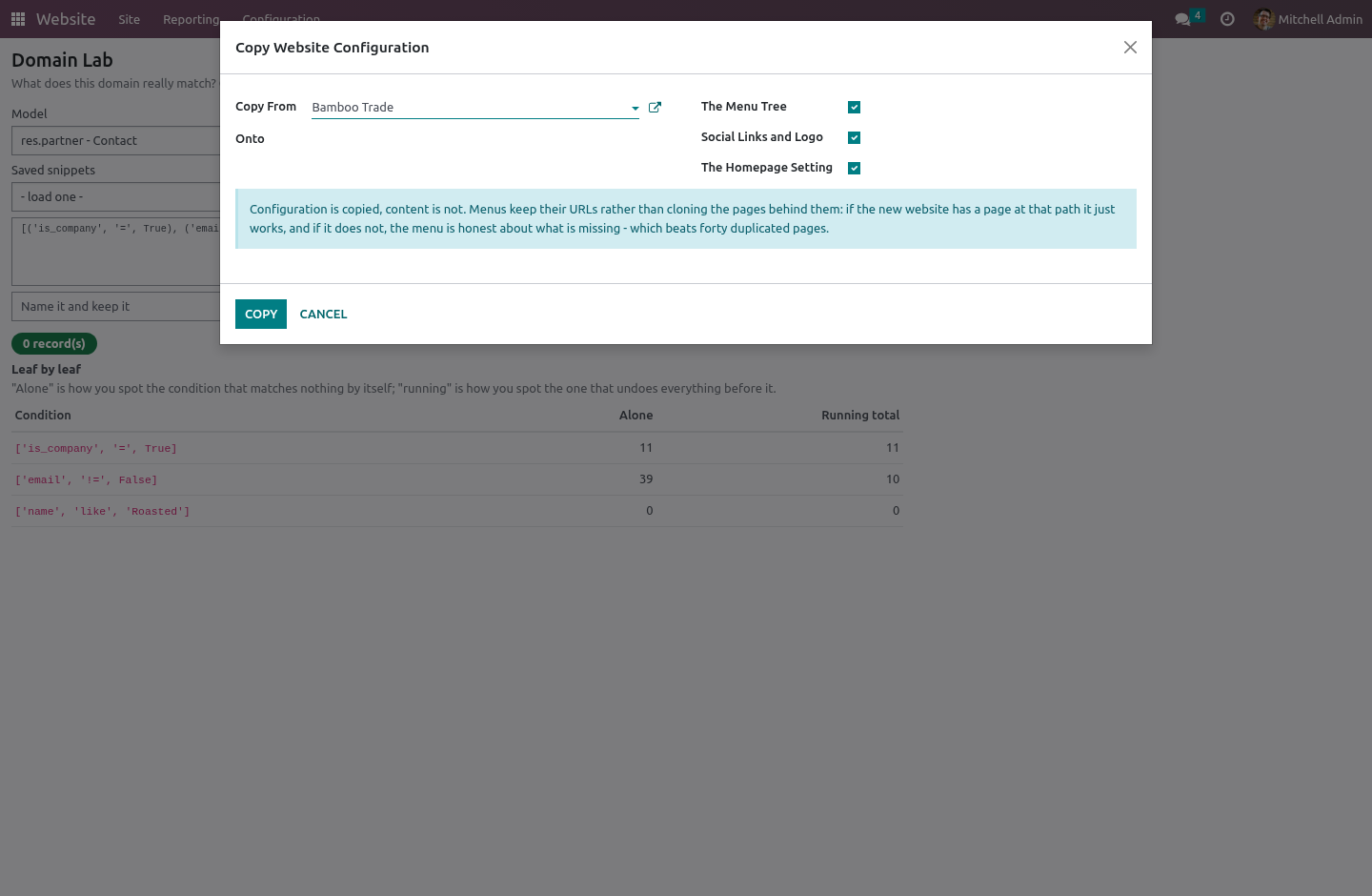
The second website always starts empty. Website › Configuration › Copy Website Configuration starts it right instead: pick a source, a target, and what to carry over —
The menu tree, with its shape — mega-menu dropdowns and all. Links are kept as URLs; the pages behind them are not cloned. If the new website has a page at that path the menu just works, and if it does not, the menu is honest about what is missing — which beats forty silently duplicated pages and the duplicate-content penalty that comes with them.
The social links and the logo. A deliberate whitelist, not a pattern match — a field a future version adds is copied only after somebody decides it should be.
The homepage setting.
The wizard says exactly what it copied, and copying a website onto itself is refused.
What it deliberately does not do
It does not clone pages, products or any content. Configuration only.
It does not copy configuration across companies — a website of one company onto a website of another is refused, because it is almost never what is meant.
It does not validate a snippet's domain at save time — the lab is where domains are tested, and a draft is allowed to be wrong there.
The lab is an internal tool: portal and public users are refused at the server, not just hidden from the menu.
How we make sure it works
Before every release, 28 automated checks run against this app on Odoo 16, 17, 18, 19 and 20. Among them:
A model the caller cannot read refuses.
A plain user reads snippets but cannot write them.
A typo is an answer not a traceback.
Ports schemes and case do not confuse it.
What was not asked for is not touched.
The complete list is in the source you receive.
Install
Copy bambooforge_website_tools into your addons path and update the app list, or install the ZIP from the Odoo Apps Store.
Install Website & Domain Tools.
Open Domain Lab - its menus are Domain Snippets, Copy Website Configuration.
Questions people ask
- Which Odoo versions does it run on?
Odoo 16.0, 17.0, 18.0, 19.0, 20.0, on the series you buy it for; each series is its own listing.
- Community or Enterprise?
Both. It needs no Enterprise app.
- What does it need?
The standard Website app. No extra Python package.
- Where does it show up?
Under the Domain Lab menu (Domain Snippets, Copy Website Configuration).
- Does anything leave my server?
No. It makes no call outside your Odoo server: no telemetry, no licence check, no third-party service.
- What happens if I uninstall it?
Odoo drops the app's own tables and fields; the standard records it worked on (contacts, orders, products) stay as they are.