 BambooForge Labs
SEO All in One with Core Web Vitals Audit
Measure LCP, CLS, INP and TTFB in your visitors' own browsers, score every page at the 75th percentile the way Google does, and rank the fixes.
Available for Odoo 16.0, Odoo 17.0, Odoo 18.0, Odoo 19.0, Odoo 20.0. Technical name bambooforge_web_vitals.
Transcript of the walkthrough (Odoo 20)
SEO All in One with Core Web Vitals Audit. Measure LCP, CLS, INP and TTFB in your visitors' own browsers, score every page at the 75th percentile the way Google does, and rank the fixes. An add-on for BambooForge SEO Pro. Lighthouse and PageSpeed measure a robot on a fibre line.
Google ranks on what real people experience, and your Odoo has no idea what that is. This measures it. In the next few minutes: seo all in one with core web vitals audit, then what is measured, and what is stored, then scored the way google scores it, then the work queue, then sampling. Then what this app deliberately does not do, so you can tell before you buy whether it fits.
Everything lives under Measurements then Web Vitals. 1. Install BambooForge Core Web Vitals Audit (it needs SEO Pro). Measurement is on by default for every website.
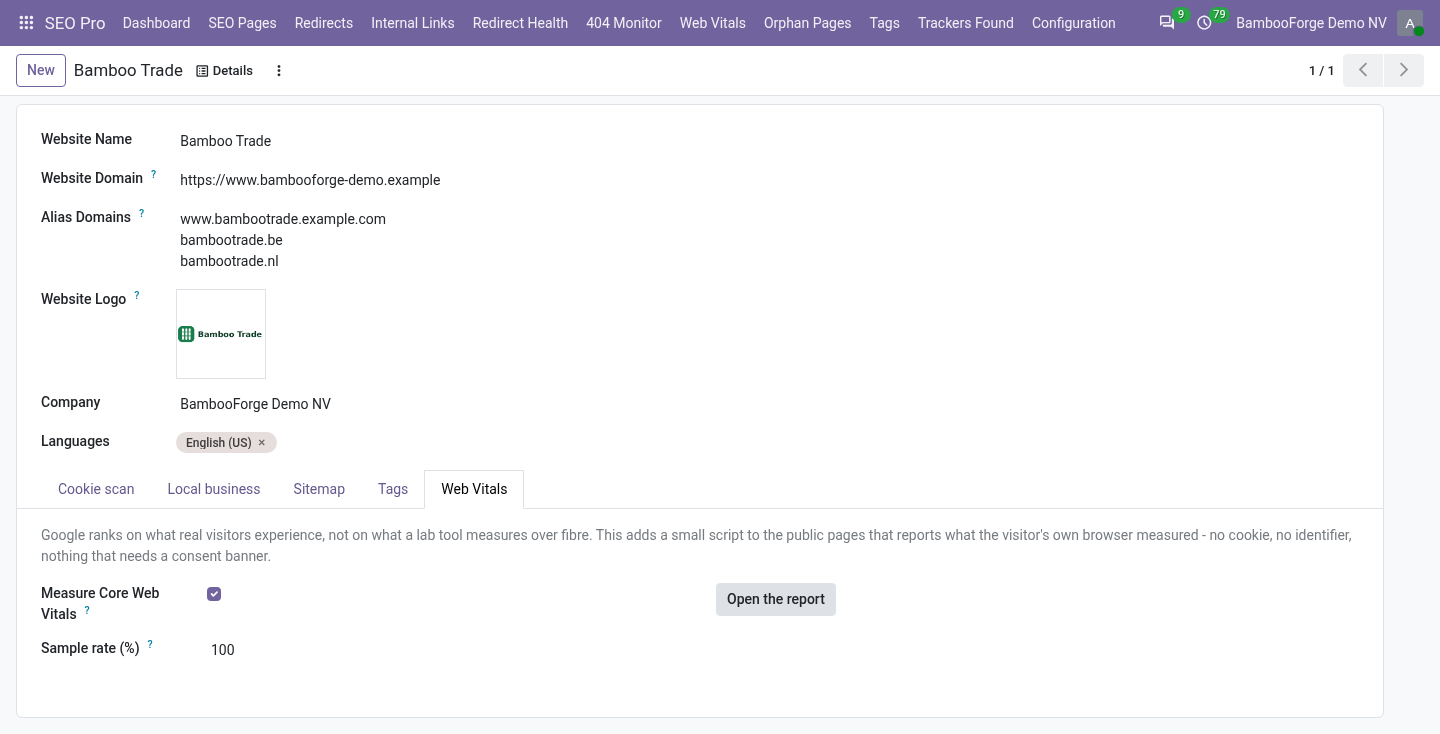
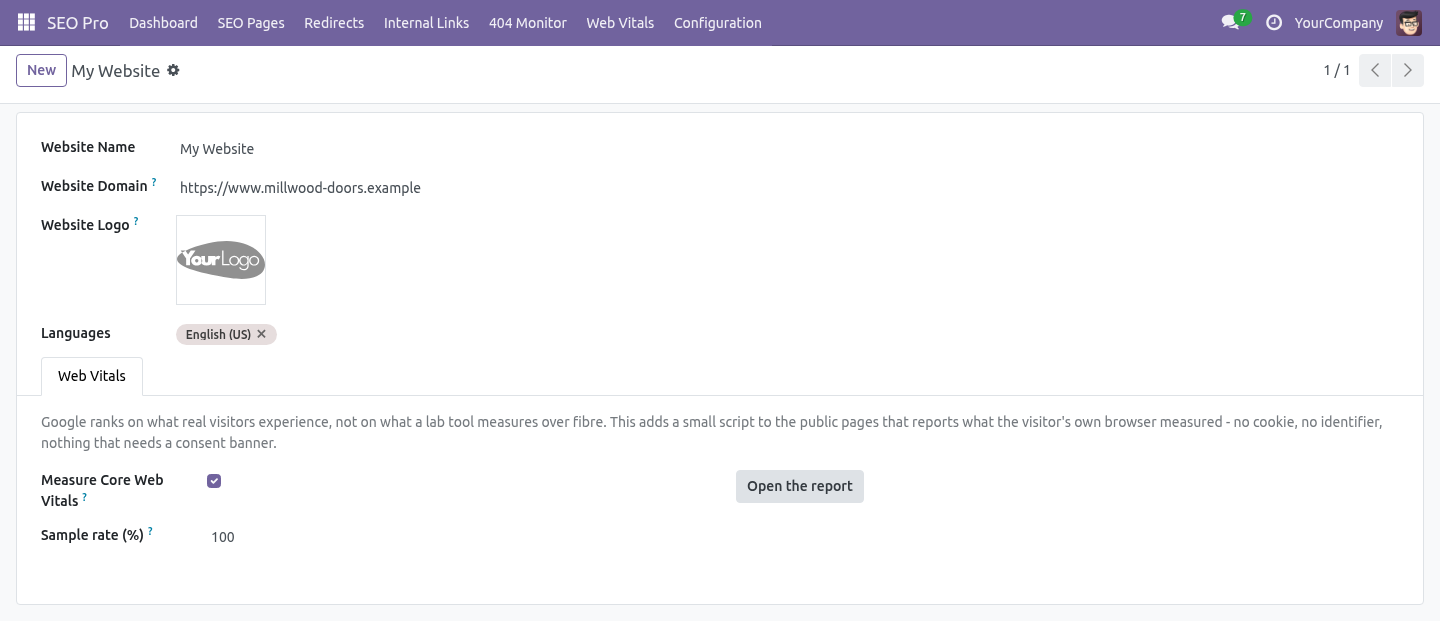
2. Switch it off, or measure a share of the traffic, under Website → Web Vitals. 3. Open the new menu SEO Pro → Web Vitals.
SEO All in One with Core Web Vitals Audit. An add-on for BambooForge SEO Pro. Lighthouse and PageSpeed measure a robot on a fibre line. Google ranks on what real people experience, and your Odoo has no idea what that is.
This measures it. What is measured, and what is stored. A small script on the public pages records what the browser itself measures and sends it once, with sendBeacon, as the visitor leaves: ====== ===================================== ================== Metric What it is Good / poor ====== ===================================== ================== LCP Largest Contentful Paint - when the < 2500 ms / > 4000 ms main thing on screen finished drawing CLS Cumulative Layout Shift - how much < 0.10 / > 0.25 the page moved under the reader INP Interaction to Next Paint - how long < 200 ms / > 500 ms the page took to answer a tap TTFB Time to First Byte - how long the < 800 ms / > 1800 ms server took to start answering ====== ===================================== ================== Scored the way Google scores it. Not an average - the 75th percentile.
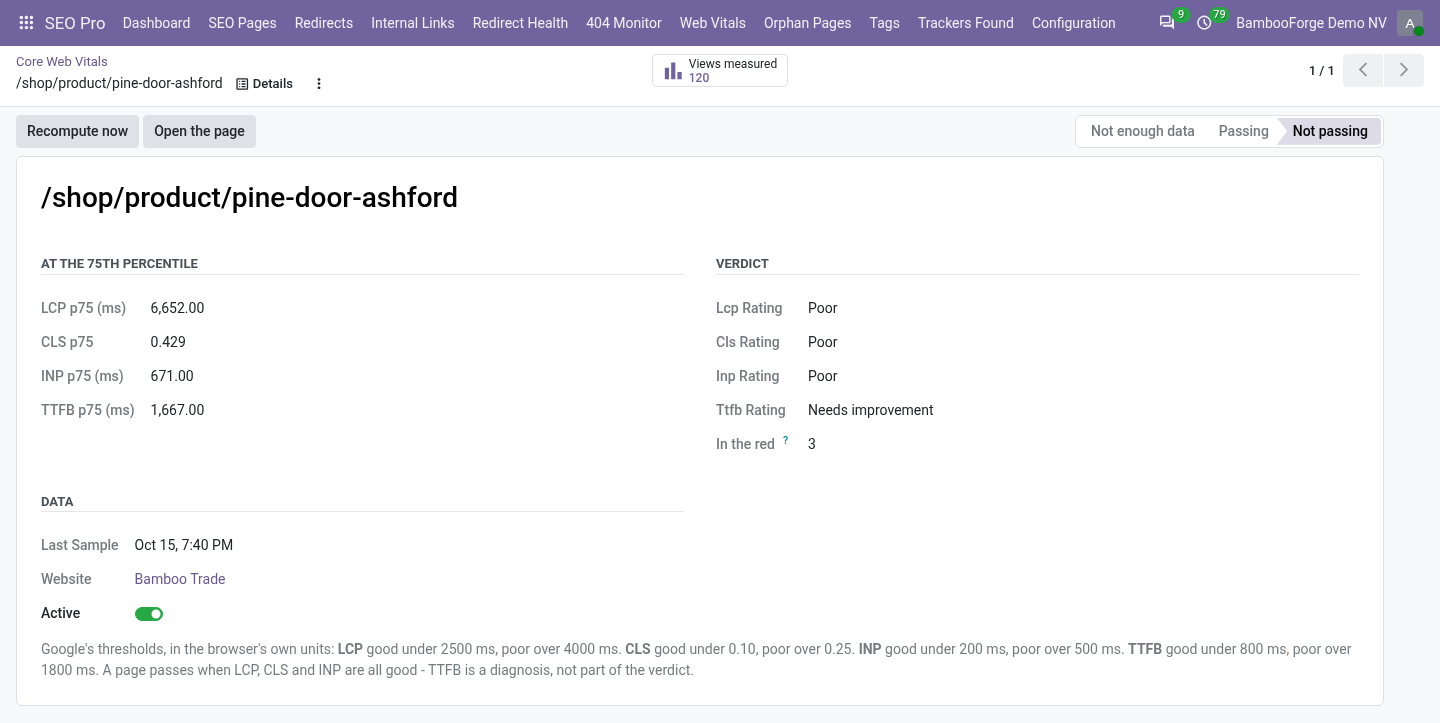
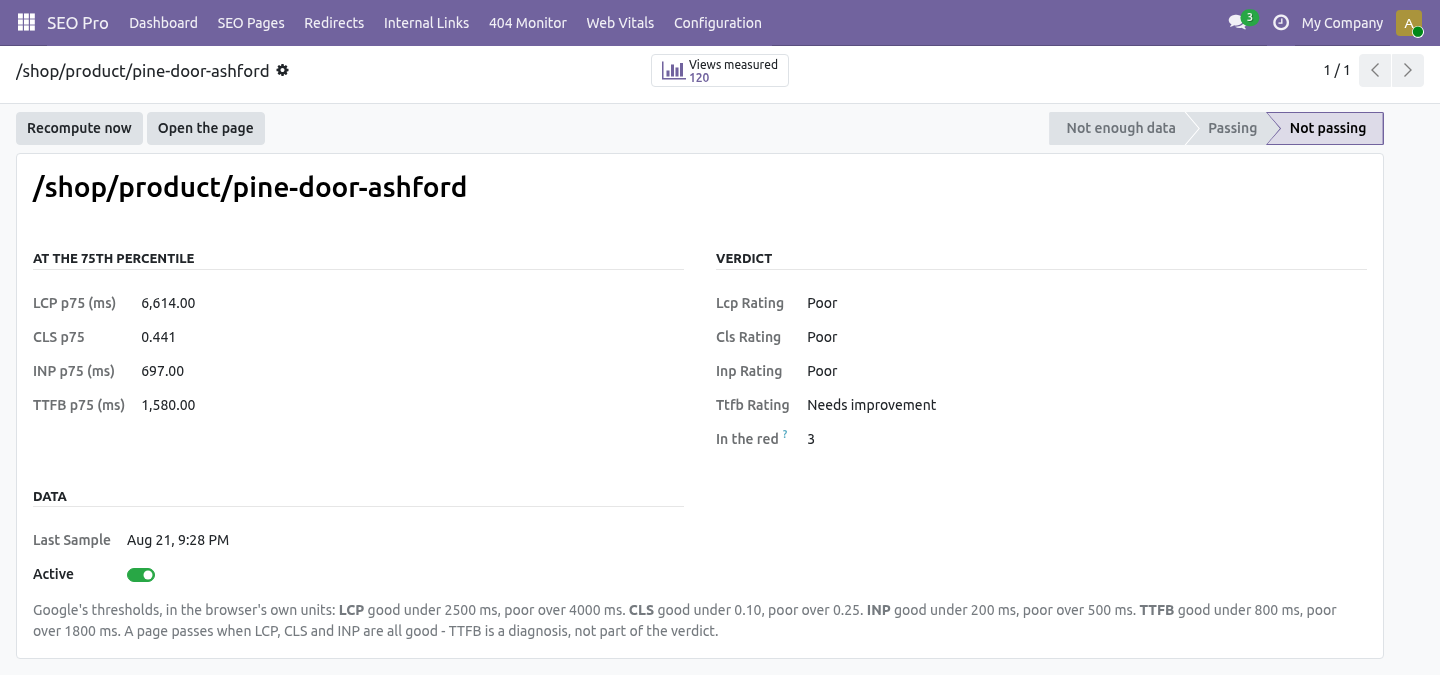
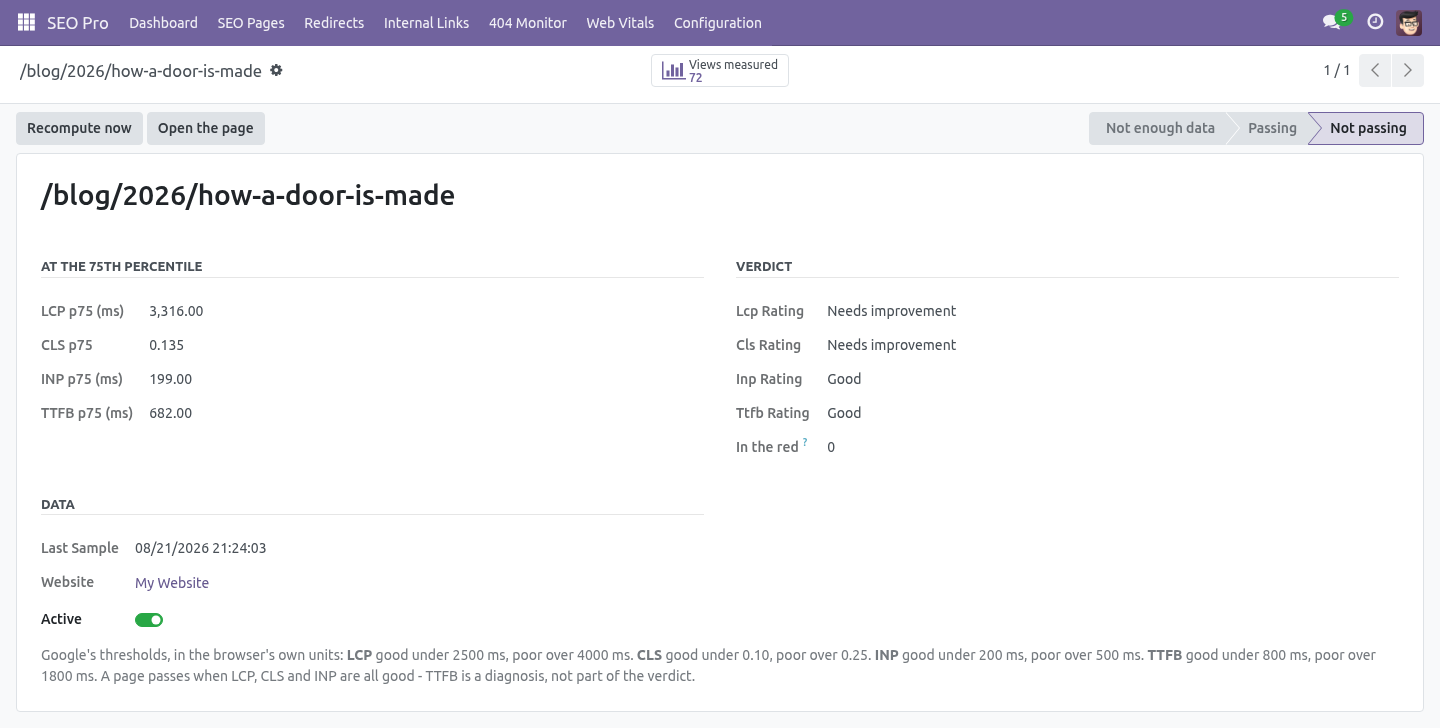
Three quarters of the views must be under the threshold. That is a different question from "the mean looks fine": a page with a 2.1 s mean and a 4.8 s p75 is a failing page with a comfortable average, and it is the p75 that Google uses. A page passes when LCP, CLS and INP are all good. TTFB is reported because it explains a slow LCP, but it is not part of the verdict - the same way Google treats it.
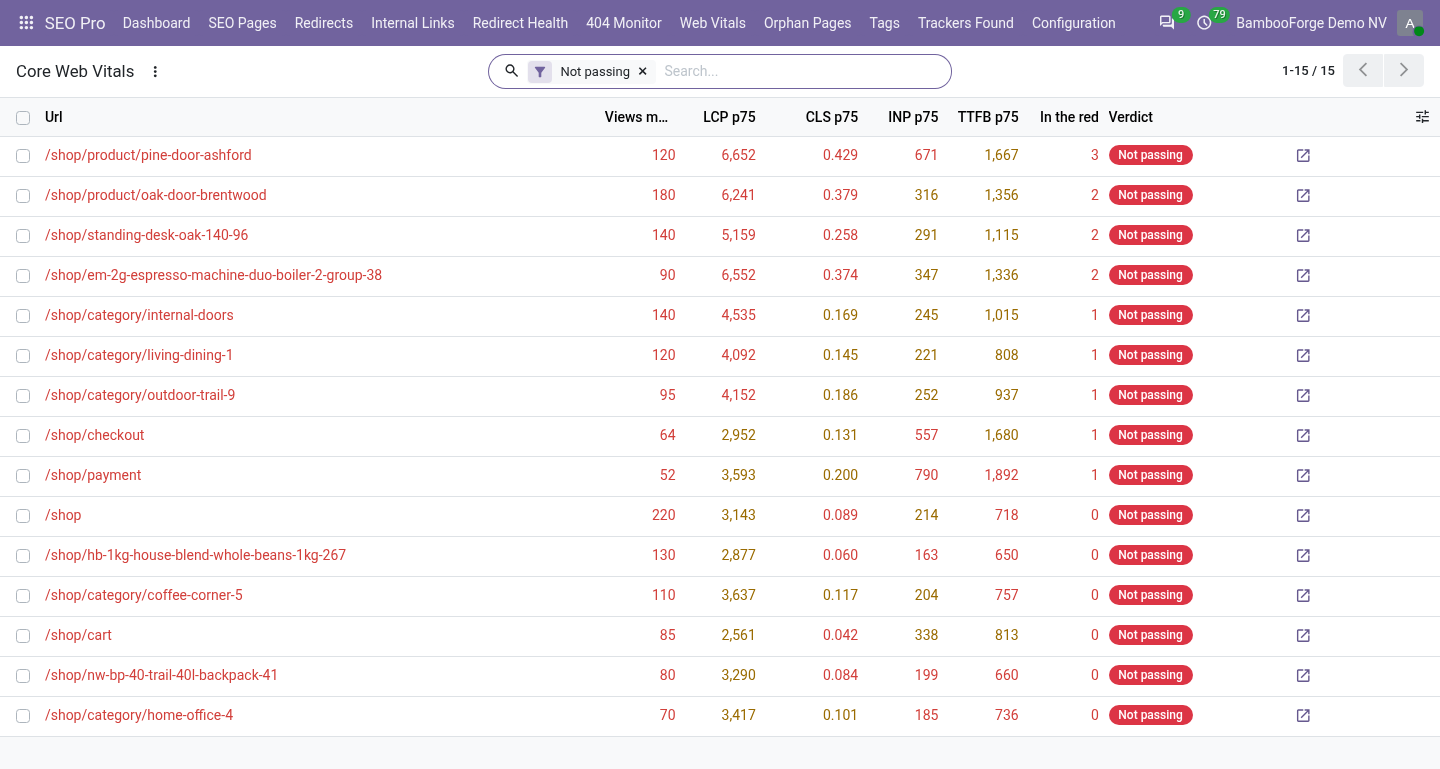
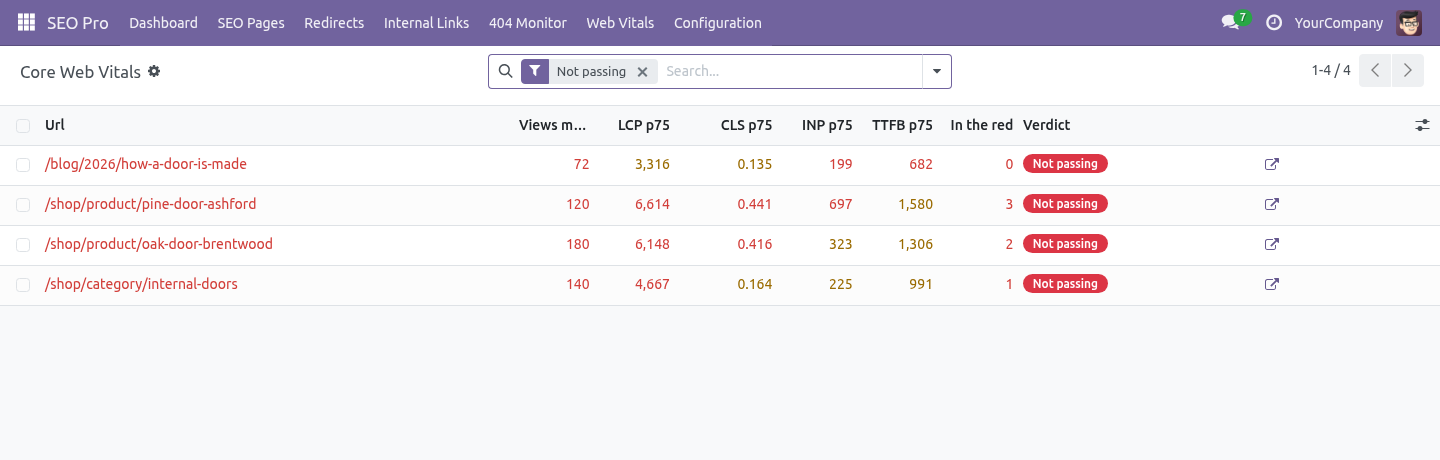
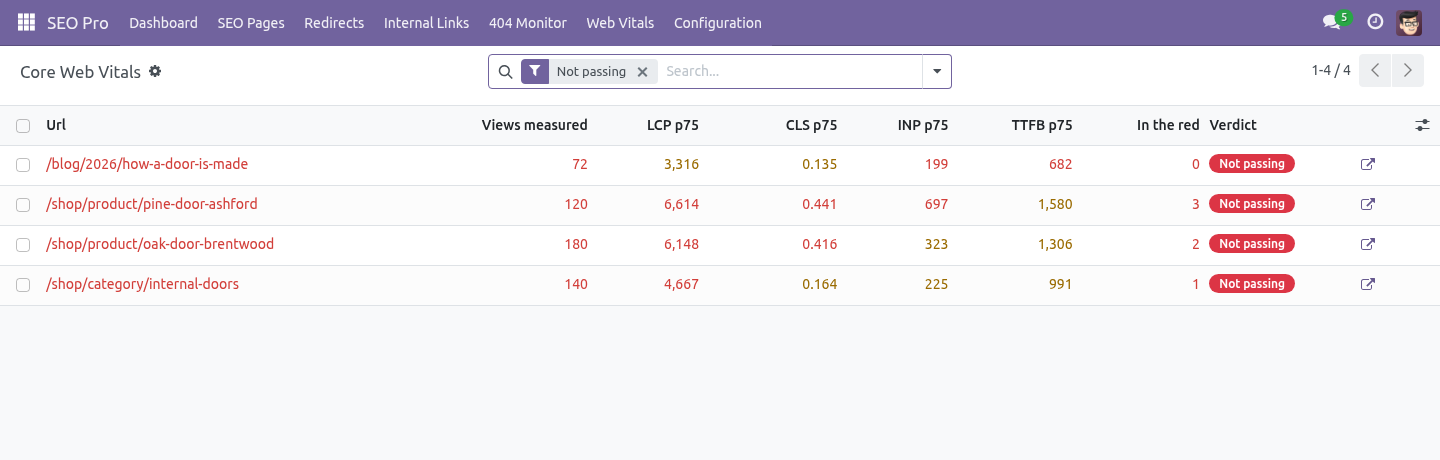
The work queue. SEO Pro → Web Vitals opens on the failing pages, sorted by how many metrics are in the red. The filters group pages by symptom: Slow to paint (LCP) - usually one oversized hero image, a font that blocks rendering, or a slow server (check TTFB on the same rows). Jumps around (CLS) - an image or an ad without width and height, or a banner injected after the fact.
Slow to respond (INP) - too much JavaScript running on tap, very often a third-party script. The list is a queue, not a diagnosis: it says which pages cost you the most, and the browser's own devtools say why. Sampling. A busy site learns as much from 10 % of its traffic and stores a tenth of the rows.
The decision is made in the browser, not on the server, so the HTML stays cacheable - every visitor gets the same page and only some of them report. Housekeeping Raw measurements are deleted after 90 days by the standard autovacuum. Change it with the system parameter bambooforge_web_vitals.retention_days. The percentiles are recomputed every six hours, and on demand from the page form.
A page whose measurements have all aged out goes back to not enough data rather than keeping last month's verdict. How we make sure it works. Before every release, 39 automated checks run against this app on Odoo 16, 17, 18, 19 and 20. Among them: A page with only old samples falls back to unknown.
A comfortable average does not save a slow page. A tracking parameter does not create a second page. A value that is not a number is dropped. A broken body answers 204 and stores nothing.
The complete list is in the source you receive. Questions people ask. Which Odoo versions does it run on? Odoo 16.0, 17.0, 18.0, 19.0, 20.0, on the series you buy it for; each series is its own listing.
Community or Enterprise? Both. It needs no Enterprise app. Support.
support@bambooforge.dev - the people who wrote it. Now the part most videos leave out: what this does not do. Only browsers that implement a metric report it. Safari does not report INP; from Safari you will see LCP, CLS and TTFB.
A measurement arrives when the visitor leaves the page. A visitor who never leaves - a kiosk, a background tab - never reports. This measures your site. It does not change it: no lazy loading, no minification, no magic.
The complete manual is at docs dot bambooforge dot dev, the demo database is linked from the store page, and support answers within twenty-four hours. Links are in the description.
Transcript of the walkthrough (Odoo 19)
Core Web Vitals Audit for Website. Measure LCP, CLS, INP and TTFB in your visitors' own browsers, score every page at the 75th percentile the way Google does, and rank the fixes. An add-on for BambooForge SEO Pro. Lighthouse and PageSpeed measure a robot on a fibre line.
Google ranks on what real people experience, and your Odoo has no idea what that is. This measures it. In the next few minutes: core web vitals audit for website, then what is measured, and what is stored, then scored the way google scores it, then the work queue, then sampling. Then what this app deliberately does not do, so you can tell before you buy whether it fits.
Everything lives under Measurements then Web Vitals. Install BambooForge Core Web Vitals Audit. Measurement is on by default for every website; switch it off, or measure a share of the traffic, under Website → Web Vitals. Core Web Vitals Audit for Website.
An add-on for BambooForge SEO Pro. Lighthouse and PageSpeed measure a robot on a fibre line. Google ranks on what real people experience, and your Odoo has no idea what that is. This measures it.
What is measured, and what is stored. A small script on the public pages records what the browser itself measures and sends it once, with sendBeacon, as the visitor leaves: ====== ===================================== ================== Metric What it is Good / poor ====== ===================================== ================== LCP Largest Contentful Paint - when the < 2500 ms / > 4000 ms main thing on screen finished drawing CLS Cumulative Layout Shift - how much < 0.10 / > 0.25 the page moved under the reader INP Interaction to Next Paint - how long < 200 ms / > 500 ms the page took to answer a tap TTFB Time to First Byte - how long the < 800 ms / > 1800 ms server took to start answering ====== ===================================== ================== Scored the way Google scores it. Not an average - the 75th percentile. Three quarters of the views must be under the threshold.
That is a different question from "the mean looks fine": a page with a 2.1 s mean and a 4.8 s p75 is a failing page with a comfortable average, and it is the p75 that Google uses. A page passes when LCP, CLS and INP are all good. TTFB is reported because it explains a slow LCP, but it is not part of the verdict - the same way Google treats it. The work queue.
SEO Pro → Web Vitals opens on the failing pages, sorted by how many metrics are in the red. The filters group pages by symptom: Slow to paint (LCP) - usually one oversized hero image, a font that blocks rendering, or a slow server (check TTFB on the same rows). Jumps around (CLS) - an image or an ad without width and height, or a banner injected after the fact. Slow to respond (INP) - too much JavaScript running on tap, very often a third-party script.
The list is a queue, not a diagnosis: it says which pages cost you the most, and the browser's own devtools say why. Sampling. A busy site learns as much from 10 % of its traffic and stores a tenth of the rows. The decision is made in the browser, not on the server, so the HTML stays cacheable - every visitor gets the same page and only some of them report.
Housekeeping Raw measurements are deleted after 90 days by the standard autovacuum. Change it with the system parameter bambooforge_web_vitals.retention_days. The percentiles are recomputed every six hours, and on demand from the page form. A page whose measurements have all aged out goes back to not enough data rather than keeping last month's verdict.
Support. support@bambooforge.dev - the people who wrote it. Now the part most videos leave out: what this does not do. Only browsers that implement a metric report it.
Safari does not report INP; from Safari you will see LCP, CLS and TTFB. A measurement arrives when the visitor leaves the page. A visitor who never leaves - a kiosk, a background tab - never reports. This measures your site.
It does not change it: no lazy loading, no minification, no magic. The complete manual is at docs dot bambooforge dot dev, the demo database is linked from the store page, and support answers within twenty-four hours. Links are in the description.
Transcript of the walkthrough (Odoo 18)
Core Web Vitals Audit for Website. Measure LCP, CLS, INP and TTFB in your visitors' own browsers, score every page at the 75th percentile the way Google does, and rank the fixes. An add-on for BambooForge SEO Pro. Lighthouse and PageSpeed measure a robot on a fibre line.
Google ranks on what real people experience, and your Odoo has no idea what that is. This measures it. In the next few minutes: core web vitals audit for website, then what is measured, and what is stored, then scored the way google scores it, then the work queue, then sampling. Then what this app deliberately does not do, so you can tell before you buy whether it fits.
Everything lives under Measurements then Web Vitals. Install BambooForge Core Web Vitals Audit. Measurement is on by default for every website; switch it off, or measure a share of the traffic, under Website → Web Vitals. Core Web Vitals Audit for Website.
An add-on for BambooForge SEO Pro. Lighthouse and PageSpeed measure a robot on a fibre line. Google ranks on what real people experience, and your Odoo has no idea what that is. This measures it.
What is measured, and what is stored. A small script on the public pages records what the browser itself measures and sends it once, with sendBeacon, as the visitor leaves: ====== ===================================== ================== Metric What it is Good / poor ====== ===================================== ================== LCP Largest Contentful Paint - when the < 2500 ms / > 4000 ms main thing on screen finished drawing CLS Cumulative Layout Shift - how much < 0.10 / > 0.25 the page moved under the reader INP Interaction to Next Paint - how long < 200 ms / > 500 ms the page took to answer a tap TTFB Time to First Byte - how long the < 800 ms / > 1800 ms server took to start answering ====== ===================================== ================== Scored the way Google scores it. Not an average - the 75th percentile. Three quarters of the views must be under the threshold.
That is a different question from "the mean looks fine": a page with a 2.1 s mean and a 4.8 s p75 is a failing page with a comfortable average, and it is the p75 that Google uses. A page passes when LCP, CLS and INP are all good. TTFB is reported because it explains a slow LCP, but it is not part of the verdict - the same way Google treats it. The work queue.
SEO Pro → Web Vitals opens on the failing pages, sorted by how many metrics are in the red. The filters group pages by symptom: Slow to paint (LCP) - usually one oversized hero image, a font that blocks rendering, or a slow server (check TTFB on the same rows). Jumps around (CLS) - an image or an ad without width and height, or a banner injected after the fact. Slow to respond (INP) - too much JavaScript running on tap, very often a third-party script.
The list is a queue, not a diagnosis: it says which pages cost you the most, and the browser's own devtools say why. Sampling. A busy site learns as much from 10 % of its traffic and stores a tenth of the rows. The decision is made in the browser, not on the server, so the HTML stays cacheable - every visitor gets the same page and only some of them report.
Housekeeping Raw measurements are deleted after 90 days by the standard autovacuum. Change it with the system parameter bambooforge_web_vitals.retention_days. The percentiles are recomputed every six hours, and on demand from the page form. A page whose measurements have all aged out goes back to not enough data rather than keeping last month's verdict.
Support. support@bambooforge.dev - the people who wrote it. Now the part most videos leave out: what this does not do. Only browsers that implement a metric report it.
Safari does not report INP; from Safari you will see LCP, CLS and TTFB. A measurement arrives when the visitor leaves the page. A visitor who never leaves - a kiosk, a background tab - never reports. This measures your site.
It does not change it: no lazy loading, no minification, no magic. The complete manual is at docs dot bambooforge dot dev, the demo database is linked from the store page, and support answers within twenty-four hours. Links are in the description.
Transcript of the walkthrough (Odoo 17)
Core Web Vitals Audit for Website. Measure LCP, CLS, INP and TTFB in your visitors' own browsers, score every page at the 75th percentile the way Google does, and rank the fixes. An add-on for BambooForge SEO Pro. Lighthouse and PageSpeed measure a robot on a fibre line.
Google ranks on what real people experience, and your Odoo has no idea what that is. This measures it. In the next few minutes: core web vitals audit for website, then what is measured, and what is stored, then scored the way google scores it, then the work queue, then sampling. Then what this app deliberately does not do, so you can tell before you buy whether it fits.
Everything lives under Measurements then Web Vitals. Install BambooForge Core Web Vitals Audit. Measurement is on by default for every website; switch it off, or measure a share of the traffic, under Website → Web Vitals. Core Web Vitals Audit for Website.
An add-on for BambooForge SEO Pro. Lighthouse and PageSpeed measure a robot on a fibre line. Google ranks on what real people experience, and your Odoo has no idea what that is. This measures it.
What is measured, and what is stored. A small script on the public pages records what the browser itself measures and sends it once, with sendBeacon, as the visitor leaves: ====== ===================================== ================== Metric What it is Good / poor ====== ===================================== ================== LCP Largest Contentful Paint - when the < 2500 ms / > 4000 ms main thing on screen finished drawing CLS Cumulative Layout Shift - how much < 0.10 / > 0.25 the page moved under the reader INP Interaction to Next Paint - how long < 200 ms / > 500 ms the page took to answer a tap TTFB Time to First Byte - how long the < 800 ms / > 1800 ms server took to start answering ====== ===================================== ================== Scored the way Google scores it. Not an average - the 75th percentile. Three quarters of the views must be under the threshold.
That is a different question from "the mean looks fine": a page with a 2.1 s mean and a 4.8 s p75 is a failing page with a comfortable average, and it is the p75 that Google uses. A page passes when LCP, CLS and INP are all good. TTFB is reported because it explains a slow LCP, but it is not part of the verdict - the same way Google treats it. The work queue.
SEO Pro → Web Vitals opens on the failing pages, sorted by how many metrics are in the red. The filters group pages by symptom: Slow to paint (LCP) - usually one oversized hero image, a font that blocks rendering, or a slow server (check TTFB on the same rows). Jumps around (CLS) - an image or an ad without width and height, or a banner injected after the fact. Slow to respond (INP) - too much JavaScript running on tap, very often a third-party script.
The list is a queue, not a diagnosis: it says which pages cost you the most, and the browser's own devtools say why. Sampling. A busy site learns as much from 10 % of its traffic and stores a tenth of the rows. The decision is made in the browser, not on the server, so the HTML stays cacheable - every visitor gets the same page and only some of them report.
Housekeeping Raw measurements are deleted after 90 days by the standard autovacuum. Change it with the system parameter bambooforge_web_vitals.retention_days. The percentiles are recomputed every six hours, and on demand from the page form. A page whose measurements have all aged out goes back to not enough data rather than keeping last month's verdict.
Support. support@bambooforge.dev - the people who wrote it. Now the part most videos leave out: what this does not do. Only browsers that implement a metric report it.
Safari does not report INP; from Safari you will see LCP, CLS and TTFB. A measurement arrives when the visitor leaves the page. A visitor who never leaves - a kiosk, a background tab - never reports. This measures your site.
It does not change it: no lazy loading, no minification, no magic. The complete manual is at docs dot bambooforge dot dev, the demo database is linked from the store page, and support answers within twenty-four hours. Links are in the description.
Transcript of the walkthrough (Odoo 16)
Core Web Vitals Audit for Website. Measure LCP, CLS, INP and TTFB in your visitors' own browsers, score every page at the 75th percentile the way Google does, and rank the fixes. An add-on for BambooForge SEO Pro. Lighthouse and PageSpeed measure a robot on a fibre line.
Google ranks on what real people experience, and your Odoo has no idea what that is. This measures it. In the next few minutes: core web vitals audit for website, then what is measured, and what is stored, then scored the way google scores it, then the work queue, then sampling. Then what this app deliberately does not do, so you can tell before you buy whether it fits.
Everything lives under Measurements then Web Vitals. Install BambooForge Core Web Vitals Audit. Measurement is on by default for every website; switch it off, or measure a share of the traffic, under Website → Web Vitals. Core Web Vitals Audit for Website.
An add-on for BambooForge SEO Pro. Lighthouse and PageSpeed measure a robot on a fibre line. Google ranks on what real people experience, and your Odoo has no idea what that is. This measures it.
What is measured, and what is stored. A small script on the public pages records what the browser itself measures and sends it once, with sendBeacon, as the visitor leaves: ====== ===================================== ================== Metric What it is Good / poor ====== ===================================== ================== LCP Largest Contentful Paint - when the < 2500 ms / > 4000 ms main thing on screen finished drawing CLS Cumulative Layout Shift - how much < 0.10 / > 0.25 the page moved under the reader INP Interaction to Next Paint - how long < 200 ms / > 500 ms the page took to answer a tap TTFB Time to First Byte - how long the < 800 ms / > 1800 ms server took to start answering ====== ===================================== ================== Scored the way Google scores it. Not an average - the 75th percentile. Three quarters of the views must be under the threshold.
That is a different question from "the mean looks fine": a page with a 2.1 s mean and a 4.8 s p75 is a failing page with a comfortable average, and it is the p75 that Google uses. A page passes when LCP, CLS and INP are all good. TTFB is reported because it explains a slow LCP, but it is not part of the verdict - the same way Google treats it. The work queue.
SEO Pro → Web Vitals opens on the failing pages, sorted by how many metrics are in the red. The filters group pages by symptom: Slow to paint (LCP) - usually one oversized hero image, a font that blocks rendering, or a slow server (check TTFB on the same rows). Jumps around (CLS) - an image or an ad without width and height, or a banner injected after the fact. Slow to respond (INP) - too much JavaScript running on tap, very often a third-party script.
The list is a queue, not a diagnosis: it says which pages cost you the most, and the browser's own devtools say why. Sampling. A busy site learns as much from 10 % of its traffic and stores a tenth of the rows. The decision is made in the browser, not on the server, so the HTML stays cacheable - every visitor gets the same page and only some of them report.
Housekeeping Raw measurements are deleted after 90 days by the standard autovacuum. Change it with the system parameter bambooforge_web_vitals.retention_days. The percentiles are recomputed every six hours, and on demand from the page form. A page whose measurements have all aged out goes back to not enough data rather than keeping last month's verdict.
Support. support@bambooforge.dev - the people who wrote it. Now the part most videos leave out: what this does not do. Only browsers that implement a metric report it.
Safari does not report INP; from Safari you will see LCP, CLS and TTFB. A measurement arrives when the visitor leaves the page. A visitor who never leaves - a kiosk, a background tab - never reports. This measures your site.
It does not change it: no lazy loading, no minification, no magic. The complete manual is at docs dot bambooforge dot dev, the demo database is linked from the store page, and support answers within twenty-four hours. Links are in the description.
Key facts
- What it is
- Measure LCP, CLS, INP and TTFB in your visitors' own browsers, score every page at the 75th percentile the way Google does, and rank the fixes.
- For
- Website
- Odoo versions
- 16.0, 17.0, 18.0, 19.0, 20.0 - Community and Enterprise
- Runs on
- Odoo.sh or Odoo you host yourself - not Odoo Online, which accepts no third-party apps
- Price
- 208 EUR, one-time, on the Odoo Apps Store
- Technical name
- bambooforge_web_vitals
- Not for
- Only browsers that implement a metric report it. Safari does not report INP; from Safari you will see LCP, CLS and TTFB.; A measurement arrives when the visitor leaves the page. A visitor who never leaves - a kiosk, a background tab - never reports.; This measures your site. It does not change it: no lazy loading, no minification, no magic.
- Manual last updated
- 2026-10-15
SEO All in One with Core Web Vitals Audit
An add-on for BambooForge SEO Pro. Lighthouse and PageSpeed measure a robot on a fibre line. Google ranks on what real people experience, and your Odoo has no idea what that is. This measures it.
Install
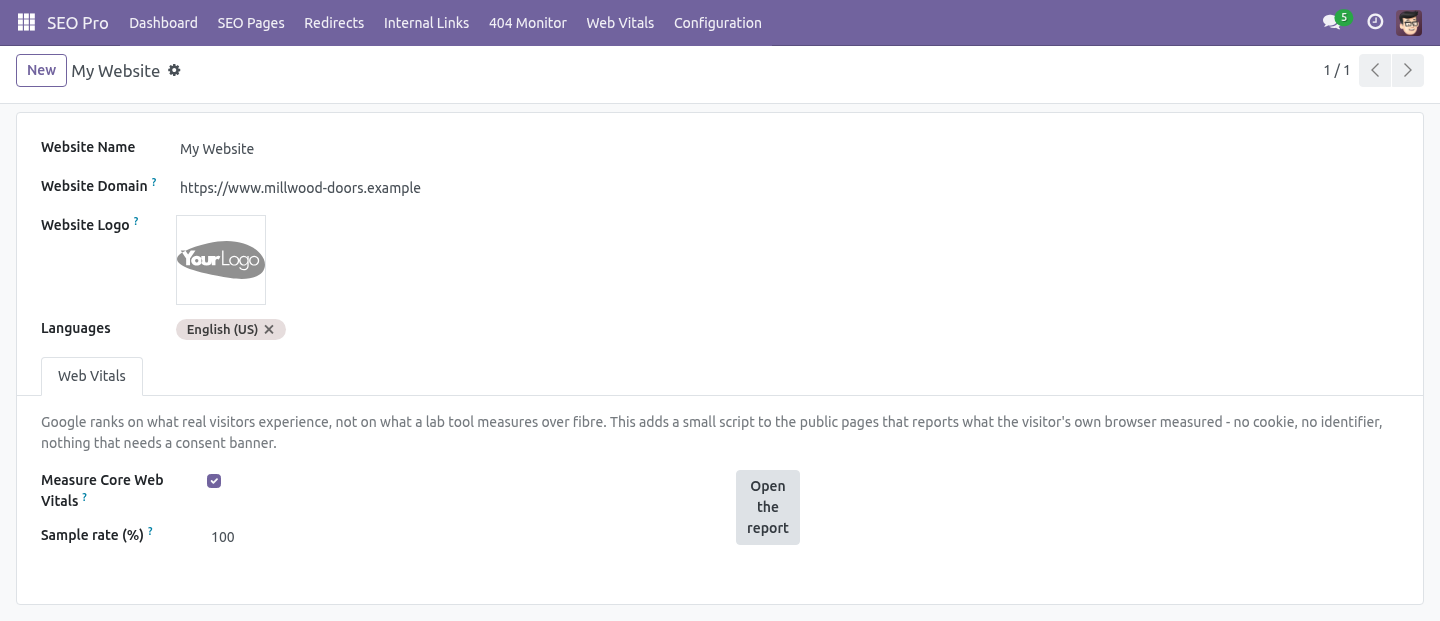
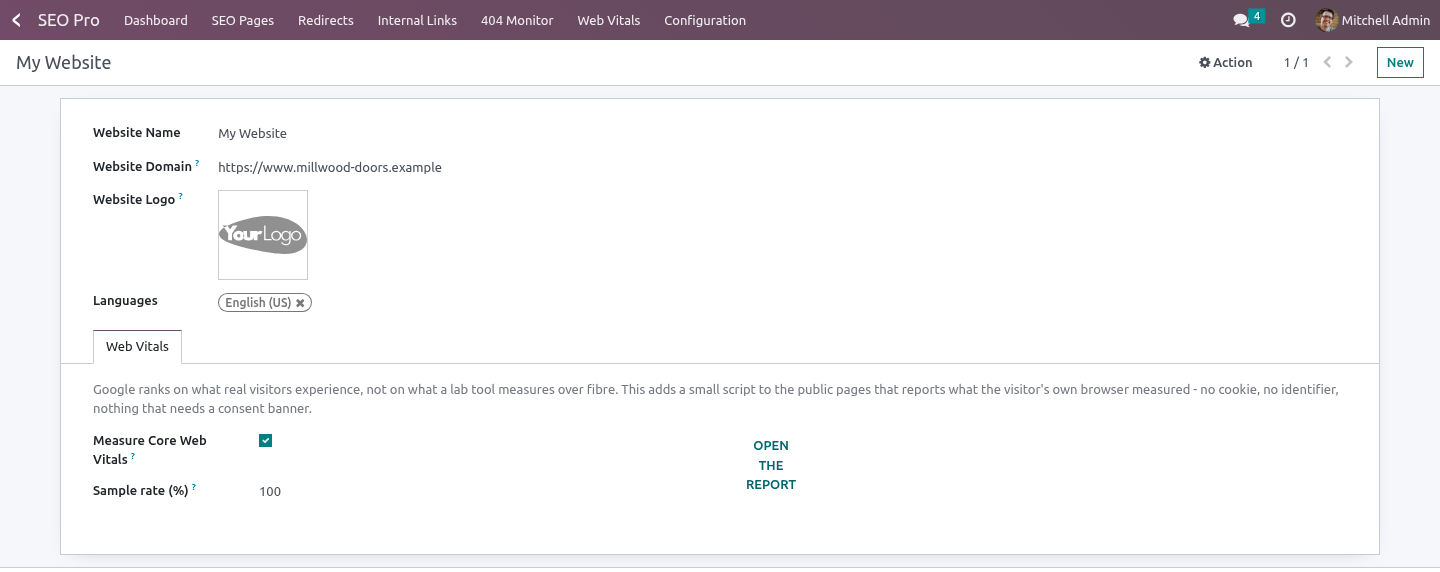
Install BambooForge Core Web Vitals Audit (it needs SEO Pro). Measurement is on by default for every website.
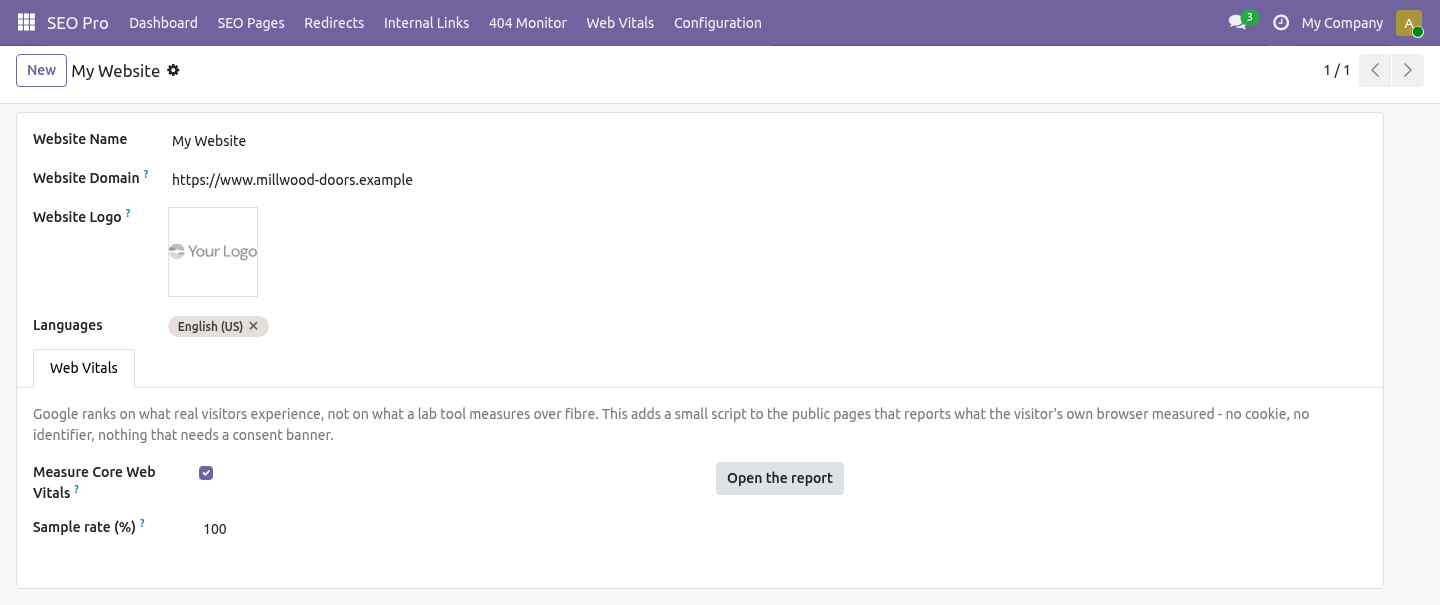
Switch it off, or measure a share of the traffic, under Website → Web Vitals.
Open the new menu SEO Pro → Web Vitals.
What is measured, and what is stored
A small script on the public pages records what the browser itself measures and sends it once, with sendBeacon, as the visitor leaves:
Metric |
What it is |
Good / poor |
|---|---|---|
LCP |
Largest Contentful Paint - when the main thing on screen finished drawing |
< 2500 ms / > 4000 ms |
CLS |
Cumulative Layout Shift - how much the page moved under the reader |
< 0.10 / > 0.25 |
INP |
Interaction to Next Paint - how long the page took to answer a tap |
< 200 ms / > 500 ms |
TTFB |
Time to First Byte - how long the server took to start answering |
< 800 ms / > 1800 ms |
What is stored is a path, a device class (mobile / tablet / desktop), whether it was a first visit or a reload, four numbers and a timestamp.
No cookie. No identifier. Nothing that needs a consent banner - which is also why the report cannot tell you who had a slow page, only that a quarter of the views of that page were slow.
Scored the way Google scores it
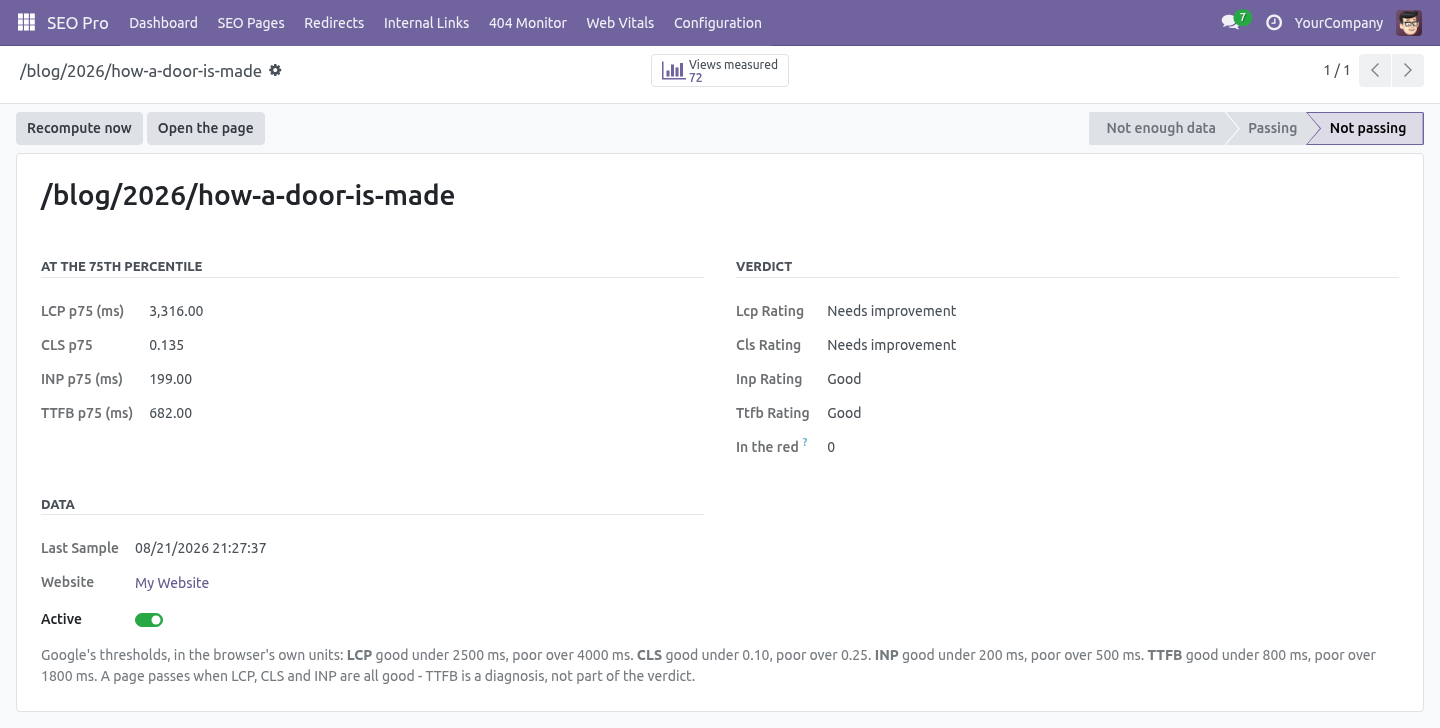
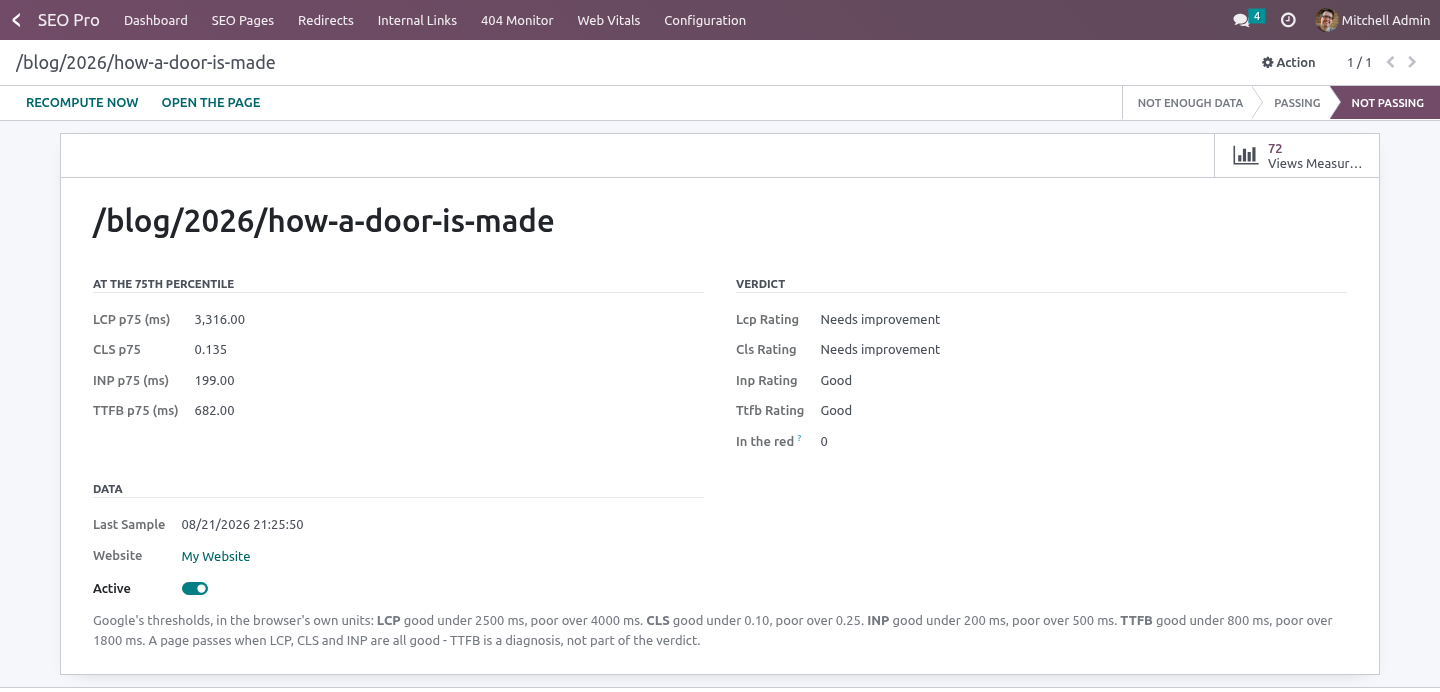
Not an average - the 75th percentile. Three quarters of the views must be under the threshold. That is a different question from "the mean looks fine": a page with a 2.1 s mean and a 4.8 s p75 is a failing page with a comfortable average, and it is the p75 that Google uses.
A page passes when LCP, CLS and INP are all good. TTFB is reported because it explains a slow LCP, but it is not part of the verdict - the same way Google treats it.
Below ten measurements a page says not enough data rather than something confident and wrong.
The work queue
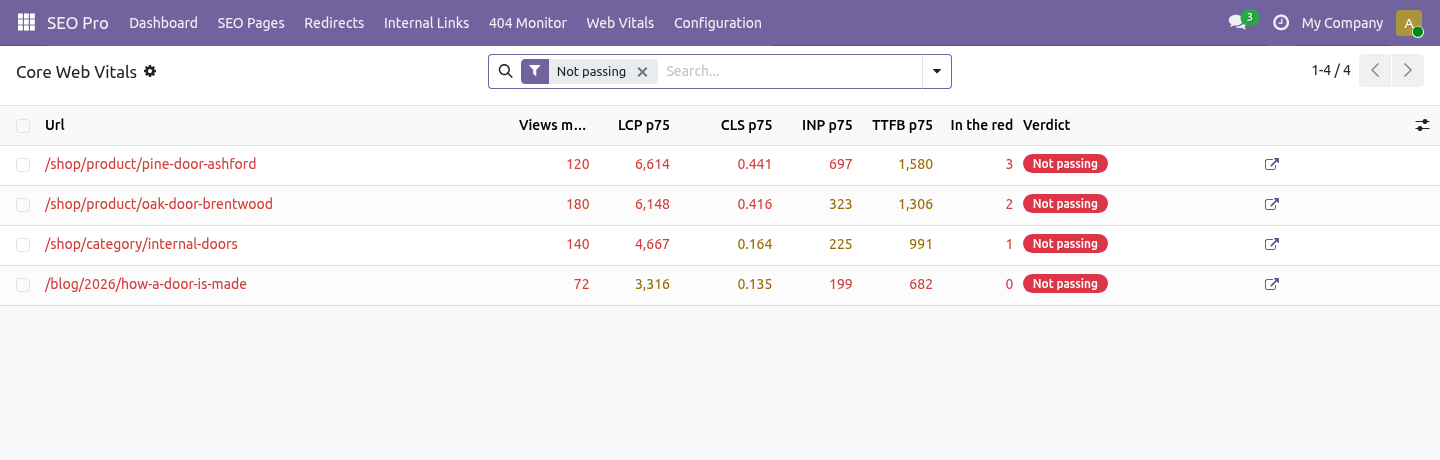
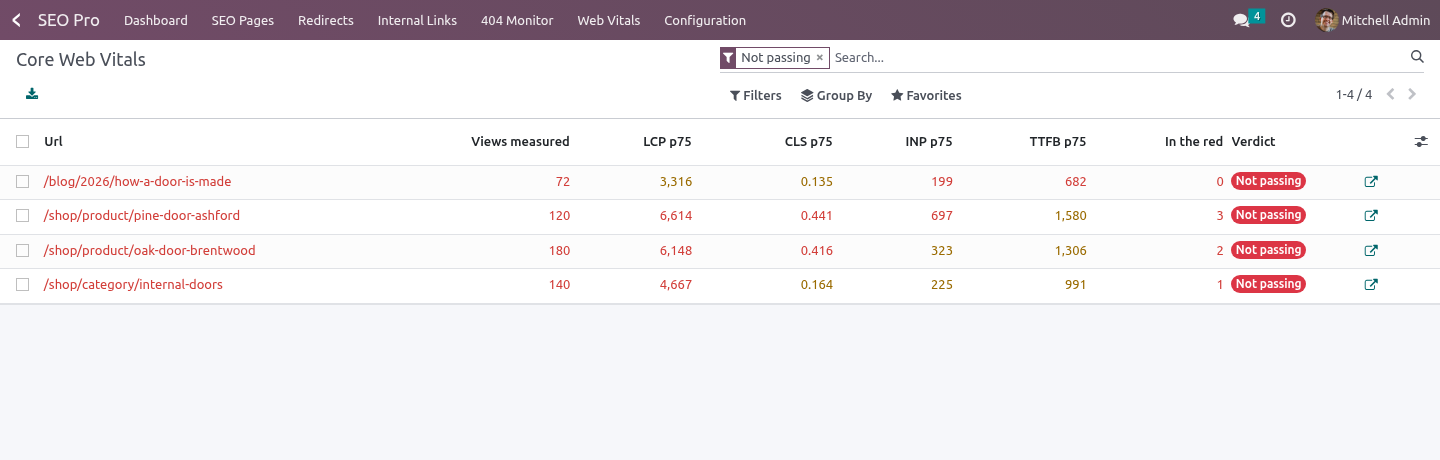
SEO Pro → Web Vitals opens on the failing pages, sorted by how many metrics are in the red. The filters group pages by symptom:
Slow to paint (LCP) - usually one oversized hero image, a font that blocks rendering, or a slow server (check TTFB on the same rows).
Jumps around (CLS) - an image or an ad without width and height, or a banner injected after the fact.
Slow to respond (INP) - too much JavaScript running on tap, very often a third-party script.
The list is a queue, not a diagnosis: it says which pages cost you the most, and the browser's own devtools say why.
Sampling
A busy site learns as much from 10 % of its traffic and stores a tenth of the rows. The decision is made in the browser, not on the server, so the HTML stays cacheable - every visitor gets the same page and only some of them report.
Housekeeping
Raw measurements are deleted after 90 days by the standard autovacuum. Change it with the system parameter bambooforge_web_vitals.retention_days.
The percentiles are recomputed every six hours, and on demand from the page form.
A page whose measurements have all aged out goes back to not enough data rather than keeping last month's verdict.
Honest limits
Only browsers that implement a metric report it. Safari does not report INP; from Safari you will see LCP, CLS and TTFB.
A measurement arrives when the visitor leaves the page. A visitor who never leaves - a kiosk, a background tab - never reports.
This measures your site. It does not change it: no lazy loading, no minification, no magic.
How we make sure it works
Before every release, 39 automated checks run against this app on Odoo 16, 17, 18, 19 and 20. Among them:
A page with only old samples falls back to unknown.
A comfortable average does not save a slow page.
A tracking parameter does not create a second page.
A value that is not a number is dropped.
A broken body answers 204 and stores nothing.
The complete list is in the source you receive.
Questions people ask
- Which Odoo versions does it run on?
Odoo 16.0, 17.0, 18.0, 19.0, 20.0, on the series you buy it for; each series is its own listing.
- Community or Enterprise?
Both. It needs no Enterprise app.
- What does it need?
The standard Web; seo pro (BambooForge) must be installed first app. No extra Python package.
- Where does it show up?
Under the Measurements menu (Web Vitals).
- Does anything leave my server?
No. It makes no call outside your Odoo server: no telemetry, no licence check, no third-party service.
- What happens if I uninstall it?
Odoo drops the app's own tables and fields; the standard records it worked on (contacts, orders, products) stay as they are.
Support
support@bambooforge.dev - the people who wrote it.