 BambooForge Labs
Vendor Portal | Supplier Quotes & Deliveries
Let a vendor quote a request, decline it, send a shipping notice and send their invoice from the portal - none of it touching your order.
Available for Odoo 16.0, Odoo 17.0, Odoo 18.0, Odoo 19.0, Odoo 20.0. Technical name bambooforge_vendor_portal.
Transcript of the walkthrough (Odoo 20)
Vendor Portal / Supplier Quotes & Deliveries. Let a vendor quote a request, decline it, send a shipping notice and send their invoice from the portal - none of it touching your order. Odoo Community gives your vendors a portal where they can look at your requests and orders, and change a delivery date. Everything else comes back by email: the prices, the "we cannot do that one", the shipping notice, the invoice.
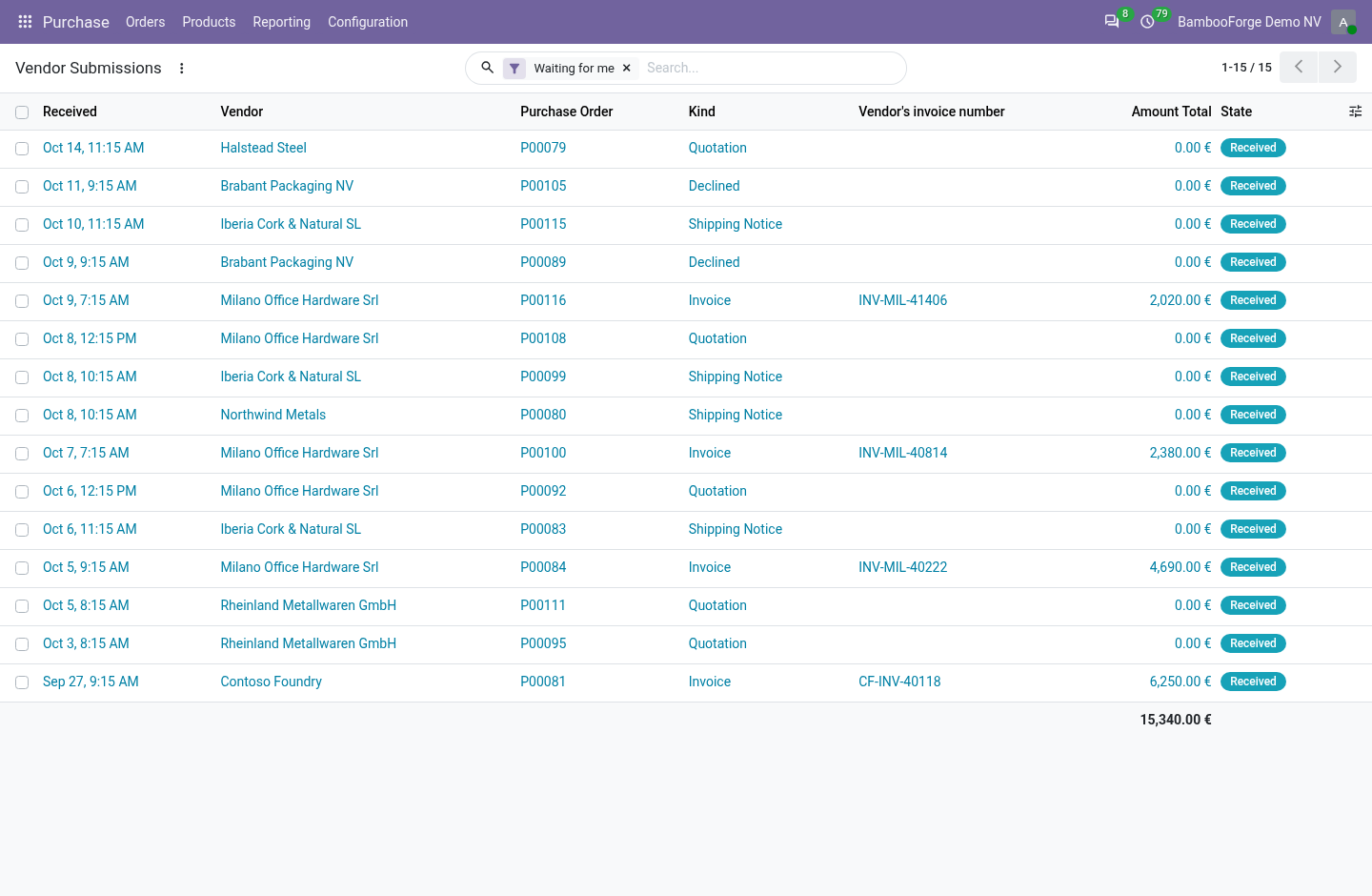
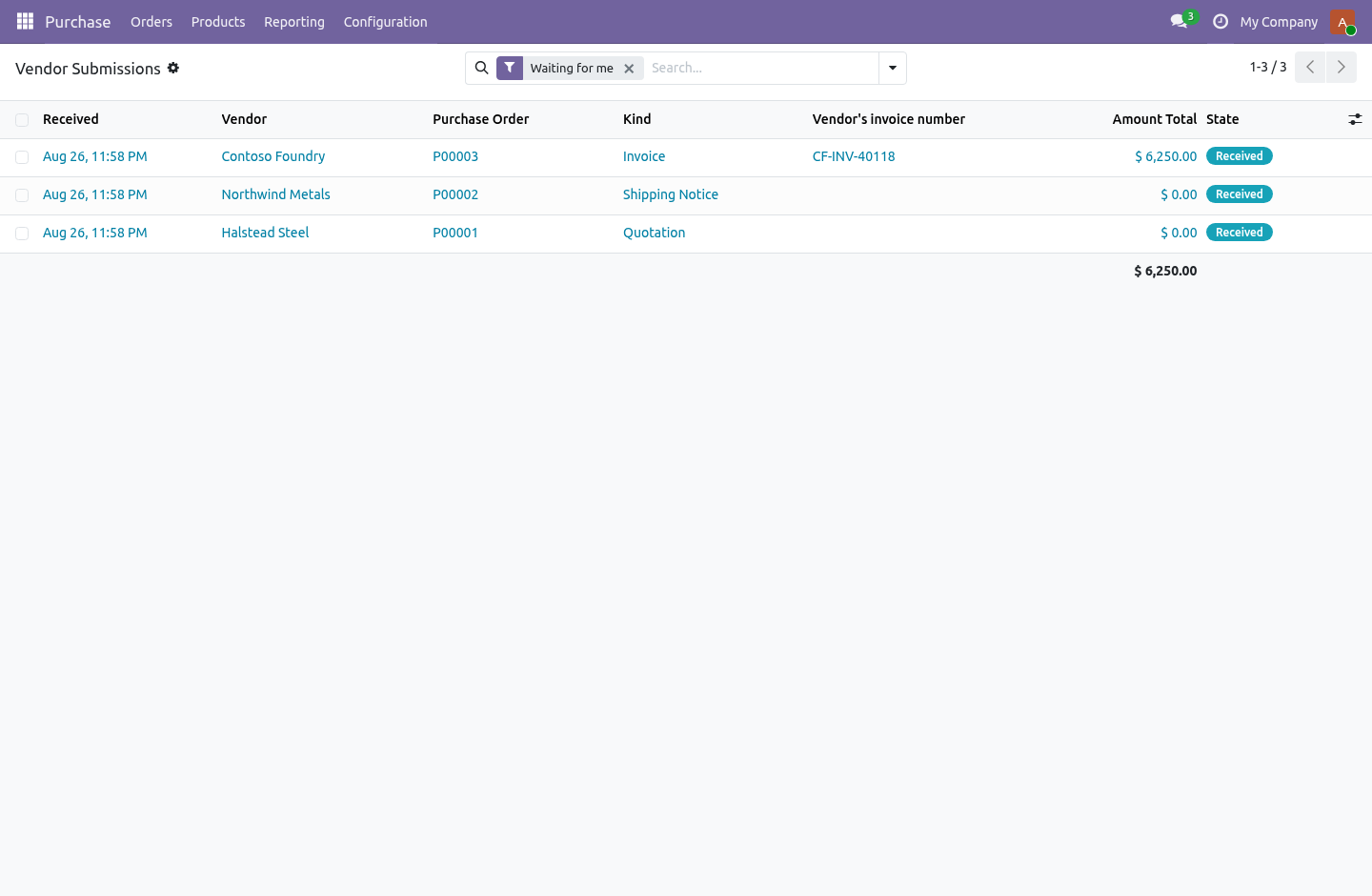
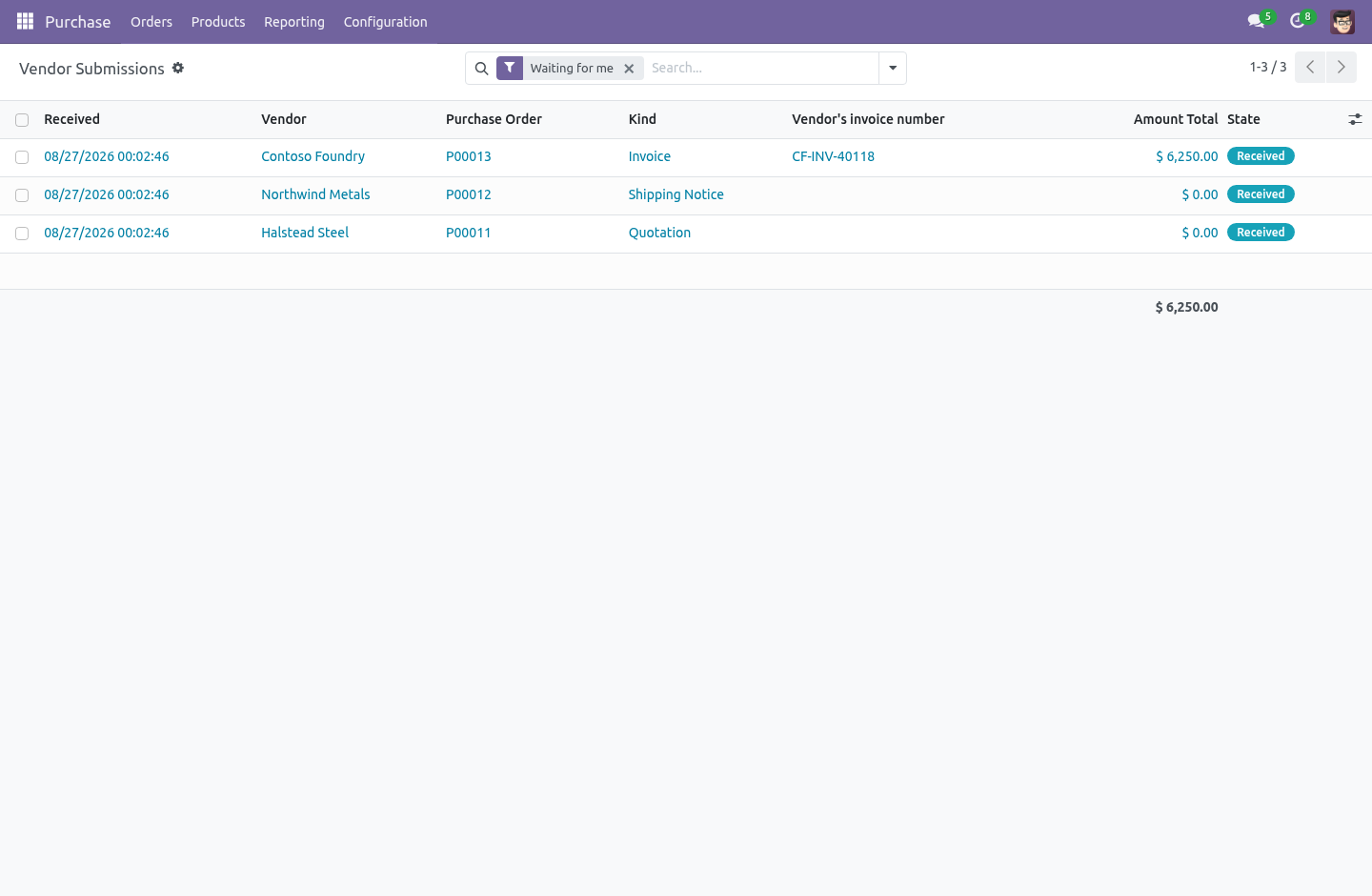
Somebody then types it in — and that is where the price that was quoted and the price that was ordered stop being the same number. In the next few minutes: answering a request, then telling you it is on its way, then sending the invoice, then nothing touches the order until you apply it, then what the door refuses. Then what this app deliberately does not do, so you can tell before you buy whether it fits. Everything lives under Vendor Submissions.
1. Copy bambooforge_vendor_portal into your addons path and update the app list, or install the ZIP from the Odoo Apps Store. 2. Install Vendor Portal.
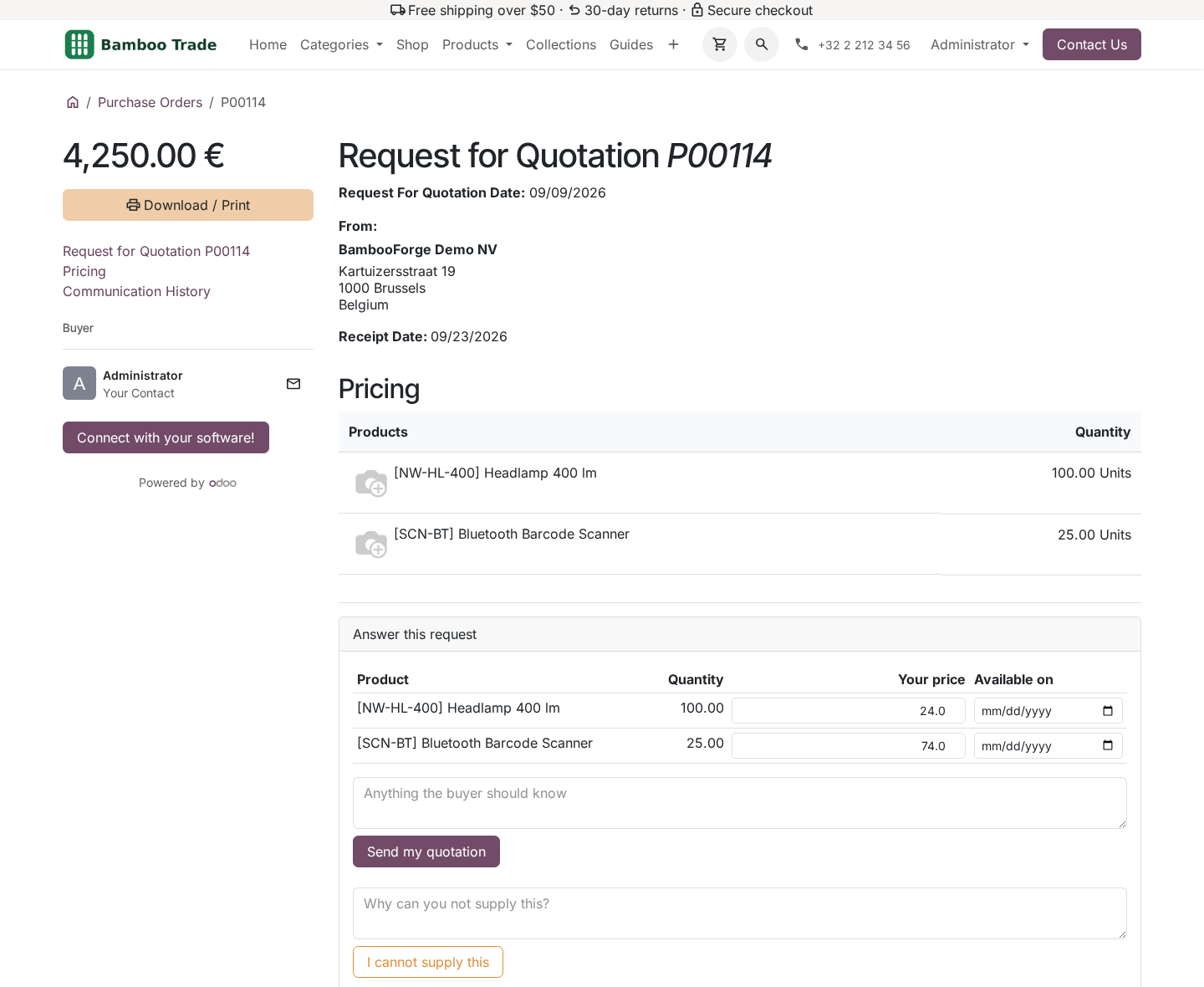
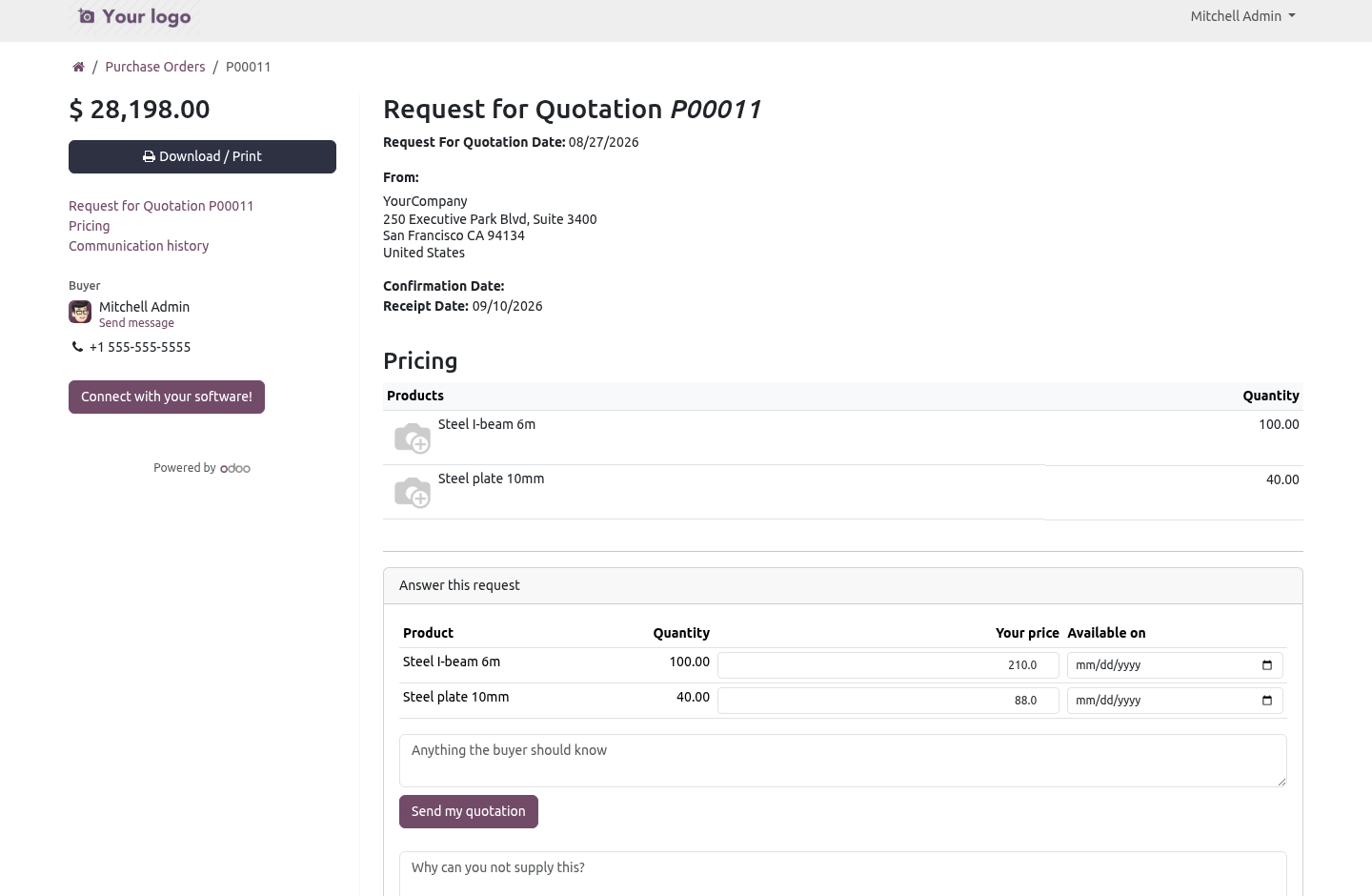
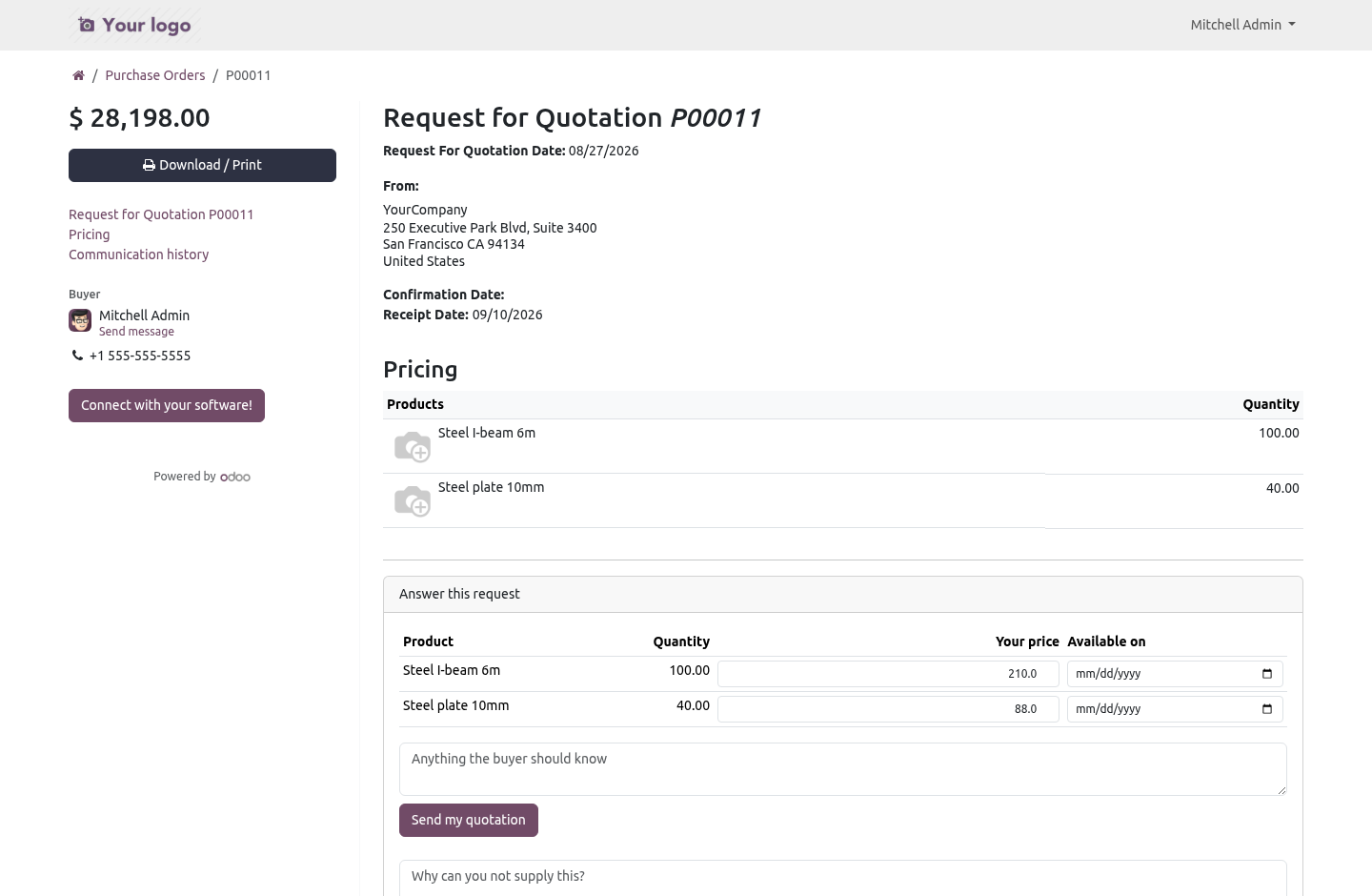
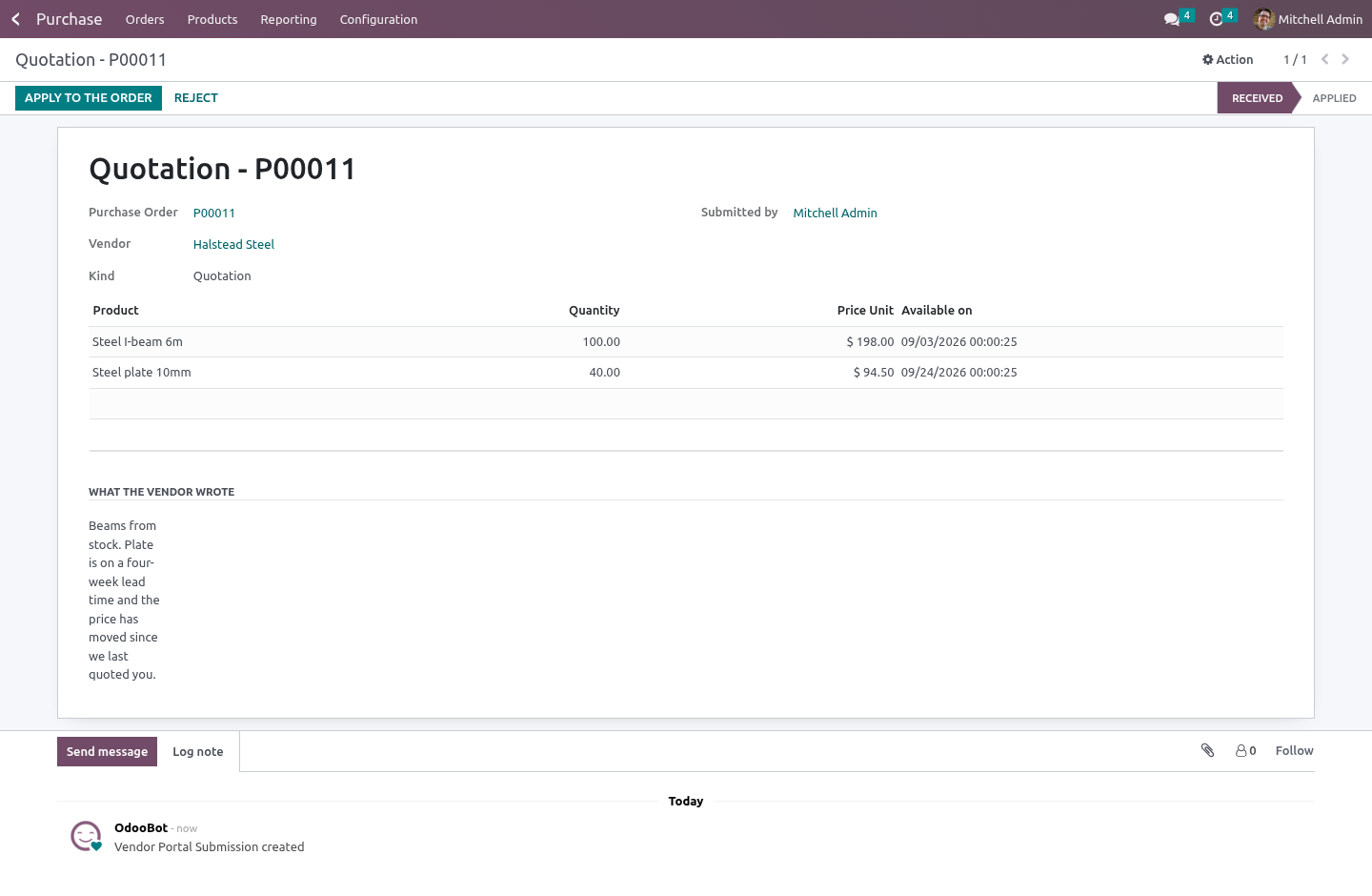
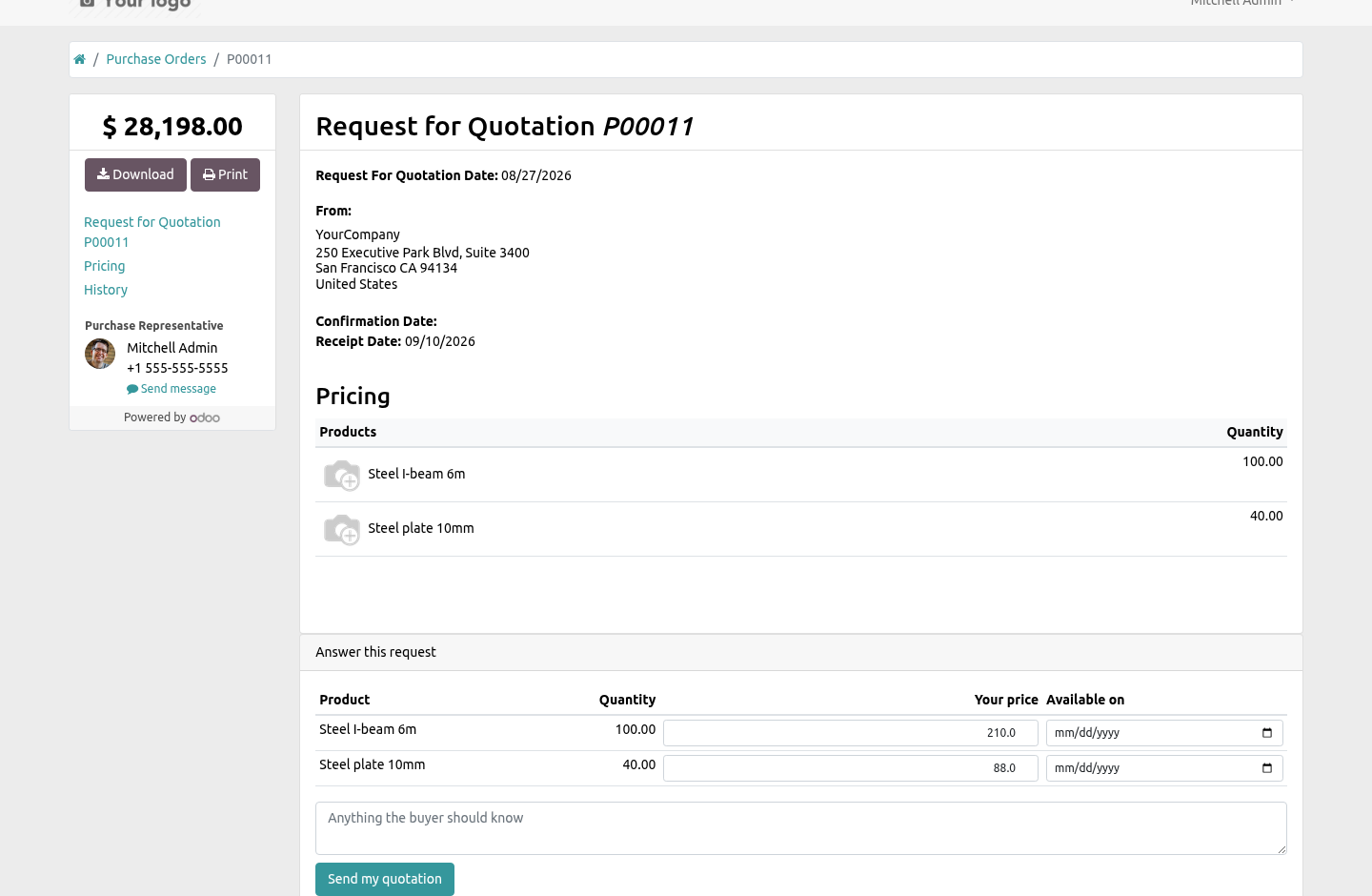
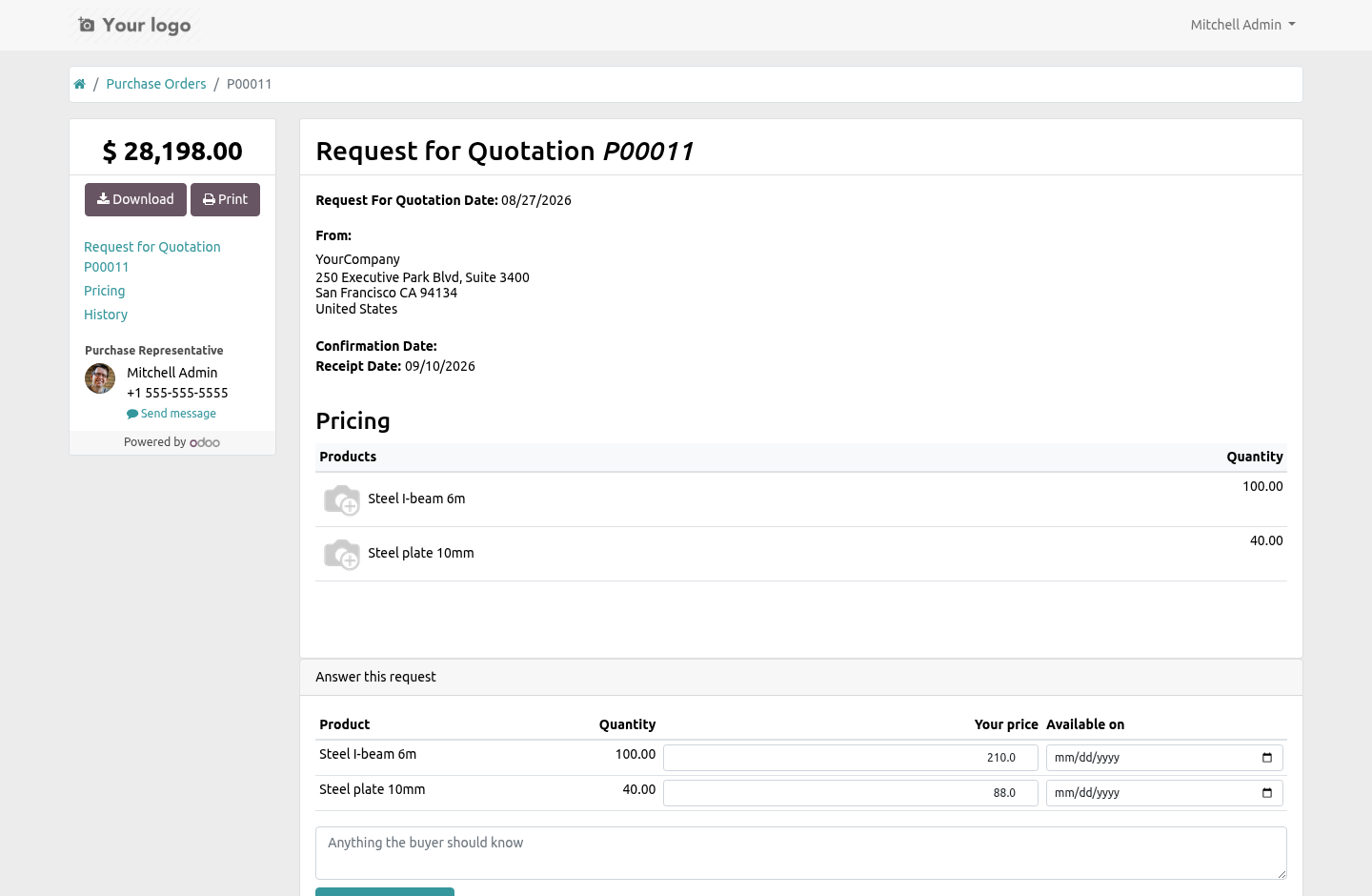
3. Open Vendor Submissions. Answering a request. On the same page the vendor already opens, a line-by-line form: unit price, when they can supply it, and a message.
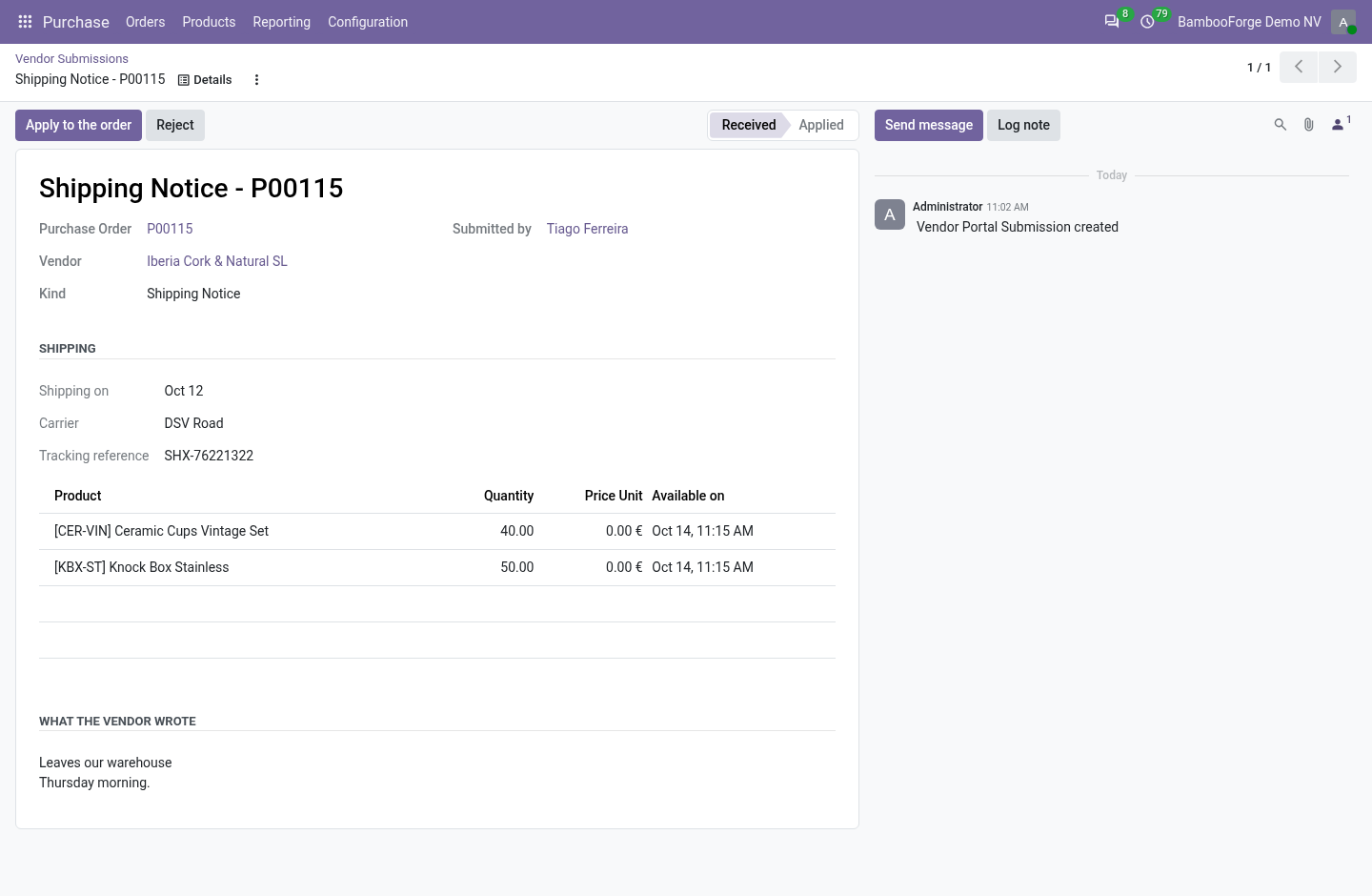
One button sends it. If they cannot supply it, there is a second button and a box for the reason — so a "no" arrives as a "no", instead of as a silence you chase by telephone a week later. Telling you it is on its way. Date, carrier, tracking reference, and a note for part shipments.
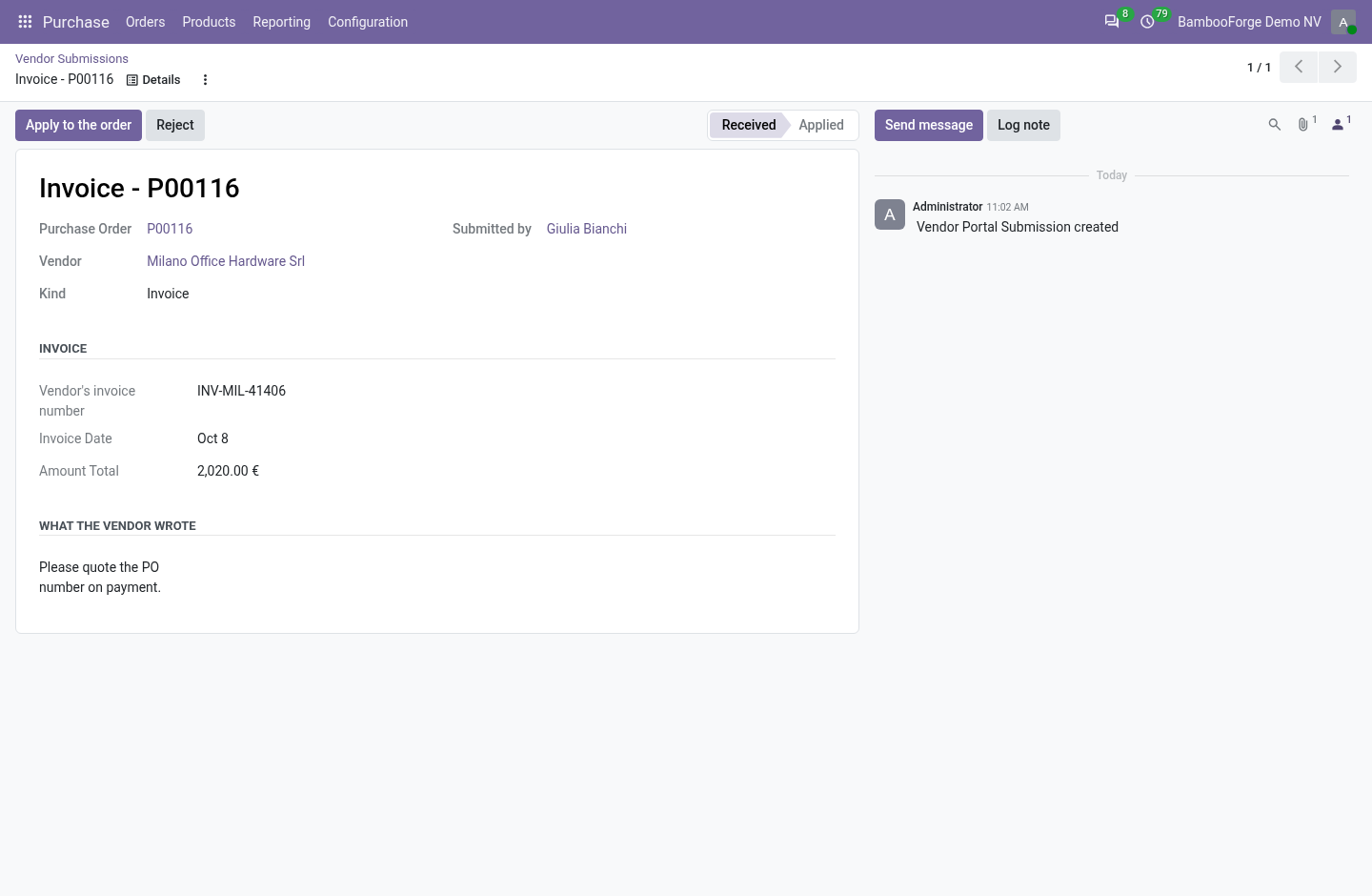
Applying it moves the expected date on the order lines, so when is it coming has an answer inside Odoo rather than in somebody's inbox. Sending the invoice. The document itself — a PDF, or a photograph of one, up to 10 MB — together with the vendor's own reference, date and total. One button in the back office turns that into a draft vendor bill with the file already attached to it.
Draft, never posted: the figures came from outside, and a portal that posts to your ledger without a person reading it first is not a portal, it is a hole. Nothing touches the order until you apply it. This is the design, not a workflow preference. A portal user is an outsider.
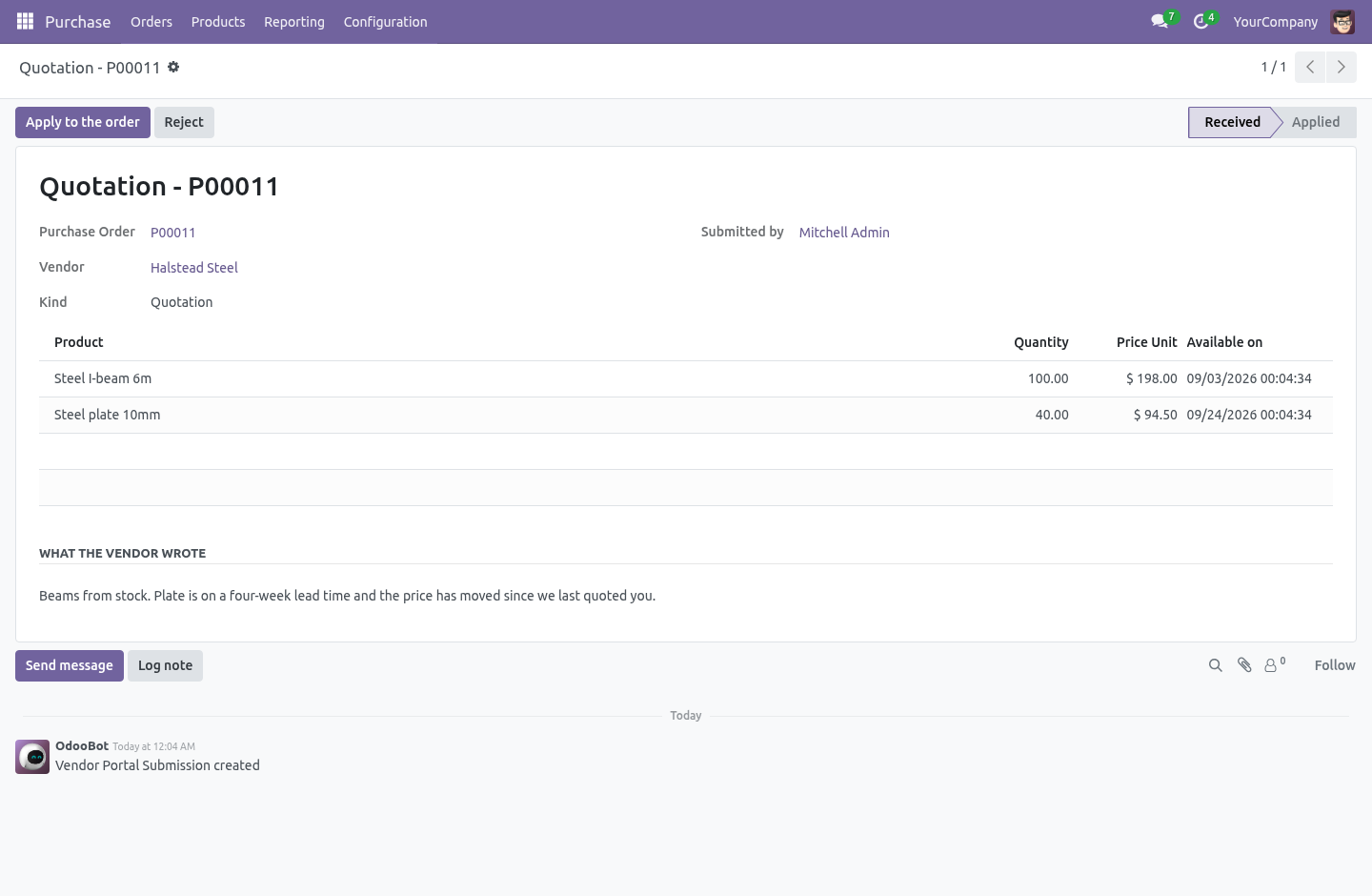
If sending a quotation wrote the price onto the purchase order, the document a buyer reads and the document a buyer approves would not be the same document — it could change in between, from outside, at any moment. So everything a vendor sends is stored as a submission sitting beside the order. It can only be read, until a buyer opens it and applies it. What the door refuses A negative price, which falls back to what was asked, and a negative invoice, which is refused outright.
A second copy of something already sent and not yet handled, so a double click is not two submissions a buyer has to choose between. A quotation on a confirmed order, a shipping notice or invoice on one that is not confirmed, and anything at all on an order that is done or cancelled. A file that is not a document — PDF, PNG or JPEG only. Access.
The module widens nothing. Odoo gives portal users read-only rights on purchase orders; they still have exactly that, and there is a test that fails if it ever stops being true. Every route checks the document with Odoo's own _document_check_access before it does anything, and only then acts as superuser to store the submission — the same shape core uses for its own portal write, the one that updates delivery dates. The check is what proves the caller is entitled to this order.
The superuser step is what lets a read-only user leave something behind. Doing the second without the first is how a portal becomes an open door. Series How we make sure it works. Before every release, 26 automated checks run against this app on Odoo 16, 17, 18, 19 and 20.
Among them: The same quotation cannot be sent twice. A submission cannot be applied twice. A portal user still cannot write to a purchase order. A bill is not created twice from one submission.
A confirmed order cannot be re priced. The complete list is in the source you receive. Questions people ask. Which Odoo versions does it run on?
Odoo 16.0, 17.0, 18.0, 19.0, 20.0, on the series you buy it for; each series is its own listing. Community or Enterprise? Both. It needs no Enterprise app.
The complete manual is at docs dot bambooforge dot dev, the demo database is linked from the store page, and support answers within twenty-four hours. Links are in the description.
Transcript of the walkthrough (Odoo 19)
Vendor Portal / Supplier Quotes & Deliveries. Let a vendor quote a request, decline it, send a shipping notice and send their invoice from the portal - none of it touching your order. Odoo Community gives your vendors a portal where they can look at your requests and orders, and change a delivery date. Everything else comes back by email: the prices, the "we cannot do that one", the shipping notice, the invoice.
Somebody then types it in — and that is where the price that was quoted and the price that was ordered stop being the same number. In the next few minutes: answering a request, then telling you it is on its way, then sending the invoice, then nothing touches the order until you apply it, then what the door refuses. Then what this app deliberately does not do, so you can tell before you buy whether it fits. Everything lives under Vendor Submissions.
Answering a request. On the same page the vendor already opens, a line-by-line form: unit price, when they can supply it, and a message. One button sends it. If they cannot supply it, there is a second button and a box for the reason — so a "no" arrives as a "no", instead of as a silence you chase by telephone a week later.
Telling you it is on its way. Date, carrier, tracking reference, and a note for part shipments. Applying it moves the expected date on the order lines, so when is it coming has an answer inside Odoo rather than in somebody's inbox. Sending the invoice.
The document itself — a PDF, or a photograph of one, up to 10 MB — together with the vendor's own reference, date and total. One button in the back office turns that into a draft vendor bill with the file already attached to it. Draft, never posted: the figures came from outside, and a portal that posts to your ledger without a person reading it first is not a portal, it is a hole. Nothing touches the order until you apply it.
This is the design, not a workflow preference. A portal user is an outsider. If sending a quotation wrote the price onto the purchase order, the document a buyer reads and the document a buyer approves would not be the same document — it could change in between, from outside, at any moment. So everything a vendor sends is stored as a submission sitting beside the order.
It can only be read, until a buyer opens it and applies it. What the door refuses A negative price, which falls back to what was asked, and a negative invoice, which is refused outright. A second copy of something already sent and not yet handled, so a double click is not two submissions a buyer has to choose between. A quotation on a confirmed order, a shipping notice or invoice on one that is not confirmed, and anything at all on an order that is done or cancelled.
A file that is not a document — PDF, PNG or JPEG only. Access. The module widens nothing. Odoo gives portal users read-only rights on purchase orders; they still have exactly that, and there is a test that fails if it ever stops being true.
Every route checks the document with Odoo's own _document_check_access before it does anything, and only then acts as superuser to store the submission — the same shape core uses for its own portal write, the one that updates delivery dates. The check is what proves the caller is entitled to this order. The superuser step is what lets a read-only user leave something behind. Doing the second without the first is how a portal becomes an open door.
Series The complete manual is at docs dot bambooforge dot dev, the demo database is linked from the store page, and support answers within twenty-four hours. Links are in the description.
Transcript of the walkthrough (Odoo 18)
Vendor Portal / Supplier Quotes & Deliveries. Let a vendor quote a request, decline it, send a shipping notice and send their invoice from the portal - none of it touching your order. Odoo Community gives your vendors a portal where they can look at your requests and orders, and change a delivery date. Everything else comes back by email: the prices, the "we cannot do that one", the shipping notice, the invoice.
Somebody then types it in — and that is where the price that was quoted and the price that was ordered stop being the same number. In the next few minutes: answering a request, then telling you it is on its way, then sending the invoice, then nothing touches the order until you apply it, then what the door refuses. Then what this app deliberately does not do, so you can tell before you buy whether it fits. Everything lives under Vendor Submissions.
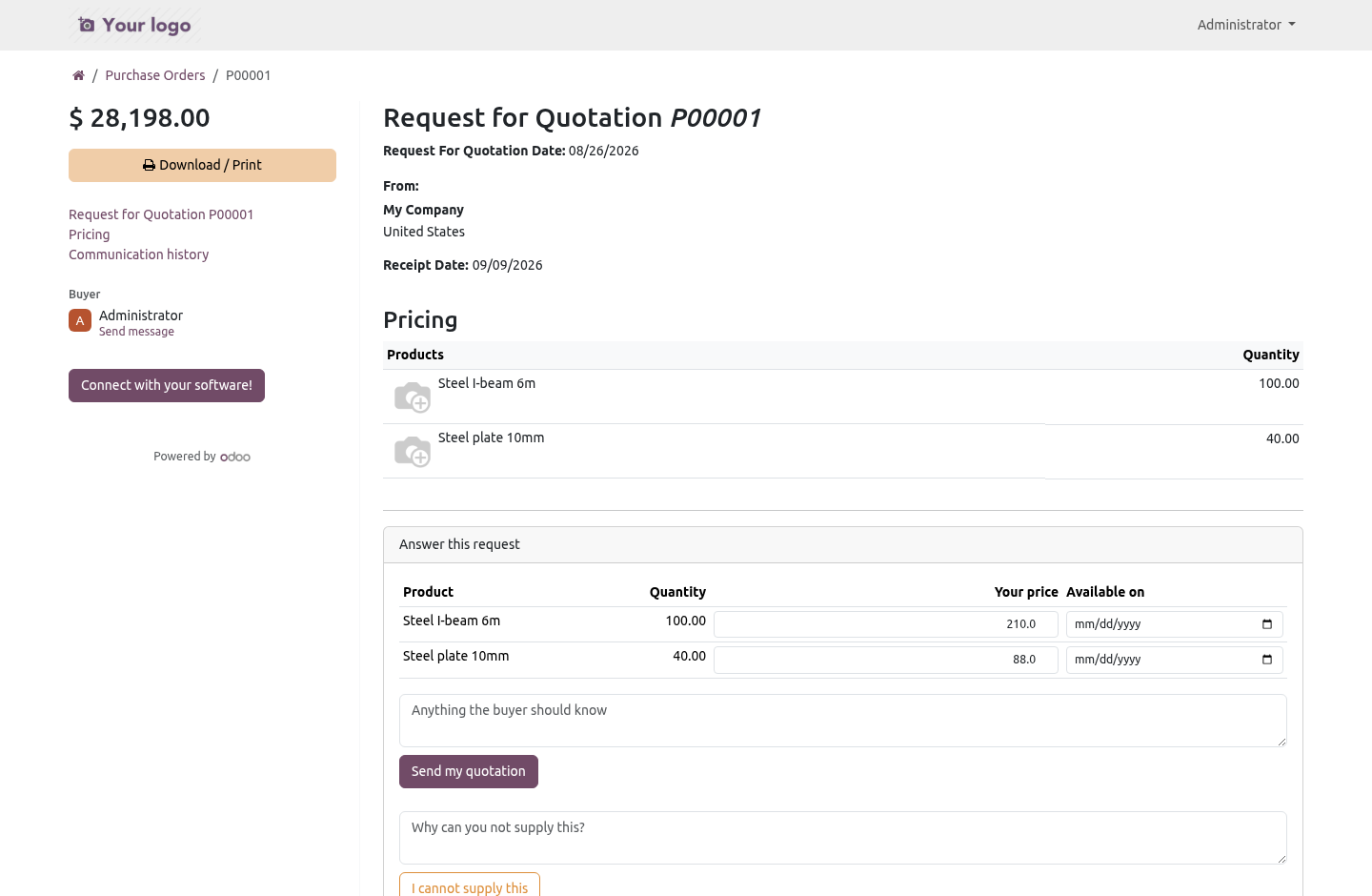
Answering a request. On the same page the vendor already opens, a line-by-line form: unit price, when they can supply it, and a message. One button sends it. If they cannot supply it, there is a second button and a box for the reason — so a "no" arrives as a "no", instead of as a silence you chase by telephone a week later.
Telling you it is on its way. Date, carrier, tracking reference, and a note for part shipments. Applying it moves the expected date on the order lines, so when is it coming has an answer inside Odoo rather than in somebody's inbox. Sending the invoice.
The document itself — a PDF, or a photograph of one, up to 10 MB — together with the vendor's own reference, date and total. One button in the back office turns that into a draft vendor bill with the file already attached to it. Draft, never posted: the figures came from outside, and a portal that posts to your ledger without a person reading it first is not a portal, it is a hole. Nothing touches the order until you apply it.
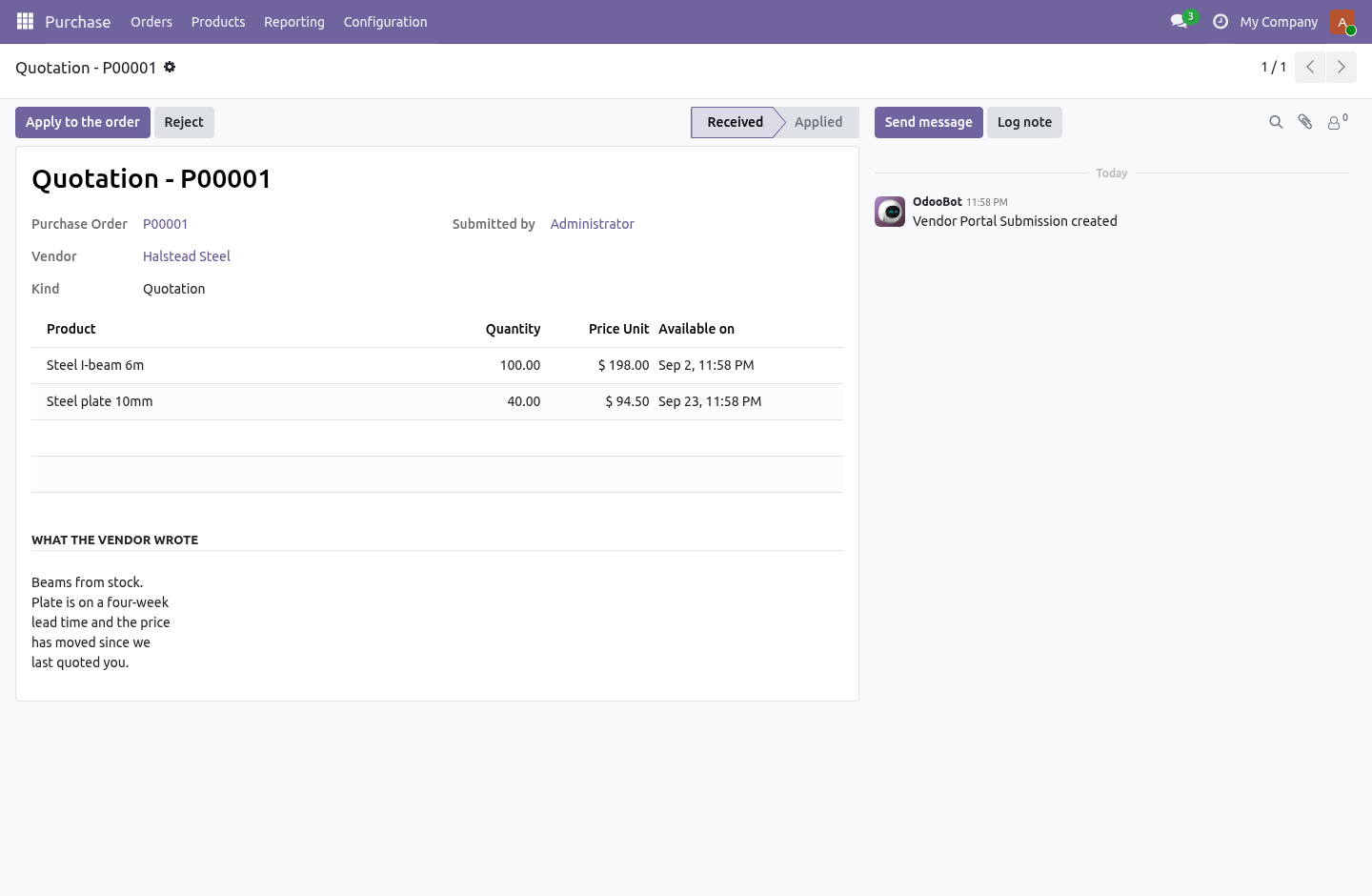
This is the design, not a workflow preference. A portal user is an outsider. If sending a quotation wrote the price onto the purchase order, the document a buyer reads and the document a buyer approves would not be the same document — it could change in between, from outside, at any moment. So everything a vendor sends is stored as a submission sitting beside the order.
It can only be read, until a buyer opens it and applies it. What the door refuses A negative price, which falls back to what was asked, and a negative invoice, which is refused outright. A second copy of something already sent and not yet handled, so a double click is not two submissions a buyer has to choose between. A quotation on a confirmed order, a shipping notice or invoice on one that is not confirmed, and anything at all on an order that is done or cancelled.
A file that is not a document — PDF, PNG or JPEG only. Access. The module widens nothing. Odoo gives portal users read-only rights on purchase orders; they still have exactly that, and there is a test that fails if it ever stops being true.
Every route checks the document with Odoo's own _document_check_access before it does anything, and only then acts as superuser to store the submission — the same shape core uses for its own portal write, the one that updates delivery dates. The check is what proves the caller is entitled to this order. The superuser step is what lets a read-only user leave something behind. Doing the second without the first is how a portal becomes an open door.
Series The complete manual is at docs dot bambooforge dot dev, the demo database is linked from the store page, and support answers within twenty-four hours. Links are in the description.
Transcript of the walkthrough (Odoo 17)
Vendor Portal / Supplier Quotes & Deliveries. Let a vendor quote a request, decline it, send a shipping notice and send their invoice from the portal - none of it touching your order. Odoo Community gives your vendors a portal where they can look at your requests and orders, and change a delivery date. Everything else comes back by email: the prices, the "we cannot do that one", the shipping notice, the invoice.
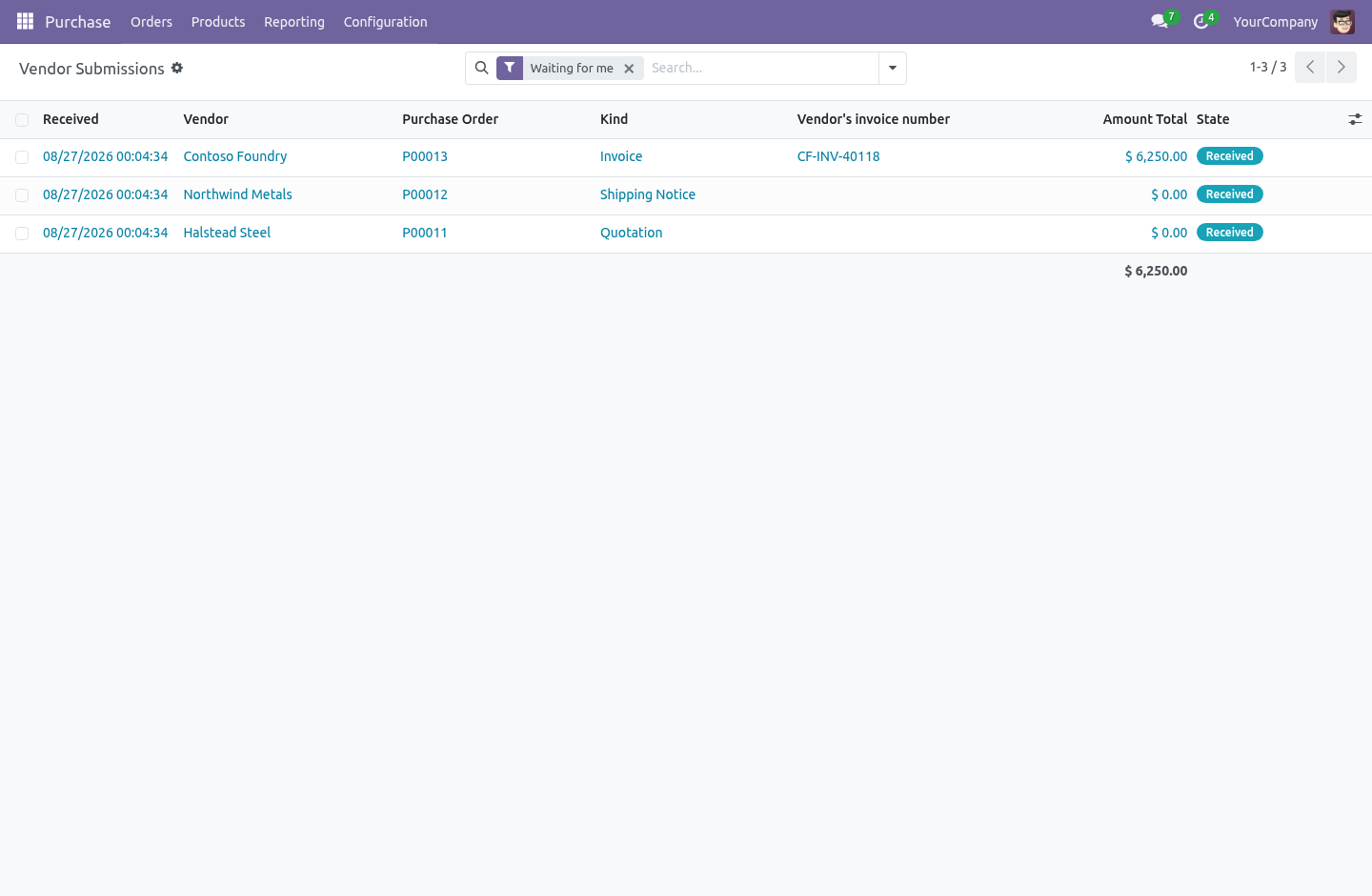
Somebody then types it in — and that is where the price that was quoted and the price that was ordered stop being the same number. In the next few minutes: answering a request, then telling you it is on its way, then sending the invoice, then nothing touches the order until you apply it, then what the door refuses. Then what this app deliberately does not do, so you can tell before you buy whether it fits. Everything lives under Vendor Submissions.
Answering a request. On the same page the vendor already opens, a line-by-line form: unit price, when they can supply it, and a message. One button sends it. If they cannot supply it, there is a second button and a box for the reason — so a "no" arrives as a "no", instead of as a silence you chase by telephone a week later.
Telling you it is on its way. Date, carrier, tracking reference, and a note for part shipments. Applying it moves the expected date on the order lines, so when is it coming has an answer inside Odoo rather than in somebody's inbox. Sending the invoice.
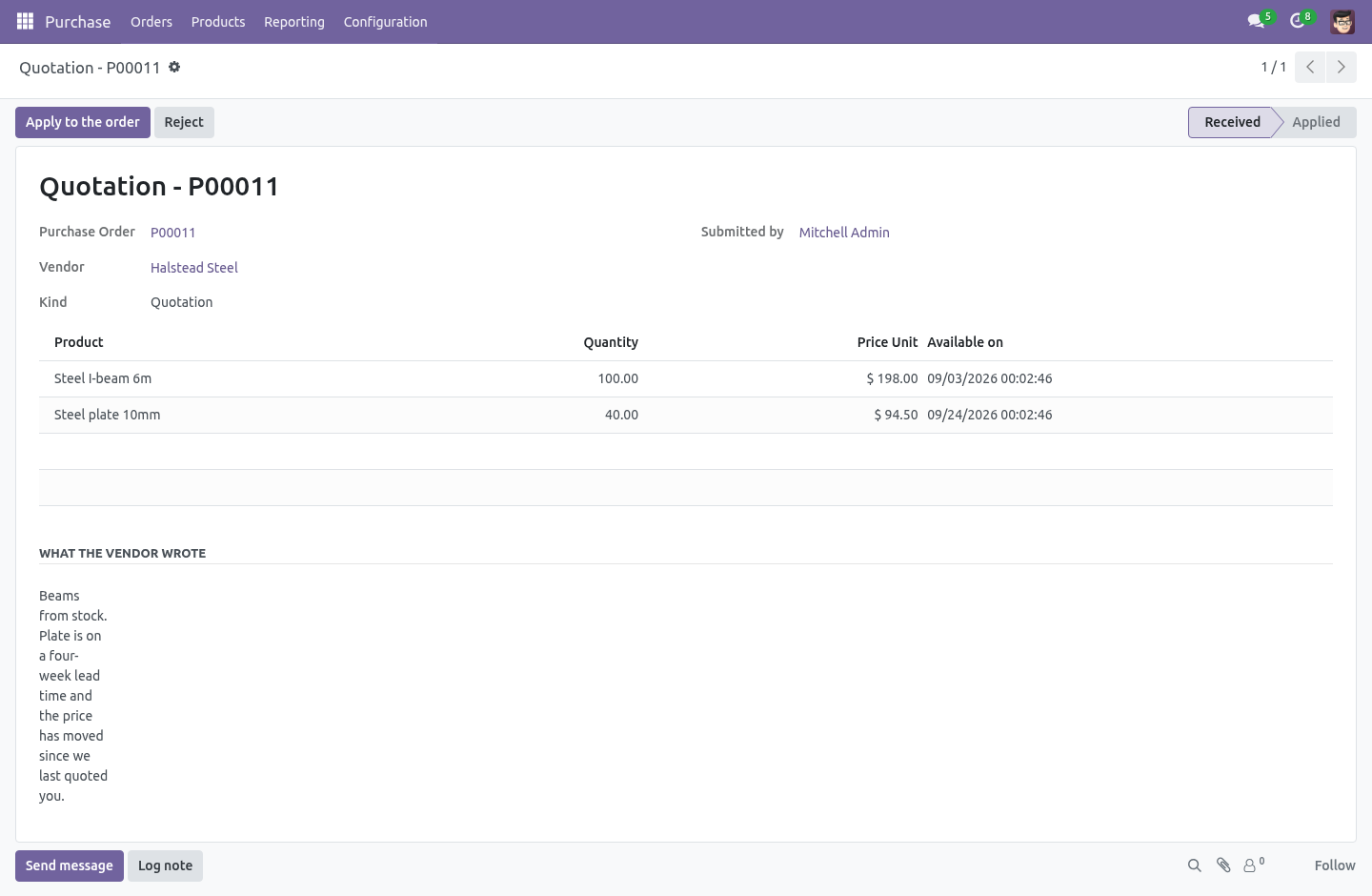
The document itself — a PDF, or a photograph of one, up to 10 MB — together with the vendor's own reference, date and total. One button in the back office turns that into a draft vendor bill with the file already attached to it. Draft, never posted: the figures came from outside, and a portal that posts to your ledger without a person reading it first is not a portal, it is a hole. Nothing touches the order until you apply it.
This is the design, not a workflow preference. A portal user is an outsider. If sending a quotation wrote the price onto the purchase order, the document a buyer reads and the document a buyer approves would not be the same document — it could change in between, from outside, at any moment. So everything a vendor sends is stored as a submission sitting beside the order.
It can only be read, until a buyer opens it and applies it. What the door refuses A negative price, which falls back to what was asked, and a negative invoice, which is refused outright. A second copy of something already sent and not yet handled, so a double click is not two submissions a buyer has to choose between. A quotation on a confirmed order, a shipping notice or invoice on one that is not confirmed, and anything at all on an order that is done or cancelled.
A file that is not a document — PDF, PNG or JPEG only. Access. The module widens nothing. Odoo gives portal users read-only rights on purchase orders; they still have exactly that, and there is a test that fails if it ever stops being true.
Every route checks the document with Odoo's own _document_check_access before it does anything, and only then acts as superuser to store the submission — the same shape core uses for its own portal write, the one that updates delivery dates. The check is what proves the caller is entitled to this order. The superuser step is what lets a read-only user leave something behind. Doing the second without the first is how a portal becomes an open door.
Series The complete manual is at docs dot bambooforge dot dev, the demo database is linked from the store page, and support answers within twenty-four hours. Links are in the description.
Transcript of the walkthrough (Odoo 16)
Vendor Portal / Supplier Quotes & Deliveries. Let a vendor quote a request, decline it, send a shipping notice and send their invoice from the portal - none of it touching your order. Odoo Community gives your vendors a portal where they can look at your requests and orders, and change a delivery date. Everything else comes back by email: the prices, the "we cannot do that one", the shipping notice, the invoice.
Somebody then types it in — and that is where the price that was quoted and the price that was ordered stop being the same number. In the next few minutes: answering a request, then telling you it is on its way, then sending the invoice, then nothing touches the order until you apply it, then what the door refuses. Then what this app deliberately does not do, so you can tell before you buy whether it fits. Everything lives under Vendor Submissions.
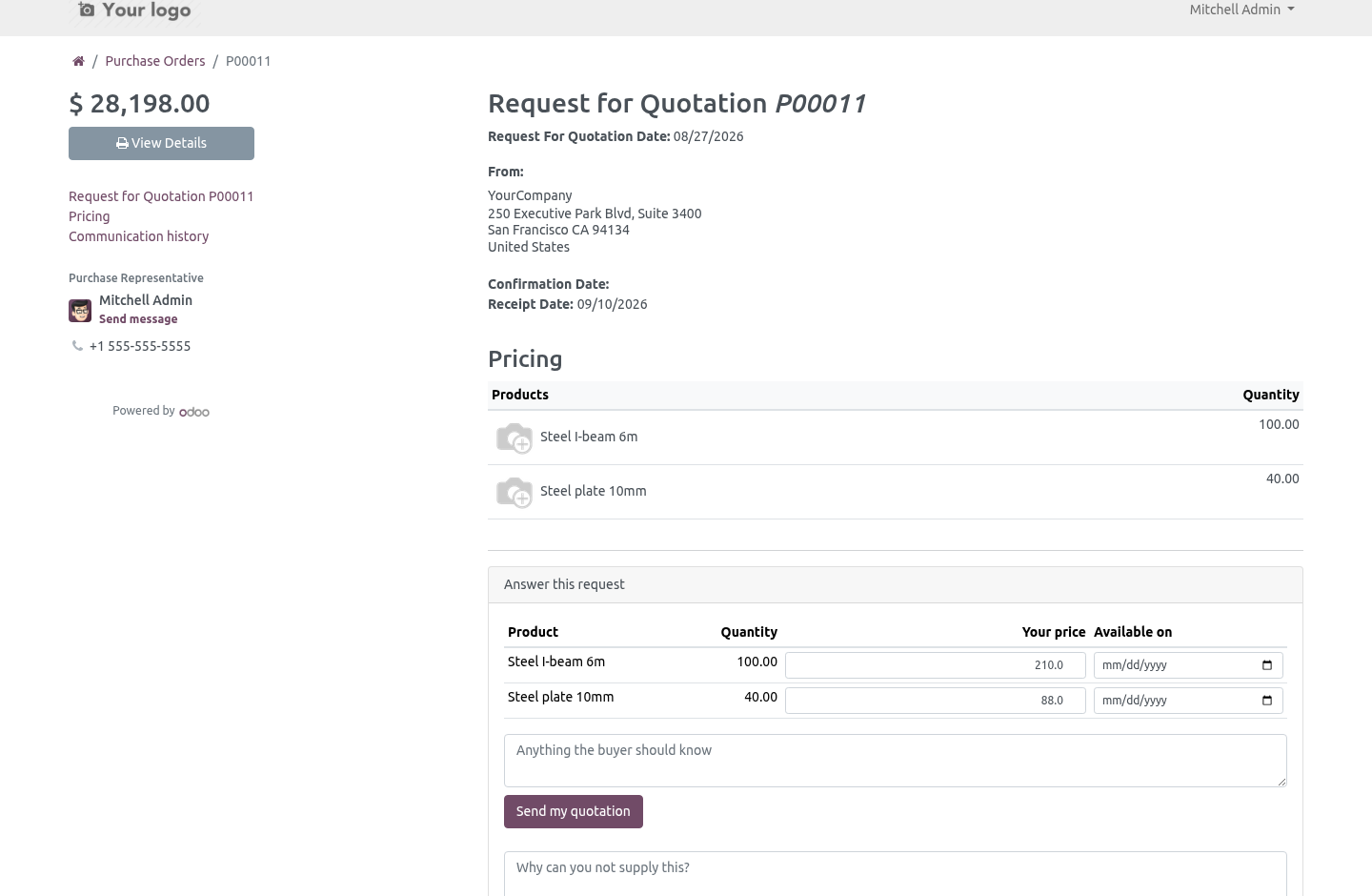
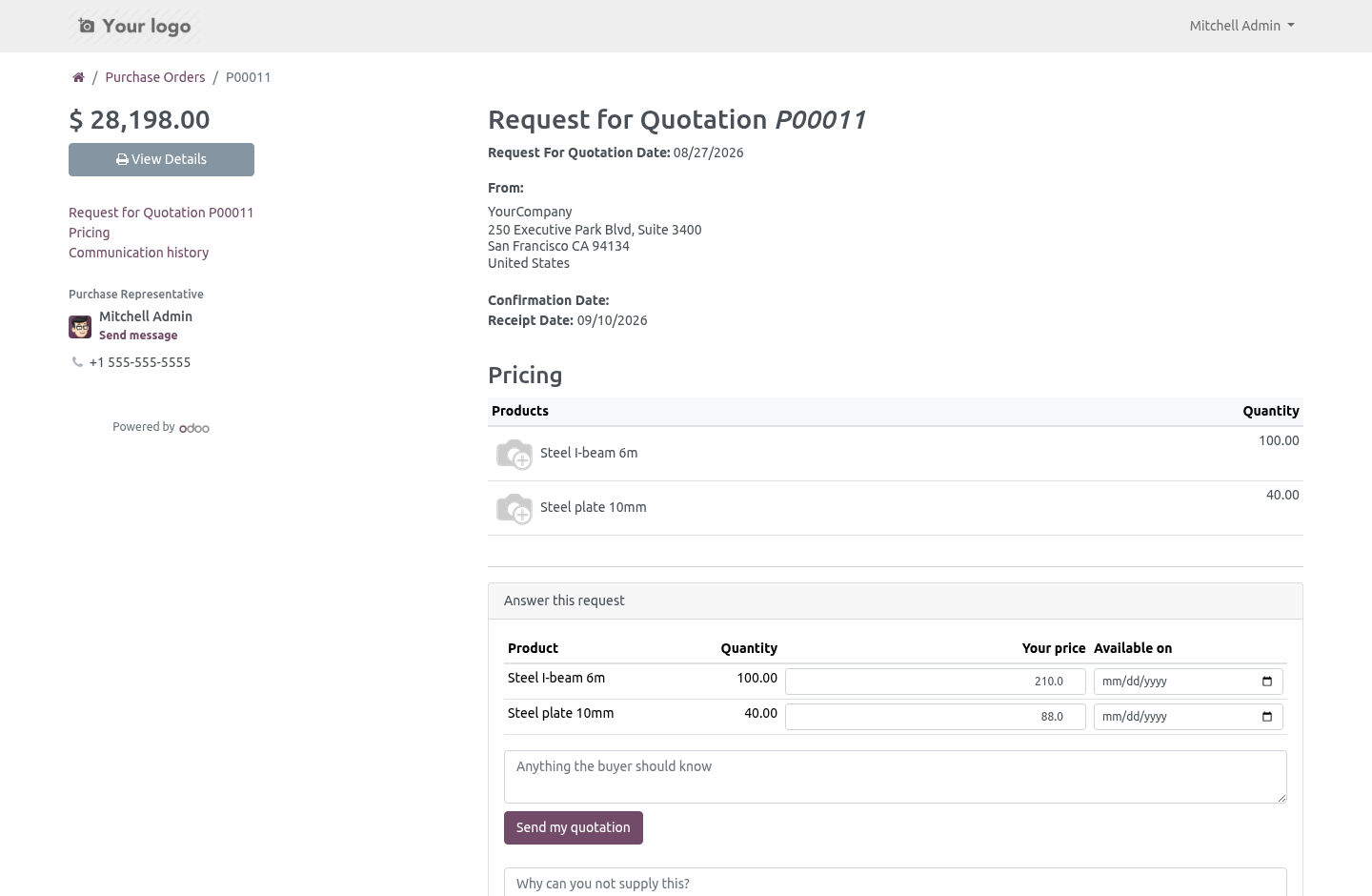
Answering a request. On the same page the vendor already opens, a line-by-line form: unit price, when they can supply it, and a message. One button sends it. If they cannot supply it, there is a second button and a box for the reason — so a "no" arrives as a "no", instead of as a silence you chase by telephone a week later.
Telling you it is on its way. Date, carrier, tracking reference, and a note for part shipments. Applying it moves the expected date on the order lines, so when is it coming has an answer inside Odoo rather than in somebody's inbox. Sending the invoice.
The document itself — a PDF, or a photograph of one, up to 10 MB — together with the vendor's own reference, date and total. One button in the back office turns that into a draft vendor bill with the file already attached to it. Draft, never posted: the figures came from outside, and a portal that posts to your ledger without a person reading it first is not a portal, it is a hole. Nothing touches the order until you apply it.
This is the design, not a workflow preference. A portal user is an outsider. If sending a quotation wrote the price onto the purchase order, the document a buyer reads and the document a buyer approves would not be the same document — it could change in between, from outside, at any moment. So everything a vendor sends is stored as a submission sitting beside the order.
It can only be read, until a buyer opens it and applies it. What the door refuses A negative price, which falls back to what was asked, and a negative invoice, which is refused outright. A second copy of something already sent and not yet handled, so a double click is not two submissions a buyer has to choose between. A quotation on a confirmed order, a shipping notice or invoice on one that is not confirmed, and anything at all on an order that is done or cancelled.
A file that is not a document — PDF, PNG or JPEG only. Access. The module widens nothing. Odoo gives portal users read-only rights on purchase orders; they still have exactly that, and there is a test that fails if it ever stops being true.
Every route checks the document with Odoo's own _document_check_access before it does anything, and only then acts as superuser to store the submission — the same shape core uses for its own portal write, the one that updates delivery dates. The check is what proves the caller is entitled to this order. The superuser step is what lets a read-only user leave something behind. Doing the second without the first is how a portal becomes an open door.
Series The complete manual is at docs dot bambooforge dot dev, the demo database is linked from the store page, and support answers within twenty-four hours. Links are in the description.
Key facts
- What it is
- Let a vendor quote a request, decline it, send a shipping notice and send their invoice from the portal - none of it touching your order.
- For
- Purchases
- Odoo versions
- 16.0, 17.0, 18.0, 19.0, 20.0 - Community and Enterprise
- Runs on
- Odoo.sh or Odoo you host yourself - not Odoo Online, which accepts no third-party apps
- Price
- 119 EUR, one-time, on the Odoo Apps Store
- Technical name
- bambooforge_vendor_portal
- Live demo
- https://demo20.bambooforge.dev/odoo/action-bambooforge_vendor_portal.action_bf_vendor_submission
- Manual last updated
- 2026-10-15
Vendor Portal | Supplier Quotes & Deliveries
Odoo Community gives your vendors a portal where they can look at your requests and orders, and change a delivery date. Everything else comes back by email: the prices, the "we cannot do that one", the shipping notice, the invoice. Somebody then types it in — and that is where the price that was quoted and the price that was ordered stop being the same number.
This adds the other half of the counter.
Answering a request
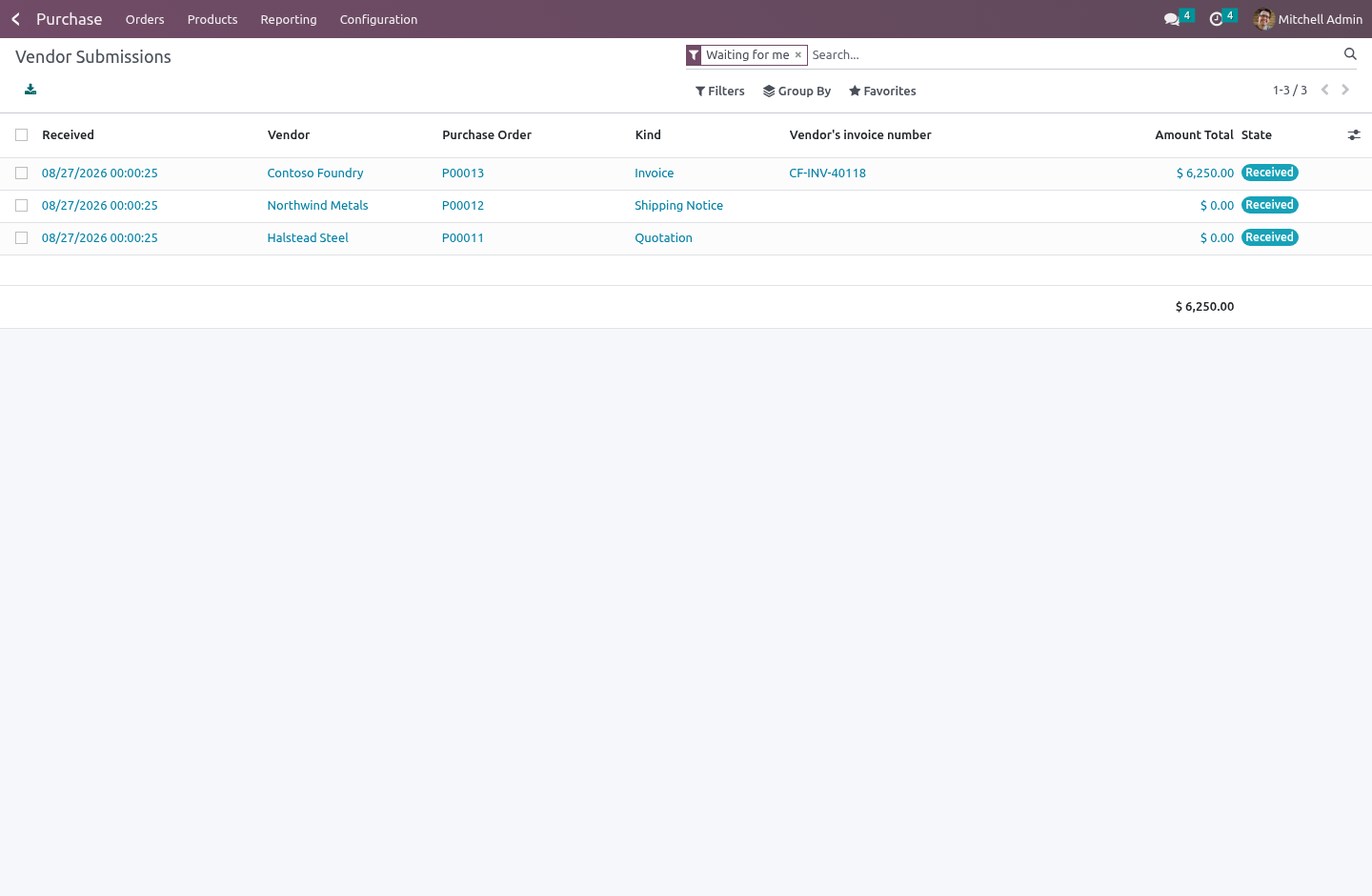
On the same page the vendor already opens, a line-by-line form: unit price, when they can supply it, and a message. One button sends it.
If they cannot supply it, there is a second button and a box for the reason — so a "no" arrives as a "no", instead of as a silence you chase by telephone a week later.
Once an order is confirmed, both forms disappear. A confirmed order is not open to being re-priced by the person being paid.
Telling you it is on its way
Date, carrier, tracking reference, and a note for part shipments. Applying it moves the expected date on the order lines, so when is it coming has an answer inside Odoo rather than in somebody's inbox.
Sending the invoice
The document itself — a PDF, or a photograph of one, up to 10 MB — together with the vendor's own reference, date and total.
One button in the back office turns that into a draft vendor bill with the file already attached to it. Draft, never posted: the figures came from outside, and a portal that posts to your ledger without a person reading it first is not a portal, it is a hole.
Nothing touches the order until you apply it
This is the design, not a workflow preference.
A portal user is an outsider. If sending a quotation wrote the price onto the purchase order, the document a buyer reads and the document a buyer approves would not be the same document — it could change in between, from outside, at any moment. So everything a vendor sends is stored as a submission sitting beside the order. It can only be read, until a buyer opens it and applies it.
Applying is one click. It can only happen once. It records who did it and when. Rejecting is also one click, and the reason goes on the order.
The same rule is why no group in this module may create a submission by hand. What a vendor sent is evidence; a buyer who could type one could also type the price he wishes the vendor had quoted, and nothing would tell the two apart afterwards.
What the door refuses
A line from another order. The line identifier arrives in a form post, and on its own it is a number, not a permission. It is checked against the order it claims to belong to — twice, once in the controller and once as a database constraint — because without that a vendor could answer somebody else's order line and it would look like your own order on screen.
A negative price, which falls back to what was asked, and a negative invoice, which is refused outright.
A second copy of something already sent and not yet handled, so a double click is not two submissions a buyer has to choose between.
A quotation on a confirmed order, a shipping notice or invoice on one that is not confirmed, and anything at all on an order that is done or cancelled.
A file that is not a document — PDF, PNG or JPEG only.
Access
The module widens nothing. Odoo gives portal users read-only rights on purchase orders; they still have exactly that, and there is a test that fails if it ever stops being true.
Every route checks the document with Odoo's own _document_check_access before it does anything, and only then acts as superuser to store the submission — the same shape core uses for its own portal write, the one that updates delivery dates. The check is what proves the caller is entitled to this order. The superuser step is what lets a read-only user leave something behind. Doing the second without the first is how a portal becomes an open door.
Series
Community 16.0, 17.0, 18.0, 19.0 and 20.0.
How we make sure it works
Before every release, 26 automated checks run against this app on Odoo 16, 17, 18, 19 and 20. Among them:
The same quotation cannot be sent twice.
A submission cannot be applied twice.
A portal user still cannot write to a purchase order.
A bill is not created twice from one submission.
A confirmed order cannot be re priced.
The complete list is in the source you receive.
Install
Copy bambooforge_vendor_portal into your addons path and update the app list, or install the ZIP from the Odoo Apps Store.
Install Vendor Portal.
Open Vendor Submissions.
Questions people ask
- Which Odoo versions does it run on?
Odoo 16.0, 17.0, 18.0, 19.0, 20.0, on the series you buy it for; each series is its own listing.
- Community or Enterprise?
Both. It needs no Enterprise app.
- What does it need?
The standard Invoicing, Portal, Purchase apps. No extra Python package.
- Where does it show up?
Under the Vendor Submissions menu.
- Does anything leave my server?
No. It makes no call outside your Odoo server: no telemetry, no licence check, no third-party service.
- What happens if I uninstall it?
Odoo drops the app's own tables and fields; the standard records it worked on (contacts, orders, products) stay as they are.