 BambooForge Labs
Stock Valuation History & Ledger Reconciliation
Opening, in, out and closing stock value per account for a period, next to the ledger - read on the accounting date, so both answer one question.
Available for Odoo 16.0, Odoo 17.0, Odoo 18.0. Technical name bambooforge_valuation_history.
Transcript of the walkthrough (Odoo 18)
Stock Valuation History & Ledger Reconciliation. Opening, in, out and closing stock value per account for a period, next to the ledger - read on the accounting date, so both answer one question. At every closing somebody asks the same question: the stock account says one number, inventory says another, where is the difference. Odoo Community can list the valuation layers and filter them to a date, and from there the answer gets assembled by hand in a spreadsheet.
In the next few minutes: stock valuation history & ledger reconciliation, then both sides on the accounting date, then opening, in, out, closing, then against the ledger, then what does not fit is named, not hidden. Then what this app deliberately does not do, so you can tell before you buy whether it fits. Everything lives under Stock Valuation History. Stock Valuation History & Ledger Reconciliation.
At every closing somebody asks the same question: the stock account says one number, inventory says another, where is the difference. Odoo Community can list the valuation layers and filter them to a date, and from there the answer gets assembled by hand in a spreadsheet. This is that answer as a report — and it is built on one correction that matters more than the layout. Both sides on the accounting date.
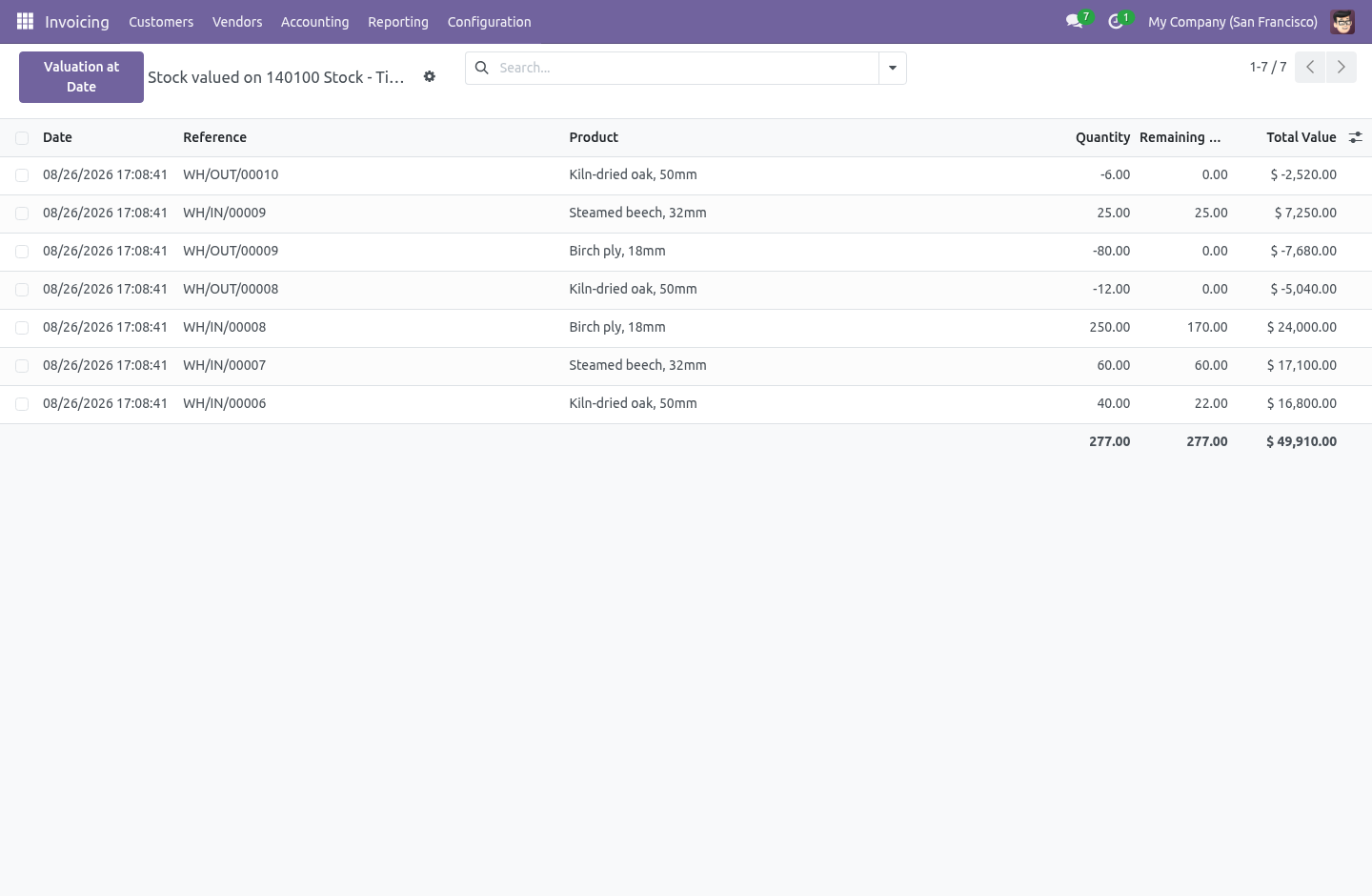
A valuation layer has no date of its own. Odoo's layer list groups by Date, and that field is create_date — the moment the row was written to the database. The journal entry the layer produced carries an accounting date, and that is what the trial balance is built from. Most of the time they are the same day and nobody notices.
Then somebody receives goods on the 2nd of January against December, or an entry is reset to draft and re-posted into the prior period, and the two dates part company. From then on the layer report and the balance sheet disagree, by exactly that amount, and neither of them says why. Opening, in, out, closing. Pick a period.
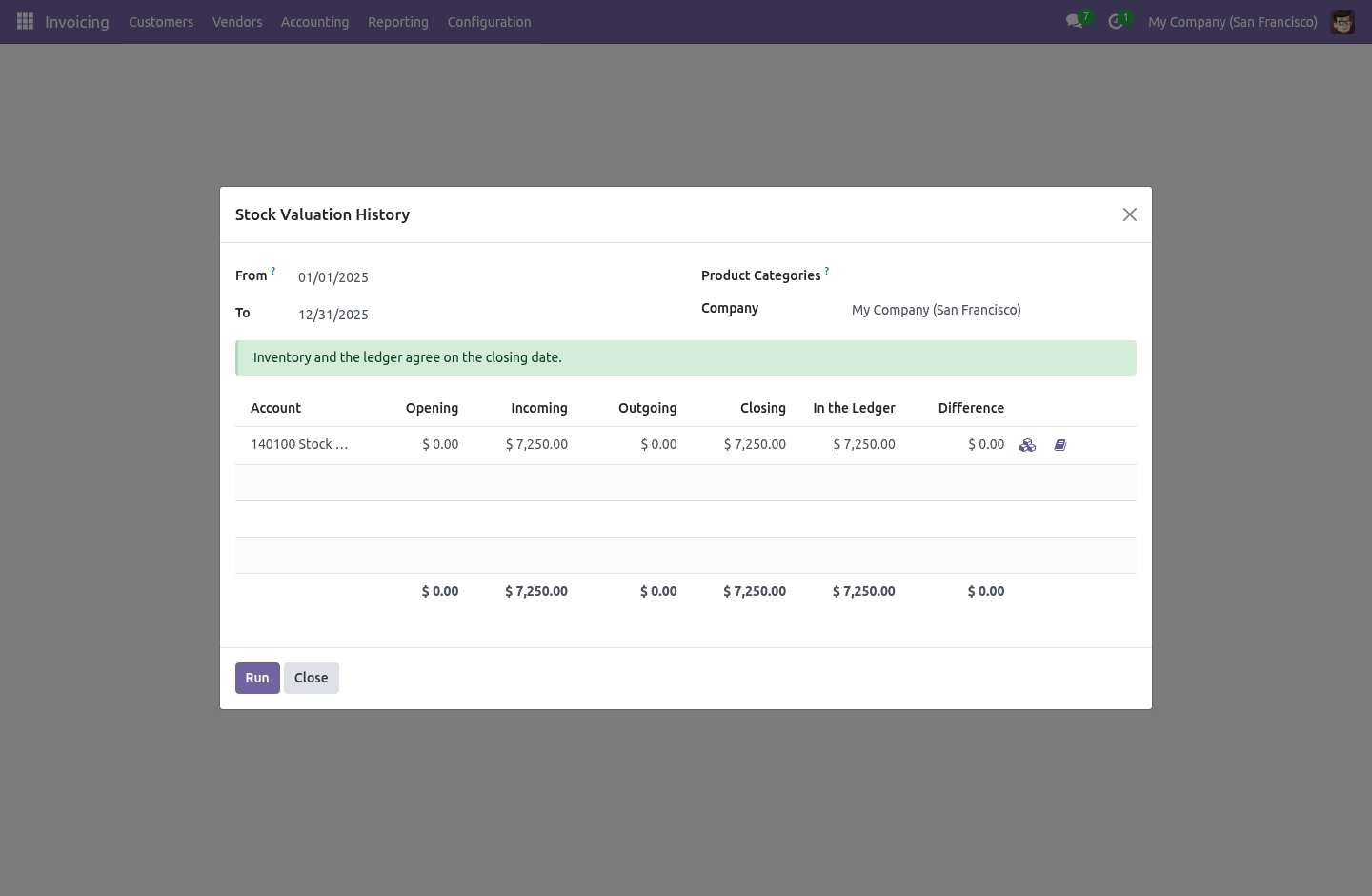
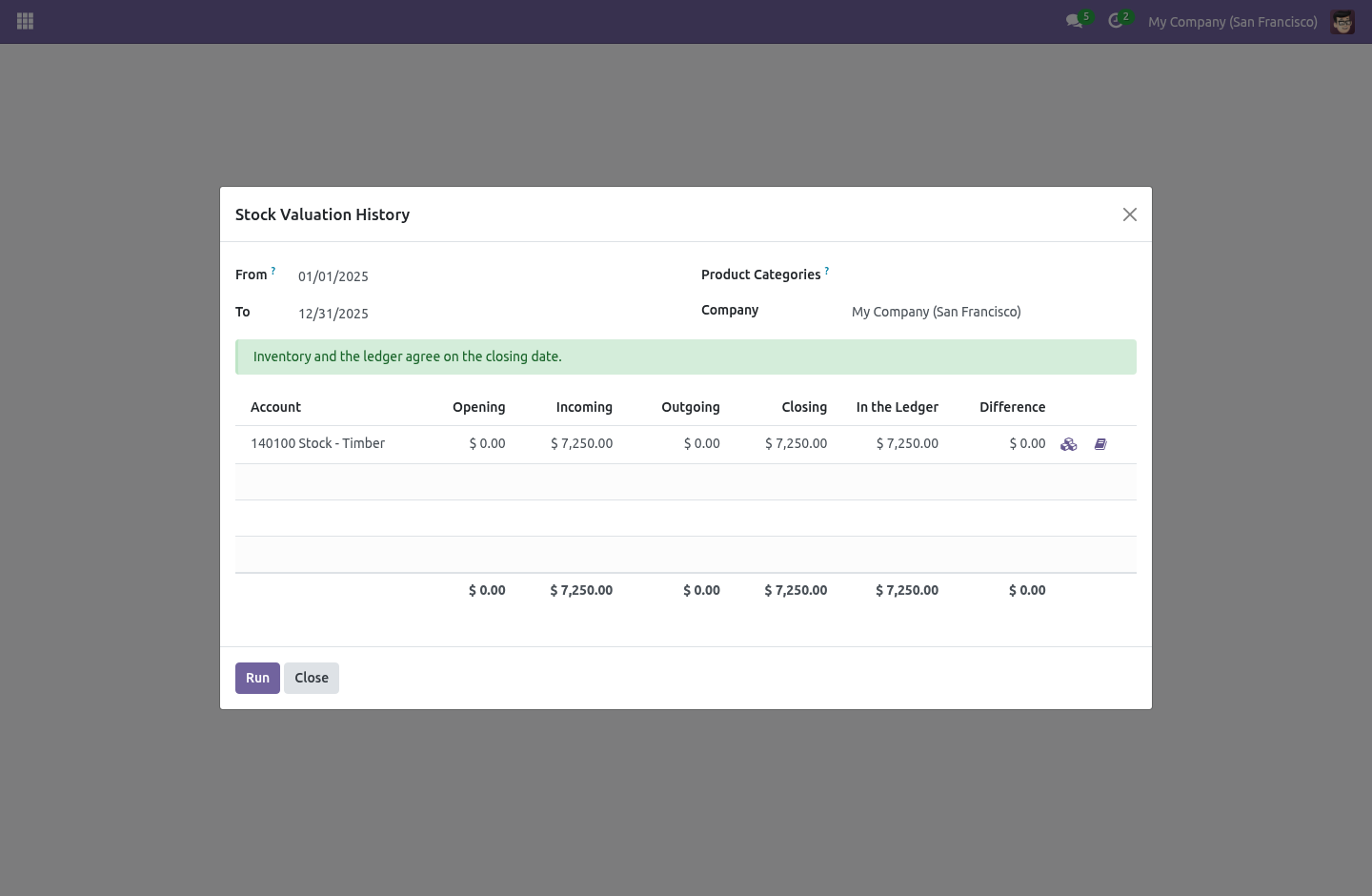
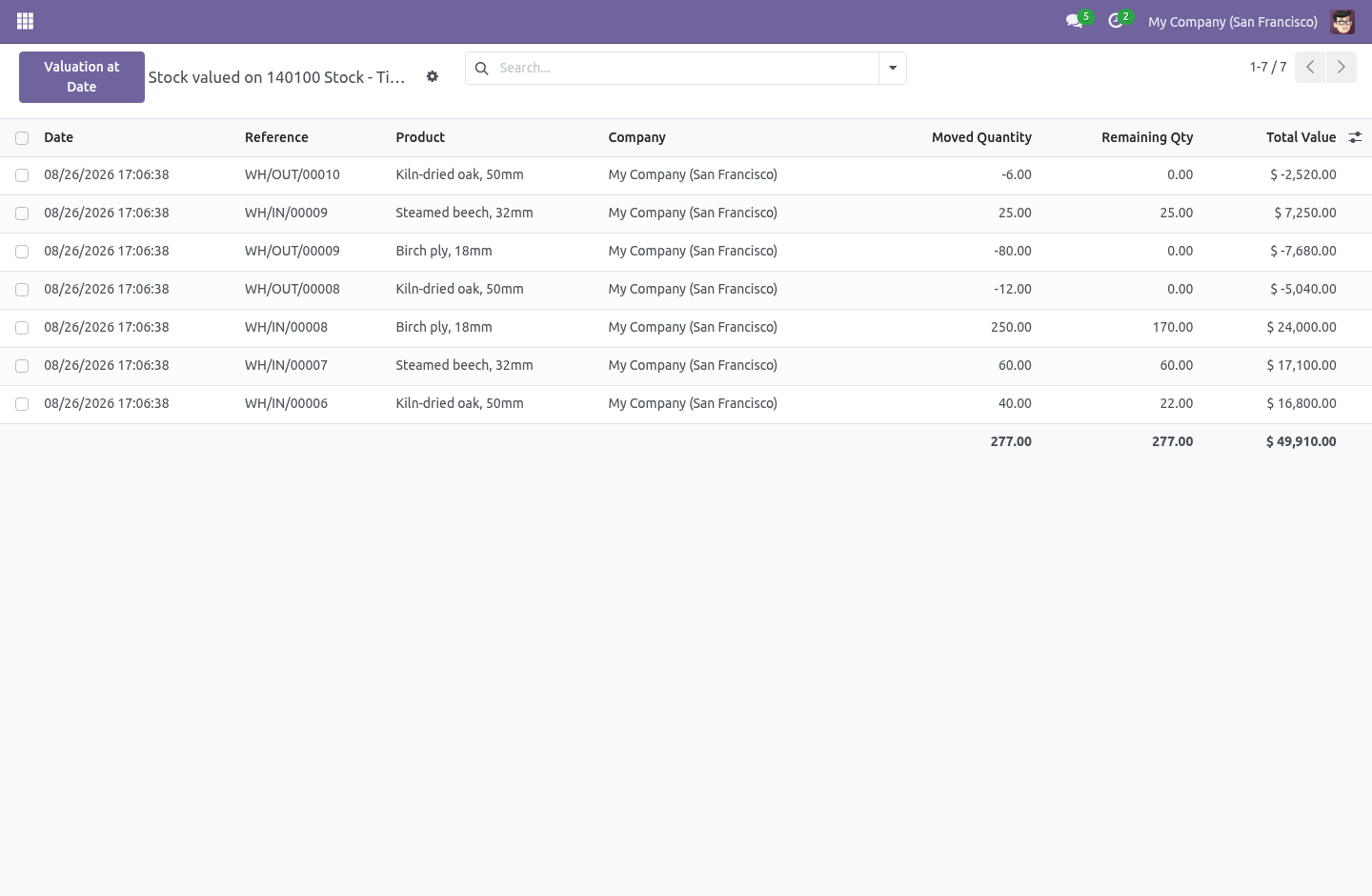
For every stock valuation account you get: ============ =================================================== Opening everything valued before the start of the period In positive value in the period — receipts, revaluations up Out negative value in the period — deliveries, scrap, write-downs Closing opening + in − out ============ =================================================== Against the ledger. Next to Closing sits In the Ledger — the posted balance of that same account on the same date — and the difference between them. the valuation layers that were added up to make the stock column, filtered by the same dates and the same accounting-date rule; the journal items that were added up to make the ledger column, posted only, on or before the closing date. Every account a category values stock on appears, whether or not anything moved through it, and so does any account that stock entries once reached but no category names today — the balance left behind when a chart is renumbered or a category is pointed at a new account.
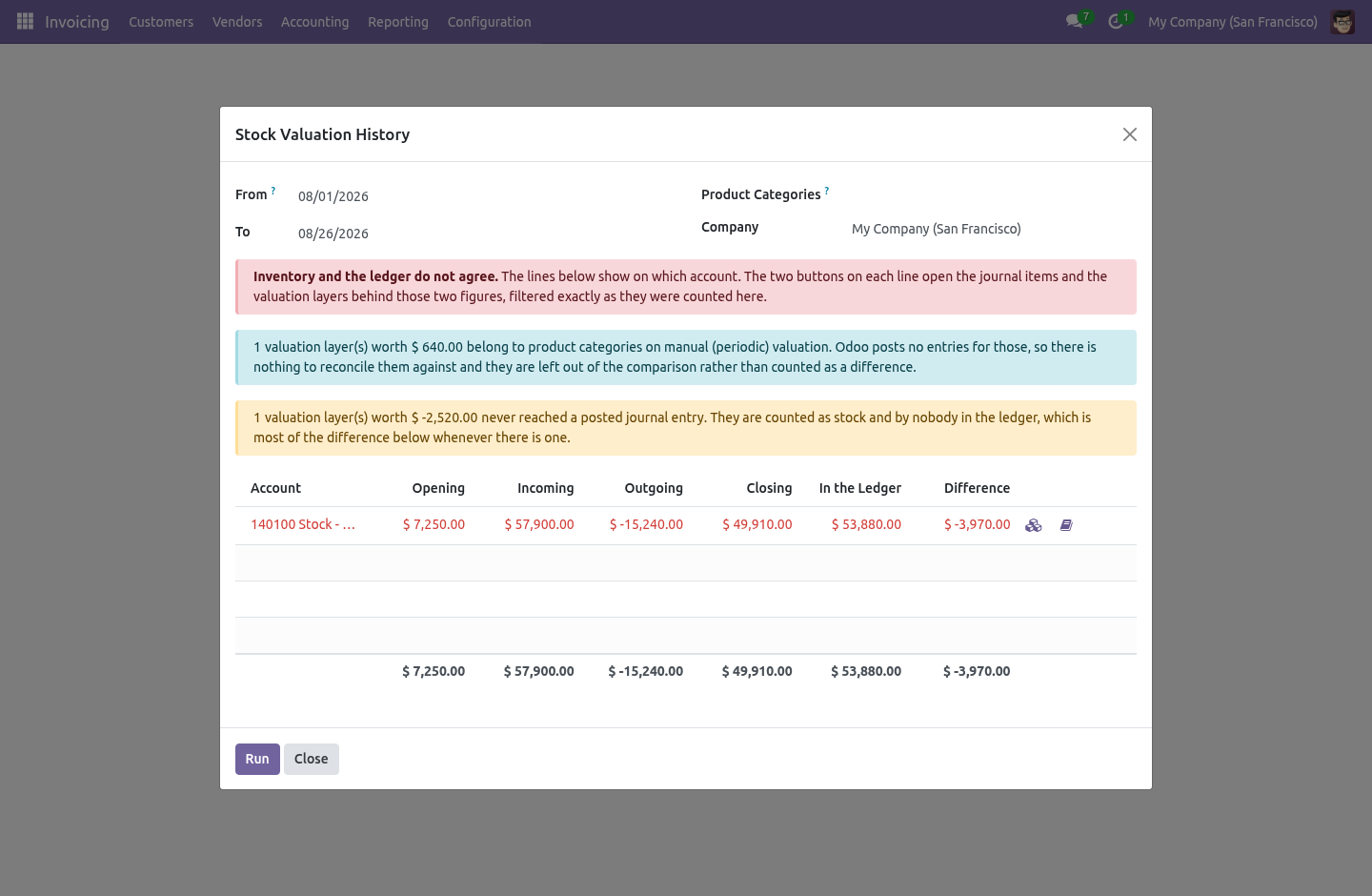
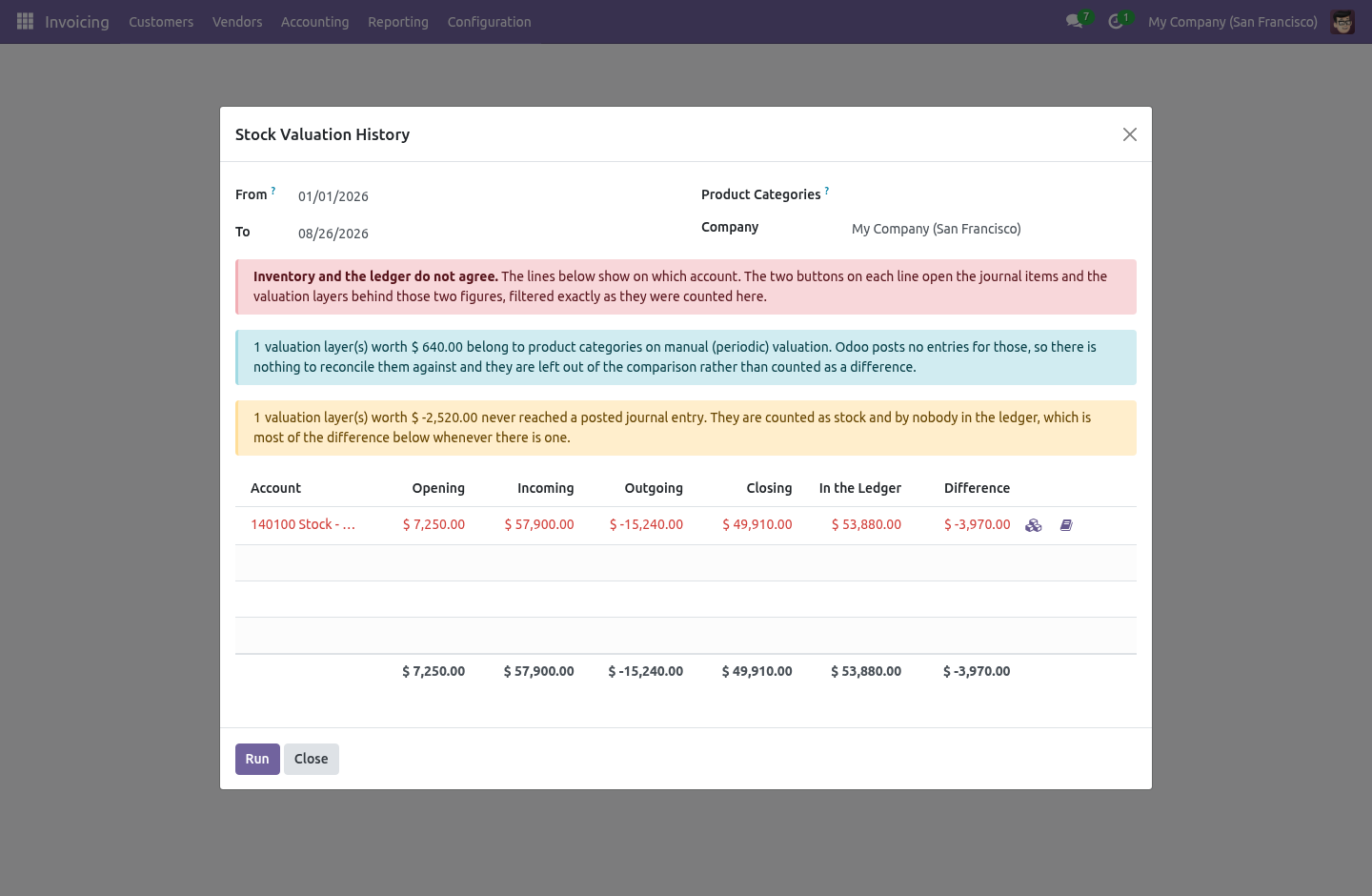
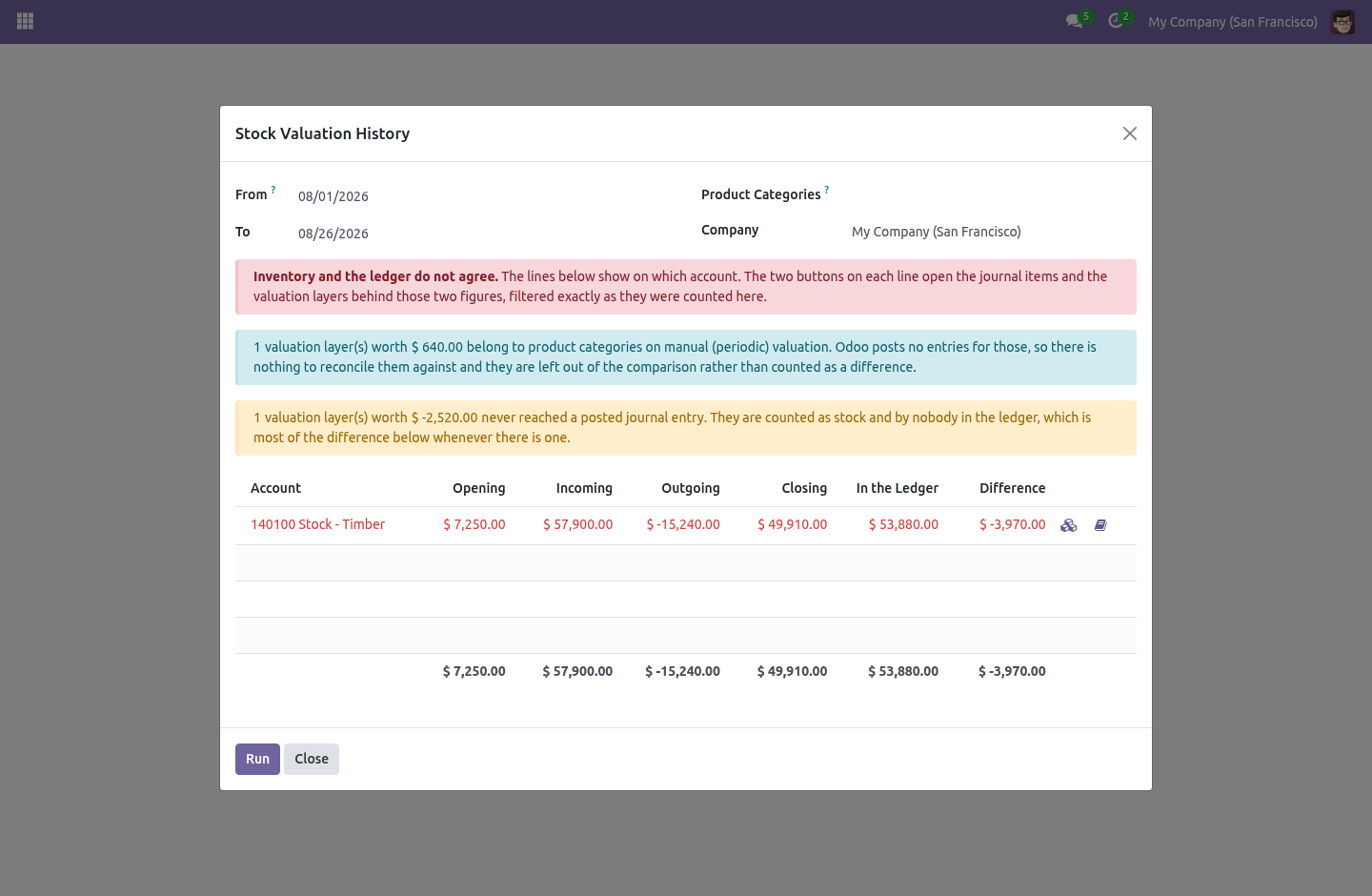
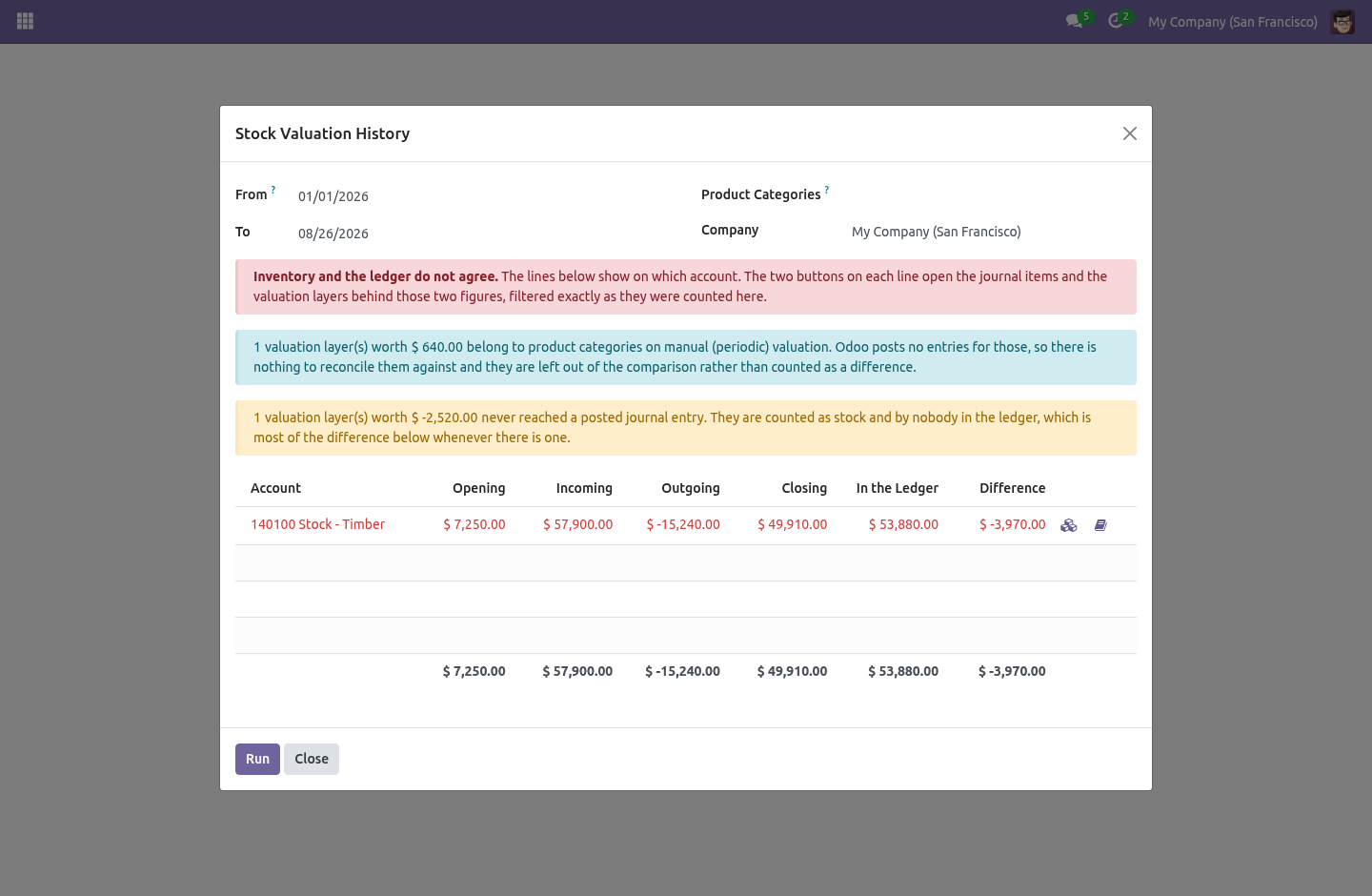
Comparing only the accounts inventory reached this period is how a report announces that the books agree while a whole balance sits unexplained beside it. What does not fit is named, not hidden. Two kinds of value cannot belong to a reconciled line, and both are reported as their own explanation rather than quietly dropped: Value with no account. A category set to automated valuation that names no valuation account still produces layers, and that value belongs to no account at all.
The fix is the category. Value with no posted entry. A layer whose journal entry is still in draft — or was never created — counts as stock and counts for nobody in the ledger. Whenever there is a difference, this is usually most of it.
Dropping either would make the report balance while the stock did not, which is worse than having no report. Filtering, and what a filtered run may claim. You can narrow the run to a few product categories. That narrows the stock side only — the ledger side is whole accounts, and there is no honest way to take a slice of an account balance by product category.
So a filtered run is a movement report, not a reconciliation, and it says so: the difference column is left out rather than filled with the difference between part of the inventory and all of an account. Who can run it. The module carries its own group, Stock Valuation History, in the Accounting category, and it implies Odoo's read-only accounting group. This is deliberate.
account.group_account_readonly lives in Odoo's hidden module category, so on a Community database running Invoicing only it cannot be ticked for anybody. Had the menu been anchored to it, the only way an administrator could let an accountant read this report would be to grant them write access to something else. Now it is a tick-box, and the report writes nothing anywhere. Series.
There is no 19.0 version, on purpose. Odoo 18.0 added this to Community itself — stock_value() next to stock_accounting_value(), grouped by account, with a date — and shipping a paid module that duplicates it would mean selling something given away, and disagreeing with the core report the first time the two rounded differently. On 19.0 the right answer is the one already in the box. The complete manual is at docs dot bambooforge dot dev, the demo database is linked from the store page, and support answers within twenty-four hours.
Links are in the description.
Transcript of the walkthrough (Odoo 17)
Stock Valuation History & Ledger Reconciliation. Opening, in, out and closing stock value per account for a period, next to the ledger - read on the accounting date, so both answer one question. At every closing somebody asks the same question: the stock account says one number, inventory says another, where is the difference. Odoo Community can list the valuation layers and filter them to a date, and from there the answer gets assembled by hand in a spreadsheet.
In the next few minutes: stock valuation history & ledger reconciliation, then both sides on the accounting date, then opening, in, out, closing, then against the ledger, then what does not fit is named, not hidden. Then what this app deliberately does not do, so you can tell before you buy whether it fits. Everything lives under Stock Valuation History. Stock Valuation History & Ledger Reconciliation.
At every closing somebody asks the same question: the stock account says one number, inventory says another, where is the difference. Odoo Community can list the valuation layers and filter them to a date, and from there the answer gets assembled by hand in a spreadsheet. This is that answer as a report — and it is built on one correction that matters more than the layout. Both sides on the accounting date.
A valuation layer has no date of its own. Odoo's layer list groups by Date, and that field is create_date — the moment the row was written to the database. The journal entry the layer produced carries an accounting date, and that is what the trial balance is built from. Most of the time they are the same day and nobody notices.
Then somebody receives goods on the 2nd of January against December, or an entry is reset to draft and re-posted into the prior period, and the two dates part company. From then on the layer report and the balance sheet disagree, by exactly that amount, and neither of them says why. Opening, in, out, closing. Pick a period.
For every stock valuation account you get: ============ =================================================== Opening everything valued before the start of the period In positive value in the period — receipts, revaluations up Out negative value in the period — deliveries, scrap, write-downs Closing opening + in − out ============ =================================================== Against the ledger. Next to Closing sits In the Ledger — the posted balance of that same account on the same date — and the difference between them. the valuation layers that were added up to make the stock column, filtered by the same dates and the same accounting-date rule; the journal items that were added up to make the ledger column, posted only, on or before the closing date. Every account a category values stock on appears, whether or not anything moved through it, and so does any account that stock entries once reached but no category names today — the balance left behind when a chart is renumbered or a category is pointed at a new account.
Comparing only the accounts inventory reached this period is how a report announces that the books agree while a whole balance sits unexplained beside it. What does not fit is named, not hidden. Two kinds of value cannot belong to a reconciled line, and both are reported as their own explanation rather than quietly dropped: Value with no account. A category set to automated valuation that names no valuation account still produces layers, and that value belongs to no account at all.
The fix is the category. Value with no posted entry. A layer whose journal entry is still in draft — or was never created — counts as stock and counts for nobody in the ledger. Whenever there is a difference, this is usually most of it.
Dropping either would make the report balance while the stock did not, which is worse than having no report. Filtering, and what a filtered run may claim. You can narrow the run to a few product categories. That narrows the stock side only — the ledger side is whole accounts, and there is no honest way to take a slice of an account balance by product category.
So a filtered run is a movement report, not a reconciliation, and it says so: the difference column is left out rather than filled with the difference between part of the inventory and all of an account. Who can run it. The module carries its own group, Stock Valuation History, in the Accounting category, and it implies Odoo's read-only accounting group. This is deliberate.
account.group_account_readonly lives in Odoo's hidden module category, so on a Community database running Invoicing only it cannot be ticked for anybody. Had the menu been anchored to it, the only way an administrator could let an accountant read this report would be to grant them write access to something else. Now it is a tick-box, and the report writes nothing anywhere. Series.
There is no 19.0 version, on purpose. Odoo 19.0 added this to Community itself — stock_value() next to stock_accounting_value(), grouped by account, with a date — and shipping a paid module that duplicates it would mean selling something given away, and disagreeing with the core report the first time the two rounded differently. On 19.0 the right answer is the one already in the box. The complete manual is at docs dot bambooforge dot dev, the demo database is linked from the store page, and support answers within twenty-four hours.
Links are in the description.
Transcript of the walkthrough (Odoo 16)
Stock Valuation History & Ledger Reconciliation. Opening, in, out and closing stock value per account for a period, next to the ledger - read on the accounting date, so both answer one question. At every closing somebody asks the same question: the stock account says one number, inventory says another, where is the difference. Odoo Community can list the valuation layers and filter them to a date, and from there the answer gets assembled by hand in a spreadsheet.
In the next few minutes: stock valuation history & ledger reconciliation, then both sides on the accounting date, then opening, in, out, closing, then against the ledger, then what does not fit is named, not hidden. Then what this app deliberately does not do, so you can tell before you buy whether it fits. Everything lives under Stock Valuation History. Stock Valuation History & Ledger Reconciliation.
At every closing somebody asks the same question: the stock account says one number, inventory says another, where is the difference. Odoo Community can list the valuation layers and filter them to a date, and from there the answer gets assembled by hand in a spreadsheet. This is that answer as a report — and it is built on one correction that matters more than the layout. Both sides on the accounting date.
A valuation layer has no date of its own. Odoo's layer list groups by Date, and that field is create_date — the moment the row was written to the database. The journal entry the layer produced carries an accounting date, and that is what the trial balance is built from. Most of the time they are the same day and nobody notices.
Then somebody receives goods on the 2nd of January against December, or an entry is reset to draft and re-posted into the prior period, and the two dates part company. From then on the layer report and the balance sheet disagree, by exactly that amount, and neither of them says why. Opening, in, out, closing. Pick a period.
For every stock valuation account you get: ============ =================================================== Opening everything valued before the start of the period In positive value in the period — receipts, revaluations up Out negative value in the period — deliveries, scrap, write-downs Closing opening + in − out ============ =================================================== Against the ledger. Next to Closing sits In the Ledger — the posted balance of that same account on the same date — and the difference between them. the valuation layers that were added up to make the stock column, filtered by the same dates and the same accounting-date rule; the journal items that were added up to make the ledger column, posted only, on or before the closing date. Every account a category values stock on appears, whether or not anything moved through it, and so does any account that stock entries once reached but no category names today — the balance left behind when a chart is renumbered or a category is pointed at a new account.
Comparing only the accounts inventory reached this period is how a report announces that the books agree while a whole balance sits unexplained beside it. What does not fit is named, not hidden. Two kinds of value cannot belong to a reconciled line, and both are reported as their own explanation rather than quietly dropped: Value with no account. A category set to automated valuation that names no valuation account still produces layers, and that value belongs to no account at all.
The fix is the category. Value with no posted entry. A layer whose journal entry is still in draft — or was never created — counts as stock and counts for nobody in the ledger. Whenever there is a difference, this is usually most of it.
Dropping either would make the report balance while the stock did not, which is worse than having no report. Filtering, and what a filtered run may claim. You can narrow the run to a few product categories. That narrows the stock side only — the ledger side is whole accounts, and there is no honest way to take a slice of an account balance by product category.
So a filtered run is a movement report, not a reconciliation, and it says so: the difference column is left out rather than filled with the difference between part of the inventory and all of an account. Who can run it. The module carries its own group, Stock Valuation History, in the Accounting category, and it implies Odoo's read-only accounting group. This is deliberate.
account.group_account_readonly lives in Odoo's hidden module category, so on a Community database running Invoicing only it cannot be ticked for anybody. Had the menu been anchored to it, the only way an administrator could let an accountant read this report would be to grant them write access to something else. Now it is a tick-box, and the report writes nothing anywhere. Series.
There is no 19.0 version, on purpose. Odoo 16.0 added this to Community itself — stock_value() next to stock_accounting_value(), grouped by account, with a date — and shipping a paid module that duplicates it would mean selling something given away, and disagreeing with the core report the first time the two rounded differently. On 19.0 the right answer is the one already in the box. The complete manual is at docs dot bambooforge dot dev, the demo database is linked from the store page, and support answers within twenty-four hours.
Links are in the description.
Key facts
- What it is
- Opening, in, out and closing stock value per account for a period, next to the ledger - read on the accounting date, so both answer one question.
- For
- Accounting
- Odoo versions
- 16.0, 17.0, 18.0 - Community and Enterprise
- Runs on
- Odoo.sh or Odoo you host yourself - not Odoo Online, which accepts no third-party apps
- Price
- 199 EUR, one-time, on the Odoo Apps Store
- Technical name
- bambooforge_valuation_history
- Live demo
- https://demo18.bambooforge.dev/odoo/action-bambooforge_valuation_history.action_bf_stock_value_run
- Manual last updated
- 2026-09-06
Stock Valuation History & Ledger Reconciliation
At every closing somebody asks the same question: the stock account says one number, inventory says another, where is the difference. Odoo Community can list the valuation layers and filter them to a date, and from there the answer gets assembled by hand in a spreadsheet.
This is that answer as a report — and it is built on one correction that matters more than the layout.
Both sides on the accounting date
A valuation layer has no date of its own. Odoo's layer list groups by Date, and that field is create_date — the moment the row was written to the database. The journal entry the layer produced carries an accounting date, and that is what the trial balance is built from.
Most of the time they are the same day and nobody notices. Then somebody receives goods on the 2nd of January against December, or an entry is reset to draft and re-posted into the prior period, and the two dates part company. From then on the layer report and the balance sheet disagree, by exactly that amount, and neither of them says why.
This report places every layer on the date of the journal entry it produced. A layer that never produced one is placed on the day it was written — and still counted, because a value that reached no entry is precisely the sort of difference the report exists to surface.
Opening, in, out, closing
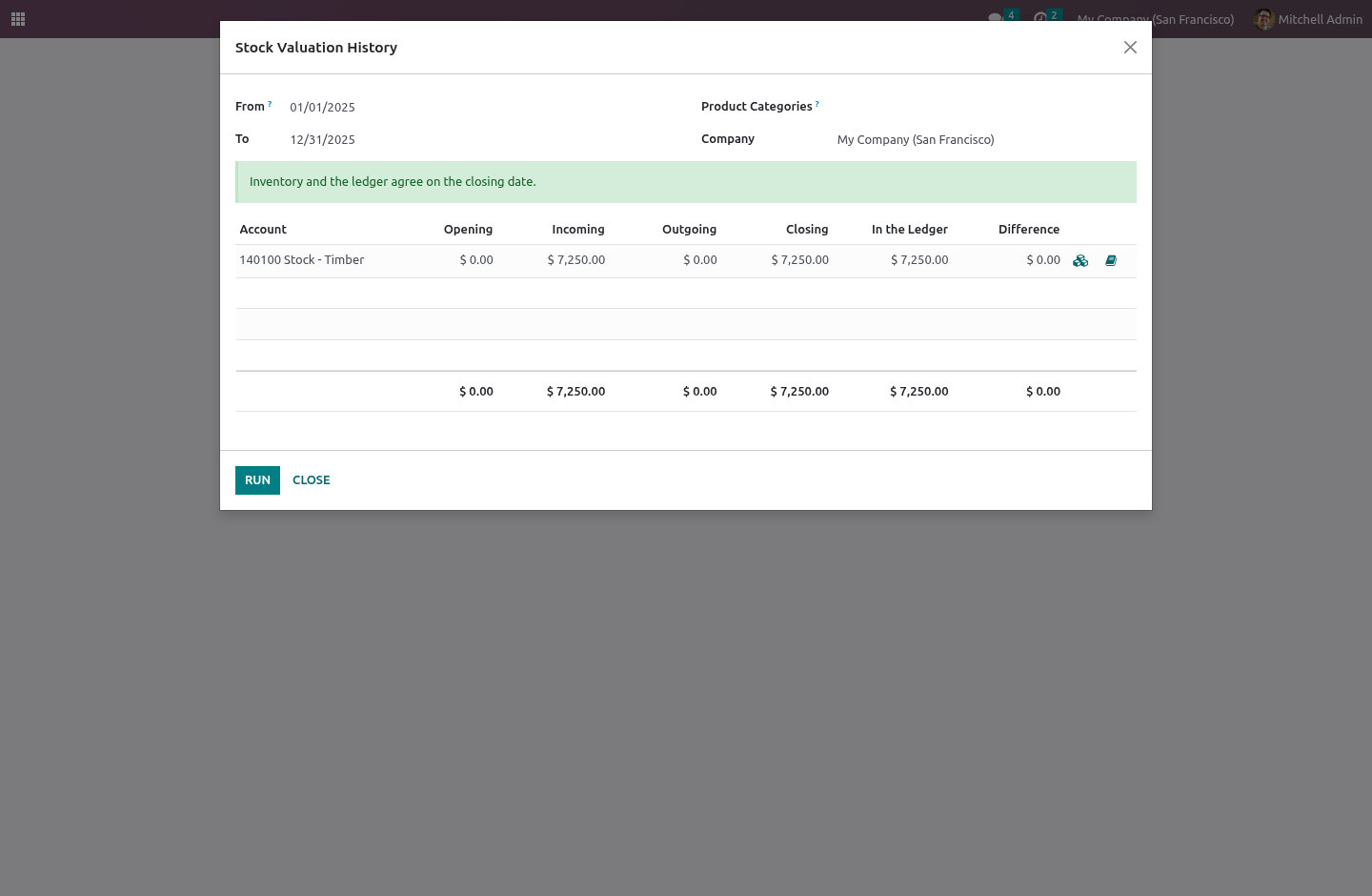
Pick a period. For every stock valuation account you get:
Opening |
everything valued before the start of the period |
In |
positive value in the period — receipts, revaluations up |
Out |
negative value in the period — deliveries, scrap, write-downs |
Closing |
opening + in − out |
Closing is never stored. It is its own parts added together, every time the report runs, because a stored total is one more number that can end up disagreeing with the numbers under it.
So a change in the stock value is explained rather than only observed: the balance moved by €40,000, of which €52,000 came in and €12,000 went out.
Against the ledger
Next to Closing sits In the Ledger — the posted balance of that same account on the same date — and the difference between them.
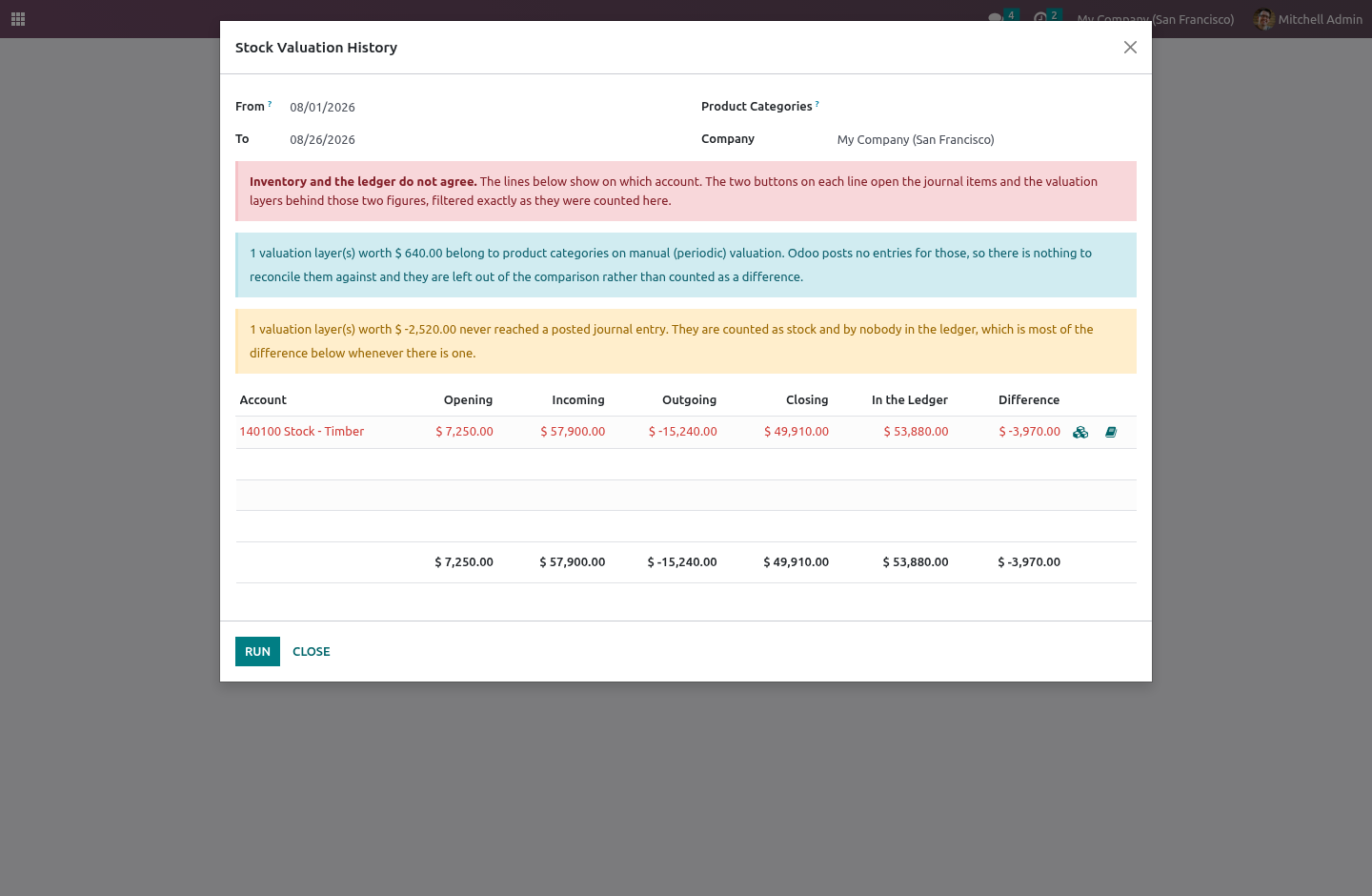
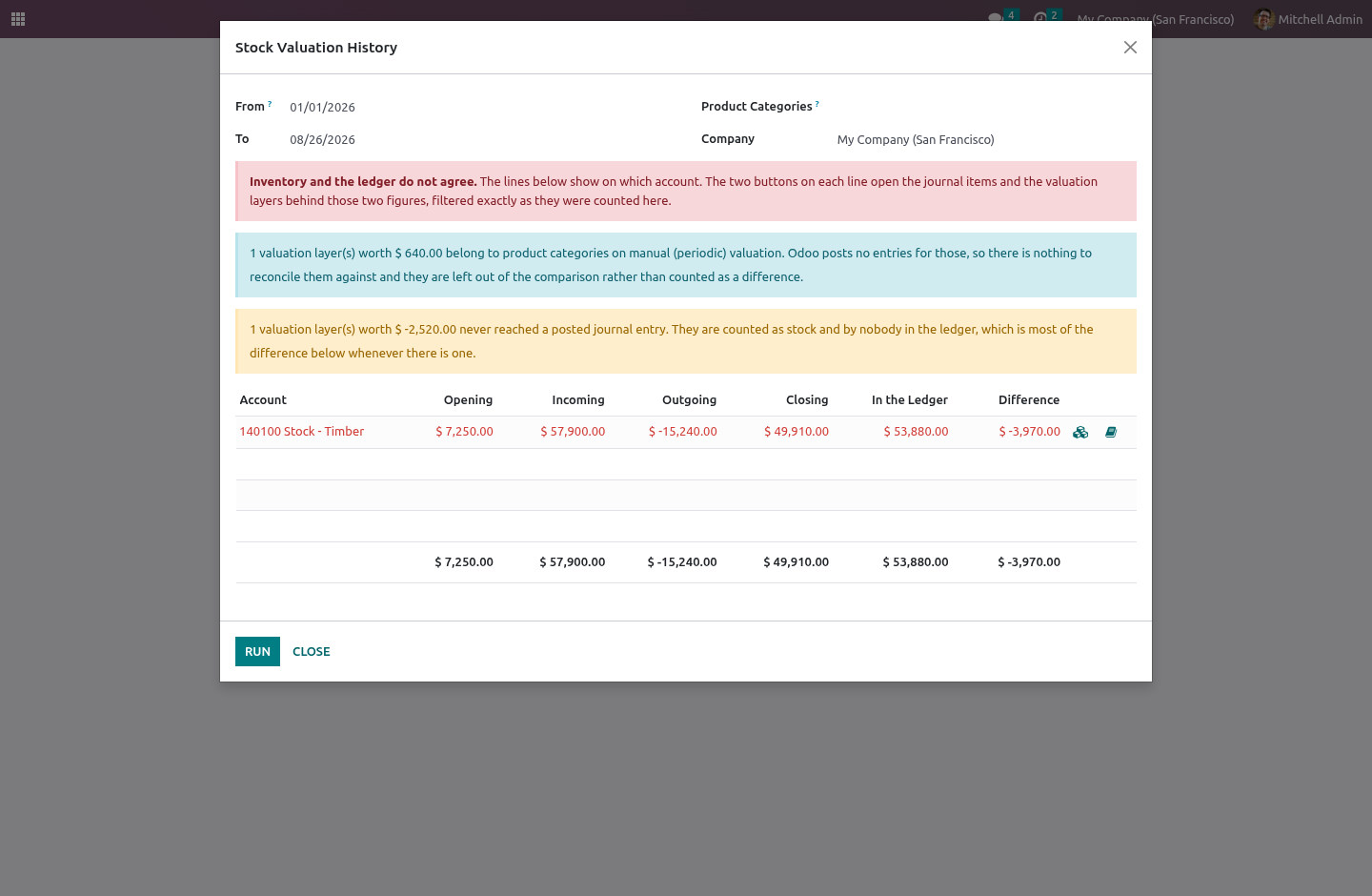
Every account a category values stock on appears, whether or not anything moved through it, and so does any account that stock entries once reached but no category names today — the balance left behind when a chart is renumbered or a category is pointed at a new account. Comparing only the accounts inventory reached this period is how a report announces that the books agree while a whole balance sits unexplained beside it.
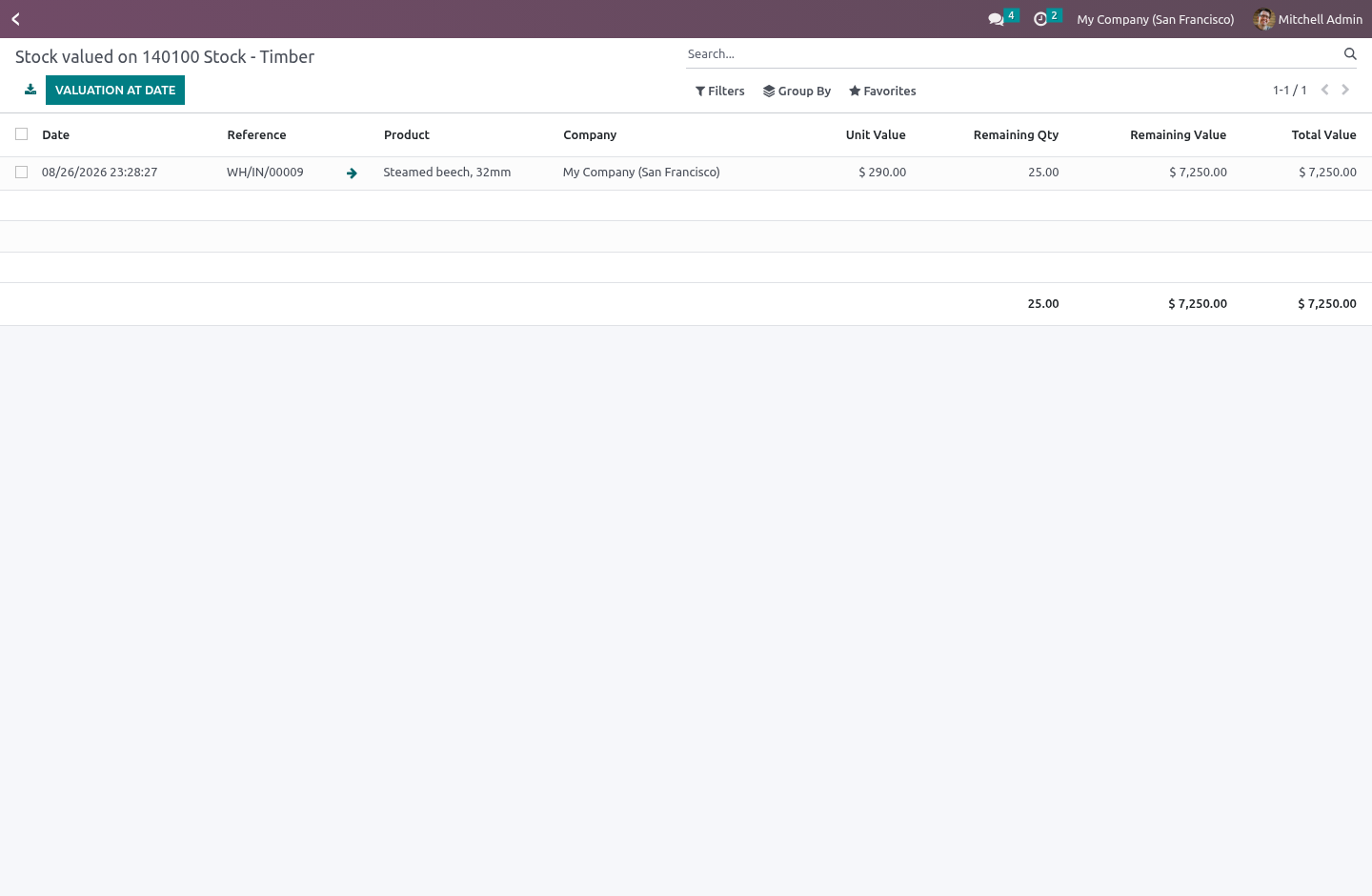
Two buttons on every line open what is behind each figure:
the valuation layers that were added up to make the stock column, filtered by the same dates and the same accounting-date rule;
the journal items that were added up to make the ledger column, posted only, on or before the closing date.
The filters are the report's own, not an approximation of them, so the two lists always add up to the two numbers they came from. A difference becomes something to click on rather than something to go hunting for.
Filtering, and what a filtered run may claim
You can narrow the run to a few product categories. That narrows the stock side only — the ledger side is whole accounts, and there is no honest way to take a slice of an account balance by product category.
So a filtered run is a movement report, not a reconciliation, and it says so: the difference column is left out rather than filled with the difference between part of the inventory and all of an account.
Who can run it
The module carries its own group, Stock Valuation History, in the Accounting category, and it implies Odoo's read-only accounting group.
This is deliberate. account.group_account_readonly lives in Odoo's hidden module category, so on a Community database running Invoicing only it cannot be ticked for anybody. Had the menu been anchored to it, the only way an administrator could let an accountant read this report would be to grant them write access to something else. Now it is a tick-box, and the report writes nothing anywhere.
Series
Community 16.0, 17.0 and 18.0.
There is no 19.0 version, on purpose. Odoo 18.0 added this to Community itself — stock_value() next to stock_accounting_value(), grouped by account, with a date — and shipping a paid module that duplicates it would mean selling something given away, and disagreeing with the core report the first time the two rounded differently. On 19.0 the right answer is the one already in the box.
How we make sure it works
Before every release, 28 automated checks run against this app on Odoo 16, 17 and 18. Among them:
A reader cannot report on another company.
Running twice does not double the lines.
The notes stay shut when there is nothing to note.
Two wrong accounts that cancel out are not agreement.
Manual valuation is not called a misconfiguration.
The complete list is in the source you receive.
Install
Copy bambooforge_valuation_history into your addons path and update the app list, or install the ZIP from the Odoo Apps Store.
Install Stock Valuation History & Ledger Reconciliation.
Open Stock Valuation History.
Questions people ask
- Which Odoo versions does it run on?
Odoo 16.0, 17.0, 18.0, on the series you buy it for; each series is its own listing.
- Community or Enterprise?
Both. It needs no Enterprise app.
- What does it need?
The standard Inventory Valuation app. No extra Python package.
- Where does it show up?
Under the Stock Valuation History menu.
- Does anything leave my server?
No. It makes no call outside your Odoo server: no telemetry, no licence check, no third-party service.
- What happens if I uninstall it?
Odoo drops the app's own tables and fields; the standard records it worked on (contacts, orders, products) stay as they are.