 BambooForge Labs
AI Translation All in One with Translation Memory
Every approved translation is remembered: exact and near matches are answered from memory before a token is spent, with TMX in and out.
Available for Odoo 16.0, Odoo 17.0, Odoo 18.0, Odoo 19.0, Odoo 20.0. Technical name bambooforge_translation_memory.
Transcript of the walkthrough (Odoo 20)
AI Translation All in One with Translation Memory. Every approved translation is remembered: exact and near matches are answered from memory before a token is spent, with TMX in and out. An add-on for BambooForge AI Translate (17.0). Every approved translation is remembered; exact and near matches are answered from memory before the engine is asked; TMX in and out; a counter of what was saved.
Nothing to do. When a batch applies an item - after review, or straight away on an auto-approved batch - the pair source → value is written to AI Translate ▸ Translation Memory for that language pair, with where it came from (model, field, batch) and when. A later approval of the same source replaces the earlier one: the reviewer's newest decision is the memory. An item that was itself answered from memory and applied unchanged writes nothing new.
In the next few minutes: ai translation all in one with translation memory, then how the memory fills, then how a batch uses it, then tmx, then technical notes. Then what this app deliberately does not do, so you can tell before you buy whether it fits. Everything lives under Translation Memory then Import TMX. 1.
Copy bambooforge_translation_memory into your addons path and update the app list, or install the ZIP from the Odoo Apps Store. 2. Install AI Translation Suite: Translation Memory & TMX. 3.
Open Translation Memory - its menus are Import TMX. AI Translation All in One with Translation Memory. An add-on for BambooForge AI Translate (17.0). Every approved translation is remembered; exact and near matches are answered from memory before the engine is asked; TMX in and out; a counter of what was saved.
How the memory fills. Nothing to do. When a batch applies an item - after review, or straight away on an auto-approved batch - the pair source → value is written to AI Translate ▸ Translation Memory for that language pair, with where it came from (model, field, batch) and when. A later approval of the same source replaces the earlier one: the reviewer's newest decision is the memory.
An item that was itself answered from memory and applied unchanged writes nothing new. Pairs where the translation equals the source (OK → OK) are not stored: they would never help. How a batch uses it. On the batch, Use translation memory (default on) and Near-match threshold (%) (default 90).
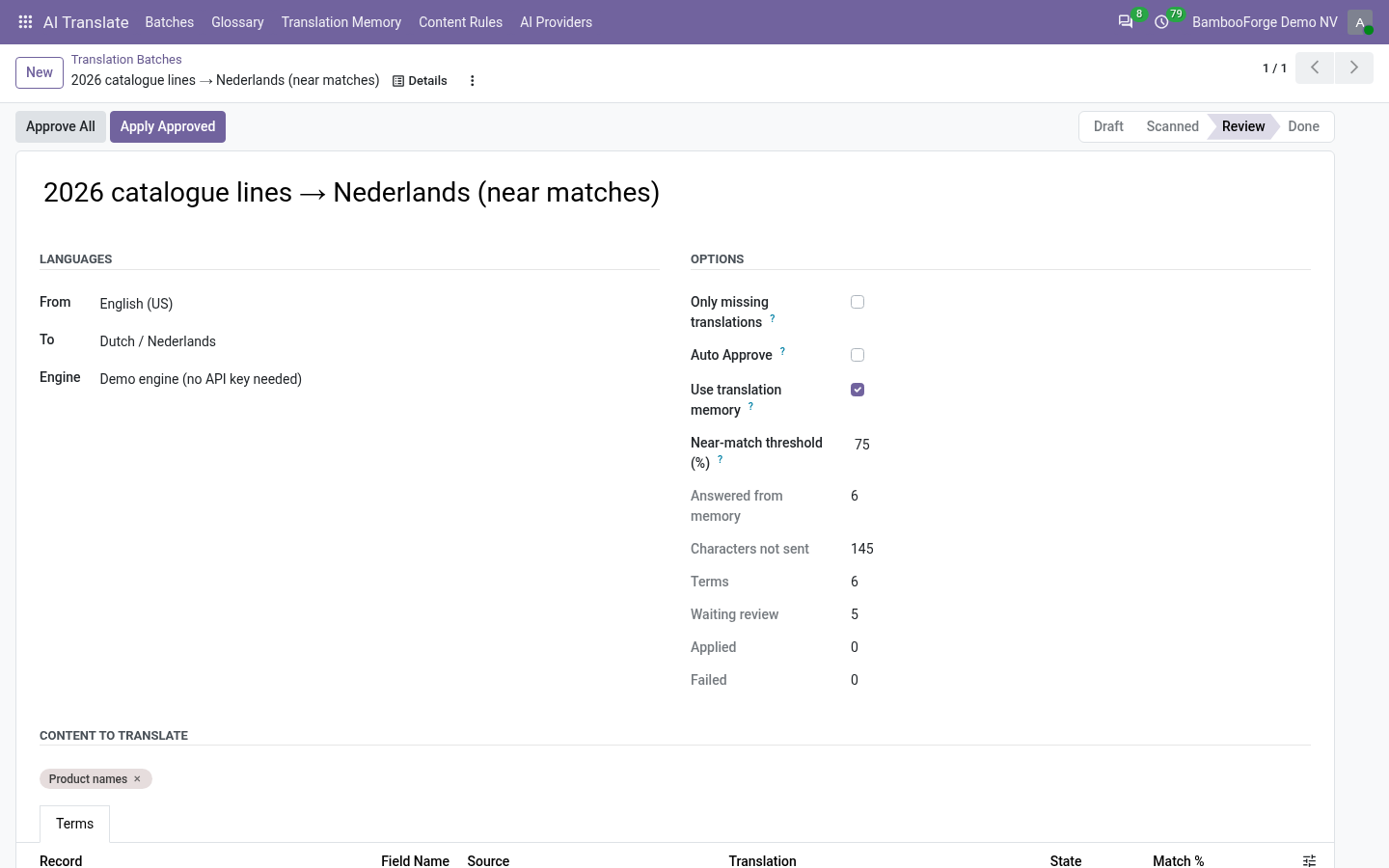
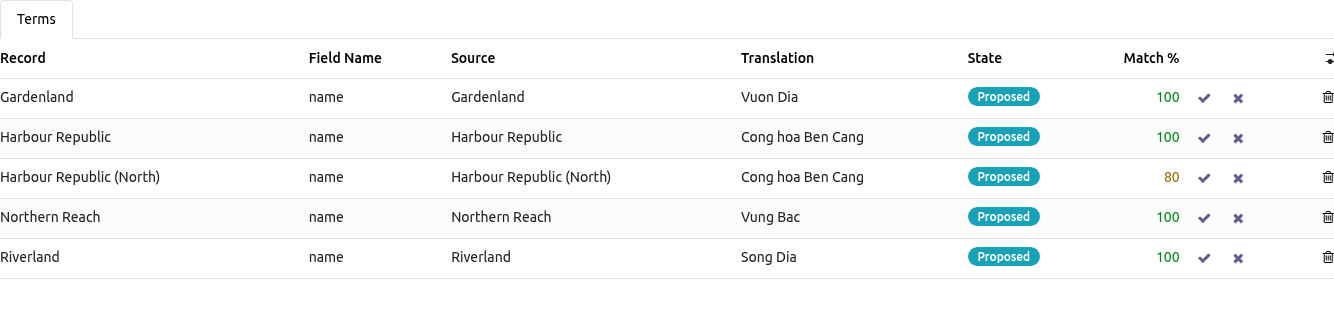
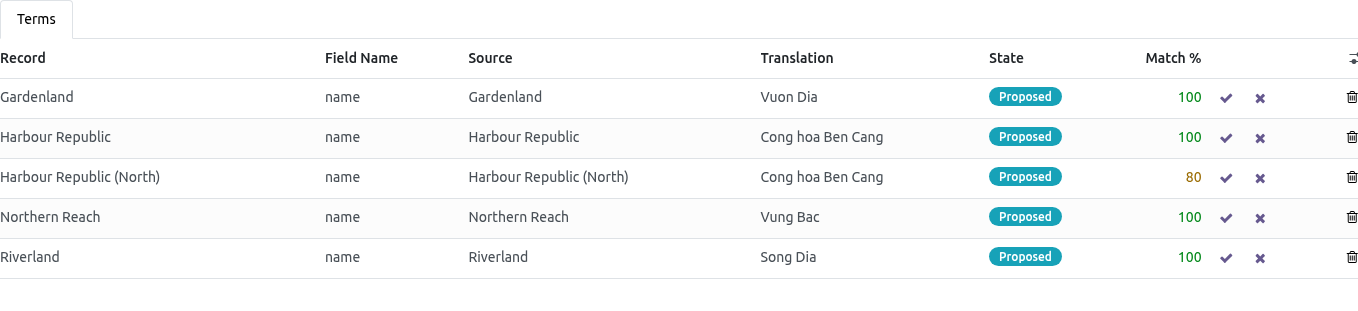
When the batch is translated, before anything is sent to the engine and after the glossary: an item whose source is already in memory for this language pair (compared ignoring case and extra spaces) is proposed from memory, note memory, Match % = 100, and is not sent; otherwise the most similar remembered source is looked for; if it is at least threshold % similar (difflib ratio) the remembered translation is proposed with note memory, 96 % match - check and Match % in orange - the reviewer fixes three characters instead of reading a fresh sentence; everything else goes to the engine as before. The batch shows Answered from memory and Characters not sent. Set the threshold to 100 for exact matches only; the glossary always wins over the memory. TMX.
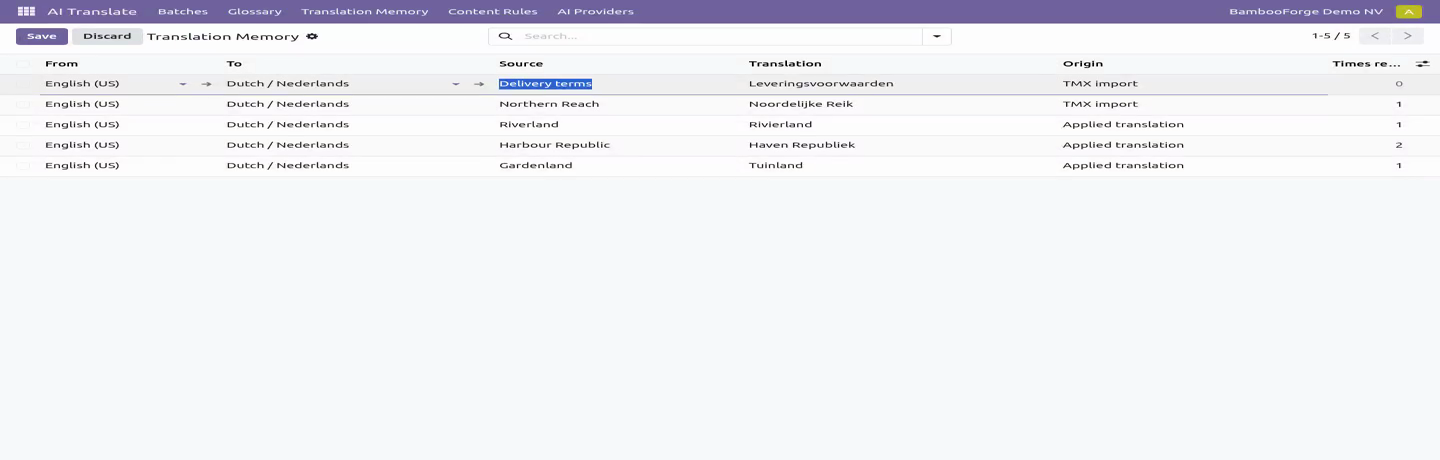
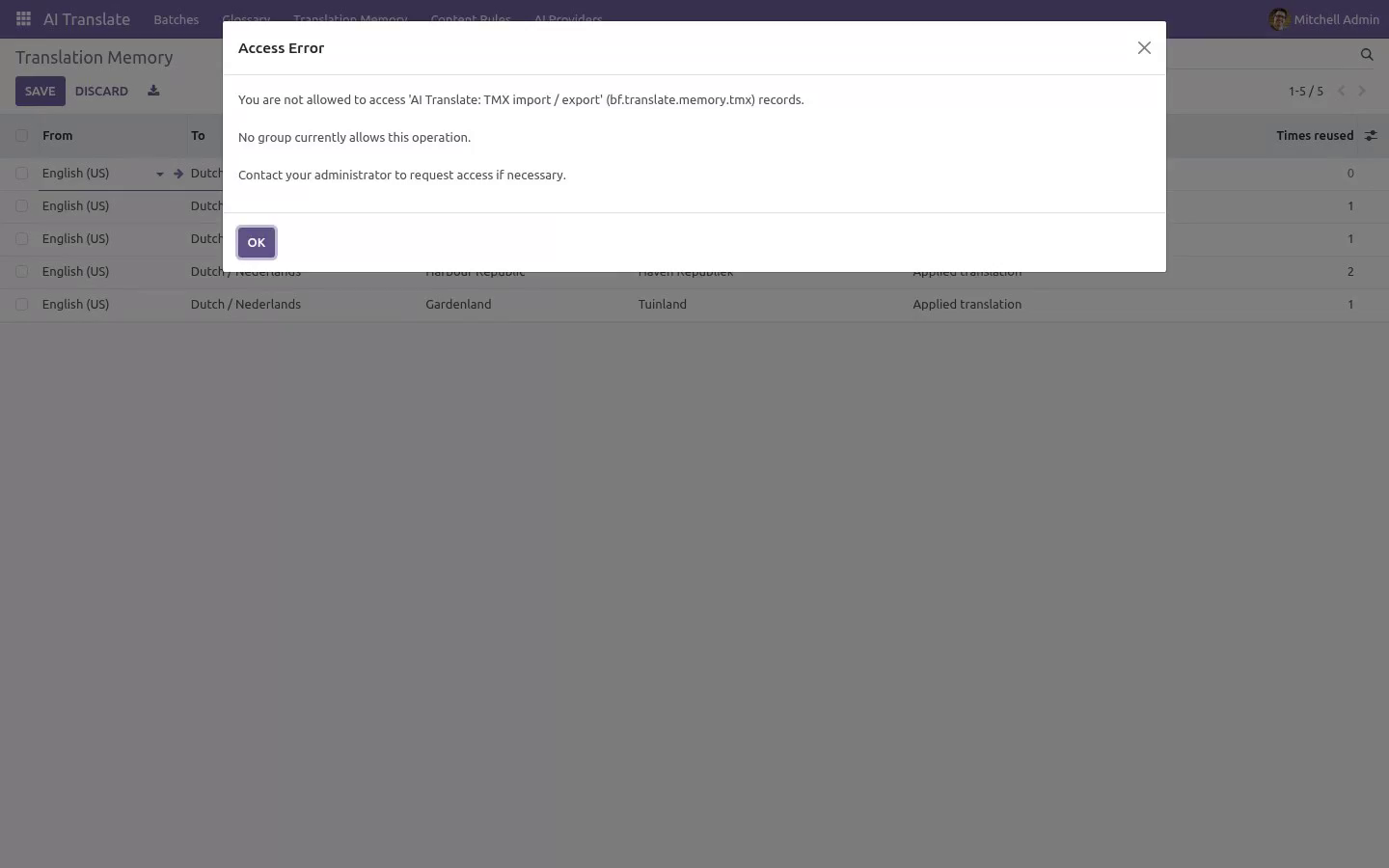
AI Translate ▸ Import TMX: pick the file and the language pair; every <tu> carrying both languages (by Odoo code de_DE or ISO de) is remembered with origin TMX import; duplicates update the existing entry. Translation Memory ▸ select rows ▸ Action ▸ Export TMX (or no selection = everything) downloads TMX 1.4 with xml:lang per segment. Technical notes Uses AI Translate 1.1.0's bf.translate.job._local_proposals(items, glossary) and bf.translate.item._after_applied() hooks; the engine code is untouched. Exact lookup is an indexed equality on a normalised key; near-match is Python difflib over the pair's pool with a length pre-filter - fine for tens of thousands of entries, not a search engine.
Entries are per company; the unique key is (normalised source, from, to, company). Community only. No Enterprise module, no external service. How we make sure it works.
Before every release, 20 automated checks run against this app on Odoo 16, 17, 18, 19 and 20. Among them: A memory hit applied unchanged does not duplicate. An archived entry is not used. Rejected and failed items teach nothing.
Identity pairs are not stored. The wrong language pair is never used. The complete list is in the source you receive. Questions people ask.
Which Odoo versions does it run on? Odoo 16.0, 17.0, 18.0, 19.0, 20.0, on the series you buy it for; each series is its own listing. Community or Enterprise? Both.
It needs no Enterprise app. The complete manual is at docs dot bambooforge dot dev, the demo database is linked from the store page, and support answers within twenty-four hours. Links are in the description.
Transcript of the walkthrough (Odoo 19)
AI Translation Suite: Translation Memory & TMX. Every approved translation is remembered: exact and near matches are answered from memory before a token is spent, with TMX in and out. An add-on for BambooForge AI Translate (17.0). Every approved translation is remembered; exact and near matches are answered from memory before the engine is asked; TMX in and out; a counter of what was saved.
Nothing to do. When a batch applies an item - after review, or straight away on an auto-approved batch - the pair source → value is written to AI Translate ▸ Translation Memory for that language pair, with where it came from (model, field, batch) and when. A later approval of the same source replaces the earlier one: the reviewer's newest decision is the memory. An item that was itself answered from memory and applied unchanged writes nothing new.
In the next few minutes: ai translation suite: translation memory & tmx, then how the memory fills, then how a batch uses it, then tmx, then technical notes. Then what this app deliberately does not do, so you can tell before you buy whether it fits. Everything lives under Translation Memory then Import TMX. AI Translation Suite: Translation Memory & TMX.
An add-on for BambooForge AI Translate (17.0). Every approved translation is remembered; exact and near matches are answered from memory before the engine is asked; TMX in and out; a counter of what was saved. How the memory fills. Nothing to do.
When a batch applies an item - after review, or straight away on an auto-approved batch - the pair source → value is written to AI Translate ▸ Translation Memory for that language pair, with where it came from (model, field, batch) and when. A later approval of the same source replaces the earlier one: the reviewer's newest decision is the memory. An item that was itself answered from memory and applied unchanged writes nothing new. Pairs where the translation equals the source (OK → OK) are not stored: they would never help.
How a batch uses it. On the batch, Use translation memory (default on) and Near-match threshold (%) (default 90). When the batch is translated, before anything is sent to the engine and after the glossary: an item whose source is already in memory for this language pair (compared ignoring case and extra spaces) is proposed from memory, note memory, Match % = 100, and is not sent; otherwise the most similar remembered source is looked for; if it is at least threshold % similar (difflib ratio) the remembered translation is proposed with note memory, 96 % match - check and Match % in orange - the reviewer fixes three characters instead of reading a fresh sentence; everything else goes to the engine as before. The batch shows Answered from memory and Characters not sent.
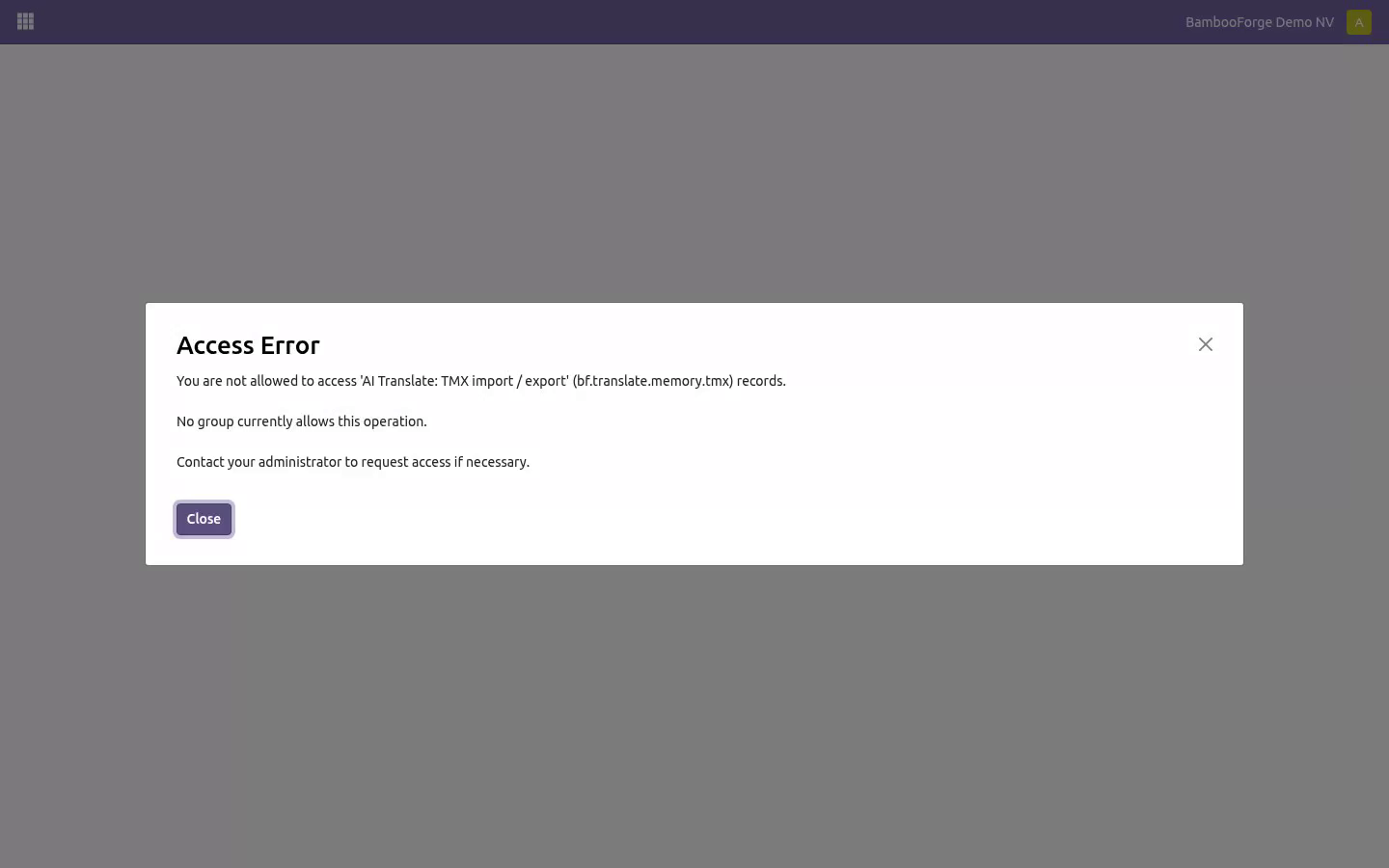
Set the threshold to 100 for exact matches only; the glossary always wins over the memory. TMX. AI Translate ▸ Import TMX: pick the file and the language pair; every <tu> carrying both languages (by Odoo code de_DE or ISO de) is remembered with origin TMX import; duplicates update the existing entry. Translation Memory ▸ select rows ▸ Action ▸ Export TMX (or no selection = everything) downloads TMX 1.4 with xml:lang per segment.
Technical notes Uses AI Translate 1.1.0's bf.translate.job._local_proposals(items, glossary) and bf.translate.item._after_applied() hooks; the engine code is untouched. Exact lookup is an indexed equality on a normalised key; near-match is Python difflib over the pair's pool with a length pre-filter - fine for tens of thousands of entries, not a search engine. Entries are per company; the unique key is (normalised source, from, to, company). Community only.
No Enterprise module, no external service. The complete manual is at docs dot bambooforge dot dev, the demo database is linked from the store page, and support answers within twenty-four hours. Links are in the description.
Transcript of the walkthrough (Odoo 18)
AI Translation Suite: Translation Memory & TMX. Every approved translation is remembered: exact and near matches are answered from memory before a token is spent, with TMX in and out. An add-on for BambooForge AI Translate (17.0). Every approved translation is remembered; exact and near matches are answered from memory before the engine is asked; TMX in and out; a counter of what was saved.
Nothing to do. When a batch applies an item - after review, or straight away on an auto-approved batch - the pair source → value is written to AI Translate ▸ Translation Memory for that language pair, with where it came from (model, field, batch) and when. A later approval of the same source replaces the earlier one: the reviewer's newest decision is the memory. An item that was itself answered from memory and applied unchanged writes nothing new.
In the next few minutes: ai translation suite: translation memory & tmx, then how the memory fills, then how a batch uses it, then tmx, then technical notes. Then what this app deliberately does not do, so you can tell before you buy whether it fits. Everything lives under Translation Memory then Import TMX. AI Translation Suite: Translation Memory & TMX.
An add-on for BambooForge AI Translate (17.0). Every approved translation is remembered; exact and near matches are answered from memory before the engine is asked; TMX in and out; a counter of what was saved. How the memory fills. Nothing to do.
When a batch applies an item - after review, or straight away on an auto-approved batch - the pair source → value is written to AI Translate ▸ Translation Memory for that language pair, with where it came from (model, field, batch) and when. A later approval of the same source replaces the earlier one: the reviewer's newest decision is the memory. An item that was itself answered from memory and applied unchanged writes nothing new. Pairs where the translation equals the source (OK → OK) are not stored: they would never help.
How a batch uses it. On the batch, Use translation memory (default on) and Near-match threshold (%) (default 90). When the batch is translated, before anything is sent to the engine and after the glossary: an item whose source is already in memory for this language pair (compared ignoring case and extra spaces) is proposed from memory, note memory, Match % = 100, and is not sent; otherwise the most similar remembered source is looked for; if it is at least threshold % similar (difflib ratio) the remembered translation is proposed with note memory, 96 % match - check and Match % in orange - the reviewer fixes three characters instead of reading a fresh sentence; everything else goes to the engine as before. The batch shows Answered from memory and Characters not sent.
Set the threshold to 100 for exact matches only; the glossary always wins over the memory. TMX. AI Translate ▸ Import TMX: pick the file and the language pair; every <tu> carrying both languages (by Odoo code de_DE or ISO de) is remembered with origin TMX import; duplicates update the existing entry. Translation Memory ▸ select rows ▸ Action ▸ Export TMX (or no selection = everything) downloads TMX 1.4 with xml:lang per segment.
Technical notes Uses AI Translate 1.1.0's bf.translate.job._local_proposals(items, glossary) and bf.translate.item._after_applied() hooks; the engine code is untouched. Exact lookup is an indexed equality on a normalised key; near-match is Python difflib over the pair's pool with a length pre-filter - fine for tens of thousands of entries, not a search engine. Entries are per company; the unique key is (normalised source, from, to, company). Community only.
No Enterprise module, no external service. The complete manual is at docs dot bambooforge dot dev, the demo database is linked from the store page, and support answers within twenty-four hours. Links are in the description.
Transcript of the walkthrough (Odoo 17)
AI Translation Suite: Translation Memory & TMX. Every approved translation is remembered: exact and near matches are answered from memory before a token is spent, with TMX in and out. An add-on for BambooForge AI Translate (17.0). Every approved translation is remembered; exact and near matches are answered from memory before the engine is asked; TMX in and out; a counter of what was saved.
Nothing to do. When a batch applies an item - after review, or straight away on an auto-approved batch - the pair source → value is written to AI Translate ▸ Translation Memory for that language pair, with where it came from (model, field, batch) and when. A later approval of the same source replaces the earlier one: the reviewer's newest decision is the memory. An item that was itself answered from memory and applied unchanged writes nothing new.
In the next few minutes: ai translation suite: translation memory & tmx, then how the memory fills, then how a batch uses it, then tmx, then technical notes. Then what this app deliberately does not do, so you can tell before you buy whether it fits. Everything lives under Translation Memory then Import TMX. AI Translation Suite: Translation Memory & TMX.
An add-on for BambooForge AI Translate (17.0). Every approved translation is remembered; exact and near matches are answered from memory before the engine is asked; TMX in and out; a counter of what was saved. How the memory fills. Nothing to do.
When a batch applies an item - after review, or straight away on an auto-approved batch - the pair source → value is written to AI Translate ▸ Translation Memory for that language pair, with where it came from (model, field, batch) and when. A later approval of the same source replaces the earlier one: the reviewer's newest decision is the memory. An item that was itself answered from memory and applied unchanged writes nothing new. Pairs where the translation equals the source (OK → OK) are not stored: they would never help.
How a batch uses it. On the batch, Use translation memory (default on) and Near-match threshold (%) (default 90). When the batch is translated, before anything is sent to the engine and after the glossary: an item whose source is already in memory for this language pair (compared ignoring case and extra spaces) is proposed from memory, note memory, Match % = 100, and is not sent; otherwise the most similar remembered source is looked for; if it is at least threshold % similar (difflib ratio) the remembered translation is proposed with note memory, 96 % match - check and Match % in orange - the reviewer fixes three characters instead of reading a fresh sentence; everything else goes to the engine as before. The batch shows Answered from memory and Characters not sent.
Set the threshold to 100 for exact matches only; the glossary always wins over the memory. TMX. AI Translate ▸ Import TMX: pick the file and the language pair; every <tu> carrying both languages (by Odoo code de_DE or ISO de) is remembered with origin TMX import; duplicates update the existing entry. Translation Memory ▸ select rows ▸ Action ▸ Export TMX (or no selection = everything) downloads TMX 1.4 with xml:lang per segment.
Technical notes Uses AI Translate 1.1.0's bf.translate.job._local_proposals(items, glossary) and bf.translate.item._after_applied() hooks; the engine code is untouched. Exact lookup is an indexed equality on a normalised key; near-match is Python difflib over the pair's pool with a length pre-filter - fine for tens of thousands of entries, not a search engine. Entries are per company; the unique key is (normalised source, from, to, company). Community only.
No Enterprise module, no external service. The complete manual is at docs dot bambooforge dot dev, the demo database is linked from the store page, and support answers within twenty-four hours. Links are in the description.
Transcript of the walkthrough (Odoo 16)
AI Translation Suite: Translation Memory & TMX. Every approved translation is remembered: exact and near matches are answered from memory before a token is spent, with TMX in and out. An add-on for BambooForge AI Translate (17.0). Every approved translation is remembered; exact and near matches are answered from memory before the engine is asked; TMX in and out; a counter of what was saved.
Nothing to do. When a batch applies an item - after review, or straight away on an auto-approved batch - the pair source → value is written to AI Translate ▸ Translation Memory for that language pair, with where it came from (model, field, batch) and when. A later approval of the same source replaces the earlier one: the reviewer's newest decision is the memory. An item that was itself answered from memory and applied unchanged writes nothing new.
In the next few minutes: ai translation suite: translation memory & tmx, then how the memory fills, then how a batch uses it, then tmx, then technical notes. Then what this app deliberately does not do, so you can tell before you buy whether it fits. Everything lives under Translation Memory then Import TMX. AI Translation Suite: Translation Memory & TMX.
An add-on for BambooForge AI Translate (17.0). Every approved translation is remembered; exact and near matches are answered from memory before the engine is asked; TMX in and out; a counter of what was saved. How the memory fills. Nothing to do.
When a batch applies an item - after review, or straight away on an auto-approved batch - the pair source → value is written to AI Translate ▸ Translation Memory for that language pair, with where it came from (model, field, batch) and when. A later approval of the same source replaces the earlier one: the reviewer's newest decision is the memory. An item that was itself answered from memory and applied unchanged writes nothing new. Pairs where the translation equals the source (OK → OK) are not stored: they would never help.
How a batch uses it. On the batch, Use translation memory (default on) and Near-match threshold (%) (default 90). When the batch is translated, before anything is sent to the engine and after the glossary: an item whose source is already in memory for this language pair (compared ignoring case and extra spaces) is proposed from memory, note memory, Match % = 100, and is not sent; otherwise the most similar remembered source is looked for; if it is at least threshold % similar (difflib ratio) the remembered translation is proposed with note memory, 96 % match - check and Match % in orange - the reviewer fixes three characters instead of reading a fresh sentence; everything else goes to the engine as before. The batch shows Answered from memory and Characters not sent.
Set the threshold to 100 for exact matches only; the glossary always wins over the memory. TMX. AI Translate ▸ Import TMX: pick the file and the language pair; every <tu> carrying both languages (by Odoo code de_DE or ISO de) is remembered with origin TMX import; duplicates update the existing entry. Translation Memory ▸ select rows ▸ Action ▸ Export TMX (or no selection = everything) downloads TMX 1.4 with xml:lang per segment.
Technical notes Uses AI Translate 1.1.0's bf.translate.job._local_proposals(items, glossary) and bf.translate.item._after_applied() hooks; the engine code is untouched. Exact lookup is an indexed equality on a normalised key; near-match is Python difflib over the pair's pool with a length pre-filter - fine for tens of thousands of entries, not a search engine. Entries are per company; the unique key is (normalised source, from, to, company). Community only.
No Enterprise module, no external service. The complete manual is at docs dot bambooforge dot dev, the demo database is linked from the store page, and support answers within twenty-four hours. Links are in the description.
Key facts
- What it is
- Every approved translation is remembered: exact and near matches are answered from memory before a token is spent, with TMX in and out.
- For
- Website
- Odoo versions
- 16.0, 17.0, 18.0, 19.0, 20.0 - Community and Enterprise
- Runs on
- Odoo.sh or Odoo you host yourself - not Odoo Online, which accepts no third-party apps
- Price
- 178 EUR, one-time, on the Odoo Apps Store
- Technical name
- bambooforge_translation_memory
- Live demo
- https://demo20.bambooforge.dev/odoo/action-bambooforge_translation_memory.action_bf_translate_memory
- Manual last updated
- 2026-10-15
AI Translation All in One with Translation Memory
An add-on for BambooForge AI Translate (17.0). Every approved translation is remembered; exact and near matches are answered from memory before the engine is asked; TMX in and out; a counter of what was saved.
How the memory fills
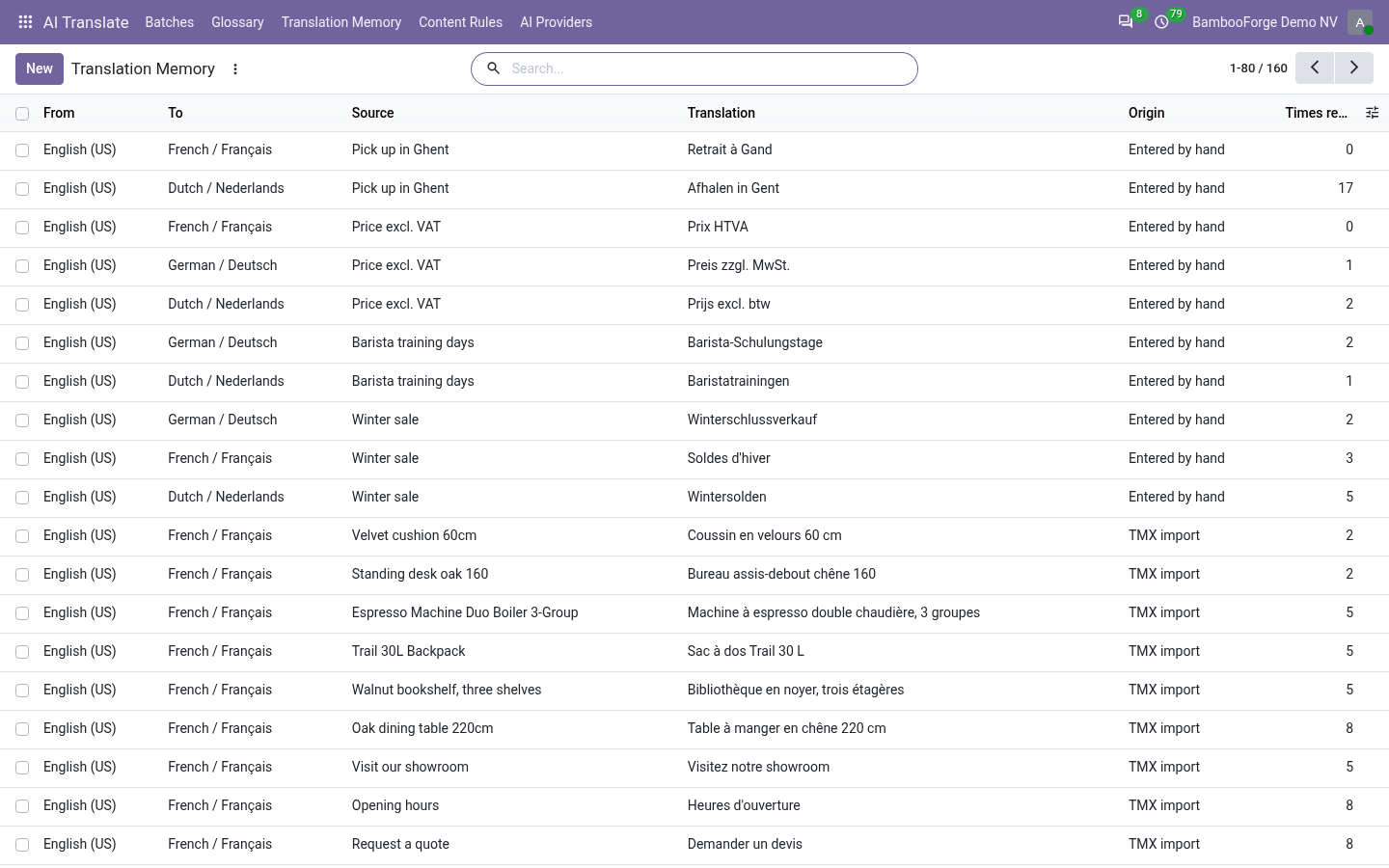
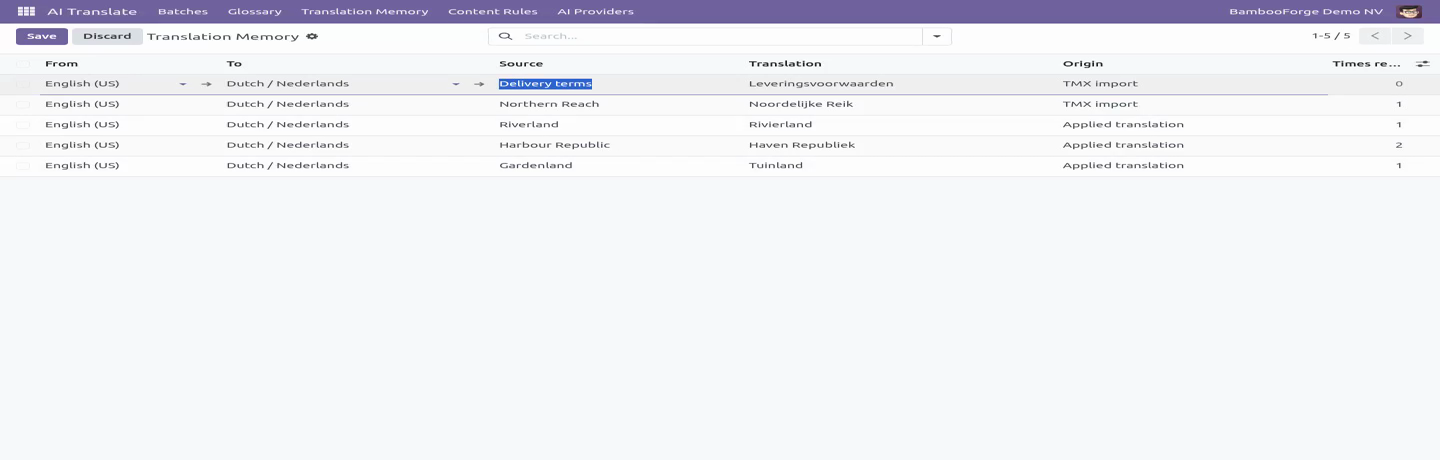
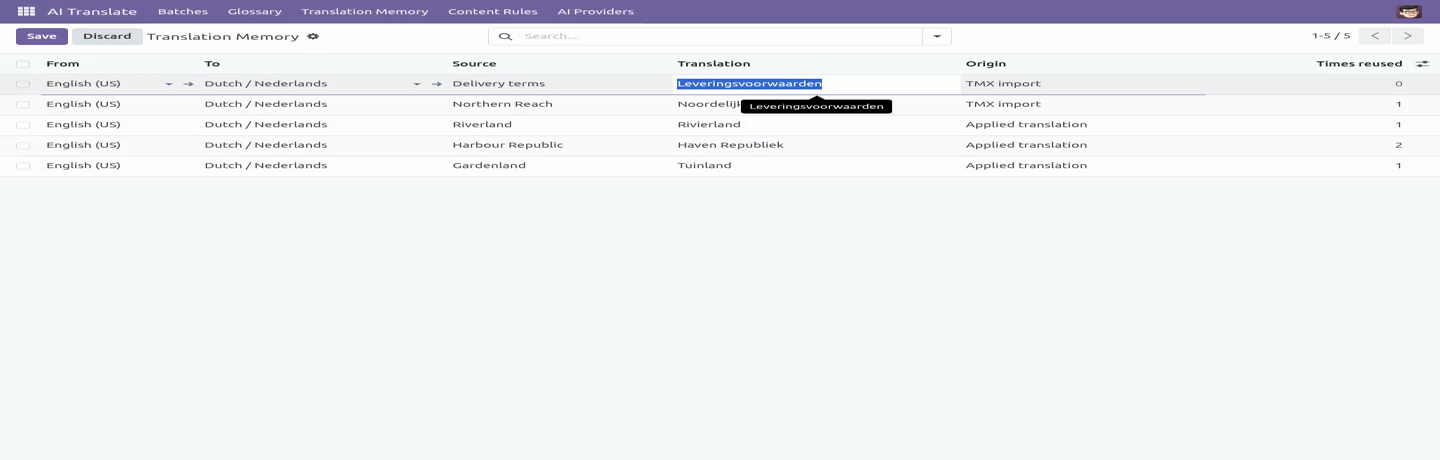
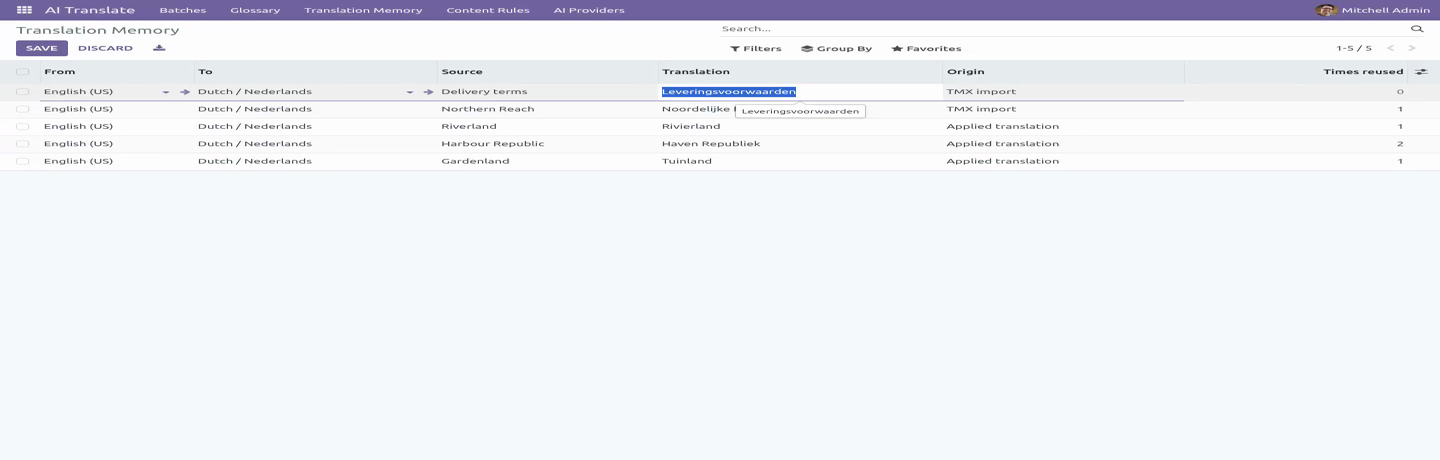
Nothing to do. When a batch applies an item - after review, or straight away on an auto-approved batch - the pair source → value is written to AI Translate ▸ Translation Memory for that language pair, with where it came from (model, field, batch) and when. A later approval of the same source replaces the earlier one: the reviewer's newest decision is the memory. An item that was itself answered from memory and applied unchanged writes nothing new.
Pairs where the translation equals the source (OK → OK) are not stored: they would never help.
How a batch uses it
On the batch, Use translation memory (default on) and Near-match threshold (%) (default 90). When the batch is translated, before anything is sent to the engine and after the glossary:
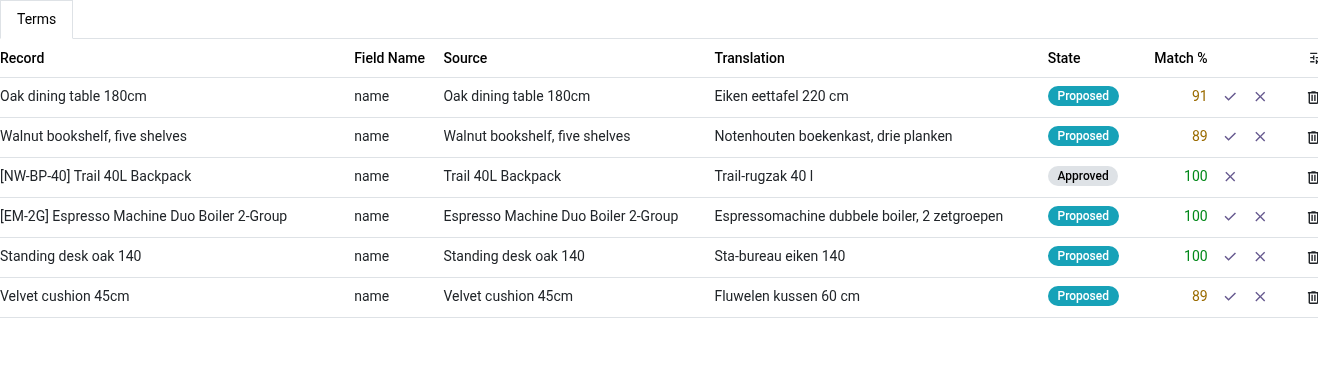
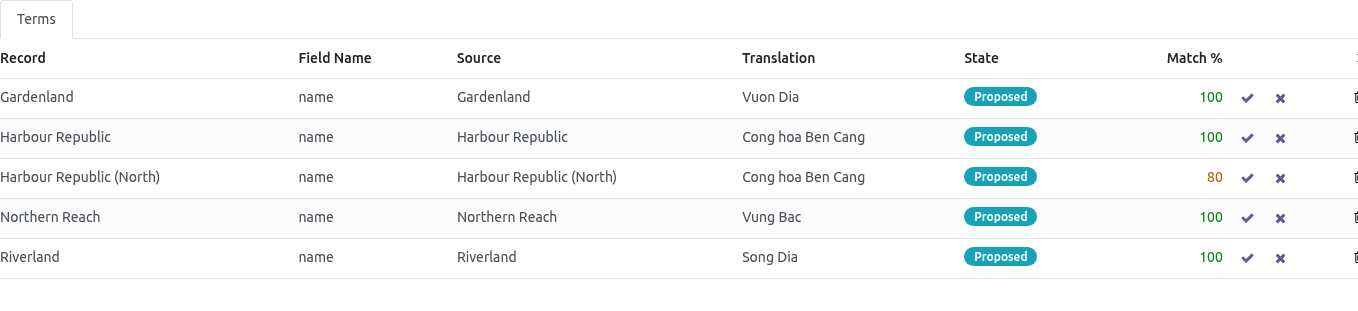
an item whose source is already in memory for this language pair (compared ignoring case and extra spaces) is proposed from memory, note memory, Match % = 100, and is not sent;
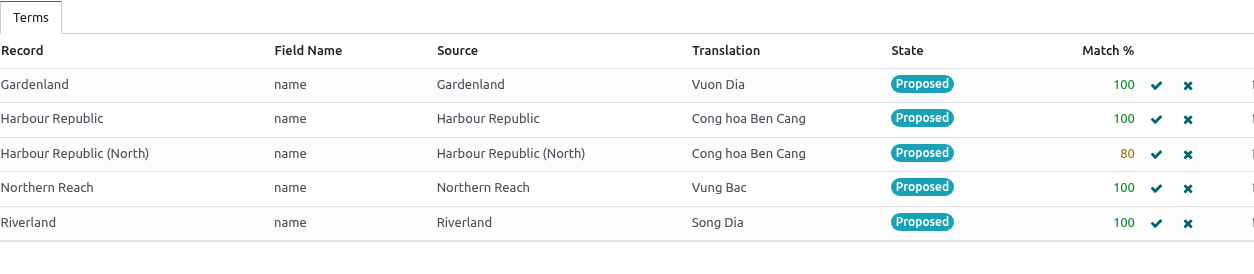
otherwise the most similar remembered source is looked for; if it is at least threshold % similar (difflib ratio) the remembered translation is proposed with note memory, 96 % match - check and Match % in orange - the reviewer fixes three characters instead of reading a fresh sentence;
everything else goes to the engine as before.
The batch shows Answered from memory and Characters not sent. Set the threshold to 100 for exact matches only; the glossary always wins over the memory.
TMX
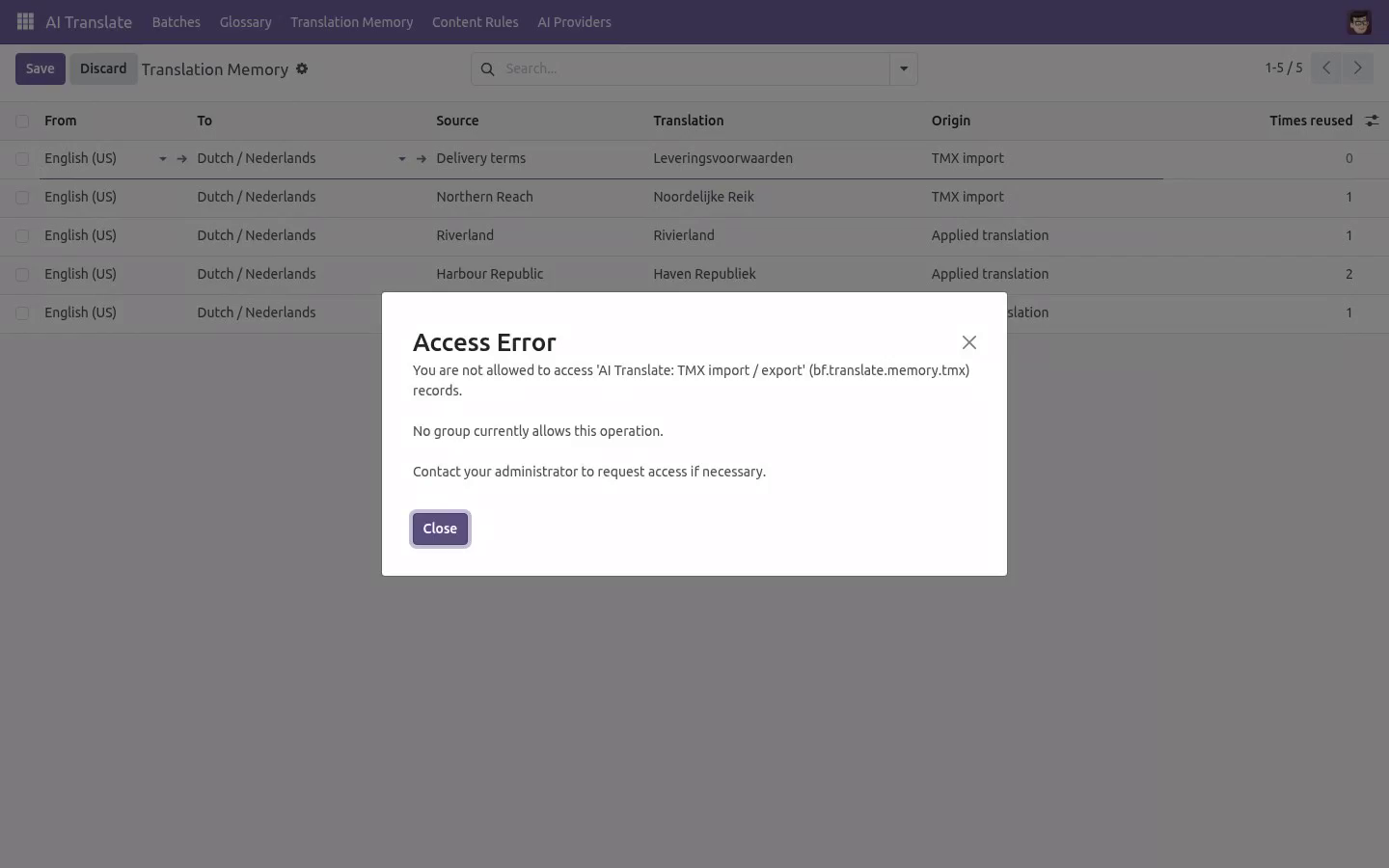
AI Translate ▸ Import TMX: pick the file and the language pair; every <tu> carrying both languages (by Odoo code de_DE or ISO de) is remembered with origin TMX import; duplicates update the existing entry. Translation Memory ▸ select rows ▸ Action ▸ Export TMX (or no selection = everything) downloads TMX 1.4 with xml:lang per segment.
Technical notes
Uses AI Translate 1.1.0's bf.translate.job._local_proposals(items, glossary) and bf.translate.item._after_applied() hooks; the engine code is untouched.
Exact lookup is an indexed equality on a normalised key; near-match is Python difflib over the pair's pool with a length pre-filter - fine for tens of thousands of entries, not a search engine.
Entries are per company; the unique key is (normalised source, from, to, company).
Community only. No Enterprise module, no external service.
How we make sure it works
Before every release, 20 automated checks run against this app on Odoo 16, 17, 18, 19 and 20. Among them:
A memory hit applied unchanged does not duplicate.
An archived entry is not used.
Rejected and failed items teach nothing.
Identity pairs are not stored.
The wrong language pair is never used.
The complete list is in the source you receive.
Install
Copy bambooforge_translation_memory into your addons path and update the app list, or install the ZIP from the Odoo Apps Store.
Install AI Translation Suite: Translation Memory & TMX.
Open Translation Memory - its menus are Import TMX.
Questions people ask
- Which Odoo versions does it run on?
Odoo 16.0, 17.0, 18.0, 19.0, 20.0, on the series you buy it for; each series is its own listing.
- Community or Enterprise?
Both. It needs no Enterprise app.
- What does it need?
The standard Web; translate ai (BambooForge) must be installed first app. No extra Python package.
- Where does it show up?
Under the Translation Memory menu (Import TMX).
- Does anything leave my server?
No. It makes no call outside your Odoo server: no telemetry, no licence check, no third-party service.
- What happens if I uninstall it?
Odoo drops the app's own tables and fields; the standard records it worked on (contacts, orders, products) stay as they are.