 BambooForge Labs
AI Translation: Auto-translate Odoo Content
Batch-translate your website, products and any translatable field with your own AI key (OpenAI, Gemini, OpenRouter, DeepL), glossary and review queue.
Available for Odoo 16.0, Odoo 17.0, Odoo 18.0, Odoo 19.0, Odoo 20.0. Technical name bambooforge_translate_ai.
Transcript of the walkthrough (Odoo 20)
AI Translation: Auto-translate Odoo Content. Batch-translate your website, products and any translatable field with your own AI key (OpenAI, Gemini, OpenRouter, DeepL), glossary and review queue. This page is the complete manual. Follow it top to bottom and you can install, connect your AI provider, translate your first batch and fix the common issues without contacting support.
In the next few minutes: ai translation: auto-translate odoo content, then a batch, step by step, then the glossary, then content rules, then auto-pilot for new content. Then what this app deliberately does not do, so you can tell before you buy whether it fits. Everything lives under AI Translate then Batches then Glossary then Content Rules. AI Translation: Auto-translate Odoo Content.
This page is the complete manual. Follow it top to bottom and you can install, connect your AI provider, translate your first batch and fix the common issues without contacting support. A batch, step by step. 1 — Scan.
Scan Content walks every selected rule, resolves its domain and collects one item per untranslated term (with Only missing translations off: every term). Duplicate terms within a rule are collected once; already-translated terms are skipped; pending items from a previous scan are replaced, while applied, rejected and failed history is kept. The batch moves to Scanned and shows the term counter. 2 — Translate.
Terms that exactly match a glossary entry for the target language are proposed immediately with your translation (note glossary) — they never reach the AI. The rest is sent to the engine in chunks of 40 with the glossary in the prompt. Every returned proposal passes the quality guards: lost placeholder or HTML tag ⇒ the item is marked Failed with the missing pieces in its Note; a chunk whose API call fails is marked Failed with the error, and the remaining chunks continue. The batch moves to Review.
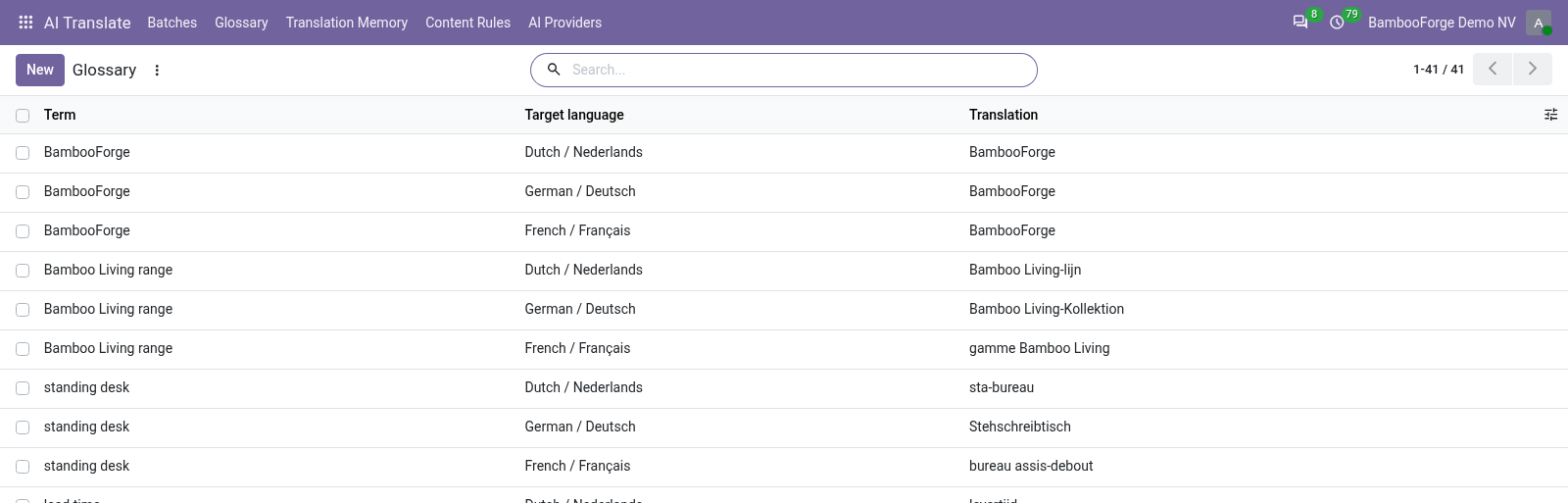
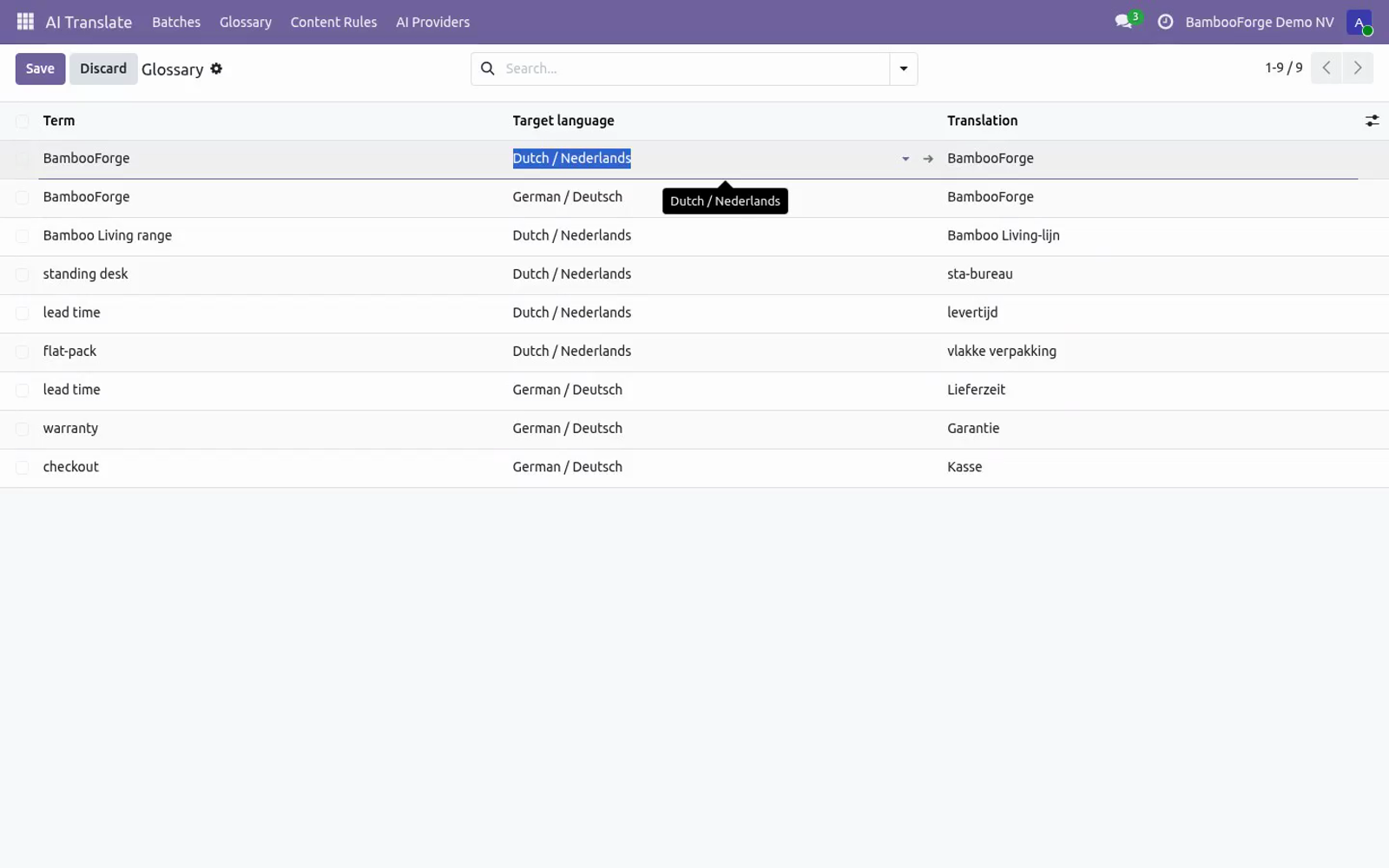
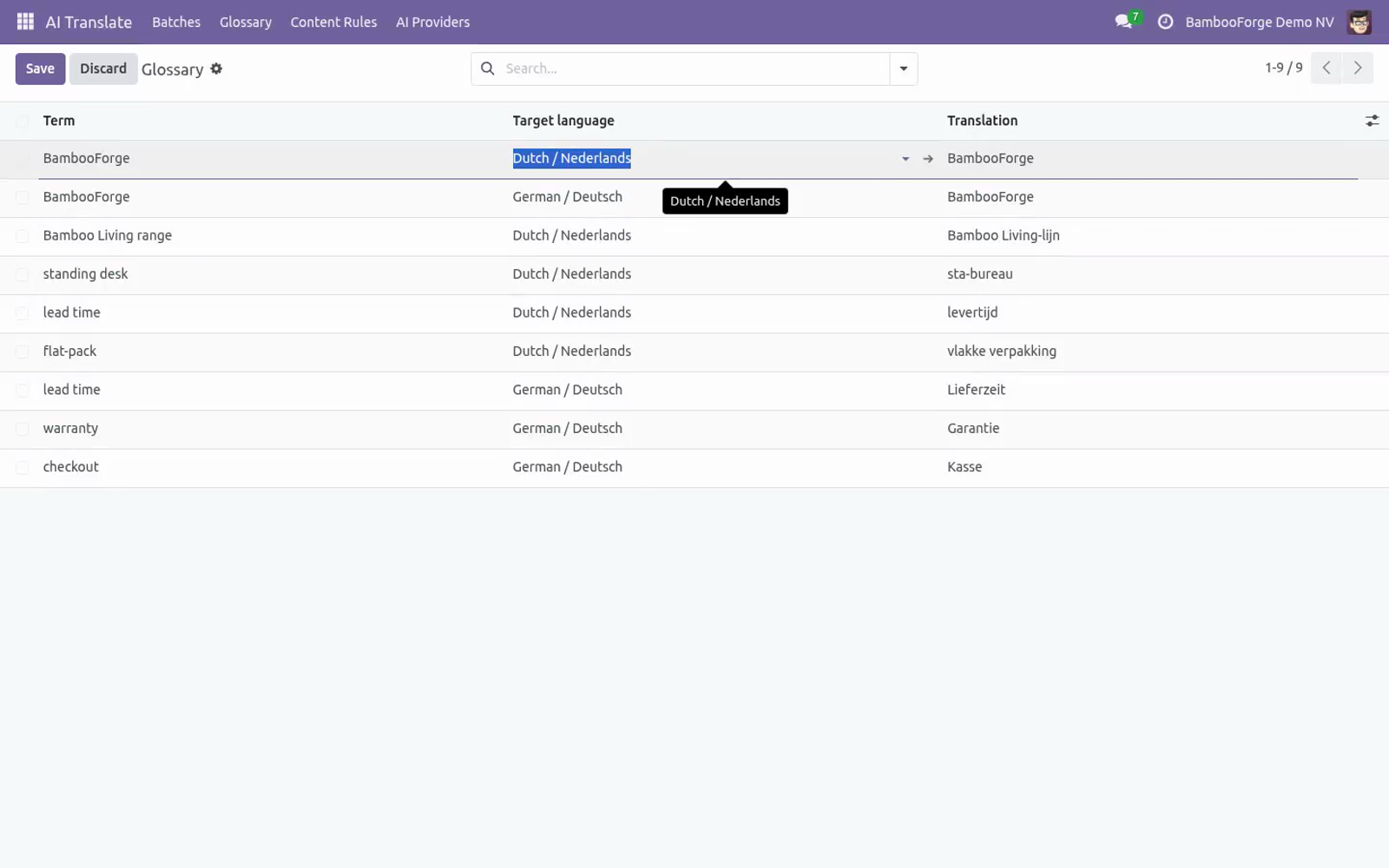
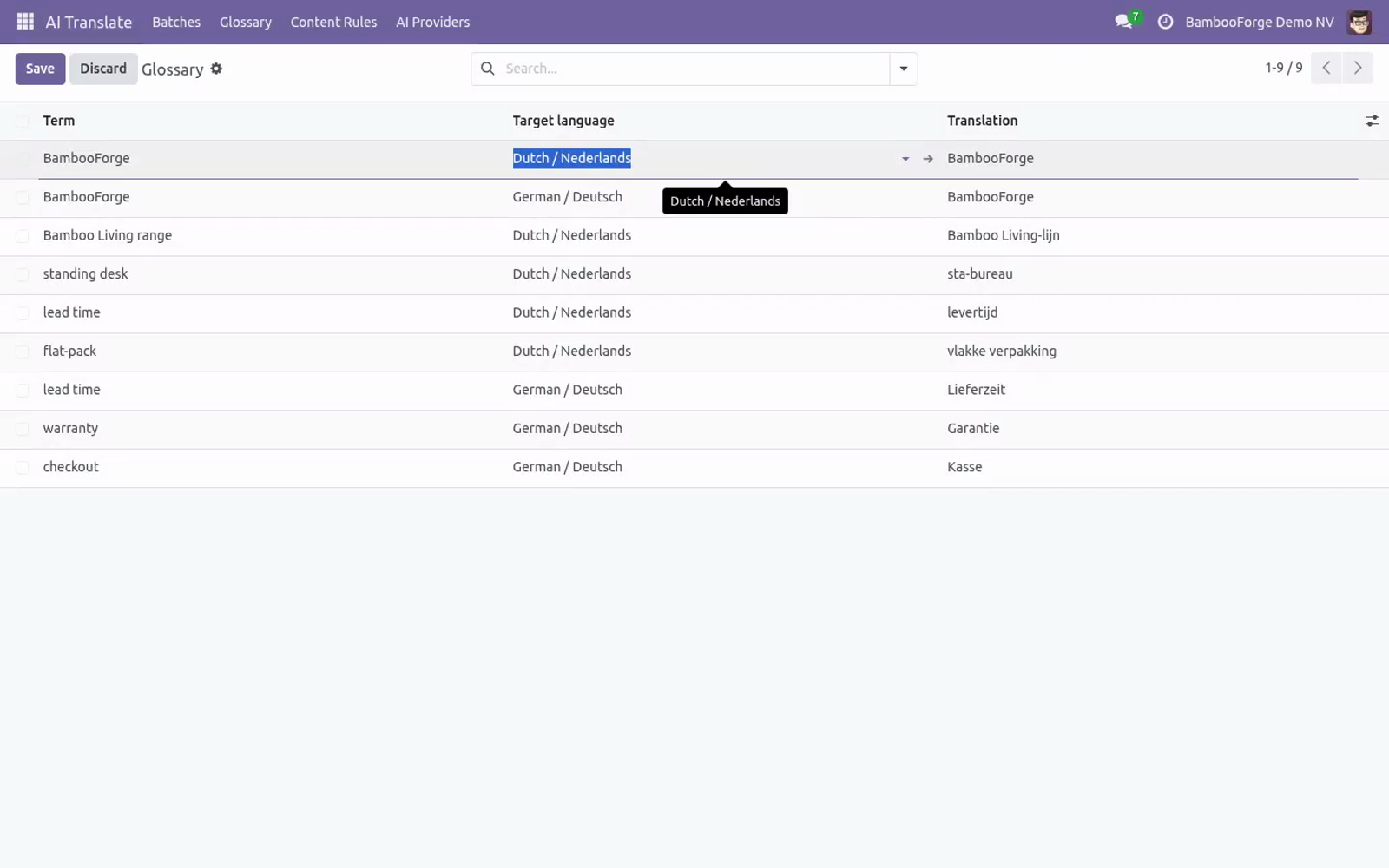
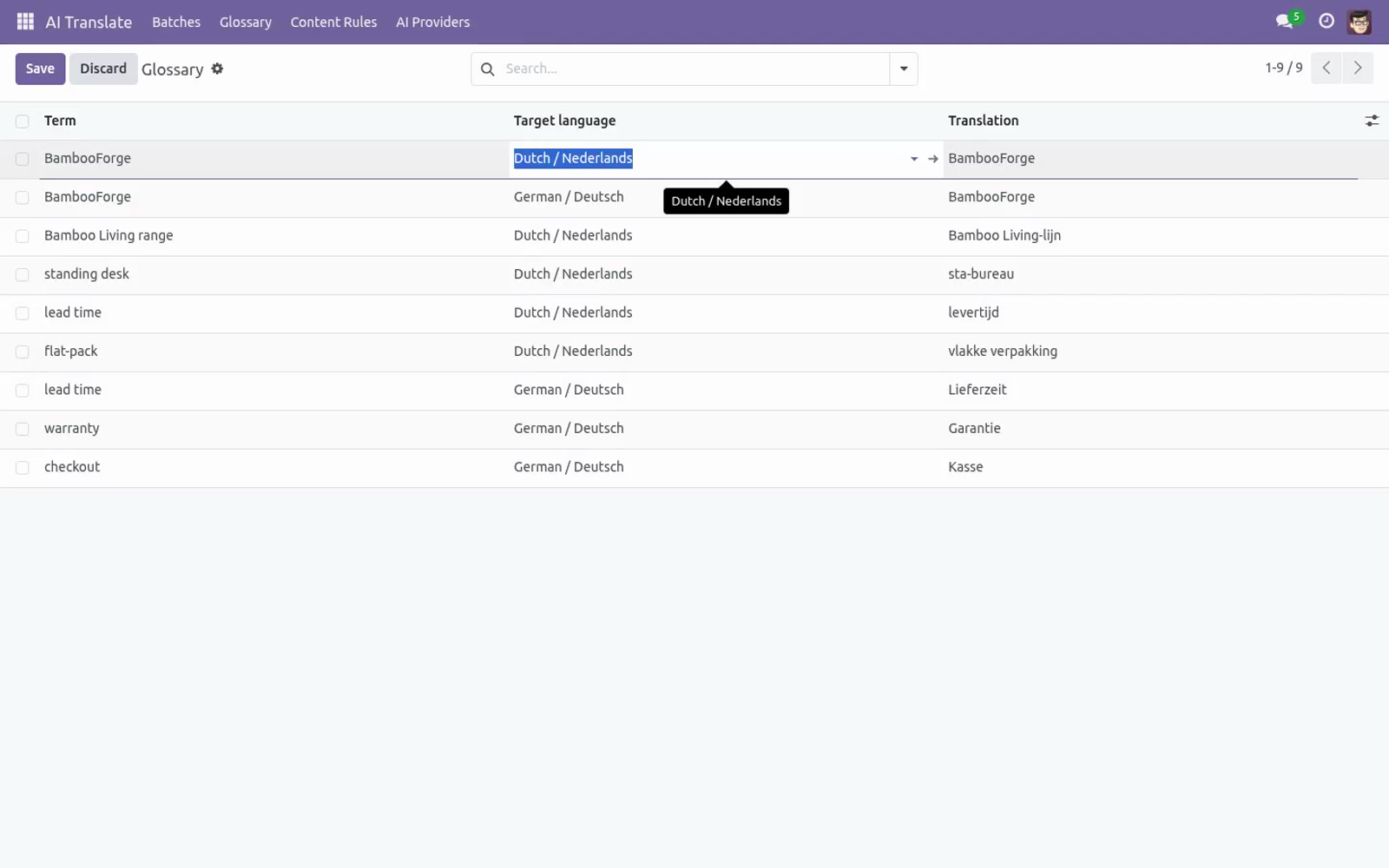
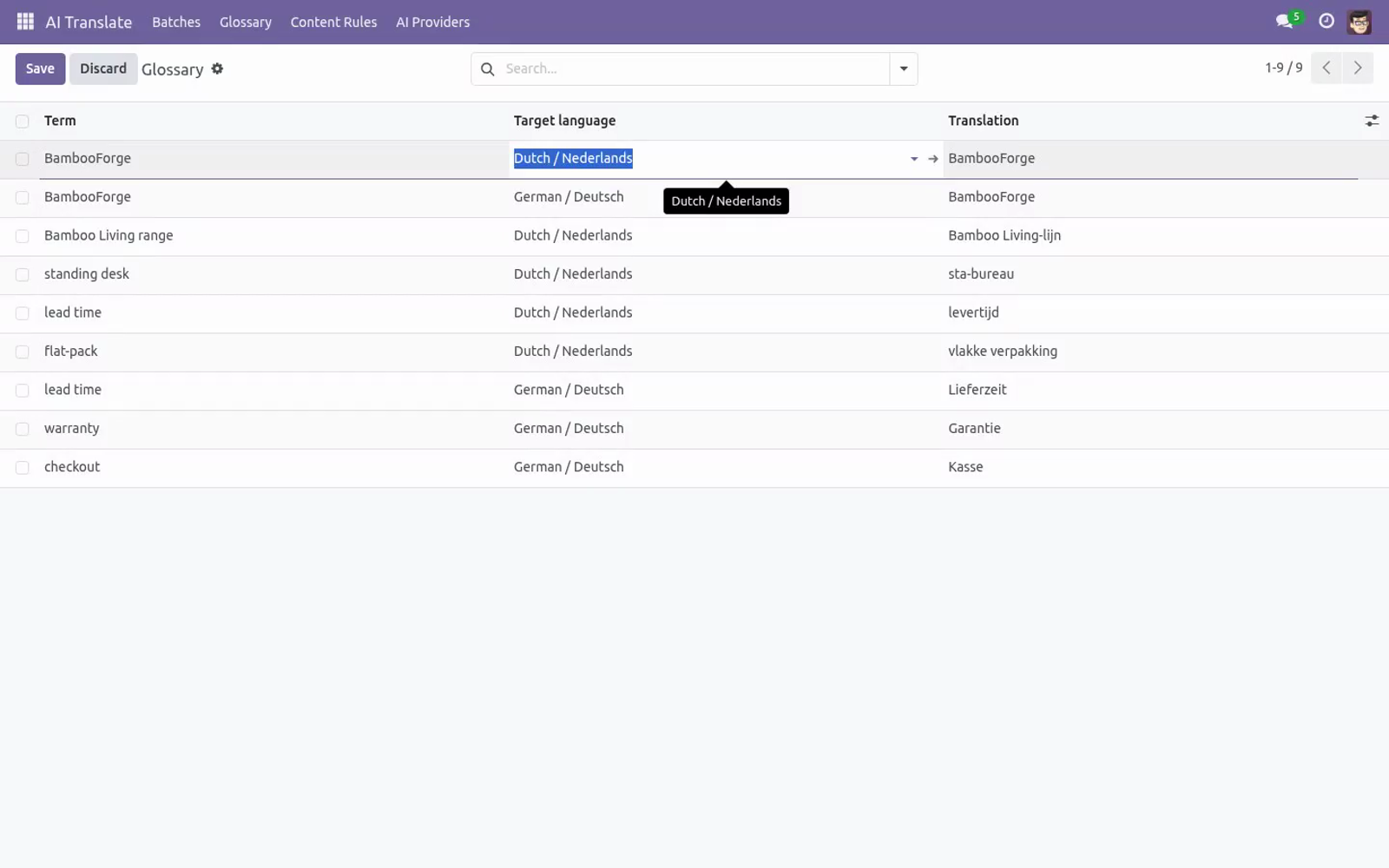
The glossary. AI Translate ▸ Glossary — one line per term × target language: Term — the source-language wording to protect (brand names, product lines, legal phrases). Target language and Translation — what it must become. To forbid translation entirely, repeat the source term.
Exact matches skip the AI and cost you zero tokens; partial occurrences inside longer sentences are enforced through the prompt. Glossary lines apply to every batch targeting that language. Content rules. AI Translate ▸ Content Rules (Manager) — what a batch may scan: Model — technical name, e.g.
product.template. Field — a translatable field of that model, e.g. name, description_sale, arch_db. Domain — optional filter; only matching records are scanned, e.g.
[("is_published", "=", True)]. The five shipped rules (product names, product sales descriptions, website pages, blog titles, blog content) are plain data — archive the ones you don't want, reorder them, add your own. Every batch picks its own subset of rules. Auto-pilot for new content.
Tick Auto-approve on a batch and two things change: Translate applies the proposals immediately — no review stop. The daily cron BambooForge AI Translate: auto jobs re-scans and re-translates every auto-approve batch (except drafts) each night. New products, pages and posts are translated by morning. Keep at least one reviewed batch per language first, build the glossary from what you fixed, and only then switch the language to auto-approve — the guards still catch lost placeholders, but nobody re-reads style.
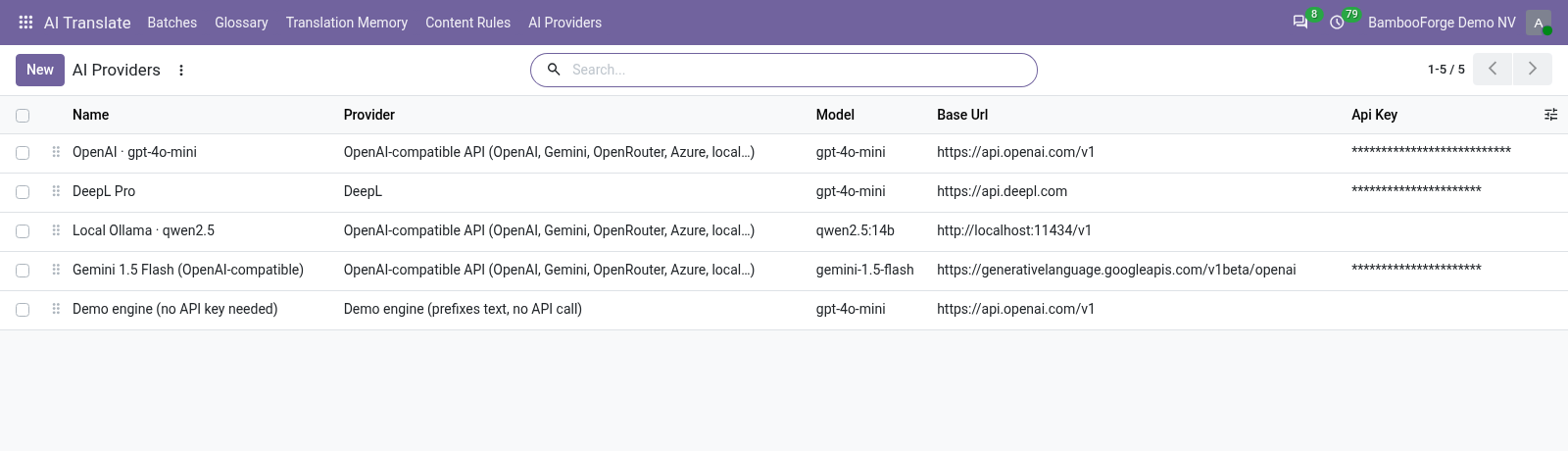
Failures are logged per batch and rolled back without blocking the other batches. Engines (AI Providers). AI Translate ▸ AI Providers (Manager). One line per engine: Per engine: API key (stored on the provider record, masked in the form and readable by AI Translate / Manager only; required for everything but the Demo engine), Model (OpenAI-compatible providers only) and Extra instructions, appended to the system prompt — tone of voice, formality, audience.
Access rights AI Translate / User — create and run batches, manage the glossary, review and apply. Users cannot read the API key of an engine: the field is manager-only, and the module reads it internally when it calls the provider, so a translator can run a batch on an engine whose key they never see. AI Translate / Manager — additionally configure content rules and AI providers, and read or change their API keys. FAQ.
Do I need an API subscription from BambooForge? No. This is bring-your-own-key: you configure an engine with your key from OpenAI, Google, OpenRouter, Azure or DeepL — or run a local Ollama with no key at all — and pay that provider directly at their rates. The module itself is a one-off purchase with no per-word fees; the Demo engine lets you try the workflow without any account.
What happens to my translations if I uninstall? They stay. Applied terms live in Odoo's native field translations (written via the standard update_field_translations API — the same JSONB storage a hand-typed translation uses). Uninstalling removes the batches, rules, glossary and engines, but every applied translation keeps working untouched.
How we make sure it works. Before every release, 14 automated checks run against this app on Odoo 16, 17, 18, 19 and 20. Among them: Only missing skips already translated. Glossary exact match skips ai.
Scan translate apply simple field. Auto approve applies directly. Placeholder guard marks failed. The complete list is in the source you receive.
Support E-mail — support@bambooforge.dev. Every request is answered within 24 hours, setup help included. What to send — your Odoo version and edition, the provider type and base URL of the engine (never send the API key), and for translation issues the Note of a failed item or the server log around AI translate. Money-back guarantee — report a bug within 2 months of purchase; if we cannot resolve it within 15 days, you get a full refund.
Source — the complete OPL-1 source is included; extend it your way. The complete manual is at docs dot bambooforge dot dev, the demo database is linked from the store page, and support answers within twenty-four hours. Links are in the description.

Transcript of the walkthrough (Odoo 19)
AI Translation: Auto-translate Odoo Content. Batch-translate your website, products and any translatable field with your own AI key (OpenAI, Gemini, OpenRouter, DeepL), glossary and review queue. This page is the complete manual. Follow it top to bottom and you can install, connect your AI provider, translate your first batch and fix the common issues without contacting support.
In the next few minutes: ai translation: auto-translate odoo content, then a batch, step by step, then the glossary, then content rules, then auto-pilot for new content. Then what this app deliberately does not do, so you can tell before you buy whether it fits. Everything lives under AI Translate then Batches then Glossary then Content Rules. AI Translation: Auto-translate Odoo Content.
This page is the complete manual. Follow it top to bottom and you can install, connect your AI provider, translate your first batch and fix the common issues without contacting support. A batch, step by step. 1 — Scan.
Scan Content walks every selected rule, resolves its domain and collects one item per untranslated term (with Only missing translations off: every term). Duplicate terms within a rule are collected once; already-translated terms are skipped; pending items from a previous scan are replaced, while applied, rejected and failed history is kept. The batch moves to Scanned and shows the term counter. 2 — Translate.
Terms that exactly match a glossary entry for the target language are proposed immediately with your translation (note glossary) — they never reach the AI. The rest is sent to the engine in chunks of 40 with the glossary in the prompt. Every returned proposal passes the quality guards: lost placeholder or HTML tag ⇒ the item is marked Failed with the missing pieces in its Note; a chunk whose API call fails is marked Failed with the error, and the remaining chunks continue. The batch moves to Review.
The glossary. AI Translate ▸ Glossary — one line per term × target language: Term — the source-language wording to protect (brand names, product lines, legal phrases). Target language and Translation — what it must become. To forbid translation entirely, repeat the source term.
Exact matches skip the AI and cost you zero tokens; partial occurrences inside longer sentences are enforced through the prompt. Glossary lines apply to every batch targeting that language. Content rules. AI Translate ▸ Content Rules (Manager) — what a batch may scan: Model — technical name, e.g.
product.template. Field — a translatable field of that model, e.g. name, description_sale, arch_db. Domain — optional filter; only matching records are scanned, e.g.
[("is_published", "=", True)]. The five shipped rules (product names, product sales descriptions, website pages, blog titles, blog content) are plain data — archive the ones you don't want, reorder them, add your own. Every batch picks its own subset of rules. Auto-pilot for new content.
Tick Auto-approve on a batch and two things change: Translate applies the proposals immediately — no review stop. The daily cron BambooForge AI Translate: auto jobs re-scans and re-translates every auto-approve batch (except drafts) each night. New products, pages and posts are translated by morning. Keep at least one reviewed batch per language first, build the glossary from what you fixed, and only then switch the language to auto-approve — the guards still catch lost placeholders, but nobody re-reads style.
Failures are logged per batch and rolled back without blocking the other batches. Engines (AI Providers). AI Translate ▸ AI Providers (Manager). One line per engine: https://api.openai.com/v1 Default.
Model default gpt-4o-mini; any chat model works. - Google Gemini https://generativelanguage.googleapis.com/v1beta/openai Gemini's OpenAI-compatible endpoint; use your Gemini API key. - OpenRouter / Azure / other the provider's OpenAI-compatible root Anything that speaks the /chat/completions protocol. Per engine: API key (stored on the provider record, masked in the form and readable by AI Translate / Manager only; required for everything but the Demo engine), Model (OpenAI-compatible providers only) and Extra instructions, appended to the system prompt — tone of voice, formality, audience.
Batch options - Option (per batch) Source and target language (activated Odoo languages). Equal languages are refused at scan time. Which AI provider translates this batch. The content rules this batch scans (all rules by default).
- Only missing translations On (default): skip terms already translated in the target language. Off: re-translate everything. Skip the review queue and let the nightly cron re-run the batch (the run stops after 15 minutes and resumes the next night). Recommended only with a glossary in place.
Access rights AI Translate / User — create and run batches, manage the glossary, review and apply. Users cannot read the API key of an engine: the field is manager-only, and the module reads it internally when it calls the provider, so a translator can run a batch on an engine whose key they never see. AI Translate / Manager — additionally configure content rules and AI providers, and read or change their API keys. FAQ.
Do I need an API subscription from BambooForge? No. This is bring-your-own-key: you configure an engine with your key from OpenAI, Google, OpenRouter, Azure or DeepL — or run a local Ollama with no key at all — and pay that provider directly at their rates. The module itself is a one-off purchase with no per-word fees; the Demo engine lets you try the workflow without any account.
What happens to my translations if I uninstall? They stay. Applied terms live in Odoo's native field translations (written via the standard update_field_translations API — the same JSONB storage a hand-typed translation uses). Uninstalling removes the batches, rules, glossary and engines, but every applied translation keeps working untouched.
Support E-mail — support@bambooforge.dev. Every request is answered within 24 hours, setup help included. What to send — your Odoo version and edition, the provider type and base URL of the engine (never send the API key), and for translation issues the Note of a failed item or the server log around AI translate. Money-back guarantee — report a bug within 2 months of purchase; if we cannot resolve it within 15 days, you get a full refund.
Source — the complete OPL-1 source is included; extend it your way. The complete manual is at docs dot bambooforge dot dev, the demo database is linked from the store page, and support answers within twenty-four hours. Links are in the description.
Transcript of the walkthrough (Odoo 18)
AI Translation: Auto-translate Odoo Content. Batch-translate your website, products and any translatable field with your own AI key (OpenAI, Gemini, OpenRouter, DeepL), glossary and review queue. This page is the complete manual. Follow it top to bottom and you can install, connect your AI provider, translate your first batch and fix the common issues without contacting support.
In the next few minutes: ai translation: auto-translate odoo content, then a batch, step by step, then the glossary, then content rules, then auto-pilot for new content. Then what this app deliberately does not do, so you can tell before you buy whether it fits. Everything lives under AI Translate then Batches then Glossary then Content Rules. AI Translation: Auto-translate Odoo Content.
This page is the complete manual. Follow it top to bottom and you can install, connect your AI provider, translate your first batch and fix the common issues without contacting support. A batch, step by step. 1 — Scan.
Scan Content walks every selected rule, resolves its domain and collects one item per untranslated term (with Only missing translations off: every term). Duplicate terms within a rule are collected once; already-translated terms are skipped; pending items from a previous scan are replaced, while applied, rejected and failed history is kept. The batch moves to Scanned and shows the term counter. 2 — Translate.
Terms that exactly match a glossary entry for the target language are proposed immediately with your translation (note glossary) — they never reach the AI. The rest is sent to the engine in chunks of 40 with the glossary in the prompt. Every returned proposal passes the quality guards: lost placeholder or HTML tag ⇒ the item is marked Failed with the missing pieces in its Note; a chunk whose API call fails is marked Failed with the error, and the remaining chunks continue. The batch moves to Review.
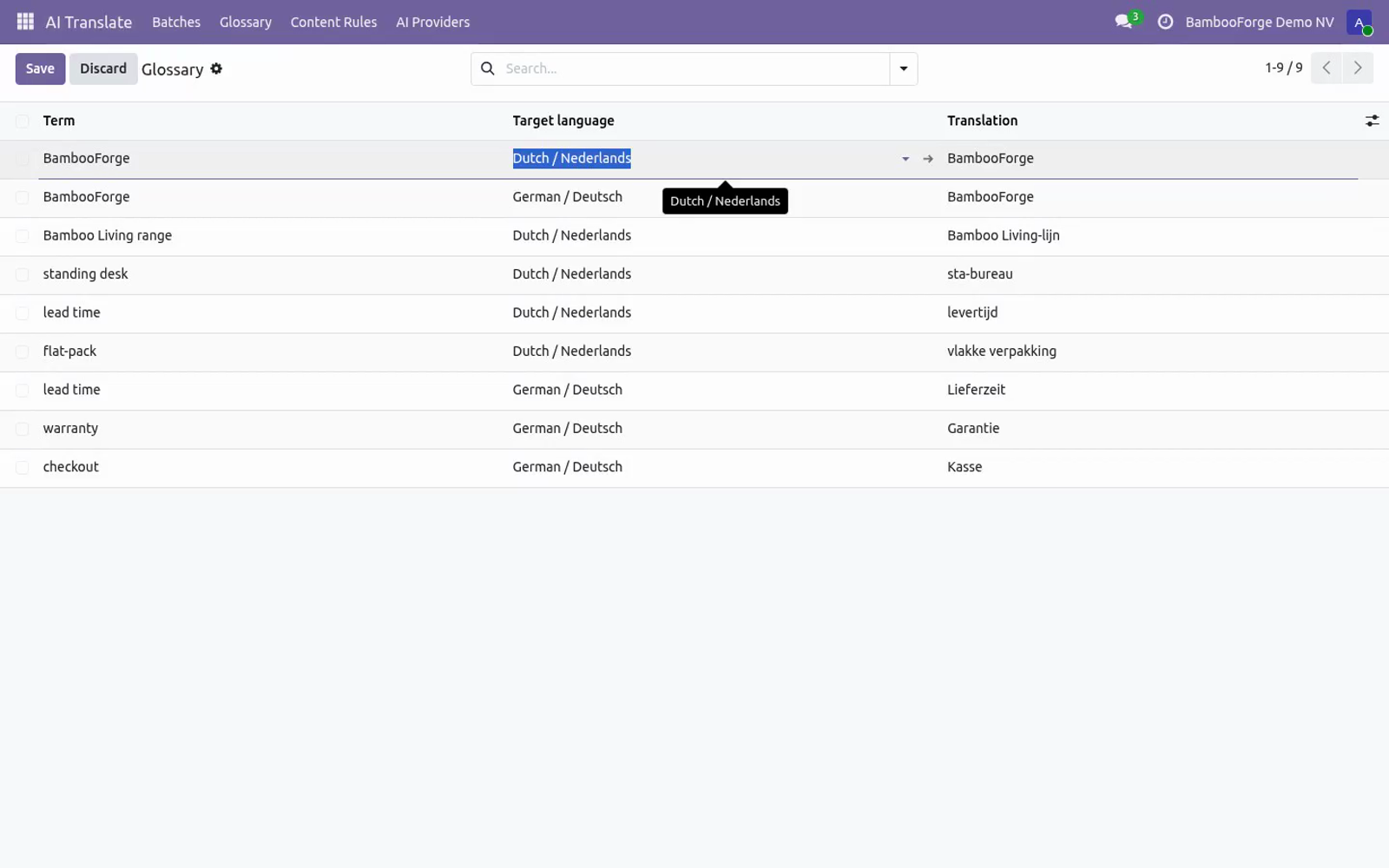
The glossary. AI Translate ▸ Glossary — one line per term × target language: Term — the source-language wording to protect (brand names, product lines, legal phrases). Target language and Translation — what it must become. To forbid translation entirely, repeat the source term.
Exact matches skip the AI and cost you zero tokens; partial occurrences inside longer sentences are enforced through the prompt. Glossary lines apply to every batch targeting that language. Content rules. AI Translate ▸ Content Rules (Manager) — what a batch may scan: Model — technical name, e.g.
product.template. Field — a translatable field of that model, e.g. name, description_sale, arch_db. Domain — optional filter; only matching records are scanned, e.g.
[("is_published", "=", True)]. The five shipped rules (product names, product sales descriptions, website pages, blog titles, blog content) are plain data — archive the ones you don't want, reorder them, add your own. Every batch picks its own subset of rules. Auto-pilot for new content.
Tick Auto-approve on a batch and two things change: Translate applies the proposals immediately — no review stop. The daily cron BambooForge AI Translate: auto jobs re-scans and re-translates every auto-approve batch (except drafts) each night. New products, pages and posts are translated by morning. Keep at least one reviewed batch per language first, build the glossary from what you fixed, and only then switch the language to auto-approve — the guards still catch lost placeholders, but nobody re-reads style.
Failures are logged per batch and rolled back without blocking the other batches. Engines (AI Providers). AI Translate ▸ AI Providers (Manager). One line per engine: https://api.openai.com/v1 Default.
Model default gpt-4o-mini; any chat model works. - Google Gemini https://generativelanguage.googleapis.com/v1beta/openai Gemini's OpenAI-compatible endpoint; use your Gemini API key. - OpenRouter / Azure / other the provider's OpenAI-compatible root Anything that speaks the /chat/completions protocol. Per engine: API key (stored on the provider record, masked in the form and readable by AI Translate / Manager only; required for everything but the Demo engine), Model (OpenAI-compatible providers only) and Extra instructions, appended to the system prompt — tone of voice, formality, audience.
Batch options - Option (per batch) Source and target language (activated Odoo languages). Equal languages are refused at scan time. Which AI provider translates this batch. The content rules this batch scans (all rules by default).
- Only missing translations On (default): skip terms already translated in the target language. Off: re-translate everything. Skip the review queue and let the nightly cron re-run the batch (the run stops after 15 minutes and resumes the next night). Recommended only with a glossary in place.
Access rights AI Translate / User — create and run batches, manage the glossary, review and apply. Users cannot read the API key of an engine: the field is manager-only, and the module reads it internally when it calls the provider, so a translator can run a batch on an engine whose key they never see. AI Translate / Manager — additionally configure content rules and AI providers, and read or change their API keys. FAQ.
Do I need an API subscription from BambooForge? No. This is bring-your-own-key: you configure an engine with your key from OpenAI, Google, OpenRouter, Azure or DeepL — or run a local Ollama with no key at all — and pay that provider directly at their rates. The module itself is a one-off purchase with no per-word fees; the Demo engine lets you try the workflow without any account.
What happens to my translations if I uninstall? They stay. Applied terms live in Odoo's native field translations (written via the standard update_field_translations API — the same JSONB storage a hand-typed translation uses). Uninstalling removes the batches, rules, glossary and engines, but every applied translation keeps working untouched.
Support E-mail — support@bambooforge.dev. Every request is answered within 24 hours, setup help included. What to send — your Odoo version and edition, the provider type and base URL of the engine (never send the API key), and for translation issues the Note of a failed item or the server log around AI translate. Money-back guarantee — report a bug within 2 months of purchase; if we cannot resolve it within 15 days, you get a full refund.
Source — the complete OPL-1 source is included; extend it your way. The complete manual is at docs dot bambooforge dot dev, the demo database is linked from the store page, and support answers within twenty-four hours. Links are in the description.
Transcript of the walkthrough (Odoo 17)
AI Translation: Auto-translate Odoo Content. Batch-translate your website, products and any translatable field with your own AI key (OpenAI, Gemini, OpenRouter, DeepL), glossary and review queue. This page is the complete manual. Follow it top to bottom and you can install, connect your AI provider, translate your first batch and fix the common issues without contacting support.
In the next few minutes: ai translation: auto-translate odoo content, then a batch, step by step, then the glossary, then content rules, then auto-pilot for new content. Then what this app deliberately does not do, so you can tell before you buy whether it fits. Everything lives under AI Translate then Batches then Glossary then Content Rules. AI Translation: Auto-translate Odoo Content.
This page is the complete manual. Follow it top to bottom and you can install, connect your AI provider, translate your first batch and fix the common issues without contacting support. A batch, step by step. 1 — Scan.
Scan Content walks every selected rule, resolves its domain and collects one item per untranslated term (with Only missing translations off: every term). Duplicate terms within a rule are collected once; already-translated terms are skipped; pending items from a previous scan are replaced, while applied, rejected and failed history is kept. The batch moves to Scanned and shows the term counter. 2 — Translate.
Terms that exactly match a glossary entry for the target language are proposed immediately with your translation (note glossary) — they never reach the AI. The rest is sent to the engine in chunks of 40 with the glossary in the prompt. Every returned proposal passes the quality guards: lost placeholder or HTML tag ⇒ the item is marked Failed with the missing pieces in its Note; a chunk whose API call fails is marked Failed with the error, and the remaining chunks continue. The batch moves to Review.
The glossary. AI Translate ▸ Glossary — one line per term × target language: Term — the source-language wording to protect (brand names, product lines, legal phrases). Target language and Translation — what it must become. To forbid translation entirely, repeat the source term.
Exact matches skip the AI and cost you zero tokens; partial occurrences inside longer sentences are enforced through the prompt. Glossary lines apply to every batch targeting that language. Content rules. AI Translate ▸ Content Rules (Manager) — what a batch may scan: Model — technical name, e.g.
product.template. Field — a translatable field of that model, e.g. name, description_sale, arch_db. Domain — optional filter; only matching records are scanned, e.g.
[("is_published", "=", True)]. The five shipped rules (product names, product sales descriptions, website pages, blog titles, blog content) are plain data — archive the ones you don't want, reorder them, add your own. Every batch picks its own subset of rules. Auto-pilot for new content.
Tick Auto-approve on a batch and two things change: Translate applies the proposals immediately — no review stop. The daily cron BambooForge AI Translate: auto jobs re-scans and re-translates every auto-approve batch (except drafts) each night. New products, pages and posts are translated by morning. Keep at least one reviewed batch per language first, build the glossary from what you fixed, and only then switch the language to auto-approve — the guards still catch lost placeholders, but nobody re-reads style.
Failures are logged per batch and rolled back without blocking the other batches. Engines (AI Providers). AI Translate ▸ AI Providers (Manager). One line per engine: https://api.openai.com/v1 Default.
Model default gpt-4o-mini; any chat model works. - Google Gemini https://generativelanguage.googleapis.com/v1beta/openai Gemini's OpenAI-compatible endpoint; use your Gemini API key. - OpenRouter / Azure / other the provider's OpenAI-compatible root Anything that speaks the /chat/completions protocol. Per engine: API key (stored on the provider record, masked in the form and readable by AI Translate / Manager only; required for everything but the Demo engine), Model (OpenAI-compatible providers only) and Extra instructions, appended to the system prompt — tone of voice, formality, audience.
Batch options - Option (per batch) Source and target language (activated Odoo languages). Equal languages are refused at scan time. Which AI provider translates this batch. The content rules this batch scans (all rules by default).
- Only missing translations On (default): skip terms already translated in the target language. Off: re-translate everything. Skip the review queue and let the nightly cron re-run the batch (the run stops after 15 minutes and resumes the next night). Recommended only with a glossary in place.
Access rights AI Translate / User — create and run batches, manage the glossary, review and apply. Users cannot read the API key of an engine: the field is manager-only, and the module reads it internally when it calls the provider, so a translator can run a batch on an engine whose key they never see. AI Translate / Manager — additionally configure content rules and AI providers, and read or change their API keys. FAQ.
Do I need an API subscription from BambooForge? No. This is bring-your-own-key: you configure an engine with your key from OpenAI, Google, OpenRouter, Azure or DeepL — or run a local Ollama with no key at all — and pay that provider directly at their rates. The module itself is a one-off purchase with no per-word fees; the Demo engine lets you try the workflow without any account.
What happens to my translations if I uninstall? They stay. Applied terms live in Odoo's native field translations (written via the standard update_field_translations API — the same JSONB storage a hand-typed translation uses). Uninstalling removes the batches, rules, glossary and engines, but every applied translation keeps working untouched.
Support E-mail — support@bambooforge.dev. Every request is answered within 24 hours, setup help included. What to send — your Odoo version and edition, the provider type and base URL of the engine (never send the API key), and for translation issues the Note of a failed item or the server log around AI translate. Money-back guarantee — report a bug within 2 months of purchase; if we cannot resolve it within 15 days, you get a full refund.
Source — the complete OPL-1 source is included; extend it your way. The complete manual is at docs dot bambooforge dot dev, the demo database is linked from the store page, and support answers within twenty-four hours. Links are in the description.
Transcript of the walkthrough (Odoo 16)
AI Translation: Auto-translate Odoo Content. Batch-translate your website, products and any translatable field with your own AI key (OpenAI, Gemini, OpenRouter, DeepL), glossary and review queue. This page is the complete manual. Follow it top to bottom and you can install, connect your AI provider, translate your first batch and fix the common issues without contacting support.
In the next few minutes: ai translation: auto-translate odoo content, then a batch, step by step, then the glossary, then content rules, then auto-pilot for new content. Then what this app deliberately does not do, so you can tell before you buy whether it fits. Everything lives under AI Translate then Batches then Glossary then Content Rules. AI Translation: Auto-translate Odoo Content.
This page is the complete manual. Follow it top to bottom and you can install, connect your AI provider, translate your first batch and fix the common issues without contacting support. A batch, step by step. 1 — Scan.
Scan Content walks every selected rule, resolves its domain and collects one item per untranslated term (with Only missing translations off: every term). Duplicate terms within a rule are collected once; already-translated terms are skipped; pending items from a previous scan are replaced, while applied, rejected and failed history is kept. The batch moves to Scanned and shows the term counter. 2 — Translate.
Terms that exactly match a glossary entry for the target language are proposed immediately with your translation (note glossary) — they never reach the AI. The rest is sent to the engine in chunks of 40 with the glossary in the prompt. Every returned proposal passes the quality guards: lost placeholder or HTML tag ⇒ the item is marked Failed with the missing pieces in its Note; a chunk whose API call fails is marked Failed with the error, and the remaining chunks continue. The batch moves to Review.
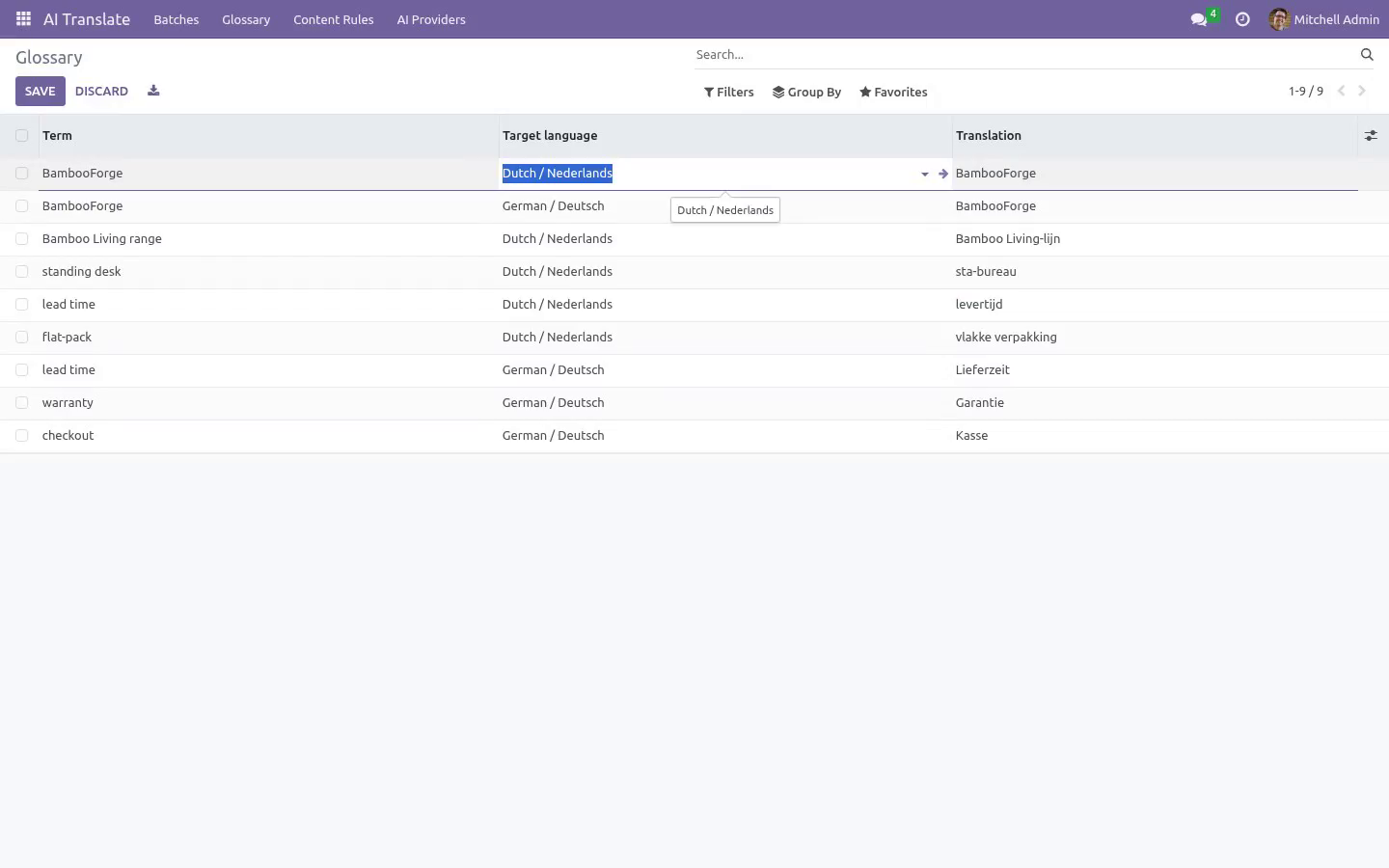
The glossary. AI Translate ▸ Glossary — one line per term × target language: Term — the source-language wording to protect (brand names, product lines, legal phrases). Target language and Translation — what it must become. To forbid translation entirely, repeat the source term.
Exact matches skip the AI and cost you zero tokens; partial occurrences inside longer sentences are enforced through the prompt. Glossary lines apply to every batch targeting that language. Content rules. AI Translate ▸ Content Rules (Manager) — what a batch may scan: Model — technical name, e.g.
product.template. Field — a translatable field of that model, e.g. name, description_sale, arch_db. Domain — optional filter; only matching records are scanned, e.g.
[("is_published", "=", True)]. The five shipped rules (product names, product sales descriptions, website pages, blog titles, blog content) are plain data — archive the ones you don't want, reorder them, add your own. Every batch picks its own subset of rules. Auto-pilot for new content.
Tick Auto-approve on a batch and two things change: Translate applies the proposals immediately — no review stop. The daily cron BambooForge AI Translate: auto jobs re-scans and re-translates every auto-approve batch (except drafts) each night. New products, pages and posts are translated by morning. Keep at least one reviewed batch per language first, build the glossary from what you fixed, and only then switch the language to auto-approve — the guards still catch lost placeholders, but nobody re-reads style.
Failures are logged per batch and rolled back without blocking the other batches. Engines (AI Providers). AI Translate ▸ AI Providers (Manager). One line per engine: https://api.openai.com/v1 Default.
Model default gpt-4o-mini; any chat model works. - Google Gemini https://generativelanguage.googleapis.com/v1beta/openai Gemini's OpenAI-compatible endpoint; use your Gemini API key. - OpenRouter / Azure / other the provider's OpenAI-compatible root Anything that speaks the /chat/completions protocol. Per engine: API key (stored on the provider record, masked in the form and readable by AI Translate / Manager only; required for everything but the Demo engine), Model (OpenAI-compatible providers only) and Extra instructions, appended to the system prompt — tone of voice, formality, audience.
Batch options - Option (per batch) Source and target language (activated Odoo languages). Equal languages are refused at scan time. Which AI provider translates this batch. The content rules this batch scans (all rules by default).
- Only missing translations On (default): skip terms already translated in the target language. Off: re-translate everything. Skip the review queue and let the nightly cron re-run the batch (the run stops after 15 minutes and resumes the next night). Recommended only with a glossary in place.
Access rights AI Translate / User — create and run batches, manage the glossary, review and apply. Users cannot read the API key of an engine: the field is manager-only, and the module reads it internally when it calls the provider, so a translator can run a batch on an engine whose key they never see. AI Translate / Manager — additionally configure content rules and AI providers, and read or change their API keys. FAQ.
Do I need an API subscription from BambooForge? No. This is bring-your-own-key: you configure an engine with your key from OpenAI, Google, OpenRouter, Azure or DeepL — or run a local Ollama with no key at all — and pay that provider directly at their rates. The module itself is a one-off purchase with no per-word fees; the Demo engine lets you try the workflow without any account.
What happens to my translations if I uninstall? They stay. Applied terms live in Odoo's native field translations (written via the standard update_field_translations API — the same JSONB storage a hand-typed translation uses). Uninstalling removes the batches, rules, glossary and engines, but every applied translation keeps working untouched.
Support E-mail — support@bambooforge.dev. Every request is answered within 24 hours, setup help included. What to send — your Odoo version and edition, the provider type and base URL of the engine (never send the API key), and for translation issues the Note of a failed item or the server log around AI translate. Money-back guarantee — report a bug within 2 months of purchase; if we cannot resolve it within 15 days, you get a full refund.
Source — the complete OPL-1 source is included; extend it your way. The complete manual is at docs dot bambooforge dot dev, the demo database is linked from the store page, and support answers within twenty-four hours. Links are in the description.
Key facts
- What it is
- Batch-translate your website, products and any translatable field with your own AI key (OpenAI, Gemini, OpenRouter, DeepL), glossary and review queue.
- For
- Website
- Odoo versions
- 16.0, 17.0, 18.0, 19.0, 20.0 - Community and Enterprise
- Runs on
- Odoo.sh or Odoo you host yourself - not Odoo Online, which accepts no third-party apps
- Price
- 129 EUR, one-time, on the Odoo Apps Store
- Technical name
- bambooforge_translate_ai
- Live demo
- https://demo20.bambooforge.dev/odoo/action-bambooforge_translate_ai.action_bf_translate_job
- Manual last updated
- 2026-09-23
AI Translation: Auto-translate Odoo Content
Batch AI translation for Odoo 20, the way an agency would run it: content rules say what to translate (product names and descriptions, website pages and blog posts ship out of the box — add any model + translatable field), Scan collects the terms that have no translation yet, your own AI provider — any OpenAI-compatible chat API (OpenAI, Google Gemini, OpenRouter, Azure, local Ollama) or DeepL, bring your own key — proposes translations in batches of 40, a glossary locks your brand terms, quality guards catch lost placeholders and HTML tags, and a review queue keeps a human in the loop before anything is applied — into Odoo's native field translations, so uninstalling the module never loses a word.
This page is the complete manual. Follow it top to bottom and you can install, connect your AI provider, translate your first batch and fix the common issues without contacting support.
Overview
Content rules — each rule is a model + translatable field + optional domain filter and defines what gets scanned. The module ships rules for product names and sales descriptions (product.template), website pages (qweb views, ir.ui.view.arch_db, filtered to website views) and blog post titles and content (blog.post). Add your own rule for any model and field — e-commerce categories, attribute values, mail templates, your custom module. Rules pointing at models that are not installed, at non-translatable fields or with a broken domain are skipped silently, so one set of rules works on every database.
Engines (AI providers) — bring your own key. An engine is either an OpenAI-compatible chat API (OpenAI, Google Gemini via its /v1beta/openai endpoint, OpenRouter, Azure, a local Ollama…) with a configurable base URL and model, a DeepL account (free or pro endpoint), or the built-in Demo engine, which needs no key and no network: it prefixes each term with the target language code so you can rehearse the whole workflow for free. Per engine you can add extra prompt instructions (tone of voice, formality, audience).
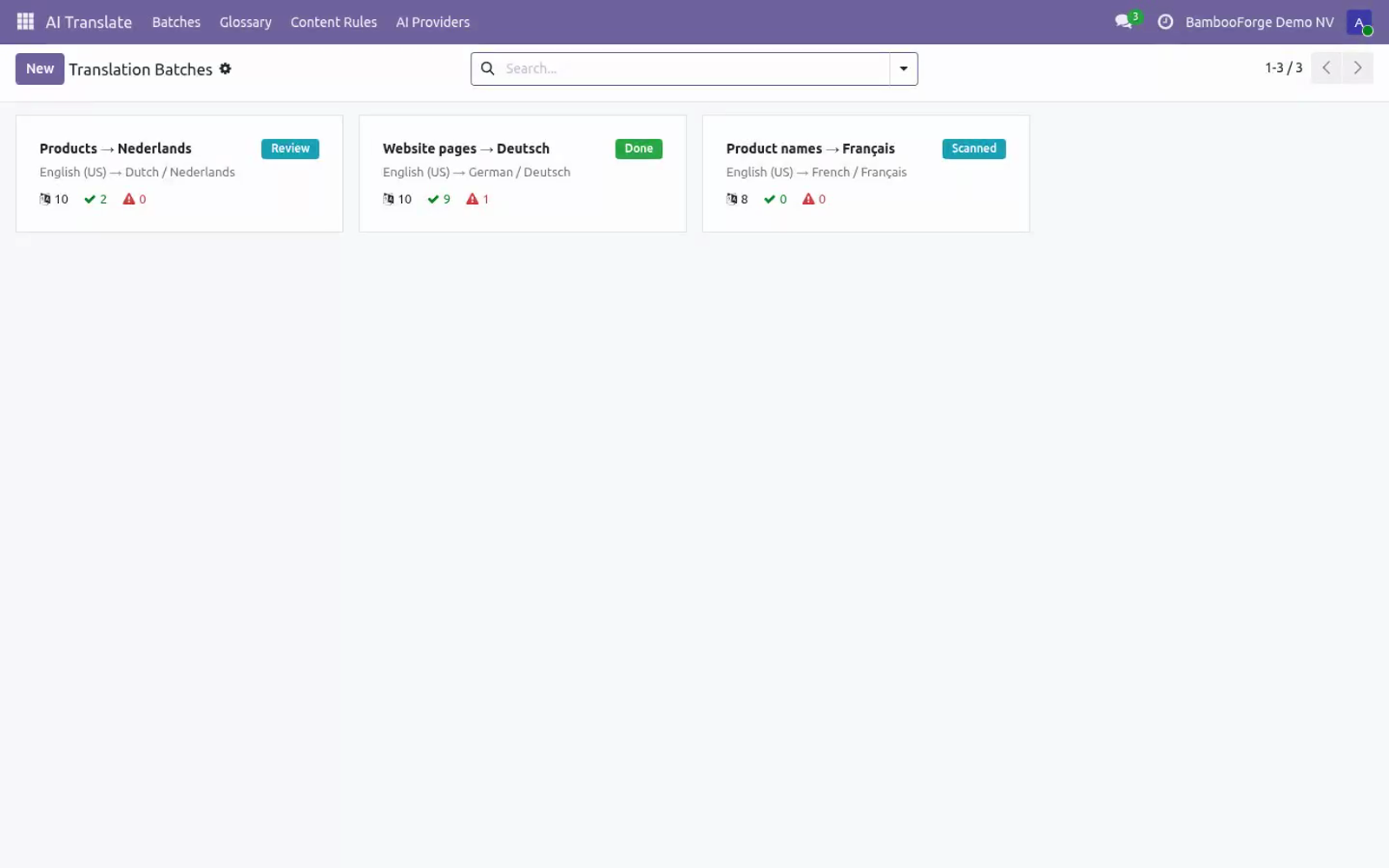
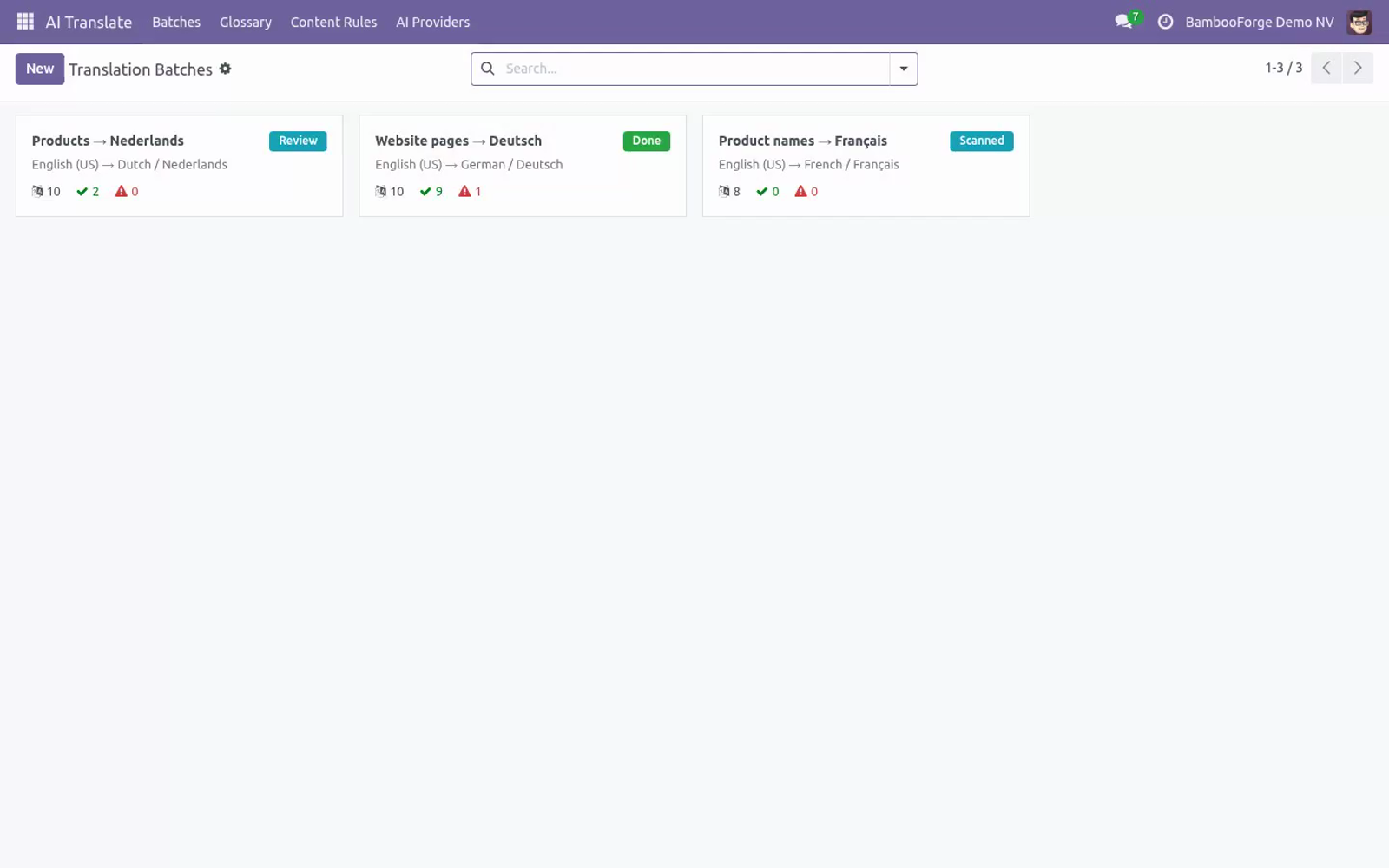
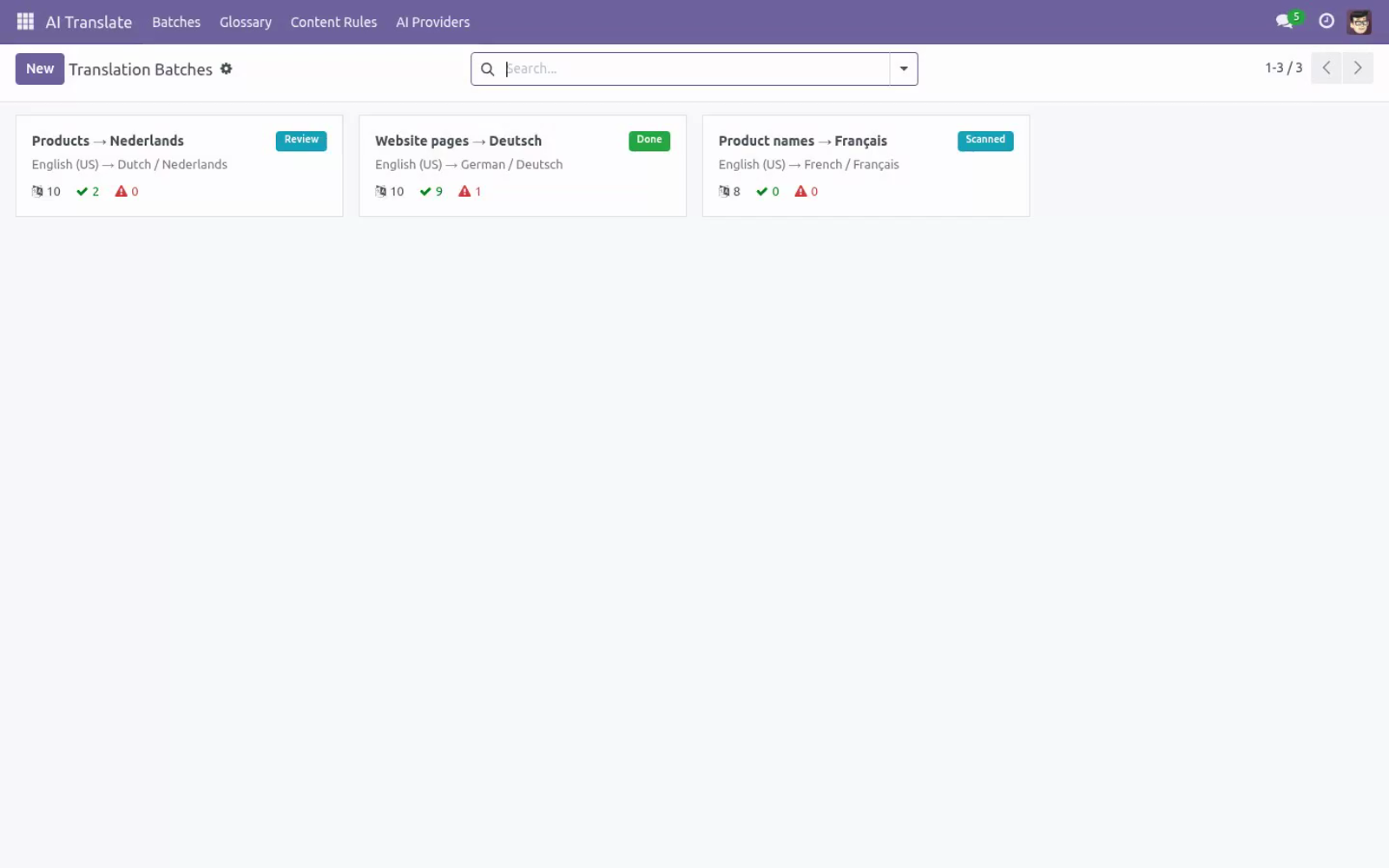
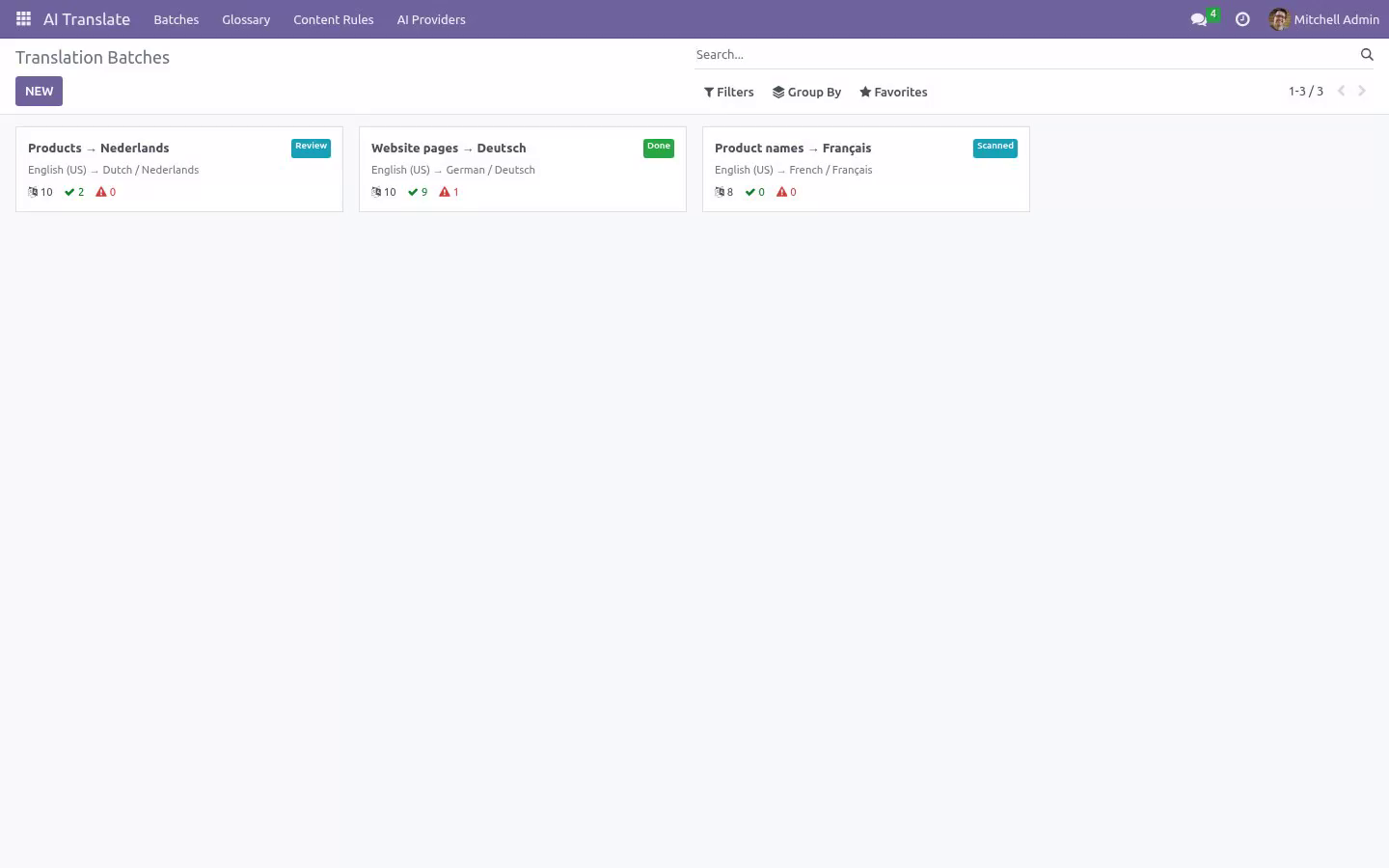
Batches (jobs) — a batch is source language → target language × selected rules × engine. Its lifecycle is Draft → Scanned → Review → Done: Scan Content collects the terms, Translate sends them to the engine in chunks of 40, then the review queue takes over.
Only missing translations — on by default: terms that already have a value in the target language are skipped, so re-running a batch only picks up new content. Switch it off to re-translate everything.
Glossary — per target language, source term → imposed translation. A term that exactly matches a glossary entry skips the AI entirely and is proposed with your translation verbatim (note: glossary); for all other terms the glossary lines are injected into the prompt so the model respects them mid-sentence. To keep a term untranslated, repeat the source as the translation.
Quality guards — after each batch, every proposal is checked against the source's placeholders (%s, %(name)s, {{ … }}, {name}) and HTML tags: a proposal that lost one is marked Failed with the missing pieces named, instead of silently corrupting your site. An engine that returns the wrong number of items raises a clear error instead of mismatching terms, and a failed API call marks only its own chunk Failed with the error text.
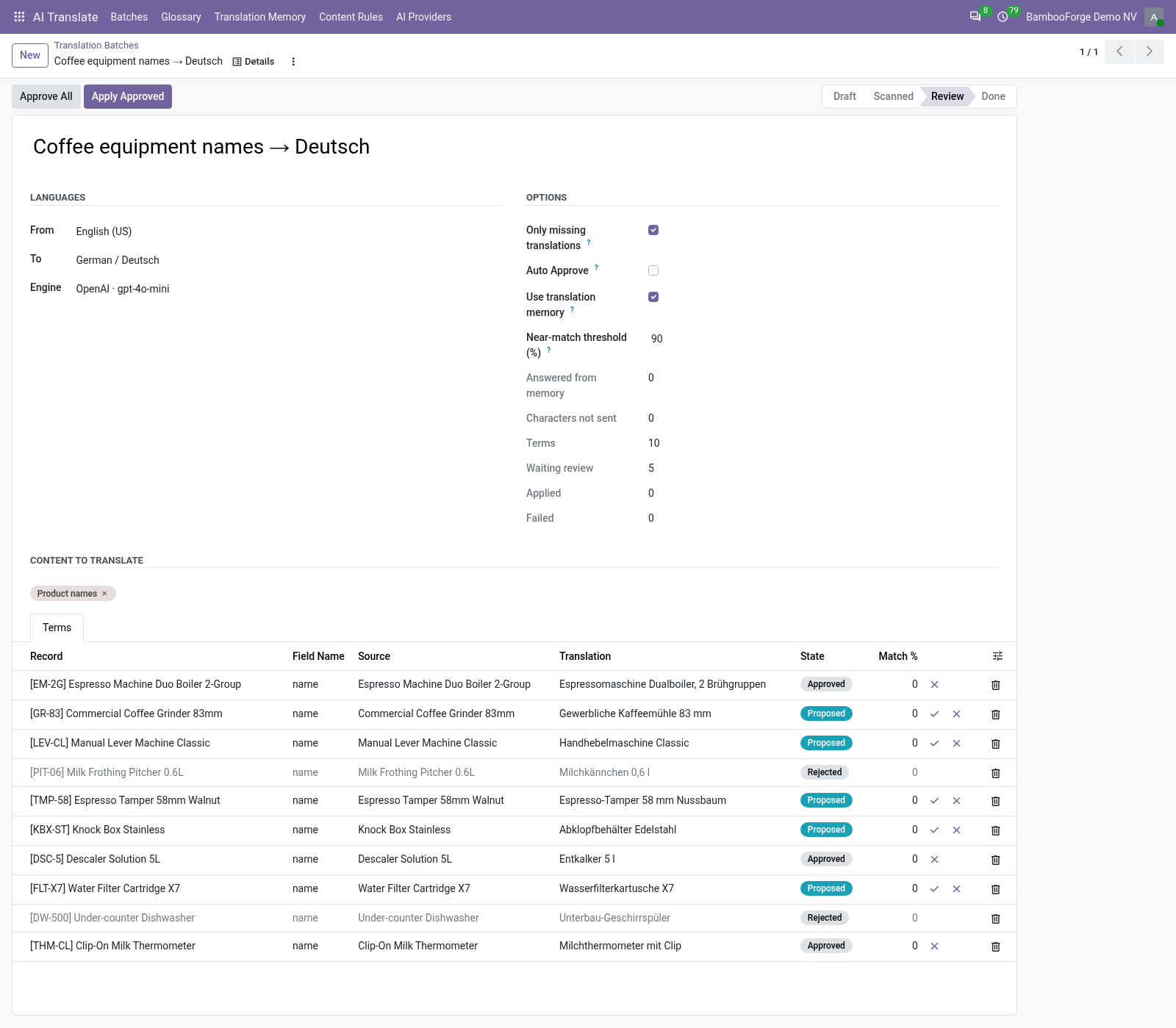
Review queue — each term is a line with source and editable proposal side by side and its own state: To translate → Proposed → Approved → Applied (or Rejected / Failed). Approve or reject per line, Approve All for the whole batch, Apply Approved to write the approved terms.
Native storage — applied terms are written through Odoo's own update_field_translations API into the standard field translations (JSONB), exactly where a hand-typed translation would live. Term-based fields (qweb arch_db, blog HTML) are updated term by term; simple translated fields are written in the target language context. Per-website languages, the language switcher and exports keep working — and uninstalling never removes an applied translation.
Auto-pilot — flag a batch Auto-approve and the daily cron BambooForge AI Translate: auto jobs re-scans and re-translates it, applying the proposals immediately: content published later is translated overnight without anyone pressing a button. Recommended only with a glossary in place; a failing batch is logged and rolled back without blocking the others, and the run stops after 15 minutes and resumes on the next night, so one slow provider can never hold the scheduler.
Access rights — AI Translate / User runs batches and manages the glossary; AI Translate / Manager additionally configures the content rules and the AI providers. The API key is readable by Managers only: translators run batches normally without ever being able to read the key.
Tested — 13 automated tests, including a real-browser tour, green on each of Odoo 16, 17, 18, 19 and 20.
Getting started
Install BambooForge AI Translate (Community or Enterprise; only the standard base and the common Python requests library are needed).
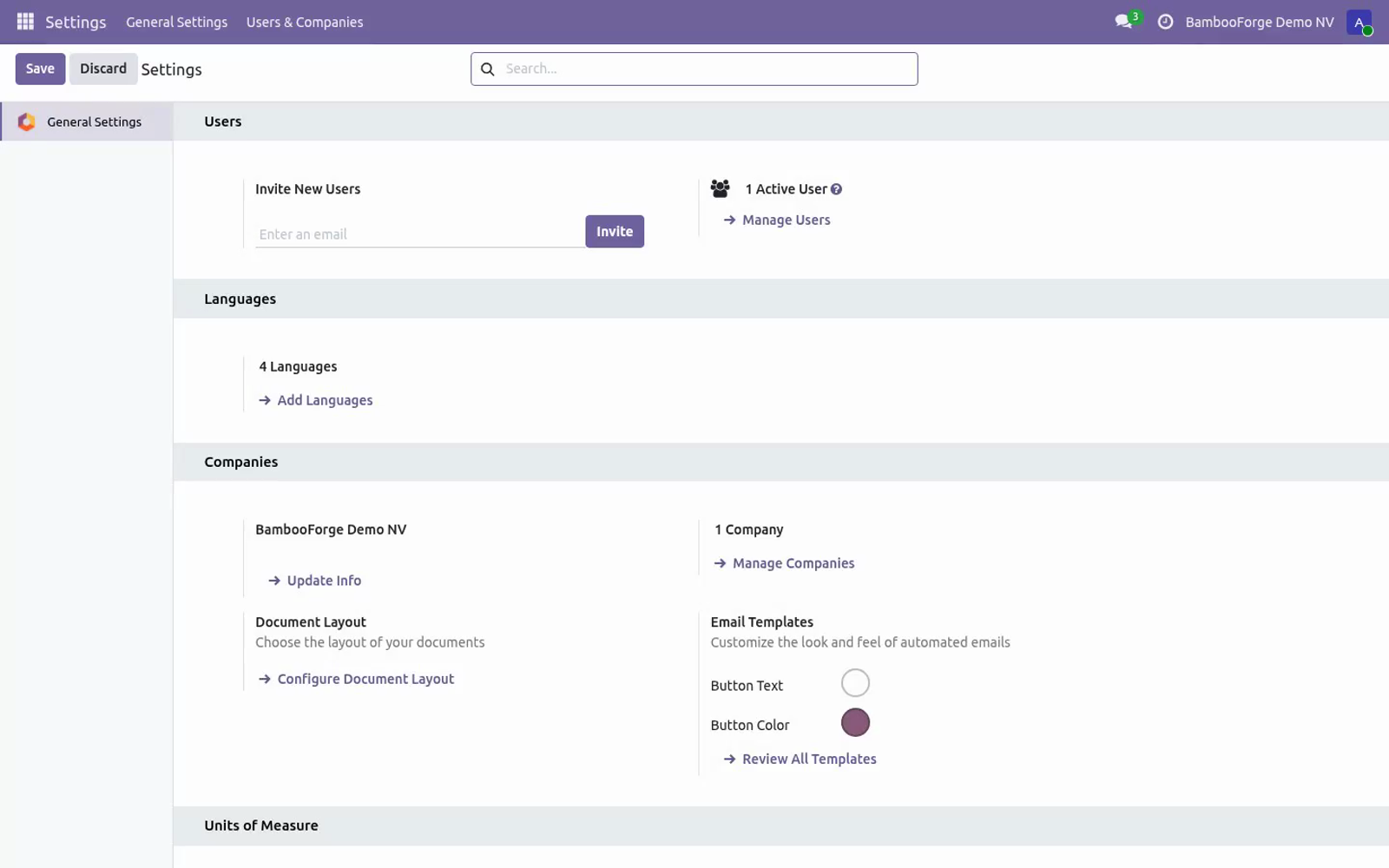
Make sure the target language is activated in Odoo (Settings ▸ Translations ▸ Languages — or Add languages on your website).
Open AI Translate ▸ AI Providers (Manager) and create your engine — see Configuration below for the exact base URLs. Or skip this step: the Demo engine ships ready to use, needs no key and lets you rehearse everything.
Open AI Translate ▸ Batches and create a batch: source language, target language, engine — the shipped content rules are pre-selected.
Press Scan Content: every term without a translation in the target language appears in the Terms list.
Press Translate: the terms go to your engine in batches of 40, glossary applied, and come back as Proposed.
Review the queue — edit, approve or reject — then press Apply Approved. Open your website in the target language: the translations are live.
Usage
A batch, step by step
1 — Scan. Scan Content walks every selected rule, resolves its domain and collects one item per untranslated term (with Only missing translations off: every term). Duplicate terms within a rule are collected once; already-translated terms are skipped; pending items from a previous scan are replaced, while applied, rejected and failed history is kept. The batch moves to Scanned and shows the term counter.
2 — Translate. Terms that exactly match a glossary entry for the target language are proposed immediately with your translation (note glossary) — they never reach the AI. The rest is sent to the engine in chunks of 40 with the glossary in the prompt. Every returned proposal passes the quality guards: lost placeholder or HTML tag ⇒ the item is marked Failed with the missing pieces in its Note; a chunk whose API call fails is marked Failed with the error, and the remaining chunks continue. The batch moves to Review.
3 — Review. The Terms list shows record, field, source and the editable proposal. Fix a wording and approve it — your edit is what gets applied. Approve (✓) or reject (✗) per line, or Approve All at once. Failed lines show why in the Note column.
4 — Apply. Apply Approved writes every approved term into Odoo's native field translations. Once nothing is left to translate, review or apply, the batch moves to Done. Re-run Scan Content on the same batch any time to pick up content created since.
The glossary
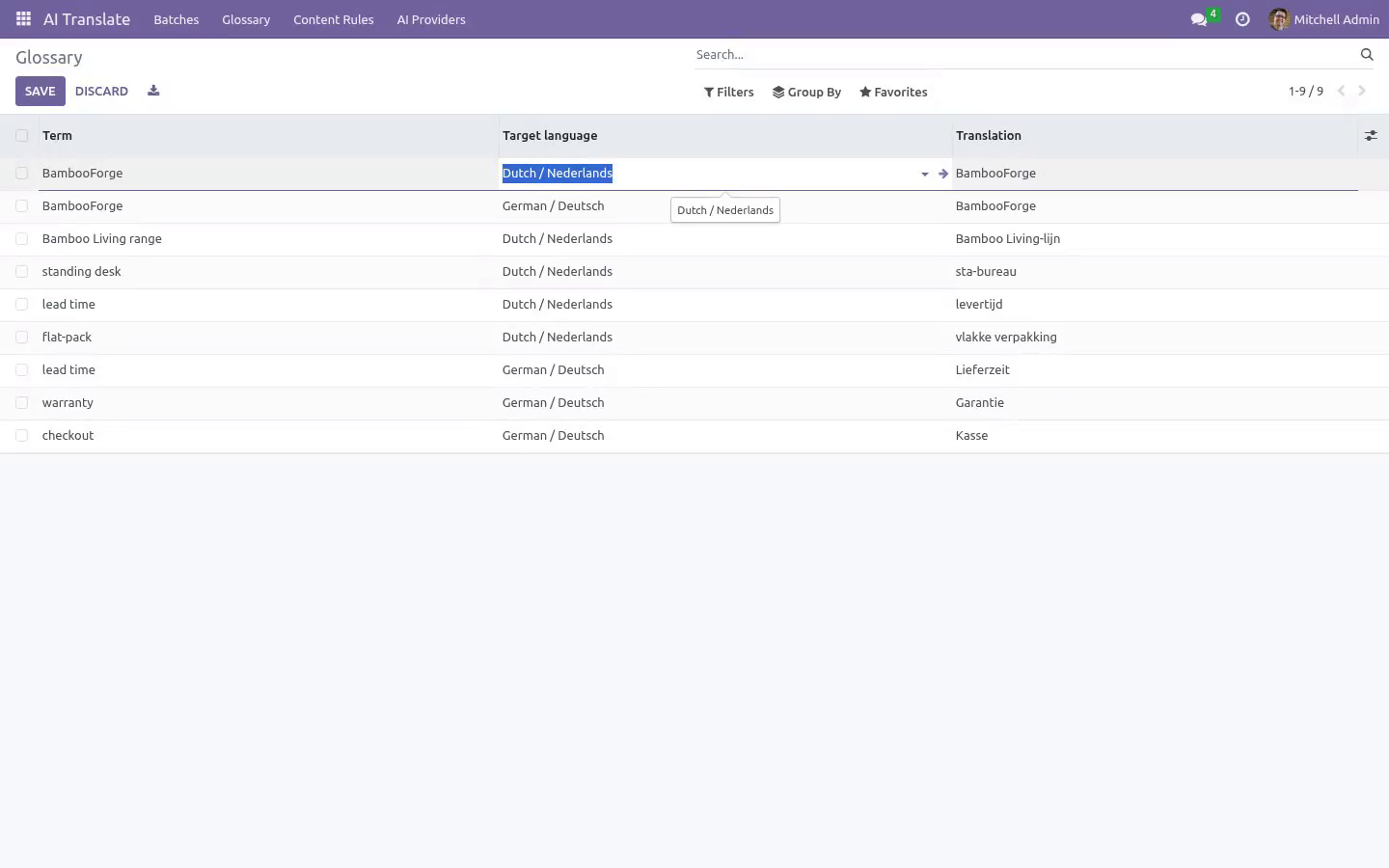
AI Translate ▸ Glossary — one line per term × target language:
Term — the source-language wording to protect (brand names, product lines, legal phrases).
Target language and Translation — what it must become. To forbid translation entirely, repeat the source term.
Exact matches skip the AI and cost you zero tokens; partial occurrences inside longer sentences are enforced through the prompt. Glossary lines apply to every batch targeting that language.
Content rules
AI Translate ▸ Content Rules (Manager) — what a batch may scan:
Model — technical name, e.g. product.template.
Field — a translatable field of that model, e.g. name, description_sale, arch_db.
Domain — optional filter; only matching records are scanned, e.g. [("is_published", "=", True)].
The five shipped rules (product names, product sales descriptions, website pages, blog titles, blog content) are plain data — archive the ones you don't want, reorder them, add your own. Every batch picks its own subset of rules.
Auto-pilot for new content
Tick Auto-approve on a batch and two things change:
Translate applies the proposals immediately — no review stop.
The daily cron BambooForge AI Translate: auto jobs re-scans and re-translates every auto-approve batch (except drafts) each night. New products, pages and posts are translated by morning.
Keep at least one reviewed batch per language first, build the glossary from what you fixed, and only then switch the language to auto-approve — the guards still catch lost placeholders, but nobody re-reads style. Failures are logged per batch and rolled back without blocking the other batches.
The nightly run works to a 15-minute budget: when it is spent, the cron logs "cron budget spent, resuming next run", stops, and picks the remaining batches up the following night. Batches already processed keep their work (each one is committed as it finishes), so a slow or hanging provider costs you a night of throughput, never the scheduler.
Configuration
Engines (AI Providers)
AI Translate ▸ AI Providers (Manager). One line per engine:
Provider |
Base URL |
Notes |
|---|---|---|
OpenAI |
https://api.openai.com/v1 |
Default. Model default gpt-4o-mini; any chat model works. |
Google Gemini |
https://generativelanguage.googleapis.com/v1beta/openai |
Gemini's OpenAI-compatible endpoint; use your Gemini API key. |
OpenRouter / Azure / other |
the provider's OpenAI-compatible root |
Anything that speaks the /chat/completions protocol. |
Local Ollama |
http://localhost:11434/v1 |
No key needed by Ollama itself; nothing leaves your server. |
DeepL |
https://api-free.deepl.com or https://api.deepl.com |
Uses DeepL's /v2/translate with HTML tag handling. |
Demo engine |
— |
No key, no network: prefixes each term with the language code. |
Per engine: API key (stored on the provider record, masked in the form and readable by AI Translate / Manager only; required for everything but the Demo engine), Model (OpenAI-compatible providers only) and Extra instructions, appended to the system prompt — tone of voice, formality, audience.
Batch options
Option (per batch) |
Effect |
|---|---|
From / To |
Source and target language (activated Odoo languages). Equal languages are refused at scan time. |
Engine |
Which AI provider translates this batch. |
Content |
The content rules this batch scans (all rules by default). |
Only missing translations |
On (default): skip terms already translated in the target language. Off: re-translate everything. |
Auto-approve |
Skip the review queue and let the nightly cron re-run the batch (the run stops after 15 minutes and resumes the next night). Recommended only with a glossary in place. |
Access rights
AI Translate / User — create and run batches, manage the glossary, review and apply. Users cannot read the API key of an engine: the field is manager-only, and the module reads it internally when it calls the provider, so a translator can run a batch on an engine whose key they never see.
AI Translate / Manager — additionally configure content rules and AI providers, and read or change their API keys.
FAQ
- Do I need an API subscription from BambooForge?
No. This is bring-your-own-key: you configure an engine with your key from OpenAI, Google, OpenRouter, Azure or DeepL — or run a local Ollama with no key at all — and pay that provider directly at their rates. The module itself is a one-off purchase with no per-word fees; the Demo engine lets you try the workflow without any account.
- What happens to my translations if I uninstall?
They stay. Applied terms live in Odoo's native field translations (written via the standard update_field_translations API — the same JSONB storage a hand-typed translation uses). Uninstalling removes the batches, rules, glossary and engines, but every applied translation keeps working untouched.
- Which languages are supported?
Any language Odoo supports — source and target are simply your activated Odoo languages. Translation quality depends on the model you choose: current LLMs and DeepL are strong on major languages; for rarer ones, keep the review queue on and pick the engine that reads best.
- Is my content sent to third parties?
Yes — to the one AI provider you configured, and nobody else. The scanned terms are sent in batches of 40 to your chosen endpoint, together with your glossary lines; nothing is routed through BambooForge or any middleman, and nothing else in your database is transmitted. For zero egress, use a local Ollama — or the Demo engine, which makes no network call at all.
- Who can see my provider API key?
Only AI Translate / Manager users. The key is stored on the provider (engine) record, as before, but the field itself is restricted to the manager group and masked in the form, so it is not readable by a plain translator — not in the form, not through an export or an RPC read. Translators can still select the engine and run batches: the module reads the key internally when it calls the provider. The key never leaves your database except in the request to the endpoint you configured.
- Does it work on Odoo Community?
Yes — CE and EE alike. It depends only on the standard base plus the common Python requests library. The shipped rules for products, website pages and blog posts activate when those apps are present and are skipped silently when they aren't.
- Why are some items marked Failed?
Three honest reasons, each named in the Note column: the proposal lost a placeholder or HTML tag the source had (the guard refuses it rather than corrupt your site), the API call failed (wrong key, network, quota — the error text is stored), or the record was deleted before applying. Fix the cause, set the batch scanning again, and only the missing terms are re-sent.
- Can I translate fields of my custom module?
Yes — add a content rule with your model, your translatable field and an optional domain. Both simple translated fields and term-based fields (qweb arch_db, HTML content) are handled.
- Is it tested?
Yes: 13 automated tests — the full scan → translate → review → apply cycle on simple and qweb fields, glossary short-circuit, placeholder guard, auto-approve cron, OpenAI payload, and the API key staying hidden from plain users — including a real-browser tour, on each of Odoo 16, 17, 18, 19 and 20.
How we make sure it works
Before every release, 14 automated checks run against this app on Odoo 16, 17, 18, 19 and 20. Among them:
Only missing skips already translated.
Glossary exact match skips ai.
Scan translate apply simple field.
Auto approve applies directly.
Placeholder guard marks failed.
The complete list is in the source you receive.
Support
E-mail — support@bambooforge.dev. Every request is answered within 24 hours, setup help included.
What to send — your Odoo version and edition, the provider type and base URL of the engine (never send the API key), and for translation issues the Note of a failed item or the server log around AI translate.
Money-back guarantee — report a bug within 2 months of purchase; if we cannot resolve it within 15 days, you get a full refund.
Source — the complete OPL-1 source is included; extend it your way.
Install
Copy bambooforge_translate_ai into your addons path and update the app list, or install the ZIP from the Odoo Apps Store.
Install AI Translation: Auto-translate Odoo Content.
Open AI Translate - its menus are Batches, Glossary, Content Rules, AI Providers.
Changelog
20.0.1.1.1
Built for Odoo 20: record rules and access rights rewritten onto Odoo 20's single ir.access model, the screens rebuilt on Owl 3, and every icon moved to the icon set Odoo 20 ships.
20.0.1.0.1 (2026-08-15)
The provider API key is now readable by AI Translate / Manager users only. It still lives on the provider (engine) record; translators keep running batches on that engine without ever being able to read the key.
The nightly auto-translate cron stops after 15 minutes and resumes on the next run, so one slow provider cannot hold the scheduler. Work already done in the run is kept.
A new automated test covers the manager-only key (13 in total).
20.0.1.0.0 (2026-08-14)
Initial release: content rules (model + translatable field + optional domain) with shipped rules for product names, product sales descriptions, website pages (qweb views) and blog posts; batch workflow Scan → Translate → Review → Apply with editable proposals, per-term approve/reject, Approve All and live counters; bring-your-own-key engines — any OpenAI-compatible chat API (OpenAI, Gemini via /v1beta/openai, OpenRouter, Azure, local Ollama), DeepL, and a no-key Demo engine; per-language glossary with exact-match short-circuit and prompt enforcement; quality guards for placeholders and HTML tags plus batch-size validation; translation in batches of 40 with per-chunk error isolation; application through native update_field_translations (simple and term-based fields), uninstall-safe; auto-approve mode with a nightly cron for new content; User and Manager access groups; 13 automated tests including a real-browser tour on each of Odoo 16, 17, 18, 19 and 20.