 BambooForge Labs
SEO All in One with Tag Manager and Consent
Every marketing script in one list with the consent category it waits for and the pages it may fire on, plus the commerce dataLayer events.
Available for Odoo 16.0, Odoo 17.0, Odoo 18.0, Odoo 19.0, Odoo 20.0. Technical name bambooforge_tag_manager.
Transcript of the walkthrough (Odoo 20)
SEO All in One with Tag Manager and Consent. Every marketing script in one list with the consent category it waits for and the pages it may fire on, plus the commerce dataLayer events. An add-on for BambooForge Consent Pro. Consent Pro decides whether a script may run.
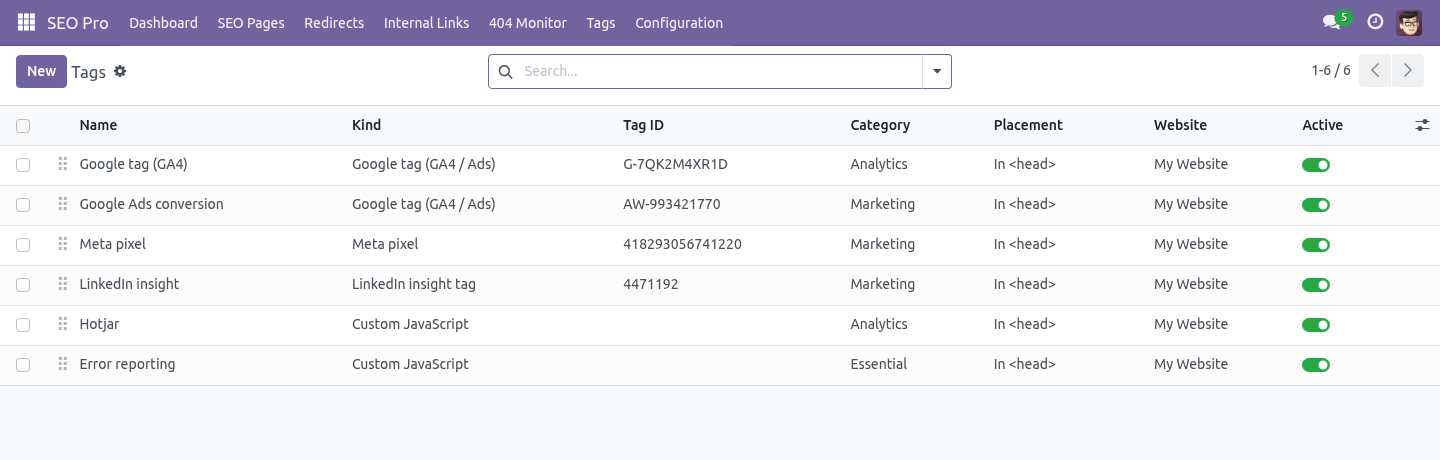
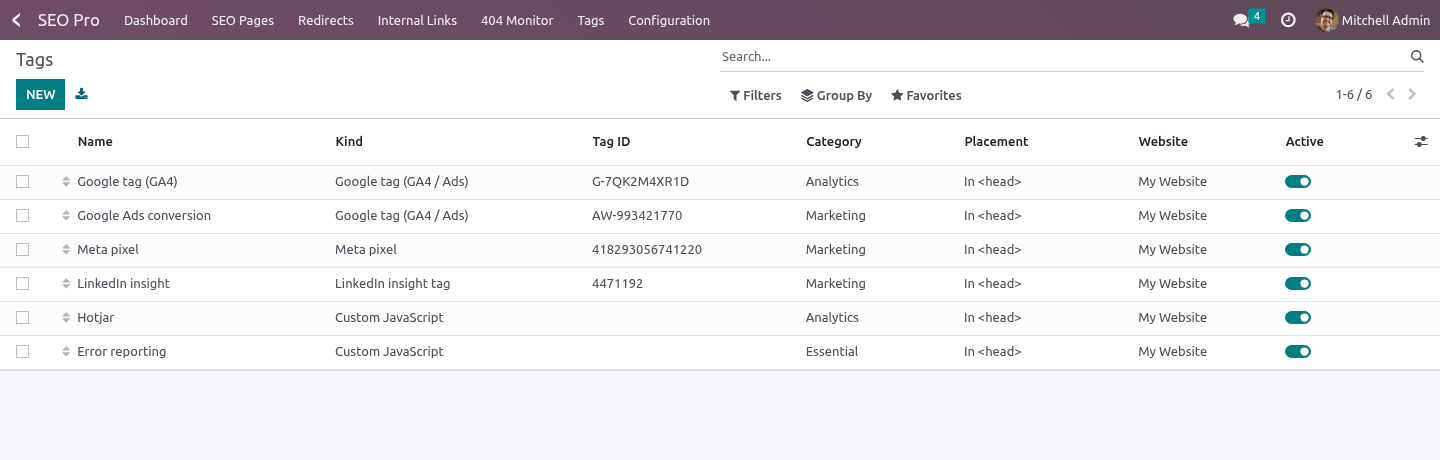
This decides which scripts exist, where they fire, and what data they get. In the next few minutes: seo all in one with tag manager and consent, then a tag, then triggers, then consent, then commerce events. Then what this app deliberately does not do, so you can tell before you buy whether it fits. Everything lives under Tags.
1. Install BambooForge Tag & Consent Manager (it needs SEO Pro). Two example tags are created, both switched off: a Google tag and a Meta pixel, each with a placeholder ID and a note telling you to replace it. 2.
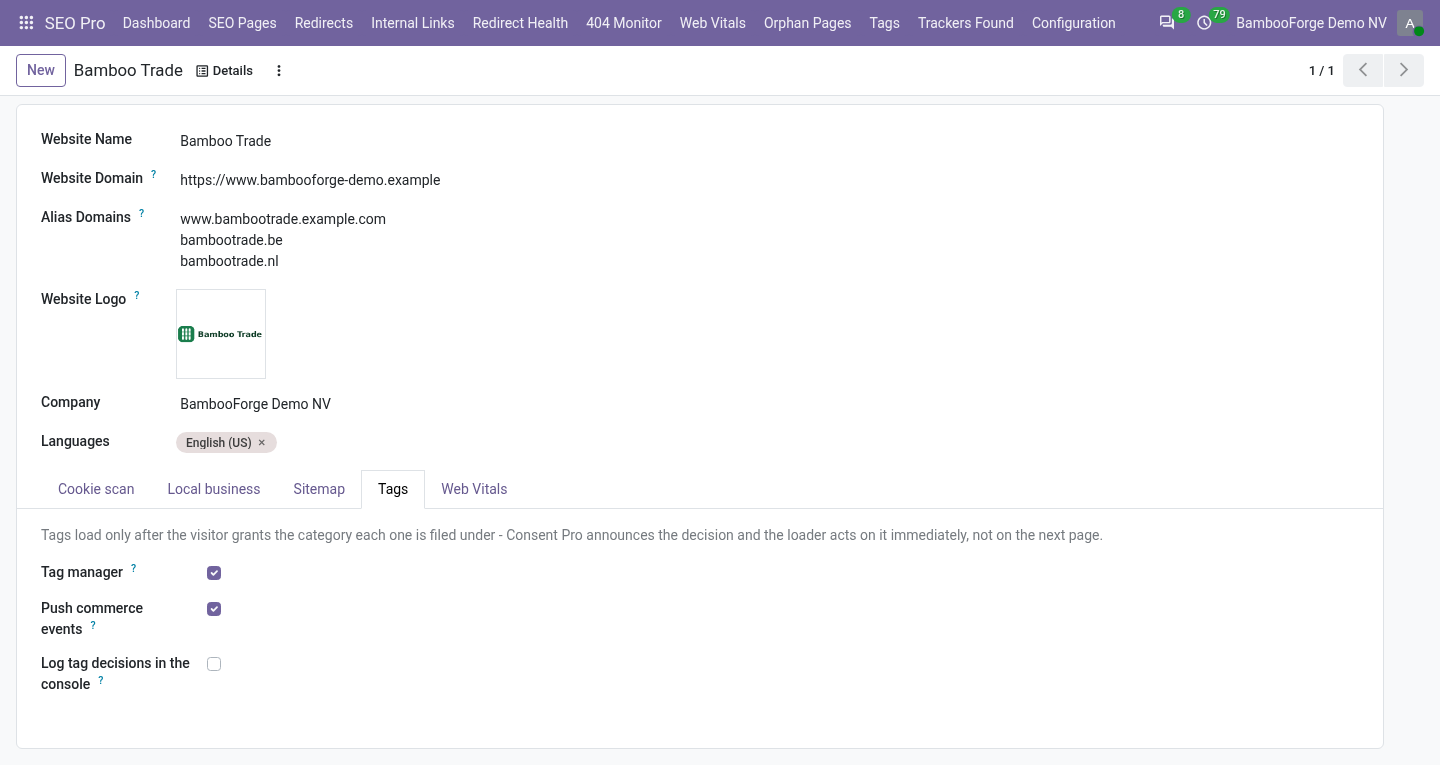
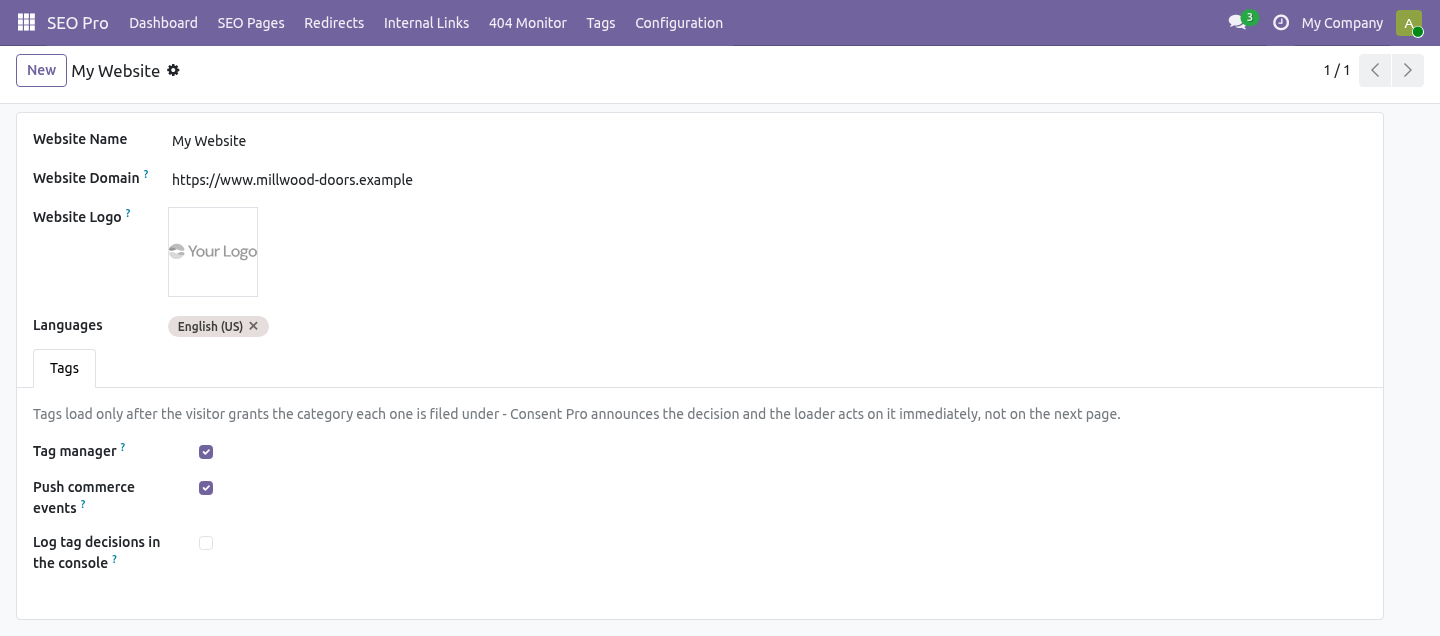
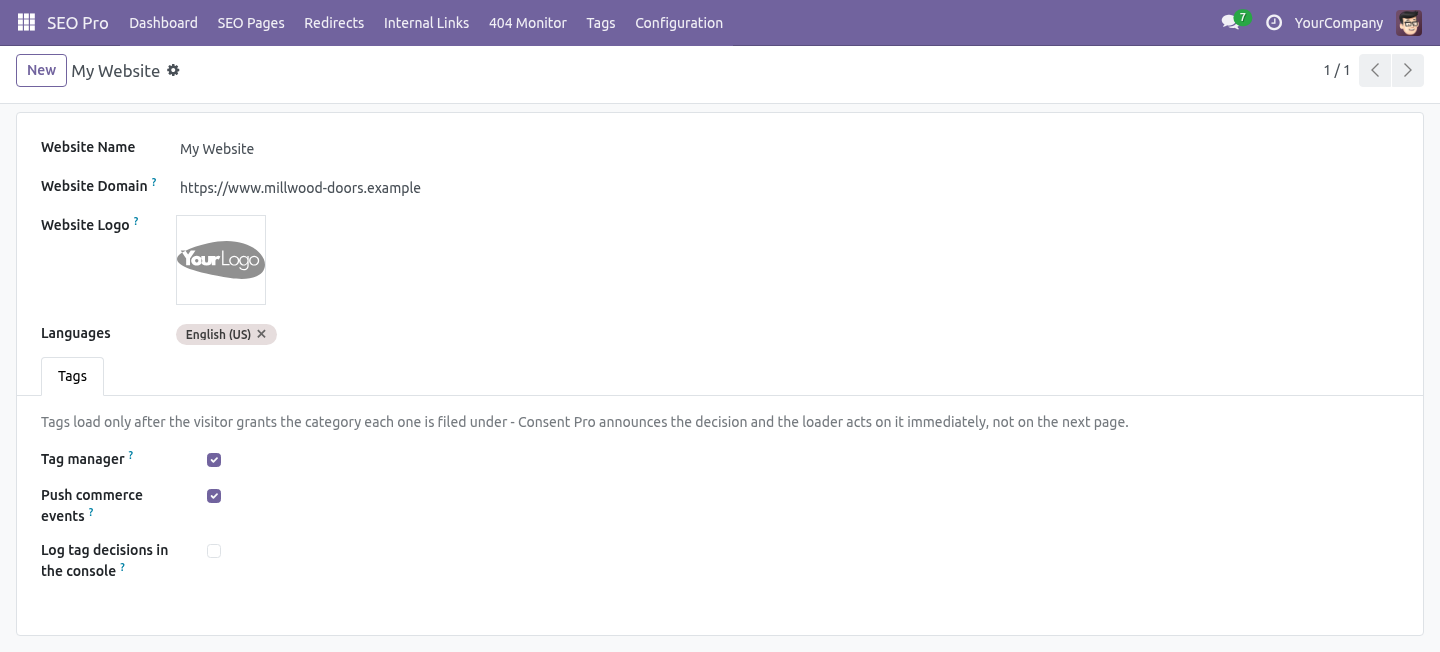
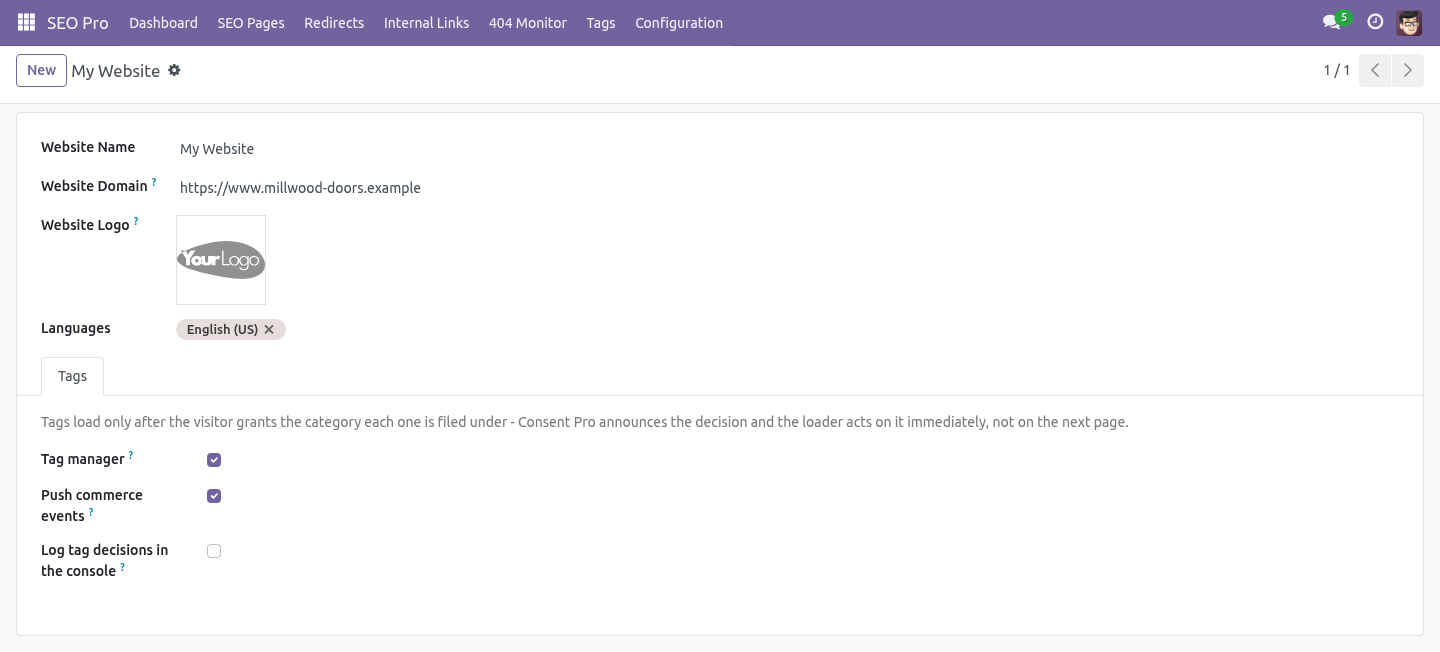
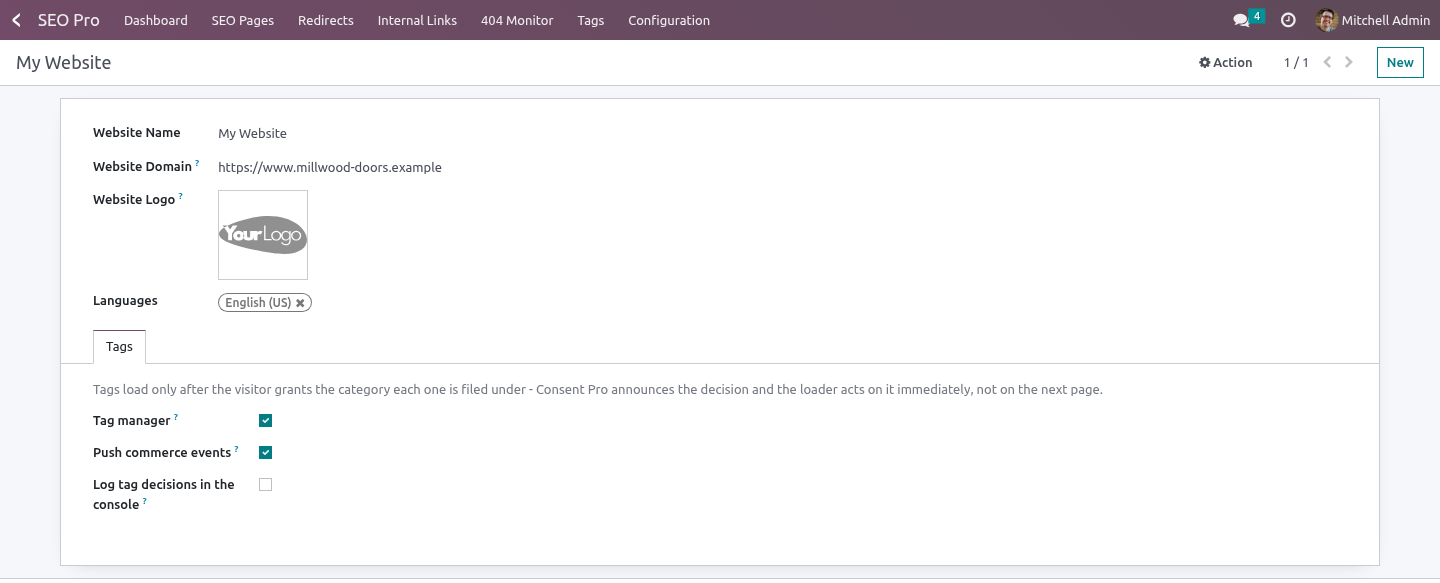
Open SEO Pro → Tags for the list; the per-website switches are on the website form, tab Tags. SEO All in One with Tag Manager and Consent. An add-on for BambooForge Consent Pro. Consent Pro decides whether a script may run.
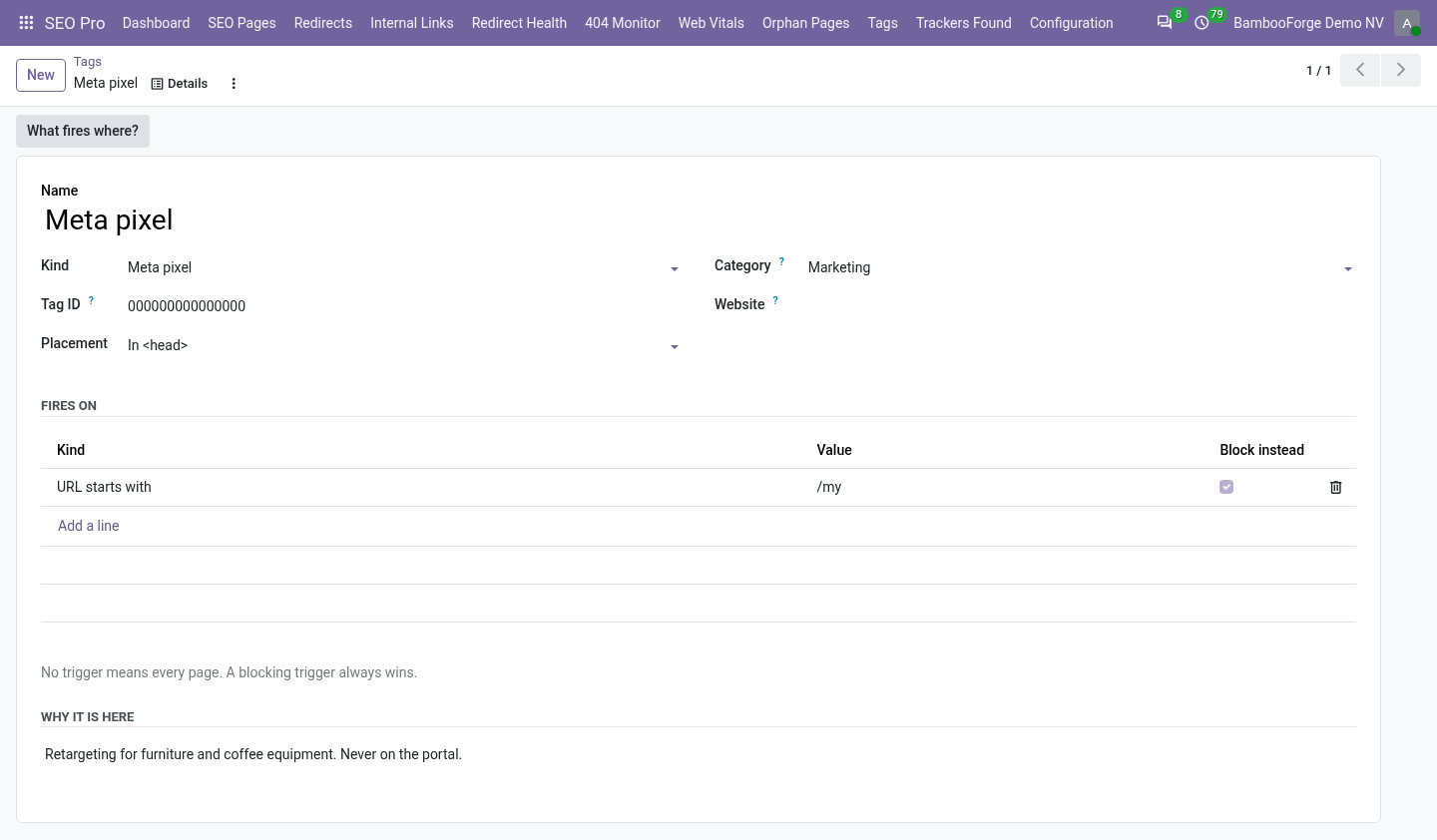
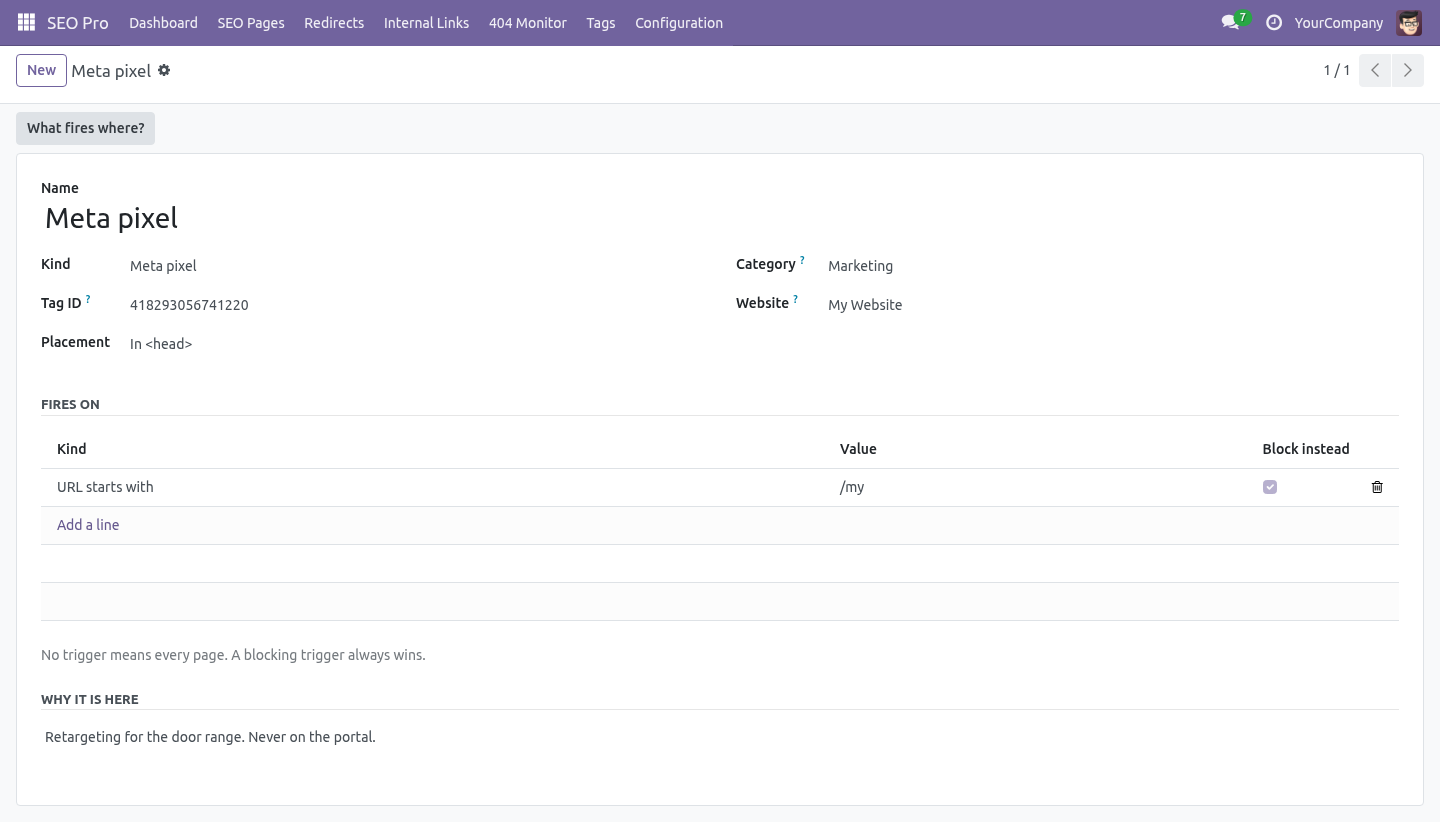
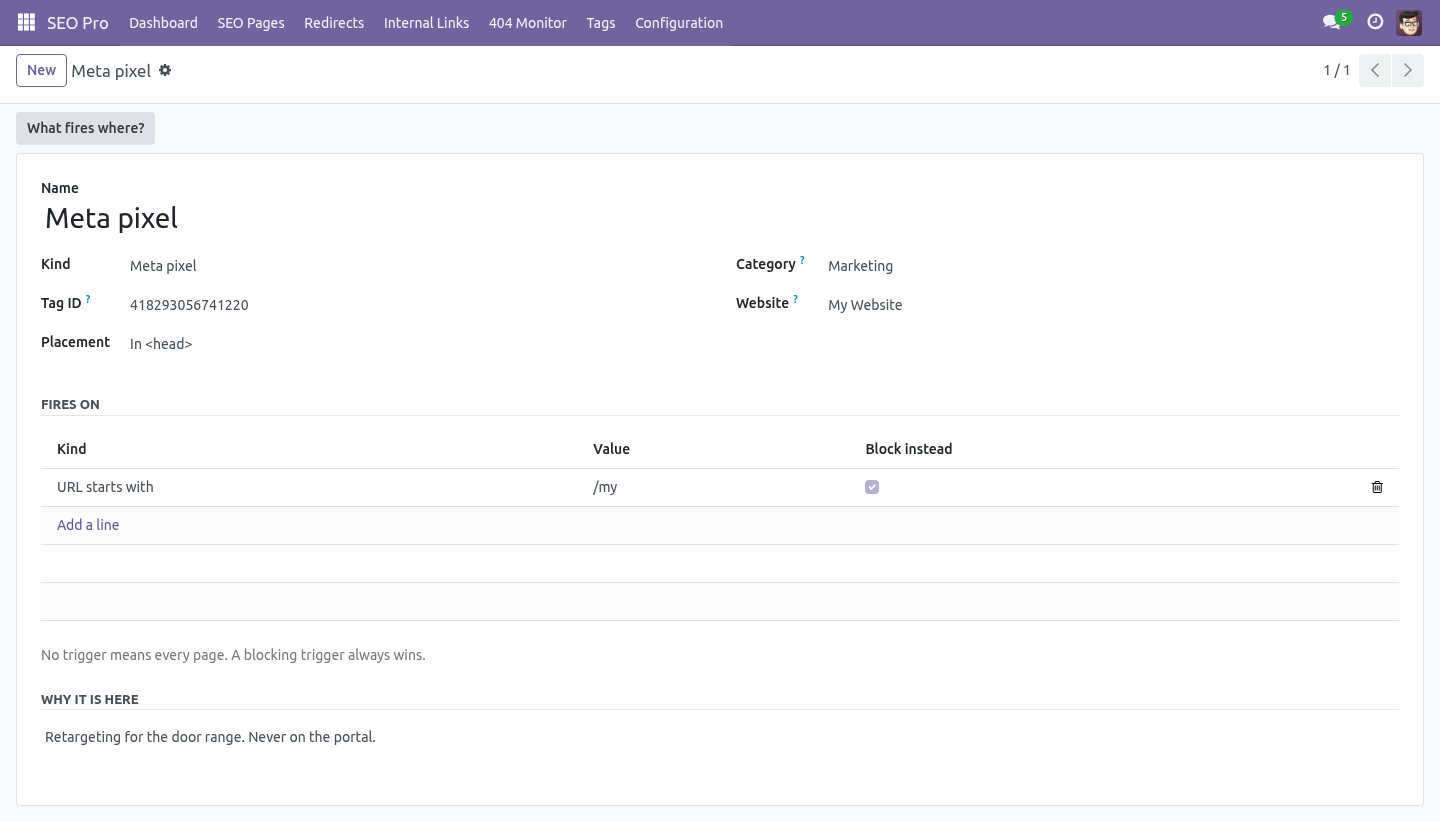
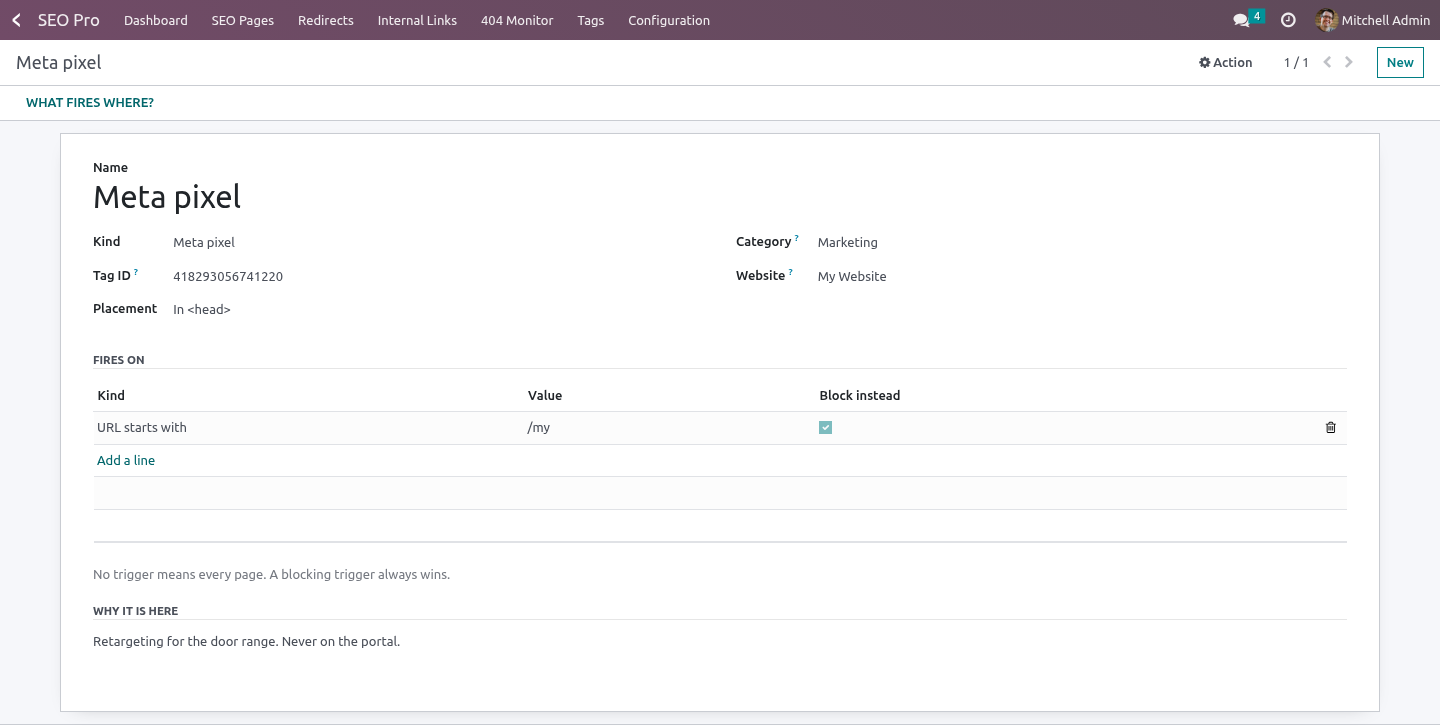
This decides which scripts exist, where they fire, and what data they get. A tag Triggers. A trigger marked Block instead always wins: the tag never fires where it matches, whatever the other triggers say. A tag with only blocking triggers fires everywhere except there.
URL starts with /shop - the shop and everything under it. URL is exactly / - only the home page. A query string is not part of the path. URL matches - a regular expression, for the cases the first two cannot express.
What fires where? on the tag form lists, for a handful of typical paths, which tags would run. Consent. Nothing but essential runs before the visitor has said yes.
When they do, Consent Pro announces the decision on the page and the loader starts the tags that just became allowed - immediately, not on the next page view, and without polling a cookie. If a visitor withdraws consent, Consent Pro deletes the vendor cookies and reloads the page, which is the only reliable way to stop a tag that is already running. Commerce events. With Push commerce events on, the dataLayer receives: ============== ========================================================== Event Carries ============== ========================================================== view_item item id, name, price, currency begin_checkout items, value, currency purchase items, value, tax, currency, transaction id ============== ========================================================== What it will not do It does not fire tags in the website editor.
A pixel firing every time a designer opens a page pollutes the analytics and, on Meta, the audience. It does not run a tag whose category the visitor refused, and there is no override for that. It does not manage server-side tagging, and it does not proxy vendor requests to dodge an ad blocker. Multi-website and multi-company.
A tag belongs to one website or to all of them. Each website has its own switches, its own container and its own debug flag; the list is filtered by the websites a user can see and by company through the website. How we make sure it works. Before every release, 34 automated checks run against this app on Odoo 16, 17, 18, 19 and 20.
Among them: A read only seo user cannot add a tag. A snippet with quotes does not break the page. A tag is not served to the website editor. A custom tag with no code is refused.
An advertising tag may not be called essential. The complete list is in the source you receive. Questions people ask. Which Odoo versions does it run on?
Odoo 16.0, 17.0, 18.0, 19.0, 20.0, on the series you buy it for; each series is its own listing. Community or Enterprise? Both. It needs no Enterprise app.
Support. support@bambooforge.dev - the people who wrote it. The complete manual is at docs dot bambooforge dot dev, the demo database is linked from the store page, and support answers within twenty-four hours. Links are in the description.

Transcript of the walkthrough (Odoo 19)
Tag Manager & Consent: GTM, GA4 and Meta Pixel. Every marketing script in one list with the consent category it waits for and the pages it may fire on, plus the commerce dataLayer events. An add-on for BambooForge Consent Pro. Consent Pro decides whether a script may run.
This decides which scripts exist, where they fire, and what data they get. In the next few minutes: tag manager & consent: gtm, ga4 and meta pixel, then a tag, then triggers, then consent, then commerce events. Then what this app deliberately does not do, so you can tell before you buy whether it fits. Everything lives under Tags.
Install BambooForge Tag & Consent Manager. Two example tags are created, both switched off: a Google tag and a Meta pixel, each with a placeholder ID and a note telling you to replace it. Tag Manager & Consent: GTM, GA4 and Meta Pixel. An add-on for BambooForge Consent Pro.
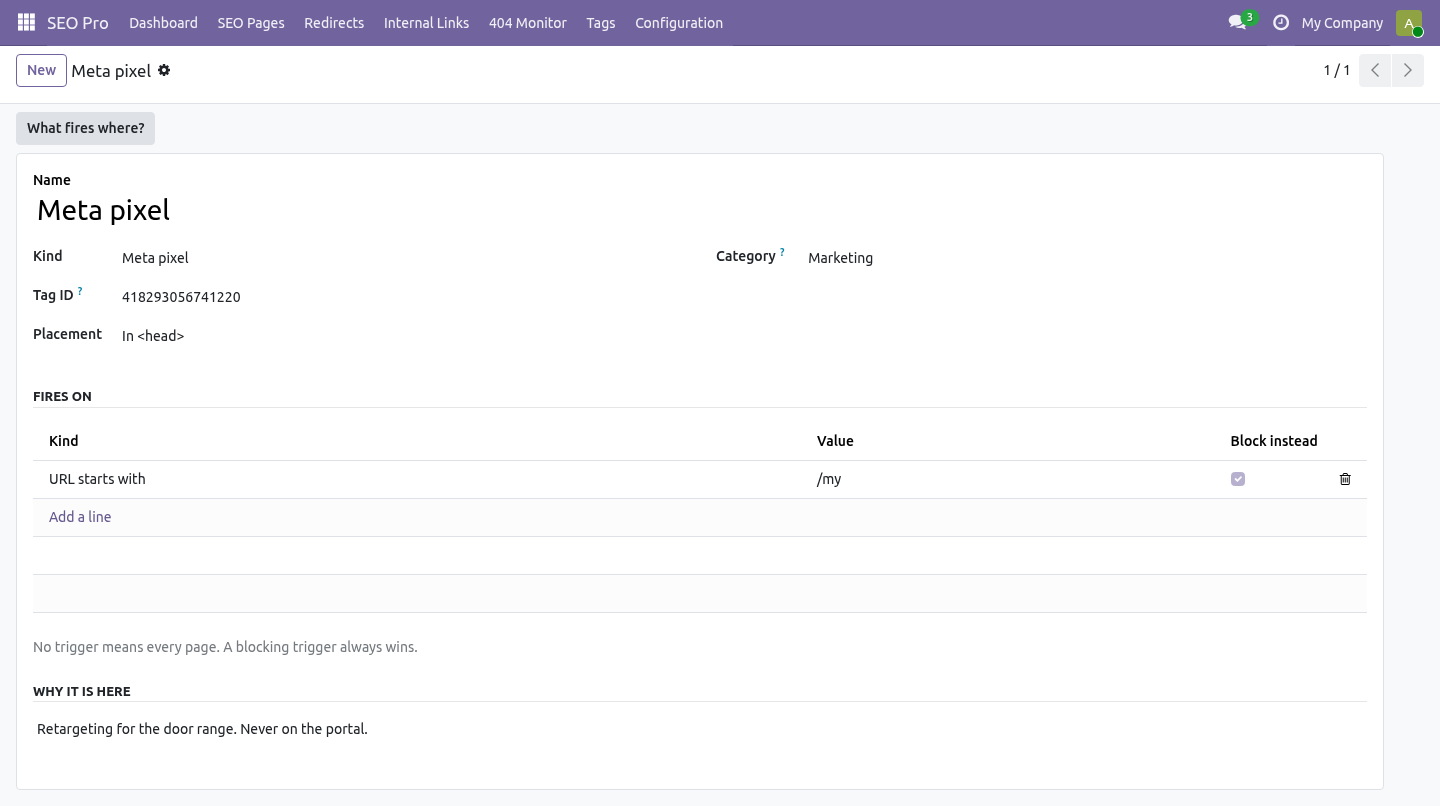
Consent Pro decides whether a script may run. This decides which scripts exist, where they fire, and what data they get. A tag Triggers. A trigger marked Block instead always wins: the tag never fires where it matches, whatever the other triggers say.
A tag with only blocking triggers fires everywhere except there. URL starts with /shop - the shop and everything under it. URL is exactly / - only the home page. A query string is not part of the path.
URL matches - a regular expression, for the cases the first two cannot express. What fires where? on the tag form lists, for a handful of typical paths, which tags would run. Consent.
Nothing but essential runs before the visitor has said yes. When they do, Consent Pro announces the decision on the page and the loader starts the tags that just became allowed - immediately, not on the next page view, and without polling a cookie. If a visitor withdraws consent, Consent Pro deletes the vendor cookies and reloads the page, which is the only reliable way to stop a tag that is already running. Commerce events.
With Push commerce events on, the dataLayer receives: ============== ========================================================== Event Carries ============== ========================================================== view_item item id, name, price, currency begin_checkout items, value, currency purchase items, value, tax, currency, transaction id ============== ========================================================== What it will not do It does not fire tags in the website editor. A pixel firing every time a designer opens a page pollutes the analytics and, on Meta, the audience. It does not run a tag whose category the visitor refused, and there is no override for that. It does not manage server-side tagging, and it does not proxy vendor requests to dodge an ad blocker.
Multi-website and multi-company. A tag belongs to one website or to all of them. Each website has its own switches, its own container and its own debug flag; the list is filtered by the websites a user can see and by company through the website. Support.
support@bambooforge.dev - the people who wrote it. The complete manual is at docs dot bambooforge dot dev, the demo database is linked from the store page, and support answers within twenty-four hours. Links are in the description.

Transcript of the walkthrough (Odoo 18)
Tag Manager & Consent: GTM, GA4 and Meta Pixel. Every marketing script in one list with the consent category it waits for and the pages it may fire on, plus the commerce dataLayer events. An add-on for BambooForge Consent Pro. Consent Pro decides whether a script may run.
This decides which scripts exist, where they fire, and what data they get. In the next few minutes: tag manager & consent: gtm, ga4 and meta pixel, then a tag, then triggers, then consent, then commerce events. Then what this app deliberately does not do, so you can tell before you buy whether it fits. Everything lives under Tags.
Install BambooForge Tag & Consent Manager. Two example tags are created, both switched off: a Google tag and a Meta pixel, each with a placeholder ID and a note telling you to replace it. Tag Manager & Consent: GTM, GA4 and Meta Pixel. An add-on for BambooForge Consent Pro.
Consent Pro decides whether a script may run. This decides which scripts exist, where they fire, and what data they get. A tag Triggers. A trigger marked Block instead always wins: the tag never fires where it matches, whatever the other triggers say.
A tag with only blocking triggers fires everywhere except there. URL starts with /shop - the shop and everything under it. URL is exactly / - only the home page. A query string is not part of the path.
URL matches - a regular expression, for the cases the first two cannot express. What fires where? on the tag form lists, for a handful of typical paths, which tags would run. Consent.
Nothing but essential runs before the visitor has said yes. When they do, Consent Pro announces the decision on the page and the loader starts the tags that just became allowed - immediately, not on the next page view, and without polling a cookie. If a visitor withdraws consent, Consent Pro deletes the vendor cookies and reloads the page, which is the only reliable way to stop a tag that is already running. Commerce events.
With Push commerce events on, the dataLayer receives: ============== ========================================================== Event Carries ============== ========================================================== view_item item id, name, price, currency begin_checkout items, value, currency purchase items, value, tax, currency, transaction id ============== ========================================================== What it will not do It does not fire tags in the website editor. A pixel firing every time a designer opens a page pollutes the analytics and, on Meta, the audience. It does not run a tag whose category the visitor refused, and there is no override for that. It does not manage server-side tagging, and it does not proxy vendor requests to dodge an ad blocker.
Multi-website and multi-company. A tag belongs to one website or to all of them. Each website has its own switches, its own container and its own debug flag; the list is filtered by the websites a user can see and by company through the website. Support.
support@bambooforge.dev - the people who wrote it. The complete manual is at docs dot bambooforge dot dev, the demo database is linked from the store page, and support answers within twenty-four hours. Links are in the description.

Transcript of the walkthrough (Odoo 17)
Tag Manager & Consent: GTM, GA4 and Meta Pixel. Every marketing script in one list with the consent category it waits for and the pages it may fire on, plus the commerce dataLayer events. An add-on for BambooForge Consent Pro. Consent Pro decides whether a script may run.
This decides which scripts exist, where they fire, and what data they get. In the next few minutes: tag manager & consent: gtm, ga4 and meta pixel, then a tag, then triggers, then consent, then commerce events. Then what this app deliberately does not do, so you can tell before you buy whether it fits. Everything lives under Tags.
Install BambooForge Tag & Consent Manager. Two example tags are created, both switched off: a Google tag and a Meta pixel, each with a placeholder ID and a note telling you to replace it. Tag Manager & Consent: GTM, GA4 and Meta Pixel. An add-on for BambooForge Consent Pro.
Consent Pro decides whether a script may run. This decides which scripts exist, where they fire, and what data they get. A tag Triggers. A trigger marked Block instead always wins: the tag never fires where it matches, whatever the other triggers say.
A tag with only blocking triggers fires everywhere except there. URL starts with /shop - the shop and everything under it. URL is exactly / - only the home page. A query string is not part of the path.
URL matches - a regular expression, for the cases the first two cannot express. What fires where? on the tag form lists, for a handful of typical paths, which tags would run. Consent.
Nothing but essential runs before the visitor has said yes. When they do, Consent Pro announces the decision on the page and the loader starts the tags that just became allowed - immediately, not on the next page view, and without polling a cookie. If a visitor withdraws consent, Consent Pro deletes the vendor cookies and reloads the page, which is the only reliable way to stop a tag that is already running. Commerce events.
With Push commerce events on, the dataLayer receives: ============== ========================================================== Event Carries ============== ========================================================== view_item item id, name, price, currency begin_checkout items, value, currency purchase items, value, tax, currency, transaction id ============== ========================================================== What it will not do It does not fire tags in the website editor. A pixel firing every time a designer opens a page pollutes the analytics and, on Meta, the audience. It does not run a tag whose category the visitor refused, and there is no override for that. It does not manage server-side tagging, and it does not proxy vendor requests to dodge an ad blocker.
Multi-website and multi-company. A tag belongs to one website or to all of them. Each website has its own switches, its own container and its own debug flag; the list is filtered by the websites a user can see and by company through the website. Support.
support@bambooforge.dev - the people who wrote it. The complete manual is at docs dot bambooforge dot dev, the demo database is linked from the store page, and support answers within twenty-four hours. Links are in the description.
Transcript of the walkthrough (Odoo 16)
Tag Manager & Consent: GTM, GA4 and Meta Pixel. Every marketing script in one list with the consent category it waits for and the pages it may fire on, plus the commerce dataLayer events. An add-on for BambooForge Consent Pro. Consent Pro decides whether a script may run.
This decides which scripts exist, where they fire, and what data they get. In the next few minutes: tag manager & consent: gtm, ga4 and meta pixel, then a tag, then triggers, then consent, then commerce events. Then what this app deliberately does not do, so you can tell before you buy whether it fits. Everything lives under Tags.
Install BambooForge Tag & Consent Manager. Two example tags are created, both switched off: a Google tag and a Meta pixel, each with a placeholder ID and a note telling you to replace it. Tag Manager & Consent: GTM, GA4 and Meta Pixel. An add-on for BambooForge Consent Pro.
Consent Pro decides whether a script may run. This decides which scripts exist, where they fire, and what data they get. A tag Triggers. A trigger marked Block instead always wins: the tag never fires where it matches, whatever the other triggers say.
A tag with only blocking triggers fires everywhere except there. URL starts with /shop - the shop and everything under it. URL is exactly / - only the home page. A query string is not part of the path.
URL matches - a regular expression, for the cases the first two cannot express. What fires where? on the tag form lists, for a handful of typical paths, which tags would run. Consent.
Nothing but essential runs before the visitor has said yes. When they do, Consent Pro announces the decision on the page and the loader starts the tags that just became allowed - immediately, not on the next page view, and without polling a cookie. If a visitor withdraws consent, Consent Pro deletes the vendor cookies and reloads the page, which is the only reliable way to stop a tag that is already running. Commerce events.
With Push commerce events on, the dataLayer receives: ============== ========================================================== Event Carries ============== ========================================================== view_item item id, name, price, currency begin_checkout items, value, currency purchase items, value, tax, currency, transaction id ============== ========================================================== What it will not do It does not fire tags in the website editor. A pixel firing every time a designer opens a page pollutes the analytics and, on Meta, the audience. It does not run a tag whose category the visitor refused, and there is no override for that. It does not manage server-side tagging, and it does not proxy vendor requests to dodge an ad blocker.
Multi-website and multi-company. A tag belongs to one website or to all of them. Each website has its own switches, its own container and its own debug flag; the list is filtered by the websites a user can see and by company through the website. Support.
support@bambooforge.dev - the people who wrote it. The complete manual is at docs dot bambooforge dot dev, the demo database is linked from the store page, and support answers within twenty-four hours. Links are in the description.
Key facts
- What it is
- Every marketing script in one list with the consent category it waits for and the pages it may fire on, plus the commerce dataLayer events.
- For
- Website
- Odoo versions
- 16.0, 17.0, 18.0, 19.0, 20.0 - Community and Enterprise
- Runs on
- Odoo.sh or Odoo you host yourself - not Odoo Online, which accepts no third-party apps
- Price
- 297 EUR, one-time, on the Odoo Apps Store
- Technical name
- bambooforge_tag_manager
- Not for
- It does not fire tags in the website editor. A pixel firing every time a designer opens a page pollutes the analytics and, on Meta, the audience.; It does not run a tag whose category the visitor refused, and there is no override for that.; It does not manage server-side tagging, and it does not proxy vendor requests to dodge an ad blocker.
- Manual last updated
- 2026-10-15
SEO All in One with Tag Manager and Consent
An add-on for BambooForge Consent Pro. Consent Pro decides whether a script may run. This decides which scripts exist, where they fire, and what data they get.
Install
Install BambooForge Tag & Consent Manager (it needs SEO Pro). Two example tags are created, both switched off: a Google tag and a Meta pixel, each with a placeholder ID and a note telling you to replace it.
Open SEO Pro → Tags for the list; the per-website switches are on the website form, tab Tags.
A tag
Field |
What it is for |
|---|---|
Kind |
GTM container, Google tag (GA4 / Ads), Meta, LinkedIn or TikTok pixel, custom JavaScript, custom HTML. |
Tag ID |
Checked on save against the vendor's own shape. A tag ID with a typo in it fails silently for months. |
Consent |
The Consent Pro category the tag waits for. An analytics |
category |
or advertising tag may not be marked essential. |
Placement |
In <head>, at the start of <body>, or at the end. |
Triggers |
Where it may fire. No trigger means every page. |
Why it is |
Who asked for this tag, and for what. The field every tag |
here |
list is missing when somebody finally audits it. |
Triggers
URL starts with /shop - the shop and everything under it.
URL is exactly / - only the home page. A query string is not part of the path.
URL matches - a regular expression, for the cases the first two cannot express.
A trigger marked Block instead always wins: the tag never fires where it matches, whatever the other triggers say. A tag with only blocking triggers fires everywhere except there.
What fires where? on the tag form lists, for a handful of typical paths, which tags would run.
Consent
Nothing but essential runs before the visitor has said yes. When they do, Consent Pro announces the decision on the page and the loader starts the tags that just became allowed - immediately, not on the next page view, and without polling a cookie.
If a visitor withdraws consent, Consent Pro deletes the vendor cookies and reloads the page, which is the only reliable way to stop a tag that is already running.
Commerce events
With Push commerce events on, the dataLayer receives:
Event |
Carries |
|---|---|
view_item |
item id, name, price, currency |
begin_checkout |
items, value, currency |
purchase |
items, value, tax, currency, transaction id |
That is what a tag needs to report money. Without it GA4 reports sessions and your paid campaigns are optimised against nothing.
On a website with no eCommerce nothing is pushed - no error, no empty events.
What it will not do
It does not fire tags in the website editor. A pixel firing every time a designer opens a page pollutes the analytics and, on Meta, the audience.
It does not run a tag whose category the visitor refused, and there is no override for that.
It does not manage server-side tagging, and it does not proxy vendor requests to dodge an ad blocker.
Multi-website and multi-company
A tag belongs to one website or to all of them. Each website has its own switches, its own container and its own debug flag; the list is filtered by the websites a user can see and by company through the website.
How we make sure it works
Before every release, 34 automated checks run against this app on Odoo 16, 17, 18, 19 and 20. Among them:
A read only seo user cannot add a tag.
A snippet with quotes does not break the page.
A tag is not served to the website editor.
A custom tag with no code is refused.
An advertising tag may not be called essential.
The complete list is in the source you receive.
Questions people ask
- Which Odoo versions does it run on?
Odoo 16.0, 17.0, 18.0, 19.0, 20.0, on the series you buy it for; each series is its own listing.
- Community or Enterprise?
Both. It needs no Enterprise app.
- What does it need?
The standard Web; consent pro, seo pro (BambooForge) must be installed first app. No extra Python package.
- Where does it show up?
Under the Tags menu.
- Does anything leave my server?
No. It makes no call outside your Odoo server: no telemetry, no licence check, no third-party service.
- What happens if I uninstall it?
Odoo drops the app's own tables and fields; the standard records it worked on (contacts, orders, products) stay as they are.
Support
support@bambooforge.dev - the people who wrote it.