 BambooForge Labs
Sylius Connector
Two-way Sylius integration over the Admin API: products, variants, customers, orders, refunds and stock, with a resilient sync queue.
Available for Odoo 16.0, Odoo 17.0, Odoo 18.0, Odoo 19.0, Odoo 20.0. Technical name bambooforge_sylius_connector.
Transcript of the walkthrough (Odoo 20)
Sylius Connector. Two-way Sylius integration over the Admin API: products, variants, customers, orders, refunds and stock, with a resilient sync queue. The connector keeps Odoo and Sylius in sync over the official Sylius Admin API (API Platform, JSON-LD / Hydra). It covers: In the next few minutes: sylius connector, then matching the storefront total, then tested against the real thing, then step 1 — create a sylius admin api user (jwt), then step 2 — create the connection in odoo.
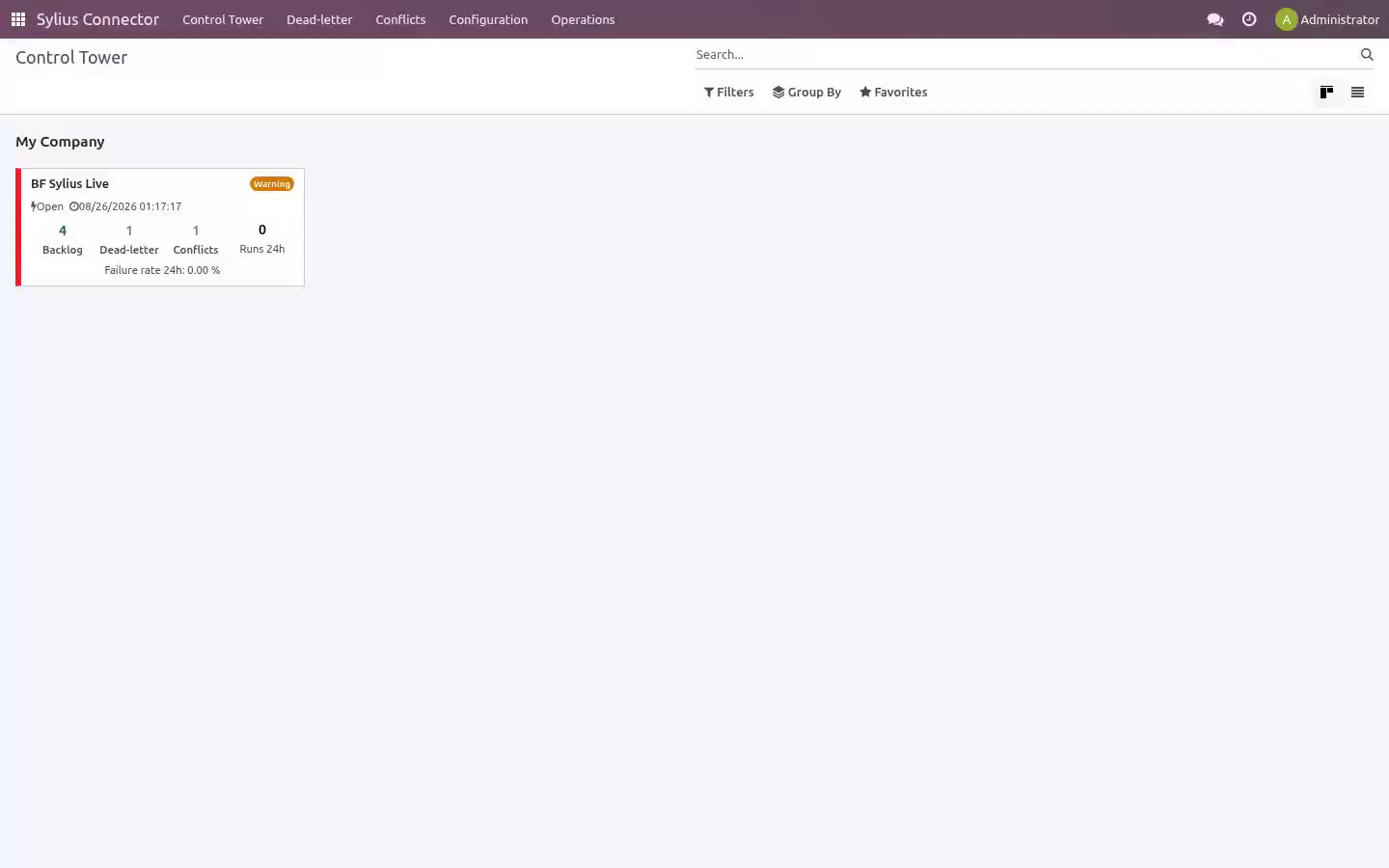
Then what this app deliberately does not do, so you can tell before you buy whether it fits. Everything lives under Sylius Connector then Control Tower then Dead-letter then Conflicts. Sylius Connector. A two-way bridge between Odoo 20 and your Sylius store: import products (with variants and images), customers and orders, push product changes back, and discover refunds — over the Sylius Admin API (API Platform / JSON-LD, JWT auth), with a resilient job queue, dry-run safety, validation and rollback so you stay in control.
This page is the complete manual. If you follow it top to bottom you can install, connect, run your first sync, automate it, and fix the common issues without contacting support. Matching the storefront total. A storefront charges shipping and grants discounts outside the product lines, so an order rebuilt from those lines alone is worth less than the order the customer paid for: the sale looks smaller than it was and never reconciles against the platform payout.
the shipping charge is imported as its own order line, on a clearly named service product; whatever still separates Odoo from the platform total — platform discounts, fees, rounding — is posted as a single adjustment line rather than dropped; the platform total and the remaining difference are stored on the order and shown on its connector tab; an order that still does not match within Total Tolerance raises a validation warning, so the gap is visible instead of silent. With Match Storefront Totals on the instance (on by default): Tested against the real thing. Automated tests run against a bundled mock store on every release; the line below is the part no mock can give you - the connector pointed at the real platform, with real records and real order totals. Tested for real against Sylius 1.13, 1.14 and 2: 87 products, 21 customers and 20 orders came into Odoo in 128 sync jobs with 0 errors, all 20 order totals matching the store.
Step 1 — Create a Sylius Admin API user (JWT). The connector talks to the Sylius Admin API and authenticates with a JSON Web Token (JWT). You provide the connector with an admin email and password; it calls the Sylius administrators/token endpoint, receives a JWT, and sends it as a Authorization: Bearer header on every request. The token is cached and automatically refreshed when Sylius returns a 401.
1. Open the Administrators section and create (or pick) an admin user the connector will log in as, e.g. odoo@your-store.com. 2.
Make sure that admin user holds the ROLE_API_ACCESS role. Without it, Sylius accepts the password but refuses to issue an API token. 3. Note the admin email and password — that is all the connector needs.
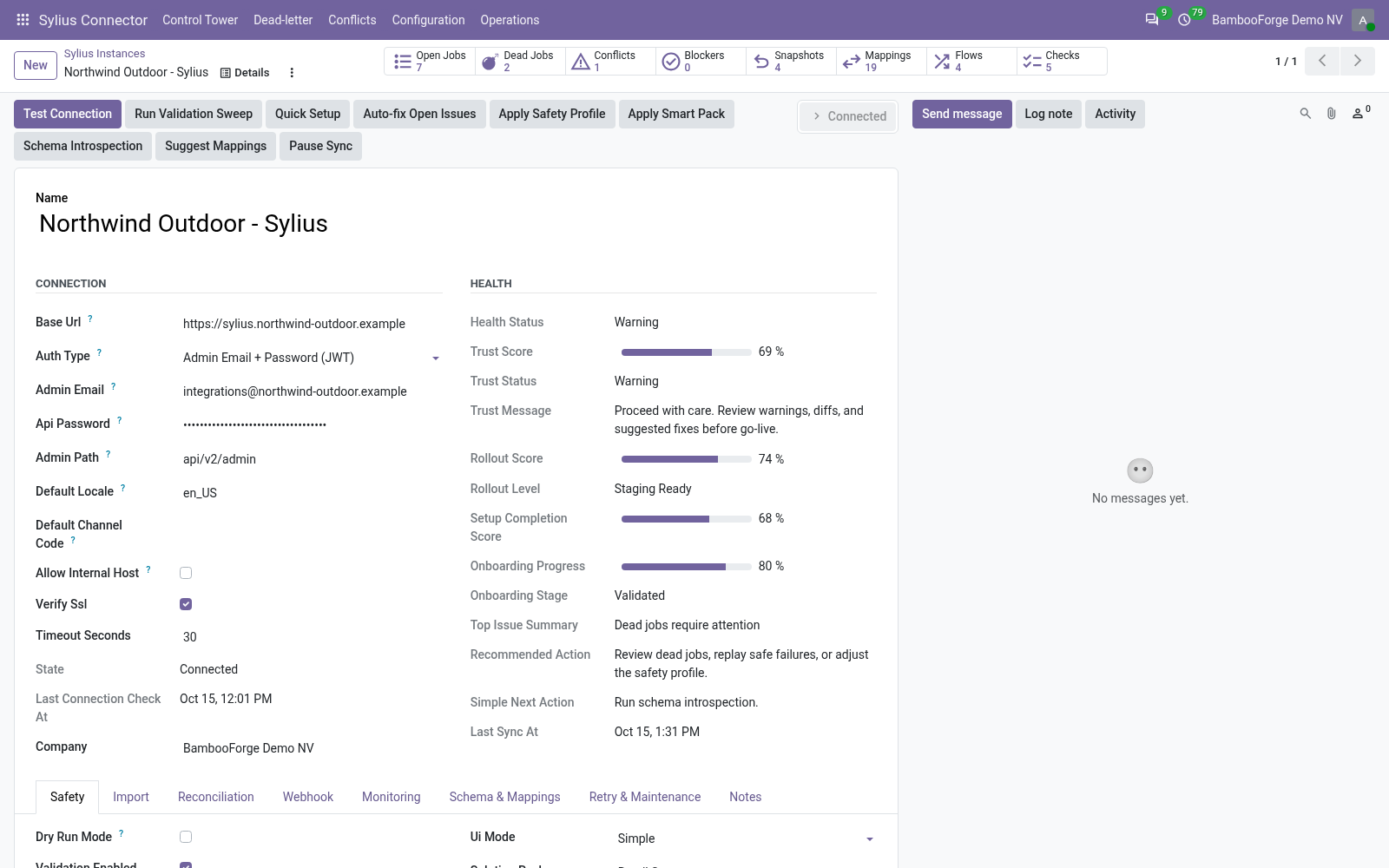
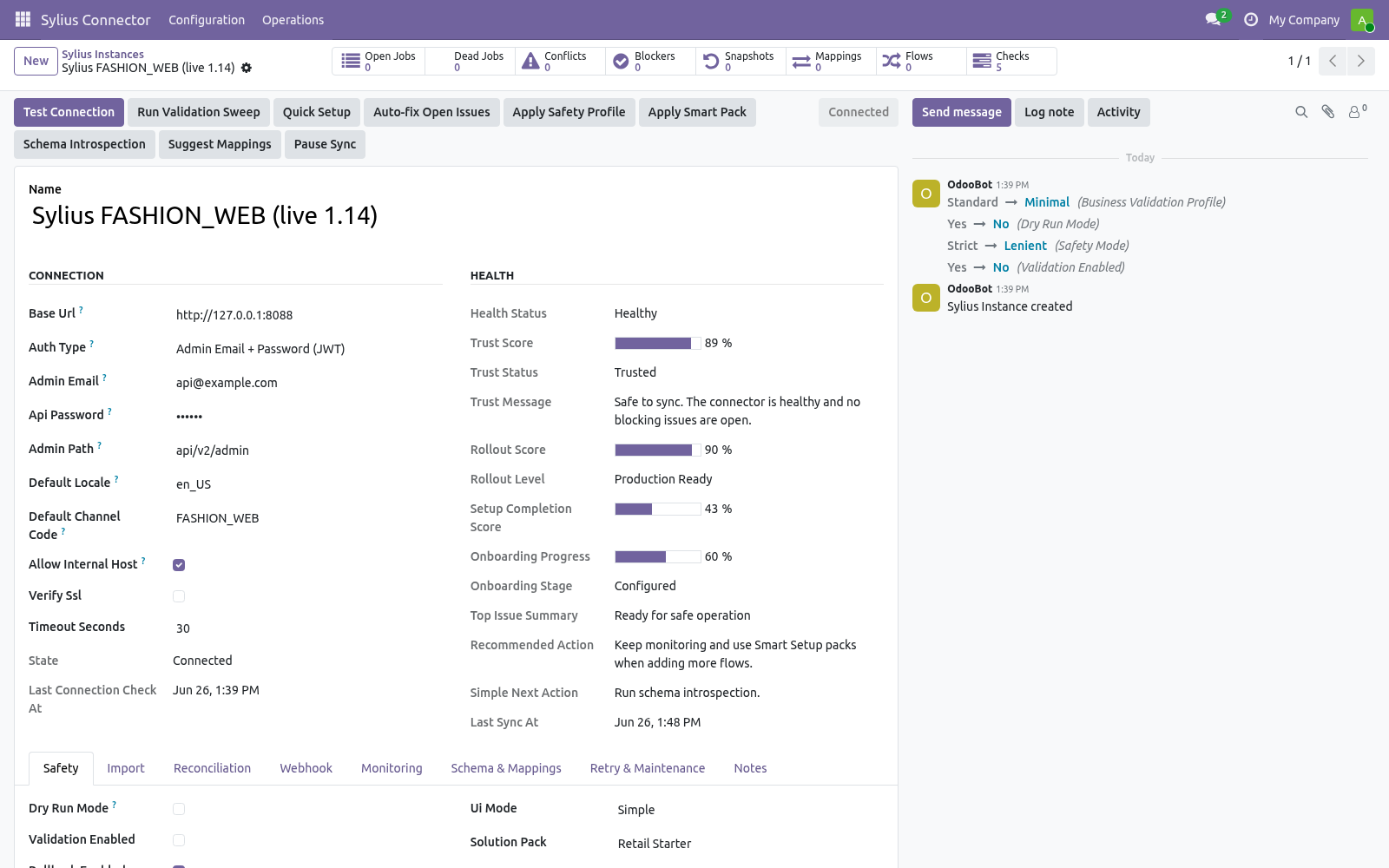
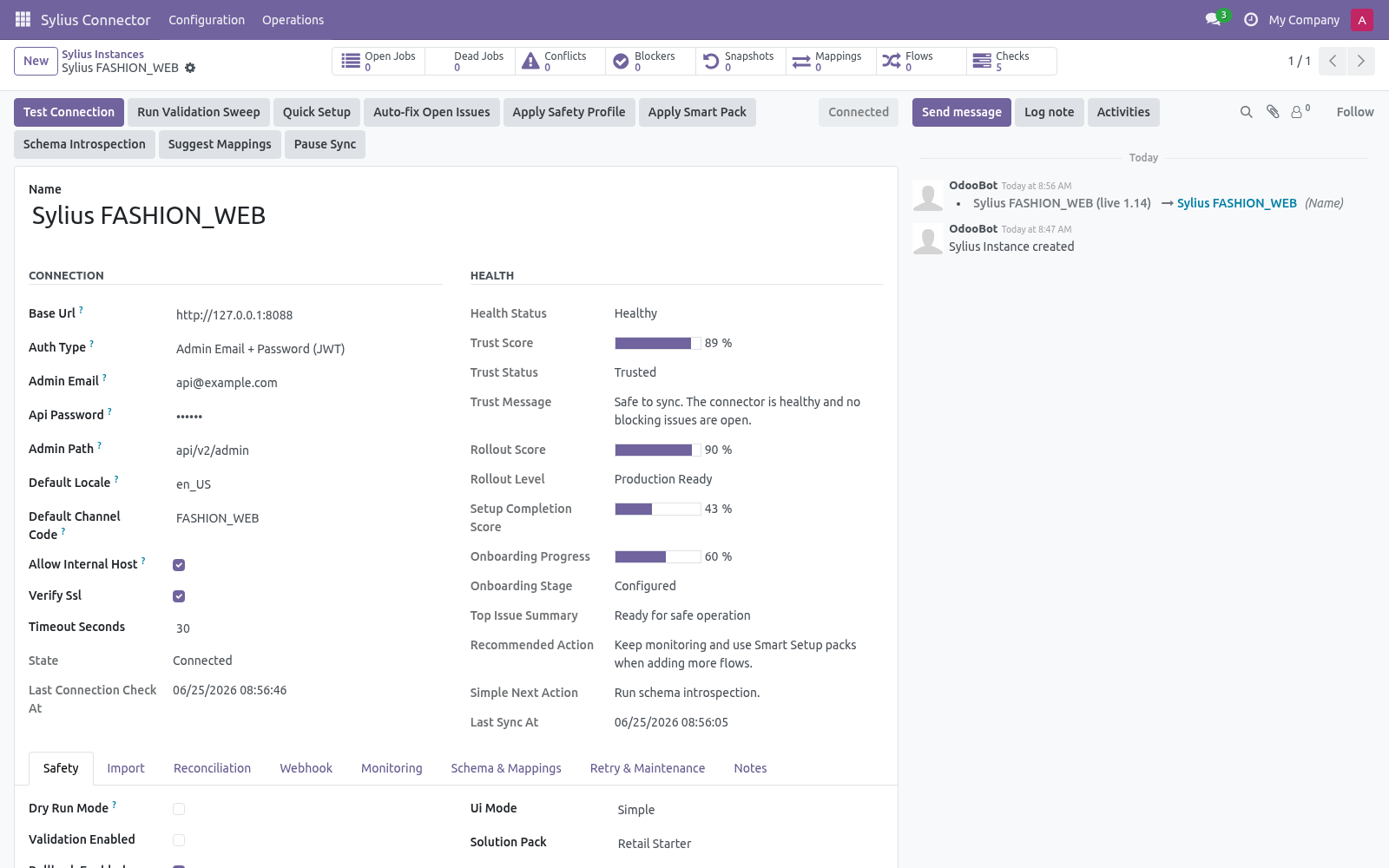
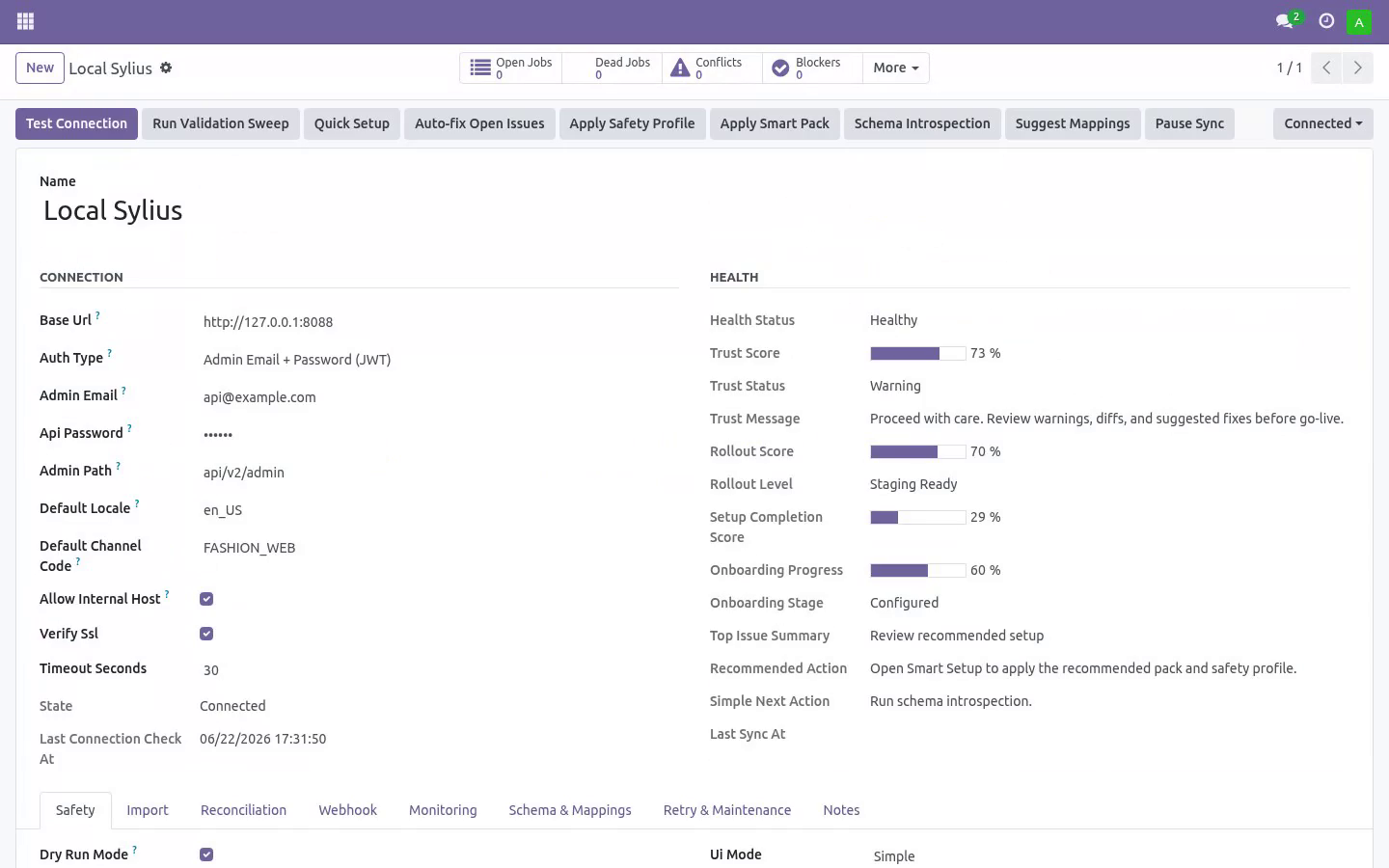
Step 2 — Create the connection in Odoo. Open Sylius Connector ▸ Configuration ▸ Instances and create a record. .. list-table.
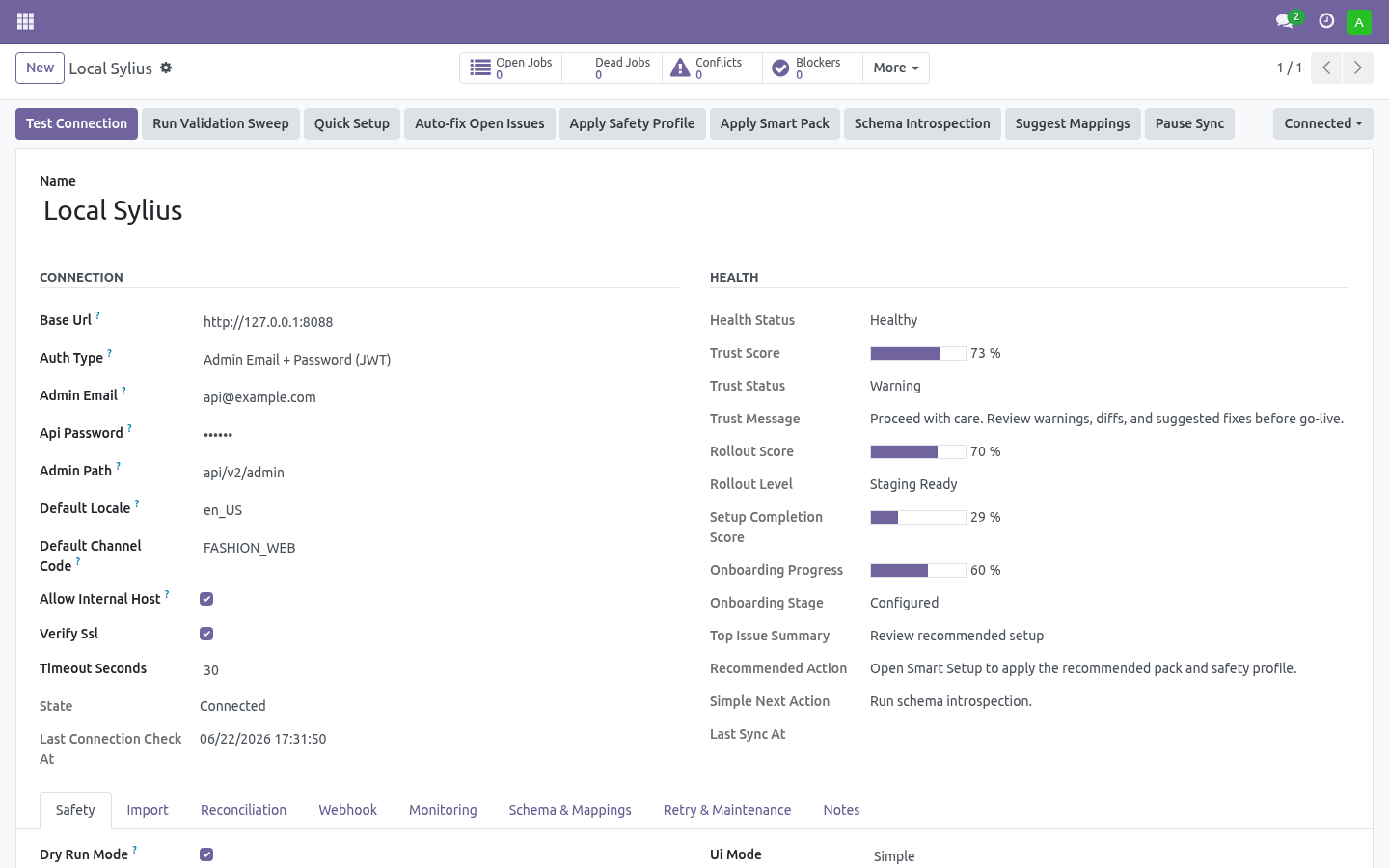
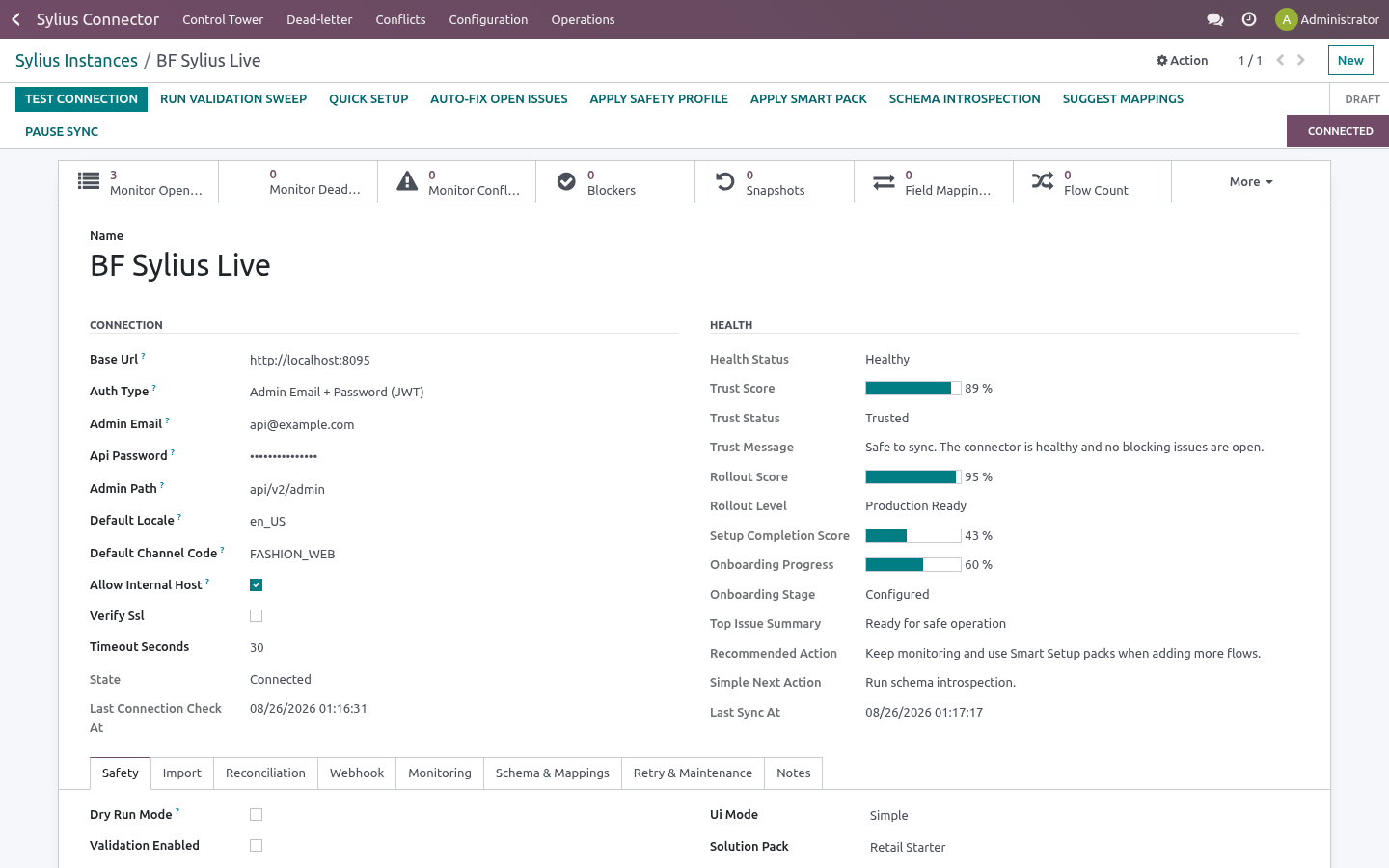
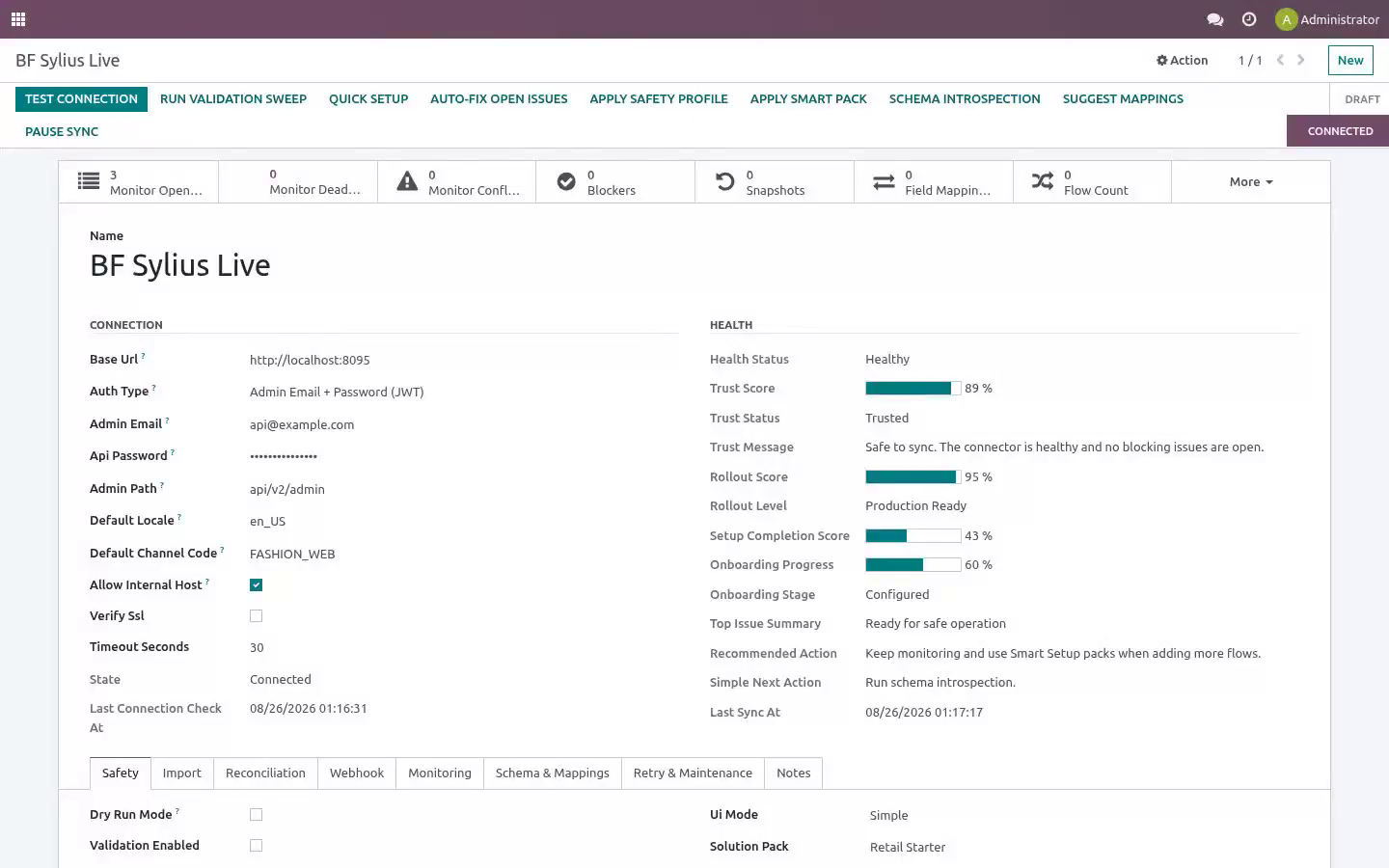
Then click Test Connection. A green Connected state means the credentials and URL are correct (the first successful connect also seeds the default order-state mappings). If it fails, the exact error is shown on the form and recorded in Logs (see Troubleshooting). Step 3 — First sync (dry-run, then live).
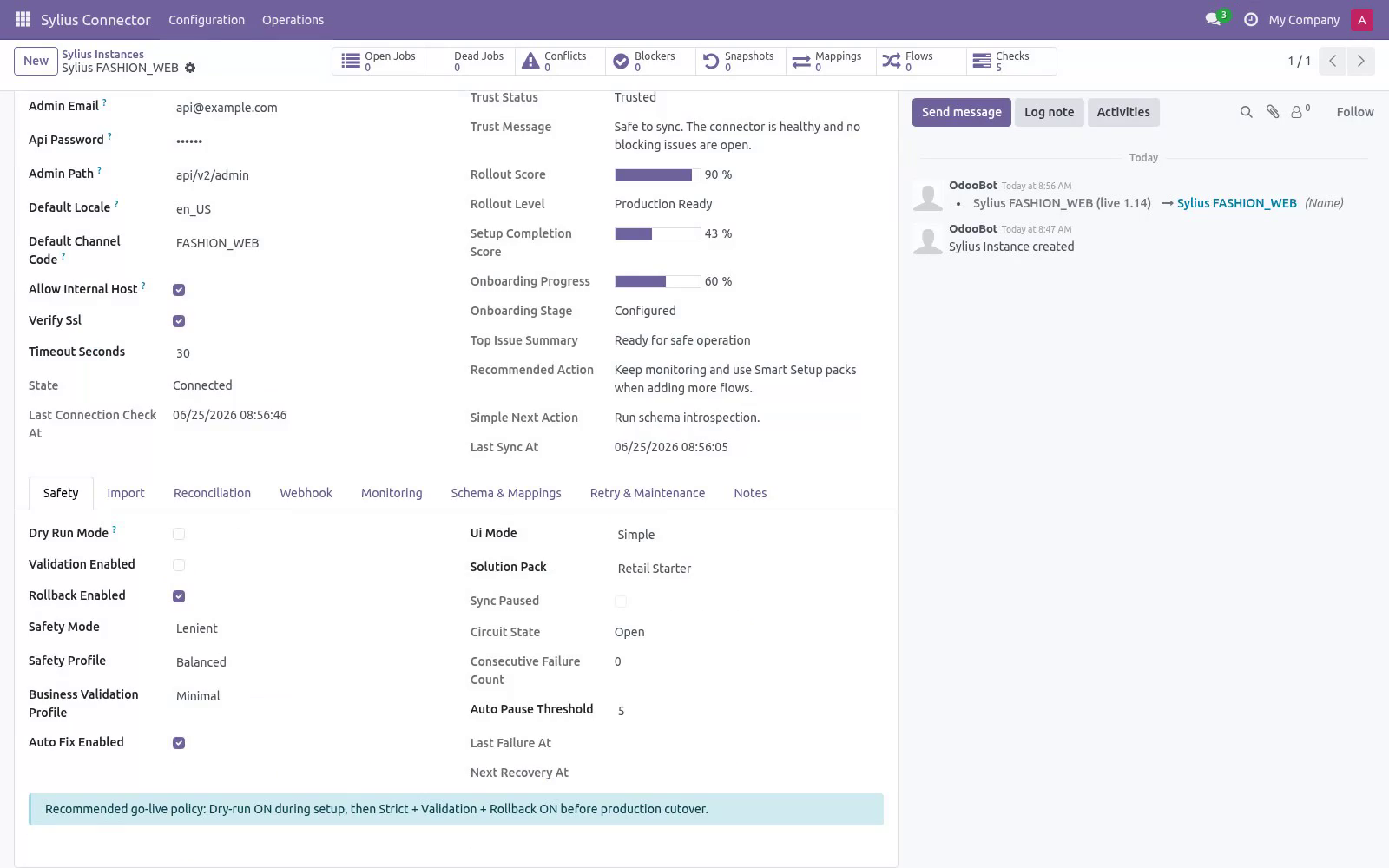
New instances start with Dry-run ON. In dry-run, import and delete jobs simulate writes: instead of changing data they produce Validation Results you can review under Sylius Connector ▸ Operations ▸ Validation Results. This lets you confirm what would happen before anything is written. 1.
On the instance, click Import Products (and/or Import Customers, Import Orders). This enqueues jobs; it does not block the UI. 2. Jobs are processed by the Sylius Queue Processor scheduled action (every minute), or immediately if you run it manually from Operations ▸ Queue Jobs.
3. Review Validation Results while still in dry-run. 4. When satisfied, open the instance, turn Dry-run OFF, and run the imports again to write the records for real.
Order status mapping. Sylius represents an order's lifecycle with a string state slug. Under Configuration ▸ Order State Mappings each instance gets a default table that decides what happens to the Odoo sale order when an order arrives in a given state: .. list-table.
Change any row to Ignore (do nothing), Keep draft, Confirm sale order or Cancel sale order. Unknown/custom states default to Ignore, so a state you have not mapped never triggers a destructive transition. Add a row for any custom state your shop introduces (use the exact Sylius state slug). Field mapping & customization Field Mappings (Configuration) map Sylius fields to Odoo fields per model.
Use Generate suggested mappings on the instance to seed the business-critical ones, then adjust. The mapping board flags fields that need attention. Schema Fields lists the discovered Sylius fields per resource. Run Schema Introspection on the instance to refresh it from your live store.
Stock / images / tax are opt-in toggles on the instance: Sync stock, Sync images (and max images), Upload images on export, Sync taxes (with optional Auto-match taxes on import), Sync refunds (with optional Auto-post refund). They are off by default; turn on only what you need. Automation (scheduled actions & webhooks). The module ships these scheduled actions (Settings ▸ Technical ▸ Scheduled Actions): Delivery URL: https://<your-odoo-domain>/sylius/webhook Signature header: X-Sylius-Signature — an HMAC-SHA256 hex digest of the raw request body, keyed with the instance Webhook Secret (admin-only field on the instance).
.. list-table. Turn on Auto import / Auto reconcile per model on the instance to let the scheduled actions keep things in sync hands-free. Safety features Dry-run mode — simulate writes and review Validation Results before going live.
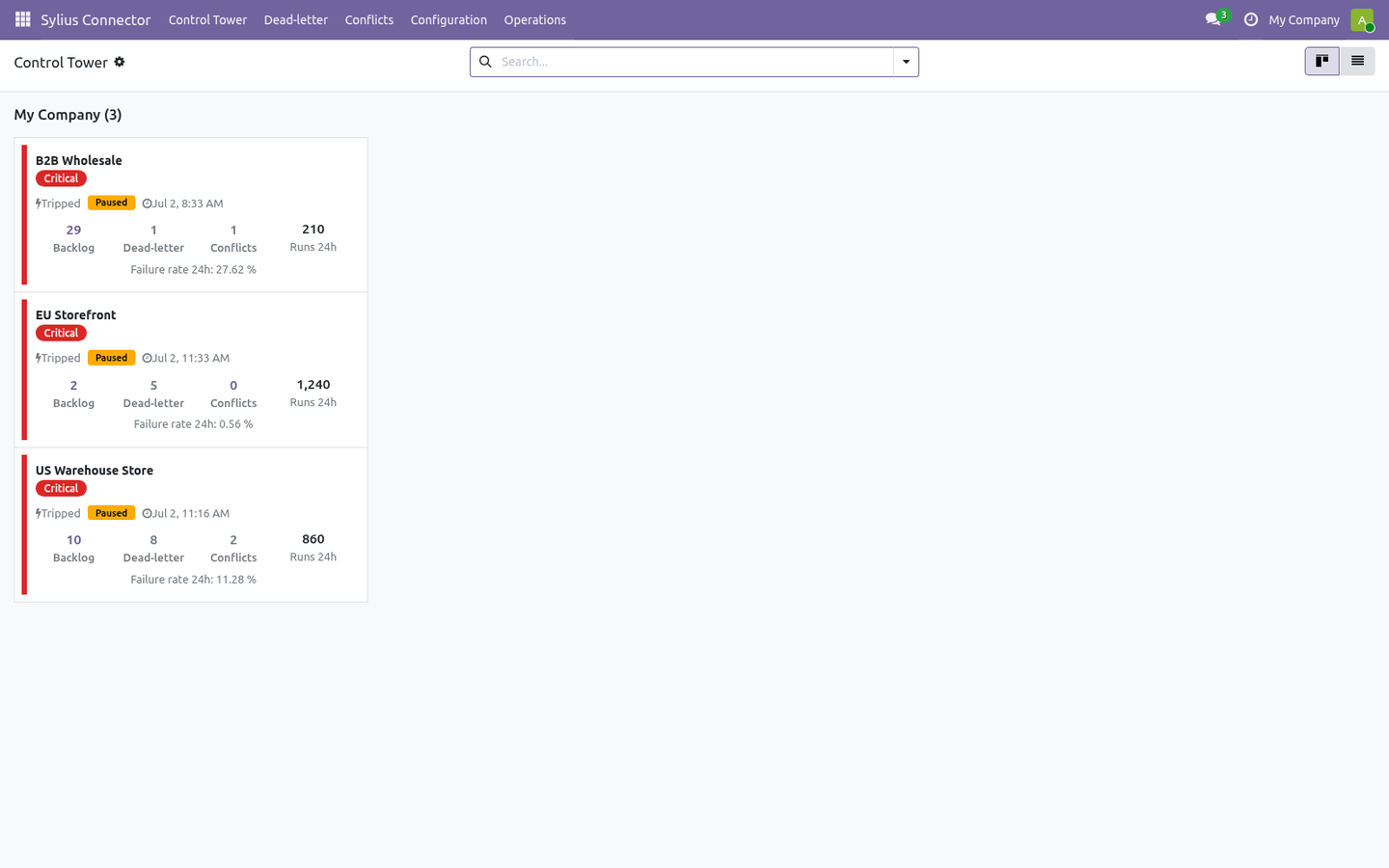
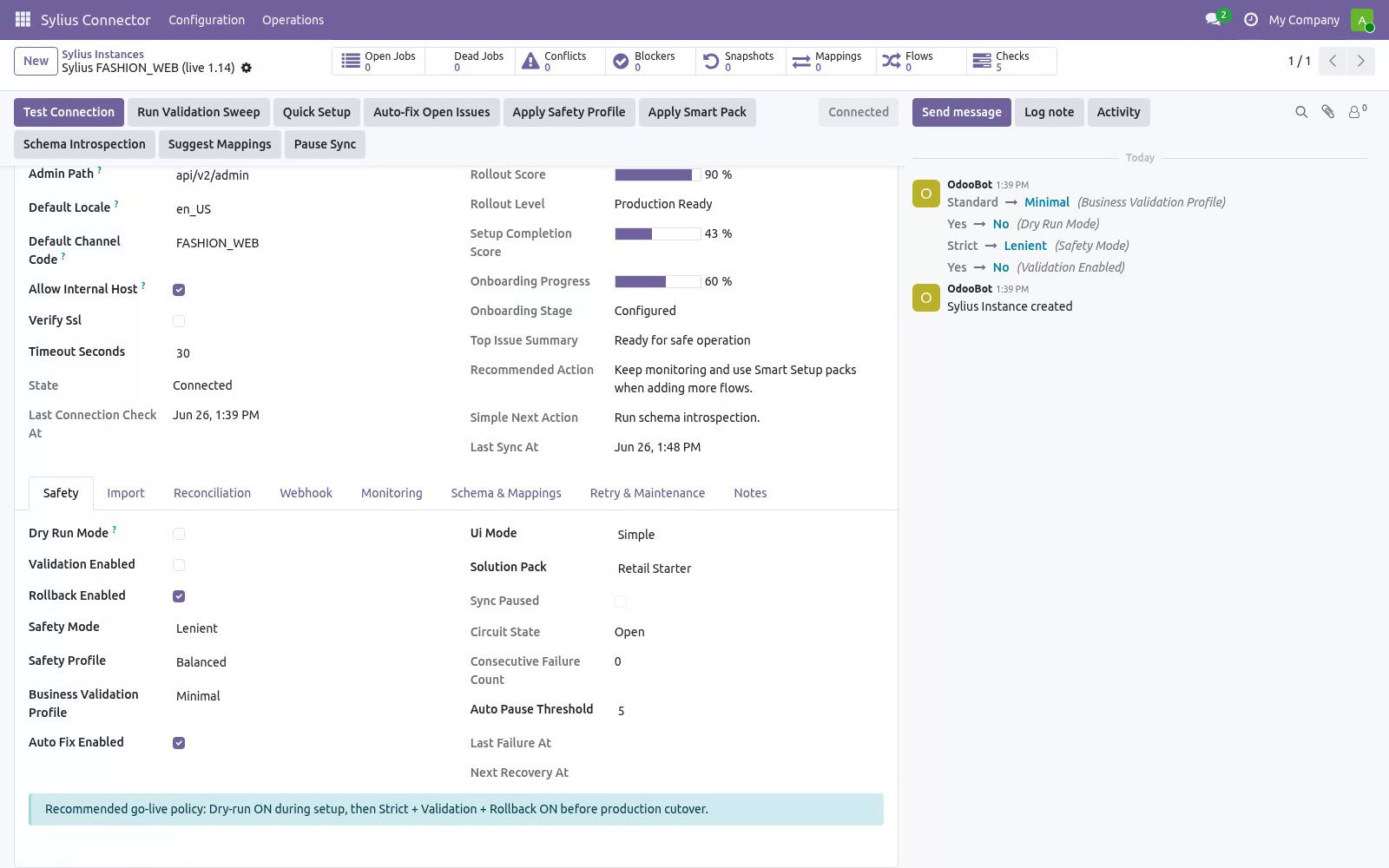
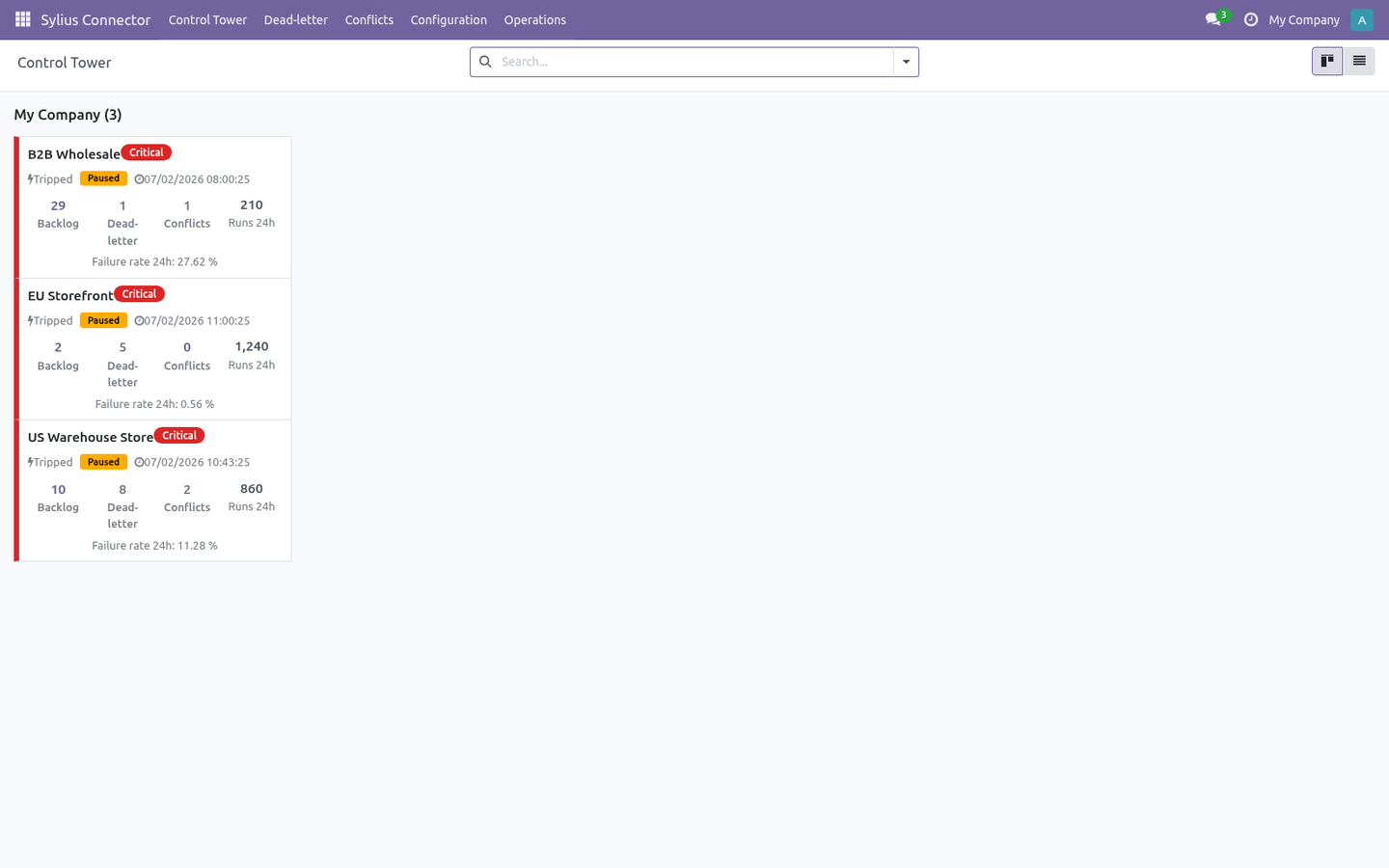
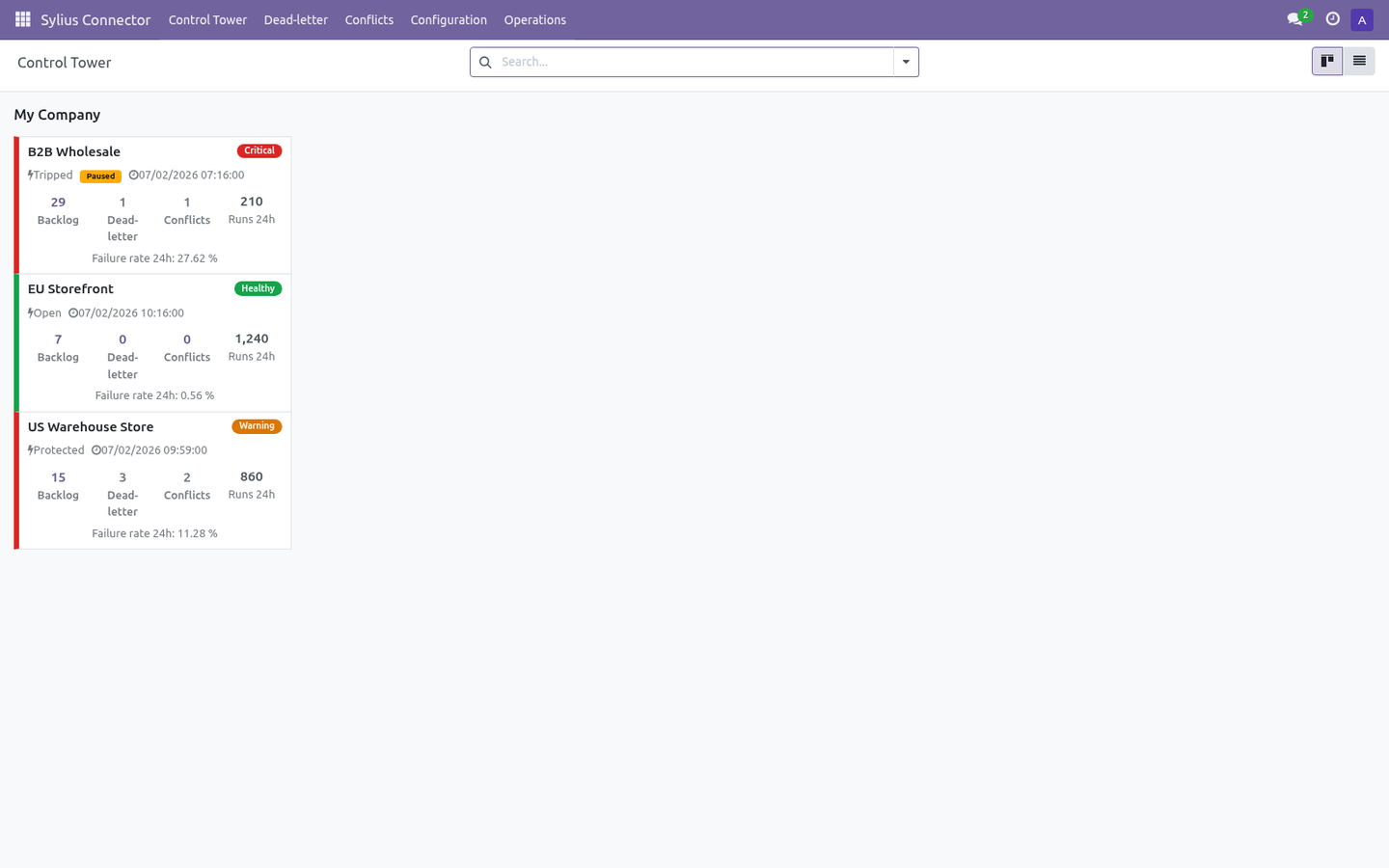
ON by default (Dry-run field). Business validation profiles — Minimal / Standard / Strict gate risky writes. Resilient queue — every remote action is a job with retry and exponential back-off (configurable Retry limit, Backoff policy). Circuit breaker — after repeated failures an instance auto-pauses (Tripped); the Auto Recover action reopens it once Sylius responds again.
Rollback snapshots — when Rollback is enabled, imports capture a snapshot so you can undo a batch from Operations ▸ Rollback Snapshots. SSRF guard — the connector refuses internal/loopback/private hosts unless Allow internal host is explicitly enabled. Signed, fail-closed webhooks — a webhook with no secret, no signature, or a bad signature is rejected; stale/replayed deliveries are dropped. Now the part most videos leave out: what this does not do.
The connector reads products, customers, orders and order slips (refunds) from your Sylius store and writes the corresponding Odoo records. Credentials (admin password / bearer token / webhook secret) are stored in admin-only fields. In scope today: product/customer/order import, product export (incl. optional image upload), order-state mapping, refund discovery, scheduled sync, signed webhooks.
Out of scope / best-effort: tax auto-matching (off by default, name-based, never auto-creates taxes); multi-warehouse stock routing; subscription/booking order types. The complete manual is at docs dot bambooforge dot dev, the demo database is linked from the store page, and support answers within twenty-four hours. Links are in the description.
Transcript of the walkthrough (Odoo 19)
Sylius Connector. Two-way Sylius integration over the Admin API: products, variants, customers, orders, refunds and stock, with a resilient sync queue. The connector keeps Odoo and Sylius in sync over the official Sylius Admin API (API Platform, JSON-LD / Hydra). It covers: In the next few minutes: sylius connector, then matching the storefront total, then step 1 — create a sylius admin api user (jwt), then step 2 — create the connection in odoo, then step 3 — first sync (dry-run, then live).
Then what this app deliberately does not do, so you can tell before you buy whether it fits. Everything lives under Sylius Connector then Control Tower then Dead-letter then Conflicts. Sylius Connector. A two-way bridge between Odoo 19 and your Sylius store: import products (with variants and images), customers and orders, push product changes back, and discover refunds — over the Sylius Admin API (API Platform / JSON-LD, JWT auth), with a resilient job queue, dry-run safety, validation and rollback so you stay in control.
This page is the complete manual. If you follow it top to bottom you can install, connect, run your first sync, automate it, and fix the common issues without contacting support. Matching the storefront total. A storefront charges shipping and grants discounts outside the product lines, so an order rebuilt from those lines alone is worth less than the order the customer paid for: the sale looks smaller than it was and never reconciles against the platform payout.
the shipping charge is imported as its own order line, on a clearly named service product; whatever still separates Odoo from the platform total — platform discounts, fees, rounding — is posted as a single adjustment line rather than dropped; the platform total and the remaining difference are stored on the order and shown on its connector tab; an order that still does not match within Total Tolerance raises a validation warning, so the gap is visible instead of silent. With Match Storefront Totals on the instance (on by default): Step 1 — Create a Sylius Admin API user (JWT). The connector talks to the Sylius Admin API and authenticates with a JSON Web Token (JWT). You provide the connector with an admin email and password; it calls the Sylius administrators/token endpoint, receives a JWT, and sends it as a Authorization: Bearer header on every request.
The token is cached and automatically refreshed when Sylius returns a 401. 1. Open the Administrators section and create (or pick) an admin user the connector will log in as, e.g. odoo@your-store.com.
2. Make sure that admin user holds the ROLE_API_ACCESS role. Without it, Sylius accepts the password but refuses to issue an API token. 3.
Note the admin email and password — that is all the connector needs. Step 2 — Create the connection in Odoo. Open Sylius Connector ▸ Configuration ▸ Instances and create a record. A label for this store, e.g.
My Live Store. Your Sylius server root, e.g. https://store.example.com (or http://localhost:9000 for a local store). - Authentication Admin Email + Password (JWT) for the usual login flow, or Bearer Token to use a pre-issued JWT.
The Sylius admin email from Step 1 (must hold ROLE_API_ACCESS). - Admin Password The Sylius admin password (visible to administrators only). Only for the Bearer Token auth type: a pre-issued JWT (admin-only field). Then click Test Connection.
A green Connected state means the credentials and URL are correct (the first successful connect also seeds the default order-state mappings). If it fails, the exact error is shown on the form and recorded in Logs (see Troubleshooting). Step 3 — First sync (dry-run, then live). New instances start with Dry-run ON.
In dry-run, import and delete jobs simulate writes: instead of changing data they produce Validation Results you can review under Sylius Connector ▸ Operations ▸ Validation Results. This lets you confirm what would happen before anything is written. 1. On the instance, click Import Products (and/or Import Customers, Import Orders).
This enqueues jobs; it does not block the UI. 2. Jobs are processed by the Sylius Queue Processor scheduled action (every minute), or immediately if you run it manually from Operations ▸ Queue Jobs. 3.
Review Validation Results while still in dry-run. 4. When satisfied, open the instance, turn Dry-run OFF, and run the imports again to write the records for real. Order status mapping.
Sylius represents an order's lifecycle with a string state slug. Under Configuration ▸ Order State Mappings each instance gets a default table that decides what happens to the Odoo sale order when an order arrives in a given state: Default Odoo action Confirm sale order Cancel sale order Change any row to Ignore (do nothing), Keep draft, Confirm sale order or Cancel sale order. Unknown/custom states default to Ignore, so a state you have not mapped never triggers a destructive transition. Add a row for any custom state your shop introduces (use the exact Sylius state slug).
Field mapping & customization Field Mappings (Configuration) map Sylius fields to Odoo fields per model. Use Generate suggested mappings on the instance to seed the business-critical ones, then adjust. The mapping board flags fields that need attention. Schema Fields lists the discovered Sylius fields per resource.
Run Schema Introspection on the instance to refresh it from your live store. Stock / images / tax are opt-in toggles on the instance: Sync stock, Sync images (and max images), Upload images on export, Sync taxes (with optional Auto-match taxes on import), Sync refunds (with optional Auto-post refund). They are off by default; turn on only what you need. Automation (scheduled actions & webhooks).
The module ships these scheduled actions (Settings ▸ Technical ▸ Scheduled Actions): - Scheduled action - Sylius Queue Processor Processes queued import/export/delete jobs. - Sylius Reconciliation Pulls recent remote changes for enabled models. - Sylius Maintenance Recovers stale/locked jobs and trims old logs. - Sylius Flow Scheduler Turn on Auto import / Auto reconcile per model on the instance to let the scheduled actions keep things in sync hands-free.
Safety features Dry-run mode — simulate writes and review Validation Results before going live. ON by default (Dry-run field). Business validation profiles — Minimal / Standard / Strict gate risky writes. Resilient queue — every remote action is a job with retry and exponential back-off (configurable Retry limit, Backoff policy).
Circuit breaker — after repeated failures an instance auto-pauses (Tripped); the Auto Recover action reopens it once Sylius responds again. Rollback snapshots — when Rollback is enabled, imports capture a snapshot so you can undo a batch from Operations ▸ Rollback Snapshots. SSRF guard — the connector refuses internal/loopback/private hosts unless Allow internal host is explicitly enabled. Signed, fail-closed webhooks — a webhook with no secret, no signature, or a bad signature is rejected; stale/replayed deliveries are dropped.
Troubleshooting. For anything else, Operations ▸ Logs records every API call, payload and error with a timestamp. - Test Connection fails with "login failed" Wrong admin email/password, or the admin user lacks ROLE_API_ACCESS. Re-check Step 1; Sylius returns 400/401/403 for any of these.
- Token works once then 401 later The JWT expired. With Admin Email + Password auth the connector re-logs-in automatically on a 401. With Bearer Token auth it cannot — paste a fresh token, or switch to email/password auth. - "Bearer token is missing" Auth type is Bearer Token but the Bearer Token field is empty.
Paste a token, or switch to Admin Email + Password. - "Refused internal/private host" Base URL points at localhost/private IP. Enable Allow internal host on the instance (test/self-hosted only). Now the part most videos leave out: what this does not do.
The connector reads products, customers, orders and order slips (refunds) from your Sylius store and writes the corresponding Odoo records. Credentials (admin password / bearer token / webhook secret) are stored in admin-only fields. In scope today: product/customer/order import, product export (incl. optional image upload), order-state mapping, refund discovery, scheduled sync, signed webhooks.
Out of scope / best-effort: tax auto-matching (off by default, name-based, never auto-creates taxes); multi-warehouse stock routing; subscription/booking order types. The complete manual is at docs dot bambooforge dot dev, the demo database is linked from the store page, and support answers within twenty-four hours. Links are in the description.
Transcript of the walkthrough (Odoo 18)
Sylius Connector. Two-way Sylius integration over the Admin API: products, variants, customers, orders, refunds and stock, with a resilient sync queue. The connector keeps Odoo and Sylius in sync over the official Sylius Admin API (API Platform, JSON-LD / Hydra). It covers: In the next few minutes: sylius connector, then matching the storefront total, then step 1 — create a sylius admin api user (jwt), then step 2 — create the connection in odoo, then step 3 — first sync (dry-run, then live).
Then what this app deliberately does not do, so you can tell before you buy whether it fits. Everything lives under Sylius Connector then Control Tower then Dead-letter then Conflicts. Sylius Connector. A two-way bridge between Odoo 18 and your Sylius store: import products (with variants and images), customers and orders, push product changes back, and discover refunds — over the Sylius Admin API (API Platform / JSON-LD, JWT auth), with a resilient job queue, dry-run safety, validation and rollback so you stay in control.
This page is the complete manual. If you follow it top to bottom you can install, connect, run your first sync, automate it, and fix the common issues without contacting support. Matching the storefront total. A storefront charges shipping and grants discounts outside the product lines, so an order rebuilt from those lines alone is worth less than the order the customer paid for: the sale looks smaller than it was and never reconciles against the platform payout.
the shipping charge is imported as its own order line, on a clearly named service product; whatever still separates Odoo from the platform total — platform discounts, fees, rounding — is posted as a single adjustment line rather than dropped; the platform total and the remaining difference are stored on the order and shown on its connector tab; an order that still does not match within Total Tolerance raises a validation warning, so the gap is visible instead of silent. With Match Storefront Totals on the instance (on by default): Step 1 — Create a Sylius Admin API user (JWT). The connector talks to the Sylius Admin API and authenticates with a JSON Web Token (JWT). You provide the connector with an admin email and password; it calls the Sylius administrators/token endpoint, receives a JWT, and sends it as a Authorization: Bearer header on every request.
The token is cached and automatically refreshed when Sylius returns a 401. 1. Open the Administrators section and create (or pick) an admin user the connector will log in as, e.g. odoo@your-store.com.
2. Make sure that admin user holds the ROLE_API_ACCESS role. Without it, Sylius accepts the password but refuses to issue an API token. 3.
Note the admin email and password — that is all the connector needs. Step 2 — Create the connection in Odoo. Open Sylius Connector ▸ Configuration ▸ Instances and create a record. A label for this store, e.g.
My Live Store. Your Sylius server root, e.g. https://store.example.com (or http://localhost:9000 for a local store). - Authentication Admin Email + Password (JWT) for the usual login flow, or Bearer Token to use a pre-issued JWT.
The Sylius admin email from Step 1 (must hold ROLE_API_ACCESS). - Admin Password The Sylius admin password (visible to administrators only). Only for the Bearer Token auth type: a pre-issued JWT (admin-only field). Then click Test Connection.
A green Connected state means the credentials and URL are correct (the first successful connect also seeds the default order-state mappings). If it fails, the exact error is shown on the form and recorded in Logs (see Troubleshooting). Step 3 — First sync (dry-run, then live). New instances start with Dry-run ON.
In dry-run, import and delete jobs simulate writes: instead of changing data they produce Validation Results you can review under Sylius Connector ▸ Operations ▸ Validation Results. This lets you confirm what would happen before anything is written. 1. On the instance, click Import Products (and/or Import Customers, Import Orders).
This enqueues jobs; it does not block the UI. 2. Jobs are processed by the Sylius Queue Processor scheduled action (every minute), or immediately if you run it manually from Operations ▸ Queue Jobs. 3.
Review Validation Results while still in dry-run. 4. When satisfied, open the instance, turn Dry-run OFF, and run the imports again to write the records for real. Order status mapping.
Sylius represents an order's lifecycle with a string state slug. Under Configuration ▸ Order State Mappings each instance gets a default table that decides what happens to the Odoo sale order when an order arrives in a given state: Default Odoo action Confirm sale order Cancel sale order Change any row to Ignore (do nothing), Keep draft, Confirm sale order or Cancel sale order. Unknown/custom states default to Ignore, so a state you have not mapped never triggers a destructive transition. Add a row for any custom state your shop introduces (use the exact Sylius state slug).
Field mapping & customization Field Mappings (Configuration) map Sylius fields to Odoo fields per model. Use Generate suggested mappings on the instance to seed the business-critical ones, then adjust. The mapping board flags fields that need attention. Schema Fields lists the discovered Sylius fields per resource.
Run Schema Introspection on the instance to refresh it from your live store. Stock / images / tax are opt-in toggles on the instance: Sync stock, Sync images (and max images), Upload images on export, Sync taxes (with optional Auto-match taxes on import), Sync refunds (with optional Auto-post refund). They are off by default; turn on only what you need. Automation (scheduled actions & webhooks).
The module ships these scheduled actions (Settings ▸ Technical ▸ Scheduled Actions): - Scheduled action - Sylius Queue Processor Processes queued import/export/delete jobs. - Sylius Reconciliation Pulls recent remote changes for enabled models. - Sylius Maintenance Recovers stale/locked jobs and trims old logs. - Sylius Flow Scheduler Turn on Auto import / Auto reconcile per model on the instance to let the scheduled actions keep things in sync hands-free.
Safety features Dry-run mode — simulate writes and review Validation Results before going live. ON by default (Dry-run field). Business validation profiles — Minimal / Standard / Strict gate risky writes. Resilient queue — every remote action is a job with retry and exponential back-off (configurable Retry limit, Backoff policy).
Circuit breaker — after repeated failures an instance auto-pauses (Tripped); the Auto Recover action reopens it once Sylius responds again. Rollback snapshots — when Rollback is enabled, imports capture a snapshot so you can undo a batch from Operations ▸ Rollback Snapshots. SSRF guard — the connector refuses internal/loopback/private hosts unless Allow internal host is explicitly enabled. Signed, fail-closed webhooks — a webhook with no secret, no signature, or a bad signature is rejected; stale/replayed deliveries are dropped.
Troubleshooting. For anything else, Operations ▸ Logs records every API call, payload and error with a timestamp. - Test Connection fails with "login failed" Wrong admin email/password, or the admin user lacks ROLE_API_ACCESS. Re-check Step 1; Sylius returns 400/401/403 for any of these.
- Token works once then 401 later The JWT expired. With Admin Email + Password auth the connector re-logs-in automatically on a 401. With Bearer Token auth it cannot — paste a fresh token, or switch to email/password auth. - "Bearer token is missing" Auth type is Bearer Token but the Bearer Token field is empty.
Paste a token, or switch to Admin Email + Password. - "Refused internal/private host" Base URL points at localhost/private IP. Enable Allow internal host on the instance (test/self-hosted only). Now the part most videos leave out: what this does not do.
The connector reads products, customers, orders and order slips (refunds) from your Sylius store and writes the corresponding Odoo records. Credentials (admin password / bearer token / webhook secret) are stored in admin-only fields. In scope today: product/customer/order import, product export (incl. optional image upload), order-state mapping, refund discovery, scheduled sync, signed webhooks.
Out of scope / best-effort: tax auto-matching (off by default, name-based, never auto-creates taxes); multi-warehouse stock routing; subscription/booking order types. The complete manual is at docs dot bambooforge dot dev, the demo database is linked from the store page, and support answers within twenty-four hours. Links are in the description.
Transcript of the walkthrough (Odoo 17)
Sylius Connector. Two-way Sylius integration over the Admin API: products, variants, customers, orders, refunds and stock, with a resilient sync queue. The connector keeps Odoo and Sylius in sync over the official Sylius Admin API (API Platform, JSON-LD / Hydra). It covers: In the next few minutes: sylius connector, then matching the storefront total, then step 1 — create a sylius admin api user (jwt), then step 2 — create the connection in odoo, then step 3 — first sync (dry-run, then live).
Then what this app deliberately does not do, so you can tell before you buy whether it fits. Everything lives under Sylius Connector then Control Tower then Dead-letter then Conflicts. Sylius Connector. A two-way bridge between Odoo 17 and your Sylius store: import products (with variants and images), customers and orders, push product changes back, and discover refunds — over the Sylius Admin API (API Platform / JSON-LD, JWT auth), with a resilient job queue, dry-run safety, validation and rollback so you stay in control.
This page is the complete manual. If you follow it top to bottom you can install, connect, run your first sync, automate it, and fix the common issues without contacting support. Matching the storefront total. A storefront charges shipping and grants discounts outside the product lines, so an order rebuilt from those lines alone is worth less than the order the customer paid for: the sale looks smaller than it was and never reconciles against the platform payout.
the shipping charge is imported as its own order line, on a clearly named service product; whatever still separates Odoo from the platform total — platform discounts, fees, rounding — is posted as a single adjustment line rather than dropped; the platform total and the remaining difference are stored on the order and shown on its connector tab; an order that still does not match within Total Tolerance raises a validation warning, so the gap is visible instead of silent. With Match Storefront Totals on the instance (on by default): Step 1 — Create a Sylius Admin API user (JWT). The connector talks to the Sylius Admin API and authenticates with a JSON Web Token (JWT). You provide the connector with an admin email and password; it calls the Sylius administrators/token endpoint, receives a JWT, and sends it as a Authorization: Bearer header on every request.
The token is cached and automatically refreshed when Sylius returns a 401. 1. Open the Administrators section and create (or pick) an admin user the connector will log in as, e.g. odoo@your-store.com.
2. Make sure that admin user holds the ROLE_API_ACCESS role. Without it, Sylius accepts the password but refuses to issue an API token. 3.
Note the admin email and password — that is all the connector needs. Step 2 — Create the connection in Odoo. Open Sylius Connector ▸ Configuration ▸ Instances and create a record. A label for this store, e.g.
My Live Store. Your Sylius server root, e.g. https://store.example.com (or http://localhost:9000 for a local store). - Authentication Admin Email + Password (JWT) for the usual login flow, or Bearer Token to use a pre-issued JWT.
The Sylius admin email from Step 1 (must hold ROLE_API_ACCESS). - Admin Password The Sylius admin password (visible to administrators only). Only for the Bearer Token auth type: a pre-issued JWT (admin-only field). Then click Test Connection.
A green Connected state means the credentials and URL are correct (the first successful connect also seeds the default order-state mappings). If it fails, the exact error is shown on the form and recorded in Logs (see Troubleshooting). Step 3 — First sync (dry-run, then live). New instances start with Dry-run ON.
In dry-run, import and delete jobs simulate writes: instead of changing data they produce Validation Results you can review under Sylius Connector ▸ Operations ▸ Validation Results. This lets you confirm what would happen before anything is written. 1. On the instance, click Import Products (and/or Import Customers, Import Orders).
This enqueues jobs; it does not block the UI. 2. Jobs are processed by the Sylius Queue Processor scheduled action (every minute), or immediately if you run it manually from Operations ▸ Queue Jobs. 3.
Review Validation Results while still in dry-run. 4. When satisfied, open the instance, turn Dry-run OFF, and run the imports again to write the records for real. Order status mapping.
Sylius represents an order's lifecycle with a string state slug. Under Configuration ▸ Order State Mappings each instance gets a default table that decides what happens to the Odoo sale order when an order arrives in a given state: Default Odoo action Confirm sale order Cancel sale order Change any row to Ignore (do nothing), Keep draft, Confirm sale order or Cancel sale order. Unknown/custom states default to Ignore, so a state you have not mapped never triggers a destructive transition. Add a row for any custom state your shop introduces (use the exact Sylius state slug).
Field mapping & customization Field Mappings (Configuration) map Sylius fields to Odoo fields per model. Use Generate suggested mappings on the instance to seed the business-critical ones, then adjust. The mapping board flags fields that need attention. Schema Fields lists the discovered Sylius fields per resource.
Run Schema Introspection on the instance to refresh it from your live store. Stock / images / tax are opt-in toggles on the instance: Sync stock, Sync images (and max images), Upload images on export, Sync taxes (with optional Auto-match taxes on import), Sync refunds (with optional Auto-post refund). They are off by default; turn on only what you need. Automation (scheduled actions & webhooks).
The module ships these scheduled actions (Settings ▸ Technical ▸ Scheduled Actions): - Scheduled action - Sylius Queue Processor Processes queued import/export/delete jobs. - Sylius Reconciliation Pulls recent remote changes for enabled models. - Sylius Maintenance Recovers stale/locked jobs and trims old logs. - Sylius Flow Scheduler Turn on Auto import / Auto reconcile per model on the instance to let the scheduled actions keep things in sync hands-free.
Safety features Dry-run mode — simulate writes and review Validation Results before going live. ON by default (Dry-run field). Business validation profiles — Minimal / Standard / Strict gate risky writes. Resilient queue — every remote action is a job with retry and exponential back-off (configurable Retry limit, Backoff policy).
Circuit breaker — after repeated failures an instance auto-pauses (Tripped); the Auto Recover action reopens it once Sylius responds again. Rollback snapshots — when Rollback is enabled, imports capture a snapshot so you can undo a batch from Operations ▸ Rollback Snapshots. SSRF guard — the connector refuses internal/loopback/private hosts unless Allow internal host is explicitly enabled. Signed, fail-closed webhooks — a webhook with no secret, no signature, or a bad signature is rejected; stale/replayed deliveries are dropped.
Troubleshooting. For anything else, Operations ▸ Logs records every API call, payload and error with a timestamp. - Test Connection fails with "login failed" Wrong admin email/password, or the admin user lacks ROLE_API_ACCESS. Re-check Step 1; Sylius returns 400/401/403 for any of these.
- Token works once then 401 later The JWT expired. With Admin Email + Password auth the connector re-logs-in automatically on a 401. With Bearer Token auth it cannot — paste a fresh token, or switch to email/password auth. - "Bearer token is missing" Auth type is Bearer Token but the Bearer Token field is empty.
Paste a token, or switch to Admin Email + Password. - "Refused internal/private host" Base URL points at localhost/private IP. Enable Allow internal host on the instance (test/self-hosted only). Now the part most videos leave out: what this does not do.
The connector reads products, customers, orders and order slips (refunds) from your Sylius store and writes the corresponding Odoo records. Credentials (admin password / bearer token / webhook secret) are stored in admin-only fields. In scope today: product/customer/order import, product export (incl. optional image upload), order-state mapping, refund discovery, scheduled sync, signed webhooks.
Out of scope / best-effort: tax auto-matching (off by default, name-based, never auto-creates taxes); multi-warehouse stock routing; subscription/booking order types. The complete manual is at docs dot bambooforge dot dev, the demo database is linked from the store page, and support answers within twenty-four hours. Links are in the description.
Transcript of the walkthrough (Odoo 16)
Sylius Connector. Two-way Sylius integration over the Admin API: products, variants, customers, orders, refunds and stock, with a resilient sync queue. The connector keeps Odoo and Sylius in sync over the official Sylius Admin API (API Platform, JSON-LD / Hydra). It covers: In the next few minutes: sylius connector, then matching the storefront total, then step 1 — create a sylius admin api user (jwt), then step 2 — create the connection in odoo, then step 3 — first sync (dry-run, then live).
Then what this app deliberately does not do, so you can tell before you buy whether it fits. Everything lives under Sylius Connector then Control Tower then Dead-letter then Conflicts. Sylius Connector. A two-way bridge between Odoo 17 and your Sylius store: import products (with variants and images), customers and orders, push product changes back, and discover refunds — over the Sylius Admin API (API Platform / JSON-LD, JWT auth), with a resilient job queue, dry-run safety, validation and rollback so you stay in control.
This page is the complete manual. If you follow it top to bottom you can install, connect, run your first sync, automate it, and fix the common issues without contacting support. Matching the storefront total. A storefront charges shipping and grants discounts outside the product lines, so an order rebuilt from those lines alone is worth less than the order the customer paid for: the sale looks smaller than it was and never reconciles against the platform payout.
the shipping charge is imported as its own order line, on a clearly named service product; whatever still separates Odoo from the platform total — platform discounts, fees, rounding — is posted as a single adjustment line rather than dropped; the platform total and the remaining difference are stored on the order and shown on its connector tab; an order that still does not match within Total Tolerance raises a validation warning, so the gap is visible instead of silent. With Match Storefront Totals on the instance (on by default): Step 1 — Create a Sylius Admin API user (JWT). The connector talks to the Sylius Admin API and authenticates with a JSON Web Token (JWT). You provide the connector with an admin email and password; it calls the Sylius administrators/token endpoint, receives a JWT, and sends it as a Authorization: Bearer header on every request.
The token is cached and automatically refreshed when Sylius returns a 401. 1. Open the Administrators section and create (or pick) an admin user the connector will log in as, e.g. odoo@your-store.com.
2. Make sure that admin user holds the ROLE_API_ACCESS role. Without it, Sylius accepts the password but refuses to issue an API token. 3.
Note the admin email and password — that is all the connector needs. Step 2 — Create the connection in Odoo. Open Sylius Connector ▸ Configuration ▸ Instances and create a record. A label for this store, e.g.
My Live Store. Your Sylius server root, e.g. https://store.example.com (or http://localhost:9000 for a local store). - Authentication Admin Email + Password (JWT) for the usual login flow, or Bearer Token to use a pre-issued JWT.
The Sylius admin email from Step 1 (must hold ROLE_API_ACCESS). - Admin Password The Sylius admin password (visible to administrators only). Only for the Bearer Token auth type: a pre-issued JWT (admin-only field). Then click Test Connection.
A green Connected state means the credentials and URL are correct (the first successful connect also seeds the default order-state mappings). If it fails, the exact error is shown on the form and recorded in Logs (see Troubleshooting). Step 3 — First sync (dry-run, then live). New instances start with Dry-run ON.
In dry-run, import and delete jobs simulate writes: instead of changing data they produce Validation Results you can review under Sylius Connector ▸ Operations ▸ Validation Results. This lets you confirm what would happen before anything is written. 1. On the instance, click Import Products (and/or Import Customers, Import Orders).
This enqueues jobs; it does not block the UI. 2. Jobs are processed by the Sylius Queue Processor scheduled action (every minute), or immediately if you run it manually from Operations ▸ Queue Jobs. 3.
Review Validation Results while still in dry-run. 4. When satisfied, open the instance, turn Dry-run OFF, and run the imports again to write the records for real. Order status mapping.
Sylius represents an order's lifecycle with a string state slug. Under Configuration ▸ Order State Mappings each instance gets a default table that decides what happens to the Odoo sale order when an order arrives in a given state: Default Odoo action Confirm sale order Cancel sale order Change any row to Ignore (do nothing), Keep draft, Confirm sale order or Cancel sale order. Unknown/custom states default to Ignore, so a state you have not mapped never triggers a destructive transition. Add a row for any custom state your shop introduces (use the exact Sylius state slug).
Field mapping & customization Field Mappings (Configuration) map Sylius fields to Odoo fields per model. Use Generate suggested mappings on the instance to seed the business-critical ones, then adjust. The mapping board flags fields that need attention. Schema Fields lists the discovered Sylius fields per resource.
Run Schema Introspection on the instance to refresh it from your live store. Stock / images / tax are opt-in toggles on the instance: Sync stock, Sync images (and max images), Upload images on export, Sync taxes (with optional Auto-match taxes on import), Sync refunds (with optional Auto-post refund). They are off by default; turn on only what you need. Automation (scheduled actions & webhooks).
The module ships these scheduled actions (Settings ▸ Technical ▸ Scheduled Actions): - Scheduled action - Sylius Queue Processor Processes queued import/export/delete jobs. - Sylius Reconciliation Pulls recent remote changes for enabled models. - Sylius Maintenance Recovers stale/locked jobs and trims old logs. - Sylius Flow Scheduler Turn on Auto import / Auto reconcile per model on the instance to let the scheduled actions keep things in sync hands-free.
Safety features Dry-run mode — simulate writes and review Validation Results before going live. ON by default (Dry-run field). Business validation profiles — Minimal / Standard / Strict gate risky writes. Resilient queue — every remote action is a job with retry and exponential back-off (configurable Retry limit, Backoff policy).
Circuit breaker — after repeated failures an instance auto-pauses (Tripped); the Auto Recover action reopens it once Sylius responds again. Rollback snapshots — when Rollback is enabled, imports capture a snapshot so you can undo a batch from Operations ▸ Rollback Snapshots. SSRF guard — the connector refuses internal/loopback/private hosts unless Allow internal host is explicitly enabled. Signed, fail-closed webhooks — a webhook with no secret, no signature, or a bad signature is rejected; stale/replayed deliveries are dropped.
Troubleshooting. For anything else, Operations ▸ Logs records every API call, payload and error with a timestamp. - Test Connection fails with "login failed" Wrong admin email/password, or the admin user lacks ROLE_API_ACCESS. Re-check Step 1; Sylius returns 400/401/403 for any of these.
- Token works once then 401 later The JWT expired. With Admin Email + Password auth the connector re-logs-in automatically on a 401. With Bearer Token auth it cannot — paste a fresh token, or switch to email/password auth. - "Bearer token is missing" Auth type is Bearer Token but the Bearer Token field is empty.
Paste a token, or switch to Admin Email + Password. - "Refused internal/private host" Base URL points at localhost/private IP. Enable Allow internal host on the instance (test/self-hosted only). Now the part most videos leave out: what this does not do.
The connector reads products, customers, orders and order slips (refunds) from your Sylius store and writes the corresponding Odoo records. Credentials (admin password / bearer token / webhook secret) are stored in admin-only fields. In scope today: product/customer/order import, product export (incl. optional image upload), order-state mapping, refund discovery, scheduled sync, signed webhooks.
Out of scope / best-effort: tax auto-matching (off by default, name-based, never auto-creates taxes); multi-warehouse stock routing; subscription/booking order types. The complete manual is at docs dot bambooforge dot dev, the demo database is linked from the store page, and support answers within twenty-four hours. Links are in the description.
Key facts
- What it is
- Two-way Sylius integration over the Admin API: products, variants, customers, orders, refunds and stock, with a resilient sync queue.
- For
- eCommerce
- Odoo versions
- 16.0, 17.0, 18.0, 19.0, 20.0 - Community and Enterprise
- Runs on
- Odoo.sh or Odoo you host yourself - not Odoo Online, which accepts no third-party apps
- Price
- 199 EUR, one-time, on the Odoo Apps Store
- Technical name
- bambooforge_sylius_connector
- Run for real
- Tested for real against Sylius 1.13, 1.14 and 2: 87 products, 21 customers and 20 orders came into Odoo in 128 sync jobs with 0 errors, all 20 order totals matching the store.
- Not for
- The connector reads products, customers, orders and order slips (refunds) from your Sylius store and writes the corresponding Odoo records. Credentials (admin password / bearer token / webhook secret) are stored in admin-only fields.; In scope today: product/customer/order import, product export (incl. optional image upload), order-state mapping, refund discovery, scheduled sync, signed webhooks.; Out of scope / best-effort: tax auto-matching (off by default, name-based, never auto-creates taxes); multi-warehouse stock routing; subscription/booking order types.
- Live demo
- https://demo20.bambooforge.dev/odoo/action-bambooforge_sylius_connector.action_sylius_control_tower
- Manual last updated
- 2026-10-15
Sylius Connector
A two-way bridge between Odoo 20 and your Sylius store: import products (with variants and images), customers and orders, push product changes back, and discover refunds — over the Sylius Admin API (API Platform / JSON-LD, JWT auth), with a resilient job queue, dry-run safety, validation and rollback so you stay in control.
This page is the complete manual. If you follow it top to bottom you can install, connect, run your first sync, automate it, and fix the common issues without contacting support.
Matching the storefront total
A storefront charges shipping and grants discounts outside the product lines, so an order rebuilt from those lines alone is worth less than the order the customer paid for: the sale looks smaller than it was and never reconciles against the platform payout.
With Match Storefront Totals on the instance (on by default):
the shipping charge is imported as its own order line, on a clearly named service product;
whatever still separates Odoo from the platform total — platform discounts, fees, rounding — is posted as a single adjustment line rather than dropped;
the platform total and the remaining difference are stored on the order and shown on its connector tab;
an order that still does not match within Total Tolerance raises a validation warning, so the gap is visible instead of silent.
Imported lines deliberately carry no Odoo tax: the storefront has already computed tax and it is kept on the order's own tax amount field. Switch the option off if you would rather Odoo recompute everything from your own price lists and tax rules.
Overview
The connector keeps Odoo and Sylius in sync over the official Sylius Admin API (API Platform, JSON-LD / Hydra). It covers:
Products — import Sylius products into Odoo product templates, following the Hydra variant and taxon IRIs to assemble each product (optionally with stock, images and tax group), and export Odoo product changes back to Sylius.
Customers — import Sylius customers (and their addresses) into Odoo contacts.
Orders — import Sylius orders into Odoo sale orders, mapping each order's Sylius state to a sale-order action (keep draft, confirm, cancel, or ignore).
Refunds — optionally discover Sylius order slips (credit notes) on an order and create matching draft customer credit notes in Odoo.
Direction of sync: Odoo ↔ Sylius (import is the primary flow; product export and webhook-driven updates are supported).
Sylius prices are stored as integer minor units (cents) inside the channel pricing; the connector converts them to Odoo floats. Every remote call goes through a queue: nothing is written to Odoo until a job runs, jobs retry with back-off on transient failures, and a circuit breaker pauses an instance that keeps failing.
Tested against the real thing
Automated tests run against a bundled mock store on every release; the line below is the part no mock can give you - the connector pointed at the real platform, with real records and real order totals.
Tested for real against Sylius 1.13, 1.14 and 2: 87 products, 21 customers and 20 orders came into Odoo in 128 sync jobs with 0 errors, all 20 order totals matching the store.
Requirements
Odoo: 20.0, Community or Enterprise.
Sylius: targets the Sylius Admin API v2 (API Platform, JSON-LD) under /api/v2/admin. Sylius must be reachable from the Odoo server.
Python: no extra libraries beyond a standard Odoo 20 install.
Odoo access: any internal user can use the connector screens. Sylius credentials are stored in system-only fields, so only the Settings / Administration user can read or change the admin password or bearer token.
Network: outbound HTTP(S) from Odoo to your Sylius server. By default the connector refuses internal/loopback/private hosts as an SSRF safeguard (see Safety features).
Installation
Copy bambooforge_sylius_connector into your Odoo addons path.
Restart the Odoo service.
Open Apps, click Update Apps List, search for Sylius, and press Activate / Install. Dependencies (Sales, Contacts, Invoicing, Product) install automatically.
No Sylius store is required to evaluate the connector: a mock Sylius Admin API ships inside the module at <your-odoo-domain>/sylius/mock_api, so you can install, explore and run the full import flow against sample data before pointing it at a real store.
Step 1 — Create a Sylius Admin API user (JWT)
The connector talks to the Sylius Admin API and authenticates with a JSON Web Token (JWT). You provide the connector with an admin email and password; it calls the Sylius administrators/token endpoint, receives a JWT, and sends it as a Authorization: Bearer header on every request. The token is cached and automatically refreshed when Sylius returns a 401.
In your Sylius back office:
Open the Administrators section and create (or pick) an admin user the connector will log in as, e.g. odoo@your-store.com.
Make sure that admin user holds the ROLE_API_ACCESS role. Without it, Sylius accepts the password but refuses to issue an API token.
Note the admin email and password — that is all the connector needs.
Alternatively, if your deployment already issues JWTs out of band, you can paste a pre-issued bearer token instead of an email/password (see Step 2). A pre-issued token is not auto-refreshed; when it expires you must paste a new one.
Step 2 — Create the connection in Odoo
Open Sylius Connector ▸ Configuration ▸ Instances and create a record.
Key fields:
Field |
What to enter |
|---|---|
Name |
A label for this store, e.g. My Live Store. |
Base URL |
Your Sylius server root, e.g. https://store.example.com (or http://localhost:9000 for a local store). |
Authentication |
Admin Email + Password (JWT) for the usual login flow, or Bearer Token to use a pre-issued JWT. |
Admin Email |
The Sylius admin email from Step 1 (must hold ROLE_API_ACCESS). |
Admin Password |
The Sylius admin password (visible to administrators only). |
Bearer Token |
Only for the Bearer Token auth type: a pre-issued JWT (admin-only field). |
Admin API path |
Leave the default api/v2/admin unless your deployment differs. |
Default locale |
Locale used to flatten Sylius translations into Odoo single-language fields, default en_US. |
Default channel code |
Optional Sylius channel code used to pick the variant price (e.g. FASHION_WEB). Empty = first channel pricing found. |
Verify SSL |
Keep on for production. Turn off only for self-signed test certificates. |
Allow internal host |
Off by default. Turn on only to reach a Sylius on localhost or a private network (lowers the SSRF guard — see Safety features). |
Then click Test Connection. A green Connected state means the credentials and URL are correct (the first successful connect also seeds the default order-state mappings). If it fails, the exact error is shown on the form and recorded in Logs (see Troubleshooting).
Tip: use Quick Setup (button on the instance) to pick a use case (catalog only, B2C full sync, …), seed default field mappings and order-state rules, and apply a recommended schedule in one step.
Step 3 — First sync (dry-run, then live)
New instances start with Dry-run ON. In dry-run, import and delete jobs simulate writes: instead of changing data they produce Validation Results you can review under Sylius Connector ▸ Operations ▸ Validation Results. This lets you confirm what would happen before anything is written.
To run a first import:
On the instance, click Import Products (and/or Import Customers, Import Orders). This enqueues jobs; it does not block the UI.
Jobs are processed by the Sylius Queue Processor scheduled action (every minute), or immediately if you run it manually from Operations ▸ Queue Jobs.
Review Validation Results while still in dry-run.
When satisfied, open the instance, turn Dry-run OFF, and run the imports again to write the records for real.
Imported records land in the standard Odoo apps: Sales ▸ Products, Contacts, and Sales ▸ Orders. Each carries its Sylius reference so re-imports update the same record instead of duplicating it.
Order status mapping
Sylius represents an order's lifecycle with a string state slug. Under Configuration ▸ Order State Mappings each instance gets a default table that decides what happens to the Odoo sale order when an order arrives in a given state:
Sylius state |
Default Odoo action |
|---|---|
cart |
Keep draft |
new |
Confirm sale order |
fulfilled |
Confirm sale order |
cancelled |
Cancel sale order |
Change any row to Ignore (do nothing), Keep draft, Confirm sale order or Cancel sale order. Unknown/custom states default to Ignore, so a state you have not mapped never triggers a destructive transition. Add a row for any custom state your shop introduces (use the exact Sylius state slug).
Field mapping & customization
Field Mappings (Configuration) map Sylius fields to Odoo fields per model. Use Generate suggested mappings on the instance to seed the business-critical ones, then adjust. The mapping board flags fields that need attention.
Schema Fields lists the discovered Sylius fields per resource. Run Schema Introspection on the instance to refresh it from your live store.
Stock / images / tax are opt-in toggles on the instance: Sync stock, Sync images (and max images), Upload images on export, Sync taxes (with optional Auto-match taxes on import), Sync refunds (with optional Auto-post refund). They are off by default; turn on only what you need.
Automation (scheduled actions & webhooks)
The module ships these scheduled actions (Settings ▸ Technical ▸ Scheduled Actions):
Scheduled action |
Default |
Purpose |
|---|---|---|
Sylius Queue Processor |
every 1 min |
Processes queued import/export/delete jobs. |
Sylius Reconciliation |
every 15 min |
Pulls recent remote changes for enabled models. |
Sylius Maintenance |
every 1 hr |
Recovers stale/locked jobs and trims old logs. |
Sylius Flow Scheduler |
every 5 min |
Runs scheduled sync flows. |
Sylius Flow Metrics |
every 1 hr |
Aggregates flow-run metrics. |
Sylius Auto Recover |
every 15 min |
Reopens a tripped circuit breaker once the store is healthy. |
Turn on Auto import / Auto reconcile per model on the instance to let the scheduled actions keep things in sync hands-free.
Real-time webhooks (optional): point a Sylius webhook (or your own emitter) at:
Delivery URL: https://<your-odoo-domain>/sylius/webhook
Signature header: X-Sylius-Signature — an HMAC-SHA256 hex digest of the raw request body, keyed with the instance Webhook Secret (admin-only field on the instance).
Each payload must include a signed emitted_at timestamp. Odoo verifies the HMAC-SHA256 signature, rejects stale or replayed deliveries, and enqueues a safe import (or delete). Without webhooks the scheduled reconciliation still keeps data current.
Safety features
Dry-run mode — simulate writes and review Validation Results before going live. ON by default (Dry-run field).
Business validation profiles — Minimal / Standard / Strict gate risky writes.
Resilient queue — every remote action is a job with retry and exponential back-off (configurable Retry limit, Backoff policy).
Circuit breaker — after repeated failures an instance auto-pauses (Tripped); the Auto Recover action reopens it once Sylius responds again.
Rollback snapshots — when Rollback is enabled, imports capture a snapshot so you can undo a batch from Operations ▸ Rollback Snapshots.
SSRF guard — the connector refuses internal/loopback/private hosts unless Allow internal host is explicitly enabled.
Signed, fail-closed webhooks — a webhook with no secret, no signature, or a bad signature is rejected; stale/replayed deliveries are dropped.
Where Sylius shows up in Odoo
The connector stays out of the way on records that have nothing to do with Sylius:
Sales orders - the Sylius tab, Queue Sylius Export and Sylius Binding appear only on orders that came from Sylius, are bound to Sylius, or belong to a customer bound to Sylius.
Products and contacts - the Sylius tab appears once an active Sylius connection exists; the Sylius Binding button inside it appears once the record is bound.
List views, the sync queue and the control tower are unchanged.
Troubleshooting
Symptom |
Cause and fix |
|---|---|
Test Connection fails with "login failed" |
Wrong admin email/password, or the admin user lacks ROLE_API_ACCESS. Re-check Step 1; Sylius returns 400/401/403 for any of these. |
Token works once then 401 later |
The JWT expired. With Admin Email + Password auth the connector re-logs-in automatically on a 401. With Bearer Token auth it cannot — paste a fresh token, or switch to email/password auth. |
"Bearer token is missing" |
Auth type is Bearer Token but the Bearer Token field is empty. Paste a token, or switch to Admin Email + Password. |
"Refused internal/private host" |
Base URL points at localhost/private IP. Enable Allow internal host on the instance (test/self-hosted only). |
SSL errors on Test Connection |
Self-signed certificate. Use a valid cert, or turn off Verify SSL for testing only. |
Orders import but never confirm |
The order's Sylius state is mapped to Keep draft or Ignore. Adjust Order State Mappings. |
Webhook returns 401 "Invalid signature." |
The instance Webhook Secret is empty, or the X-Sylius-Signature HMAC-SHA256 of the raw body does not match. Set the secret on both sides. |
Webhook returns 400 "Stale webhook" / "in the future" |
The signed emitted_at is more than 15 min old or 5 min ahead. Sync the clocks on the Sylius and Odoo hosts. |
Jobs stay in Pending |
The Queue Processor is off or the instance is paused. Check Scheduled Actions is active and the instance is not Paused. |
Instance shows Tripped |
Circuit breaker tripped after repeated failures. Fix the store/credentials; Auto Recover reopens it, or click Resume. |
Records imported twice |
Imports are keyed by the Sylius reference, so this should not happen. If it does, check that two instances do not point at the same store. |
Nothing happens after Import |
You are in Dry-run. Review Validation Results, then turn dry-run off and re-run. |
For anything else, Operations ▸ Logs records every API call, payload and error with a timestamp.
Frequently asked questions
Which versions are supported? Odoo 20.0 on the Odoo side. On the store side the connector targets the Sylius Admin API v2 (API Platform, JSON-LD) under /api/v2/admin. Validate your exact build with the bundled mock first.
Do I need Sylius installed to evaluate it? No. A mock Sylius Admin API ships inside at <your-odoo-domain>/sylius/mock_api, so you can install, explore and demo the full import flow before connecting a real store.
How does authentication work? The connector calls the Sylius administrators/token endpoint with an admin email and password to obtain a JWT, then sends it as Authorization: Bearer on every request. The admin user must hold ROLE_API_ACCESS. The token is cached and refreshed automatically on a 401. You can also paste a pre-issued bearer token instead.
How does real-time sync work? Point a Sylius webhook at /sylius/webhook with the shared Webhook Secret and the X-Sylius-Signature HMAC-SHA256 header; Odoo verifies the signature, guards against replays, and enqueues a safe import. Without it, scheduled reconciliation keeps things in sync.
Is it safe to run against production data? Dry-run is ON by default, validation blocks risky writes, and rollback snapshots let you undo. You decide when to go live.
What support and refund policy do I get? Every request is answered within 24 hours, setup help included. If you report a bug within 2 months of purchase and it is not resolved within 15 days, you are entitled to a full money-back refund.
Data, privacy & limits
The connector reads products, customers, orders and order slips (refunds) from your Sylius store and writes the corresponding Odoo records. Credentials (admin password / bearer token / webhook secret) are stored in admin-only fields.
In scope today: product/customer/order import, product export (incl. optional image upload), order-state mapping, refund discovery, scheduled sync, signed webhooks.
Out of scope / best-effort: tax auto-matching (off by default, name-based, never auto-creates taxes); multi-warehouse stock routing; subscription/booking order types.
Support & updates
Support: support@bambooforge.dev — answered within 24 hours, setup help included.
Refund: report a bug within 2 months of purchase; if unresolved within 15 days, full refund.
Full source is included. Updates track the supported Odoo 20 / Sylius Admin API v2 line.
Upgrading & version compatibility
This build targets Odoo 20.0. Each Odoo major series (16.0, 17.0, 18.0, 19.0, 20.0) has its own dedicated build of this module — always install the build that matches your Odoo version. Mixing a build with a different Odoo series is not supported.
Patch upgrades (same series, e.g. 20.0.1.0.0 → later)
Back up your database and filestore first.
Replace the module folder with the newer build.
Restart Odoo with the module updated:
./odoo-bin -c your.conf -u bambooforge_sylius_connector -d your_db
Odoo applies any schema/data changes automatically. Your existing records and configuration are preserved.
Cross-version migration (moving to a newer Odoo)
Upgrading Odoo itself is a database migration handled by Odoo's standard upgrade tooling. When you migrate the database to the next Odoo series, install the matching build of this module for that series. Data created by this module carries over with the database migration.
After any upgrade the module's scheduled actions resume on their normal cadence — no manual re-activation is required.
Uninstallation
You can remove this module at any time from Apps → (this module) → Uninstall, or from the command line. Uninstalling is clean and reversible by reinstalling — but note what is and is not deleted.
What is removed
The module's own tables and every record in them (20 models, prefixed sylius.*) — this is the data this module created.
The menus, actions, views and reports this module installed.
Its scheduled actions (cron jobs) — they stop immediately on uninstall.
Connection records, credentials, field mappings, queue jobs and sync logs stored in Odoo.
What is preserved
Your remote platform is never touched. Uninstalling only removes the Odoo-side connector; products, customers and orders on the external store/service are untouched.
Records already imported into standard Odoo models (e.g. contacts, products, sales orders) remain — they are ordinary Odoo records once created.
Attachments and chatter messages on standard records are kept.
As always, take a database backup before uninstalling in production.
Changelog
20.0.1.2.4
Built for Odoo 20: record rules and access rights rewritten onto Odoo 20's single ir.access model, the screens rebuilt on Owl 3, and every icon moved to the icon set Odoo 20 ships.
20.0.1.0.0
Current release for Odoo 20.0. This build includes:
Two-way Odoo 20 <-> Sylius connector: products, variants, customers, orders and refunds over the Sylius Admin API (API Platform / JWT).
Two-way stock sync, live Sync Control Tower, resilient queue and dry-run safety.
Feature additions and fixes ship as new builds on the Odoo Apps store; this page and the module's version reflect the current published release. Always keep the build matched to your Odoo series (see Upgrading & version compatibility).
How we make sure it works
Before every release, 94 automated checks run against this app on Odoo 16, 17, 18, 19 and 20. Among them:
Nothing at all is an empty row not a crash.
A product shows its binding button only once bound.
Import to odoo true but dry run never moves stock.
The queue only calls mapper methods that exist.
A plain order shows no sylius buttons.
Tested for real against Sylius 1.13, 1.14 and 2: 87 products, 21 customers and 20 orders came into Odoo in 128 sync jobs with 0 errors, all 20 order totals matching the store.
The complete list is in the source you receive.