 BambooForge Labs
Subscription Billing & Recurring Invoices
Recurring invoicing on Odoo Community: plans, subscriptions, a nightly billing job, and a record of every period billed so it cannot bill twice.
Available for Odoo 16.0, Odoo 17.0, Odoo 18.0, Odoo 19.0, Odoo 20.0. Technical name bambooforge_subscription.
Transcript of the walkthrough (Odoo 20)
Subscription Billing & Recurring Invoices. Recurring invoicing on Odoo Community: plans, subscriptions, a nightly billing job, and a record of every period billed so it cannot bill twice. Odoo's subscriptions are Enterprise. Community can raise an invoice, and that is where it stops — so anybody billing monthly on Community is either duplicating a sale order twelve times a year, or running a spreadsheet next to Odoo and remembering.
In the next few minutes: subscription billing & recurring invoices, then the hard part is not the recurrence, then the nightly job, then usage, billed in arrears, then a plan or a price changed mid-period. Then what this app deliberately does not do, so you can tell before you buy whether it fits. Everything lives under Subscriptions then Subscription Plans then Subscription Usage then Subscription Coupons. 1.
Copy bambooforge_subscription into your addons path and update the app list, or install the ZIP from the Odoo Apps Store. 2. Install Subscription Billing & Recurring Invoices. 3.
Open Subscriptions - its menus are Subscription Plans. Subscription Billing & Recurring Invoices. Odoo's subscriptions are Enterprise. Community can raise an invoice, and that is where it stops — so anybody billing monthly on Community is either duplicating a sale order twelve times a year, or running a spreadsheet next to Odoo and remembering.
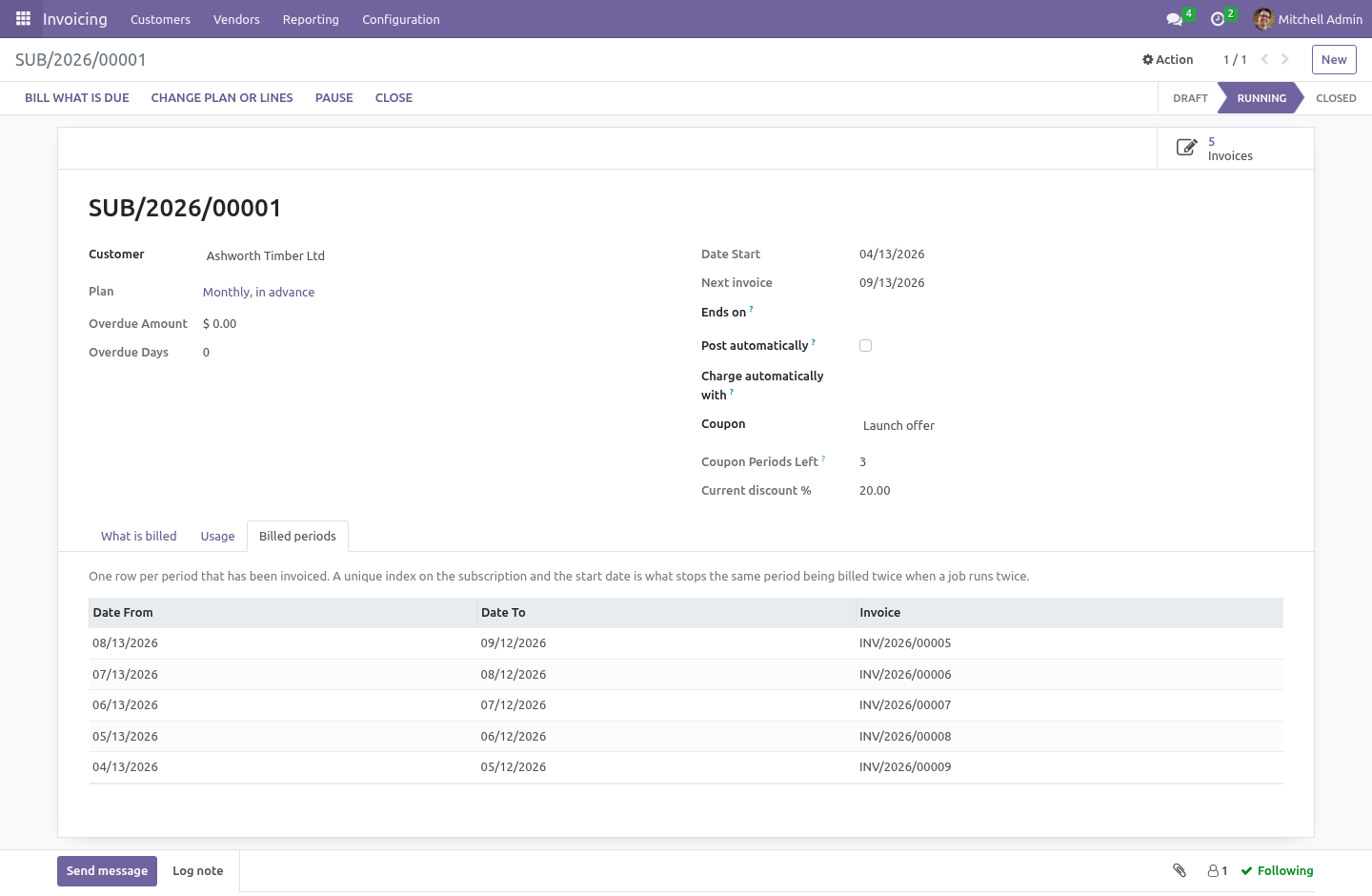
The hard part is not the recurrence. It is that a job which runs twice must not bill the customer twice. And jobs do run twice. A retry after a timeout.
Two crons overlapping because the first was slow. An administrator pressing Bill what is due while the scheduler is halfway through the list. The nightly job. It commits one subscription at a time.
A failure on the fortieth does not undo the thirty-nine before it; the one that failed is written up on its own chatter and tried again tomorrow. Committing as it goes is only safe because of the index: a re-run cannot bill a period that already has a row, so there is nothing to lose by having kept the earlier ones. Usage, billed in arrears. Tick Usage on a line and its quantity comes from the readings recorded for it, not from the line.
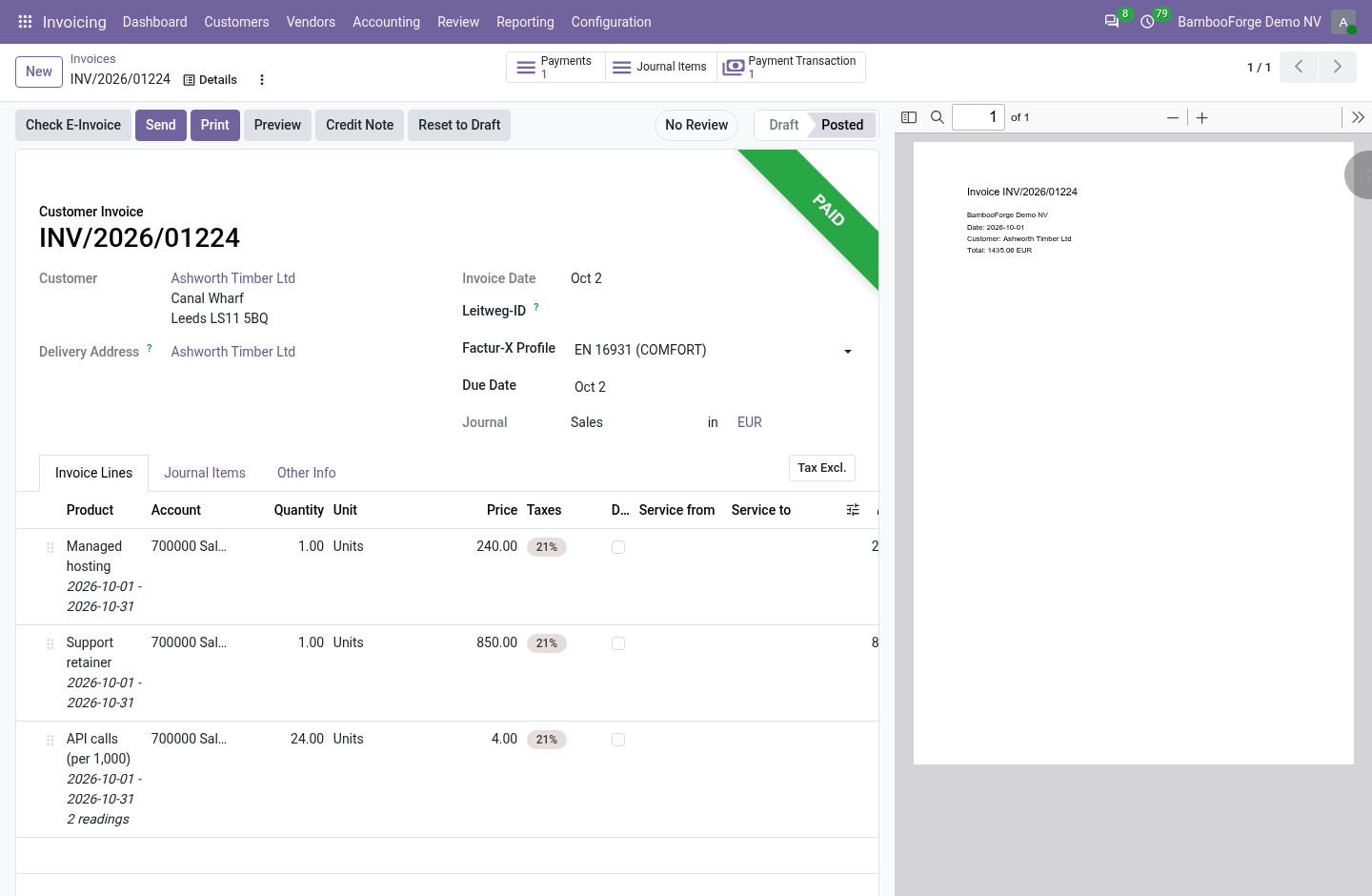
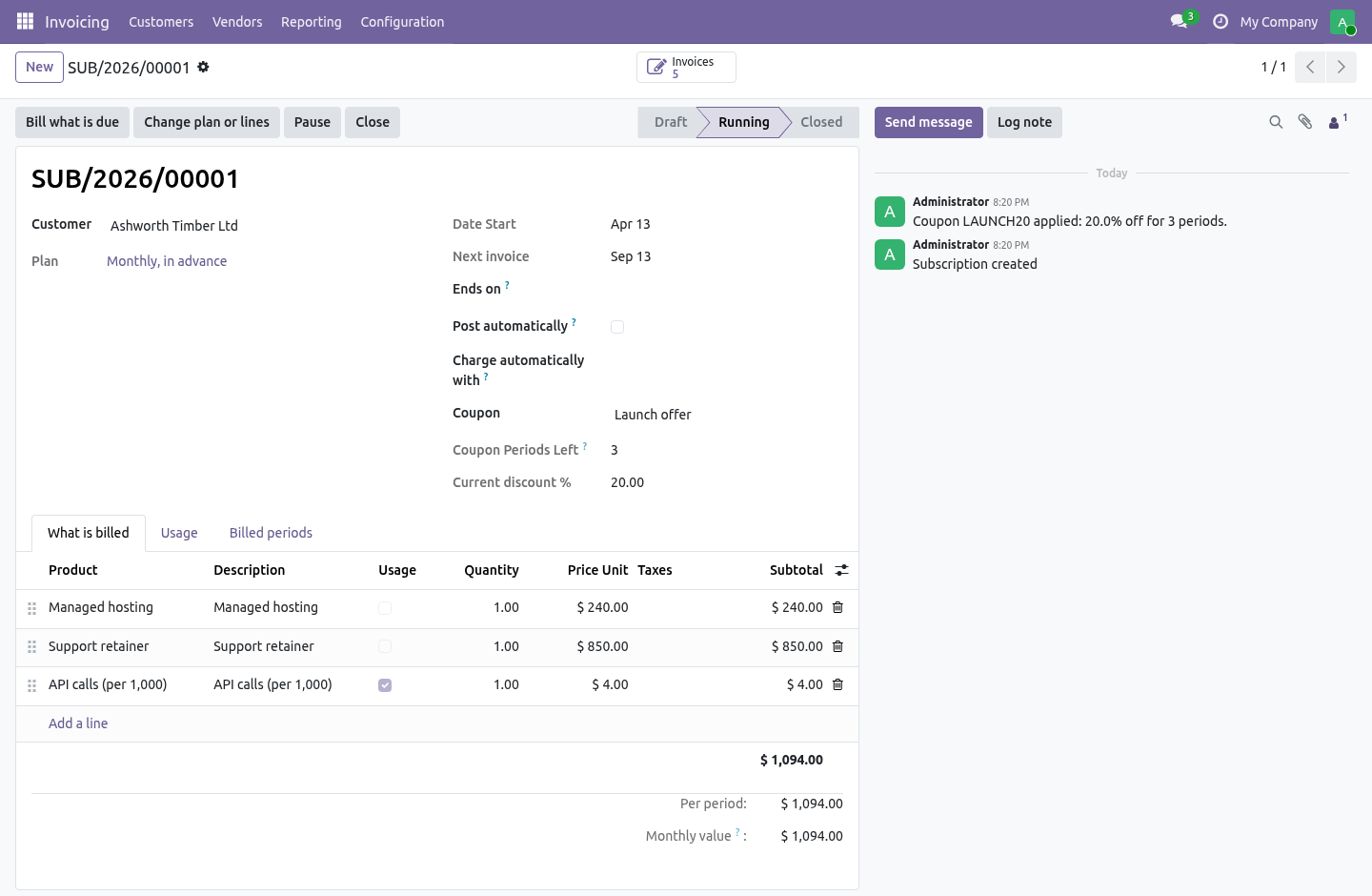
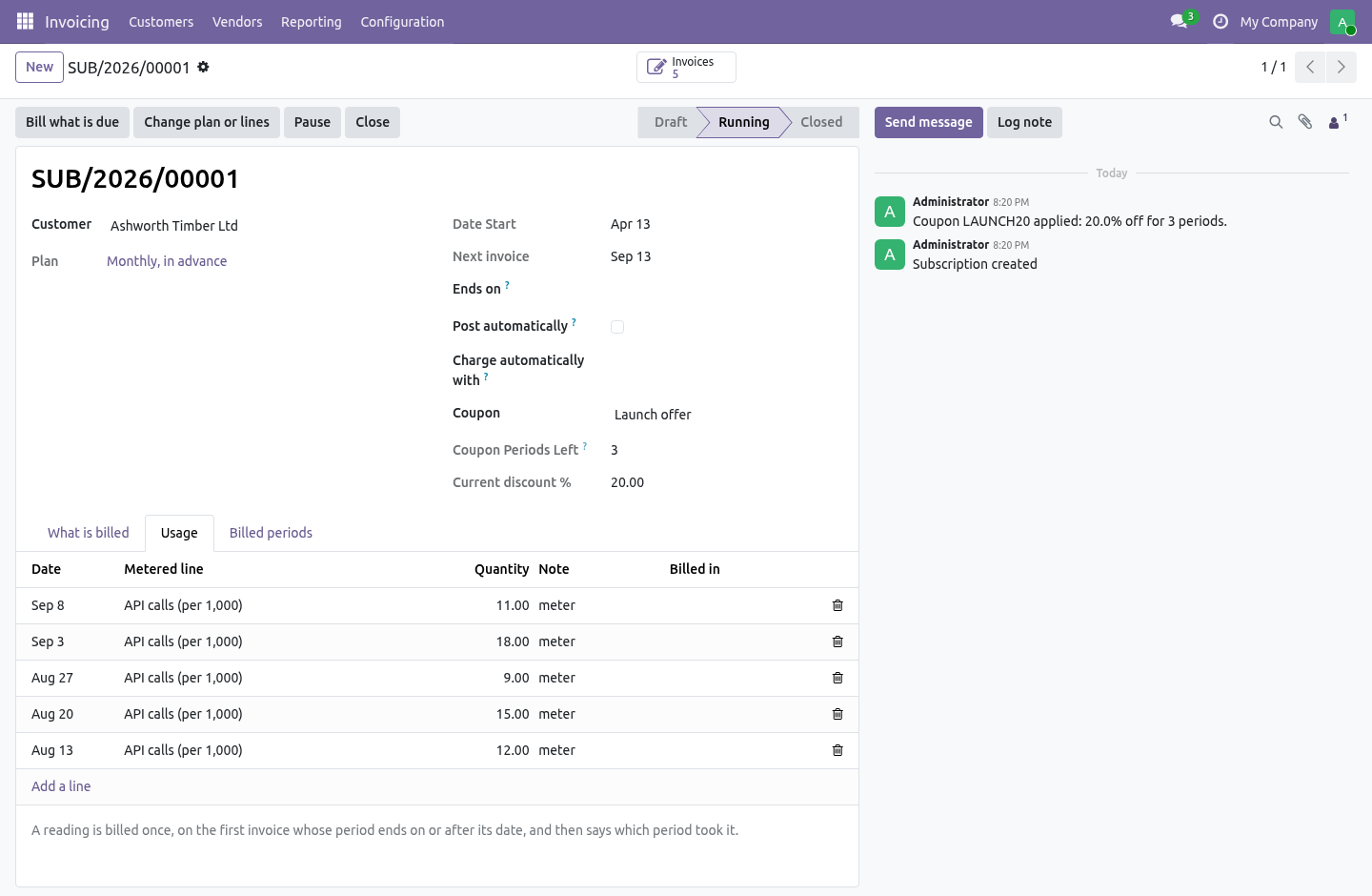
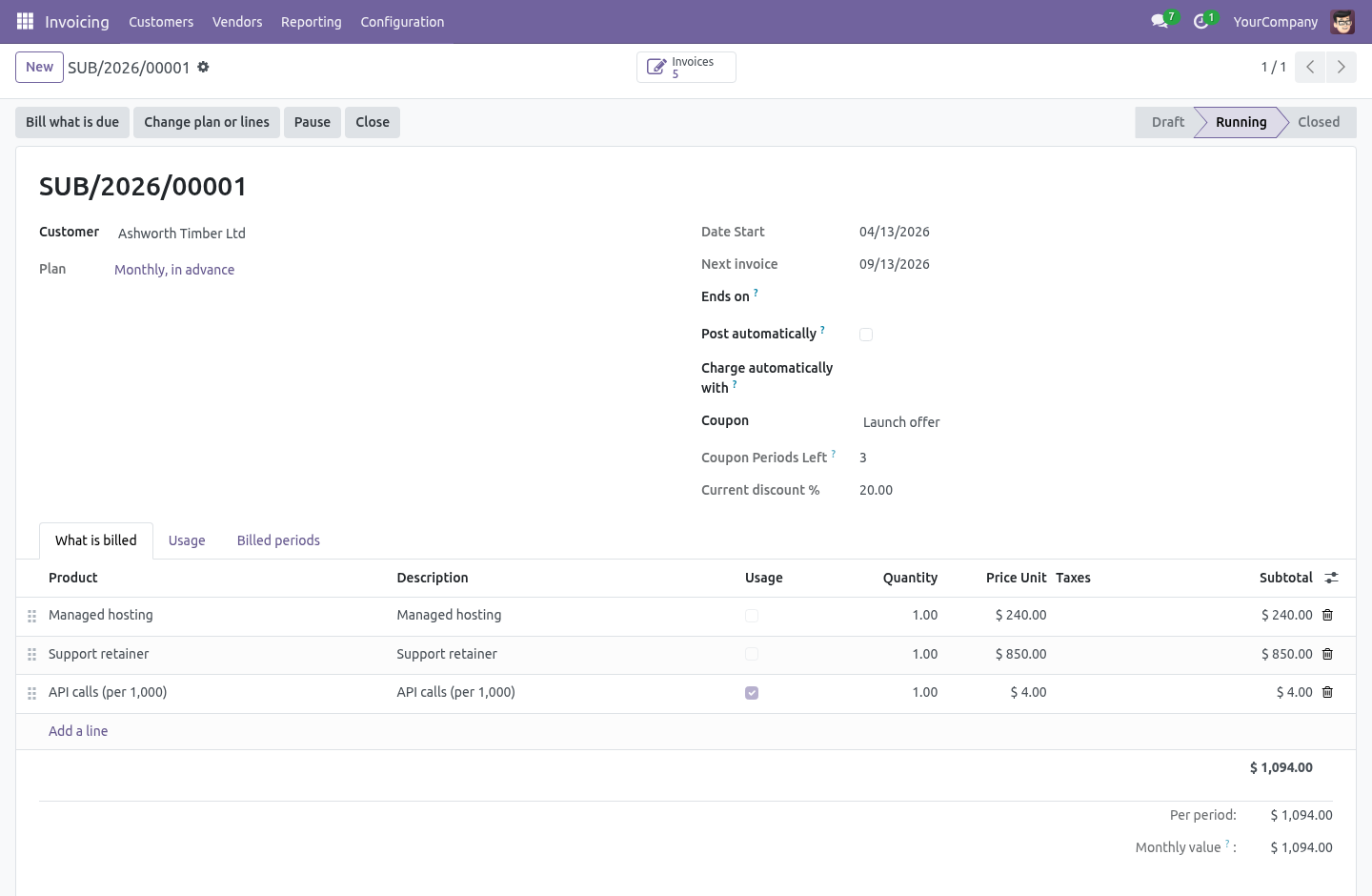
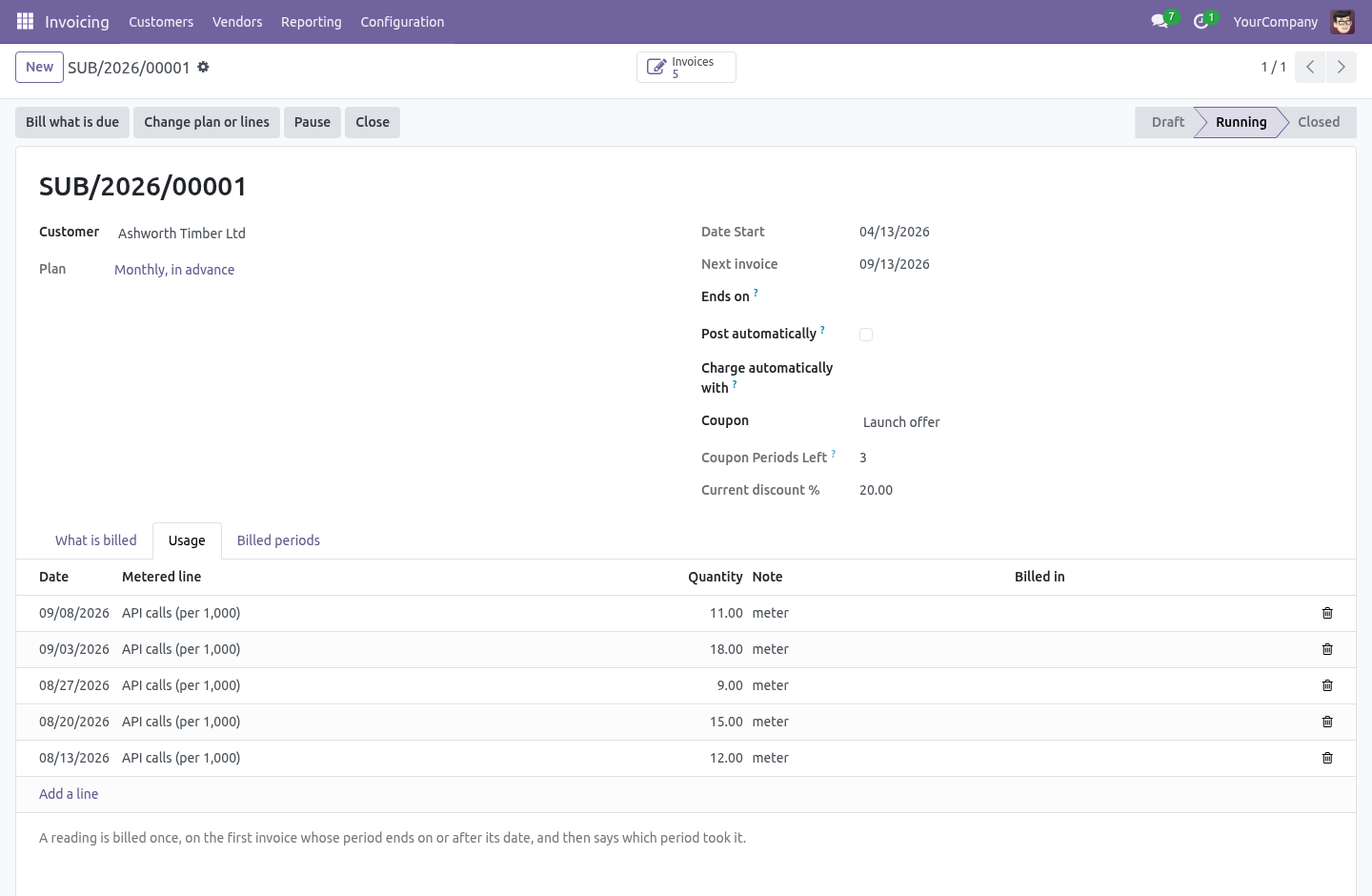
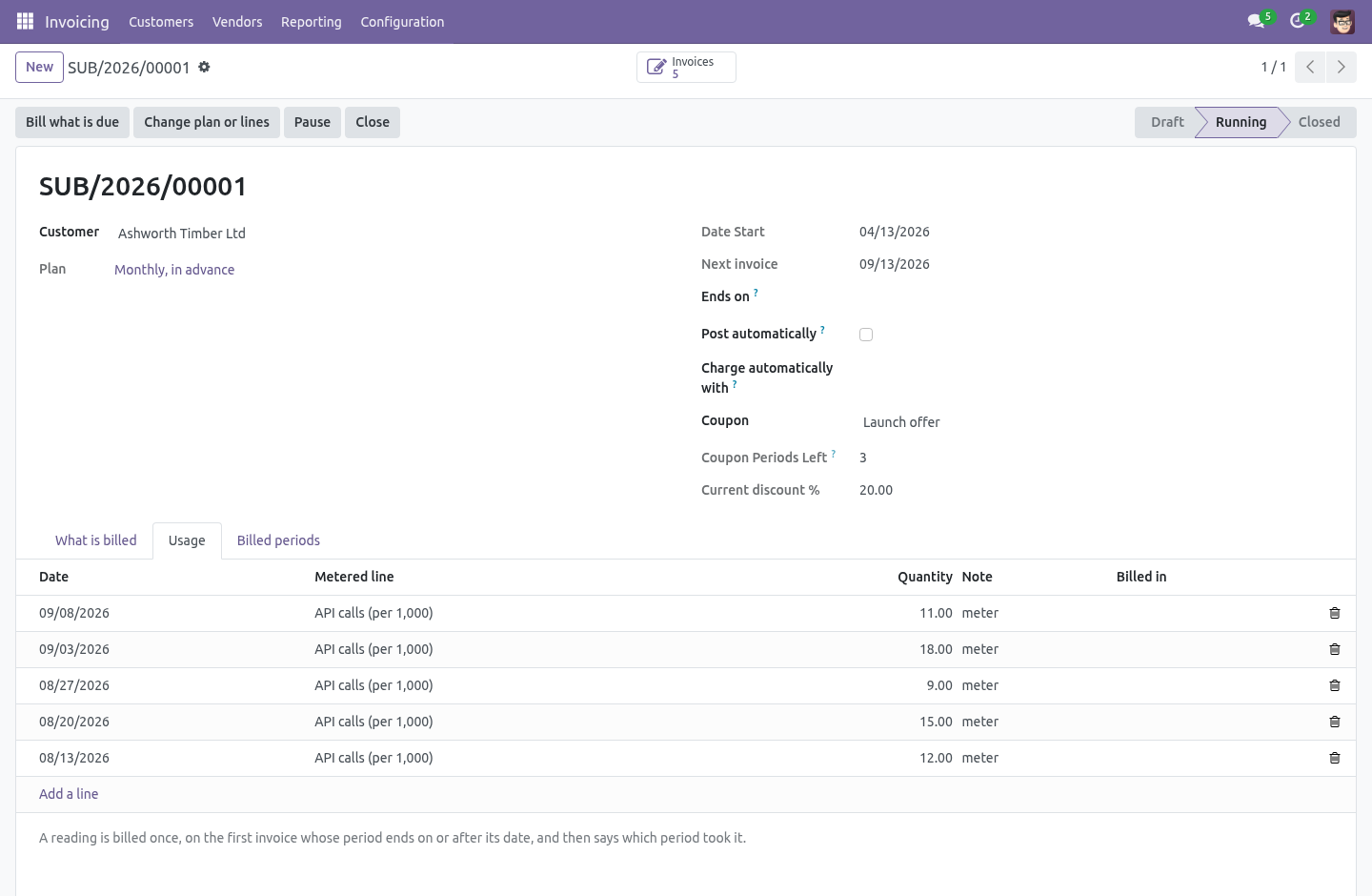
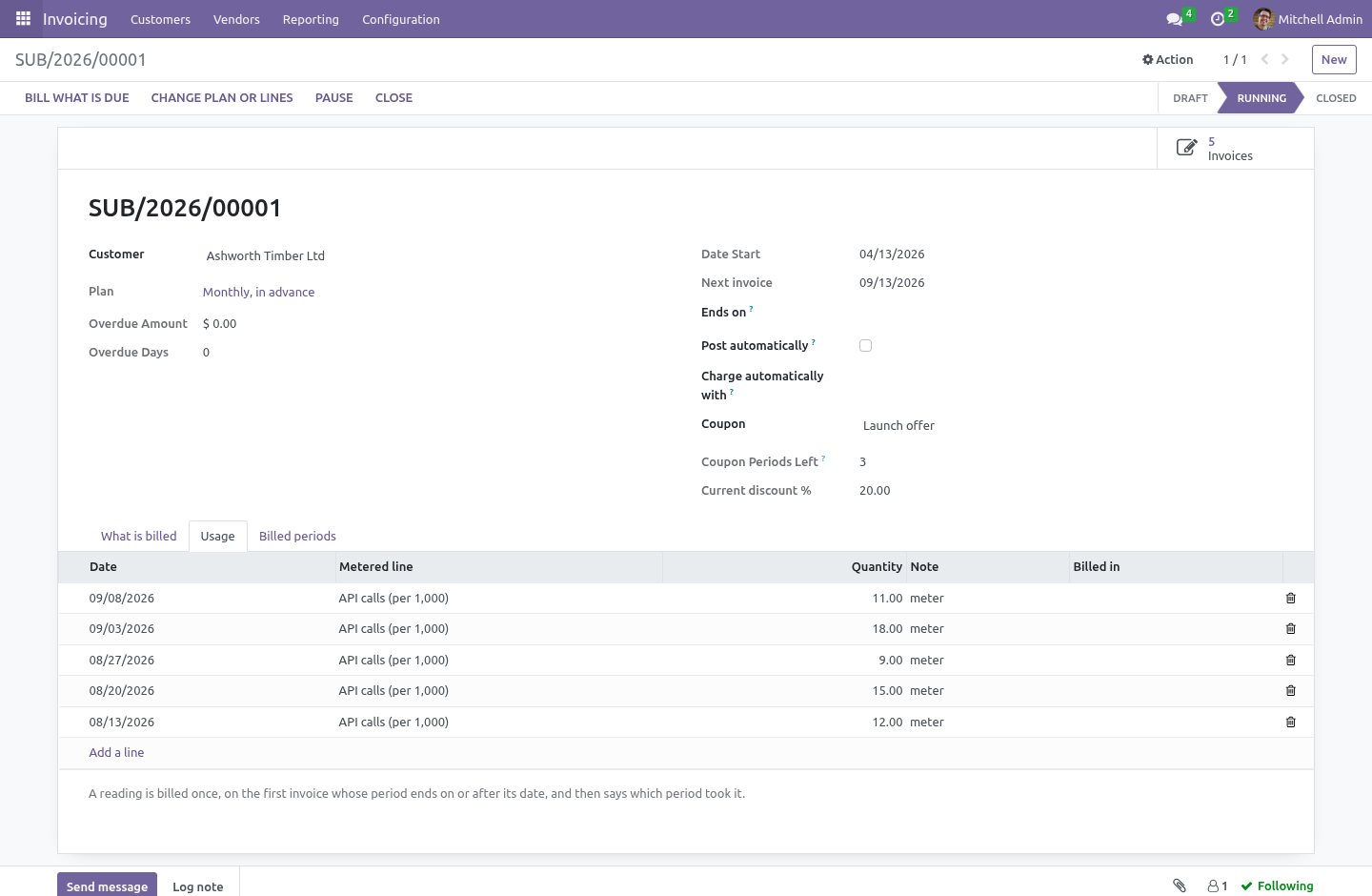
A reading is a date, a quantity and a note - typed on the subscription's Usage tab, imported from a file, or posted from a meter or a script with line.bf_record_usage(quantity, date, note). When a period is billed, every reading dated on or before its end that no earlier invoice took is summed onto the line, the line says how many readings it holds, and each reading is stamped with the period that billed it. A billed reading cannot be changed or deleted; a period with no readings bills nothing for that line. A plan or a price changed mid-period.
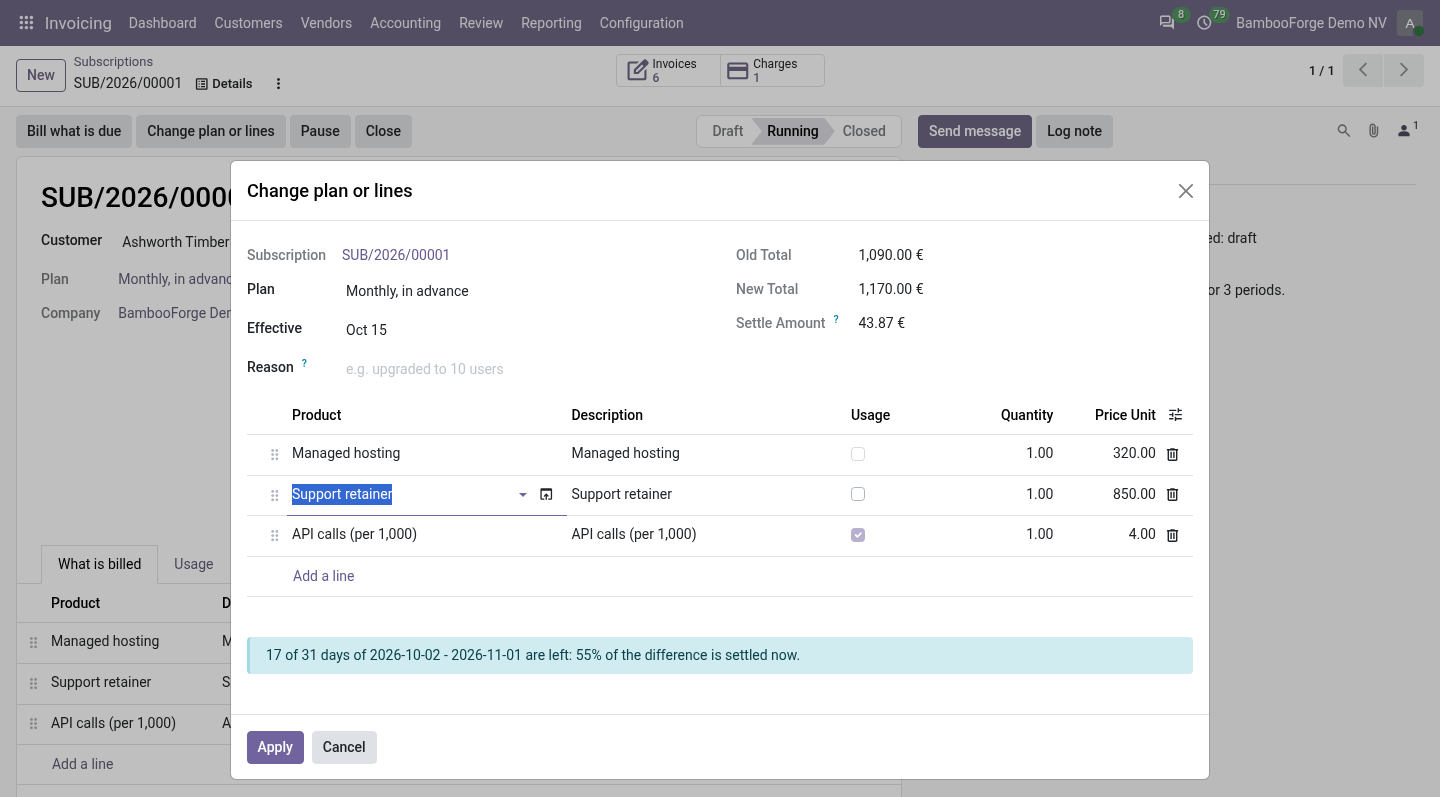
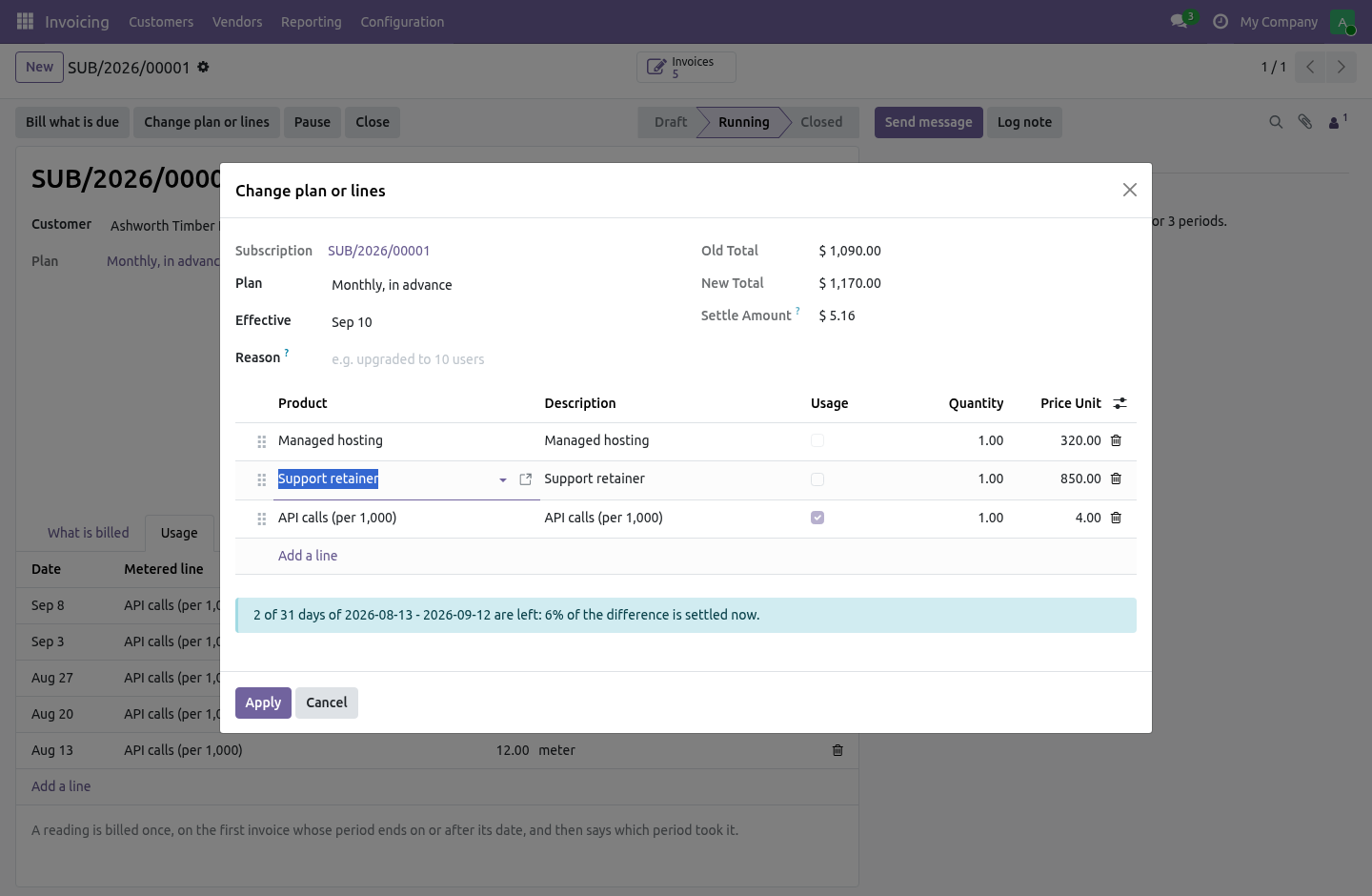
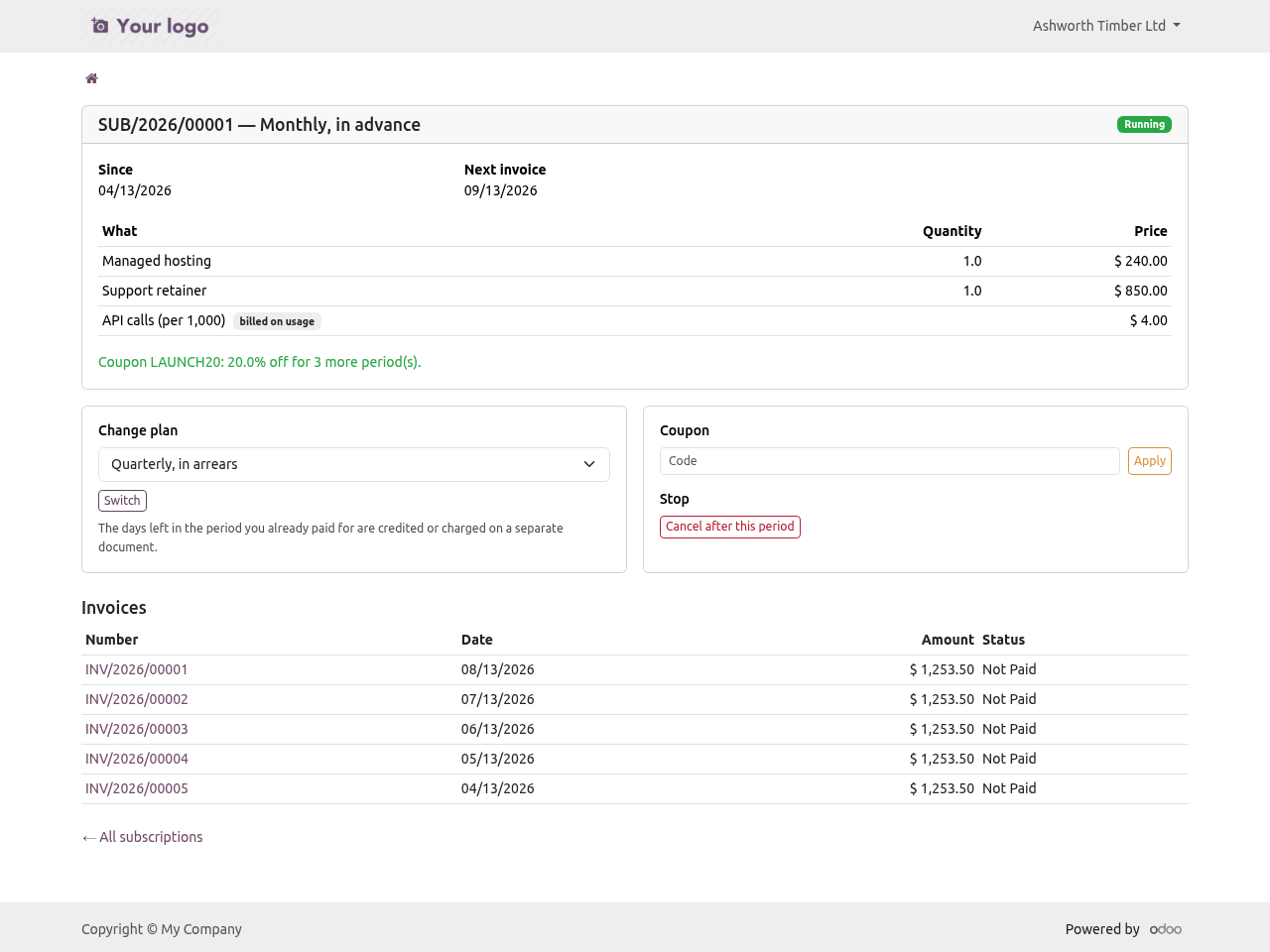
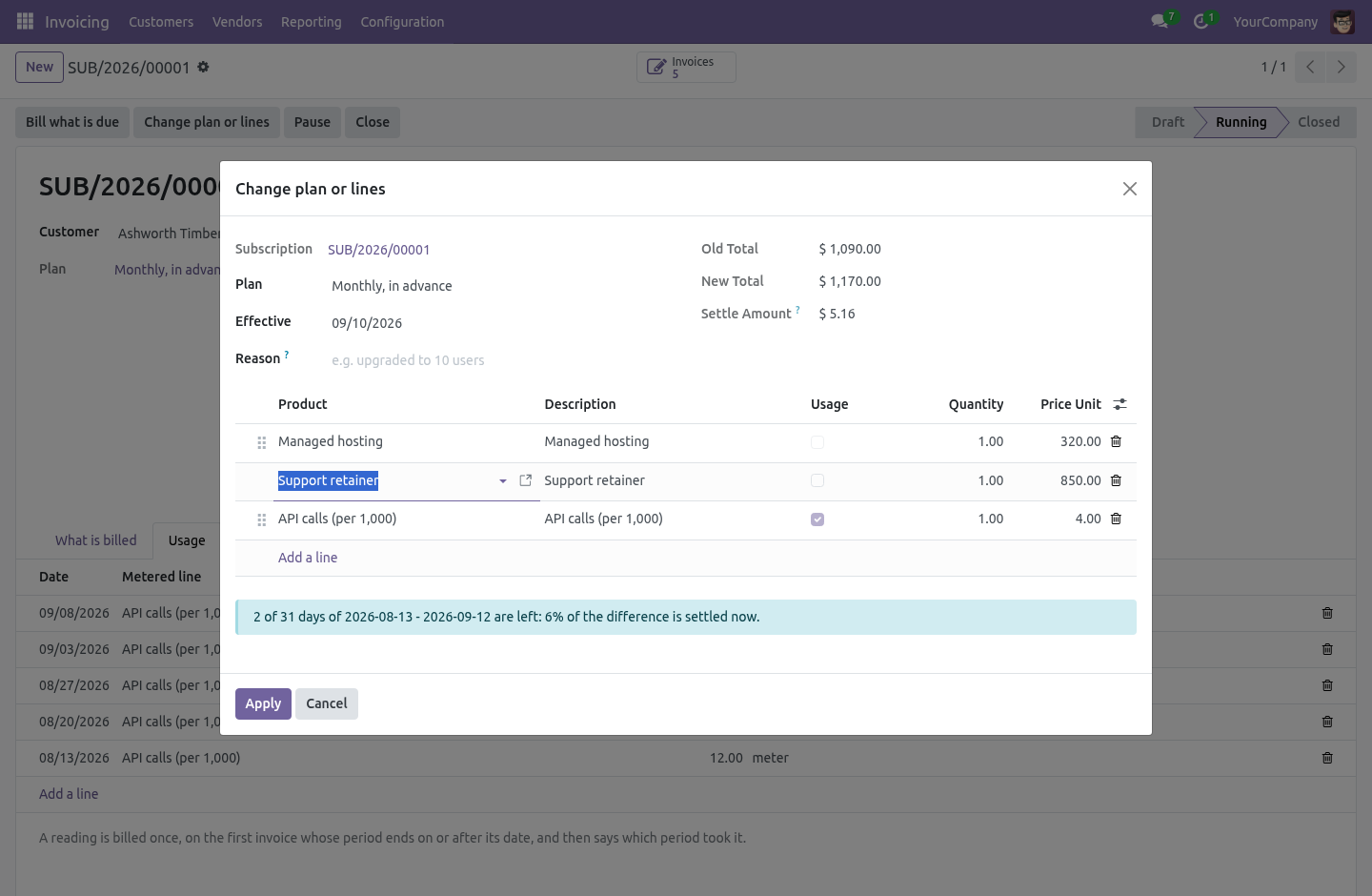
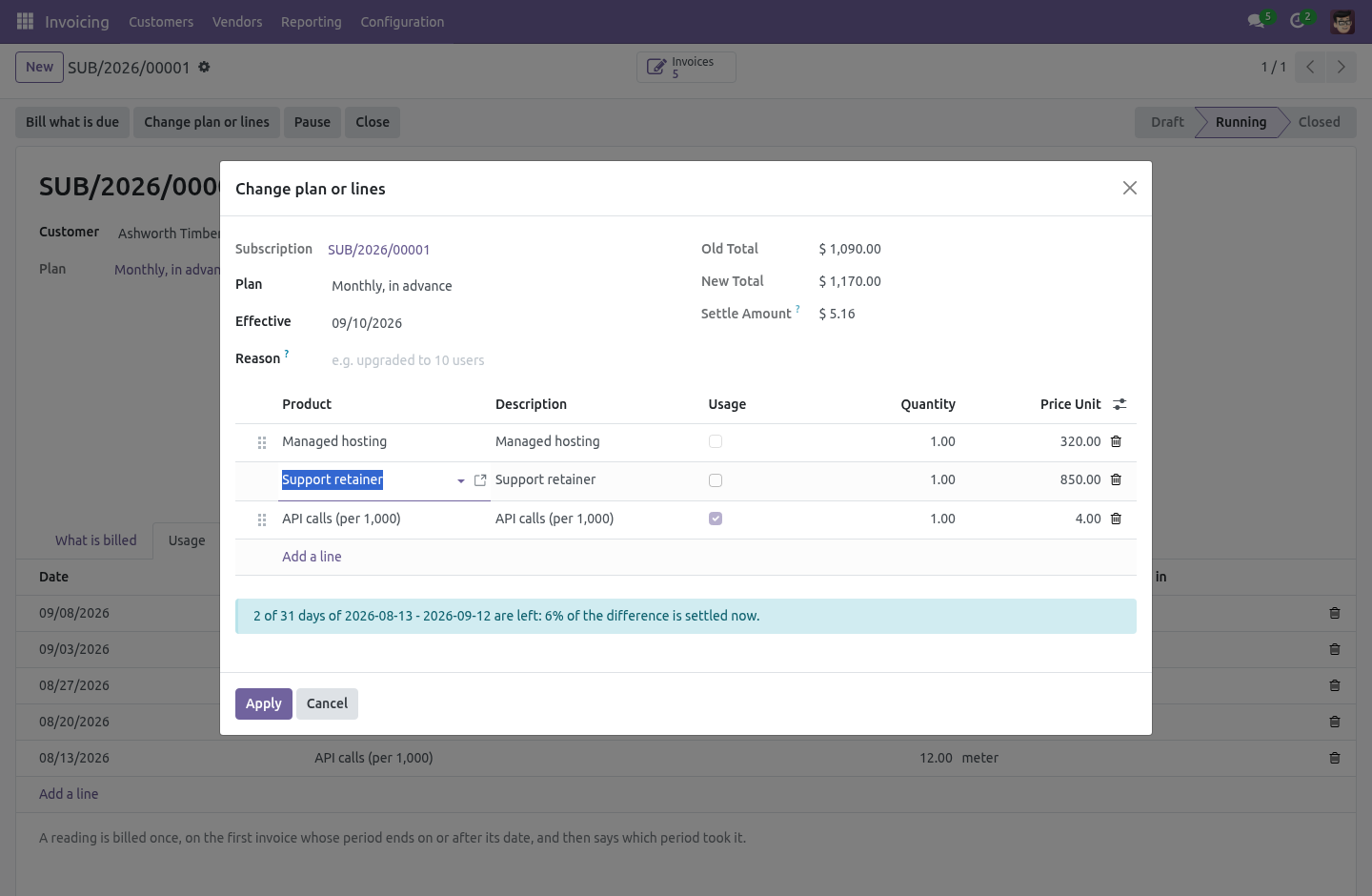
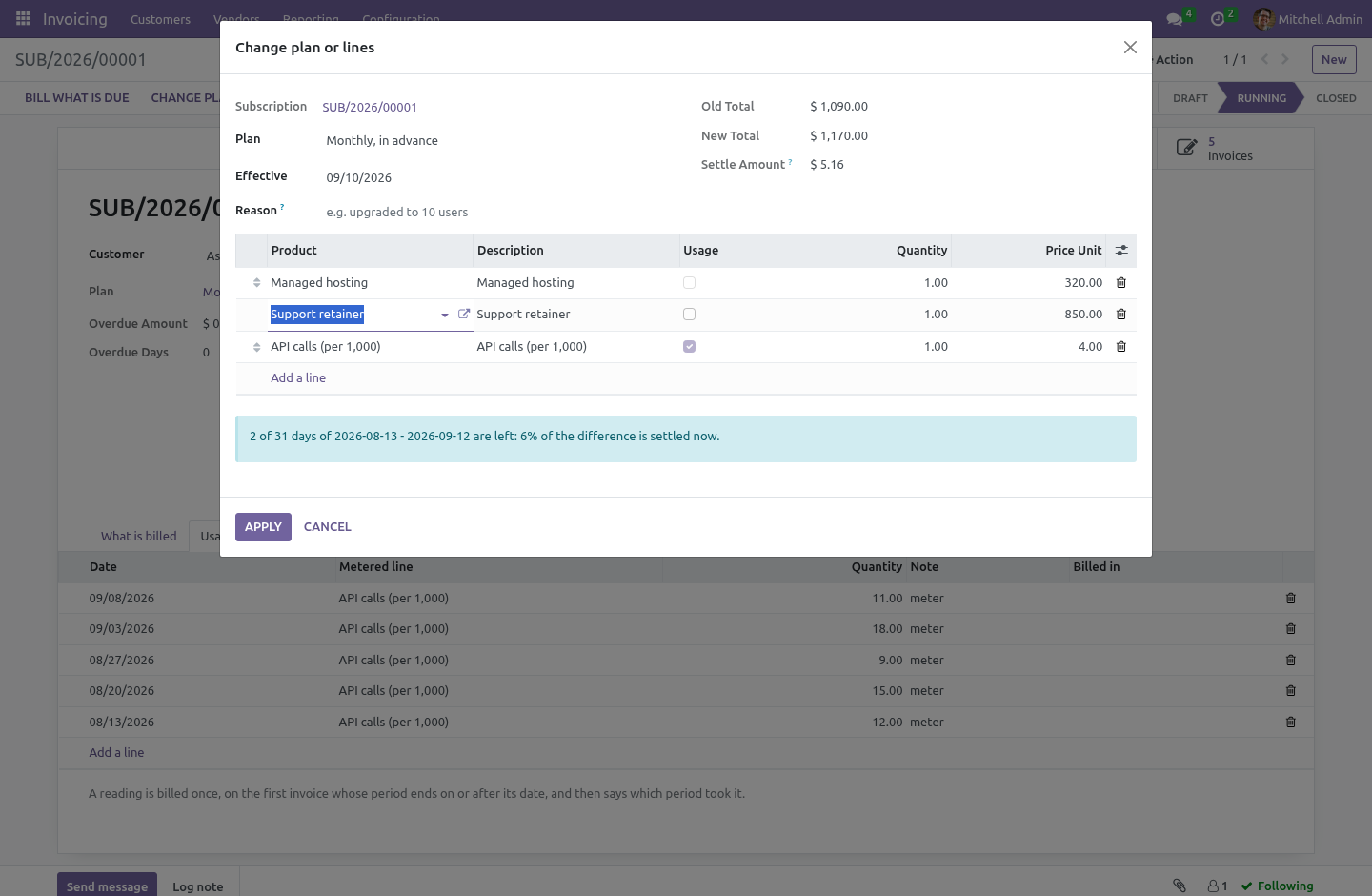
Change plan or lines on a running subscription opens the change with its price on it: the old amount per period, the new one, and how much of the paid period is left. On a plan billed in advance the difference for the days left is settled at once - an invoice for an upgrade, a credit note for a downgrade - and the period already paid for is not billed again. On a plan billed in arrears, or before any period has been billed, nothing is settled: the new lines apply from the next invoice. The subscription's chatter says what changed and which document settled it.
Customers do the same from the portal, among the plans marked Customers may switch to it. Trial. A plan with trial days bills nothing for that long: the first invoice is dated at the end of the trial, and the subscription says so when it starts. Coupons.
A coupon is a code, a percentage and a number of periods (zero means for ever), optionally a date it expires and a number of times it may be used. Applied on the subscription, or typed by the customer on the portal, it discounts every line of the next invoices and counts its periods down; an expired or exhausted coupon is refused with the reason. Dunning. Configuration -> Subscription Dunning is a ladder: on day 3 remind, on day 10 charge the stored card again and remind, on day 21 pause, and so on - one rung per line, per company.
The nightly job reads how many days the oldest posted, unpaid invoice of each subscription is overdue, climbs to the highest rung that applies, at most one rung per run, and writes what it did on the subscription. The day the invoice is paid it steps off: the rung is cleared, and a paused subscription can be resumed. Charging the stored card needs the payment bridge below; without it the retry rung sends the reminder. The customer's own hands.
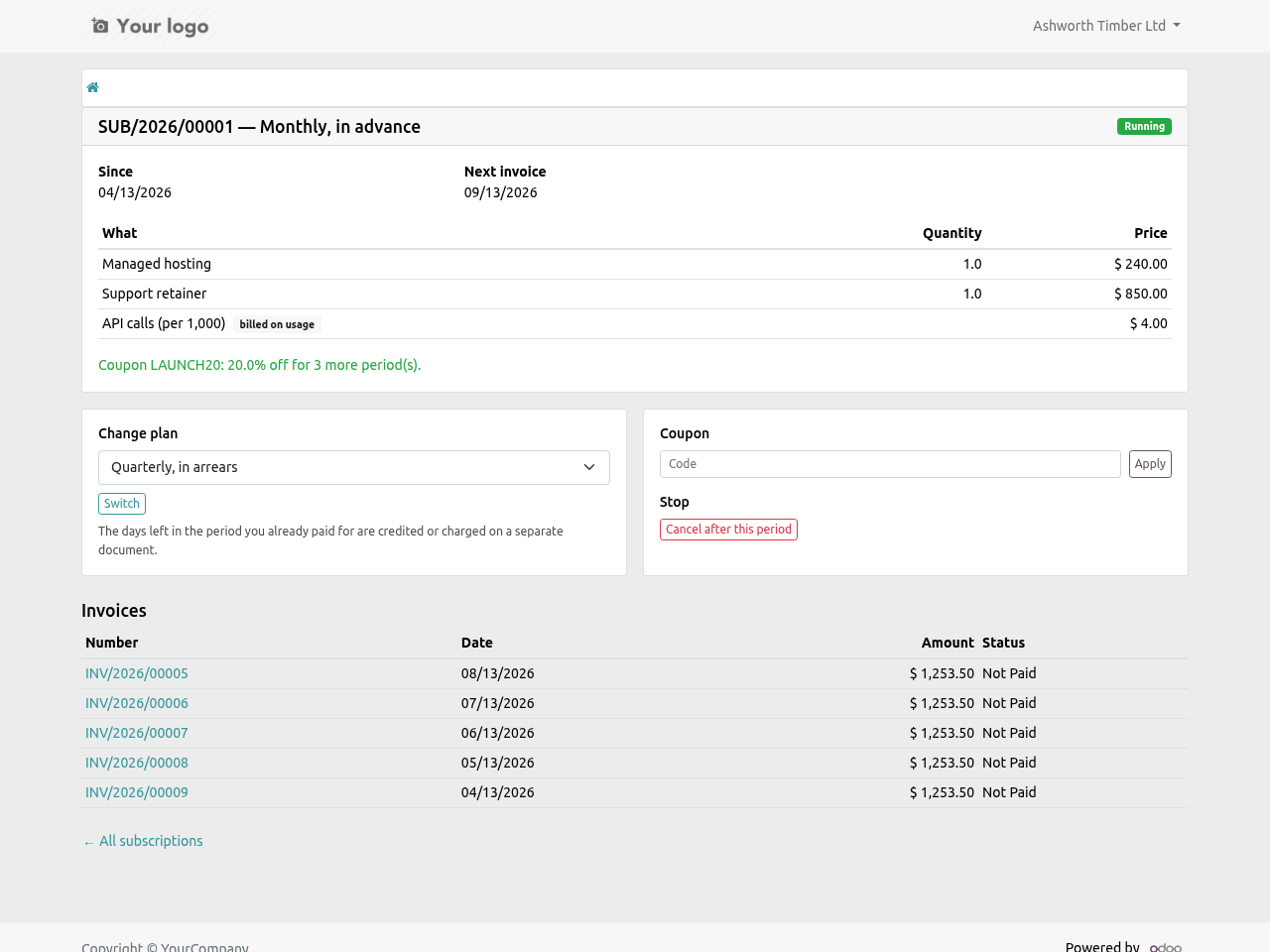
Under My account -> Subscriptions a customer sees their subscriptions, the lines, the next invoice date and the posted invoices, and can: cancel after the period already paid for - the end date is set to the end of the current period and nothing more is billed; switch to another plan among those marked Customers may switch to it, priced by the days left as above; apply a coupon by code. Every route re-checks that the subscription is theirs. Charging the stored card. With Odoo's Invoice Online Payment installed, the bridge Subscription Billing: charge the stored card installs by itself.
Pick one of the customer's saved payment methods on the subscription and every posted invoice is charged with it: a payment transaction with the token is created against the invoice and sent to the provider, and Odoo's own reconciliation does the rest when the provider answers. A refused charge is a note on the subscription with the provider's words; the dunning rung retry charges the open invoices again. Any provider that tokenises cards in Odoo works - Stripe, Adyen, Authorize.net, Mollie and the others. The complete manual is at docs dot bambooforge dot dev, the demo database is linked from the store page, and support answers within twenty-four hours.
Links are in the description.
Transcript of the walkthrough (Odoo 19)
Subscription Billing & Recurring Invoices. Recurring invoicing on Odoo Community: plans, subscriptions, a nightly billing job, and a record of every period billed so it cannot bill twice. Odoo's subscriptions are Enterprise. Community can raise an invoice, and that is where it stops — so anybody billing monthly on Community is either duplicating a sale order twelve times a year, or running a spreadsheet next to Odoo and remembering.
In the next few minutes: subscription billing & recurring invoices, then the hard part is not the recurrence, then the nightly job, then what it refuses, then dates. Then what this app deliberately does not do, so you can tell before you buy whether it fits. Everything lives under Subscriptions then Subscription Plans. Subscription Billing & Recurring Invoices.
Odoo's subscriptions are Enterprise. Community can raise an invoice, and that is where it stops — so anybody billing monthly on Community is either duplicating a sale order twelve times a year, or running a spreadsheet next to Odoo and remembering. The hard part is not the recurrence. It is that a job which runs twice must not bill the customer twice.
And jobs do run twice. A retry after a timeout. Two crons overlapping because the first was slow. An administrator pressing Bill what is due while the scheduler is halfway through the list.
The nightly job. It commits one subscription at a time. A failure on the fortieth does not undo the thirty-nine before it; the one that failed is written up on its own chatter and tried again tomorrow. Committing as it goes is only safe because of the index: a re-run cannot bill a period that already has a row, so there is nothing to lose by having kept the earlier ones.
What it refuses Deleting a billed period, in any group. It is the record that stops a customer being invoiced twice for the same month, and a tidy-up that removes one puts the duplicate back on the table. Posting invoices by default. Off unless you turn it on per subscription: an invoice nobody has looked at is an invoice nobody can defend when the customer telephones.
Catching up for ever. A subscription that has been dormant stops after sixty invoices in one run and says so on its chatter, rather than quietly producing two hundred. Starting with nothing to bill, ending before it starts, or a plan set to bill less than once per period. Dates.
A period runs from its first day to its last — a monthly period starting on the 1st ends on the 30th or the 31st, and an invoice line that read "1 to 1" would be wrong at both ends. The invoice carries the period's first day when the plan bills in advance, and its last day when it bills in arrears. Each line says which period it pays for, because a customer looking at twelve identical invoices needs to know which month each one is. Monthly on the 31st does not skip February.
Series The complete manual is at docs dot bambooforge dot dev, the demo database is linked from the store page, and support answers within twenty-four hours. Links are in the description.
Transcript of the walkthrough (Odoo 18)
Subscription Billing & Recurring Invoices. Recurring invoicing on Odoo Community: plans, subscriptions, a nightly billing job, and a record of every period billed so it cannot bill twice. Odoo's subscriptions are Enterprise. Community can raise an invoice, and that is where it stops — so anybody billing monthly on Community is either duplicating a sale order twelve times a year, or running a spreadsheet next to Odoo and remembering.
In the next few minutes: subscription billing & recurring invoices, then the hard part is not the recurrence, then the nightly job, then what it refuses, then dates. Then what this app deliberately does not do, so you can tell before you buy whether it fits. Everything lives under Subscriptions then Subscription Plans. Subscription Billing & Recurring Invoices.
Odoo's subscriptions are Enterprise. Community can raise an invoice, and that is where it stops — so anybody billing monthly on Community is either duplicating a sale order twelve times a year, or running a spreadsheet next to Odoo and remembering. The hard part is not the recurrence. It is that a job which runs twice must not bill the customer twice.
And jobs do run twice. A retry after a timeout. Two crons overlapping because the first was slow. An administrator pressing Bill what is due while the scheduler is halfway through the list.
The nightly job. It commits one subscription at a time. A failure on the fortieth does not undo the thirty-nine before it; the one that failed is written up on its own chatter and tried again tomorrow. Committing as it goes is only safe because of the index: a re-run cannot bill a period that already has a row, so there is nothing to lose by having kept the earlier ones.
What it refuses Deleting a billed period, in any group. It is the record that stops a customer being invoiced twice for the same month, and a tidy-up that removes one puts the duplicate back on the table. Posting invoices by default. Off unless you turn it on per subscription: an invoice nobody has looked at is an invoice nobody can defend when the customer telephones.
Catching up for ever. A subscription that has been dormant stops after sixty invoices in one run and says so on its chatter, rather than quietly producing two hundred. Starting with nothing to bill, ending before it starts, or a plan set to bill less than once per period. Dates.
A period runs from its first day to its last — a monthly period starting on the 1st ends on the 30th or the 31st, and an invoice line that read "1 to 1" would be wrong at both ends. The invoice carries the period's first day when the plan bills in advance, and its last day when it bills in arrears. Each line says which period it pays for, because a customer looking at twelve identical invoices needs to know which month each one is. Monthly on the 31st does not skip February.
Series The complete manual is at docs dot bambooforge dot dev, the demo database is linked from the store page, and support answers within twenty-four hours. Links are in the description.
Transcript of the walkthrough (Odoo 17)
Subscription Billing & Recurring Invoices. Recurring invoicing on Odoo Community: plans, subscriptions, a nightly billing job, and a record of every period billed so it cannot bill twice. Odoo's subscriptions are Enterprise. Community can raise an invoice, and that is where it stops — so anybody billing monthly on Community is either duplicating a sale order twelve times a year, or running a spreadsheet next to Odoo and remembering.
In the next few minutes: subscription billing & recurring invoices, then the hard part is not the recurrence, then the nightly job, then what it refuses, then dates. Then what this app deliberately does not do, so you can tell before you buy whether it fits. Everything lives under Subscriptions then Subscription Plans. Subscription Billing & Recurring Invoices.
Odoo's subscriptions are Enterprise. Community can raise an invoice, and that is where it stops — so anybody billing monthly on Community is either duplicating a sale order twelve times a year, or running a spreadsheet next to Odoo and remembering. The hard part is not the recurrence. It is that a job which runs twice must not bill the customer twice.
And jobs do run twice. A retry after a timeout. Two crons overlapping because the first was slow. An administrator pressing Bill what is due while the scheduler is halfway through the list.
The nightly job. It commits one subscription at a time. A failure on the fortieth does not undo the thirty-nine before it; the one that failed is written up on its own chatter and tried again tomorrow. Committing as it goes is only safe because of the index: a re-run cannot bill a period that already has a row, so there is nothing to lose by having kept the earlier ones.
What it refuses Deleting a billed period, in any group. It is the record that stops a customer being invoiced twice for the same month, and a tidy-up that removes one puts the duplicate back on the table. Posting invoices by default. Off unless you turn it on per subscription: an invoice nobody has looked at is an invoice nobody can defend when the customer telephones.
Catching up for ever. A subscription that has been dormant stops after sixty invoices in one run and says so on its chatter, rather than quietly producing two hundred. Starting with nothing to bill, ending before it starts, or a plan set to bill less than once per period. Dates.
A period runs from its first day to its last — a monthly period starting on the 1st ends on the 30th or the 31st, and an invoice line that read "1 to 1" would be wrong at both ends. The invoice carries the period's first day when the plan bills in advance, and its last day when it bills in arrears. Each line says which period it pays for, because a customer looking at twelve identical invoices needs to know which month each one is. Monthly on the 31st does not skip February.
Series The complete manual is at docs dot bambooforge dot dev, the demo database is linked from the store page, and support answers within twenty-four hours. Links are in the description.
Transcript of the walkthrough (Odoo 16)
Subscription Billing & Recurring Invoices. Recurring invoicing on Odoo Community: plans, subscriptions, a nightly billing job, and a record of every period billed so it cannot bill twice. Odoo's subscriptions are Enterprise. Community can raise an invoice, and that is where it stops — so anybody billing monthly on Community is either duplicating a sale order twelve times a year, or running a spreadsheet next to Odoo and remembering.
In the next few minutes: subscription billing & recurring invoices, then the hard part is not the recurrence, then the nightly job, then what it refuses, then dates. Then what this app deliberately does not do, so you can tell before you buy whether it fits. Everything lives under Subscriptions then Subscription Plans. Subscription Billing & Recurring Invoices.
Odoo's subscriptions are Enterprise. Community can raise an invoice, and that is where it stops — so anybody billing monthly on Community is either duplicating a sale order twelve times a year, or running a spreadsheet next to Odoo and remembering. The hard part is not the recurrence. It is that a job which runs twice must not bill the customer twice.
And jobs do run twice. A retry after a timeout. Two crons overlapping because the first was slow. An administrator pressing Bill what is due while the scheduler is halfway through the list.
The nightly job. It commits one subscription at a time. A failure on the fortieth does not undo the thirty-nine before it; the one that failed is written up on its own chatter and tried again tomorrow. Committing as it goes is only safe because of the index: a re-run cannot bill a period that already has a row, so there is nothing to lose by having kept the earlier ones.
What it refuses Deleting a billed period, in any group. It is the record that stops a customer being invoiced twice for the same month, and a tidy-up that removes one puts the duplicate back on the table. Posting invoices by default. Off unless you turn it on per subscription: an invoice nobody has looked at is an invoice nobody can defend when the customer telephones.
Catching up for ever. A subscription that has been dormant stops after sixty invoices in one run and says so on its chatter, rather than quietly producing two hundred. Starting with nothing to bill, ending before it starts, or a plan set to bill less than once per period. Dates.
A period runs from its first day to its last — a monthly period starting on the 1st ends on the 30th or the 31st, and an invoice line that read "1 to 1" would be wrong at both ends. The invoice carries the period's first day when the plan bills in advance, and its last day when it bills in arrears. Each line says which period it pays for, because a customer looking at twelve identical invoices needs to know which month each one is. Monthly on the 31st does not skip February.
Series The complete manual is at docs dot bambooforge dot dev, the demo database is linked from the store page, and support answers within twenty-four hours. Links are in the description.
Key facts
- What it is
- Recurring invoicing on Odoo Community: plans, subscriptions, a nightly billing job, and a record of every period billed so it cannot bill twice.
- For
- Accounting
- Odoo versions
- 16.0, 17.0, 18.0, 19.0, 20.0 - Community and Enterprise
- Runs on
- Odoo.sh or Odoo you host yourself - not Odoo Online, which accepts no third-party apps
- Price
- 149 EUR, one-time, on the Odoo Apps Store
- Technical name
- bambooforge_subscription
- Manual last updated
- 2026-10-15
Subscription Billing & Recurring Invoices
Odoo's subscriptions are Enterprise. Community can raise an invoice, and that is where it stops — so anybody billing monthly on Community is either duplicating a sale order twelve times a year, or running a spreadsheet next to Odoo and remembering.
What it does
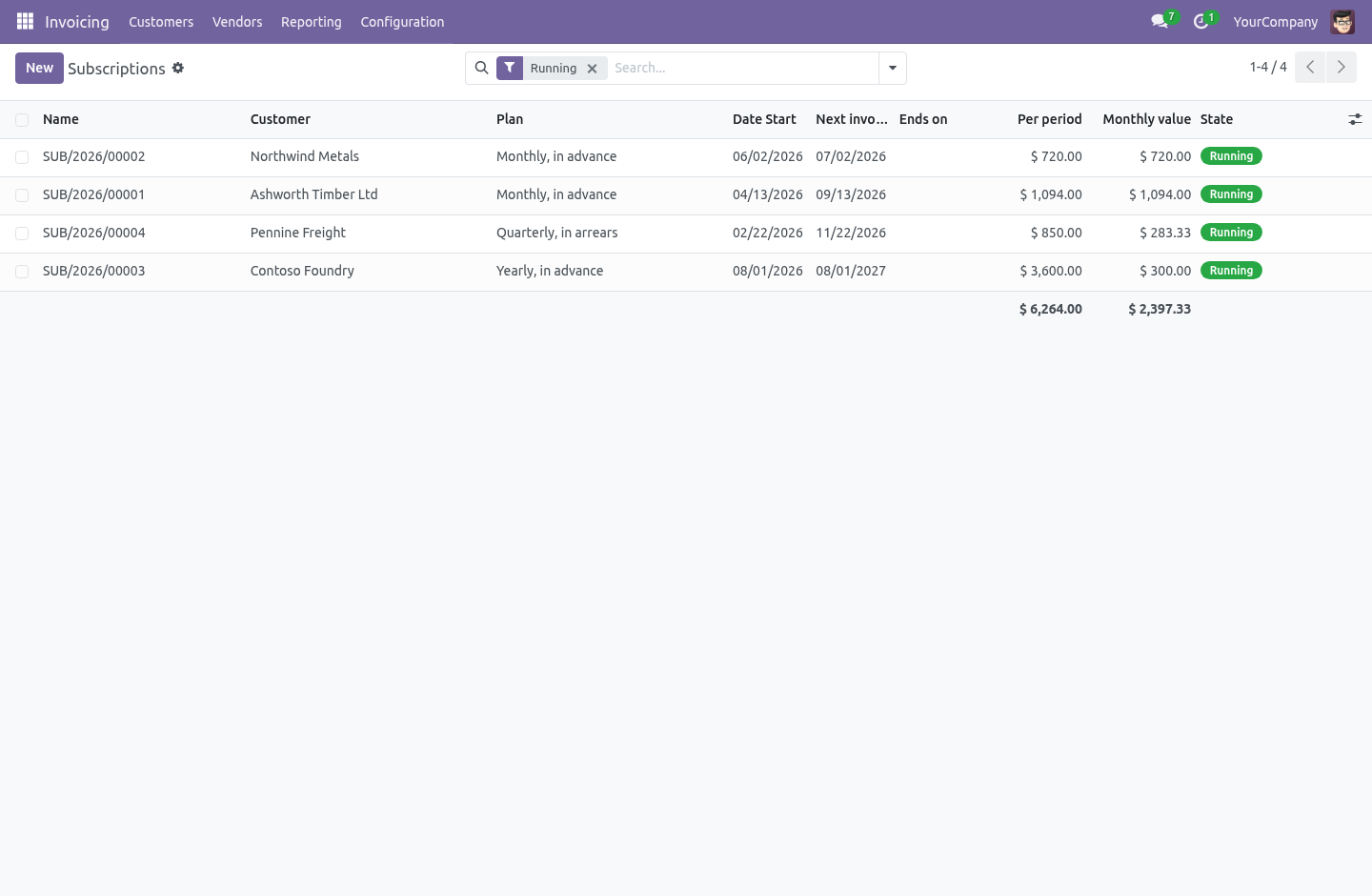
Plans — every day, week, month or year, any number of them, billed in advance or in arrears. Three are installed to start with.
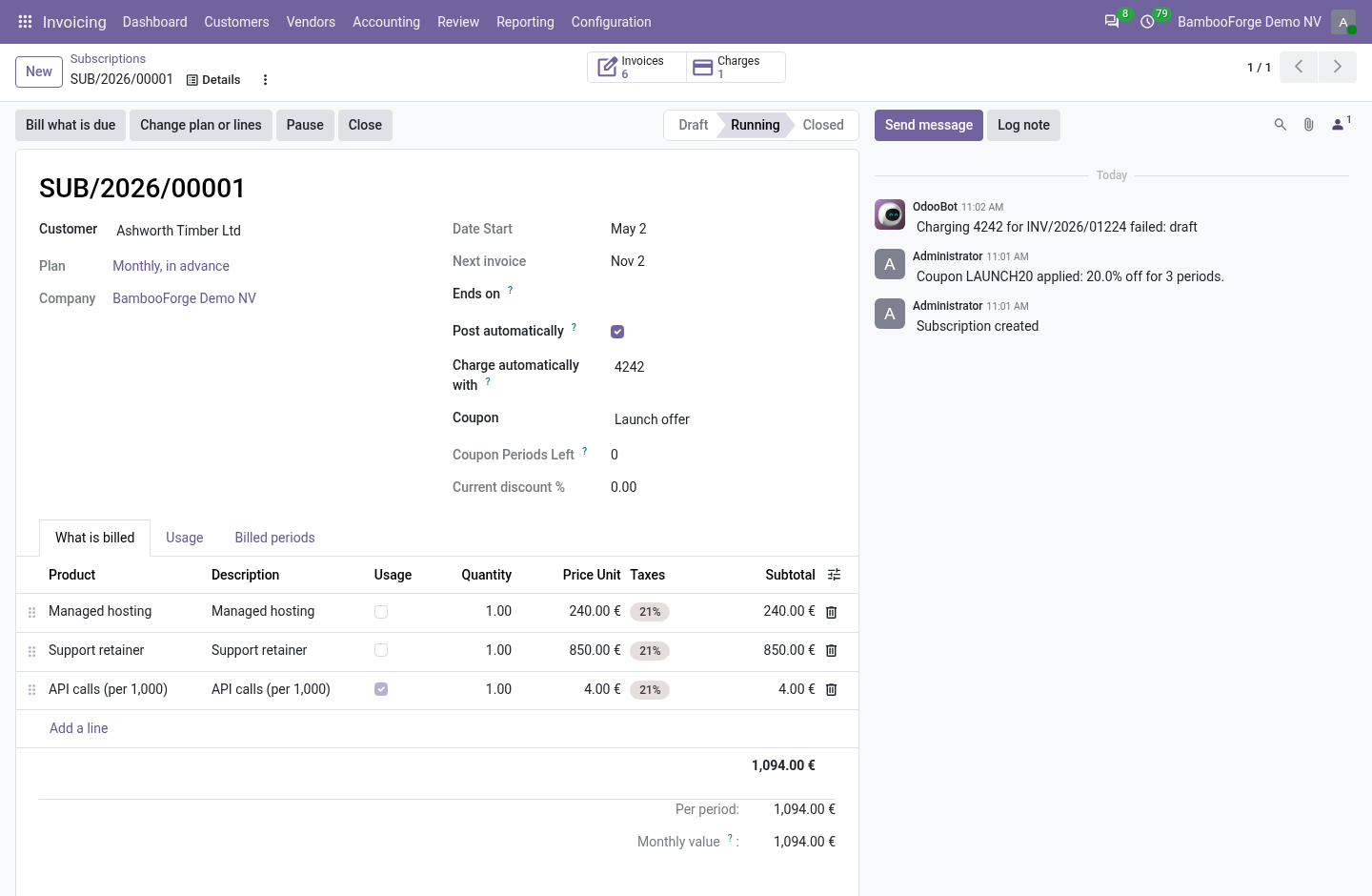
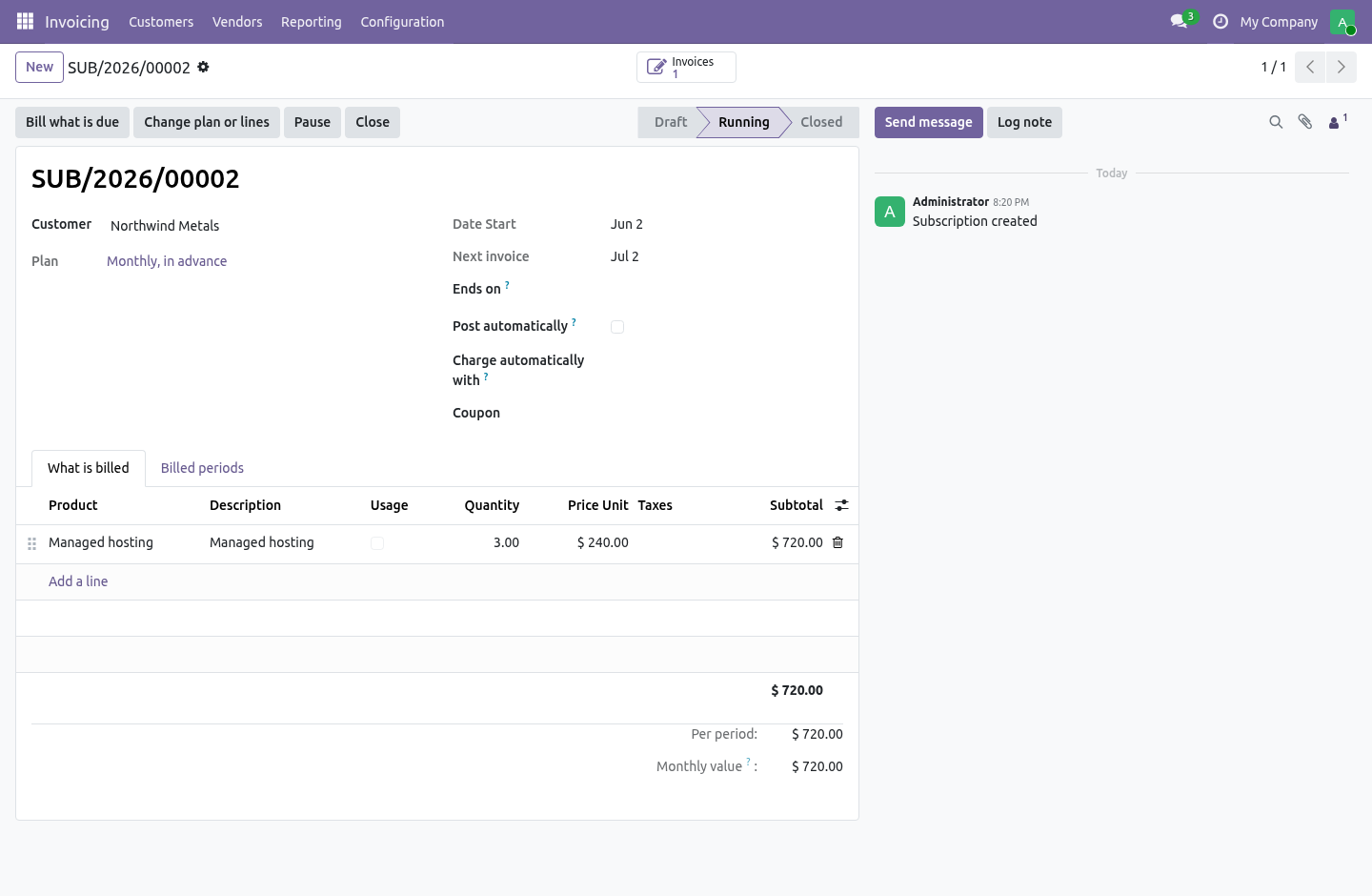
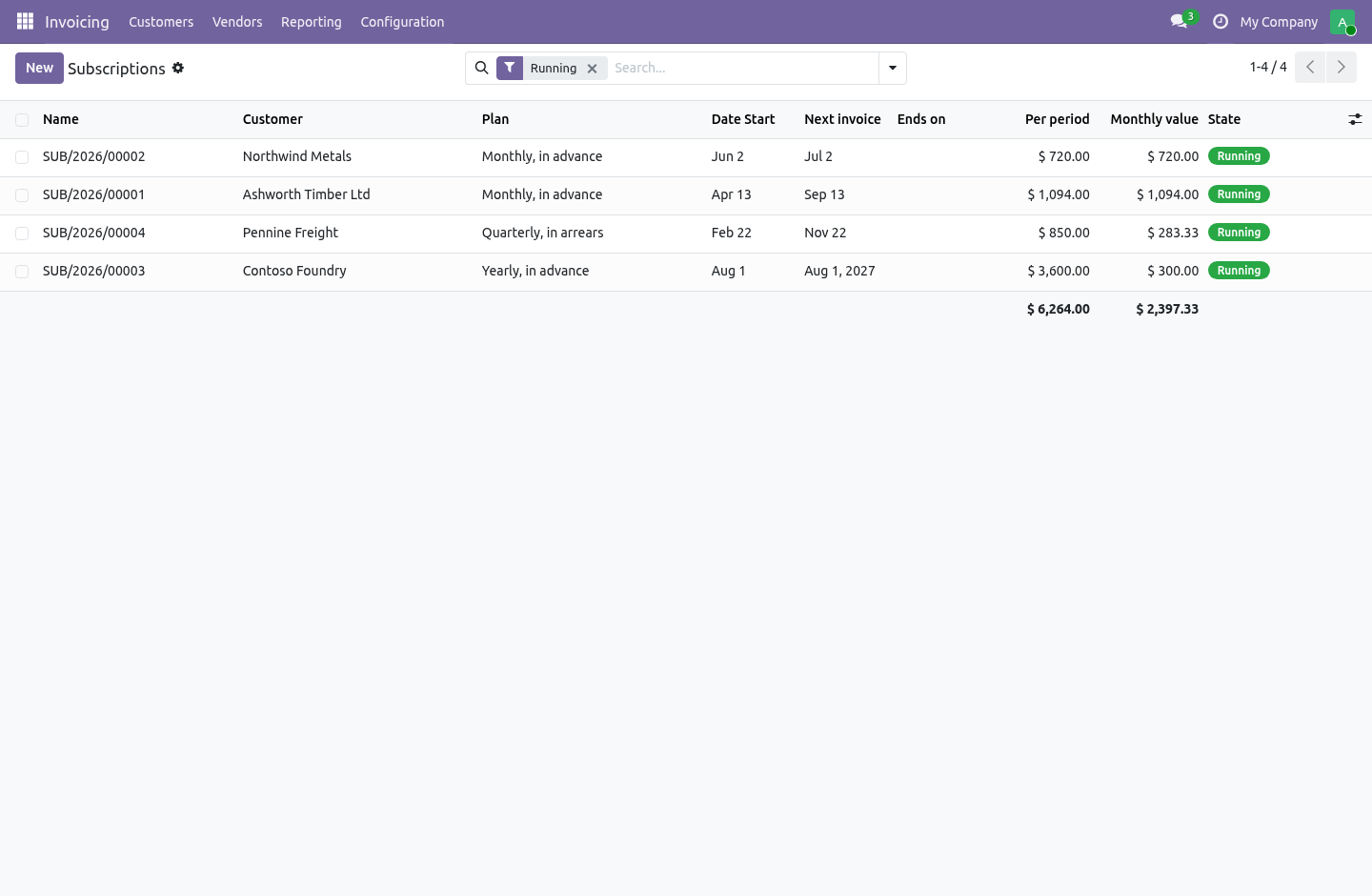
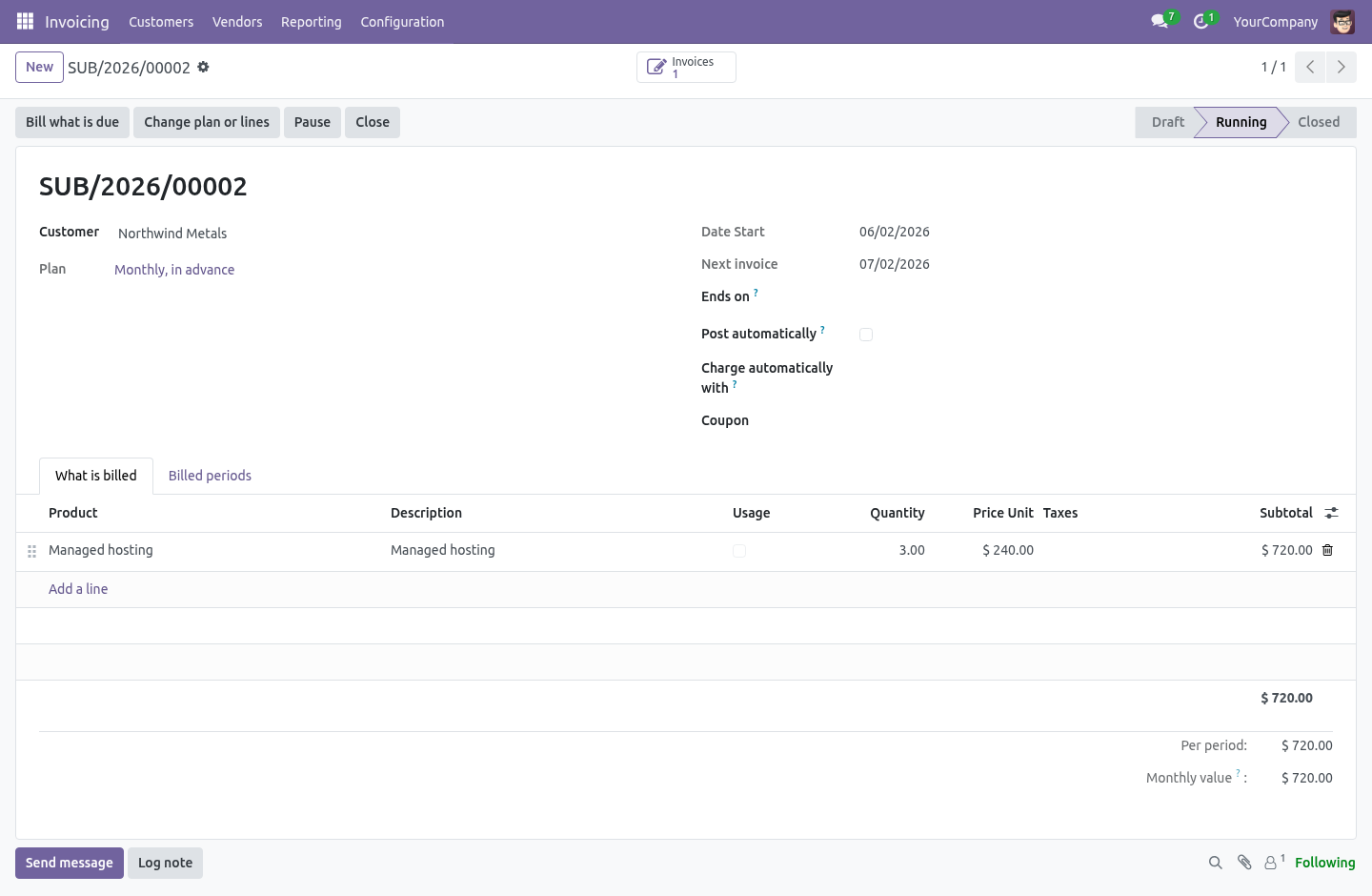
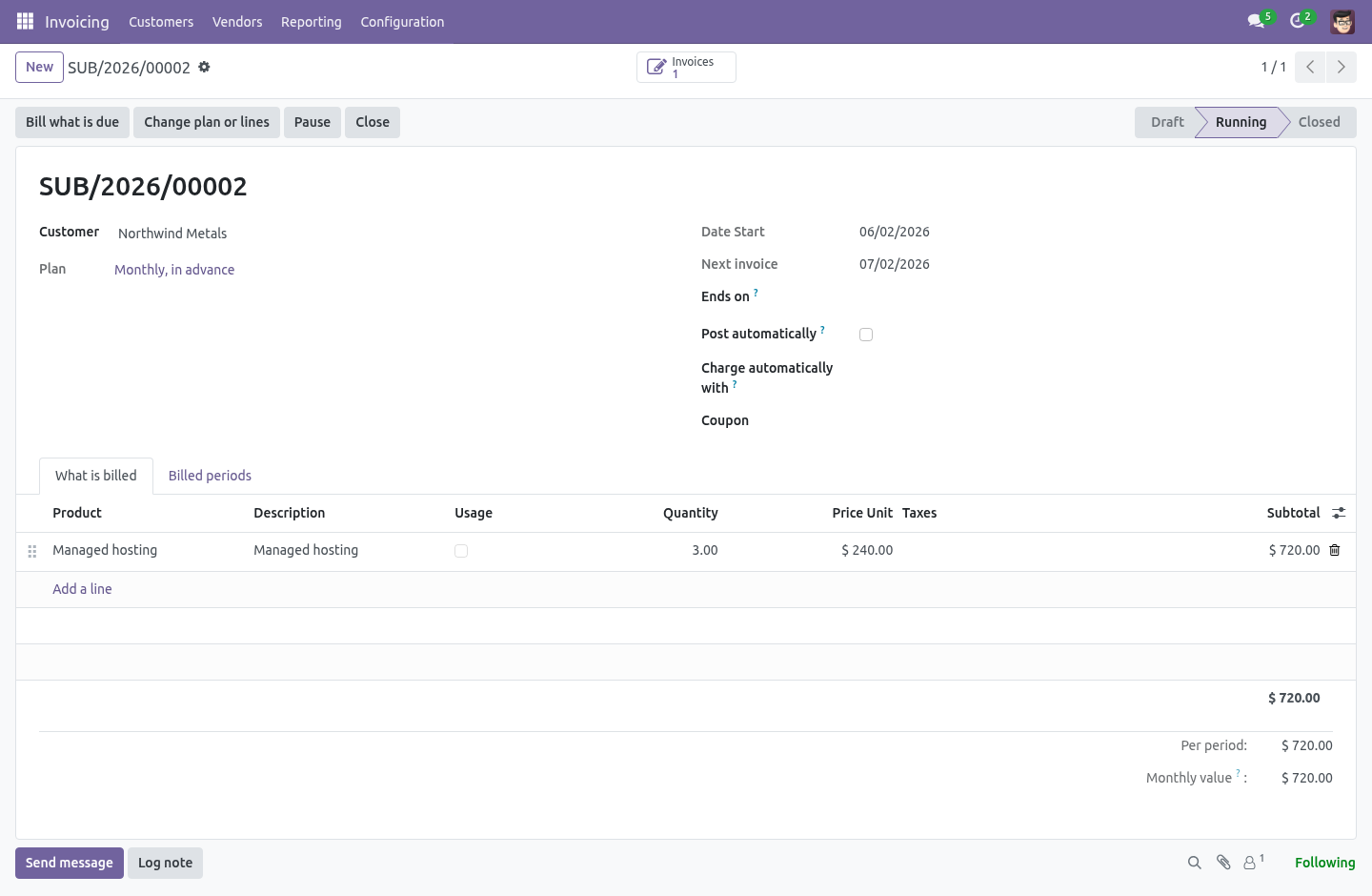
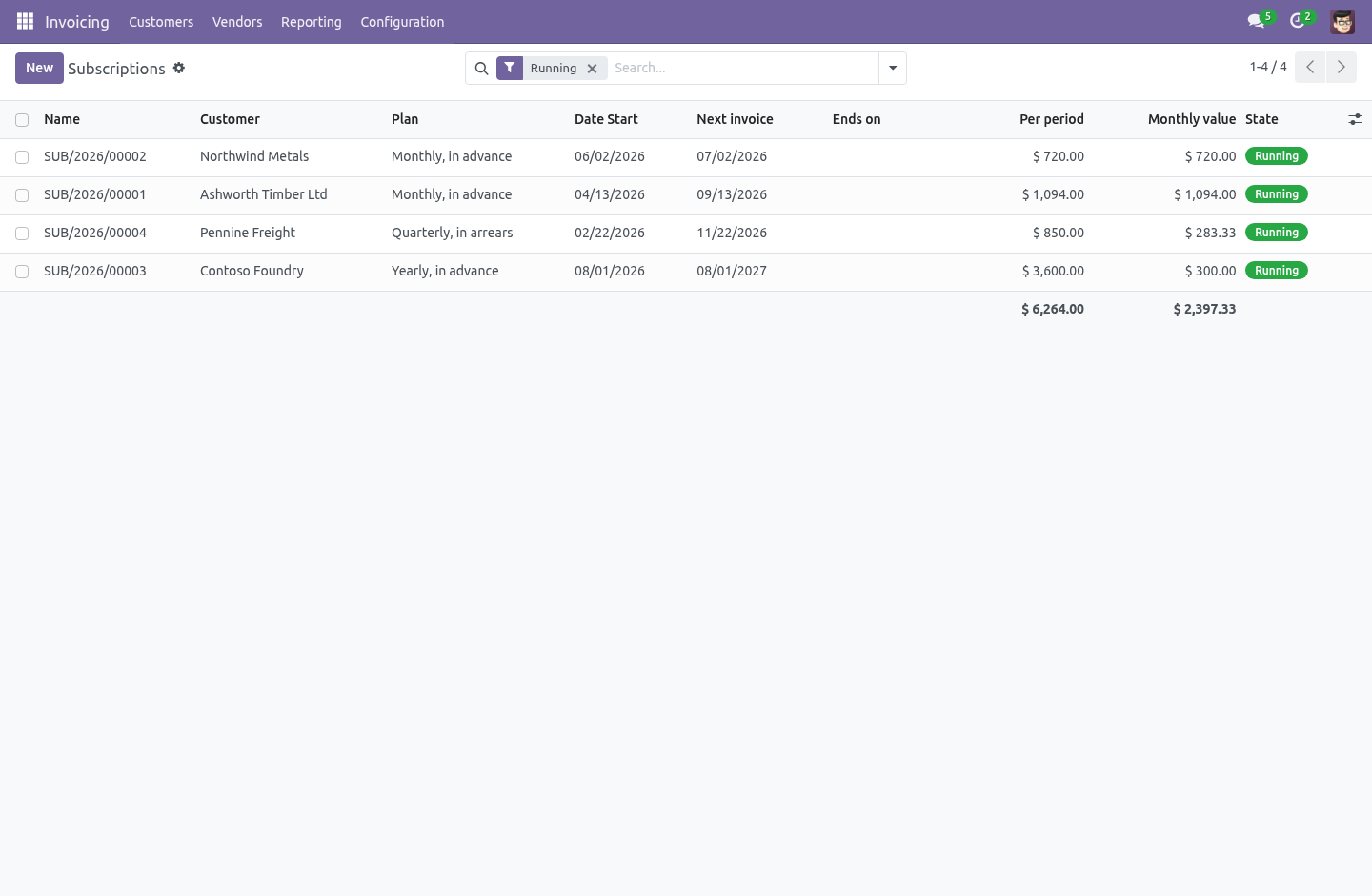
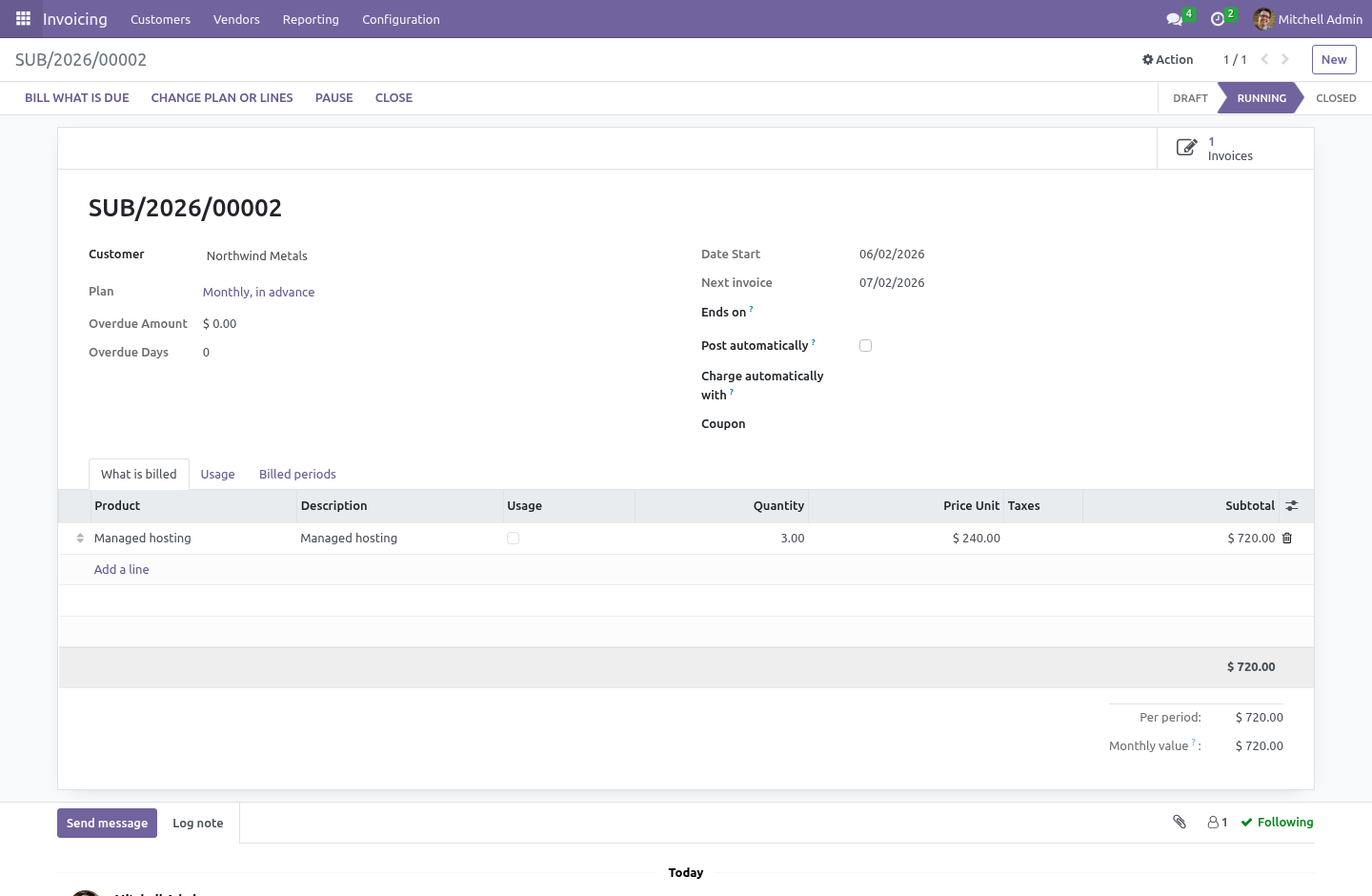
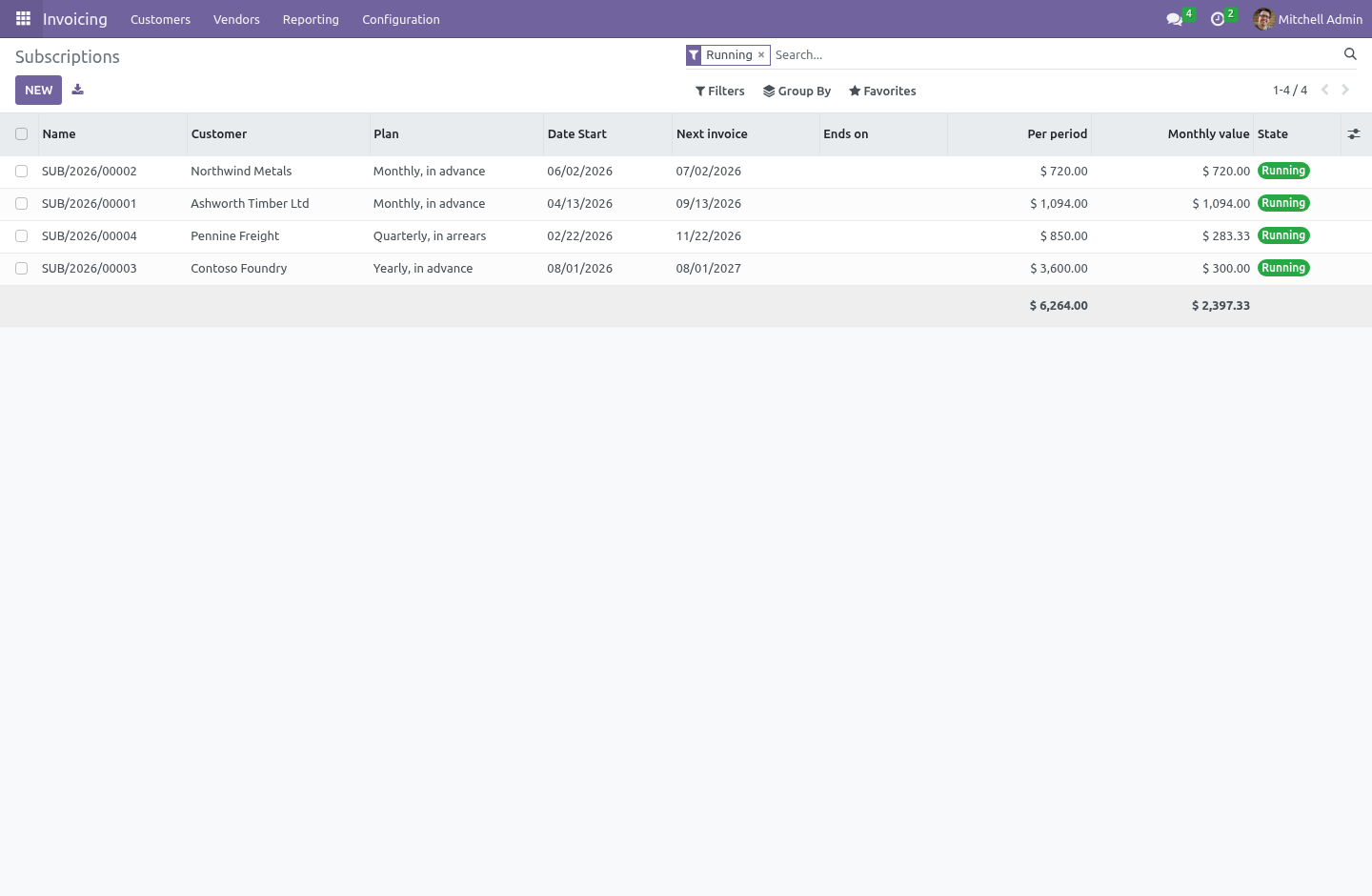
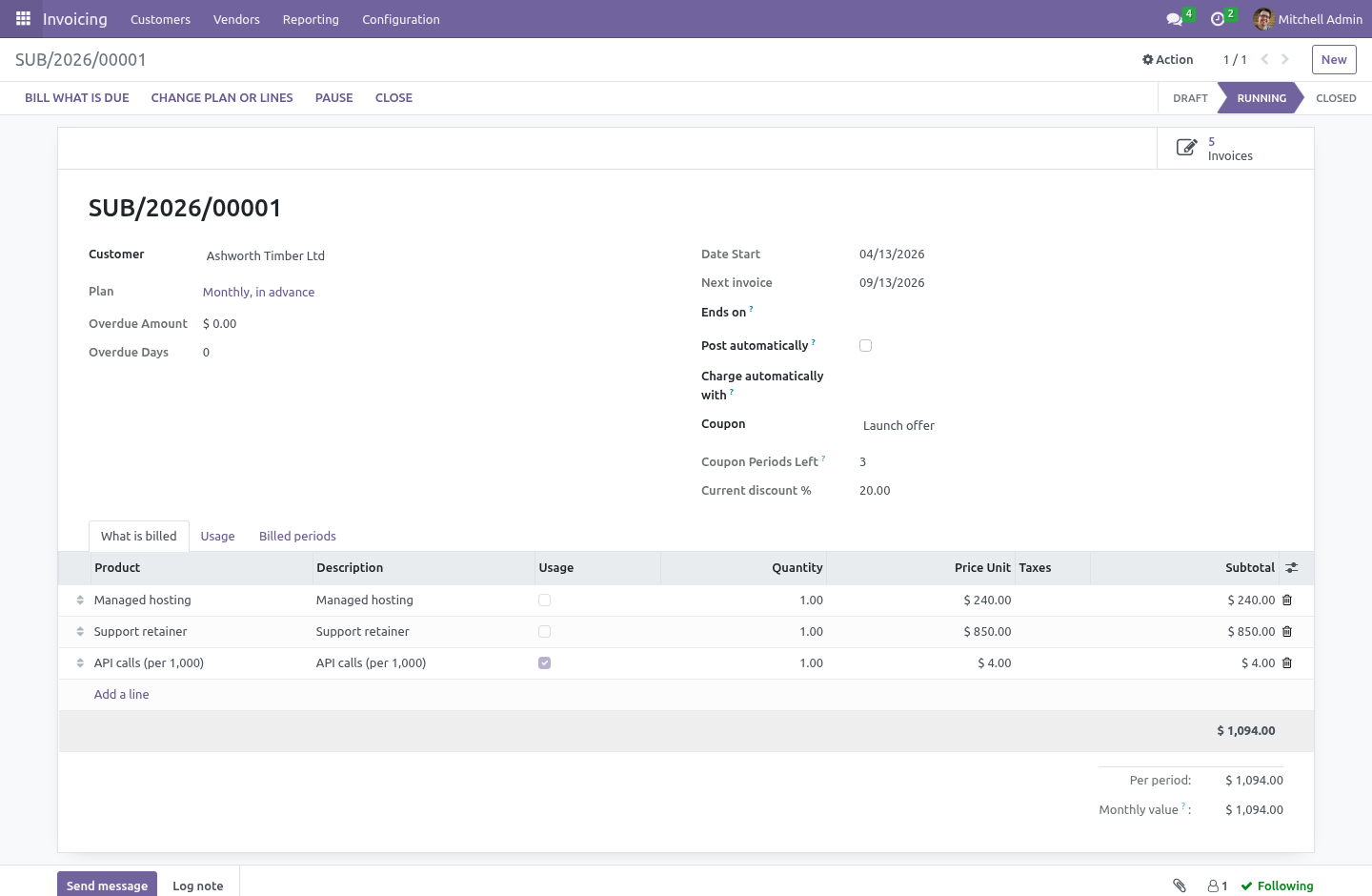
Subscriptions — a customer, a plan, the lines to bill, a start date and optionally an end date. Draft, running, paused, closed.
A nightly job that bills whatever has come due, and a button for when you cannot wait for it.
What it is worth — the amount per period, and the same amount folded into a month, so plans of different lengths add up to one figure.
The hard part is not the recurrence
It is that a job which runs twice must not bill the customer twice.
And jobs do run twice. A retry after a timeout. Two crons overlapping because the first was slow. An administrator pressing Bill what is due while the scheduler is halfway through the list.
Nothing here relies on a lock, on crons not overlapping, or on nobody pressing anything.
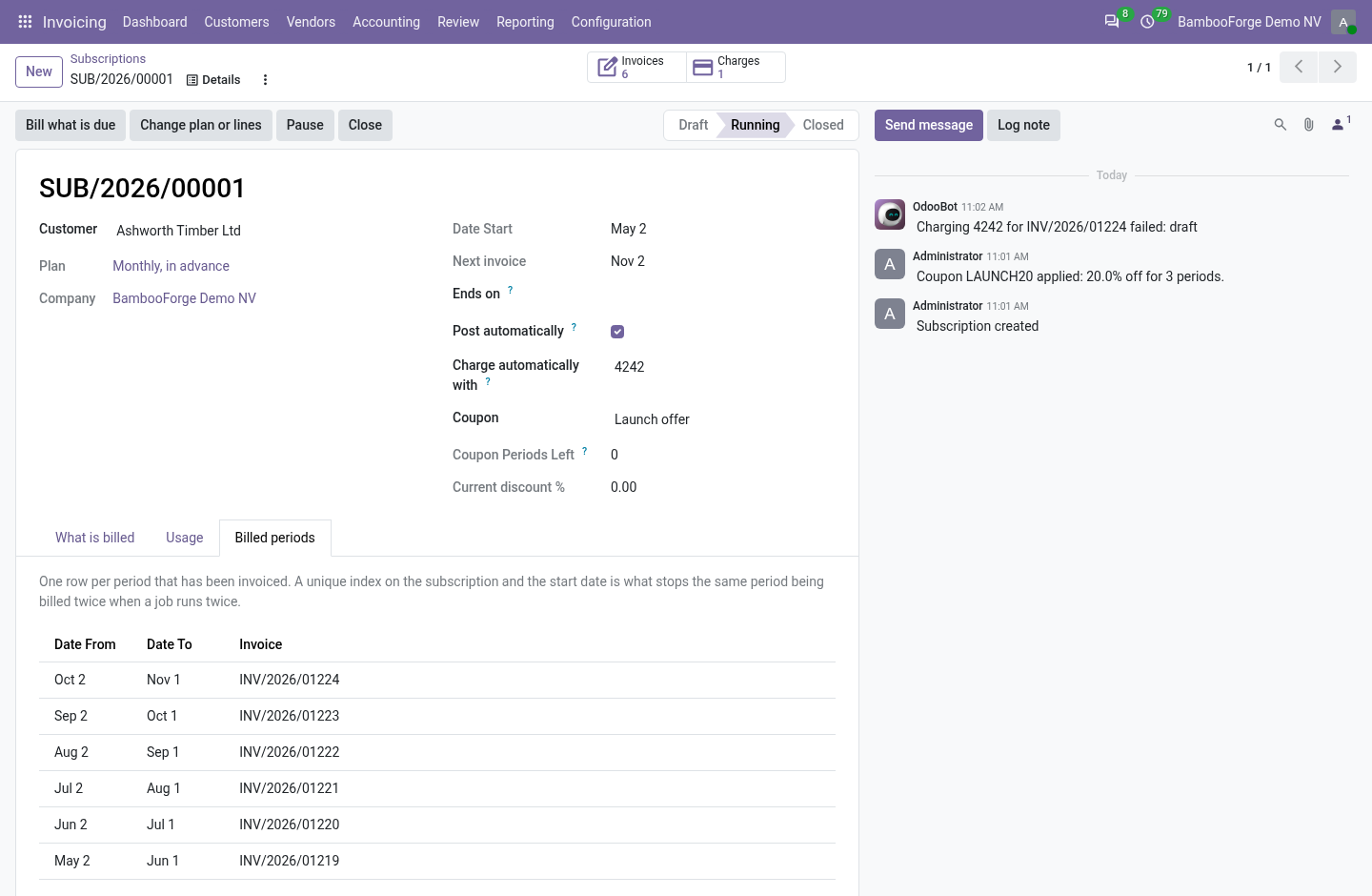
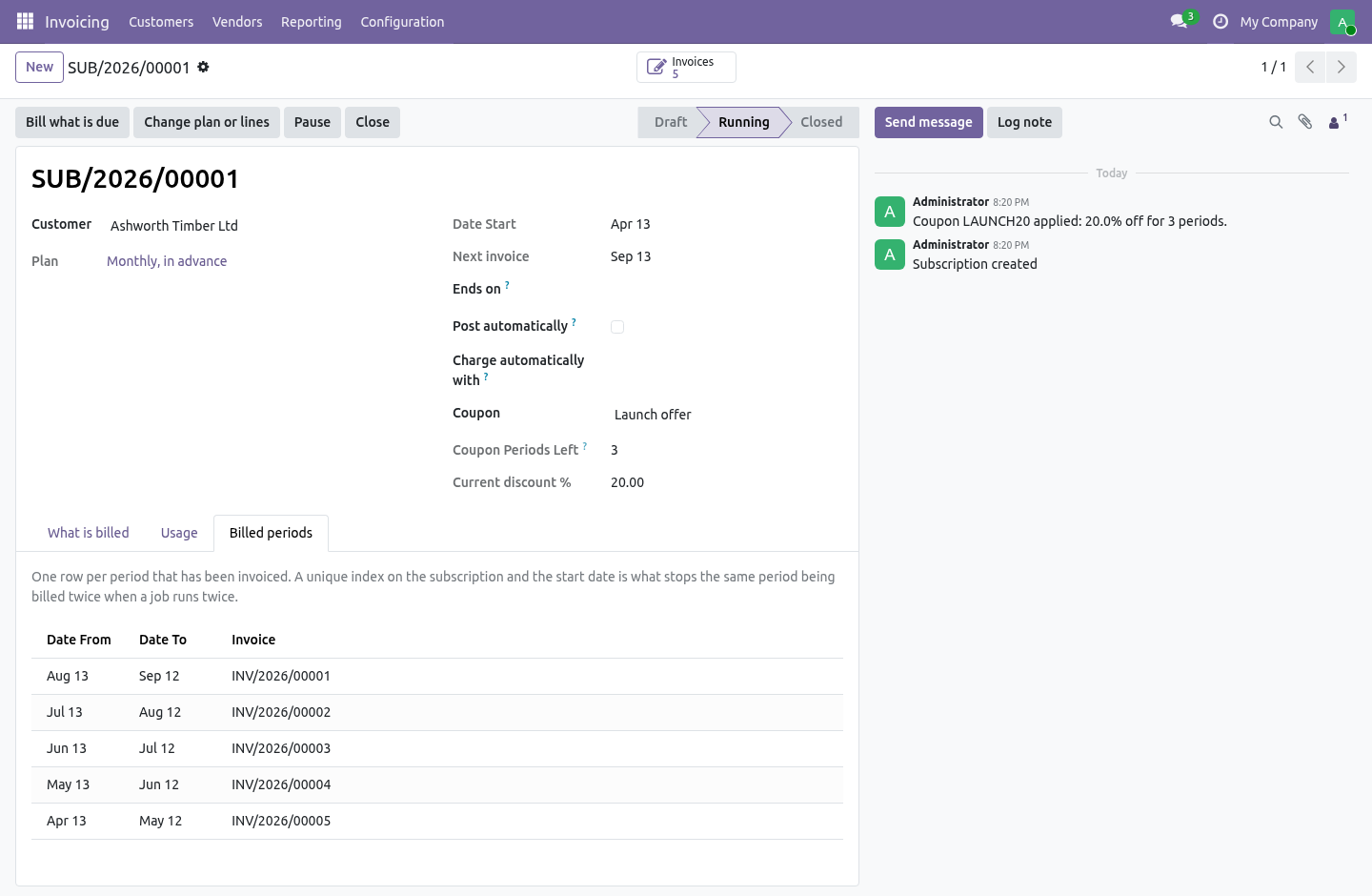
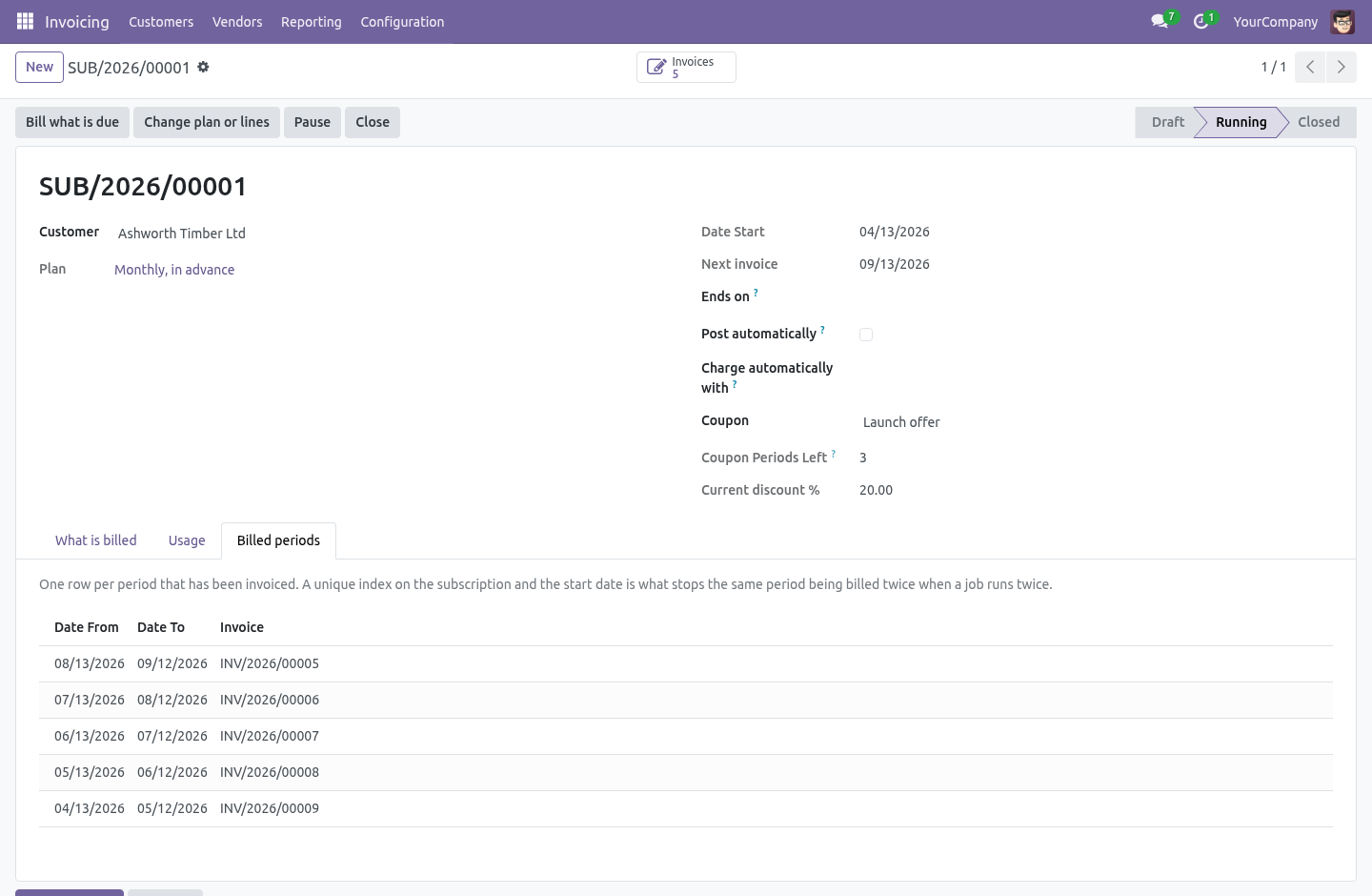
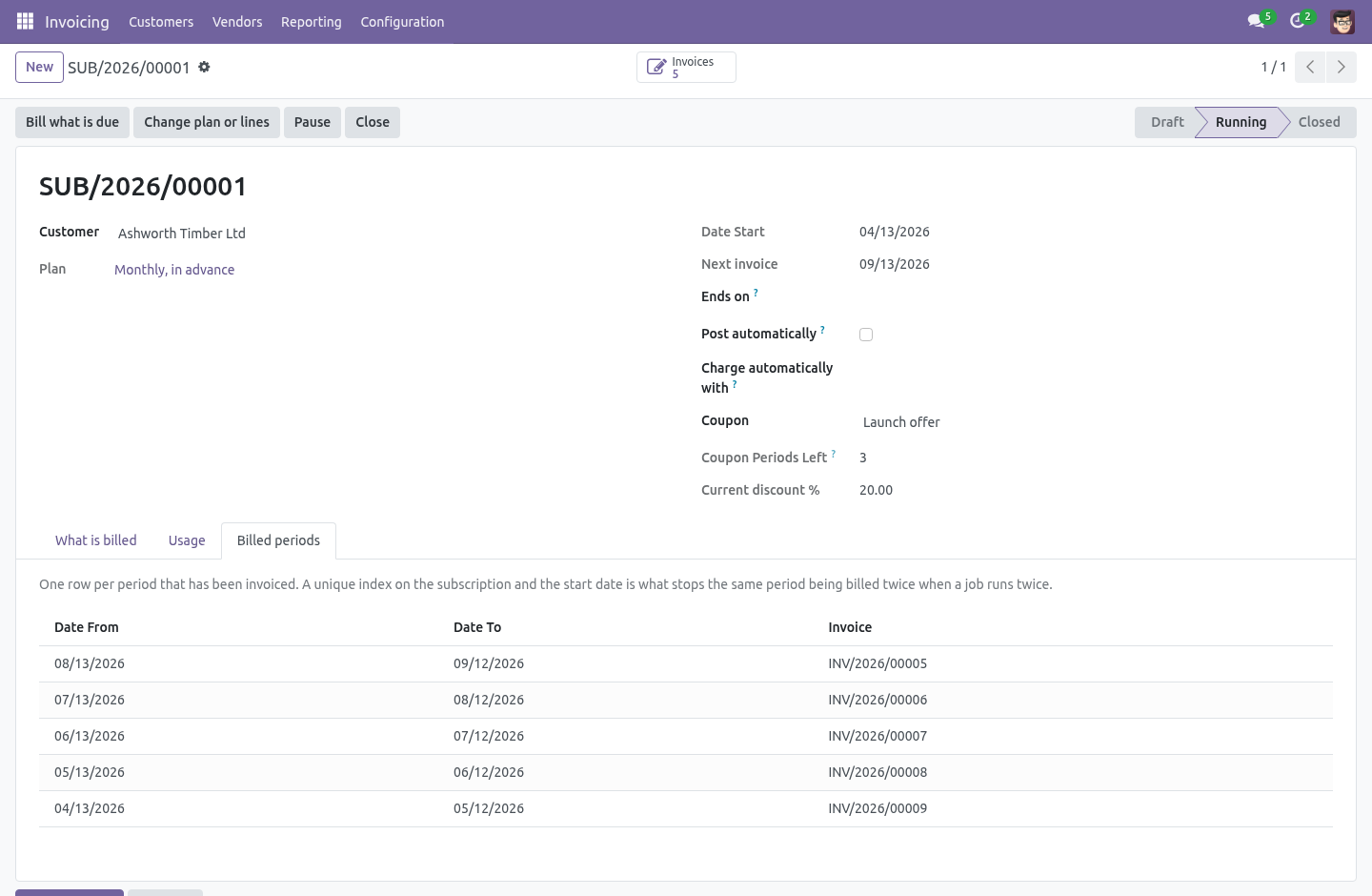
Every period billed is a row. A unique index on the subscription and the period's start date refuses the second one. If two runs race, one of them fails to insert and rolls back, and the customer gets one invoice.
The row is written in the same transaction as the invoice it belongs to, so there is never a moment when an invoice exists that no period claims — which is the shape of every duplicate-billing bug worth having an opinion about.
The index is created in init() rather than declared as an _sql_constraint, because Odoo 20.0 ignores those.
The nightly job
It commits one subscription at a time. A failure on the fortieth does not undo the thirty-nine before it; the one that failed is written up on its own chatter and tried again tomorrow.
Committing as it goes is only safe because of the index: a re-run cannot bill a period that already has a row, so there is nothing to lose by having kept the earlier ones.
Beyond the recurrence
Usage, billed in arrears
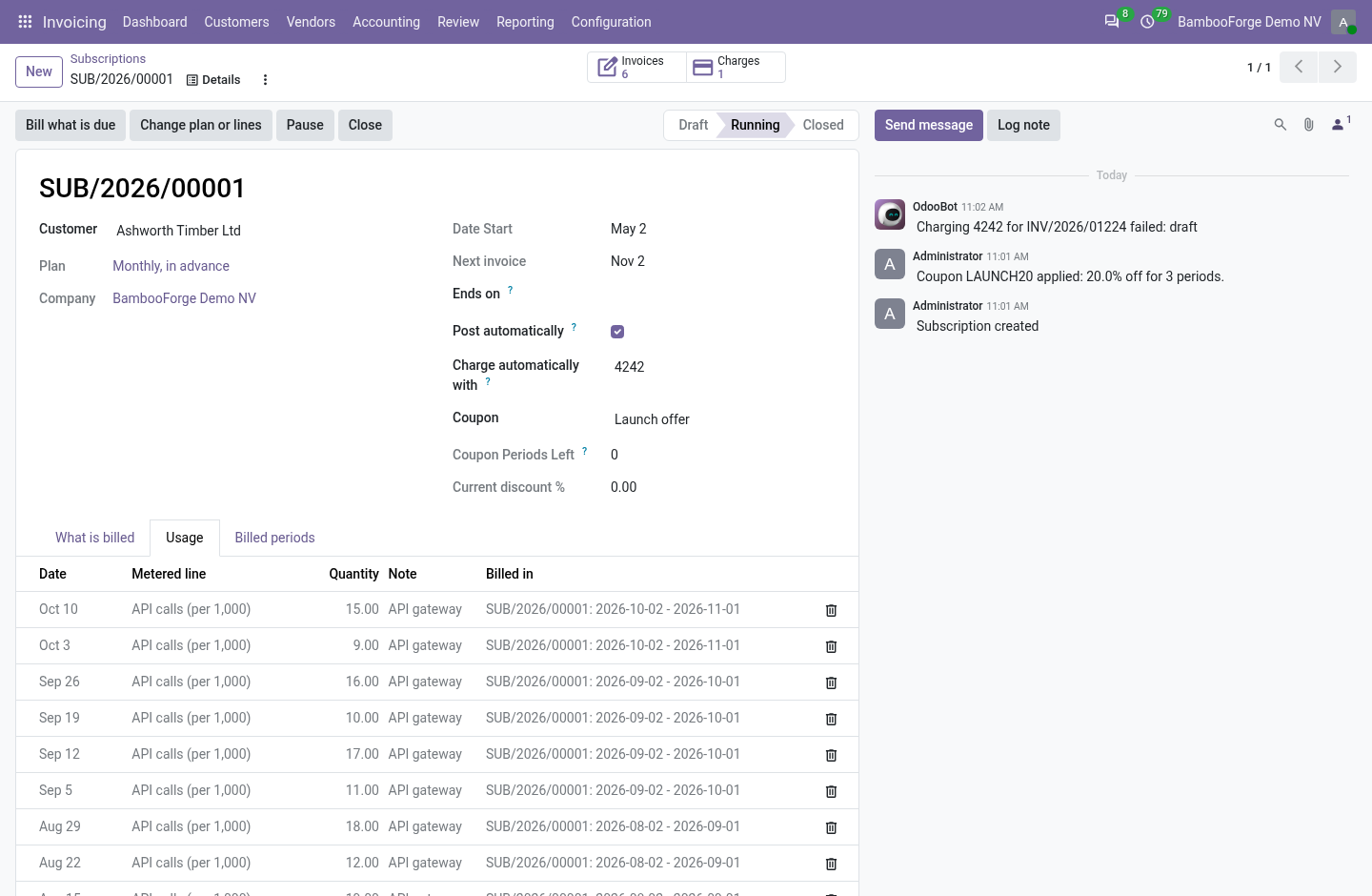
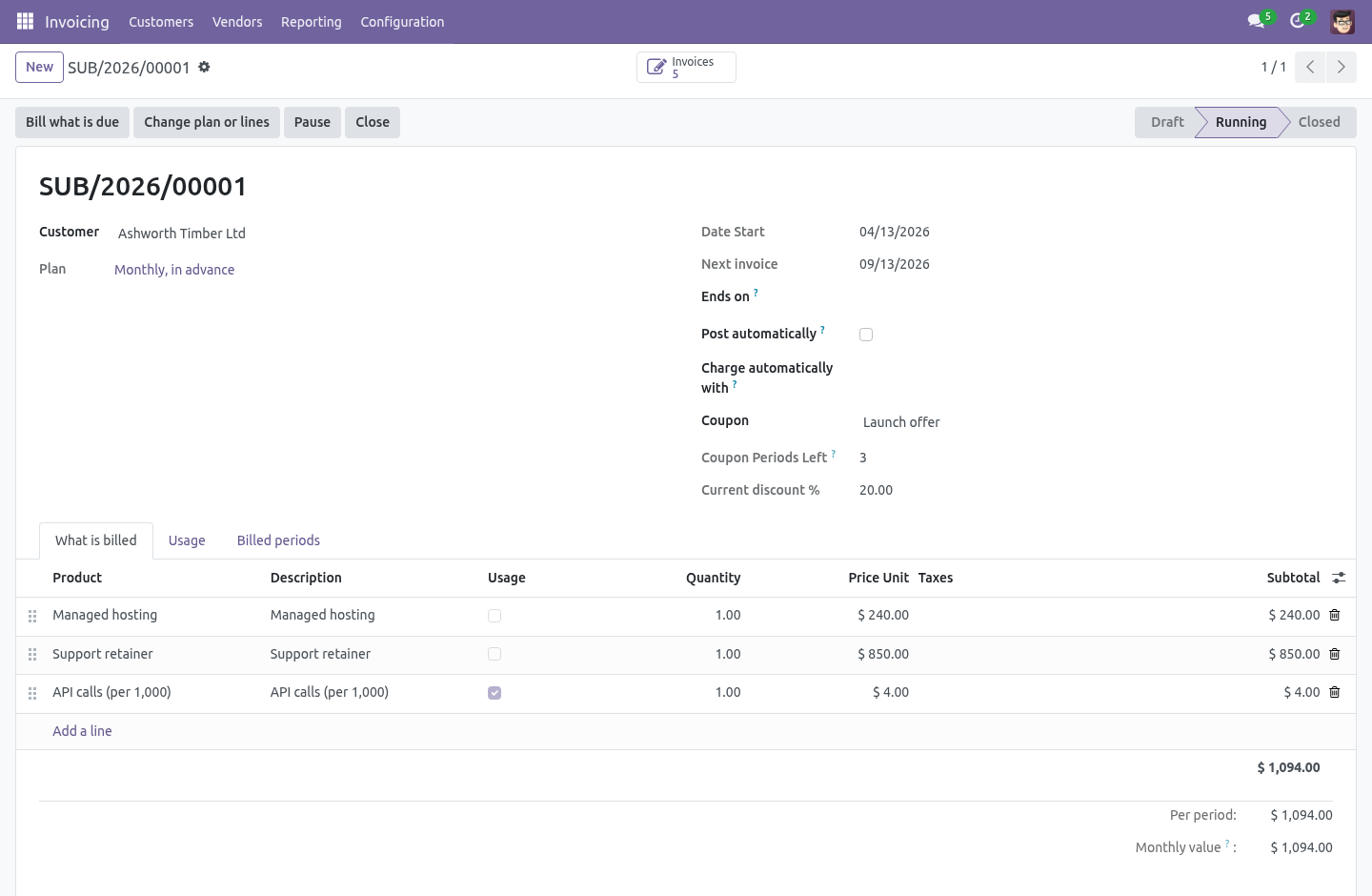
Tick Usage on a line and its quantity comes from the readings recorded for it, not from the line. A reading is a date, a quantity and a note - typed on the subscription's Usage tab, imported from a file, or posted from a meter or a script with line.bf_record_usage(quantity, date, note). When a period is billed, every reading dated on or before its end that no earlier invoice took is summed onto the line, the line says how many readings it holds, and each reading is stamped with the period that billed it. A billed reading cannot be changed or deleted; a period with no readings bills nothing for that line.
A plan or a price changed mid-period
Change plan or lines on a running subscription opens the change with its price on it: the old amount per period, the new one, and how much of the paid period is left. On a plan billed in advance the difference for the days left is settled at once - an invoice for an upgrade, a credit note for a downgrade - and the period already paid for is not billed again. On a plan billed in arrears, or before any period has been billed, nothing is settled: the new lines apply from the next invoice. The subscription's chatter says what changed and which document settled it. Customers do the same from the portal, among the plans marked Customers may switch to it.
Trial
A plan with trial days bills nothing for that long: the first invoice is dated at the end of the trial, and the subscription says so when it starts.
Coupons
A coupon is a code, a percentage and a number of periods (zero means for ever), optionally a date it expires and a number of times it may be used. Applied on the subscription, or typed by the customer on the portal, it discounts every line of the next invoices and counts its periods down; an expired or exhausted coupon is refused with the reason.
Dunning
Configuration -> Subscription Dunning is a ladder: on day 3 remind, on day 10 charge the stored card again and remind, on day 21 pause, and so on - one rung per line, per company. The nightly job reads how many days the oldest posted, unpaid invoice of each subscription is overdue, climbs to the highest rung that applies, at most one rung per run, and writes what it did on the subscription. The day the invoice is paid it steps off: the rung is cleared, and a paused subscription can be resumed. Charging the stored card needs the payment bridge below; without it the retry rung sends the reminder.
The customer's own hands
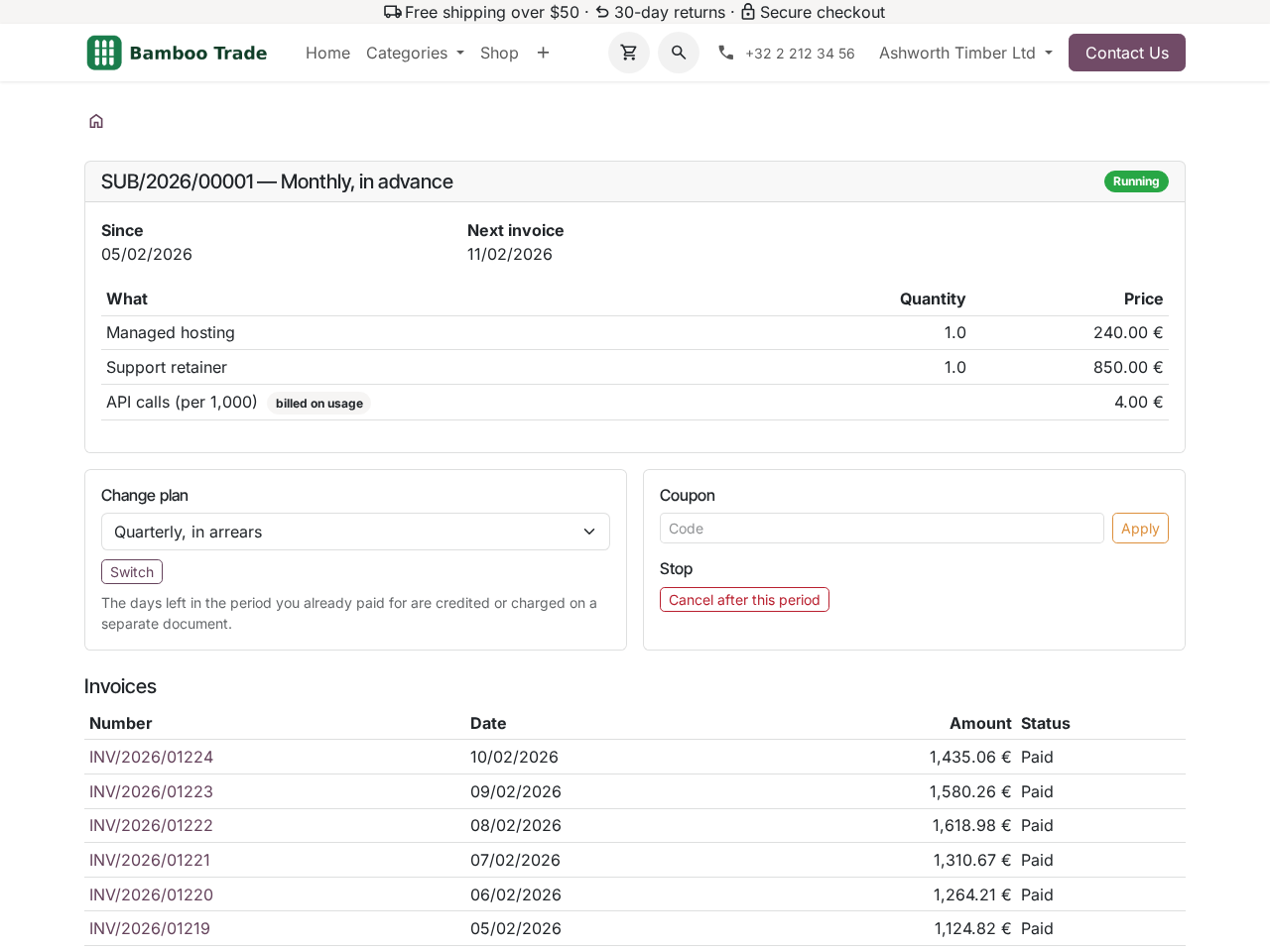
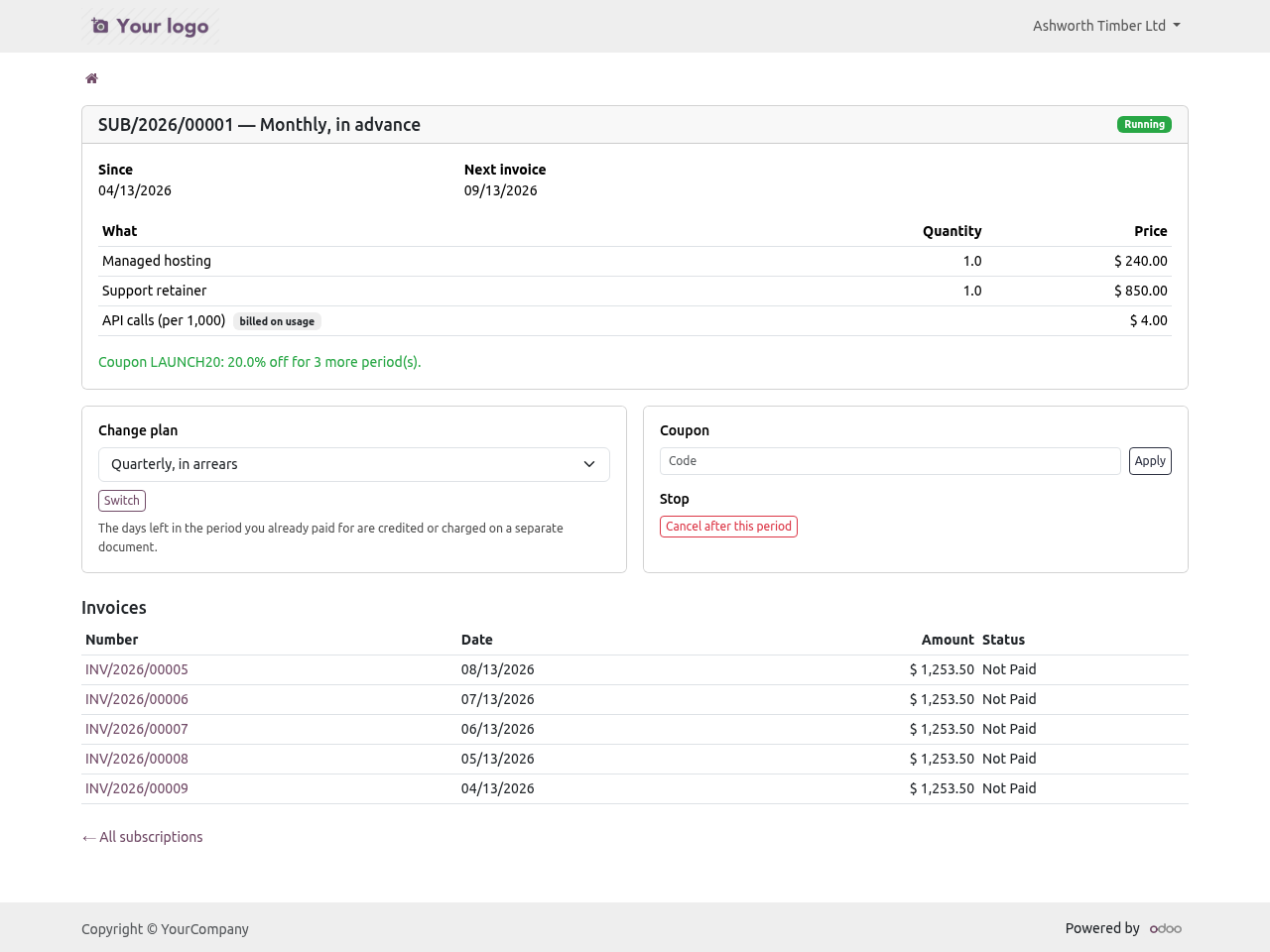
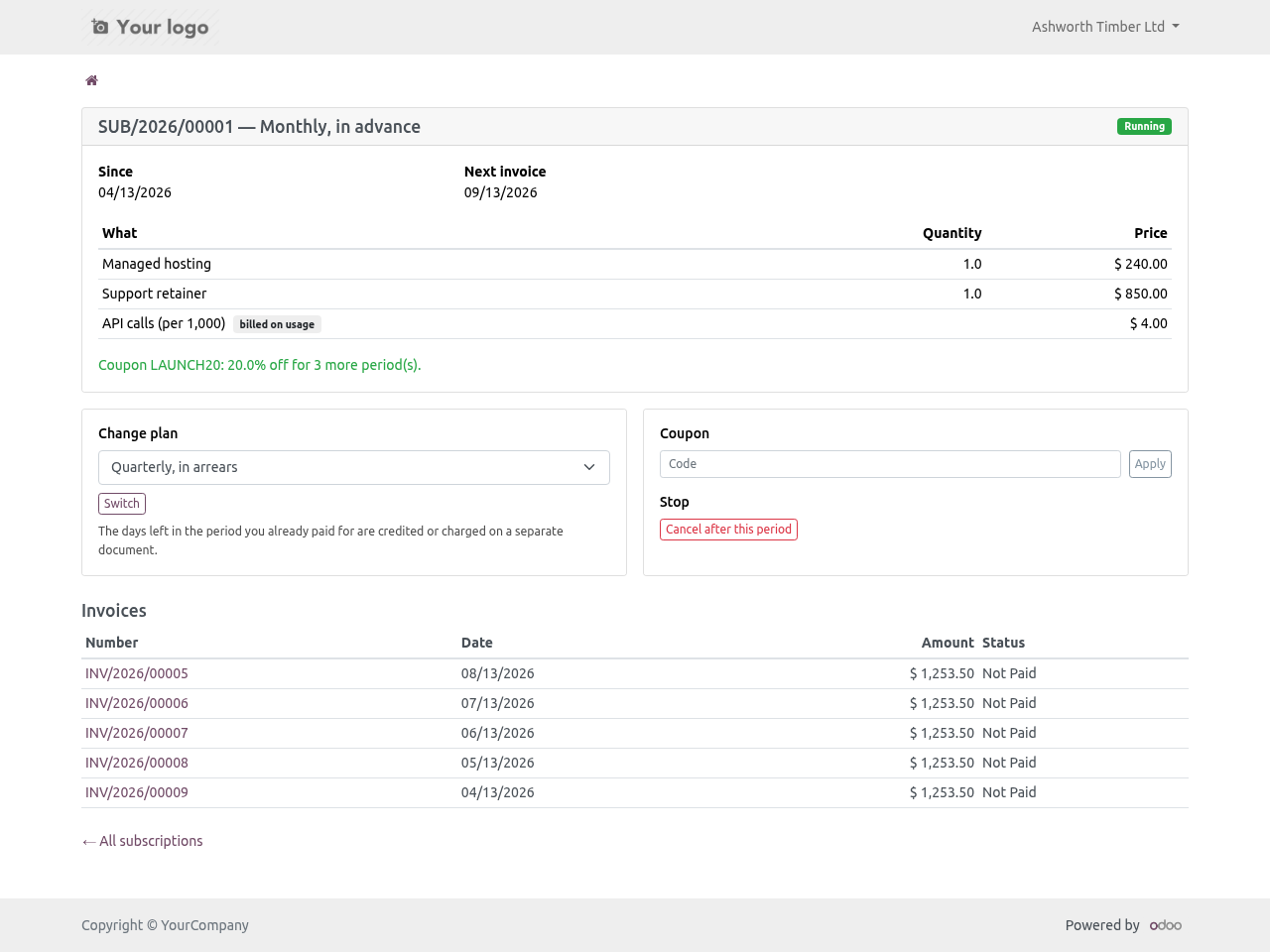
Under My account -> Subscriptions a customer sees their subscriptions, the lines, the next invoice date and the posted invoices, and can:
cancel after the period already paid for - the end date is set to the end of the current period and nothing more is billed;
switch to another plan among those marked Customers may switch to it, priced by the days left as above;
apply a coupon by code.
Every route re-checks that the subscription is theirs.
Charging the stored card
With Odoo's Invoice Online Payment installed, the bridge Subscription Billing: charge the stored card installs by itself. Pick one of the customer's saved payment methods on the subscription and every posted invoice is charged with it: a payment transaction with the token is created against the invoice and sent to the provider, and Odoo's own reconciliation does the rest when the provider answers. A refused charge is a note on the subscription with the provider's words; the dunning rung retry charges the open invoices again. Any provider that tokenises cards in Odoo works - Stripe, Adyen, Authorize.net, Mollie and the others.
What it refuses
Deleting a billed period, in any group. It is the record that stops a customer being invoiced twice for the same month, and a tidy-up that removes one puts the duplicate back on the table.
Posting invoices by default. Off unless you turn it on per subscription: an invoice nobody has looked at is an invoice nobody can defend when the customer telephones.
Catching up for ever. A subscription that has been dormant stops after sixty invoices in one run and says so on its chatter, rather than quietly producing two hundred.
Starting with nothing to bill, ending before it starts, or a plan set to bill less than once per period.
Dates
A period runs from its first day to its last — a monthly period starting on the 1st ends on the 30th or the 31st, and an invoice line that read "1 to 1" would be wrong at both ends. The invoice carries the period's first day when the plan bills in advance, and its last day when it bills in arrears. Each line says which period it pays for, because a customer looking at twelve identical invoices needs to know which month each one is.
Monthly on the 31st does not skip February.
Series
Community 16.0, 17.0, 18.0, 19.0 and 20.0.
How we make sure it works
Before every release, 42 automated checks run against this app on Odoo 16, 17, 18, 19 and 20. Among them:
A posted invoice with nothing to price stays posted.
A billed period cannot be deleted.
It cannot end before it starts.
A month end start does not skip february.
A subscription with no lines will not start.
The complete list is in the source you receive.
Install
Copy bambooforge_subscription into your addons path and update the app list, or install the ZIP from the Odoo Apps Store.
Install Subscription Billing & Recurring Invoices.
Open Subscriptions - its menus are Subscription Plans.
Questions people ask
- Which Odoo versions does it run on?
Odoo 16.0, 17.0, 18.0, 19.0, 20.0, on the series you buy it for; each series is its own listing.
- Community or Enterprise?
Both. It needs no Enterprise app.
- What does it need?
The standard Invoicing app. No extra Python package.
- Where does it show up?
Under the Subscriptions menu (Subscription Plans).
- Does anything leave my server?
No. It makes no call outside your Odoo server: no telemetry, no licence check, no third-party service.
- What happens if I uninstall it?
Odoo drops the app's own tables and fields; the standard records it worked on (contacts, orders, products) stay as they are.
What changed in 1.2
Usage billing: metered lines, readings by hand, import or API, billed once and stamped with the period that took them.
Plan changes priced by the days left: an invoice or a credit note for the rest of the paid period, from the back office or the portal.
Trials on the plan, coupons that count down.
Dunning: a ladder of reminders, retries, pause and close, per company, climbed one rung a run and left the day the invoice is paid.
The customer portal: their subscriptions, cancel after the paid period, switch plan, apply a coupon.
Charge the stored card on every posted invoice, with the payment bridge.