 BambooForge Labs
Stock & MRP Performance for Large Databases
Make stock reservation and MRP navigation fast again on aged, high-volume databases - no version upgrade and no data migration required.
Available for Odoo 16.0, Odoo 17.0, Odoo 18.0, Odoo 19.0, Odoo 20.0. Technical name bambooforge_stock_move_perf.
Transcript of the walkthrough (Odoo 20)
Stock & MRP Performance for Large Databases. Make stock reservation and MRP navigation fast again on aged, high-volume databases - no version upgrade and no data migration required. Make Mark as Done, Check Availability and opening a Manufacturing Order fast again on databases with a large stock-move history — without upgrading Odoo and without migrating your data. This module rewrites the hottest move-graph traversals as bounded SQL that returns the identical result the standard code returns, and ships a read-only diagnostic that shows you exactly how bad the problem is before and after.
In the next few minutes: stock & mrp performance for large databases, then the problem, then what this module does, then why the numbers stay identical, then the move graph health diagnostic. Then what this app deliberately does not do, so you can tell before you buy whether it fits. Everything lives under Move Graph Health. #.
Copy bambooforge_stock_move_perf into your addons path. #. Update the apps list and install BambooForge Stock Performance. #.
No configuration and no data migration are required. The overrides are active immediately. Stock & MRP Performance for Large Databases. Make Mark as Done, Check Availability and opening a Manufacturing Order fast again on databases with a large stock-move history — without upgrading Odoo and without migrating your data.
This module rewrites the hottest move-graph traversals as bounded SQL that returns the identical result the standard code returns, and ships a read-only diagnostic that shows you exactly how bad the problem is before and after. This page is the complete manual. Follow it top to bottom and you can install, verify the speed-up and understand precisely what changed without contacting support. The problem.
Odoo links stock moves to each other through the stock_move_move_rel many-to-many table (move_orig_ids ↔ move_dest_ids). On a young database this table is small. On a database that has run for years — especially with serial/lot tracking, repeated backorders and multi-level manufacturing — it grows a combinatorial, bipartite structure: shared components link to many serial-tracked orders, each backorder keeps chains open, and procurement groups fan out. Link counts in the hundreds of millions and per-move fan-out in the thousands are real.
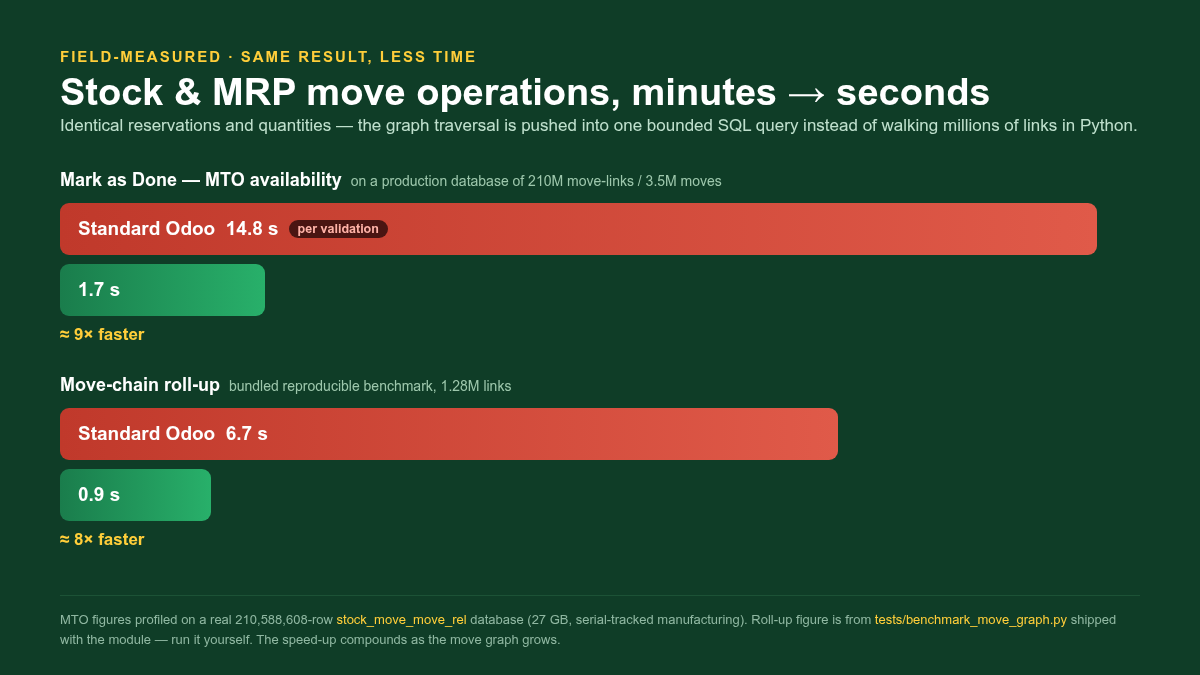
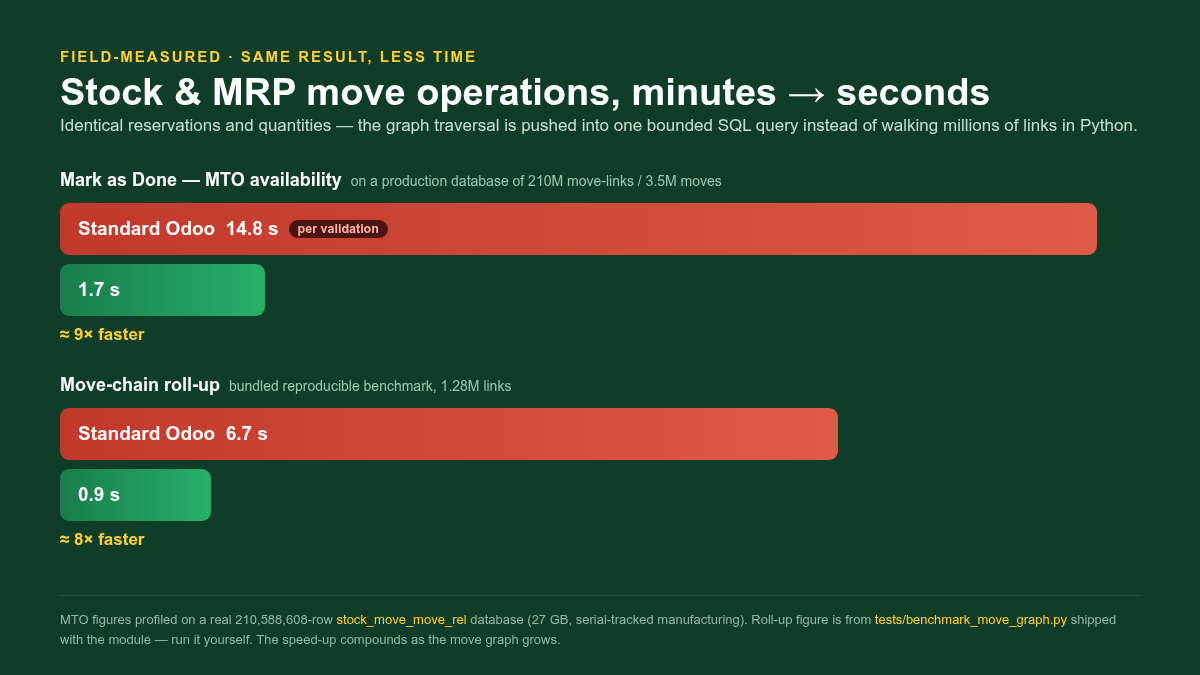
Mark as Done on a manufacturing/MTO move calls _action_assign, which calls _get_available_move_lines_in / _out — a single such call has been measured at ~15 seconds on a real 210-million-link database. Opening a Manufacturing Order computes the source/child smart-button counts, which walk the whole procurement group — this can time out or never render the form. Under load these long calls pin worker processes and produce 504 Gateway Timeout. The standard code walks this graph through the ORM.
Every hop (move_orig_ids.move_dest_ids.move_orig_ids) materialises hundreds of thousands of records and re-reads the company-rule-wrapped M2M. The result: What this module does. It overrides five methods on stock.move and mrp.production so the graph traversal happens once, in the database, instead of node-by-node in Python: stock.move._get_available_move_lines_in / _out The MTO availability traversal walked on every _action_assign. The 2-hop and 3-hop move-id sets are produced by one bounded SQL statement each (DISTINCT collapses the explosion), then re-resolved through search().
Why the numbers stay identical. This is a performance change, not a behaviour change. Three properties keep the results bit-identical to standard Odoo: 1. Same records.
The SQL helpers only produce a set of move ids; those ids are re-resolved with search([('id', 'in', ids)]), which re-applies the stock.move record rules — including the multi-company rule. Nothing bypasses access control. 2. Same order.
search() returns rows in the model order (sequence, id), which is exactly the order the standard ORM chain yields, so the order-dependent itertools.groupby in the availability functions produces the identical grouping. No sorted() is introduced. 3. Same grouping.
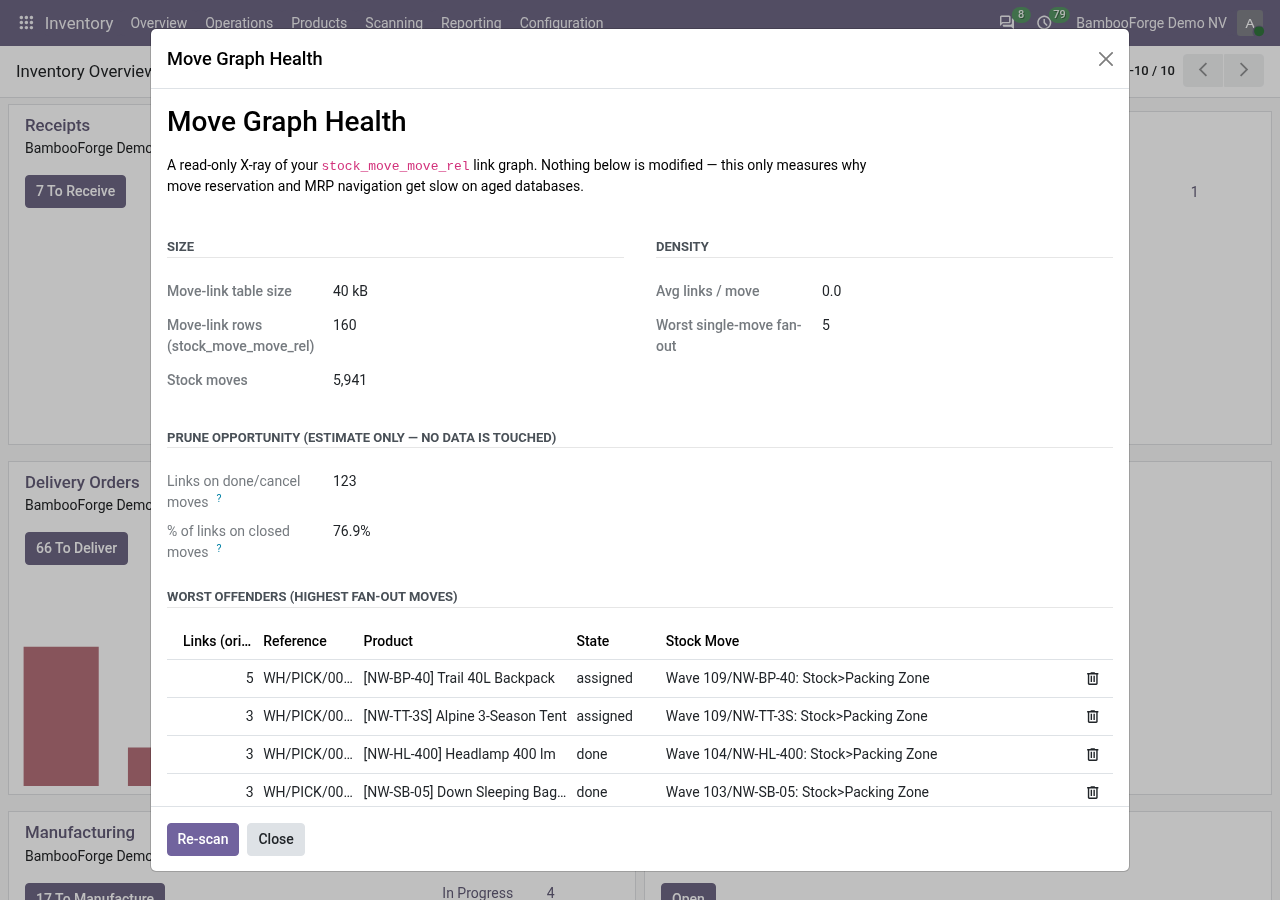
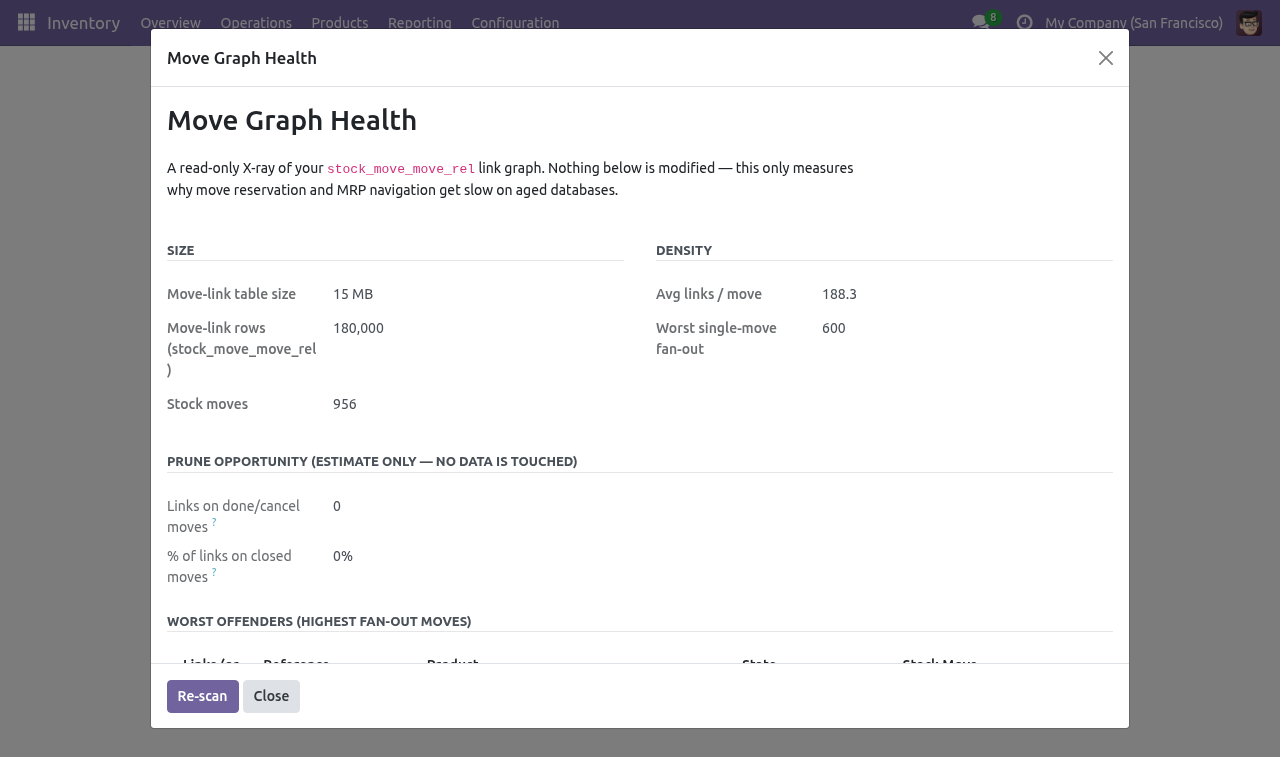
The grouping and quantity-summation bodies are copied verbatim from standard Odoo — only the traversal that feeds them is replaced. The Move Graph Health diagnostic. Go to Inventory ▸ Reporting ▸ Move Graph Health. The report runs read-only SQL and shows: Size — the stock_move_move_rel table size and row count, and the number of stock moves.
Density — average links per move and the worst single-move fan-out. Prune opportunity — how many links only connect moves that are already in a done or cancel state (i.e. trace closed history), as a share of all links. This is an estimate only; the diagnostic never modifies data.
Worst offenders — the twenty highest fan-out moves, with their business reference, product and state, so you can see the real orders behind the numbers. Use it to quantify the problem before installing elsewhere, and to show stakeholders the density of the graph. It is safe to run on production: every query is read-only and uses planner statistics for the big numbers so it does not full-scan a huge table. Frequently asked questions.
Will my reservations or quantities change? No. See Why the numbers stay identical above — the change is limited to how the move sets are gathered; the reservation and quantity logic is untouched. Does it work on multi-company databases?
Yes. Because the move ids are re-resolved through search(), the standard multi-company record rule is applied exactly as before. How we make sure it works. Before every release, 12 automated checks run against this app on Odoo 16, 17, 18, 19 and 20.
Among them: Rollup move origs does not skip done. Orig dest orig search order matches core. Rollup move dests includes self and descendants. Rollup move origs includes self and ancestors.
Available move lines in quantity. The complete list is in the source you receive. Questions people ask. Which Odoo versions does it run on?
Odoo 16.0, 17.0, 18.0, 19.0, 20.0, on the series you buy it for; each series is its own listing. Community or Enterprise? Both. It needs no Enterprise app.
Support. BambooForge Labs — support@bambooforge.dev The complete manual is at docs dot bambooforge dot dev, the demo database is linked from the store page, and support answers within twenty-four hours. Links are in the description.
Transcript of the walkthrough (Odoo 19)
Stock & MRP Performance for Large Databases. Make stock reservation and MRP navigation fast again on aged, high-volume databases - no version upgrade and no data migration required. Make Mark as Done, Check Availability and opening a Manufacturing Order fast again on databases with a large stock-move history — without upgrading Odoo and without migrating your data. This module rewrites the hottest move-graph traversals as bounded SQL that returns the identical result the standard code returns, and ships a read-only diagnostic that shows you exactly how bad the problem is before and after.
In the next few minutes: stock & mrp performance for large databases, then the problem, then what this module does, then why the numbers stay identical, then the move graph health diagnostic. Then what this app deliberately does not do, so you can tell before you buy whether it fits. Everything lives under Move Graph Health. #.
Copy bambooforge_stock_move_perf into your addons path. #. Update the apps list and install BambooForge Stock Performance. #.
No configuration and no data migration are required. The overrides are active immediately. Stock & MRP Performance for Large Databases. Make Mark as Done, Check Availability and opening a Manufacturing Order fast again on databases with a large stock-move history — without upgrading Odoo and without migrating your data.
This module rewrites the hottest move-graph traversals as bounded SQL that returns the identical result the standard code returns, and ships a read-only diagnostic that shows you exactly how bad the problem is before and after. This page is the complete manual. Follow it top to bottom and you can install, verify the speed-up and understand precisely what changed without contacting support. The problem.
Odoo links stock moves to each other through the stock_move_move_rel many-to-many table (move_orig_ids ↔ move_dest_ids). On a young database this table is small. On a database that has run for years — especially with serial/lot tracking, repeated backorders and multi-level manufacturing — it grows a combinatorial, bipartite structure: shared components link to many serial-tracked orders, each backorder keeps chains open, and procurement groups fan out. Link counts in the hundreds of millions and per-move fan-out in the thousands are real.
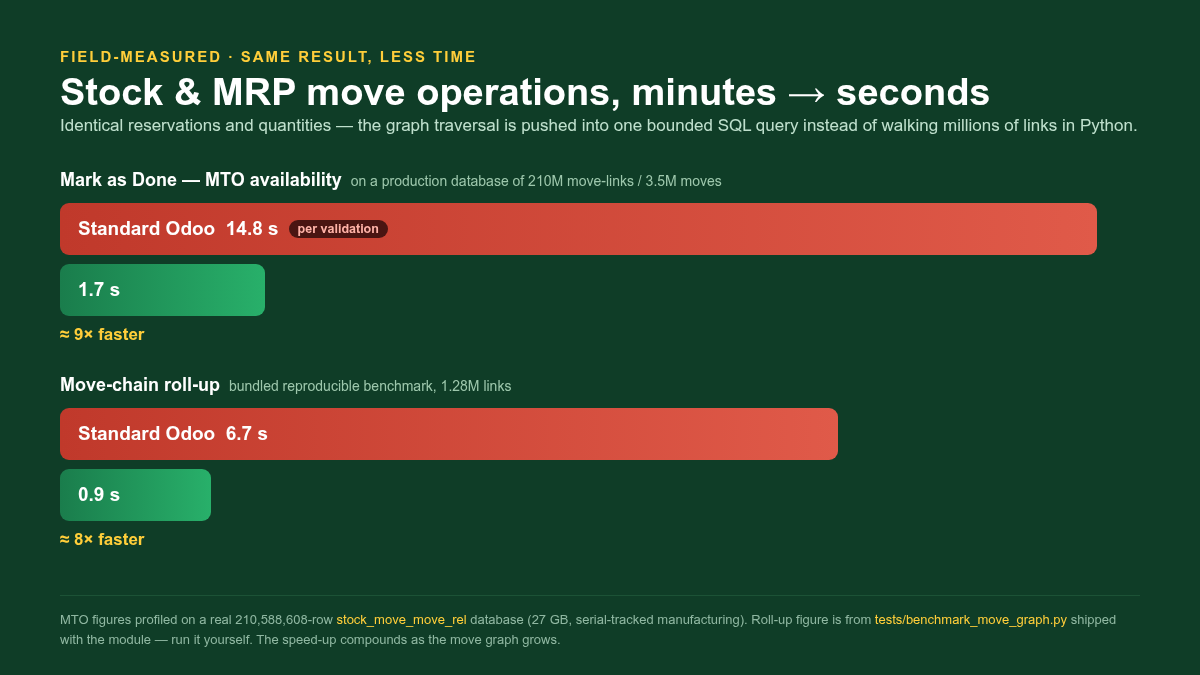
Mark as Done on a manufacturing/MTO move calls _action_assign, which calls _get_available_move_lines_in / _out — a single such call has been measured at ~15 seconds on a real 210-million-link database. Opening a Manufacturing Order computes the source/child smart-button counts, which walk the whole procurement group — this can time out or never render the form. Under load these long calls pin worker processes and produce 504 Gateway Timeout. The standard code walks this graph through the ORM.
Every hop (move_orig_ids.move_dest_ids.move_orig_ids) materialises hundreds of thousands of records and re-reads the company-rule-wrapped M2M. The result: What this module does. It overrides five methods on stock.move and mrp.production so the graph traversal happens once, in the database, instead of node-by-node in Python: stock.move._get_available_move_lines_in / _out The MTO availability traversal walked on every _action_assign. The 2-hop and 3-hop move-id sets are produced by one bounded SQL statement each (DISTINCT collapses the explosion), then re-resolved through search().
Why the numbers stay identical. This is a performance change, not a behaviour change. Three properties keep the results bit-identical to standard Odoo: 1. Same records.
The SQL helpers only produce a set of move ids; those ids are re-resolved with search([('id', 'in', ids)]), which re-applies the stock.move record rules — including the multi-company rule. Nothing bypasses access control. 2. Same order.
search() returns rows in the model order (sequence, id), which is exactly the order the standard ORM chain yields, so the order-dependent itertools.groupby in the availability functions produces the identical grouping. No sorted() is introduced. 3. Same grouping.
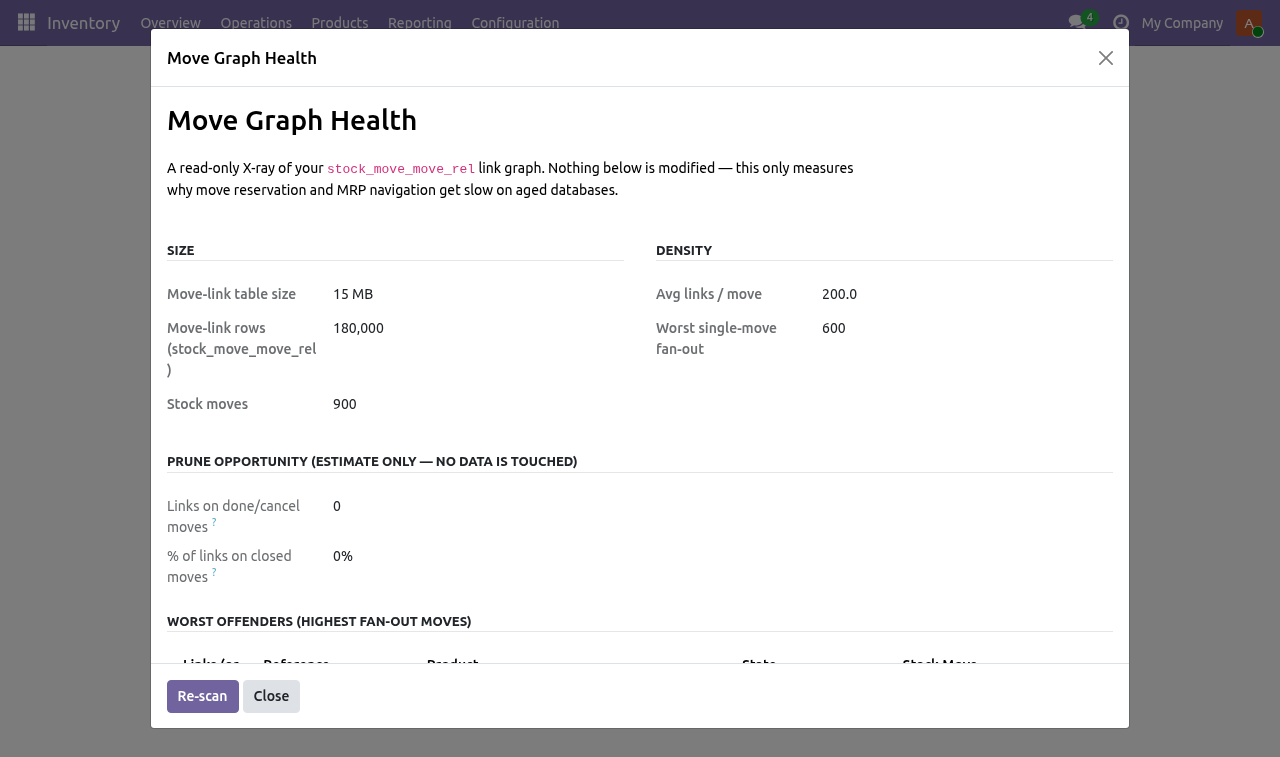
The grouping and quantity-summation bodies are copied verbatim from standard Odoo — only the traversal that feeds them is replaced. The Move Graph Health diagnostic. Go to Inventory ▸ Reporting ▸ Move Graph Health. The report runs read-only SQL and shows: Size — the stock_move_move_rel table size and row count, and the number of stock moves.
Density — average links per move and the worst single-move fan-out. Prune opportunity — how many links only connect moves that are already in a done or cancel state (i.e. trace closed history), as a share of all links. This is an estimate only; the diagnostic never modifies data.
Worst offenders — the twenty highest fan-out moves, with their business reference, product and state, so you can see the real orders behind the numbers. Use it to quantify the problem before installing elsewhere, and to show stakeholders the density of the graph. It is safe to run on production: every query is read-only and uses planner statistics for the big numbers so it does not full-scan a huge table. Frequently asked questions.
Will my reservations or quantities change? No. See Why the numbers stay identical above — the change is limited to how the move sets are gathered; the reservation and quantity logic is untouched. Does it work on multi-company databases?
Yes. Because the move ids are re-resolved through search(), the standard multi-company record rule is applied exactly as before. Support. BambooForge Labs — support@bambooforge.dev The complete manual is at docs dot bambooforge dot dev, the demo database is linked from the store page, and support answers within twenty-four hours.
Links are in the description.
Transcript of the walkthrough (Odoo 18)
Stock & MRP Performance for Large Databases. Make stock reservation and MRP navigation fast again on aged, high-volume databases - no version upgrade and no data migration required. Make Mark as Done, Check Availability and opening a Manufacturing Order fast again on databases with a large stock-move history — without upgrading Odoo and without migrating your data. This module rewrites the hottest move-graph traversals as bounded SQL that returns the identical result the standard code returns, and ships a read-only diagnostic that shows you exactly how bad the problem is before and after.
In the next few minutes: stock & mrp performance for large databases, then the problem, then what this module does, then why the numbers stay identical, then the move graph health diagnostic. Then what this app deliberately does not do, so you can tell before you buy whether it fits. Everything lives under Move Graph Health. #.
Copy bambooforge_stock_move_perf into your addons path. #. Update the apps list and install BambooForge Stock & MRP Performance. #.
No configuration and no data migration are required. The overrides are active immediately. Stock & MRP Performance for Large Databases. Make Mark as Done, Check Availability and opening a Manufacturing Order fast again on databases with a large stock-move history — without upgrading Odoo and without migrating your data.
This module rewrites the hottest move-graph traversals as bounded SQL that returns the identical result the standard code returns, and ships a read-only diagnostic that shows you exactly how bad the problem is before and after. This page is the complete manual. Follow it top to bottom and you can install, verify the speed-up and understand precisely what changed without contacting support. The problem.
Odoo links stock moves to each other through the stock_move_move_rel many-to-many table (move_orig_ids ↔ move_dest_ids). On a young database this table is small. On a database that has run for years — especially with serial/lot tracking, repeated backorders and multi-level manufacturing — it grows a combinatorial, bipartite structure: shared components link to many serial-tracked orders, each backorder keeps chains open, and procurement groups fan out. Link counts in the hundreds of millions and per-move fan-out in the thousands are real.
Mark as Done on a manufacturing/MTO move calls _action_assign, which calls _get_available_move_lines_in / _out — a single such call has been measured at ~15 seconds on a real 210-million-link database. Opening a Manufacturing Order computes the source/child smart-button counts, which walk the whole procurement group — this can time out or never render the form. Under load these long calls pin worker processes and produce 504 Gateway Timeout. The standard code walks this graph through the ORM.
Every hop (move_orig_ids.move_dest_ids.move_orig_ids) materialises hundreds of thousands of records and re-reads the company-rule-wrapped M2M. The result: What this module does. It overrides the hottest traversal methods on stock.move, stock.quant and mrp.production so the graph traversal happens once, in the database, instead of node-by-node in Python: stock.move._get_available_move_lines_in / _out The MTO availability traversal walked on every _action_assign. The 2-hop and 3-hop move-id sets are produced by one bounded SQL statement each (DISTINCT collapses the explosion), then re-resolved through search().
Why the numbers stay identical. This is a performance change, not a behaviour change. Three properties keep the results bit-identical to standard Odoo: 1. Same records.
The SQL helpers only produce a set of move ids; those ids are re-resolved with search([('id', 'in', ids)]), which re-applies the stock.move record rules — including the multi-company rule. Nothing bypasses access control. 2. Same order.
search() returns rows in the model order (sequence, id), which is exactly the order the standard ORM chain yields, so the order-dependent itertools.groupby in the availability functions produces the identical grouping. No sorted() is introduced. 3. Same grouping.
The grouping and quantity-summation bodies are copied verbatim from standard Odoo — only the traversal that feeds them is replaced. The Move Graph Health diagnostic. Go to Inventory ▸ Reporting ▸ Move Graph Health. The report runs read-only SQL and shows: Size — the stock_move_move_rel table size and row count, and the number of stock moves.
Density — average links per move and the worst single-move fan-out. Prune opportunity — how many links only connect moves that are already in a done or cancel state (i.e. trace closed history), as a share of all links. This is an estimate only; the diagnostic never modifies data.
Worst offenders — the twenty highest fan-out moves, with their business reference, product and state, so you can see the real orders behind the numbers. Use it to quantify the problem before installing elsewhere, and to show stakeholders the density of the graph. It is safe to run on production: every query is read-only and uses planner statistics for the big numbers so it does not full-scan a huge table. Frequently asked questions.
Will my reservations or quantities change? No. See Why the numbers stay identical above — the change is limited to how the move sets are gathered; the reservation and quantity logic is untouched. Does it work on multi-company databases?
Yes. Because the move ids are re-resolved through search(), the standard multi-company record rule is applied exactly as before. Support. BambooForge Labs — support@bambooforge.dev The complete manual is at docs dot bambooforge dot dev, the demo database is linked from the store page, and support answers within twenty-four hours.
Links are in the description.
Transcript of the walkthrough (Odoo 17)
Stock & MRP Performance for Large Databases. Make stock reservation and MRP navigation fast again on aged, high-volume databases - no version upgrade and no data migration required. Make Mark as Done, Check Availability and opening a Manufacturing Order fast again on databases with a large stock-move history — without upgrading Odoo and without migrating your data. This module rewrites the hottest move-graph traversals as bounded SQL that returns the identical result the standard code returns, and ships a read-only diagnostic that shows you exactly how bad the problem is before and after.
In the next few minutes: stock & mrp performance for large databases, then the problem, then what this module does, then why the numbers stay identical, then the move graph health diagnostic. Then what this app deliberately does not do, so you can tell before you buy whether it fits. Everything lives under Move Graph Health. #.
Copy bambooforge_stock_move_perf into your addons path. #. Update the apps list and install BambooForge Stock & MRP Performance. #.
No configuration and no data migration are required. The overrides are active immediately. Stock & MRP Performance for Large Databases. Make Mark as Done, Check Availability and opening a Manufacturing Order fast again on databases with a large stock-move history — without upgrading Odoo and without migrating your data.
This module rewrites the hottest move-graph traversals as bounded SQL that returns the identical result the standard code returns, and ships a read-only diagnostic that shows you exactly how bad the problem is before and after. This page is the complete manual. Follow it top to bottom and you can install, verify the speed-up and understand precisely what changed without contacting support. The problem.
Odoo links stock moves to each other through the stock_move_move_rel many-to-many table (move_orig_ids ↔ move_dest_ids). On a young database this table is small. On a database that has run for years — especially with serial/lot tracking, repeated backorders and multi-level manufacturing — it grows a combinatorial, bipartite structure: shared components link to many serial-tracked orders, each backorder keeps chains open, and procurement groups fan out. Link counts in the hundreds of millions and per-move fan-out in the thousands are real.
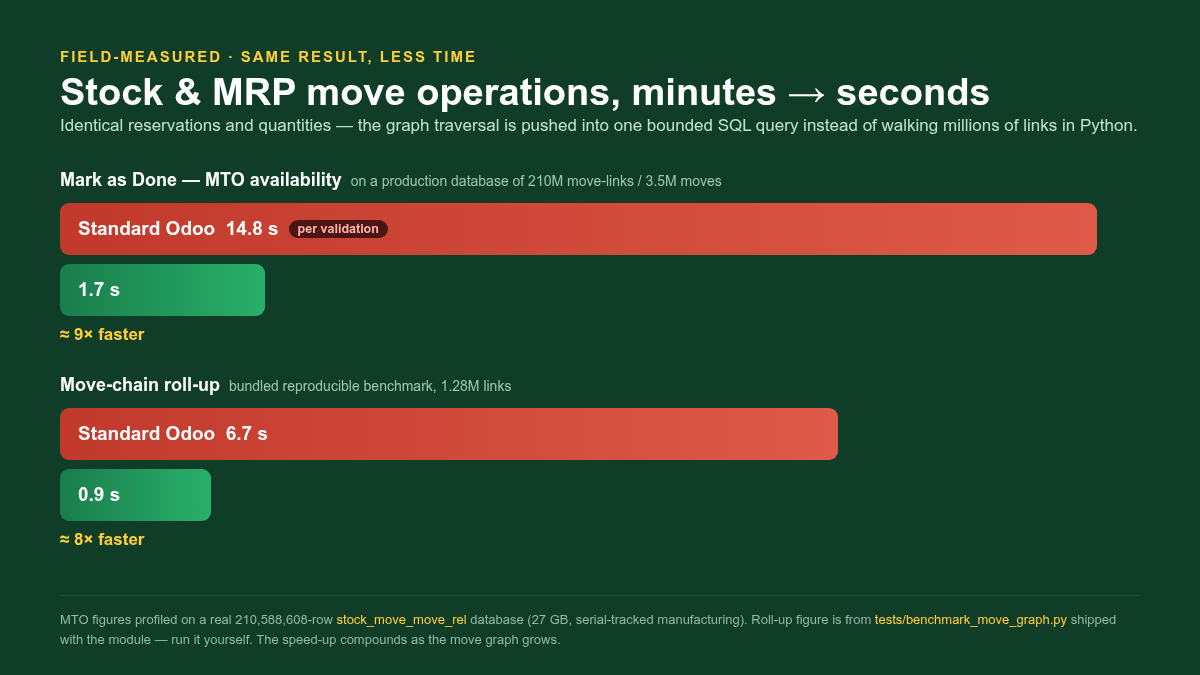
Mark as Done on a manufacturing/MTO move calls _action_assign, which calls _get_available_move_lines_in / _out — a single such call has been measured at ~15 seconds on a real 210-million-link database. Opening a Manufacturing Order computes the source/child smart-button counts, which walk the whole procurement group — this can time out or never render the form. Under load these long calls pin worker processes and produce 504 Gateway Timeout. The standard code walks this graph through the ORM.
Every hop (move_orig_ids.move_dest_ids.move_orig_ids) materialises hundreds of thousands of records and re-reads the company-rule-wrapped M2M. The result: What this module does. It overrides the hottest traversal methods on stock.move, stock.quant and mrp.production so the graph traversal happens once, in the database, instead of node-by-node in Python: stock.move._get_available_move_lines_in / _out The MTO availability traversal walked on every _action_assign. The 2-hop and 3-hop move-id sets are produced by one bounded SQL statement each (DISTINCT collapses the explosion), then re-resolved through search().
Why the numbers stay identical. This is a performance change, not a behaviour change. Three properties keep the results bit-identical to standard Odoo: 1. Same records.
The SQL helpers only produce a set of move ids; those ids are re-resolved with search([('id', 'in', ids)]), which re-applies the stock.move record rules — including the multi-company rule. Nothing bypasses access control. 2. Same order.
search() returns rows in the model order (sequence, id), which is exactly the order the standard ORM chain yields, so the order-dependent itertools.groupby in the availability functions produces the identical grouping. No sorted() is introduced. 3. Same grouping.
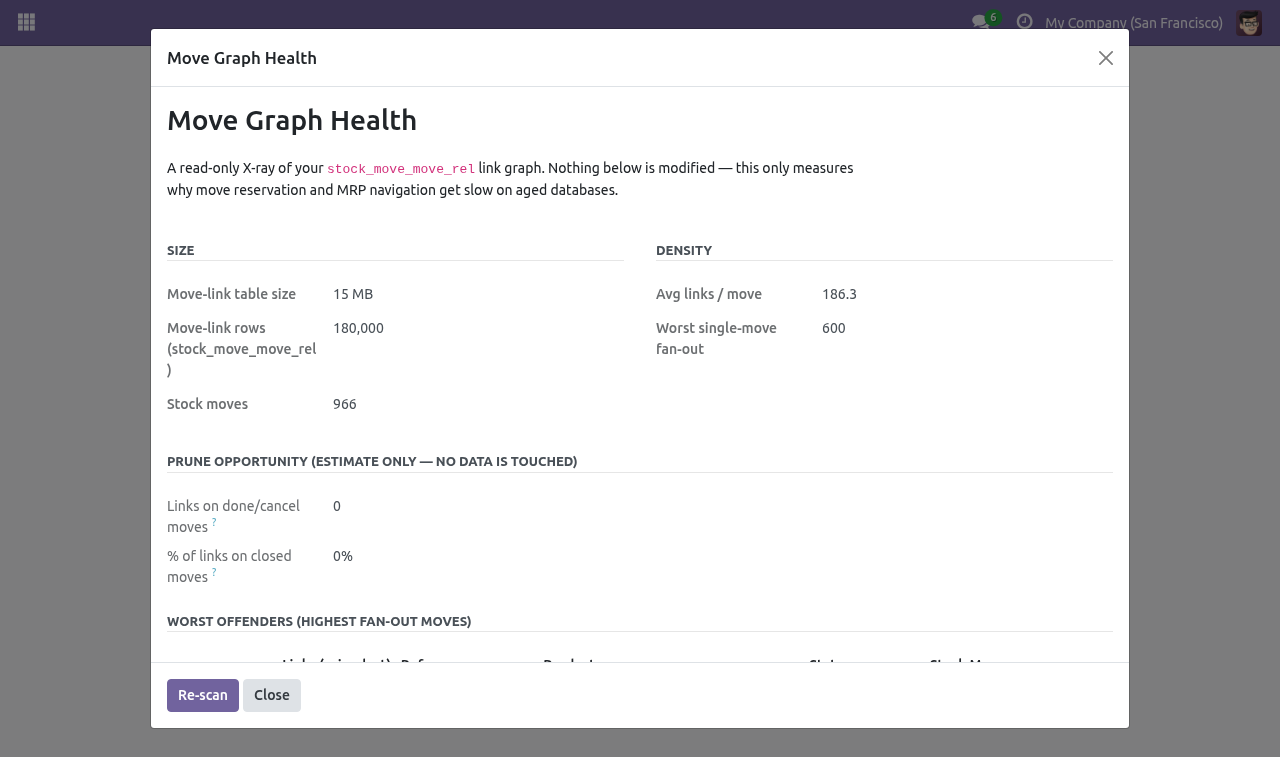
The grouping and quantity-summation bodies are copied verbatim from standard Odoo — only the traversal that feeds them is replaced. The Move Graph Health diagnostic. Go to Inventory ▸ Reporting ▸ Move Graph Health. The report runs read-only SQL and shows: Size — the stock_move_move_rel table size and row count, and the number of stock moves.
Density — average links per move and the worst single-move fan-out. Prune opportunity — how many links only connect moves that are already in a done or cancel state (i.e. trace closed history), as a share of all links. This is an estimate only; the diagnostic never modifies data.
Worst offenders — the twenty highest fan-out moves, with their business reference, product and state, so you can see the real orders behind the numbers. Use it to quantify the problem before installing elsewhere, and to show stakeholders the density of the graph. It is safe to run on production: every query is read-only and uses planner statistics for the big numbers so it does not full-scan a huge table. Frequently asked questions.
Will my reservations or quantities change? No. See Why the numbers stay identical above — the change is limited to how the move sets are gathered; the reservation and quantity logic is untouched. Does it work on multi-company databases?
Yes. Because the move ids are re-resolved through search(), the standard multi-company record rule is applied exactly as before. Support. BambooForge Labs — support@bambooforge.dev The complete manual is at docs dot bambooforge dot dev, the demo database is linked from the store page, and support answers within twenty-four hours.
Links are in the description.
Transcript of the walkthrough (Odoo 16)
Stock & MRP Performance for Large Databases. Make stock reservation and MRP navigation fast again on aged, high-volume databases - no version upgrade and no data migration required. Make Mark as Done, Check Availability and opening a Manufacturing Order fast again on databases with a large stock-move history — without upgrading Odoo and without migrating your data. This module rewrites the hottest move-graph traversals as bounded SQL that returns the identical result the standard code returns, and ships a read-only diagnostic that shows you exactly how bad the problem is before and after.
In the next few minutes: stock & mrp performance for large databases, then the problem, then what this module does, then why the numbers stay identical, then the move graph health diagnostic. Then what this app deliberately does not do, so you can tell before you buy whether it fits. Everything lives under Move Graph Health. #.
Copy bambooforge_stock_move_perf into your addons path. #. Update the apps list and install BambooForge Stock & MRP Performance. #.
No configuration and no data migration are required. The overrides are active immediately. Stock & MRP Performance for Large Databases. Make Mark as Done, Check Availability and opening a Manufacturing Order fast again on databases with a large stock-move history — without upgrading Odoo and without migrating your data.
This module rewrites the hottest move-graph traversals as bounded SQL that returns the identical result the standard code returns, and ships a read-only diagnostic that shows you exactly how bad the problem is before and after. This page is the complete manual. Follow it top to bottom and you can install, verify the speed-up and understand precisely what changed without contacting support. The problem.
Odoo links stock moves to each other through the stock_move_move_rel many-to-many table (move_orig_ids ↔ move_dest_ids). On a young database this table is small. On a database that has run for years — especially with serial/lot tracking, repeated backorders and multi-level manufacturing — it grows a combinatorial, bipartite structure: shared components link to many serial-tracked orders, each backorder keeps chains open, and procurement groups fan out. Link counts in the hundreds of millions and per-move fan-out in the thousands are real.
Mark as Done on a manufacturing/MTO move calls _action_assign, which calls _get_available_move_lines_in / _out — a single such call has been measured at ~15 seconds on a real 210-million-link database. Opening a Manufacturing Order computes the source/child smart-button counts, which walk the whole procurement group — this can time out or never render the form. Under load these long calls pin worker processes and produce 504 Gateway Timeout. The standard code walks this graph through the ORM.
Every hop (move_orig_ids.move_dest_ids.move_orig_ids) materialises hundreds of thousands of records and re-reads the company-rule-wrapped M2M. The result: What this module does. It overrides the hottest traversal methods on stock.move, stock.quant and mrp.production so the graph traversal happens once, in the database, instead of node-by-node in Python: stock.move._get_available_move_lines_in / _out The MTO availability traversal walked on every _action_assign. The 2-hop and 3-hop move-id sets are produced by one bounded SQL statement each (DISTINCT collapses the explosion), then re-resolved through search().
Why the numbers stay identical. This is a performance change, not a behaviour change. Three properties keep the results bit-identical to standard Odoo: 1. Same records.
The SQL helpers only produce a set of move ids; those ids are re-resolved with search([('id', 'in', ids)]), which re-applies the stock.move record rules — including the multi-company rule. Nothing bypasses access control. 2. Same order.
search() returns rows in the model order (sequence, id), which is exactly the order the standard ORM chain yields, so the order-dependent itertools.groupby in the availability functions produces the identical grouping. No sorted() is introduced. 3. Same grouping.
The grouping and quantity-summation bodies are copied verbatim from standard Odoo — only the traversal that feeds them is replaced. The Move Graph Health diagnostic. Go to Inventory ▸ Reporting ▸ Move Graph Health. The report runs read-only SQL and shows: Size — the stock_move_move_rel table size and row count, and the number of stock moves.
Density — average links per move and the worst single-move fan-out. Prune opportunity — how many links only connect moves that are already in a done or cancel state (i.e. trace closed history), as a share of all links. This is an estimate only; the diagnostic never modifies data.
Worst offenders — the twenty highest fan-out moves, with their business reference, product and state, so you can see the real orders behind the numbers. Use it to quantify the problem before installing elsewhere, and to show stakeholders the density of the graph. It is safe to run on production: every query is read-only and uses planner statistics for the big numbers so it does not full-scan a huge table. Frequently asked questions.
Will my reservations or quantities change? No. See Why the numbers stay identical above — the change is limited to how the move sets are gathered; the reservation and quantity logic is untouched. Does it work on multi-company databases?
Yes. Because the move ids are re-resolved through search(), the standard multi-company record rule is applied exactly as before. Support. BambooForge Labs — support@bambooforge.dev The complete manual is at docs dot bambooforge dot dev, the demo database is linked from the store page, and support answers within twenty-four hours.
Links are in the description.
Key facts
- What it is
- Make stock reservation and MRP navigation fast again on aged, high-volume databases - no version upgrade and no data migration required.
- For
- Warehouse
- Odoo versions
- 16.0, 17.0, 18.0, 19.0, 20.0 - Community and Enterprise
- Runs on
- Odoo.sh or Odoo you host yourself - not Odoo Online, which accepts no third-party apps
- Price
- 129 EUR, one-time, on the Odoo Apps Store
- Technical name
- bambooforge_stock_move_perf
- Live demo
- https://demo20.bambooforge.dev/odoo/action-bambooforge_stock_move_perf.action_bf_move_graph_health
- Manual last updated
- 2026-09-21
Stock & MRP Performance for Large Databases
Make Mark as Done, Check Availability and opening a Manufacturing Order fast again on databases with a large stock-move history — without upgrading Odoo and without migrating your data. This module rewrites the hottest move-graph traversals as bounded SQL that returns the identical result the standard code returns, and ships a read-only diagnostic that shows you exactly how bad the problem is before and after.
This page is the complete manual. Follow it top to bottom and you can install, verify the speed-up and understand precisely what changed without contacting support.
The problem
Odoo links stock moves to each other through the stock_move_move_rel many-to-many table (move_orig_ids ↔ move_dest_ids). On a young database this table is small. On a database that has run for years — especially with serial/lot tracking, repeated backorders and multi-level manufacturing — it grows a combinatorial, bipartite structure: shared components link to many serial-tracked orders, each backorder keeps chains open, and procurement groups fan out. Link counts in the hundreds of millions and per-move fan-out in the thousands are real.
The standard code walks this graph through the ORM. Every hop (move_orig_ids.move_dest_ids.move_orig_ids) materialises hundreds of thousands of records and re-reads the company-rule-wrapped M2M. The result:
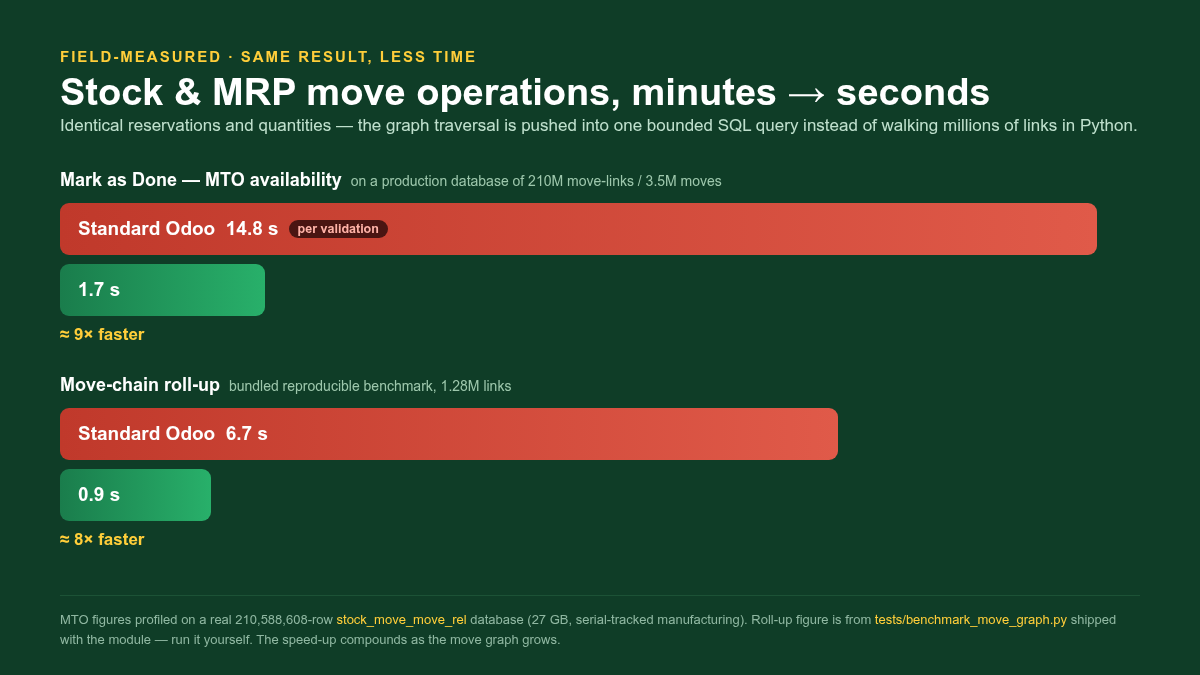
Mark as Done on a manufacturing/MTO move calls _action_assign, which calls _get_available_move_lines_in / _out — a single such call has been measured at ~15 seconds on a real 210-million-link database.
Opening a Manufacturing Order computes the source/child smart-button counts, which walk the whole procurement group — this can time out or never render the form.
Under load these long calls pin worker processes and produce 504 Gateway Timeout.
Upgrading Odoo does not fix this: the stock_move_move_rel schema and the chaining algorithm are unchanged from 16 through 19, and migrating hundreds of millions of link rows is itself slow and risky. The fix is algorithmic, and it can be applied in place.
What this module does
It overrides five methods on stock.move and mrp.production so the graph traversal happens once, in the database, instead of node-by-node in Python:
- stock.move._get_available_move_lines_in / _out
The MTO availability traversal walked on every _action_assign. The 2-hop and 3-hop move-id sets are produced by one bounded SQL statement each (DISTINCT collapses the explosion), then re-resolved through search().
- stock.move._rollup_move_origs / _rollup_move_dests
The upstream/downstream chain walk, rewritten as a set-based breadth-first search over the link table (one query per graph layer) instead of per-record ORM recursion.
- mrp.production._get_children / _get_sources
Manufacturing-order parent/child navigation and the source/child smart-button counts, pushed down to a single bounded query that returns the same MO ids.
It also narrows the dependencies of the mrp_production_child_count / mrp_production_source_count smart-button fields so that writing to a move no longer recomputes them across the entire procurement group.
- stock.quant._get_available_quantity
On-hand availability is summed with one grouped SQL query over core's gather domain instead of loading every quant of a fragmented (product, location). Reservation itself is untouched.
Why the numbers stay identical
This is a performance change, not a behaviour change. Three properties keep the results bit-identical to standard Odoo:
Same records. The SQL helpers only produce a set of move ids; those ids are re-resolved with search([('id', 'in', ids)]), which re-applies the stock.move record rules — including the multi-company rule. Nothing bypasses access control.
Same order. search() returns rows in the model order (sequence, id), which is exactly the order the standard ORM chain yields, so the order-dependent itertools.groupby in the availability functions produces the identical grouping. No sorted() is introduced.
Same grouping. The grouping and quantity-summation bodies are copied verbatim from standard Odoo — only the traversal that feeds them is replaced.
The bundled automated tests assert this equivalence directly: for a constructed move graph they check that each SQL helper returns the same id-set as the ORM chain it replaces, that search() re-resolution preserves order, and that a done receipt is summed to the correct quantity.
Installation
Copy bambooforge_stock_move_perf into your addons path.
Update the apps list and install BambooForge Stock Performance.
No configuration and no data migration are required. The overrides are active immediately.
Dependencies: stock and mrp (both standard). No Enterprise modules are needed. There is no schema change and no new stored column, so the module is uninstall-clean.
The Move Graph Health diagnostic
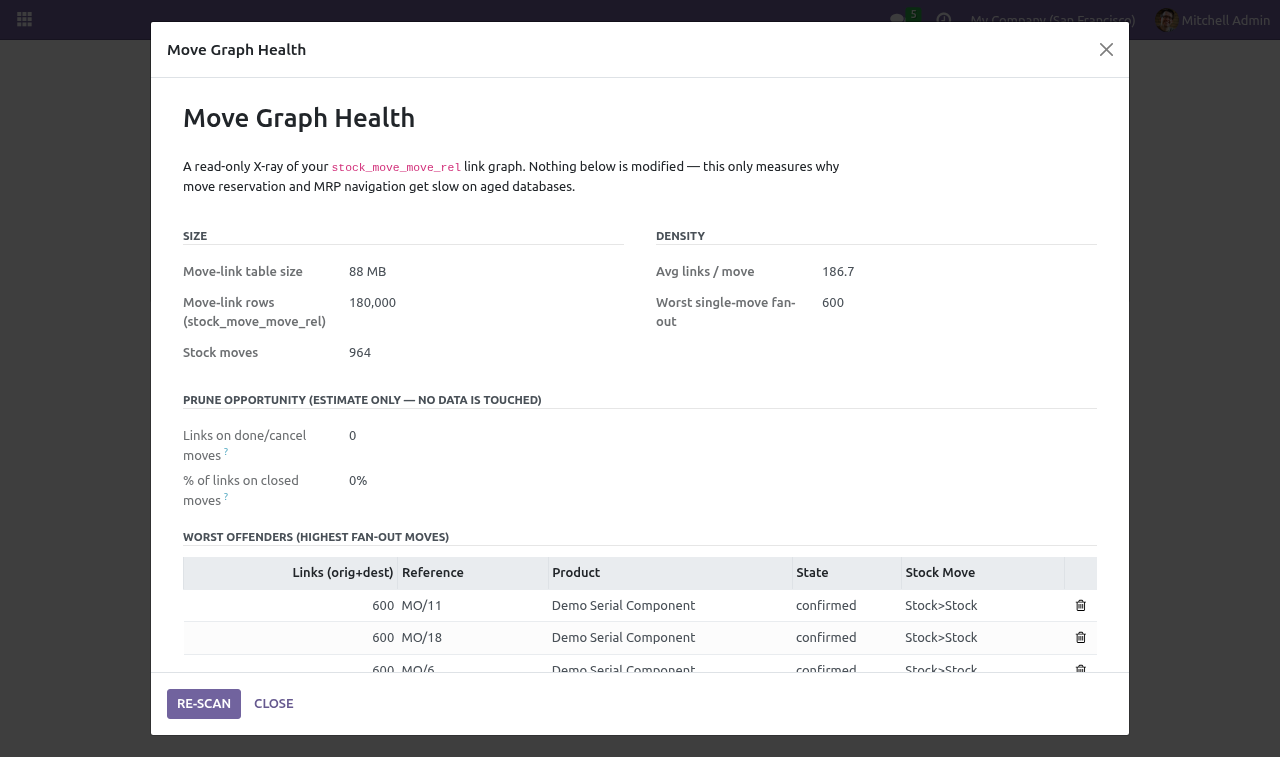
Go to Inventory ▸ Reporting ▸ Move Graph Health. The report runs read-only SQL and shows:
Size — the stock_move_move_rel table size and row count, and the number of stock moves.
Density — average links per move and the worst single-move fan-out.
Prune opportunity — how many links only connect moves that are already in a done or cancel state (i.e. trace closed history), as a share of all links. This is an estimate only; the diagnostic never modifies data.
Worst offenders — the twenty highest fan-out moves, with their business reference, product and state, so you can see the real orders behind the numbers.
Use it to quantify the problem before installing elsewhere, and to show stakeholders the density of the graph. It is safe to run on production: every query is read-only and uses planner statistics for the big numbers so it does not full-scan a huge table.
Frequently asked questions
- Will my reservations or quantities change?
No. See Why the numbers stay identical above — the change is limited to how the move sets are gathered; the reservation and quantity logic is untouched.
- Does it work on multi-company databases?
Yes. Because the move ids are re-resolved through search(), the standard multi-company record rule is applied exactly as before.
- Do I need to upgrade Odoo or migrate data?
No. That is the point of the module — it is an in-place algorithmic fix for a problem that upgrading does not solve.
- What happens on uninstall?
The overrides are removed and standard behaviour returns. There is no schema change to reverse.
- My real bottleneck is disk size, not speed.
This module addresses speed. The Move Graph Health report will also tell you how much of the link table only traces closed history — useful input for a separate slimming effort — but this module never deletes data.
How we make sure it works
Before every release, 12 automated checks run against this app on Odoo 16, 17, 18, 19 and 20. Among them:
Rollup move origs does not skip done.
Orig dest orig search order matches core.
Rollup move dests includes self and descendants.
Rollup move origs includes self and ancestors.
Available move lines in quantity.
The complete list is in the source you receive.
Questions people ask
- Which Odoo versions does it run on?
Odoo 16.0, 17.0, 18.0, 19.0, 20.0, on the series you buy it for; each series is its own listing.
- Community or Enterprise?
Both. It needs no Enterprise app.
- What does it need?
The standard Inventory, Manufacturing apps. No extra Python package.
- Where does it show up?
Under the Move Graph Health menu.
- Does anything leave my server?
No. It makes no call outside your Odoo server: no telemetry, no licence check, no third-party service.
- What happens if I uninstall it?
Odoo drops the app's own tables and fields; the standard records it worked on (contacts, orders, products) stay as they are.
Support
BambooForge Labs — support@bambooforge.dev