 BambooForge Labs
Stock Count: Inventory Counting & Adjustment
A real inventory count sheet: scope it, split it between counters, count blind, recount what disagrees, and post it against a frozen quantity.
Available for Odoo 16.0, Odoo 17.0, Odoo 18.0, Odoo 19.0, Odoo 20.0. Technical name bambooforge_stock_count.
Transcript of the walkthrough (Odoo 20)
Stock Count: Inventory Counting & Adjustment. A real inventory count sheet: scope it, split it between counters, count blind, recount what disagrees, and post it against a frozen quantity. Odoo removed the inventory document in 15.0. What is left is a list of quants with a quantity box, which works for one person adjusting one shelf and falls apart the moment a warehouse closes on a Friday and six people count four hundred locations.
In the next few minutes: stock count: inventory counting & adjustment, then a count sheet, with a state, then the expected quantity is frozen when counting opens, then blind counting, enforced on the server, then split it between people. Then what this app deliberately does not do, so you can tell before you buy whether it fits. Everything lives under Stock Counts then My Count Lines then Counts. 1.
Copy bambooforge_stock_count into your addons path and update the app list, or install the ZIP from the Odoo Apps Store. 2. Install Stock Count: Inventory Counting & Adjustment. 3.
Open Stock Counts - its menus are My Count Lines, Counts. Stock Count: Inventory Counting & Adjustment. Odoo removed the inventory document in 15.0. What is left is a list of quants with a quantity box, which works for one person adjusting one shelf and falls apart the moment a warehouse closes on a Friday and six people count four hundred locations.
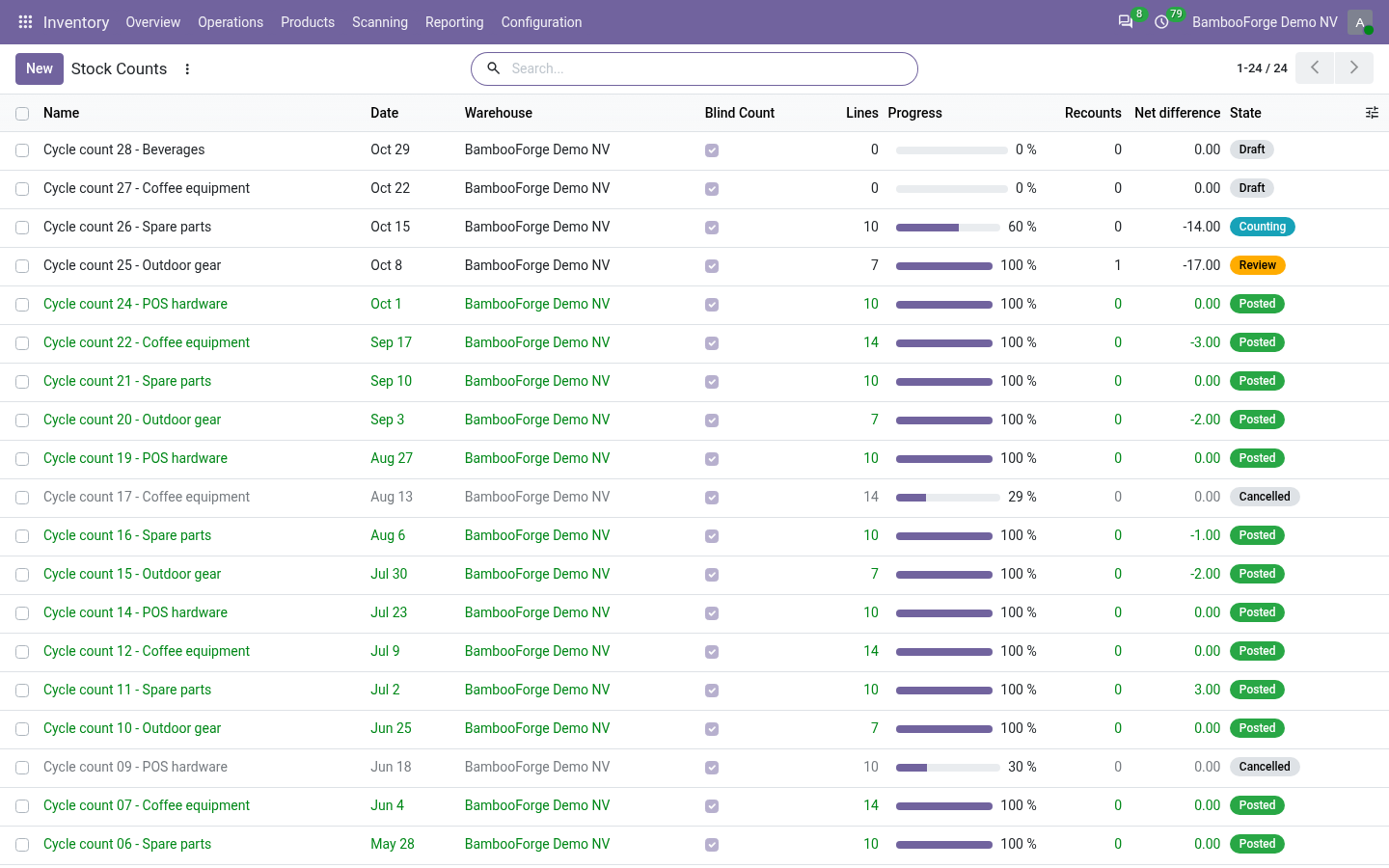
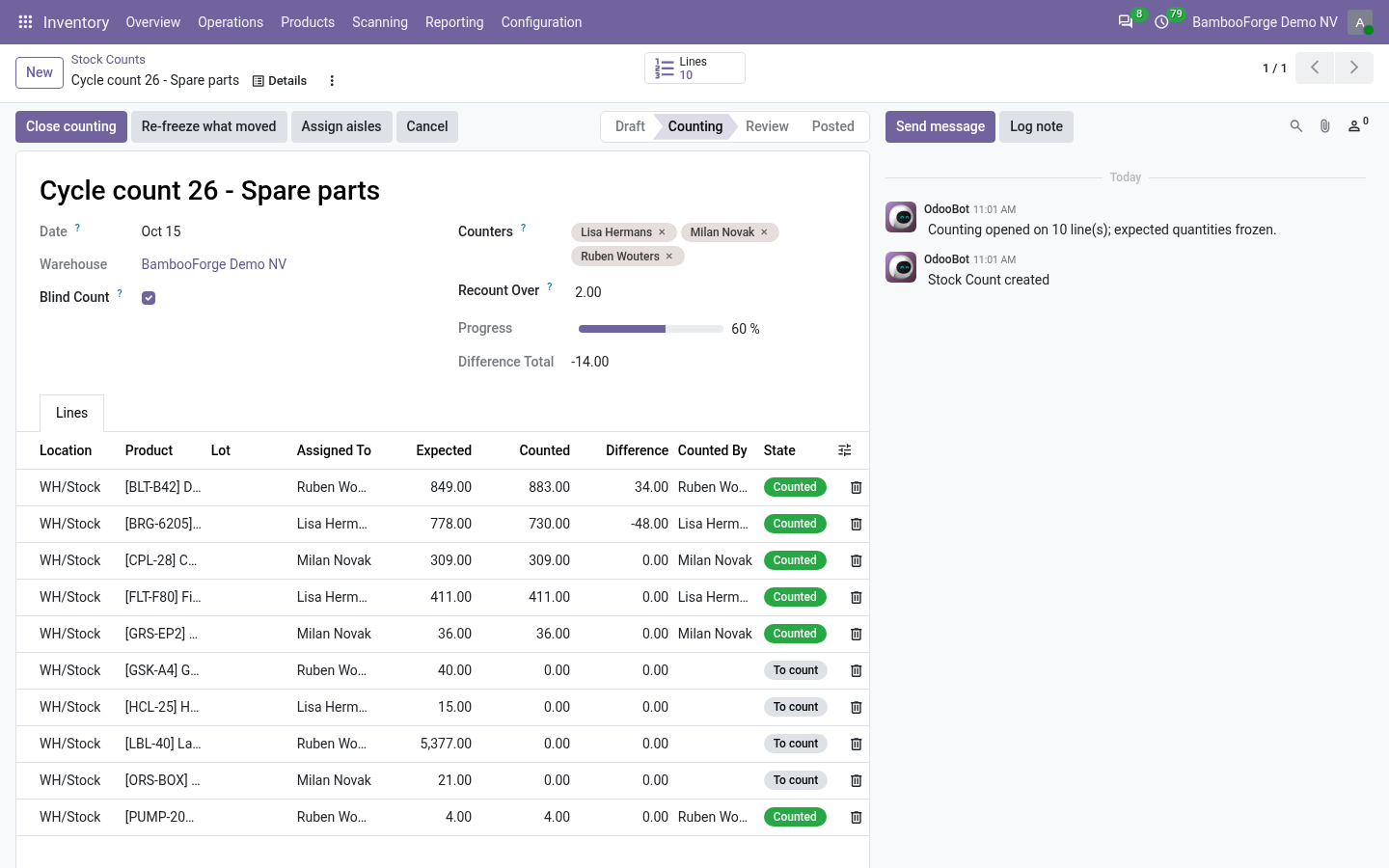
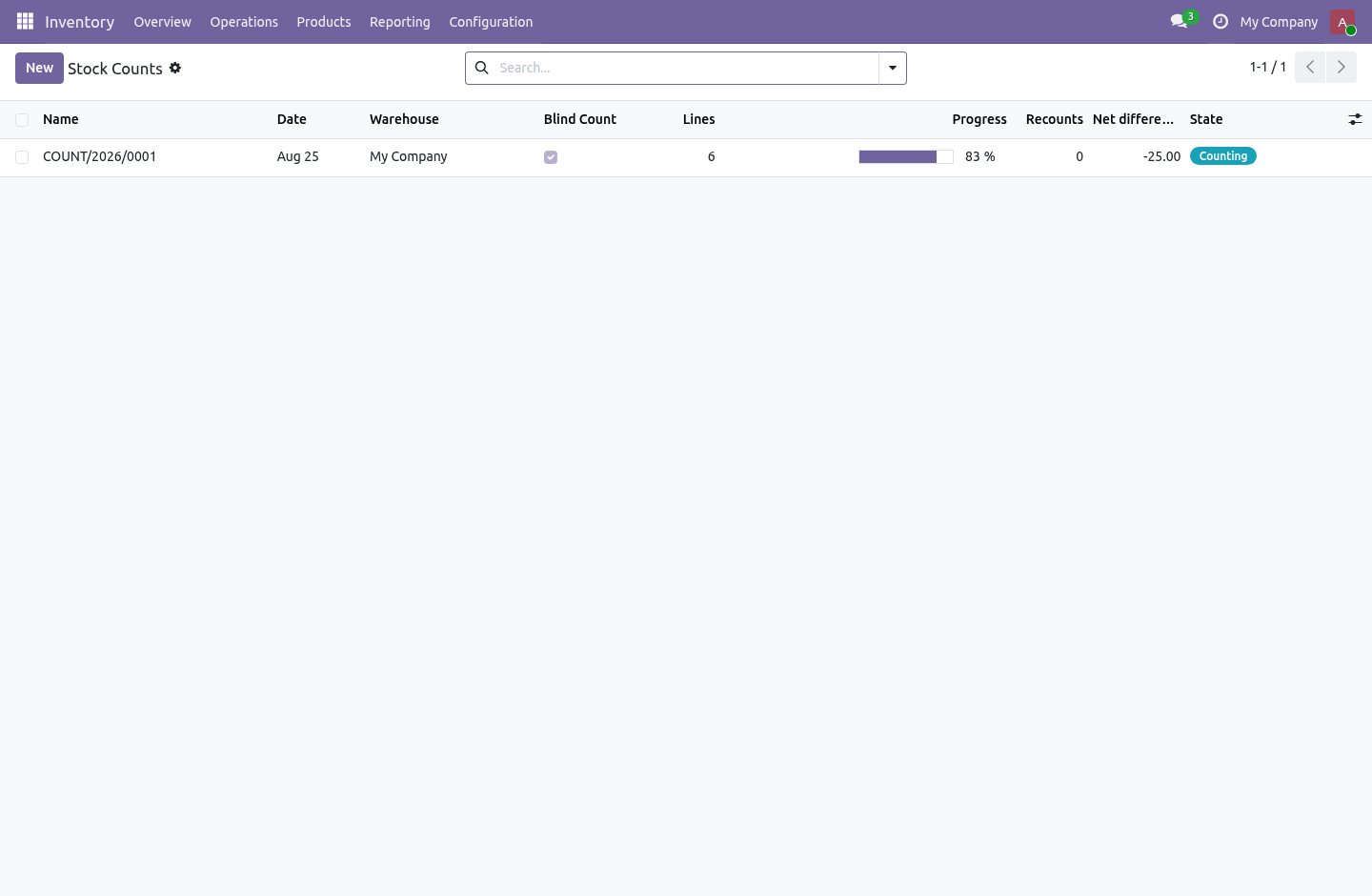
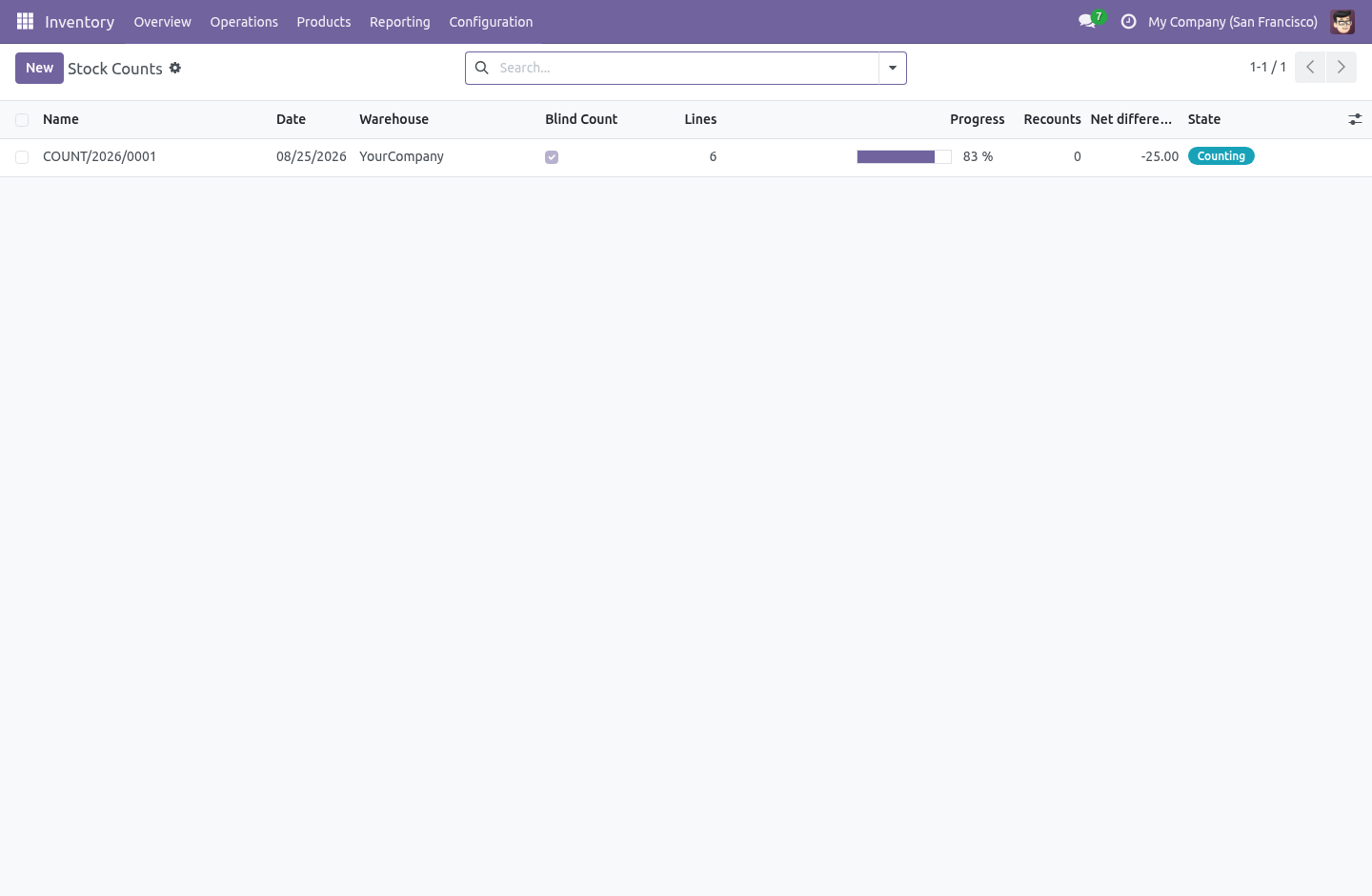
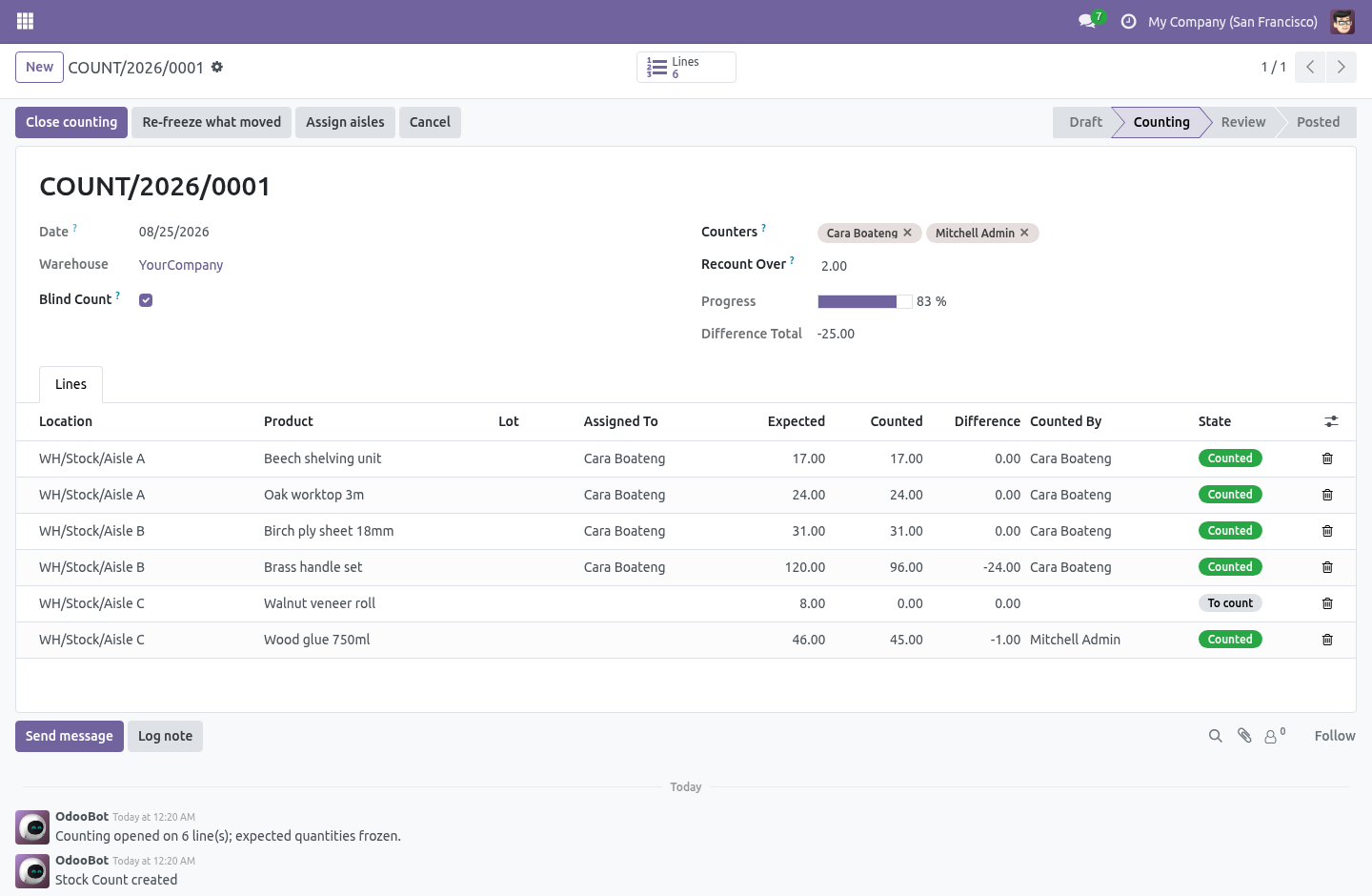
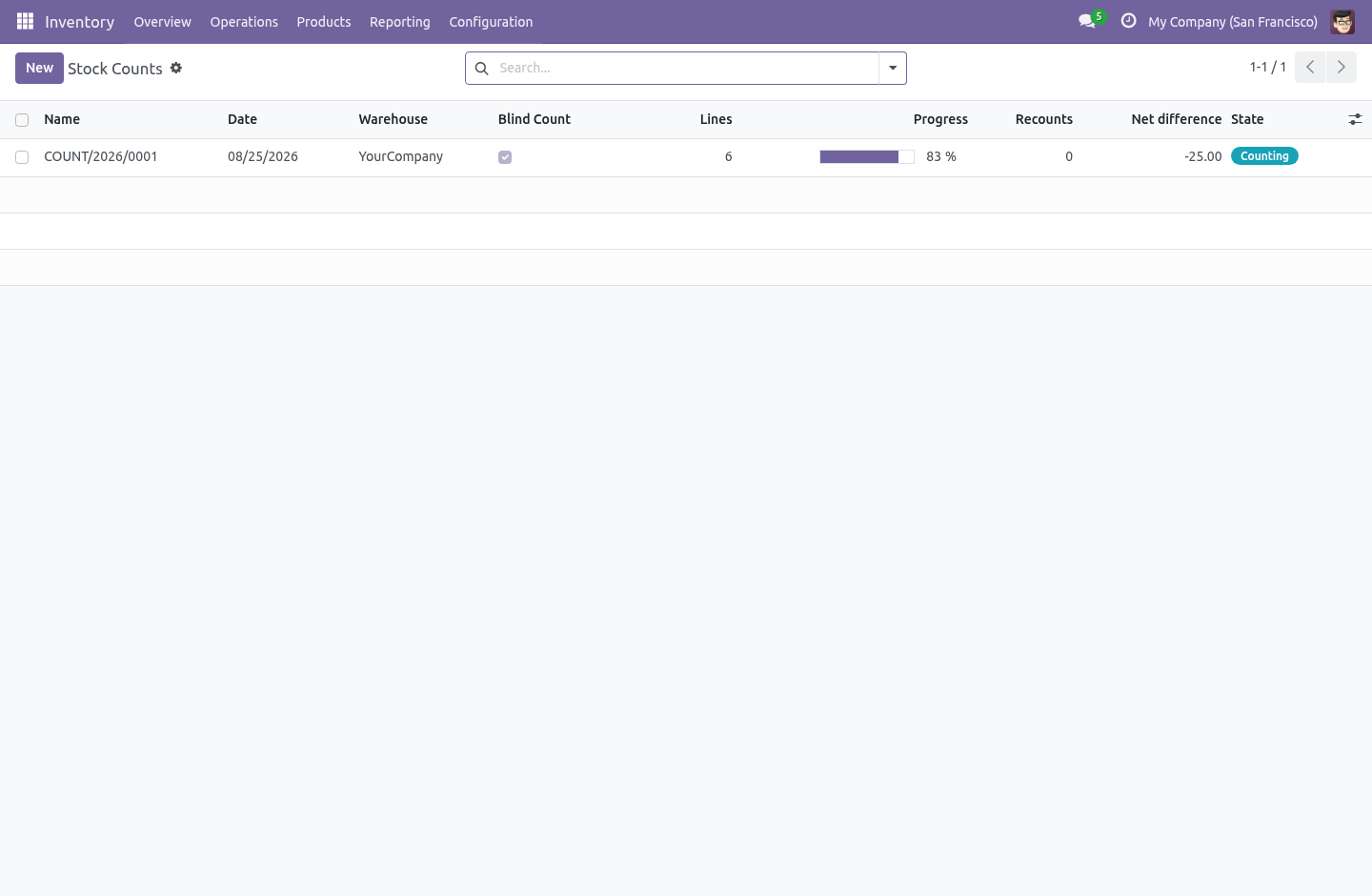
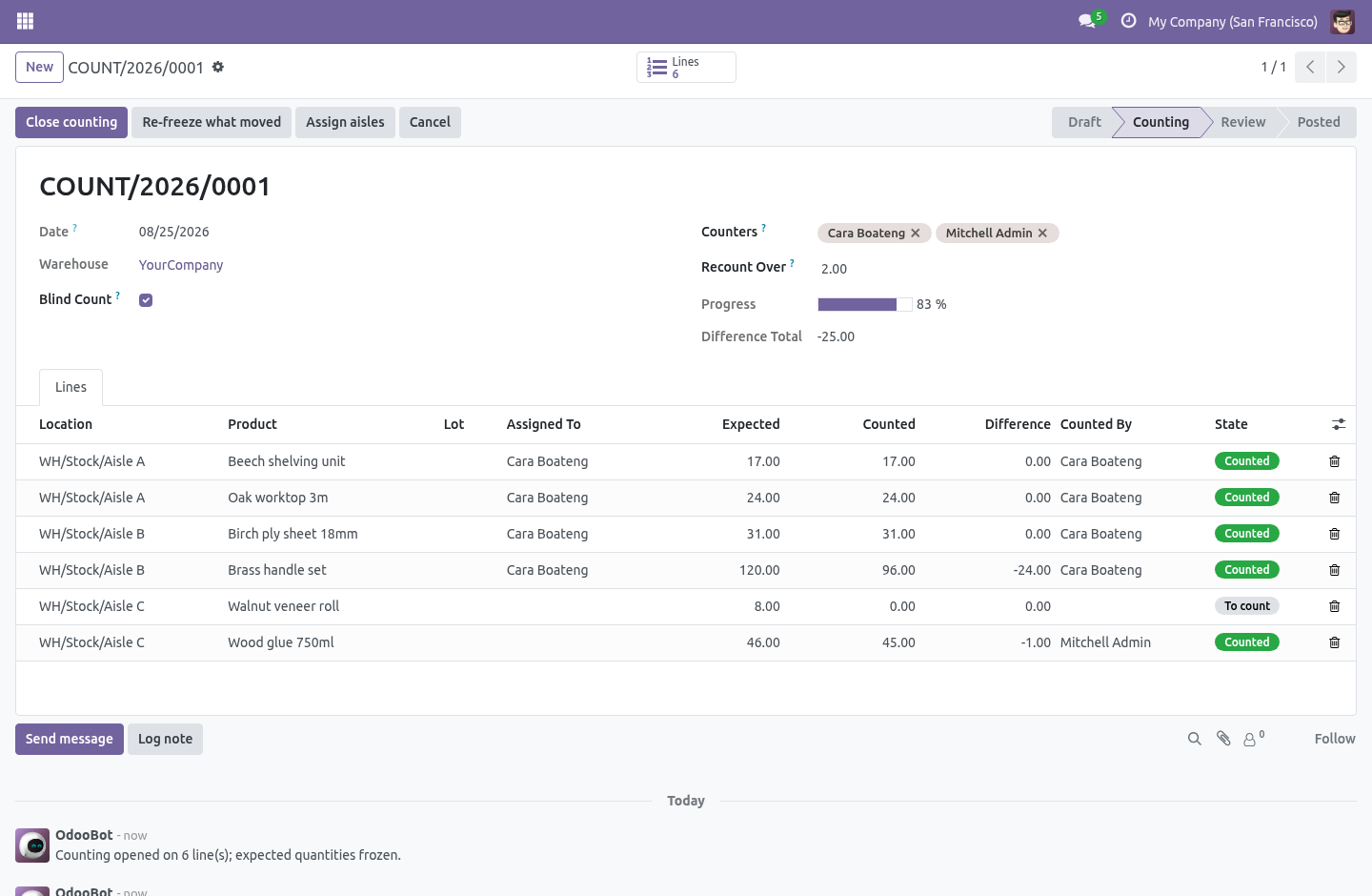
A count sheet, with a state. Inventory › Counts › Stock Counts. Scope it once — a warehouse, some locations, some products — and it becomes a document: a name, a date, a state, a progress bar and a chatter. You can say "count 42 is in progress", report on it, hand it to an auditor, and reopen it.
Leave the locations and products empty to count every internal location of the warehouse. The scope is read once, when counting opens. The expected quantity is frozen when counting opens. Pressing Open counting snapshots what is on every shelf in scope, and that number never moves again.
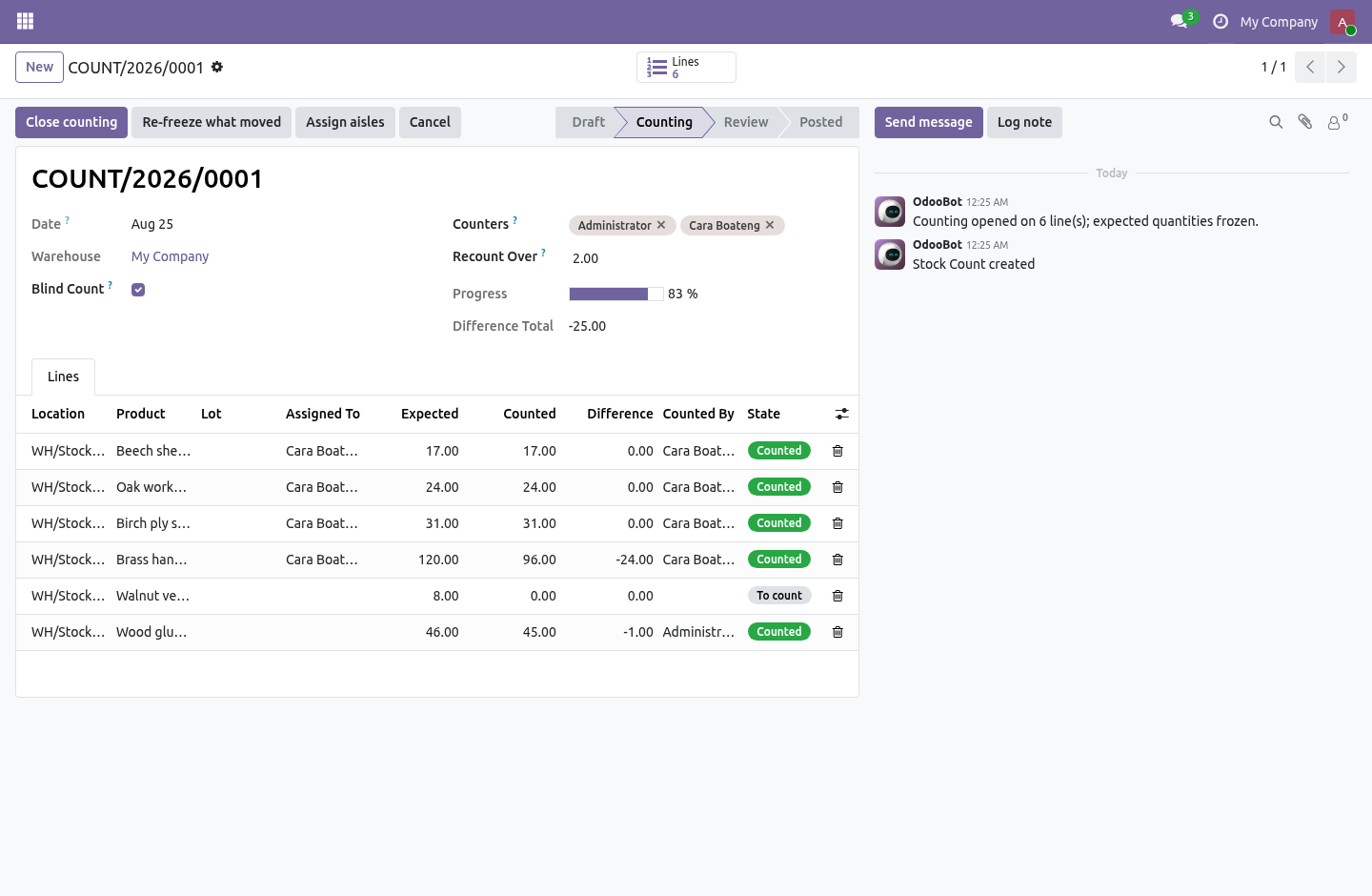
This is the difference between a count and an argument. If the expected quantity kept tracking the live stock, then a receipt booked while people were walking the aisles would quietly change what they are being measured against, and the variance report at the end would describe something nobody did. Blind counting, enforced on the server. On a blind count, counters do not see the expected quantity or the difference.
Not hidden in the form — restricted on the field, which the ORM enforces on every read, so a hand-written RPC or an export cannot fetch them either. A count where the sheet already says 12 is not a count. It is somebody agreeing with the computer. Split it between people.
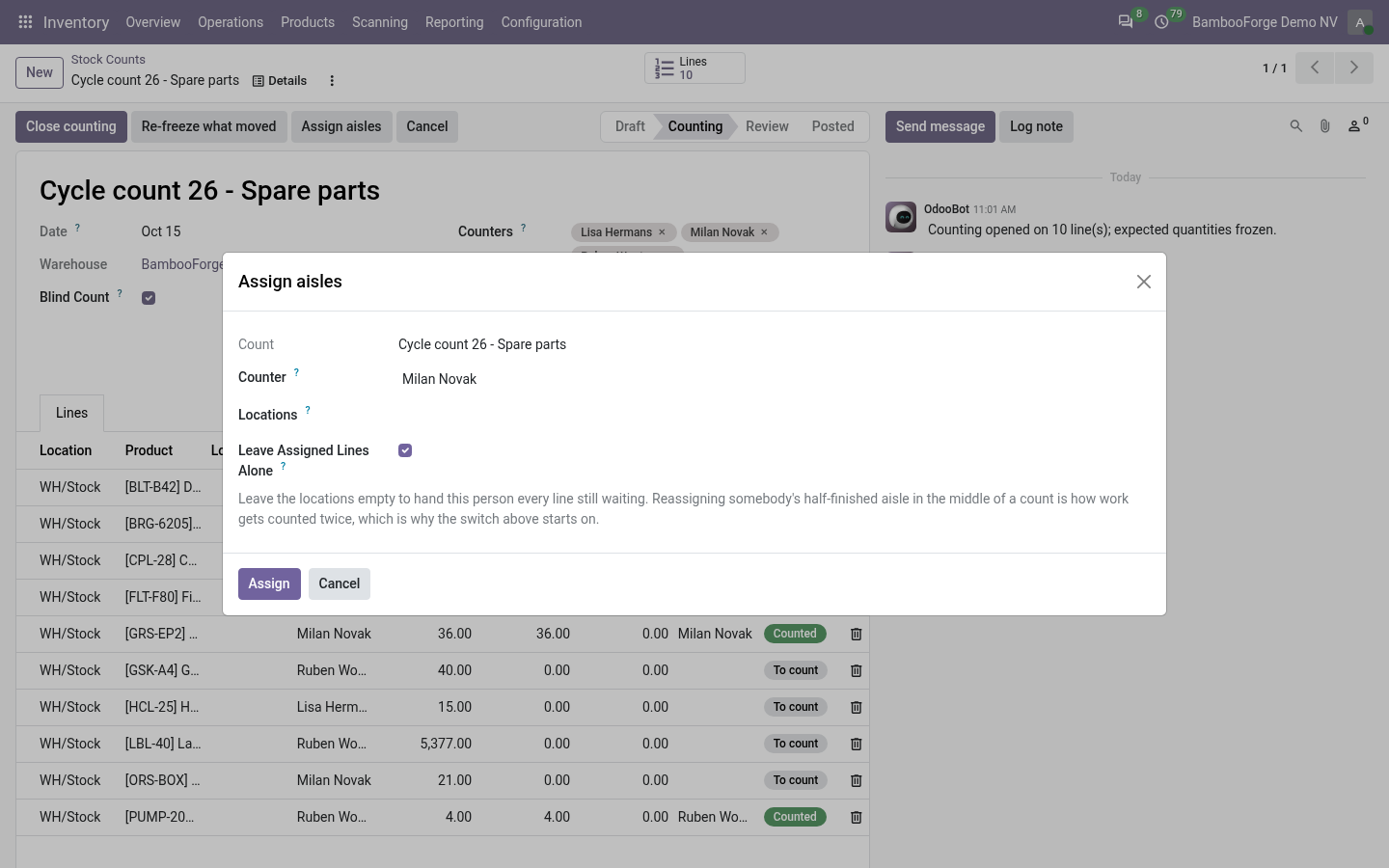
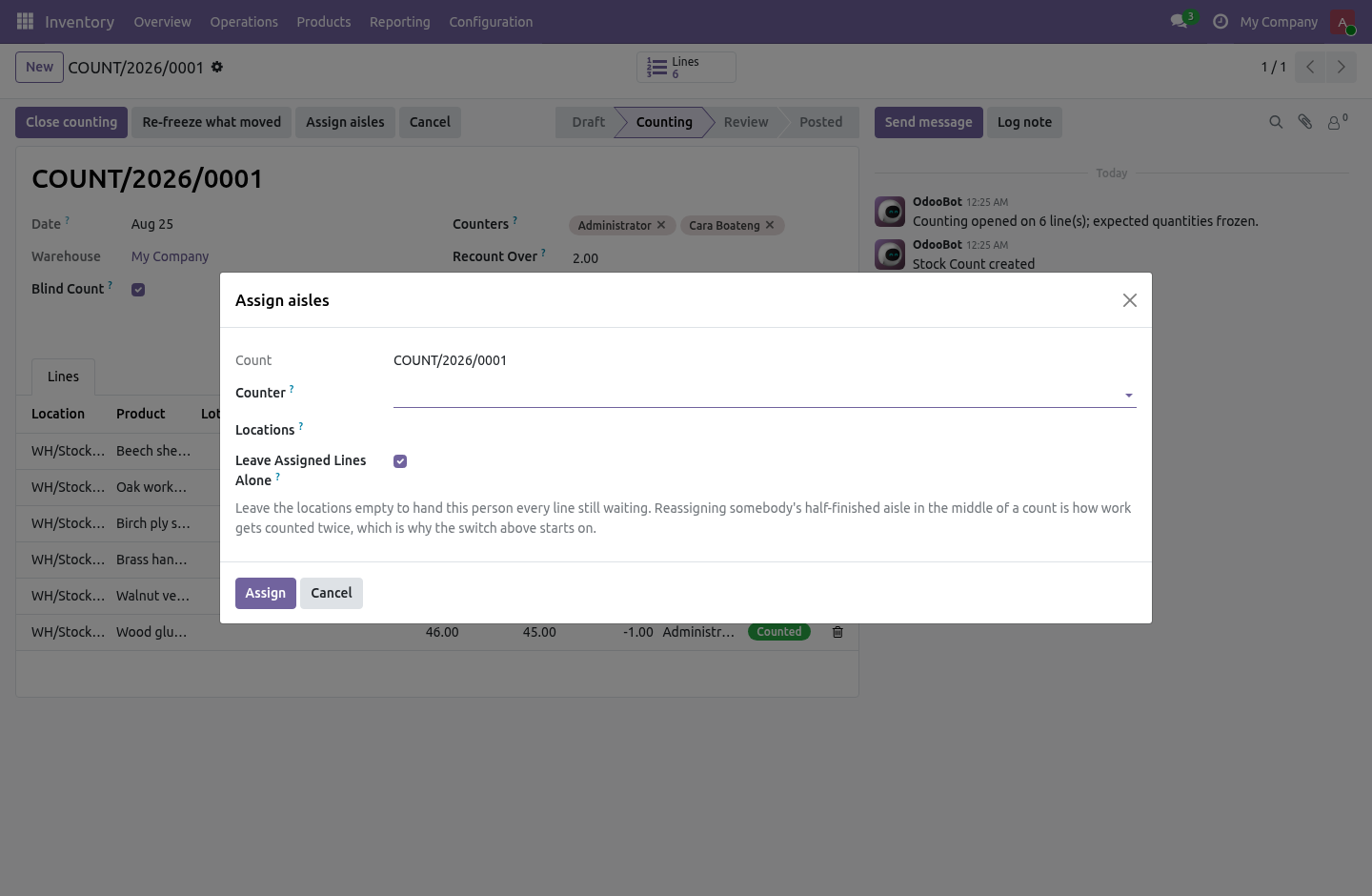
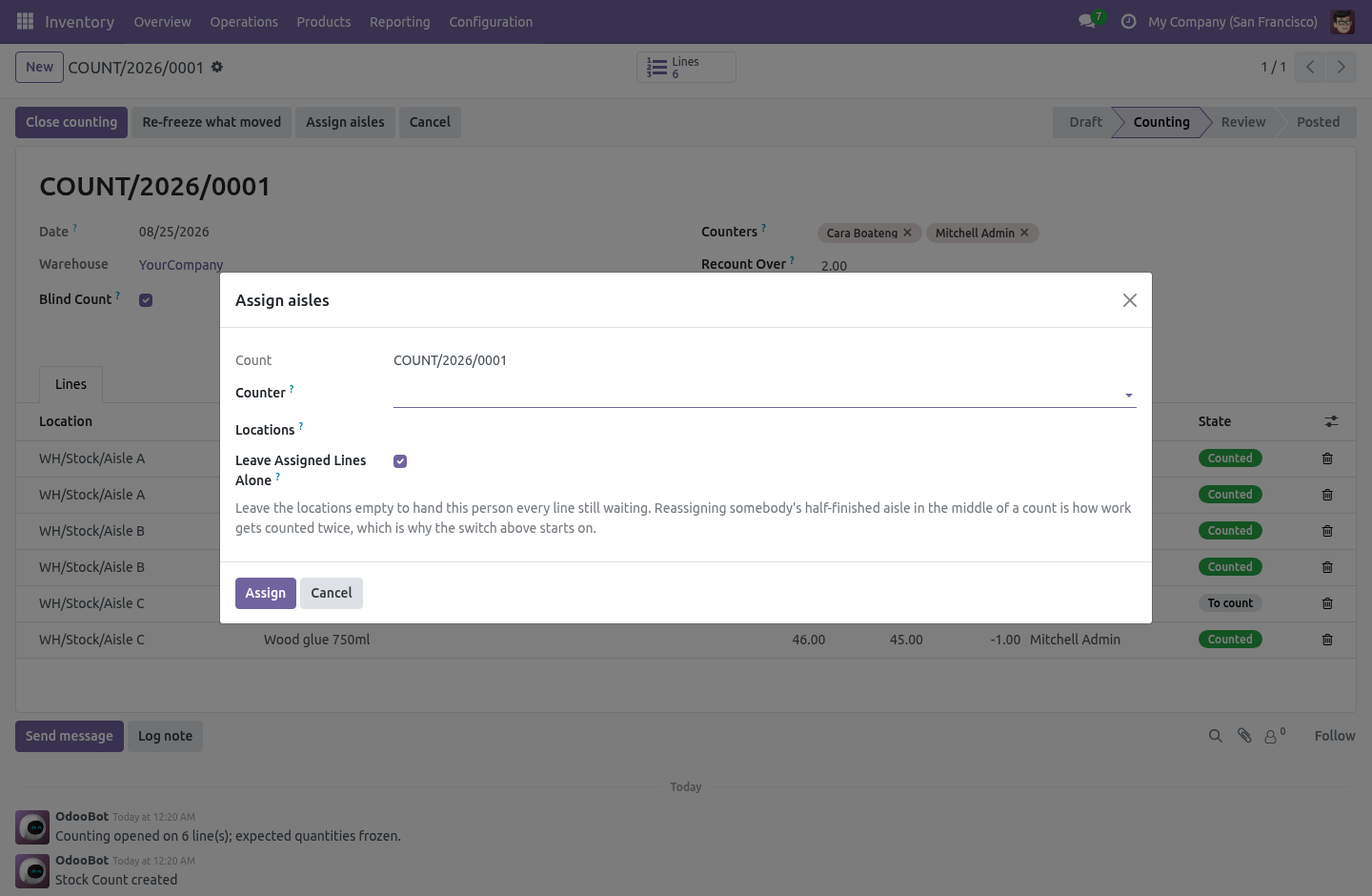
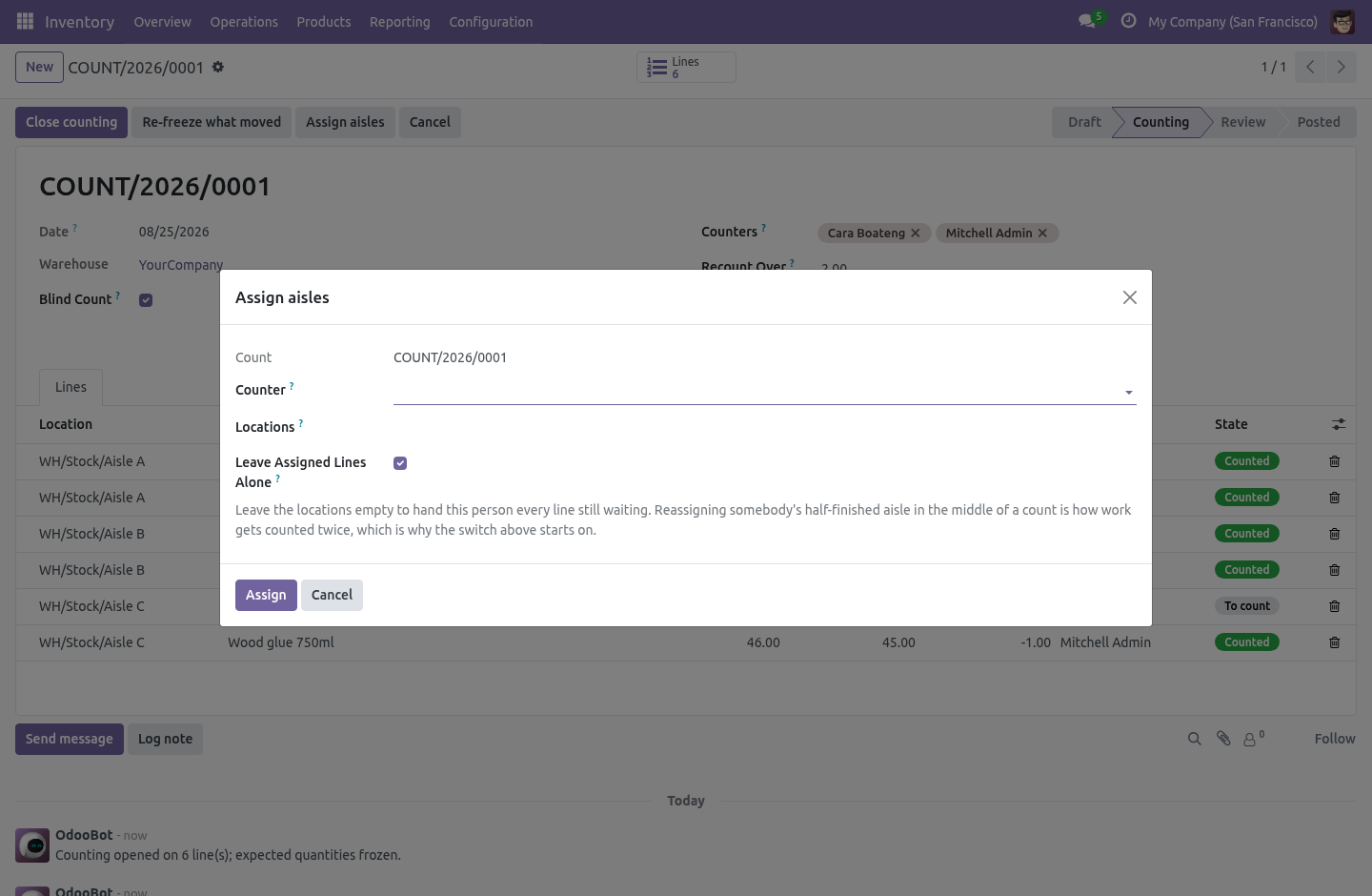
Add the counters to the sheet, then Assign aisles hands out lines by location in bulk. Each counter sees their own count and can be given their own aisles; the supervisor sees everybody's. Assigning four hundred lines one at a time is why people give up and let everybody count everything, which is how two shelves get counted twice and the next one not at all. The wizard leaves already-assigned lines alone by default, because reassigning somebody's half-finished aisle mid-count is the other way to count the same stock twice.
Recount what disagrees. Set Recount over and any line whose difference is bigger comes back for a second count before anything is posted. Zero means every line that disagrees at all. This is the one control that stops a mistyped digit becoming a write-off.
When the second count is in, it — not the first — is what gets posted. Then post it. Post the count writes each counted quantity onto its quant and applies it the way Odoo does, so the stock moves and the valuation are the ordinary ones. The sheet stays as the record of what happened, who counted it and when.
A posted count cannot be cancelled: the adjustments are real stock moves by then, and cancelling the paperwork would not take them back. What it deliberately does not do It does not replace the quant screen. One person fixing one shelf should keep using it. It does not let a count reach outside its own warehouse — that would post adjustments somebody else is responsible for.
It does not post a line whose stock moved mid-count. See above. How we make sure it works. Before every release, 34 automated checks run against this app on Odoo 16, 17, 18, 19 and 20.
Among them: A counter cannot write off a shelf without counting it. A count cannot point a line at another companys quant. A counter cannot search or group by the hidden numbers. Somebody not on the count cannot be handed an aisle.
A line that is somebody elses cannot be counted. The complete list is in the source you receive. Questions people ask. Which Odoo versions does it run on?
Odoo 16.0, 17.0, 18.0, 19.0, 20.0, on the series you buy it for; each series is its own listing. Community or Enterprise? Both. It needs no Enterprise app.
The complete manual is at docs dot bambooforge dot dev, the demo database is linked from the store page, and support answers within twenty-four hours. Links are in the description.
Transcript of the walkthrough (Odoo 19)
Stock Count: Inventory Counting & Adjustment. A real inventory count sheet: scope it, split it between counters, count blind, recount what disagrees, and post it against a frozen quantity. Odoo removed the inventory document in 15.0. What is left is a list of quants with a quantity box, which works for one person adjusting one shelf and falls apart the moment a warehouse closes on a Friday and six people count four hundred locations.
In the next few minutes: stock count: inventory counting & adjustment, then a count sheet, with a state, then the expected quantity is frozen when counting opens, then blind counting, enforced on the server, then split it between people. Then what this app deliberately does not do, so you can tell before you buy whether it fits. Everything lives under Stock Counts then My Count Lines then Counts. Stock Count: Inventory Counting & Adjustment.
Odoo removed the inventory document in 15.0. What is left is a list of quants with a quantity box, which works for one person adjusting one shelf and falls apart the moment a warehouse closes on a Friday and six people count four hundred locations. A count sheet, with a state. Inventory › Counts › Stock Counts.
Scope it once — a warehouse, some locations, some products — and it becomes a document: a name, a date, a state, a progress bar and a chatter. You can say "count 42 is in progress", report on it, hand it to an auditor, and reopen it. Leave the locations and products empty to count every internal location of the warehouse. The scope is read once, when counting opens.
The expected quantity is frozen when counting opens. Pressing Open counting snapshots what is on every shelf in scope, and that number never moves again. This is the difference between a count and an argument. If the expected quantity kept tracking the live stock, then a receipt booked while people were walking the aisles would quietly change what they are being measured against, and the variance report at the end would describe something nobody did.
Blind counting, enforced on the server. On a blind count, counters do not see the expected quantity or the difference. Not hidden in the form — restricted on the field, which the ORM enforces on every read, so a hand-written RPC or an export cannot fetch them either. A count where the sheet already says 12 is not a count.
It is somebody agreeing with the computer. Split it between people. Add the counters to the sheet, then Assign aisles hands out lines by location in bulk. Each counter sees their own count and can be given their own aisles; the supervisor sees everybody's.
Assigning four hundred lines one at a time is why people give up and let everybody count everything, which is how two shelves get counted twice and the next one not at all. The wizard leaves already-assigned lines alone by default, because reassigning somebody's half-finished aisle mid-count is the other way to count the same stock twice. Recount what disagrees. Set Recount over and any line whose difference is bigger comes back for a second count before anything is posted.
Zero means every line that disagrees at all. This is the one control that stops a mistyped digit becoming a write-off. When the second count is in, it — not the first — is what gets posted. Then post it.
Post the count writes each counted quantity onto its quant and applies it the way Odoo does, so the stock moves and the valuation are the ordinary ones. The sheet stays as the record of what happened, who counted it and when. A posted count cannot be cancelled: the adjustments are real stock moves by then, and cancelling the paperwork would not take them back. What it deliberately does not do It does not replace the quant screen.
One person fixing one shelf should keep using it. It does not let a count reach outside its own warehouse — that would post adjustments somebody else is responsible for. It does not post a line whose stock moved mid-count. See above.
The complete manual is at docs dot bambooforge dot dev, the demo database is linked from the store page, and support answers within twenty-four hours. Links are in the description.
Transcript of the walkthrough (Odoo 18)
Stock Count: Inventory Counting & Adjustment. A real inventory count sheet: scope it, split it between counters, count blind, recount what disagrees, and post it against a frozen quantity. Odoo removed the inventory document in 15.0. What is left is a list of quants with a quantity box, which works for one person adjusting one shelf and falls apart the moment a warehouse closes on a Friday and six people count four hundred locations.
In the next few minutes: stock count: inventory counting & adjustment, then a count sheet, with a state, then the expected quantity is frozen when counting opens, then blind counting, enforced on the server, then split it between people. Then what this app deliberately does not do, so you can tell before you buy whether it fits. Everything lives under Stock Counts then My Count Lines then Counts. Stock Count: Inventory Counting & Adjustment.
Odoo removed the inventory document in 15.0. What is left is a list of quants with a quantity box, which works for one person adjusting one shelf and falls apart the moment a warehouse closes on a Friday and six people count four hundred locations. A count sheet, with a state. Inventory › Counts › Stock Counts.
Scope it once — a warehouse, some locations, some products — and it becomes a document: a name, a date, a state, a progress bar and a chatter. You can say "count 42 is in progress", report on it, hand it to an auditor, and reopen it. Leave the locations and products empty to count every internal location of the warehouse. The scope is read once, when counting opens.
The expected quantity is frozen when counting opens. Pressing Open counting snapshots what is on every shelf in scope, and that number never moves again. This is the difference between a count and an argument. If the expected quantity kept tracking the live stock, then a receipt booked while people were walking the aisles would quietly change what they are being measured against, and the variance report at the end would describe something nobody did.
Blind counting, enforced on the server. On a blind count, counters do not see the expected quantity or the difference. Not hidden in the form — restricted on the field, which the ORM enforces on every read, so a hand-written RPC or an export cannot fetch them either. A count where the sheet already says 12 is not a count.
It is somebody agreeing with the computer. Split it between people. Add the counters to the sheet, then Assign aisles hands out lines by location in bulk. Each counter sees their own count and can be given their own aisles; the supervisor sees everybody's.
Assigning four hundred lines one at a time is why people give up and let everybody count everything, which is how two shelves get counted twice and the next one not at all. The wizard leaves already-assigned lines alone by default, because reassigning somebody's half-finished aisle mid-count is the other way to count the same stock twice. Recount what disagrees. Set Recount over and any line whose difference is bigger comes back for a second count before anything is posted.
Zero means every line that disagrees at all. This is the one control that stops a mistyped digit becoming a write-off. When the second count is in, it — not the first — is what gets posted. Then post it.
Post the count writes each counted quantity onto its quant and applies it the way Odoo does, so the stock moves and the valuation are the ordinary ones. The sheet stays as the record of what happened, who counted it and when. A posted count cannot be cancelled: the adjustments are real stock moves by then, and cancelling the paperwork would not take them back. What it deliberately does not do It does not replace the quant screen.
One person fixing one shelf should keep using it. It does not let a count reach outside its own warehouse — that would post adjustments somebody else is responsible for. It does not post a line whose stock moved mid-count. See above.
The complete manual is at docs dot bambooforge dot dev, the demo database is linked from the store page, and support answers within twenty-four hours. Links are in the description.
Transcript of the walkthrough (Odoo 17)
Stock Count: Inventory Counting & Adjustment. A real inventory count sheet: scope it, split it between counters, count blind, recount what disagrees, and post it against a frozen quantity. Odoo removed the inventory document in 15.0. What is left is a list of quants with a quantity box, which works for one person adjusting one shelf and falls apart the moment a warehouse closes on a Friday and six people count four hundred locations.
In the next few minutes: stock count: inventory counting & adjustment, then a count sheet, with a state, then the expected quantity is frozen when counting opens, then blind counting, enforced on the server, then split it between people. Then what this app deliberately does not do, so you can tell before you buy whether it fits. Everything lives under Stock Counts then My Count Lines then Counts. Stock Count: Inventory Counting & Adjustment.
Odoo removed the inventory document in 15.0. What is left is a list of quants with a quantity box, which works for one person adjusting one shelf and falls apart the moment a warehouse closes on a Friday and six people count four hundred locations. A count sheet, with a state. Inventory › Counts › Stock Counts.
Scope it once — a warehouse, some locations, some products — and it becomes a document: a name, a date, a state, a progress bar and a chatter. You can say "count 42 is in progress", report on it, hand it to an auditor, and reopen it. Leave the locations and products empty to count every internal location of the warehouse. The scope is read once, when counting opens.
The expected quantity is frozen when counting opens. Pressing Open counting snapshots what is on every shelf in scope, and that number never moves again. This is the difference between a count and an argument. If the expected quantity kept tracking the live stock, then a receipt booked while people were walking the aisles would quietly change what they are being measured against, and the variance report at the end would describe something nobody did.
Blind counting, enforced on the server. On a blind count, counters do not see the expected quantity or the difference. Not hidden in the form — restricted on the field, which the ORM enforces on every read, so a hand-written RPC or an export cannot fetch them either. A count where the sheet already says 12 is not a count.
It is somebody agreeing with the computer. Split it between people. Add the counters to the sheet, then Assign aisles hands out lines by location in bulk. Each counter sees their own count and can be given their own aisles; the supervisor sees everybody's.
Assigning four hundred lines one at a time is why people give up and let everybody count everything, which is how two shelves get counted twice and the next one not at all. The wizard leaves already-assigned lines alone by default, because reassigning somebody's half-finished aisle mid-count is the other way to count the same stock twice. Recount what disagrees. Set Recount over and any line whose difference is bigger comes back for a second count before anything is posted.
Zero means every line that disagrees at all. This is the one control that stops a mistyped digit becoming a write-off. When the second count is in, it — not the first — is what gets posted. Then post it.
Post the count writes each counted quantity onto its quant and applies it the way Odoo does, so the stock moves and the valuation are the ordinary ones. The sheet stays as the record of what happened, who counted it and when. A posted count cannot be cancelled: the adjustments are real stock moves by then, and cancelling the paperwork would not take them back. What it deliberately does not do It does not replace the quant screen.
One person fixing one shelf should keep using it. It does not let a count reach outside its own warehouse — that would post adjustments somebody else is responsible for. It does not post a line whose stock moved mid-count. See above.
The complete manual is at docs dot bambooforge dot dev, the demo database is linked from the store page, and support answers within twenty-four hours. Links are in the description.
Transcript of the walkthrough (Odoo 16)
Stock Count: Inventory Counting & Adjustment. A real inventory count sheet: scope it, split it between counters, count blind, recount what disagrees, and post it against a frozen quantity. Odoo removed the inventory document in 15.0. What is left is a list of quants with a quantity box, which works for one person adjusting one shelf and falls apart the moment a warehouse closes on a Friday and six people count four hundred locations.
In the next few minutes: stock count: inventory counting & adjustment, then a count sheet, with a state, then the expected quantity is frozen when counting opens, then blind counting, enforced on the server, then split it between people. Then what this app deliberately does not do, so you can tell before you buy whether it fits. Everything lives under Stock Counts then My Count Lines then Counts. Stock Count: Inventory Counting & Adjustment.
Odoo removed the inventory document in 15.0. What is left is a list of quants with a quantity box, which works for one person adjusting one shelf and falls apart the moment a warehouse closes on a Friday and six people count four hundred locations. A count sheet, with a state. Inventory › Counts › Stock Counts.
Scope it once — a warehouse, some locations, some products — and it becomes a document: a name, a date, a state, a progress bar and a chatter. You can say "count 42 is in progress", report on it, hand it to an auditor, and reopen it. Leave the locations and products empty to count every internal location of the warehouse. The scope is read once, when counting opens.
The expected quantity is frozen when counting opens. Pressing Open counting snapshots what is on every shelf in scope, and that number never moves again. This is the difference between a count and an argument. If the expected quantity kept tracking the live stock, then a receipt booked while people were walking the aisles would quietly change what they are being measured against, and the variance report at the end would describe something nobody did.
Blind counting, enforced on the server. On a blind count, counters do not see the expected quantity or the difference. Not hidden in the form — restricted on the field, which the ORM enforces on every read, so a hand-written RPC or an export cannot fetch them either. A count where the sheet already says 12 is not a count.
It is somebody agreeing with the computer. Split it between people. Add the counters to the sheet, then Assign aisles hands out lines by location in bulk. Each counter sees their own count and can be given their own aisles; the supervisor sees everybody's.
Assigning four hundred lines one at a time is why people give up and let everybody count everything, which is how two shelves get counted twice and the next one not at all. The wizard leaves already-assigned lines alone by default, because reassigning somebody's half-finished aisle mid-count is the other way to count the same stock twice. Recount what disagrees. Set Recount over and any line whose difference is bigger comes back for a second count before anything is posted.
Zero means every line that disagrees at all. This is the one control that stops a mistyped digit becoming a write-off. When the second count is in, it — not the first — is what gets posted. Then post it.
Post the count writes each counted quantity onto its quant and applies it the way Odoo does, so the stock moves and the valuation are the ordinary ones. The sheet stays as the record of what happened, who counted it and when. A posted count cannot be cancelled: the adjustments are real stock moves by then, and cancelling the paperwork would not take them back. What it deliberately does not do It does not replace the quant screen.
One person fixing one shelf should keep using it. It does not let a count reach outside its own warehouse — that would post adjustments somebody else is responsible for. It does not post a line whose stock moved mid-count. See above.
The complete manual is at docs dot bambooforge dot dev, the demo database is linked from the store page, and support answers within twenty-four hours. Links are in the description.
Key facts
- What it is
- A real inventory count sheet: scope it, split it between counters, count blind, recount what disagrees, and post it against a frozen quantity.
- For
- Warehouse
- Odoo versions
- 16.0, 17.0, 18.0, 19.0, 20.0 - Community and Enterprise
- Runs on
- Odoo.sh or Odoo you host yourself - not Odoo Online, which accepts no third-party apps
- Price
- 149 EUR, one-time, on the Odoo Apps Store
- Technical name
- bambooforge_stock_count
- Not for
- It does not replace the quant screen. One person fixing one shelf should keep using it.; It does not let a count reach outside its own warehouse — that would post adjustments somebody else is responsible for.; It does not post a line whose stock moved mid-count. See above.
- Manual last updated
- 2026-10-15
Stock Count: Inventory Counting & Adjustment
Odoo removed the inventory document in 15.0. What is left is a list of quants with a quantity box, which works for one person adjusting one shelf and falls apart the moment a warehouse closes on a Friday and six people count four hundred locations.
A count sheet, with a state
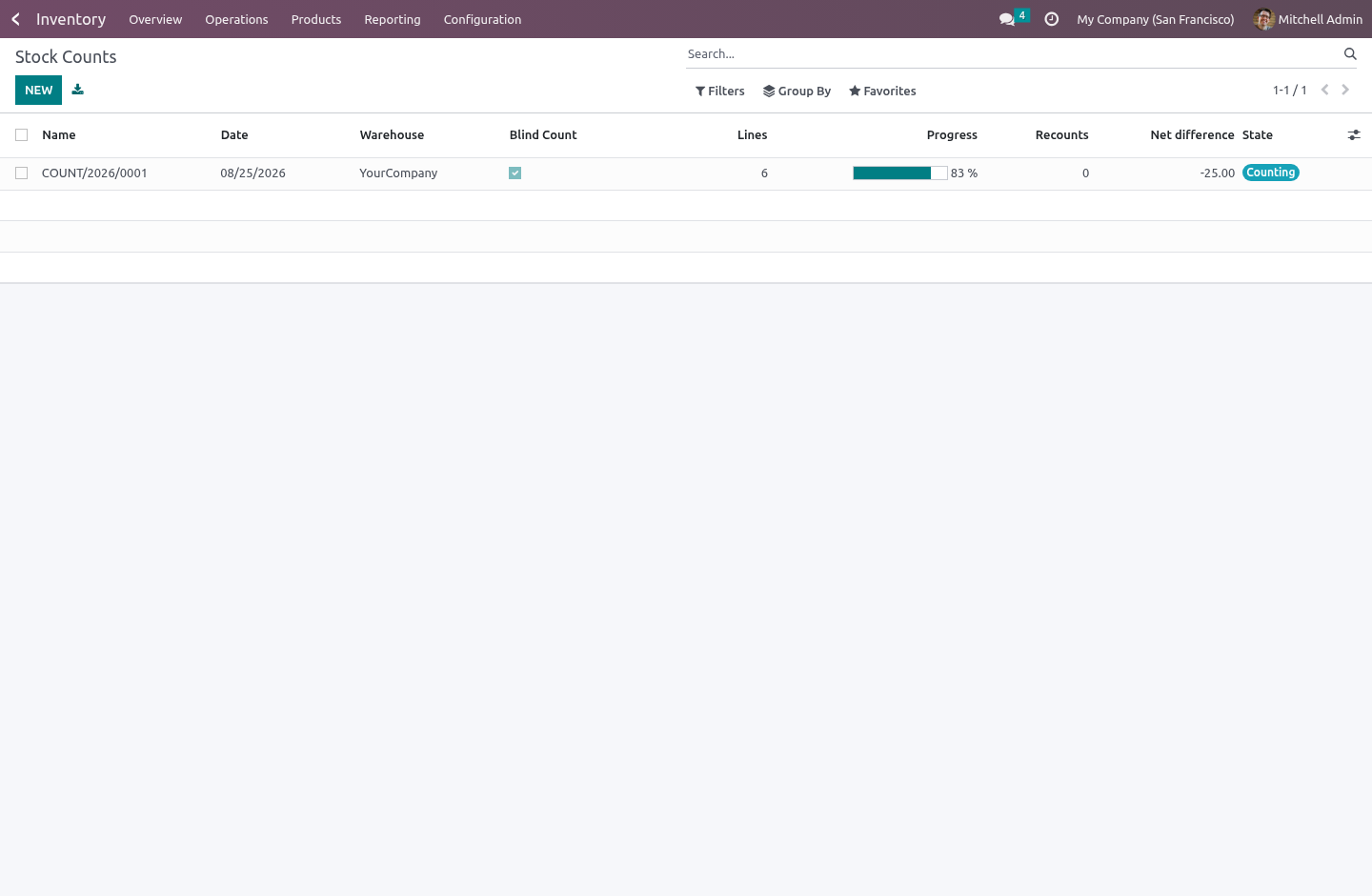
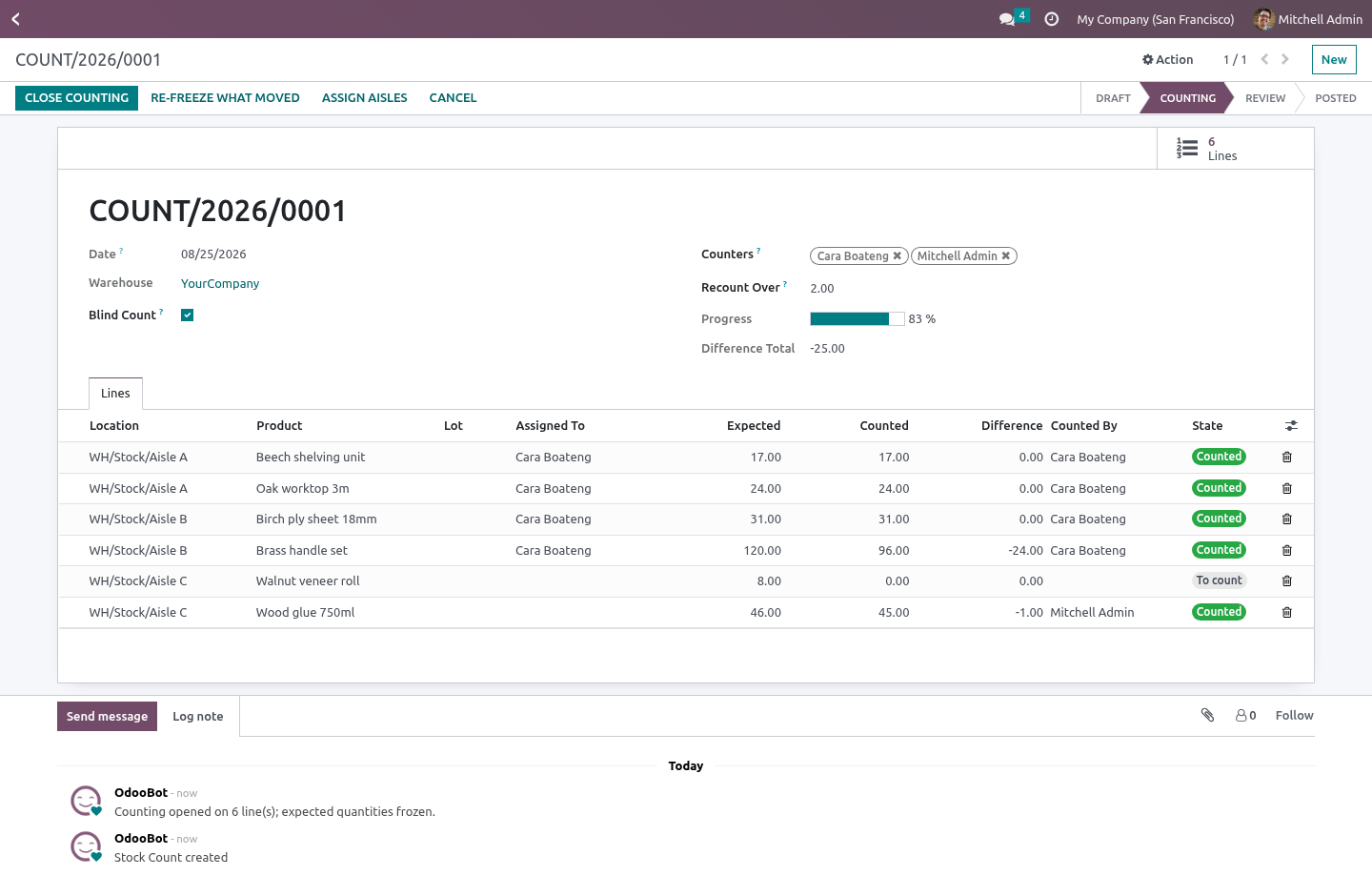
Inventory › Counts › Stock Counts. Scope it once — a warehouse, some locations, some products — and it becomes a document: a name, a date, a state, a progress bar and a chatter. You can say "count 42 is in progress", report on it, hand it to an auditor, and reopen it.
Leave the locations and products empty to count every internal location of the warehouse. The scope is read once, when counting opens.
The expected quantity is frozen when counting opens
Pressing Open counting snapshots what is on every shelf in scope, and that number never moves again.
This is the difference between a count and an argument. If the expected quantity kept tracking the live stock, then a receipt booked while people were walking the aisles would quietly change what they are being measured against, and the variance report at the end would describe something nobody did.
It also means the module knows when the shelf changed underneath the count. At posting, any line whose quant no longer matches its snapshot is refused rather than posted: writing the counted number over it would silently undo the receipt or delivery that happened in between. Those lines go back for a recount, which is the only honest answer.
Blind counting, enforced on the server
On a blind count, counters do not see the expected quantity or the difference. Not hidden in the form — restricted on the field, which the ORM enforces on every read, so a hand-written RPC or an export cannot fetch them either.
A count where the sheet already says 12 is not a count. It is somebody agreeing with the computer.
Split it between people
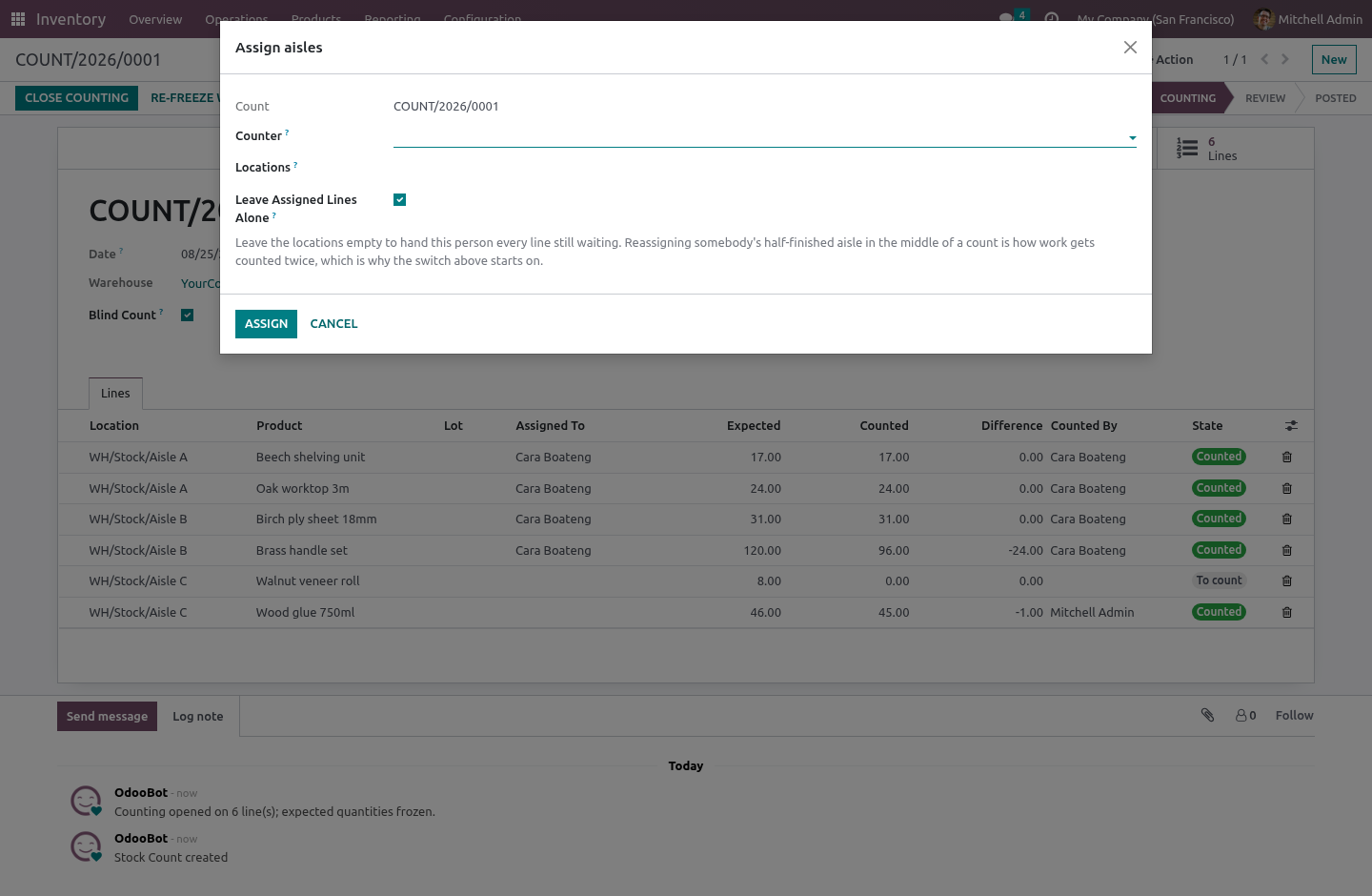
Add the counters to the sheet, then Assign aisles hands out lines by location in bulk. Each counter sees their own count and can be given their own aisles; the supervisor sees everybody's.
Assigning four hundred lines one at a time is why people give up and let everybody count everything, which is how two shelves get counted twice and the next one not at all. The wizard leaves already-assigned lines alone by default, because reassigning somebody's half-finished aisle mid-count is the other way to count the same stock twice.
Recount what disagrees
Set Recount over and any line whose difference is bigger comes back for a second count before anything is posted. Zero means every line that disagrees at all.
This is the one control that stops a mistyped digit becoming a write-off. When the second count is in, it — not the first — is what gets posted.
A count cannot be closed while lines are still uncounted, and cannot be posted while lines are still waiting for their recount. A count posted with holes in it is worse than no count.
Then post it
Post the count writes each counted quantity onto its quant and applies it the way Odoo does, so the stock moves and the valuation are the ordinary ones. The sheet stays as the record of what happened, who counted it and when.
A posted count cannot be cancelled: the adjustments are real stock moves by then, and cancelling the paperwork would not take them back.
What it deliberately does not do
It does not replace the quant screen. One person fixing one shelf should keep using it.
It does not let a count reach outside its own warehouse — that would post adjustments somebody else is responsible for.
It does not post a line whose stock moved mid-count. See above.
How we make sure it works
Before every release, 35 automated checks run against this app on Odoo 16, 17, 18, 19 and 20. Among them:
A counter cannot write off a shelf without counting it.
A count cannot point a line at another companys quant.
A counter cannot search or group by the hidden numbers.
Somebody not on the count cannot be handed an aisle.
A line that is somebody elses cannot be counted.
The complete list is in the source you receive.
Install
Copy bambooforge_stock_count into your addons path and update the app list, or install the ZIP from the Odoo Apps Store.
Install Stock Count: Inventory Counting & Adjustment.
Open Stock Counts - its menus are My Count Lines, Counts.
Questions people ask
- Which Odoo versions does it run on?
Odoo 16.0, 17.0, 18.0, 19.0, 20.0, on the series you buy it for; each series is its own listing.
- Community or Enterprise?
Both. It needs no Enterprise app.
- What does it need?
The standard Inventory app. No extra Python package.
- Where does it show up?
Under the Stock Counts menu (My Count Lines, Counts).
- Does anything leave my server?
No. It makes no call outside your Odoo server: no telemetry, no licence check, no third-party service.
- What happens if I uninstall it?
Odoo drops the app's own tables and fields; the standard records it worked on (contacts, orders, products) stay as they are.