 BambooForge Labs
Segregation of Duties: Access Conflict Control
Find the people who can both raise a payment and approve it: conflict rules over groups, a dated scan for the auditor, and expiring acceptances.
Available for Odoo 16.0, Odoo 17.0, Odoo 18.0, Odoo 19.0, Odoo 20.0. Technical name bambooforge_sod.
Transcript of the walkthrough (Odoo 20)
Segregation of Duties: Access Conflict Control. Find the people who can both raise a payment and approve it: conflict rules over groups, a dated scan for the auditor, and expiring acceptances. An auditor does not ask who is an administrator. They ask who can raise a purchase and pay for it, who can sell and then credit the sale away, who can approve a bill and change the supplier's bank details.
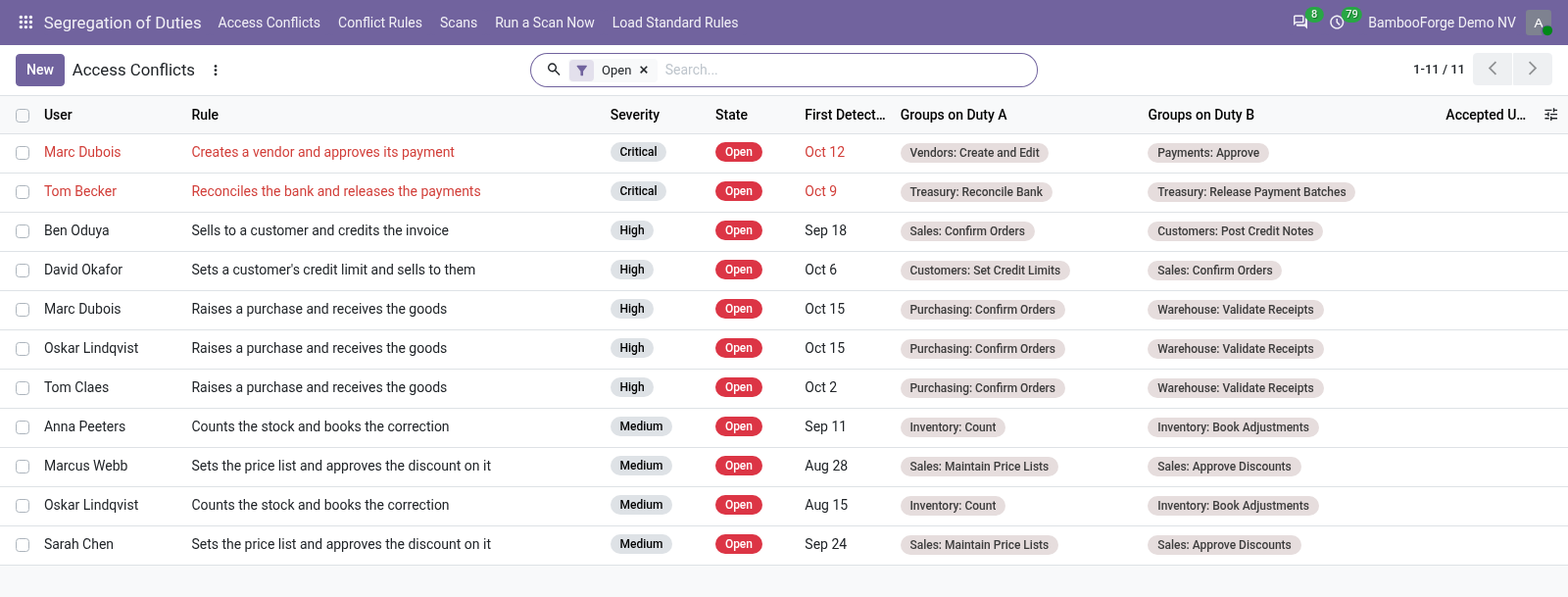
This app answers that question, keeps answering it, and leaves evidence that somebody asked. Segregation of Duties ▸ Load Standard Rules creates the conflicts that apply to the apps this database actually runs — purchase-to-pay, order-to-cash, inventory and finance. A rule that names groups from an uninstalled app is skipped, because a finding nobody can act on is noise. In the next few minutes: what this is for, then setting up, then choosing how hard to push, then scans and evidence, then accounts nobody is going to remediate.
Then what this app deliberately does not do, so you can tell before you buy whether it fits. Everything lives under Segregation of Duties then Access Conflicts then Conflict Rules then Scans. 1. Copy bambooforge_sod into your addons path and update the app list, or install the ZIP from the Odoo Apps Store.
2. Install Segregation of Duties: Access Conflict Control. 3. Open Segregation of Duties - its menus are Access Conflicts, Conflict Rules, Scans, Run a Scan Now.
What this is for. An auditor does not ask who is an administrator. They ask who can raise a purchase and pay for it, who can sell and then credit the sale away, who can approve a bill and change the supplier's bank details. This app answers that question, keeps answering it, and leaves evidence that somebody asked.
Setting up. Segregation of Duties ▸ Load Standard Rules creates the conflicts that apply to the apps this database actually runs — purchase-to-pay, order-to-cash, inventory and finance. A rule that names groups from an uninstalled app is skipped, because a finding nobody can act on is noise. Duty A — "Creates and confirms purchase orders" → Purchase / User, Purchase / Manager Duty B — "Registers payments" → Accounting / Manager Then adjust.
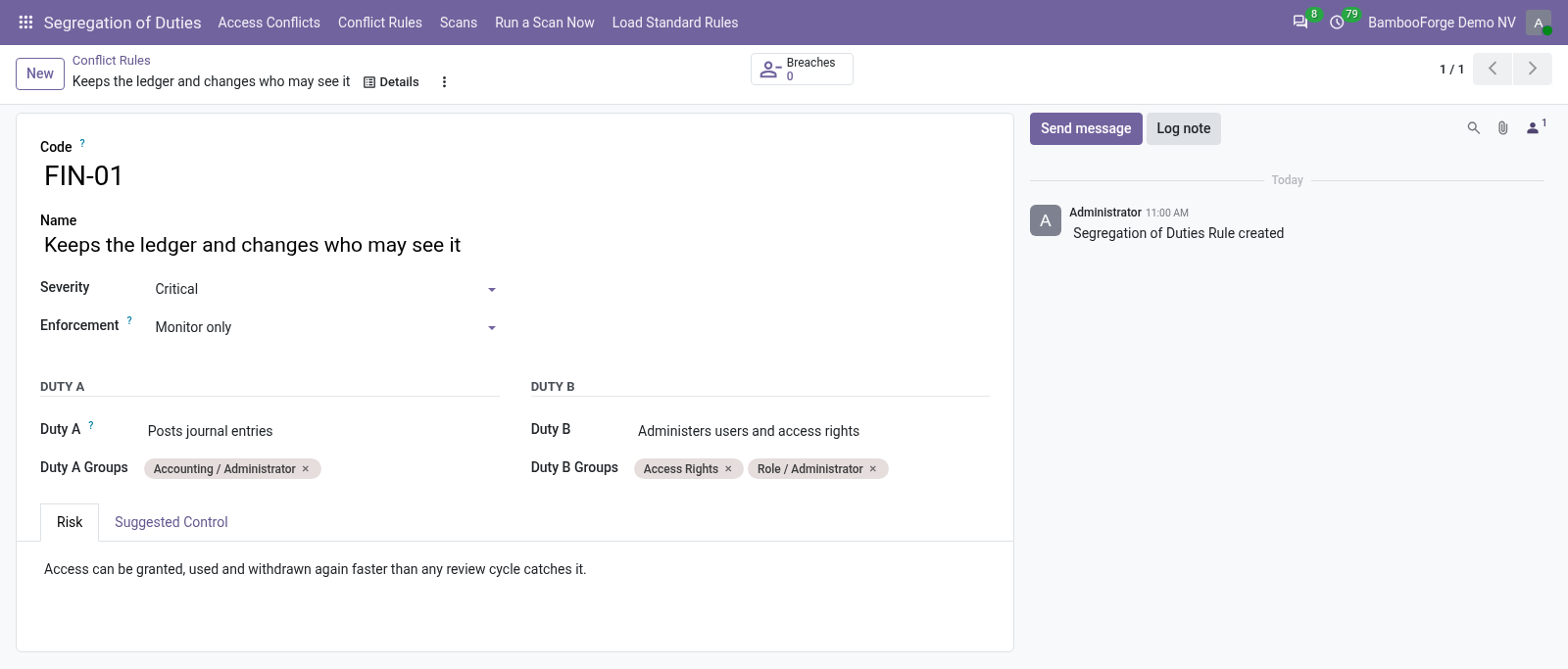
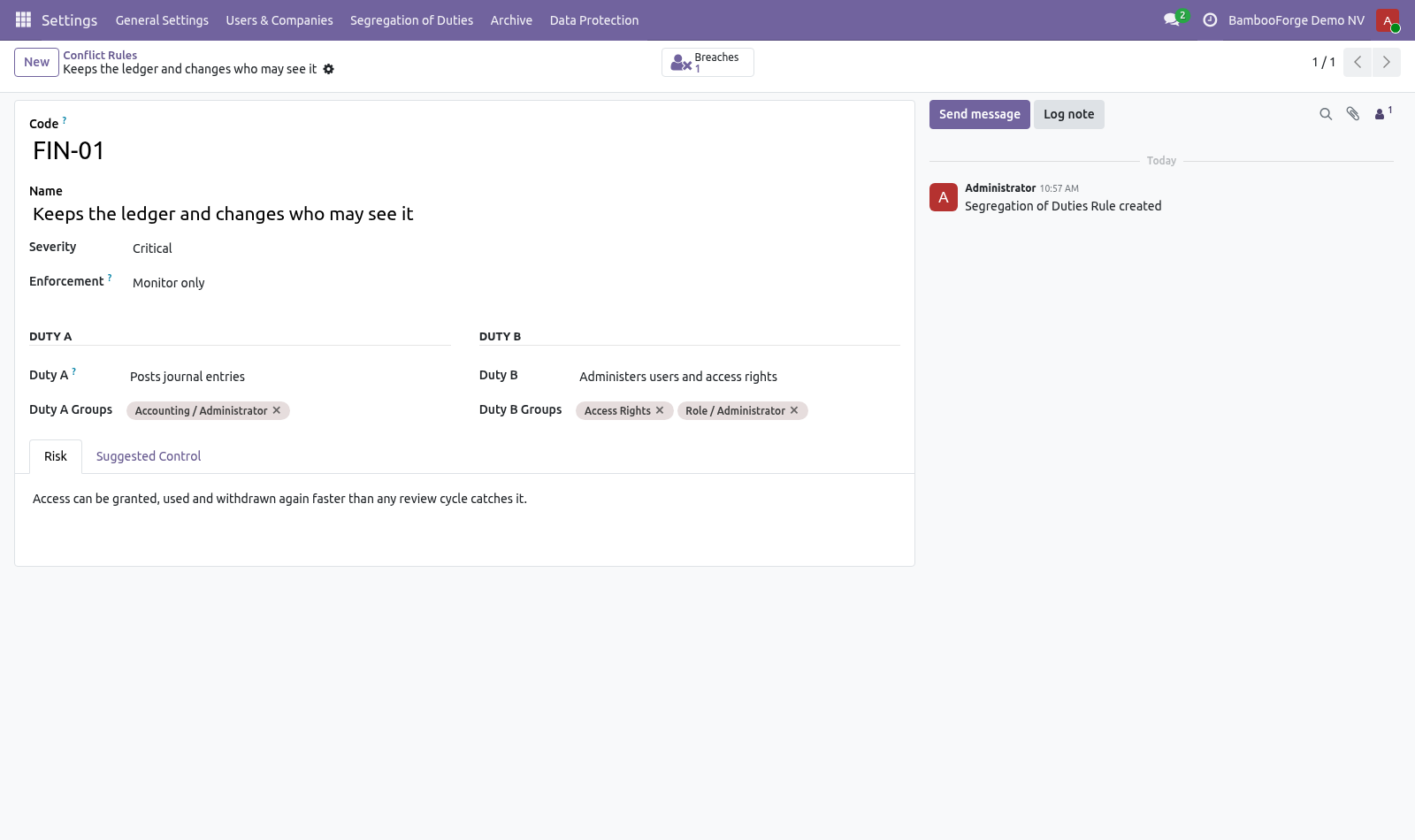
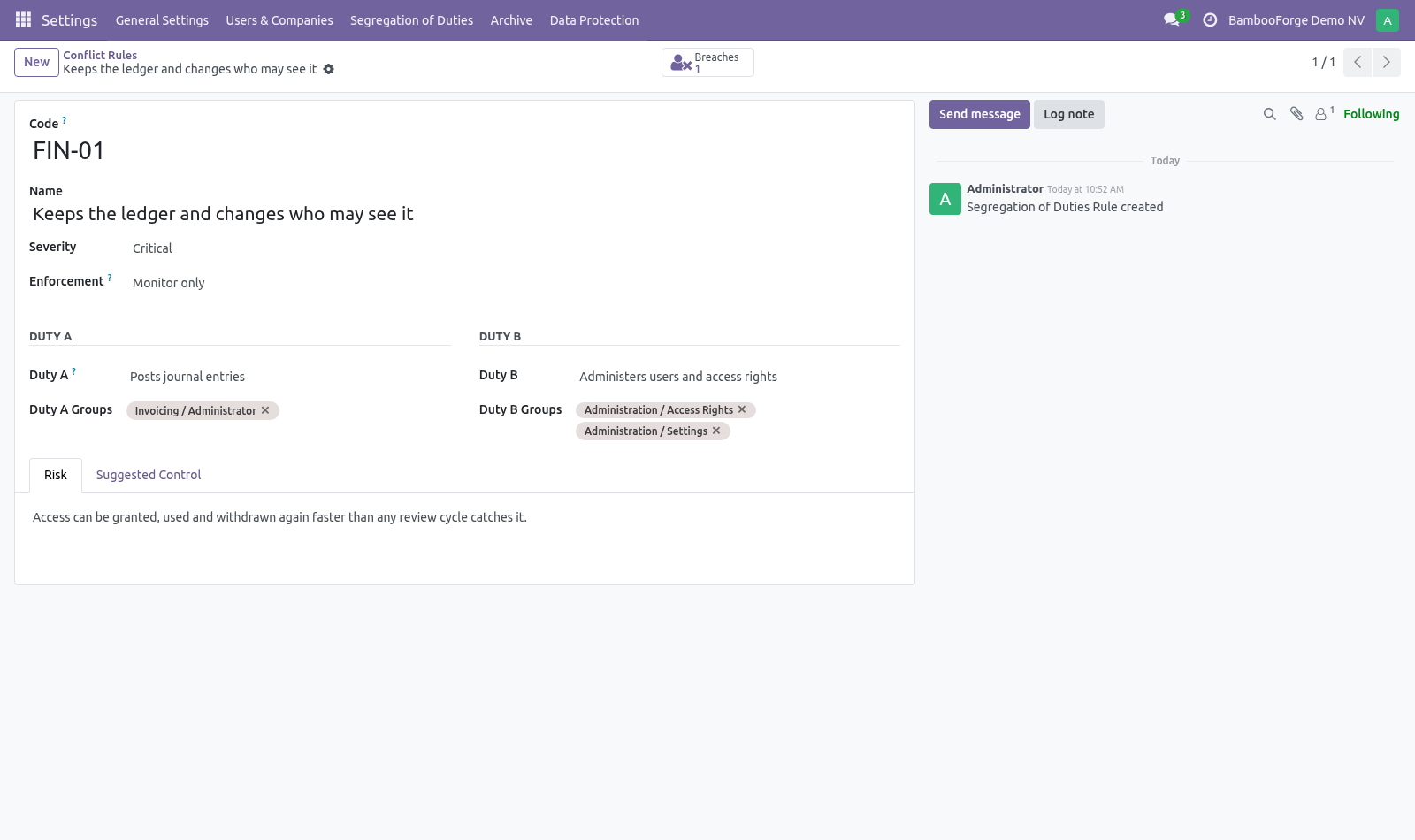
A rule names two duties in the words your business uses and maps each to the Odoo groups that grant it: Choosing how hard to push Monitor — record it, leave it to the periodic review. The right default for most conflicts. Warn — let the assignment through and write it on the person's record, so the warning outlives the click that caused it. Block — refuse the assignment outright.
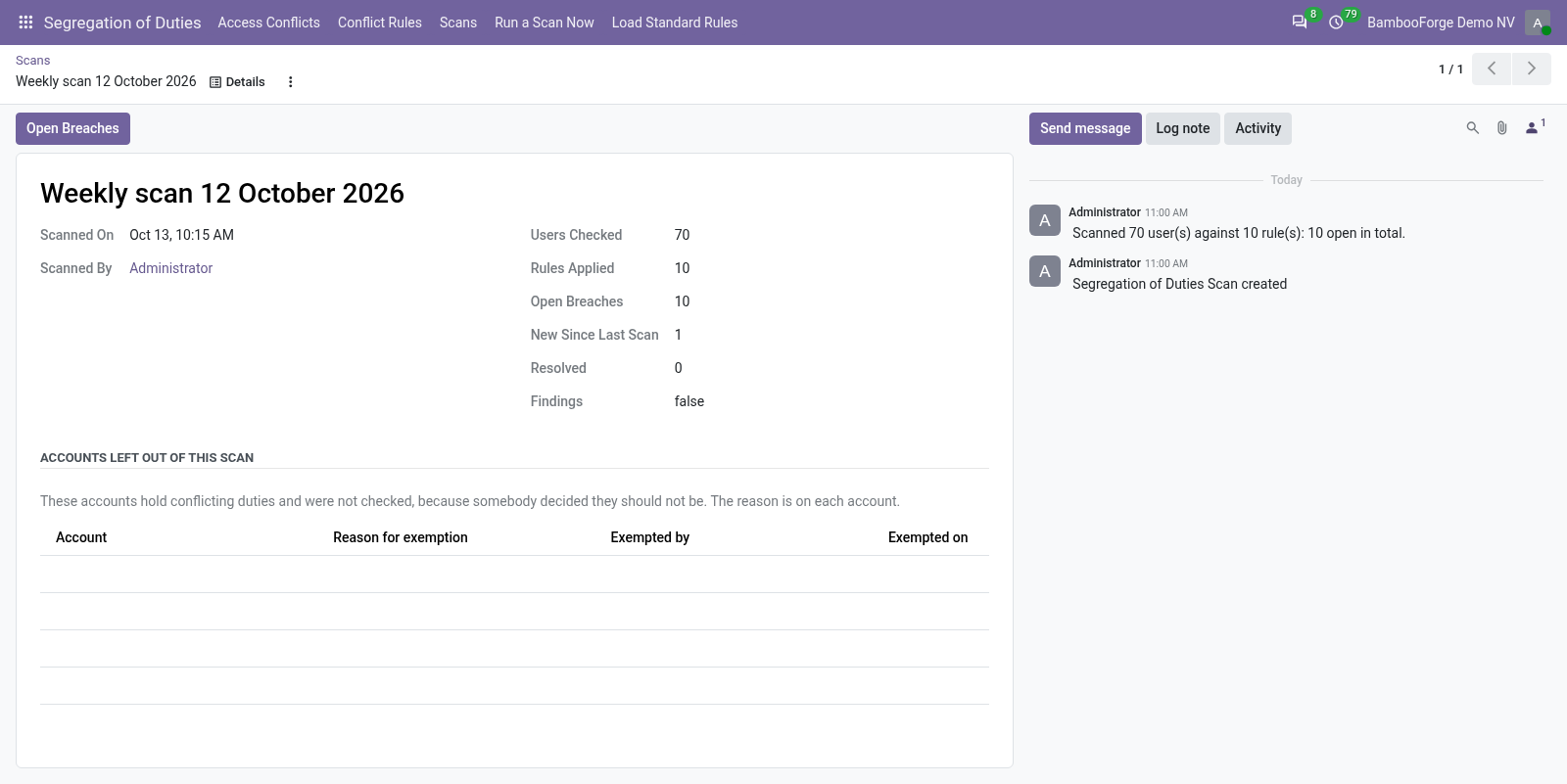
Use it only where the company would genuinely rather stop work than carry the conflict; a blocking rule in a five-person company stops the company. Scans and evidence. Segregation of Duties ▸ Run a Scan Now, and weekly on its own. A scan checks every internal user (portal and public users hold no operational duties) against every rule and records what it found: how many users, how many rules, what is open, what is new since last time, what has been resolved.
The findings are frozen into a CSV attached to the scan. Accounts nobody is going to remediate. Some accounts hold both sides of every rule and always will: the administrator, a service account that runs integrations, the owner of a one-person company who books the invoice and pays it because there is nobody else. Left in the scan they appear on every rule, every week, and the finding that actually matters gets read past.
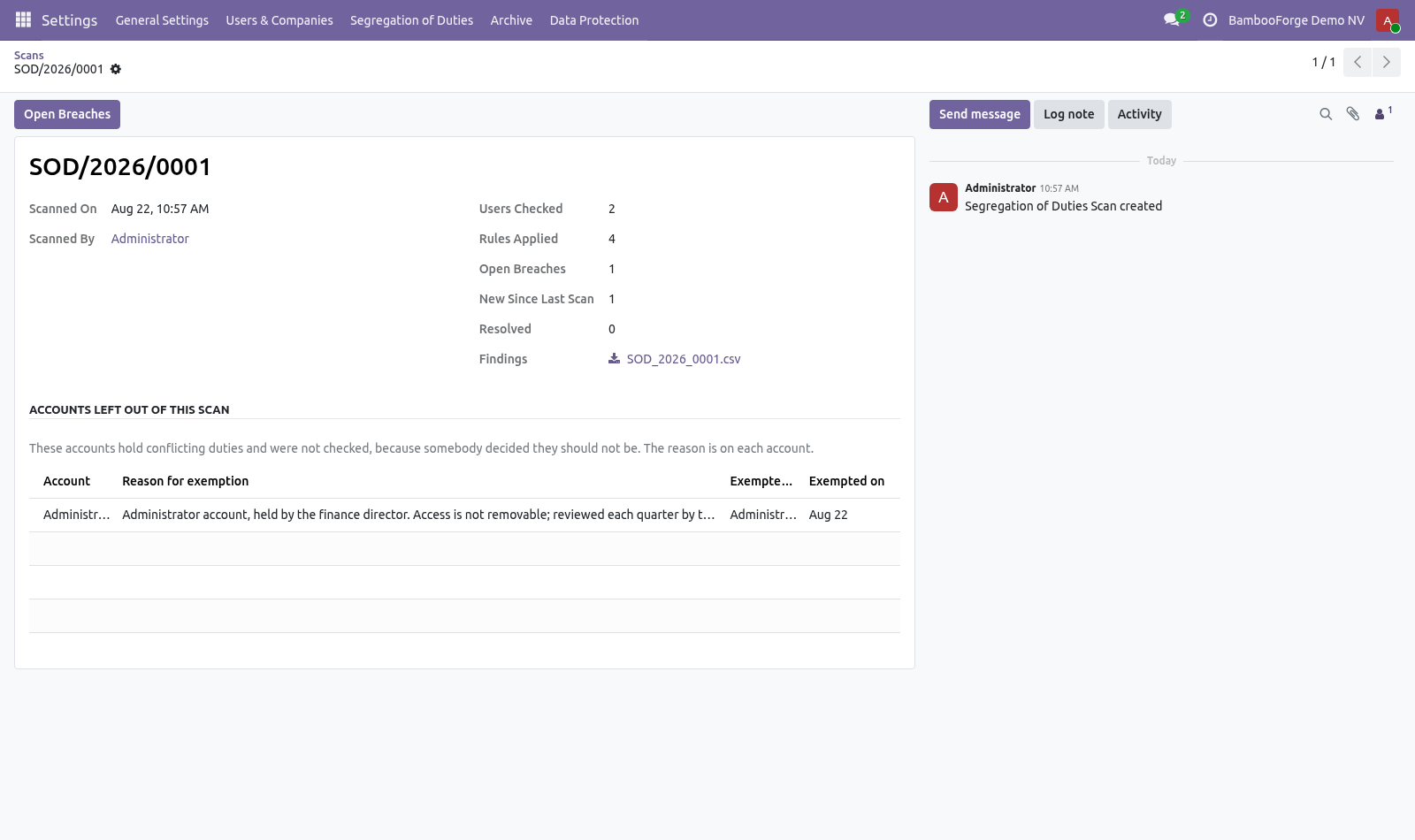
A reason is required. An exemption with no reason cannot be told apart from an oversight, which is the thing this module exists to catch. Who granted it and when are recorded with it. Every scan lists the accounts it left out, with those reasons.
An auditor reads that list before the findings, which is the right order. Put them out of scope on the user — Settings ▸ Users ▸ (user) ▸ Access Rights ▸ Segregation of Duties. Two things happen, and both are deliberate: Accepting a risk. Some conflicts cannot be split: a two-person finance team is a two-person finance team.
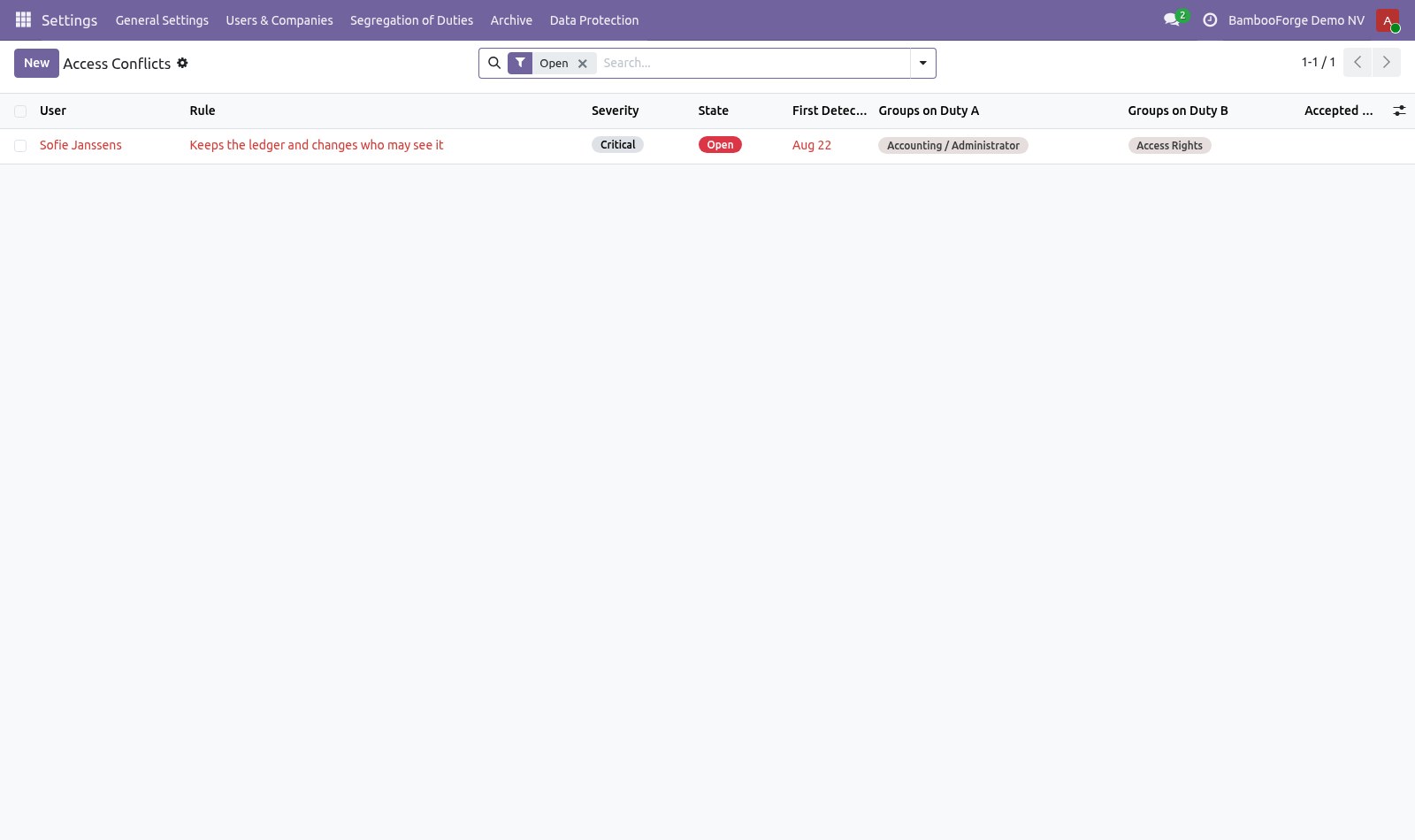
Accepting the risk requires two things and refuses without them: a written reason — what compensates for the conflict; an end date — because permanent acceptance is how a temporary exception becomes a permanent hole. When the date passes, the breach reopens by itself and says so in its log. Nobody comes back to withdraw an acceptance, so the record has to do it. How we make sure it works.
Before every release, 37 automated checks run against this app on Odoo 16, 17, 18, 19 and 20. Among them: A group cannot sit on both duties. The manager reviews access but does not grant it. A plain employee does not see the menu.
Exempting does not claim the breach was resolved. Holding one duty is not a breach. The complete list is in the source you receive. Questions people ask.
Which Odoo versions does it run on? Odoo 16.0, 17.0, 18.0, 19.0, 20.0, on the series you buy it for; each series is its own listing. Community or Enterprise? Both.
It needs no Enterprise app. Now the part most videos leave out: what this does not do. Conflicts are expressed over groups, not over individual model permissions. Two people in the same group are treated the same, which is how Odoo access works anyway.
Record rules and multi-company restrictions are not taken into account: a user restricted to one company still shows the conflict for that company. The catalogue is a starting point drawn from common practice, not a certification. Which conflicts matter is a decision your auditor makes. The complete manual is at docs dot bambooforge dot dev, the demo database is linked from the store page, and support answers within twenty-four hours.
Links are in the description.
Transcript of the walkthrough (Odoo 19)
Segregation of Duties: Access Conflict Control. Find the people who can both raise a payment and approve it: conflict rules over groups, a dated scan for the auditor, and expiring acceptances. An auditor does not ask who is an administrator. They ask who can raise a purchase and pay for it, who can sell and then credit the sale away, who can approve a bill and change the supplier's bank details.
This app answers that question, keeps answering it, and leaves evidence that somebody asked. Segregation of Duties ▸ Load Standard Rules creates the conflicts that apply to the apps this database actually runs — purchase-to-pay, order-to-cash, inventory and finance. A rule that names groups from an uninstalled app is skipped, because a finding nobody can act on is noise. In the next few minutes: what this is for, then setting up, then choosing how hard to push, then scans and evidence, then accounts nobody is going to remediate.
Then what this app deliberately does not do, so you can tell before you buy whether it fits. Everything lives under Segregation of Duties then Access Conflicts then Conflict Rules then Scans. What this is for. An auditor does not ask who is an administrator.
They ask who can raise a purchase and pay for it, who can sell and then credit the sale away, who can approve a bill and change the supplier's bank details. This app answers that question, keeps answering it, and leaves evidence that somebody asked. Setting up. Segregation of Duties ▸ Load Standard Rules creates the conflicts that apply to the apps this database actually runs — purchase-to-pay, order-to-cash, inventory and finance.
A rule that names groups from an uninstalled app is skipped, because a finding nobody can act on is noise. Duty A — "Creates and confirms purchase orders" → Purchase / User, Purchase / Manager Duty B — "Registers payments" → Accounting / Manager Then adjust. A rule names two duties in the words your business uses and maps each to the Odoo groups that grant it: Choosing how hard to push Monitor — record it, leave it to the periodic review. The right default for most conflicts.
Warn — let the assignment through and write it on the person's record, so the warning outlives the click that caused it. Block — refuse the assignment outright. Use it only where the company would genuinely rather stop work than carry the conflict; a blocking rule in a five-person company stops the company. Scans and evidence.
Segregation of Duties ▸ Run a Scan Now, and weekly on its own. A scan checks every internal user (portal and public users hold no operational duties) against every rule and records what it found: how many users, how many rules, what is open, what is new since last time, what has been resolved. The findings are frozen into a CSV attached to the scan. Accounts nobody is going to remediate.
Some accounts hold both sides of every rule and always will: the administrator, a service account that runs integrations, the owner of a one-person company who books the invoice and pays it because there is nobody else. Left in the scan they appear on every rule, every week, and the finding that actually matters gets read past. A reason is required. An exemption with no reason cannot be told apart from an oversight, which is the thing this module exists to catch.
Who granted it and when are recorded with it. Every scan lists the accounts it left out, with those reasons. An auditor reads that list before the findings, which is the right order. Put them out of scope on the user — Settings ▸ Users ▸ (user) ▸ Access Rights ▸ Segregation of Duties.
Two things happen, and both are deliberate: Accepting a risk. Some conflicts cannot be split: a two-person finance team is a two-person finance team. Accepting the risk requires two things and refuses without them: a written reason — what compensates for the conflict; an end date — because permanent acceptance is how a temporary exception becomes a permanent hole. When the date passes, the breach reopens by itself and says so in its log.
Nobody comes back to withdraw an acceptance, so the record has to do it. Now the part most videos leave out: what this does not do. Conflicts are expressed over groups, not over individual model permissions. Two people in the same group are treated the same, which is how Odoo access works anyway.
Record rules and multi-company restrictions are not taken into account: a user restricted to one company still shows the conflict for that company. The catalogue is a starting point drawn from common practice, not a certification. Which conflicts matter is a decision your auditor makes. The complete manual is at docs dot bambooforge dot dev, the demo database is linked from the store page, and support answers within twenty-four hours.
Links are in the description.
Transcript of the walkthrough (Odoo 18)
Segregation of Duties: Access Conflict Control. Find the people who can both raise a payment and approve it: conflict rules over groups, a dated scan for the auditor, and expiring acceptances. An auditor does not ask who is an administrator. They ask who can raise a purchase and pay for it, who can sell and then credit the sale away, who can approve a bill and change the supplier's bank details.
This app answers that question, keeps answering it, and leaves evidence that somebody asked. Segregation of Duties ▸ Load Standard Rules creates the conflicts that apply to the apps this database actually runs — purchase-to-pay, order-to-cash, inventory and finance. A rule that names groups from an uninstalled app is skipped, because a finding nobody can act on is noise. In the next few minutes: what this is for, then setting up, then choosing how hard to push, then scans and evidence, then accounts nobody is going to remediate.
Then what this app deliberately does not do, so you can tell before you buy whether it fits. Everything lives under Segregation of Duties then Access Conflicts then Conflict Rules then Scans. What this is for. An auditor does not ask who is an administrator.
They ask who can raise a purchase and pay for it, who can sell and then credit the sale away, who can approve a bill and change the supplier's bank details. This app answers that question, keeps answering it, and leaves evidence that somebody asked. Setting up. Segregation of Duties ▸ Load Standard Rules creates the conflicts that apply to the apps this database actually runs — purchase-to-pay, order-to-cash, inventory and finance.
A rule that names groups from an uninstalled app is skipped, because a finding nobody can act on is noise. Duty A — "Creates and confirms purchase orders" → Purchase / User, Purchase / Manager Duty B — "Registers payments" → Accounting / Manager Then adjust. A rule names two duties in the words your business uses and maps each to the Odoo groups that grant it: Choosing how hard to push Monitor — record it, leave it to the periodic review. The right default for most conflicts.
Warn — let the assignment through and write it on the person's record, so the warning outlives the click that caused it. Block — refuse the assignment outright. Use it only where the company would genuinely rather stop work than carry the conflict; a blocking rule in a five-person company stops the company. Scans and evidence.
Segregation of Duties ▸ Run a Scan Now, and weekly on its own. A scan checks every internal user (portal and public users hold no operational duties) against every rule and records what it found: how many users, how many rules, what is open, what is new since last time, what has been resolved. The findings are frozen into a CSV attached to the scan. Accounts nobody is going to remediate.
Some accounts hold both sides of every rule and always will: the administrator, a service account that runs integrations, the owner of a one-person company who books the invoice and pays it because there is nobody else. Left in the scan they appear on every rule, every week, and the finding that actually matters gets read past. A reason is required. An exemption with no reason cannot be told apart from an oversight, which is the thing this module exists to catch.
Who granted it and when are recorded with it. Every scan lists the accounts it left out, with those reasons. An auditor reads that list before the findings, which is the right order. Put them out of scope on the user — Settings ▸ Users ▸ (user) ▸ Access Rights ▸ Segregation of Duties.
Two things happen, and both are deliberate: Accepting a risk. Some conflicts cannot be split: a two-person finance team is a two-person finance team. Accepting the risk requires two things and refuses without them: a written reason — what compensates for the conflict; an end date — because permanent acceptance is how a temporary exception becomes a permanent hole. When the date passes, the breach reopens by itself and says so in its log.
Nobody comes back to withdraw an acceptance, so the record has to do it. Now the part most videos leave out: what this does not do. Conflicts are expressed over groups, not over individual model permissions. Two people in the same group are treated the same, which is how Odoo access works anyway.
Record rules and multi-company restrictions are not taken into account: a user restricted to one company still shows the conflict for that company. The catalogue is a starting point drawn from common practice, not a certification. Which conflicts matter is a decision your auditor makes. The complete manual is at docs dot bambooforge dot dev, the demo database is linked from the store page, and support answers within twenty-four hours.
Links are in the description.
Transcript of the walkthrough (Odoo 17)
Segregation of Duties: Access Conflict Control. Find the people who can both raise a payment and approve it: conflict rules over groups, a dated scan for the auditor, and expiring acceptances. An auditor does not ask who is an administrator. They ask who can raise a purchase and pay for it, who can sell and then credit the sale away, who can approve a bill and change the supplier's bank details.
This app answers that question, keeps answering it, and leaves evidence that somebody asked. Segregation of Duties ▸ Load Standard Rules creates the conflicts that apply to the apps this database actually runs — purchase-to-pay, order-to-cash, inventory and finance. A rule that names groups from an uninstalled app is skipped, because a finding nobody can act on is noise. In the next few minutes: what this is for, then setting up, then choosing how hard to push, then scans and evidence, then accounts nobody is going to remediate.
Then what this app deliberately does not do, so you can tell before you buy whether it fits. Everything lives under Segregation of Duties then Access Conflicts then Conflict Rules then Scans. What this is for. An auditor does not ask who is an administrator.
They ask who can raise a purchase and pay for it, who can sell and then credit the sale away, who can approve a bill and change the supplier's bank details. This app answers that question, keeps answering it, and leaves evidence that somebody asked. Setting up. Segregation of Duties ▸ Load Standard Rules creates the conflicts that apply to the apps this database actually runs — purchase-to-pay, order-to-cash, inventory and finance.
A rule that names groups from an uninstalled app is skipped, because a finding nobody can act on is noise. Duty A — "Creates and confirms purchase orders" → Purchase / User, Purchase / Manager Duty B — "Registers payments" → Accounting / Manager Then adjust. A rule names two duties in the words your business uses and maps each to the Odoo groups that grant it: Choosing how hard to push Monitor — record it, leave it to the periodic review. The right default for most conflicts.
Warn — let the assignment through and write it on the person's record, so the warning outlives the click that caused it. Block — refuse the assignment outright. Use it only where the company would genuinely rather stop work than carry the conflict; a blocking rule in a five-person company stops the company. Scans and evidence.
Segregation of Duties ▸ Run a Scan Now, and weekly on its own. A scan checks every internal user (portal and public users hold no operational duties) against every rule and records what it found: how many users, how many rules, what is open, what is new since last time, what has been resolved. The findings are frozen into a CSV attached to the scan. Accounts nobody is going to remediate.
Some accounts hold both sides of every rule and always will: the administrator, a service account that runs integrations, the owner of a one-person company who books the invoice and pays it because there is nobody else. Left in the scan they appear on every rule, every week, and the finding that actually matters gets read past. A reason is required. An exemption with no reason cannot be told apart from an oversight, which is the thing this module exists to catch.
Who granted it and when are recorded with it. Every scan lists the accounts it left out, with those reasons. An auditor reads that list before the findings, which is the right order. Put them out of scope on the user — Settings ▸ Users ▸ (user) ▸ Access Rights ▸ Segregation of Duties.
Two things happen, and both are deliberate: Accepting a risk. Some conflicts cannot be split: a two-person finance team is a two-person finance team. Accepting the risk requires two things and refuses without them: a written reason — what compensates for the conflict; an end date — because permanent acceptance is how a temporary exception becomes a permanent hole. When the date passes, the breach reopens by itself and says so in its log.
Nobody comes back to withdraw an acceptance, so the record has to do it. Now the part most videos leave out: what this does not do. Conflicts are expressed over groups, not over individual model permissions. Two people in the same group are treated the same, which is how Odoo access works anyway.
Record rules and multi-company restrictions are not taken into account: a user restricted to one company still shows the conflict for that company. The catalogue is a starting point drawn from common practice, not a certification. Which conflicts matter is a decision your auditor makes. The complete manual is at docs dot bambooforge dot dev, the demo database is linked from the store page, and support answers within twenty-four hours.
Links are in the description.
Transcript of the walkthrough (Odoo 16)
Segregation of Duties: Access Conflict Control. Find the people who can both raise a payment and approve it: conflict rules over groups, a dated scan for the auditor, and expiring acceptances. An auditor does not ask who is an administrator. They ask who can raise a purchase and pay for it, who can sell and then credit the sale away, who can approve a bill and change the supplier's bank details.
This app answers that question, keeps answering it, and leaves evidence that somebody asked. Segregation of Duties ▸ Load Standard Rules creates the conflicts that apply to the apps this database actually runs — purchase-to-pay, order-to-cash, inventory and finance. A rule that names groups from an uninstalled app is skipped, because a finding nobody can act on is noise. In the next few minutes: what this is for, then setting up, then choosing how hard to push, then scans and evidence, then accounts nobody is going to remediate.
Then what this app deliberately does not do, so you can tell before you buy whether it fits. Everything lives under Segregation of Duties then Access Conflicts then Conflict Rules then Scans. What this is for. An auditor does not ask who is an administrator.
They ask who can raise a purchase and pay for it, who can sell and then credit the sale away, who can approve a bill and change the supplier's bank details. This app answers that question, keeps answering it, and leaves evidence that somebody asked. Setting up. Segregation of Duties ▸ Load Standard Rules creates the conflicts that apply to the apps this database actually runs — purchase-to-pay, order-to-cash, inventory and finance.
A rule that names groups from an uninstalled app is skipped, because a finding nobody can act on is noise. Duty A — "Creates and confirms purchase orders" → Purchase / User, Purchase / Manager Duty B — "Registers payments" → Accounting / Manager Then adjust. A rule names two duties in the words your business uses and maps each to the Odoo groups that grant it: Choosing how hard to push Monitor — record it, leave it to the periodic review. The right default for most conflicts.
Warn — let the assignment through and write it on the person's record, so the warning outlives the click that caused it. Block — refuse the assignment outright. Use it only where the company would genuinely rather stop work than carry the conflict; a blocking rule in a five-person company stops the company. Scans and evidence.
Segregation of Duties ▸ Run a Scan Now, and weekly on its own. A scan checks every internal user (portal and public users hold no operational duties) against every rule and records what it found: how many users, how many rules, what is open, what is new since last time, what has been resolved. The findings are frozen into a CSV attached to the scan. Accounts nobody is going to remediate.
Some accounts hold both sides of every rule and always will: the administrator, a service account that runs integrations, the owner of a one-person company who books the invoice and pays it because there is nobody else. Left in the scan they appear on every rule, every week, and the finding that actually matters gets read past. A reason is required. An exemption with no reason cannot be told apart from an oversight, which is the thing this module exists to catch.
Who granted it and when are recorded with it. Every scan lists the accounts it left out, with those reasons. An auditor reads that list before the findings, which is the right order. Put them out of scope on the user — Settings ▸ Users ▸ (user) ▸ Access Rights ▸ Segregation of Duties.
Two things happen, and both are deliberate: Accepting a risk. Some conflicts cannot be split: a two-person finance team is a two-person finance team. Accepting the risk requires two things and refuses without them: a written reason — what compensates for the conflict; an end date — because permanent acceptance is how a temporary exception becomes a permanent hole. When the date passes, the breach reopens by itself and says so in its log.
Nobody comes back to withdraw an acceptance, so the record has to do it. Now the part most videos leave out: what this does not do. Conflicts are expressed over groups, not over individual model permissions. Two people in the same group are treated the same, which is how Odoo access works anyway.
Record rules and multi-company restrictions are not taken into account: a user restricted to one company still shows the conflict for that company. The catalogue is a starting point drawn from common practice, not a certification. Which conflicts matter is a decision your auditor makes. The complete manual is at docs dot bambooforge dot dev, the demo database is linked from the store page, and support answers within twenty-four hours.
Links are in the description.
Key facts
- What it is
- Find the people who can both raise a payment and approve it: conflict rules over groups, a dated scan for the auditor, and expiring acceptances.
- For
- Extra Tools
- Odoo versions
- 16.0, 17.0, 18.0, 19.0, 20.0 - Community and Enterprise
- Runs on
- Odoo.sh or Odoo you host yourself - not Odoo Online, which accepts no third-party apps
- Price
- 229 EUR, one-time, on the Odoo Apps Store
- Technical name
- bambooforge_sod
- Not for
- Conflicts are expressed over groups, not over individual model permissions. Two people in the same group are treated the same, which is how Odoo access works anyway.; Record rules and multi-company restrictions are not taken into account: a user restricted to one company still shows the conflict for that company.; The catalogue is a starting point drawn from common practice, not a certification. Which conflicts matter is a decision your auditor makes.
- Manual last updated
- 2026-10-15
Segregation of Duties: Access Conflict Control
What this is for
An auditor does not ask who is an administrator. They ask who can raise a purchase and pay for it, who can sell and then credit the sale away, who can approve a bill and change the supplier's bank details. This app answers that question, keeps answering it, and leaves evidence that somebody asked.
Setting up
Segregation of Duties ▸ Load Standard Rules creates the conflicts that apply to the apps this database actually runs — purchase-to-pay, order-to-cash, inventory and finance. A rule that names groups from an uninstalled app is skipped, because a finding nobody can act on is noise.
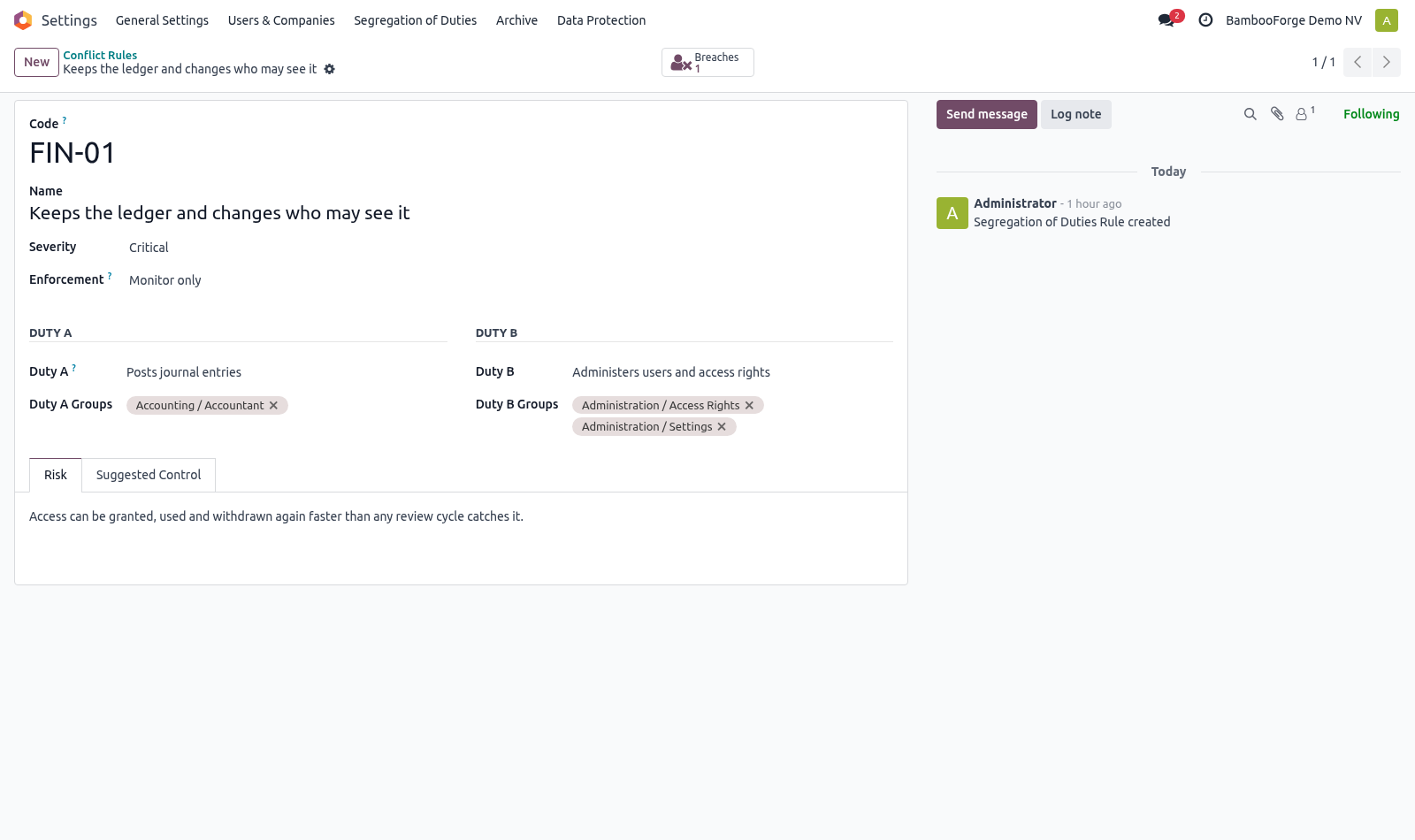
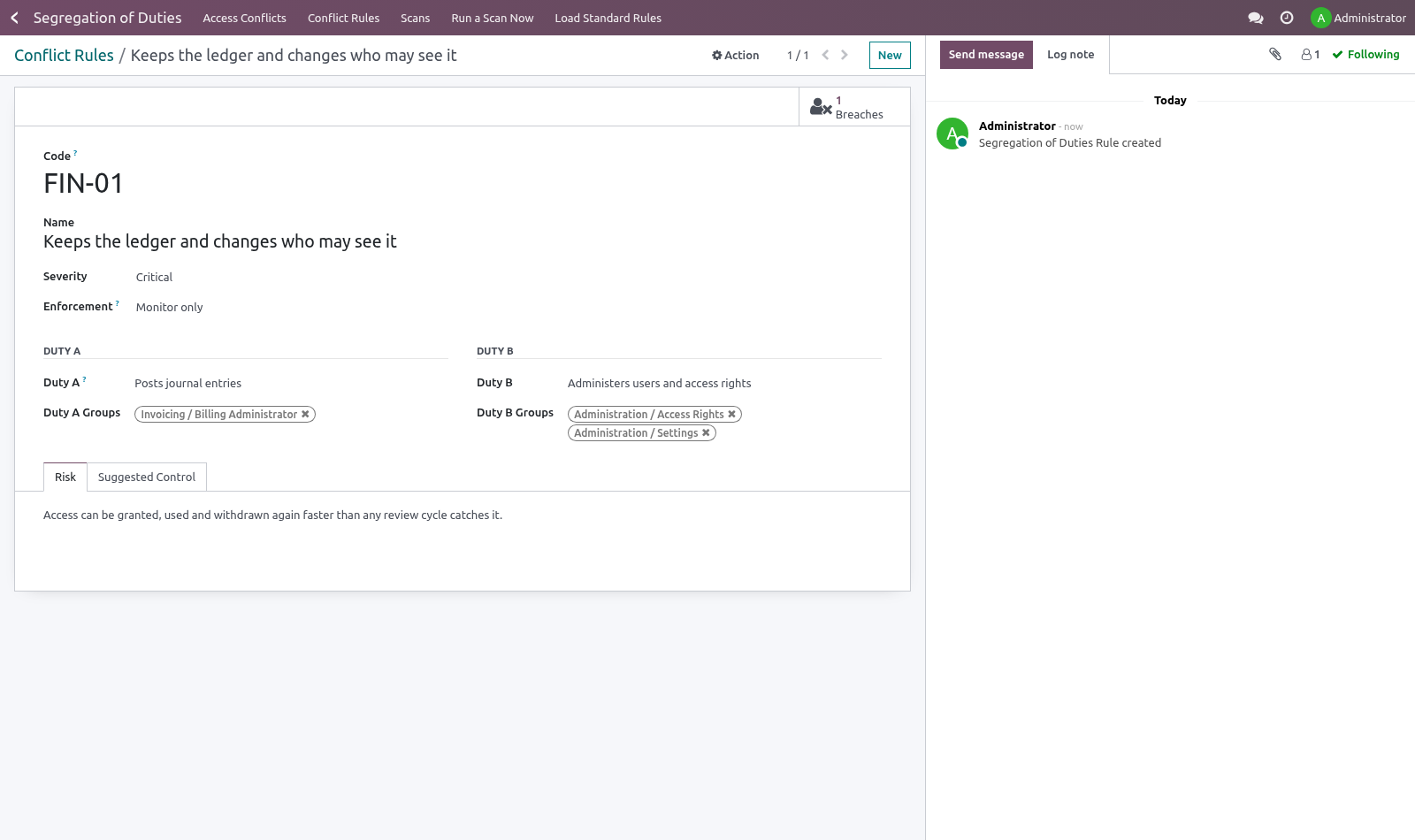
Then adjust. A rule names two duties in the words your business uses and maps each to the Odoo groups that grant it:
Duty A — "Creates and confirms purchase orders" → Purchase / User, Purchase / Manager
Duty B — "Registers payments" → Accounting / Manager
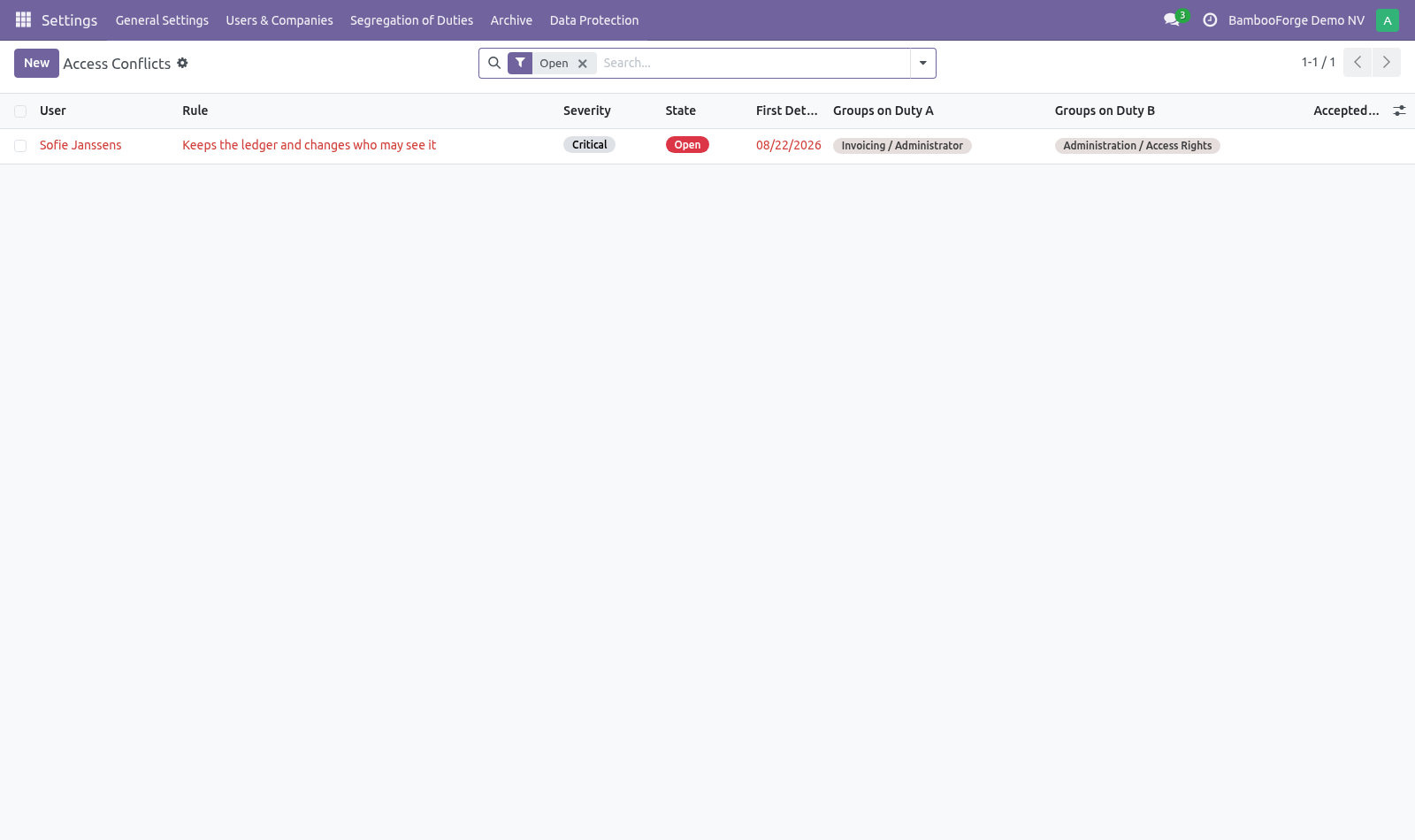
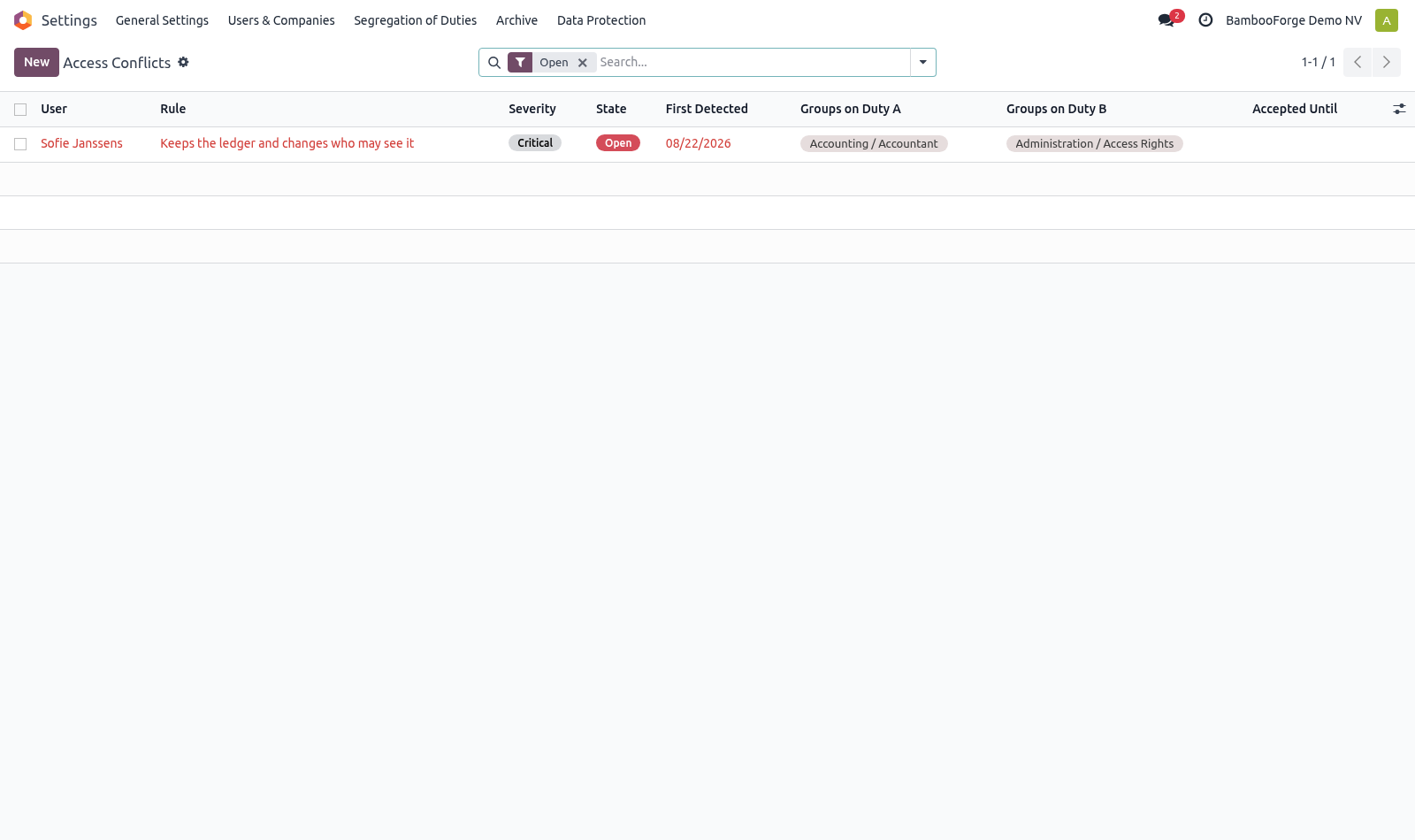
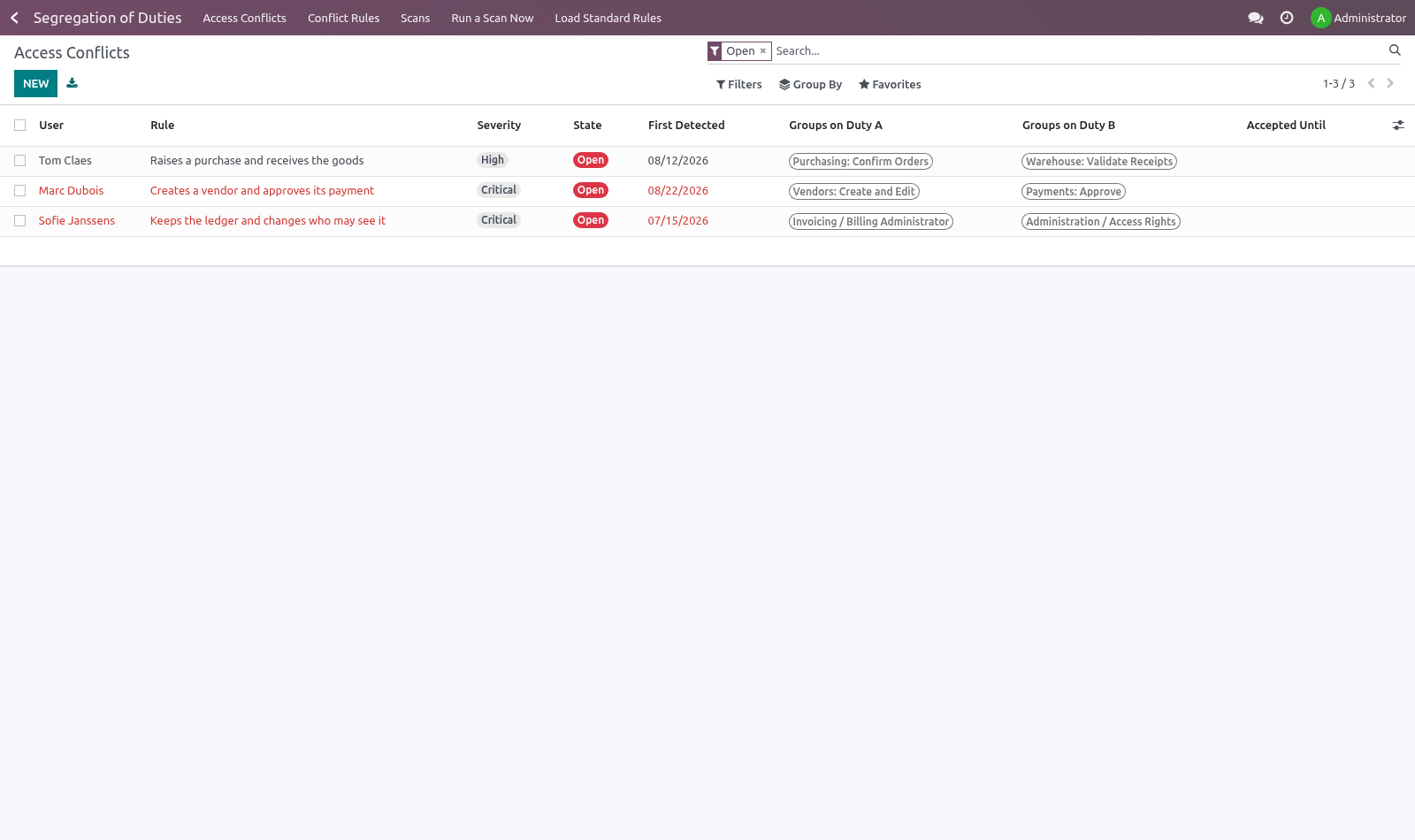
A user breaches the rule by holding at least one group from each side. That is what makes the finding explainable to the person who has to fix it: not "you have too much access" but "you can raise an order and pay for it".
Choosing how hard to push
Each rule carries an enforcement level:
Monitor — record it, leave it to the periodic review. The right default for most conflicts.
Warn — let the assignment through and write it on the person's record, so the warning outlives the click that caused it.
Block — refuse the assignment outright. Use it only where the company would genuinely rather stop work than carry the conflict; a blocking rule in a five-person company stops the company.
Scans and evidence
Segregation of Duties ▸ Run a Scan Now, and weekly on its own.
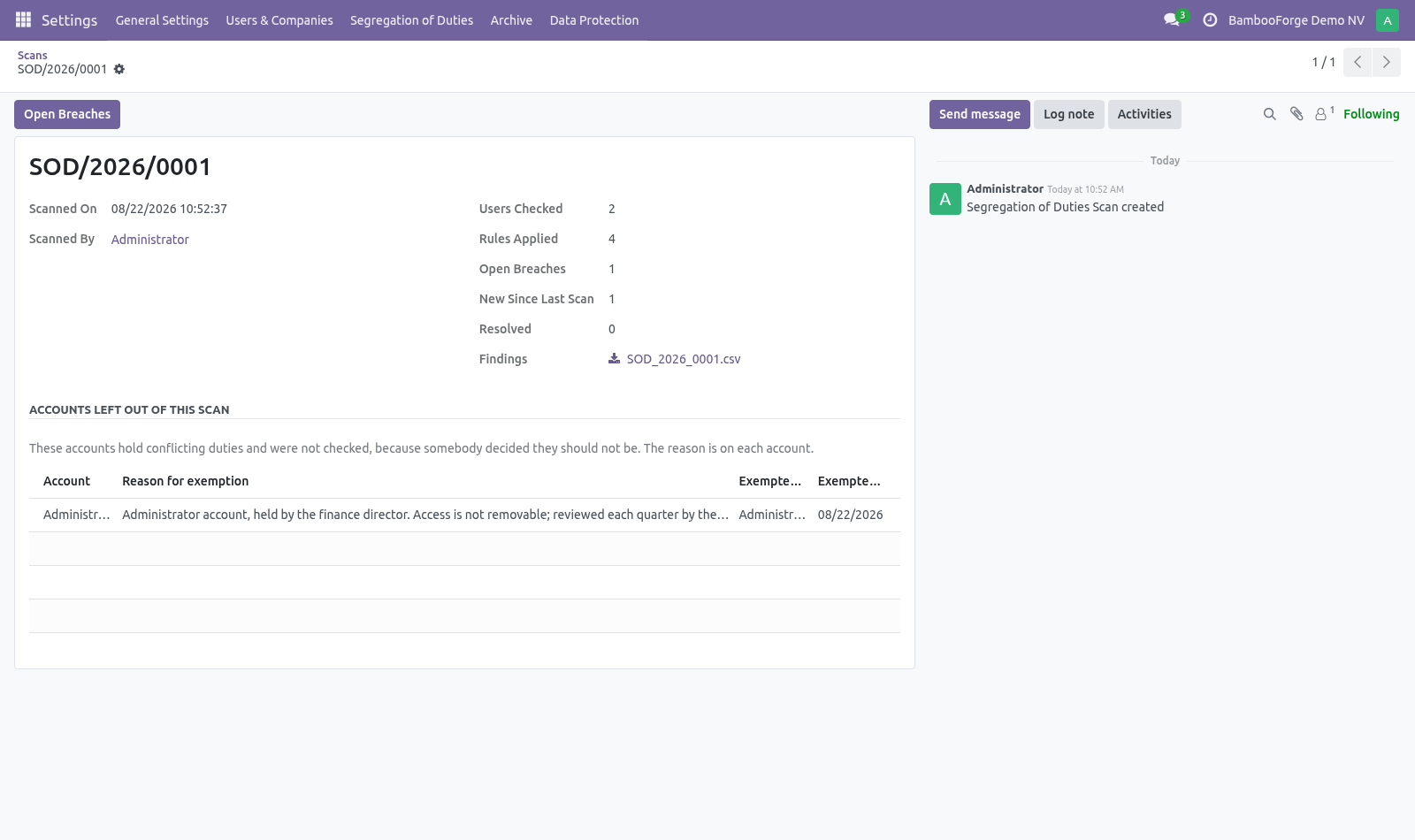
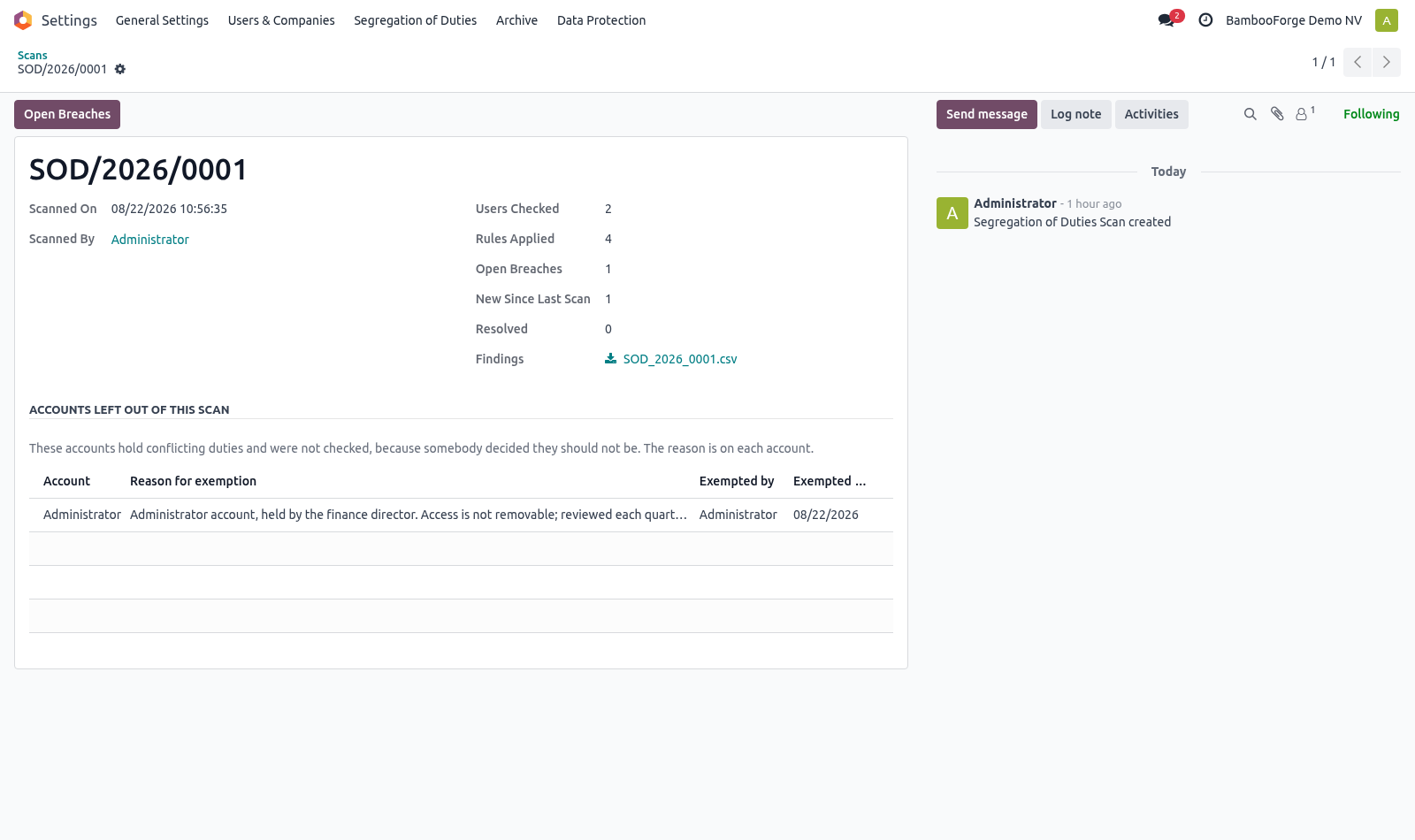
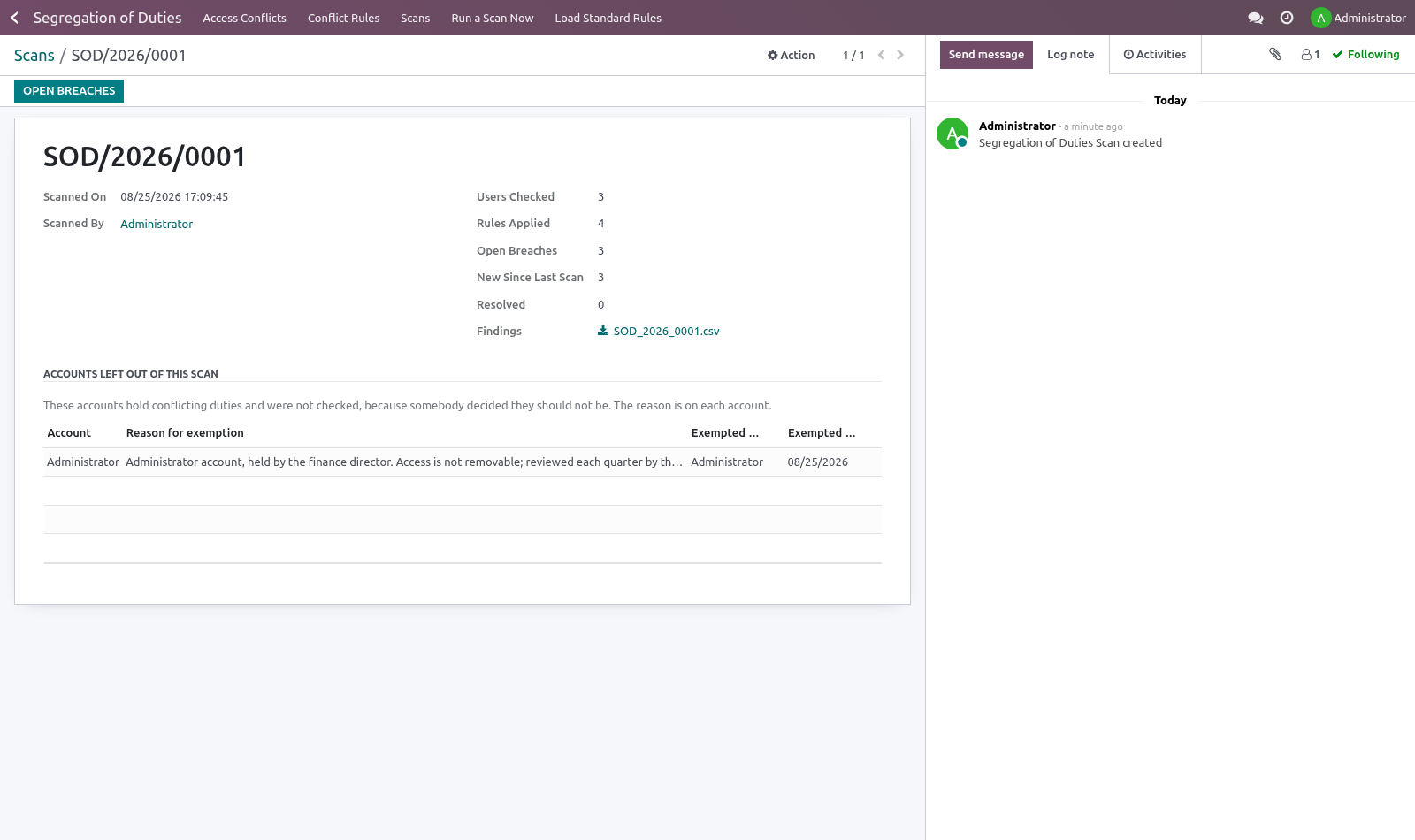
A scan checks every internal user (portal and public users hold no operational duties) against every rule and records what it found: how many users, how many rules, what is open, what is new since last time, what has been resolved. The findings are frozen into a CSV attached to the scan.
That file is the point. Violations keep moving as access changes; the scan does not. A clean screen today only proves somebody looked today — a dated scan with its findings attached proves what was true in March.
When somebody hands access back after it was taken away, the breach counts as new again rather than continuing the old one, and the original detection date is kept so the age of a finding stays visible.
Accounts nobody is going to remediate
Some accounts hold both sides of every rule and always will: the administrator, a service account that runs integrations, the owner of a one-person company who books the invoice and pays it because there is nobody else. Left in the scan they appear on every rule, every week, and the finding that actually matters gets read past.
Put them out of scope on the user — Settings ▸ Users ▸ (user) ▸ Access Rights ▸ Segregation of Duties. Two things happen, and both are deliberate:
A reason is required. An exemption with no reason cannot be told apart from an oversight, which is the thing this module exists to catch. Who granted it and when are recorded with it.
Every scan lists the accounts it left out, with those reasons. An auditor reads that list before the findings, which is the right order.
An open breach for an account that is then exempted moves to Account Exempted, never to Resolved. Resolved means the access was taken away. It was not, and the two must not look the same to somebody reading the history a year later.
The superuser (OdooBot) is out of scope always. It holds everything because it is not a person.
Accepting a risk
Some conflicts cannot be split: a two-person finance team is a two-person finance team. Accepting the risk requires two things and refuses without them:
a written reason — what compensates for the conflict;
an end date — because permanent acceptance is how a temporary exception becomes a permanent hole.
When the date passes, the breach reopens by itself and says so in its log. Nobody comes back to withdraw an acceptance, so the record has to do it.
Known limits
Conflicts are expressed over groups, not over individual model permissions. Two people in the same group are treated the same, which is how Odoo access works anyway.
Record rules and multi-company restrictions are not taken into account: a user restricted to one company still shows the conflict for that company.
The catalogue is a starting point drawn from common practice, not a certification. Which conflicts matter is a decision your auditor makes.
How we make sure it works
Before every release, 38 automated checks run against this app on Odoo 16, 17, 18, 19 and 20. Among them:
A group cannot sit on both duties.
The manager reviews access but does not grant it.
A plain employee does not see the menu.
Exempting does not claim the breach was resolved.
Holding one duty is not a breach.
The complete list is in the source you receive.
Install
Copy bambooforge_sod into your addons path and update the app list, or install the ZIP from the Odoo Apps Store.
Install Segregation of Duties: Access Conflict Control.
Open Segregation of Duties - its menus are Access Conflicts, Conflict Rules, Scans, Run a Scan Now.
Questions people ask
- Which Odoo versions does it run on?
Odoo 16.0, 17.0, 18.0, 19.0, 20.0, on the series you buy it for; each series is its own listing.
- Community or Enterprise?
Both. It needs no Enterprise app.
- What does it need?
The standard Discuss, Settings apps. No extra Python package.
- Where does it show up?
Under the Segregation of Duties menu (Access Conflicts, Conflict Rules, Scans, Run a Scan Now).
- Does anything leave my server?
No. It makes no call outside your Odoo server: no telemetry, no licence check, no third-party service.
- What happens if I uninstall it?
Odoo drops the app's own tables and fields; the standard records it worked on (contacts, orders, products) stay as they are.