 BambooForge Labs
SEO All in One with XML and Image Sitemaps
Priority and change frequency per URL pattern, image and video sitemaps, noindex pages excluded, instant rebuild, and IndexNow submission.
Available for Odoo 16.0, Odoo 17.0, Odoo 18.0, Odoo 19.0, Odoo 20.0. Technical name bambooforge_sitemap_pro.
Transcript of the walkthrough (Odoo 20)
SEO All in One with XML and Image Sitemaps. Priority and change frequency per URL pattern, image and video sitemaps, noindex pages excluded, instant rebuild, and IndexNow submission. Said before you buy, because it is the half that decides whether the app fits: In the next few minutes: seo all in one with xml and image sitemaps, then rules, then about priority, then pages you asked google not to index, then images and videos. Then what this app deliberately does not do, so you can tell before you buy whether it fits.
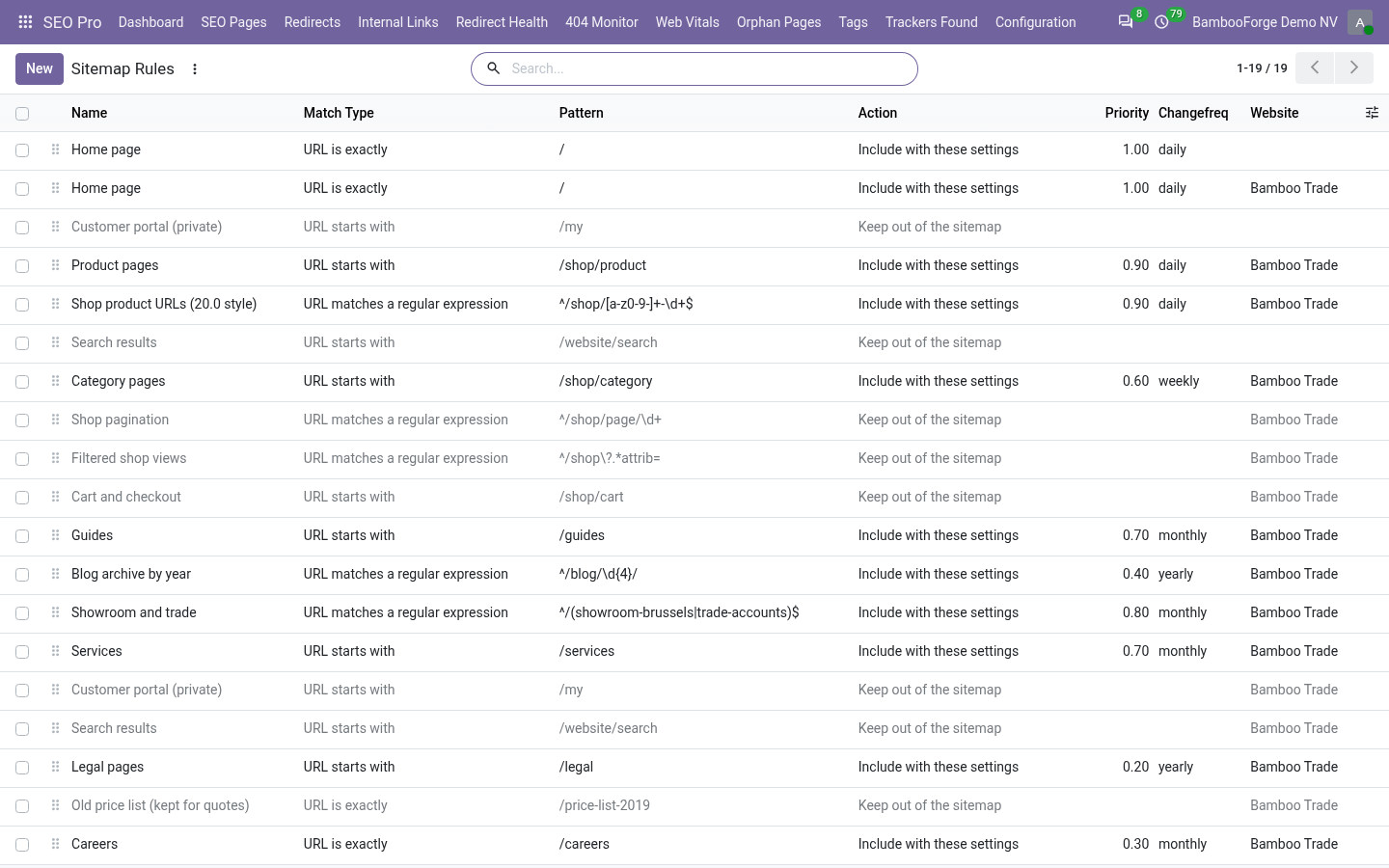
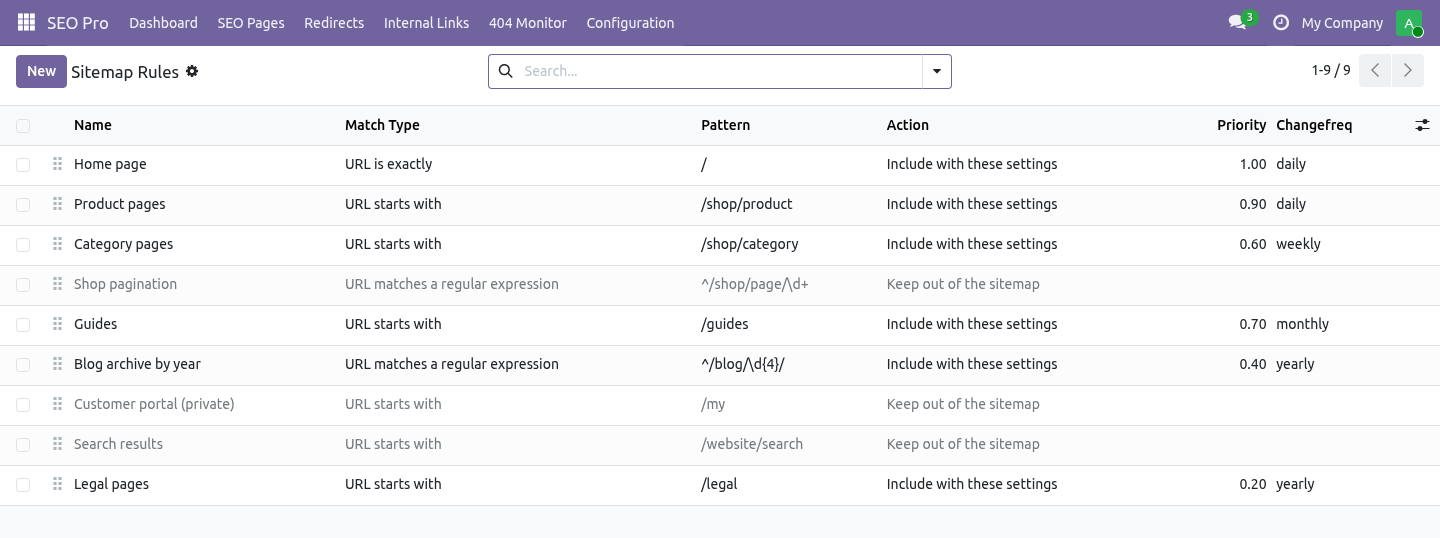
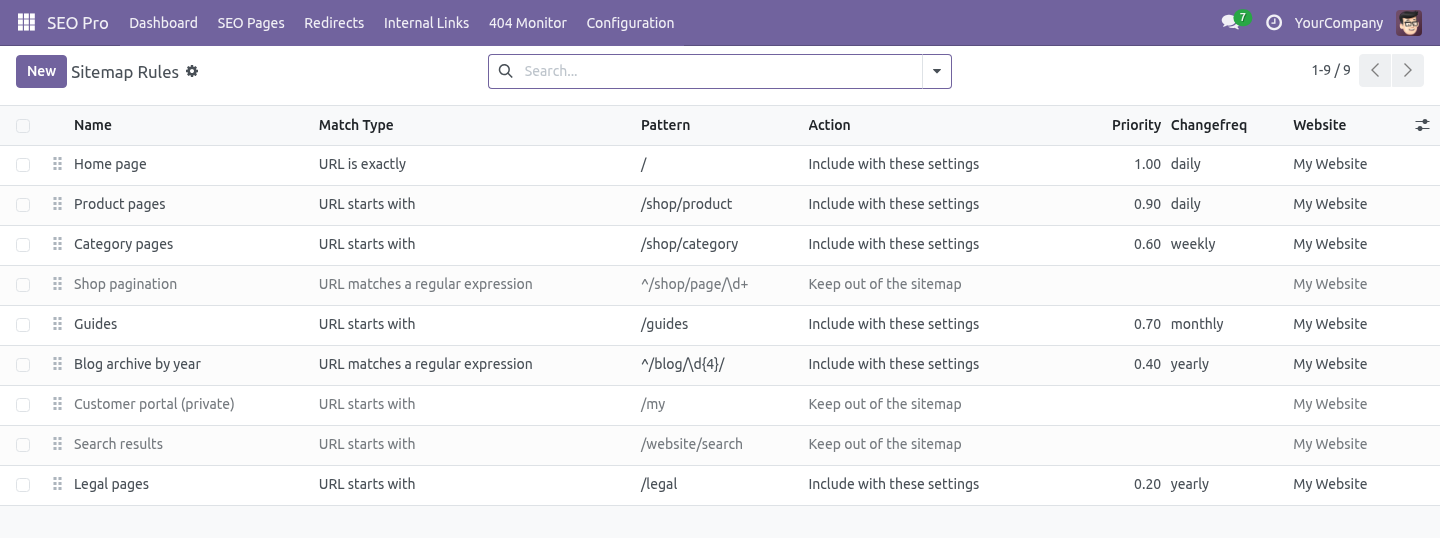
Everything lives under Sitemap Rules. 1. Install BambooForge Sitemap Pro (it needs SEO Pro). Three rules are created: / at priority 1.0, daily; /my excluded (the customer portal is private by definition); /website/search excluded (search results are a crawl-budget drain).
2. Change, archive or delete those rules as you like - they are ordinary records. SEO All in One with XML and Image Sitemaps. An add-on for BambooForge SEO Pro.
Odoo's sitemap lists every published page with no priority, no change frequency and no way to keep anything out. This gives you all three, adds image and video entries, and submits changed URLs to the engines that still accept a submission. Rules. SEO Pro → Configuration → Sitemap Rules.
A rule is a URL pattern plus what to do with it. URL starts with /shop matches /shop and everything under it. About priority. Priority is relative to your own URLs.
It tells a crawler which of your pages you would rather have crawled first. It says nothing to anybody about how you rank, and setting everything to 1.0 is the same as setting everything to 0.5. Pages you asked Google not to index. Nothing to do: SEO Pro already does this.
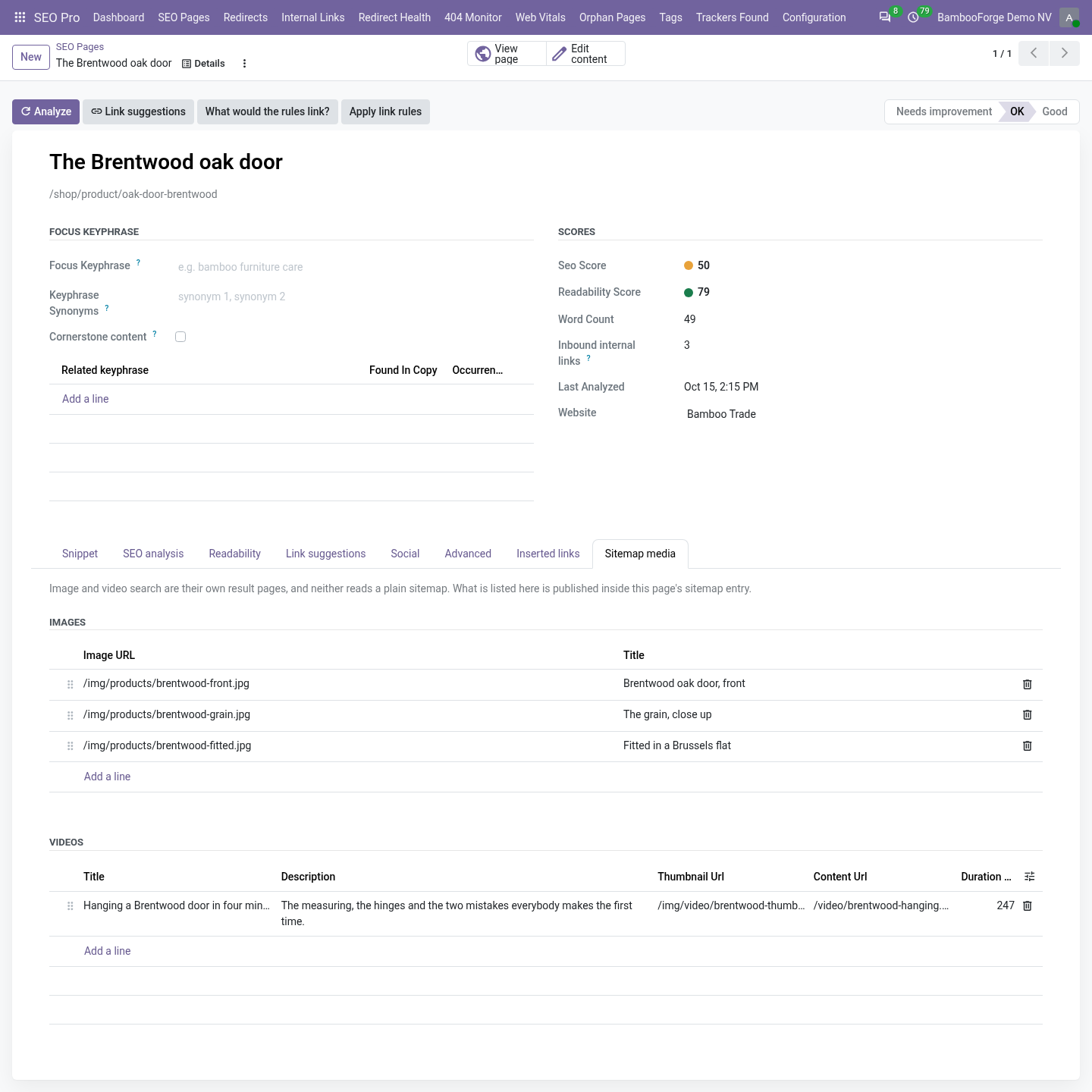
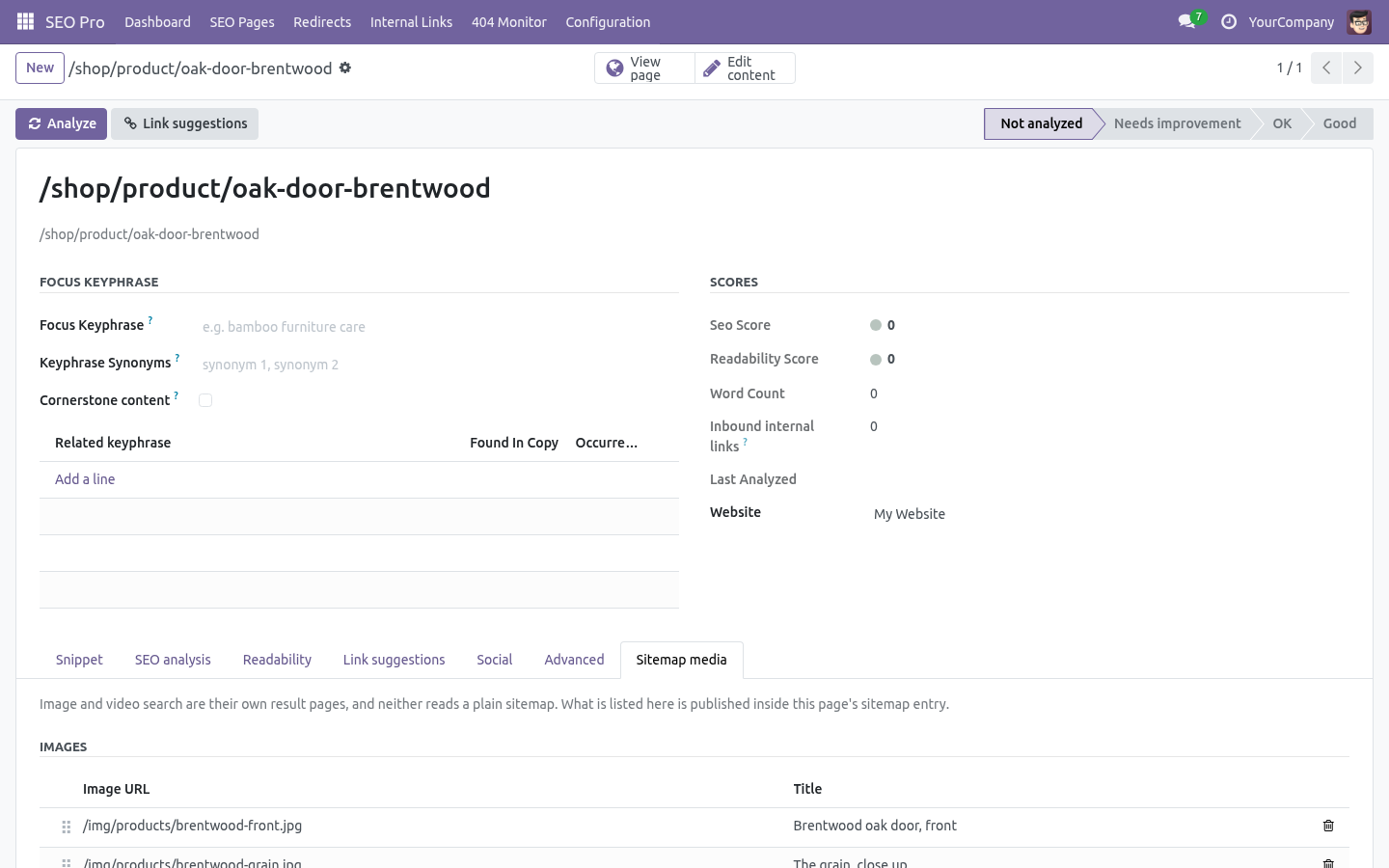
A page marked noindex there is dropped from the sitemap, and for a website page the flag is also mirrored onto Odoo's own website_indexed. This add-on does not repeat the check - it would only be a second place to look when the answer is wrong. Images and videos. SEO Pro → SEO Pages → (a page) → Sitemap media.
Image search and video search are separate result pages, and neither reads a plain sitemap. Anything listed here is published inside that page's sitemap entry, with the image and video namespaces declared on the root element - a child in an undeclared namespace invalidates the whole file, not just the entry. The twelve-hour cache. Odoo caches the generated sitemap for twelve hours.
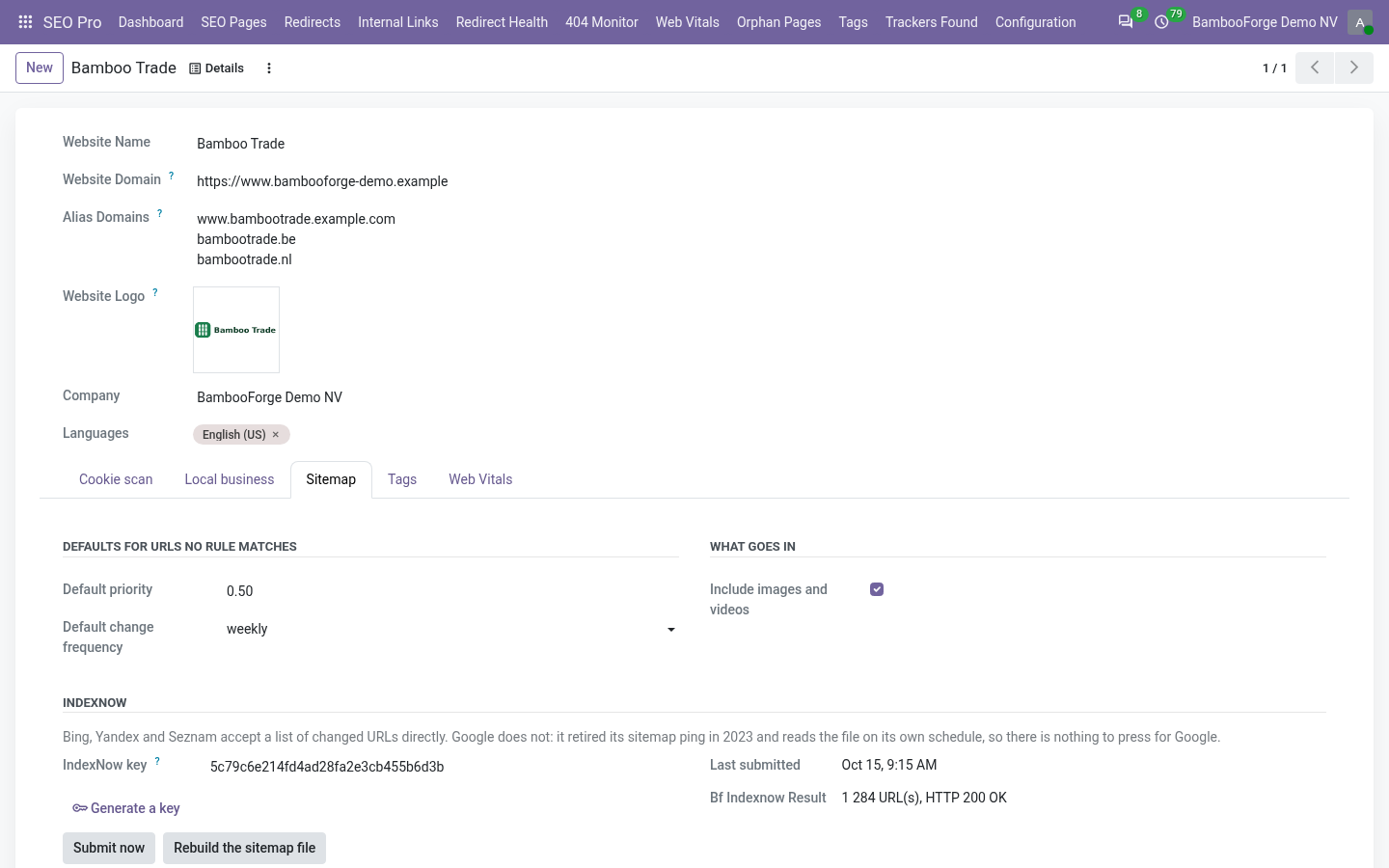
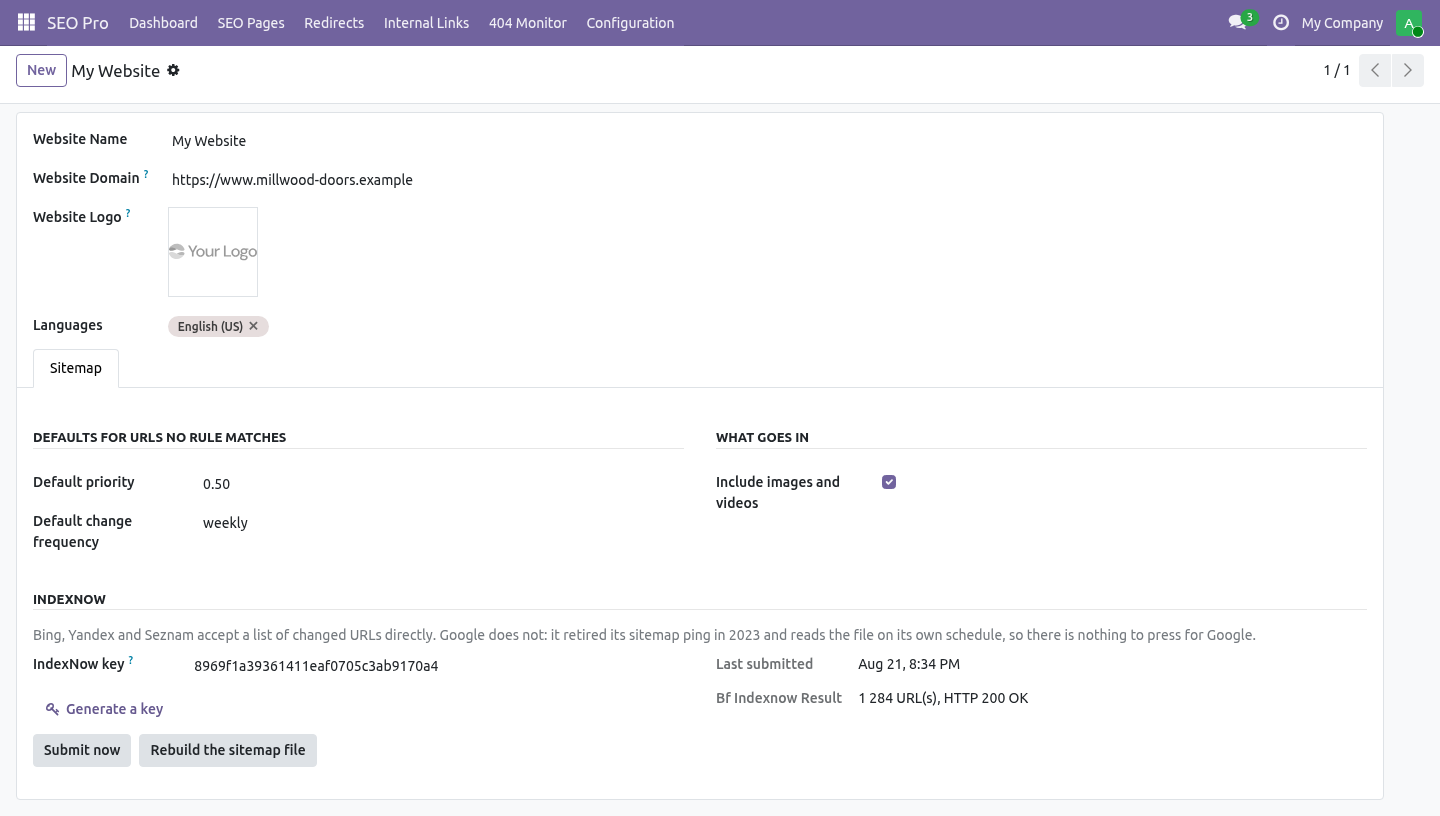
Changing a rule and reloading /sitemap.xml therefore shows the old file, which is how an afternoon disappears into deciding the rules do not work. Website → Sitemap → Rebuild the sitemap file drops the cached copies; the next request rebuilds them. IndexNow, and the truth about pinging. Google retired its sitemap ping in 2023.
There is nothing to press for Google: it reads the file on its own schedule. Any module offering you a "ping Google" button today is calling a URL that answers 404. 1. Website → Sitemap → Generate a key.
The key is 32 hexadecimal characters; Odoo serves it at /<key>.txt, which is the proof of ownership IndexNow asks for. The route is pinned to exactly 32 characters so it cannot swallow /robots.txt or a page of your own whose URL ends in .txt. 2. The key file must be at the root of the site.
A key file in a subdirectory only authorises URLs under that subdirectory. 3. Submit now sends the current URL list. The daily cron sends it only when it has changed since the last submission - submitting the same list every night is how a site gets ignored.
Multi-website and multi-company. Rules, defaults, media and the IndexNow key all belong to a website. The rules list is filtered by the websites a user can see, and by company through the website's company. How we make sure it works.
Before every release, 33 automated checks run against this app on Odoo 16, 17, 18, 19 and 20. Among them: The same image is not listed twice. Every url is submitted not only the first thousand. Without a key nothing is sent.
A generated key is accepted and a short one is not. A query string is not part of the path. The complete list is in the source you receive. Questions people ask.
Which Odoo versions does it run on? Odoo 16.0, 17.0, 18.0, 19.0, 20.0, on the series you buy it for; each series is its own listing. Community or Enterprise? Both.
It needs no Enterprise app. The complete manual is at docs dot bambooforge dot dev, the demo database is linked from the store page, and support answers within twenty-four hours. Links are in the description.
Transcript of the walkthrough (Odoo 19)
Sitemap Pro: XML & Image Sitemaps. Priority and change frequency per URL pattern, image and video sitemaps, noindex pages excluded, instant rebuild, and IndexNow submission. An add-on for BambooForge SEO Pro. Odoo's sitemap lists every published page with no priority, no change frequency and no way to keep anything out.
This gives you all three, adds image and video entries, and submits changed URLs to the engines that still accept a submission. In the next few minutes: sitemap pro: xml & image sitemaps, then rules, then about priority, then pages you asked google not to index, then images and videos. Then what this app deliberately does not do, so you can tell before you buy whether it fits. Everything lives under Sitemap Rules.
Install BambooForge Sitemap Pro. Three rules are created: Sitemap Pro: XML & Image Sitemaps. An add-on for BambooForge SEO Pro. Odoo's sitemap lists every published page with no priority, no change frequency and no way to keep anything out.
This gives you all three, adds image and video entries, and submits changed URLs to the engines that still accept a submission. Rules. SEO Pro → Configuration → Sitemap Rules. A rule is a URL pattern plus what to do with it.
URL starts with /shop matches /shop and everything under it. About priority. Priority is relative to your own URLs. It tells a crawler which of your pages you would rather have crawled first.
It says nothing to anybody about how you rank, and setting everything to 1.0 is the same as setting everything to 0.5. Pages you asked Google not to index. Nothing to do: SEO Pro already does this. A page marked noindex there is dropped from the sitemap, and for a website page the flag is also mirrored onto Odoo's own website_indexed.
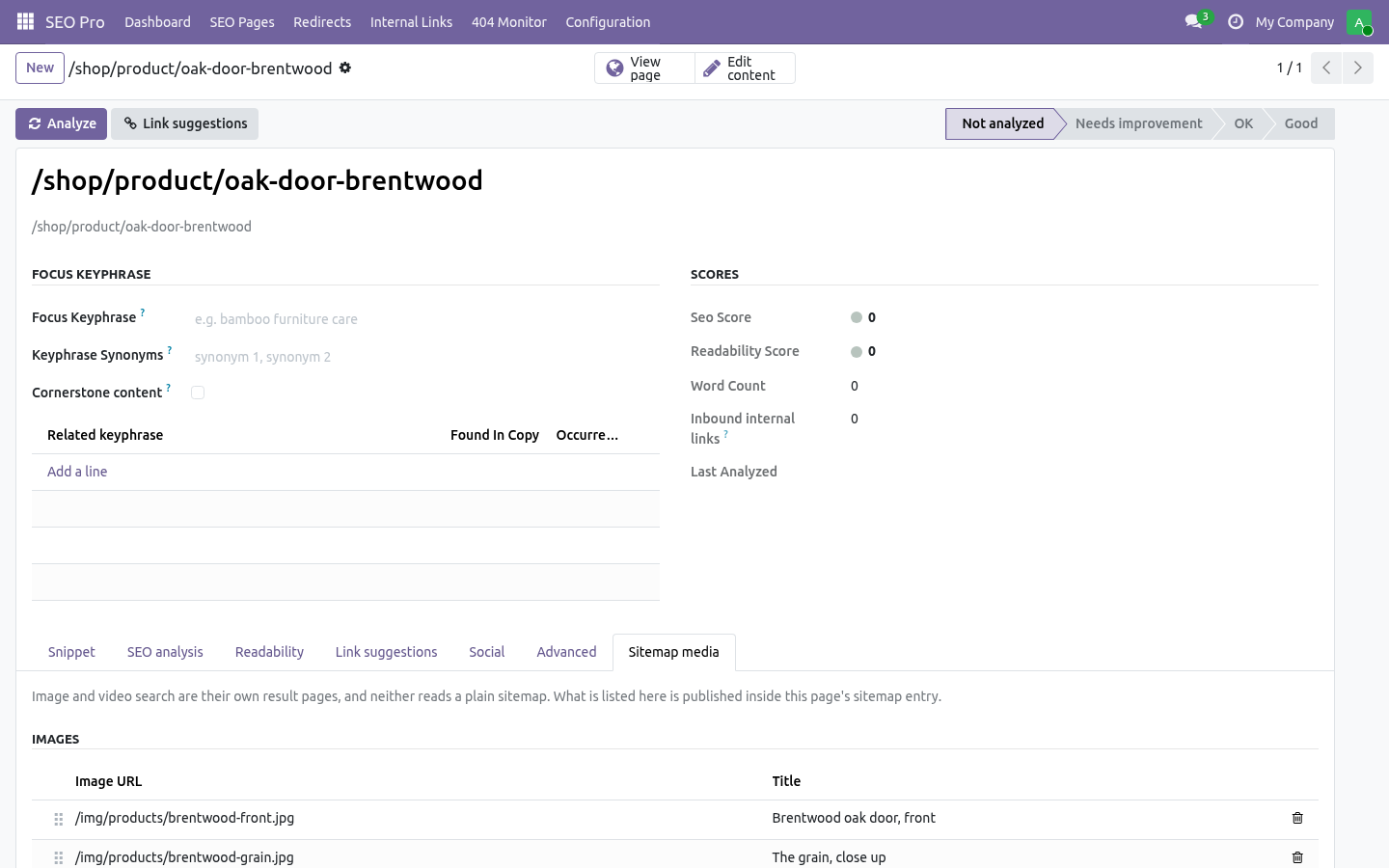
This add-on does not repeat the check - it would only be a second place to look when the answer is wrong. Images and videos. SEO Pro → SEO Pages → (a page) → Sitemap media. Image search and video search are separate result pages, and neither reads a plain sitemap.
Anything listed here is published inside that page's sitemap entry, with the image and video namespaces declared on the root element - a child in an undeclared namespace invalidates the whole file, not just the entry. The twelve-hour cache. Odoo caches the generated sitemap for twelve hours. Changing a rule and reloading /sitemap.xml therefore shows the old file, which is how an afternoon disappears into deciding the rules do not work.
Website → Sitemap → Rebuild the sitemap file drops the cached copies; the next request rebuilds them. IndexNow, and the truth about pinging. Google retired its sitemap ping in 2023. There is nothing to press for Google: it reads the file on its own schedule.
Any module offering you a "ping Google" button today is calling a URL that answers 404. 1. Website → Sitemap → Generate a key. The key is 32 hexadecimal characters; Odoo serves it at /<key>.txt, which is the proof of ownership IndexNow asks for.
The route is pinned to exactly 32 characters so it cannot swallow /robots.txt or a page of your own whose URL ends in .txt. 2. The key file must be at the root of the site. A key file in a subdirectory only authorises URLs under that subdirectory.
3. Submit now sends the current URL list. The daily cron sends it only when it has changed since the last submission - submitting the same list every night is how a site gets ignored. Multi-website and multi-company.
Rules, defaults, media and the IndexNow key all belong to a website. The rules list is filtered by the websites a user can see, and by company through the website's company. Support. support@bambooforge.dev - the people who wrote it.
The complete manual is at docs dot bambooforge dot dev, the demo database is linked from the store page, and support answers within twenty-four hours. Links are in the description.
Transcript of the walkthrough (Odoo 18)
Sitemap Pro: XML & Image Sitemaps. Priority and change frequency per URL pattern, image and video sitemaps, noindex pages excluded, instant rebuild, and IndexNow submission. An add-on for BambooForge SEO Pro. Odoo's sitemap lists every published page with no priority, no change frequency and no way to keep anything out.
This gives you all three, adds image and video entries, and submits changed URLs to the engines that still accept a submission. In the next few minutes: sitemap pro: xml & image sitemaps, then rules, then about priority, then pages you asked google not to index, then images and videos. Then what this app deliberately does not do, so you can tell before you buy whether it fits. Everything lives under Sitemap Rules.
Install BambooForge Sitemap Pro. Three rules are created: Sitemap Pro: XML & Image Sitemaps. An add-on for BambooForge SEO Pro. Odoo's sitemap lists every published page with no priority, no change frequency and no way to keep anything out.
This gives you all three, adds image and video entries, and submits changed URLs to the engines that still accept a submission. Rules. SEO Pro → Configuration → Sitemap Rules. A rule is a URL pattern plus what to do with it.
URL starts with /shop matches /shop and everything under it. About priority. Priority is relative to your own URLs. It tells a crawler which of your pages you would rather have crawled first.
It says nothing to anybody about how you rank, and setting everything to 1.0 is the same as setting everything to 0.5. Pages you asked Google not to index. Nothing to do: SEO Pro already does this. A page marked noindex there is dropped from the sitemap, and for a website page the flag is also mirrored onto Odoo's own website_indexed.
This add-on does not repeat the check - it would only be a second place to look when the answer is wrong. Images and videos. SEO Pro → SEO Pages → (a page) → Sitemap media. Image search and video search are separate result pages, and neither reads a plain sitemap.
Anything listed here is published inside that page's sitemap entry, with the image and video namespaces declared on the root element - a child in an undeclared namespace invalidates the whole file, not just the entry. The twelve-hour cache. Odoo caches the generated sitemap for twelve hours. Changing a rule and reloading /sitemap.xml therefore shows the old file, which is how an afternoon disappears into deciding the rules do not work.
Website → Sitemap → Rebuild the sitemap file drops the cached copies; the next request rebuilds them. IndexNow, and the truth about pinging. Google retired its sitemap ping in 2023. There is nothing to press for Google: it reads the file on its own schedule.
Any module offering you a "ping Google" button today is calling a URL that answers 404. 1. Website → Sitemap → Generate a key. The key is 32 hexadecimal characters; Odoo serves it at /<key>.txt, which is the proof of ownership IndexNow asks for.
The route is pinned to exactly 32 characters so it cannot swallow /robots.txt or a page of your own whose URL ends in .txt. 2. The key file must be at the root of the site. A key file in a subdirectory only authorises URLs under that subdirectory.
3. Submit now sends the current URL list. The daily cron sends it only when it has changed since the last submission - submitting the same list every night is how a site gets ignored. Multi-website and multi-company.
Rules, defaults, media and the IndexNow key all belong to a website. The rules list is filtered by the websites a user can see, and by company through the website's company. Support. support@bambooforge.dev - the people who wrote it.
The complete manual is at docs dot bambooforge dot dev, the demo database is linked from the store page, and support answers within twenty-four hours. Links are in the description.
Transcript of the walkthrough (Odoo 17)
Sitemap Pro: XML & Image Sitemaps. Priority and change frequency per URL pattern, image and video sitemaps, noindex pages excluded, instant rebuild, and IndexNow submission. An add-on for BambooForge SEO Pro. Odoo's sitemap lists every published page with no priority, no change frequency and no way to keep anything out.
This gives you all three, adds image and video entries, and submits changed URLs to the engines that still accept a submission. In the next few minutes: sitemap pro: xml & image sitemaps, then rules, then about priority, then pages you asked google not to index, then images and videos. Then what this app deliberately does not do, so you can tell before you buy whether it fits. Everything lives under Sitemap Rules.
Install BambooForge Sitemap Pro. Three rules are created: Sitemap Pro: XML & Image Sitemaps. An add-on for BambooForge SEO Pro. Odoo's sitemap lists every published page with no priority, no change frequency and no way to keep anything out.
This gives you all three, adds image and video entries, and submits changed URLs to the engines that still accept a submission. Rules. SEO Pro → Configuration → Sitemap Rules. A rule is a URL pattern plus what to do with it.
URL starts with /shop matches /shop and everything under it. About priority. Priority is relative to your own URLs. It tells a crawler which of your pages you would rather have crawled first.
It says nothing to anybody about how you rank, and setting everything to 1.0 is the same as setting everything to 0.5. Pages you asked Google not to index. Nothing to do: SEO Pro already does this. A page marked noindex there is dropped from the sitemap, and for a website page the flag is also mirrored onto Odoo's own website_indexed.
This add-on does not repeat the check - it would only be a second place to look when the answer is wrong. Images and videos. SEO Pro → SEO Pages → (a page) → Sitemap media. Image search and video search are separate result pages, and neither reads a plain sitemap.
Anything listed here is published inside that page's sitemap entry, with the image and video namespaces declared on the root element - a child in an undeclared namespace invalidates the whole file, not just the entry. The twelve-hour cache. Odoo caches the generated sitemap for twelve hours. Changing a rule and reloading /sitemap.xml therefore shows the old file, which is how an afternoon disappears into deciding the rules do not work.
Website → Sitemap → Rebuild the sitemap file drops the cached copies; the next request rebuilds them. IndexNow, and the truth about pinging. Google retired its sitemap ping in 2023. There is nothing to press for Google: it reads the file on its own schedule.
Any module offering you a "ping Google" button today is calling a URL that answers 404. 1. Website → Sitemap → Generate a key. The key is 32 hexadecimal characters; Odoo serves it at /<key>.txt, which is the proof of ownership IndexNow asks for.
The route is pinned to exactly 32 characters so it cannot swallow /robots.txt or a page of your own whose URL ends in .txt. 2. The key file must be at the root of the site. A key file in a subdirectory only authorises URLs under that subdirectory.
3. Submit now sends the current URL list. The daily cron sends it only when it has changed since the last submission - submitting the same list every night is how a site gets ignored. Multi-website and multi-company.
Rules, defaults, media and the IndexNow key all belong to a website. The rules list is filtered by the websites a user can see, and by company through the website's company. Support. support@bambooforge.dev - the people who wrote it.
The complete manual is at docs dot bambooforge dot dev, the demo database is linked from the store page, and support answers within twenty-four hours. Links are in the description.
Transcript of the walkthrough (Odoo 16)
Sitemap Pro: XML & Image Sitemaps. Priority and change frequency per URL pattern, image and video sitemaps, noindex pages excluded, instant rebuild, and IndexNow submission. An add-on for BambooForge SEO Pro. Odoo's sitemap lists every published page with no priority, no change frequency and no way to keep anything out.
This gives you all three, adds image and video entries, and submits changed URLs to the engines that still accept a submission. In the next few minutes: sitemap pro: xml & image sitemaps, then rules, then about priority, then pages you asked google not to index, then images and videos. Then what this app deliberately does not do, so you can tell before you buy whether it fits. Everything lives under Sitemap Rules.
Install BambooForge Sitemap Pro. Three rules are created: Sitemap Pro: XML & Image Sitemaps. An add-on for BambooForge SEO Pro. Odoo's sitemap lists every published page with no priority, no change frequency and no way to keep anything out.
This gives you all three, adds image and video entries, and submits changed URLs to the engines that still accept a submission. Rules. SEO Pro → Configuration → Sitemap Rules. A rule is a URL pattern plus what to do with it.
URL starts with /shop matches /shop and everything under it. About priority. Priority is relative to your own URLs. It tells a crawler which of your pages you would rather have crawled first.
It says nothing to anybody about how you rank, and setting everything to 1.0 is the same as setting everything to 0.5. Pages you asked Google not to index. Nothing to do: SEO Pro already does this. A page marked noindex there is dropped from the sitemap, and for a website page the flag is also mirrored onto Odoo's own website_indexed.
This add-on does not repeat the check - it would only be a second place to look when the answer is wrong. Images and videos. SEO Pro → SEO Pages → (a page) → Sitemap media. Image search and video search are separate result pages, and neither reads a plain sitemap.
Anything listed here is published inside that page's sitemap entry, with the image and video namespaces declared on the root element - a child in an undeclared namespace invalidates the whole file, not just the entry. The twelve-hour cache. Odoo caches the generated sitemap for twelve hours. Changing a rule and reloading /sitemap.xml therefore shows the old file, which is how an afternoon disappears into deciding the rules do not work.
Website → Sitemap → Rebuild the sitemap file drops the cached copies; the next request rebuilds them. IndexNow, and the truth about pinging. Google retired its sitemap ping in 2023. There is nothing to press for Google: it reads the file on its own schedule.
Any module offering you a "ping Google" button today is calling a URL that answers 404. 1. Website → Sitemap → Generate a key. The key is 32 hexadecimal characters; Odoo serves it at /<key>.txt, which is the proof of ownership IndexNow asks for.
The route is pinned to exactly 32 characters so it cannot swallow /robots.txt or a page of your own whose URL ends in .txt. 2. The key file must be at the root of the site. A key file in a subdirectory only authorises URLs under that subdirectory.
3. Submit now sends the current URL list. The daily cron sends it only when it has changed since the last submission - submitting the same list every night is how a site gets ignored. Multi-website and multi-company.
Rules, defaults, media and the IndexNow key all belong to a website. The rules list is filtered by the websites a user can see, and by company through the website's company. Support. support@bambooforge.dev - the people who wrote it.
The complete manual is at docs dot bambooforge dot dev, the demo database is linked from the store page, and support answers within twenty-four hours. Links are in the description.
Key facts
- What it is
- Priority and change frequency per URL pattern, image and video sitemaps, noindex pages excluded, instant rebuild, and IndexNow submission.
- For
- Website
- Odoo versions
- 16.0, 17.0, 18.0, 19.0, 20.0 - Community and Enterprise
- Runs on
- Odoo.sh or Odoo you host yourself - not Odoo Online, which accepts no third-party apps
- Price
- 198 EUR, one-time, on the Odoo Apps Store
- Technical name
- bambooforge_sitemap_pro
- Not for
- Said before you buy, because it is the half that decides whether the app fits:; Second-guess Odoo's own check of which pages are published - it does not repeat it.; Treat a trailing slash as another URL, or a query string as part of the path.
- Manual last updated
- 2026-10-15
SEO All in One with XML and Image Sitemaps
An add-on for BambooForge SEO Pro. Odoo's sitemap lists every published page with no priority, no change frequency and no way to keep anything out. This gives you all three, adds image and video entries, and submits changed URLs to the engines that still accept a submission.
Install
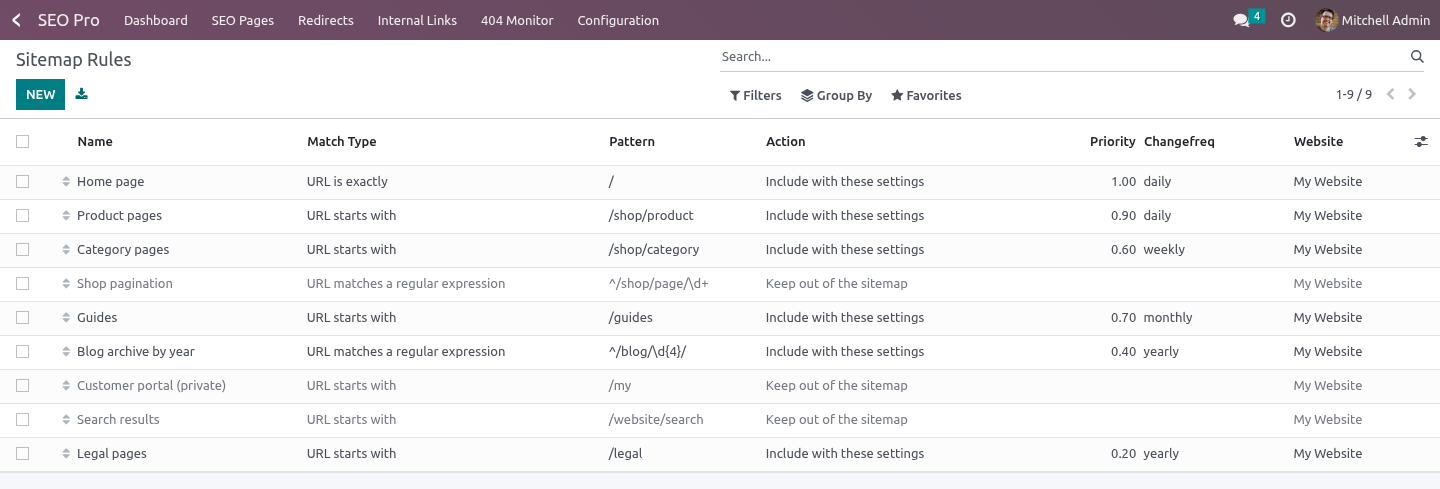
Install BambooForge Sitemap Pro (it needs SEO Pro). Three rules are created: / at priority 1.0, daily; /my excluded (the customer portal is private by definition); /website/search excluded (search results are a crawl-budget drain).
Change, archive or delete those rules as you like - they are ordinary records.
Rules
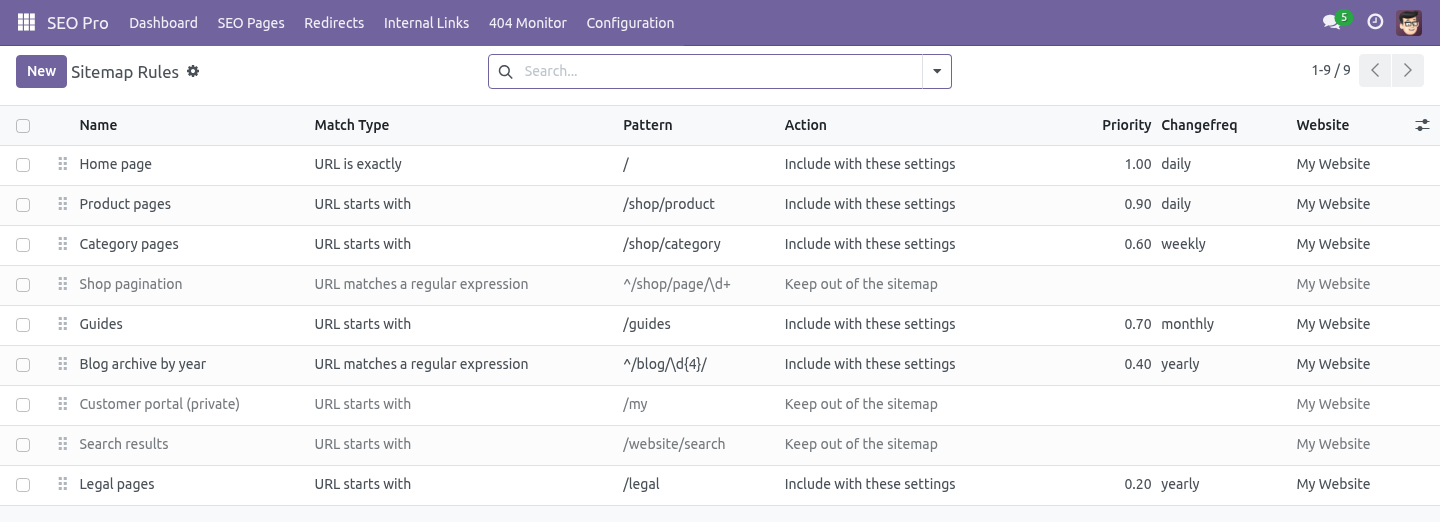
SEO Pro → Configuration → Sitemap Rules. A rule is a URL pattern plus what to do with it.
- URL starts with
/shop matches /shop and everything under it.
- URL is exactly
/ matches only the home page. A trailing slash is the same URL, and a query string is not part of the path.
- URL matches a regular expression
^/blog/\d{4}/ for "any year folder in the blog".
The action is either Include with these settings - a priority from 0.0 to 1.0 and a change frequency - or Keep out of the sitemap.
First match wins, so the specific rule goes above the general one; drag the handle to reorder. A rule with no website applies to every site and always loses to a rule written for one, which is how an agency keeps one house default and overrides it per client.
About priority
Priority is relative to your own URLs. It tells a crawler which of your pages you would rather have crawled first. It says nothing to anybody about how you rank, and setting everything to 1.0 is the same as setting everything to 0.5.
Pages you asked Google not to index
Nothing to do: SEO Pro already does this. A page marked noindex there is dropped from the sitemap, and for a website page the flag is also mirrored onto Odoo's own website_indexed. This add-on does not repeat the check - it would only be a second place to look when the answer is wrong.
Images and videos
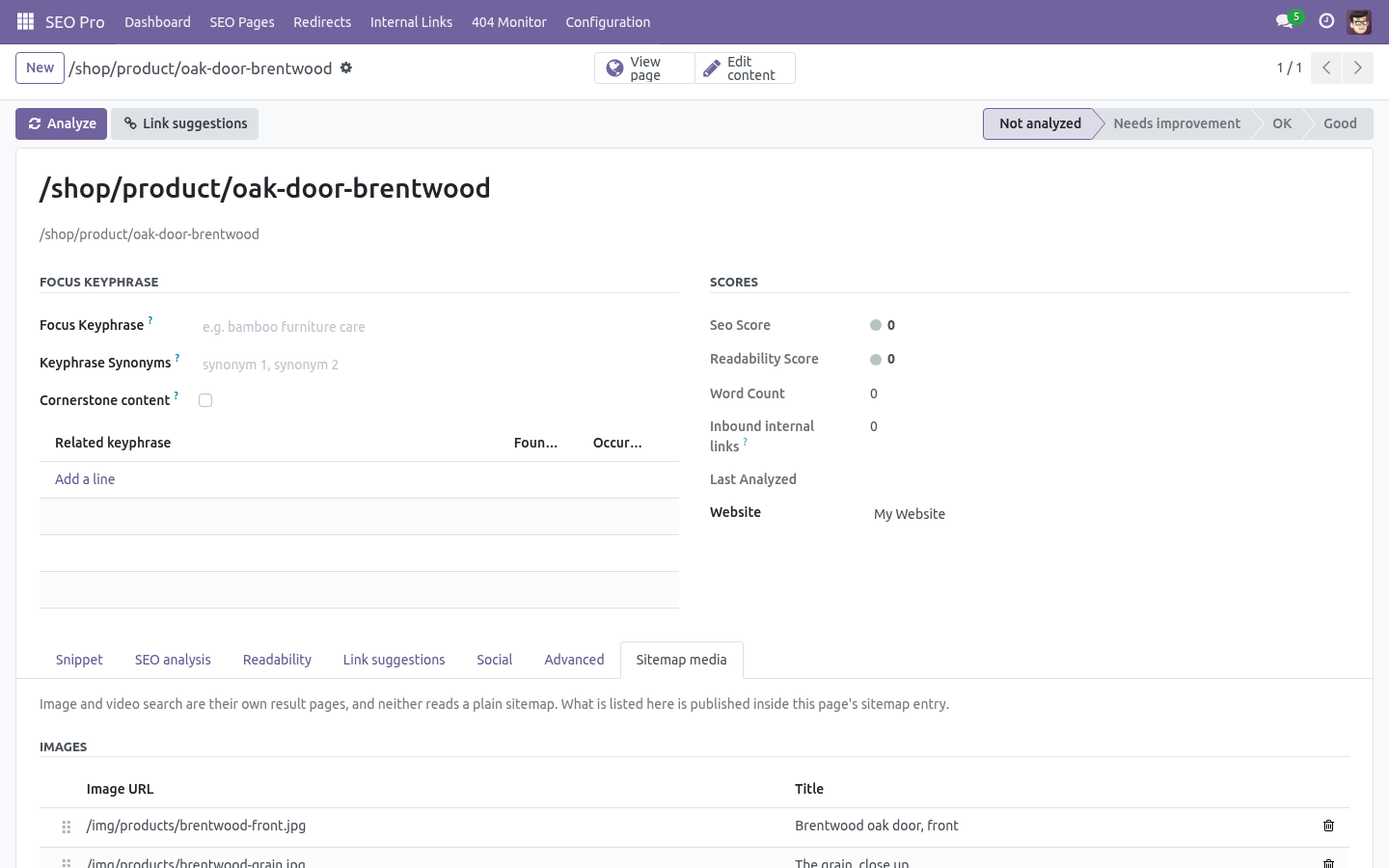
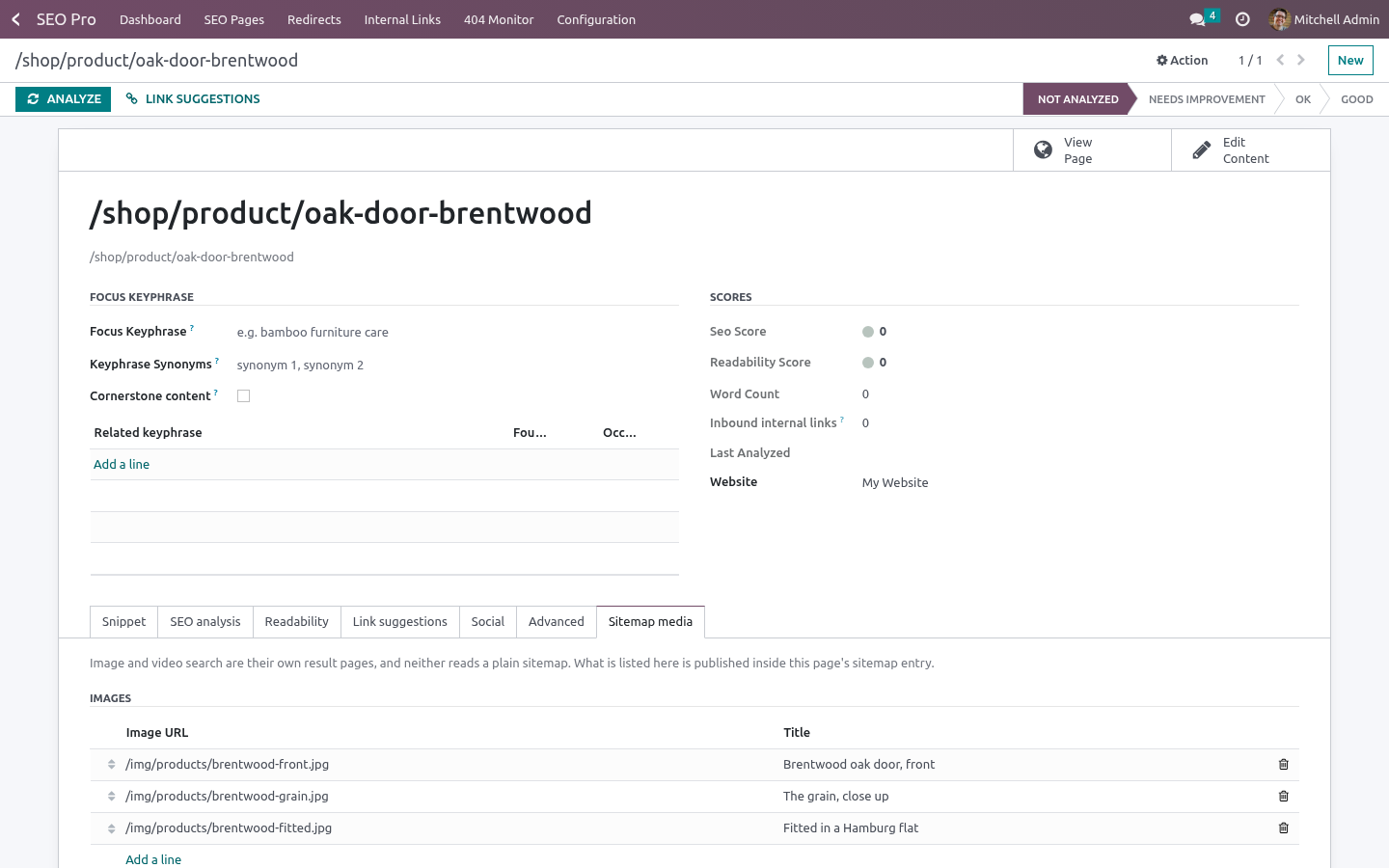
SEO Pro → SEO Pages → (a page) → Sitemap media.
Image search and video search are separate result pages, and neither reads a plain sitemap. Anything listed here is published inside that page's sitemap entry, with the image and video namespaces declared on the root element - a child in an undeclared namespace invalidates the whole file, not just the entry.
A video needs a title, a description, a thumbnail and either a content URL (the file) or a player URL (a page that plays it). Without one of those two the entry is dropped and the sitemap is reported as invalid, so the module refuses to save it. Duration, when given, must be between one second and eight hours.
Relative URLs are made absolute automatically - a relative URL in a sitemap is silently ignored by every validator.
The twelve-hour cache
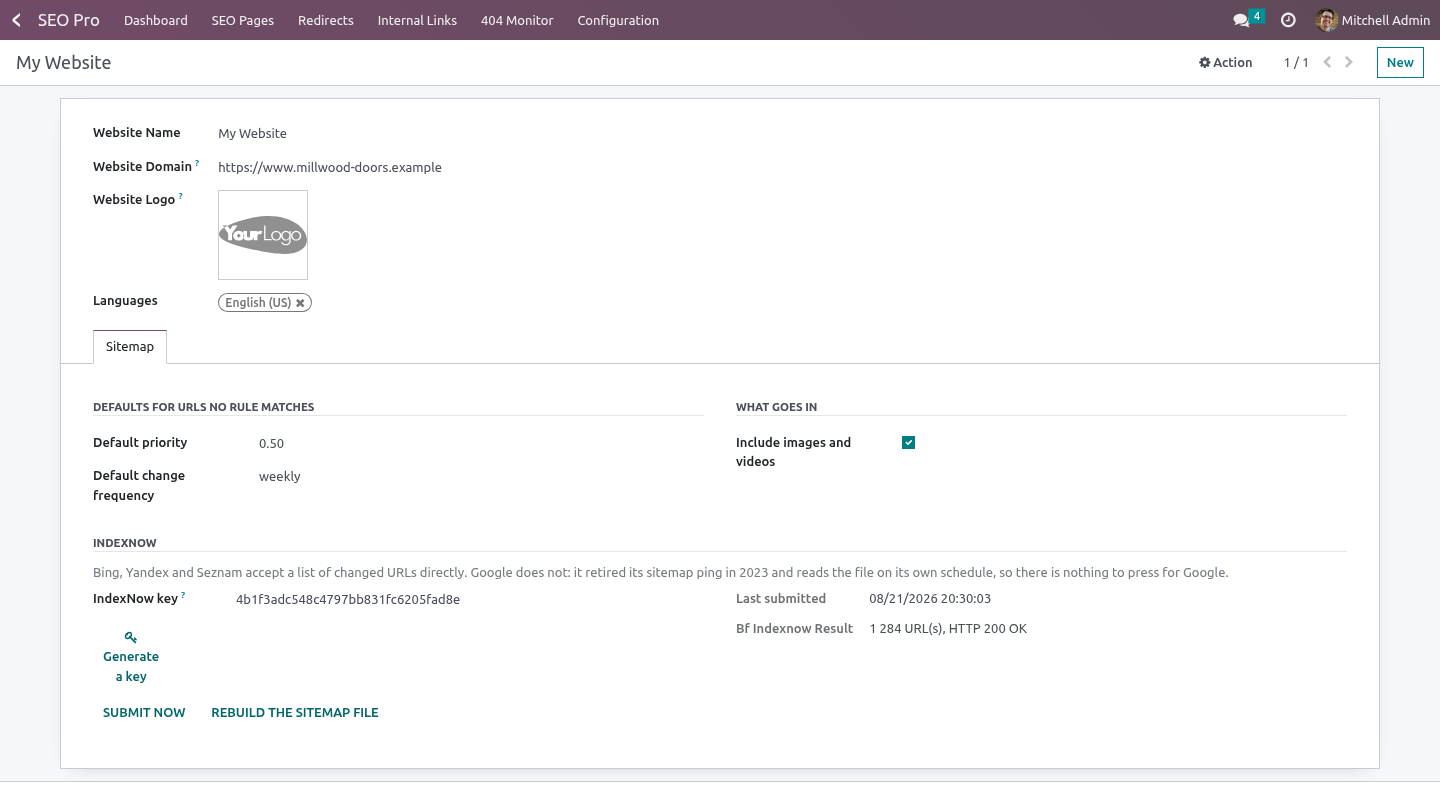
Odoo caches the generated sitemap for twelve hours. Changing a rule and reloading /sitemap.xml therefore shows the old file, which is how an afternoon disappears into deciding the rules do not work. Website → Sitemap → Rebuild the sitemap file drops the cached copies; the next request rebuilds them.
IndexNow, and the truth about pinging
Google retired its sitemap ping in 2023. There is nothing to press for Google: it reads the file on its own schedule. Any module offering you a "ping Google" button today is calling a URL that answers 404.
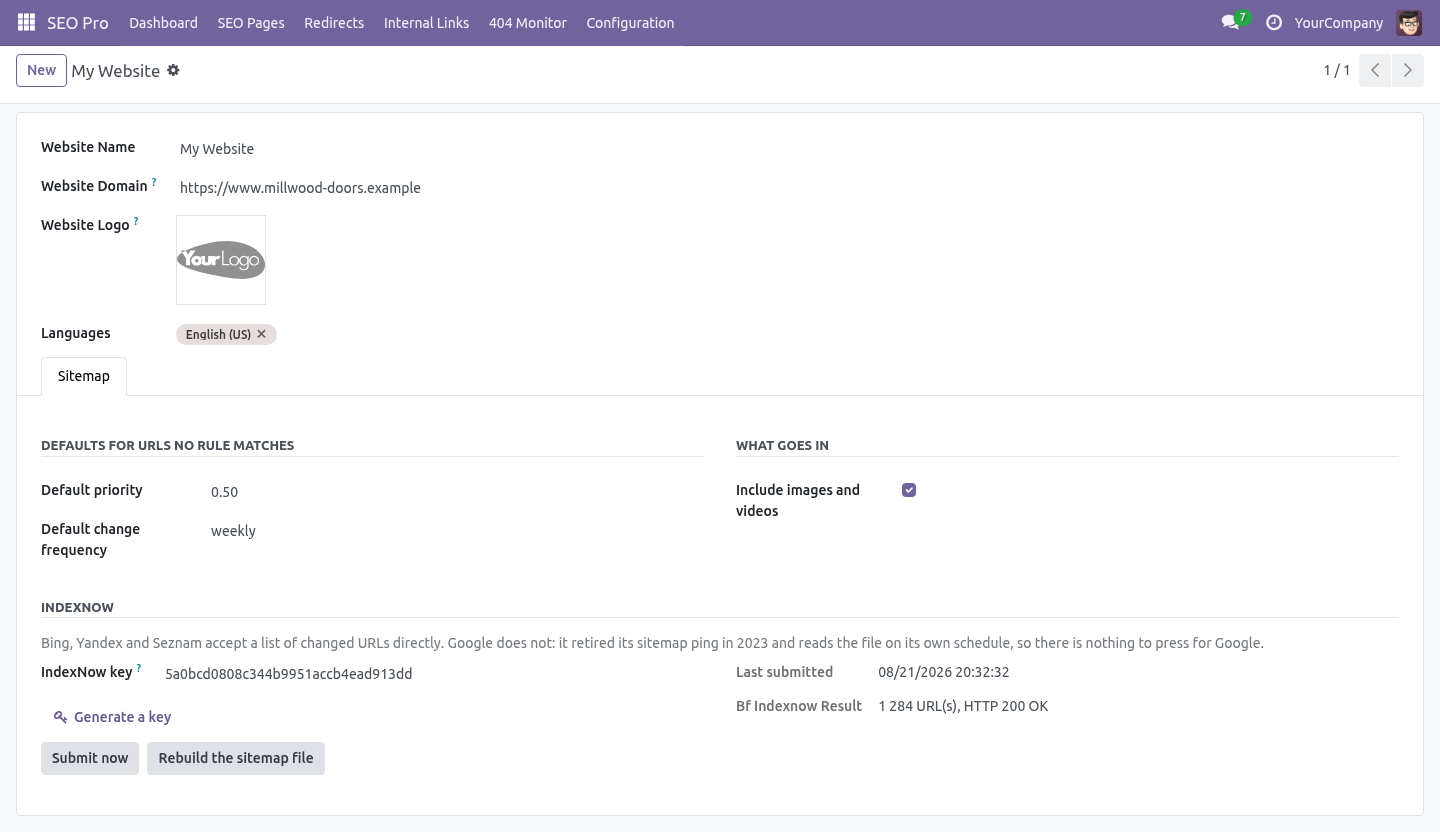
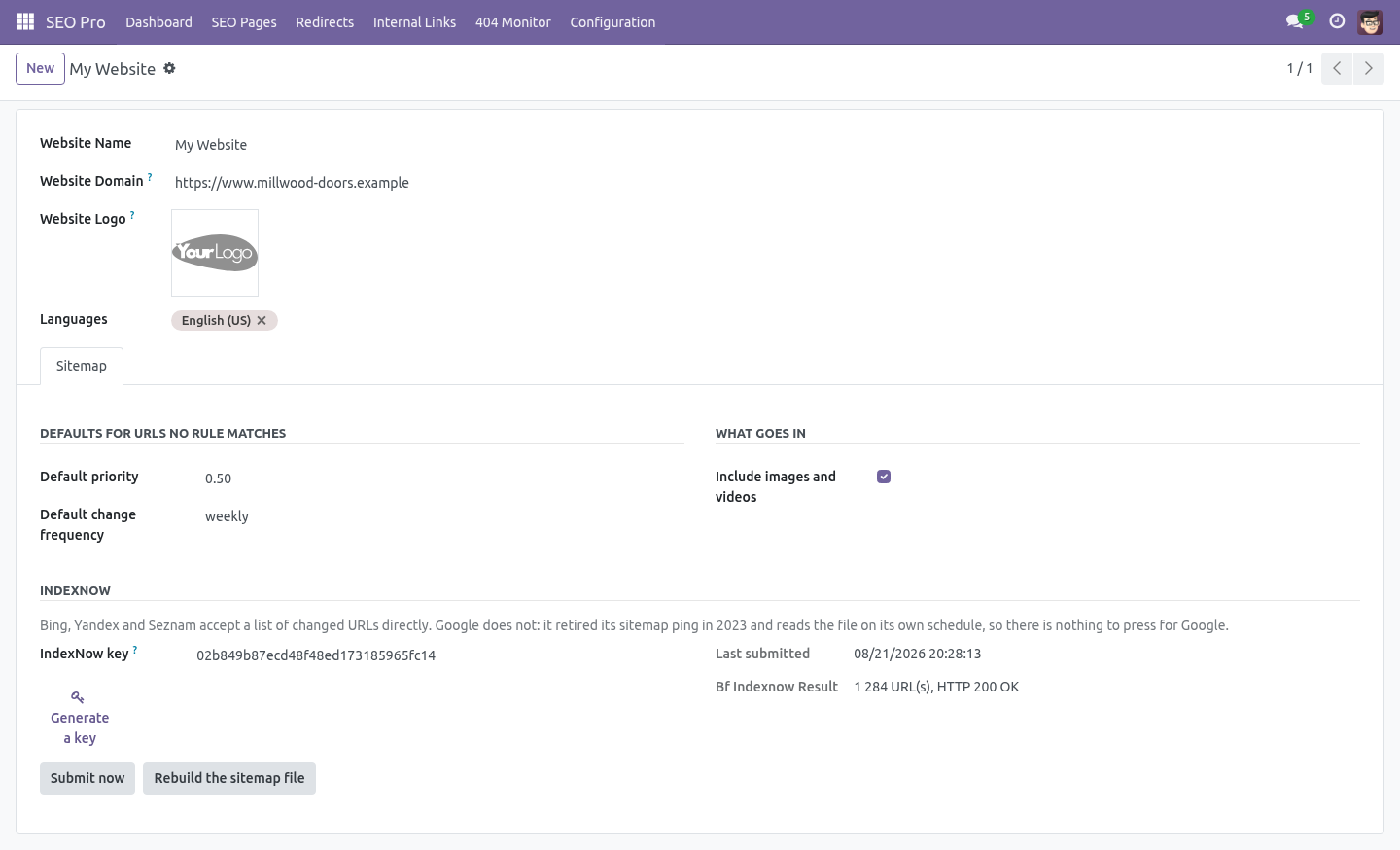
Bing, Yandex and Seznam read IndexNow:
Website → Sitemap → Generate a key. The key is 32 hexadecimal characters; Odoo serves it at /<key>.txt, which is the proof of ownership IndexNow asks for. The route is pinned to exactly 32 characters so it cannot swallow /robots.txt or a page of your own whose URL ends in .txt.
The key file must be at the root of the site. A key file in a subdirectory only authorises URLs under that subdirectory.
Submit now sends the current URL list. The daily cron sends it only when it has changed since the last submission - submitting the same list every night is how a site gets ignored.
The result of the last submission, with the HTTP status the endpoint returned, is on the same page.
Multi-website and multi-company
Rules, defaults, media and the IndexNow key all belong to a website. The rules list is filtered by the websites a user can see, and by company through the website's company.
How we make sure it works
Before every release, 33 automated checks run against this app on Odoo 16, 17, 18, 19 and 20. Among them:
The same image is not listed twice.
Every url is submitted not only the first thousand.
Without a key nothing is sent.
A generated key is accepted and a short one is not.
A query string is not part of the path.
The complete list is in the source you receive.
What it does not do
Said before you buy, because it is the half that decides whether the app fits:
Second-guess Odoo's own check of which pages are published - it does not repeat it.
Treat a trailing slash as another URL, or a query string as part of the path.
Questions people ask
- Which Odoo versions does it run on?
Odoo 16.0, 17.0, 18.0, 19.0, 20.0, on the series you buy it for; each series is its own listing.
- Community or Enterprise?
Both. It needs no Enterprise app.
- What does it need?
The standard Web; seo pro (BambooForge) must be installed first app. No extra Python package.
- Where does it show up?
Under the Sitemap Rules menu.
- Does anything leave my server?
It makes calls outside your server only where its manual says so - read the section on that service before you connect it.
- What happens if I uninstall it?
Odoo drops the app's own tables and fields; the standard records it worked on (contacts, orders, products) stay as they are.
Support
support@bambooforge.dev - the people who wrote it.