 BambooForge Labs
Simple Mode: Lean Forms & Record Inspector
Hide the fields nobody fills in, widen the form, and keep every value one click away in a searchable record inspector - per model, per role, no code.
Available for Odoo 16.0, Odoo 17.0, Odoo 18.0, Odoo 19.0, Odoo 20.0. Technical name bambooforge_simple_mode.
Transcript of the walkthrough (Odoo 20)
Simple Mode: Lean Forms & Record Inspector. Hide the fields nobody fills in, widen the form, and keep every value one click away in a searchable record inspector - per model, per role, no code. An Odoo form shows every field the developers ever added. Your people use twelve of them.
Simple Mode hides the rest - per model, per role - widens the sheet, and gives every record an inspector that shows all of its values, formatted and searchable, one click away. In the next few minutes: simple mode: lean forms & record inspector, then the switch, then profiles, then starter packs, then suggest fields. Then what this app deliberately does not do, so you can tell before you buy whether it fits. Everything lives under Profiles then Simple Mode.
1. Copy bambooforge_simple_mode into your addons path and update the apps list. 2. Install Simple Mode: Lean Forms & Record Inspector.
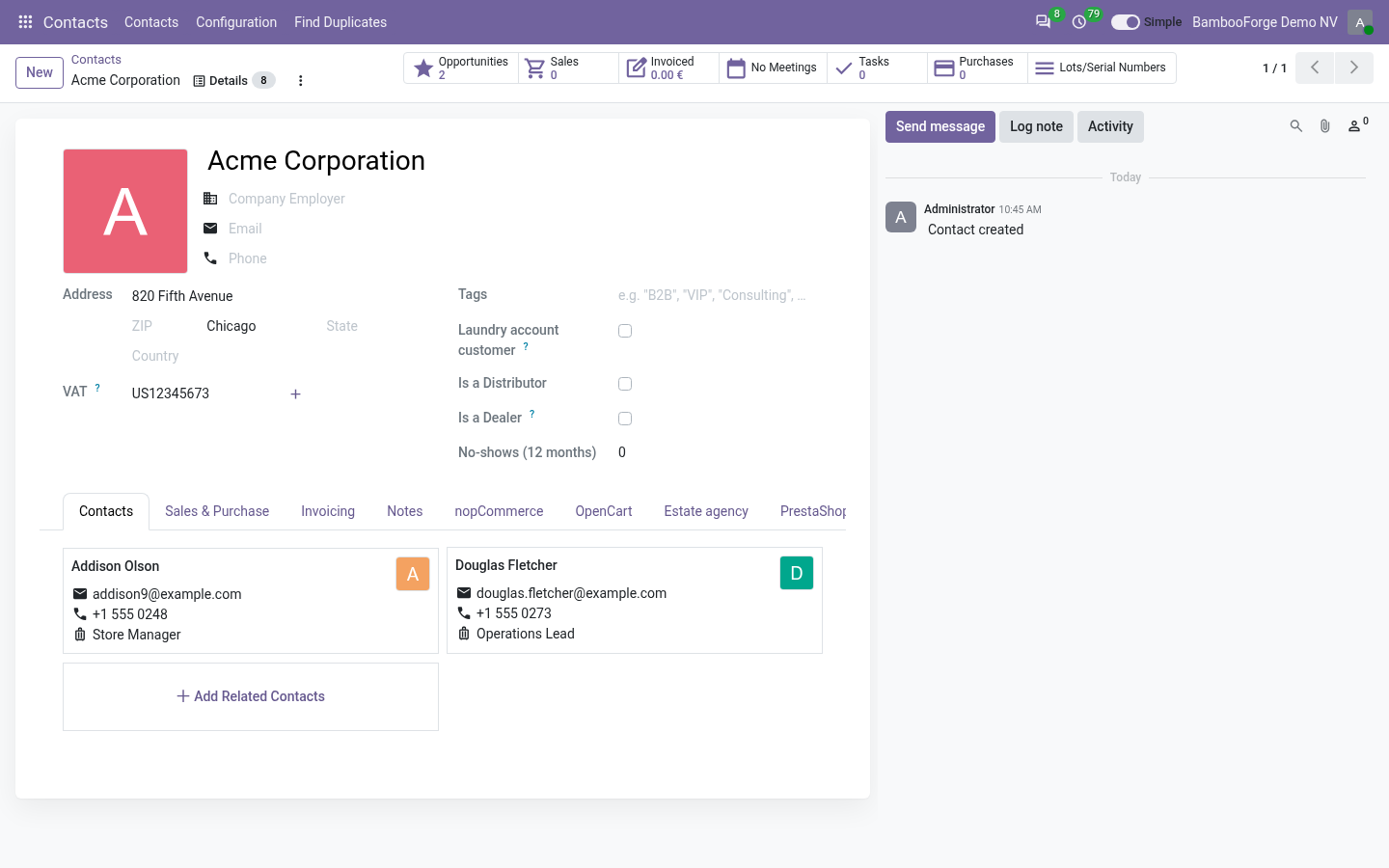
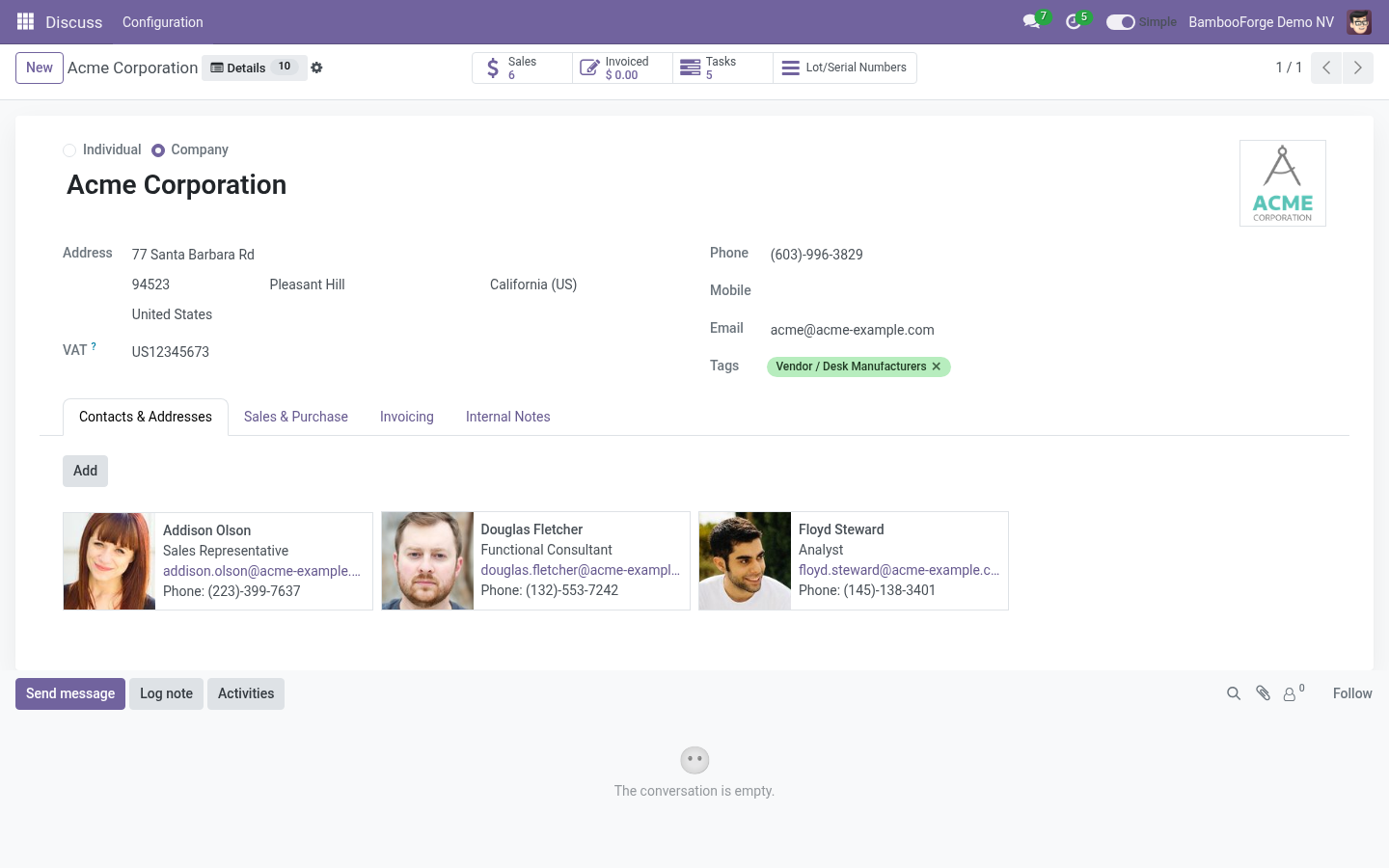
Starter profiles are created for the apps already installed. 3. Open any contact: the form is wider, a few fields are gone, and Details brings them back; Preview and edit shows them struck through on the form itself. 4.
Settings › Simple Mode › Profiles to adjust; Settings › General Settings › Simple Mode for the defaults. Simple Mode: Lean Forms & Record Inspector. An Odoo form shows every field the developers ever added. Your people use twelve of them.
Simple Mode hides the rest - per model, per role - widens the sheet, and gives every record an inspector that shows all of its values, formatted and searchable, one click away. Hiding is an interface matter, not a permission. A hidden field is still read over RPC, still exported, still shown by the inspector. Use groups for what people MAY see; use Simple Mode for what they see FIRST.
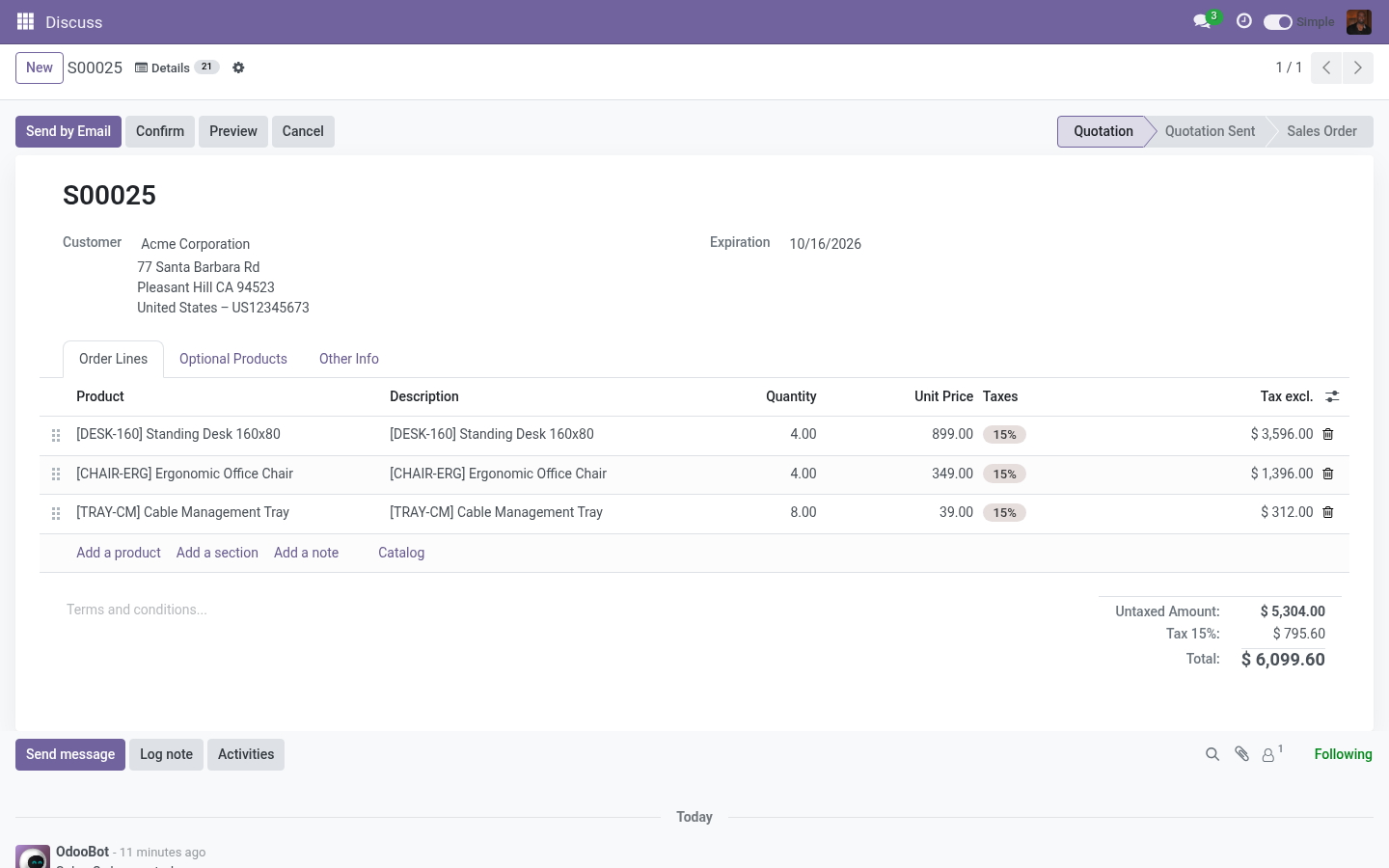
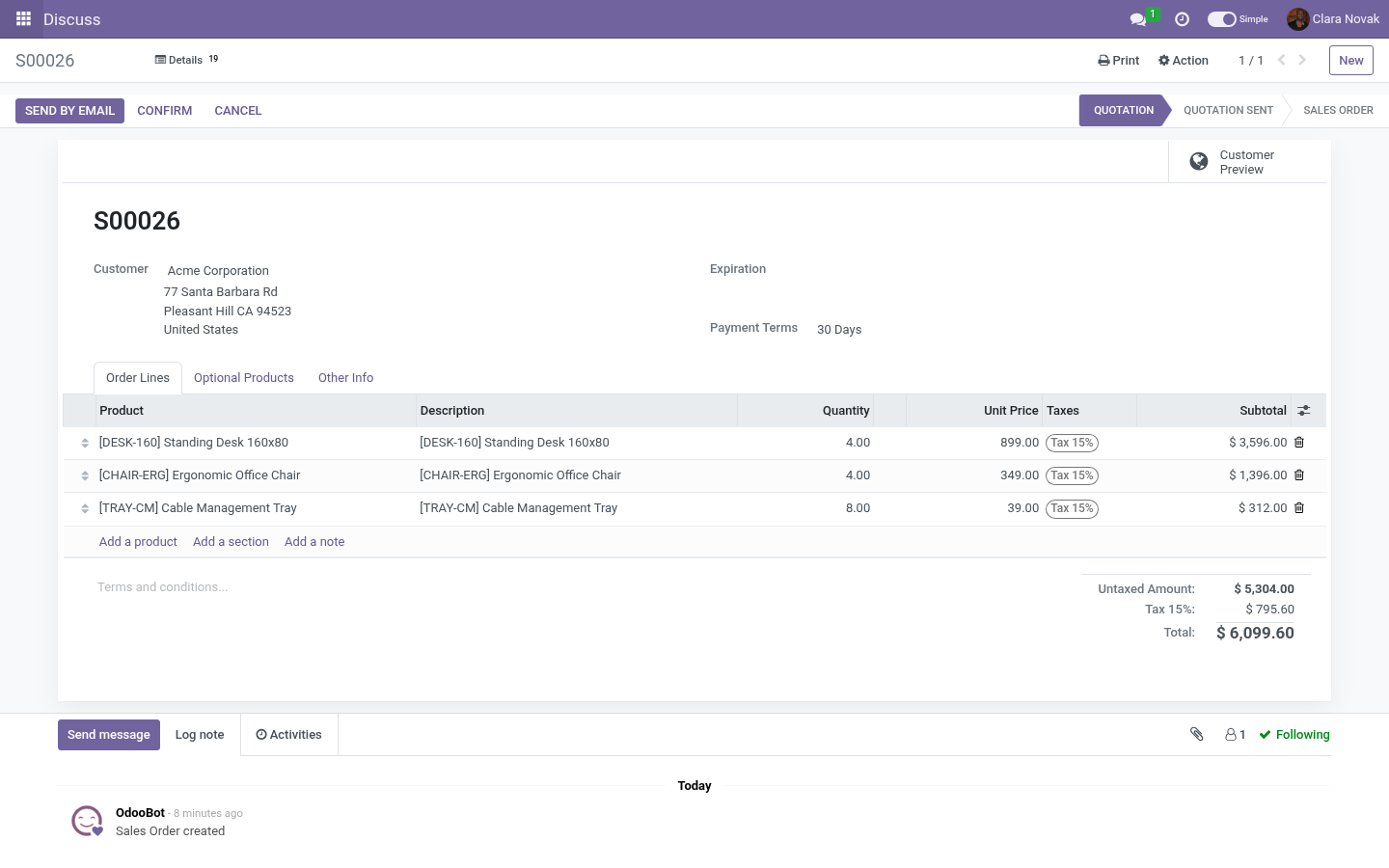
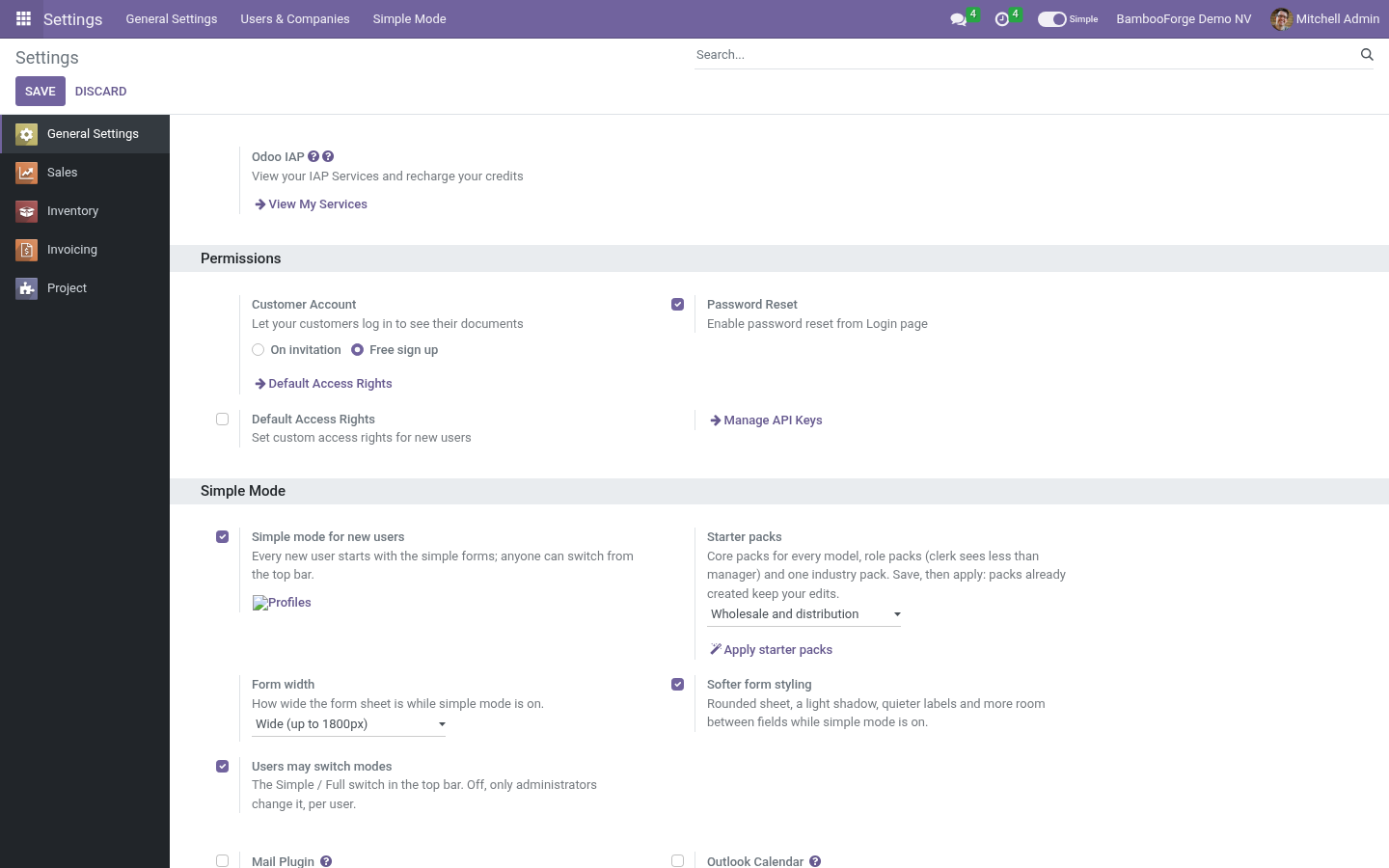
The switch. Every internal user has a Simple / Full switch in the top bar. On, the forms and lists lose the fields the profiles name, the sheet widens and empty tabs fold away. Off, everything is back.
The choice is saved on the account, so it survives a new browser and a new day. Administrators set the default for new users and can take the switch away (Settings › General Settings › Simple Mode). Without the switch, the setting is changed per user in Settings › Users, Simple mode. Profiles.
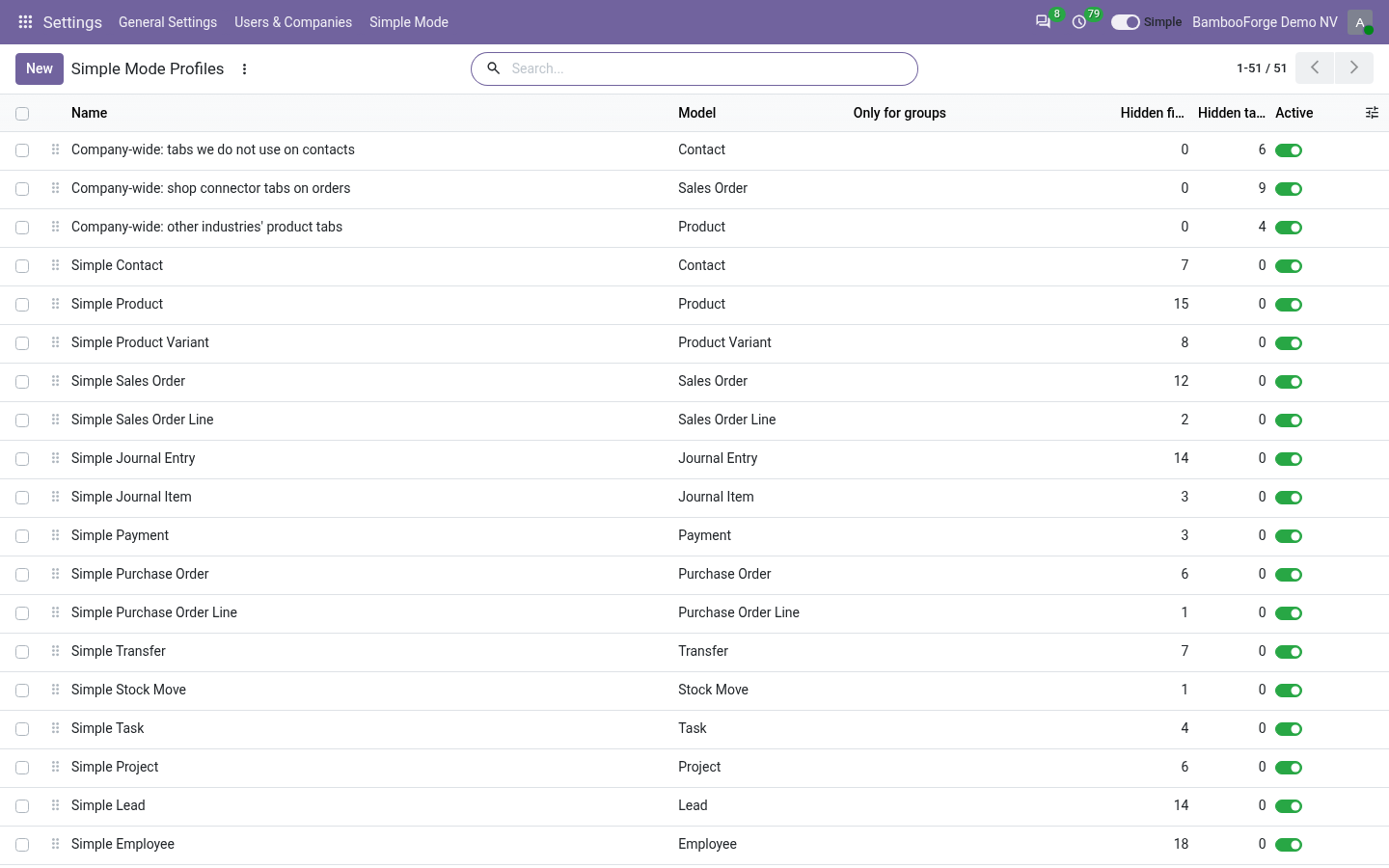
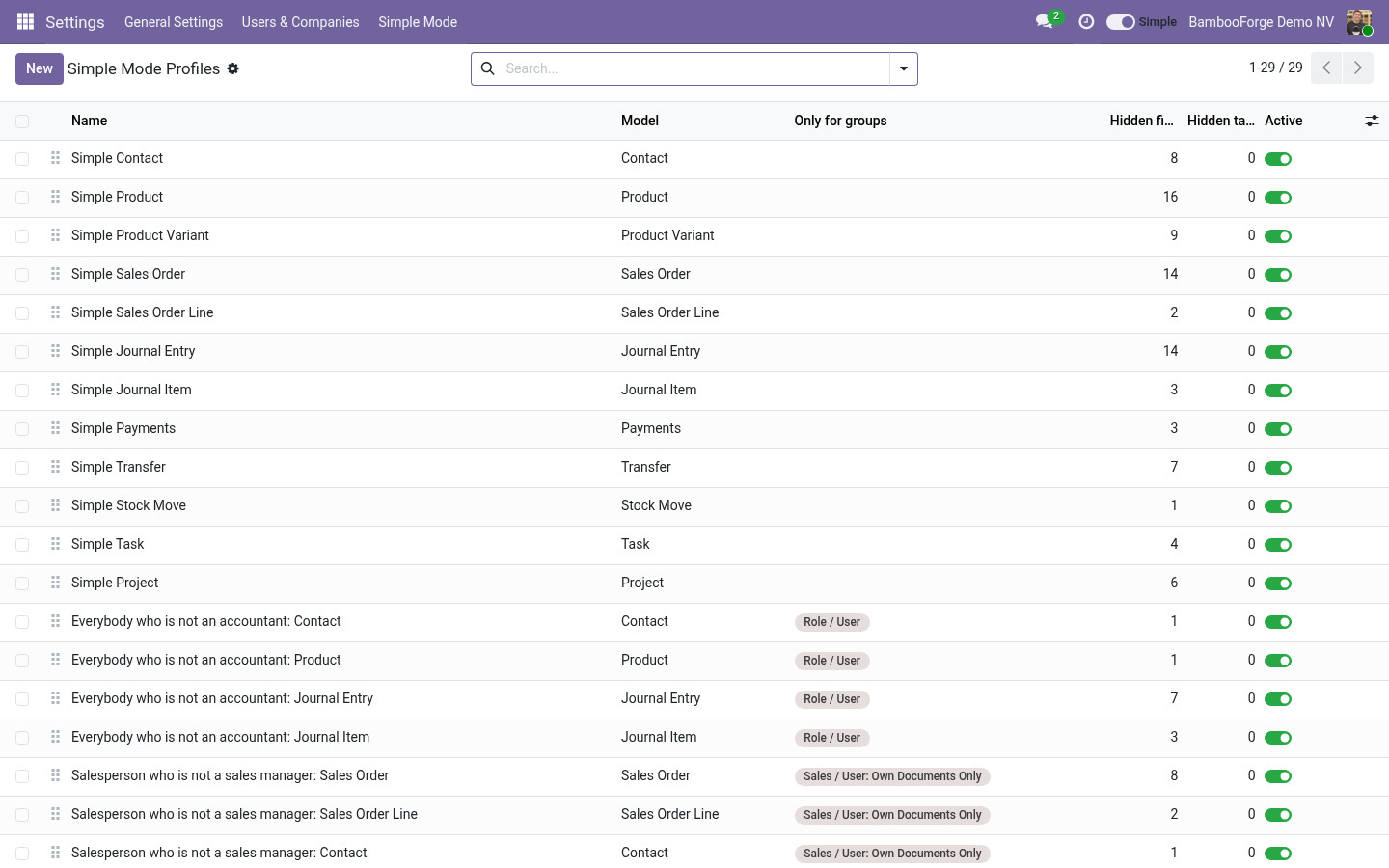
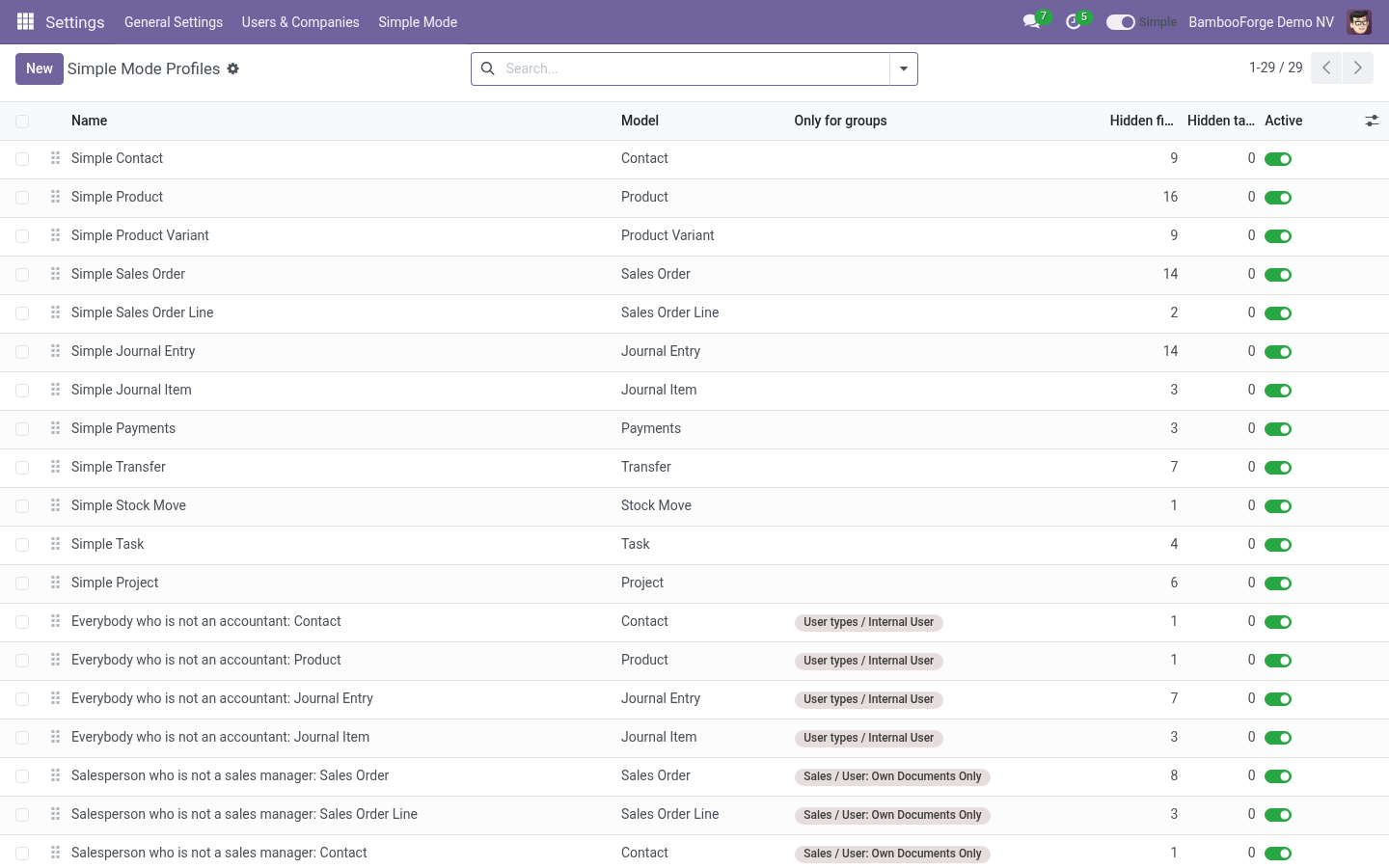
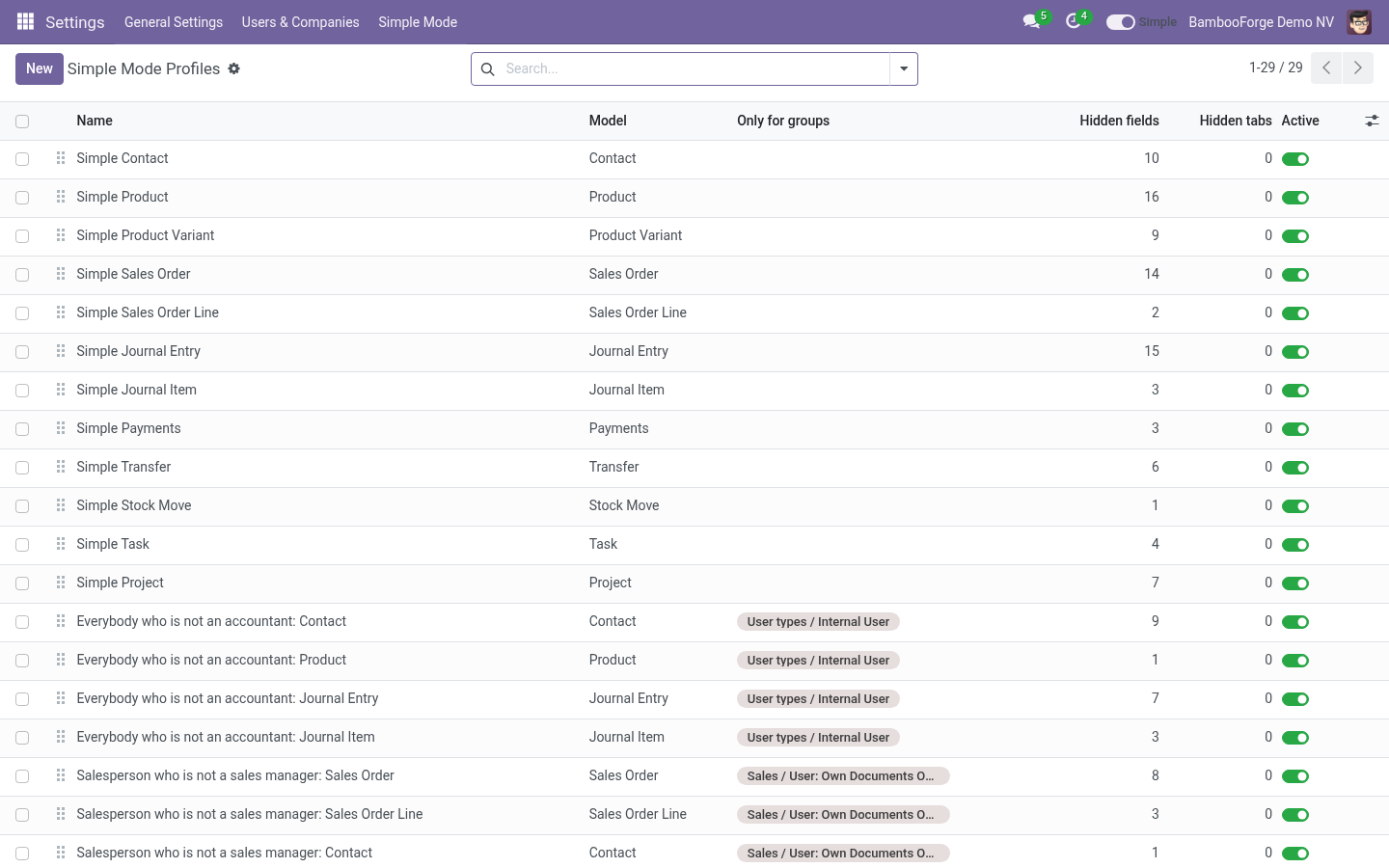
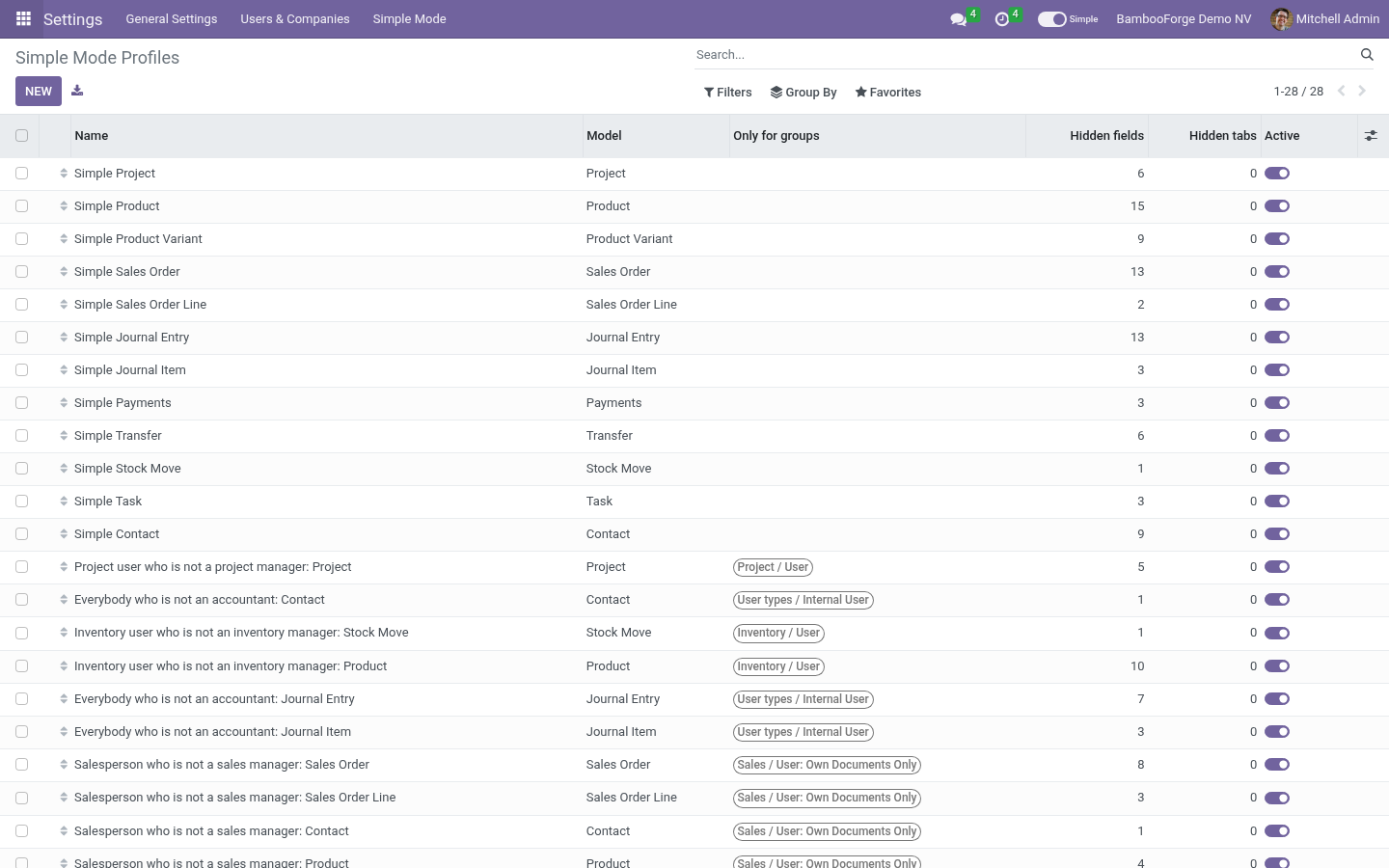
Settings › Simple Mode › Profiles. A profile names one model and: Hidden fields - removed from every form and list of that model the user opens, embedded views included. Required fields are refused when the profile is saved, and a field the view itself marks required is left alone: nothing you hide can stop a save. Hidden tabs and blocks - a notebook page by its name or title, a block by its name attribute.
Only for groups - empty means everybody in simple mode; otherwise users in any of the groups. Except lists users the profile never touches. Fold empty tabs and blocks - a tab or titled block whose every field is hidden disappears too. Profiles of the same model add up.
A user in simple mode gets the union of every active profile that applies to them. Starter packs. Installing the app creates the starter packs: profiles built from a catalogue that was checked, field by field, against a database with every Odoo 20 Community module installed, and against what the common tools of each department show by default - HubSpot and Zoho for contacts and leads, QuickBooks and Xero for invoices, Shopify for products, Asana for tasks, BambooHR for employees. A field none of them puts on its default screen, and that fewer than one Odoo demo record in five fills in, leaves the screen; a field any of them treats as primary stays.
Every pack carries a note saying why. Contact (HubSpot, Zoho): name, email, phone, company, job title, owner, lifecycle stage, tags. Not: salutation, language, industry, registry number, reference code. Invoice (QuickBooks, Xero): customer, email, invoice date, due date, terms, lines with product, description, quantity, rate, amount, tax, a message.
Not: incoterm, cash rounding, fiscal position, attribution. Product (Shopify): title, description, media, price, compare-at, cost, SKU, barcode, stock, vendor, tags, status. Not: lead times, routes, warnings, warehouse descriptions. Task (Asana): name, assignee, due date, project, description, tags, subtasks, attachments.
Not: allocated hours, recurrence, milestones. Employee (BambooHR): name, job title, department, location, manager, hire date, status, contact, address, emergency contact. Not: commute distance, schooling, spouse, badge, permits. Apply starter packs (Settings, and on the profile list) creates the packs still missing - after installing more apps, or after changing the industry.
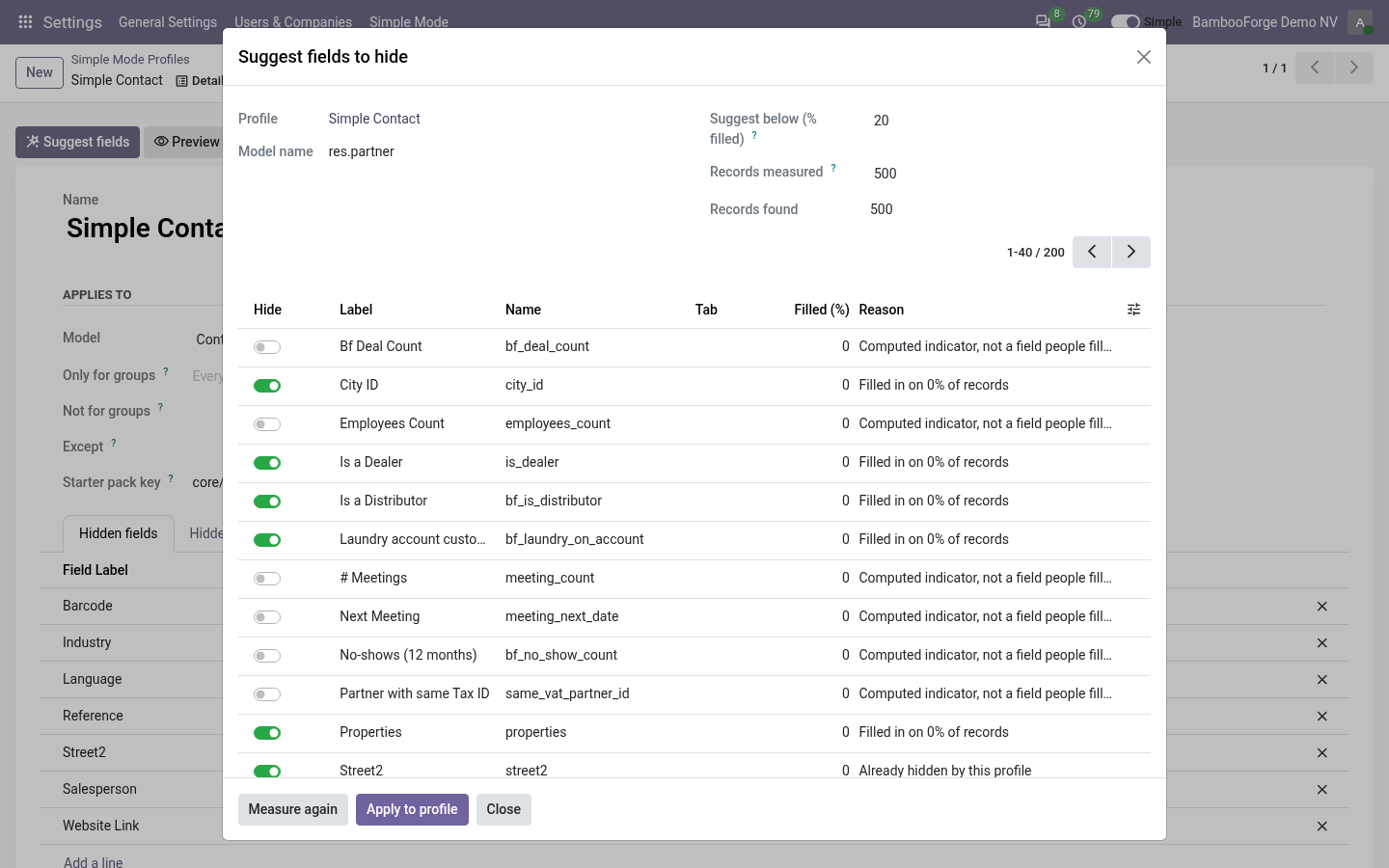
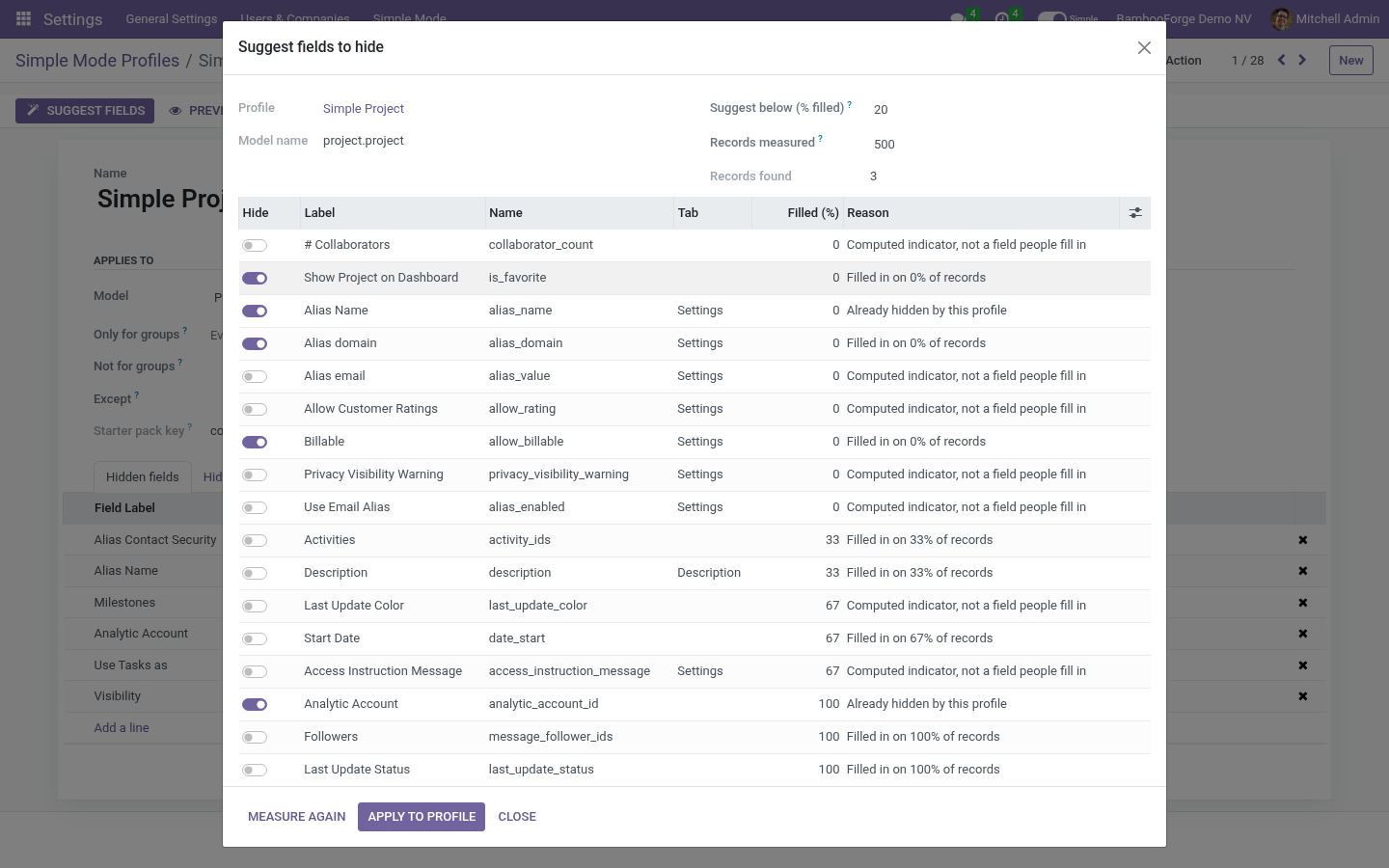
A pack already created keeps every edit you made to it; delete it and apply again to get the catalogue's version back. Packs are marked From starter packs in the profile list and carry their key. Suggest fields. Open a profile and press Suggest fields.
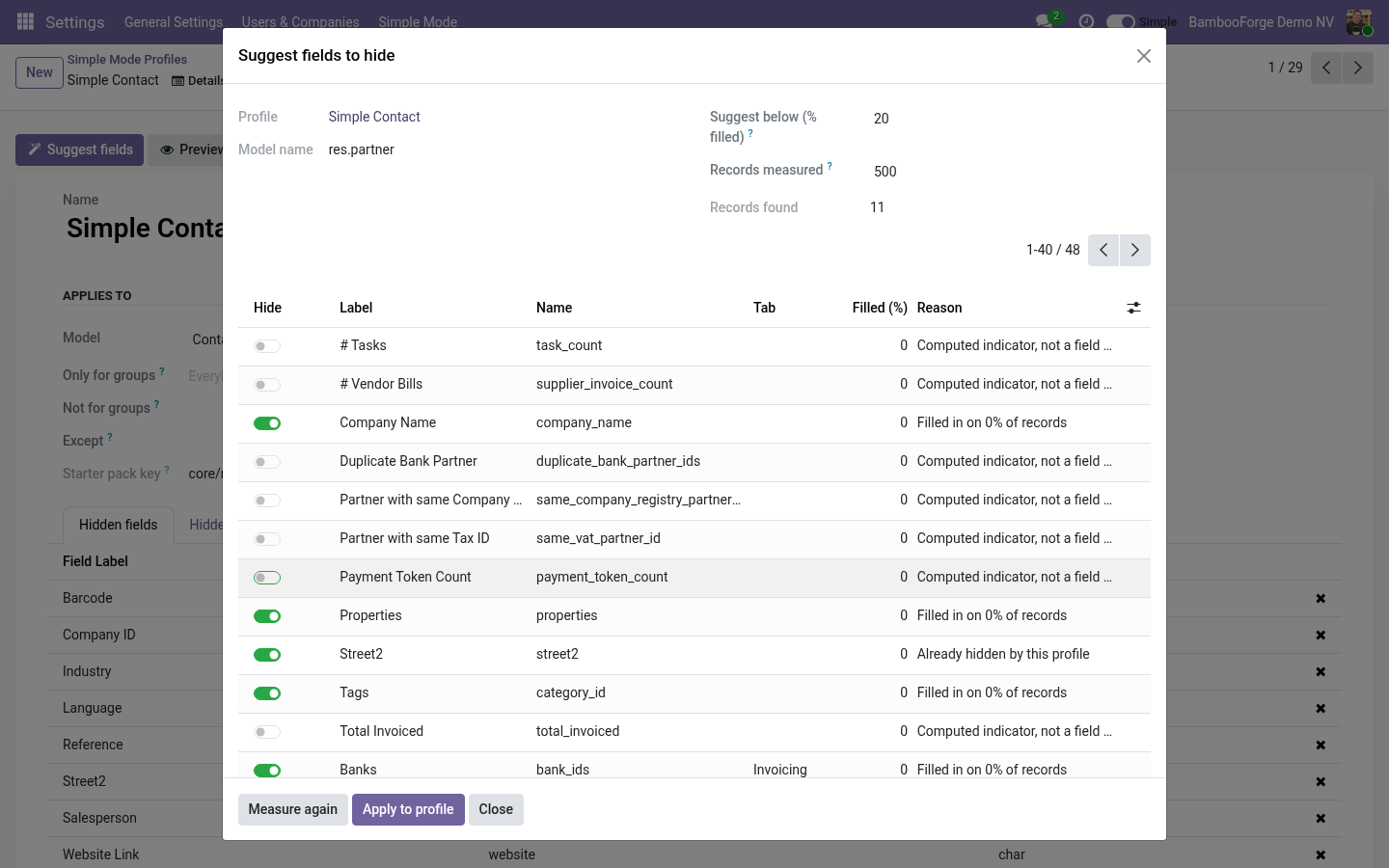
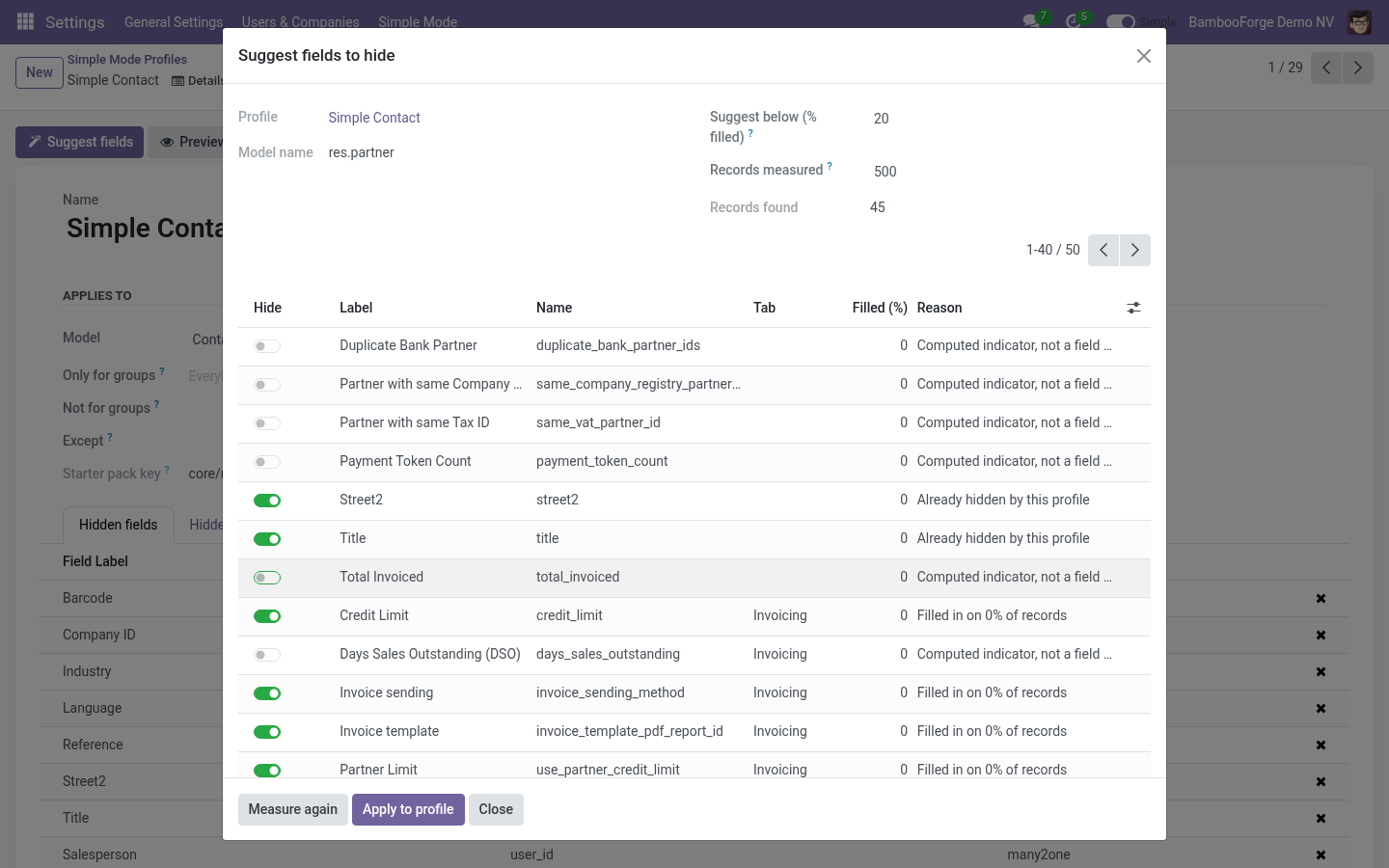
The picker reads the model's form, keeps every field a user could lose without breaking a save, and measures how often each one is actually filled in on the newest records of your own database (500 by default; 0 measures them all). Fields under the threshold are pre-ticked; untick what the measure got wrong, tick what it missed, and Apply to profile. Ticked fields join the profile, unticked ones leave it. Images and files are listed but never pre-ticked.
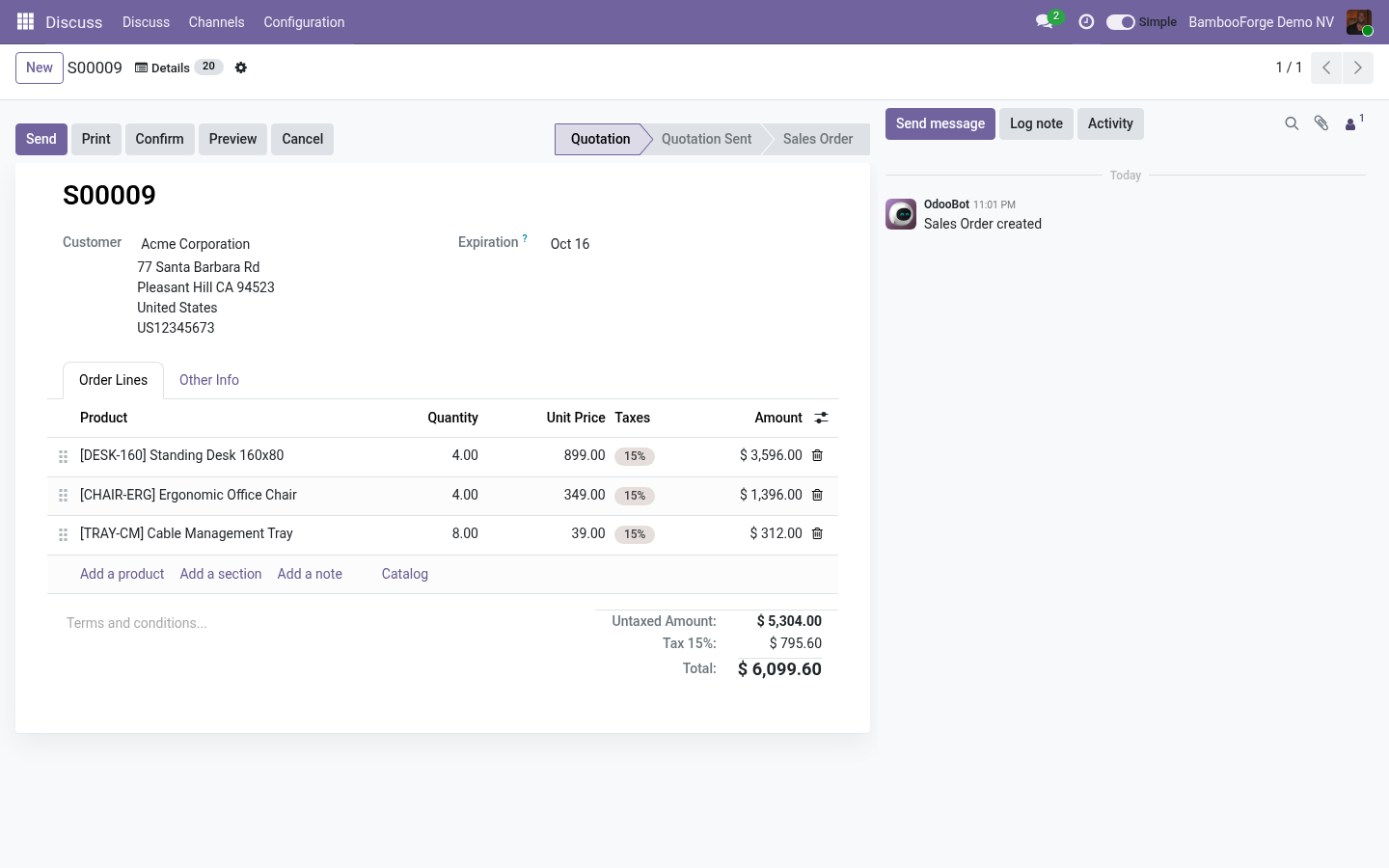
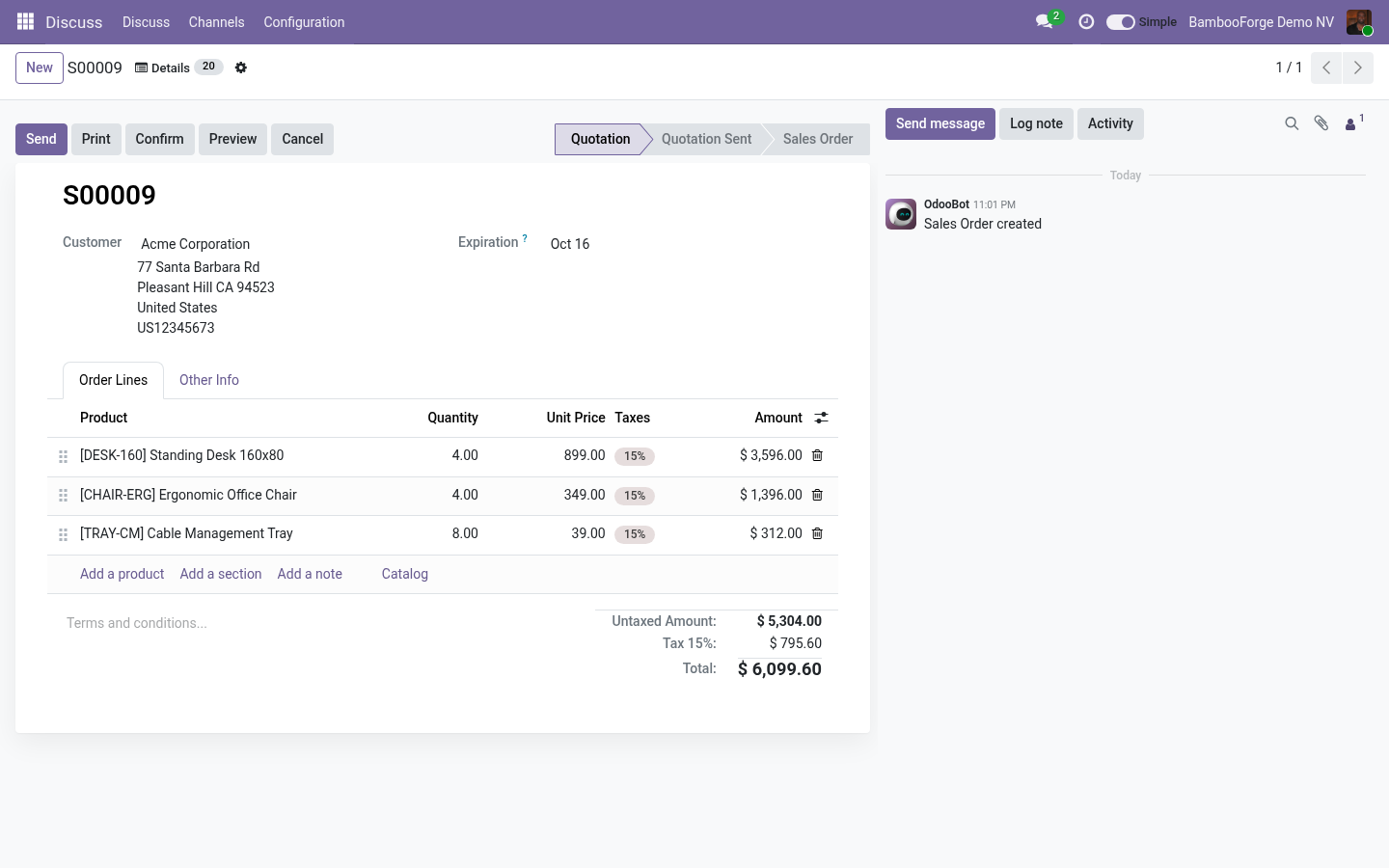
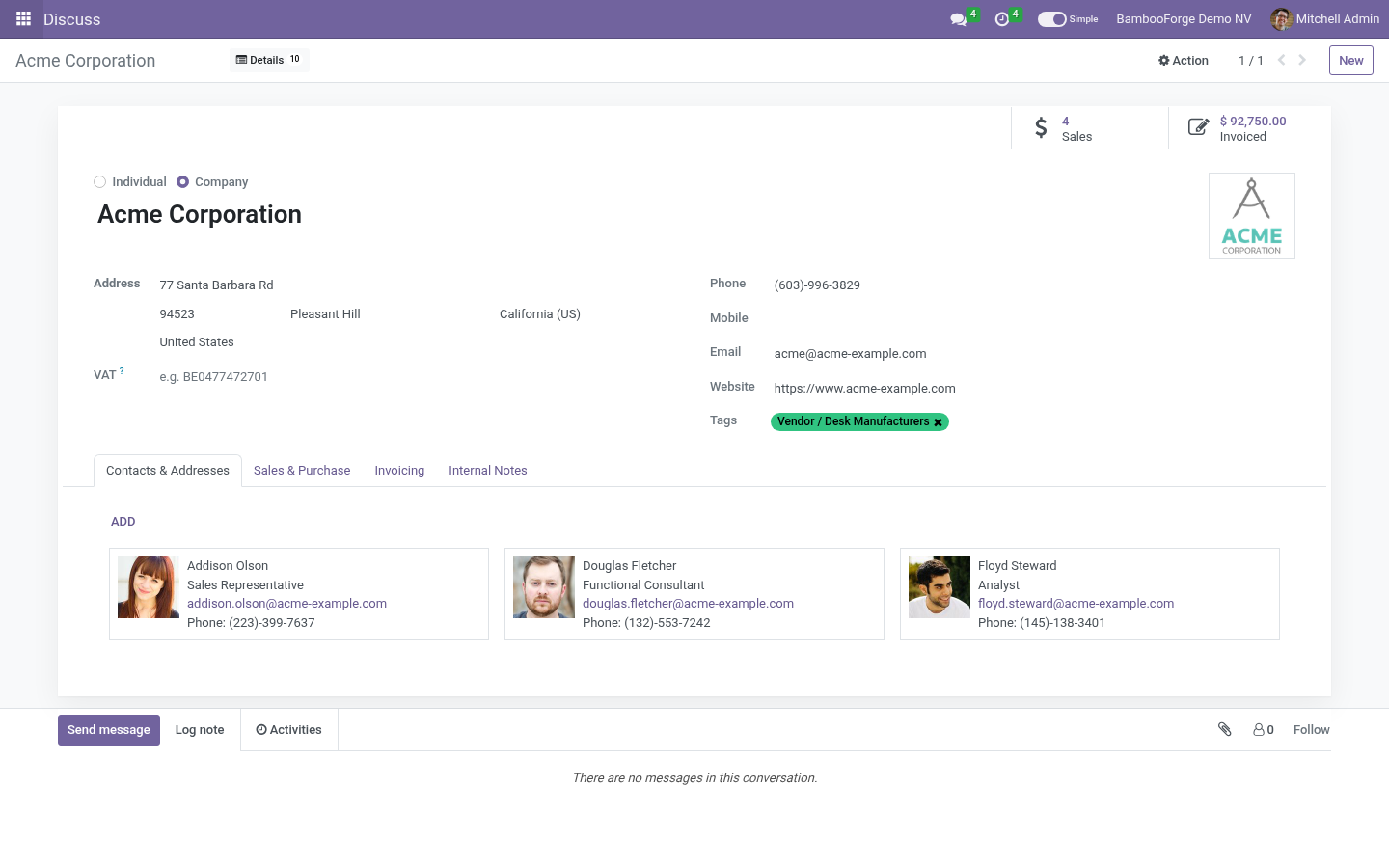
Identity and steering fields (name, state, stage, company, currency, partner, dates) are not listed at all. Details: every value of the record. Every form has a Details button next to the cog (and the same entry in the cog menu). The badge on it is the number of fields simple mode took away from this form.
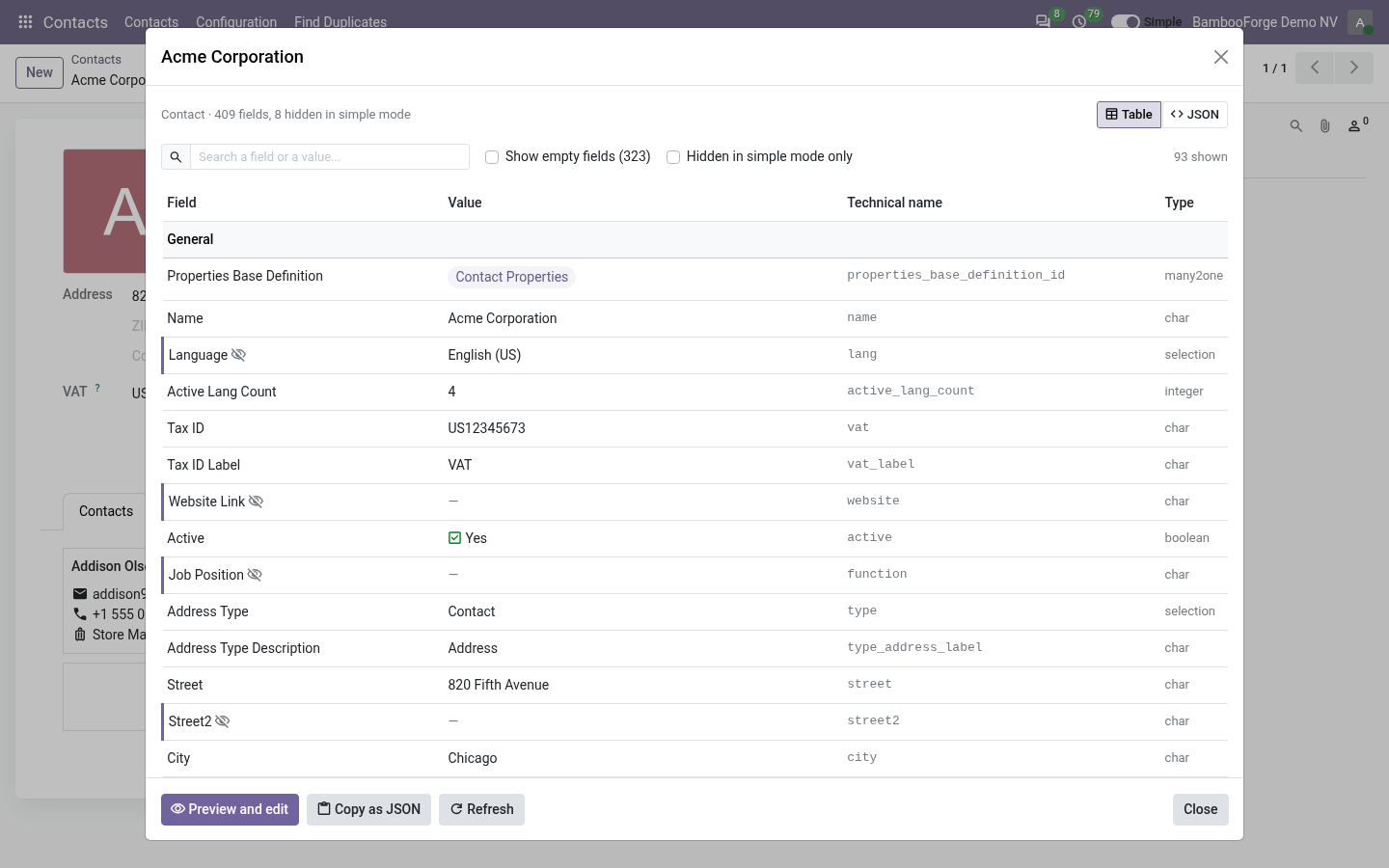
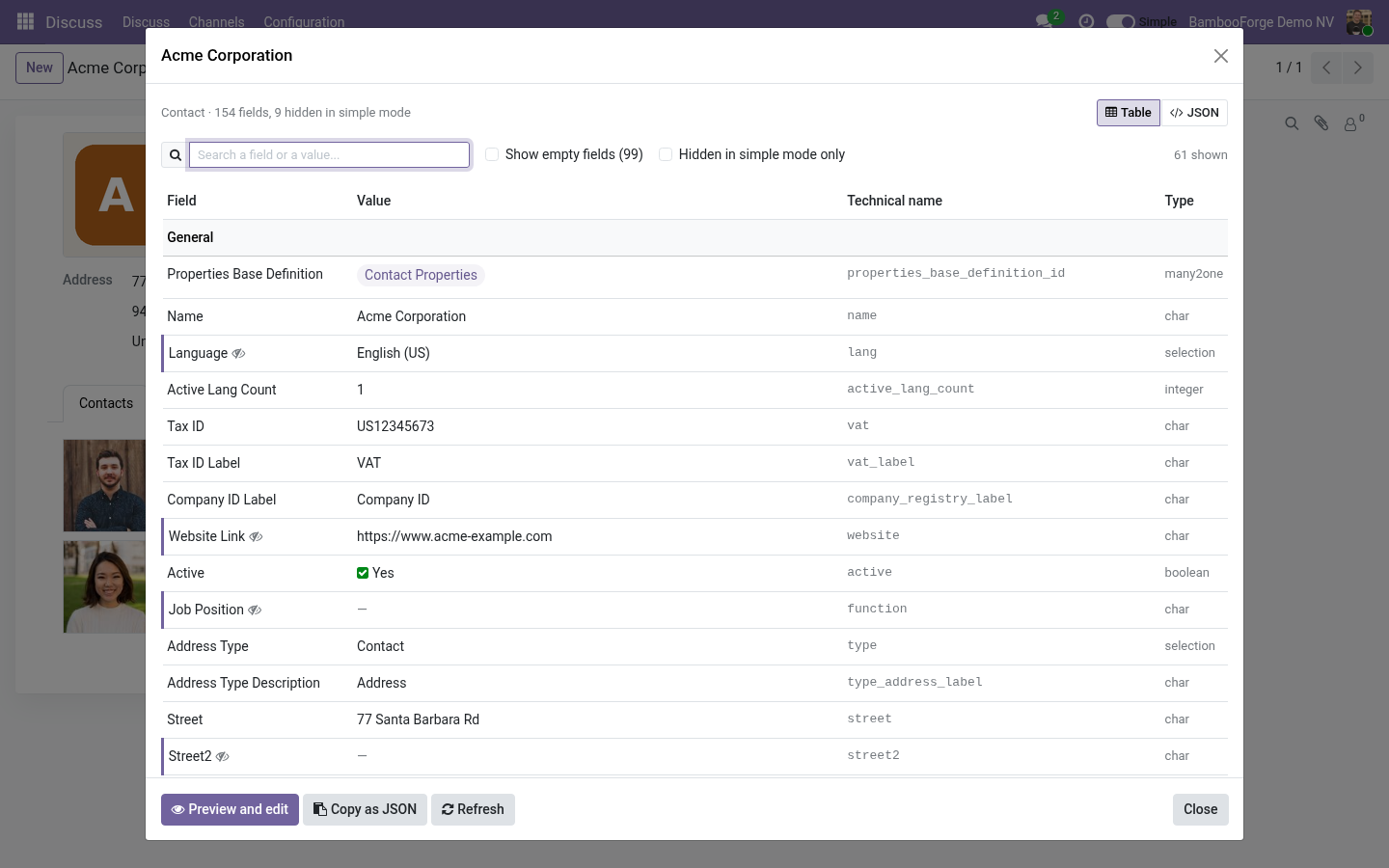
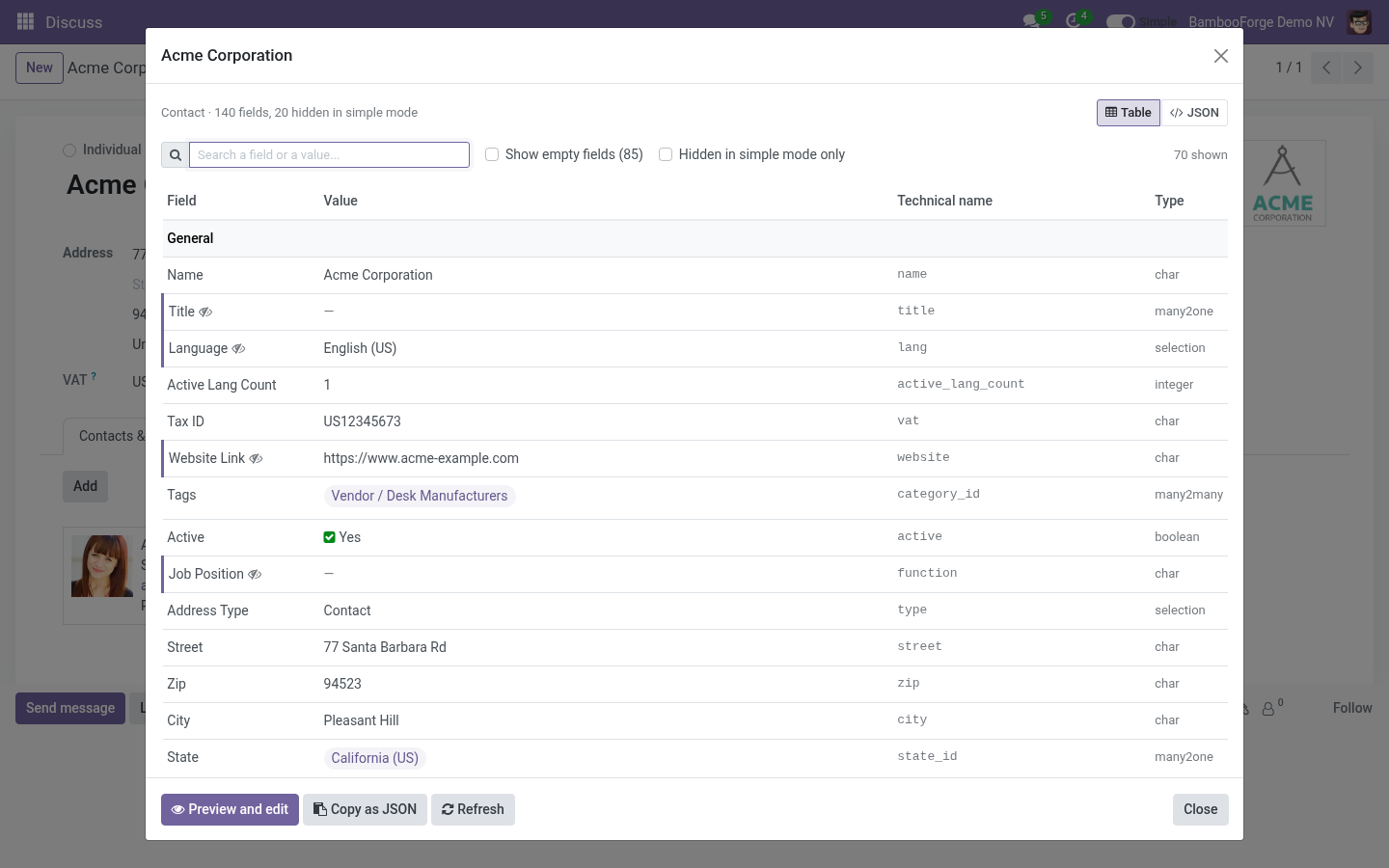
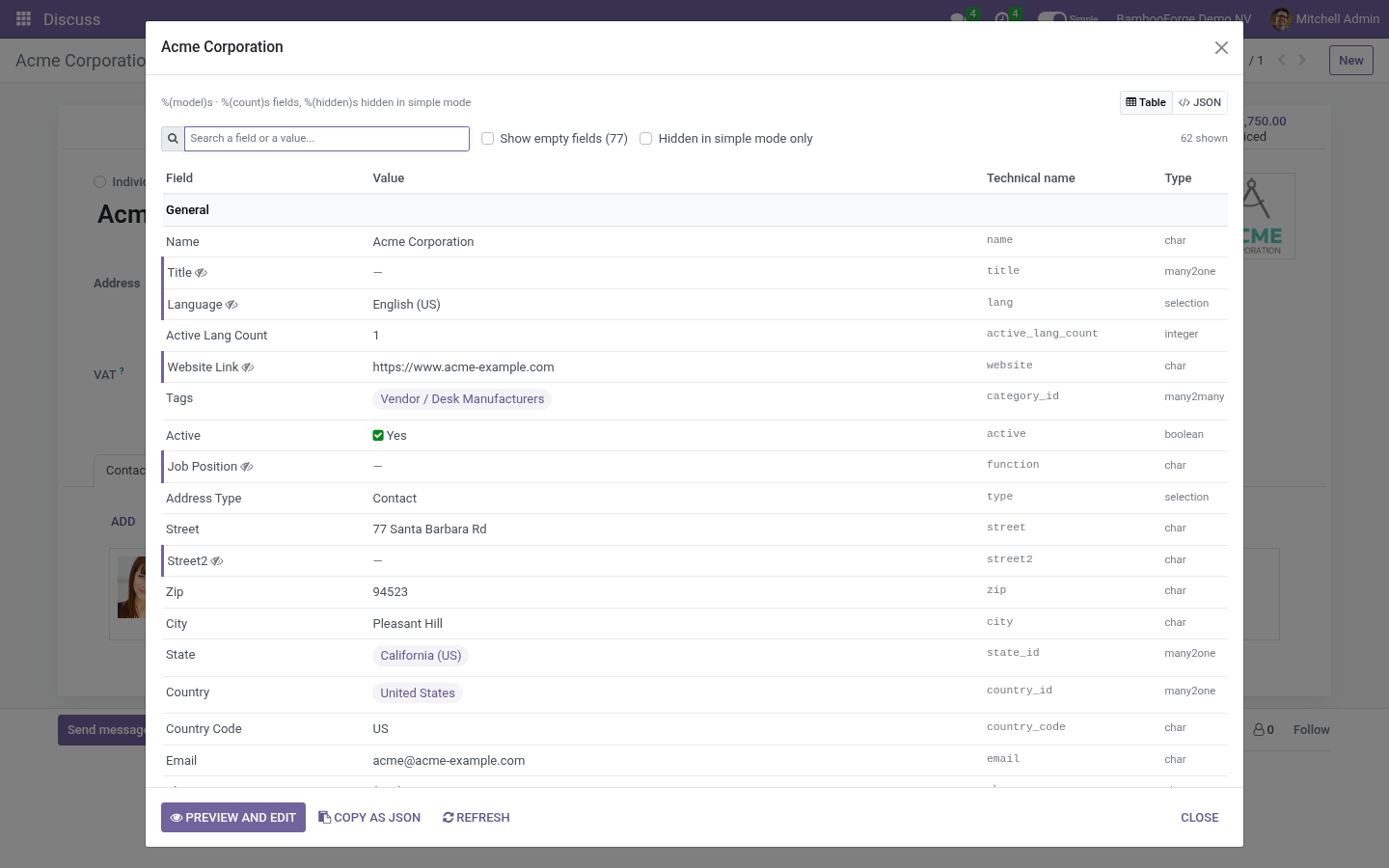
Details lists every field of the record the user may read - hidden ones included, marked with an eye - as a table grouped the way the form groups them: the tabs and titled blocks first, then More for fields not on the form, then System. Related records show their names; click one to open it. Amounts are in the record's currency, dates in the user's format, selections by their label. Search matches labels, technical names and values.
Show empty fields and Hidden in simple mode only narrow the list. JSON is the raw record, ids and all, and Copy as JSON puts it on the clipboard. Open the full form opens the record with nothing hidden, for this screen only; the switch stays where it was. An administrator sees Preview and edit instead (below).
What Details will never show. Details is read as the user, through every layer Odoo itself applies, and two more of its own: the model's access rights and the record rules - a record the user may not read is refused whole; field-level groups - a field with groups= the user lacks is not read; view-level groups - a field that the views show only inside a tab, block or button carrying groups= the user lacks is left out, in the table and in the JSON, even though the field itself has no groups (the accounting tab of a contact, a total of invoices behind an accounting group); related records - a name is listed only for records the user's rules let them read, and the count is the count of those; computed fields that refuse the user (a total that reads documents they may not see) are skipped rather than shown; interface restrictions of BambooForge Access Rights Manager; binary fields (images, files) are never read. Preview and edit. An administrator opens Preview and edit from Details, or Preview on a record on a profile and picks a record.
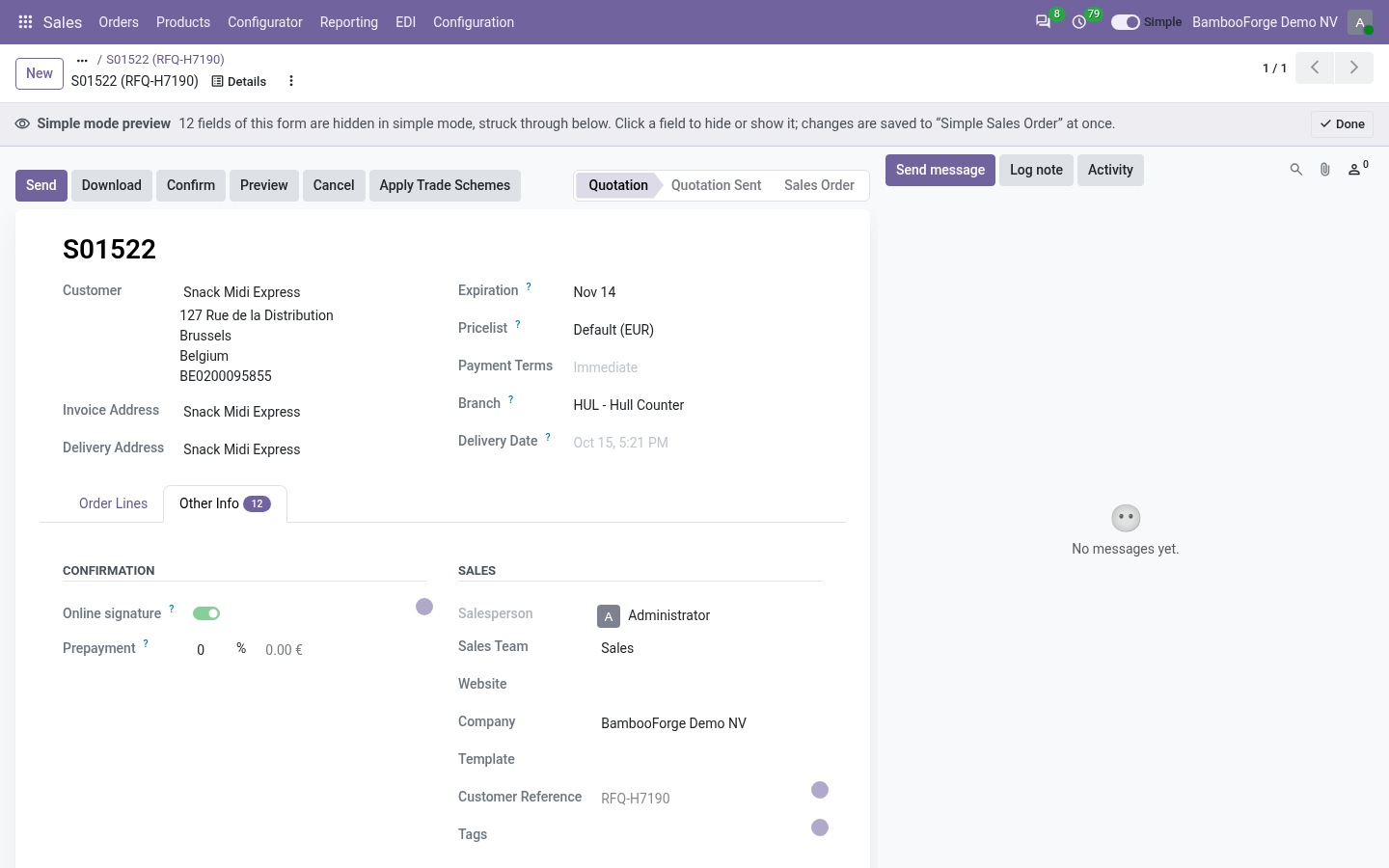
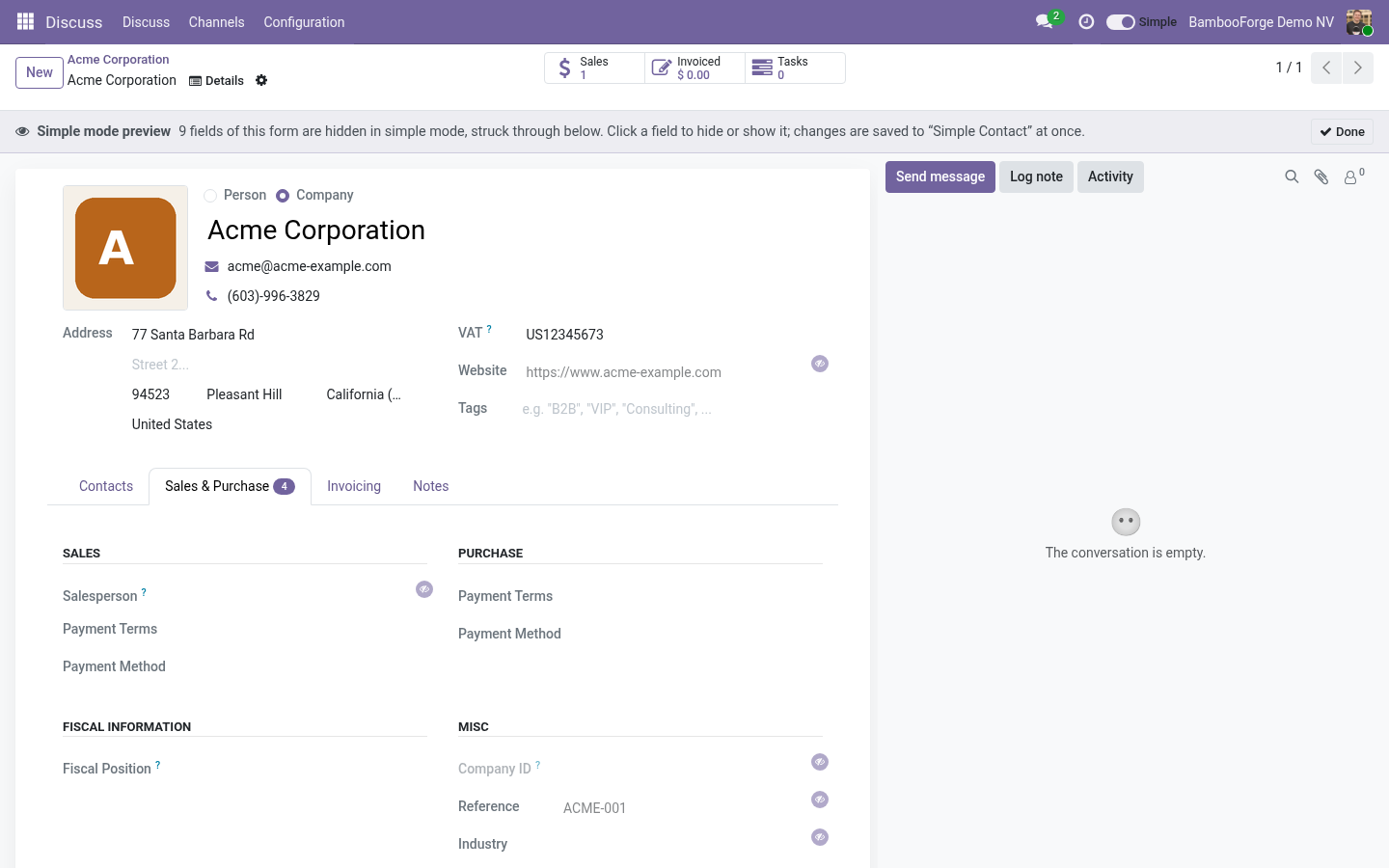
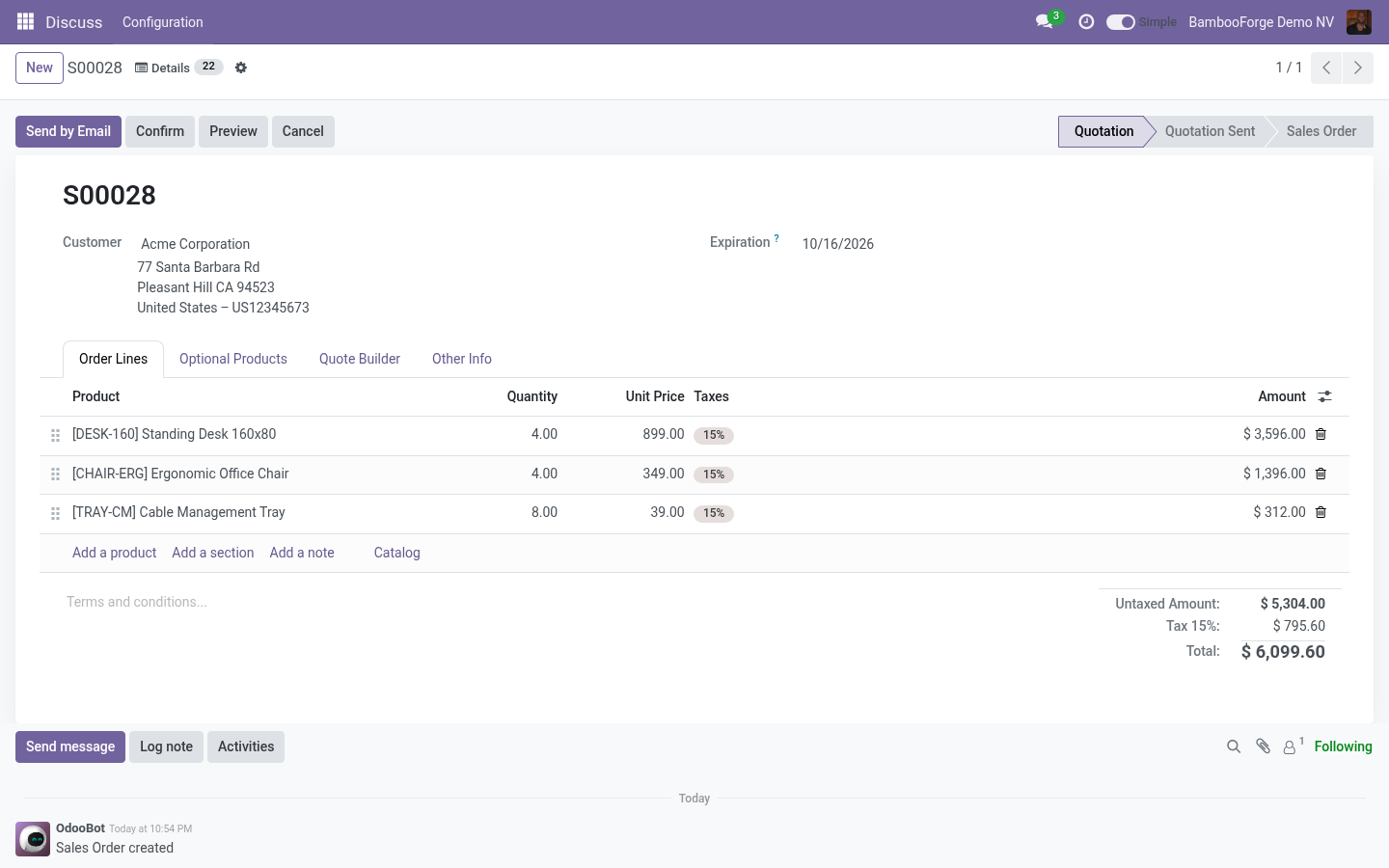
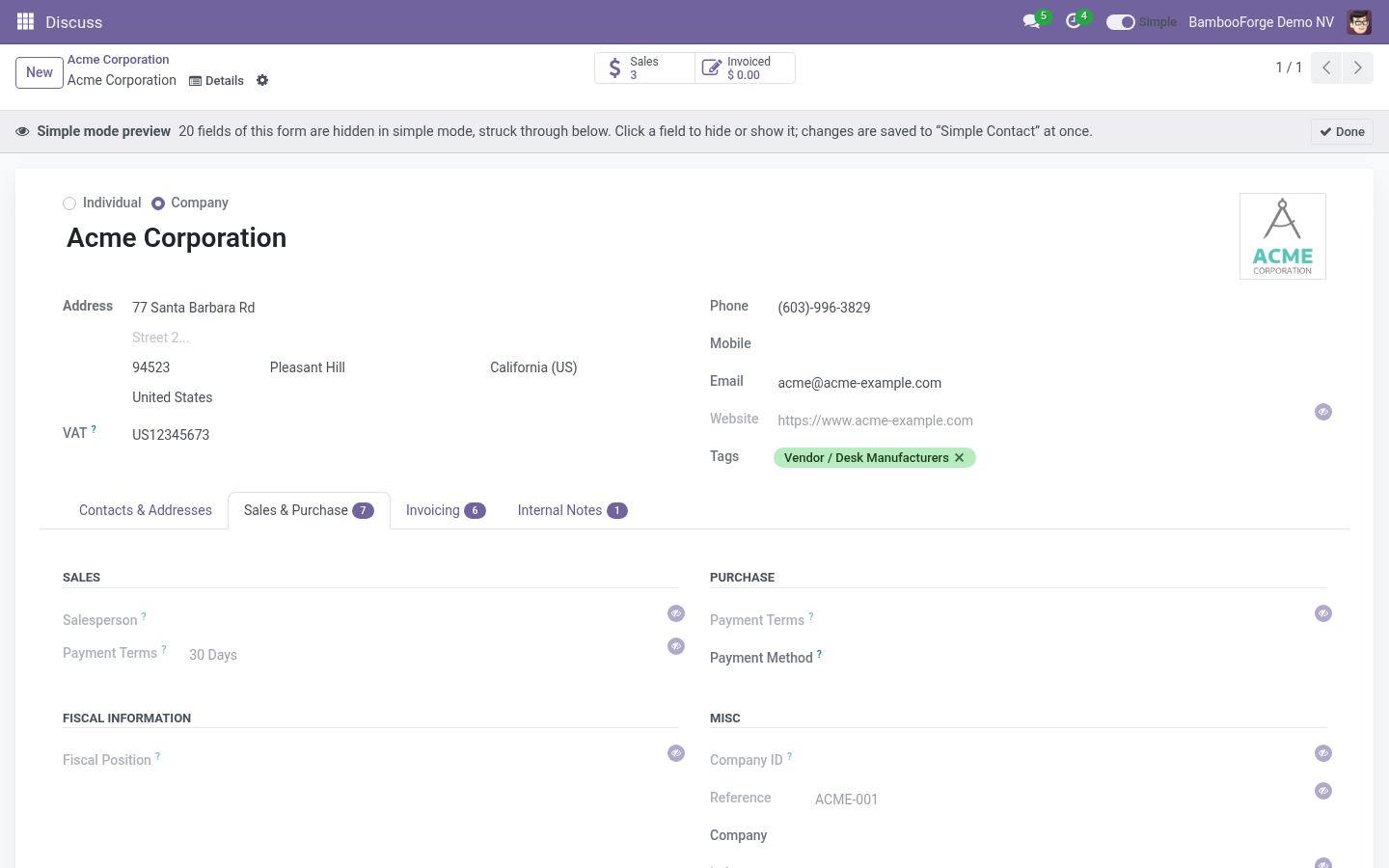
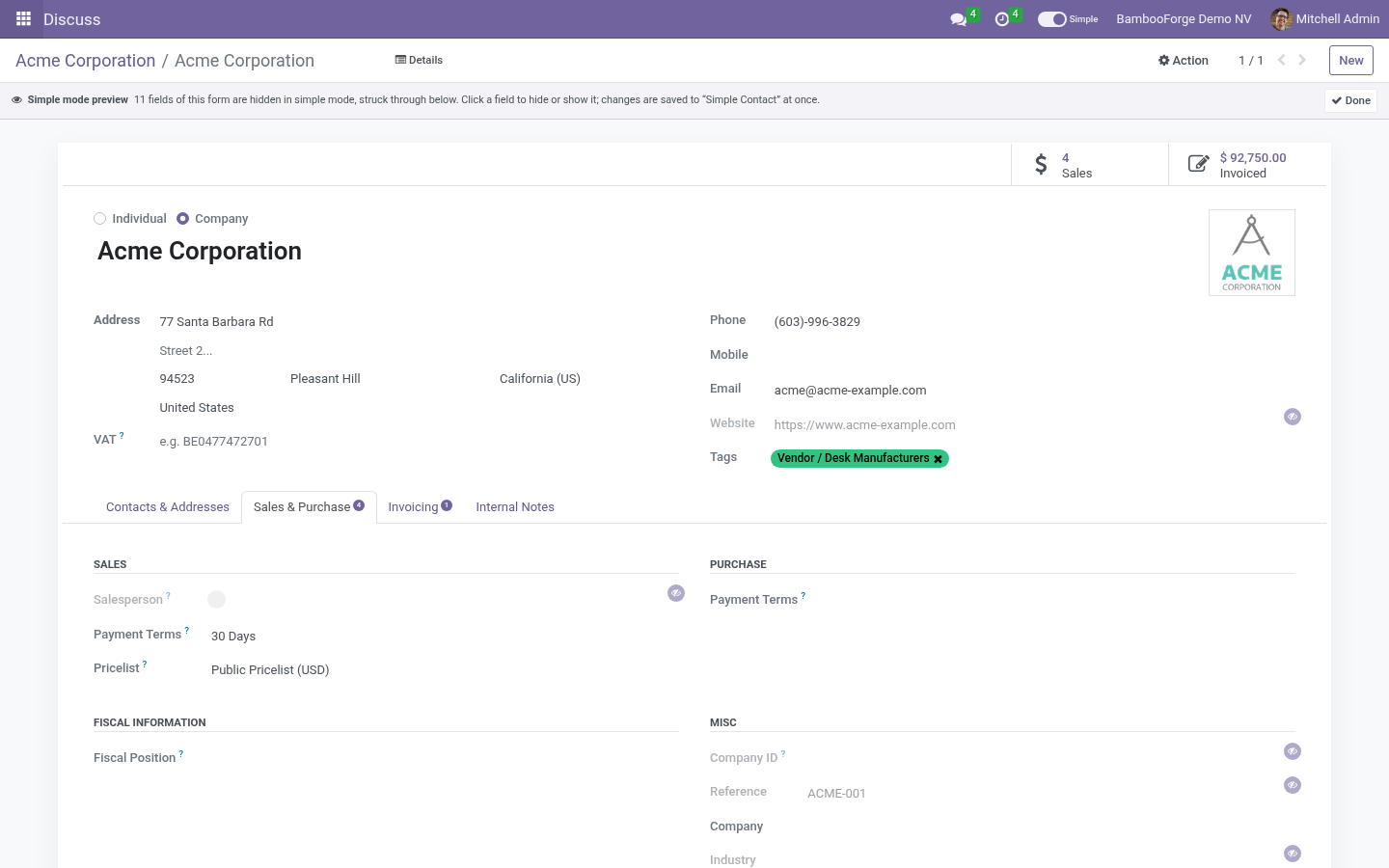
The record's full form opens with a banner on top; every field simple mode hides is struck through and marked with an eye - the fields of the record and the columns of its embedded lists alike. Click any field to hide it, click a struck-through one to show it again; the change is saved to the model's core pack at once (created if none exists) and applies to every user in simple mode on their next screen. A required field without a default is refused with a message. Done returns to the ordinary form.
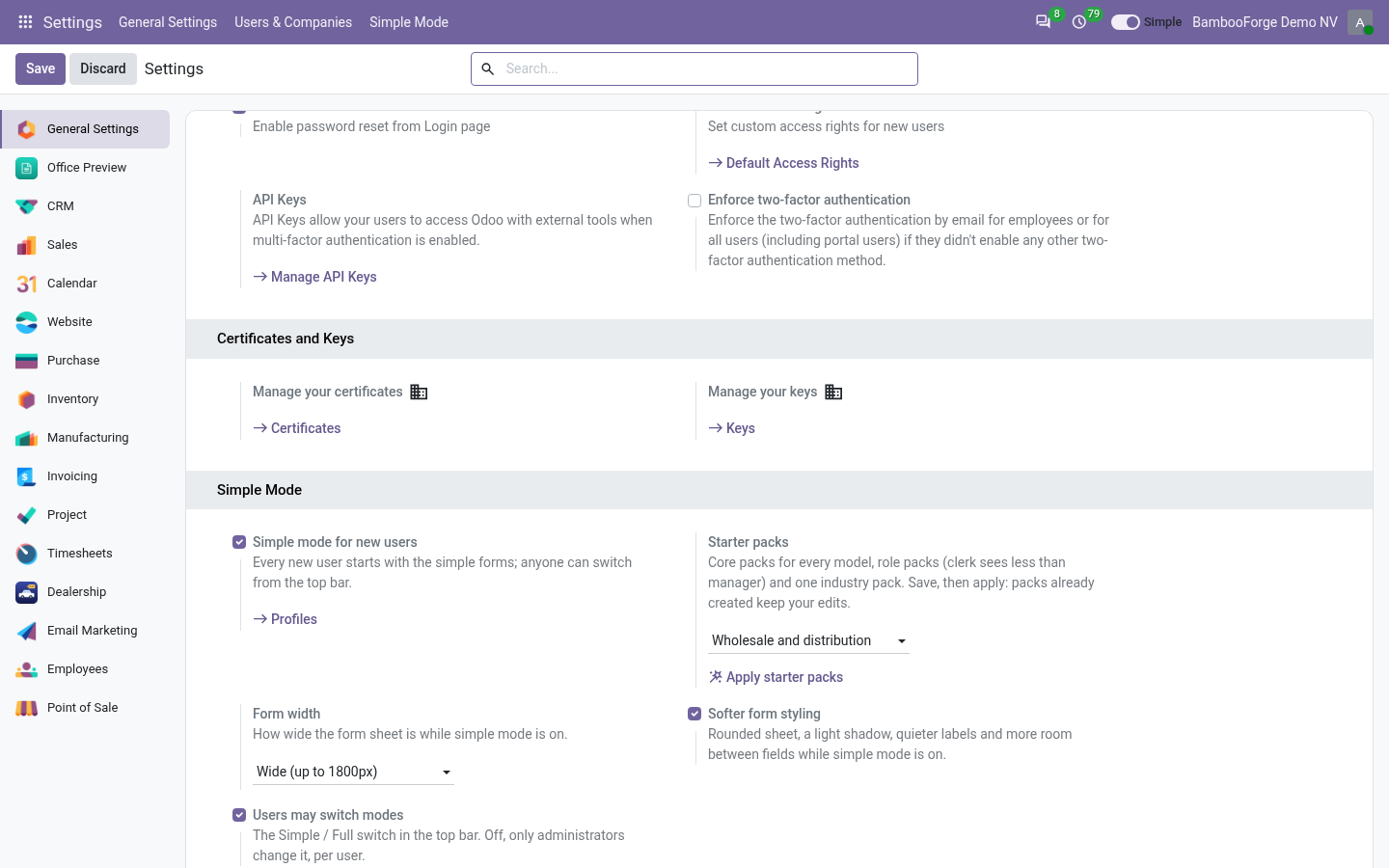
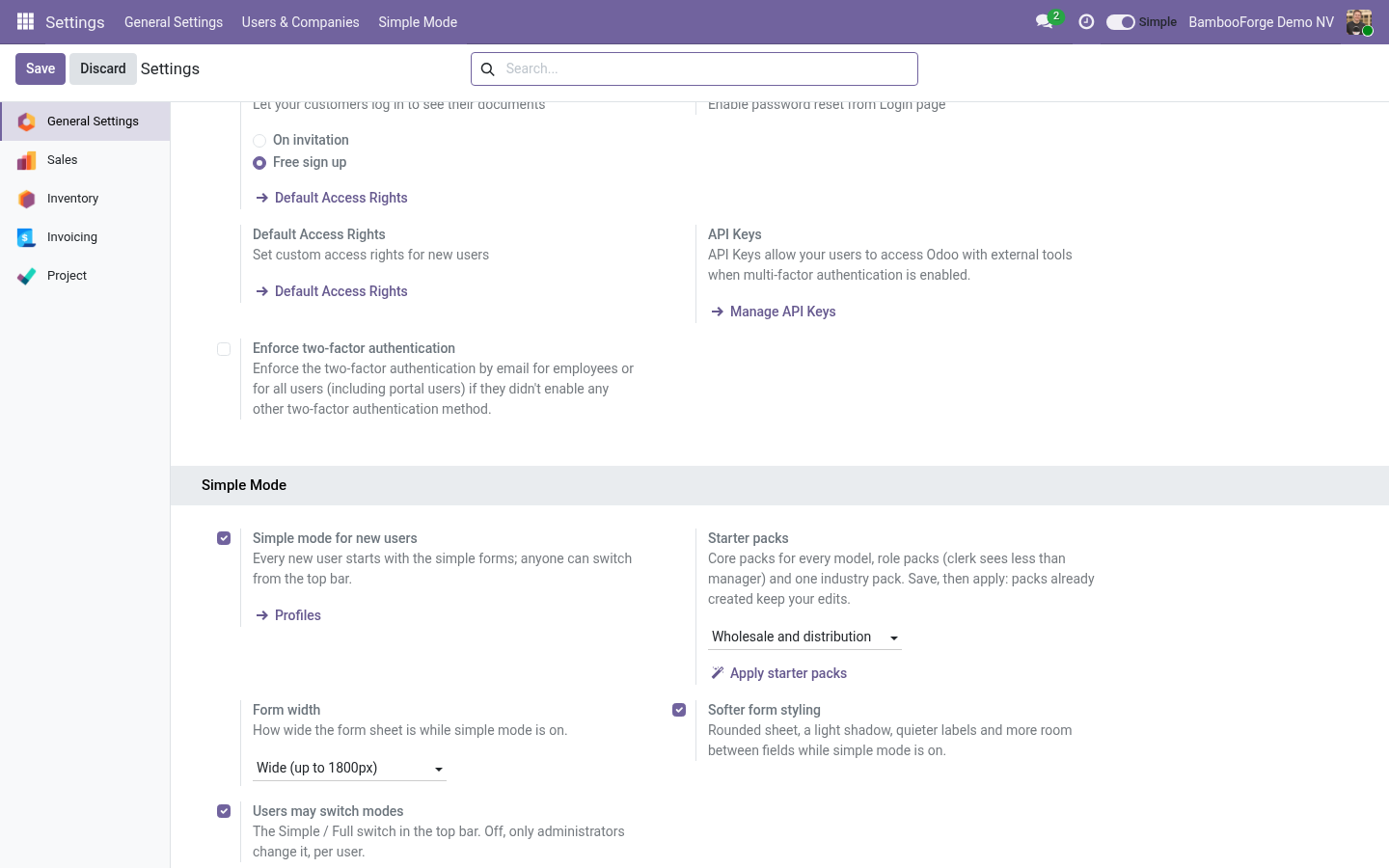
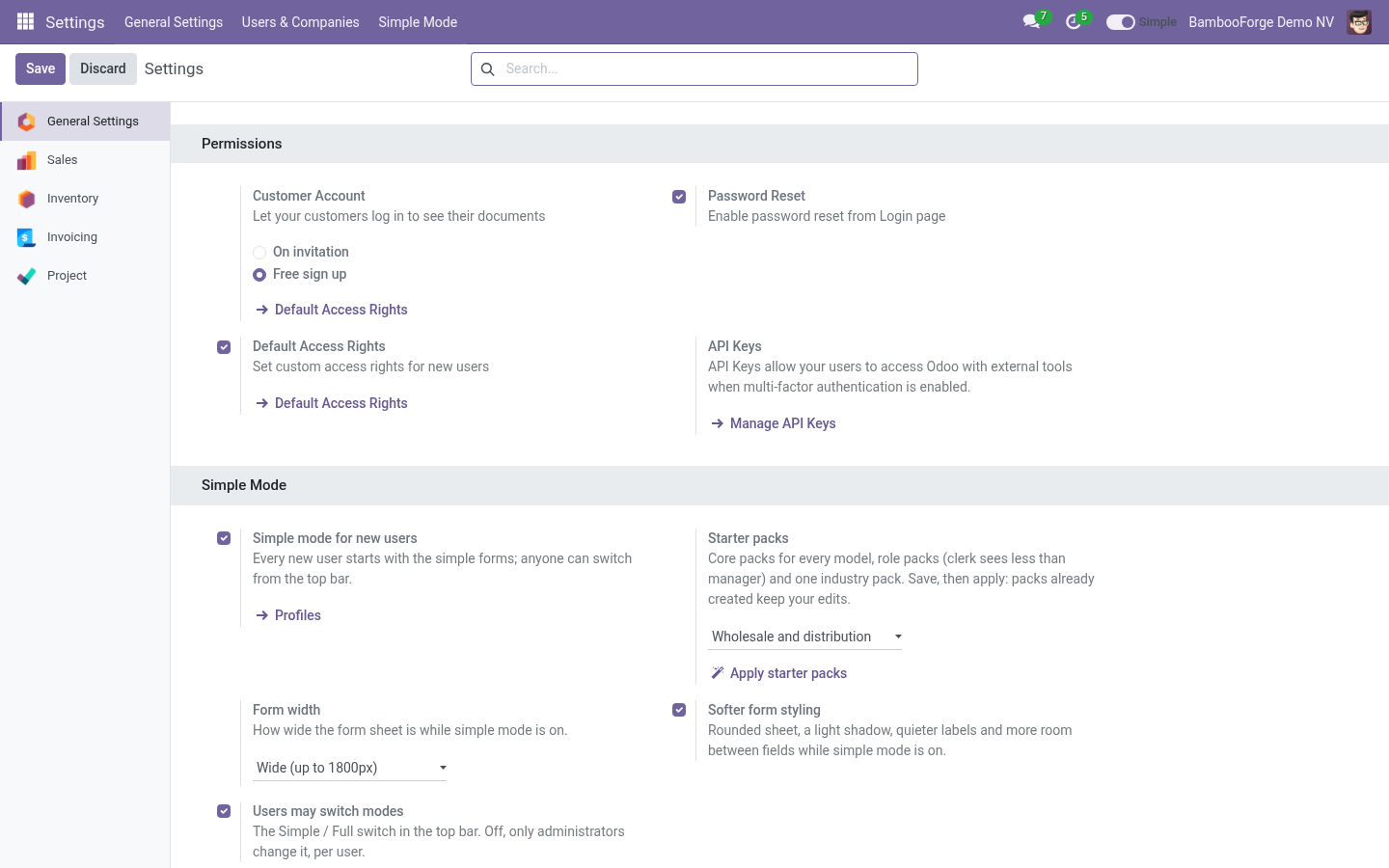
The preview shows what simple mode hides from the administrator who looks at it: core and industry packs, and role packs whose groups they hold. A role pack aimed at clerks is not struck through for a manager; open the profile to see it. Form width and styling. Settings › General Settings › Simple Mode: Form width - Standard (Odoo's own), Wide (1440px) or Full width, while simple mode is on.
Softer form styling - rounded sheet, a light shadow, quieter labels and a little more room between fields. Both are off the moment the user switches to Full. Questions people ask. Can a hidden field still be exported?
Yes. Simple Mode changes the screen, not the data. For real restrictions use groups, or BambooForge Access Rights Manager, whose hidden fields the inspector also respects. A user says a field is missing.
They are in simple mode. The switch in the top bar, or Open the full form from the inspector, shows everything. To keep the field, remove it from the profile. The complete manual is at docs dot bambooforge dot dev, the demo database is linked from the store page, and support answers within twenty-four hours.
Links are in the description.
Key facts
- What it is
- Hide the fields nobody fills in, widen the form, and keep every value one click away in a searchable record inspector - per model, per role, no code.
- For
- Extra Tools
- Odoo versions
- 16.0, 17.0, 18.0, 19.0, 20.0 - Community and Enterprise
- Runs on
- Odoo.sh or Odoo you host yourself - not Odoo Online, which accepts no third-party apps
- Price
- 99 EUR, one-time, on the Odoo Apps Store
- Technical name
- bambooforge_simple_mode
- Live demo
- https://demo20.bambooforge.dev/odoo/action-bambooforge_simple_mode.action_bf_simple_profile
- Manual last updated
- 2026-09-21
Simple Mode: Lean Forms & Record Inspector
An Odoo form shows every field the developers ever added. Your people use twelve of them. Simple Mode hides the rest - per model, per role - widens the sheet, and gives every record an inspector that shows all of its values, formatted and searchable, one click away.
Hiding is an interface matter, not a permission. A hidden field is still read over RPC, still exported, still shown by the inspector. Use groups for what people MAY see; use Simple Mode for what they see FIRST.
The switch
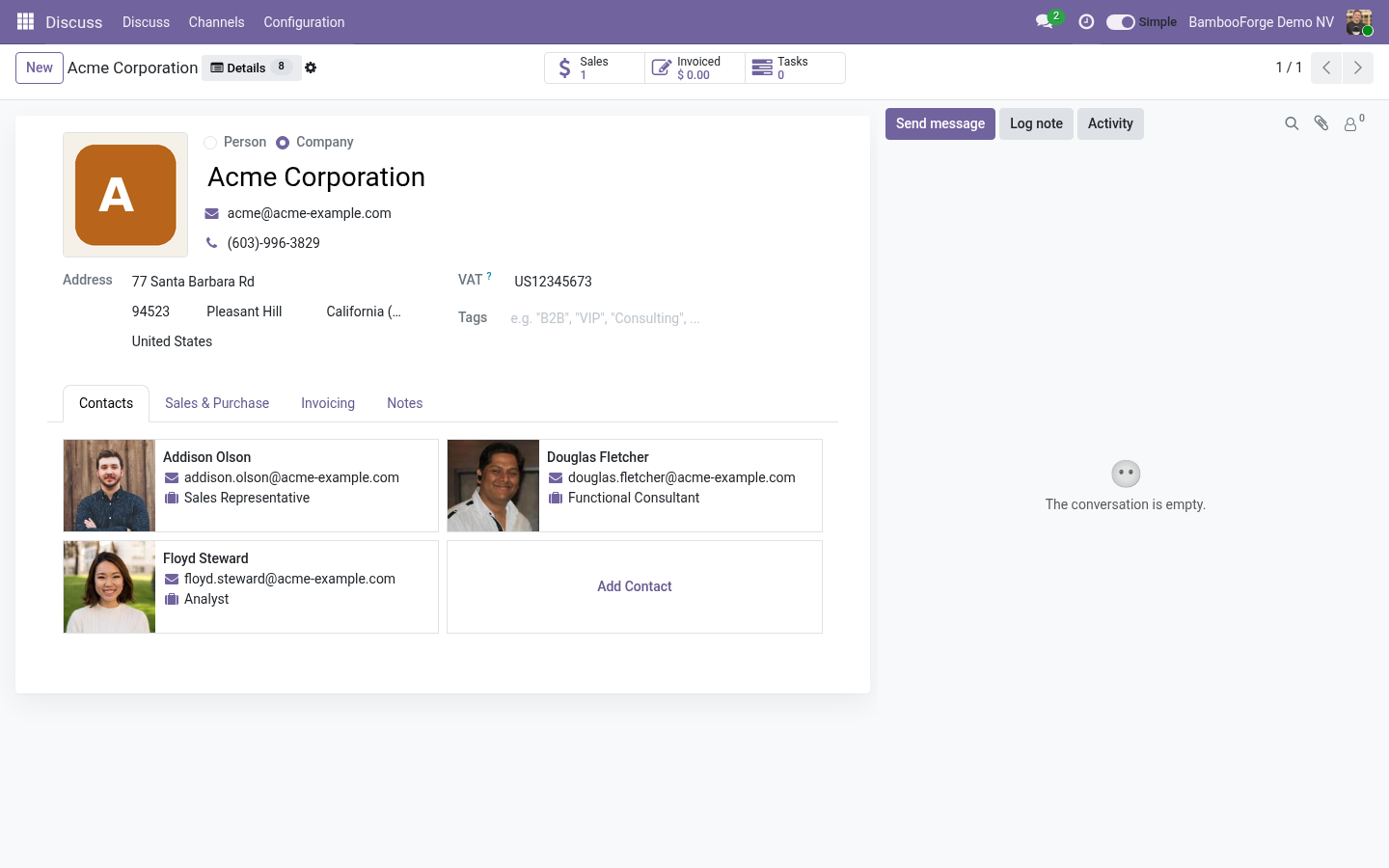
Every internal user has a Simple / Full switch in the top bar. On, the forms and lists lose the fields the profiles name, the sheet widens and empty tabs fold away. Off, everything is back. The choice is saved on the account, so it survives a new browser and a new day.
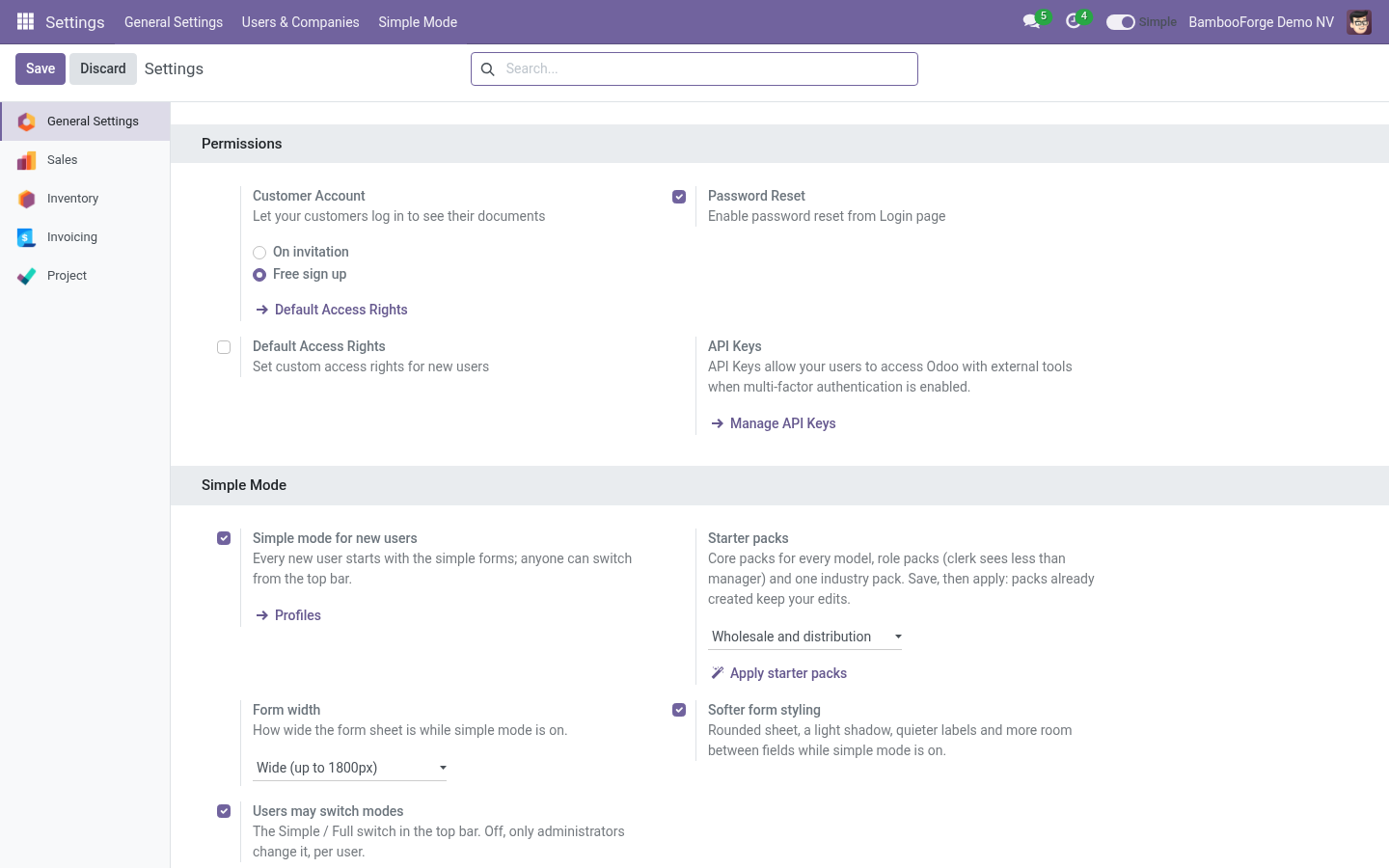
Administrators set the default for new users and can take the switch away (Settings › General Settings › Simple Mode). Without the switch, the setting is changed per user in Settings › Users, Simple mode.
Profiles
Settings › Simple Mode › Profiles. A profile names one model and:
Hidden fields - removed from every form and list of that model the user opens, embedded views included. Required fields are refused when the profile is saved, and a field the view itself marks required is left alone: nothing you hide can stop a save.
Hidden tabs and blocks - a notebook page by its name or title, a block by its name attribute.
Only for groups - empty means everybody in simple mode; otherwise users in any of the groups. Except lists users the profile never touches.
Fold empty tabs and blocks - a tab or titled block whose every field is hidden disappears too.
Profiles of the same model add up. A user in simple mode gets the union of every active profile that applies to them.
Starter packs
Installing the app creates the starter packs: profiles built from a catalogue that was checked, field by field, against a database with every Odoo 20 Community module installed, and against what the common tools of each department show by default - HubSpot and Zoho for contacts and leads, QuickBooks and Xero for invoices, Shopify for products, Asana for tasks, BambooHR for employees. A field none of them puts on its default screen, and that fewer than one Odoo demo record in five fills in, leaves the screen; a field any of them treats as primary stays. Every pack carries a note saying why.
Three layers, adding up per user:
Core packs - for everybody in simple mode: Contacts, Products and variants, Quotations and lines, Invoices and lines, Payments, Purchase Orders and lines, Transfers and moves, Tasks, Projects, Leads, Employees, Time off, Expenses, Applicants, Manufacturing orders, Bills of materials, Meetings, Events, Vehicles, Equipment, Repairs, Shop tickets. Marketing attribution, incoterms, analytic distribution, cash rounding, the second street line.
Role packs - keyed on what a user is not: not an accountant (accounts, taxes, bank details, journals), not a sales manager (pricelists, terms, warehouse, forecasts), not a purchase manager, not an inventory manager (routes, reordering rules, prices), not a project manager (timing metrics, dependencies), not an HR officer (the private tab), not a manufacturing manager. A manager holds the clerk's group too, which is why a role pack says Not for groups: manager rather than Only for groups: clerk. A role pack whose app is not installed is skipped.
Industry pack - one, chosen in Settings › General Settings › Simple Mode: Services and consulting, Retail shop, Wholesale and distribution, Manufacturing, E-commerce, Non-profit. A service company loses weights, barcodes and stock routes; a retailer loses quotation policies and incoterms; a manufacturer loses point-of-sale fields.
Apply starter packs (Settings, and on the profile list) creates the packs still missing - after installing more apps, or after changing the industry. A pack already created keeps every edit you made to it; delete it and apply again to get the catalogue's version back. Packs are marked From starter packs in the profile list and carry their key.
What the benchmarks show by default, for reference:
Contact (HubSpot, Zoho): name, email, phone, company, job title, owner, lifecycle stage, tags. Not: salutation, language, industry, registry number, reference code.
Invoice (QuickBooks, Xero): customer, email, invoice date, due date, terms, lines with product, description, quantity, rate, amount, tax, a message. Not: incoterm, cash rounding, fiscal position, attribution.
Product (Shopify): title, description, media, price, compare-at, cost, SKU, barcode, stock, vendor, tags, status. Not: lead times, routes, warnings, warehouse descriptions.
Task (Asana): name, assignee, due date, project, description, tags, subtasks, attachments. Not: allocated hours, recurrence, milestones.
Employee (BambooHR): name, job title, department, location, manager, hire date, status, contact, address, emergency contact. Not: commute distance, schooling, spouse, badge, permits.
Suggest fields
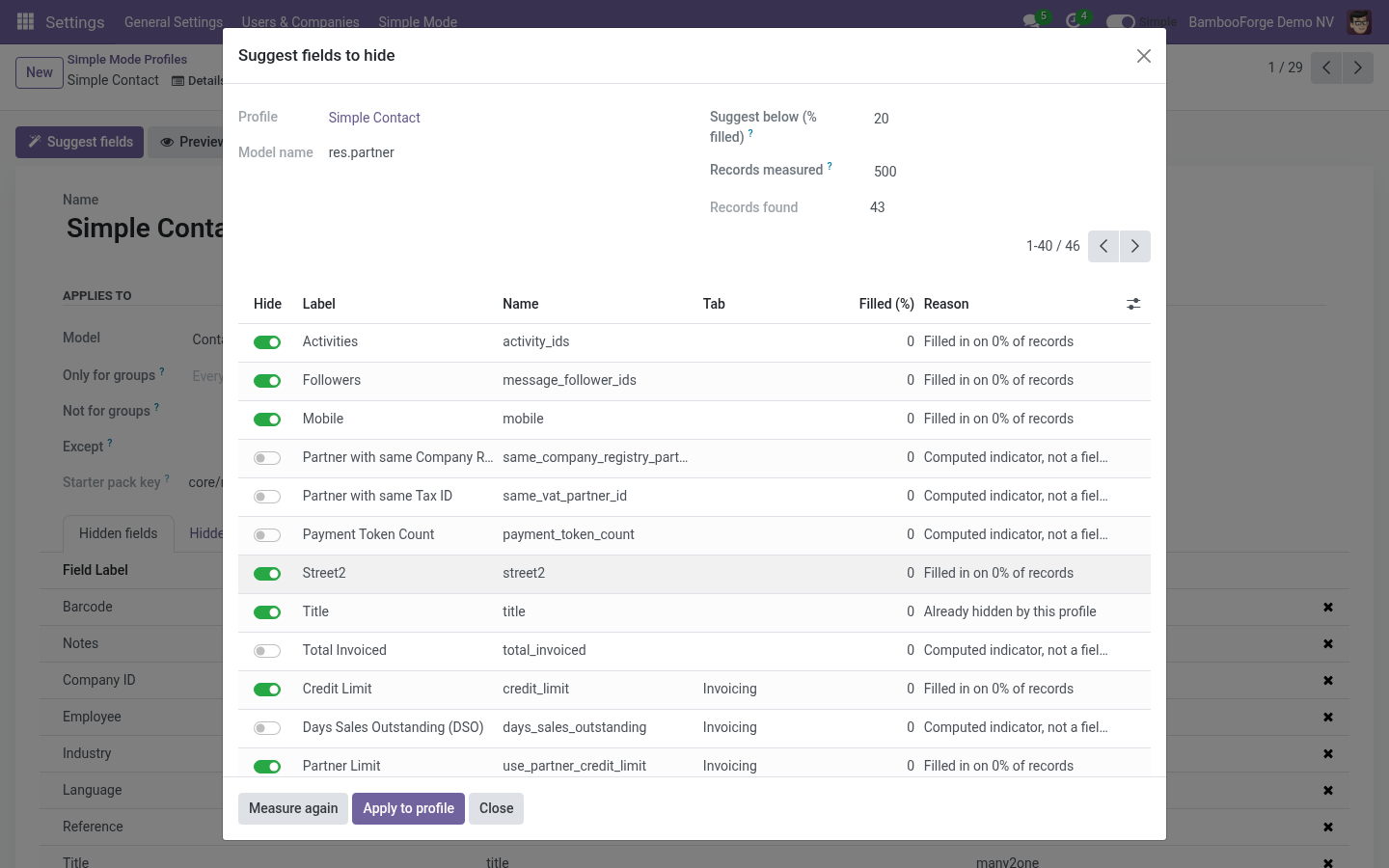
Open a profile and press Suggest fields. The picker reads the model's form, keeps every field a user could lose without breaking a save, and measures how often each one is actually filled in on the newest records of your own database (500 by default; 0 measures them all). Fields under the threshold are pre-ticked; untick what the measure got wrong, tick what it missed, and Apply to profile. Ticked fields join the profile, unticked ones leave it.
Images and files are listed but never pre-ticked. Identity and steering fields (name, state, stage, company, currency, partner, dates) are not listed at all.
Details: every value of the record
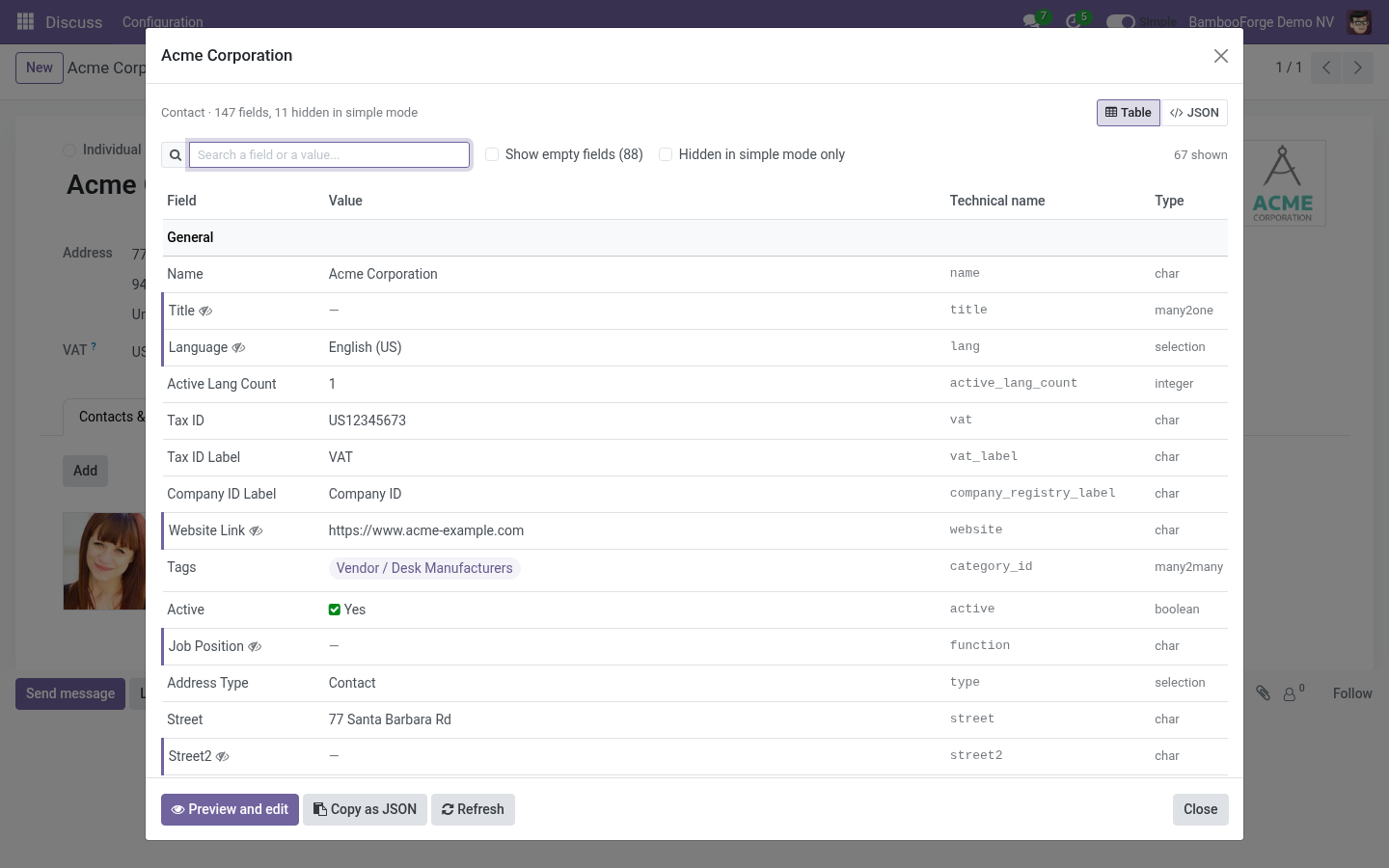
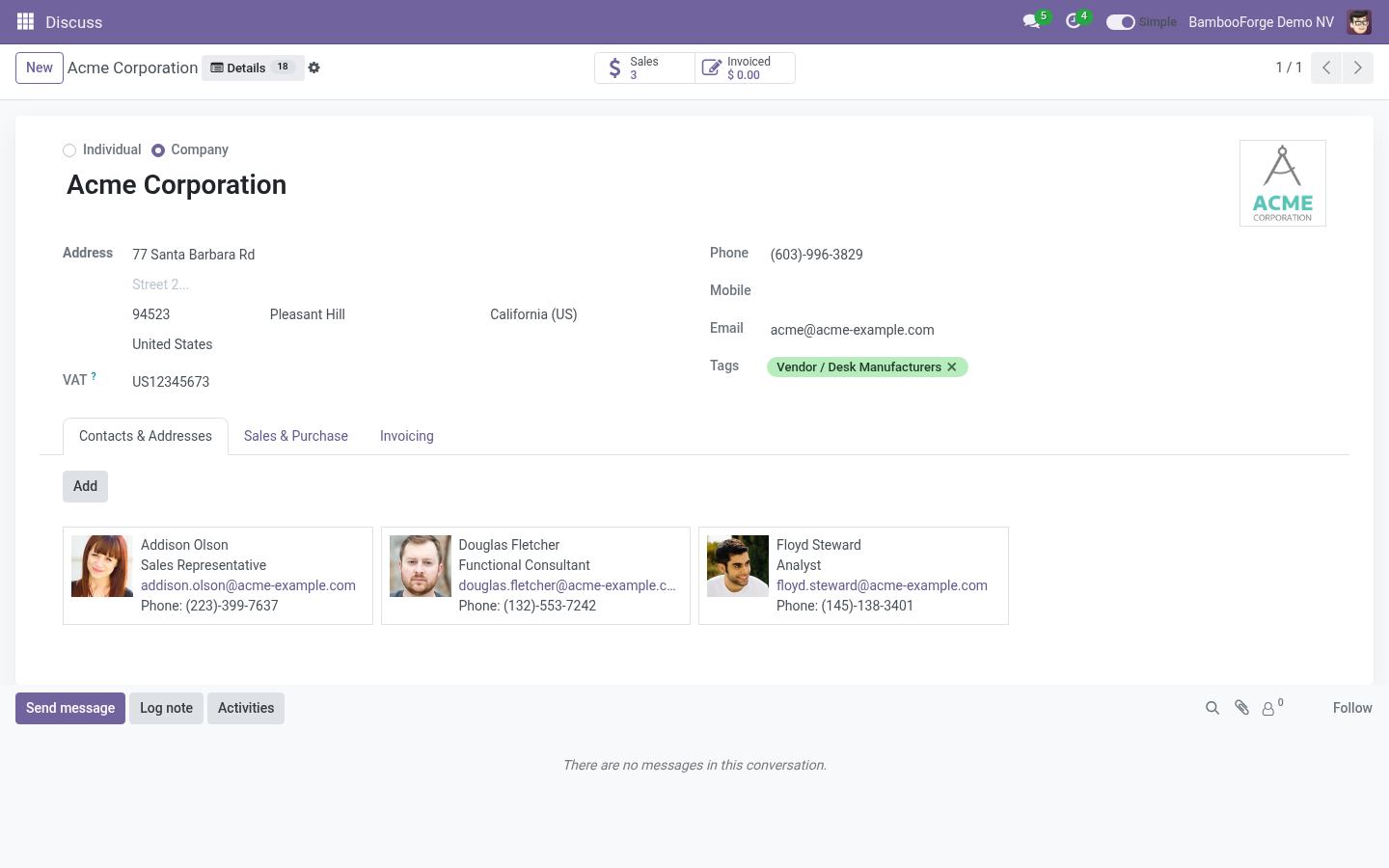
Every form has a Details button next to the cog (and the same entry in the cog menu). The badge on it is the number of fields simple mode took away from this form. Details lists every field of the record the user may read - hidden ones included, marked with an eye - as a table grouped the way the form groups them: the tabs and titled blocks first, then More for fields not on the form, then System.
Related records show their names; click one to open it.
Amounts are in the record's currency, dates in the user's format, selections by their label.
Search matches labels, technical names and values. Show empty fields and Hidden in simple mode only narrow the list.
JSON is the raw record, ids and all, and Copy as JSON puts it on the clipboard.
Open the full form opens the record with nothing hidden, for this screen only; the switch stays where it was. An administrator sees Preview and edit instead (below).
What Details will never show
Details is read as the user, through every layer Odoo itself applies, and two more of its own:
the model's access rights and the record rules - a record the user may not read is refused whole;
field-level groups - a field with groups= the user lacks is not read;
view-level groups - a field that the views show only inside a tab, block or button carrying groups= the user lacks is left out, in the table and in the JSON, even though the field itself has no groups (the accounting tab of a contact, a total of invoices behind an accounting group);
related records - a name is listed only for records the user's rules let them read, and the count is the count of those;
computed fields that refuse the user (a total that reads documents they may not see) are skipped rather than shown;
interface restrictions of BambooForge Access Rights Manager;
binary fields (images, files) are never read.
Preview and edit
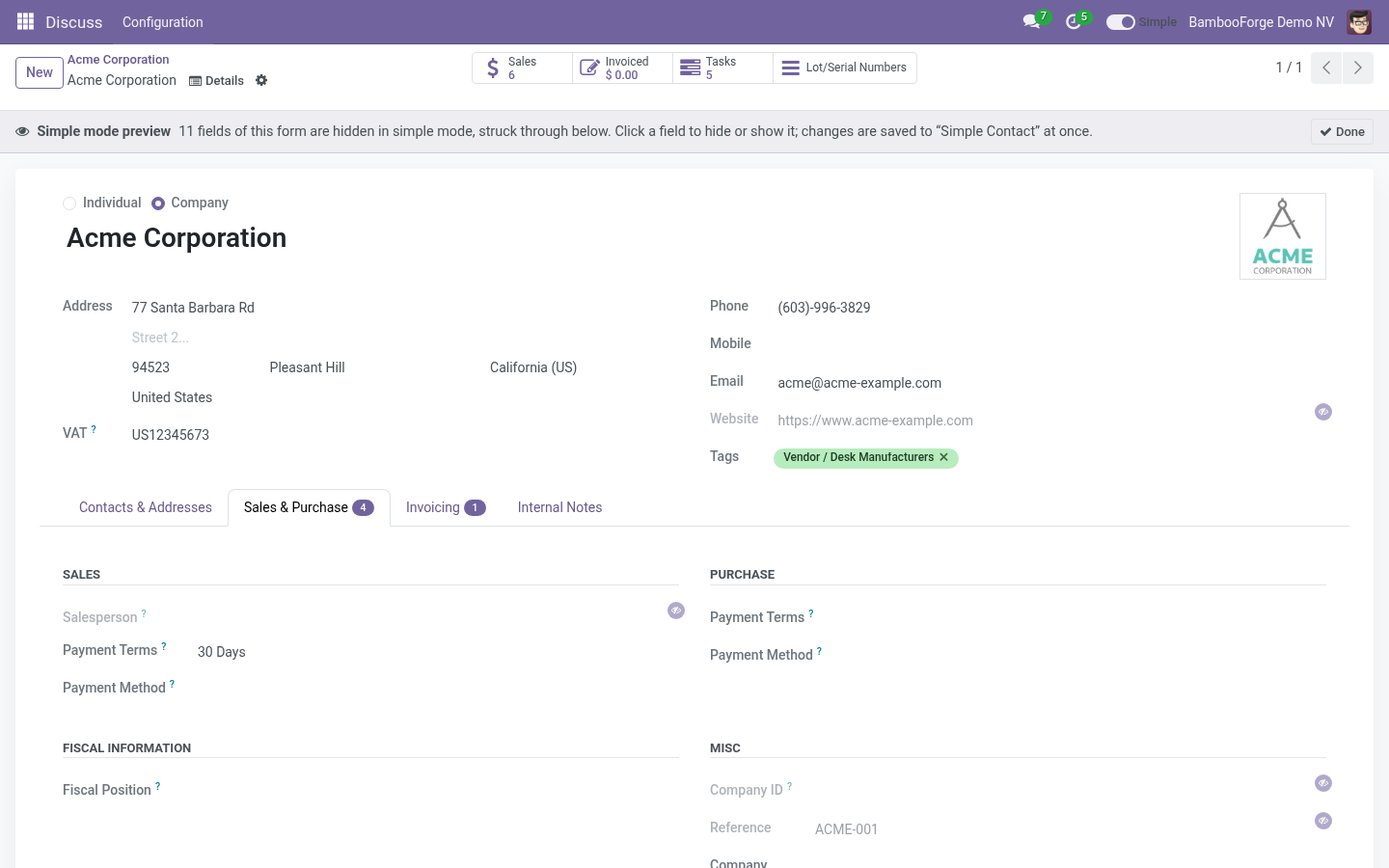
An administrator opens Preview and edit from Details, or Preview on a record on a profile and picks a record. The record's full form opens with a banner on top; every field simple mode hides is struck through and marked with an eye - the fields of the record and the columns of its embedded lists alike. Click any field to hide it, click a struck-through one to show it again; the change is saved to the model's core pack at once (created if none exists) and applies to every user in simple mode on their next screen. A required field without a default is refused with a message. Done returns to the ordinary form.
The preview shows what simple mode hides from the administrator who looks at it: core and industry packs, and role packs whose groups they hold. A role pack aimed at clerks is not struck through for a manager; open the profile to see it.
Form width and styling
Settings › General Settings › Simple Mode:
Form width - Standard (Odoo's own), Wide (1440px) or Full width, while simple mode is on.
Softer form styling - rounded sheet, a light shadow, quieter labels and a little more room between fields.
Both are off the moment the user switches to Full.
Install
Copy bambooforge_simple_mode into your addons path and update the apps list.
Install Simple Mode: Lean Forms & Record Inspector. Starter profiles are created for the apps already installed.
Open any contact: the form is wider, a few fields are gone, and Details brings them back; Preview and edit shows them struck through on the form itself.
Settings › Simple Mode › Profiles to adjust; Settings › General Settings › Simple Mode for the defaults.
Requires only web and base_setup. No external Python or JavaScript libraries.
Questions people ask
- Can a hidden field still be exported?
Yes. Simple Mode changes the screen, not the data. For real restrictions use groups, or BambooForge Access Rights Manager, whose hidden fields the inspector also respects.
- A user says a field is missing.
They are in simple mode. The switch in the top bar, or Open the full form from the inspector, shows everything. To keep the field, remove it from the profile.
- Why can't I hide this field?
It is required on the model. A form could not be saved without it.
- Does it change my views?
No. The arch is adjusted when it is sent to the browser; nothing is written to ir.ui.view, and uninstalling leaves no trace.
- Odoo 20 already shows raw record data.
In debug mode, as a JSON blob, for developers. The inspector is for the people who run the company: names instead of ids, amounts and dates formatted, grouped like the form, searchable, and available without debug mode.
Security notes
Profiles are read and written by Settings › Administration only.
The inspector reads with the current user's rights; it cannot show a field or a record the user could not read elsewhere.
The switch is a field on res.users every user may write on their own record only.
How we make sure it works
Before every release, 33 automated checks run against this app on Odoo 16, 17, 18, 19 and 20. Among them:
Inspect full mode counts nothing hidden.
Embedded view of same model.
Profiles are admin only.
Dynamic required in view is kept.
Fold and columns on synthetic archs.
The complete list is in the source you receive.