 BambooForge Labs
Shopify Connector | Shopify Odoo Integration
Two-way Shopify integration on the GraphQL Admin API: products with variants, customers, orders, multi-location stock, fulfilments, cancellations, refunds, payouts and abandoned checkouts, with signed webhooks and dry-run safety.
Available for Odoo 16.0, Odoo 17.0, Odoo 18.0, Odoo 19.0, Odoo 20.0. Technical name bambooforge_shopify_connector.
Transcript of the walkthrough (Odoo 20)
Shopify Connector / Shopify Odoo Integration. Two-way Shopify integration on the GraphQL Admin API: products with variants, customers, orders, multi-location stock, fulfilments, cancellations, refunds, payouts and abandoned checkouts, with signed webhooks and dry-run safety. Running a Shopify store from Odoo usually means re-typing orders, counting stock twice and guessing which payout paid which order. The connector keeps the two in step over the official GraphQL Admin API (Shopify's REST Admin API is legacy and no longer accepts new public apps, so nothing here depends on it), and every write goes through a queue you can watch, retry or dry-run.
In the next few minutes: step 1 — create a custom app in shopify, then step 2 — create the connection in odoo, then step 3 — first sync (dry-run, then live), then orders: financial status and gateway workflows, then fulfilments, cancellations and refunds. Then what this app deliberately does not do, so you can tell before you buy whether it fits. Everything lives under Shopify Connector then Control Tower then Dead-letter then Conflicts. Step 1 — Create a custom app in Shopify.
Two ways to sign in, depending on when the store was created: A. A custom app created in the store (stores from before 2026, or stores a partner created for you) Step 2 — Create the connection in Odoo. Open Shopify Connector ▸ Configuration ▸ Instances and create a record. Click Test Connection.
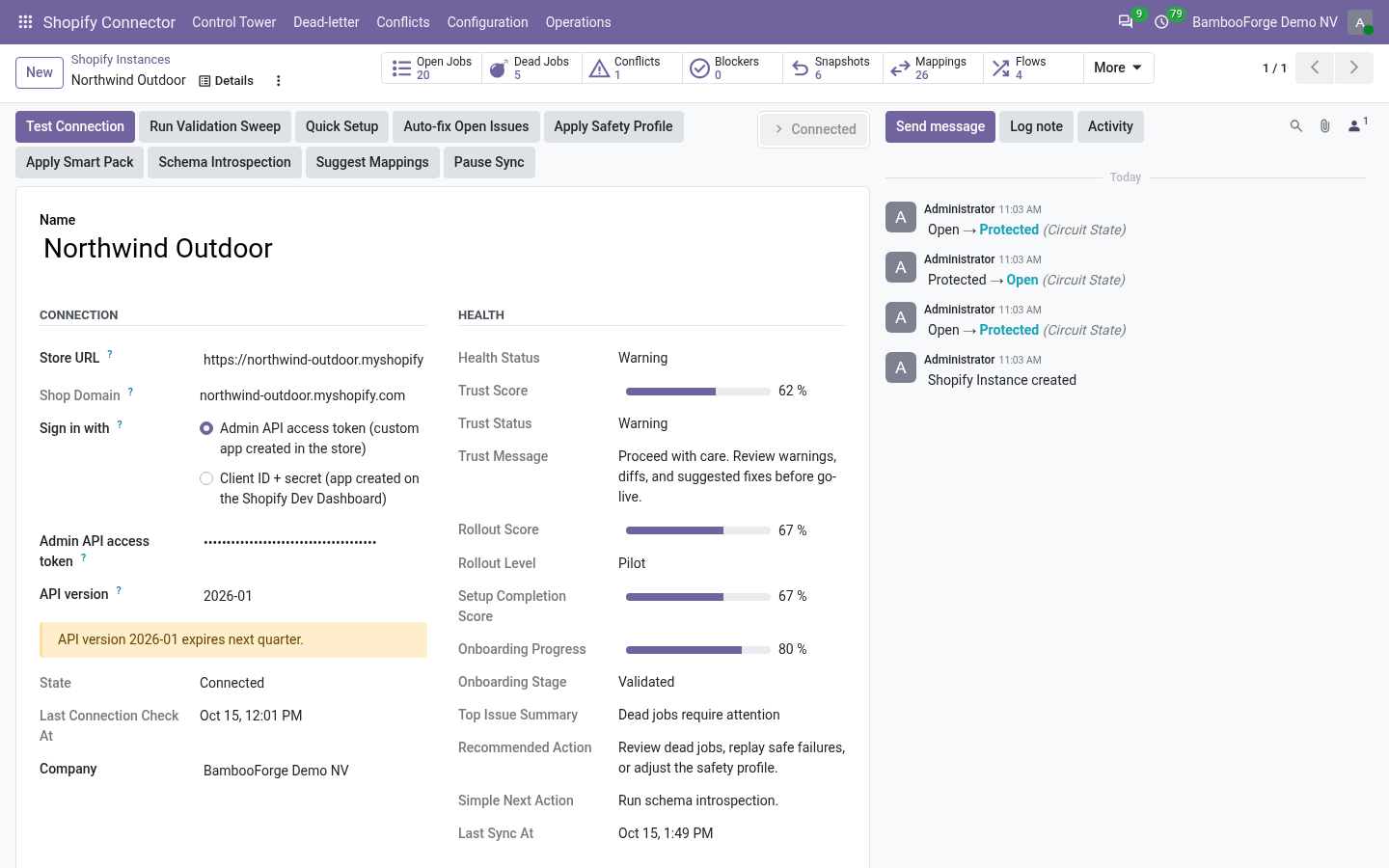
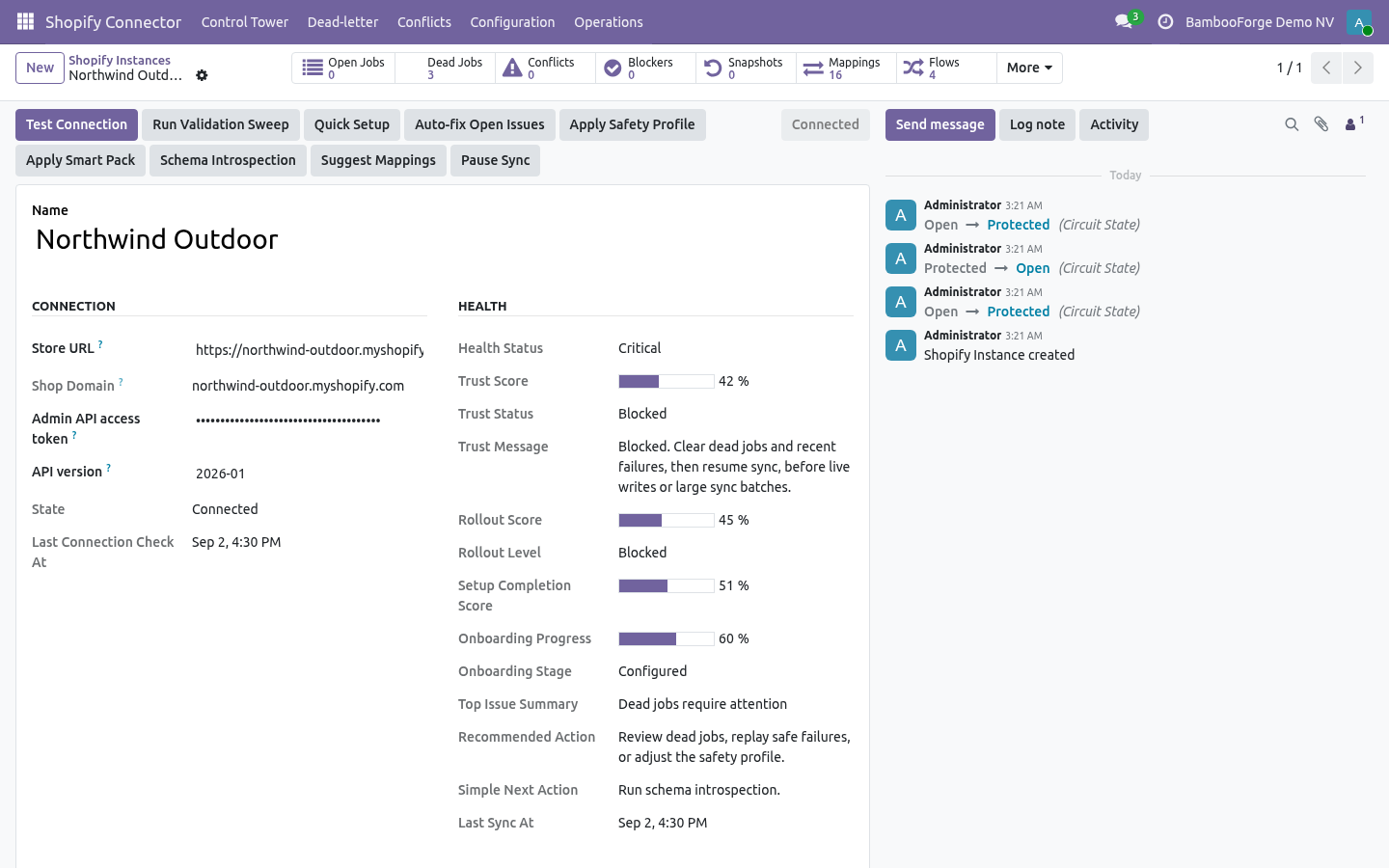
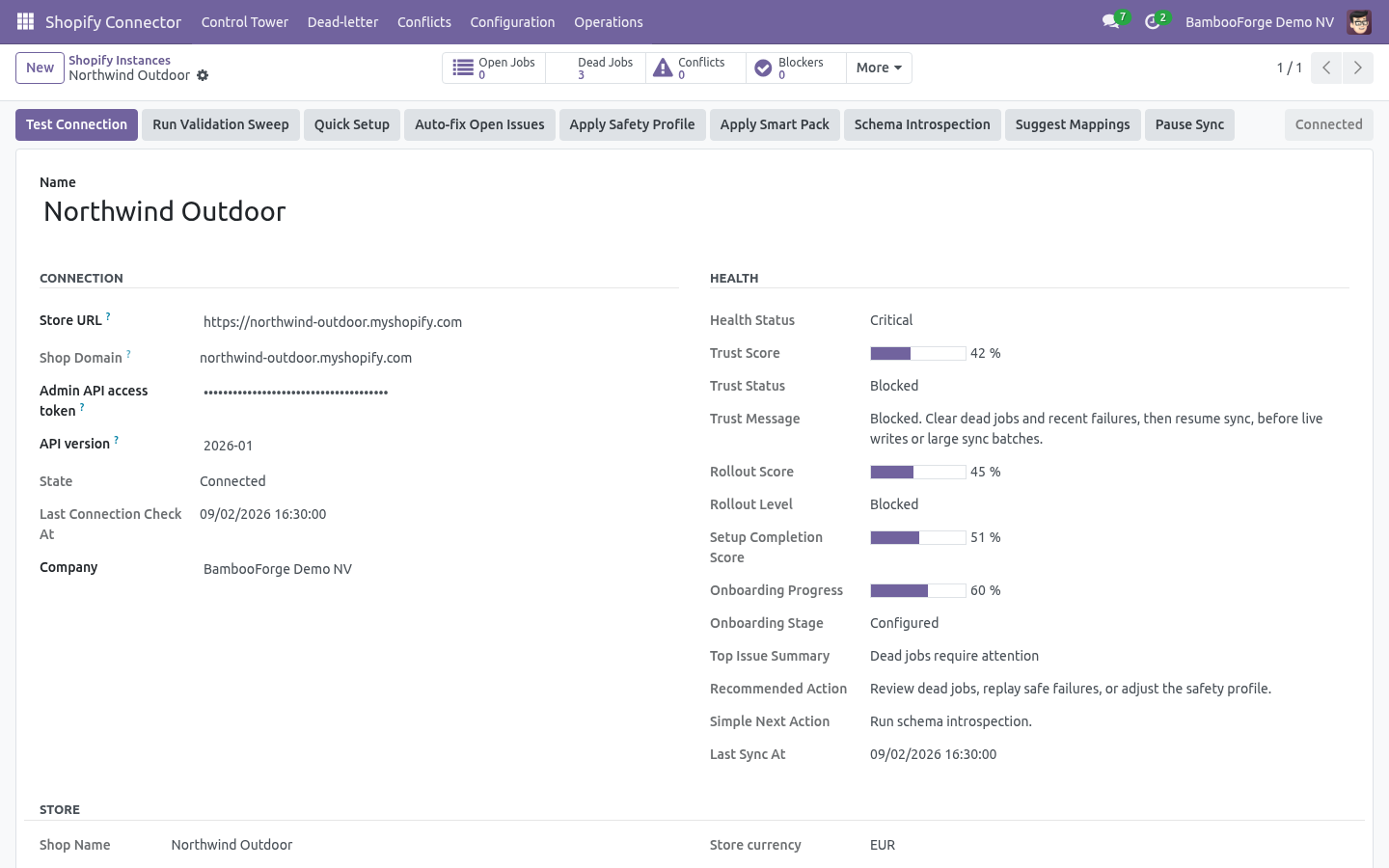
On success the shop card fills in — shop name, plan, currency, presentment currencies, country, time zone, whether prices include tax — the store's locations are listed with a warehouse to map each one to, and the payment gateways seen on recent orders are created with a default workflow. A failure shows the exact GraphQL error on the form and in Logs. Step 3 — First sync (dry-run, then live). New instances start with Dry-run ON.
In dry-run, import and delete jobs simulate writes: instead of changing data they produce Validation Results under Shopify Connector ▸ Operations ▸ Validation Results, so you see what would happen before anything is written. 1. On the instance, click Import Products, Import Customers, Import Orders. Each enqueues jobs; the UI is never blocked.
2. Jobs are processed by the Shopify Queue Processor scheduled action (every minute), or immediately from Operations ▸ Queue Jobs ▸ Run now. 3. Review Validation Results while still in dry-run.
4. Turn Dry-run OFF and run the imports again to write for real. Orders: financial status and gateway workflows. Shopify reports two states on every order — financial status and fulfillment status — and the gateway that took the money.
The connector uses all three. Order State Mappings (Configuration) decide what happens to the sale order for each financial status: Fulfilments, cancellations and refunds. All three are opt-in toggles on the instance and all three go through the queue, so a Shopify outage delays them rather than losing them. Push cancellations — cancelling the sale order cancels the Shopify order, with the reason, whether to refund and whether to restock as configured.
Push refunds — posting a credit note that reverses a Shopify order's invoice creates the refund on Shopify against the original transaction, with the refunded lines and quantities. Refunds made in Shopify come the other way as draft credit notes (Sync refunds), posted automatically if Auto-post refunds is on. Stock, locations and multi-warehouse. Under Configuration ▸ Locations every Shopify location is listed after Test Connection (or Sync locations).
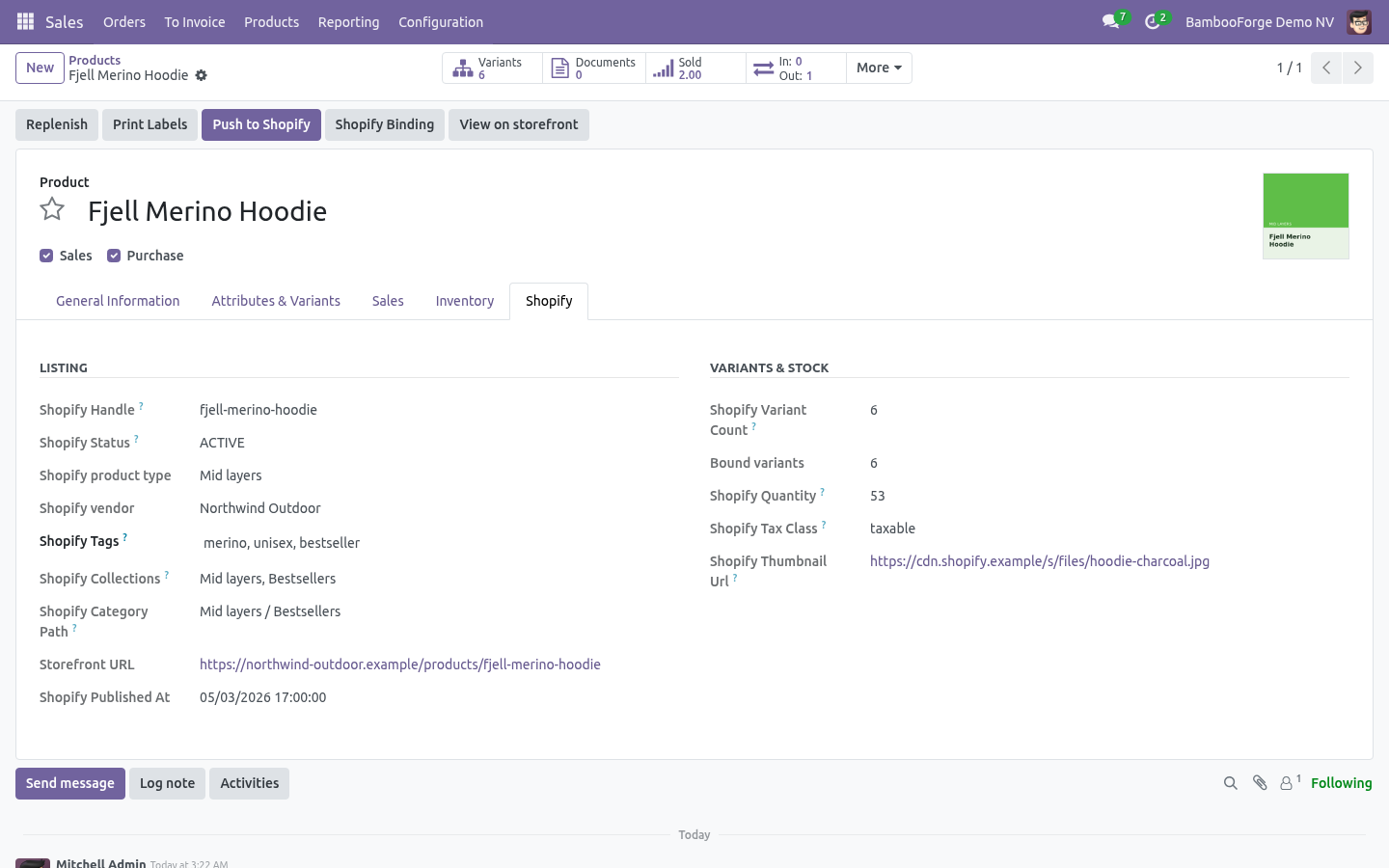
Map each one to an Odoo warehouse and tick Stock sync on the ones that should move stock; the primary location is the default target for anything unmapped. Import (Sync stock): product import reads inventory levels per location and shows them on the product's Shopify tab, per variant and per location. With Adjust Odoo on-hand it also writes an inventory adjustment in the mapped warehouse — off by default because it changes valuation. Payouts and abandoned checkouts Import abandoned checkouts lists checkouts with the customer, cart value, recovery URL and whether Shopify already recovered them; Create CRM leads turns each into a lead for the sales team.
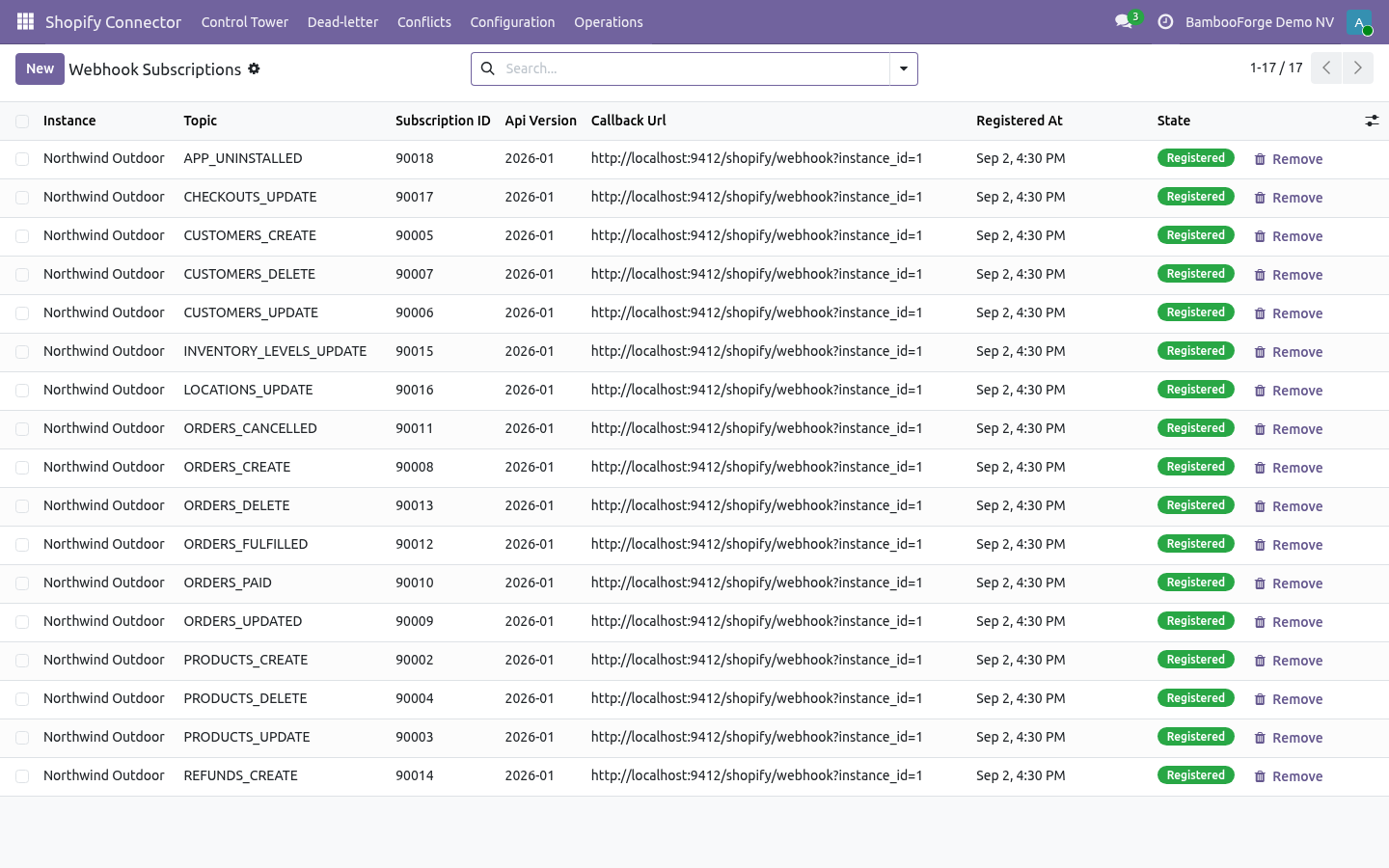
Step 4 — Webhooks (real time). Set Webhook secret on the instance to any long random string, make sure Settings ▸ Technical ▸ System Parameters ▸ web.base.url is your public https:// address, then click Register webhooks. The connector creates one subscription per topic — products, customers, orders (create, update, paid, cancelled, fulfilled, delete), refunds, inventory levels, locations, checkouts and app uninstall — pointing at https://<your-odoo>/shopify/webhook, and lists them under Configuration ▸ Webhook Subscriptions. Registering again is idempotent; Unregister webhooks removes them.
Each delivery is verified with HMAC-SHA256 against the secret, de-duplicated by webhook id, and enqueued as an import job; with Process immediately it is handled on arrival. Without webhooks the Shopify Reconciliation action (every 15 minutes) still pulls recent changes for the models you enable Auto reconcile on. Automation (scheduled actions). Turn on Auto import / Auto reconcile per model on the instance to keep things in sync hands-free.
Field mapping, flows and the mapping studio Schema Fields lists the Shopify fields the connector knows per resource (product, variant, customer, order, line item, refund, payout, checkout). Flows chain steps — import, export, reconcile, stock push — with a schedule, filters and a run history; Flow Templates ship ready-made ones (nightly catalogue pull, hourly order pull, stock push). Every run is a Flow Run with counts, duration and the jobs it created. Now the part most videos leave out: what this does not do.
Customer data is handled inside your Odoo database only. Shopify's mandatory privacy webhooks (data request, redaction) are for public apps on the App Store; a custom app for your own store does not receive them. In scope today: product/variant/customer/order/refund import; product, customer, stock, fulfilment, cancellation and refund export; gateway workflows; payouts; abandoned checkouts; webhooks; flows; control tower. Out of scope / best-effort: Shopify POS-specific records, gift cards, draft orders, B2B companies and catalogues, subscriptions, Shopify Markets price lists per market (presentment currencies are read, not written), and automatic tax rule creation in Odoo (taxes are taken as Shopify computed them).
The complete manual is at docs dot bambooforge dot dev, the demo database is linked from the store page, and support answers within twenty-four hours. Links are in the description.
Transcript of the walkthrough (Odoo 19)
Shopify Connector / Shopify Odoo Integration. Two-way Shopify integration on the GraphQL Admin API: products with variants, customers, orders, multi-location stock, fulfilments, cancellations, refunds, payouts and abandoned checkouts, with signed webhooks and dry-run safety. Running a Shopify store from Odoo usually means re-typing orders, counting stock twice and guessing which payout paid which order. The connector keeps the two in step over the official GraphQL Admin API (Shopify's REST Admin API is legacy and no longer accepts new public apps, so nothing here depends on it), and every write goes through a queue you can watch, retry or dry-run.
In the next few minutes: step 1 — create a custom app in shopify, then step 2 — create the connection in odoo, then step 3 — first sync (dry-run, then live), then orders: financial status and gateway workflows, then fulfilments, cancellations and refunds. Then what this app deliberately does not do, so you can tell before you buy whether it fits. Everything lives under Shopify Connector then Control Tower then Dead-letter then Conflicts. Step 1 — Create a custom app in Shopify.
Webhooks are registered from Odoo in Step 4 — nothing to create by hand. Step 2 — Create the connection in Odoo. Open Shopify Connector ▸ Configuration ▸ Instances and create a record. Click Test Connection.
On success the shop card fills in — shop name, plan, currency, presentment currencies, country, time zone, whether prices include tax — the store's locations are listed with a warehouse to map each one to, and the payment gateways seen on recent orders are created with a default workflow. A failure shows the exact GraphQL error on the form and in Logs. Step 3 — First sync (dry-run, then live). New instances start with Dry-run ON.
In dry-run, import and delete jobs simulate writes: instead of changing data they produce Validation Results under Shopify Connector ▸ Operations ▸ Validation Results, so you see what would happen before anything is written. 1. On the instance, click Import Products, Import Customers, Import Orders. Each enqueues jobs; the UI is never blocked.
2. Jobs are processed by the Shopify Queue Processor scheduled action (every minute), or immediately from Operations ▸ Queue Jobs ▸ Run now. 3. Review Validation Results while still in dry-run.
4. Turn Dry-run OFF and run the imports again to write for real. Orders: financial status and gateway workflows. Shopify reports two states on every order — financial status and fulfillment status — and the gateway that took the money.
The connector uses all three. Order State Mappings (Configuration) decide what happens to the sale order for each financial status: Fulfilments, cancellations and refunds. All three are opt-in toggles on the instance and all three go through the queue, so a Shopify outage delays them rather than losing them. Push cancellations — cancelling the sale order cancels the Shopify order, with the reason, whether to refund and whether to restock as configured.
Push refunds — posting a credit note that reverses a Shopify order's invoice creates the refund on Shopify against the original transaction, with the refunded lines and quantities. Refunds made in Shopify come the other way as draft credit notes (Sync refunds), posted automatically if Auto-post refunds is on. Stock, locations and multi-warehouse. Under Configuration ▸ Locations every Shopify location is listed after Test Connection (or Sync locations).
Map each one to an Odoo warehouse and tick Stock sync on the ones that should move stock; the primary location is the default target for anything unmapped. Import (Sync stock): product import reads inventory levels per location and shows them on the product's Shopify tab, per variant and per location. With Adjust Odoo on-hand it also writes an inventory adjustment in the mapped warehouse — off by default because it changes valuation. Payouts and abandoned checkouts Import abandoned checkouts lists checkouts with the customer, cart value, recovery URL and whether Shopify already recovered them; Create CRM leads turns each into a lead for the sales team.
Step 4 — Webhooks (real time). Set Webhook secret on the instance to any long random string, make sure Settings ▸ Technical ▸ System Parameters ▸ web.base.url is your public https:// address, then click Register webhooks. The connector creates one subscription per topic — products, customers, orders (create, update, paid, cancelled, fulfilled, delete), refunds, inventory levels, locations, checkouts and app uninstall — pointing at https://<your-odoo>/shopify/webhook, and lists them under Configuration ▸ Webhook Subscriptions. Registering again is idempotent; Unregister webhooks removes them.
Each delivery is verified with HMAC-SHA256 against the secret, de-duplicated by webhook id, and enqueued as an import job; with Process immediately it is handled on arrival. Without webhooks the Shopify Reconciliation action (every 15 minutes) still pulls recent changes for the models you enable Auto reconcile on. Automation (scheduled actions). Turn on Auto import / Auto reconcile per model on the instance to keep things in sync hands-free.
Field mapping, flows and the mapping studio Schema Fields lists the Shopify fields the connector knows per resource (product, variant, customer, order, line item, refund, payout, checkout). Flows chain steps — import, export, reconcile, stock push — with a schedule, filters and a run history; Flow Templates ship ready-made ones (nightly catalogue pull, hourly order pull, stock push). Every run is a Flow Run with counts, duration and the jobs it created. Now the part most videos leave out: what this does not do.
Customer data is handled inside your Odoo database only. Shopify's mandatory privacy webhooks (data request, redaction) are for public apps on the App Store; a custom app for your own store does not receive them. In scope today: product/variant/customer/order/refund import; product, customer, stock, fulfilment, cancellation and refund export; gateway workflows; payouts; abandoned checkouts; webhooks; flows; control tower. Out of scope / best-effort: Shopify POS-specific records, gift cards, draft orders, B2B companies and catalogues, subscriptions, Shopify Markets price lists per market (presentment currencies are read, not written), and automatic tax rule creation in Odoo (taxes are taken as Shopify computed them).
The complete manual is at docs dot bambooforge dot dev, the demo database is linked from the store page, and support answers within twenty-four hours. Links are in the description.
Transcript of the walkthrough (Odoo 18)
Shopify Connector / Shopify Odoo Integration. Two-way Shopify integration on the GraphQL Admin API: products with variants, customers, orders, multi-location stock, fulfilments, cancellations, refunds, payouts and abandoned checkouts, with signed webhooks and dry-run safety. Running a Shopify store from Odoo usually means re-typing orders, counting stock twice and guessing which payout paid which order. The connector keeps the two in step over the official GraphQL Admin API (Shopify's REST Admin API is legacy and no longer accepts new public apps, so nothing here depends on it), and every write goes through a queue you can watch, retry or dry-run.
In the next few minutes: step 1 — create a custom app in shopify, then step 2 — create the connection in odoo, then step 3 — first sync (dry-run, then live), then orders: financial status and gateway workflows, then fulfilments, cancellations and refunds. Then what this app deliberately does not do, so you can tell before you buy whether it fits. Everything lives under Shopify Connector then Control Tower then Dead-letter then Conflicts. Step 1 — Create a custom app in Shopify.
Webhooks are registered from Odoo in Step 4 — nothing to create by hand. Step 2 — Create the connection in Odoo. Open Shopify Connector ▸ Configuration ▸ Instances and create a record. Click Test Connection.
On success the shop card fills in — shop name, plan, currency, presentment currencies, country, time zone, whether prices include tax — the store's locations are listed with a warehouse to map each one to, and the payment gateways seen on recent orders are created with a default workflow. A failure shows the exact GraphQL error on the form and in Logs. Step 3 — First sync (dry-run, then live). New instances start with Dry-run ON.
In dry-run, import and delete jobs simulate writes: instead of changing data they produce Validation Results under Shopify Connector ▸ Operations ▸ Validation Results, so you see what would happen before anything is written. 1. On the instance, click Import Products, Import Customers, Import Orders. Each enqueues jobs; the UI is never blocked.
2. Jobs are processed by the Shopify Queue Processor scheduled action (every minute), or immediately from Operations ▸ Queue Jobs ▸ Run now. 3. Review Validation Results while still in dry-run.
4. Turn Dry-run OFF and run the imports again to write for real. Orders: financial status and gateway workflows. Shopify reports two states on every order — financial status and fulfillment status — and the gateway that took the money.
The connector uses all three. Order State Mappings (Configuration) decide what happens to the sale order for each financial status: Fulfilments, cancellations and refunds. All three are opt-in toggles on the instance and all three go through the queue, so a Shopify outage delays them rather than losing them. Push cancellations — cancelling the sale order cancels the Shopify order, with the reason, whether to refund and whether to restock as configured.
Push refunds — posting a credit note that reverses a Shopify order's invoice creates the refund on Shopify against the original transaction, with the refunded lines and quantities. Refunds made in Shopify come the other way as draft credit notes (Sync refunds), posted automatically if Auto-post refunds is on. Stock, locations and multi-warehouse. Under Configuration ▸ Locations every Shopify location is listed after Test Connection (or Sync locations).
Map each one to an Odoo warehouse and tick Stock sync on the ones that should move stock; the primary location is the default target for anything unmapped. Import (Sync stock): product import reads inventory levels per location and shows them on the product's Shopify tab, per variant and per location. With Adjust Odoo on-hand it also writes an inventory adjustment in the mapped warehouse — off by default because it changes valuation. Payouts and abandoned checkouts Import abandoned checkouts lists checkouts with the customer, cart value, recovery URL and whether Shopify already recovered them; Create CRM leads turns each into a lead for the sales team.
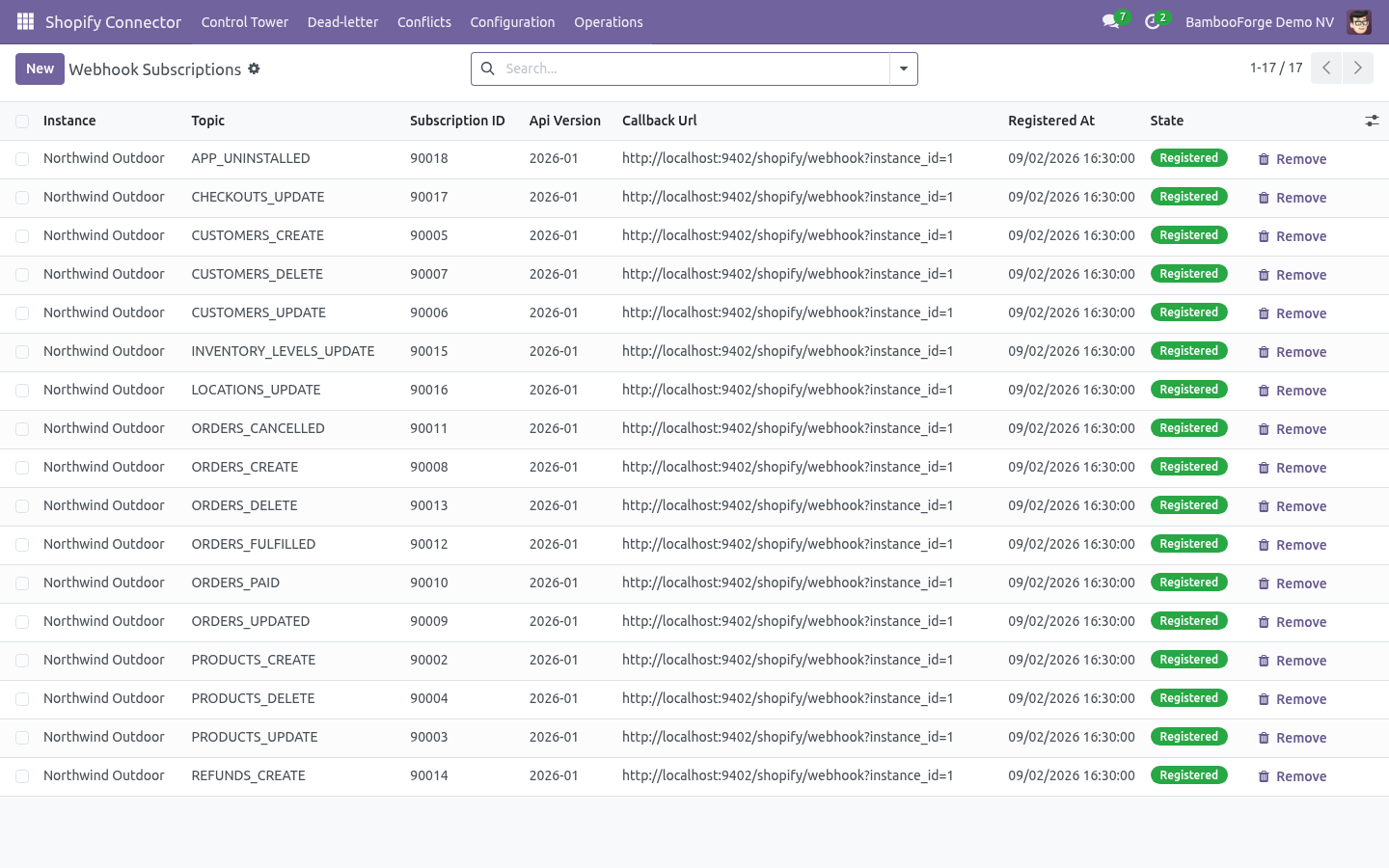
Step 4 — Webhooks (real time). Set Webhook secret on the instance to any long random string, make sure Settings ▸ Technical ▸ System Parameters ▸ web.base.url is your public https:// address, then click Register webhooks. The connector creates one subscription per topic — products, customers, orders (create, update, paid, cancelled, fulfilled, delete), refunds, inventory levels, locations, checkouts and app uninstall — pointing at https://<your-odoo>/shopify/webhook, and lists them under Configuration ▸ Webhook Subscriptions. Registering again is idempotent; Unregister webhooks removes them.
Each delivery is verified with HMAC-SHA256 against the secret, de-duplicated by webhook id, and enqueued as an import job; with Process immediately it is handled on arrival. Without webhooks the Shopify Reconciliation action (every 15 minutes) still pulls recent changes for the models you enable Auto reconcile on. Automation (scheduled actions). Turn on Auto import / Auto reconcile per model on the instance to keep things in sync hands-free.
Field mapping, flows and the mapping studio Schema Fields lists the Shopify fields the connector knows per resource (product, variant, customer, order, line item, refund, payout, checkout). Flows chain steps — import, export, reconcile, stock push — with a schedule, filters and a run history; Flow Templates ship ready-made ones (nightly catalogue pull, hourly order pull, stock push). Every run is a Flow Run with counts, duration and the jobs it created. Now the part most videos leave out: what this does not do.
Customer data is handled inside your Odoo database only. Shopify's mandatory privacy webhooks (data request, redaction) are for public apps on the App Store; a custom app for your own store does not receive them. In scope today: product/variant/customer/order/refund import; product, customer, stock, fulfilment, cancellation and refund export; gateway workflows; payouts; abandoned checkouts; webhooks; flows; control tower. Out of scope / best-effort: Shopify POS-specific records, gift cards, draft orders, B2B companies and catalogues, subscriptions, Shopify Markets price lists per market (presentment currencies are read, not written), and automatic tax rule creation in Odoo (taxes are taken as Shopify computed them).
The complete manual is at docs dot bambooforge dot dev, the demo database is linked from the store page, and support answers within twenty-four hours. Links are in the description.
Transcript of the walkthrough (Odoo 17)
Shopify Connector / Shopify Odoo Integration. Two-way Shopify integration on the GraphQL Admin API: products with variants, customers, orders, multi-location stock, fulfilments, cancellations, refunds, payouts and abandoned checkouts, with signed webhooks and dry-run safety. Running a Shopify store from Odoo usually means re-typing orders, counting stock twice and guessing which payout paid which order. The connector keeps the two in step over the official GraphQL Admin API (Shopify's REST Admin API is legacy and no longer accepts new public apps, so nothing here depends on it), and every write goes through a queue you can watch, retry or dry-run.
In the next few minutes: step 1 — create a custom app in shopify, then step 2 — create the connection in odoo, then step 3 — first sync (dry-run, then live), then orders: financial status and gateway workflows, then fulfilments, cancellations and refunds. Then what this app deliberately does not do, so you can tell before you buy whether it fits. Everything lives under Shopify Connector then Control Tower then Dead-letter then Conflicts. Step 1 — Create a custom app in Shopify.
Webhooks are registered from Odoo in Step 4 — nothing to create by hand. Step 2 — Create the connection in Odoo. Open Shopify Connector ▸ Configuration ▸ Instances and create a record. Click Test Connection.
On success the shop card fills in — shop name, plan, currency, presentment currencies, country, time zone, whether prices include tax — the store's locations are listed with a warehouse to map each one to, and the payment gateways seen on recent orders are created with a default workflow. A failure shows the exact GraphQL error on the form and in Logs. Step 3 — First sync (dry-run, then live). New instances start with Dry-run ON.
In dry-run, import and delete jobs simulate writes: instead of changing data they produce Validation Results under Shopify Connector ▸ Operations ▸ Validation Results, so you see what would happen before anything is written. 1. On the instance, click Import Products, Import Customers, Import Orders. Each enqueues jobs; the UI is never blocked.
2. Jobs are processed by the Shopify Queue Processor scheduled action (every minute), or immediately from Operations ▸ Queue Jobs ▸ Run now. 3. Review Validation Results while still in dry-run.
4. Turn Dry-run OFF and run the imports again to write for real. Orders: financial status and gateway workflows. Shopify reports two states on every order — financial status and fulfillment status — and the gateway that took the money.
The connector uses all three. Order State Mappings (Configuration) decide what happens to the sale order for each financial status: Fulfilments, cancellations and refunds. All three are opt-in toggles on the instance and all three go through the queue, so a Shopify outage delays them rather than losing them. Push cancellations — cancelling the sale order cancels the Shopify order, with the reason, whether to refund and whether to restock as configured.
Push refunds — posting a credit note that reverses a Shopify order's invoice creates the refund on Shopify against the original transaction, with the refunded lines and quantities. Refunds made in Shopify come the other way as draft credit notes (Sync refunds), posted automatically if Auto-post refunds is on. Stock, locations and multi-warehouse. Under Configuration ▸ Locations every Shopify location is listed after Test Connection (or Sync locations).
Map each one to an Odoo warehouse and tick Stock sync on the ones that should move stock; the primary location is the default target for anything unmapped. Import (Sync stock): product import reads inventory levels per location and shows them on the product's Shopify tab, per variant and per location. With Adjust Odoo on-hand it also writes an inventory adjustment in the mapped warehouse — off by default because it changes valuation. Payouts and abandoned checkouts Import abandoned checkouts lists checkouts with the customer, cart value, recovery URL and whether Shopify already recovered them; Create CRM leads turns each into a lead for the sales team.
Step 4 — Webhooks (real time). Set Webhook secret on the instance to any long random string, make sure Settings ▸ Technical ▸ System Parameters ▸ web.base.url is your public https:// address, then click Register webhooks. The connector creates one subscription per topic — products, customers, orders (create, update, paid, cancelled, fulfilled, delete), refunds, inventory levels, locations, checkouts and app uninstall — pointing at https://<your-odoo>/shopify/webhook, and lists them under Configuration ▸ Webhook Subscriptions. Registering again is idempotent; Unregister webhooks removes them.
Each delivery is verified with HMAC-SHA256 against the secret, de-duplicated by webhook id, and enqueued as an import job; with Process immediately it is handled on arrival. Without webhooks the Shopify Reconciliation action (every 15 minutes) still pulls recent changes for the models you enable Auto reconcile on. Automation (scheduled actions). Turn on Auto import / Auto reconcile per model on the instance to keep things in sync hands-free.
Field mapping, flows and the mapping studio Schema Fields lists the Shopify fields the connector knows per resource (product, variant, customer, order, line item, refund, payout, checkout). Flows chain steps — import, export, reconcile, stock push — with a schedule, filters and a run history; Flow Templates ship ready-made ones (nightly catalogue pull, hourly order pull, stock push). Every run is a Flow Run with counts, duration and the jobs it created. Now the part most videos leave out: what this does not do.
Customer data is handled inside your Odoo database only. Shopify's mandatory privacy webhooks (data request, redaction) are for public apps on the App Store; a custom app for your own store does not receive them. In scope today: product/variant/customer/order/refund import; product, customer, stock, fulfilment, cancellation and refund export; gateway workflows; payouts; abandoned checkouts; webhooks; flows; control tower. Out of scope / best-effort: Shopify POS-specific records, gift cards, draft orders, B2B companies and catalogues, subscriptions, Shopify Markets price lists per market (presentment currencies are read, not written), and automatic tax rule creation in Odoo (taxes are taken as Shopify computed them).
The complete manual is at docs dot bambooforge dot dev, the demo database is linked from the store page, and support answers within twenty-four hours. Links are in the description.
Transcript of the walkthrough (Odoo 16)
Shopify Connector / Shopify Odoo Integration. Two-way Shopify integration on the GraphQL Admin API: products with variants, customers, orders, multi-location stock, fulfilments, cancellations, refunds, payouts and abandoned checkouts, with signed webhooks and dry-run safety. Running a Shopify store from Odoo usually means re-typing orders, counting stock twice and guessing which payout paid which order. The connector keeps the two in step over the official GraphQL Admin API (Shopify's REST Admin API is legacy and no longer accepts new public apps, so nothing here depends on it), and every write goes through a queue you can watch, retry or dry-run.
In the next few minutes: step 1 — create a custom app in shopify, then step 2 — create the connection in odoo, then step 3 — first sync (dry-run, then live), then orders: financial status and gateway workflows, then fulfilments, cancellations and refunds. Then what this app deliberately does not do, so you can tell before you buy whether it fits. Everything lives under Shopify Connector then Control Tower then Dead-letter then Conflicts. Step 1 — Create a custom app in Shopify.
Webhooks are registered from Odoo in Step 4 — nothing to create by hand. Step 2 — Create the connection in Odoo. Open Shopify Connector ▸ Configuration ▸ Instances and create a record. Click Test Connection.
On success the shop card fills in — shop name, plan, currency, presentment currencies, country, time zone, whether prices include tax — the store's locations are listed with a warehouse to map each one to, and the payment gateways seen on recent orders are created with a default workflow. A failure shows the exact GraphQL error on the form and in Logs. Step 3 — First sync (dry-run, then live). New instances start with Dry-run ON.
In dry-run, import and delete jobs simulate writes: instead of changing data they produce Validation Results under Shopify Connector ▸ Operations ▸ Validation Results, so you see what would happen before anything is written. 1. On the instance, click Import Products, Import Customers, Import Orders. Each enqueues jobs; the UI is never blocked.
2. Jobs are processed by the Shopify Queue Processor scheduled action (every minute), or immediately from Operations ▸ Queue Jobs ▸ Run now. 3. Review Validation Results while still in dry-run.
4. Turn Dry-run OFF and run the imports again to write for real. Orders: financial status and gateway workflows. Shopify reports two states on every order — financial status and fulfillment status — and the gateway that took the money.
The connector uses all three. Order State Mappings (Configuration) decide what happens to the sale order for each financial status: Fulfilments, cancellations and refunds. All three are opt-in toggles on the instance and all three go through the queue, so a Shopify outage delays them rather than losing them. Push cancellations — cancelling the sale order cancels the Shopify order, with the reason, whether to refund and whether to restock as configured.
Push refunds — posting a credit note that reverses a Shopify order's invoice creates the refund on Shopify against the original transaction, with the refunded lines and quantities. Refunds made in Shopify come the other way as draft credit notes (Sync refunds), posted automatically if Auto-post refunds is on. Stock, locations and multi-warehouse. Under Configuration ▸ Locations every Shopify location is listed after Test Connection (or Sync locations).
Map each one to an Odoo warehouse and tick Stock sync on the ones that should move stock; the primary location is the default target for anything unmapped. Import (Sync stock): product import reads inventory levels per location and shows them on the product's Shopify tab, per variant and per location. With Adjust Odoo on-hand it also writes an inventory adjustment in the mapped warehouse — off by default because it changes valuation. Payouts and abandoned checkouts Import abandoned checkouts lists checkouts with the customer, cart value, recovery URL and whether Shopify already recovered them; Create CRM leads turns each into a lead for the sales team.
Step 4 — Webhooks (real time). Set Webhook secret on the instance to any long random string, make sure Settings ▸ Technical ▸ System Parameters ▸ web.base.url is your public https:// address, then click Register webhooks. The connector creates one subscription per topic — products, customers, orders (create, update, paid, cancelled, fulfilled, delete), refunds, inventory levels, locations, checkouts and app uninstall — pointing at https://<your-odoo>/shopify/webhook, and lists them under Configuration ▸ Webhook Subscriptions. Registering again is idempotent; Unregister webhooks removes them.
Each delivery is verified with HMAC-SHA256 against the secret, de-duplicated by webhook id, and enqueued as an import job; with Process immediately it is handled on arrival. Without webhooks the Shopify Reconciliation action (every 15 minutes) still pulls recent changes for the models you enable Auto reconcile on. Automation (scheduled actions). Turn on Auto import / Auto reconcile per model on the instance to keep things in sync hands-free.
Field mapping, flows and the mapping studio Schema Fields lists the Shopify fields the connector knows per resource (product, variant, customer, order, line item, refund, payout, checkout). Flows chain steps — import, export, reconcile, stock push — with a schedule, filters and a run history; Flow Templates ship ready-made ones (nightly catalogue pull, hourly order pull, stock push). Every run is a Flow Run with counts, duration and the jobs it created. Now the part most videos leave out: what this does not do.
Customer data is handled inside your Odoo database only. Shopify's mandatory privacy webhooks (data request, redaction) are for public apps on the App Store; a custom app for your own store does not receive them. In scope today: product/variant/customer/order/refund import; product, customer, stock, fulfilment, cancellation and refund export; gateway workflows; payouts; abandoned checkouts; webhooks; flows; control tower. Out of scope / best-effort: Shopify POS-specific records, gift cards, draft orders, B2B companies and catalogues, subscriptions, Shopify Markets price lists per market (presentment currencies are read, not written), and automatic tax rule creation in Odoo (taxes are taken as Shopify computed them).
The complete manual is at docs dot bambooforge dot dev, the demo database is linked from the store page, and support answers within twenty-four hours. Links are in the description.
Key facts
- What it is
- Two-way Shopify integration on the GraphQL Admin API: products with variants, customers, orders, multi-location stock, fulfilments, cancellations, refunds, payouts and abandoned checkouts, with signed webhooks and dry-run safety.
- For
- eCommerce
- Odoo versions
- 16.0, 17.0, 18.0, 19.0, 20.0 - Community and Enterprise
- Runs on
- Odoo.sh or Odoo you host yourself - not Odoo Online, which accepts no third-party apps
- Price
- 199 EUR, one-time, on the Odoo Apps Store
- Technical name
- bambooforge_shopify_connector
- Run for real
- Tested for real against two Shopify development stores - on the Basic plan, signed in with a custom-app token and again with client credentials, the shop card, two locations and seven payment gateways came back, 17 products were listed and imported, one product was exported and 17 webhook topics registered and removed, while Shopify's withholding of customer details on that plan was detected on Test Connection and reported on the customer jobs without stopping the store; on Shopify Plus, signed in as a Dev Dashboard app with client credentials, the 24-hour token was fetched and its expiry recorded, 17 products and 3 customers with email, phone and address came through, one product was exported, 17 webhook topics were registered and removed, and the connection also answered on API versions 2025-10, 2026-04 and 2026-07 - 0 jobs lost; the 17 webhook topics were also registered against a public Odoo, and a product tagged in Shopify reached it as a signed products/update webhook, verified and handled within two seconds.
- Not for
- The connector reads products, customers, orders, refunds, inventory levels, payouts and checkouts from your store and writes the corresponding Odoo records; it writes products, customers, inventory levels, fulfilments, cancellations and refunds to the store, each only when its toggle is on. Credentials are stored in admin-only fields.; Customer data is handled inside your Odoo database only. Shopify's mandatory privacy webhooks (data request, redaction) are for public apps on the App Store; a custom app for your own store does not receive them.; In scope today: product/variant/customer/order/refund import; product, customer, stock, fulfilment, cancellation and refund export; gateway workflows; payouts; abandoned checkouts; webhooks; flows; control tower.; Out of scope / best-effort: Shopify POS-specific records, gift cards, draft orders, B2B companies and catalogues, subscriptions, Shopify Markets price lists per market (presentment currencies are read, not written), and automatic tax rule creation in Odoo (taxes are taken as Shopify computed them).
- Compared with the alternatives
- https://docs.bambooforge.dev/bambooforge_shopify_connector/compare/
- Manual last updated
- 2026-10-15
Shopify Connector | Shopify Odoo Integration
A two-way bridge between Odoo 20 and your Shopify store over the GraphQL Admin API: products with all their variants, customers, orders in every payment state, refunds, fulfilments, cancellations, stock per location, payouts and abandoned checkouts — behind a resilient job queue with dry-run, validation, rollback and a live control tower, so nothing reaches your books unseen.
This page is the complete manual. Follow it top to bottom and you can install, connect, run your first sync, automate it and fix the common issues without contacting support.
Overview
Running a Shopify store from Odoo usually means re-typing orders, counting stock twice and guessing which payout paid which order. The connector keeps the two in step over the official GraphQL Admin API (Shopify's REST Admin API is legacy and no longer accepts new public apps, so nothing here depends on it), and every write goes through a queue you can watch, retry or dry-run.
It covers:
Products — import Shopify products into Odoo product templates, every variant bound to its own Odoo variant with SKU, barcode, price, compare-at price, inventory item and per-location quantity; collections become product categories, tags stay tags, metafields land as JSON for mapping rules. Export Odoo products and variants back with productSet, as Draft until you publish them or straight to Active.
Customers — import Shopify customers with their default and extra addresses, marketing consent and tags; push Odoo contacts back.
Orders — import orders as sale orders keyed on the Shopify order name (#1001), with the storefront's shipping, discounts and taxes rebuilt so the Odoo total equals what the customer paid; each financial status maps to a sale-order action, and each payment gateway can carry its own confirm / invoice / register-payment workflow.
Fulfilments, cancellations, refunds — validating a delivery in Odoo creates the Shopify fulfilment with tracking; cancelling the sale order cancels the Shopify order; a posted credit note becomes a Shopify refund. Refunds made in Shopify come back as credit notes.
Stock — two-way: Shopify inventory levels by location are read into Odoo, and Odoo on-hand (minus a safety buffer, never negative) is pushed to the mapped Shopify location.
Payouts and abandoned checkouts — Shopify Payments payouts arrive with their fee lines for reconciliation; abandoned checkouts arrive with the recovery link, optionally as CRM leads.
Direction of sync: Odoo ↔ Shopify. Every remote call is a queue job: nothing is written until the job runs, transient failures retry with back-off, a throttled API is waited out using Shopify's own cost headers, and a circuit breaker pauses an instance that keeps failing.
Requirements
Odoo: 20.0, Community or Enterprise.
Shopify: any plan that allows a custom app (Basic upwards, including development stores). The connector speaks GraphQL Admin API version 2026-01 by default; the version is a field on the instance.
Python: no libraries beyond a standard Odoo 20 install.
Odoo access: any internal user can use the connector screens. The Admin API access token and webhook secret are stored in system-only fields, so only a Settings / Administration user can read or change them.
Network: outbound HTTPS from Odoo to *.myshopify.com. For webhooks, inbound HTTPS from Shopify to your Odoo domain (a public URL; plain http callbacks are refused by Shopify and by the connector).
Installation
Copy bambooforge_shopify_connector into your Odoo addons path.
Restart the Odoo service.
Open Apps, click Update Apps List, search for Shopify and press Activate / Install. Dependencies (Sales, Inventory, Contacts, Invoicing) install automatically.
No Shopify store is required to evaluate the connector: a mock Shopify Admin API ships inside the module, with a multi-location, multi-currency sample store (three locations, multi-variant products, orders in every financial status, payouts, abandoned checkouts). You can install, explore and run the full flow against it before pointing the connector at a real shop.
Step 1 — Create a custom app in Shopify
Two ways to sign in, depending on when the store was created:
A. A custom app created in the store (stores from before 2026, or stores a partner created for you)
Go to Settings ▸ Apps and sales channels ▸ Develop apps and click Create an app (allow custom app development first if the store has never done it).
Name it Odoo and open Configuration ▸ Admin API integration.
Grant these scopes: read_products, write_products, read_inventory, write_inventory, read_locations, read_customers, write_customers, read_orders, write_orders, read_fulfillments, write_fulfillments, read_merchant_managed_fulfillment_orders, write_merchant_managed_fulfillment_orders and read_shopify_payments_payouts. Abandoned checkouts come with read_orders; leave out anything you do not intend to use - the connector only calls what its toggles enable.
Click Install app and reveal the Admin API access token (shpat_…). Shopify shows it once; copy it now. In Odoo, Sign in with stays Admin API access token.
B. An app created on the Shopify Dev Dashboard (the way Shopify asks for since January 2026)
Since 1 January 2026 a merchant cannot create a custom app in the store any more; apps are created on the Dev Dashboard of a partner organization and installed on the store.
On the Dev Dashboard, Apps ▸ Create app ▸ Start from Dev Dashboard, name it Odoo.
In the version, API access ▸ Select scopes: the same scopes as above. Release the version.
Distribution: custom distribution, install it on your store.
App settings ▸ Client credentials: copy the Client ID and the Client secret into the instance in Odoo, with Sign in with set to Client ID + secret. Odoo fetches a 24-hour access token itself with Shopify's client-credentials grant and renews it before it expires; the form shows Access token valid until.
Customer details: on the Partner Dashboard, Apps ▸ your app ▸ API access requests ▸ Protected customer data access, select a reason (Store management) for protected customer data and for each of the fields Name, Email, Phone and Address, and save each. A development store grants it at once; a live store on the Shopify, Advanced or Plus plan grants it after Shopify's review, the Basic plan not at all. Until then customers are withheld (see What each Shopify plan lets an app see below) and Test Connection says so.
Both ways end in the same place: an Admin API token the connector sends with every GraphQL call.
What each Shopify plan lets an app see
Plan |
What the connector syncs |
|---|---|
Basic |
Products, variants, stock, locations, orders, fulfilments, refunds, payouts. Shopify withholds customer name, email, phone and addresses from apps on this plan: orders arrive on a Shopify customer #id contact, customers are not imported. Test Connection says so on the instance (Protected customer data). |
Shopify (Grow), Advanced, Plus |
Everything above plus customers with their addresses and the contact details on orders - once the app has protected customer data access (granted automatically to custom apps created in the store; for apps created on the Dev Dashboard, selected under API access requests on the Partner Dashboard, see step B.5). |
Development store |
Behaves like the plan it was created with; a Basic development store withholds customer details exactly like a paid Basic store. |
Webhooks are registered from Odoo in Step 4 — nothing to create by hand.
Step 2 — Create the connection in Odoo
Open Shopify Connector ▸ Configuration ▸ Instances and create a record.
Key fields:
Field |
What to enter |
|---|---|
Name |
A label for this store, e.g. Northwind Outdoor. |
Store URL |
The https://<shop>.myshopify.com address. A custom storefront domain also works; the connector resolves the myshopify.com host from it. |
Admin API access token |
The shpat_… token from Step 1 (administrators only). |
API version |
Leave 2026-01 unless Shopify has retired it; the form warns when the version is older than a year. |
Verify SSL |
Keep on. |
Allow internal host |
Off. Only for a self-hosted mock on localhost or a private network (lowers the SSRF guard — see Safety features). |
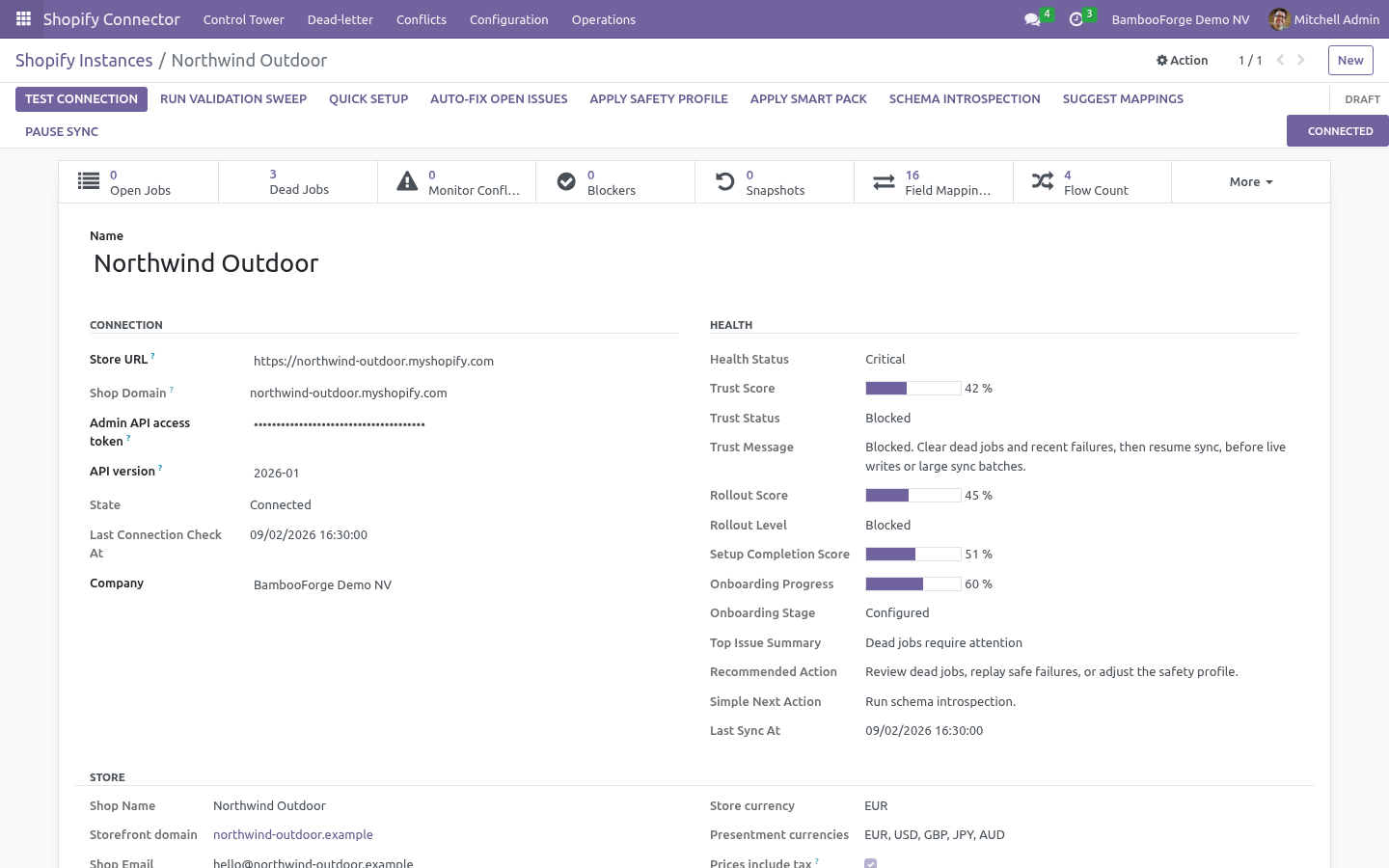
Click Test Connection. On success the shop card fills in — shop name, plan, currency, presentment currencies, country, time zone, whether prices include tax — the store's locations are listed with a warehouse to map each one to, and the payment gateways seen on recent orders are created with a default workflow. A failure shows the exact GraphQL error on the form and in Logs.
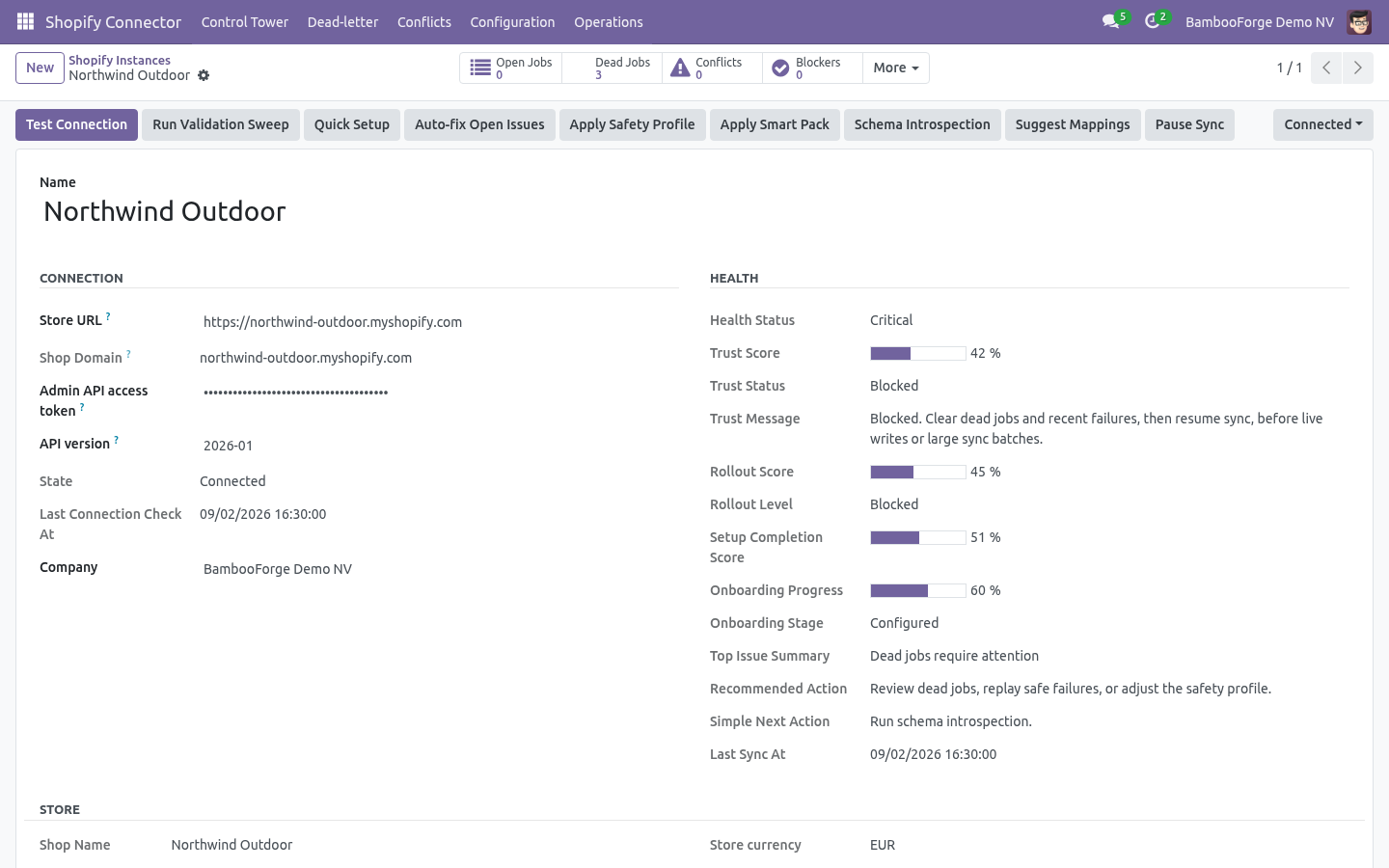
Tip: Quick Setup (button on the instance) picks a use case — catalogue only, B2C full sync, B2B order-first — seeds field mappings and order-state rules and applies a schedule in one step. The Onboarding Checklist under Configuration then tells you what is still missing before going live; each open item has a Fix This button that opens the screen that clears it.
Step 3 — First sync (dry-run, then live)
New instances start with Dry-run ON. In dry-run, import and delete jobs simulate writes: instead of changing data they produce Validation Results under Shopify Connector ▸ Operations ▸ Validation Results, so you see what would happen before anything is written.
On the instance, click Import Products, Import Customers, Import Orders. Each enqueues jobs; the UI is never blocked.
Jobs are processed by the Shopify Queue Processor scheduled action (every minute), or immediately from Operations ▸ Queue Jobs ▸ Run now.
Review Validation Results while still in dry-run.
Turn Dry-run OFF and run the imports again to write for real.
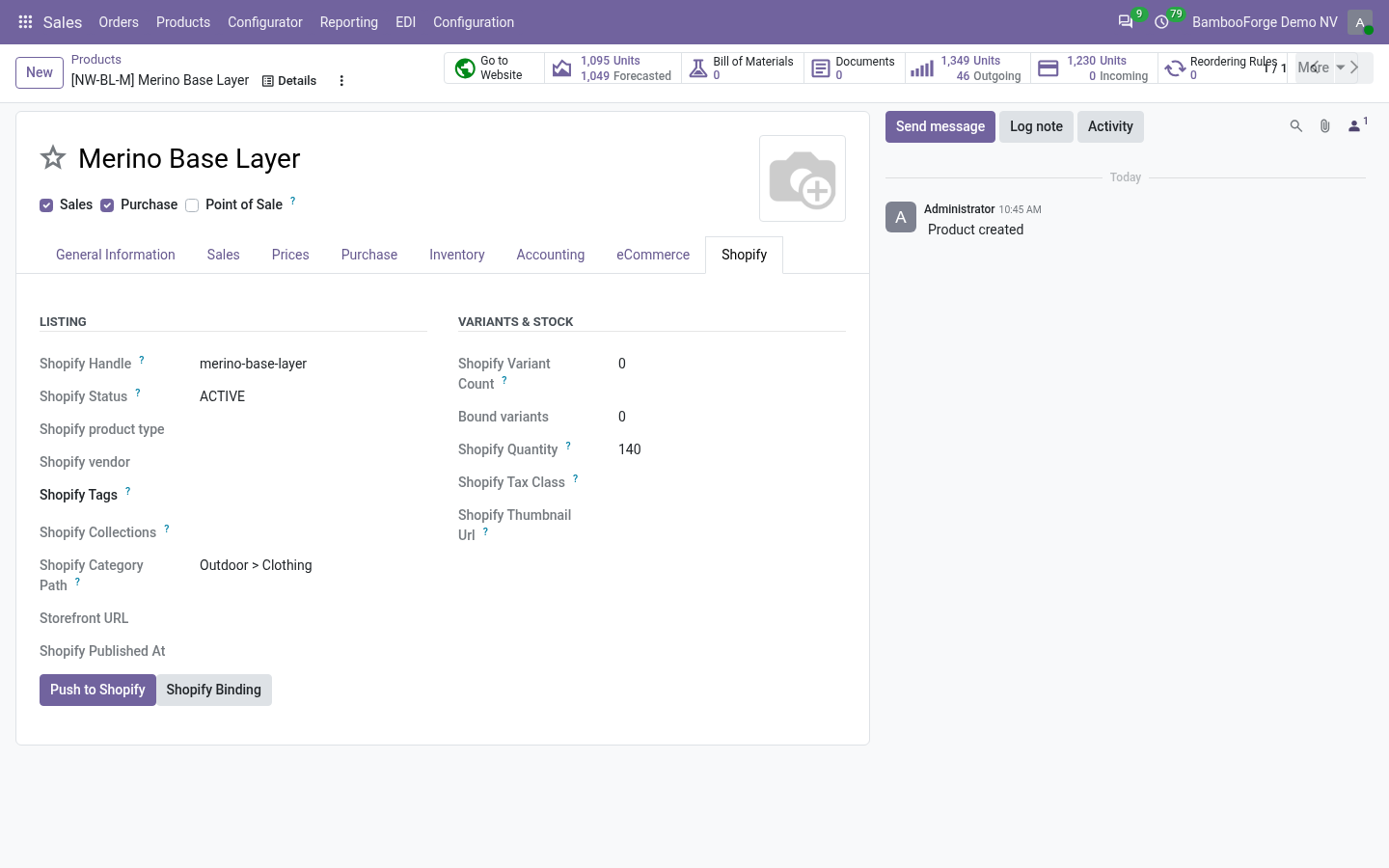
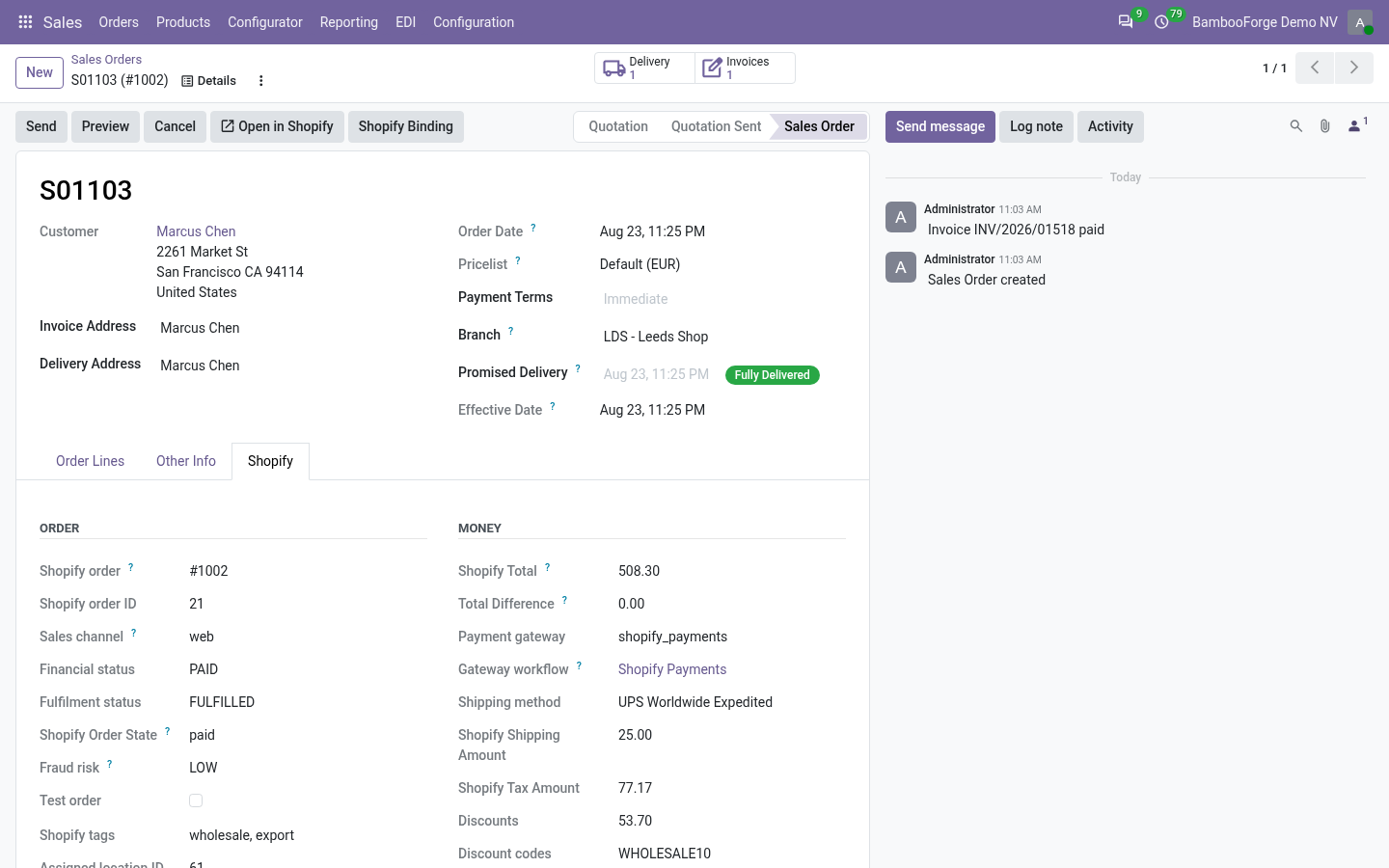
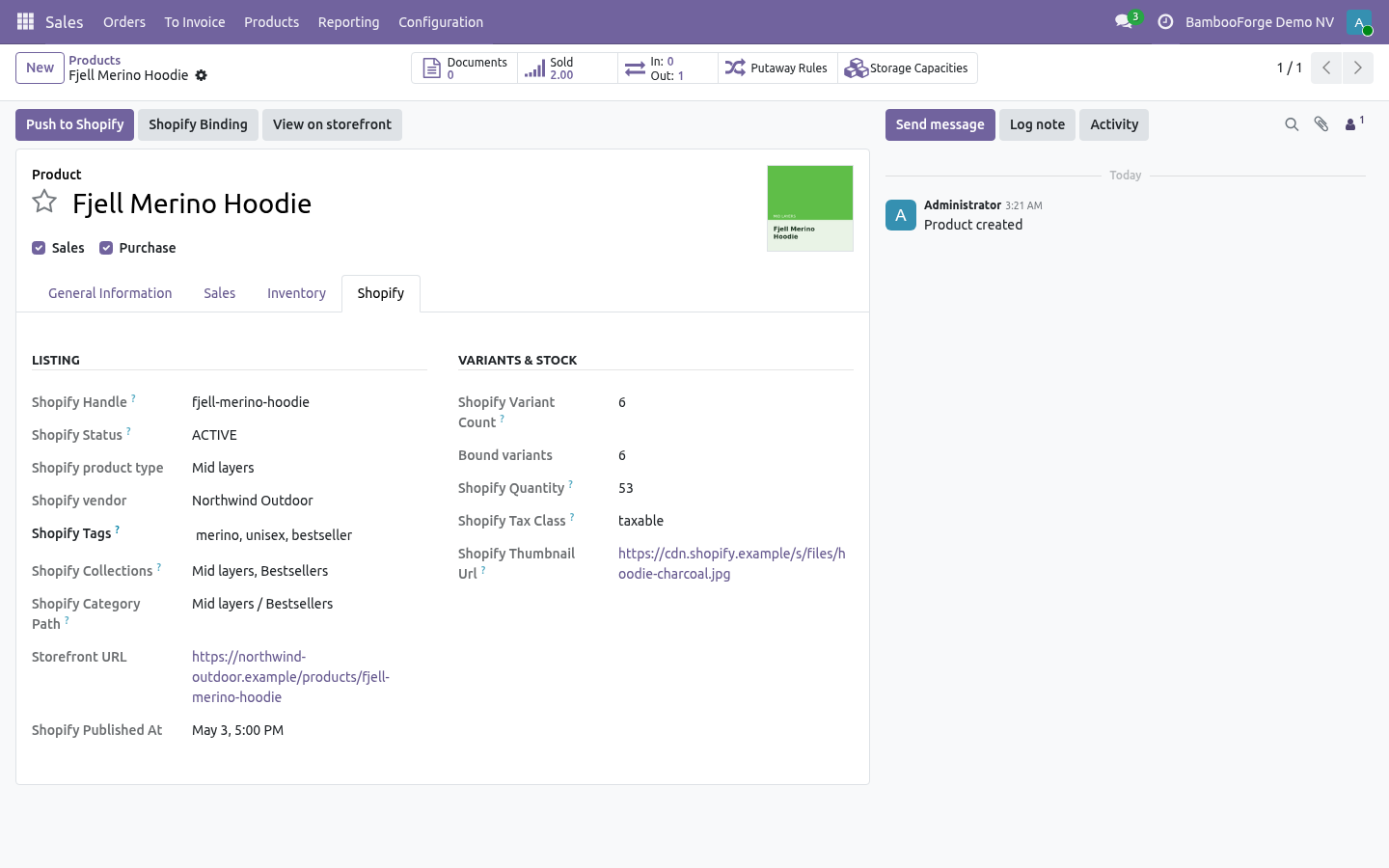
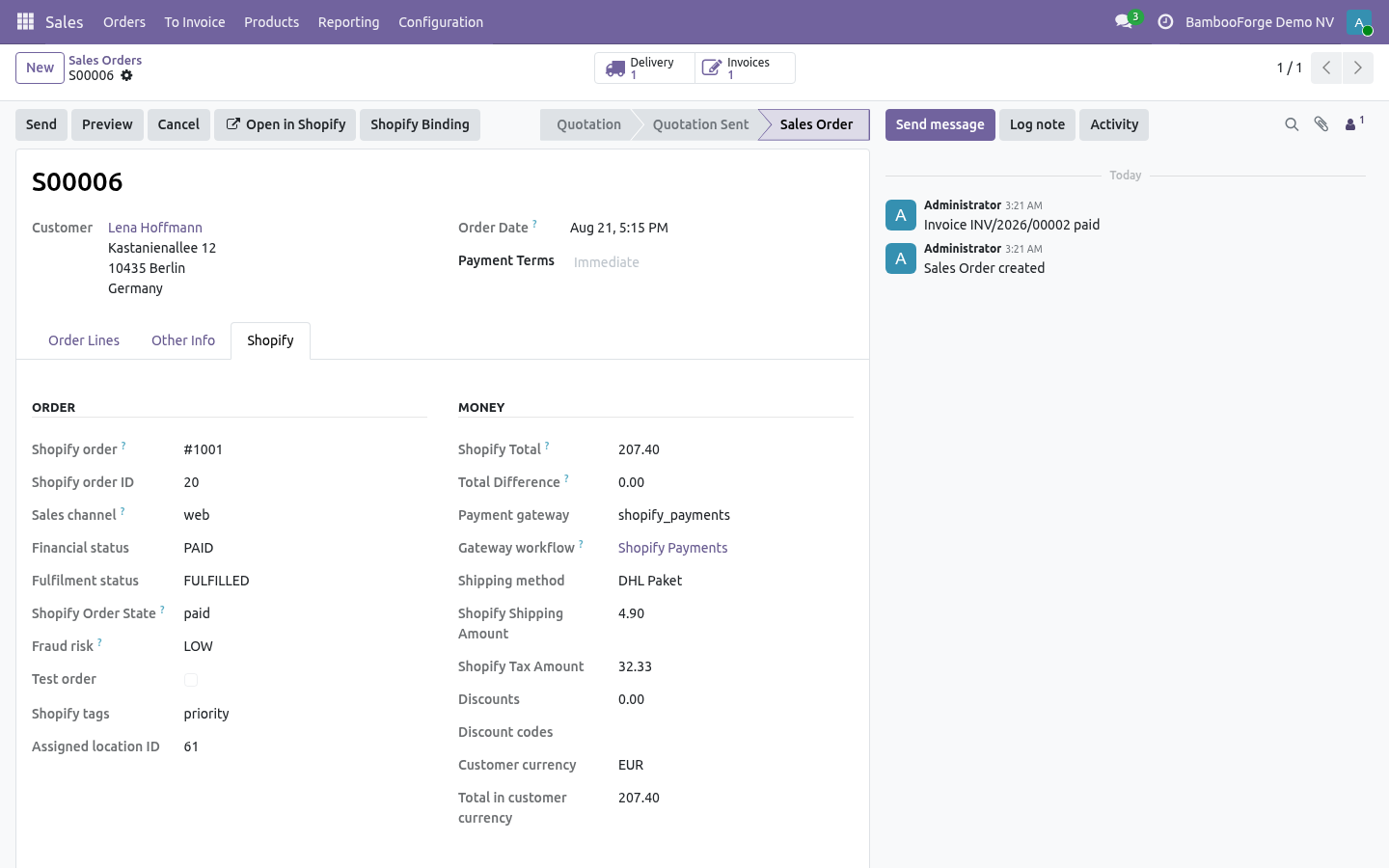
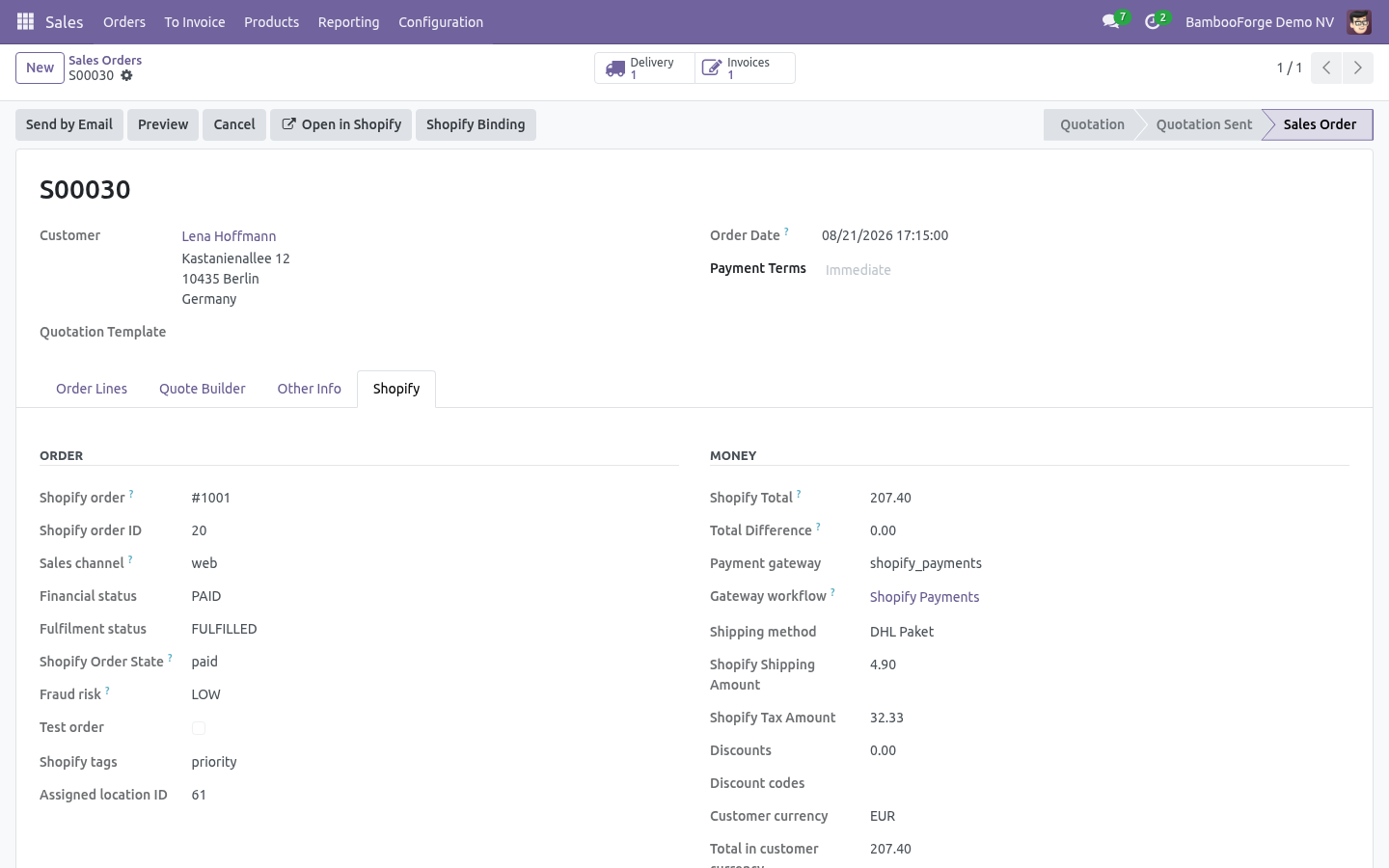
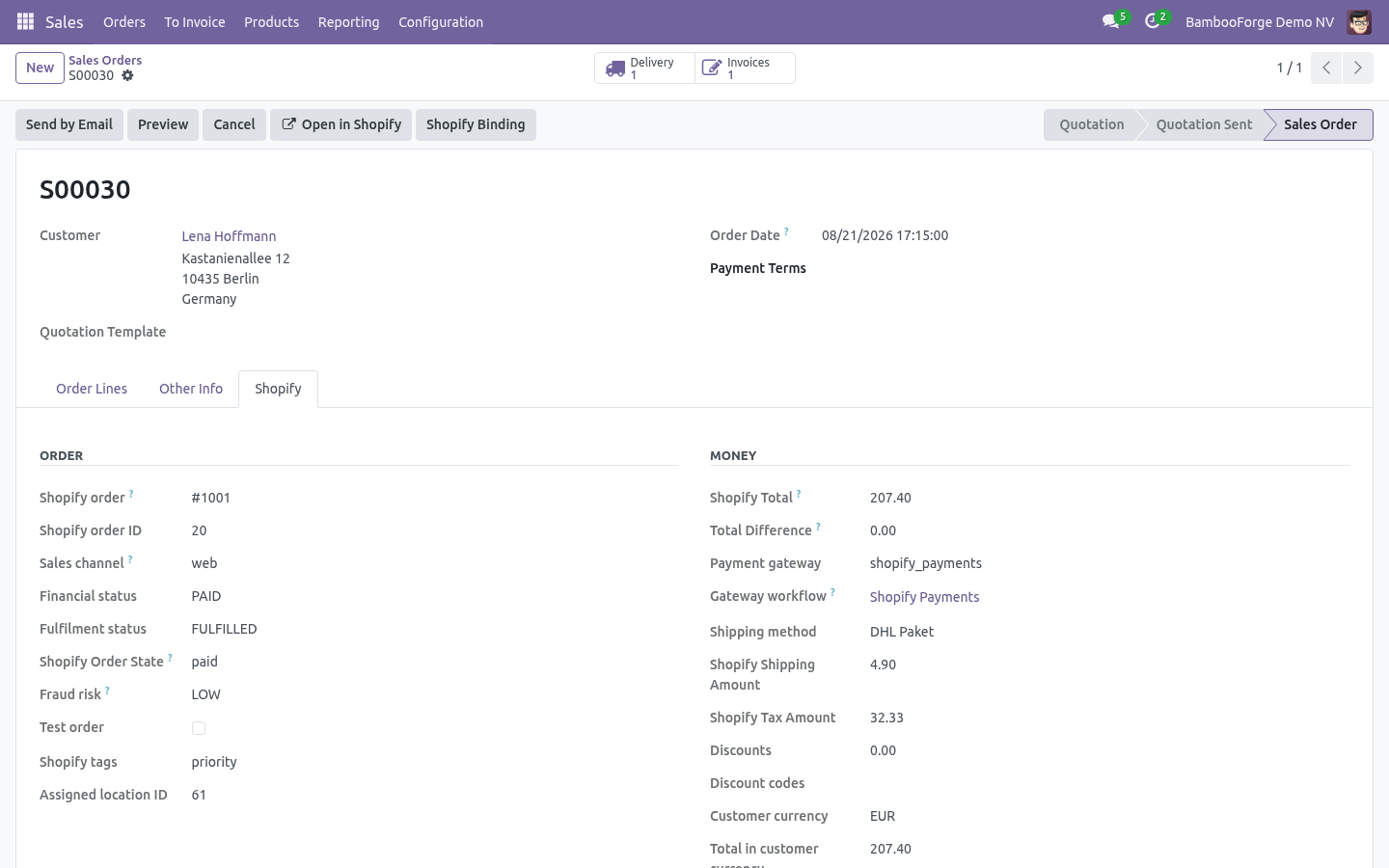
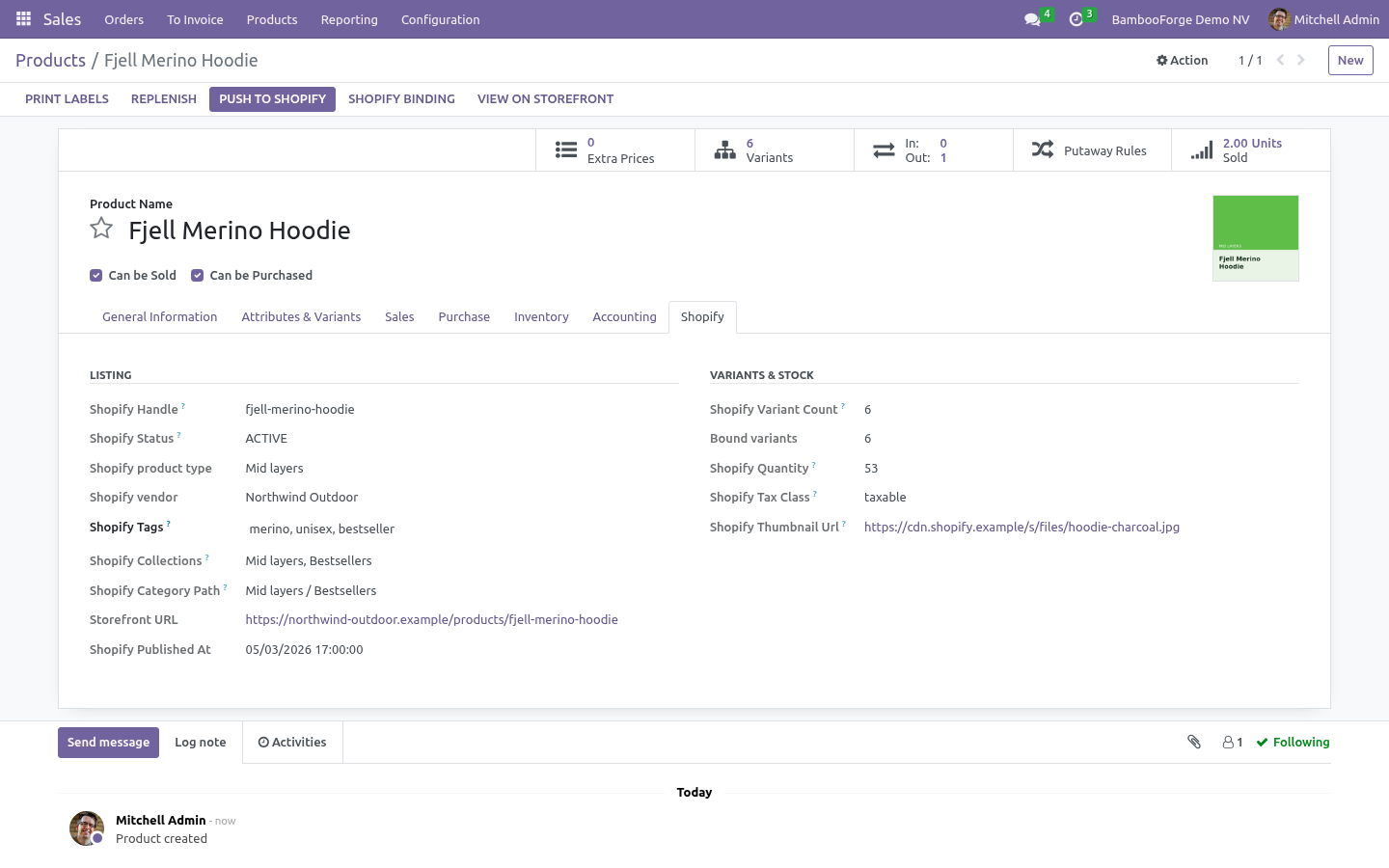
Imported records land in the standard apps — Sales ▸ Products, Contacts, Sales ▸ Orders — each with a Shopify tab showing the remote id, handle, status, variant ids, storefront link and totals. Re-imports update the same record; nothing is duplicated.
Orders: financial status and gateway workflows
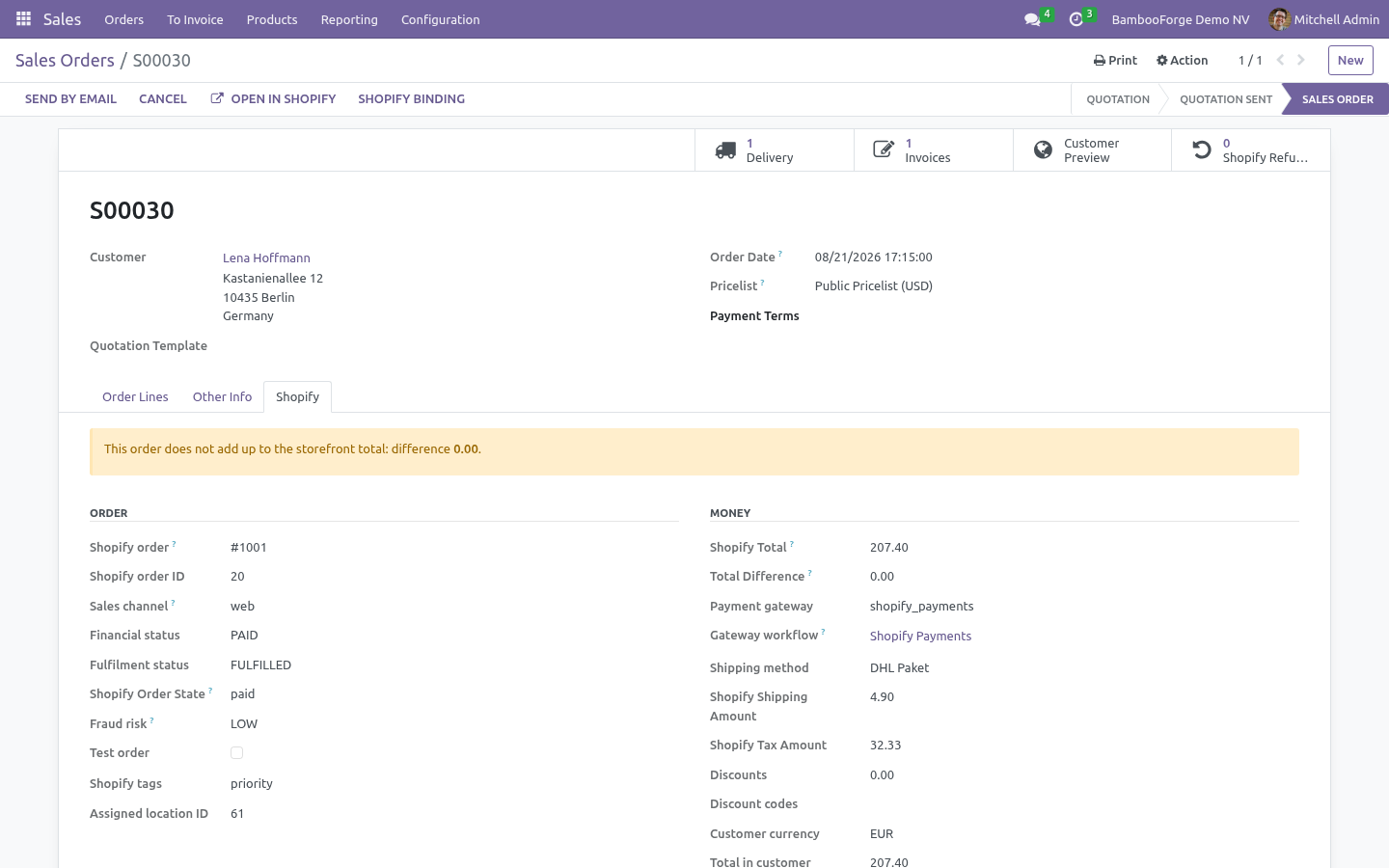
Shopify reports two states on every order — financial status and fulfillment status — and the gateway that took the money. The connector uses all three.
Order State Mappings (Configuration) decide what happens to the sale order for each financial status:
Shopify financial status |
Default Odoo action |
|---|---|
pending |
Keep draft |
authorized |
Confirm sale order |
partially_paid |
Confirm sale order |
paid |
Confirm sale order |
partially_refunded |
Ignore (the order stays as it is; the refund arrives as a credit note) |
refunded |
Cancel sale order |
voided |
Cancel sale order |
expired |
Keep draft |
cancelled |
Cancel sale order |
Change any row to Ignore, Keep draft, Confirm or Cancel. An unknown status is Ignored, never a destructive default.
Payment Gateways (Configuration) refine this per gateway once Gateway workflows is on. For Shopify Payments you will typically tick Confirm order, Create invoice and Register payment on your bank journal, so a paid order arrives confirmed, invoiced and paid; for PayPal or manual you may keep only Confirm. Only when paid holds the workflow back until Shopify reports the order paid — an authorized card order stays a draft until capture.
Matching the storefront total. Shipping is imported as its own line on a named service product, order-level discounts as a discount line, and whatever still separates Odoo from the Shopify total (fees, rounding) as one adjustment line — never dropped. The Shopify total and the remaining delta sit on the order's Shopify tab; a delta above Total Tolerance raises a validation warning. Taxes are taken from the order as Shopify computed them, and a store whose prices include tax is handled as such.
Order filters. Financial status to import and Order status to import on the instance restrict the scheduled pull, e.g. paid only and open only. Order tags become Odoo sales tags, and the Shopify order name becomes the sale order's customer reference.
Fulfilments, cancellations and refunds
All three are opt-in toggles on the instance and all three go through the queue, so a Shopify outage delays them rather than losing them.
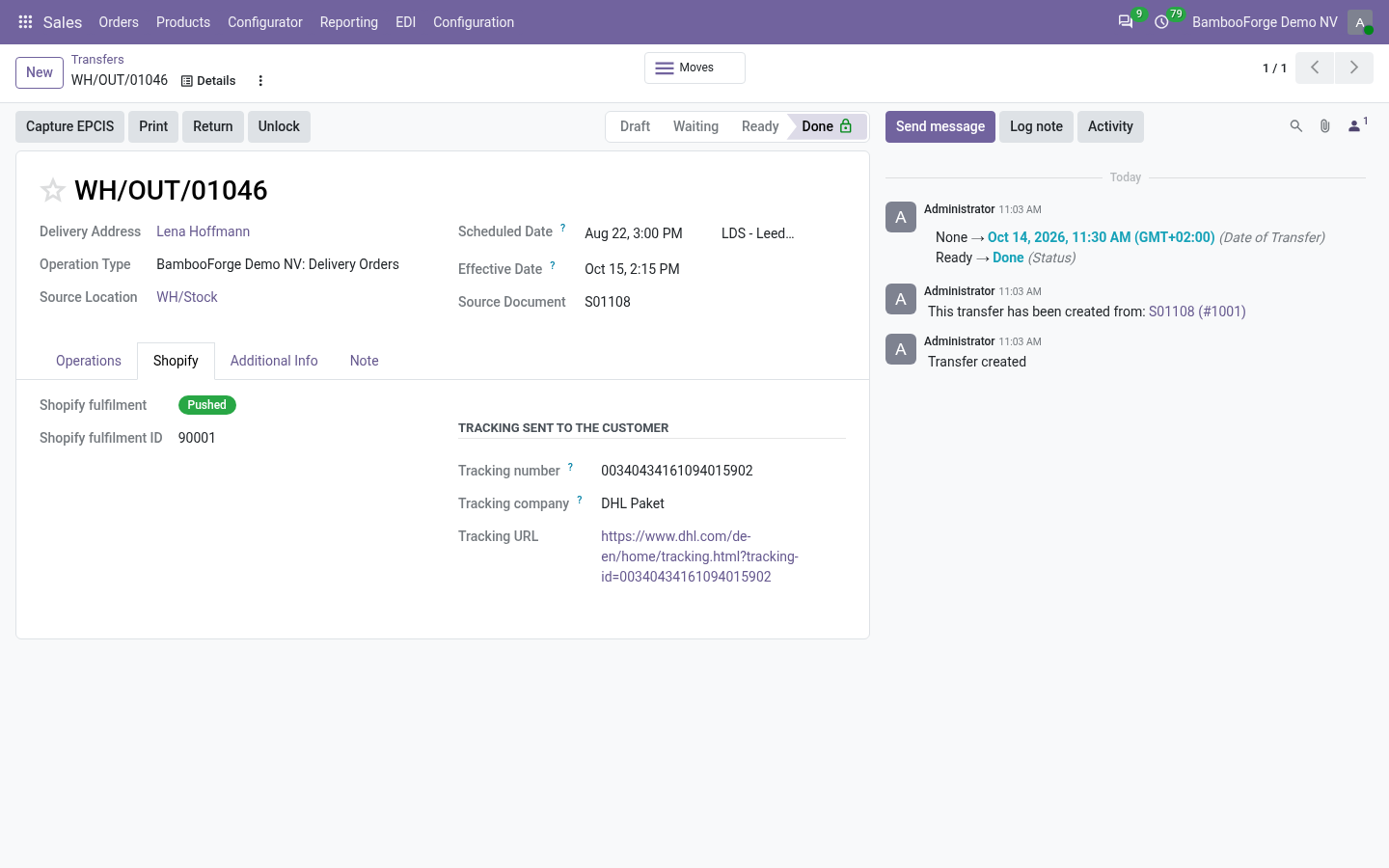
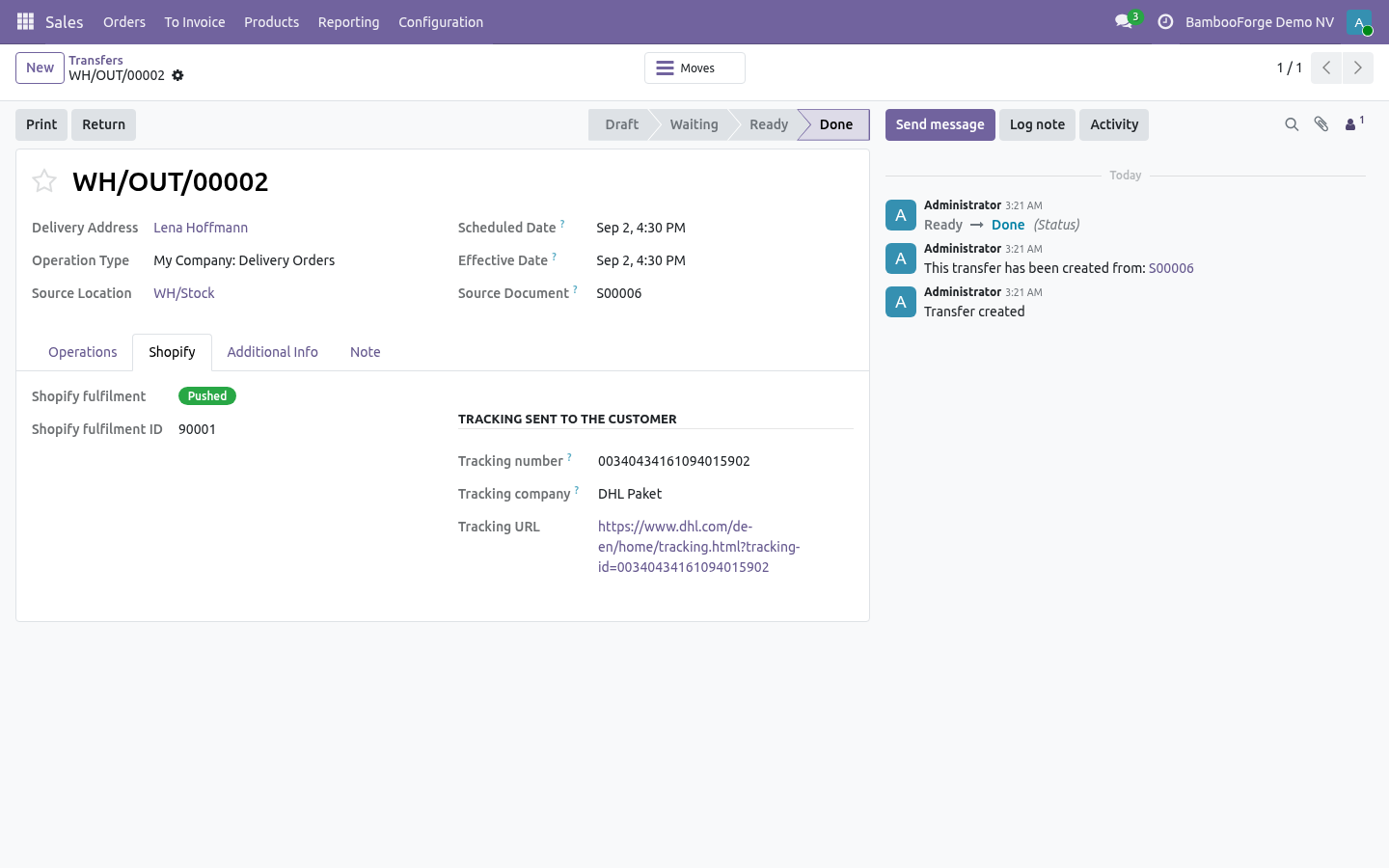
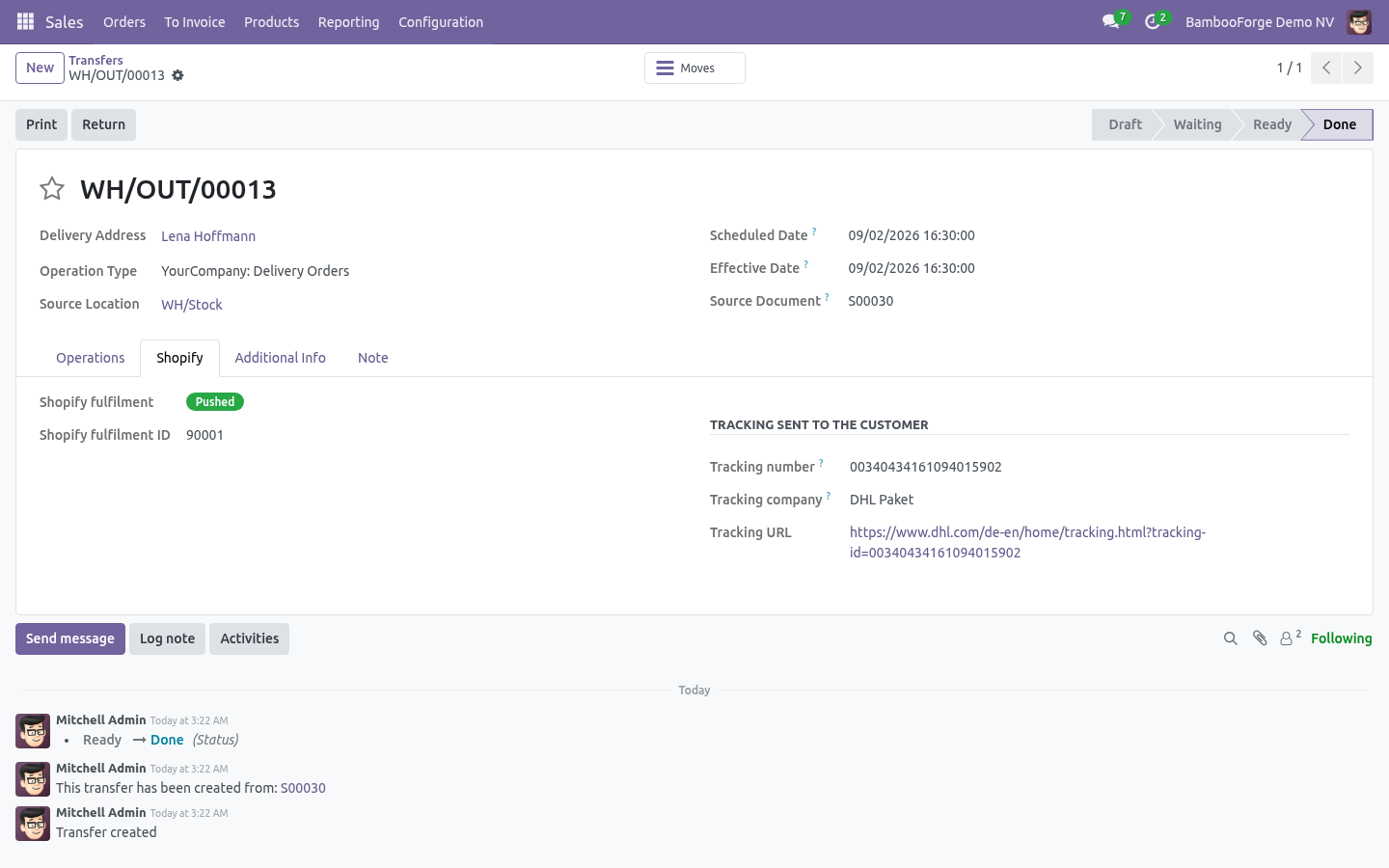
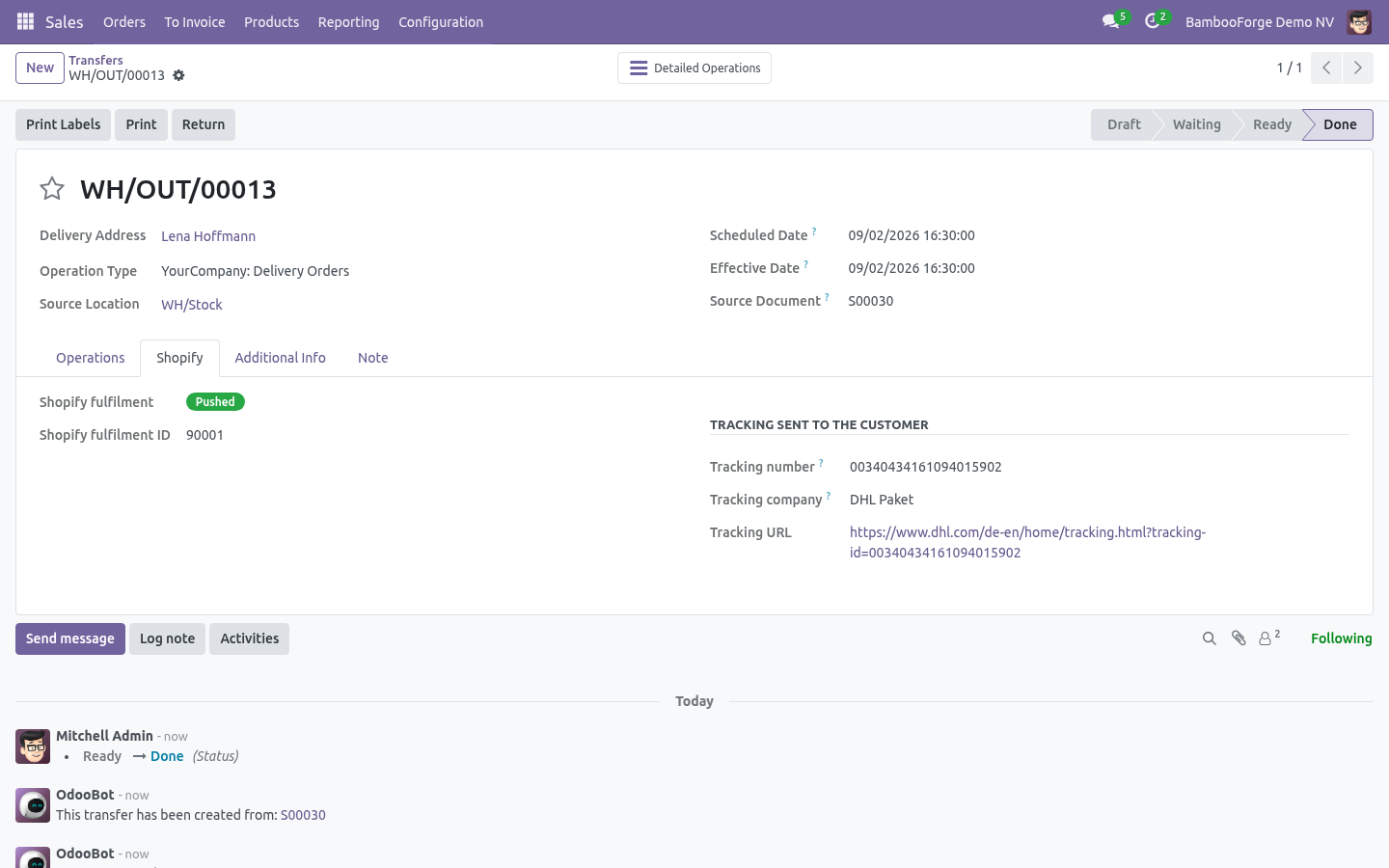
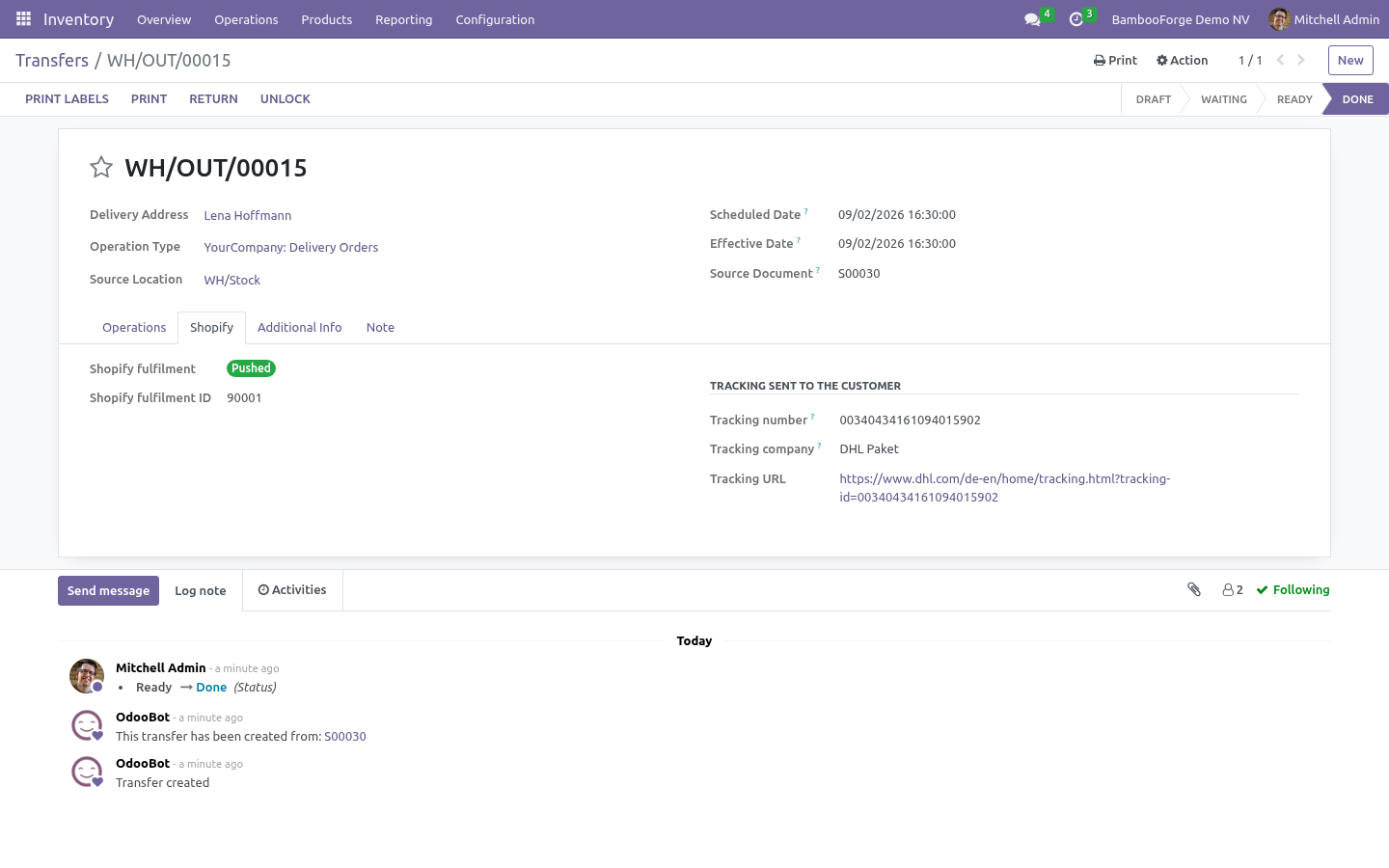
Push fulfilments — validating the outgoing delivery of a Shopify order creates the fulfilment on the order's open fulfillment order, with the quantities actually shipped and the tracking number, company and URL from the delivery's Shopify tab (the Delivery app's carrier reference is used when present). Notify customer lets Shopify send its shipping email. The delivery shows Pushed with the fulfilment id, or Error with the message.
Push cancellations — cancelling the sale order cancels the Shopify order, with the reason, whether to refund and whether to restock as configured.
Push refunds — posting a credit note that reverses a Shopify order's invoice creates the refund on Shopify against the original transaction, with the refunded lines and quantities. Refunds made in Shopify come the other way as draft credit notes (Sync refunds), posted automatically if Auto-post refunds is on.
Stock, locations and multi-warehouse
Under Configuration ▸ Locations every Shopify location is listed after Test Connection (or Sync locations). Map each one to an Odoo warehouse and tick Stock sync on the ones that should move stock; the primary location is the default target for anything unmapped.
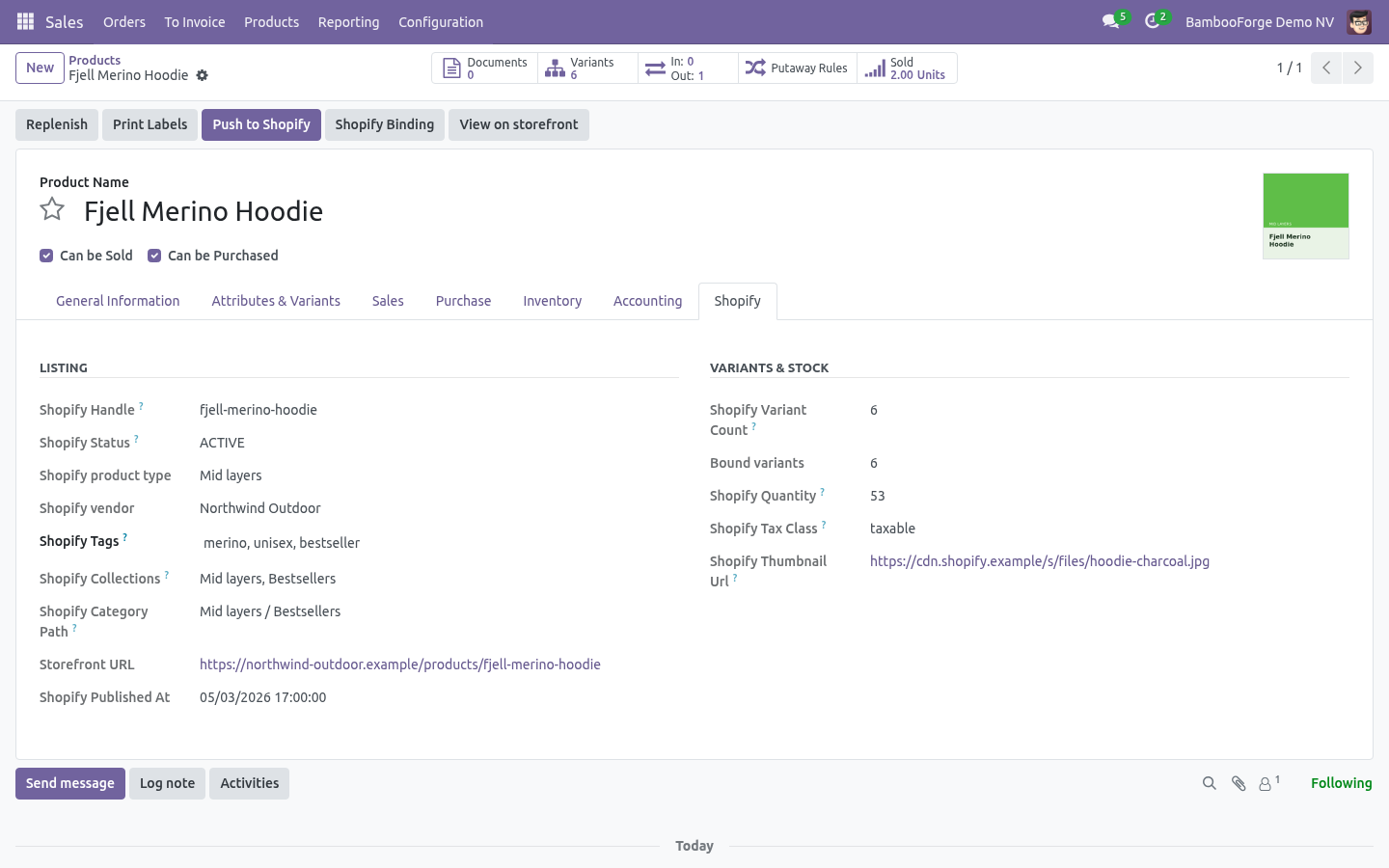
Import (Sync stock): product import reads inventory levels per location and shows them on the product's Shopify tab, per variant and per location. With Adjust Odoo on-hand it also writes an inventory adjustment in the mapped warehouse — off by default because it changes valuation.
Export (Push stock): the Shopify Stock Export scheduled action (every 30 minutes) pushes the on-hand of the Stock Source Warehouse to the mapped location, minus Buffer quantity, never below zero when the oversell guard is on. Only variants whose quantity changed since the last push are sent. INVENTORY_LEVELS_UPDATE webhooks keep the Odoo side current in between.
Payouts and abandoned checkouts
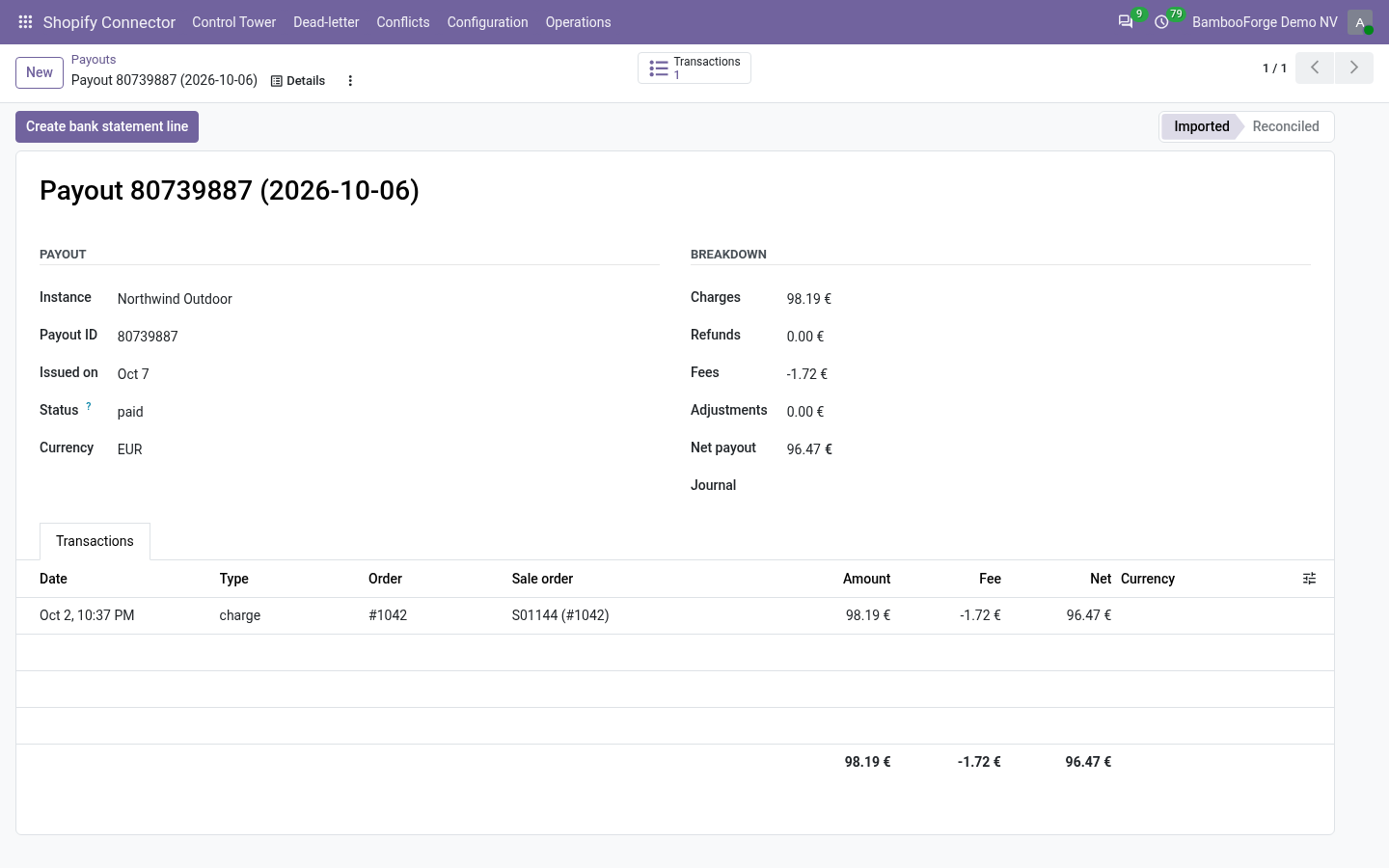
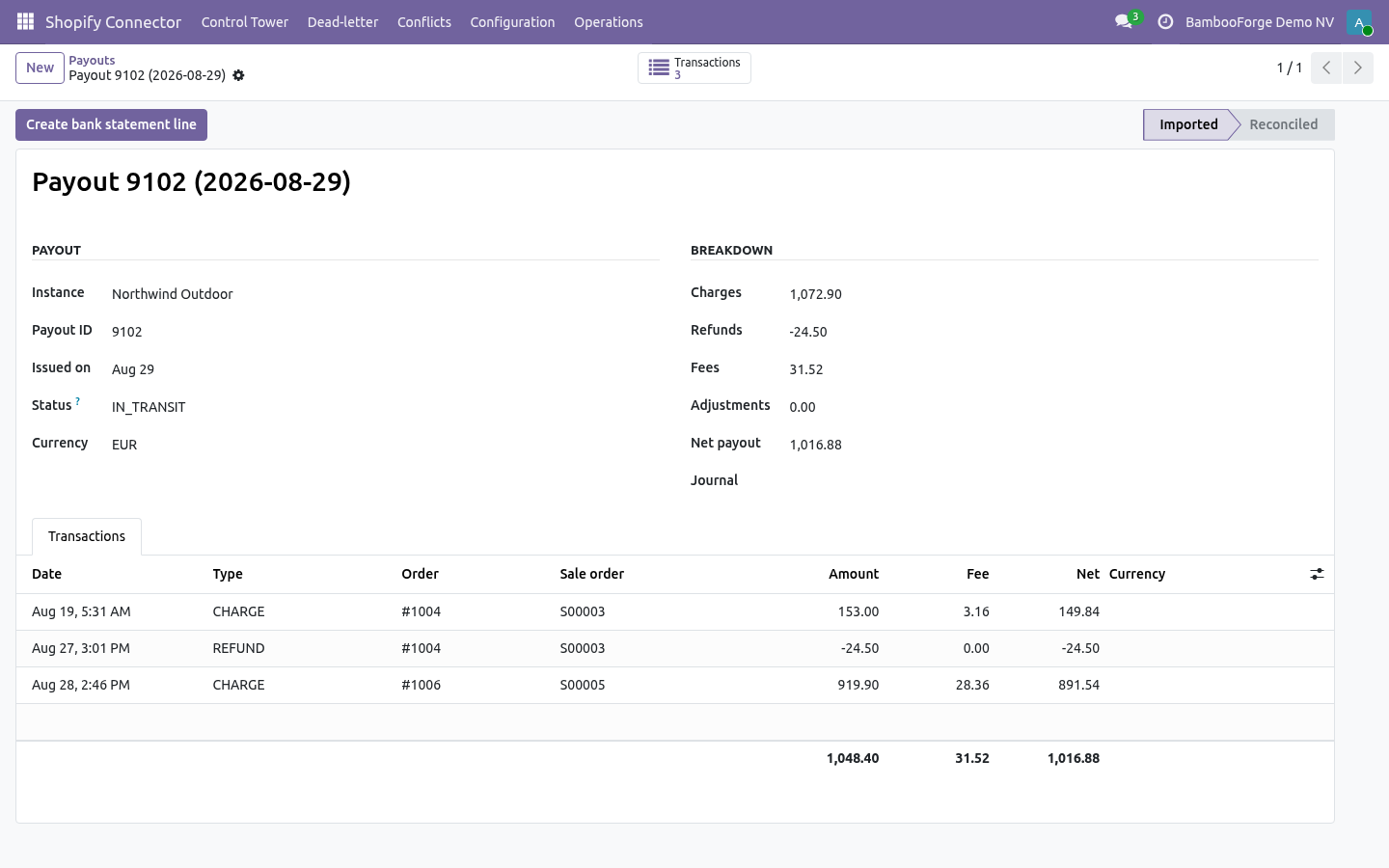
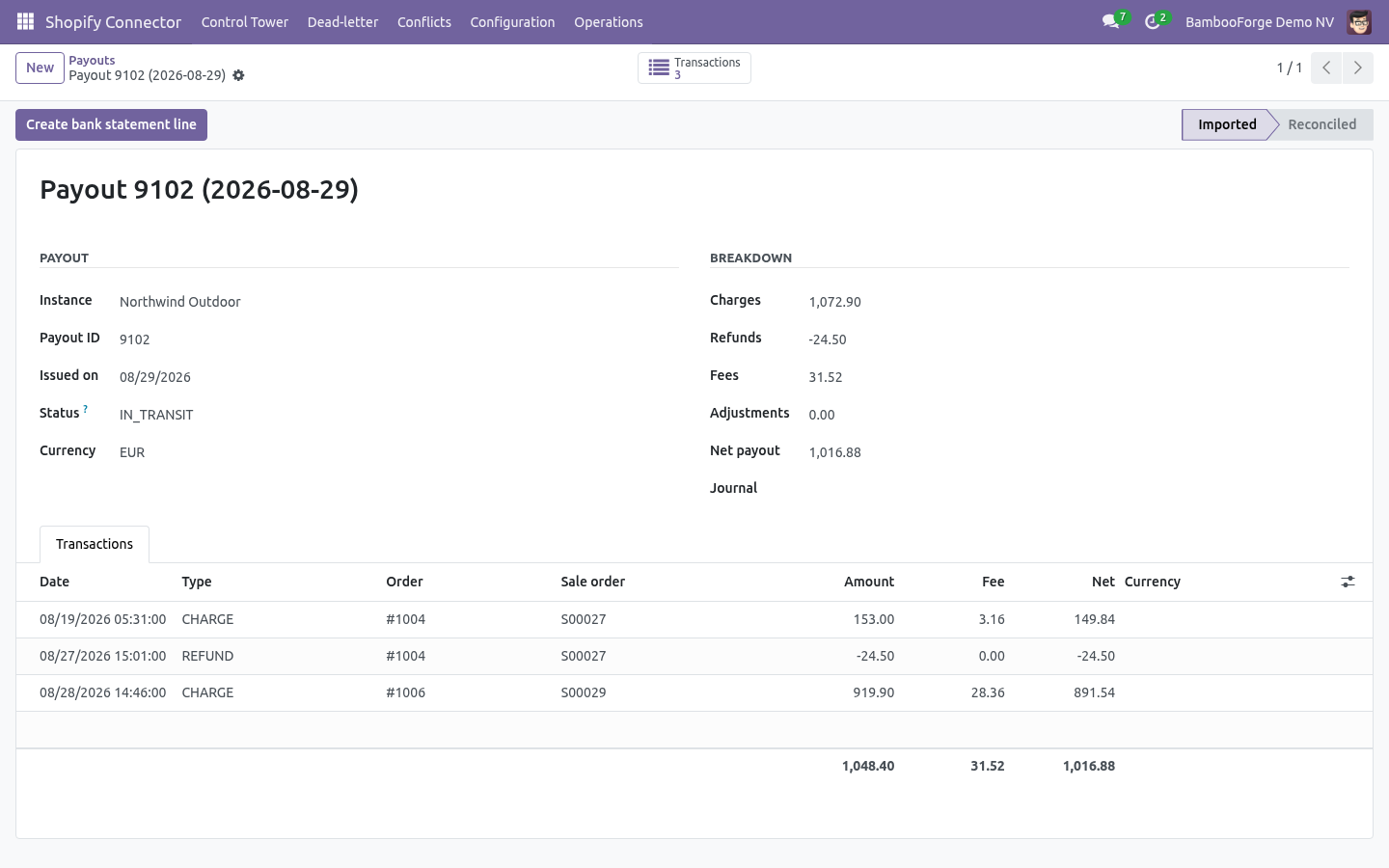
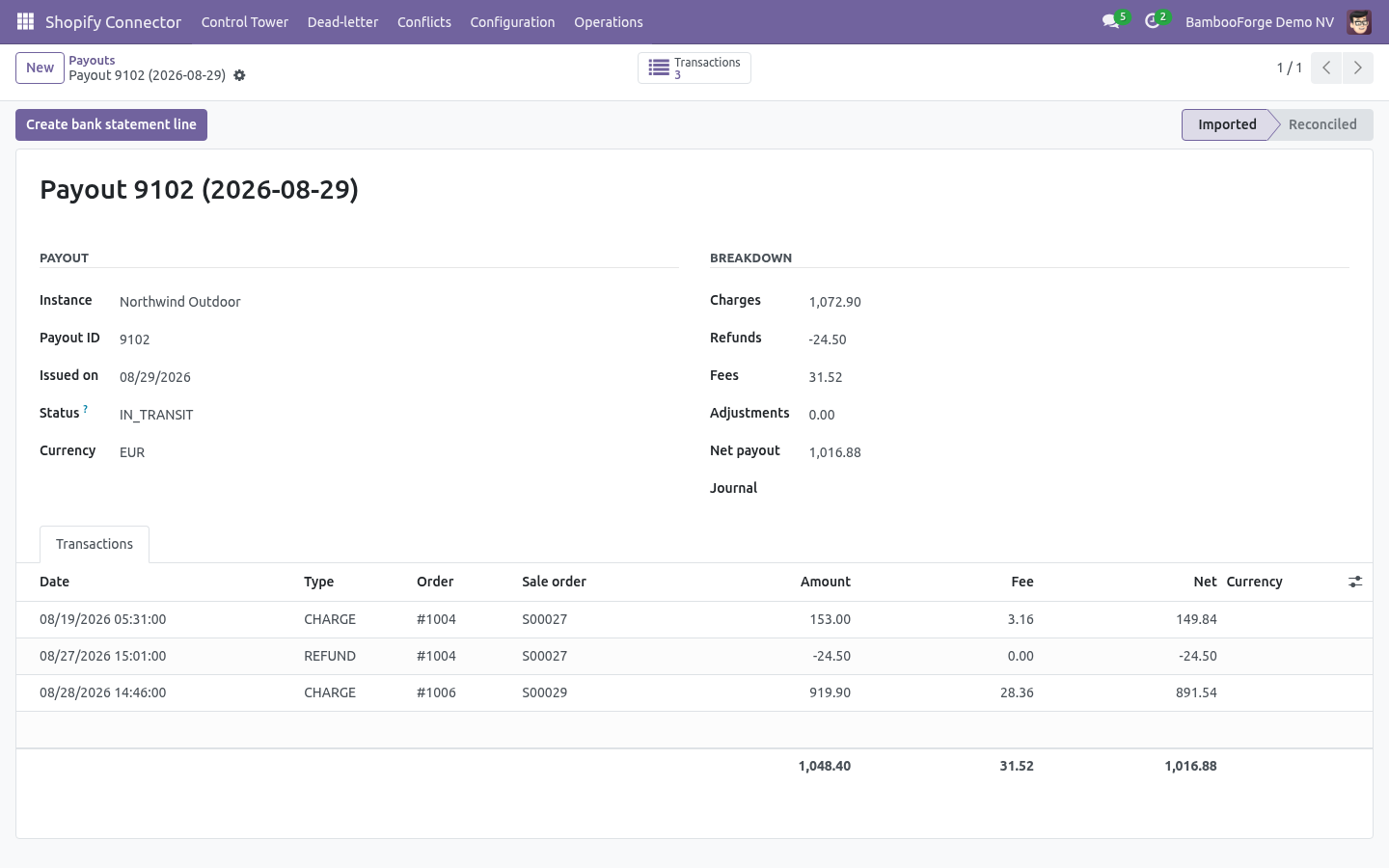
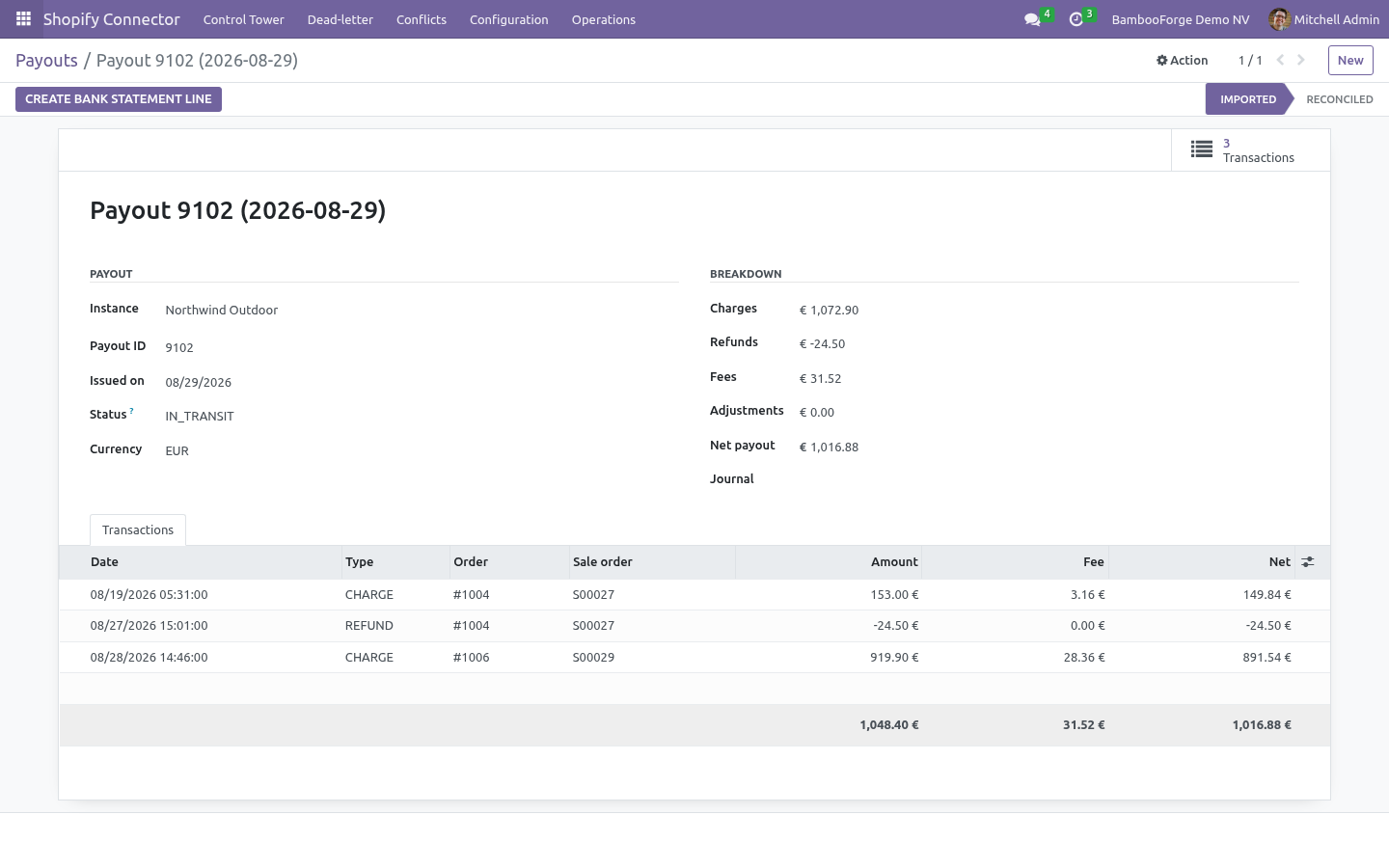
Import payouts pulls Shopify Payments payouts with their balance transactions — charges, refunds, fees, adjustments — into Operations ▸ Payouts, each line pointing at the Odoo sale order it settles. The Payout journal is the bank journal the deposit lands in, which is what you reconcile the payout against. The Shopify Payouts & Abandoned Checkouts action runs every six hours.
Import abandoned checkouts lists checkouts with the customer, cart value, recovery URL and whether Shopify already recovered them; Create CRM leads turns each into a lead for the sales team.
Step 4 — Webhooks (real time)
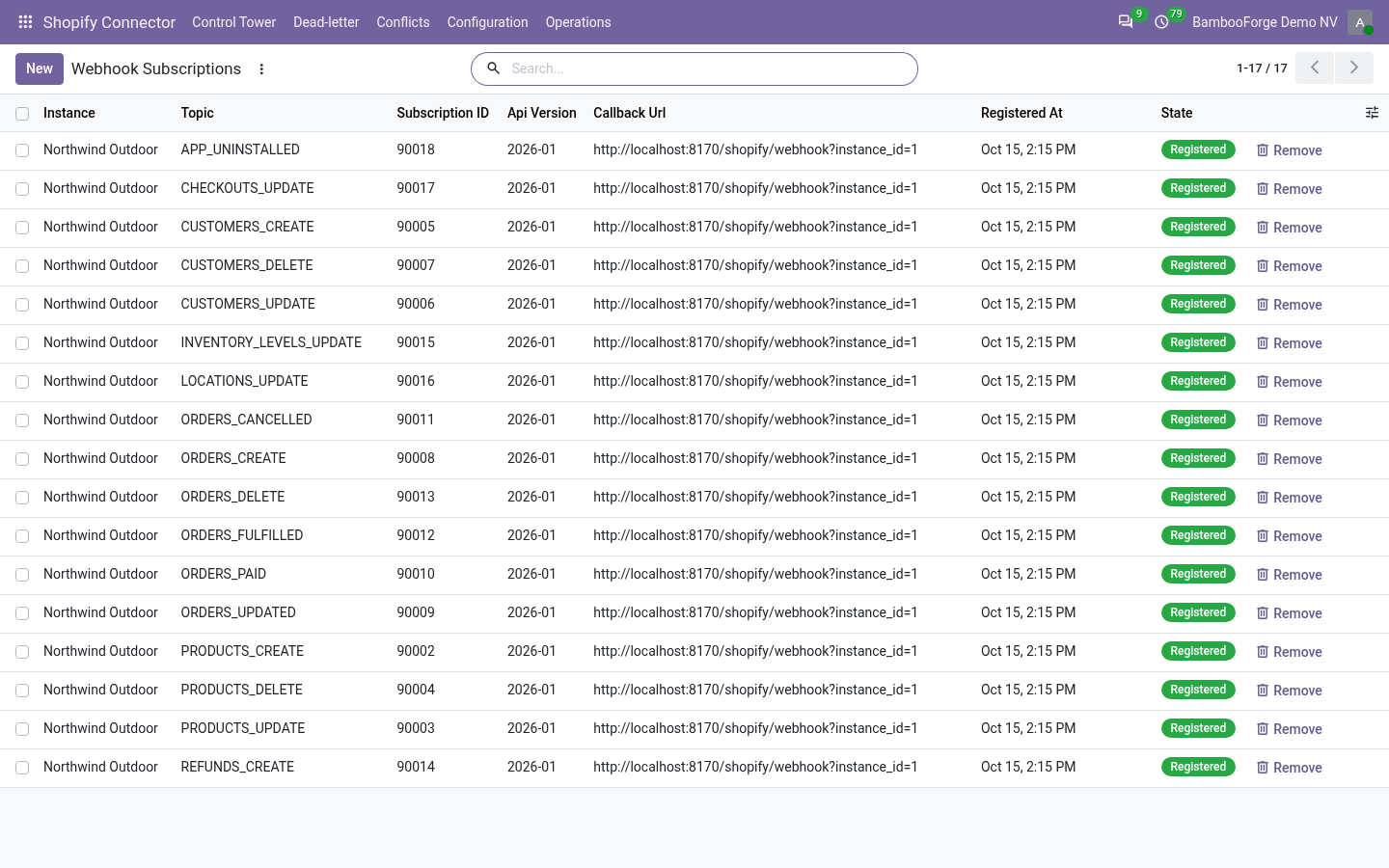
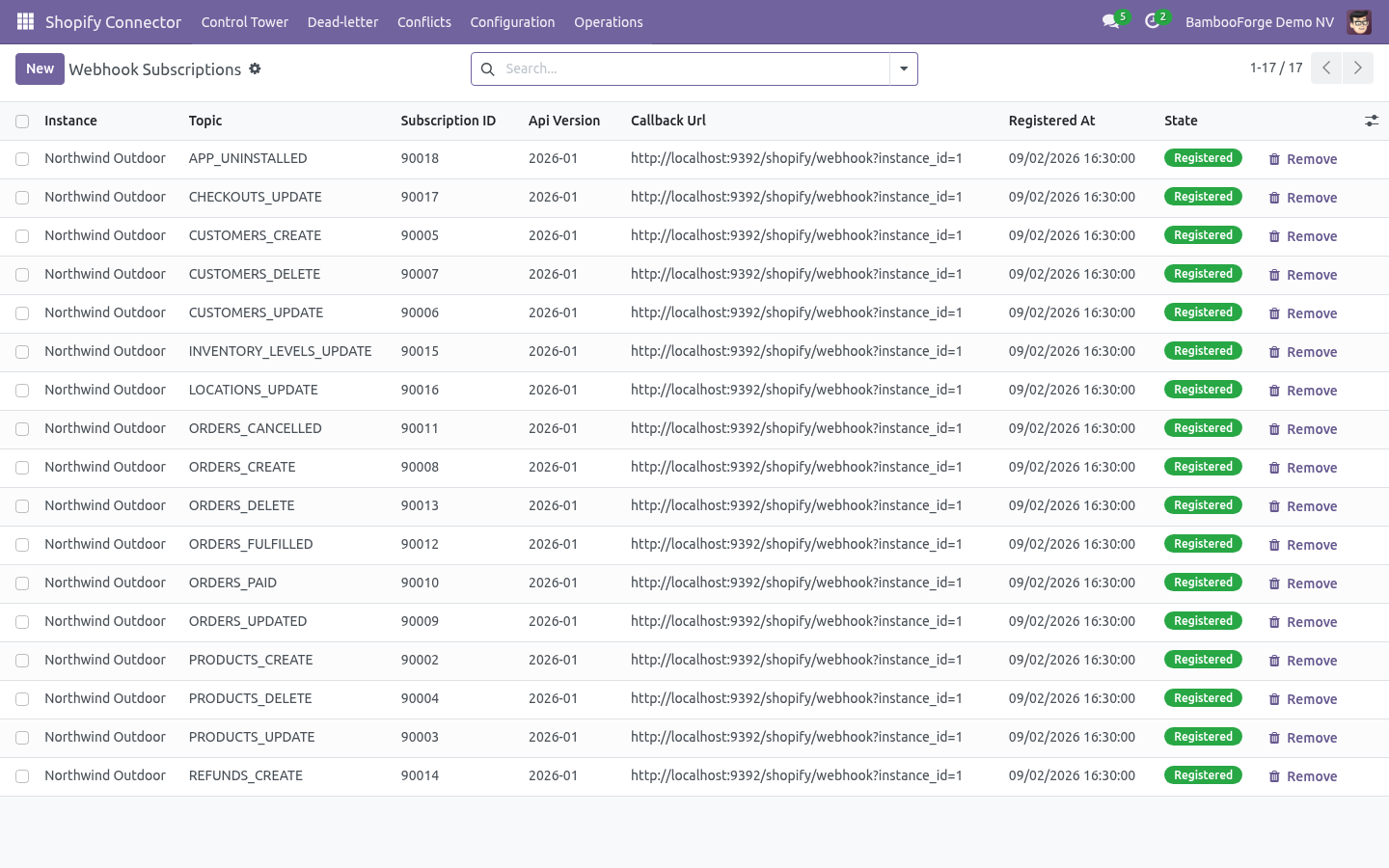
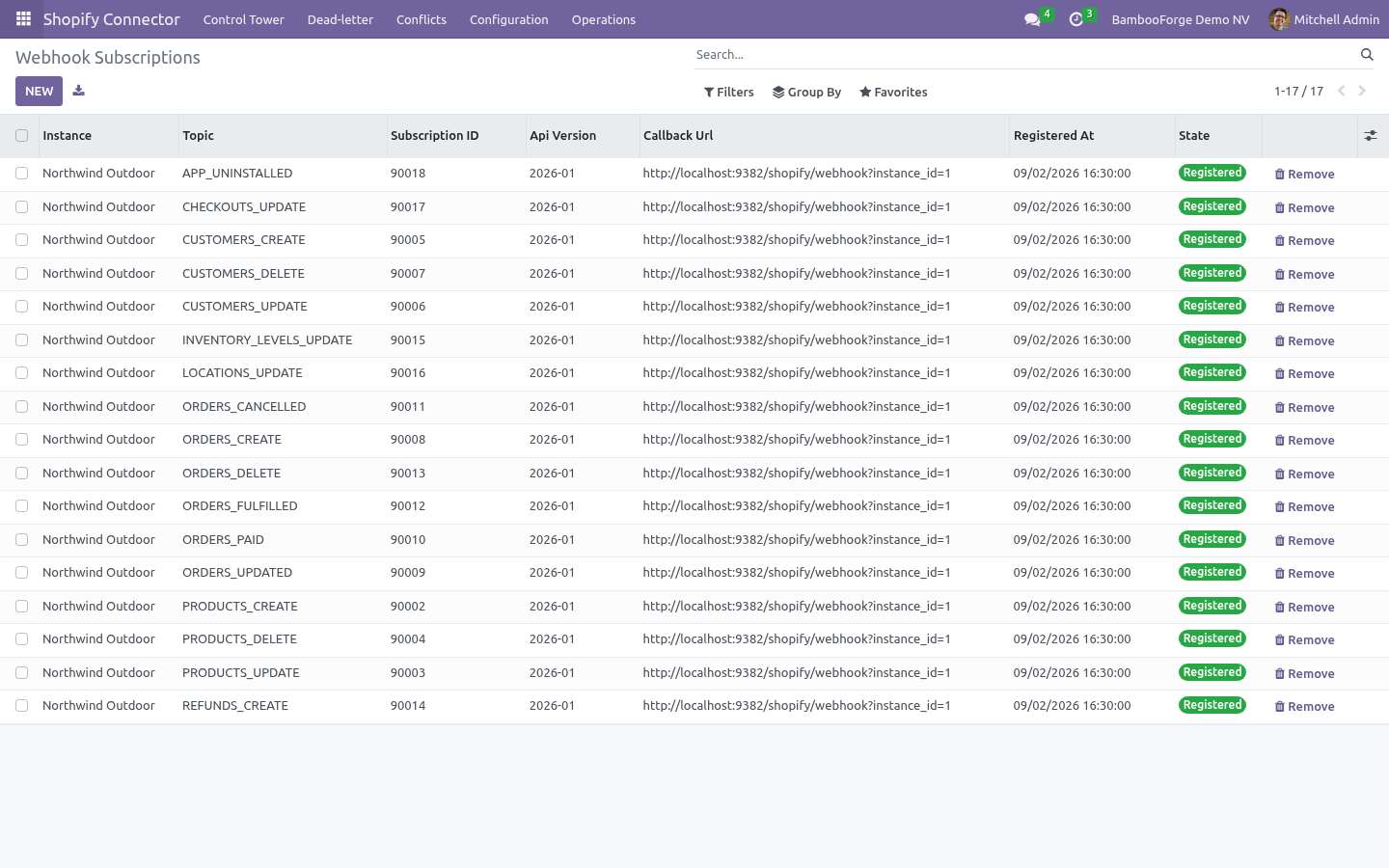
Set Webhook secret on the instance to any long random string, make sure Settings ▸ Technical ▸ System Parameters ▸ web.base.url is your public https:// address, then click Register webhooks. The connector creates one subscription per topic — products, customers, orders (create, update, paid, cancelled, fulfilled, delete), refunds, inventory levels, locations, checkouts and app uninstall — pointing at https://<your-odoo>/shopify/webhook, and lists them under Configuration ▸ Webhook Subscriptions. Registering again is idempotent; Unregister webhooks removes them.
Each delivery is verified with HMAC-SHA256 against the secret, de-duplicated by webhook id, and enqueued as an import job; with Process immediately it is handled on arrival. Without webhooks the Shopify Reconciliation action (every 15 minutes) still pulls recent changes for the models you enable Auto reconcile on.
Automation (scheduled actions)
Scheduled action |
Default |
Purpose |
|---|---|---|
Shopify Queue Processor |
every 1 min |
Processes queued import/export jobs, oldest and highest priority first. |
Shopify Reconciliation |
every 15 min |
Pulls remote changes since the last run for each model with Auto reconcile. |
Shopify Stock Export |
every 30 min |
Pushes changed on-hand quantities to the mapped locations. |
Shopify Payouts & Abandoned Checkouts |
every 6 hrs |
Imports new payouts and abandoned checkouts. |
Shopify Flow Scheduler |
every 5 min |
Runs scheduled sync flows. |
Shopify Flow Metrics |
every 1 hr |
Aggregates flow-run metrics for the control tower. |
Shopify Maintenance |
every 1 hr |
Recovers stale locked jobs, trims old logs and snapshots. |
Shopify Auto Recover |
every 15 min |
Reopens a tripped circuit breaker once the store answers again. |
Turn on Auto import / Auto reconcile per model on the instance to keep things in sync hands-free.
Field mapping, flows and the mapping studio
Field Mappings map Shopify fields to Odoo fields per model, with a transform (copy, uppercase, default, Python expression) and a direction. Generate suggested mappings seeds the business-critical ones; the Mapping Studio shows them as a board, and Payload Test runs a sample Shopify payload through the mappings so you see the resulting Odoo values before a single record is written.
Schema Fields lists the Shopify fields the connector knows per resource (product, variant, customer, order, line item, refund, payout, checkout).
Flows chain steps — import, export, reconcile, stock push — with a schedule, filters and a run history; Flow Templates ship ready-made ones (nightly catalogue pull, hourly order pull, stock push). Every run is a Flow Run with counts, duration and the jobs it created.
Operations: control tower, dead letters, conflicts
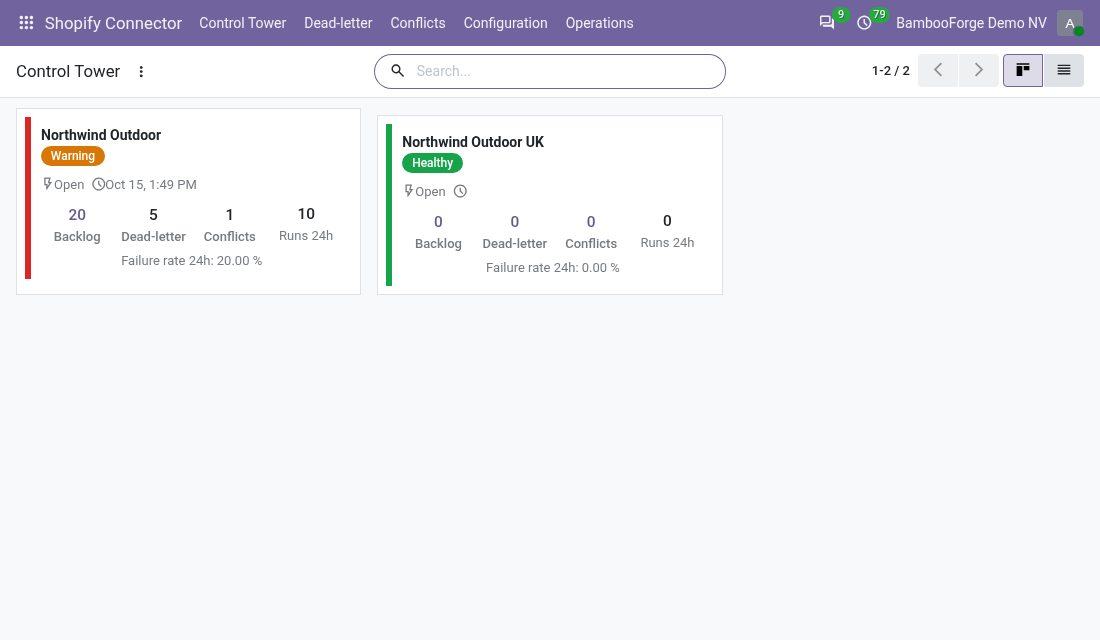
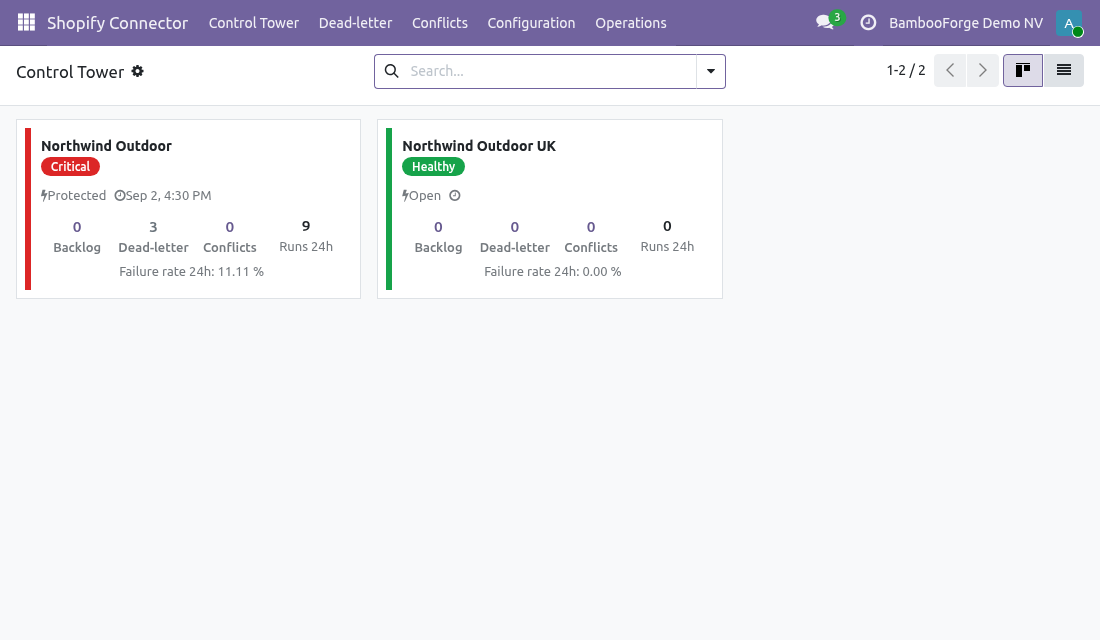
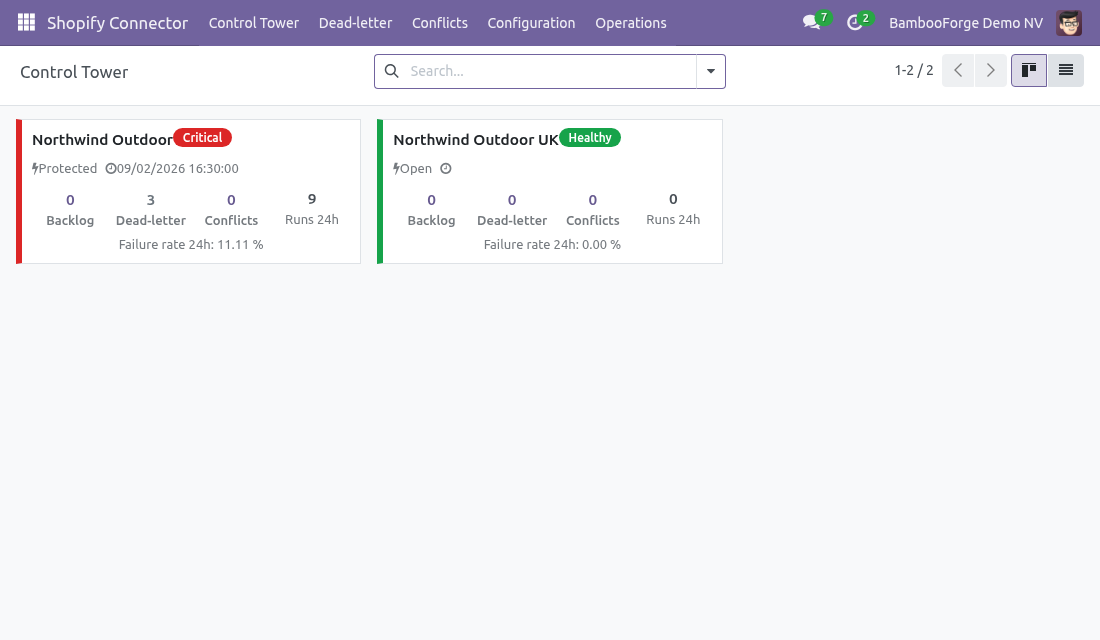
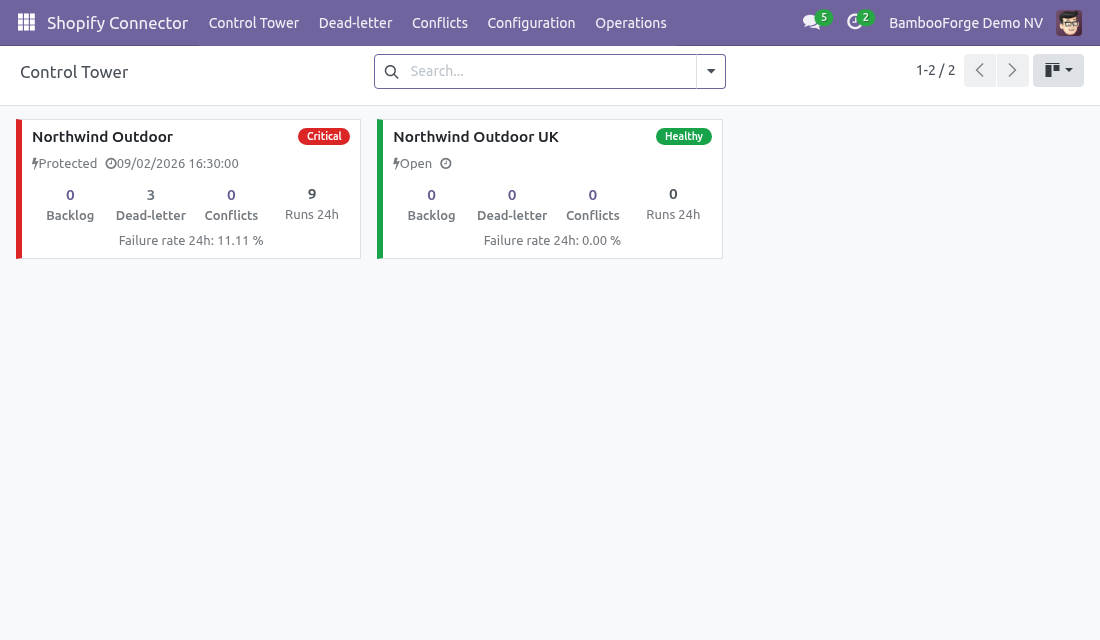
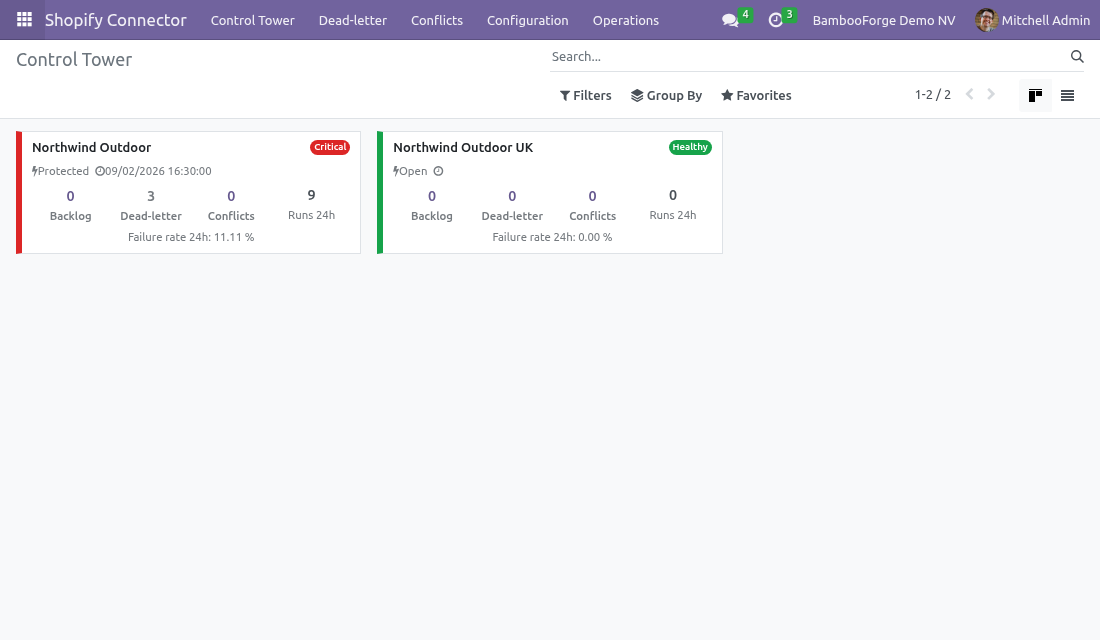
Control Tower — one screen per instance: jobs per hour, success and failure rates, queue depth by state, retries, average latency, GraphQL cost consumed, last webhook received, circuit-breaker state.
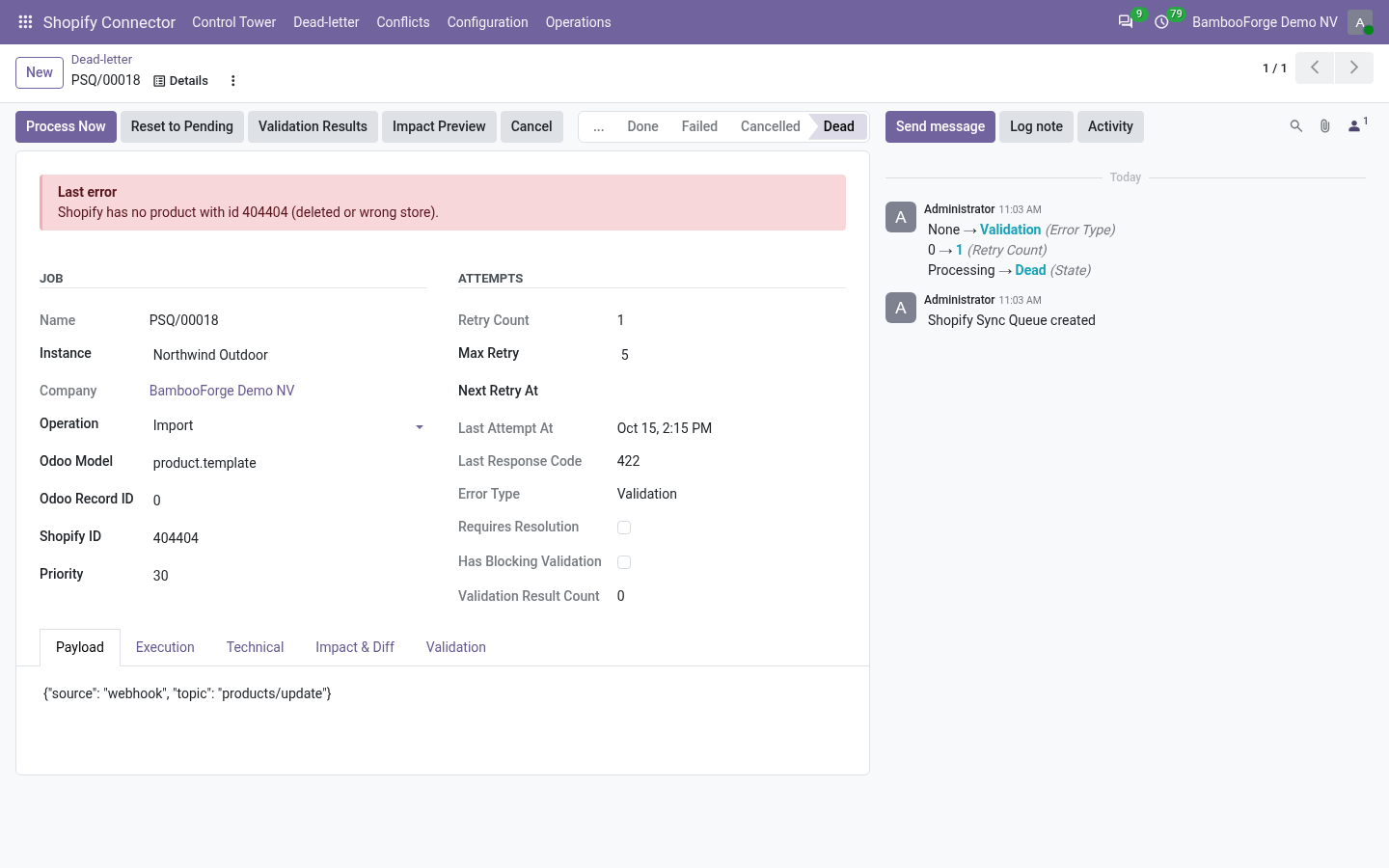
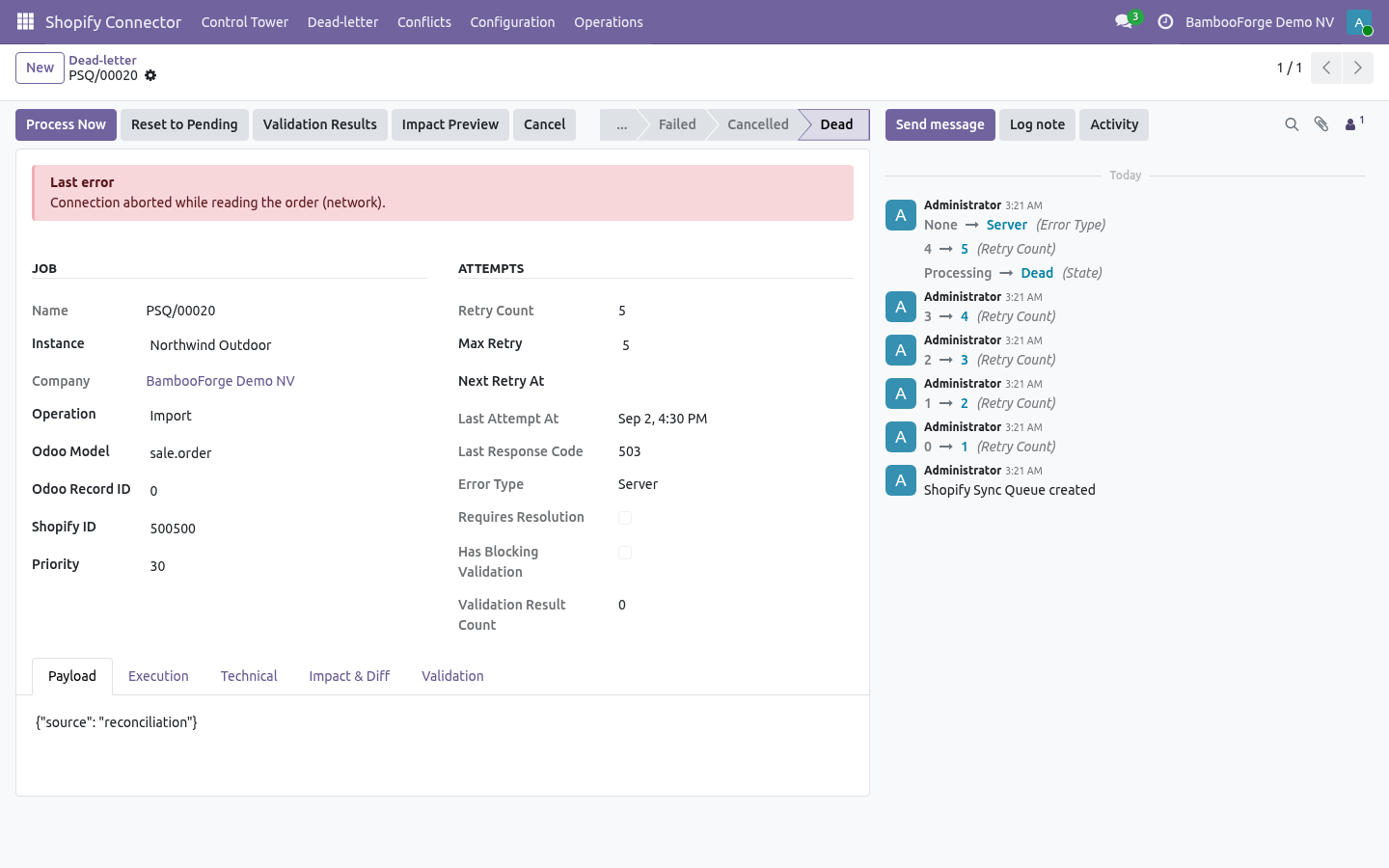
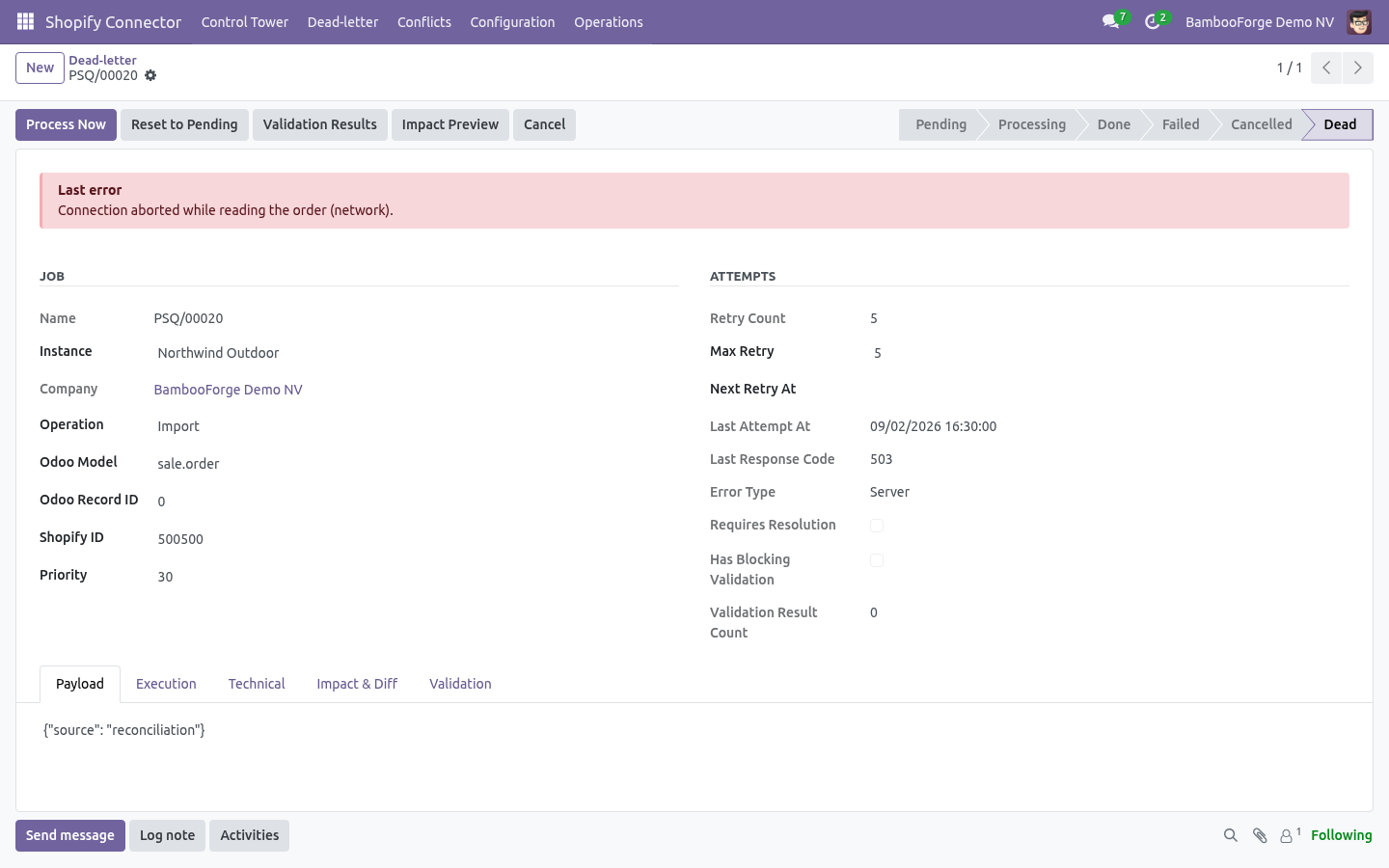
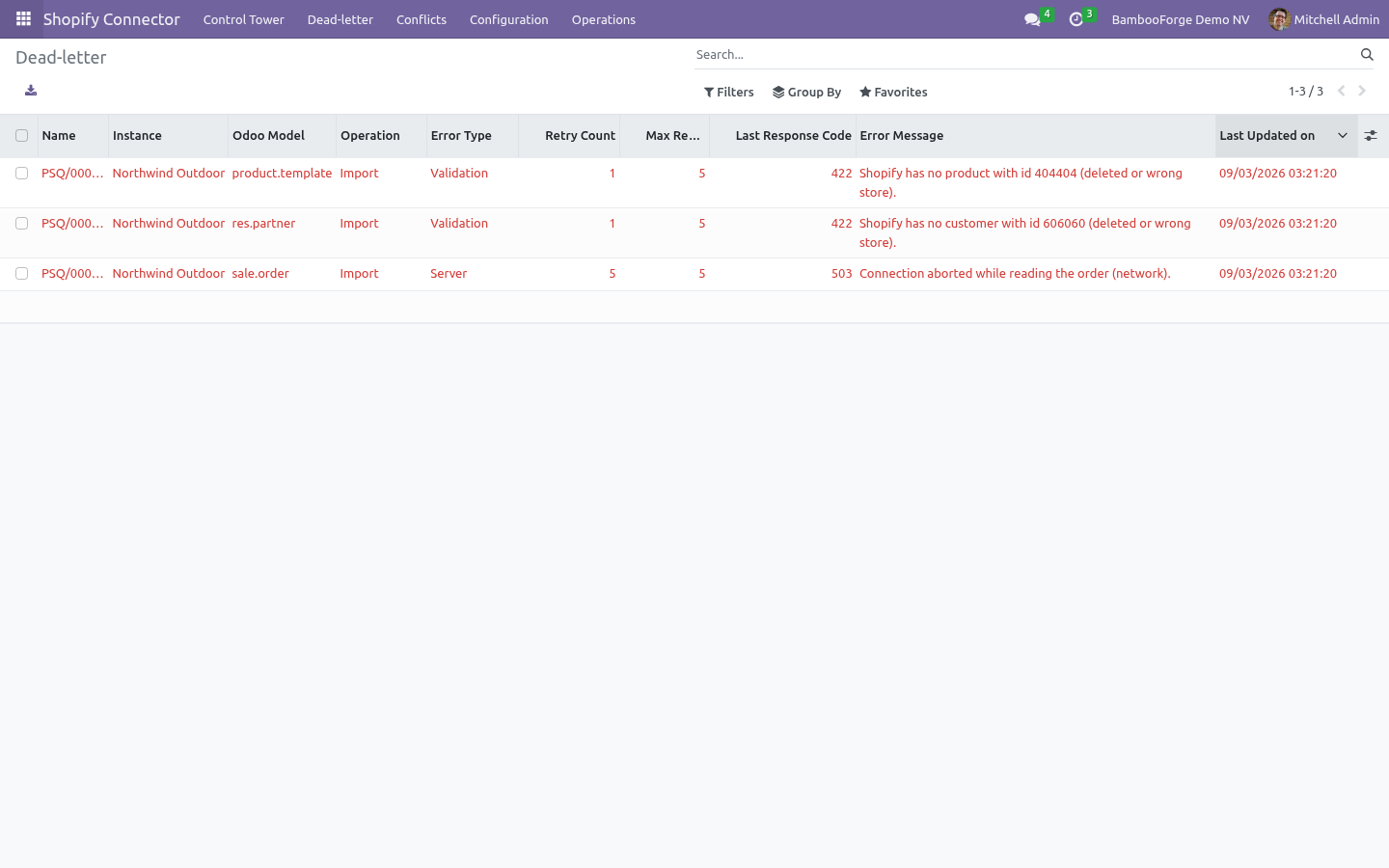
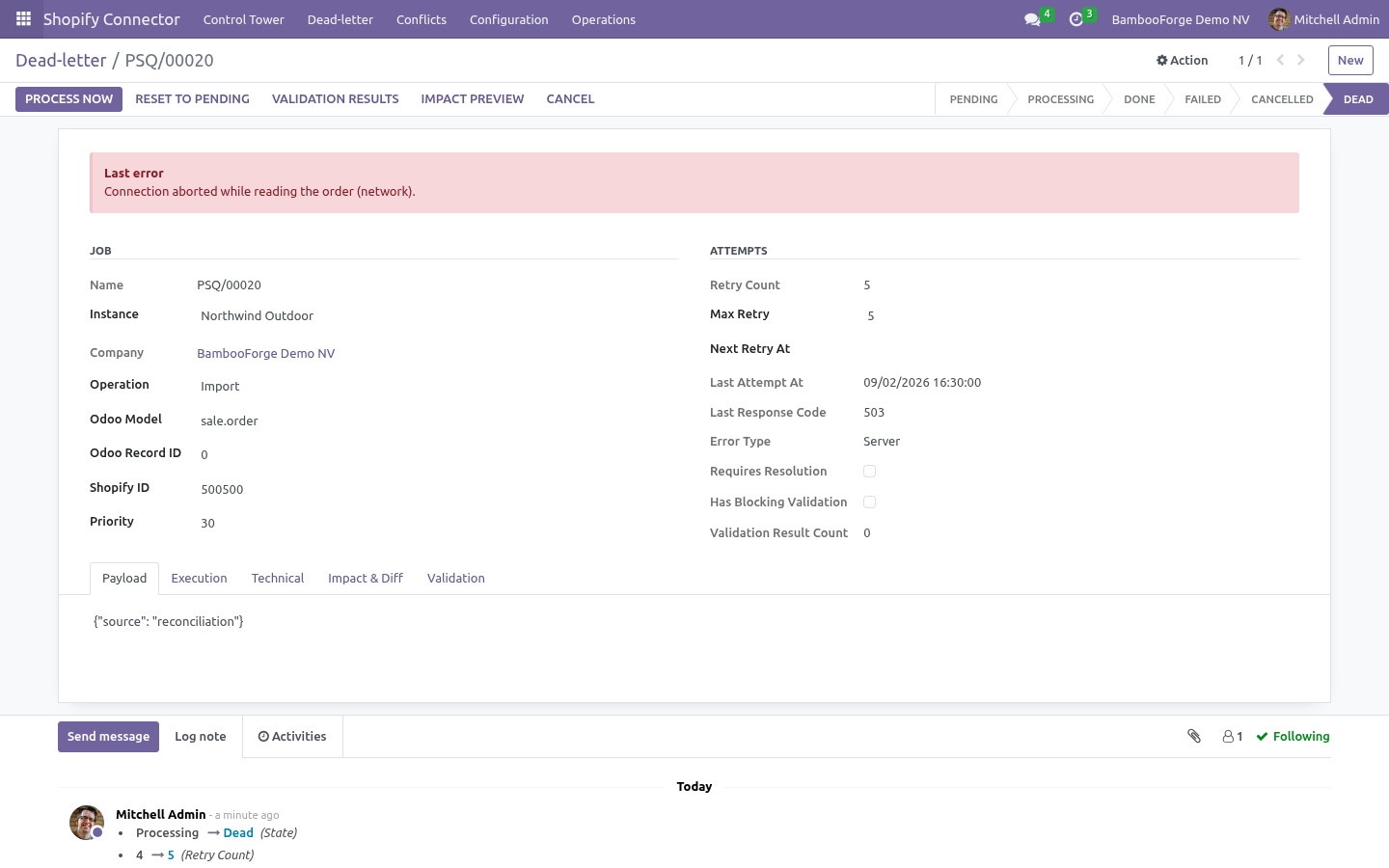
Queue Jobs — every job with its operation, payload, attempt count, next retry, error type and a link to the log lines that share its correlation key. Run now, Reset to pending, Cancel.
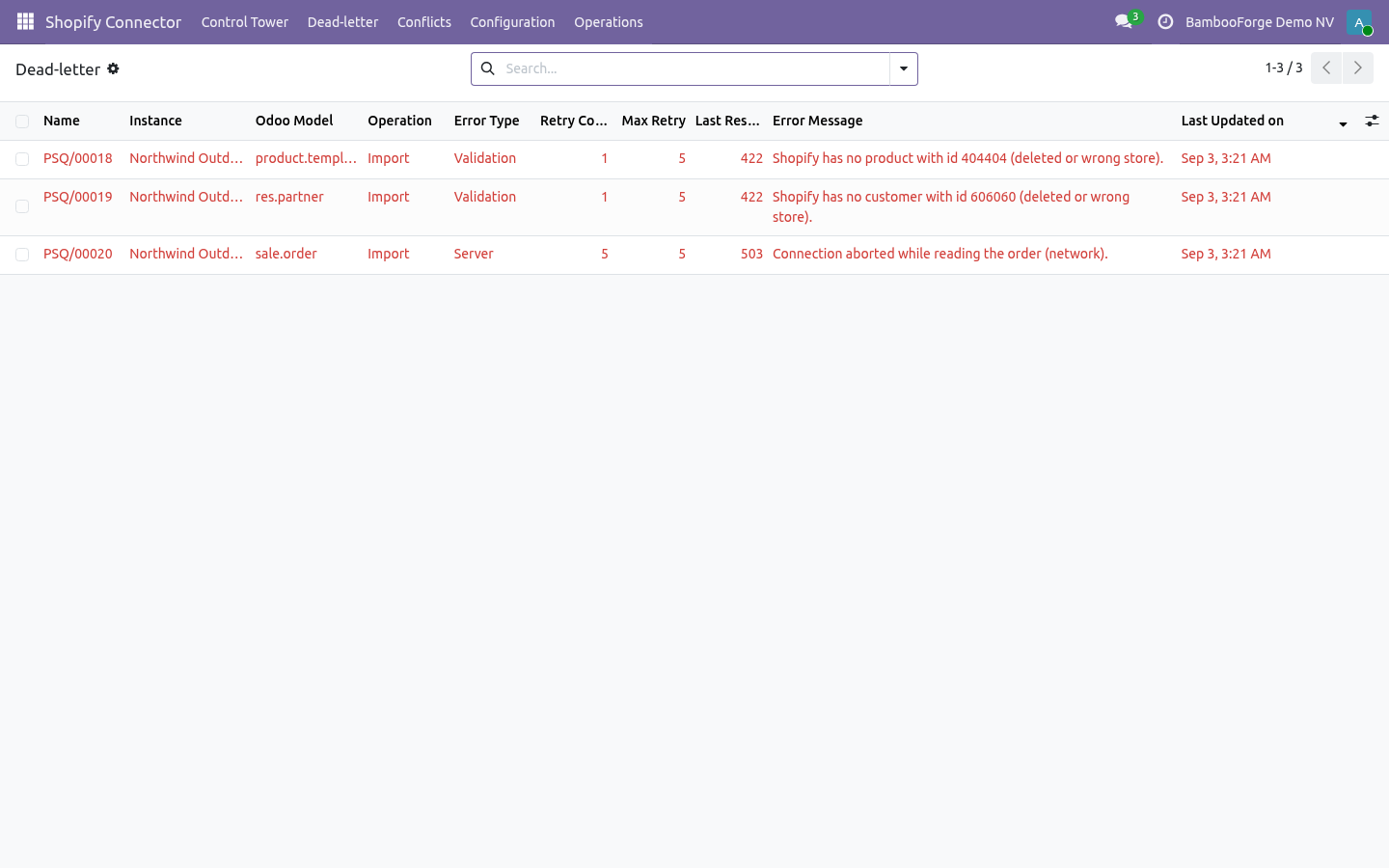
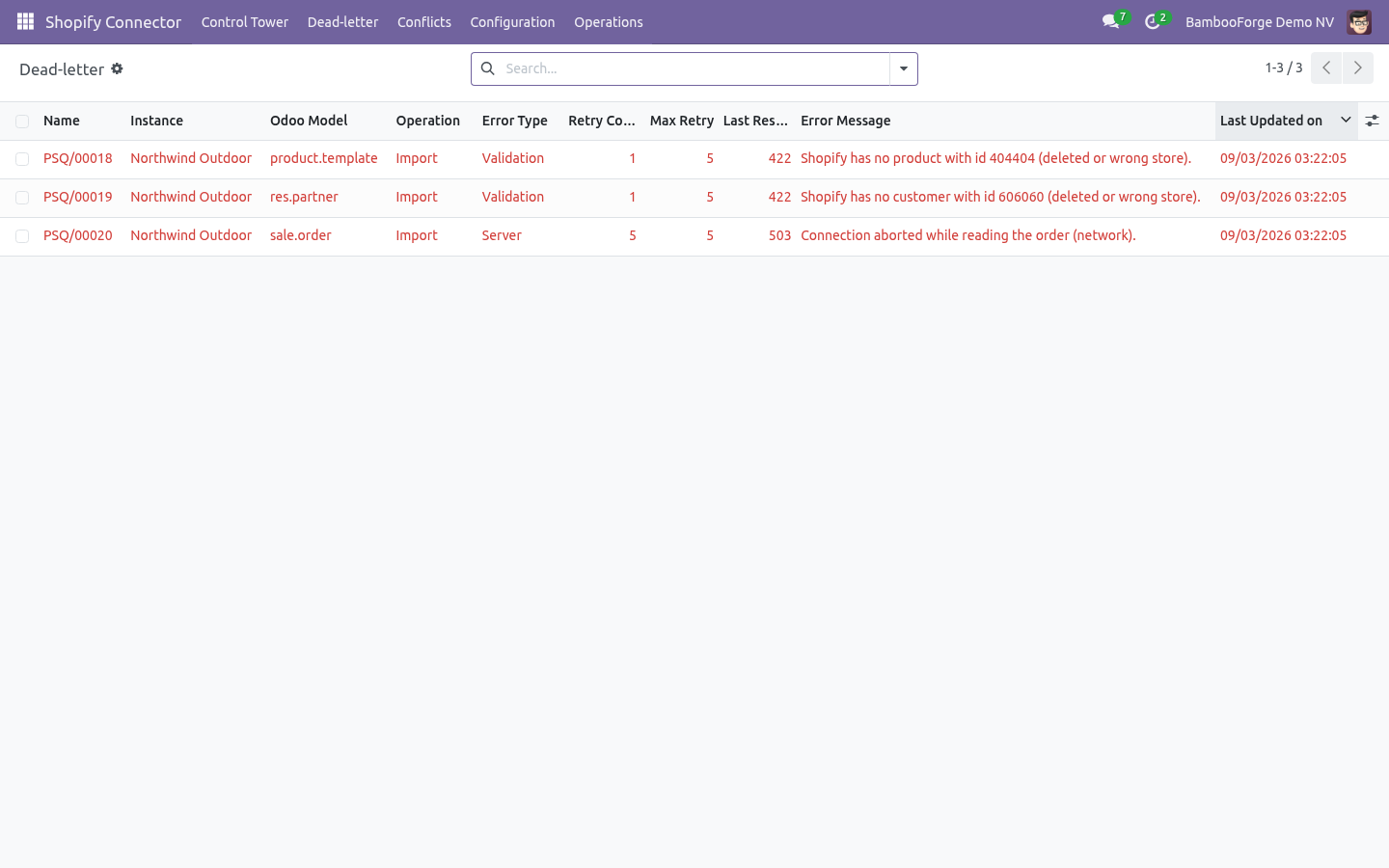
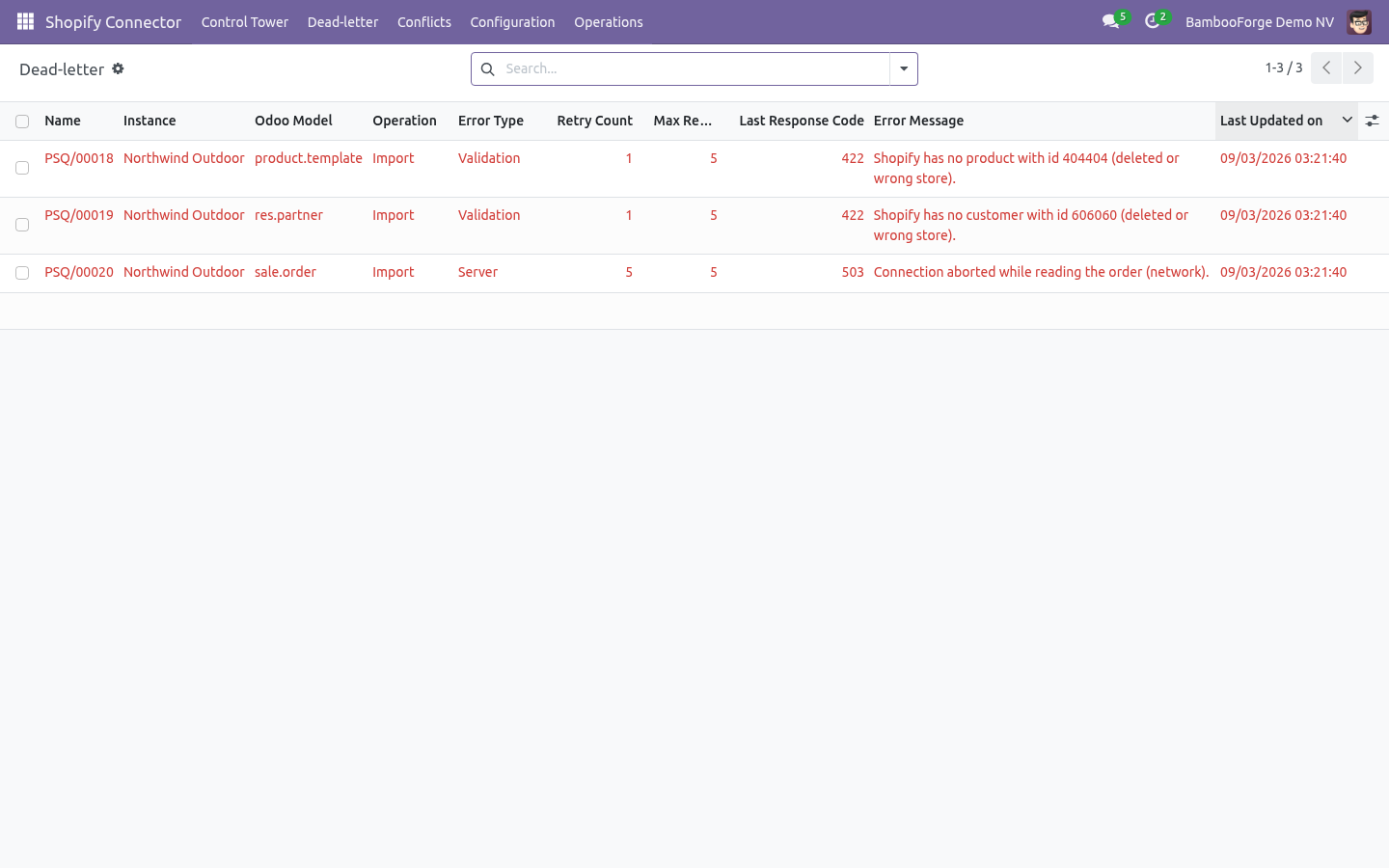
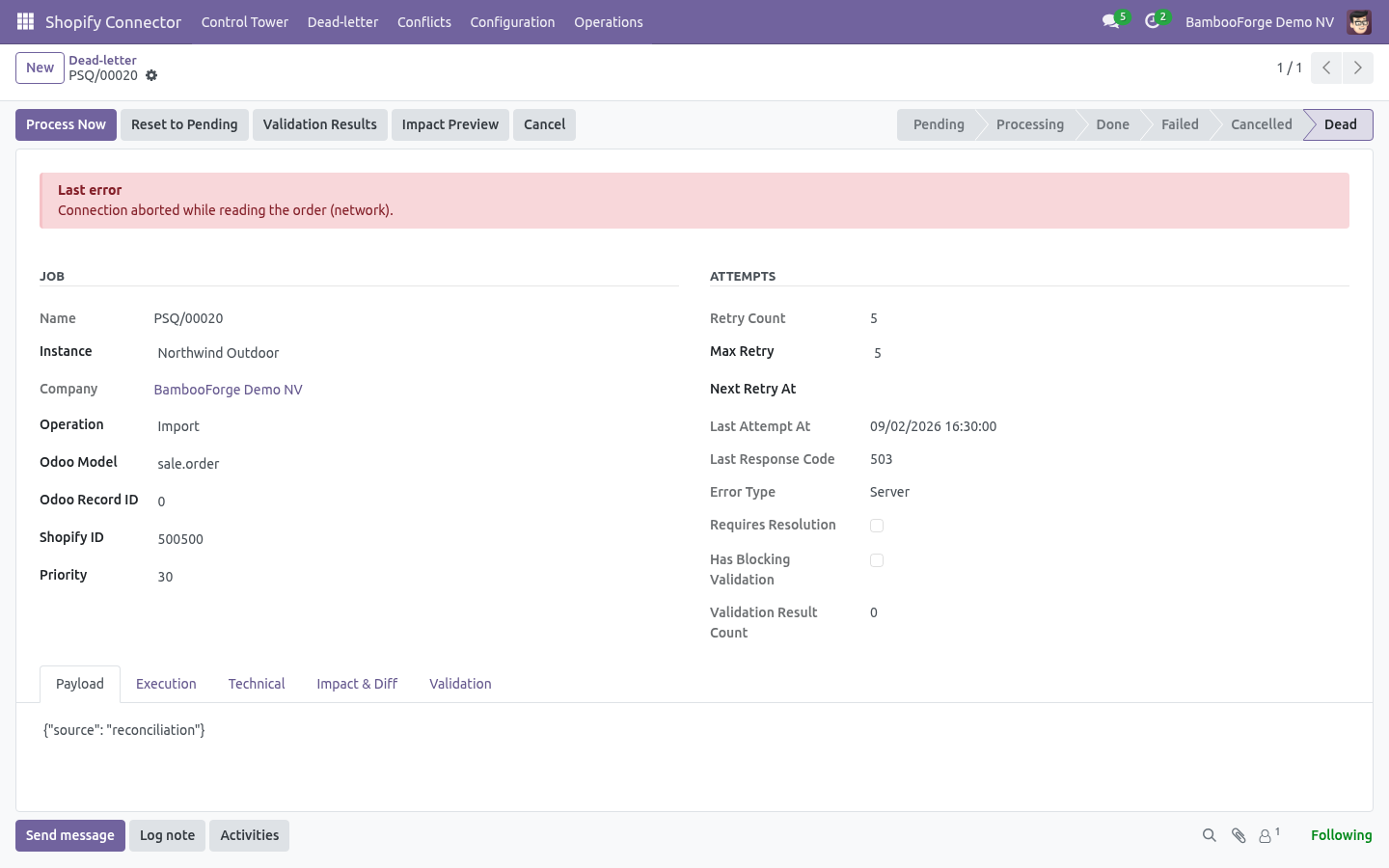
Dead Letter — jobs that exhausted their retries, grouped by error type, with Requeue and Discard in bulk.
Conflicts — a record changed on both sides since the last sync is not overwritten; it is listed with both versions and resolved with Odoo wins, Store wins or Mark reviewed.
Logs — every API call with URL, operation name, request and response payloads, HTTP status, duration and cost; searchable by correlation key.
Rollback Snapshots — with Rollback on, imports capture the previous Odoo values so a batch can be undone from the snapshot.
Safety features
Dry-run mode — simulate writes and review Validation Results before going live.
Business validation profiles — Minimal / Standard / Strict gate risky writes.
Resilient queue — every remote action is a job with retry, exponential back-off and idempotency keys, so a retried job never applies twice.
Throttle-aware client — Shopify's GraphQL cost headers are read on every response; a throttled call waits for the bucket to refill instead of failing.
Circuit breaker — after repeated failures the instance auto-pauses (Tripped); Auto Recover reopens it once the store responds.
Conflict detection — two-sided changes are held for a decision.
Rollback snapshots — undo an import batch.
Signed webhooks — HMAC verification, replay protection by webhook id.
SSRF guard — internal/loopback/private hosts are refused unless Allow internal host is explicitly enabled.
Where Shopify shows up in Odoo
The connector stays out of the way on records that have nothing to do with Shopify:
Sales orders - the Shopify tab, Push to Shopify and Shopify Binding appear only on orders that came from Shopify, are bound to Shopify, or belong to a customer bound to Shopify.
Products and contacts - the Shopify tab appears once an active Shopify connection exists; the Shopify Binding button inside it appears once the record is bound.
List views, the sync queue and the control tower are unchanged.
Troubleshooting
Symptom |
Cause and fix |
|---|---|
Test Connection fails with 401 / "Invalid API key or access token" |
The token is wrong, or belongs to another store. Re-copy it from the custom app; it is shown once, so create a new one if lost. |
Test Connection fails with "Access denied for … field" |
The custom app lacks a scope. Add it under Admin API integration and save — Shopify applies it to the existing token. |
Protected customer data: Withheld by Shopify on the instance; customer imports fail with "not approved to access the Customer object" |
Shopify withholds name, email, phone and addresses from apps on the Basic plan, and from apps that have not been granted protected customer data access (Dev Dashboard ▸ your app ▸ API access). Nothing to fix in Odoo: products, stock, orders, fulfilments and payouts keep syncing; each order lands on a Shopify customer #id contact (or one Shopify guest contact) until the plan or the grant changes, after which Import Customers fills the details in. |
"Refused internal/private host" |
Store URL points at localhost or a private IP. Enable Allow internal host (test only). |
Orders import but never confirm |
The financial status maps to Keep draft / Ignore, or the gateway has Only when paid and the order is still authorized. Check Order State Mappings and Payment Gateways. |
Fulfilment shows Error: no open fulfillment order |
The order was already fulfilled in Shopify, or the line belongs to a location Odoo does not ship from. Open the order in Shopify to see which. |
Register webhooks refuses |
web.base.url is http:// or not public. Shopify only delivers to public HTTPS. |
Webhooks arrive but nothing changes |
The instance has Webhooks enabled off, or the secret differs from the one registered. Re-register. |
Jobs stay in Pending |
The Queue Processor is off or the instance is paused. Check Scheduled Actions and the instance state. |
Instance shows Tripped |
Circuit breaker tripped after repeated failures. Fix the cause; Auto Recover reopens it, or click Resume. |
Jobs fail with THROTTLED |
Another app is consuming the store's GraphQL budget. The client waits and retries by itself; lower Batch size if it keeps happening. |
Stock pushed is lower than Odoo on-hand |
Buffer quantity is subtracted, and the oversell guard clamps at zero. Both are on the instance. |
Nothing happens after Import |
You are in Dry-run. Review Validation Results, then turn it off. |
For anything else, Operations ▸ Logs records every call with its correlation key, payloads, status and cost.
Frequently asked questions
Which versions are supported? Odoo 20.0 on the Odoo side. On the Shopify side the connector targets the GraphQL Admin API (2026-01 by default; the version is a field). It ships with a full mock Admin API and an automated test suite that drives every flow — connection, catalogue, orders in each financial status, fulfilment, cancellation, refund both ways, product and customer export, stock, payouts, checkouts, webhook registration — against that mock.
Do I need a Shopify store to evaluate it? No. The bundled mock store lets you install, explore and demo the complete flow before connecting a real shop.
Does it use the REST Admin API? No. Shopify has marked REST as legacy and no longer accepts new public apps on it; everything here is GraphQL, including product export via productSet and fulfilment via fulfillment orders.
How are variants handled? Each Shopify variant binds to one Odoo product variant, matched by an existing binding, then by attribute values, SKU, barcode, or the single variant. Option names become Odoo attributes. Exporting a multi-variant Odoo product creates the options and variants on Shopify in one call.
Can I run several stores? Yes — one instance per store, each with its own warehouse mapping, gateways, mappings, queue and control tower, and its own company if needed.
Is it safe to run against production data? Dry-run is ON by default, validation blocks risky writes, conflicts are held, and rollback snapshots let you undo. You decide when to go live.
What support and refund policy do I get? Every request is answered within 24 hours, setup help included. If you report a bug within 2 months of purchase and it is not resolved within 15 days, you are entitled to a full money-back refund.
Data, privacy & limits
The connector reads products, customers, orders, refunds, inventory levels, payouts and checkouts from your store and writes the corresponding Odoo records; it writes products, customers, inventory levels, fulfilments, cancellations and refunds to the store, each only when its toggle is on. Credentials are stored in admin-only fields.
Customer data is handled inside your Odoo database only. Shopify's mandatory privacy webhooks (data request, redaction) are for public apps on the App Store; a custom app for your own store does not receive them.
In scope today: product/variant/customer/order/refund import; product, customer, stock, fulfilment, cancellation and refund export; gateway workflows; payouts; abandoned checkouts; webhooks; flows; control tower.
Out of scope / best-effort: Shopify POS-specific records, gift cards, draft orders, B2B companies and catalogues, subscriptions, Shopify Markets price lists per market (presentment currencies are read, not written), and automatic tax rule creation in Odoo (taxes are taken as Shopify computed them).
Support & updates
Support: support@bambooforge.dev — answered within 24 hours, setup help included.
Refund: report a bug within 2 months of purchase; if unresolved within 15 days, full refund.
Full source is included. Updates track the supported Odoo 20 and Shopify GraphQL Admin API line.
Upgrading & version compatibility
This build targets Odoo 20.0. Each Odoo major series (16.0, 17.0, 18.0, 19.0, 20.0) has its own dedicated build of this module — always install the build that matches your Odoo version.
Patch upgrades (same series, e.g. 20.0.1.0.0 → later)
Back up your database and filestore first.
Replace the module folder with the newer build.
Restart Odoo with the module updated:
./odoo-bin -c your.conf -u bambooforge_shopify_connector -d your_db
Odoo applies any schema/data changes automatically. Your instances, bindings, mappings and history are preserved.
Cross-version migration (moving to a newer Odoo)
Upgrading Odoo itself is a database migration handled by Odoo's standard upgrade tooling. When you migrate the database to the next Odoo series, install the matching build of this module for that series. Data created by this module carries over with the database migration. After any upgrade the scheduled actions resume on their normal cadence.
Uninstallation
Remove the module from Apps ▸ Shopify Connector ▸ Uninstall. Uninstalling is clean and reversible by reinstalling — but note what is and is not deleted.
What is removed
The module's own tables and every record in them (30 models, prefixed shopify.*): instances, bindings, queue jobs, logs, mappings, flows, payouts, checkouts, webhook subscriptions.
The menus, actions and views this module installed, and its scheduled actions — they stop immediately.
What is preserved
Your Shopify store is never touched. Webhook subscriptions registered from Odoo stay on the store until you click Unregister webhooks before uninstalling; a delivery to a removed Odoo route is simply dropped by Shopify after its retries.
Records already imported into standard Odoo models — contacts, products, sale orders, deliveries, invoices and credit notes — remain ordinary Odoo records. The extra Shopify fields on them are removed.
As always, take a database backup before uninstalling in production.
Tested against the real thing
Automated tests run against a mock Shopify on every release; the sentence below is the part no mock can give you.
Tested for real against two Shopify development stores - on the Basic plan, signed in with a custom-app token and again with client credentials, the shop card, two locations and seven payment gateways came back, 17 products were listed and imported, one product was exported and 17 webhook topics registered and removed, while Shopify's withholding of customer details on that plan was detected on Test Connection and reported on the customer jobs without stopping the store; on Shopify Plus, signed in as a Dev Dashboard app with client credentials, the 24-hour token was fetched and its expiry recorded, 17 products and 3 customers with email, phone and address came through, one product was exported, 17 webhook topics were registered and removed, and the connection also answered on API versions 2025-10, 2026-04 and 2026-07 - 0 jobs lost; the 17 webhook topics were also registered against a public Odoo, and a product tagged in Shopify reached it as a signed products/update webhook, verified and handled within two seconds.
Changelog
20.0.1.1.1
Built for Odoo 20: record rules and access rights rewritten onto Odoo 20's single ir.access model, the screens rebuilt on Owl 3, and every icon moved to the icon set Odoo 20 ships.
20.0.1.1.0
Sign in with a Dev Dashboard app: Client ID + secret on the instance; Odoo fetches the 24-hour access token with Shopify's client-credentials grant and renews it before it expires. Stores created after January 2026 cannot make a custom app in the admin any more; this is the way in.
The custom-app token (shpat_) keeps working as before.
Scopes as Shopify names them today (read_checkouts is gone; abandoned checkouts come with read_orders).
20.0.1.0.0
First release for Odoo 20.0.
Connect a Shopify store over the GraphQL Admin API; the shop card, locations and payment gateways fill in on Test Connection.
Import products with every variant, customers with addresses, and orders in every financial status with storefront totals matched.
Per-gateway workflows: confirm, invoice and register payment on import.
Push fulfilments with tracking, cancellations and refunds to Shopify; import Shopify refunds as credit notes.
Two-way stock per location with buffer and oversell guard.
Payouts with fee lines, abandoned checkouts with recovery links.
Webhooks registered from Odoo, signed and de-duplicated.
Queue, dry-run, validation, conflicts, rollback, dead-letter console and control tower; a bundled mock store to evaluate without a Shopify account.
Feature additions and fixes ship as new builds on the Odoo Apps store; this page and the module's version reflect the current published release.
How we make sure it works
Before every release, 173 automated checks run against this app on Odoo 16, 17, 18, 19 and 20. Among them:
A customer import is refused with a reason and not retried.
Pending order stays draft and partially refunded pulls credit note.
A domain that does not parse is refused.
Nothing at all is an empty row not a crash.
A product shows its binding button only once bound.
Tested for real against two Shopify development stores - on the Basic plan, signed in with a custom-app token and again with client credentials, the shop card, two locations and seven payment gateways came back, 17 products were listed and imported, one product was exported and 17 webhook topics registered and removed, while Shopify's withholding of customer details on that plan was detected on Test Connection and reported on the customer jobs without stopping the store; on Shopify Plus, signed in as a Dev Dashboard app with client credentials, the 24-hour token was fetched and its expiry recorded, 17 products and 3 customers with email, phone and address came through, one product was exported, 17 webhook topics were registered and removed, and the connection also answered on API versions 2025-10, 2026-04 and 2026-07 - 0 jobs lost; the 17 webhook topics were also registered against a public Odoo, and a product tagged in Shopify reached it as a signed products/update webhook, verified and handled within two seconds.
The complete list is in the source you receive.