 BambooForge Labs
SEO Pro: Website SEO Optimization & Analysis
Website SEO for Odoo: focus-keyphrase analysis with traffic-light scoring, readability coach, snippet previews, redirects, 404 monitor, schema.
Available for Odoo 16.0, Odoo 17.0, Odoo 18.0, Odoo 19.0, Odoo 20.0. Technical name bambooforge_seo_pro.
Transcript of the walkthrough (Odoo 20)
SEO Pro: Website SEO Optimization & Analysis. Website SEO for Odoo: focus-keyphrase analysis with traffic-light scoring, readability coach, snippet previews, redirects, 404 monitor, schema. SEO Pro keeps one SEO Page record (an indexable) per published content record — website pages out of the box, blog posts and eCommerce products automatically when those apps are installed. Everything the optimizer needs lives on that record: In the next few minutes: seo pro: website seo optimization & analysis, then scoring a page, then redirects, then 404 monitor, then internal links.
Then what this app deliberately does not do, so you can tell before you buy whether it fits. Everything lives under SEO Pro then Dashboard then SEO Pages then Redirects. #. Install BambooForge SEO Pro from Apps.
The install hook indexes your published pages immediately and adds an Optimize SEO (SEO Pro) action to website pages, blog posts and products. #. Open SEO Pro ▸ Dashboard and press Sync & analyze all once. Every published page gets a score.
#. Open the worst page from the dashboard, type its focus keyphrase, press Analyze, and work down the red items in the SEO analysis tab. Green means done. #.
Set your Organization data in SEO Pro ▸ Configuration ▸ Settings (block SEO — organization name, logo, social profile URLs) so the JSON-LD graph carries your brand. SEO Pro: Website SEO Optimization & Analysis. A complete on-page SEO suite for the Odoo 20 website builder, blog and eCommerce: score every page against a focus keyphrase with a traffic-light content analysis, coach the copy with a readability analysis, preview the Google / Facebook / X snippet while you type, manage redirects (plain and regex, including 410/451) with a live 404 monitor, emit a schema.org JSON-LD graph, find orphaned pages, get internal-link suggestions and fix titles & descriptions in bulk. This page is the complete manual.
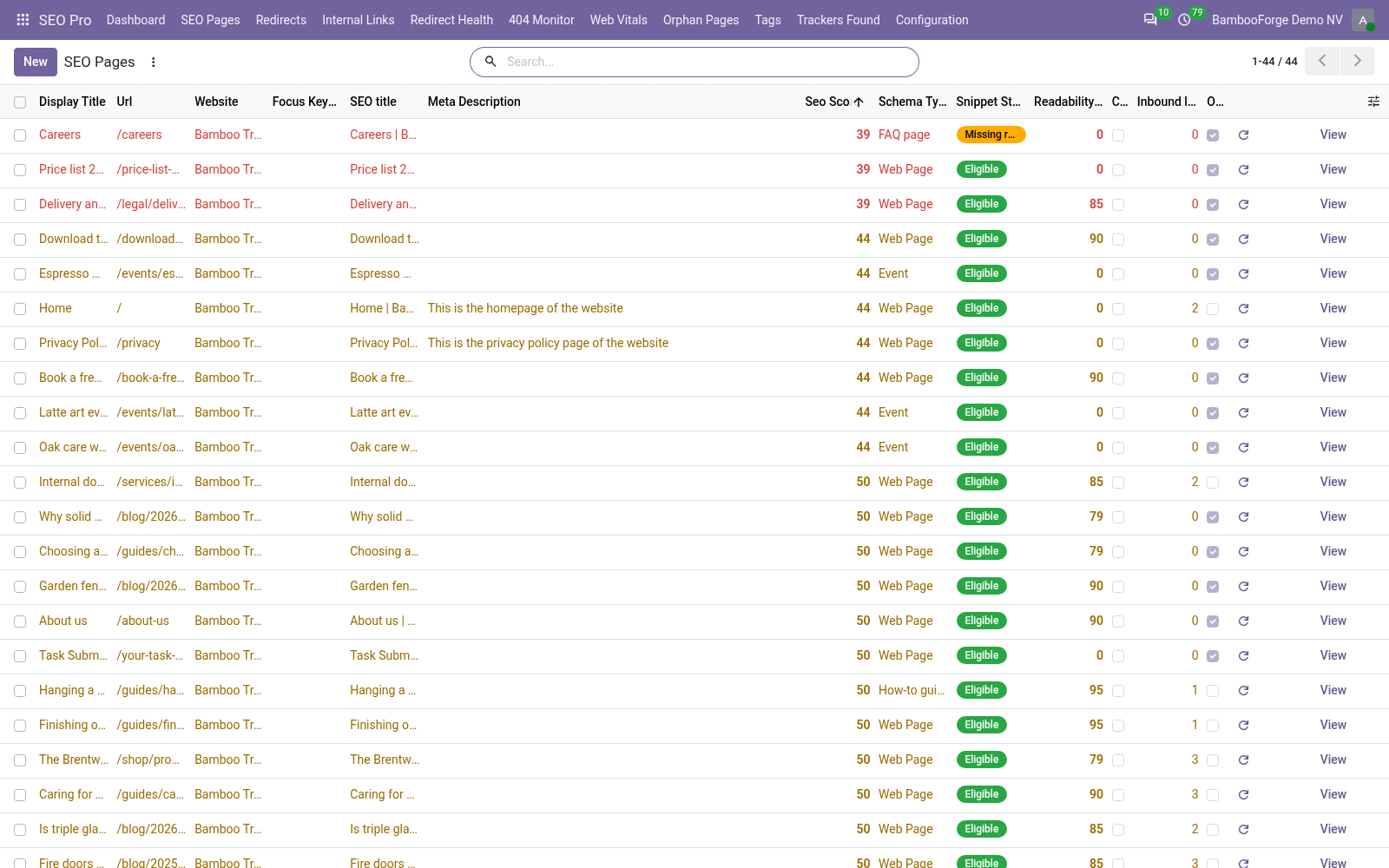
If you follow it top to bottom you can install, index your site, optimize your first page, wire redirects and structured data, and fix the common issues without contacting support. Scoring a page. Open SEO Pro ▸ SEO Pages and pick a page (or use the Optimize SEO action from the website page / blog post / product form). Then: Type the focus keyphrase — the query you want the page to rank for.
Add comma-separated synonyms and the analysis accepts them wherever the keyphrase is expected. Press Analyze. The two score badges and both analysis tabs refresh. Scores map to buckets: 1–40 needs improvement, 41–70 OK, 71–100 good.
The Snippet tab shows the live Google preview. Edit the SEO title and meta description there — both are stored on the source record (website_meta_title / website_meta_description), so they are the values Odoo itself renders. Meters turn green in the sweet spot (30–65 / 120–156 characters). Related keyphrases (one per line item) are checked for presence and occurrence count in the copy — use them for secondary queries.
Tick Cornerstone content on your most important pages: the copy-length bar is raised to 900 words, 50 prominent words are extracted instead of 20, and the page is boosted in link suggestions. Redirects. SEO Pro ▸ Redirects lists all rules (they are standard website.rewrite records, extended). Beyond the stock 301/302/308/404 you get: 307 — temporary redirect that preserves the HTTP method.
410 Gone / 451 Unavailable For Legal Reasons — status responses for deleted or legally blocked content; only URL from is needed. Regular expression rules — tick Regular expression and URL from becomes a Python regex matched against the request path; captured groups are substituted into URL to (\1, \2 …). Example: ^/old-blog/(.*)$ → /blog/\1. Hits / Last hit — every rule counts how often it fires, so you can prune dead rules safely.
Automatic 301s — when a website page URL changes (or a sync detects a changed URL on any indexed record) a 301 from the old URL is created automatically. Toggle per website in Settings. Regex rules are cached per website. The regex rule set is read once per website and re-read only when a rule is created, changed or deleted, so heavy 404 traffic (scanners hammering non-existent URLs) no longer costs a query per request.
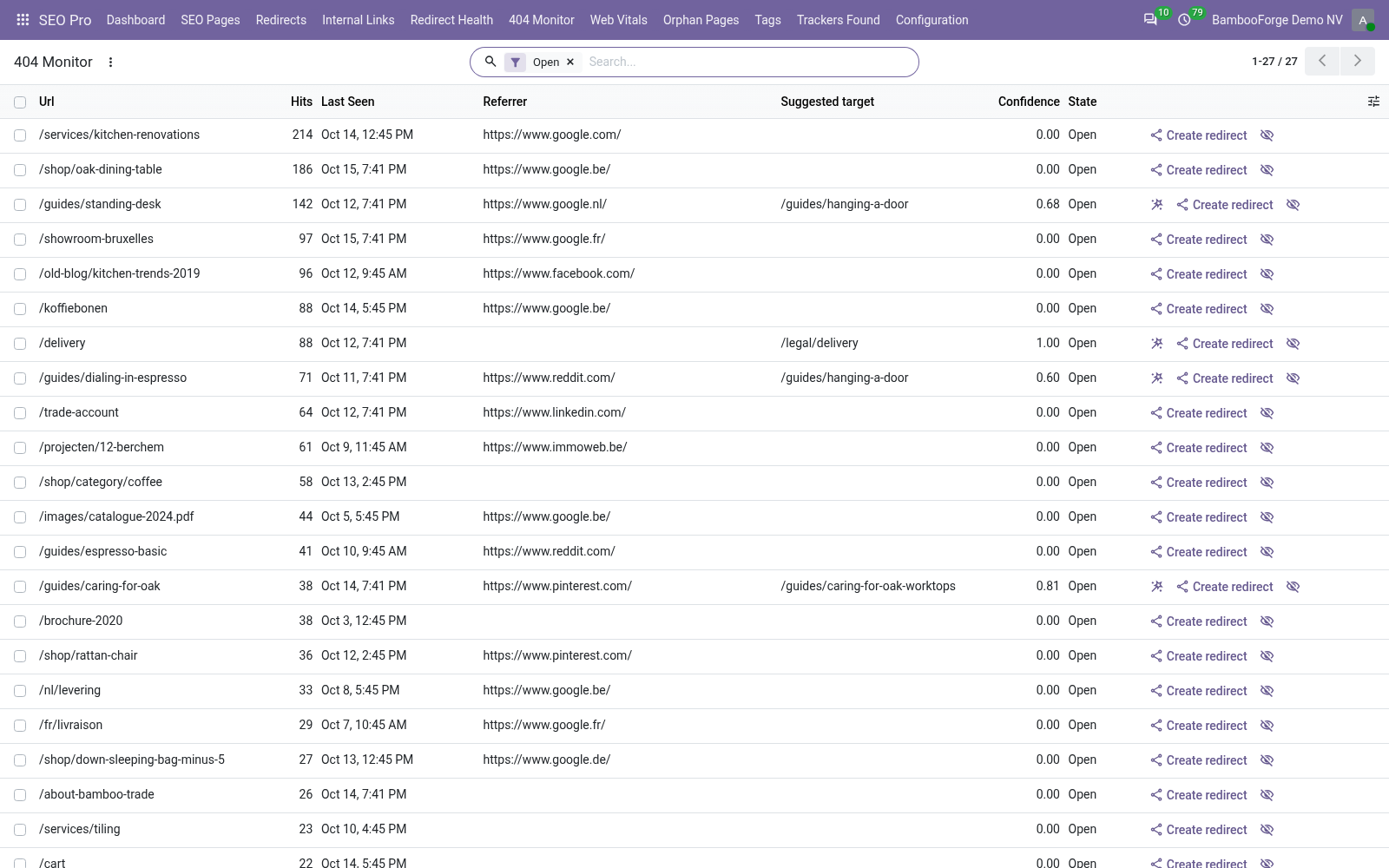
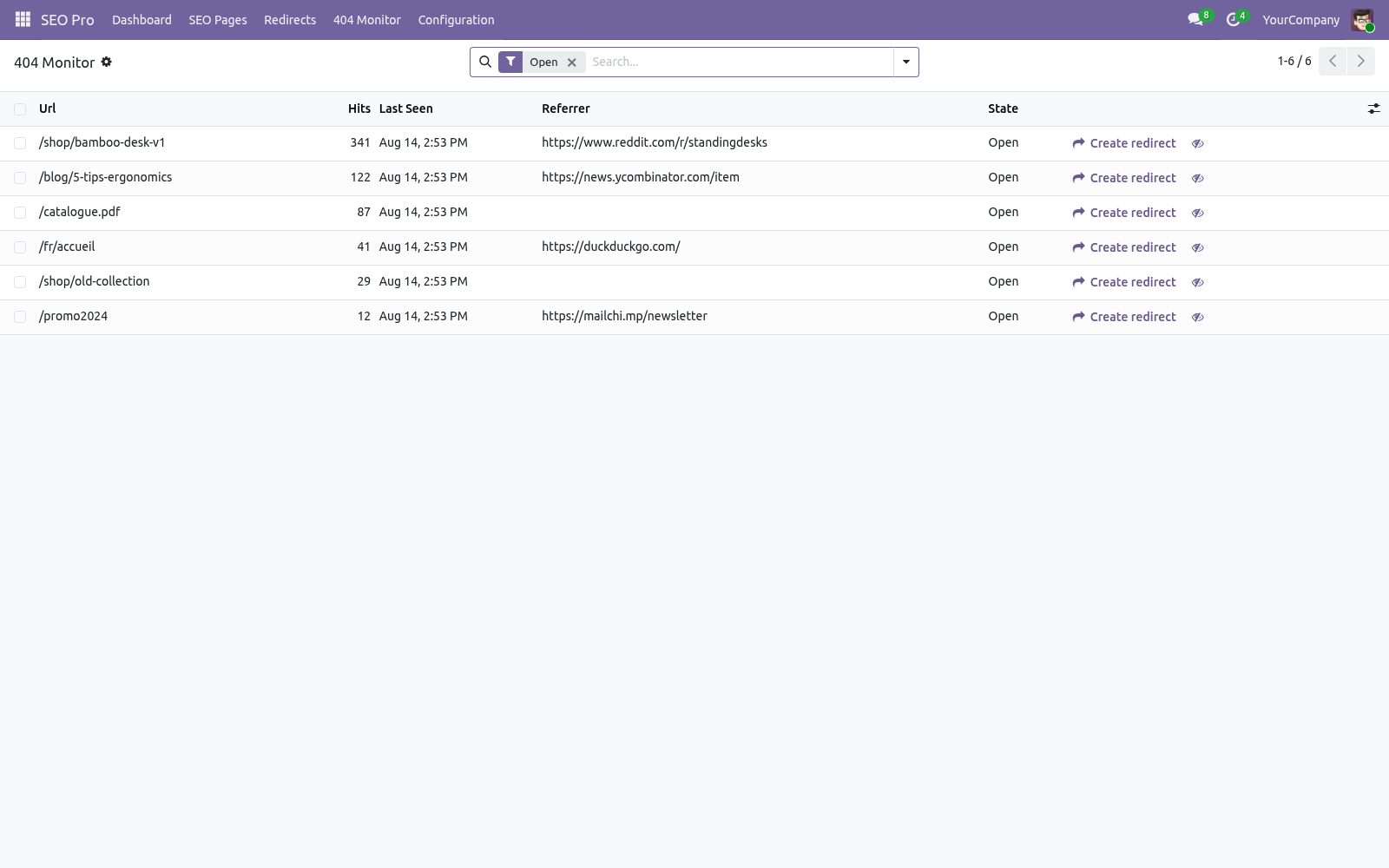
404 monitor. SEO Pro ▸ 404 Monitor records every storefront 404 (assets, /web paths and obvious scanner probes like .php URLs are skipped; concurrent hits are merged). For each entry you see hit count, first/last seen and the last referrer — an entry with a referrer is a real broken link somewhere. Press Create redirect to fix it: the redirect form opens pre-filled and the entry flips to Redirected.
Ignore hides noise. Entries stale for 90 days are vacuumed automatically and the table is capped at 20 000 rows. Internal links. Press Link suggestions on a page to get the top 10 pages worth linking to, ranked by shared prominent words (cornerstone pages first).
Pages you already link to are labelled. The Orphaned filter in SEO Pages (and the dashboard card) lists pages no other analyzed page links to — search engines rarely rank a page the site itself does not vouch for. Dead link — nothing on the site answers that path any more, typically a page renamed after the link was written. Fix the link, or add a redirect.
Goes through a redirect — the link only works because a 301 catches it. The final address is shown next to it; pointing the link straight there saves a hop on every crawl and keeps the target's authority intact. Link check. SEO Pro ▸ Internal Links lists the internal links that no longer land.
Two kinds are reported: Bulk editing. The SEO Pages list is editable in place. Typical sweep: filter Missing focus keyphrase, then fill the keyphrase / title / description columns row by row — or select many rows and use multi-edit for shared values. The standard export gives you XLSX of any columns including both scores.
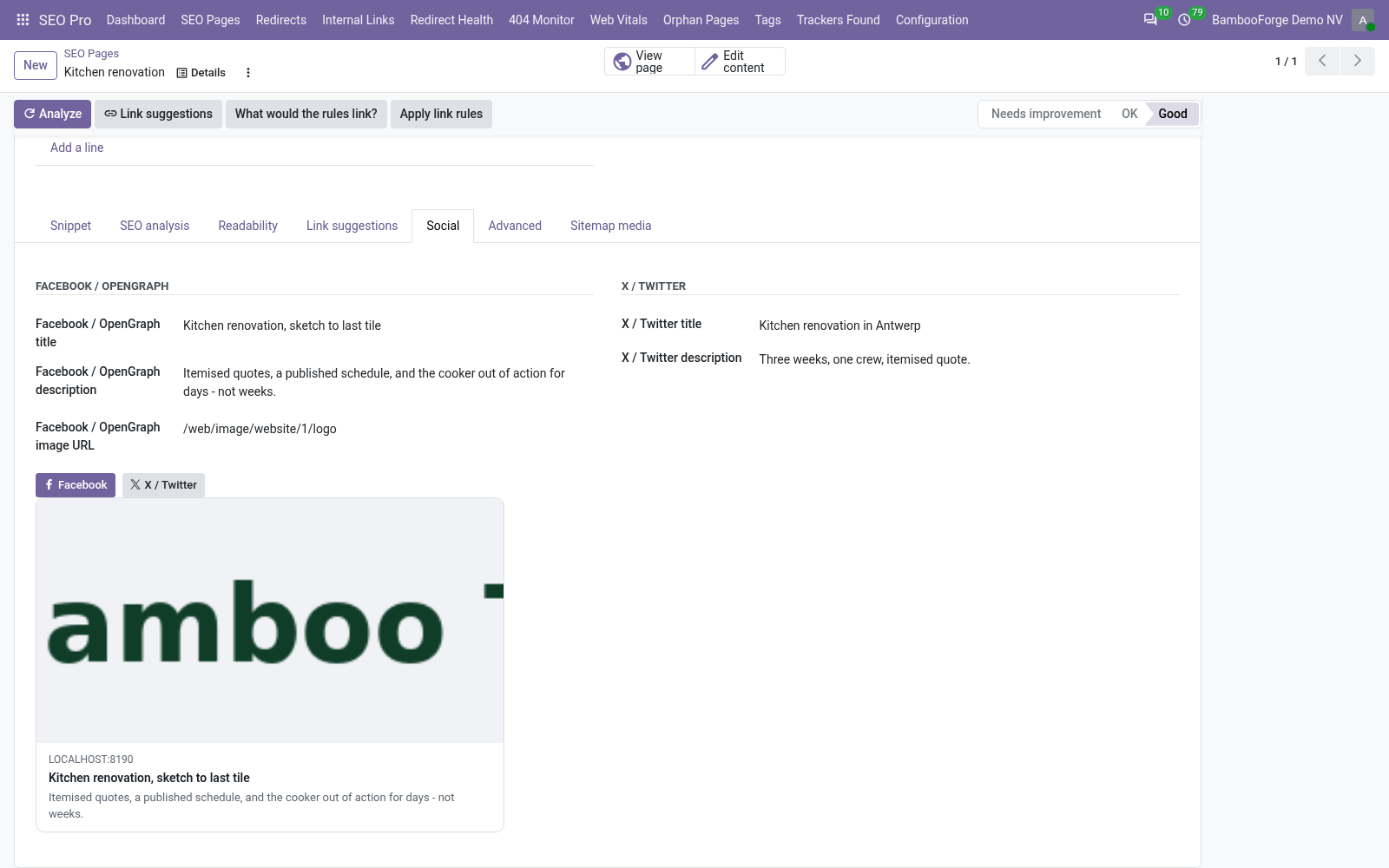
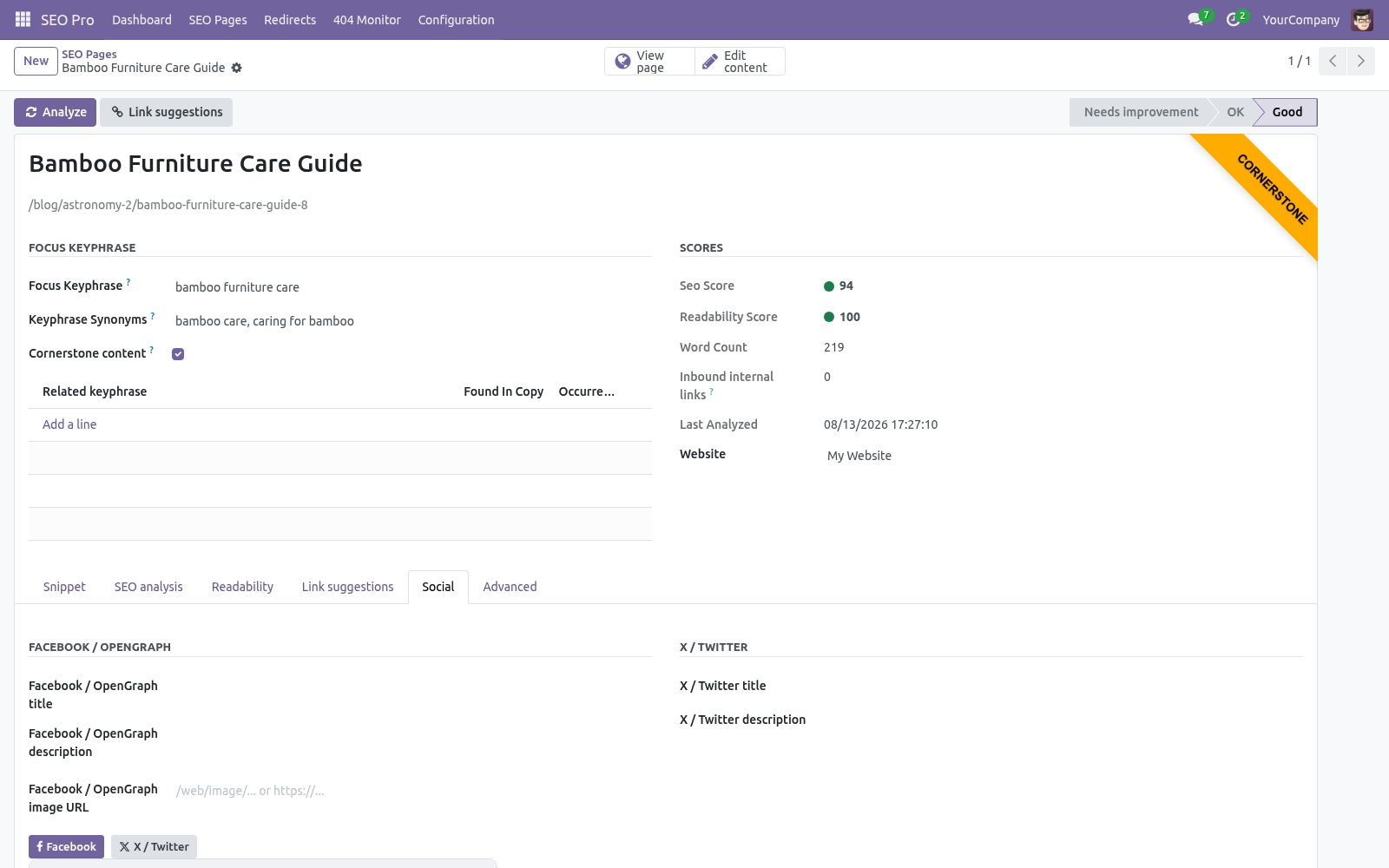
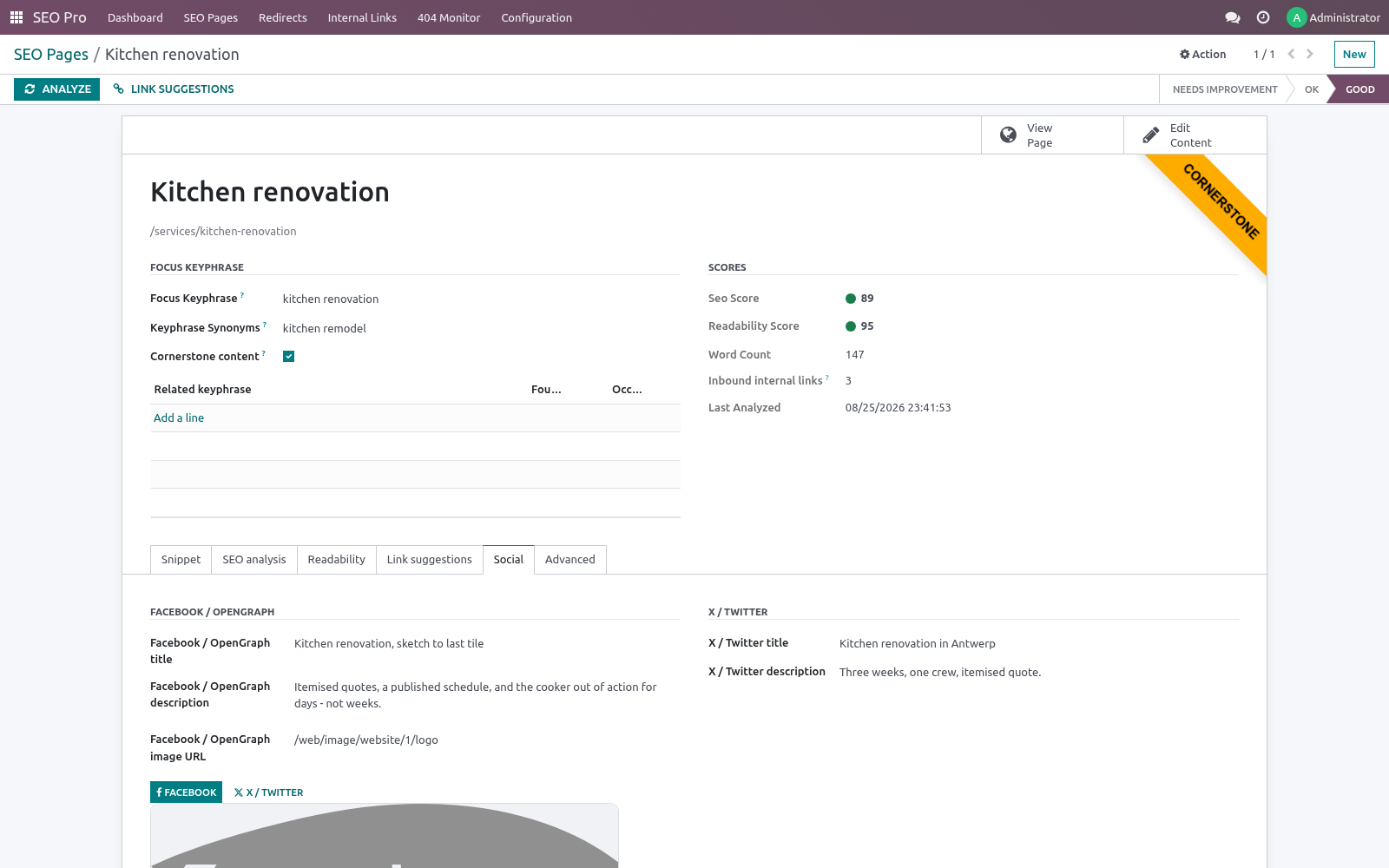
Structured data & social. With schema enabled (default), every page carries a JSON-LD @graph with Organization, WebSite (with SearchAction), WebPage and BreadcrumbList; blog posts add Article (headline, dates, author) and products add Product with an Offer (price, currency). Pick the node type per page in Advanced ▸ Structured data. The Social tab overrides the OpenGraph / X card title, description and image per page; unset fields fall back to the SEO title, meta description and the website's default sharing image.
Recommended image size 1200×630. Robots & canonical. Advanced tab: No index removes the page from search engines (a robots meta) — combine with a 410 if the content is truly gone. No follow asks crawlers not to follow the page's links.
Canonical URL points duplicates at the original; it replaces the standard canonical link on that page. Nightly cron. SEO Pro: nightly re-index and analysis (02:30) syncs new/changed records, re-analyzes every page in batches, and recomputes inbound-link counts. Run it on demand with Configuration ▸ Analyze all pages.
Settings (per website). SEO Pro ▸ Configuration ▸ Settings, block SEO (also reachable via Website ▸ Configuration ▸ Settings): The complete manual is at docs dot bambooforge dot dev, the demo database is linked from the store page, and support answers within twenty-four hours. Links are in the description.
Transcript of the walkthrough (Odoo 19)
SEO Pro: Website SEO Optimization & Analysis. Website SEO for Odoo: focus-keyphrase analysis with traffic-light scoring, readability coach, snippet previews, redirects, 404 monitor, schema. SEO Pro keeps one SEO Page record (an indexable) per published content record — website pages out of the box, blog posts and eCommerce products automatically when those apps are installed. Everything the optimizer needs lives on that record: In the next few minutes: seo pro: website seo optimization & analysis, then scoring a page, then redirects, then 404 monitor, then internal links.
Then what this app deliberately does not do, so you can tell before you buy whether it fits. Everything lives under SEO Pro then Dashboard then SEO Pages then Redirects. SEO Pro: Website SEO Optimization & Analysis. A complete on-page SEO suite for the Odoo 19 website builder, blog and eCommerce: score every page against a focus keyphrase with a traffic-light content analysis, coach the copy with a readability analysis, preview the Google / Facebook / X snippet while you type, manage redirects (plain and regex, including 410/451) with a live 404 monitor, emit a schema.org JSON-LD graph, find orphaned pages, get internal-link suggestions and fix titles & descriptions in bulk.
This page is the complete manual. If you follow it top to bottom you can install, index your site, optimize your first page, wire redirects and structured data, and fix the common issues without contacting support. Scoring a page. Open SEO Pro ▸ SEO Pages and pick a page (or use the Optimize SEO action from the website page / blog post / product form).
Then: Type the focus keyphrase — the query you want the page to rank for. Add comma-separated synonyms and the analysis accepts them wherever the keyphrase is expected. Press Analyze. The two score badges and both analysis tabs refresh.
Scores map to buckets: 1–40 needs improvement, 41–70 OK, 71–100 good. The Snippet tab shows the live Google preview. Edit the SEO title and meta description there — both are stored on the source record (website_meta_title / website_meta_description), so they are the values Odoo itself renders. Meters turn green in the sweet spot (30–65 / 120–156 characters).
Related keyphrases (one per line item) are checked for presence and occurrence count in the copy — use them for secondary queries. Tick Cornerstone content on your most important pages: the copy-length bar is raised to 900 words, 50 prominent words are extracted instead of 20, and the page is boosted in link suggestions. Redirects. SEO Pro ▸ Redirects lists all rules (they are standard website.rewrite records, extended).
Beyond the stock 301/302/308/404 you get: 307 — temporary redirect that preserves the HTTP method. 410 Gone / 451 Unavailable For Legal Reasons — status responses for deleted or legally blocked content; only URL from is needed. Regular expression rules — tick Regular expression and URL from becomes a Python regex matched against the request path; captured groups are substituted into URL to (\1, \2 …). Example: ^/old-blog/(.*)$ → /blog/\1.
Hits / Last hit — every rule counts how often it fires, so you can prune dead rules safely. Automatic 301s — when a website page URL changes (or a sync detects a changed URL on any indexed record) a 301 from the old URL is created automatically. Toggle per website in Settings. Regex rules are cached per website.
The regex rule set is read once per website and re-read only when a rule is created, changed or deleted, so heavy 404 traffic (scanners hammering non-existent URLs) no longer costs a query per request. 404 monitor. SEO Pro ▸ 404 Monitor records every storefront 404 (assets, /web paths and obvious scanner probes like .php URLs are skipped; concurrent hits are merged). For each entry you see hit count, first/last seen and the last referrer — an entry with a referrer is a real broken link somewhere.
Press Create redirect to fix it: the redirect form opens pre-filled and the entry flips to Redirected. Ignore hides noise. Entries stale for 90 days are vacuumed automatically and the table is capped at 20 000 rows. Internal links.
Press Link suggestions on a page to get the top 10 pages worth linking to, ranked by shared prominent words (cornerstone pages first). Pages you already link to are labelled. The Orphaned filter in SEO Pages (and the dashboard card) lists pages no other analyzed page links to — search engines rarely rank a page the site itself does not vouch for. Dead link — nothing on the site answers that path any more, typically a page renamed after the link was written.
Fix the link, or add a redirect. Goes through a redirect — the link only works because a 301 catches it. The final address is shown next to it; pointing the link straight there saves a hop on every crawl and keeps the target's authority intact. Link check.
SEO Pro ▸ Internal Links lists the internal links that no longer land. Two kinds are reported: Bulk editing. The SEO Pages list is editable in place. Typical sweep: filter Missing focus keyphrase, then fill the keyphrase / title / description columns row by row — or select many rows and use multi-edit for shared values.
The standard export gives you XLSX of any columns including both scores. Structured data & social. With schema enabled (default), every page carries a JSON-LD @graph with Organization, WebSite (with SearchAction), WebPage and BreadcrumbList; blog posts add Article (headline, dates, author) and products add Product with an Offer (price, currency). Pick the node type per page in Advanced ▸ Structured data.
The Social tab overrides the OpenGraph / X card title, description and image per page; unset fields fall back to the SEO title, meta description and the website's default sharing image. Recommended image size 1200×630. Robots & canonical. Advanced tab: No index removes the page from search engines (a robots meta) — combine with a 410 if the content is truly gone.
No follow asks crawlers not to follow the page's links. Canonical URL points duplicates at the original; it replaces the standard canonical link on that page. Nightly cron. SEO Pro: nightly re-index and analysis (02:30) syncs new/changed records, re-analyzes every page in batches, and recomputes inbound-link counts.
Run it on demand with Configuration ▸ Analyze all pages. Settings (per website). SEO Pro ▸ Configuration ▸ Settings, block SEO (also reachable via Website ▸ Configuration ▸ Settings): - Automatic redirects Create a 301 automatically whenever a page URL changes. Default on.
Record visitor 404s. Default on. - Structured data Emit the JSON-LD graph; configure organization name, logo URL and social profile URLs (one per line, becomes sameAs). - Default sharing image Site-wide OpenGraph/Twitter fallback image URL.
The complete manual is at docs dot bambooforge dot dev, the demo database is linked from the store page, and support answers within twenty-four hours. Links are in the description.
Transcript of the walkthrough (Odoo 18)
SEO Pro: Website SEO Optimization & Analysis. Website SEO for Odoo: focus-keyphrase analysis with traffic-light scoring, readability coach, snippet previews, redirects, 404 monitor, schema. SEO Pro keeps one SEO Page record (an indexable) per published content record — website pages out of the box, blog posts and eCommerce products automatically when those apps are installed. Everything the optimizer needs lives on that record: In the next few minutes: seo pro: website seo optimization & analysis, then scoring a page, then redirects, then 404 monitor, then internal links.
Then what this app deliberately does not do, so you can tell before you buy whether it fits. Everything lives under SEO Pro then Dashboard then SEO Pages then Redirects. SEO Pro: Website SEO Optimization & Analysis. A complete on-page SEO suite for the Odoo 18 website builder, blog and eCommerce: score every page against a focus keyphrase with a traffic-light content analysis, coach the copy with a readability analysis, preview the Google / Facebook / X snippet while you type, manage redirects (plain and regex, including 410/451) with a live 404 monitor, emit a schema.org JSON-LD graph, find orphaned pages, get internal-link suggestions and fix titles & descriptions in bulk.
This page is the complete manual. If you follow it top to bottom you can install, index your site, optimize your first page, wire redirects and structured data, and fix the common issues without contacting support. Scoring a page. Open SEO Pro ▸ SEO Pages and pick a page (or use the Optimize SEO action from the website page / blog post / product form).
Then: Type the focus keyphrase — the query you want the page to rank for. Add comma-separated synonyms and the analysis accepts them wherever the keyphrase is expected. Press Analyze. The two score badges and both analysis tabs refresh.
Scores map to buckets: 1–40 needs improvement, 41–70 OK, 71–100 good. The Snippet tab shows the live Google preview. Edit the SEO title and meta description there — both are stored on the source record (website_meta_title / website_meta_description), so they are the values Odoo itself renders. Meters turn green in the sweet spot (30–65 / 120–156 characters).
Related keyphrases (one per line item) are checked for presence and occurrence count in the copy — use them for secondary queries. Tick Cornerstone content on your most important pages: the copy-length bar is raised to 900 words, 50 prominent words are extracted instead of 20, and the page is boosted in link suggestions. Redirects. SEO Pro ▸ Redirects lists all rules (they are standard website.rewrite records, extended).
Beyond the stock 301/302/308/404 you get: 307 — temporary redirect that preserves the HTTP method. 410 Gone / 451 Unavailable For Legal Reasons — status responses for deleted or legally blocked content; only URL from is needed. Regular expression rules — tick Regular expression and URL from becomes a Python regex matched against the request path; captured groups are substituted into URL to (\1, \2 …). Example: ^/old-blog/(.*)$ → /blog/\1.
Hits / Last hit — every rule counts how often it fires, so you can prune dead rules safely. Automatic 301s — when a website page URL changes (or a sync detects a changed URL on any indexed record) a 301 from the old URL is created automatically. Toggle per website in Settings. Regex rules are cached per website.
The regex rule set is read once per website and re-read only when a rule is created, changed or deleted, so heavy 404 traffic (scanners hammering non-existent URLs) no longer costs a query per request. 404 monitor. SEO Pro ▸ 404 Monitor records every storefront 404 (assets, /web paths and obvious scanner probes like .php URLs are skipped; concurrent hits are merged). For each entry you see hit count, first/last seen and the last referrer — an entry with a referrer is a real broken link somewhere.
Press Create redirect to fix it: the redirect form opens pre-filled and the entry flips to Redirected. Ignore hides noise. Entries stale for 90 days are vacuumed automatically and the table is capped at 20 000 rows. Internal links.
Press Link suggestions on a page to get the top 10 pages worth linking to, ranked by shared prominent words (cornerstone pages first). Pages you already link to are labelled. The Orphaned filter in SEO Pages (and the dashboard card) lists pages no other analyzed page links to — search engines rarely rank a page the site itself does not vouch for. Dead link — nothing on the site answers that path any more, typically a page renamed after the link was written.
Fix the link, or add a redirect. Goes through a redirect — the link only works because a 301 catches it. The final address is shown next to it; pointing the link straight there saves a hop on every crawl and keeps the target's authority intact. Link check.
SEO Pro ▸ Internal Links lists the internal links that no longer land. Two kinds are reported: Bulk editing. The SEO Pages list is editable in place. Typical sweep: filter Missing focus keyphrase, then fill the keyphrase / title / description columns row by row — or select many rows and use multi-edit for shared values.
The standard export gives you XLSX of any columns including both scores. Structured data & social. With schema enabled (default), every page carries a JSON-LD @graph with Organization, WebSite (with SearchAction), WebPage and BreadcrumbList; blog posts add Article (headline, dates, author) and products add Product with an Offer (price, currency). Pick the node type per page in Advanced ▸ Structured data.
The Social tab overrides the OpenGraph / X card title, description and image per page; unset fields fall back to the SEO title, meta description and the website's default sharing image. Recommended image size 1200×630. Robots & canonical. Advanced tab: No index removes the page from search engines (a robots meta) — combine with a 410 if the content is truly gone.
No follow asks crawlers not to follow the page's links. Canonical URL points duplicates at the original; it replaces the standard canonical link on that page. Nightly cron. SEO Pro: nightly re-index and analysis (02:30) syncs new/changed records, re-analyzes every page in batches, and recomputes inbound-link counts.
Run it on demand with Configuration ▸ Analyze all pages. Settings (per website). SEO Pro ▸ Configuration ▸ Settings, block SEO (also reachable via Website ▸ Configuration ▸ Settings): - Automatic redirects Create a 301 automatically whenever a page URL changes. Default on.
Record visitor 404s. Default on. - Structured data Emit the JSON-LD graph; configure organization name, logo URL and social profile URLs (one per line, becomes sameAs). - Default sharing image Site-wide OpenGraph/Twitter fallback image URL.
The complete manual is at docs dot bambooforge dot dev, the demo database is linked from the store page, and support answers within twenty-four hours. Links are in the description.
Transcript of the walkthrough (Odoo 17)
SEO Pro: Website SEO Optimization & Analysis. Website SEO for Odoo: focus-keyphrase analysis with traffic-light scoring, readability coach, snippet previews, redirects, 404 monitor, schema. SEO Pro keeps one SEO Page record (an indexable) per published content record — website pages out of the box, blog posts and eCommerce products automatically when those apps are installed. Everything the optimizer needs lives on that record: In the next few minutes: seo pro: website seo optimization & analysis, then scoring a page, then redirects, then 404 monitor, then internal links.
Then what this app deliberately does not do, so you can tell before you buy whether it fits. Everything lives under SEO Pro then Dashboard then SEO Pages then Redirects. SEO Pro: Website SEO Optimization & Analysis. A complete on-page SEO suite for the Odoo 17 website builder, blog and eCommerce: score every page against a focus keyphrase with a traffic-light content analysis, coach the copy with a readability analysis, preview the Google / Facebook / X snippet while you type, manage redirects (plain and regex, including 410/451) with a live 404 monitor, emit a schema.org JSON-LD graph, find orphaned pages, get internal-link suggestions and fix titles & descriptions in bulk.
This page is the complete manual. If you follow it top to bottom you can install, index your site, optimize your first page, wire redirects and structured data, and fix the common issues without contacting support. Scoring a page. Open SEO Pro ▸ SEO Pages and pick a page (or use the Optimize SEO action from the website page / blog post / product form).
Then: Type the focus keyphrase — the query you want the page to rank for. Add comma-separated synonyms and the analysis accepts them wherever the keyphrase is expected. Press Analyze. The two score badges and both analysis tabs refresh.
Scores map to buckets: 1–40 needs improvement, 41–70 OK, 71–100 good. The Snippet tab shows the live Google preview. Edit the SEO title and meta description there — both are stored on the source record (website_meta_title / website_meta_description), so they are the values Odoo itself renders. Meters turn green in the sweet spot (30–65 / 120–156 characters).
Related keyphrases (one per line item) are checked for presence and occurrence count in the copy — use them for secondary queries. Tick Cornerstone content on your most important pages: the copy-length bar is raised to 900 words, 50 prominent words are extracted instead of 20, and the page is boosted in link suggestions. Redirects. SEO Pro ▸ Redirects lists all rules (they are standard website.rewrite records, extended).
Beyond the stock 301/302/308/404 you get: 307 — temporary redirect that preserves the HTTP method. 410 Gone / 451 Unavailable For Legal Reasons — status responses for deleted or legally blocked content; only URL from is needed. Regular expression rules — tick Regular expression and URL from becomes a Python regex matched against the request path; captured groups are substituted into URL to (\1, \2 …). Example: ^/old-blog/(.*)$ → /blog/\1.
Hits / Last hit — every rule counts how often it fires, so you can prune dead rules safely. Automatic 301s — when a website page URL changes (or a sync detects a changed URL on any indexed record) a 301 from the old URL is created automatically. Toggle per website in Settings. Regex rules are cached per website.
The regex rule set is read once per website and re-read only when a rule is created, changed or deleted, so heavy 404 traffic (scanners hammering non-existent URLs) no longer costs a query per request. 404 monitor. SEO Pro ▸ 404 Monitor records every storefront 404 (assets, /web paths and obvious scanner probes like .php URLs are skipped; concurrent hits are merged). For each entry you see hit count, first/last seen and the last referrer — an entry with a referrer is a real broken link somewhere.
Press Create redirect to fix it: the redirect form opens pre-filled and the entry flips to Redirected. Ignore hides noise. Entries stale for 90 days are vacuumed automatically and the table is capped at 20 000 rows. Internal links.
Press Link suggestions on a page to get the top 10 pages worth linking to, ranked by shared prominent words (cornerstone pages first). Pages you already link to are labelled. The Orphaned filter in SEO Pages (and the dashboard card) lists pages no other analyzed page links to — search engines rarely rank a page the site itself does not vouch for. Dead link — nothing on the site answers that path any more, typically a page renamed after the link was written.
Fix the link, or add a redirect. Goes through a redirect — the link only works because a 301 catches it. The final address is shown next to it; pointing the link straight there saves a hop on every crawl and keeps the target's authority intact. Link check.
SEO Pro ▸ Internal Links lists the internal links that no longer land. Two kinds are reported: Bulk editing. The SEO Pages list is editable in place. Typical sweep: filter Missing focus keyphrase, then fill the keyphrase / title / description columns row by row — or select many rows and use multi-edit for shared values.
The standard export gives you XLSX of any columns including both scores. Structured data & social. With schema enabled (default), every page carries a JSON-LD @graph with Organization, WebSite (with SearchAction), WebPage and BreadcrumbList; blog posts add Article (headline, dates, author) and products add Product with an Offer (price, currency). Pick the node type per page in Advanced ▸ Structured data.
The Social tab overrides the OpenGraph / X card title, description and image per page; unset fields fall back to the SEO title, meta description and the website's default sharing image. Recommended image size 1200×630. Robots & canonical. Advanced tab: No index removes the page from search engines (a robots meta) — combine with a 410 if the content is truly gone.
No follow asks crawlers not to follow the page's links. Canonical URL points duplicates at the original; it replaces the standard canonical link on that page. Nightly cron. SEO Pro: nightly re-index and analysis (02:30) syncs new/changed records, re-analyzes every page in batches, and recomputes inbound-link counts.
Run it on demand with Configuration ▸ Analyze all pages. Settings (per website). SEO Pro ▸ Configuration ▸ Settings, block SEO (also reachable via Website ▸ Configuration ▸ Settings): - Automatic redirects Create a 301 automatically whenever a page URL changes. Default on.
Record visitor 404s. Default on. - Structured data Emit the JSON-LD graph; configure organization name, logo URL and social profile URLs (one per line, becomes sameAs). - Default sharing image Site-wide OpenGraph/Twitter fallback image URL.
The complete manual is at docs dot bambooforge dot dev, the demo database is linked from the store page, and support answers within twenty-four hours. Links are in the description.
Transcript of the walkthrough (Odoo 16)
SEO Pro: Website SEO Optimization & Analysis. Website SEO for Odoo: focus-keyphrase analysis with traffic-light scoring, readability coach, snippet previews, redirects, 404 monitor, schema. SEO Pro keeps one SEO Page record (an indexable) per published content record — website pages out of the box, blog posts and eCommerce products automatically when those apps are installed. Everything the optimizer needs lives on that record: In the next few minutes: seo pro: website seo optimization & analysis, then scoring a page, then redirects, then 404 monitor, then internal links.
Then what this app deliberately does not do, so you can tell before you buy whether it fits. Everything lives under SEO Pro then Dashboard then SEO Pages then Redirects. SEO Pro: Website SEO Optimization & Analysis. A complete on-page SEO suite for the Odoo 16 website builder, blog and eCommerce: score every page against a focus keyphrase with a traffic-light content analysis, coach the copy with a readability analysis, preview the Google / Facebook / X snippet while you type, manage redirects (plain and regex, including 410/451) with a live 404 monitor, emit a schema.org JSON-LD graph, find orphaned pages, get internal-link suggestions and fix titles & descriptions in bulk.
This page is the complete manual. If you follow it top to bottom you can install, index your site, optimize your first page, wire redirects and structured data, and fix the common issues without contacting support. Scoring a page. Open SEO Pro ▸ SEO Pages and pick a page (or use the Optimize SEO action from the website page / blog post / product form).
Then: Type the focus keyphrase — the query you want the page to rank for. Add comma-separated synonyms and the analysis accepts them wherever the keyphrase is expected. Press Analyze. The two score badges and both analysis tabs refresh.
Scores map to buckets: 1–40 needs improvement, 41–70 OK, 71–100 good. The Snippet tab shows the live Google preview. Edit the SEO title and meta description there — both are stored on the source record (website_meta_title / website_meta_description), so they are the values Odoo itself renders. Meters turn green in the sweet spot (30–65 / 120–156 characters).
Related keyphrases (one per line item) are checked for presence and occurrence count in the copy — use them for secondary queries. Tick Cornerstone content on your most important pages: the copy-length bar is raised to 900 words, 50 prominent words are extracted instead of 20, and the page is boosted in link suggestions. Redirects. SEO Pro ▸ Redirects lists all rules (they are standard website.rewrite records, extended).
Beyond the stock 301/302/308/404 you get: 307 — temporary redirect that preserves the HTTP method. 410 Gone / 451 Unavailable For Legal Reasons — status responses for deleted or legally blocked content; only URL from is needed. Regular expression rules — tick Regular expression and URL from becomes a Python regex matched against the request path; captured groups are substituted into URL to (\1, \2 …). Example: ^/old-blog/(.*)$ → /blog/\1.
Hits / Last hit — every rule counts how often it fires, so you can prune dead rules safely. Automatic 301s — when a website page URL changes (or a sync detects a changed URL on any indexed record) a 301 from the old URL is created automatically. Toggle per website in Settings. Regex rules are cached per website.
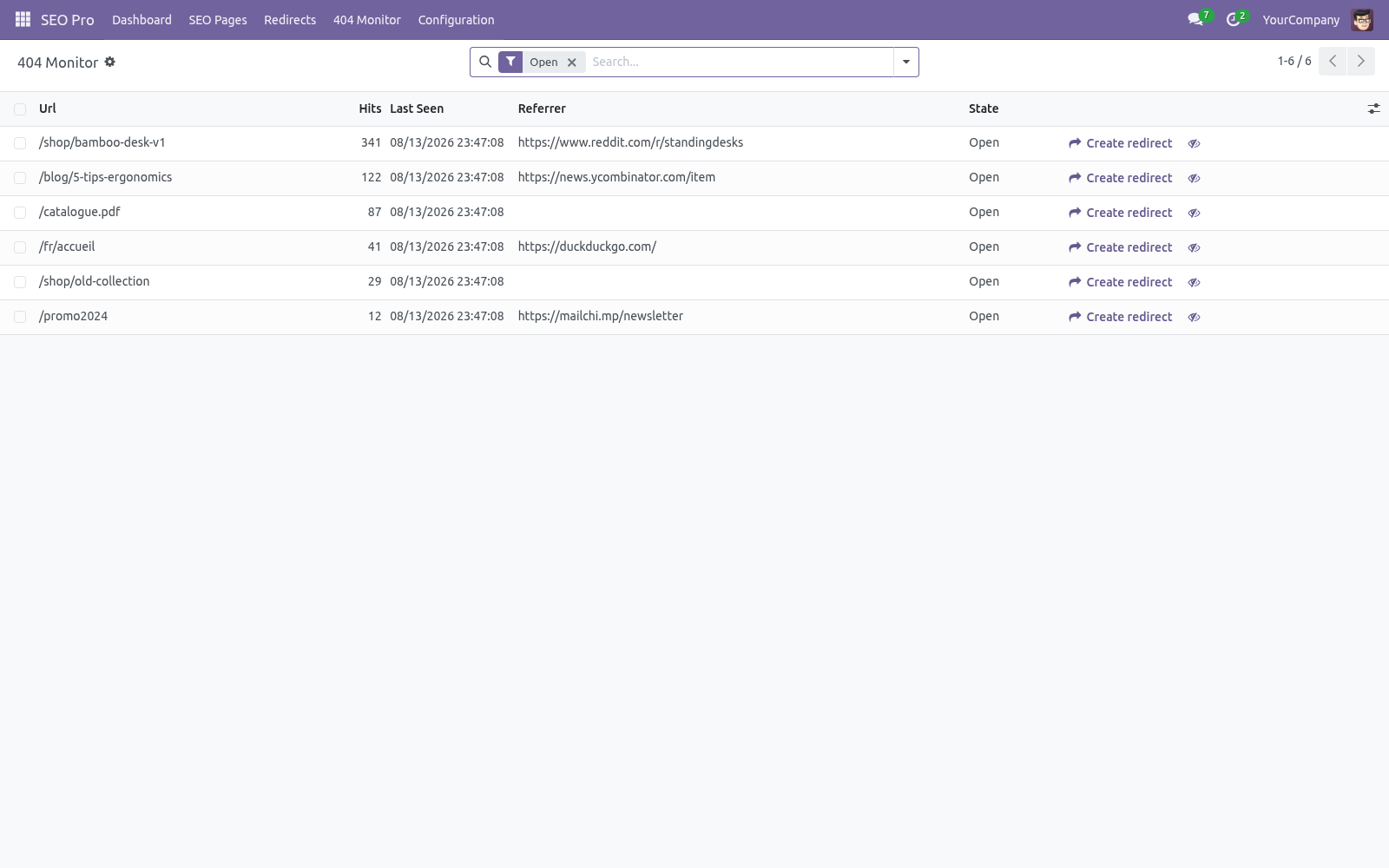
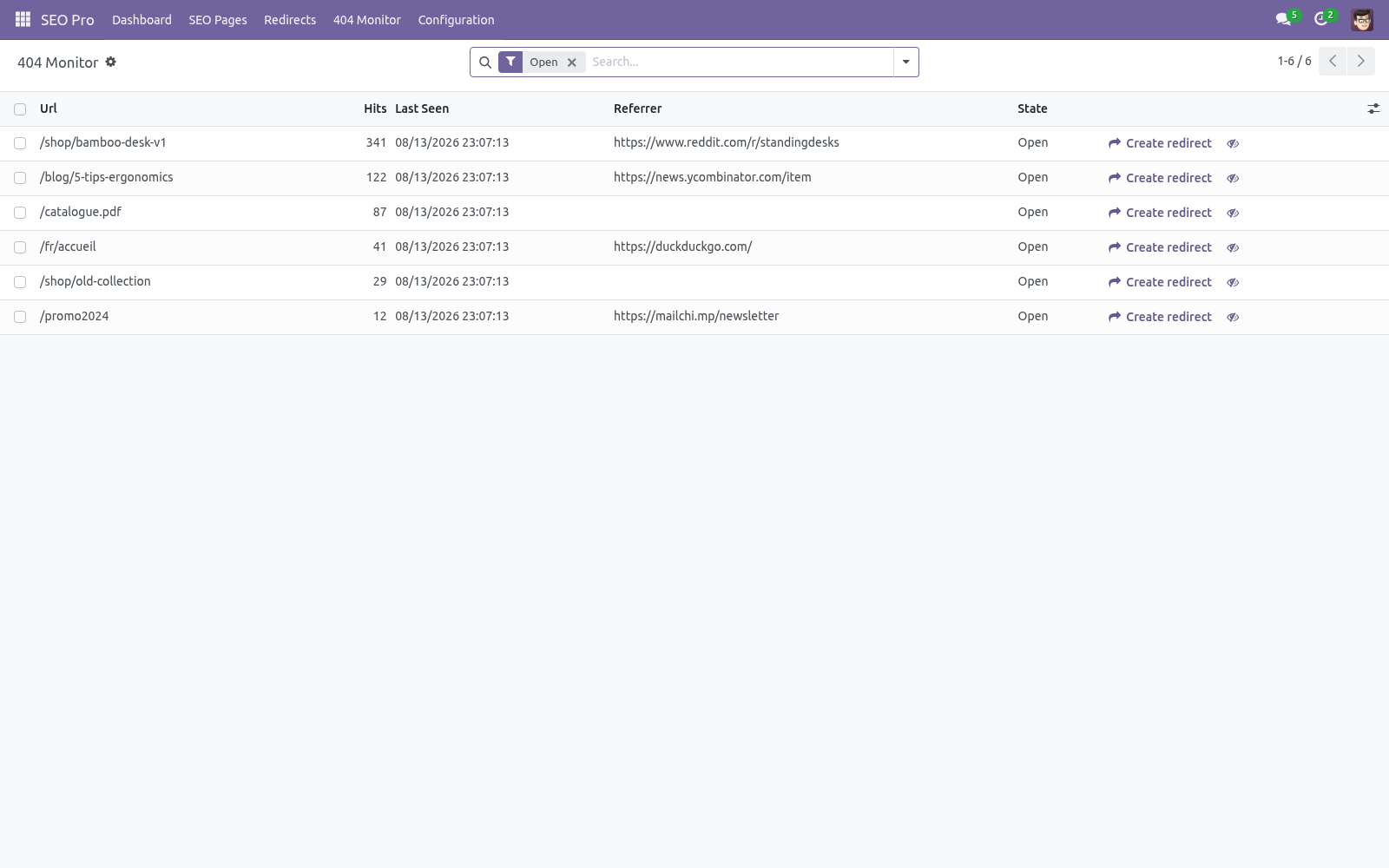
The regex rule set is read once per website and re-read only when a rule is created, changed or deleted, so heavy 404 traffic (scanners hammering non-existent URLs) no longer costs a query per request. 404 monitor. SEO Pro ▸ 404 Monitor records every storefront 404 (assets, /web paths and obvious scanner probes like .php URLs are skipped; concurrent hits are merged). For each entry you see hit count, first/last seen and the last referrer — an entry with a referrer is a real broken link somewhere.
Press Create redirect to fix it: the redirect form opens pre-filled and the entry flips to Redirected. Ignore hides noise. Entries stale for 90 days are vacuumed automatically and the table is capped at 20 000 rows. Internal links.
Press Link suggestions on a page to get the top 10 pages worth linking to, ranked by shared prominent words (cornerstone pages first). Pages you already link to are labelled. The Orphaned filter in SEO Pages (and the dashboard card) lists pages no other analyzed page links to — search engines rarely rank a page the site itself does not vouch for. Dead link — nothing on the site answers that path any more, typically a page renamed after the link was written.
Fix the link, or add a redirect. Goes through a redirect — the link only works because a 301 catches it. The final address is shown next to it; pointing the link straight there saves a hop on every crawl and keeps the target's authority intact. Link check.
SEO Pro ▸ Internal Links lists the internal links that no longer land. Two kinds are reported: Bulk editing. The SEO Pages list is editable in place. Typical sweep: filter Missing focus keyphrase, then fill the keyphrase / title / description columns row by row — or select many rows and use multi-edit for shared values.
The standard export gives you XLSX of any columns including both scores. Structured data & social. With schema enabled (default), every page carries a JSON-LD @graph with Organization, WebSite (with SearchAction), WebPage and BreadcrumbList; blog posts add Article (headline, dates, author) and products add Product with an Offer (price, currency). Pick the node type per page in Advanced ▸ Structured data.
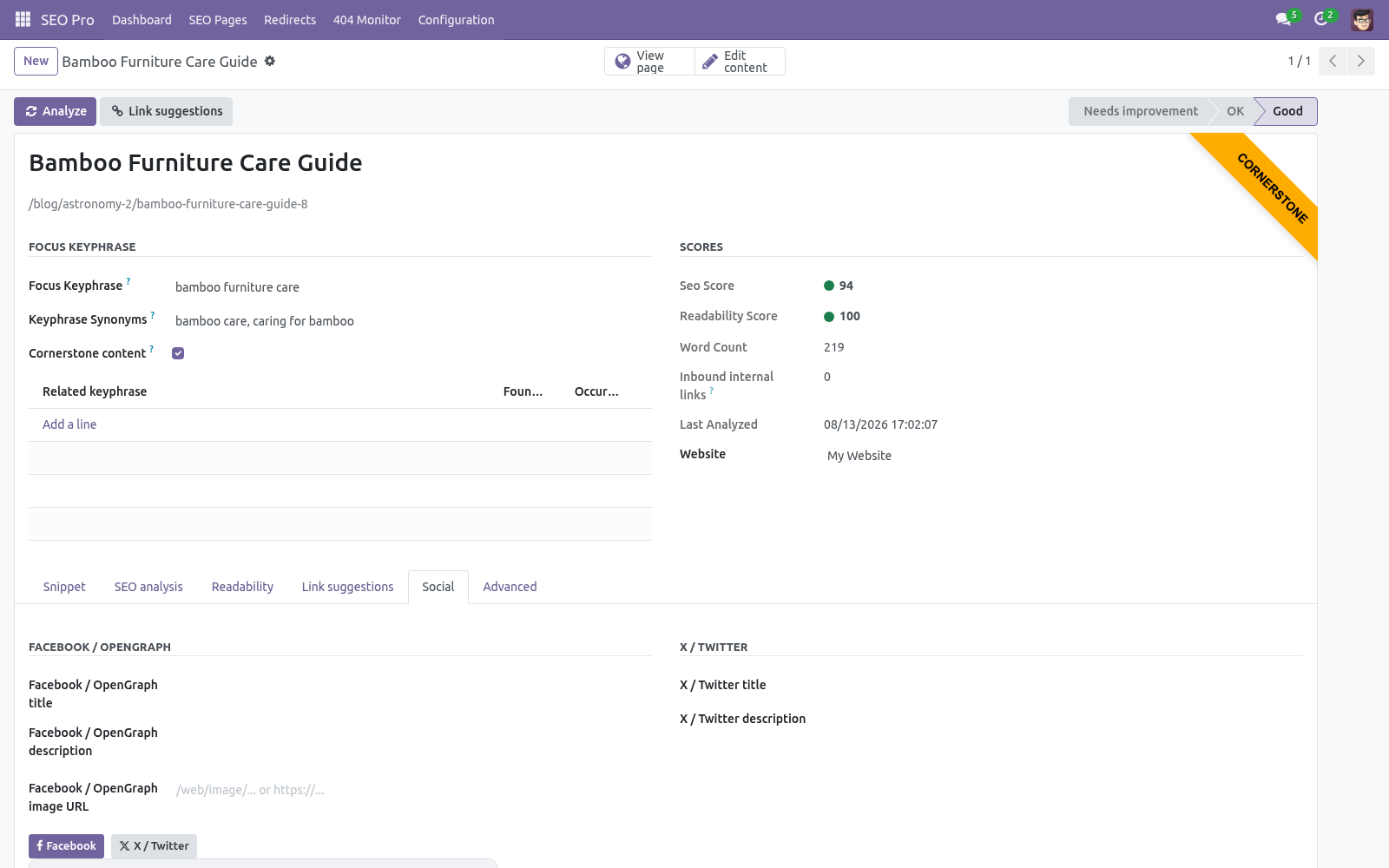
The Social tab overrides the OpenGraph / X card title, description and image per page; unset fields fall back to the SEO title, meta description and the website's default sharing image. Recommended image size 1200×630. Robots & canonical. Advanced tab: No index removes the page from search engines (a robots meta) — combine with a 410 if the content is truly gone.
No follow asks crawlers not to follow the page's links. Canonical URL points duplicates at the original; it replaces the standard canonical link on that page. Nightly cron. SEO Pro: nightly re-index and analysis (02:30) syncs new/changed records, re-analyzes every page in batches, and recomputes inbound-link counts.
Run it on demand with Configuration ▸ Analyze all pages. Settings (per website). SEO Pro ▸ Configuration ▸ Settings, block SEO (also reachable via Website ▸ Configuration ▸ Settings): - Automatic redirects Create a 301 automatically whenever a page URL changes. Default on.
Record visitor 404s. Default on. - Structured data Emit the JSON-LD graph; configure organization name, logo URL and social profile URLs (one per line, becomes sameAs). - Default sharing image Site-wide OpenGraph/Twitter fallback image URL.
The complete manual is at docs dot bambooforge dot dev, the demo database is linked from the store page, and support answers within twenty-four hours. Links are in the description.
Key facts
- What it is
- Website SEO for Odoo: focus-keyphrase analysis with traffic-light scoring, readability coach, snippet previews, redirects, 404 monitor, schema.
- For
- Website
- Odoo versions
- 16.0, 17.0, 18.0, 19.0, 20.0 - Community and Enterprise
- Runs on
- Odoo.sh or Odoo you host yourself - not Odoo Online, which accepts no third-party apps
- Price
- 149 EUR, one-time, on the Odoo Apps Store
- Technical name
- bambooforge_seo_pro
- Manual last updated
- 2026-10-16
SEO Pro: Website SEO Optimization & Analysis
A complete on-page SEO suite for the Odoo 20 website builder, blog and eCommerce: score every page against a focus keyphrase with a traffic-light content analysis, coach the copy with a readability analysis, preview the Google / Facebook / X snippet while you type, manage redirects (plain and regex, including 410/451) with a live 404 monitor, emit a schema.org JSON-LD graph, find orphaned pages, get internal-link suggestions and fix titles & descriptions in bulk.
This page is the complete manual. If you follow it top to bottom you can install, index your site, optimize your first page, wire redirects and structured data, and fix the common issues without contacting support.
Overview
SEO Pro keeps one SEO Page record (an indexable) per published content record — website pages out of the box, blog posts and eCommerce products automatically when those apps are installed. Everything the optimizer needs lives on that record:
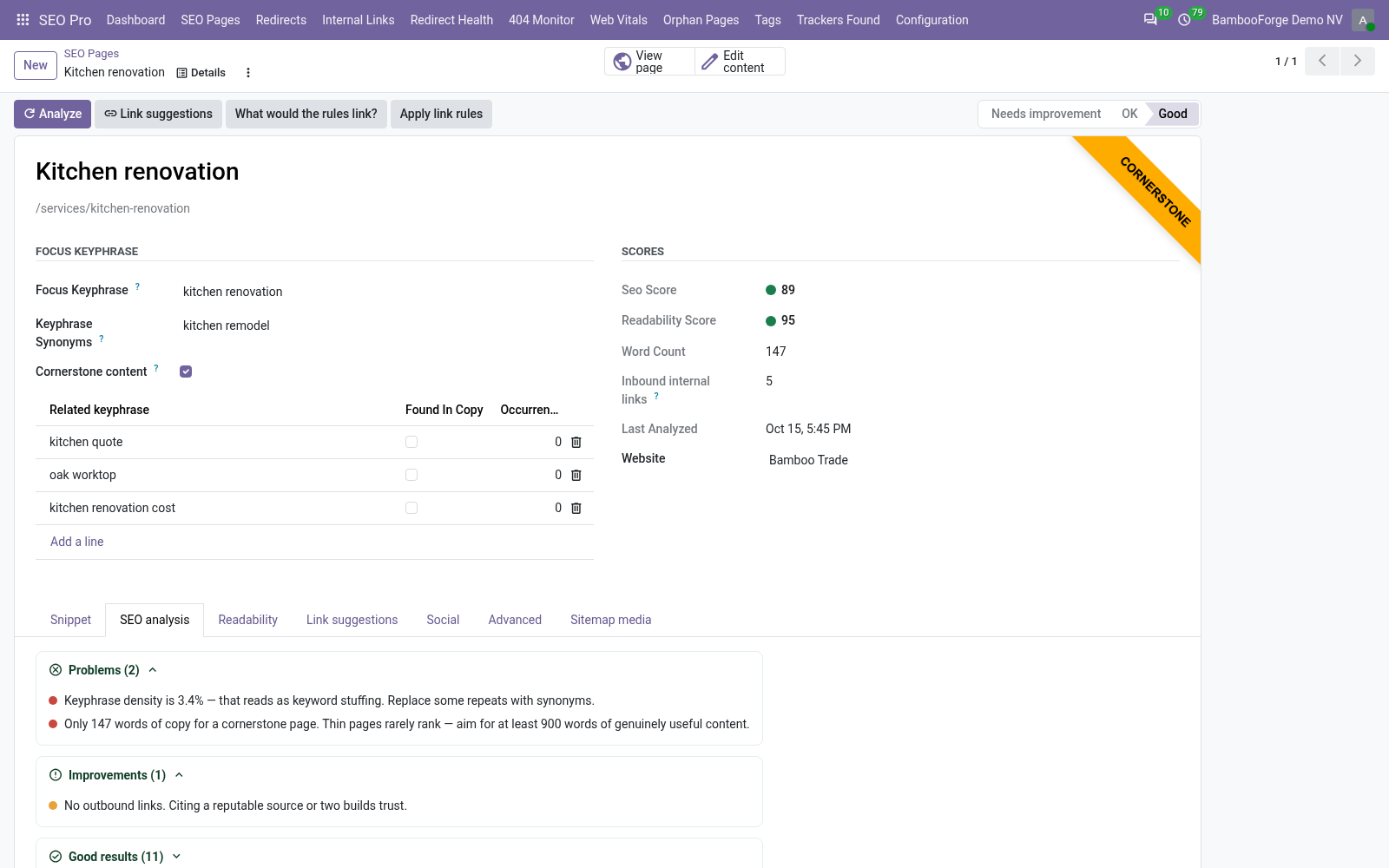
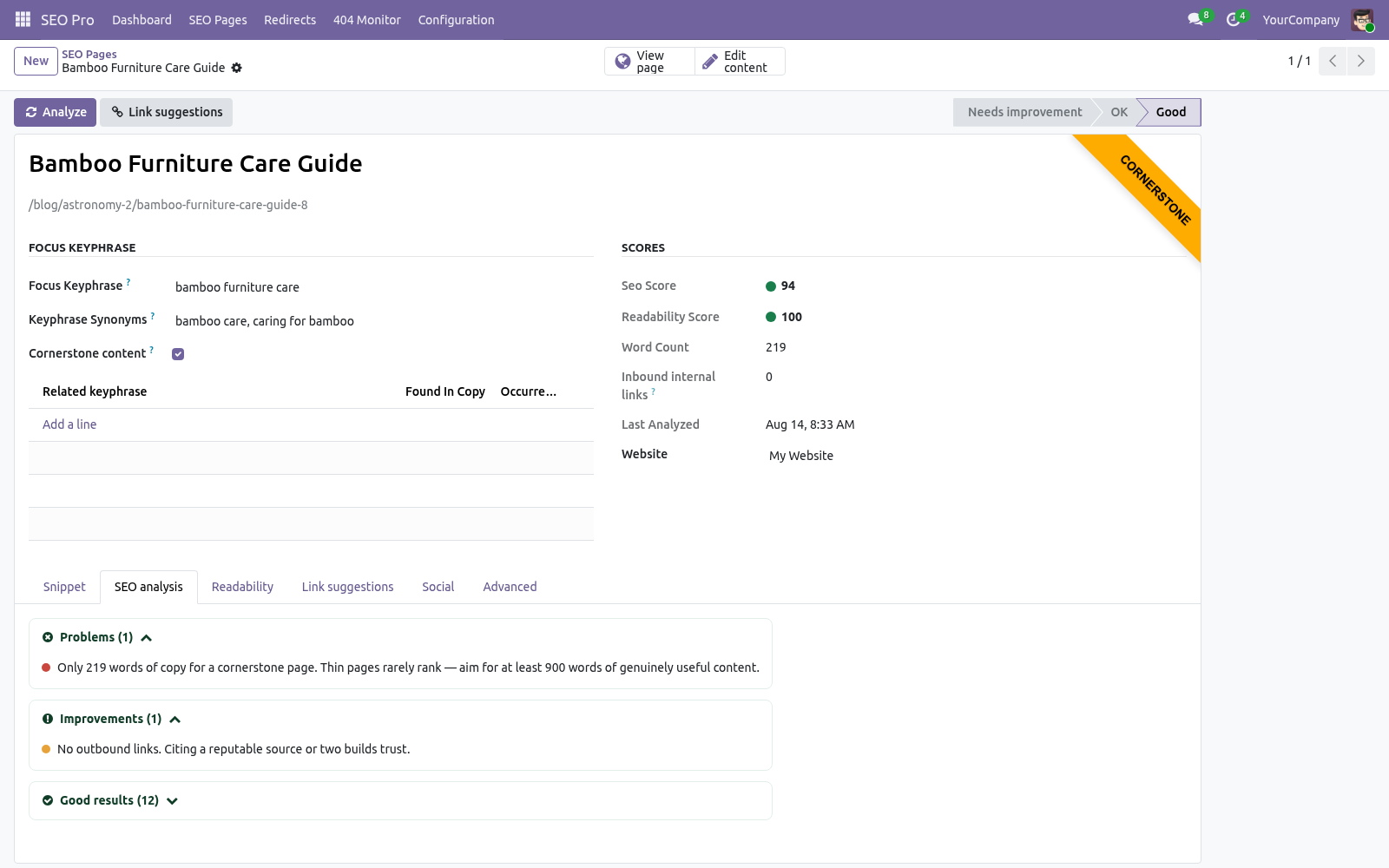
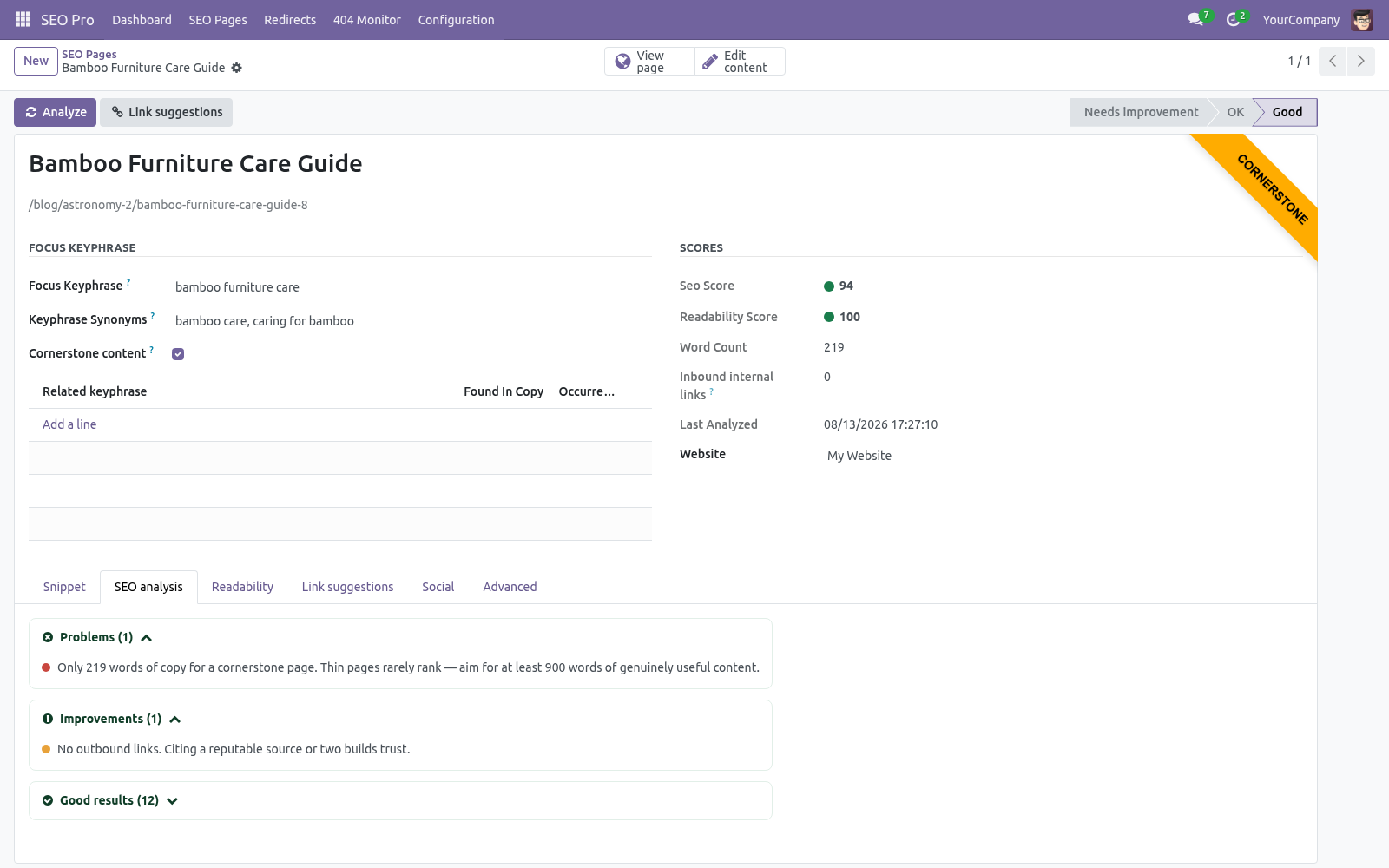
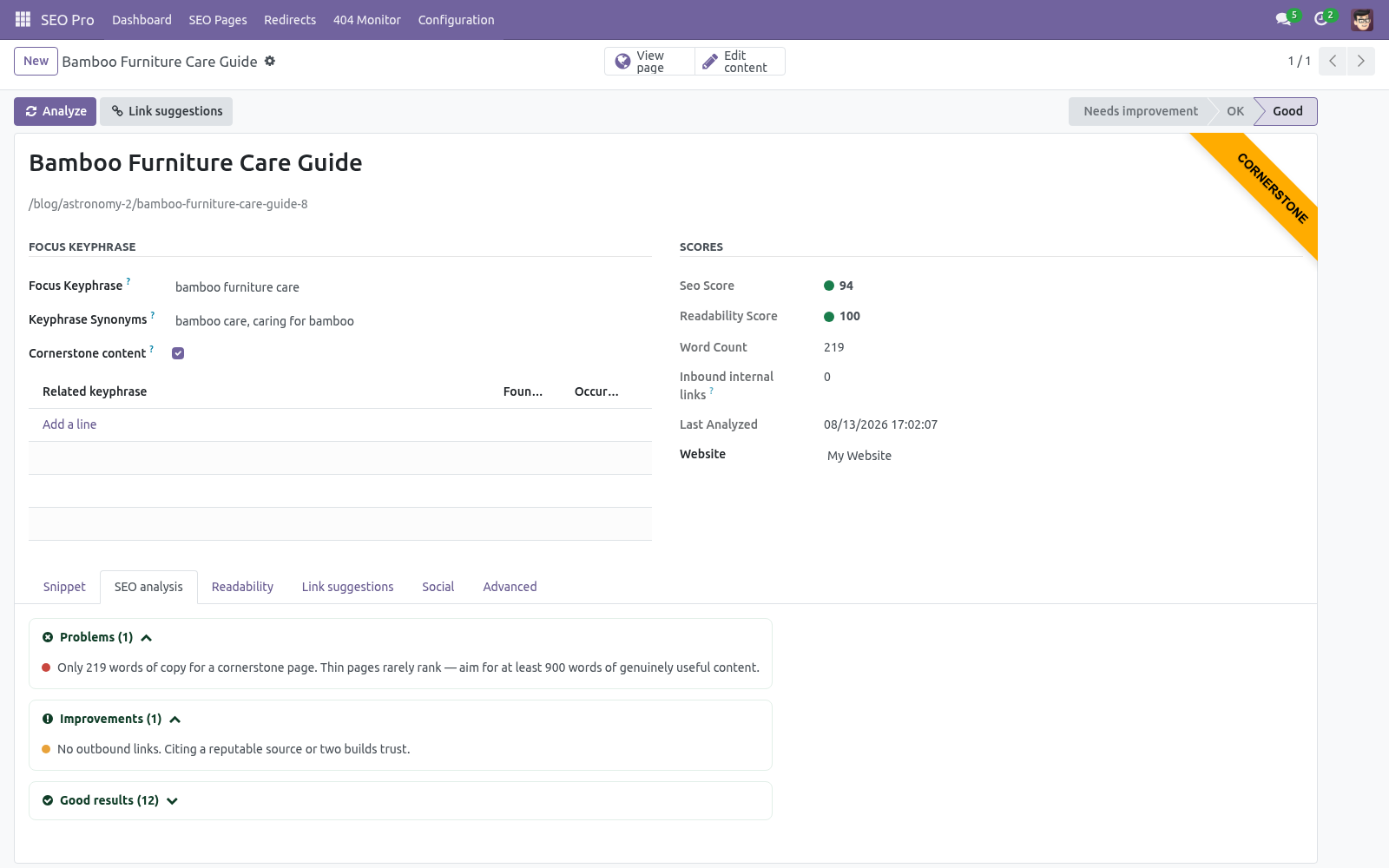
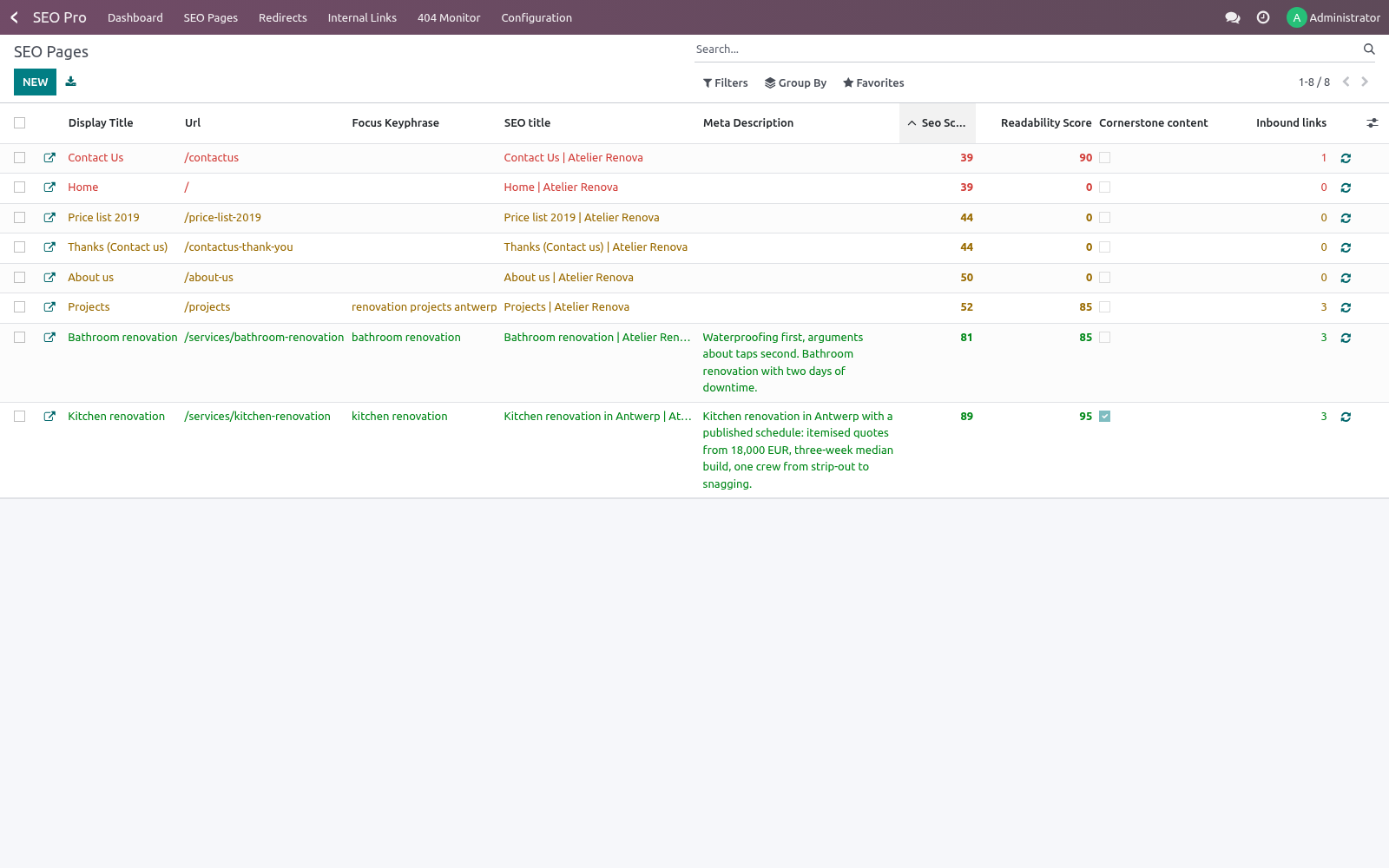
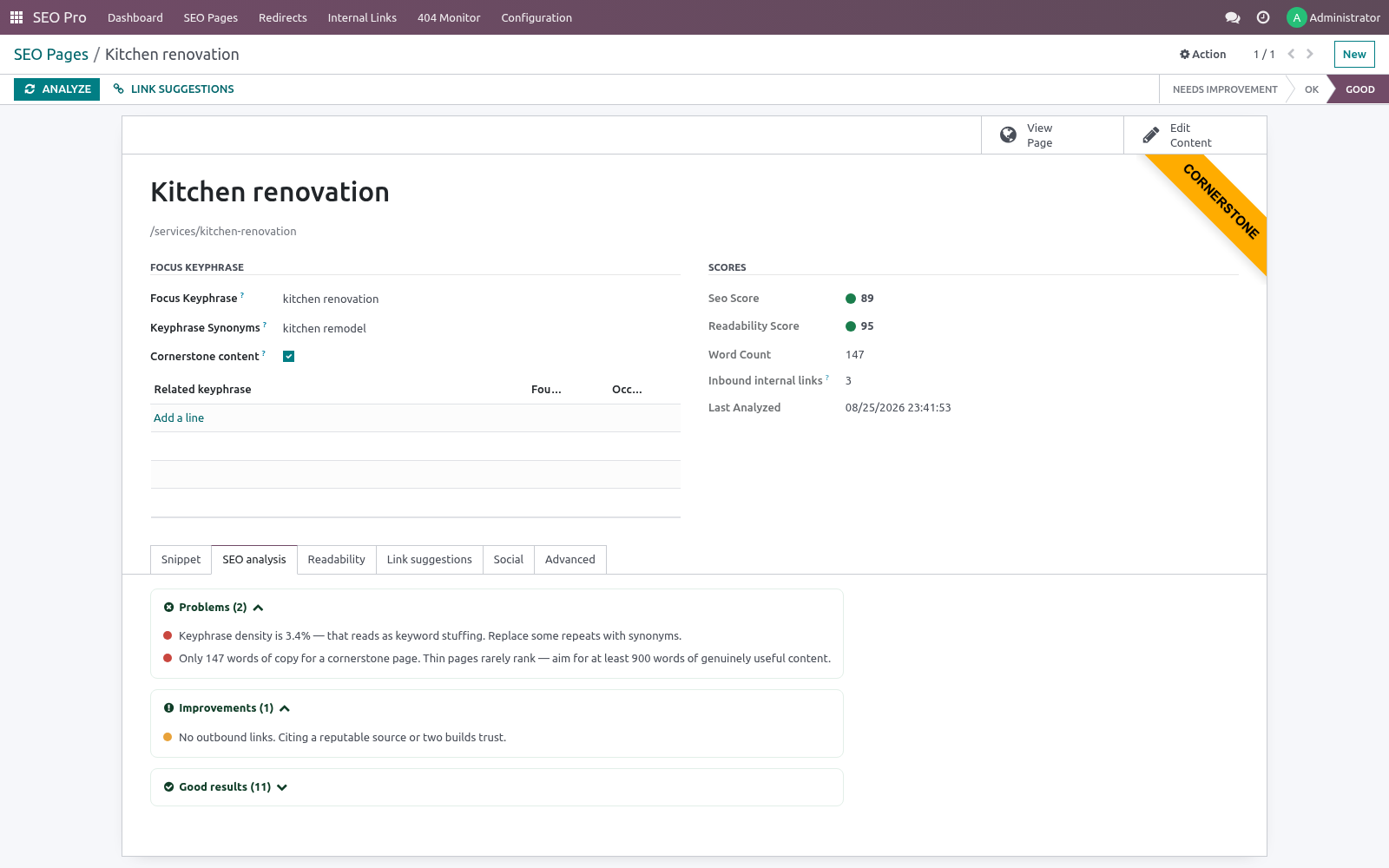
Focus keyphrase analysis — 14 checks with red/orange/green results: keyphrase in title / meta description / slug / introduction / subheadings, keyphrase density (0.5–3%), keyphrase length, site-wide keyphrase uniqueness (cannibalisation), title length (30–65 chars), meta description length (120–156 chars), copy length (300+ words, 900+ for cornerstone), internal links, outbound links, image alt coverage.
Readability analysis — 7 checks: Flesch reading ease, sentence length (≤25% over 20 words), paragraph length (≤150 words), subheading distribution (≤300 words/section), consecutive sentence openings, passive voice (≤10%, English), transition words (≥30%, English).
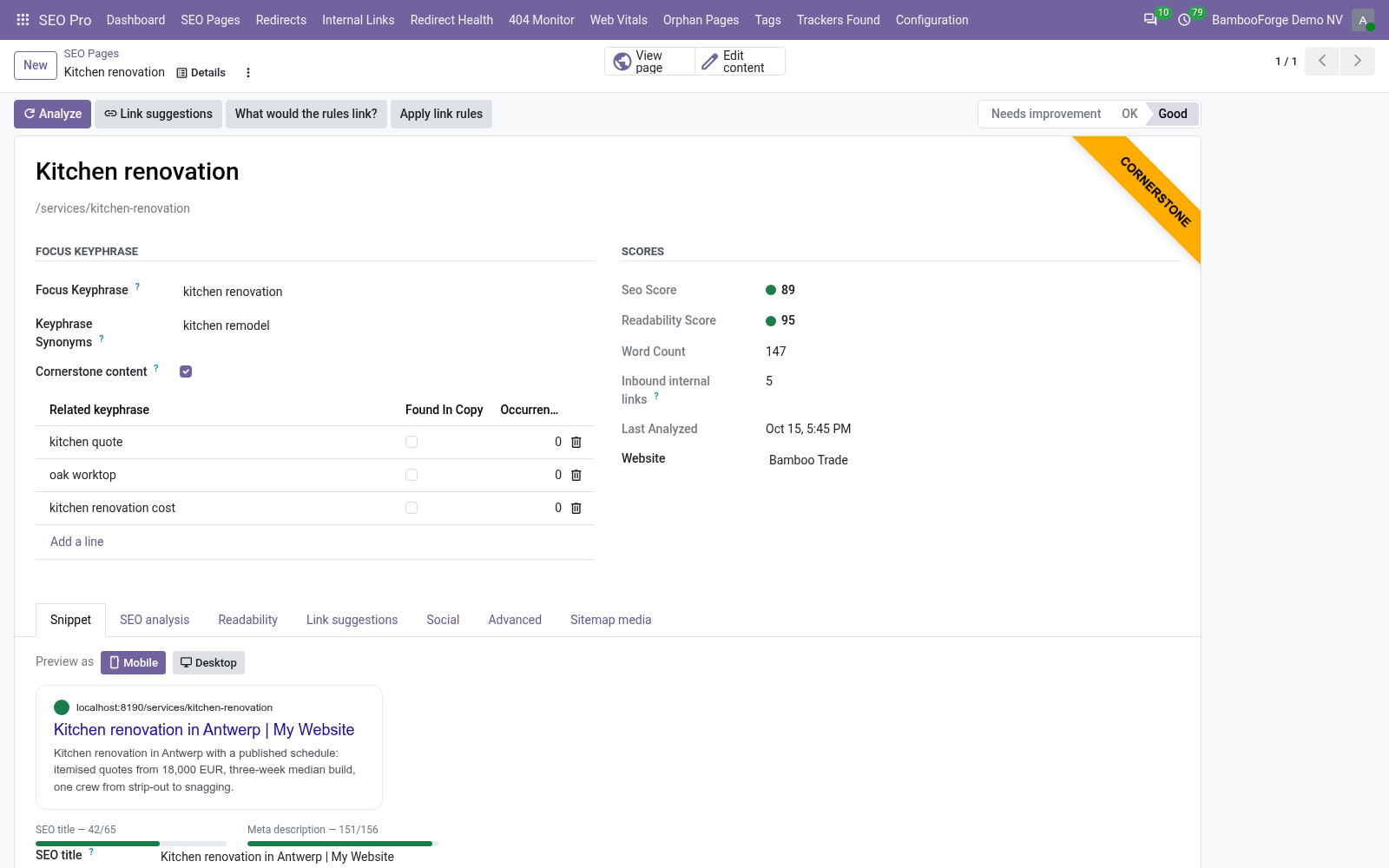
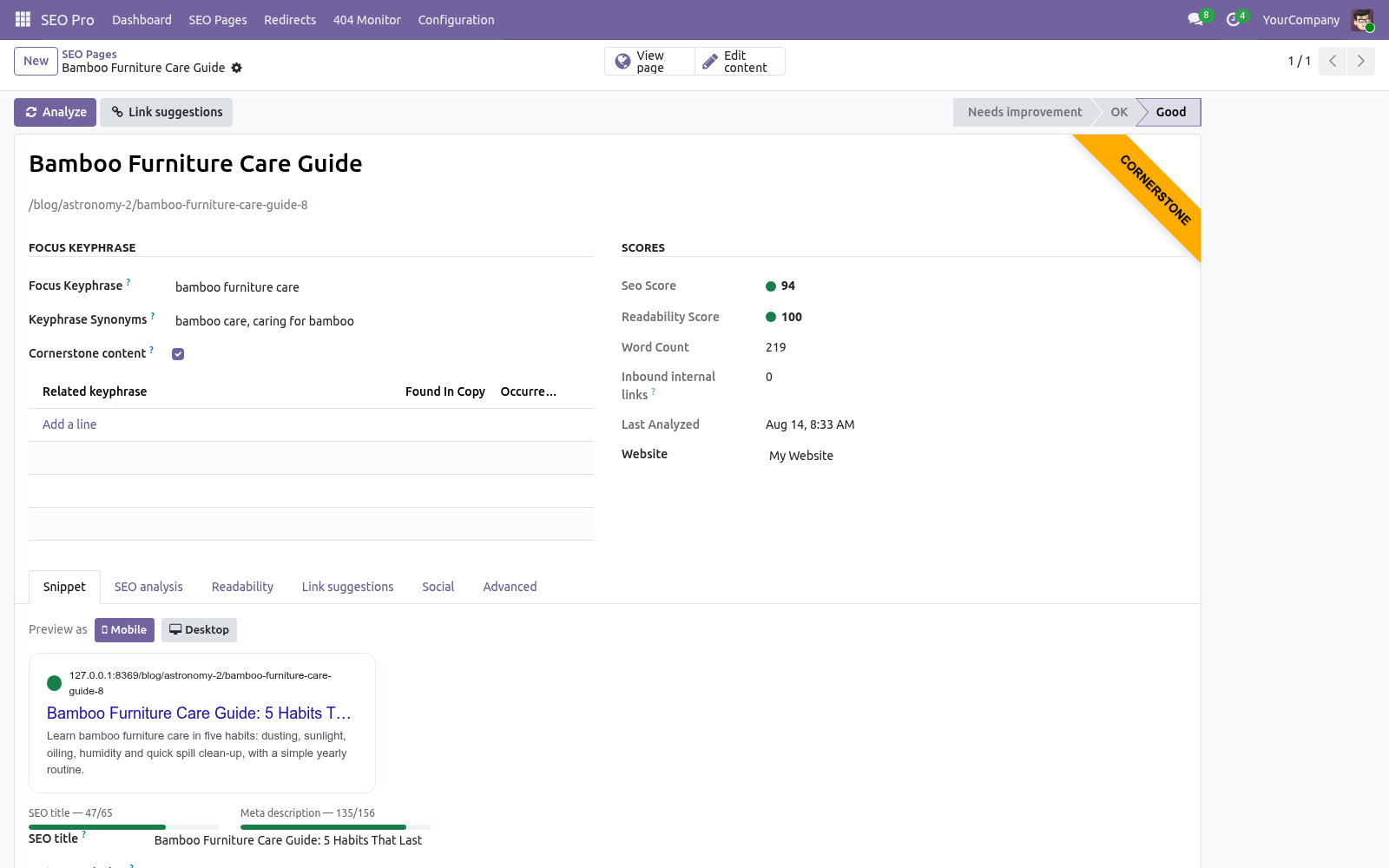
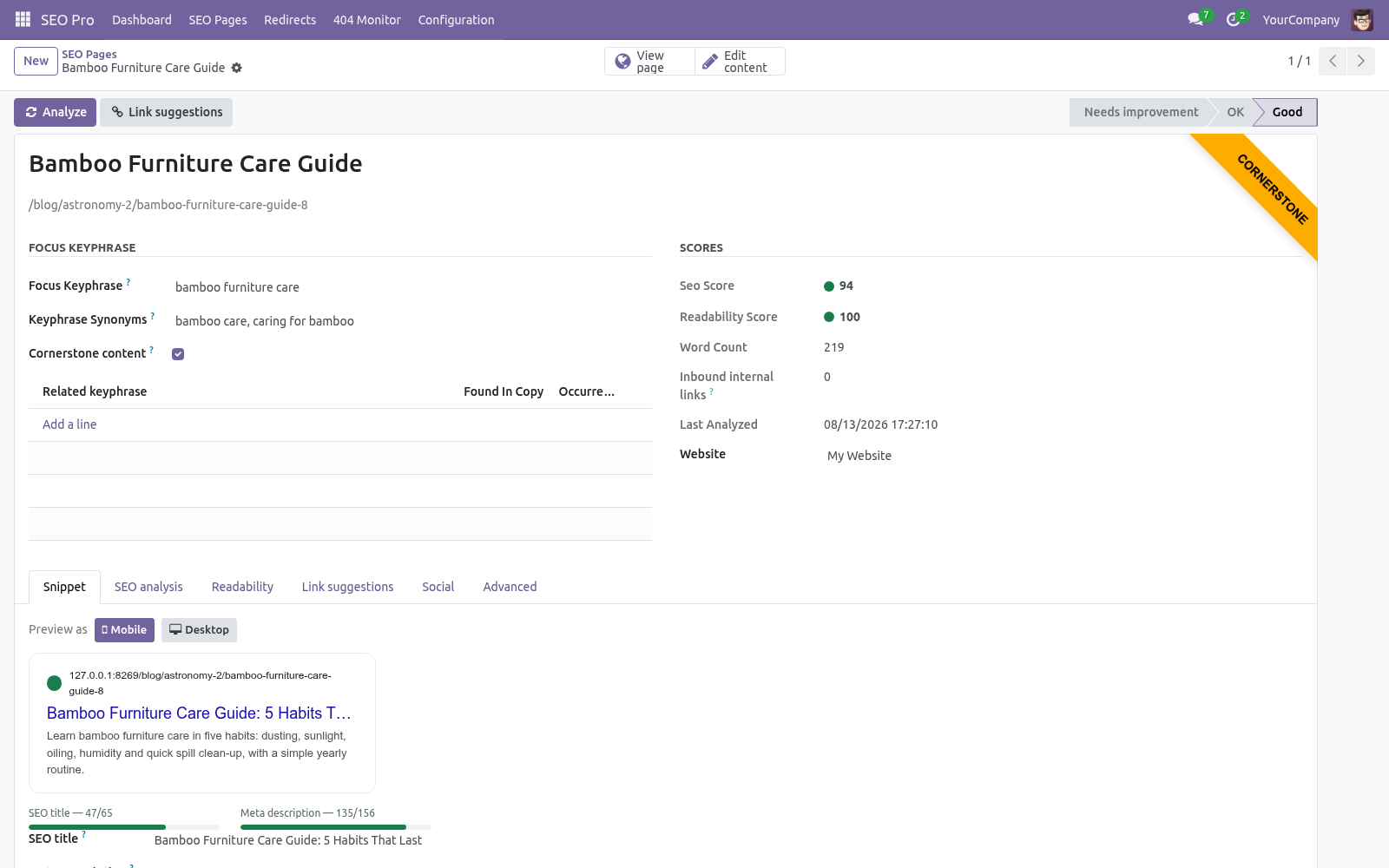
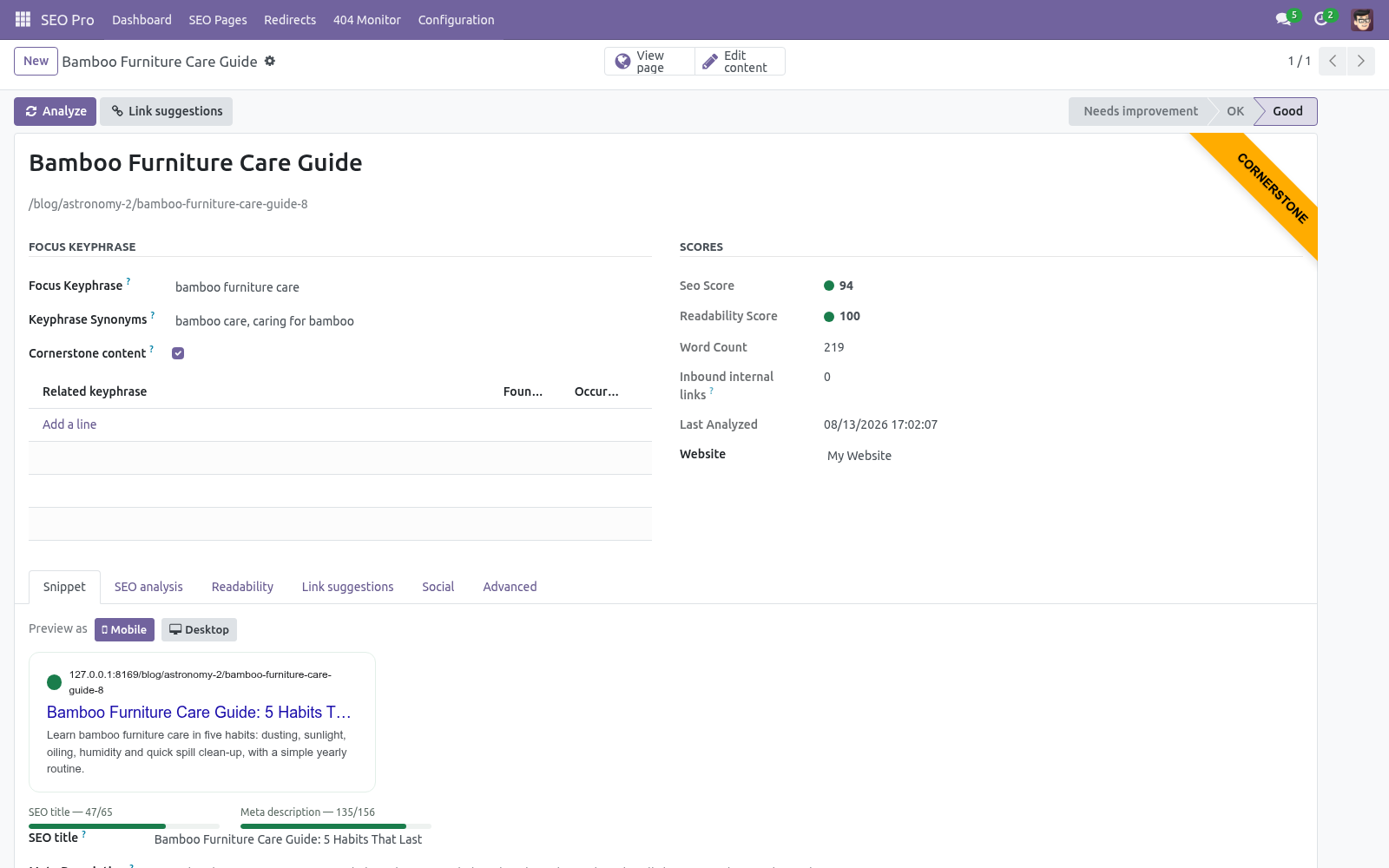
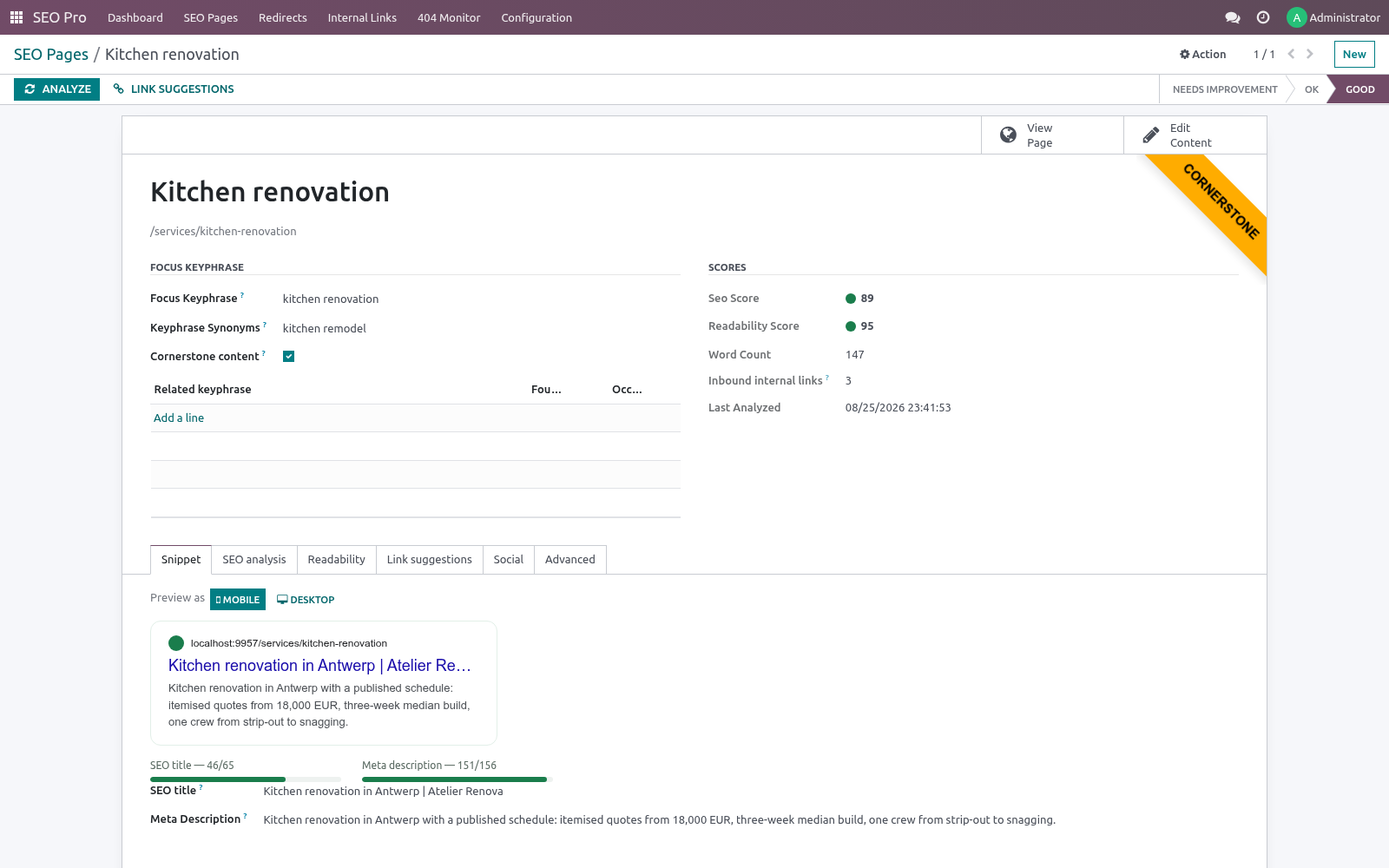
Snippet preview — a live Google result preview (mobile/desktop) with length meters, plus Facebook/X card previews. The SEO title and meta description you type are written straight back to the source record.
Redirect manager — extends the standard website.rewrite with 307, 410, 451, regular-expression rules with \1 substitutions, hit counters, and automatic 301s when a page URL changes. A loop guard follows the redirect chain (up to ten hops, regex rules included) and refuses any rule that would send visitors back where they started.
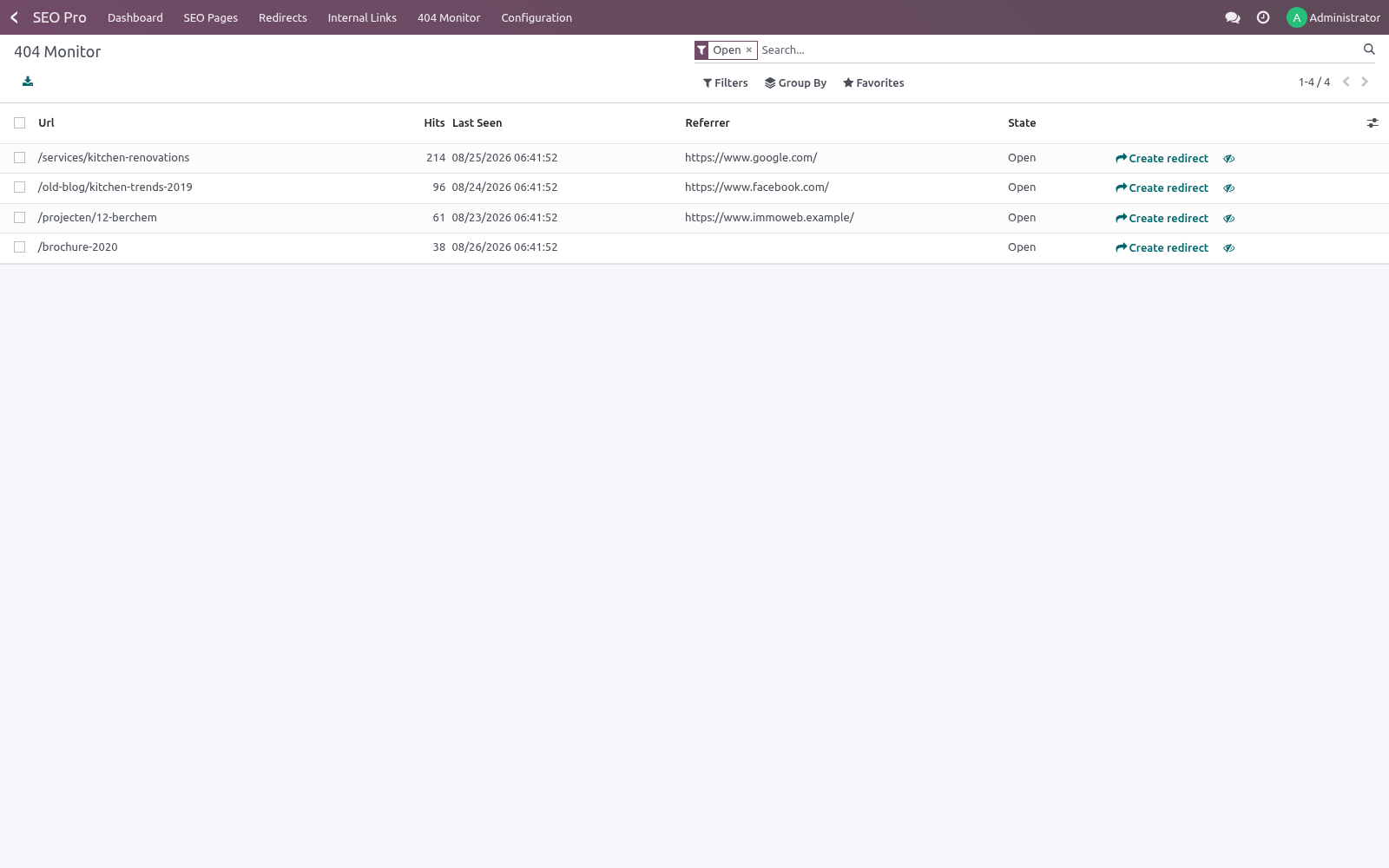
404 monitor — every visitor 404 is recorded (deduplicated, with hit count and referrer) and can be turned into a redirect in two clicks.
Schema.org JSON-LD — an Organization / WebSite / WebPage / BreadcrumbList graph on every page, plus Article for blog posts and Product (with Offer) for products.
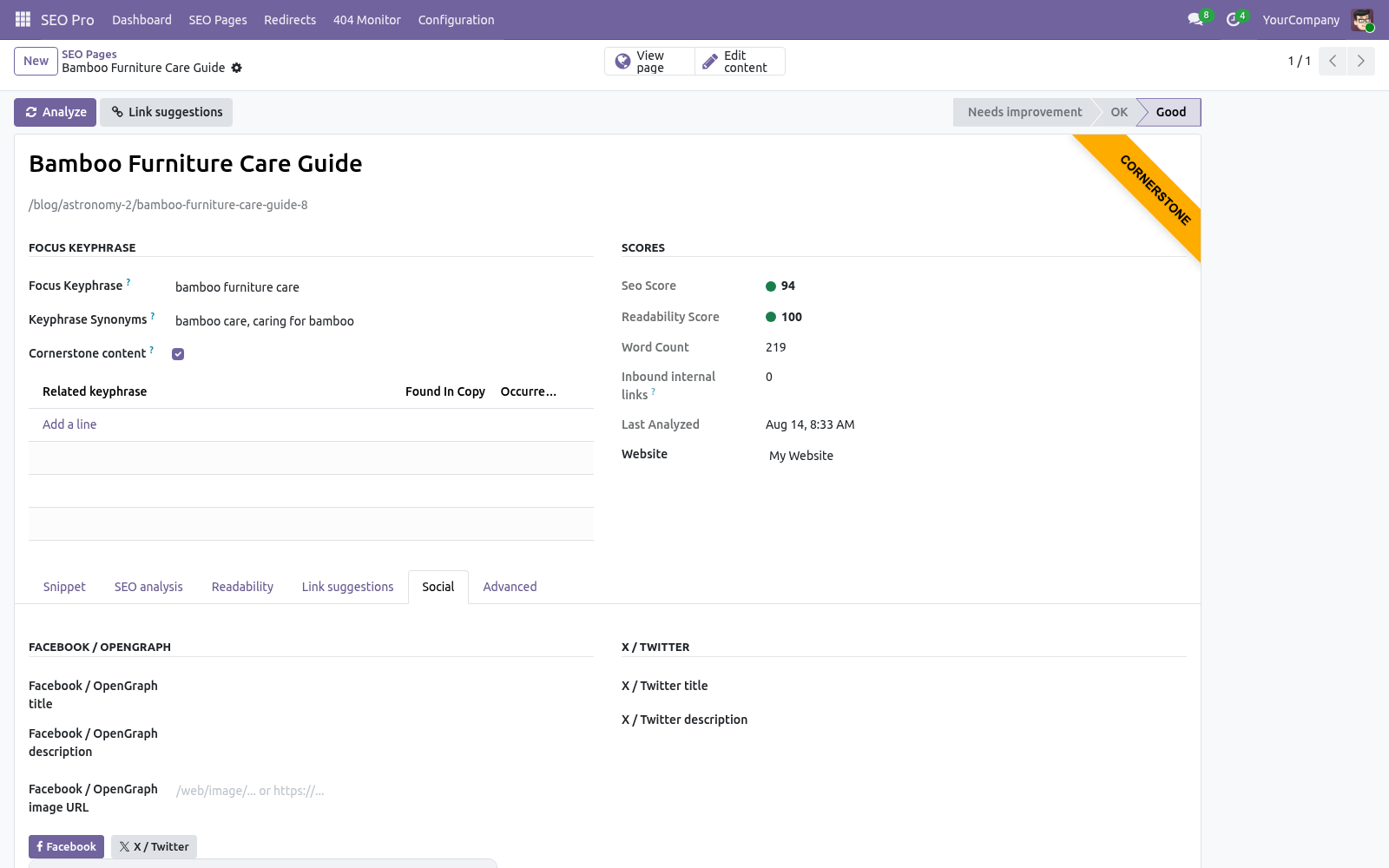
Social meta — per-page OpenGraph & Twitter overrides merged into the standard Odoo tags (no duplicates), plus a site-wide default sharing image.
Internal-link suggestions & orphan detection — prominent words are extracted per page (20, or 50 for cornerstone pages); pages sharing rare words are suggested as link targets, cornerstone first, and pages with no inbound internal links are flagged as orphans.
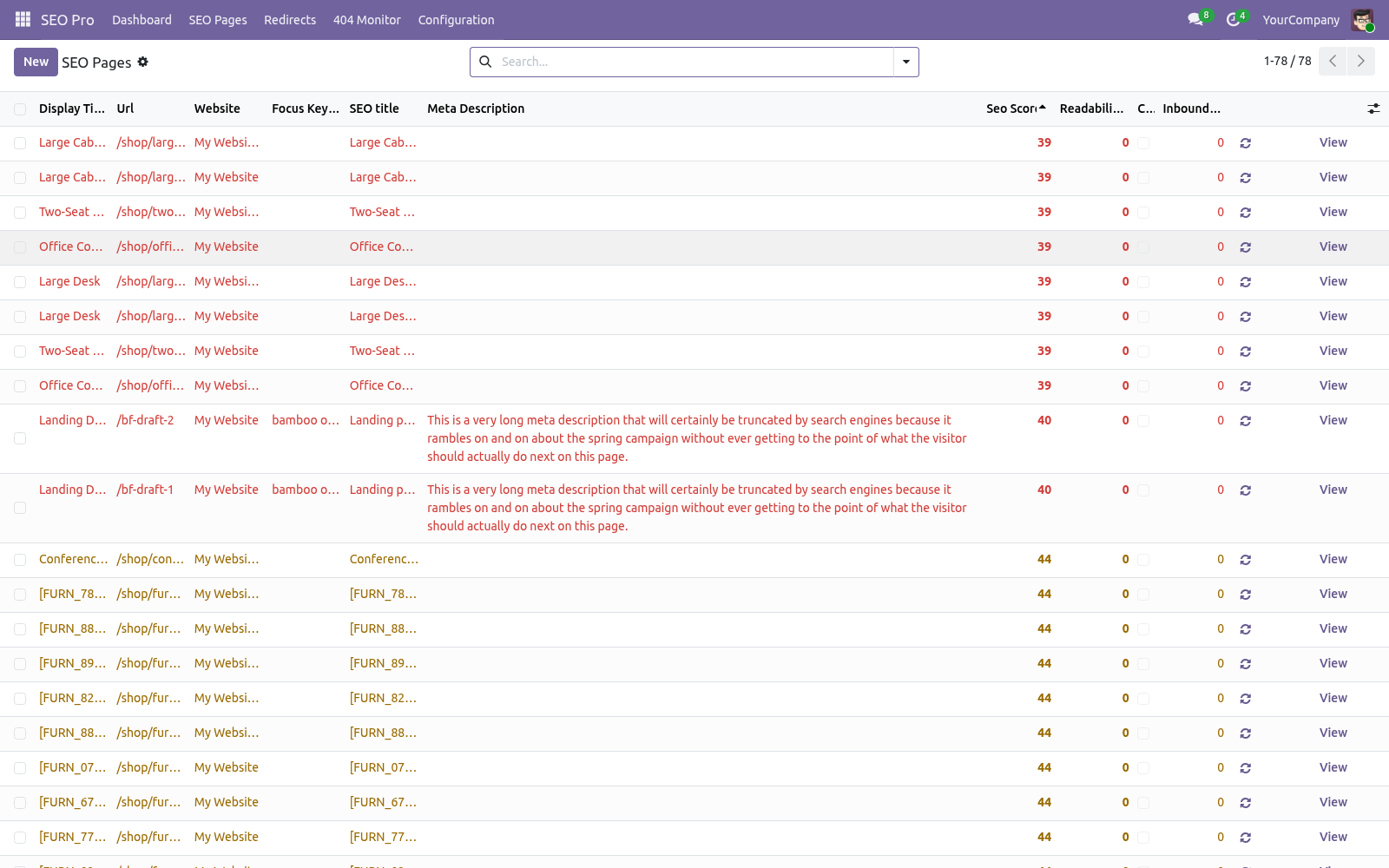
Bulk editor — the SEO Pages list is editable in place (multi-edit enabled): fix keyphrases, titles and meta descriptions across the site from one screen, and export to XLSX with the standard list export.
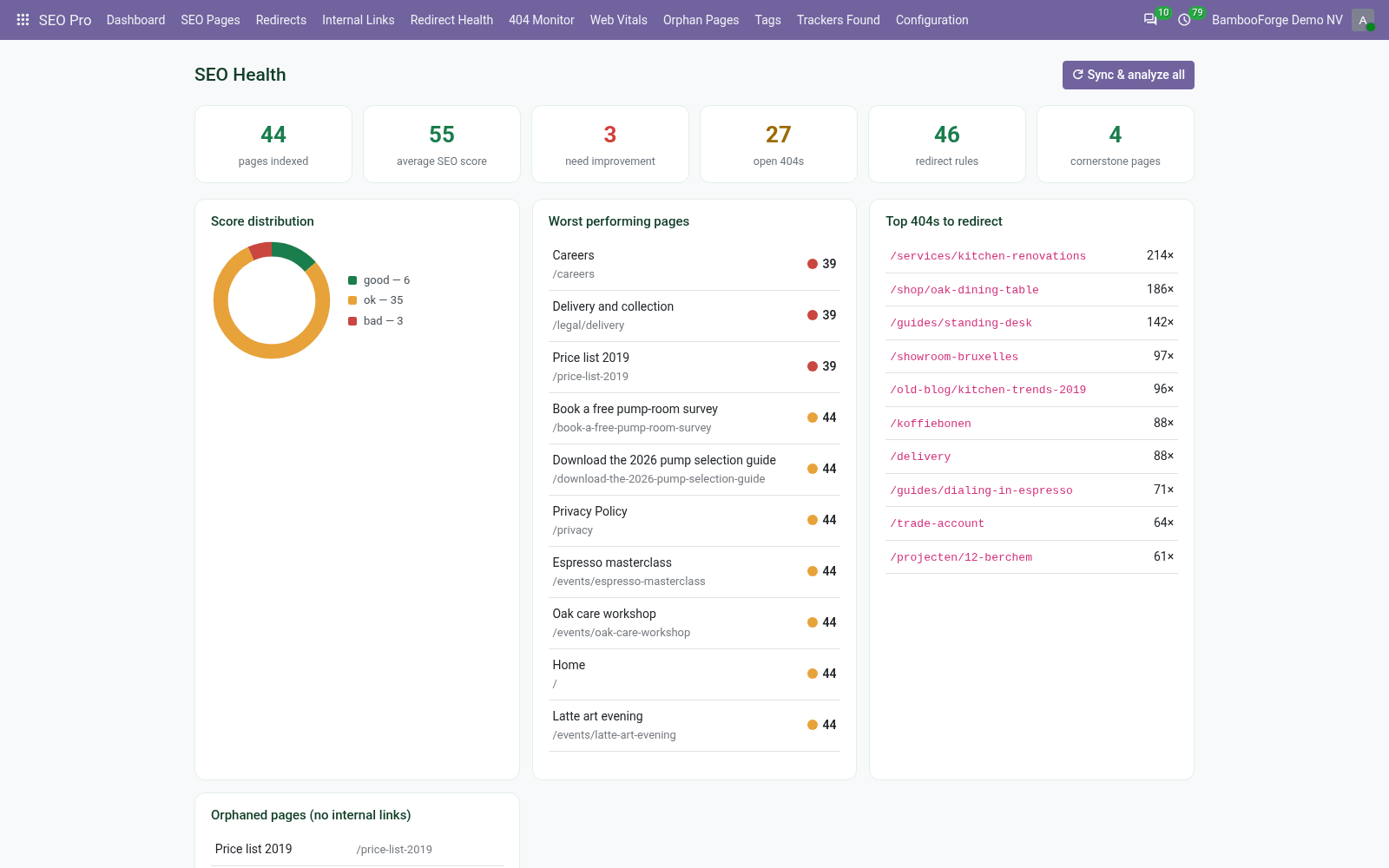
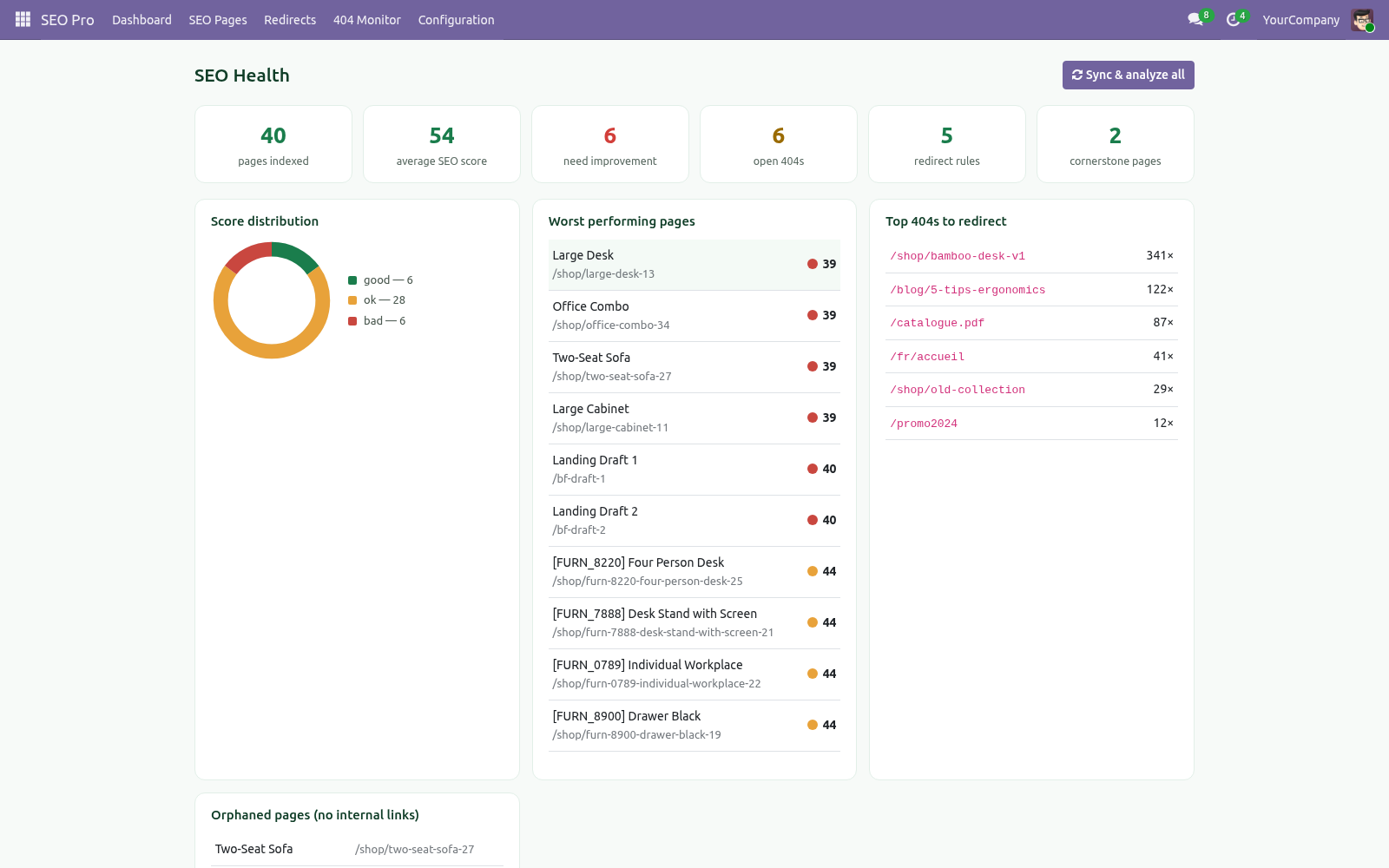
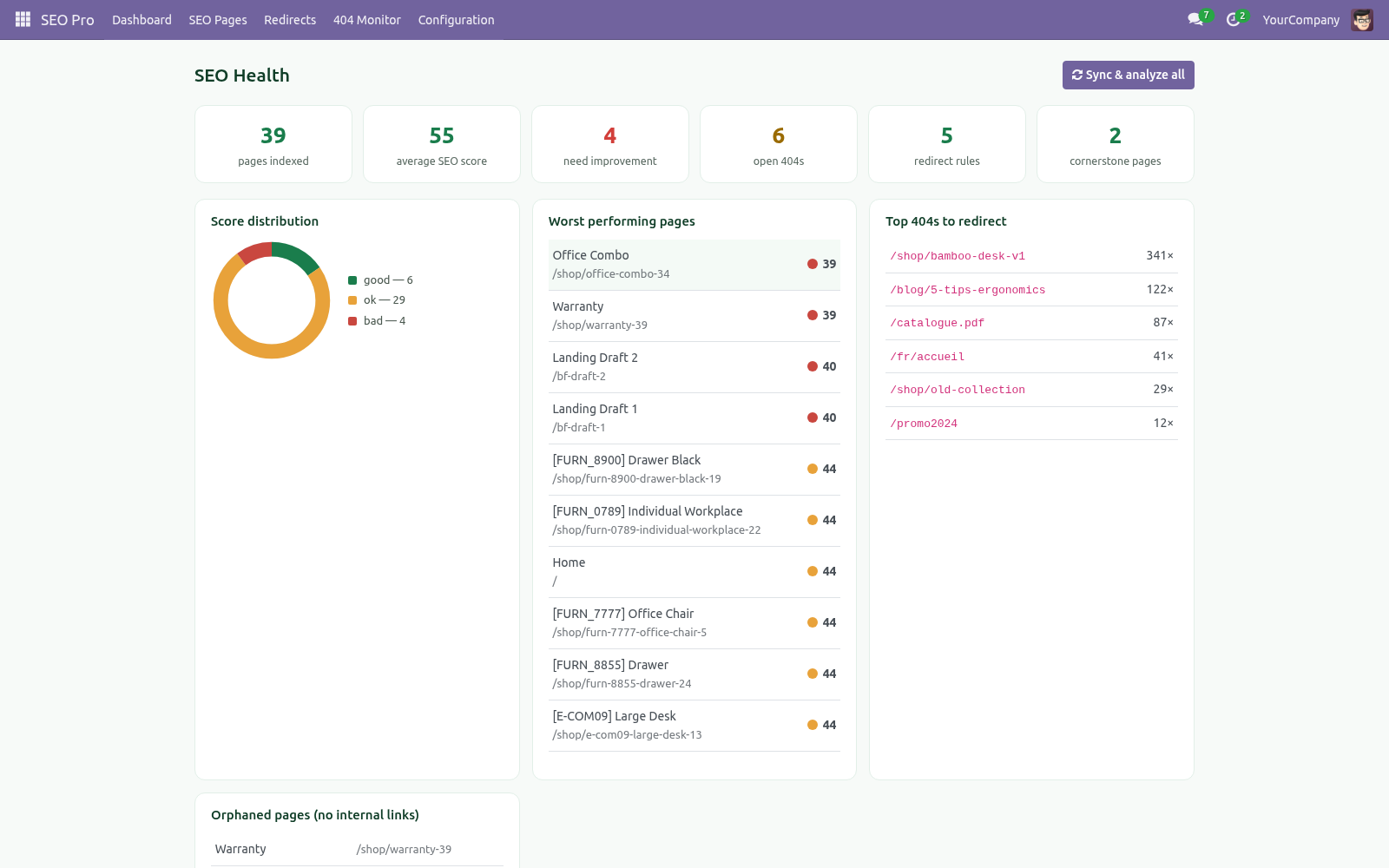
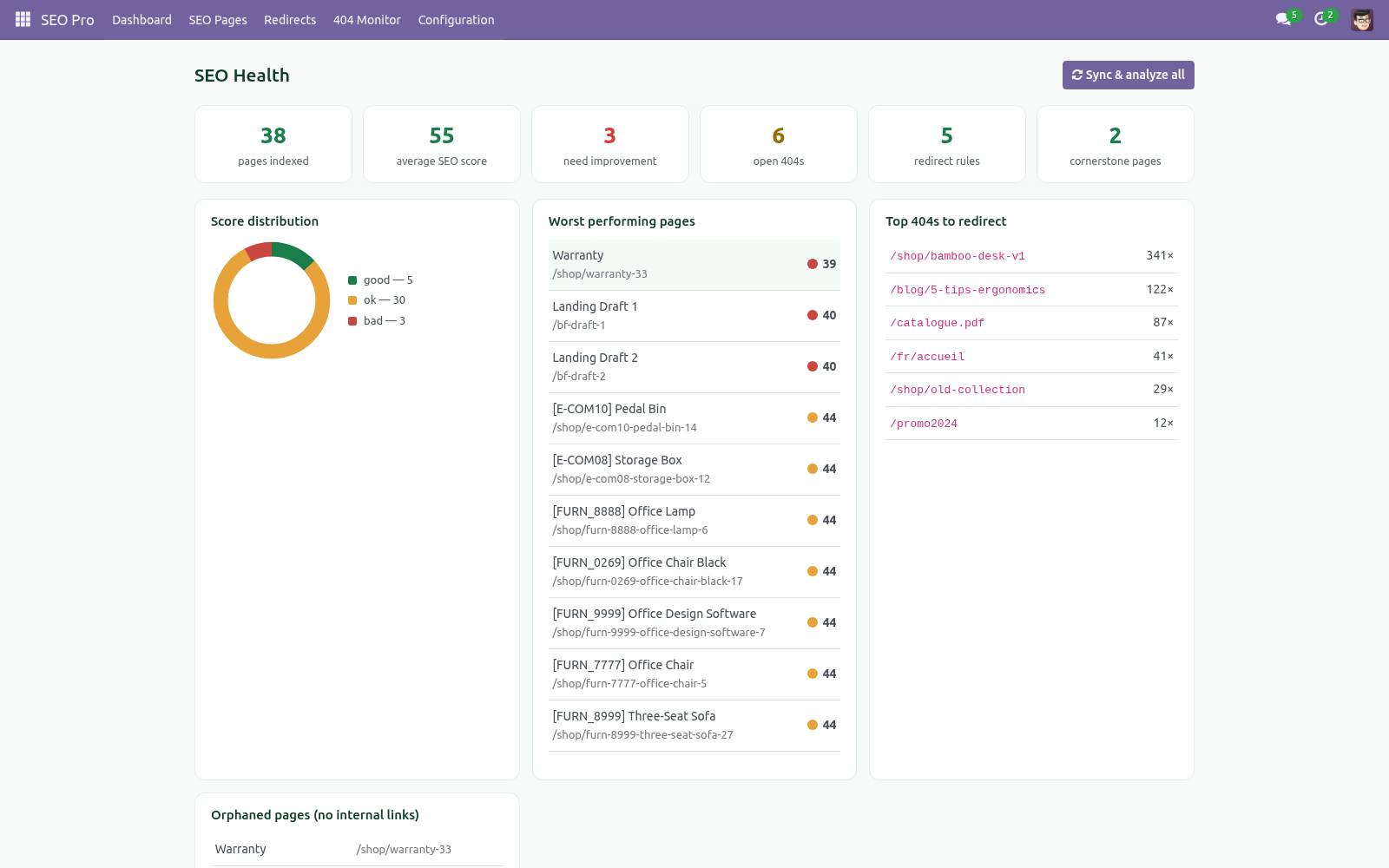
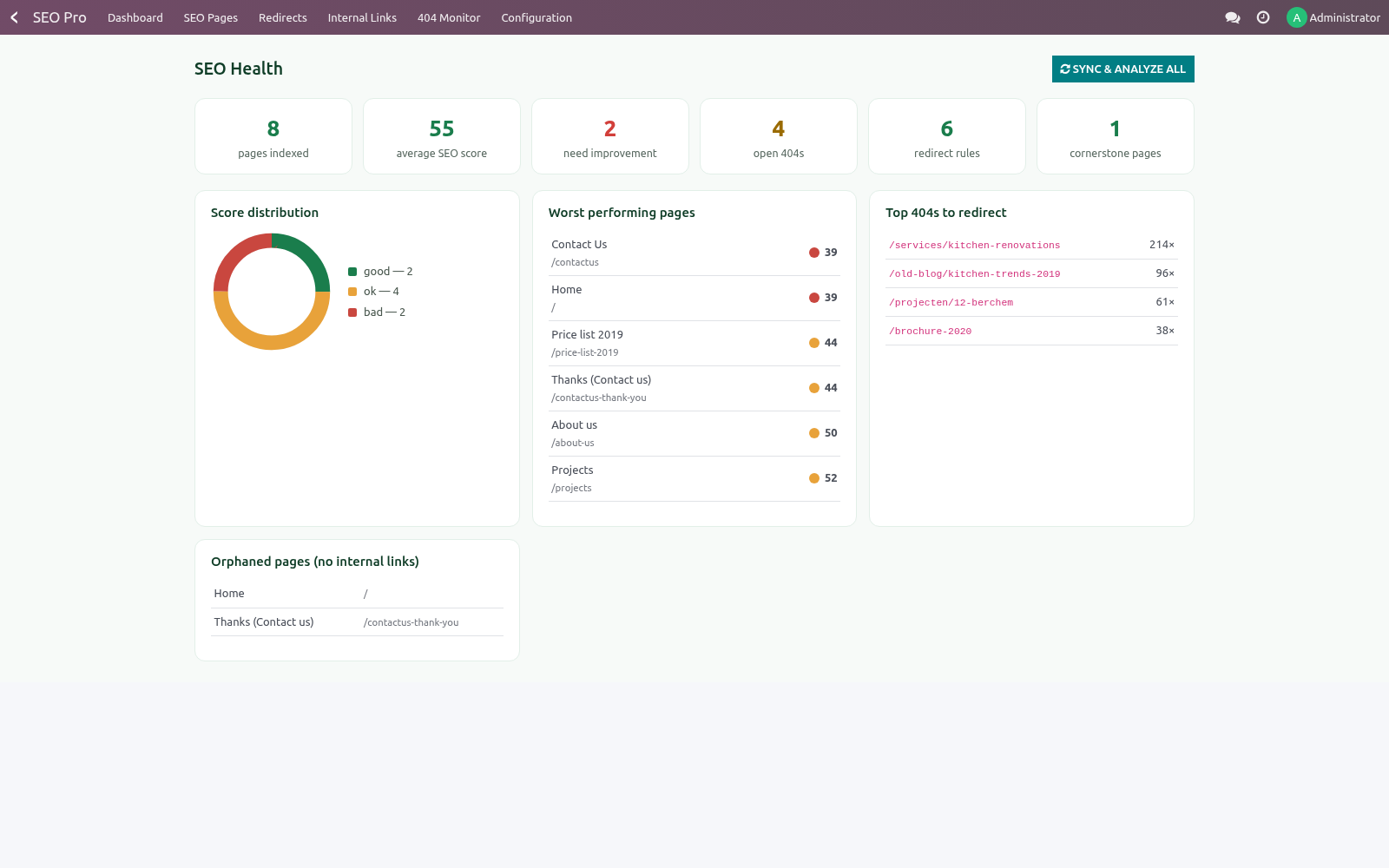
SEO Health dashboard — score distribution, average score, worst pages, top 404s, orphaned pages, redirect and cornerstone counts.
Everything lives under one top-level SEO Pro menu: Dashboard, SEO Pages, Redirects, 404 Monitor and Configuration.
Requirements
Item |
Detail |
|---|---|
Odoo |
20.0, Community or Enterprise. |
Dependencies |
Only the standard website app. Blog (website_blog) and eCommerce (website_sale) are optional — their content is indexed automatically when they are installed, but nothing breaks when they are not. |
Python |
No extra libraries. The analyzer uses lxml, which ships with Odoo. |
Language note |
All analysis checks are language-neutral except passive voice and transition words, which are tuned for English copy. |
Getting started
Install BambooForge SEO Pro from Apps. The install hook indexes your published pages immediately and adds an Optimize SEO (SEO Pro) action to website pages, blog posts and products.
Open SEO Pro ▸ Dashboard and press Sync & analyze all once. Every published page gets a score.
Open the worst page from the dashboard, type its focus keyphrase, press Analyze, and work down the red items in the SEO analysis tab. Green means done.
Set your Organization data in SEO Pro ▸ Configuration ▸ Settings (block SEO — organization name, logo, social profile URLs) so the JSON-LD graph carries your brand.
Usage
Scoring a page
Open SEO Pro ▸ SEO Pages and pick a page (or use the Optimize SEO action from the website page / blog post / product form). Then:
Type the focus keyphrase — the query you want the page to rank for. Add comma-separated synonyms and the analysis accepts them wherever the keyphrase is expected.
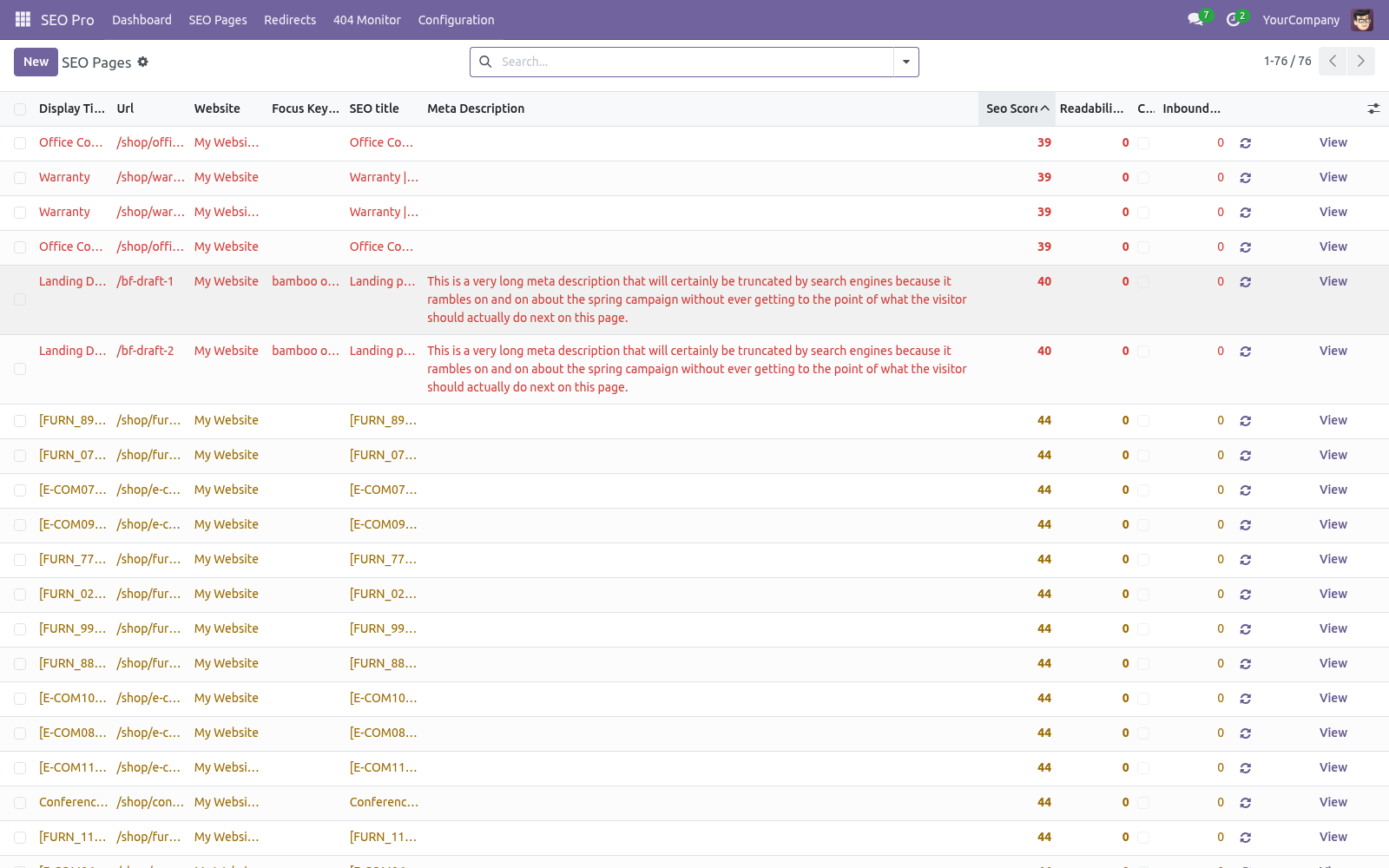
Press Analyze. The two score badges and both analysis tabs refresh. Scores map to buckets: 1–40 needs improvement, 41–70 OK, 71–100 good.
The Snippet tab shows the live Google preview. Edit the SEO title and meta description there — both are stored on the source record (website_meta_title / website_meta_description), so they are the values Odoo itself renders. Meters turn green in the sweet spot (30–65 / 120–156 characters).
Related keyphrases (one per line item) are checked for presence and occurrence count in the copy — use them for secondary queries.
Tick Cornerstone content on your most important pages: the copy-length bar is raised to 900 words, 50 prominent words are extracted instead of 20, and the page is boosted in link suggestions.
Redirects
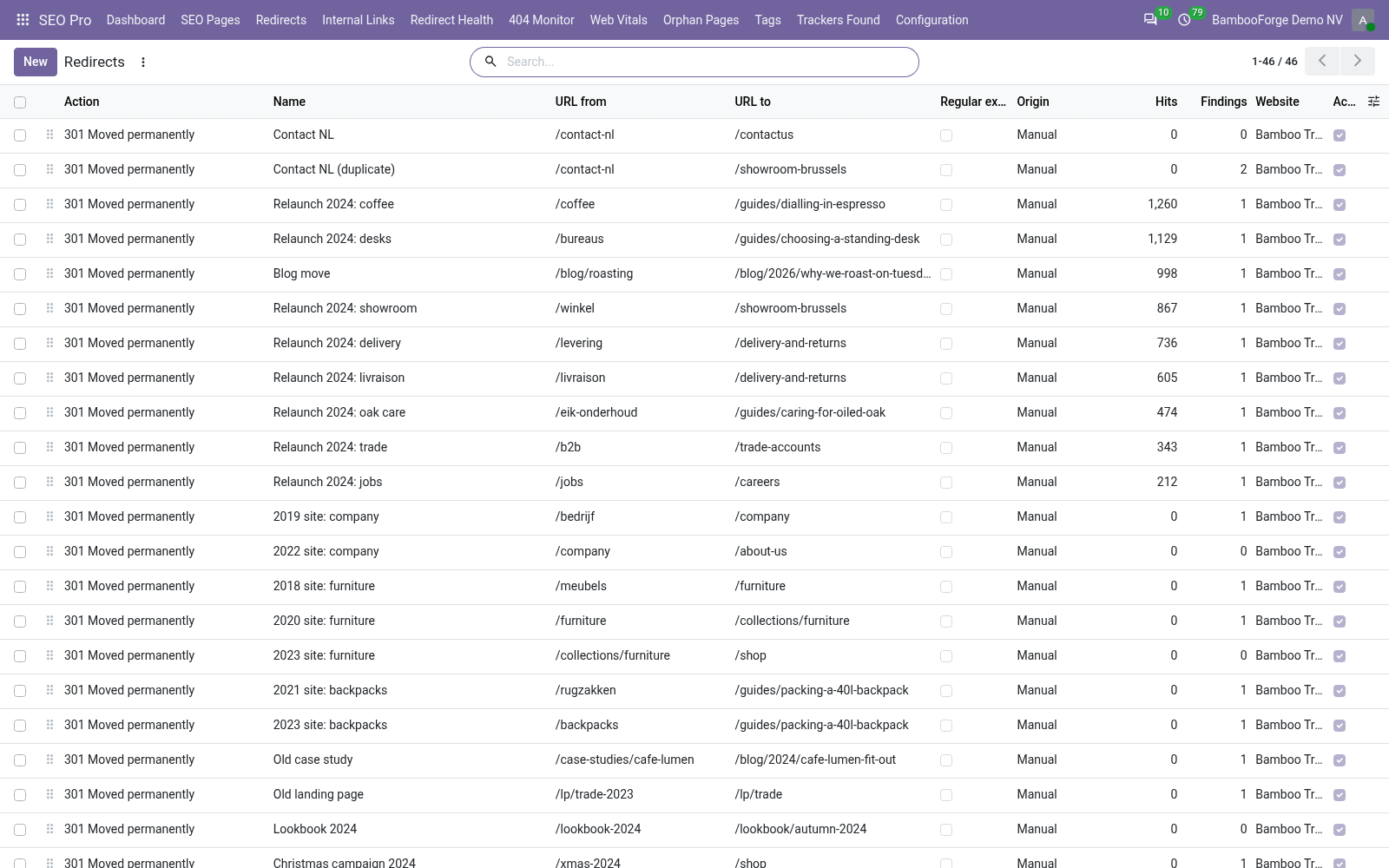
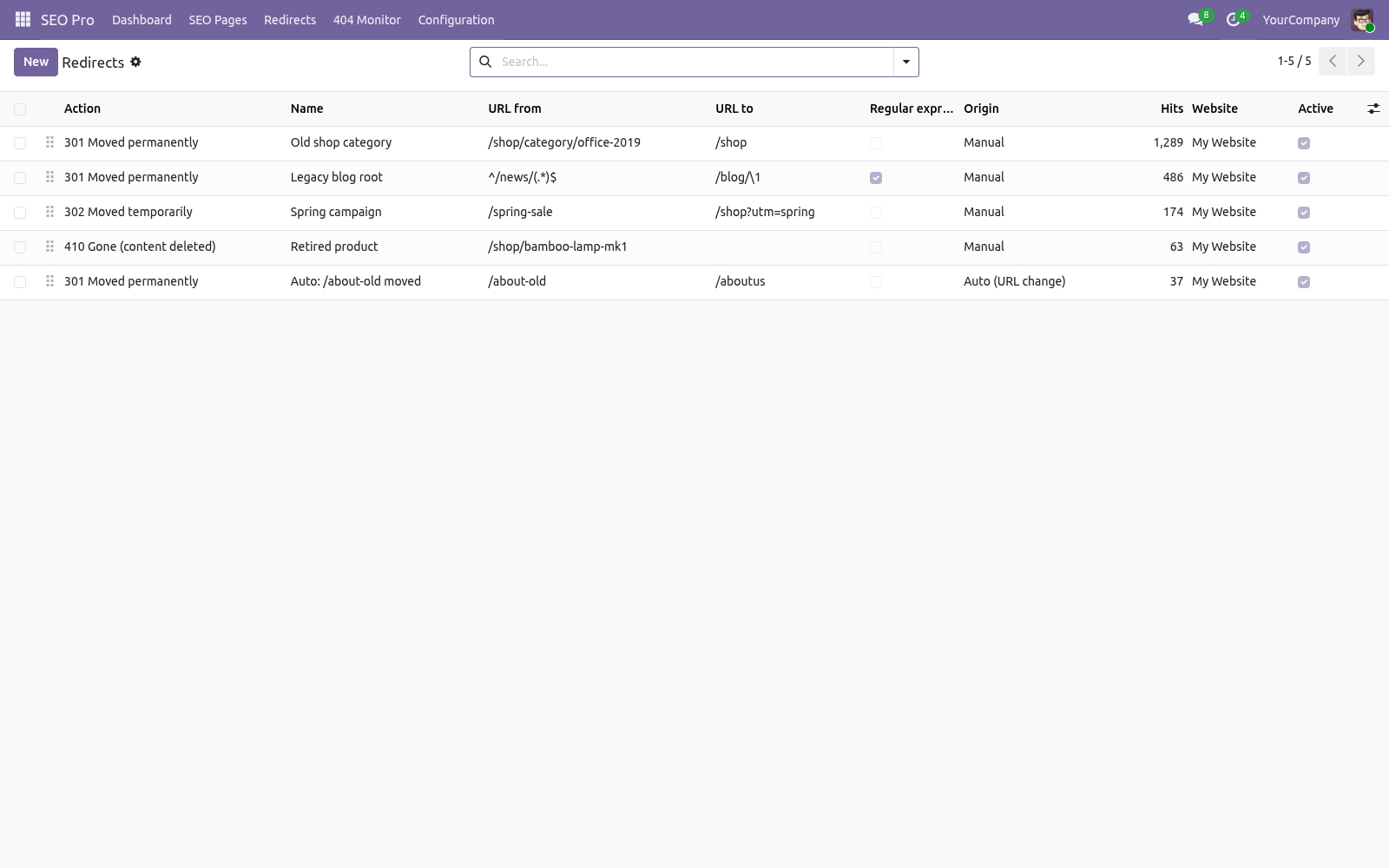
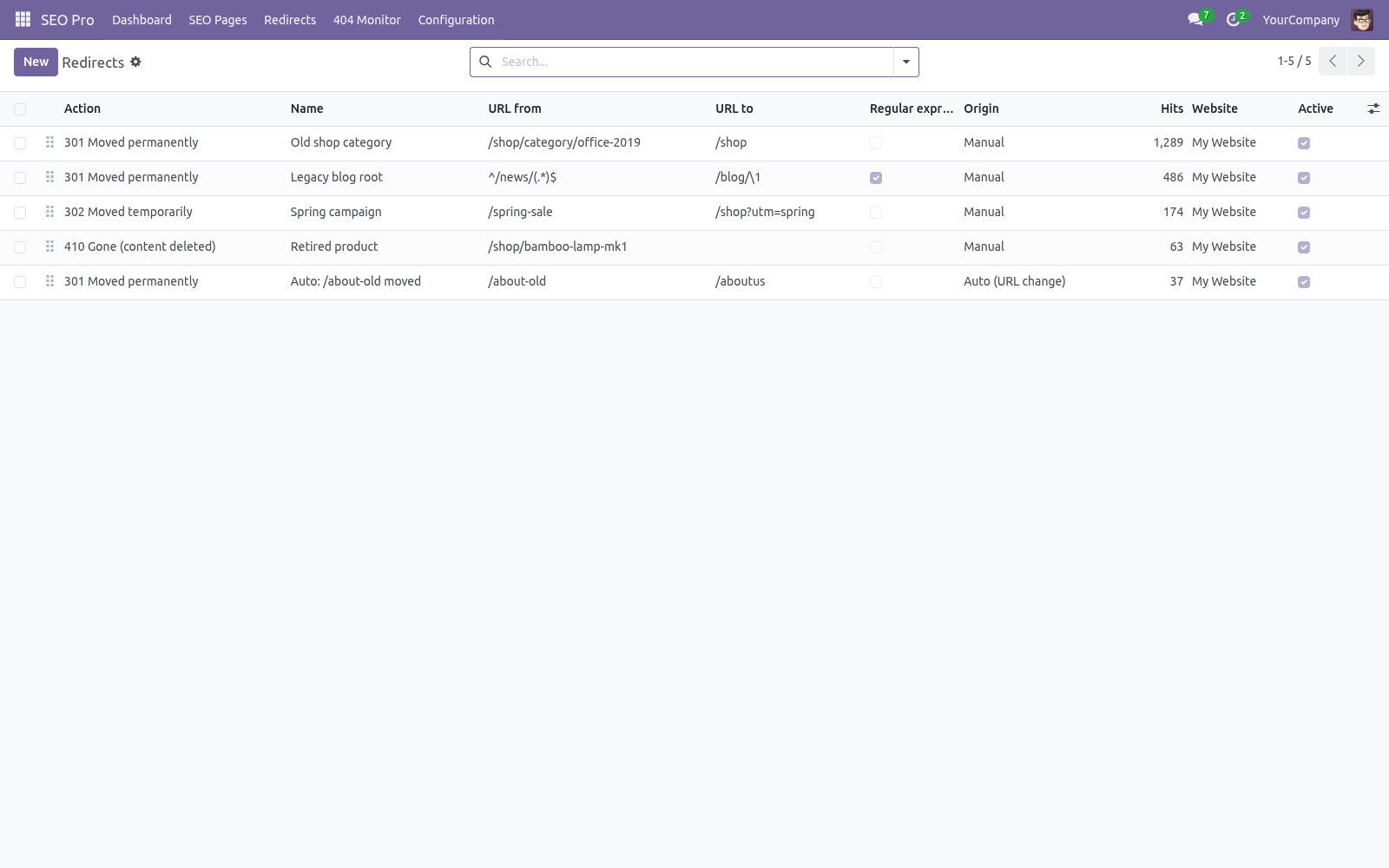
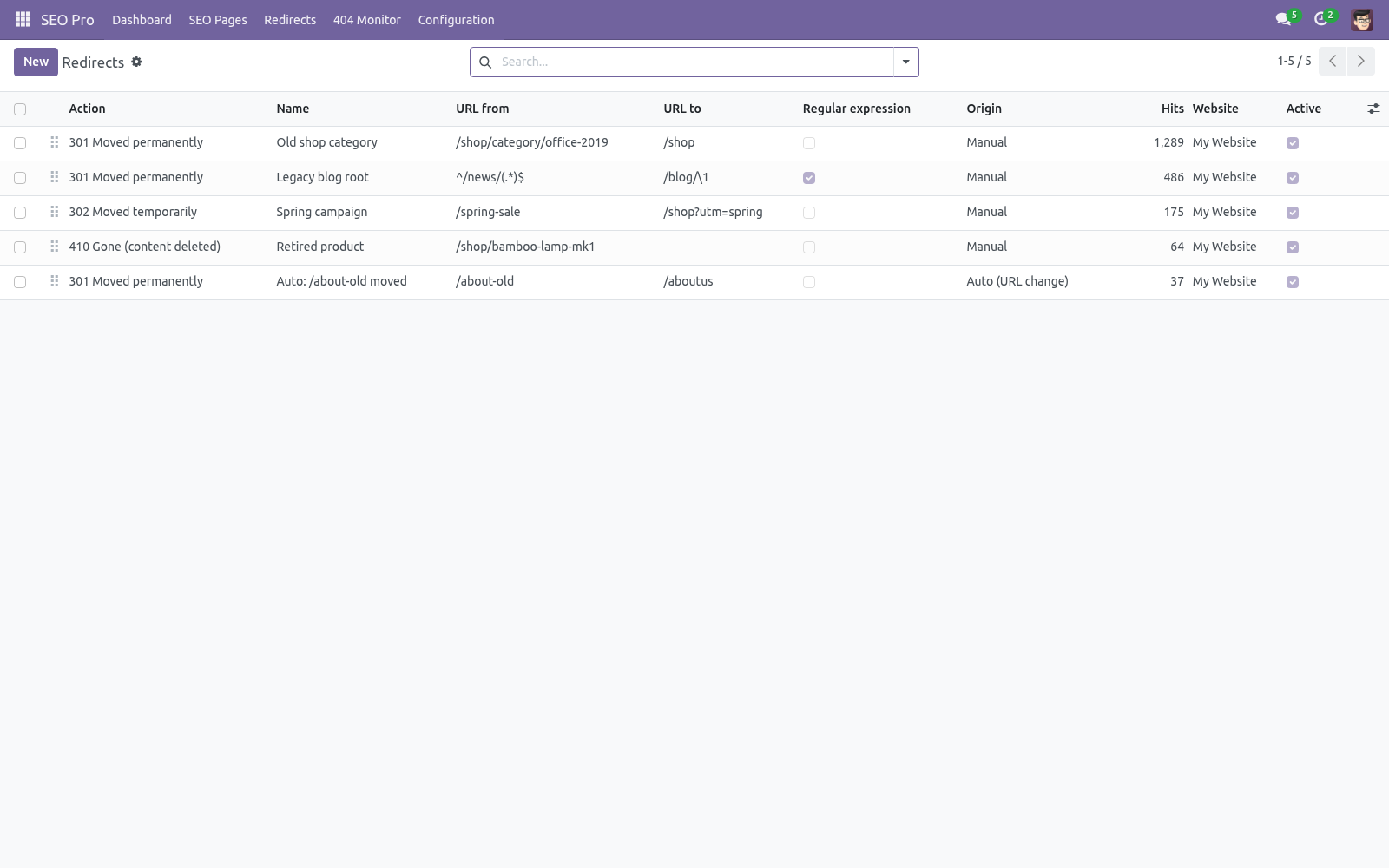
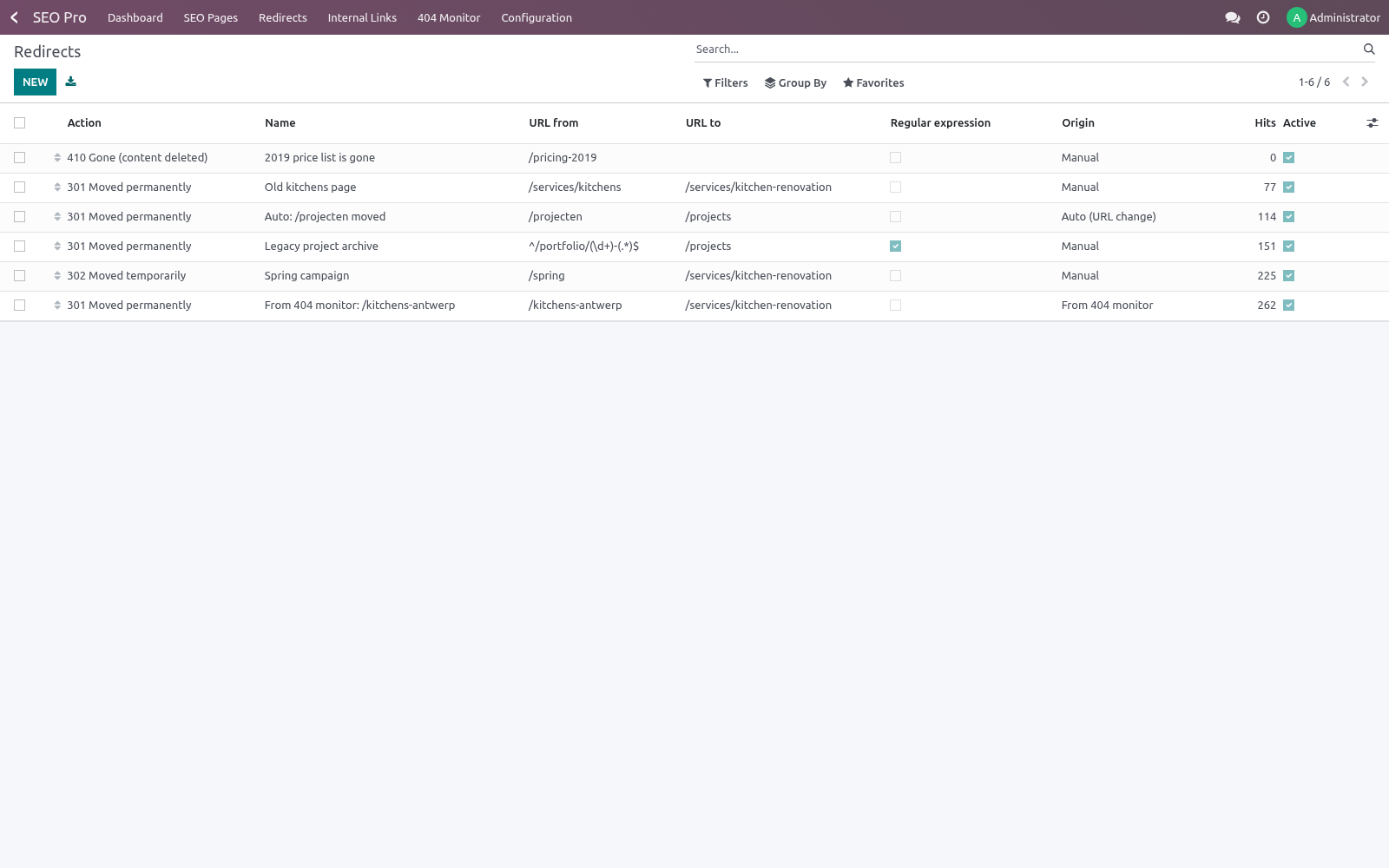
SEO Pro ▸ Redirects lists all rules (they are standard website.rewrite records, extended). Beyond the stock 301/302/308/404 you get:
307 — temporary redirect that preserves the HTTP method.
410 Gone / 451 Unavailable For Legal Reasons — status responses for deleted or legally blocked content; only URL from is needed.
Regular expression rules — tick Regular expression and URL from becomes a Python regex matched against the request path; captured groups are substituted into URL to (\1, \2 …). Example: ^/old-blog/(.*)$ → /blog/\1.
Hits / Last hit — every rule counts how often it fires, so you can prune dead rules safely.
Automatic 301s — when a website page URL changes (or a sync detects a changed URL on any indexed record) a 301 from the old URL is created automatically. Toggle per website in Settings.
A loop guard that follows the chain. When you save a 301/302/307 rule, SEO Pro walks the redirect chain from its target through the other rules — up to ten hops — and refuses the rule if the chain comes back to it. That covers the direct A→B / B→A pair and indirect chains such as A→B→C→A, regex rules included (a sample URL is built from the pattern to follow it). The error names the rule you collide with. Only 301/302/307 rules take part; 410/451 end a chain.
Regex rules are cached per website. The regex rule set is read once per website and re-read only when a rule is created, changed or deleted, so heavy 404 traffic (scanners hammering non-existent URLs) no longer costs a query per request.
404 monitor
SEO Pro ▸ 404 Monitor records every storefront 404 (assets, /web paths and obvious scanner probes like .php URLs are skipped; concurrent hits are merged). For each entry you see hit count, first/last seen and the last referrer — an entry with a referrer is a real broken link somewhere. Press Create redirect to fix it: the redirect form opens pre-filled and the entry flips to Redirected. Ignore hides noise. Entries stale for 90 days are vacuumed automatically and the table is capped at 20 000 rows.
Internal links
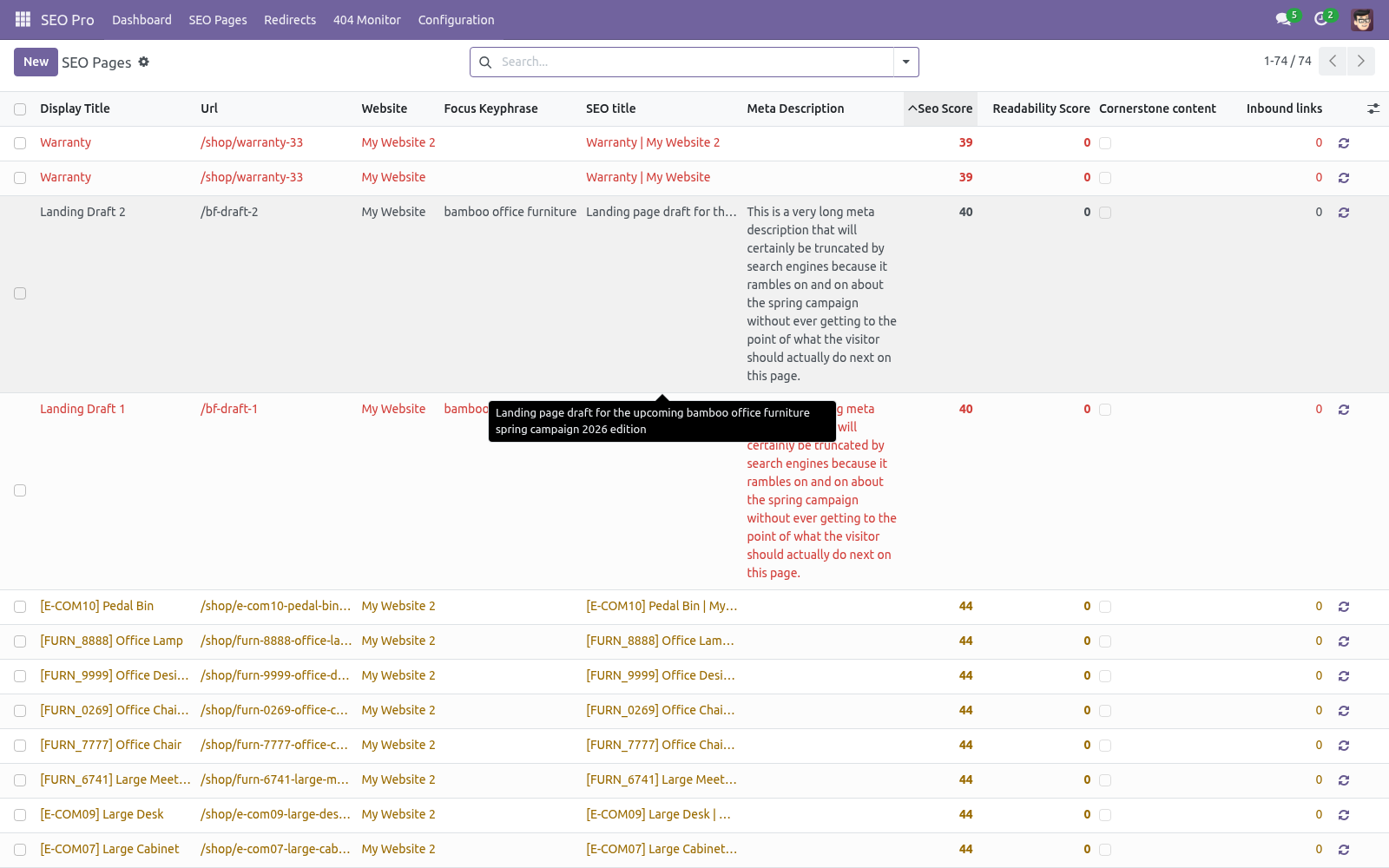
Press Link suggestions on a page to get the top 10 pages worth linking to, ranked by shared prominent words (cornerstone pages first). Pages you already link to are labelled. The Orphaned filter in SEO Pages (and the dashboard card) lists pages no other analyzed page links to — search engines rarely rank a page the site itself does not vouch for.
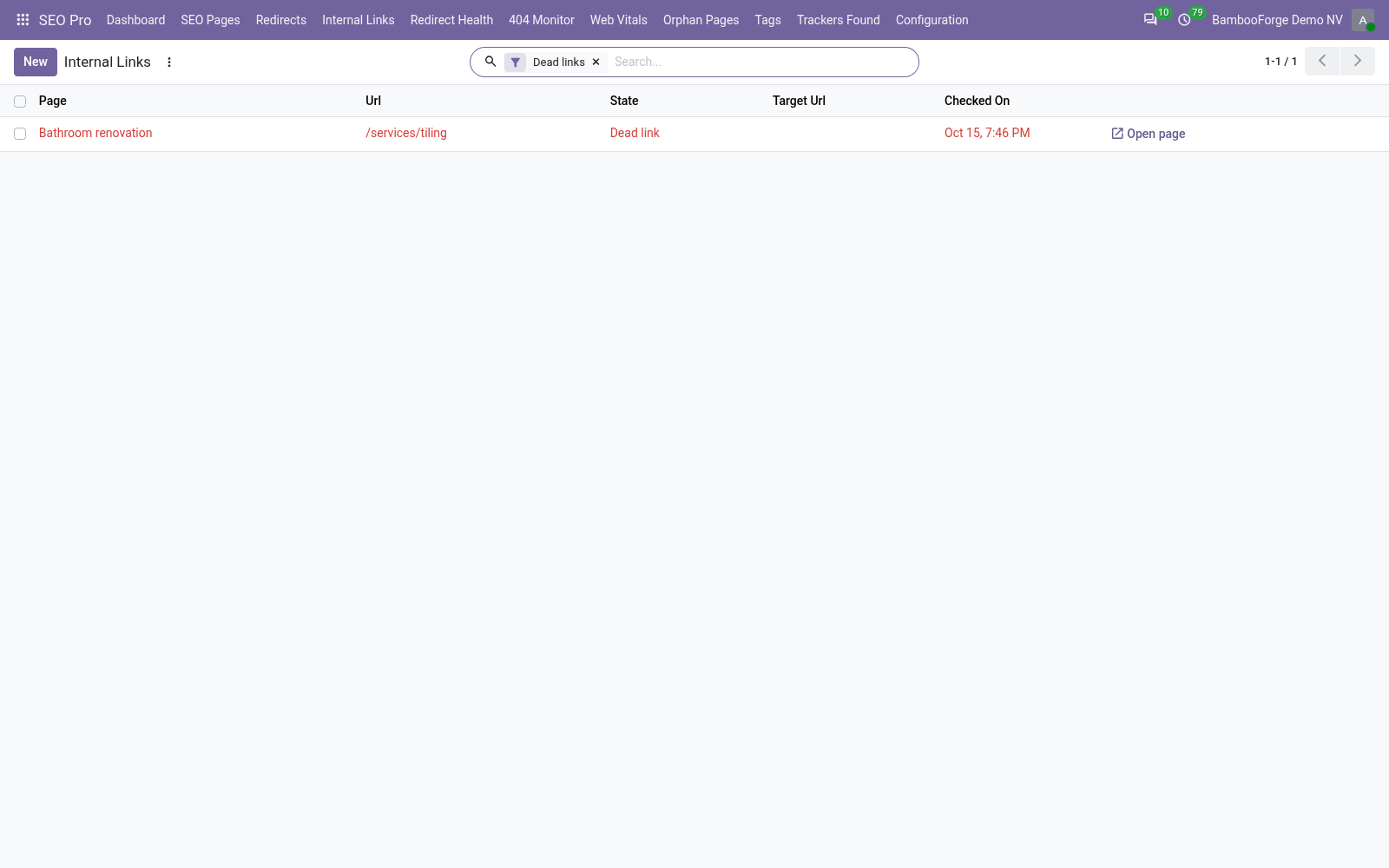
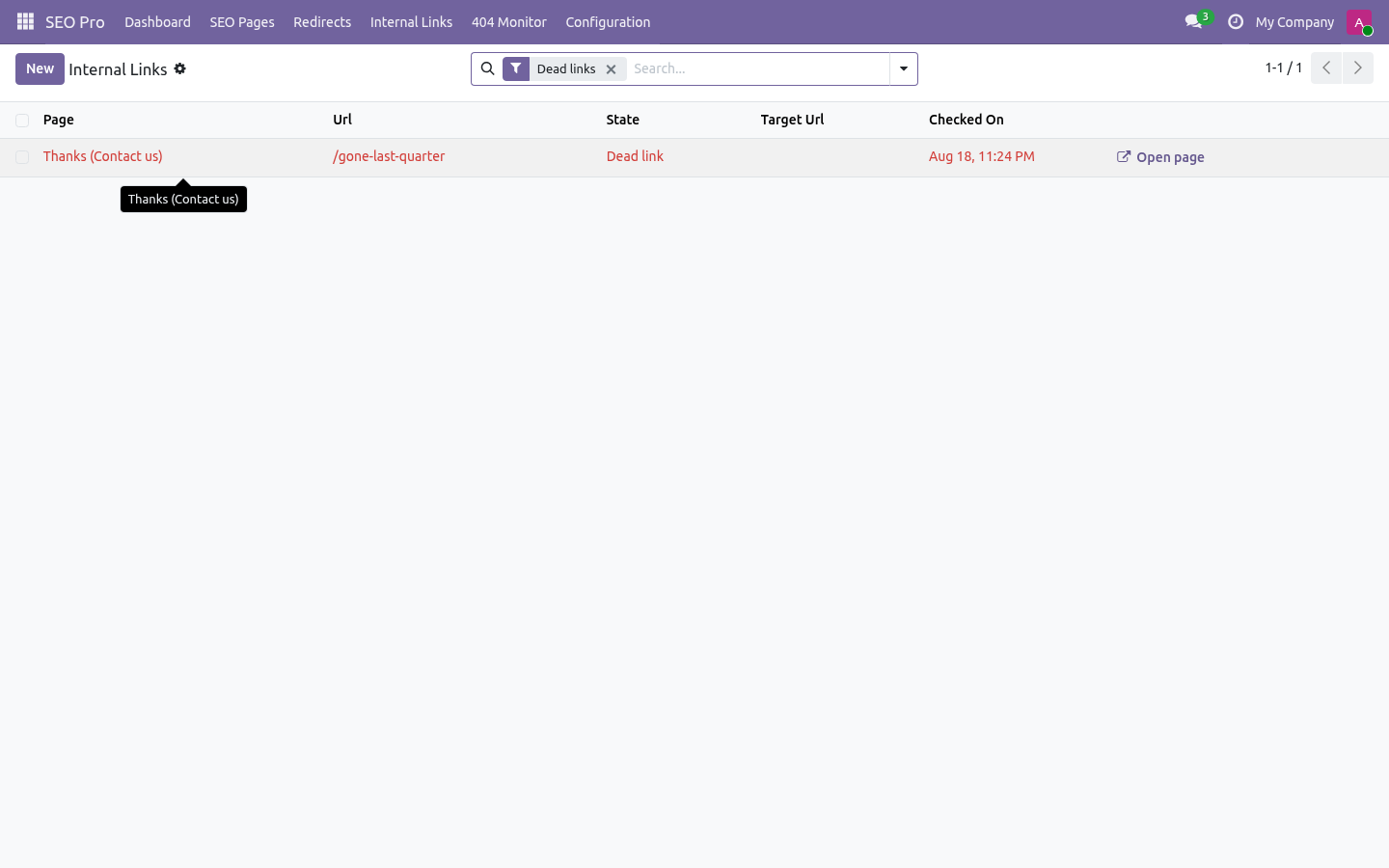
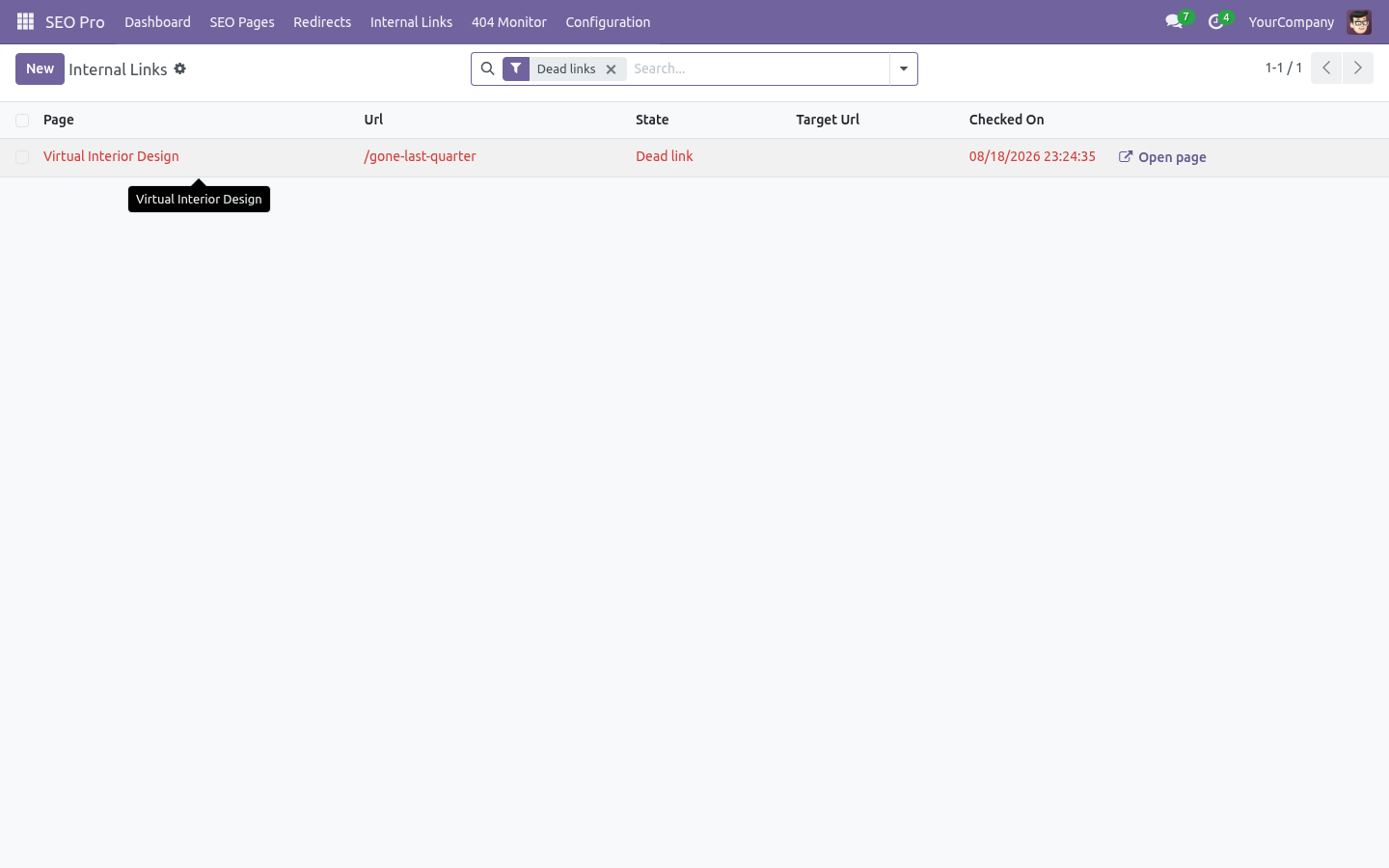
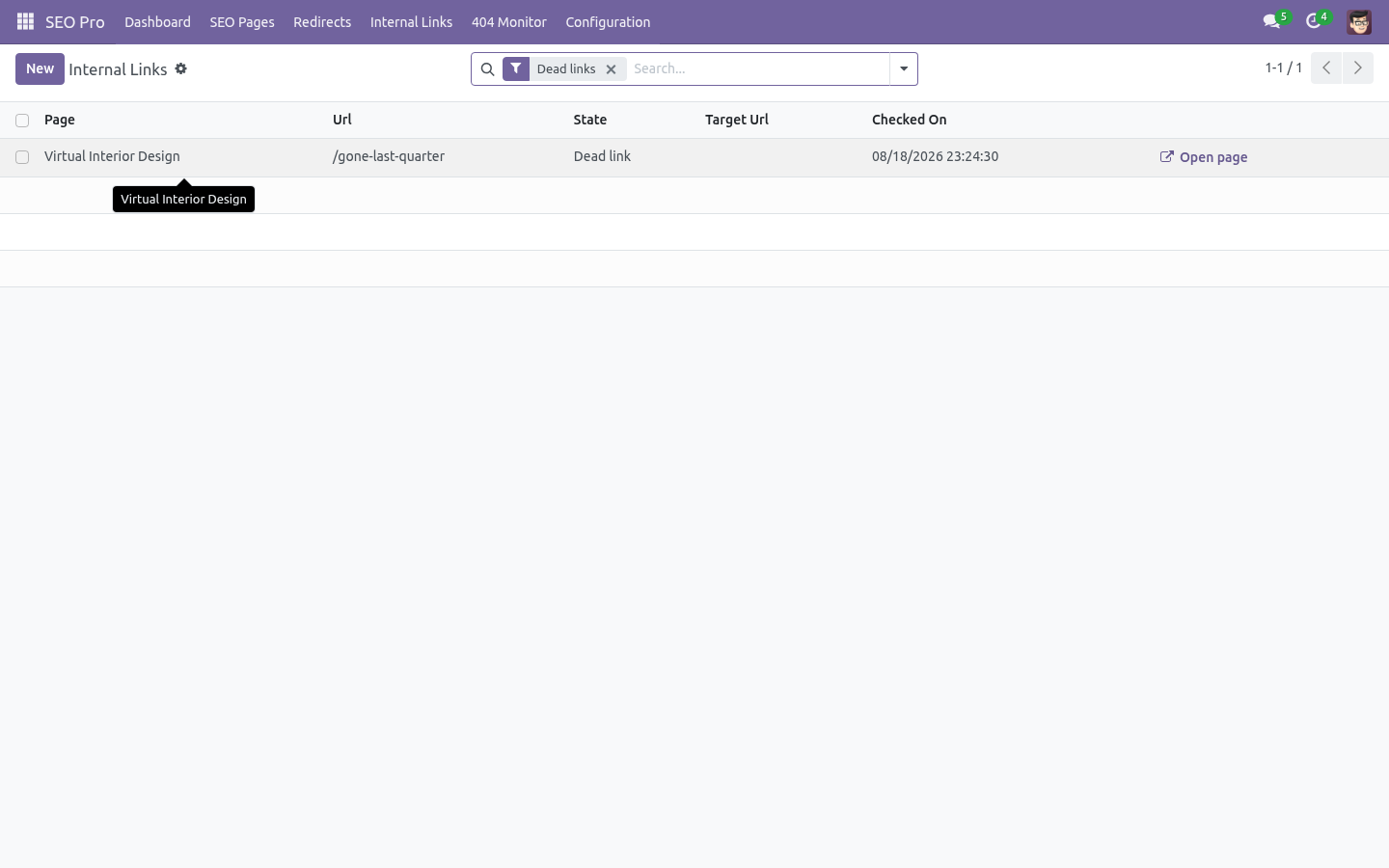
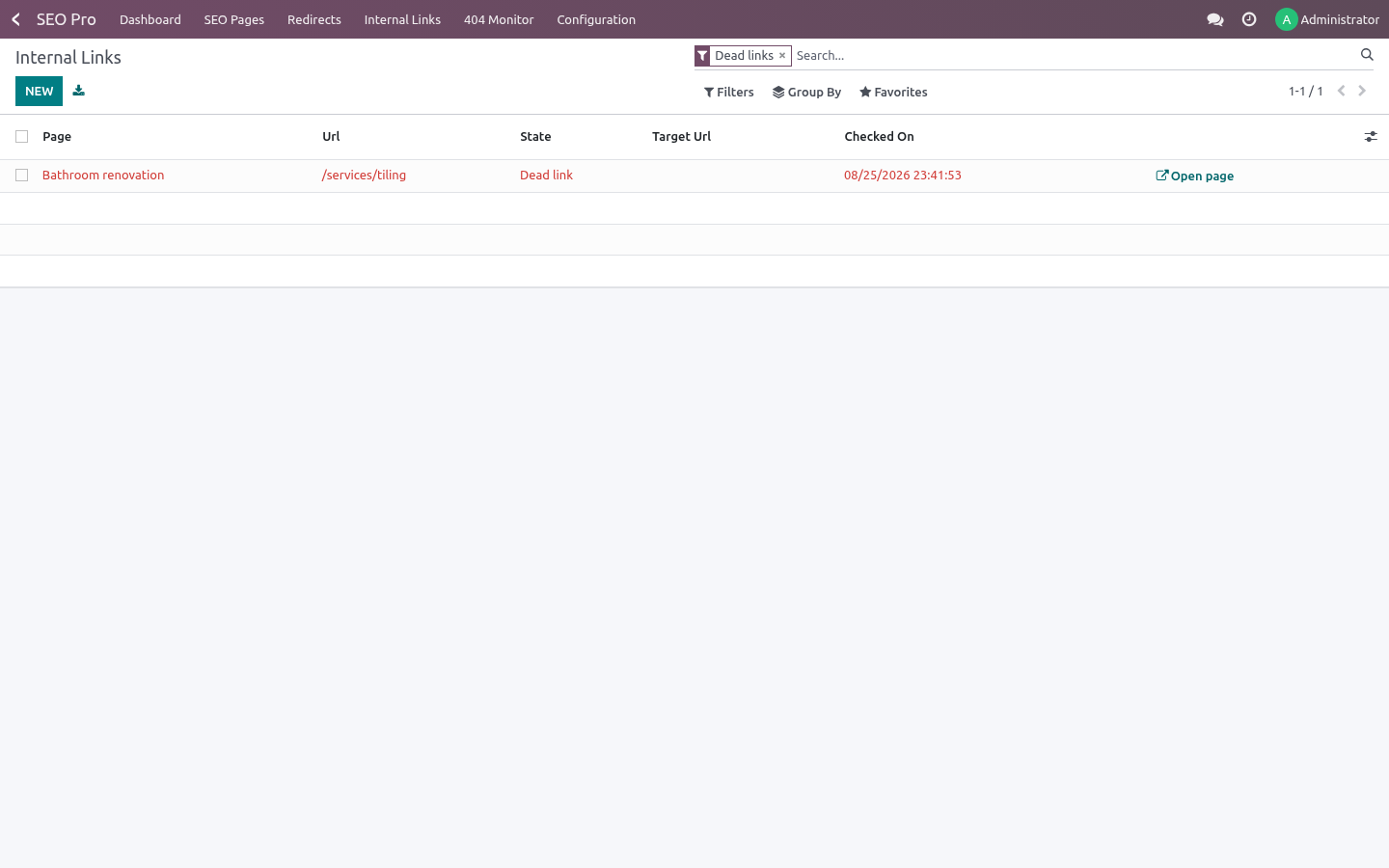
Link check. SEO Pro ▸ Internal Links lists the internal links that no longer land. Two kinds are reported:
Dead link — nothing on the site answers that path any more, typically a page renamed after the link was written. Fix the link, or add a redirect.
Goes through a redirect — the link only works because a 301 catches it. The final address is shown next to it; pointing the link straight there saves a hop on every crawl and keeps the target's authority intact.
Query strings, anchors and trailing slashes are normalised before judging, and external links are ignored. Press Check links on a page to re-check it, or let the daily cron keep the list current. The menu opens on the dead links because those are the ones costing traffic today.
Bulk editing
The SEO Pages list is editable in place. Typical sweep: filter Missing focus keyphrase, then fill the keyphrase / title / description columns row by row — or select many rows and use multi-edit for shared values. The standard export gives you XLSX of any columns including both scores.
Robots & canonical
Advanced tab: No index removes the page from search engines (a robots meta) — combine with a 410 if the content is truly gone. No follow asks crawlers not to follow the page's links. Canonical URL points duplicates at the original; it replaces the standard canonical link on that page.
Nightly cron
SEO Pro: nightly re-index and analysis (02:30) syncs new/changed records, re-analyzes every page in batches, and recomputes inbound-link counts. Run it on demand with Configuration ▸ Analyze all pages.
Configuration
Settings (per website)
SEO Pro ▸ Configuration ▸ Settings, block SEO (also reachable via Website ▸ Configuration ▸ Settings):
Setting |
Effect |
|---|---|
Automatic redirects |
Create a 301 automatically whenever a page URL changes. Default on. |
404 monitor |
Record visitor 404s. Default on. |
Structured data |
Emit the JSON-LD graph; configure organization name, logo URL and social profile URLs (one per line, becomes sameAs). |
Default sharing image |
Site-wide OpenGraph/Twitter fallback image URL. |
Content models
SEO Pro ▸ Configuration ▸ Content Models maps each indexed model to its title field, the comma-separated content fields the analyzer reads, the URL field and the default schema type. Website pages, blog posts and products ship pre-configured. Add your own model (e.g. a custom portal page model) by adding a row — records must expose a URL field and be publishable.
Access rights
Two groups under category SEO Pro:
User — sees the app, runs analyses, edits page metadata. Website designers are SEO users automatically.
Manager — additionally manages redirects, the 404 monitor, content model mappings and settings.
Install
Copy bambooforge_seo_pro into your addons path and update the app list, or install the ZIP from the Odoo Apps Store.
Install SEO Pro: Website SEO Optimization & Analysis.
Open SEO Pro - its menus are Dashboard, SEO Pages, Redirects, Internal Links.
Troubleshooting
- A page shows score 0 / “Not analyzed”.
Press Analyze on the page, or Sync & analyze all on the dashboard. If the record was deleted, the SEO page archives itself on the next analysis.
- My blog posts / products are missing from SEO Pages.
They are only indexed when published and when the matching app is installed. Run Configuration ▸ Sync pages now after publishing new content, or wait for the nightly cron.
- The analysis reads an empty body for a custom model.
Check the Content Models row: the content_fields list must name HTML/text fields that actually hold the copy.
- Redirect does not fire.
Redirects only trigger when no page/controller answers the URL (Odoo serves the page first, then rewrites). Check the rule's website matches, and for regex rules remember the pattern anchors at the start of the path (use ^/old/(.*)$-style patterns).
- Saving a redirect is refused as “would create a redirect loop”.
The loop guard followed the chain from your target and came back to this rule — directly (A→B, B→A) or through other rules (A→B→C→A). The message names the rule it collided with: open it and decide which of the two should win, then re-save. Regex rules are checked the same way, on a sample URL built from the pattern.
- 404s are not being logged.
The monitor skips asset-like URLs (images, JS, fonts), /web/… paths and scanner probes (.php etc.) by design. Also check the per-website 404 monitor toggle.
- Changed noindex/OG data but the live page still shows the old head.
Odoo caches the rendered <head> per website page. SEO Pro bumps the cache automatically when you change head-relevant fields; a hard refresh (Ctrl+Shift+R) bypasses your browser cache on top.
- Passive voice / transition words look wrong for my language.
Both checks are English-tuned heuristics. For non-English copy, read those two lines as advisory; every other check is language-neutral.
- Two pages target the same keyphrase and both dropped in ranking.
That is keyword cannibalisation — exactly what the previously used keyphrase check flags red. Merge the pages or retarget one.
FAQ
- Does it work on Community?
Yes — CE and EE, no Enterprise dependency.
- Does it replace Odoo's built-in “Optimize SEO” dialog?
No, it complements it. Titles/descriptions edited in either place are the same fields. SEO Pro adds the analysis, redirects, schema, monitors and bulk tooling on top.
- Multi-website?
Yes. Indexables, redirects, 404 logs and all settings are per-website; a record shared across websites gets one indexable per website.
- Does the analyzer call any external service?
No. Everything (including the analysis and link suggestions) runs inside your Odoo server. Nothing is sent anywhere.
- Performance impact on visitors?
Head injection is one indexed lookup per page render (and the head of website pages is cached by Odoo anyway). 404 logging and hit counting are single-statement SQL upserts, and the regex redirect rules are cached per website (invalidated when a rule changes) so a flood of scanner 404s does not re-read them on every request. The analysis itself only runs when you press Analyze or in the nightly cron.
- Can I export everything?
Yes — SEO Pages, Redirects and the 404 Monitor are ordinary list views: standard export/import (CSV/XLSX) applies, including redirect import from a CSV prepared elsewhere.
- Is the source included?
Yes, complete OPL-1 source; extend it in your own modules like any Odoo app.
Upgrade
Take a database backup (and filestore).
Replace the module folder with the new version in your addons path.
Restart Odoo and upgrade the module:
odoo-bin -d <db> -u bambooforge_seo_pro --stop-after-init
Check the Changelog below for behaviour changes, then re-run Sync & analyze all once so stored scores pick up any new checks.
Versioning follows 17.0.x.y.z; the analysis thresholds are constants in tools/seo_analyzer.py if you have customized on top.
Uninstall
Apps ▸ BambooForge SEO Pro ▸ Uninstall.
What is removed: SEO Page records, 404 log, model mappings, the dashboard, menus, groups and the JSON-LD/robots head injection.
What survives: your pages' SEO titles and meta descriptions (they live on the source records' standard fields), and all redirect rules — they are standard website.rewrite records. Rules using the extra types (307/410/451) or regex flag lose those extras when the fields disappear, so review Redirects before uninstalling if you used them.
No external services to disconnect; nothing phones home.
Changelog
20.0.1.4.2
Built for Odoo 20: record rules and access rights rewritten onto Odoo 20's single ir.access model, the screens rebuilt on Owl 3, and every icon moved to the icon set Odoo 20 ships.
20.0.1.1.1 (2026-08-15)
Stronger redirect loop guard. Saving a 301/302/307 rule now follows the redirect chain through the other rules — up to ten hops — and refuses the rule when the chain returns to it. Indirect loops (A→B→C→A) and regex rules are caught too; previously only a direct A→B / B→A pair was detected.
Regex redirect rules are cached per website and re-read only when a rule is created, changed or deleted, so heavy 404 traffic (scanners) no longer costs a query per request.
20.0.1.1.0 (2026-08-13)
Exportable .pot translation template, so the app can be taken into any language.
Automated backend tour (app → dashboard → pages list → form → analysis → snippet preview) run as a browser test.
SEO Pages list rows now expose the open-form icon next to inline editing.
20.0.1.0.0 (2026-08-13)
Initial release: focus-keyphrase content analysis (14 checks) and readability analysis (7 checks) with traffic-light scoring; live Google/Facebook/X snippet previews; redirect manager with 307/410/451, regex rules, hit counters and automatic 301 on URL change; 404 monitor with two-click redirect creation; schema.org JSON-LD graph (Organization, WebSite, WebPage, BreadcrumbList, Article, Product); per-page OpenGraph/Twitter overrides; internal-link suggestions, prominent words and orphan detection; cornerstone content; bulk-editable SEO Pages list; SEO Health dashboard; nightly re-index cron; multi-website support.
How we make sure it works
Before every release, 84 automated checks run against this app on Odoo 16, 17, 18, 19 and 20. Among them:
A scan cannot drink the connection pool.
404 visit served and logger does not break request.
Link to a live page is not reported.
Trailing slash is not a dead link.
A noindex page can still be linked to in the editor.
The complete list is in the source you receive.