 BambooForge Labs
SAF-T Standard Audit File for Tax
Produce the OECD SAF-T audit file from your ledger: header, chart of accounts with taxonomy mapping, partners, tax table and journal entries.
Available for Odoo 16.0, Odoo 17.0, Odoo 18.0, Odoo 19.0, Odoo 20.0. Technical name bambooforge_saft.
Transcript of the walkthrough (Odoo 20)
SAF-T Standard Audit File for Tax. Produce the OECD SAF-T audit file from your ledger: header, chart of accounts with taxonomy mapping, partners, tax table and journal entries. When a tax authority asks for SAF-T, they want the ledger, the master data behind it and the source documents in one XML file that their own tooling reads. Odoo Community exports none of it: the l10n__saft modules are Enterprise, and only for a handful of countries.
Accounting ▸ Configuration ▸ Settings* — the tax registration number the authority knows you by (when it differs from the VAT number), the accounting basis, and the office or branch if several file separately. In the next few minutes: what this is for, then setting up, then preparing a file, then parties without a tax number, then national variants. Then what this app deliberately does not do, so you can tell before you buy whether it fits. Everything lives under SAF-T.
1. Copy bambooforge_saft into your addons path and update the app list, or install the ZIP from the Odoo Apps Store. 2. Install SAF-T Standard Audit File for Tax.
3. Open SAF-T. What this is for. When a tax authority asks for SAF-T, they want the ledger, the master data behind it and the source documents in one XML file that their own tooling reads.
Odoo Community exports none of it: the l10n_*_saft modules are Enterprise, and only for a handful of countries. Setting up. Accounting ▸ Configuration ▸ Settings — the tax registration number the authority knows you by (when it differs from the VAT number), the accounting basis, and the office or branch if several file separately. On each account, set the SAF-T taxonomy code: the code in the national standard chart of accounts that your account maps to.
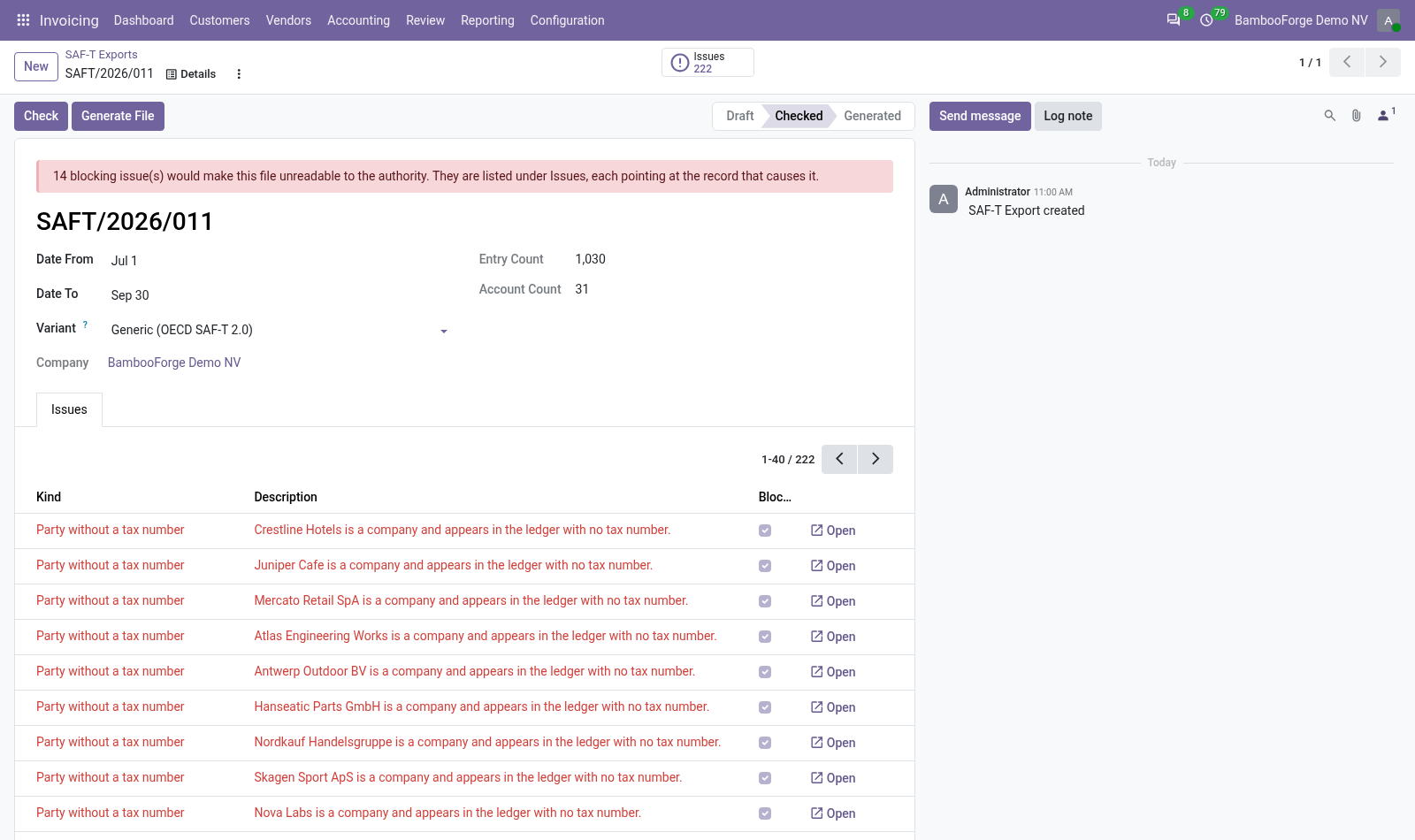
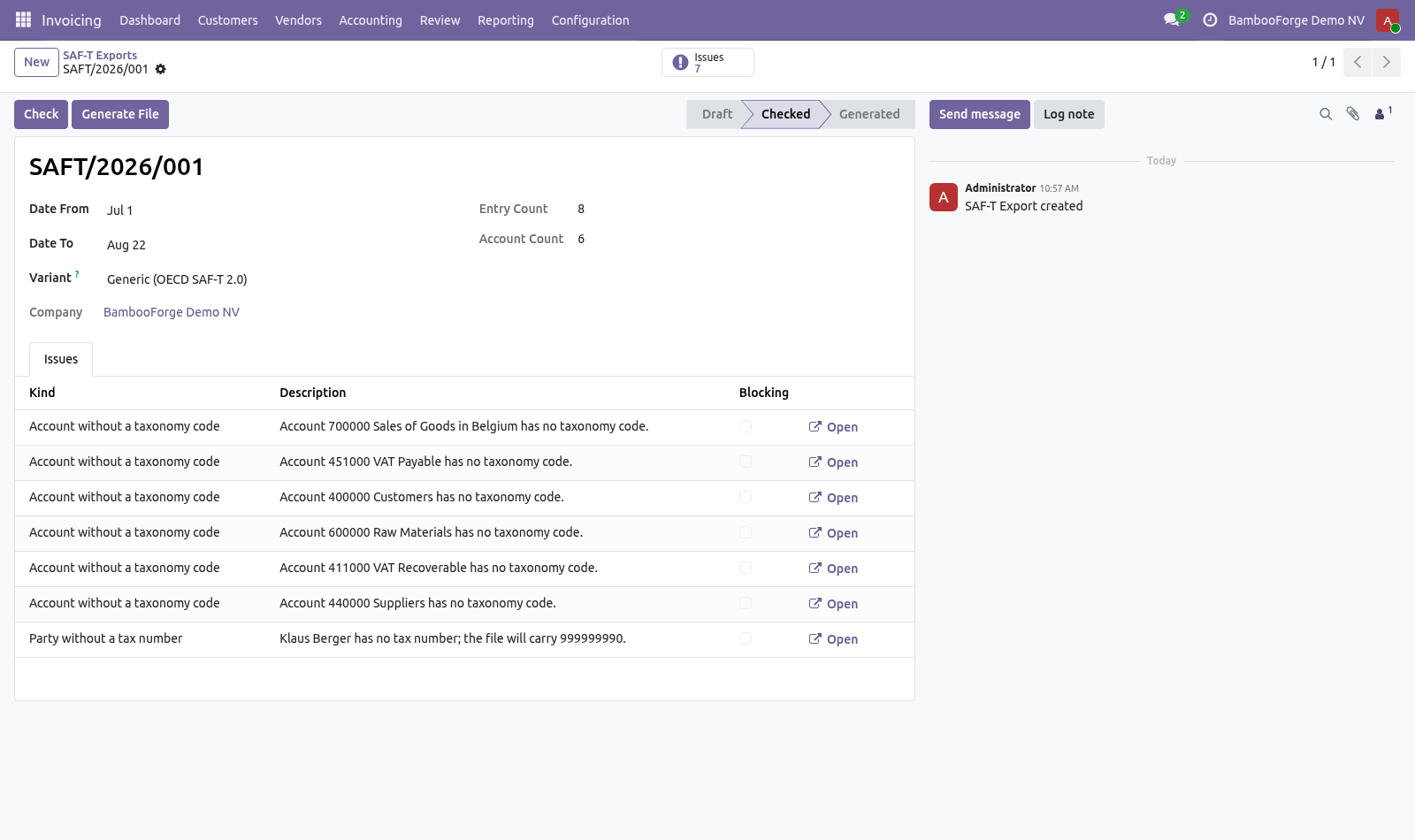
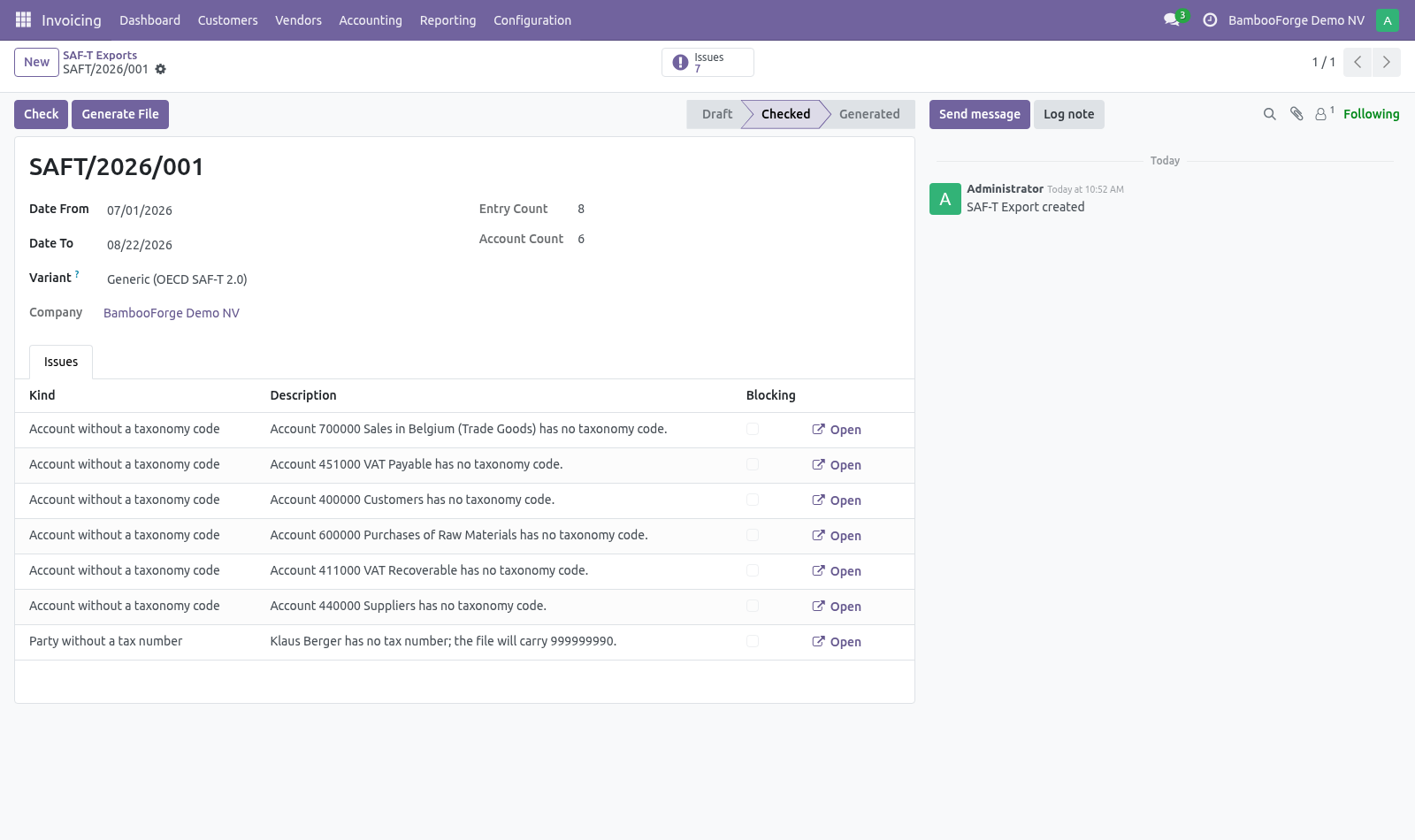
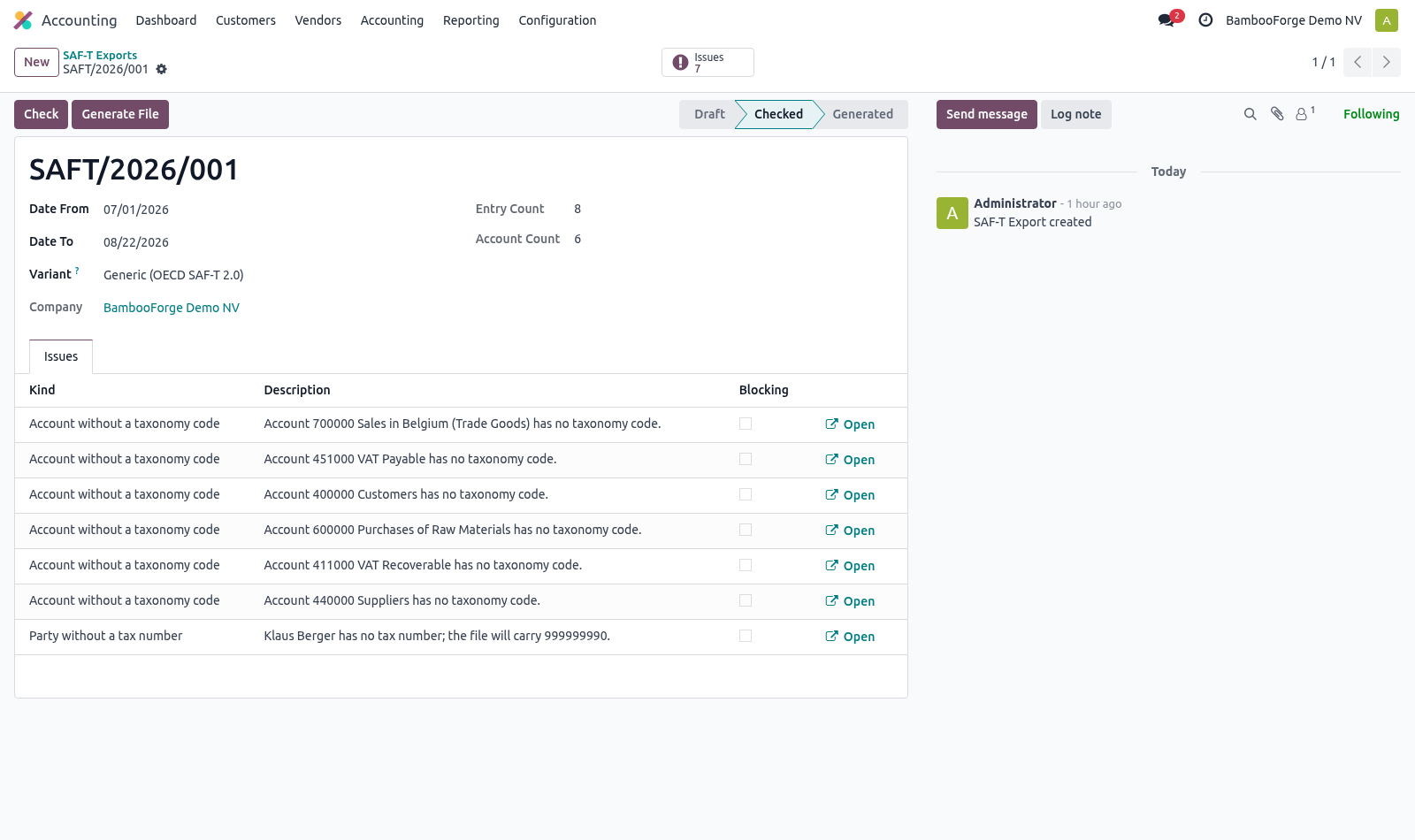
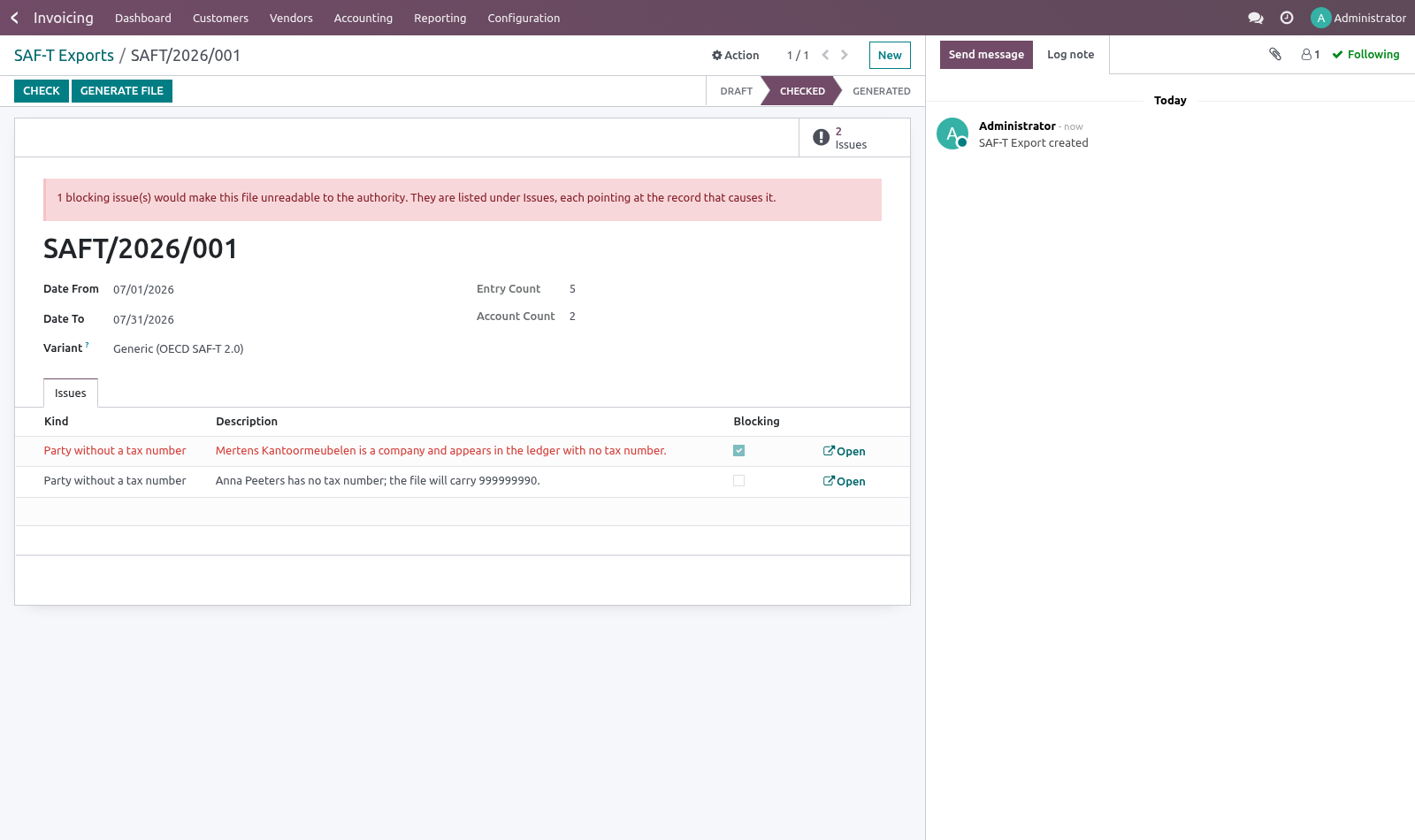
Several authorities reject a file whose accounts they cannot map onto their own plan, and this is exactly the part nobody can reconstruct the week the request arrives. Preparing a file. Create an export for the period and press Check first. The check lists what the authority would reject, each item pointing at the record that causes it: a customer or supplier in the ledger with no tax number — blocking; a journal with no code — blocking; the company itself with neither VAT nor tax registration number — blocking; an account with no taxonomy code — worth fixing, but the file still imports.
Blocking issues stop the export. That is deliberate: a rejected SAF-T comes back as a schema error against a line number, weeks later, and matching it to the record that caused it is most of the work. Parties without a tax number. A shop sells to people who have no tax number, and the file still has to carry the element for them.
Authorities publish a substitute identifier for exactly this case — 999999990 in Portugal, for instance. Set the one your authority publishes in Accounting ▸ Configuration ▸ Settings ▸ SAF-T Audit File, under Substitute identifier. It is filled in wherever a party has no number of their own, and the pre-flight reports the substitution rather than refusing to export. A person with no tax number is ordinary.
The substitute is used and a note appears on the check. A company with no tax number is a gap in your master data, and blocks the export. It is not something the file can paper over. 00:03:55,1000 --> 00:04:04,487 If the substitute identifier is cleared, a party without a number blocks again — the element would otherwise go out empty, which no schema accepts.
The distinction that matters is who the party is: National variants. The generic OECD 2.0 structure is the shared core. Each member state publishes its own flavour, so the writer is a plug-in point: add a selection value to _selection_variant and a matching _bf_render_<key> method. Nothing in the core has to change, and a variant that is offered without a writer behind it is caught by the test suite rather than by a customer.
How we make sure it works. Before every release, 20 automated checks run against this app on Odoo 16, 17, 18, 19 and 20. Among them: A private buyer without a tax number does not block. A company without a tax number still blocks.
An employee without the checkbox reads no export. Check reports accounts without a taxonomy code. Only the parties in the period are exported. The complete list is in the source you receive.
Questions people ask. Which Odoo versions does it run on? Odoo 16.0, 17.0, 18.0, 19.0, 20.0, on the series you buy it for; each series is its own listing. Community or Enterprise?
Both. It needs no Enterprise app. Now the part most videos leave out: what this does not do. This produces the file; it does not submit it.
Submission channels are national and usually need credentials the software cannot hold for you. The generic variant is not validated against any one country's XSD. Where an authority publishes a schema, validate the output against it before the first real filing and add an adapter for what differs. SourceDocuments (invoices, payments, movement of goods) are not written yet; the file covers Header, MasterFiles and GeneralLedgerEntries, which is what most authorities ask for first.
The complete manual is at docs dot bambooforge dot dev, the demo database is linked from the store page, and support answers within twenty-four hours. Links are in the description.
Transcript of the walkthrough (Odoo 19)
SAF-T Standard Audit File for Tax. Produce the OECD SAF-T audit file from your ledger: header, chart of accounts with taxonomy mapping, partners, tax table and journal entries. When a tax authority asks for SAF-T, they want the ledger, the master data behind it and the source documents in one XML file that their own tooling reads. Odoo Community exports none of it: the l10n__saft modules are Enterprise, and only for a handful of countries.
Accounting ▸ Configuration ▸ Settings* — the tax registration number the authority knows you by (when it differs from the VAT number), the accounting basis, and the office or branch if several file separately. In the next few minutes: what this is for, then setting up, then preparing a file, then parties without a tax number, then national variants. Then what this app deliberately does not do, so you can tell before you buy whether it fits. Everything lives under SAF-T.
What this is for. When a tax authority asks for SAF-T, they want the ledger, the master data behind it and the source documents in one XML file that their own tooling reads. Odoo Community exports none of it: the l10n_*_saft modules are Enterprise, and only for a handful of countries. Setting up.
Accounting ▸ Configuration ▸ Settings — the tax registration number the authority knows you by (when it differs from the VAT number), the accounting basis, and the office or branch if several file separately. On each account, set the SAF-T taxonomy code: the code in the national standard chart of accounts that your account maps to. Several authorities reject a file whose accounts they cannot map onto their own plan, and this is exactly the part nobody can reconstruct the week the request arrives. Preparing a file.
Create an export for the period and press Check first. The check lists what the authority would reject, each item pointing at the record that causes it: a customer or supplier in the ledger with no tax number — blocking; a journal with no code — blocking; the company itself with neither VAT nor tax registration number — blocking; an account with no taxonomy code — worth fixing, but the file still imports. Blocking issues stop the export. That is deliberate: a rejected SAF-T comes back as a schema error against a line number, weeks later, and matching it to the record that caused it is most of the work.
Parties without a tax number. A shop sells to people who have no tax number, and the file still has to carry the element for them. Authorities publish a substitute identifier for exactly this case — 999999990 in Portugal, for instance. Set the one your authority publishes in Accounting ▸ Configuration ▸ Settings ▸ SAF-T Audit File, under Substitute identifier.
It is filled in wherever a party has no number of their own, and the pre-flight reports the substitution rather than refusing to export. A person with no tax number is ordinary. The substitute is used and a note appears on the check. A company with no tax number is a gap in your master data, and blocks the export.
It is not something the file can paper over. If the substitute identifier is cleared, a party without a number blocks again — the element would otherwise go out empty, which no schema accepts. The distinction that matters is who the party is: National variants. The generic OECD 2.0 structure is the shared core.
Each member state publishes its own flavour, so the writer is a plug-in point: add a selection value to _selection_variant and a matching _bf_render_<key> method. Nothing in the core has to change, and a variant that is offered without a writer behind it is caught by the test suite rather than by a customer. Now the part most videos leave out: what this does not do. This produces the file; it does not submit it.
Submission channels are national and usually need credentials the software cannot hold for you. The generic variant is not validated against any one country's XSD. Where an authority publishes a schema, validate the output against it before the first real filing and add an adapter for what differs. SourceDocuments (invoices, payments, movement of goods) are not written yet; the file covers Header, MasterFiles and GeneralLedgerEntries, which is what most authorities ask for first.
The complete manual is at docs dot bambooforge dot dev, the demo database is linked from the store page, and support answers within twenty-four hours. Links are in the description.
Transcript of the walkthrough (Odoo 18)
SAF-T Standard Audit File for Tax. Produce the OECD SAF-T audit file from your ledger: header, chart of accounts with taxonomy mapping, partners, tax table and journal entries. When a tax authority asks for SAF-T, they want the ledger, the master data behind it and the source documents in one XML file that their own tooling reads. Odoo Community exports none of it: the l10n__saft modules are Enterprise, and only for a handful of countries.
Accounting ▸ Configuration ▸ Settings* — the tax registration number the authority knows you by (when it differs from the VAT number), the accounting basis, and the office or branch if several file separately. In the next few minutes: what this is for, then setting up, then preparing a file, then parties without a tax number, then national variants. Then what this app deliberately does not do, so you can tell before you buy whether it fits. Everything lives under SAF-T.
What this is for. When a tax authority asks for SAF-T, they want the ledger, the master data behind it and the source documents in one XML file that their own tooling reads. Odoo Community exports none of it: the l10n_*_saft modules are Enterprise, and only for a handful of countries. Setting up.
Accounting ▸ Configuration ▸ Settings — the tax registration number the authority knows you by (when it differs from the VAT number), the accounting basis, and the office or branch if several file separately. On each account, set the SAF-T taxonomy code: the code in the national standard chart of accounts that your account maps to. Several authorities reject a file whose accounts they cannot map onto their own plan, and this is exactly the part nobody can reconstruct the week the request arrives. Preparing a file.
Create an export for the period and press Check first. The check lists what the authority would reject, each item pointing at the record that causes it: a customer or supplier in the ledger with no tax number — blocking; a journal with no code — blocking; the company itself with neither VAT nor tax registration number — blocking; an account with no taxonomy code — worth fixing, but the file still imports. Blocking issues stop the export. That is deliberate: a rejected SAF-T comes back as a schema error against a line number, weeks later, and matching it to the record that caused it is most of the work.
Parties without a tax number. A shop sells to people who have no tax number, and the file still has to carry the element for them. Authorities publish a substitute identifier for exactly this case — 999999990 in Portugal, for instance. Set the one your authority publishes in Accounting ▸ Configuration ▸ Settings ▸ SAF-T Audit File, under Substitute identifier.
It is filled in wherever a party has no number of their own, and the pre-flight reports the substitution rather than refusing to export. A person with no tax number is ordinary. The substitute is used and a note appears on the check. A company with no tax number is a gap in your master data, and blocks the export.
It is not something the file can paper over. If the substitute identifier is cleared, a party without a number blocks again — the element would otherwise go out empty, which no schema accepts. The distinction that matters is who the party is: National variants. The generic OECD 2.0 structure is the shared core.
Each member state publishes its own flavour, so the writer is a plug-in point: add a selection value to _selection_variant and a matching _bf_render_<key> method. Nothing in the core has to change, and a variant that is offered without a writer behind it is caught by the test suite rather than by a customer. Now the part most videos leave out: what this does not do. This produces the file; it does not submit it.
Submission channels are national and usually need credentials the software cannot hold for you. The generic variant is not validated against any one country's XSD. Where an authority publishes a schema, validate the output against it before the first real filing and add an adapter for what differs. SourceDocuments (invoices, payments, movement of goods) are not written yet; the file covers Header, MasterFiles and GeneralLedgerEntries, which is what most authorities ask for first.
The complete manual is at docs dot bambooforge dot dev, the demo database is linked from the store page, and support answers within twenty-four hours. Links are in the description.
Transcript of the walkthrough (Odoo 17)
SAF-T Standard Audit File for Tax. Produce the OECD SAF-T audit file from your ledger: header, chart of accounts with taxonomy mapping, partners, tax table and journal entries. When a tax authority asks for SAF-T, they want the ledger, the master data behind it and the source documents in one XML file that their own tooling reads. Odoo Community exports none of it: the l10n__saft modules are Enterprise, and only for a handful of countries.
Accounting ▸ Configuration ▸ Settings* — the tax registration number the authority knows you by (when it differs from the VAT number), the accounting basis, and the office or branch if several file separately. In the next few minutes: what this is for, then setting up, then preparing a file, then parties without a tax number, then national variants. Then what this app deliberately does not do, so you can tell before you buy whether it fits. Everything lives under SAF-T.
What this is for. When a tax authority asks for SAF-T, they want the ledger, the master data behind it and the source documents in one XML file that their own tooling reads. Odoo Community exports none of it: the l10n_*_saft modules are Enterprise, and only for a handful of countries. Setting up.
Accounting ▸ Configuration ▸ Settings — the tax registration number the authority knows you by (when it differs from the VAT number), the accounting basis, and the office or branch if several file separately. On each account, set the SAF-T taxonomy code: the code in the national standard chart of accounts that your account maps to. Several authorities reject a file whose accounts they cannot map onto their own plan, and this is exactly the part nobody can reconstruct the week the request arrives. Preparing a file.
Create an export for the period and press Check first. The check lists what the authority would reject, each item pointing at the record that causes it: a customer or supplier in the ledger with no tax number — blocking; a journal with no code — blocking; the company itself with neither VAT nor tax registration number — blocking; an account with no taxonomy code — worth fixing, but the file still imports. Blocking issues stop the export. That is deliberate: a rejected SAF-T comes back as a schema error against a line number, weeks later, and matching it to the record that caused it is most of the work.
Parties without a tax number. A shop sells to people who have no tax number, and the file still has to carry the element for them. Authorities publish a substitute identifier for exactly this case — 999999990 in Portugal, for instance. Set the one your authority publishes in Accounting ▸ Configuration ▸ Settings ▸ SAF-T Audit File, under Substitute identifier.
It is filled in wherever a party has no number of their own, and the pre-flight reports the substitution rather than refusing to export. A person with no tax number is ordinary. The substitute is used and a note appears on the check. A company with no tax number is a gap in your master data, and blocks the export.
It is not something the file can paper over. If the substitute identifier is cleared, a party without a number blocks again — the element would otherwise go out empty, which no schema accepts. The distinction that matters is who the party is: National variants. The generic OECD 2.0 structure is the shared core.
Each member state publishes its own flavour, so the writer is a plug-in point: add a selection value to _selection_variant and a matching _bf_render_<key> method. Nothing in the core has to change, and a variant that is offered without a writer behind it is caught by the test suite rather than by a customer. Now the part most videos leave out: what this does not do. This produces the file; it does not submit it.
Submission channels are national and usually need credentials the software cannot hold for you. The generic variant is not validated against any one country's XSD. Where an authority publishes a schema, validate the output against it before the first real filing and add an adapter for what differs. SourceDocuments (invoices, payments, movement of goods) are not written yet; the file covers Header, MasterFiles and GeneralLedgerEntries, which is what most authorities ask for first.
The complete manual is at docs dot bambooforge dot dev, the demo database is linked from the store page, and support answers within twenty-four hours. Links are in the description.
Transcript of the walkthrough (Odoo 16)
SAF-T Standard Audit File for Tax. Produce the OECD SAF-T audit file from your ledger: header, chart of accounts with taxonomy mapping, partners, tax table and journal entries. When a tax authority asks for SAF-T, they want the ledger, the master data behind it and the source documents in one XML file that their own tooling reads. Odoo Community exports none of it: the l10n__saft modules are Enterprise, and only for a handful of countries.
Accounting ▸ Configuration ▸ Settings* — the tax registration number the authority knows you by (when it differs from the VAT number), the accounting basis, and the office or branch if several file separately. In the next few minutes: what this is for, then setting up, then preparing a file, then parties without a tax number, then national variants. Then what this app deliberately does not do, so you can tell before you buy whether it fits. Everything lives under SAF-T.
What this is for. When a tax authority asks for SAF-T, they want the ledger, the master data behind it and the source documents in one XML file that their own tooling reads. Odoo Community exports none of it: the l10n_*_saft modules are Enterprise, and only for a handful of countries. Setting up.
Accounting ▸ Configuration ▸ Settings — the tax registration number the authority knows you by (when it differs from the VAT number), the accounting basis, and the office or branch if several file separately. On each account, set the SAF-T taxonomy code: the code in the national standard chart of accounts that your account maps to. Several authorities reject a file whose accounts they cannot map onto their own plan, and this is exactly the part nobody can reconstruct the week the request arrives. Preparing a file.
Create an export for the period and press Check first. The check lists what the authority would reject, each item pointing at the record that causes it: a customer or supplier in the ledger with no tax number — blocking; a journal with no code — blocking; the company itself with neither VAT nor tax registration number — blocking; an account with no taxonomy code — worth fixing, but the file still imports. Blocking issues stop the export. That is deliberate: a rejected SAF-T comes back as a schema error against a line number, weeks later, and matching it to the record that caused it is most of the work.
Parties without a tax number. A shop sells to people who have no tax number, and the file still has to carry the element for them. Authorities publish a substitute identifier for exactly this case — 999999990 in Portugal, for instance. Set the one your authority publishes in Accounting ▸ Configuration ▸ Settings ▸ SAF-T Audit File, under Substitute identifier.
It is filled in wherever a party has no number of their own, and the pre-flight reports the substitution rather than refusing to export. A person with no tax number is ordinary. The substitute is used and a note appears on the check. A company with no tax number is a gap in your master data, and blocks the export.
It is not something the file can paper over. If the substitute identifier is cleared, a party without a number blocks again — the element would otherwise go out empty, which no schema accepts. The distinction that matters is who the party is: National variants. The generic OECD 2.0 structure is the shared core.
Each member state publishes its own flavour, so the writer is a plug-in point: add a selection value to _selection_variant and a matching _bf_render_<key> method. Nothing in the core has to change, and a variant that is offered without a writer behind it is caught by the test suite rather than by a customer. Now the part most videos leave out: what this does not do. This produces the file; it does not submit it.
Submission channels are national and usually need credentials the software cannot hold for you. The generic variant is not validated against any one country's XSD. Where an authority publishes a schema, validate the output against it before the first real filing and add an adapter for what differs. SourceDocuments (invoices, payments, movement of goods) are not written yet; the file covers Header, MasterFiles and GeneralLedgerEntries, which is what most authorities ask for first.
The complete manual is at docs dot bambooforge dot dev, the demo database is linked from the store page, and support answers within twenty-four hours. Links are in the description.
Key facts
- What it is
- Produce the OECD SAF-T audit file from your ledger: header, chart of accounts with taxonomy mapping, partners, tax table and journal entries.
- For
- Accounting
- Odoo versions
- 16.0, 17.0, 18.0, 19.0, 20.0 - Community and Enterprise
- Runs on
- Odoo.sh or Odoo you host yourself - not Odoo Online, which accepts no third-party apps
- Price
- 249 EUR, one-time, on the Odoo Apps Store
- Technical name
- bambooforge_saft
- Not for
- This produces the file; it does not submit it. Submission channels are national and usually need credentials the software cannot hold for you.; The generic variant is not validated against any one country's XSD. Where an authority publishes a schema, validate the output against it before the first real filing and add an adapter for what differs.; SourceDocuments (invoices, payments, movement of goods) are not written yet; the file covers Header, MasterFiles and GeneralLedgerEntries, which is what most authorities ask for first.
- Manual last updated
- 2026-09-21
SAF-T Standard Audit File for Tax
What this is for
When a tax authority asks for SAF-T, they want the ledger, the master data behind it and the source documents in one XML file that their own tooling reads. Odoo Community exports none of it: the l10n_*_saft modules are Enterprise, and only for a handful of countries.
Setting up
Accounting ▸ Configuration ▸ Settings — the tax registration number the authority knows you by (when it differs from the VAT number), the accounting basis, and the office or branch if several file separately.
On each account, set the SAF-T taxonomy code: the code in the national standard chart of accounts that your account maps to. Several authorities reject a file whose accounts they cannot map onto their own plan, and this is exactly the part nobody can reconstruct the week the request arrives.
Preparing a file
Accounting ▸ Reporting ▸ SAF-T
Create an export for the period and press Check first. The check lists what the authority would reject, each item pointing at the record that causes it:
a customer or supplier in the ledger with no tax number — blocking;
a journal with no code — blocking;
the company itself with neither VAT nor tax registration number — blocking;
an account with no taxonomy code — worth fixing, but the file still imports.
Blocking issues stop the export. That is deliberate: a rejected SAF-T comes back as a schema error against a line number, weeks later, and matching it to the record that caused it is most of the work.
Generate File then writes the XML: header, the chart of accounts with the taxonomy mapping, the customers and suppliers that actually appear in the period, the tax table, and the general ledger entries grouped by journal with their debit and credit lines.
Only posted entries are exported. A draft entry is not part of the books yet and has no business in an audit file.
Parties without a tax number
A shop sells to people who have no tax number, and the file still has to carry the element for them. Authorities publish a substitute identifier for exactly this case — 999999990 in Portugal, for instance. Set the one your authority publishes in Accounting ▸ Configuration ▸ Settings ▸ SAF-T Audit File, under Substitute identifier. It is filled in wherever a party has no number of their own, and the pre-flight reports the substitution rather than refusing to export.
The distinction that matters is who the party is:
A person with no tax number is ordinary. The substitute is used and a note appears on the check.
A company with no tax number is a gap in your master data, and blocks the export. It is not something the file can paper over.
If the substitute identifier is cleared, a party without a number blocks again — the element would otherwise go out empty, which no schema accepts.
National variants
The generic OECD 2.0 structure is the shared core. Each member state publishes its own flavour, so the writer is a plug-in point: add a selection value to _selection_variant and a matching _bf_render_<key> method. Nothing in the core has to change, and a variant that is offered without a writer behind it is caught by the test suite rather than by a customer.
Known limits
This produces the file; it does not submit it. Submission channels are national and usually need credentials the software cannot hold for you.
The generic variant is not validated against any one country's XSD. Where an authority publishes a schema, validate the output against it before the first real filing and add an adapter for what differs.
SourceDocuments (invoices, payments, movement of goods) are not written yet; the file covers Header, MasterFiles and GeneralLedgerEntries, which is what most authorities ask for first.
How we make sure it works
Before every release, 20 automated checks run against this app on Odoo 16, 17, 18, 19 and 20. Among them:
A private buyer without a tax number does not block.
A company without a tax number still blocks.
An employee without the checkbox reads no export.
Check reports accounts without a taxonomy code.
Only the parties in the period are exported.
The complete list is in the source you receive.
Install
Copy bambooforge_saft into your addons path and update the app list, or install the ZIP from the Odoo Apps Store.
Install SAF-T Standard Audit File for Tax.
Open SAF-T.
Questions people ask
- Which Odoo versions does it run on?
Odoo 16.0, 17.0, 18.0, 19.0, 20.0, on the series you buy it for; each series is its own listing.
- Community or Enterprise?
Both. It needs no Enterprise app.
- What does it need?
The standard Invoicing app. No extra Python package.
- Where does it show up?
Under the SAF-T menu.
- Does anything leave my server?
No. It makes no call outside your Odoo server: no telemetry, no licence check, no third-party service.
- What happens if I uninstall it?
Odoo drops the app's own tables and fields; the standard records it worked on (contacts, orders, products) stay as they are.