 BambooForge Labs
SEO All in One with Rich Snippets and Schema
FAQ, How-to, Local Business and Event structured data plus offer, brand and rating properties - with a validator that names what is missing.
Available for Odoo 16.0, Odoo 17.0, Odoo 18.0, Odoo 19.0, Odoo 20.0. Technical name bambooforge_rich_snippets.
Transcript of the walkthrough (Odoo 20)
SEO All in One with Rich Snippets and Schema. FAQ, How-to, Local Business and Event structured data plus offer, brand and rating properties - with a validator that names what is missing. Said before you buy, because it is the half that decides whether the app fits: In the next few minutes: seo all in one with rich snippets and schema, then where you enter it, then the verdict, then preview json-ld, then opening hours. Then what this app deliberately does not do, so you can tell before you buy whether it fits.
1. Install BambooForge Rich Snippet Pack (it needs BambooForge SEO Pro). Nothing changes on any page until you pick one of the new schema types. 2.
Switch structured data on for the website under Website settings → SEO in SEO Pro, or nothing is emitted at all. 3. Open SEO Pro → SEO Pages, open a page, Advanced → Structured data, and pick a type. SEO All in One with Rich Snippets and Schema.
An add-on for BambooForge SEO Pro. SEO Pro publishes the structured data every page needs; this adds the four types that make a search result look different, and the properties a product needs before it can appear as a shopping result. Where you enter it. SEO Pro → SEO Pages, open a page, Advanced → Structured data, pick the schema type.
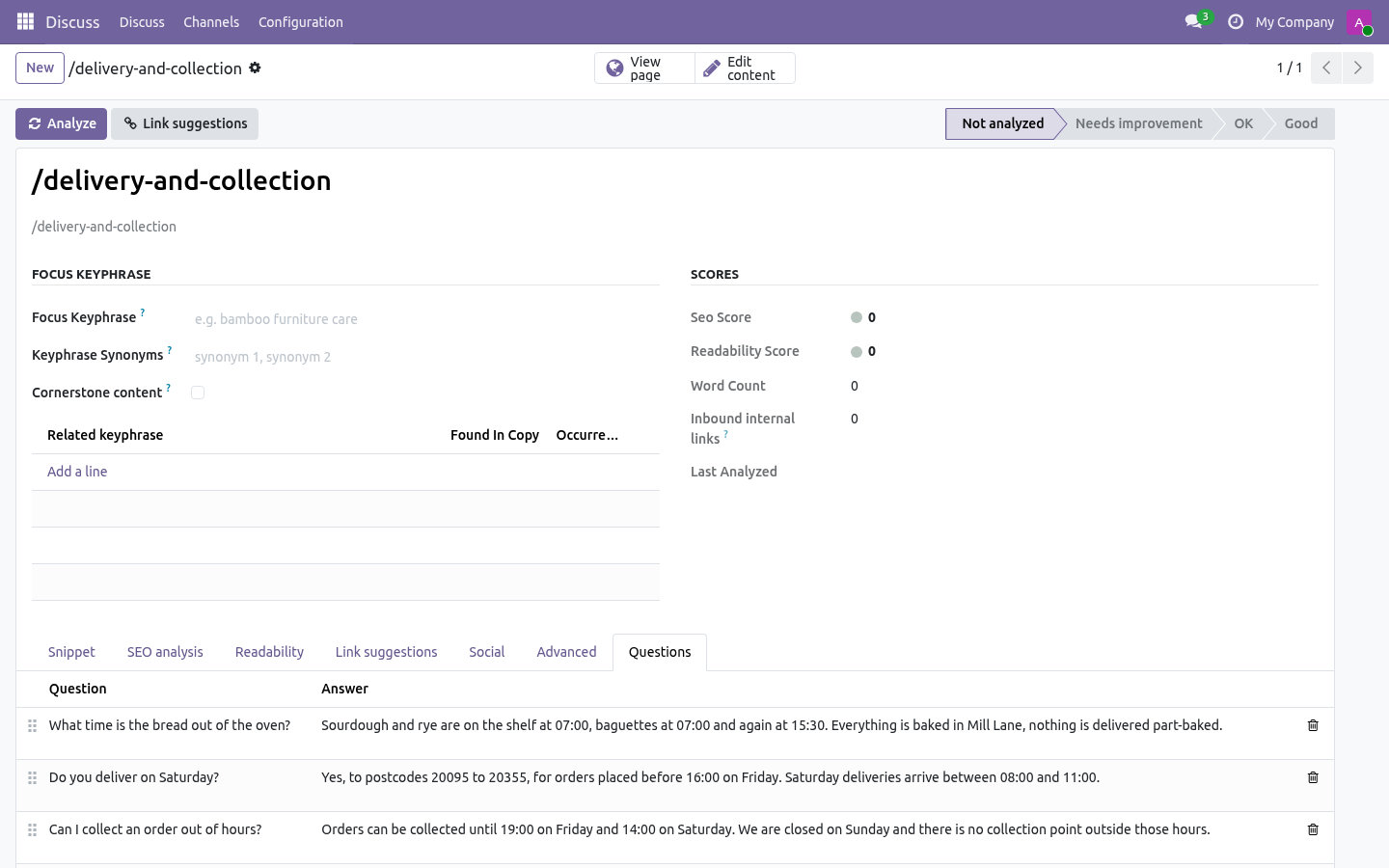
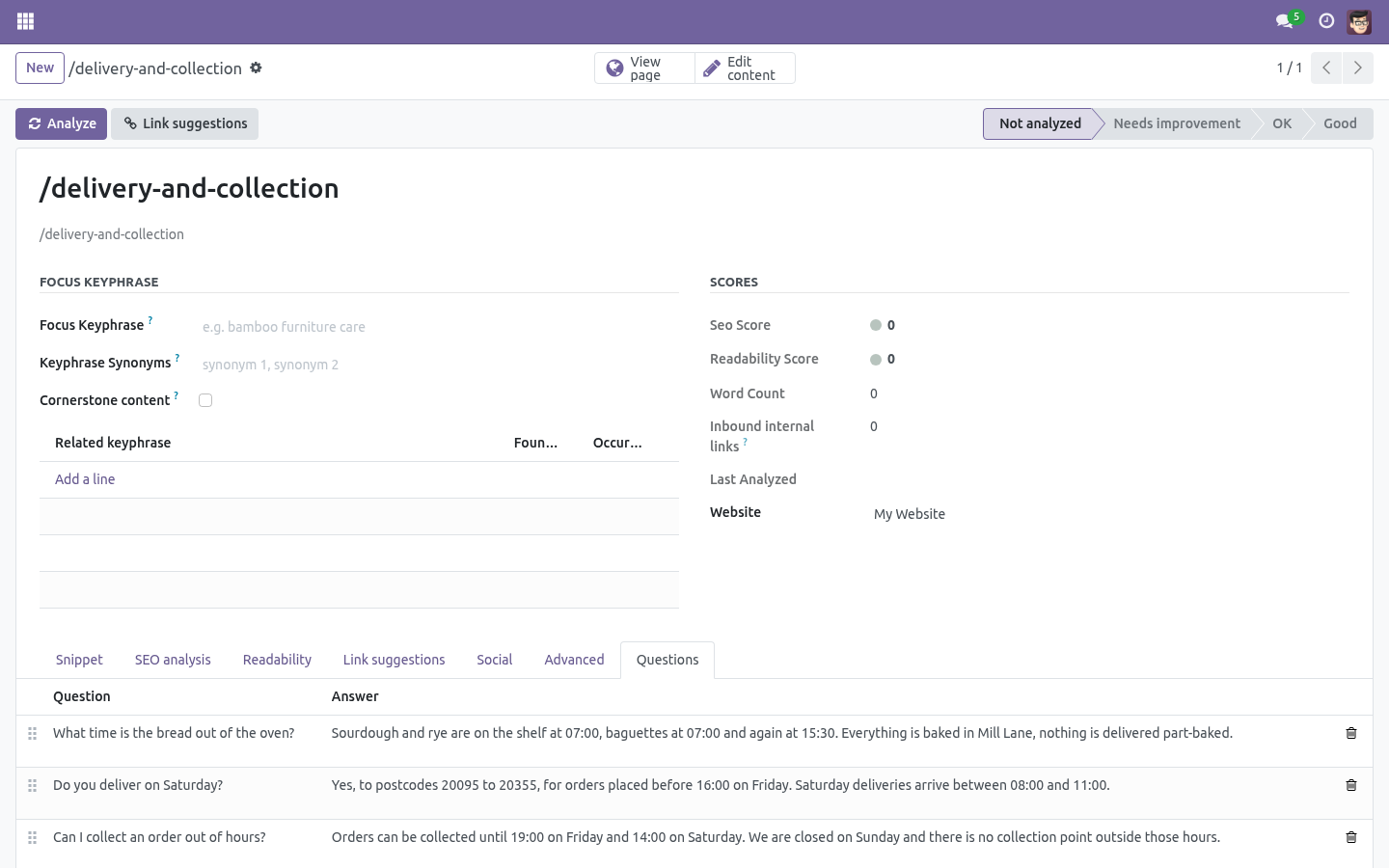
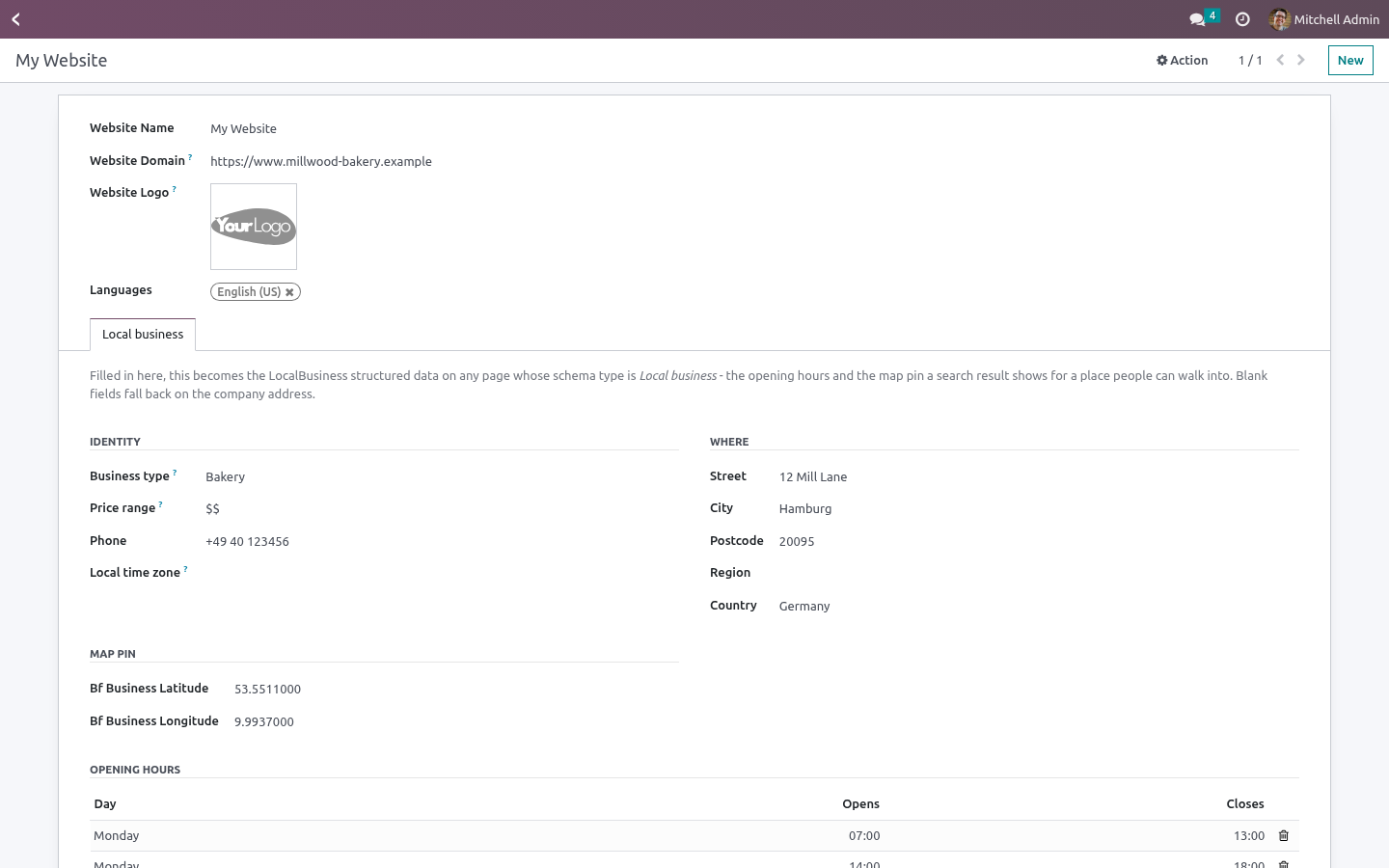
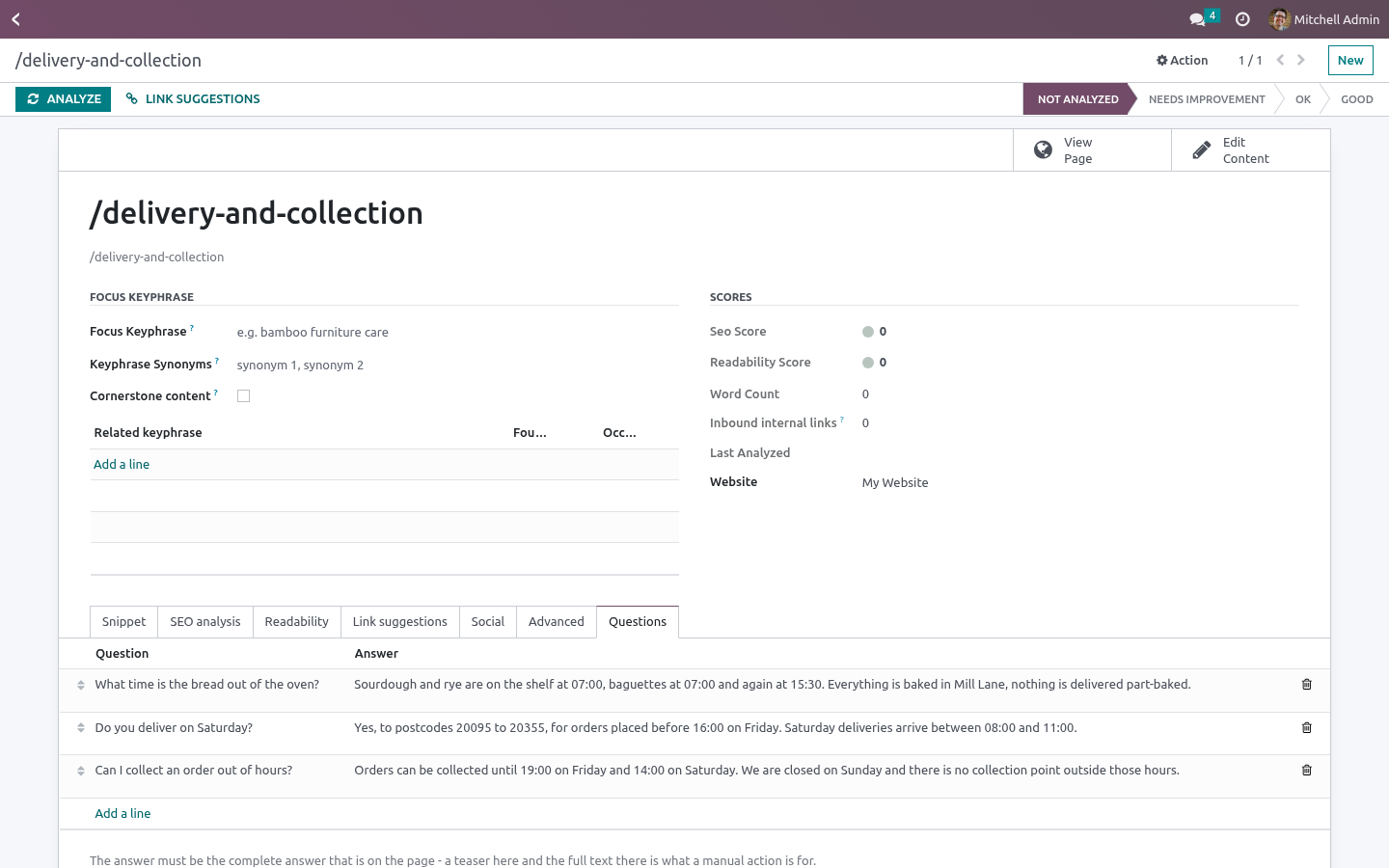
New notebook pages appear for the type you picked: ============== ================================================== Schema type Where the data goes ============== ================================================== FAQ page Questions tab on the page How-to guide Steps tab on the page Local business Local business tab on the website Event Event tab on the page Product Offer & rating tab on the page ============== ================================================== The verdict. No rich result The page emits SEO Pro's normal structured data and nothing extra. Missing required data The type is picked but Google's published requirements are not met. The warning box lists what is missing, in the order it bites - two questions minimum for a FAQ, an instruction on every how-to step, a street and a city and opening hours for a local business, a rating between 1 and 5 with a review count beside it, an event that does not end before it starts.
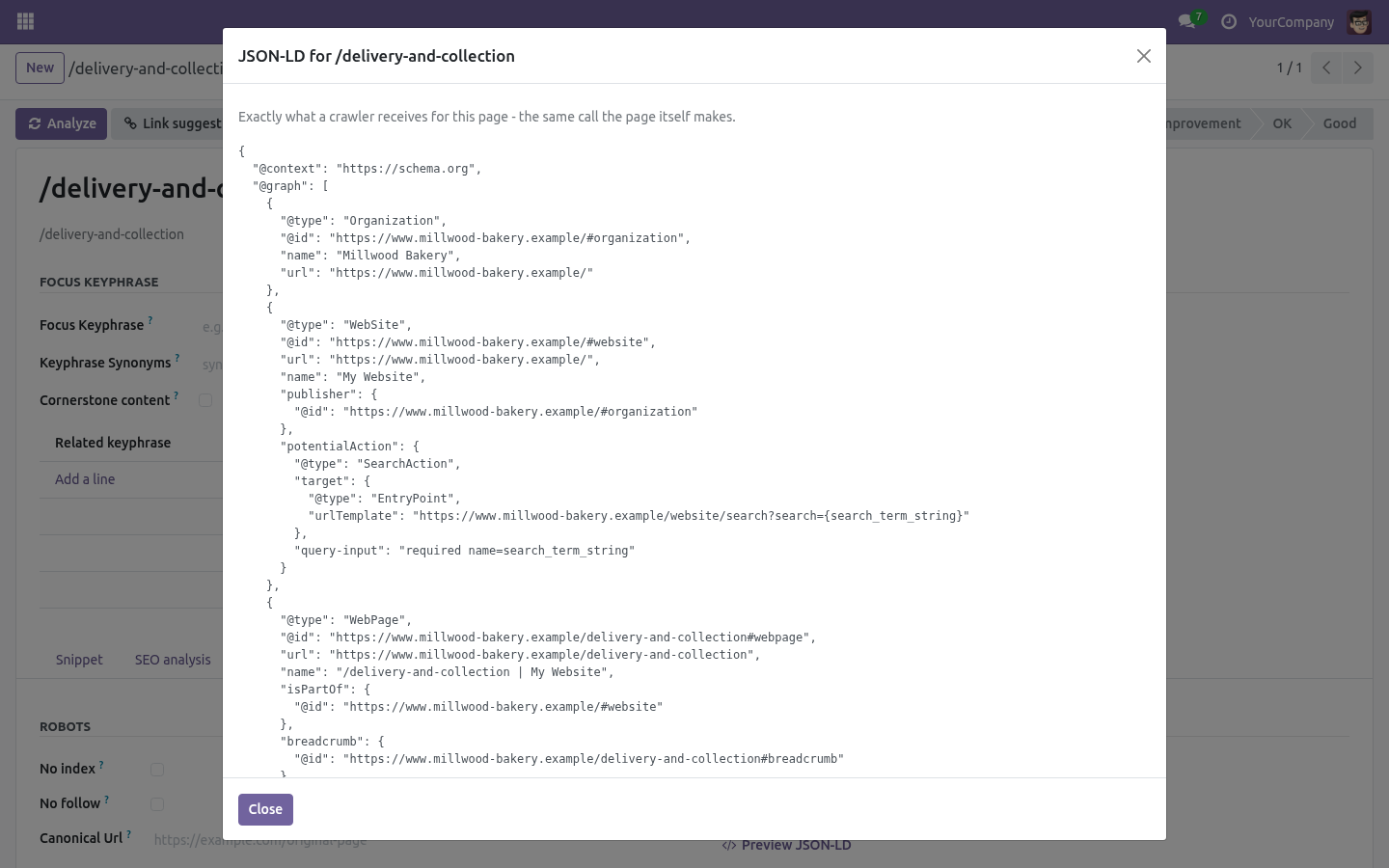
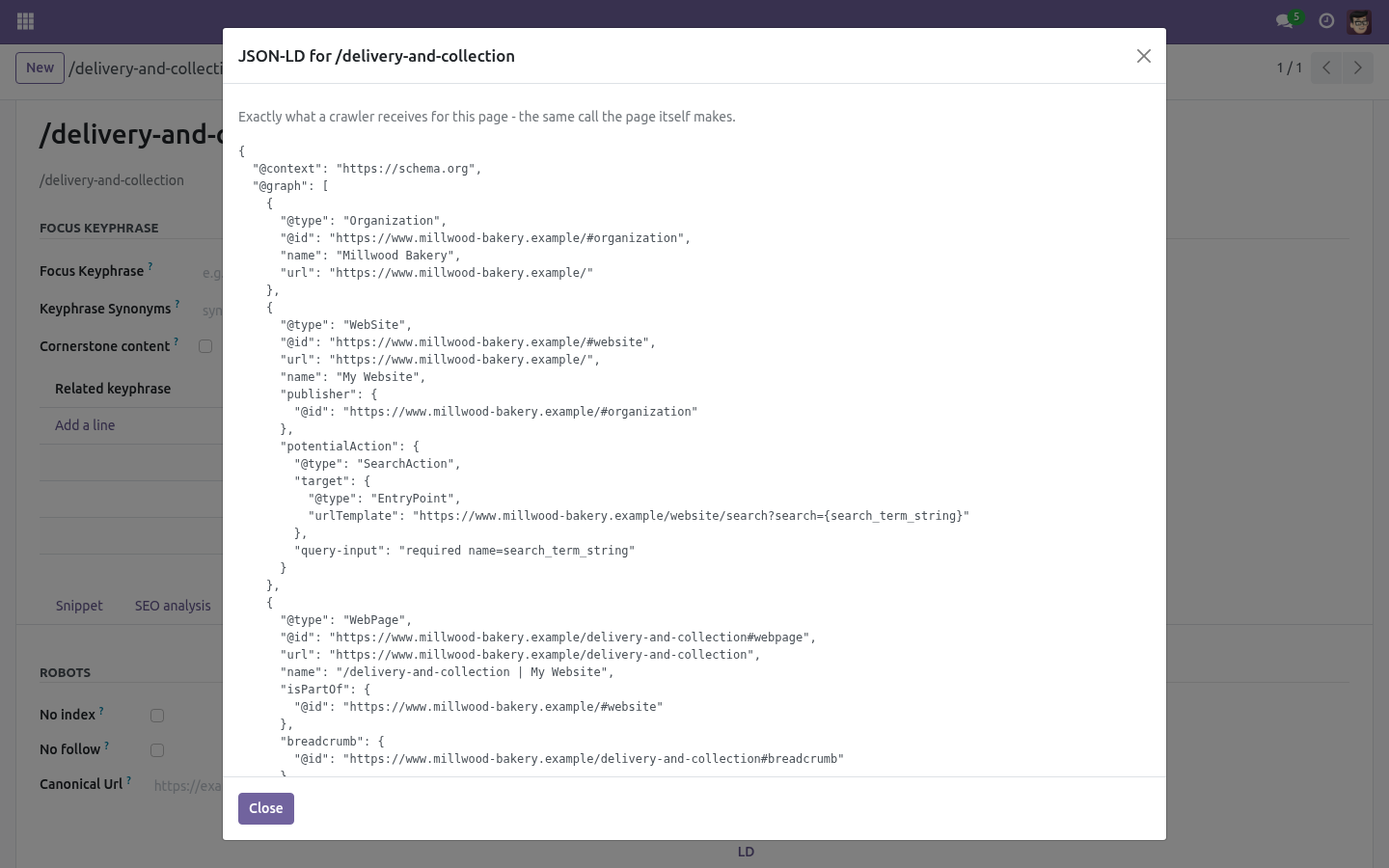
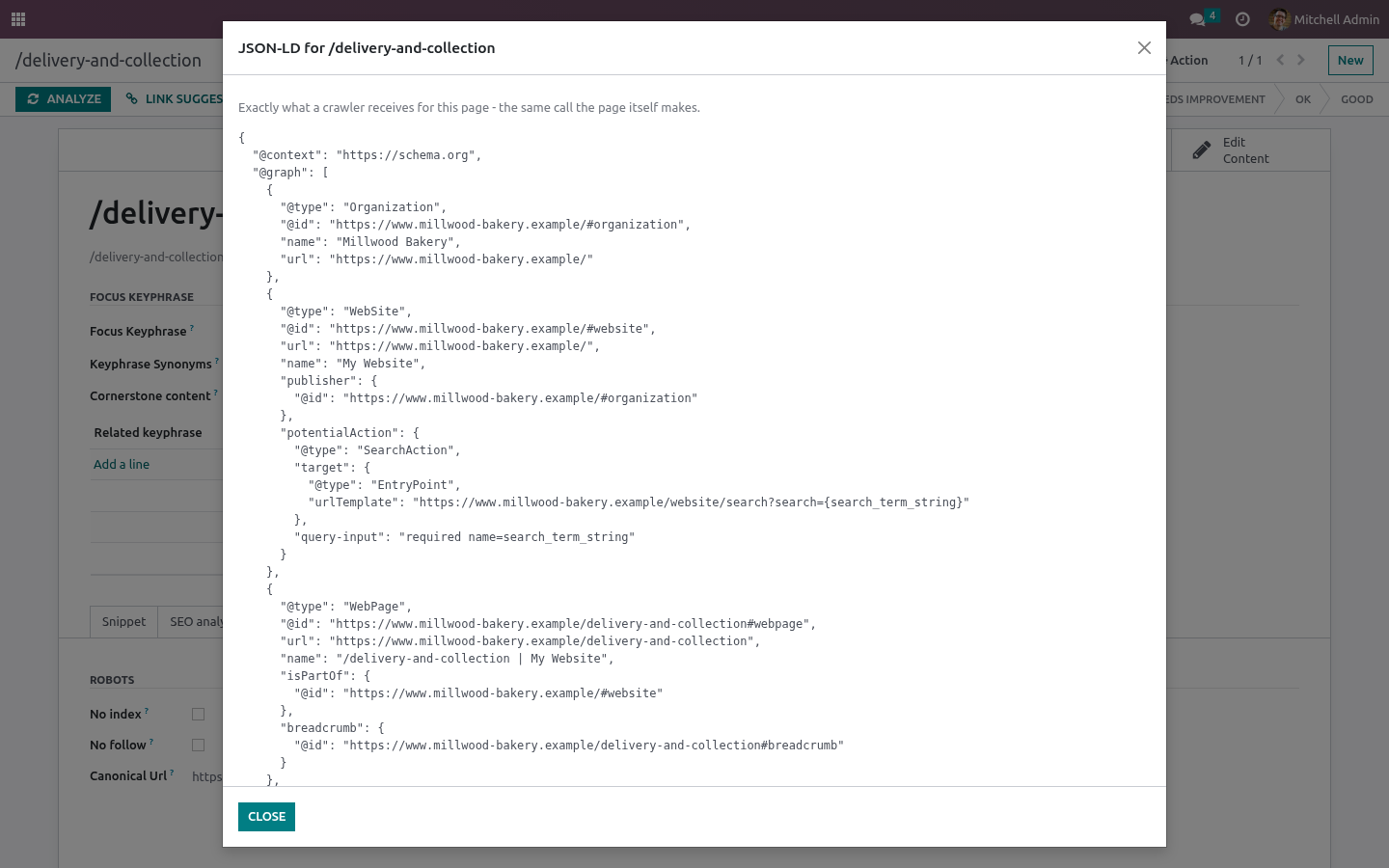
Preview JSON-LD. The button beside the badge shows exactly what a crawler receives. It is not a rebuild for the form - it is the same call the page controller makes, so what you read is what is published. Paste it into Google's Rich Results Test if you want a second opinion.
Opening hours A lunch break is two rows for the same day: 07:00-12:30 and 13:30-18:00. A shift that runs past midnight is two rows: one ending at 24:00 and one starting at 00:00 on the next day. A closing time of 24:00 is published as 23:59. Publishing 00:00 would read as the start of the day, and is how a business ends up listed as closed all day.
Honesty rules. Two of Google's rules are worth repeating, because breaking them costs more than the rich result is worth: The answer in the FAQ must be the answer on the page. A teaser in the structured data and the full text on the page is a manual action. Never publish a rating the visitor cannot see.
An aggregate rating belongs to reviews that exist and are shown. The pack does not invent either of them: nothing is emitted that you did not type. Multi-website. Local business data, including opening hours, belongs to the website - six client sites in one database each carry their own address, hours and map pin.
Page-level data belongs to the page. How we make sure it works. Before every release, 32 automated checks run against this app on Odoo 16, 17, 18, 19 and 20. Among them: A page without structured data is not a problem.
A rating without a count is not emitted. Closing at midnight is not published as opening at midnight. An answer the editor left empty does not count. A page of one client never publishes the other's address.
The complete list is in the source you receive. Questions people ask. Which Odoo versions does it run on? Odoo 16.0, 17.0, 18.0, 19.0, 20.0, on the series you buy it for; each series is its own listing.
Community or Enterprise? Both. It needs no Enterprise app. Support.
support@bambooforge.dev - the people who wrote it. The complete manual is at docs dot bambooforge dot dev, the demo database is linked from the store page, and support answers within twenty-four hours. Links are in the description.
Transcript of the walkthrough (Odoo 19)
Rich Snippets & Schema.org Structured Data. FAQ, How-to, Local Business and Event structured data plus offer, brand and rating properties - with a validator that names what is missing. An add-on for BambooForge SEO Pro. SEO Pro publishes the structured data every page needs; this adds the four types that make a search result look different, and the properties a product needs before it can appear as a shopping result.
In the next few minutes: rich snippets & schema.org structured data, then where you enter it, then the verdict, then preview json-ld, then opening hours. Then what this app deliberately does not do, so you can tell before you buy whether it fits. Install BambooForge Rich Snippet Pack. It requires BambooForge SEO Pro.
Nothing changes on any page until you pick one of the new schema types: existing pages keep the structured data they have. Rich Snippets & Schema.org Structured Data. An add-on for BambooForge SEO Pro. SEO Pro publishes the structured data every page needs; this adds the four types that make a search result look different, and the properties a product needs before it can appear as a shopping result.
Where you enter it. SEO Pro → SEO Pages, open a page, Advanced → Structured data, pick the schema type. New notebook pages appear for the type you picked: ============== ================================================== Schema type Where the data goes ============== ================================================== FAQ page Questions tab on the page How-to guide Steps tab on the page Local business Local business tab on the website Event Event tab on the page Product Offer & rating tab on the page ============== ================================================== The verdict. No rich result The page emits SEO Pro's normal structured data and nothing extra.
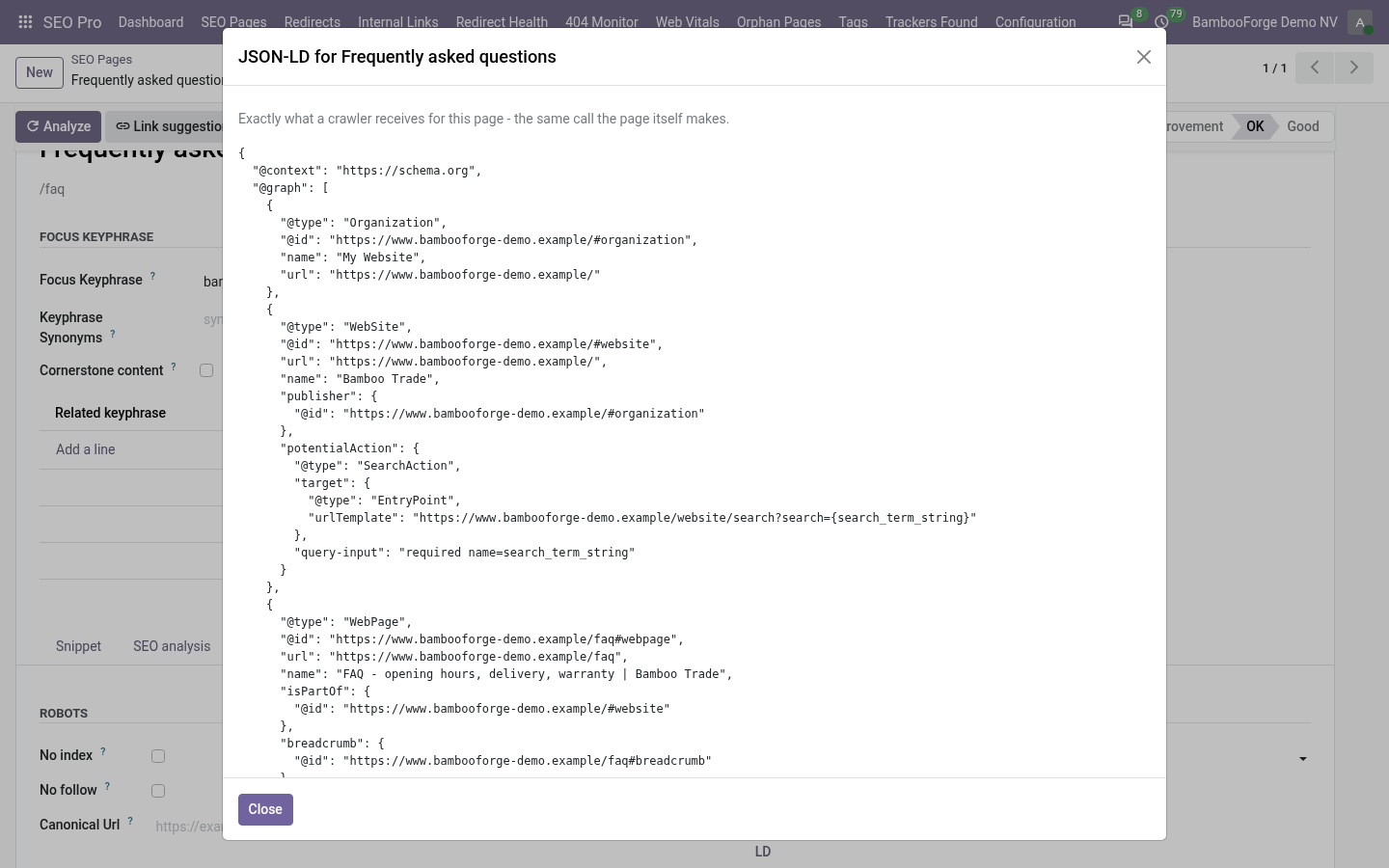
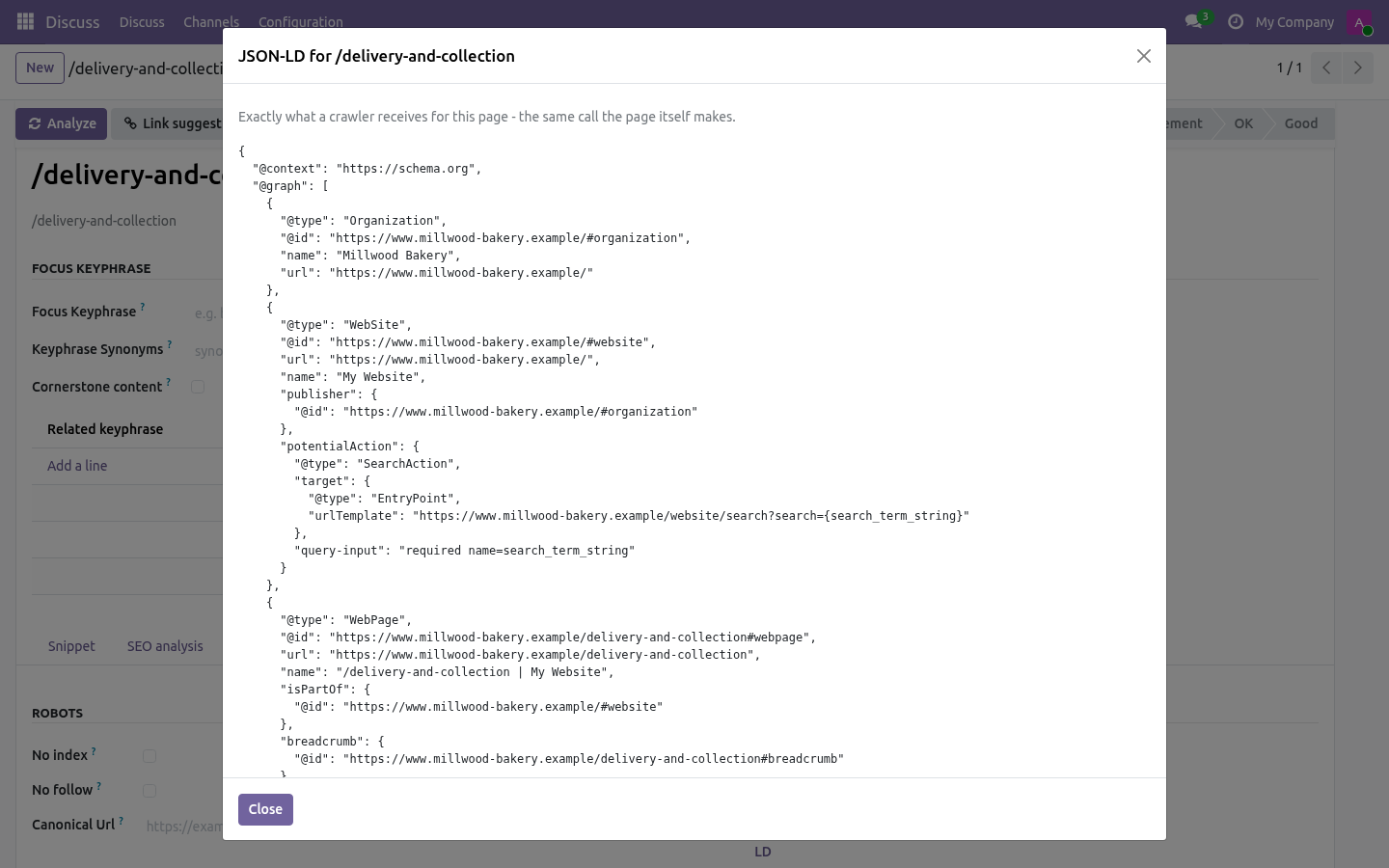
Missing required data The type is picked but Google's published requirements are not met. The warning box lists what is missing, in the order it bites - two questions minimum for a FAQ, an instruction on every how-to step, a street and a city and opening hours for a local business, a rating between 1 and 5 with a review count beside it, an event that does not end before it starts. Preview JSON-LD. The button beside the badge shows exactly what a crawler receives.
It is not a rebuild for the form - it is the same call the page controller makes, so what you read is what is published. Paste it into Google's Rich Results Test if you want a second opinion. Opening hours A lunch break is two rows for the same day: 07:00-12:30 and 13:30-18:00. A shift that runs past midnight is two rows: one ending at 24:00 and one starting at 00:00 on the next day.
A closing time of 24:00 is published as 23:59. Publishing 00:00 would read as the start of the day, and is how a business ends up listed as closed all day. Honesty rules. Two of Google's rules are worth repeating, because breaking them costs more than the rich result is worth: The answer in the FAQ must be the answer on the page.
A teaser in the structured data and the full text on the page is a manual action. Never publish a rating the visitor cannot see. An aggregate rating belongs to reviews that exist and are shown. The pack does not invent either of them: nothing is emitted that you did not type.
Multi-website. Local business data, including opening hours, belongs to the website - six client sites in one database each carry their own address, hours and map pin. Page-level data belongs to the page. Support.
support@bambooforge.dev - the people who wrote it. The complete manual is at docs dot bambooforge dot dev, the demo database is linked from the store page, and support answers within twenty-four hours. Links are in the description.
Transcript of the walkthrough (Odoo 18)
Rich Snippets & Schema.org Structured Data. FAQ, How-to, Local Business and Event structured data plus offer, brand and rating properties - with a validator that names what is missing. An add-on for BambooForge SEO Pro. SEO Pro publishes the structured data every page needs; this adds the four types that make a search result look different, and the properties a product needs before it can appear as a shopping result.
In the next few minutes: rich snippets & schema.org structured data, then where you enter it, then the verdict, then preview json-ld, then opening hours. Then what this app deliberately does not do, so you can tell before you buy whether it fits. Install BambooForge Rich Snippet Pack. It requires BambooForge SEO Pro.
Nothing changes on any page until you pick one of the new schema types: existing pages keep the structured data they have. Rich Snippets & Schema.org Structured Data. An add-on for BambooForge SEO Pro. SEO Pro publishes the structured data every page needs; this adds the four types that make a search result look different, and the properties a product needs before it can appear as a shopping result.
Where you enter it. SEO Pro → SEO Pages, open a page, Advanced → Structured data, pick the schema type. New notebook pages appear for the type you picked: ============== ================================================== Schema type Where the data goes ============== ================================================== FAQ page Questions tab on the page How-to guide Steps tab on the page Local business Local business tab on the website Event Event tab on the page Product Offer & rating tab on the page ============== ================================================== The verdict. No rich result The page emits SEO Pro's normal structured data and nothing extra.
Missing required data The type is picked but Google's published requirements are not met. The warning box lists what is missing, in the order it bites - two questions minimum for a FAQ, an instruction on every how-to step, a street and a city and opening hours for a local business, a rating between 1 and 5 with a review count beside it, an event that does not end before it starts. Preview JSON-LD. The button beside the badge shows exactly what a crawler receives.
It is not a rebuild for the form - it is the same call the page controller makes, so what you read is what is published. Paste it into Google's Rich Results Test if you want a second opinion. Opening hours A lunch break is two rows for the same day: 07:00-12:30 and 13:30-18:00. A shift that runs past midnight is two rows: one ending at 24:00 and one starting at 00:00 on the next day.
A closing time of 24:00 is published as 23:59. Publishing 00:00 would read as the start of the day, and is how a business ends up listed as closed all day. Honesty rules. Two of Google's rules are worth repeating, because breaking them costs more than the rich result is worth: The answer in the FAQ must be the answer on the page.
A teaser in the structured data and the full text on the page is a manual action. Never publish a rating the visitor cannot see. An aggregate rating belongs to reviews that exist and are shown. The pack does not invent either of them: nothing is emitted that you did not type.
Multi-website. Local business data, including opening hours, belongs to the website - six client sites in one database each carry their own address, hours and map pin. Page-level data belongs to the page. Support.
support@bambooforge.dev - the people who wrote it. The complete manual is at docs dot bambooforge dot dev, the demo database is linked from the store page, and support answers within twenty-four hours. Links are in the description.
Transcript of the walkthrough (Odoo 17)
Rich Snippets & Schema.org Structured Data. FAQ, How-to, Local Business and Event structured data plus offer, brand and rating properties - with a validator that names what is missing. An add-on for BambooForge SEO Pro. SEO Pro publishes the structured data every page needs; this adds the four types that make a search result look different, and the properties a product needs before it can appear as a shopping result.
In the next few minutes: rich snippets & schema.org structured data, then where you enter it, then the verdict, then preview json-ld, then opening hours. Then what this app deliberately does not do, so you can tell before you buy whether it fits. Install BambooForge Rich Snippet Pack. It requires BambooForge SEO Pro.
Nothing changes on any page until you pick one of the new schema types: existing pages keep the structured data they have. Rich Snippets & Schema.org Structured Data. An add-on for BambooForge SEO Pro. SEO Pro publishes the structured data every page needs; this adds the four types that make a search result look different, and the properties a product needs before it can appear as a shopping result.
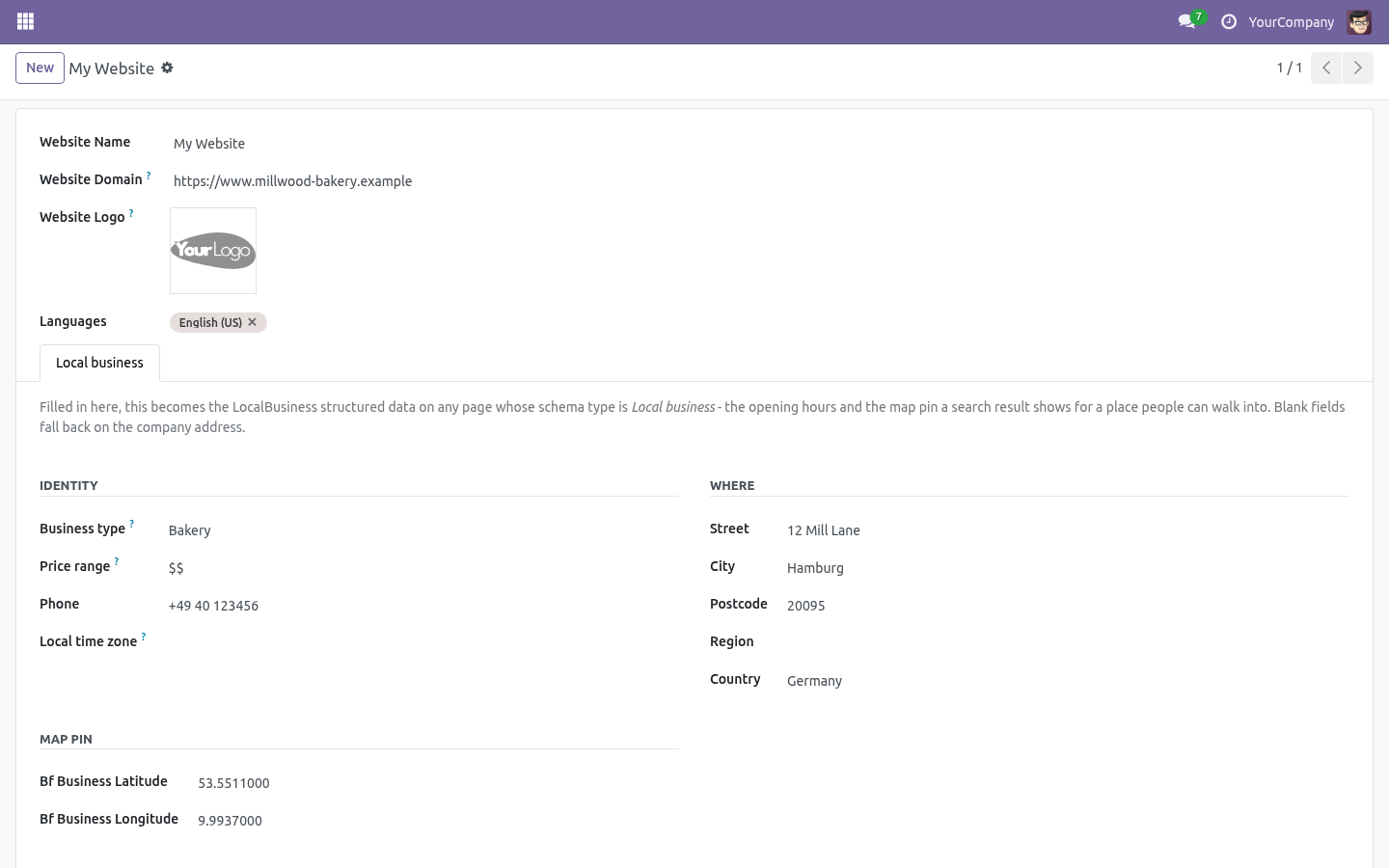
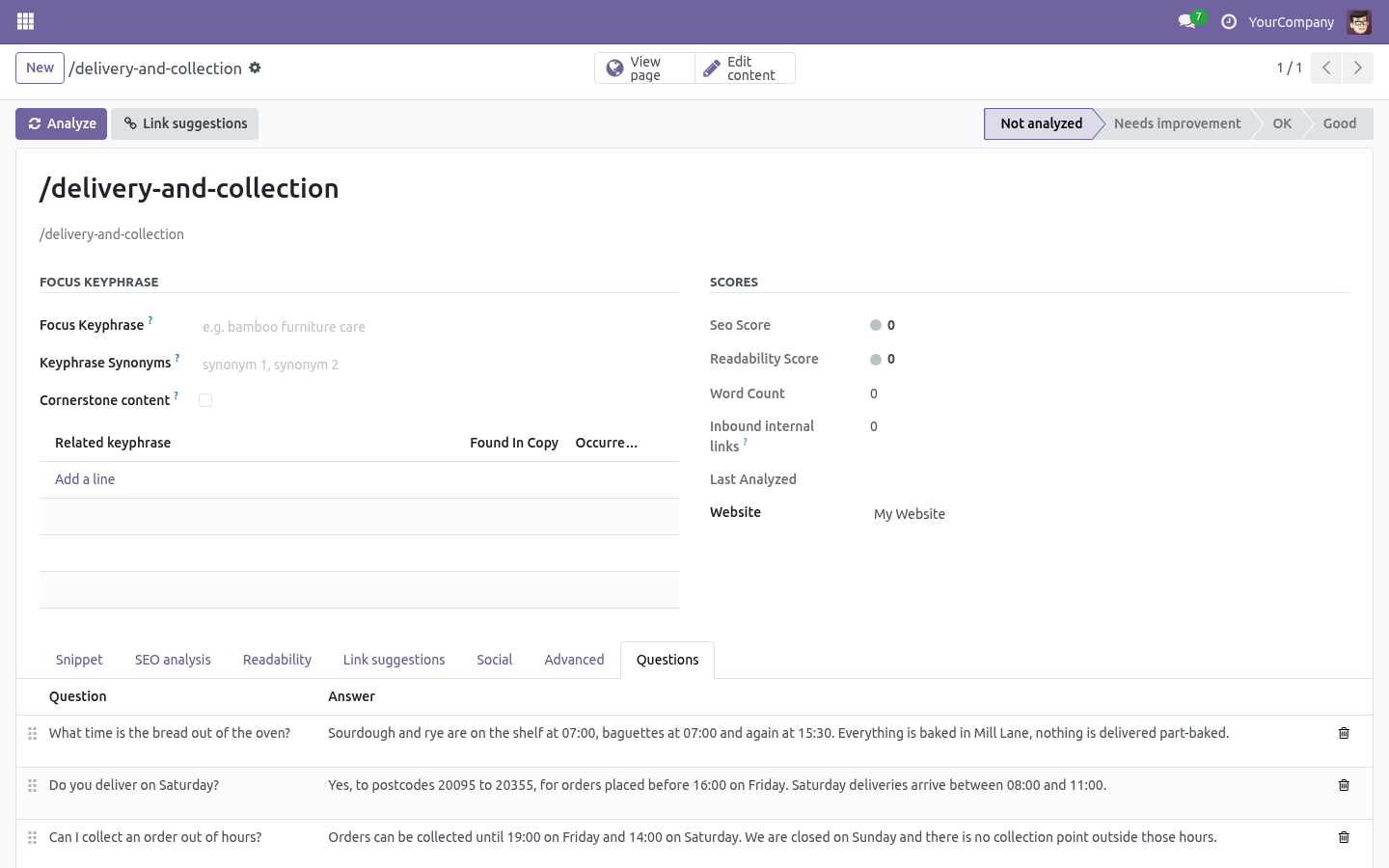
Where you enter it. SEO Pro → SEO Pages, open a page, Advanced → Structured data, pick the schema type. New notebook pages appear for the type you picked: ============== ================================================== Schema type Where the data goes ============== ================================================== FAQ page Questions tab on the page How-to guide Steps tab on the page Local business Local business tab on the website Event Event tab on the page Product Offer & rating tab on the page ============== ================================================== The verdict. No rich result The page emits SEO Pro's normal structured data and nothing extra.
Missing required data The type is picked but Google's published requirements are not met. The warning box lists what is missing, in the order it bites - two questions minimum for a FAQ, an instruction on every how-to step, a street and a city and opening hours for a local business, a rating between 1 and 5 with a review count beside it, an event that does not end before it starts. Preview JSON-LD. The button beside the badge shows exactly what a crawler receives.
It is not a rebuild for the form - it is the same call the page controller makes, so what you read is what is published. Paste it into Google's Rich Results Test if you want a second opinion. Opening hours A lunch break is two rows for the same day: 07:00-12:30 and 13:30-18:00. A shift that runs past midnight is two rows: one ending at 24:00 and one starting at 00:00 on the next day.
A closing time of 24:00 is published as 23:59. Publishing 00:00 would read as the start of the day, and is how a business ends up listed as closed all day. Honesty rules. Two of Google's rules are worth repeating, because breaking them costs more than the rich result is worth: The answer in the FAQ must be the answer on the page.
A teaser in the structured data and the full text on the page is a manual action. Never publish a rating the visitor cannot see. An aggregate rating belongs to reviews that exist and are shown. The pack does not invent either of them: nothing is emitted that you did not type.
Multi-website. Local business data, including opening hours, belongs to the website - six client sites in one database each carry their own address, hours and map pin. Page-level data belongs to the page. Support.
support@bambooforge.dev - the people who wrote it. The complete manual is at docs dot bambooforge dot dev, the demo database is linked from the store page, and support answers within twenty-four hours. Links are in the description.
Transcript of the walkthrough (Odoo 16)
Rich Snippets & Schema.org Structured Data. FAQ, How-to, Local Business and Event structured data plus offer, brand and rating properties - with a validator that names what is missing. An add-on for BambooForge SEO Pro. SEO Pro publishes the structured data every page needs; this adds the four types that make a search result look different, and the properties a product needs before it can appear as a shopping result.
In the next few minutes: rich snippets & schema.org structured data, then where you enter it, then the verdict, then preview json-ld, then opening hours. Then what this app deliberately does not do, so you can tell before you buy whether it fits. Install BambooForge Rich Snippet Pack. It requires BambooForge SEO Pro.
Nothing changes on any page until you pick one of the new schema types: existing pages keep the structured data they have. Rich Snippets & Schema.org Structured Data. An add-on for BambooForge SEO Pro. SEO Pro publishes the structured data every page needs; this adds the four types that make a search result look different, and the properties a product needs before it can appear as a shopping result.
Where you enter it. SEO Pro → SEO Pages, open a page, Advanced → Structured data, pick the schema type. New notebook pages appear for the type you picked: ============== ================================================== Schema type Where the data goes ============== ================================================== FAQ page Questions tab on the page How-to guide Steps tab on the page Local business Local business tab on the website Event Event tab on the page Product Offer & rating tab on the page ============== ================================================== The verdict. No rich result The page emits SEO Pro's normal structured data and nothing extra.
Missing required data The type is picked but Google's published requirements are not met. The warning box lists what is missing, in the order it bites - two questions minimum for a FAQ, an instruction on every how-to step, a street and a city and opening hours for a local business, a rating between 1 and 5 with a review count beside it, an event that does not end before it starts. Preview JSON-LD. The button beside the badge shows exactly what a crawler receives.
It is not a rebuild for the form - it is the same call the page controller makes, so what you read is what is published. Paste it into Google's Rich Results Test if you want a second opinion. Opening hours A lunch break is two rows for the same day: 07:00-12:30 and 13:30-18:00. A shift that runs past midnight is two rows: one ending at 24:00 and one starting at 00:00 on the next day.
A closing time of 24:00 is published as 23:59. Publishing 00:00 would read as the start of the day, and is how a business ends up listed as closed all day. Honesty rules. Two of Google's rules are worth repeating, because breaking them costs more than the rich result is worth: The answer in the FAQ must be the answer on the page.
A teaser in the structured data and the full text on the page is a manual action. Never publish a rating the visitor cannot see. An aggregate rating belongs to reviews that exist and are shown. The pack does not invent either of them: nothing is emitted that you did not type.
Multi-website. Local business data, including opening hours, belongs to the website - six client sites in one database each carry their own address, hours and map pin. Page-level data belongs to the page. Support.
support@bambooforge.dev - the people who wrote it. The complete manual is at docs dot bambooforge dot dev, the demo database is linked from the store page, and support answers within twenty-four hours. Links are in the description.
Key facts
- What it is
- FAQ, How-to, Local Business and Event structured data plus offer, brand and rating properties - with a validator that names what is missing.
- For
- Website
- Odoo versions
- 16.0, 17.0, 18.0, 19.0, 20.0 - Community and Enterprise
- Runs on
- Odoo.sh or Odoo you host yourself - not Odoo Online, which accepts no third-party apps
- Price
- 198 EUR, one-time, on the Odoo Apps Store
- Technical name
- bambooforge_rich_snippets
- Not for
- Said before you buy, because it is the half that decides whether the app fits:; Publish a rating the visitor cannot see - an aggregate rating belongs to reviews that exist and are shown.; Claim a rich result Google's published requirements are not met for: the badge says Missing required data.
- Manual last updated
- 2026-10-15
SEO All in One with Rich Snippets and Schema
An add-on for BambooForge SEO Pro. SEO Pro publishes the structured data every page needs; this adds the four types that make a search result look different, and the properties a product needs before it can appear as a shopping result.
Install
Install BambooForge Rich Snippet Pack (it needs BambooForge SEO Pro). Nothing changes on any page until you pick one of the new schema types.
Switch structured data on for the website under Website settings → SEO in SEO Pro, or nothing is emitted at all.
Open SEO Pro → SEO Pages, open a page, Advanced → Structured data, and pick a type.
Where you enter it
SEO Pro → SEO Pages, open a page, Advanced → Structured data, pick the schema type. New notebook pages appear for the type you picked:
Schema type |
Where the data goes |
|---|---|
FAQ page |
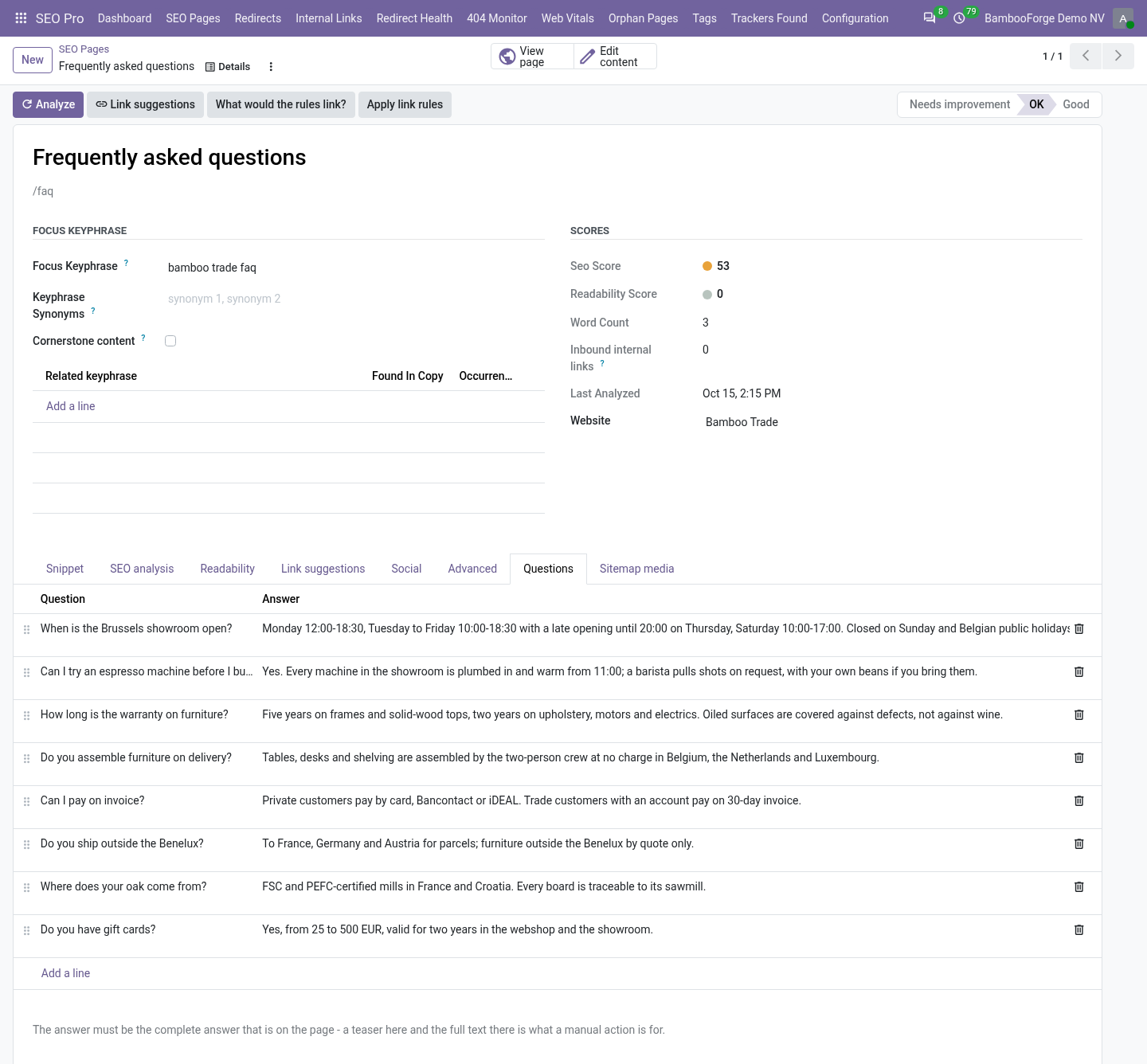
Questions tab on the page |
How-to guide |
Steps tab on the page |
Local business |
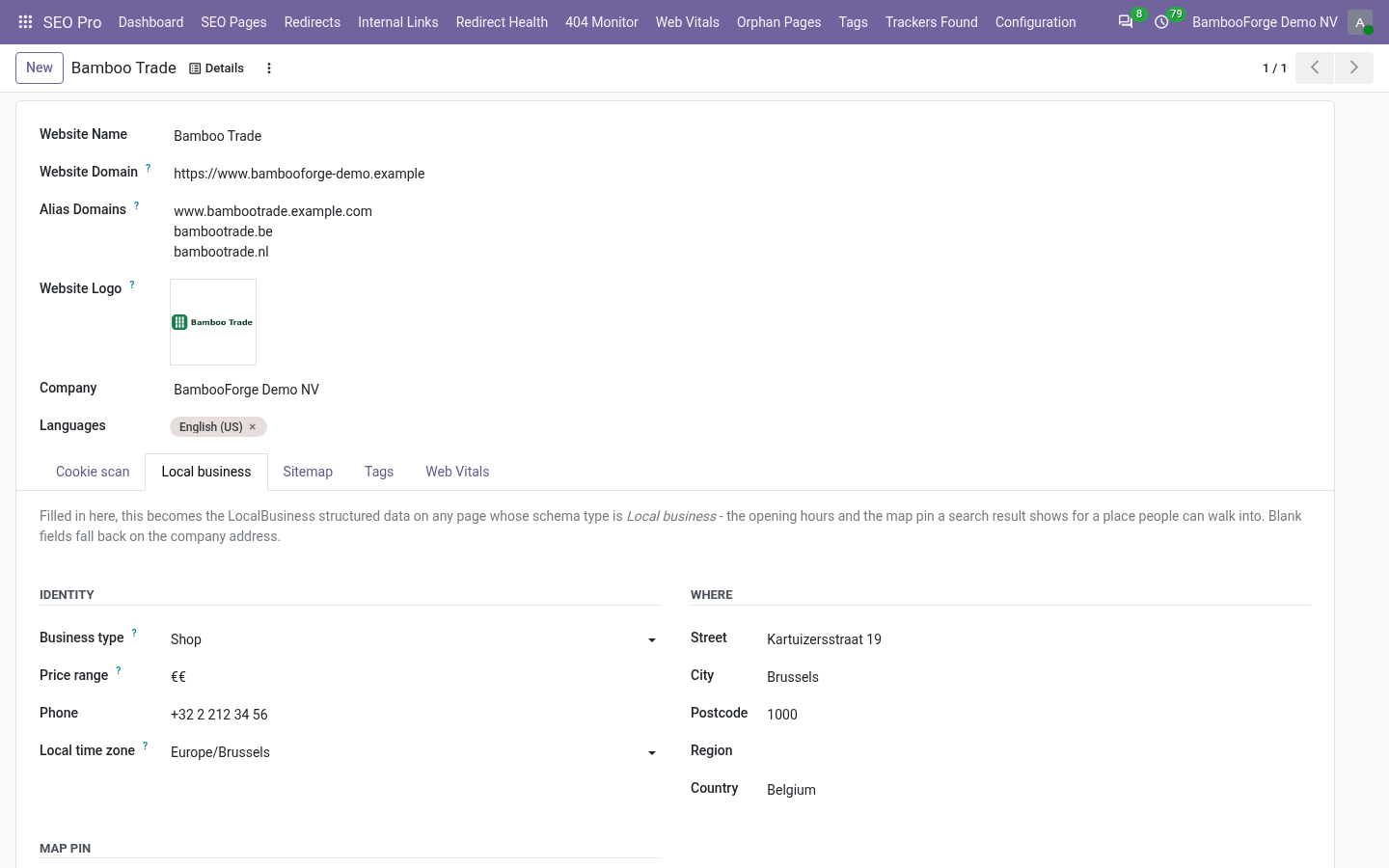
Local business tab on the website |
Event |
Event tab on the page |
Product |
Offer & rating tab on the page |
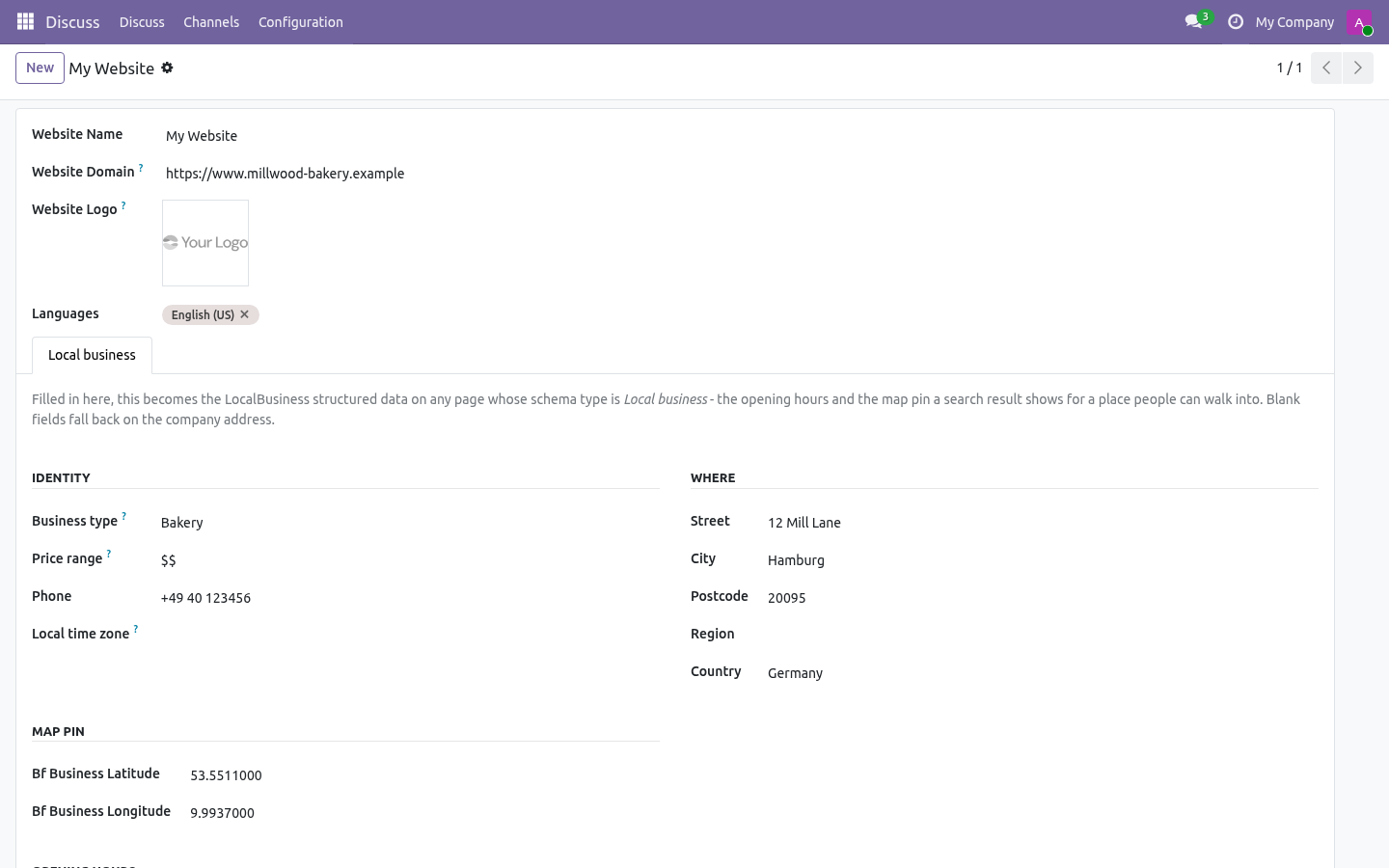
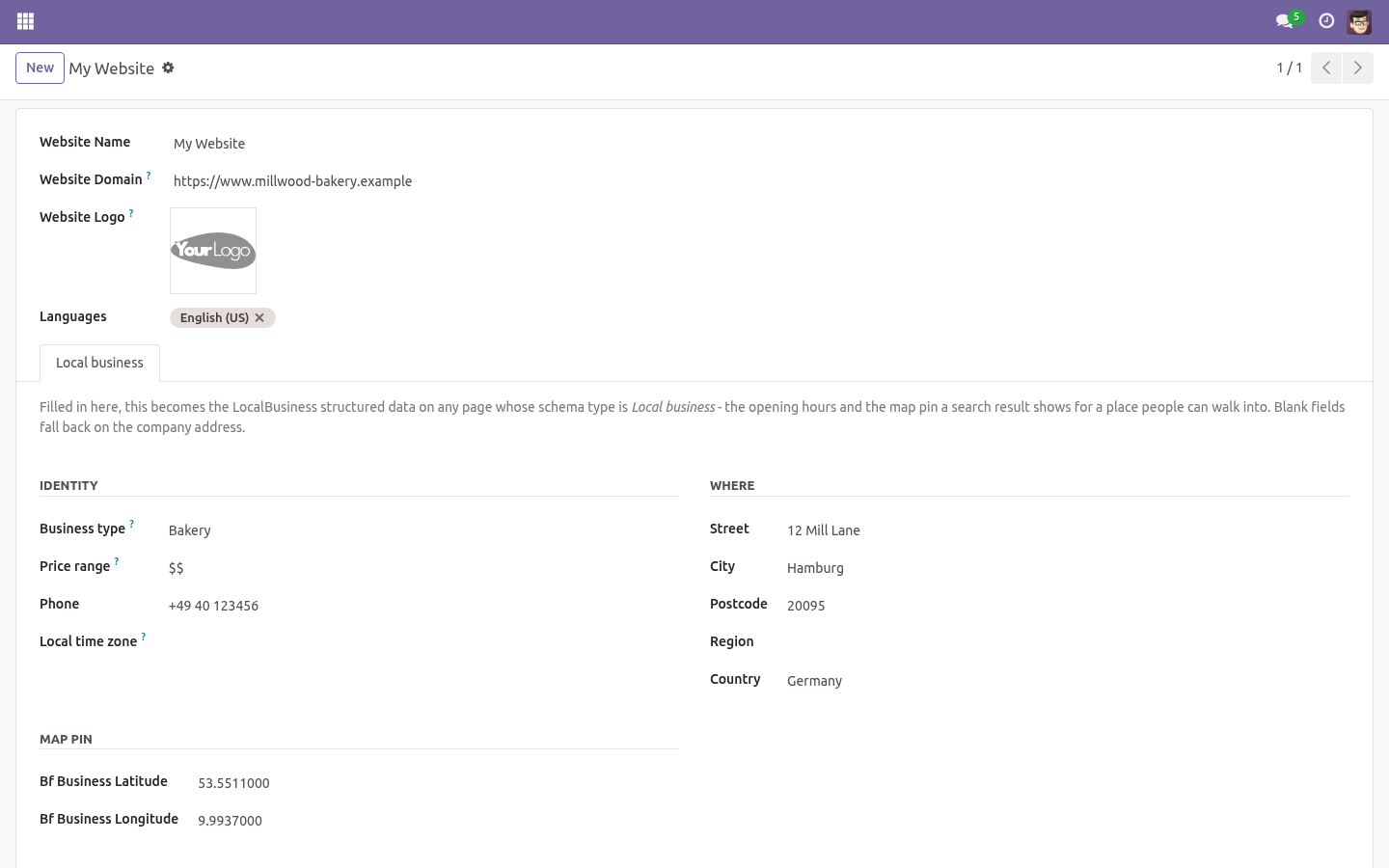
Local business data lives on the website rather than on each page: it is the same shop whichever page mentions it. Blank address fields fall back on the company address, so most sites only fill in the type and the opening hours.
The verdict
Beside the schema type is a badge:
- No rich result
The page emits SEO Pro's normal structured data and nothing extra.
- Missing required data
The type is picked but Google's published requirements are not met. The warning box lists what is missing, in the order it bites - two questions minimum for a FAQ, an instruction on every how-to step, a street and a city and opening hours for a local business, a rating between 1 and 5 with a review count beside it, an event that does not end before it starts.
- Eligible
Everything a rich result needs is there.
The badge is stored, so SEO Pages can be sorted and filtered on it: on a site with 300 pages that list is the work queue.
Preview JSON-LD
The button beside the badge shows exactly what a crawler receives. It is not a rebuild for the form - it is the same call the page controller makes, so what you read is what is published. Paste it into Google's Rich Results Test if you want a second opinion.
Opening hours
A lunch break is two rows for the same day: 07:00-12:30 and 13:30-18:00.
A shift that runs past midnight is two rows: one ending at 24:00 and one starting at 00:00 on the next day.
A closing time of 24:00 is published as 23:59. Publishing 00:00 would read as the start of the day, and is how a business ends up listed as closed all day.
Honesty rules
Two of Google's rules are worth repeating, because breaking them costs more than the rich result is worth:
The answer in the FAQ must be the answer on the page. A teaser in the structured data and the full text on the page is a manual action.
Never publish a rating the visitor cannot see. An aggregate rating belongs to reviews that exist and are shown.
The pack does not invent either of them: nothing is emitted that you did not type.
Multi-website
Local business data, including opening hours, belongs to the website - six client sites in one database each carry their own address, hours and map pin. Page-level data belongs to the page.
How we make sure it works
Before every release, 32 automated checks run against this app on Odoo 16, 17, 18, 19 and 20. Among them:
A page without structured data is not a problem.
A rating without a count is not emitted.
Closing at midnight is not published as opening at midnight.
An answer the editor left empty does not count.
A page of one client never publishes the other's address.
The complete list is in the source you receive.
What it does not do
Said before you buy, because it is the half that decides whether the app fits:
Publish a rating the visitor cannot see - an aggregate rating belongs to reviews that exist and are shown.
Claim a rich result Google's published requirements are not met for: the badge says Missing required data.
Questions people ask
- Which Odoo versions does it run on?
Odoo 16.0, 17.0, 18.0, 19.0, 20.0, on the series you buy it for; each series is its own listing.
- Community or Enterprise?
Both. It needs no Enterprise app.
- What does it need?
The standard Web; seo pro (BambooForge) must be installed first app. No extra Python package.
- Does anything leave my server?
No. It makes no call outside your Odoo server: no telemetry, no licence check, no third-party service.
- What happens if I uninstall it?
Odoo drops the app's own tables and fields; the standard records it worked on (contacts, orders, products) stay as they are.
Support
support@bambooforge.dev - the people who wrote it.