 BambooForge Labs
Revenue Recognition: Deferred Revenue & SaaS Metrics
Recognise revenue over the service period on Odoo Community (ASC 606 / IFRS 15 straight-line): an invoice for a year of service books to deferred revenue and is released month by month by a job, with the schedule on the invoice, a credit note unwinding what is left, a deferred-revenue waterfall, and MRR, ARR, churn and net revenue retention read from what was recognised.
Available for Odoo 16.0, Odoo 17.0, Odoo 18.0, Odoo 19.0, Odoo 20.0. Technical name bambooforge_revenue_recognition.
Transcript of the walkthrough (Odoo 20)
Revenue Recognition: Deferred Revenue & SaaS Metrics. Recognise revenue over the service period on Odoo Community (ASC 606 / IFRS 15 straight-line): an invoice for a year of service books to deferred revenue and is released month by month by a job, with the schedule on the invoice, a credit note unwinding what is left, a deferred-revenue waterfall, and MRR, ARR, churn and net revenue retention read from what was recognised. A customer pays for twelve months of service in January. Odoo Community books the whole amount as January revenue; the auditor, the bank and the board want it spread over the twelve months it was earned in.
This app spreads it, and reads the SaaS numbers off the result. In the next few minutes: revenue recognition: deferred revenue & saas metrics, then what you get, then the schedule, then releasing, then unwinding. Then what this app deliberately does not do, so you can tell before you buy whether it fits. Everything lives under Schedules then Release Due Months then Waterfall then SaaS Metrics.
1. Install Revenue Recognition (depends on Invoicing only). 2. Accounting → Configuration → Settings → Revenue recognition: the default deferred-revenue account, the journal for the entries, and whether they post by themselves (they do, by default).
3. On each service product sold ahead of delivery: Accounting tab → Defer revenue, optionally its own deferred account and default service months. 4. A Deferred Revenue menu appears under Accounting → Accounting.
Revenue Recognition: Deferred Revenue & SaaS Metrics. A customer pays for twelve months of service in January. Odoo Community books the whole amount as January revenue; the auditor, the bank and the board want it spread over the twelve months it was earned in. This app spreads it, and reads the SaaS numbers off the result.
What you get Deferred products: tick Defer revenue on a service product and name its deferred-revenue account (or a company default). A service period on every invoice line of such a product - filled by the subscription that raised it, proposed from the product's default length, or typed. On posting, a deferral entry parks the line's revenue in deferred revenue and a schedule is written: one amount per month, straight-line by days, rounded to the currency, the remainder on the last month, so the months add up to the line. A nightly job and a Release Due Months button that post one entry per company per month - debit deferred revenue, credit revenue - for every month that has come, with one line pair per schedule.
Unwinding: an invoice reset to draft or cancelled clears what was still deferred and drops the months to come; a credit note carries its own negative schedule over its own period, which is how the months already delivered are kept. The waterfall: deferred revenue by month, released and still to come, as a graph, a pivot and a list. SaaS metrics from recognised revenue: MRR, ARR, paying customers, new, expansion, contraction and churned MRR, net revenue retention, month by month for the last twelve months. The schedule.
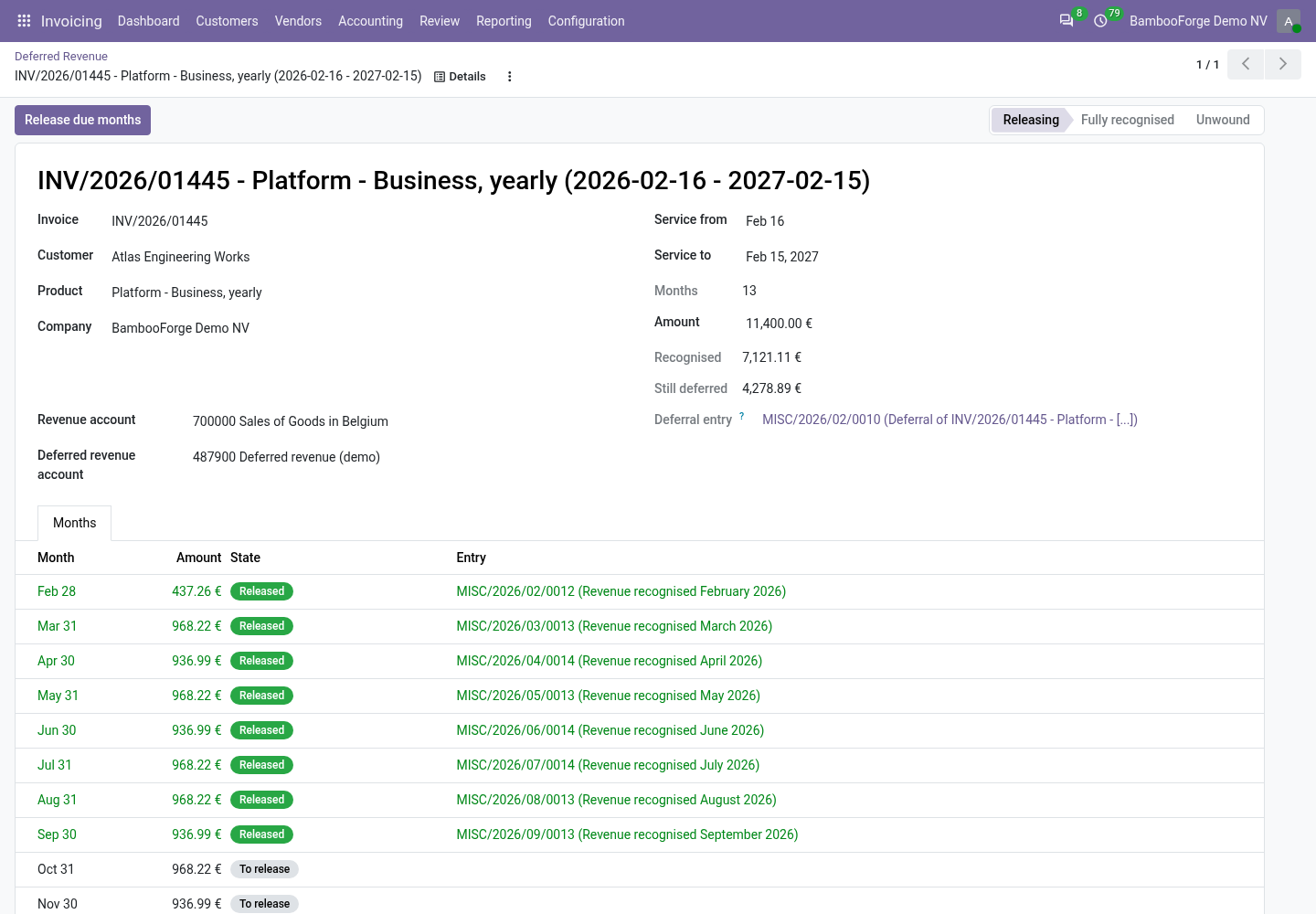
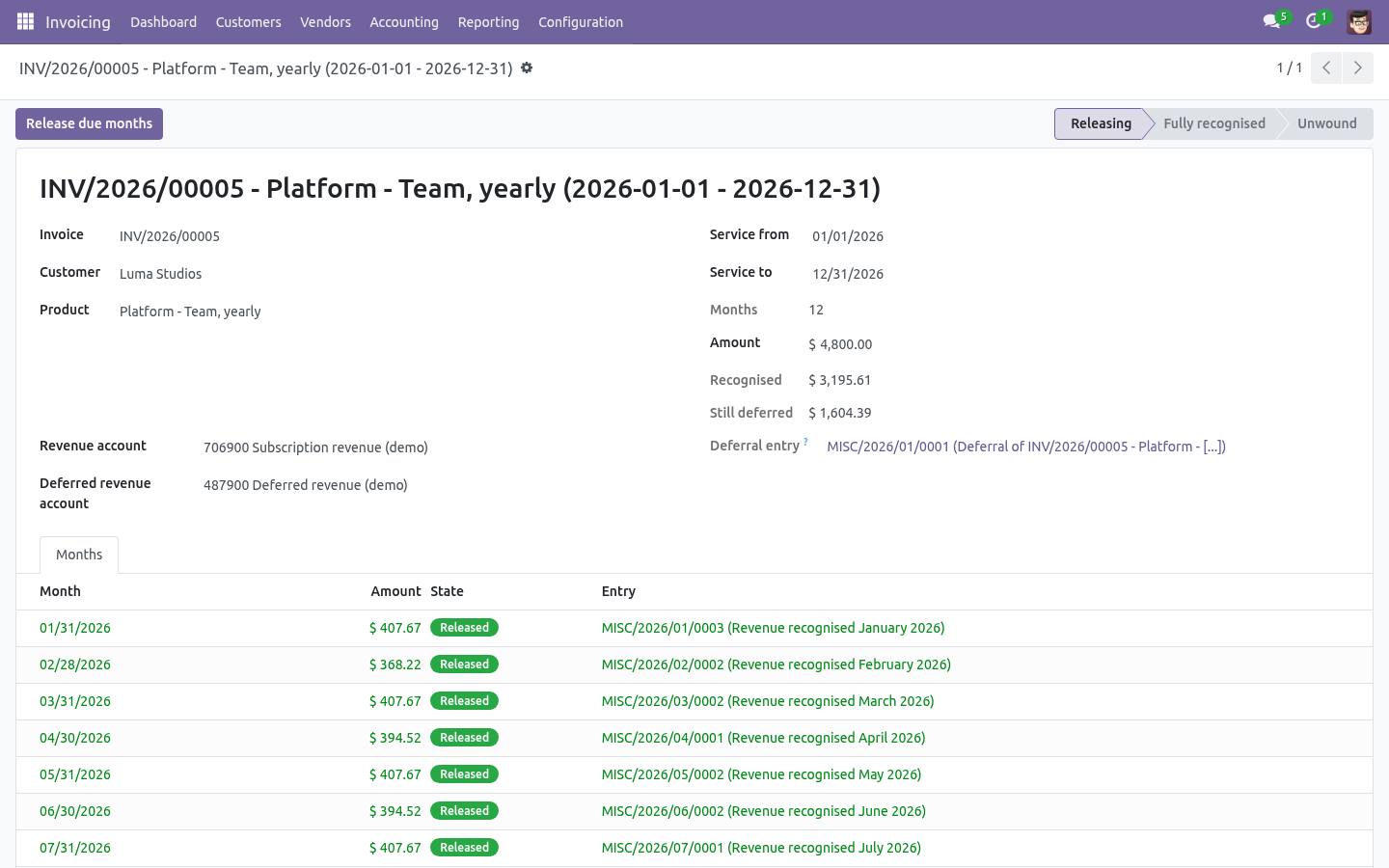
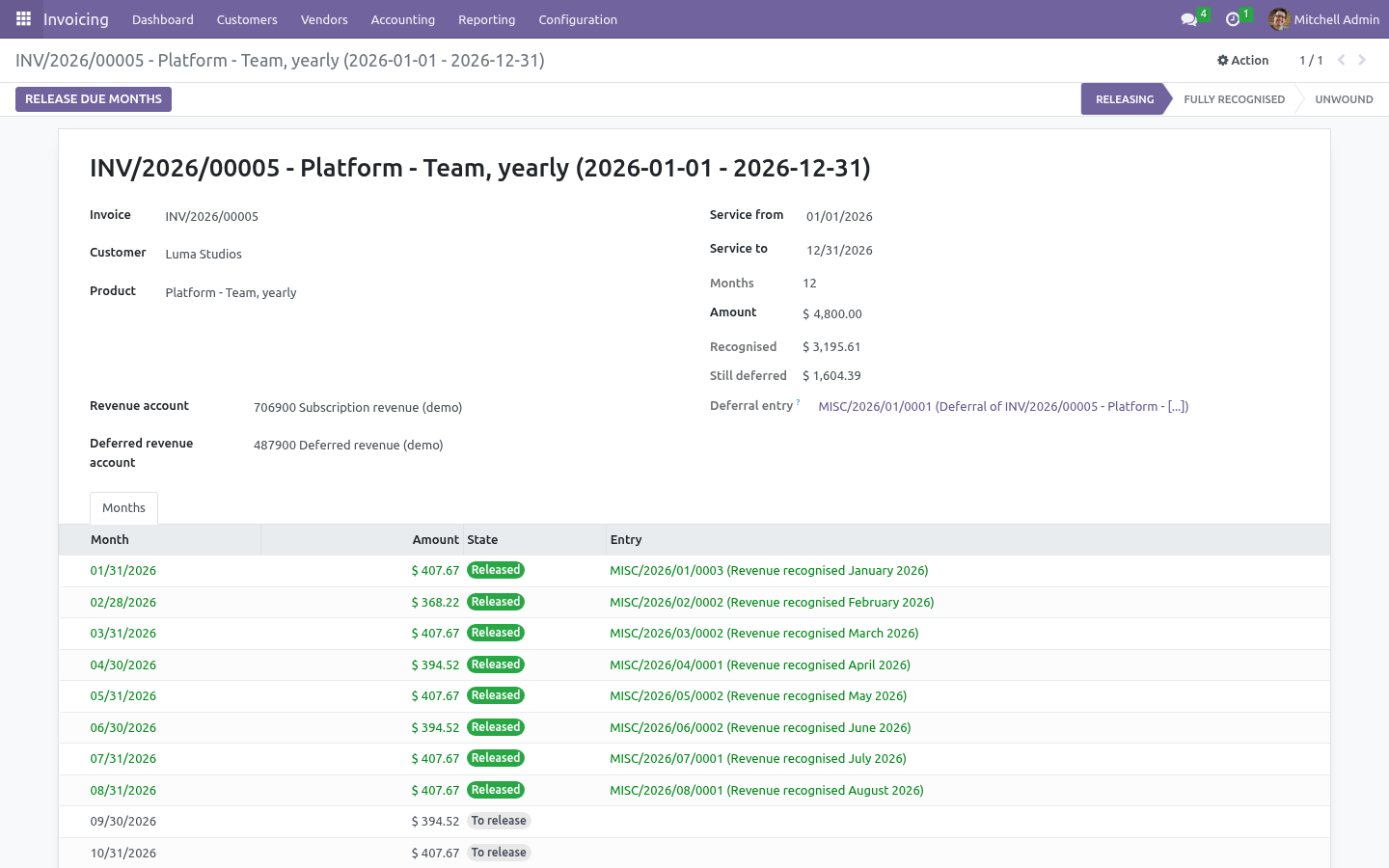
An invoice line of a deferred product needs a service period - Service from and Service to on the line. When BambooForge Subscription Billing raised the invoice, the period is the billing period. Otherwise the line proposes the invoice date and the product's default months, and you correct it. a deferral entry on the invoice date moves the line's revenue from the revenue account to the deferred-revenue account - the invoice itself is untouched, so its taxes, its receivable and its payment behave exactly as before; a schedule splits the amount over the months of the period, straight-line by days: a service from the 16th of March to the 15th of June earns half a March, a full April and May, and half a June.
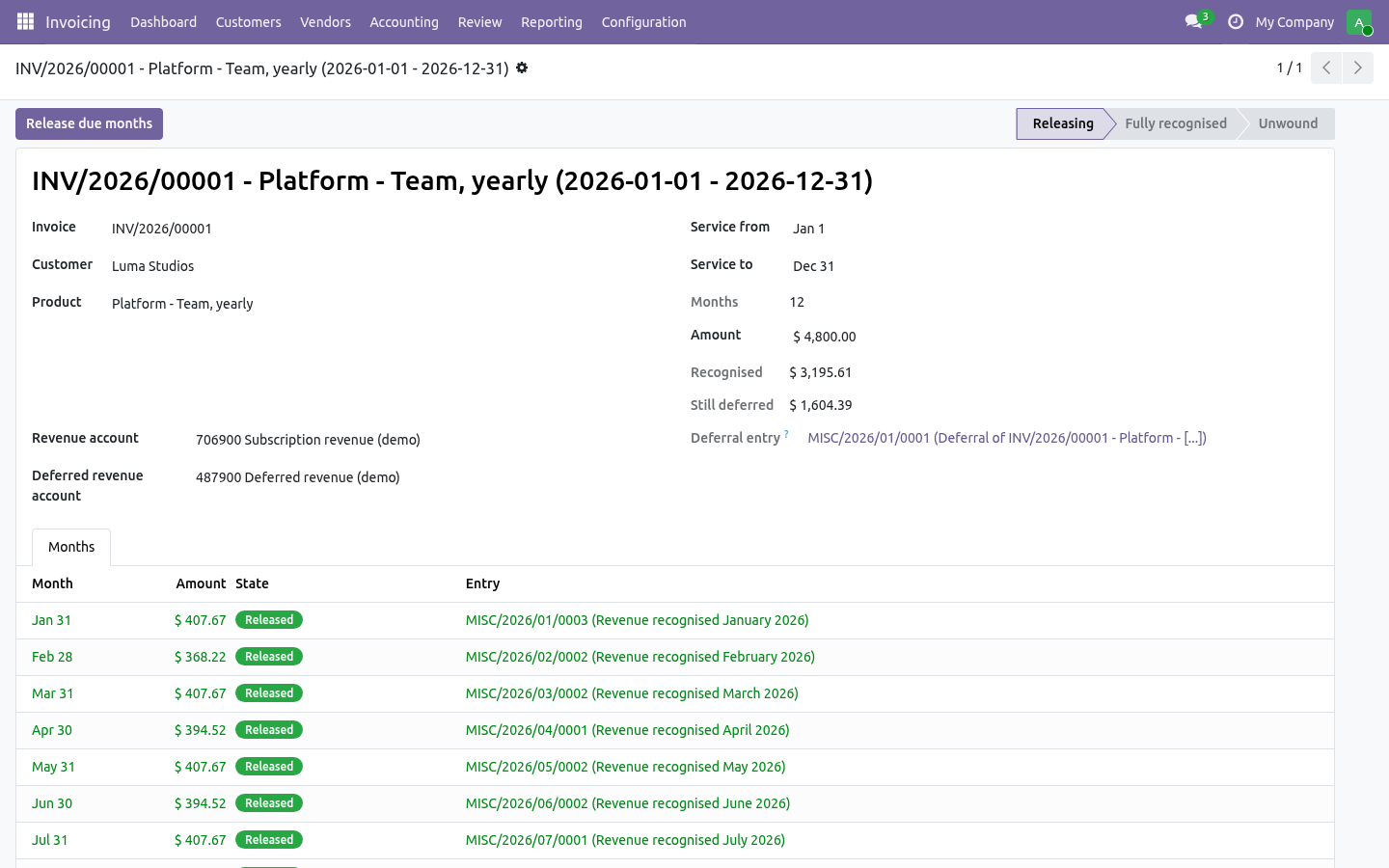
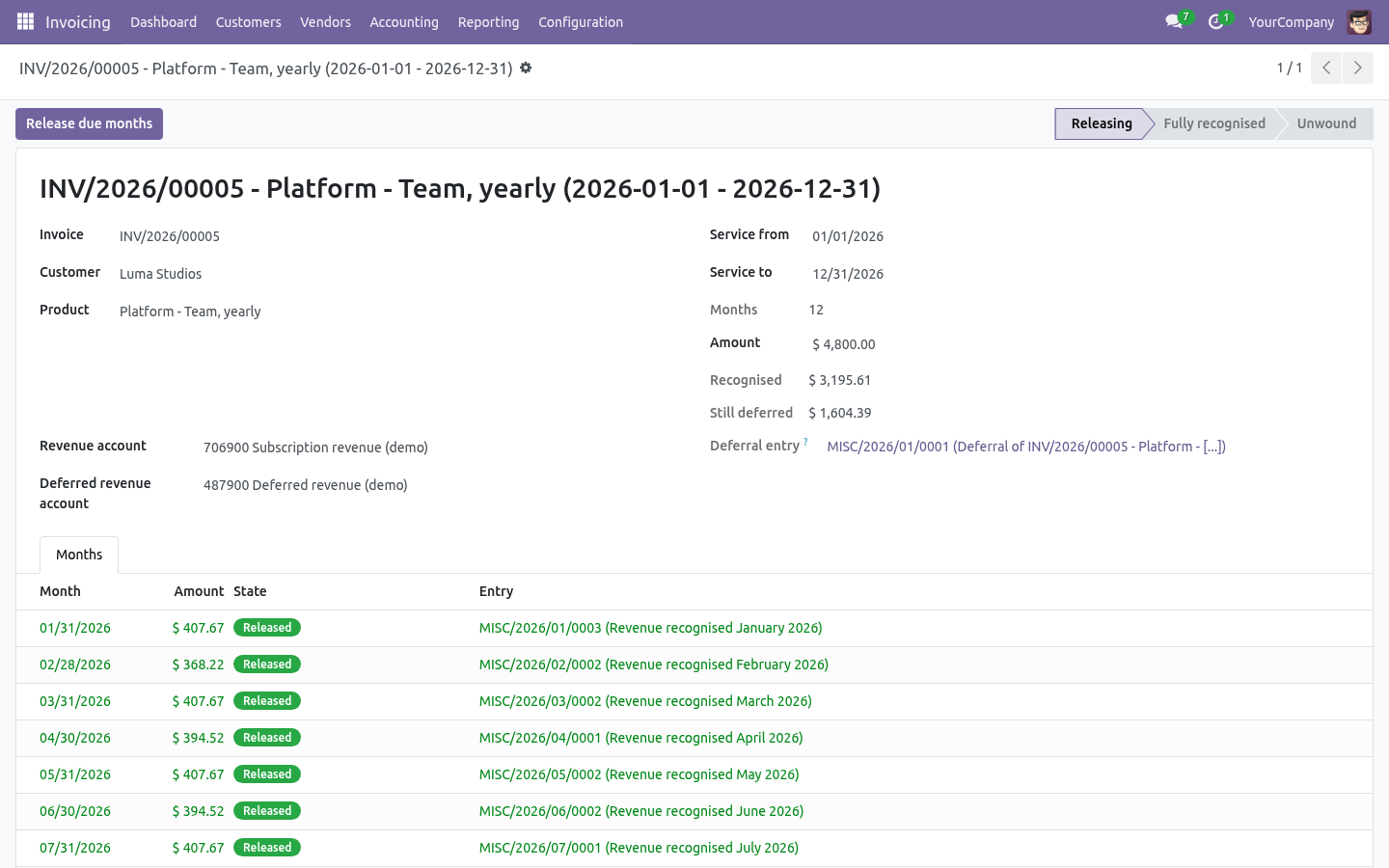
Each month is rounded to the currency and the last month takes the rounding, so the twelve months always add up to the line. The schedule is on the invoice (the button of ... recognised) and in Deferred Revenue → Schedules, with every month, its amount, whether it is released and by which entry. Releasing.
The nightly job releases every month that has ended: for each company and each month, one journal entry dated the last day of the month, debiting deferred revenue and crediting revenue, one line pair per schedule, in the recognition journal. Release Due Months does the same up to any date you give - the end of a quarter you are closing early, or a month the job missed. Releasing twice releases nothing twice: a month is either to release or released. Leave Post release entries automatically unticked to get the entries in draft for a review.
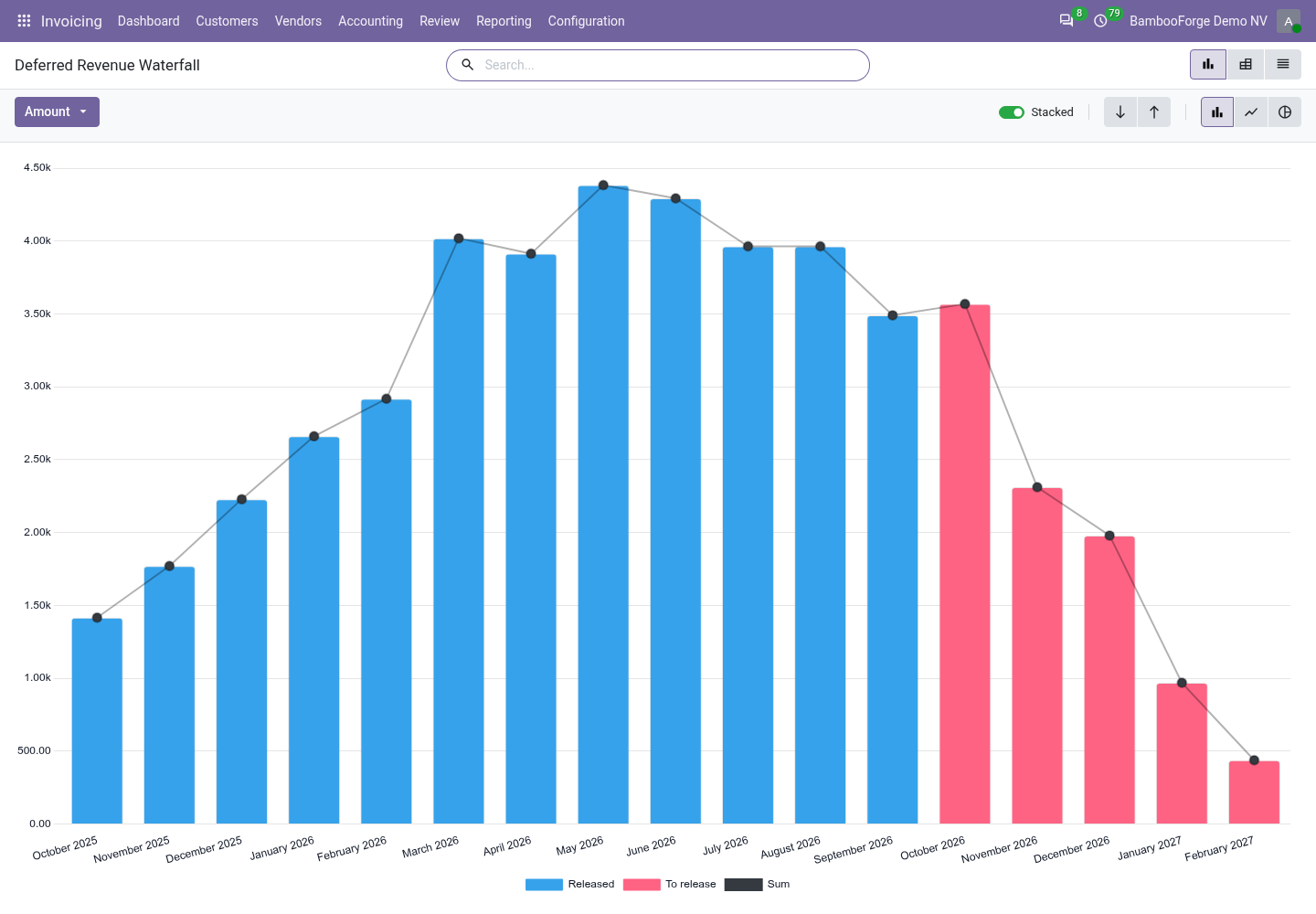
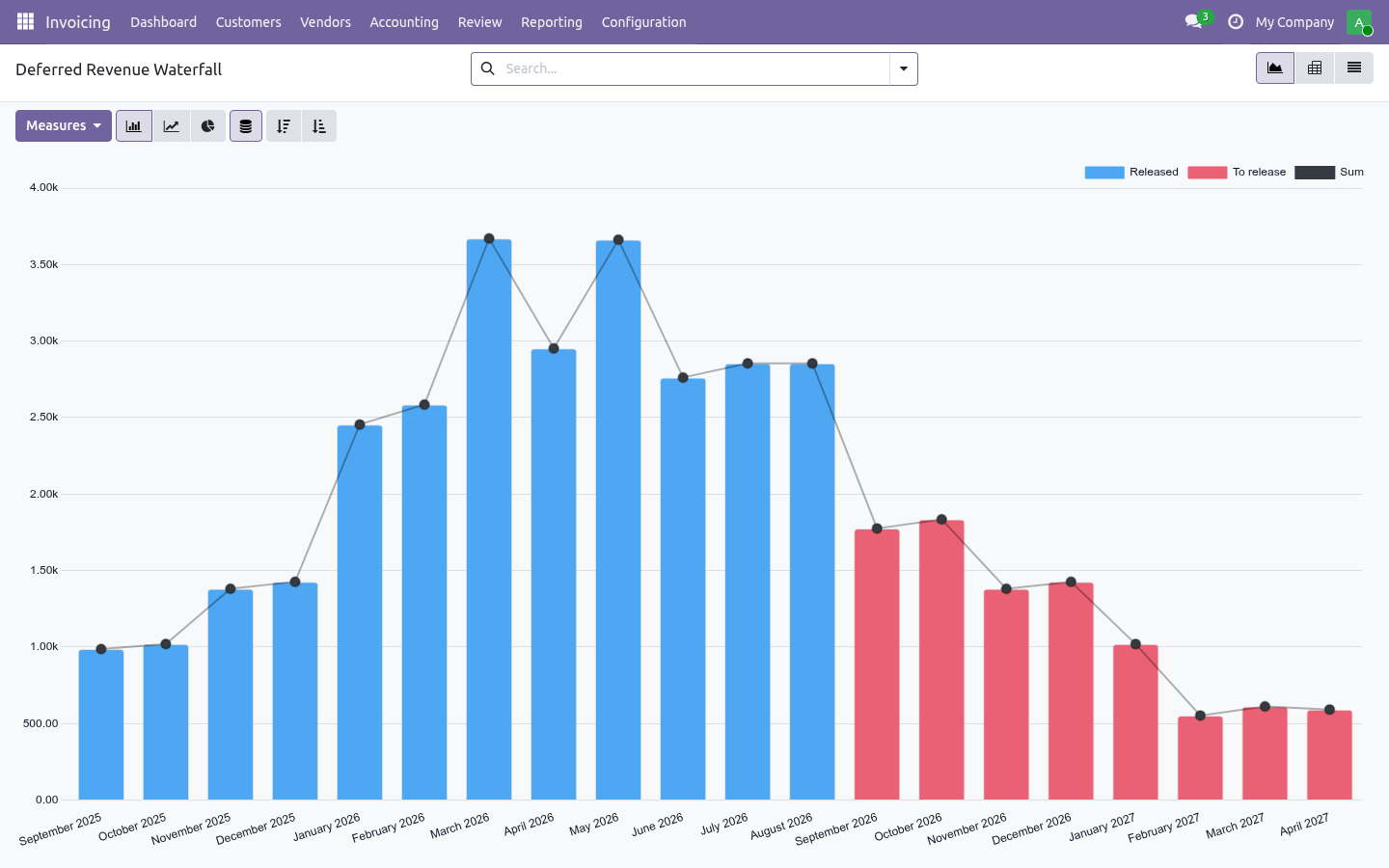
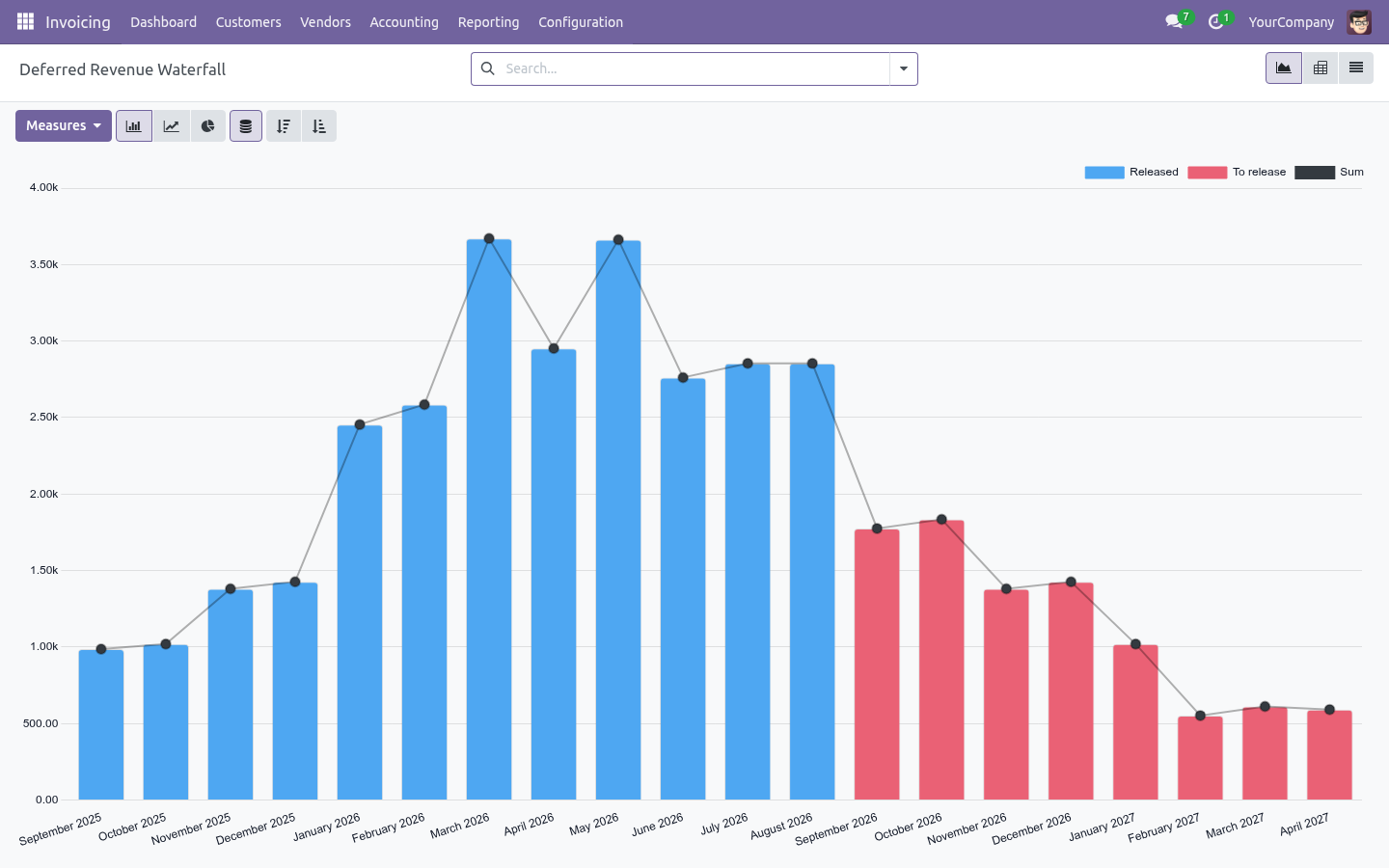
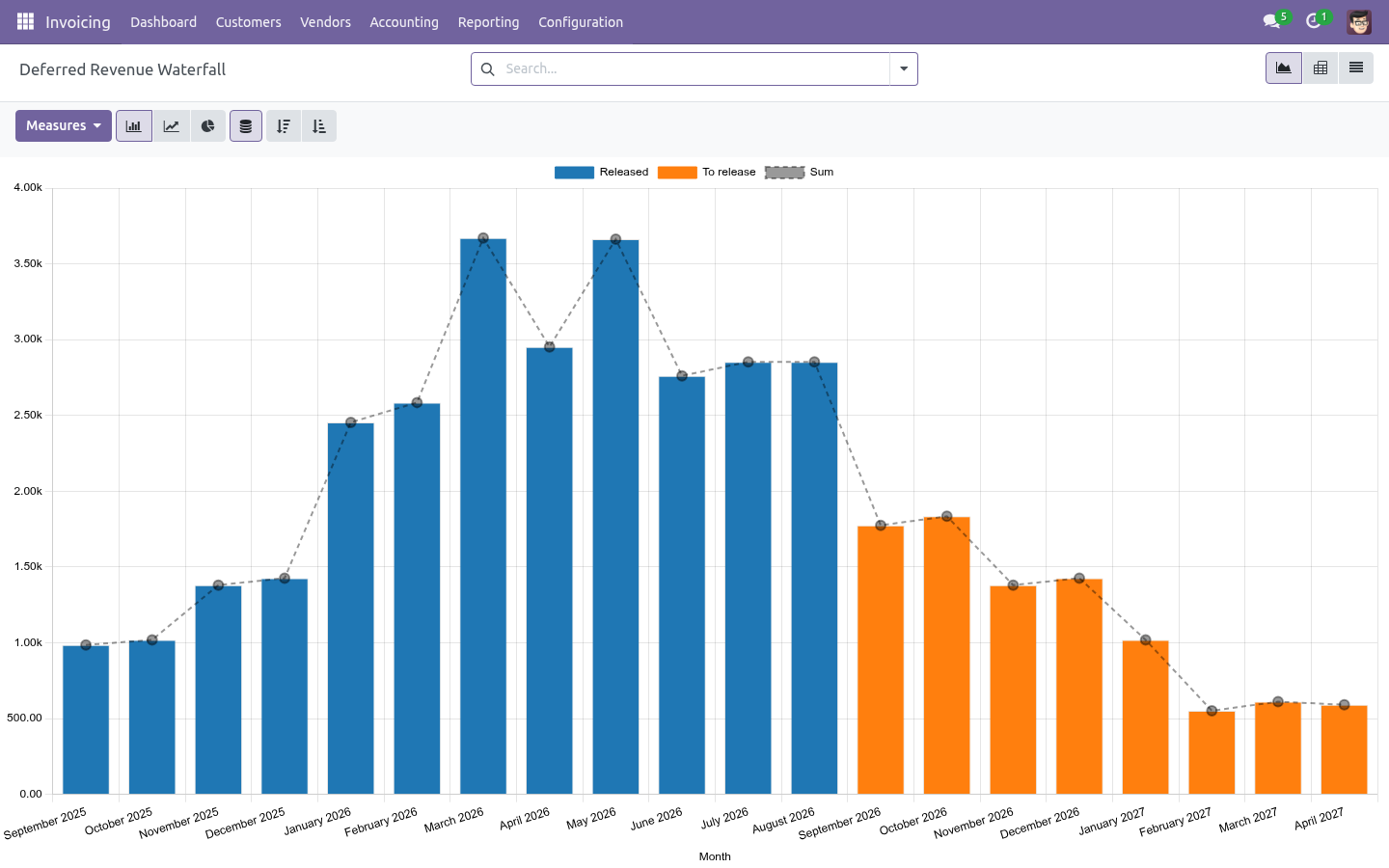
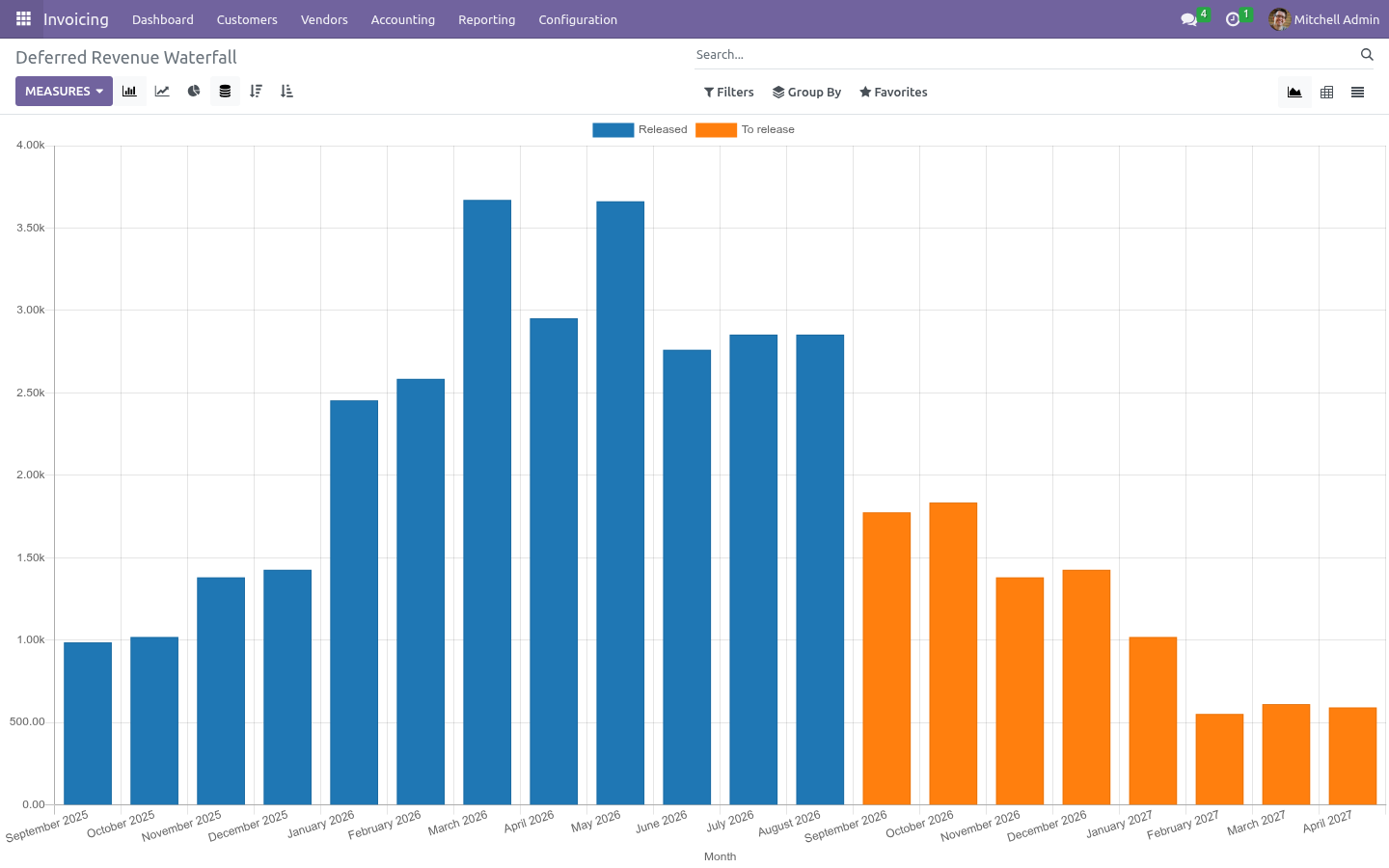
Unwinding A credit note for a deferred product is a schedule of its own, negative, over its own service period - credit six months back and the six months are unwound as they come, month by month, against the original schedule. The two net to what was really earned. The waterfall. Deferred Revenue → Waterfall is every scheduled month of every open schedule: by month, released against still to come.
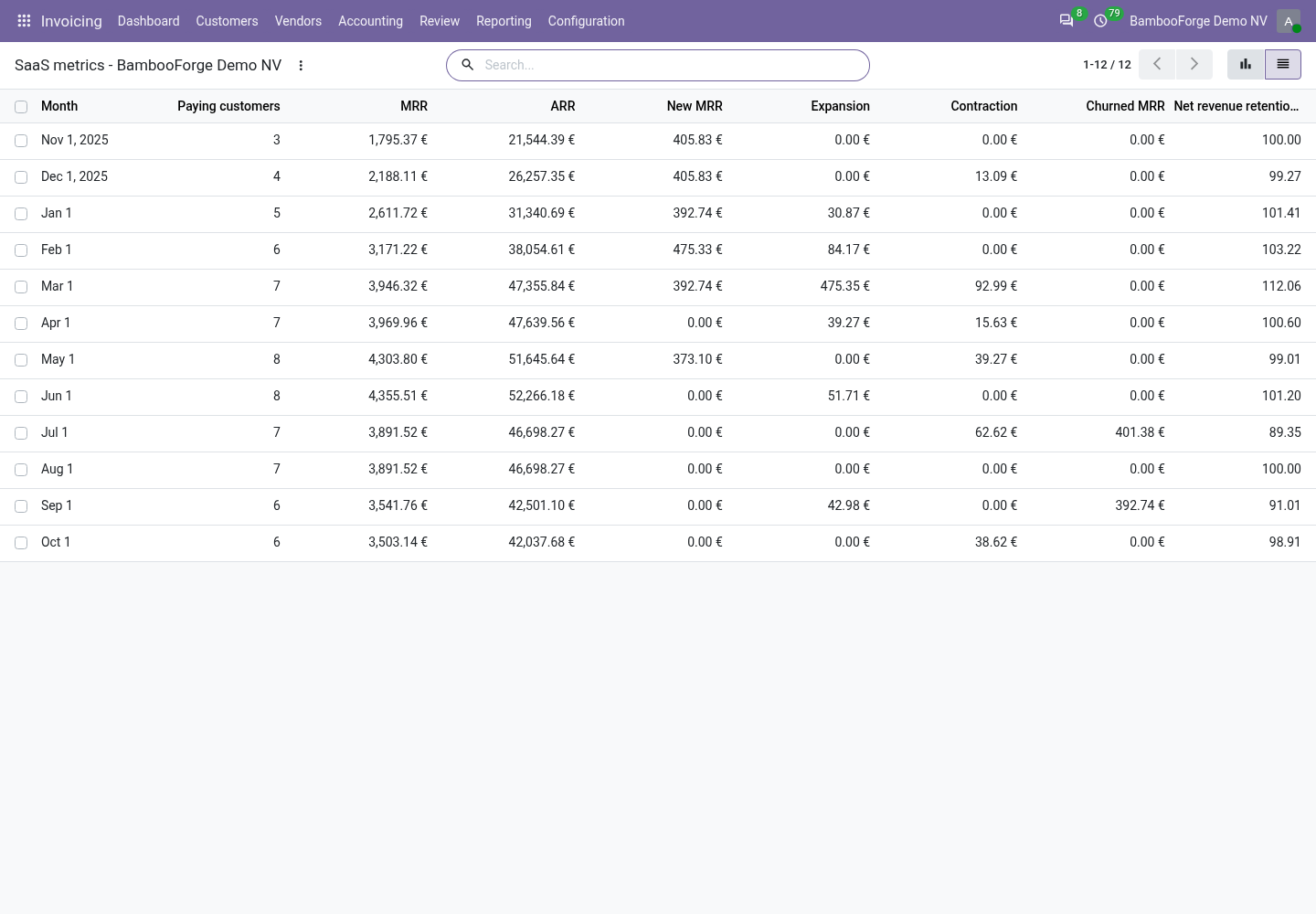
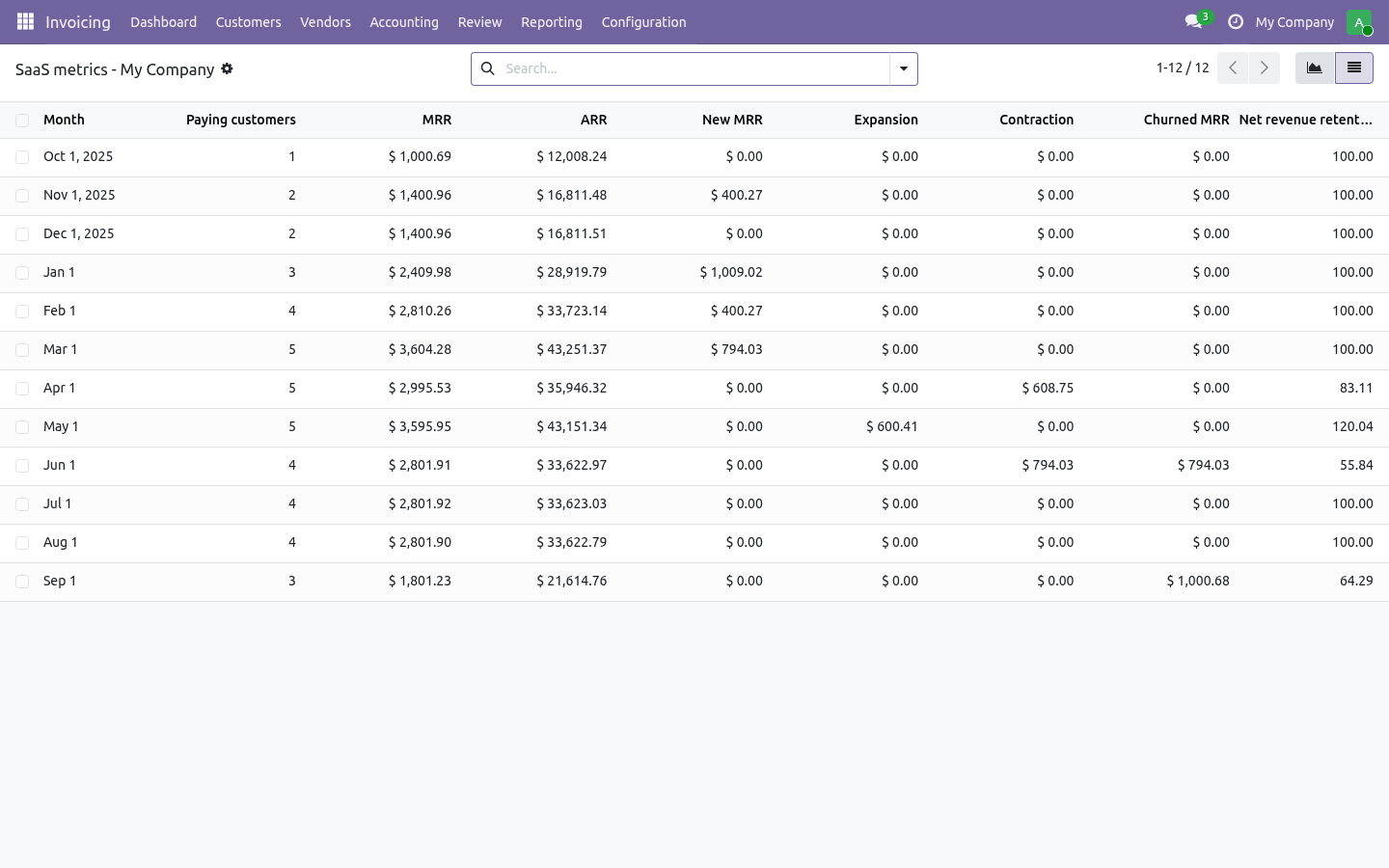
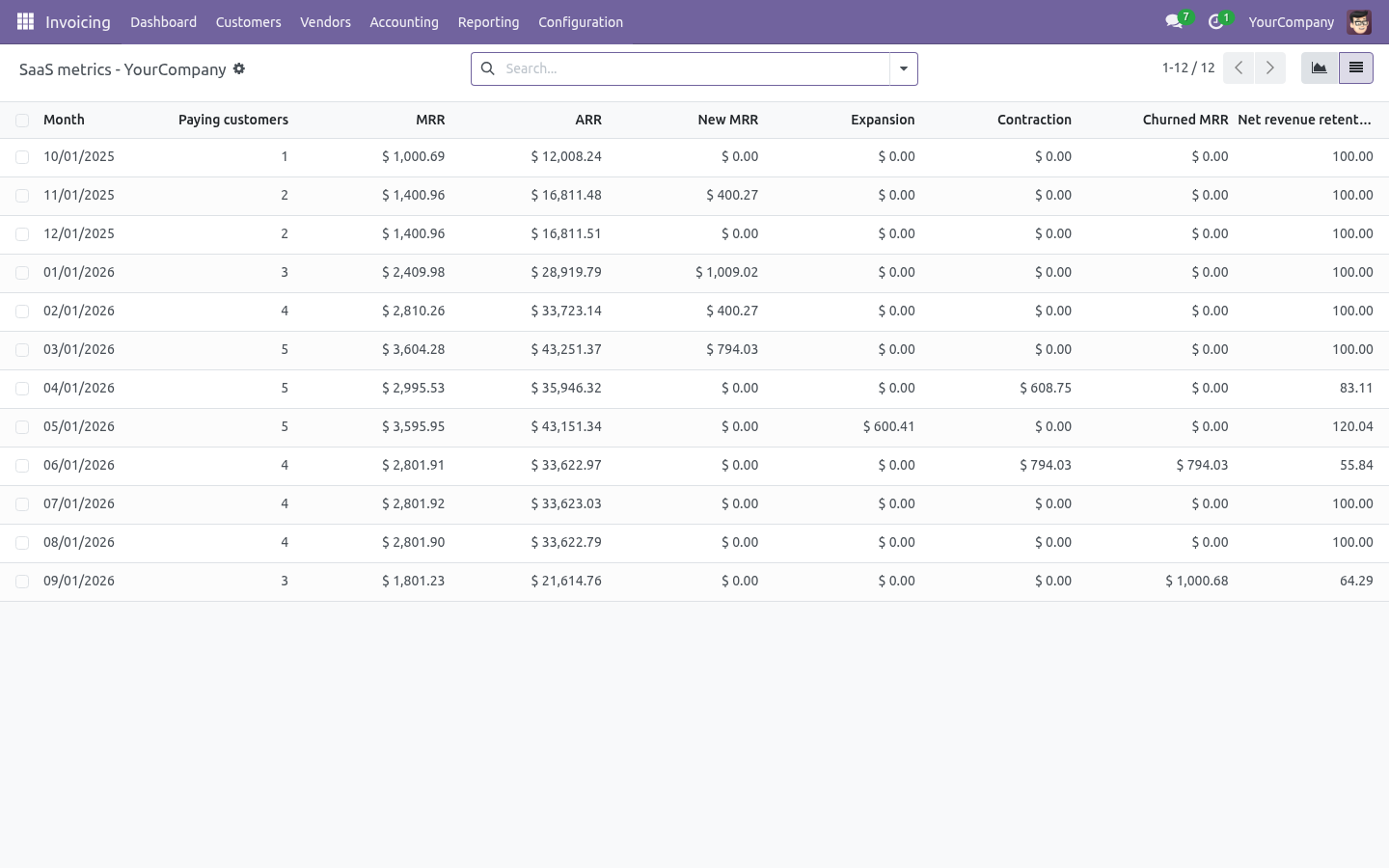
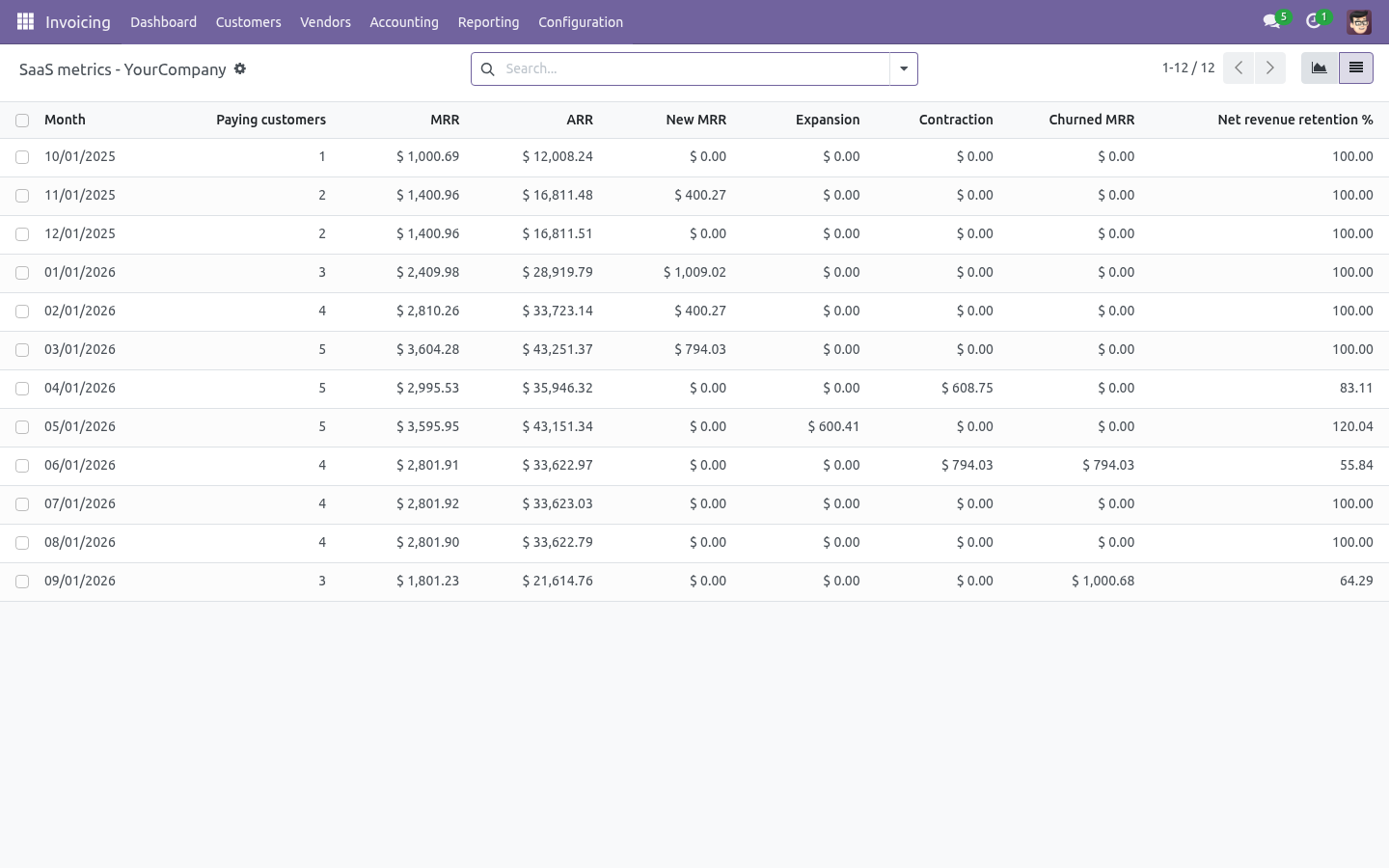
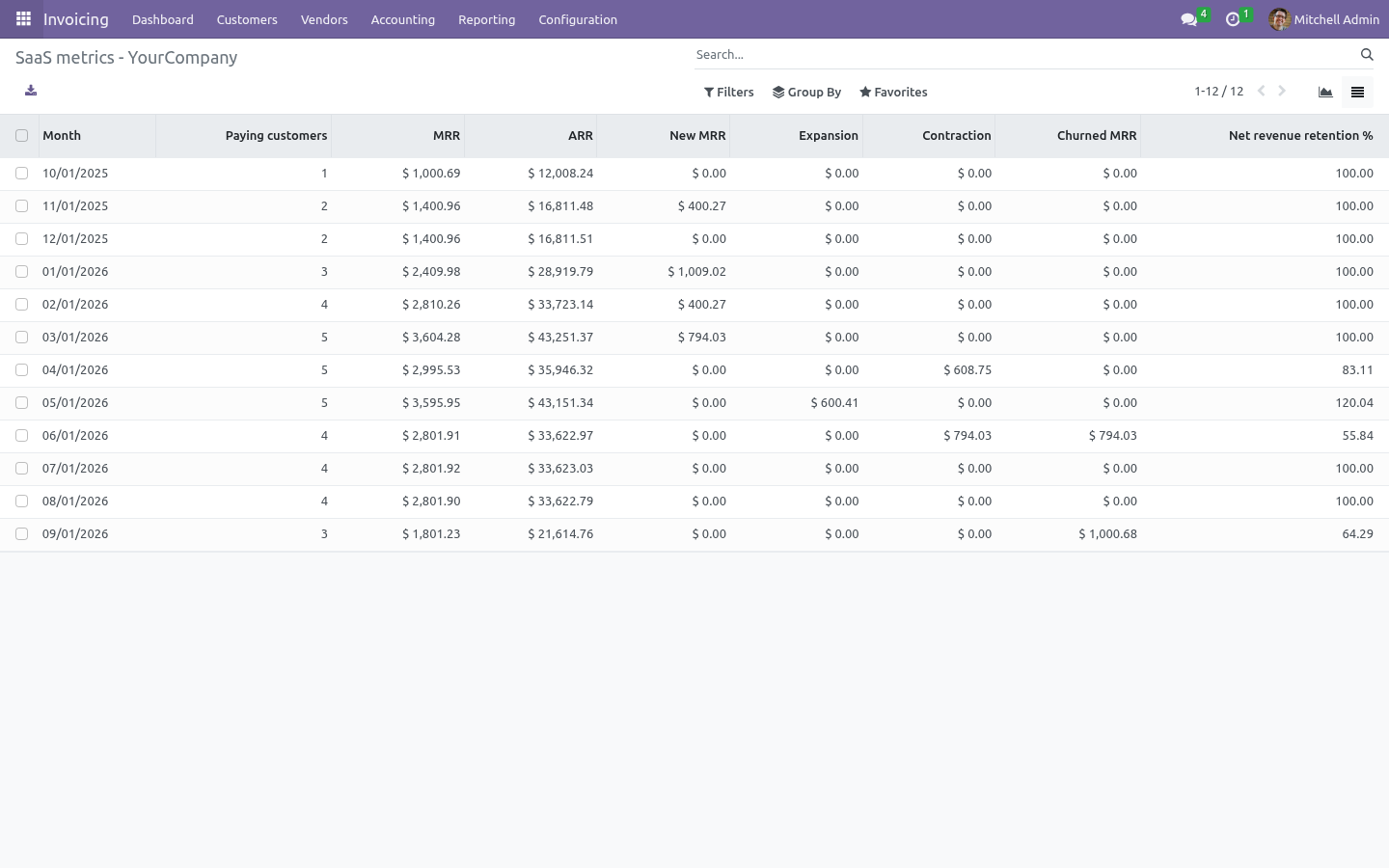
As a graph it is the deferred-revenue release curve; as a pivot, the table the auditor asks for; as a list, the months themselves with their entries. SaaS metrics. Deferred Revenue → SaaS Metrics reads the last twelve months of recognised revenue per customer: MRR - the revenue recognised in the month, normalised to a 30.44-day month so that a 28-day February and a 31-day March read the same for the same contract; ARR - twelve times that; paying customers - customers with revenue in the month. New - customers with revenue this month and none last month; expansion and contraction - the change for customers present in both; churn - last month's revenue of customers with none this month.
Net revenue retention - last month's MRR plus expansion minus contraction minus churn, over last month's MRR. A partial month at the start or end of a service shows as a smaller figure, which is what happened. Metrics are per company and in the company currency. How we make sure it works.
Before every release, 14 automated checks run against this app on Odoo 16, 17, 18, 19 and 20. Among them: Credit note builds a negative schedule. Deferred line without period refused. Plain product is not deferred.
Reset to draft unwinds what is left. Draft entries when auto post off. The complete list is in the source you receive. Now the part most videos leave out: what this does not do.
Straight-line over the service period. Milestone, usage-based and percentage-of-completion recognition are not modelled; a line with a one-day period is recognised in full that day. One deferred-revenue account per product (or the company default); the revenue account is the line's own. Metrics read recognised revenue, not contracts: a customer billed quarterly shows a flat MRR, which is the point; a customer with an unposted invoice shows nothing until it is posted.
Nothing is written to invoices already posted before the app was installed; open them and post again, or raise a deferral by hand. The complete manual is at docs dot bambooforge dot dev, the demo database is linked from the store page, and support answers within twenty-four hours. Links are in the description.
Key facts
- What it is
- Recognise revenue over the service period on Odoo Community (ASC 606 / IFRS 15 straight-line): an invoice for a year of service books to deferred revenue and is released month by month by a job, with the schedule on the invoice, a credit note unwinding what is left, a deferred-revenue waterfall, and MRR, ARR, churn and net revenue retention read from what was recognised.
- For
- Accounting
- Odoo versions
- 16.0, 17.0, 18.0, 19.0, 20.0 - Community and Enterprise
- Runs on
- Odoo.sh or Odoo you host yourself - not Odoo Online, which accepts no third-party apps
- Price
- 199 EUR, one-time, on the Odoo Apps Store
- Technical name
- bambooforge_revenue_recognition
- Not for
- Straight-line over the service period. Milestone, usage-based and percentage-of-completion recognition are not modelled; a line with a one-day period is recognised in full that day.; One deferred-revenue account per product (or the company default); the revenue account is the line's own.; Metrics read recognised revenue, not contracts: a customer billed quarterly shows a flat MRR, which is the point; a customer with an unposted invoice shows nothing until it is posted.; Nothing is written to invoices already posted before the app was installed; open them and post again, or raise a deferral by hand.
- Live demo
- https://demo20.bambooforge.dev/odoo/action-bambooforge_revenue_recognition.action_bf_revrec_schedule
- Manual last updated
- 2026-10-15
Revenue Recognition: Deferred Revenue & SaaS Metrics
A customer pays for twelve months of service in January. Odoo Community books the whole amount as January revenue; the auditor, the bank and the board want it spread over the twelve months it was earned in. This app spreads it, and reads the SaaS numbers off the result.
What you get
Deferred products: tick Defer revenue on a service product and name its deferred-revenue account (or a company default).
A service period on every invoice line of such a product - filled by the subscription that raised it, proposed from the product's default length, or typed.
On posting, a deferral entry parks the line's revenue in deferred revenue and a schedule is written: one amount per month, straight-line by days, rounded to the currency, the remainder on the last month, so the months add up to the line.
A nightly job and a Release Due Months button that post one entry per company per month - debit deferred revenue, credit revenue - for every month that has come, with one line pair per schedule.
Unwinding: an invoice reset to draft or cancelled clears what was still deferred and drops the months to come; a credit note carries its own negative schedule over its own period, which is how the months already delivered are kept.
The waterfall: deferred revenue by month, released and still to come, as a graph, a pivot and a list.
SaaS metrics from recognised revenue: MRR, ARR, paying customers, new, expansion, contraction and churned MRR, net revenue retention, month by month for the last twelve months.
Install
Install Revenue Recognition (depends on Invoicing only).
Accounting → Configuration → Settings → Revenue recognition: the default deferred-revenue account, the journal for the entries, and whether they post by themselves (they do, by default).
On each service product sold ahead of delivery: Accounting tab → Defer revenue, optionally its own deferred account and default service months.
A Deferred Revenue menu appears under Accounting → Accounting.
The schedule
An invoice line of a deferred product needs a service period - Service from and Service to on the line. When BambooForge Subscription Billing raised the invoice, the period is the billing period. Otherwise the line proposes the invoice date and the product's default months, and you correct it.
On posting, for each deferred line:
a deferral entry on the invoice date moves the line's revenue from the revenue account to the deferred-revenue account - the invoice itself is untouched, so its taxes, its receivable and its payment behave exactly as before;
a schedule splits the amount over the months of the period, straight-line by days: a service from the 16th of March to the 15th of June earns half a March, a full April and May, and half a June. Each month is rounded to the currency and the last month takes the rounding, so the twelve months always add up to the line.
The schedule is on the invoice (the button of ... recognised) and in Deferred Revenue → Schedules, with every month, its amount, whether it is released and by which entry.
Releasing
The nightly job releases every month that has ended: for each company and each month, one journal entry dated the last day of the month, debiting deferred revenue and crediting revenue, one line pair per schedule, in the recognition journal. Release Due Months does the same up to any date you give - the end of a quarter you are closing early, or a month the job missed. Releasing twice releases nothing twice: a month is either to release or released.
Leave Post release entries automatically unticked to get the entries in draft for a review.
Unwinding
Reset to draft or cancel the invoice: the months not yet released are dropped and one entry clears what was still parked in deferred revenue. The entries already posted stay in the ledger as the trail; with the invoice's own revenue gone, revenue nets to nothing, which is what a cancelled invoice earned. To keep the months that were delivered, credit the rest instead of cancelling.
A credit note for a deferred product is a schedule of its own, negative, over its own service period - credit six months back and the six months are unwound as they come, month by month, against the original schedule. The two net to what was really earned.
The waterfall
Deferred Revenue → Waterfall is every scheduled month of every open schedule: by month, released against still to come. As a graph it is the deferred-revenue release curve; as a pivot, the table the auditor asks for; as a list, the months themselves with their entries.
SaaS metrics
Deferred Revenue → SaaS Metrics reads the last twelve months of recognised revenue per customer:
MRR - the revenue recognised in the month, normalised to a 30.44-day month so that a 28-day February and a 31-day March read the same for the same contract; ARR - twelve times that; paying customers - customers with revenue in the month.
New - customers with revenue this month and none last month; expansion and contraction - the change for customers present in both; churn - last month's revenue of customers with none this month.
Net revenue retention - last month's MRR plus expansion minus contraction minus churn, over last month's MRR.
A partial month at the start or end of a service shows as a smaller figure, which is what happened. Metrics are per company and in the company currency.
Limits, stated plainly
Straight-line over the service period. Milestone, usage-based and percentage-of-completion recognition are not modelled; a line with a one-day period is recognised in full that day.
One deferred-revenue account per product (or the company default); the revenue account is the line's own.
Metrics read recognised revenue, not contracts: a customer billed quarterly shows a flat MRR, which is the point; a customer with an unposted invoice shows nothing until it is posted.
Nothing is written to invoices already posted before the app was installed; open them and post again, or raise a deferral by hand.
How we make sure it works
Before every release, 17 automated checks run against this app on Odoo 16, 17, 18, 19 and 20. Among them:
Credit note builds a negative schedule.
Deferred line without period refused.
Plain product is not deferred.
A schedule running over a reversed deferral is repaired.
Reset to draft unwinds what is left.
The complete list is in the source you receive.