 BambooForge Labs
Restaurant Management & Kitchen Display (KDS)
Restaurant management with a floor plan the host can read, orders fired by course, a kitchen display that bumps tickets, split bills, takeaway.
Available for Odoo 16.0, Odoo 17.0, Odoo 18.0, Odoo 19.0, Odoo 20.0. Technical name bambooforge_restaurant.
Transcript of the walkthrough (Odoo 20)
Restaurant Management & Kitchen Display (KDS). Restaurant management with a floor plan the host can read, orders fired by course, a kitchen display that bumps tickets, split bills, takeaway. Said before you buy, because it is the half that decides whether the app fits: In the next few minutes: restaurant management & kitchen display (kds), then the floor, then firing courses, then the kitchen display, then billing. Then what this app deliberately does not do, so you can tell before you buy whether it fits.
Everything lives under Restaurant then Floor then Orders then Kitchen display. 1. Copy bambooforge_restaurant into your addons path and update the app list, or install the ZIP from the Odoo Apps Store. 2.
Install Restaurant Management & Kitchen Display (KDS). 3. Open Restaurant - its menus are Floor, Orders, Kitchen display, Configuration. Restaurant Management & Kitchen Display (KDS).
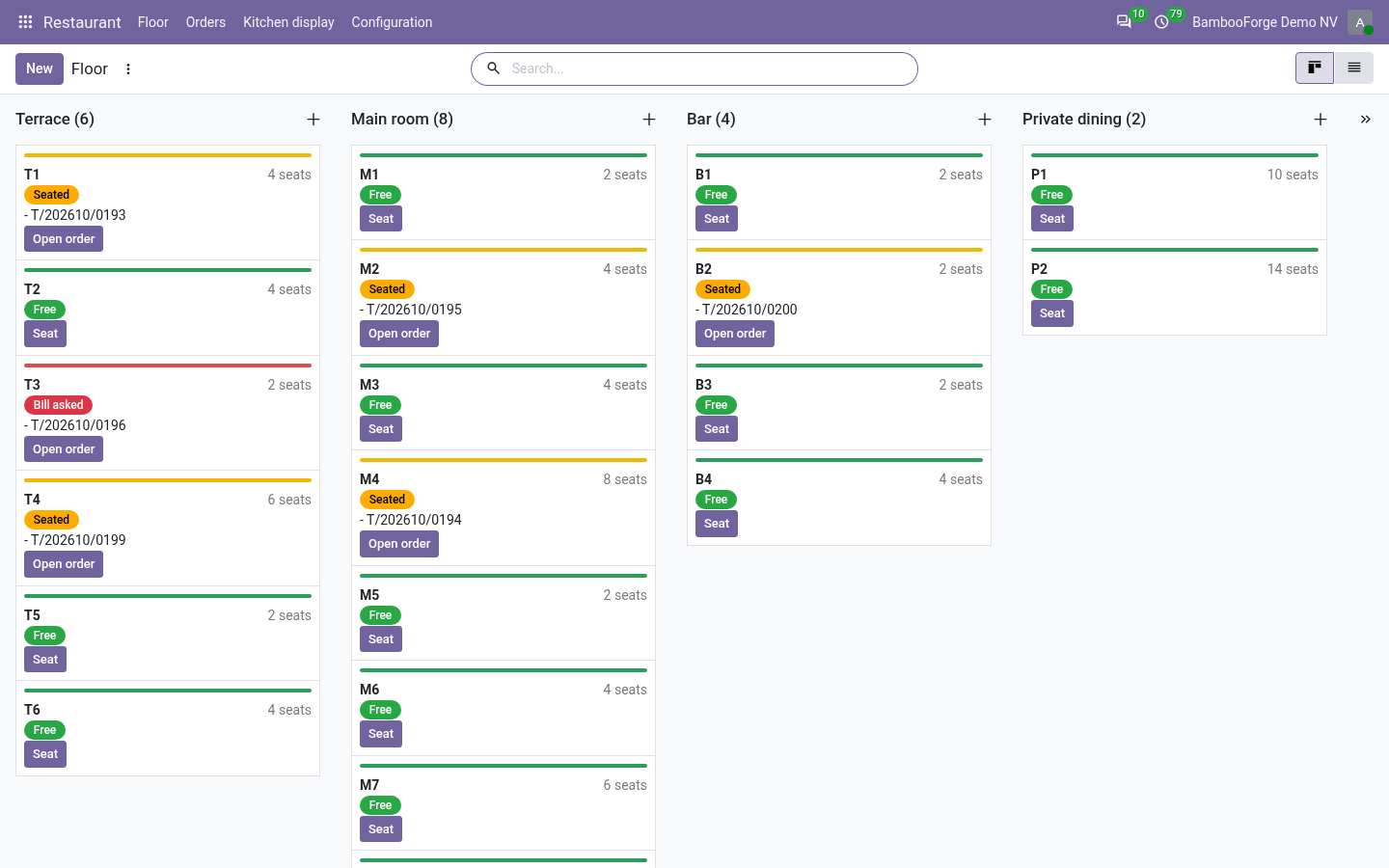
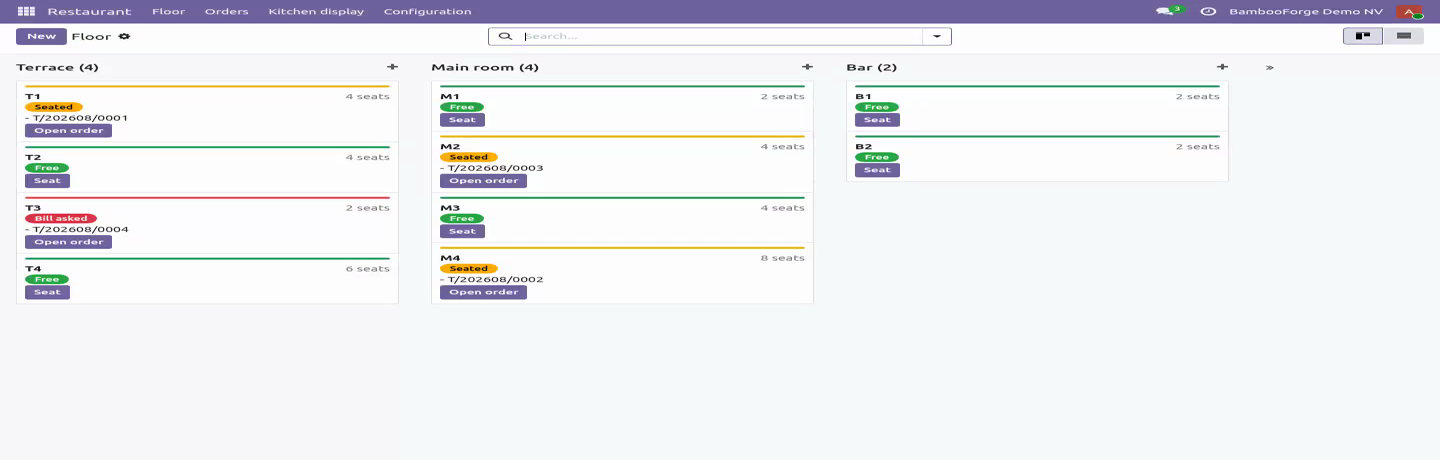
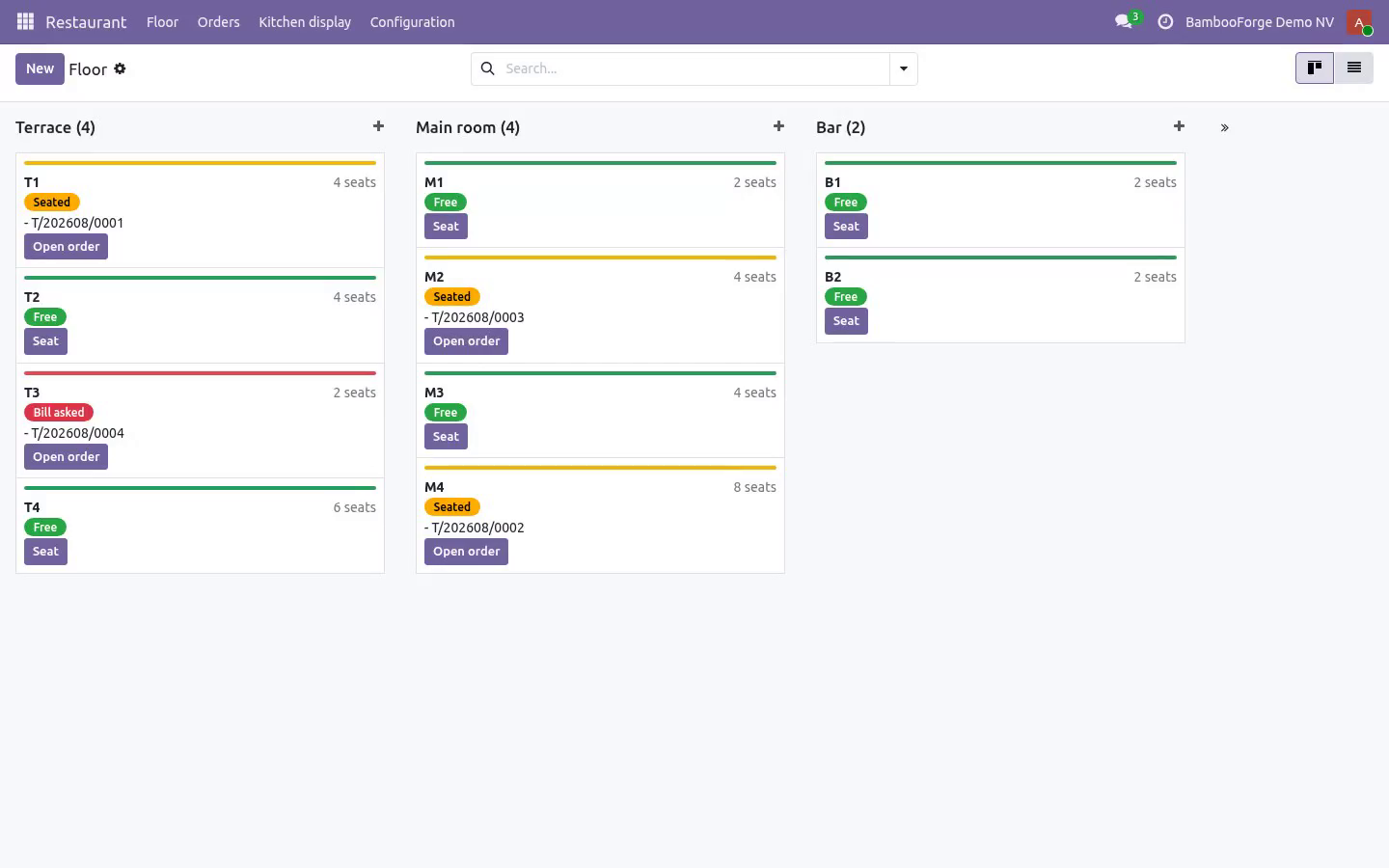
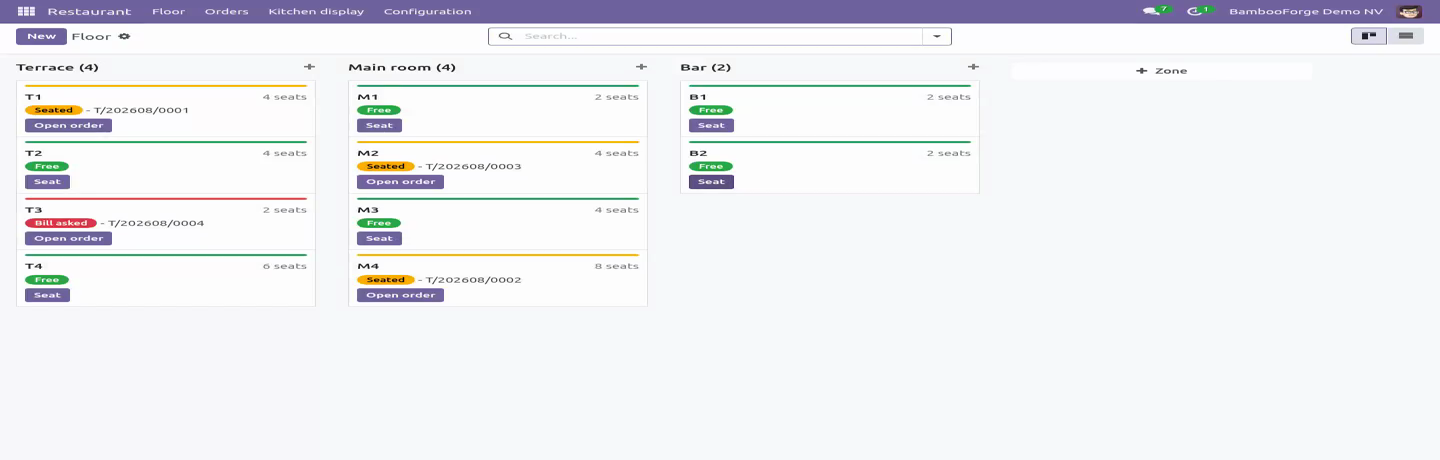
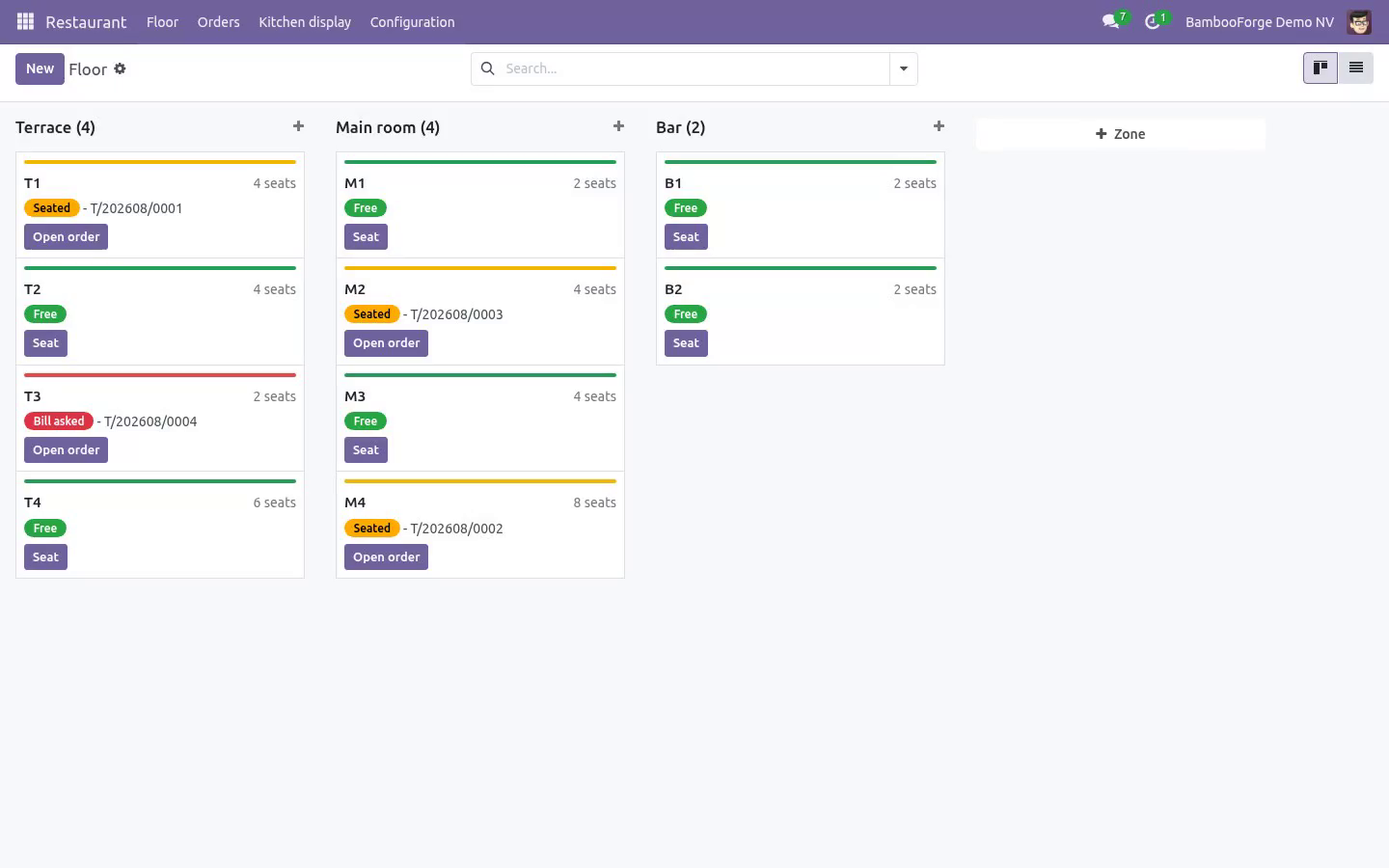
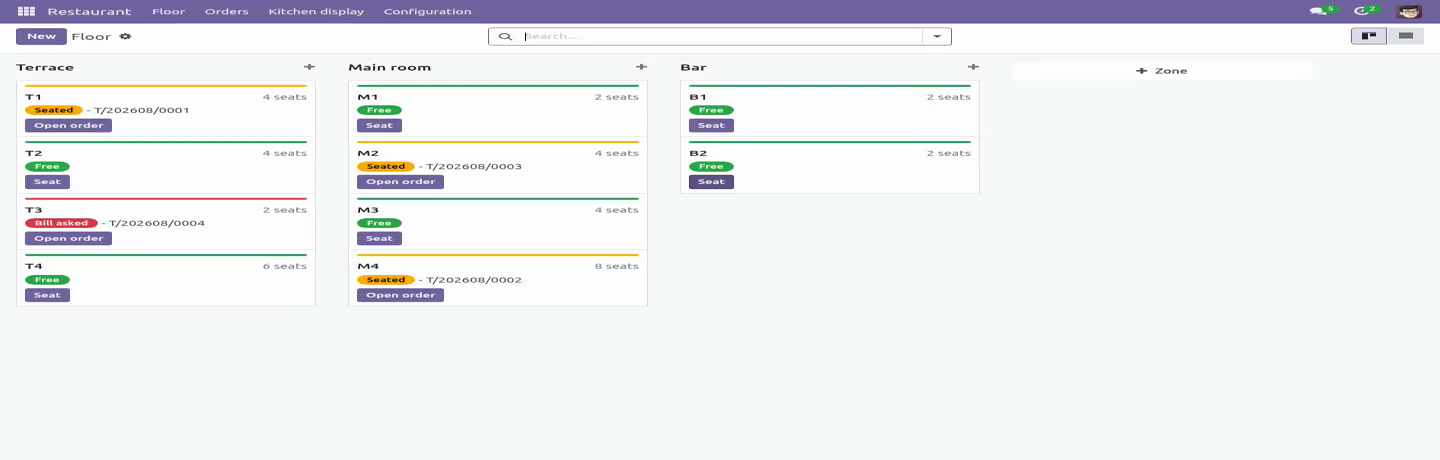
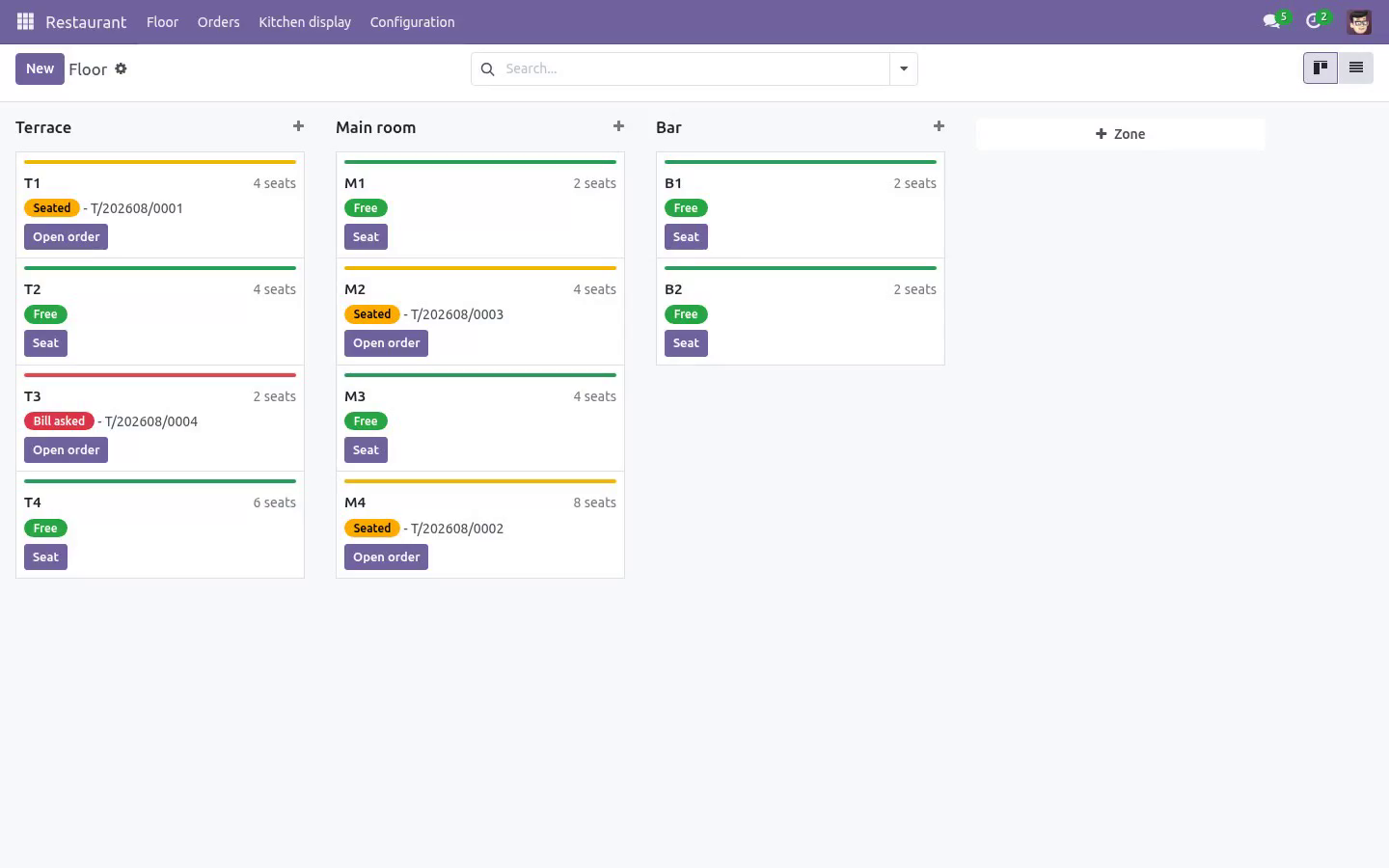
Two ideas the software usually gets wrong: ordering is not cooking, and a table is not a shopping basket. Everything here follows from them. The floor Tables grouped by zone, coloured free / seated / bill asked. Seating a table opens its tab; the table reads free again the moment that tab is closed.
The state is derived from the order, never typed twice, so the floor plan cannot drift while the room is full. One table, one open tab - guaranteed by a partial unique index in the database, not by a check that two waiters tapping Seat in the same second both pass. Seating takes the table row first, so the second host queues instead of creating a tab whose food is served and never billed. Seating records the party, not the table: two people at a four-top is two covers, and covers are the denominator of the one KPI every restaurant runs on.
Takeaway and delivery need no table. A delivery order must carry the platform reference - the number the rider quotes and the complaint email quotes - before it can be saved. Firing courses. Items sit as Ordered until a waiter fires the course; only then do they appear on a screen.
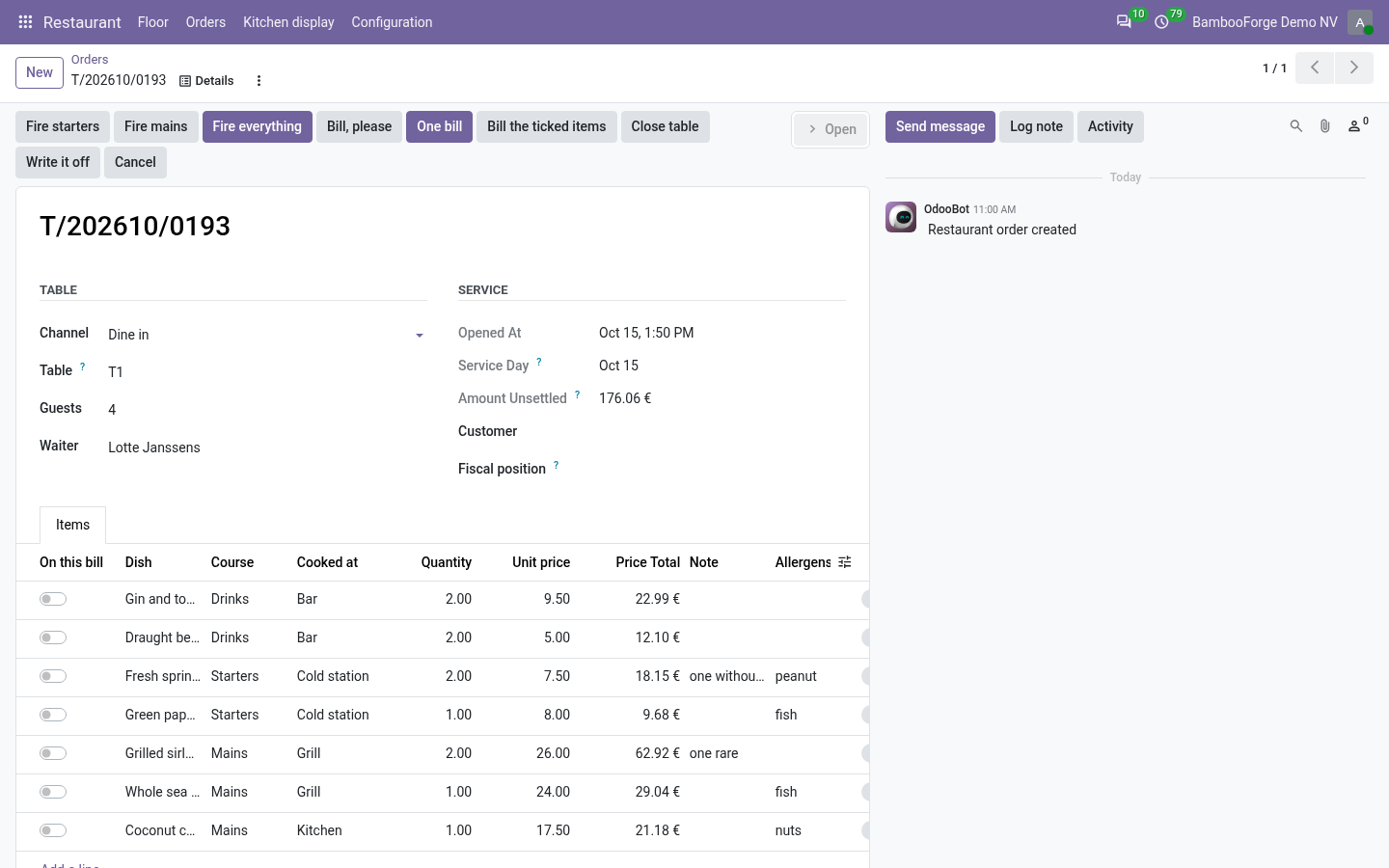
Starters and mains are fired separately, which is the whole reason a table's plates arrive together. Firing stamps the time, and that stamp is what the pass counts from. Each item carries its station, its prep time, the guest's note and its allergens - the one field nobody may guess at. They are all printed on the ticket.
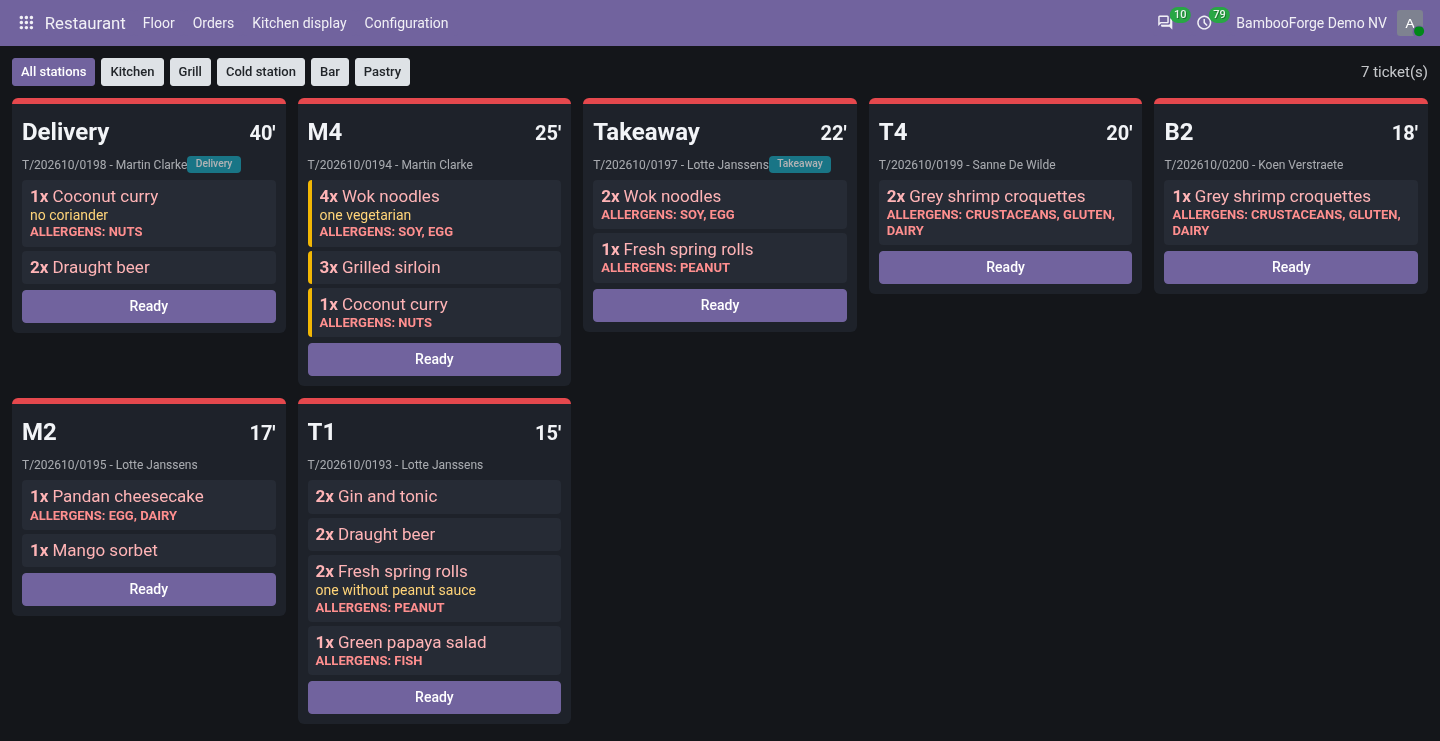
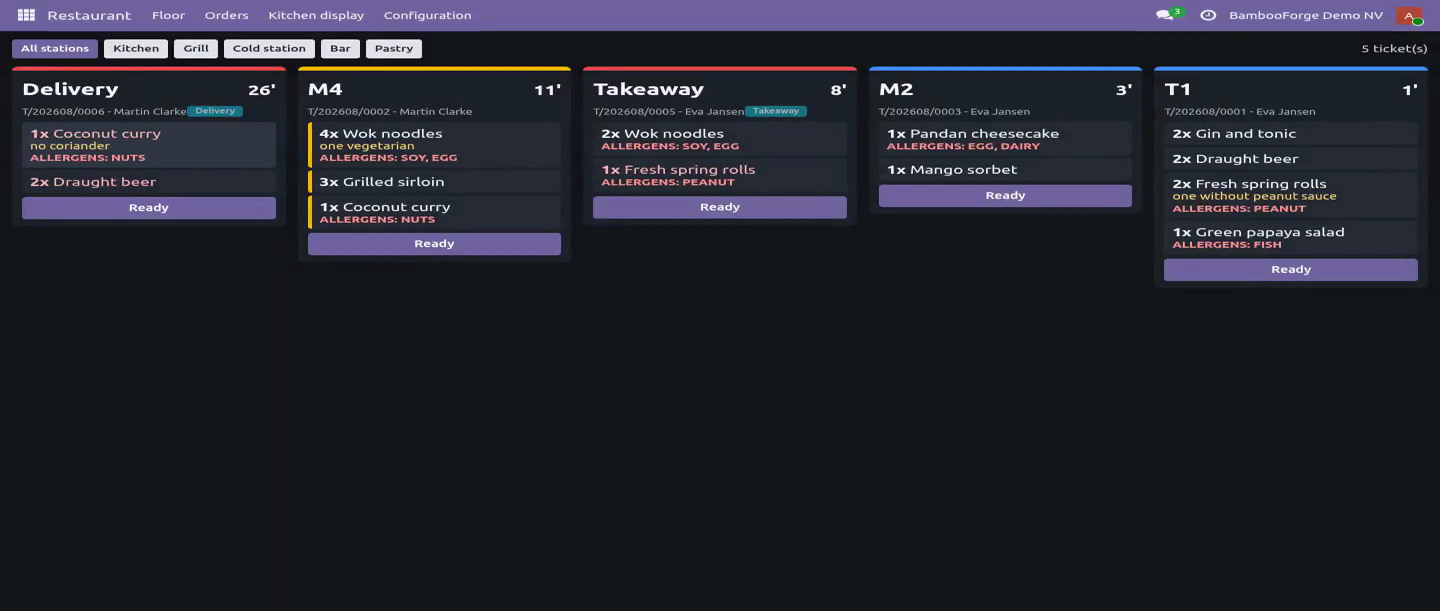
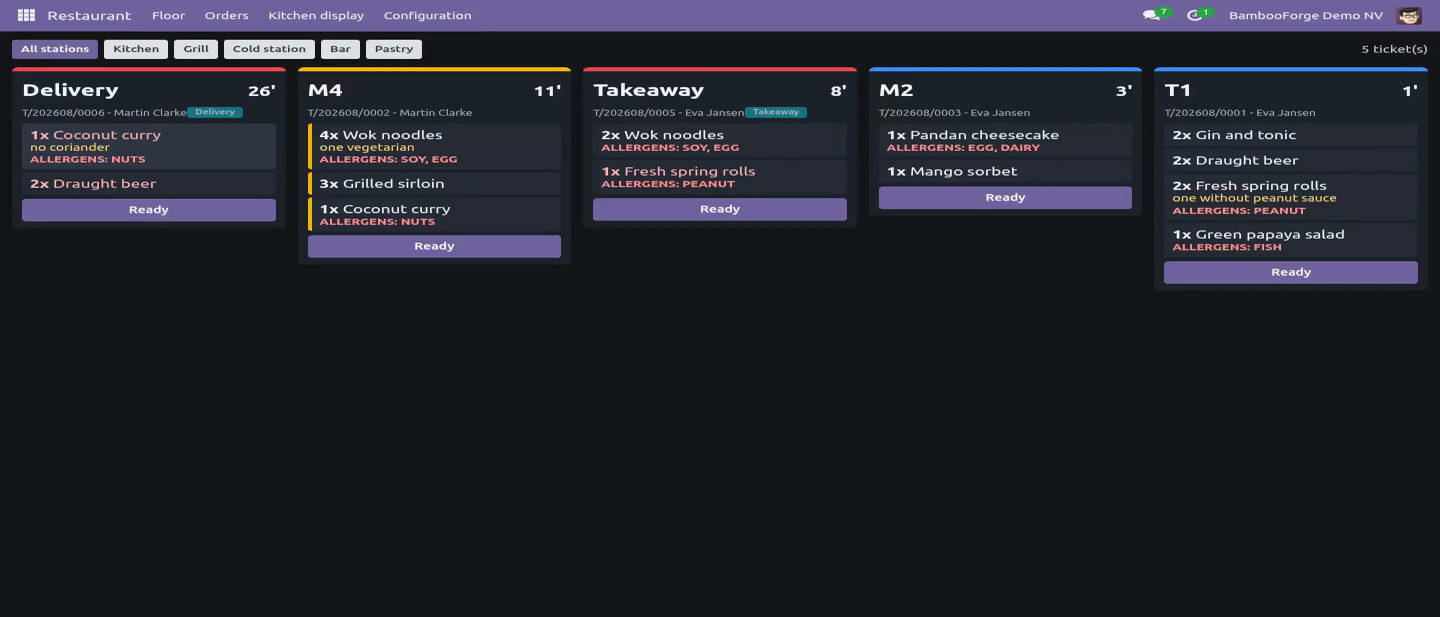
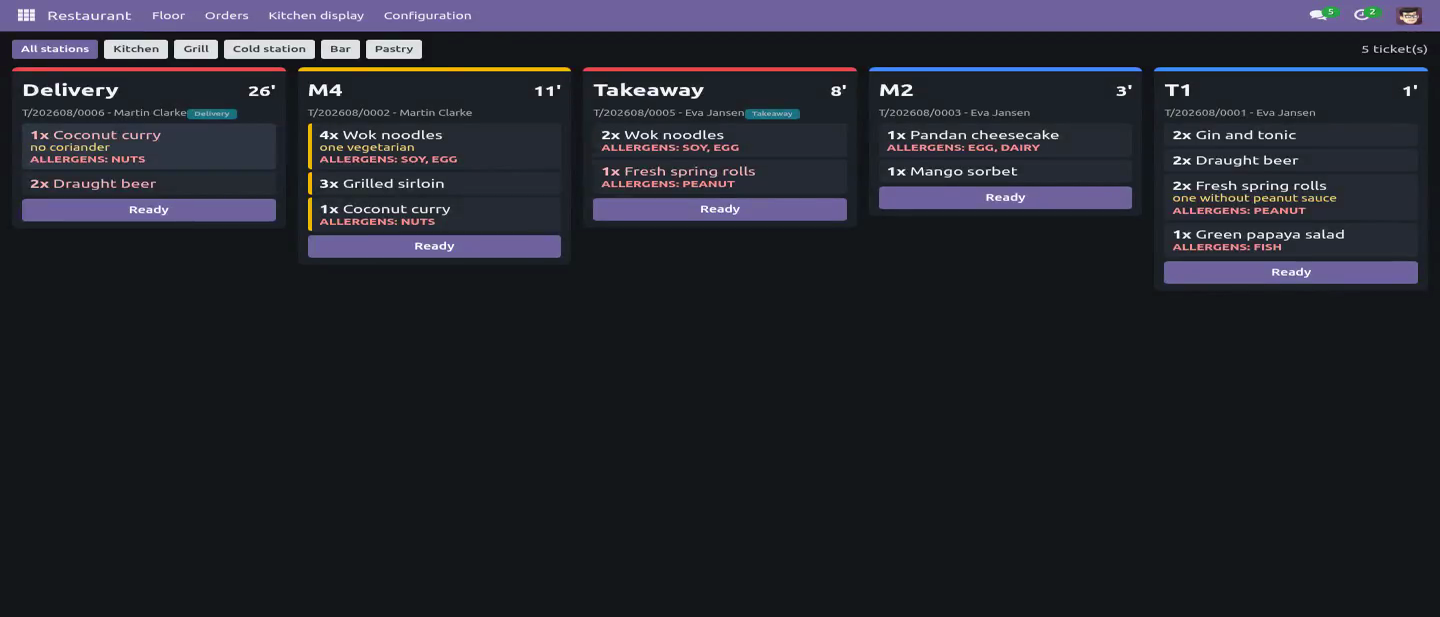
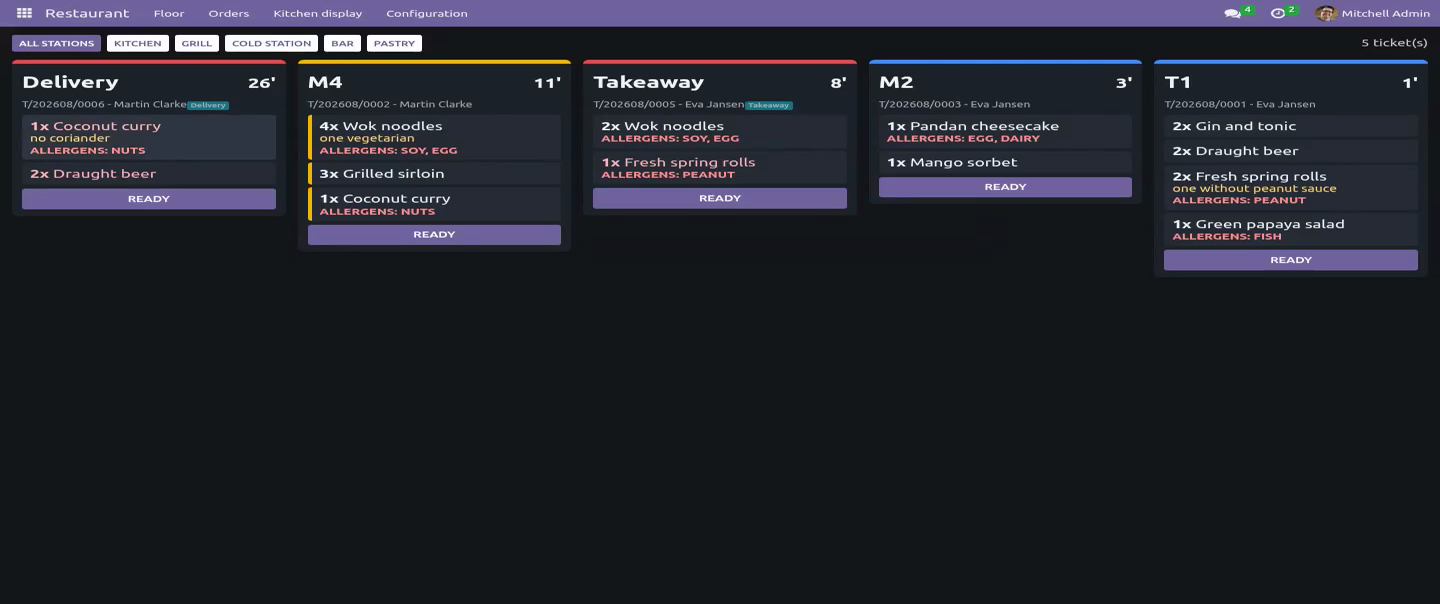
The kitchen display Live tickets, oldest first, one filter per station so a gin and tonic never queues behind a roast. A ticket past its prep time turns red; one over ten minutes turns amber. One tap moves an item along the pass (ordered - cooking - ready). The Ready button bumps the whole ticket off the screen.
It refreshes itself every ten seconds. Nobody taps reload with wet hands. If the network drops, the screen keeps the last tickets and says it is stale rather than going blank in the middle of service. A ticket older than twelve hours leaves the pass and is counted separately, so yesterday never clogs tonight.
A voided item stays on the screen, struck through and marked do not cook, for five minutes. Food does not silently vanish from under the person cooking it. A bump can be recalled: tapping a ticket that is on the pass puts it back into cooking, because a mis-tap on a touchscreen is not a decision. Billing One bill for the table, or split it: tick the items that belong to this bill and invoice them; the rest stay open for the next payer, as many times as the table needs.
A tick belongs to the waiter who made it, so six people can work one table without billing each other's selections. Every invoice line remembers which item it billed. Cancelling or deleting one split bill therefore releases exactly that bill's food and never the steak another payer has already settled. Resetting an invoice to draft releases nothing, because a draft invoice still carries the lines and will be posted.
Posted is not paid. Money not in is driven by the payment state of the live bills, so a delivery platform's or an account customer's tab stops counting as collected the moment it is printed. A tab nobody ordered anything on is not a debt and leaves the list. A credit note gives the food back.
Crediting a bill leaves the original posted and reversed; the tab reads it as money handed back, becomes billable again, and can be cancelled - instead of standing fully settled and permanently un-billable. Tax is mapped through the tab's fiscal position - eat in, take away, an exempt customer - where the line is priced, so the total the waiter quotes and the total on the bill are the same arithmetic. In a franchise, only the serving company's taxes go on the line. A walk-in bill is addressed to a walk-in guest you configure, never to your own company, so the receivable ledger and the partner VAT listing stay about customers.
An item on a bill cannot be re-priced, re-quantified or voided; an item the kitchen has already cooked can be voided but not turned into another dish. The food exists whatever the screen says. A tab cannot be closed while food is with the kitchen or on the pass, nor while anything on it is unsettled. A tab that will never be paid is written off by a manager, on purpose and in writing.
End of service. A scheduled job closes tabs whose items are all on posted invoices, so the floor plan is true in the morning. It selects by service day on each company's own clock - not by hours since opening, which at 04:30 skips every dinner tab opened at 19:30 and leaves eight tables reading seated every morning. A tab that still owes money - including one billed only on an invoice nobody posted - is never closed silently: it gets a note and a to-do, filed against somebody who still works here and is never OdooBot, once, not one per night for ever.
Closing the tab clears it. Roles. Kitchen works the pass: it sees live tickets and marks them ready. It has no read or write access to an order or an order line, so a cook cannot reach a price from the interface or from the browser console.
Waiter seats guests, takes orders, fires courses and prints the bill - and cannot delete an ordered item, write a tab off, or reach the ledger. Restaurant manager configures the menu, the zones and the tables, carries the invoicing group so the bills can be read and credited, and is the only role that can write a tab off. The bookkeeper needs none of the restaurant groups to cancel, reset or delete a restaurant invoice. Community only.
Depends on product and account - both Community - and on no POS module. Tested on 16.0, 17.0, 18.0 and 19.0. How we make sure it works. Before every release, 102 automated checks run against this app on Odoo 16, 17, 18, 19 and 20.
Among them: A fired item cannot be deleted even by a manager. A posted bill nobody paid is still money not in. A tab where nobody ordered is not money not in. An invoiced line cannot be voided by a raw write.
A tab cannot be cancelled by writing the state. The complete list is in the source you receive. Questions people ask. Which Odoo versions does it run on?
Odoo 16.0, 17.0, 18.0, 19.0, 20.0, on the series you buy it for; each series is its own listing. Community or Enterprise? Both. It needs no Enterprise app.
The complete manual is at docs dot bambooforge dot dev, the demo database is linked from the store page, and support answers within twenty-four hours. Links are in the description.
Transcript of the walkthrough (Odoo 19)
Restaurant Management & Kitchen Display (KDS). Restaurant management with a floor plan the host can read, orders fired by course, a kitchen display that bumps tickets, split bills, takeaway. Each item carries its station, its prep time, the guest's note and its allergens - the one field nobody may guess at. They are all printed on the ticket.
A client action, not a printer: In the next few minutes: restaurant management & kitchen display (kds), then the floor, then firing courses, then the kitchen display, then billing. Then what this app deliberately does not do, so you can tell before you buy whether it fits. Everything lives under Restaurant then Floor then Orders then Kitchen display. Restaurant Management & Kitchen Display (KDS).
Two ideas the software usually gets wrong: ordering is not cooking, and a table is not a shopping basket. Everything here follows from them. The floor Tables grouped by zone, coloured free / seated / bill asked. Seating a table opens its tab; the table reads free again the moment that tab is closed.
The state is derived from the order, never typed twice, so the floor plan cannot drift while the room is full. One table, one open tab - guaranteed by a partial unique index in the database, not by a check that two waiters tapping Seat in the same second both pass. Seating takes the table row first, so the second host queues instead of creating a tab whose food is served and never billed. Seating records the party, not the table: two people at a four-top is two covers, and covers are the denominator of the one KPI every restaurant runs on.
Takeaway and delivery need no table. A delivery order must carry the platform reference - the number the rider quotes and the complaint email quotes - before it can be saved. Firing courses. Items sit as Ordered until a waiter fires the course; only then do they appear on a screen.
Starters and mains are fired separately, which is the whole reason a table's plates arrive together. Firing stamps the time, and that stamp is what the pass counts from. Each item carries its station, its prep time, the guest's note and its allergens - the one field nobody may guess at. They are all printed on the ticket.
The kitchen display Live tickets, oldest first, one filter per station so a gin and tonic never queues behind a roast. A ticket past its prep time turns red; one over ten minutes turns amber. One tap moves an item along the pass (ordered - cooking - ready). The Ready button bumps the whole ticket off the screen.
It refreshes itself every ten seconds. Nobody taps reload with wet hands. If the network drops, the screen keeps the last tickets and says it is stale rather than going blank in the middle of service. A ticket older than twelve hours leaves the pass and is counted separately, so yesterday never clogs tonight.
A voided item stays on the screen, struck through and marked do not cook, for five minutes. Food does not silently vanish from under the person cooking it. A bump can be recalled: tapping a ticket that is on the pass puts it back into cooking, because a mis-tap on a touchscreen is not a decision. Billing One bill for the table, or split it: tick the items that belong to this bill and invoice them; the rest stay open for the next payer, as many times as the table needs.
A tick belongs to the waiter who made it, so six people can work one table without billing each other's selections. Every invoice line remembers which item it billed. Cancelling or deleting one split bill therefore releases exactly that bill's food and never the steak another payer has already settled. Resetting an invoice to draft releases nothing, because a draft invoice still carries the lines and will be posted.
Posted is not paid. Money not in is driven by the payment state of the live bills, so a delivery platform's or an account customer's tab stops counting as collected the moment it is printed. A tab nobody ordered anything on is not a debt and leaves the list. A credit note gives the food back.
Crediting a bill leaves the original posted and reversed; the tab reads it as money handed back, becomes billable again, and can be cancelled - instead of standing fully settled and permanently un-billable. Tax is mapped through the tab's fiscal position - eat in, take away, an exempt customer - where the line is priced, so the total the waiter quotes and the total on the bill are the same arithmetic. In a franchise, only the serving company's taxes go on the line. A walk-in bill is addressed to a walk-in guest you configure, never to your own company, so the receivable ledger and the partner VAT listing stay about customers.
An item on a bill cannot be re-priced, re-quantified or voided; an item the kitchen has already cooked can be voided but not turned into another dish. The food exists whatever the screen says. A tab cannot be closed while food is with the kitchen or on the pass, nor while anything on it is unsettled. A tab that will never be paid is written off by a manager, on purpose and in writing.
End of service. A scheduled job closes tabs whose items are all on posted invoices, so the floor plan is true in the morning. It selects by service day on each company's own clock - not by hours since opening, which at 04:30 skips every dinner tab opened at 19:30 and leaves eight tables reading seated every morning. A tab that still owes money - including one billed only on an invoice nobody posted - is never closed silently: it gets a note and a to-do, filed against somebody who still works here and is never OdooBot, once, not one per night for ever.
Closing the tab clears it. Roles. Kitchen works the pass: it sees live tickets and marks them ready. It has no read or write access to an order or an order line, so a cook cannot reach a price from the interface or from the browser console.
Waiter seats guests, takes orders, fires courses and prints the bill - and cannot delete an ordered item, write a tab off, or reach the ledger. Restaurant manager configures the menu, the zones and the tables, carries the invoicing group so the bills can be read and credited, and is the only role that can write a tab off. The bookkeeper needs none of the restaurant groups to cancel, reset or delete a restaurant invoice. Community only.
Depends on product and account - both Community - and on no POS module. Tested on 16.0, 17.0, 18.0 and 19.0. The complete manual is at docs dot bambooforge dot dev, the demo database is linked from the store page, and support answers within twenty-four hours. Links are in the description.
Transcript of the walkthrough (Odoo 18)
Restaurant Management & Kitchen Display (KDS). Restaurant management with a floor plan the host can read, orders fired by course, a kitchen display that bumps tickets, split bills, takeaway. Each item carries its station, its prep time, the guest's note and its allergens - the one field nobody may guess at. They are all printed on the ticket.
A client action, not a printer: In the next few minutes: restaurant management & kitchen display (kds), then the floor, then firing courses, then the kitchen display, then billing. Then what this app deliberately does not do, so you can tell before you buy whether it fits. Everything lives under Restaurant then Floor then Orders then Kitchen display. Restaurant Management & Kitchen Display (KDS).
Two ideas the software usually gets wrong: ordering is not cooking, and a table is not a shopping basket. Everything here follows from them. The floor Tables grouped by zone, coloured free / seated / bill asked. Seating a table opens its tab; the table reads free again the moment that tab is closed.
The state is derived from the order, never typed twice, so the floor plan cannot drift while the room is full. One table, one open tab - guaranteed by a partial unique index in the database, not by a check that two waiters tapping Seat in the same second both pass. Seating takes the table row first, so the second host queues instead of creating a tab whose food is served and never billed. Seating records the party, not the table: two people at a four-top is two covers, and covers are the denominator of the one KPI every restaurant runs on.
Takeaway and delivery need no table. A delivery order must carry the platform reference - the number the rider quotes and the complaint email quotes - before it can be saved. Firing courses. Items sit as Ordered until a waiter fires the course; only then do they appear on a screen.
Starters and mains are fired separately, which is the whole reason a table's plates arrive together. Firing stamps the time, and that stamp is what the pass counts from. Each item carries its station, its prep time, the guest's note and its allergens - the one field nobody may guess at. They are all printed on the ticket.
The kitchen display Live tickets, oldest first, one filter per station so a gin and tonic never queues behind a roast. A ticket past its prep time turns red; one over ten minutes turns amber. One tap moves an item along the pass (ordered - cooking - ready). The Ready button bumps the whole ticket off the screen.
It refreshes itself every ten seconds. Nobody taps reload with wet hands. If the network drops, the screen keeps the last tickets and says it is stale rather than going blank in the middle of service. A ticket older than twelve hours leaves the pass and is counted separately, so yesterday never clogs tonight.
A voided item stays on the screen, struck through and marked do not cook, for five minutes. Food does not silently vanish from under the person cooking it. A bump can be recalled: tapping a ticket that is on the pass puts it back into cooking, because a mis-tap on a touchscreen is not a decision. Billing One bill for the table, or split it: tick the items that belong to this bill and invoice them; the rest stay open for the next payer, as many times as the table needs.
A tick belongs to the waiter who made it, so six people can work one table without billing each other's selections. Every invoice line remembers which item it billed. Cancelling or deleting one split bill therefore releases exactly that bill's food and never the steak another payer has already settled. Resetting an invoice to draft releases nothing, because a draft invoice still carries the lines and will be posted.
Posted is not paid. Money not in is driven by the payment state of the live bills, so a delivery platform's or an account customer's tab stops counting as collected the moment it is printed. A tab nobody ordered anything on is not a debt and leaves the list. A credit note gives the food back.
Crediting a bill leaves the original posted and reversed; the tab reads it as money handed back, becomes billable again, and can be cancelled - instead of standing fully settled and permanently un-billable. Tax is mapped through the tab's fiscal position - eat in, take away, an exempt customer - where the line is priced, so the total the waiter quotes and the total on the bill are the same arithmetic. In a franchise, only the serving company's taxes go on the line. A walk-in bill is addressed to a walk-in guest you configure, never to your own company, so the receivable ledger and the partner VAT listing stay about customers.
An item on a bill cannot be re-priced, re-quantified or voided; an item the kitchen has already cooked can be voided but not turned into another dish. The food exists whatever the screen says. A tab cannot be closed while food is with the kitchen or on the pass, nor while anything on it is unsettled. A tab that will never be paid is written off by a manager, on purpose and in writing.
End of service. A scheduled job closes tabs whose items are all on posted invoices, so the floor plan is true in the morning. It selects by service day on each company's own clock - not by hours since opening, which at 04:30 skips every dinner tab opened at 19:30 and leaves eight tables reading seated every morning. A tab that still owes money - including one billed only on an invoice nobody posted - is never closed silently: it gets a note and a to-do, filed against somebody who still works here and is never OdooBot, once, not one per night for ever.
Closing the tab clears it. Roles. Kitchen works the pass: it sees live tickets and marks them ready. It has no read or write access to an order or an order line, so a cook cannot reach a price from the interface or from the browser console.
Waiter seats guests, takes orders, fires courses and prints the bill - and cannot delete an ordered item, write a tab off, or reach the ledger. Restaurant manager configures the menu, the zones and the tables, carries the invoicing group so the bills can be read and credited, and is the only role that can write a tab off. The bookkeeper needs none of the restaurant groups to cancel, reset or delete a restaurant invoice. Community only.
Depends on product and account - both Community - and on no POS module. Tested on 16.0, 17.0, 18.0 and 19.0. The complete manual is at docs dot bambooforge dot dev, the demo database is linked from the store page, and support answers within twenty-four hours. Links are in the description.
Transcript of the walkthrough (Odoo 17)
Restaurant Management & Kitchen Display (KDS). Restaurant management with a floor plan the host can read, orders fired by course, a kitchen display that bumps tickets, split bills, takeaway. Each item carries its station, its prep time, the guest's note and its allergens - the one field nobody may guess at. They are all printed on the ticket.
A client action, not a printer: In the next few minutes: restaurant management & kitchen display (kds), then the floor, then firing courses, then the kitchen display, then billing. Then what this app deliberately does not do, so you can tell before you buy whether it fits. Everything lives under Restaurant then Floor then Orders then Kitchen display. Restaurant Management & Kitchen Display (KDS).
Two ideas the software usually gets wrong: ordering is not cooking, and a table is not a shopping basket. Everything here follows from them. The floor Tables grouped by zone, coloured free / seated / bill asked. Seating a table opens its tab; the table reads free again the moment that tab is closed.
The state is derived from the order, never typed twice, so the floor plan cannot drift while the room is full. One table, one open tab - guaranteed by a partial unique index in the database, not by a check that two waiters tapping Seat in the same second both pass. Seating takes the table row first, so the second host queues instead of creating a tab whose food is served and never billed. Seating records the party, not the table: two people at a four-top is two covers, and covers are the denominator of the one KPI every restaurant runs on.
Takeaway and delivery need no table. A delivery order must carry the platform reference - the number the rider quotes and the complaint email quotes - before it can be saved. Firing courses. Items sit as Ordered until a waiter fires the course; only then do they appear on a screen.
Starters and mains are fired separately, which is the whole reason a table's plates arrive together. Firing stamps the time, and that stamp is what the pass counts from. Each item carries its station, its prep time, the guest's note and its allergens - the one field nobody may guess at. They are all printed on the ticket.
The kitchen display Live tickets, oldest first, one filter per station so a gin and tonic never queues behind a roast. A ticket past its prep time turns red; one over ten minutes turns amber. One tap moves an item along the pass (ordered - cooking - ready). The Ready button bumps the whole ticket off the screen.
It refreshes itself every ten seconds. Nobody taps reload with wet hands. If the network drops, the screen keeps the last tickets and says it is stale rather than going blank in the middle of service. A ticket older than twelve hours leaves the pass and is counted separately, so yesterday never clogs tonight.
A voided item stays on the screen, struck through and marked do not cook, for five minutes. Food does not silently vanish from under the person cooking it. A bump can be recalled: tapping a ticket that is on the pass puts it back into cooking, because a mis-tap on a touchscreen is not a decision. Billing One bill for the table, or split it: tick the items that belong to this bill and invoice them; the rest stay open for the next payer, as many times as the table needs.
A tick belongs to the waiter who made it, so six people can work one table without billing each other's selections. Every invoice line remembers which item it billed. Cancelling or deleting one split bill therefore releases exactly that bill's food and never the steak another payer has already settled. Resetting an invoice to draft releases nothing, because a draft invoice still carries the lines and will be posted.
Posted is not paid. Money not in is driven by the payment state of the live bills, so a delivery platform's or an account customer's tab stops counting as collected the moment it is printed. A tab nobody ordered anything on is not a debt and leaves the list. A credit note gives the food back.
Crediting a bill leaves the original posted and reversed; the tab reads it as money handed back, becomes billable again, and can be cancelled - instead of standing fully settled and permanently un-billable. Tax is mapped through the tab's fiscal position - eat in, take away, an exempt customer - where the line is priced, so the total the waiter quotes and the total on the bill are the same arithmetic. In a franchise, only the serving company's taxes go on the line. A walk-in bill is addressed to a walk-in guest you configure, never to your own company, so the receivable ledger and the partner VAT listing stay about customers.
An item on a bill cannot be re-priced, re-quantified or voided; an item the kitchen has already cooked can be voided but not turned into another dish. The food exists whatever the screen says. A tab cannot be closed while food is with the kitchen or on the pass, nor while anything on it is unsettled. A tab that will never be paid is written off by a manager, on purpose and in writing.
End of service. A scheduled job closes tabs whose items are all on posted invoices, so the floor plan is true in the morning. It selects by service day on each company's own clock - not by hours since opening, which at 04:30 skips every dinner tab opened at 19:30 and leaves eight tables reading seated every morning. A tab that still owes money - including one billed only on an invoice nobody posted - is never closed silently: it gets a note and a to-do, filed against somebody who still works here and is never OdooBot, once, not one per night for ever.
Closing the tab clears it. Roles. Kitchen works the pass: it sees live tickets and marks them ready. It has no read or write access to an order or an order line, so a cook cannot reach a price from the interface or from the browser console.
Waiter seats guests, takes orders, fires courses and prints the bill - and cannot delete an ordered item, write a tab off, or reach the ledger. Restaurant manager configures the menu, the zones and the tables, carries the invoicing group so the bills can be read and credited, and is the only role that can write a tab off. The bookkeeper needs none of the restaurant groups to cancel, reset or delete a restaurant invoice. Community only.
Depends on product and account - both Community - and on no POS module. Tested on 16.0, 17.0, 18.0 and 19.0. The complete manual is at docs dot bambooforge dot dev, the demo database is linked from the store page, and support answers within twenty-four hours. Links are in the description.
Transcript of the walkthrough (Odoo 16)
Restaurant Management & Kitchen Display (KDS). Restaurant management with a floor plan the host can read, orders fired by course, a kitchen display that bumps tickets, split bills, takeaway. Each item carries its station, its prep time, the guest's note and its allergens - the one field nobody may guess at. They are all printed on the ticket.
A client action, not a printer: In the next few minutes: restaurant management & kitchen display (kds), then the floor, then firing courses, then the kitchen display, then billing. Then what this app deliberately does not do, so you can tell before you buy whether it fits. Everything lives under Restaurant then Floor then Orders then Kitchen display. Restaurant Management & Kitchen Display (KDS).
Two ideas the software usually gets wrong: ordering is not cooking, and a table is not a shopping basket. Everything here follows from them. The floor Tables grouped by zone, coloured free / seated / bill asked. Seating a table opens its tab; the table reads free again the moment that tab is closed.
The state is derived from the order, never typed twice, so the floor plan cannot drift while the room is full. One table, one open tab - guaranteed by a partial unique index in the database, not by a check that two waiters tapping Seat in the same second both pass. Seating takes the table row first, so the second host queues instead of creating a tab whose food is served and never billed. Seating records the party, not the table: two people at a four-top is two covers, and covers are the denominator of the one KPI every restaurant runs on.
Takeaway and delivery need no table. A delivery order must carry the platform reference - the number the rider quotes and the complaint email quotes - before it can be saved. Firing courses. Items sit as Ordered until a waiter fires the course; only then do they appear on a screen.
Starters and mains are fired separately, which is the whole reason a table's plates arrive together. Firing stamps the time, and that stamp is what the pass counts from. Each item carries its station, its prep time, the guest's note and its allergens - the one field nobody may guess at. They are all printed on the ticket.
The kitchen display Live tickets, oldest first, one filter per station so a gin and tonic never queues behind a roast. A ticket past its prep time turns red; one over ten minutes turns amber. One tap moves an item along the pass (ordered - cooking - ready). The Ready button bumps the whole ticket off the screen.
It refreshes itself every ten seconds. Nobody taps reload with wet hands. If the network drops, the screen keeps the last tickets and says it is stale rather than going blank in the middle of service. A ticket older than twelve hours leaves the pass and is counted separately, so yesterday never clogs tonight.
A voided item stays on the screen, struck through and marked do not cook, for five minutes. Food does not silently vanish from under the person cooking it. A bump can be recalled: tapping a ticket that is on the pass puts it back into cooking, because a mis-tap on a touchscreen is not a decision. Billing One bill for the table, or split it: tick the items that belong to this bill and invoice them; the rest stay open for the next payer, as many times as the table needs.
A tick belongs to the waiter who made it, so six people can work one table without billing each other's selections. Every invoice line remembers which item it billed. Cancelling or deleting one split bill therefore releases exactly that bill's food and never the steak another payer has already settled. Resetting an invoice to draft releases nothing, because a draft invoice still carries the lines and will be posted.
Posted is not paid. Money not in is driven by the payment state of the live bills, so a delivery platform's or an account customer's tab stops counting as collected the moment it is printed. A tab nobody ordered anything on is not a debt and leaves the list. A credit note gives the food back.
Crediting a bill leaves the original posted and reversed; the tab reads it as money handed back, becomes billable again, and can be cancelled - instead of standing fully settled and permanently un-billable. Tax is mapped through the tab's fiscal position - eat in, take away, an exempt customer - where the line is priced, so the total the waiter quotes and the total on the bill are the same arithmetic. In a franchise, only the serving company's taxes go on the line. A walk-in bill is addressed to a walk-in guest you configure, never to your own company, so the receivable ledger and the partner VAT listing stay about customers.
An item on a bill cannot be re-priced, re-quantified or voided; an item the kitchen has already cooked can be voided but not turned into another dish. The food exists whatever the screen says. A tab cannot be closed while food is with the kitchen or on the pass, nor while anything on it is unsettled. A tab that will never be paid is written off by a manager, on purpose and in writing.
End of service. A scheduled job closes tabs whose items are all on posted invoices, so the floor plan is true in the morning. It selects by service day on each company's own clock - not by hours since opening, which at 04:30 skips every dinner tab opened at 19:30 and leaves eight tables reading seated every morning. A tab that still owes money - including one billed only on an invoice nobody posted - is never closed silently: it gets a note and a to-do, filed against somebody who still works here and is never OdooBot, once, not one per night for ever.
Closing the tab clears it. Roles. Kitchen works the pass: it sees live tickets and marks them ready. It has no read or write access to an order or an order line, so a cook cannot reach a price from the interface or from the browser console.
Waiter seats guests, takes orders, fires courses and prints the bill - and cannot delete an ordered item, write a tab off, or reach the ledger. Restaurant manager configures the menu, the zones and the tables, carries the invoicing group so the bills can be read and credited, and is the only role that can write a tab off. The bookkeeper needs none of the restaurant groups to cancel, reset or delete a restaurant invoice. Community only.
Depends on product and account - both Community - and on no POS module. Tested on 16.0, 17.0, 18.0 and 19.0. The complete manual is at docs dot bambooforge dot dev, the demo database is linked from the store page, and support answers within twenty-four hours. Links are in the description.
Key facts
- What it is
- Restaurant management with a floor plan the host can read, orders fired by course, a kitchen display that bumps tickets, split bills, takeaway.
- For
- Point of Sale
- Odoo versions
- 16.0, 17.0, 18.0, 19.0, 20.0 - Community and Enterprise
- Runs on
- Odoo.sh or Odoo you host yourself - not Odoo Online, which accepts no third-party apps
- Price
- 149 EUR, one-time, on the Odoo Apps Store
- Technical name
- bambooforge_restaurant
- Not for
- Said before you buy, because it is the half that decides whether the app fits:; Type a table's state twice: it is derived from the order, so the floor plan cannot drift.; Send an item to the kitchen before a waiter fires the course.
- Live demo
- https://demo20.bambooforge.dev/odoo/action-bambooforge_restaurant.action_bf_restaurant_table
- Manual last updated
- 2026-10-15
Restaurant Management & Kitchen Display (KDS)
Two ideas the software usually gets wrong: ordering is not cooking, and a table is not a shopping basket. Everything here follows from them.
The floor
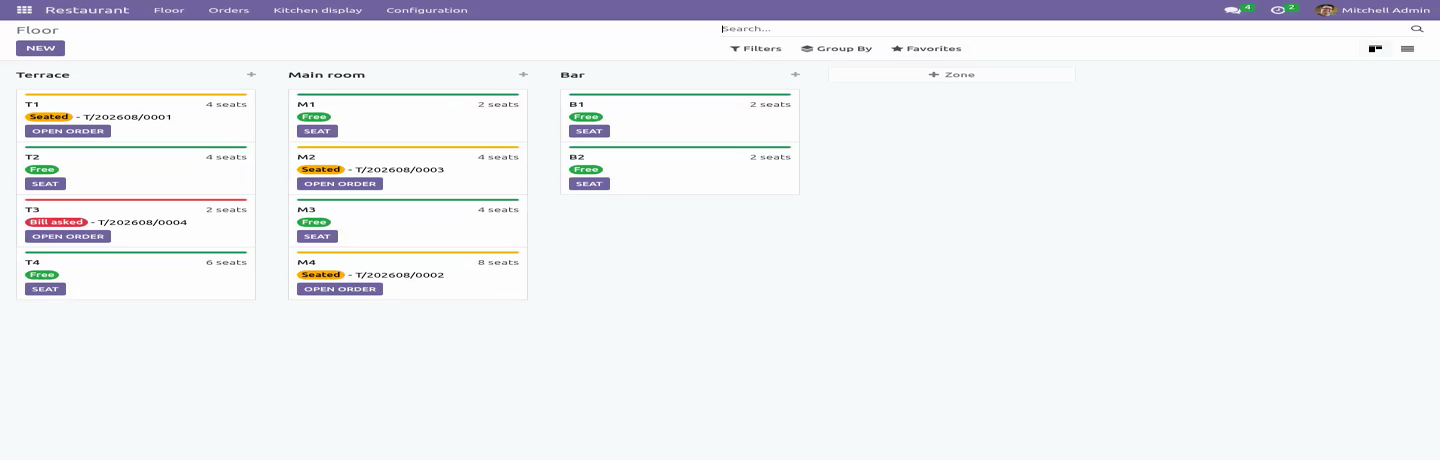
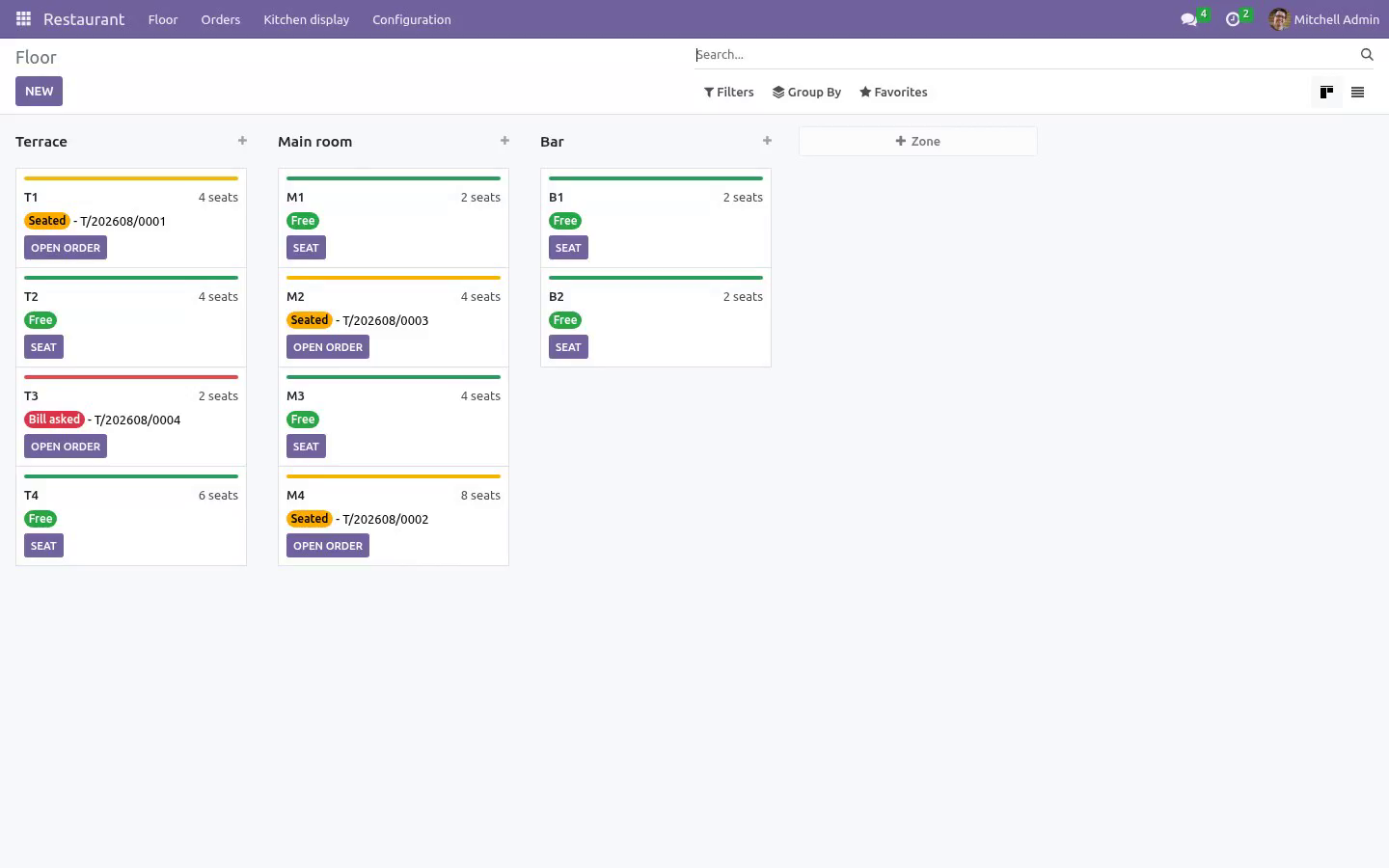
Tables grouped by zone, coloured free / seated / bill asked.
Seating a table opens its tab; the table reads free again the moment that tab is closed. The state is derived from the order, never typed twice, so the floor plan cannot drift while the room is full.
One table, one open tab - guaranteed by a partial unique index in the database, not by a check that two waiters tapping Seat in the same second both pass. Seating takes the table row first, so the second host queues instead of creating a tab whose food is served and never billed.
Seating records the party, not the table: two people at a four-top is two covers, and covers are the denominator of the one KPI every restaurant runs on.
Takeaway and delivery need no table. A delivery order must carry the platform reference - the number the rider quotes and the complaint email quotes - before it can be saved.
Firing courses
Items sit as Ordered until a waiter fires the course; only then do they appear on a screen. Starters and mains are fired separately, which is the whole reason a table's plates arrive together. Firing stamps the time, and that stamp is what the pass counts from.
Each item carries its station, its prep time, the guest's note and its allergens - the one field nobody may guess at. They are all printed on the ticket.
The kitchen display
A client action, not a printer:
Live tickets, oldest first, one filter per station so a gin and tonic never queues behind a roast.
A ticket past its prep time turns red; one over ten minutes turns amber.
One tap moves an item along the pass (ordered - cooking - ready). The Ready button bumps the whole ticket off the screen.
It refreshes itself every ten seconds. Nobody taps reload with wet hands.
If the network drops, the screen keeps the last tickets and says it is stale rather than going blank in the middle of service.
A ticket older than twelve hours leaves the pass and is counted separately, so yesterday never clogs tonight.
A voided item stays on the screen, struck through and marked do not cook, for five minutes. Food does not silently vanish from under the person cooking it.
A bump can be recalled: tapping a ticket that is on the pass puts it back into cooking, because a mis-tap on a touchscreen is not a decision.
The screen is fed by one method that hands a cook exactly what a cook needs. The kitchen has no access to orders or order lines at all, so "never sees a price" is enforced by the ACL, not by a manual. In a franchise each ticket carries its restaurant's name.
Billing
One bill for the table, or split it: tick the items that belong to this bill and invoice them; the rest stay open for the next payer, as many times as the table needs. A tick belongs to the waiter who made it, so six people can work one table without billing each other's selections.
Every invoice line remembers which item it billed. Cancelling or deleting one split bill therefore releases exactly that bill's food and never the steak another payer has already settled. Resetting an invoice to draft releases nothing, because a draft invoice still carries the lines and will be posted.
The floor raises and posts the bill without being given the accounts: the module does the accounting with its own rights, behind its own permission check, so a waiter never needs account.group_account_invoice and never sees another customer's invoice. The manager does have it, because somebody has to be able to credit a bill.
Posted is not paid. Money not in is driven by the payment state of the live bills, so a delivery platform's or an account customer's tab stops counting as collected the moment it is printed. A tab nobody ordered anything on is not a debt and leaves the list.
A credit note gives the food back. Crediting a bill leaves the original posted and reversed; the tab reads it as money handed back, becomes billable again, and can be cancelled - instead of standing fully settled and permanently un-billable.
Tax is mapped through the tab's fiscal position - eat in, take away, an exempt customer - where the line is priced, so the total the waiter quotes and the total on the bill are the same arithmetic. In a franchise, only the serving company's taxes go on the line.
A walk-in bill is addressed to a walk-in guest you configure, never to your own company, so the receivable ledger and the partner VAT listing stay about customers.
An item on a bill cannot be re-priced, re-quantified or voided; an item the kitchen has already cooked can be voided but not turned into another dish. The food exists whatever the screen says.
A tab cannot be closed while food is with the kitchen or on the pass, nor while anything on it is unsettled. A tab that will never be paid is written off by a manager, on purpose and in writing.
A service day runs from an hour you set (5am by default) on a timezone you set on the company, so a bill printed at 00:20 belongs to the night that began at 20:00 - and the answer is the same whoever prints it. Moving the hour does not rewrite last year's takings.
The status of a tab is the result of an action, not a column: writing it directly by import or over RPC is refused, so a delivery-platform connector cannot close a table with food still on the pass.
Only a manager can write a tab off, and the server says so - not only the button. Deleting an ordered item is refused outright: void is the only exit for food that exists.
End of service
A scheduled job closes tabs whose items are all on posted invoices, so the floor plan is true in the morning. It selects by service day on each company's own clock - not by hours since opening, which at 04:30 skips every dinner tab opened at 19:30 and leaves eight tables reading seated every morning. A tab that still owes money - including one billed only on an invoice nobody posted - is never closed silently: it gets a note and a to-do, filed against somebody who still works here and is never OdooBot, once, not one per night for ever. Closing the tab clears it.
Roles
Kitchen works the pass: it sees live tickets and marks them ready. It has no read or write access to an order or an order line, so a cook cannot reach a price from the interface or from the browser console. Waiter seats guests, takes orders, fires courses and prints the bill - and cannot delete an ordered item, write a tab off, or reach the ledger. Restaurant manager configures the menu, the zones and the tables, carries the invoicing group so the bills can be read and credited, and is the only role that can write a tab off. The bookkeeper needs none of the restaurant groups to cancel, reset or delete a restaurant invoice.
Community only
Depends on product and account - both Community - and on no POS module. Tested on 16.0, 17.0, 18.0, 19.0 and 20.0.
How we make sure it works
Before every release, 102 automated checks run against this app on Odoo 16, 17, 18, 19 and 20. Among them:
A fired item cannot be deleted even by a manager.
A posted bill nobody paid is still money not in.
A tab where nobody ordered is not money not in.
An invoiced line cannot be voided by a raw write.
A tab cannot be cancelled by writing the state.
The complete list is in the source you receive.
What it does not do
Said before you buy, because it is the half that decides whether the app fits:
Type a table's state twice: it is derived from the order, so the floor plan cannot drift.
Send an item to the kitchen before a waiter fires the course.
Install
Copy bambooforge_restaurant into your addons path and update the app list, or install the ZIP from the Odoo Apps Store.
Install Restaurant Management & Kitchen Display (KDS).
Open Restaurant - its menus are Floor, Orders, Kitchen display, Configuration.
Questions people ask
- Which Odoo versions does it run on?
Odoo 16.0, 17.0, 18.0, 19.0, 20.0, on the series you buy it for; each series is its own listing.
- Community or Enterprise?
Both. It needs no Enterprise app.
- What does it need?
The standard Discuss, Invoicing, Products, Settings apps. No extra Python package.
- Where does it show up?
Under the Restaurant menu (Floor, Orders, Kitchen display, Configuration).
- Does anything leave my server?
No. It makes no call outside your Odoo server: no telemetry, no licence check, no third-party service.
- What happens if I uninstall it?
Odoo drops the app's own tables and fields; the standard records it worked on (contacts, orders, products) stay as they are.