 BambooForge Labs
Related Documents Chain: Order, Delivery, Invoice, Payment
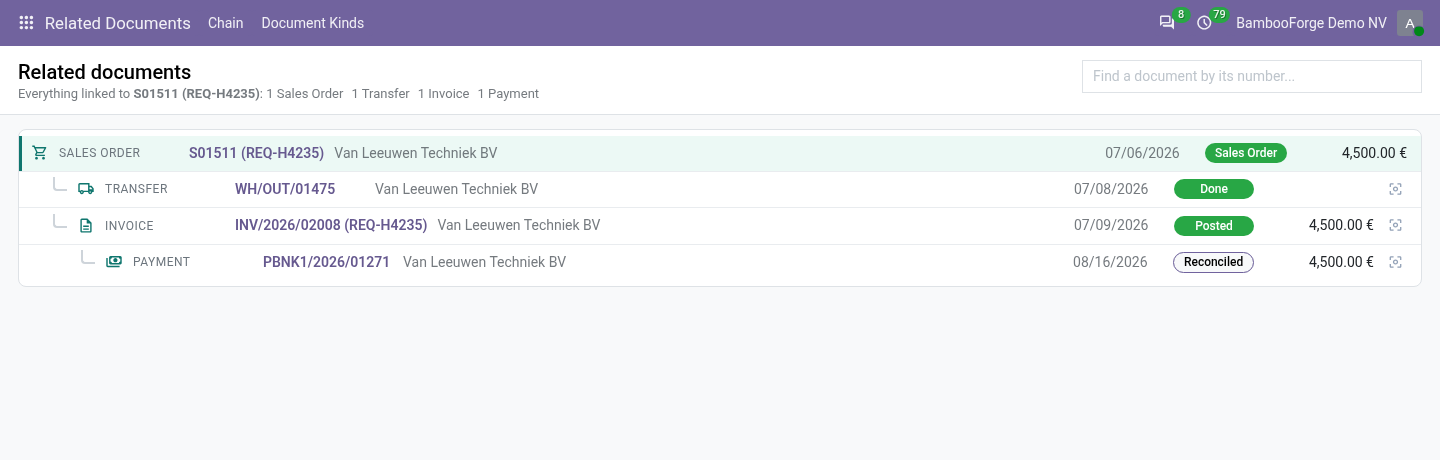
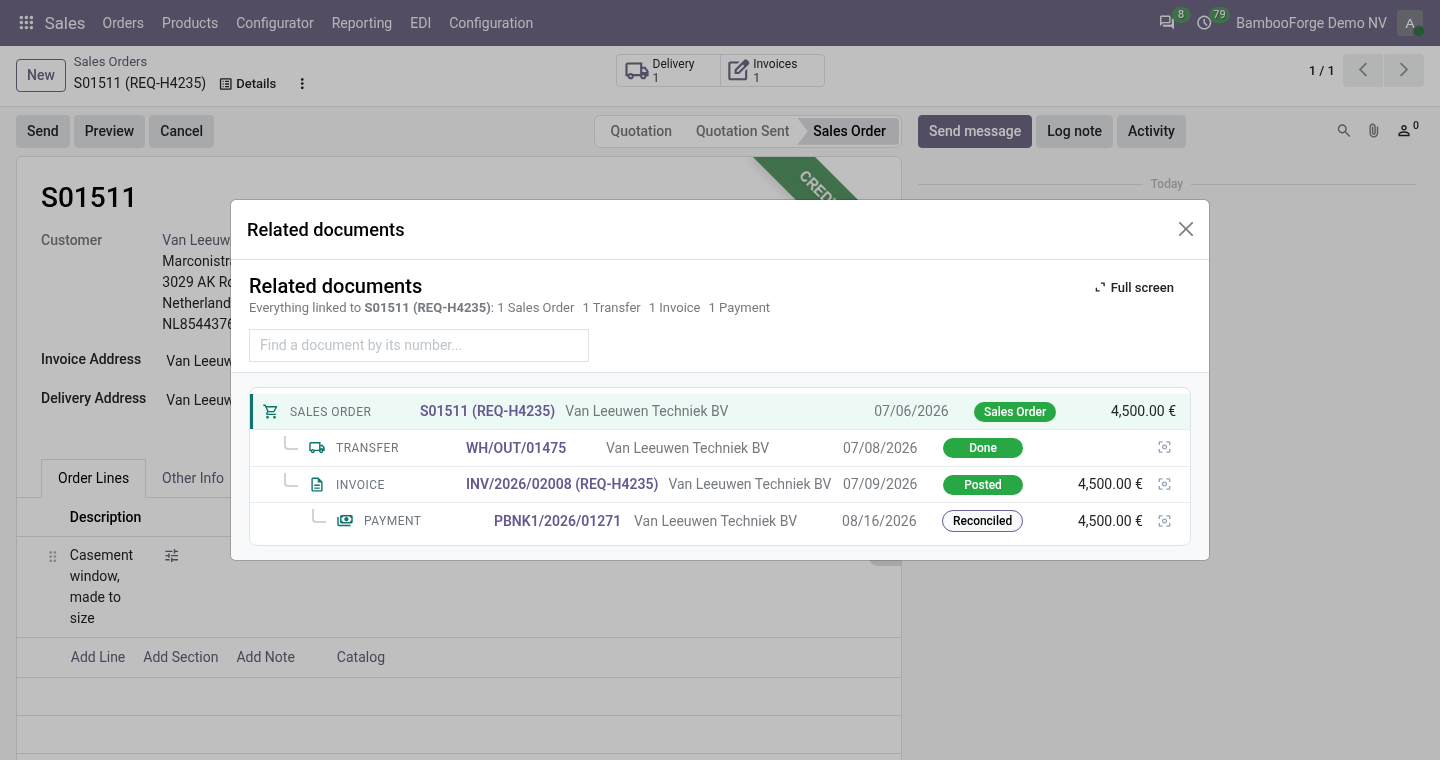
One click on any document shows everything linked to it as a tree - the opportunity, the quotation, the order, its deliveries and manufacturing orders, the invoices, the payments - with state, date, contact and amount, each one a click away. Works on sales, purchase, stock, manufacturing, accounting, POS, repair, project.
Available for Odoo 16.0, Odoo 17.0, Odoo 18.0, Odoo 19.0, Odoo 20.0. Technical name bambooforge_related_documents.
Transcript of the walkthrough (Odoo 20)
Related Documents Chain: Order, Delivery, Invoice, Payment. One click on any document shows everything linked to it as a tree - the opportunity, the quotation, the order, its deliveries and manufacturing orders, the invoices, the payments - with state, date, contact and amount, each one a click away. Works on sales, purchase, stock, manufacturing, accounting, POS, repair, project. Odoo joins its documents one hop at a time: the order has a button to its deliveries, the delivery a button back to the order, the invoice a button to its payments.
To see the opportunity, the quotation, the order, the two deliveries, the invoice and the payment together, you open six forms and keep the numbers in your head. This app follows the links for you and lays the whole chain out as a tree. In the next few minutes: related documents chain: order, delivery, invoice, payment, then what you get, then how the chain is found, then your own kinds of documents, then uninstalling. Then what this app deliberately does not do, so you can tell before you buy whether it fits.
Everything lives under Related Documents then Chain then Document Kinds. Related Documents Chain: Order, Delivery, Invoice, Payment. Odoo joins its documents one hop at a time: the order has a button to its deliveries, the delivery a button back to the order, the invoice a button to its payments. To see the opportunity, the quotation, the order, the two deliveries, the invoice and the payment together, you open six forms and keep the numbers in your head.
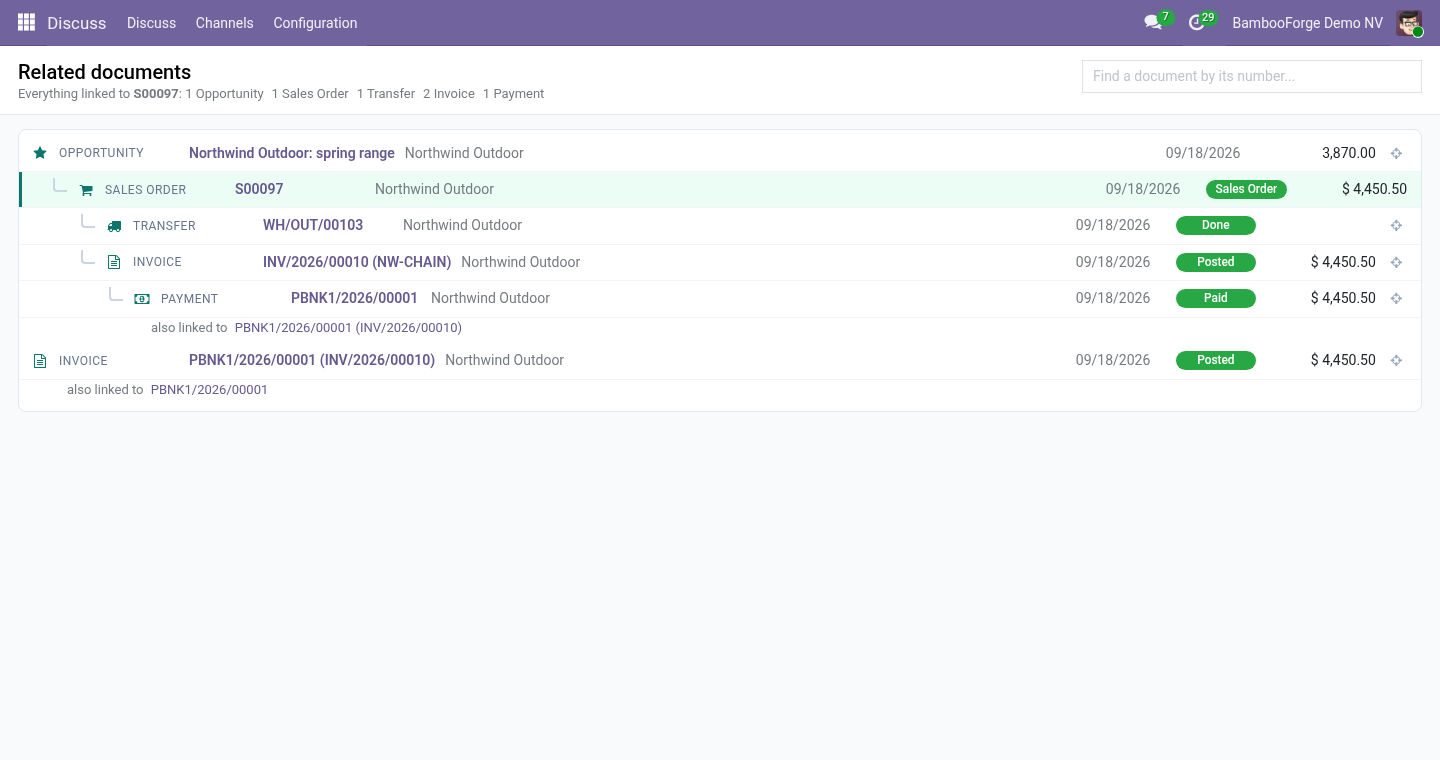
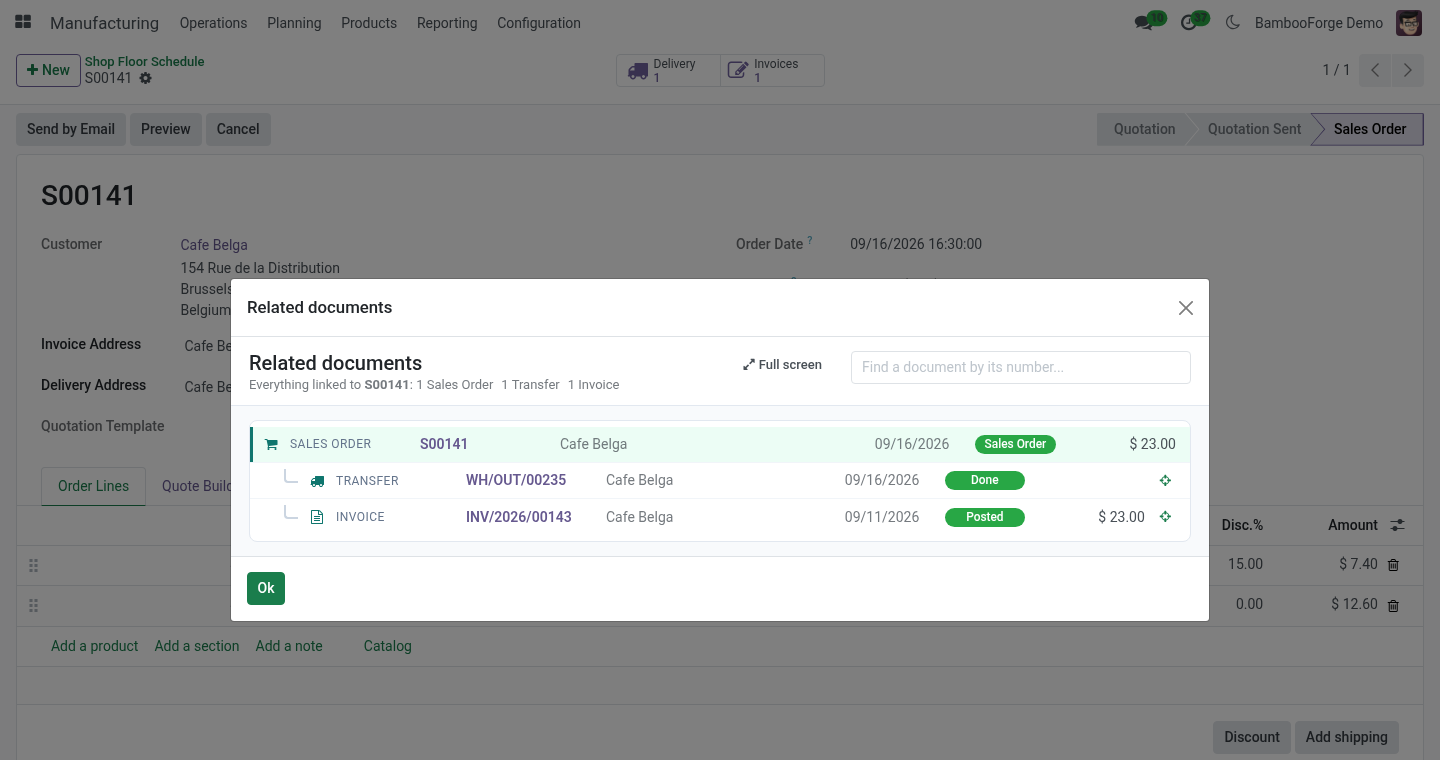
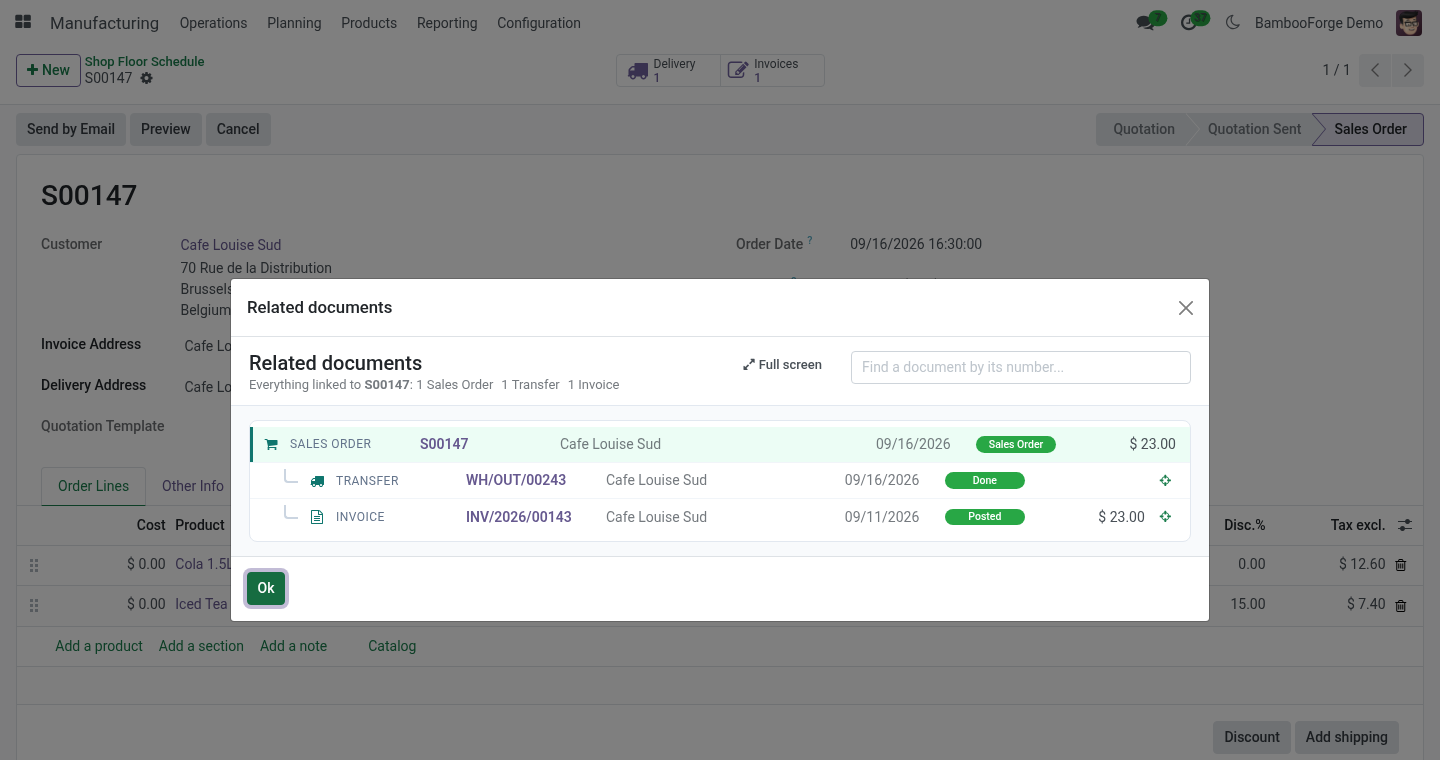
This app follows the links for you and lays the whole chain out as a tree. What you get Action ▸ Related documents on any sales order, purchase order, transfer, manufacturing order, invoice, payment, bank line, POS order, repair, task, subscription or opportunity - in a dialog over the form, one click from full screen. Your own kinds of documents: any other model - a rental, a warranty claim, an app of your own - joins the chain with its place in it; a built-in kind can be relabelled or switched off. A tree, upstream at the top: what came first, what it produced, what that produced.
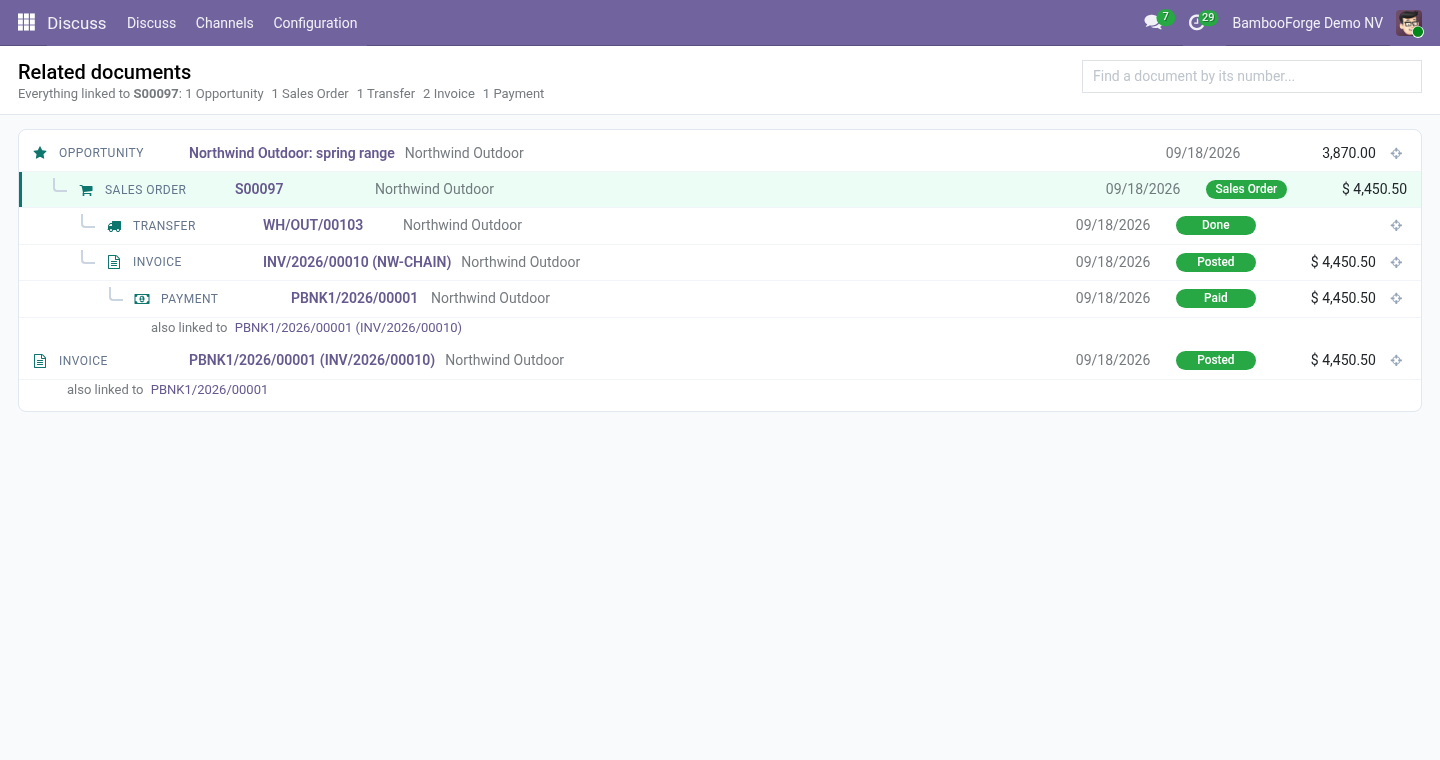
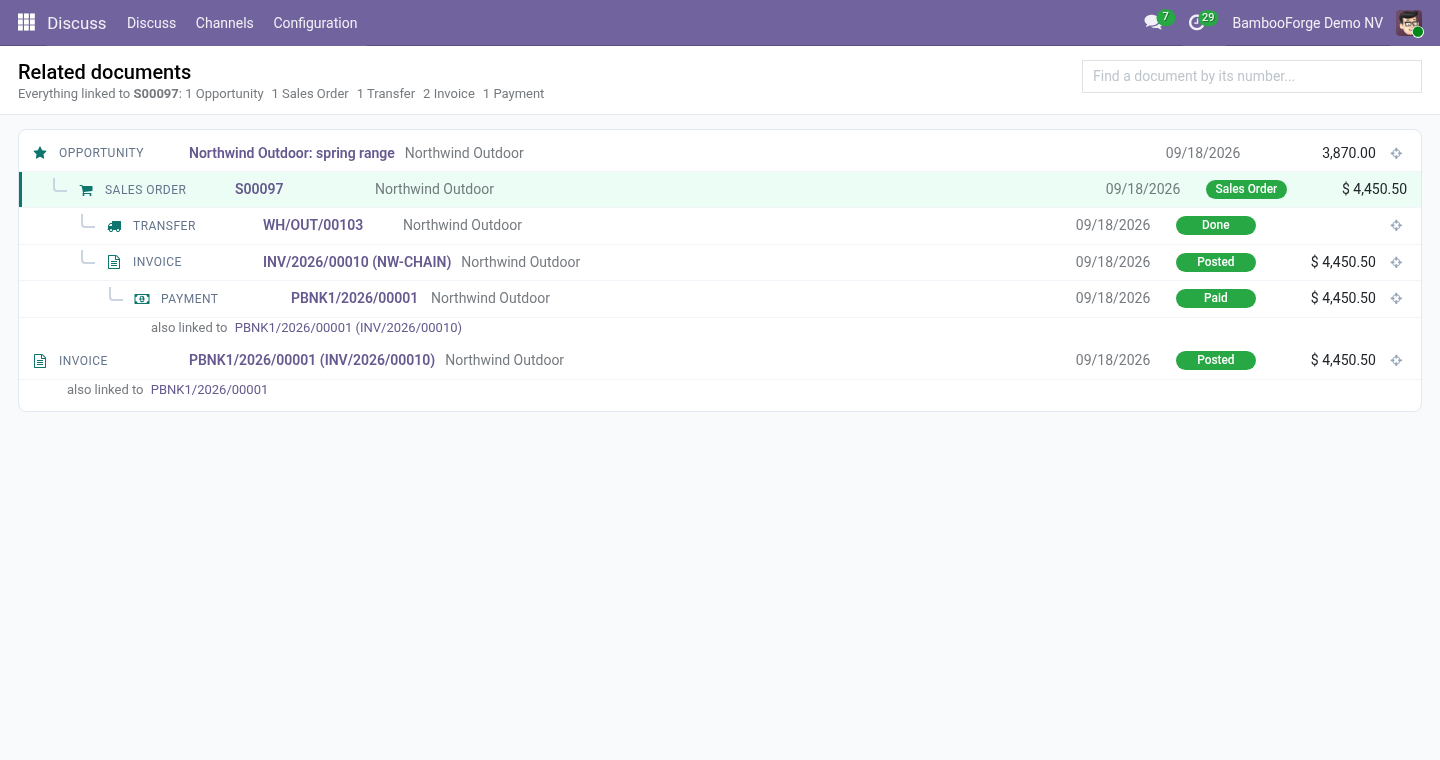
Every line shows the kind of document, its number, the contact, the date, the state and the amount, and opens it in one click. A document linked to a second branch says also linked to. A crosshair on any line shows that document's own chain. A search box that finds any document by its number.
Your access, exactly: what you may not read is not in the tree. Nothing to configure to start. It depends on the web client only and reads the links Odoo already keeps. How the chain is found.
Starting from the document you are on, the app reads every field that points at another document - many2one, one2many and many2many, in both directions - and repeats from each document found, until nothing new appears. It also reads two links Odoo keeps in code rather than in a field: the payments reconciled with an invoice, and the purchase orders raised for a sales order. Documents are ranked by where they come in the life of a sale or a purchase: opportunity, then order, then transfer / manufacturing order / task, then invoice, then payment. A document's parent in the tree is the nearest document upstream of it; documents of the same rank that are linked - two orders of one opportunity, a return of a delivery - are listed side by side and say also linked to.
Your own kinds of documents. Related Documents ▸ Document Kinds (administrators): add a line, pick the document (the model), what one of them is called in the chain, its place in the chain - 0 for what comes first, like an opportunity; 1 an order; 2 a delivery, a job, a task; 3 an invoice; 4 a payment - and an icon (a Font Awesome name such as fa-wrench). The chain now follows every link to and from that model, and its forms get Action ▸ Related documents at once. A line for a built-in kind replaces its label, place and icon; switch a line off to take that kind out of the chain.
Uninstalling. Uninstalling removes the Related documents entries from the Action menus and the app's own menu. It stores nothing else. 20.0.1.1.0 Built for Odoo 20: record rules and access rights rewritten onto Odoo 20's single ir.access model, the screens rebuilt on Owl 3, and every icon moved to the icon set Odoo 20 ships.
20.0.1.1.0 Document Kinds: any model joins the chain; built-in kinds relabelled, re-ranked or switched off. The Action menu opens the chain in a dialog, with a full-screen button. 20.0.1.0.0 How we make sure it works. Before every release, 9 automated checks run against this app on Odoo 16, 17, 18, 19 and 20.
Among them: Node carries what a reader needs. Unknown or missing document. Long chains are cut and say so. The action menu opens a dialog.
The whole chain from any link. The complete list is in the source you receive. Now the part most videos leave out: what this does not do. A chain is cut at 120 documents and the screen says so; the search box reaches any document directly.
Links kept only in a text field - an origin or source document written as a name - are not followed; only real relations are. A kind of document follows only the links its model declares; a link kept in a text field is not one. The complete manual is at docs dot bambooforge dot dev, the demo database is linked from the store page, and support answers within twenty-four hours. Links are in the description.
Transcript of the walkthrough (Odoo 19)
Related Documents Chain: Order, Delivery, Invoice, Payment. One click on any document shows everything linked to it as a tree - the opportunity, the quotation, the order, its deliveries and manufacturing orders, the invoices, the payments - with state, date, contact and amount, each one a click away. Works on sales, purchase, stock, manufacturing, accounting, POS, repair, project. Odoo joins its documents one hop at a time: the order has a button to its deliveries, the delivery a button back to the order, the invoice a button to its payments.
To see the opportunity, the quotation, the order, the two deliveries, the invoice and the payment together, you open six forms and keep the numbers in your head. This app follows the links for you and lays the whole chain out as a tree. In the next few minutes: related documents chain: order, delivery, invoice, payment, then what you get, then how the chain is found, then your own kinds of documents, then uninstalling. Then what this app deliberately does not do, so you can tell before you buy whether it fits.
Everything lives under Related Documents then Chain then Document Kinds. Related Documents Chain: Order, Delivery, Invoice, Payment. Odoo joins its documents one hop at a time: the order has a button to its deliveries, the delivery a button back to the order, the invoice a button to its payments. To see the opportunity, the quotation, the order, the two deliveries, the invoice and the payment together, you open six forms and keep the numbers in your head.
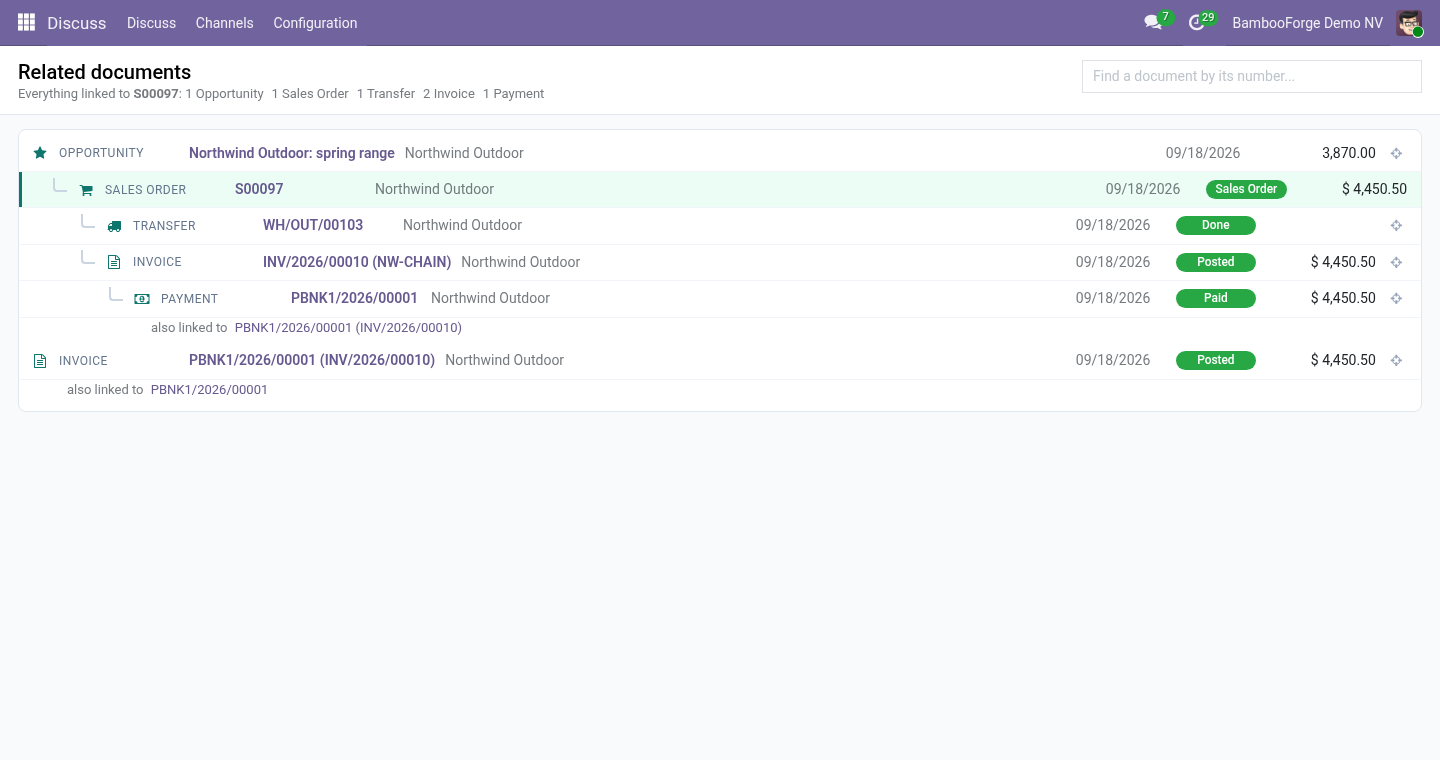
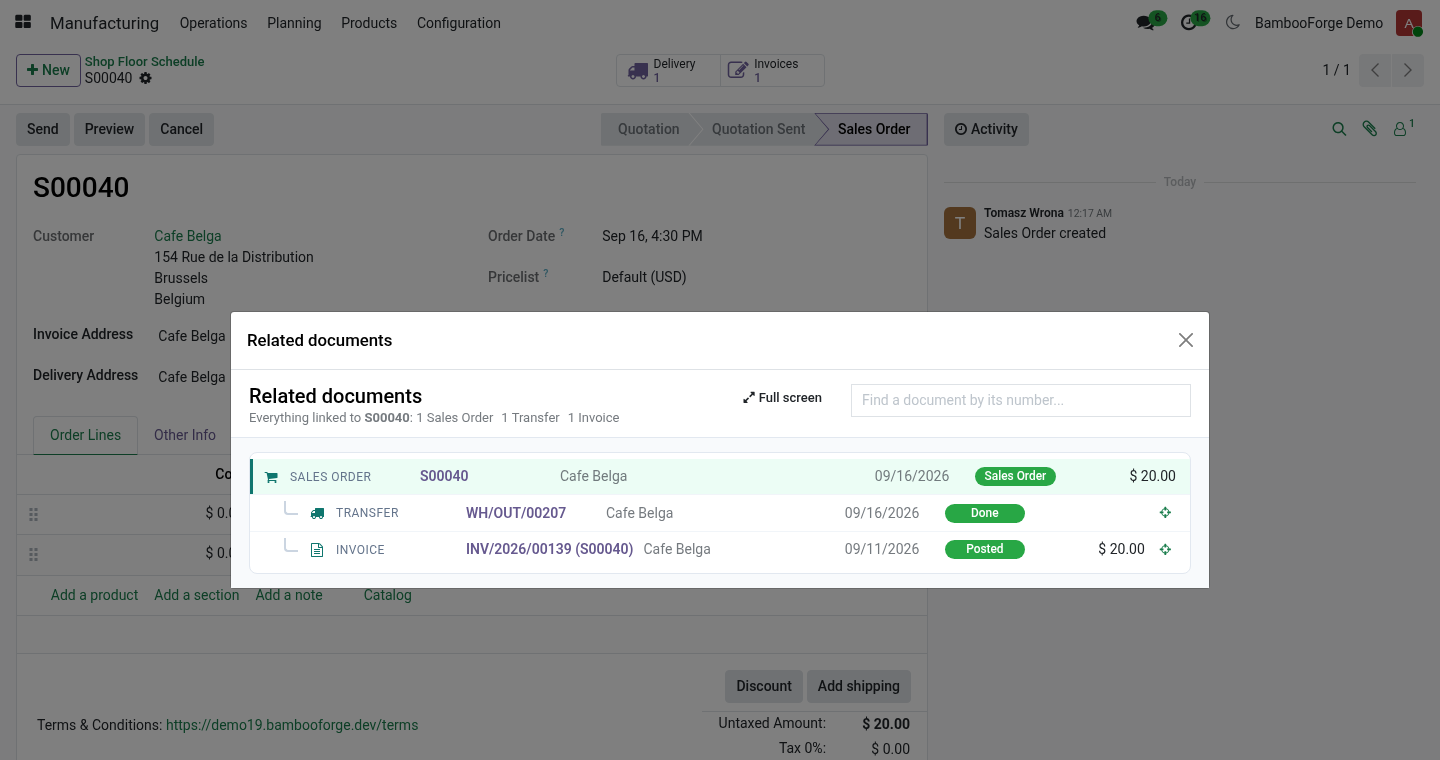
This app follows the links for you and lays the whole chain out as a tree. What you get Action ▸ Related documents on any sales order, purchase order, transfer, manufacturing order, invoice, payment, bank line, POS order, repair, task, subscription or opportunity - in a dialog over the form, one click from full screen. Your own kinds of documents: any other model - a rental, a warranty claim, an app of your own - joins the chain with its place in it; a built-in kind can be relabelled or switched off. A tree, upstream at the top: what came first, what it produced, what that produced.
Every line shows the kind of document, its number, the contact, the date, the state and the amount, and opens it in one click. A document linked to a second branch says also linked to. A crosshair on any line shows that document's own chain. A search box that finds any document by its number.
Your access, exactly: what you may not read is not in the tree. Nothing to configure to start. It depends on the web client only and reads the links Odoo already keeps. How the chain is found.
Starting from the document you are on, the app reads every field that points at another document - many2one, one2many and many2many, in both directions - and repeats from each document found, until nothing new appears. It also reads two links Odoo keeps in code rather than in a field: the payments reconciled with an invoice, and the purchase orders raised for a sales order. Documents are ranked by where they come in the life of a sale or a purchase: opportunity, then order, then transfer / manufacturing order / task, then invoice, then payment. A document's parent in the tree is the nearest document upstream of it; documents of the same rank that are linked - two orders of one opportunity, a return of a delivery - are listed side by side and say also linked to.
Your own kinds of documents. Related Documents ▸ Document Kinds (administrators): add a line, pick the document (the model), what one of them is called in the chain, its place in the chain - 0 for what comes first, like an opportunity; 1 an order; 2 a delivery, a job, a task; 3 an invoice; 4 a payment - and an icon (a Font Awesome name such as fa-wrench). The chain now follows every link to and from that model, and its forms get Action ▸ Related documents at once. A line for a built-in kind replaces its label, place and icon; switch a line off to take that kind out of the chain.
Uninstalling. Uninstalling removes the Related documents entries from the Action menus and the app's own menu. It stores nothing else. 19.0.1.1.0 Document Kinds: any model joins the chain; built-in kinds relabelled, re-ranked or switched off.
The Action menu opens the chain in a dialog, with a full-screen button. 19.0.1.0.0 How we make sure it works. Before every release, 9 automated checks run against this app on Odoo 16, 17, 18 and 19. Among them: Node carries what a reader needs.
Unknown or missing document. Long chains are cut and say so. The action menu opens a dialog. The whole chain from any link.
The complete list is in the source you receive. Now the part most videos leave out: what this does not do. A chain is cut at 120 documents and the screen says so; the search box reaches any document directly. Links kept only in a text field - an origin or source document written as a name - are not followed; only real relations are.
A kind of document follows only the links its model declares; a link kept in a text field is not one. The complete manual is at docs dot bambooforge dot dev, the demo database is linked from the store page, and support answers within twenty-four hours. Links are in the description.
Transcript of the walkthrough (Odoo 18)
Related Documents Chain: Order, Delivery, Invoice, Payment. One click on any document shows everything linked to it as a tree - the opportunity, the quotation, the order, its deliveries and manufacturing orders, the invoices, the payments - with state, date, contact and amount, each one a click away. Works on sales, purchase, stock, manufacturing, accounting, POS, repair, project. Odoo joins its documents one hop at a time: the order has a button to its deliveries, the delivery a button back to the order, the invoice a button to its payments.
To see the opportunity, the quotation, the order, the two deliveries, the invoice and the payment together, you open six forms and keep the numbers in your head. This app follows the links for you and lays the whole chain out as a tree. In the next few minutes: related documents chain: order, delivery, invoice, payment, then what you get, then how the chain is found, then your own kinds of documents, then uninstalling. Then what this app deliberately does not do, so you can tell before you buy whether it fits.
Everything lives under Related Documents then Chain then Document Kinds. Related Documents Chain: Order, Delivery, Invoice, Payment. Odoo joins its documents one hop at a time: the order has a button to its deliveries, the delivery a button back to the order, the invoice a button to its payments. To see the opportunity, the quotation, the order, the two deliveries, the invoice and the payment together, you open six forms and keep the numbers in your head.
This app follows the links for you and lays the whole chain out as a tree. What you get Action ▸ Related documents on any sales order, purchase order, transfer, manufacturing order, invoice, payment, bank line, POS order, repair, task, subscription or opportunity - in a dialog over the form, one click from full screen. Your own kinds of documents: any other model - a rental, a warranty claim, an app of your own - joins the chain with its place in it; a built-in kind can be relabelled or switched off. A tree, upstream at the top: what came first, what it produced, what that produced.
Every line shows the kind of document, its number, the contact, the date, the state and the amount, and opens it in one click. A document linked to a second branch says also linked to. A crosshair on any line shows that document's own chain. A search box that finds any document by its number.
Your access, exactly: what you may not read is not in the tree. Nothing to configure to start. It depends on the web client only and reads the links Odoo already keeps. How the chain is found.
Starting from the document you are on, the app reads every field that points at another document - many2one, one2many and many2many, in both directions - and repeats from each document found, until nothing new appears. It also reads two links Odoo keeps in code rather than in a field: the payments reconciled with an invoice, and the purchase orders raised for a sales order. Documents are ranked by where they come in the life of a sale or a purchase: opportunity, then order, then transfer / manufacturing order / task, then invoice, then payment. A document's parent in the tree is the nearest document upstream of it; documents of the same rank that are linked - two orders of one opportunity, a return of a delivery - are listed side by side and say also linked to.
Your own kinds of documents. Related Documents ▸ Document Kinds (administrators): add a line, pick the document (the model), what one of them is called in the chain, its place in the chain - 0 for what comes first, like an opportunity; 1 an order; 2 a delivery, a job, a task; 3 an invoice; 4 a payment - and an icon (a Font Awesome name such as fa-wrench). The chain now follows every link to and from that model, and its forms get Action ▸ Related documents at once. A line for a built-in kind replaces its label, place and icon; switch a line off to take that kind out of the chain.
Uninstalling. Uninstalling removes the Related documents entries from the Action menus and the app's own menu. It stores nothing else. 18.0.1.1.0 Document Kinds: any model joins the chain; built-in kinds relabelled, re-ranked or switched off.
The Action menu opens the chain in a dialog, with a full-screen button. 18.0.1.0.0 How we make sure it works. Before every release, 9 automated checks run against this app on Odoo 16, 17, 18 and 19. Among them: Node carries what a reader needs.
Unknown or missing document. Long chains are cut and say so. The action menu opens a dialog. The whole chain from any link.
The complete list is in the source you receive. Now the part most videos leave out: what this does not do. A chain is cut at 120 documents and the screen says so; the search box reaches any document directly. Links kept only in a text field - an origin or source document written as a name - are not followed; only real relations are.
A kind of document follows only the links its model declares; a link kept in a text field is not one. The complete manual is at docs dot bambooforge dot dev, the demo database is linked from the store page, and support answers within twenty-four hours. Links are in the description.
Transcript of the walkthrough (Odoo 17)
Related Documents Chain: Order, Delivery, Invoice, Payment. One click on any document shows everything linked to it as a tree - the opportunity, the quotation, the order, its deliveries and manufacturing orders, the invoices, the payments - with state, date, contact and amount, each one a click away. Works on sales, purchase, stock, manufacturing, accounting, POS, repair, project. Odoo joins its documents one hop at a time: the order has a button to its deliveries, the delivery a button back to the order, the invoice a button to its payments.
To see the opportunity, the quotation, the order, the two deliveries, the invoice and the payment together, you open six forms and keep the numbers in your head. This app follows the links for you and lays the whole chain out as a tree. In the next few minutes: related documents chain: order, delivery, invoice, payment, then what you get, then how the chain is found, then your own kinds of documents, then uninstalling. Then what this app deliberately does not do, so you can tell before you buy whether it fits.
Everything lives under Related Documents then Chain then Document Kinds. Related Documents Chain: Order, Delivery, Invoice, Payment. Odoo joins its documents one hop at a time: the order has a button to its deliveries, the delivery a button back to the order, the invoice a button to its payments. To see the opportunity, the quotation, the order, the two deliveries, the invoice and the payment together, you open six forms and keep the numbers in your head.
This app follows the links for you and lays the whole chain out as a tree. What you get Action ▸ Related documents on any sales order, purchase order, transfer, manufacturing order, invoice, payment, bank line, POS order, repair, task, subscription or opportunity - in a dialog over the form, one click from full screen. Your own kinds of documents: any other model - a rental, a warranty claim, an app of your own - joins the chain with its place in it; a built-in kind can be relabelled or switched off. A tree, upstream at the top: what came first, what it produced, what that produced.
Every line shows the kind of document, its number, the contact, the date, the state and the amount, and opens it in one click. A document linked to a second branch says also linked to. A crosshair on any line shows that document's own chain. A search box that finds any document by its number.
Your access, exactly: what you may not read is not in the tree. Nothing to configure to start. It depends on the web client only and reads the links Odoo already keeps. How the chain is found.
Starting from the document you are on, the app reads every field that points at another document - many2one, one2many and many2many, in both directions - and repeats from each document found, until nothing new appears. It also reads two links Odoo keeps in code rather than in a field: the payments reconciled with an invoice, and the purchase orders raised for a sales order. Documents are ranked by where they come in the life of a sale or a purchase: opportunity, then order, then transfer / manufacturing order / task, then invoice, then payment. A document's parent in the tree is the nearest document upstream of it; documents of the same rank that are linked - two orders of one opportunity, a return of a delivery - are listed side by side and say also linked to.
Your own kinds of documents. Related Documents ▸ Document Kinds (administrators): add a line, pick the document (the model), what one of them is called in the chain, its place in the chain - 0 for what comes first, like an opportunity; 1 an order; 2 a delivery, a job, a task; 3 an invoice; 4 a payment - and an icon (a Font Awesome name such as fa-wrench). The chain now follows every link to and from that model, and its forms get Action ▸ Related documents at once. A line for a built-in kind replaces its label, place and icon; switch a line off to take that kind out of the chain.
Uninstalling. Uninstalling removes the Related documents entries from the Action menus and the app's own menu. It stores nothing else. 17.0.1.1.0 Document Kinds: any model joins the chain; built-in kinds relabelled, re-ranked or switched off.
The Action menu opens the chain in a dialog, with a full-screen button. 17.0.1.0.0 How we make sure it works. Before every release, 9 automated checks run against this app on Odoo 16, 17, 18 and 19. Among them: Node carries what a reader needs.
Unknown or missing document. Long chains are cut and say so. The action menu opens a dialog. The whole chain from any link.
The complete list is in the source you receive. Now the part most videos leave out: what this does not do. A chain is cut at 120 documents and the screen says so; the search box reaches any document directly. Links kept only in a text field - an origin or source document written as a name - are not followed; only real relations are.
A kind of document follows only the links its model declares; a link kept in a text field is not one. The complete manual is at docs dot bambooforge dot dev, the demo database is linked from the store page, and support answers within twenty-four hours. Links are in the description.
Transcript of the walkthrough (Odoo 16)
Related Documents Chain: Order, Delivery, Invoice, Payment. One click on any document shows everything linked to it as a tree - the opportunity, the quotation, the order, its deliveries and manufacturing orders, the invoices, the payments - with state, date, contact and amount, each one a click away. Works on sales, purchase, stock, manufacturing, accounting, POS, repair, project. Odoo joins its documents one hop at a time: the order has a button to its deliveries, the delivery a button back to the order, the invoice a button to its payments.
To see the opportunity, the quotation, the order, the two deliveries, the invoice and the payment together, you open six forms and keep the numbers in your head. This app follows the links for you and lays the whole chain out as a tree. In the next few minutes: related documents chain: order, delivery, invoice, payment, then what you get, then how the chain is found, then your own kinds of documents, then uninstalling. Then what this app deliberately does not do, so you can tell before you buy whether it fits.
Everything lives under Related Documents then Chain then Document Kinds. Related Documents Chain: Order, Delivery, Invoice, Payment. Odoo joins its documents one hop at a time: the order has a button to its deliveries, the delivery a button back to the order, the invoice a button to its payments. To see the opportunity, the quotation, the order, the two deliveries, the invoice and the payment together, you open six forms and keep the numbers in your head.
This app follows the links for you and lays the whole chain out as a tree. What you get Action ▸ Related documents on any sales order, purchase order, transfer, manufacturing order, invoice, payment, bank line, POS order, repair, task, subscription or opportunity - in a dialog over the form, one click from full screen. Your own kinds of documents: any other model - a rental, a warranty claim, an app of your own - joins the chain with its place in it; a built-in kind can be relabelled or switched off. A tree, upstream at the top: what came first, what it produced, what that produced.
Every line shows the kind of document, its number, the contact, the date, the state and the amount, and opens it in one click. A document linked to a second branch says also linked to. A crosshair on any line shows that document's own chain. A search box that finds any document by its number.
Your access, exactly: what you may not read is not in the tree. Nothing to configure to start. It depends on the web client only and reads the links Odoo already keeps. How the chain is found.
Starting from the document you are on, the app reads every field that points at another document - many2one, one2many and many2many, in both directions - and repeats from each document found, until nothing new appears. It also reads two links Odoo keeps in code rather than in a field: the payments reconciled with an invoice, and the purchase orders raised for a sales order. Documents are ranked by where they come in the life of a sale or a purchase: opportunity, then order, then transfer / manufacturing order / task, then invoice, then payment. A document's parent in the tree is the nearest document upstream of it; documents of the same rank that are linked - two orders of one opportunity, a return of a delivery - are listed side by side and say also linked to.
Your own kinds of documents. Related Documents ▸ Document Kinds (administrators): add a line, pick the document (the model), what one of them is called in the chain, its place in the chain - 0 for what comes first, like an opportunity; 1 an order; 2 a delivery, a job, a task; 3 an invoice; 4 a payment - and an icon (a Font Awesome name such as fa-wrench). The chain now follows every link to and from that model, and its forms get Action ▸ Related documents at once. A line for a built-in kind replaces its label, place and icon; switch a line off to take that kind out of the chain.
Uninstalling. Uninstalling removes the Related documents entries from the Action menus and the app's own menu. It stores nothing else. 16.0.1.1.0 Document Kinds: any model joins the chain; built-in kinds relabelled, re-ranked or switched off.
The Action menu opens the chain in a dialog, with a full-screen button. 16.0.1.0.0 How we make sure it works. Before every release, 9 automated checks run against this app on Odoo 16, 17, 18 and 19. Among them: Node carries what a reader needs.
Unknown or missing document. Long chains are cut and say so. The action menu opens a dialog. The whole chain from any link.
The complete list is in the source you receive. Now the part most videos leave out: what this does not do. A chain is cut at 120 documents and the screen says so; the search box reaches any document directly. Links kept only in a text field - an origin or source document written as a name - are not followed; only real relations are.
A kind of document follows only the links its model declares; a link kept in a text field is not one. The complete manual is at docs dot bambooforge dot dev, the demo database is linked from the store page, and support answers within twenty-four hours. Links are in the description.
Key facts
- What it is
- One click on any document shows everything linked to it as a tree - the opportunity, the quotation, the order, its deliveries and manufacturing orders, the invoices, the payments - with state, date, contact and amount, each one a click away. Works on sales, purchase, stock, manufacturing, accounting, POS, repair, project.
- For
- Productivity
- Odoo versions
- 16.0, 17.0, 18.0, 19.0, 20.0 - Community and Enterprise
- Runs on
- Odoo.sh or Odoo you host yourself - not Odoo Online, which accepts no third-party apps
- Price
- 59 EUR, one-time, on the Odoo Apps Store
- Technical name
- bambooforge_related_documents
- Not for
- A chain is cut at 120 documents and the screen says so; the search box reaches any document directly.; Links kept only in a text field - an origin or source document written as a name - are not followed; only real relations are.; A kind of document follows only the links its model declares; a link kept in a text field is not one.
- Manual last updated
- 2026-10-15
Related Documents Chain: Order, Delivery, Invoice, Payment
Odoo joins its documents one hop at a time: the order has a button to its deliveries, the delivery a button back to the order, the invoice a button to its payments. To see the opportunity, the quotation, the order, the two deliveries, the invoice and the payment together, you open six forms and keep the numbers in your head. This app follows the links for you and lays the whole chain out as a tree.
What you get
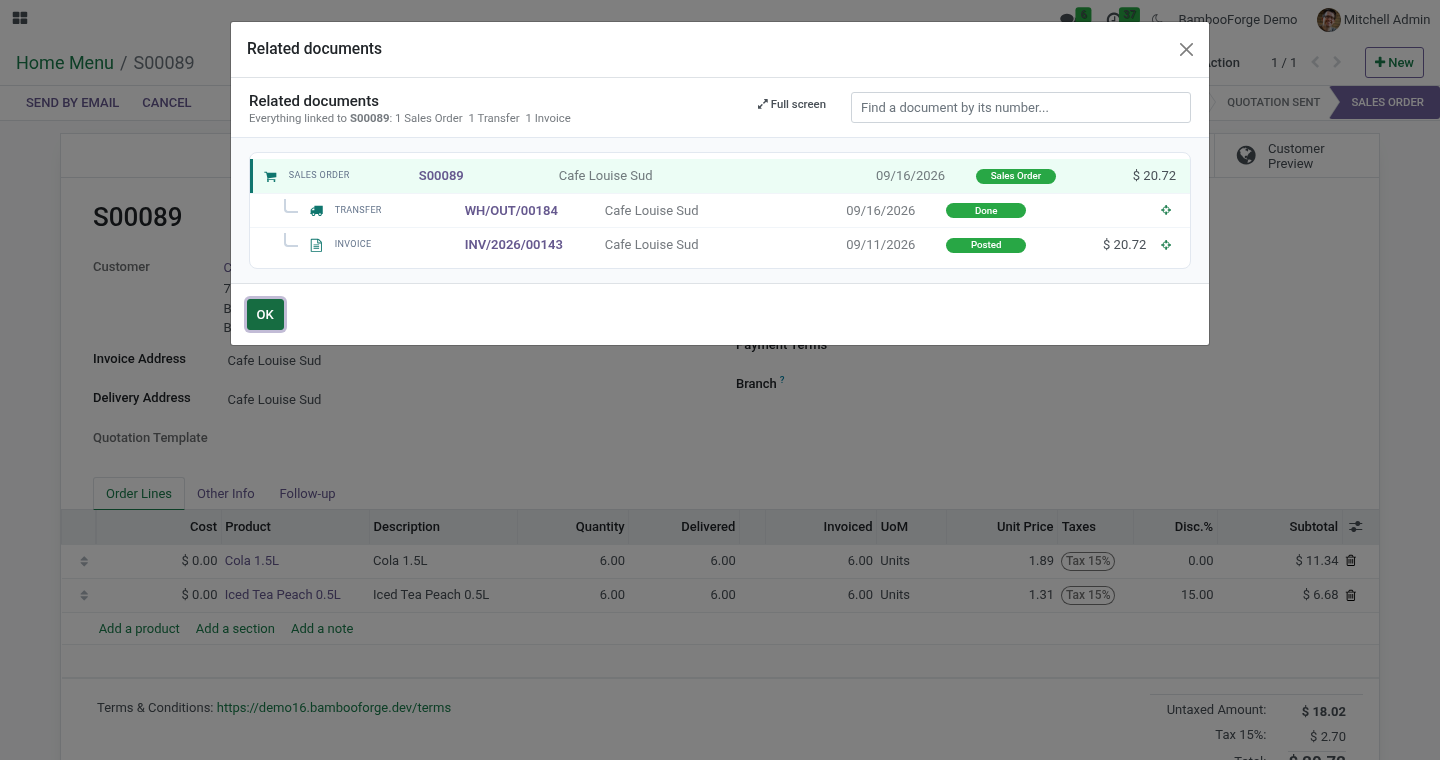
Action ▸ Related documents on any sales order, purchase order, transfer, manufacturing order, invoice, payment, bank line, POS order, repair, task, subscription or opportunity - in a dialog over the form, one click from full screen.
Your own kinds of documents: any other model - a rental, a warranty claim, an app of your own - joins the chain with its place in it; a built-in kind can be relabelled or switched off.
A tree, upstream at the top: what came first, what it produced, what that produced. Every line shows the kind of document, its number, the contact, the date, the state and the amount, and opens it in one click.
A document linked to a second branch says also linked to.
A crosshair on any line shows that document's own chain.
A search box that finds any document by its number.
Your access, exactly: what you may not read is not in the tree.
Nothing to configure to start. It depends on the web client only and reads the links Odoo already keeps.
Requirements
Odoo: 20.0, Community or Enterprise.
Dependencies: web only. Sales, Purchase, Inventory, Manufacturing, Accounting, Point of Sale, Repair, Project, CRM and Subscriptions are recognised when they are there; none is required.
Access: every internal user. The tree shows only documents the user may read.
Install
Copy bambooforge_related_documents into your addons path and restart Odoo.
Apps ▸ Update Apps List, search for Related Documents, Activate.
Open any order and choose Action ▸ Related documents: the chain opens in a dialog over the order; Full screen turns it into a page of its own, and a click on any document opens it. There is also a Related Documents entry in the apps menu, which opens with the latest order and a search box.
An app installed later gets its Action menu entry at the next upgrade of this module. Until then, open Related Documents from the apps menu and search for the document by its number.
How the chain is found
Starting from the document you are on, the app reads every field that points at another document - many2one, one2many and many2many, in both directions - and repeats from each document found, until nothing new appears. It also reads two links Odoo keeps in code rather than in a field: the payments reconciled with an invoice, and the purchase orders raised for a sales order.
Documents are ranked by where they come in the life of a sale or a purchase: opportunity, then order, then transfer / manufacturing order / task, then invoice, then payment. A document's parent in the tree is the nearest document upstream of it; documents of the same rank that are linked - two orders of one opportunity, a return of a delivery - are listed side by side and say also linked to.
Containers are not steps: a project, a duplicate order and the journal entry behind a payment are left out.
Your own kinds of documents
Related Documents ▸ Document Kinds (administrators): add a line, pick the document (the model), what one of them is called in the chain, its place in the chain - 0 for what comes first, like an opportunity; 1 an order; 2 a delivery, a job, a task; 3 an invoice; 4 a payment - and an icon (a Font Awesome name such as fa-wrench). The chain now follows every link to and from that model, and its forms get Action ▸ Related documents at once. A line for a built-in kind replaces its label, place and icon; switch a line off to take that kind out of the chain.
Limits, stated plainly
A chain is cut at 120 documents and the screen says so; the search box reaches any document directly.
Links kept only in a text field - an origin or source document written as a name - are not followed; only real relations are.
A kind of document follows only the links its model declares; a link kept in a text field is not one.
Uninstalling
Uninstalling removes the Related documents entries from the Action menus and the app's own menu. It stores nothing else.
Changelog
20.0.1.1.0
Built for Odoo 20: record rules and access rights rewritten onto Odoo 20's single ir.access model, the screens rebuilt on Owl 3, and every icon moved to the icon set Odoo 20 ships.
20.0.1.1.0
Document Kinds: any model joins the chain; built-in kinds relabelled, re-ranked or switched off.
The Action menu opens the chain in a dialog, with a full-screen button.
20.0.1.0.0
First release.
How we make sure it works
Before every release, 9 automated checks run against this app on Odoo 16, 17, 18, 19 and 20. Among them:
Node carries what a reader needs.
Unknown or missing document.
Long chains are cut and say so.
The action menu opens a dialog.
The whole chain from any link.
The complete list is in the source you receive.