 BambooForge Labs
SEO All in One with 301 Redirects and 404 Monitor
Keep a redirect table honest: validate a CSV before import, find loops, chains and dead targets, flatten a chain, and let the 404 log propose targets.
Available for Odoo 16.0, Odoo 17.0, Odoo 18.0, Odoo 19.0, Odoo 20.0. Technical name bambooforge_redirect_pro.
Transcript of the walkthrough (Odoo 20)
SEO All in One with 301 Redirects and 404 Monitor. Keep a redirect table honest: validate a CSV before import, find loops, chains and dead targets, flatten a chain, and let the 404 log propose targets. Scanning never changes a rule. Rules change when you press Fix, or Flatten the chain on the rule itself, or accept a suggestion.
In the next few minutes: seo all in one with 301 redirects and 404 monitor, then redirect health, then importing a redirect list, then the 404 monitor proposes a target, then multi-website and multi-company. Then what this app deliberately does not do, so you can tell before you buy whether it fits. Everything lives under Scan redirects now then Redirect Health. 1.
Install BambooForge Redirect Manager Pro (it needs BambooForge SEO Pro); nothing else changes on install. 2. Open the two entries under SEO Pro: Redirect Health and, under Configuration, Scan redirects now. An SEO User can read the findings; an SEO Manager can scan, fix, import and accept suggestions.
SEO All in One with 301 Redirects and 404 Monitor. An add-on for BambooForge SEO Pro. SEO Pro gives you the redirect rules; this keeps them healthy once the migration week is over: a dry run before a CSV becomes six hundred live rules, a scan that finds the loops, chains and dead targets already in the table, and a 404 monitor that proposes the target instead of asking you to type it. Redirect Health.
SEO Pro → Redirect Health. The list is grouped by finding, worst first. Redirect loop The visitor is sent in a circle and the browser answers ERR_TOO_MANY_REDIRECTS. SEO Pro refuses to save a rule that closes a loop, which catches the loop somebody writes in one sitting.
It cannot catch the other kind: A to B, B to C, and six months later somebody edits C. Every rule was legal when it was written. The scan follows the chain to its end instead, and reports the rule that closes the circle. Importing a redirect list.
Redirects → Import redirects (CSV), then Check the file. The header is SEO Pro's: url_from,url_to,redirect_type plus the optional is_regex, sequence and name. Every row gets a verdict: The 404 monitor proposes a target. SEO Pro → 404 Monitor.
A dead URL is almost never random: it is yesterday's slug. Every open 404 is scored against the pages SEO Pro has indexed for that website: the slug - the last segment, because that is what a rename touches; the whole path; the words the two URLs share, ignoring stop words and numbering. The best match is shown with a confidence between 0 and 1. Below 0.55 the monitor says nothing at all: a wrong 301 removes the row from the list and hides the problem from the next person who looks at it.
Multi-website and multi-company A finding belongs to the rule, not to the website that happened to be scanned last. A rule that serves every website produces one finding. Suggestions never cross sites: a page published on client B is never proposed as the target for a 404 on client A. The findings list is filtered by the websites the user can see, and by company through the website's company.
Housekeeping Findings marked fixed or ignored are deleted 30 days later by the standard autovacuum. Nothing is crawled and nothing leaves the server: "does this URL exist" is answered from SEO Pro's page index and the routes this Odoo really serves. How we make sure it works. Before every release, 60 automated checks run against this app on Odoo 16, 17, 18, 19 and 20.
Among them: A read only seo user cannot rewrite the monitor. A read only seo user cannot scan. A global rule is reported once not once per website. A row already handled is not redirected twice.
A suggestion is never borrowed from another client. The complete list is in the source you receive. Questions people ask. Which Odoo versions does it run on?
Odoo 16.0, 17.0, 18.0, 19.0, 20.0, on the series you buy it for; each series is its own listing. Community or Enterprise? Both. It needs no Enterprise app.
Support. support@bambooforge.dev - the people who wrote it. The complete manual is at docs dot bambooforge dot dev, the demo database is linked from the store page, and support answers within twenty-four hours. Links are in the description.
Transcript of the walkthrough (Odoo 19)
Redirect Manager: 301 Redirects & 404 Monitor. Keep a redirect table honest: validate a CSV before import, find loops, chains and dead targets, flatten a chain, and let the 404 log propose targets. Scanning never changes a rule. Rules change when you press Fix, or Flatten the chain on the rule itself, or accept a suggestion.
In the next few minutes: redirect manager: 301 redirects & 404 monitor, then redirect health, then importing a redirect list, then the 404 monitor proposes a target, then multi-website and multi-company. Then what this app deliberately does not do, so you can tell before you buy whether it fits. Everything lives under Scan redirects now then Redirect Health. Install BambooForge Redirect Manager Pro.
It requires BambooForge SEO Pro; nothing else changes on install. Two menu entries appear under SEO Pro: Redirect Health and, under Configuration, Scan redirects now. Redirect Manager: 301 Redirects & 404 Monitor. An add-on for BambooForge SEO Pro.
SEO Pro gives you the redirect rules; this keeps them healthy once the migration week is over: a dry run before a CSV becomes six hundred live rules, a scan that finds the loops, chains and dead targets already in the table, and a 404 monitor that proposes the target instead of asking you to type it. Redirect Health. SEO Pro → Redirect Health. The list is grouped by finding, worst first.
Redirect loop The visitor is sent in a circle and the browser answers ERR_TOO_MANY_REDIRECTS. SEO Pro refuses to save a rule that closes a loop, which catches the loop somebody writes in one sitting. It cannot catch the other kind: A to B, B to C, and six months later somebody edits C. Every rule was legal when it was written.
The scan follows the chain to its end instead, and reports the rule that closes the circle. Importing a redirect list. Redirects → Import redirects (CSV), then Check the file. The header is SEO Pro's: url_from,url_to,redirect_type plus the optional is_regex, sequence and name.
Every row gets a verdict: The 404 monitor proposes a target. SEO Pro → 404 Monitor. A dead URL is almost never random: it is yesterday's slug. Every open 404 is scored against the pages SEO Pro has indexed for that website: the slug - the last segment, because that is what a rename touches; the whole path; the words the two URLs share, ignoring stop words and numbering.
The best match is shown with a confidence between 0 and 1. Below 0.55 the monitor says nothing at all: a wrong 301 removes the row from the list and hides the problem from the next person who looks at it. Multi-website and multi-company A finding belongs to the rule, not to the website that happened to be scanned last. A rule that serves every website produces one finding.
Suggestions never cross sites: a page published on client B is never proposed as the target for a 404 on client A. The findings list is filtered by the websites the user can see, and by company through the website's company. Housekeeping Findings marked fixed or ignored are deleted 30 days later by the standard autovacuum. Nothing is crawled and nothing leaves the server: "does this URL exist" is answered from SEO Pro's page index and the routes this Odoo really serves.
Support. support@bambooforge.dev - the people who wrote it. The complete manual is at docs dot bambooforge dot dev, the demo database is linked from the store page, and support answers within twenty-four hours. Links are in the description.
Transcript of the walkthrough (Odoo 18)
Redirect Manager: 301 Redirects & 404 Monitor. Keep a redirect table honest: validate a CSV before import, find loops, chains and dead targets, flatten a chain, and let the 404 log propose targets. Scanning never changes a rule. Rules change when you press Fix, or Flatten the chain on the rule itself, or accept a suggestion.
In the next few minutes: redirect manager: 301 redirects & 404 monitor, then redirect health, then importing a redirect list, then the 404 monitor proposes a target, then multi-website and multi-company. Then what this app deliberately does not do, so you can tell before you buy whether it fits. Everything lives under Scan redirects now then Redirect Health. Install BambooForge Redirect Manager Pro.
It requires BambooForge SEO Pro; nothing else changes on install. Two menu entries appear under SEO Pro: Redirect Health and, under Configuration, Scan redirects now. Redirect Manager: 301 Redirects & 404 Monitor. An add-on for BambooForge SEO Pro.
SEO Pro gives you the redirect rules; this keeps them healthy once the migration week is over: a dry run before a CSV becomes six hundred live rules, a scan that finds the loops, chains and dead targets already in the table, and a 404 monitor that proposes the target instead of asking you to type it. Redirect Health. SEO Pro → Redirect Health. The list is grouped by finding, worst first.
Redirect loop The visitor is sent in a circle and the browser answers ERR_TOO_MANY_REDIRECTS. SEO Pro refuses to save a rule that closes a loop, which catches the loop somebody writes in one sitting. It cannot catch the other kind: A to B, B to C, and six months later somebody edits C. Every rule was legal when it was written.
The scan follows the chain to its end instead, and reports the rule that closes the circle. Importing a redirect list. Redirects → Import redirects (CSV), then Check the file. The header is SEO Pro's: url_from,url_to,redirect_type plus the optional is_regex, sequence and name.
Every row gets a verdict: The 404 monitor proposes a target. SEO Pro → 404 Monitor. A dead URL is almost never random: it is yesterday's slug. Every open 404 is scored against the pages SEO Pro has indexed for that website: the slug - the last segment, because that is what a rename touches; the whole path; the words the two URLs share, ignoring stop words and numbering.
The best match is shown with a confidence between 0 and 1. Below 0.55 the monitor says nothing at all: a wrong 301 removes the row from the list and hides the problem from the next person who looks at it. Multi-website and multi-company A finding belongs to the rule, not to the website that happened to be scanned last. A rule that serves every website produces one finding.
Suggestions never cross sites: a page published on client B is never proposed as the target for a 404 on client A. The findings list is filtered by the websites the user can see, and by company through the website's company. Housekeeping Findings marked fixed or ignored are deleted 30 days later by the standard autovacuum. Nothing is crawled and nothing leaves the server: "does this URL exist" is answered from SEO Pro's page index and the routes this Odoo really serves.
Support. support@bambooforge.dev - the people who wrote it. The complete manual is at docs dot bambooforge dot dev, the demo database is linked from the store page, and support answers within twenty-four hours. Links are in the description.
Transcript of the walkthrough (Odoo 17)
Redirect Manager: 301 Redirects & 404 Monitor. Keep a redirect table honest: validate a CSV before import, find loops, chains and dead targets, flatten a chain, and let the 404 log propose targets. Scanning never changes a rule. Rules change when you press Fix, or Flatten the chain on the rule itself, or accept a suggestion.
In the next few minutes: redirect manager: 301 redirects & 404 monitor, then redirect health, then importing a redirect list, then the 404 monitor proposes a target, then multi-website and multi-company. Then what this app deliberately does not do, so you can tell before you buy whether it fits. Everything lives under Scan redirects now then Redirect Health. Install BambooForge Redirect Manager Pro.
It requires BambooForge SEO Pro; nothing else changes on install. Two menu entries appear under SEO Pro: Redirect Health and, under Configuration, Scan redirects now. Redirect Manager: 301 Redirects & 404 Monitor. An add-on for BambooForge SEO Pro.
SEO Pro gives you the redirect rules; this keeps them healthy once the migration week is over: a dry run before a CSV becomes six hundred live rules, a scan that finds the loops, chains and dead targets already in the table, and a 404 monitor that proposes the target instead of asking you to type it. Redirect Health. SEO Pro → Redirect Health. The list is grouped by finding, worst first.
Redirect loop The visitor is sent in a circle and the browser answers ERR_TOO_MANY_REDIRECTS. SEO Pro refuses to save a rule that closes a loop, which catches the loop somebody writes in one sitting. It cannot catch the other kind: A to B, B to C, and six months later somebody edits C. Every rule was legal when it was written.
The scan follows the chain to its end instead, and reports the rule that closes the circle. Importing a redirect list. Redirects → Import redirects (CSV), then Check the file. The header is SEO Pro's: url_from,url_to,redirect_type plus the optional is_regex, sequence and name.
Every row gets a verdict: The 404 monitor proposes a target. SEO Pro → 404 Monitor. A dead URL is almost never random: it is yesterday's slug. Every open 404 is scored against the pages SEO Pro has indexed for that website: the slug - the last segment, because that is what a rename touches; the whole path; the words the two URLs share, ignoring stop words and numbering.
The best match is shown with a confidence between 0 and 1. Below 0.55 the monitor says nothing at all: a wrong 301 removes the row from the list and hides the problem from the next person who looks at it. Multi-website and multi-company A finding belongs to the rule, not to the website that happened to be scanned last. A rule that serves every website produces one finding.
Suggestions never cross sites: a page published on client B is never proposed as the target for a 404 on client A. The findings list is filtered by the websites the user can see, and by company through the website's company. Housekeeping Findings marked fixed or ignored are deleted 30 days later by the standard autovacuum. Nothing is crawled and nothing leaves the server: "does this URL exist" is answered from SEO Pro's page index and the routes this Odoo really serves.
Support. support@bambooforge.dev - the people who wrote it. The complete manual is at docs dot bambooforge dot dev, the demo database is linked from the store page, and support answers within twenty-four hours. Links are in the description.
Transcript of the walkthrough (Odoo 16)
Redirect Manager: 301 Redirects & 404 Monitor. Keep a redirect table honest: validate a CSV before import, find loops, chains and dead targets, flatten a chain, and let the 404 log propose targets. Scanning never changes a rule. Rules change when you press Fix, or Flatten the chain on the rule itself, or accept a suggestion.
In the next few minutes: redirect manager: 301 redirects & 404 monitor, then redirect health, then importing a redirect list, then the 404 monitor proposes a target, then multi-website and multi-company. Then what this app deliberately does not do, so you can tell before you buy whether it fits. Everything lives under Scan redirects now then Redirect Health. Install BambooForge Redirect Manager Pro.
It requires BambooForge SEO Pro; nothing else changes on install. Two menu entries appear under SEO Pro: Redirect Health and, under Configuration, Scan redirects now. Redirect Manager: 301 Redirects & 404 Monitor. An add-on for BambooForge SEO Pro.
SEO Pro gives you the redirect rules; this keeps them healthy once the migration week is over: a dry run before a CSV becomes six hundred live rules, a scan that finds the loops, chains and dead targets already in the table, and a 404 monitor that proposes the target instead of asking you to type it. Redirect Health. SEO Pro → Redirect Health. The list is grouped by finding, worst first.
Redirect loop The visitor is sent in a circle and the browser answers ERR_TOO_MANY_REDIRECTS. SEO Pro refuses to save a rule that closes a loop, which catches the loop somebody writes in one sitting. It cannot catch the other kind: A to B, B to C, and six months later somebody edits C. Every rule was legal when it was written.
The scan follows the chain to its end instead, and reports the rule that closes the circle. Importing a redirect list. Redirects → Import redirects (CSV), then Check the file. The header is SEO Pro's: url_from,url_to,redirect_type plus the optional is_regex, sequence and name.
Every row gets a verdict: The 404 monitor proposes a target. SEO Pro → 404 Monitor. A dead URL is almost never random: it is yesterday's slug. Every open 404 is scored against the pages SEO Pro has indexed for that website: the slug - the last segment, because that is what a rename touches; the whole path; the words the two URLs share, ignoring stop words and numbering.
The best match is shown with a confidence between 0 and 1. Below 0.55 the monitor says nothing at all: a wrong 301 removes the row from the list and hides the problem from the next person who looks at it. Multi-website and multi-company A finding belongs to the rule, not to the website that happened to be scanned last. A rule that serves every website produces one finding.
Suggestions never cross sites: a page published on client B is never proposed as the target for a 404 on client A. The findings list is filtered by the websites the user can see, and by company through the website's company. Housekeeping Findings marked fixed or ignored are deleted 30 days later by the standard autovacuum. Nothing is crawled and nothing leaves the server: "does this URL exist" is answered from SEO Pro's page index and the routes this Odoo really serves.
Support. support@bambooforge.dev - the people who wrote it. The complete manual is at docs dot bambooforge dot dev, the demo database is linked from the store page, and support answers within twenty-four hours. Links are in the description.
Key facts
- What it is
- Keep a redirect table honest: validate a CSV before import, find loops, chains and dead targets, flatten a chain, and let the 404 log propose targets.
- For
- Website
- Odoo versions
- 16.0, 17.0, 18.0, 19.0, 20.0 - Community and Enterprise
- Runs on
- Odoo.sh or Odoo you host yourself - not Odoo Online, which accepts no third-party apps
- Price
- 198 EUR, one-time, on the Odoo Apps Store
- Technical name
- bambooforge_redirect_pro
- Not for
- Scanning never changes a rule. Rules change when you press Fix, or Flatten the chain on the rule itself, or accept a suggestion.; Regex rules are scanned like any other rule - the chain walk uses a sample path derived from the pattern - but are never rewritten automatically: the target of a regex rule depends on the URL that matched, so rewriting it from one sample would break every other path it serves.
- Live demo
- https://demo20.bambooforge.dev/odoo/action-bambooforge_redirect_pro.action_bf_redirect_scan
- Manual last updated
- 2026-10-15
SEO All in One with 301 Redirects and 404 Monitor
An add-on for BambooForge SEO Pro. SEO Pro gives you the redirect rules; this keeps them healthy once the migration week is over: a dry run before a CSV becomes six hundred live rules, a scan that finds the loops, chains and dead targets already in the table, and a 404 monitor that proposes the target instead of asking you to type it.
Install
Install BambooForge Redirect Manager Pro (it needs BambooForge SEO Pro); nothing else changes on install.
Open the two entries under SEO Pro: Redirect Health and, under Configuration, Scan redirects now. An SEO User can read the findings; an SEO Manager can scan, fix, import and accept suggestions.
Redirect Health
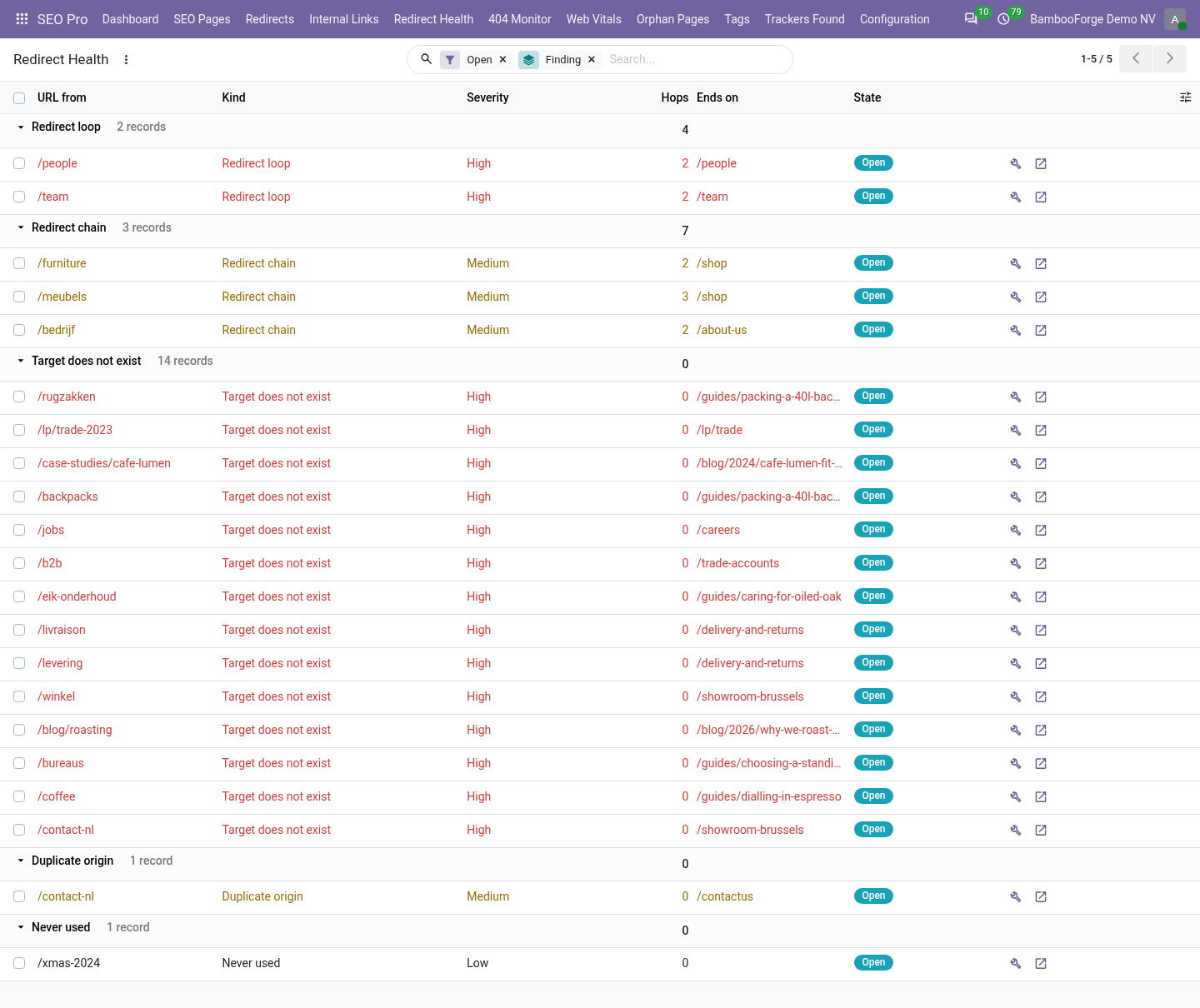
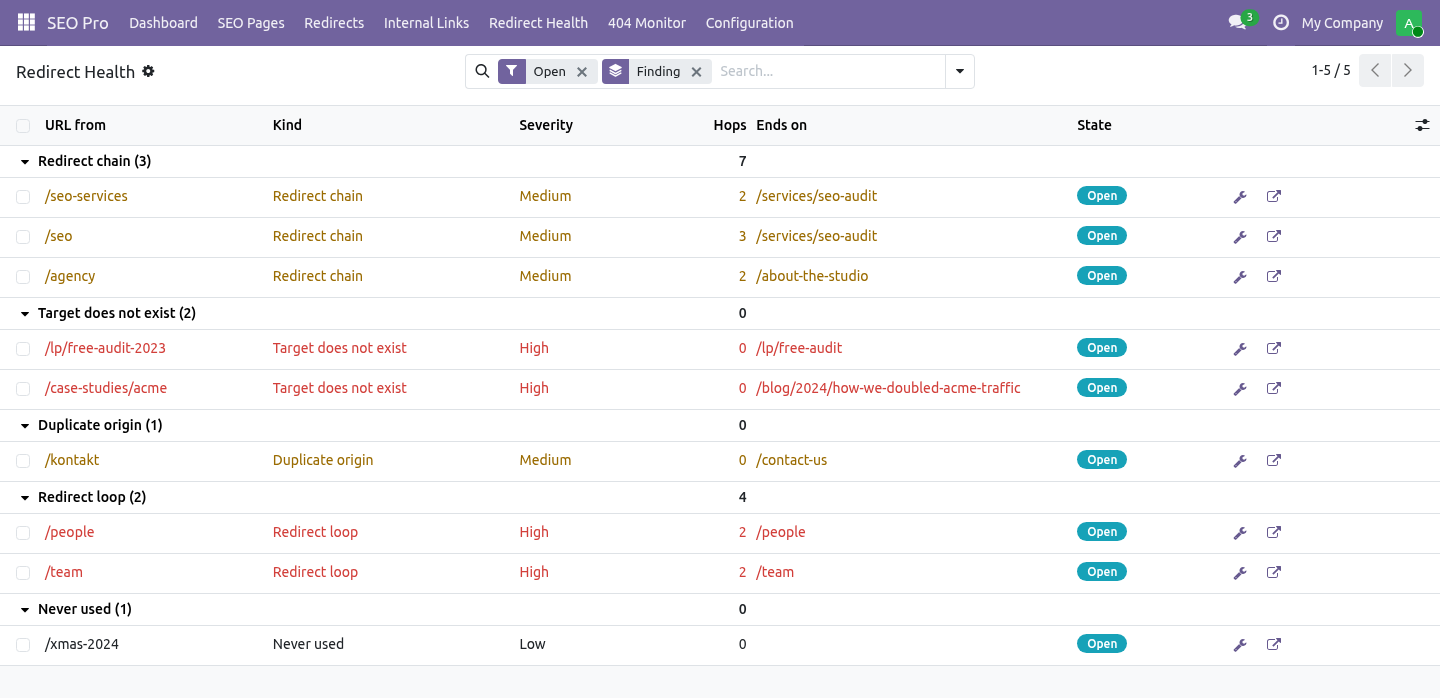
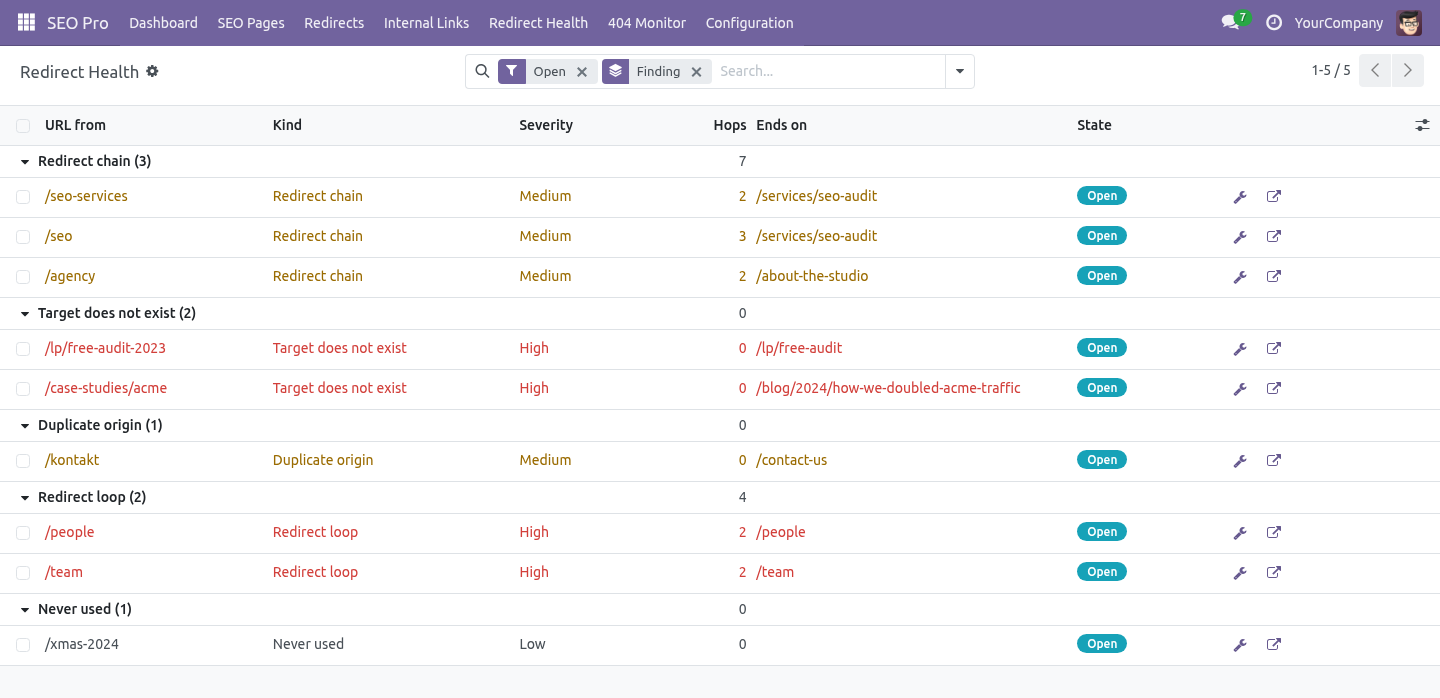
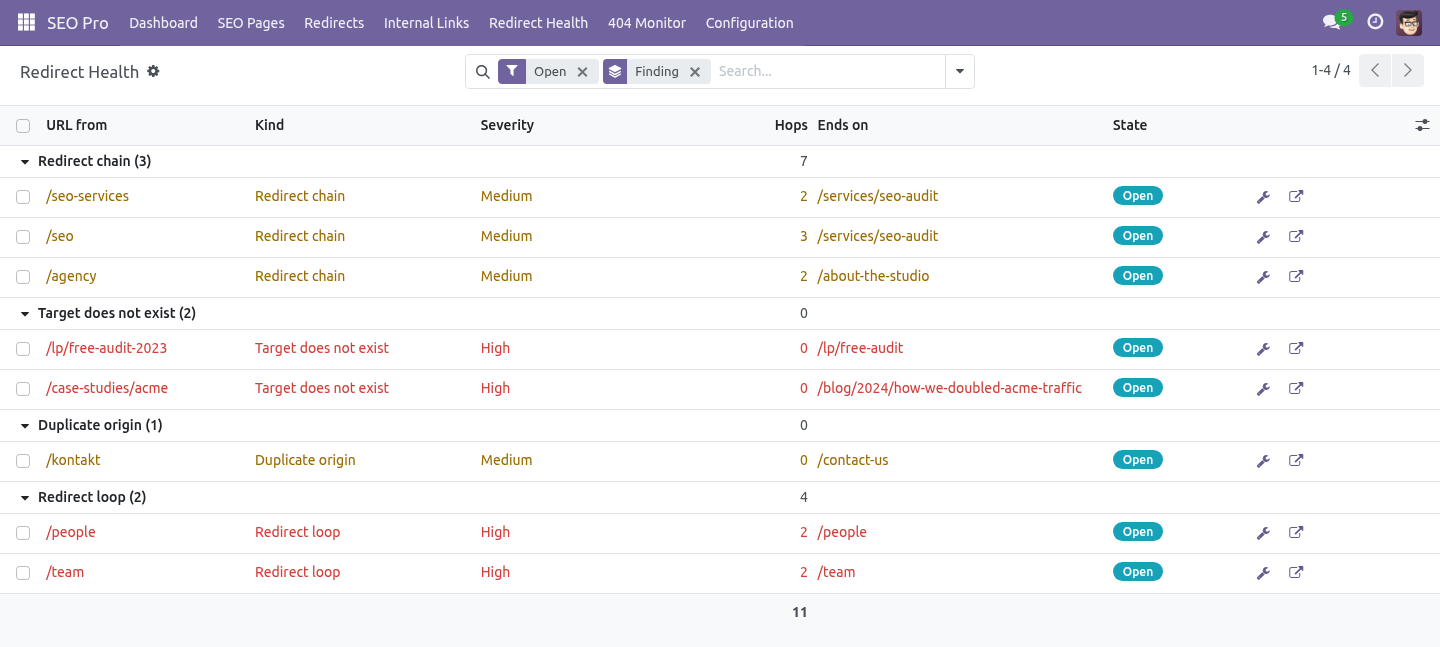
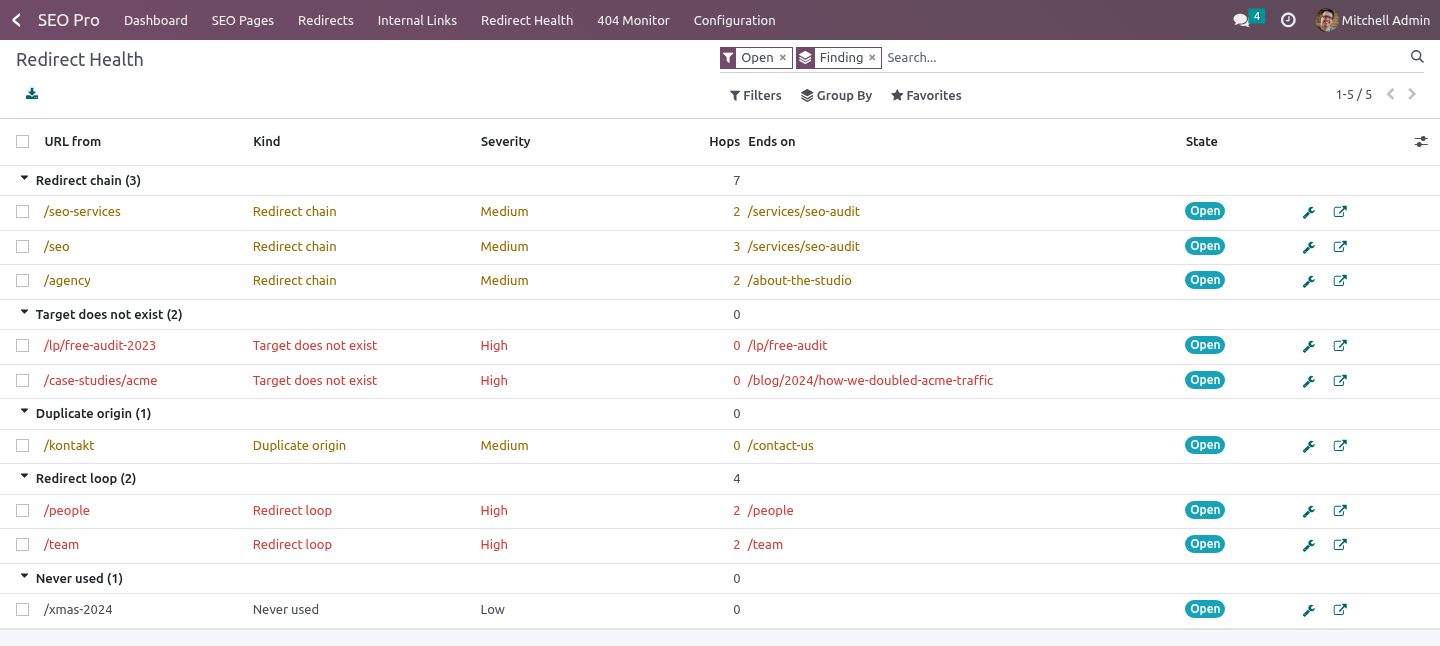
SEO Pro → Redirect Health. The list is grouped by finding, worst first.
- Redirect loop
The visitor is sent in a circle and the browser answers ERR_TOO_MANY_REDIRECTS. SEO Pro refuses to save a rule that closes a loop, which catches the loop somebody writes in one sitting. It cannot catch the other kind: A to B, B to C, and six months later somebody edits C. Every rule was legal when it was written. The scan follows the chain to its end instead, and reports the rule that closes the circle.
- Redirect chain
A to B to C. Every hop is a round trip for the visitor, and search engines stop following after a few. Fix points the rule straight at the end of the chain.
- Target does not exist
The redirect still works, and lands the visitor in a 404 because the target page was deleted. The finding names the website the target is missing on - useful when one rule serves six client sites. A target that answers 410 is reported too: two round trips to be told the page is gone.
- Duplicate origin
Two rules, same origin. Only one of them ever fires; Fix disables the other.
- Never used
Created more than six months ago and never hit once. Rules cost a lookup on every 404, so retiring the ones nobody asks for is free speed. Fix archives the rule; it is not deleted, and un-archiving it brings it back.
The scan runs every Monday at 03:00 server time, and on demand from Configuration → Scan redirects now. It updates findings instead of duplicating them, closes the ones that went away, and leaves anything you marked Ignore ignored - a report that re-opens every Monday is a report nobody reads twice.
What it does not do
Scanning never changes a rule. Rules change when you press Fix, or Flatten the chain on the rule itself, or accept a suggestion.
Regex rules are scanned like any other rule - the chain walk uses a sample path derived from the pattern - but are never rewritten automatically: the target of a regex rule depends on the URL that matched, so rewriting it from one sample would break every other path it serves.
Importing a redirect list
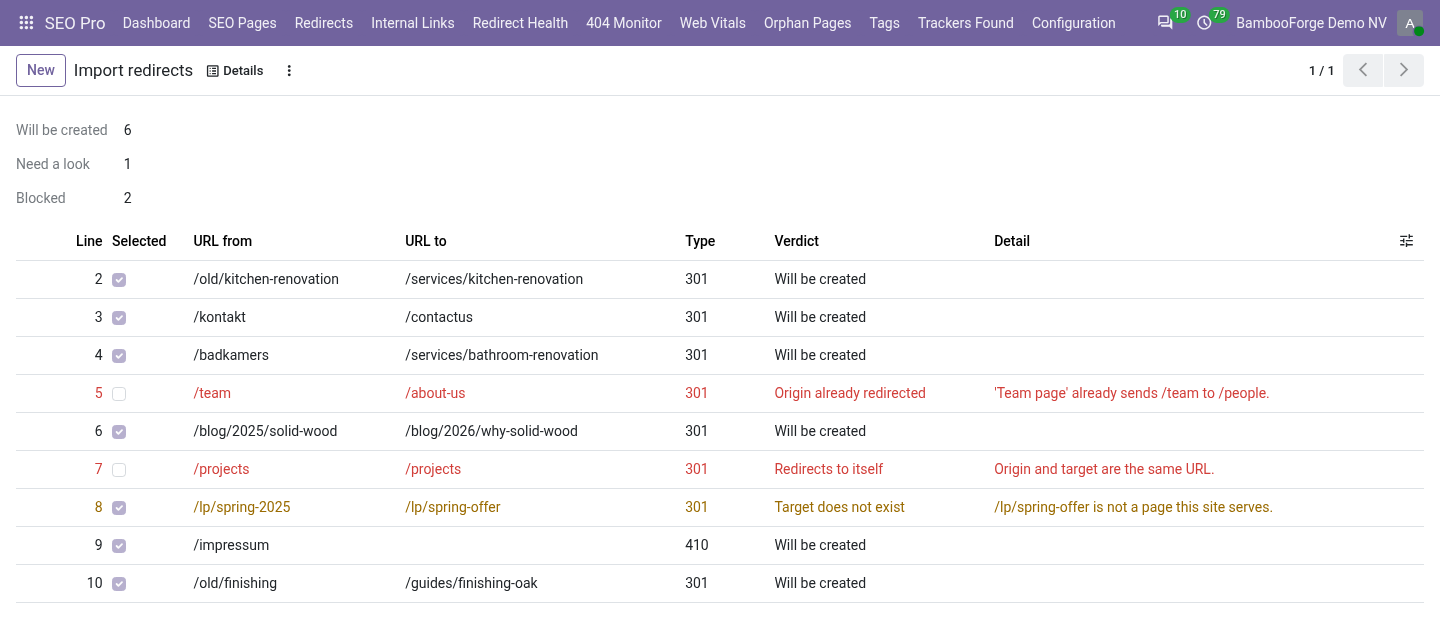
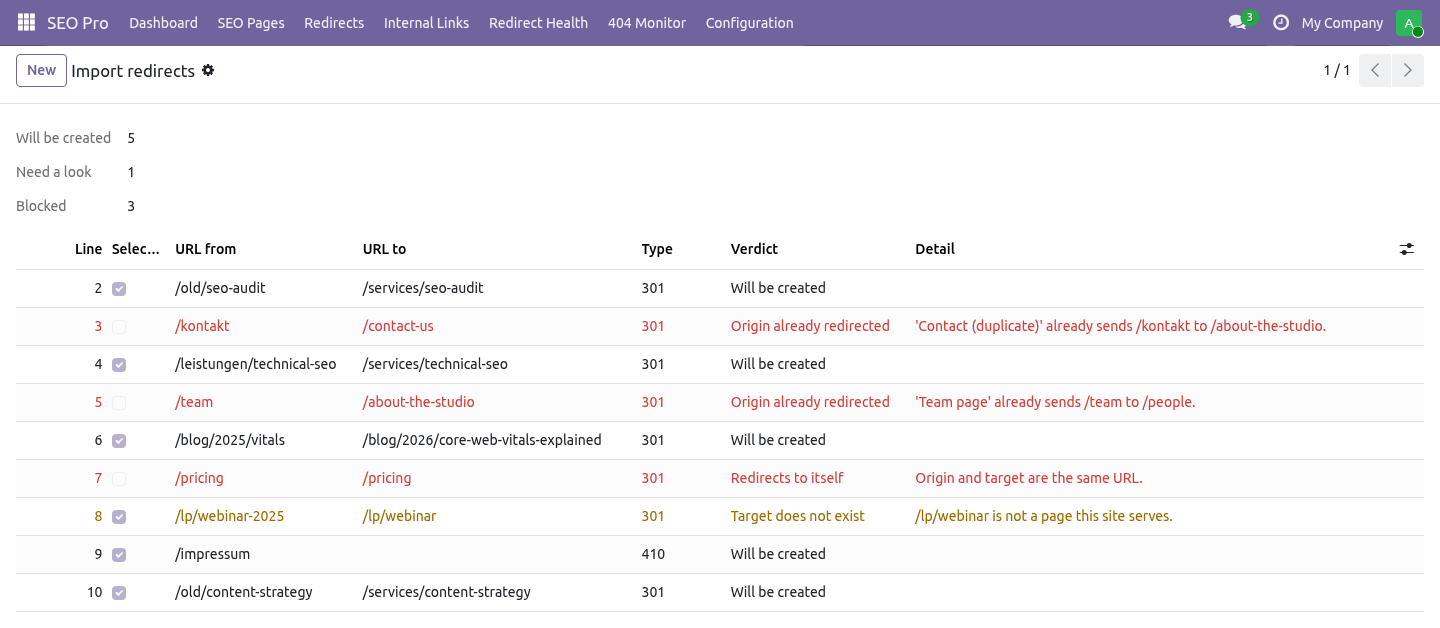
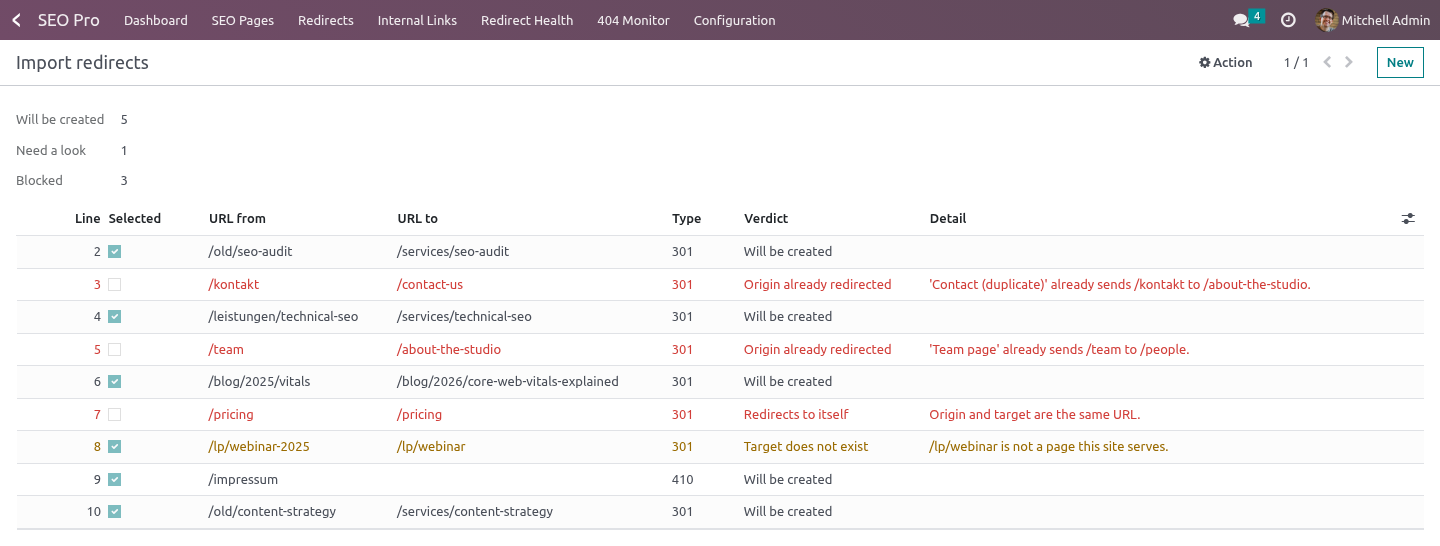
Redirects → Import redirects (CSV), then Check the file.
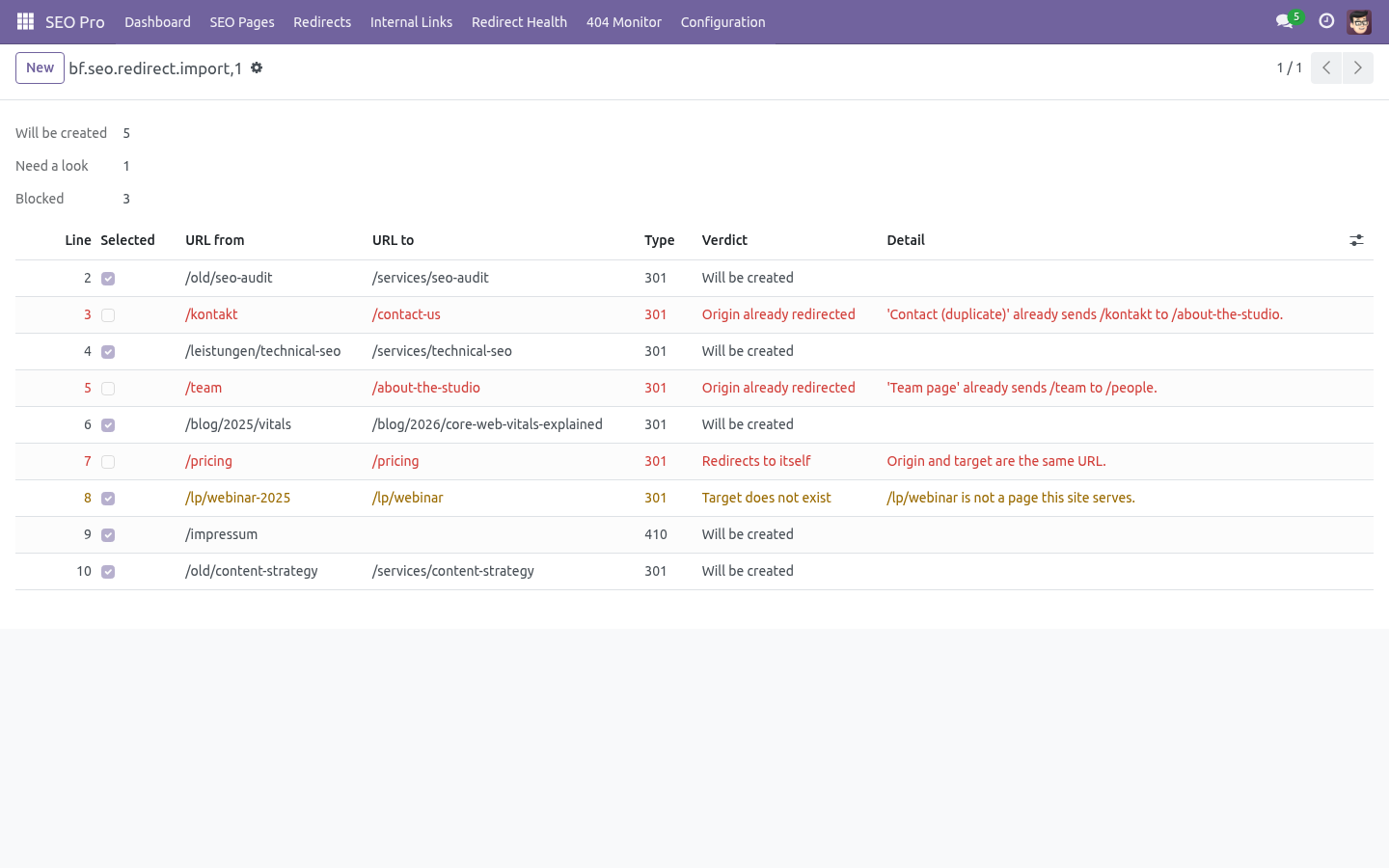
The header is SEO Pro's: url_from,url_to,redirect_type plus the optional is_regex, sequence and name. Every row gets a verdict:
Verdict |
Meaning |
|---|---|
Will be created |
Nothing wrong with the row. |
Duplicate inside the file |
An earlier line already redirects that URL. |
Origin already redirected |
A rule for that URL exists; the import would add a second one that never fires. |
Would create a loop |
The target redirects straight back here. |
Redirects to itself |
Origin and target are the same URL. |
Target does not exist |
Not a page and not a route on this site. A warning, not a block - you may be importing ahead of the content. |
Invalid row |
No origin, or a 301 without a target. |
Rows that are blocked come unticked; warnings stay ticked. You can edit a target in the preview before importing. Import the ticked rows creates exactly those, each in its own savepoint, so one bad row reports itself instead of sinking the file.
A target that is itself redirected is shortened on the way in: importing /a -> /b when /b -> /contact already exists writes /a -> /contact and saves you the chain you would have had to flatten next Monday.
The 404 monitor proposes a target
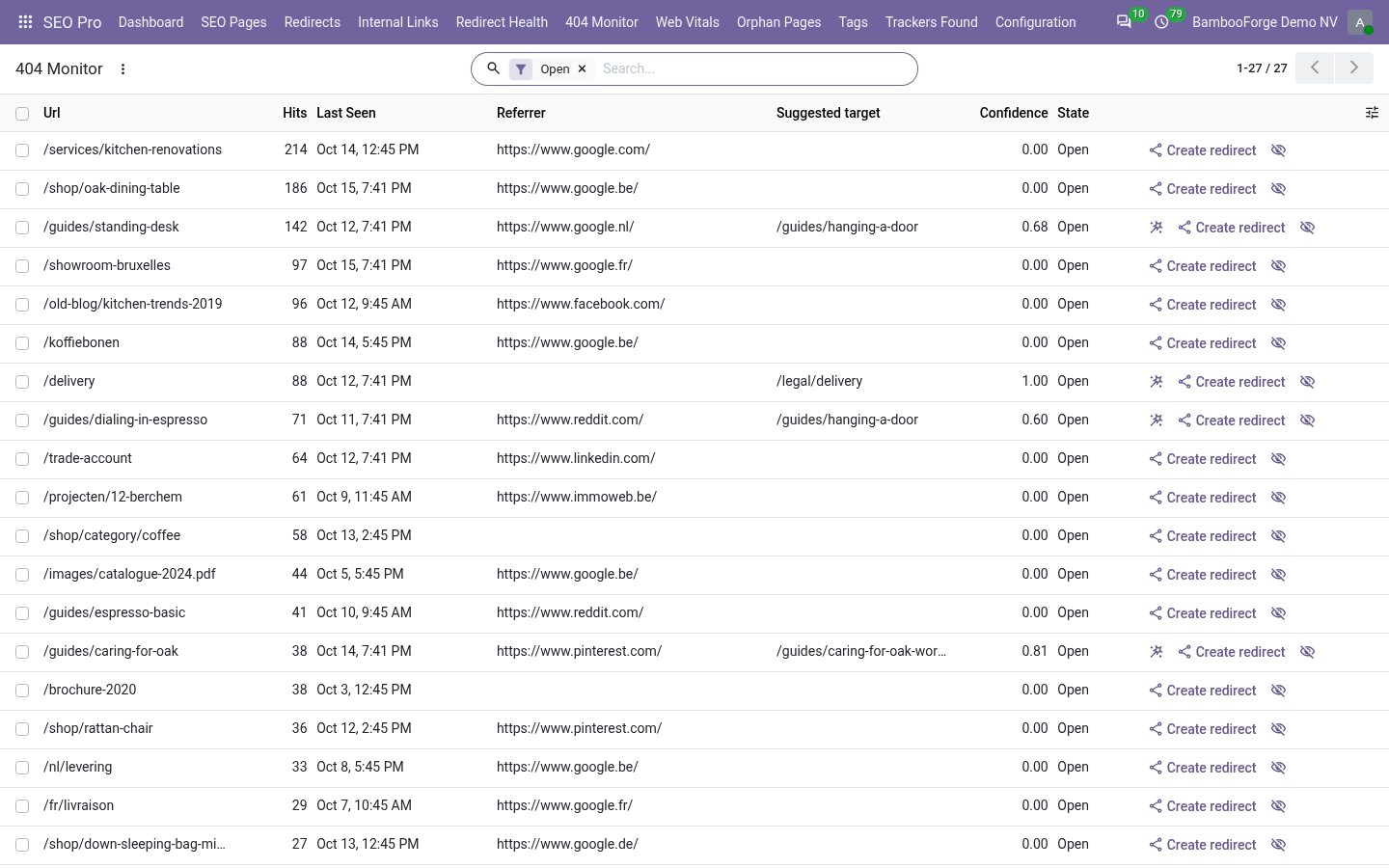
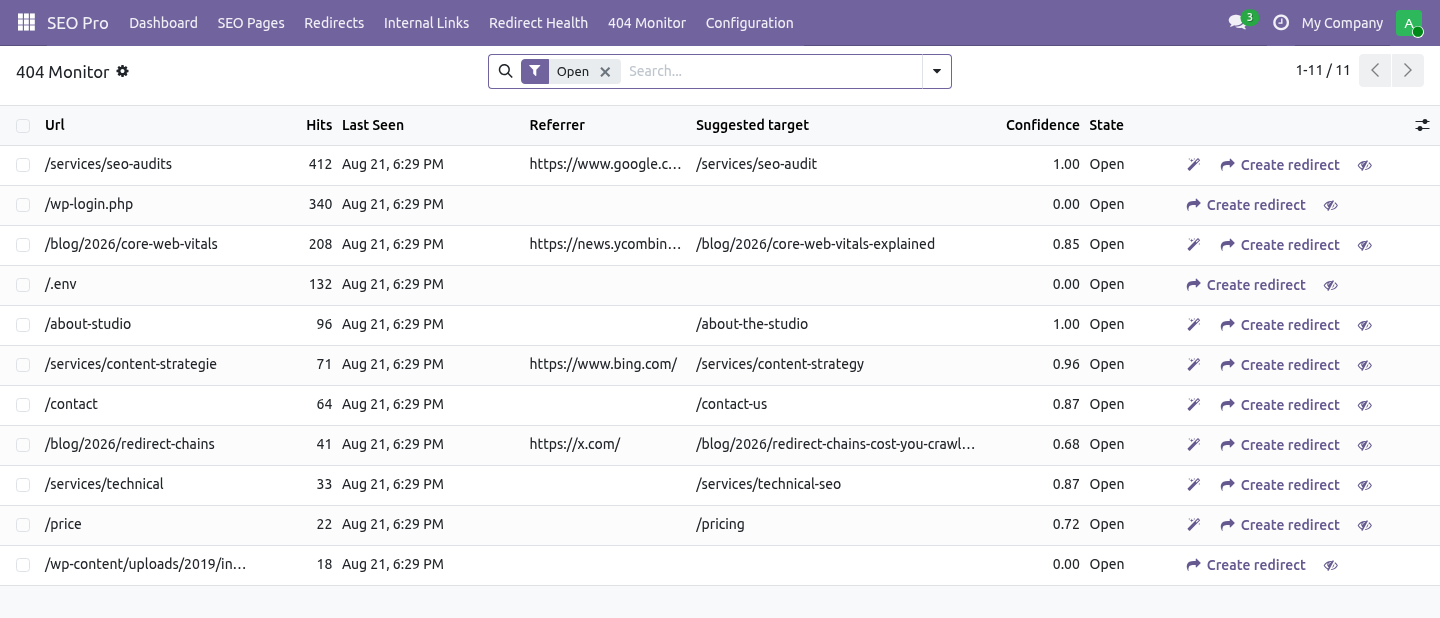
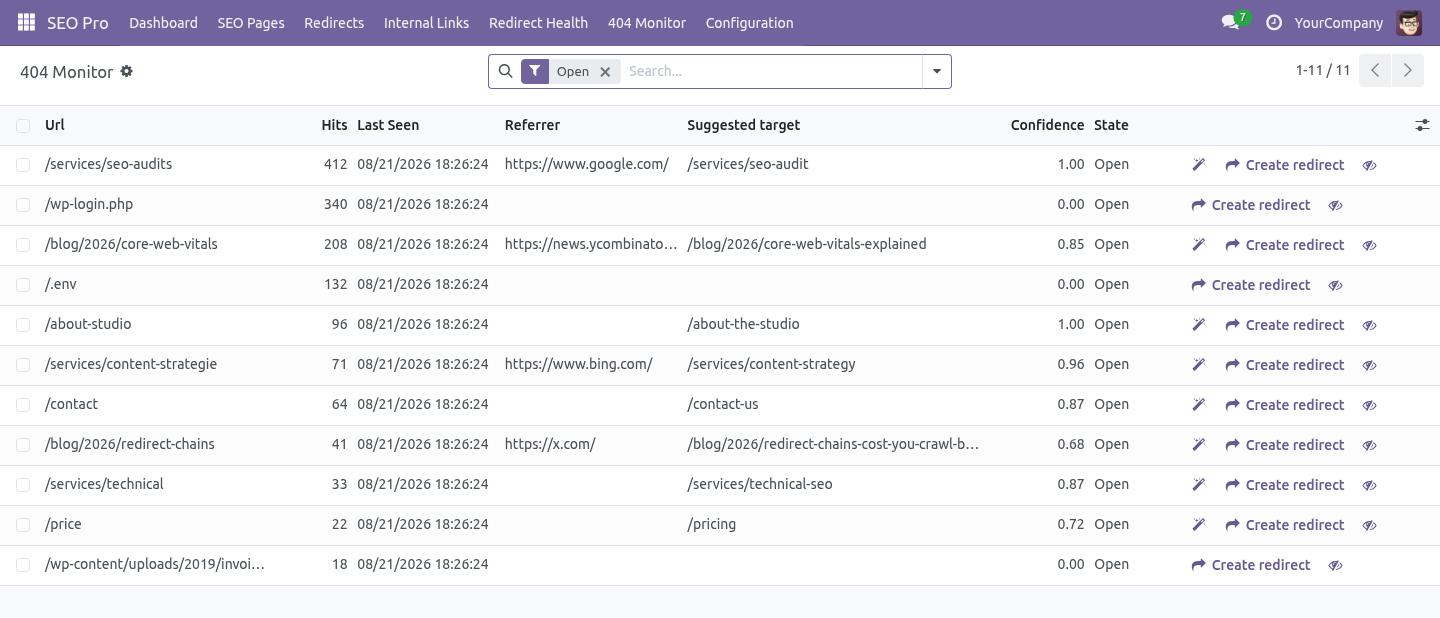
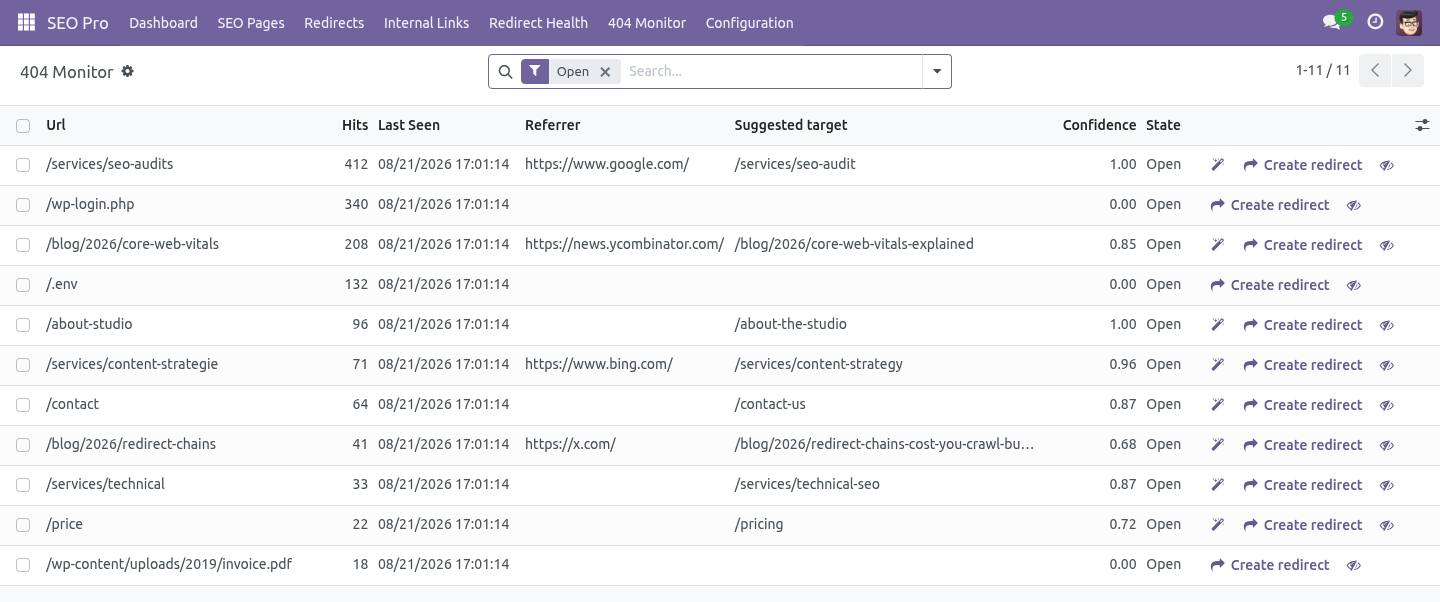
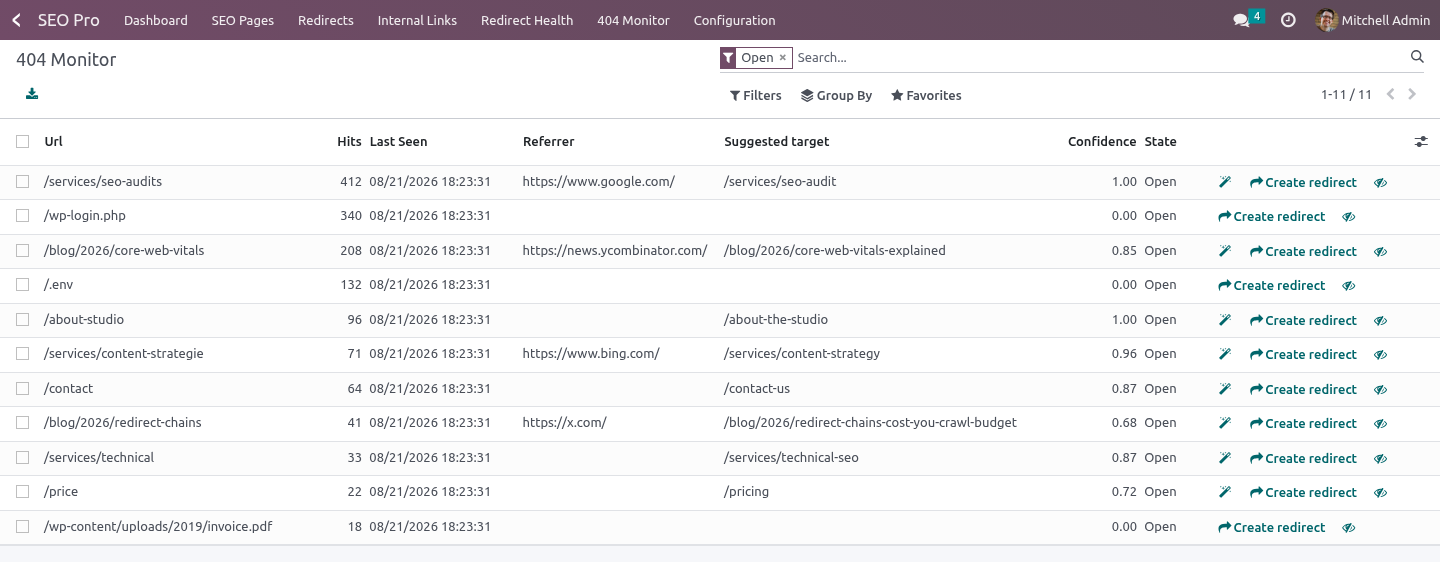
SEO Pro → 404 Monitor. A dead URL is almost never random: it is yesterday's slug. Every open 404 is scored against the pages SEO Pro has indexed for that website:
the slug - the last segment, because that is what a rename touches;
the whole path;
the words the two URLs share, ignoring stop words and numbering.
The best match is shown with a confidence between 0 and 1. Below 0.55 the monitor says nothing at all: a wrong 301 removes the row from the list and hides the problem from the next person who looks at it.
Accept suggestion creates a 301 for the selected rows, marks each 404 as redirected and links the rule. Rows without a suggestion are skipped, and a row that cannot be created - because somebody redirected the target back in the meantime - does not roll back the rows that could.
Scoring runs every four hours for 404s nobody has looked at yet, and on demand with Suggest targets.
Multi-website and multi-company
A finding belongs to the rule, not to the website that happened to be scanned last. A rule that serves every website produces one finding.
Suggestions never cross sites: a page published on client B is never proposed as the target for a 404 on client A.
The findings list is filtered by the websites the user can see, and by company through the website's company.
Housekeeping
Findings marked fixed or ignored are deleted 30 days later by the standard autovacuum.
Nothing is crawled and nothing leaves the server: "does this URL exist" is answered from SEO Pro's page index and the routes this Odoo really serves.
How we make sure it works
Before every release, 60 automated checks run against this app on Odoo 16, 17, 18, 19 and 20. Among them:
A read only seo user cannot rewrite the monitor.
A read only seo user cannot scan.
A global rule is reported once not once per website.
A row already handled is not redirected twice.
A suggestion is never borrowed from another client.
The complete list is in the source you receive.
Questions people ask
- Which Odoo versions does it run on?
Odoo 16.0, 17.0, 18.0, 19.0, 20.0, on the series you buy it for; each series is its own listing.
- Community or Enterprise?
Both. It needs no Enterprise app.
- What does it need?
The standard Web; seo pro (BambooForge) must be installed first app. No extra Python package.
- Where does it show up?
Under the Scan redirects now menu (Redirect Health).
- Does anything leave my server?
No. It makes no call outside your Odoo server: no telemetry, no licence check, no third-party service.
- What happens if I uninstall it?
Odoo drops the app's own tables and fields; the standard records it worked on (contacts, orders, products) stay as they are.
Support
support@bambooforge.dev - the people who wrote it.