 BambooForge Labs
POS Stock: Live Stock in Point of Sale
Live stock on every product card in the Point of Sale, counted in the shop's own warehouse, with a warning or a hard stop before overselling.
Available for Odoo 16.0, Odoo 17.0, Odoo 18.0, Odoo 19.0, Odoo 20.0. Technical name bambooforge_pos_stock.
Transcript of the walkthrough (Odoo 20)
POS Stock: Live Stock in Point of Sale. Live stock on every product card in the Point of Sale, counted in the shop's own warehouse, with a warning or a hard stop before overselling. The Point of Sale knows the price of everything and the stock of nothing. A cashier finds out the shelf was empty when the customer is already at the till — or worse, nobody finds out, the sale goes through, and the stock goes negative quietly.
In the next few minutes: pos stock: live stock in point of sale, then the number on every card, then it stays current, then a warning or a wall, then what it deliberately does not do. Then what this app deliberately does not do, so you can tell before you buy whether it fits. 1. Copy bambooforge_pos_stock into your addons path and update the app list, or install the ZIP from the Odoo Apps Store.
2. Install POS Stock: Live Stock in Point of Sale. POS Stock: Live Stock in Point of Sale. The Point of Sale knows the price of everything and the stock of nothing.
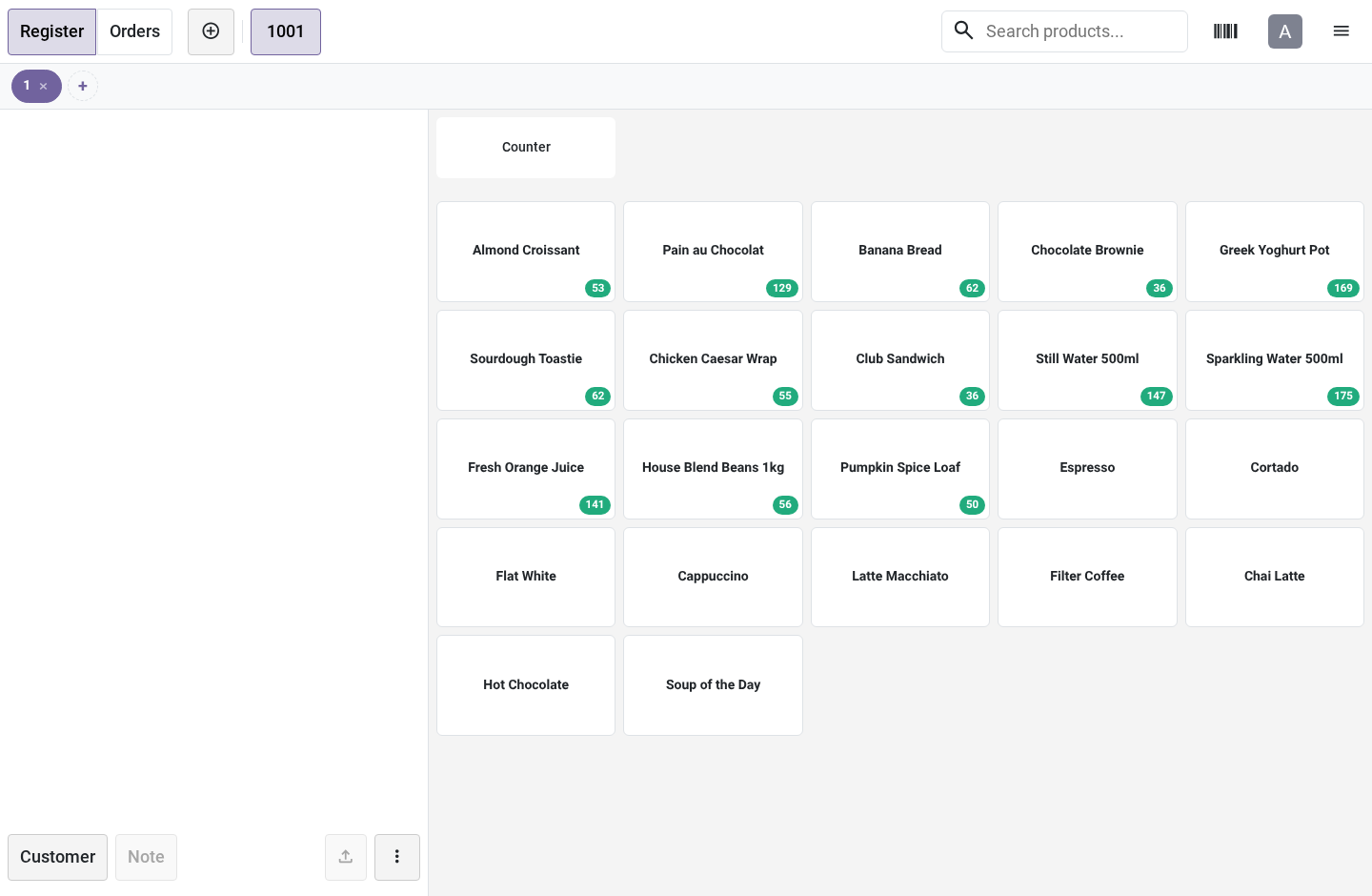
A cashier finds out the shelf was empty when the customer is already at the till — or worse, nobody finds out, the sale goes through, and the stock goes negative quietly. The number on every card. Every storable product's card carries its sellable quantity, counted in this POS's own warehouse — the one behind its operation type. "Eight on hand" company-wide is a lie when six of them are in the depot across town, and a badge that lies is worse than no badge.
Sellable means free_qty: on hand minus what is already reserved for delivery orders. A shop that also ships web orders from the same warehouse has units on the shelf that are promised to this afternoon's carrier pickup — they are on the shelf, and they are not for sale, and the badge knows the difference. It stays current. The numbers are read when the session opens and re-read every few minutes while it runs (Refresh Every, default 3).
Two tills in the same shop see each other's sales after at most that long, without anybody pressing anything. Offline, the last known numbers stay on screen rather than disappearing, and the next successful tick replaces them. An unknown number is shown as no badge — and the guard treats it as no reason to stop a sale, because a wifi drop must never lock the till. A warning or a wall.
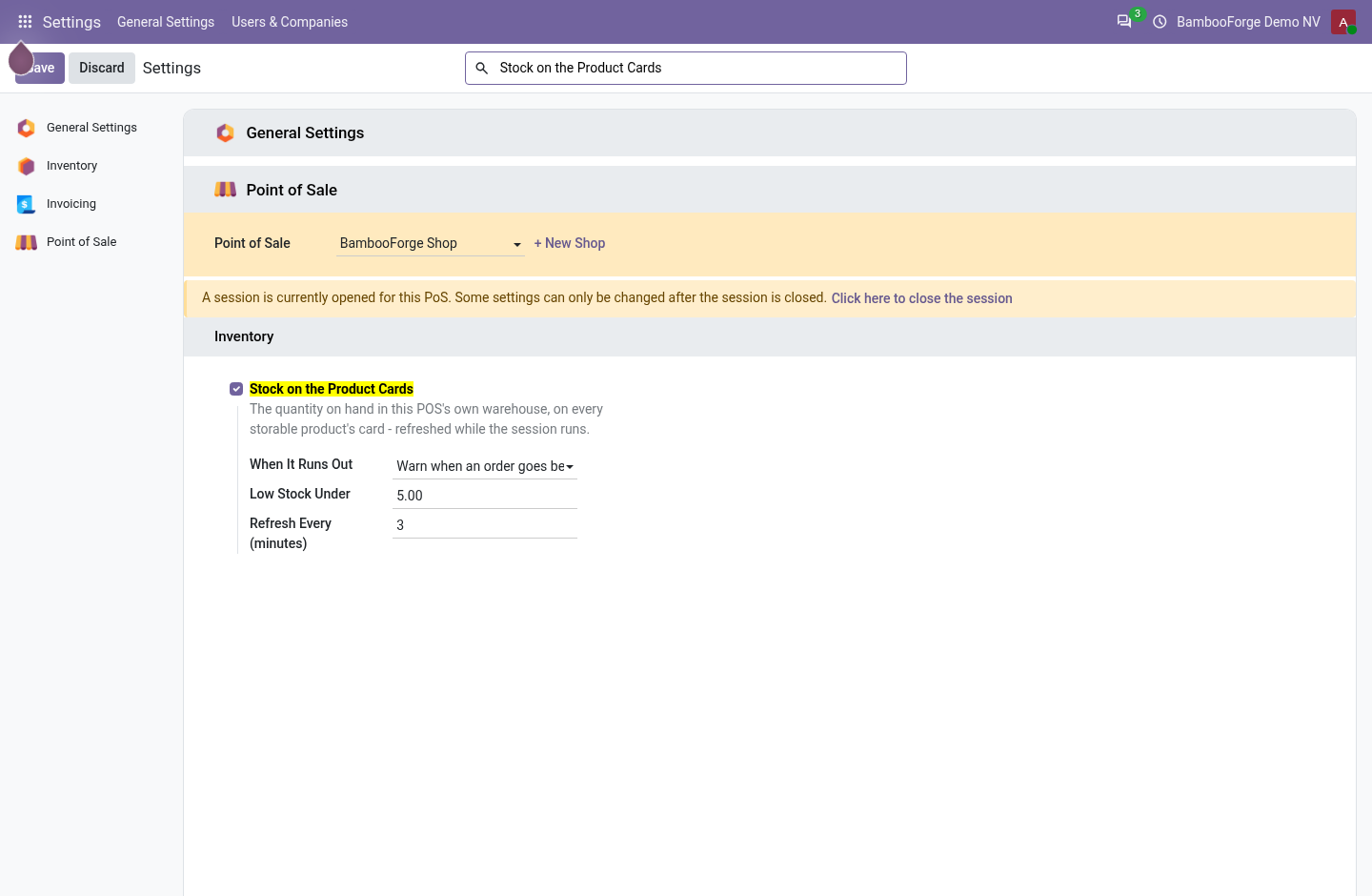
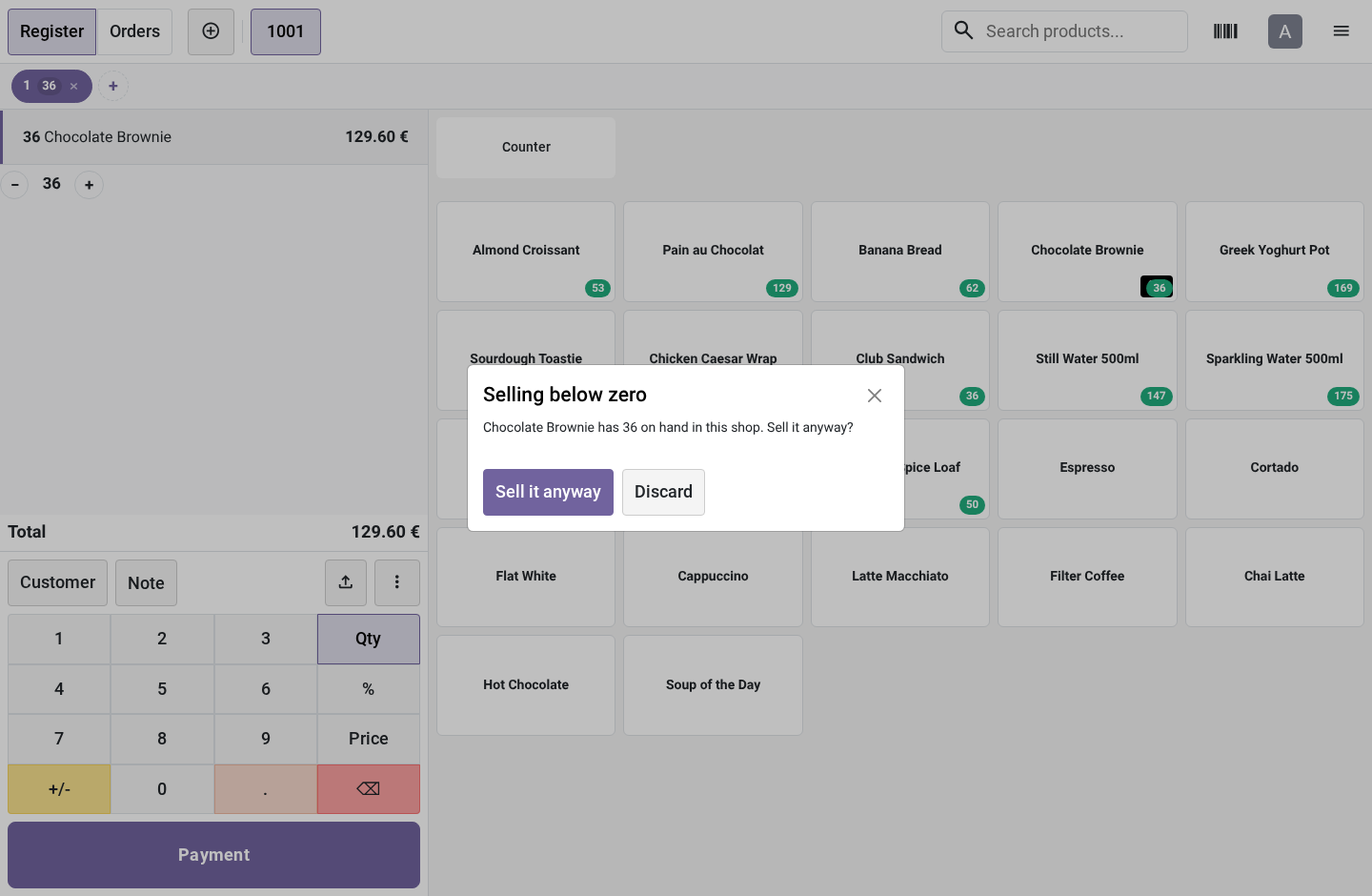
When It Runs Out is chosen per Point of Sale: Show the quantity, say nothing — the badge is information only. Warn when an order goes below zero — the default. The cashier is told what is on hand and asked whether to sell anyway; sometimes the box is in the customer's hand and the system is wrong. Refuse the line outright — for shops where negative stock means a reconciliation nobody wants to do.
The check counts what is already in every open order on the till — the parked one included, because a customer who ran for their wallet still has the last unit in their basket — so the fifth unit of a product with four on hand is the one that gets stopped, whichever order it lands in. What it deliberately does not do It does not reserve stock. Two tills can each be told "1 on hand" and both sell it; the second one finds out at the next refresh. Reserving from a POS order that may be abandoned mid-basket causes more trouble at a till than it prevents.
It does not block refunds. A refund line has a negative quantity and puts stock back. It does not check the storable children of a combo. They enter the order through a side door in every series, and a check that only sometimes fires is worse than an honest exemption.
The standalone product's badge still tells the truth. On Odoo 20, tapping a multi-variant product resolves the variant after the check could run — so the tap path lets it through rather than pretend "39 red in stock" says anything about the blue. The barcode path carries the exact variant and is checked. It does not touch the session's accounting, pickings or closing.
The numbers are read-only; the module writes nothing to stock. Across the versions. One module, four spellings — the POS front end has no stable cross-version surface: 16.0 patches PosGlobalState and ProductScreen._clickProduct through Registries; the asset bundle is point_of_sale.assets. 17.0 patches PosStore.addProductToCurrentOrder.
18.0 patches PosStore.addLineToCurrentOrder, which receives a product variant. 19.0 patches the same method — which now receives a product template, because the 19 product list is templates. The badge on a template is the sum of its variants' quantities. The server side is one file: the quantities RPC sets both spellings of the warehouse context key (16/17 read warehouse, 18/19 renamed it warehouse_id), and the products are searched with the caller's own rights, so a record rule that hides a product hides its quantity too.
How we make sure it works. Before every release, 18 automated checks run against this app on Odoo 16, 17, 18, 19 and 20. Among them: A product the caller cannot see is not counted. A config the caller cannot read answers nothing.
The number is what can be sold not what is on the shelf. A product not for sale in pos carries no number. The count is the shops not the companys. The complete list is in the source you receive.
Questions people ask. Which Odoo versions does it run on? Odoo 16.0, 17.0, 18.0, 19.0, 20.0, on the series you buy it for; each series is its own listing. Community or Enterprise?
Both. It needs no Enterprise app. The complete manual is at docs dot bambooforge dot dev, the demo database is linked from the store page, and support answers within twenty-four hours. Links are in the description.
Transcript of the walkthrough (Odoo 19)
POS Stock: Live Stock in Point of Sale. Live stock on every product card in the Point of Sale, counted in the shop's own warehouse, with a warning or a hard stop before overselling. The Point of Sale knows the price of everything and the stock of nothing. A cashier finds out the shelf was empty when the customer is already at the till — or worse, nobody finds out, the sale goes through, and the stock goes negative quietly.
In the next few minutes: pos stock: live stock in point of sale, then the number on every card, then it stays current, then a warning or a wall, then what it deliberately does not do. Then what this app deliberately does not do, so you can tell before you buy whether it fits. POS Stock: Live Stock in Point of Sale. The Point of Sale knows the price of everything and the stock of nothing.
A cashier finds out the shelf was empty when the customer is already at the till — or worse, nobody finds out, the sale goes through, and the stock goes negative quietly. The number on every card. Every storable product's card carries its sellable quantity, counted in this POS's own warehouse — the one behind its operation type. "Eight on hand" company-wide is a lie when six of them are in the depot across town, and a badge that lies is worse than no badge.
Sellable means free_qty: on hand minus what is already reserved for delivery orders. A shop that also ships web orders from the same warehouse has units on the shelf that are promised to this afternoon's carrier pickup — they are on the shelf, and they are not for sale, and the badge knows the difference. It stays current. The numbers are read when the session opens and re-read every few minutes while it runs (Refresh Every, default 3).
Two tills in the same shop see each other's sales after at most that long, without anybody pressing anything. Offline, the last known numbers stay on screen rather than disappearing, and the next successful tick replaces them. An unknown number is shown as no badge — and the guard treats it as no reason to stop a sale, because a wifi drop must never lock the till. A warning or a wall.
When It Runs Out is chosen per Point of Sale: Show the quantity, say nothing — the badge is information only. Warn when an order goes below zero — the default. The cashier is told what is on hand and asked whether to sell anyway; sometimes the box is in the customer's hand and the system is wrong. Refuse the line outright — for shops where negative stock means a reconciliation nobody wants to do.
The check counts what is already in every open order on the till — the parked one included, because a customer who ran for their wallet still has the last unit in their basket — so the fifth unit of a product with four on hand is the one that gets stopped, whichever order it lands in. What it deliberately does not do It does not reserve stock. Two tills can each be told "1 on hand" and both sell it; the second one finds out at the next refresh. Reserving from a POS order that may be abandoned mid-basket causes more trouble at a till than it prevents.
It does not block refunds. A refund line has a negative quantity and puts stock back. It does not check the storable children of a combo. They enter the order through a side door in every series, and a check that only sometimes fires is worse than an honest exemption.
The standalone product's badge still tells the truth. On Odoo 19, tapping a multi-variant product resolves the variant after the check could run — so the tap path lets it through rather than pretend "39 red in stock" says anything about the blue. The barcode path carries the exact variant and is checked. It does not touch the session's accounting, pickings or closing.
The numbers are read-only; the module writes nothing to stock. Across the versions. One module, four spellings — the POS front end has no stable cross-version surface: 16.0 patches PosGlobalState and ProductScreen._clickProduct through Registries; the asset bundle is point_of_sale.assets. 17.0 patches PosStore.addProductToCurrentOrder.
18.0 patches PosStore.addLineToCurrentOrder, which receives a product variant. 19.0 patches the same method — which now receives a product template, because the 19 product list is templates. The badge on a template is the sum of its variants' quantities. The server side is one file: the quantities RPC sets both spellings of the warehouse context key (16/17 read warehouse, 18/19 renamed it warehouse_id), and the products are searched with the caller's own rights, so a record rule that hides a product hides its quantity too.
The complete manual is at docs dot bambooforge dot dev, the demo database is linked from the store page, and support answers within twenty-four hours. Links are in the description.
Transcript of the walkthrough (Odoo 18)
POS Stock: Live Stock in Point of Sale. Live stock on every product card in the Point of Sale, counted in the shop's own warehouse, with a warning or a hard stop before overselling. The Point of Sale knows the price of everything and the stock of nothing. A cashier finds out the shelf was empty when the customer is already at the till — or worse, nobody finds out, the sale goes through, and the stock goes negative quietly.
In the next few minutes: pos stock: live stock in point of sale, then the number on every card, then it stays current, then a warning or a wall, then what it deliberately does not do. Then what this app deliberately does not do, so you can tell before you buy whether it fits. POS Stock: Live Stock in Point of Sale. The Point of Sale knows the price of everything and the stock of nothing.
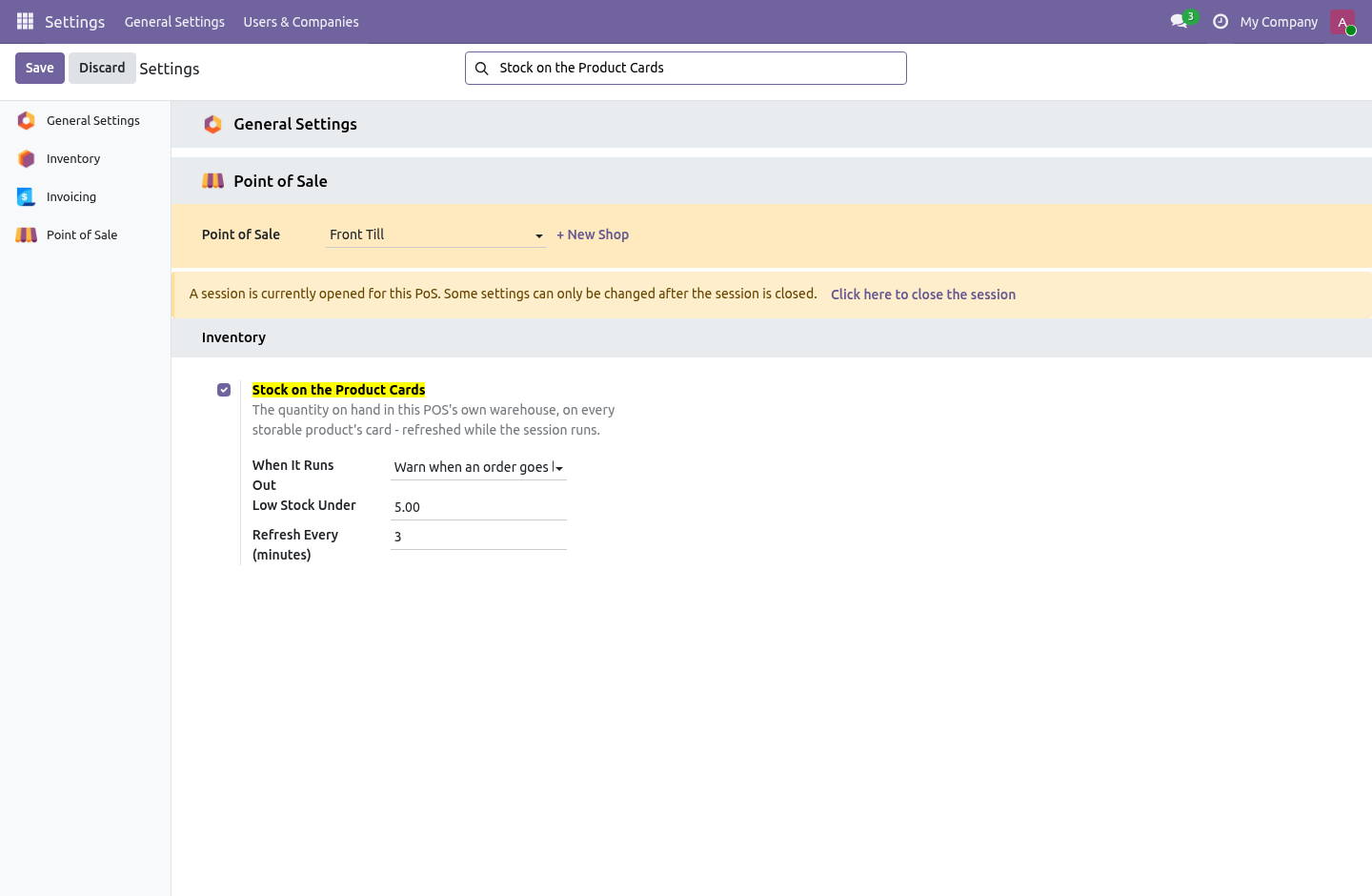
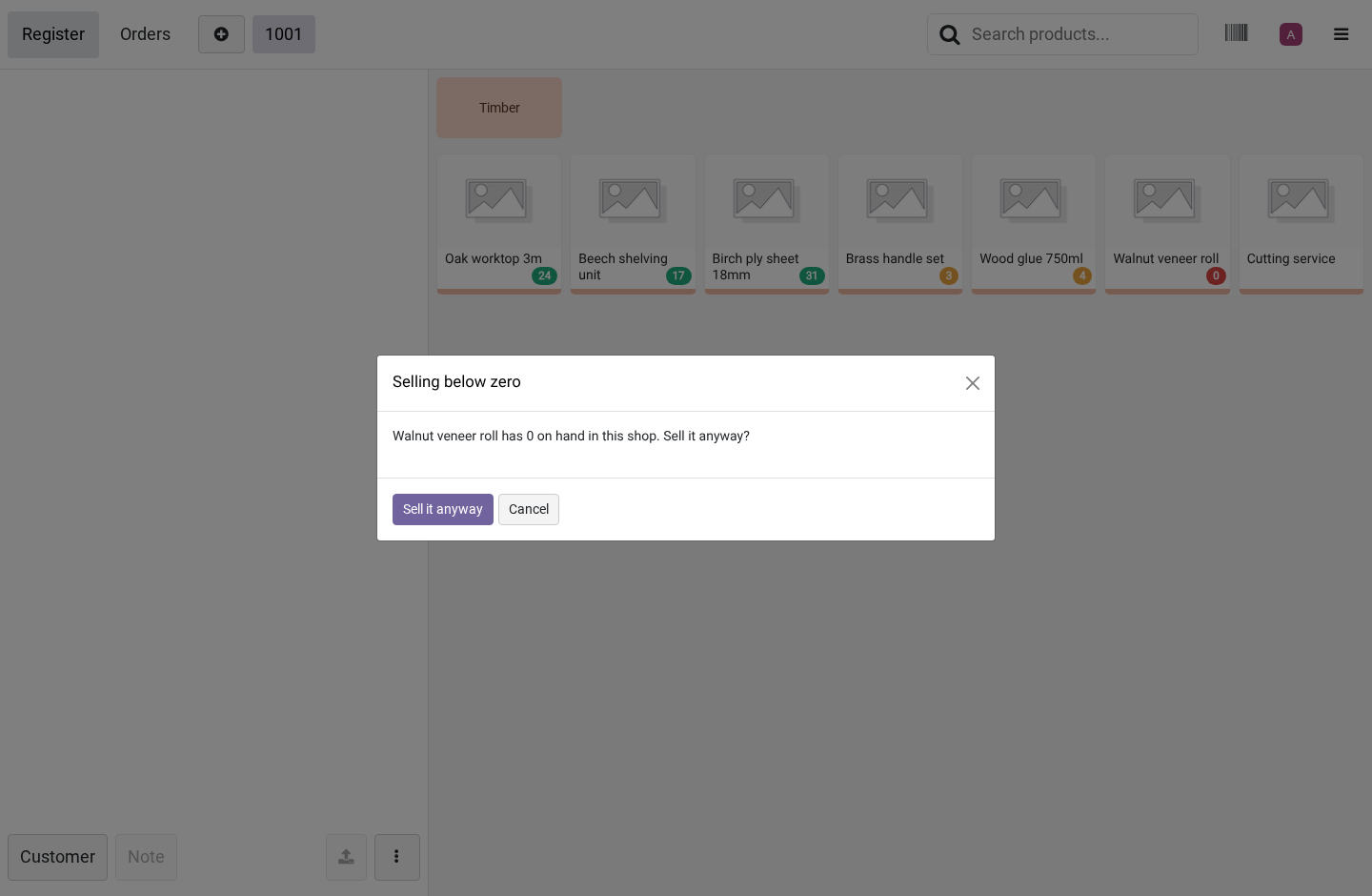
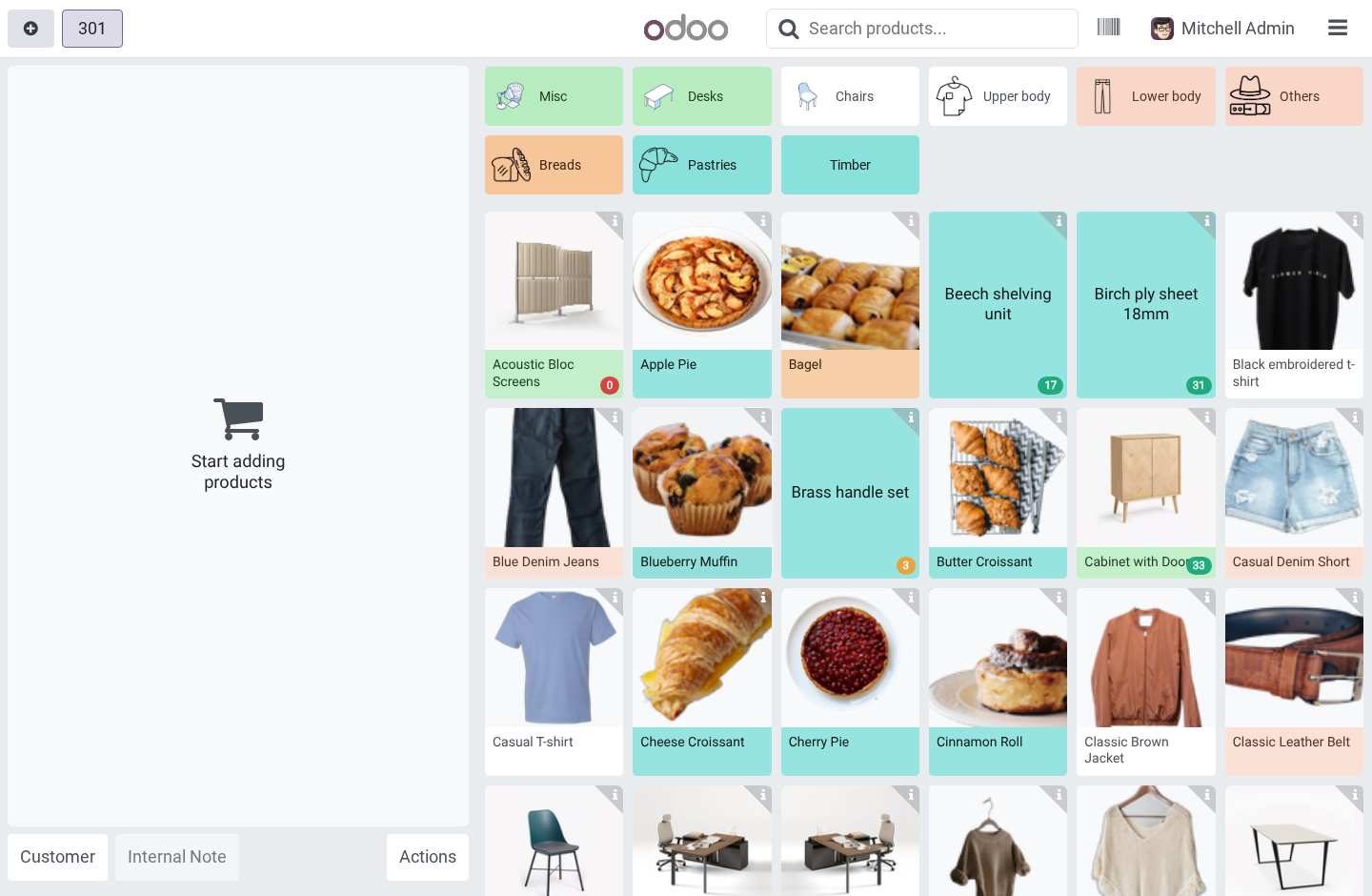
A cashier finds out the shelf was empty when the customer is already at the till — or worse, nobody finds out, the sale goes through, and the stock goes negative quietly. The number on every card. Every storable product's card carries its sellable quantity, counted in this POS's own warehouse — the one behind its operation type. "Eight on hand" company-wide is a lie when six of them are in the depot across town, and a badge that lies is worse than no badge.
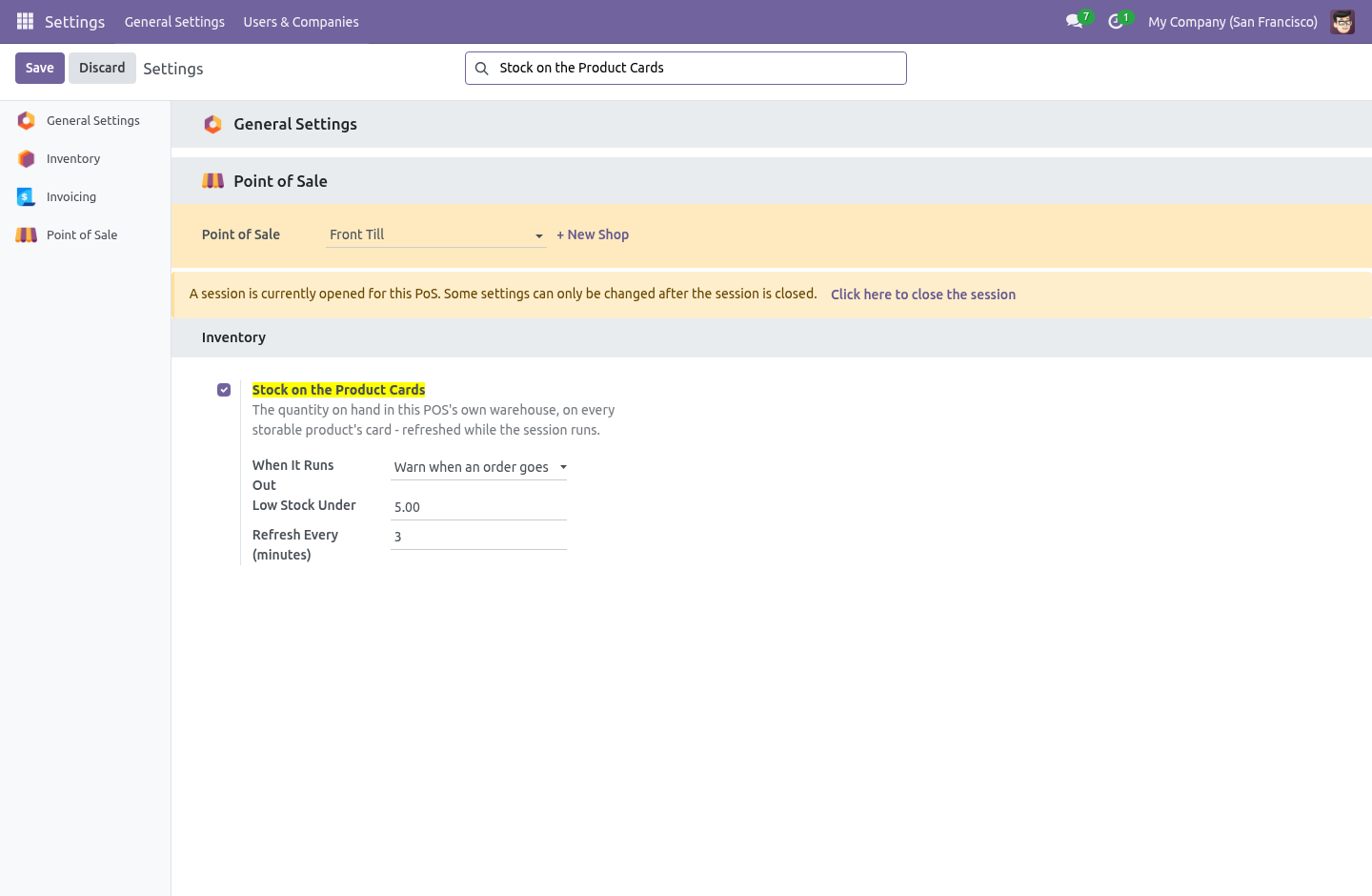
Sellable means free_qty: on hand minus what is already reserved for delivery orders. A shop that also ships web orders from the same warehouse has units on the shelf that are promised to this afternoon's carrier pickup — they are on the shelf, and they are not for sale, and the badge knows the difference. It stays current. The numbers are read when the session opens and re-read every few minutes while it runs (Refresh Every, default 3).
Two tills in the same shop see each other's sales after at most that long, without anybody pressing anything. Offline, the last known numbers stay on screen rather than disappearing, and the next successful tick replaces them. An unknown number is shown as no badge — and the guard treats it as no reason to stop a sale, because a wifi drop must never lock the till. A warning or a wall.
When It Runs Out is chosen per Point of Sale: Show the quantity, say nothing — the badge is information only. Warn when an order goes below zero — the default. The cashier is told what is on hand and asked whether to sell anyway; sometimes the box is in the customer's hand and the system is wrong. Refuse the line outright — for shops where negative stock means a reconciliation nobody wants to do.
The check counts what is already in every open order on the till — the parked one included, because a customer who ran for their wallet still has the last unit in their basket — so the fifth unit of a product with four on hand is the one that gets stopped, whichever order it lands in. What it deliberately does not do It does not reserve stock. Two tills can each be told "1 on hand" and both sell it; the second one finds out at the next refresh. Reserving from a POS order that may be abandoned mid-basket causes more trouble at a till than it prevents.
It does not block refunds. A refund line has a negative quantity and puts stock back. It does not check the storable children of a combo. They enter the order through a side door in every series, and a check that only sometimes fires is worse than an honest exemption.
The standalone product's badge still tells the truth. On Odoo 18, tapping a multi-variant product resolves the variant after the check could run — so the tap path lets it through rather than pretend "39 red in stock" says anything about the blue. The barcode path carries the exact variant and is checked. It does not touch the session's accounting, pickings or closing.
The numbers are read-only; the module writes nothing to stock. Across the versions. One module, four spellings — the POS front end has no stable cross-version surface: 16.0 patches PosGlobalState and ProductScreen._clickProduct through Registries; the asset bundle is point_of_sale.assets. 17.0 patches PosStore.addProductToCurrentOrder.
18.0 patches PosStore.addLineToCurrentOrder, which receives a product variant. 19.0 patches the same method — which now receives a product template, because the 19 product list is templates. The badge on a template is the sum of its variants' quantities. The server side is one file: the quantities RPC sets both spellings of the warehouse context key (16/17 read warehouse, 18/19 renamed it warehouse_id), and the products are searched with the caller's own rights, so a record rule that hides a product hides its quantity too.
The complete manual is at docs dot bambooforge dot dev, the demo database is linked from the store page, and support answers within twenty-four hours. Links are in the description.
Transcript of the walkthrough (Odoo 17)
POS Stock: Live Stock in Point of Sale. Live stock on every product card in the Point of Sale, counted in the shop's own warehouse, with a warning or a hard stop before overselling. The Point of Sale knows the price of everything and the stock of nothing. A cashier finds out the shelf was empty when the customer is already at the till — or worse, nobody finds out, the sale goes through, and the stock goes negative quietly.
In the next few minutes: pos stock: live stock in point of sale, then the number on every card, then it stays current, then a warning or a wall, then what it deliberately does not do. Then what this app deliberately does not do, so you can tell before you buy whether it fits. POS Stock: Live Stock in Point of Sale. The Point of Sale knows the price of everything and the stock of nothing.
A cashier finds out the shelf was empty when the customer is already at the till — or worse, nobody finds out, the sale goes through, and the stock goes negative quietly. The number on every card. Every storable product's card carries its sellable quantity, counted in this POS's own warehouse — the one behind its operation type. "Eight on hand" company-wide is a lie when six of them are in the depot across town, and a badge that lies is worse than no badge.
Sellable means free_qty: on hand minus what is already reserved for delivery orders. A shop that also ships web orders from the same warehouse has units on the shelf that are promised to this afternoon's carrier pickup — they are on the shelf, and they are not for sale, and the badge knows the difference. It stays current. The numbers are read when the session opens and re-read every few minutes while it runs (Refresh Every, default 3).
Two tills in the same shop see each other's sales after at most that long, without anybody pressing anything. Offline, the last known numbers stay on screen rather than disappearing, and the next successful tick replaces them. An unknown number is shown as no badge — and the guard treats it as no reason to stop a sale, because a wifi drop must never lock the till. A warning or a wall.
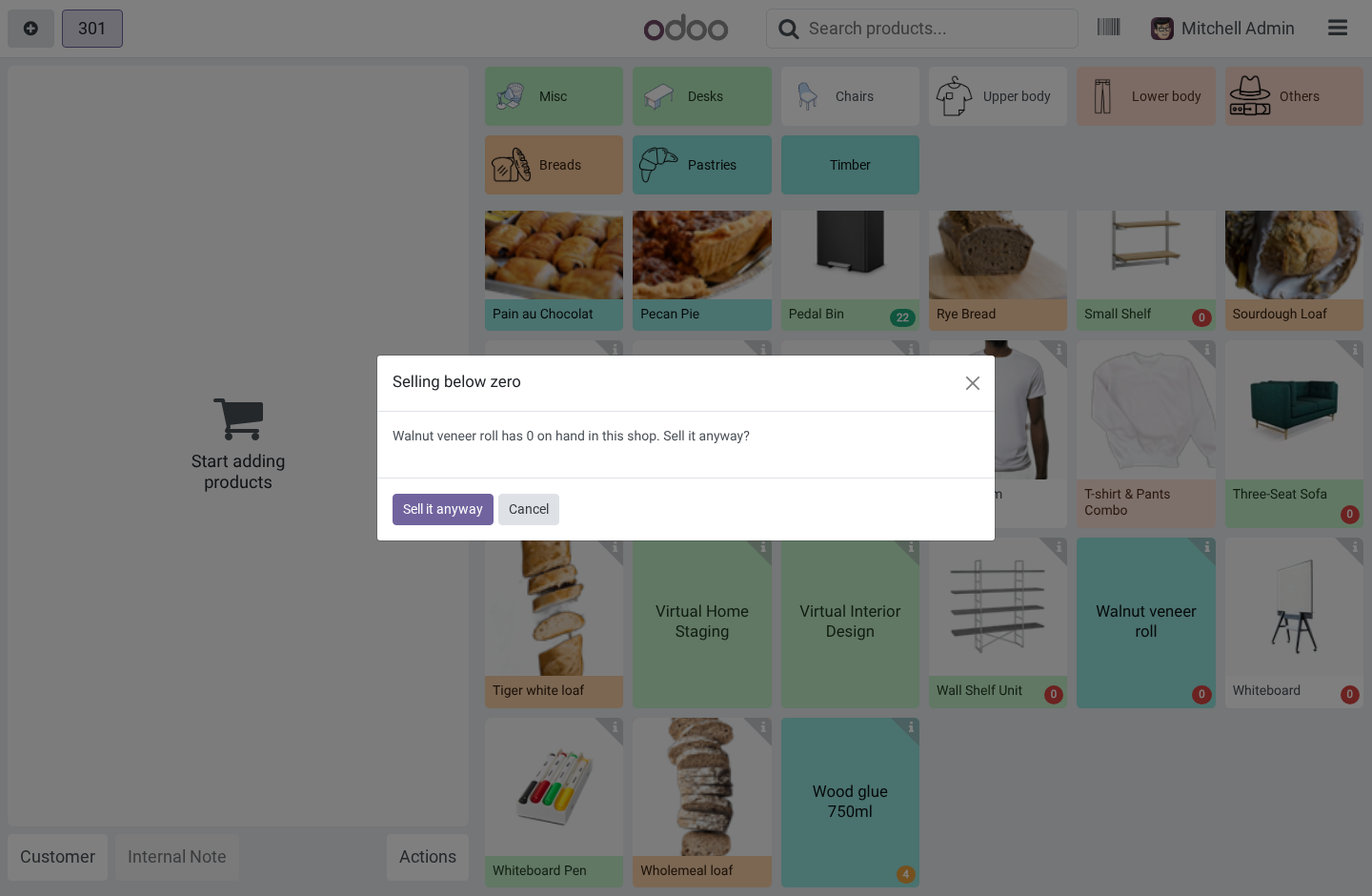
When It Runs Out is chosen per Point of Sale: Show the quantity, say nothing — the badge is information only. Warn when an order goes below zero — the default. The cashier is told what is on hand and asked whether to sell anyway; sometimes the box is in the customer's hand and the system is wrong. Refuse the line outright — for shops where negative stock means a reconciliation nobody wants to do.
The check counts what is already in every open order on the till — the parked one included, because a customer who ran for their wallet still has the last unit in their basket — so the fifth unit of a product with four on hand is the one that gets stopped, whichever order it lands in. What it deliberately does not do It does not reserve stock. Two tills can each be told "1 on hand" and both sell it; the second one finds out at the next refresh. Reserving from a POS order that may be abandoned mid-basket causes more trouble at a till than it prevents.
It does not block refunds. A refund line has a negative quantity and puts stock back. It does not check the storable children of a combo. They enter the order through a side door in every series, and a check that only sometimes fires is worse than an honest exemption.
The standalone product's badge still tells the truth. On Odoo 19, tapping a multi-variant product resolves the variant after the check could run — so the tap path lets it through rather than pretend "39 red in stock" says anything about the blue. The barcode path carries the exact variant and is checked. It does not touch the session's accounting, pickings or closing.
The numbers are read-only; the module writes nothing to stock. Across the versions. One module, four spellings — the POS front end has no stable cross-version surface: 16.0 patches PosGlobalState and ProductScreen._clickProduct through Registries; the asset bundle is point_of_sale.assets. 17.0 patches PosStore.addProductToCurrentOrder.
18.0 patches PosStore.addLineToCurrentOrder, which receives a product variant. 19.0 patches the same method — which now receives a product template, because the 19 product list is templates. The badge on a template is the sum of its variants' quantities. The server side is one file: the quantities RPC sets both spellings of the warehouse context key (16/17 read warehouse, 18/19 renamed it warehouse_id), and the products are searched with the caller's own rights, so a record rule that hides a product hides its quantity too.
The complete manual is at docs dot bambooforge dot dev, the demo database is linked from the store page, and support answers within twenty-four hours. Links are in the description.
Transcript of the walkthrough (Odoo 16)
POS Stock: Live Stock in Point of Sale. Live stock on every product card in the Point of Sale, counted in the shop's own warehouse, with a warning or a hard stop before overselling. The Point of Sale knows the price of everything and the stock of nothing. A cashier finds out the shelf was empty when the customer is already at the till — or worse, nobody finds out, the sale goes through, and the stock goes negative quietly.
In the next few minutes: pos stock: live stock in point of sale, then the number on every card, then it stays current, then a warning or a wall, then what it deliberately does not do. Then what this app deliberately does not do, so you can tell before you buy whether it fits. POS Stock: Live Stock in Point of Sale. The Point of Sale knows the price of everything and the stock of nothing.
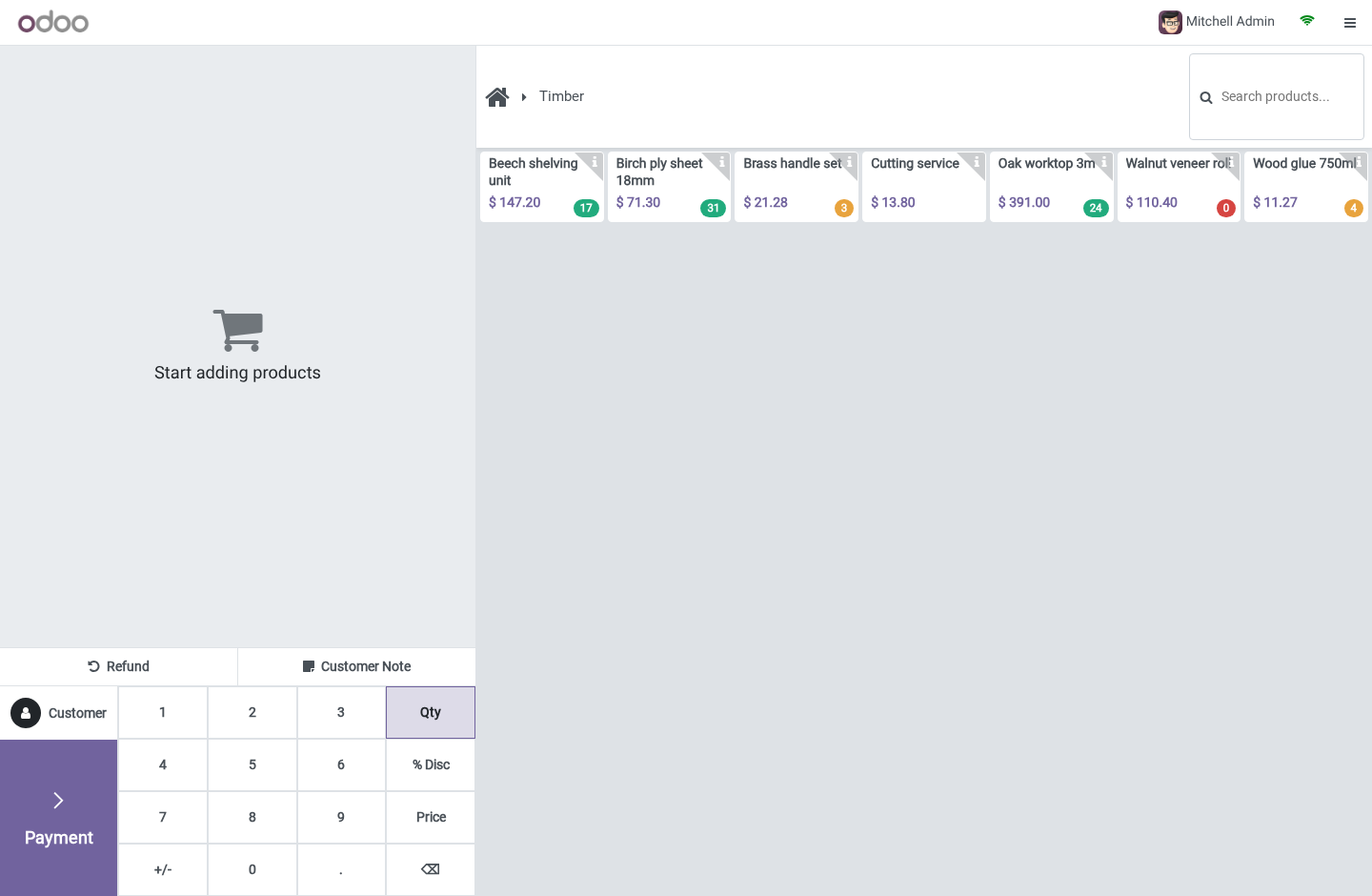
A cashier finds out the shelf was empty when the customer is already at the till — or worse, nobody finds out, the sale goes through, and the stock goes negative quietly. The number on every card. Every storable product's card carries its sellable quantity, counted in this POS's own warehouse — the one behind its operation type. "Eight on hand" company-wide is a lie when six of them are in the depot across town, and a badge that lies is worse than no badge.
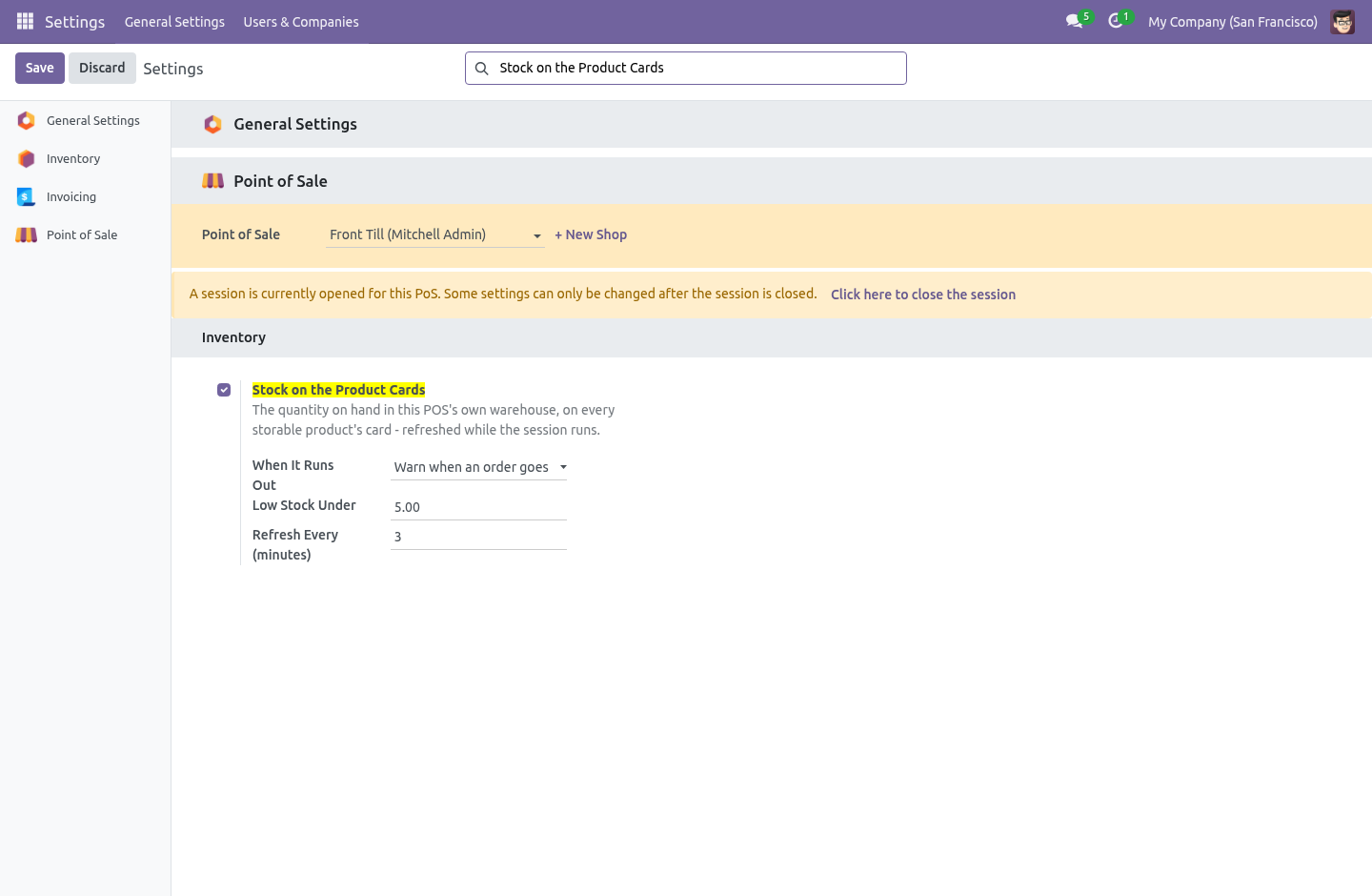
Sellable means free_qty: on hand minus what is already reserved for delivery orders. A shop that also ships web orders from the same warehouse has units on the shelf that are promised to this afternoon's carrier pickup — they are on the shelf, and they are not for sale, and the badge knows the difference. It stays current. The numbers are read when the session opens and re-read every few minutes while it runs (Refresh Every, default 3).
Two tills in the same shop see each other's sales after at most that long, without anybody pressing anything. Offline, the last known numbers stay on screen rather than disappearing, and the next successful tick replaces them. An unknown number is shown as no badge — and the guard treats it as no reason to stop a sale, because a wifi drop must never lock the till. A warning or a wall.
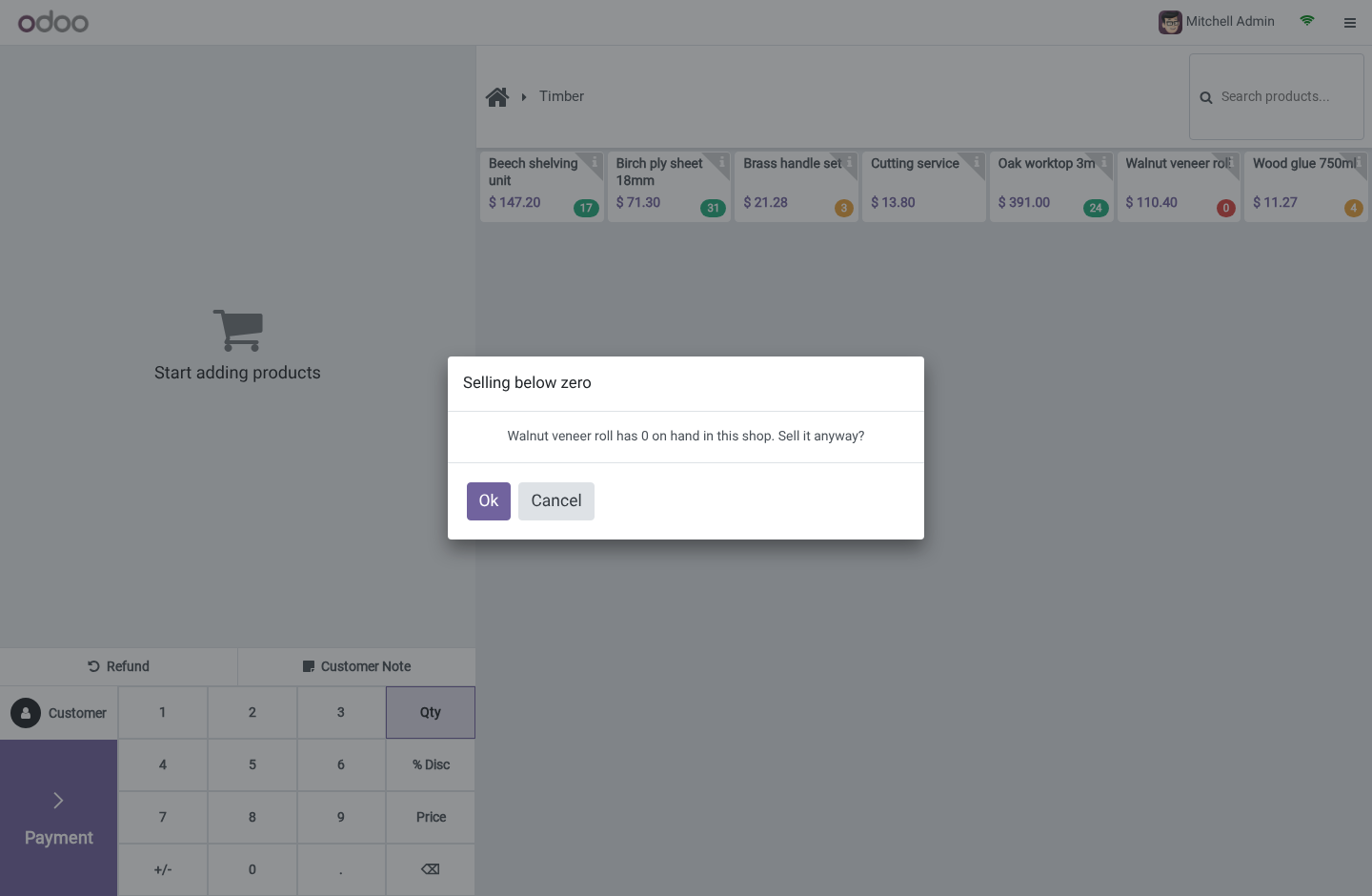
When It Runs Out is chosen per Point of Sale: Show the quantity, say nothing — the badge is information only. Warn when an order goes below zero — the default. The cashier is told what is on hand and asked whether to sell anyway; sometimes the box is in the customer's hand and the system is wrong. Refuse the line outright — for shops where negative stock means a reconciliation nobody wants to do.
The check counts what is already in every open order on the till — the parked one included, because a customer who ran for their wallet still has the last unit in their basket — so the fifth unit of a product with four on hand is the one that gets stopped, whichever order it lands in. What it deliberately does not do It does not reserve stock. Two tills can each be told "1 on hand" and both sell it; the second one finds out at the next refresh. Reserving from a POS order that may be abandoned mid-basket causes more trouble at a till than it prevents.
It does not block refunds. A refund line has a negative quantity and puts stock back. It does not check the storable children of a combo. They enter the order through a side door in every series, and a check that only sometimes fires is worse than an honest exemption.
The standalone product's badge still tells the truth. On Odoo 16, tapping a multi-variant product resolves the variant after the check could run — so the tap path lets it through rather than pretend "39 red in stock" says anything about the blue. The barcode path carries the exact variant and is checked. It does not touch the session's accounting, pickings or closing.
The numbers are read-only; the module writes nothing to stock. Across the versions. One module, four spellings — the POS front end has no stable cross-version surface: 16.0 patches PosGlobalState and ProductScreen._clickProduct through Registries; the asset bundle is point_of_sale.assets. 17.0 patches PosStore.addProductToCurrentOrder.
18.0 patches PosStore.addLineToCurrentOrder, which receives a product variant. 19.0 patches the same method — which now receives a product template, because the 19 product list is templates. The badge on a template is the sum of its variants' quantities. The server side is one file: the quantities RPC sets both spellings of the warehouse context key (16/17 read warehouse, 18/19 renamed it warehouse_id), and the products are searched with the caller's own rights, so a record rule that hides a product hides its quantity too.
The complete manual is at docs dot bambooforge dot dev, the demo database is linked from the store page, and support answers within twenty-four hours. Links are in the description.
Key facts
- What it is
- Live stock on every product card in the Point of Sale, counted in the shop's own warehouse, with a warning or a hard stop before overselling.
- For
- Point of Sale
- Odoo versions
- 16.0, 17.0, 18.0, 19.0, 20.0 - Community and Enterprise
- Runs on
- Odoo.sh or Odoo you host yourself - not Odoo Online, which accepts no third-party apps
- Price
- 89 EUR, one-time, on the Odoo Apps Store
- Technical name
- bambooforge_pos_stock
- Not for
- It does not reserve stock. Two tills can each be told "1 on hand" and both sell it; the second one finds out at the next refresh. Reserving from a POS order that may be abandoned mid-basket causes more trouble at a till than it prevents.; It does not block refunds. A refund line has a negative quantity and puts stock back.; It does not check the storable children of a combo. They enter the order through a side door in every series, and a check that only sometimes fires is worse than an honest exemption. The standalone product's badge still tells the truth.; On Odoo 20, tapping a multi-variant product resolves the variant after the check could run — so the tap path lets it through rather than pretend "39 red in stock" says anything about the blue. The barcode path carries the exact variant and is checked.; It does not touch the session's accounting, pickings or closing. The numbers are read-only; the module writes nothing to stock.
- Manual last updated
- 2026-09-21
POS Stock: Live Stock in Point of Sale
The Point of Sale knows the price of everything and the stock of nothing. A cashier finds out the shelf was empty when the customer is already at the till — or worse, nobody finds out, the sale goes through, and the stock goes negative quietly.
The number on every card
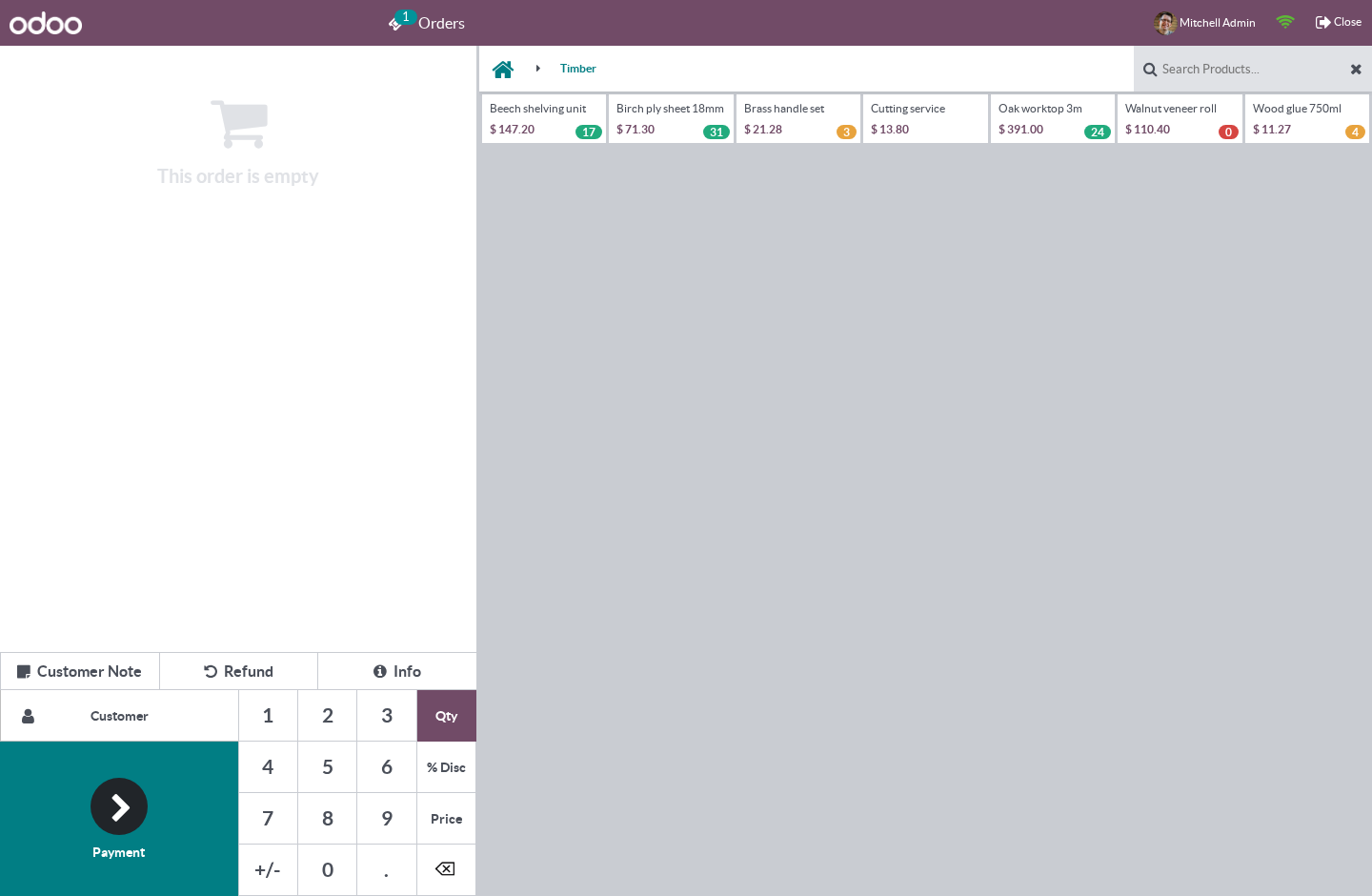
Every storable product's card carries its sellable quantity, counted in this POS's own warehouse — the one behind its operation type. "Eight on hand" company-wide is a lie when six of them are in the depot across town, and a badge that lies is worse than no badge.
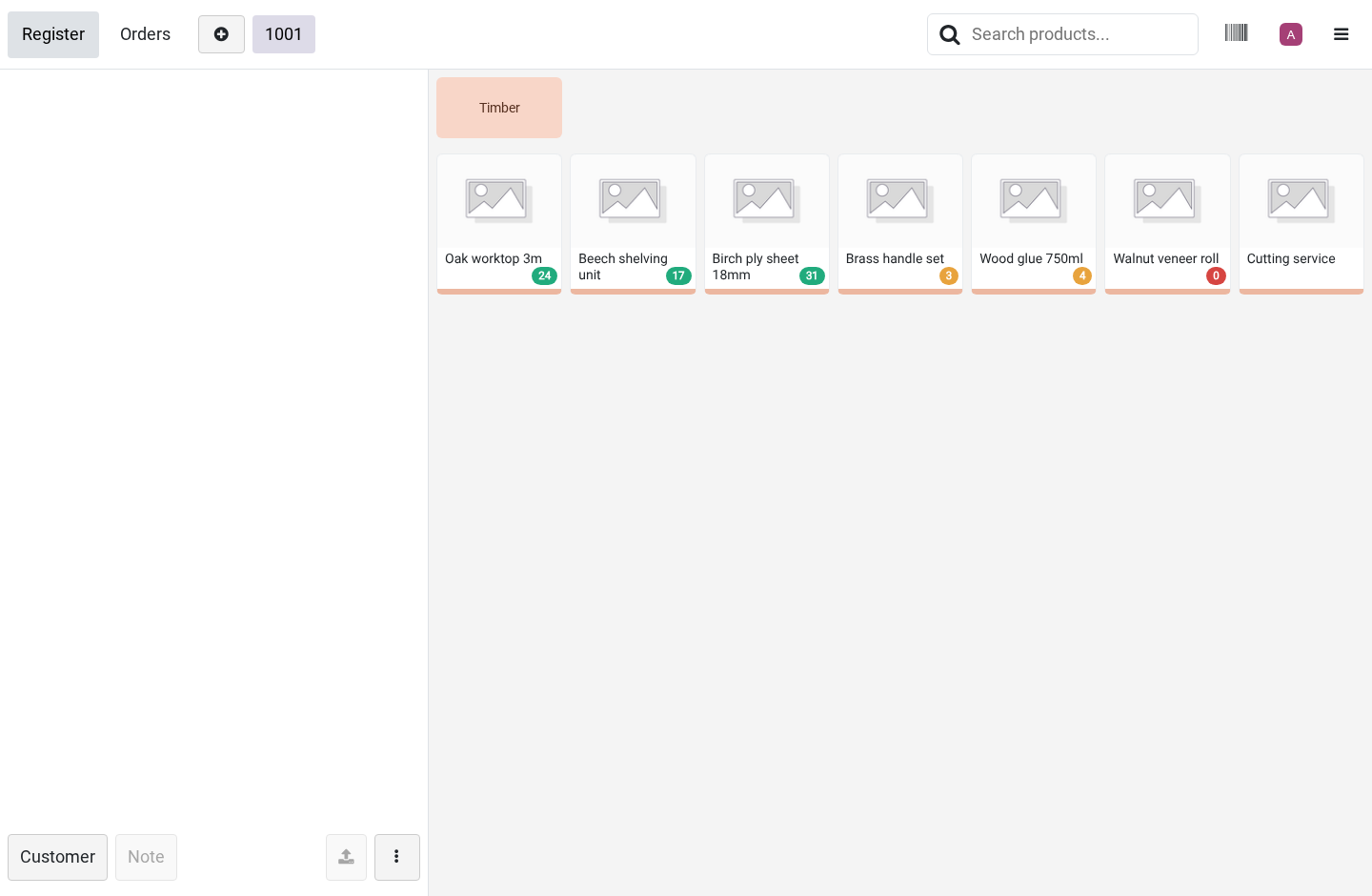
Sellable means free_qty: on hand minus what is already reserved for delivery orders. A shop that also ships web orders from the same warehouse has units on the shelf that are promised to this afternoon's carrier pickup — they are on the shelf, and they are not for sale, and the badge knows the difference.
The badge is green when there is plenty, orange below the Low Stock Under threshold — so the shop reorders before it turns red — and red at zero. A service or a consumable carries no badge at all: a haircut has no stock to run out of.
It stays current
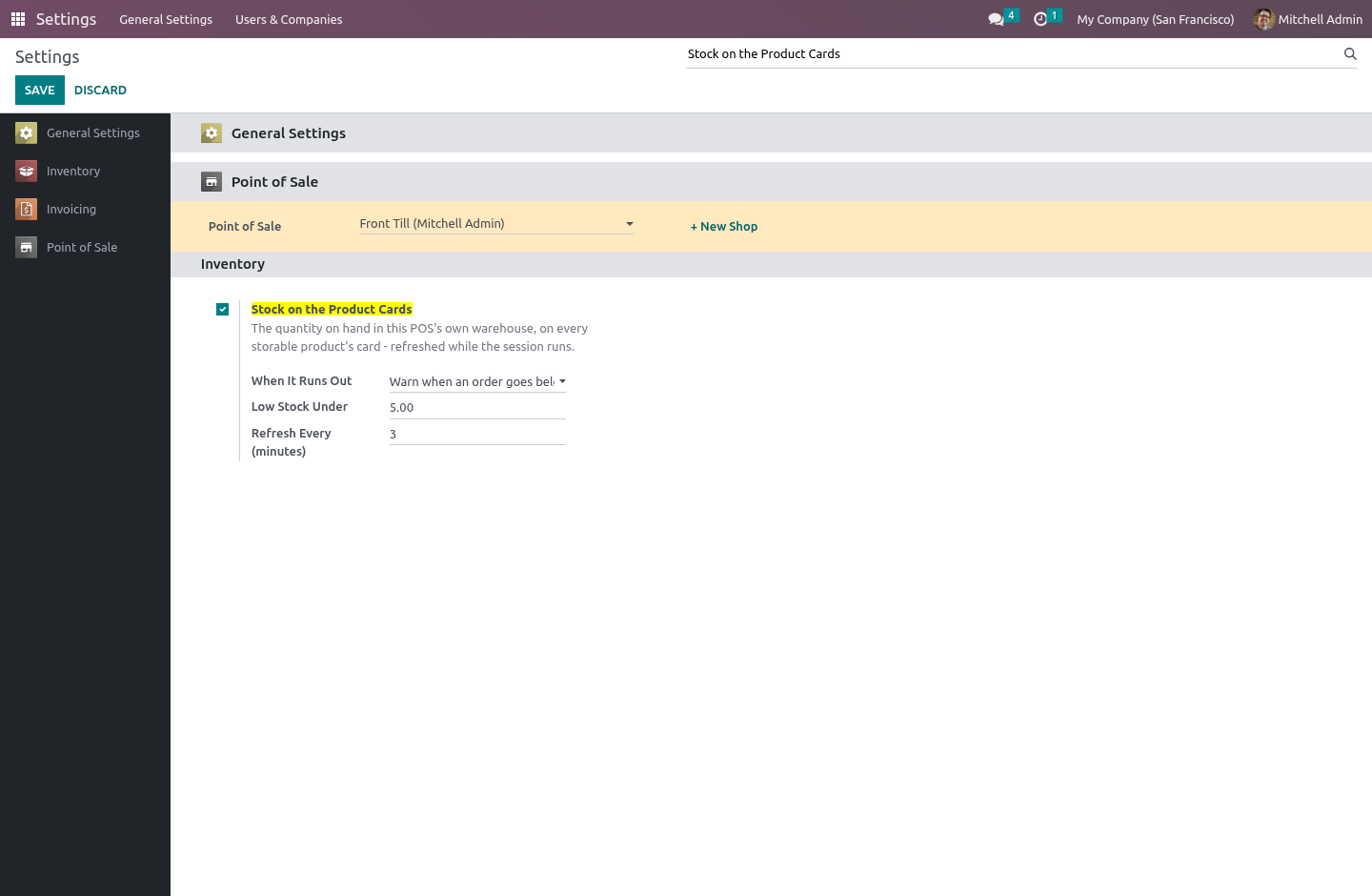
The numbers are read when the session opens and re-read every few minutes while it runs (Refresh Every, default 3). Two tills in the same shop see each other's sales after at most that long, without anybody pressing anything.
Offline, the last known numbers stay on screen rather than disappearing, and the next successful tick replaces them. An unknown number is shown as no badge — and the guard treats it as no reason to stop a sale, because a wifi drop must never lock the till.
A warning or a wall
When It Runs Out is chosen per Point of Sale:
Show the quantity, say nothing — the badge is information only.
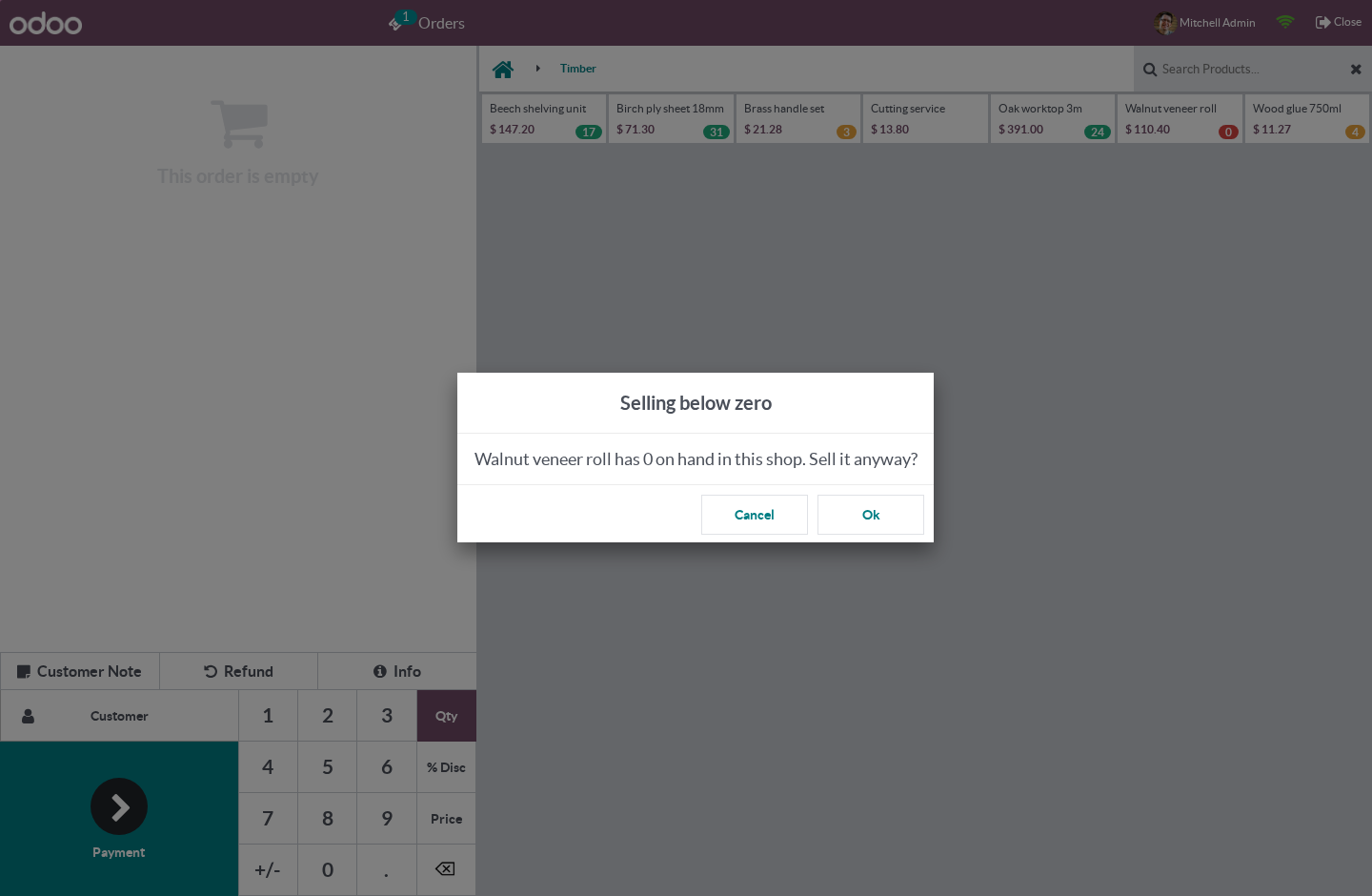
Warn when an order goes below zero — the default. The cashier is told what is on hand and asked whether to sell anyway; sometimes the box is in the customer's hand and the system is wrong.
Refuse the line outright — for shops where negative stock means a reconciliation nobody wants to do.
The check counts what is already in every open order on the till — the parked one included, because a customer who ran for their wallet still has the last unit in their basket — so the fifth unit of a product with four on hand is the one that gets stopped, whichever order it lands in.
The scanner is not a click, and it is checked too. The barcode path in the Point of Sale does not go through the same door as a tap on a card; a guard that only stood at the tap would block the mouse and wave the scanner through — in the exact kind of shop this module is for.
What it deliberately does not do
It does not reserve stock. Two tills can each be told "1 on hand" and both sell it; the second one finds out at the next refresh. Reserving from a POS order that may be abandoned mid-basket causes more trouble at a till than it prevents.
It does not block refunds. A refund line has a negative quantity and puts stock back.
It does not check the storable children of a combo. They enter the order through a side door in every series, and a check that only sometimes fires is worse than an honest exemption. The standalone product's badge still tells the truth.
On Odoo 20, tapping a multi-variant product resolves the variant after the check could run — so the tap path lets it through rather than pretend "39 red in stock" says anything about the blue. The barcode path carries the exact variant and is checked.
It does not touch the session's accounting, pickings or closing. The numbers are read-only; the module writes nothing to stock.
Across the versions
One module, four spellings — the POS front end has no stable cross-version surface:
16.0 patches PosGlobalState and ProductScreen._clickProduct through Registries; the asset bundle is point_of_sale.assets.
17.0 patches PosStore.addProductToCurrentOrder.
18.0 patches PosStore.addLineToCurrentOrder, which receives a product variant.
19.0 patches the same method — which now receives a product template, because the 19 product list is templates. The badge on a template is the sum of its variants' quantities.
The server side is one file: the quantities RPC sets both spellings of the warehouse context key (16/17 read warehouse, 18/19 renamed it warehouse_id), and the products are searched with the caller's own rights, so a record rule that hides a product hides its quantity too.
How we make sure it works
Before every release, 18 automated checks run against this app on Odoo 16, 17, 18, 19 and 20. Among them:
A product the caller cannot see is not counted.
A config the caller cannot read answers nothing.
The number is what can be sold not what is on the shelf.
A product not for sale in pos carries no number.
The count is the shops not the companys.
The complete list is in the source you receive.
Install
Copy bambooforge_pos_stock into your addons path and update the app list, or install the ZIP from the Odoo Apps Store.
Install POS Stock: Live Stock in Point of Sale.
Questions people ask
- Which Odoo versions does it run on?
Odoo 16.0, 17.0, 18.0, 19.0, 20.0, on the series you buy it for; each series is its own listing.
- Community or Enterprise?
Both. It needs no Enterprise app.
- What does it need?
The standard Inventory, Point of Sale apps. No extra Python package.
- Does anything leave my server?
No. It makes no call outside your Odoo server: no telemetry, no licence check, no third-party service.
- What happens if I uninstall it?
Odoo drops the app's own tables and fields; the standard records it worked on (contacts, orders, products) stay as they are.