 BambooForge Labs
OTIF Delivery Performance Analysis
Measure On-Time In-Full delivery performance per customer and per period: how often you delivered on time and complete, the KPI you are judged by.
Available for Odoo 16.0, Odoo 17.0, Odoo 18.0, Odoo 19.0, Odoo 20.0. Technical name bambooforge_otif.
Transcript of the walkthrough (Odoo 20)
OTIF Delivery Performance Analysis. Measure On-Time In-Full delivery performance per customer and per period: how often you delivered on time and complete, the KPI you are judged by. For every completed outgoing delivery, the app works out: In the next few minutes: otif delivery performance analysis, then reading the dashboard, then how the score is defined, then frequently asked questions, then how we make sure it works. Then what this app deliberately does not do, so you can tell before you buy whether it fits.
Everything lives under Delivery Performance (OTIF) then Delivery Performance (OTIF). No Enterprise modules and no external Python libraries are required. OTIF Delivery Performance Analysis. OTIF — On Time In Full — is the headline metric of delivery reliability, and the one your customers judge you by.
This app scores every outgoing delivery against its promised date and whether it shipped complete, then rolls it up into a dashboard you can slice by customer and month. This page is the complete manual. Follow it top to bottom and you can install, read the dashboard and answer the common questions without contacting support. Reading the dashboard.
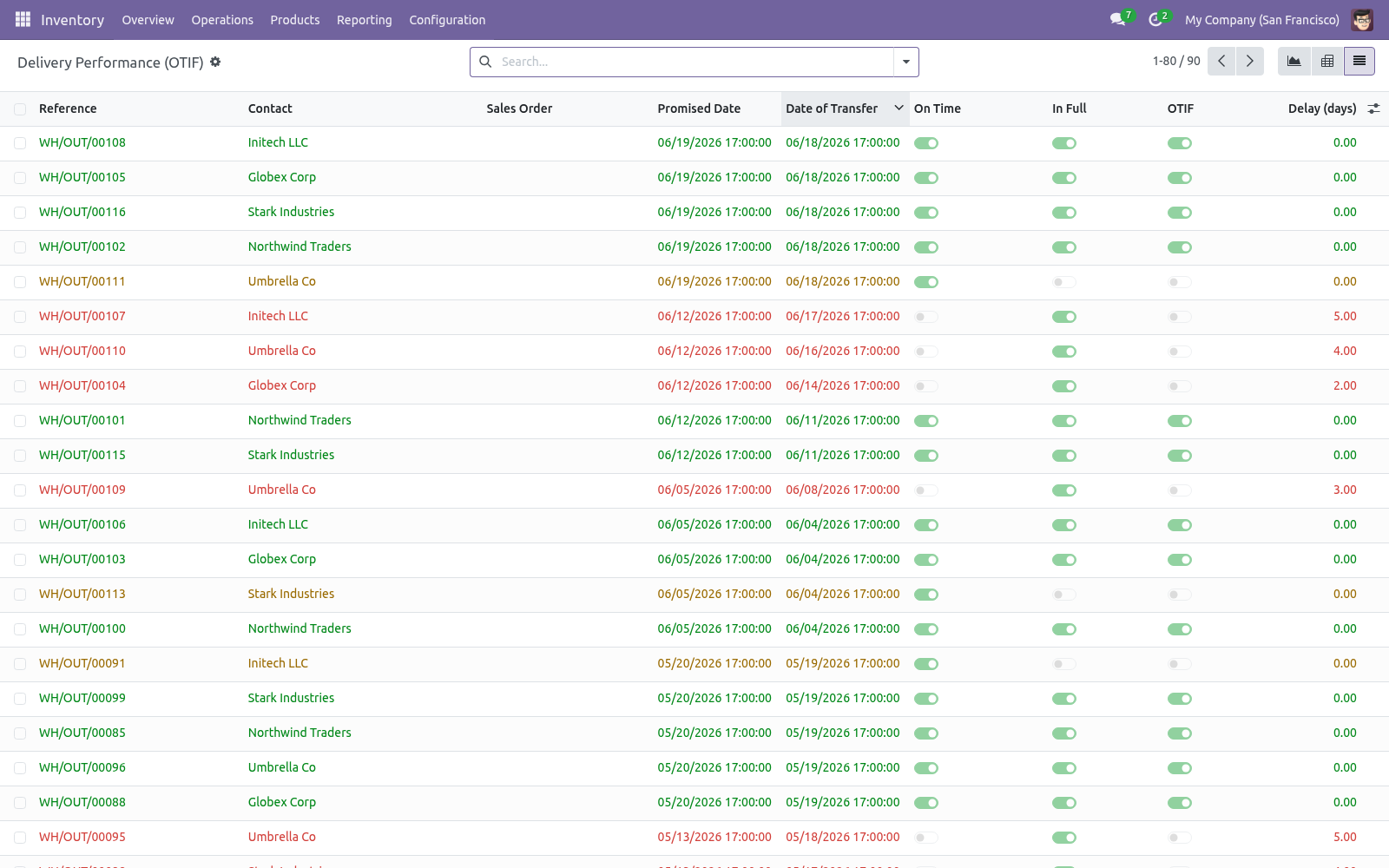
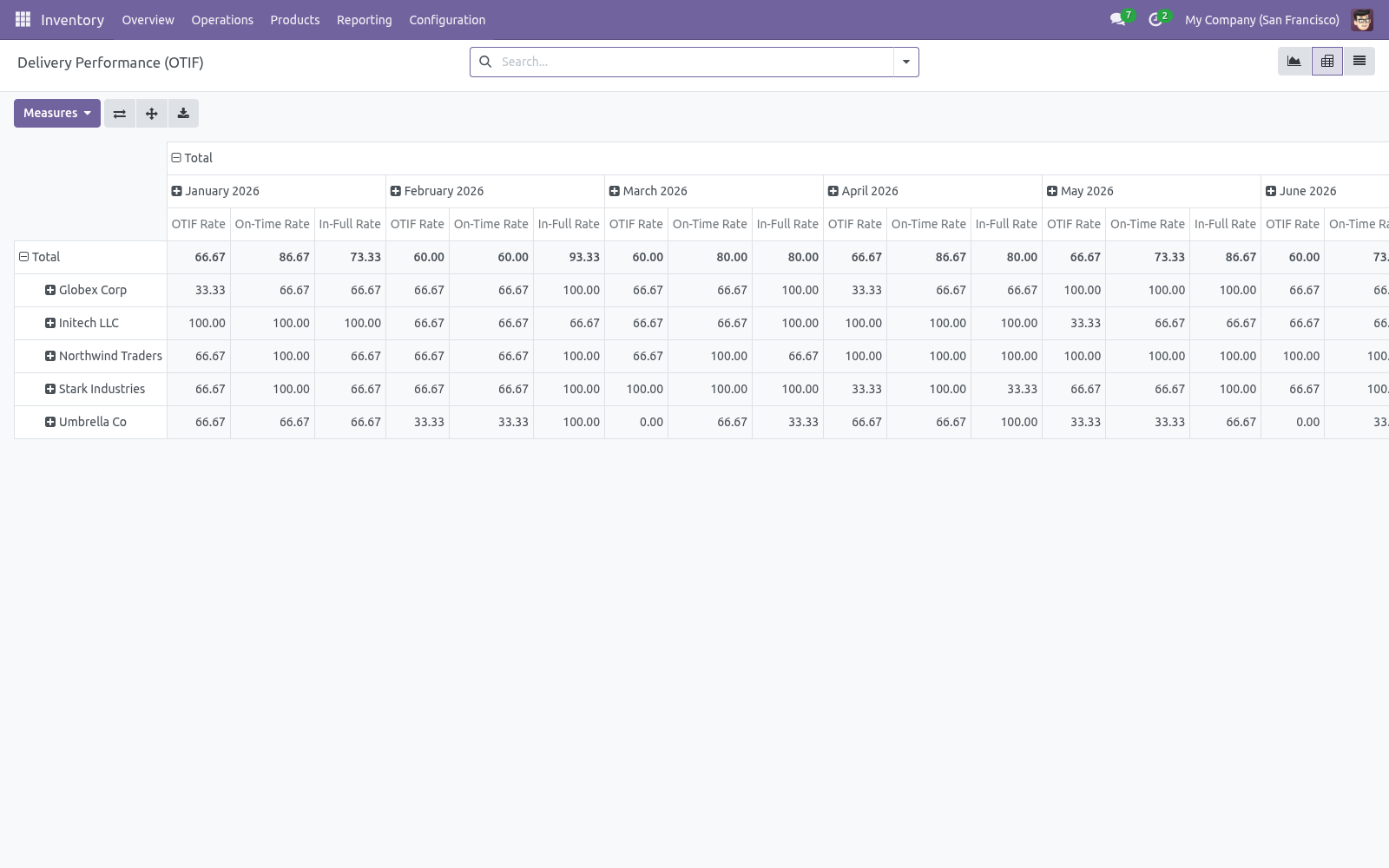
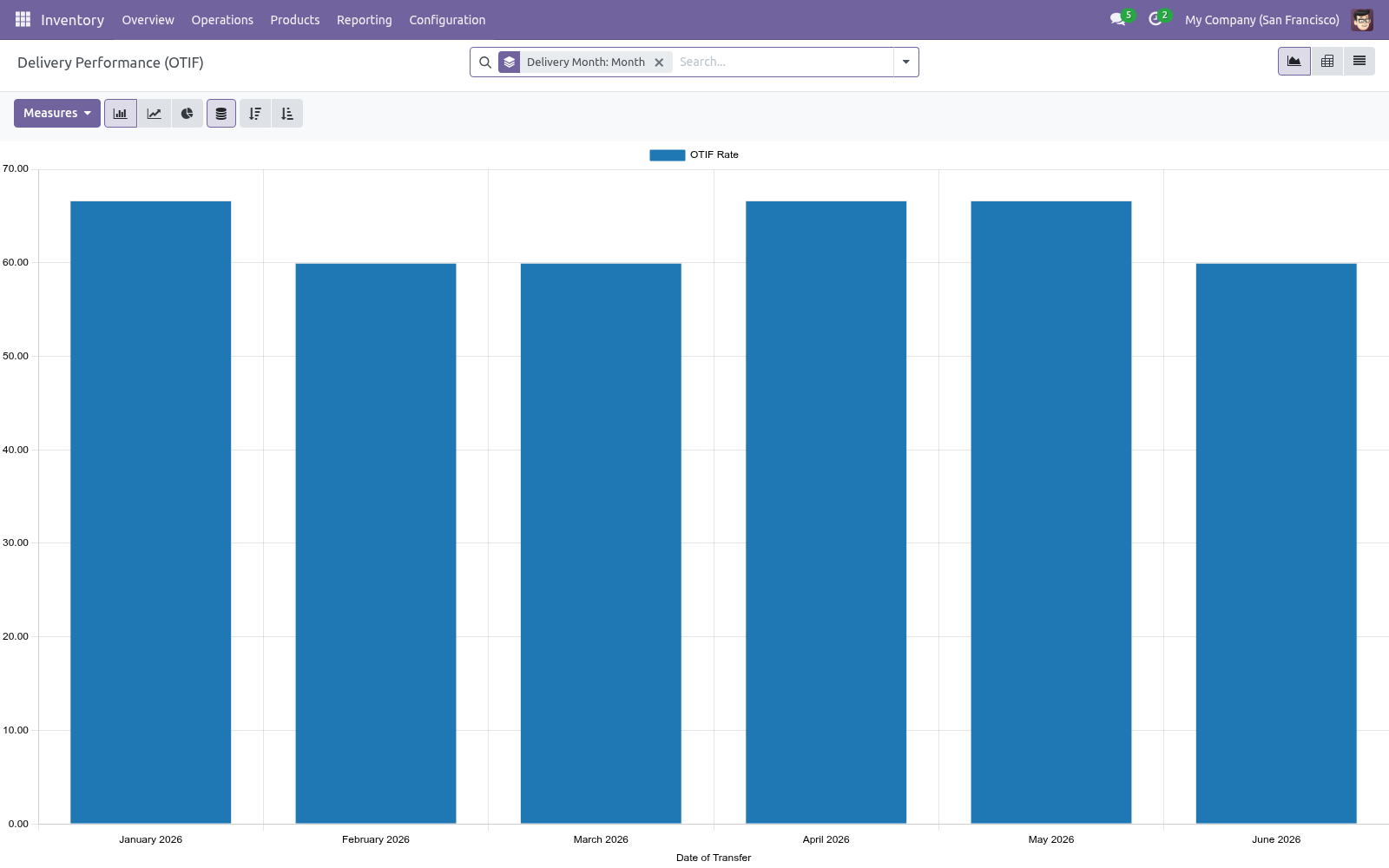
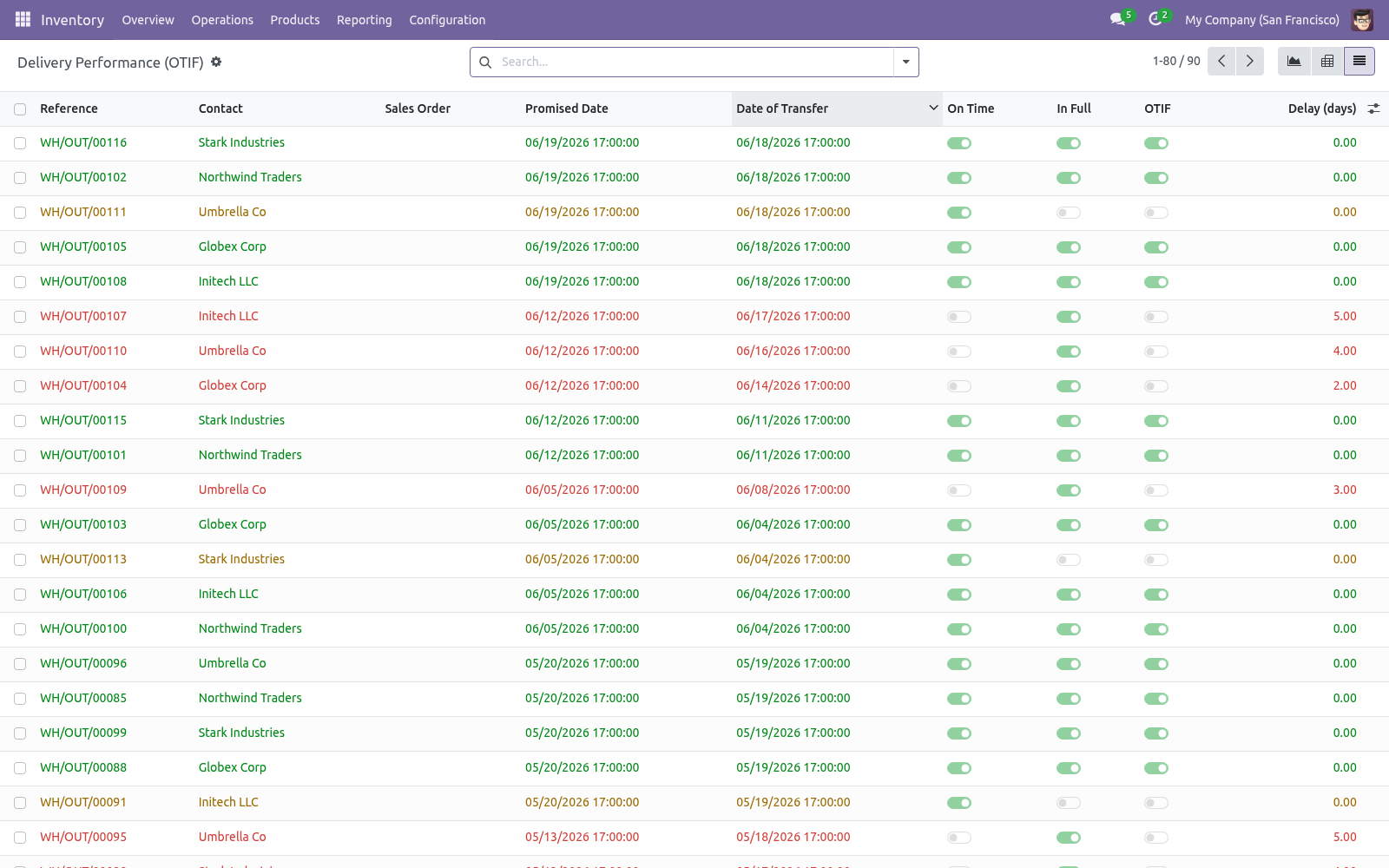
Use the filters to focus on Late or Short (not in full) deliveries, and group by Customer to find who is being let down. The graph shows your OTIF rate over time — spot trends and slippage at a glance. The pivot breaks the rate down by customer and month, with separate On-Time and In-Full rates so you can see why OTIF moved. The list shows each delivery with its promised date, actual date, on-time, in-full and OTIF flags, and how many days late it was.
How the score is defined. The promised date is taken from the sale order's commitment date when available, otherwise the delivery deadline, otherwise the scheduled date. A delivery is measured when it is a completed outgoing transfer that is not itself a backorder, so each order's primary delivery is counted once. On Time = the transfer date is on or before the promised date.
In Full = the delivery did not leave a backorder behind. OTIF = both of the above. Frequently asked questions. Nothing shows up.
Only completed (Done) outgoing deliveries are scored. Validate some deliveries and they will appear. A partial delivery shows as not in full. Correct — if a delivery left a backorder, the order was not fully shipped on that transfer, so it counts against In Full.
How we make sure it works. Before every release, 10 automated checks run against this app on Odoo 16, 17, 18, 19 and 20. Among them: A transfer still open is not counted yet. A receipt is not a delivery performance.
Short not in full. The scores are a percentage so an average reads directly. The promise falls back to the scheduled date. The complete list is in the source you receive.
Support. Questions or ideas: support@bambooforge.dev. Configuration. There is no settings screen: once installed, every outgoing delivery you validate is scored automatically.
The points below explain what the score depends on. The promised date. On-Time is judged against a single Promised Date (otif_target_date). For each delivery the app takes the first of these that is set: 1.
the linked sale order's commitment date; 2. the delivery's Deadline (date_deadline); 3. the delivery's Scheduled Date (scheduled_date). What is measured.
A delivery counts toward OTIF (otif_measured) only when all of the following hold, so each order's primary shipment is scored exactly once: its operation type is outgoing; its status is Done (validated); it is not itself a backorder of an earlier transfer. On those deliveries the app sets On Time (date_done on or before the Promised Date), In Full (the transfer left no backorder behind), OTIF (both) and Delay (days) (days late, 0 when on time). Each flag is mirrored by a 0–100 score averaged by the graph and pivot, so a group average reads directly as a percentage. Fields recompute when the state, dates, backorder links or the order's commitment date change.
Access. The report reads standard stock.picking records, so it honours your existing delivery access rights and multi-company rules. The Inventory menu is open to Inventory users; the mirror under Sales is limited to the Salesperson group (sales_team.group_sale_salesman). The complete manual is at docs dot bambooforge dot dev, the demo database is linked from the store page, and support answers within twenty-four hours.
Links are in the description.
Transcript of the walkthrough (Odoo 19)
OTIF Delivery Performance Analysis. Measure On-Time In-Full delivery performance per customer and per period: how often you delivered on time and complete, the KPI you are judged by. For every completed outgoing delivery, the app works out: In the next few minutes: otif delivery performance analysis, then reading the dashboard, then how the score is defined, then frequently asked questions, then support. Then what this app deliberately does not do, so you can tell before you buy whether it fits.
Everything lives under Delivery Performance (OTIF) then Delivery Performance (OTIF). No Enterprise modules and no external Python libraries are required. OTIF Delivery Performance Analysis. OTIF — On Time In Full — is the headline metric of delivery reliability, and the one your customers judge you by.
This app scores every outgoing delivery against its promised date and whether it shipped complete, then rolls it up into a dashboard you can slice by customer and month. This page is the complete manual. Follow it top to bottom and you can install, read the dashboard and answer the common questions without contacting support. Reading the dashboard.
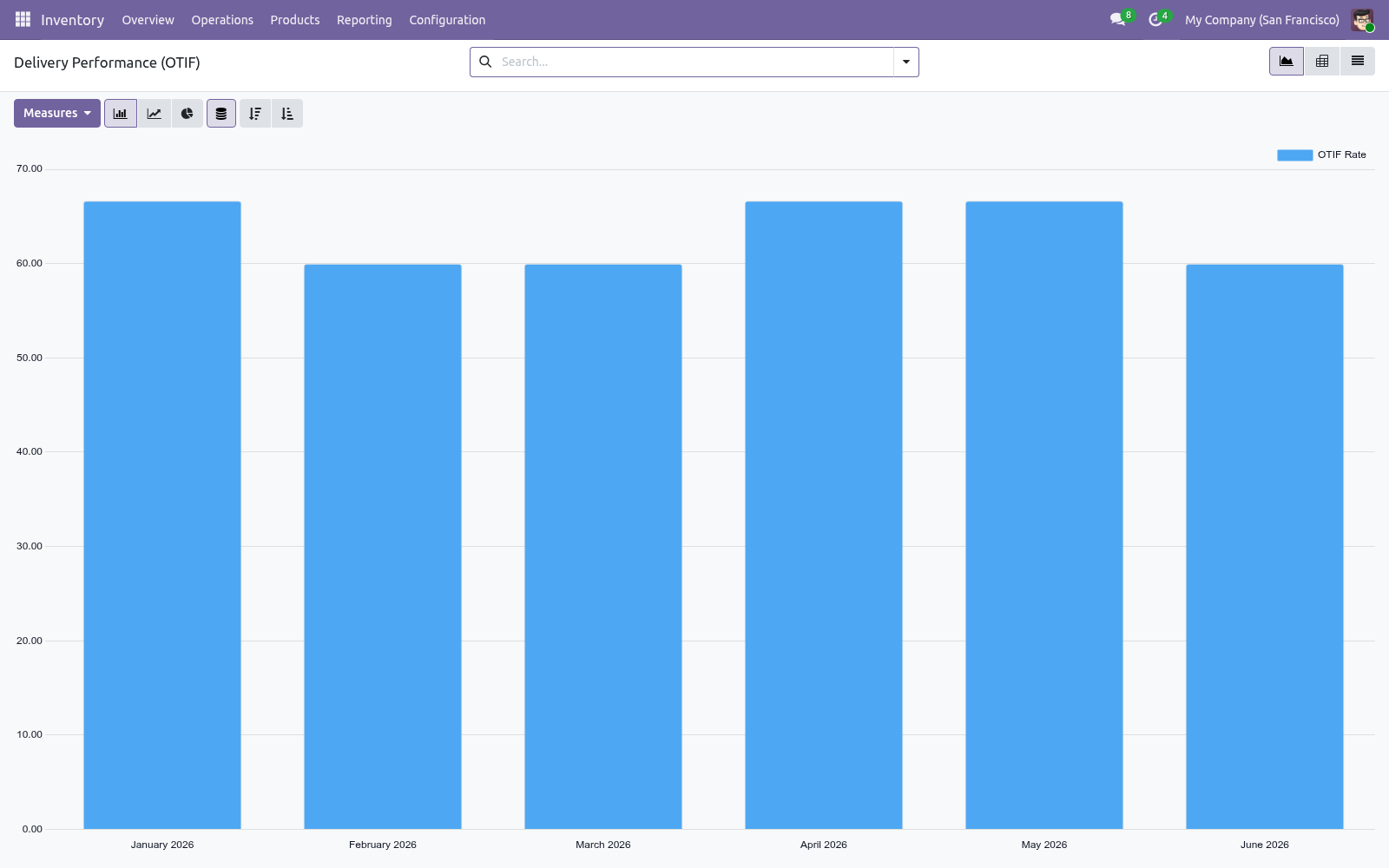
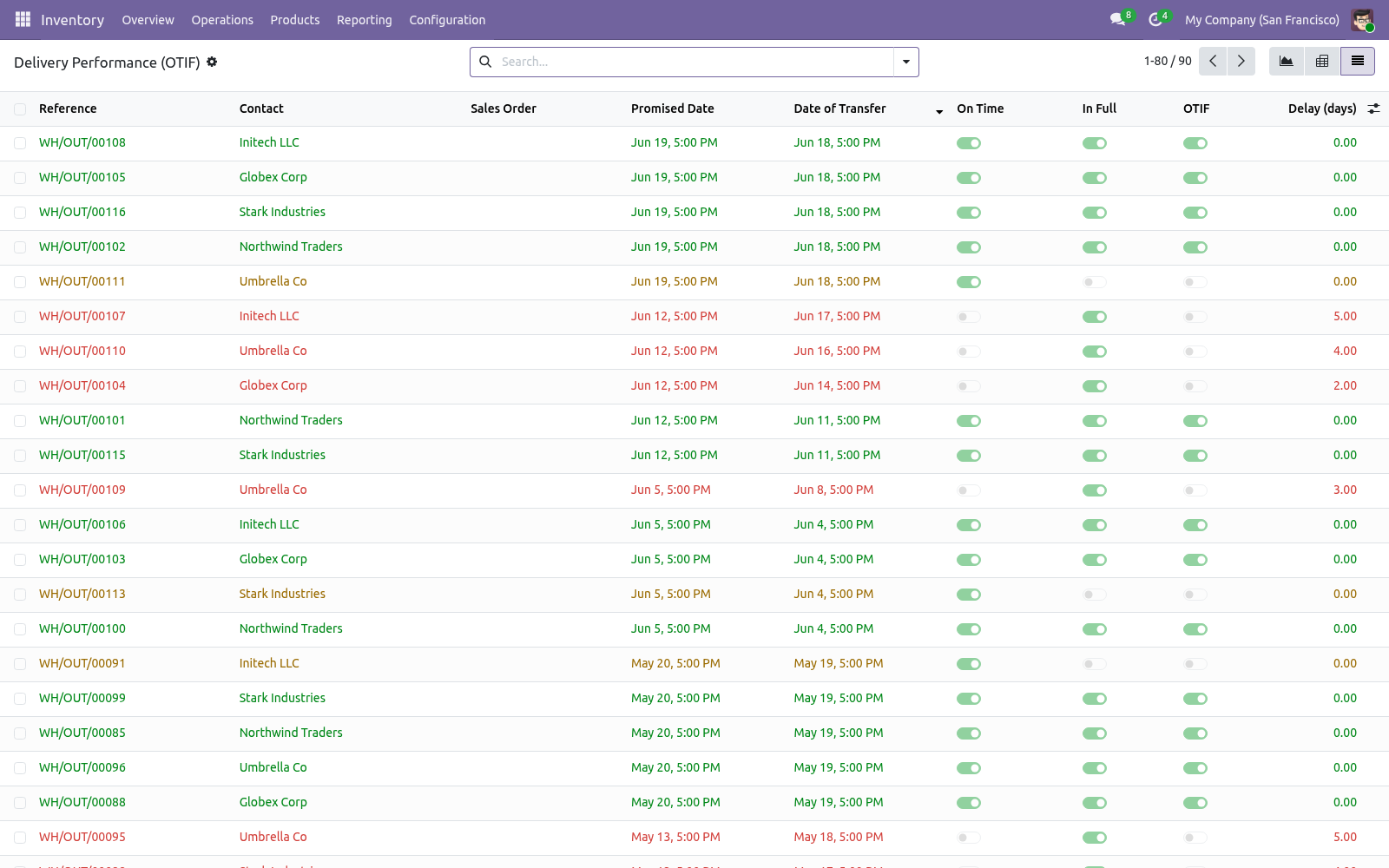
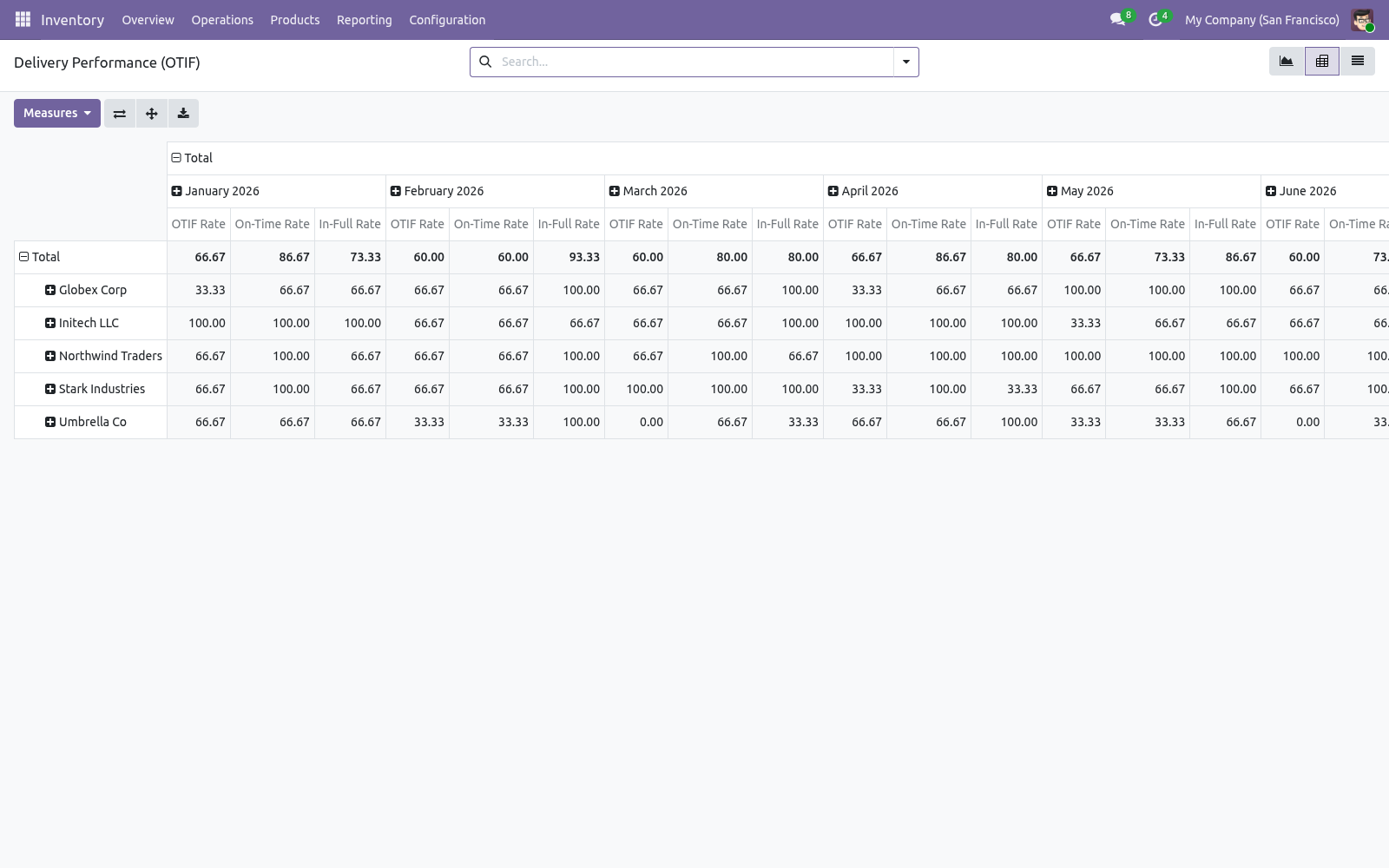
Use the filters to focus on Late or Short (not in full) deliveries, and group by Customer to find who is being let down. The graph shows your OTIF rate over time — spot trends and slippage at a glance. The pivot breaks the rate down by customer and month, with separate On-Time and In-Full rates so you can see why OTIF moved. The list shows each delivery with its promised date, actual date, on-time, in-full and OTIF flags, and how many days late it was.
How the score is defined. The promised date is taken from the sale order's commitment date when available, otherwise the delivery deadline, otherwise the scheduled date. A delivery is measured when it is a completed outgoing transfer that is not itself a backorder, so each order's primary delivery is counted once. On Time = the transfer date is on or before the promised date.
In Full = the delivery did not leave a backorder behind. OTIF = both of the above. Frequently asked questions. Nothing shows up.
Only completed (Done) outgoing deliveries are scored. Validate some deliveries and they will appear. A partial delivery shows as not in full. Correct — if a delivery left a backorder, the order was not fully shipped on that transfer, so it counts against In Full.
Support. Questions or ideas: support@bambooforge.dev. .. BAMBOOFORGE-DOC-APPENDIX (auto-generated: Upgrade/Uninstall/Changelog + bespoke) Configuration.
There is no settings screen: once installed, every outgoing delivery you validate is scored automatically. The points below explain what the score depends on. The promised date. On-Time is judged against a single Promised Date (otif_target_date).
For each delivery the app takes the first of these that is set: 1. the linked sale order's commitment date; 2. the delivery's Deadline (date_deadline); 3. the delivery's Scheduled Date (scheduled_date).
What is measured. A delivery counts toward OTIF (otif_measured) only when all of the following hold, so each order's primary shipment is scored exactly once: its operation type is outgoing; its status is Done (validated); it is not itself a backorder of an earlier transfer. On those deliveries the app sets On Time (date_done on or before the Promised Date), In Full (the transfer left no backorder behind), OTIF (both) and Delay (days) (days late, 0 when on time). Each flag is mirrored by a 0–100 score averaged by the graph and pivot, so a group average reads directly as a percentage.
Fields recompute when the state, dates, backorder links or the order's commitment date change. Access. The report reads standard stock.picking records, so it honours your existing delivery access rights and multi-company rules. The Inventory menu is open to Inventory users; the mirror under Sales is limited to the Salesperson group (sales_team.group_sale_salesman).
Opening the dashboard. It opens filtered to measured deliveries only, so drafts, receipts, internal transfers and backorder shipments never dilute the numbers. Three views are available from the switcher. Inventory > Reporting > Delivery Performance (OTIF) Sales > Reporting > Delivery Performance (OTIF) Graph — a bar chart of the OTIF Rate by delivery month.
A bar at 90 means 90% of that month's measured deliveries were on time and complete. Pivot — Customer on rows, Delivery Month on columns, with OTIF, On-Time and In-Full rates as measures. This is where you diagnose why OTIF moved: high In-Full but low On-Time means you ship complete but late. List — one line per delivery: reference, customer, source order, Promised Date, actual date, the On-Time / In-Full / OTIF toggles and Delay in days.
Rows are colour-coded (green OTIF, red late, orange on-time-but-short) and read-only. The search bar offers OTIF, Late and Short (not in full) filters, a This Year period filter, and Group By Customer or Delivery Month. The complete manual is at docs dot bambooforge dot dev, the demo database is linked from the store page, and support answers within twenty-four hours. Links are in the description.
Transcript of the walkthrough (Odoo 18)
OTIF Delivery Performance Analysis. Measure On-Time In-Full delivery performance per customer and per period: how often you delivered on time and complete, the KPI you are judged by. For every completed outgoing delivery, the app works out: In the next few minutes: otif delivery performance analysis, then reading the dashboard, then how the score is defined, then frequently asked questions, then support. Then what this app deliberately does not do, so you can tell before you buy whether it fits.
Everything lives under Delivery Performance (OTIF) then Delivery Performance (OTIF). No Enterprise modules and no external Python libraries are required. OTIF Delivery Performance Analysis. OTIF — On Time In Full — is the headline metric of delivery reliability, and the one your customers judge you by.
This app scores every outgoing delivery against its promised date and whether it shipped complete, then rolls it up into a dashboard you can slice by customer and month. This page is the complete manual. Follow it top to bottom and you can install, read the dashboard and answer the common questions without contacting support. Reading the dashboard.
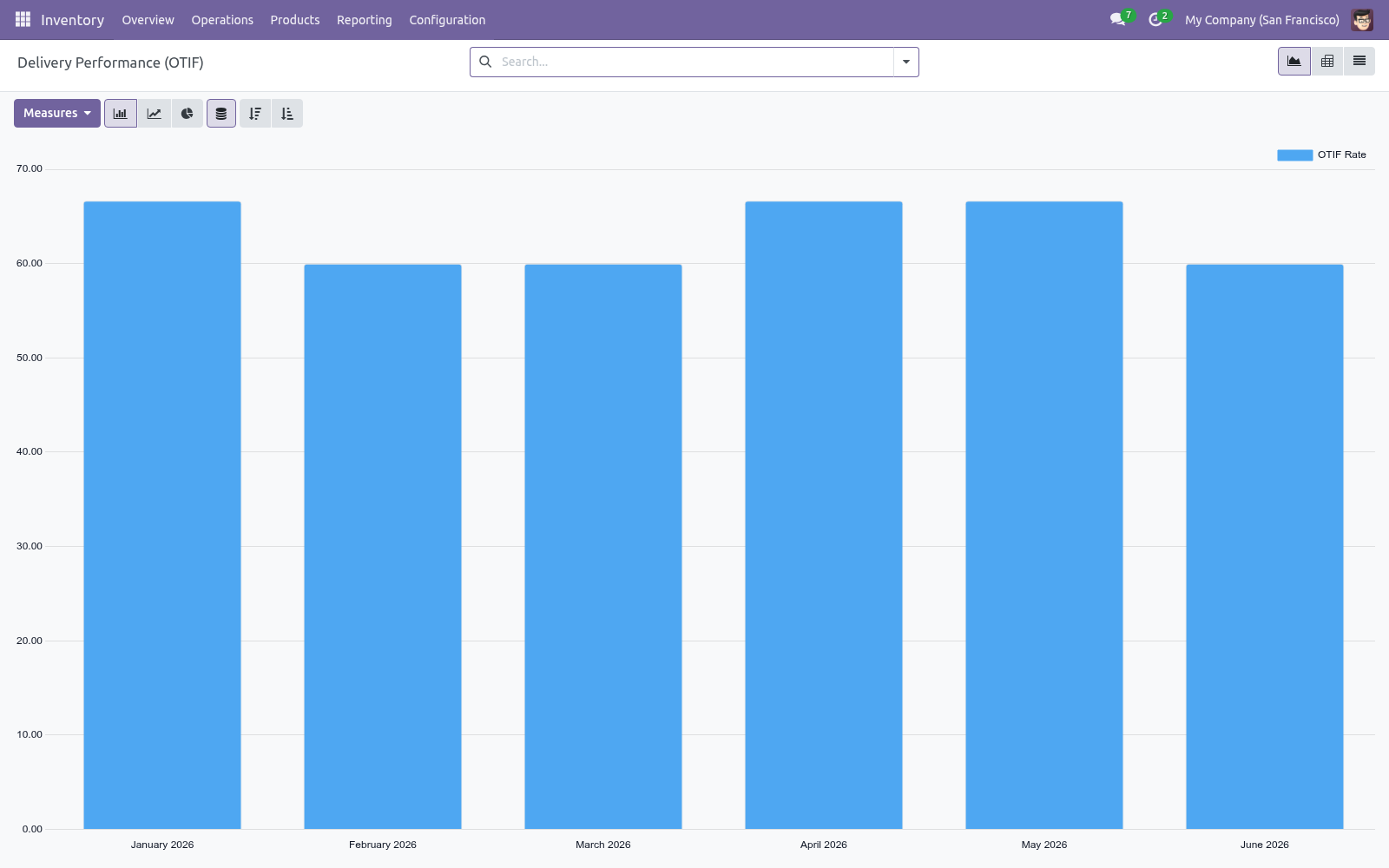
Use the filters to focus on Late or Short (not in full) deliveries, and group by Customer to find who is being let down. The graph shows your OTIF rate over time — spot trends and slippage at a glance. The pivot breaks the rate down by customer and month, with separate On-Time and In-Full rates so you can see why OTIF moved. The list shows each delivery with its promised date, actual date, on-time, in-full and OTIF flags, and how many days late it was.
How the score is defined. The promised date is taken from the sale order's commitment date when available, otherwise the delivery deadline, otherwise the scheduled date. A delivery is measured when it is a completed outgoing transfer that is not itself a backorder, so each order's primary delivery is counted once. On Time = the transfer date is on or before the promised date.
In Full = the delivery did not leave a backorder behind. OTIF = both of the above. Frequently asked questions. Nothing shows up.
Only completed (Done) outgoing deliveries are scored. Validate some deliveries and they will appear. A partial delivery shows as not in full. Correct — if a delivery left a backorder, the order was not fully shipped on that transfer, so it counts against In Full.
Support. Questions or ideas: support@bambooforge.dev. .. BAMBOOFORGE-DOC-APPENDIX (auto-generated: Upgrade/Uninstall/Changelog + bespoke) Configuration.
There is no settings screen: once installed, every outgoing delivery you validate is scored automatically. The points below explain what the score depends on. The promised date. On-Time is judged against a single Promised Date (otif_target_date).
For each delivery the app takes the first of these that is set: 1. the linked sale order's commitment date; 2. the delivery's Deadline (date_deadline); 3. the delivery's Scheduled Date (scheduled_date).
What is measured. A delivery counts toward OTIF (otif_measured) only when all of the following hold, so each order's primary shipment is scored exactly once: its operation type is outgoing; its status is Done (validated); it is not itself a backorder of an earlier transfer. On those deliveries the app sets On Time (date_done on or before the Promised Date), In Full (the transfer left no backorder behind), OTIF (both) and Delay (days) (days late, 0 when on time). Each flag is mirrored by a 0–100 score averaged by the graph and pivot, so a group average reads directly as a percentage.
Fields recompute when the state, dates, backorder links or the order's commitment date change. Access. The report reads standard stock.picking records, so it honours your existing delivery access rights and multi-company rules. The Inventory menu is open to Inventory users; the mirror under Sales is limited to the Salesperson group (sales_team.group_sale_salesman).
Opening the dashboard. It opens filtered to measured deliveries only, so drafts, receipts, internal transfers and backorder shipments never dilute the numbers. Three views are available from the switcher. Inventory > Reporting > Delivery Performance (OTIF) Sales > Reporting > Delivery Performance (OTIF) Graph — a bar chart of the OTIF Rate by delivery month.
A bar at 90 means 90% of that month's measured deliveries were on time and complete. Pivot — Customer on rows, Delivery Month on columns, with OTIF, On-Time and In-Full rates as measures. This is where you diagnose why OTIF moved: high In-Full but low On-Time means you ship complete but late. List — one line per delivery: reference, customer, source order, Promised Date, actual date, the On-Time / In-Full / OTIF toggles and Delay in days.
Rows are colour-coded (green OTIF, red late, orange on-time-but-short) and read-only. The search bar offers OTIF, Late and Short (not in full) filters, a This Year period filter, and Group By Customer or Delivery Month. The complete manual is at docs dot bambooforge dot dev, the demo database is linked from the store page, and support answers within twenty-four hours. Links are in the description.
Transcript of the walkthrough (Odoo 17)
OTIF Delivery Performance Analysis. Measure On-Time In-Full delivery performance per customer and per period: how often you delivered on time and complete, the KPI you are judged by. For every completed outgoing delivery, the app works out: In the next few minutes: otif delivery performance analysis, then reading the dashboard, then how the score is defined, then frequently asked questions, then support. Then what this app deliberately does not do, so you can tell before you buy whether it fits.
Everything lives under Delivery Performance (OTIF) then Delivery Performance (OTIF). No Enterprise modules and no external Python libraries are required. OTIF Delivery Performance Analysis. OTIF — On Time In Full — is the headline metric of delivery reliability, and the one your customers judge you by.
This app scores every outgoing delivery against its promised date and whether it shipped complete, then rolls it up into a dashboard you can slice by customer and month. This page is the complete manual. Follow it top to bottom and you can install, read the dashboard and answer the common questions without contacting support. Reading the dashboard.
Use the filters to focus on Late or Short (not in full) deliveries, and group by Customer to find who is being let down. The graph shows your OTIF rate over time — spot trends and slippage at a glance. The pivot breaks the rate down by customer and month, with separate On-Time and In-Full rates so you can see why OTIF moved. The list shows each delivery with its promised date, actual date, on-time, in-full and OTIF flags, and how many days late it was.
How the score is defined. The promised date is taken from the sale order's commitment date when available, otherwise the delivery deadline, otherwise the scheduled date. A delivery is measured when it is a completed outgoing transfer that is not itself a backorder, so each order's primary delivery is counted once. On Time = the transfer date is on or before the promised date.
In Full = the delivery did not leave a backorder behind. OTIF = both of the above. Frequently asked questions. Nothing shows up.
Only completed (Done) outgoing deliveries are scored. Validate some deliveries and they will appear. A partial delivery shows as not in full. Correct — if a delivery left a backorder, the order was not fully shipped on that transfer, so it counts against In Full.
Support. Questions or ideas: support@bambooforge.dev. .. BAMBOOFORGE-DOC-APPENDIX (auto-generated: Upgrade/Uninstall/Changelog + bespoke) Configuration.
There is no settings screen: once installed, every outgoing delivery you validate is scored automatically. The points below explain what the score depends on. The promised date. On-Time is judged against a single Promised Date (otif_target_date).
For each delivery the app takes the first of these that is set: 1. the linked sale order's commitment date; 2. the delivery's Deadline (date_deadline); 3. the delivery's Scheduled Date (scheduled_date).
What is measured. A delivery counts toward OTIF (otif_measured) only when all of the following hold, so each order's primary shipment is scored exactly once: its operation type is outgoing; its status is Done (validated); it is not itself a backorder of an earlier transfer. On those deliveries the app sets On Time (date_done on or before the Promised Date), In Full (the transfer left no backorder behind), OTIF (both) and Delay (days) (days late, 0 when on time). Each flag is mirrored by a 0–100 score averaged by the graph and pivot, so a group average reads directly as a percentage.
Fields recompute when the state, dates, backorder links or the order's commitment date change. Access. The report reads standard stock.picking records, so it honours your existing delivery access rights and multi-company rules. The Inventory menu is open to Inventory users; the mirror under Sales is limited to the Salesperson group (sales_team.group_sale_salesman).
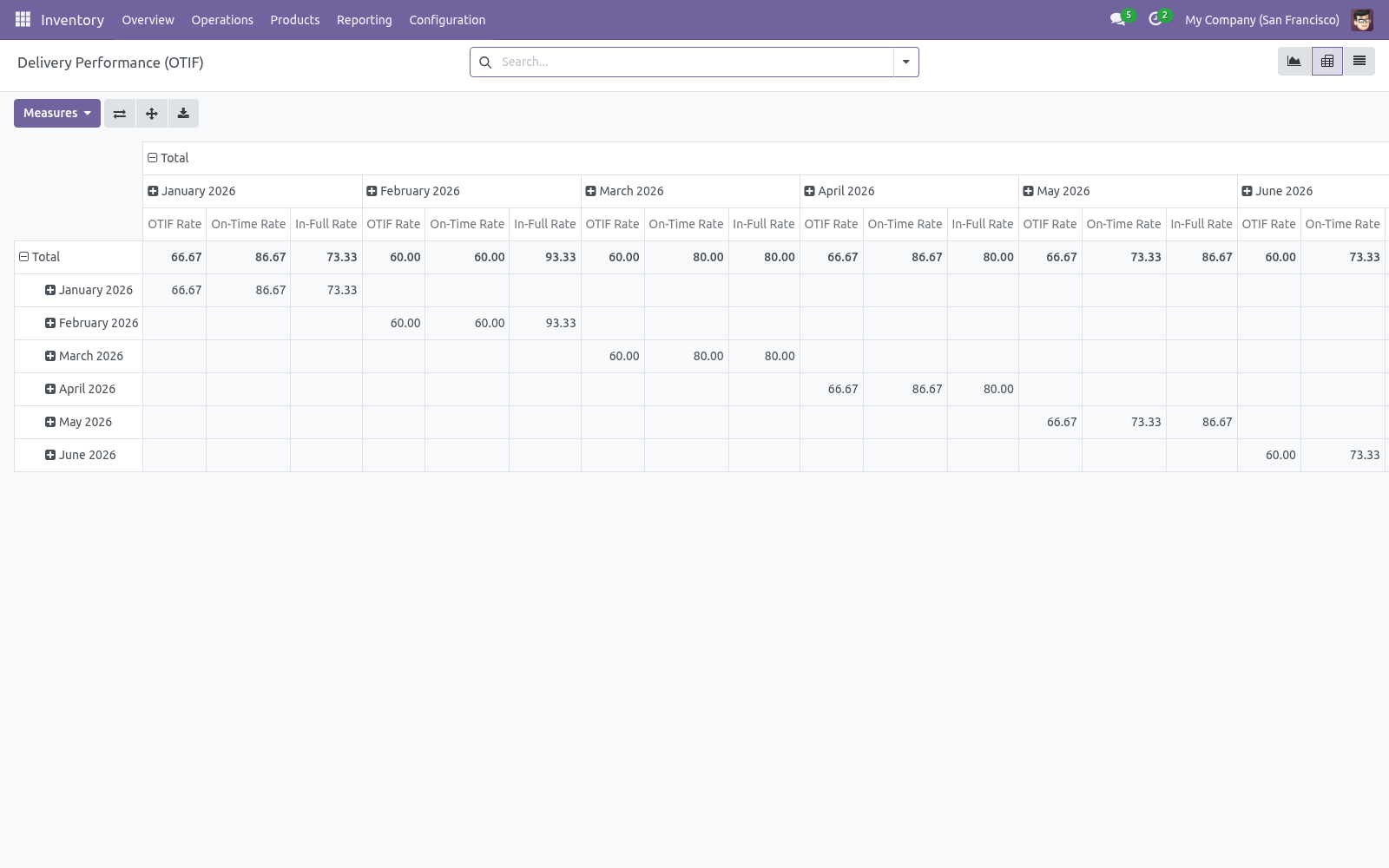
Opening the dashboard. It opens filtered to measured deliveries only, so drafts, receipts, internal transfers and backorder shipments never dilute the numbers. Three views are available from the switcher. Inventory > Reporting > Delivery Performance (OTIF) Sales > Reporting > Delivery Performance (OTIF) Graph — a bar chart of the OTIF Rate by delivery month.
A bar at 90 means 90% of that month's measured deliveries were on time and complete. Pivot — Customer on rows, Delivery Month on columns, with OTIF, On-Time and In-Full rates as measures. This is where you diagnose why OTIF moved: high In-Full but low On-Time means you ship complete but late. List — one line per delivery: reference, customer, source order, Promised Date, actual date, the On-Time / In-Full / OTIF toggles and Delay in days.
Rows are colour-coded (green OTIF, red late, orange on-time-but-short) and read-only. The search bar offers OTIF, Late and Short (not in full) filters, a This Year period filter, and Group By Customer or Delivery Month. The complete manual is at docs dot bambooforge dot dev, the demo database is linked from the store page, and support answers within twenty-four hours. Links are in the description.
Transcript of the walkthrough (Odoo 16)
OTIF Delivery Performance Analysis. Measure On-Time In-Full delivery performance per customer and per period: how often you delivered on time and complete, the KPI you are judged by. For every completed outgoing delivery, the app works out: In the next few minutes: otif delivery performance analysis, then reading the dashboard, then how the score is defined, then frequently asked questions, then support. Then what this app deliberately does not do, so you can tell before you buy whether it fits.
Everything lives under Delivery Performance (OTIF) then Delivery Performance (OTIF). No Enterprise modules and no external Python libraries are required. OTIF Delivery Performance Analysis. OTIF — On Time In Full — is the headline metric of delivery reliability, and the one your customers judge you by.
This app scores every outgoing delivery against its promised date and whether it shipped complete, then rolls it up into a dashboard you can slice by customer and month. This page is the complete manual. Follow it top to bottom and you can install, read the dashboard and answer the common questions without contacting support. Reading the dashboard.
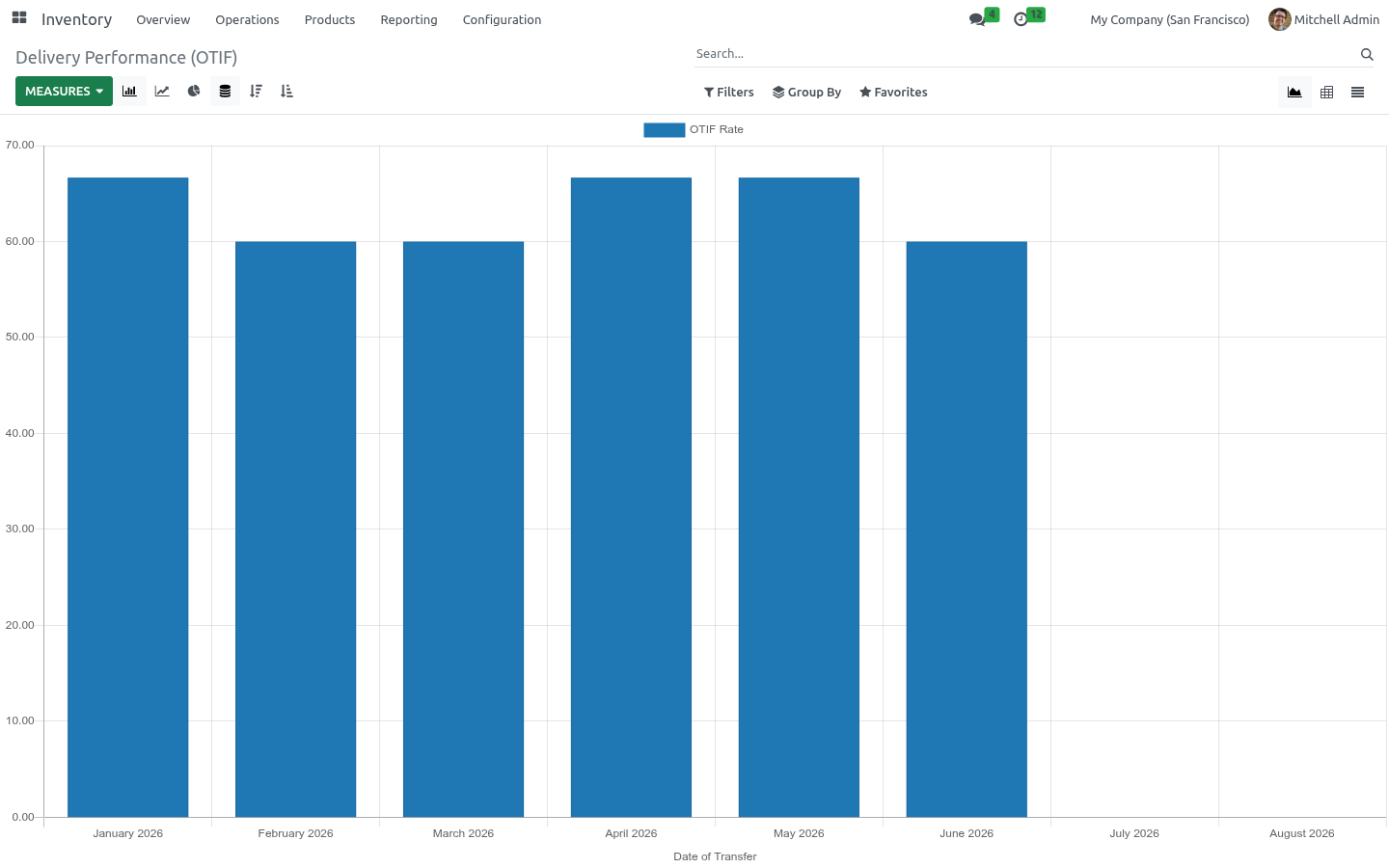
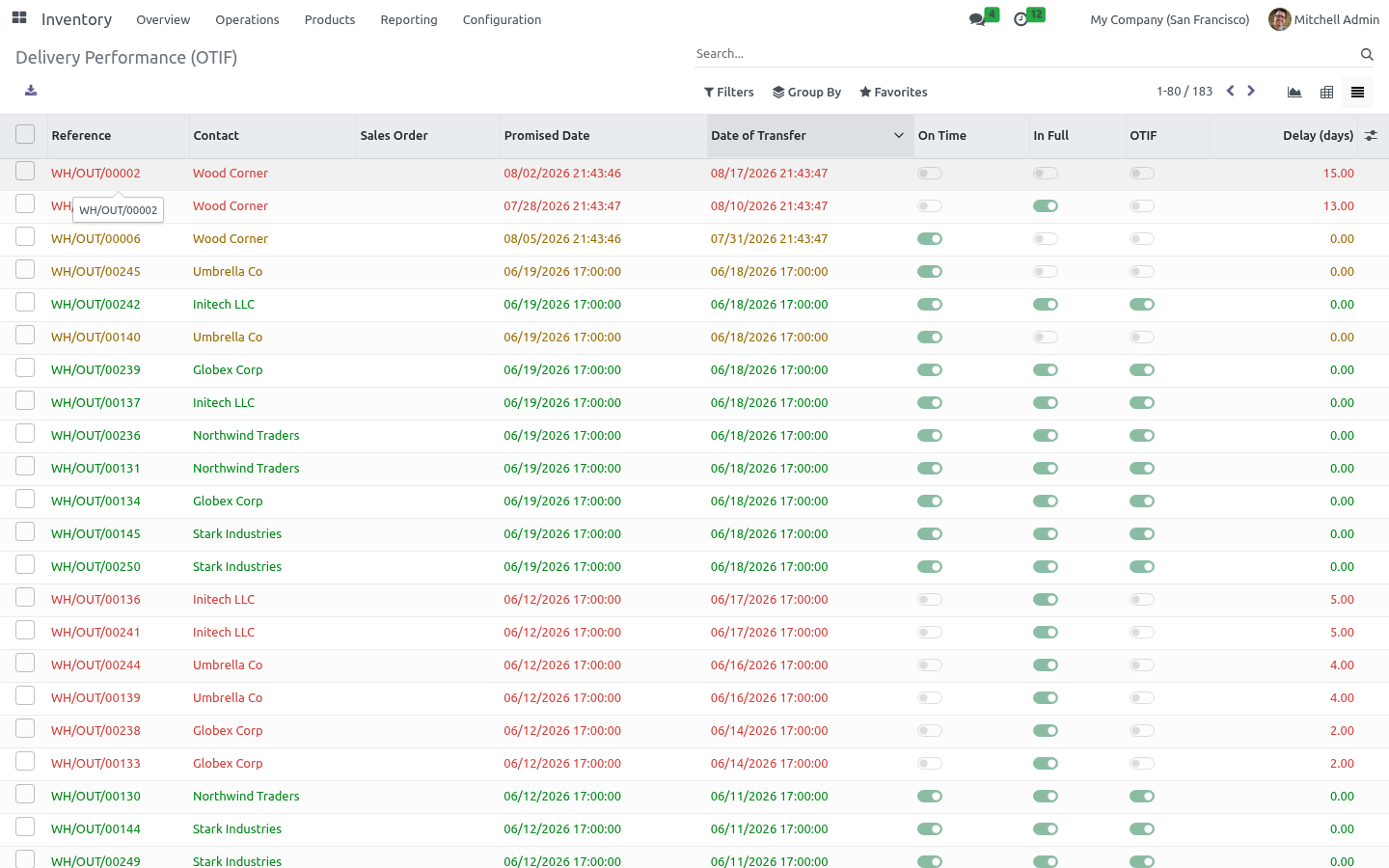
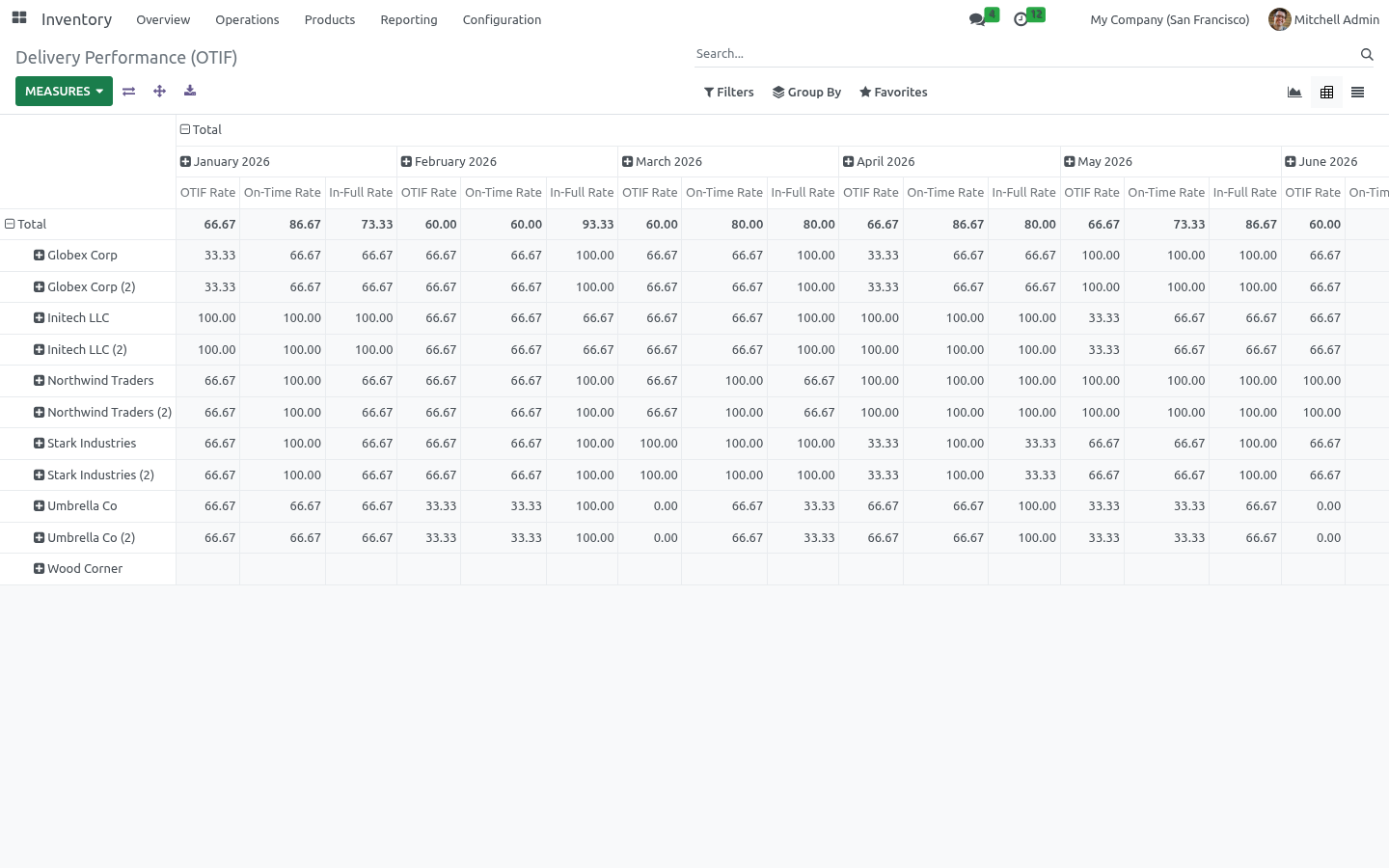
Use the filters to focus on Late or Short (not in full) deliveries, and group by Customer to find who is being let down. The graph shows your OTIF rate over time — spot trends and slippage at a glance. The pivot breaks the rate down by customer and month, with separate On-Time and In-Full rates so you can see why OTIF moved. The list shows each delivery with its promised date, actual date, on-time, in-full and OTIF flags, and how many days late it was.
How the score is defined. The promised date is taken from the sale order's commitment date when available, otherwise the delivery deadline, otherwise the scheduled date. A delivery is measured when it is a completed outgoing transfer that is not itself a backorder, so each order's primary delivery is counted once. On Time = the transfer date is on or before the promised date.
In Full = the delivery did not leave a backorder behind. OTIF = both of the above. Frequently asked questions. Nothing shows up.
Only completed (Done) outgoing deliveries are scored. Validate some deliveries and they will appear. A partial delivery shows as not in full. Correct — if a delivery left a backorder, the order was not fully shipped on that transfer, so it counts against In Full.
Support. Questions or ideas: support@bambooforge.dev. .. BAMBOOFORGE-DOC-APPENDIX (auto-generated: Upgrade/Uninstall/Changelog + bespoke) Configuration.
There is no settings screen: once installed, every outgoing delivery you validate is scored automatically. The points below explain what the score depends on. The promised date. On-Time is judged against a single Promised Date (otif_target_date).
For each delivery the app takes the first of these that is set: 1. the linked sale order's commitment date; 2. the delivery's Deadline (date_deadline); 3. the delivery's Scheduled Date (scheduled_date).
What is measured. A delivery counts toward OTIF (otif_measured) only when all of the following hold, so each order's primary shipment is scored exactly once: its operation type is outgoing; its status is Done (validated); it is not itself a backorder of an earlier transfer. On those deliveries the app sets On Time (date_done on or before the Promised Date), In Full (the transfer left no backorder behind), OTIF (both) and Delay (days) (days late, 0 when on time). Each flag is mirrored by a 0–100 score averaged by the graph and pivot, so a group average reads directly as a percentage.
Fields recompute when the state, dates, backorder links or the order's commitment date change. Access. The report reads standard stock.picking records, so it honours your existing delivery access rights and multi-company rules. The Inventory menu is open to Inventory users; the mirror under Sales is limited to the Salesperson group (sales_team.group_sale_salesman).
Opening the dashboard. It opens filtered to measured deliveries only, so drafts, receipts, internal transfers and backorder shipments never dilute the numbers. Three views are available from the switcher. Inventory > Reporting > Delivery Performance (OTIF) Sales > Reporting > Delivery Performance (OTIF) Graph — a bar chart of the OTIF Rate by delivery month.
A bar at 90 means 90% of that month's measured deliveries were on time and complete. Pivot — Customer on rows, Delivery Month on columns, with OTIF, On-Time and In-Full rates as measures. This is where you diagnose why OTIF moved: high In-Full but low On-Time means you ship complete but late. List — one line per delivery: reference, customer, source order, Promised Date, actual date, the On-Time / In-Full / OTIF toggles and Delay in days.
Rows are colour-coded (green OTIF, red late, orange on-time-but-short) and read-only. The search bar offers OTIF, Late and Short (not in full) filters, a This Year period filter, and Group By Customer or Delivery Month. The complete manual is at docs dot bambooforge dot dev, the demo database is linked from the store page, and support answers within twenty-four hours. Links are in the description.
Key facts
- What it is
- Measure On-Time In-Full delivery performance per customer and per period: how often you delivered on time and complete, the KPI you are judged by.
- For
- Warehouse
- Odoo versions
- 16.0, 17.0, 18.0, 19.0, 20.0 - Community and Enterprise
- Runs on
- Odoo.sh or Odoo you host yourself - not Odoo Online, which accepts no third-party apps
- Price
- 99 EUR, one-time, on the Odoo Apps Store
- Technical name
- bambooforge_otif
- Manual last updated
- 2026-10-15
OTIF Delivery Performance Analysis
OTIF — On Time In Full — is the headline metric of delivery reliability, and the one your customers judge you by. This app scores every outgoing delivery against its promised date and whether it shipped complete, then rolls it up into a dashboard you can slice by customer and month.
This page is the complete manual. Follow it top to bottom and you can install, read the dashboard and answer the common questions without contacting support.
Overview
For every completed outgoing delivery, the app works out:
On Time — was it transferred on or before its promised date (the sale order's commitment date, the delivery deadline, or the scheduled date)?
In Full — did it ship complete, without spawning a backorder?
OTIF — on time and in full.
Each delivery gets a 0–100 score for each measure, so the graph and pivot show your OTIF rate as a percentage, by month and by customer.
Requirements
Odoo 20.0 with Inventory and Sales (sale_stock). Installing this app pulls them in automatically.
No Enterprise modules and no external Python libraries are required.
Installation
Copy bambooforge_otif into your addons path.
Update the apps list (Apps > Update Apps List).
Search for Delivery Performance and click Install.
The analysis appears under Inventory > Reporting > Delivery Performance (OTIF) and Sales > Reporting > Delivery Performance (OTIF).
Reading the dashboard
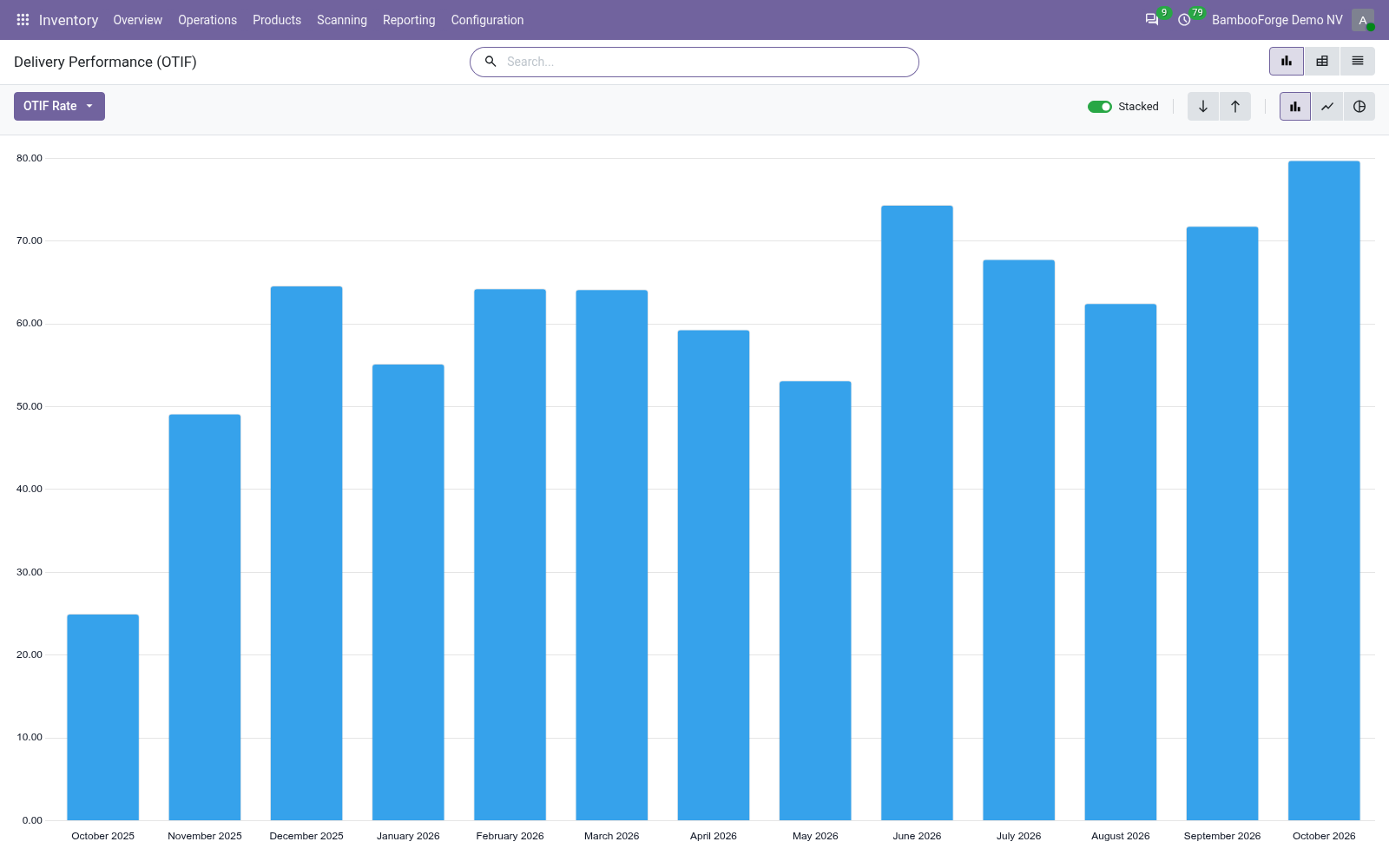
The graph shows your OTIF rate over time — spot trends and slippage at a glance.
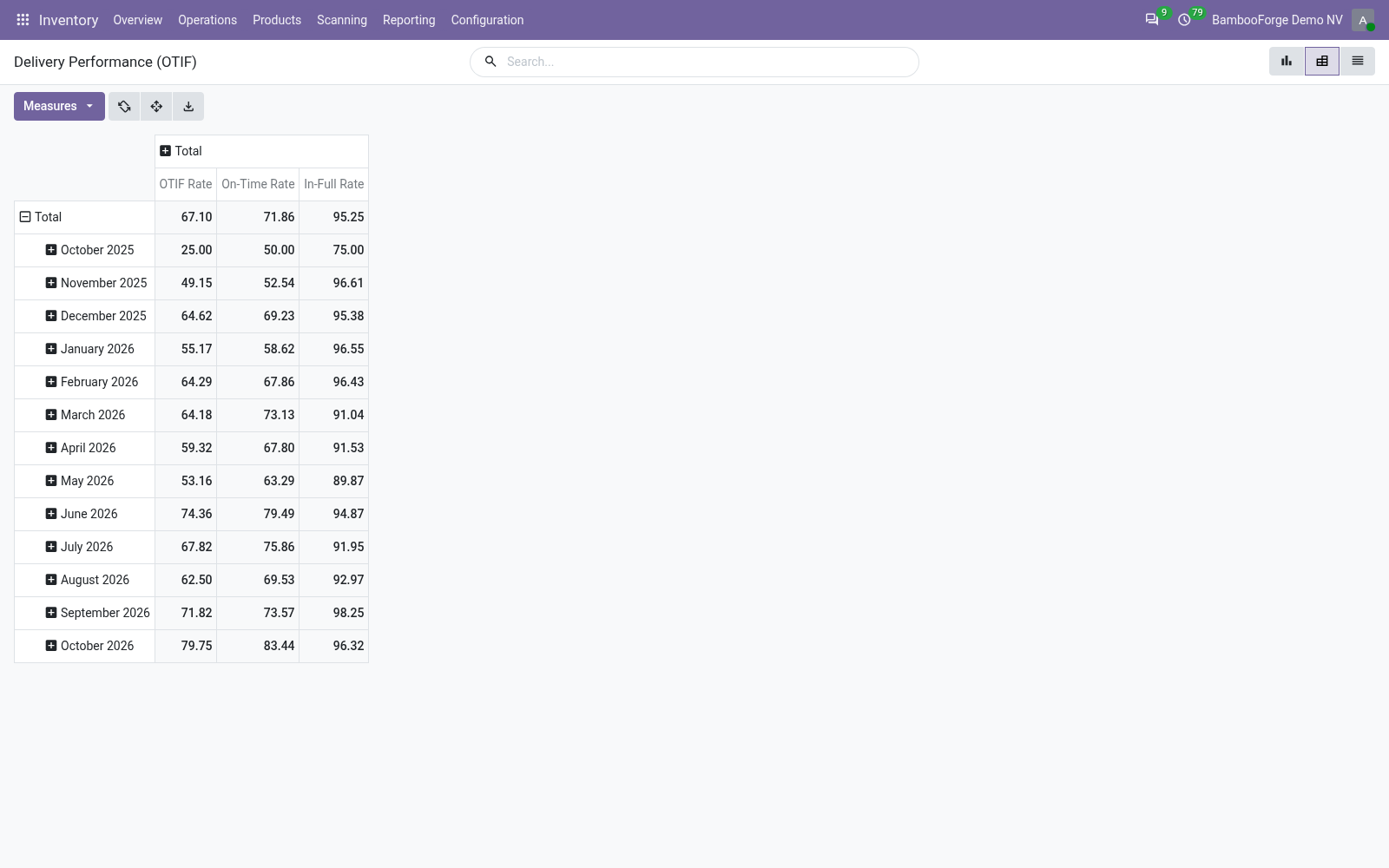
The pivot breaks the rate down by customer and month, with separate On-Time and In-Full rates so you can see why OTIF moved.
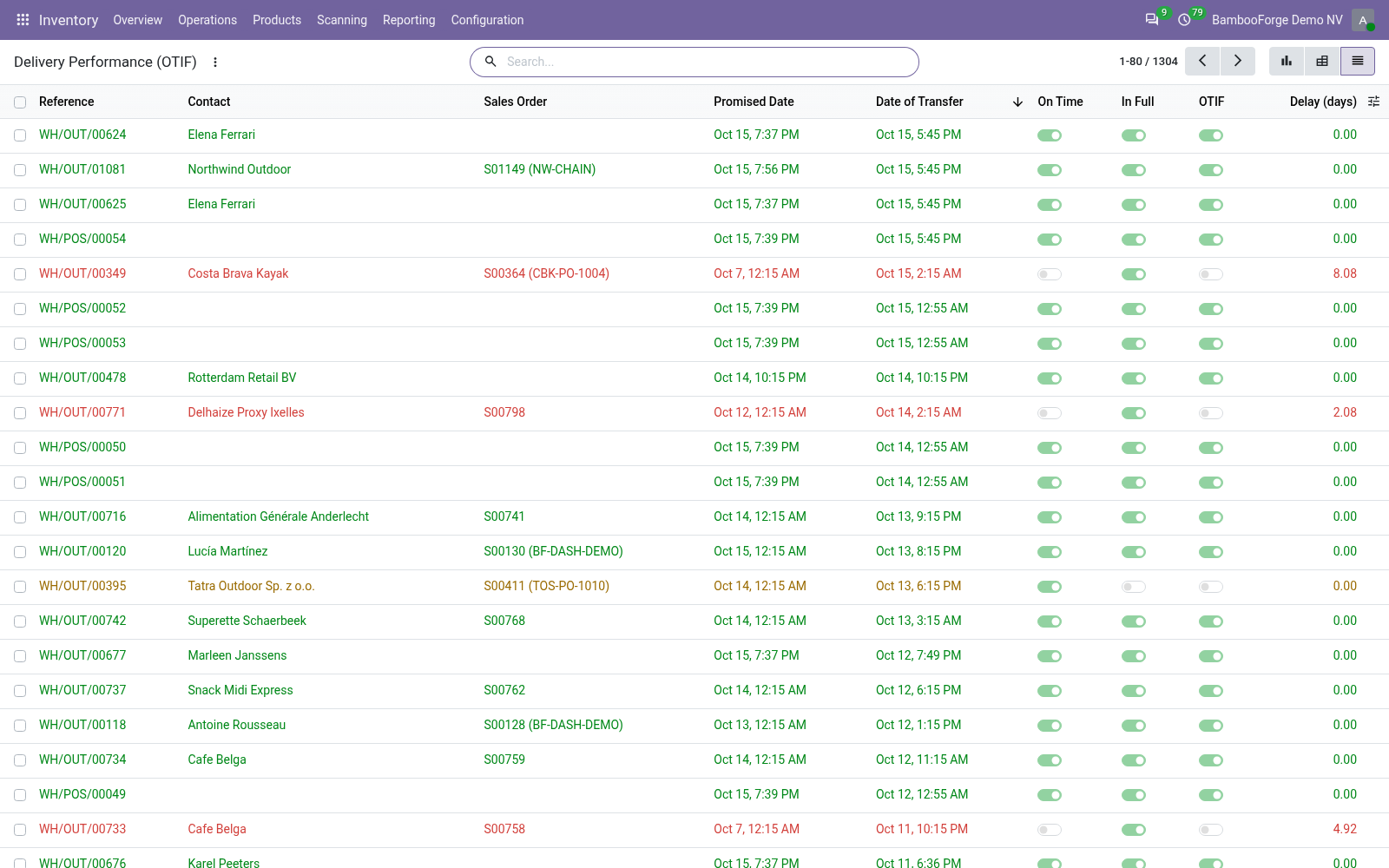
The list shows each delivery with its promised date, actual date, on-time, in-full and OTIF flags, and how many days late it was.
Use the filters to focus on Late or Short (not in full) deliveries, and group by Customer to find who is being let down.
How the score is defined
A delivery is measured when it is a completed outgoing transfer that is not itself a backorder, so each order's primary delivery is counted once.
On Time = the transfer date is on or before the promised date.
In Full = the delivery did not leave a backorder behind.
OTIF = both of the above.
The promised date is taken from the sale order's commitment date when available, otherwise the delivery deadline, otherwise the scheduled date.
Frequently asked questions
- Nothing shows up.
Only completed (Done) outgoing deliveries are scored. Validate some deliveries and they will appear.
- A partial delivery shows as not in full.
Correct — if a delivery left a backorder, the order was not fully shipped on that transfer, so it counts against In Full.
- Which date is the deadline?
The sale order's commitment date if set; otherwise the delivery's deadline or scheduled date.
- Can I see performance per customer?
Yes — the pivot groups by customer, and you can group the list by customer too.
- Does it work with multiple companies?
Yes; deliveries are scored within their own company.
How we make sure it works
Before every release, 10 automated checks run against this app on Odoo 16, 17, 18, 19 and 20. Among them:
A transfer still open is not counted yet.
A receipt is not a delivery performance.
Short not in full.
The scores are a percentage so an average reads directly.
The promise falls back to the scheduled date.
The complete list is in the source you receive.
Support
Questions or ideas: support@bambooforge.dev.
Configuration
There is no settings screen: once installed, every outgoing delivery you validate is scored automatically. The points below explain what the score depends on.
The promised date
On-Time is judged against a single Promised Date (otif_target_date). For each delivery the app takes the first of these that is set:
the linked sale order's commitment date;
the delivery's Deadline (date_deadline);
the delivery's Scheduled Date (scheduled_date).
Scheduled Date is always present, so a delivery is never left without a promised date. For a meaningful On-Time figure, though, set a real customer commitment: enable Sales > Configuration > Settings > Delivery Date, then fill the commitment date on the sale order (under Other Info). It then flows through to the delivery and drives the metric.
What is measured
A delivery counts toward OTIF (otif_measured) only when all of the following hold, so each order's primary shipment is scored exactly once:
its operation type is outgoing;
its status is Done (validated);
it is not itself a backorder of an earlier transfer.
On those deliveries the app sets On Time (date_done on or before the Promised Date), In Full (the transfer left no backorder behind), OTIF (both) and Delay (days) (days late, 0 when on time). Each flag is mirrored by a 0–100 score averaged by the graph and pivot, so a group average reads directly as a percentage. Fields recompute when the state, dates, backorder links or the order's commitment date change.
Access
The report reads standard stock.picking records, so it honours your existing delivery access rights and multi-company rules. The Inventory menu is open to Inventory users; the mirror under Sales is limited to the Salesperson group (sales_team.group_sale_salesman).
Usage
Opening the dashboard
Two menus point at the same report:
Inventory > Reporting > Delivery Performance (OTIF)
Sales > Reporting > Delivery Performance (OTIF)
It opens filtered to measured deliveries only, so drafts, receipts, internal transfers and backorder shipments never dilute the numbers. Three views are available from the switcher.
Graph — a bar chart of the OTIF Rate by delivery month. A bar at 90 means 90% of that month's measured deliveries were on time and complete.
Pivot — Customer on rows, Delivery Month on columns, with OTIF, On-Time and In-Full rates as measures. This is where you diagnose why OTIF moved: high In-Full but low On-Time means you ship complete but late.
List — one line per delivery: reference, customer, source order, Promised Date, actual date, the On-Time / In-Full / OTIF toggles and Delay in days. Rows are colour-coded (green OTIF, red late, orange on-time-but-short) and read-only.
The search bar offers OTIF, Late and Short (not in full) filters, a This Year period filter, and Group By Customer or Delivery Month.
Worked example
You ship Deco Addict five June orders: four on time and complete, one two days late. In the pivot, June for Deco Addict shows On-Time 80%, In-Full 100% and OTIF 80%. Grouping the list by Customer with the Late filter surfaces the single slipping delivery, its Delay column reading 2.
Questions people ask
- Which Odoo versions does it run on?
Odoo 16.0, 17.0, 18.0, 19.0, 20.0, on the series you buy it for; each series is its own listing.
- Community or Enterprise?
Both. It needs no Enterprise app.
- What does it need?
The standard sale_stock app. No extra Python package.
- Where does it show up?
Under the Delivery Performance (OTIF) menu (Delivery Performance (OTIF)).
- Does anything leave my server?
No. It makes no call outside your Odoo server: no telemetry, no licence check, no third-party service.
- What happens if I uninstall it?
Odoo drops the app's own tables and fields; the standard records it worked on (contacts, orders, products) stay as they are.
Troubleshooting
The report is empty ("No deliveries to score yet")
Cause. Only completed outgoing transfers are scored. If none is validated to Done, or the only outgoing transfers are backorders, the population is empty.
Diagnosis. In Inventory > Operations > Deliveries, confirm you have Done transfers that are not themselves backorders.
Resolution. Validate outgoing deliveries; scores appear immediately.
OTIF looks unrealistically high (near 100%)
Cause. No commitment dates are set, so On-Time is judged against the delivery's own Scheduled Date — which it almost always meets, inflating the rate.
Diagnosis. In the list, compare the Promised Date with the order's commitment date. If it matches the internal scheduled date, commitments are missing.
Resolution. Enable Delivery Date in Sales > Configuration > Settings and populate commitment dates. New deliveries are then scored against the date the customer agreed to.
A partial delivery is flagged "not in full"
Cause. The transfer shipped short and spawned a backorder, so the order was not fully shipped on that transfer — this fails In-Full by design.
Diagnosis. Open the delivery and check its linked back orders.
Resolution. No fix needed — the flag is correct. Ship complete in one transfer to improve the rate. The follow-up backorder shipment is excluded from the measured population, so it does not double-count.
A validated delivery shows the wrong flag or date
Cause. The OTIF fields are stored computed values; they recompute when the state, dates, backorder links or the order's commitment date change.
Diagnosis. Confirm the delivery's Done date and the order's commitment date, and that the delivery is not a backorder.
Resolution. Correct the underlying date; the score recomputes automatically. If a bulk historical correction does not refresh, re-save one affected delivery to force it.
Upgrading & version compatibility
This build targets Odoo 20.0. Each Odoo major series (16.0, 17.0, 18.0, 19.0, 20.0) has its own dedicated build of this module — always install the build that matches your Odoo version. Mixing a build with a different Odoo series is not supported.
Patch upgrades (same series, e.g. 20.0.1.0.0 → later)
Back up your database and filestore first.
Replace the module folder with the newer build.
Restart Odoo with the module updated:
./odoo-bin -c your.conf -u bambooforge_otif -d your_db
Odoo applies any schema/data changes automatically. Your existing records and configuration are preserved.
Cross-version migration (moving to a newer Odoo)
Upgrading Odoo itself is a database migration handled by Odoo's standard upgrade tooling. When you migrate the database to the next Odoo series, install the matching build of this module for that series. Data created by this module carries over with the database migration.
Uninstallation
You can remove this module at any time from Apps → (this module) → Uninstall, or from the command line. Uninstalling is clean and reversible by reinstalling — but note what is and is not deleted.
What is removed
The fields, views and analysis definitions this module added.
The menus, actions, views and reports this module installed.
What is preserved
Your standard Odoo data (partners, products, sales, invoices, inventory moves) is not deleted — this module only reads and annotates it; the underlying records stay.
Attachments and chatter messages on standard records are kept.
As always, take a database backup before uninstalling in production.
Changelog
20.0.1.1.1
Built for Odoo 20: record rules and access rights rewritten onto Odoo 20's single ir.access model, the screens rebuilt on Owl 3, and every icon moved to the icon set Odoo 20 ships.
20.0.1.0.0
Current release for Odoo 20.0. This build includes:
Measure your On-Time In-Full (OTIF) delivery performance. See, per customer and per period, how often you delivered on time and complete.
The supply-chain KPI your customers judge you by.
Feature additions and fixes ship as new builds on the Odoo Apps store; this page and the module's version reflect the current published release. Always keep the build matched to your Odoo series (see Upgrading & version compatibility).