 BambooForge Labs
OSS & IOSS VAT Returns | EU Distance Selling
The quarterly OSS return and the monthly IOSS one, built from posted invoices - VAT per member state and rate - with a distance-selling check.
Available for Odoo 16.0, Odoo 17.0, Odoo 18.0, Odoo 19.0, Odoo 20.0. Technical name bambooforge_oss.
Transcript of the walkthrough (Odoo 20)
OSS & IOSS VAT Returns / EU Distance Selling. The quarterly OSS return and the monthly IOSS one, built from posted invoices - VAT per member state and rate - with a distance-selling check. l10n_eu_oss builds the taxes and fiscal positions that charge the right VAT on distance sales into other member states. It does not produce the return — the list of what was sold into each country at each rate — which is the thing that has to be filed and paid.
Accounting ▸ Reporting ▸ OSS / IOSS In the next few minutes: what this is for, then preparing a return, then the threshold, then how we make sure it works, then questions people ask. Then what this app deliberately does not do, so you can tell before you buy whether it fits. Everything lives under OSS / IOSS. 1.
Copy bambooforge_oss into your addons path and update the app list, or install the ZIP from the Odoo Apps Store. 2. Install OSS & IOSS VAT Returns. 3.
Open OSS / IOSS. What this is for. l10n_eu_oss builds the taxes and fiscal positions that charge the right VAT on distance sales into other member states. It does not produce the return — the list of what was sold into each country at each rate — which is the thing that has to be filed and paid.
Preparing a return. Pick the scheme and the period. The period follows the scheme: the Union scheme is quarterly, IOSS is monthly, and choosing the wrong one is the most common reason a return comes back. Setting a date inside a quarter snaps to that quarter.
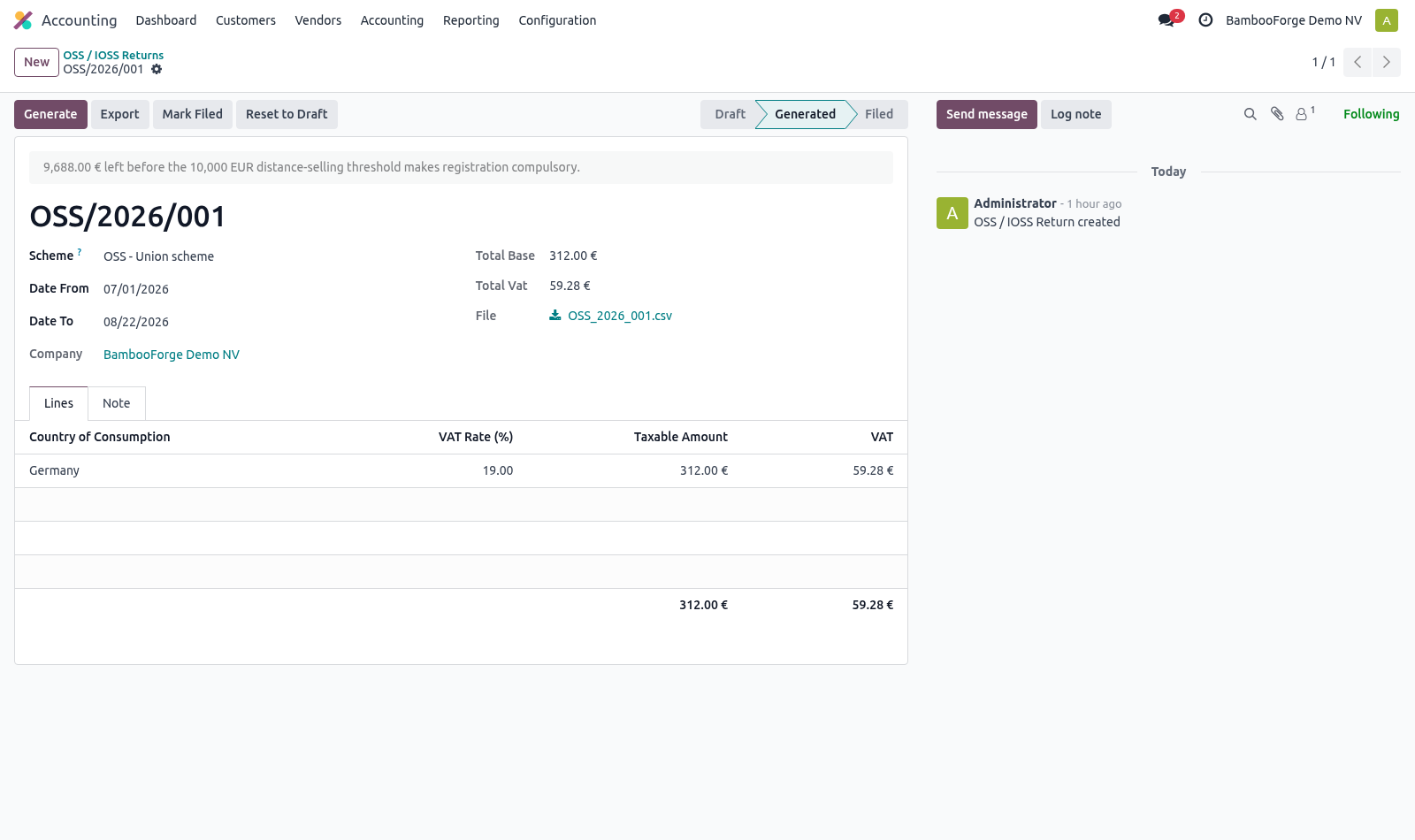
Generate builds one line per country of consumption and per rate, with the taxable amount and the VAT. Credit notes net off inside the line rather than appearing as a second one, which is how the return is meant to read. The threshold. Under 10,000 EUR of EU-wide distance sales in a year, a seller charges home VAT and files nothing.
Over it, VAT is due in the customer's country from the very next sale. Companies usually discover they crossed the line when an auditor tells them, which is a year of wrong VAT and a year of interest. The figure is shown on every return: what has been sold to consumers in other member states this year, and how much is left. Business customers with a VAT number are excluded, because the threshold is about selling to consumers.
How we make sure it works. Before every release, 16 automated checks run against this app on Odoo 16, 17, 18, 19 and 20. Among them: An accountant without the checkbox reads no return. A filed return is not rewritten.
Business customers do not count. Export before generating is refused. A refund nets off rather than adding a line. The complete list is in the source you receive.
Questions people ask. Which Odoo versions does it run on? Odoo 16.0, 17.0, 18.0, 19.0, 20.0, on the series you buy it for; each series is its own listing. Community or Enterprise?
Both. It needs no Enterprise app. Now the part most videos leave out: what this does not do. This produces the return; it does not submit it.
Every member state has its own portal and its own credentials. The threshold is computed from invoices in this database. A company selling through a marketplace that files on its behalf has to net that off by hand. One registration per company.
Sellers registered in several member states under separate schemes need one company per registration. The complete manual is at docs dot bambooforge dot dev, the demo database is linked from the store page, and support answers within twenty-four hours. Links are in the description.
Transcript of the walkthrough (Odoo 19)
OSS & IOSS VAT Returns / EU Distance Selling. The quarterly OSS return and the monthly IOSS one, built from posted invoices - VAT per member state and rate - with a distance-selling check. l10n_eu_oss builds the taxes and fiscal positions that charge the right VAT on distance sales into other member states. It does not produce the return — the list of what was sold into each country at each rate — which is the thing that has to be filed and paid.
Accounting ▸ Reporting ▸ OSS / IOSS In the next few minutes: what this is for, then preparing a return, then the threshold. Then what this app deliberately does not do, so you can tell before you buy whether it fits. Everything lives under OSS / IOSS. What this is for.
l10n_eu_oss builds the taxes and fiscal positions that charge the right VAT on distance sales into other member states. It does not produce the return — the list of what was sold into each country at each rate — which is the thing that has to be filed and paid. Preparing a return. Pick the scheme and the period.
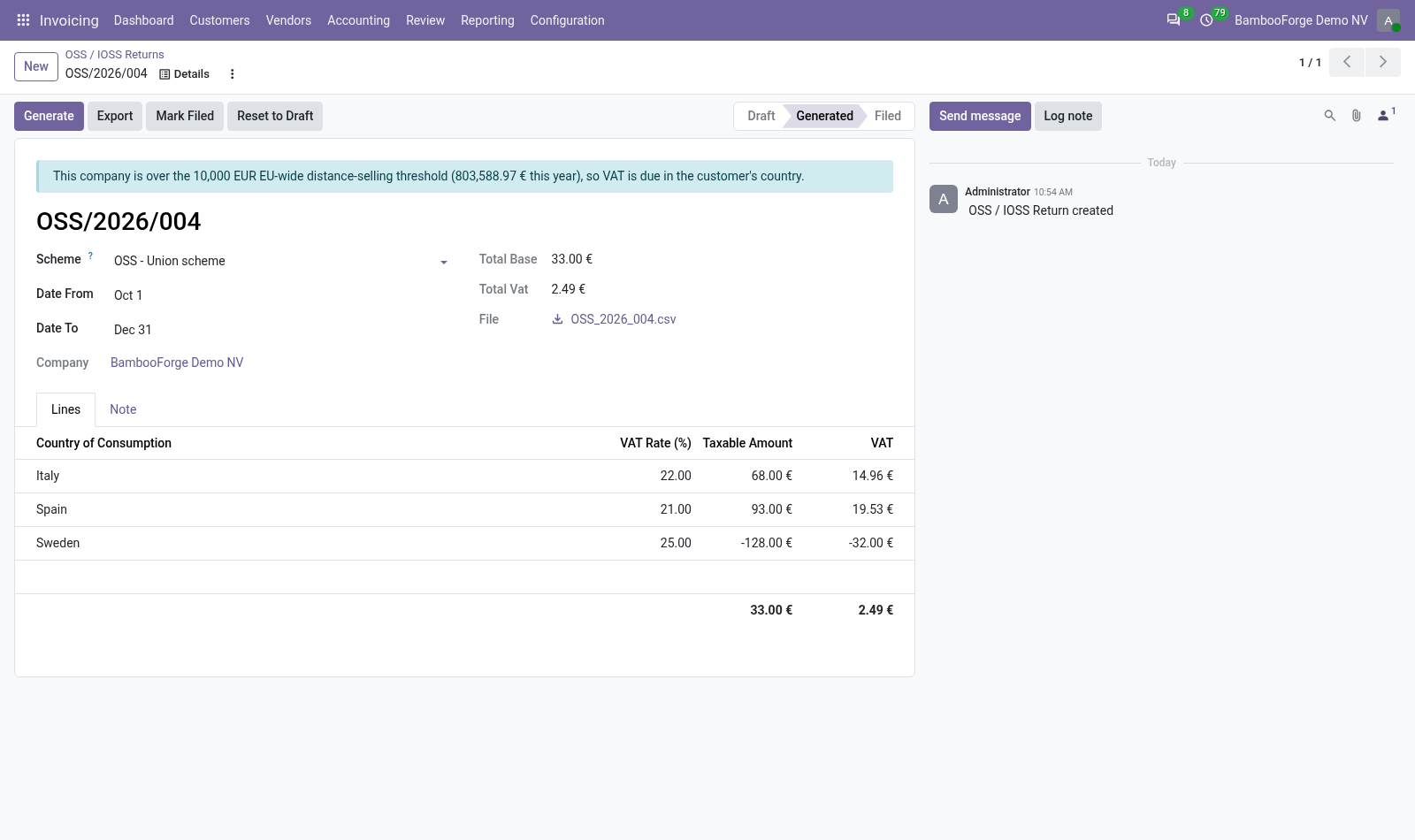
The period follows the scheme: the Union scheme is quarterly, IOSS is monthly, and choosing the wrong one is the most common reason a return comes back. Setting a date inside a quarter snaps to that quarter. Generate builds one line per country of consumption and per rate, with the taxable amount and the VAT. Credit notes net off inside the line rather than appearing as a second one, which is how the return is meant to read.
The threshold. Under 10,000 EUR of EU-wide distance sales in a year, a seller charges home VAT and files nothing. Over it, VAT is due in the customer's country from the very next sale. Companies usually discover they crossed the line when an auditor tells them, which is a year of wrong VAT and a year of interest.
The figure is shown on every return: what has been sold to consumers in other member states this year, and how much is left. Business customers with a VAT number are excluded, because the threshold is about selling to consumers. Now the part most videos leave out: what this does not do. This produces the return; it does not submit it.
Every member state has its own portal and its own credentials. The threshold is computed from invoices in this database. A company selling through a marketplace that files on its behalf has to net that off by hand. One registration per company.
Sellers registered in several member states under separate schemes need one company per registration. The complete manual is at docs dot bambooforge dot dev, the demo database is linked from the store page, and support answers within twenty-four hours. Links are in the description.
Transcript of the walkthrough (Odoo 18)
OSS & IOSS VAT Returns / EU Distance Selling. The quarterly OSS return and the monthly IOSS one, built from posted invoices - VAT per member state and rate - with a distance-selling check. l10n_eu_oss builds the taxes and fiscal positions that charge the right VAT on distance sales into other member states. It does not produce the return — the list of what was sold into each country at each rate — which is the thing that has to be filed and paid.
Accounting ▸ Reporting ▸ OSS / IOSS In the next few minutes: what this is for, then preparing a return, then the threshold. Then what this app deliberately does not do, so you can tell before you buy whether it fits. Everything lives under OSS / IOSS. What this is for.
l10n_eu_oss builds the taxes and fiscal positions that charge the right VAT on distance sales into other member states. It does not produce the return — the list of what was sold into each country at each rate — which is the thing that has to be filed and paid. Preparing a return. Pick the scheme and the period.
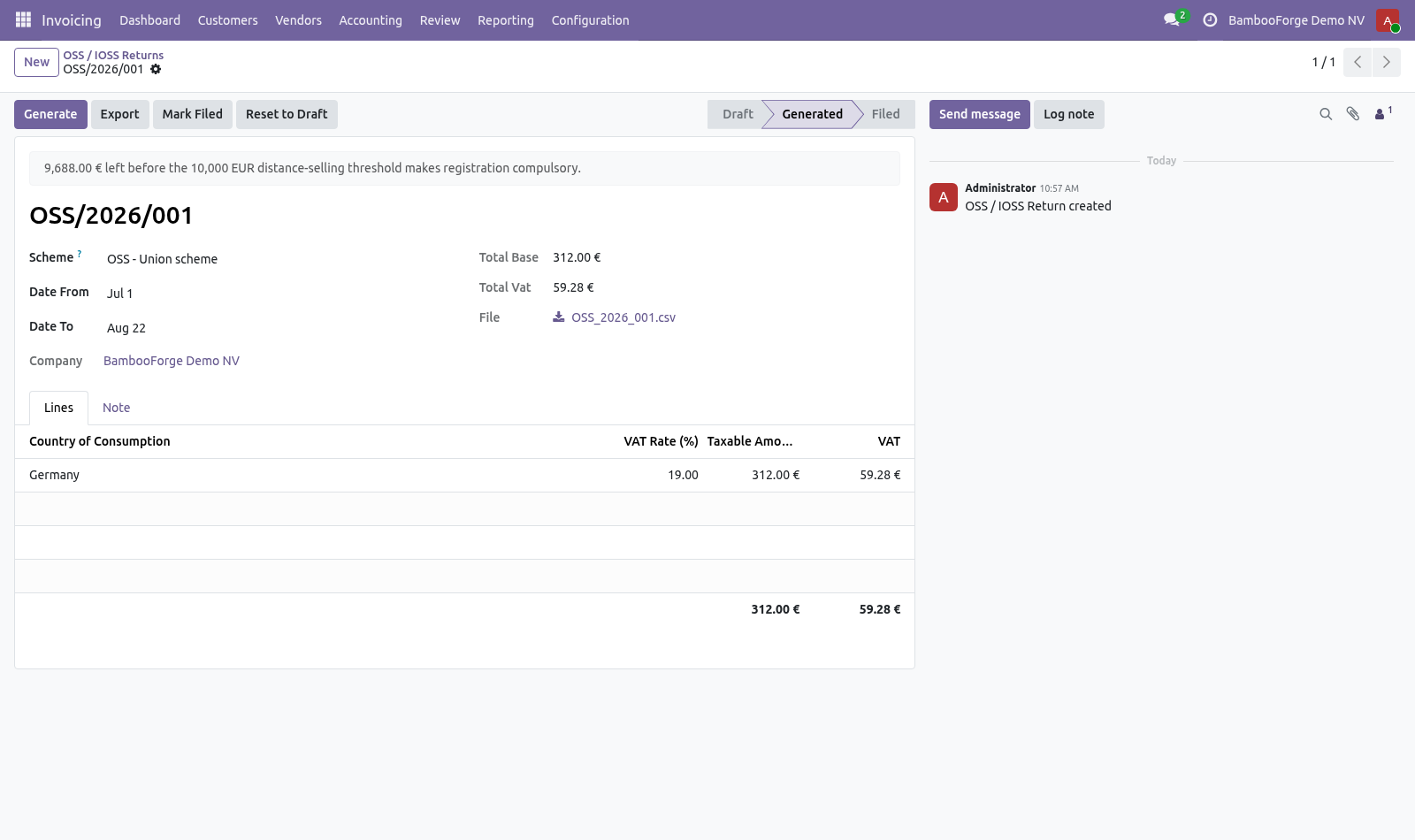
The period follows the scheme: the Union scheme is quarterly, IOSS is monthly, and choosing the wrong one is the most common reason a return comes back. Setting a date inside a quarter snaps to that quarter. Generate builds one line per country of consumption and per rate, with the taxable amount and the VAT. Credit notes net off inside the line rather than appearing as a second one, which is how the return is meant to read.
The threshold. Under 10,000 EUR of EU-wide distance sales in a year, a seller charges home VAT and files nothing. Over it, VAT is due in the customer's country from the very next sale. Companies usually discover they crossed the line when an auditor tells them, which is a year of wrong VAT and a year of interest.
The figure is shown on every return: what has been sold to consumers in other member states this year, and how much is left. Business customers with a VAT number are excluded, because the threshold is about selling to consumers. Now the part most videos leave out: what this does not do. This produces the return; it does not submit it.
Every member state has its own portal and its own credentials. The threshold is computed from invoices in this database. A company selling through a marketplace that files on its behalf has to net that off by hand. One registration per company.
Sellers registered in several member states under separate schemes need one company per registration. The complete manual is at docs dot bambooforge dot dev, the demo database is linked from the store page, and support answers within twenty-four hours. Links are in the description.
Transcript of the walkthrough (Odoo 17)
OSS & IOSS VAT Returns / EU Distance Selling. The quarterly OSS return and the monthly IOSS one, built from posted invoices - VAT per member state and rate - with a distance-selling check. l10n_eu_oss builds the taxes and fiscal positions that charge the right VAT on distance sales into other member states. It does not produce the return — the list of what was sold into each country at each rate — which is the thing that has to be filed and paid.
Accounting ▸ Reporting ▸ OSS / IOSS In the next few minutes: what this is for, then preparing a return, then the threshold. Then what this app deliberately does not do, so you can tell before you buy whether it fits. Everything lives under OSS / IOSS. What this is for.
l10n_eu_oss builds the taxes and fiscal positions that charge the right VAT on distance sales into other member states. It does not produce the return — the list of what was sold into each country at each rate — which is the thing that has to be filed and paid. Preparing a return. Pick the scheme and the period.
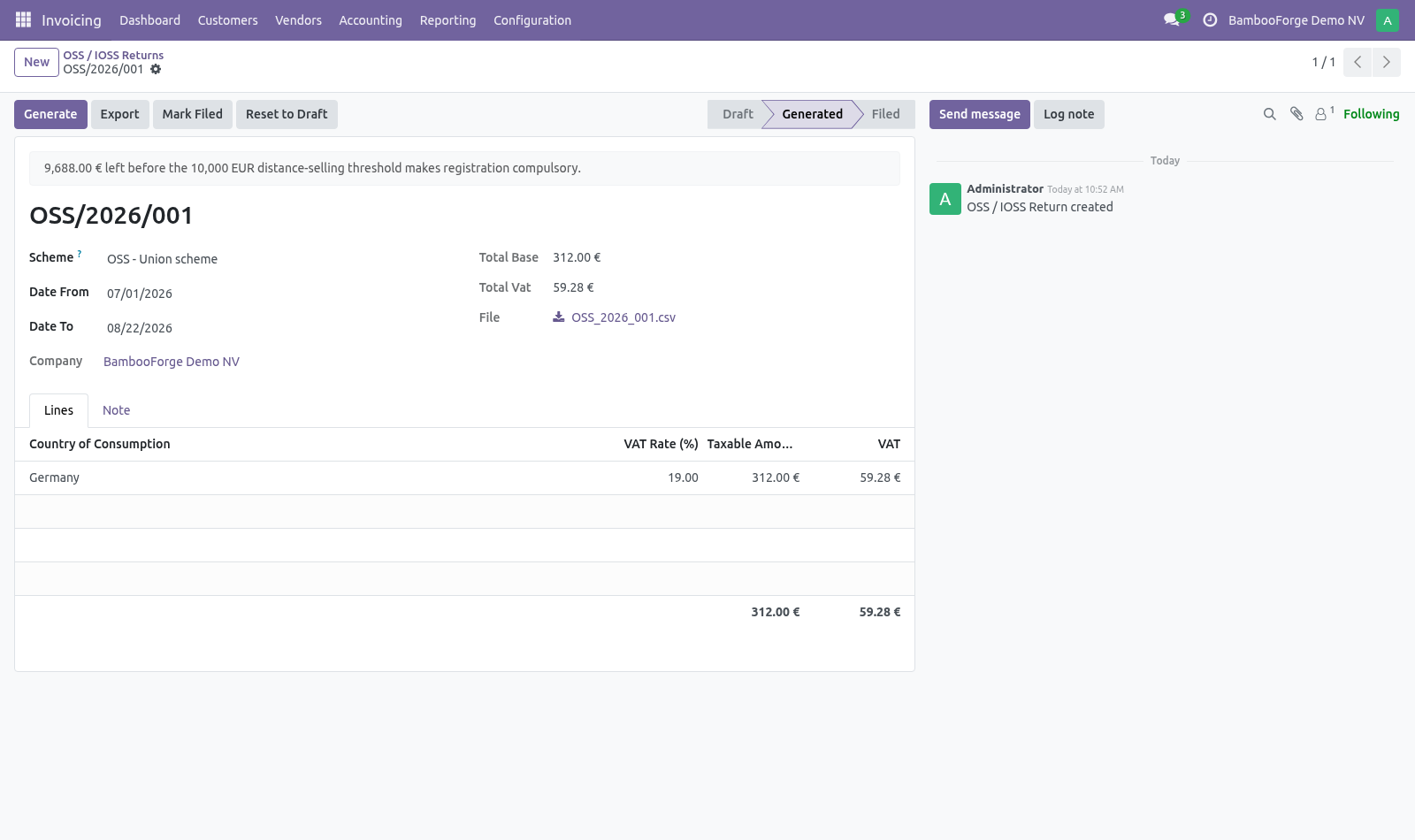
The period follows the scheme: the Union scheme is quarterly, IOSS is monthly, and choosing the wrong one is the most common reason a return comes back. Setting a date inside a quarter snaps to that quarter. Generate builds one line per country of consumption and per rate, with the taxable amount and the VAT. Credit notes net off inside the line rather than appearing as a second one, which is how the return is meant to read.
The threshold. Under 10,000 EUR of EU-wide distance sales in a year, a seller charges home VAT and files nothing. Over it, VAT is due in the customer's country from the very next sale. Companies usually discover they crossed the line when an auditor tells them, which is a year of wrong VAT and a year of interest.
The figure is shown on every return: what has been sold to consumers in other member states this year, and how much is left. Business customers with a VAT number are excluded, because the threshold is about selling to consumers. Now the part most videos leave out: what this does not do. This produces the return; it does not submit it.
Every member state has its own portal and its own credentials. The threshold is computed from invoices in this database. A company selling through a marketplace that files on its behalf has to net that off by hand. One registration per company.
Sellers registered in several member states under separate schemes need one company per registration. The complete manual is at docs dot bambooforge dot dev, the demo database is linked from the store page, and support answers within twenty-four hours. Links are in the description.
Transcript of the walkthrough (Odoo 16)
OSS & IOSS VAT Returns / EU Distance Selling. The quarterly OSS return and the monthly IOSS one, built from posted invoices - VAT per member state and rate - with a distance-selling check. l10n_eu_oss builds the taxes and fiscal positions that charge the right VAT on distance sales into other member states. It does not produce the return — the list of what was sold into each country at each rate — which is the thing that has to be filed and paid.
Accounting ▸ Reporting ▸ OSS / IOSS In the next few minutes: what this is for, then preparing a return, then the threshold. Then what this app deliberately does not do, so you can tell before you buy whether it fits. Everything lives under OSS / IOSS. What this is for.
l10n_eu_oss builds the taxes and fiscal positions that charge the right VAT on distance sales into other member states. It does not produce the return — the list of what was sold into each country at each rate — which is the thing that has to be filed and paid. Preparing a return. Pick the scheme and the period.
The period follows the scheme: the Union scheme is quarterly, IOSS is monthly, and choosing the wrong one is the most common reason a return comes back. Setting a date inside a quarter snaps to that quarter. Generate builds one line per country of consumption and per rate, with the taxable amount and the VAT. Credit notes net off inside the line rather than appearing as a second one, which is how the return is meant to read.
The threshold. Under 10,000 EUR of EU-wide distance sales in a year, a seller charges home VAT and files nothing. Over it, VAT is due in the customer's country from the very next sale. Companies usually discover they crossed the line when an auditor tells them, which is a year of wrong VAT and a year of interest.
The figure is shown on every return: what has been sold to consumers in other member states this year, and how much is left. Business customers with a VAT number are excluded, because the threshold is about selling to consumers. Now the part most videos leave out: what this does not do. This produces the return; it does not submit it.
Every member state has its own portal and its own credentials. The threshold is computed from invoices in this database. A company selling through a marketplace that files on its behalf has to net that off by hand. One registration per company.
Sellers registered in several member states under separate schemes need one company per registration. The complete manual is at docs dot bambooforge dot dev, the demo database is linked from the store page, and support answers within twenty-four hours. Links are in the description.
Key facts
- What it is
- The quarterly OSS return and the monthly IOSS one, built from posted invoices - VAT per member state and rate - with a distance-selling check.
- For
- Accounting
- Odoo versions
- 16.0, 17.0, 18.0, 19.0, 20.0 - Community and Enterprise
- Runs on
- Odoo.sh or Odoo you host yourself - not Odoo Online, which accepts no third-party apps
- Price
- 199 EUR, one-time, on the Odoo Apps Store
- Technical name
- bambooforge_oss
- Not for
- This produces the return; it does not submit it. Every member state has its own portal and its own credentials.; The threshold is computed from invoices in this database. A company selling through a marketplace that files on its behalf has to net that off by hand.; One registration per company. Sellers registered in several member states under separate schemes need one company per registration.
- Manual last updated
- 2026-09-21
OSS & IOSS VAT Returns | EU Distance Selling
What this is for
l10n_eu_oss builds the taxes and fiscal positions that charge the right VAT on distance sales into other member states. It does not produce the return — the list of what was sold into each country at each rate — which is the thing that has to be filed and paid.
Preparing a return
Accounting ▸ Reporting ▸ OSS / IOSS
Pick the scheme and the period. The period follows the scheme: the Union scheme is quarterly, IOSS is monthly, and choosing the wrong one is the most common reason a return comes back. Setting a date inside a quarter snaps to that quarter.
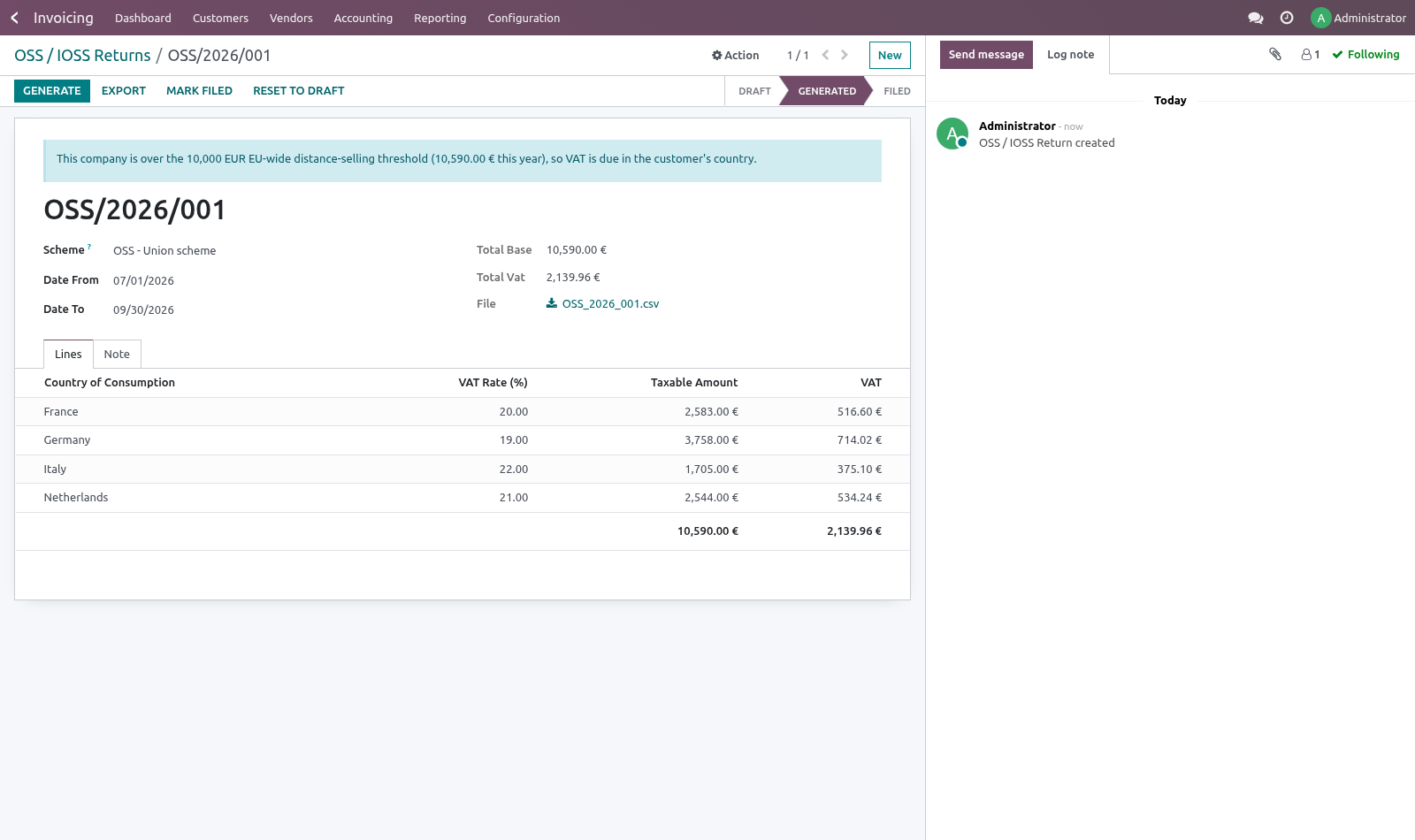
Generate builds one line per country of consumption and per rate, with the taxable amount and the VAT. Credit notes net off inside the line rather than appearing as a second one, which is how the return is meant to read.
Export writes a CSV with country, rate, taxable amount and VAT — the four columns every national portal asks for, whatever shape it wraps them in.
The threshold
Under 10,000 EUR of EU-wide distance sales in a year, a seller charges home VAT and files nothing. Over it, VAT is due in the customer's country from the very next sale. Companies usually discover they crossed the line when an auditor tells them, which is a year of wrong VAT and a year of interest.
The figure is shown on every return: what has been sold to consumers in other member states this year, and how much is left. Business customers with a VAT number are excluded, because the threshold is about selling to consumers.
Known limits
This produces the return; it does not submit it. Every member state has its own portal and its own credentials.
The threshold is computed from invoices in this database. A company selling through a marketplace that files on its behalf has to net that off by hand.
One registration per company. Sellers registered in several member states under separate schemes need one company per registration.
How we make sure it works
Before every release, 16 automated checks run against this app on Odoo 16, 17, 18, 19 and 20. Among them:
An accountant without the checkbox reads no return.
A filed return is not rewritten.
Business customers do not count.
Export before generating is refused.
A refund nets off rather than adding a line.
The complete list is in the source you receive.
Install
Copy bambooforge_oss into your addons path and update the app list, or install the ZIP from the Odoo Apps Store.
Install OSS & IOSS VAT Returns.
Open OSS / IOSS.
Questions people ask
- Which Odoo versions does it run on?
Odoo 16.0, 17.0, 18.0, 19.0, 20.0, on the series you buy it for; each series is its own listing.
- Community or Enterprise?
Both. It needs no Enterprise app.
- What does it need?
The standard Invoicing app. No extra Python package.
- Where does it show up?
Under the OSS / IOSS menu.
- Does anything leave my server?
No. It makes no call outside your Odoo server: no telemetry, no licence check, no third-party service.
- What happens if I uninstall it?
Odoo drops the app's own tables and fields; the standard records it worked on (contacts, orders, products) stay as they are.