 BambooForge Labs
UK VAT Making Tax Digital (MTD) Returns
UK VAT under Making Tax Digital: build the nine boxes from your own taxes with an explicit mapping, keep HMRC obligations, assemble the payload.
Available for Odoo 16.0, Odoo 17.0, Odoo 18.0, Odoo 19.0, Odoo 20.0. Technical name bambooforge_mtd_vat.
Transcript of the walkthrough (Odoo 20)
UK VAT Making Tax Digital (MTD) Returns. UK VAT under Making Tax Digital: build the nine boxes from your own taxes with an explicit mapping, keep HMRC obligations, assemble the payload. Odoo Community has no UK VAT return — l10n_uk_reports is Enterprise. This builds the nine boxes from the ledger and prepares the submission.
Accounting ▸ Configuration ▸ VAT Box Mapping In the next few minutes: what this is for, then the box mapping, then the company has to keep its books in sterling, then obligations, then preparing a return. Then what this app deliberately does not do, so you can tell before you buy whether it fits. Everything lives under VAT Obligations then VAT Returns (MTD) then VAT Box Mapping. 1.
Copy bambooforge_mtd_vat into your addons path and update the app list, or install the ZIP from the Odoo Apps Store. 2. Install UK VAT Making Tax Digital (MTD) Returns. 3.
Open VAT Obligations - its menus are VAT Returns (MTD), VAT Box Mapping. What this is for. Odoo Community has no UK VAT return — l10n_uk_reports is Enterprise. This builds the nine boxes from the ledger and prepares the submission.
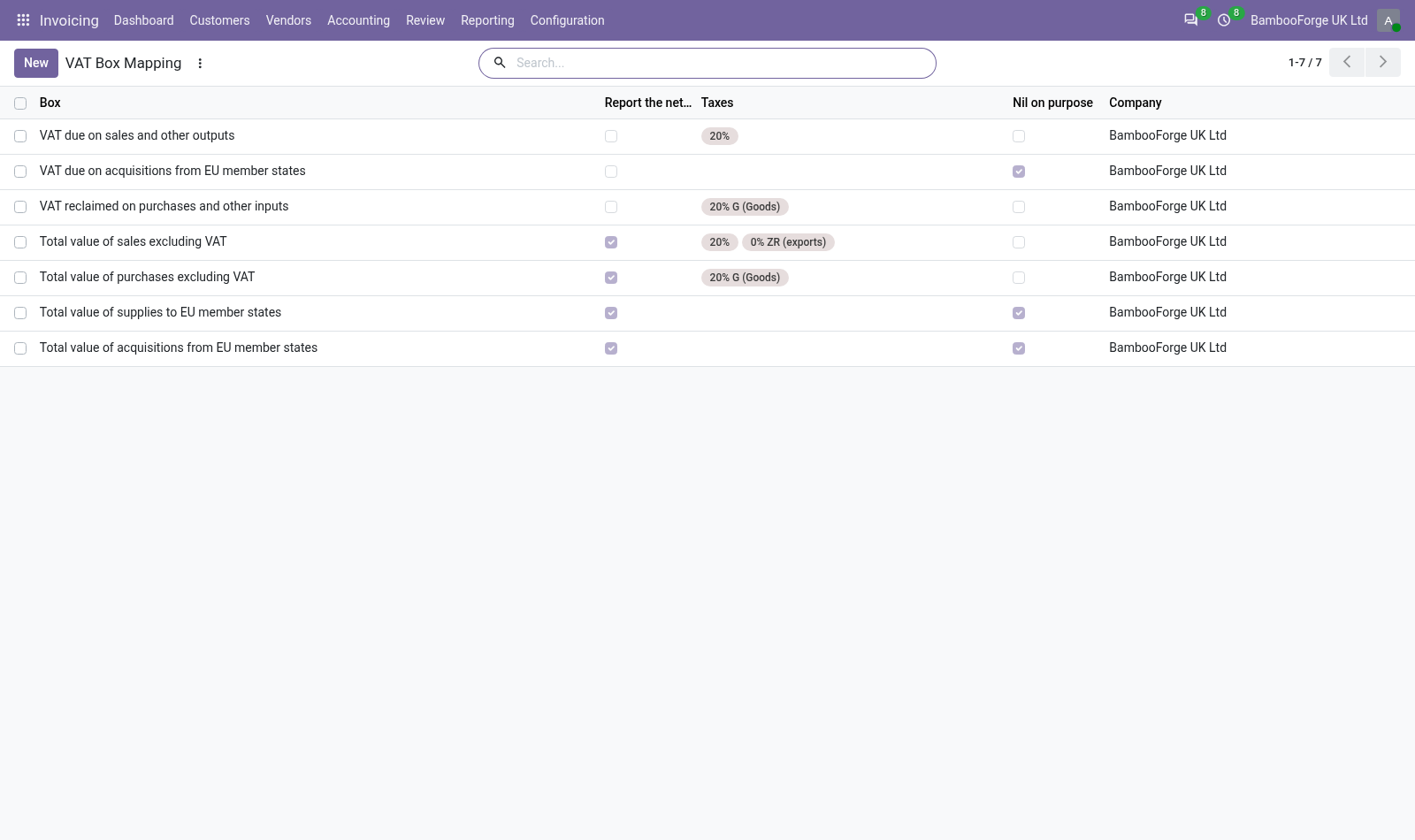
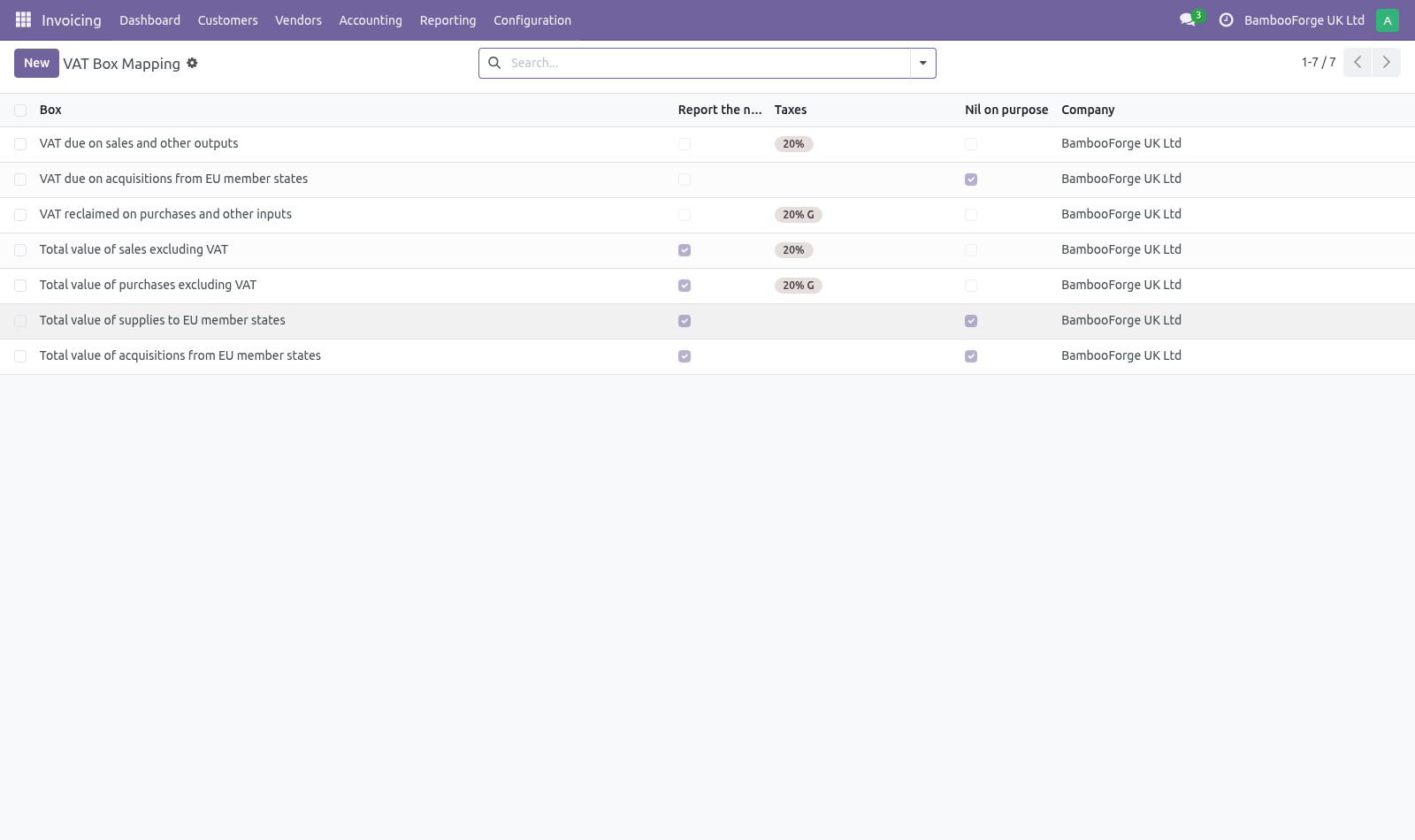
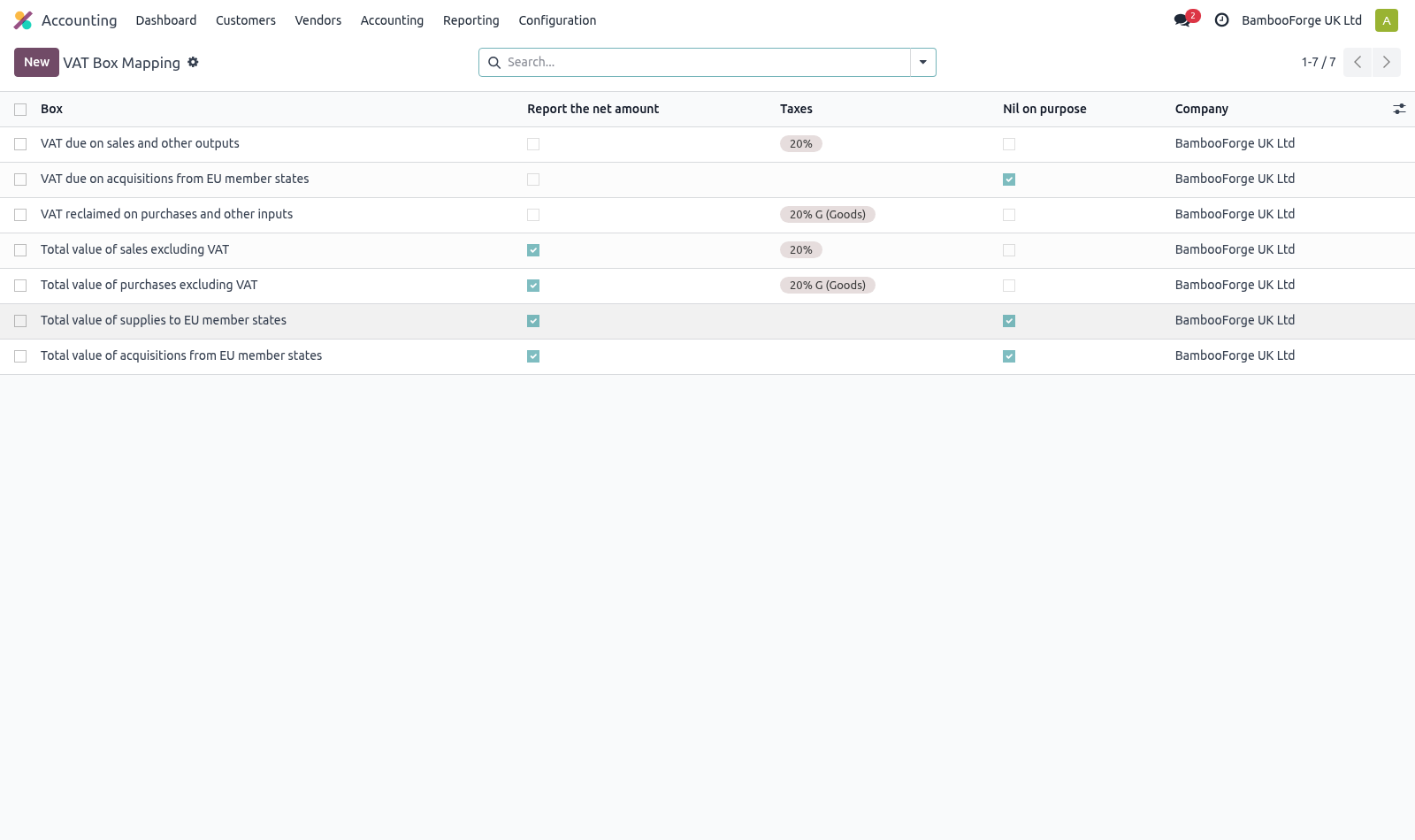
The box mapping. Accounting ▸ Configuration ▸ VAT Box Mapping Every chart of accounts names its taxes differently, and a return built on guessed names is wrong in a way nobody notices until HMRC does. Each box says explicitly which taxes feed it, and whether it reports the VAT (boxes 1, 2, 4) or the net amount it was charged on (boxes 6 to 9). The company has to keep its books in sterling.
The nine boxes are read off the ledger in the company currency and sent to HMRC as bare numbers. The API carries no currency field, so a company keeping its books in euro would file euro totals under a pound heading and hear about it at the assessment. Submission is refused outside GBP, and the return says so on screen before anyone reaches the declaration. A group that trades in both places handles this the way it already does: the British entity is its own company with its own GBP ledger, and the return is prepared there.
Obligations. HMRC issues the periods, and they are not always calendar quarters. Record each one with the period key HMRC gave it — a submission has to quote it back, and it is what ties a return to the obligation it satisfies. Preparing a return.
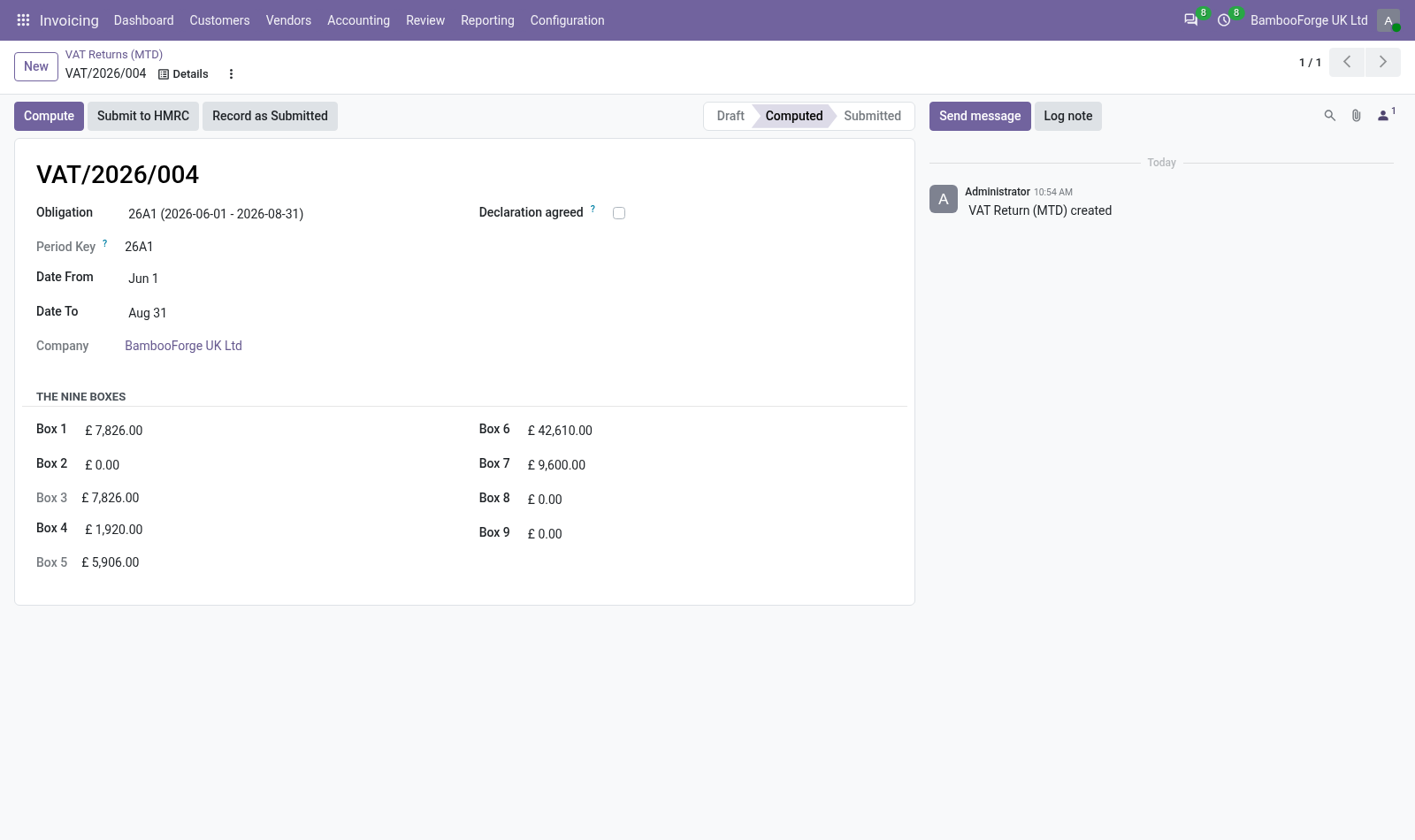
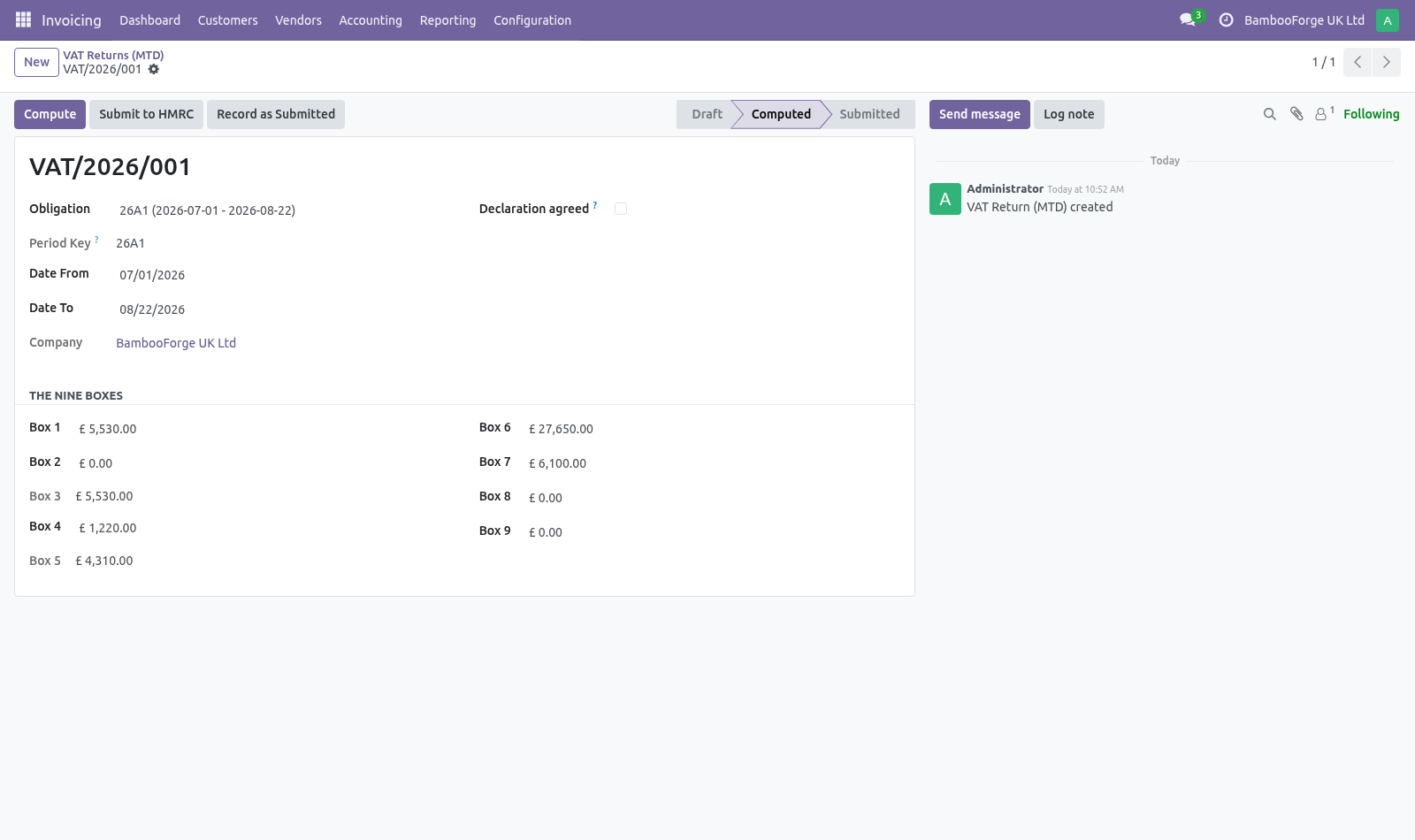
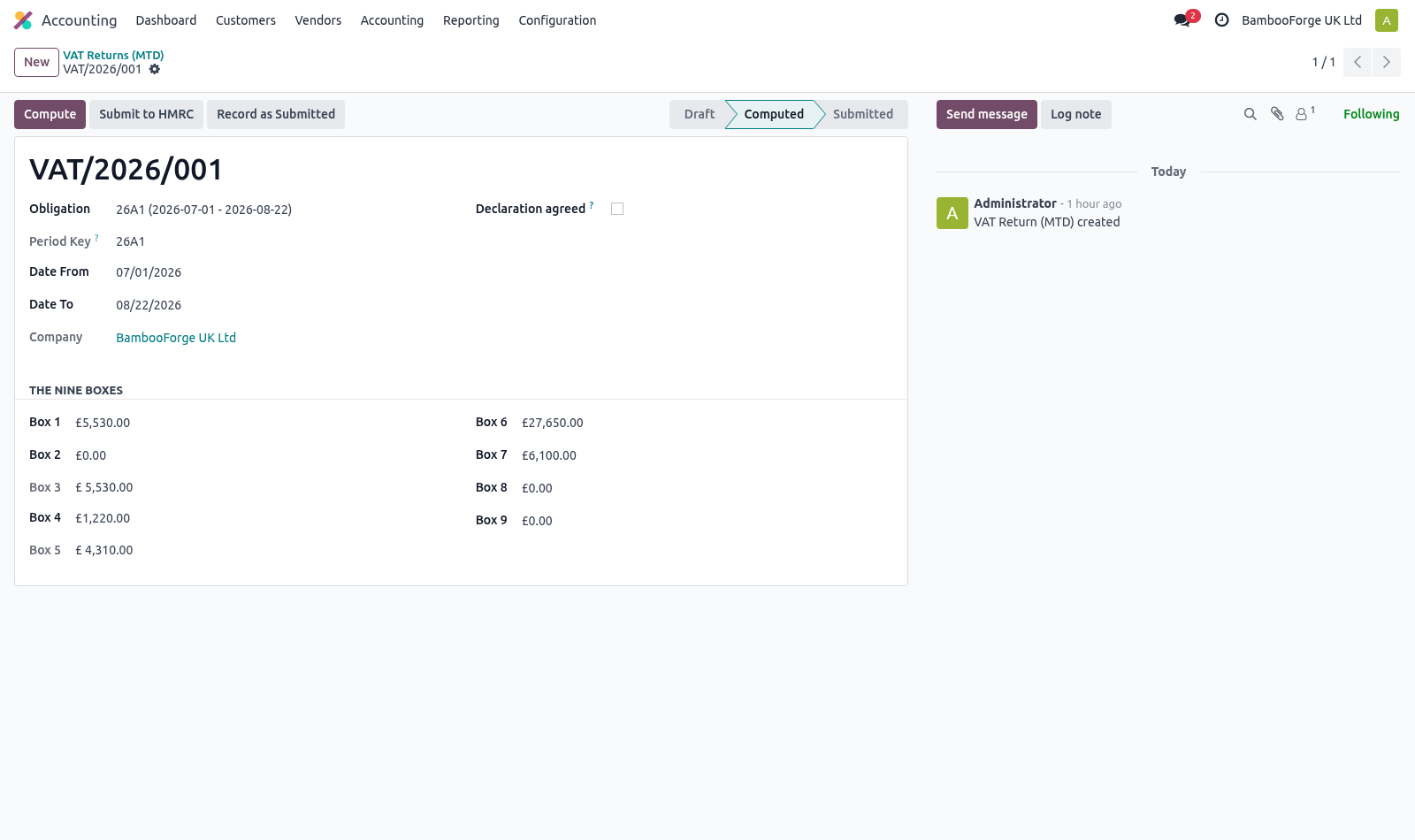
Pick the obligation, press Compute, and the boxes are filled from posted entries in the period. Amounts are reported positive on both sides, as the form expects. the declaration must be ticked — HMRC requires the submitter to confirm the figures are correct and complete, and the API rejects a submission without it; every box must be mapped, or explicitly confirmed as empty. Submitting.
This module does not carry HMRC credentials for you. Production access needs a registered application and an OAuth grant belonging to the company that files, not to a software vendor — so the honest shape is: the payload and the fraud-prevention headers are assembled and validated here, and nothing in the headers is invented (HMRC rejects fabricated values, and several can only come from the browser a human is sitting at — those are passed in by the caller); _bf_send is one small method to override with your own client; a submission accepted through another channel can be recorded against the obligation with its receipt. How we make sure it works. Before every release, 25 automated checks run against this app on Odoo 16, 17, 18, 19 and 20.
Among them: Books kept outside sterling cannot be filed. Fraud headers do not invent what they do not know. Box mapping of another company is not searchable. Obligation of another company is not searchable.
Return of another company is not readable. The complete list is in the source you receive. Questions people ask. Which Odoo versions does it run on?
Odoo 16.0, 17.0, 18.0, 19.0, 20.0, on the series you buy it for; each series is its own listing. Community or Enterprise? Both. It needs no Enterprise app.
Now the part most videos leave out: what this does not do. Not tested against the live HMRC API. Everything up to the HTTP call is covered by tests; what happens inside that call cannot be verified without an HMRC developer account and a company's own grant. Obligations are entered or imported, not fetched — fetching them needs the same credentials.
One VAT registration per company. The complete manual is at docs dot bambooforge dot dev, the demo database is linked from the store page, and support answers within twenty-four hours. Links are in the description.
Transcript of the walkthrough (Odoo 19)
UK VAT Making Tax Digital (MTD) Returns. UK VAT under Making Tax Digital: build the nine boxes from your own taxes with an explicit mapping, keep HMRC obligations, assemble the payload. Odoo Community has no UK VAT return — l10n_uk_reports is Enterprise. This builds the nine boxes from the ledger and prepares the submission.
Accounting ▸ Configuration ▸ VAT Box Mapping In the next few minutes: what this is for, then the box mapping, then the company has to keep its books in sterling, then obligations, then preparing a return. Then what this app deliberately does not do, so you can tell before you buy whether it fits. Everything lives under VAT Obligations then VAT Returns (MTD) then VAT Box Mapping. What this is for.
Odoo Community has no UK VAT return — l10n_uk_reports is Enterprise. This builds the nine boxes from the ledger and prepares the submission. The box mapping. Accounting ▸ Configuration ▸ VAT Box Mapping Every chart of accounts names its taxes differently, and a return built on guessed names is wrong in a way nobody notices until HMRC does.
Each box says explicitly which taxes feed it, and whether it reports the VAT (boxes 1, 2, 4) or the net amount it was charged on (boxes 6 to 9). The company has to keep its books in sterling. The nine boxes are read off the ledger in the company currency and sent to HMRC as bare numbers. The API carries no currency field, so a company keeping its books in euro would file euro totals under a pound heading and hear about it at the assessment.
Submission is refused outside GBP, and the return says so on screen before anyone reaches the declaration. A group that trades in both places handles this the way it already does: the British entity is its own company with its own GBP ledger, and the return is prepared there. Obligations. HMRC issues the periods, and they are not always calendar quarters.
Record each one with the period key HMRC gave it — a submission has to quote it back, and it is what ties a return to the obligation it satisfies. Preparing a return. Pick the obligation, press Compute, and the boxes are filled from posted entries in the period. Amounts are reported positive on both sides, as the form expects.
the declaration must be ticked — HMRC requires the submitter to confirm the figures are correct and complete, and the API rejects a submission without it; every box must be mapped, or explicitly confirmed as empty. Submitting. This module does not carry HMRC credentials for you. Production access needs a registered application and an OAuth grant belonging to the company that files, not to a software vendor — so the honest shape is: the payload and the fraud-prevention headers are assembled and validated here, and nothing in the headers is invented (HMRC rejects fabricated values, and several can only come from the browser a human is sitting at — those are passed in by the caller); _bf_send is one small method to override with your own client; a submission accepted through another channel can be recorded against the obligation with its receipt.
Now the part most videos leave out: what this does not do. Not tested against the live HMRC API. Everything up to the HTTP call is covered by tests; what happens inside that call cannot be verified without an HMRC developer account and a company's own grant. Obligations are entered or imported, not fetched — fetching them needs the same credentials.
One VAT registration per company. The complete manual is at docs dot bambooforge dot dev, the demo database is linked from the store page, and support answers within twenty-four hours. Links are in the description.
Transcript of the walkthrough (Odoo 18)
UK VAT Making Tax Digital (MTD) Returns. UK VAT under Making Tax Digital: build the nine boxes from your own taxes with an explicit mapping, keep HMRC obligations, assemble the payload. Odoo Community has no UK VAT return — l10n_uk_reports is Enterprise. This builds the nine boxes from the ledger and prepares the submission.
Accounting ▸ Configuration ▸ VAT Box Mapping In the next few minutes: what this is for, then the box mapping, then the company has to keep its books in sterling, then obligations, then preparing a return. Then what this app deliberately does not do, so you can tell before you buy whether it fits. Everything lives under VAT Obligations then VAT Returns (MTD) then VAT Box Mapping. What this is for.
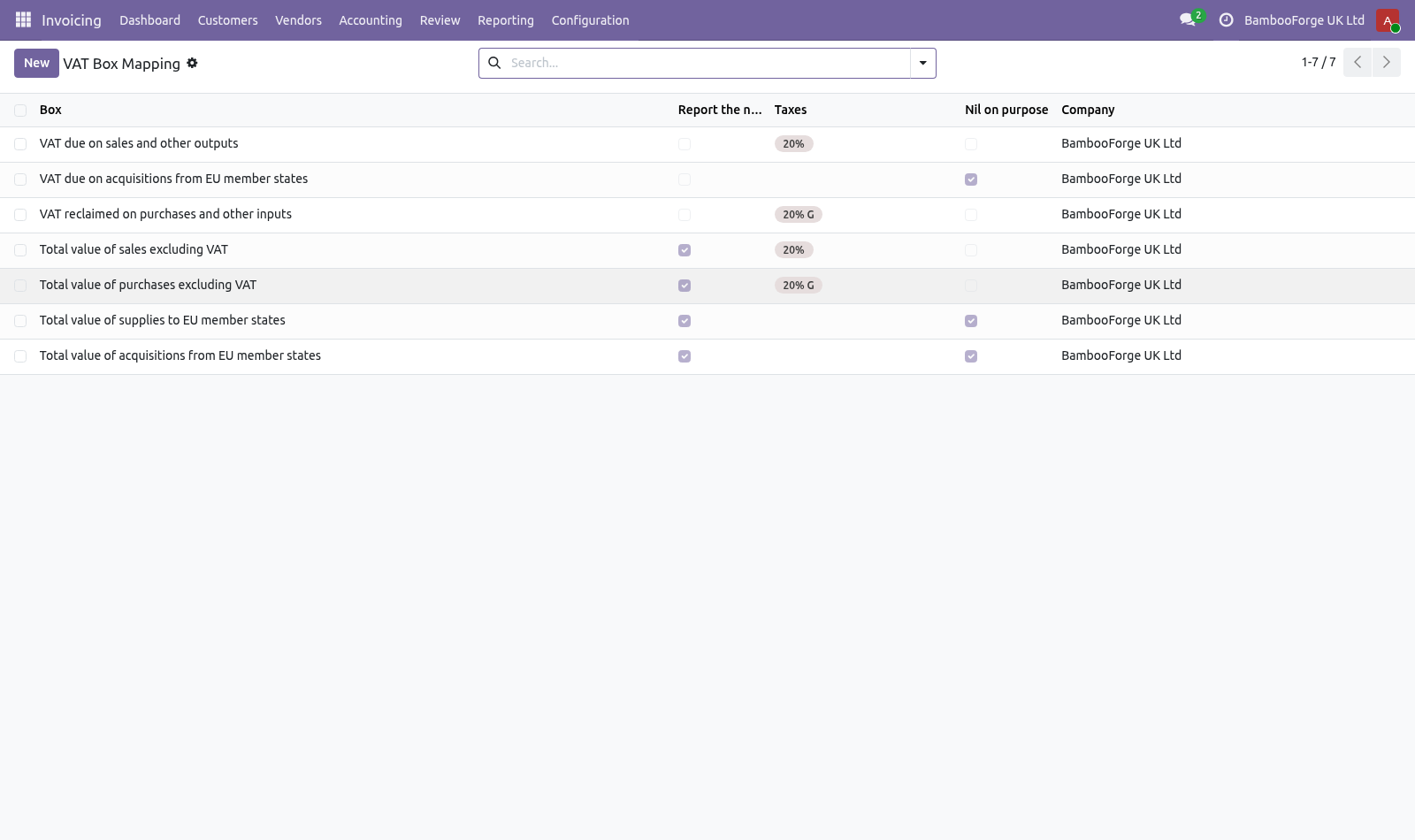
Odoo Community has no UK VAT return — l10n_uk_reports is Enterprise. This builds the nine boxes from the ledger and prepares the submission. The box mapping. Accounting ▸ Configuration ▸ VAT Box Mapping Every chart of accounts names its taxes differently, and a return built on guessed names is wrong in a way nobody notices until HMRC does.
Each box says explicitly which taxes feed it, and whether it reports the VAT (boxes 1, 2, 4) or the net amount it was charged on (boxes 6 to 9). The company has to keep its books in sterling. The nine boxes are read off the ledger in the company currency and sent to HMRC as bare numbers. The API carries no currency field, so a company keeping its books in euro would file euro totals under a pound heading and hear about it at the assessment.
Submission is refused outside GBP, and the return says so on screen before anyone reaches the declaration. A group that trades in both places handles this the way it already does: the British entity is its own company with its own GBP ledger, and the return is prepared there. Obligations. HMRC issues the periods, and they are not always calendar quarters.
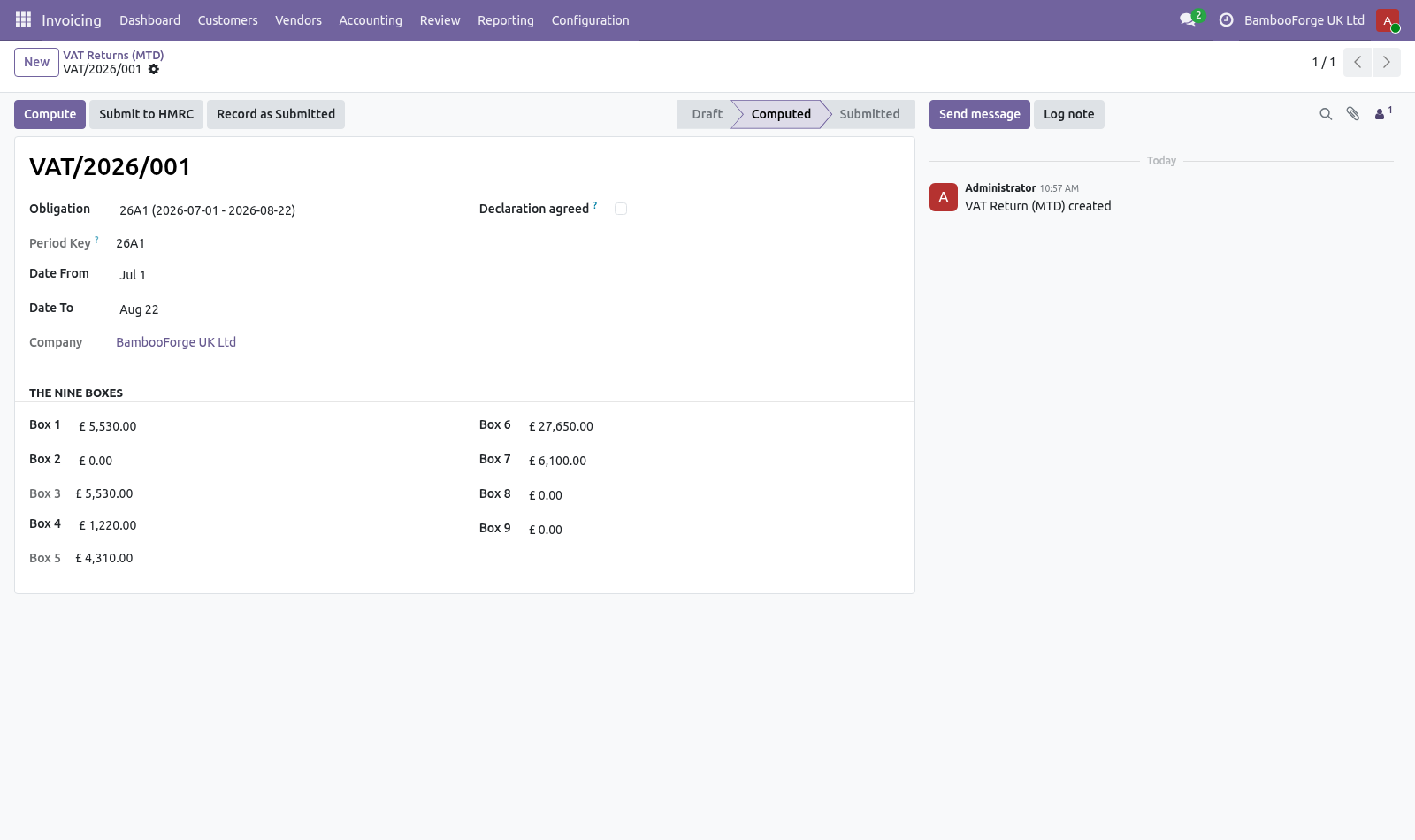
Record each one with the period key HMRC gave it — a submission has to quote it back, and it is what ties a return to the obligation it satisfies. Preparing a return. Pick the obligation, press Compute, and the boxes are filled from posted entries in the period. Amounts are reported positive on both sides, as the form expects.
the declaration must be ticked — HMRC requires the submitter to confirm the figures are correct and complete, and the API rejects a submission without it; every box must be mapped, or explicitly confirmed as empty. Submitting. This module does not carry HMRC credentials for you. Production access needs a registered application and an OAuth grant belonging to the company that files, not to a software vendor — so the honest shape is: the payload and the fraud-prevention headers are assembled and validated here, and nothing in the headers is invented (HMRC rejects fabricated values, and several can only come from the browser a human is sitting at — those are passed in by the caller); _bf_send is one small method to override with your own client; a submission accepted through another channel can be recorded against the obligation with its receipt.
Now the part most videos leave out: what this does not do. Not tested against the live HMRC API. Everything up to the HTTP call is covered by tests; what happens inside that call cannot be verified without an HMRC developer account and a company's own grant. Obligations are entered or imported, not fetched — fetching them needs the same credentials.
One VAT registration per company. The complete manual is at docs dot bambooforge dot dev, the demo database is linked from the store page, and support answers within twenty-four hours. Links are in the description.
Transcript of the walkthrough (Odoo 17)
UK VAT Making Tax Digital (MTD) Returns. UK VAT under Making Tax Digital: build the nine boxes from your own taxes with an explicit mapping, keep HMRC obligations, assemble the payload. Odoo Community has no UK VAT return — l10n_uk_reports is Enterprise. This builds the nine boxes from the ledger and prepares the submission.
Accounting ▸ Configuration ▸ VAT Box Mapping In the next few minutes: what this is for, then the box mapping, then the company has to keep its books in sterling, then obligations, then preparing a return. Then what this app deliberately does not do, so you can tell before you buy whether it fits. Everything lives under VAT Obligations then VAT Returns (MTD) then VAT Box Mapping. What this is for.
Odoo Community has no UK VAT return — l10n_uk_reports is Enterprise. This builds the nine boxes from the ledger and prepares the submission. The box mapping. Accounting ▸ Configuration ▸ VAT Box Mapping Every chart of accounts names its taxes differently, and a return built on guessed names is wrong in a way nobody notices until HMRC does.
Each box says explicitly which taxes feed it, and whether it reports the VAT (boxes 1, 2, 4) or the net amount it was charged on (boxes 6 to 9). The company has to keep its books in sterling. The nine boxes are read off the ledger in the company currency and sent to HMRC as bare numbers. The API carries no currency field, so a company keeping its books in euro would file euro totals under a pound heading and hear about it at the assessment.
Submission is refused outside GBP, and the return says so on screen before anyone reaches the declaration. A group that trades in both places handles this the way it already does: the British entity is its own company with its own GBP ledger, and the return is prepared there. Obligations. HMRC issues the periods, and they are not always calendar quarters.
Record each one with the period key HMRC gave it — a submission has to quote it back, and it is what ties a return to the obligation it satisfies. Preparing a return. Pick the obligation, press Compute, and the boxes are filled from posted entries in the period. Amounts are reported positive on both sides, as the form expects.
the declaration must be ticked — HMRC requires the submitter to confirm the figures are correct and complete, and the API rejects a submission without it; every box must be mapped, or explicitly confirmed as empty. Submitting. This module does not carry HMRC credentials for you. Production access needs a registered application and an OAuth grant belonging to the company that files, not to a software vendor — so the honest shape is: the payload and the fraud-prevention headers are assembled and validated here, and nothing in the headers is invented (HMRC rejects fabricated values, and several can only come from the browser a human is sitting at — those are passed in by the caller); _bf_send is one small method to override with your own client; a submission accepted through another channel can be recorded against the obligation with its receipt.
Now the part most videos leave out: what this does not do. Not tested against the live HMRC API. Everything up to the HTTP call is covered by tests; what happens inside that call cannot be verified without an HMRC developer account and a company's own grant. Obligations are entered or imported, not fetched — fetching them needs the same credentials.
One VAT registration per company. The complete manual is at docs dot bambooforge dot dev, the demo database is linked from the store page, and support answers within twenty-four hours. Links are in the description.
Transcript of the walkthrough (Odoo 16)
UK VAT Making Tax Digital (MTD) Returns. UK VAT under Making Tax Digital: build the nine boxes from your own taxes with an explicit mapping, keep HMRC obligations, assemble the payload. Odoo Community has no UK VAT return — l10n_uk_reports is Enterprise. This builds the nine boxes from the ledger and prepares the submission.
Accounting ▸ Configuration ▸ VAT Box Mapping In the next few minutes: what this is for, then the box mapping, then the company has to keep its books in sterling, then obligations, then preparing a return. Then what this app deliberately does not do, so you can tell before you buy whether it fits. Everything lives under VAT Obligations then VAT Returns (MTD) then VAT Box Mapping. What this is for.
Odoo Community has no UK VAT return — l10n_uk_reports is Enterprise. This builds the nine boxes from the ledger and prepares the submission. The box mapping. Accounting ▸ Configuration ▸ VAT Box Mapping Every chart of accounts names its taxes differently, and a return built on guessed names is wrong in a way nobody notices until HMRC does.
Each box says explicitly which taxes feed it, and whether it reports the VAT (boxes 1, 2, 4) or the net amount it was charged on (boxes 6 to 9). The company has to keep its books in sterling. The nine boxes are read off the ledger in the company currency and sent to HMRC as bare numbers. The API carries no currency field, so a company keeping its books in euro would file euro totals under a pound heading and hear about it at the assessment.
Submission is refused outside GBP, and the return says so on screen before anyone reaches the declaration. A group that trades in both places handles this the way it already does: the British entity is its own company with its own GBP ledger, and the return is prepared there. Obligations. HMRC issues the periods, and they are not always calendar quarters.
Record each one with the period key HMRC gave it — a submission has to quote it back, and it is what ties a return to the obligation it satisfies. Preparing a return. Pick the obligation, press Compute, and the boxes are filled from posted entries in the period. Amounts are reported positive on both sides, as the form expects.
the declaration must be ticked — HMRC requires the submitter to confirm the figures are correct and complete, and the API rejects a submission without it; every box must be mapped, or explicitly confirmed as empty. Submitting. This module does not carry HMRC credentials for you. Production access needs a registered application and an OAuth grant belonging to the company that files, not to a software vendor — so the honest shape is: the payload and the fraud-prevention headers are assembled and validated here, and nothing in the headers is invented (HMRC rejects fabricated values, and several can only come from the browser a human is sitting at — those are passed in by the caller); _bf_send is one small method to override with your own client; a submission accepted through another channel can be recorded against the obligation with its receipt.
Now the part most videos leave out: what this does not do. Not tested against the live HMRC API. Everything up to the HTTP call is covered by tests; what happens inside that call cannot be verified without an HMRC developer account and a company's own grant. Obligations are entered or imported, not fetched — fetching them needs the same credentials.
One VAT registration per company. The complete manual is at docs dot bambooforge dot dev, the demo database is linked from the store page, and support answers within twenty-four hours. Links are in the description.
Key facts
- What it is
- UK VAT under Making Tax Digital: build the nine boxes from your own taxes with an explicit mapping, keep HMRC obligations, assemble the payload.
- For
- Accounting
- Odoo versions
- 16.0, 17.0, 18.0, 19.0, 20.0 - Community and Enterprise
- Runs on
- Odoo.sh or Odoo you host yourself - not Odoo Online, which accepts no third-party apps
- Price
- 249 EUR, one-time, on the Odoo Apps Store
- Technical name
- bambooforge_mtd_vat
- Not for
- Not tested against the live HMRC API. Everything up to the HTTP call is covered by tests; what happens inside that call cannot be verified without an HMRC developer account and a company's own grant.; Obligations are entered or imported, not fetched — fetching them needs the same credentials.; One VAT registration per company.
- Manual last updated
- 2026-09-21
UK VAT Making Tax Digital (MTD) Returns
What this is for
Odoo Community has no UK VAT return — l10n_uk_reports is Enterprise. This builds the nine boxes from the ledger and prepares the submission.
The box mapping
Accounting ▸ Configuration ▸ VAT Box Mapping
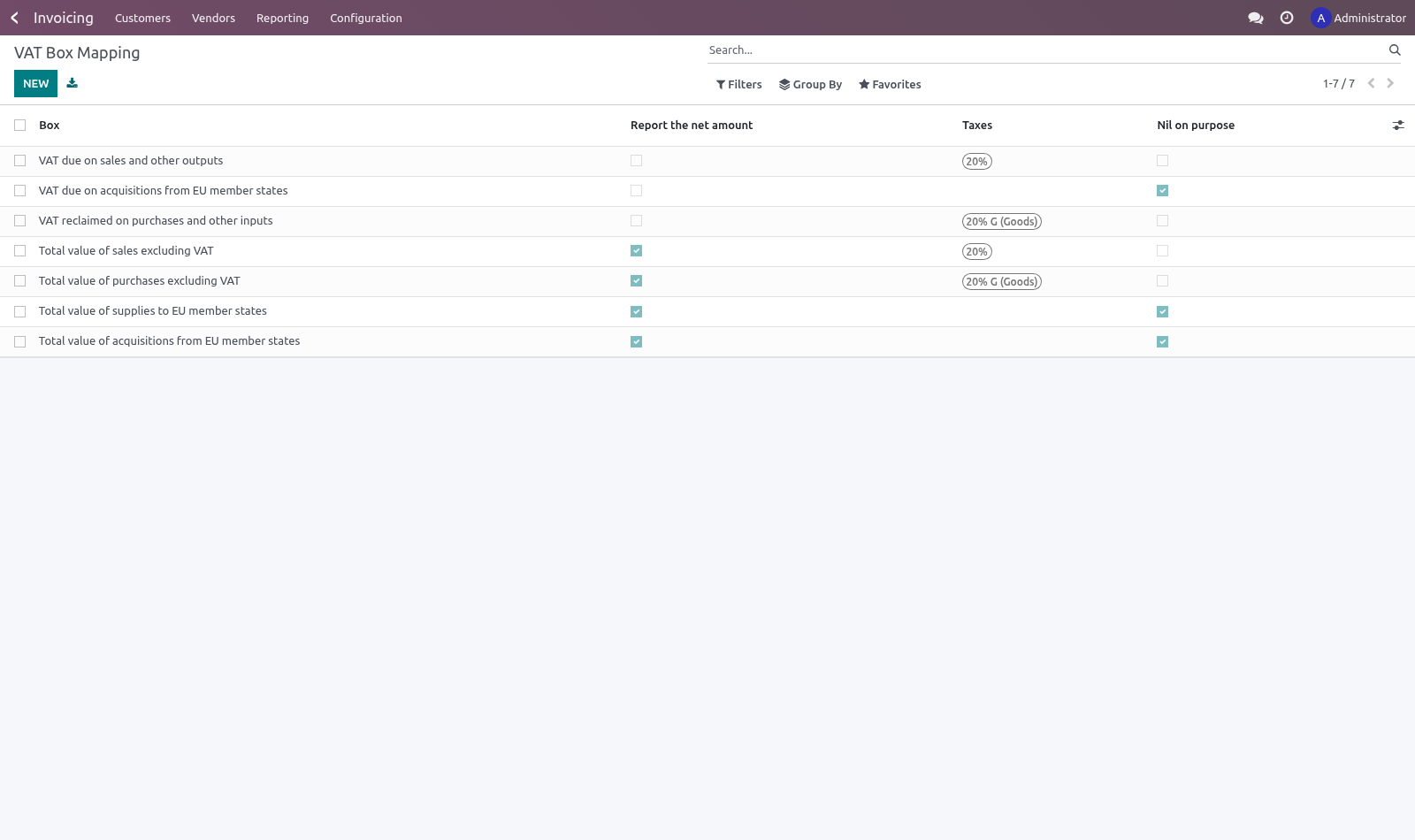
Every chart of accounts names its taxes differently, and a return built on guessed names is wrong in a way nobody notices until HMRC does. Each box says explicitly which taxes feed it, and whether it reports the VAT (boxes 1, 2, 4) or the net amount it was charged on (boxes 6 to 9).
Boxes 3 and 5 are never mapped: they are arithmetic on the others.
A box with nothing mapped reports zero and says so on the return, and the submission is refused until it is dealt with. Quietly filing a zero is how a missing mapping is discovered through an assessment.
Dealing with it can mean either thing. Most companies never make an EU acquisition, so boxes 2, 8 and 9 are nil for them for ever — tick Nil on purpose on those rows and the return stops treating them as unfinished work. A box cannot be both mapped and nil on purpose; that would be a contradiction about what the figure means.
The company has to keep its books in sterling
The nine boxes are read off the ledger in the company currency and sent to HMRC as bare numbers. The API carries no currency field, so a company keeping its books in euro would file euro totals under a pound heading and hear about it at the assessment. Submission is refused outside GBP, and the return says so on screen before anyone reaches the declaration.
A group that trades in both places handles this the way it already does: the British entity is its own company with its own GBP ledger, and the return is prepared there.
Obligations
HMRC issues the periods, and they are not always calendar quarters. Record each one with the period key HMRC gave it — a submission has to quote it back, and it is what ties a return to the obligation it satisfies.
Preparing a return
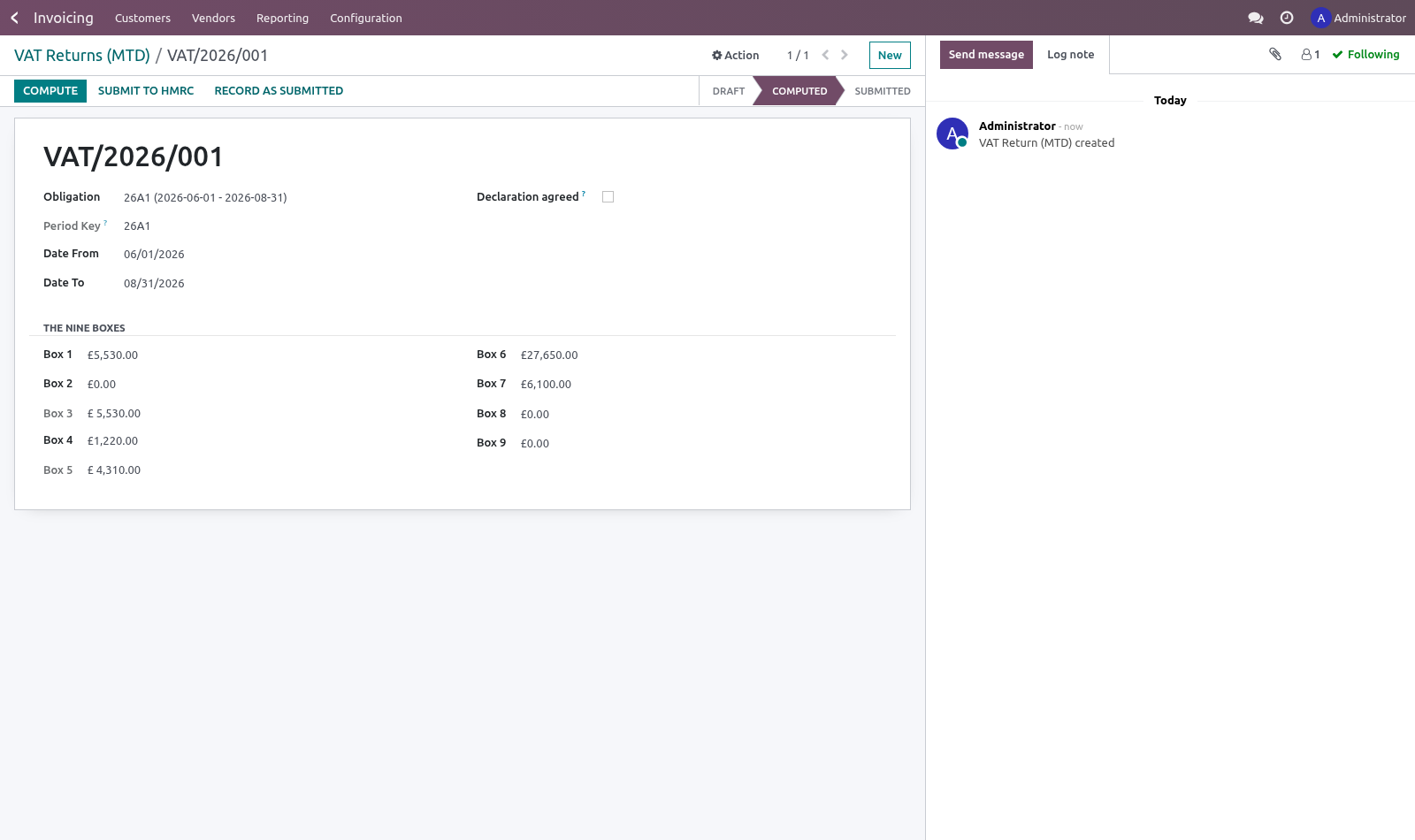
Pick the obligation, press Compute, and the boxes are filled from posted entries in the period. Amounts are reported positive on both sides, as the form expects.
Before it can be submitted:
the declaration must be ticked — HMRC requires the submitter to confirm the figures are correct and complete, and the API rejects a submission without it;
every box must be mapped, or explicitly confirmed as empty.
Submitting
This module does not carry HMRC credentials for you. Production access needs a registered application and an OAuth grant belonging to the company that files, not to a software vendor — so the honest shape is:
the payload and the fraud-prevention headers are assembled and validated here, and nothing in the headers is invented (HMRC rejects fabricated values, and several can only come from the browser a human is sitting at — those are passed in by the caller);
_bf_send is one small method to override with your own client;
a submission accepted through another channel can be recorded against the obligation with its receipt.
Known limits
Not tested against the live HMRC API. Everything up to the HTTP call is covered by tests; what happens inside that call cannot be verified without an HMRC developer account and a company's own grant.
Obligations are entered or imported, not fetched — fetching them needs the same credentials.
One VAT registration per company.
How we make sure it works
Before every release, 25 automated checks run against this app on Odoo 16, 17, 18, 19 and 20. Among them:
Books kept outside sterling cannot be filed.
Fraud headers do not invent what they do not know.
Box mapping of another company is not searchable.
Obligation of another company is not searchable.
Return of another company is not readable.
The complete list is in the source you receive.
Install
Copy bambooforge_mtd_vat into your addons path and update the app list, or install the ZIP from the Odoo Apps Store.
Install UK VAT Making Tax Digital (MTD) Returns.
Open VAT Obligations - its menus are VAT Returns (MTD), VAT Box Mapping.
Questions people ask
- Which Odoo versions does it run on?
Odoo 16.0, 17.0, 18.0, 19.0, 20.0, on the series you buy it for; each series is its own listing.
- Community or Enterprise?
Both. It needs no Enterprise app.
- What does it need?
The standard Invoicing app. No extra Python package.
- Where does it show up?
Under the VAT Obligations menu (VAT Returns (MTD), VAT Box Mapping).
- Does anything leave my server?
No. It makes no call outside your Odoo server: no telemetry, no licence check, no third-party service.
- What happens if I uninstall it?
Odoo drops the app's own tables and fields; the standard records it worked on (contacts, orders, products) stay as they are.