 BambooForge Labs
Matomo Analytics Connector
Attribute revenue to Matomo campaigns inside Odoo: import goal and ecommerce conversions with UTM and match them to leads and sales orders.
Available for Odoo 16.0, Odoo 17.0, Odoo 18.0, Odoo 19.0, Odoo 20.0. Technical name bambooforge_matomo_connector.
Transcript of the walkthrough (Odoo 20)
Matomo Analytics Connector. Attribute revenue to Matomo campaigns inside Odoo: import goal and ecommerce conversions with UTM and match them to leads and sales orders. The connector reads from the Matomo Reporting API over token_auth and writes the matching records into Odoo. Every call is a single POST <base_url>/index.php?module=API&method=...
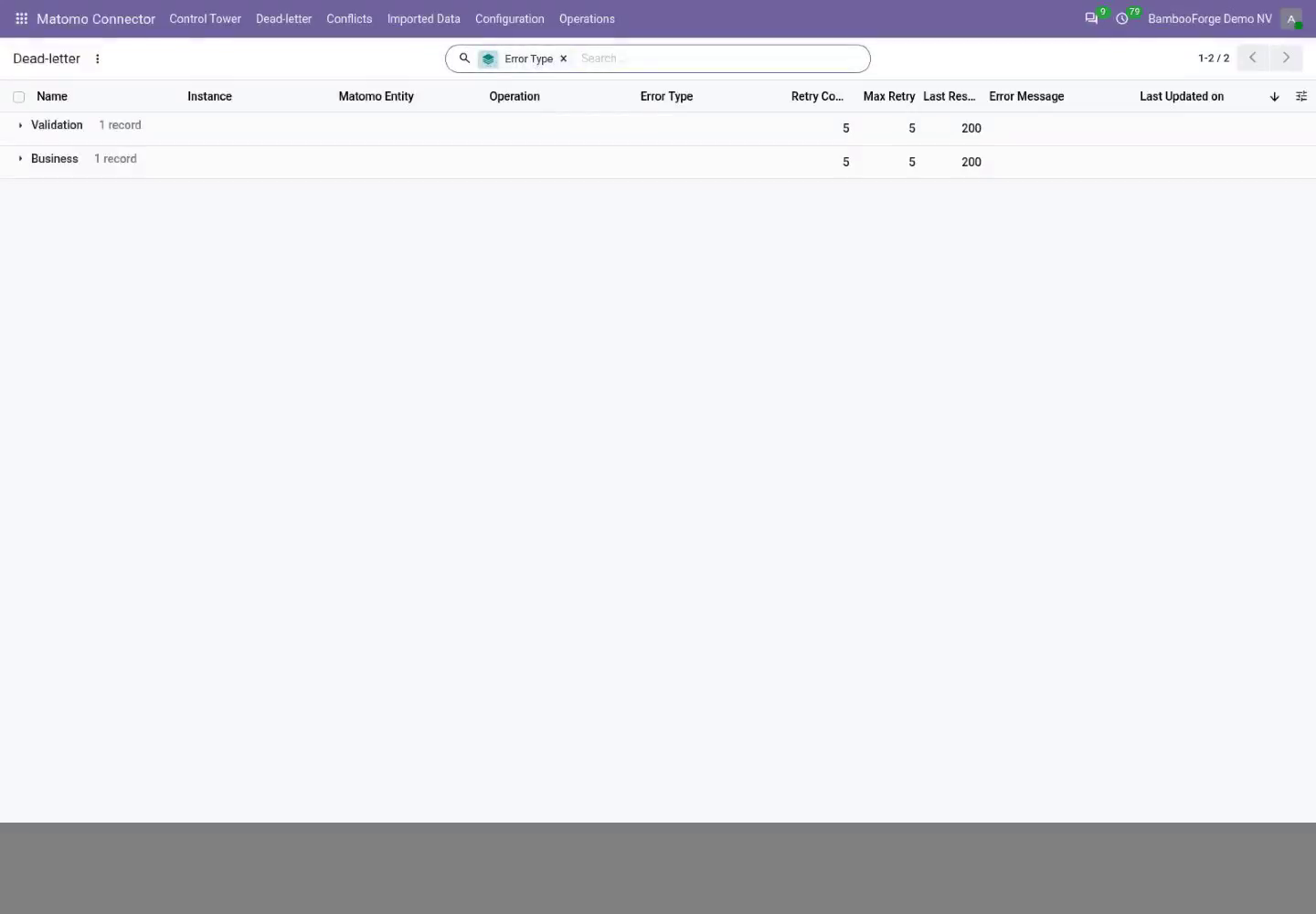
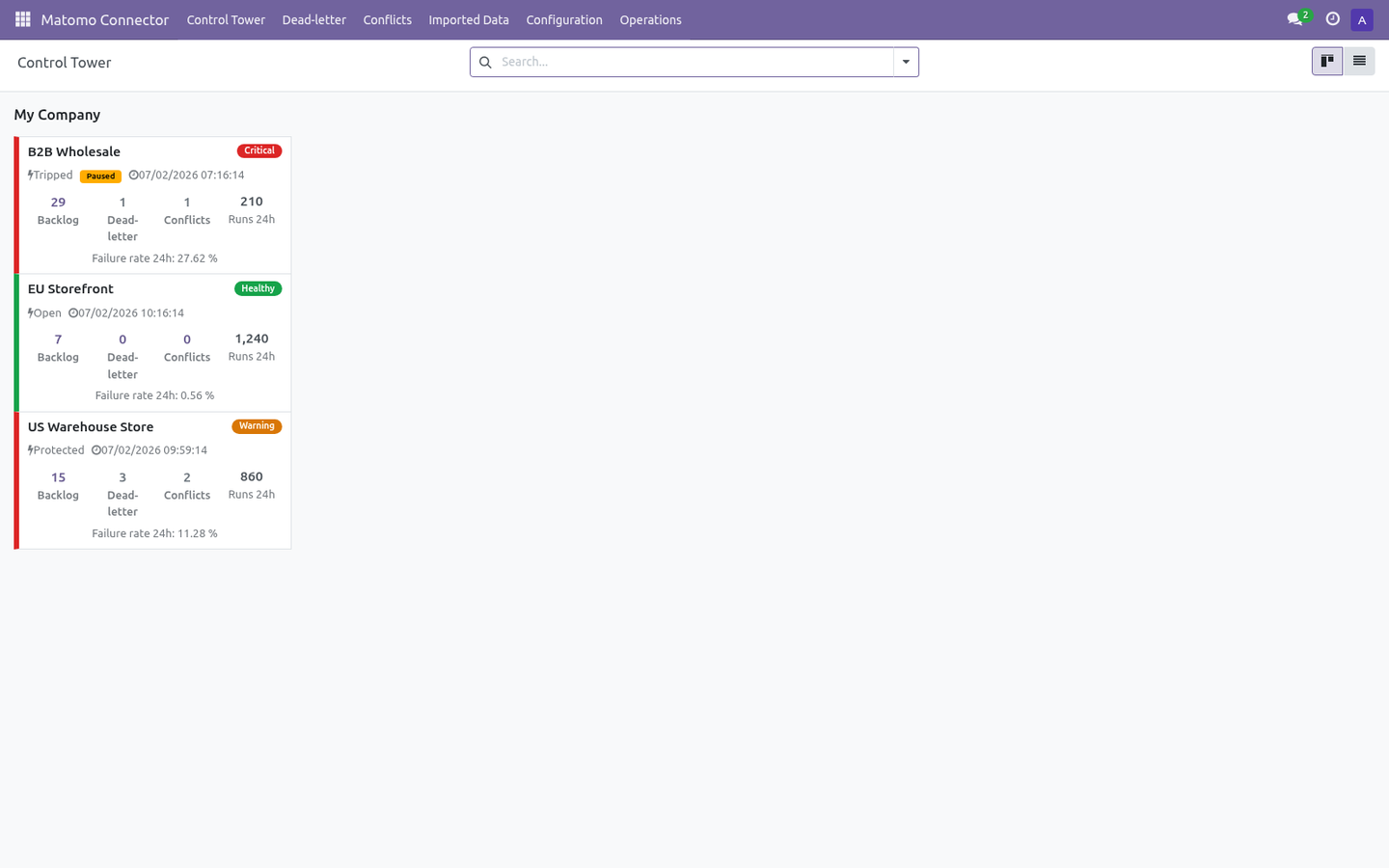
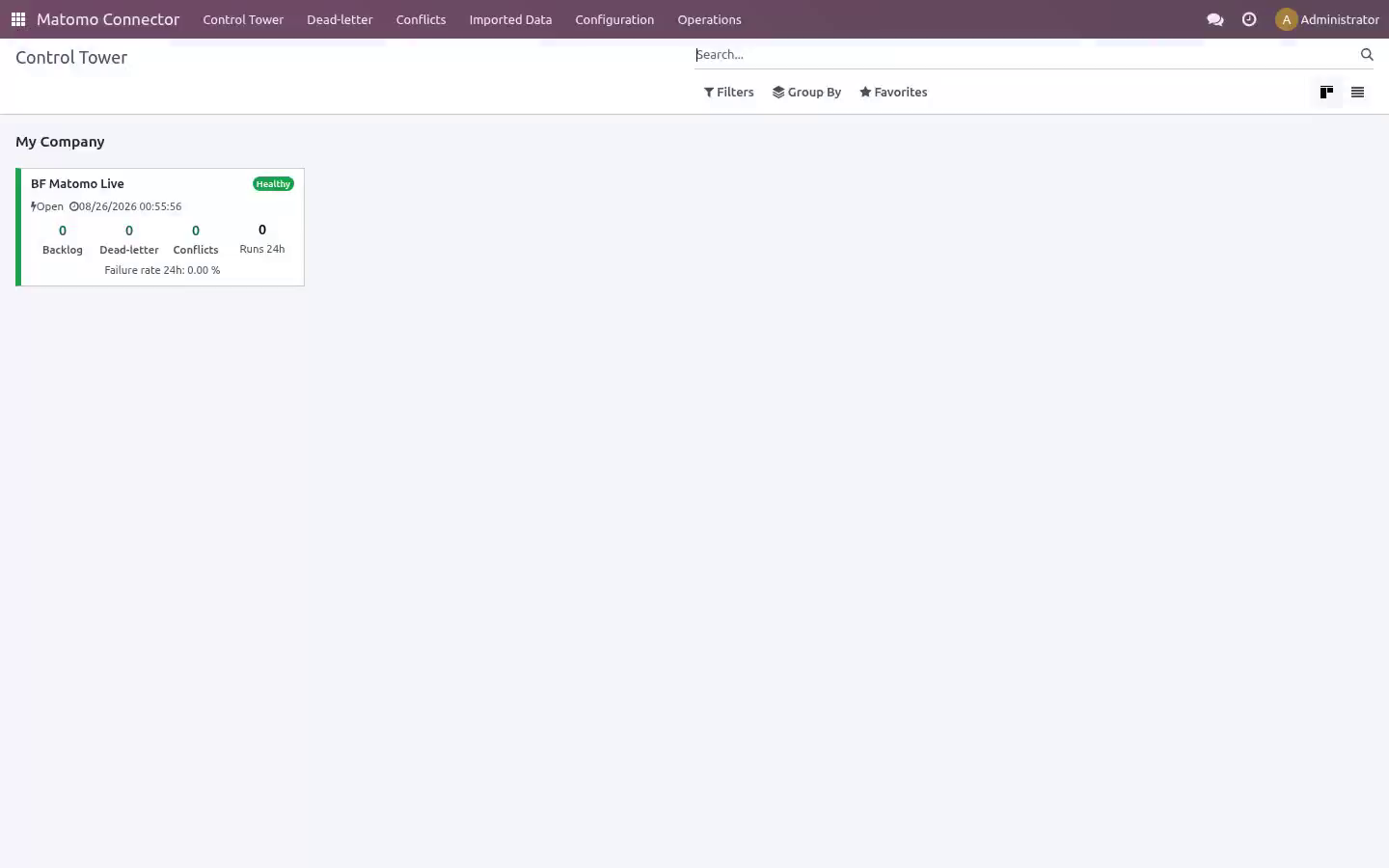
with the token sent as a form parameter. It covers: In the next few minutes: matomo analytics connector, then tested against the real thing, then step 1 — create an auth token in matomo, then step 2 — create the connection in odoo, then step 3 — first import (dry-run, then live). Then what this app deliberately does not do, so you can tell before you buy whether it fits. Everything lives under Matomo Connector then Control Tower then Dead-letter then Conflicts.
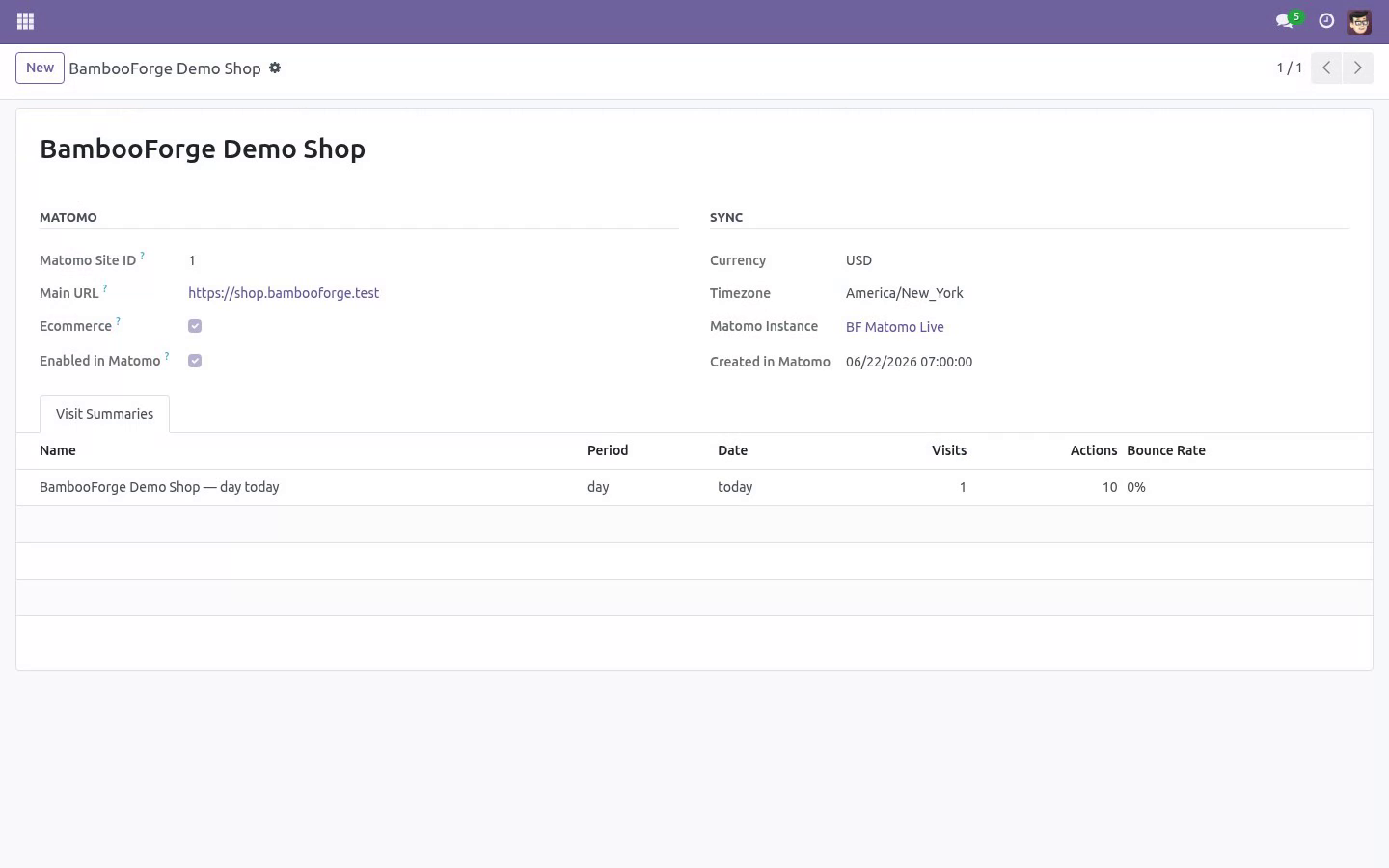
Matomo Analytics Connector. A read-only bridge from Matomo into Odoo 20: import your Matomo sites and a per-site visit summary of today's traffic so you can see — without leaving Odoo — which sites are tracked, whether ecommerce tracking is on, and how each site is performing today. It ships with a resilient job queue, dry-run safety, pre-flight validation and rollback so you stay in control. This page is the complete manual.
If you follow it top to bottom you can install, connect, run your first import, automate it, and fix the common issues without contacting support. Tested against the real thing. Automated tests run against a bundled mock on every release; the line below is the part no mock can give you - the connector pointed at the real platform, with real records. Tested for real against Matomo 5.11 and 5.12: 3 sites and their visit summaries came into Odoo with 0 errors.
Step 1 — Create an auth token in Matomo. The Matomo Reporting API authenticates with a single auth token (token_auth). To create one: 1. Log in to your Matomo server.
2. Go to Administration ▸ Personal ▸ Security. 3. Under Auth tokens, click Create new token.
4. Confirm your password if prompted, give the token a description (e.g. Odoo), and create it. 5.
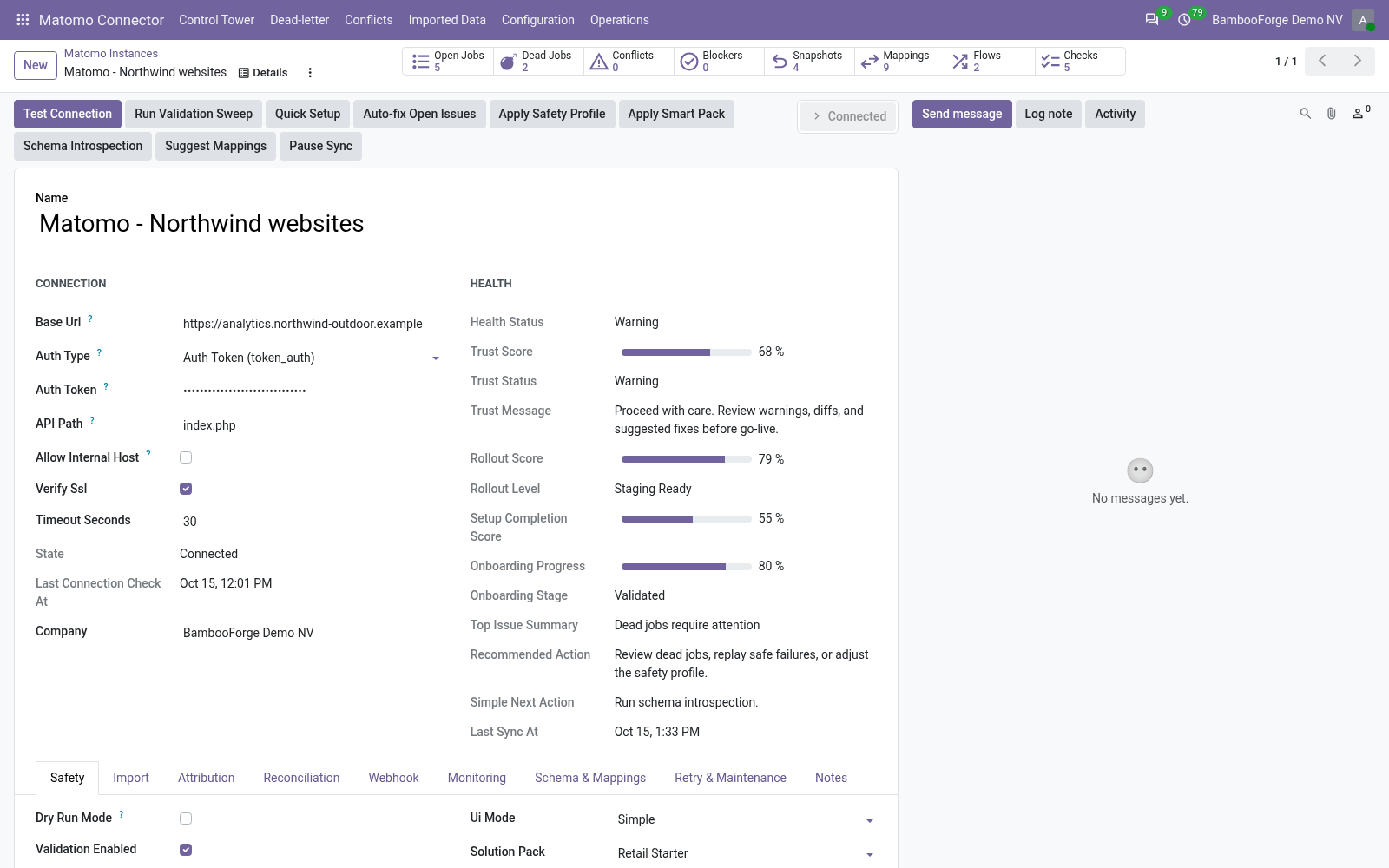
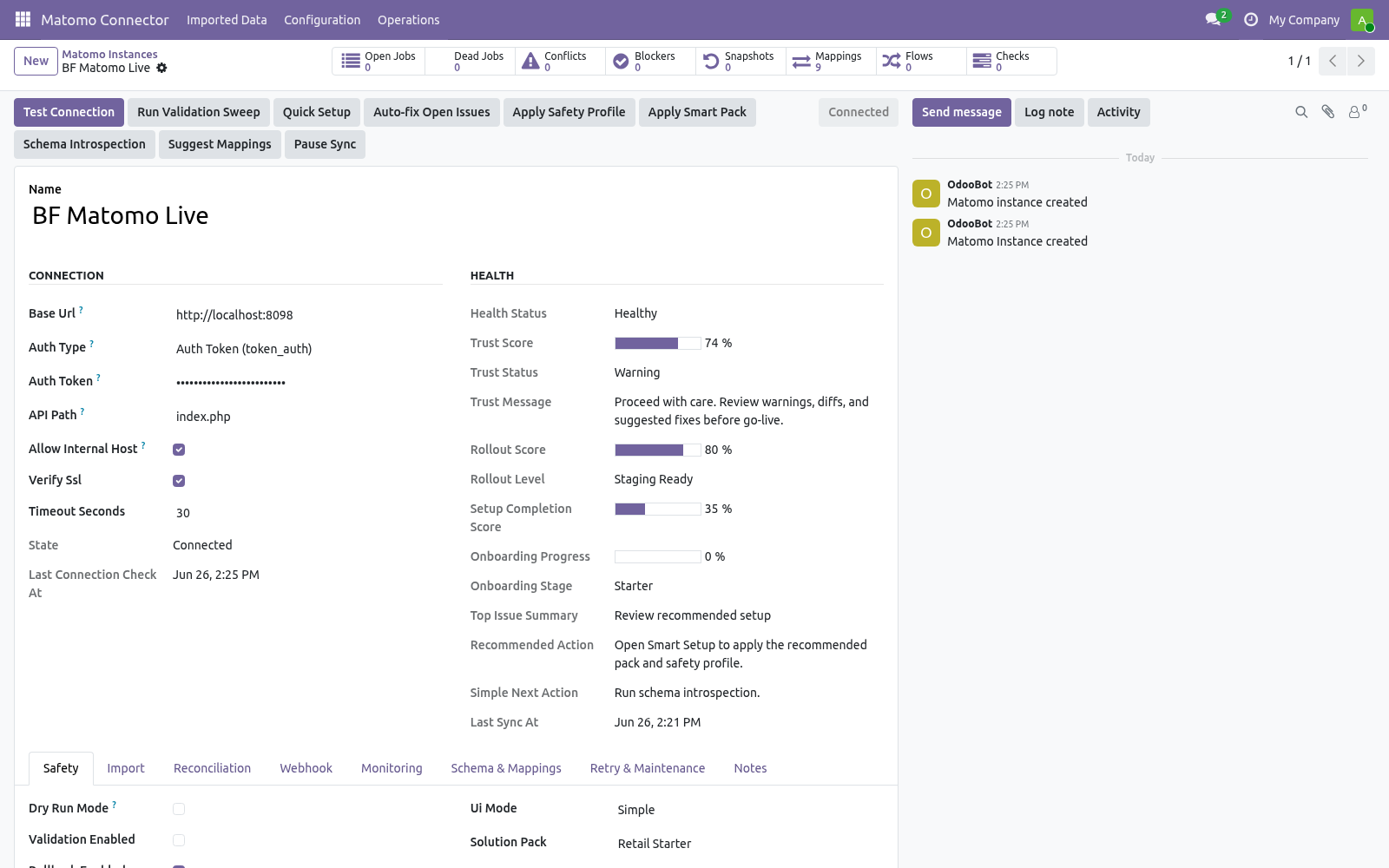
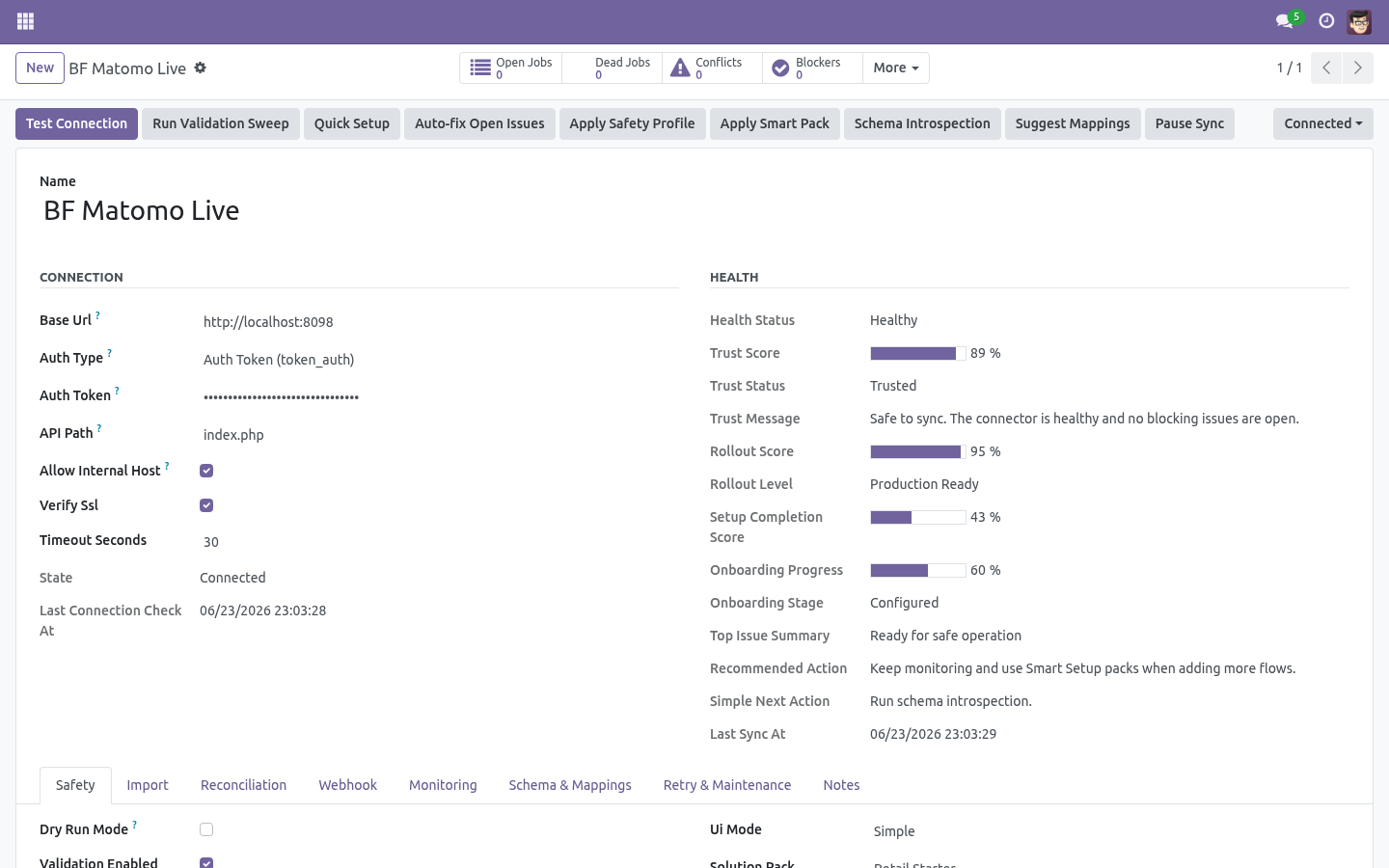
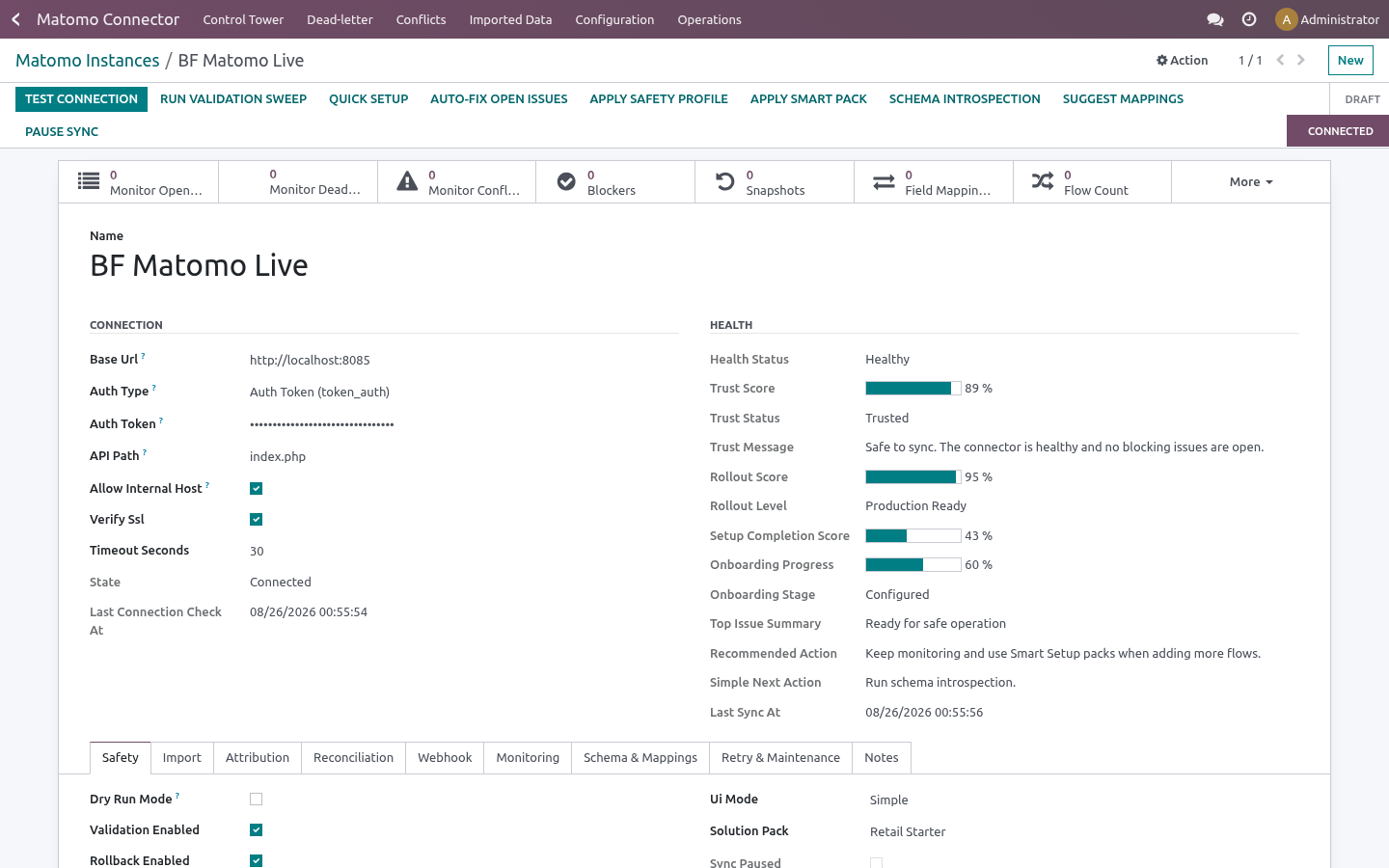
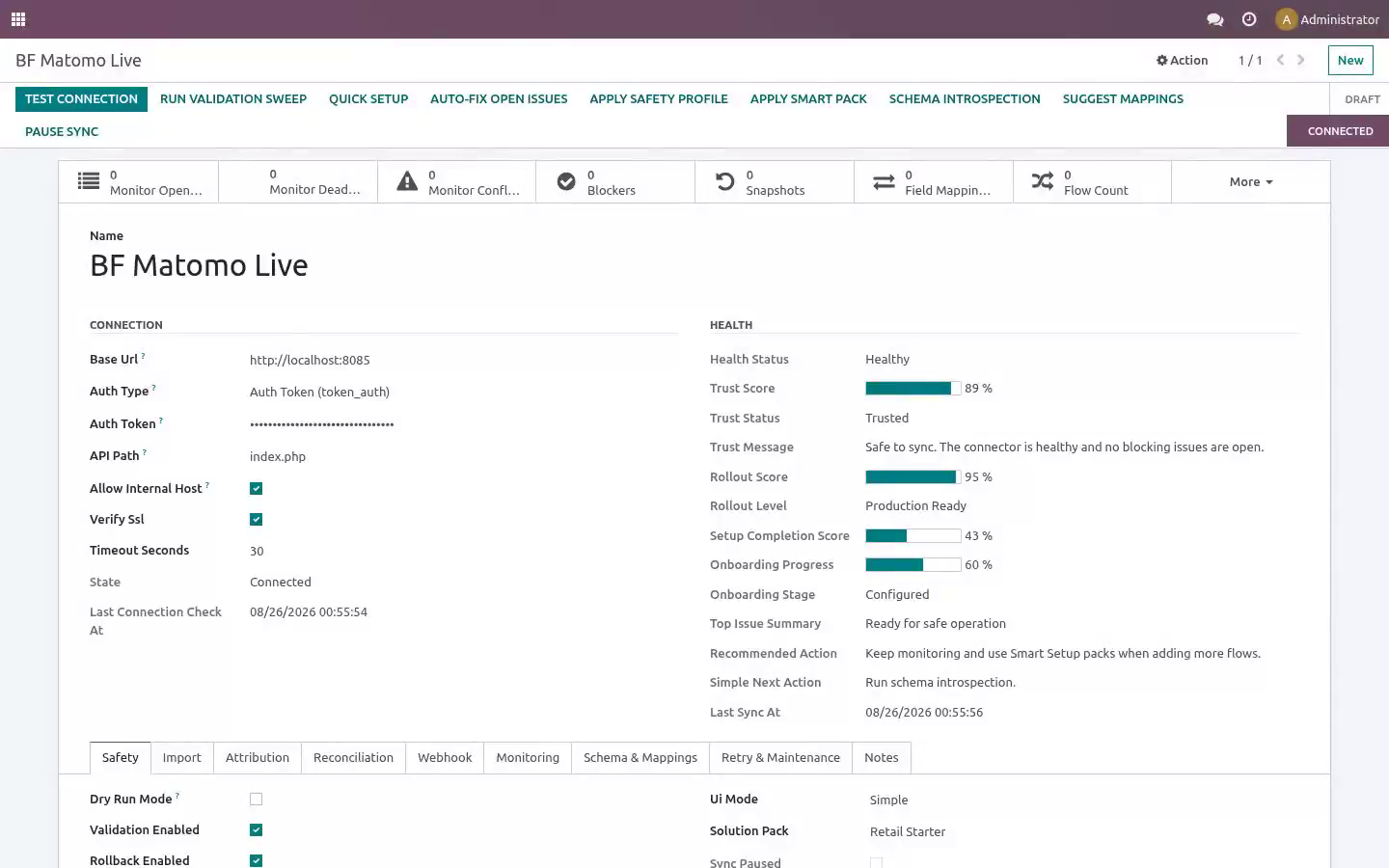
Copy the token string shown — you will paste it into Odoo in Step 2. Step 2 — Create the connection in Odoo. Open Matomo Connector ▸ Configuration ▸ Instances and create a record. Then click Test Connection.
The connector lists your sites (SitesManager.getAllSites) as a lightweight connectivity and auth check. A green Connected state means the URL and token are correct. If it fails, the exact error is shown on the form and recorded in Logs (see Troubleshooting). Step 3 — First import (dry-run, then live).
New instances start with Dry-run ON. In dry-run, import jobs simulate writes: instead of creating records they produce Validation Results you can review under Matomo Connector ▸ Operations ▸ Validation Results. This lets you confirm what would happen before anything is written. 1.
On the instance, click Queue Site Import (and then Queue Visit Summary Import). This enqueues jobs; it does not block the UI. Import sites first so each summary can link back to its site. 2.
Jobs are processed by the Matomo Queue Processor scheduled action (every minute), or immediately if you run it from Operations ▸ Queue Jobs. 3. Review Validation Results while still in dry-run. 4.
When satisfied, open the instance, turn Dry-run OFF, and run the imports again to write the records for real. Field mapping & customization Schema Fields lists the discovered Matomo fields per resource. Run schema introspection on the instance to refresh it. The two import entities are Site and Visit Summary.
The per-run volume is capped by Import sites limit (default 100) and Import visit summaries limit (default 200) on the instance. Automation (scheduled actions). The module ships these scheduled actions (Settings ▸ Technical ▸ Scheduled Actions): Turn on Auto import / Auto reconcile per entity on the instance to let the scheduled actions keep things in sync hands-free. Safety features Dry-run mode — simulate writes and review Validation Results before going live (field Dry-run, ON by default).
Business validation profiles — Minimal / Standard / Strict gate risky writes (field Business validation profile, default Standard). Resilient queue — every remote action is a job with retry and exponential back-off; jobs that exhaust retries move to a Dead state. Circuit breaker — after repeated failures an instance auto-pauses (Tripped); the Auto Recover action reopens it once Matomo responds again. Rollback snapshots — when enabled, imports capture a snapshot so you can undo a batch from Operations ▸ Rollback Snapshots (field Rollback enabled).
SSRF guard — the connector refuses internal/loopback/private hosts unless Allow internal host is explicitly enabled. Troubleshooting. For anything else, Operations ▸ Logs records every API call, payload and error with a timestamp. Frequently asked questions.
Which versions are supported? Odoo 20.0 on the Odoo side. On the Matomo side the connector targets the standard Reporting API at index.php with token_auth. Validate your exact build with the bundled mock first.
Do I need Matomo installed to evaluate it? No. A mock Matomo API ships inside, so you can install, explore and demo the full import flow before connecting a real server. Now the part most videos leave out: what this does not do.
The connector reads sites and visit summaries from your Matomo server and writes the corresponding Odoo records. The auth token is stored in an admin-only field. In scope today: read-only import of Matomo sites and per-site visit summaries, field mapping, scheduled and on-demand import, dry-run, validation and rollback. Out of scope: writing back to Matomo (the connector is read-only); webhook push (Matomo does not offer one); historical multi-period reporting (the visit summary is period=day, date=today per site in v1).
The complete manual is at docs dot bambooforge dot dev, the demo database is linked from the store page, and support answers within twenty-four hours. Links are in the description.
Transcript of the walkthrough (Odoo 19)
Matomo Analytics Connector. Attribute revenue to Matomo campaigns inside Odoo: import goal and ecommerce conversions with UTM and match them to leads and sales orders. The connector reads from the Matomo Reporting API over token_auth and writes the matching records into Odoo. Every call is a single POST <base_url>/index.php?module=API&method=...
with the token sent as a form parameter. It covers: In the next few minutes: matomo analytics connector, then step 1 — create an auth token in matomo, then step 2 — create the connection in odoo, then step 3 — first import (dry-run, then live), then field mapping & customization. Then what this app deliberately does not do, so you can tell before you buy whether it fits. Everything lives under Matomo Connector then Control Tower then Dead-letter then Conflicts.
Matomo Analytics Connector. A read-only bridge from Matomo into Odoo 19: import your Matomo sites and a per-site visit summary of today's traffic so you can see — without leaving Odoo — which sites are tracked, whether ecommerce tracking is on, and how each site is performing today. It ships with a resilient job queue, dry-run safety, pre-flight validation and rollback so you stay in control. This page is the complete manual.
If you follow it top to bottom you can install, connect, run your first import, automate it, and fix the common issues without contacting support. Step 1 — Create an auth token in Matomo. The Matomo Reporting API authenticates with a single auth token (token_auth). To create one: 1.
Log in to your Matomo server. 2. Go to Administration ▸ Personal ▸ Security. 3.
Under Auth tokens, click Create new token. 4. Confirm your password if prompted, give the token a description (e.g. Odoo), and create it.
5. Copy the token string shown — you will paste it into Odoo in Step 2. Step 2 — Create the connection in Odoo. Open Matomo Connector ▸ Configuration ▸ Instances and create a record.
A label for this server, e.g. My Analytics. Your Matomo server root, e.g. https://analytics.example.com.
- Authentication Auth Token (token_auth) — the only supported method. The token string from Step 1 (visible to administrators only). Leave the default index.php unless your Matomo entry path differs. Keep on for production.
Turn off only for self-signed test certificates. - Allow internal host Then click Test Connection. The connector lists your sites (SitesManager.getAllSites) as a lightweight connectivity and auth check. A green Connected state means the URL and token are correct.
If it fails, the exact error is shown on the form and recorded in Logs (see Troubleshooting). Step 3 — First import (dry-run, then live). New instances start with Dry-run ON. In dry-run, import jobs simulate writes: instead of creating records they produce Validation Results you can review under Matomo Connector ▸ Operations ▸ Validation Results.
This lets you confirm what would happen before anything is written. 1. On the instance, click Queue Site Import (and then Queue Visit Summary Import). This enqueues jobs; it does not block the UI.
Import sites first so each summary can link back to its site. 2. Jobs are processed by the Matomo Queue Processor scheduled action (every minute), or immediately if you run it from Operations ▸ Queue Jobs. 3.
Review Validation Results while still in dry-run. 4. When satisfied, open the instance, turn Dry-run OFF, and run the imports again to write the records for real. Field mapping & customization Schema Fields lists the discovered Matomo fields per resource.
Run schema introspection on the instance to refresh it. The two import entities are Site and Visit Summary. The per-run volume is capped by Import sites limit (default 100) and Import visit summaries limit (default 200) on the instance. Automation (scheduled actions).
The module ships these scheduled actions (Settings ▸ Technical ▸ Scheduled Actions): - Scheduled action - Matomo Queue Processor Processes queued import jobs. - Matomo Reconciliation Pulls recent remote changes for enabled entities. - Matomo Maintenance Recovers stale/locked jobs and trims old logs. - Matomo Flow Scheduler Turn on Auto import / Auto reconcile per entity on the instance to let the scheduled actions keep things in sync hands-free.
Safety features Dry-run mode — simulate writes and review Validation Results before going live (field Dry-run, ON by default). Business validation profiles — Minimal / Standard / Strict gate risky writes (field Business validation profile, default Standard). Resilient queue — every remote action is a job with retry and exponential back-off; jobs that exhaust retries move to a Dead state. Circuit breaker — after repeated failures an instance auto-pauses (Tripped); the Auto Recover action reopens it once Matomo responds again.
Rollback snapshots — when enabled, imports capture a snapshot so you can undo a batch from Operations ▸ Rollback Snapshots (field Rollback enabled). SSRF guard — the connector refuses internal/loopback/private hosts unless Allow internal host is explicitly enabled. Troubleshooting. For anything else, Operations ▸ Logs records every API call, payload and error with a timestamp.
- Test Connection fails with 401/403 Wrong or expired auth token, or the token lacks permission. Re-check Step 1 and re-paste the token under Auth Token. - "Matomo auth token (token_auth) is required" The Auth Token field is empty. Paste the token from Step 1 (admin-only field).
- "is not allowed because it resolves to a non-public address" Base URL points at localhost/private IP. Enable Allow internal host on the instance (test/self-hosted Matomo only). - SSL errors on Test Connection Self-signed certificate. Use a valid cert, or turn off Verify SSL for testing only.
Frequently asked questions. Which versions are supported? Odoo 19.0 on the Odoo side. On the Matomo side the connector targets the standard Reporting API at index.php with token_auth.
Validate your exact build with the bundled mock first. Do I need Matomo installed to evaluate it? No. A mock Matomo API ships inside, so you can install, explore and demo the full import flow before connecting a real server.
Support & updates. .. BAMBOOFORGE-DOC-APPENDIX (auto-generated: Upgrade/Uninstall/Changelog + bespoke) Support: support@bambooforge.dev — answered within 24 hours, setup help included. Refund: report a bug within 2 months of purchase; if unresolved within 15 days, full refund.
Full source is included. Updates track the supported Odoo 19 / Matomo Reporting API line. Now the part most videos leave out: what this does not do. The connector reads sites and visit summaries from your Matomo server and writes the corresponding Odoo records.
The auth token is stored in an admin-only field. In scope today: read-only import of Matomo sites and per-site visit summaries, field mapping, scheduled and on-demand import, dry-run, validation and rollback. Out of scope: writing back to Matomo (the connector is read-only); webhook push (Matomo does not offer one); historical multi-period reporting (the visit summary is period=day, date=today per site in v1). The complete manual is at docs dot bambooforge dot dev, the demo database is linked from the store page, and support answers within twenty-four hours.
Links are in the description.
Transcript of the walkthrough (Odoo 18)
Matomo Analytics Connector. Attribute revenue to Matomo campaigns inside Odoo: import goal and ecommerce conversions with UTM and match them to leads and sales orders. The connector reads from the Matomo Reporting API over token_auth and writes the matching records into Odoo. Every call is a single POST <base_url>/index.php?module=API&method=...
with the token sent as a form parameter. It covers: In the next few minutes: matomo analytics connector, then step 1 — create an auth token in matomo, then step 2 — create the connection in odoo, then step 3 — first import (dry-run, then live), then field mapping & customization. Then what this app deliberately does not do, so you can tell before you buy whether it fits. Everything lives under Matomo Connector then Control Tower then Dead-letter then Conflicts.
Matomo Analytics Connector. A read-only bridge from Matomo into Odoo 18: import your Matomo sites and a per-site visit summary of today's traffic so you can see — without leaving Odoo — which sites are tracked, whether ecommerce tracking is on, and how each site is performing today. It ships with a resilient job queue, dry-run safety, pre-flight validation and rollback so you stay in control. This page is the complete manual.
If you follow it top to bottom you can install, connect, run your first import, automate it, and fix the common issues without contacting support. Step 1 — Create an auth token in Matomo. The Matomo Reporting API authenticates with a single auth token (token_auth). To create one: 1.
Log in to your Matomo server. 2. Go to Administration ▸ Personal ▸ Security. 3.
Under Auth tokens, click Create new token. 4. Confirm your password if prompted, give the token a description (e.g. Odoo), and create it.
5. Copy the token string shown — you will paste it into Odoo in Step 2. Step 2 — Create the connection in Odoo. Open Matomo Connector ▸ Configuration ▸ Instances and create a record.
A label for this server, e.g. My Analytics. Your Matomo server root, e.g. https://analytics.example.com.
- Authentication Auth Token (token_auth) — the only supported method. The token string from Step 1 (visible to administrators only). Leave the default index.php unless your Matomo entry path differs. Keep on for production.
Turn off only for self-signed test certificates. - Allow internal host Then click Test Connection. The connector lists your sites (SitesManager.getAllSites) as a lightweight connectivity and auth check. A green Connected state means the URL and token are correct.
If it fails, the exact error is shown on the form and recorded in Logs (see Troubleshooting). Step 3 — First import (dry-run, then live). New instances start with Dry-run ON. In dry-run, import jobs simulate writes: instead of creating records they produce Validation Results you can review under Matomo Connector ▸ Operations ▸ Validation Results.
This lets you confirm what would happen before anything is written. 1. On the instance, click Queue Site Import (and then Queue Visit Summary Import). This enqueues jobs; it does not block the UI.
Import sites first so each summary can link back to its site. 2. Jobs are processed by the Matomo Queue Processor scheduled action (every minute), or immediately if you run it from Operations ▸ Queue Jobs. 3.
Review Validation Results while still in dry-run. 4. When satisfied, open the instance, turn Dry-run OFF, and run the imports again to write the records for real. Field mapping & customization Schema Fields lists the discovered Matomo fields per resource.
Run schema introspection on the instance to refresh it. The two import entities are Site and Visit Summary. The per-run volume is capped by Import sites limit (default 100) and Import visit summaries limit (default 200) on the instance. Automation (scheduled actions).
The module ships these scheduled actions (Settings ▸ Technical ▸ Scheduled Actions): - Scheduled action - Matomo Queue Processor Processes queued import jobs. - Matomo Reconciliation Pulls recent remote changes for enabled entities. - Matomo Maintenance Recovers stale/locked jobs and trims old logs. - Matomo Flow Scheduler Turn on Auto import / Auto reconcile per entity on the instance to let the scheduled actions keep things in sync hands-free.
Safety features Dry-run mode — simulate writes and review Validation Results before going live (field Dry-run, ON by default). Business validation profiles — Minimal / Standard / Strict gate risky writes (field Business validation profile, default Standard). Resilient queue — every remote action is a job with retry and exponential back-off; jobs that exhaust retries move to a Dead state. Circuit breaker — after repeated failures an instance auto-pauses (Tripped); the Auto Recover action reopens it once Matomo responds again.
Rollback snapshots — when enabled, imports capture a snapshot so you can undo a batch from Operations ▸ Rollback Snapshots (field Rollback enabled). SSRF guard — the connector refuses internal/loopback/private hosts unless Allow internal host is explicitly enabled. Troubleshooting. For anything else, Operations ▸ Logs records every API call, payload and error with a timestamp.
- Test Connection fails with 401/403 Wrong or expired auth token, or the token lacks permission. Re-check Step 1 and re-paste the token under Auth Token. - "Matomo auth token (token_auth) is required" The Auth Token field is empty. Paste the token from Step 1 (admin-only field).
- "is not allowed because it resolves to a non-public address" Base URL points at localhost/private IP. Enable Allow internal host on the instance (test/self-hosted Matomo only). - SSL errors on Test Connection Self-signed certificate. Use a valid cert, or turn off Verify SSL for testing only.
Frequently asked questions. Which versions are supported? Odoo 18.0 on the Odoo side. On the Matomo side the connector targets the standard Reporting API at index.php with token_auth.
Validate your exact build with the bundled mock first. Do I need Matomo installed to evaluate it? No. A mock Matomo API ships inside, so you can install, explore and demo the full import flow before connecting a real server.
Support & updates. .. BAMBOOFORGE-DOC-APPENDIX (auto-generated: Upgrade/Uninstall/Changelog + bespoke) Support: support@bambooforge.dev — answered within 24 hours, setup help included. Refund: report a bug within 2 months of purchase; if unresolved within 15 days, full refund.
Full source is included. Updates track the supported Odoo 18 / Matomo Reporting API line. Now the part most videos leave out: what this does not do. The connector reads sites and visit summaries from your Matomo server and writes the corresponding Odoo records.
The auth token is stored in an admin-only field. In scope today: read-only import of Matomo sites and per-site visit summaries, field mapping, scheduled and on-demand import, dry-run, validation and rollback. Out of scope: writing back to Matomo (the connector is read-only); webhook push (Matomo does not offer one); historical multi-period reporting (the visit summary is period=day, date=today per site in v1). The complete manual is at docs dot bambooforge dot dev, the demo database is linked from the store page, and support answers within twenty-four hours.
Links are in the description.
Transcript of the walkthrough (Odoo 17)
Matomo Analytics Connector. Attribute revenue to Matomo campaigns inside Odoo: import goal and ecommerce conversions with UTM and match them to leads and sales orders. The connector reads from the Matomo Reporting API over token_auth and writes the matching records into Odoo. Every call is a single POST <base_url>/index.php?module=API&method=...
with the token sent as a form parameter. It covers: In the next few minutes: matomo analytics connector, then step 1 — create an auth token in matomo, then step 2 — create the connection in odoo, then step 3 — first import (dry-run, then live), then field mapping & customization. Then what this app deliberately does not do, so you can tell before you buy whether it fits. Everything lives under Matomo Connector then Control Tower then Dead-letter then Conflicts.
Matomo Analytics Connector. A read-only bridge from Matomo into Odoo 17: import your Matomo sites and a per-site visit summary of today's traffic so you can see — without leaving Odoo — which sites are tracked, whether ecommerce tracking is on, and how each site is performing today. It ships with a resilient job queue, dry-run safety, pre-flight validation and rollback so you stay in control. This page is the complete manual.
If you follow it top to bottom you can install, connect, run your first import, automate it, and fix the common issues without contacting support. Step 1 — Create an auth token in Matomo. The Matomo Reporting API authenticates with a single auth token (token_auth). To create one: 1.
Log in to your Matomo server. 2. Go to Administration ▸ Personal ▸ Security. 3.
Under Auth tokens, click Create new token. 4. Confirm your password if prompted, give the token a description (e.g. Odoo), and create it.
5. Copy the token string shown — you will paste it into Odoo in Step 2. Step 2 — Create the connection in Odoo. Open Matomo Connector ▸ Configuration ▸ Instances and create a record.
A label for this server, e.g. My Analytics. Your Matomo server root, e.g. https://analytics.example.com.
- Authentication Auth Token (token_auth) — the only supported method. The token string from Step 1 (visible to administrators only). Leave the default index.php unless your Matomo entry path differs. Keep on for production.
Turn off only for self-signed test certificates. - Allow internal host Then click Test Connection. The connector lists your sites (SitesManager.getAllSites) as a lightweight connectivity and auth check. A green Connected state means the URL and token are correct.
If it fails, the exact error is shown on the form and recorded in Logs (see Troubleshooting). Step 3 — First import (dry-run, then live). New instances start with Dry-run ON. In dry-run, import jobs simulate writes: instead of creating records they produce Validation Results you can review under Matomo Connector ▸ Operations ▸ Validation Results.
This lets you confirm what would happen before anything is written. 1. On the instance, click Queue Site Import (and then Queue Visit Summary Import). This enqueues jobs; it does not block the UI.
Import sites first so each summary can link back to its site. 2. Jobs are processed by the Matomo Queue Processor scheduled action (every minute), or immediately if you run it from Operations ▸ Queue Jobs. 3.
Review Validation Results while still in dry-run. 4. When satisfied, open the instance, turn Dry-run OFF, and run the imports again to write the records for real. Field mapping & customization Schema Fields lists the discovered Matomo fields per resource.
Run schema introspection on the instance to refresh it. The two import entities are Site and Visit Summary. The per-run volume is capped by Import sites limit (default 100) and Import visit summaries limit (default 200) on the instance. Automation (scheduled actions).
The module ships these scheduled actions (Settings ▸ Technical ▸ Scheduled Actions): - Scheduled action - Matomo Queue Processor Processes queued import jobs. - Matomo Reconciliation Pulls recent remote changes for enabled entities. - Matomo Maintenance Recovers stale/locked jobs and trims old logs. - Matomo Flow Scheduler Turn on Auto import / Auto reconcile per entity on the instance to let the scheduled actions keep things in sync hands-free.
Safety features Dry-run mode — simulate writes and review Validation Results before going live (field Dry-run, ON by default). Business validation profiles — Minimal / Standard / Strict gate risky writes (field Business validation profile, default Standard). Resilient queue — every remote action is a job with retry and exponential back-off; jobs that exhaust retries move to a Dead state. Circuit breaker — after repeated failures an instance auto-pauses (Tripped); the Auto Recover action reopens it once Matomo responds again.
Rollback snapshots — when enabled, imports capture a snapshot so you can undo a batch from Operations ▸ Rollback Snapshots (field Rollback enabled). SSRF guard — the connector refuses internal/loopback/private hosts unless Allow internal host is explicitly enabled. Troubleshooting. For anything else, Operations ▸ Logs records every API call, payload and error with a timestamp.
- Test Connection fails with 401/403 Wrong or expired auth token, or the token lacks permission. Re-check Step 1 and re-paste the token under Auth Token. - "Matomo auth token (token_auth) is required" The Auth Token field is empty. Paste the token from Step 1 (admin-only field).
- "is not allowed because it resolves to a non-public address" Base URL points at localhost/private IP. Enable Allow internal host on the instance (test/self-hosted Matomo only). - SSL errors on Test Connection Self-signed certificate. Use a valid cert, or turn off Verify SSL for testing only.
Frequently asked questions. Which versions are supported? Odoo 17.0 on the Odoo side. On the Matomo side the connector targets the standard Reporting API at index.php with token_auth.
Validate your exact build with the bundled mock first. Do I need Matomo installed to evaluate it? No. A mock Matomo API ships inside, so you can install, explore and demo the full import flow before connecting a real server.
Support & updates. .. BAMBOOFORGE-DOC-APPENDIX (auto-generated: Upgrade/Uninstall/Changelog + bespoke) Support: support@bambooforge.dev — answered within 24 hours, setup help included. Refund: report a bug within 2 months of purchase; if unresolved within 15 days, full refund.
Full source is included. Updates track the supported Odoo 17 / Matomo Reporting API line. Now the part most videos leave out: what this does not do. The connector reads sites and visit summaries from your Matomo server and writes the corresponding Odoo records.
The auth token is stored in an admin-only field. In scope today: read-only import of Matomo sites and per-site visit summaries, field mapping, scheduled and on-demand import, dry-run, validation and rollback. Out of scope: writing back to Matomo (the connector is read-only); webhook push (Matomo does not offer one); historical multi-period reporting (the visit summary is period=day, date=today per site in v1). The complete manual is at docs dot bambooforge dot dev, the demo database is linked from the store page, and support answers within twenty-four hours.
Links are in the description.
Transcript of the walkthrough (Odoo 16)
Matomo Analytics Connector. Attribute revenue to Matomo campaigns inside Odoo: import goal and ecommerce conversions with UTM and match them to leads and sales orders. The connector reads from the Matomo Reporting API over token_auth and writes the matching records into Odoo. Every call is a single POST <base_url>/index.php?module=API&method=...
with the token sent as a form parameter. It covers: In the next few minutes: matomo analytics connector, then step 1 — create an auth token in matomo, then step 2 — create the connection in odoo, then step 3 — first import (dry-run, then live), then field mapping & customization. Then what this app deliberately does not do, so you can tell before you buy whether it fits. Everything lives under Matomo Connector then Control Tower then Dead-letter then Conflicts.
Matomo Analytics Connector. A read-only bridge from Matomo into Odoo 17: import your Matomo sites and a per-site visit summary of today's traffic so you can see — without leaving Odoo — which sites are tracked, whether ecommerce tracking is on, and how each site is performing today. It ships with a resilient job queue, dry-run safety, pre-flight validation and rollback so you stay in control. This page is the complete manual.
If you follow it top to bottom you can install, connect, run your first import, automate it, and fix the common issues without contacting support. Step 1 — Create an auth token in Matomo. The Matomo Reporting API authenticates with a single auth token (token_auth). To create one: 1.
Log in to your Matomo server. 2. Go to Administration ▸ Personal ▸ Security. 3.
Under Auth tokens, click Create new token. 4. Confirm your password if prompted, give the token a description (e.g. Odoo), and create it.
5. Copy the token string shown — you will paste it into Odoo in Step 2. Step 2 — Create the connection in Odoo. Open Matomo Connector ▸ Configuration ▸ Instances and create a record.
A label for this server, e.g. My Analytics. Your Matomo server root, e.g. https://analytics.example.com.
- Authentication Auth Token (token_auth) — the only supported method. The token string from Step 1 (visible to administrators only). Leave the default index.php unless your Matomo entry path differs. Keep on for production.
Turn off only for self-signed test certificates. - Allow internal host Then click Test Connection. The connector lists your sites (SitesManager.getAllSites) as a lightweight connectivity and auth check. A green Connected state means the URL and token are correct.
If it fails, the exact error is shown on the form and recorded in Logs (see Troubleshooting). Step 3 — First import (dry-run, then live). New instances start with Dry-run ON. In dry-run, import jobs simulate writes: instead of creating records they produce Validation Results you can review under Matomo Connector ▸ Operations ▸ Validation Results.
This lets you confirm what would happen before anything is written. 1. On the instance, click Queue Site Import (and then Queue Visit Summary Import). This enqueues jobs; it does not block the UI.
Import sites first so each summary can link back to its site. 2. Jobs are processed by the Matomo Queue Processor scheduled action (every minute), or immediately if you run it from Operations ▸ Queue Jobs. 3.
Review Validation Results while still in dry-run. 4. When satisfied, open the instance, turn Dry-run OFF, and run the imports again to write the records for real. Field mapping & customization Schema Fields lists the discovered Matomo fields per resource.
Run schema introspection on the instance to refresh it. The two import entities are Site and Visit Summary. The per-run volume is capped by Import sites limit (default 100) and Import visit summaries limit (default 200) on the instance. Automation (scheduled actions).
The module ships these scheduled actions (Settings ▸ Technical ▸ Scheduled Actions): - Scheduled action - Matomo Queue Processor Processes queued import jobs. - Matomo Reconciliation Pulls recent remote changes for enabled entities. - Matomo Maintenance Recovers stale/locked jobs and trims old logs. - Matomo Flow Scheduler Turn on Auto import / Auto reconcile per entity on the instance to let the scheduled actions keep things in sync hands-free.
Safety features Dry-run mode — simulate writes and review Validation Results before going live (field Dry-run, ON by default). Business validation profiles — Minimal / Standard / Strict gate risky writes (field Business validation profile, default Standard). Resilient queue — every remote action is a job with retry and exponential back-off; jobs that exhaust retries move to a Dead state. Circuit breaker — after repeated failures an instance auto-pauses (Tripped); the Auto Recover action reopens it once Matomo responds again.
Rollback snapshots — when enabled, imports capture a snapshot so you can undo a batch from Operations ▸ Rollback Snapshots (field Rollback enabled). SSRF guard — the connector refuses internal/loopback/private hosts unless Allow internal host is explicitly enabled. Troubleshooting. For anything else, Operations ▸ Logs records every API call, payload and error with a timestamp.
- Test Connection fails with 401/403 Wrong or expired auth token, or the token lacks permission. Re-check Step 1 and re-paste the token under Auth Token. - "Matomo auth token (token_auth) is required" The Auth Token field is empty. Paste the token from Step 1 (admin-only field).
- "is not allowed because it resolves to a non-public address" Base URL points at localhost/private IP. Enable Allow internal host on the instance (test/self-hosted Matomo only). - SSL errors on Test Connection Self-signed certificate. Use a valid cert, or turn off Verify SSL for testing only.
Frequently asked questions. Which versions are supported? Odoo 17.0 on the Odoo side. On the Matomo side the connector targets the standard Reporting API at index.php with token_auth.
Validate your exact build with the bundled mock first. Do I need Matomo installed to evaluate it? No. A mock Matomo API ships inside, so you can install, explore and demo the full import flow before connecting a real server.
Support & updates. .. BAMBOOFORGE-DOC-APPENDIX (auto-generated: Upgrade/Uninstall/Changelog + bespoke) Support: support@bambooforge.dev — answered within 24 hours, setup help included. Refund: report a bug within 2 months of purchase; if unresolved within 15 days, full refund.
Full source is included. Updates track the supported Odoo 17 / Matomo Reporting API line. Now the part most videos leave out: what this does not do. The connector reads sites and visit summaries from your Matomo server and writes the corresponding Odoo records.
The auth token is stored in an admin-only field. In scope today: read-only import of Matomo sites and per-site visit summaries, field mapping, scheduled and on-demand import, dry-run, validation and rollback. Out of scope: writing back to Matomo (the connector is read-only); webhook push (Matomo does not offer one); historical multi-period reporting (the visit summary is period=day, date=today per site in v1). The complete manual is at docs dot bambooforge dot dev, the demo database is linked from the store page, and support answers within twenty-four hours.
Links are in the description.
Key facts
- What it is
- Attribute revenue to Matomo campaigns inside Odoo: import goal and ecommerce conversions with UTM and match them to leads and sales orders.
- For
- Website
- Odoo versions
- 16.0, 17.0, 18.0, 19.0, 20.0 - Community and Enterprise
- Runs on
- Odoo.sh or Odoo you host yourself - not Odoo Online, which accepts no third-party apps
- Price
- 89 EUR, one-time, on the Odoo Apps Store
- Technical name
- bambooforge_matomo_connector
- Run for real
- Tested for real against Matomo 5.11 and 5.12: 3 sites and their visit summaries came into Odoo with 0 errors.
- Not for
- The connector reads sites and visit summaries from your Matomo server and writes the corresponding Odoo records. The auth token is stored in an admin-only field.; In scope today: read-only import of Matomo sites and per-site visit summaries, field mapping, scheduled and on-demand import, dry-run, validation and rollback.; Out of scope: writing back to Matomo (the connector is read-only); webhook push (Matomo does not offer one); historical multi-period reporting (the visit summary is period=day, date=today per site in v1).
- Live demo
- https://demo20.bambooforge.dev/odoo/action-bambooforge_matomo_connector.action_matomo_control_tower
- Manual last updated
- 2026-10-15
Matomo Analytics Connector
A read-only bridge from Matomo into Odoo 20: import your Matomo sites and a per-site visit summary of today's traffic so you can see — without leaving Odoo — which sites are tracked, whether ecommerce tracking is on, and how each site is performing today. It ships with a resilient job queue, dry-run safety, pre-flight validation and rollback so you stay in control.
This page is the complete manual. If you follow it top to bottom you can install, connect, run your first import, automate it, and fix the common issues without contacting support.
Overview
The connector reads from the Matomo Reporting API over token_auth and writes the matching records into Odoo. Every call is a single POST <base_url>/index.php?module=API&method=... with the token sent as a form parameter. It covers:
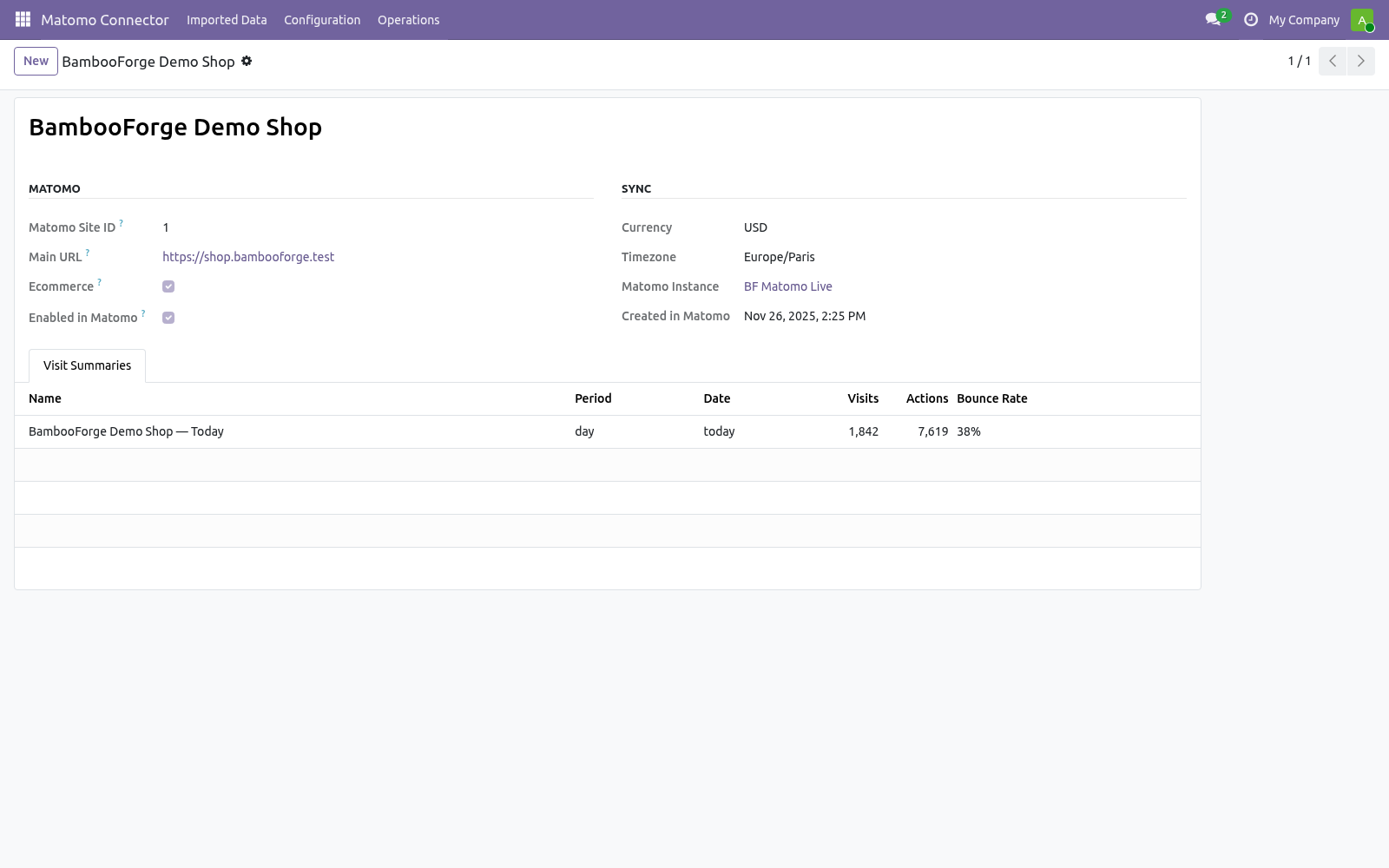
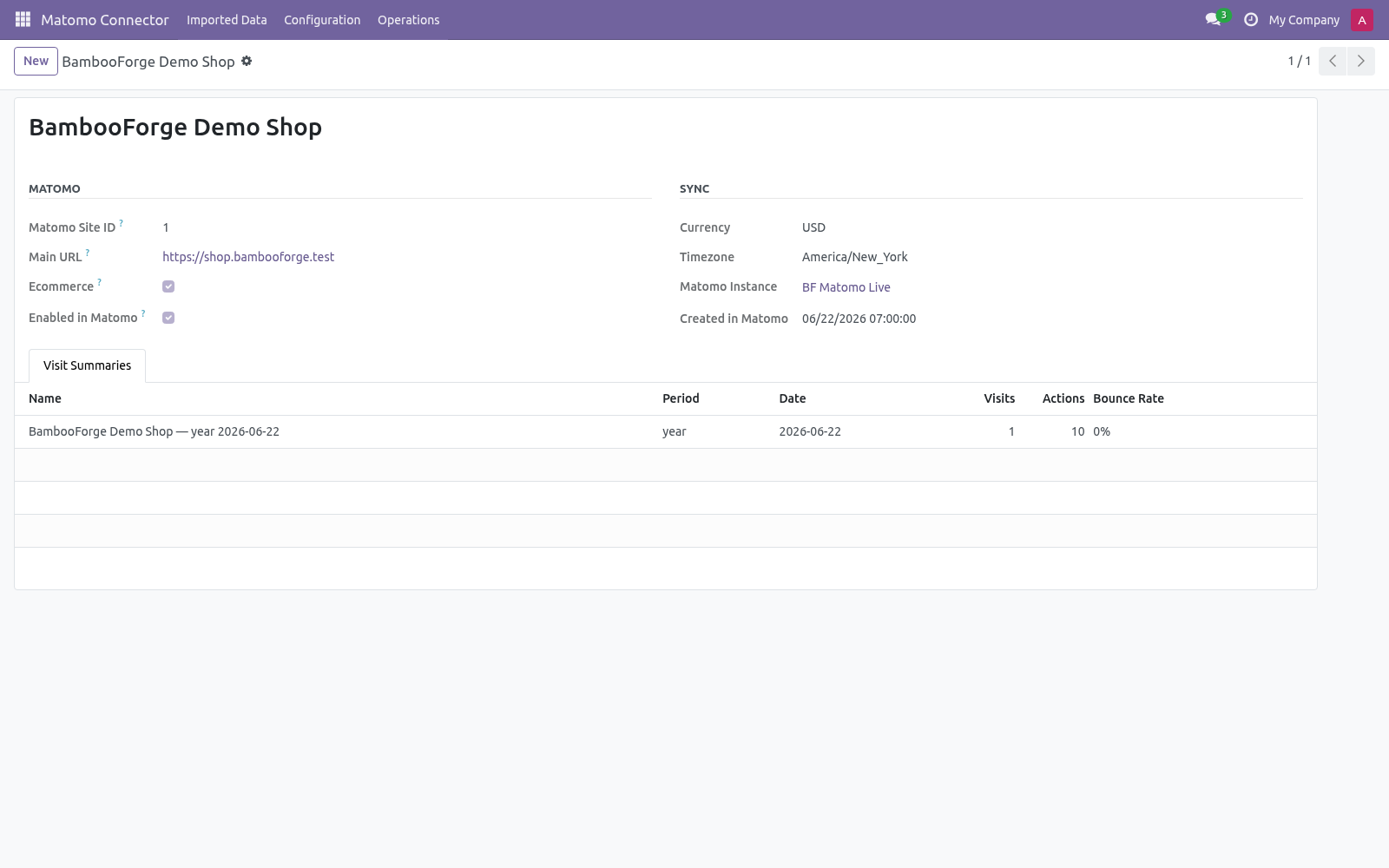
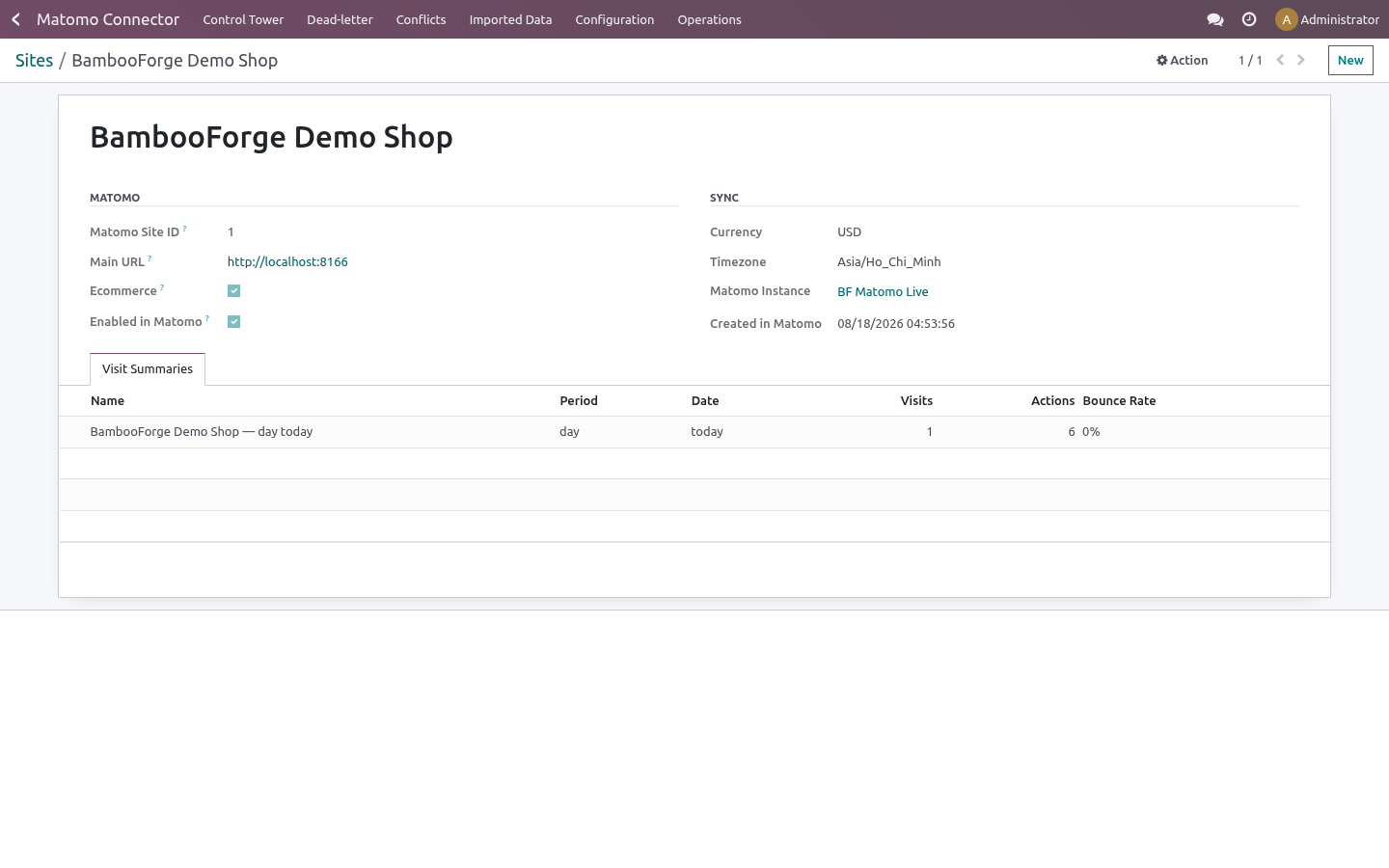
Sites — import your Matomo sites (via SitesManager.getAllSites) into the matomo.site model: the numeric idsite, name, main URL, timezone, currency, the ecommerce flag and the creation timestamp.
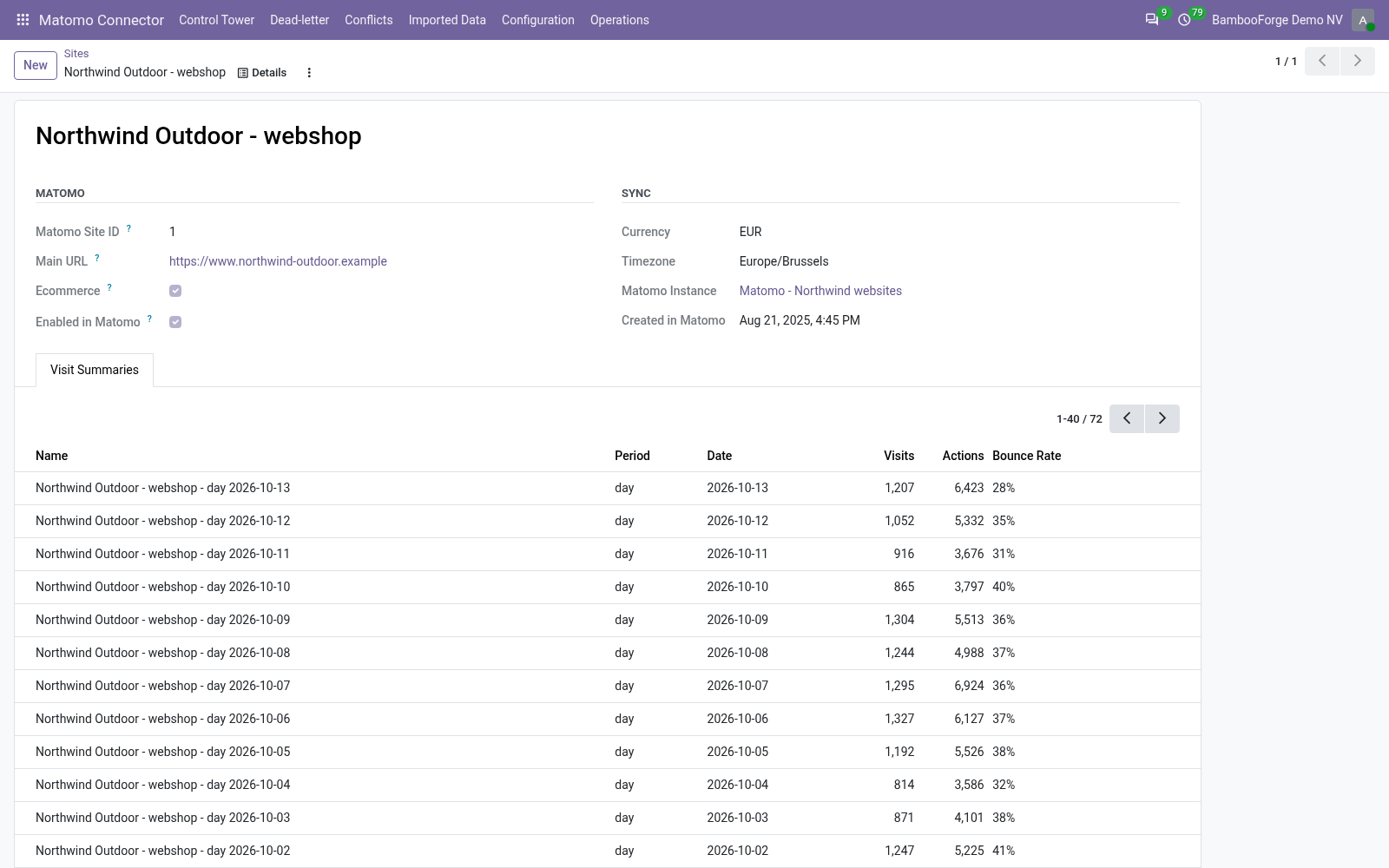
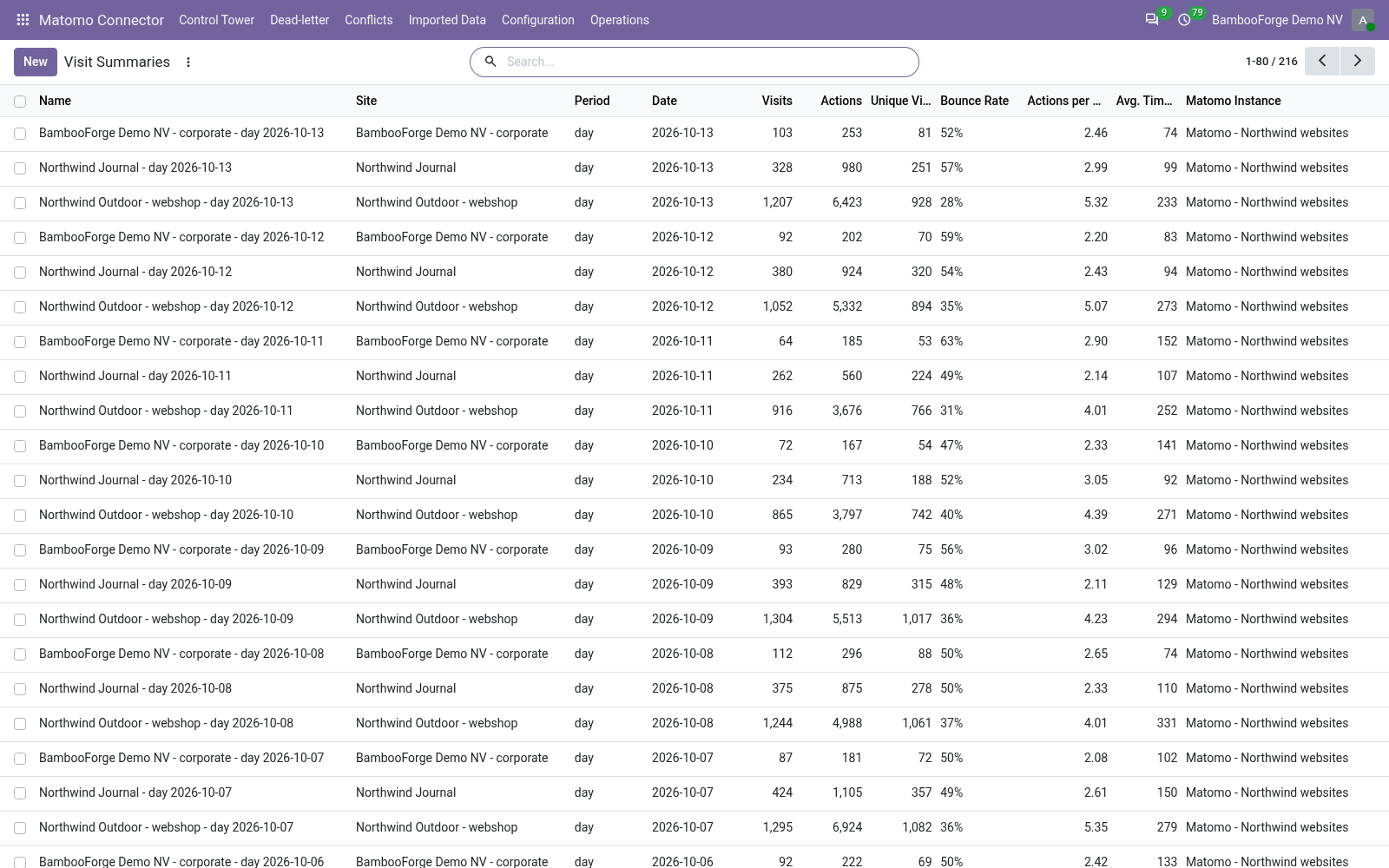
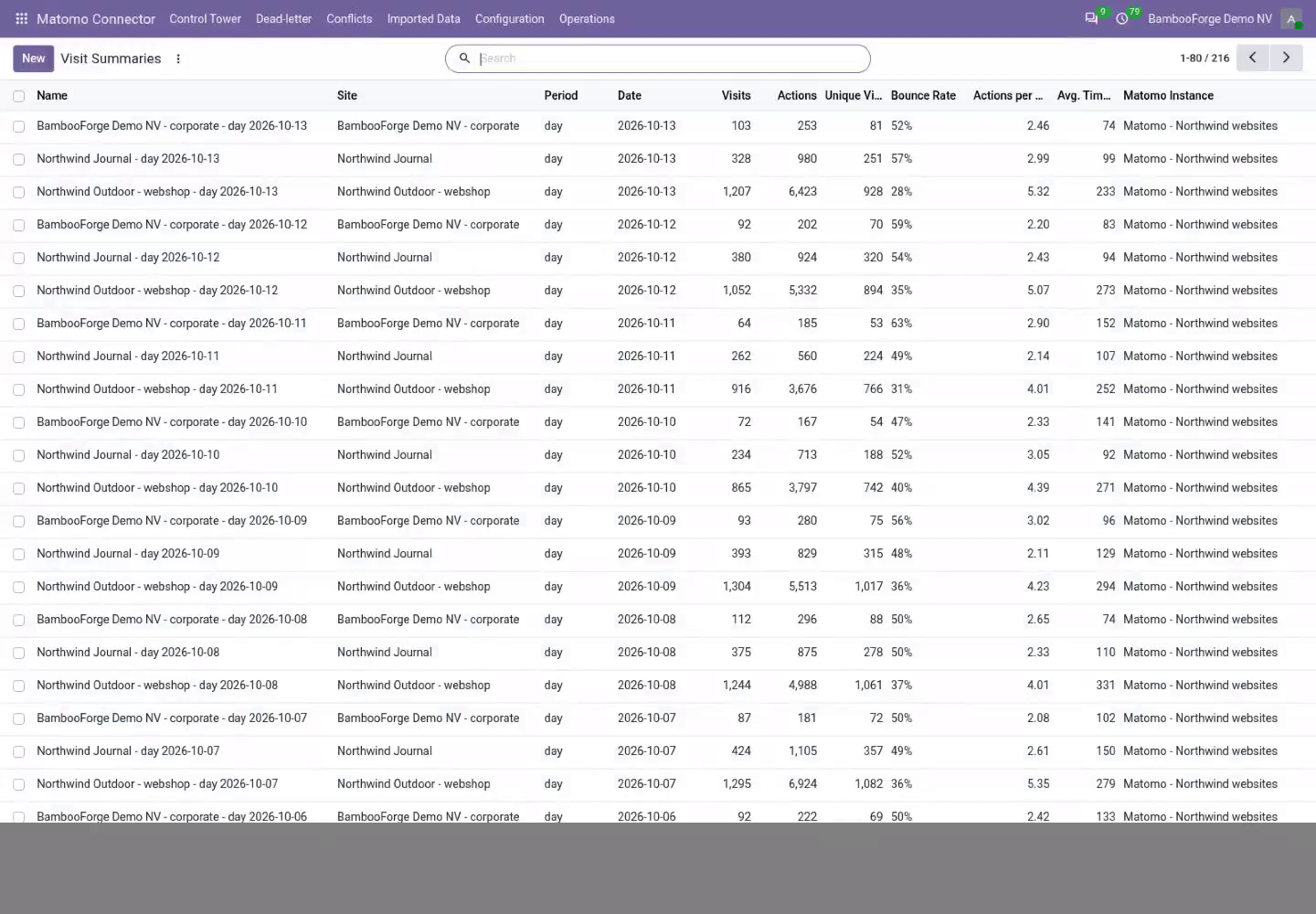
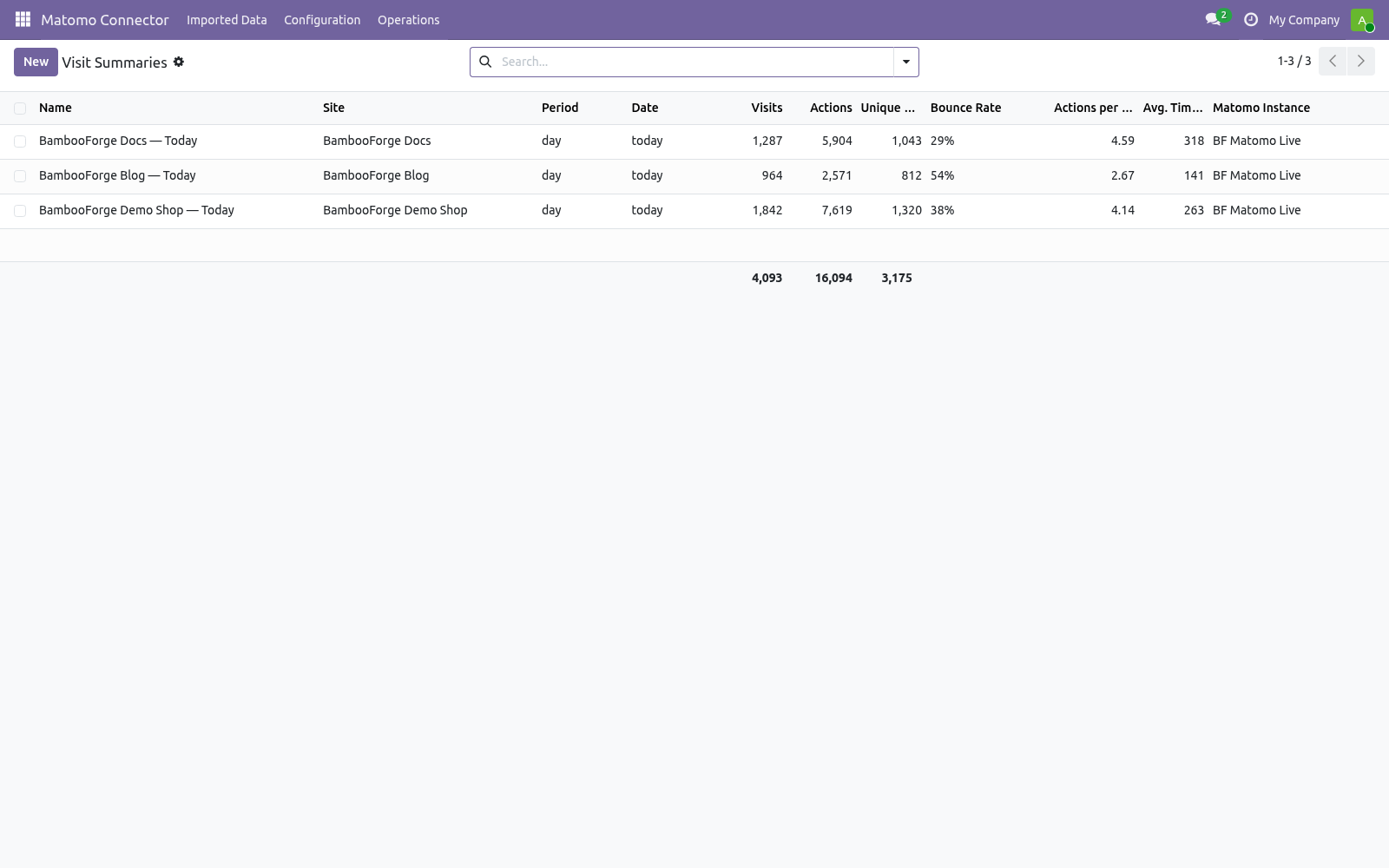
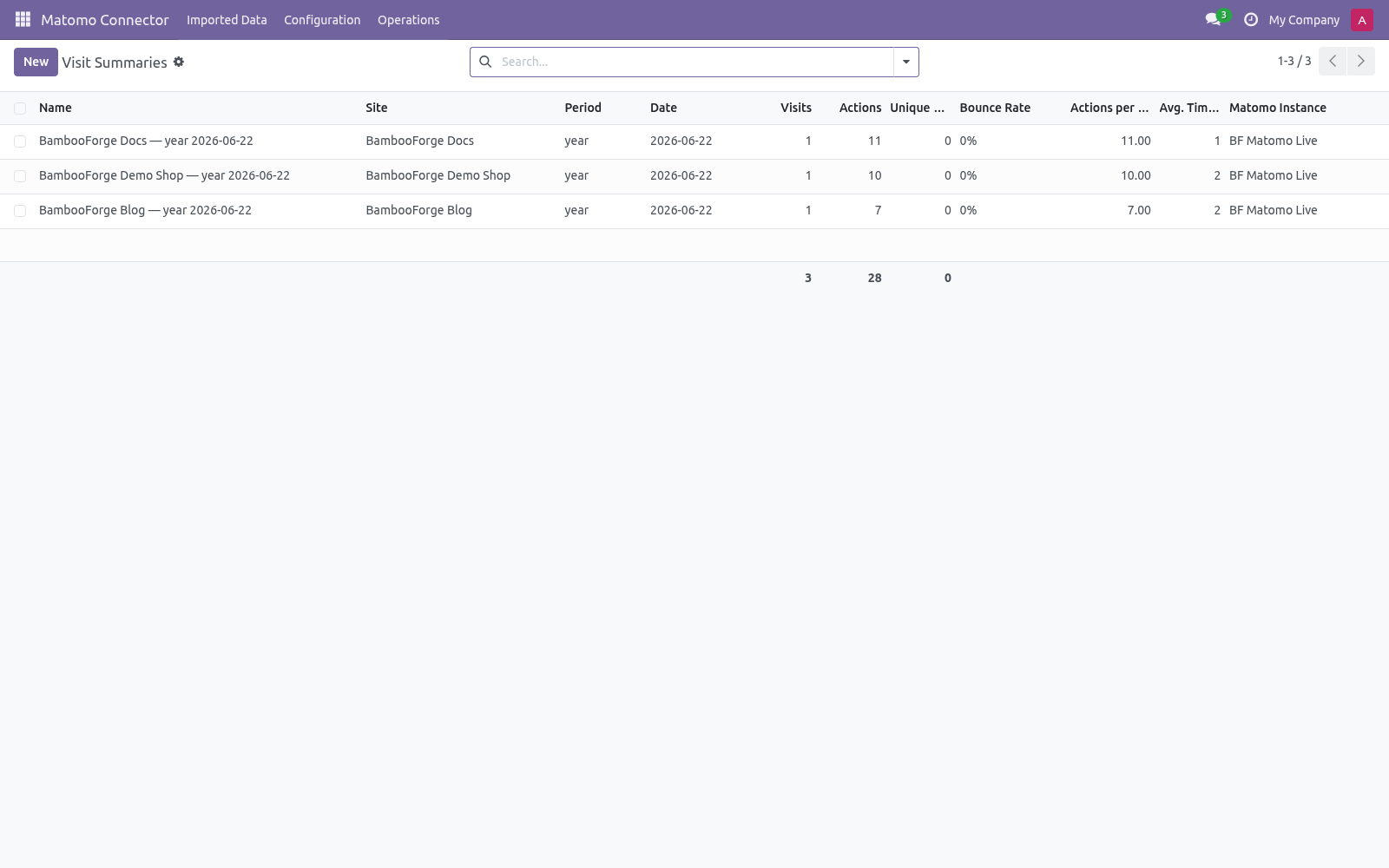
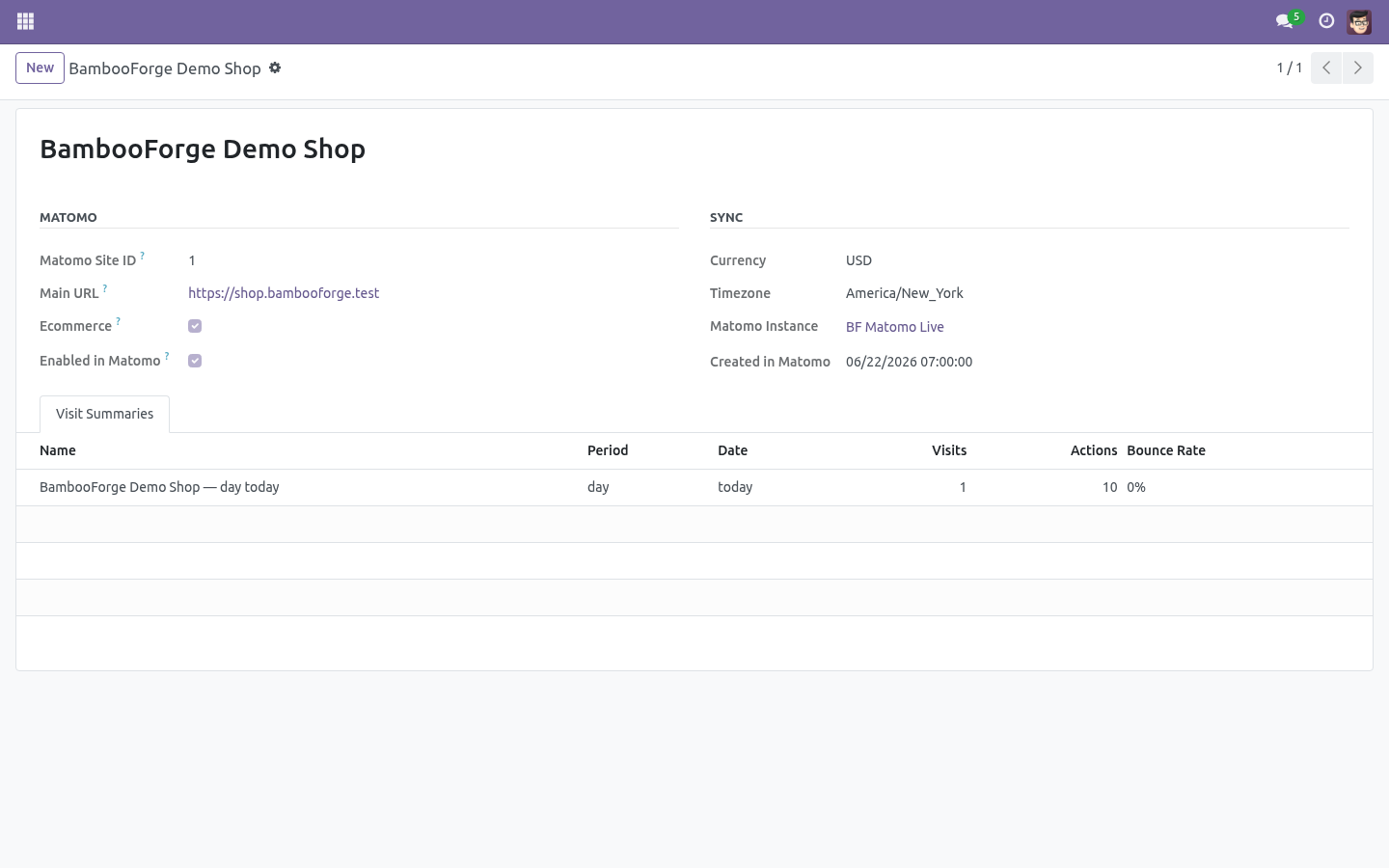
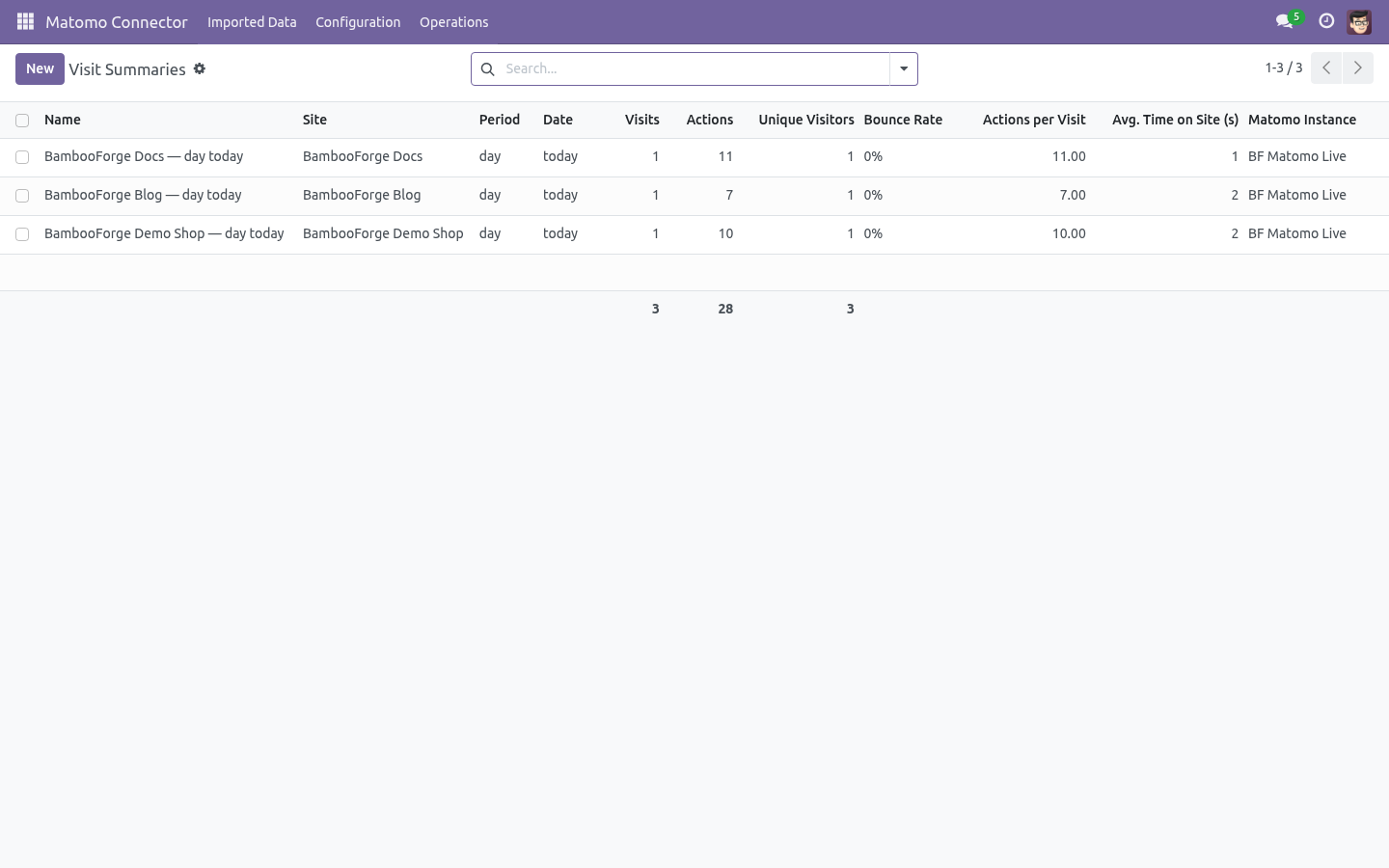
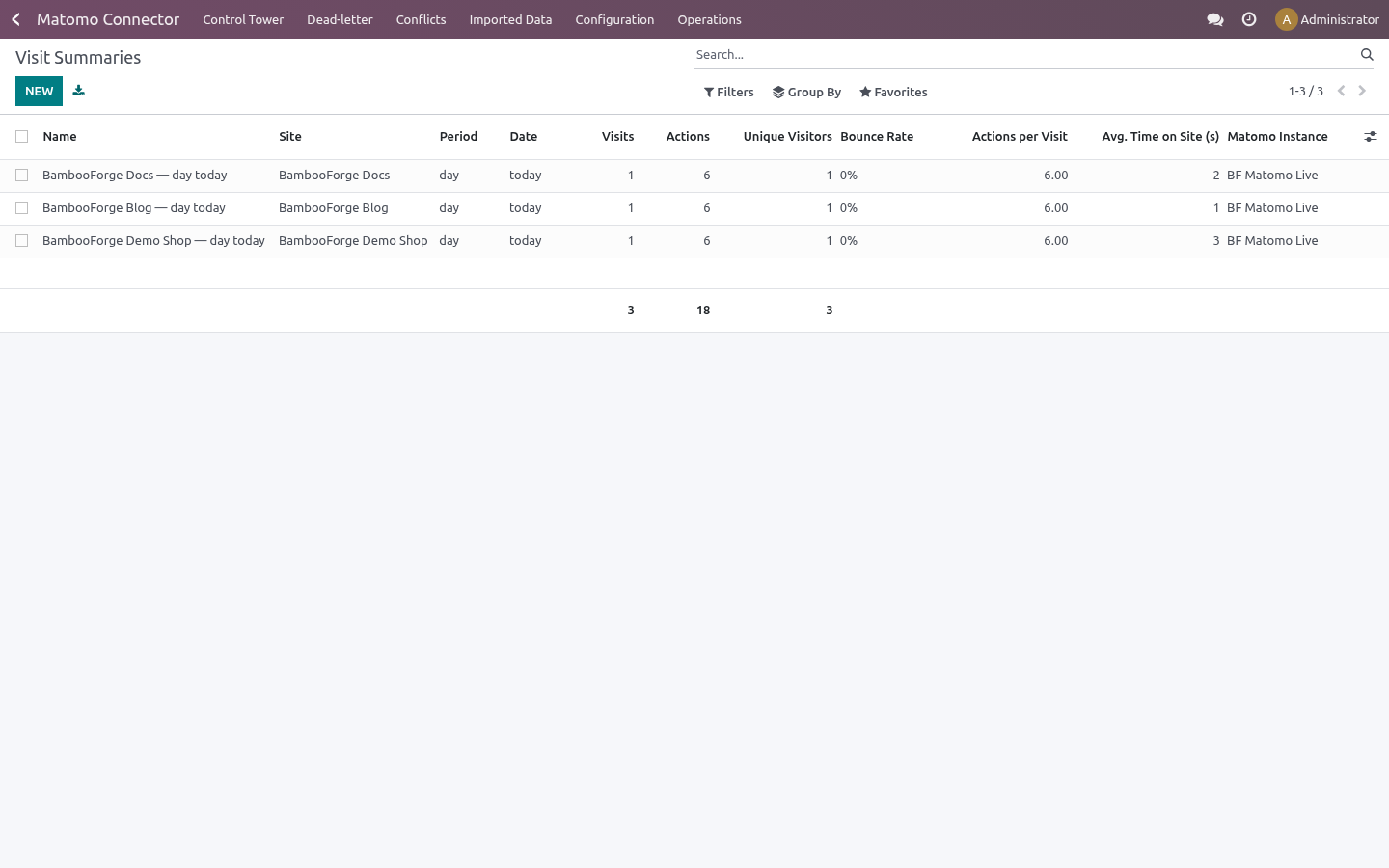
Visit summaries — import a per-site summary of today's traffic (via VisitsSummary.get with period=day, date=today) into the matomo.visit.summary model: visits, actions, unique visitors, bounce rate, actions per visit and average time on site.
Direction of sync: Odoo ← Matomo (read-only). Matomo is a pull-only analytics source, so the connector never writes back to Matomo. Sites are imported before visit summaries so each summary links back to its site.
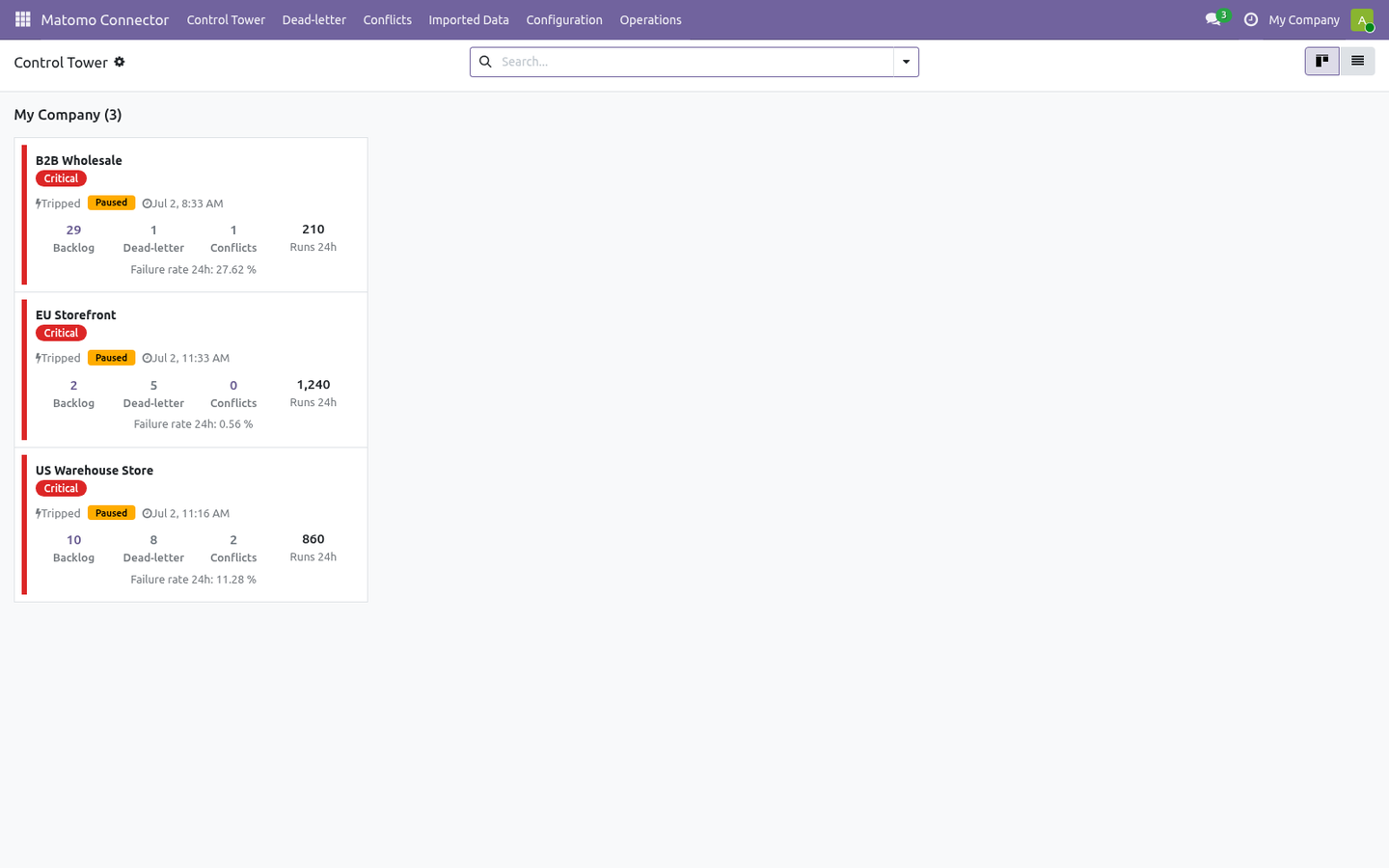
Every remote call goes through a queue: nothing is written to Odoo until a job runs, jobs retry with back-off on transient failures, and a circuit breaker pauses an instance that keeps failing.
Tested against the real thing
Automated tests run against a bundled mock on every release; the line below is the part no mock can give you - the connector pointed at the real platform, with real records.
Tested for real against Matomo 5.11 and 5.12: 3 sites and their visit summaries came into Odoo with 0 errors.
Requirements
Odoo: 20.0, Community or Enterprise.
Matomo: a reachable Matomo server exposing the Reporting API at index.php (the standard entry path). Matomo must be reachable from the Odoo server.
Python: no extra libraries beyond a standard Odoo 20 install.
Odoo access: any internal user can use the connector screens. The Matomo auth token is stored in a system-only field, so only the Settings / Administration user can read or change the Auth Token.
Network: outbound HTTP/HTTPS from Odoo to your Matomo server. By default the connector refuses internal/loopback/private hosts as an SSRF safeguard (see Safety features).
Installation
Copy bambooforge_matomo_connector into your Odoo addons path.
Restart the Odoo service.
Open Apps, click Update Apps List, search for Matomo, and press Activate / Install. Dependencies (base, mail) install automatically.
No Matomo server is required to evaluate the connector: a mock Matomo API ships inside the module, so you can install, explore and run the full import flow against sample data before pointing it at a real server.
Step 1 — Create an auth token in Matomo
The Matomo Reporting API authenticates with a single auth token (token_auth). To create one:
Log in to your Matomo server.
Go to Administration ▸ Personal ▸ Security.
Under Auth tokens, click Create new token.
Confirm your password if prompted, give the token a description (e.g. Odoo), and create it.
Copy the token string shown — you will paste it into Odoo in Step 2.
The token is sent only as the token_auth POST form parameter on every request, never on the query string.
Step 2 — Create the connection in Odoo
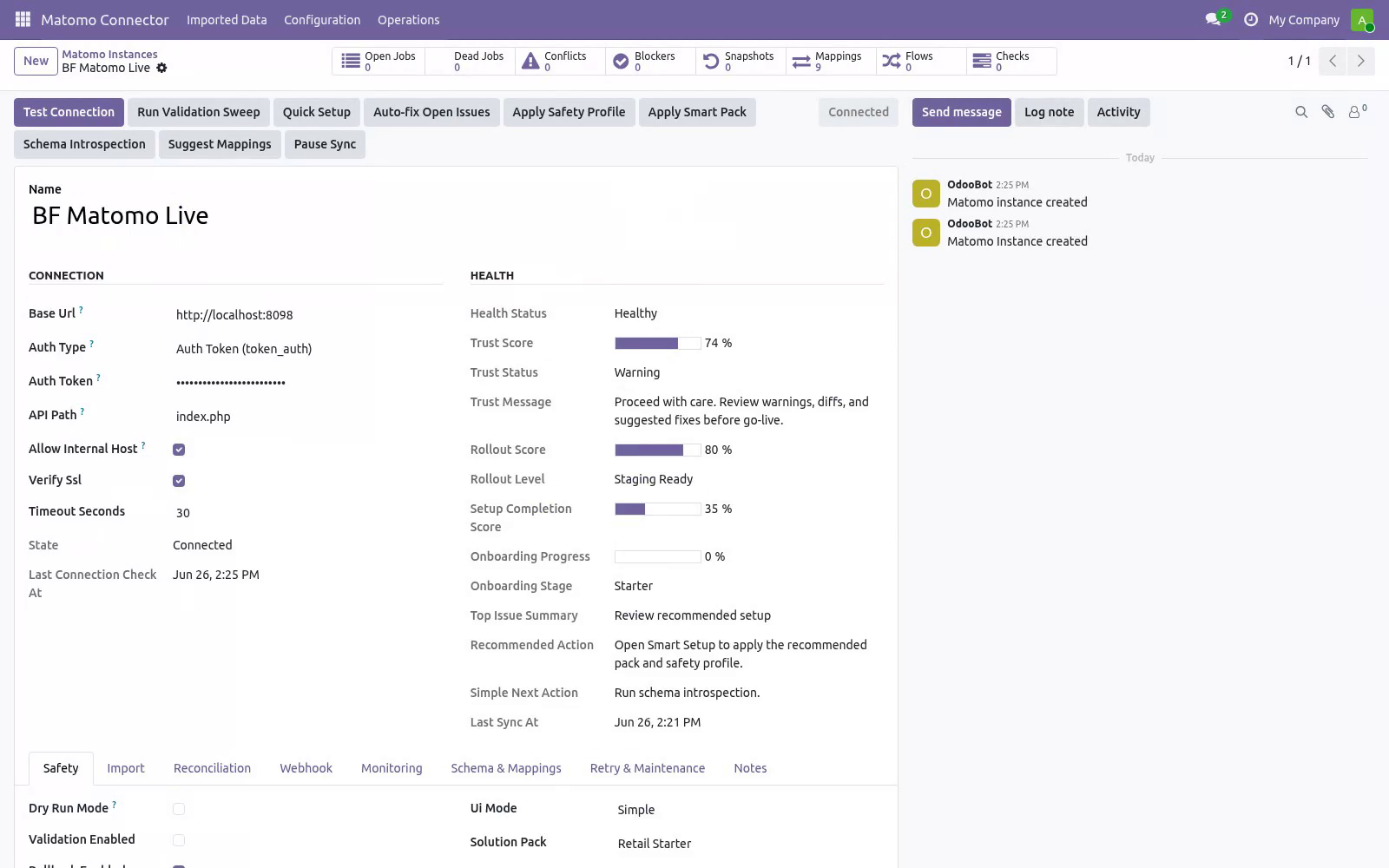
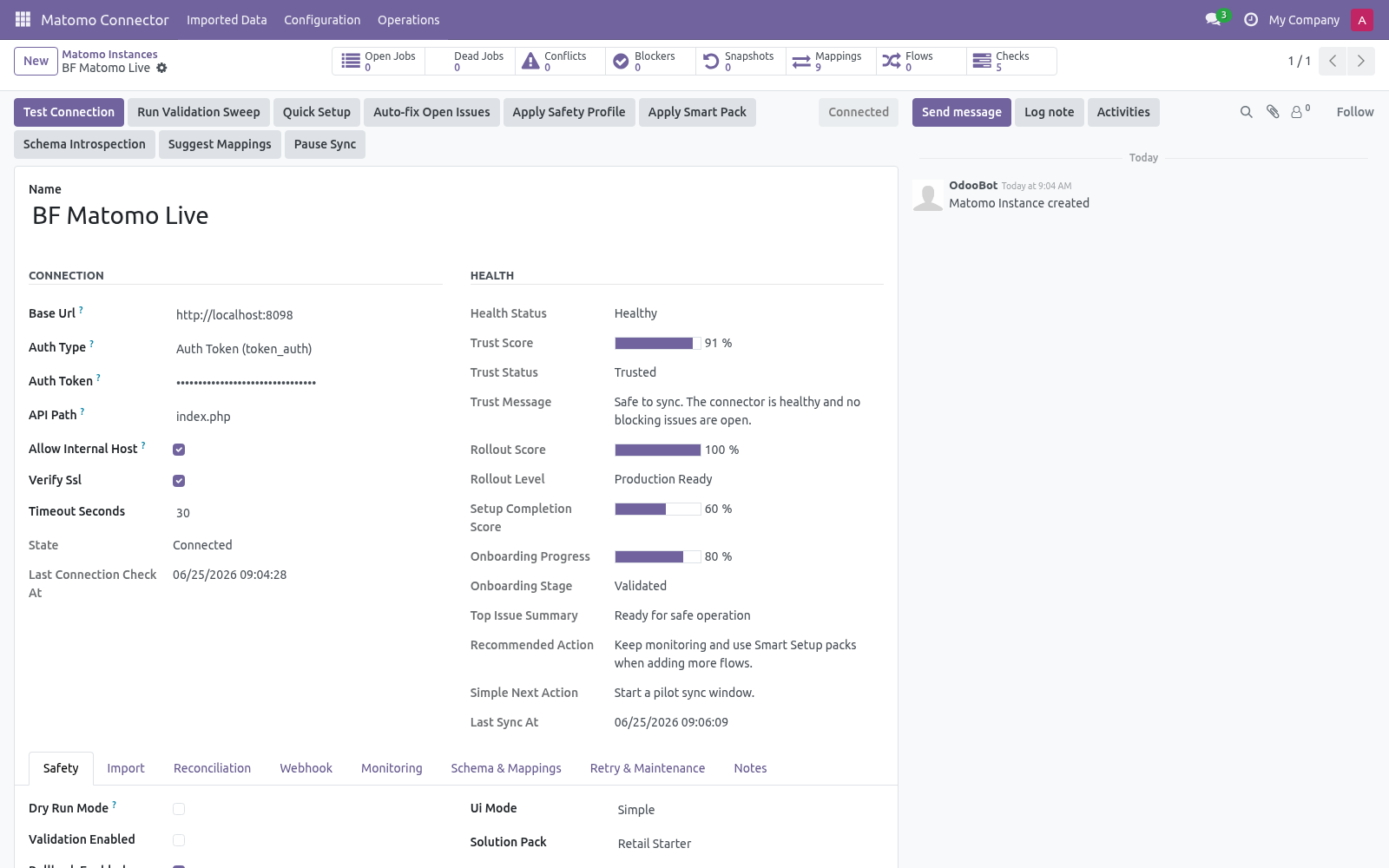
Open Matomo Connector ▸ Configuration ▸ Instances and create a record.
Key fields:
Field |
What to enter |
|---|---|
Name |
A label for this server, e.g. My Analytics. |
Base URL |
Your Matomo server root, e.g. https://analytics.example.com. |
Authentication |
Auth Token (token_auth) — the only supported method. |
Auth Token |
The token string from Step 1 (visible to administrators only). |
API Path |
Leave the default index.php unless your Matomo entry path differs. |
Verify SSL |
Keep on for production. Turn off only for self-signed test certificates. |
Allow internal host |
Off by default. Turn on only to reach a Matomo on localhost or a private network (lowers the SSRF guard — see Safety features). |
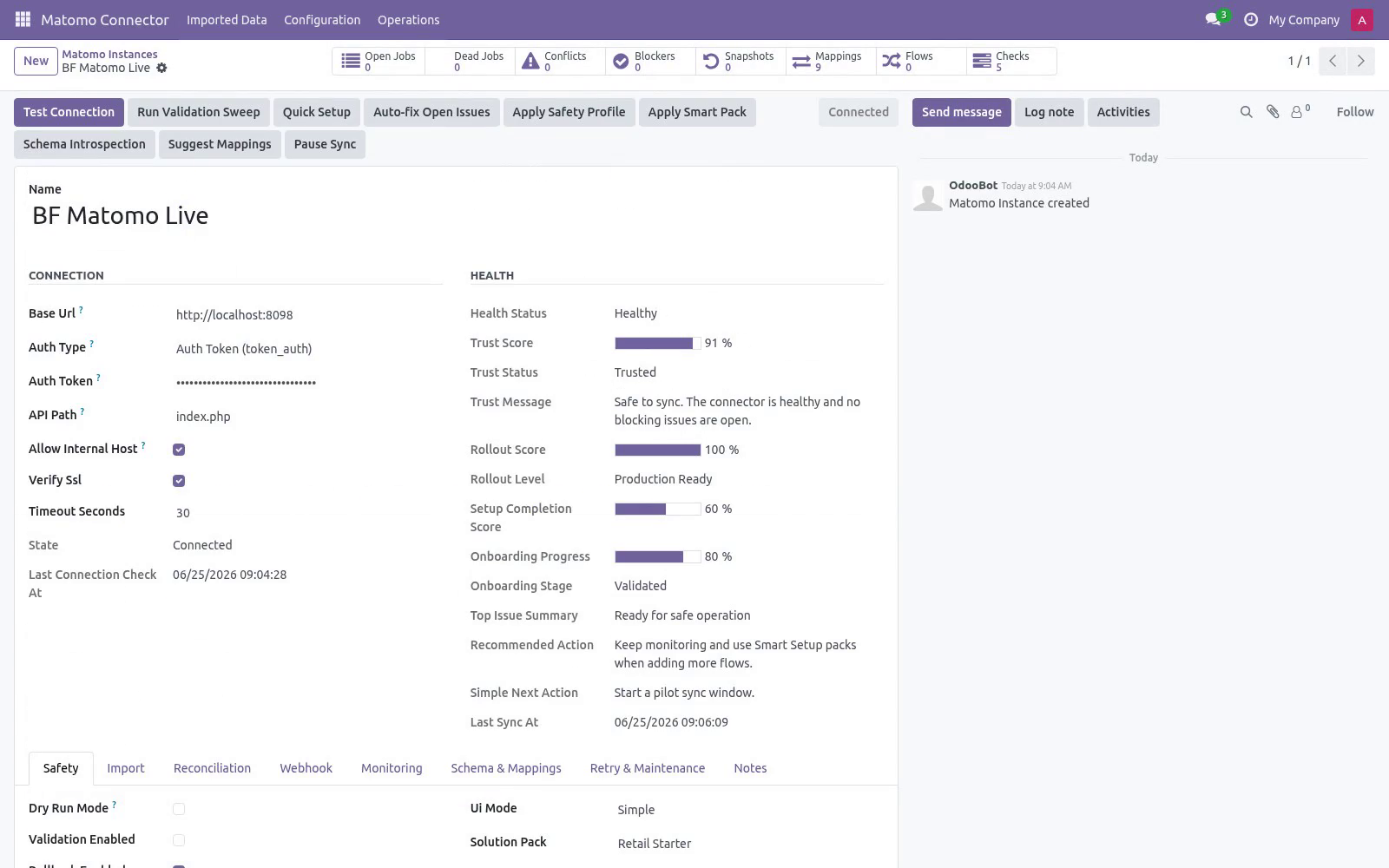
Then click Test Connection. The connector lists your sites (SitesManager.getAllSites) as a lightweight connectivity and auth check. A green Connected state means the URL and token are correct. If it fails, the exact error is shown on the form and recorded in Logs (see Troubleshooting).
Tip: use Quick Setup (button on the instance) to seed default field mappings and starter flows in one step.
Step 3 — First import (dry-run, then live)
New instances start with Dry-run ON. In dry-run, import jobs simulate writes: instead of creating records they produce Validation Results you can review under Matomo Connector ▸ Operations ▸ Validation Results. This lets you confirm what would happen before anything is written.
To run a first import:
On the instance, click Queue Site Import (and then Queue Visit Summary Import). This enqueues jobs; it does not block the UI. Import sites first so each summary can link back to its site.
Jobs are processed by the Matomo Queue Processor scheduled action (every minute), or immediately if you run it from Operations ▸ Queue Jobs.
Review Validation Results while still in dry-run.
When satisfied, open the instance, turn Dry-run OFF, and run the imports again to write the records for real.
Imported records land under Matomo Connector ▸ Imported Data ▸ Sites and ▸ Visit Summaries. Each carries its Matomo reference (the idsite for sites, a synthetic site<idsite>_day_today id for summaries) so re-imports update the same record instead of duplicating it.
Field mapping & customization
Field Mappings (Configuration) map Matomo fields to Odoo fields per entity. Each mapping has a source path, a target path and an optional transform (string, integer, float, boolean, uppercase, lowercase, JSON string, CSV join, first item, or a safe Python expression). The direction is Matomo → Odoo for this read-only connector.
Schema Fields lists the discovered Matomo fields per resource. Run schema introspection on the instance to refresh it.
The two import entities are Site and Visit Summary. The per-run volume is capped by Import sites limit (default 100) and Import visit summaries limit (default 200) on the instance.
Automation (scheduled actions)
The module ships these scheduled actions (Settings ▸ Technical ▸ Scheduled Actions):
Scheduled action |
Default |
Purpose |
|---|---|---|
Matomo Queue Processor |
every 1 min |
Processes queued import jobs. |
Matomo Reconciliation |
every 15 min |
Pulls recent remote changes for enabled entities. |
Matomo Maintenance |
every 1 hr |
Recovers stale/locked jobs and trims old logs. |
Matomo Flow Scheduler |
every 5 min |
Runs scheduled sync flows. |
Matomo Flow Metrics |
every 1 hr |
Aggregates flow-run metrics. |
Matomo Auto Recover |
every 15 min |
Reopens a tripped circuit breaker once Matomo is healthy. |
Turn on Auto import / Auto reconcile per entity on the instance to let the scheduled actions keep things in sync hands-free.
There are no webhooks. Matomo is a pull-only analytics source: the Reporting API has no outbound push, so the connector keeps data current by scheduled or on-demand import only.
Safety features
Dry-run mode — simulate writes and review Validation Results before going live (field Dry-run, ON by default).
Business validation profiles — Minimal / Standard / Strict gate risky writes (field Business validation profile, default Standard).
Resilient queue — every remote action is a job with retry and exponential back-off; jobs that exhaust retries move to a Dead state.
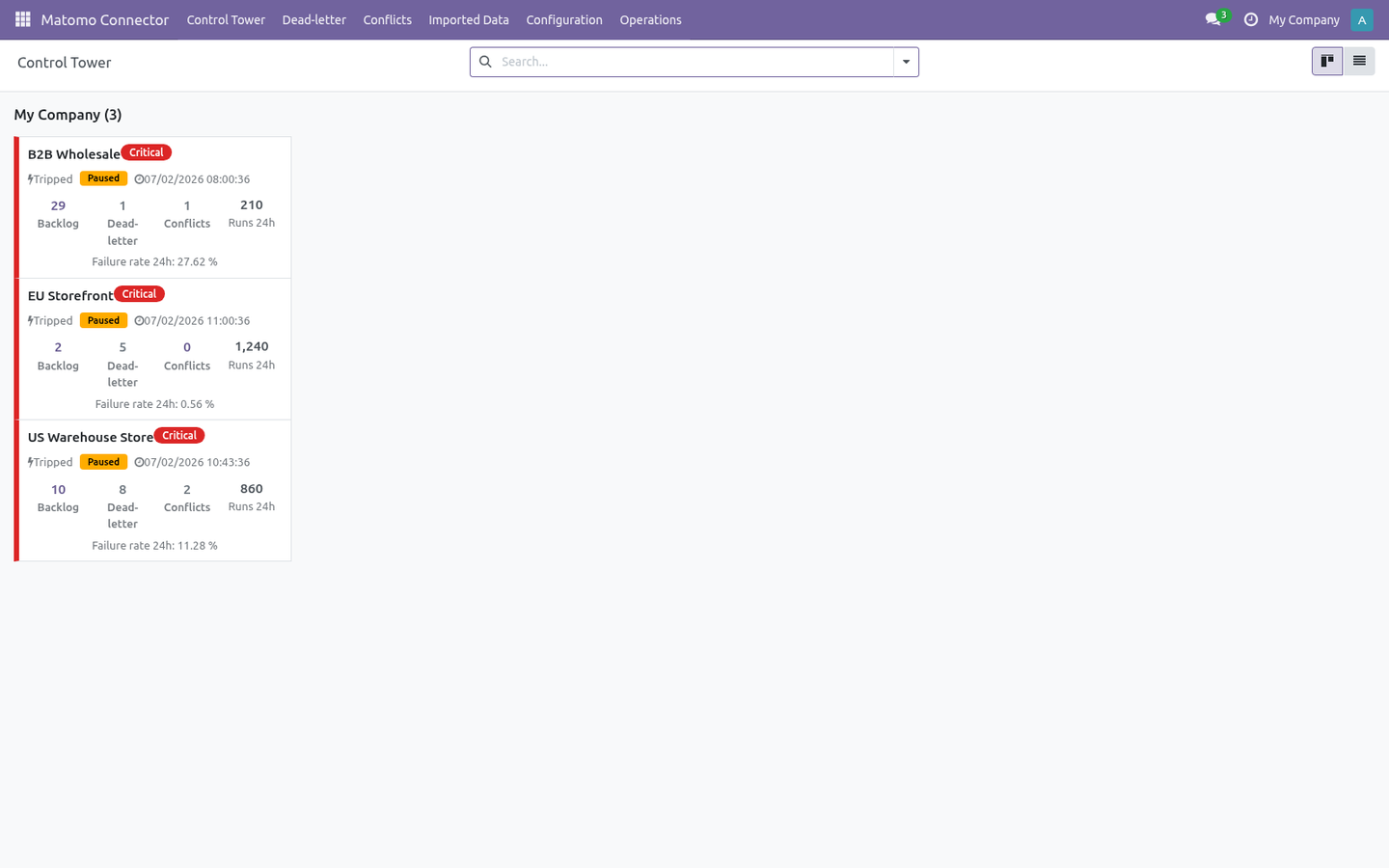
Circuit breaker — after repeated failures an instance auto-pauses (Tripped); the Auto Recover action reopens it once Matomo responds again.
Rollback snapshots — when enabled, imports capture a snapshot so you can undo a batch from Operations ▸ Rollback Snapshots (field Rollback enabled).
SSRF guard — the connector refuses internal/loopback/private hosts unless Allow internal host is explicitly enabled.
Troubleshooting
Symptom |
Cause and fix |
|---|---|
Test Connection fails with 401/403 |
Wrong or expired auth token, or the token lacks permission. Re-check Step 1 and re-paste the token under Auth Token. |
"Matomo auth token (token_auth) is required" |
The Auth Token field is empty. Paste the token from Step 1 (admin-only field). |
"is not allowed because it resolves to a non-public address" |
Base URL points at localhost/private IP. Enable Allow internal host on the instance (test/self-hosted Matomo only). |
SSL errors on Test Connection |
Self-signed certificate. Use a valid cert, or turn off Verify SSL for testing only. |
Matomo API error in the body (HTTP 200) |
Matomo answers 200 OK and signals errors in the JSON body. The connector surfaces the Matomo message verbatim; read it on the form and in Logs. |
Jobs stay in Pending |
The Queue Processor is off or the instance is paused. Check Scheduled Actions is active and the instance is not paused. |
Instance shows Tripped |
Circuit breaker tripped after repeated failures. Fix the server/token; Auto Recover reopens it once Matomo responds. |
Jobs in Dead state |
The job exhausted its retries. Fix the underlying cause, then re-run from Operations ▸ Queue Jobs. |
Records imported twice |
Imports are keyed by the Matomo reference, so this should not happen. If it does, check that two instances do not point at the same server. |
Nothing happens after import |
You are in Dry-run. Review Validation Results, then turn dry-run off and re-run. |
Rate limit reached |
Matomo returned HTTP 429. The connector retries with back-off; if it persists, reduce the import limits or import cadence. |
For anything else, Operations ▸ Logs records every API call, payload and error with a timestamp.
Frequently asked questions
Which versions are supported? Odoo 20.0 on the Odoo side. On the Matomo side the connector targets the standard Reporting API at index.php with token_auth. Validate your exact build with the bundled mock first.
Do I need Matomo installed to evaluate it? No. A mock Matomo API ships inside, so you can install, explore and demo the full import flow before connecting a real server.
How does authentication work? Create a Matomo auth token under Administration ▸ Personal ▸ Security ▸ Auth tokens, then paste it into the instance Auth Token field. It is sent only as the token_auth POST form parameter on every request.
Does it write anything back to Matomo? No. The connector is read-only: it imports sites and visit summaries from Matomo and never sends changes back.
Is there a webhook for real-time updates? No. Matomo has no outbound webhook push, so the connector keeps data current by scheduled or on-demand import only.
Is it safe to run against production data? Dry-run is ON by default, validation blocks risky writes, and rollback snapshots let you undo. You decide when to go live.
What support and refund policy do I get? Every request is answered within 24 hours, setup help included. If you report a bug within 2 months of purchase and it is not resolved within 15 days, you are entitled to a full money-back refund.
Data, privacy & limits
The connector reads sites and visit summaries from your Matomo server and writes the corresponding Odoo records. The auth token is stored in an admin-only field.
In scope today: read-only import of Matomo sites and per-site visit summaries, field mapping, scheduled and on-demand import, dry-run, validation and rollback.
Out of scope: writing back to Matomo (the connector is read-only); webhook push (Matomo does not offer one); historical multi-period reporting (the visit summary is period=day, date=today per site in v1).
Support & updates
Support: support@bambooforge.dev — answered within 24 hours, setup help included.
Refund: report a bug within 2 months of purchase; if unresolved within 15 days, full refund.
Full source is included. Updates track the supported Odoo 20 / Matomo Reporting API line.
Upgrading & version compatibility
This build targets Odoo 20.0. Each Odoo major series (16.0, 17.0, 18.0, 19.0, 20.0) has its own dedicated build of this module — always install the build that matches your Odoo version. Mixing a build with a different Odoo series is not supported.
Patch upgrades (same series, e.g. 20.0.1.0.0 → later)
Back up your database and filestore first.
Replace the module folder with the newer build.
Restart Odoo with the module updated:
./odoo-bin -c your.conf -u bambooforge_matomo_connector -d your_db
Odoo applies any schema/data changes automatically. Your existing records and configuration are preserved.
Cross-version migration (moving to a newer Odoo)
Upgrading Odoo itself is a database migration handled by Odoo's standard upgrade tooling. When you migrate the database to the next Odoo series, install the matching build of this module for that series. Data created by this module carries over with the database migration.
After any upgrade the module's scheduled actions resume on their normal cadence — no manual re-activation is required.
Uninstallation
You can remove this module at any time from Apps → (this module) → Uninstall, or from the command line. Uninstalling is clean and reversible by reinstalling — but note what is and is not deleted.
What is removed
The module's own tables and every record in them (22 models, prefixed matomo.*) — this is the data this module created.
The menus, actions, views and reports this module installed.
Its scheduled actions (cron jobs) — they stop immediately on uninstall.
Connection records, credentials, field mappings, queue jobs and sync logs stored in Odoo.
What is preserved
Your remote platform is never touched. Uninstalling only removes the Odoo-side connector; products, customers and orders on the external store/service are untouched.
Records already imported into standard Odoo models (e.g. contacts, products, sales orders) remain — they are ordinary Odoo records once created.
Attachments and chatter messages on standard records are kept.
As always, take a database backup before uninstalling in production.
Changelog
20.0.1.0.2
Built for Odoo 20: record rules and access rights rewritten onto Odoo 20's single ir.access model, the screens rebuilt on Owl 3, and every icon moved to the icon set Odoo 20 ships.
20.0.1.0.0
Current release for Odoo 20.0. This build includes:
Attribute revenue to Matomo campaigns inside Odoo 20: import Matomo goal & ecommerce conversions with UTM and match them to crm.lead / sale.order (enrich-only), with a Revenue-by-Campaign report.
Plus sites & visit-summary import. Resilient queue, dry-run, auditable source.
Feature additions and fixes ship as new builds on the Odoo Apps store; this page and the module's version reflect the current published release. Always keep the build matched to your Odoo series (see Upgrading & version compatibility).
How we make sure it works
Before every release, 68 automated checks run against this app on Odoo 16, 17, 18, 19 and 20. Among them:
Enrich only does not overwrite existing utm source.
Site and visit summary bindings do not collide.
Dry run writes nothing.
Attribution disabled captures conversion but no write.
Lock claims pending then refuses second claim.
Tested for real against Matomo 5.11 and 5.12: 3 sites and their visit summaries came into Odoo with 0 errors.
The complete list is in the source you receive.