 BambooForge Labs
Marketing Automation All in One with Lead Scoring
Marketing automation driven by lead score: crossing a threshold enrols a lead, removes it, or moves it to another branch, with a reason logged.
Available for Odoo 16.0, Odoo 17.0, Odoo 18.0, Odoo 19.0, Odoo 20.0. Technical name bambooforge_ma_scoring.
Transcript of the walkthrough (Odoo 20)
Marketing Automation All in One with Lead Scoring. Marketing automation driven by lead score: crossing a threshold enrols a lead, removes it, or moves it to another branch, with a reason logged. Said before you buy, because it is the half that decides whether the app fits: In the next few minutes: marketing automation all in one with lead scoring, then triggers, then crossings, not levels, then when it runs, then the log. Then what this app deliberately does not do, so you can tell before you buy whether it fits.
Everything lives under Score events. 1. Copy bambooforge_ma_scoring into your addons path and update the app list, or install the ZIP from the Odoo Apps Store. 2.
Install Marketing Automation Suite: Lead Score Journeys. 3. Open Score events. Marketing Automation All in One with Lead Scoring.
An add-on for BambooForge Lead Scoring and BambooForge Marketing Automation (17.0). A lead score that crosses a line moves the lead: into a journey, out of one, or onto another branch - with a log that says why. Triggers. On a journey whose audience is Leads/Opportunities, a Score triggers tab.
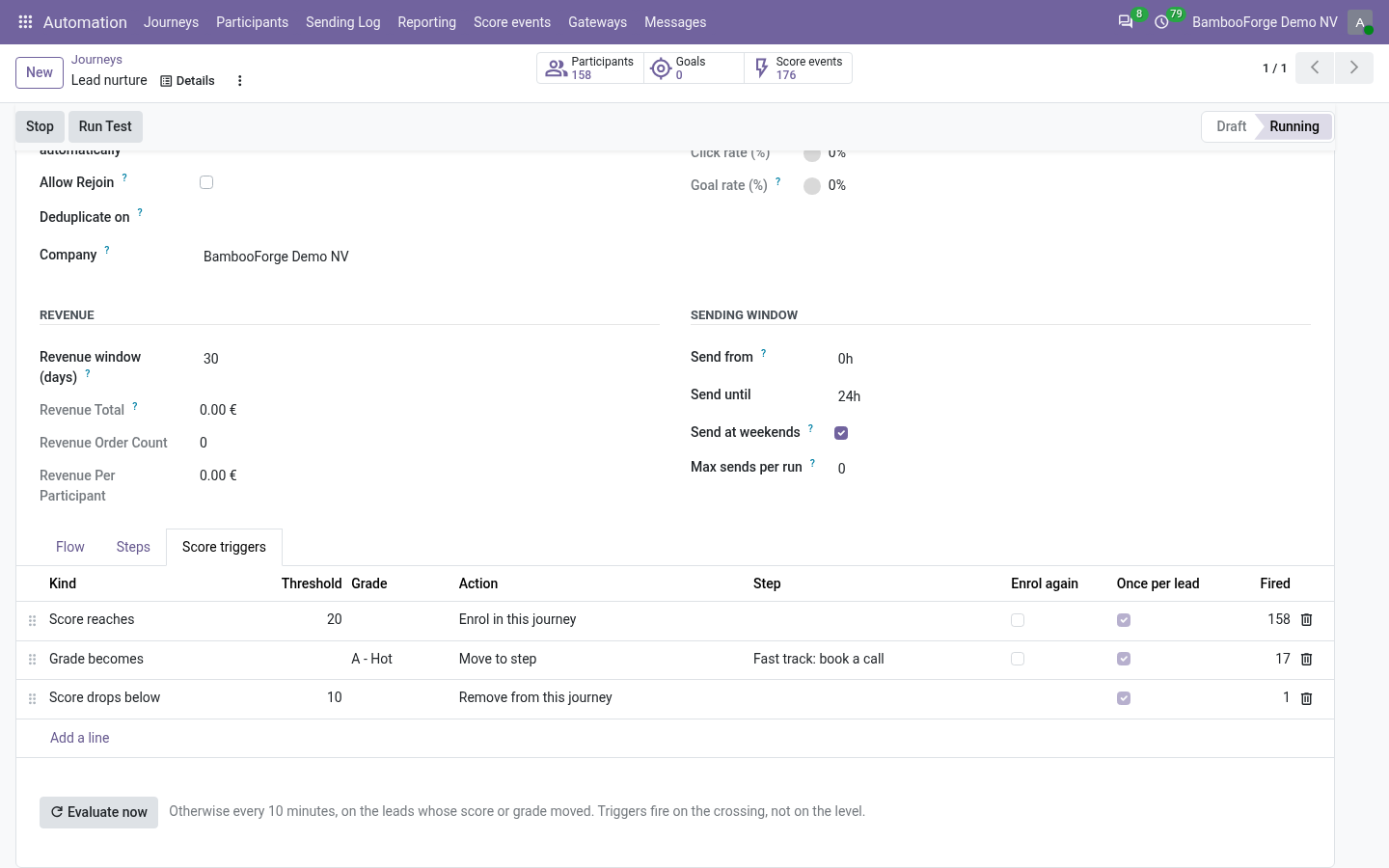
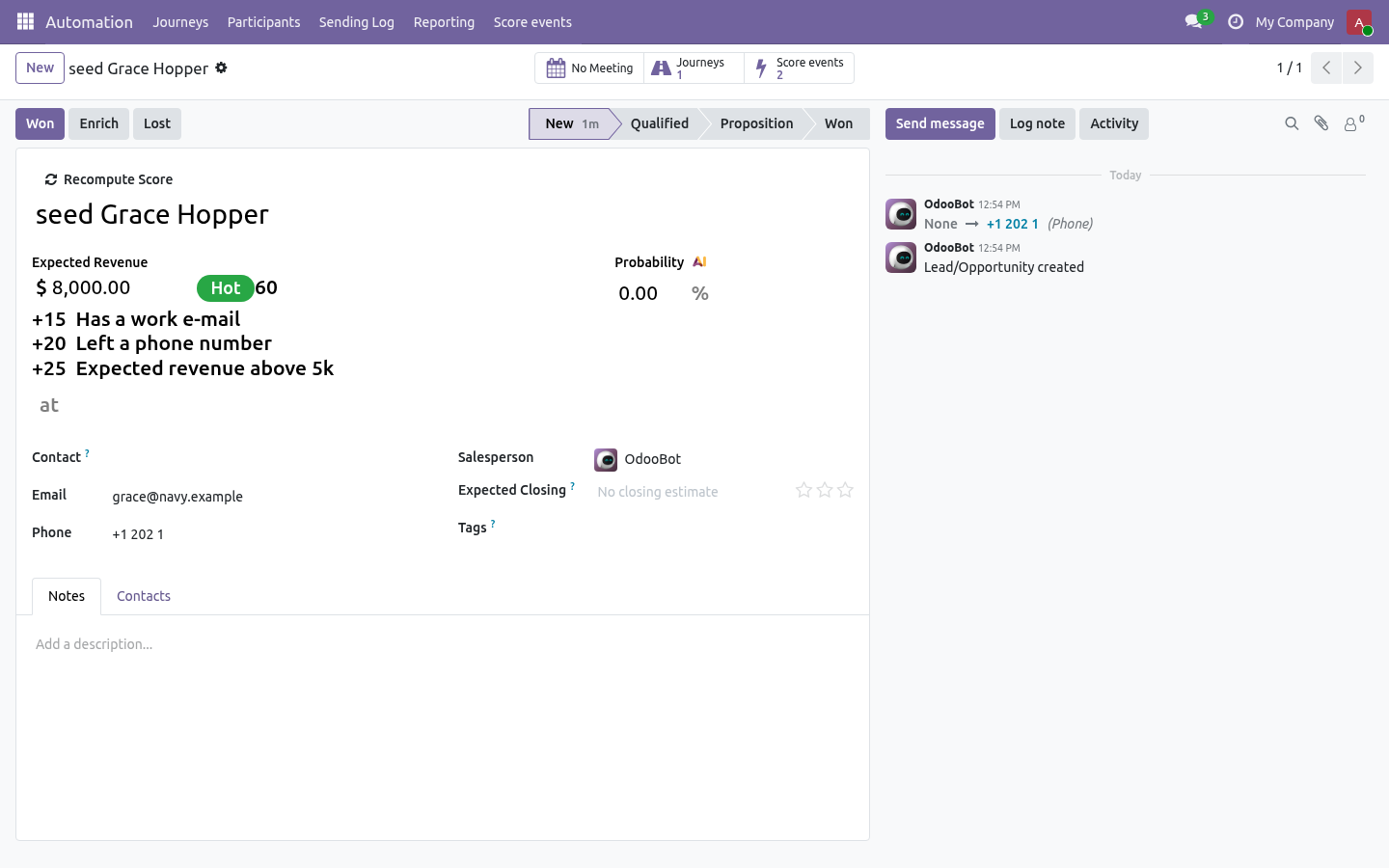
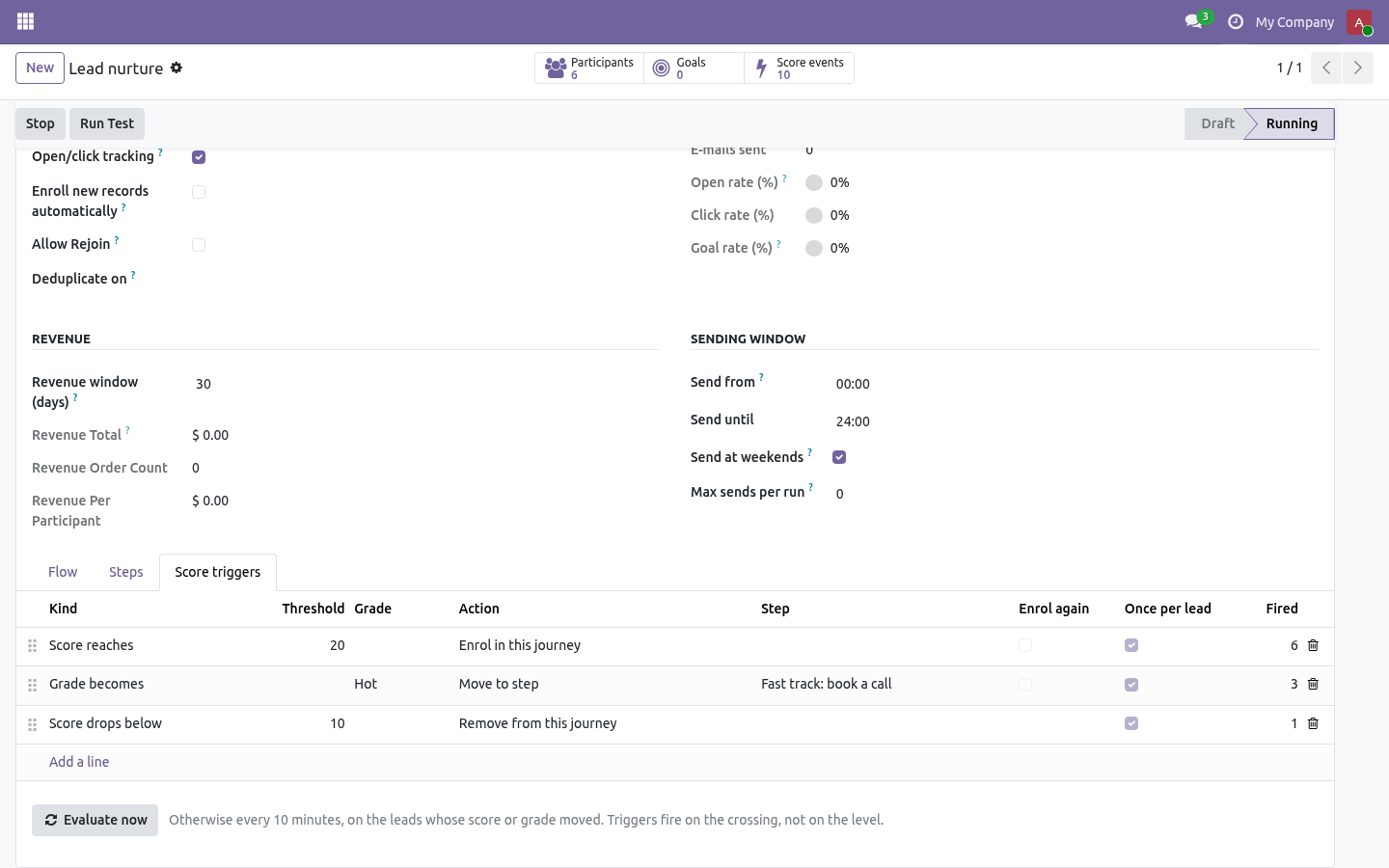
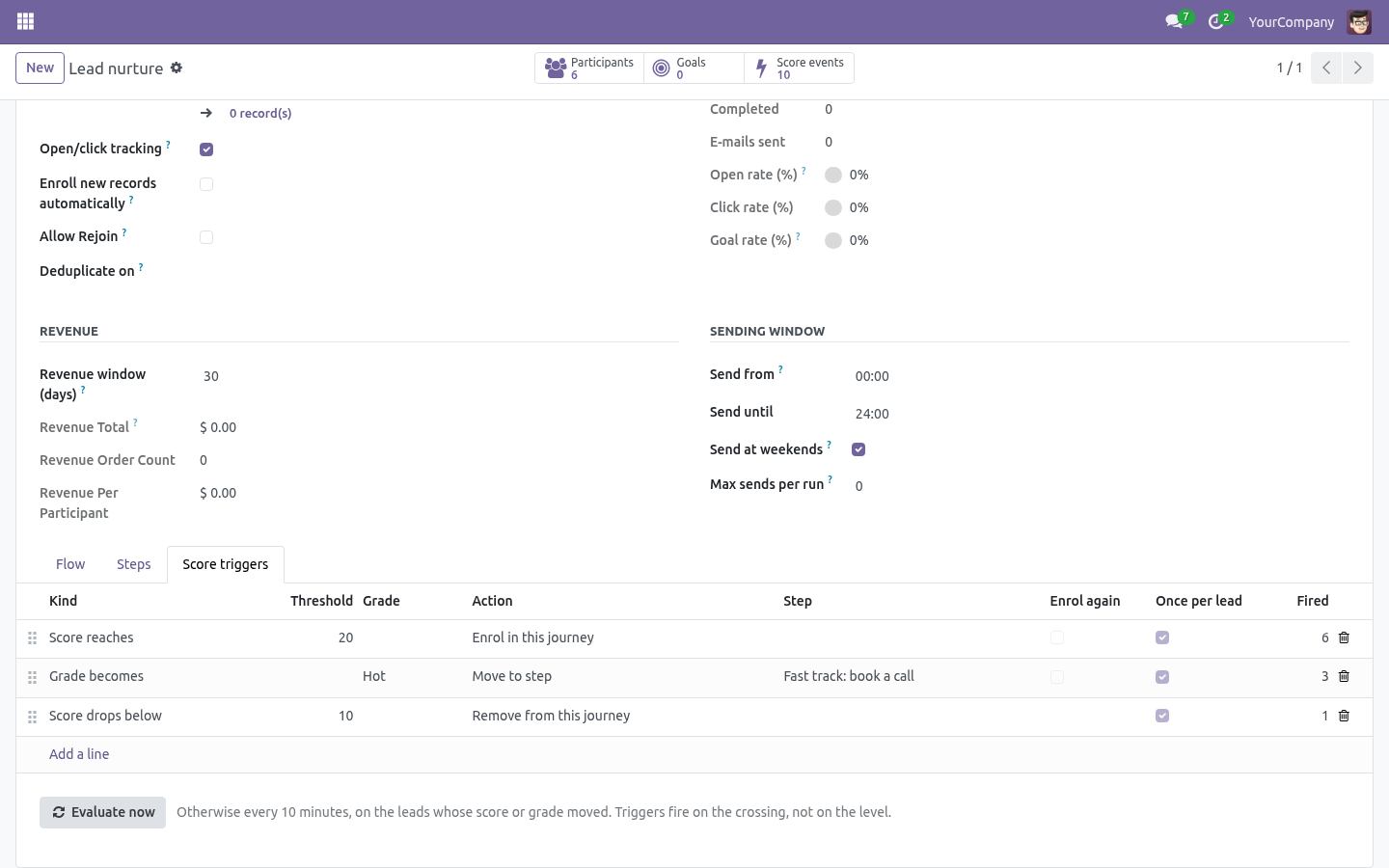
Each trigger is one line and one action: Score reaches N - fires when the score goes from below N to N or above. Score drops below N - fires when the score goes from N or above to below N. Grade becomes X - fires when the grade changes to X. Enrol in this journey - the lead joins at the first step.
Remove from this journey - the running participant is exited. Move to step - the running participant is put on the chosen step (due after that step's delay). A lead not yet in the journey is enrolled first. This is how a lead that goes Hot jumps to the fast-track branch of the same journey.
Once per lead (default on) - fire once per lead, ever. Off: every time the line is crossed. Enrol again - enrol a lead who already finished or left this journey. Off: only leads never in the journey are enrolled (unless the journey itself allows rejoin and the lead is still running).
Crossings, not levels. Every lead remembers the score and grade the triggers last saw. A trigger fires on the crossing between last seen and now - a lead sitting at 80 does not re-enter reaches 50 every ten minutes. A lead seen for the first time can reach a line and can become a grade, but can never drop below one: a brand-new lead at 0 does not "drop below 10" on its first day.
When it runs A cron every 10 minutes, on the leads whose score or grade moved since last seen - found with one SQL pass, not a scan of the table. Evaluate now on the journey's triggers tab. Evaluate score triggers on a lead (for the rep who does not want to wait). The log.
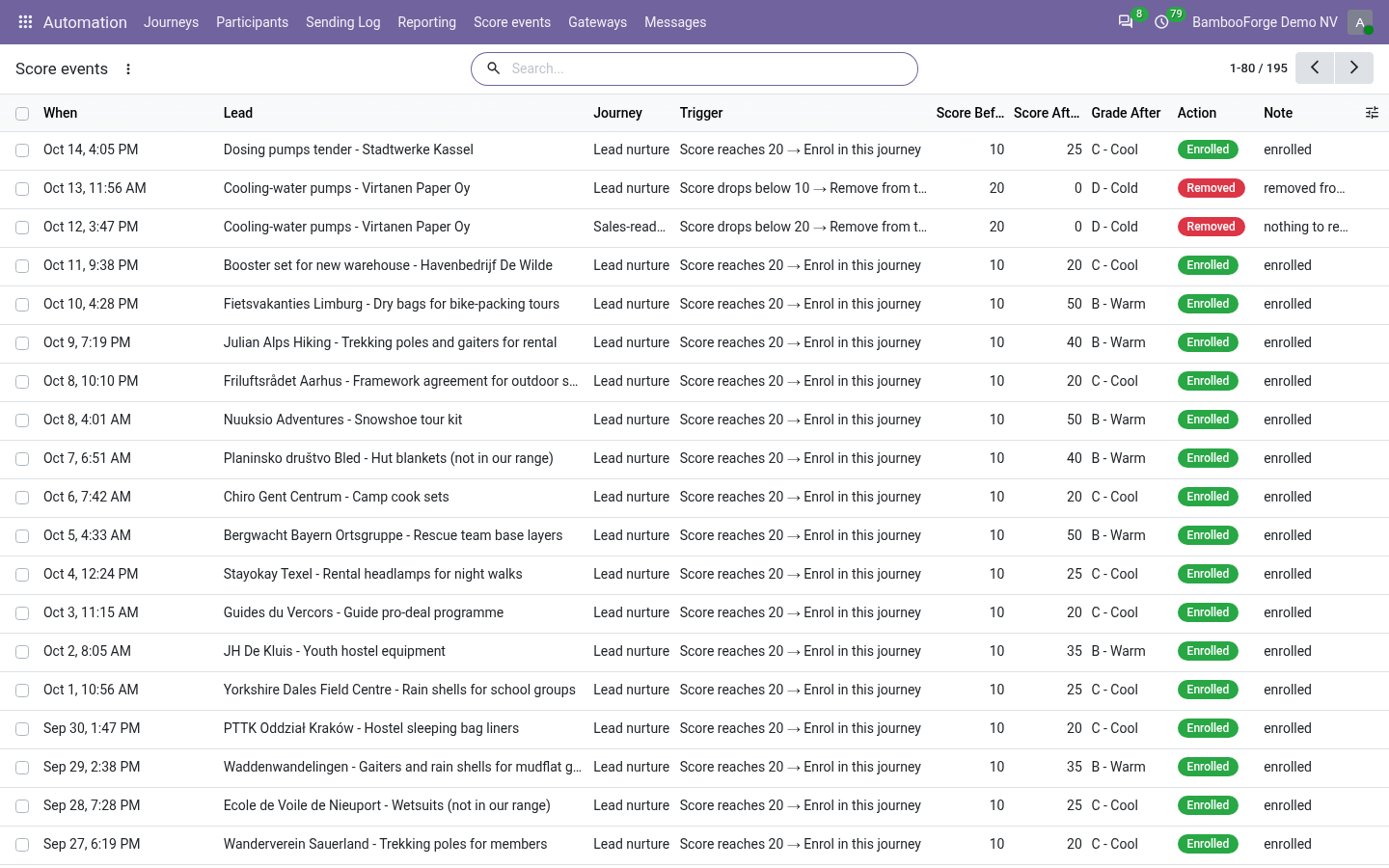
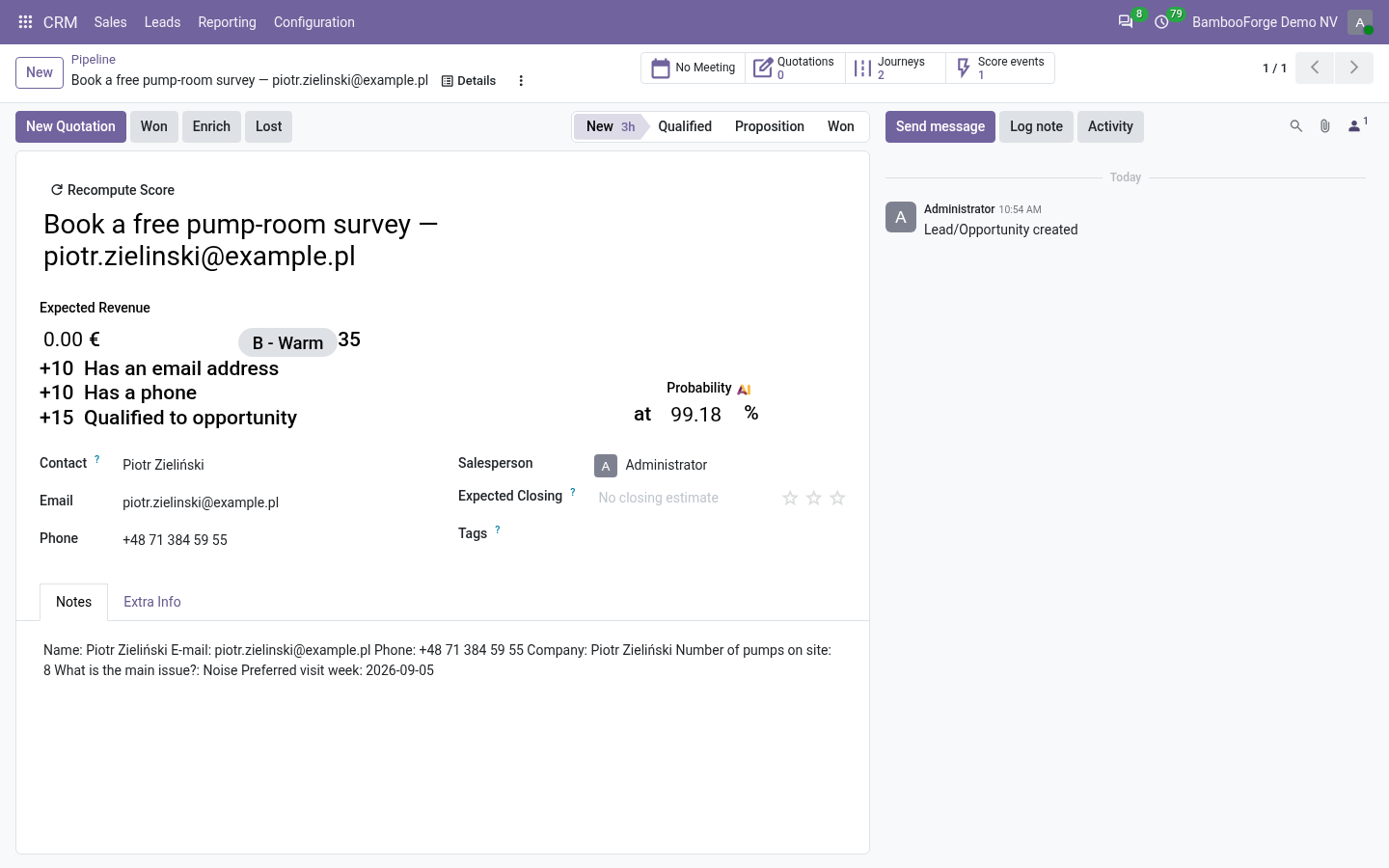
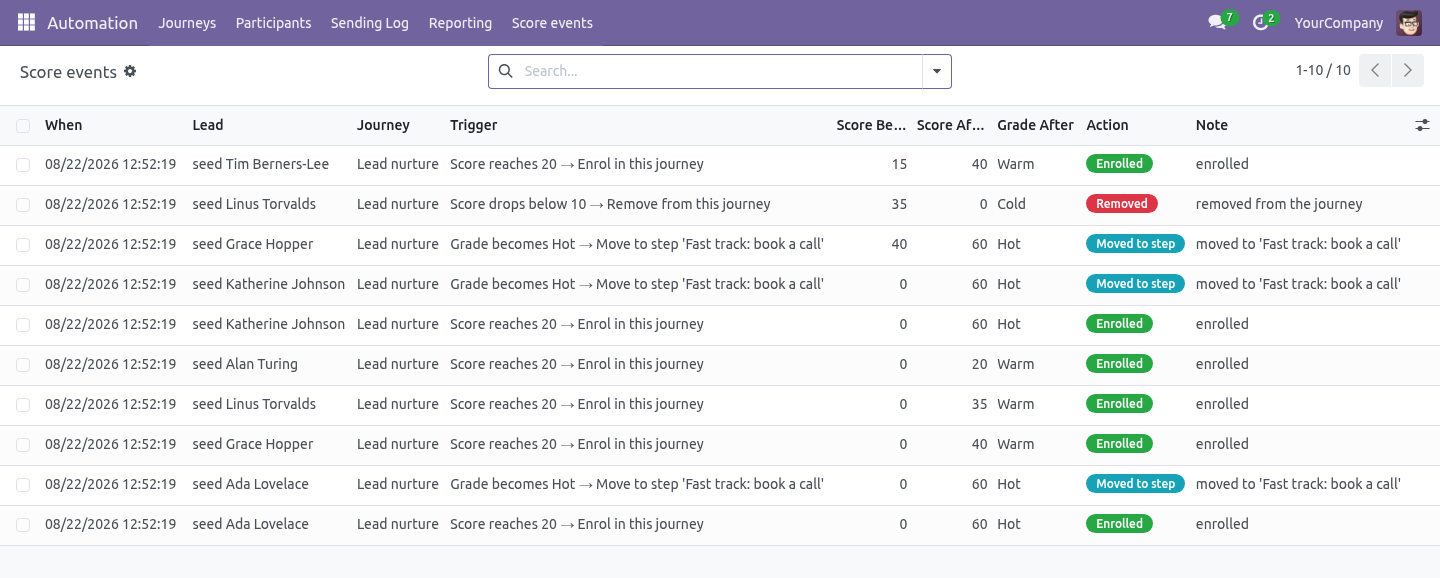
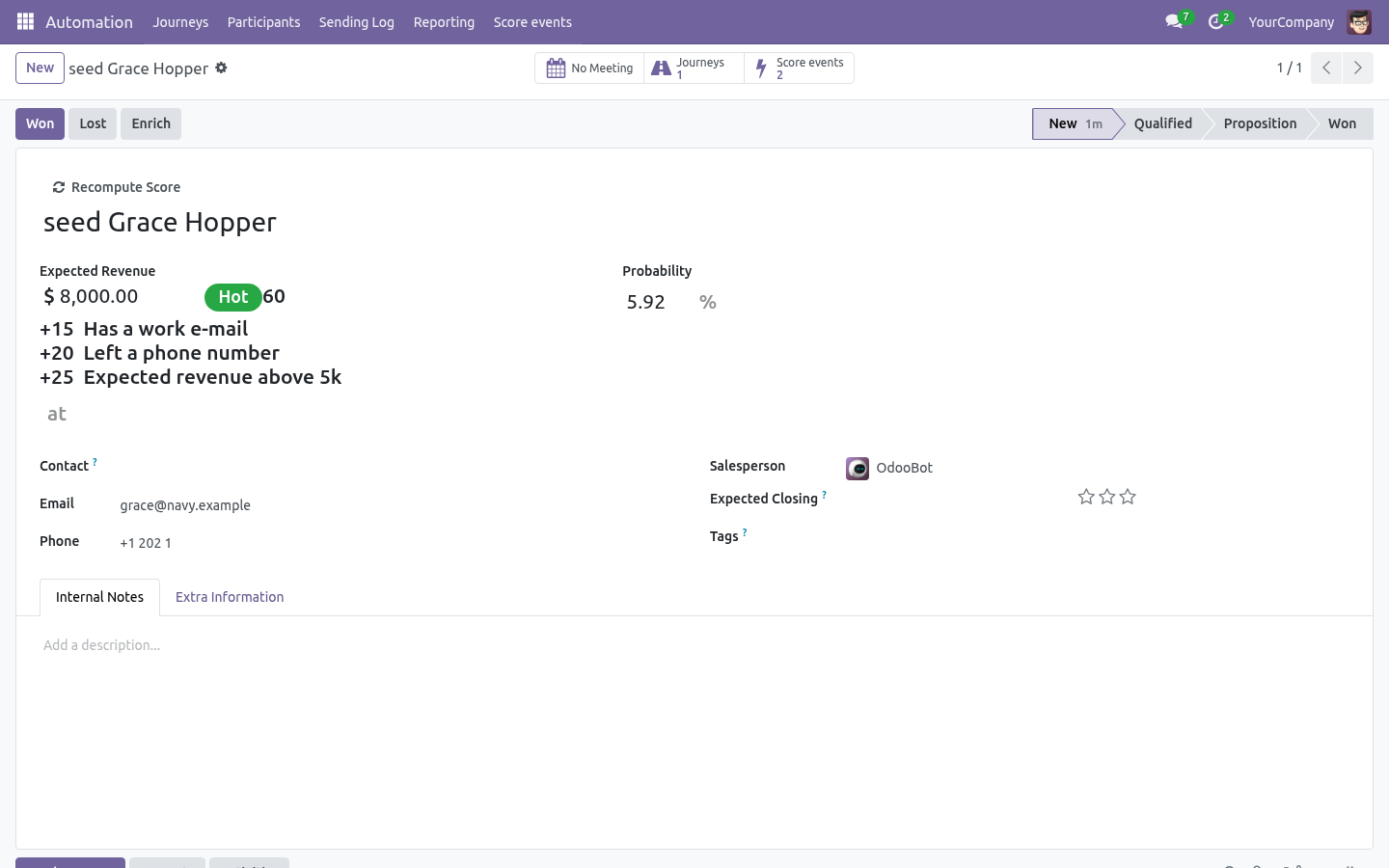
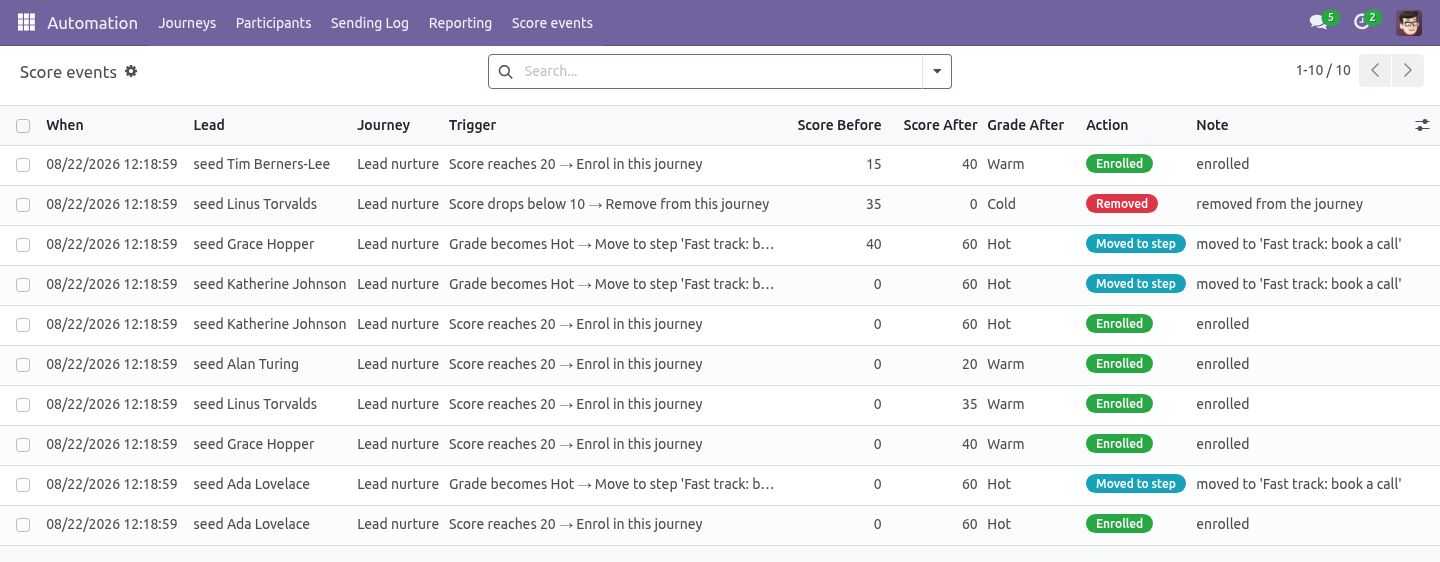
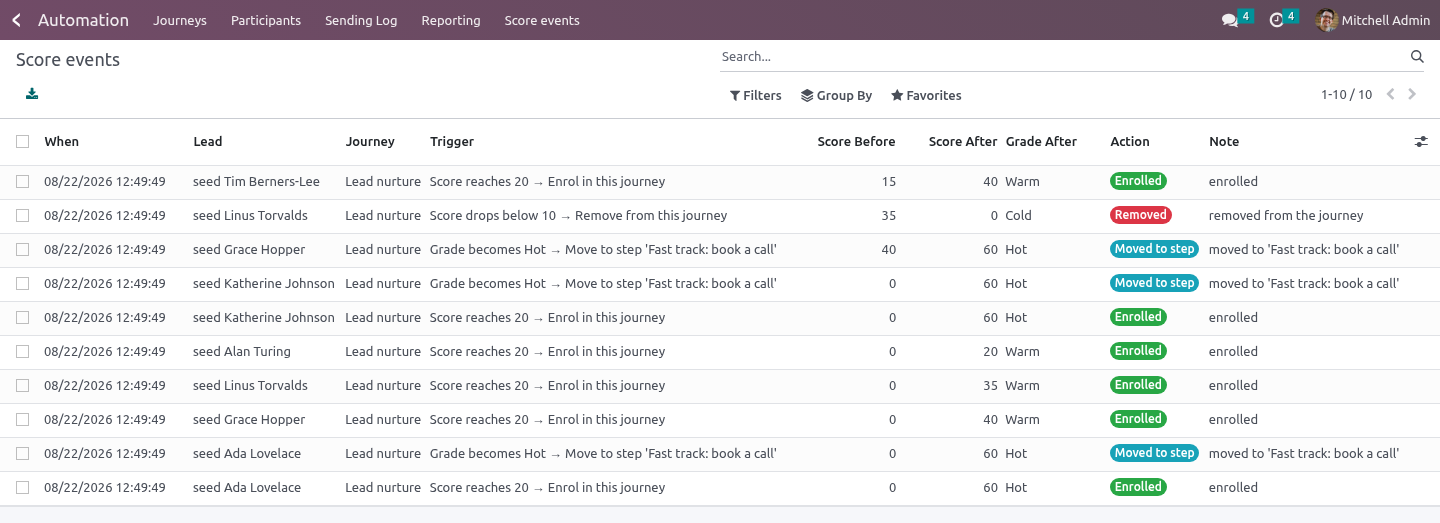
Marketing Automation ▸ Score events: one row per firing - lead, journey, trigger, score before and after, grade before and after, the action, the participant, and a note (enrolled, moved to 'Fast track', not enrolled: already finished or left, …). The lead shows Journeys and Score events buttons; the journey shows Score events; each trigger shows how often it fired. A failing trigger never stops the others: the error is logged, the event is not written, and the lead stays a candidate for the next run. Technical notes Uses Marketing Automation 1.9.0's _enroll_records(records, rejoin=) and the participant's _schedule(step); Lead Scoring's stored lead_score / lead_grade_id.
Nothing is copied. Three fields on crm.lead: score seen, grade seen, evaluated. Community only. No Enterprise module, no external service.
How we make sure it works. Before every release, 20 automated checks run against this app on Odoo 16, 17, 18, 19 and 20. Among them: Without rejoin a finished lead is not enrolled again. Enrol on a running lead is a no op with a note.
Jump on a lead not in the journey enrols first. Threshold equal to the score is reached not dropped. A stopped journey fires nothing but marks seen. The complete list is in the source you receive.
Questions people ask. Which Odoo versions does it run on? Odoo 16.0, 17.0, 18.0, 19.0, 20.0, on the series you buy it for; each series is its own listing. Community or Enterprise?
Both. It needs no Enterprise app. The complete manual is at docs dot bambooforge dot dev, the demo database is linked from the store page, and support answers within twenty-four hours. Links are in the description.
Transcript of the walkthrough (Odoo 19)
Marketing Automation Suite: Lead Score Journeys. Marketing automation driven by lead score: crossing a threshold enrols a lead, removes it, or moves it to another branch, with a reason logged. An add-on for BambooForge Lead Scoring and BambooForge Marketing Automation (17.0). A lead score that crosses a line moves the lead: into a journey, out of one, or onto another branch - with a log that says why.
On a journey whose audience is Leads/Opportunities, a Score triggers tab. Each trigger is one line and one action: In the next few minutes: marketing automation suite: lead score journeys, then triggers, then crossings, not levels, then when it runs, then the log. Then what this app deliberately does not do, so you can tell before you buy whether it fits. Everything lives under Score events.
Marketing Automation Suite: Lead Score Journeys. An add-on for BambooForge Lead Scoring and BambooForge Marketing Automation (17.0). A lead score that crosses a line moves the lead: into a journey, out of one, or onto another branch - with a log that says why. Triggers.
On a journey whose audience is Leads/Opportunities, a Score triggers tab. Each trigger is one line and one action: Score reaches N - fires when the score goes from below N to N or above. Score drops below N - fires when the score goes from N or above to below N. Grade becomes X - fires when the grade changes to X.
Enrol in this journey - the lead joins at the first step. Remove from this journey - the running participant is exited. Move to step - the running participant is put on the chosen step (due after that step's delay). A lead not yet in the journey is enrolled first.
This is how a lead that goes Hot jumps to the fast-track branch of the same journey. Once per lead (default on) - fire once per lead, ever. Off: every time the line is crossed. Enrol again - enrol a lead who already finished or left this journey.
Off: only leads never in the journey are enrolled (unless the journey itself allows rejoin and the lead is still running). Crossings, not levels. Every lead remembers the score and grade the triggers last saw. A trigger fires on the crossing between last seen and now - a lead sitting at 80 does not re-enter reaches 50 every ten minutes.
A lead seen for the first time can reach a line and can become a grade, but can never drop below one: a brand-new lead at 0 does not "drop below 10" on its first day. When it runs A cron every 10 minutes, on the leads whose score or grade moved since last seen - found with one SQL pass, not a scan of the table. Evaluate now on the journey's triggers tab. Evaluate score triggers on a lead (for the rep who does not want to wait).
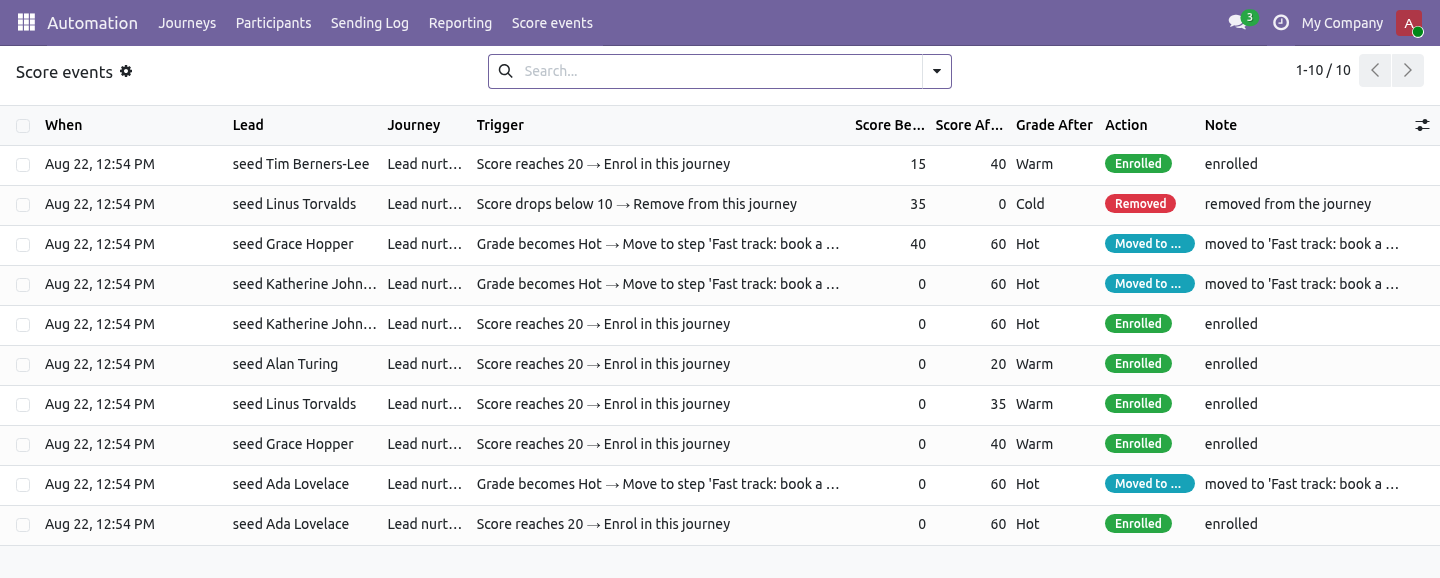
The log. Marketing Automation ▸ Score events: one row per firing - lead, journey, trigger, score before and after, grade before and after, the action, the participant, and a note (enrolled, moved to 'Fast track', not enrolled: already finished or left, …). The lead shows Journeys and Score events buttons; the journey shows Score events; each trigger shows how often it fired. A failing trigger never stops the others: the error is logged, the event is not written, and the lead stays a candidate for the next run.
Technical notes Uses Marketing Automation 1.9.0's _enroll_records(records, rejoin=) and the participant's _schedule(step); Lead Scoring's stored lead_score / lead_grade_id. Nothing is copied. Three fields on crm.lead: score seen, grade seen, evaluated. Community only.
No Enterprise module, no external service. The complete manual is at docs dot bambooforge dot dev, the demo database is linked from the store page, and support answers within twenty-four hours. Links are in the description.
Transcript of the walkthrough (Odoo 18)
Marketing Automation Suite: Lead Score Journeys. Marketing automation driven by lead score: crossing a threshold enrols a lead, removes it, or moves it to another branch, with a reason logged. An add-on for BambooForge Lead Scoring and BambooForge Marketing Automation (17.0). A lead score that crosses a line moves the lead: into a journey, out of one, or onto another branch - with a log that says why.
On a journey whose audience is Leads/Opportunities, a Score triggers tab. Each trigger is one line and one action: In the next few minutes: marketing automation suite: lead score journeys, then triggers, then crossings, not levels, then when it runs, then the log. Then what this app deliberately does not do, so you can tell before you buy whether it fits. Everything lives under Score events.
Marketing Automation Suite: Lead Score Journeys. An add-on for BambooForge Lead Scoring and BambooForge Marketing Automation (17.0). A lead score that crosses a line moves the lead: into a journey, out of one, or onto another branch - with a log that says why. Triggers.
On a journey whose audience is Leads/Opportunities, a Score triggers tab. Each trigger is one line and one action: Score reaches N - fires when the score goes from below N to N or above. Score drops below N - fires when the score goes from N or above to below N. Grade becomes X - fires when the grade changes to X.
Enrol in this journey - the lead joins at the first step. Remove from this journey - the running participant is exited. Move to step - the running participant is put on the chosen step (due after that step's delay). A lead not yet in the journey is enrolled first.
This is how a lead that goes Hot jumps to the fast-track branch of the same journey. Once per lead (default on) - fire once per lead, ever. Off: every time the line is crossed. Enrol again - enrol a lead who already finished or left this journey.
Off: only leads never in the journey are enrolled (unless the journey itself allows rejoin and the lead is still running). Crossings, not levels. Every lead remembers the score and grade the triggers last saw. A trigger fires on the crossing between last seen and now - a lead sitting at 80 does not re-enter reaches 50 every ten minutes.
A lead seen for the first time can reach a line and can become a grade, but can never drop below one: a brand-new lead at 0 does not "drop below 10" on its first day. When it runs A cron every 10 minutes, on the leads whose score or grade moved since last seen - found with one SQL pass, not a scan of the table. Evaluate now on the journey's triggers tab. Evaluate score triggers on a lead (for the rep who does not want to wait).
The log. Marketing Automation ▸ Score events: one row per firing - lead, journey, trigger, score before and after, grade before and after, the action, the participant, and a note (enrolled, moved to 'Fast track', not enrolled: already finished or left, …). The lead shows Journeys and Score events buttons; the journey shows Score events; each trigger shows how often it fired. A failing trigger never stops the others: the error is logged, the event is not written, and the lead stays a candidate for the next run.
Technical notes Uses Marketing Automation 1.9.0's _enroll_records(records, rejoin=) and the participant's _schedule(step); Lead Scoring's stored lead_score / lead_grade_id. Nothing is copied. Three fields on crm.lead: score seen, grade seen, evaluated. Community only.
No Enterprise module, no external service. The complete manual is at docs dot bambooforge dot dev, the demo database is linked from the store page, and support answers within twenty-four hours. Links are in the description.
Transcript of the walkthrough (Odoo 17)
Marketing Automation Suite: Lead Score Journeys. Marketing automation driven by lead score: crossing a threshold enrols a lead, removes it, or moves it to another branch, with a reason logged. An add-on for BambooForge Lead Scoring and BambooForge Marketing Automation (17.0). A lead score that crosses a line moves the lead: into a journey, out of one, or onto another branch - with a log that says why.
On a journey whose audience is Leads/Opportunities, a Score triggers tab. Each trigger is one line and one action: In the next few minutes: marketing automation suite: lead score journeys, then triggers, then crossings, not levels, then when it runs, then the log. Then what this app deliberately does not do, so you can tell before you buy whether it fits. Everything lives under Score events.
Marketing Automation Suite: Lead Score Journeys. An add-on for BambooForge Lead Scoring and BambooForge Marketing Automation (17.0). A lead score that crosses a line moves the lead: into a journey, out of one, or onto another branch - with a log that says why. Triggers.
On a journey whose audience is Leads/Opportunities, a Score triggers tab. Each trigger is one line and one action: Score reaches N - fires when the score goes from below N to N or above. Score drops below N - fires when the score goes from N or above to below N. Grade becomes X - fires when the grade changes to X.
Enrol in this journey - the lead joins at the first step. Remove from this journey - the running participant is exited. Move to step - the running participant is put on the chosen step (due after that step's delay). A lead not yet in the journey is enrolled first.
This is how a lead that goes Hot jumps to the fast-track branch of the same journey. Once per lead (default on) - fire once per lead, ever. Off: every time the line is crossed. Enrol again - enrol a lead who already finished or left this journey.
Off: only leads never in the journey are enrolled (unless the journey itself allows rejoin and the lead is still running). Crossings, not levels. Every lead remembers the score and grade the triggers last saw. A trigger fires on the crossing between last seen and now - a lead sitting at 80 does not re-enter reaches 50 every ten minutes.
A lead seen for the first time can reach a line and can become a grade, but can never drop below one: a brand-new lead at 0 does not "drop below 10" on its first day. When it runs A cron every 10 minutes, on the leads whose score or grade moved since last seen - found with one SQL pass, not a scan of the table. Evaluate now on the journey's triggers tab. Evaluate score triggers on a lead (for the rep who does not want to wait).
The log. Marketing Automation ▸ Score events: one row per firing - lead, journey, trigger, score before and after, grade before and after, the action, the participant, and a note (enrolled, moved to 'Fast track', not enrolled: already finished or left, …). The lead shows Journeys and Score events buttons; the journey shows Score events; each trigger shows how often it fired. A failing trigger never stops the others: the error is logged, the event is not written, and the lead stays a candidate for the next run.
Technical notes Uses Marketing Automation 1.9.0's _enroll_records(records, rejoin=) and the participant's _schedule(step); Lead Scoring's stored lead_score / lead_grade_id. Nothing is copied. Three fields on crm.lead: score seen, grade seen, evaluated. Community only.
No Enterprise module, no external service. The complete manual is at docs dot bambooforge dot dev, the demo database is linked from the store page, and support answers within twenty-four hours. Links are in the description.
Transcript of the walkthrough (Odoo 16)
Marketing Automation Suite: Lead Score Journeys. Marketing automation driven by lead score: crossing a threshold enrols a lead, removes it, or moves it to another branch, with a reason logged. An add-on for BambooForge Lead Scoring and BambooForge Marketing Automation (17.0). A lead score that crosses a line moves the lead: into a journey, out of one, or onto another branch - with a log that says why.
On a journey whose audience is Leads/Opportunities, a Score triggers tab. Each trigger is one line and one action: In the next few minutes: marketing automation suite: lead score journeys, then triggers, then crossings, not levels, then when it runs, then the log. Then what this app deliberately does not do, so you can tell before you buy whether it fits. Everything lives under Score events.
Marketing Automation Suite: Lead Score Journeys. An add-on for BambooForge Lead Scoring and BambooForge Marketing Automation (17.0). A lead score that crosses a line moves the lead: into a journey, out of one, or onto another branch - with a log that says why. Triggers.
On a journey whose audience is Leads/Opportunities, a Score triggers tab. Each trigger is one line and one action: Score reaches N - fires when the score goes from below N to N or above. Score drops below N - fires when the score goes from N or above to below N. Grade becomes X - fires when the grade changes to X.
Enrol in this journey - the lead joins at the first step. Remove from this journey - the running participant is exited. Move to step - the running participant is put on the chosen step (due after that step's delay). A lead not yet in the journey is enrolled first.
This is how a lead that goes Hot jumps to the fast-track branch of the same journey. Once per lead (default on) - fire once per lead, ever. Off: every time the line is crossed. Enrol again - enrol a lead who already finished or left this journey.
Off: only leads never in the journey are enrolled (unless the journey itself allows rejoin and the lead is still running). Crossings, not levels. Every lead remembers the score and grade the triggers last saw. A trigger fires on the crossing between last seen and now - a lead sitting at 80 does not re-enter reaches 50 every ten minutes.
A lead seen for the first time can reach a line and can become a grade, but can never drop below one: a brand-new lead at 0 does not "drop below 10" on its first day. When it runs A cron every 10 minutes, on the leads whose score or grade moved since last seen - found with one SQL pass, not a scan of the table. Evaluate now on the journey's triggers tab. Evaluate score triggers on a lead (for the rep who does not want to wait).
The log. Marketing Automation ▸ Score events: one row per firing - lead, journey, trigger, score before and after, grade before and after, the action, the participant, and a note (enrolled, moved to 'Fast track', not enrolled: already finished or left, …). The lead shows Journeys and Score events buttons; the journey shows Score events; each trigger shows how often it fired. A failing trigger never stops the others: the error is logged, the event is not written, and the lead stays a candidate for the next run.
Technical notes Uses Marketing Automation 1.9.0's _enroll_records(records, rejoin=) and the participant's _schedule(step); Lead Scoring's stored lead_score / lead_grade_id. Nothing is copied. Three fields on crm.lead: score seen, grade seen, evaluated. Community only.
No Enterprise module, no external service. The complete manual is at docs dot bambooforge dot dev, the demo database is linked from the store page, and support answers within twenty-four hours. Links are in the description.
Key facts
- What it is
- Marketing automation driven by lead score: crossing a threshold enrols a lead, removes it, or moves it to another branch, with a reason logged.
- For
- Marketing
- Odoo versions
- 16.0, 17.0, 18.0, 19.0, 20.0 - Community and Enterprise
- Runs on
- Odoo.sh or Odoo you host yourself - not Odoo Online, which accepts no third-party apps
- Price
- 287 EUR, one-time, on the Odoo Apps Store
- Technical name
- bambooforge_ma_scoring
- Not for
- Said before you buy, because it is the half that decides whether the app fits:; Re-enter a lead sitting on a line every run: triggers fire on the crossing between last seen and now.; Let a brand-new lead drop below a line on its first day.
- Live demo
- https://demo20.bambooforge.dev/odoo/action-bambooforge_ma_scoring.action_bf_journey_score_event
- Manual last updated
- 2026-10-15
Marketing Automation All in One with Lead Scoring
An add-on for BambooForge Lead Scoring and BambooForge Marketing Automation (17.0). A lead score that crosses a line moves the lead: into a journey, out of one, or onto another branch - with a log that says why.
Triggers
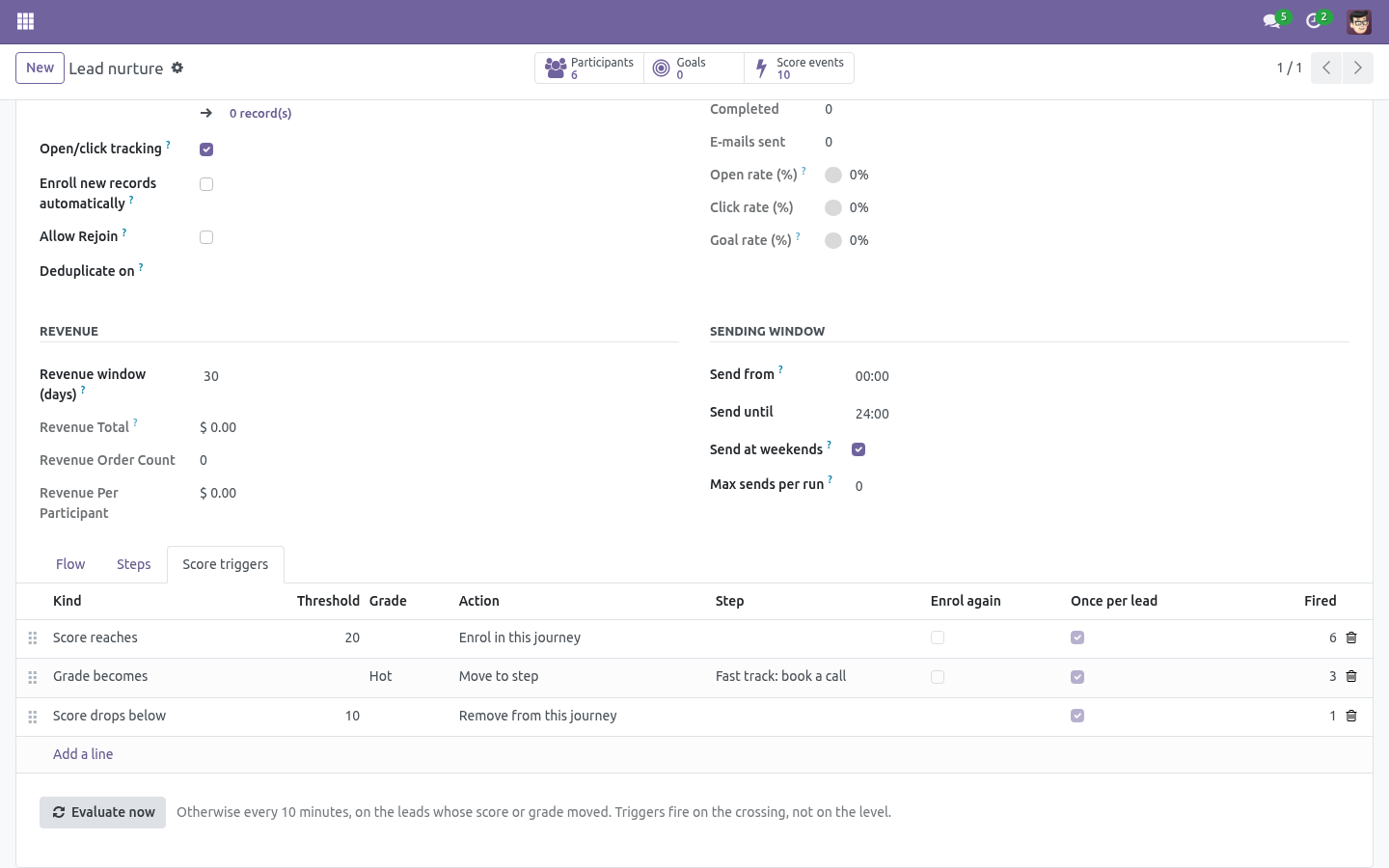
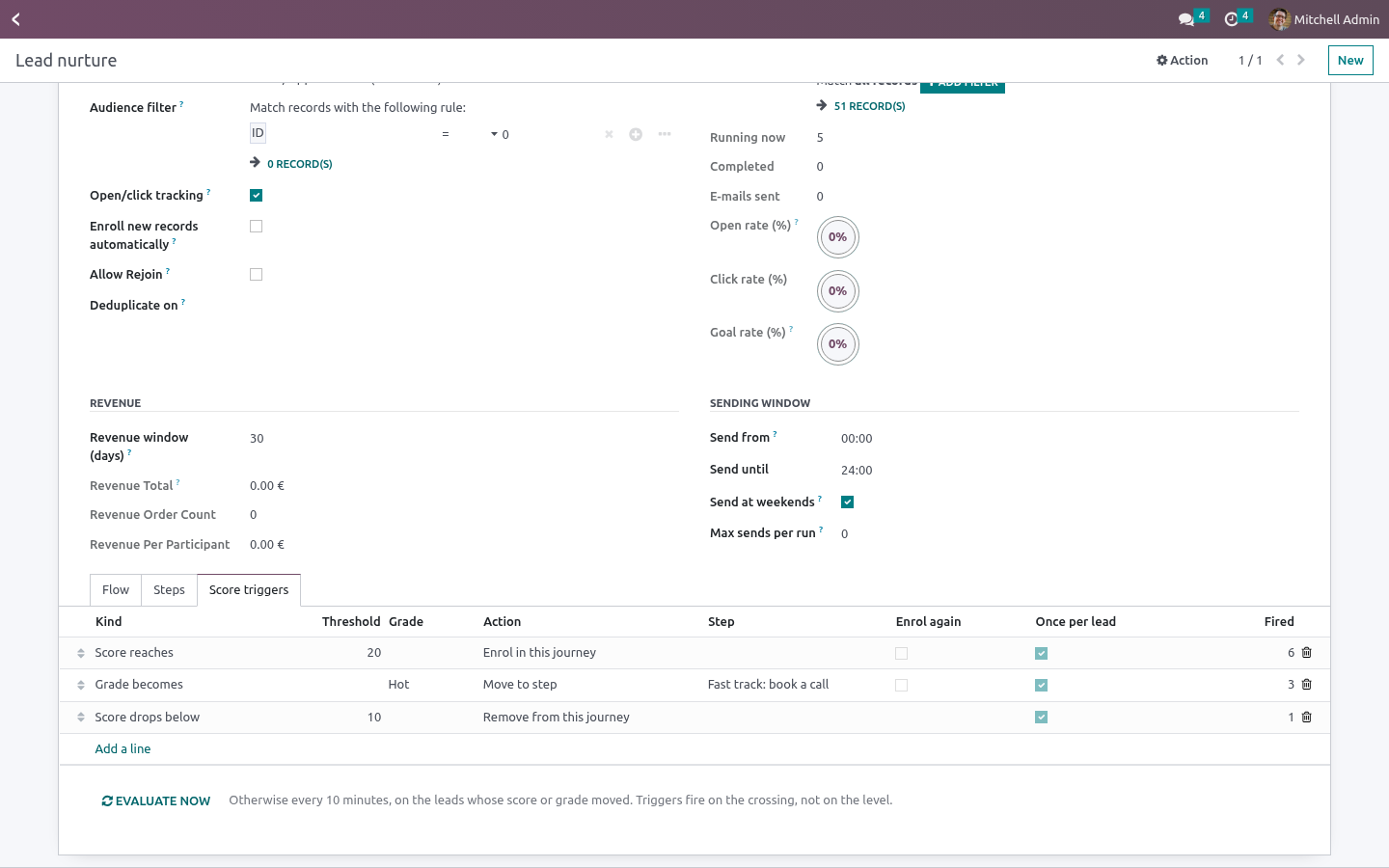
On a journey whose audience is Leads/Opportunities, a Score triggers tab. Each trigger is one line and one action:
Score reaches N - fires when the score goes from below N to N or above.
Score drops below N - fires when the score goes from N or above to below N.
Grade becomes X - fires when the grade changes to X.
and does one of:
Enrol in this journey - the lead joins at the first step.
Remove from this journey - the running participant is exited.
Move to step - the running participant is put on the chosen step (due after that step's delay). A lead not yet in the journey is enrolled first. This is how a lead that goes Hot jumps to the fast-track branch of the same journey.
Two switches per trigger:
Once per lead (default on) - fire once per lead, ever. Off: every time the line is crossed.
Enrol again - enrol a lead who already finished or left this journey. Off: only leads never in the journey are enrolled (unless the journey itself allows rejoin and the lead is still running).
Crossings, not levels
Every lead remembers the score and grade the triggers last saw. A trigger fires on the crossing between last seen and now - a lead sitting at 80 does not re-enter reaches 50 every ten minutes. A lead seen for the first time can reach a line and can become a grade, but can never drop below one: a brand-new lead at 0 does not "drop below 10" on its first day.
When it runs
A cron every 10 minutes, on the leads whose score or grade moved since last seen - found with one SQL pass, not a scan of the table.
Evaluate now on the journey's triggers tab.
Evaluate score triggers on a lead (for the rep who does not want to wait).
The log
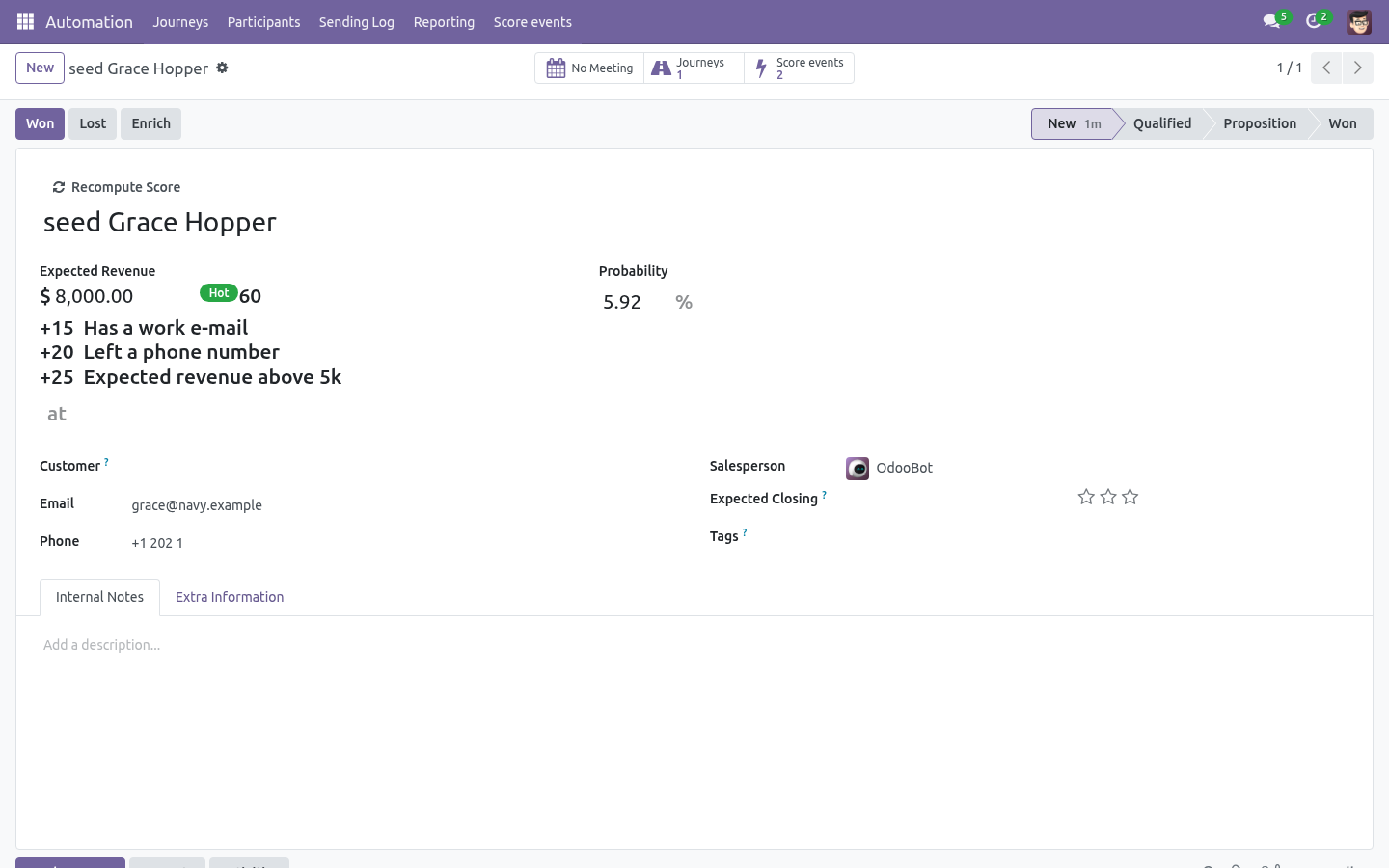
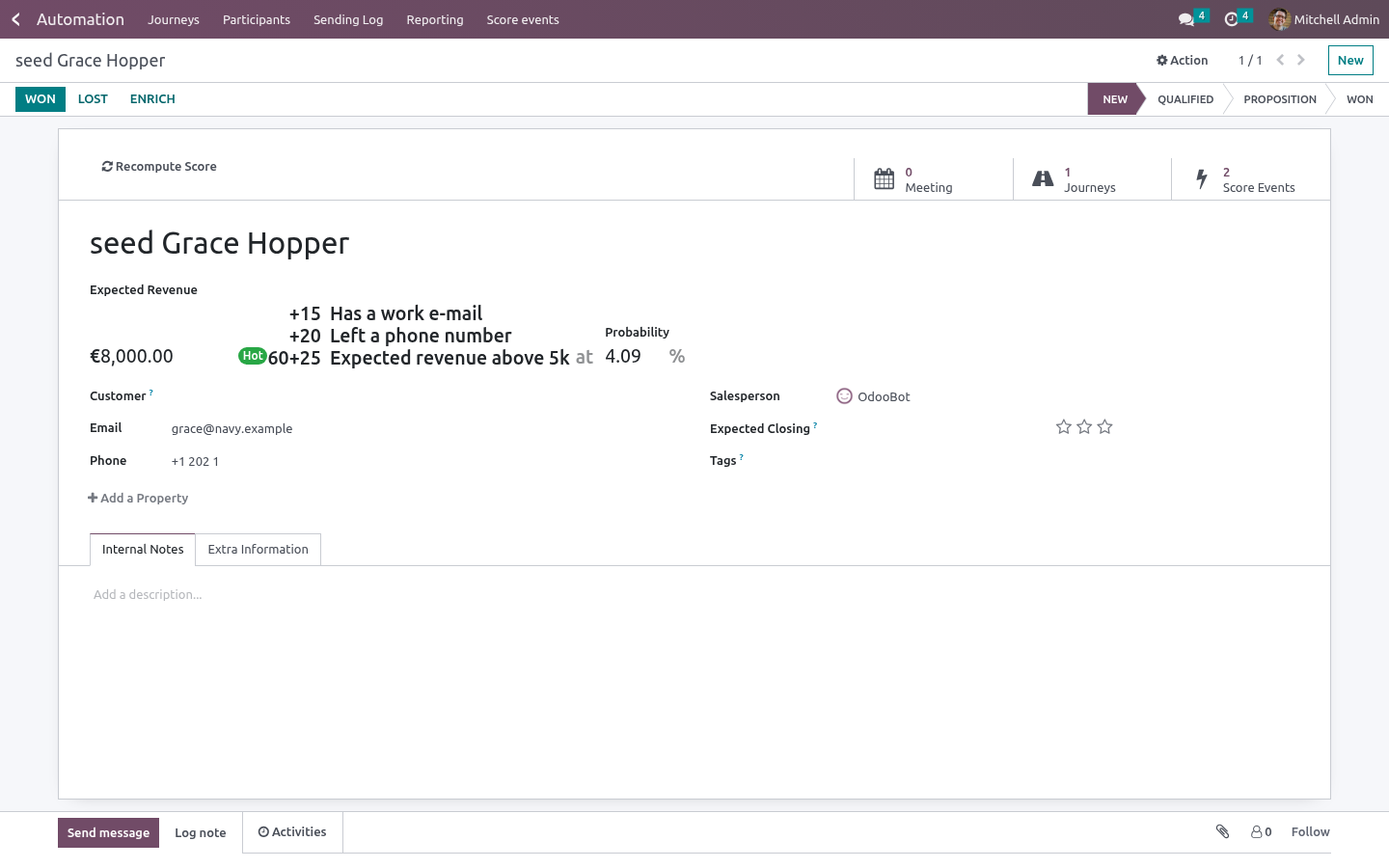
Marketing Automation ▸ Score events: one row per firing - lead, journey, trigger, score before and after, grade before and after, the action, the participant, and a note (enrolled, moved to 'Fast track', not enrolled: already finished or left, …). The lead shows Journeys and Score events buttons; the journey shows Score events; each trigger shows how often it fired.
A failing trigger never stops the others: the error is logged, the event is not written, and the lead stays a candidate for the next run.
Technical notes
Uses Marketing Automation 1.9.0's _enroll_records(records, rejoin=) and the participant's _schedule(step); Lead Scoring's stored lead_score / lead_grade_id. Nothing is copied.
Three fields on crm.lead: score seen, grade seen, evaluated.
Community only. No Enterprise module, no external service.
How we make sure it works
Before every release, 20 automated checks run against this app on Odoo 16, 17, 18, 19 and 20. Among them:
Without rejoin a finished lead is not enrolled again.
Enrol on a running lead is a no op with a note.
Jump on a lead not in the journey enrols first.
Threshold equal to the score is reached not dropped.
A stopped journey fires nothing but marks seen.
The complete list is in the source you receive.
What it does not do
Said before you buy, because it is the half that decides whether the app fits:
Re-enter a lead sitting on a line every run: triggers fire on the crossing between last seen and now.
Let a brand-new lead drop below a line on its first day.
Install
Copy bambooforge_ma_scoring into your addons path and update the app list, or install the ZIP from the Odoo Apps Store.
Install Marketing Automation Suite: Lead Score Journeys.
Open Score events.
Questions people ask
- Which Odoo versions does it run on?
Odoo 16.0, 17.0, 18.0, 19.0, 20.0, on the series you buy it for; each series is its own listing.
- Community or Enterprise?
Both. It needs no Enterprise app.
- What does it need?
The standard Web; lead scoring, marketing automation (BambooForge) must be installed first app. No extra Python package.
- Where does it show up?
Under the Score events menu.
- Does anything leave my server?
No. It makes no call outside your Odoo server: no telemetry, no licence check, no third-party service.
- What happens if I uninstall it?
Odoo drops the app's own tables and fields; the standard records it worked on (contacts, orders, products) stay as they are.