 BambooForge Labs
Marketing Automation All in One with SMS and WhatsApp
Marketing automation over SMS and WhatsApp: journey steps sent through your own Twilio or Meta account, delivery status back, STOP honoured.
Available for Odoo 16.0, Odoo 17.0, Odoo 18.0, Odoo 19.0, Odoo 20.0. Technical name bambooforge_ma_messaging.
Transcript of the walkthrough (Odoo 20)
Marketing Automation All in One with SMS and WhatsApp. Marketing automation over SMS and WhatsApp: journey steps sent through your own Twilio or Meta account, delivery status back, STOP honoured. Said before you buy, because it is the half that decides whether the app fits: In the next few minutes: marketing automation all in one with sms and whatsapp, then gateways, then callbacks, then steps, then the log. Then what this app deliberately does not do, so you can tell before you buy whether it fits.
Everything lives under Gateways then Messages. 1. Copy bambooforge_ma_messaging into your addons path and update the app list, or install the ZIP from the Odoo Apps Store. 2.
Install Marketing Automation Suite: SMS & WhatsApp. 3. Open Gateways - its menus are Messages. Marketing Automation All in One with SMS and WhatsApp.
An add-on for BambooForge Marketing Automation (17.0). Two journey step types that send SMS and WhatsApp through Twilio or Meta's WhatsApp Cloud API with your own account, plus a Sandbox to rehearse on; a message log with delivery status coming back; STOP honoured. Gateways. Marketing Automation ▸ Gateways.
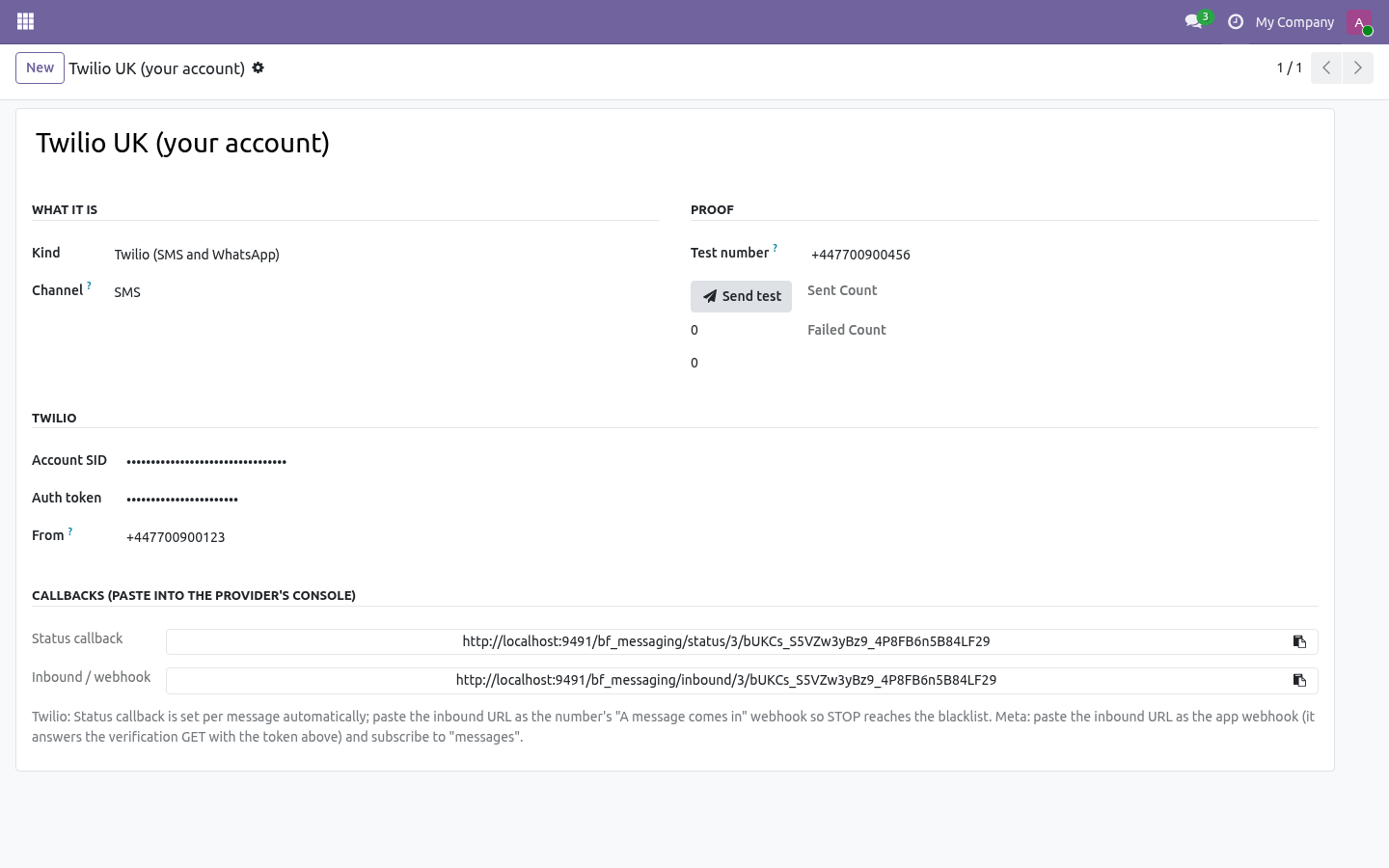
One record per sender: Sandbox - writes every send to the log with a fake reference; nothing leaves the server. Use it to rehearse a journey. Twilio - Account SID, auth token, and From: a Twilio number in E.164, a Messaging Service SID (MG…), or your approved WhatsApp number. Channel SMS or WhatsApp (a Twilio account doing both is two gateway records).
Meta WhatsApp Cloud API - Phone number ID and a permanent access token. WhatsApp only. Send test posts one message to the Test number and writes it to the log: the way to prove a gateway before it meets a journey. Callbacks.
Each gateway shows two URLs (with a secret token in the path): Status callback - Twilio: attached to every message automatically. Meta: statuses arrive on the webhook below. Inbound / webhook - Twilio: paste as the number's "A message comes in" webhook. Meta: paste as the app's webhook URL; it answers Meta's verification GET with the Webhook verify token shown on the record; subscribe to messages.
Steps. What happens on a participant: the number is taken from mobile then phone (19.0 dropped res.partner.mobile, so there it is simply phone); no number → skipped with a note; a blacklisted number → the participant exits the journey (STOP is regulatory); otherwise the message is rendered and sent, the send is logged, a trace is written, the journey advances. The sending window holds these steps like e-mails. Run Test writes "would send SMS via …" and sends nothing.
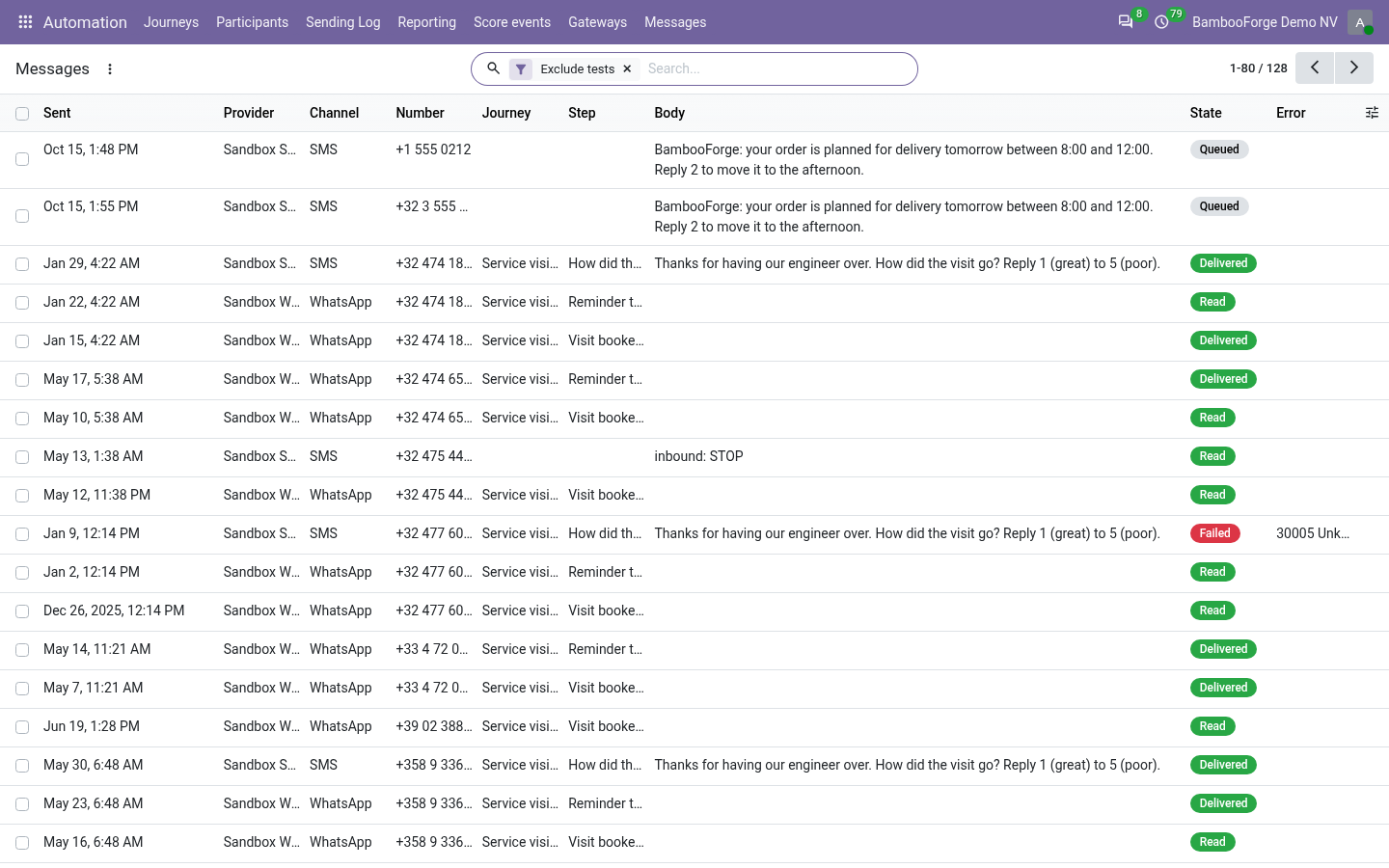
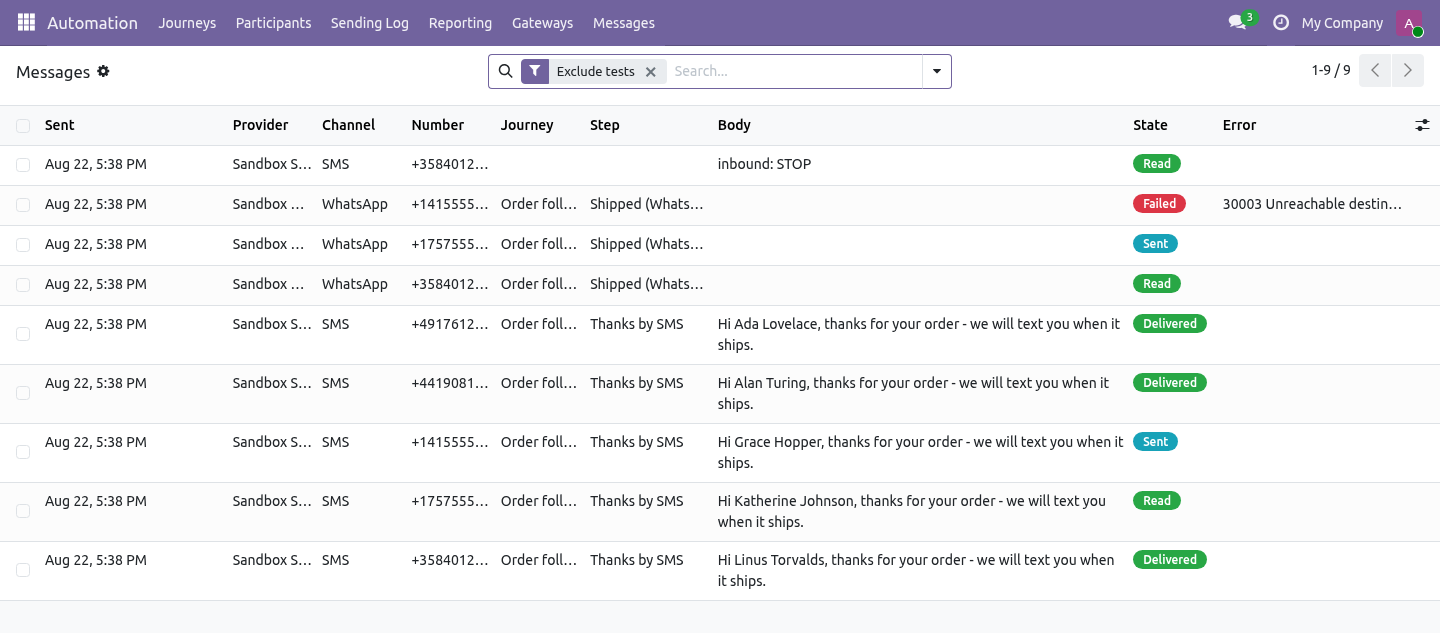
Send SMS (gateway) - gateway + Message (inline placeholders: Hi {{ object.name }}). The log. Marketing Automation ▸ Messages: gateway, number, journey, step, body, state (queued → sent → delivered → read, or failed with the provider's error), reference, last status time. Statuses never go backwards (a late "sent" after "delivered" is ignored).
Tests sent with the button are flagged and hidden by default. Retention. The message log is swept by Odoo's daily vacuum: rows older than bambooforge_ma_messaging.log_retention_days (a system parameter, 365 by default) are deleted. Set it to 0 to keep everything - some regulators ask for that, and then it is a decision rather than an oversight.
STOP. An inbound STOP (also STOPALL, UNSUBSCRIBE, CANCEL, END, QUIT) on either platform adds the number to Odoo's phone blacklist (phone_validation installed) and is logged; the next gateway step for that number exits the participant. Honest about proof. Twilio and Meta were implemented against their published REST contracts and are exercised by this module's tests against recorded stubs.
The screenshots and the video run on the Sandbox gateway. Live delivery is proven on your account with Send test; no third-party credentials were used to build this module, and none are shipped. Technical notes Uses Marketing Automation 1.10.0's hooks: _messaging_step_types (sending window), _run_step_<type> dispatch, _dry_run_label. Python dependency: requests.
Community only. The external services are the ones you already pay for. How we make sure it works. Before every release, 33 automated checks run against this app on Odoo 16, 17, 18, 19 and 20.
Among them: A gateway in use cannot be deleted. Dry run names the gateway and sends nothing. A normal reply is not a stop. No number is refused before any call.
No number is skipped with a note. The complete list is in the source you receive. The complete manual is at docs dot bambooforge dot dev, the demo database is linked from the store page, and support answers within twenty-four hours. Links are in the description.
Transcript of the walkthrough (Odoo 19)
Marketing Automation Suite: SMS & WhatsApp. Marketing automation over SMS and WhatsApp: journey steps sent through your own Twilio or Meta account, delivery status back, STOP honoured. An add-on for BambooForge Marketing Automation (17.0). Two journey step types that send SMS and WhatsApp through Twilio or Meta's WhatsApp Cloud API with your own account, plus a Sandbox to rehearse on; a message log with delivery status coming back; STOP honoured.
Marketing Automation ▸ Gateways. One record per sender: In the next few minutes: marketing automation suite: sms & whatsapp, then gateways, then callbacks, then steps, then the log. Then what this app deliberately does not do, so you can tell before you buy whether it fits. Everything lives under Gateways then Messages.
Marketing Automation Suite: SMS & WhatsApp. An add-on for BambooForge Marketing Automation (17.0). Two journey step types that send SMS and WhatsApp through Twilio or Meta's WhatsApp Cloud API with your own account, plus a Sandbox to rehearse on; a message log with delivery status coming back; STOP honoured. Gateways.
Marketing Automation ▸ Gateways. One record per sender: Sandbox - writes every send to the log with a fake reference; nothing leaves the server. Use it to rehearse a journey. Twilio - Account SID, auth token, and From: a Twilio number in E.164, a Messaging Service SID (MG…), or your approved WhatsApp number.
Channel SMS or WhatsApp (a Twilio account doing both is two gateway records). Meta WhatsApp Cloud API - Phone number ID and a permanent access token. WhatsApp only. Send test posts one message to the Test number and writes it to the log: the way to prove a gateway before it meets a journey.
Callbacks. Each gateway shows two URLs (with a secret token in the path): Status callback - Twilio: attached to every message automatically. Meta: statuses arrive on the webhook below. Inbound / webhook - Twilio: paste as the number's "A message comes in" webhook.
Meta: paste as the app's webhook URL; it answers Meta's verification GET with the Webhook verify token shown on the record; subscribe to messages. Steps. What happens on a participant: the number is taken from mobile then phone (19.0 dropped res.partner.mobile, so there it is simply phone); no number → skipped with a note; a blacklisted number → the participant exits the journey (STOP is regulatory); otherwise the message is rendered and sent, the send is logged, a trace is written, the journey advances. The sending window holds these steps like e-mails.
Run Test writes "would send SMS via …" and sends nothing. Send SMS (gateway) - gateway + Message (inline placeholders: Hi {{ object.name }}). The log. Marketing Automation ▸ Messages: gateway, number, journey, step, body, state (queued → sent → delivered → read, or failed with the provider's error), reference, last status time.
Statuses never go backwards (a late "sent" after "delivered" is ignored). Tests sent with the button are flagged and hidden by default. Retention. The message log is swept by Odoo's daily vacuum: rows older than bambooforge_ma_messaging.log_retention_days (a system parameter, 365 by default) are deleted.
Set it to 0 to keep everything - some regulators ask for that, and then it is a decision rather than an oversight. STOP. An inbound STOP (also STOPALL, UNSUBSCRIBE, CANCEL, END, QUIT) on either platform adds the number to Odoo's phone blacklist (phone_validation installed) and is logged; the next gateway step for that number exits the participant. Honest about proof.
Twilio and Meta were implemented against their published REST contracts and are exercised by this module's tests against recorded stubs. The screenshots and the video run on the Sandbox gateway. Live delivery is proven on your account with Send test; no third-party credentials were used to build this module, and none are shipped. Technical notes Uses Marketing Automation 1.10.0's hooks: _messaging_step_types (sending window), _run_step_<type> dispatch, _dry_run_label.
Python dependency: requests. Community only. The external services are the ones you already pay for. The complete manual is at docs dot bambooforge dot dev, the demo database is linked from the store page, and support answers within twenty-four hours.
Links are in the description.
Transcript of the walkthrough (Odoo 18)
Marketing Automation Suite: SMS & WhatsApp. Marketing automation over SMS and WhatsApp: journey steps sent through your own Twilio or Meta account, delivery status back, STOP honoured. An add-on for BambooForge Marketing Automation (17.0). Two journey step types that send SMS and WhatsApp through Twilio or Meta's WhatsApp Cloud API with your own account, plus a Sandbox to rehearse on; a message log with delivery status coming back; STOP honoured.
Marketing Automation ▸ Gateways. One record per sender: In the next few minutes: marketing automation suite: sms & whatsapp, then gateways, then callbacks, then steps, then the log. Then what this app deliberately does not do, so you can tell before you buy whether it fits. Everything lives under Gateways then Messages.
Marketing Automation Suite: SMS & WhatsApp. An add-on for BambooForge Marketing Automation (17.0). Two journey step types that send SMS and WhatsApp through Twilio or Meta's WhatsApp Cloud API with your own account, plus a Sandbox to rehearse on; a message log with delivery status coming back; STOP honoured. Gateways.
Marketing Automation ▸ Gateways. One record per sender: Sandbox - writes every send to the log with a fake reference; nothing leaves the server. Use it to rehearse a journey. Twilio - Account SID, auth token, and From: a Twilio number in E.164, a Messaging Service SID (MG…), or your approved WhatsApp number.
Channel SMS or WhatsApp (a Twilio account doing both is two gateway records). Meta WhatsApp Cloud API - Phone number ID and a permanent access token. WhatsApp only. Send test posts one message to the Test number and writes it to the log: the way to prove a gateway before it meets a journey.
Callbacks. Each gateway shows two URLs (with a secret token in the path): Status callback - Twilio: attached to every message automatically. Meta: statuses arrive on the webhook below. Inbound / webhook - Twilio: paste as the number's "A message comes in" webhook.
Meta: paste as the app's webhook URL; it answers Meta's verification GET with the Webhook verify token shown on the record; subscribe to messages. Steps. What happens on a participant: the number is taken from mobile then phone (19.0 dropped res.partner.mobile, so there it is simply phone); no number → skipped with a note; a blacklisted number → the participant exits the journey (STOP is regulatory); otherwise the message is rendered and sent, the send is logged, a trace is written, the journey advances. The sending window holds these steps like e-mails.
Run Test writes "would send SMS via …" and sends nothing. Send SMS (gateway) - gateway + Message (inline placeholders: Hi {{ object.name }}). The log. Marketing Automation ▸ Messages: gateway, number, journey, step, body, state (queued → sent → delivered → read, or failed with the provider's error), reference, last status time.
Statuses never go backwards (a late "sent" after "delivered" is ignored). Tests sent with the button are flagged and hidden by default. Retention. The message log is swept by Odoo's daily vacuum: rows older than bambooforge_ma_messaging.log_retention_days (a system parameter, 365 by default) are deleted.
Set it to 0 to keep everything - some regulators ask for that, and then it is a decision rather than an oversight. STOP. An inbound STOP (also STOPALL, UNSUBSCRIBE, CANCEL, END, QUIT) on either platform adds the number to Odoo's phone blacklist (phone_validation installed) and is logged; the next gateway step for that number exits the participant. Honest about proof.
Twilio and Meta were implemented against their published REST contracts and are exercised by this module's tests against recorded stubs. The screenshots and the video run on the Sandbox gateway. Live delivery is proven on your account with Send test; no third-party credentials were used to build this module, and none are shipped. Technical notes Uses Marketing Automation 1.10.0's hooks: _messaging_step_types (sending window), _run_step_<type> dispatch, _dry_run_label.
Python dependency: requests. Community only. The external services are the ones you already pay for. The complete manual is at docs dot bambooforge dot dev, the demo database is linked from the store page, and support answers within twenty-four hours.
Links are in the description.
Transcript of the walkthrough (Odoo 17)
Marketing Automation Suite: SMS & WhatsApp. Marketing automation over SMS and WhatsApp: journey steps sent through your own Twilio or Meta account, delivery status back, STOP honoured. An add-on for BambooForge Marketing Automation (17.0). Two journey step types that send SMS and WhatsApp through Twilio or Meta's WhatsApp Cloud API with your own account, plus a Sandbox to rehearse on; a message log with delivery status coming back; STOP honoured.
Marketing Automation ▸ Gateways. One record per sender: In the next few minutes: marketing automation suite: sms & whatsapp, then gateways, then callbacks, then steps, then the log. Then what this app deliberately does not do, so you can tell before you buy whether it fits. Everything lives under Gateways then Messages.
Marketing Automation Suite: SMS & WhatsApp. An add-on for BambooForge Marketing Automation (17.0). Two journey step types that send SMS and WhatsApp through Twilio or Meta's WhatsApp Cloud API with your own account, plus a Sandbox to rehearse on; a message log with delivery status coming back; STOP honoured. Gateways.
Marketing Automation ▸ Gateways. One record per sender: Sandbox - writes every send to the log with a fake reference; nothing leaves the server. Use it to rehearse a journey. Twilio - Account SID, auth token, and From: a Twilio number in E.164, a Messaging Service SID (MG…), or your approved WhatsApp number.
Channel SMS or WhatsApp (a Twilio account doing both is two gateway records). Meta WhatsApp Cloud API - Phone number ID and a permanent access token. WhatsApp only. Send test posts one message to the Test number and writes it to the log: the way to prove a gateway before it meets a journey.
Callbacks. Each gateway shows two URLs (with a secret token in the path): Status callback - Twilio: attached to every message automatically. Meta: statuses arrive on the webhook below. Inbound / webhook - Twilio: paste as the number's "A message comes in" webhook.
Meta: paste as the app's webhook URL; it answers Meta's verification GET with the Webhook verify token shown on the record; subscribe to messages. Steps. What happens on a participant: the number is taken from mobile then phone (19.0 dropped res.partner.mobile, so there it is simply phone); no number → skipped with a note; a blacklisted number → the participant exits the journey (STOP is regulatory); otherwise the message is rendered and sent, the send is logged, a trace is written, the journey advances. The sending window holds these steps like e-mails.
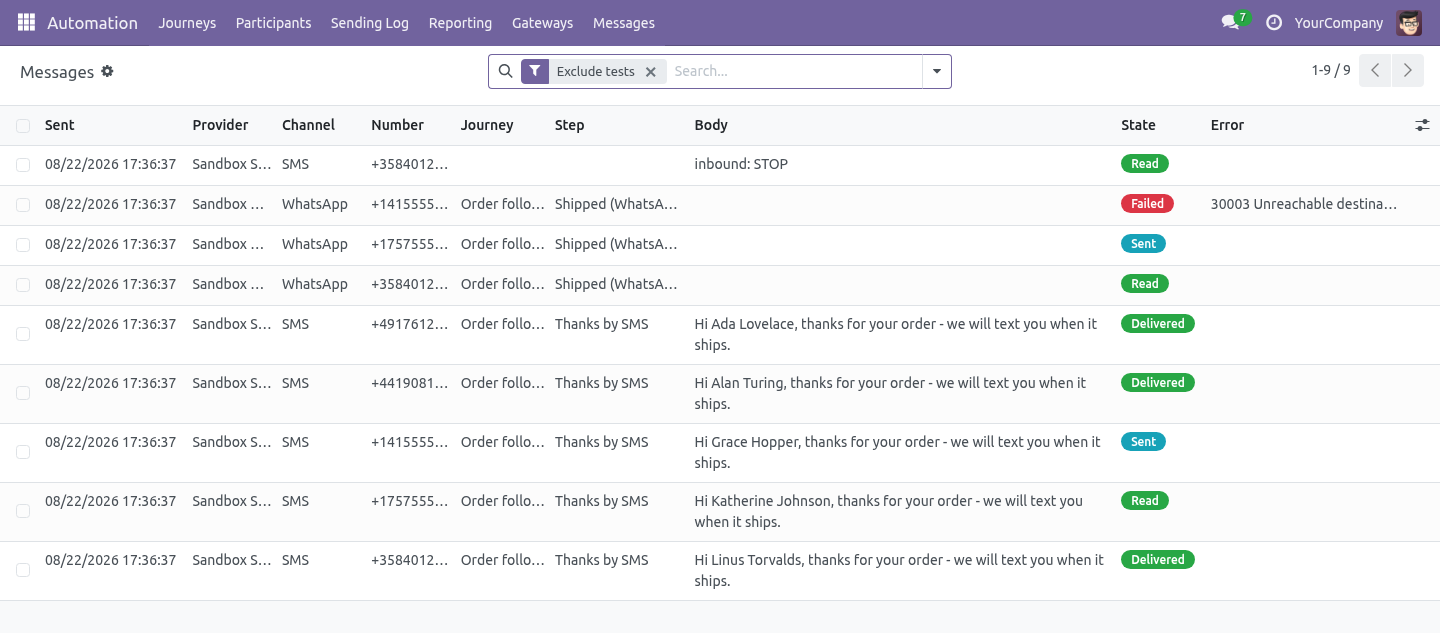
Run Test writes "would send SMS via …" and sends nothing. Send SMS (gateway) - gateway + Message (inline placeholders: Hi {{ object.name }}). The log. Marketing Automation ▸ Messages: gateway, number, journey, step, body, state (queued → sent → delivered → read, or failed with the provider's error), reference, last status time.
Statuses never go backwards (a late "sent" after "delivered" is ignored). Tests sent with the button are flagged and hidden by default. Retention. The message log is swept by Odoo's daily vacuum: rows older than bambooforge_ma_messaging.log_retention_days (a system parameter, 365 by default) are deleted.
Set it to 0 to keep everything - some regulators ask for that, and then it is a decision rather than an oversight. STOP. An inbound STOP (also STOPALL, UNSUBSCRIBE, CANCEL, END, QUIT) on either platform adds the number to Odoo's phone blacklist (phone_validation installed) and is logged; the next gateway step for that number exits the participant. Honest about proof.
Twilio and Meta were implemented against their published REST contracts and are exercised by this module's tests against recorded stubs. The screenshots and the video run on the Sandbox gateway. Live delivery is proven on your account with Send test; no third-party credentials were used to build this module, and none are shipped. Technical notes Uses Marketing Automation 1.10.0's hooks: _messaging_step_types (sending window), _run_step_<type> dispatch, _dry_run_label.
Python dependency: requests. Community only. The external services are the ones you already pay for. The complete manual is at docs dot bambooforge dot dev, the demo database is linked from the store page, and support answers within twenty-four hours.
Links are in the description.
Transcript of the walkthrough (Odoo 16)
Marketing Automation Suite: SMS & WhatsApp. Marketing automation over SMS and WhatsApp: journey steps sent through your own Twilio or Meta account, delivery status back, STOP honoured. An add-on for BambooForge Marketing Automation (17.0). Two journey step types that send SMS and WhatsApp through Twilio or Meta's WhatsApp Cloud API with your own account, plus a Sandbox to rehearse on; a message log with delivery status coming back; STOP honoured.
Marketing Automation ▸ Gateways. One record per sender: In the next few minutes: marketing automation suite: sms & whatsapp, then gateways, then callbacks, then steps, then the log. Then what this app deliberately does not do, so you can tell before you buy whether it fits. Everything lives under Gateways then Messages.
Marketing Automation Suite: SMS & WhatsApp. An add-on for BambooForge Marketing Automation (17.0). Two journey step types that send SMS and WhatsApp through Twilio or Meta's WhatsApp Cloud API with your own account, plus a Sandbox to rehearse on; a message log with delivery status coming back; STOP honoured. Gateways.
Marketing Automation ▸ Gateways. One record per sender: Sandbox - writes every send to the log with a fake reference; nothing leaves the server. Use it to rehearse a journey. Twilio - Account SID, auth token, and From: a Twilio number in E.164, a Messaging Service SID (MG…), or your approved WhatsApp number.
Channel SMS or WhatsApp (a Twilio account doing both is two gateway records). Meta WhatsApp Cloud API - Phone number ID and a permanent access token. WhatsApp only. Send test posts one message to the Test number and writes it to the log: the way to prove a gateway before it meets a journey.
Callbacks. Each gateway shows two URLs (with a secret token in the path): Status callback - Twilio: attached to every message automatically. Meta: statuses arrive on the webhook below. Inbound / webhook - Twilio: paste as the number's "A message comes in" webhook.
Meta: paste as the app's webhook URL; it answers Meta's verification GET with the Webhook verify token shown on the record; subscribe to messages. Steps. What happens on a participant: the number is taken from mobile then phone (19.0 dropped res.partner.mobile, so there it is simply phone); no number → skipped with a note; a blacklisted number → the participant exits the journey (STOP is regulatory); otherwise the message is rendered and sent, the send is logged, a trace is written, the journey advances. The sending window holds these steps like e-mails.
Run Test writes "would send SMS via …" and sends nothing. Send SMS (gateway) - gateway + Message (inline placeholders: Hi {{ object.name }}). The log. Marketing Automation ▸ Messages: gateway, number, journey, step, body, state (queued → sent → delivered → read, or failed with the provider's error), reference, last status time.
Statuses never go backwards (a late "sent" after "delivered" is ignored). Tests sent with the button are flagged and hidden by default. Retention. The message log is swept by Odoo's daily vacuum: rows older than bambooforge_ma_messaging.log_retention_days (a system parameter, 365 by default) are deleted.
Set it to 0 to keep everything - some regulators ask for that, and then it is a decision rather than an oversight. STOP. An inbound STOP (also STOPALL, UNSUBSCRIBE, CANCEL, END, QUIT) on either platform adds the number to Odoo's phone blacklist (phone_validation installed) and is logged; the next gateway step for that number exits the participant. Honest about proof.
Twilio and Meta were implemented against their published REST contracts and are exercised by this module's tests against recorded stubs. The screenshots and the video run on the Sandbox gateway. Live delivery is proven on your account with Send test; no third-party credentials were used to build this module, and none are shipped. Technical notes Uses Marketing Automation 1.10.0's hooks: _messaging_step_types (sending window), _run_step_<type> dispatch, _dry_run_label.
Python dependency: requests. Community only. The external services are the ones you already pay for. The complete manual is at docs dot bambooforge dot dev, the demo database is linked from the store page, and support answers within twenty-four hours.
Links are in the description.
Key facts
- What it is
- Marketing automation over SMS and WhatsApp: journey steps sent through your own Twilio or Meta account, delivery status back, STOP honoured.
- For
- Marketing
- Odoo versions
- 16.0, 17.0, 18.0, 19.0, 20.0 - Community and Enterprise
- Runs on
- Odoo.sh or Odoo you host yourself - not Odoo Online, which accepts no third-party apps
- Price
- 208 EUR, one-time, on the Odoo Apps Store
- Technical name
- bambooforge_ma_messaging
- Not for
- Said before you buy, because it is the half that decides whether the app fits:; Start a WhatsApp conversation without an approved template - only a template can.; Move a status backwards - a late sent after delivered is ignored.
- Live demo
- https://demo20.bambooforge.dev/odoo/action-bambooforge_ma_messaging.action_bf_messaging_provider
- Manual last updated
- 2026-10-15
Marketing Automation All in One with SMS and WhatsApp
An add-on for BambooForge Marketing Automation (17.0). Two journey step types that send SMS and WhatsApp through Twilio or Meta's WhatsApp Cloud API with your own account, plus a Sandbox to rehearse on; a message log with delivery status coming back; STOP honoured.
Gateways
Marketing Automation ▸ Gateways. One record per sender:
Sandbox - writes every send to the log with a fake reference; nothing leaves the server. Use it to rehearse a journey.
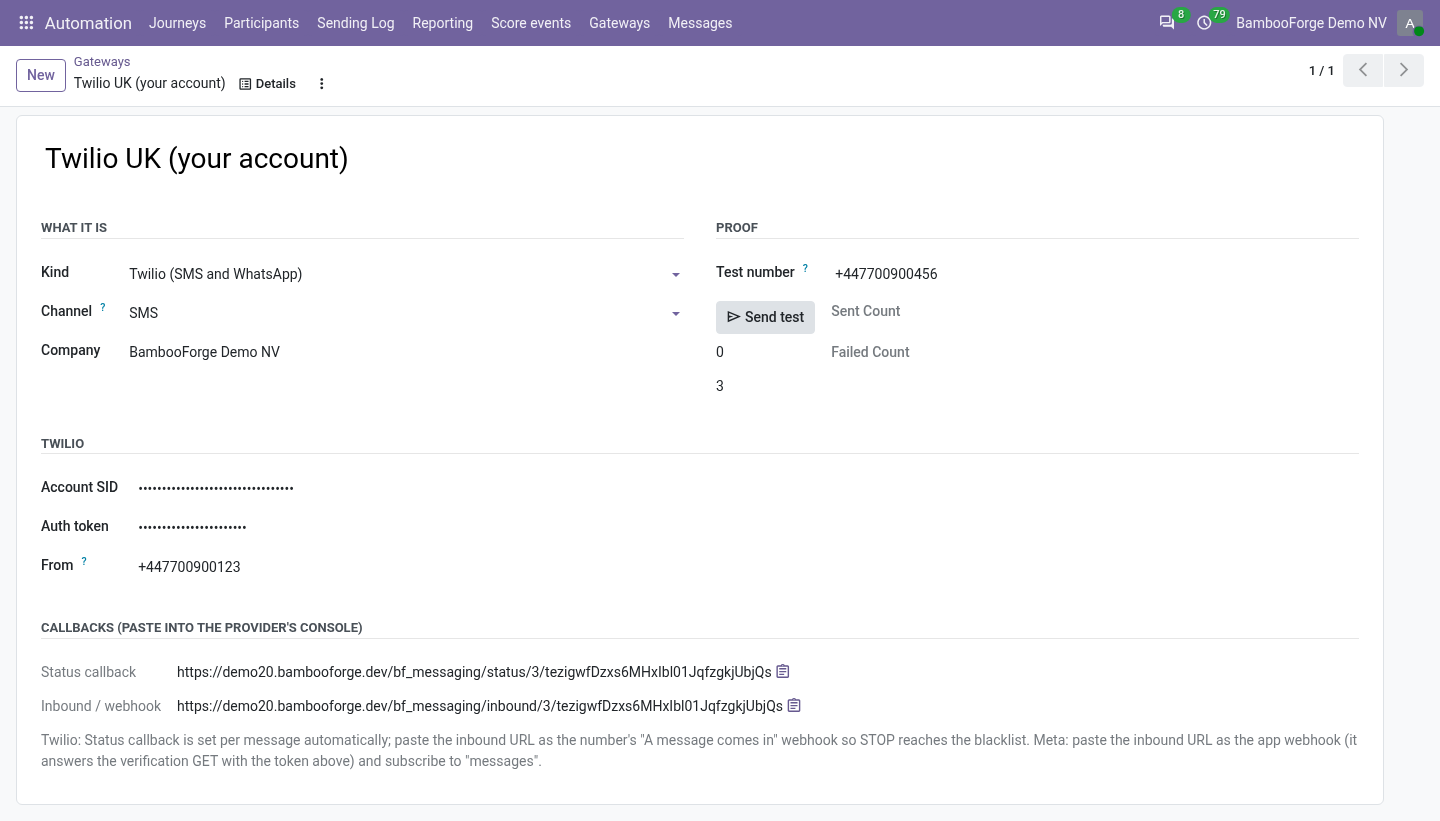
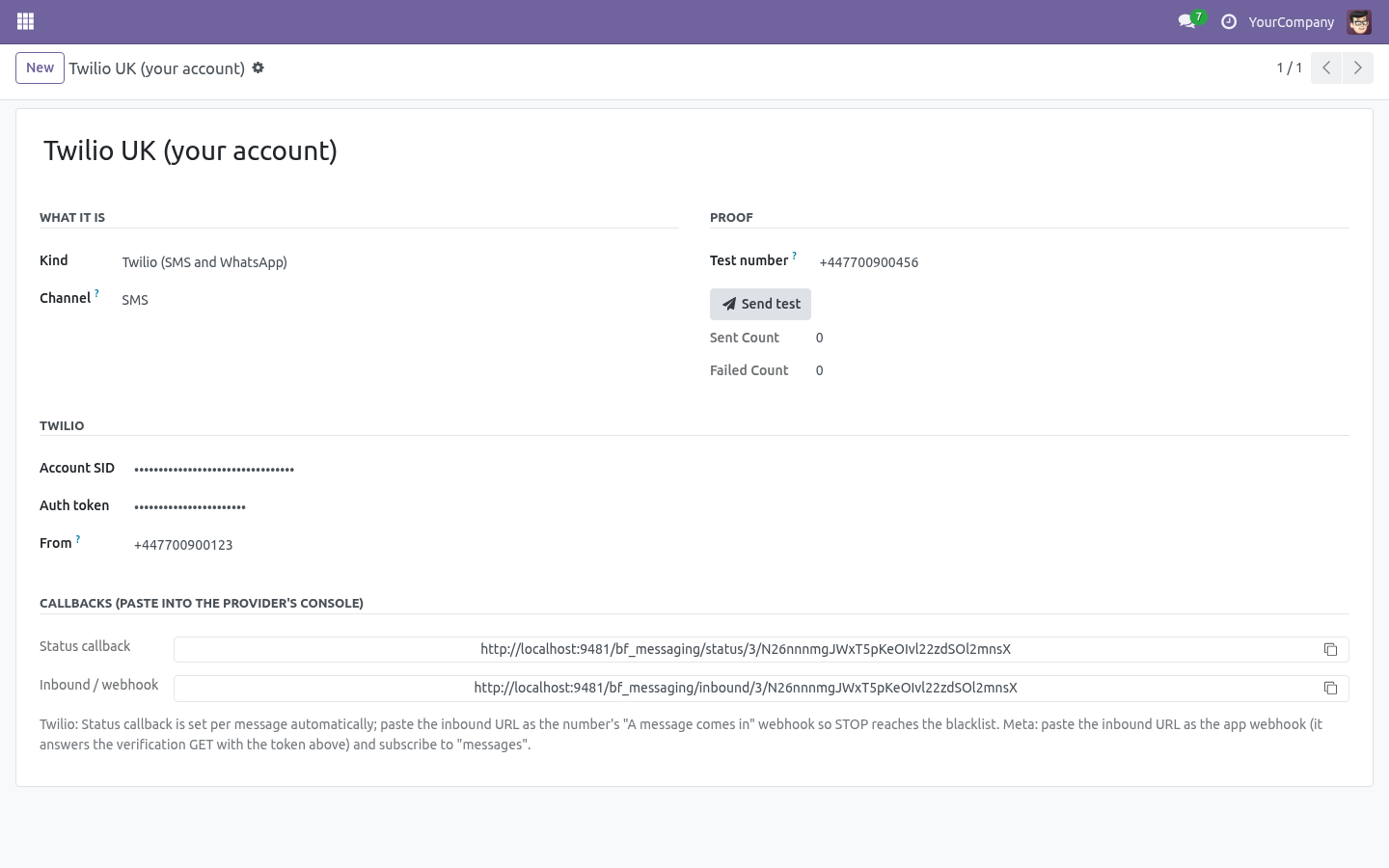
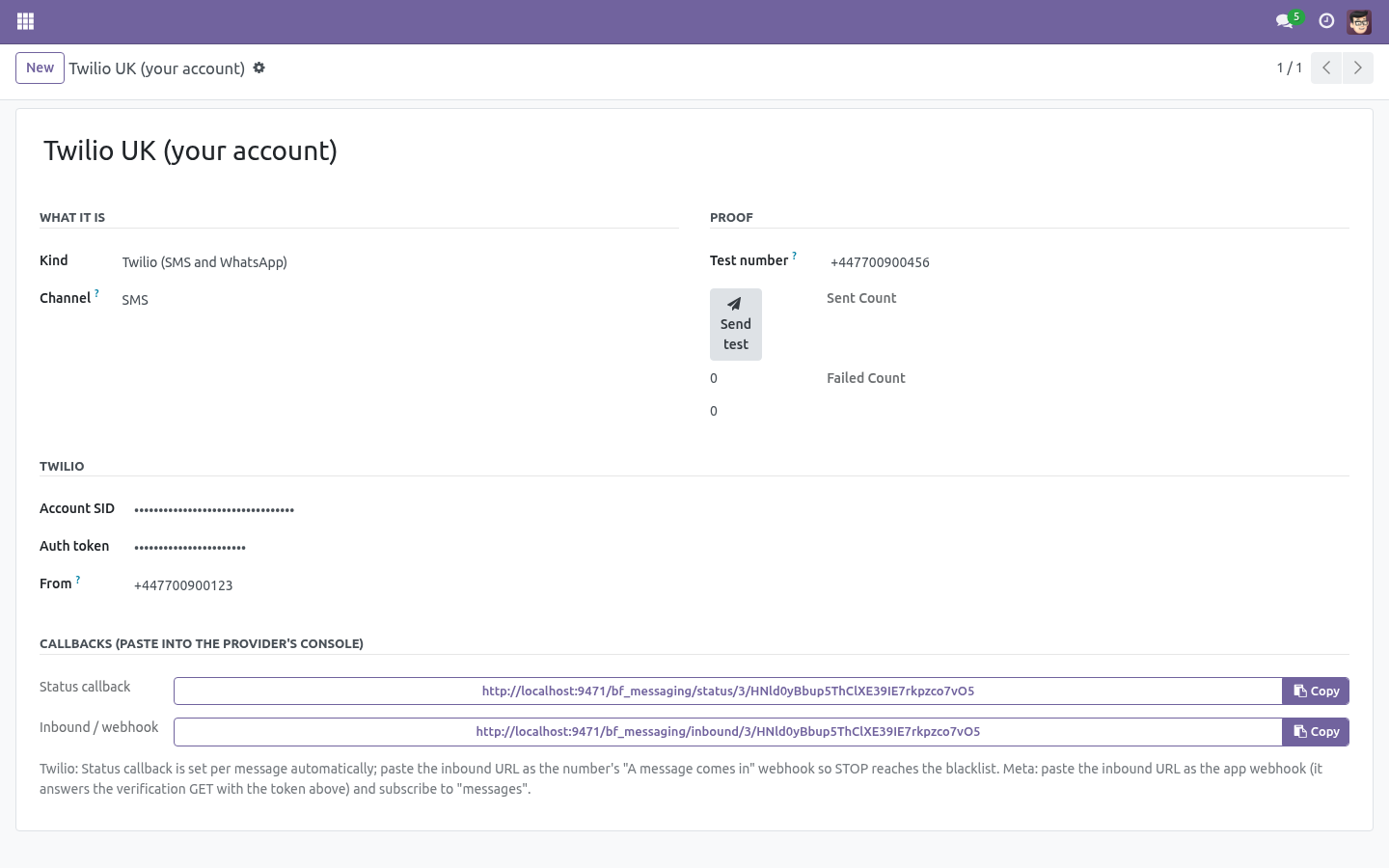
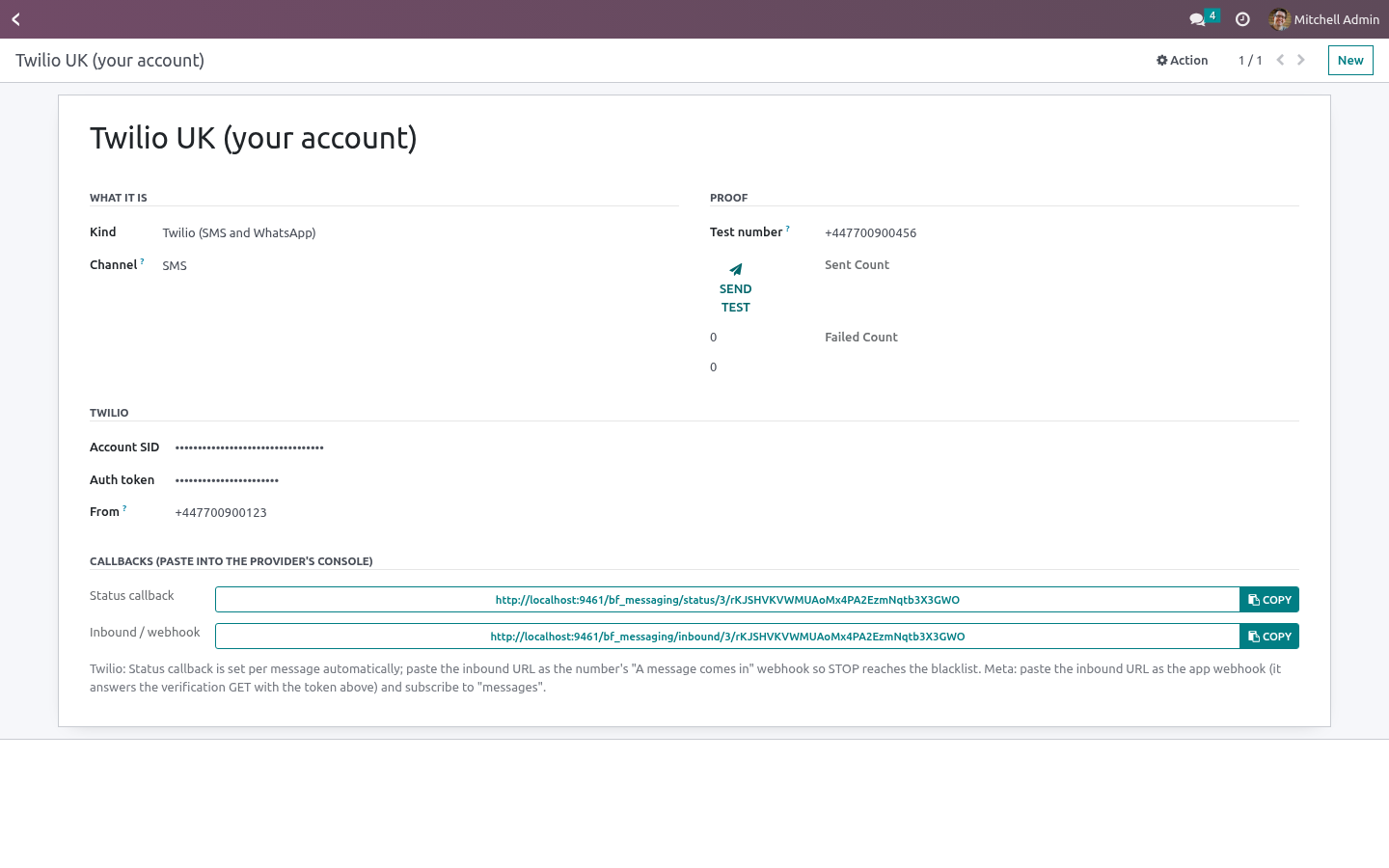
Twilio - Account SID, auth token, and From: a Twilio number in E.164, a Messaging Service SID (MG…), or your approved WhatsApp number. Channel SMS or WhatsApp (a Twilio account doing both is two gateway records).
Meta WhatsApp Cloud API - Phone number ID and a permanent access token. WhatsApp only.
Send test posts one message to the Test number and writes it to the log: the way to prove a gateway before it meets a journey.
Callbacks
Each gateway shows two URLs (with a secret token in the path):
Status callback - Twilio: attached to every message automatically. Meta: statuses arrive on the webhook below.
Inbound / webhook - Twilio: paste as the number's "A message comes in" webhook. Meta: paste as the app's webhook URL; it answers Meta's verification GET with the Webhook verify token shown on the record; subscribe to messages.
Steps
Two new step types on a journey:
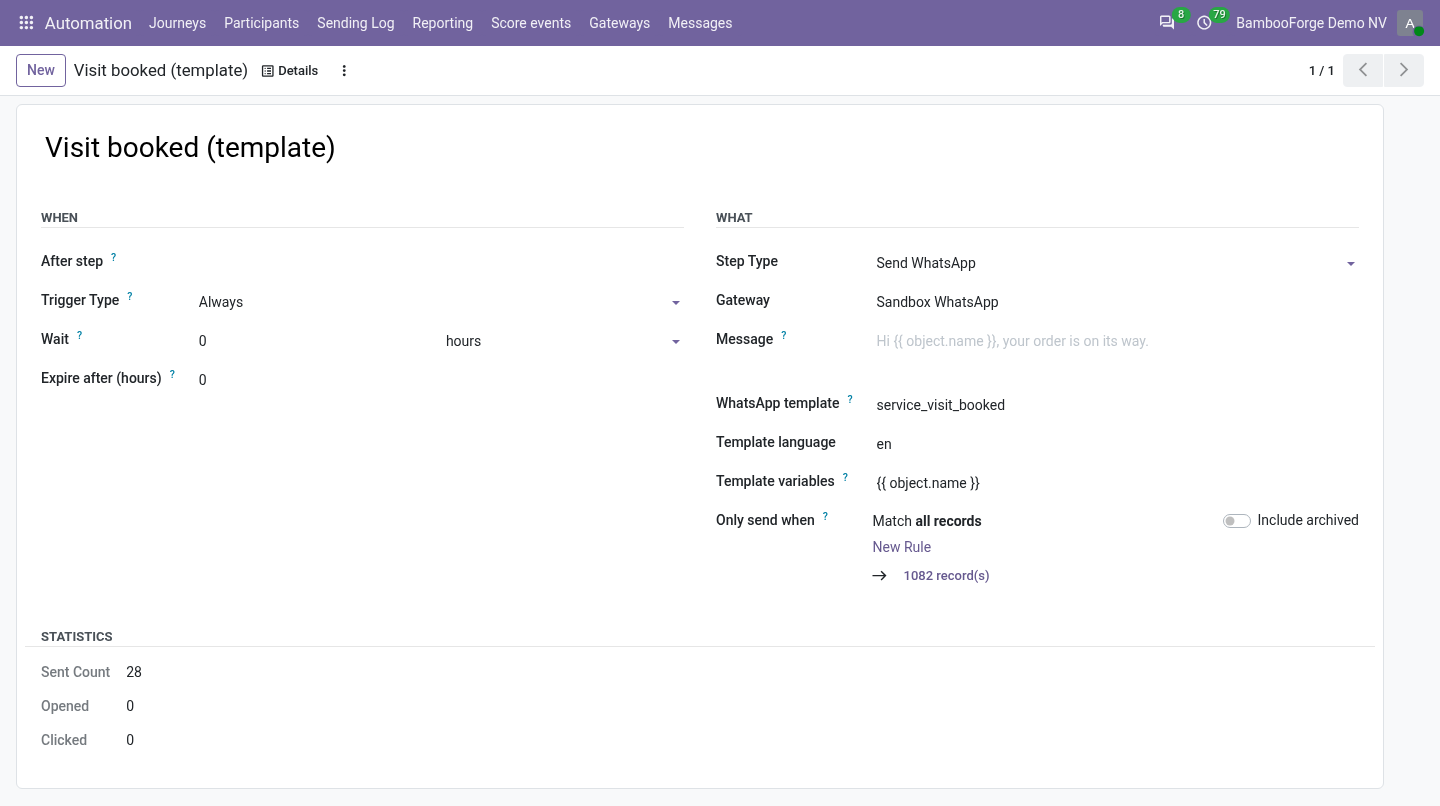
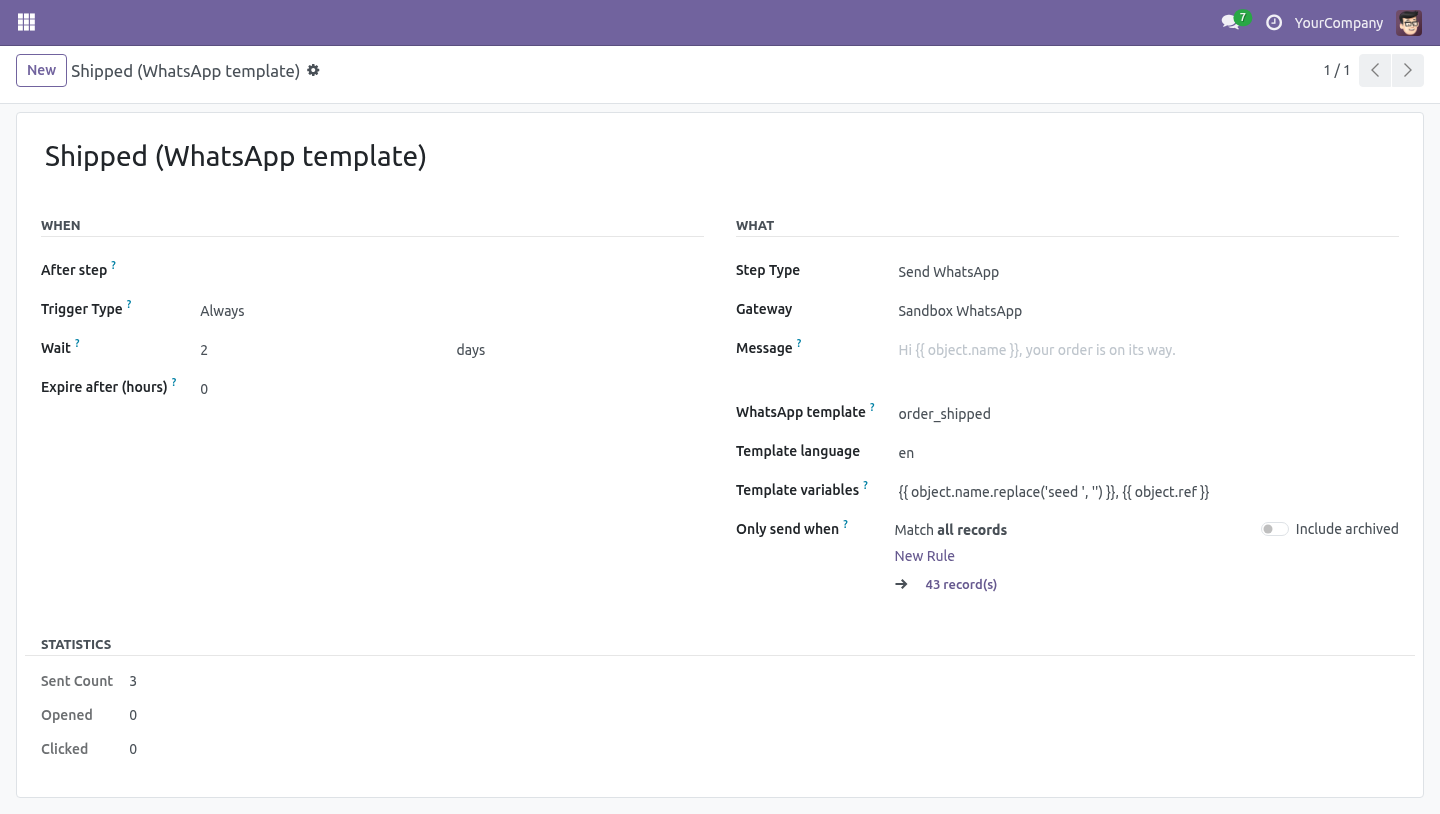
Send SMS (gateway) - gateway + Message (inline placeholders: Hi {{ object.name }}).
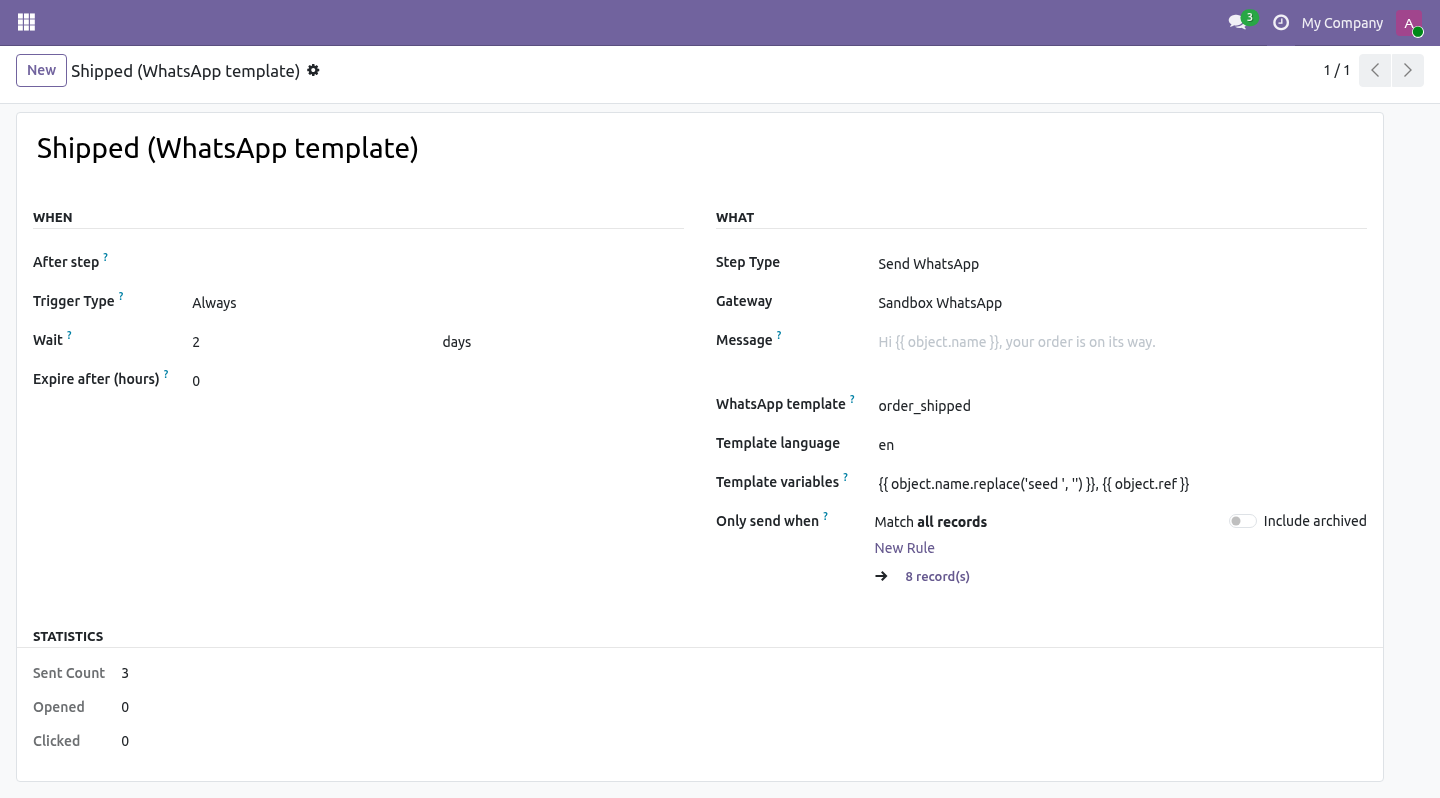
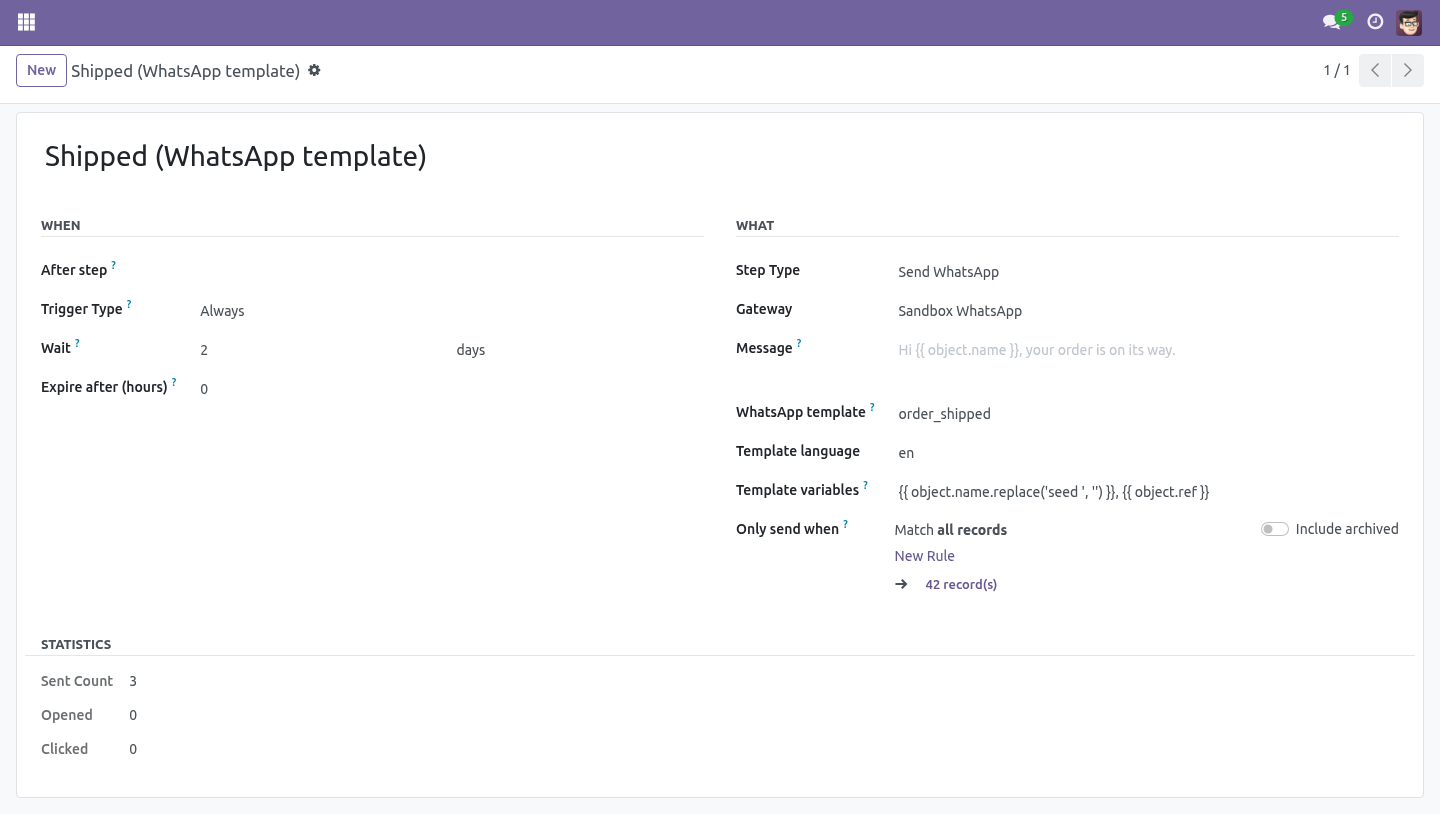
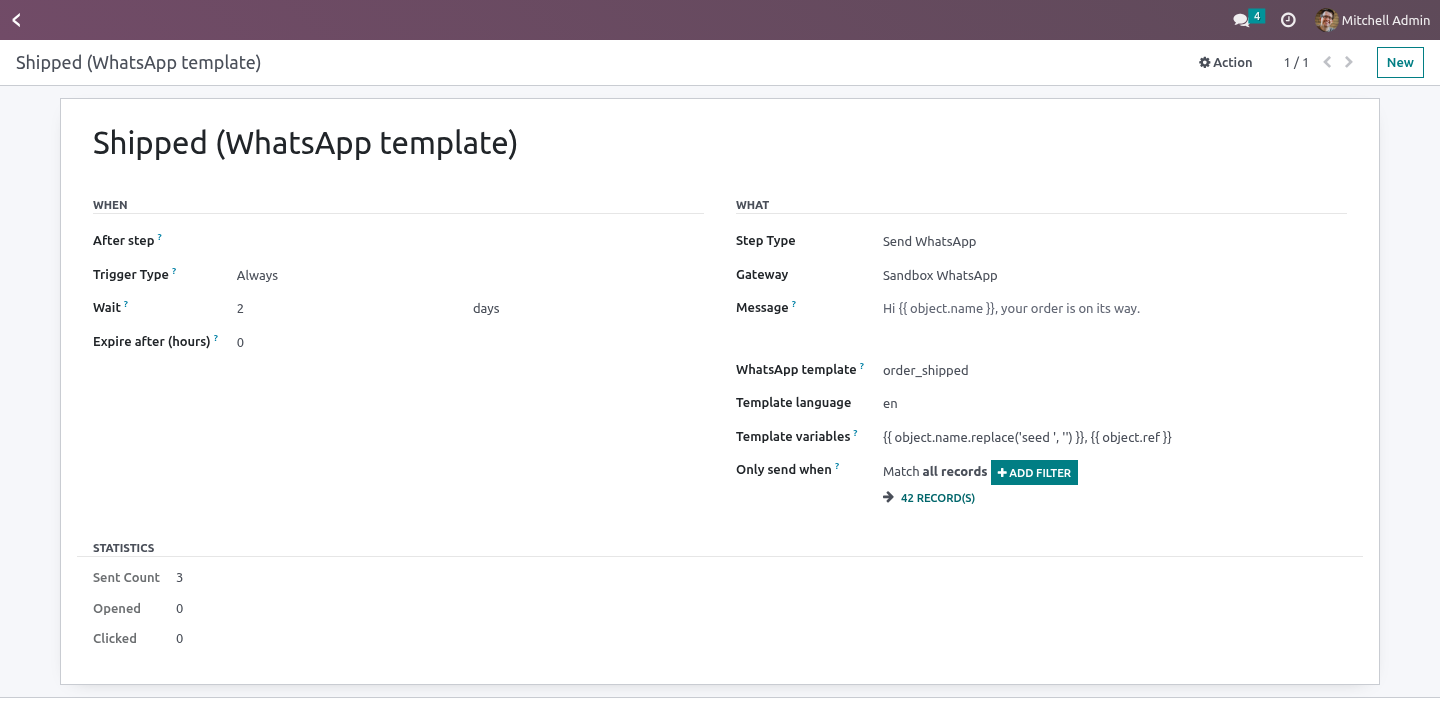
Send WhatsApp - gateway + either Message (a session message, only deliverable inside the 24-hour customer window) or a WhatsApp template name + language + Template variables (comma-separated inline expressions in {{1}}, {{2}} order). A template is the only way to start a conversation on WhatsApp; Meta approves them in your Business Manager, Twilio maps them to Content SIDs - name them as your provider expects.
What happens on a participant: the number is taken from mobile then phone (19.0 dropped res.partner.mobile, so there it is simply phone); no number → skipped with a note; a blacklisted number → the participant exits the journey (STOP is regulatory); otherwise the message is rendered and sent, the send is logged, a trace is written, the journey advances. The sending window holds these steps like e-mails. Run Test writes "would send SMS via …" and sends nothing.
The log
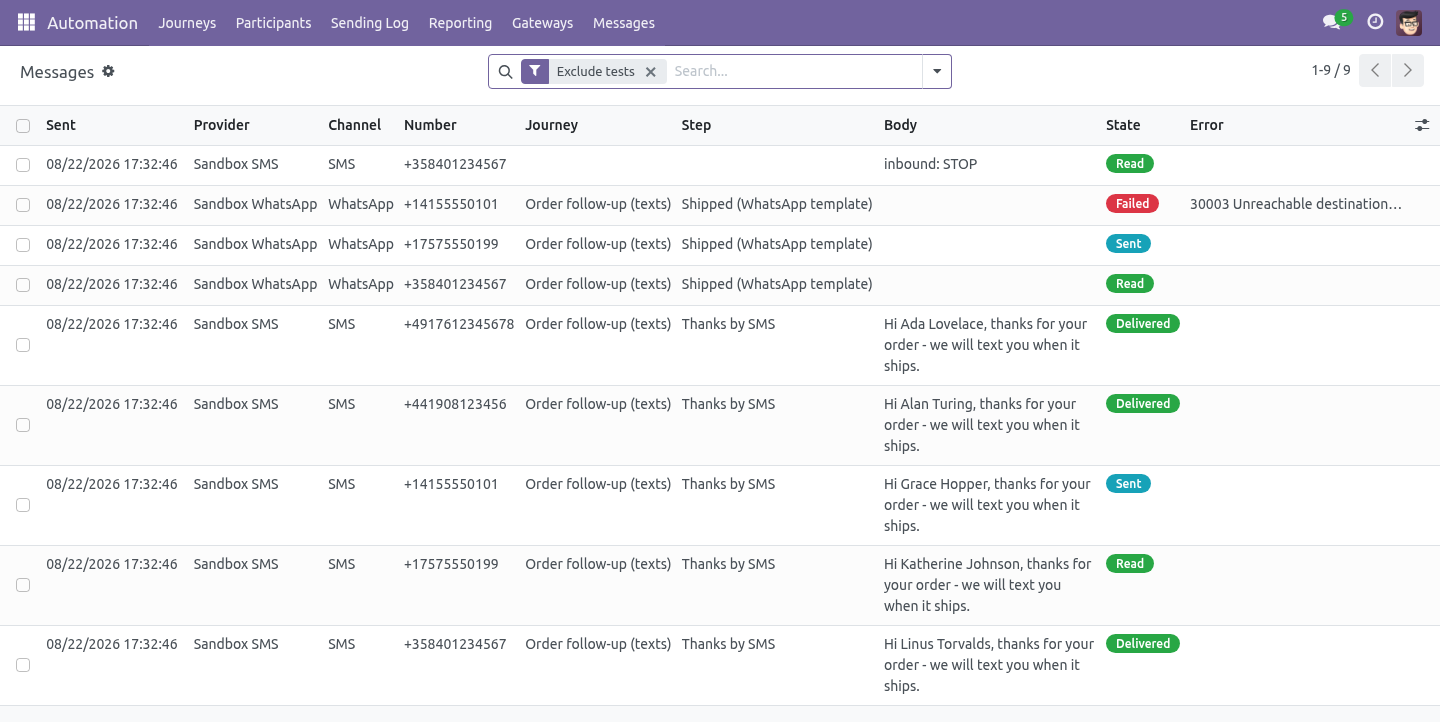
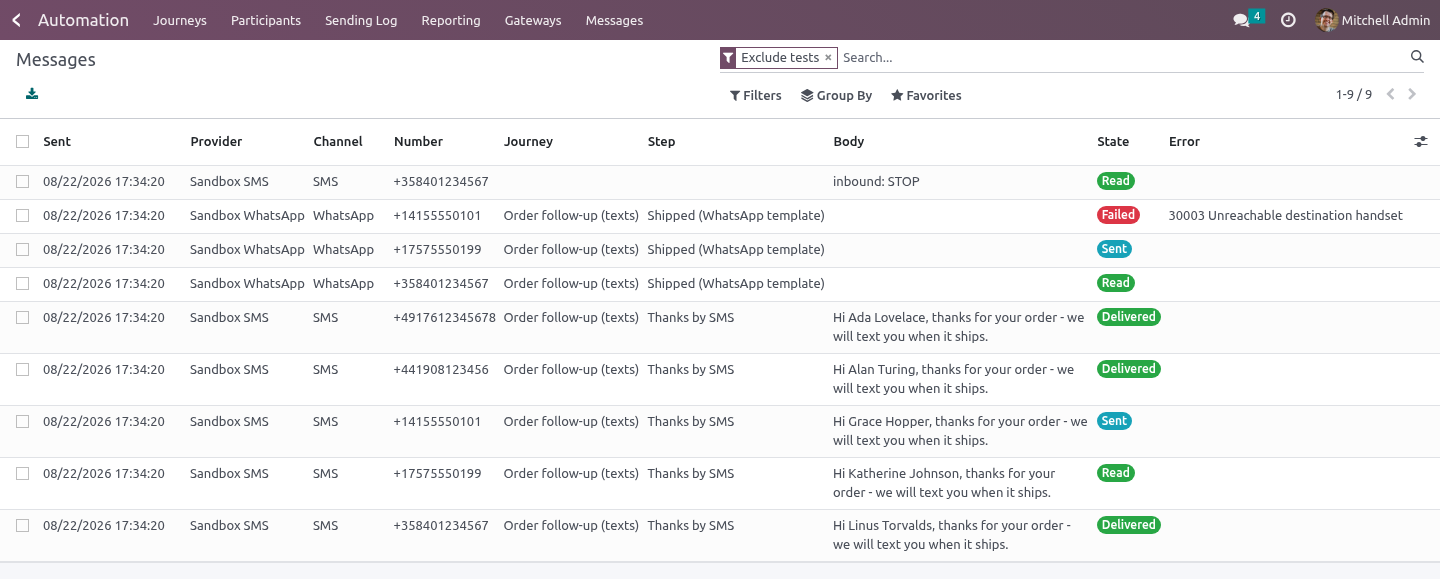
Marketing Automation ▸ Messages: gateway, number, journey, step, body, state (queued → sent → delivered → read, or failed with the provider's error), reference, last status time. Statuses never go backwards (a late "sent" after "delivered" is ignored). Tests sent with the button are flagged and hidden by default.
Retention
The message log is swept by Odoo's daily vacuum: rows older than bambooforge_ma_messaging.log_retention_days (a system parameter, 365 by default) are deleted. Set it to 0 to keep everything - some regulators ask for that, and then it is a decision rather than an oversight.
STOP
An inbound STOP (also STOPALL, UNSUBSCRIBE, CANCEL, END, QUIT) on either platform adds the number to Odoo's phone blacklist (phone_validation installed) and is logged; the next gateway step for that number exits the participant.
Honest about proof
Twilio and Meta were implemented against their published REST contracts and are exercised by this module's tests against recorded stubs. The screenshots and the video run on the Sandbox gateway. Live delivery is proven on your account with Send test; no third-party credentials were used to build this module, and none are shipped.
Technical notes
Uses Marketing Automation 1.10.0's hooks: _messaging_step_types (sending window), _run_step_<type> dispatch, _dry_run_label.
Python dependency: requests.
Community only. The external services are the ones you already pay for.
How we make sure it works
Before every release, 33 automated checks run against this app on Odoo 16, 17, 18, 19 and 20. Among them:
A gateway in use cannot be deleted.
Dry run names the gateway and sends nothing.
A normal reply is not a stop.
No number is refused before any call.
No number is skipped with a note.
The complete list is in the source you receive.
What it does not do
Said before you buy, because it is the half that decides whether the app fits:
Start a WhatsApp conversation without an approved template - only a template can.
Move a status backwards - a late sent after delivered is ignored.
Install
Copy bambooforge_ma_messaging into your addons path and update the app list, or install the ZIP from the Odoo Apps Store.
Install Marketing Automation Suite: SMS & WhatsApp.
Open Gateways - its menus are Messages.
Questions people ask
- Which Odoo versions does it run on?
Odoo 16.0, 17.0, 18.0, 19.0, 20.0, on the series you buy it for; each series is its own listing.
- Community or Enterprise?
Both. It needs no Enterprise app.
- What does it need?
The standard Web; marketing automation (BambooForge) must be installed first app. No extra Python package.
- Where does it show up?
Under the Gateways menu (Messages).
- Does anything leave my server?
It makes calls outside your server only where its manual says so - read the section on that service before you connect it.
- What happens if I uninstall it?
Odoo drops the app's own tables and fields; the standard records it worked on (contacts, orders, products) stay as they are.