 BambooForge Labs
Marketing Automation All in One with Landing Pages
Marketing automation with landing pages: build one from a form in a click, enrol submissions straight into a journey, and keep the UTM.
Available for Odoo 16.0, Odoo 17.0, Odoo 18.0, Odoo 19.0, Odoo 20.0. Technical name bambooforge_ma_landing.
Transcript of the walkthrough (Odoo 20)
Marketing Automation All in One with Landing Pages. Marketing automation with landing pages: build one from a form in a click, enrol submissions straight into a journey, and keep the UTM. Said before you buy, because it is the half that decides whether the app fits: In the next few minutes: marketing automation all in one with landing pages, then enrol submitters in a journey, then create a landing page, then utm on every submission, then technical notes. Then what this app deliberately does not do, so you can tell before you buy whether it fits.
1. Copy bambooforge_ma_landing into your addons path and update the app list, or install the ZIP from the Odoo Apps Store. 2. Install Marketing Automation Suite: Landing Pages & Forms.
Marketing Automation All in One with Landing Pages. An add-on for BambooForge Form Builder and BambooForge Marketing Automation (17.0). A form that enrols its submitters into a journey, a landing page built from the form in one click, and UTM on every submission. Enrol submitters in a journey.
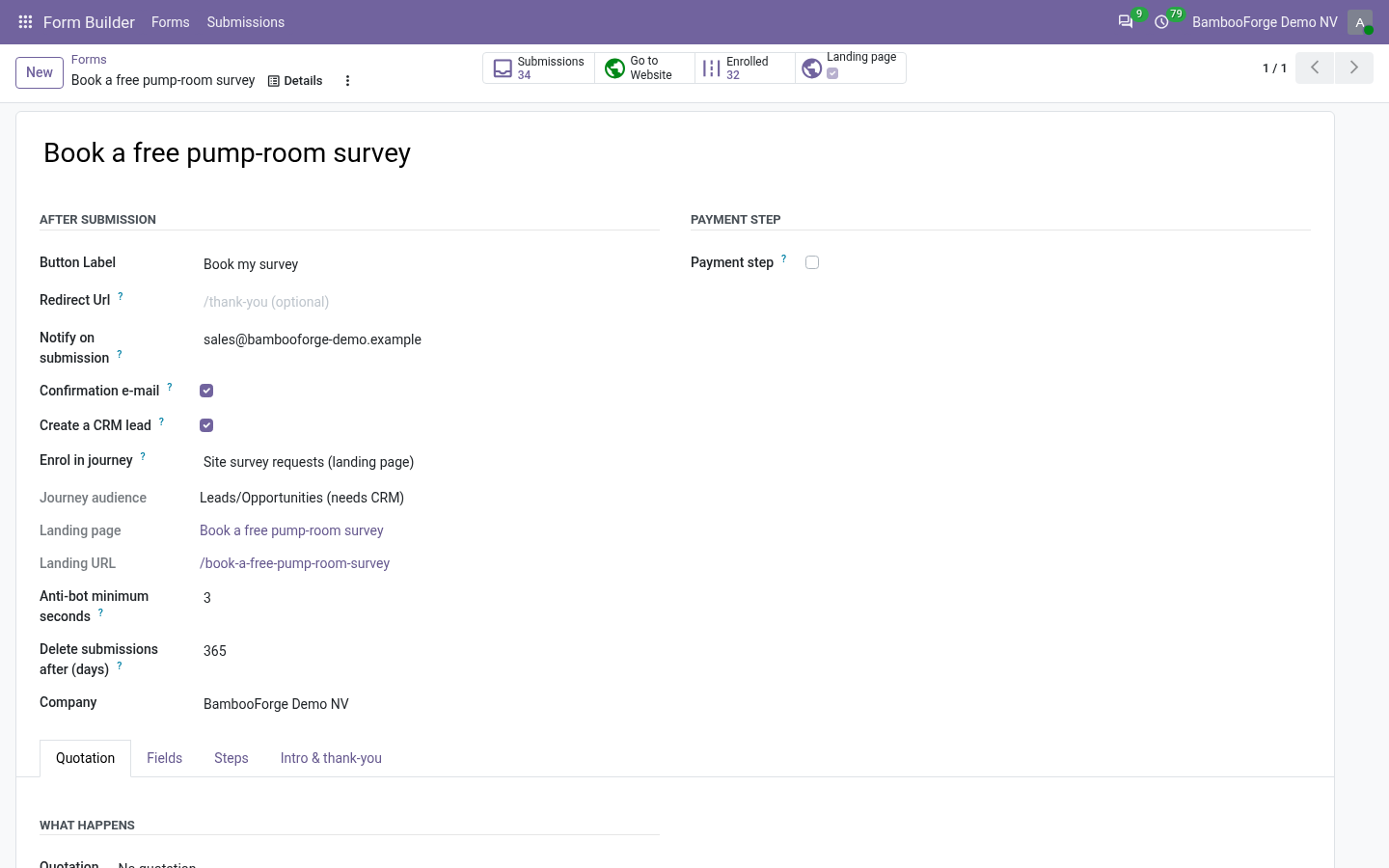
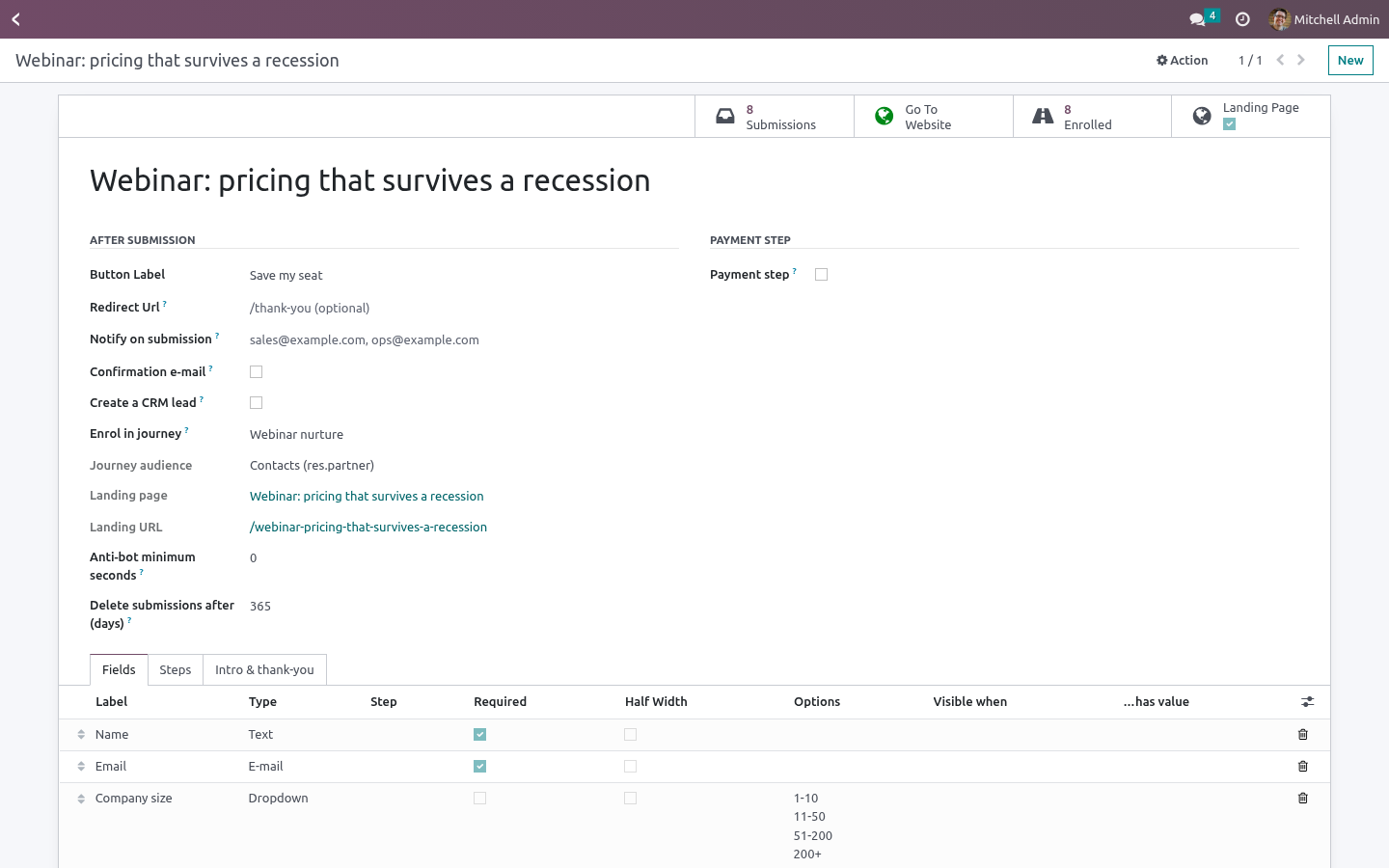
On the form (After submission), pick Enrol in journey. The journey's audience decides what is enrolled: Contacts - the contact the submission is linked to (Form Builder finds or creates it by e-mail). Leads/Opportunities - the lead the form creates. The form must have Create a CRM lead ticked; the rule refuses the pairing otherwise.
A lead journey starts the moment the lead exists, payment or not - the lead is the thing being nurtured. Mailing contacts - a mailing contact found by e-mail or created with the submitter's name and e-mail. Contact and mailing-contact journeys start when the submission is complete: received, or paid when the form takes payment. The submission shows the Journey participant it became and a short journey note - enrolled, already in the journey, journey not running, nothing to enrol (no e-mail).
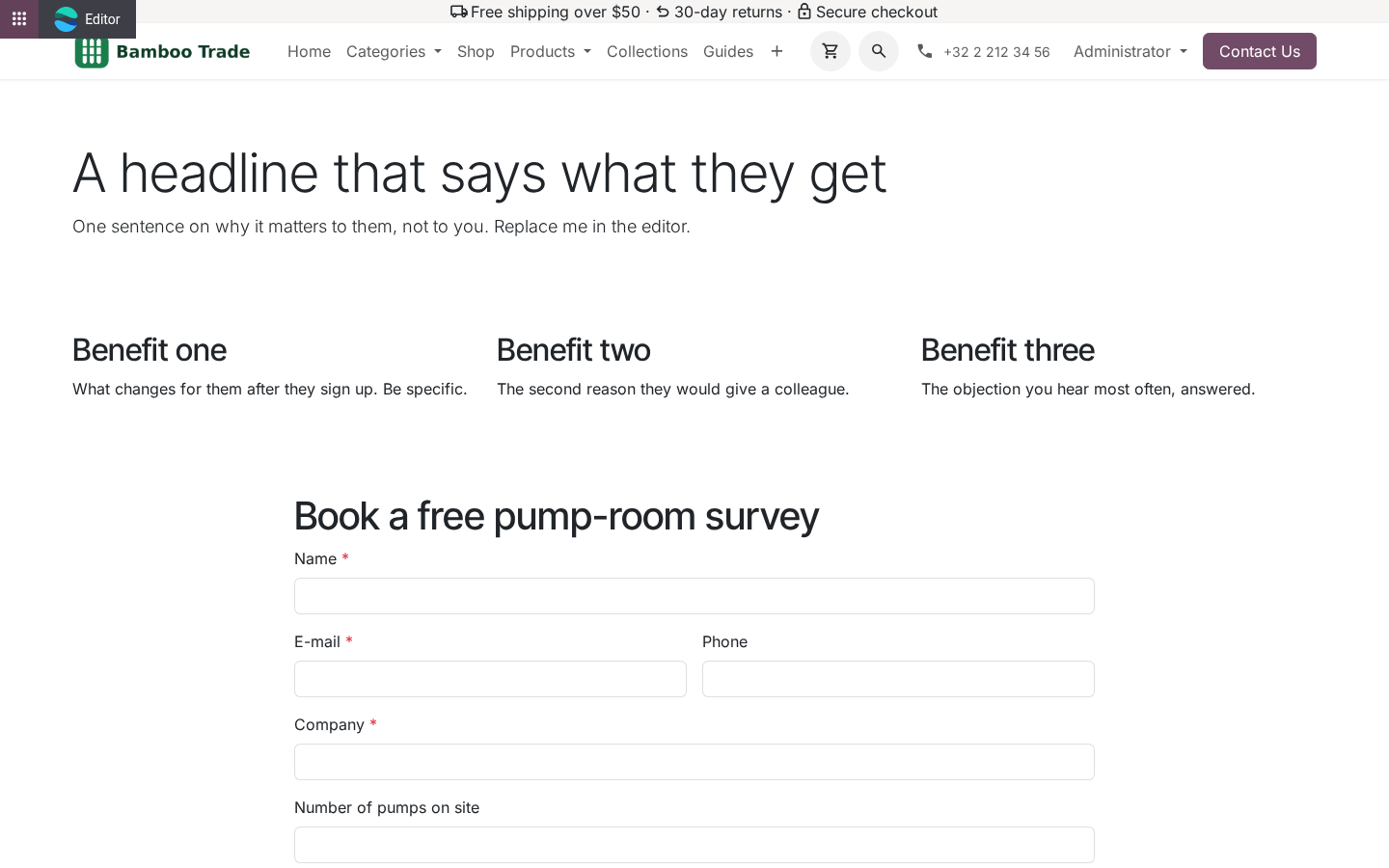
The journey honours its own rules: a contact who already finished is not re-enrolled unless the journey allows rejoin; the unique field is respected. Create a landing page. Create landing page on the form builds a website page named after the form: a hero block, three benefit blocks, the form itself, a closing block. The blocks are ordinary website building blocks - edit them in the website editor, drag more in.
The form in the middle is a live embed: add a field to the form and the page shows it; it is not editable in place, on purpose, so the editor cannot freeze a copy of it. The page is created unpublished. The form's Landing page button opens it; publish it from the website's publish toggle as usual. UTM on every submission.
When the visitor arrived through a link carrying utm_source, utm_medium or utm_campaign, Odoo's own UTM tracking sets cookies; the submission copies them into UTM source / medium / campaign (falling back to the referring page's query string), and records whether it came from the generated landing page. The participant carries the UTM campaign too, so the participant report can be grouped by it. Technical notes Uses Form Builder 1.3.0's _after_submit() hook and form_body template, and Marketing Automation 1.9.0's _enroll_records() / _participant_vals() hooks. Nothing is copied from either.
Enrolment failure never fails the visitor's submission: it is logged and written into the journey note. Community only. No Enterprise module, no external service. How we make sure it works.
Before every release, 24 automated checks run against this app on Odoo 16, 17, 18, 19 and 20. Among them: The same contact is not enrolled twice. A form without a journey changes nothing. An unpublished form shows a notice not a crash.
No email means a note not a ghost contact. An enrolment error is noted not raised. The complete list is in the source you receive. Questions people ask.
Which Odoo versions does it run on? Odoo 16.0, 17.0, 18.0, 19.0, 20.0, on the series you buy it for; each series is its own listing. Community or Enterprise? Both.
It needs no Enterprise app. The complete manual is at docs dot bambooforge dot dev, the demo database is linked from the store page, and support answers within twenty-four hours. Links are in the description.
Transcript of the walkthrough (Odoo 19)
Marketing Automation Suite: Landing Pages & Forms. Marketing automation with landing pages: build one from a form in a click, enrol submissions straight into a journey, and keep the UTM. An add-on for BambooForge Form Builder and BambooForge Marketing Automation (17.0). A form that enrols its submitters into a journey, a landing page built from the form in one click, and UTM on every submission.
On the form (After submission), pick Enrol in journey. The journey's audience decides what is enrolled: In the next few minutes: marketing automation suite: landing pages & forms, then enrol submitters in a journey, then create a landing page, then utm on every submission, then technical notes. Then what this app deliberately does not do, so you can tell before you buy whether it fits. Marketing Automation Suite: Landing Pages & Forms.
An add-on for BambooForge Form Builder and BambooForge Marketing Automation (17.0). A form that enrols its submitters into a journey, a landing page built from the form in one click, and UTM on every submission. Enrol submitters in a journey. On the form (After submission), pick Enrol in journey.
The journey's audience decides what is enrolled: Contacts - the contact the submission is linked to (Form Builder finds or creates it by e-mail). Leads/Opportunities - the lead the form creates. The form must have Create a CRM lead ticked; the rule refuses the pairing otherwise. A lead journey starts the moment the lead exists, payment or not - the lead is the thing being nurtured.
Mailing contacts - a mailing contact found by e-mail or created with the submitter's name and e-mail. Contact and mailing-contact journeys start when the submission is complete: received, or paid when the form takes payment. The submission shows the Journey participant it became and a short journey note - enrolled, already in the journey, journey not running, nothing to enrol (no e-mail). The journey honours its own rules: a contact who already finished is not re-enrolled unless the journey allows rejoin; the unique field is respected.
Create a landing page. Create landing page on the form builds a website page named after the form: a hero block, three benefit blocks, the form itself, a closing block. The blocks are ordinary website building blocks - edit them in the website editor, drag more in. The form in the middle is a live embed: add a field to the form and the page shows it; it is not editable in place, on purpose, so the editor cannot freeze a copy of it.
The page is created unpublished. The form's Landing page button opens it; publish it from the website's publish toggle as usual. UTM on every submission. When the visitor arrived through a link carrying utm_source, utm_medium or utm_campaign, Odoo's own UTM tracking sets cookies; the submission copies them into UTM source / medium / campaign (falling back to the referring page's query string), and records whether it came from the generated landing page.
The participant carries the UTM campaign too, so the participant report can be grouped by it. Technical notes Uses Form Builder 1.3.0's _after_submit() hook and form_body template, and Marketing Automation 1.9.0's _enroll_records() / _participant_vals() hooks. Nothing is copied from either. Enrolment failure never fails the visitor's submission: it is logged and written into the journey note.
Community only. No Enterprise module, no external service. The complete manual is at docs dot bambooforge dot dev, the demo database is linked from the store page, and support answers within twenty-four hours. Links are in the description.
Transcript of the walkthrough (Odoo 18)
Marketing Automation Suite: Landing Pages & Forms. Marketing automation with landing pages: build one from a form in a click, enrol submissions straight into a journey, and keep the UTM. An add-on for BambooForge Form Builder and BambooForge Marketing Automation (17.0). A form that enrols its submitters into a journey, a landing page built from the form in one click, and UTM on every submission.
On the form (After submission), pick Enrol in journey. The journey's audience decides what is enrolled: In the next few minutes: marketing automation suite: landing pages & forms, then enrol submitters in a journey, then create a landing page, then utm on every submission, then technical notes. Then what this app deliberately does not do, so you can tell before you buy whether it fits. Marketing Automation Suite: Landing Pages & Forms.
An add-on for BambooForge Form Builder and BambooForge Marketing Automation (17.0). A form that enrols its submitters into a journey, a landing page built from the form in one click, and UTM on every submission. Enrol submitters in a journey. On the form (After submission), pick Enrol in journey.
The journey's audience decides what is enrolled: Contacts - the contact the submission is linked to (Form Builder finds or creates it by e-mail). Leads/Opportunities - the lead the form creates. The form must have Create a CRM lead ticked; the rule refuses the pairing otherwise. A lead journey starts the moment the lead exists, payment or not - the lead is the thing being nurtured.
Mailing contacts - a mailing contact found by e-mail or created with the submitter's name and e-mail. Contact and mailing-contact journeys start when the submission is complete: received, or paid when the form takes payment. The submission shows the Journey participant it became and a short journey note - enrolled, already in the journey, journey not running, nothing to enrol (no e-mail). The journey honours its own rules: a contact who already finished is not re-enrolled unless the journey allows rejoin; the unique field is respected.
Create a landing page. Create landing page on the form builds a website page named after the form: a hero block, three benefit blocks, the form itself, a closing block. The blocks are ordinary website building blocks - edit them in the website editor, drag more in. The form in the middle is a live embed: add a field to the form and the page shows it; it is not editable in place, on purpose, so the editor cannot freeze a copy of it.
The page is created unpublished. The form's Landing page button opens it; publish it from the website's publish toggle as usual. UTM on every submission. When the visitor arrived through a link carrying utm_source, utm_medium or utm_campaign, Odoo's own UTM tracking sets cookies; the submission copies them into UTM source / medium / campaign (falling back to the referring page's query string), and records whether it came from the generated landing page.
The participant carries the UTM campaign too, so the participant report can be grouped by it. Technical notes Uses Form Builder 1.3.0's _after_submit() hook and form_body template, and Marketing Automation 1.9.0's _enroll_records() / _participant_vals() hooks. Nothing is copied from either. Enrolment failure never fails the visitor's submission: it is logged and written into the journey note.
Community only. No Enterprise module, no external service. The complete manual is at docs dot bambooforge dot dev, the demo database is linked from the store page, and support answers within twenty-four hours. Links are in the description.
Transcript of the walkthrough (Odoo 17)
Marketing Automation Suite: Landing Pages & Forms. Marketing automation with landing pages: build one from a form in a click, enrol submissions straight into a journey, and keep the UTM. An add-on for BambooForge Form Builder and BambooForge Marketing Automation (17.0). A form that enrols its submitters into a journey, a landing page built from the form in one click, and UTM on every submission.
On the form (After submission), pick Enrol in journey. The journey's audience decides what is enrolled: In the next few minutes: marketing automation suite: landing pages & forms, then enrol submitters in a journey, then create a landing page, then utm on every submission, then technical notes. Then what this app deliberately does not do, so you can tell before you buy whether it fits. Marketing Automation Suite: Landing Pages & Forms.
An add-on for BambooForge Form Builder and BambooForge Marketing Automation (17.0). A form that enrols its submitters into a journey, a landing page built from the form in one click, and UTM on every submission. Enrol submitters in a journey. On the form (After submission), pick Enrol in journey.
The journey's audience decides what is enrolled: Contacts - the contact the submission is linked to (Form Builder finds or creates it by e-mail). Leads/Opportunities - the lead the form creates. The form must have Create a CRM lead ticked; the rule refuses the pairing otherwise. A lead journey starts the moment the lead exists, payment or not - the lead is the thing being nurtured.
Mailing contacts - a mailing contact found by e-mail or created with the submitter's name and e-mail. Contact and mailing-contact journeys start when the submission is complete: received, or paid when the form takes payment. The submission shows the Journey participant it became and a short journey note - enrolled, already in the journey, journey not running, nothing to enrol (no e-mail). The journey honours its own rules: a contact who already finished is not re-enrolled unless the journey allows rejoin; the unique field is respected.
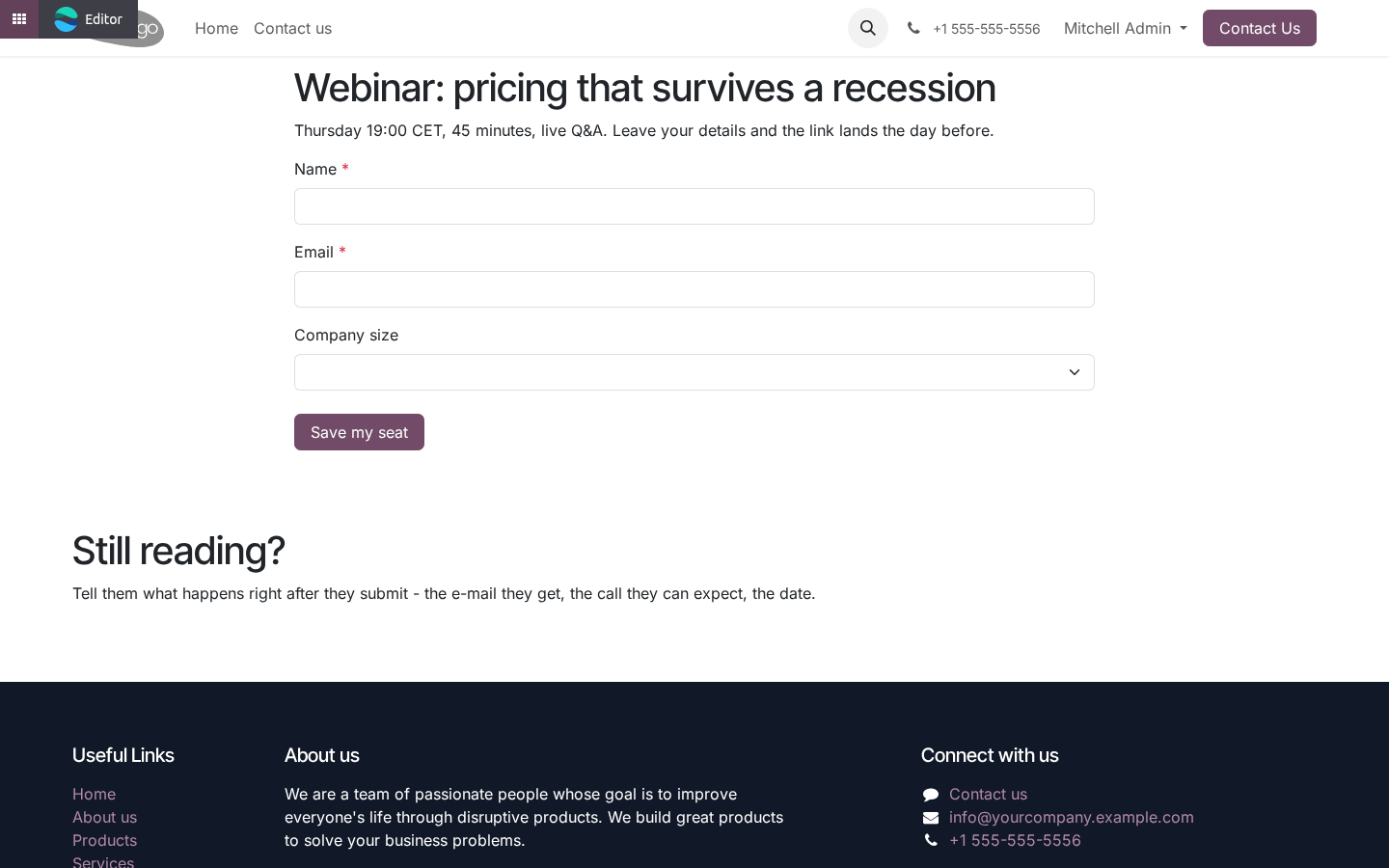
Create a landing page. Create landing page on the form builds a website page named after the form: a hero block, three benefit blocks, the form itself, a closing block. The blocks are ordinary website building blocks - edit them in the website editor, drag more in. The form in the middle is a live embed: add a field to the form and the page shows it; it is not editable in place, on purpose, so the editor cannot freeze a copy of it.
The page is created unpublished. The form's Landing page button opens it; publish it from the website's publish toggle as usual. UTM on every submission. When the visitor arrived through a link carrying utm_source, utm_medium or utm_campaign, Odoo's own UTM tracking sets cookies; the submission copies them into UTM source / medium / campaign (falling back to the referring page's query string), and records whether it came from the generated landing page.
The participant carries the UTM campaign too, so the participant report can be grouped by it. Technical notes Uses Form Builder 1.3.0's _after_submit() hook and form_body template, and Marketing Automation 1.9.0's _enroll_records() / _participant_vals() hooks. Nothing is copied from either. Enrolment failure never fails the visitor's submission: it is logged and written into the journey note.
Community only. No Enterprise module, no external service. The complete manual is at docs dot bambooforge dot dev, the demo database is linked from the store page, and support answers within twenty-four hours. Links are in the description.
Transcript of the walkthrough (Odoo 16)
Marketing Automation Suite: Landing Pages & Forms. Marketing automation with landing pages: build one from a form in a click, enrol submissions straight into a journey, and keep the UTM. An add-on for BambooForge Form Builder and BambooForge Marketing Automation (17.0). A form that enrols its submitters into a journey, a landing page built from the form in one click, and UTM on every submission.
On the form (After submission), pick Enrol in journey. The journey's audience decides what is enrolled: In the next few minutes: marketing automation suite: landing pages & forms, then enrol submitters in a journey, then create a landing page, then utm on every submission, then technical notes. Then what this app deliberately does not do, so you can tell before you buy whether it fits. Marketing Automation Suite: Landing Pages & Forms.
An add-on for BambooForge Form Builder and BambooForge Marketing Automation (17.0). A form that enrols its submitters into a journey, a landing page built from the form in one click, and UTM on every submission. Enrol submitters in a journey. On the form (After submission), pick Enrol in journey.
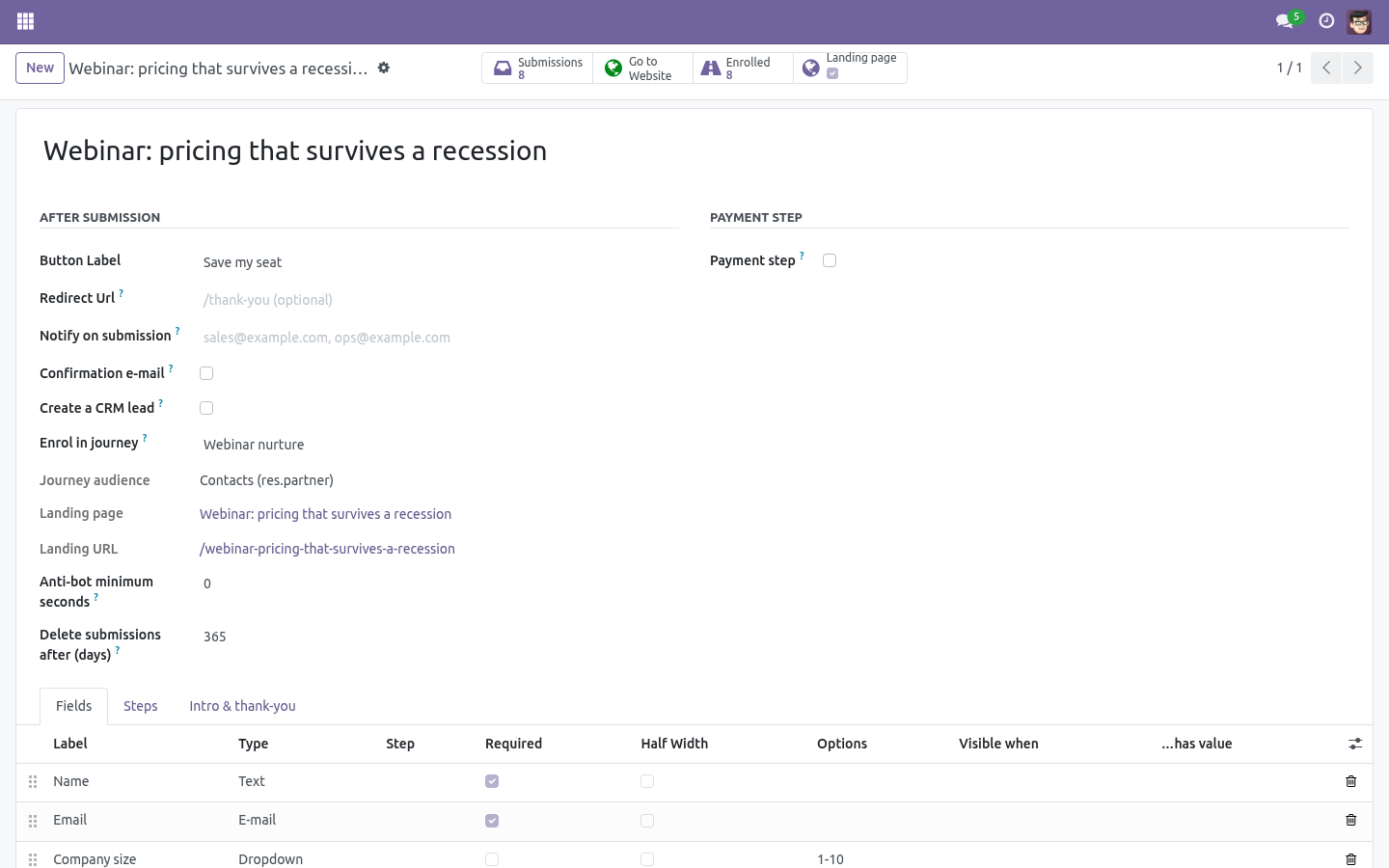
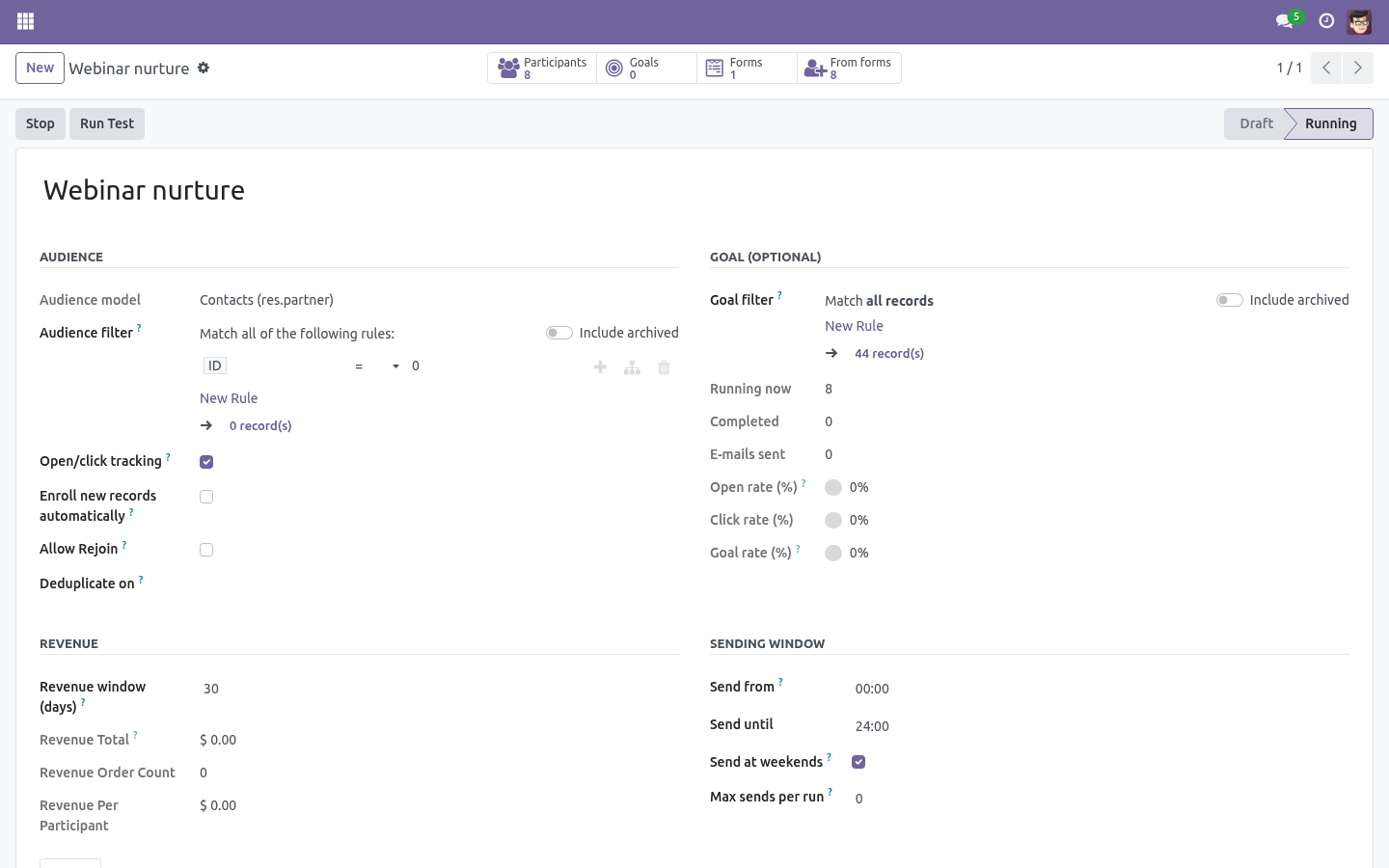
The journey's audience decides what is enrolled: Contacts - the contact the submission is linked to (Form Builder finds or creates it by e-mail). Leads/Opportunities - the lead the form creates. The form must have Create a CRM lead ticked; the rule refuses the pairing otherwise. A lead journey starts the moment the lead exists, payment or not - the lead is the thing being nurtured.
Mailing contacts - a mailing contact found by e-mail or created with the submitter's name and e-mail. Contact and mailing-contact journeys start when the submission is complete: received, or paid when the form takes payment. The submission shows the Journey participant it became and a short journey note - enrolled, already in the journey, journey not running, nothing to enrol (no e-mail). The journey honours its own rules: a contact who already finished is not re-enrolled unless the journey allows rejoin; the unique field is respected.
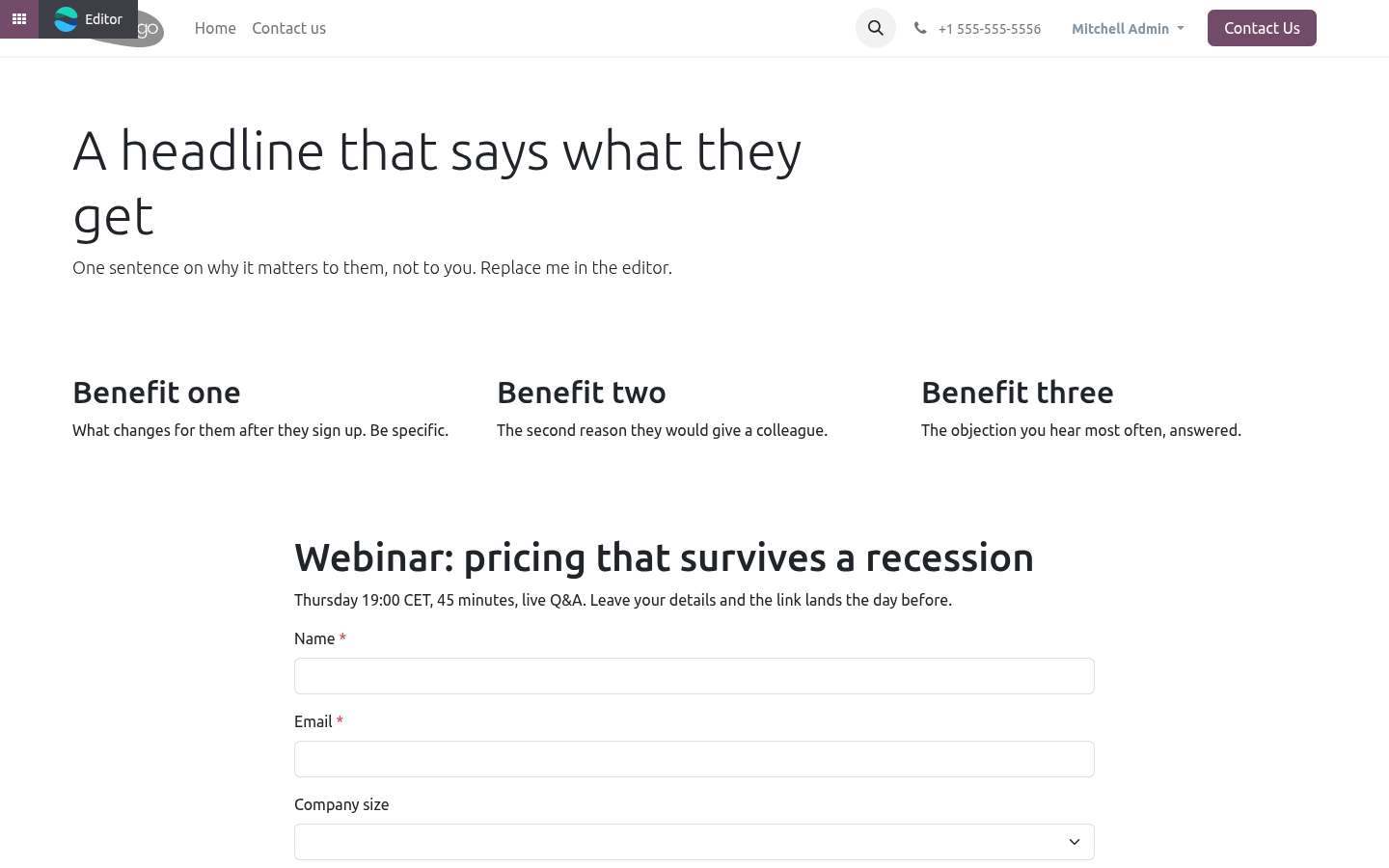
Create a landing page. Create landing page on the form builds a website page named after the form: a hero block, three benefit blocks, the form itself, a closing block. The blocks are ordinary website building blocks - edit them in the website editor, drag more in. The form in the middle is a live embed: add a field to the form and the page shows it; it is not editable in place, on purpose, so the editor cannot freeze a copy of it.
The page is created unpublished. The form's Landing page button opens it; publish it from the website's publish toggle as usual. UTM on every submission. When the visitor arrived through a link carrying utm_source, utm_medium or utm_campaign, Odoo's own UTM tracking sets cookies; the submission copies them into UTM source / medium / campaign (falling back to the referring page's query string), and records whether it came from the generated landing page.
The participant carries the UTM campaign too, so the participant report can be grouped by it. Technical notes Uses Form Builder 1.3.0's _after_submit() hook and form_body template, and Marketing Automation 1.9.0's _enroll_records() / _participant_vals() hooks. Nothing is copied from either. Enrolment failure never fails the visitor's submission: it is logged and written into the journey note.
Community only. No Enterprise module, no external service. The complete manual is at docs dot bambooforge dot dev, the demo database is linked from the store page, and support answers within twenty-four hours. Links are in the description.
Key facts
- What it is
- Marketing automation with landing pages: build one from a form in a click, enrol submissions straight into a journey, and keep the UTM.
- For
- Marketing
- Odoo versions
- 16.0, 17.0, 18.0, 19.0, 20.0 - Community and Enterprise
- Runs on
- Odoo.sh or Odoo you host yourself - not Odoo Online, which accepts no third-party apps
- Price
- 297 EUR, one-time, on the Odoo Apps Store
- Technical name
- bambooforge_ma_landing
- Not for
- Said before you buy, because it is the half that decides whether the app fits:; Fail a visitor's submission when enrolment fails: the failure is logged and written into the journey note.; Edit the embedded form in place on the page - add a field to the form and the page shows it.
- Manual last updated
- 2026-10-15
Marketing Automation All in One with Landing Pages
An add-on for BambooForge Form Builder and BambooForge Marketing Automation (17.0). A form that enrols its submitters into a journey, a landing page built from the form in one click, and UTM on every submission.
Enrol submitters in a journey
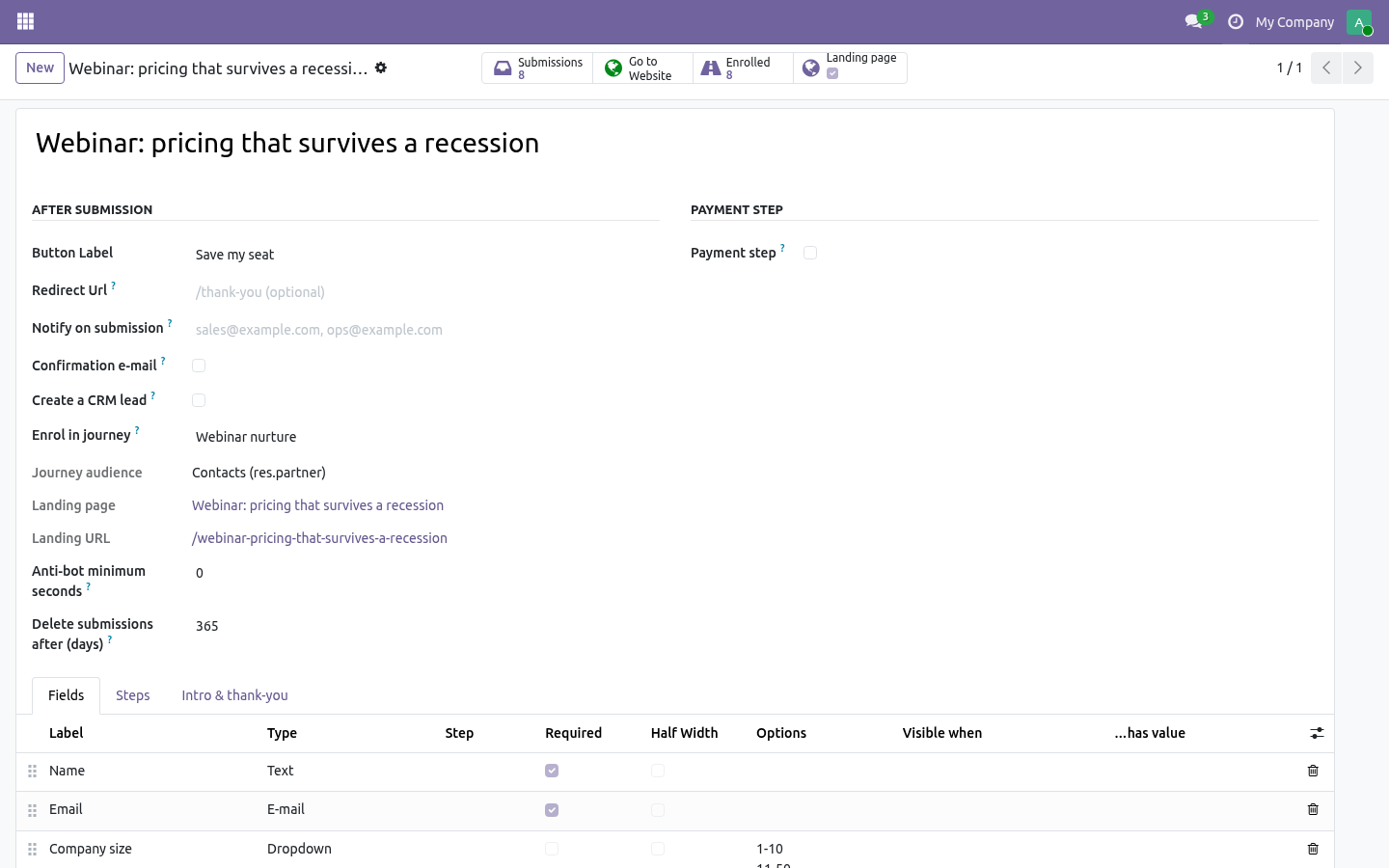
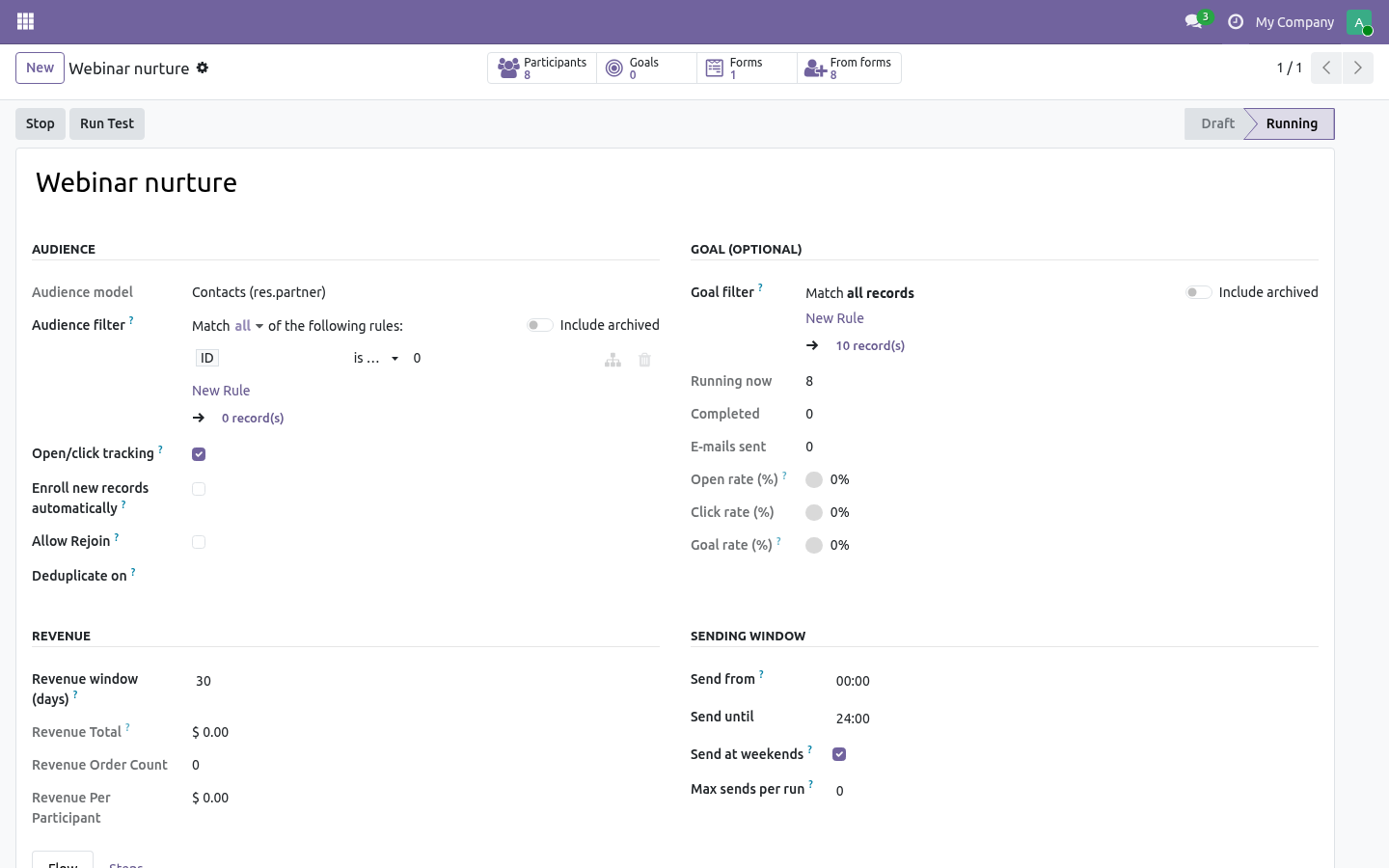
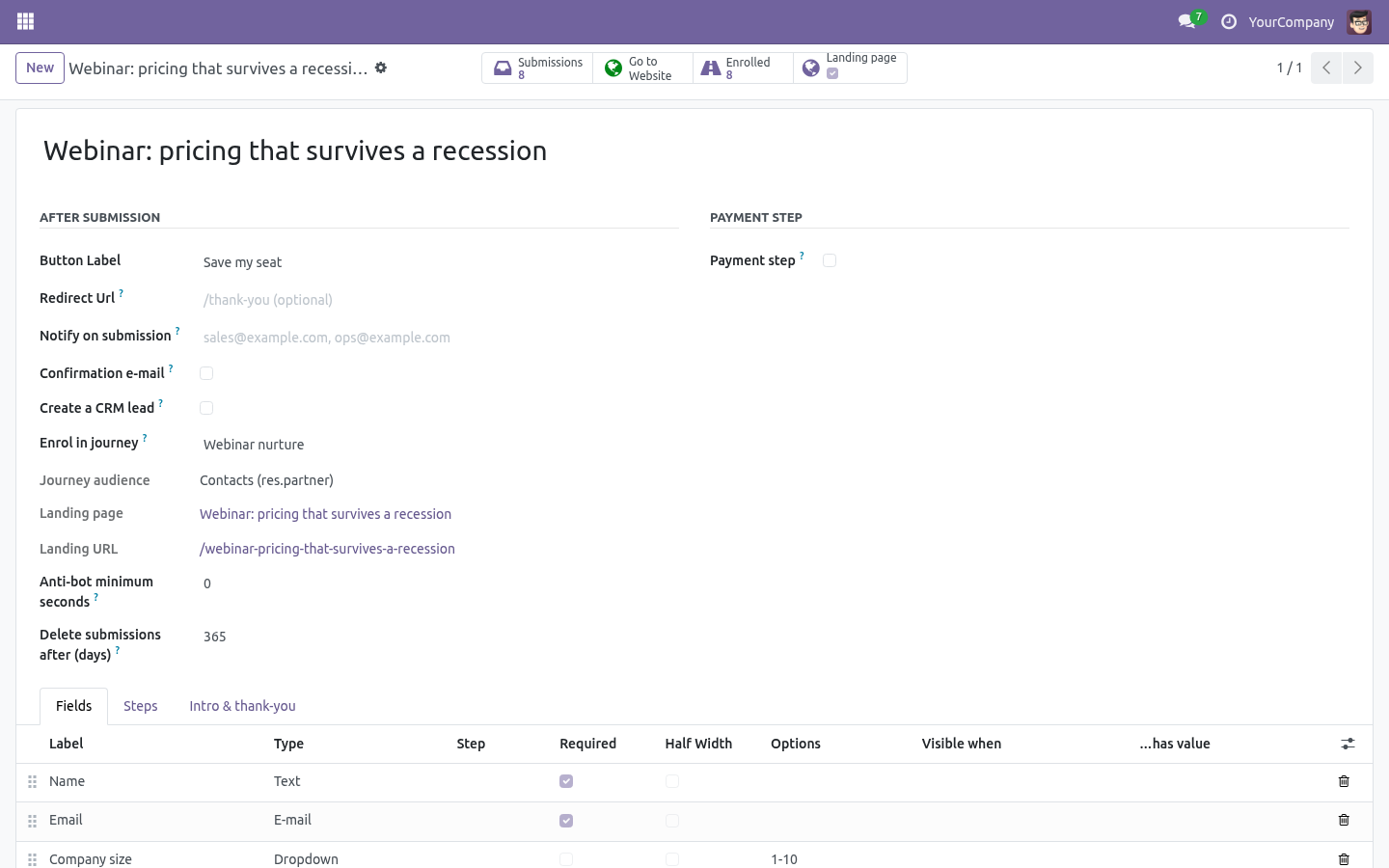
On the form (After submission), pick Enrol in journey. The journey's audience decides what is enrolled:
Contacts - the contact the submission is linked to (Form Builder finds or creates it by e-mail).
Leads/Opportunities - the lead the form creates. The form must have Create a CRM lead ticked; the rule refuses the pairing otherwise. A lead journey starts the moment the lead exists, payment or not - the lead is the thing being nurtured.
Mailing contacts - a mailing contact found by e-mail or created with the submitter's name and e-mail.
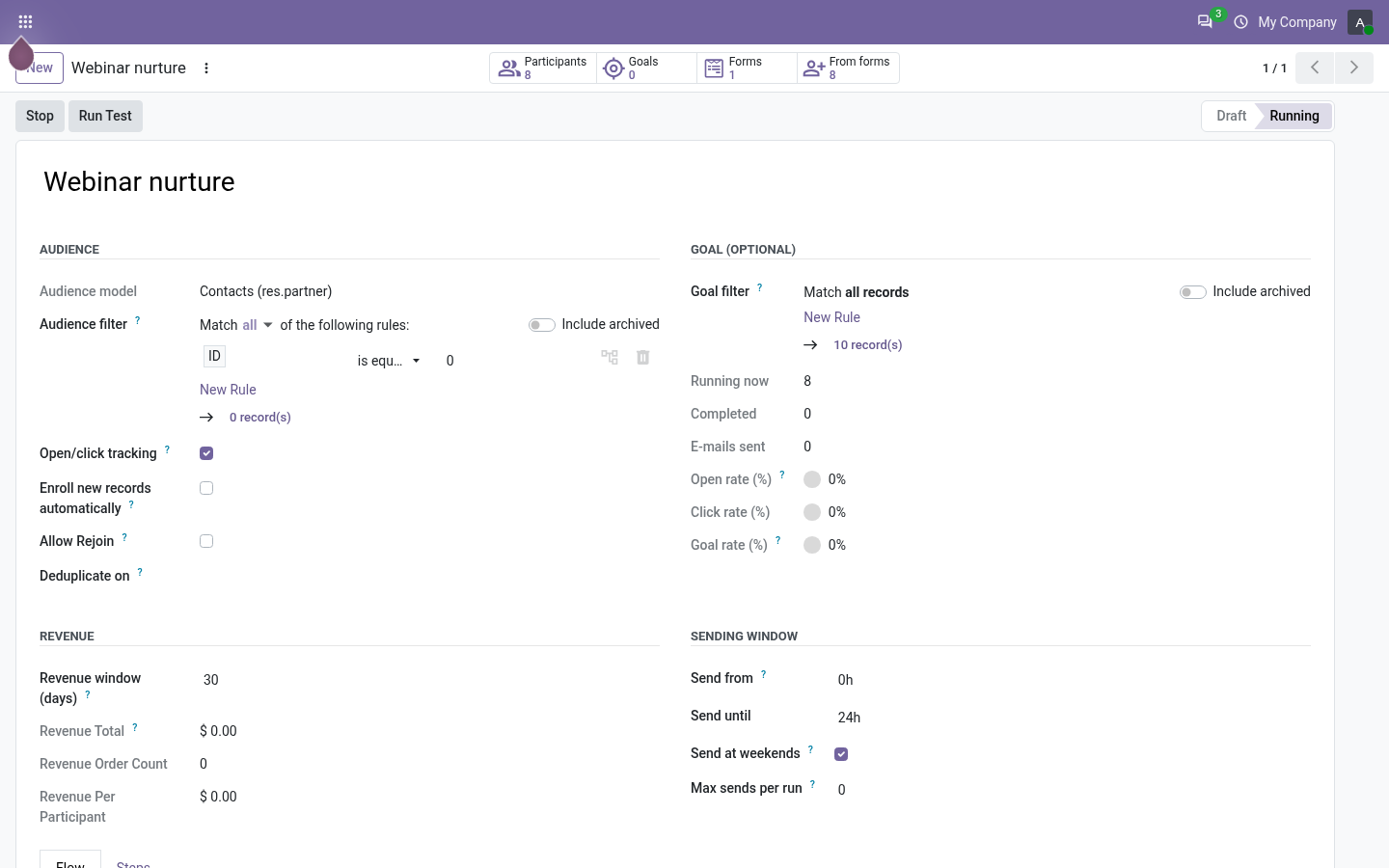
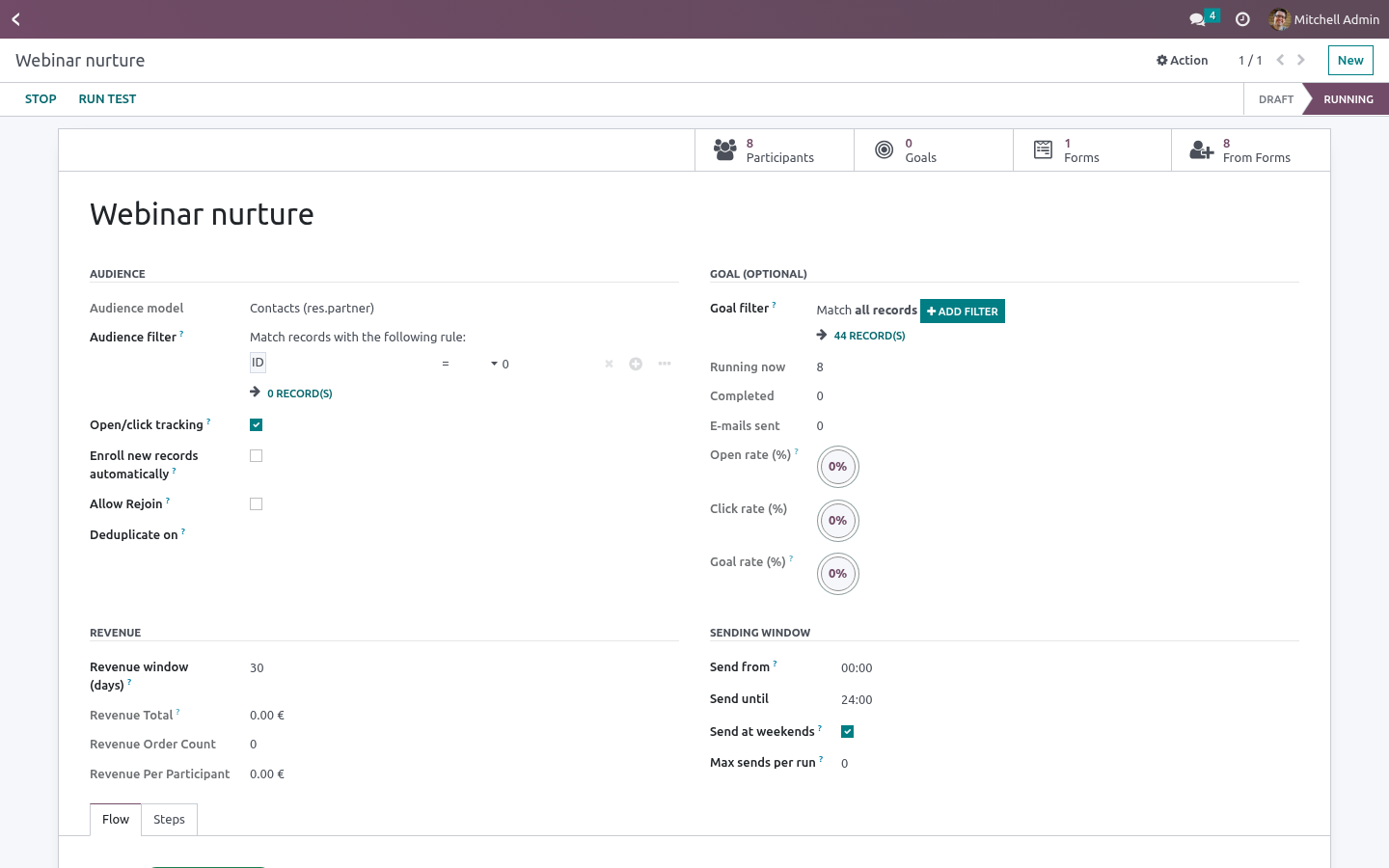
Contact and mailing-contact journeys start when the submission is complete: received, or paid when the form takes payment. The submission shows the Journey participant it became and a short journey note - enrolled, already in the journey, journey not running, nothing to enrol (no e-mail). The journey honours its own rules: a contact who already finished is not re-enrolled unless the journey allows rejoin; the unique field is respected.
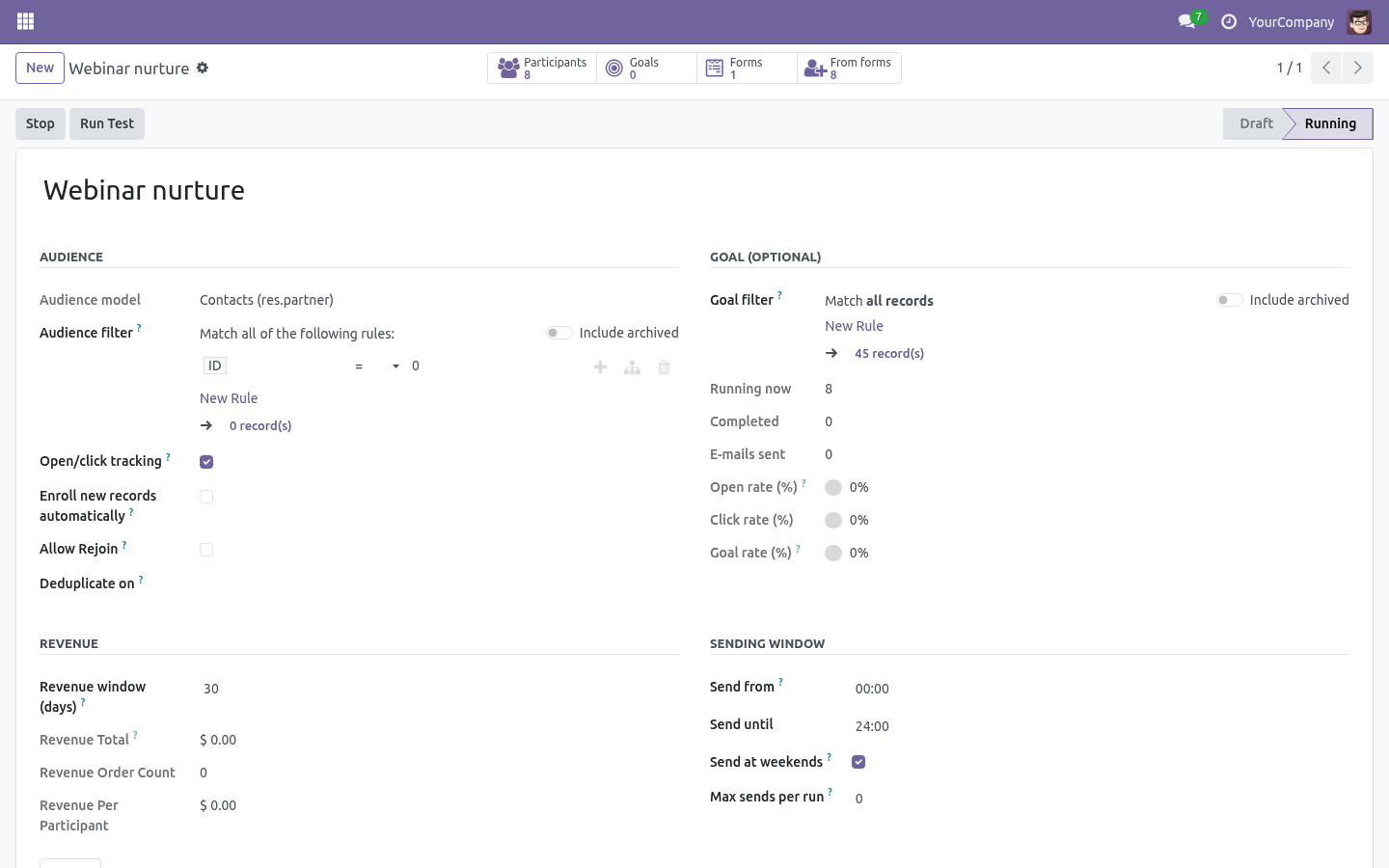
The form's Enrolled button lists the participants it produced; the journey's Forms and From forms buttons show the forms feeding it and the participants they brought. Participant lists gain From form and UTM campaign columns and a From a form filter.
Create a landing page
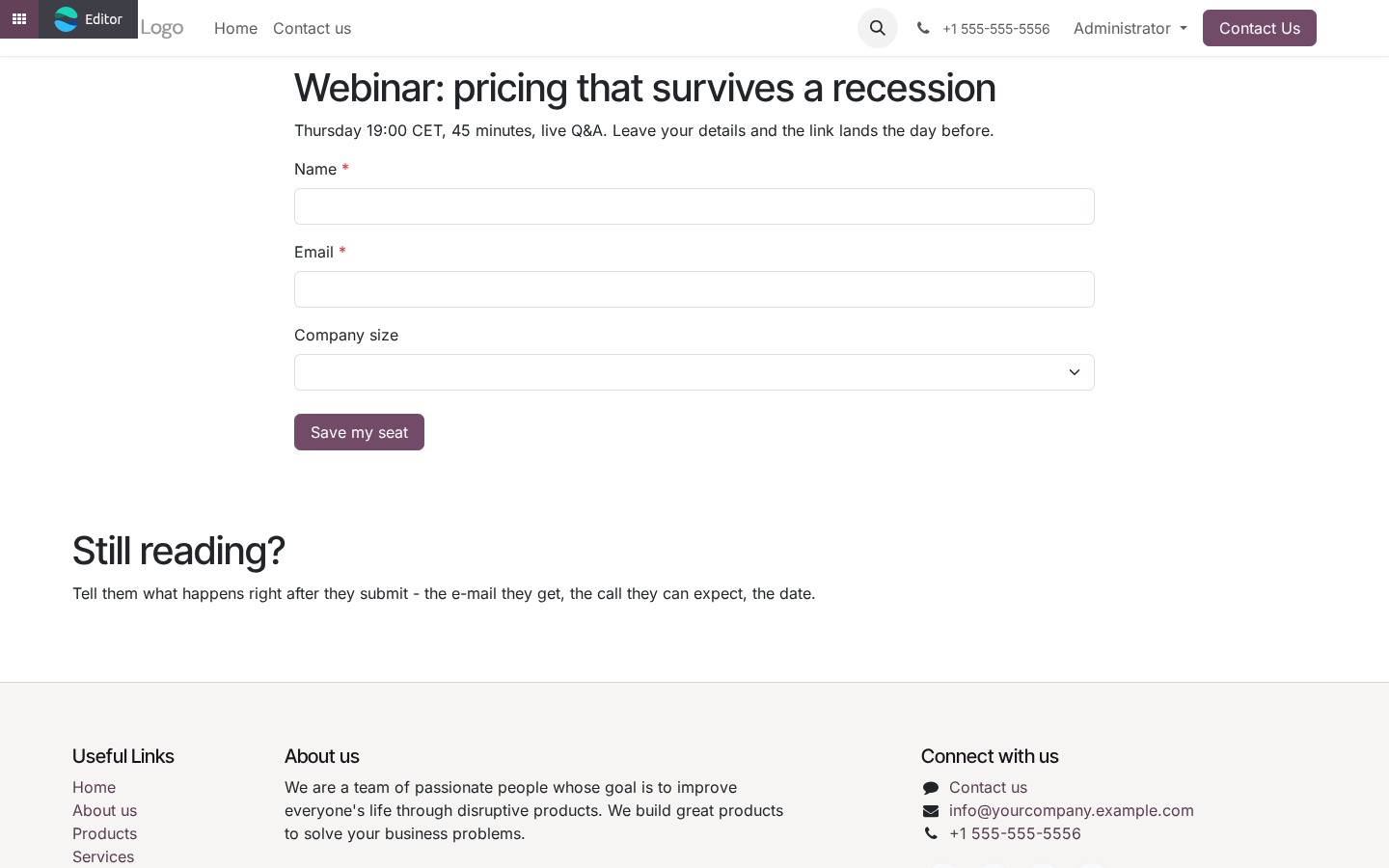
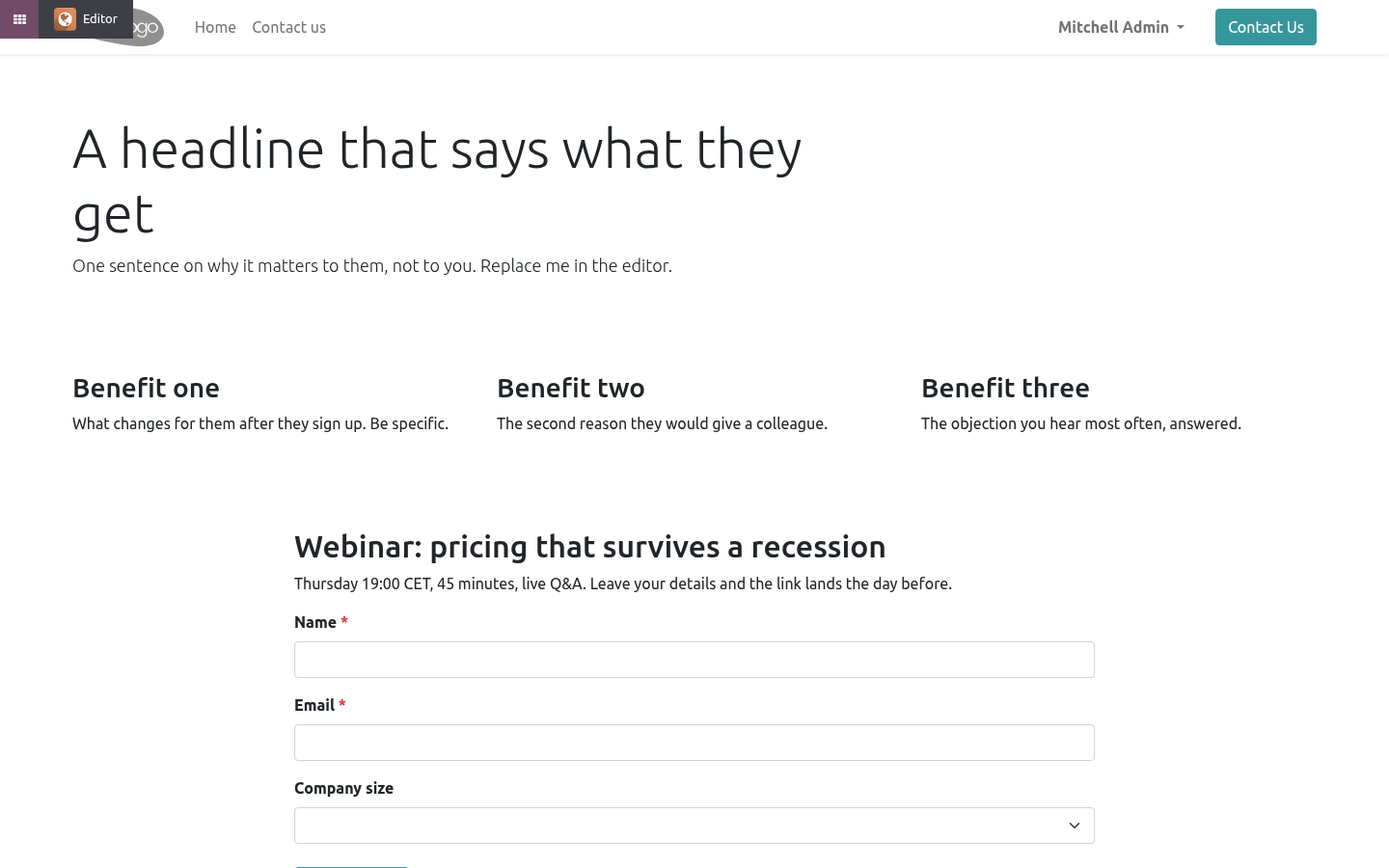
Create landing page on the form builds a website page named after the form: a hero block, three benefit blocks, the form itself, a closing block. The blocks are ordinary website building blocks - edit them in the website editor, drag more in. The form in the middle is a live embed: add a field to the form and the page shows it; it is not editable in place, on purpose, so the editor cannot freeze a copy of it.
The page is created unpublished. The form's Landing page button opens it; publish it from the website's publish toggle as usual.
UTM on every submission
When the visitor arrived through a link carrying utm_source, utm_medium or utm_campaign, Odoo's own UTM tracking sets cookies; the submission copies them into UTM source / medium / campaign (falling back to the referring page's query string), and records whether it came from the generated landing page. The participant carries the UTM campaign too, so the participant report can be grouped by it.
Technical notes
Uses Form Builder 1.3.0's _after_submit() hook and form_body template, and Marketing Automation 1.9.0's _enroll_records() / _participant_vals() hooks. Nothing is copied from either.
Enrolment failure never fails the visitor's submission: it is logged and written into the journey note.
Community only. No Enterprise module, no external service.
How we make sure it works
Before every release, 24 automated checks run against this app on Odoo 16, 17, 18, 19 and 20. Among them:
The same contact is not enrolled twice.
A form without a journey changes nothing.
An unpublished form shows a notice not a crash.
No email means a note not a ghost contact.
An enrolment error is noted not raised.
The complete list is in the source you receive.
What it does not do
Said before you buy, because it is the half that decides whether the app fits:
Fail a visitor's submission when enrolment fails: the failure is logged and written into the journey note.
Edit the embedded form in place on the page - add a field to the form and the page shows it.
Install
Copy bambooforge_ma_landing into your addons path and update the app list, or install the ZIP from the Odoo Apps Store.
Install Marketing Automation Suite: Landing Pages & Forms.
Questions people ask
- Which Odoo versions does it run on?
Odoo 16.0, 17.0, 18.0, 19.0, 20.0, on the series you buy it for; each series is its own listing.
- Community or Enterprise?
Both. It needs no Enterprise app.
- What does it need?
The standard Web; form builder, marketing automation (BambooForge) must be installed first app. No extra Python package.
- Does anything leave my server?
No. It makes no call outside your Odoo server: no telemetry, no licence check, no third-party service.
- What happens if I uninstall it?
Odoo drops the app's own tables and fields; the standard records it worked on (contacts, orders, products) stay as they are.