 BambooForge Labs
List View Pro: Better Odoo List Views
Better list views: column presets per person or role, frozen columns, totals on every numeric column, and export of exactly what is on screen.
Available for Odoo 16.0, Odoo 17.0, Odoo 18.0, Odoo 19.0, Odoo 20.0. Technical name bambooforge_list_view_pro.
Transcript of the walkthrough (Odoo 20)
List View Pro: Better Odoo List Views. Better list views: column presets per person or role, frozen columns, totals on every numeric column, and export of exactly what is on screen. Said before you buy, because it is the half that decides whether the app fits: In the next few minutes: list view pro: better odoo list views, then presets, then what a preset decides, and what it does not, then frozen columns, then totals without editing the view. Then what this app deliberately does not do, so you can tell before you buy whether it fits.
Everything lives under Column Presets. 1. Copy bambooforge_list_view_pro into your addons path and update the app list, or install the ZIP from the Odoo Apps Store. 2.
Install List View Pro: Better Odoo List Views. 3. Open Column Presets. List View Pro: Better Odoo List Views.
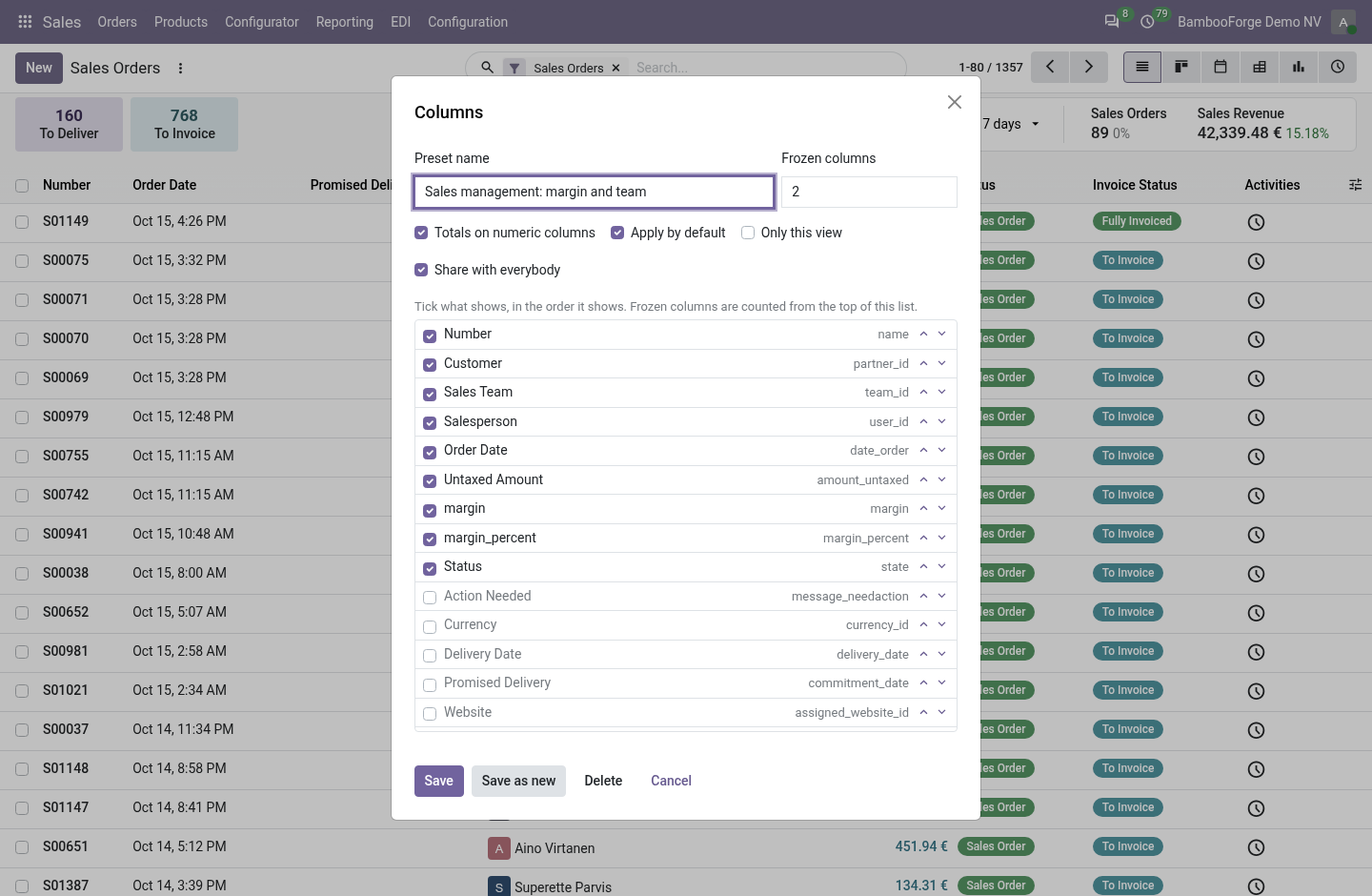
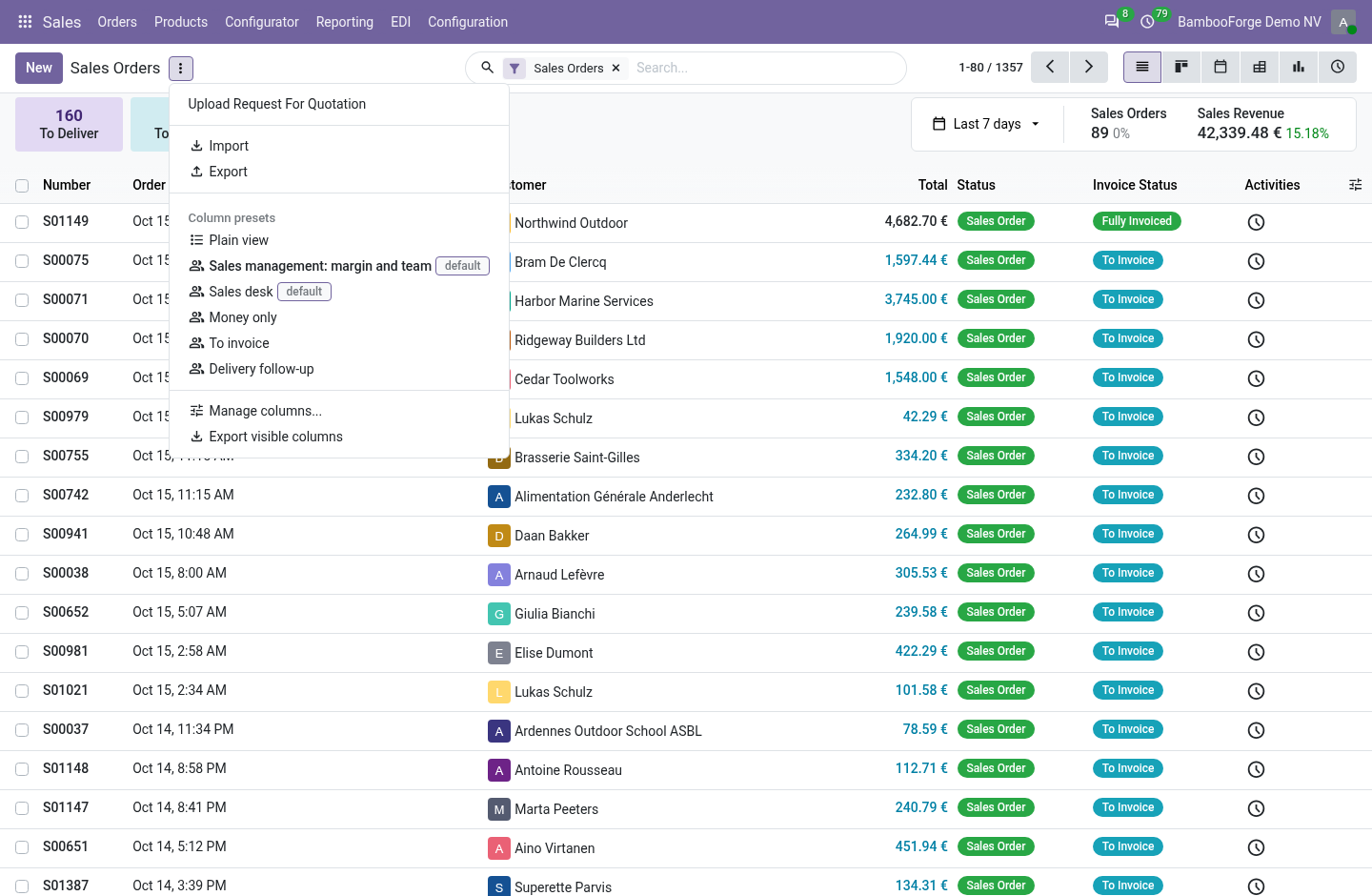
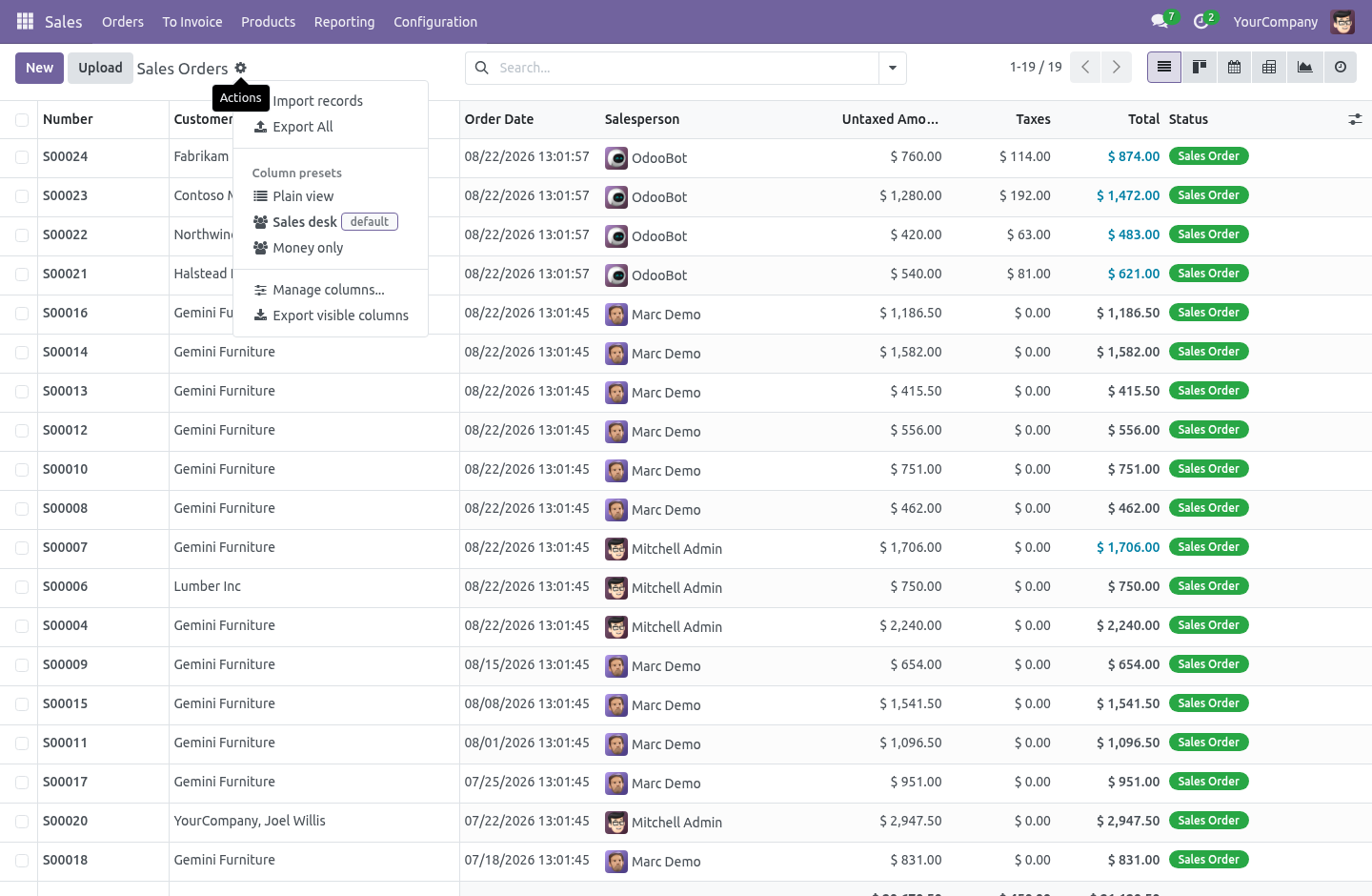
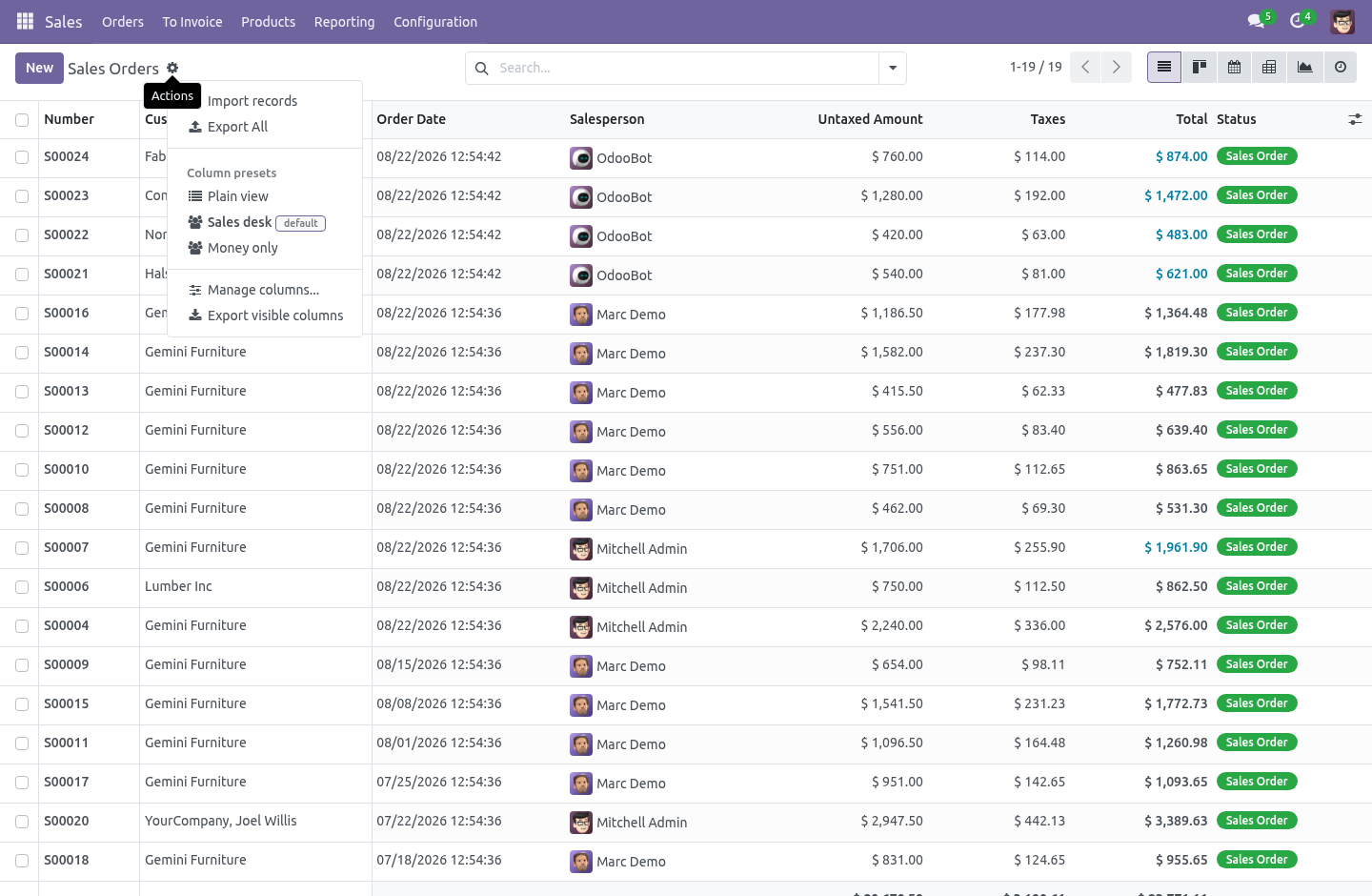
The optional-columns menu is where every team's morning starts and where it is lost again by lunch. This remembers it for them — per person, per role — and adds the three things that menu never had: frozen columns, totals on every numeric column, and an export of exactly what is on screen. Presets. Open any list, press the cog (Favourites on Odoo 20), and choose Manage columns.
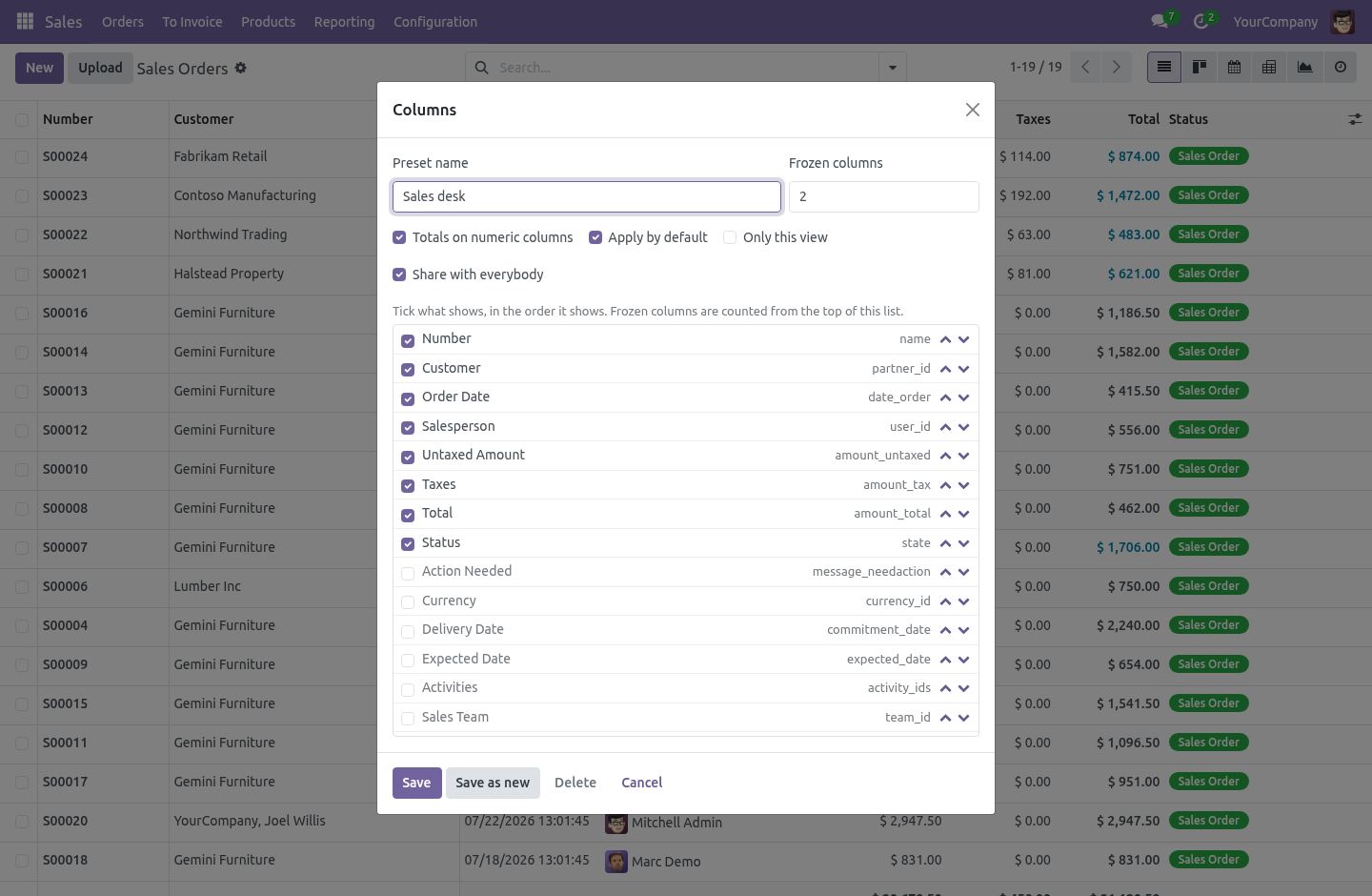
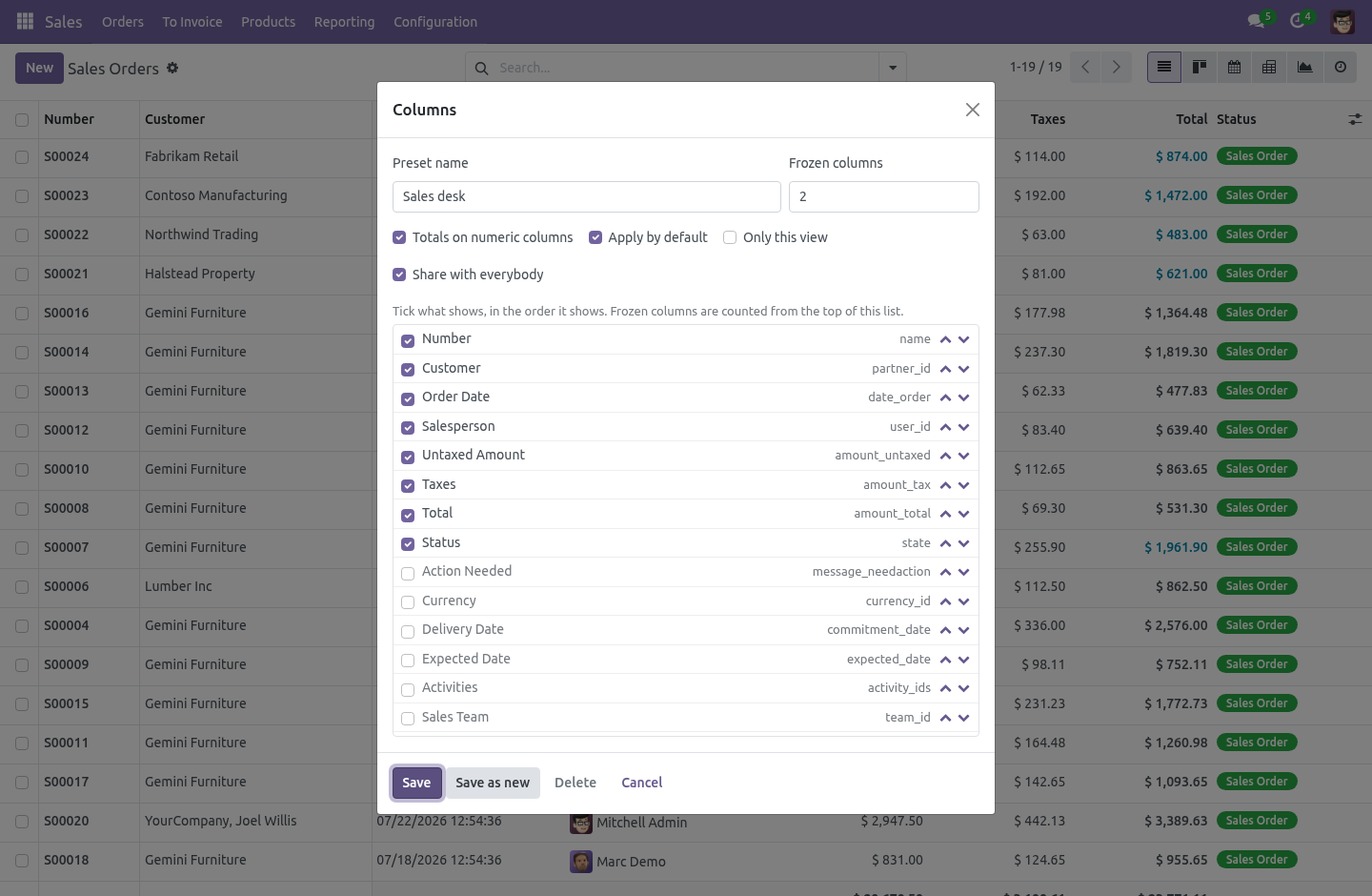
The dialog lists every column the view knows: tick what shows, move it up or down, choose how many stay frozen on the left, tick Totals. Give it a name and save. A preset is mine by default — nobody else sees it. A manager ticks Share with everybody, and the preset then reaches every user, or only the roles it names in the back office (Settings › Technical › Column Presets): "the warehouse sees these ten columns; accounts sees those seven" is one shared preset per role, each marked Applied by default.
What a preset decides, and what it does not. A preset decides which field columns show and in what order. Buttons and handles keep their place. A column the preset names that the view does not have is simply skipped — the same preset on a list that gained or lost a field still works.
A preset never changes what the data is: the domain, the grouping, the sort, the record rules. It is a way of looking, and it lives in the list renderer, not in the view definition — so it hooks any list, stock or custom, without an inherited view per model. Frozen columns. The first N columns stay put while the rest scroll sideways — header and body together.
The sticky offsets are measured from the real column widths after the table is in the DOM, because guessing them from the arch is how frozen columns overlap on the second screen width you try. Totals without editing the view. Tick Totals on numeric columns and every integer, float and monetary column carries a sum — in the footer, and per group when the list is grouped — exactly the way a sum= attribute on the field would do it, without anyone editing a view. Monetary columns keep the currency rules the standard footer has: mixed currencies show a dash, not a lie.
Export what you see. Export visible columns downloads an xlsx of the visible columns in their order, for the records that match the current search, with no dialog and no field picker. It is its own endpoint rather than a replay of the standard export payload — that payload's shape moves between series, and this one has a single job. Access is never sudo: the export reads through export_data, so a person gets exactly the rows and fields their rights allow and nothing else.
A column they are not allowed to read fails the export rather than arriving blank. Security. Every internal user is a List View Pro user: saves personal presets, applies shared ones. A manager writes the presets everybody sees.
Ownership of what the dialog saves is decided on the server — a non-manager who sends shared: true gets a personal preset, whatever the payload said. Record rules scope reads to mine, or shared with a role I hold, and writes to mine; a company on a preset scopes it to that company. One file per series. The list renderer keeps getActiveColumns() from Odoo 16 to 20, so that is the one deep patch point.
Everything else is feature-detected at runtime — the cog menu exists from 17 and 16 gets the same item in Favourites; the owl state shape of the renderer changed in 19 and the refresh path probes for it rather than assuming. What it needs. web only. Community.
No Enterprise module is required, and none is used. How we make sure it works. Before every release, 32 automated checks run against this app on Odoo 16, 17, 18, 19 and 20. Among them: A user cannot publish to everybody through the dialog.
A user cannot rewrite a shared preset. A view of another model is refused. Garbage is refused not 500. A manager editing a personal preset does not steal it.
The complete list is in the source you receive. The complete manual is at docs dot bambooforge dot dev, the demo database is linked from the store page, and support answers within twenty-four hours. Links are in the description.
Transcript of the walkthrough (Odoo 19)
List View Pro: Better Odoo List Views. Better list views: column presets per person or role, frozen columns, totals on every numeric column, and export of exactly what is on screen. The optional-columns menu is where every team's morning starts and where it is lost again by lunch. This remembers it for them — per person, per role — and adds the three things that menu never had: frozen columns, totals on every numeric column, and an export of exactly what is on screen.
In the next few minutes: list view pro: better odoo list views, then presets, then what a preset decides, and what it does not, then frozen columns, then totals without editing the view. Then what this app deliberately does not do, so you can tell before you buy whether it fits. Everything lives under Column Presets. List View Pro: Better Odoo List Views.
The optional-columns menu is where every team's morning starts and where it is lost again by lunch. This remembers it for them — per person, per role — and adds the three things that menu never had: frozen columns, totals on every numeric column, and an export of exactly what is on screen. Presets. Open any list, press the cog (Favourites on Odoo 19), and choose Manage columns.
The dialog lists every column the view knows: tick what shows, move it up or down, choose how many stay frozen on the left, tick Totals. Give it a name and save. A preset is mine by default — nobody else sees it. A manager ticks Share with everybody, and the preset then reaches every user, or only the roles it names in the back office (Settings › Technical › Column Presets): "the warehouse sees these ten columns; accounts sees those seven" is one shared preset per role, each marked Applied by default.
What a preset decides, and what it does not. A preset decides which field columns show and in what order. Buttons and handles keep their place. A column the preset names that the view does not have is simply skipped — the same preset on a list that gained or lost a field still works.
A preset never changes what the data is: the domain, the grouping, the sort, the record rules. It is a way of looking, and it lives in the list renderer, not in the view definition — so it hooks any list, stock or custom, without an inherited view per model. Frozen columns. The first N columns stay put while the rest scroll sideways — header and body together.
The sticky offsets are measured from the real column widths after the table is in the DOM, because guessing them from the arch is how frozen columns overlap on the second screen width you try. Totals without editing the view. Tick Totals on numeric columns and every integer, float and monetary column carries a sum — in the footer, and per group when the list is grouped — exactly the way a sum= attribute on the field would do it, without anyone editing a view. Monetary columns keep the currency rules the standard footer has: mixed currencies show a dash, not a lie.
Export what you see. Export visible columns downloads an xlsx of the visible columns in their order, for the records that match the current search, with no dialog and no field picker. It is its own endpoint rather than a replay of the standard export payload — that payload's shape moves between series, and this one has a single job. Access is never sudo: the export reads through export_data, so a person gets exactly the rows and fields their rights allow and nothing else.
A column they are not allowed to read fails the export rather than arriving blank. Security. Every internal user is a List View Pro user: saves personal presets, applies shared ones. A manager writes the presets everybody sees.
Ownership of what the dialog saves is decided on the server — a non-manager who sends shared: true gets a personal preset, whatever the payload said. Record rules scope reads to mine, or shared with a role I hold, and writes to mine; a company on a preset scopes it to that company. One file, four series. The list renderer keeps getActiveColumns() from Odoo 19 through 19, so that is the one deep patch point.
Everything else is feature-detected at runtime — the cog menu exists from 17 and 16 gets the same item in Favourites; the owl state shape of the renderer changed in 19 and the refresh path probes for it rather than assuming. What it needs. web only. Community.
No Enterprise module is required, and none is used. The complete manual is at docs dot bambooforge dot dev, the demo database is linked from the store page, and support answers within twenty-four hours. Links are in the description.
Transcript of the walkthrough (Odoo 18)
List View Pro: Better Odoo List Views. Better list views: column presets per person or role, frozen columns, totals on every numeric column, and export of exactly what is on screen. The optional-columns menu is where every team's morning starts and where it is lost again by lunch. This remembers it for them — per person, per role — and adds the three things that menu never had: frozen columns, totals on every numeric column, and an export of exactly what is on screen.
In the next few minutes: list view pro: better odoo list views, then presets, then what a preset decides, and what it does not, then frozen columns, then totals without editing the view. Then what this app deliberately does not do, so you can tell before you buy whether it fits. Everything lives under Column Presets. List View Pro: Better Odoo List Views.
The optional-columns menu is where every team's morning starts and where it is lost again by lunch. This remembers it for them — per person, per role — and adds the three things that menu never had: frozen columns, totals on every numeric column, and an export of exactly what is on screen. Presets. Open any list, press the cog (Favourites on Odoo 18), and choose Manage columns.
The dialog lists every column the view knows: tick what shows, move it up or down, choose how many stay frozen on the left, tick Totals. Give it a name and save. A preset is mine by default — nobody else sees it. A manager ticks Share with everybody, and the preset then reaches every user, or only the roles it names in the back office (Settings › Technical › Column Presets): "the warehouse sees these ten columns; accounts sees those seven" is one shared preset per role, each marked Applied by default.
What a preset decides, and what it does not. A preset decides which field columns show and in what order. Buttons and handles keep their place. A column the preset names that the view does not have is simply skipped — the same preset on a list that gained or lost a field still works.
A preset never changes what the data is: the domain, the grouping, the sort, the record rules. It is a way of looking, and it lives in the list renderer, not in the view definition — so it hooks any list, stock or custom, without an inherited view per model. Frozen columns. The first N columns stay put while the rest scroll sideways — header and body together.
The sticky offsets are measured from the real column widths after the table is in the DOM, because guessing them from the arch is how frozen columns overlap on the second screen width you try. Totals without editing the view. Tick Totals on numeric columns and every integer, float and monetary column carries a sum — in the footer, and per group when the list is grouped — exactly the way a sum= attribute on the field would do it, without anyone editing a view. Monetary columns keep the currency rules the standard footer has: mixed currencies show a dash, not a lie.
Export what you see. Export visible columns downloads an xlsx of the visible columns in their order, for the records that match the current search, with no dialog and no field picker. It is its own endpoint rather than a replay of the standard export payload — that payload's shape moves between series, and this one has a single job. Access is never sudo: the export reads through export_data, so a person gets exactly the rows and fields their rights allow and nothing else.
A column they are not allowed to read fails the export rather than arriving blank. Security. Every internal user is a List View Pro user: saves personal presets, applies shared ones. A manager writes the presets everybody sees.
Ownership of what the dialog saves is decided on the server — a non-manager who sends shared: true gets a personal preset, whatever the payload said. Record rules scope reads to mine, or shared with a role I hold, and writes to mine; a company on a preset scopes it to that company. One file, four series. The list renderer keeps getActiveColumns() from Odoo 18 through 19, so that is the one deep patch point.
Everything else is feature-detected at runtime — the cog menu exists from 17 and 16 gets the same item in Favourites; the owl state shape of the renderer changed in 19 and the refresh path probes for it rather than assuming. What it needs. web only. Community.
No Enterprise module is required, and none is used. The complete manual is at docs dot bambooforge dot dev, the demo database is linked from the store page, and support answers within twenty-four hours. Links are in the description.
Transcript of the walkthrough (Odoo 17)
List View Pro: Better Odoo List Views. Better list views: column presets per person or role, frozen columns, totals on every numeric column, and export of exactly what is on screen. The optional-columns menu is where every team's morning starts and where it is lost again by lunch. This remembers it for them — per person, per role — and adds the three things that menu never had: frozen columns, totals on every numeric column, and an export of exactly what is on screen.
In the next few minutes: list view pro: better odoo list views, then presets, then what a preset decides, and what it does not, then frozen columns, then totals without editing the view. Then what this app deliberately does not do, so you can tell before you buy whether it fits. Everything lives under Column Presets. List View Pro: Better Odoo List Views.
The optional-columns menu is where every team's morning starts and where it is lost again by lunch. This remembers it for them — per person, per role — and adds the three things that menu never had: frozen columns, totals on every numeric column, and an export of exactly what is on screen. Presets. Open any list, press the cog (Favourites on Odoo 16), and choose Manage columns.
The dialog lists every column the view knows: tick what shows, move it up or down, choose how many stay frozen on the left, tick Totals. Give it a name and save. A preset is mine by default — nobody else sees it. A manager ticks Share with everybody, and the preset then reaches every user, or only the roles it names in the back office (Settings › Technical › Column Presets): "the warehouse sees these ten columns; accounts sees those seven" is one shared preset per role, each marked Applied by default.
What a preset decides, and what it does not. A preset decides which field columns show and in what order. Buttons and handles keep their place. A column the preset names that the view does not have is simply skipped — the same preset on a list that gained or lost a field still works.
A preset never changes what the data is: the domain, the grouping, the sort, the record rules. It is a way of looking, and it lives in the list renderer, not in the view definition — so it hooks any list, stock or custom, without an inherited view per model. Frozen columns. The first N columns stay put while the rest scroll sideways — header and body together.
The sticky offsets are measured from the real column widths after the table is in the DOM, because guessing them from the arch is how frozen columns overlap on the second screen width you try. Totals without editing the view. Tick Totals on numeric columns and every integer, float and monetary column carries a sum — in the footer, and per group when the list is grouped — exactly the way a sum= attribute on the field would do it, without anyone editing a view. Monetary columns keep the currency rules the standard footer has: mixed currencies show a dash, not a lie.
Export what you see. Export visible columns downloads an xlsx of the visible columns in their order, for the records that match the current search, with no dialog and no field picker. It is its own endpoint rather than a replay of the standard export payload — that payload's shape moves between series, and this one has a single job. Access is never sudo: the export reads through export_data, so a person gets exactly the rows and fields their rights allow and nothing else.
A column they are not allowed to read fails the export rather than arriving blank. Security. Every internal user is a List View Pro user: saves personal presets, applies shared ones. A manager writes the presets everybody sees.
Ownership of what the dialog saves is decided on the server — a non-manager who sends shared: true gets a personal preset, whatever the payload said. Record rules scope reads to mine, or shared with a role I hold, and writes to mine; a company on a preset scopes it to that company. One file, four series. The list renderer keeps getActiveColumns() from Odoo 16 through 19, so that is the one deep patch point.
Everything else is feature-detected at runtime — the cog menu exists from 17 and 16 gets the same item in Favourites; the owl state shape of the renderer changed in 19 and the refresh path probes for it rather than assuming. What it needs. web only. Community.
No Enterprise module is required, and none is used. The complete manual is at docs dot bambooforge dot dev, the demo database is linked from the store page, and support answers within twenty-four hours. Links are in the description.
Transcript of the walkthrough (Odoo 16)
List View Pro: Better Odoo List Views. Better list views: column presets per person or role, frozen columns, totals on every numeric column, and export of exactly what is on screen. The optional-columns menu is where every team's morning starts and where it is lost again by lunch. This remembers it for them — per person, per role — and adds the three things that menu never had: frozen columns, totals on every numeric column, and an export of exactly what is on screen.
In the next few minutes: list view pro: better odoo list views, then presets, then what a preset decides, and what it does not, then frozen columns, then totals without editing the view. Then what this app deliberately does not do, so you can tell before you buy whether it fits. Everything lives under Column Presets. List View Pro: Better Odoo List Views.
The optional-columns menu is where every team's morning starts and where it is lost again by lunch. This remembers it for them — per person, per role — and adds the three things that menu never had: frozen columns, totals on every numeric column, and an export of exactly what is on screen. Presets. Open any list, press the cog (Favourites on Odoo 16), and choose Manage columns.
The dialog lists every column the view knows: tick what shows, move it up or down, choose how many stay frozen on the left, tick Totals. Give it a name and save. A preset is mine by default — nobody else sees it. A manager ticks Share with everybody, and the preset then reaches every user, or only the roles it names in the back office (Settings › Technical › Column Presets): "the warehouse sees these ten columns; accounts sees those seven" is one shared preset per role, each marked Applied by default.
What a preset decides, and what it does not. A preset decides which field columns show and in what order. Buttons and handles keep their place. A column the preset names that the view does not have is simply skipped — the same preset on a list that gained or lost a field still works.
A preset never changes what the data is: the domain, the grouping, the sort, the record rules. It is a way of looking, and it lives in the list renderer, not in the view definition — so it hooks any list, stock or custom, without an inherited view per model. Frozen columns. The first N columns stay put while the rest scroll sideways — header and body together.
The sticky offsets are measured from the real column widths after the table is in the DOM, because guessing them from the arch is how frozen columns overlap on the second screen width you try. Totals without editing the view. Tick Totals on numeric columns and every integer, float and monetary column carries a sum — in the footer, and per group when the list is grouped — exactly the way a sum= attribute on the field would do it, without anyone editing a view. Monetary columns keep the currency rules the standard footer has: mixed currencies show a dash, not a lie.
Export what you see. Export visible columns downloads an xlsx of the visible columns in their order, for the records that match the current search, with no dialog and no field picker. It is its own endpoint rather than a replay of the standard export payload — that payload's shape moves between series, and this one has a single job. Access is never sudo: the export reads through export_data, so a person gets exactly the rows and fields their rights allow and nothing else.
A column they are not allowed to read fails the export rather than arriving blank. Security. Every internal user is a List View Pro user: saves personal presets, applies shared ones. A manager writes the presets everybody sees.
Ownership of what the dialog saves is decided on the server — a non-manager who sends shared: true gets a personal preset, whatever the payload said. Record rules scope reads to mine, or shared with a role I hold, and writes to mine; a company on a preset scopes it to that company. One file, four series. The list renderer keeps getActiveColumns() from Odoo 16 through 19, so that is the one deep patch point.
Everything else is feature-detected at runtime — the cog menu exists from 17 and 16 gets the same item in Favourites; the owl state shape of the renderer changed in 19 and the refresh path probes for it rather than assuming. What it needs. web only. Community.
No Enterprise module is required, and none is used. The complete manual is at docs dot bambooforge dot dev, the demo database is linked from the store page, and support answers within twenty-four hours. Links are in the description.
Key facts
- What it is
- Better list views: column presets per person or role, frozen columns, totals on every numeric column, and export of exactly what is on screen.
- For
- Extra Tools
- Odoo versions
- 16.0, 17.0, 18.0, 19.0, 20.0 - Community and Enterprise
- Runs on
- Odoo.sh or Odoo you host yourself - not Odoo Online, which accepts no third-party apps
- Price
- 99 EUR, one-time, on the Odoo Apps Store
- Technical name
- bambooforge_list_view_pro
- Not for
- Said before you buy, because it is the half that decides whether the app fits:; Apply a preset inside x2many tabs or select dialogs - a preset applies to the list view where the menu is.; Change what a user may see: frozen columns, totals and export work on the rows Odoo already shows them.; Share a preset by default - presets are per person, per role.
- Manual last updated
- 2026-10-15
List View Pro: Better Odoo List Views
The optional-columns menu is where every team's morning starts and where it is lost again by lunch. This remembers it for them — per person, per role — and adds the three things that menu never had: frozen columns, totals on every numeric column, and an export of exactly what is on screen.
Presets
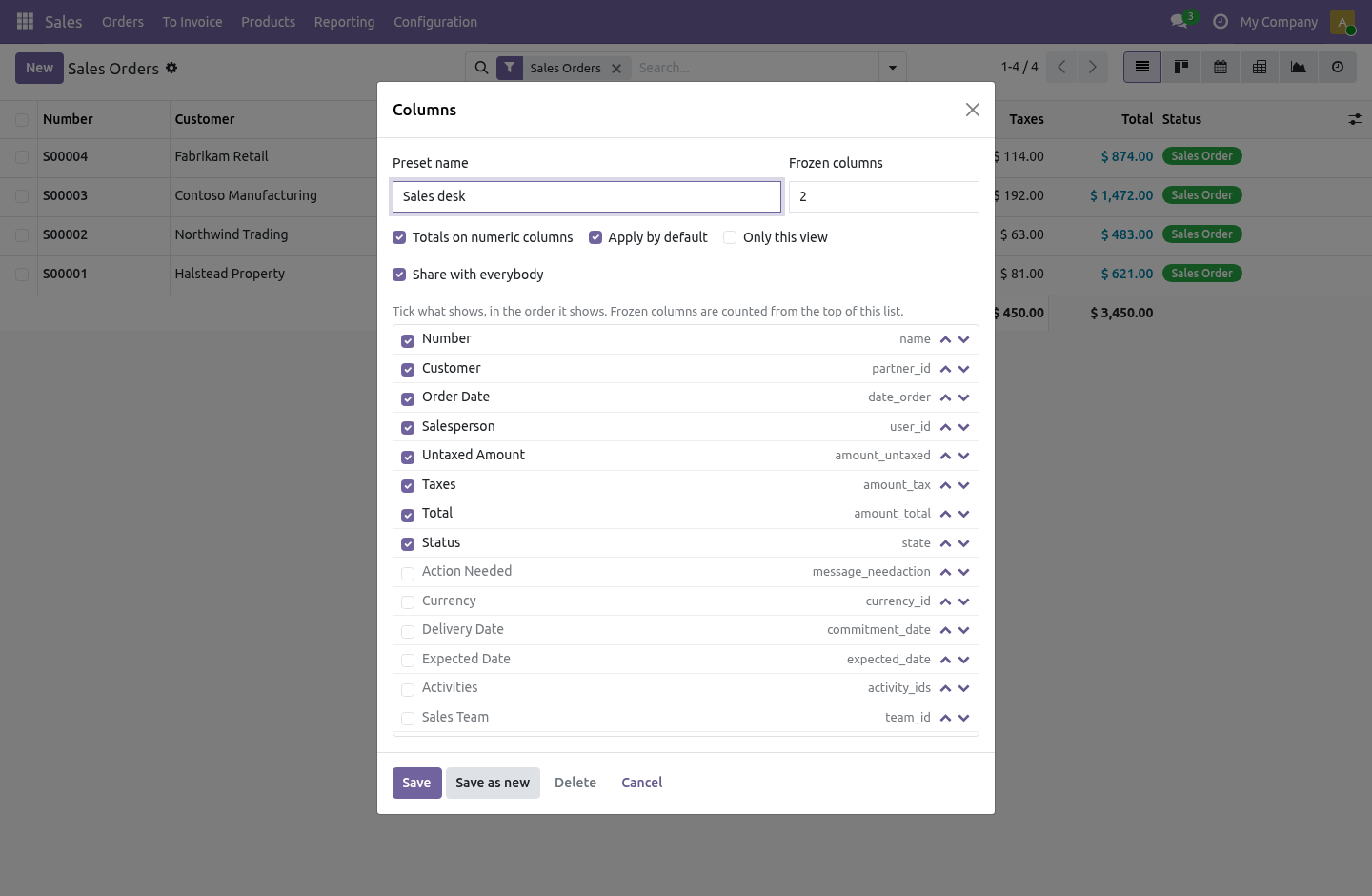
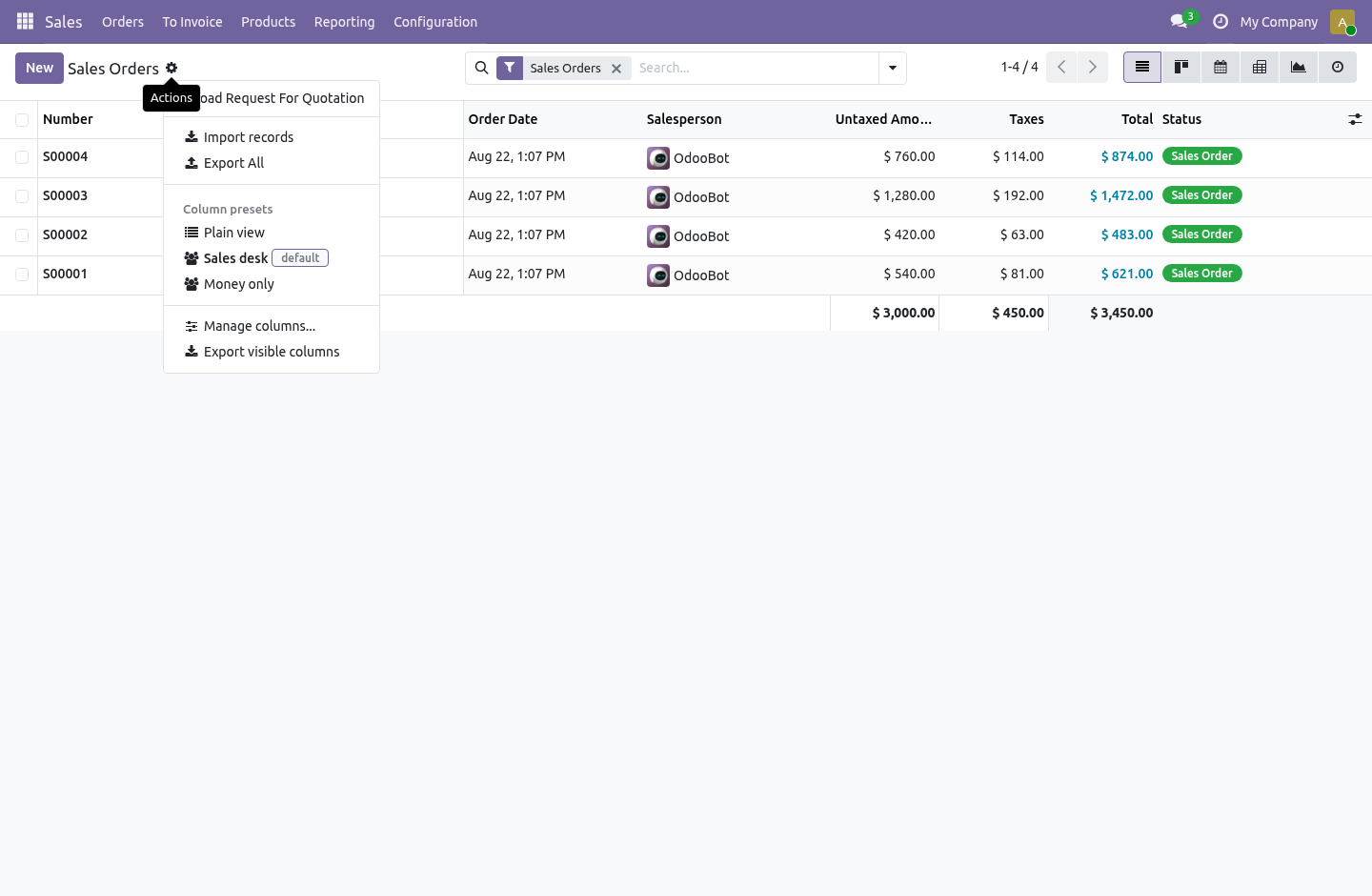
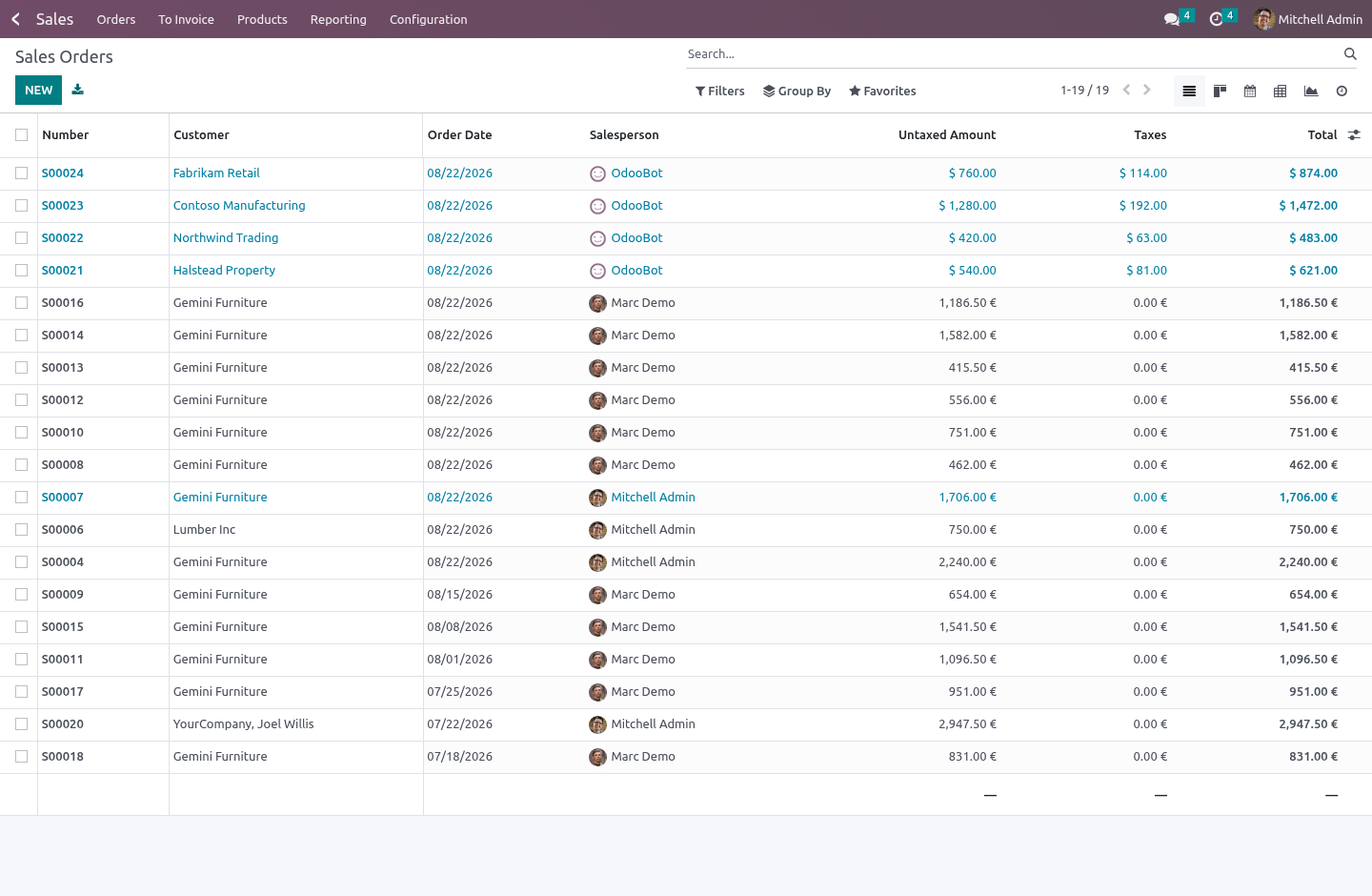
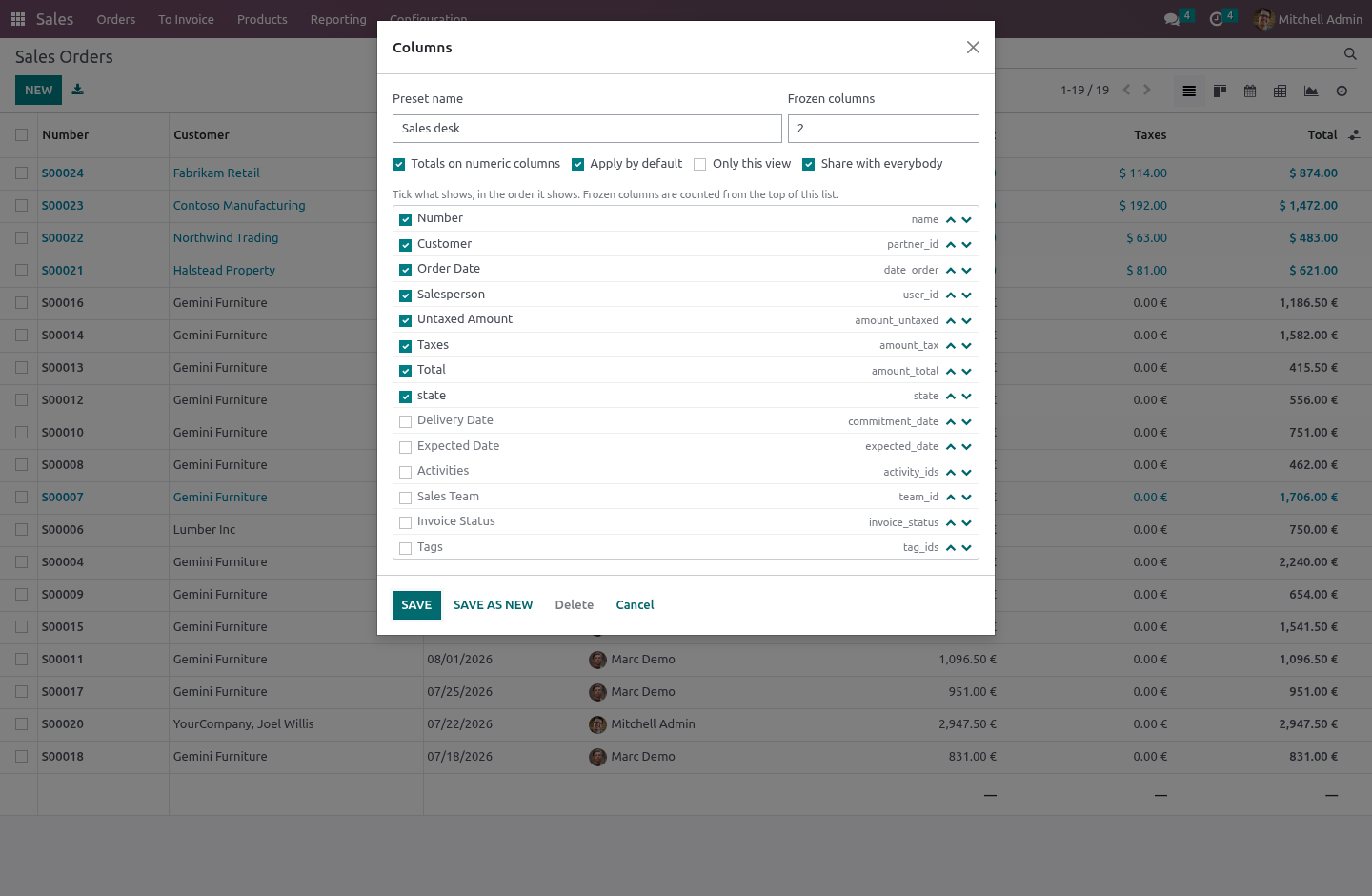
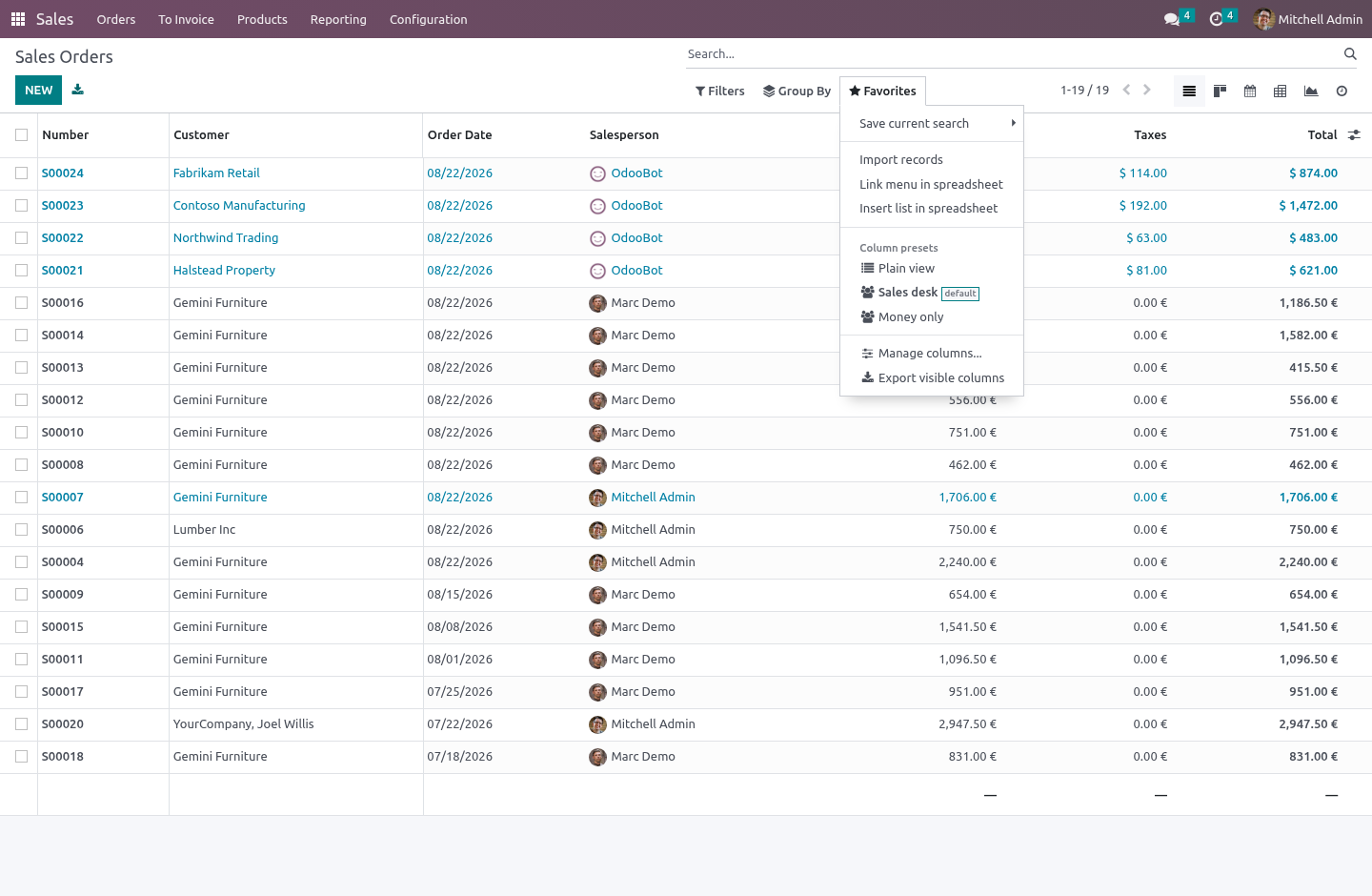
Open any list, press the cog (Favourites on Odoo 20), and choose Manage columns. The dialog lists every column the view knows: tick what shows, move it up or down, choose how many stay frozen on the left, tick Totals. Give it a name and save.
A preset is mine by default — nobody else sees it. A manager ticks Share with everybody, and the preset then reaches every user, or only the roles it names in the back office (Settings › Technical › Column Presets): "the warehouse sees these ten columns; accounts sees those seven" is one shared preset per role, each marked Applied by default.
Which preset applies when somebody opens a list:
the one they last picked themselves on this browser;
otherwise their own default;
otherwise the shared default that reaches them;
otherwise the plain view.
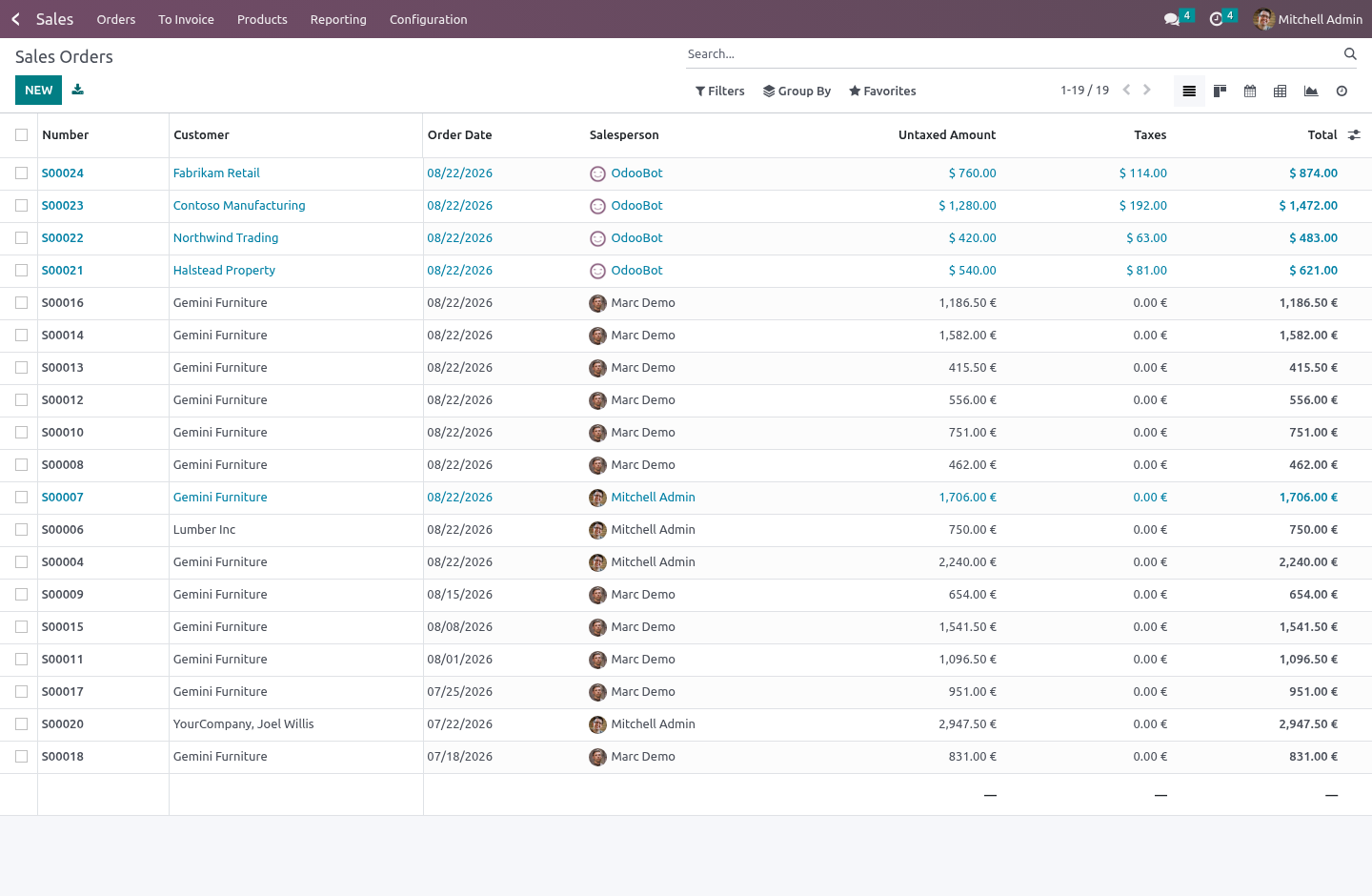
Picking Plain view is remembered too — it is a choice, not an absence of one.
Two indistinguishable defaults — same owner, same roles, same list — are refused at save time, because the one that loads would be whichever the database returned first. Two shared defaults aimed at different roles are fine; that is the whole point. When two of them reach the same person, the lower sequence wins, and the field says so.
Only this view. A preset is per model by default, which is also every x2many tab and every select dialog of that model — so the preset never applies there: it applies to the list of a list view only, where the menu is, where it can be undone. Tick Only this view in the dialog and it applies to that one list view — Vendor Bills and not Customer Invoices — rather than to every list of the model. A default that is per model loads by itself only on a list that has every column it names: a list built for one job — the comparison of a tender's quotations, say — keeps its own columns, and the preset is still in the menu to pick by hand.
Touching the optional-columns dropdown while a preset is active means "I am leaving the preset": the toggle then works from the plain view, and what the browser remembers is the person's own choice, never the preset's.
What a preset decides, and what it does not
A preset decides which field columns show and in what order. Buttons and handles keep their place. A column the preset names that the view does not have is simply skipped — the same preset on a list that gained or lost a field still works.
A preset never changes what the data is: the domain, the grouping, the sort, the record rules. It is a way of looking, and it lives in the list renderer, not in the view definition — so it hooks any list, stock or custom, without an inherited view per model.
Frozen columns
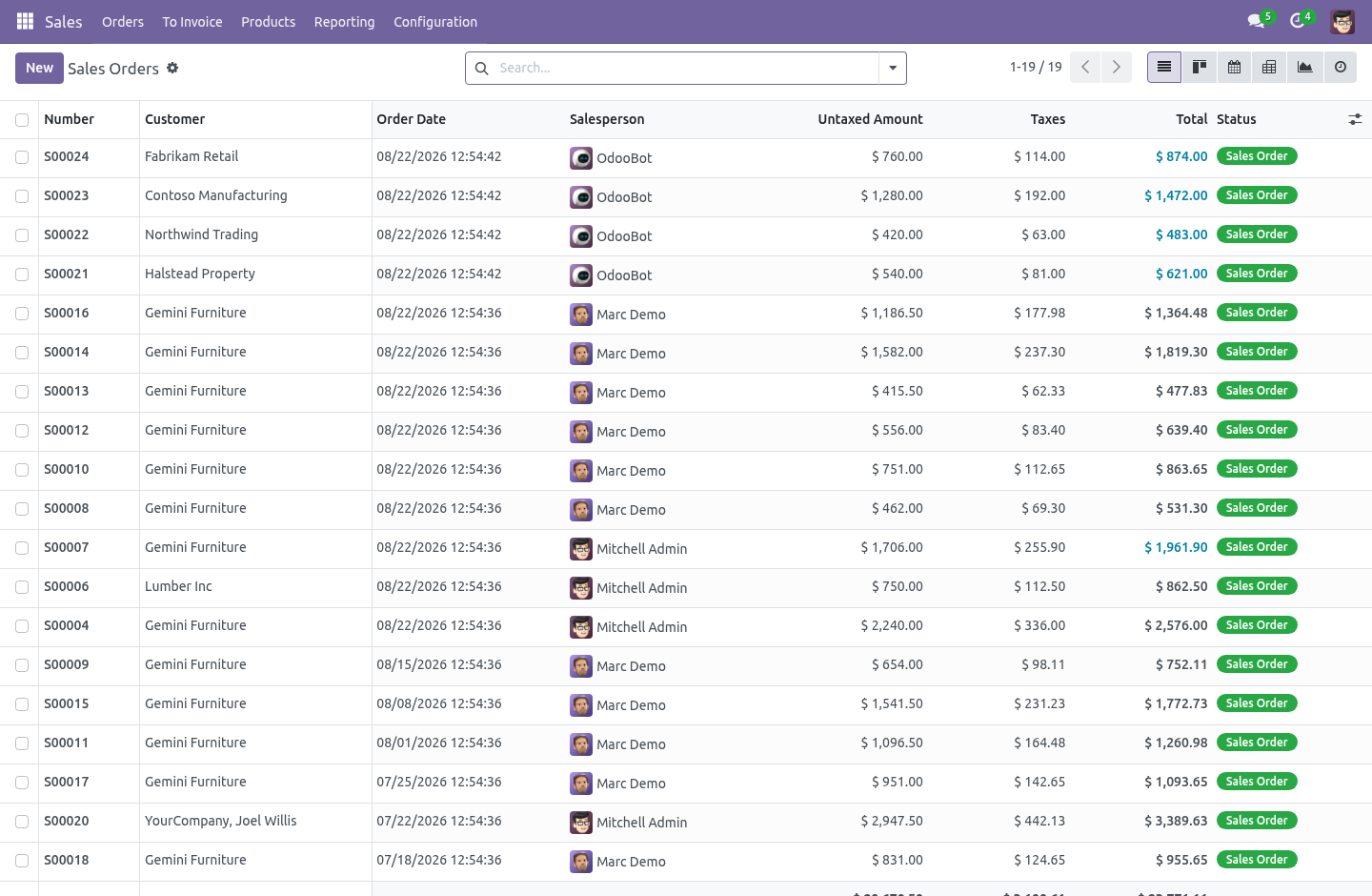
The first N columns stay put while the rest scroll sideways — header and body together. The sticky offsets are measured from the real column widths after the table is in the DOM, because guessing them from the arch is how frozen columns overlap on the second screen width you try.
Totals without editing the view
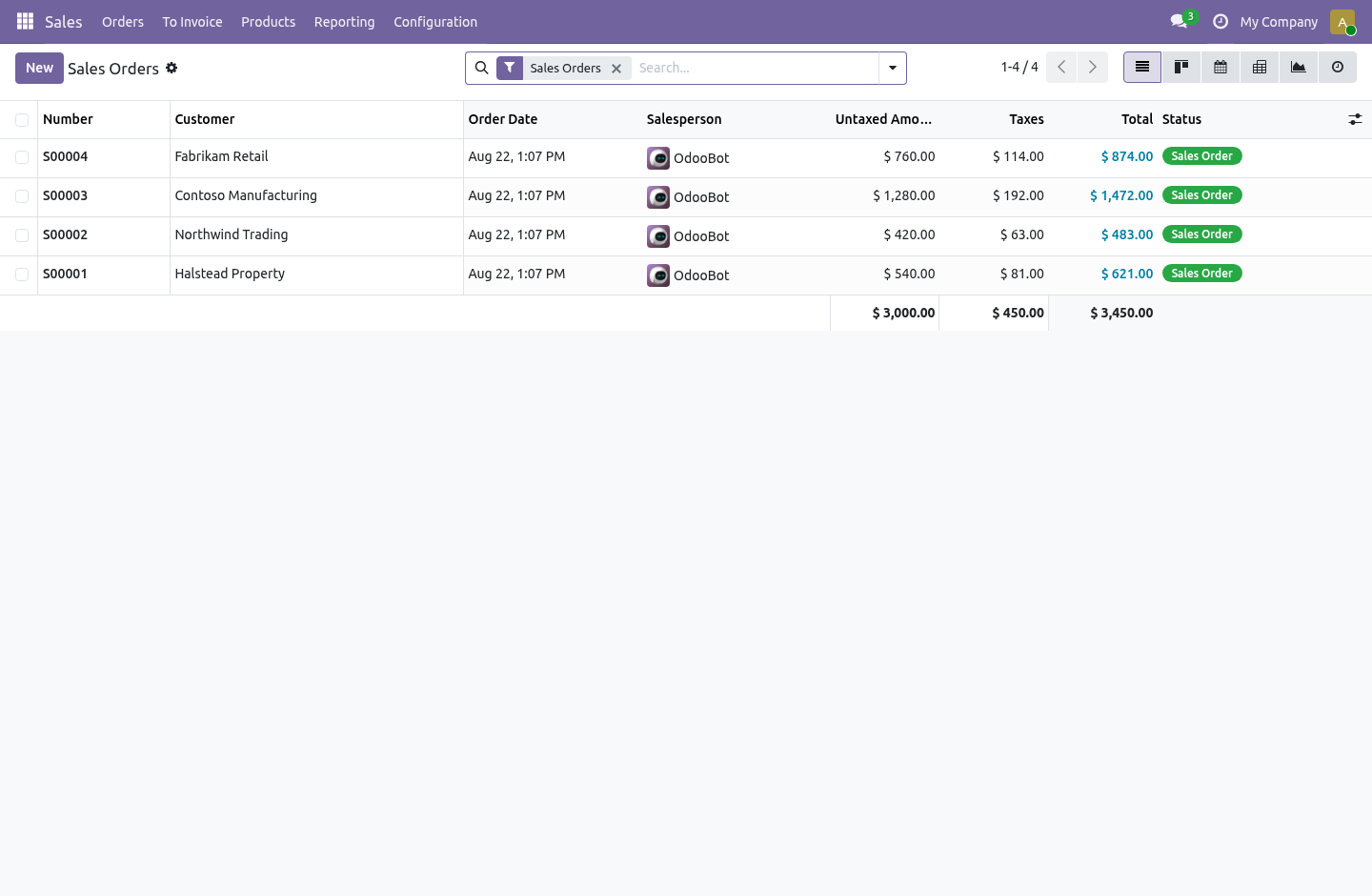
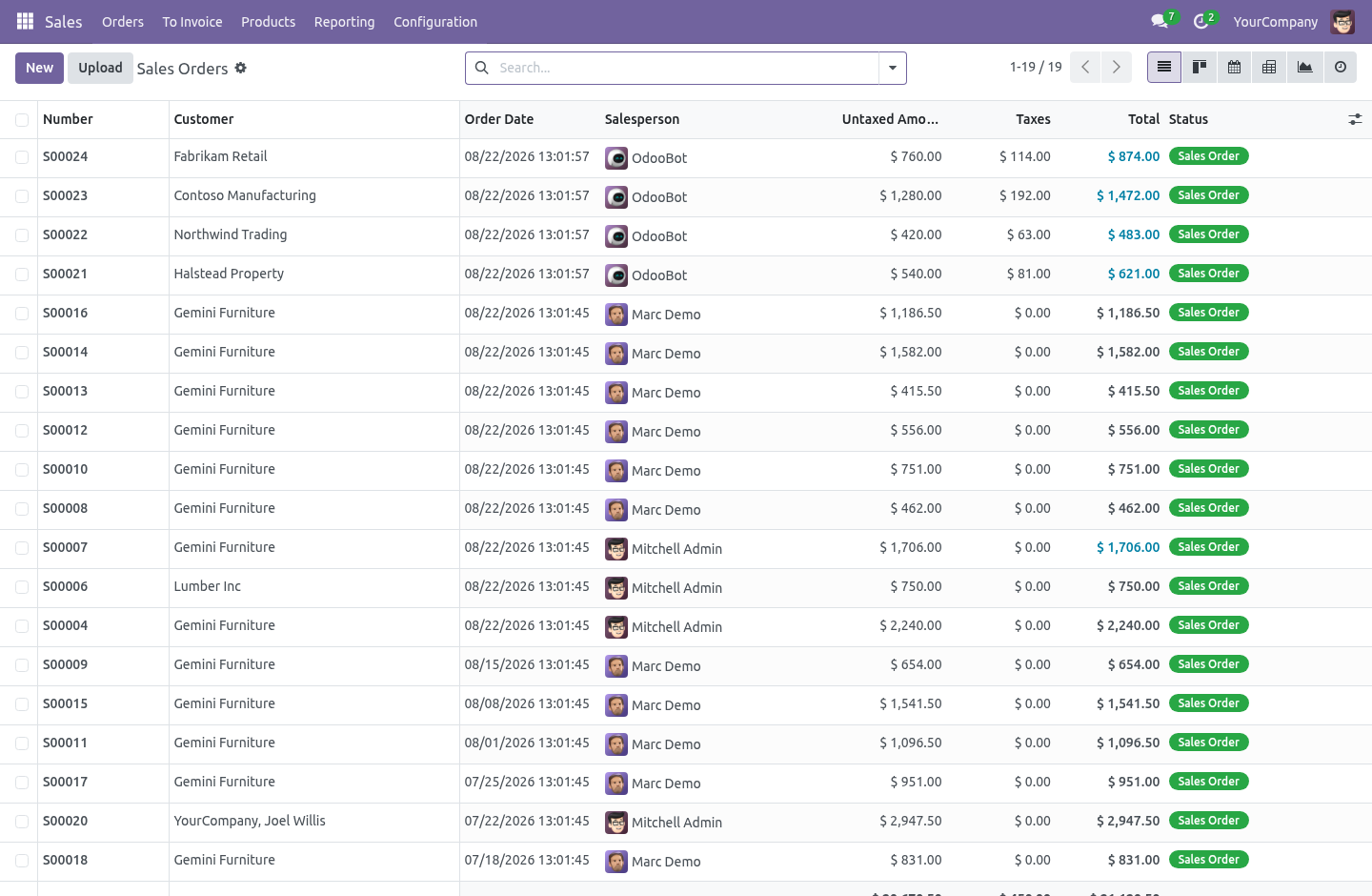
Tick Totals on numeric columns and every integer, float and monetary column carries a sum — in the footer, and per group when the list is grouped — exactly the way a sum= attribute on the field would do it, without anyone editing a view. Monetary columns keep the currency rules the standard footer has: mixed currencies show a dash, not a lie.
Export what you see
Export visible columns downloads an xlsx of the visible columns in their order, for the records that match the current search, with no dialog and no field picker. It is its own endpoint rather than a replay of the standard export payload — that payload's shape moves between series, and this one has a single job.
Access is never sudo: the export reads through export_data, so a person gets exactly the rows and fields their rights allow and nothing else. A column they are not allowed to read fails the export rather than arriving blank.
Security
Every internal user is a List View Pro user: saves personal presets, applies shared ones. A manager writes the presets everybody sees. Ownership of what the dialog saves is decided on the server — a non-manager who sends shared: true gets a personal preset, whatever the payload said. Record rules scope reads to mine, or shared with a role I hold, and writes to mine; a company on a preset scopes it to that company.
One file per series
The list renderer keeps getActiveColumns() from Odoo 16 to 20, so that is the one deep patch point. Everything else is feature-detected at runtime — the cog menu exists from 17 and 16 gets the same item in Favourites; the owl state shape of the renderer changed in 19 and the refresh path probes for it rather than assuming.
What it needs
web only. Community. No Enterprise module is required, and none is used.
How we make sure it works
Before every release, 32 automated checks run against this app on Odoo 16, 17, 18, 19 and 20. Among them:
A user cannot publish to everybody through the dialog.
A user cannot rewrite a shared preset.
A view of another model is refused.
Garbage is refused not 500.
A manager editing a personal preset does not steal it.
The complete list is in the source you receive.
What it does not do
Said before you buy, because it is the half that decides whether the app fits:
Apply a preset inside x2many tabs or select dialogs - a preset applies to the list view where the menu is.
Change what a user may see: frozen columns, totals and export work on the rows Odoo already shows them.
Share a preset by default - presets are per person, per role.
Install
Copy bambooforge_list_view_pro into your addons path and update the app list, or install the ZIP from the Odoo Apps Store.
Install List View Pro: Better Odoo List Views.
Open Column Presets.
Questions people ask
- Which Odoo versions does it run on?
Odoo 16.0, 17.0, 18.0, 19.0, 20.0, on the series you buy it for; each series is its own listing.
- Community or Enterprise?
Both. It needs no Enterprise app.
- What does it need?
The standard Settings app. No extra Python package.
- Where does it show up?
Under the Column Presets menu.
- Does anything leave my server?
No. It makes no call outside your Odoo server: no telemetry, no licence check, no third-party service.
- What happens if I uninstall it?
Odoo drops the app's own tables and fields; the standard records it worked on (contacts, orders, products) stay as they are.