 BambooForge Labs
SEO All in One with Internal Link Suggester
Turn a phrase into an internal link wherever it appears - once per page, never in a heading - with a ledger, one-click undo and orphan report.
Available for Odoo 16.0, Odoo 17.0, Odoo 18.0, Odoo 19.0, Odoo 20.0. Technical name bambooforge_link_suggester.
Transcript of the walkthrough (Odoo 20)
SEO All in One with Internal Link Suggester. Turn a phrase into an internal link wherever it appears - once per page, never in a heading - with a ledger, one-click undo and orphan report. Said before you buy, because it is the half that decides whether the app fits: In the next few minutes: seo all in one with internal link suggester, then rules, then applying them, then what can be edited, then the ledger, and undo. Then what this app deliberately does not do, so you can tell before you buy whether it fits.
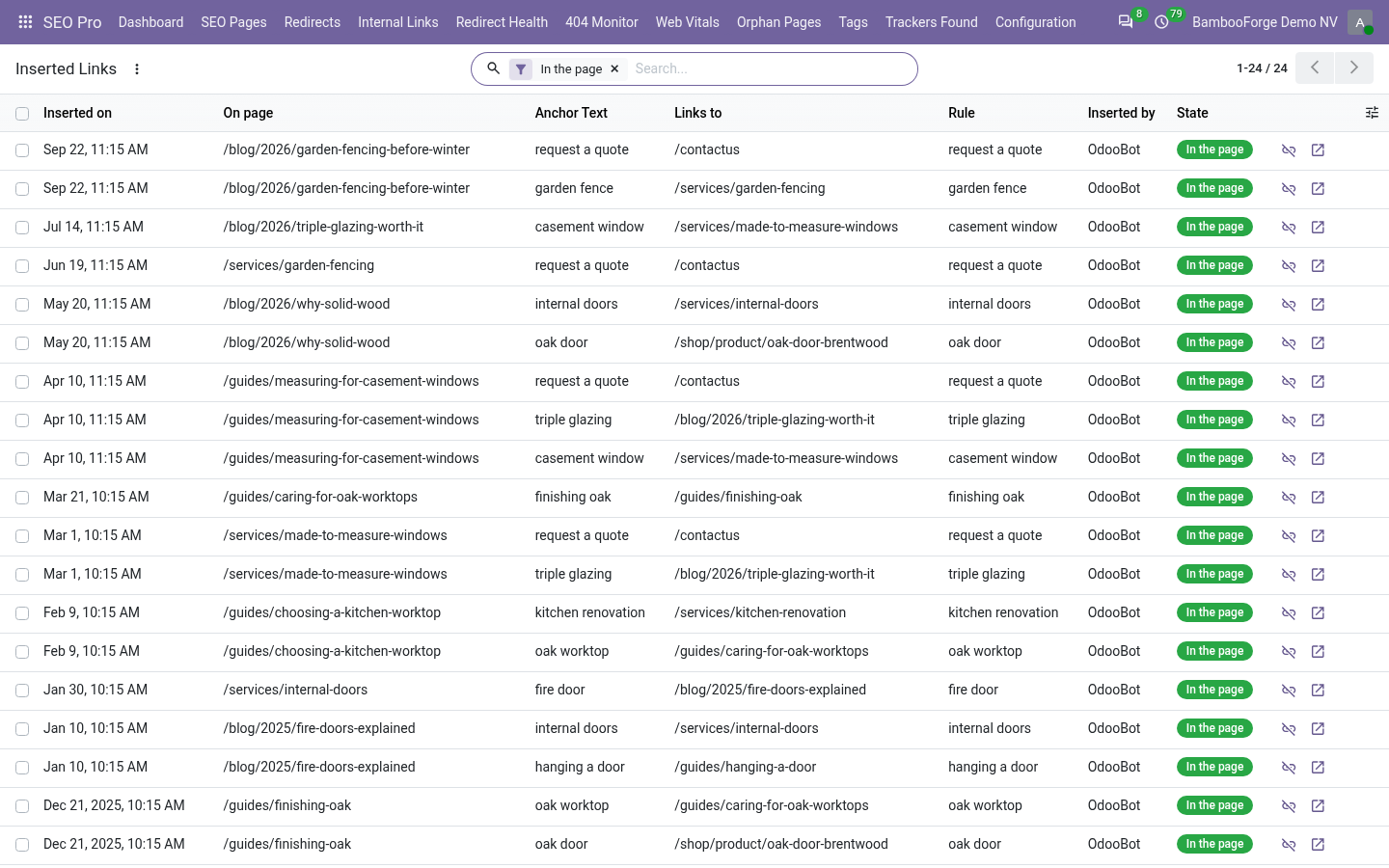
Everything lives under Link Rules then Inserted Links then Orphan Pages. 1. Install BambooForge Internal Link Suggester (it needs SEO Pro). Nothing is edited on install: rules are empty and nothing is applied until somebody presses a button.
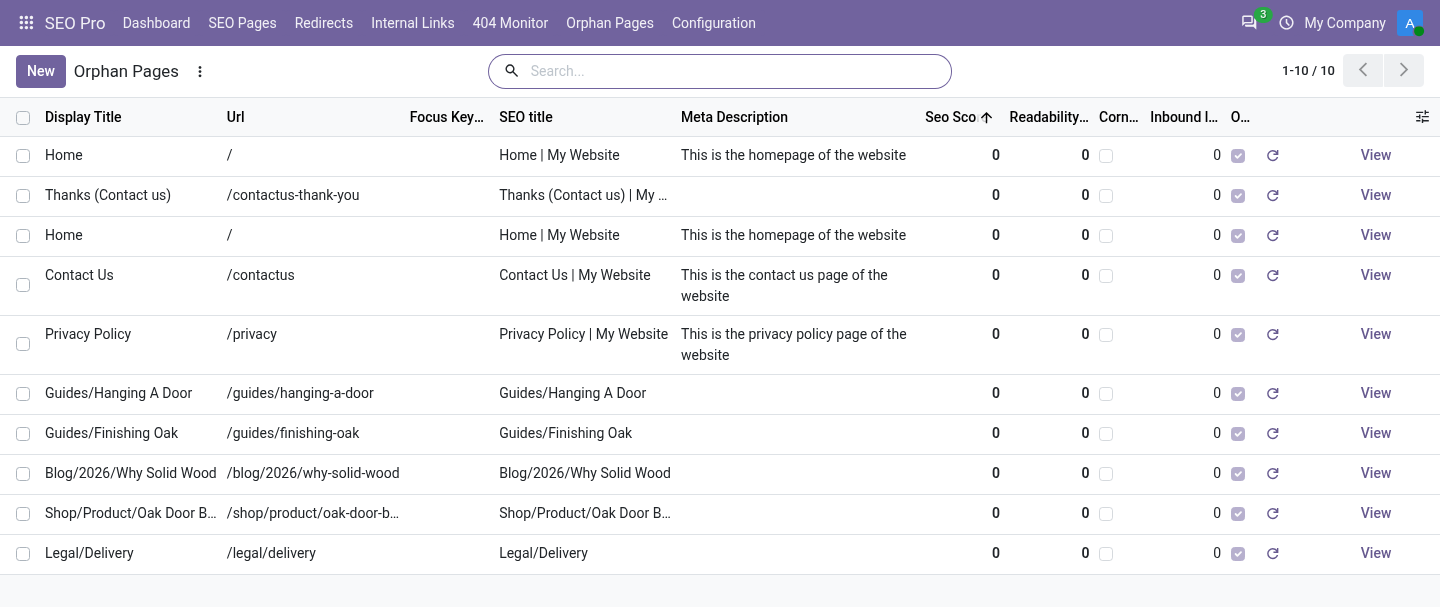
2. Open SEO Pro → Orphan Pages, and under Configuration, Link Rules and Inserted Links. SEO All in One with Internal Link Suggester. An add-on for BambooForge SEO Pro.
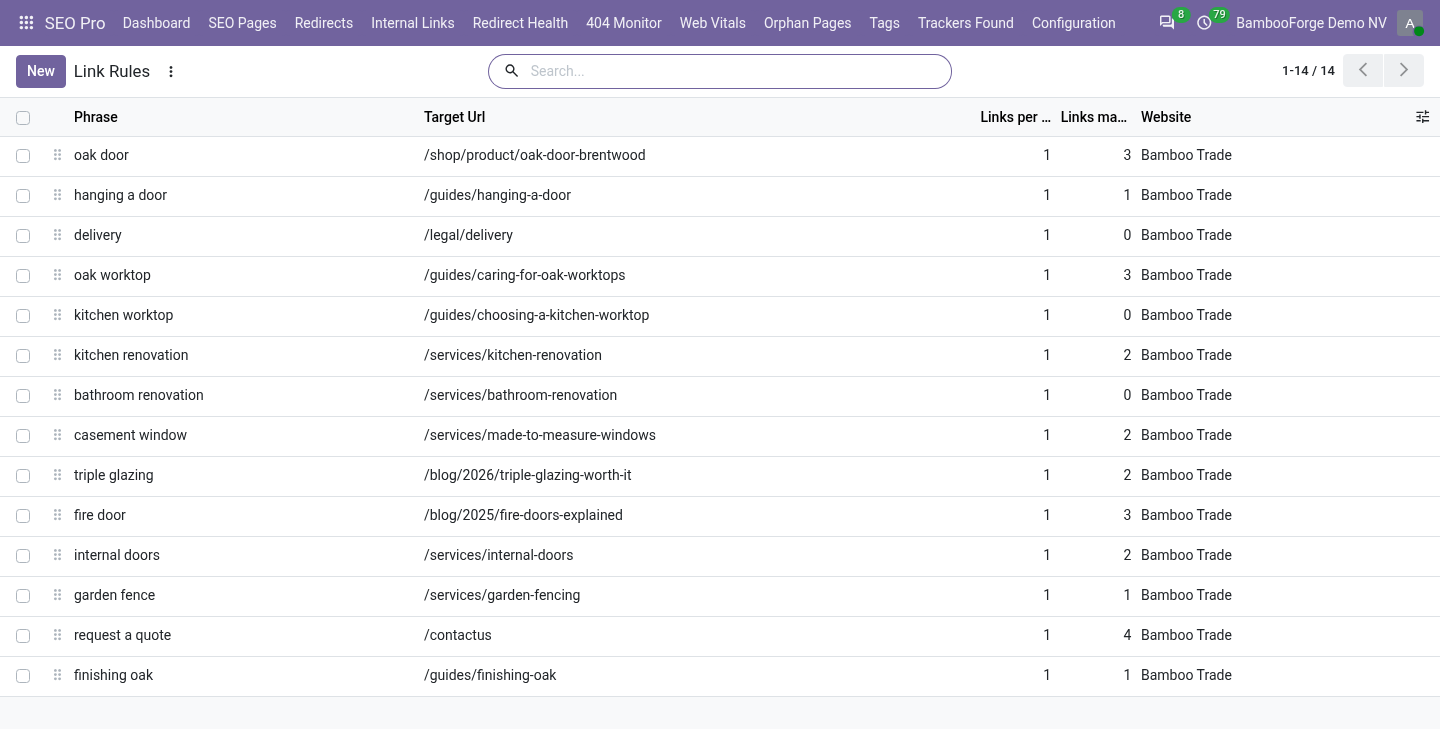
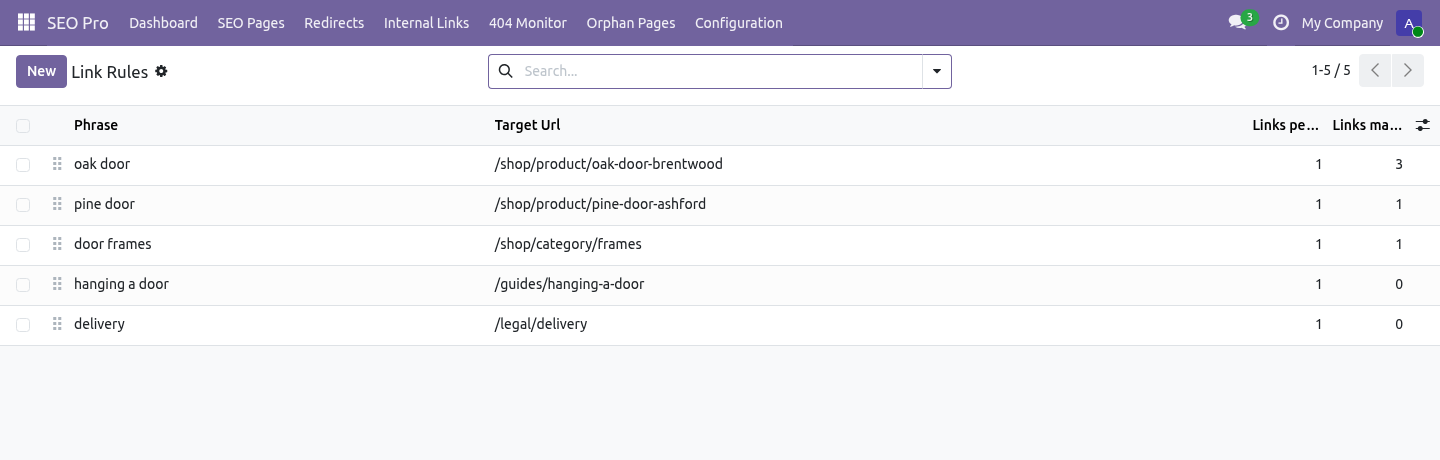
SEO Pro says which pages are worth linking from a page. This puts the links in - carefully, reversibly, and with a written record of every change. Rules. A rule is a phrase and the page it should point at: ============================ ========================================== Field What it does ============================ ========================================== Phrase The words as they appear in the copy.
Whole words only: door never matches doorway. Three characters minimum, six words maximum. Target page / Target URL Pick an indexed page and the URL follows it, or type a path. Links per page One to five.
One is almost always right. Case sensitive Off by default, so Oak Door at the start of a sentence is the same phrase. Website Leave empty to apply everywhere. ============================ ========================================== Applying them.
On an SEO page: What would the rules link? shows what would happen and changes nothing. Apply link rules does it. Select several pages in the list and apply to all of them at once.
inside a link that is already there; inside a heading, a button, code, a script or a text area; on the page the rule points at; more times than the rule allows, counting links that already exist. The HTML is parsed rather than pattern-matched, so the markup around the phrase survives exactly as the author wrote it - and so does their capitalisation. What can be edited. Anything SEO Pro indexes whose copy lives in an HTML field: website pages (through the view attached to them), blog posts, product descriptions.
A record whose copy is not in a field the module can find is skipped rather than half-edited. The ledger, and undo. SEO Pro → Configuration → Inserted Links. Every link this module made: which rule, which page, which words, who pressed the button and when.
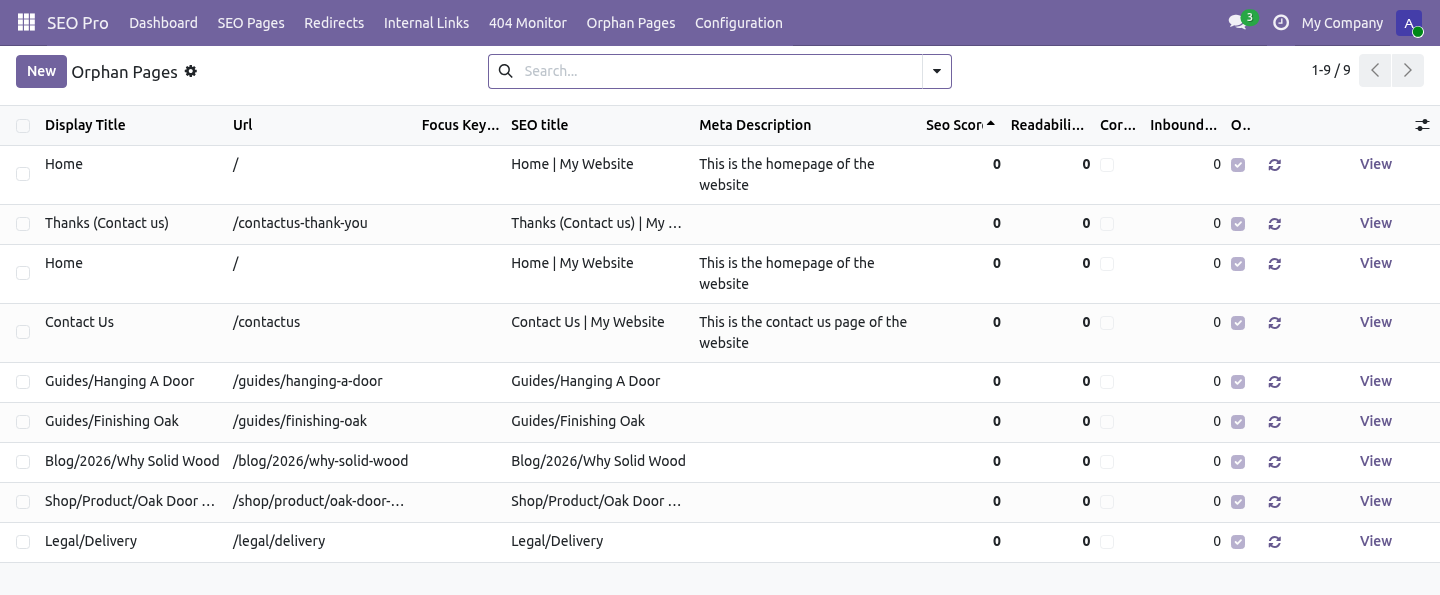
Remove the link takes the anchor out and leaves the words. It only touches anchors this module inserted - they carry a marker - so a link somebody wrote by hand to the same page is never disturbed. Orphan pages. SEO Pro → Orphan Pages lists the pages no other page links to.
A crawler can only reach them through the sitemap, which is where it goes last and ranks lowest - and they are usually the pages somebody published in a hurry. Pages marked noindex are not reported: a page you asked Google to ignore does not need internal links. Anchor text. The anchor report answers "what does this site call its own pages?".
Twenty links to the same page all reading click here is one finding. Twenty reading the identical keyphrase is a different and more expensive one - that pattern is what an over-optimisation penalty looks like from the outside. Multi-website and multi-company. Rules belong to a website or to all of them; a rule written for one site never fires on another.
The ledger, the orphan list and the anchor report are all filtered by the websites a user can see and by company through the website's company. How we make sure it works. Before every release, 40 automated checks run against this app on Odoo 16, 17, 18, 19 and 20. Among them: The same phrase and target cannot be written twice.
A read only seo user cannot edit the copy. Applying twice does not link the same page again. A read only seo user cannot undo either. One page that cannot be edited does not sink the batch.
The complete list is in the source you receive. Questions people ask. Which Odoo versions does it run on? Odoo 16.0, 17.0, 18.0, 19.0, 20.0, on the series you buy it for; each series is its own listing.
Community or Enterprise? Both. It needs no Enterprise app. The complete manual is at docs dot bambooforge dot dev, the demo database is linked from the store page, and support answers within twenty-four hours.
Links are in the description.
Transcript of the walkthrough (Odoo 19)
Internal Link Suggester for SEO. Turn a phrase into an internal link wherever it appears - once per page, never in a heading - with a ledger, one-click undo and orphan report. An add-on for BambooForge SEO Pro. SEO Pro says which pages are worth linking from a page.
This puts the links in - carefully, reversibly, and with a written record of every change. In the next few minutes: internal link suggester for seo, then rules, then applying them, then what can be edited, then the ledger, and undo. Then what this app deliberately does not do, so you can tell before you buy whether it fits. Everything lives under Link Rules then Inserted Links then Orphan Pages.
Install BambooForge Internal Link Suggester. Nothing is edited on install: rules are empty and nothing is applied until somebody presses a button. Internal Link Suggester for SEO. An add-on for BambooForge SEO Pro.
SEO Pro says which pages are worth linking from a page. This puts the links in - carefully, reversibly, and with a written record of every change. Rules. A rule is a phrase and the page it should point at: ============================ ========================================== Field What it does ============================ ========================================== Phrase The words as they appear in the copy.
Whole words only: door never matches doorway. Three characters minimum, six words maximum. Target page / Target URL Pick an indexed page and the URL follows it, or type a path. Links per page One to five.
One is almost always right. Case sensitive Off by default, so Oak Door at the start of a sentence is the same phrase. Website Leave empty to apply everywhere. ============================ ========================================== Applying them.
On an SEO page: What would the rules link? shows what would happen and changes nothing. Apply link rules does it. Select several pages in the list and apply to all of them at once.
inside a link that is already there; inside a heading, a button, code, a script or a text area; on the page the rule points at; more times than the rule allows, counting links that already exist. The HTML is parsed rather than pattern-matched, so the markup around the phrase survives exactly as the author wrote it - and so does their capitalisation. What can be edited. Anything SEO Pro indexes whose copy lives in an HTML field: website pages (through the view attached to them), blog posts, product descriptions.
A record whose copy is not in a field the module can find is skipped rather than half-edited. The ledger, and undo. SEO Pro → Configuration → Inserted Links. Every link this module made: which rule, which page, which words, who pressed the button and when.
Remove the link takes the anchor out and leaves the words. It only touches anchors this module inserted - they carry a marker - so a link somebody wrote by hand to the same page is never disturbed. Orphan pages. SEO Pro → Orphan Pages lists the pages no other page links to.
A crawler can only reach them through the sitemap, which is where it goes last and ranks lowest - and they are usually the pages somebody published in a hurry. Pages marked noindex are not reported: a page you asked Google to ignore does not need internal links. Anchor text. The anchor report answers "what does this site call its own pages?".
Twenty links to the same page all reading click here is one finding. Twenty reading the identical keyphrase is a different and more expensive one - that pattern is what an over-optimisation penalty looks like from the outside. Multi-website and multi-company. Rules belong to a website or to all of them; a rule written for one site never fires on another.
The ledger, the orphan list and the anchor report are all filtered by the websites a user can see and by company through the website's company. Support. support@bambooforge.dev - the people who wrote it. The complete manual is at docs dot bambooforge dot dev, the demo database is linked from the store page, and support answers within twenty-four hours.
Links are in the description.
Transcript of the walkthrough (Odoo 18)
Internal Link Suggester for SEO. Turn a phrase into an internal link wherever it appears - once per page, never in a heading - with a ledger, one-click undo and orphan report. An add-on for BambooForge SEO Pro. SEO Pro says which pages are worth linking from a page.
This puts the links in - carefully, reversibly, and with a written record of every change. In the next few minutes: internal link suggester for seo, then rules, then applying them, then what can be edited, then the ledger, and undo. Then what this app deliberately does not do, so you can tell before you buy whether it fits. Everything lives under Link Rules then Inserted Links then Orphan Pages.
Install BambooForge Internal Link Suggester. Nothing is edited on install: rules are empty and nothing is applied until somebody presses a button. Internal Link Suggester for SEO. An add-on for BambooForge SEO Pro.
SEO Pro says which pages are worth linking from a page. This puts the links in - carefully, reversibly, and with a written record of every change. Rules. A rule is a phrase and the page it should point at: ============================ ========================================== Field What it does ============================ ========================================== Phrase The words as they appear in the copy.
Whole words only: door never matches doorway. Three characters minimum, six words maximum. Target page / Target URL Pick an indexed page and the URL follows it, or type a path. Links per page One to five.
One is almost always right. Case sensitive Off by default, so Oak Door at the start of a sentence is the same phrase. Website Leave empty to apply everywhere. ============================ ========================================== Applying them.
On an SEO page: What would the rules link? shows what would happen and changes nothing. Apply link rules does it. Select several pages in the list and apply to all of them at once.
inside a link that is already there; inside a heading, a button, code, a script or a text area; on the page the rule points at; more times than the rule allows, counting links that already exist. The HTML is parsed rather than pattern-matched, so the markup around the phrase survives exactly as the author wrote it - and so does their capitalisation. What can be edited. Anything SEO Pro indexes whose copy lives in an HTML field: website pages (through the view attached to them), blog posts, product descriptions.
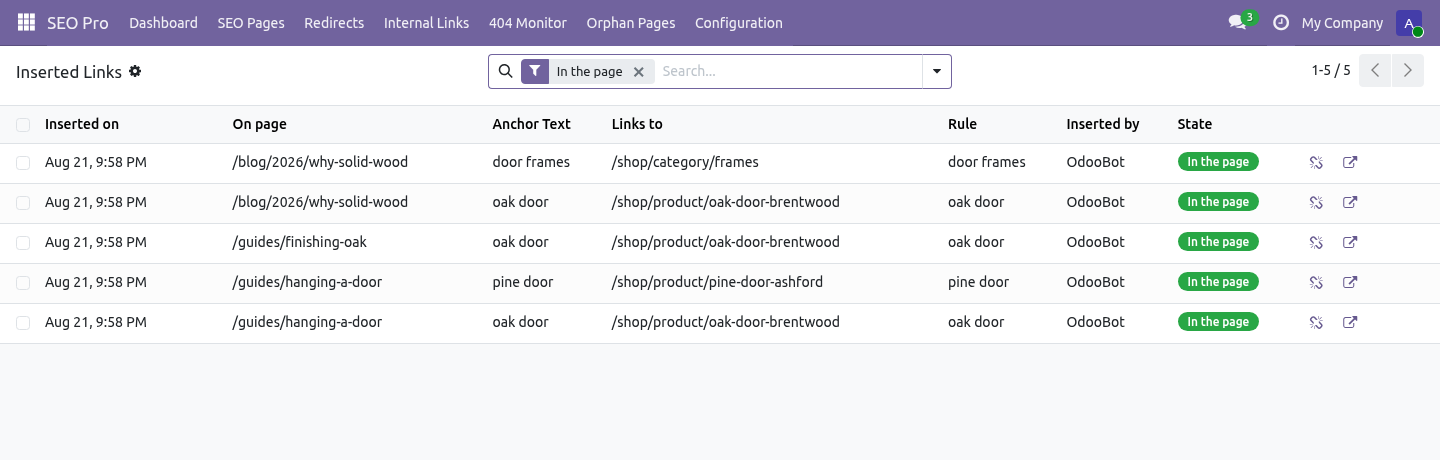
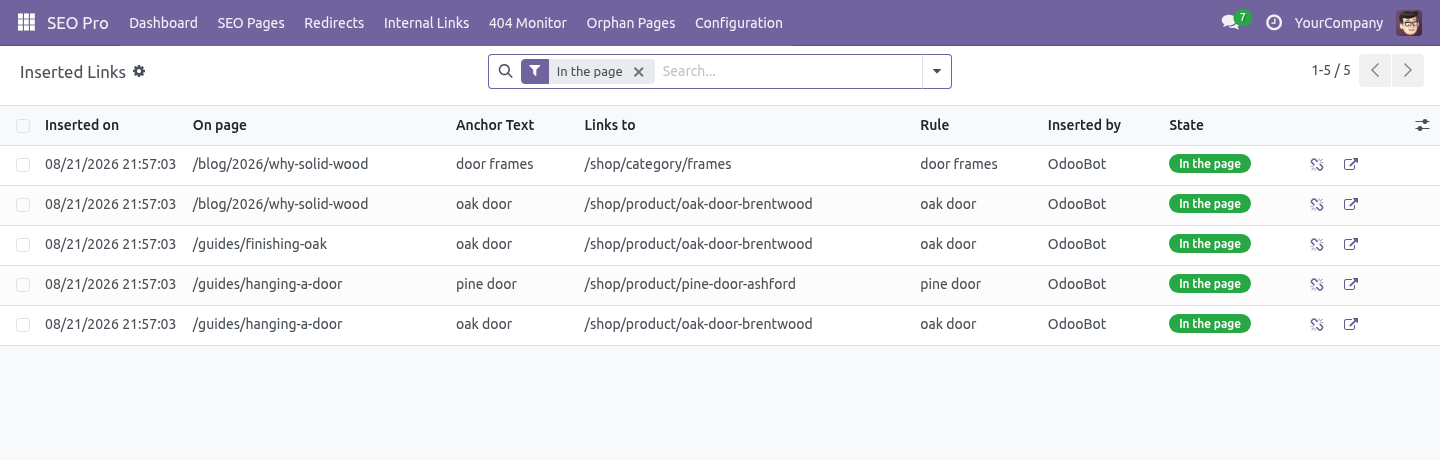
A record whose copy is not in a field the module can find is skipped rather than half-edited. The ledger, and undo. SEO Pro → Configuration → Inserted Links. Every link this module made: which rule, which page, which words, who pressed the button and when.
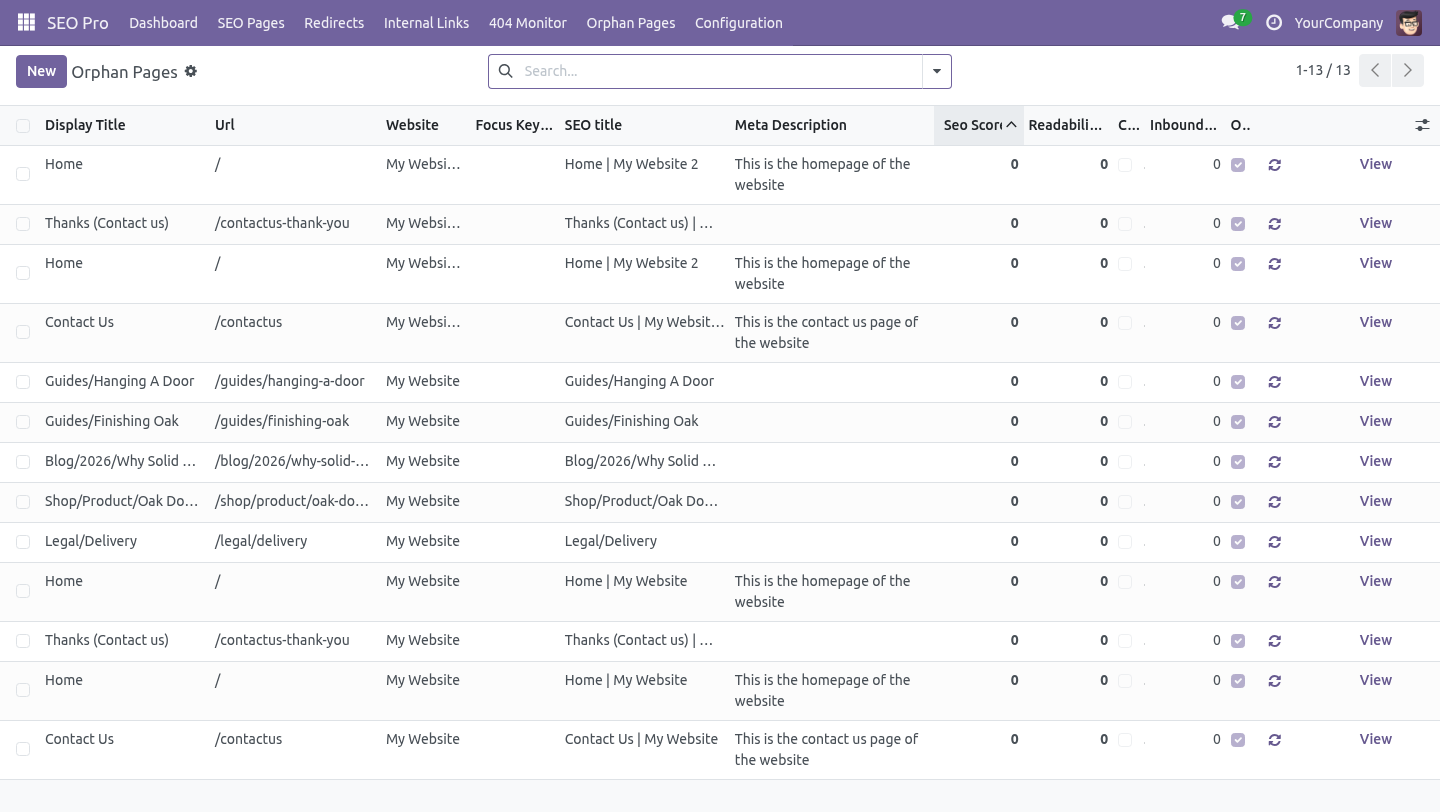
Remove the link takes the anchor out and leaves the words. It only touches anchors this module inserted - they carry a marker - so a link somebody wrote by hand to the same page is never disturbed. Orphan pages. SEO Pro → Orphan Pages lists the pages no other page links to.
A crawler can only reach them through the sitemap, which is where it goes last and ranks lowest - and they are usually the pages somebody published in a hurry. Pages marked noindex are not reported: a page you asked Google to ignore does not need internal links. Anchor text. The anchor report answers "what does this site call its own pages?".
Twenty links to the same page all reading click here is one finding. Twenty reading the identical keyphrase is a different and more expensive one - that pattern is what an over-optimisation penalty looks like from the outside. Multi-website and multi-company. Rules belong to a website or to all of them; a rule written for one site never fires on another.
The ledger, the orphan list and the anchor report are all filtered by the websites a user can see and by company through the website's company. Support. support@bambooforge.dev - the people who wrote it. The complete manual is at docs dot bambooforge dot dev, the demo database is linked from the store page, and support answers within twenty-four hours.
Links are in the description.
Transcript of the walkthrough (Odoo 17)
Internal Link Suggester for SEO. Turn a phrase into an internal link wherever it appears - once per page, never in a heading - with a ledger, one-click undo and orphan report. An add-on for BambooForge SEO Pro. SEO Pro says which pages are worth linking from a page.
This puts the links in - carefully, reversibly, and with a written record of every change. In the next few minutes: internal link suggester for seo, then rules, then applying them, then what can be edited, then the ledger, and undo. Then what this app deliberately does not do, so you can tell before you buy whether it fits. Everything lives under Link Rules then Inserted Links then Orphan Pages.
Install BambooForge Internal Link Suggester. Nothing is edited on install: rules are empty and nothing is applied until somebody presses a button. Internal Link Suggester for SEO. An add-on for BambooForge SEO Pro.
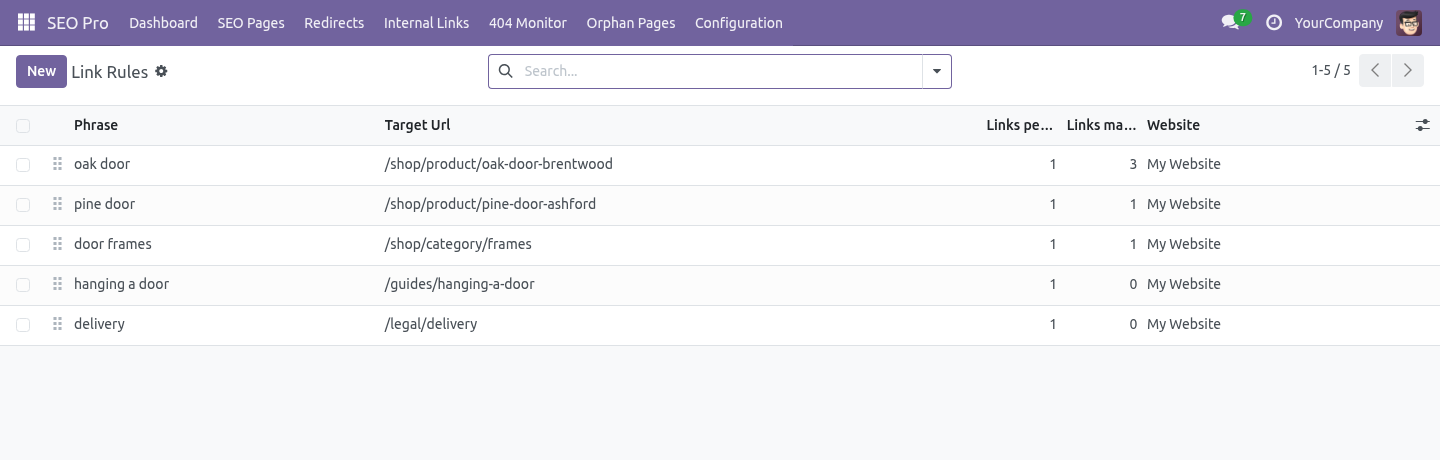
SEO Pro says which pages are worth linking from a page. This puts the links in - carefully, reversibly, and with a written record of every change. Rules. A rule is a phrase and the page it should point at: ============================ ========================================== Field What it does ============================ ========================================== Phrase The words as they appear in the copy.
Whole words only: door never matches doorway. Three characters minimum, six words maximum. Target page / Target URL Pick an indexed page and the URL follows it, or type a path. Links per page One to five.
One is almost always right. Case sensitive Off by default, so Oak Door at the start of a sentence is the same phrase. Website Leave empty to apply everywhere. ============================ ========================================== Applying them.
On an SEO page: What would the rules link? shows what would happen and changes nothing. Apply link rules does it. Select several pages in the list and apply to all of them at once.
inside a link that is already there; inside a heading, a button, code, a script or a text area; on the page the rule points at; more times than the rule allows, counting links that already exist. The HTML is parsed rather than pattern-matched, so the markup around the phrase survives exactly as the author wrote it - and so does their capitalisation. What can be edited. Anything SEO Pro indexes whose copy lives in an HTML field: website pages (through the view attached to them), blog posts, product descriptions.
A record whose copy is not in a field the module can find is skipped rather than half-edited. The ledger, and undo. SEO Pro → Configuration → Inserted Links. Every link this module made: which rule, which page, which words, who pressed the button and when.
Remove the link takes the anchor out and leaves the words. It only touches anchors this module inserted - they carry a marker - so a link somebody wrote by hand to the same page is never disturbed. Orphan pages. SEO Pro → Orphan Pages lists the pages no other page links to.
A crawler can only reach them through the sitemap, which is where it goes last and ranks lowest - and they are usually the pages somebody published in a hurry. Pages marked noindex are not reported: a page you asked Google to ignore does not need internal links. Anchor text. The anchor report answers "what does this site call its own pages?".
Twenty links to the same page all reading click here is one finding. Twenty reading the identical keyphrase is a different and more expensive one - that pattern is what an over-optimisation penalty looks like from the outside. Multi-website and multi-company. Rules belong to a website or to all of them; a rule written for one site never fires on another.
The ledger, the orphan list and the anchor report are all filtered by the websites a user can see and by company through the website's company. Support. support@bambooforge.dev - the people who wrote it. The complete manual is at docs dot bambooforge dot dev, the demo database is linked from the store page, and support answers within twenty-four hours.
Links are in the description.
Transcript of the walkthrough (Odoo 16)
Internal Link Suggester for SEO. Turn a phrase into an internal link wherever it appears - once per page, never in a heading - with a ledger, one-click undo and orphan report. An add-on for BambooForge SEO Pro. SEO Pro says which pages are worth linking from a page.
This puts the links in - carefully, reversibly, and with a written record of every change. In the next few minutes: internal link suggester for seo, then rules, then applying them, then what can be edited, then the ledger, and undo. Then what this app deliberately does not do, so you can tell before you buy whether it fits. Everything lives under Link Rules then Inserted Links then Orphan Pages.
Install BambooForge Internal Link Suggester. Nothing is edited on install: rules are empty and nothing is applied until somebody presses a button. Internal Link Suggester for SEO. An add-on for BambooForge SEO Pro.
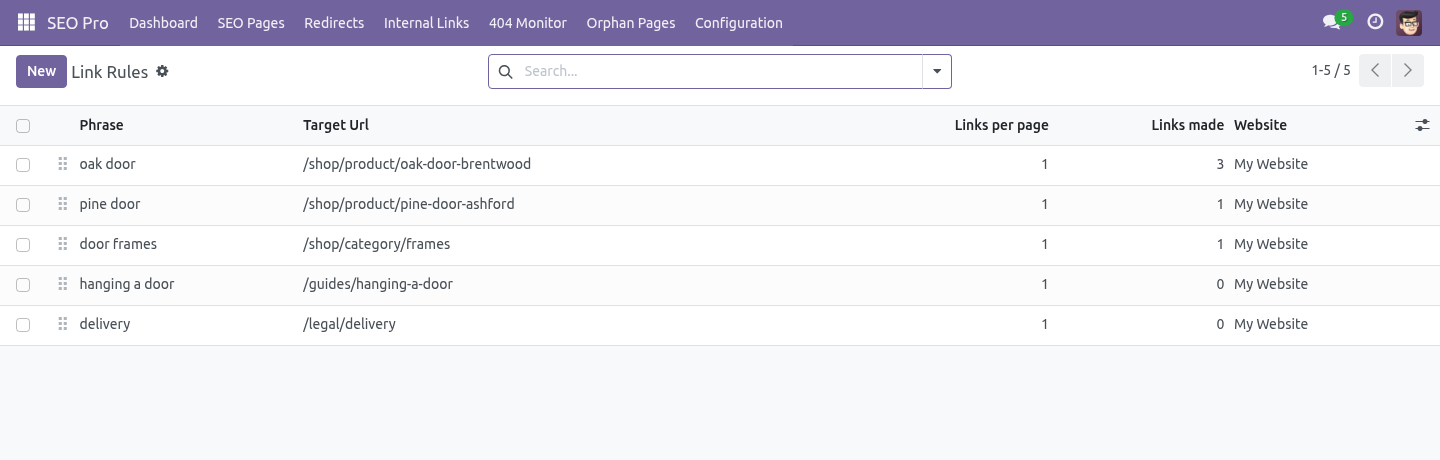
SEO Pro says which pages are worth linking from a page. This puts the links in - carefully, reversibly, and with a written record of every change. Rules. A rule is a phrase and the page it should point at: ============================ ========================================== Field What it does ============================ ========================================== Phrase The words as they appear in the copy.
Whole words only: door never matches doorway. Three characters minimum, six words maximum. Target page / Target URL Pick an indexed page and the URL follows it, or type a path. Links per page One to five.
One is almost always right. Case sensitive Off by default, so Oak Door at the start of a sentence is the same phrase. Website Leave empty to apply everywhere. ============================ ========================================== Applying them.
On an SEO page: What would the rules link? shows what would happen and changes nothing. Apply link rules does it. Select several pages in the list and apply to all of them at once.
inside a link that is already there; inside a heading, a button, code, a script or a text area; on the page the rule points at; more times than the rule allows, counting links that already exist. The HTML is parsed rather than pattern-matched, so the markup around the phrase survives exactly as the author wrote it - and so does their capitalisation. What can be edited. Anything SEO Pro indexes whose copy lives in an HTML field: website pages (through the view attached to them), blog posts, product descriptions.
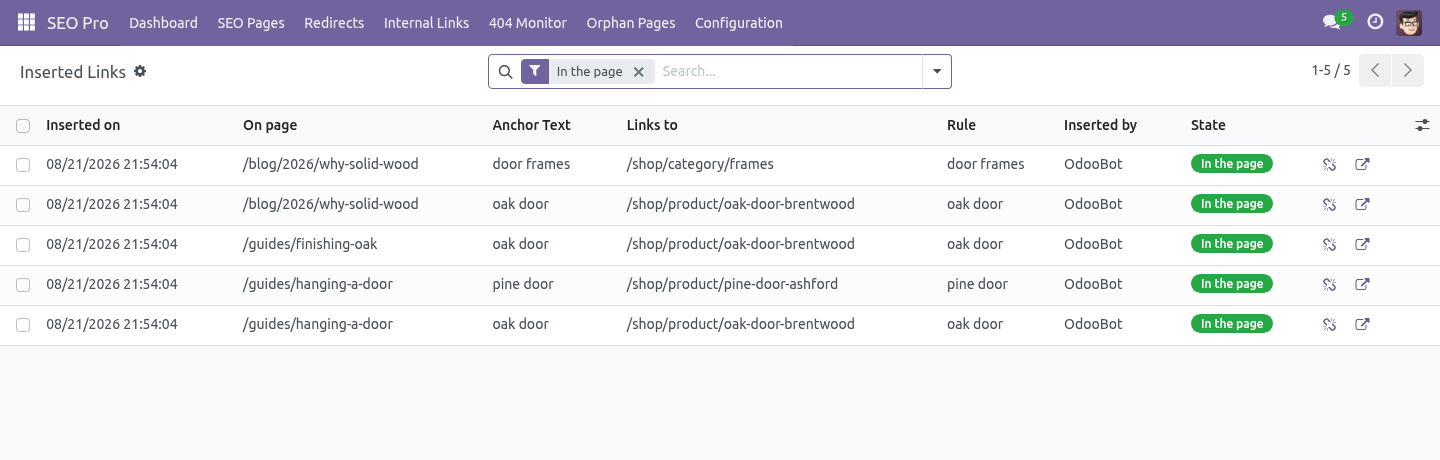
A record whose copy is not in a field the module can find is skipped rather than half-edited. The ledger, and undo. SEO Pro → Configuration → Inserted Links. Every link this module made: which rule, which page, which words, who pressed the button and when.
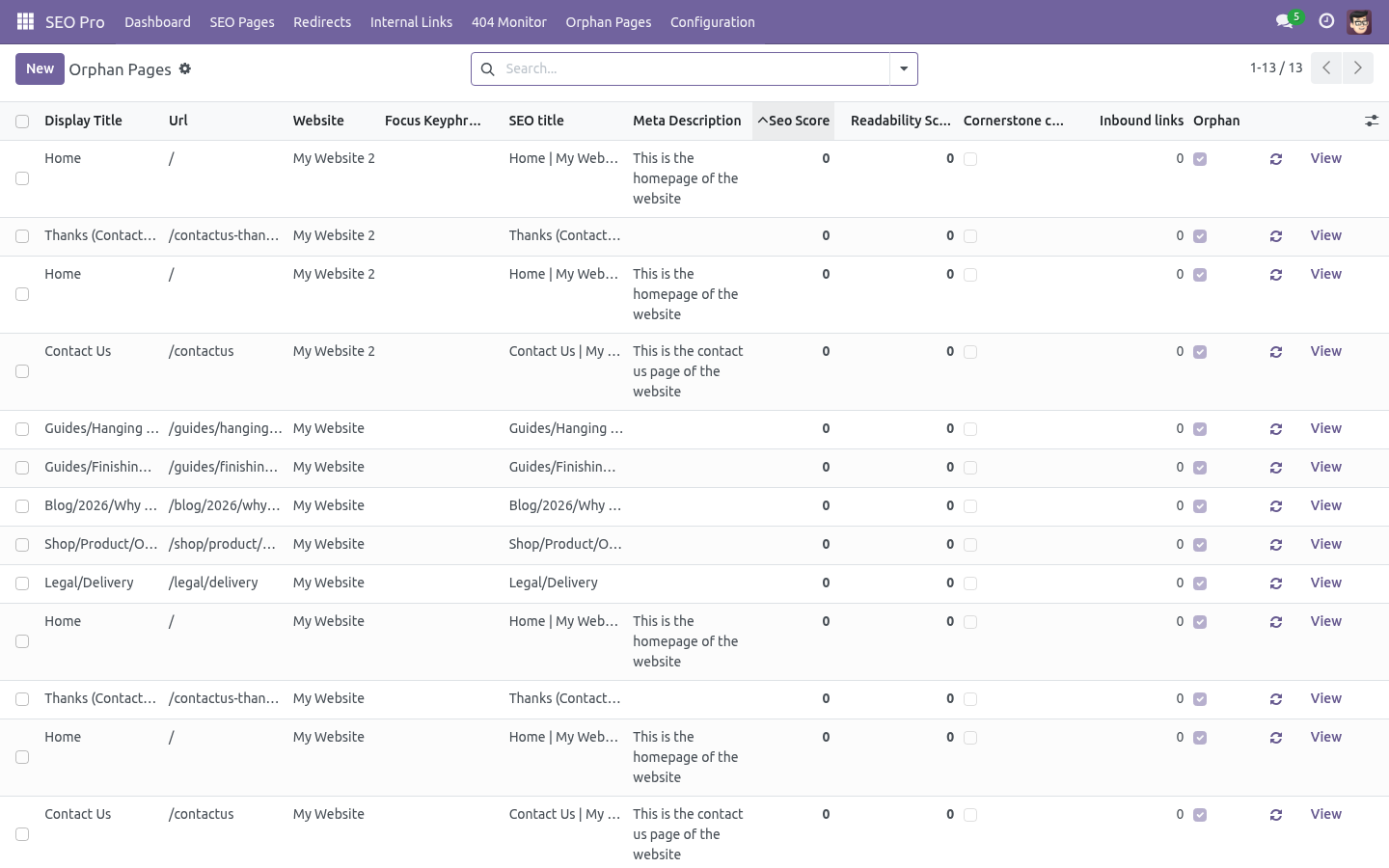
Remove the link takes the anchor out and leaves the words. It only touches anchors this module inserted - they carry a marker - so a link somebody wrote by hand to the same page is never disturbed. Orphan pages. SEO Pro → Orphan Pages lists the pages no other page links to.
A crawler can only reach them through the sitemap, which is where it goes last and ranks lowest - and they are usually the pages somebody published in a hurry. Pages marked noindex are not reported: a page you asked Google to ignore does not need internal links. Anchor text. The anchor report answers "what does this site call its own pages?".
Twenty links to the same page all reading click here is one finding. Twenty reading the identical keyphrase is a different and more expensive one - that pattern is what an over-optimisation penalty looks like from the outside. Multi-website and multi-company. Rules belong to a website or to all of them; a rule written for one site never fires on another.
The ledger, the orphan list and the anchor report are all filtered by the websites a user can see and by company through the website's company. Support. support@bambooforge.dev - the people who wrote it. The complete manual is at docs dot bambooforge dot dev, the demo database is linked from the store page, and support answers within twenty-four hours.
Links are in the description.
Key facts
- What it is
- Turn a phrase into an internal link wherever it appears - once per page, never in a heading - with a ledger, one-click undo and orphan report.
- For
- Website
- Odoo versions
- 16.0, 17.0, 18.0, 19.0, 20.0 - Community and Enterprise
- Runs on
- Odoo.sh or Odoo you host yourself - not Odoo Online, which accepts no third-party apps
- Price
- 198 EUR, one-time, on the Odoo Apps Store
- Technical name
- bambooforge_link_suggester
- Not for
- Said before you buy, because it is the half that decides whether the app fits:; Link inside a link, a heading, a button, code, a script or a text area, or on the page a rule points at.; Match part of a word: door never matches doorway.; Touch a link somebody wrote by hand - it only ever edits anchors it inserted.
- Manual last updated
- 2026-10-15
SEO All in One with Internal Link Suggester
An add-on for BambooForge SEO Pro. SEO Pro says which pages are worth linking from a page. This puts the links in - carefully, reversibly, and with a written record of every change.
Install
Install BambooForge Internal Link Suggester (it needs SEO Pro). Nothing is edited on install: rules are empty and nothing is applied until somebody presses a button.
Open SEO Pro → Orphan Pages, and under Configuration, Link Rules and Inserted Links.
Rules
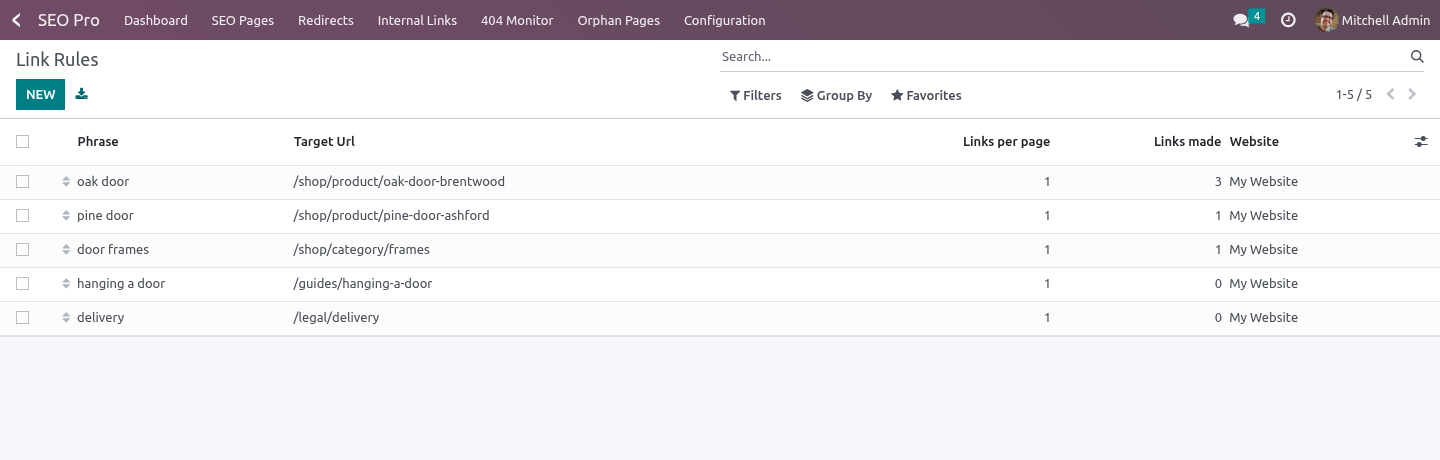
SEO Pro → Configuration → Link Rules.
A rule is a phrase and the page it should point at:
Field |
What it does |
|---|---|
Phrase |
The words as they appear in the copy. Whole words only: door never matches doorway. Three characters minimum, six words maximum. |
Target page / Target URL |
Pick an indexed page and the URL follows it, or type a path. |
Links per page |
One to five. One is almost always right. |
Case sensitive |
Off by default, so Oak Door at the start of a sentence is the same phrase. |
Website |
Leave empty to apply everywhere. |
Applying them
On an SEO page: What would the rules link? shows what would happen and changes nothing. Apply link rules does it. Select several pages in the list and apply to all of them at once.
A phrase is never linked:
inside a link that is already there;
inside a heading, a button, code, a script or a text area;
on the page the rule points at;
more times than the rule allows, counting links that already exist.
The HTML is parsed rather than pattern-matched, so the markup around the phrase survives exactly as the author wrote it - and so does their capitalisation.
What can be edited
Anything SEO Pro indexes whose copy lives in an HTML field: website pages (through the view attached to them), blog posts, product descriptions. A record whose copy is not in a field the module can find is skipped rather than half-edited.
The ledger, and undo
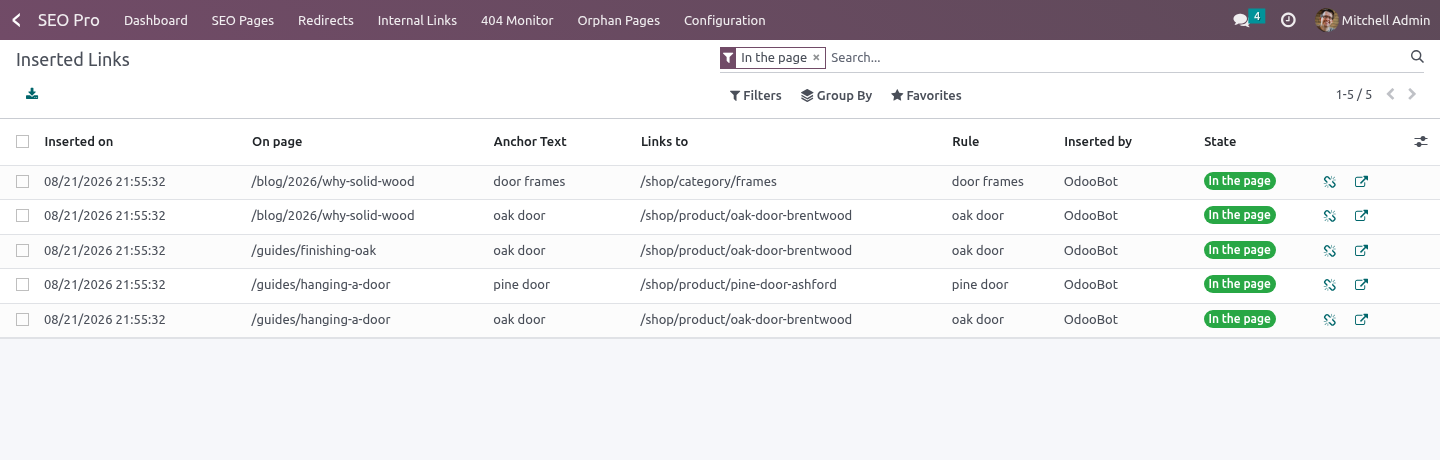
SEO Pro → Configuration → Inserted Links. Every link this module made: which rule, which page, which words, who pressed the button and when.
Remove the link takes the anchor out and leaves the words. It only touches anchors this module inserted - they carry a marker - so a link somebody wrote by hand to the same page is never disturbed.
If an editor has rewritten the paragraph and the link went with it, the row says gone from the page. That is information, not an error: the rule can put it back, or you can decide the editor was right.
Orphan pages
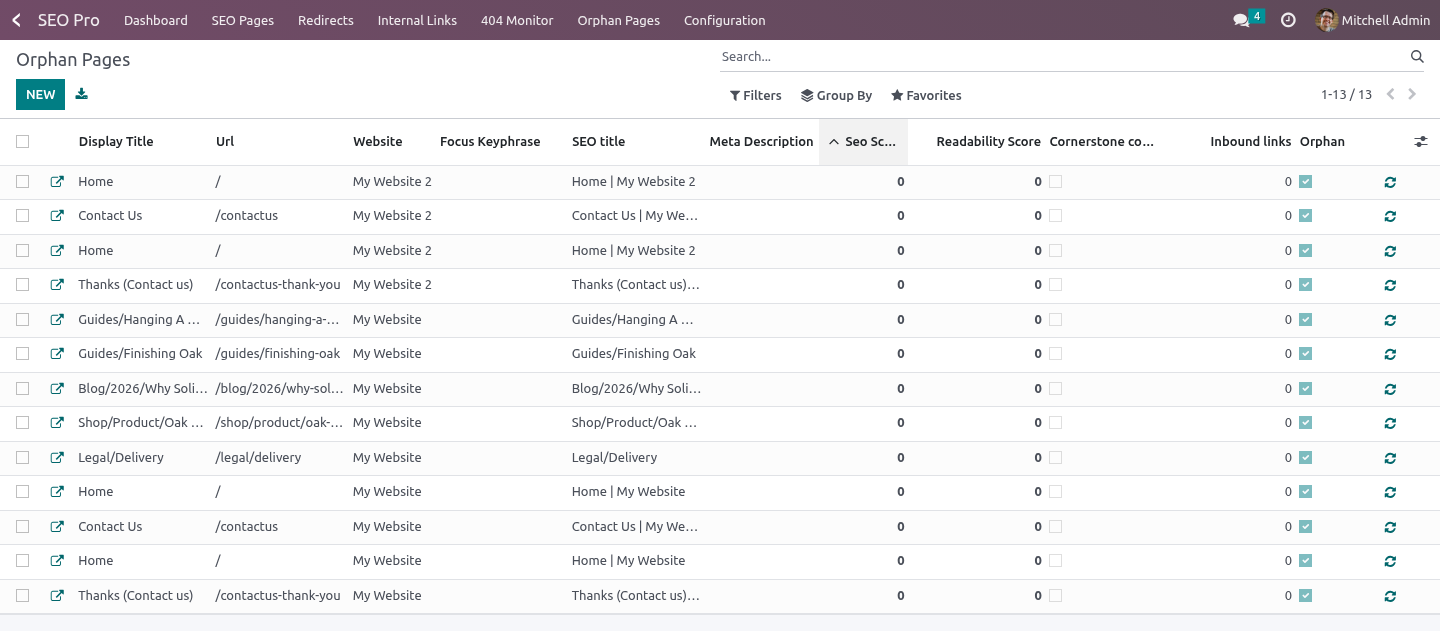
SEO Pro → Orphan Pages lists the pages no other page links to. A crawler can only reach them through the sitemap, which is where it goes last and ranks lowest - and they are usually the pages somebody published in a hurry.
Pages marked noindex are not reported: a page you asked Google to ignore does not need internal links.
Inbound counts are refreshed nightly, and on demand from SEO Pro's own analysis.
Anchor text
The anchor report answers "what does this site call its own pages?". Twenty links to the same page all reading click here is one finding. Twenty reading the identical keyphrase is a different and more expensive one - that pattern is what an over-optimisation penalty looks like from the outside.
Multi-website and multi-company
Rules belong to a website or to all of them; a rule written for one site never fires on another. The ledger, the orphan list and the anchor report are all filtered by the websites a user can see and by company through the website's company.
How we make sure it works
Before every release, 40 automated checks run against this app on Odoo 16, 17, 18, 19 and 20. Among them:
The same phrase and target cannot be written twice.
A read only seo user cannot edit the copy.
Applying twice does not link the same page again.
A read only seo user cannot undo either.
One page that cannot be edited does not sink the batch.
The complete list is in the source you receive.
What it does not do
Said before you buy, because it is the half that decides whether the app fits:
Link inside a link, a heading, a button, code, a script or a text area, or on the page a rule points at.
Match part of a word: door never matches doorway.
Touch a link somebody wrote by hand - it only ever edits anchors it inserted.
Questions people ask
- Which Odoo versions does it run on?
Odoo 16.0, 17.0, 18.0, 19.0, 20.0, on the series you buy it for; each series is its own listing.
- Community or Enterprise?
Both. It needs no Enterprise app.
- What does it need?
The standard Web; seo pro (BambooForge) must be installed first app. No extra Python package.
- Where does it show up?
Under the Link Rules menu (Inserted Links, Orphan Pages).
- Does anything leave my server?
No. It makes no call outside your Odoo server: no telemetry, no licence check, no third-party service.
- What happens if I uninstall it?
Odoo drops the app's own tables and fields; the standard records it worked on (contacts, orders, products) stay as they are.
Support
support@bambooforge.dev - the people who wrote it.