 BambooForge Labs
Lead Scoring for CRM
Score and grade CRM leads with a transparent rule engine: points per condition, A/B/C/D grades, automatic recompute and a per-lead breakdown.
Available for Odoo 16.0, Odoo 17.0, Odoo 18.0, Odoo 19.0, Odoo 20.0. Technical name bambooforge_lead_scoring.
Transcript of the walkthrough (Odoo 20)
Lead Scoring for CRM. Score and grade CRM leads with a transparent rule engine: points per condition, A/B/C/D grades, automatic recompute and a per-lead breakdown. Stop chasing every lead the same way. This app scores your CRM leads with a transparent, configurable rule engine — points per condition — rolls the scores into A/B/C/D grades, recomputes automatically as leads change, and shows on every lead exactly why it scored what it did.
The Community answer to predictive lead scoring. In the next few minutes: lead scoring for crm, then building your scoring model, then how scoring stays current, then reading scores in crm, then transparency. Then what this app deliberately does not do, so you can tell before you buy whether it fits. Everything lives under Scoring Rules then Grades then Lead Scoring.
No Enterprise modules and no external Python libraries are required. Lead Scoring for CRM. Stop chasing every lead the same way. This app scores your CRM leads with a transparent, configurable rule engine — points per condition — rolls the scores into A/B/C/D grades, recomputes automatically as leads change, and shows on every lead exactly why it scored what it did.
The Community answer to predictive lead scoring. This page is the complete manual. Follow it top to bottom and you can install, build your scoring model, read the grades and fix the common issues without contacting support. Building your scoring model.
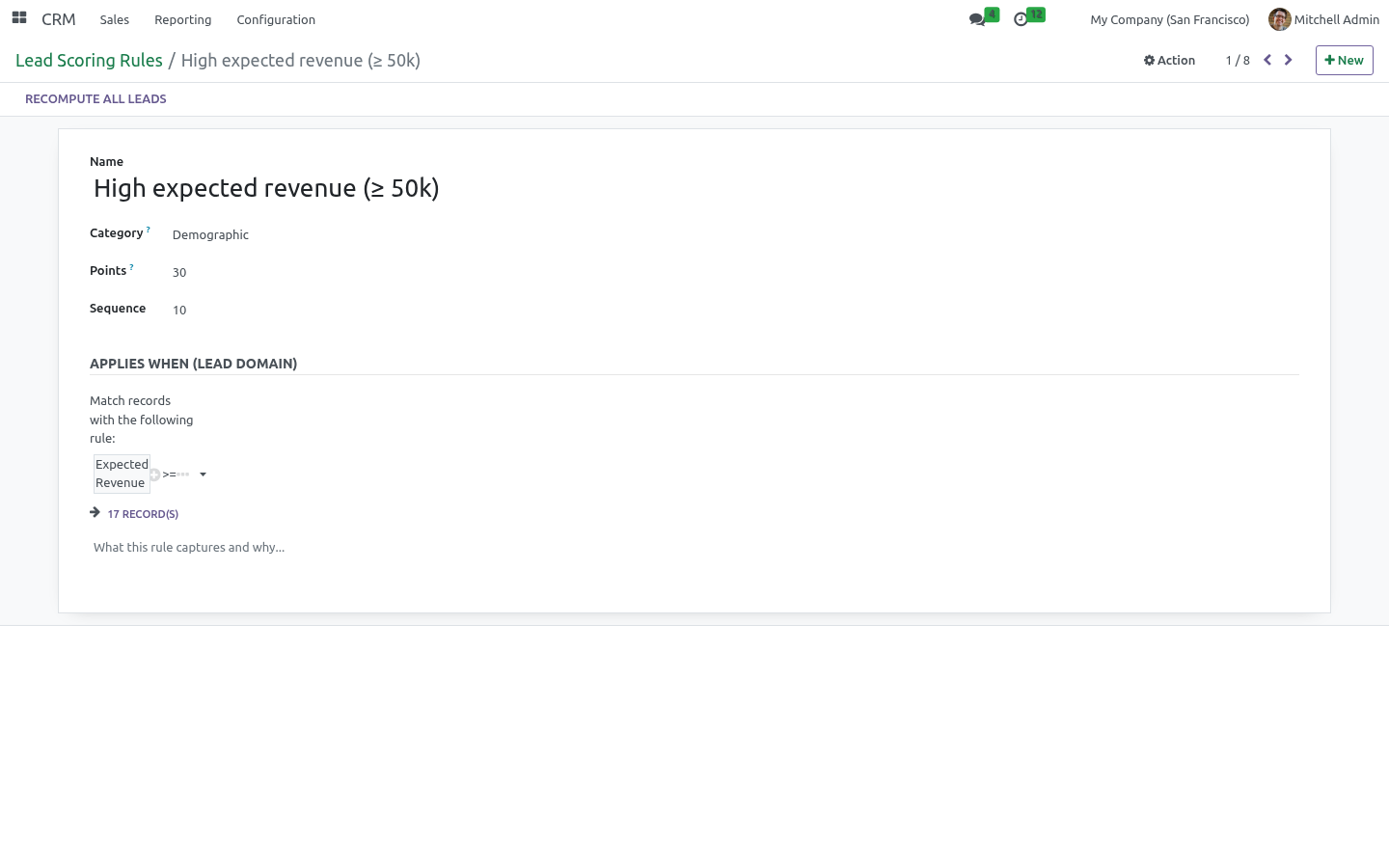
Rules. Go to CRM > Configuration > Lead Scoring > Scoring Rules. Each rule has: a Category (demographic, behavioral or negative) for organisation, an Applies When domain — built with the visual condition editor on the lead's own fields (expected revenue, email, source, tags, job position…), Points — positive to reward, negative to penalise. A lead's score is the sum of the points of every rule it matches.
The shipped rules (high revenue, has email/phone, qualified to opportunity, high priority, low probability, lost) are a starting point — edit, add or remove freely. How scoring stays current. The score is a stored field that recomputes automatically whenever a lead's common fields change (revenue, email, phone, stage, source, priority, tags and more). In addition: the Recompute Score button on a lead refreshes it on demand, the Recompute All Leads button on a rule re-scores the whole base after you change the rules, an optional scheduled action Lead Scoring: Recompute Scores (disabled by default) re-scores every lead on a schedule.
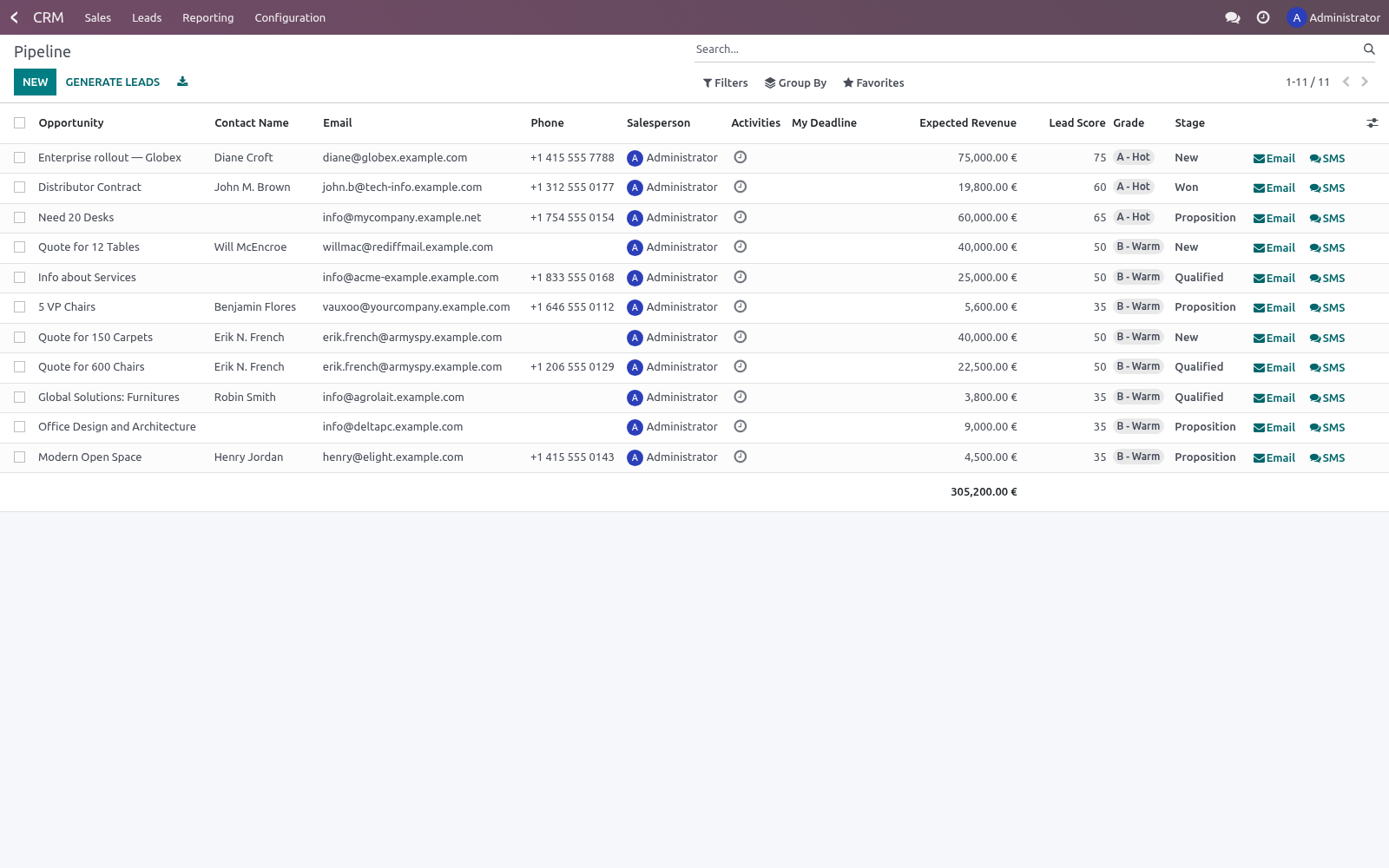
Re-score the base whenever you change rules or thresholds, since existing leads keep their previous score until recomputed. Reading scores in CRM On the lead/opportunity form, the grade badge, the score and a per-rule breakdown appear next to the expected revenue. In the pipeline and lead lists, Score and Grade are available columns. In the search panel, filter to A - Hot or Positive Score, and group by Grade to see your funnel split by quality.
Transparency. Unlike a black-box predictive score, every lead carries a plain breakdown such as. so salespeople trust the number and managers can see exactly what the model rewards. Frequently asked questions.
A rule's domain won't save. The domain must be a valid Odoo domain on the lead. Use the visual editor to avoid syntax mistakes; invalid domains are rejected on save. Scores didn't change after I edited the rules.
Existing leads keep their score until recomputed. Use Recompute All Leads on a rule, or enable the scheduled action. How we make sure it works. Before every release, 11 automated checks run against this app on Odoo 16, 17, 18, 19 and 20.
Among them: A score below every threshold gets no grade. The breakdown names the rules that paid. An archived rule stops counting. Recompute all after rule change.
The highest qualifying grade wins. The complete list is in the source you receive. Support. Questions or ideas: support@bambooforge.dev.
Usage. This section walks through a full working session: configure the model, let leads score themselves, and read the results inside CRM. All configuration lives under CRM > Configuration > Lead Scoring (visible to users in the Sales / Administrator group). Configure scoring rules.
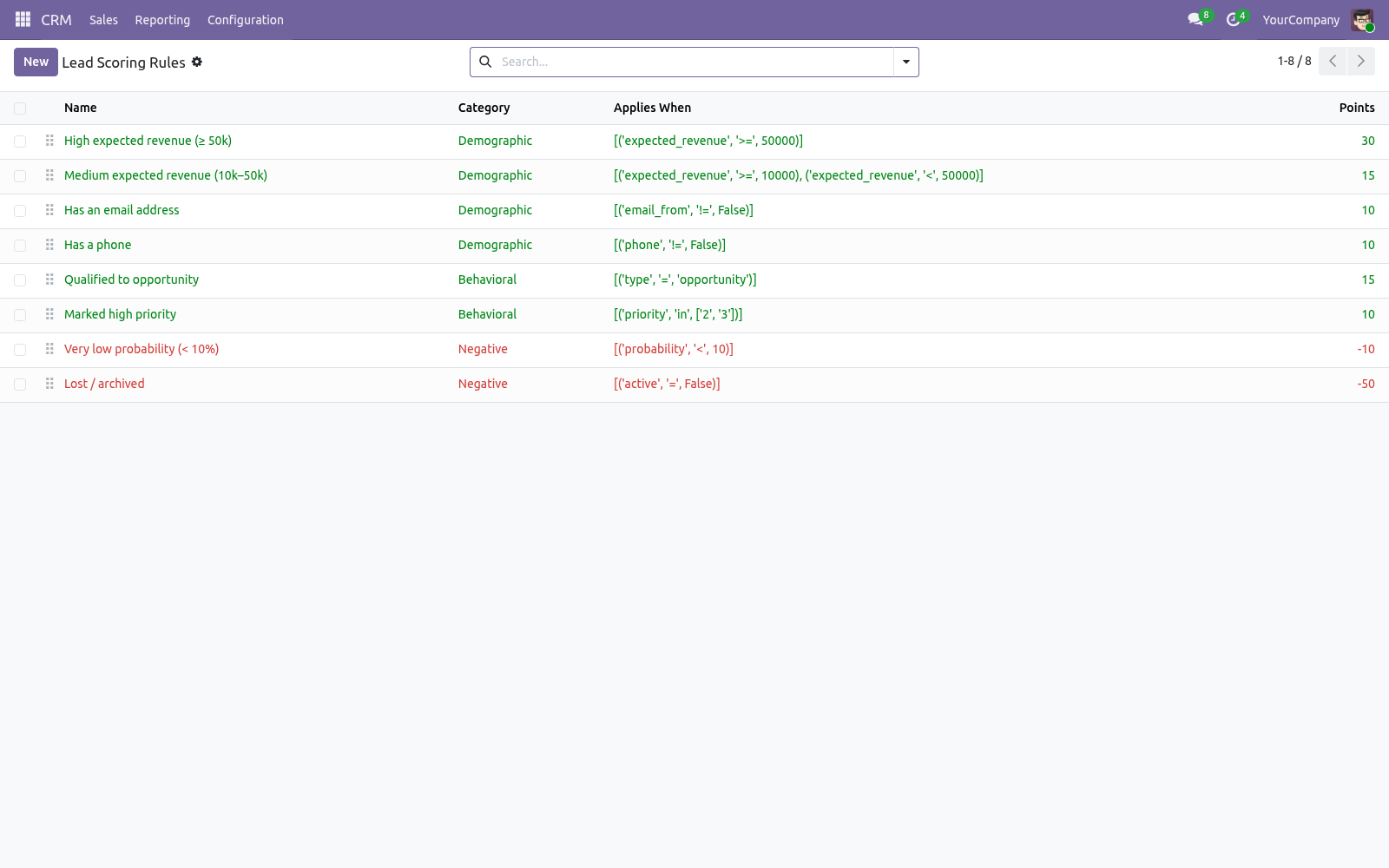
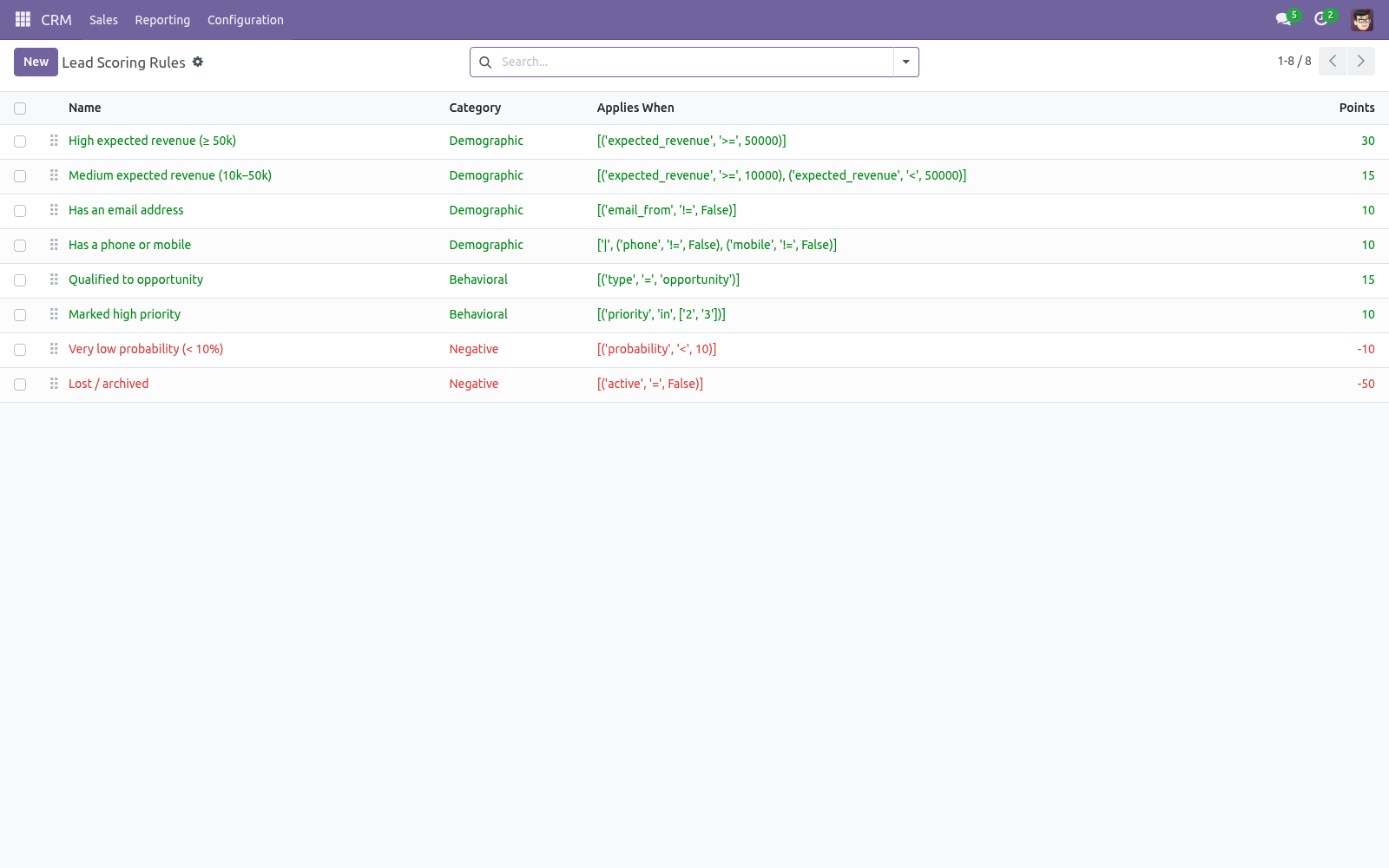
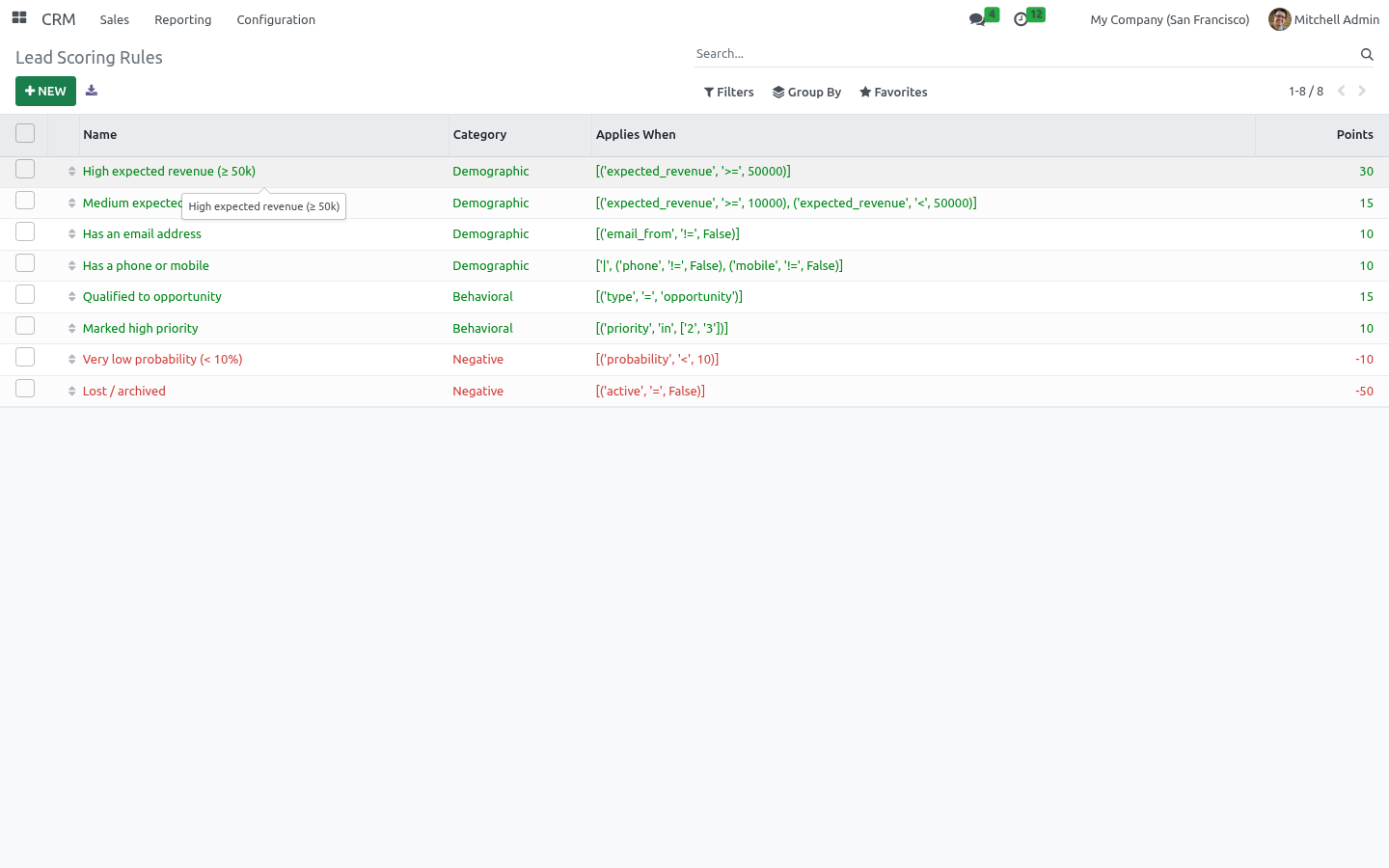
Open CRM > Configuration > Lead Scoring > Scoring Rules. The list opens already populated with the starter rules, colour-coded green for rules that award points and red for rules that subtract them. Each rule has: Name — shown verbatim in the per-lead breakdown, so keep it descriptive. Category — Demographic, Behavioral or Negative; for organisation.
Points — added to a matching lead's score; enter a negative number to penalise (the shipped Lost / archived rule is -50). Applies When — an Odoo domain on crm.lead, built with the visual condition editor; a matching lead receives the points. Invalid domains are rejected on save. The shipped rules are High expected revenue (≥ 50k) (+30), Medium expected revenue (10k–50k) (+15), Has an email address (+10), Has a phone or mobile (+10), Qualified to opportunity (+15), Marked high priority (+10), Very low probability (< 10%) (-10) and Lost / archived (-50).
Edit, reorder (drag the handle) or delete them freely. The complete manual is at docs dot bambooforge dot dev, the demo database is linked from the store page, and support answers within twenty-four hours. Links are in the description.
Transcript of the walkthrough (Odoo 19)
Lead Scoring for CRM. Score and grade CRM leads with a transparent rule engine: points per condition, A/B/C/D grades, automatic recompute and a per-lead breakdown. Stop chasing every lead the same way. This app scores your CRM leads with a transparent, configurable rule engine — points per condition — rolls the scores into A/B/C/D grades, recomputes automatically as leads change, and shows on every lead exactly why it scored what it did.
The Community answer to predictive lead scoring. In the next few minutes: lead scoring for crm, then building your scoring model, then how scoring stays current, then reading scores in crm, then transparency. Then what this app deliberately does not do, so you can tell before you buy whether it fits. Everything lives under Scoring Rules then Grades then Lead Scoring.
No Enterprise modules and no external Python libraries are required. Lead Scoring for CRM. Stop chasing every lead the same way. This app scores your CRM leads with a transparent, configurable rule engine — points per condition — rolls the scores into A/B/C/D grades, recomputes automatically as leads change, and shows on every lead exactly why it scored what it did.
The Community answer to predictive lead scoring. This page is the complete manual. Follow it top to bottom and you can install, build your scoring model, read the grades and fix the common issues without contacting support. Building your scoring model.
Rules. Go to CRM > Configuration > Lead Scoring > Scoring Rules. Each rule has: a Category (demographic, behavioral or negative) for organisation, an Applies When domain — built with the visual condition editor on the lead's own fields (expected revenue, email, source, tags, job position…), Points — positive to reward, negative to penalise. A lead's score is the sum of the points of every rule it matches.
The shipped rules (high revenue, has email/phone, qualified to opportunity, high priority, low probability, lost) are a starting point — edit, add or remove freely. How scoring stays current. The score is a stored field that recomputes automatically whenever a lead's common fields change (revenue, email, phone, stage, source, priority, tags and more). In addition: the Recompute Score button on a lead refreshes it on demand, the Recompute All Leads button on a rule re-scores the whole base after you change the rules, an optional scheduled action Lead Scoring: Recompute Scores (disabled by default) re-scores every lead on a schedule.
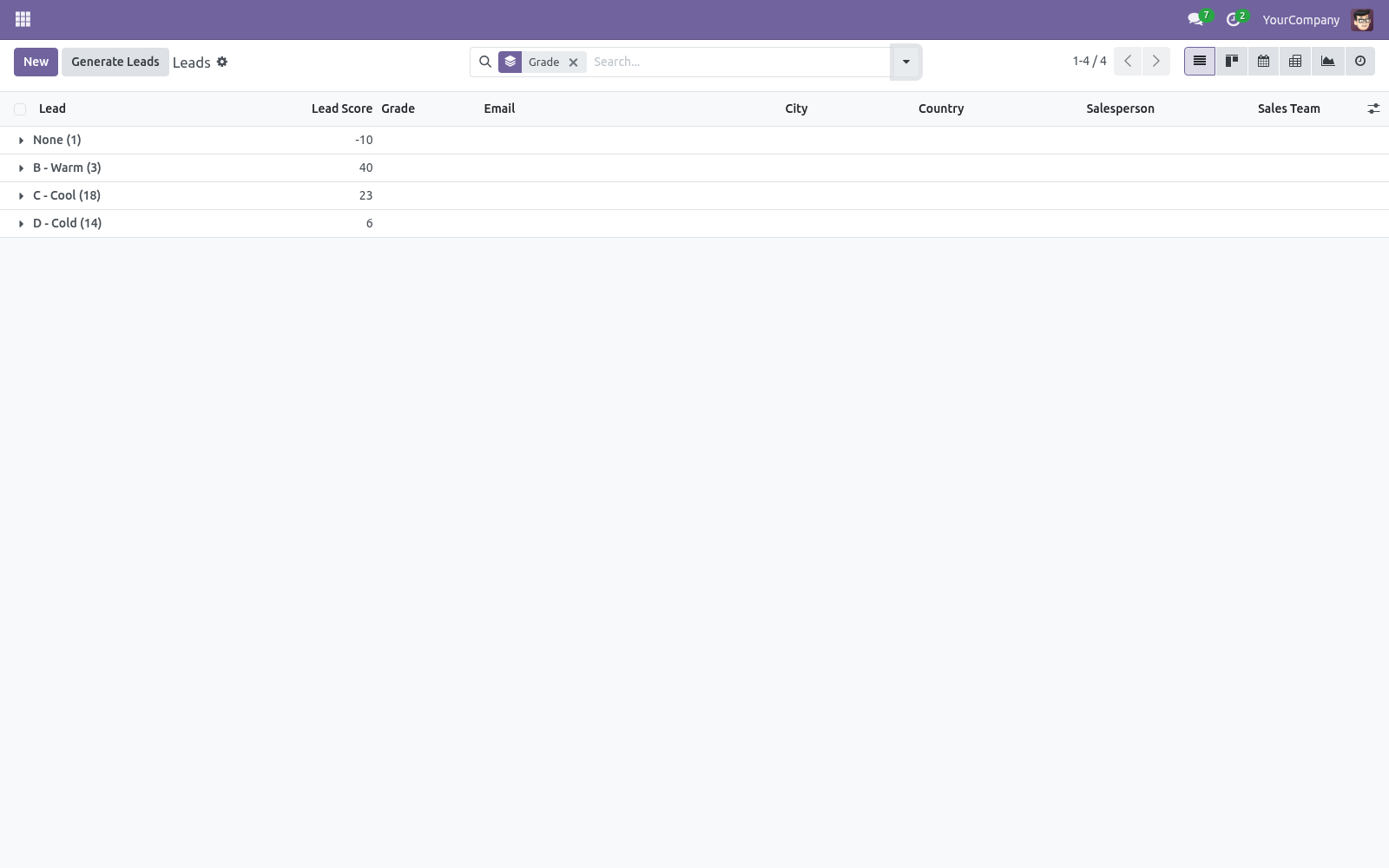
Re-score the base whenever you change rules or thresholds, since existing leads keep their previous score until recomputed. Reading scores in CRM On the lead/opportunity form, the grade badge, the score and a per-rule breakdown appear next to the expected revenue. In the pipeline and lead lists, Score and Grade are available columns. In the search panel, filter to A - Hot or Positive Score, and group by Grade to see your funnel split by quality.
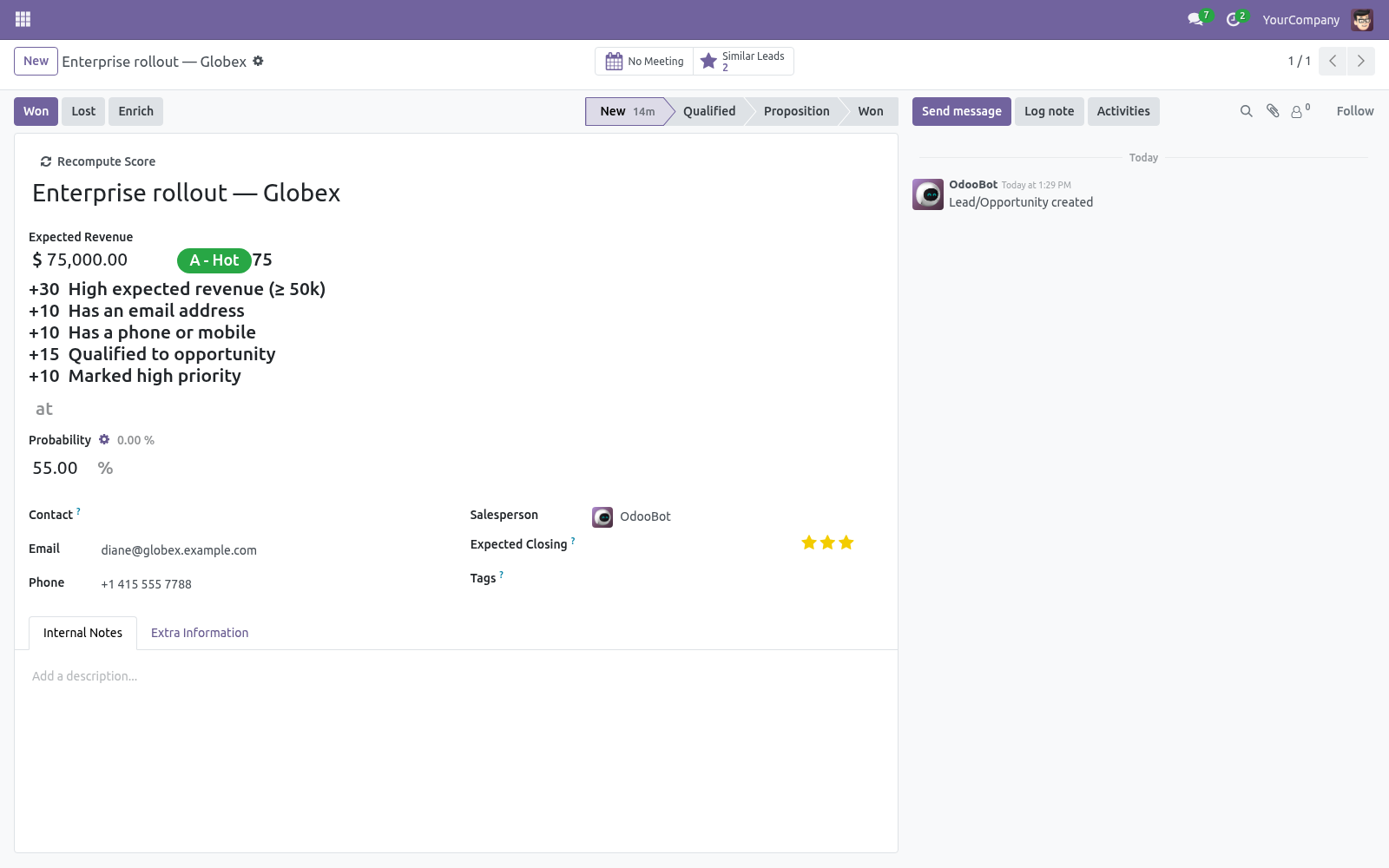
Transparency. +30 High expected revenue (≥ 50k) +10 Has an email address +15 Qualified to opportunity so salespeople trust the number and managers can see exactly what the model rewards. Frequently asked questions. A rule's domain won't save.
The domain must be a valid Odoo domain on the lead. Use the visual editor to avoid syntax mistakes; invalid domains are rejected on save. Scores didn't change after I edited the rules. Existing leads keep their score until recomputed.
Use Recompute All Leads on a rule, or enable the scheduled action. Support. Questions or ideas: support@bambooforge.dev. ..
BAMBOOFORGE-DOC-APPENDIX (auto-generated: Upgrade/Uninstall/Changelog + bespoke) Usage. This section walks through a full working session: configure the model, let leads score themselves, and read the results inside CRM. All configuration lives under CRM > Configuration > Lead Scoring (visible to users in the Sales / Administrator group). Configure scoring rules.
Open CRM > Configuration > Lead Scoring > Scoring Rules. The list opens already populated with the starter rules, colour-coded green for rules that award points and red for rules that subtract them. Each rule has: Name — shown verbatim in the per-lead breakdown, so keep it descriptive. Category — Demographic, Behavioral or Negative; for organisation.
Points — added to a matching lead's score; enter a negative number to penalise (the shipped Lost / archived rule is -50). Applies When — an Odoo domain on crm.lead, built with the visual condition editor; a matching lead receives the points. Invalid domains are rejected on save. The shipped rules are High expected revenue (≥ 50k) (+30), Medium expected revenue (10k–50k) (+15), Has an email address (+10), Has a phone or mobile (+10), Qualified to opportunity (+15), Marked high priority (+10), Very low probability (< 10%) (-10) and Lost / archived (-50).
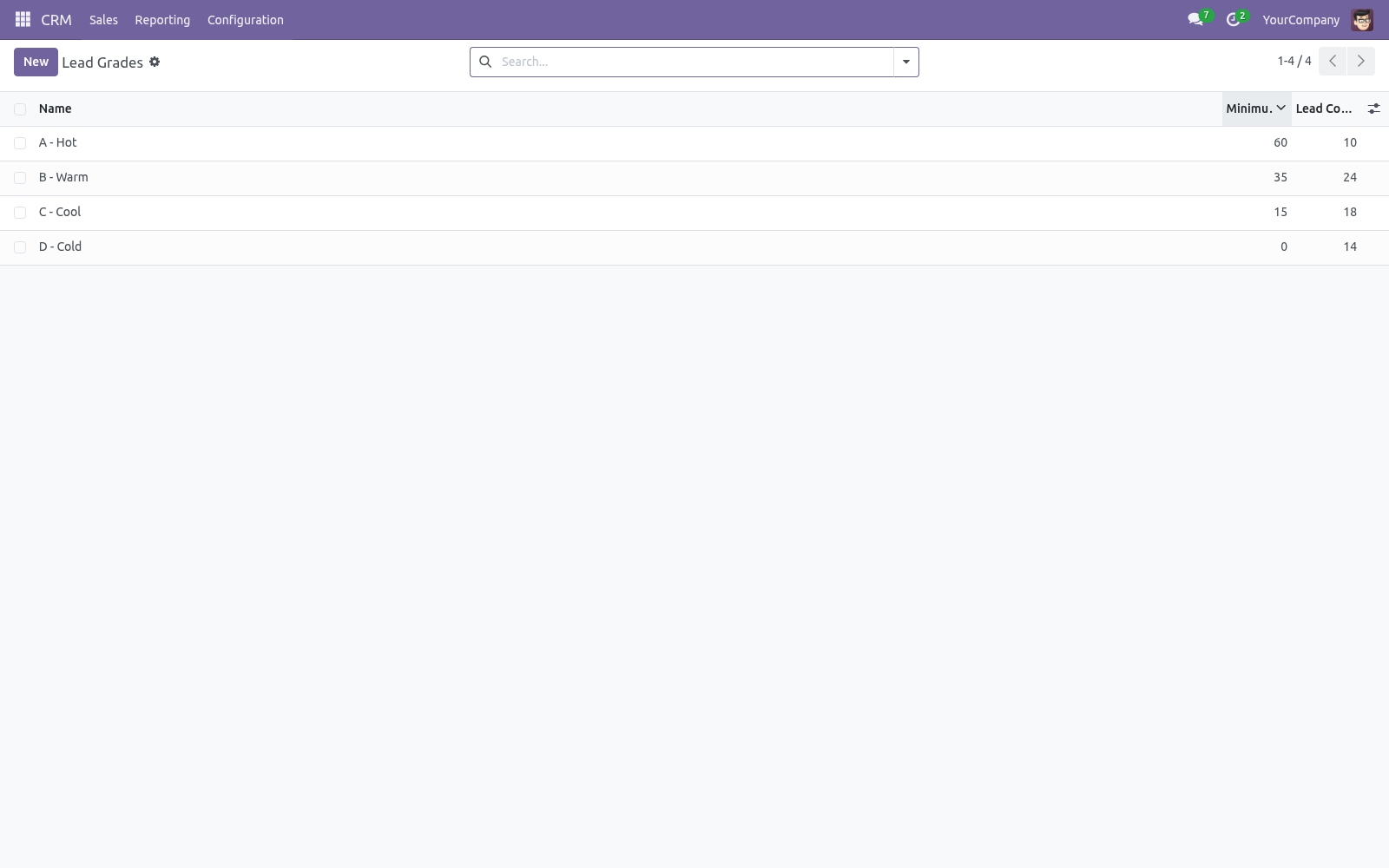
Edit, reorder (drag the handle) or delete them freely. Configure grades. Open CRM > Configuration > Lead Scoring > Grades. A grade has a Minimum Score; a lead is assigned the highest grade whose minimum it reaches.
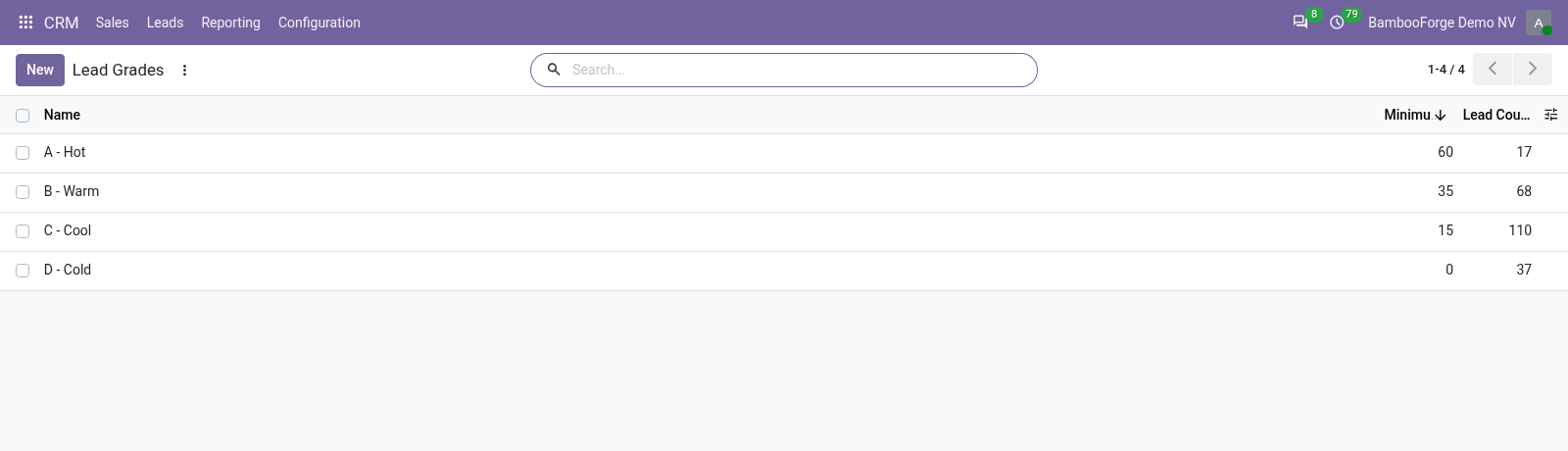
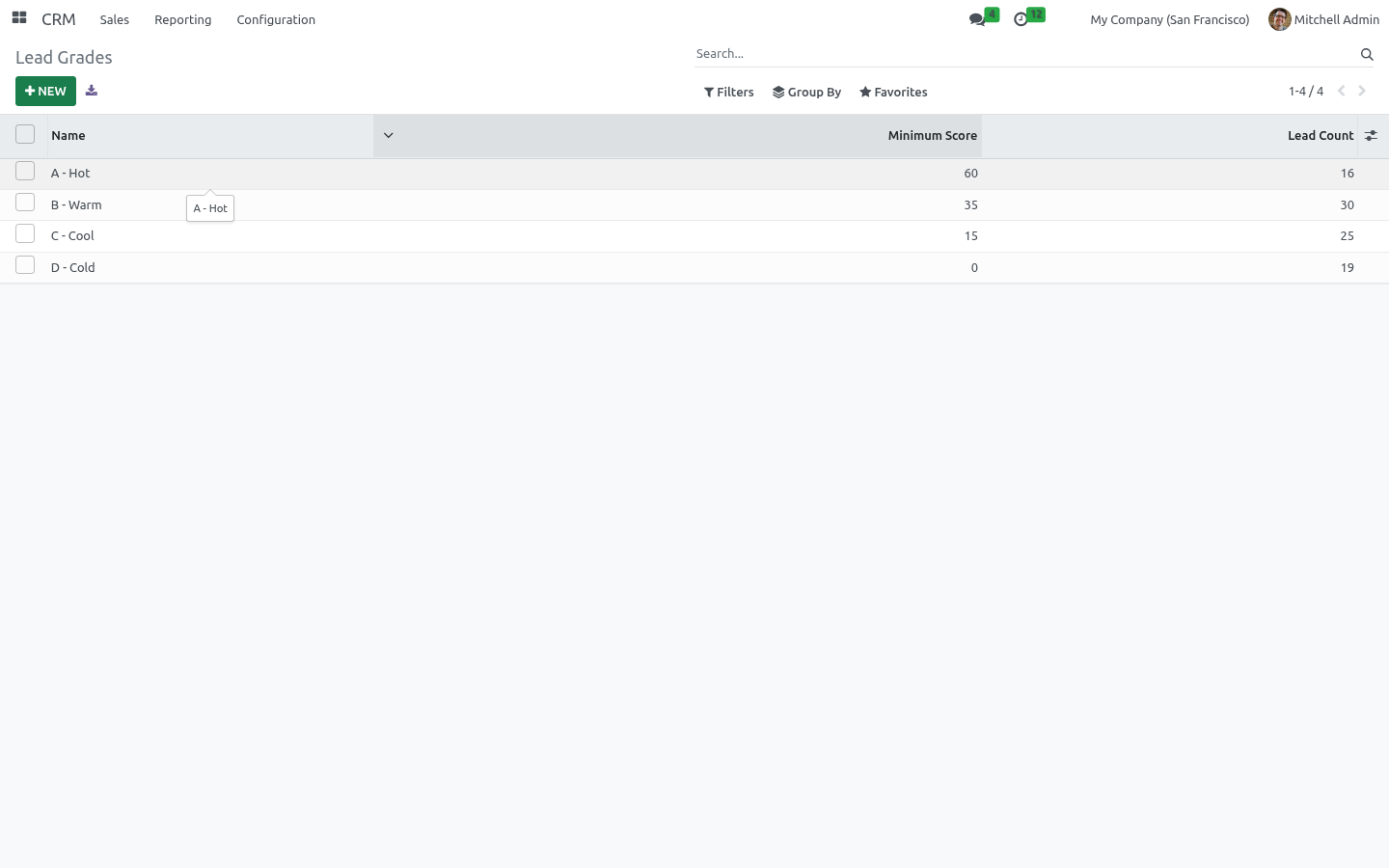
The defaults are A - Hot (≥ 60), B - Warm (≥ 35), C - Cool (≥ 15) and D - Cold (≥ 0). Adjust the thresholds to match your funnel. Each grade shows its live lead count, and the View Leads action opens the leads currently holding that grade. The complete manual is at docs dot bambooforge dot dev, the demo database is linked from the store page, and support answers within twenty-four hours.
Links are in the description.
Transcript of the walkthrough (Odoo 18)
Lead Scoring for CRM. Score and grade CRM leads with a transparent rule engine: points per condition, A/B/C/D grades, automatic recompute and a per-lead breakdown. Stop chasing every lead the same way. This app scores your CRM leads with a transparent, configurable rule engine — points per condition — rolls the scores into A/B/C/D grades, recomputes automatically as leads change, and shows on every lead exactly why it scored what it did.
The Community answer to predictive lead scoring. In the next few minutes: lead scoring for crm, then building your scoring model, then how scoring stays current, then reading scores in crm, then transparency. Then what this app deliberately does not do, so you can tell before you buy whether it fits. Everything lives under Scoring Rules then Grades then Lead Scoring.
No Enterprise modules and no external Python libraries are required. Lead Scoring for CRM. Stop chasing every lead the same way. This app scores your CRM leads with a transparent, configurable rule engine — points per condition — rolls the scores into A/B/C/D grades, recomputes automatically as leads change, and shows on every lead exactly why it scored what it did.
The Community answer to predictive lead scoring. This page is the complete manual. Follow it top to bottom and you can install, build your scoring model, read the grades and fix the common issues without contacting support. Building your scoring model.
Rules. Go to CRM > Configuration > Lead Scoring > Scoring Rules. Each rule has: a Category (demographic, behavioral or negative) for organisation, an Applies When domain — built with the visual condition editor on the lead's own fields (expected revenue, email, source, tags, job position…), Points — positive to reward, negative to penalise. A lead's score is the sum of the points of every rule it matches.
The shipped rules (high revenue, has email/phone, qualified to opportunity, high priority, low probability, lost) are a starting point — edit, add or remove freely. How scoring stays current. The score is a stored field that recomputes automatically whenever a lead's common fields change (revenue, email, phone, stage, source, priority, tags and more). In addition: the Recompute Score button on a lead refreshes it on demand, the Recompute All Leads button on a rule re-scores the whole base after you change the rules, an optional scheduled action Lead Scoring: Recompute Scores (disabled by default) re-scores every lead on a schedule.
Re-score the base whenever you change rules or thresholds, since existing leads keep their previous score until recomputed. Reading scores in CRM On the lead/opportunity form, the grade badge, the score and a per-rule breakdown appear next to the expected revenue. In the pipeline and lead lists, Score and Grade are available columns. In the search panel, filter to A - Hot or Positive Score, and group by Grade to see your funnel split by quality.
Transparency. +30 High expected revenue (≥ 50k) +10 Has an email address +15 Qualified to opportunity so salespeople trust the number and managers can see exactly what the model rewards. Frequently asked questions. A rule's domain won't save.
The domain must be a valid Odoo domain on the lead. Use the visual editor to avoid syntax mistakes; invalid domains are rejected on save. Scores didn't change after I edited the rules. Existing leads keep their score until recomputed.
Use Recompute All Leads on a rule, or enable the scheduled action. Support. Questions or ideas: support@bambooforge.dev. ..
BAMBOOFORGE-DOC-APPENDIX (auto-generated: Upgrade/Uninstall/Changelog + bespoke) Usage. This section walks through a full working session: configure the model, let leads score themselves, and read the results inside CRM. All configuration lives under CRM > Configuration > Lead Scoring (visible to users in the Sales / Administrator group). Configure scoring rules.
Open CRM > Configuration > Lead Scoring > Scoring Rules. The list opens already populated with the starter rules, colour-coded green for rules that award points and red for rules that subtract them. Each rule has: Name — shown verbatim in the per-lead breakdown, so keep it descriptive. Category — Demographic, Behavioral or Negative; for organisation.
Points — added to a matching lead's score; enter a negative number to penalise (the shipped Lost / archived rule is -50). Applies When — an Odoo domain on crm.lead, built with the visual condition editor; a matching lead receives the points. Invalid domains are rejected on save. The shipped rules are High expected revenue (≥ 50k) (+30), Medium expected revenue (10k–50k) (+15), Has an email address (+10), Has a phone or mobile (+10), Qualified to opportunity (+15), Marked high priority (+10), Very low probability (< 10%) (-10) and Lost / archived (-50).
Edit, reorder (drag the handle) or delete them freely. Configure grades. Open CRM > Configuration > Lead Scoring > Grades. A grade has a Minimum Score; a lead is assigned the highest grade whose minimum it reaches.
The defaults are A - Hot (≥ 60), B - Warm (≥ 35), C - Cool (≥ 15) and D - Cold (≥ 0). Adjust the thresholds to match your funnel. Each grade shows its live lead count, and the View Leads action opens the leads currently holding that grade. The complete manual is at docs dot bambooforge dot dev, the demo database is linked from the store page, and support answers within twenty-four hours.
Links are in the description.
Transcript of the walkthrough (Odoo 17)
Lead Scoring for CRM. Score and grade CRM leads with a transparent rule engine: points per condition, A/B/C/D grades, automatic recompute and a per-lead breakdown. Stop chasing every lead the same way. This app scores your CRM leads with a transparent, configurable rule engine — points per condition — rolls the scores into A/B/C/D grades, recomputes automatically as leads change, and shows on every lead exactly why it scored what it did.
The Community answer to predictive lead scoring. In the next few minutes: lead scoring for crm, then building your scoring model, then how scoring stays current, then reading scores in crm, then transparency. Then what this app deliberately does not do, so you can tell before you buy whether it fits. Everything lives under Scoring Rules then Grades then Lead Scoring.
No Enterprise modules and no external Python libraries are required. Lead Scoring for CRM. Stop chasing every lead the same way. This app scores your CRM leads with a transparent, configurable rule engine — points per condition — rolls the scores into A/B/C/D grades, recomputes automatically as leads change, and shows on every lead exactly why it scored what it did.
The Community answer to predictive lead scoring. This page is the complete manual. Follow it top to bottom and you can install, build your scoring model, read the grades and fix the common issues without contacting support. Building your scoring model.
Rules. Go to CRM > Configuration > Lead Scoring > Scoring Rules. Each rule has: a Category (demographic, behavioral or negative) for organisation, an Applies When domain — built with the visual condition editor on the lead's own fields (expected revenue, email, source, tags, job position…), Points — positive to reward, negative to penalise. A lead's score is the sum of the points of every rule it matches.
The shipped rules (high revenue, has email/phone, qualified to opportunity, high priority, low probability, lost) are a starting point — edit, add or remove freely. How scoring stays current. The score is a stored field that recomputes automatically whenever a lead's common fields change (revenue, email, phone, stage, source, priority, tags and more). In addition: the Recompute Score button on a lead refreshes it on demand, the Recompute All Leads button on a rule re-scores the whole base after you change the rules, an optional scheduled action Lead Scoring: Recompute Scores (disabled by default) re-scores every lead on a schedule.
Re-score the base whenever you change rules or thresholds, since existing leads keep their previous score until recomputed. Reading scores in CRM On the lead/opportunity form, the grade badge, the score and a per-rule breakdown appear next to the expected revenue. In the pipeline and lead lists, Score and Grade are available columns. In the search panel, filter to A - Hot or Positive Score, and group by Grade to see your funnel split by quality.
Transparency. +30 High expected revenue (≥ 50k) +10 Has an email address +15 Qualified to opportunity so salespeople trust the number and managers can see exactly what the model rewards. Frequently asked questions. A rule's domain won't save.
The domain must be a valid Odoo domain on the lead. Use the visual editor to avoid syntax mistakes; invalid domains are rejected on save. Scores didn't change after I edited the rules. Existing leads keep their score until recomputed.
Use Recompute All Leads on a rule, or enable the scheduled action. Support. Questions or ideas: support@bambooforge.dev. ..
BAMBOOFORGE-DOC-APPENDIX (auto-generated: Upgrade/Uninstall/Changelog + bespoke) Usage. This section walks through a full working session: configure the model, let leads score themselves, and read the results inside CRM. All configuration lives under CRM > Configuration > Lead Scoring (visible to users in the Sales / Administrator group). Configure scoring rules.
Open CRM > Configuration > Lead Scoring > Scoring Rules. The list opens already populated with the starter rules, colour-coded green for rules that award points and red for rules that subtract them. Each rule has: Name — shown verbatim in the per-lead breakdown, so keep it descriptive. Category — Demographic, Behavioral or Negative; for organisation.
Points — added to a matching lead's score; enter a negative number to penalise (the shipped Lost / archived rule is -50). Applies When — an Odoo domain on crm.lead, built with the visual condition editor; a matching lead receives the points. Invalid domains are rejected on save. The shipped rules are High expected revenue (≥ 50k) (+30), Medium expected revenue (10k–50k) (+15), Has an email address (+10), Has a phone or mobile (+10), Qualified to opportunity (+15), Marked high priority (+10), Very low probability (< 10%) (-10) and Lost / archived (-50).
Edit, reorder (drag the handle) or delete them freely. Configure grades. Open CRM > Configuration > Lead Scoring > Grades. A grade has a Minimum Score; a lead is assigned the highest grade whose minimum it reaches.
The defaults are A - Hot (≥ 60), B - Warm (≥ 35), C - Cool (≥ 15) and D - Cold (≥ 0). Adjust the thresholds to match your funnel. Each grade shows its live lead count, and the View Leads action opens the leads currently holding that grade. The complete manual is at docs dot bambooforge dot dev, the demo database is linked from the store page, and support answers within twenty-four hours.
Links are in the description.
Transcript of the walkthrough (Odoo 16)
Lead Scoring for CRM. Score and grade CRM leads with a transparent rule engine: points per condition, A/B/C/D grades, automatic recompute and a per-lead breakdown. Stop chasing every lead the same way. This app scores your CRM leads with a transparent, configurable rule engine — points per condition — rolls the scores into A/B/C/D grades, recomputes automatically as leads change, and shows on every lead exactly why it scored what it did.
The Community answer to predictive lead scoring. In the next few minutes: lead scoring for crm, then building your scoring model, then how scoring stays current, then reading scores in crm, then transparency. Then what this app deliberately does not do, so you can tell before you buy whether it fits. Everything lives under Scoring Rules then Grades then Lead Scoring.
No Enterprise modules and no external Python libraries are required. Lead Scoring for CRM. Stop chasing every lead the same way. This app scores your CRM leads with a transparent, configurable rule engine — points per condition — rolls the scores into A/B/C/D grades, recomputes automatically as leads change, and shows on every lead exactly why it scored what it did.
The Community answer to predictive lead scoring. This page is the complete manual. Follow it top to bottom and you can install, build your scoring model, read the grades and fix the common issues without contacting support. Building your scoring model.
Rules. Go to CRM > Configuration > Lead Scoring > Scoring Rules. Each rule has: a Category (demographic, behavioral or negative) for organisation, an Applies When domain — built with the visual condition editor on the lead's own fields (expected revenue, email, source, tags, job position…), Points — positive to reward, negative to penalise. A lead's score is the sum of the points of every rule it matches.
The shipped rules (high revenue, has email/phone, qualified to opportunity, high priority, low probability, lost) are a starting point — edit, add or remove freely. How scoring stays current. The score is a stored field that recomputes automatically whenever a lead's common fields change (revenue, email, phone, stage, source, priority, tags and more). In addition: the Recompute Score button on a lead refreshes it on demand, the Recompute All Leads button on a rule re-scores the whole base after you change the rules, an optional scheduled action Lead Scoring: Recompute Scores (disabled by default) re-scores every lead on a schedule.
Re-score the base whenever you change rules or thresholds, since existing leads keep their previous score until recomputed. Reading scores in CRM On the lead/opportunity form, the grade badge, the score and a per-rule breakdown appear next to the expected revenue. In the pipeline and lead lists, Score and Grade are available columns. In the search panel, filter to A - Hot or Positive Score, and group by Grade to see your funnel split by quality.
Transparency. +30 High expected revenue (≥ 50k) +10 Has an email address +15 Qualified to opportunity so salespeople trust the number and managers can see exactly what the model rewards. Frequently asked questions. A rule's domain won't save.
The domain must be a valid Odoo domain on the lead. Use the visual editor to avoid syntax mistakes; invalid domains are rejected on save. Scores didn't change after I edited the rules. Existing leads keep their score until recomputed.
Use Recompute All Leads on a rule, or enable the scheduled action. Support. Questions or ideas: support@bambooforge.dev. ..
BAMBOOFORGE-DOC-APPENDIX (auto-generated: Upgrade/Uninstall/Changelog + bespoke) Usage. This section walks through a full working session: configure the model, let leads score themselves, and read the results inside CRM. All configuration lives under CRM > Configuration > Lead Scoring (visible to users in the Sales / Administrator group). Configure scoring rules.
Open CRM > Configuration > Lead Scoring > Scoring Rules. The list opens already populated with the starter rules, colour-coded green for rules that award points and red for rules that subtract them. Each rule has: Name — shown verbatim in the per-lead breakdown, so keep it descriptive. Category — Demographic, Behavioral or Negative; for organisation.
Points — added to a matching lead's score; enter a negative number to penalise (the shipped Lost / archived rule is -50). Applies When — an Odoo domain on crm.lead, built with the visual condition editor; a matching lead receives the points. Invalid domains are rejected on save. The shipped rules are High expected revenue (≥ 50k) (+30), Medium expected revenue (10k–50k) (+15), Has an email address (+10), Has a phone or mobile (+10), Qualified to opportunity (+15), Marked high priority (+10), Very low probability (< 10%) (-10) and Lost / archived (-50).
Edit, reorder (drag the handle) or delete them freely. Configure grades. Open CRM > Configuration > Lead Scoring > Grades. A grade has a Minimum Score; a lead is assigned the highest grade whose minimum it reaches.
The defaults are A - Hot (≥ 60), B - Warm (≥ 35), C - Cool (≥ 15) and D - Cold (≥ 0). Adjust the thresholds to match your funnel. Each grade shows its live lead count, and the View Leads action opens the leads currently holding that grade. The complete manual is at docs dot bambooforge dot dev, the demo database is linked from the store page, and support answers within twenty-four hours.
Links are in the description.
Key facts
- What it is
- Score and grade CRM leads with a transparent rule engine: points per condition, A/B/C/D grades, automatic recompute and a per-lead breakdown.
- For
- Sales
- Odoo versions
- 16.0, 17.0, 18.0, 19.0, 20.0 - Community and Enterprise
- Runs on
- Odoo.sh or Odoo you host yourself - not Odoo Online, which accepts no third-party apps
- Price
- 89 EUR, one-time, on the Odoo Apps Store
- Technical name
- bambooforge_lead_scoring
- Not for
- Said before you buy, because it is the half that decides whether the app fits:; Grade a score below every threshold - it gets no grade.; Mix Odoo series: a build is for the series it was bought for.
- Manual last updated
- 2026-10-15
Lead Scoring for CRM
Stop chasing every lead the same way. This app scores your CRM leads with a transparent, configurable rule engine — points per condition — rolls the scores into A/B/C/D grades, recomputes automatically as leads change, and shows on every lead exactly why it scored what it did. The Community answer to predictive lead scoring.
This page is the complete manual. Follow it top to bottom and you can install, build your scoring model, read the grades and fix the common issues without contacting support.
Overview
Scoring rules — each rule grants (or subtracts) points to leads that match an Odoo domain you define with a visual, no-code condition builder.
Grades — score thresholds turn raw points into A/B/C/D grades (fully editable) so your team can sort at a glance.
Automatic scoring — scores refresh as the lead's fields change, on a schedule, or on demand. No manual upkeep.
Total transparency — every lead shows its score, its grade and a breakdown of which rules contributed how many points.
Built into CRM — score and grade appear on the lead form, in the pipeline and lead lists, and as a filter and group-by.
Requirements
Odoo 20.0.
The CRM app (crm). Installing this app pulls it in automatically.
No Enterprise modules and no external Python libraries are required.
Installation
Copy bambooforge_lead_scoring into your addons path.
Update the apps list (Apps > Update Apps List).
Search for Lead Scoring and click Install.
A starter set of rules and grades is created, and existing leads are scored on install. Find the configuration under CRM > Configuration > Lead Scoring.
Building your scoring model
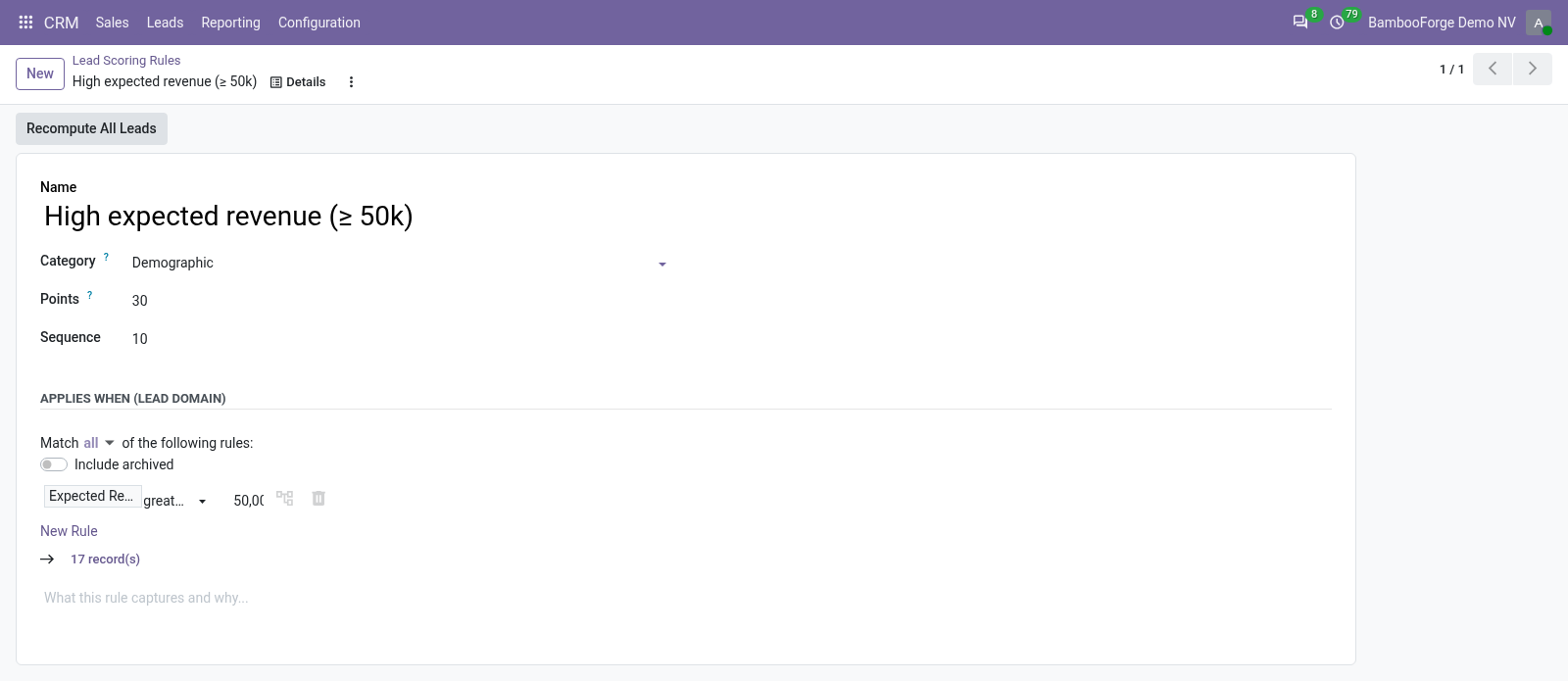
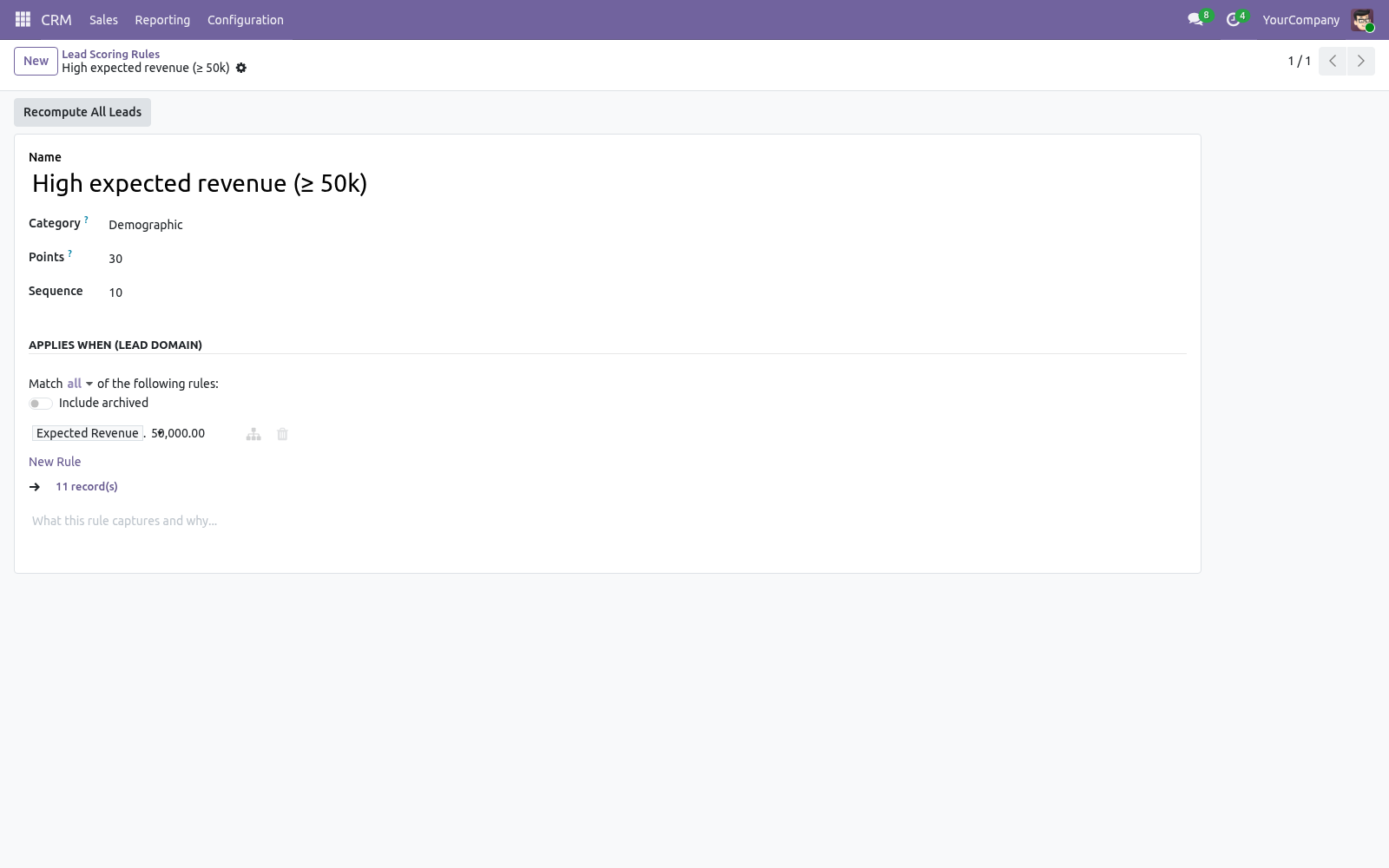
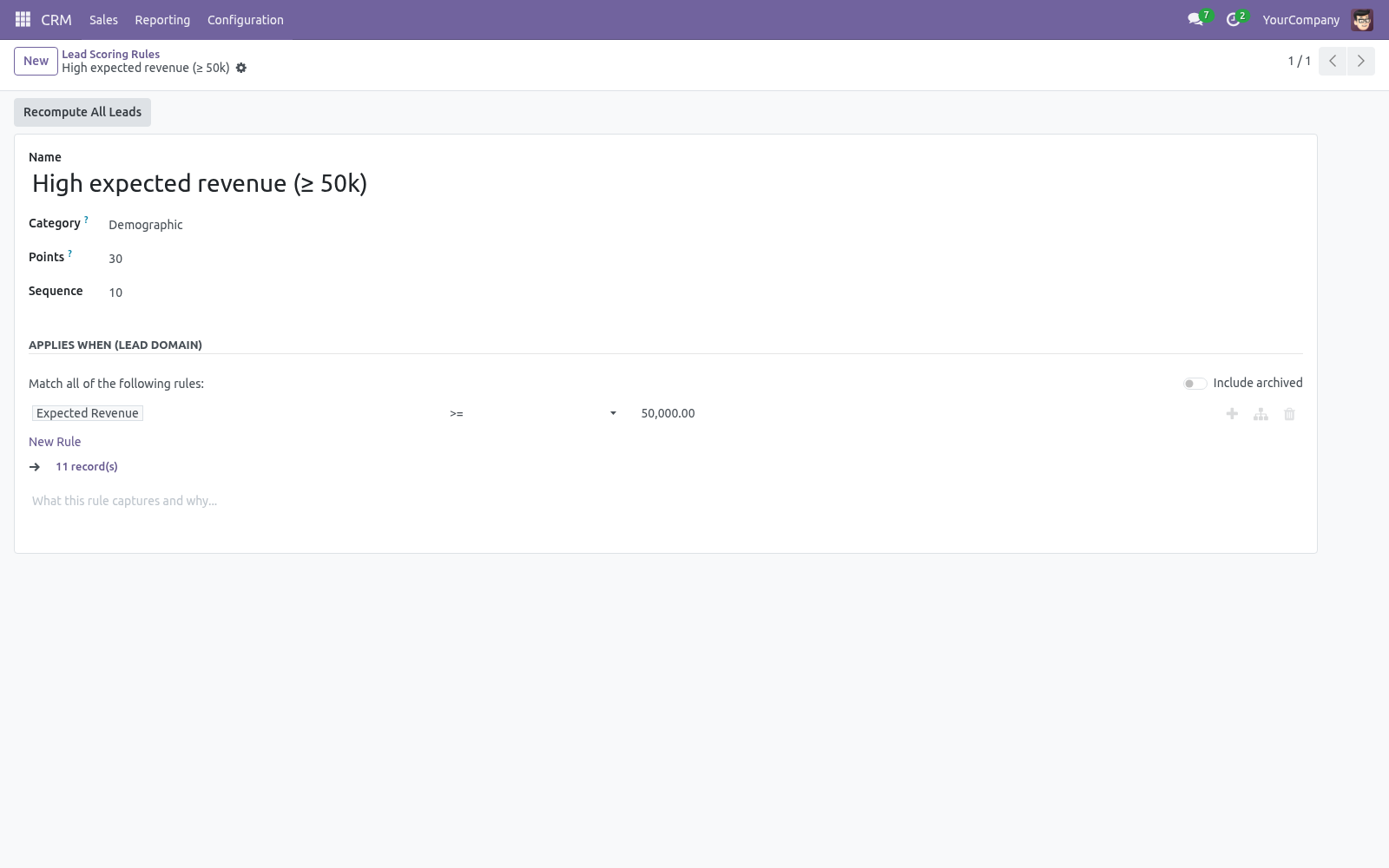
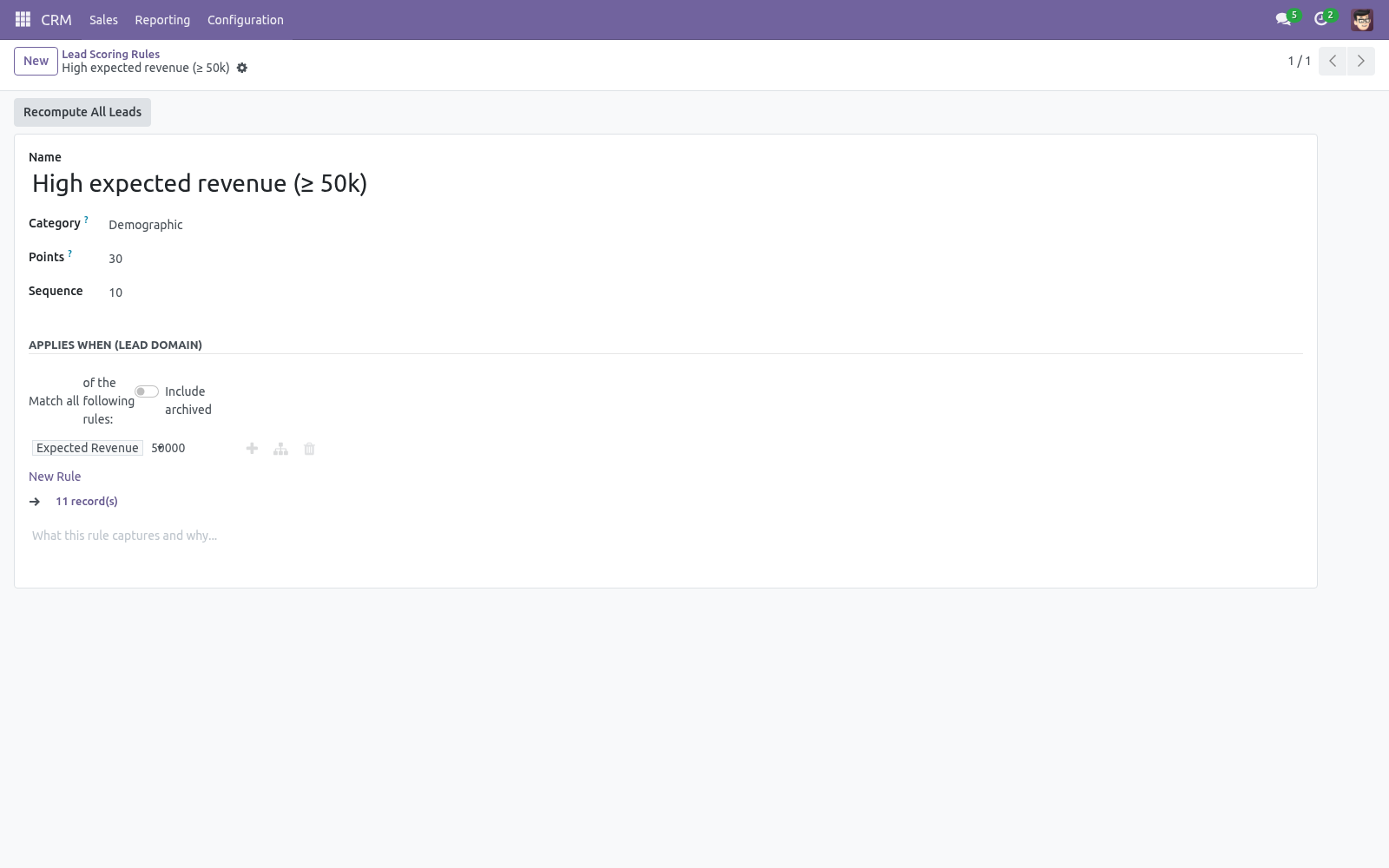
Rules. Go to CRM > Configuration > Lead Scoring > Scoring Rules. Each rule has:
a Category (demographic, behavioral or negative) for organisation,
an Applies When domain — built with the visual condition editor on the lead's own fields (expected revenue, email, source, tags, job position…),
Points — positive to reward, negative to penalise.
A lead's score is the sum of the points of every rule it matches. The shipped rules (high revenue, has email/phone, qualified to opportunity, high priority, low probability, lost) are a starting point — edit, add or remove freely.
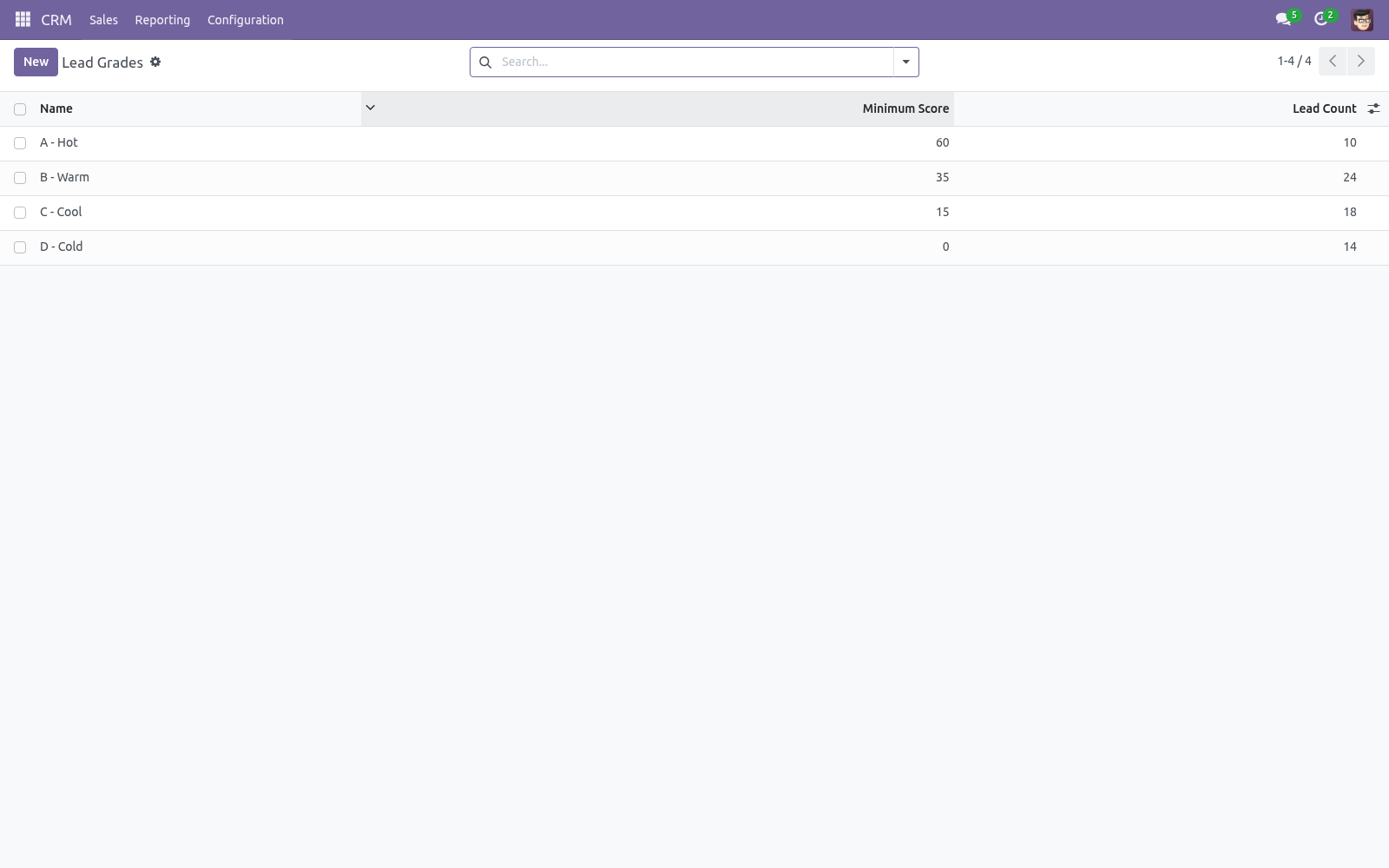
Grades. Go to Grades. Each grade has a Minimum Score; a lead takes the highest grade whose minimum it reaches. The defaults are A (≥ 60), B (≥ 35), C (≥ 15) and D (≥ 0) — adjust the thresholds to your funnel.
How scoring stays current
The score is a stored field that recomputes automatically whenever a lead's common fields change (revenue, email, phone, stage, source, priority, tags and more). In addition:
the Recompute Score button on a lead refreshes it on demand,
the Recompute All Leads button on a rule re-scores the whole base after you change the rules,
an optional scheduled action Lead Scoring: Recompute Scores (disabled by default) re-scores every lead on a schedule.
Re-score the base whenever you change rules or thresholds, since existing leads keep their previous score until recomputed.
Reading scores in CRM
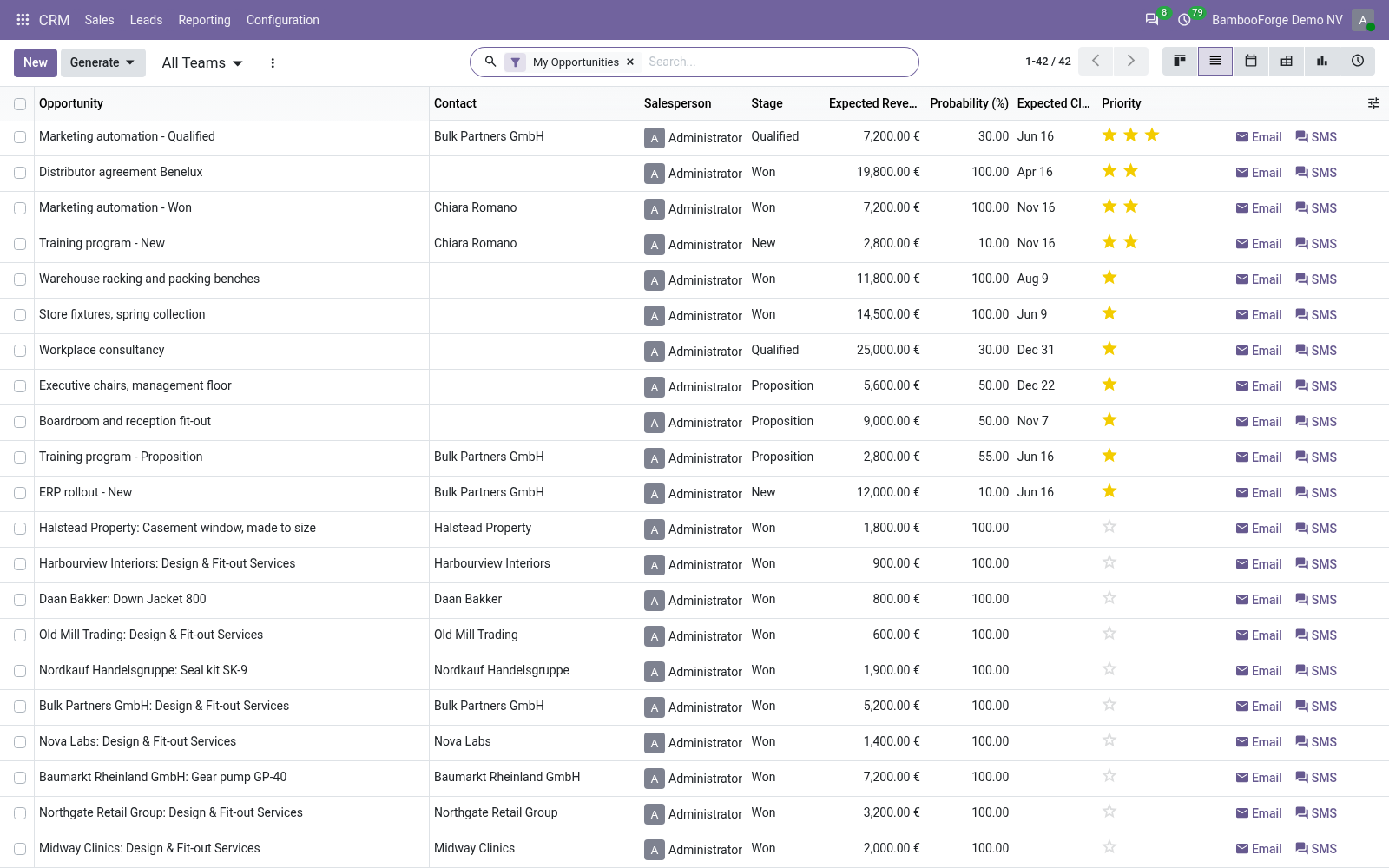
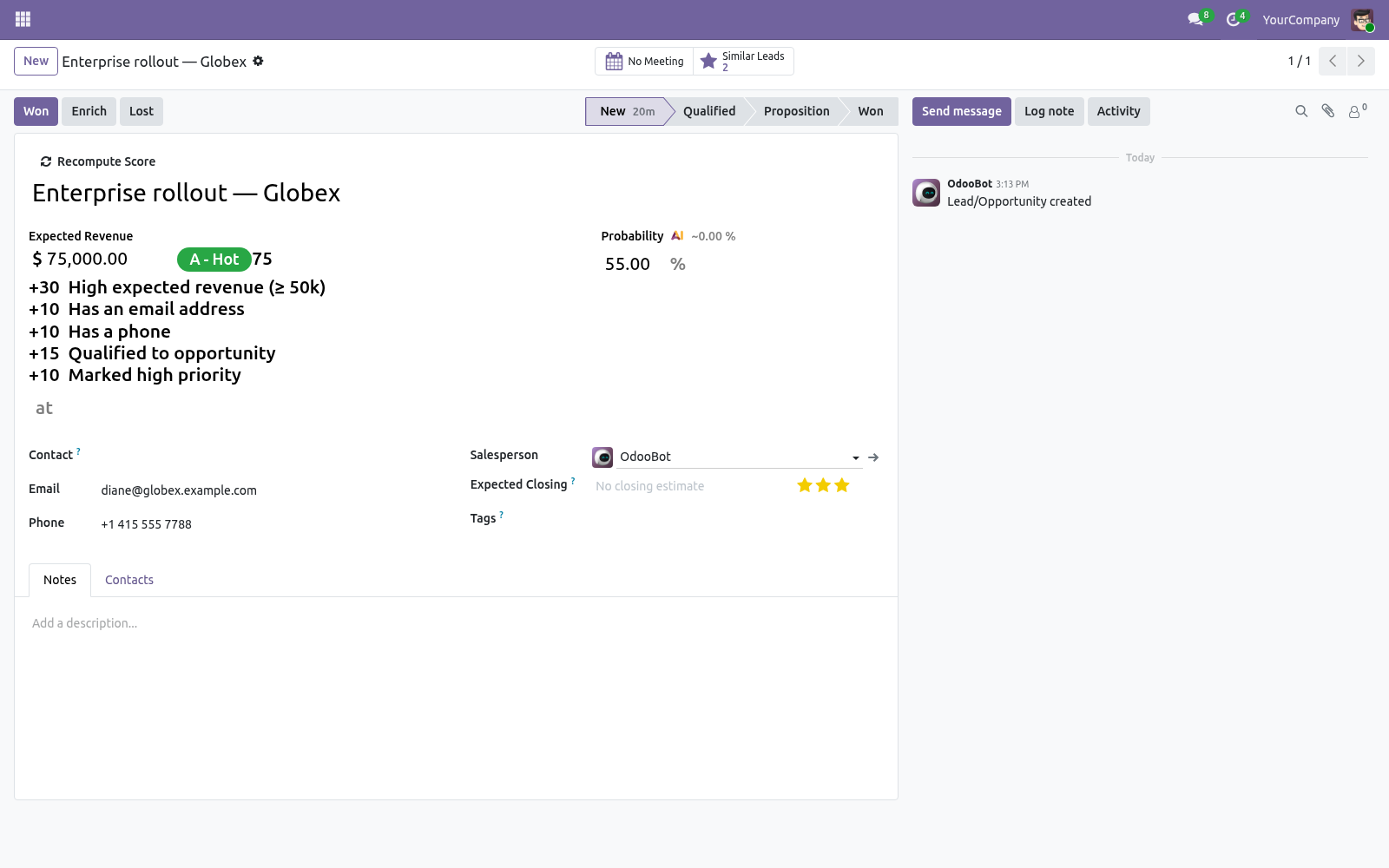
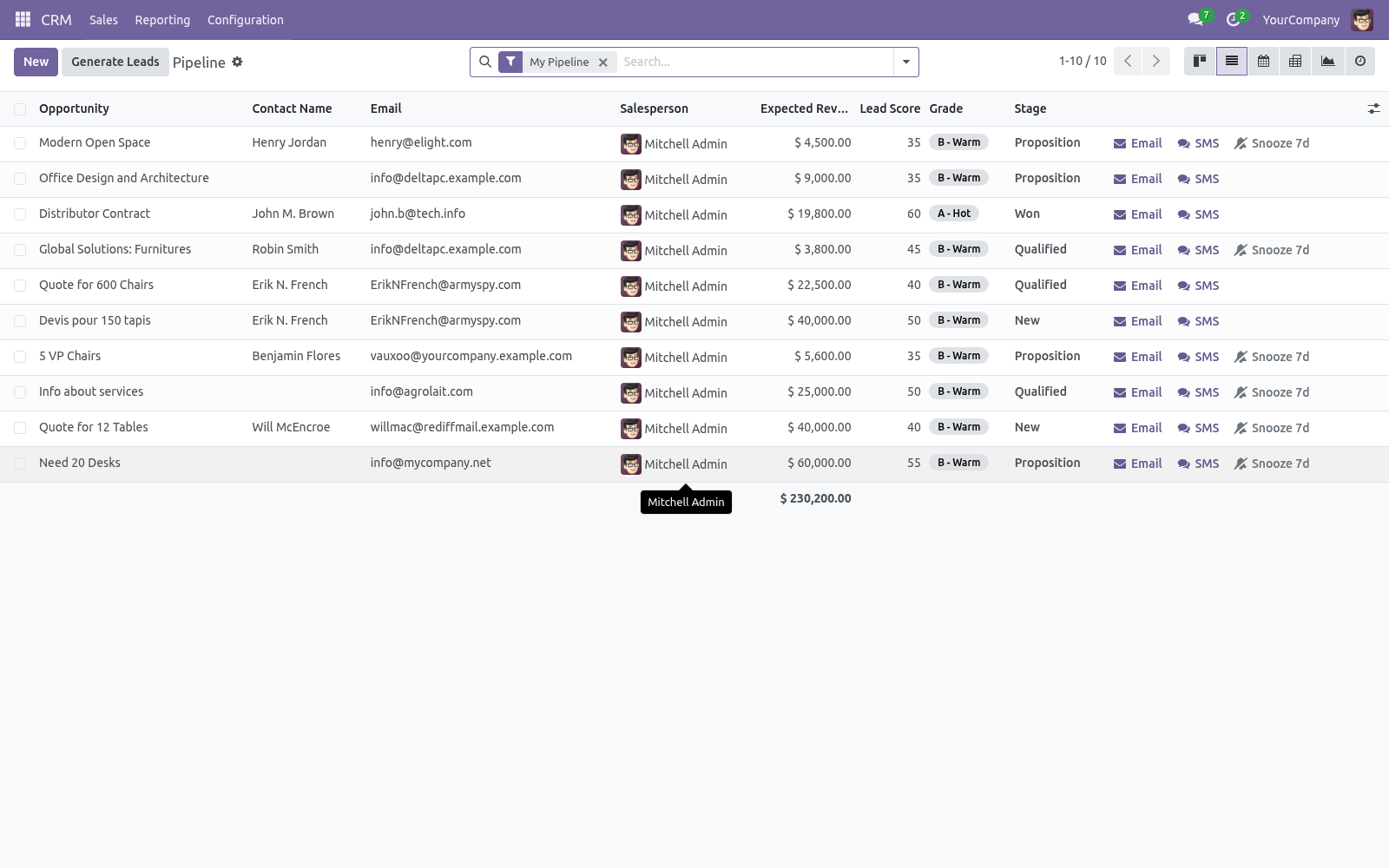
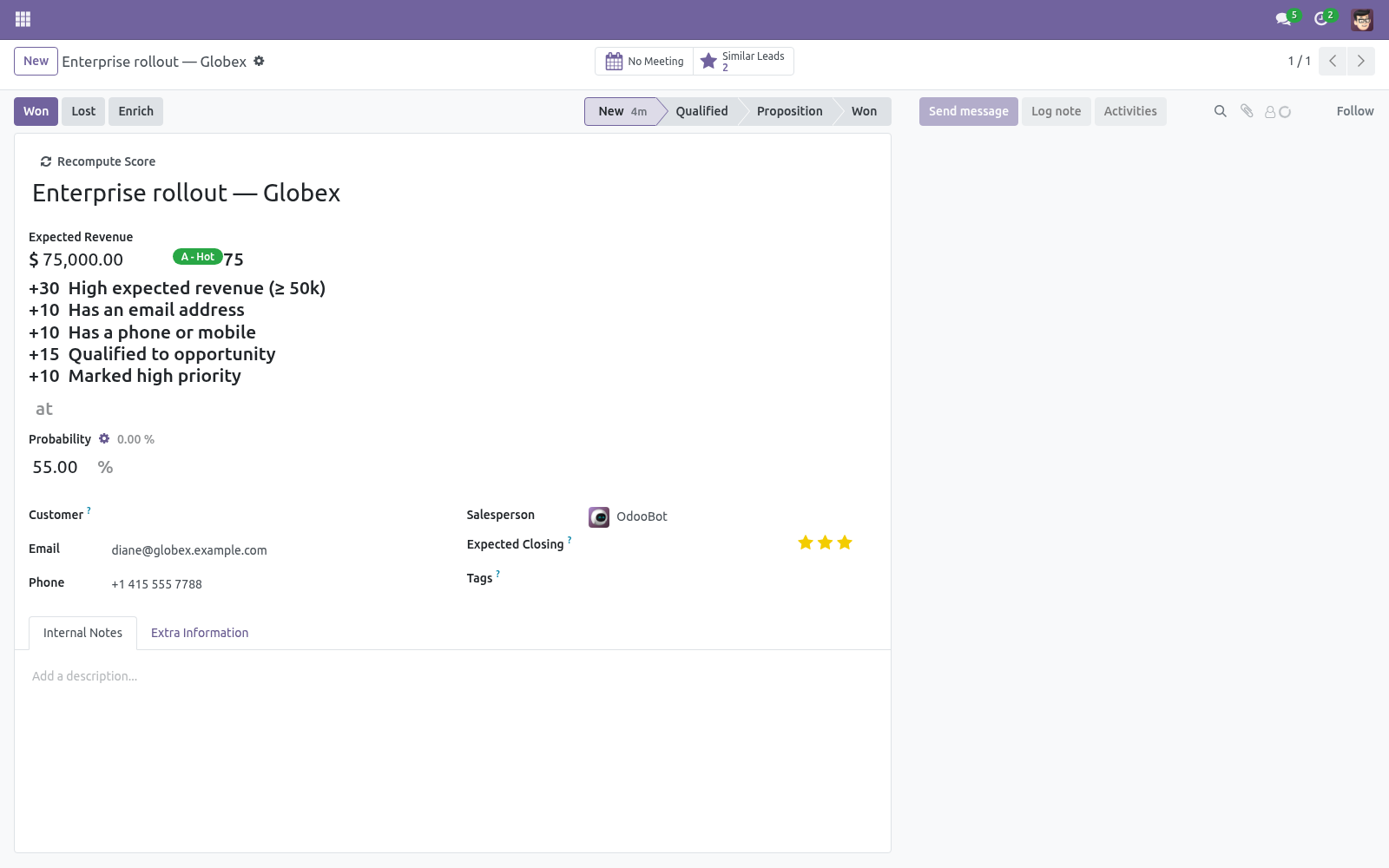
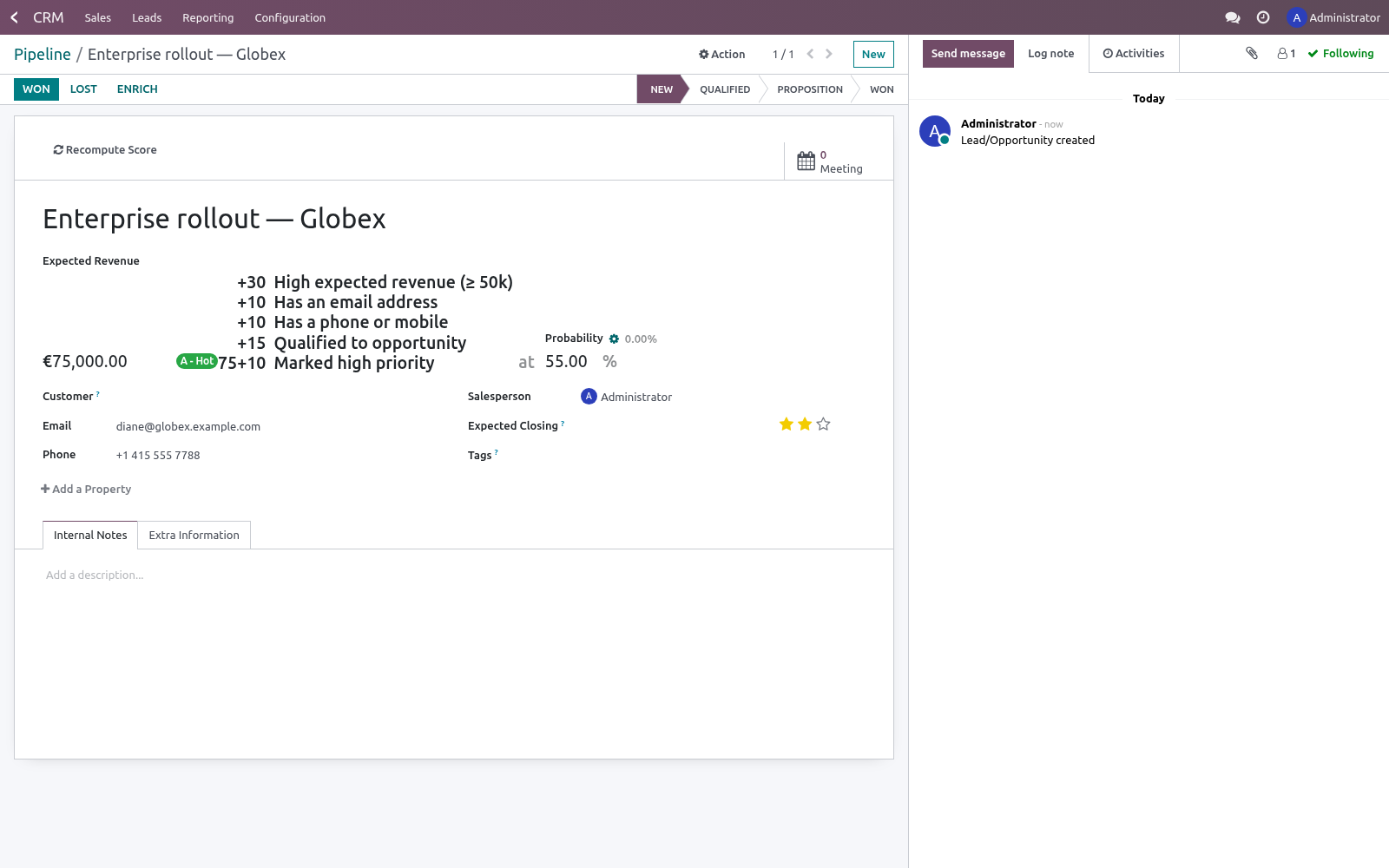
On the lead/opportunity form, the grade badge, the score and a per-rule breakdown appear next to the expected revenue.
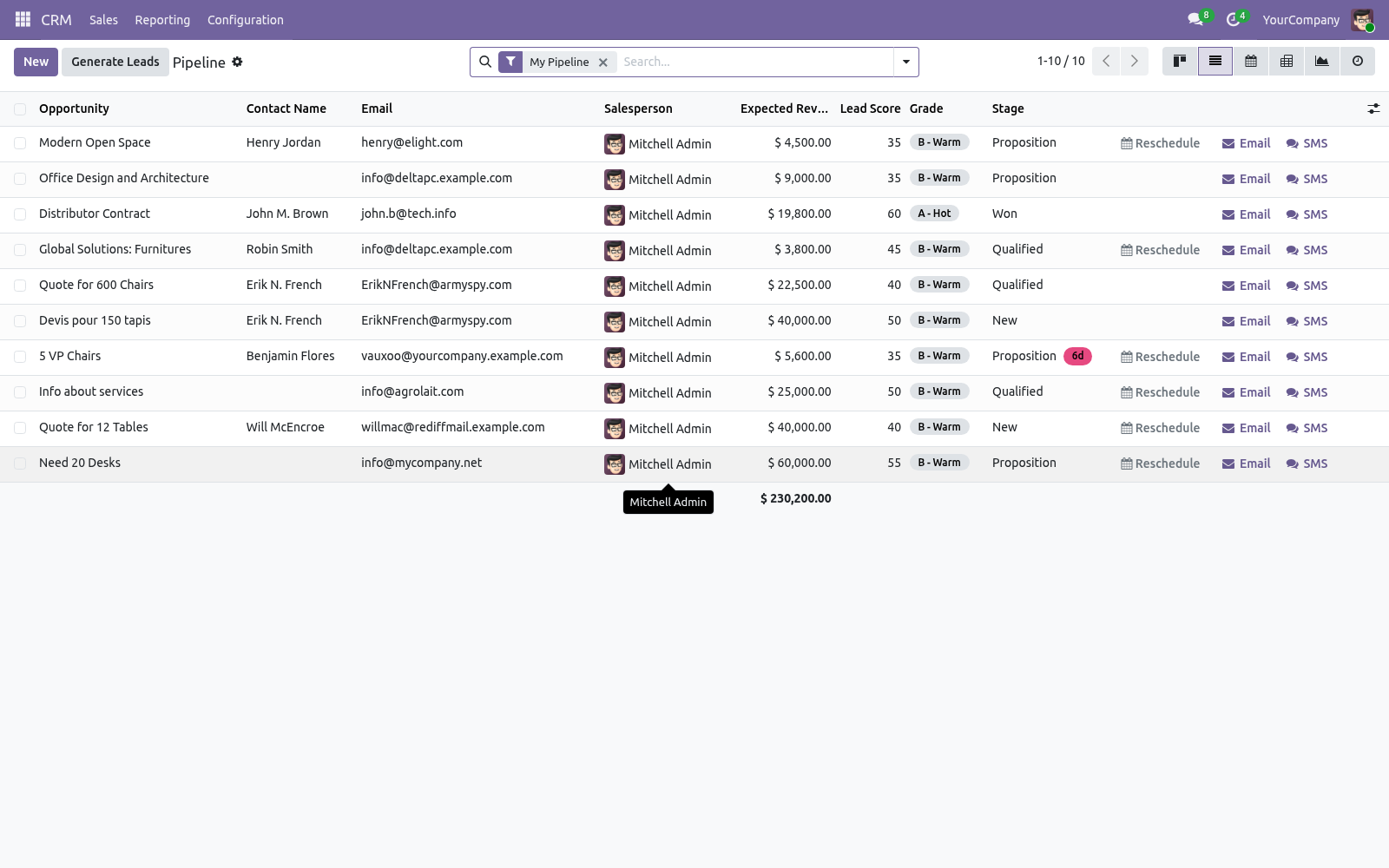
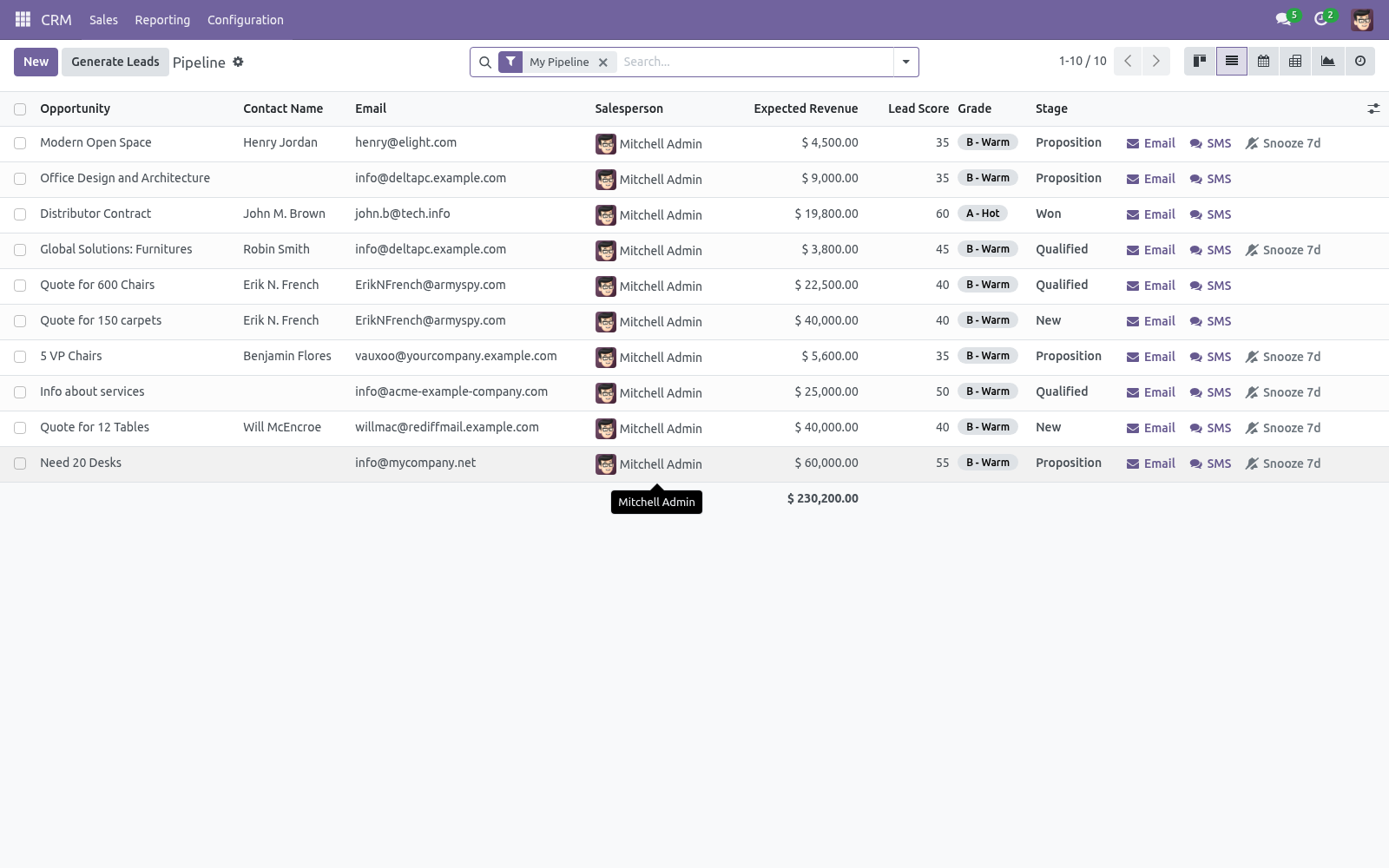
In the pipeline and lead lists, Score and Grade are available columns.
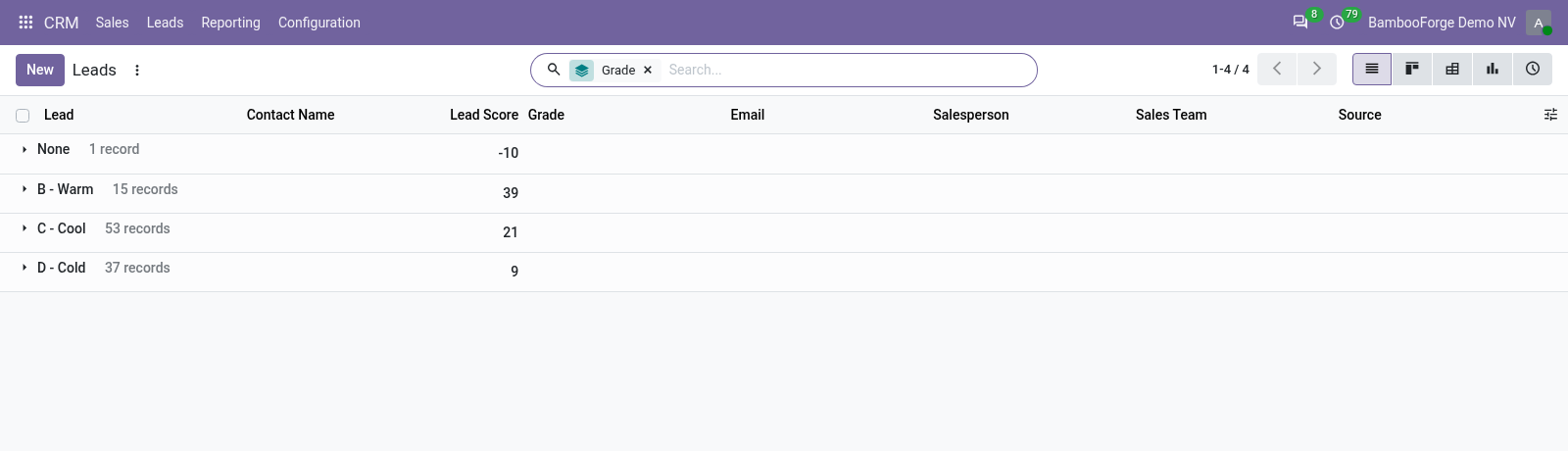
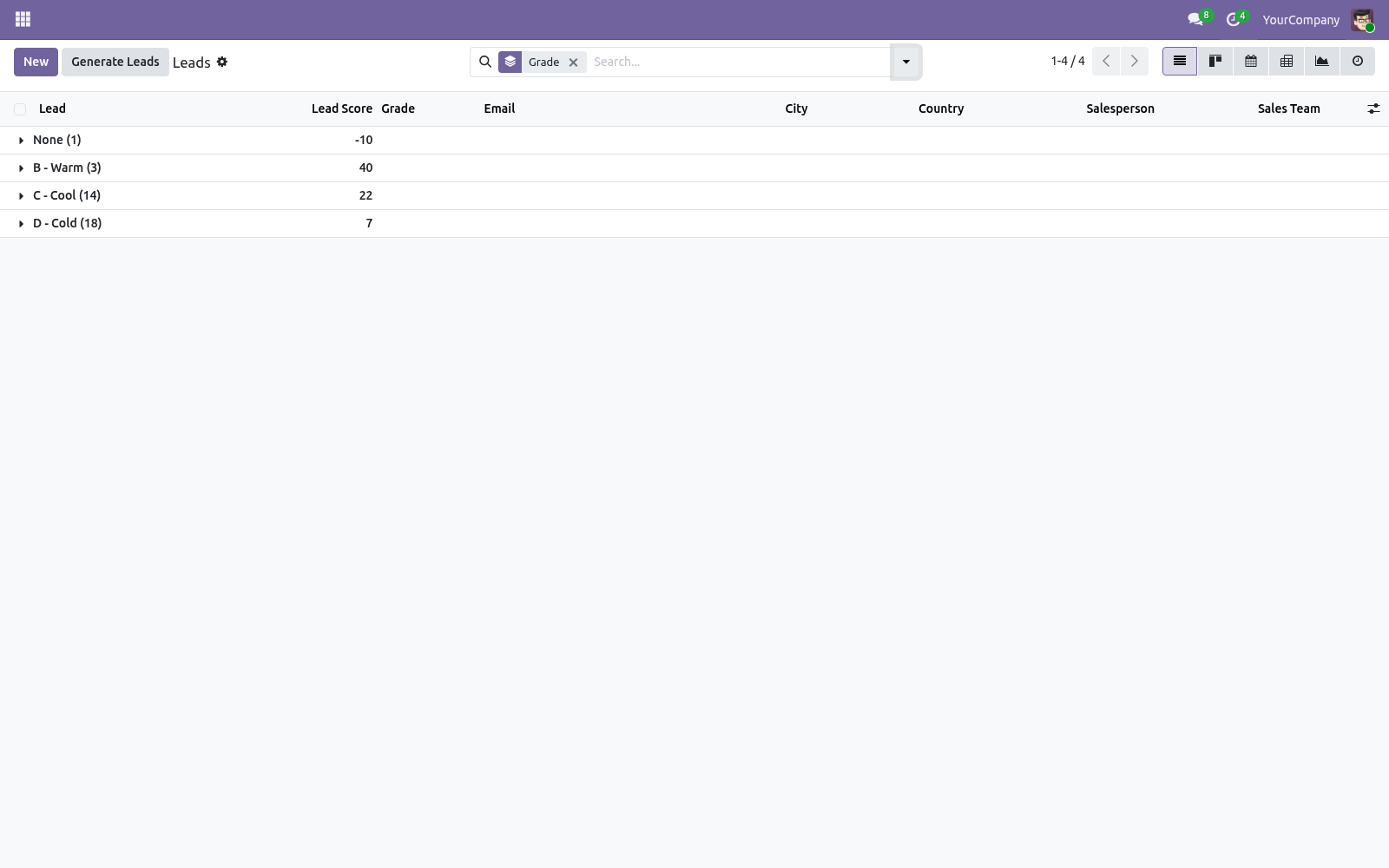
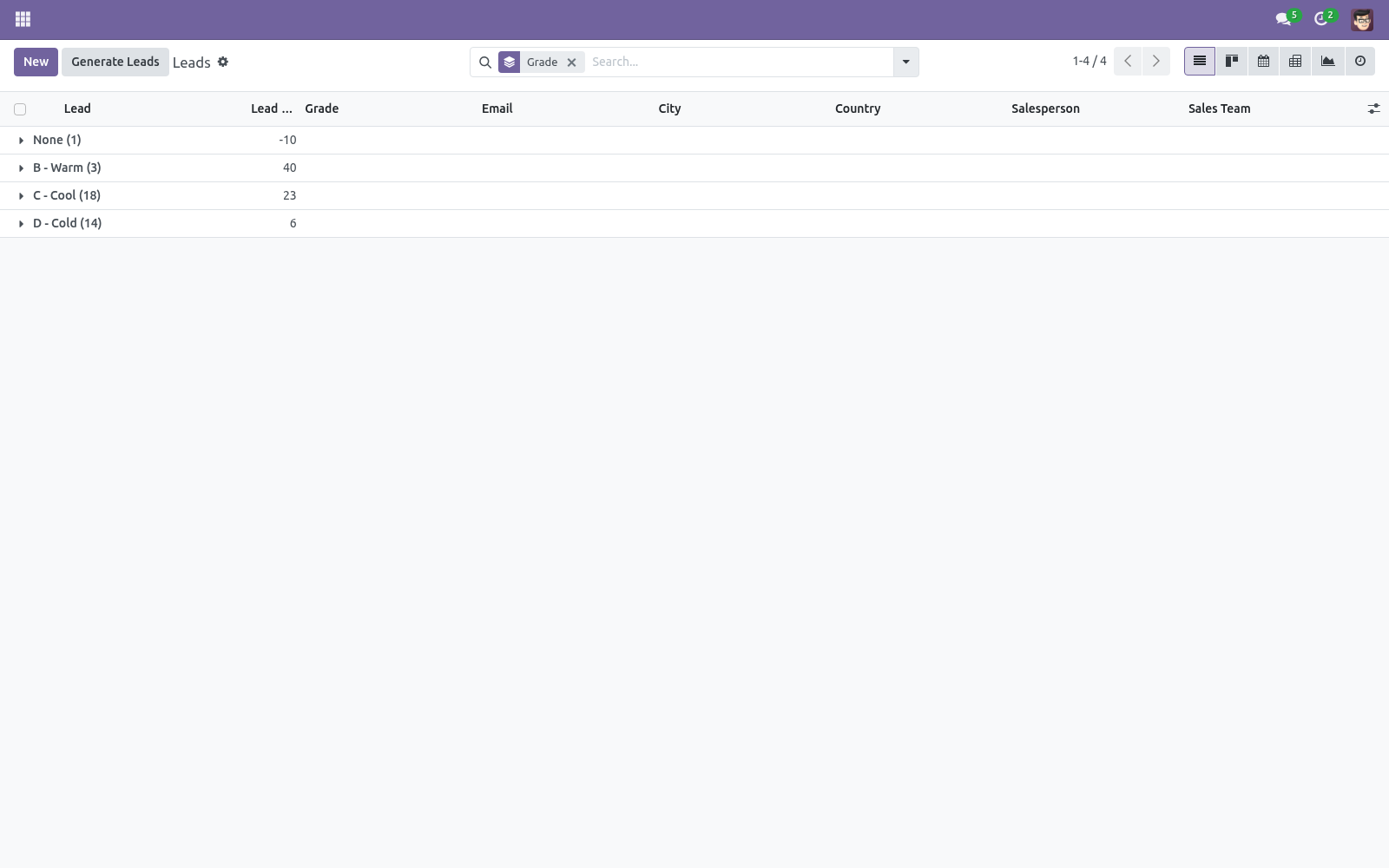
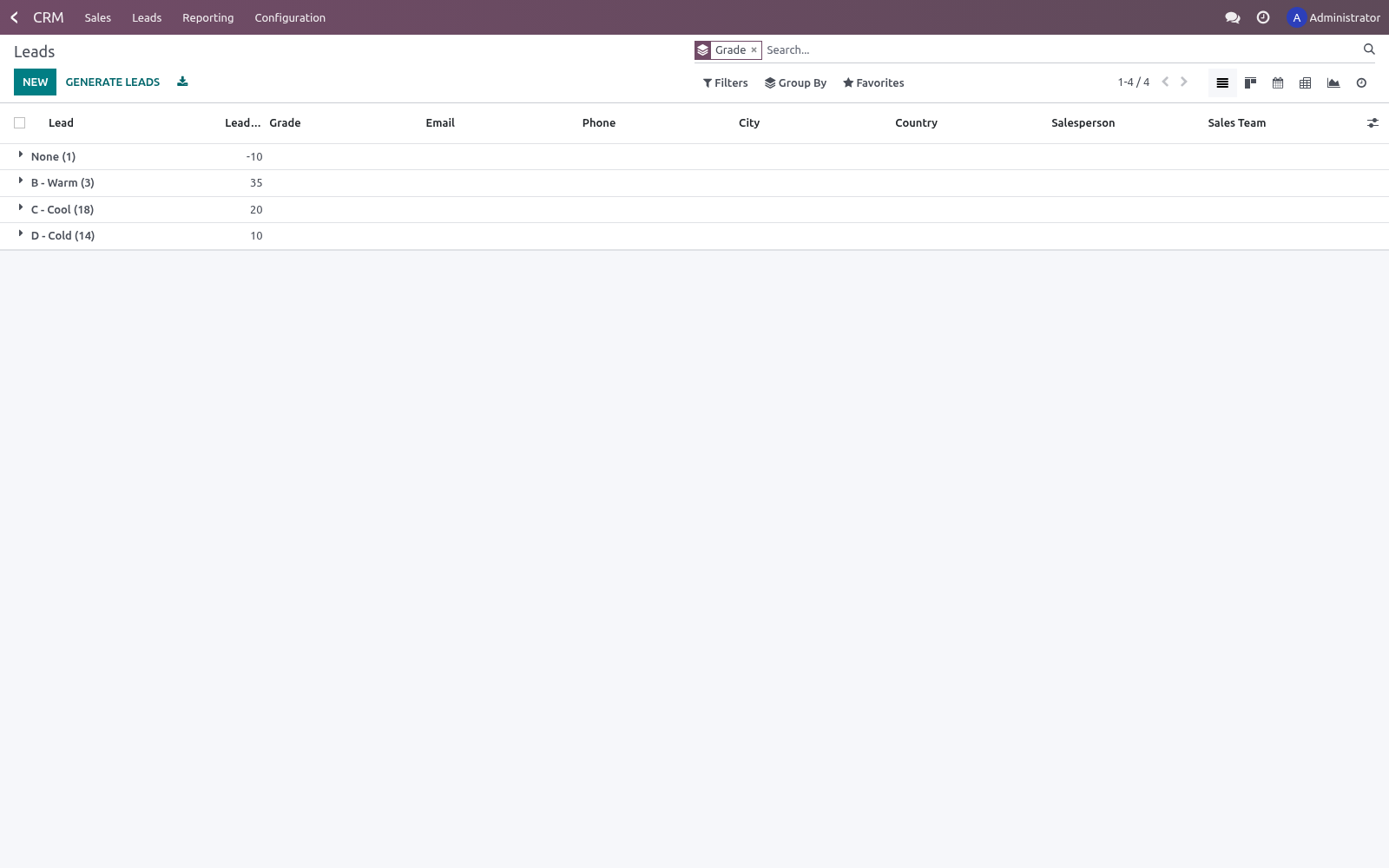
In the search panel, filter to A - Hot or Positive Score, and group by Grade to see your funnel split by quality.
Transparency
Unlike a black-box predictive score, every lead carries a plain breakdown such as:
+30  High expected revenue (≥ 50k)
+10  Has an email address
+15  Qualified to opportunity
so salespeople trust the number and managers can see exactly what the model rewards.
Frequently asked questions
- A rule's domain won't save.
The domain must be a valid Odoo domain on the lead. Use the visual editor to avoid syntax mistakes; invalid domains are rejected on save.
- Scores didn't change after I edited the rules.
Existing leads keep their score until recomputed. Use Recompute All Leads on a rule, or enable the scheduled action.
- Can a rule use related fields?
Yes. Domains can traverse relations, e.g. the partner's country or the source and medium, just like any Odoo domain.
- Does scoring run in real time?
Yes, for the common lead fields the score recomputes immediately on change. A rule using an unusual field is picked up by the recompute button or the cron.
- Does it work with multiple companies?
Scoring rules and grades are global; scores are stored per lead, which already carry their own company.
How we make sure it works
Before every release, 11 automated checks run against this app on Odoo 16, 17, 18, 19 and 20. Among them:
A score below every threshold gets no grade.
The breakdown names the rules that paid.
An archived rule stops counting.
Recompute all after rule change.
The highest qualifying grade wins.
The complete list is in the source you receive.
Support
Questions or ideas: support@bambooforge.dev.
Usage
This section walks through a full working session: configure the model, let leads score themselves, and read the results inside CRM. All configuration lives under CRM > Configuration > Lead Scoring (visible to users in the Sales / Administrator group).
Configure scoring rules
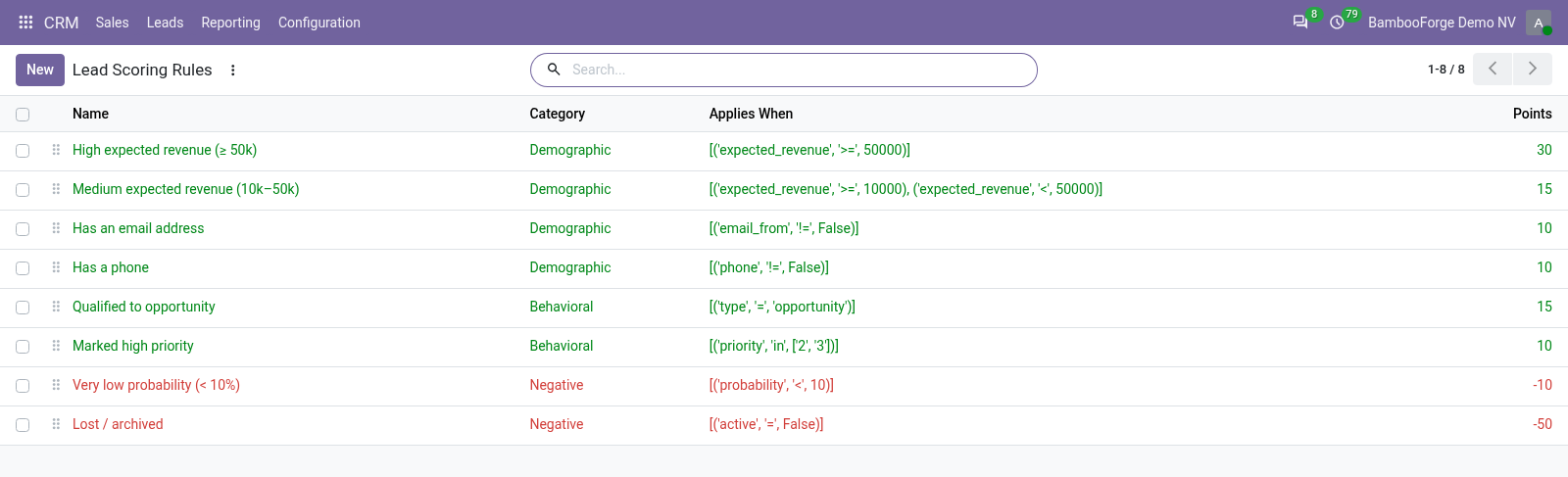
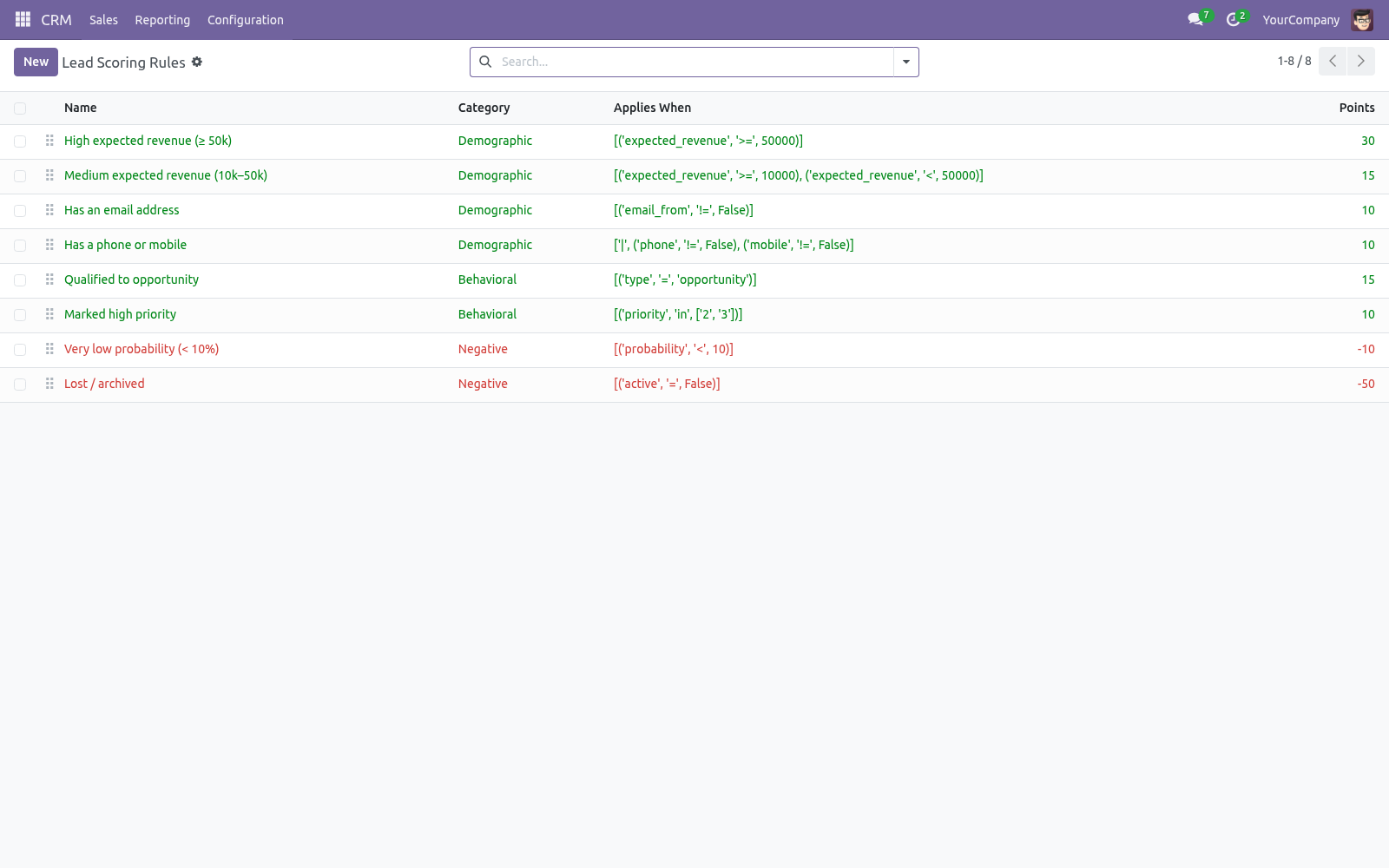
Open CRM > Configuration > Lead Scoring > Scoring Rules. The list opens already populated with the starter rules, colour-coded green for rules that award points and red for rules that subtract them. Each rule has:
Name — shown verbatim in the per-lead breakdown, so keep it descriptive.
Category — Demographic, Behavioral or Negative; for organisation.
Points — added to a matching lead's score; enter a negative number to penalise (the shipped Lost / archived rule is -50).
Applies When — an Odoo domain on crm.lead, built with the visual condition editor; a matching lead receives the points. Invalid domains are rejected on save.
The shipped rules are High expected revenue (≥ 50k) (+30), Medium expected revenue (10k–50k) (+15), Has an email address (+10), Has a phone or mobile (+10), Qualified to opportunity (+15), Marked high priority (+10), Very low probability (< 10%) (-10) and Lost / archived (-50). Edit, reorder (drag the handle) or delete them freely.
Configure grades
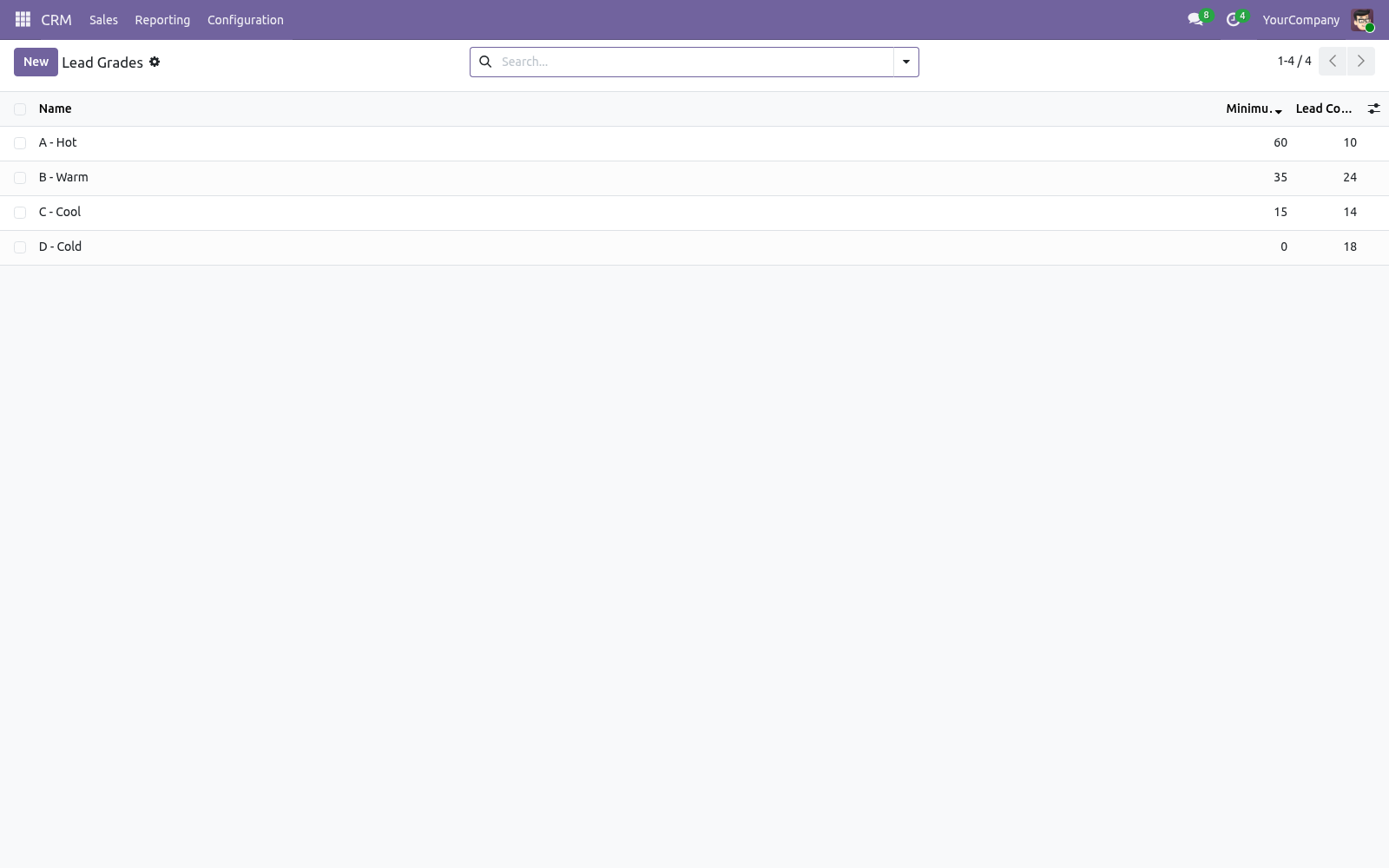
Open CRM > Configuration > Lead Scoring > Grades. A grade has a Minimum Score; a lead is assigned the highest grade whose minimum it reaches. The defaults are A - Hot (≥ 60), B - Warm (≥ 35), C - Cool (≥ 15) and D - Cold (≥ 0). Adjust the thresholds to match your funnel. Each grade shows its live lead count, and the View Leads action opens the leads currently holding that grade.
How the score is computed and kept current
A lead's Lead Score is the sum of the points of every active rule whose domain it matches; its Grade follows from that total. Both are stored fields that recompute automatically whenever a common lead field changes — expected revenue, email, phone, stage, source, priority, tags, probability and more. To refresh manually:
press Recompute Score on an individual lead form,
press Recompute All Leads on any rule's form to re-score the whole database after changing rules or thresholds, or
enable the scheduled action Lead Scoring: Recompute Scores (under Settings > Technical > Scheduled Actions, disabled by default; runs daily).
Existing leads keep their previous score until recomputed, so re-score the base after any rule or threshold change.
Reading scores in CRM
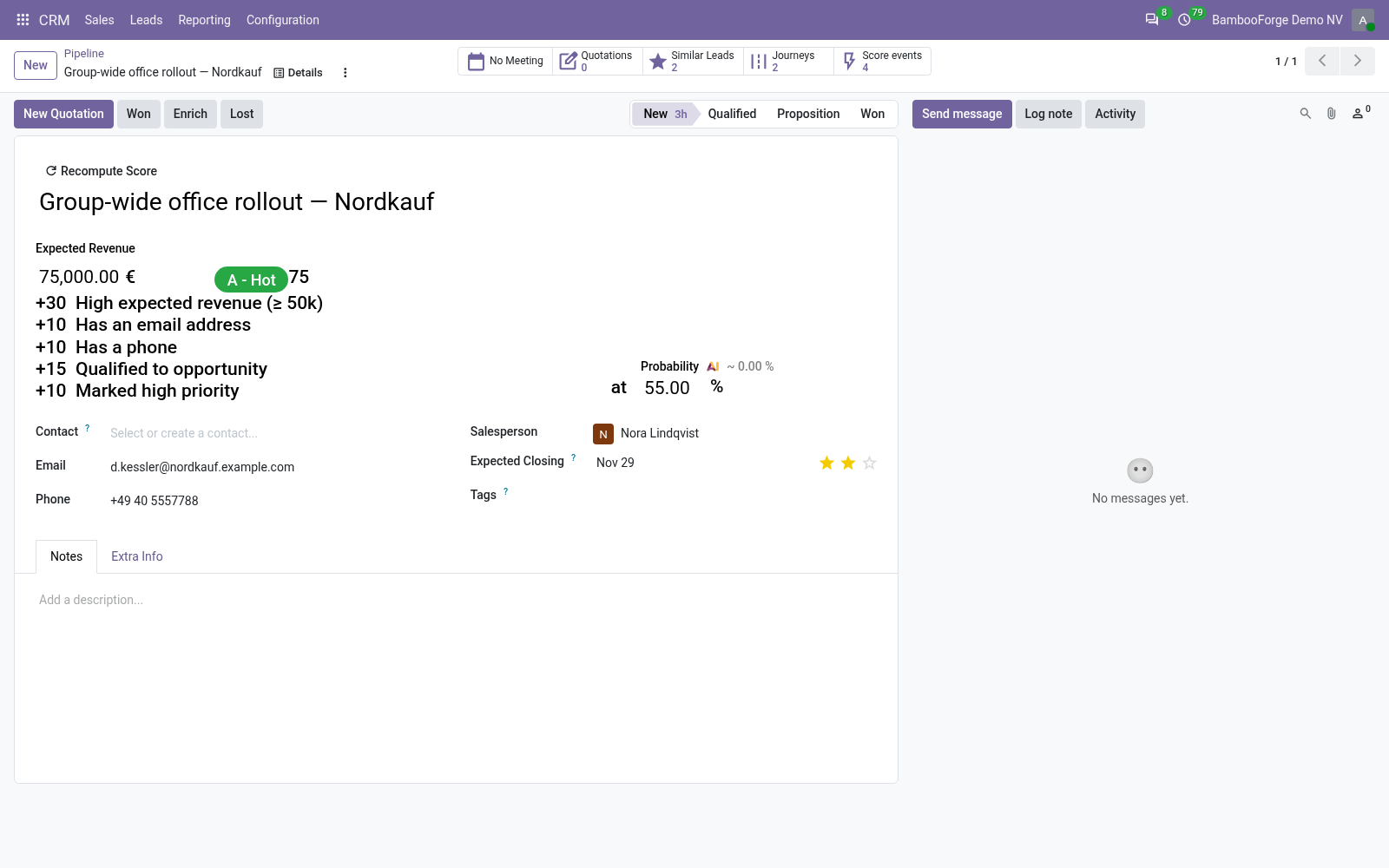
On the lead/opportunity form, the grade badge, the numeric score and the per-rule Score Breakdown appear just after Expected Revenue. The badge is green for a score ≥ 60 and blue below 35.
In the pipeline and lead lists, Lead Score and Grade are optional columns (shown by default).
In the search view, use the A - Hot and Positive Score filters and the Grade group-by to split your funnel by quality.
Worked example
An opportunity with expected revenue 60,000, an email address and high priority matches High expected revenue, Has an email address, Qualified to opportunity and Marked high priority, scoring 30 + 10 + 15 + 10 = 65. As 65 ≥ 60 it is graded A - Hot, and its Score Breakdown reads:
+30  High expected revenue (≥ 50k)
+10  Has an email address
+15  Qualified to opportunity
+10  Marked high priority
If the deal is later lost and archived, the Lost / archived rule (-50) applies and the score drops to 15, moving the lead down to grade C - Cool.
Upgrading & version compatibility
This build targets Odoo 20.0. Each Odoo major series (16.0, 17.0, 18.0, 19.0, 20.0) has its own dedicated build of this module — always install the build that matches your Odoo version. Mixing a build with a different Odoo series is not supported.
Patch upgrades (same series, e.g. 20.0.1.0.0 → later)
Back up your database and filestore first.
Replace the module folder with the newer build.
Restart Odoo with the module updated:
./odoo-bin -c your.conf -u bambooforge_lead_scoring -d your_db
Odoo applies any schema/data changes automatically. Your existing records and configuration are preserved.
Cross-version migration (moving to a newer Odoo)
Upgrading Odoo itself is a database migration handled by Odoo's standard upgrade tooling. When you migrate the database to the next Odoo series, install the matching build of this module for that series. Data created by this module carries over with the database migration.
After any upgrade the module's scheduled actions resume on their normal cadence — no manual re-activation is required.
Uninstallation
You can remove this module at any time from Apps → (this module) → Uninstall, or from the command line. Uninstalling is clean and reversible by reinstalling — but note what is and is not deleted.
What is removed
The fields, views and analysis definitions this module added.
The menus, actions, views and reports this module installed.
Its scheduled actions (cron jobs) — they stop immediately on uninstall.
What is preserved
Your standard Odoo data (partners, products, sales, invoices, inventory moves) is not deleted — this module only reads and annotates it; the underlying records stay.
Attachments and chatter messages on standard records are kept.
As always, take a database backup before uninstalling in production.
What it does not do
Said before you buy, because it is the half that decides whether the app fits:
Grade a score below every threshold - it gets no grade.
Mix Odoo series: a build is for the series it was bought for.
Questions people ask
- Which Odoo versions does it run on?
Odoo 16.0, 17.0, 18.0, 19.0, 20.0, on the series you buy it for; each series is its own listing.
- Community or Enterprise?
Both. It needs no Enterprise app.
- What does it need?
The standard CRM app. No extra Python package.
- Where does it show up?
Under the Scoring Rules menu (Grades, Lead Scoring).
- Does anything leave my server?
No. It makes no call outside your Odoo server: no telemetry, no licence check, no third-party service.
- What happens if I uninstall it?
Odoo drops the app's own tables and fields; the standard records it worked on (contacts, orders, products) stay as they are.
Changelog
20.0.1.1.1
Built for Odoo 20: record rules and access rights rewritten onto Odoo 20's single ir.access model, the screens rebuilt on Owl 3, and every icon moved to the icon set Odoo 20 ships.
20.0.1.0.0
Current release for Odoo 20.0. This build includes:
Score and grade CRM leads with a transparent, configurable rule engine.
Points per condition, A/B/C/D grades, automatic recompute and a per-lead breakdown. The Community answer to predictive lead scoring.
Feature additions and fixes ship as new builds on the Odoo Apps store; this page and the module's version reflect the current published release. Always keep the build matched to your Odoo series (see Upgrading & version compatibility).