 BambooForge Labs
Document Layout Pack: Invoice & Quote Templates
Six more invoice and quotation layouts in the standard picker, plus per-report overrides, DRAFT/PAID/COPY watermarks and letterhead margins.
Available for Odoo 16.0, Odoo 17.0, Odoo 18.0, Odoo 19.0, Odoo 20.0. Technical name bambooforge_layout_pack.
Transcript of the walkthrough (Odoo 20)
Document Layout Pack: Invoice & Quote Templates. Six more invoice and quotation layouts in the standard picker, plus per-report overrides, DRAFT/PAID/COPY watermarks and letterhead margins. Six more document layouts in the standard Configure Document Layout dialog, a per-report layout override, a watermark, and pre-printed letterhead support. Everything else about your reports stays exactly as it is.
In the next few minutes: document layout pack: invoice & quote templates, then the six layouts, then a layout per report, then watermark, then letterhead. Then what this app deliberately does not do, so you can tell before you buy whether it fits. 1. Install BambooForge Document Layout Pack.
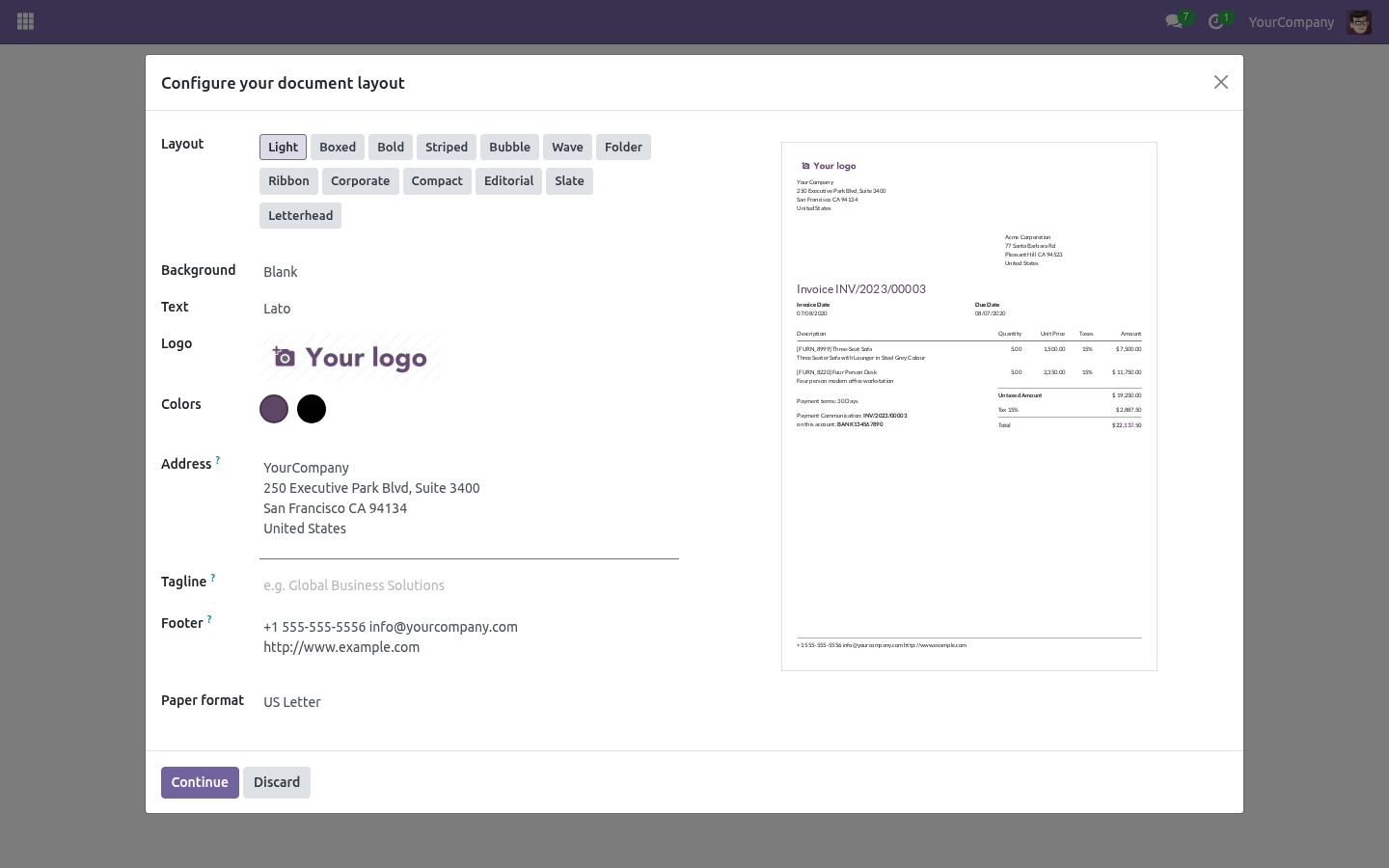
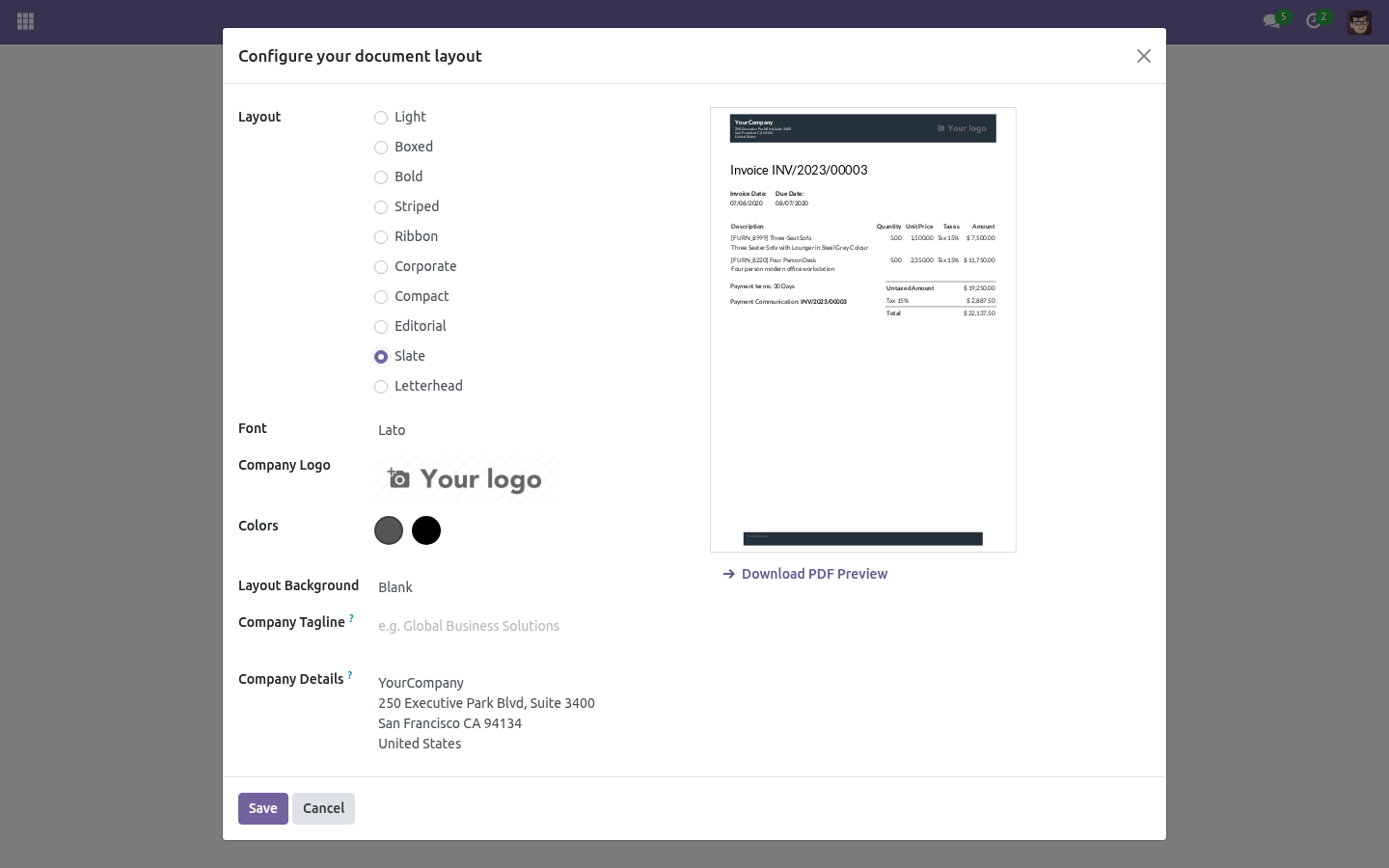
Nothing changes until you pick something: the company keeps the layout it had, and every existing report prints as before. 2. Open Settings → General Settings → Configure Document Layout: the new layouts appear beside Odoo's four, with their own preview. Document Layout Pack: Invoice & Quote Templates.
Six more document layouts in the standard Configure Document Layout dialog, a per-report layout override, a watermark, and pre-printed letterhead support. Everything else about your reports stays exactly as it is. The six layouts. Settings → General Settings → Configure Document Layout — the new layouts appear beside Odoo's four, with their own preview.
Ribbon A coloured band across the top in the company's primary colour, logo knocked out on white, footer rule in the same colour. Good for a brand with one strong colour. A layout per report. Settings → Technical → Reports — each report has a Document layout field.
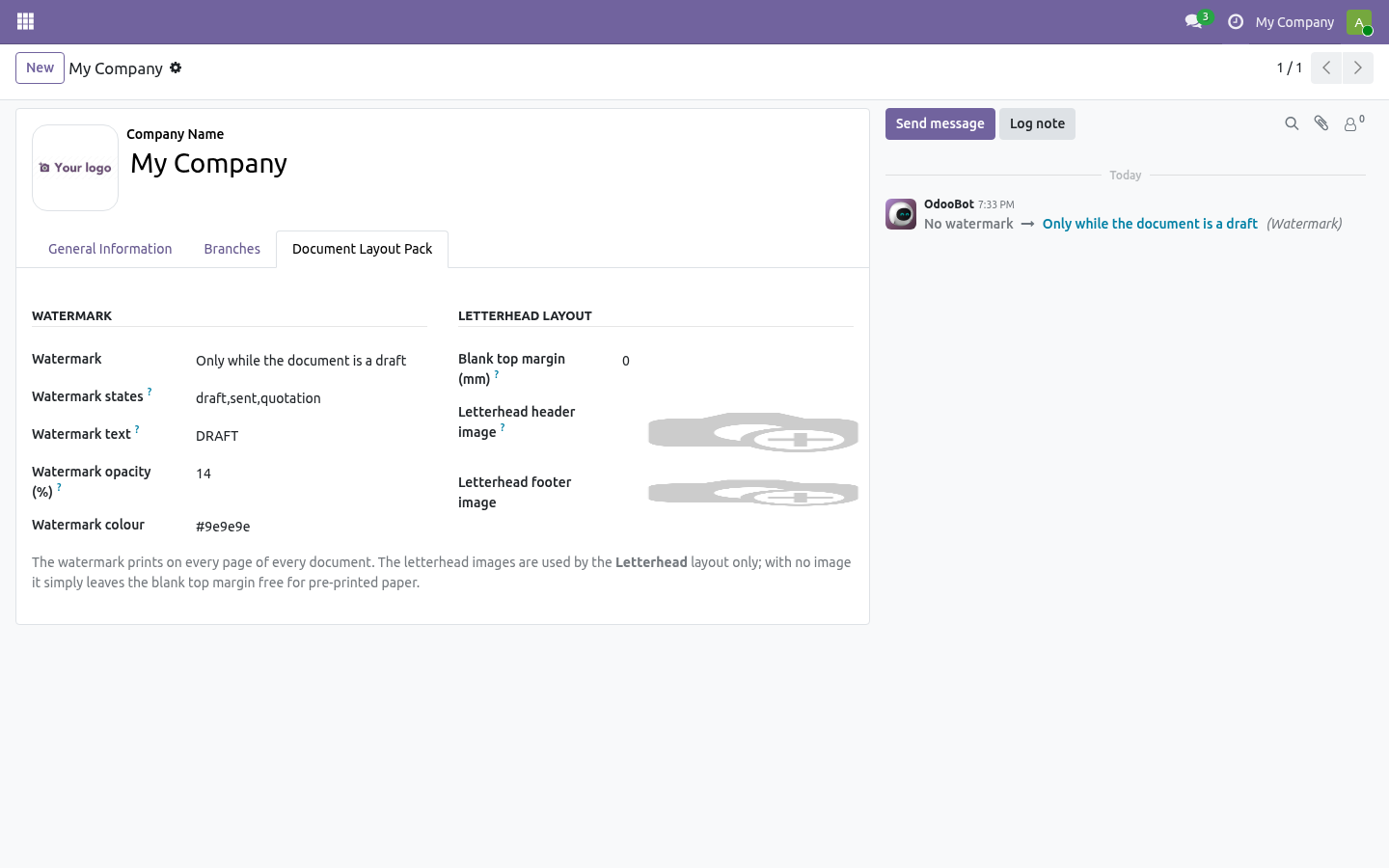
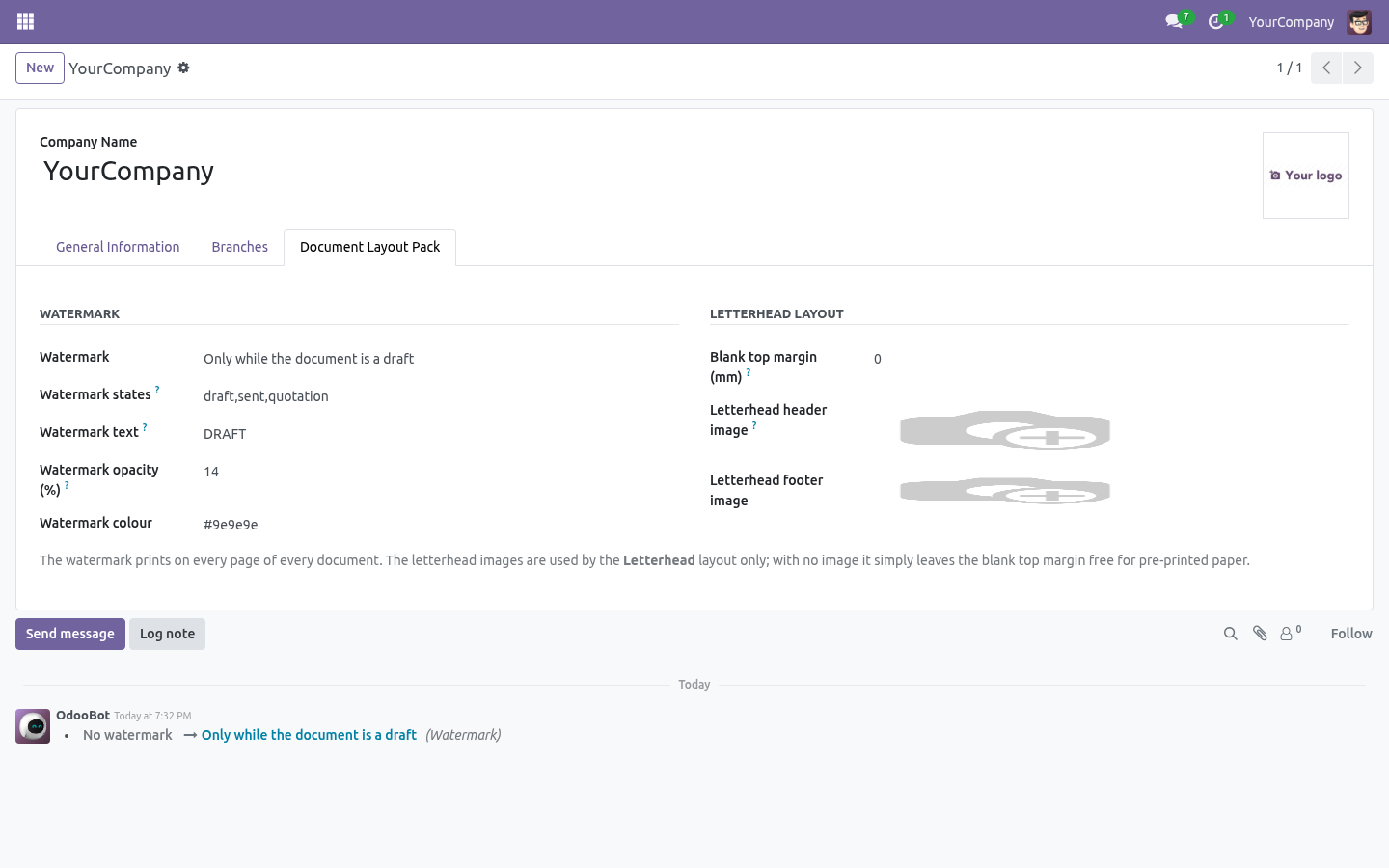
Set it and that report uses that layout, whatever the company default is; leave it empty and nothing changes. Quotations in Editorial, invoices in Corporate, delivery notes in Compact is three fields, no code. Watermark. Settings → Companies → your company → Document Layout Pack Watermark: off, only while the document is a draft, or on everything.
Watermark text: DRAFT, COPY, PAID, "SPECIMEN"… Leave it empty in draft mode and the document's own state is printed instead. Opacity: 8% is visible on screen and barely there on paper. Above 25% it starts fighting the text. Colour: grey by default.
The watermark is printed inside the page header, which the PDF engine repeats on every page — so it appears on page 7 as well as page 1. It works with the six layouts here and with the four Odoo ships. Letterhead. Only the Letterhead layout reads these; the other five ignore them.
Blank top margin (mm) — how much space the Letterhead layout leaves free at the top for pre-printed paper. Letterhead header / footer image — printed full width instead of the blank band, for companies that would rather print their own. Troubleshooting. The new layouts are not in the dialog They are, below Odoo's four — the dialog lists them by sequence.
If the dialog is empty, the module was installed but the assets are cached: reload with Ctrl-F5. A report ignores its own layout The override applies to reports rendered through Odoo's document layout (web.external_layout). A report with a hand-written header of its own never consulted the company layout either, and this changes nothing for it. What changed in 1.1 Per-company report layouts.
The per-report override now stores one choice per company - a two-brand group keeps two looks on the same report. Watermarks per report, states configurable. DRAFT on quotations and PAID on invoices finally coexist: each report may override the mode, the text and the list of states that count as draft (add to_approve for purchase orders). Watermark settings are tracked in the company chatter.
How we make sure it works. Before every release, 32 automated checks run against this app on Odoo 16, 17, 18, 19 and 20. Among them: A draft watermark stays off a document without a state. The pack does not change the default layout.
An always watermark ignores the state. Follow company mode changes nothing. Without an override the company layout is used. The complete list is in the source you receive.
Support. support@bambooforge.dev — questions, bug reports and feature requests are answered by the developers who wrote the module. The complete manual is at docs dot bambooforge dot dev, the demo database is linked from the store page, and support answers within twenty-four hours. Links are in the description.

Transcript of the walkthrough (Odoo 19)
Document Layout Pack: Invoice & Quote Templates. Six more invoice and quotation layouts in the standard picker, plus per-report overrides, DRAFT/PAID/COPY watermarks and letterhead margins. Six more document layouts in the standard Configure Document Layout dialog, a per-report layout override, a watermark, and pre-printed letterhead support. Everything else about your reports stays exactly as it is.
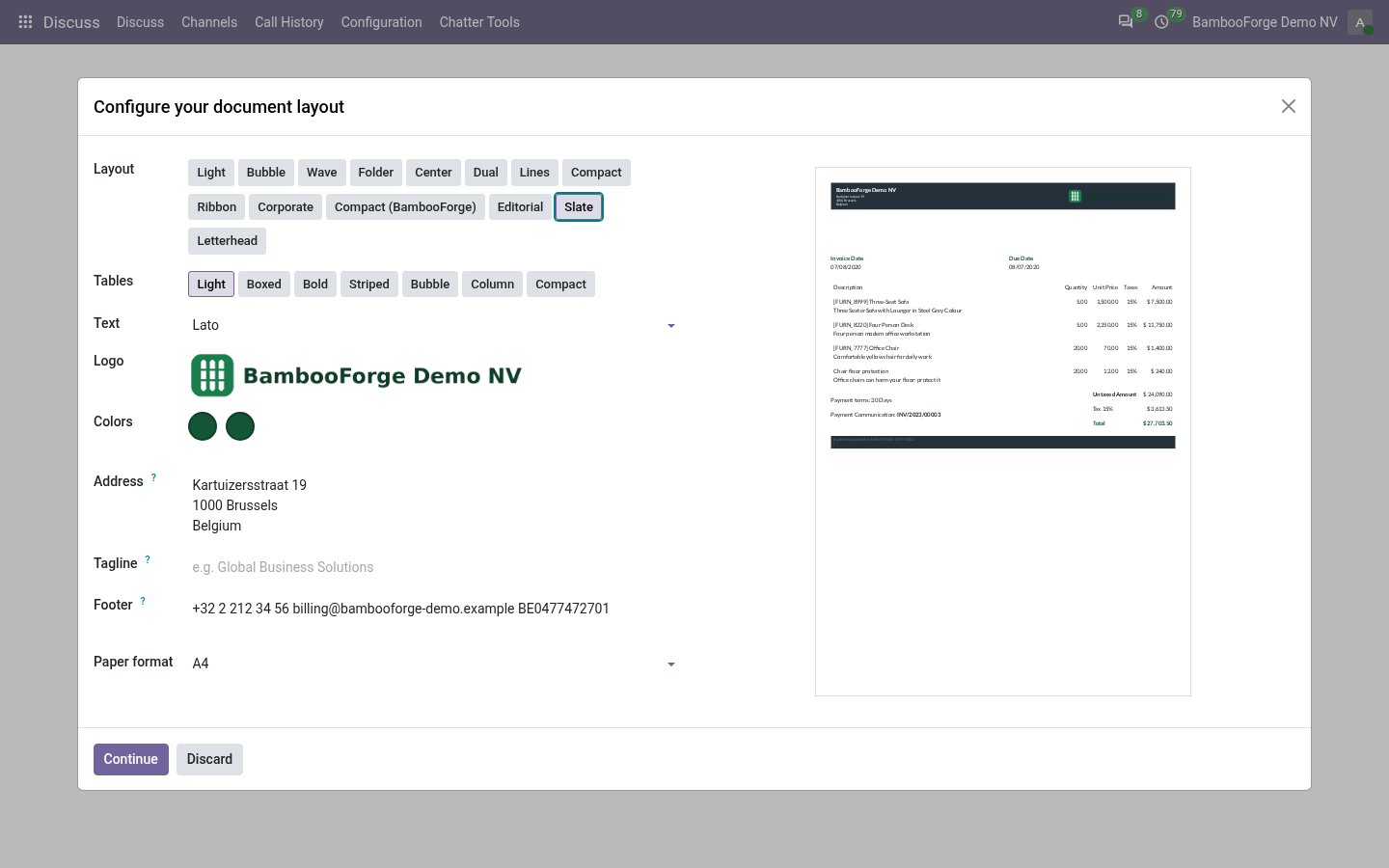
In the next few minutes: document layout pack: invoice & quote templates, then the six layouts, then a layout per report, then watermark, then letterhead. Then what this app deliberately does not do, so you can tell before you buy whether it fits. Install BambooForge Document Layout Pack. Nothing changes until you pick something: the company keeps the layout it had, and every existing report prints as before.
Document Layout Pack: Invoice & Quote Templates. Six more document layouts in the standard Configure Document Layout dialog, a per-report layout override, a watermark, and pre-printed letterhead support. Everything else about your reports stays exactly as it is. The six layouts.
Settings → General Settings → Configure Document Layout — the new layouts appear beside Odoo's four, with their own preview. Ribbon A coloured band across the top in the company's primary colour, logo knocked out on white, footer rule in the same colour. Good for a brand with one strong colour. A layout per report.
Settings → Technical → Reports — each report has a Document layout field. Set it and that report uses that layout, whatever the company default is; leave it empty and nothing changes. Quotations in Editorial, invoices in Corporate, delivery notes in Compact is three fields, no code. Watermark.
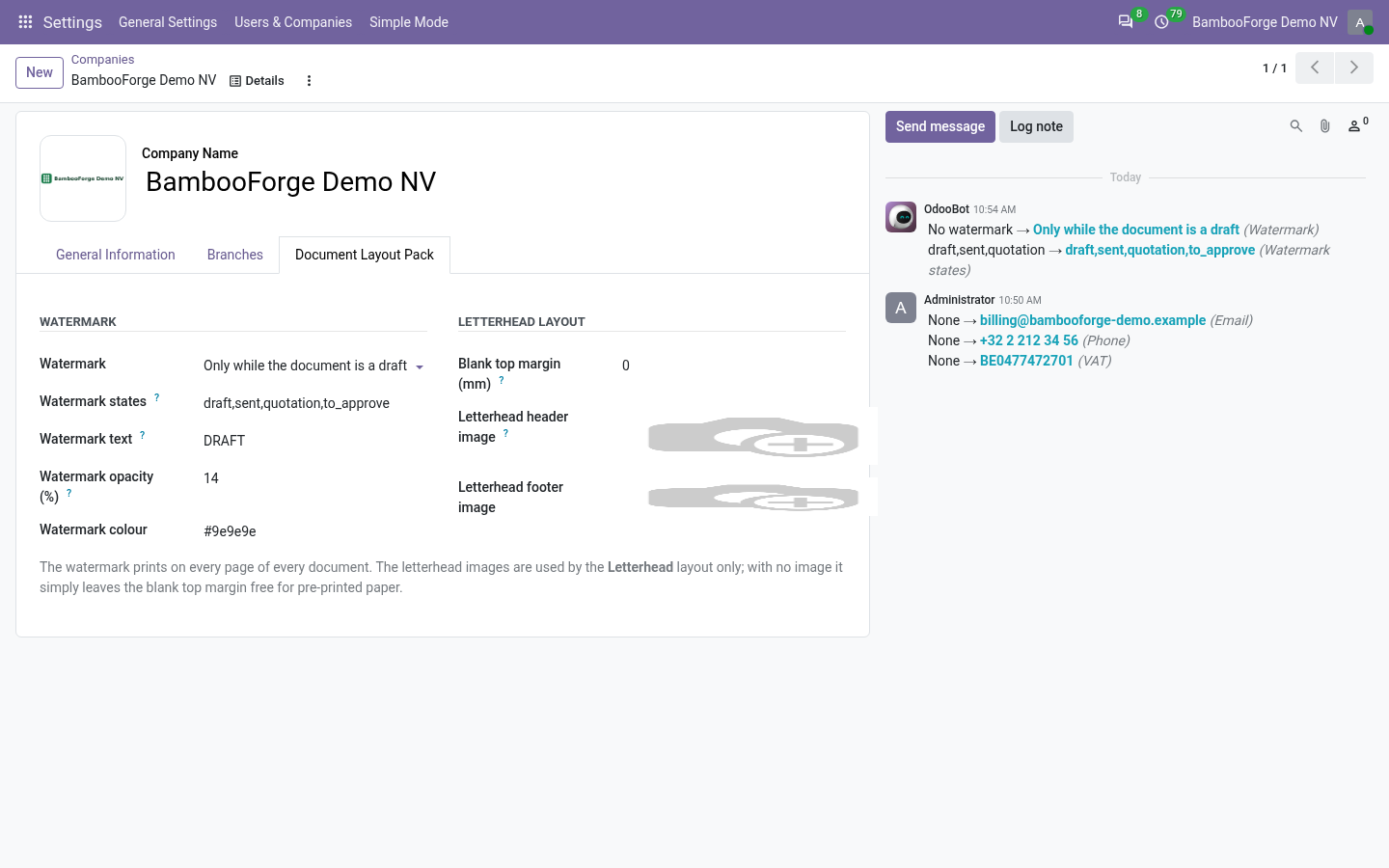
Settings → Companies → your company → Document Layout Pack Watermark: off, only while the document is a draft, or on everything. Watermark text: DRAFT, COPY, PAID, "SPECIMEN"… Leave it empty in draft mode and the document's own state is printed instead. Opacity: 8% is visible on screen and barely there on paper. Above 25% it starts fighting the text.
Colour: grey by default. The watermark is printed inside the page header, which the PDF engine repeats on every page — so it appears on page 7 as well as page 1. It works with the six layouts here and with the four Odoo ships. Letterhead.
Only the Letterhead layout reads these; the other five ignore them. Blank top margin (mm) — how much space the Letterhead layout leaves free at the top for pre-printed paper. Letterhead header / footer image — printed full width instead of the blank band, for companies that would rather print their own. Troubleshooting.
The new layouts are not in the dialog They are, below Odoo's four — the dialog lists them by sequence. If the dialog is empty, the module was installed but the assets are cached: reload with Ctrl-F5. A report ignores its own layout The override applies to reports rendered through Odoo's document layout (web.external_layout). A report with a hand-written header of its own never consulted the company layout either, and this changes nothing for it.
What changed in 1.1 Per-company report layouts. The per-report override now stores one choice per company - a two-brand group keeps two looks on the same report. Watermarks per report, states configurable. DRAFT on quotations and PAID on invoices finally coexist: each report may override the mode, the text and the list of states that count as draft (add to_approve for purchase orders).
Watermark settings are tracked in the company chatter. Support. support@bambooforge.dev — questions, bug reports and feature requests are answered by the developers who wrote the module. The complete manual is at docs dot bambooforge dot dev, the demo database is linked from the store page, and support answers within twenty-four hours.
Links are in the description.

Transcript of the walkthrough (Odoo 18)
Document Layout Pack: Invoice & Quote Templates. Six more invoice and quotation layouts in the standard picker, plus per-report overrides, DRAFT/PAID/COPY watermarks and letterhead margins. Six more document layouts in the standard Configure Document Layout dialog, a per-report layout override, a watermark, and pre-printed letterhead support. Everything else about your reports stays exactly as it is.
In the next few minutes: document layout pack: invoice & quote templates, then the six layouts, then a layout per report, then watermark, then letterhead. Then what this app deliberately does not do, so you can tell before you buy whether it fits. Install BambooForge Document Layout Pack. Nothing changes until you pick something: the company keeps the layout it had, and every existing report prints as before.
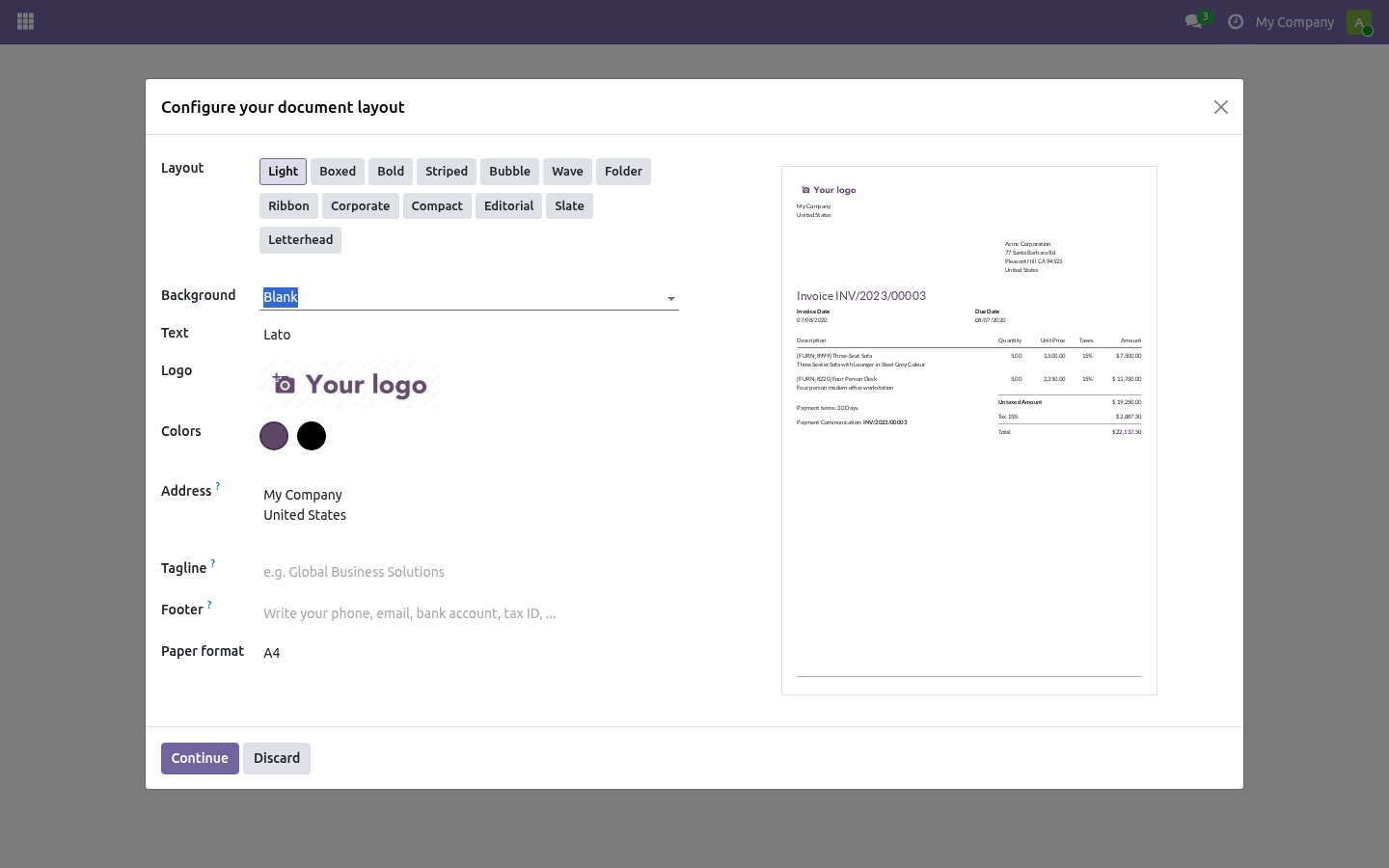
Document Layout Pack: Invoice & Quote Templates. Six more document layouts in the standard Configure Document Layout dialog, a per-report layout override, a watermark, and pre-printed letterhead support. Everything else about your reports stays exactly as it is. The six layouts.
Settings → General Settings → Configure Document Layout — the new layouts appear beside Odoo's four, with their own preview. Ribbon A coloured band across the top in the company's primary colour, logo knocked out on white, footer rule in the same colour. Good for a brand with one strong colour. A layout per report.
Settings → Technical → Reports — each report has a Document layout field. Set it and that report uses that layout, whatever the company default is; leave it empty and nothing changes. Quotations in Editorial, invoices in Corporate, delivery notes in Compact is three fields, no code. Watermark.
Settings → Companies → your company → Document Layout Pack Watermark: off, only while the document is a draft, or on everything. Watermark text: DRAFT, COPY, PAID, "SPECIMEN"… Leave it empty in draft mode and the document's own state is printed instead. Opacity: 8% is visible on screen and barely there on paper. Above 25% it starts fighting the text.
Colour: grey by default. The watermark is printed inside the page header, which the PDF engine repeats on every page — so it appears on page 7 as well as page 1. It works with the six layouts here and with the four Odoo ships. Letterhead.
Only the Letterhead layout reads these; the other five ignore them. Blank top margin (mm) — how much space the Letterhead layout leaves free at the top for pre-printed paper. Letterhead header / footer image — printed full width instead of the blank band, for companies that would rather print their own. Troubleshooting.
The new layouts are not in the dialog They are, below Odoo's four — the dialog lists them by sequence. If the dialog is empty, the module was installed but the assets are cached: reload with Ctrl-F5. A report ignores its own layout The override applies to reports rendered through Odoo's document layout (web.external_layout). A report with a hand-written header of its own never consulted the company layout either, and this changes nothing for it.
What changed in 1.1 Per-company report layouts. The per-report override now stores one choice per company - a two-brand group keeps two looks on the same report. Watermarks per report, states configurable. DRAFT on quotations and PAID on invoices finally coexist: each report may override the mode, the text and the list of states that count as draft (add to_approve for purchase orders).
Watermark settings are tracked in the company chatter. Support. support@bambooforge.dev — questions, bug reports and feature requests are answered by the developers who wrote the module. The complete manual is at docs dot bambooforge dot dev, the demo database is linked from the store page, and support answers within twenty-four hours.
Links are in the description.

Transcript of the walkthrough (Odoo 17)
Document Layout Pack: Invoice & Quote Templates. Six more invoice and quotation layouts in the standard picker, plus per-report overrides, DRAFT/PAID/COPY watermarks and letterhead margins. Six more document layouts in the standard Configure Document Layout dialog, a per-report layout override, a watermark, and pre-printed letterhead support. Everything else about your reports stays exactly as it is.
In the next few minutes: document layout pack: invoice & quote templates, then the six layouts, then a layout per report, then watermark, then letterhead. Then what this app deliberately does not do, so you can tell before you buy whether it fits. Install BambooForge Document Layout Pack. Nothing changes until you pick something: the company keeps the layout it had, and every existing report prints as before.
Document Layout Pack: Invoice & Quote Templates. Six more document layouts in the standard Configure Document Layout dialog, a per-report layout override, a watermark, and pre-printed letterhead support. Everything else about your reports stays exactly as it is. The six layouts.
Settings → General Settings → Configure Document Layout — the new layouts appear beside Odoo's four, with their own preview. Ribbon A coloured band across the top in the company's primary colour, logo knocked out on white, footer rule in the same colour. Good for a brand with one strong colour. A layout per report.
Settings → Technical → Reports — each report has a Document layout field. Set it and that report uses that layout, whatever the company default is; leave it empty and nothing changes. Quotations in Editorial, invoices in Corporate, delivery notes in Compact is three fields, no code. Watermark.
Settings → Companies → your company → Document Layout Pack Watermark: off, only while the document is a draft, or on everything. Watermark text: DRAFT, COPY, PAID, "SPECIMEN"… Leave it empty in draft mode and the document's own state is printed instead. Opacity: 8% is visible on screen and barely there on paper. Above 25% it starts fighting the text.
Colour: grey by default. The watermark is printed inside the page header, which the PDF engine repeats on every page — so it appears on page 7 as well as page 1. It works with the six layouts here and with the four Odoo ships. Letterhead.
Only the Letterhead layout reads these; the other five ignore them. Blank top margin (mm) — how much space the Letterhead layout leaves free at the top for pre-printed paper. Letterhead header / footer image — printed full width instead of the blank band, for companies that would rather print their own. Troubleshooting.
The new layouts are not in the dialog They are, below Odoo's four — the dialog lists them by sequence. If the dialog is empty, the module was installed but the assets are cached: reload with Ctrl-F5. A report ignores its own layout The override applies to reports rendered through Odoo's document layout (web.external_layout). A report with a hand-written header of its own never consulted the company layout either, and this changes nothing for it.
What changed in 1.1 Per-company report layouts. The per-report override now stores one choice per company - a two-brand group keeps two looks on the same report. Watermarks per report, states configurable. DRAFT on quotations and PAID on invoices finally coexist: each report may override the mode, the text and the list of states that count as draft (add to_approve for purchase orders).
Watermark settings are tracked in the company chatter. Support. support@bambooforge.dev — questions, bug reports and feature requests are answered by the developers who wrote the module. The complete manual is at docs dot bambooforge dot dev, the demo database is linked from the store page, and support answers within twenty-four hours.
Links are in the description.

Transcript of the walkthrough (Odoo 16)
Document Layout Pack: Invoice & Quote Templates. Six more invoice and quotation layouts in the standard picker, plus per-report overrides, DRAFT/PAID/COPY watermarks and letterhead margins. Six more document layouts in the standard Configure Document Layout dialog, a per-report layout override, a watermark, and pre-printed letterhead support. Everything else about your reports stays exactly as it is.
In the next few minutes: document layout pack: invoice & quote templates, then the six layouts, then a layout per report, then watermark, then letterhead. Then what this app deliberately does not do, so you can tell before you buy whether it fits. Install BambooForge Document Layout Pack. Nothing changes until you pick something: the company keeps the layout it had, and every existing report prints as before.
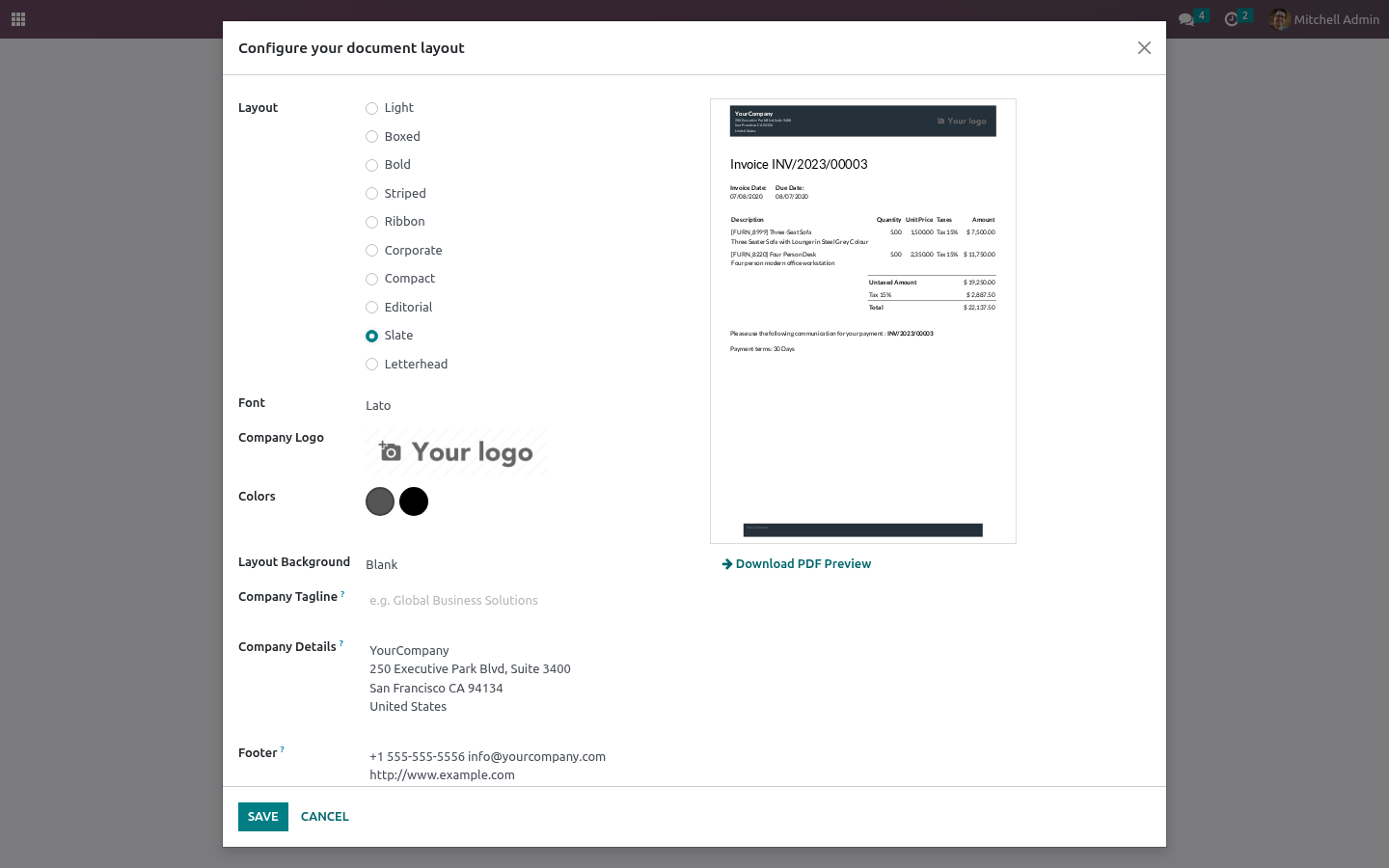
Document Layout Pack: Invoice & Quote Templates. Six more document layouts in the standard Configure Document Layout dialog, a per-report layout override, a watermark, and pre-printed letterhead support. Everything else about your reports stays exactly as it is. The six layouts.
Settings → General Settings → Configure Document Layout — the new layouts appear beside Odoo's four, with their own preview. Ribbon A coloured band across the top in the company's primary colour, logo knocked out on white, footer rule in the same colour. Good for a brand with one strong colour. A layout per report.
Settings → Technical → Reports — each report has a Document layout field. Set it and that report uses that layout, whatever the company default is; leave it empty and nothing changes. Quotations in Editorial, invoices in Corporate, delivery notes in Compact is three fields, no code. Watermark.
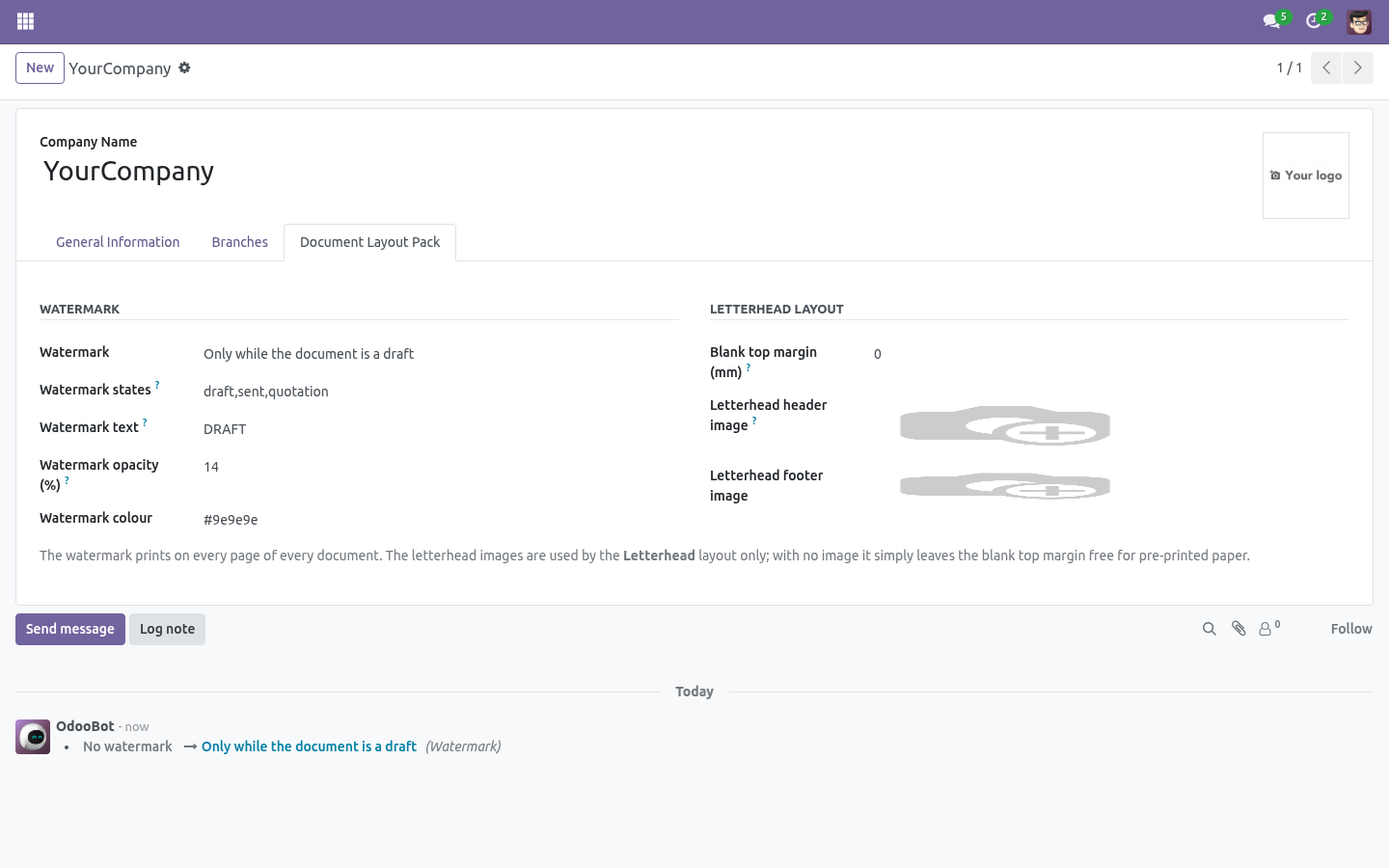
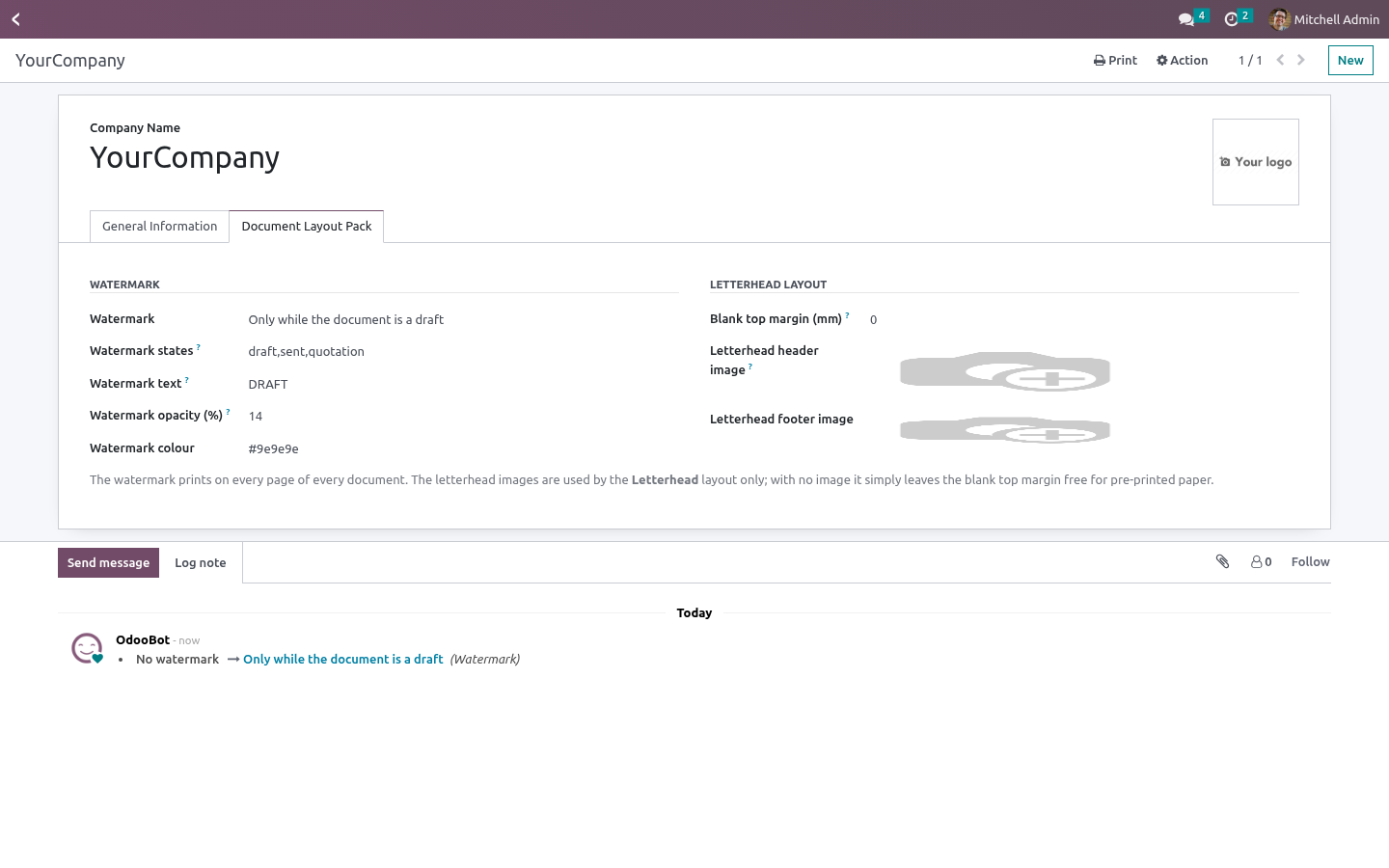
Settings → Companies → your company → Document Layout Pack Watermark: off, only while the document is a draft, or on everything. Watermark text: DRAFT, COPY, PAID, "SPECIMEN"… Leave it empty in draft mode and the document's own state is printed instead. Opacity: 8% is visible on screen and barely there on paper. Above 25% it starts fighting the text.
Colour: grey by default. The watermark is printed inside the page header, which the PDF engine repeats on every page — so it appears on page 7 as well as page 1. It works with the six layouts here and with the four Odoo ships. Letterhead.
Only the Letterhead layout reads these; the other five ignore them. Blank top margin (mm) — how much space the Letterhead layout leaves free at the top for pre-printed paper. Letterhead header / footer image — printed full width instead of the blank band, for companies that would rather print their own. Troubleshooting.
The new layouts are not in the dialog They are, below Odoo's four — the dialog lists them by sequence. If the dialog is empty, the module was installed but the assets are cached: reload with Ctrl-F5. A report ignores its own layout The override applies to reports rendered through Odoo's document layout (web.external_layout). A report with a hand-written header of its own never consulted the company layout either, and this changes nothing for it.
What changed in 1.1 Per-company report layouts. The per-report override now stores one choice per company - a two-brand group keeps two looks on the same report. Watermarks per report, states configurable. DRAFT on quotations and PAID on invoices finally coexist: each report may override the mode, the text and the list of states that count as draft (add to_approve for purchase orders).
Watermark settings are tracked in the company chatter. Support. support@bambooforge.dev — questions, bug reports and feature requests are answered by the developers who wrote the module. The complete manual is at docs dot bambooforge dot dev, the demo database is linked from the store page, and support answers within twenty-four hours.
Links are in the description.

Key facts
- What it is
- Six more invoice and quotation layouts in the standard picker, plus per-report overrides, DRAFT/PAID/COPY watermarks and letterhead margins.
- For
- Accounting
- Odoo versions
- 16.0, 17.0, 18.0, 19.0, 20.0 - Community and Enterprise
- Runs on
- Odoo.sh or Odoo you host yourself - not Odoo Online, which accepts no third-party apps
- Price
- 119 EUR, one-time, on the Odoo Apps Store
- Technical name
- bambooforge_layout_pack
- Manual last updated
- 2026-09-21
Document Layout Pack: Invoice & Quote Templates
Six more document layouts in the standard Configure Document Layout dialog, a per-report layout override, a watermark, and pre-printed letterhead support. Everything else about your reports stays exactly as it is.
Install
Install BambooForge Document Layout Pack. Nothing changes until you pick something: the company keeps the layout it had, and every existing report prints as before.
Open Settings → General Settings → Configure Document Layout: the new layouts appear beside Odoo's four, with their own preview.
The six layouts
Settings → General Settings → Configure Document Layout — the new layouts appear beside Odoo's four, with their own preview.
- Ribbon
A coloured band across the top in the company's primary colour, logo knocked out on white, footer rule in the same colour. Good for a brand with one strong colour.
- Corporate
Logo left, company details right, hairline rules top and bottom. The conservative choice for invoices and statements.
- Compact
A single-line header with a small logo. Made for picking lists, delivery notes and anything internal where the paper should be about the content.
- Editorial
Serif headings, a double rule and a wider left margin. For quotations and proposals that are read rather than filed.
- Slate
A dark band top and bottom with white type. Modern, and heavy on toner — check a printed page before rolling it out.
- Letterhead
For companies printing on pre-printed paper: leaves a blank band at the top of every page, or prints your own header and footer image full width.
A layout per report
Settings → Technical → Reports — each report has a Document layout field. Set it and that report uses that layout, whatever the company default is; leave it empty and nothing changes.
Quotations in Editorial, invoices in Corporate, delivery notes in Compact is three fields, no code.
Watermark
Settings → Companies → your company → Document Layout Pack
Watermark: off, only while the document is a draft, or on everything.
Watermark text: DRAFT, COPY, PAID, "SPECIMEN"… Leave it empty in draft mode and the document's own state is printed instead.
Opacity: 8% is visible on screen and barely there on paper. Above 25% it starts fighting the text.
Colour: grey by default.
The watermark is printed inside the page header, which the PDF engine repeats on every page — so it appears on page 7 as well as page 1. It works with the six layouts here and with the four Odoo ships.
"Draft" means the document's own state is draft, sent or quotation. A document without a state — a partner, a product label — never carries a draft watermark.
Letterhead
Same page of settings:
Blank top margin (mm) — how much space the Letterhead layout leaves free at the top for pre-printed paper.
Letterhead header / footer image — printed full width instead of the blank band, for companies that would rather print their own.
Only the Letterhead layout reads these; the other five ignore them.
Troubleshooting
- The new layouts are not in the dialog
They are, below Odoo's four — the dialog lists them by sequence. If the dialog is empty, the module was installed but the assets are cached: reload with Ctrl-F5.
- A report ignores its own layout
The override applies to reports rendered through Odoo's document layout (web.external_layout). A report with a hand-written header of its own never consulted the company layout either, and this changes nothing for it.
- The watermark does not print
Check the mode: draft only prints on documents that have a draft state. Set it to always and print again to confirm the settings are right.
- The watermark sits over the text
That is what a watermark does; lower the opacity. It is behind the text in stacking order, so at 8–12% it reads as paper, not ink.
- The letterhead image is stretched
It is printed at full page width. Export it at the page's aspect ratio — roughly 210 mm wide by whatever height you need.
- Everything is suddenly Slate
Somebody changed the company layout, not this module: the pack never changes the current layout on install.
What changed in 1.1
Per-company report layouts. The per-report override now stores one choice per company - a two-brand group keeps two looks on the same report.
Watermarks per report, states configurable. DRAFT on quotations and PAID on invoices finally coexist: each report may override the mode, the text and the list of states that count as draft (add to_approve for purchase orders). Watermark settings are tracked in the company chatter.
How we make sure it works
Before every release, 32 automated checks run against this app on Odoo 16, 17, 18, 19 and 20. Among them:
A draft watermark stays off a document without a state.
The pack does not change the default layout.
An always watermark ignores the state.
Follow company mode changes nothing.
Without an override the company layout is used.
The complete list is in the source you receive.
Support
support@bambooforge.dev — questions, bug reports and feature requests are answered by the developers who wrote the module.