 BambooForge Labs
Backend Launcher: Quick App Switcher
Jump back to the record you had open this morning, from any machine: recents and favourites stored on the server, in the command palette.
Available for Odoo 16.0, Odoo 17.0, Odoo 18.0, Odoo 19.0, Odoo 20.0. Technical name bambooforge_launcher.
Transcript of the walkthrough (Odoo 20)
Backend Launcher: Quick App Switcher. Jump back to the record you had open this morning, from any machine: recents and favourites stored on the server, in the command palette. Odoo's command palette (Ctrl+K) searches menus and commands. It cannot take you back to the quotation you were reading before lunch, and nothing in it survives a different browser.
In the next few minutes: backend launcher: quick app switcher, then recents, on the server, then favourites, with a key, then everything is yours alone, then how it fits every series. Then what this app deliberately does not do, so you can tell before you buy whether it fits. Everything lives under Launcher then Recently Opened then Favourites. 1.
Copy bambooforge_launcher into your addons path and update the app list, or install the ZIP from the Odoo Apps Store. 2. Install Backend Launcher: Quick App Switcher. 3.
Open Launcher - its menus are Recently Opened, Favourites. Backend Launcher: Quick App Switcher. Odoo's command palette (Ctrl+K) searches menus and commands. It cannot take you back to the quotation you were reading before lunch, and nothing in it survives a different browser.
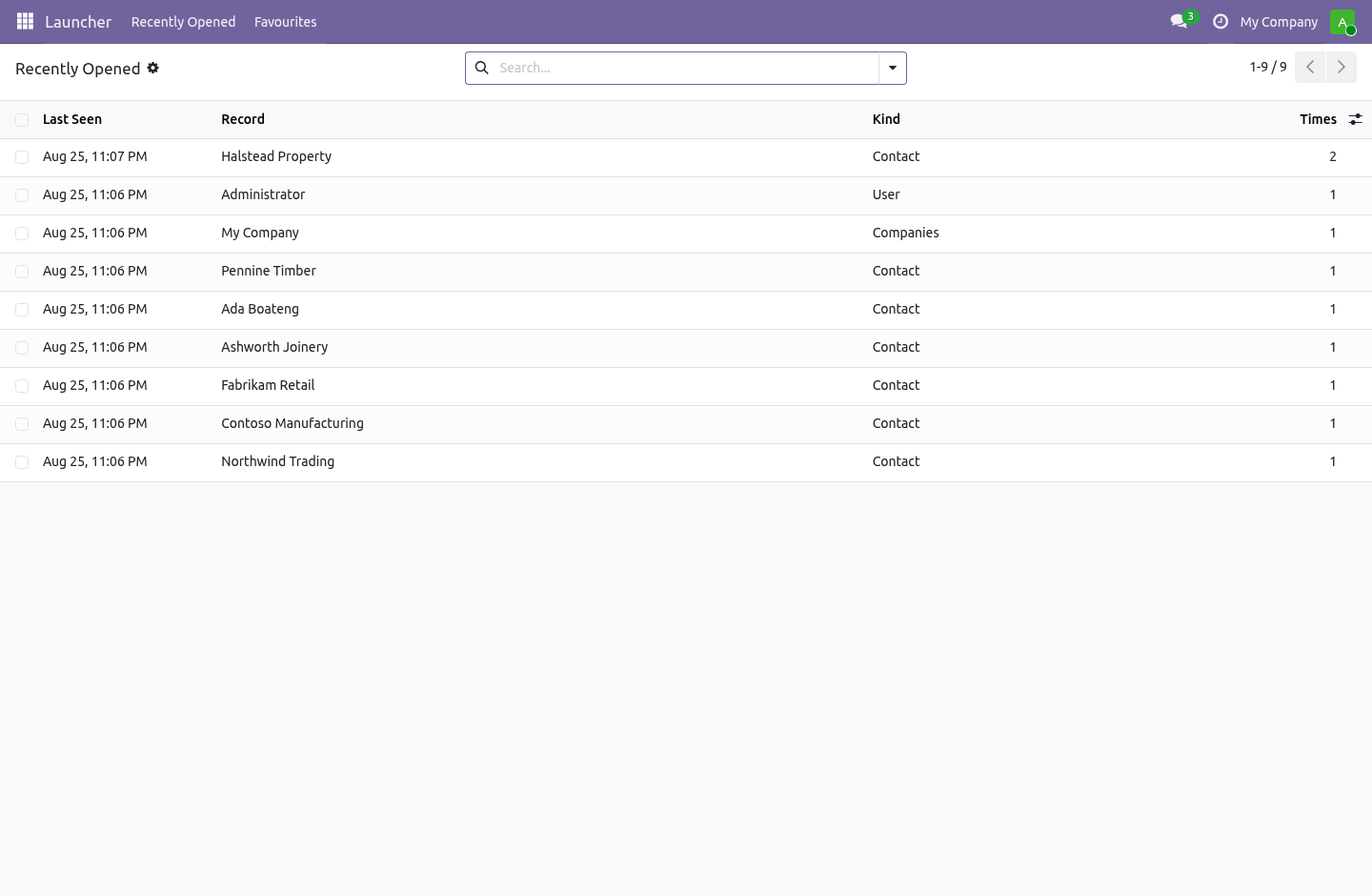
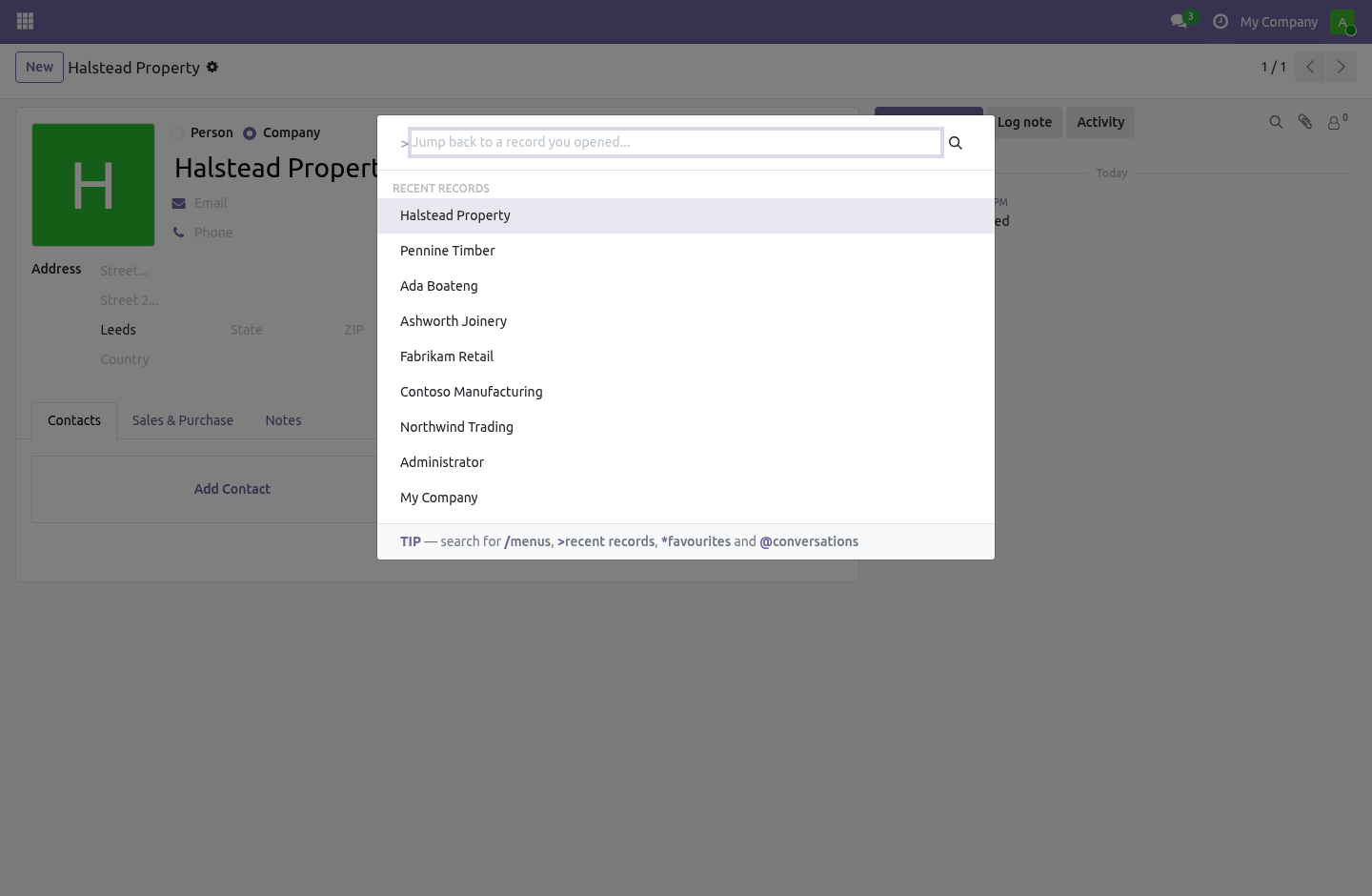
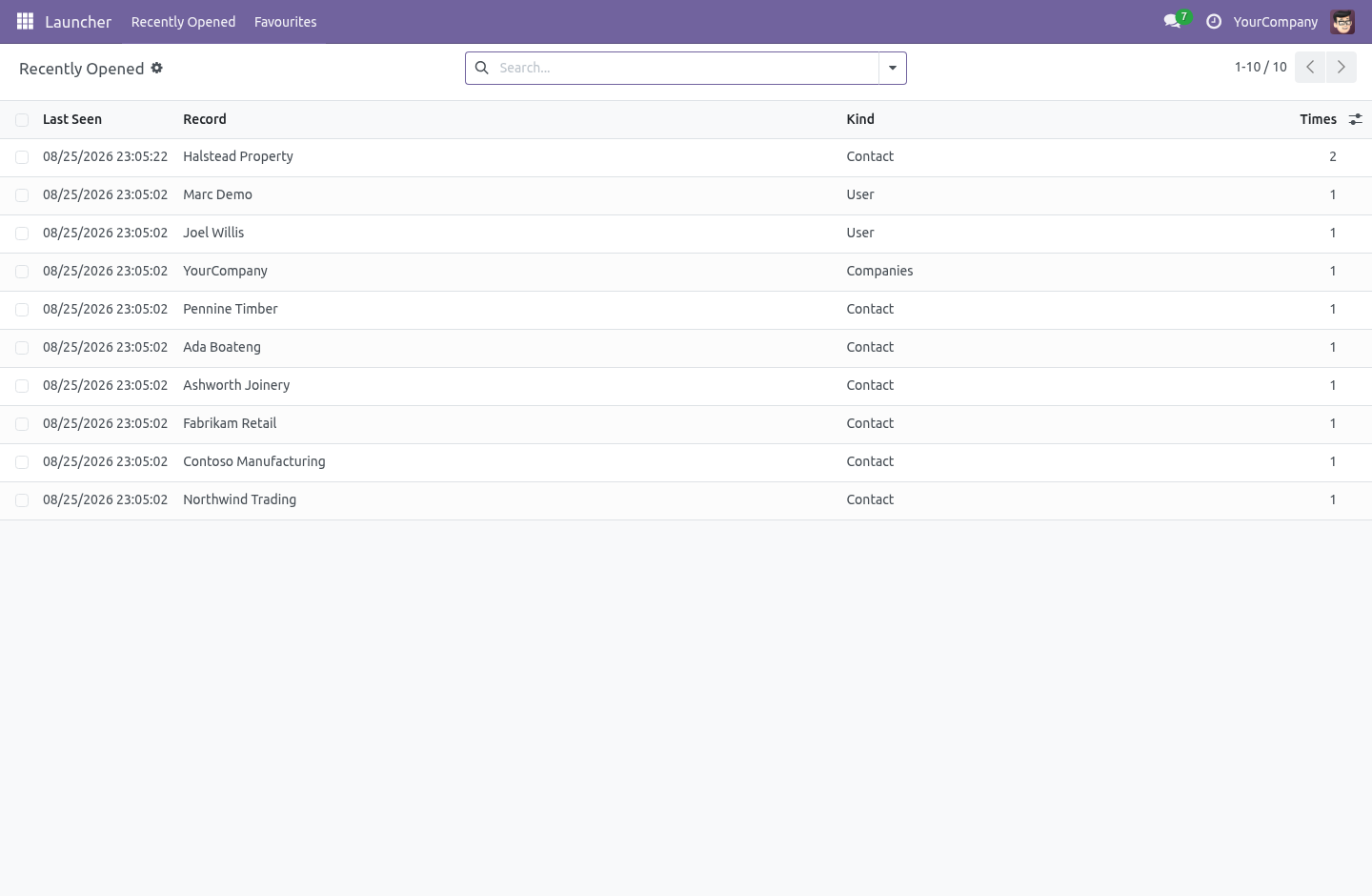
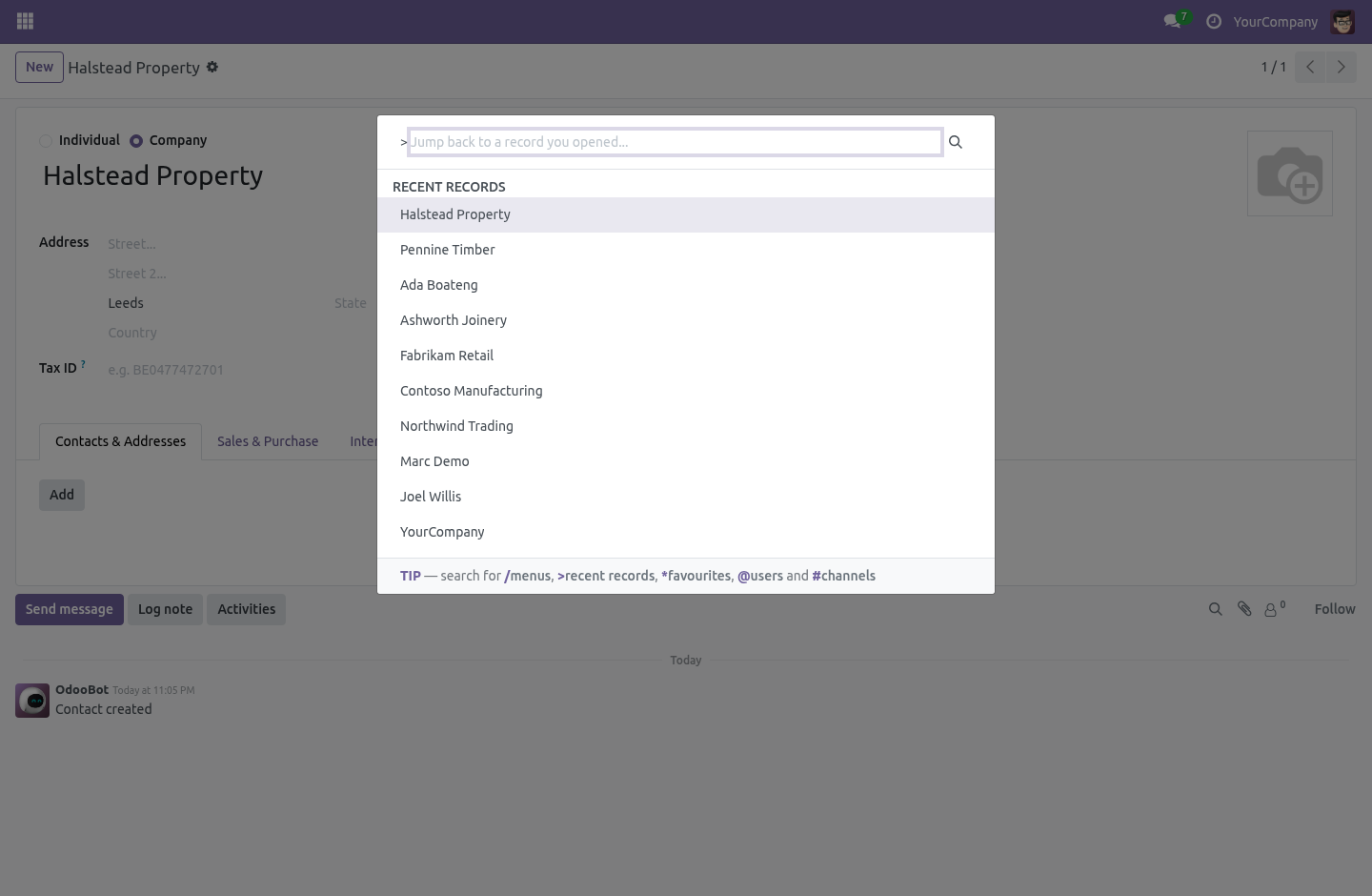
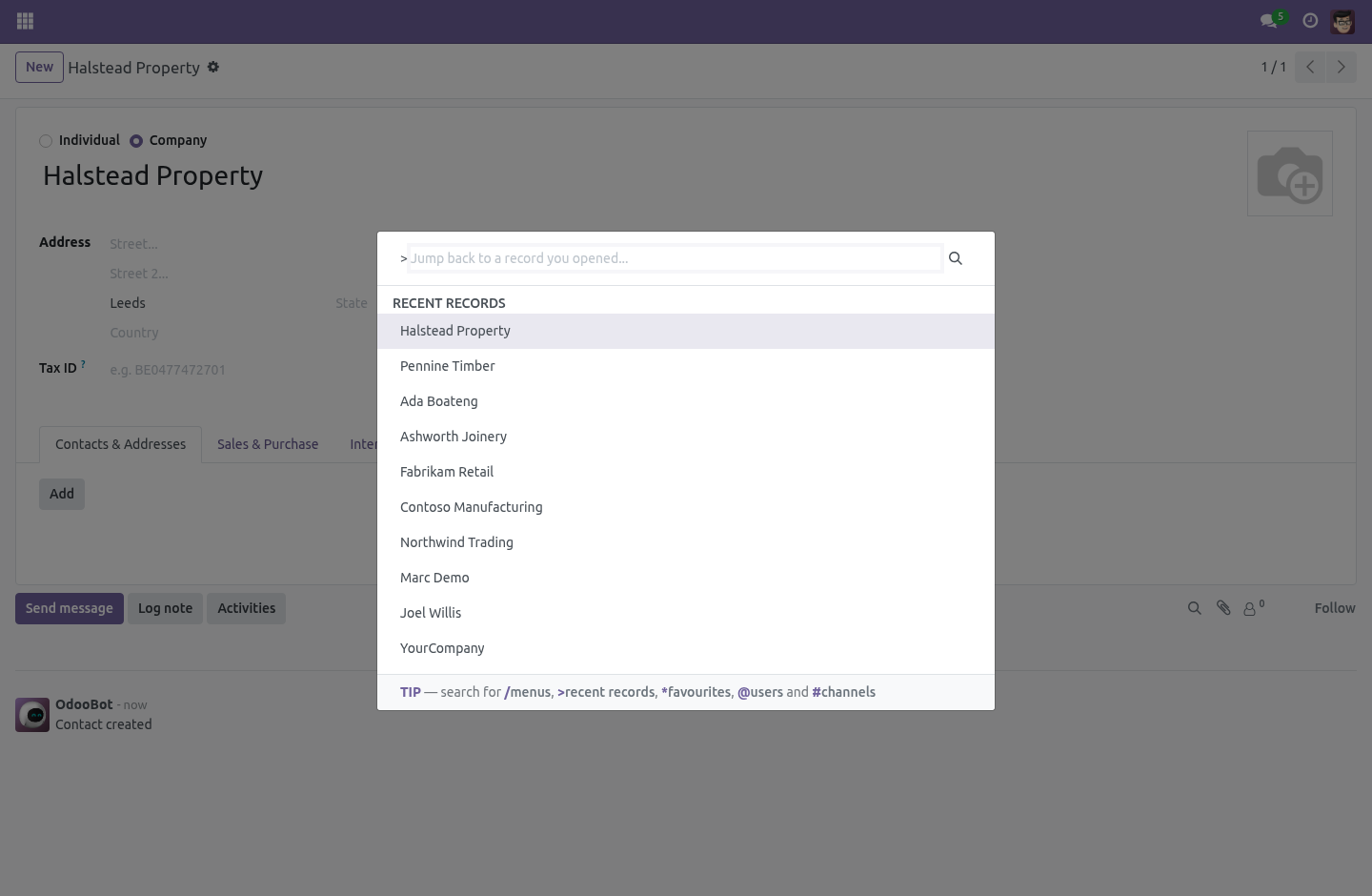
Recents, on the server. Every record you open is remembered: the model, the record, its name, when you last saw it and how often. Press Ctrl+K and type >, and the records you have been working in are right there, newest first. The important word is server.
A recents list kept in the browser's local storage is gone when you pick up the laptop, gone again when IT clears the cache, and gone a third time when you switch to the other browser you keep for the customer portal. This one follows the person: the tab you had open on the office desktop is one keystroke away at home. Favourites, with a key. Pin any record or any menu.
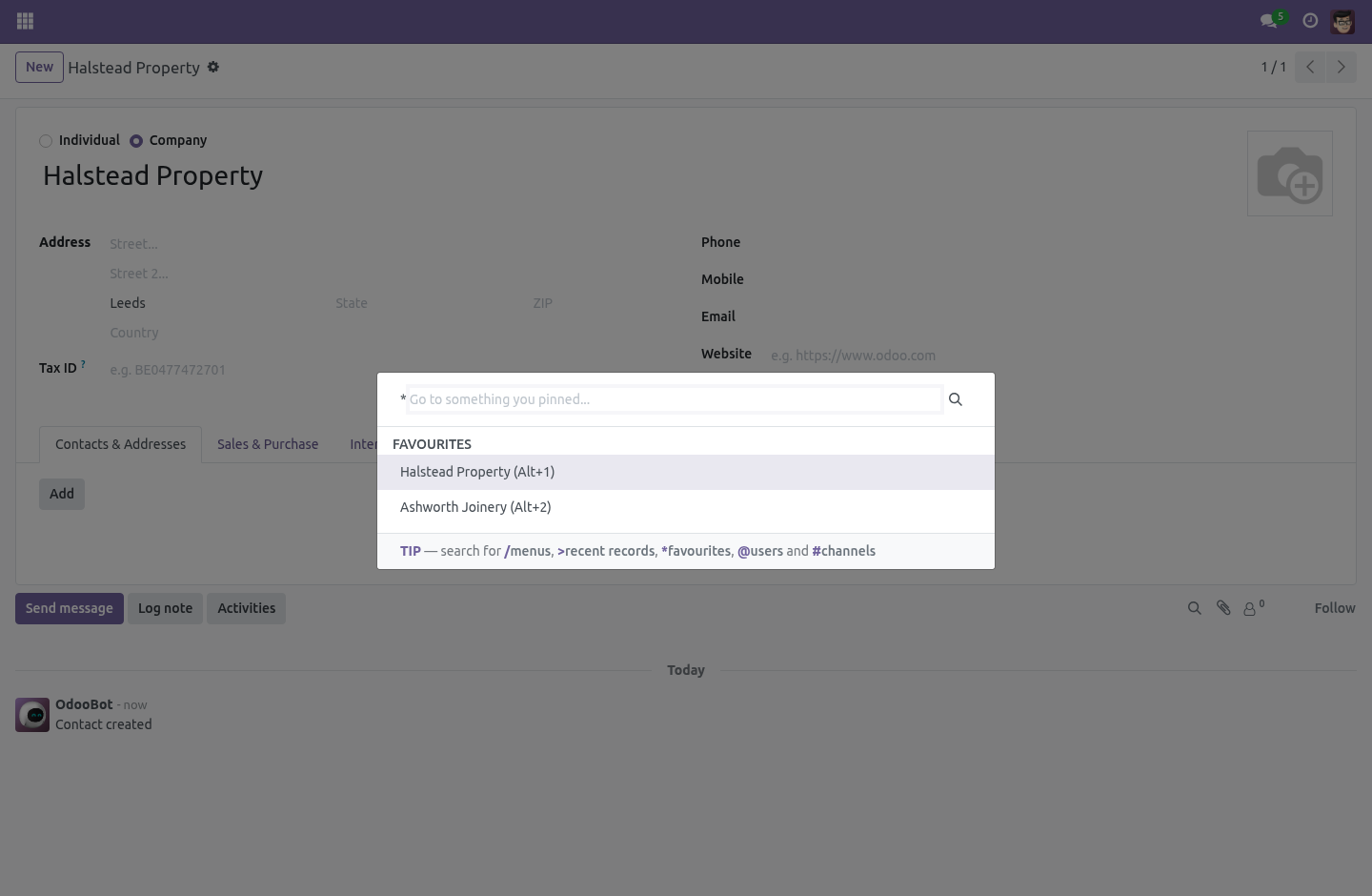
Give the ones you live in a number, and Alt+1 … Alt+9 go straight there from anywhere in the backend — not just from the screen where a particular view happens to be mounted. Type * in the palette for the whole list. A favourite whose target has gone — a record somebody deleted, a menu you no longer have access to — is silently skipped rather than offered. A shortcut into an error page is worse than no shortcut.
Everything is yours alone. Both lists are per user, and a global record rule sees to it: your recents are yours, your favourites are yours, and no report, no export and no clever domain reaches anybody else's. Global rather than attached to a group, because a rule attached to a group is OR-ed with every other group's rule — and "mine is mine" has to hold without exception. How it fits every series.
One small file of JavaScript per series, and on 17.0 through 19.0 it is literally the same file, because everything it hangs off is identical there: the command_provider and command_categories registries, the hotkey service, and the form controller's model and record id. The namespaces are > and because the obvious ones are taken: web owns / for menus, and mail owns @ for user mentions and # for channels wherever Discuss is installed. A recents list served under a palette whose placeholder reads Search for a user…*, with real users listed beneath it, is not a feature — so a test pins both namespaces and fails if either of the taken ones ever creeps back in. What it deliberately does not do It does not remember list views, dashboards or reports — only records you opened.
A recents list of "the sales order list, forty times" is not a recents list. It does not remember a record you were creating and never saved. There is nothing to go back to. It is an internal tool: portal and public users are refused at the server, not merely hidden from the menu.
How we make sure it works. Before every release, 35 automated checks run against this app on Odoo 16, 17, 18, 19 and 20. Among them: A record they cannot read is never remembered. Two favourites cannot share one key.
The hotkeys do not swallow keys they do not own. The kind column follows the reader not the writer. The palette namespaces are not claimed by core. The complete list is in the source you receive.
Questions people ask. Which Odoo versions does it run on? Odoo 16.0, 17.0, 18.0, 19.0, 20.0, on the series you buy it for; each series is its own listing. Community or Enterprise?
Both. It needs no Enterprise app. The complete manual is at docs dot bambooforge dot dev, the demo database is linked from the store page, and support answers within twenty-four hours. Links are in the description.
Transcript of the walkthrough (Odoo 19)
Backend Launcher: Quick App Switcher. Jump back to the record you had open this morning, from any machine: recents and favourites stored on the server, in the command palette. Odoo's command palette (Ctrl+K) searches menus and commands. It cannot take you back to the quotation you were reading before lunch, and nothing in it survives a different browser.
In the next few minutes: backend launcher: quick app switcher, then recents, on the server, then favourites, with a key, then everything is yours alone, then how it fits the four versions. Then what this app deliberately does not do, so you can tell before you buy whether it fits. Everything lives under Launcher then Recently Opened then Favourites. Backend Launcher: Quick App Switcher.
Odoo's command palette (Ctrl+K) searches menus and commands. It cannot take you back to the quotation you were reading before lunch, and nothing in it survives a different browser. Recents, on the server. Every record you open is remembered: the model, the record, its name, when you last saw it and how often.
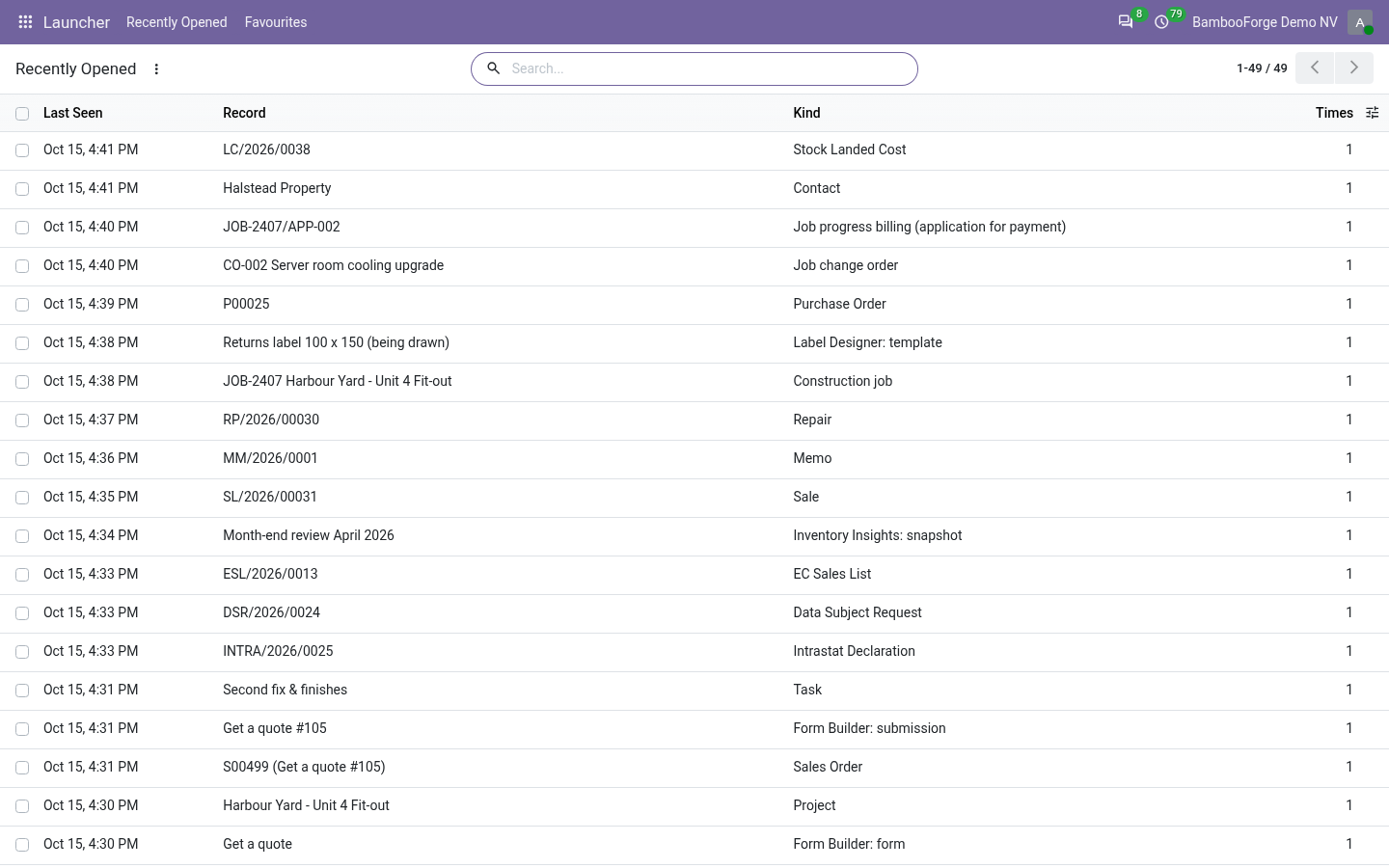
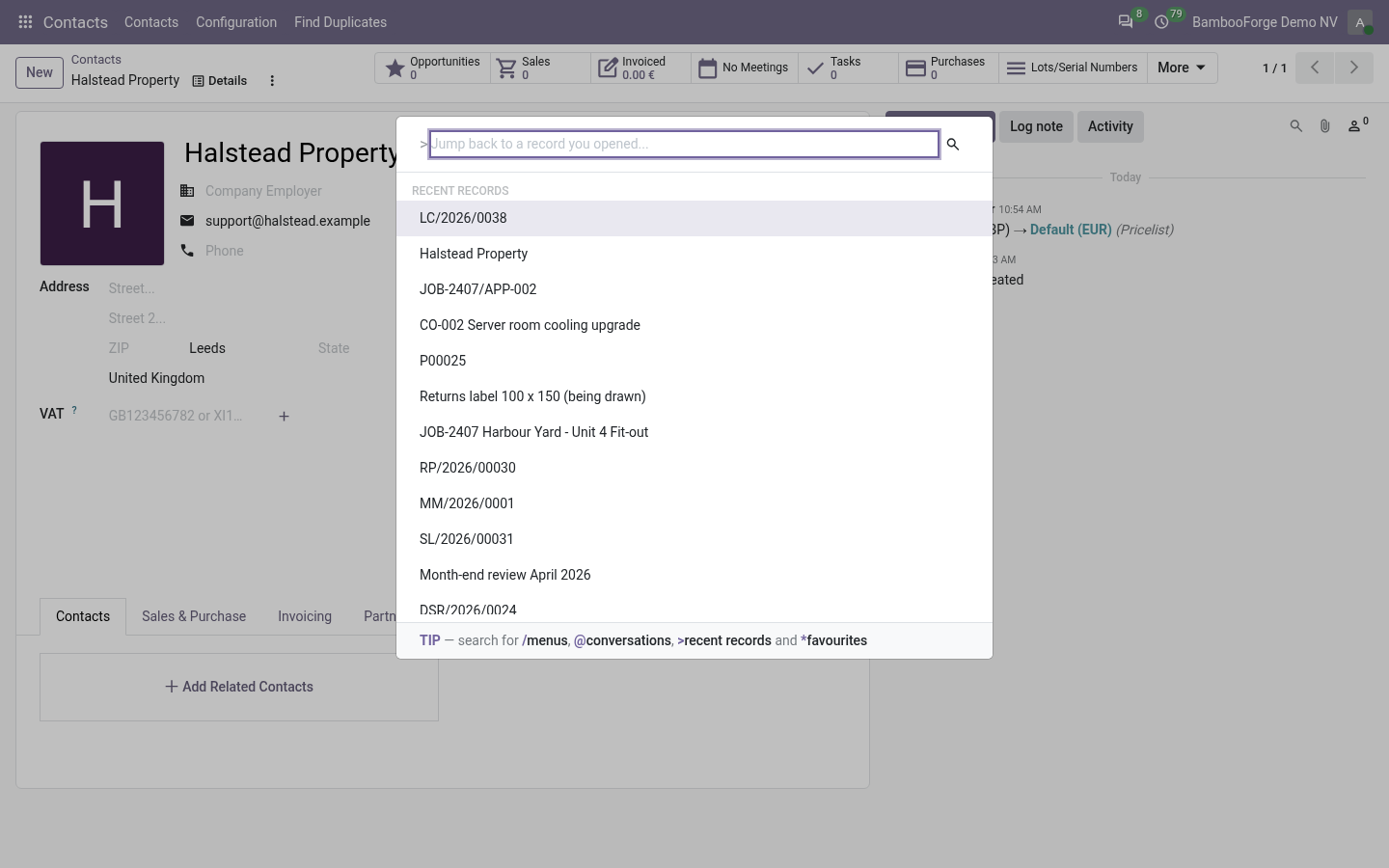
Press Ctrl+K and type >, and the records you have been working in are right there, newest first. The important word is server. A recents list kept in the browser's local storage is gone when you pick up the laptop, gone again when IT clears the cache, and gone a third time when you switch to the other browser you keep for the customer portal. This one follows the person: the tab you had open on the office desktop is one keystroke away at home.
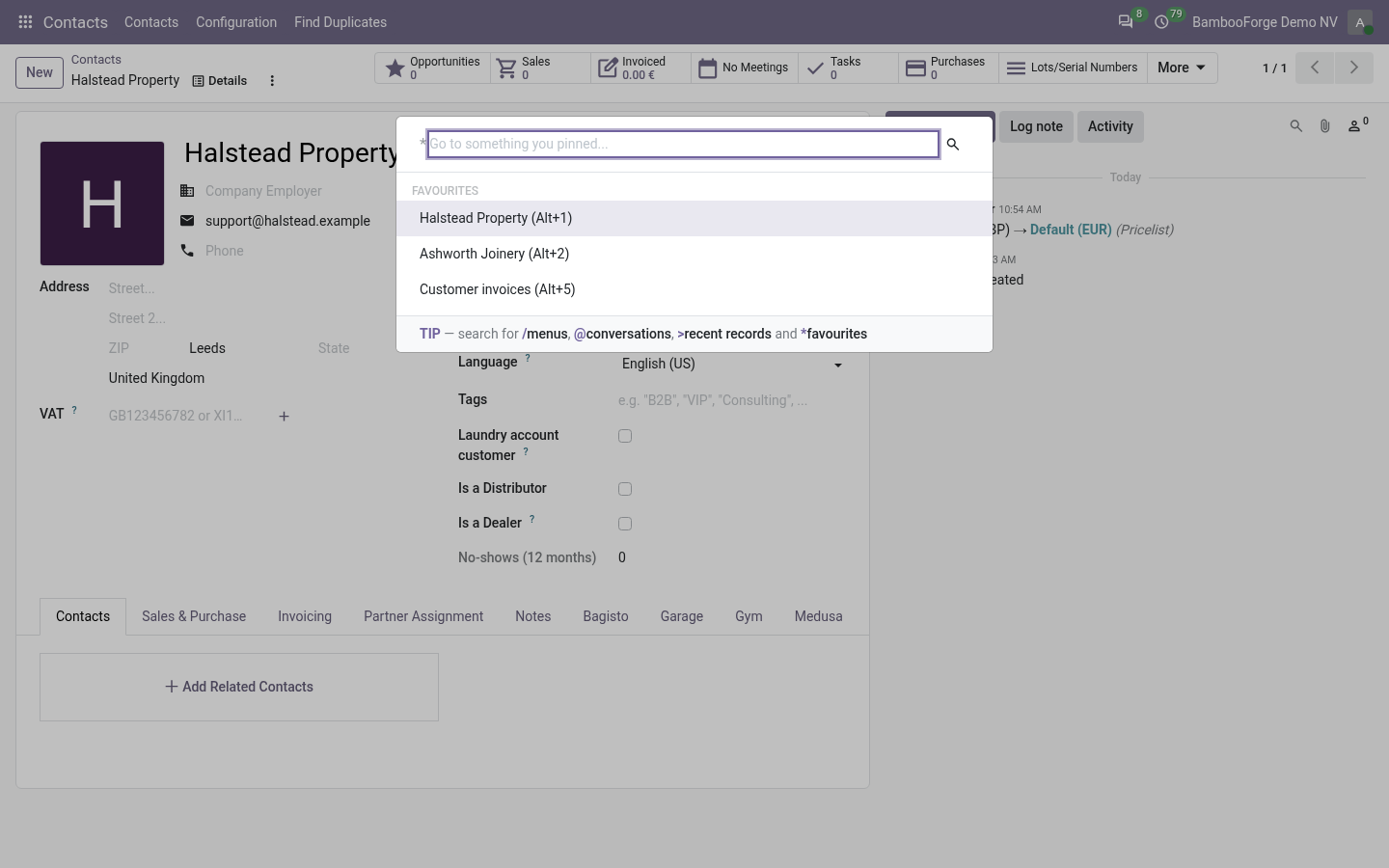
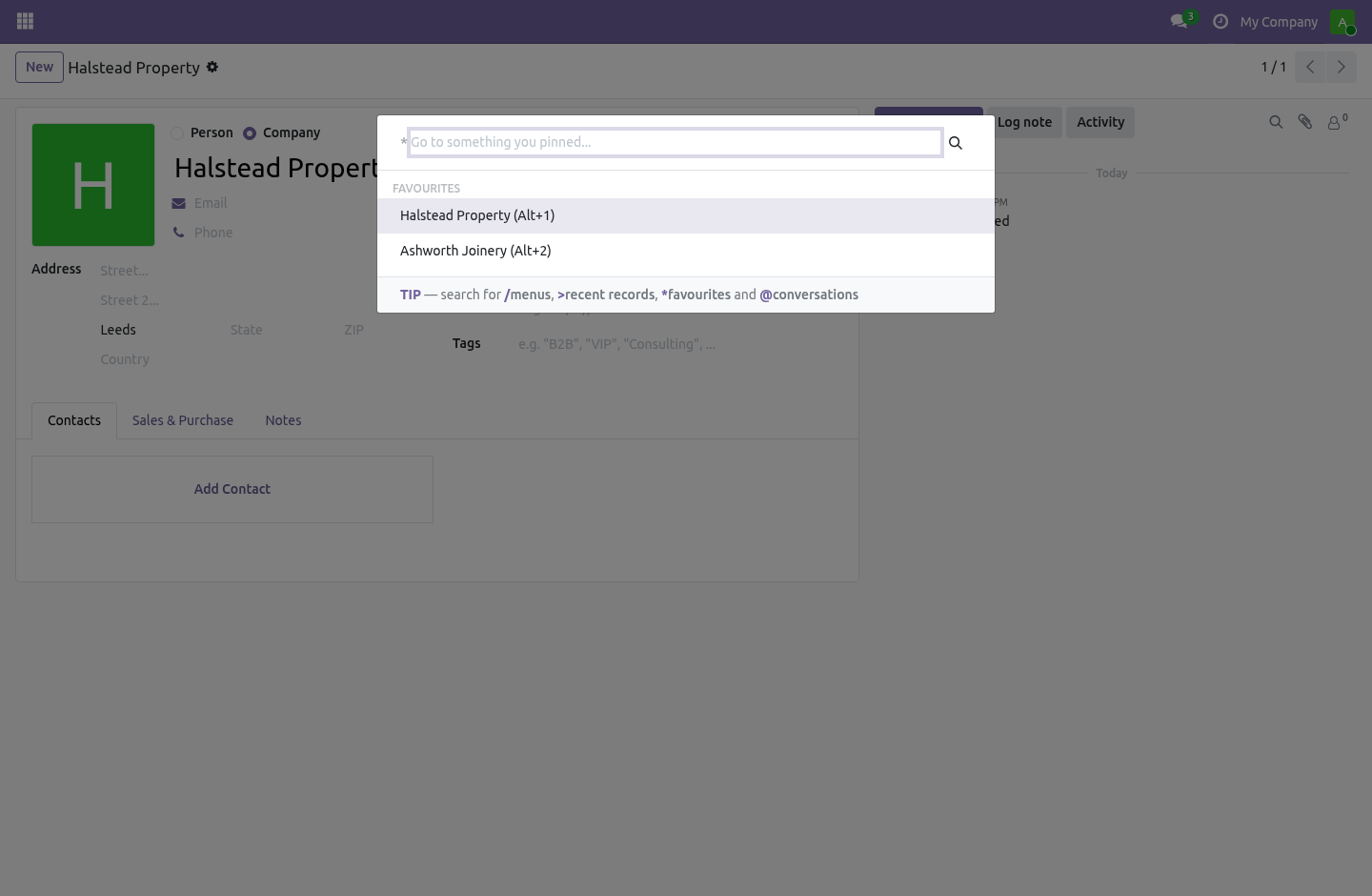
Favourites, with a key. Pin any record or any menu. Give the ones you live in a number, and Alt+1 … Alt+9 go straight there from anywhere in the backend — not just from the screen where a particular view happens to be mounted. Type * in the palette for the whole list.
A favourite whose target has gone — a record somebody deleted, a menu you no longer have access to — is silently skipped rather than offered. A shortcut into an error page is worse than no shortcut. Everything is yours alone. Both lists are per user, and a global record rule sees to it: your recents are yours, your favourites are yours, and no report, no export and no clever domain reaches anybody else's.
Global rather than attached to a group, because a rule attached to a group is OR-ed with every other group's rule — and "mine is mine" has to hold without exception. How it fits the four versions. One file of JavaScript for 16.0 through 19.0. That is possible because everything it hangs off is identical on all four: the command_provider and command_categories registries, the hotkey service, and the form controller's model and record id.
The namespaces are > and because the obvious ones are taken: web owns / for menus, and mail owns @ for user mentions and # for channels wherever Discuss is installed. A recents list served under a palette whose placeholder reads Search for a user…*, with real users listed beneath it, is not a feature — so a test pins both namespaces and fails if either of the taken ones ever creeps back in. What it deliberately does not do It does not remember list views, dashboards or reports — only records you opened. A recents list of "the sales order list, forty times" is not a recents list.
It does not remember a record you were creating and never saved. There is nothing to go back to. It is an internal tool: portal and public users are refused at the server, not merely hidden from the menu. The complete manual is at docs dot bambooforge dot dev, the demo database is linked from the store page, and support answers within twenty-four hours.
Links are in the description.
Transcript of the walkthrough (Odoo 18)
Backend Launcher: Quick App Switcher. Jump back to the record you had open this morning, from any machine: recents and favourites stored on the server, in the command palette. Odoo's command palette (Ctrl+K) searches menus and commands. It cannot take you back to the quotation you were reading before lunch, and nothing in it survives a different browser.
In the next few minutes: backend launcher: quick app switcher, then recents, on the server, then favourites, with a key, then everything is yours alone, then how it fits the four versions. Then what this app deliberately does not do, so you can tell before you buy whether it fits. Everything lives under Launcher then Recently Opened then Favourites. Backend Launcher: Quick App Switcher.
Odoo's command palette (Ctrl+K) searches menus and commands. It cannot take you back to the quotation you were reading before lunch, and nothing in it survives a different browser. Recents, on the server. Every record you open is remembered: the model, the record, its name, when you last saw it and how often.
Press Ctrl+K and type >, and the records you have been working in are right there, newest first. The important word is server. A recents list kept in the browser's local storage is gone when you pick up the laptop, gone again when IT clears the cache, and gone a third time when you switch to the other browser you keep for the customer portal. This one follows the person: the tab you had open on the office desktop is one keystroke away at home.
Favourites, with a key. Pin any record or any menu. Give the ones you live in a number, and Alt+1 … Alt+9 go straight there from anywhere in the backend — not just from the screen where a particular view happens to be mounted. Type * in the palette for the whole list.
A favourite whose target has gone — a record somebody deleted, a menu you no longer have access to — is silently skipped rather than offered. A shortcut into an error page is worse than no shortcut. Everything is yours alone. Both lists are per user, and a global record rule sees to it: your recents are yours, your favourites are yours, and no report, no export and no clever domain reaches anybody else's.
Global rather than attached to a group, because a rule attached to a group is OR-ed with every other group's rule — and "mine is mine" has to hold without exception. How it fits the four versions. One file of JavaScript for 16.0 through 19.0. That is possible because everything it hangs off is identical on all four: the command_provider and command_categories registries, the hotkey service, and the form controller's model and record id.
The namespaces are > and because the obvious ones are taken: web owns / for menus, and mail owns @ for user mentions and # for channels wherever Discuss is installed. A recents list served under a palette whose placeholder reads Search for a user…*, with real users listed beneath it, is not a feature — so a test pins both namespaces and fails if either of the taken ones ever creeps back in. What it deliberately does not do It does not remember list views, dashboards or reports — only records you opened. A recents list of "the sales order list, forty times" is not a recents list.
It does not remember a record you were creating and never saved. There is nothing to go back to. It is an internal tool: portal and public users are refused at the server, not merely hidden from the menu. The complete manual is at docs dot bambooforge dot dev, the demo database is linked from the store page, and support answers within twenty-four hours.
Links are in the description.
Transcript of the walkthrough (Odoo 17)
Backend Launcher: Quick App Switcher. Jump back to the record you had open this morning, from any machine: recents and favourites stored on the server, in the command palette. Odoo's command palette (Ctrl+K) searches menus and commands. It cannot take you back to the quotation you were reading before lunch, and nothing in it survives a different browser.
In the next few minutes: backend launcher: quick app switcher, then recents, on the server, then favourites, with a key, then everything is yours alone, then how it fits the four versions. Then what this app deliberately does not do, so you can tell before you buy whether it fits. Everything lives under Launcher then Recently Opened then Favourites. Backend Launcher: Quick App Switcher.
Odoo's command palette (Ctrl+K) searches menus and commands. It cannot take you back to the quotation you were reading before lunch, and nothing in it survives a different browser. Recents, on the server. Every record you open is remembered: the model, the record, its name, when you last saw it and how often.
Press Ctrl+K and type >, and the records you have been working in are right there, newest first. The important word is server. A recents list kept in the browser's local storage is gone when you pick up the laptop, gone again when IT clears the cache, and gone a third time when you switch to the other browser you keep for the customer portal. This one follows the person: the tab you had open on the office desktop is one keystroke away at home.
Favourites, with a key. Pin any record or any menu. Give the ones you live in a number, and Alt+1 … Alt+9 go straight there from anywhere in the backend — not just from the screen where a particular view happens to be mounted. Type * in the palette for the whole list.
A favourite whose target has gone — a record somebody deleted, a menu you no longer have access to — is silently skipped rather than offered. A shortcut into an error page is worse than no shortcut. Everything is yours alone. Both lists are per user, and a global record rule sees to it: your recents are yours, your favourites are yours, and no report, no export and no clever domain reaches anybody else's.
Global rather than attached to a group, because a rule attached to a group is OR-ed with every other group's rule — and "mine is mine" has to hold without exception. How it fits the four versions. One file of JavaScript for 16.0 through 19.0. That is possible because everything it hangs off is identical on all four: the command_provider and command_categories registries, the hotkey service, and the form controller's model and record id.
The namespaces are > and because the obvious ones are taken: web owns / for menus, and mail owns @ for user mentions and # for channels wherever Discuss is installed. A recents list served under a palette whose placeholder reads Search for a user…*, with real users listed beneath it, is not a feature — so a test pins both namespaces and fails if either of the taken ones ever creeps back in. What it deliberately does not do It does not remember list views, dashboards or reports — only records you opened. A recents list of "the sales order list, forty times" is not a recents list.
It does not remember a record you were creating and never saved. There is nothing to go back to. It is an internal tool: portal and public users are refused at the server, not merely hidden from the menu. The complete manual is at docs dot bambooforge dot dev, the demo database is linked from the store page, and support answers within twenty-four hours.
Links are in the description.
Transcript of the walkthrough (Odoo 16)
Backend Launcher: Quick App Switcher. Jump back to the record you had open this morning, from any machine: recents and favourites stored on the server, in the command palette. Odoo's command palette (Ctrl+K) searches menus and commands. It cannot take you back to the quotation you were reading before lunch, and nothing in it survives a different browser.
In the next few minutes: backend launcher: quick app switcher, then recents, on the server, then favourites, with a key, then everything is yours alone, then how it fits the four versions. Then what this app deliberately does not do, so you can tell before you buy whether it fits. Everything lives under Launcher then Recently Opened then Favourites. Backend Launcher: Quick App Switcher.
Odoo's command palette (Ctrl+K) searches menus and commands. It cannot take you back to the quotation you were reading before lunch, and nothing in it survives a different browser. Recents, on the server. Every record you open is remembered: the model, the record, its name, when you last saw it and how often.
Press Ctrl+K and type >, and the records you have been working in are right there, newest first. The important word is server. A recents list kept in the browser's local storage is gone when you pick up the laptop, gone again when IT clears the cache, and gone a third time when you switch to the other browser you keep for the customer portal. This one follows the person: the tab you had open on the office desktop is one keystroke away at home.
Favourites, with a key. Pin any record or any menu. Give the ones you live in a number, and Alt+1 … Alt+9 go straight there from anywhere in the backend — not just from the screen where a particular view happens to be mounted. Type * in the palette for the whole list.
A favourite whose target has gone — a record somebody deleted, a menu you no longer have access to — is silently skipped rather than offered. A shortcut into an error page is worse than no shortcut. Everything is yours alone. Both lists are per user, and a global record rule sees to it: your recents are yours, your favourites are yours, and no report, no export and no clever domain reaches anybody else's.
Global rather than attached to a group, because a rule attached to a group is OR-ed with every other group's rule — and "mine is mine" has to hold without exception. How it fits the four versions. One file of JavaScript for 16.0 through 19.0. That is possible because everything it hangs off is identical on all four: the command_provider and command_categories registries, the hotkey service, and the form controller's model and record id.
The namespaces are > and because the obvious ones are taken: web owns / for menus, and mail owns @ for user mentions and # for channels wherever Discuss is installed. A recents list served under a palette whose placeholder reads Search for a user…*, with real users listed beneath it, is not a feature — so a test pins both namespaces and fails if either of the taken ones ever creeps back in. What it deliberately does not do It does not remember list views, dashboards or reports — only records you opened. A recents list of "the sales order list, forty times" is not a recents list.
It does not remember a record you were creating and never saved. There is nothing to go back to. It is an internal tool: portal and public users are refused at the server, not merely hidden from the menu. The complete manual is at docs dot bambooforge dot dev, the demo database is linked from the store page, and support answers within twenty-four hours.
Links are in the description.
Key facts
- What it is
- Jump back to the record you had open this morning, from any machine: recents and favourites stored on the server, in the command palette.
- For
- Extra Tools
- Odoo versions
- 16.0, 17.0, 18.0, 19.0, 20.0 - Community and Enterprise
- Runs on
- Odoo.sh or Odoo you host yourself - not Odoo Online, which accepts no third-party apps
- Price
- 99 EUR, one-time, on the Odoo Apps Store
- Technical name
- bambooforge_launcher
- Not for
- It does not remember list views, dashboards or reports — only records you opened. A recents list of "the sales order list, forty times" is not a recents list.; It does not remember a record you were creating and never saved. There is nothing to go back to.; It is an internal tool: portal and public users are refused at the server, not merely hidden from the menu.
- Manual last updated
- 2026-09-24
Backend Launcher: Quick App Switcher
Odoo's command palette (Ctrl+K) searches menus and commands. It cannot take you back to the quotation you were reading before lunch, and nothing in it survives a different browser.
Recents, on the server
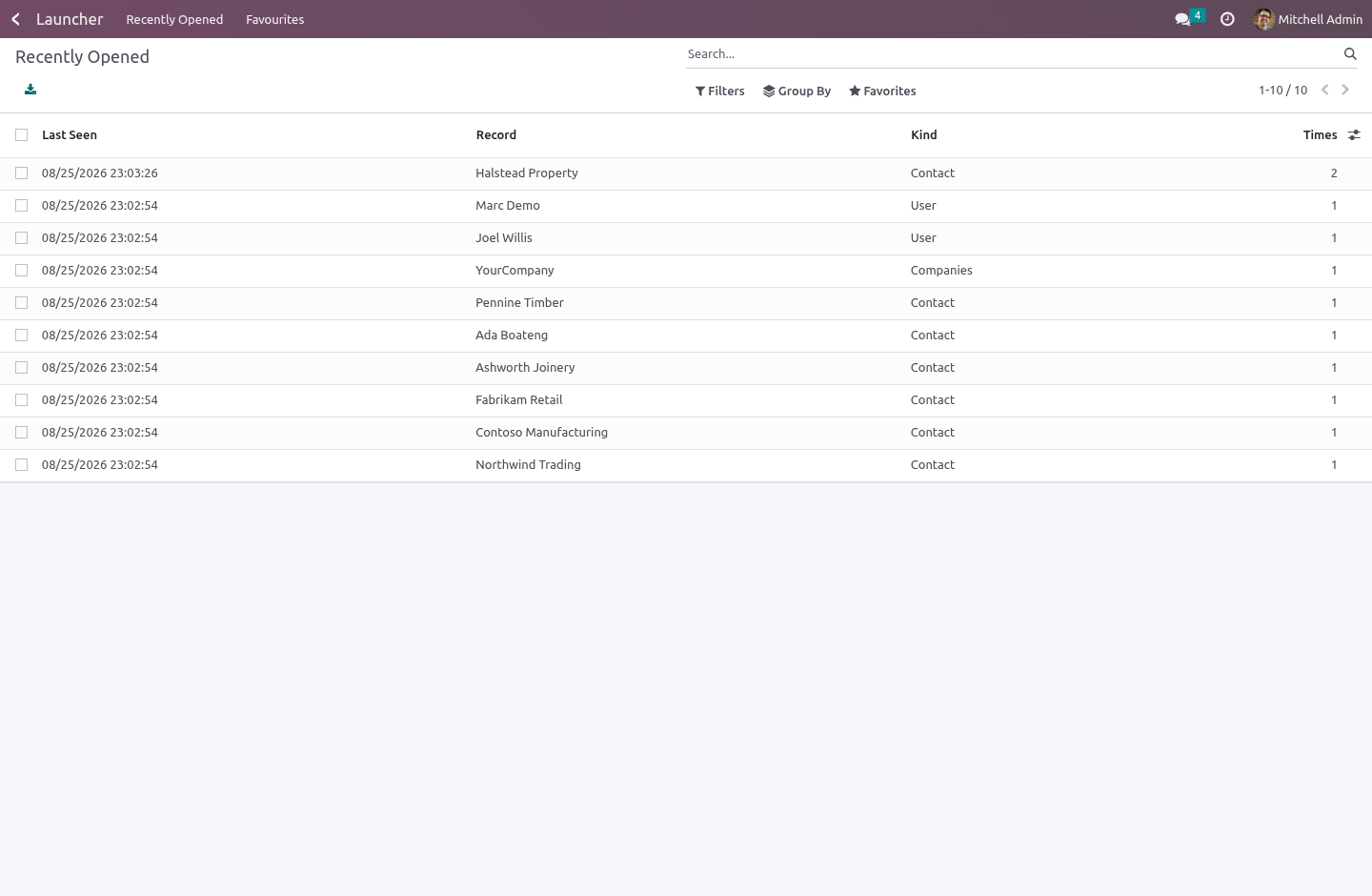
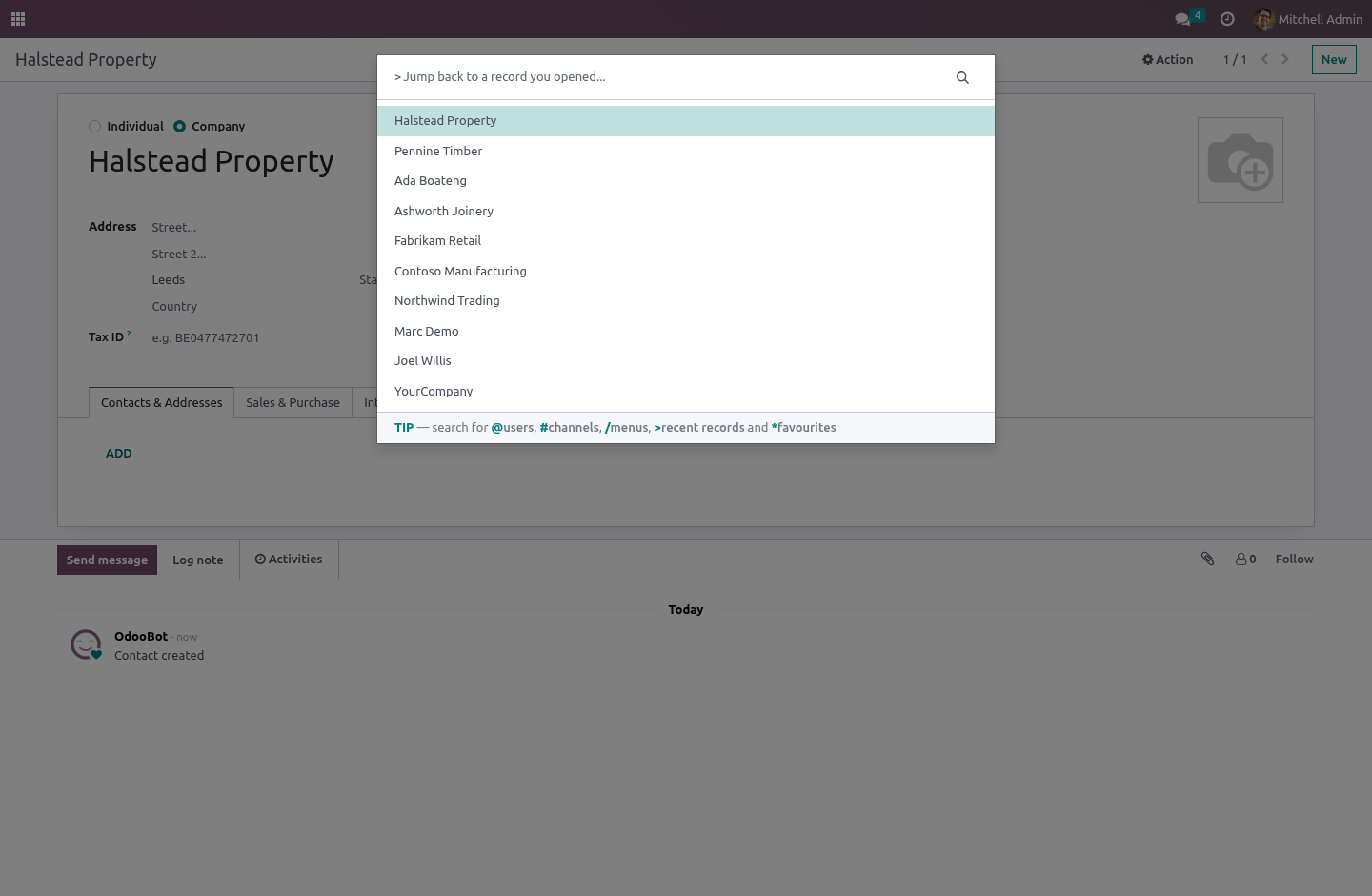
Every record you open is remembered: the model, the record, its name, when you last saw it and how often. Press Ctrl+K and type >, and the records you have been working in are right there, newest first.
The important word is server. A recents list kept in the browser's local storage is gone when you pick up the laptop, gone again when IT clears the cache, and gone a third time when you switch to the other browser you keep for the customer portal. This one follows the person: the tab you had open on the office desktop is one keystroke away at home.
What it will not do is remember something you were not allowed to see. The record is read with your rights before it is written down, so a recents list can never become a back door into a record a rule keeps from you.
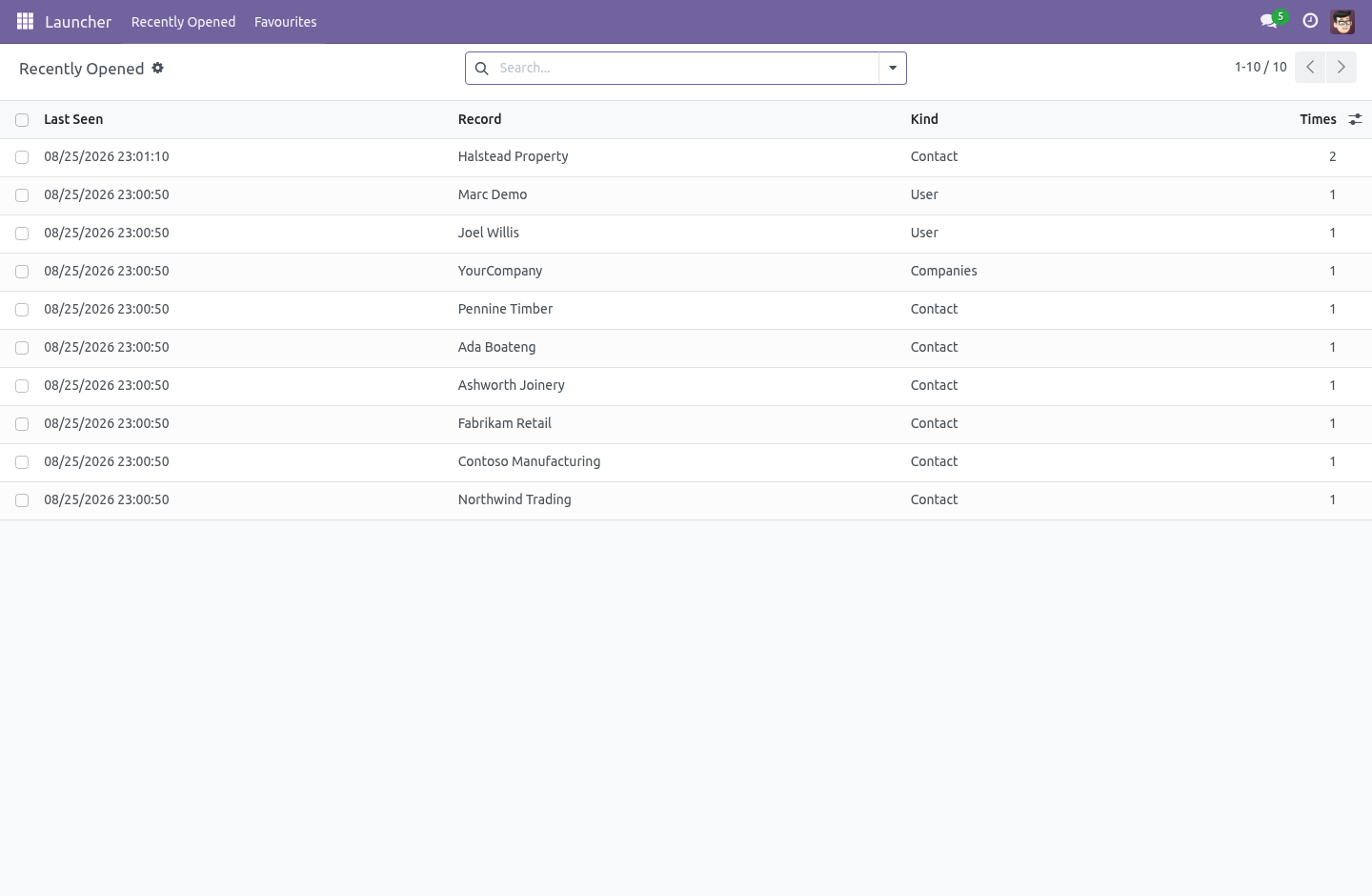
The list is capped — a list nobody scrolls past twenty should not carry a thousand rows per person forever — and Launcher › Recently Opened shows the same thing as a list for people who would rather click, with a Forget everything to wipe it.
Favourites, with a key
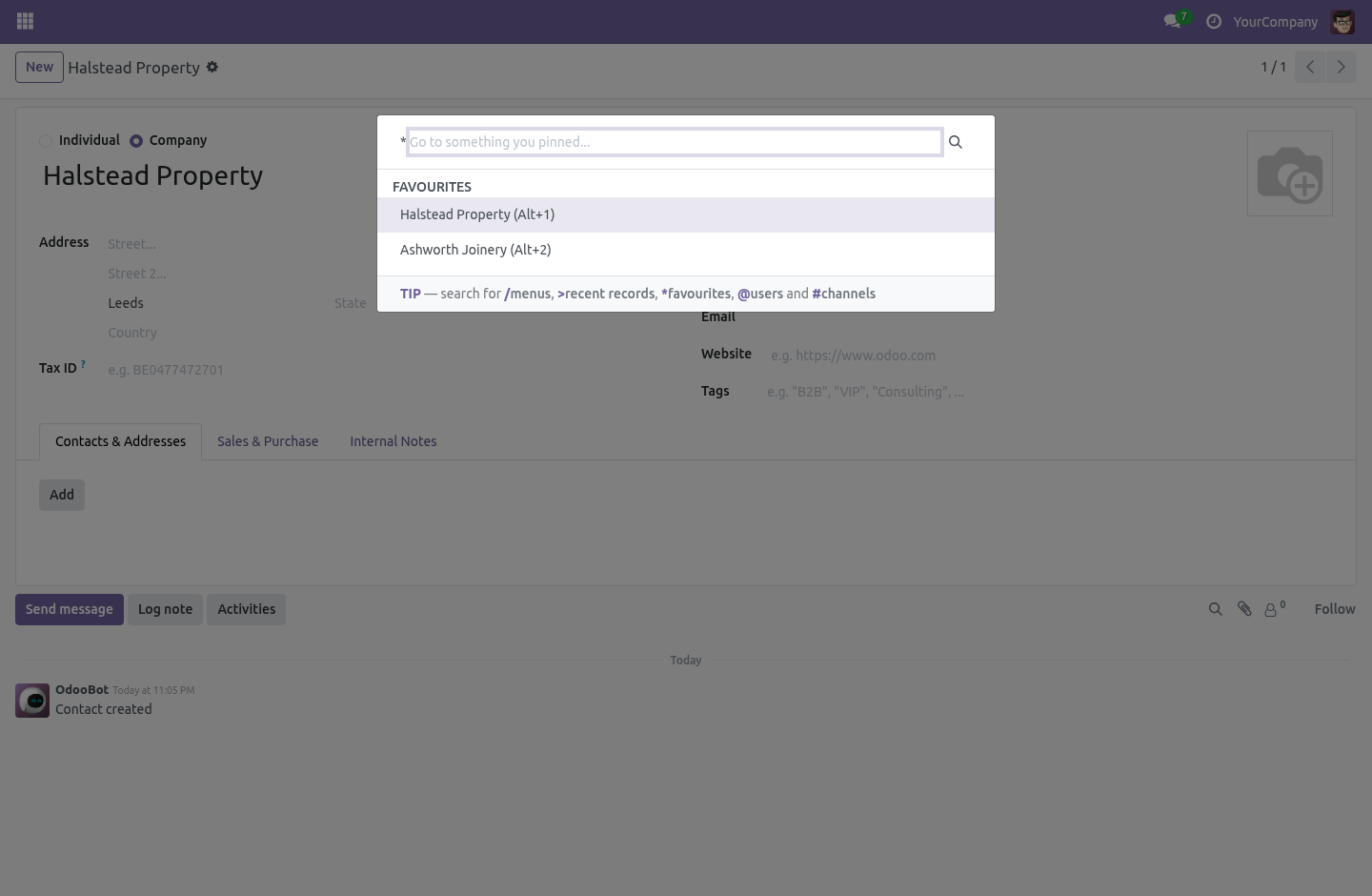
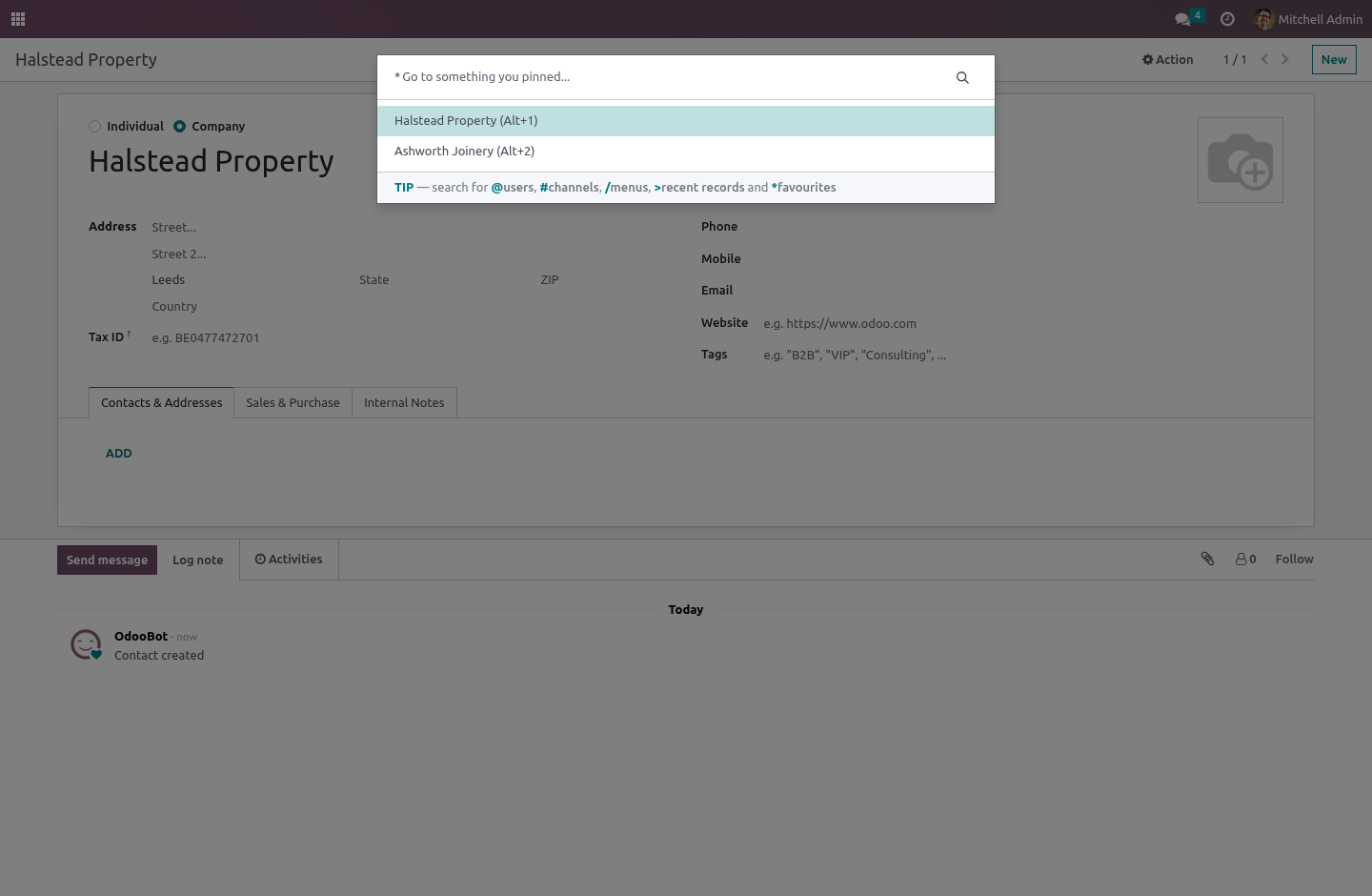
Pin any record or any menu. Give the ones you live in a number, and Alt+1 … Alt+9 go straight there from anywhere in the backend — not just from the screen where a particular view happens to be mounted. Type * in the palette for the whole list.
A favourite whose target has gone — a record somebody deleted, a menu you no longer have access to — is silently skipped rather than offered. A shortcut into an error page is worse than no shortcut.
Two people can each use Alt+3 for their own thing; hotkeys are unique per person, not per database.
Everything is yours alone
Both lists are per user, and a global record rule sees to it: your recents are yours, your favourites are yours, and no report, no export and no clever domain reaches anybody else's. Global rather than attached to a group, because a rule attached to a group is OR-ed with every other group's rule — and "mine is mine" has to hold without exception.
How it fits every series
One small file of JavaScript per series, and on 17.0 through 19.0 it is literally the same file, because everything it hangs off is identical there: the command_provider and command_categories registries, the hotkey service, and the form controller's model and record id.
The namespaces are > and * because the obvious ones are taken: web owns / for menus, and mail owns @ for user mentions and # for channels wherever Discuss is installed. A recents list served under a palette whose placeholder reads Search for a user…, with real users listed beneath it, is not a feature — so a test pins both namespaces and fails if either of the taken ones ever creeps back in.
What it deliberately does not do
It does not remember list views, dashboards or reports — only records you opened. A recents list of "the sales order list, forty times" is not a recents list.
It does not remember a record you were creating and never saved. There is nothing to go back to.
It is an internal tool: portal and public users are refused at the server, not merely hidden from the menu.
How we make sure it works
Before every release, 35 automated checks run against this app on Odoo 16, 17, 18, 19 and 20. Among them:
A record they cannot read is never remembered.
Two favourites cannot share one key.
The hotkeys do not swallow keys they do not own.
The kind column follows the reader not the writer.
The palette namespaces are not claimed by core.
The complete list is in the source you receive.
Install
Copy bambooforge_launcher into your addons path and update the app list, or install the ZIP from the Odoo Apps Store.
Install Backend Launcher: Quick App Switcher.
Open Launcher - its menus are Recently Opened, Favourites.
Questions people ask
- Which Odoo versions does it run on?
Odoo 16.0, 17.0, 18.0, 19.0, 20.0, on the series you buy it for; each series is its own listing.
- Community or Enterprise?
Both. It needs no Enterprise app.
- What does it need?
The standard Web app. No extra Python package.
- Where does it show up?
Under the Launcher menu (Recently Opened, Favourites).
- Does anything leave my server?
No. It makes no call outside your Odoo server: no telemetry, no licence check, no third-party service.
- What happens if I uninstall it?
Odoo drops the app's own tables and fields; the standard records it worked on (contacts, orders, products) stay as they are.