 BambooForge Labs
Landed Cost by Value
Split a freight or duty bill across receipts by purchase value, get the right receipts suggested, and read the landed cost on each line.
Available for Odoo 16.0, Odoo 17.0, Odoo 18.0, Odoo 19.0, Odoo 20.0. Technical name bambooforge_landed_cost.
Transcript of the walkthrough (Odoo 20)
Landed Cost by Value. Split a freight or duty bill across receipts by purchase value, get the right receipts suggested, and read the landed cost on each line. Odoo's landed costs split a bill five ways — equally, by quantity, by weight, by volume, and by the stock value already on the goods. The one an importer actually asks for is missing, and the one manual step that eats the afternoon is finding which receipts a freight bill even belongs to.
In the next few minutes: landed cost by value, then split by purchase value, then suggest the receipts, then read it back per receipt line, then how we make sure it works. Then what this app deliberately does not do, so you can tell before you buy whether it fits. Everything lives under Landed Cost by Move. 1.
Copy bambooforge_landed_cost into your addons path and update the app list, or install the ZIP from the Odoo Apps Store. 2. Install Landed Cost by Value. 3.
Open Landed Cost by Move. Landed Cost by Value. Odoo's landed costs split a bill five ways — equally, by quantity, by weight, by volume, and by the stock value already on the goods. The one an importer actually asks for is missing, and the one manual step that eats the afternoon is finding which receipts a freight bill even belongs to.
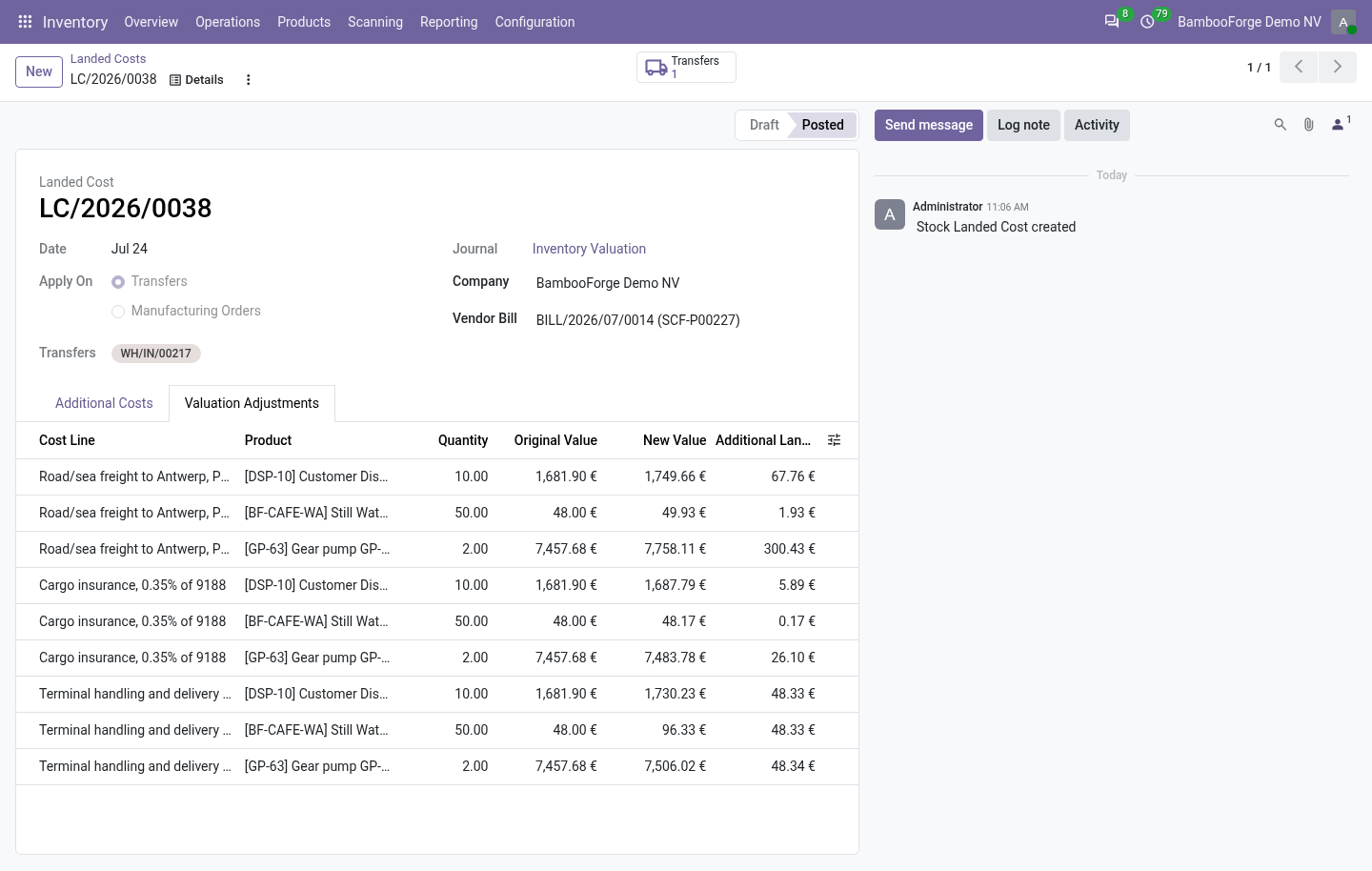
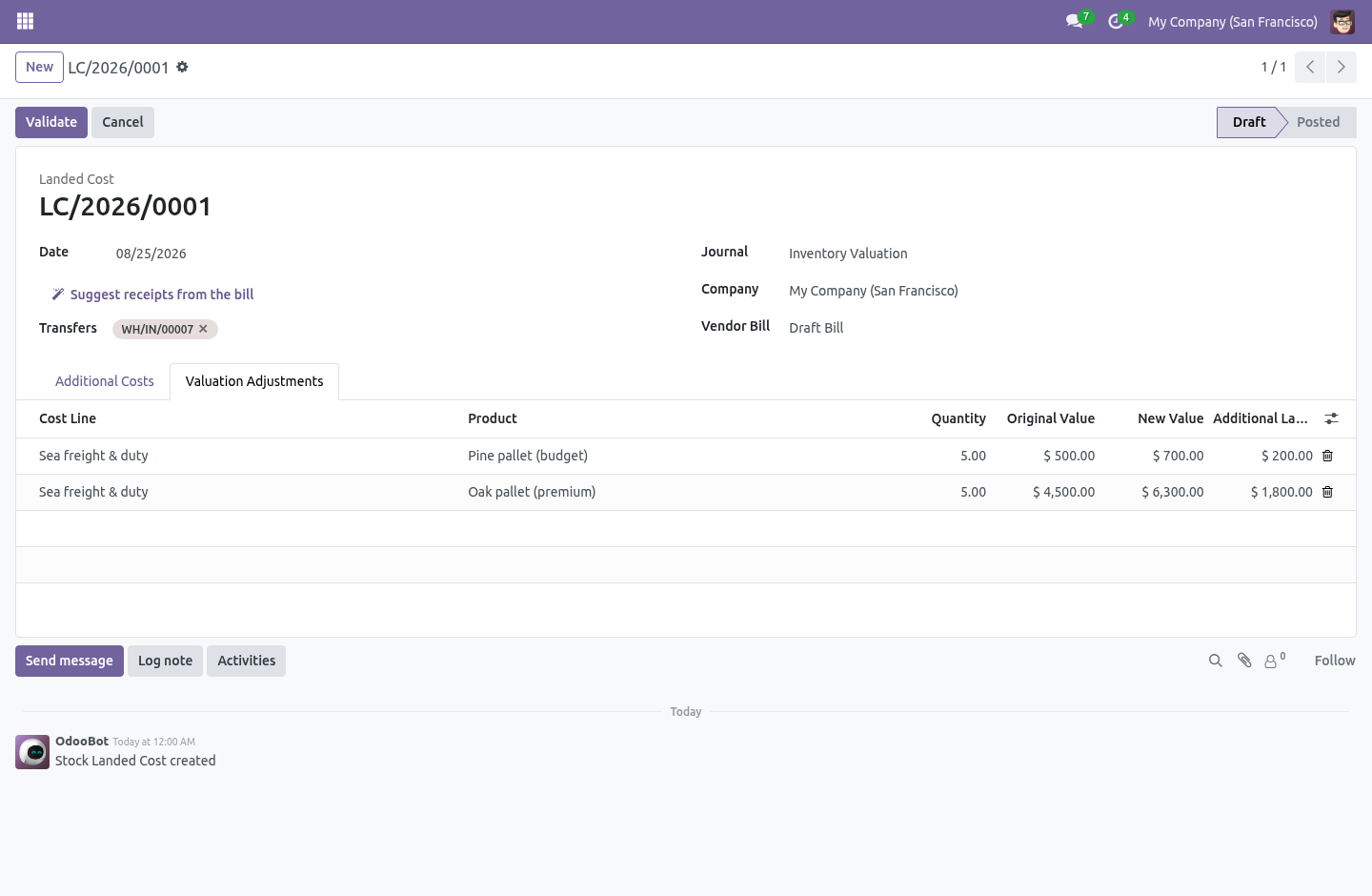
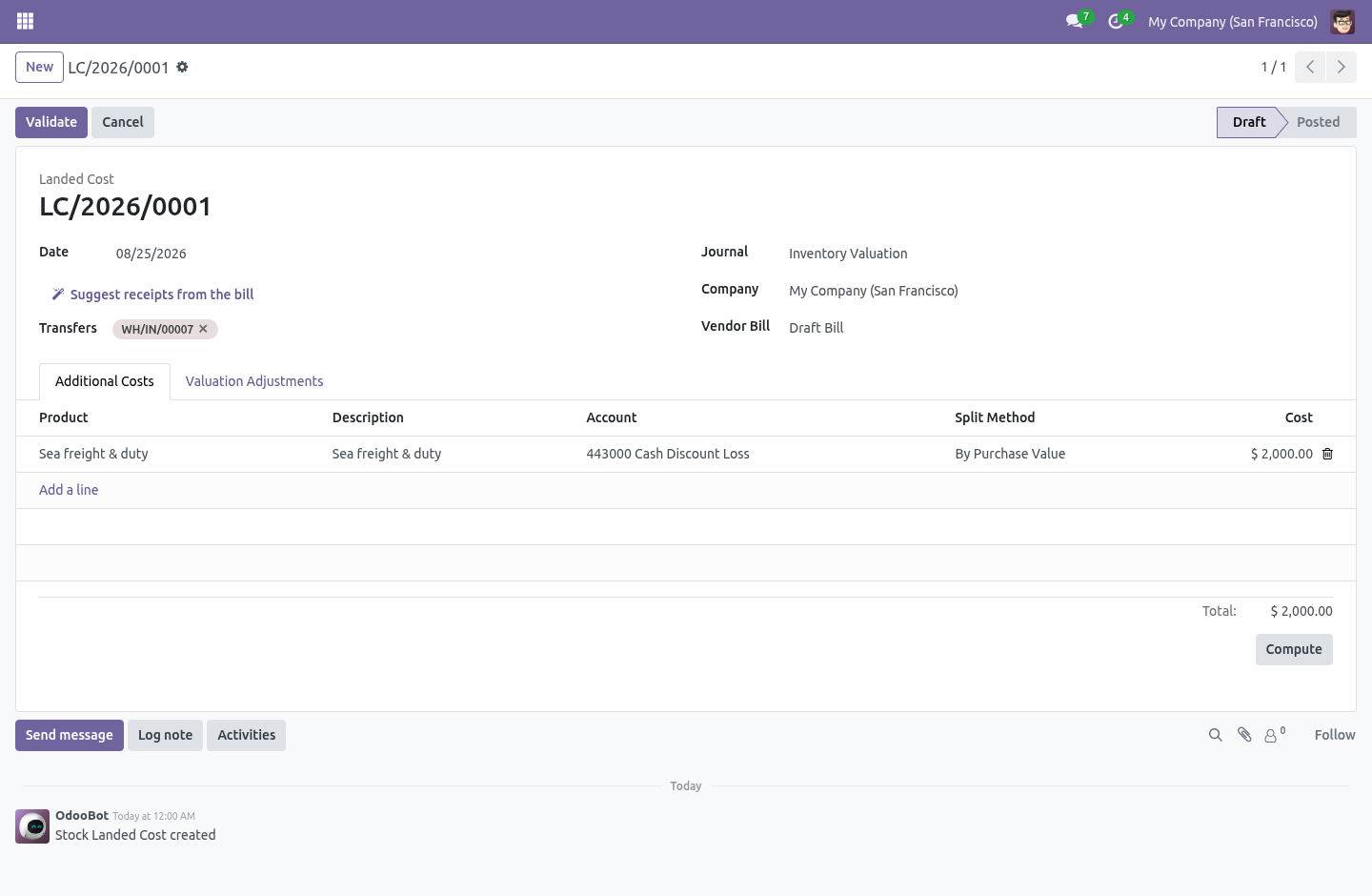
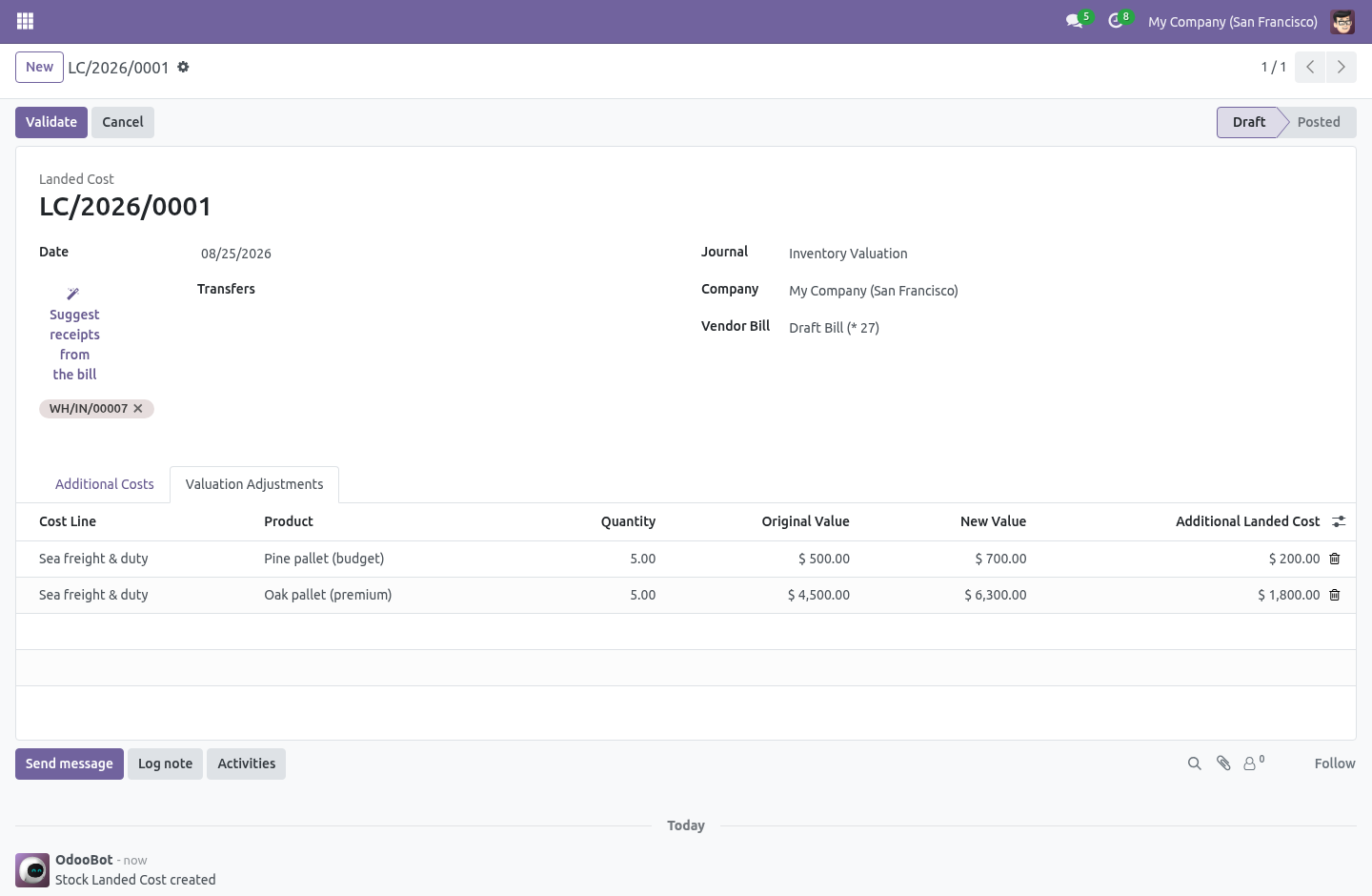
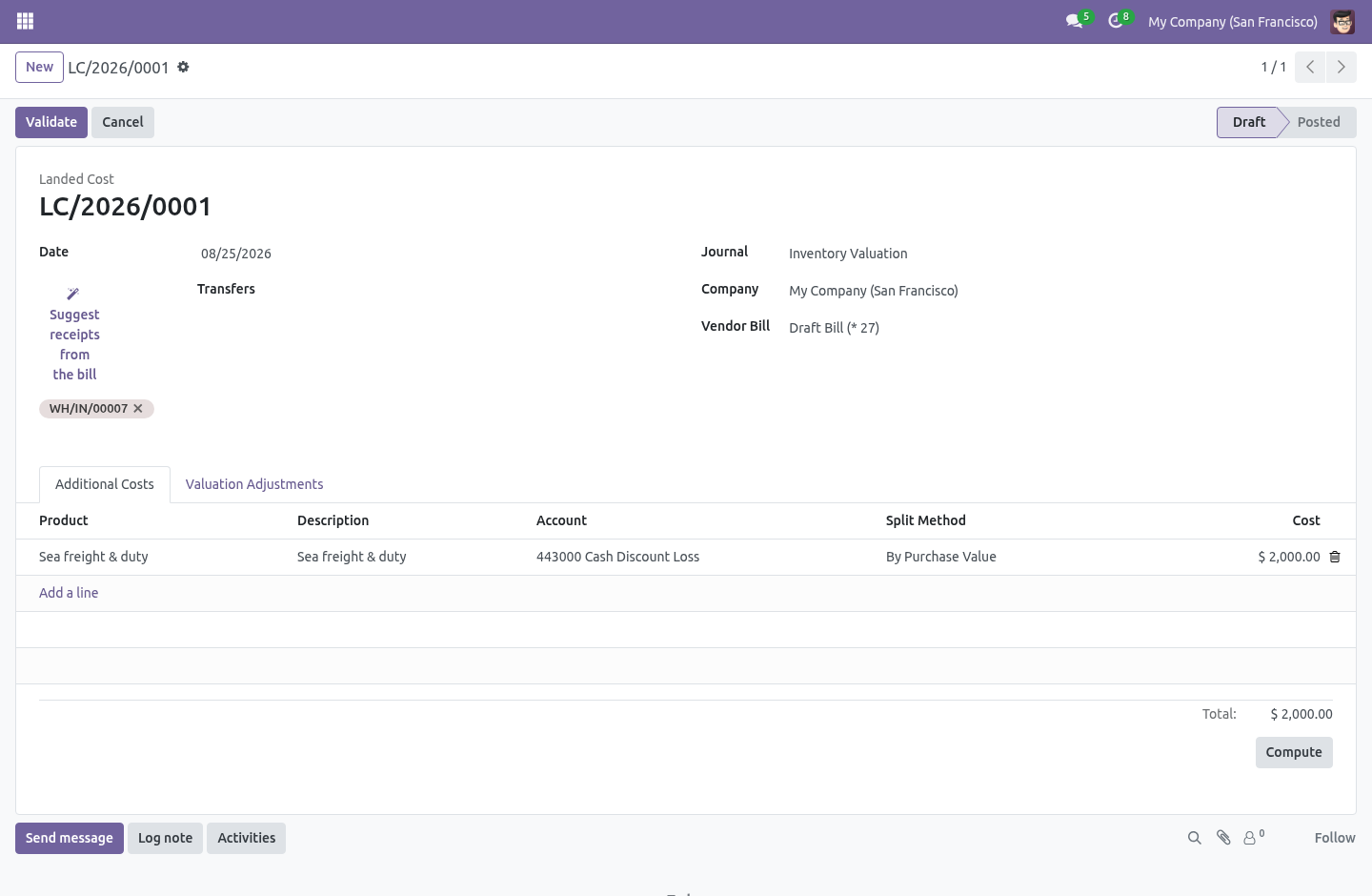
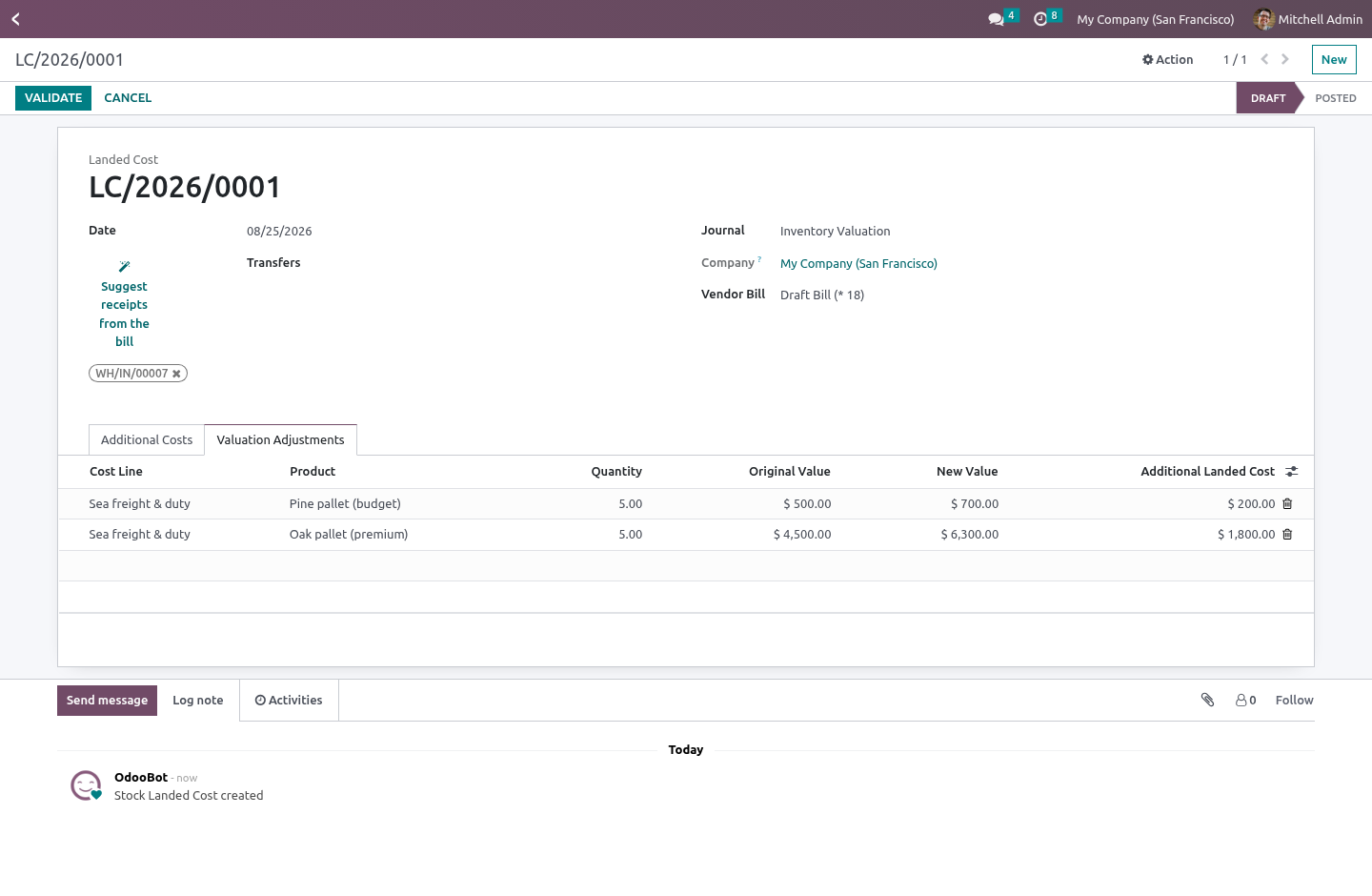
Split by purchase value. A €2,000 freight bill on a container holding one cheap pallet and one expensive one should fall mostly on the expensive pallet — by what was paid for the goods, not by a stock valuation that on a standard-costed product may be a round number set months ago. This adds a sixth split method, By Purchase Value, next to the five built in. The weight of each receipt line is its purchase value — the purchase-order unit price times the quantity received, converted to the company currency — so €100 of goods and €900 of goods carry the freight in a 1:9 ratio, not 1:1.
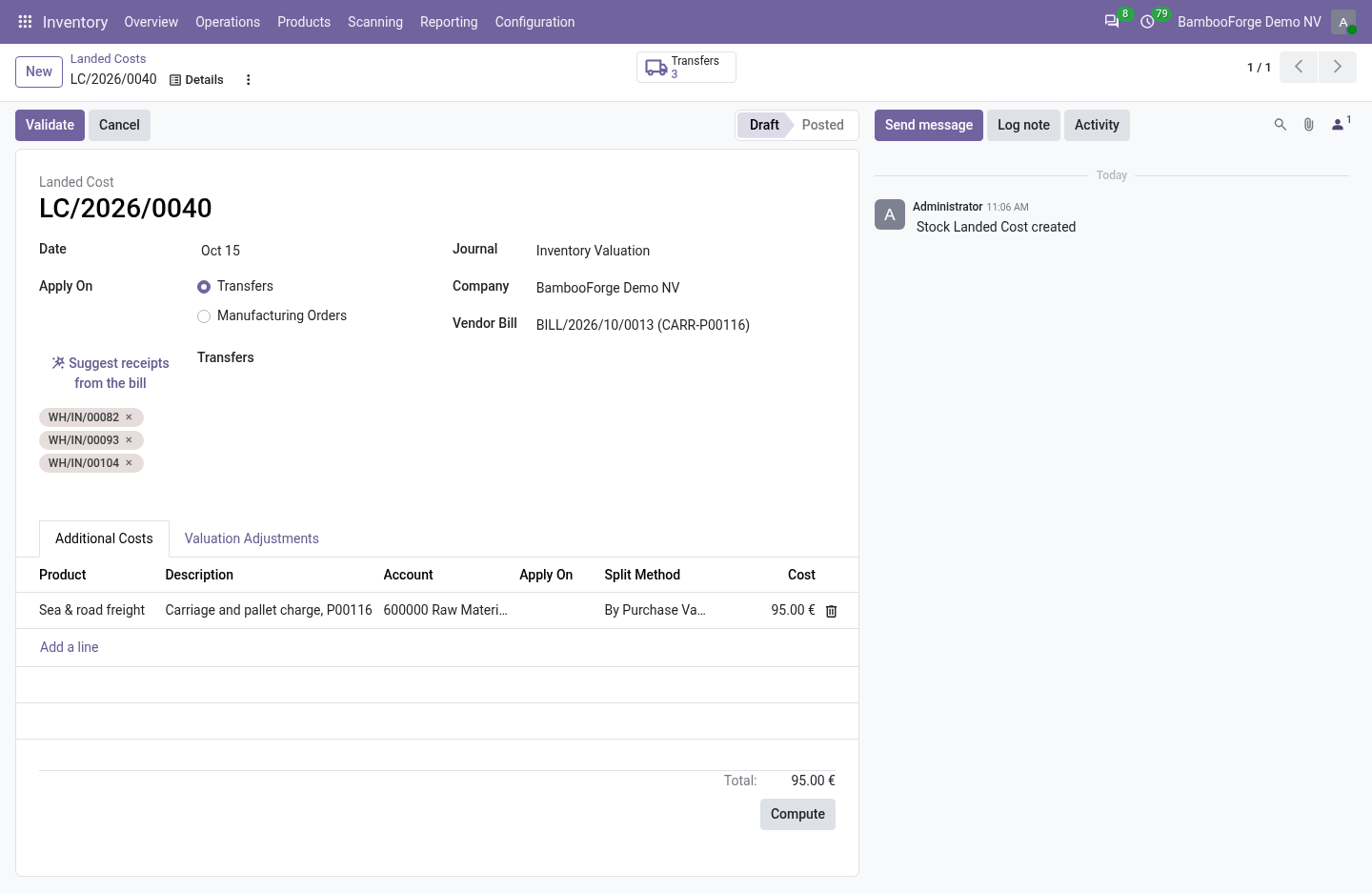
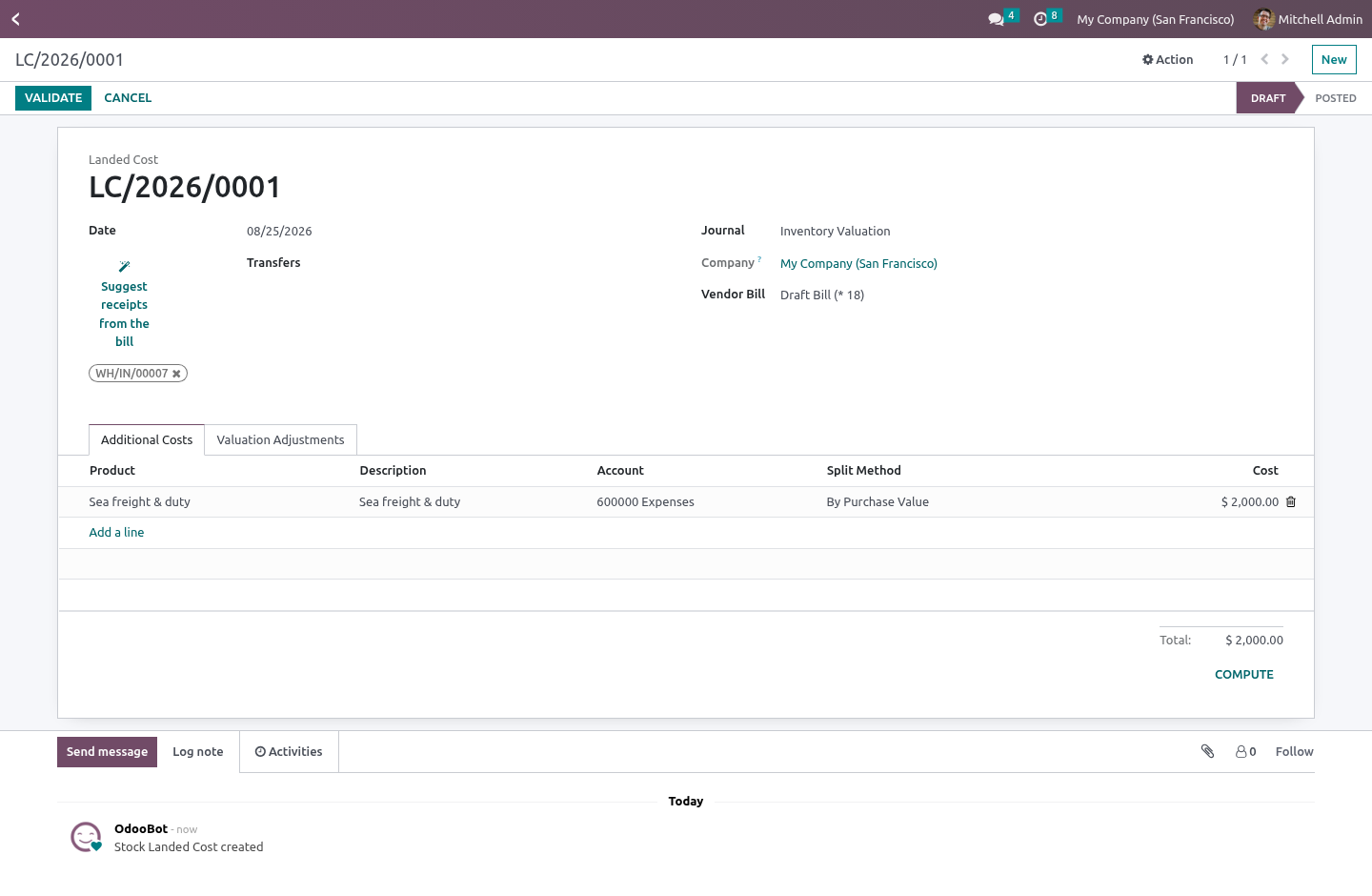
Suggest the receipts. A forwarder's bill names no purchase order, so the receipts it belongs to have to be found — and scrolling the transfer list for the three that match is the step nobody enjoys. Suggest receipts from the bill proposes them: the done incoming transfers from that vendor, within a month and a half of the bill's date, that no other landed cost has already claimed. You untick the wrong ones; nothing is applied until you compute and validate as usual.
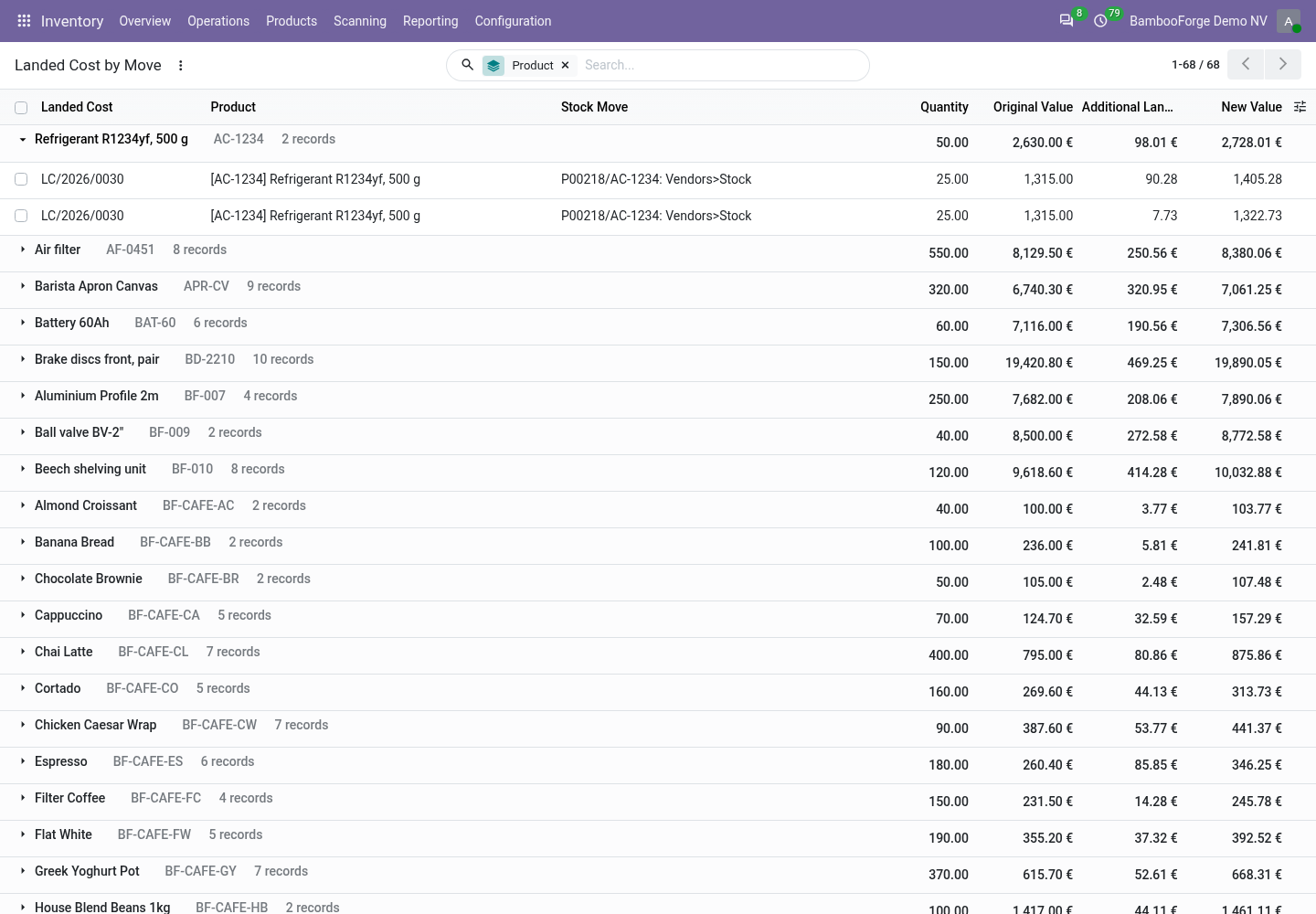
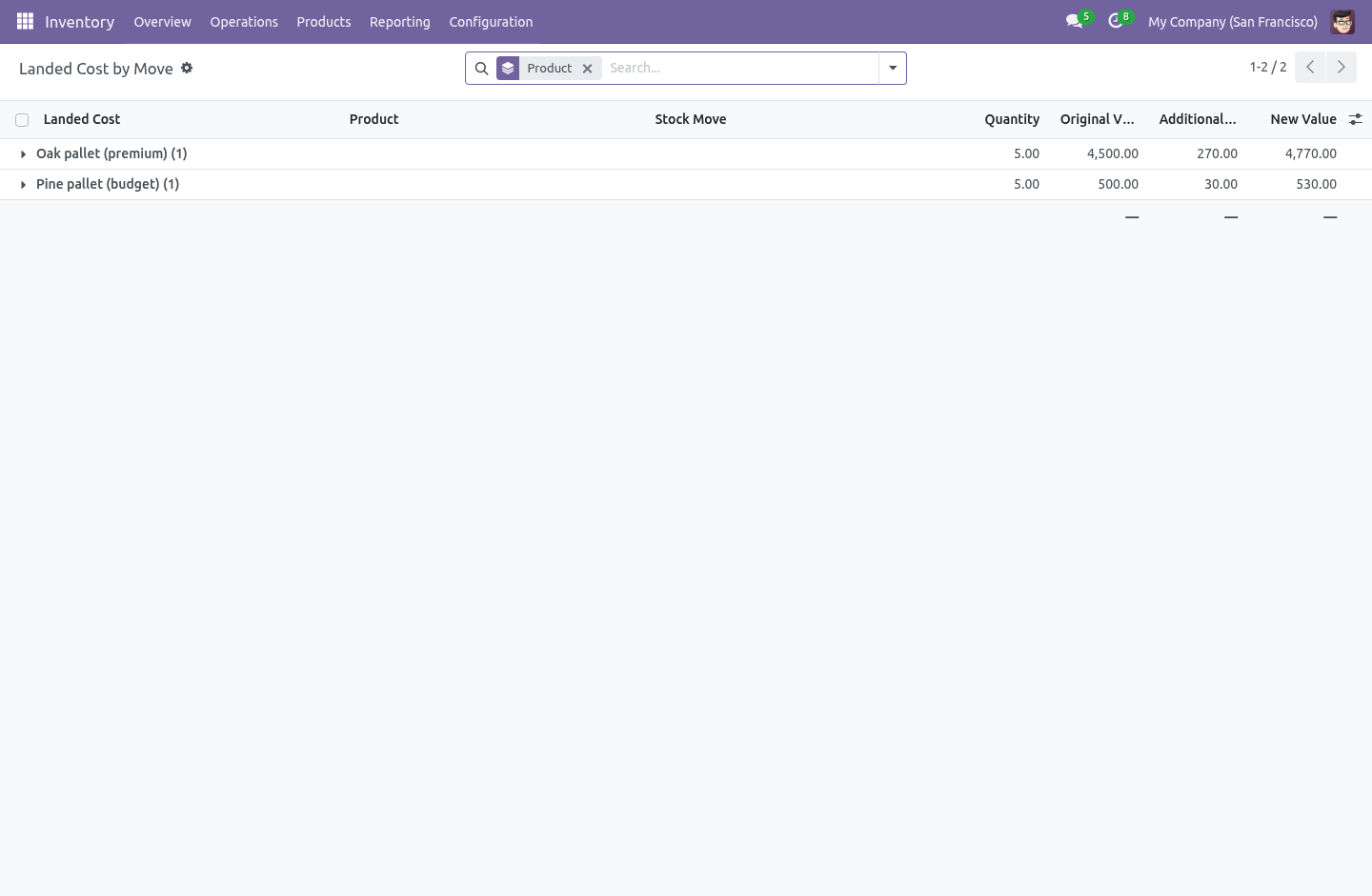
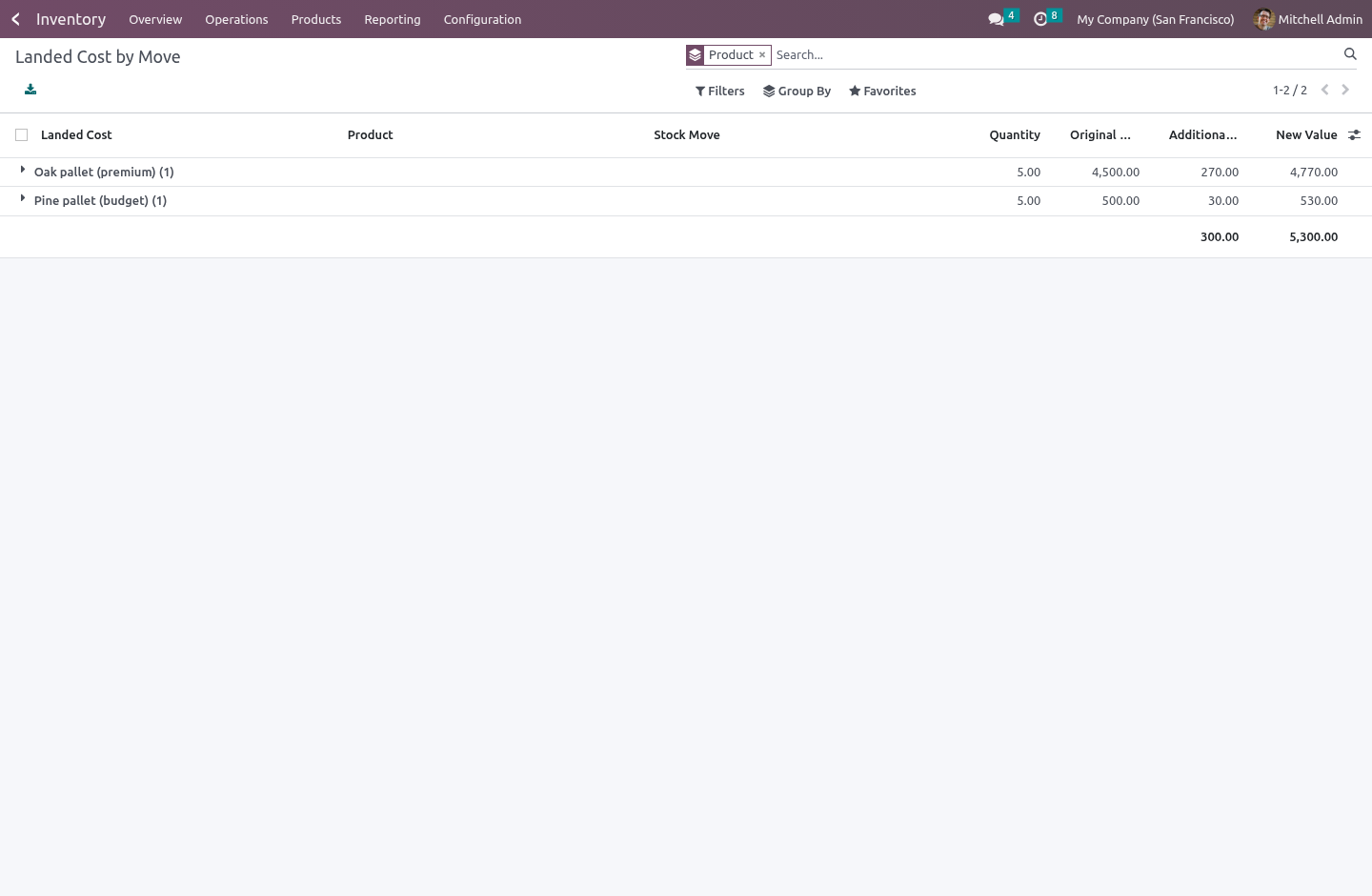
Read it back per receipt line. Inventory › Operations › Landed Costs › Landed Cost by Move is every landed cost that has been applied, line by line: the move, the product, the quantity, what it was worth before, the cost added, and the final cost. Group by product to answer "what did this pallet actually cost us to land", filter to one landed cost to see where a single bill went. How we make sure it works.
Before every release, 13 automated checks run against this app on Odoo 16, 17, 18, 19 and 20. Among them: A move with no purchase line does not crash. Suggest is refused once the cost is settled. Quantity counts not just unit price.
Freight and duty can land on the same receipt. Suggest adds new receipts and keeps the held one. The complete list is in the source you receive. Questions people ask.
Which Odoo versions does it run on? Odoo 16.0, 17.0, 18.0, 19.0, 20.0, on the series you buy it for; each series is its own listing. Community or Enterprise? Both.
It needs no Enterprise app. The complete manual is at docs dot bambooforge dot dev, the demo database is linked from the store page, and support answers within twenty-four hours. Links are in the description.
Transcript of the walkthrough (Odoo 19)
Landed Cost by Value. Split a freight or duty bill across receipts by purchase value, get the right receipts suggested, and read the landed cost on each line. Odoo's landed costs split a bill five ways — equally, by quantity, by weight, by volume, and by the stock value already on the goods. The one an importer actually asks for is missing, and the one manual step that eats the afternoon is finding which receipts a freight bill even belongs to.
In the next few minutes: landed cost by value, then split by purchase value, then suggest the receipts, then read it back per receipt line. Then what this app deliberately does not do, so you can tell before you buy whether it fits. Everything lives under Landed Cost by Move. Landed Cost by Value.
Odoo's landed costs split a bill five ways — equally, by quantity, by weight, by volume, and by the stock value already on the goods. The one an importer actually asks for is missing, and the one manual step that eats the afternoon is finding which receipts a freight bill even belongs to. Split by purchase value. A €2,000 freight bill on a container holding one cheap pallet and one expensive one should fall mostly on the expensive pallet — by what was paid for the goods, not by a stock valuation that on a standard-costed product may be a round number set months ago.
This adds a sixth split method, By Purchase Value, next to the five built in. The weight of each receipt line is its purchase value — the purchase-order unit price times the quantity received, converted to the company currency — so €100 of goods and €900 of goods carry the freight in a 1:9 ratio, not 1:1. Suggest the receipts. A forwarder's bill names no purchase order, so the receipts it belongs to have to be found — and scrolling the transfer list for the three that match is the step nobody enjoys.
Suggest receipts from the bill proposes them: the done incoming transfers from that vendor, within a month and a half of the bill's date, that no other landed cost has already claimed. You untick the wrong ones; nothing is applied until you compute and validate as usual. Read it back per receipt line. Inventory › Operations › Landed Costs › Landed Cost by Move is every landed cost that has been applied, line by line: the move, the product, the quantity, what it was worth before, the cost added, and the final cost.
Group by product to answer "what did this pallet actually cost us to land", filter to one landed cost to see where a single bill went. The complete manual is at docs dot bambooforge dot dev, the demo database is linked from the store page, and support answers within twenty-four hours. Links are in the description.
Transcript of the walkthrough (Odoo 18)
Landed Cost by Value. Split a freight or duty bill across receipts by purchase value, get the right receipts suggested, and read the landed cost on each line. Odoo's landed costs split a bill five ways — equally, by quantity, by weight, by volume, and by the stock value already on the goods. The one an importer actually asks for is missing, and the one manual step that eats the afternoon is finding which receipts a freight bill even belongs to.
In the next few minutes: landed cost by value, then split by purchase value, then suggest the receipts, then read it back per receipt line. Then what this app deliberately does not do, so you can tell before you buy whether it fits. Everything lives under Landed Cost by Move. Landed Cost by Value.
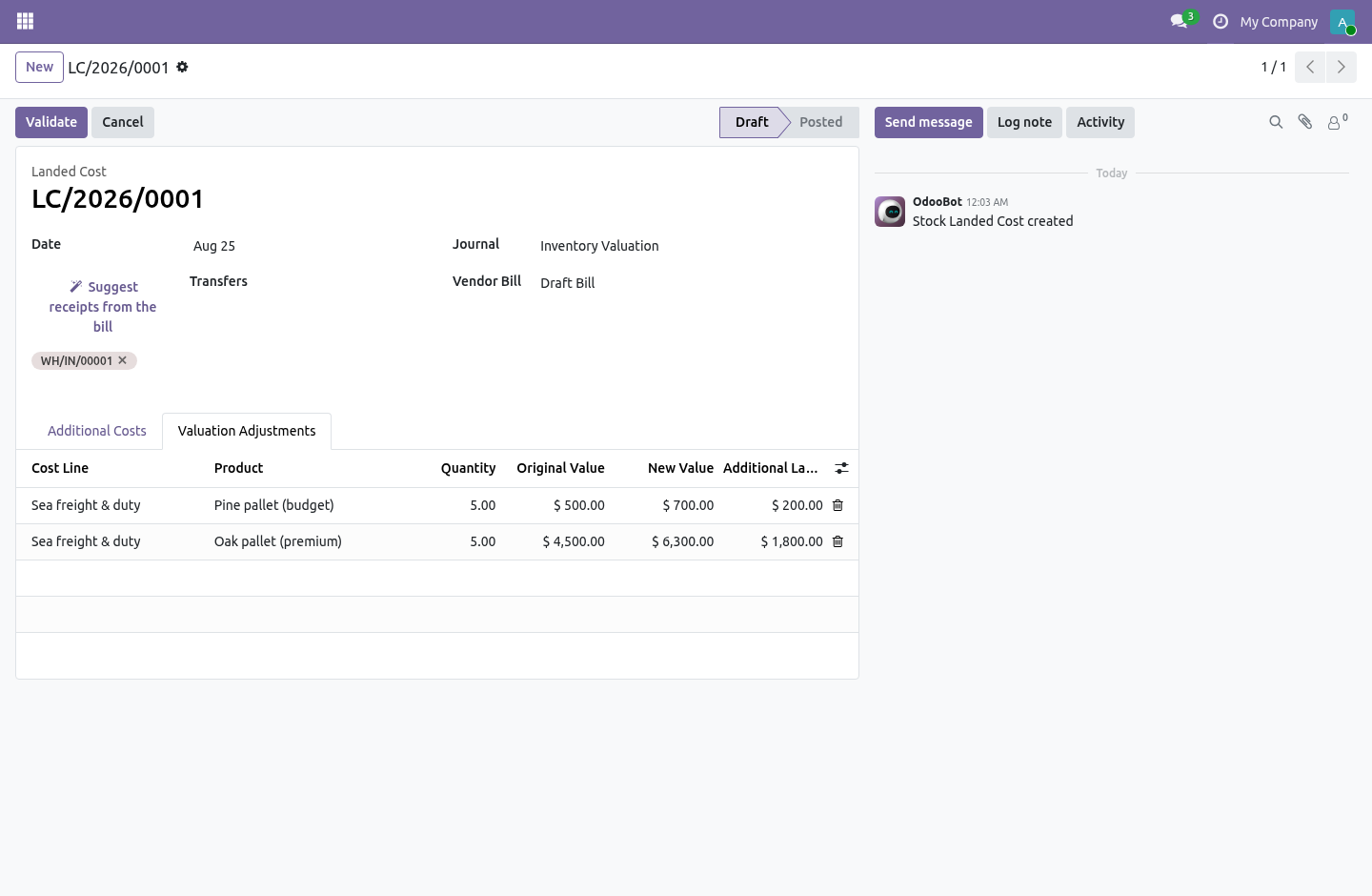
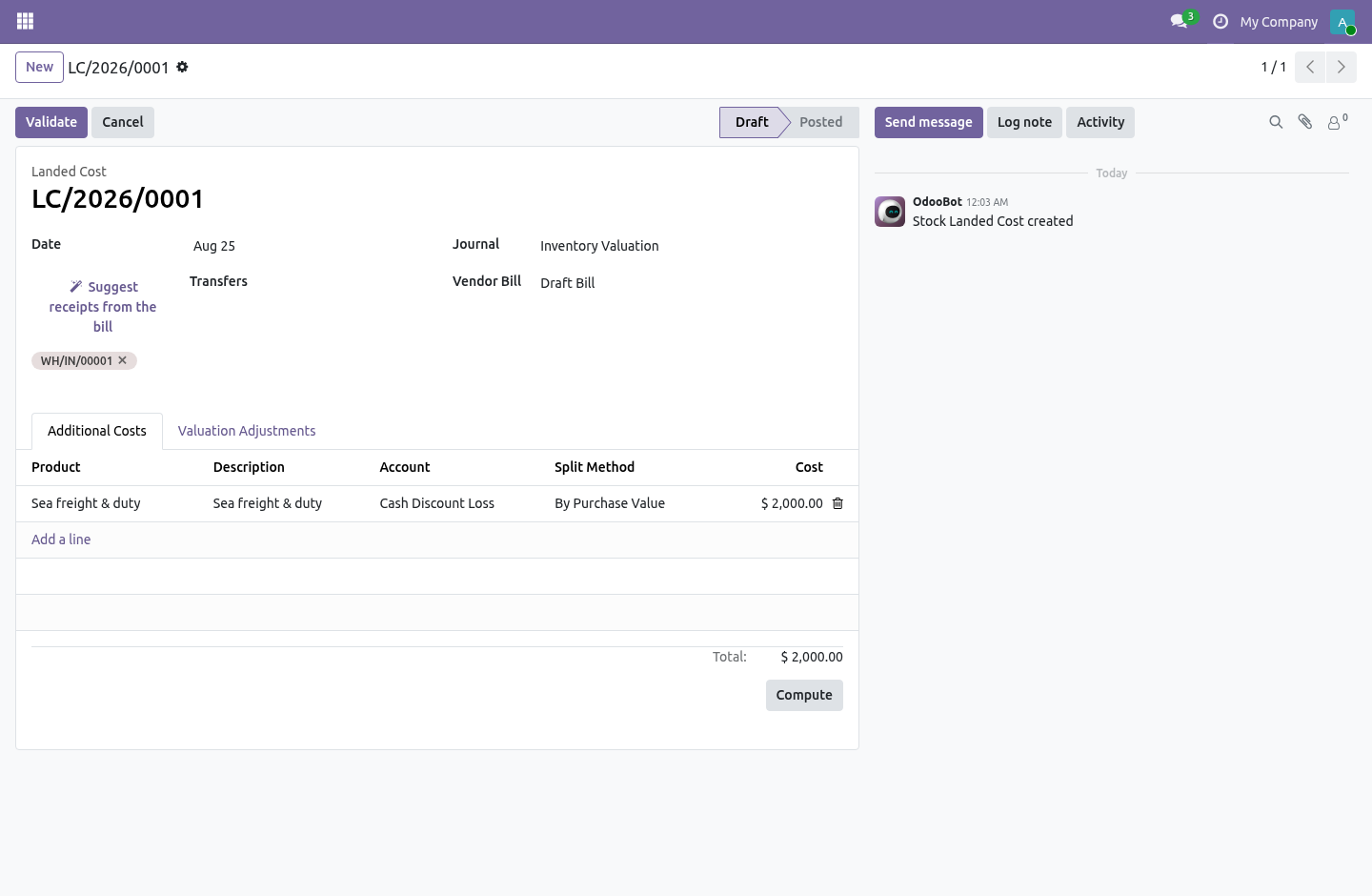
Odoo's landed costs split a bill five ways — equally, by quantity, by weight, by volume, and by the stock value already on the goods. The one an importer actually asks for is missing, and the one manual step that eats the afternoon is finding which receipts a freight bill even belongs to. Split by purchase value. A €2,000 freight bill on a container holding one cheap pallet and one expensive one should fall mostly on the expensive pallet — by what was paid for the goods, not by a stock valuation that on a standard-costed product may be a round number set months ago.
This adds a sixth split method, By Purchase Value, next to the five built in. The weight of each receipt line is its purchase value — the purchase-order unit price times the quantity received, converted to the company currency — so €100 of goods and €900 of goods carry the freight in a 1:9 ratio, not 1:1. Suggest the receipts. A forwarder's bill names no purchase order, so the receipts it belongs to have to be found — and scrolling the transfer list for the three that match is the step nobody enjoys.
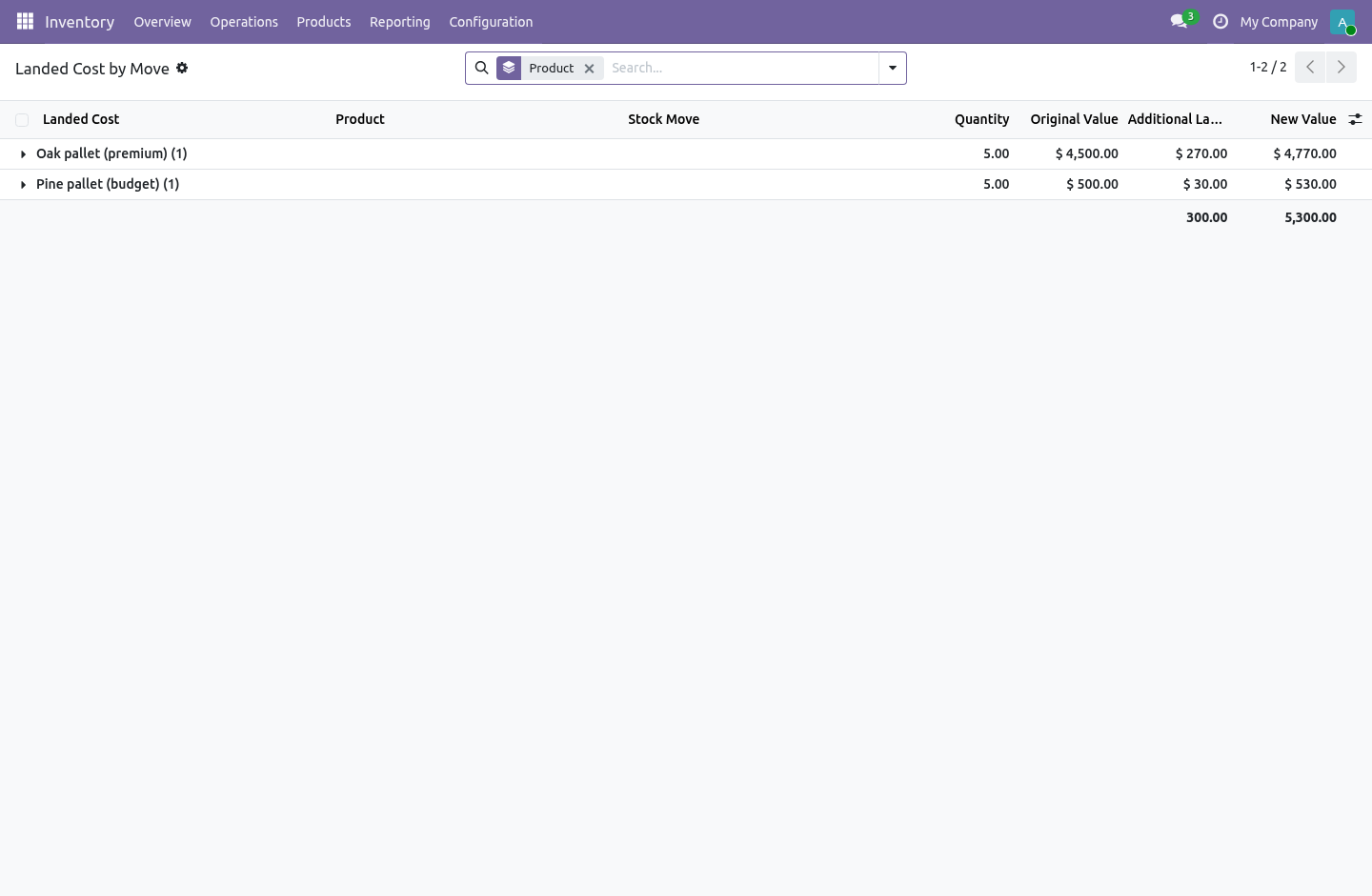
Suggest receipts from the bill proposes them: the done incoming transfers from that vendor, within a month and a half of the bill's date, that no other landed cost has already claimed. You untick the wrong ones; nothing is applied until you compute and validate as usual. Read it back per receipt line. Inventory › Operations › Landed Costs › Landed Cost by Move is every landed cost that has been applied, line by line: the move, the product, the quantity, what it was worth before, the cost added, and the final cost.
Group by product to answer "what did this pallet actually cost us to land", filter to one landed cost to see where a single bill went. The complete manual is at docs dot bambooforge dot dev, the demo database is linked from the store page, and support answers within twenty-four hours. Links are in the description.
Transcript of the walkthrough (Odoo 17)
Landed Cost by Value. Split a freight or duty bill across receipts by purchase value, get the right receipts suggested, and read the landed cost on each line. Odoo's landed costs split a bill five ways — equally, by quantity, by weight, by volume, and by the stock value already on the goods. The one an importer actually asks for is missing, and the one manual step that eats the afternoon is finding which receipts a freight bill even belongs to.
In the next few minutes: landed cost by value, then split by purchase value, then suggest the receipts, then read it back per receipt line. Then what this app deliberately does not do, so you can tell before you buy whether it fits. Everything lives under Landed Cost by Move. Landed Cost by Value.
Odoo's landed costs split a bill five ways — equally, by quantity, by weight, by volume, and by the stock value already on the goods. The one an importer actually asks for is missing, and the one manual step that eats the afternoon is finding which receipts a freight bill even belongs to. Split by purchase value. A €2,000 freight bill on a container holding one cheap pallet and one expensive one should fall mostly on the expensive pallet — by what was paid for the goods, not by a stock valuation that on a standard-costed product may be a round number set months ago.
This adds a sixth split method, By Purchase Value, next to the five built in. The weight of each receipt line is its purchase value — the purchase-order unit price times the quantity received, converted to the company currency — so €100 of goods and €900 of goods carry the freight in a 1:9 ratio, not 1:1. Suggest the receipts. A forwarder's bill names no purchase order, so the receipts it belongs to have to be found — and scrolling the transfer list for the three that match is the step nobody enjoys.
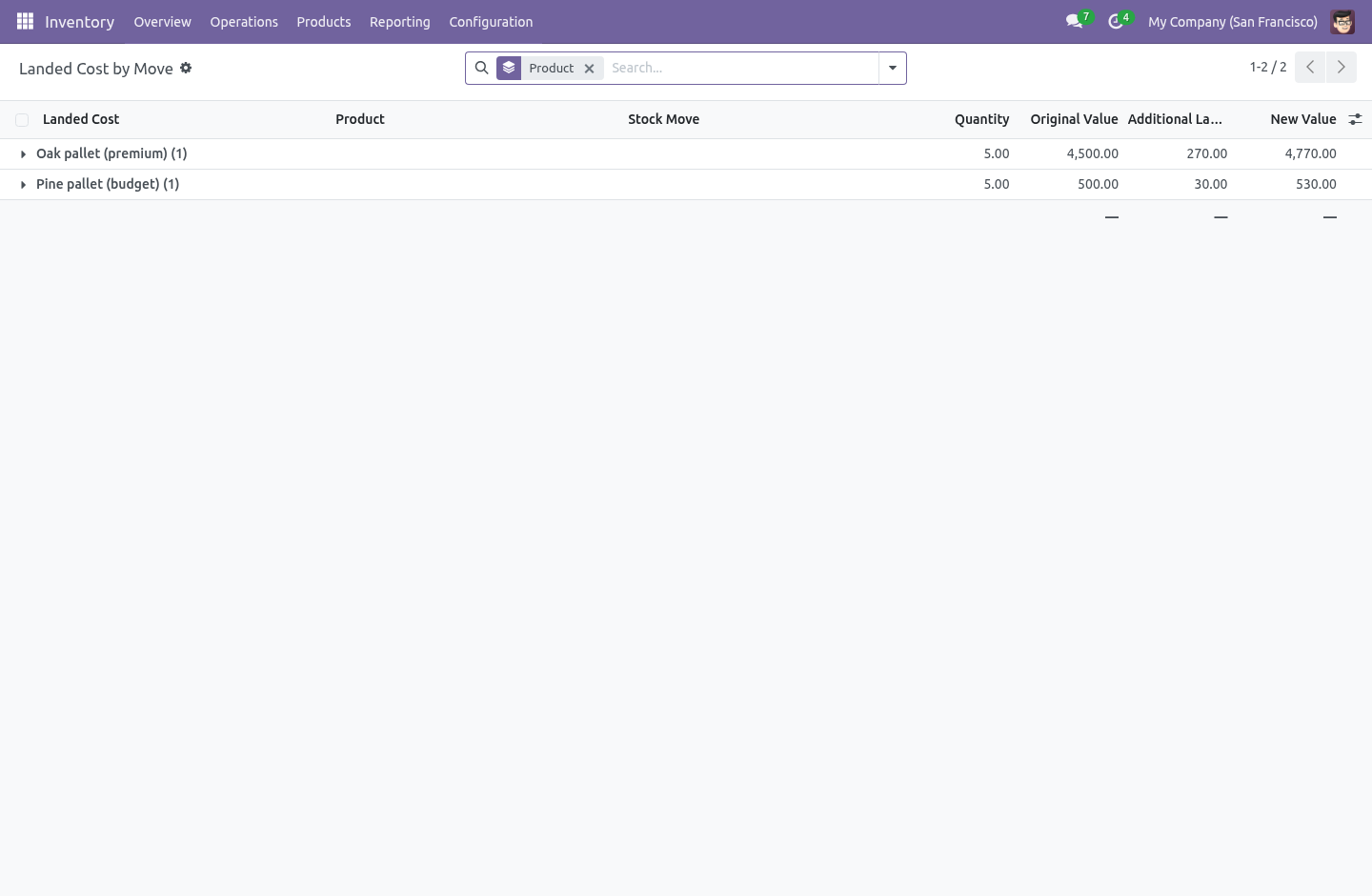
Suggest receipts from the bill proposes them: the done incoming transfers from that vendor, within a month and a half of the bill's date, that no other landed cost has already claimed. You untick the wrong ones; nothing is applied until you compute and validate as usual. Read it back per receipt line. Inventory › Operations › Landed Costs › Landed Cost by Move is every landed cost that has been applied, line by line: the move, the product, the quantity, what it was worth before, the cost added, and the final cost.
Group by product to answer "what did this pallet actually cost us to land", filter to one landed cost to see where a single bill went. The complete manual is at docs dot bambooforge dot dev, the demo database is linked from the store page, and support answers within twenty-four hours. Links are in the description.
Transcript of the walkthrough (Odoo 16)
Landed Cost by Value. Split a freight or duty bill across receipts by purchase value, get the right receipts suggested, and read the landed cost on each line. Odoo's landed costs split a bill five ways — equally, by quantity, by weight, by volume, and by the stock value already on the goods. The one an importer actually asks for is missing, and the one manual step that eats the afternoon is finding which receipts a freight bill even belongs to.
In the next few minutes: landed cost by value, then split by purchase value, then suggest the receipts, then read it back per receipt line. Then what this app deliberately does not do, so you can tell before you buy whether it fits. Everything lives under Landed Cost by Move. Landed Cost by Value.
Odoo's landed costs split a bill five ways — equally, by quantity, by weight, by volume, and by the stock value already on the goods. The one an importer actually asks for is missing, and the one manual step that eats the afternoon is finding which receipts a freight bill even belongs to. Split by purchase value. A €2,000 freight bill on a container holding one cheap pallet and one expensive one should fall mostly on the expensive pallet — by what was paid for the goods, not by a stock valuation that on a standard-costed product may be a round number set months ago.
This adds a sixth split method, By Purchase Value, next to the five built in. The weight of each receipt line is its purchase value — the purchase-order unit price times the quantity received, converted to the company currency — so €100 of goods and €900 of goods carry the freight in a 1:9 ratio, not 1:1. Suggest the receipts. A forwarder's bill names no purchase order, so the receipts it belongs to have to be found — and scrolling the transfer list for the three that match is the step nobody enjoys.
Suggest receipts from the bill proposes them: the done incoming transfers from that vendor, within a month and a half of the bill's date, that no other landed cost has already claimed. You untick the wrong ones; nothing is applied until you compute and validate as usual. Read it back per receipt line. Inventory › Operations › Landed Costs › Landed Cost by Move is every landed cost that has been applied, line by line: the move, the product, the quantity, what it was worth before, the cost added, and the final cost.
Group by product to answer "what did this pallet actually cost us to land", filter to one landed cost to see where a single bill went. The complete manual is at docs dot bambooforge dot dev, the demo database is linked from the store page, and support answers within twenty-four hours. Links are in the description.
Key facts
- What it is
- Split a freight or duty bill across receipts by purchase value, get the right receipts suggested, and read the landed cost on each line.
- For
- Purchases
- Odoo versions
- 16.0, 17.0, 18.0, 19.0, 20.0 - Community and Enterprise
- Runs on
- Odoo.sh or Odoo you host yourself - not Odoo Online, which accepts no third-party apps
- Price
- 129 EUR, one-time, on the Odoo Apps Store
- Technical name
- bambooforge_landed_cost
- Not for
- It does not change how landed costs are applied. The apply is Odoo's own — the journal entry, the valuation layers and the traceability are core's, untouched, so nothing about your period close changes.; It does not touch the five built-in split methods.; It splits by the purchase price on the order line; a receipt with no purchase line behind it (a manual inventory move) weighs nothing and is skipped, rather than stopping the computation.
- Manual last updated
- 2026-10-15
Landed Cost by Value
Odoo's landed costs split a bill five ways — equally, by quantity, by weight, by volume, and by the stock value already on the goods. The one an importer actually asks for is missing, and the one manual step that eats the afternoon is finding which receipts a freight bill even belongs to.
Split by purchase value
A €2,000 freight bill on a container holding one cheap pallet and one expensive one should fall mostly on the expensive pallet — by what was paid for the goods, not by a stock valuation that on a standard-costed product may be a round number set months ago.
This adds a sixth split method, By Purchase Value, next to the five built in. The weight of each receipt line is its purchase value — the purchase-order unit price times the quantity received, converted to the company currency — so €100 of goods and €900 of goods carry the freight in a 1:9 ratio, not 1:1.
The other five methods are untouched: the new split is computed after Odoo's own, and only for the lines that use it. A landed cost that splits by weight splits by weight, to the cent, exactly as before.
Suggest the receipts
A forwarder's bill names no purchase order, so the receipts it belongs to have to be found — and scrolling the transfer list for the three that match is the step nobody enjoys.
Suggest receipts from the bill proposes them: the done incoming transfers from that vendor, within a month and a half of the bill's date, that no other landed cost has already claimed. You untick the wrong ones; nothing is applied until you compute and validate as usual.
Read it back per receipt line
Inventory › Operations › Landed Costs › Landed Cost by Move is every landed cost that has been applied, line by line: the move, the product, the quantity, what it was worth before, the cost added, and the final cost. Group by product to answer "what did this pallet actually cost us to land", filter to one landed cost to see where a single bill went.
What it does not do
It does not change how landed costs are applied. The apply is Odoo's own — the journal entry, the valuation layers and the traceability are core's, untouched, so nothing about your period close changes.
It does not touch the five built-in split methods.
It splits by the purchase price on the order line; a receipt with no purchase line behind it (a manual inventory move) weighs nothing and is skipped, rather than stopping the computation.
How we make sure it works
Before every release, 13 automated checks run against this app on Odoo 16, 17, 18, 19 and 20. Among them:
A move with no purchase line does not crash.
Suggest is refused once the cost is settled.
Quantity counts not just unit price.
Freight and duty can land on the same receipt.
Suggest adds new receipts and keeps the held one.
The complete list is in the source you receive.
Install
Copy bambooforge_landed_cost into your addons path and update the app list, or install the ZIP from the Odoo Apps Store.
Install Landed Cost by Value.
Open Landed Cost by Move.
Questions people ask
- Which Odoo versions does it run on?
Odoo 16.0, 17.0, 18.0, 19.0, 20.0, on the series you buy it for; each series is its own listing.
- Community or Enterprise?
Both. It needs no Enterprise app.
- What does it need?
The standard purchase_stock, stock_landed_costs apps. No extra Python package.
- Where does it show up?
Under the Landed Cost by Move menu.
- Does anything leave my server?
No. It makes no call outside your Odoo server: no telemetry, no licence check, no third-party service.
- What happens if I uninstall it?
Odoo drops the app's own tables and fields; the standard records it worked on (contacts, orders, products) stay as they are.