 BambooForge Labs
Construction Job Costing & Cost Control
Construction job costing: budget by phase and cost type, commitments from purchase orders, actuals from bills and timesheets, cost to complete.
Available for Odoo 16.0, Odoo 17.0, Odoo 18.0, Odoo 19.0, Odoo 20.0. Technical name bambooforge_job_costing.
Transcript of the walkthrough (Odoo 20)
Construction Job Costing & Cost Control. Construction job costing: budget by phase and cost type, commitments from purchase orders, actuals from bills and timesheets, cost to complete. Said before you buy, because it is the half that decides whether the app fits: In the next few minutes: construction job costing & cost control, then the four numbers, then set a job up, then let the documents do the work, then change orders. Then what this app deliberately does not do, so you can tell before you buy whether it fits.
Everything lives under Job Costing then Jobs then Cost to Complete then Cost Entries. 1. Install BambooForge Construction Job Costing (depends on Accounting, Purchase and Project). 2.
Give the estimator and the PM Job Costing: Manager; site staff can get Job Costing: User, which reads everything and can add cost entries. 3. The Job Costing menu appears with Jobs, Cost to Complete, Cost Entries, Change Orders and Phases. Construction Job Costing & Cost Control.
A contractor's question is never what did we spend — it is will this job still make money. That takes four numbers per phase, and this app keeps all four current from the documents you already raise. The four numbers. Budget — what the estimate said, by phase and cost type, plus whatever approved change orders have moved.
Committed — purchase orders confirmed and not yet billed. The money is spoken for even though no bill has arrived. Set a job up. 1.
Job number and name — the number is unique per company and is what everybody will type. 2. Customer and original contract — what was signed. 3.
Phases — the way you cut the job up, with your own cost codes (03300 Slab, 07500 Roofing…). 4. Budget — one line per phase and cost type (labour, material, subcontract, equipment, other) with the estimate in Original budget. Press Start job.
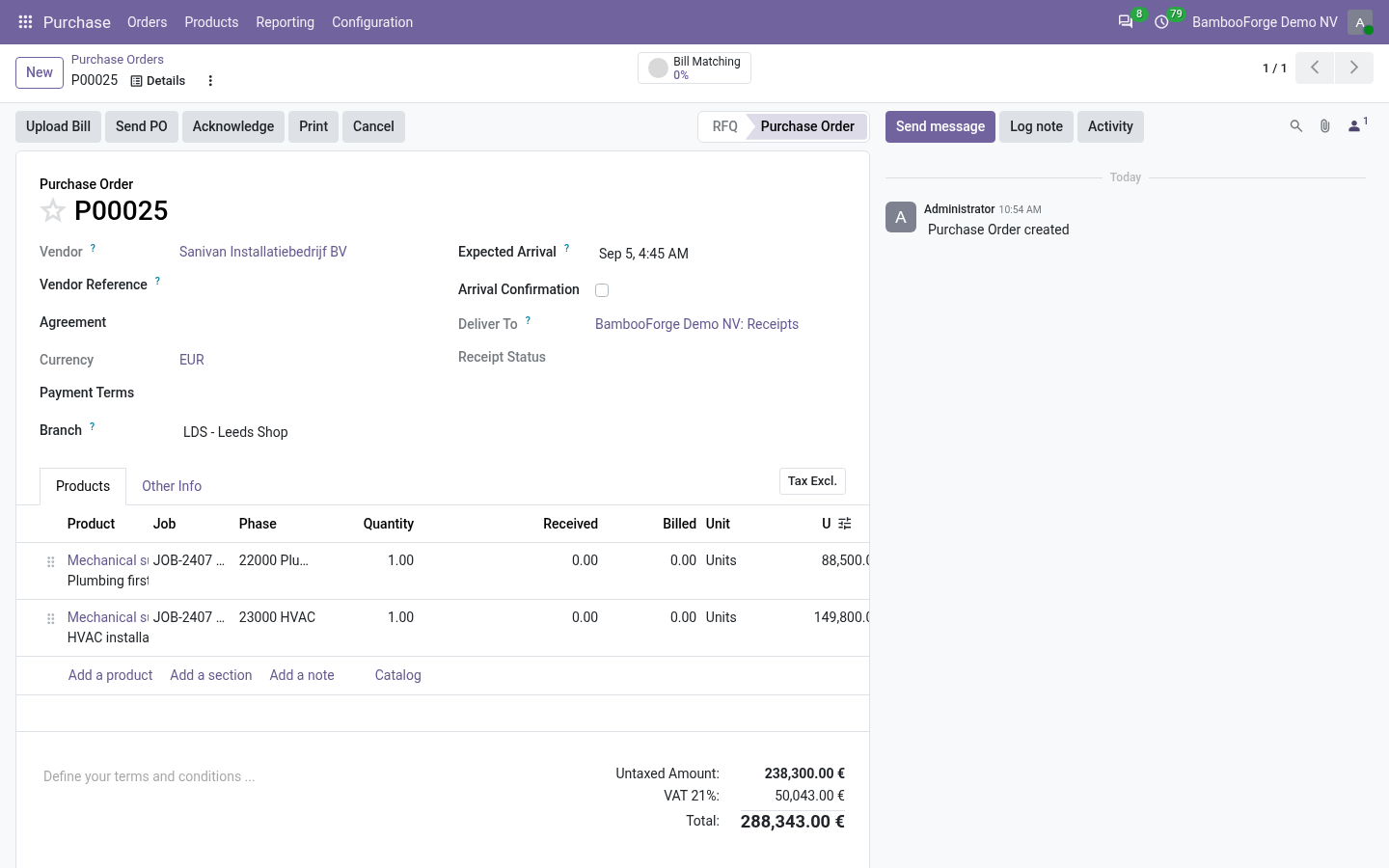
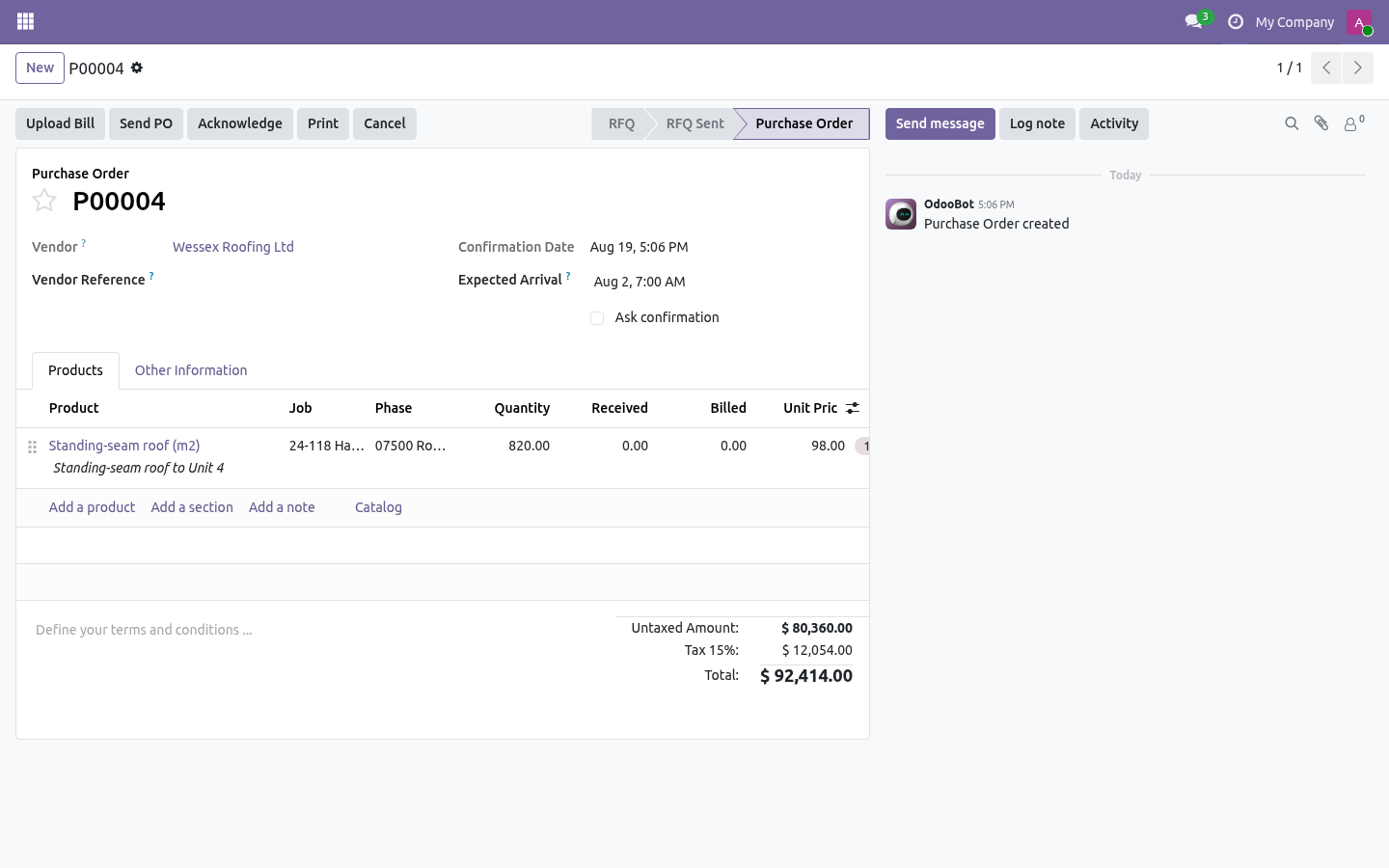
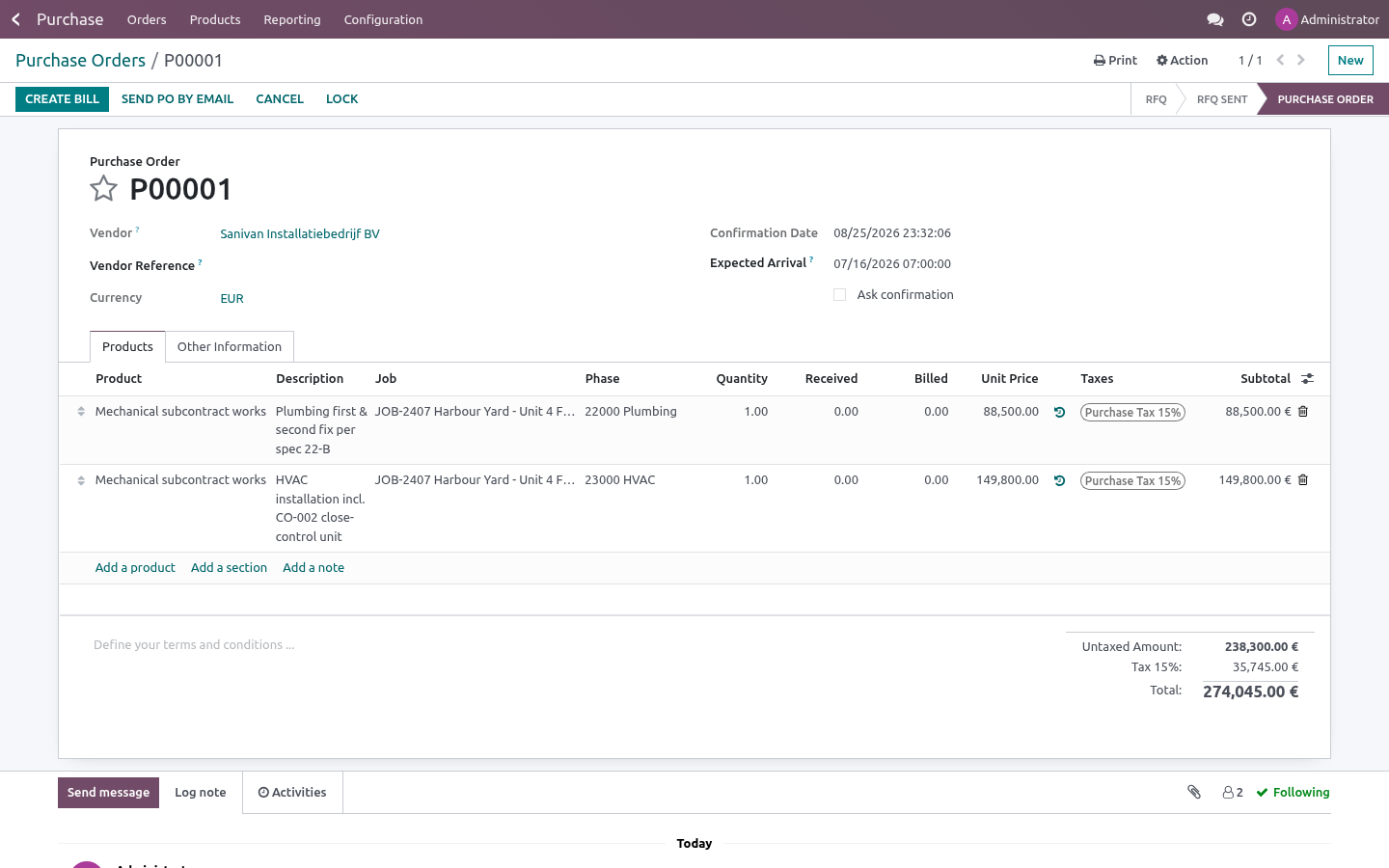
A job cannot start without a budget: there would be nothing to measure against. Let the documents do the work. Purchase orders. Every order line has Job, Phase and Cost type.
Confirm the order and the line becomes a commitment on that budget line. Cancel it and the commitment goes. Vendor bills. Post a bill and it becomes an actual.
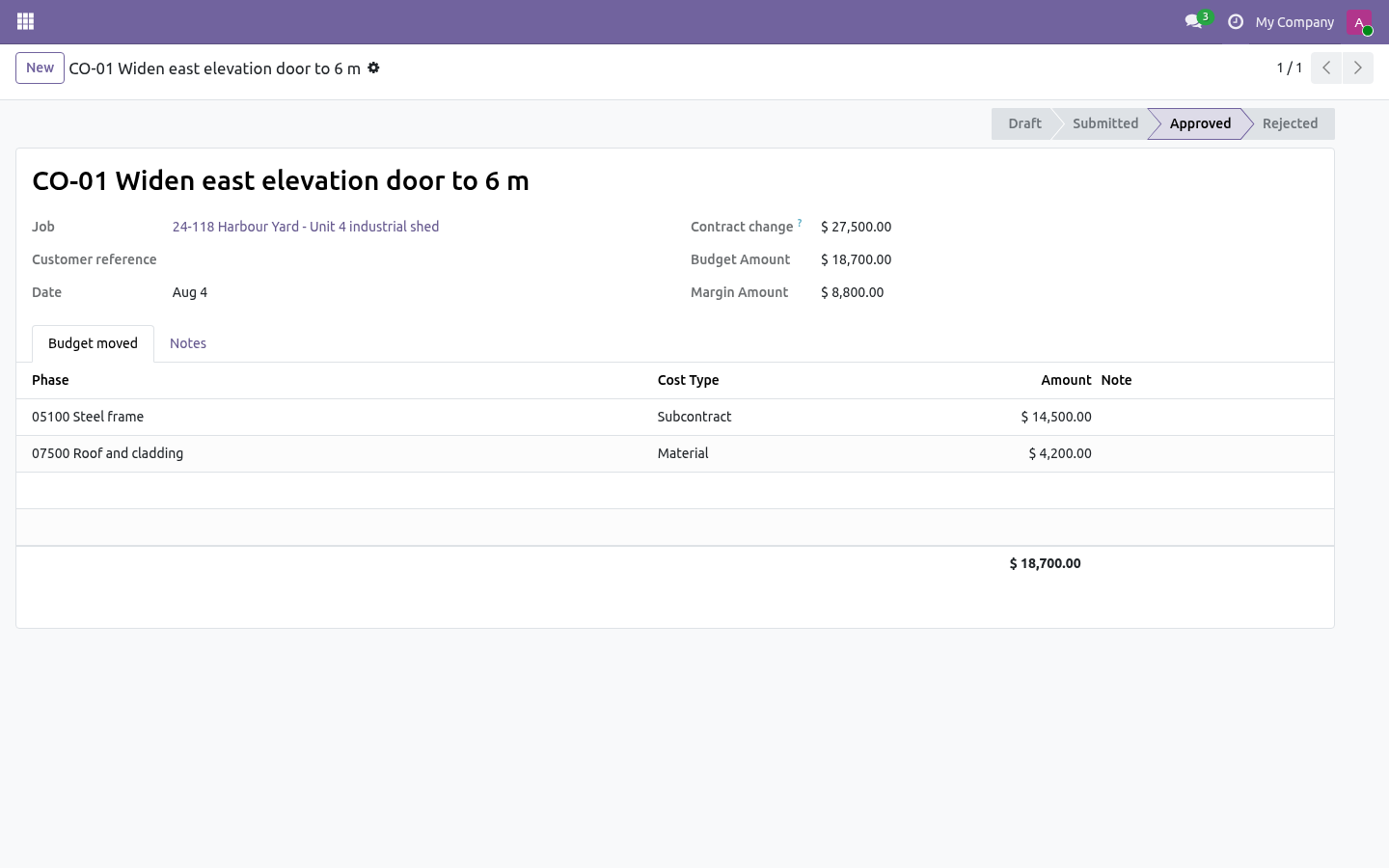
A bill made from a purchase order inherits the order line's job, phase and cost type — leave those fields empty on the bill and the commitment is released by exactly the amount billed. Reset the bill to draft and both move back. Change orders. A change order carries two things: the contract change (what the customer agreed to pay) and the budget lines it moves (what it will cost, by phase and cost type).
The difference is the change order's own margin, shown on the form before anybody signs. Nothing moves while the change order is draft or submitted. Approve it and the contract value and the budgets both move — and an approved change order cannot be reopened: raise a reversing one instead, so the baseline stays honest. Reading the job.
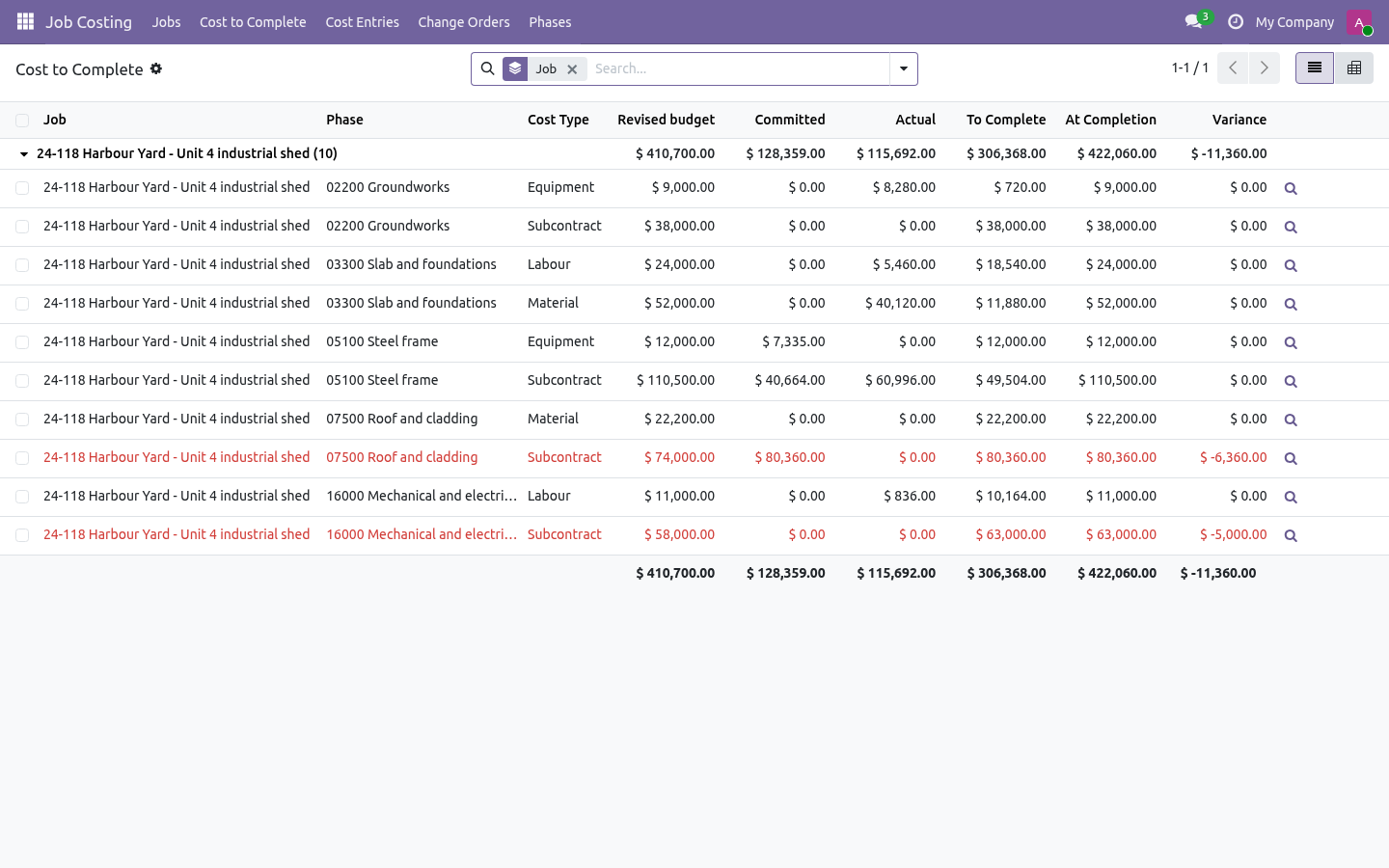
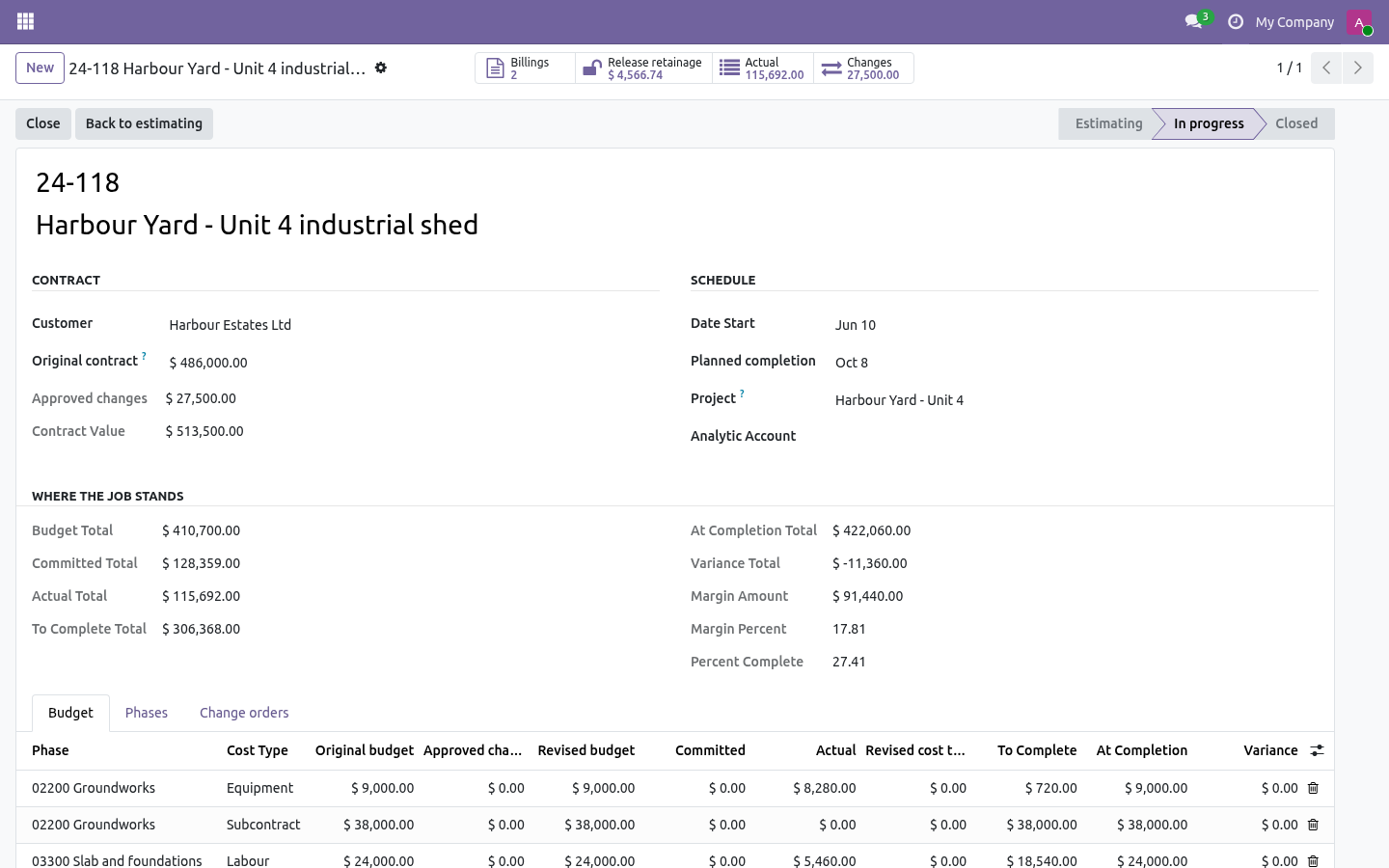
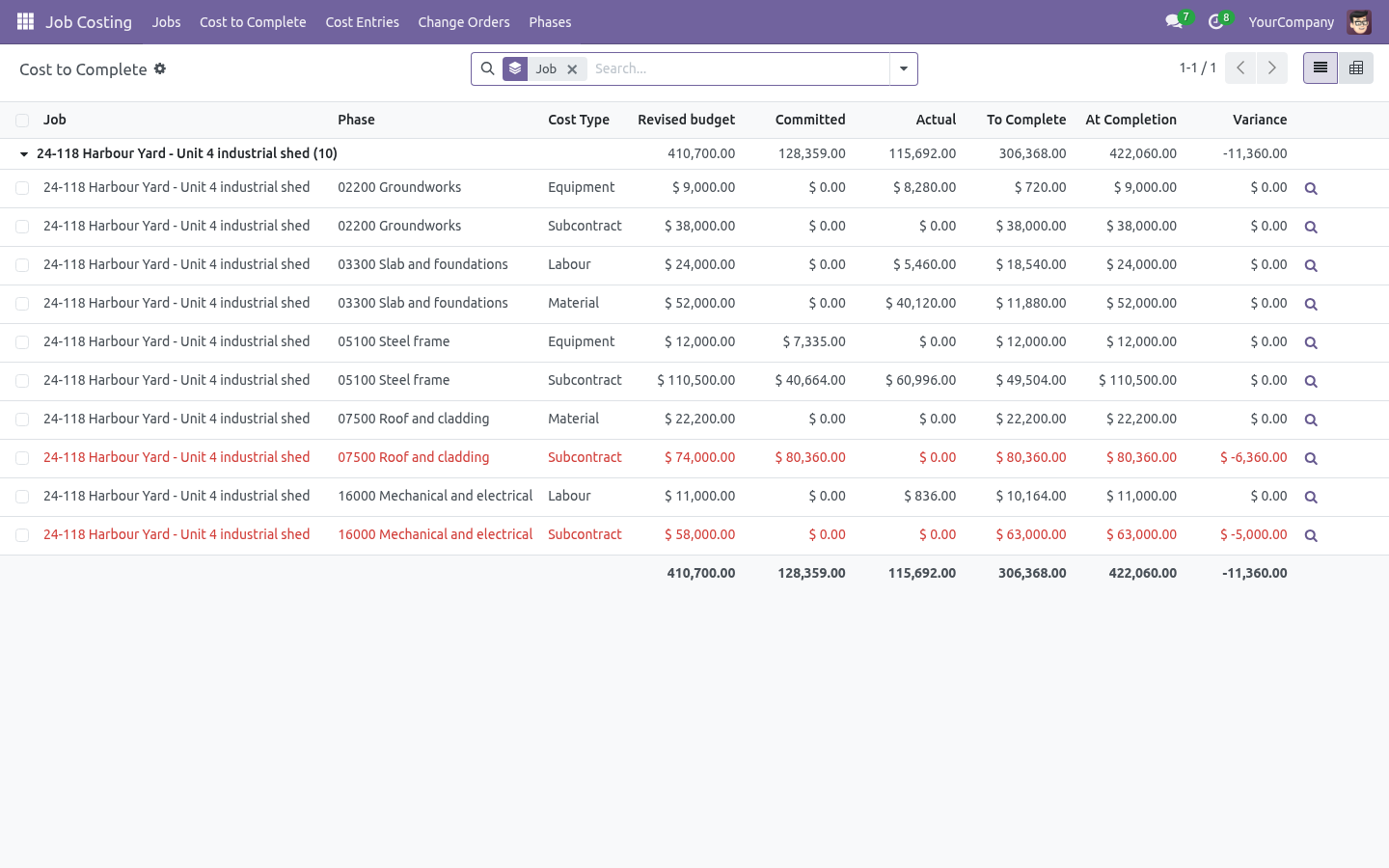
The job form shows the totals; the Budget tab is the classic cost-to- complete report, red where the variance has gone negative. Cost to Complete opens the same lines across every job, with a pivot of phase against cost type. It is the report to bring to a Monday meeting. Troubleshooting.
A confirmed order shows no commitment Its line has no job or no phase. Fill them in and confirm again, or add a manual entry. The commitment did not go down when I billed The bill line must be linked to the purchase line (bill from the order, or set Purchase Order Line). A bill typed from scratch is an actual on its own and cannot know which commitment it replaces.
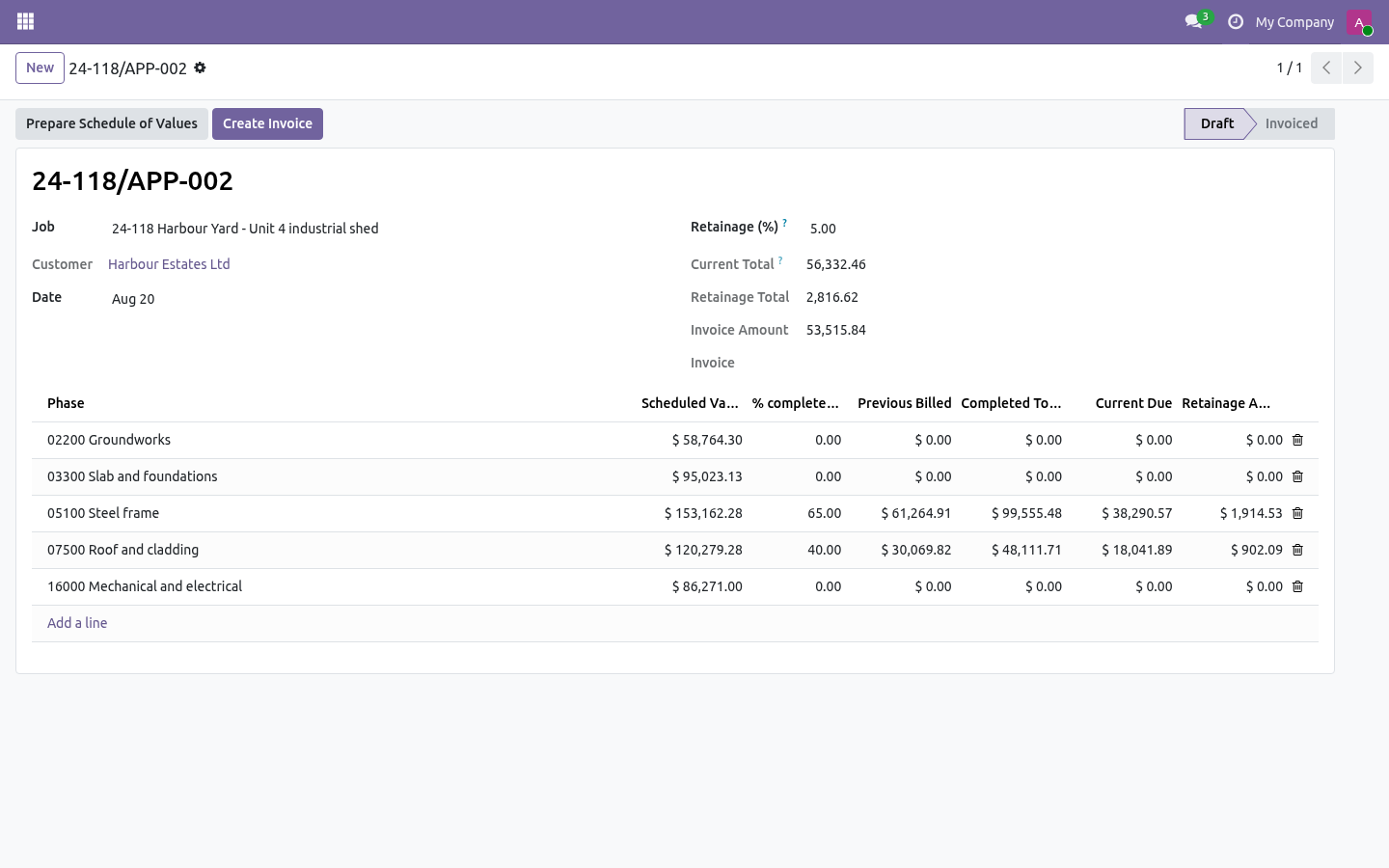
What changed in 1.1 Progress billing (AIA G702/703 style). Applications for payment with a schedule of values per phase (defaulted pro-rata from the budget), cumulative percent complete, previous billed, current due - and one click turns the application into the customer invoice. Retainage. A percentage withheld on every application, tracked on the job, released with its own application when the contract says so.
Earned value, the light version. EV and CPI from the numbers the job already keeps; PV and SPI from a straight-line plan between start and planned completion - labelled as such, no false precision. What changed in 1.2 WIP schedule. Job Costing -> WIP Schedule: earned revenue against billings per job (percentage-of-completion), with over/under-billing columns and totals - the sheet the accountant builds by hand at every close.
CSI starter phases. One button seeds a job with the MasterFormat divisions; codes you already use are left untouched. How we make sure it works. Before every release, 54 automated checks run against this app on Odoo 16, 17, 18, 19 and 20.
Among them: A job cannot start without a budget. Read only role cannot bill. An hour without a phase is not costed. An approved change order cannot be edited.
An approved change order cannot be reopened. The complete list is in the source you receive. The complete manual is at docs dot bambooforge dot dev, the demo database is linked from the store page, and support answers within twenty-four hours. Links are in the description.
Transcript of the walkthrough (Odoo 19)
Construction Job Costing & Cost Control. Construction job costing: budget by phase and cost type, commitments from purchase orders, actuals from bills and timesheets, cost to complete. A contractor's question is never what did we spend — it is will this job still make money. That takes four numbers per phase, and this app keeps all four current from the documents you already raise.
In the next few minutes: construction job costing & cost control, then the four numbers, then set a job up, then let the documents do the work, then change orders. Then what this app deliberately does not do, so you can tell before you buy whether it fits. Everything lives under Job Costing then Jobs then Cost to Complete then Cost Entries. 1.
Install BambooForge Construction Job Costing (depends on Accounting, Purchase and Project). 2. Give the estimator and the PM Job Costing: Manager; site staff can get Job Costing: User, which reads everything and can add cost entries. 3.
The Job Costing menu appears with Jobs, Cost to Complete, Cost Entries, Change Orders and Phases. Construction Job Costing & Cost Control. A contractor's question is never what did we spend — it is will this job still make money. That takes four numbers per phase, and this app keeps all four current from the documents you already raise.
The four numbers. Budget — what the estimate said, by phase and cost type, plus whatever approved change orders have moved. Committed — purchase orders confirmed and not yet billed. The money is spoken for even though no bill has arrived.
Set a job up. 1. Job number and name — the number is unique per company and is what everybody will type. 2.
Customer and original contract — what was signed. 3. Phases — the way you cut the job up, with your own cost codes (03300 Slab, 07500 Roofing…). 4.
Budget — one line per phase and cost type (labour, material, subcontract, equipment, other) with the estimate in Original budget. Press Start job. A job cannot start without a budget: there would be nothing to measure against. Let the documents do the work.
Purchase orders. Every order line has Job, Phase and Cost type. Confirm the order and the line becomes a commitment on that budget line. Cancel it and the commitment goes.
Vendor bills. Post a bill and it becomes an actual. A bill made from a purchase order inherits the order line's job, phase and cost type — leave those fields empty on the bill and the commitment is released by exactly the amount billed. Reset the bill to draft and both move back.
Change orders. A change order carries two things: the contract change (what the customer agreed to pay) and the budget lines it moves (what it will cost, by phase and cost type). The difference is the change order's own margin, shown on the form before anybody signs. Nothing moves while the change order is draft or submitted.
Approve it and the contract value and the budgets both move — and an approved change order cannot be reopened: raise a reversing one instead, so the baseline stays honest. Reading the job. The job form shows the totals; the Budget tab is the classic cost-to- complete report, red where the variance has gone negative. Cost to Complete opens the same lines across every job, with a pivot of phase against cost type.
It is the report to bring to a Monday meeting. Troubleshooting. A confirmed order shows no commitment Its line has no job or no phase. Fill them in and confirm again, or add a manual entry.
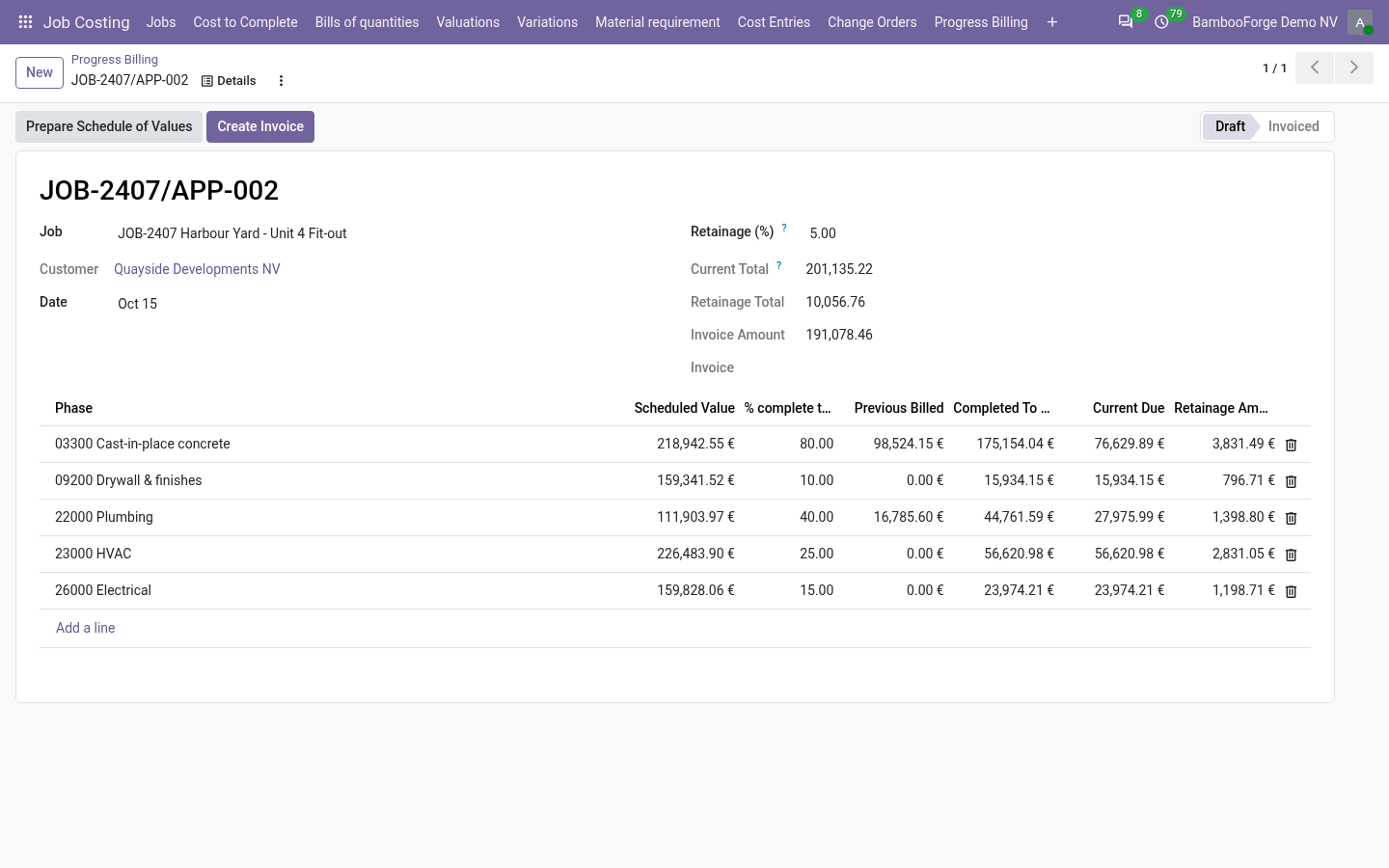
The commitment did not go down when I billed The bill line must be linked to the purchase line (bill from the order, or set Purchase Order Line). A bill typed from scratch is an actual on its own and cannot know which commitment it replaces. What changed in 1.1 Progress billing (AIA G702/703 style). Applications for payment with a schedule of values per phase (defaulted pro-rata from the budget), cumulative percent complete, previous billed, current due - and one click turns the application into the customer invoice.
Retainage. A percentage withheld on every application, tracked on the job, released with its own application when the contract says so. Earned value, the light version. EV and CPI from the numbers the job already keeps; PV and SPI from a straight-line plan between start and planned completion - labelled as such, no false precision.
What changed in 1.2 WIP schedule. Job Costing -> WIP Schedule: earned revenue against billings per job (percentage-of-completion), with over/under-billing columns and totals - the sheet the accountant builds by hand at every close. CSI starter phases. One button seeds a job with the MasterFormat divisions; codes you already use are left untouched.
Support. support@bambooforge.dev — questions, bug reports and feature requests are answered by the developers who wrote the module. The complete manual is at docs dot bambooforge dot dev, the demo database is linked from the store page, and support answers within twenty-four hours. Links are in the description.
Transcript of the walkthrough (Odoo 18)
Construction Job Costing & Cost Control. Construction job costing: budget by phase and cost type, commitments from purchase orders, actuals from bills and timesheets, cost to complete. A contractor's question is never what did we spend — it is will this job still make money. That takes four numbers per phase, and this app keeps all four current from the documents you already raise.
In the next few minutes: construction job costing & cost control, then the four numbers, then set a job up, then let the documents do the work, then change orders. Then what this app deliberately does not do, so you can tell before you buy whether it fits. Everything lives under Job Costing then Jobs then Cost to Complete then Cost Entries. 1.
Install BambooForge Construction Job Costing (depends on Accounting, Purchase and Project). 2. Give the estimator and the PM Job Costing: Manager; site staff can get Job Costing: User, which reads everything and can add cost entries. 3.
The Job Costing menu appears with Jobs, Cost to Complete, Cost Entries, Change Orders and Phases. Construction Job Costing & Cost Control. A contractor's question is never what did we spend — it is will this job still make money. That takes four numbers per phase, and this app keeps all four current from the documents you already raise.
The four numbers. Budget — what the estimate said, by phase and cost type, plus whatever approved change orders have moved. Committed — purchase orders confirmed and not yet billed. The money is spoken for even though no bill has arrived.
Set a job up. 1. Job number and name — the number is unique per company and is what everybody will type. 2.
Customer and original contract — what was signed. 3. Phases — the way you cut the job up, with your own cost codes (03300 Slab, 07500 Roofing…). 4.
Budget — one line per phase and cost type (labour, material, subcontract, equipment, other) with the estimate in Original budget. Press Start job. A job cannot start without a budget: there would be nothing to measure against. Let the documents do the work.
Purchase orders. Every order line has Job, Phase and Cost type. Confirm the order and the line becomes a commitment on that budget line. Cancel it and the commitment goes.
Vendor bills. Post a bill and it becomes an actual. A bill made from a purchase order inherits the order line's job, phase and cost type — leave those fields empty on the bill and the commitment is released by exactly the amount billed. Reset the bill to draft and both move back.
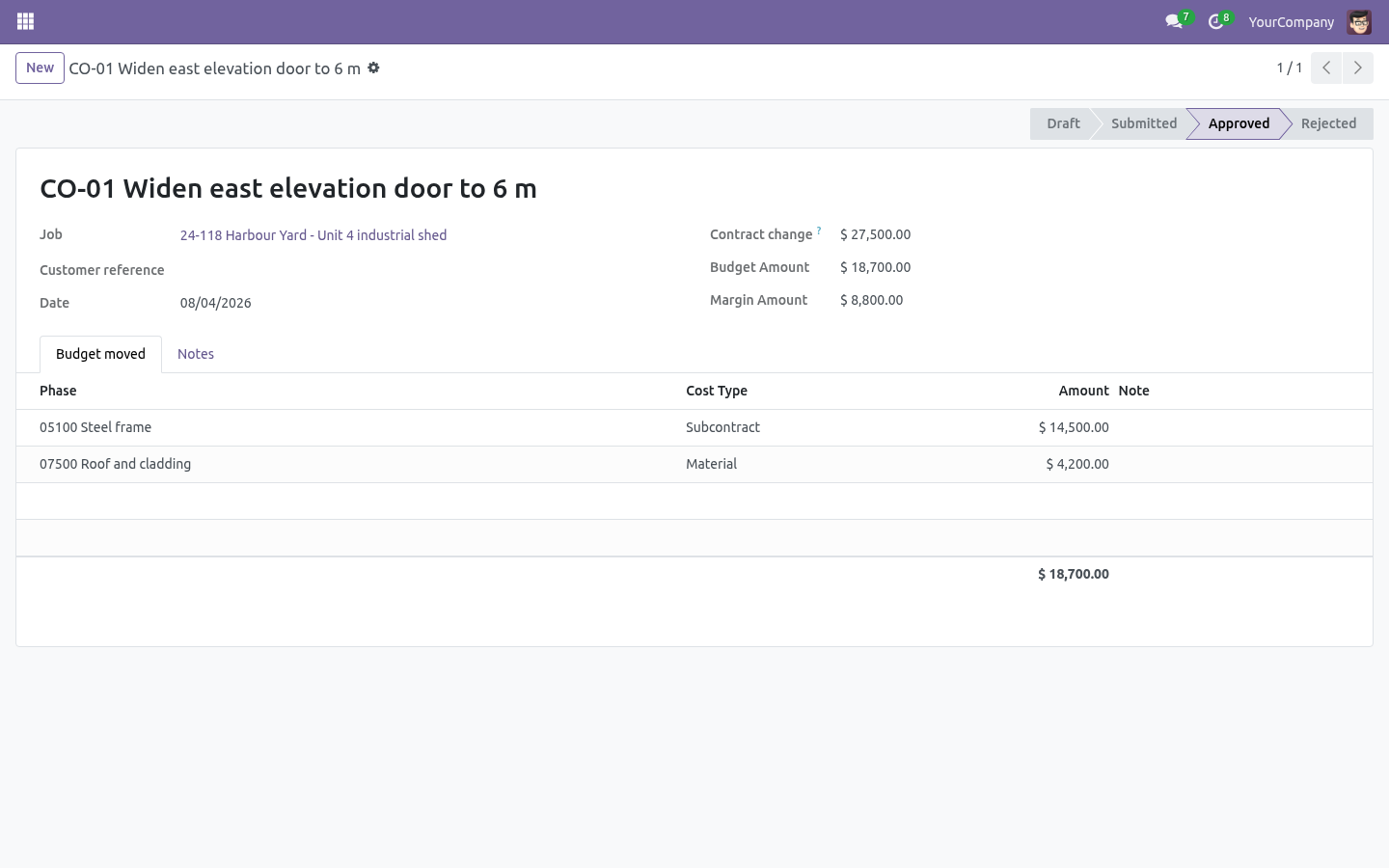
Change orders. A change order carries two things: the contract change (what the customer agreed to pay) and the budget lines it moves (what it will cost, by phase and cost type). The difference is the change order's own margin, shown on the form before anybody signs. Nothing moves while the change order is draft or submitted.
Approve it and the contract value and the budgets both move — and an approved change order cannot be reopened: raise a reversing one instead, so the baseline stays honest. Reading the job. The job form shows the totals; the Budget tab is the classic cost-to- complete report, red where the variance has gone negative. Cost to Complete opens the same lines across every job, with a pivot of phase against cost type.
It is the report to bring to a Monday meeting. Troubleshooting. A confirmed order shows no commitment Its line has no job or no phase. Fill them in and confirm again, or add a manual entry.
The commitment did not go down when I billed The bill line must be linked to the purchase line (bill from the order, or set Purchase Order Line). A bill typed from scratch is an actual on its own and cannot know which commitment it replaces. What changed in 1.1 Progress billing (AIA G702/703 style). Applications for payment with a schedule of values per phase (defaulted pro-rata from the budget), cumulative percent complete, previous billed, current due - and one click turns the application into the customer invoice.
Retainage. A percentage withheld on every application, tracked on the job, released with its own application when the contract says so. Earned value, the light version. EV and CPI from the numbers the job already keeps; PV and SPI from a straight-line plan between start and planned completion - labelled as such, no false precision.
What changed in 1.2 WIP schedule. Job Costing -> WIP Schedule: earned revenue against billings per job (percentage-of-completion), with over/under-billing columns and totals - the sheet the accountant builds by hand at every close. CSI starter phases. One button seeds a job with the MasterFormat divisions; codes you already use are left untouched.
Support. support@bambooforge.dev — questions, bug reports and feature requests are answered by the developers who wrote the module. The complete manual is at docs dot bambooforge dot dev, the demo database is linked from the store page, and support answers within twenty-four hours. Links are in the description.
Transcript of the walkthrough (Odoo 17)
Construction Job Costing & Cost Control. Construction job costing: budget by phase and cost type, commitments from purchase orders, actuals from bills and timesheets, cost to complete. A contractor's question is never what did we spend — it is will this job still make money. That takes four numbers per phase, and this app keeps all four current from the documents you already raise.
In the next few minutes: construction job costing & cost control, then the four numbers, then set a job up, then let the documents do the work, then change orders. Then what this app deliberately does not do, so you can tell before you buy whether it fits. Everything lives under Job Costing then Jobs then Cost to Complete then Cost Entries. 1.
Install BambooForge Construction Job Costing (depends on Accounting, Purchase and Project). 2. Give the estimator and the PM Job Costing: Manager; site staff can get Job Costing: User, which reads everything and can add cost entries. 3.
The Job Costing menu appears with Jobs, Cost to Complete, Cost Entries, Change Orders and Phases. Construction Job Costing & Cost Control. A contractor's question is never what did we spend — it is will this job still make money. That takes four numbers per phase, and this app keeps all four current from the documents you already raise.
The four numbers. Budget — what the estimate said, by phase and cost type, plus whatever approved change orders have moved. Committed — purchase orders confirmed and not yet billed. The money is spoken for even though no bill has arrived.
Set a job up. 1. Job number and name — the number is unique per company and is what everybody will type. 2.
Customer and original contract — what was signed. 3. Phases — the way you cut the job up, with your own cost codes (03300 Slab, 07500 Roofing…). 4.
Budget — one line per phase and cost type (labour, material, subcontract, equipment, other) with the estimate in Original budget. Press Start job. A job cannot start without a budget: there would be nothing to measure against. Let the documents do the work.
Purchase orders. Every order line has Job, Phase and Cost type. Confirm the order and the line becomes a commitment on that budget line. Cancel it and the commitment goes.
Vendor bills. Post a bill and it becomes an actual. A bill made from a purchase order inherits the order line's job, phase and cost type — leave those fields empty on the bill and the commitment is released by exactly the amount billed. Reset the bill to draft and both move back.
Change orders. A change order carries two things: the contract change (what the customer agreed to pay) and the budget lines it moves (what it will cost, by phase and cost type). The difference is the change order's own margin, shown on the form before anybody signs. Nothing moves while the change order is draft or submitted.
Approve it and the contract value and the budgets both move — and an approved change order cannot be reopened: raise a reversing one instead, so the baseline stays honest. Reading the job. The job form shows the totals; the Budget tab is the classic cost-to- complete report, red where the variance has gone negative. Cost to Complete opens the same lines across every job, with a pivot of phase against cost type.
It is the report to bring to a Monday meeting. Troubleshooting. A confirmed order shows no commitment Its line has no job or no phase. Fill them in and confirm again, or add a manual entry.
The commitment did not go down when I billed The bill line must be linked to the purchase line (bill from the order, or set Purchase Order Line). A bill typed from scratch is an actual on its own and cannot know which commitment it replaces. What changed in 1.1 Progress billing (AIA G702/703 style). Applications for payment with a schedule of values per phase (defaulted pro-rata from the budget), cumulative percent complete, previous billed, current due - and one click turns the application into the customer invoice.
Retainage. A percentage withheld on every application, tracked on the job, released with its own application when the contract says so. Earned value, the light version. EV and CPI from the numbers the job already keeps; PV and SPI from a straight-line plan between start and planned completion - labelled as such, no false precision.
What changed in 1.2 WIP schedule. Job Costing -> WIP Schedule: earned revenue against billings per job (percentage-of-completion), with over/under-billing columns and totals - the sheet the accountant builds by hand at every close. CSI starter phases. One button seeds a job with the MasterFormat divisions; codes you already use are left untouched.
Support. support@bambooforge.dev — questions, bug reports and feature requests are answered by the developers who wrote the module. The complete manual is at docs dot bambooforge dot dev, the demo database is linked from the store page, and support answers within twenty-four hours. Links are in the description.
Transcript of the walkthrough (Odoo 16)
Construction Job Costing & Cost Control. Construction job costing: budget by phase and cost type, commitments from purchase orders, actuals from bills and timesheets, cost to complete. A contractor's question is never what did we spend — it is will this job still make money. That takes four numbers per phase, and this app keeps all four current from the documents you already raise.
In the next few minutes: construction job costing & cost control, then the four numbers, then set a job up, then let the documents do the work, then change orders. Then what this app deliberately does not do, so you can tell before you buy whether it fits. Everything lives under Job Costing then Jobs then Cost to Complete then Cost Entries. 1.
Install BambooForge Construction Job Costing (depends on Accounting, Purchase and Project). 2. Give the estimator and the PM Job Costing: Manager; site staff can get Job Costing: User, which reads everything and can add cost entries. 3.
The Job Costing menu appears with Jobs, Cost to Complete, Cost Entries, Change Orders and Phases. Construction Job Costing & Cost Control. A contractor's question is never what did we spend — it is will this job still make money. That takes four numbers per phase, and this app keeps all four current from the documents you already raise.
The four numbers. Budget — what the estimate said, by phase and cost type, plus whatever approved change orders have moved. Committed — purchase orders confirmed and not yet billed. The money is spoken for even though no bill has arrived.
Set a job up. 1. Job number and name — the number is unique per company and is what everybody will type. 2.
Customer and original contract — what was signed. 3. Phases — the way you cut the job up, with your own cost codes (03300 Slab, 07500 Roofing…). 4.
Budget — one line per phase and cost type (labour, material, subcontract, equipment, other) with the estimate in Original budget. Press Start job. A job cannot start without a budget: there would be nothing to measure against. Let the documents do the work.
Purchase orders. Every order line has Job, Phase and Cost type. Confirm the order and the line becomes a commitment on that budget line. Cancel it and the commitment goes.
Vendor bills. Post a bill and it becomes an actual. A bill made from a purchase order inherits the order line's job, phase and cost type — leave those fields empty on the bill and the commitment is released by exactly the amount billed. Reset the bill to draft and both move back.
Change orders. A change order carries two things: the contract change (what the customer agreed to pay) and the budget lines it moves (what it will cost, by phase and cost type). The difference is the change order's own margin, shown on the form before anybody signs. Nothing moves while the change order is draft or submitted.
Approve it and the contract value and the budgets both move — and an approved change order cannot be reopened: raise a reversing one instead, so the baseline stays honest. Reading the job. The job form shows the totals; the Budget tab is the classic cost-to- complete report, red where the variance has gone negative. Cost to Complete opens the same lines across every job, with a pivot of phase against cost type.
It is the report to bring to a Monday meeting. Troubleshooting. A confirmed order shows no commitment Its line has no job or no phase. Fill them in and confirm again, or add a manual entry.
The commitment did not go down when I billed The bill line must be linked to the purchase line (bill from the order, or set Purchase Order Line). A bill typed from scratch is an actual on its own and cannot know which commitment it replaces. What changed in 1.1 Progress billing (AIA G702/703 style). Applications for payment with a schedule of values per phase (defaulted pro-rata from the budget), cumulative percent complete, previous billed, current due - and one click turns the application into the customer invoice.
Retainage. A percentage withheld on every application, tracked on the job, released with its own application when the contract says so. Earned value, the light version. EV and CPI from the numbers the job already keeps; PV and SPI from a straight-line plan between start and planned completion - labelled as such, no false precision.
What changed in 1.2 WIP schedule. Job Costing -> WIP Schedule: earned revenue against billings per job (percentage-of-completion), with over/under-billing columns and totals - the sheet the accountant builds by hand at every close. CSI starter phases. One button seeds a job with the MasterFormat divisions; codes you already use are left untouched.
Support. support@bambooforge.dev — questions, bug reports and feature requests are answered by the developers who wrote the module. The complete manual is at docs dot bambooforge dot dev, the demo database is linked from the store page, and support answers within twenty-four hours. Links are in the description.
Key facts
- What it is
- Construction job costing: budget by phase and cost type, commitments from purchase orders, actuals from bills and timesheets, cost to complete.
- For
- Project
- Odoo versions
- 16.0, 17.0, 18.0, 19.0, 20.0 - Community and Enterprise
- Runs on
- Odoo.sh or Odoo you host yourself - not Odoo Online, which accepts no third-party apps
- Price
- 179 EUR, one-time, on the Odoo Apps Store
- Technical name
- bambooforge_job_costing
- Not for
- Said before you buy, because it is the half that decides whether the app fits:; Post accounting entries of its own: it reads posted bills, timesheets and confirmed purchase orders.; Report a cost to complete below what is already committed.
- Manual last updated
- 2026-10-15
Construction Job Costing & Cost Control
A contractor's question is never what did we spend — it is will this job still make money. That takes four numbers per phase, and this app keeps all four current from the documents you already raise.
The four numbers
Budget — what the estimate said, by phase and cost type, plus whatever approved change orders have moved.
Committed — purchase orders confirmed and not yet billed. The money is spoken for even though no bill has arrived.
Actual — posted vendor bills, timesheet hours at the employee's cost, and anything you enter by hand.
Cost to complete — budget minus actual by default, never less than what is already committed; or your own figure when the site says the remaining work costs more than the paper does.
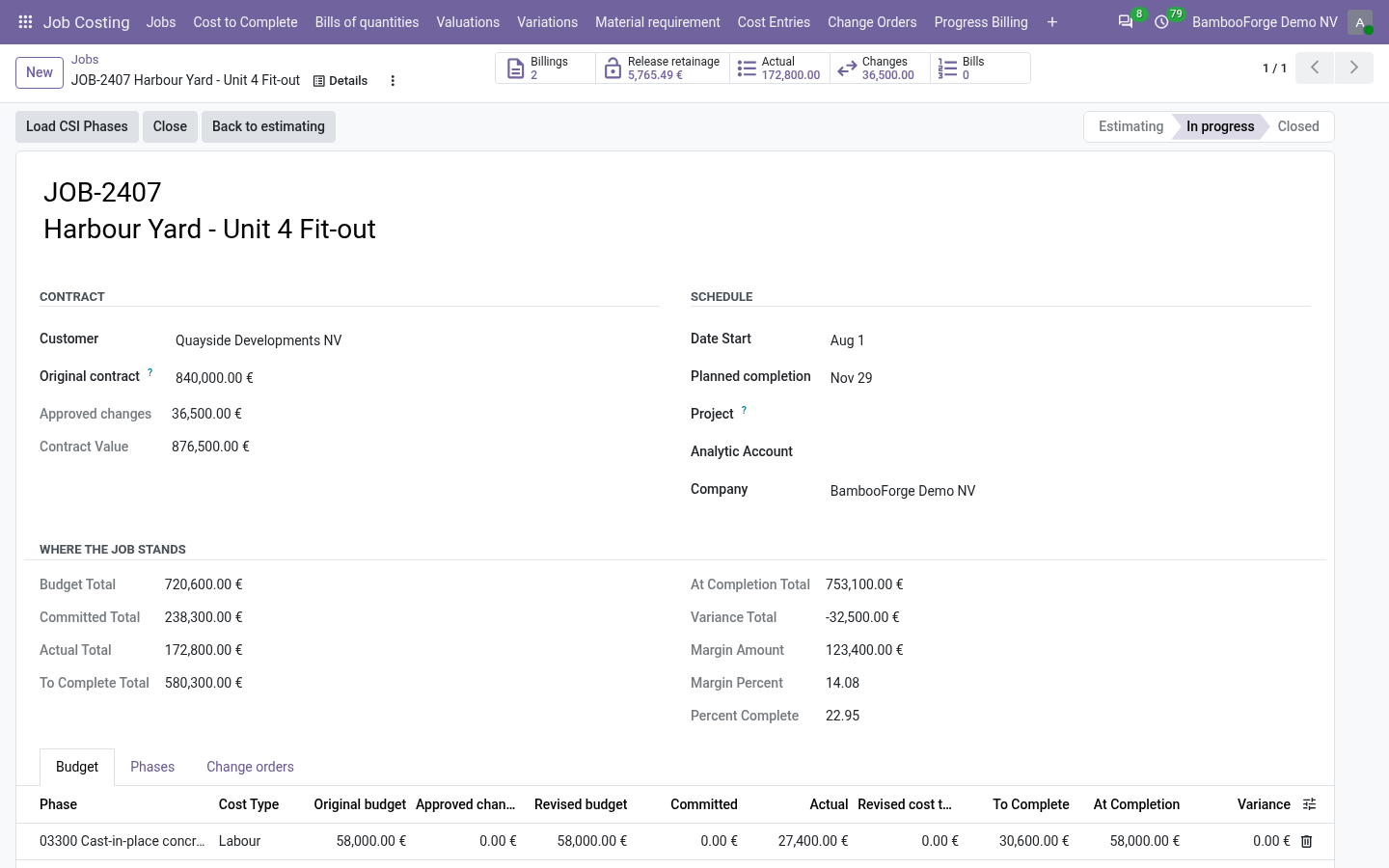
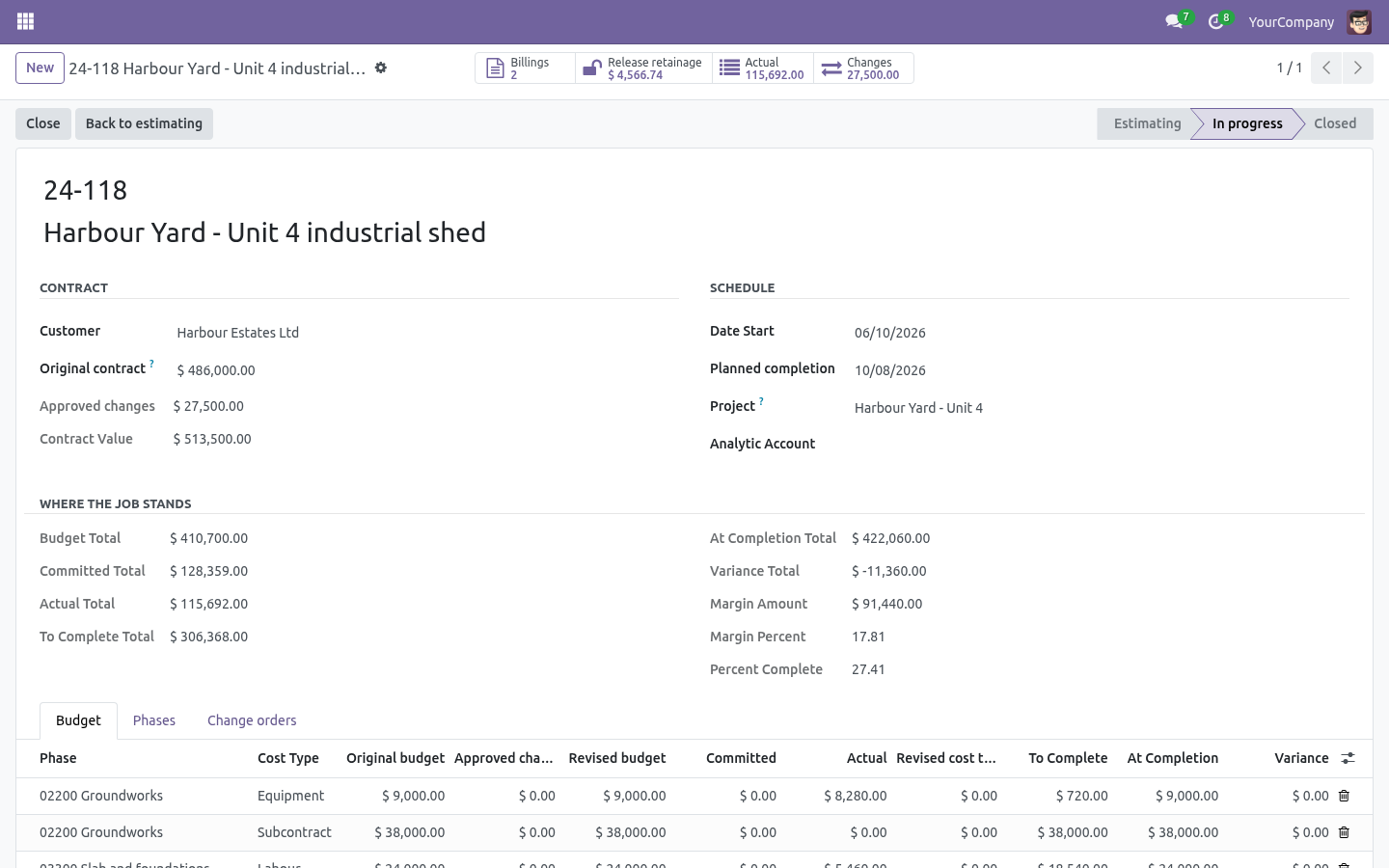
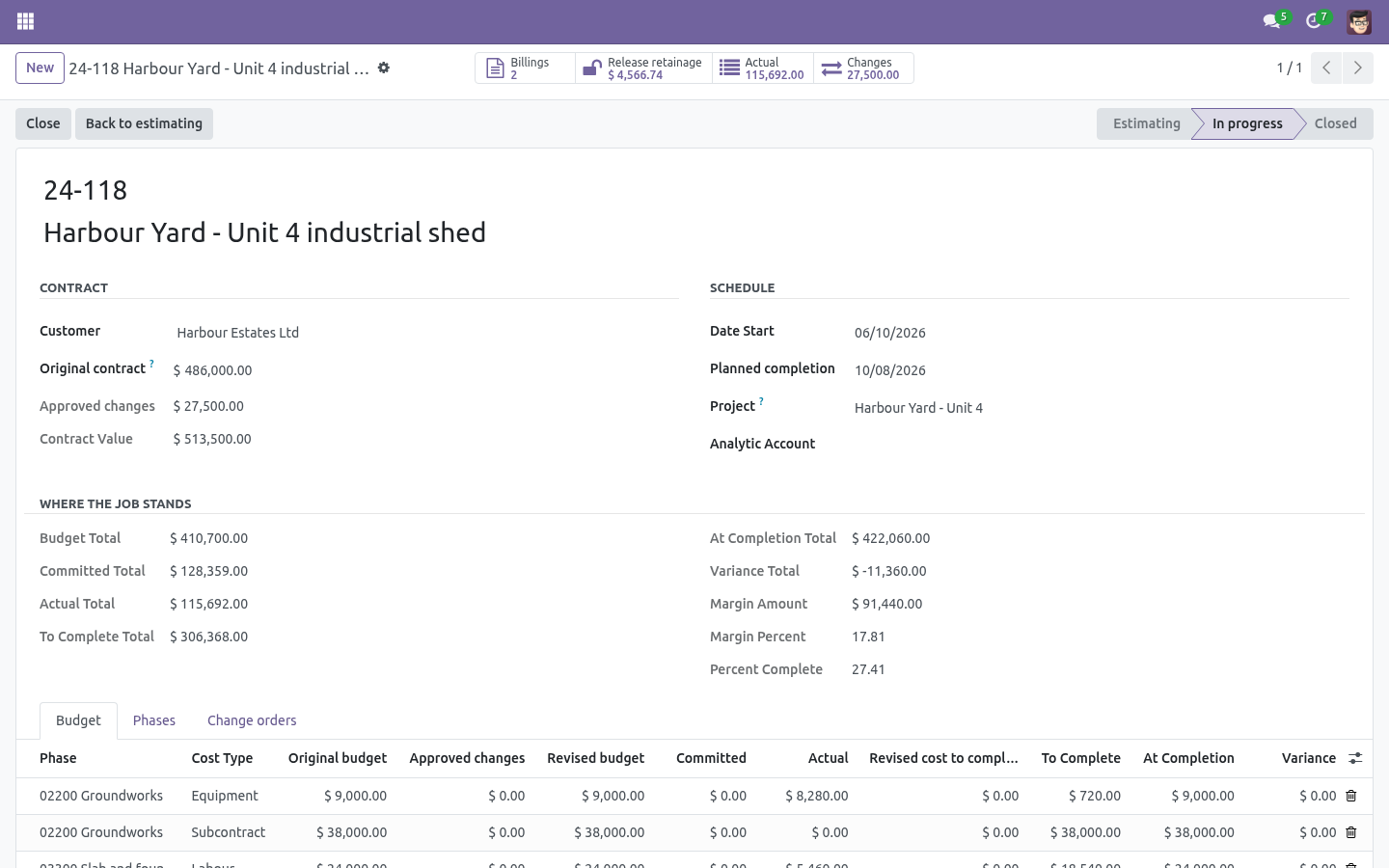
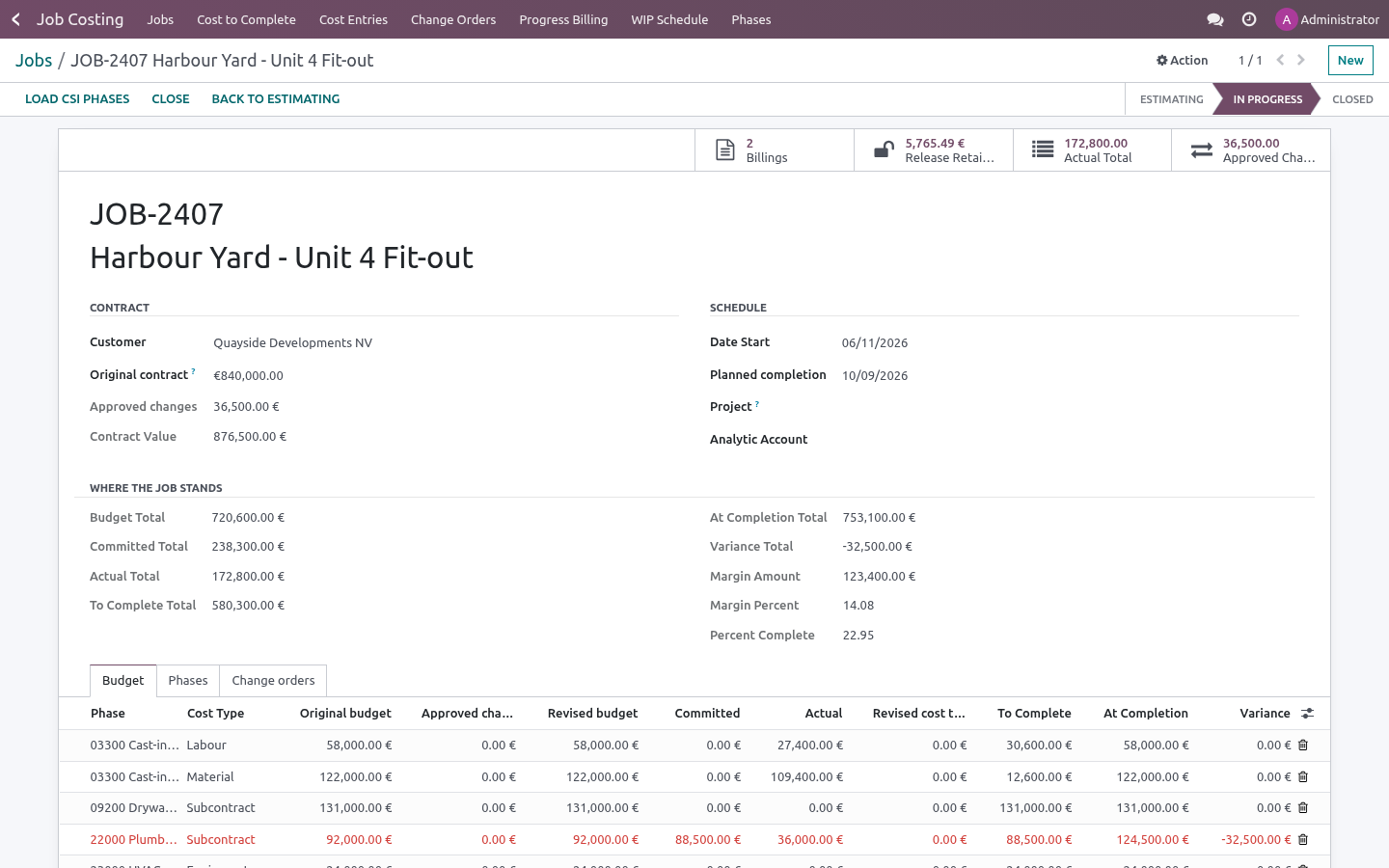
From those come cost at completion, variance, percent complete and a projected margin that moves the day a change order is signed.
Install
Install BambooForge Construction Job Costing (depends on Accounting, Purchase and Project).
Give the estimator and the PM Job Costing: Manager; site staff can get Job Costing: User, which reads everything and can add cost entries.
The Job Costing menu appears with Jobs, Cost to Complete, Cost Entries, Change Orders and Phases.
Set a job up
Job Costing → Jobs → New
Job number and name — the number is unique per company and is what everybody will type.
Customer and original contract — what was signed.
Phases — the way you cut the job up, with your own cost codes (03300 Slab, 07500 Roofing…).
Budget — one line per phase and cost type (labour, material, subcontract, equipment, other) with the estimate in Original budget.
Press Start job. A job cannot start without a budget: there would be nothing to measure against.
Let the documents do the work
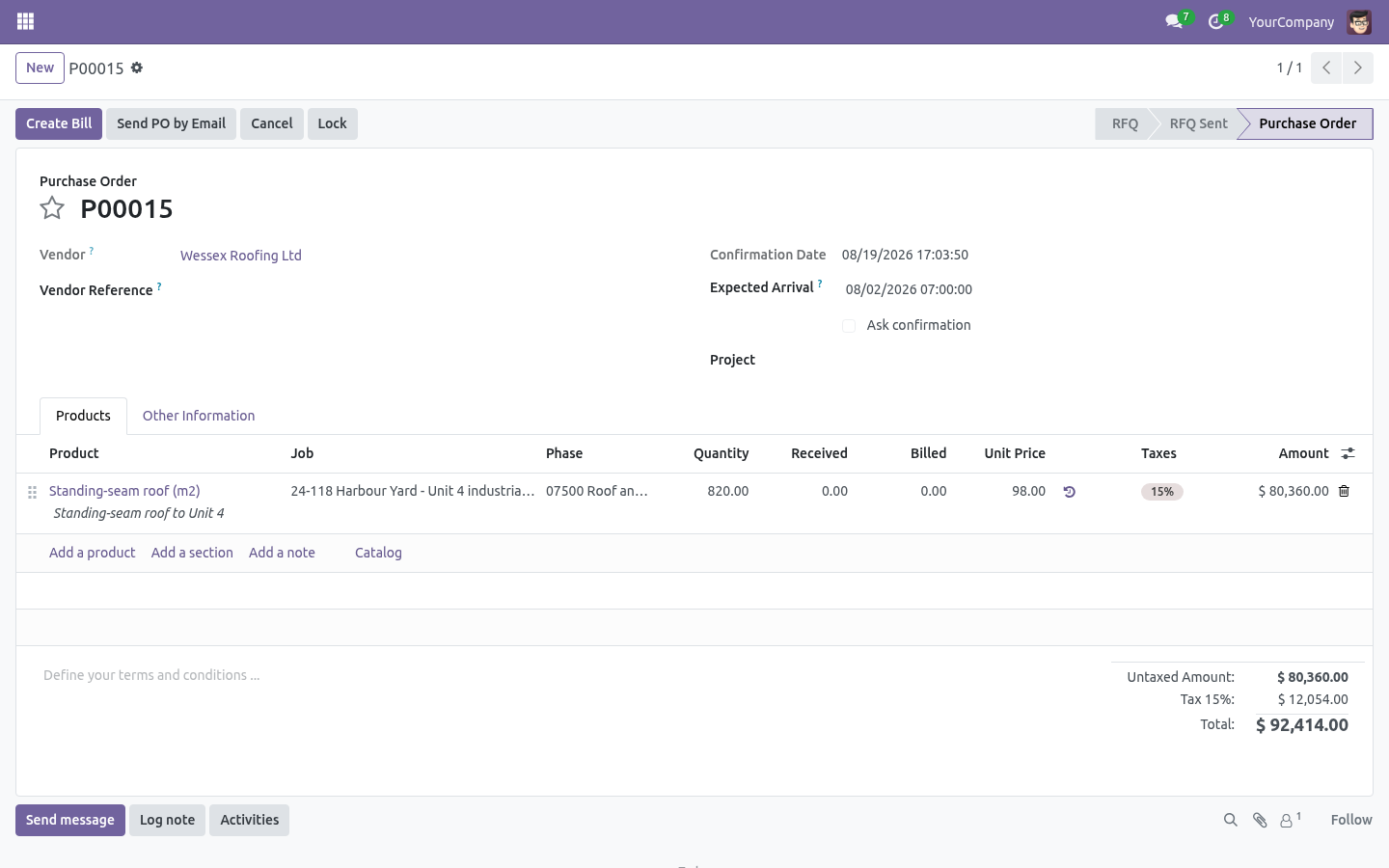
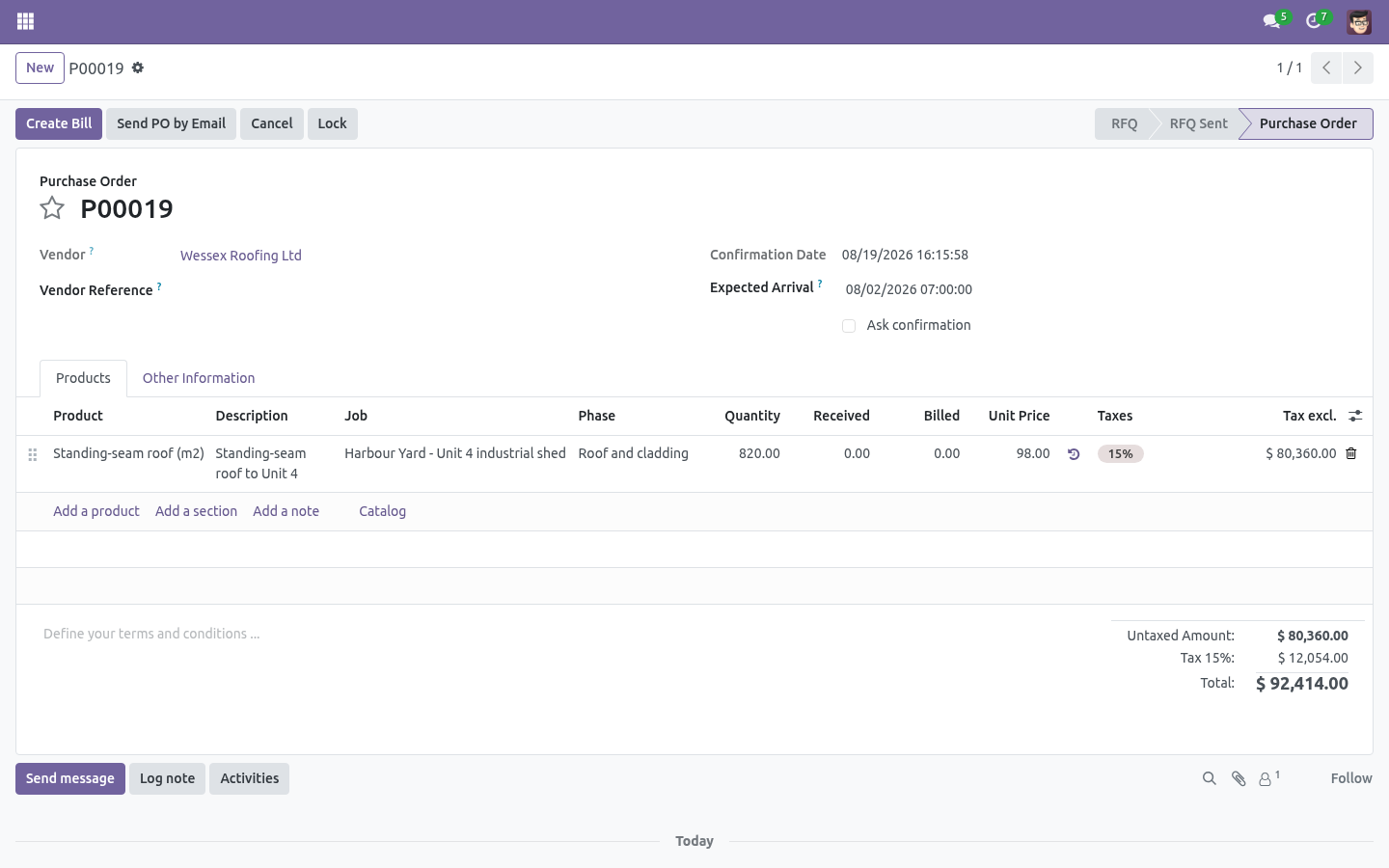
Purchase orders. Every order line has Job, Phase and Cost type. Confirm the order and the line becomes a commitment on that budget line. Cancel it and the commitment goes.
Vendor bills. Post a bill and it becomes an actual. A bill made from a purchase order inherits the order line's job, phase and cost type — leave those fields empty on the bill and the commitment is released by exactly the amount billed. Reset the bill to draft and both move back.
Credit notes reduce the actual.
Timesheets. Link the job to a project, and every hour booked on that project carries Job, Phase and Cost type on the timesheet line. The cost is the employee's hourly cost times the hours, so own crews sit next to subcontractors in the same report. Correct the hours and the cost follows; delete the line and it goes. An hour with no phase is not costed — there is no budget line to put it on — and an employee with no hourly cost set is booked at zero rather than guessed.
Anything else — plant you own, a cost you are still arguing about — can be entered by hand under Cost Entries, and cancelled without deleting the history.
A budget line is created automatically when a purchase or a bill lands on a phase and cost type you had not budgeted. It shows with a zero budget and the full amount as variance, which is exactly what an unbudgeted commitment is.
Change orders
Job Costing → Change Orders
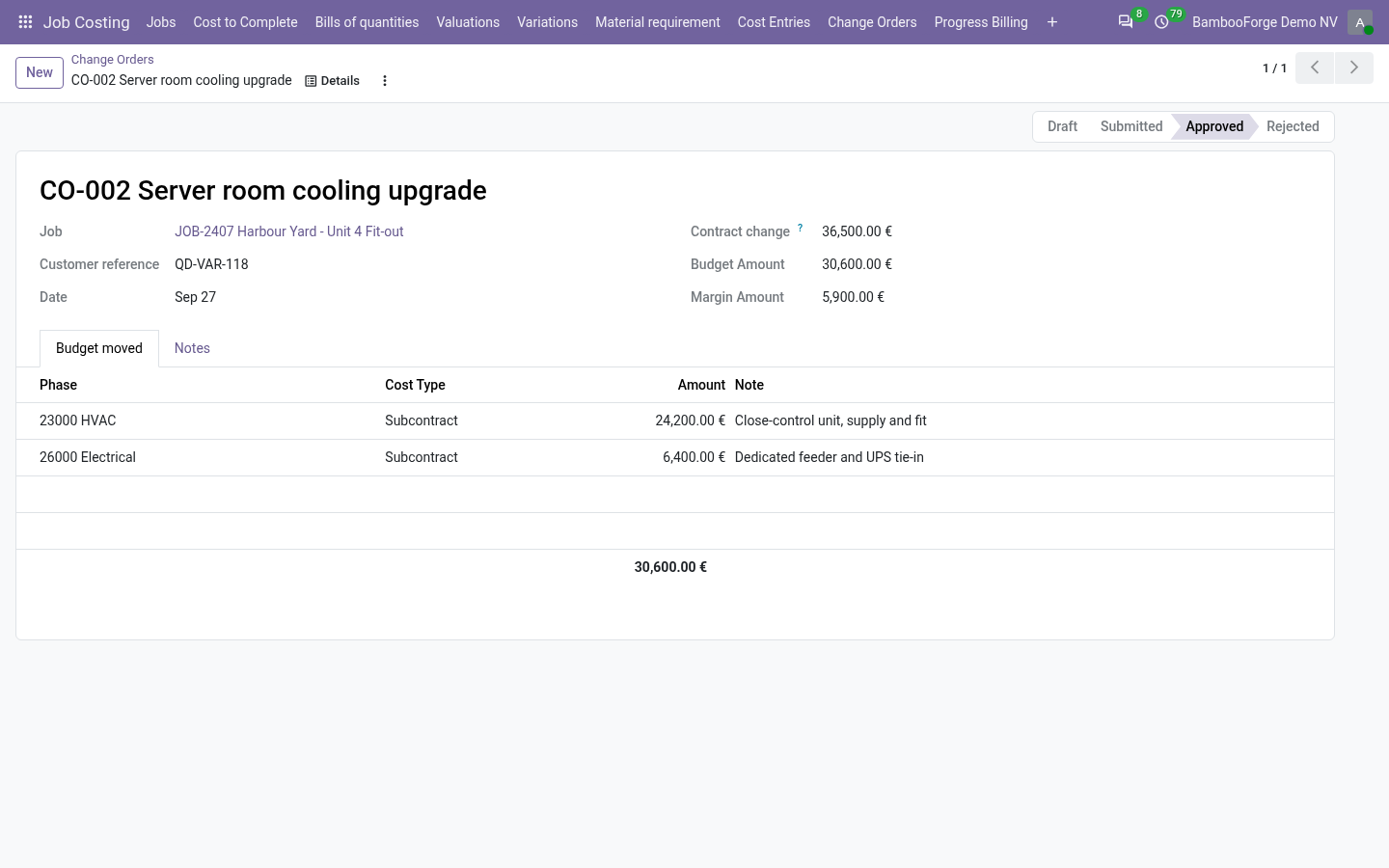
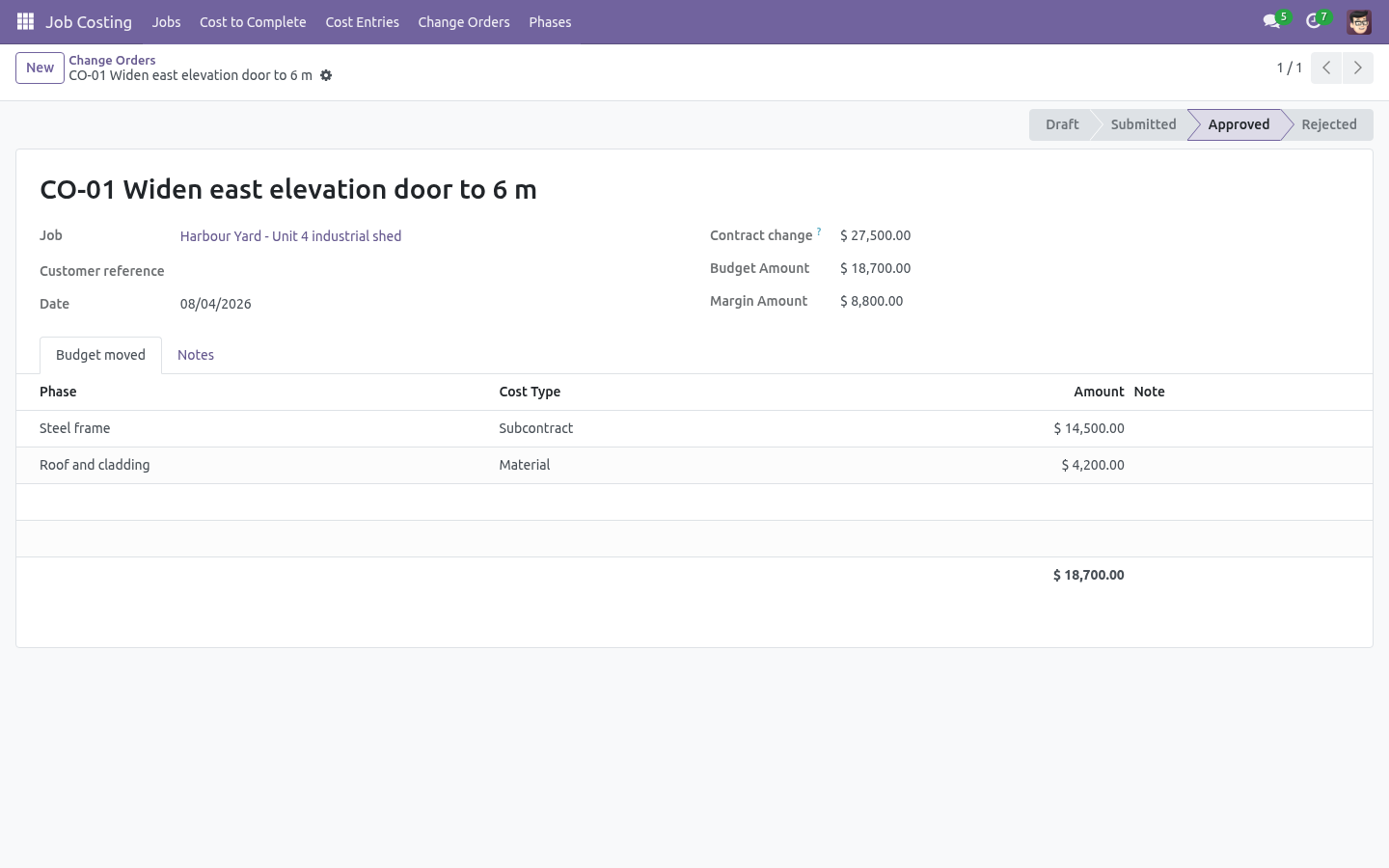
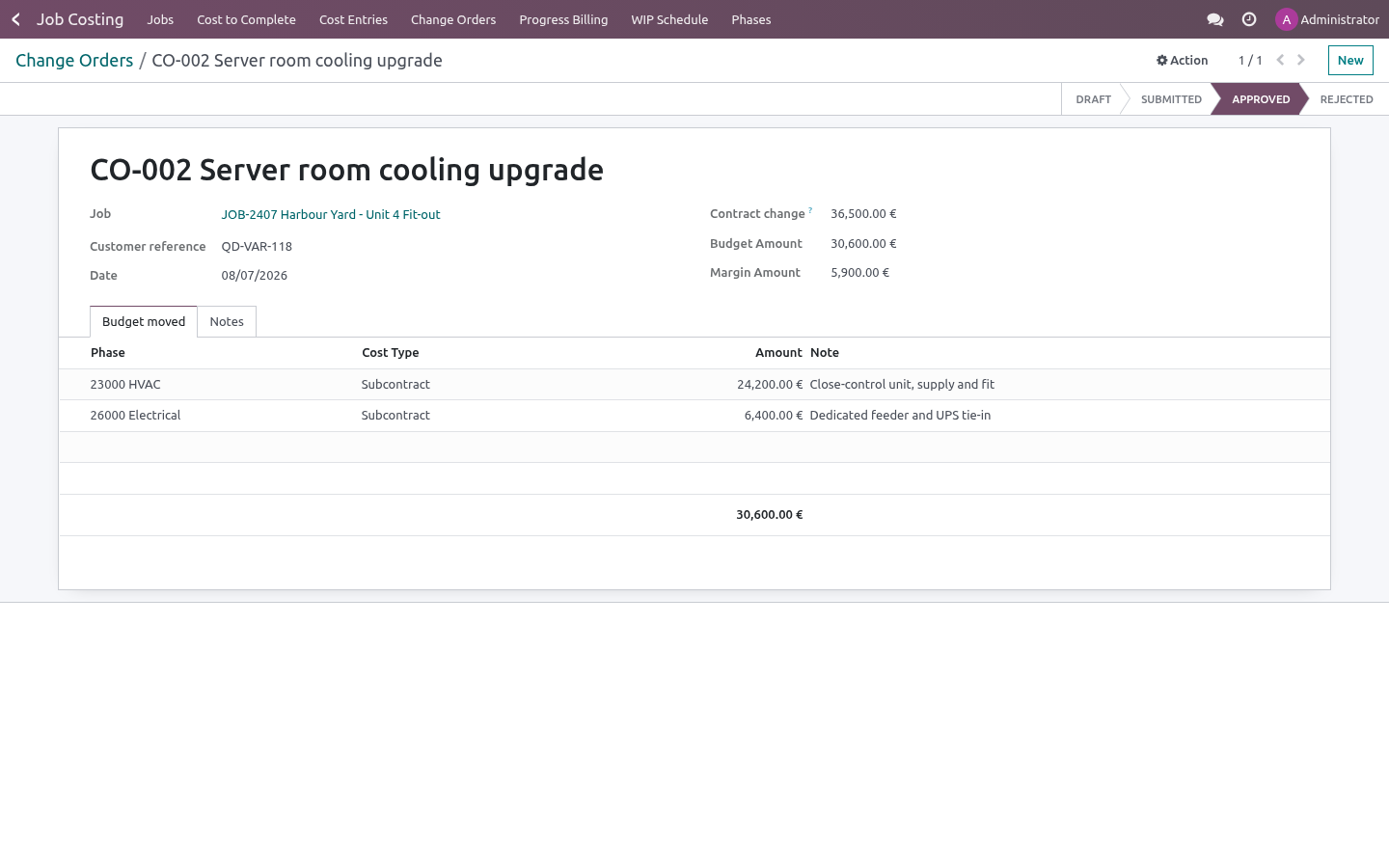
A change order carries two things: the contract change (what the customer agreed to pay) and the budget lines it moves (what it will cost, by phase and cost type). The difference is the change order's own margin, shown on the form before anybody signs.
Nothing moves while the change order is draft or submitted. Approve it and the contract value and the budgets both move — and an approved change order cannot be reopened: raise a reversing one instead, so the baseline stays honest.
Reading the job
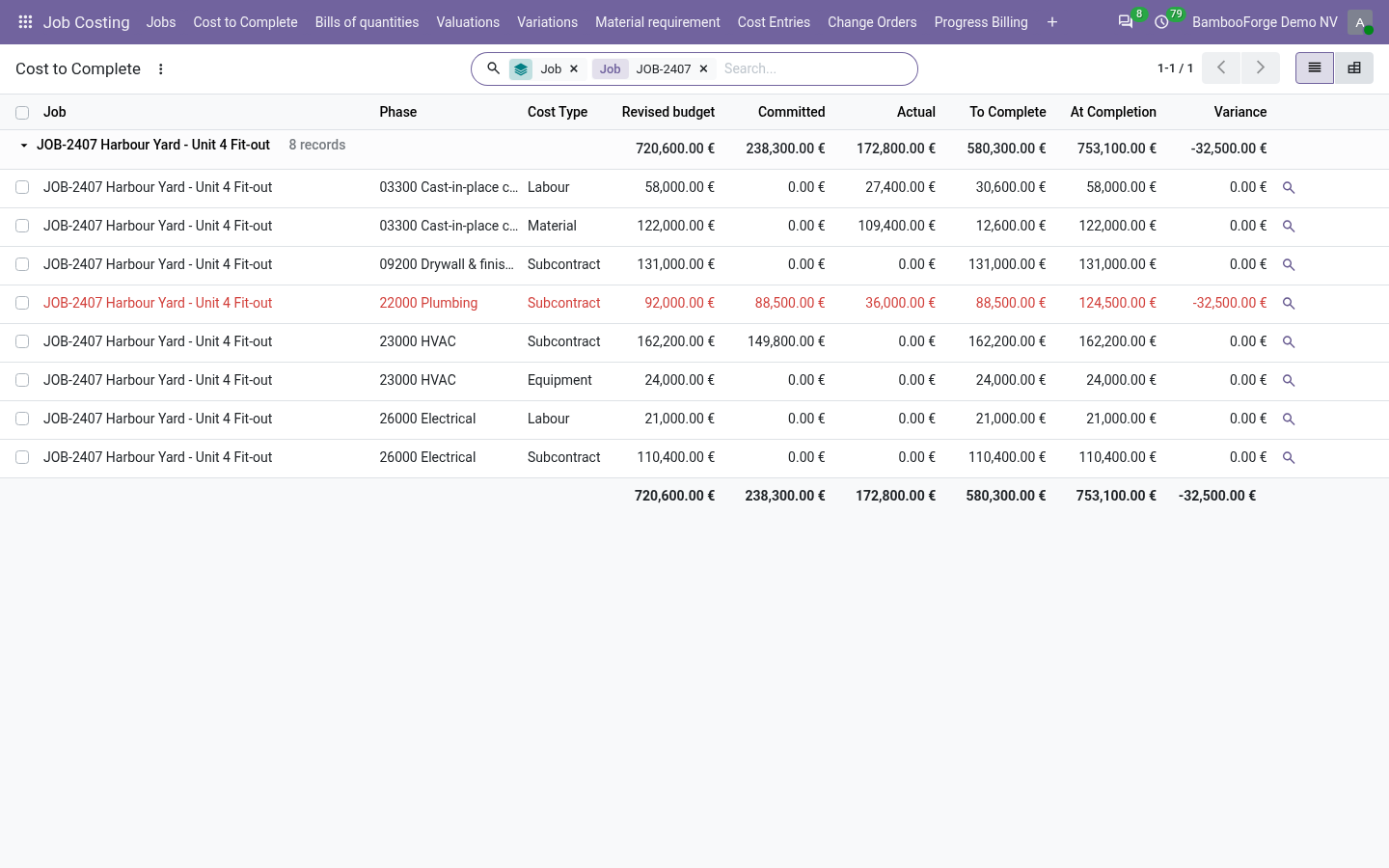
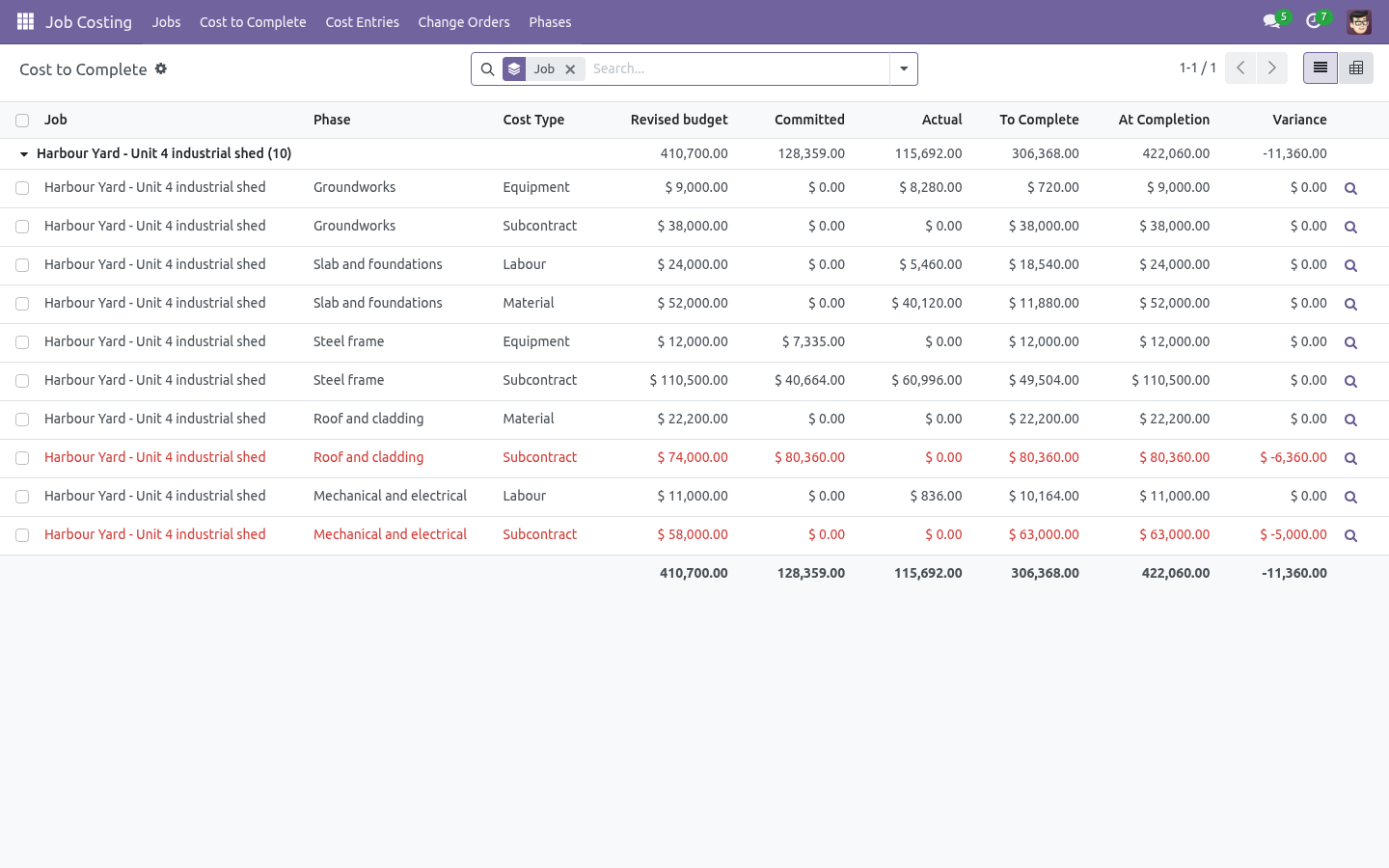
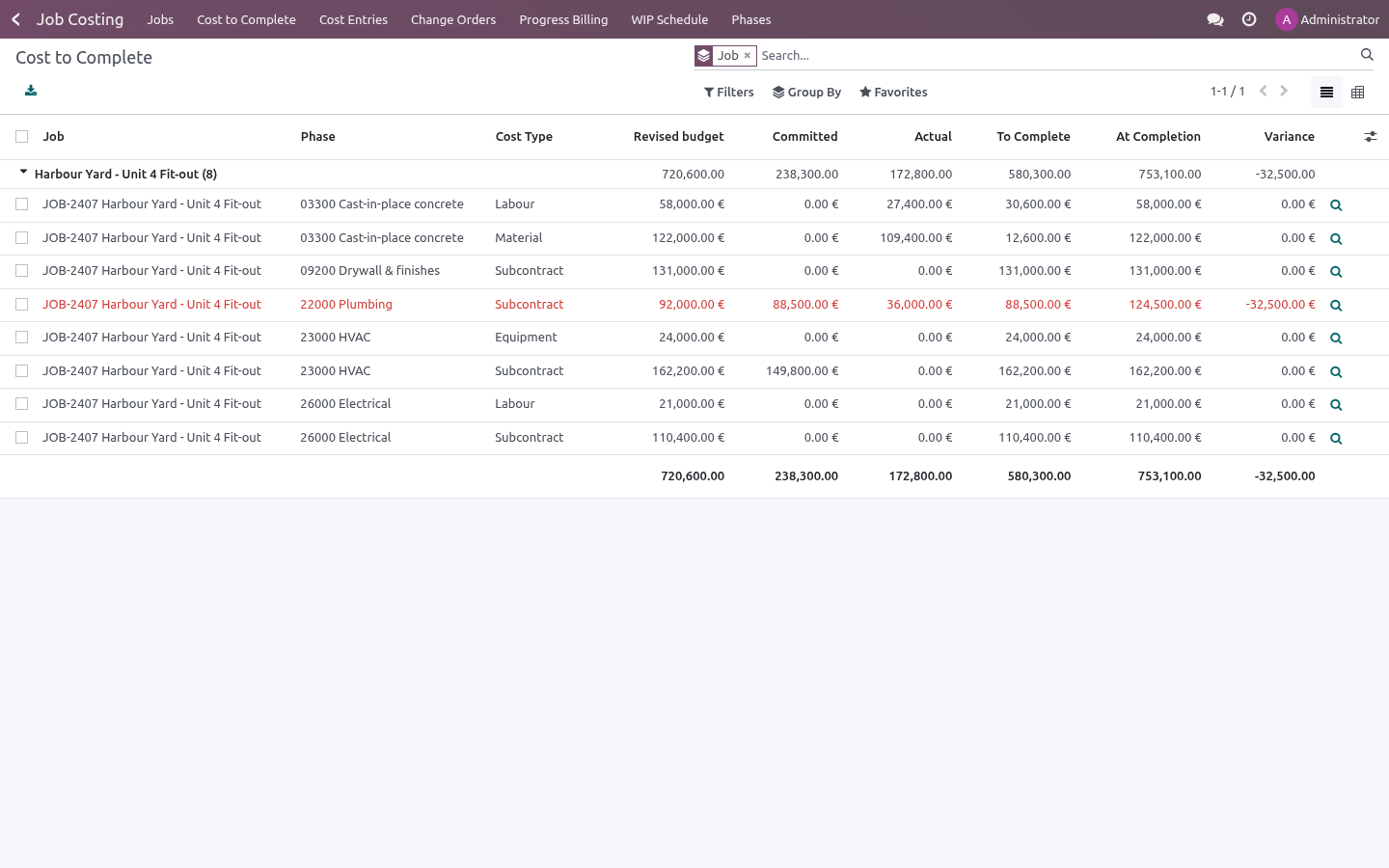
The job form shows the totals; the Budget tab is the classic cost-to- complete report, red where the variance has gone negative.
Cost to Complete opens the same lines across every job, with a pivot of phase against cost type. It is the report to bring to a Monday meeting.
Every number drills down: the magnifier on a budget line opens the entries behind it, and each entry opens the purchase order or bill it came from.
What it does not do
Said before you buy, because it is the half that decides whether the app fits:
Post accounting entries of its own: it reads posted bills, timesheets and confirmed purchase orders.
Report a cost to complete below what is already committed.
Troubleshooting
- A confirmed order shows no commitment
Its line has no job or no phase. Fill them in and confirm again, or add a manual entry.
- The commitment did not go down when I billed
The bill line must be linked to the purchase line (bill from the order, or set Purchase Order Line). A bill typed from scratch is an actual on its own and cannot know which commitment it replaces.
- Cost to complete looks too high
It never falls below what is committed: if you have ordered more than the budget, the forecast says so. Use Revised cost to complete to state what you actually expect.
- A timesheet hour did not reach the job
The hour must be on a project that a job points at, and the line needs a phase. Check Job Costing → Jobs → the job → Project, then the Job and Phase columns on the timesheet line.
- Percent complete does not match the site
It is cost-based (actual ÷ cost at completion). A job that has bought all its material on day one reads high; that is the nature of a cost-based measure, not an error.
- An approved change order was wrong
Raise a second change order with the opposite amounts. The history of what was approved, and when, is worth more than a tidy list.
What changed in 1.1
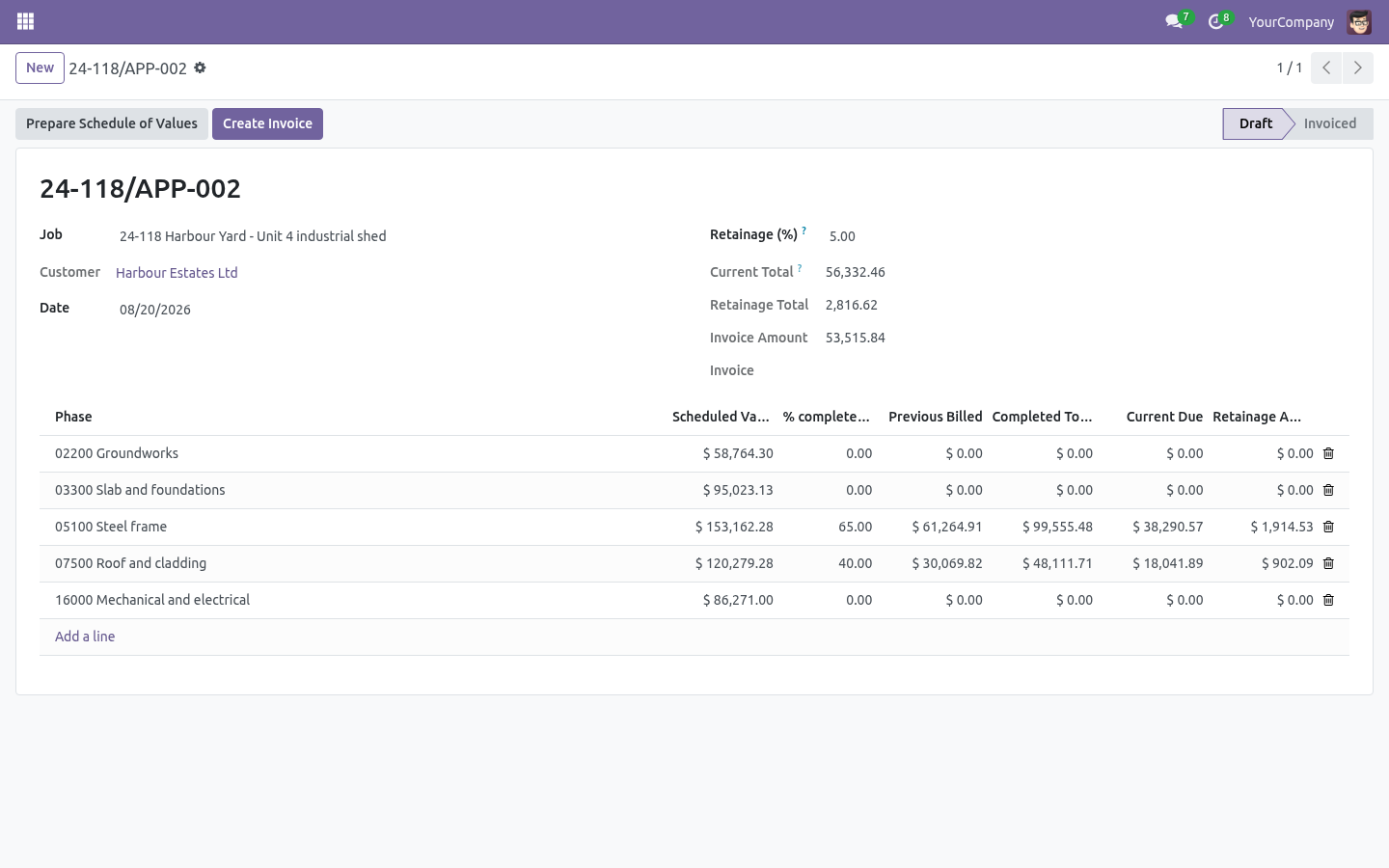
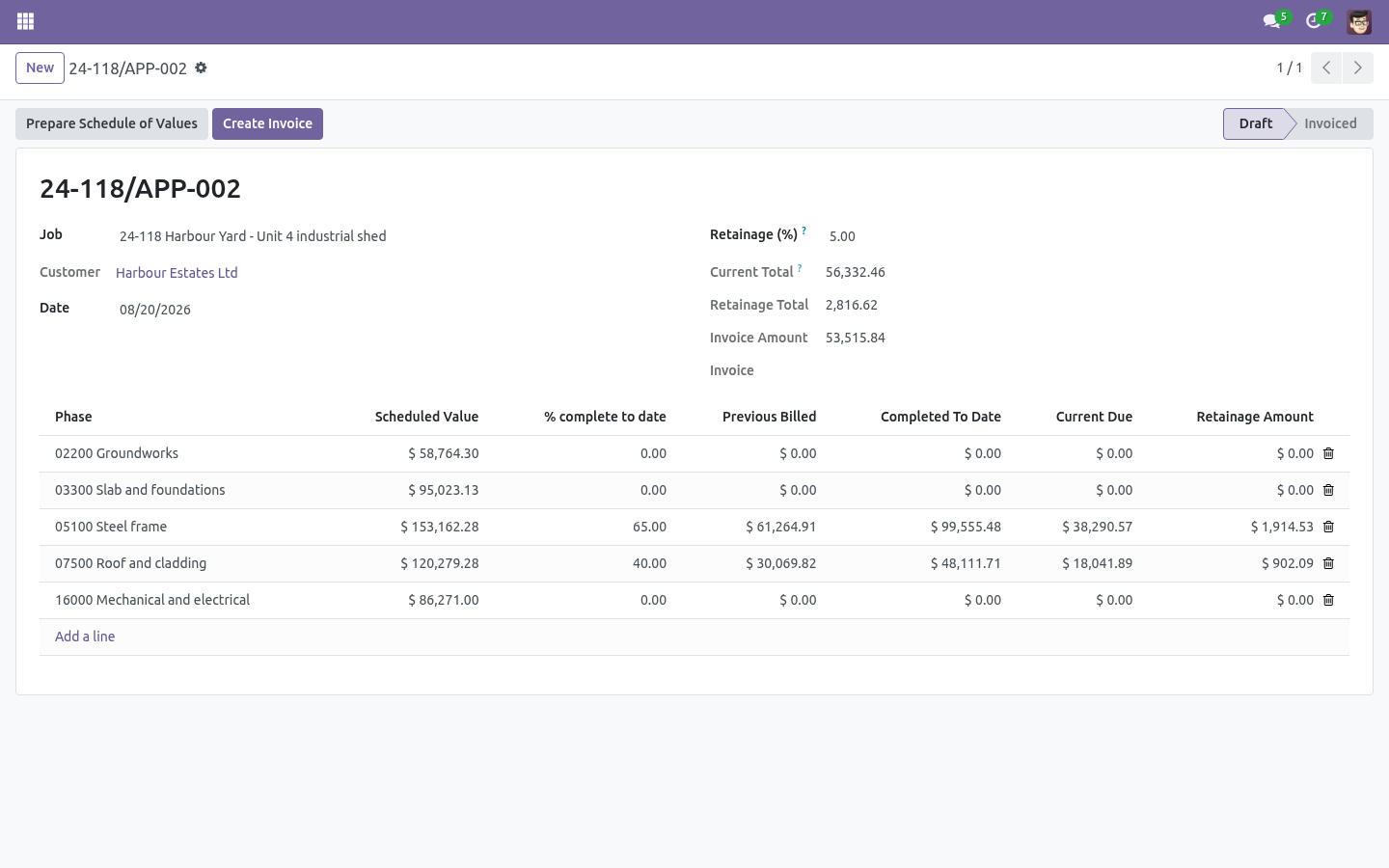
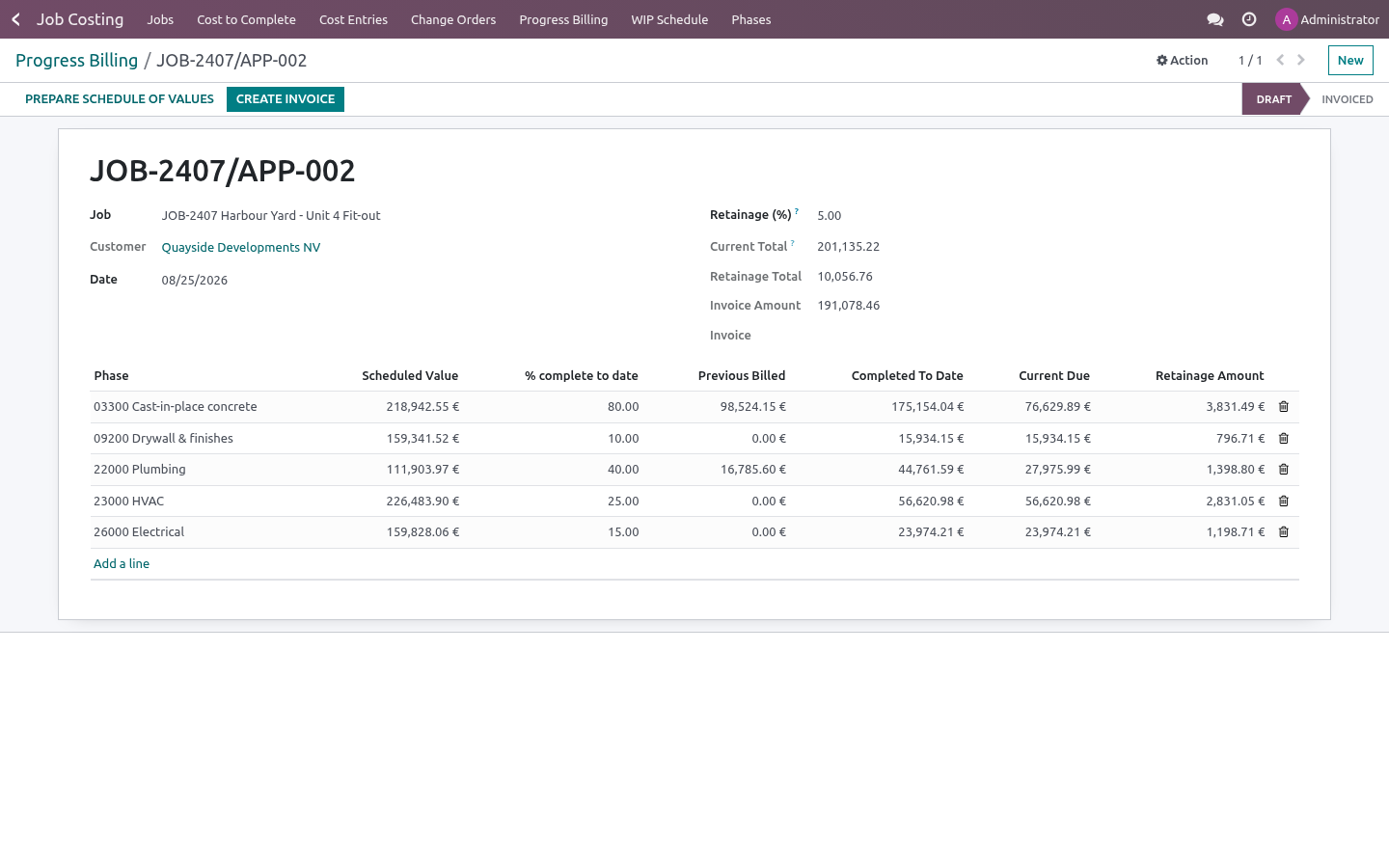
Progress billing (AIA G702/703 style). Applications for payment with a schedule of values per phase (defaulted pro-rata from the budget), cumulative percent complete, previous billed, current due - and one click turns the application into the customer invoice.
Retainage. A percentage withheld on every application, tracked on the job, released with its own application when the contract says so.
Earned value, the light version. EV and CPI from the numbers the job already keeps; PV and SPI from a straight-line plan between start and planned completion - labelled as such, no false precision.
What changed in 1.2
WIP schedule. Job Costing -> WIP Schedule: earned revenue against billings per job (percentage-of-completion), with over/under-billing columns and totals - the sheet the accountant builds by hand at every close.
CSI starter phases. One button seeds a job with the MasterFormat divisions; codes you already use are left untouched.
How we make sure it works
Before every release, 55 automated checks run against this app on Odoo 16, 17, 18, 19 and 20. Among them:
A job cannot start without a budget.
Read only role cannot bill.
An hour without a phase is not costed.
An approved change order cannot be edited.
An approved change order cannot be reopened.
The complete list is in the source you receive.
Support
support@bambooforge.dev — questions, bug reports and feature requests are answered by the developers who wrote the module.