 BambooForge Labs
Jewellery Management | Jewelry Store ERP
Jewellery retail: pieces weighed to their metal, priced off today's rate with an expiring quotation, old gold tested, memo stock, repairs.
Available for Odoo 16.0, Odoo 17.0, Odoo 18.0, Odoo 19.0, Odoo 20.0. Technical name bambooforge_jewellery.
Transcript of the walkthrough (Odoo 20)
Jewellery Management / Jewelry Store ERP. Jewellery retail: pieces weighed to their metal, priced off today's rate with an expiring quotation, old gold tested, memo stock, repairs. Said before you buy, because it is the half that decides whether the app fits: In the next few minutes: the rate, then the scale, then the paperwork, then the bill, once it is agreed, then the old gold. Then what this app deliberately does not do, so you can tell before you buy whether it fits.
Everything lives under Jewellery then Pieces then Sales then Memos. 1. Copy bambooforge_jewellery into your addons path and update the app list, or install the ZIP from the Odoo Apps Store. Community only; it depends on base, base_setup, mail and account.
2. Install Jewellery Management. 3. Set up the metals with their fineness and enter the first rate for each; nothing can be priced until the morning's rate is in.
4. Set the six thresholds under Settings. 5. Tag the pieces in the window with their gross weight and stones.
The rate There is no price list. The rate of the day per metal is a dated record, with where it came from and who entered it. A rate that has been entered cannot be edited. This morning's quotations were priced on it; a correction this afternoon rewrites what they were based on.
Enter the new rate as a new line. The rate in force is the last one quoted before now. A metal with no rate cannot be priced at all. A quotation expires after the shop's window.
Confirming a stale one is refused; it is repriced instead, and the note says what that did to the figure. A sale is confirmed at the rate that is the rate. If the rate has moved since the line was priced - even inside the window - the sale is repriced first, because the gap between the two is the shop's margin in whichever direction it falls. The clock on a quotation is moved by repricing it and by nothing else.
Typing a later date onto a stale quotation would make this morning's price look like this afternoon's, so the counter cannot, and the owner's correction is tracked. A rate that priced a bill cannot be deleted either, and deleting a metal does not take its rate history with it. The scale Every piece carries gross, stones and net weight. Only the net weight is metal, and it is what every valuation is worked out from.
Fine weight - net at the metal's fineness - is what it is worth if it goes back in the pot. Stones are recorded in carats per stone and converted to grams (one carat is a fifth of a gram, times the number of stones on the line) for the weight, because the scale does not know about carats. A pavé line of six five-pointers weighs all six. The price is metal at the rate, plus making, plus stones.
Making is a percentage or a fixed figure; wastage is separate and explicit. Both are the owner's figures: the counter sells at them without being shown them. A discount cannot exceed the making charge. Below that the shop is selling metal at a loss.
It comes off the bill as it is typed - and so does a piece swapped for another one, which is repriced at once rather than going out at the first piece's price. A sold piece is locked: its weight, metal, stones and hallmark are what the customer has. The paperwork A piece at or over the threshold weight cannot be sold without a hallmark recorded. Zero switches the check off for markets that do not require it.
A diamond at or over the threshold carat needs a certificate number before the piece goes in the window - including one written in small and grown afterwards. The bill, once it is agreed Two tills cannot sell the same piece. The pieces on a sale are locked while it is confirmed, so the second till waits and then sees the piece sold rather than selling it again. Stages are what the buttons did.
Confirm, hand over, cancel, send, close: none of them can be written straight onto the record. The old gold Metal taken across the counter is weighed and tested - the tested fineness, who tested it, and when. A sale with an untested exchange line cannot be confirmed. The allowance is arithmetic: weight, tested fineness, the refiner's deduction, at the rate in force - converted to the rate's own fineness basis.
The rate it was allowed at is kept on the line. What was handed over the counter does not quietly revalue itself because the market moved between the quotation and the till. Change the weight, the fineness, the metal or the deduction and the test stamp comes off - and so does the rate. A figure tested on the old numbers is not a test of the new ones, so it is tested and repriced again before the sale can be confirmed.
It comes off the bill, and it is a credit line on the invoice so the customer's copy shows what was allowed and why. The memo Stock out on approval is still yours. It cannot be sold from the shop, cannot go on two memos, and a memo cannot close while anything on it is still out or never went out at all. What may not be sold from the window may not be sent out to be sold from somebody else's: an unmarked piece over the threshold does not go on a memo, and is not recorded sold off one either.
The docket is written before it goes. Pieces are not added to or taken off a memo that has already gone out, and a memo that is out cannot be deleted. A piece comes back - and is sellable again - or the retailer keeps it, which makes it a sale. A memo overdue back lands on somebody's list, once - on the person who wrote it, or failing that the shop owner.
Never on the robot: a job assigned to nobody is stock that is still out in March. A note about something else on the same memo does not count as having asked. The bench A customer's repair is weighed in and weighed out. The weight in is written once, in front of the customer; a genuine mis-key is the owner's to correct and it is tracked, because a weight in that can be typed over on the way out is not a weight in at all.
The stones are counted at the counter, in front of the customer. A repair charged at far above its quote is stopped before the counter is; a repair promised for today is asked about today, on the bench's list or the counter's, and never on the robot's. Roles Counter - sells, quotes, takes repairs in and weighs old gold. Cannot enter the rate, see or change a piece's making charge, move the clock on a quotation, correct a weight in, accept a weight difference, or send stock out on memo.
Shop owner - enters the rate, sets making charges and the shop's thresholds, sends and closes memos, invoices, accepts weight differences, and melts stock. Everything is per shop: a piece, a metal, a memo or a repair from one company does not go on another one's paperwork, and the invoice is raised in the company that sold the piece. How we make sure it works. Before every release, 144 automated checks run against this app on Odoo 16, 17, 18, 19 and 20.
Among them: A memo does not close over a piece that never went. A piece is not sold by two tills at once. A piece on memo cannot be sold from the shop. A metal with no rate cannot be priced.
A discount cannot exceed the making charge. The complete list is in the source you receive. Questions people ask. Which Odoo versions does it run on?
Odoo 16.0, 17.0, 18.0, 19.0, 20.0, on the series you buy it for; each series is its own listing. Community or Enterprise? Both. It needs no Enterprise app.
The complete manual is at docs dot bambooforge dot dev, the demo database is linked from the store page, and support answers within twenty-four hours. Links are in the description.
Transcript of the walkthrough (Odoo 19)
Jewellery Management / Jewelry Store ERP. Jewellery retail: pieces weighed to their metal, priced off today's rate with an expiring quotation, old gold tested, memo stock, repairs. Set up the metals with their fineness, enter the first rate for each, set the six thresholds under Settings, and tag the pieces in the window with their gross weight and stones. Nothing can be priced until the morning's rate is in, which is the point.
support@bambooforge.dev In the next few minutes: the rate, then the scale, then the paperwork, then the bill, once it is agreed, then the old gold. Then what this app deliberately does not do, so you can tell before you buy whether it fits. Everything lives under Jewellery then Pieces then Sales then Memos. Community only.
Depends on base, base_setup, mail and account. The rate There is no price list. The rate of the day per metal is a dated record, with where it came from and who entered it. A rate that has been entered cannot be edited.
This morning's quotations were priced on it; a correction this afternoon rewrites what they were based on. Enter the new rate as a new line. The rate in force is the last one quoted before now. A metal with no rate cannot be priced at all.
A quotation expires after the shop's window. Confirming a stale one is refused; it is repriced instead, and the note says what that did to the figure. A sale is confirmed at the rate that is the rate. If the rate has moved since the line was priced - even inside the window - the sale is repriced first, because the gap between the two is the shop's margin in whichever direction it falls.
The clock on a quotation is moved by repricing it and by nothing else. Typing a later date onto a stale quotation would make this morning's price look like this afternoon's, so the counter cannot, and the owner's correction is tracked. A rate that priced a bill cannot be deleted either, and deleting a metal does not take its rate history with it. The scale Every piece carries gross, stones and net weight.
Only the net weight is metal, and it is what every valuation is worked out from. Fine weight - net at the metal's fineness - is what it is worth if it goes back in the pot. Stones are recorded in carats per stone and converted to grams (one carat is a fifth of a gram, times the number of stones on the line) for the weight, because the scale does not know about carats. A pavé line of six five-pointers weighs all six.
The price is metal at the rate, plus making, plus stones. Making is a percentage or a fixed figure; wastage is separate and explicit. Both are the owner's figures: the counter sells at them without being shown them. A discount cannot exceed the making charge.
Below that the shop is selling metal at a loss. It comes off the bill as it is typed - and so does a piece swapped for another one, which is repriced at once rather than going out at the first piece's price. A sold piece is locked: its weight, metal, stones and hallmark are what the customer has. The paperwork A piece at or over the threshold weight cannot be sold without a hallmark recorded.
Zero switches the check off for markets that do not require it. A diamond at or over the threshold carat needs a certificate number before the piece goes in the window - including one written in small and grown afterwards. The bill, once it is agreed Two tills cannot sell the same piece. The pieces on a sale are locked while it is confirmed, so the second till waits and then sees the piece sold rather than selling it again.
Stages are what the buttons did. Confirm, hand over, cancel, send, close: none of them can be written straight onto the record. The old gold Metal taken across the counter is weighed and tested - the tested fineness, who tested it, and when. A sale with an untested exchange line cannot be confirmed.
The allowance is arithmetic: weight, tested fineness, the refiner's deduction, at the rate in force - converted to the rate's own fineness basis. The rate it was allowed at is kept on the line. What was handed over the counter does not quietly revalue itself because the market moved between the quotation and the till. Change the weight, the fineness, the metal or the deduction and the test stamp comes off - and so does the rate.
A figure tested on the old numbers is not a test of the new ones, so it is tested and repriced again before the sale can be confirmed. It comes off the bill, and it is a credit line on the invoice so the customer's copy shows what was allowed and why. The memo Stock out on approval is still yours. It cannot be sold from the shop, cannot go on two memos, and a memo cannot close while anything on it is still out or never went out at all.
What may not be sold from the window may not be sent out to be sold from somebody else's: an unmarked piece over the threshold does not go on a memo, and is not recorded sold off one either. The docket is written before it goes. Pieces are not added to or taken off a memo that has already gone out, and a memo that is out cannot be deleted. A piece comes back - and is sellable again - or the retailer keeps it, which makes it a sale.
A memo overdue back lands on somebody's list, once - on the person who wrote it, or failing that the shop owner. Never on the robot: a job assigned to nobody is stock that is still out in March. A note about something else on the same memo does not count as having asked. The bench A customer's repair is weighed in and weighed out.
The weight in is written once, in front of the customer; a genuine mis-key is the owner's to correct and it is tracked, because a weight in that can be typed over on the way out is not a weight in at all. The stones are counted at the counter, in front of the customer. A repair charged at far above its quote is stopped before the counter is; a repair promised for today is asked about today, on the bench's list or the counter's, and never on the robot's. Roles Counter - sells, quotes, takes repairs in and weighs old gold.
Cannot enter the rate, see or change a piece's making charge, move the clock on a quotation, correct a weight in, accept a weight difference, or send stock out on memo. Shop owner - enters the rate, sets making charges and the shop's thresholds, sends and closes memos, invoices, accepts weight differences, and melts stock. Everything is per shop: a piece, a metal, a memo or a repair from one company does not go on another one's paperwork, and the invoice is raised in the company that sold the piece. Support The complete manual is at docs dot bambooforge dot dev, the demo database is linked from the store page, and support answers within twenty-four hours.
Links are in the description.
Transcript of the walkthrough (Odoo 18)
Jewellery Management / Jewelry Store ERP. Jewellery retail: pieces weighed to their metal, priced off today's rate with an expiring quotation, old gold tested, memo stock, repairs. Set up the metals with their fineness, enter the first rate for each, set the six thresholds under Settings, and tag the pieces in the window with their gross weight and stones. Nothing can be priced until the morning's rate is in, which is the point.
support@bambooforge.dev In the next few minutes: the rate, then the scale, then the paperwork, then the bill, once it is agreed, then the old gold. Then what this app deliberately does not do, so you can tell before you buy whether it fits. Everything lives under Jewellery then Pieces then Sales then Memos. Community only.
Depends on base, base_setup, mail and account. The rate There is no price list. The rate of the day per metal is a dated record, with where it came from and who entered it. A rate that has been entered cannot be edited.
This morning's quotations were priced on it; a correction this afternoon rewrites what they were based on. Enter the new rate as a new line. The rate in force is the last one quoted before now. A metal with no rate cannot be priced at all.
A quotation expires after the shop's window. Confirming a stale one is refused; it is repriced instead, and the note says what that did to the figure. A sale is confirmed at the rate that is the rate. If the rate has moved since the line was priced - even inside the window - the sale is repriced first, because the gap between the two is the shop's margin in whichever direction it falls.
The clock on a quotation is moved by repricing it and by nothing else. Typing a later date onto a stale quotation would make this morning's price look like this afternoon's, so the counter cannot, and the owner's correction is tracked. A rate that priced a bill cannot be deleted either, and deleting a metal does not take its rate history with it. The scale Every piece carries gross, stones and net weight.
Only the net weight is metal, and it is what every valuation is worked out from. Fine weight - net at the metal's fineness - is what it is worth if it goes back in the pot. Stones are recorded in carats per stone and converted to grams (one carat is a fifth of a gram, times the number of stones on the line) for the weight, because the scale does not know about carats. A pavé line of six five-pointers weighs all six.
The price is metal at the rate, plus making, plus stones. Making is a percentage or a fixed figure; wastage is separate and explicit. Both are the owner's figures: the counter sells at them without being shown them. A discount cannot exceed the making charge.
Below that the shop is selling metal at a loss. It comes off the bill as it is typed - and so does a piece swapped for another one, which is repriced at once rather than going out at the first piece's price. A sold piece is locked: its weight, metal, stones and hallmark are what the customer has. The paperwork A piece at or over the threshold weight cannot be sold without a hallmark recorded.
Zero switches the check off for markets that do not require it. A diamond at or over the threshold carat needs a certificate number before the piece goes in the window - including one written in small and grown afterwards. The bill, once it is agreed Two tills cannot sell the same piece. The pieces on a sale are locked while it is confirmed, so the second till waits and then sees the piece sold rather than selling it again.
Stages are what the buttons did. Confirm, hand over, cancel, send, close: none of them can be written straight onto the record. The old gold Metal taken across the counter is weighed and tested - the tested fineness, who tested it, and when. A sale with an untested exchange line cannot be confirmed.
The allowance is arithmetic: weight, tested fineness, the refiner's deduction, at the rate in force - converted to the rate's own fineness basis. The rate it was allowed at is kept on the line. What was handed over the counter does not quietly revalue itself because the market moved between the quotation and the till. Change the weight, the fineness, the metal or the deduction and the test stamp comes off - and so does the rate.
A figure tested on the old numbers is not a test of the new ones, so it is tested and repriced again before the sale can be confirmed. It comes off the bill, and it is a credit line on the invoice so the customer's copy shows what was allowed and why. The memo Stock out on approval is still yours. It cannot be sold from the shop, cannot go on two memos, and a memo cannot close while anything on it is still out or never went out at all.
What may not be sold from the window may not be sent out to be sold from somebody else's: an unmarked piece over the threshold does not go on a memo, and is not recorded sold off one either. The docket is written before it goes. Pieces are not added to or taken off a memo that has already gone out, and a memo that is out cannot be deleted. A piece comes back - and is sellable again - or the retailer keeps it, which makes it a sale.
A memo overdue back lands on somebody's list, once - on the person who wrote it, or failing that the shop owner. Never on the robot: a job assigned to nobody is stock that is still out in March. A note about something else on the same memo does not count as having asked. The bench A customer's repair is weighed in and weighed out.
The weight in is written once, in front of the customer; a genuine mis-key is the owner's to correct and it is tracked, because a weight in that can be typed over on the way out is not a weight in at all. The stones are counted at the counter, in front of the customer. A repair charged at far above its quote is stopped before the counter is; a repair promised for today is asked about today, on the bench's list or the counter's, and never on the robot's. Roles Counter - sells, quotes, takes repairs in and weighs old gold.
Cannot enter the rate, see or change a piece's making charge, move the clock on a quotation, correct a weight in, accept a weight difference, or send stock out on memo. Shop owner - enters the rate, sets making charges and the shop's thresholds, sends and closes memos, invoices, accepts weight differences, and melts stock. Everything is per shop: a piece, a metal, a memo or a repair from one company does not go on another one's paperwork, and the invoice is raised in the company that sold the piece. Support The complete manual is at docs dot bambooforge dot dev, the demo database is linked from the store page, and support answers within twenty-four hours.
Links are in the description.
Transcript of the walkthrough (Odoo 17)
Jewellery Management / Jewelry Store ERP. Jewellery retail: pieces weighed to their metal, priced off today's rate with an expiring quotation, old gold tested, memo stock, repairs. Set up the metals with their fineness, enter the first rate for each, set the six thresholds under Settings, and tag the pieces in the window with their gross weight and stones. Nothing can be priced until the morning's rate is in, which is the point.
support@bambooforge.dev In the next few minutes: the rate, then the scale, then the paperwork, then the bill, once it is agreed, then the old gold. Then what this app deliberately does not do, so you can tell before you buy whether it fits. Everything lives under Jewellery then Pieces then Sales then Memos. Community only.
Depends on base, base_setup, mail and account. The rate There is no price list. The rate of the day per metal is a dated record, with where it came from and who entered it. A rate that has been entered cannot be edited.
This morning's quotations were priced on it; a correction this afternoon rewrites what they were based on. Enter the new rate as a new line. The rate in force is the last one quoted before now. A metal with no rate cannot be priced at all.
A quotation expires after the shop's window. Confirming a stale one is refused; it is repriced instead, and the note says what that did to the figure. A sale is confirmed at the rate that is the rate. If the rate has moved since the line was priced - even inside the window - the sale is repriced first, because the gap between the two is the shop's margin in whichever direction it falls.
The clock on a quotation is moved by repricing it and by nothing else. Typing a later date onto a stale quotation would make this morning's price look like this afternoon's, so the counter cannot, and the owner's correction is tracked. A rate that priced a bill cannot be deleted either, and deleting a metal does not take its rate history with it. The scale Every piece carries gross, stones and net weight.
Only the net weight is metal, and it is what every valuation is worked out from. Fine weight - net at the metal's fineness - is what it is worth if it goes back in the pot. Stones are recorded in carats per stone and converted to grams (one carat is a fifth of a gram, times the number of stones on the line) for the weight, because the scale does not know about carats. A pavé line of six five-pointers weighs all six.
The price is metal at the rate, plus making, plus stones. Making is a percentage or a fixed figure; wastage is separate and explicit. Both are the owner's figures: the counter sells at them without being shown them. A discount cannot exceed the making charge.
Below that the shop is selling metal at a loss. It comes off the bill as it is typed - and so does a piece swapped for another one, which is repriced at once rather than going out at the first piece's price. A sold piece is locked: its weight, metal, stones and hallmark are what the customer has. The paperwork A piece at or over the threshold weight cannot be sold without a hallmark recorded.
Zero switches the check off for markets that do not require it. A diamond at or over the threshold carat needs a certificate number before the piece goes in the window - including one written in small and grown afterwards. The bill, once it is agreed Two tills cannot sell the same piece. The pieces on a sale are locked while it is confirmed, so the second till waits and then sees the piece sold rather than selling it again.
Stages are what the buttons did. Confirm, hand over, cancel, send, close: none of them can be written straight onto the record. The old gold Metal taken across the counter is weighed and tested - the tested fineness, who tested it, and when. A sale with an untested exchange line cannot be confirmed.
The allowance is arithmetic: weight, tested fineness, the refiner's deduction, at the rate in force - converted to the rate's own fineness basis. The rate it was allowed at is kept on the line. What was handed over the counter does not quietly revalue itself because the market moved between the quotation and the till. Change the weight, the fineness, the metal or the deduction and the test stamp comes off - and so does the rate.
A figure tested on the old numbers is not a test of the new ones, so it is tested and repriced again before the sale can be confirmed. It comes off the bill, and it is a credit line on the invoice so the customer's copy shows what was allowed and why. The memo Stock out on approval is still yours. It cannot be sold from the shop, cannot go on two memos, and a memo cannot close while anything on it is still out or never went out at all.
What may not be sold from the window may not be sent out to be sold from somebody else's: an unmarked piece over the threshold does not go on a memo, and is not recorded sold off one either. The docket is written before it goes. Pieces are not added to or taken off a memo that has already gone out, and a memo that is out cannot be deleted. A piece comes back - and is sellable again - or the retailer keeps it, which makes it a sale.
A memo overdue back lands on somebody's list, once - on the person who wrote it, or failing that the shop owner. Never on the robot: a job assigned to nobody is stock that is still out in March. A note about something else on the same memo does not count as having asked. The bench A customer's repair is weighed in and weighed out.
The weight in is written once, in front of the customer; a genuine mis-key is the owner's to correct and it is tracked, because a weight in that can be typed over on the way out is not a weight in at all. The stones are counted at the counter, in front of the customer. A repair charged at far above its quote is stopped before the counter is; a repair promised for today is asked about today, on the bench's list or the counter's, and never on the robot's. Roles Counter - sells, quotes, takes repairs in and weighs old gold.
Cannot enter the rate, see or change a piece's making charge, move the clock on a quotation, correct a weight in, accept a weight difference, or send stock out on memo. Shop owner - enters the rate, sets making charges and the shop's thresholds, sends and closes memos, invoices, accepts weight differences, and melts stock. Everything is per shop: a piece, a metal, a memo or a repair from one company does not go on another one's paperwork, and the invoice is raised in the company that sold the piece. Support The complete manual is at docs dot bambooforge dot dev, the demo database is linked from the store page, and support answers within twenty-four hours.
Links are in the description.
Transcript of the walkthrough (Odoo 16)
Jewellery Management / Jewelry Store ERP. Jewellery retail: pieces weighed to their metal, priced off today's rate with an expiring quotation, old gold tested, memo stock, repairs. Set up the metals with their fineness, enter the first rate for each, set the six thresholds under Settings, and tag the pieces in the window with their gross weight and stones. Nothing can be priced until the morning's rate is in, which is the point.
support@bambooforge.dev In the next few minutes: the rate, then the scale, then the paperwork, then the bill, once it is agreed, then the old gold. Then what this app deliberately does not do, so you can tell before you buy whether it fits. Everything lives under Jewellery then Pieces then Sales then Memos. Community only.
Depends on base, base_setup, mail and account. The rate There is no price list. The rate of the day per metal is a dated record, with where it came from and who entered it. A rate that has been entered cannot be edited.
This morning's quotations were priced on it; a correction this afternoon rewrites what they were based on. Enter the new rate as a new line. The rate in force is the last one quoted before now. A metal with no rate cannot be priced at all.
A quotation expires after the shop's window. Confirming a stale one is refused; it is repriced instead, and the note says what that did to the figure. A sale is confirmed at the rate that is the rate. If the rate has moved since the line was priced - even inside the window - the sale is repriced first, because the gap between the two is the shop's margin in whichever direction it falls.
The clock on a quotation is moved by repricing it and by nothing else. Typing a later date onto a stale quotation would make this morning's price look like this afternoon's, so the counter cannot, and the owner's correction is tracked. A rate that priced a bill cannot be deleted either, and deleting a metal does not take its rate history with it. The scale Every piece carries gross, stones and net weight.
Only the net weight is metal, and it is what every valuation is worked out from. Fine weight - net at the metal's fineness - is what it is worth if it goes back in the pot. Stones are recorded in carats per stone and converted to grams (one carat is a fifth of a gram, times the number of stones on the line) for the weight, because the scale does not know about carats. A pavé line of six five-pointers weighs all six.
The price is metal at the rate, plus making, plus stones. Making is a percentage or a fixed figure; wastage is separate and explicit. Both are the owner's figures: the counter sells at them without being shown them. A discount cannot exceed the making charge.
Below that the shop is selling metal at a loss. It comes off the bill as it is typed - and so does a piece swapped for another one, which is repriced at once rather than going out at the first piece's price. A sold piece is locked: its weight, metal, stones and hallmark are what the customer has. The paperwork A piece at or over the threshold weight cannot be sold without a hallmark recorded.
Zero switches the check off for markets that do not require it. A diamond at or over the threshold carat needs a certificate number before the piece goes in the window - including one written in small and grown afterwards. The bill, once it is agreed Two tills cannot sell the same piece. The pieces on a sale are locked while it is confirmed, so the second till waits and then sees the piece sold rather than selling it again.
Stages are what the buttons did. Confirm, hand over, cancel, send, close: none of them can be written straight onto the record. The old gold Metal taken across the counter is weighed and tested - the tested fineness, who tested it, and when. A sale with an untested exchange line cannot be confirmed.
The allowance is arithmetic: weight, tested fineness, the refiner's deduction, at the rate in force - converted to the rate's own fineness basis. The rate it was allowed at is kept on the line. What was handed over the counter does not quietly revalue itself because the market moved between the quotation and the till. Change the weight, the fineness, the metal or the deduction and the test stamp comes off - and so does the rate.
A figure tested on the old numbers is not a test of the new ones, so it is tested and repriced again before the sale can be confirmed. It comes off the bill, and it is a credit line on the invoice so the customer's copy shows what was allowed and why. The memo Stock out on approval is still yours. It cannot be sold from the shop, cannot go on two memos, and a memo cannot close while anything on it is still out or never went out at all.
What may not be sold from the window may not be sent out to be sold from somebody else's: an unmarked piece over the threshold does not go on a memo, and is not recorded sold off one either. The docket is written before it goes. Pieces are not added to or taken off a memo that has already gone out, and a memo that is out cannot be deleted. A piece comes back - and is sellable again - or the retailer keeps it, which makes it a sale.
A memo overdue back lands on somebody's list, once - on the person who wrote it, or failing that the shop owner. Never on the robot: a job assigned to nobody is stock that is still out in March. A note about something else on the same memo does not count as having asked. The bench A customer's repair is weighed in and weighed out.
The weight in is written once, in front of the customer; a genuine mis-key is the owner's to correct and it is tracked, because a weight in that can be typed over on the way out is not a weight in at all. The stones are counted at the counter, in front of the customer. A repair charged at far above its quote is stopped before the counter is; a repair promised for today is asked about today, on the bench's list or the counter's, and never on the robot's. Roles Counter - sells, quotes, takes repairs in and weighs old gold.
Cannot enter the rate, see or change a piece's making charge, move the clock on a quotation, correct a weight in, accept a weight difference, or send stock out on memo. Shop owner - enters the rate, sets making charges and the shop's thresholds, sends and closes memos, invoices, accepts weight differences, and melts stock. Everything is per shop: a piece, a metal, a memo or a repair from one company does not go on another one's paperwork, and the invoice is raised in the company that sold the piece. Support The complete manual is at docs dot bambooforge dot dev, the demo database is linked from the store page, and support answers within twenty-four hours.
Links are in the description.
Key facts
- What it is
- Jewellery retail: pieces weighed to their metal, priced off today's rate with an expiring quotation, old gold tested, memo stock, repairs.
- For
- Industries
- Odoo versions
- 16.0, 17.0, 18.0, 19.0, 20.0 - Community and Enterprise
- Runs on
- Odoo.sh or Odoo you host yourself - not Odoo Online, which accepts no third-party apps
- Price
- 139 EUR, one-time, on the Odoo Apps Store
- Technical name
- bambooforge_jewellery
- Not for
- Said before you buy, because it is the half that decides whether the app fits:; Keep a price list: prices come from the metal rate of the day and the making charge.; Edit or delete a rate that has been entered or has priced a bill.; Price a metal with no rate.
- Manual last updated
- 2026-09-21
Jewellery Management | Jewelry Store ERP
Built around the four places an independent jeweller quietly loses money: the rate, the scale, the memo and the bench.
The rate
There is no price list. The rate of the day per metal is a dated record, with where it came from and who entered it.
A rate that has been entered cannot be edited. This morning's quotations were priced on it; a correction this afternoon rewrites what they were based on. Enter the new rate as a new line.
The rate in force is the last one quoted before now. A metal with no rate cannot be priced at all.
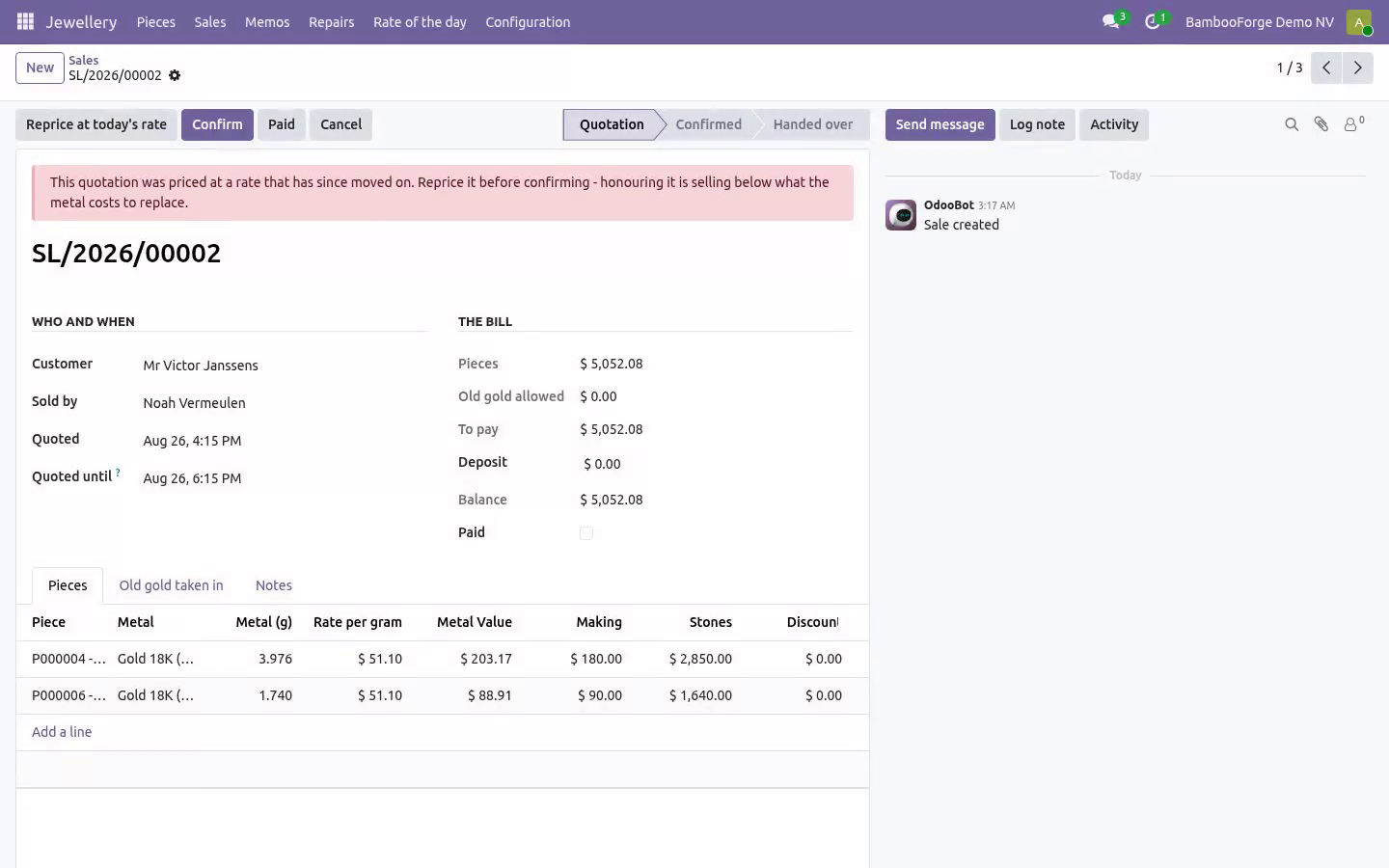
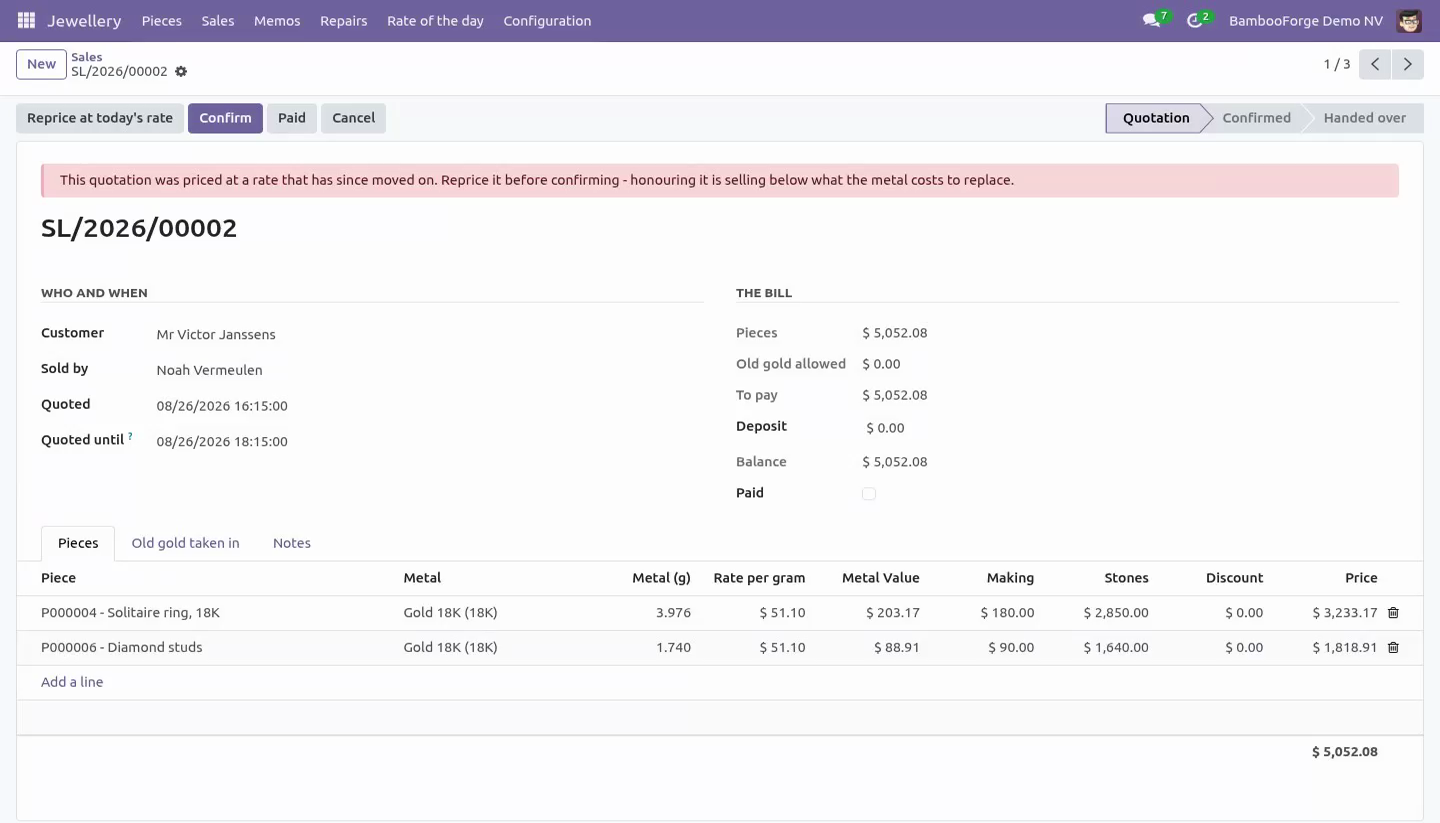
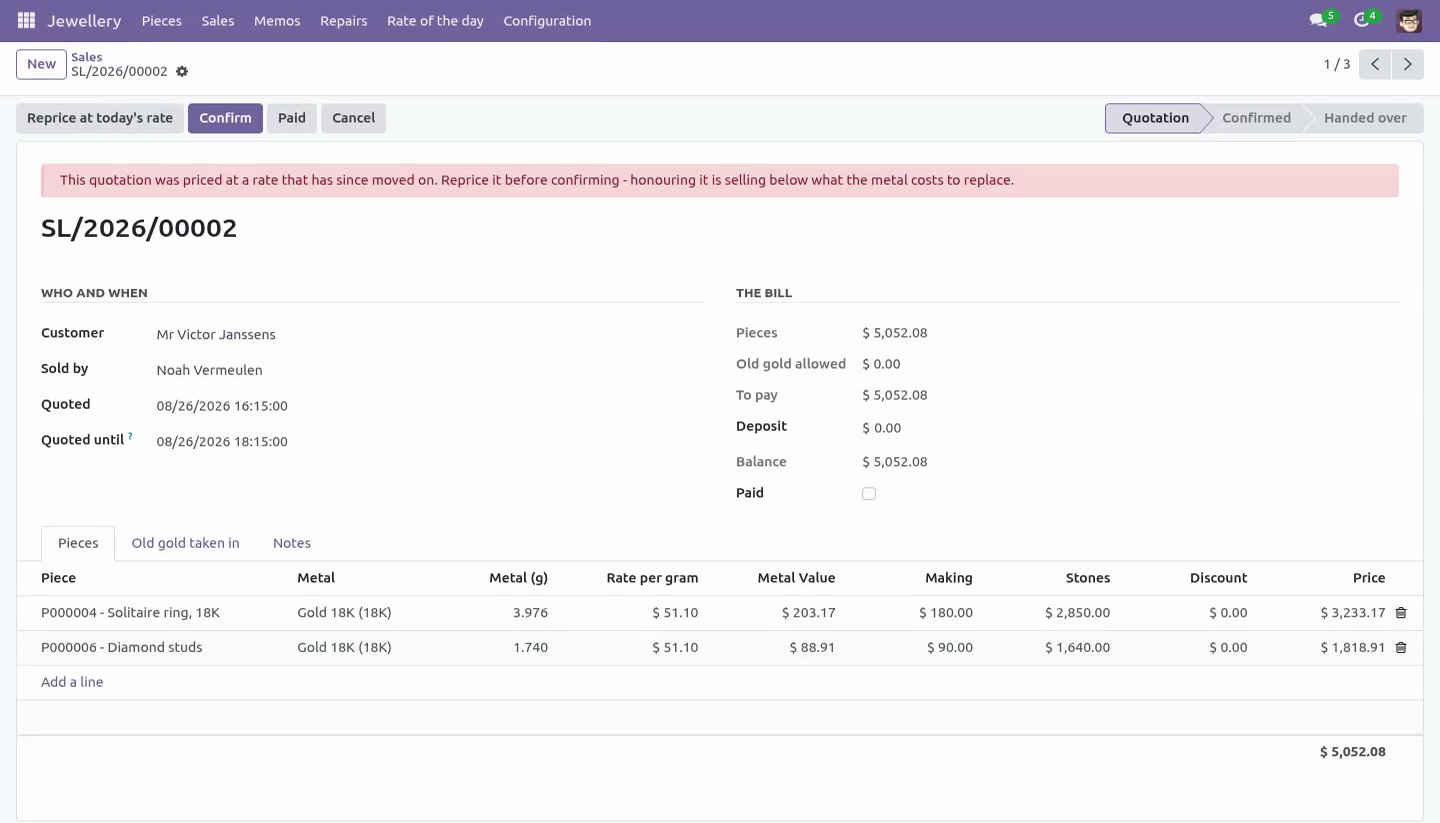
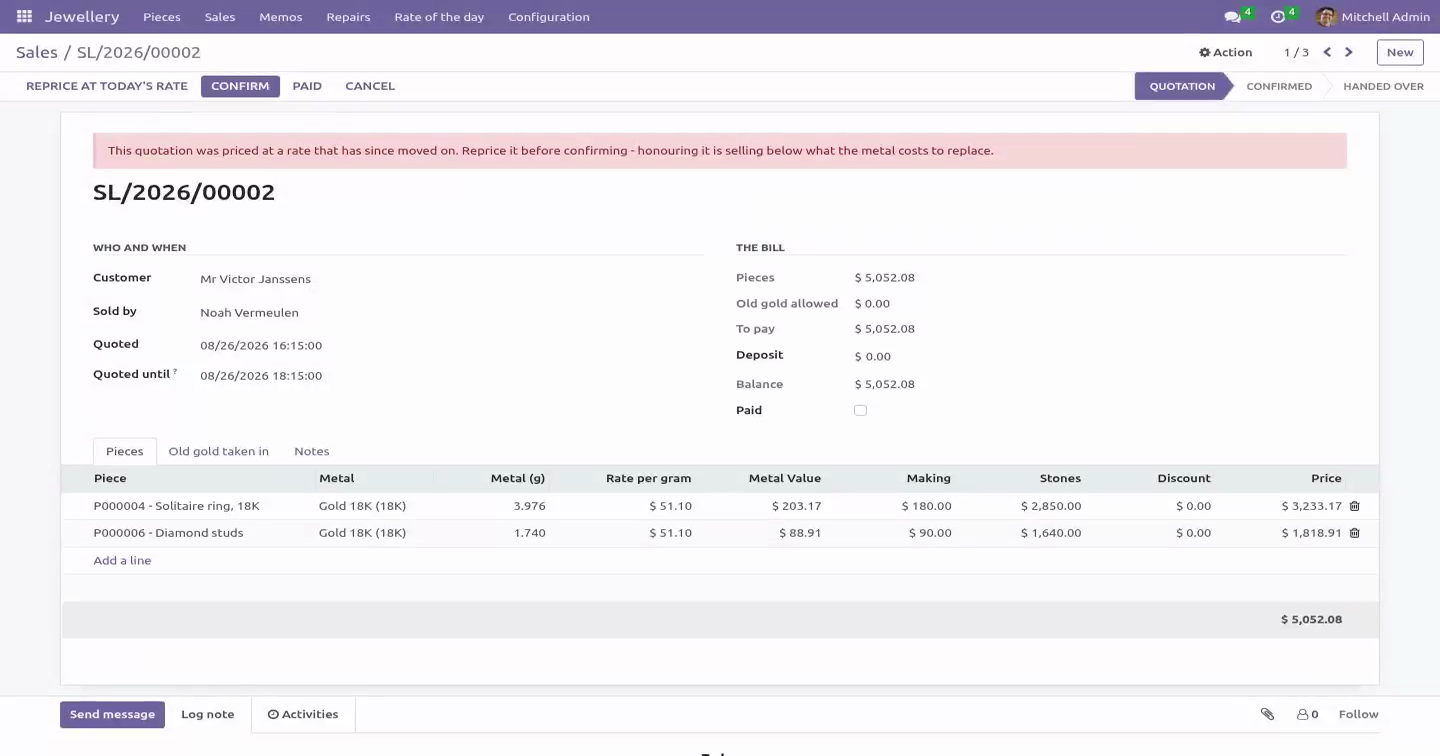
A quotation expires after the shop's window. Confirming a stale one is refused; it is repriced instead, and the note says what that did to the figure.
A sale is confirmed at the rate that is the rate. If the rate has moved since the line was priced - even inside the window - the sale is repriced first, because the gap between the two is the shop's margin in whichever direction it falls.
The clock on a quotation is moved by repricing it and by nothing else. Typing a later date onto a stale quotation would make this morning's price look like this afternoon's, so the counter cannot, and the owner's correction is tracked.
A rate that priced a bill cannot be deleted either, and deleting a metal does not take its rate history with it.
The scale
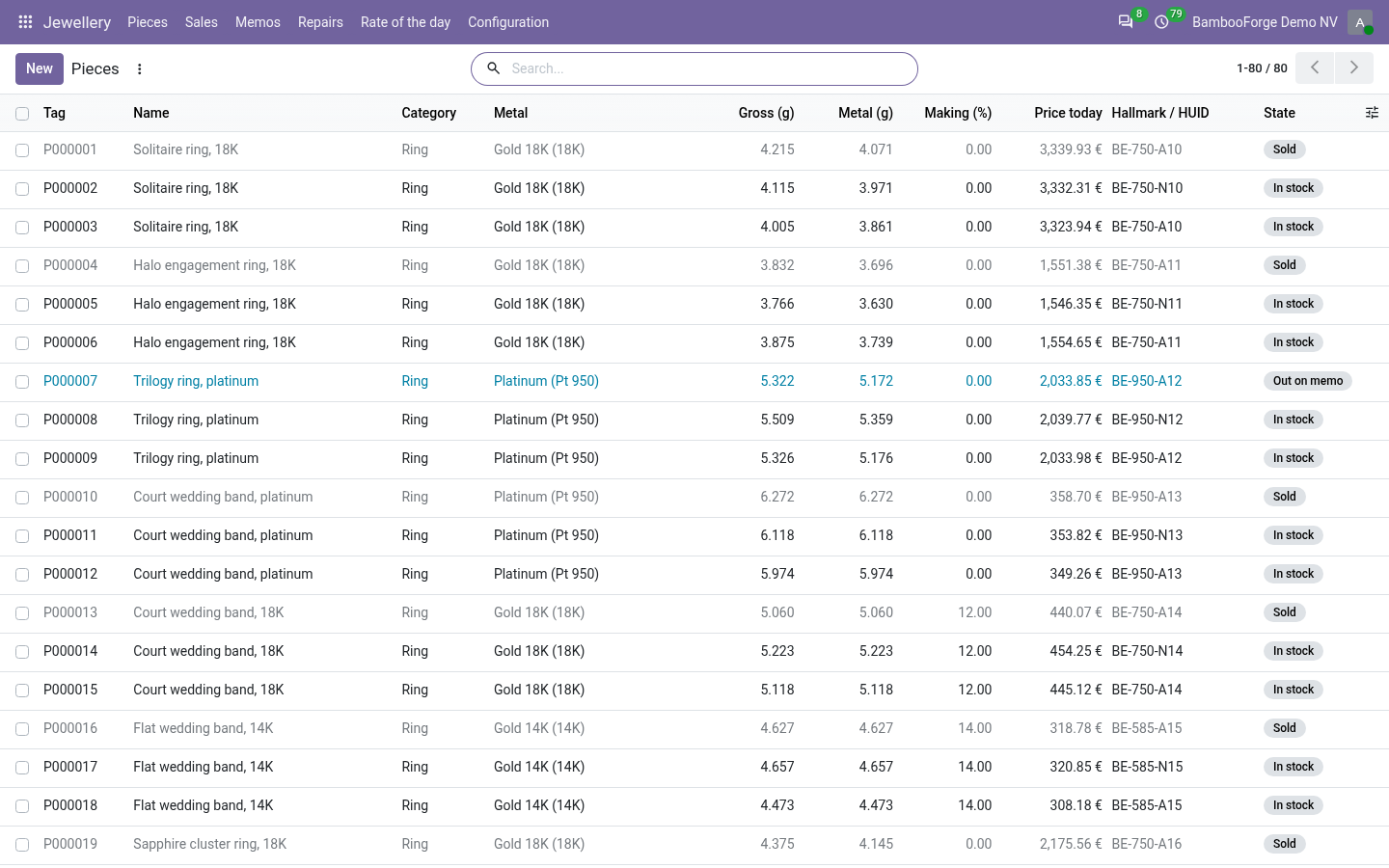
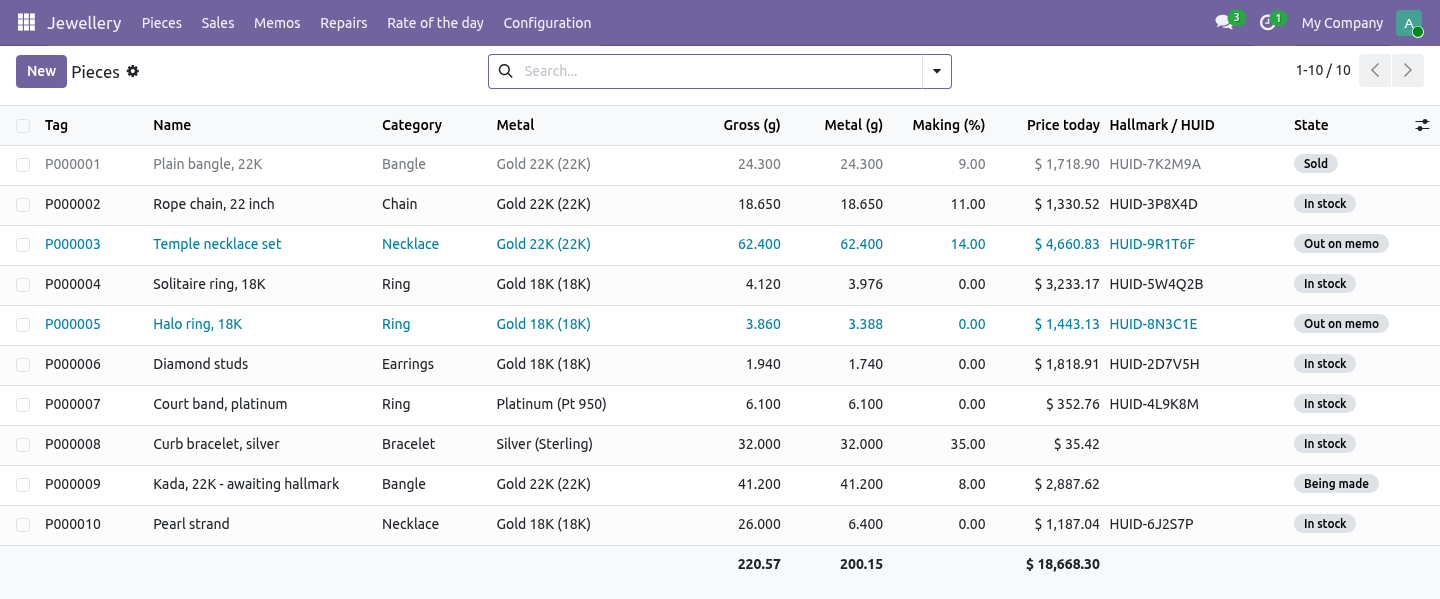
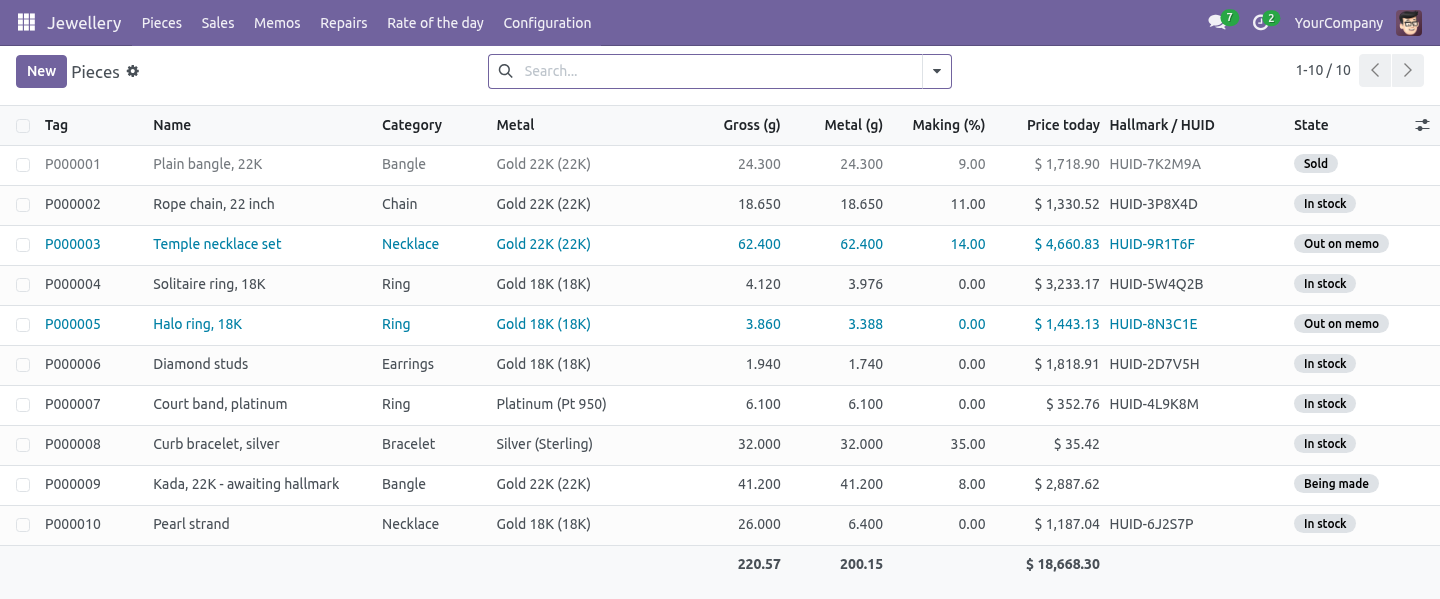
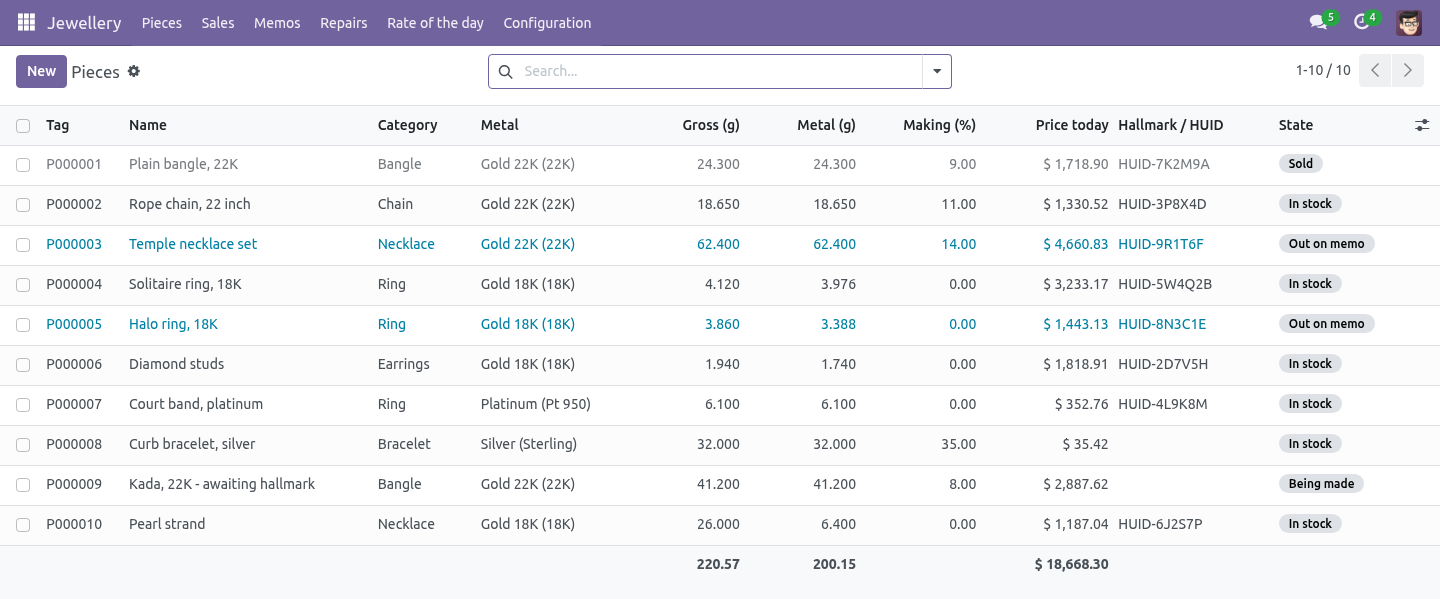
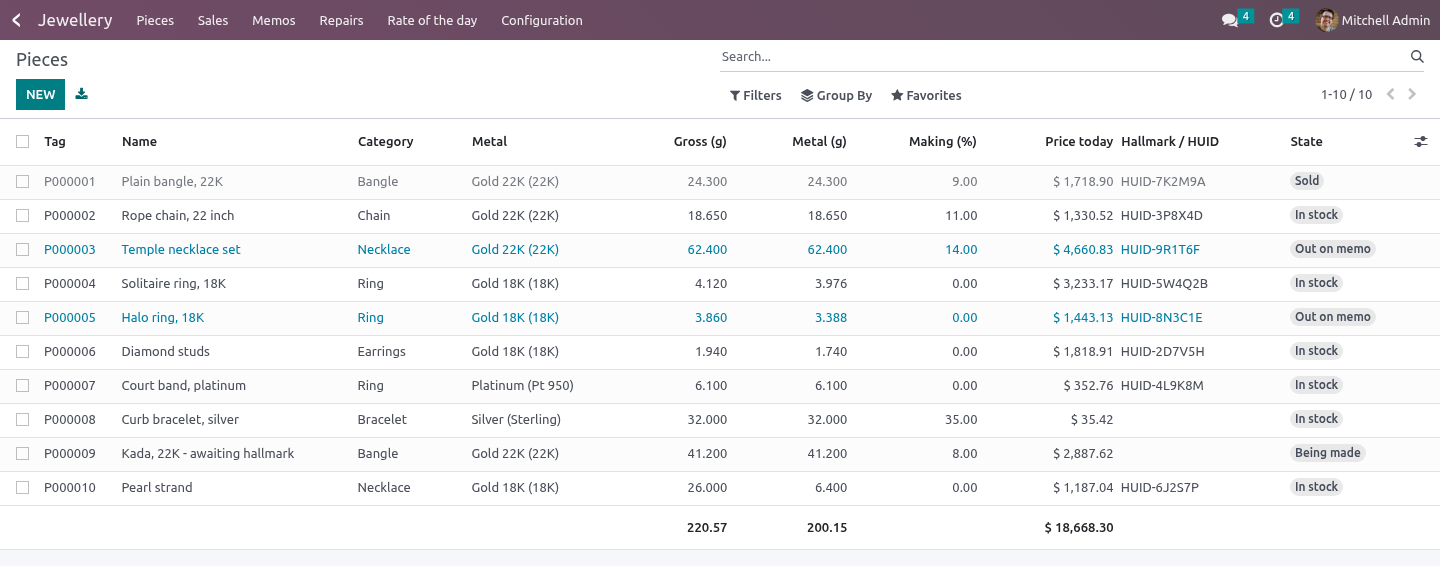
Every piece carries gross, stones and net weight. Only the net weight is metal, and it is what every valuation is worked out from. Fine weight - net at the metal's fineness - is what it is worth if it goes back in the pot.
Stones are recorded in carats per stone and converted to grams (one carat is a fifth of a gram, times the number of stones on the line) for the weight, because the scale does not know about carats. A pavé line of six five-pointers weighs all six.
The price is metal at the rate, plus making, plus stones. Making is a percentage or a fixed figure; wastage is separate and explicit. Both are the owner's figures: the counter sells at them without being shown them.
A discount cannot exceed the making charge. Below that the shop is selling metal at a loss. It comes off the bill as it is typed - and so does a piece swapped for another one, which is repriced at once rather than going out at the first piece's price.
A sold piece is locked: its weight, metal, stones and hallmark are what the customer has.
The paperwork
A piece at or over the threshold weight cannot be sold without a hallmark recorded. Zero switches the check off for markets that do not require it.
A diamond at or over the threshold carat needs a certificate number before the piece goes in the window - including one written in small and grown afterwards.
The bill, once it is agreed
A confirmed sale is the bill the customer agreed to. Its pieces, its old gold, its deposit, its customer and its date do not change afterwards: a piece added later would never be checked or marked sold, and a piece taken off would leave stock sold to nobody. Cancelling puts the pieces back in the window; deleting is refused.
Two tills cannot sell the same piece. The pieces on a sale are locked while it is confirmed, so the second till waits and then sees the piece sold rather than selling it again.
Stages are what the buttons did. Confirm, hand over, cancel, send, close: none of them can be written straight onto the record.
The invoice is a plain document - one line per piece and one credit line per lot of old gold, each carrying the weight and the rate it was worked out at, without product or catalogue lines, because a jeweller's stock is unique pieces. A deposit already taken is carried onto it as a note: it is money received, and it is registered as a payment like any other.
The old gold
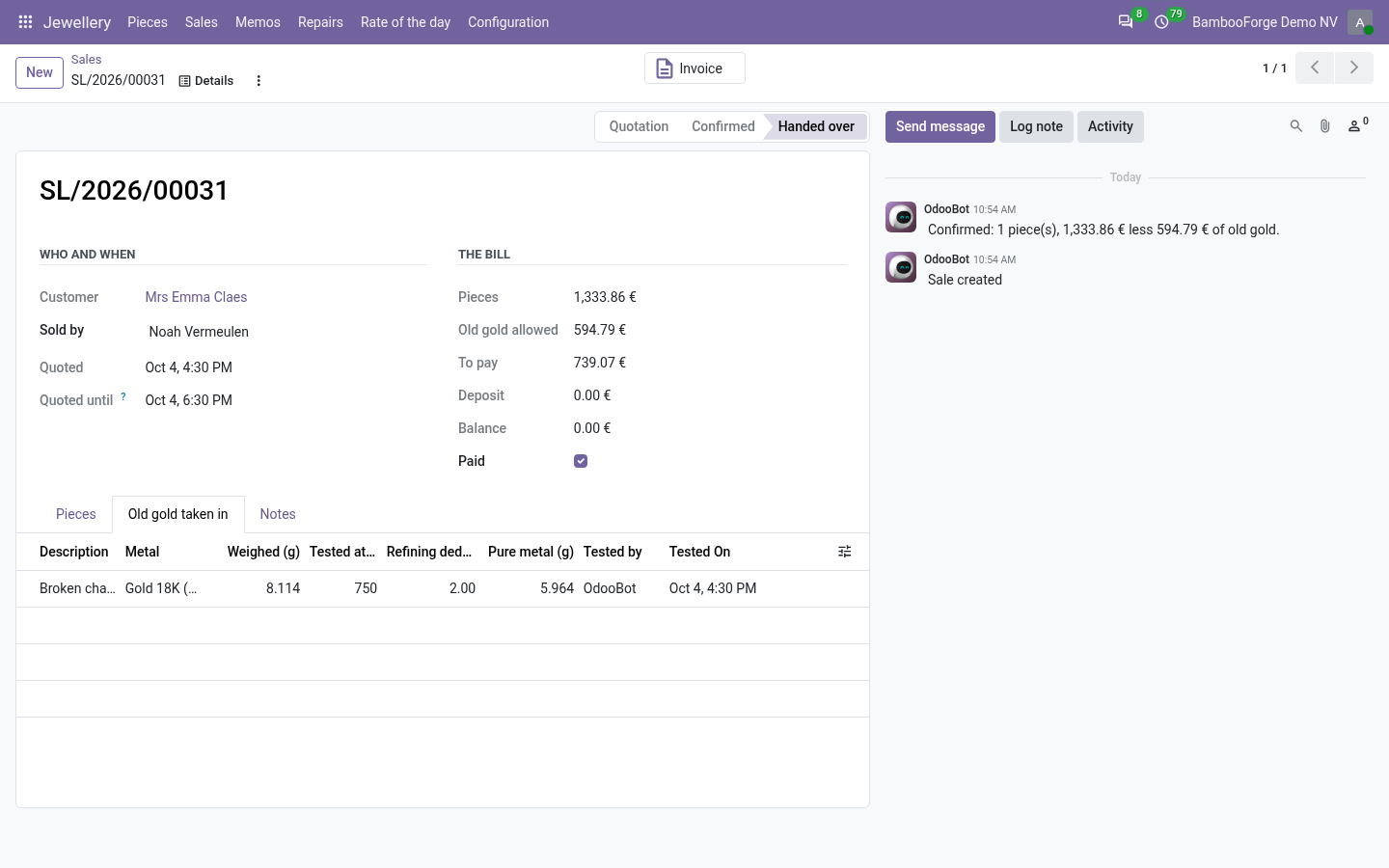
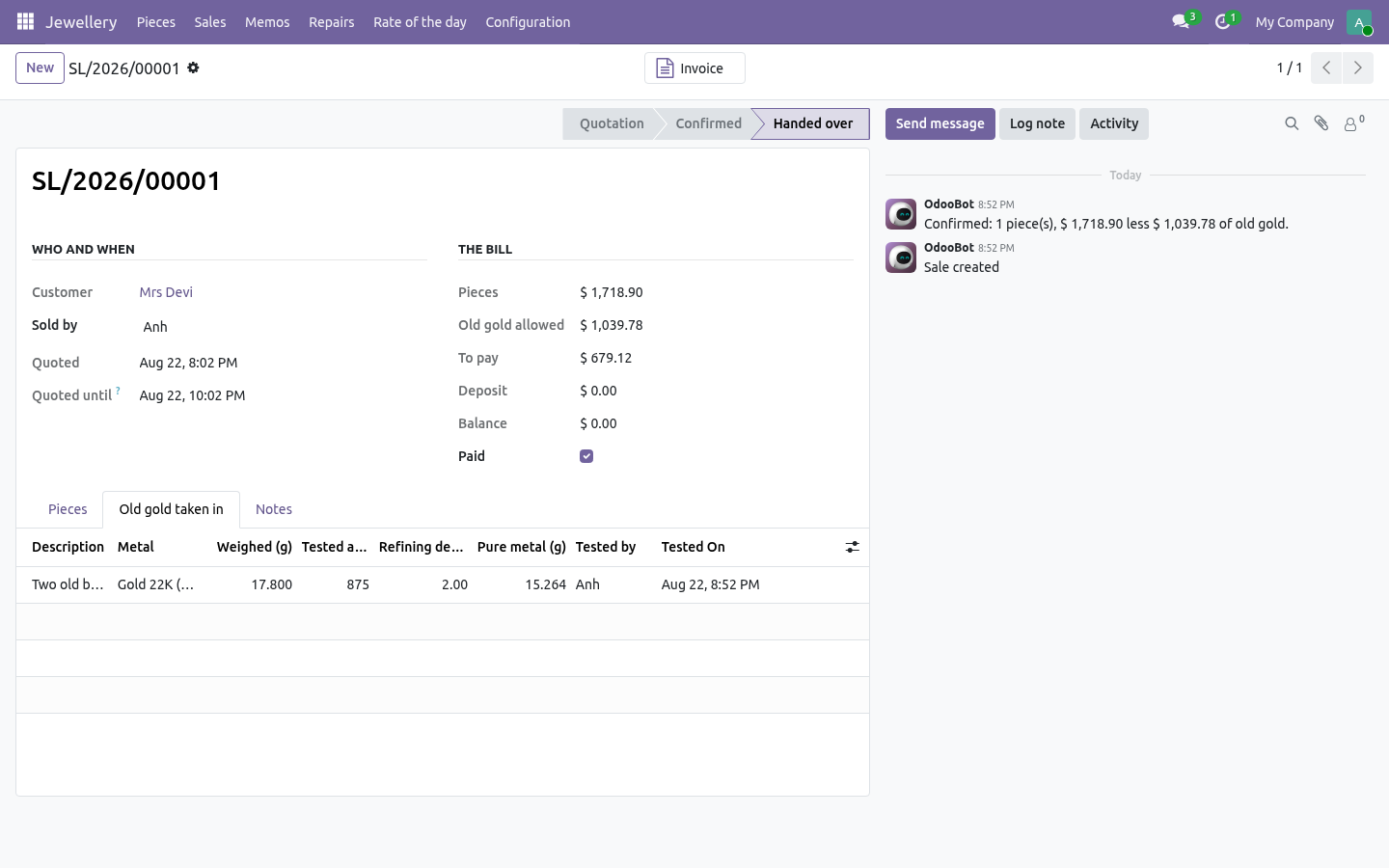
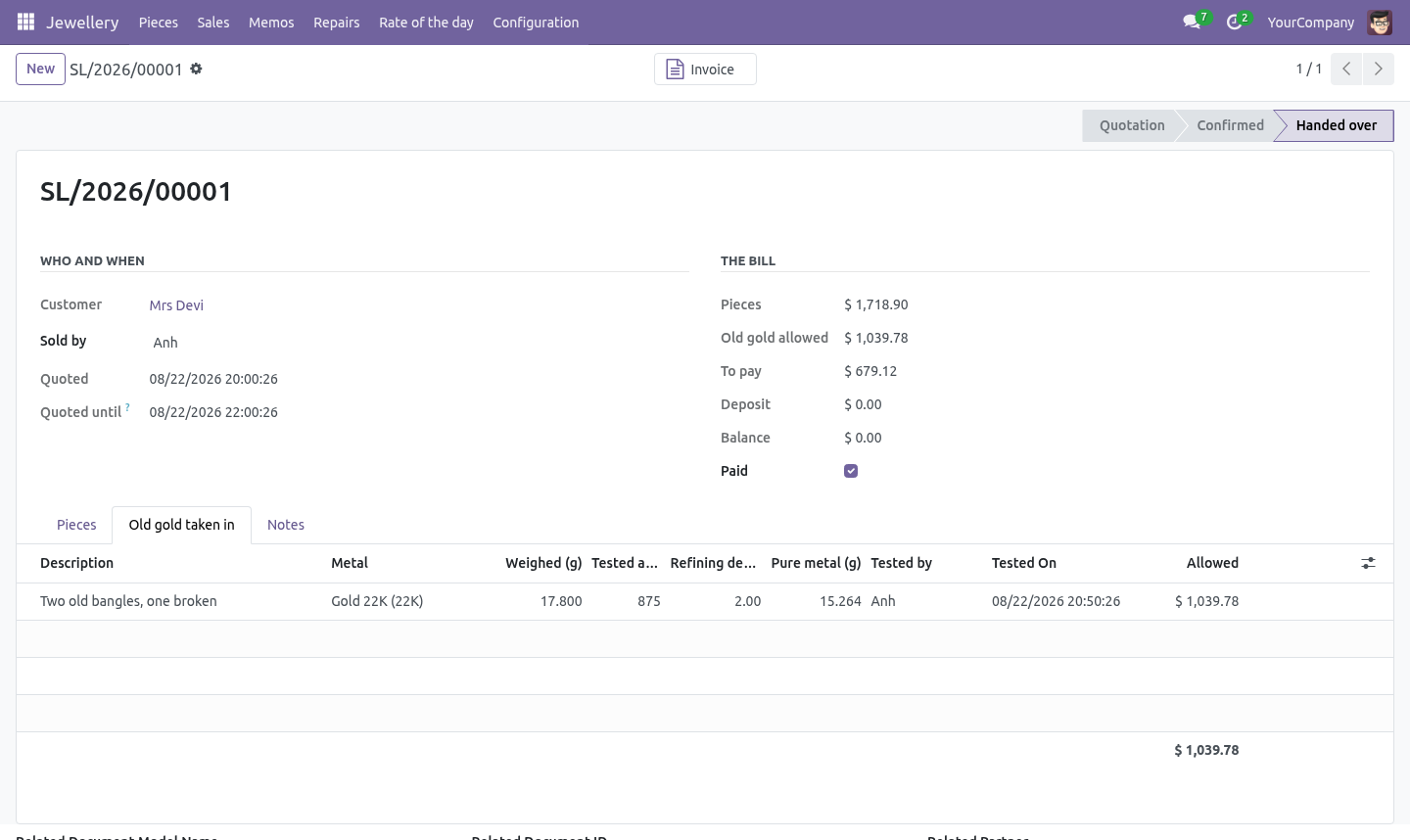
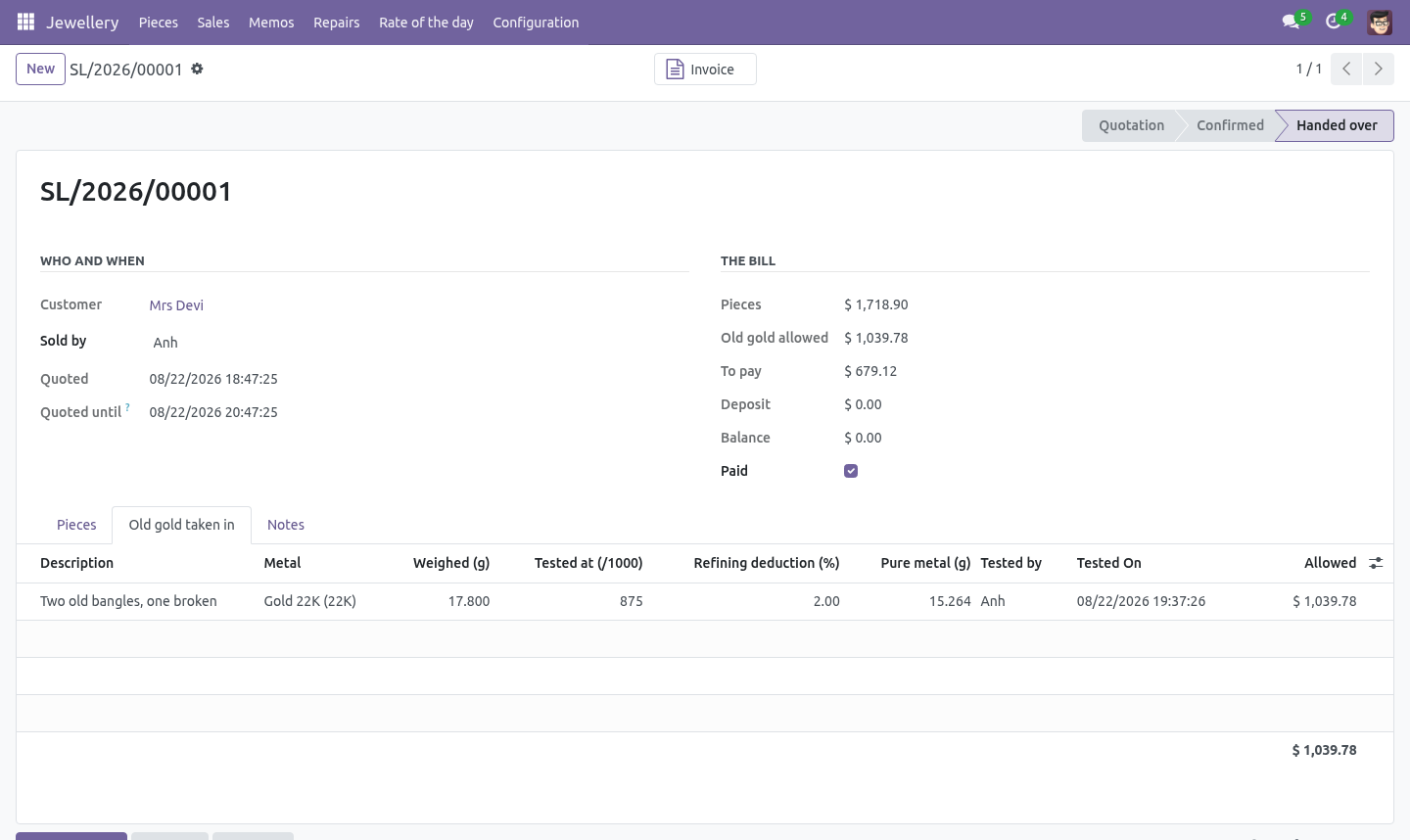
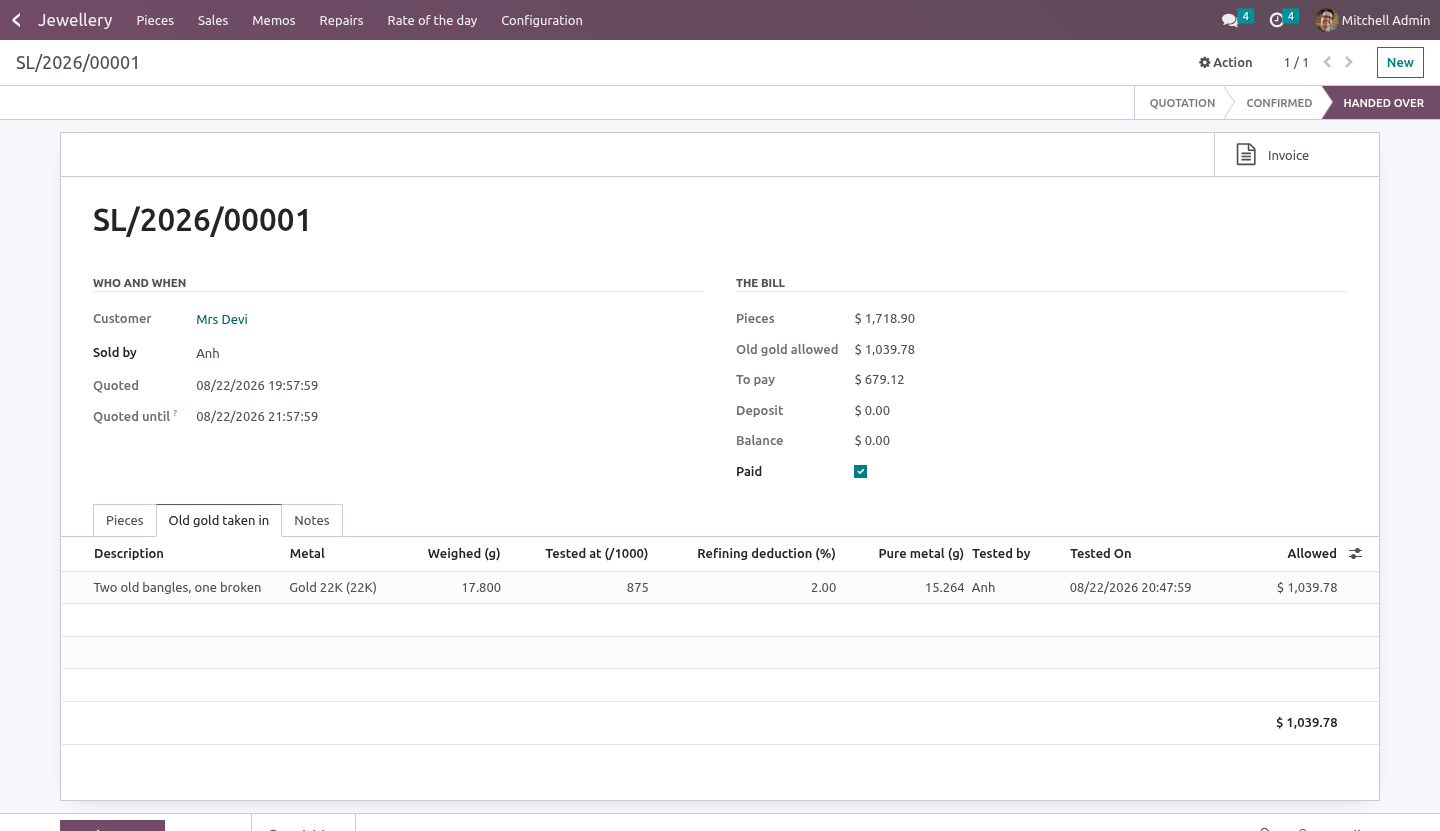
Metal taken across the counter is weighed and tested - the tested fineness, who tested it, and when. A sale with an untested exchange line cannot be confirmed.
The allowance is arithmetic: weight, tested fineness, the refiner's deduction, at the rate in force - converted to the rate's own fineness basis.
The rate it was allowed at is kept on the line. What was handed over the counter does not quietly revalue itself because the market moved between the quotation and the till.
Change the weight, the fineness, the metal or the deduction and the test stamp comes off - and so does the rate. A figure tested on the old numbers is not a test of the new ones, so it is tested and repriced again before the sale can be confirmed.
It comes off the bill, and it is a credit line on the invoice so the customer's copy shows what was allowed and why.
The memo
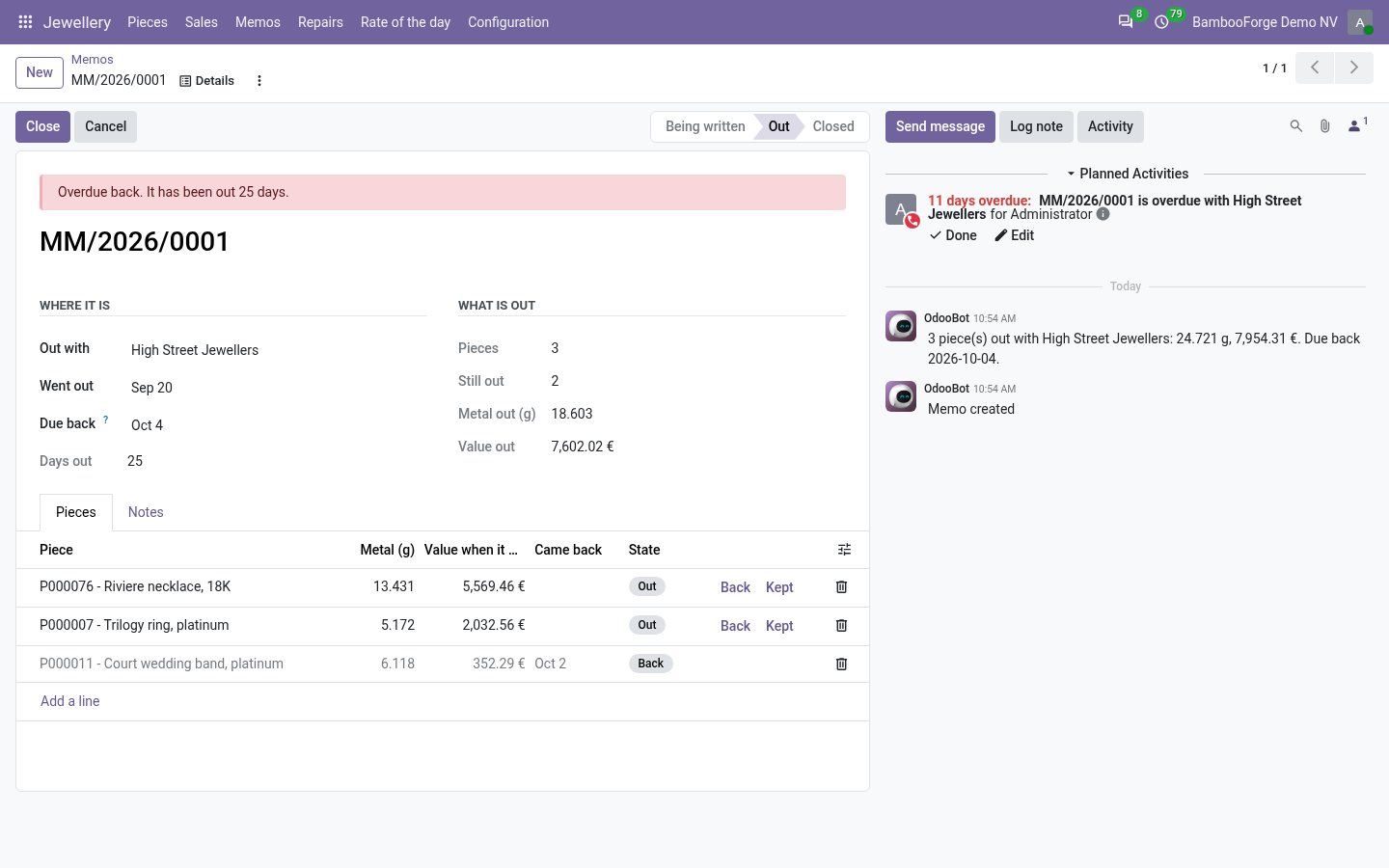
Stock out on approval is still yours. It cannot be sold from the shop, cannot go on two memos, and a memo cannot close while anything on it is still out or never went out at all.
What may not be sold from the window may not be sent out to be sold from somebody else's: an unmarked piece over the threshold does not go on a memo, and is not recorded sold off one either.
The docket is written before it goes. Pieces are not added to or taken off a memo that has already gone out, and a memo that is out cannot be deleted.
A piece comes back - and is sellable again - or the retailer keeps it, which makes it a sale.
A memo overdue back lands on somebody's list, once - on the person who wrote it, or failing that the shop owner. Never on the robot: a job assigned to nobody is stock that is still out in March. A note about something else on the same memo does not count as having asked.
The bench
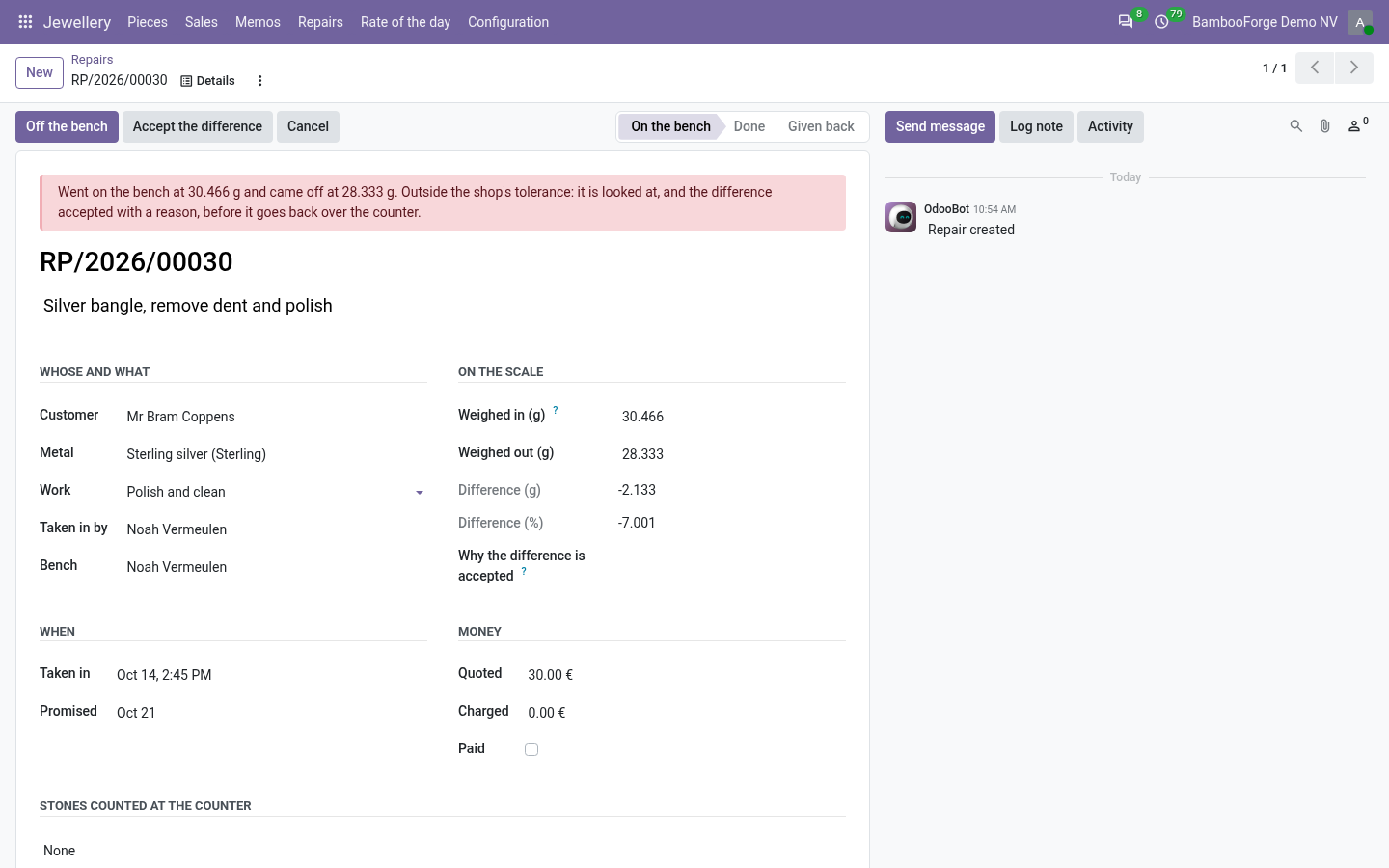
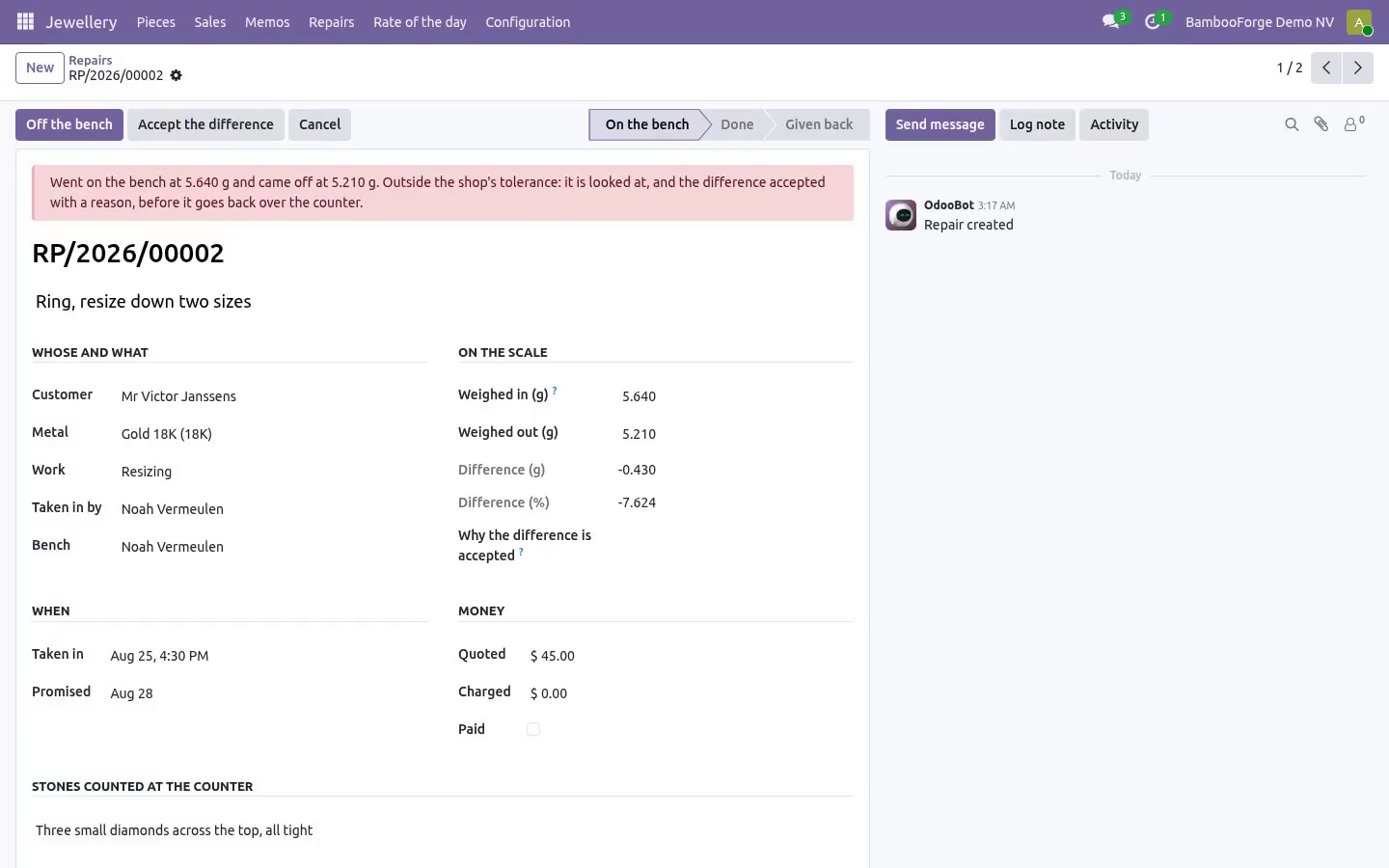
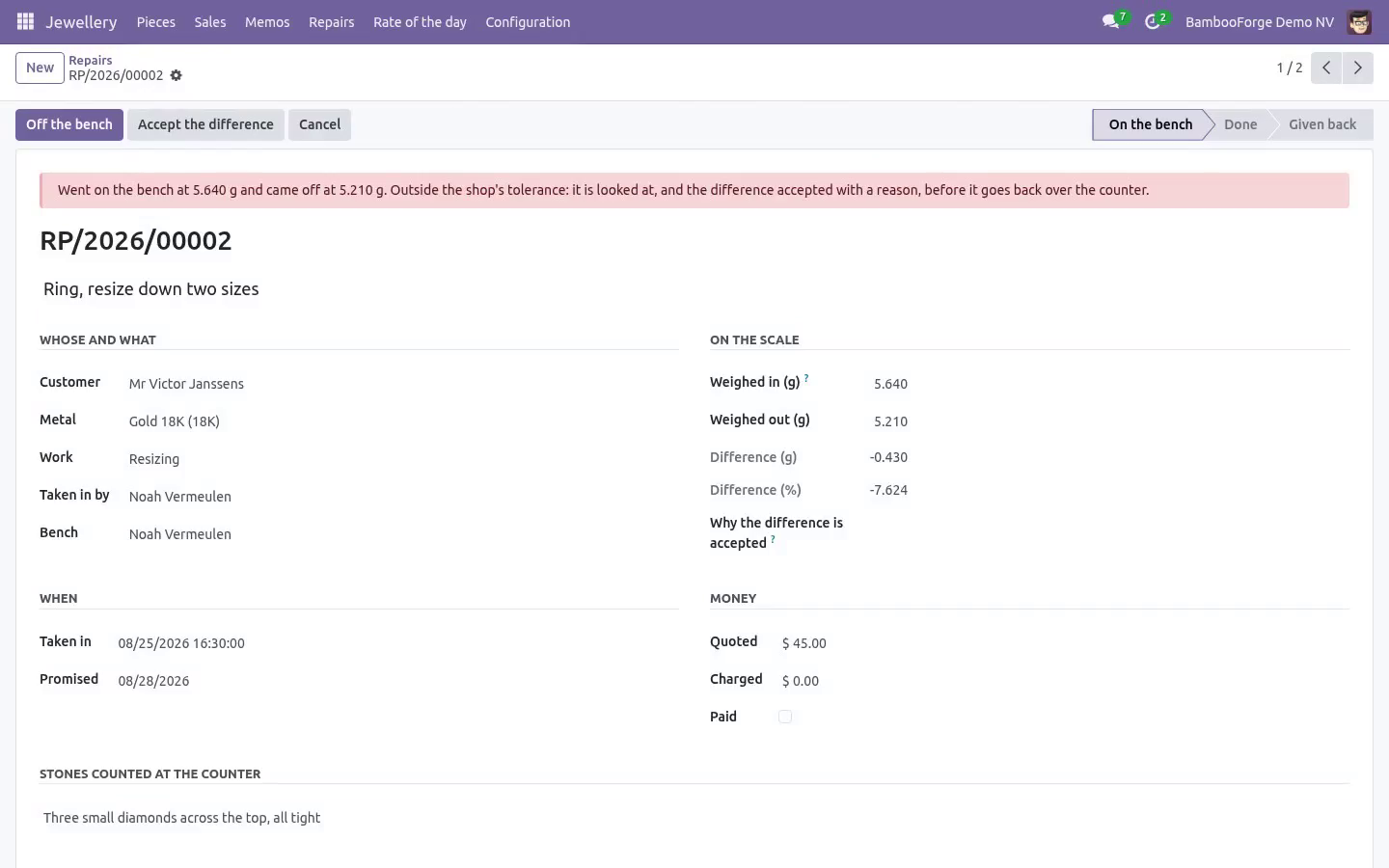
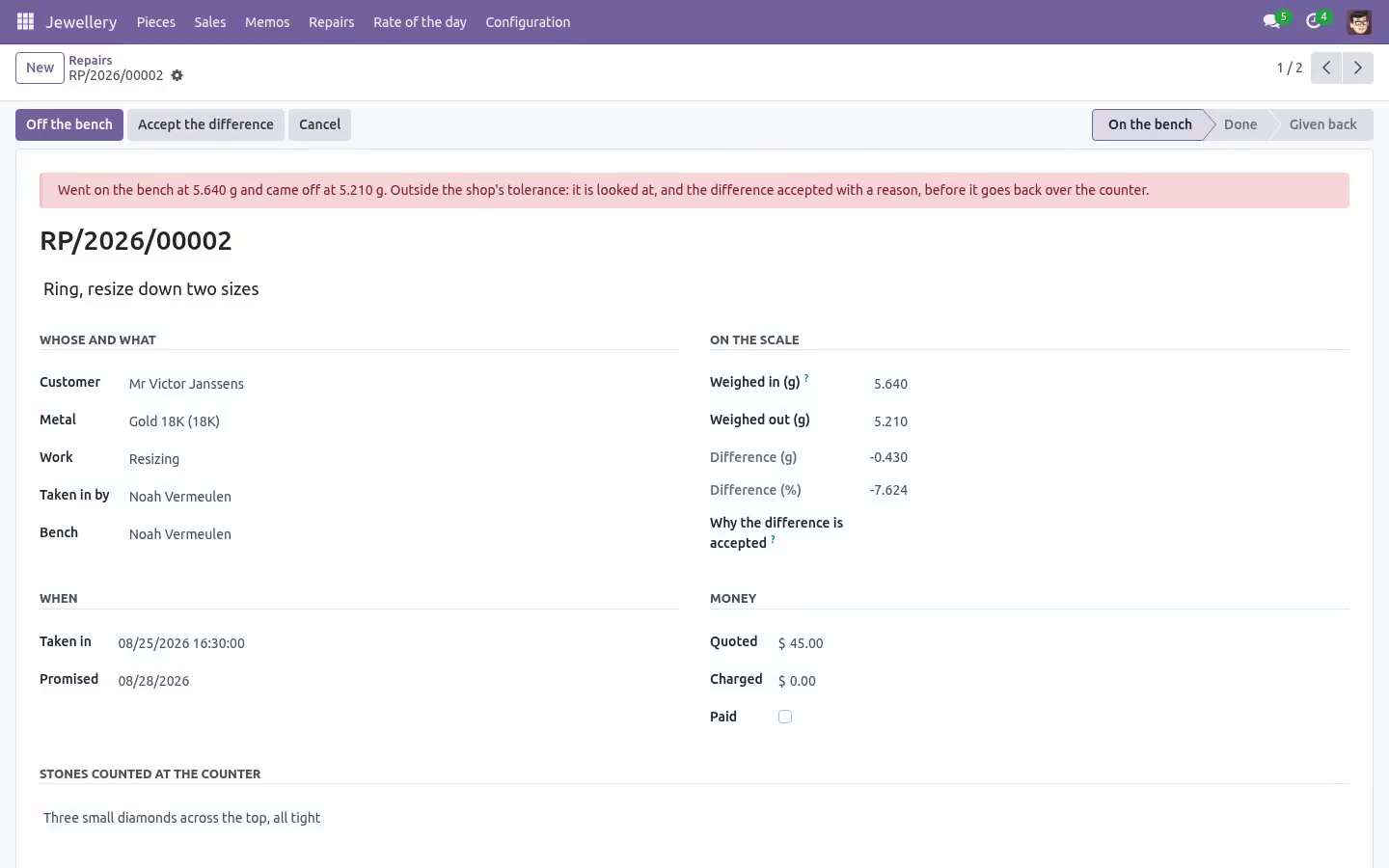
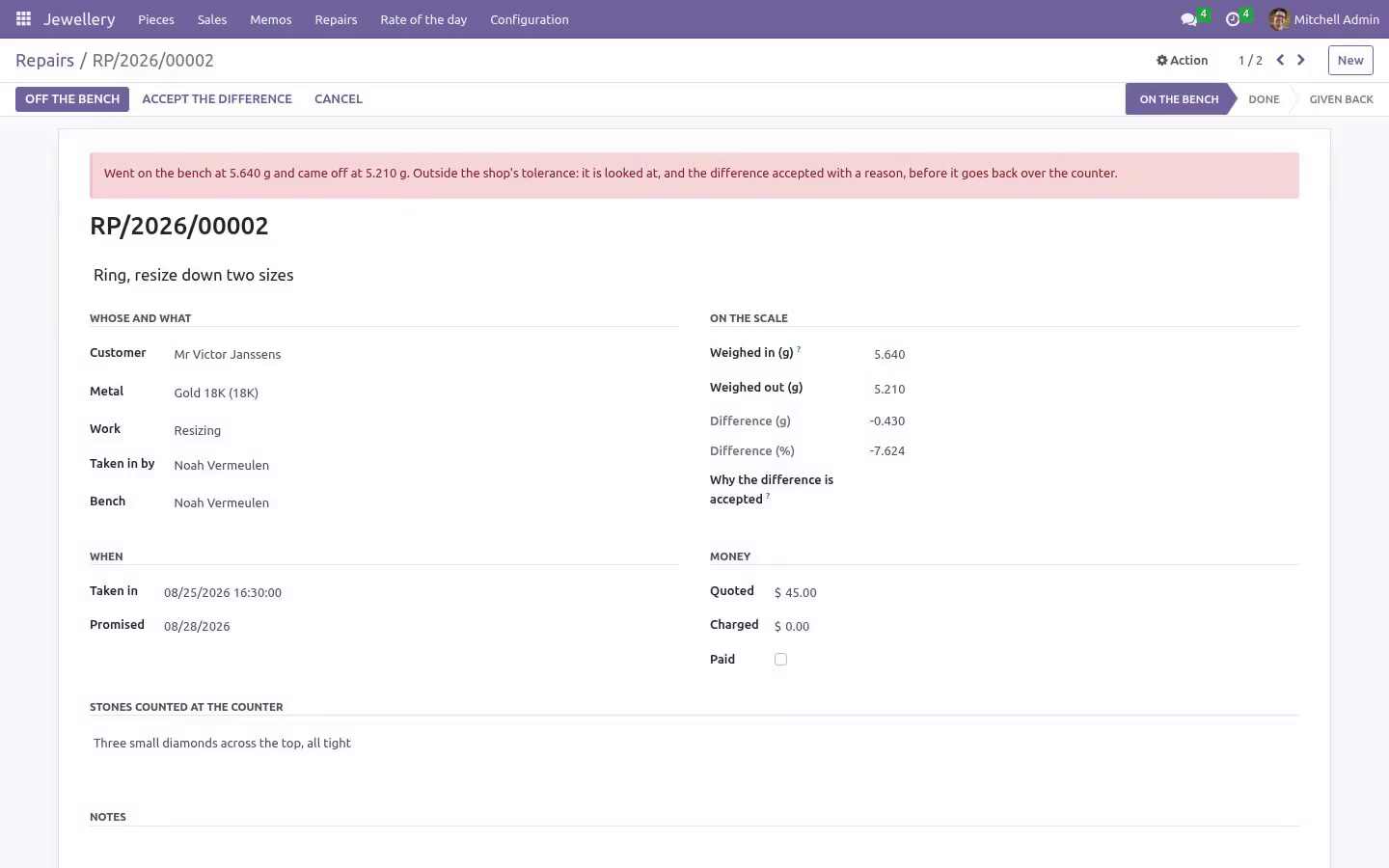
A customer's repair is weighed in and weighed out. The weight in is written once, in front of the customer; a genuine mis-key is the owner's to correct and it is tracked, because a weight in that can be typed over on the way out is not a weight in at all.
Outside the shop's tolerance it does not go back over the counter until somebody has accepted the difference with a reason and their name against it. That somebody is the shop owner, there has to be a weighing-out to compare, and there has to be an actual difference: accepting one that was never measured is how a light repair goes back with a signature on it.
The stones are counted at the counter, in front of the customer.
A repair charged at far above its quote is stopped before the counter is; a repair promised for today is asked about today, on the bench's list or the counter's, and never on the robot's.
Roles
Counter - sells, quotes, takes repairs in and weighs old gold. Cannot enter the rate, see or change a piece's making charge, move the clock on a quotation, correct a weight in, accept a weight difference, or send stock out on memo.
Shop owner - enters the rate, sets making charges and the shop's thresholds, sends and closes memos, invoices, accepts weight differences, and melts stock.
Everything is per shop: a piece, a metal, a memo or a repair from one company does not go on another one's paperwork, and the invoice is raised in the company that sold the piece.
Installation
Copy bambooforge_jewellery into your addons path and update the app list, or install the ZIP from the Odoo Apps Store. Community only; it depends on base, base_setup, mail and account.
Install Jewellery Management.
Set up the metals with their fineness and enter the first rate for each; nothing can be priced until the morning's rate is in.
Set the six thresholds under Settings.
Tag the pieces in the window with their gross weight and stones.
How we make sure it works
Before every release, 144 automated checks run against this app on Odoo 16, 17, 18, 19 and 20. Among them:
A memo does not close over a piece that never went.
A piece is not sold by two tills at once.
A piece on memo cannot be sold from the shop.
A metal with no rate cannot be priced.
A discount cannot exceed the making charge.
The complete list is in the source you receive.
What it does not do
Said before you buy, because it is the half that decides whether the app fits:
Keep a price list: prices come from the metal rate of the day and the making charge.
Edit or delete a rate that has been entered or has priced a bill.
Price a metal with no rate.
Questions people ask
- Which Odoo versions does it run on?
Odoo 16.0, 17.0, 18.0, 19.0, 20.0, on the series you buy it for; each series is its own listing.
- Community or Enterprise?
Both. It needs no Enterprise app.
- What does it need?
The standard Discuss, Invoicing, Settings apps. No extra Python package.
- Where does it show up?
Under the Jewellery menu (Pieces, Sales, Memos, Repairs).
- Does anything leave my server?
No. It makes no call outside your Odoo server: no telemetry, no licence check, no third-party service.
- What happens if I uninstall it?
Odoo drops the app's own tables and fields; the standard records it worked on (contacts, orders, products) stay as they are.