 BambooForge Labs
Inventory Insights: Stock KPIs & Analysis
One weekly stock snapshot that says what to do: ABC-XYZ classes, FIFO age, days of cover, dead and excess value, and a ranked action list.
Available for Odoo 16.0, Odoo 17.0, Odoo 18.0, Odoo 19.0, Odoo 20.0. Technical name bambooforge_inventory_insights.
Transcript of the walkthrough (Odoo 20)
Inventory Insights: Stock KPIs & Analysis. One weekly stock snapshot that says what to do: ABC-XYZ classes, FIFO age, days of cover, dead and excess value, and a ranked action list. One review of your stock that ends with a ranked list of decisions, not another dashboard. Every stocked product is classified on four axes at once — value (ABC), demand stability (XYZ), FIFO age and days of cover — and the combination becomes a single recommendation per product with the money attached.
In the next few minutes: inventory insights: stock kpis & analysis, then what a review answers, then take a review, then how each number is worked out, then reading the list. Then what this app deliberately does not do, so you can tell before you buy whether it fits. Everything lives under Inventory Insights then Inventory Reviews then Products. 1.
Copy bambooforge_inventory_insights into your addons path (or install the ZIP), update the app list and install BambooForge Inventory Insights. 2. Give yourself Inventory Insights: Analyst (Settings → Users → Other). Everyone with inventory access can read a review; analysts can take one.
3. The Inventory Insights menu appears with Inventory Reviews and Products. Inventory Insights: Stock KPIs & Analysis. One review of your stock that ends with a ranked list of decisions, not another dashboard.
Every stocked product is classified on four axes at once — value (ABC), demand stability (XYZ), FIFO age and days of cover — and the combination becomes a single recommendation per product with the money attached. This page is the complete manual: install, take a review, read every number, and act on it without contacting support. What a review answers. Most inventory reports answer what is: how much stock, how old, how it is classified.
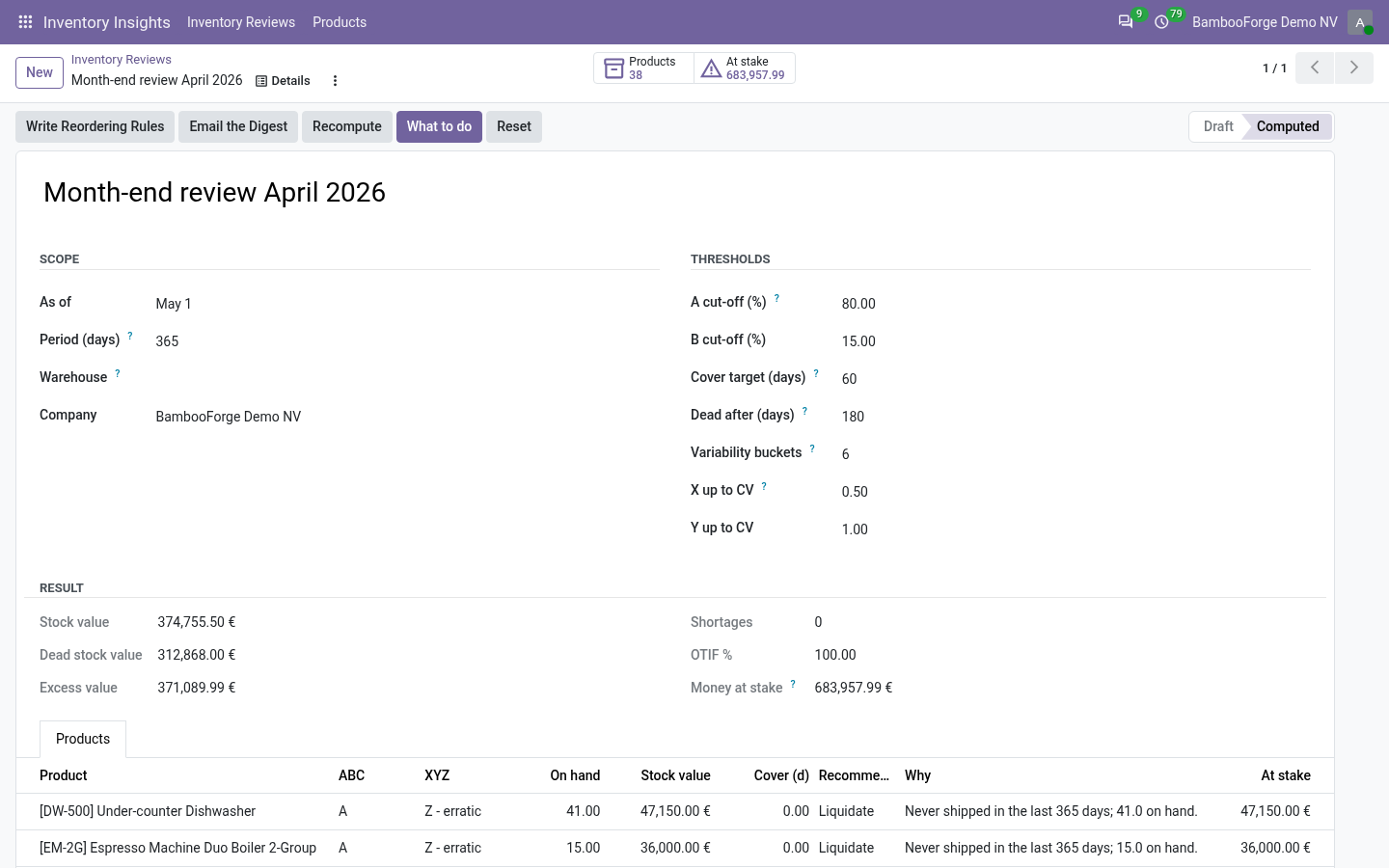
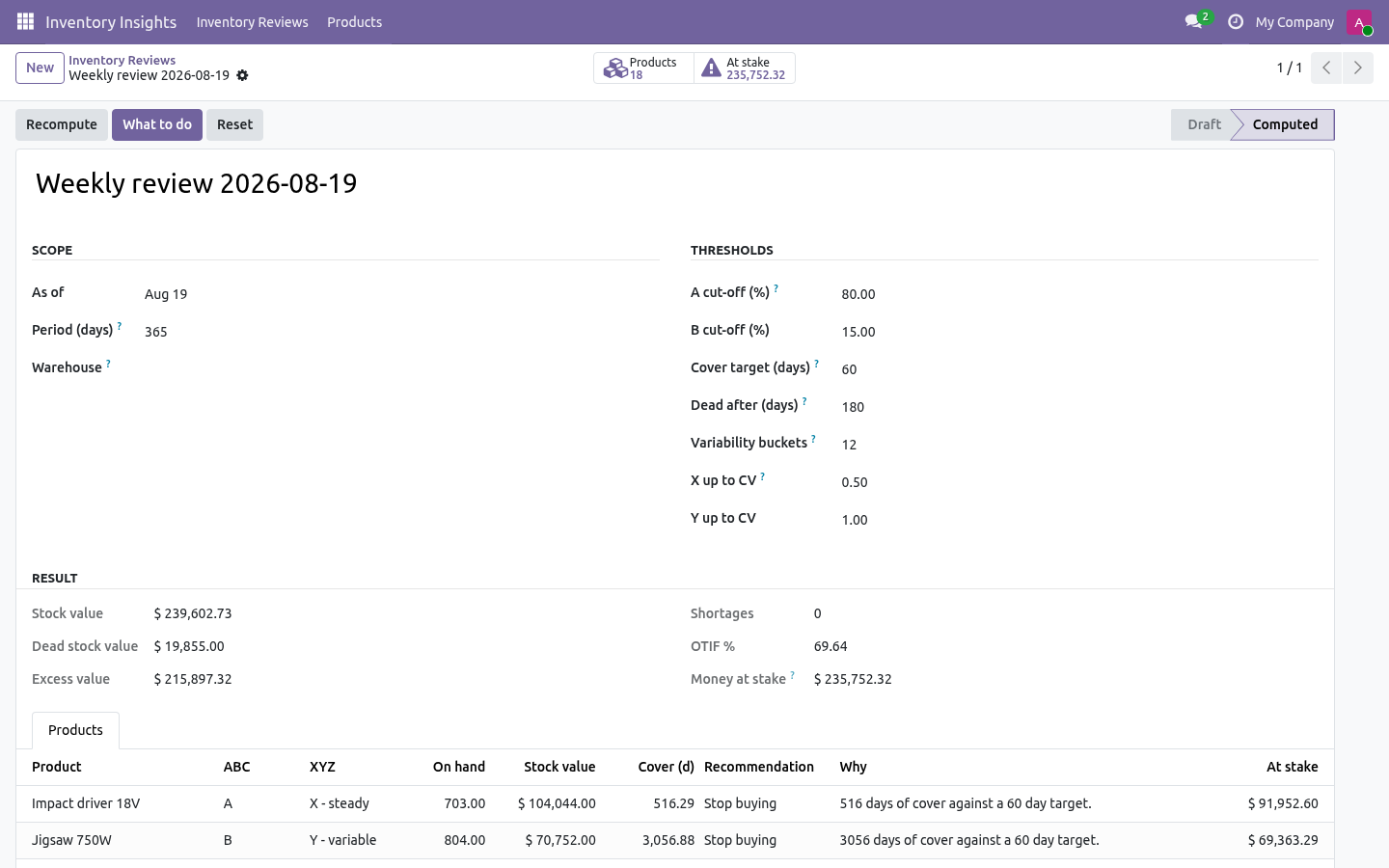
The question a stock manager actually has on Monday morning is what should I do this week, and in which order. A review answers that: Take a review. Inventory Insights → Inventory Reviews → New How each number is worked out. On hand and stock value From the quants in scope, with the quant's own valuation when your Odoo keeps one, and quantity × cost otherwise.
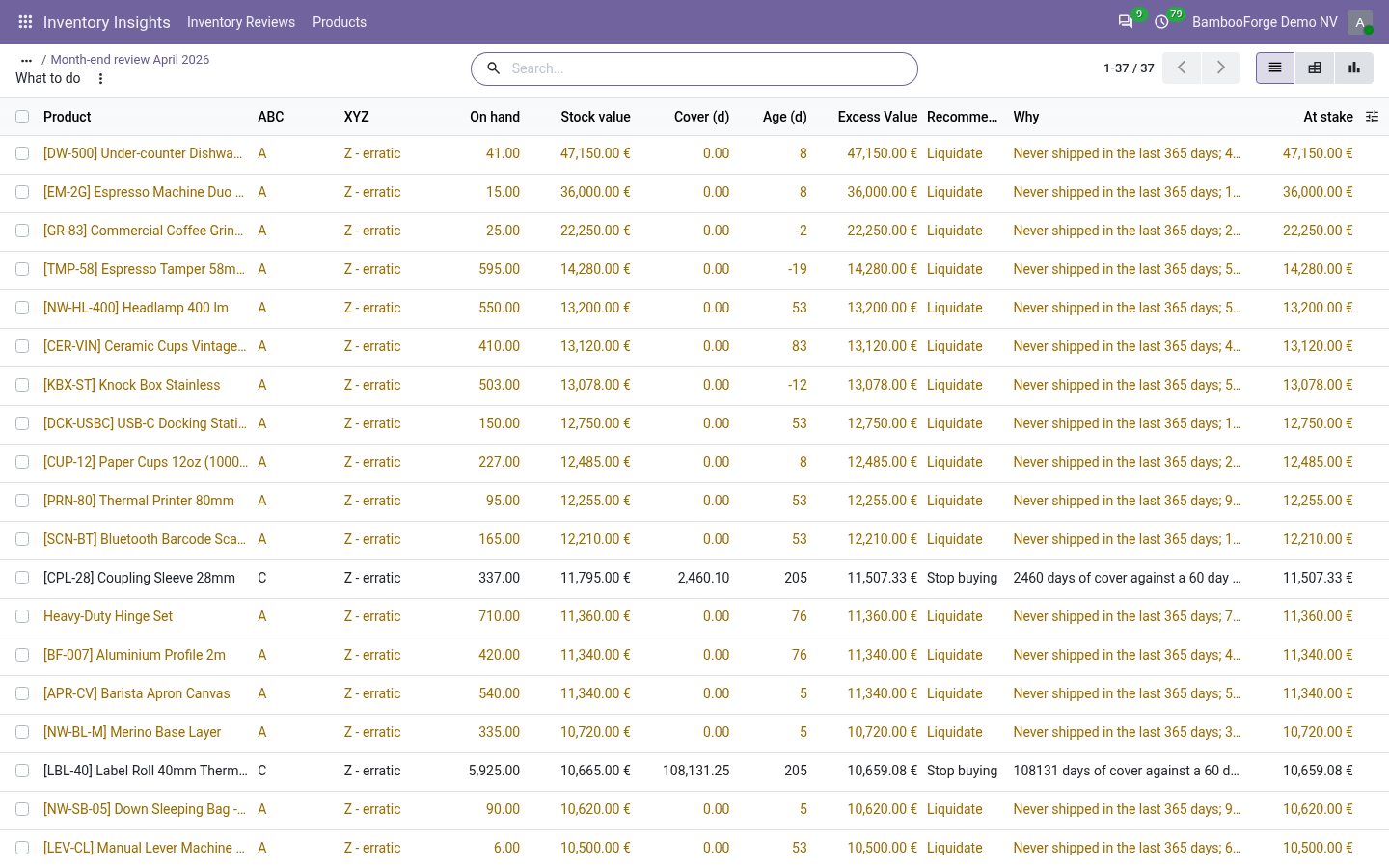
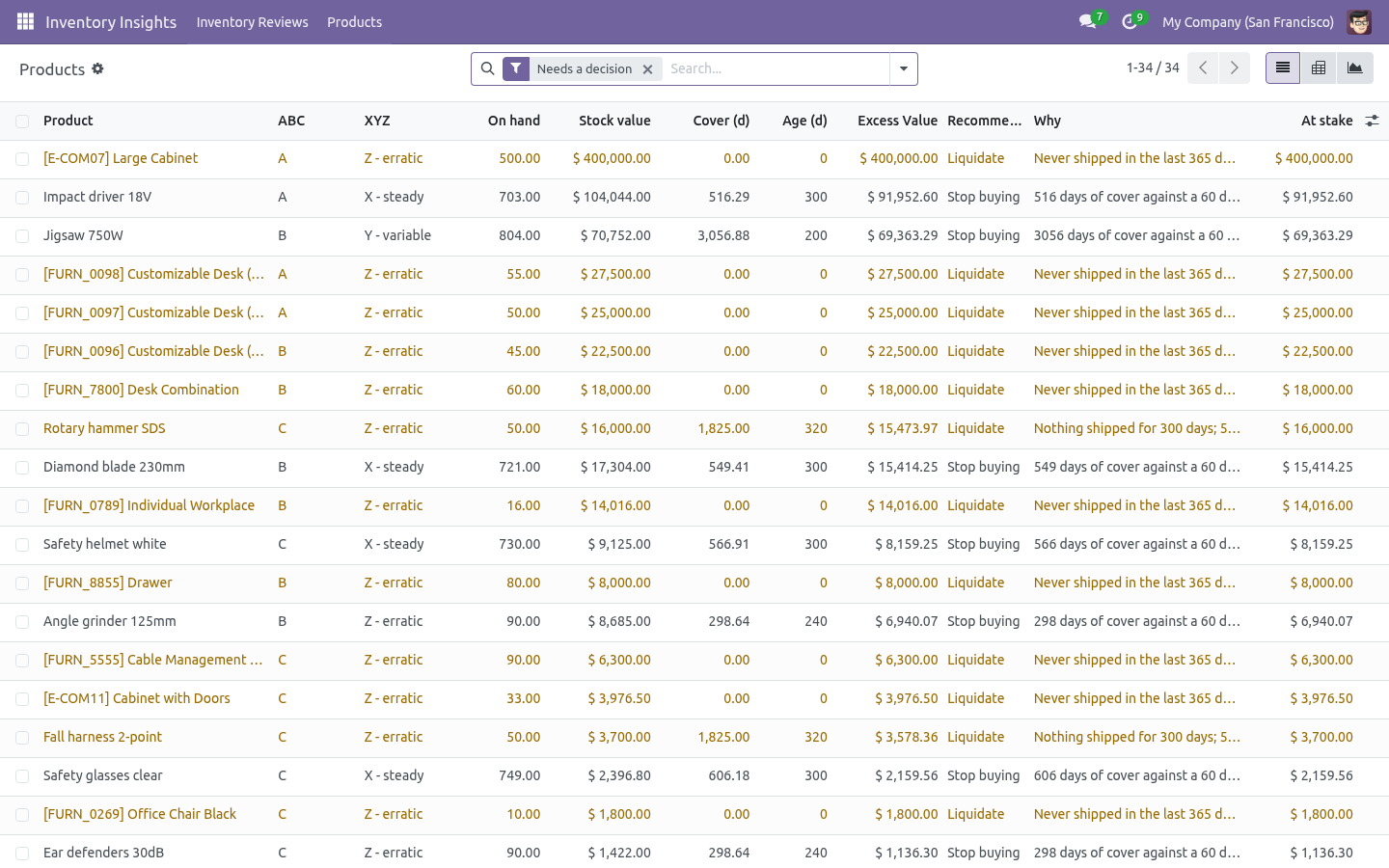
Demand, per day, days of cover Every done move out of an internal location to a customer, production or inventory-loss location inside the period. Cover is the quantity on hand divided by the average daily consumption; a product that never moved has no cover, not an infinite one. Reading the list. Inventory Insights → Products opens every line of every review; a review's What to do button opens just the ones that need a decision.
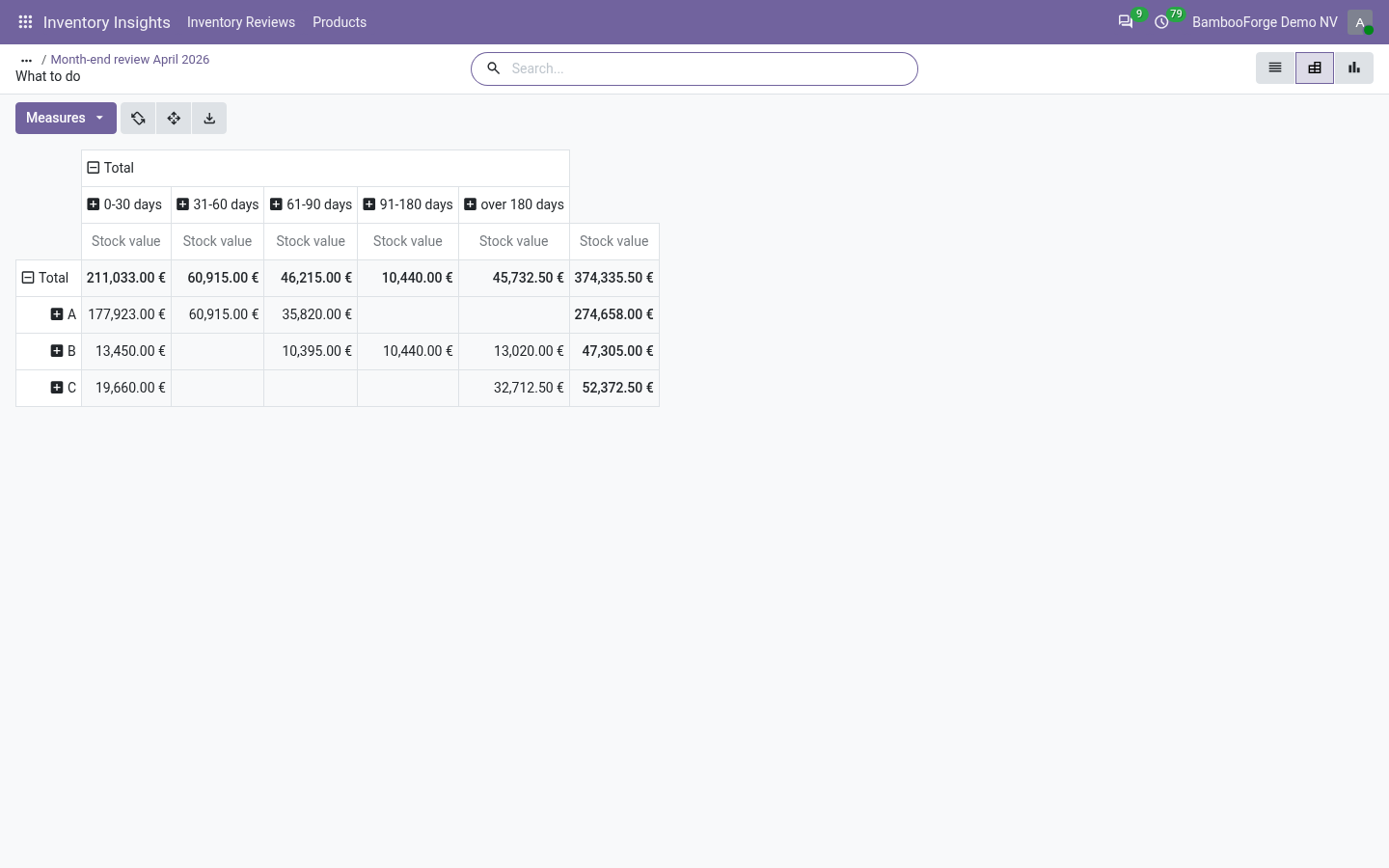
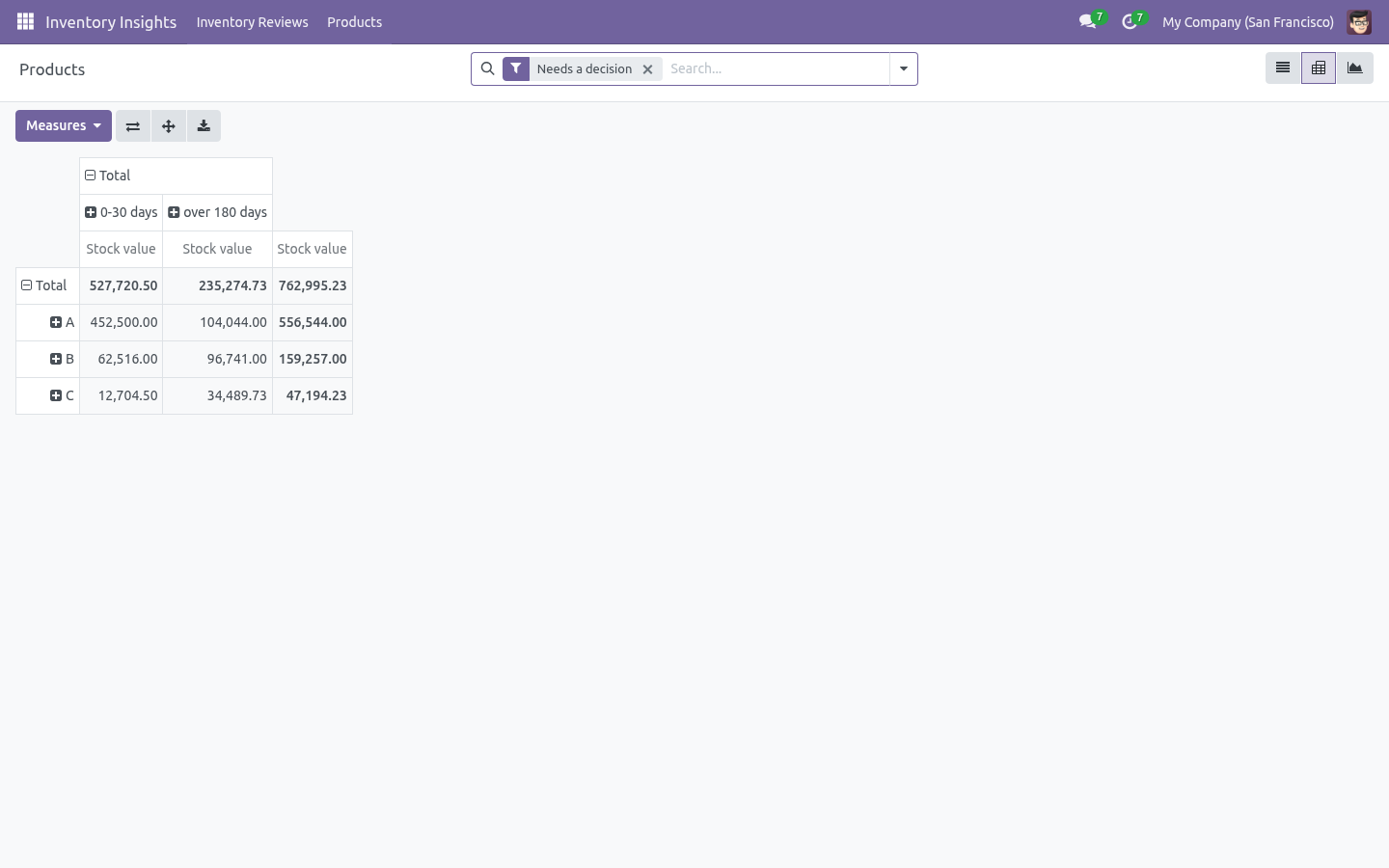
Group by Recommendation for the weekly meeting, by ABC class for a purchasing review, by Age for a write-off discussion. The pivot (ABC × age bucket, measured in stock value) is the one slide that usually ends the "is our stock healthy" argument. Filters ship for shortages, dead stock, excess, class A and erratic demand. Every column is exportable, and the lines are ordinary records: add them to a spreadsheet, a dashboard, or a scheduled action of your own.
Automating it. A cron Inventory Insights: weekly snapshot ships disabled. Enable it in Settings → Technical → Scheduled Actions and every company gets a review each week — the reviews then form a history you can compare: dead value falling, cover converging on the target, OTIF moving. Troubleshooting.
A product I expect is missing Reviews only look at storable products with stock or movement in the period, inside the chosen warehouse and categories. Everything is class A There is only one product in scope, or all products carry the same value. Widen the categories, or check that costs are set: with a zero cost every product weighs the same. What changed in 1.1 An email digest sends the analysts the top actions by money at stake.
Built for volume: quantities, demand, variability and OTIF now come from grouped SQL queries instead of loading every move into Python - a catalogue of tens of thousands of products stays a report, not an outage. Stock value reads the valuation layers when they exist. Snapshots are isolated per company. What changed in 1.2 A forecast that scores itself.
Each line carries a 30-day demand forecast (exponential smoothing over the review's own buckets) and its back-tested MAPE - above ~50% the demand is too erratic to trust a point estimate, and the review says so instead of pretending. Trend against the last review: stock value, dead stock and excess deltas, plus the number of products whose ABC class moved. How we make sure it works. Before every release, 58 automated checks run against this app on Odoo 16, 17, 18, 19 and 20.
Among them: A stock clerk reads the review and touches nothing. A thin cover with nothing inbound is a shortage. A product shipped last week is not dead. Stock within the target is not excess.
An inventory adjustment is not demand. The complete list is in the source you receive. The complete manual is at docs dot bambooforge dot dev, the demo database is linked from the store page, and support answers within twenty-four hours. Links are in the description.
Transcript of the walkthrough (Odoo 19)
Inventory Insights: Stock KPIs & Analysis. One weekly stock snapshot that says what to do: ABC-XYZ classes, FIFO age, days of cover, dead and excess value, and a ranked action list. One review of your stock that ends with a ranked list of decisions, not another dashboard. Every stocked product is classified on four axes at once — value (ABC), demand stability (XYZ), FIFO age and days of cover — and the combination becomes a single recommendation per product with the money attached.
In the next few minutes: inventory insights: stock kpis & analysis, then what a review answers, then take a review, then how each number is worked out, then reading the list. Then what this app deliberately does not do, so you can tell before you buy whether it fits. Everything lives under Inventory Insights then Inventory Reviews then Products. 1.
Copy bambooforge_inventory_insights into your addons path (or install the ZIP), update the app list and install BambooForge Inventory Insights. 2. Give yourself Inventory Insights: Analyst (Settings → Users → Other). Everyone with inventory access can read a review; analysts can take one.
3. The Inventory Insights menu appears with Inventory Reviews and Products. Inventory Insights: Stock KPIs & Analysis. One review of your stock that ends with a ranked list of decisions, not another dashboard.
Every stocked product is classified on four axes at once — value (ABC), demand stability (XYZ), FIFO age and days of cover — and the combination becomes a single recommendation per product with the money attached. This page is the complete manual: install, take a review, read every number, and act on it without contacting support. What a review answers. Most inventory reports answer what is: how much stock, how old, how it is classified.
The question a stock manager actually has on Monday morning is what should I do this week, and in which order. A review answers that: +--------------+--------------------------------------------------------------+ Take a review. Inventory Insights → Inventory Reviews → New +---------------------------+---------------------------------------------------+ How each number is worked out. On hand and stock value From the quants in scope, with the quant's own valuation when your Odoo keeps one, and quantity × cost otherwise.
Demand, per day, days of cover Every done move out of an internal location to a customer, production or inventory-loss location inside the period. Cover is the quantity on hand divided by the average daily consumption; a product that never moved has no cover, not an infinite one. Reading the list. Inventory Insights → Products opens every line of every review; a review's What to do button opens just the ones that need a decision.
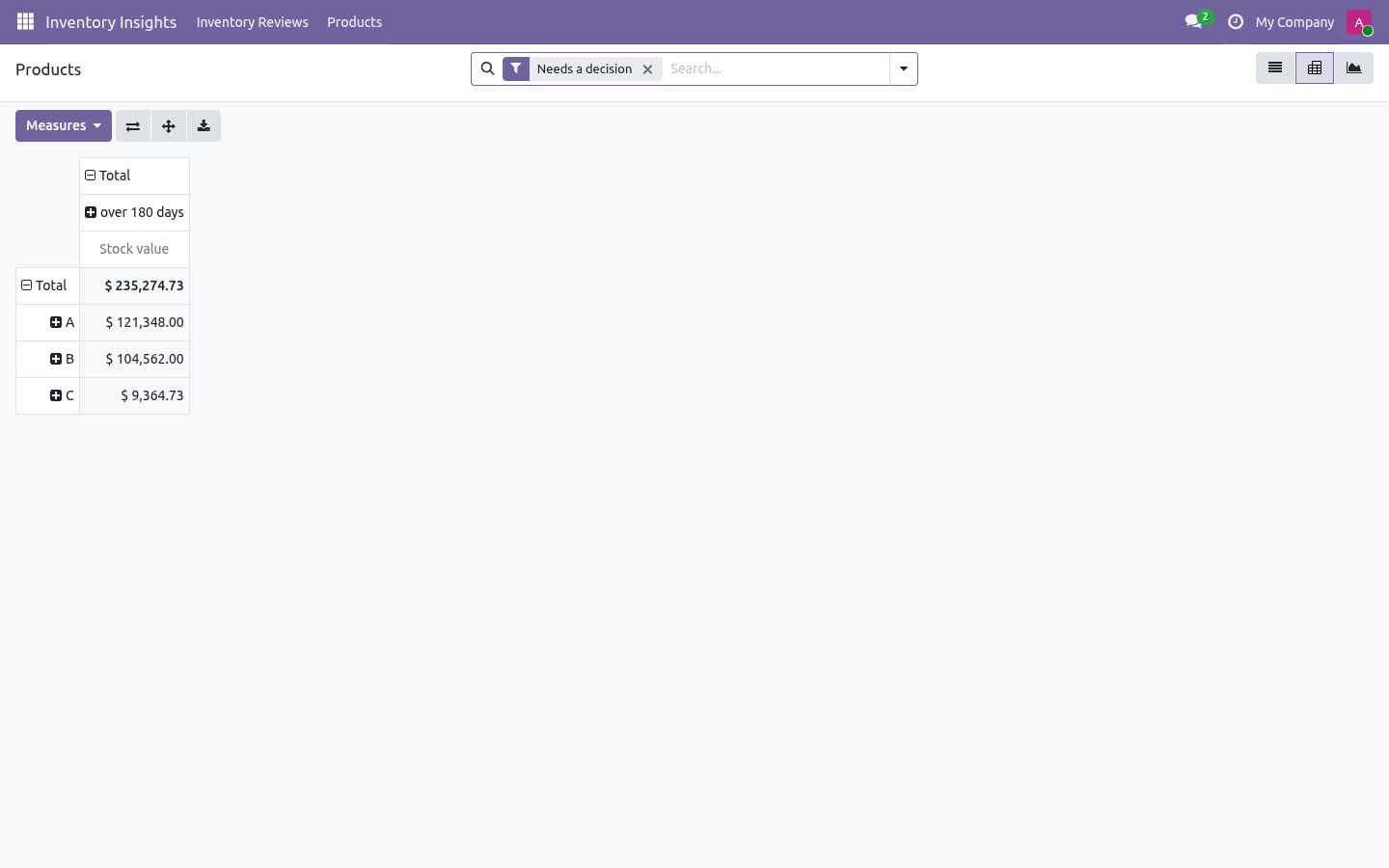
Group by Recommendation for the weekly meeting, by ABC class for a purchasing review, by Age for a write-off discussion. The pivot (ABC × age bucket, measured in stock value) is the one slide that usually ends the "is our stock healthy" argument. Filters ship for shortages, dead stock, excess, class A and erratic demand. Every column is exportable, and the lines are ordinary records: add them to a spreadsheet, a dashboard, or a scheduled action of your own.
Automating it. A cron Inventory Insights: weekly snapshot ships disabled. Enable it in Settings → Technical → Scheduled Actions and every company gets a review each week — the reviews then form a history you can compare: dead value falling, cover converging on the target, OTIF moving. Troubleshooting.
A product I expect is missing Reviews only look at storable products with stock or movement in the period, inside the chosen warehouse and categories. Everything is class A There is only one product in scope, or all products carry the same value. Widen the categories, or check that costs are set: with a zero cost every product weighs the same. What changed in 1.1 An email digest sends the analysts the top actions by money at stake.
Built for volume: quantities, demand, variability and OTIF now come from grouped SQL queries instead of loading every move into Python - a catalogue of tens of thousands of products stays a report, not an outage. Stock value reads the valuation layers when they exist. Snapshots are isolated per company. What changed in 1.2 A forecast that scores itself.
Each line carries a 30-day demand forecast (exponential smoothing over the review's own buckets) and its back-tested MAPE - above ~50% the demand is too erratic to trust a point estimate, and the review says so instead of pretending. Trend against the last review: stock value, dead stock and excess deltas, plus the number of products whose ABC class moved. Support. support@bambooforge.dev — questions, bug reports and feature requests are answered by the developers who wrote the module.
The complete manual is at docs dot bambooforge dot dev, the demo database is linked from the store page, and support answers within twenty-four hours. Links are in the description.
Transcript of the walkthrough (Odoo 18)
Inventory Insights: Stock KPIs & Analysis. One weekly stock snapshot that says what to do: ABC-XYZ classes, FIFO age, days of cover, dead and excess value, and a ranked action list. One review of your stock that ends with a ranked list of decisions, not another dashboard. Every stocked product is classified on four axes at once — value (ABC), demand stability (XYZ), FIFO age and days of cover — and the combination becomes a single recommendation per product with the money attached.
In the next few minutes: inventory insights: stock kpis & analysis, then what a review answers, then take a review, then how each number is worked out, then reading the list. Then what this app deliberately does not do, so you can tell before you buy whether it fits. Everything lives under Inventory Insights then Inventory Reviews then Products. 1.
Copy bambooforge_inventory_insights into your addons path (or install the ZIP), update the app list and install BambooForge Inventory Insights. 2. Give yourself Inventory Insights: Analyst (Settings → Users → Other). Everyone with inventory access can read a review; analysts can take one.
3. The Inventory Insights menu appears with Inventory Reviews and Products. Inventory Insights: Stock KPIs & Analysis. One review of your stock that ends with a ranked list of decisions, not another dashboard.
Every stocked product is classified on four axes at once — value (ABC), demand stability (XYZ), FIFO age and days of cover — and the combination becomes a single recommendation per product with the money attached. This page is the complete manual: install, take a review, read every number, and act on it without contacting support. What a review answers. Most inventory reports answer what is: how much stock, how old, how it is classified.
The question a stock manager actually has on Monday morning is what should I do this week, and in which order. A review answers that: +--------------+--------------------------------------------------------------+ Take a review. Inventory Insights → Inventory Reviews → New +---------------------------+---------------------------------------------------+ How each number is worked out. On hand and stock value From the quants in scope, with the quant's own valuation when your Odoo keeps one, and quantity × cost otherwise.
Demand, per day, days of cover Every done move out of an internal location to a customer, production or inventory-loss location inside the period. Cover is the quantity on hand divided by the average daily consumption; a product that never moved has no cover, not an infinite one. Reading the list. Inventory Insights → Products opens every line of every review; a review's What to do button opens just the ones that need a decision.
Group by Recommendation for the weekly meeting, by ABC class for a purchasing review, by Age for a write-off discussion. The pivot (ABC × age bucket, measured in stock value) is the one slide that usually ends the "is our stock healthy" argument. Filters ship for shortages, dead stock, excess, class A and erratic demand. Every column is exportable, and the lines are ordinary records: add them to a spreadsheet, a dashboard, or a scheduled action of your own.
Automating it. A cron Inventory Insights: weekly snapshot ships disabled. Enable it in Settings → Technical → Scheduled Actions and every company gets a review each week — the reviews then form a history you can compare: dead value falling, cover converging on the target, OTIF moving. Troubleshooting.
A product I expect is missing Reviews only look at storable products with stock or movement in the period, inside the chosen warehouse and categories. Everything is class A There is only one product in scope, or all products carry the same value. Widen the categories, or check that costs are set: with a zero cost every product weighs the same. What changed in 1.1 An email digest sends the analysts the top actions by money at stake.
Built for volume: quantities, demand, variability and OTIF now come from grouped SQL queries instead of loading every move into Python - a catalogue of tens of thousands of products stays a report, not an outage. Stock value reads the valuation layers when they exist. Snapshots are isolated per company. What changed in 1.2 A forecast that scores itself.
Each line carries a 30-day demand forecast (exponential smoothing over the review's own buckets) and its back-tested MAPE - above ~50% the demand is too erratic to trust a point estimate, and the review says so instead of pretending. Trend against the last review: stock value, dead stock and excess deltas, plus the number of products whose ABC class moved. Support. support@bambooforge.dev — questions, bug reports and feature requests are answered by the developers who wrote the module.
The complete manual is at docs dot bambooforge dot dev, the demo database is linked from the store page, and support answers within twenty-four hours. Links are in the description.
Transcript of the walkthrough (Odoo 17)
Inventory Insights: Stock KPIs & Analysis. One weekly stock snapshot that says what to do: ABC-XYZ classes, FIFO age, days of cover, dead and excess value, and a ranked action list. One review of your stock that ends with a ranked list of decisions, not another dashboard. Every stocked product is classified on four axes at once — value (ABC), demand stability (XYZ), FIFO age and days of cover — and the combination becomes a single recommendation per product with the money attached.
In the next few minutes: inventory insights: stock kpis & analysis, then what a review answers, then take a review, then how each number is worked out, then reading the list. Then what this app deliberately does not do, so you can tell before you buy whether it fits. Everything lives under Inventory Insights then Inventory Reviews then Products. 1.
Copy bambooforge_inventory_insights into your addons path (or install the ZIP), update the app list and install BambooForge Inventory Insights. 2. Give yourself Inventory Insights: Analyst (Settings → Users → Other). Everyone with inventory access can read a review; analysts can take one.
3. The Inventory Insights menu appears with Inventory Reviews and Products. Inventory Insights: Stock KPIs & Analysis. One review of your stock that ends with a ranked list of decisions, not another dashboard.
Every stocked product is classified on four axes at once — value (ABC), demand stability (XYZ), FIFO age and days of cover — and the combination becomes a single recommendation per product with the money attached. This page is the complete manual: install, take a review, read every number, and act on it without contacting support. What a review answers. Most inventory reports answer what is: how much stock, how old, how it is classified.
The question a stock manager actually has on Monday morning is what should I do this week, and in which order. A review answers that: +--------------+--------------------------------------------------------------+ Take a review. Inventory Insights → Inventory Reviews → New +---------------------------+---------------------------------------------------+ How each number is worked out. On hand and stock value From the quants in scope, with the quant's own valuation when your Odoo keeps one, and quantity × cost otherwise.
Demand, per day, days of cover Every done move out of an internal location to a customer, production or inventory-loss location inside the period. Cover is the quantity on hand divided by the average daily consumption; a product that never moved has no cover, not an infinite one. Reading the list. Inventory Insights → Products opens every line of every review; a review's What to do button opens just the ones that need a decision.
Group by Recommendation for the weekly meeting, by ABC class for a purchasing review, by Age for a write-off discussion. The pivot (ABC × age bucket, measured in stock value) is the one slide that usually ends the "is our stock healthy" argument. Filters ship for shortages, dead stock, excess, class A and erratic demand. Every column is exportable, and the lines are ordinary records: add them to a spreadsheet, a dashboard, or a scheduled action of your own.
Automating it. A cron Inventory Insights: weekly snapshot ships disabled. Enable it in Settings → Technical → Scheduled Actions and every company gets a review each week — the reviews then form a history you can compare: dead value falling, cover converging on the target, OTIF moving. Troubleshooting.
A product I expect is missing Reviews only look at storable products with stock or movement in the period, inside the chosen warehouse and categories. Everything is class A There is only one product in scope, or all products carry the same value. Widen the categories, or check that costs are set: with a zero cost every product weighs the same. What changed in 1.1 An email digest sends the analysts the top actions by money at stake.
Built for volume: quantities, demand, variability and OTIF now come from grouped SQL queries instead of loading every move into Python - a catalogue of tens of thousands of products stays a report, not an outage. Stock value reads the valuation layers when they exist. Snapshots are isolated per company. What changed in 1.2 A forecast that scores itself.
Each line carries a 30-day demand forecast (exponential smoothing over the review's own buckets) and its back-tested MAPE - above ~50% the demand is too erratic to trust a point estimate, and the review says so instead of pretending. Trend against the last review: stock value, dead stock and excess deltas, plus the number of products whose ABC class moved. Support. support@bambooforge.dev — questions, bug reports and feature requests are answered by the developers who wrote the module.
The complete manual is at docs dot bambooforge dot dev, the demo database is linked from the store page, and support answers within twenty-four hours. Links are in the description.
Transcript of the walkthrough (Odoo 16)
Inventory Insights: Stock KPIs & Analysis. One weekly stock snapshot that says what to do: ABC-XYZ classes, FIFO age, days of cover, dead and excess value, and a ranked action list. One review of your stock that ends with a ranked list of decisions, not another dashboard. Every stocked product is classified on four axes at once — value (ABC), demand stability (XYZ), FIFO age and days of cover — and the combination becomes a single recommendation per product with the money attached.
In the next few minutes: inventory insights: stock kpis & analysis, then what a review answers, then take a review, then how each number is worked out, then reading the list. Then what this app deliberately does not do, so you can tell before you buy whether it fits. Everything lives under Inventory Insights then Inventory Reviews then Products. 1.
Copy bambooforge_inventory_insights into your addons path (or install the ZIP), update the app list and install BambooForge Inventory Insights. 2. Give yourself Inventory Insights: Analyst (Settings → Users → Other). Everyone with inventory access can read a review; analysts can take one.
3. The Inventory Insights menu appears with Inventory Reviews and Products. Inventory Insights: Stock KPIs & Analysis. One review of your stock that ends with a ranked list of decisions, not another dashboard.
Every stocked product is classified on four axes at once — value (ABC), demand stability (XYZ), FIFO age and days of cover — and the combination becomes a single recommendation per product with the money attached. This page is the complete manual: install, take a review, read every number, and act on it without contacting support. What a review answers. Most inventory reports answer what is: how much stock, how old, how it is classified.
The question a stock manager actually has on Monday morning is what should I do this week, and in which order. A review answers that: +--------------+--------------------------------------------------------------+ Take a review. Inventory Insights → Inventory Reviews → New +---------------------------+---------------------------------------------------+ How each number is worked out. On hand and stock value From the quants in scope, with the quant's own valuation when your Odoo keeps one, and quantity × cost otherwise.
Demand, per day, days of cover Every done move out of an internal location to a customer, production or inventory-loss location inside the period. Cover is the quantity on hand divided by the average daily consumption; a product that never moved has no cover, not an infinite one. Reading the list. Inventory Insights → Products opens every line of every review; a review's What to do button opens just the ones that need a decision.
Group by Recommendation for the weekly meeting, by ABC class for a purchasing review, by Age for a write-off discussion. The pivot (ABC × age bucket, measured in stock value) is the one slide that usually ends the "is our stock healthy" argument. Filters ship for shortages, dead stock, excess, class A and erratic demand. Every column is exportable, and the lines are ordinary records: add them to a spreadsheet, a dashboard, or a scheduled action of your own.
Automating it. A cron Inventory Insights: weekly snapshot ships disabled. Enable it in Settings → Technical → Scheduled Actions and every company gets a review each week — the reviews then form a history you can compare: dead value falling, cover converging on the target, OTIF moving. Troubleshooting.
A product I expect is missing Reviews only look at storable products with stock or movement in the period, inside the chosen warehouse and categories. Everything is class A There is only one product in scope, or all products carry the same value. Widen the categories, or check that costs are set: with a zero cost every product weighs the same. What changed in 1.1 An email digest sends the analysts the top actions by money at stake.
Built for volume: quantities, demand, variability and OTIF now come from grouped SQL queries instead of loading every move into Python - a catalogue of tens of thousands of products stays a report, not an outage. Stock value reads the valuation layers when they exist. Snapshots are isolated per company. What changed in 1.2 A forecast that scores itself.
Each line carries a 30-day demand forecast (exponential smoothing over the review's own buckets) and its back-tested MAPE - above ~50% the demand is too erratic to trust a point estimate, and the review says so instead of pretending. Trend against the last review: stock value, dead stock and excess deltas, plus the number of products whose ABC class moved. Support. support@bambooforge.dev — questions, bug reports and feature requests are answered by the developers who wrote the module.
The complete manual is at docs dot bambooforge dot dev, the demo database is linked from the store page, and support answers within twenty-four hours. Links are in the description.
Key facts
- What it is
- One weekly stock snapshot that says what to do: ABC-XYZ classes, FIFO age, days of cover, dead and excess value, and a ranked action list.
- For
- Warehouse
- Odoo versions
- 16.0, 17.0, 18.0, 19.0, 20.0 - Community and Enterprise
- Runs on
- Odoo.sh or Odoo you host yourself - not Odoo Online, which accepts no third-party apps
- Price
- 129 EUR, one-time, on the Odoo Apps Store
- Technical name
- bambooforge_inventory_insights
- Live demo
- https://demo20.bambooforge.dev/odoo/action-bambooforge_inventory_insights.action_bf_inv_snapshot
- Manual last updated
- 2026-10-15
Inventory Insights: Stock KPIs & Analysis
One review of your stock that ends with a ranked list of decisions, not another dashboard. Every stocked product is classified on four axes at once — value (ABC), demand stability (XYZ), FIFO age and days of cover — and the combination becomes a single recommendation per product with the money attached.
This page is the complete manual: install, take a review, read every number, and act on it without contacting support.
What a review answers
Most inventory reports answer what is: how much stock, how old, how it is classified. The question a stock manager actually has on Monday morning is what should I do this week, and in which order. A review answers that:
Recommendation |
When it appears |
|---|---|
Reorder |
Cover has fallen below a third of your target and nothing is inbound. Whatever else is true of the product, a stockout costs a sale, so this outranks everything. |
Liquidate |
Nothing has shipped for longer than your dead-stock delay, and there is still stock on hand. The value shown is the money you get back by clearing it. |
Stop buying |
Cover is above the target — the excess quantity, valued at cost, is what you are financing for nothing. |
Watch |
High value with erratic demand (A + Z). No rule will plan this well; a human should look at it. |
Nothing to do |
Cover inside the target, moving, not old. Most of the catalogue should land here. |
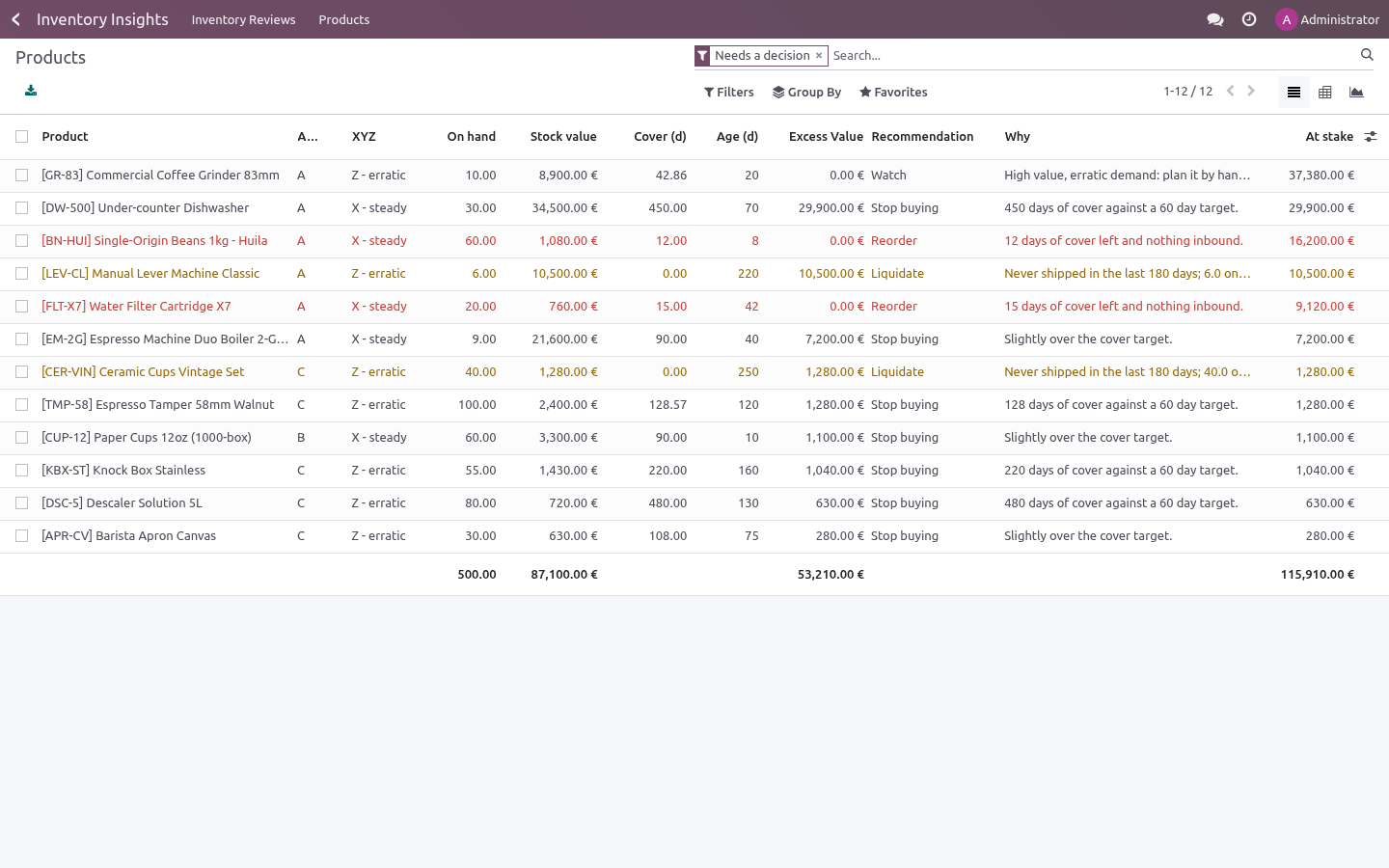
Every line carries the reason in words, and the value at stake — so the list sorts itself by money and you stop when the time runs out.
Install
Copy bambooforge_inventory_insights into your addons path (or install the ZIP), update the app list and install BambooForge Inventory Insights.
Give yourself Inventory Insights: Analyst (Settings → Users → Other). Everyone with inventory access can read a review; analysts can take one.
The Inventory Insights menu appears with Inventory Reviews and Products.
The app needs only stock. It reads stock moves, quants and pickings you already have — there is nothing to configure on products first, and nothing is written back to them.
Take a review
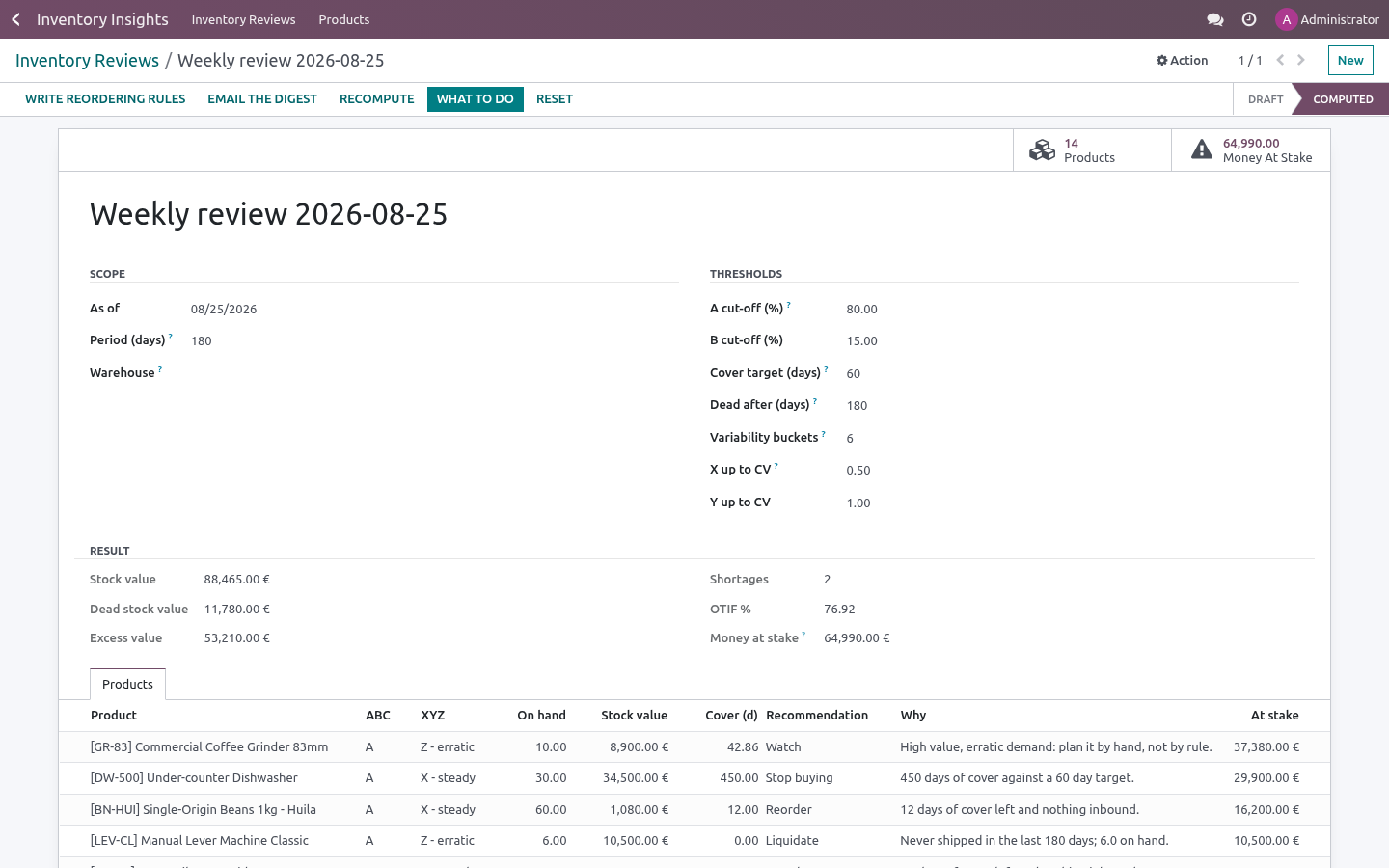
Inventory Insights → Inventory Reviews → New
Field |
What it changes |
|---|---|
As of |
The date the review looks at. Yesterday's review stays as it was — reviews are snapshots, not live reports. |
Period (days) |
How far back consumption is measured, for demand, cover and variability. 365 for a yearly view, 90 for a fast-moving catalogue. |
Warehouse |
Empty means every warehouse of the company. |
Product categories |
Empty means the whole catalogue. Child categories are included, so one review per family is two clicks. |
A / B cut-off (%) |
The classic 80/15 split of value. Change it and the classes move with it. |
Cover target (days) |
How much stock you want to hold. Above it is excess; below a third of it, with nothing inbound, is a shortage. |
Dead after (days) |
No issue for this long, with stock on hand, is dead stock. |
Variability buckets |
The period is cut into this many equal slices; the variation of consumption across them decides the XYZ class. Twelve monthly slices over a year is a good default. |
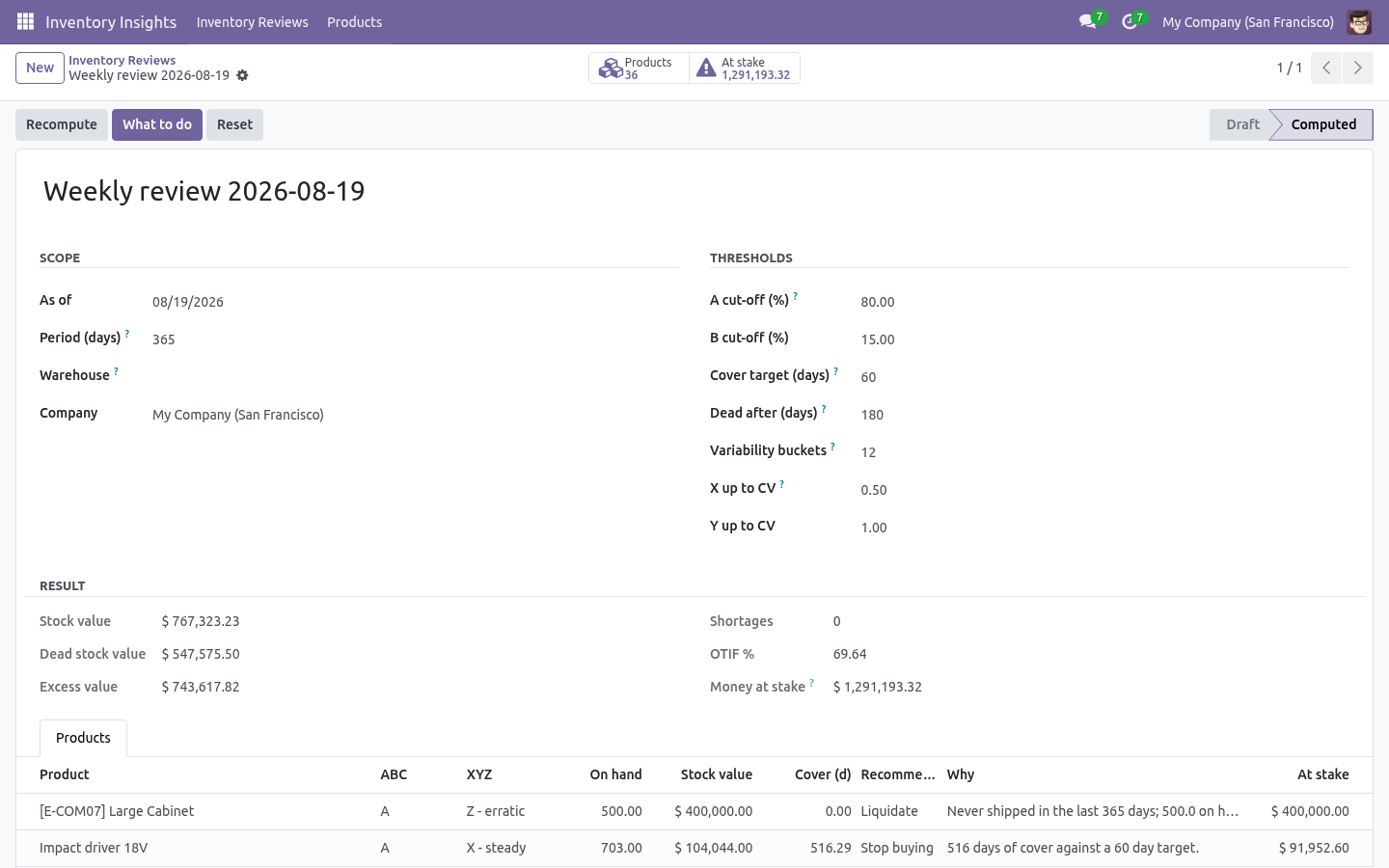
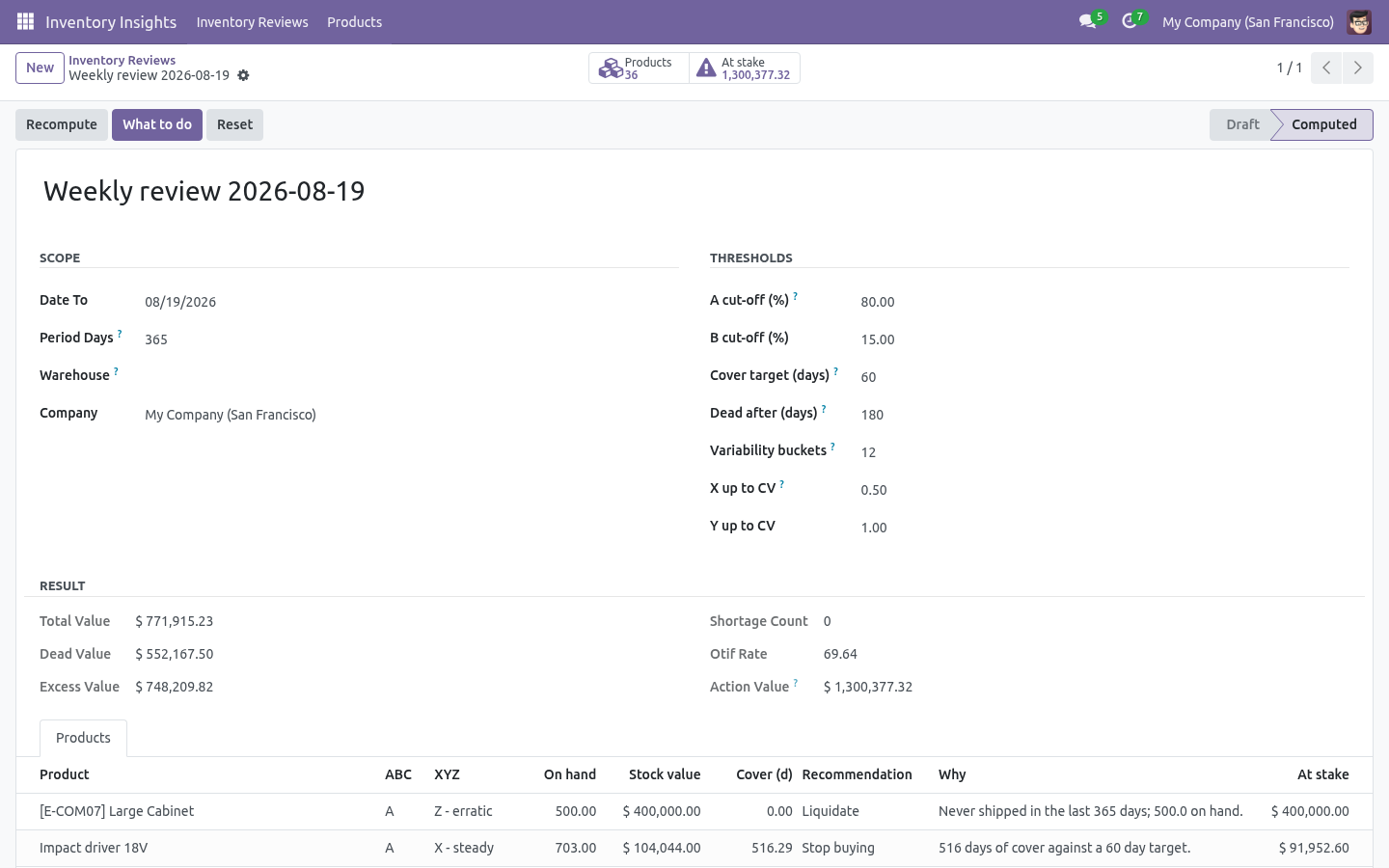
Press Compute. A few seconds later the review carries its totals — stock value, dead value, excess value, shortages, OTIF — and What to do opens the ranked list.
Recomputing replaces the lines; nothing accumulates. Reset empties the review and puts it back to draft.
How each number is worked out
- On hand and stock value
From the quants in scope, with the quant's own valuation when your Odoo keeps one, and quantity × cost otherwise.
- Demand, per day, days of cover
Every done move out of an internal location to a customer, production or inventory-loss location inside the period. Cover is the quantity on hand divided by the average daily consumption; a product that never moved has no cover, not an infinite one.
- ABC
Products are ranked by the value of what moved (falling back to stock value when nothing moved) and cut at the cumulative shares you set. The product that crosses the 80% line is still an A item — that is what the cut-off means.
- XYZ
The period is split into buckets and the coefficient of variation of consumption across them is measured: below X up to CV demand is steady, below Y up to CV it is variable, above that it is erratic. A product with no demand at all is Z.
- FIFO age
Receipts are walked from the newest backwards until they cover the quantity on hand; the receipt that closes the gap dates the oldest unit still in stock. A product received two years ago and again last week is a week old if only last week's units are left — the age of the stock, not of the product.
- Excess
Everything above cover target × daily consumption, valued at cost. A product with stock and no consumption at all is excess in full.
- Shortage
Cover below a third of the target with nothing inbound. Inbound means any incoming move that is neither done, cancelled nor draft.
- OTIF
Each outgoing move with a picking counts once: on time when the picking was done no later than its scheduled date, in full when it left no backorder behind. The review's headline OTIF weighs products by how many deliveries they had.
Reading the list
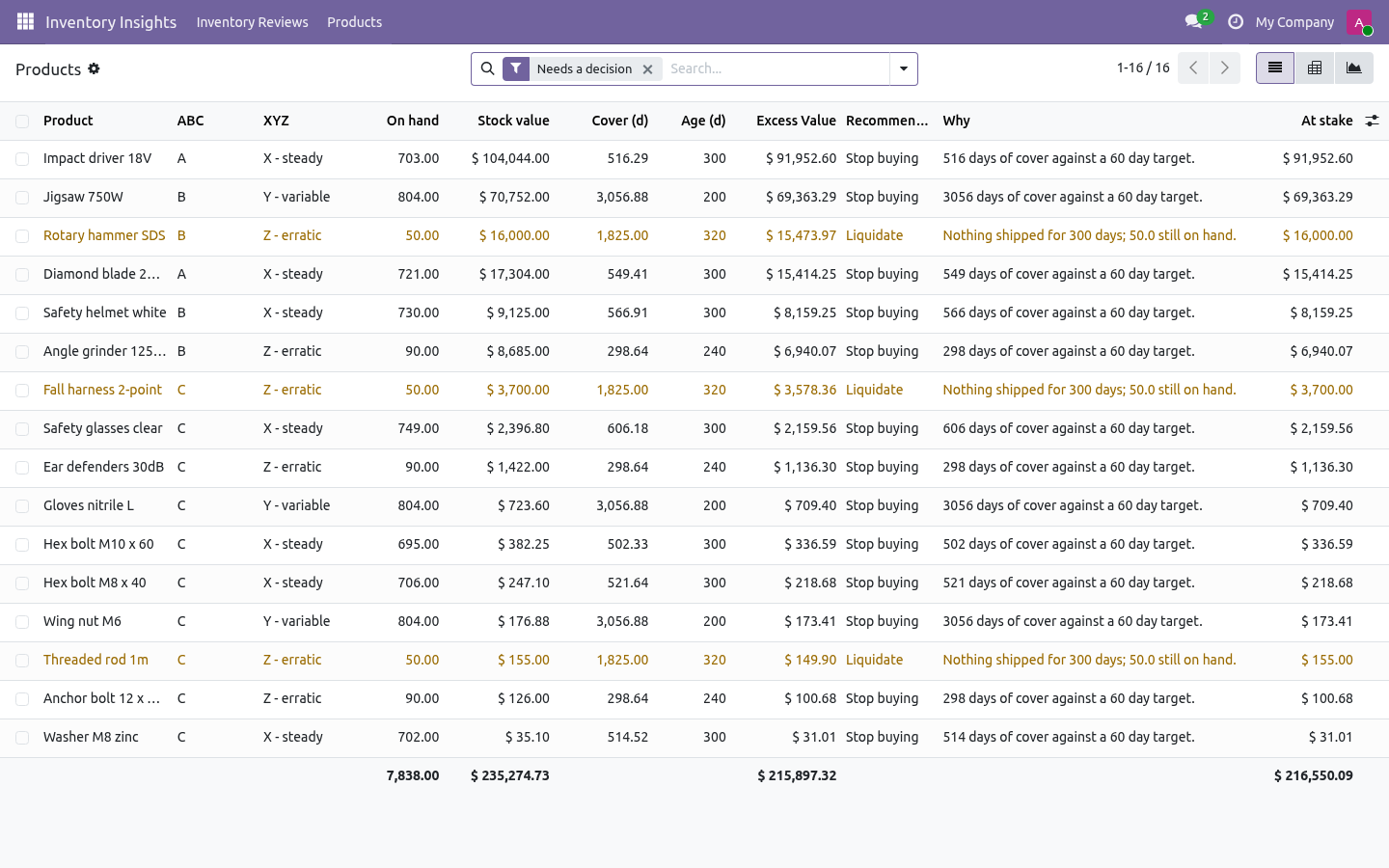
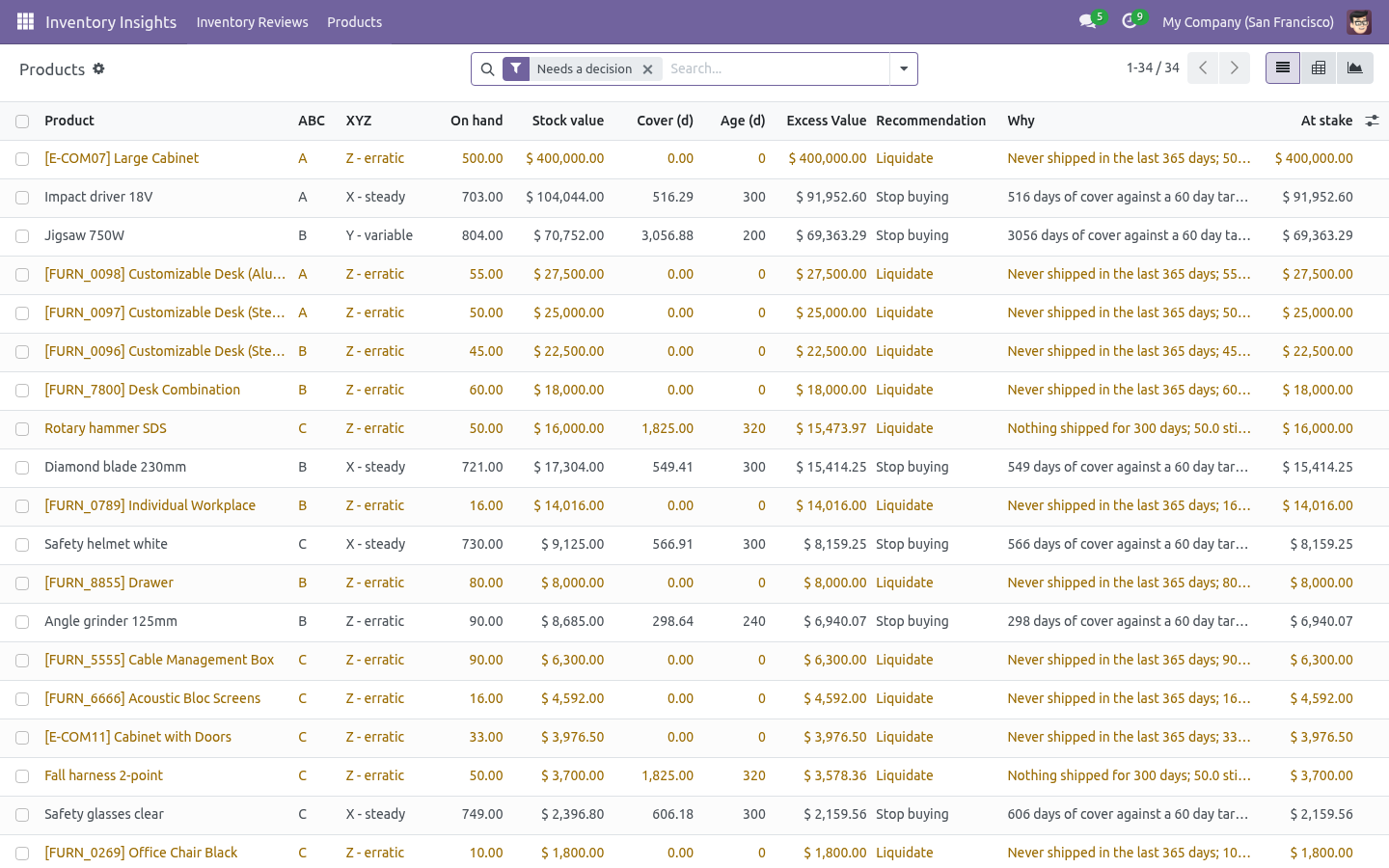
Inventory Insights → Products opens every line of every review; a review's What to do button opens just the ones that need a decision.
Group by Recommendation for the weekly meeting, by ABC class for a purchasing review, by Age for a write-off discussion.
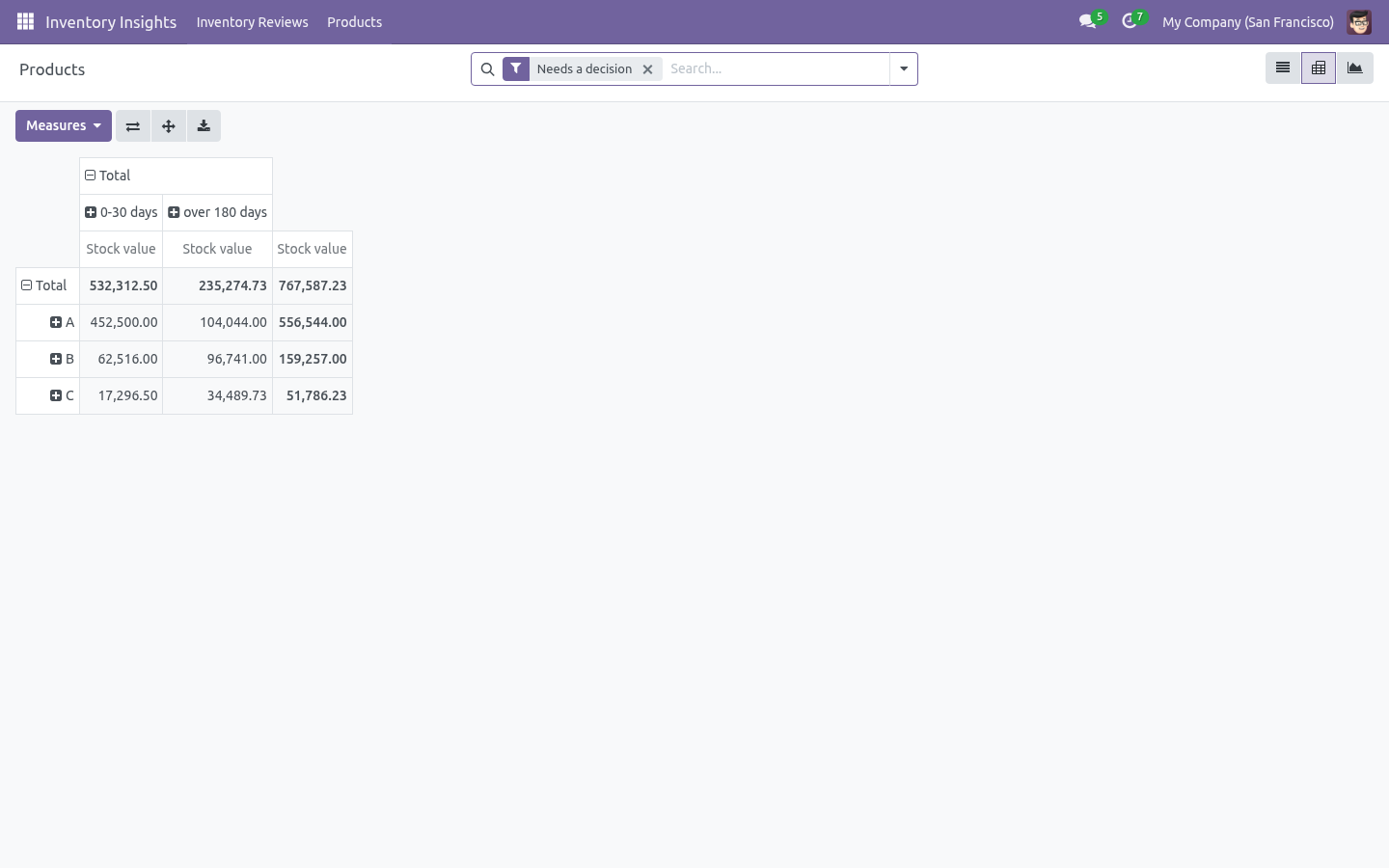
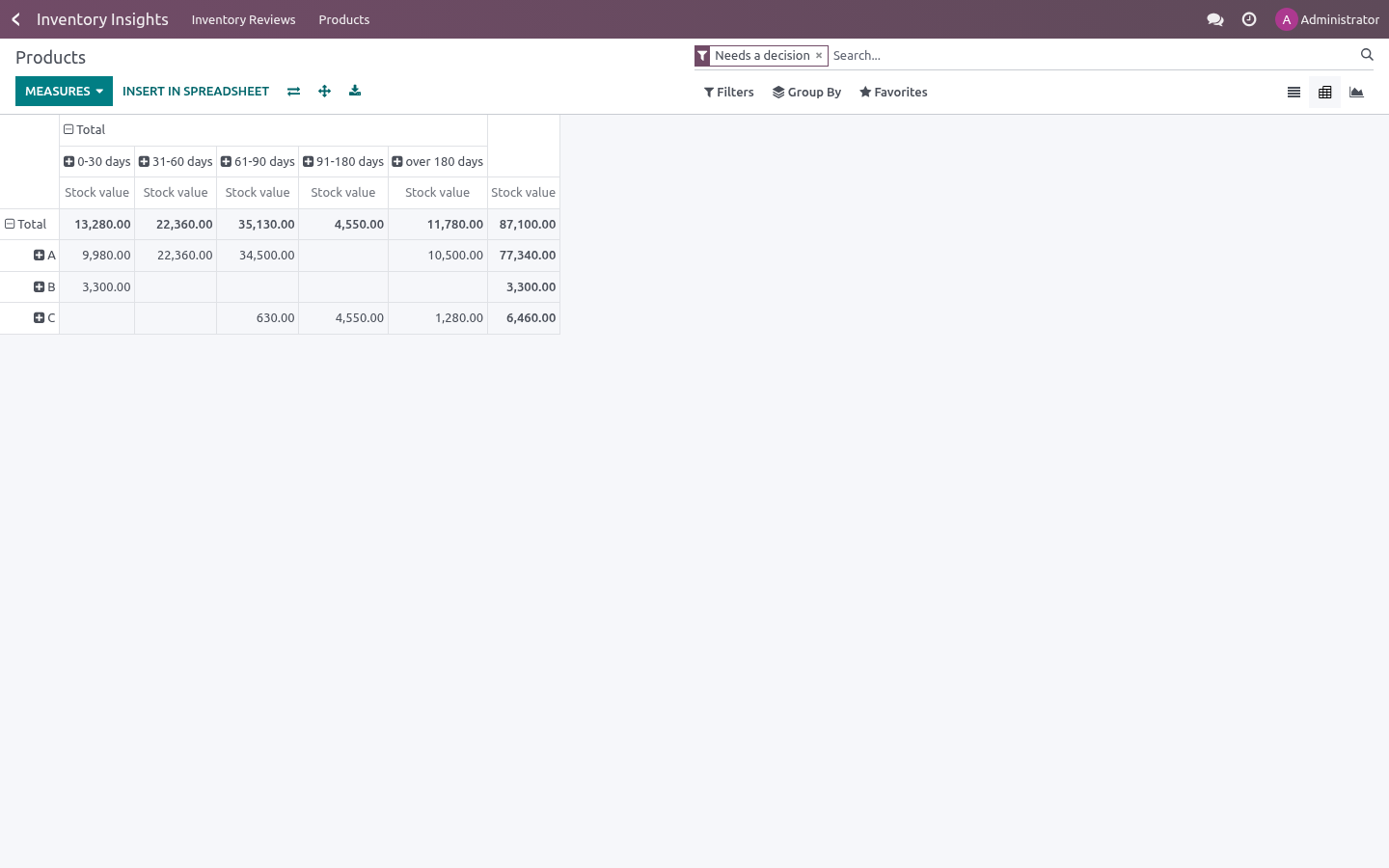
The pivot (ABC × age bucket, measured in stock value) is the one slide that usually ends the "is our stock healthy" argument.
Filters ship for shortages, dead stock, excess, class A and erratic demand.
Every column is exportable, and the lines are ordinary records: add them to a spreadsheet, a dashboard, or a scheduled action of your own.
Automating it
A cron Inventory Insights: weekly snapshot ships disabled. Enable it in Settings → Technical → Scheduled Actions and every company gets a review each week — the reviews then form a history you can compare: dead value falling, cover converging on the target, OTIF moving.
Troubleshooting
- A product I expect is missing
Reviews only look at storable products with stock or movement in the period, inside the chosen warehouse and categories.
- Everything is class A
There is only one product in scope, or all products carry the same value. Widen the categories, or check that costs are set: with a zero cost every product weighs the same.
- Cover is empty for a product that clearly sells
Its sales left the warehouse through a location type the review does not count as consumption (an internal transfer, for instance). Check the picking's destination location type.
- OTIF is 100% and I know it is not
OTIF only counts pickings that have both a scheduled date and a done date. Deliveries validated without a scheduled date are not counted at all rather than counted as on time.
- Dead stock includes items we just received
Dead means nothing shipped out for the delay, whatever came in. That is deliberate: stock received into a product nobody buys is the most expensive kind.
- The review takes a long time
It walks every move of the period. Narrow it to one warehouse or one category, or shorten the period; a 90-day review over a family of products is a few seconds.
What changed in 1.1
The recommendation became a button. Every line now computes a textbook reorder point (average demand over the vendor's lead time plus safety stock at the class's service level) - and Write Reordering Rules pushes them into real stock.warehouse.orderpoint records the scheduler acts on. Service levels per ABC class are configurable.
An email digest sends the analysts the top actions by money at stake.
Built for volume: quantities, demand, variability and OTIF now come from grouped SQL queries instead of loading every move into Python - a catalogue of tens of thousands of products stays a report, not an outage. Stock value reads the valuation layers when they exist.
Snapshots are isolated per company.
What changed in 1.2
A forecast that scores itself. Each line carries a 30-day demand forecast (exponential smoothing over the review's own buckets) and its back-tested MAPE - above ~50% the demand is too erratic to trust a point estimate, and the review says so instead of pretending.
Trend against the last review: stock value, dead stock and excess deltas, plus the number of products whose ABC class moved.
How we make sure it works
Before every release, 58 automated checks run against this app on Odoo 16, 17, 18, 19 and 20. Among them:
A stock clerk reads the review and touches nothing.
A thin cover with nothing inbound is a shortage.
A product shipped last week is not dead.
Stock within the target is not excess.
An inventory adjustment is not demand.
The complete list is in the source you receive.
Support
support@bambooforge.dev — questions, bug reports and feature requests are answered by the developers who wrote the module.