 BambooForge Labs
Intrastat & EC Sales List | EU Trade Declarations
Monthly Intrastat arrivals and dispatches plus the EC Sales List, built from posted invoices, with commodity codes, net mass and a file to file.
Available for Odoo 16.0, Odoo 17.0, Odoo 18.0, Odoo 19.0, Odoo 20.0. Technical name bambooforge_intrastat.
Transcript of the walkthrough (Odoo 20)
Intrastat & EC Sales List / EU Trade Declarations. Monthly Intrastat arrivals and dispatches plus the EC Sales List, built from posted invoices, with commodity codes, net mass and a file to file. Two filings that Odoo Community does not ship and that are not optional for a company trading inside the EU: In the next few minutes: what this is for, then setting up, then filing a period, then returns and corrections, then who belongs on the ec sales list. Then what this app deliberately does not do, so you can tell before you buy whether it fits.
Everything lives under Intrastat then Commodity Codes then EC Sales List then Transaction Natures. 1. Copy bambooforge_intrastat into your addons path and update the app list, or install the ZIP from the Odoo Apps Store. 2.
Install Intrastat & EC Sales List. 3. Open Intrastat - its menus are Commodity Codes, EC Sales List, Transaction Natures. What this is for.
Two filings that Odoo Community does not ship and that are not optional for a company trading inside the EU: Intrastat — a monthly count of goods physically crossing a border between two member states, owed to the national statistical office by every company above the national threshold. EC Sales List — a recapitulative statement of turnover billed to VAT numbers in other member states, including services, which Intrastat never sees. Both are built from invoices that are already posted. Nothing has to be typed twice.
Setting up. 1. Accounting ▸ Configuration ▸ Intrastat ▸ Commodity Codes — add the CN8 codes you actually trade under. A code that needs a supplementary unit (pairs, items, litres) should say so here; a declaration filed without it is rejected.
2. Accounting ▸ Configuration ▸ Settings ▸ Intrastat & EC Sales List — set the transaction nature, transport mode and, if your office asks for one, the region. These become the default on new invoices. Set the two national thresholds in the same place.
3. On each product, set the commodity code and the country of origin. The country of origin is where the goods were made, not where you bought them — it has been required on dispatches since the 2022 rules. Filing a period.
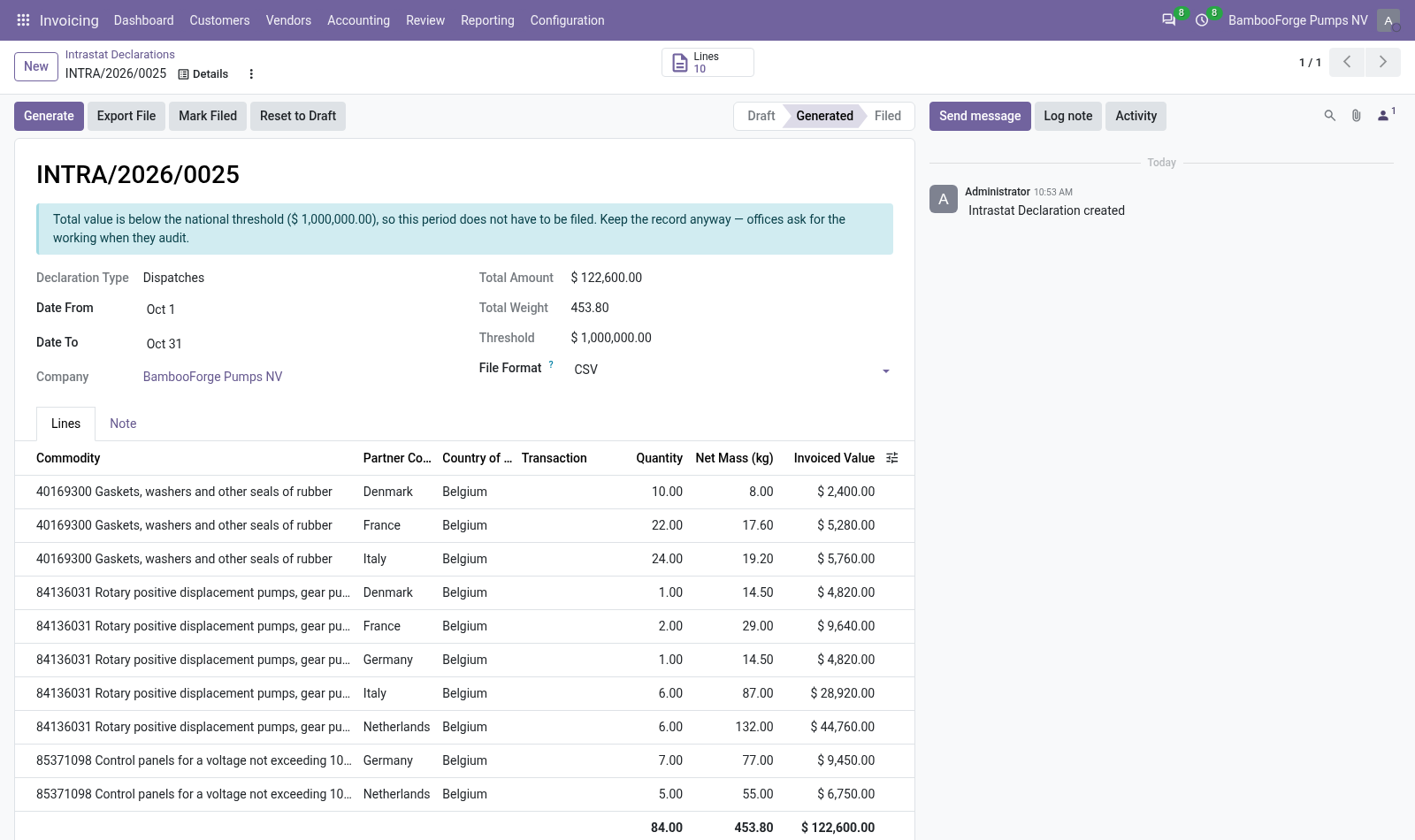
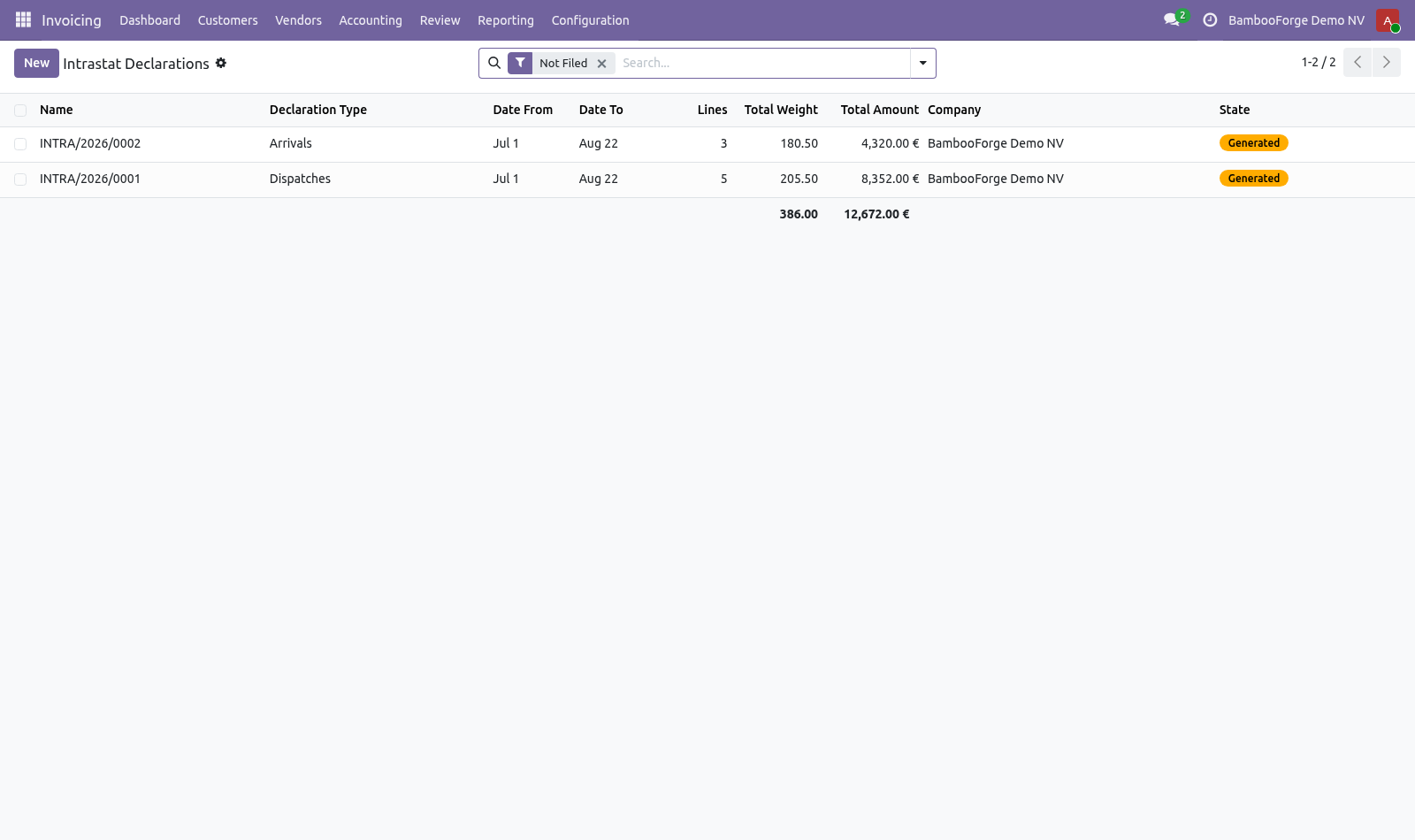
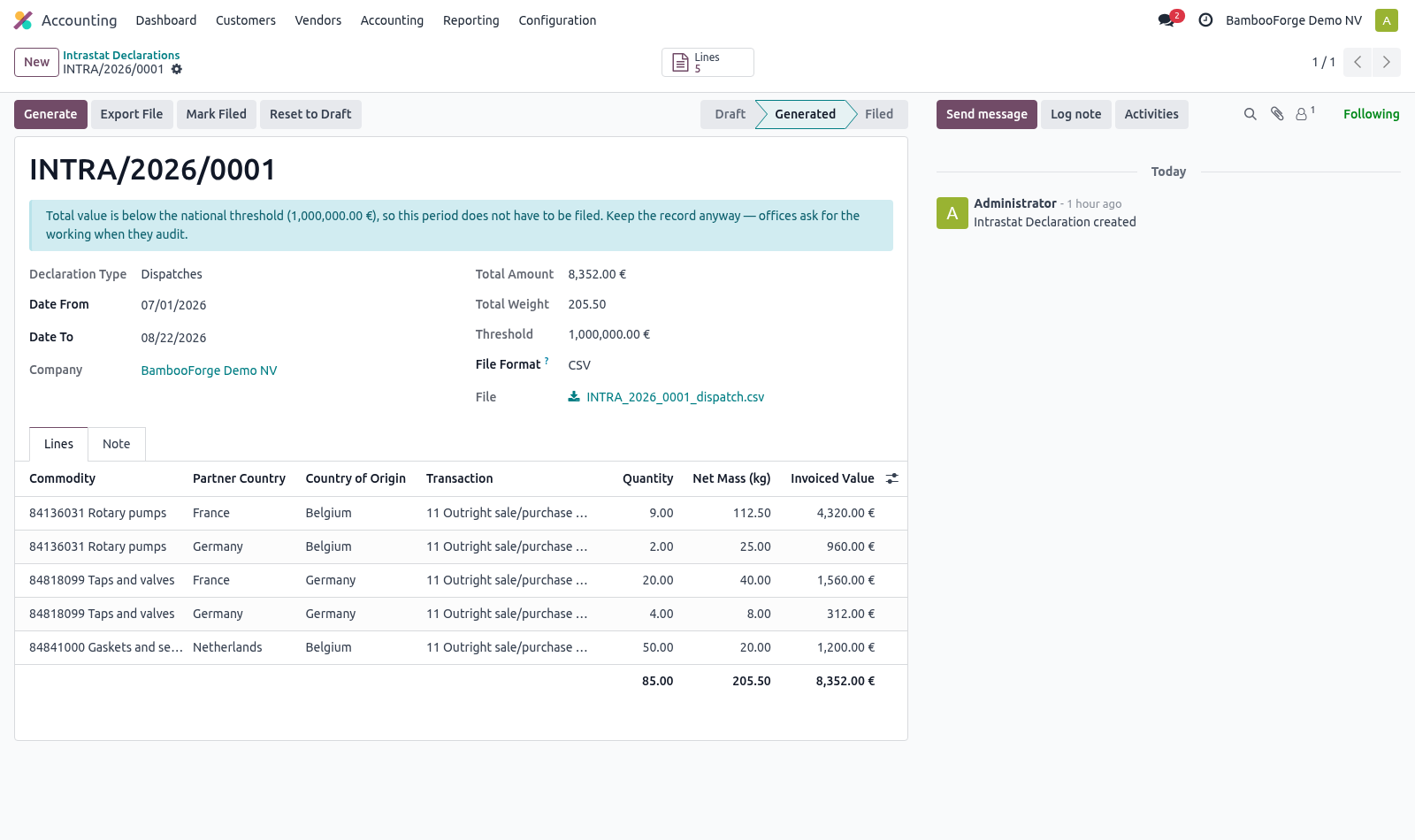
Accounting ▸ Reporting ▸ EU Declarations ▸ Intrastat how many products in the period still have no commodity code, and which ones; whether the period is below the national threshold, in which case there is nothing to file. Create a declaration, pick the month and the direction, and press Generate. The lines are grouped the way the office wants them: one line per commodity code, partner country, country of origin, transaction, transport and region, with the value in your company currency and the net mass in kilograms. Returns and corrections.
A credit note for goods that physically come back is declared on the opposite flow as a positive line, not as a negative on the original one. That is what the offices ask for and what keeps the two flows agreeing with the VAT return. A customer credit note therefore appears in the arrivals declaration. A credit note that moves no goods — a price correction, a rebate, a discount — must not create an arrival.
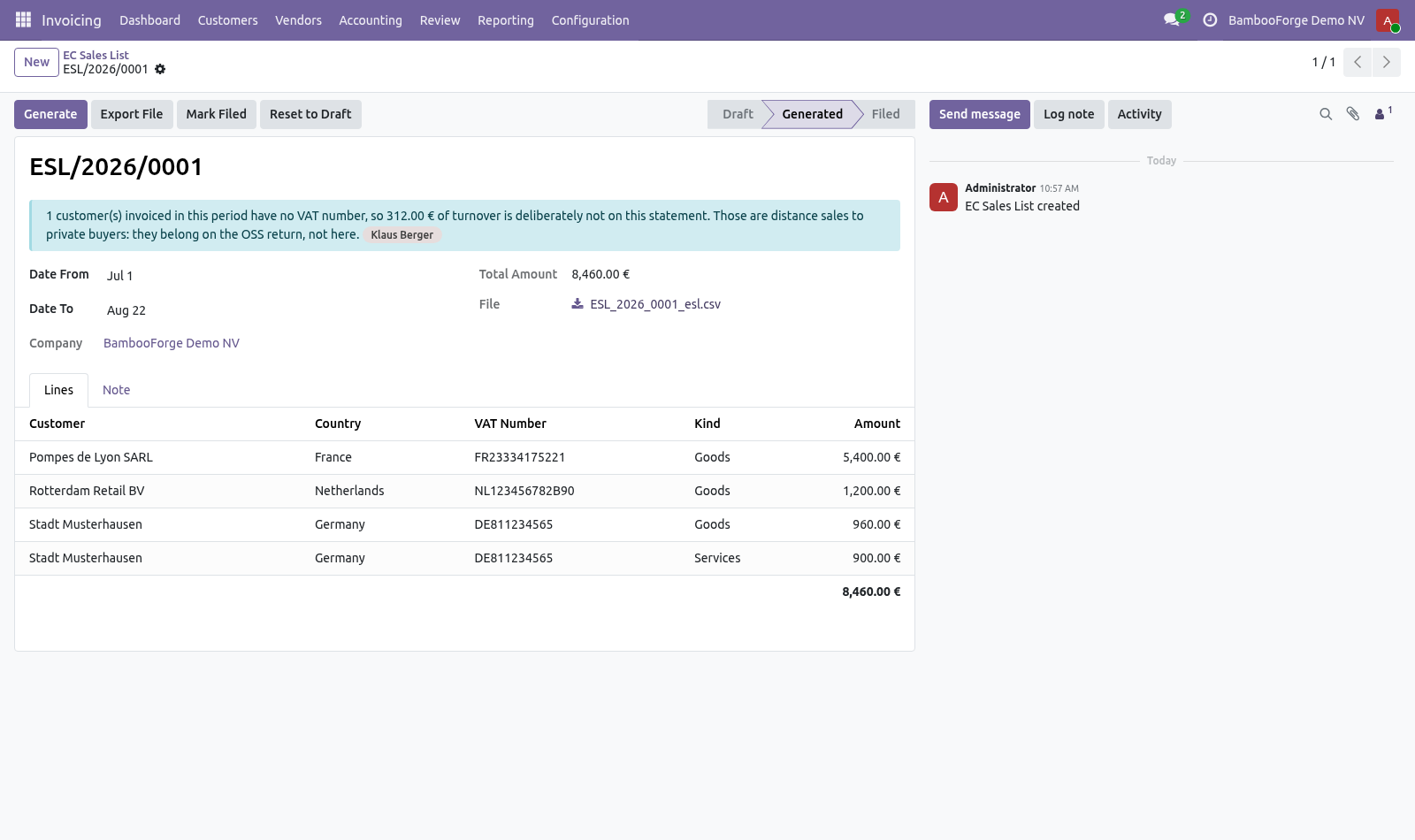
Tick Exclude from Intrastat on that document. It still counts on the EC Sales List, which measures turnover rather than movement. Who belongs on the EC Sales List. Only customers who gave you a VAT number.
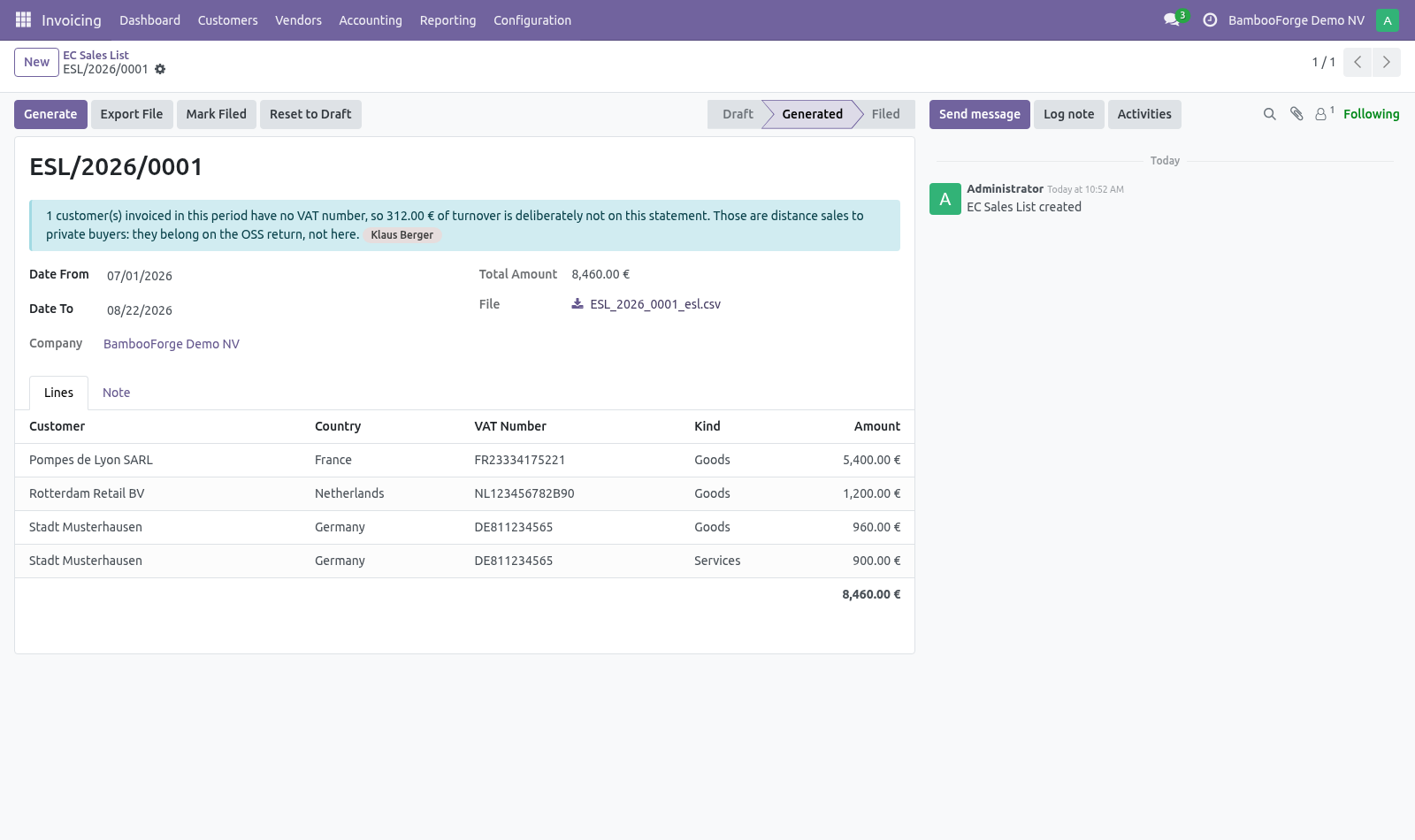
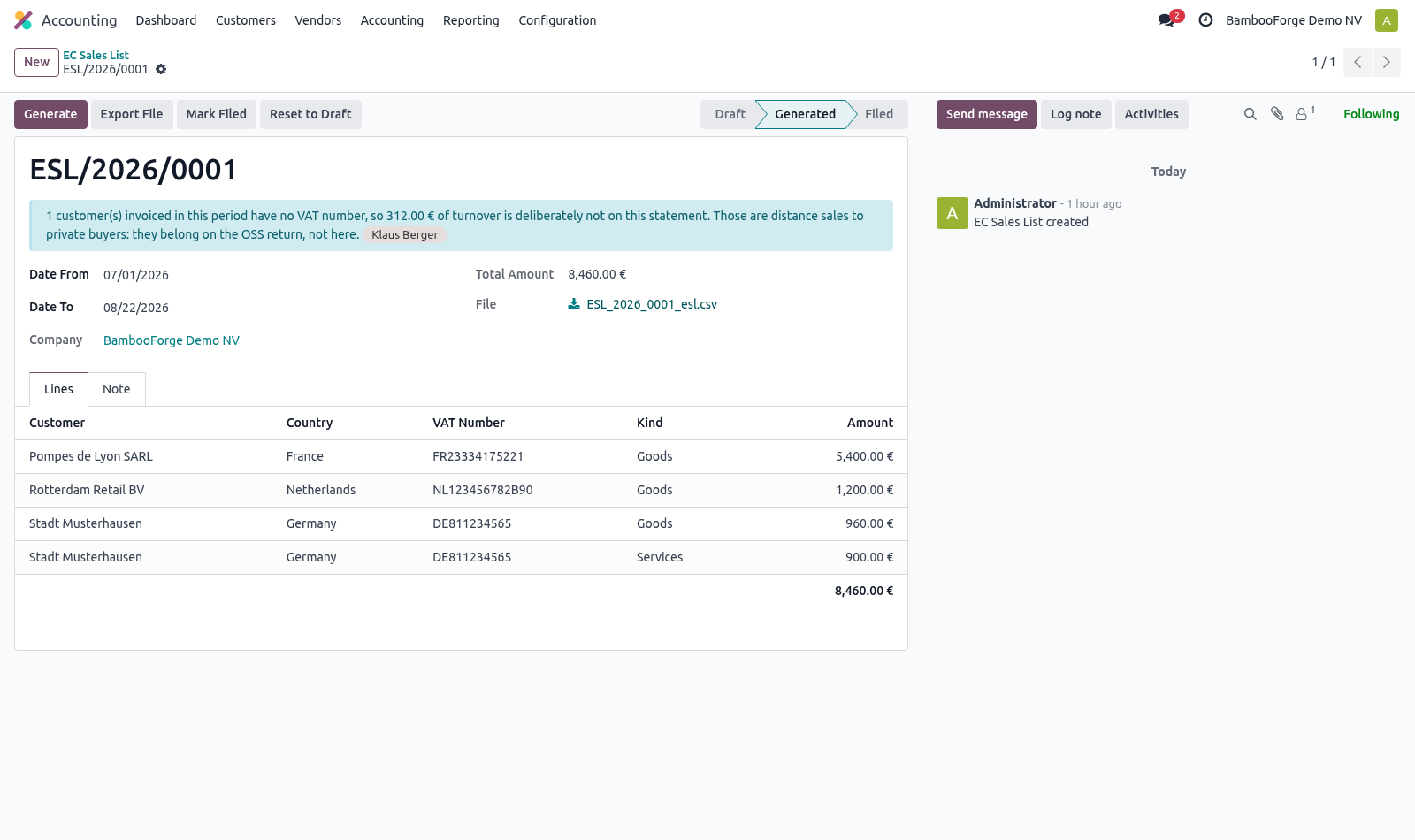
That is what the statement is for: an intra-Community supply is zero-rated because the customer accounts for the tax under their own number, and that number is what the tax office matches your line against. A customer with no VAT number is a private buyer. Their purchase is a distance sale, taxed at the rate of their country, and it is declared on the One Stop Shop return — not here. The statement leaves them off on purpose, and says so: the header shows how many customers were left off and what turnover they represent, so the figure can be reconciled against the ledger without going looking for the difference.
The monthly scheduler. Filing deadlines fall within days of a period closing, so the work has to be waiting for whoever files it. A daily scheduled action opens and fills last month's arrivals and dispatches on the first of the month, for every company that has Intrastat configured. Running it twice does not duplicate a period.
How we make sure it works. Before every release, 39 automated checks run against this app on Odoo 16, 17, 18, 19 and 20. Among them: Customer without vat is not on the statement. Filed declaration cannot be regenerated.
Filed statement cannot be regenerated. Left off turnover is shown not hidden. Missing commodity code is reported not silent. The complete list is in the source you receive.
Questions people ask. Which Odoo versions does it run on? Odoo 16.0, 17.0, 18.0, 19.0, 20.0, on the series you buy it for; each series is its own listing. Community or Enterprise?
Both. It needs no Enterprise app. Now the part most videos leave out: what this does not do. Region lists are per country and are not shipped: each member state publishes its own, and most do not ask for one at all.
The CN8 catalogue is not shipped either. It changes every year and runs to thousands of lines; the codes a given company uses are usually a few dozen. Net mass comes from the product weight. A company that does not maintain weights will file zeros, which most offices reject — the declaration shows the total so this is visible before you send it.
The complete manual is at docs dot bambooforge dot dev, the demo database is linked from the store page, and support answers within twenty-four hours. Links are in the description.
Transcript of the walkthrough (Odoo 19)
Intrastat & EC Sales List / EU Trade Declarations. Monthly Intrastat arrivals and dispatches plus the EC Sales List, built from posted invoices, with commodity codes, net mass and a file to file. Two filings that Odoo Community does not ship and that are not optional for a company trading inside the EU: In the next few minutes: what this is for, then setting up, then filing a period, then returns and corrections, then who belongs on the ec sales list. Then what this app deliberately does not do, so you can tell before you buy whether it fits.
Everything lives under Intrastat then Commodity Codes then EC Sales List then Transaction Natures. What this is for. Two filings that Odoo Community does not ship and that are not optional for a company trading inside the EU: Intrastat — a monthly count of goods physically crossing a border between two member states, owed to the national statistical office by every company above the national threshold. EC Sales List — a recapitulative statement of turnover billed to VAT numbers in other member states, including services, which Intrastat never sees.
Both are built from invoices that are already posted. Nothing has to be typed twice. Setting up. 1.
Accounting ▸ Configuration ▸ Intrastat ▸ Commodity Codes — add the CN8 codes you actually trade under. A code that needs a supplementary unit (pairs, items, litres) should say so here; a declaration filed without it is rejected. 2. Accounting ▸ Configuration ▸ Settings ▸ Intrastat & EC Sales List — set the transaction nature, transport mode and, if your office asks for one, the region.
These become the default on new invoices. Set the two national thresholds in the same place. 3. On each product, set the commodity code and the country of origin.
The country of origin is where the goods were made, not where you bought them — it has been required on dispatches since the 2022 rules. Filing a period. Accounting ▸ Reporting ▸ EU Declarations ▸ Intrastat how many products in the period still have no commodity code, and which ones; whether the period is below the national threshold, in which case there is nothing to file. Create a declaration, pick the month and the direction, and press Generate.
The lines are grouped the way the office wants them: one line per commodity code, partner country, country of origin, transaction, transport and region, with the value in your company currency and the net mass in kilograms. Returns and corrections. A credit note for goods that physically come back is declared on the opposite flow as a positive line, not as a negative on the original one. That is what the offices ask for and what keeps the two flows agreeing with the VAT return.
A customer credit note therefore appears in the arrivals declaration. A credit note that moves no goods — a price correction, a rebate, a discount — must not create an arrival. Tick Exclude from Intrastat on that document. It still counts on the EC Sales List, which measures turnover rather than movement.
Who belongs on the EC Sales List. Only customers who gave you a VAT number. That is what the statement is for: an intra-Community supply is zero-rated because the customer accounts for the tax under their own number, and that number is what the tax office matches your line against. A customer with no VAT number is a private buyer.
Their purchase is a distance sale, taxed at the rate of their country, and it is declared on the One Stop Shop return — not here. The statement leaves them off on purpose, and says so: the header shows how many customers were left off and what turnover they represent, so the figure can be reconciled against the ledger without going looking for the difference. The monthly scheduler. Filing deadlines fall within days of a period closing, so the work has to be waiting for whoever files it.
A daily scheduled action opens and fills last month's arrivals and dispatches on the first of the month, for every company that has Intrastat configured. Running it twice does not duplicate a period. Now the part most videos leave out: what this does not do. Region lists are per country and are not shipped: each member state publishes its own, and most do not ask for one at all.
The CN8 catalogue is not shipped either. It changes every year and runs to thousands of lines; the codes a given company uses are usually a few dozen. Net mass comes from the product weight. A company that does not maintain weights will file zeros, which most offices reject — the declaration shows the total so this is visible before you send it.
The complete manual is at docs dot bambooforge dot dev, the demo database is linked from the store page, and support answers within twenty-four hours. Links are in the description.
Transcript of the walkthrough (Odoo 18)
Intrastat & EC Sales List / EU Trade Declarations. Monthly Intrastat arrivals and dispatches plus the EC Sales List, built from posted invoices, with commodity codes, net mass and a file to file. Two filings that Odoo Community does not ship and that are not optional for a company trading inside the EU: In the next few minutes: what this is for, then setting up, then filing a period, then returns and corrections, then who belongs on the ec sales list. Then what this app deliberately does not do, so you can tell before you buy whether it fits.
Everything lives under Intrastat then Commodity Codes then EC Sales List then Transaction Natures. What this is for. Two filings that Odoo Community does not ship and that are not optional for a company trading inside the EU: Intrastat — a monthly count of goods physically crossing a border between two member states, owed to the national statistical office by every company above the national threshold. EC Sales List — a recapitulative statement of turnover billed to VAT numbers in other member states, including services, which Intrastat never sees.
Both are built from invoices that are already posted. Nothing has to be typed twice. Setting up. 1.
Accounting ▸ Configuration ▸ Intrastat ▸ Commodity Codes — add the CN8 codes you actually trade under. A code that needs a supplementary unit (pairs, items, litres) should say so here; a declaration filed without it is rejected. 2. Accounting ▸ Configuration ▸ Settings ▸ Intrastat & EC Sales List — set the transaction nature, transport mode and, if your office asks for one, the region.
These become the default on new invoices. Set the two national thresholds in the same place. 3. On each product, set the commodity code and the country of origin.
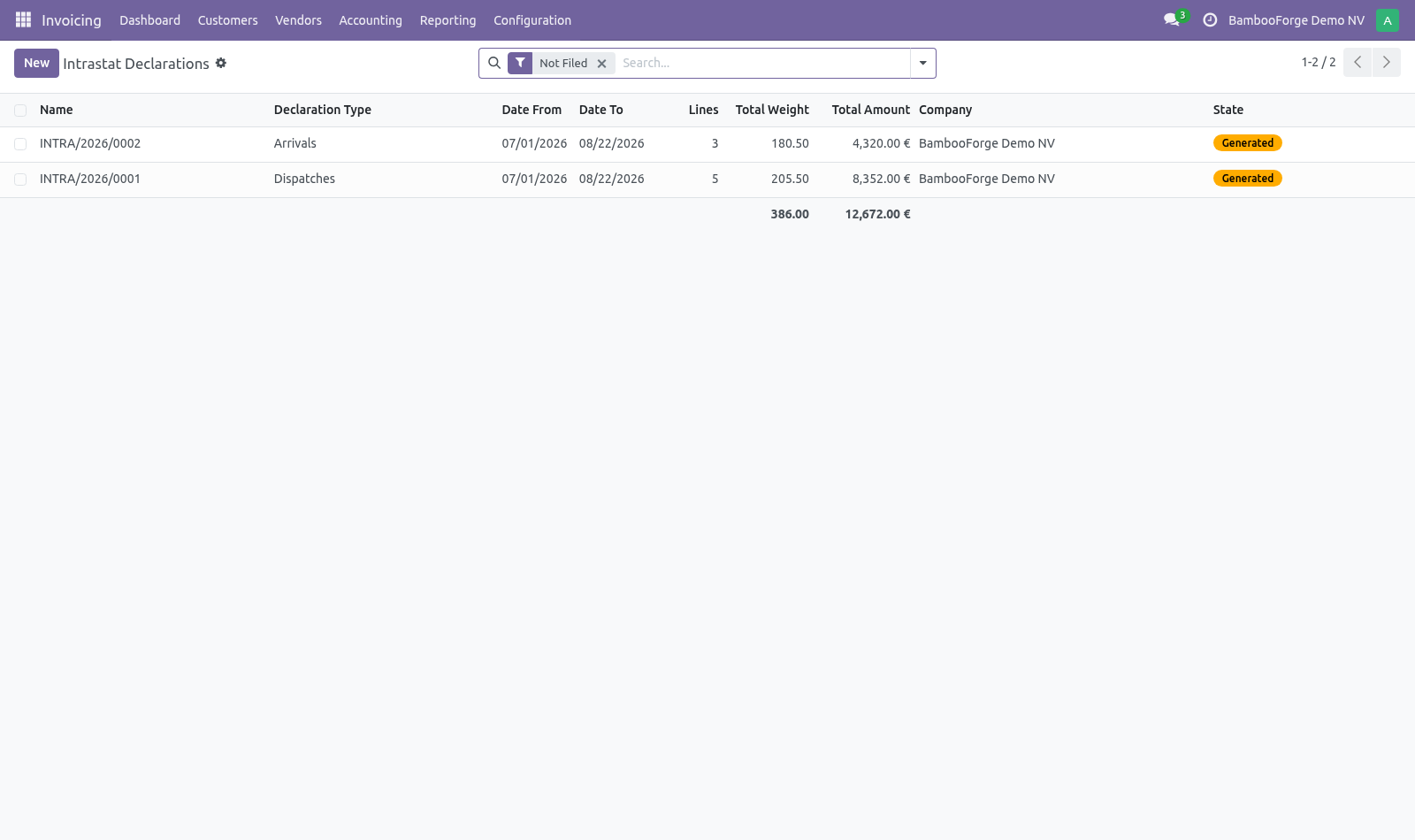
The country of origin is where the goods were made, not where you bought them — it has been required on dispatches since the 2022 rules. Filing a period. Accounting ▸ Reporting ▸ EU Declarations ▸ Intrastat how many products in the period still have no commodity code, and which ones; whether the period is below the national threshold, in which case there is nothing to file. Create a declaration, pick the month and the direction, and press Generate.
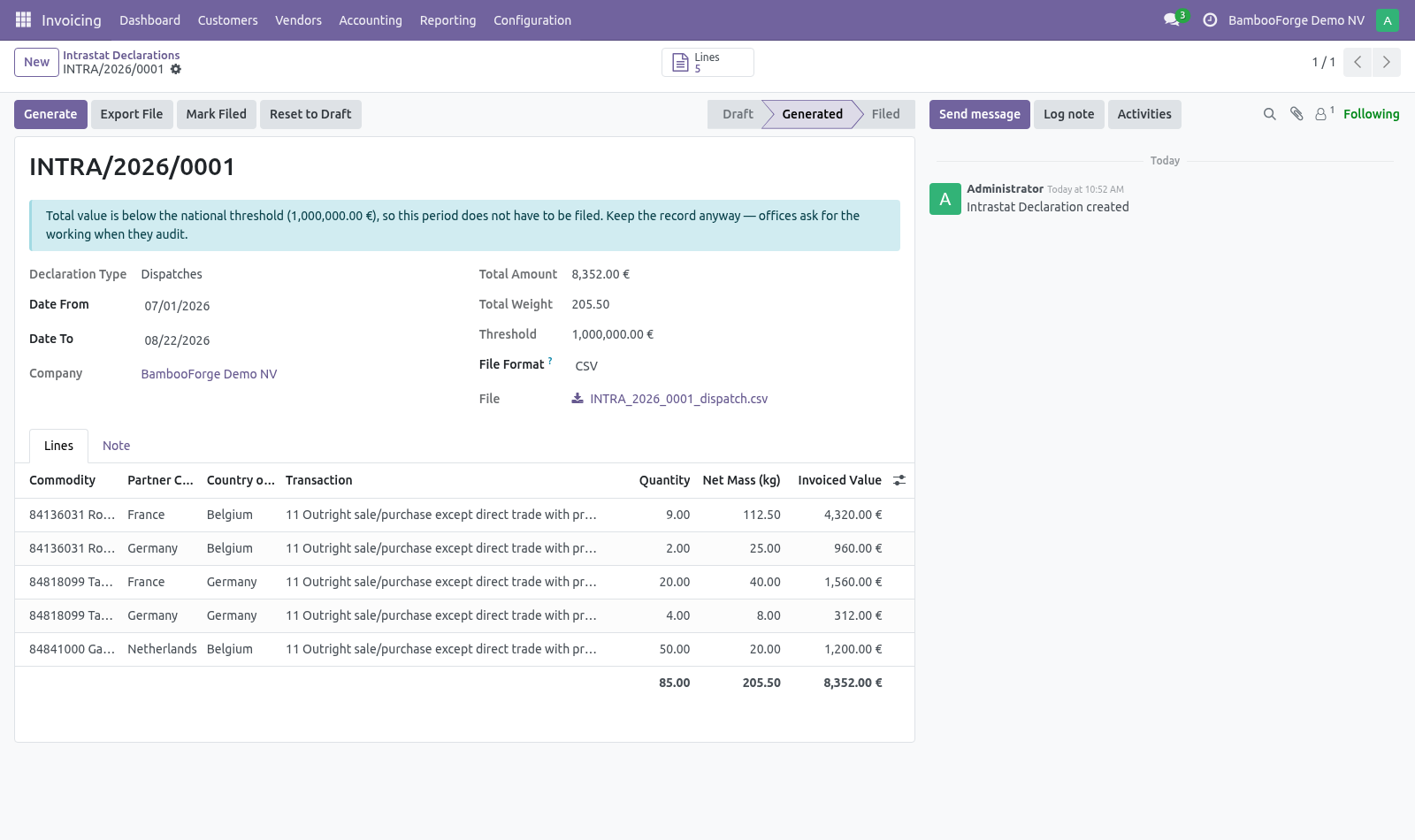
The lines are grouped the way the office wants them: one line per commodity code, partner country, country of origin, transaction, transport and region, with the value in your company currency and the net mass in kilograms. Returns and corrections. A credit note for goods that physically come back is declared on the opposite flow as a positive line, not as a negative on the original one. That is what the offices ask for and what keeps the two flows agreeing with the VAT return.
A customer credit note therefore appears in the arrivals declaration. A credit note that moves no goods — a price correction, a rebate, a discount — must not create an arrival. Tick Exclude from Intrastat on that document. It still counts on the EC Sales List, which measures turnover rather than movement.
Who belongs on the EC Sales List. Only customers who gave you a VAT number. That is what the statement is for: an intra-Community supply is zero-rated because the customer accounts for the tax under their own number, and that number is what the tax office matches your line against. A customer with no VAT number is a private buyer.
Their purchase is a distance sale, taxed at the rate of their country, and it is declared on the One Stop Shop return — not here. The statement leaves them off on purpose, and says so: the header shows how many customers were left off and what turnover they represent, so the figure can be reconciled against the ledger without going looking for the difference. The monthly scheduler. Filing deadlines fall within days of a period closing, so the work has to be waiting for whoever files it.
A daily scheduled action opens and fills last month's arrivals and dispatches on the first of the month, for every company that has Intrastat configured. Running it twice does not duplicate a period. Now the part most videos leave out: what this does not do. Region lists are per country and are not shipped: each member state publishes its own, and most do not ask for one at all.
The CN8 catalogue is not shipped either. It changes every year and runs to thousands of lines; the codes a given company uses are usually a few dozen. Net mass comes from the product weight. A company that does not maintain weights will file zeros, which most offices reject — the declaration shows the total so this is visible before you send it.
The complete manual is at docs dot bambooforge dot dev, the demo database is linked from the store page, and support answers within twenty-four hours. Links are in the description.
Transcript of the walkthrough (Odoo 17)
Intrastat & EC Sales List / EU Trade Declarations. Monthly Intrastat arrivals and dispatches plus the EC Sales List, built from posted invoices, with commodity codes, net mass and a file to file. Two filings that Odoo Community does not ship and that are not optional for a company trading inside the EU: In the next few minutes: what this is for, then setting up, then filing a period, then returns and corrections, then who belongs on the ec sales list. Then what this app deliberately does not do, so you can tell before you buy whether it fits.
Everything lives under Intrastat then Commodity Codes then EC Sales List then Transaction Natures. What this is for. Two filings that Odoo Community does not ship and that are not optional for a company trading inside the EU: Intrastat — a monthly count of goods physically crossing a border between two member states, owed to the national statistical office by every company above the national threshold. EC Sales List — a recapitulative statement of turnover billed to VAT numbers in other member states, including services, which Intrastat never sees.
Both are built from invoices that are already posted. Nothing has to be typed twice. Setting up. 1.
Accounting ▸ Configuration ▸ Intrastat ▸ Commodity Codes — add the CN8 codes you actually trade under. A code that needs a supplementary unit (pairs, items, litres) should say so here; a declaration filed without it is rejected. 2. Accounting ▸ Configuration ▸ Settings ▸ Intrastat & EC Sales List — set the transaction nature, transport mode and, if your office asks for one, the region.
These become the default on new invoices. Set the two national thresholds in the same place. 3. On each product, set the commodity code and the country of origin.
The country of origin is where the goods were made, not where you bought them — it has been required on dispatches since the 2022 rules. Filing a period. Accounting ▸ Reporting ▸ EU Declarations ▸ Intrastat how many products in the period still have no commodity code, and which ones; whether the period is below the national threshold, in which case there is nothing to file. Create a declaration, pick the month and the direction, and press Generate.
The lines are grouped the way the office wants them: one line per commodity code, partner country, country of origin, transaction, transport and region, with the value in your company currency and the net mass in kilograms. Returns and corrections. A credit note for goods that physically come back is declared on the opposite flow as a positive line, not as a negative on the original one. That is what the offices ask for and what keeps the two flows agreeing with the VAT return.
A customer credit note therefore appears in the arrivals declaration. A credit note that moves no goods — a price correction, a rebate, a discount — must not create an arrival. Tick Exclude from Intrastat on that document. It still counts on the EC Sales List, which measures turnover rather than movement.
Who belongs on the EC Sales List. Only customers who gave you a VAT number. That is what the statement is for: an intra-Community supply is zero-rated because the customer accounts for the tax under their own number, and that number is what the tax office matches your line against. A customer with no VAT number is a private buyer.
Their purchase is a distance sale, taxed at the rate of their country, and it is declared on the One Stop Shop return — not here. The statement leaves them off on purpose, and says so: the header shows how many customers were left off and what turnover they represent, so the figure can be reconciled against the ledger without going looking for the difference. The monthly scheduler. Filing deadlines fall within days of a period closing, so the work has to be waiting for whoever files it.
A daily scheduled action opens and fills last month's arrivals and dispatches on the first of the month, for every company that has Intrastat configured. Running it twice does not duplicate a period. Now the part most videos leave out: what this does not do. Region lists are per country and are not shipped: each member state publishes its own, and most do not ask for one at all.
The CN8 catalogue is not shipped either. It changes every year and runs to thousands of lines; the codes a given company uses are usually a few dozen. Net mass comes from the product weight. A company that does not maintain weights will file zeros, which most offices reject — the declaration shows the total so this is visible before you send it.
The complete manual is at docs dot bambooforge dot dev, the demo database is linked from the store page, and support answers within twenty-four hours. Links are in the description.
Transcript of the walkthrough (Odoo 16)
Intrastat & EC Sales List / EU Trade Declarations. Monthly Intrastat arrivals and dispatches plus the EC Sales List, built from posted invoices, with commodity codes, net mass and a file to file. Two filings that Odoo Community does not ship and that are not optional for a company trading inside the EU: In the next few minutes: what this is for, then setting up, then filing a period, then returns and corrections, then who belongs on the ec sales list. Then what this app deliberately does not do, so you can tell before you buy whether it fits.
Everything lives under Intrastat then Commodity Codes then EC Sales List then Transaction Natures. What this is for. Two filings that Odoo Community does not ship and that are not optional for a company trading inside the EU: Intrastat — a monthly count of goods physically crossing a border between two member states, owed to the national statistical office by every company above the national threshold. EC Sales List — a recapitulative statement of turnover billed to VAT numbers in other member states, including services, which Intrastat never sees.
Both are built from invoices that are already posted. Nothing has to be typed twice. Setting up. 1.
Accounting ▸ Configuration ▸ Intrastat ▸ Commodity Codes — add the CN8 codes you actually trade under. A code that needs a supplementary unit (pairs, items, litres) should say so here; a declaration filed without it is rejected. 2. Accounting ▸ Configuration ▸ Settings ▸ Intrastat & EC Sales List — set the transaction nature, transport mode and, if your office asks for one, the region.
These become the default on new invoices. Set the two national thresholds in the same place. 3. On each product, set the commodity code and the country of origin.
The country of origin is where the goods were made, not where you bought them — it has been required on dispatches since the 2022 rules. Filing a period. Accounting ▸ Reporting ▸ EU Declarations ▸ Intrastat how many products in the period still have no commodity code, and which ones; whether the period is below the national threshold, in which case there is nothing to file. Create a declaration, pick the month and the direction, and press Generate.
The lines are grouped the way the office wants them: one line per commodity code, partner country, country of origin, transaction, transport and region, with the value in your company currency and the net mass in kilograms. Returns and corrections. A credit note for goods that physically come back is declared on the opposite flow as a positive line, not as a negative on the original one. That is what the offices ask for and what keeps the two flows agreeing with the VAT return.
A customer credit note therefore appears in the arrivals declaration. A credit note that moves no goods — a price correction, a rebate, a discount — must not create an arrival. Tick Exclude from Intrastat on that document. It still counts on the EC Sales List, which measures turnover rather than movement.
Who belongs on the EC Sales List. Only customers who gave you a VAT number. That is what the statement is for: an intra-Community supply is zero-rated because the customer accounts for the tax under their own number, and that number is what the tax office matches your line against. A customer with no VAT number is a private buyer.
Their purchase is a distance sale, taxed at the rate of their country, and it is declared on the One Stop Shop return — not here. The statement leaves them off on purpose, and says so: the header shows how many customers were left off and what turnover they represent, so the figure can be reconciled against the ledger without going looking for the difference. The monthly scheduler. Filing deadlines fall within days of a period closing, so the work has to be waiting for whoever files it.
A daily scheduled action opens and fills last month's arrivals and dispatches on the first of the month, for every company that has Intrastat configured. Running it twice does not duplicate a period. Now the part most videos leave out: what this does not do. Region lists are per country and are not shipped: each member state publishes its own, and most do not ask for one at all.
The CN8 catalogue is not shipped either. It changes every year and runs to thousands of lines; the codes a given company uses are usually a few dozen. Net mass comes from the product weight. A company that does not maintain weights will file zeros, which most offices reject — the declaration shows the total so this is visible before you send it.
The complete manual is at docs dot bambooforge dot dev, the demo database is linked from the store page, and support answers within twenty-four hours. Links are in the description.
Key facts
- What it is
- Monthly Intrastat arrivals and dispatches plus the EC Sales List, built from posted invoices, with commodity codes, net mass and a file to file.
- For
- Accounting
- Odoo versions
- 16.0, 17.0, 18.0, 19.0, 20.0 - Community and Enterprise
- Runs on
- Odoo.sh or Odoo you host yourself - not Odoo Online, which accepts no third-party apps
- Price
- 199 EUR, one-time, on the Odoo Apps Store
- Technical name
- bambooforge_intrastat
- Not for
- Region lists are per country and are not shipped: each member state publishes its own, and most do not ask for one at all.; The CN8 catalogue is not shipped either. It changes every year and runs to thousands of lines; the codes a given company uses are usually a few dozen.; Net mass comes from the product weight. A company that does not maintain weights will file zeros, which most offices reject — the declaration shows the total so this is visible before you send it.
- Live demo
- https://demo20.bambooforge.dev/odoo/action-bambooforge_intrastat.action_bf_intrastat_declaration
- Manual last updated
- 2026-09-21
Intrastat & EC Sales List | EU Trade Declarations
What this is for
Two filings that Odoo Community does not ship and that are not optional for a company trading inside the EU:
Intrastat — a monthly count of goods physically crossing a border between two member states, owed to the national statistical office by every company above the national threshold.
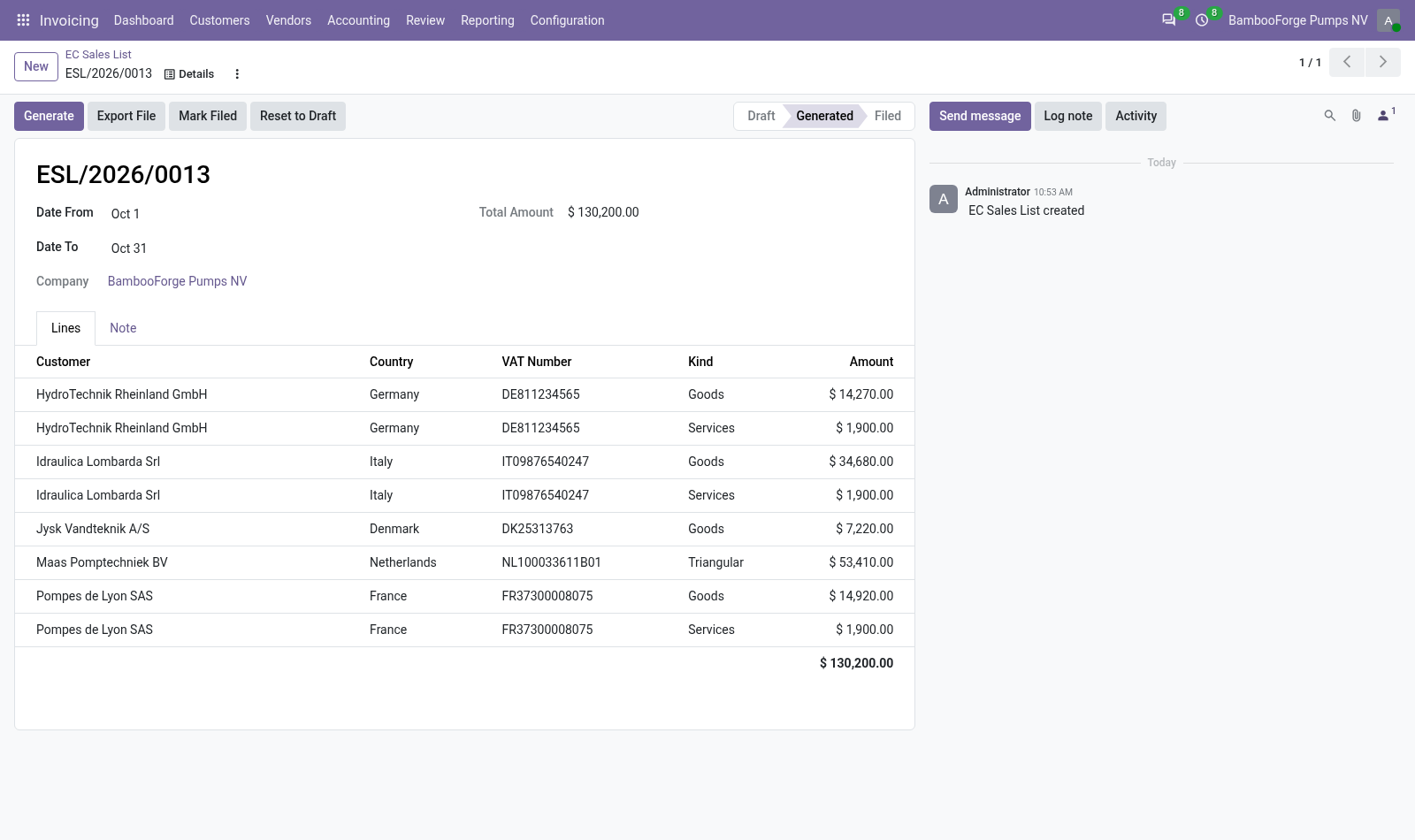
EC Sales List — a recapitulative statement of turnover billed to VAT numbers in other member states, including services, which Intrastat never sees.
Both are built from invoices that are already posted. Nothing has to be typed twice.
Setting up
Accounting ▸ Configuration ▸ Intrastat ▸ Commodity Codes — add the CN8 codes you actually trade under. A code that needs a supplementary unit (pairs, items, litres) should say so here; a declaration filed without it is rejected.
Accounting ▸ Configuration ▸ Settings ▸ Intrastat & EC Sales List — set the transaction nature, transport mode and, if your office asks for one, the region. These become the default on new invoices. Set the two national thresholds in the same place.
On each product, set the commodity code and the country of origin. The country of origin is where the goods were made, not where you bought them — it has been required on dispatches since the 2022 rules.
Filing a period
Accounting ▸ Reporting ▸ EU Declarations ▸ Intrastat
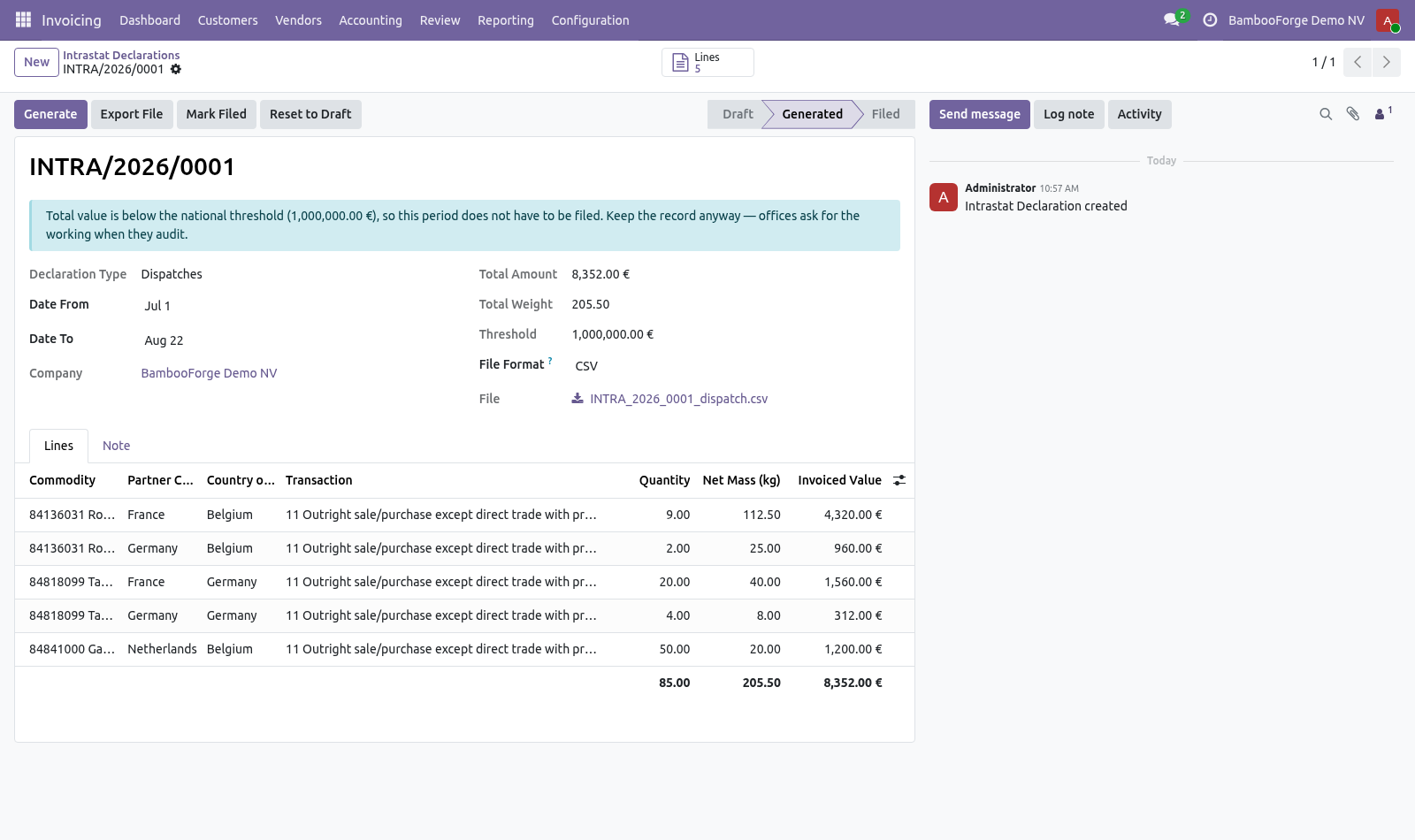
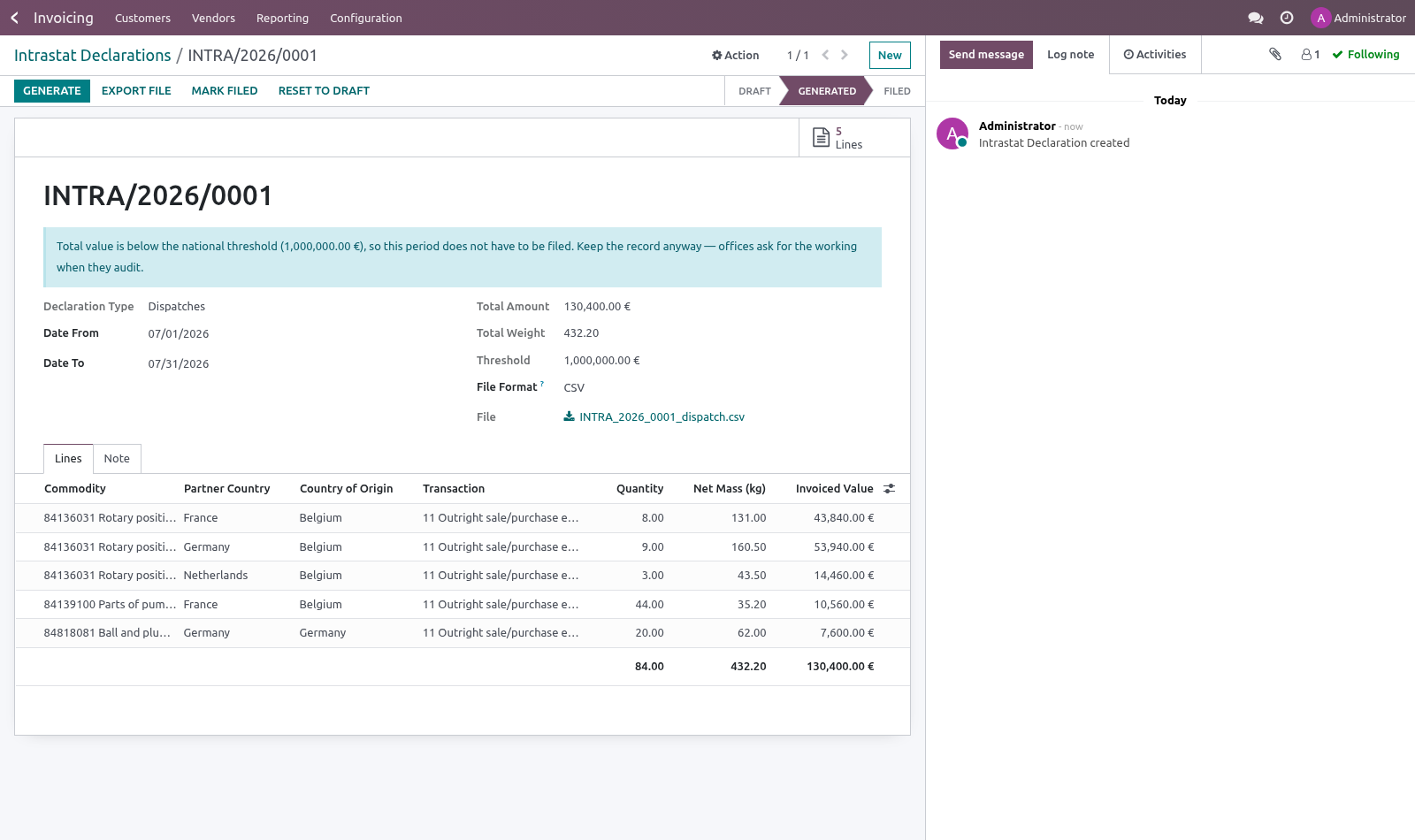
Create a declaration, pick the month and the direction, and press Generate. The lines are grouped the way the office wants them: one line per commodity code, partner country, country of origin, transaction, transport and region, with the value in your company currency and the net mass in kilograms.
Before exporting, the declaration tells you two things it will not let you ignore:
how many products in the period still have no commodity code, and which ones;
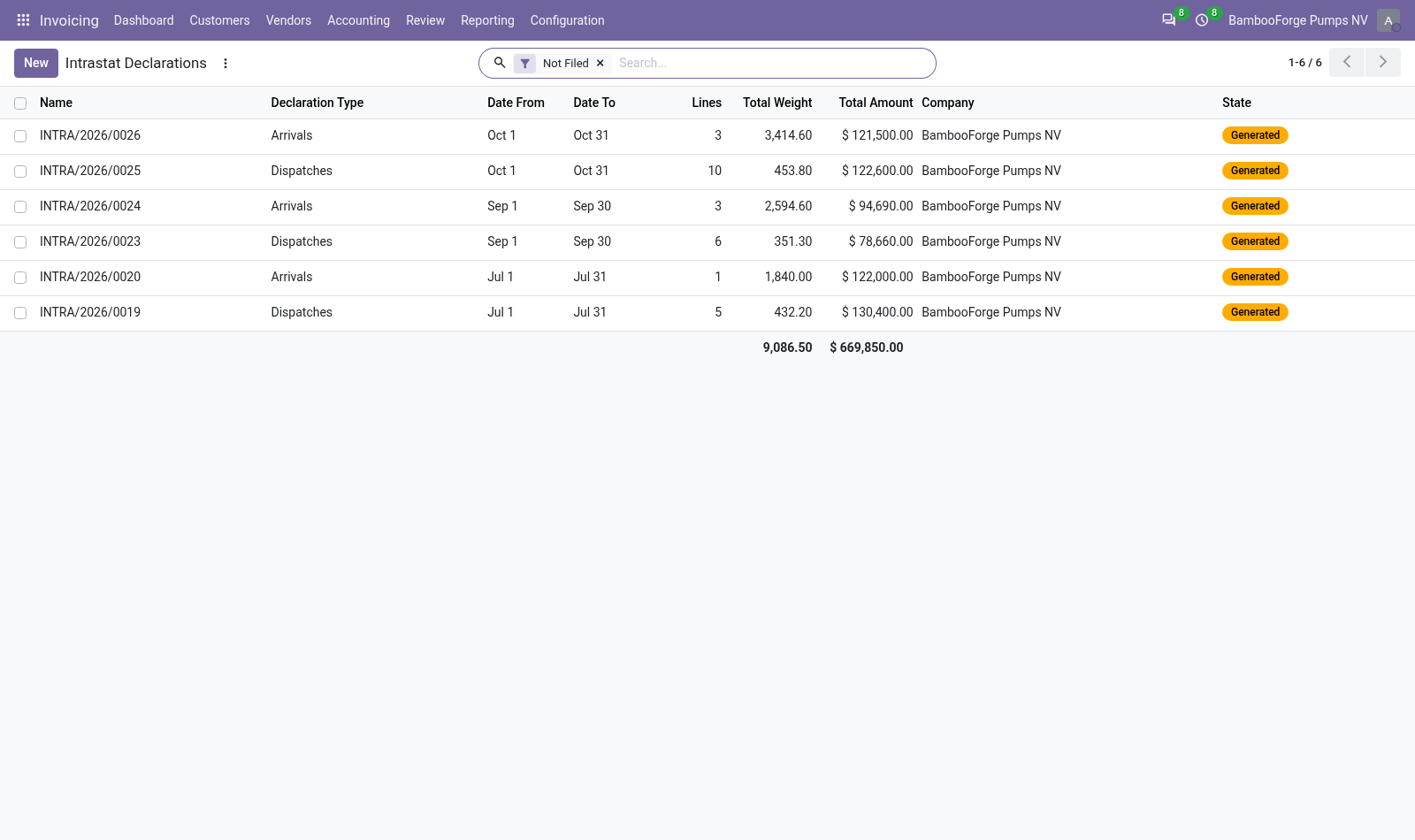
whether the period is below the national threshold, in which case there is nothing to file.
Export File produces either a CSV or a harmonised INSTAT XML. Where an office wants its own envelope, add a _bf_render_<name> method and a selection value — the exporter is a plug-in point, not a fixed format.
Returns and corrections
A credit note for goods that physically come back is declared on the opposite flow as a positive line, not as a negative on the original one. That is what the offices ask for and what keeps the two flows agreeing with the VAT return. A customer credit note therefore appears in the arrivals declaration.
A credit note that moves no goods — a price correction, a rebate, a discount — must not create an arrival. Tick Exclude from Intrastat on that document. It still counts on the EC Sales List, which measures turnover rather than movement.
Who belongs on the EC Sales List
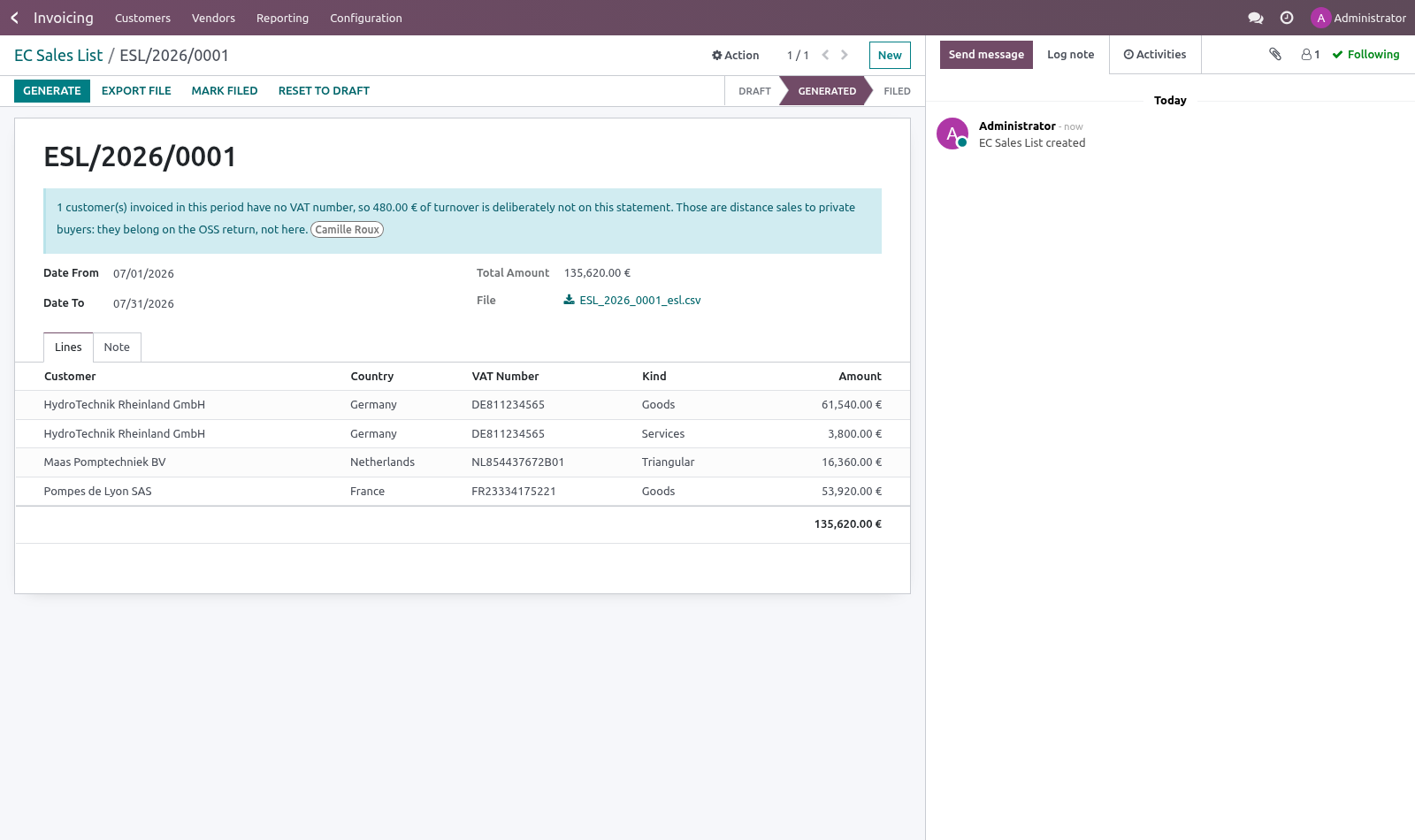
Only customers who gave you a VAT number. That is what the statement is for: an intra-Community supply is zero-rated because the customer accounts for the tax under their own number, and that number is what the tax office matches your line against.
A customer with no VAT number is a private buyer. Their purchase is a distance sale, taxed at the rate of their country, and it is declared on the One Stop Shop return — not here. The statement leaves them off on purpose, and says so: the header shows how many customers were left off and what turnover they represent, so the figure can be reconciled against the ledger without going looking for the difference.
If a customer who should have a number does not have one, that is a gap in your master data rather than a filing question. Fix it on the customer and generate again; the statement will pick them up.
Filing is blocked in exactly one case: a VAT number that was there when the statement was generated and has since been cleared. The file would then go out with a blank number, which is the one thing certain to be rejected.
The monthly scheduler
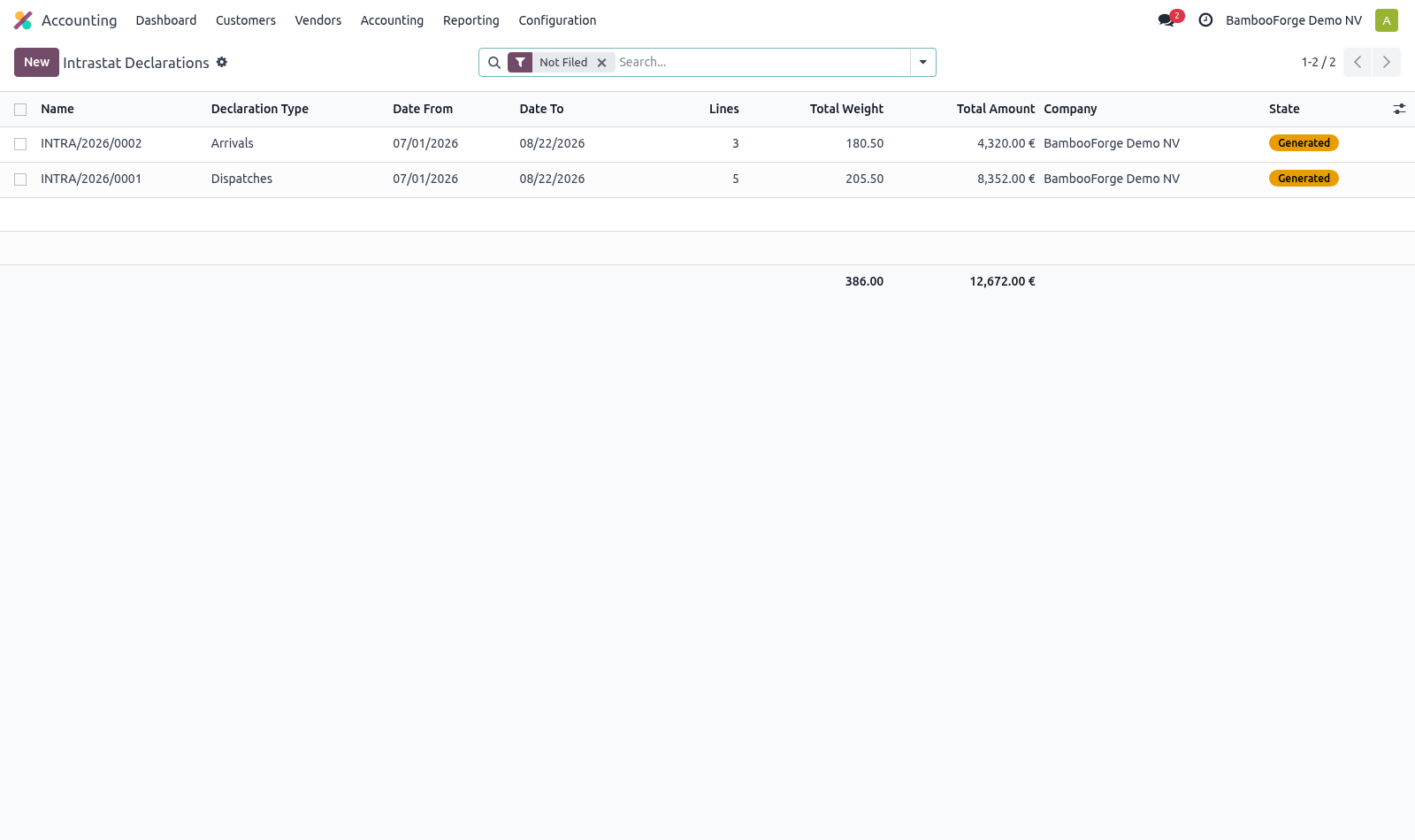
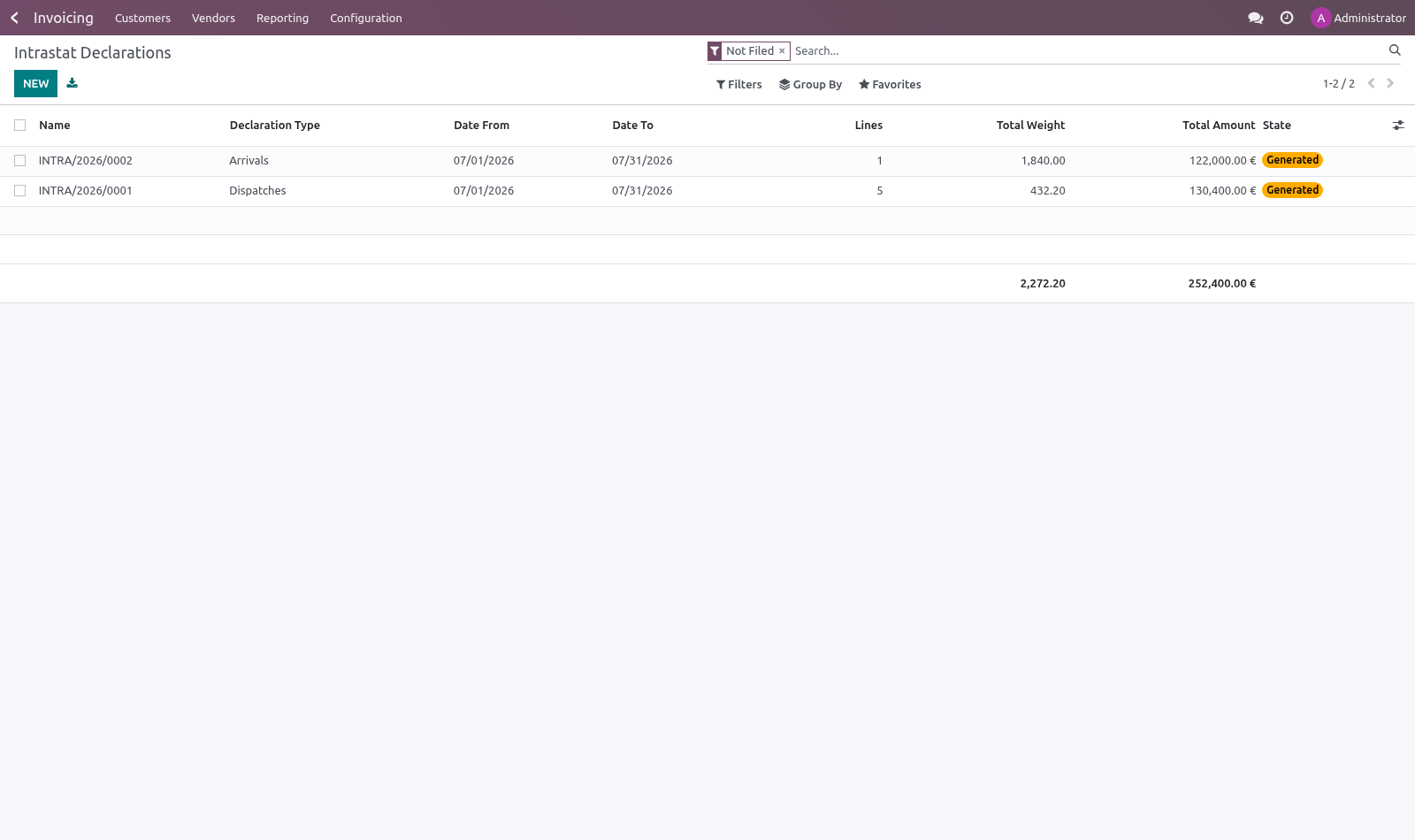
Filing deadlines fall within days of a period closing, so the work has to be waiting for whoever files it. A daily scheduled action opens and fills last month's arrivals and dispatches on the first of the month, for every company that has Intrastat configured. Running it twice does not duplicate a period.
Known limits
Region lists are per country and are not shipped: each member state publishes its own, and most do not ask for one at all.
The CN8 catalogue is not shipped either. It changes every year and runs to thousands of lines; the codes a given company uses are usually a few dozen.
Net mass comes from the product weight. A company that does not maintain weights will file zeros, which most offices reject — the declaration shows the total so this is visible before you send it.
How we make sure it works
Before every release, 39 automated checks run against this app on Odoo 16, 17, 18, 19 and 20. Among them:
Customer without vat is not on the statement.
Filed declaration cannot be regenerated.
Filed statement cannot be regenerated.
Left off turnover is shown not hidden.
Missing commodity code is reported not silent.
The complete list is in the source you receive.
Install
Copy bambooforge_intrastat into your addons path and update the app list, or install the ZIP from the Odoo Apps Store.
Install Intrastat & EC Sales List.
Open Intrastat - its menus are Commodity Codes, EC Sales List, Transaction Natures.
Questions people ask
- Which Odoo versions does it run on?
Odoo 16.0, 17.0, 18.0, 19.0, 20.0, on the series you buy it for; each series is its own listing.
- Community or Enterprise?
Both. It needs no Enterprise app.
- What does it need?
The standard Invoicing app. No extra Python package.
- Where does it show up?
Under the Intrastat menu (Commodity Codes, EC Sales List, Transaction Natures).
- Does anything leave my server?
No. It makes no call outside your Odoo server: no telemetry, no licence check, no third-party service.
- What happens if I uninstall it?
Odoo drops the app's own tables and fields; the standard records it worked on (contacts, orders, products) stay as they are.