 BambooForge Labs
Form Builder All in One with Web Form to Quote
Turn a website form into a draft quotation: lines picked by the visitor's answers, quantities from their numbers, a price list and a seller.
Available for Odoo 16.0, Odoo 17.0, Odoo 18.0, Odoo 19.0, Odoo 20.0. Technical name bambooforge_form_quote.
Transcript of the walkthrough (Odoo 20)
Form Builder All in One with Web Form to Quote. Turn a website form into a draft quotation: lines picked by the visitor's answers, quantities from their numbers, a price list and a seller. An add-on for BambooForge Form Builder with Odoo Sales (17.0). A public form becomes a draft quotation - lines picked by the visitor's answers, quantities from their numbers, a price list, a salesperson - and, if you say so, sent on the spot.
Form Builder ▸ Forms ▸ your form ▸ Quotation tab. In the next few minutes: form builder all in one with web form to quote, then set it up on the form, then what the visitor's submission becomes, then technical notes, then how we make sure it works. Then what this app deliberately does not do, so you can tell before you buy whether it fits. 1.
Copy bambooforge_form_quote into your addons path and update the app list, or install the ZIP from the Odoo Apps Store. 2. Install Form Builder Suite: Web Form to Quotation. Form Builder All in One with Web Form to Quote.
An add-on for BambooForge Form Builder with Odoo Sales (17.0). A public form becomes a draft quotation - lines picked by the visitor's answers, quantities from their numbers, a price list, a salesperson - and, if you say so, sent on the spot. Set it up on the form. Form Builder ▸ Forms ▸ your form ▸ Quotation tab.
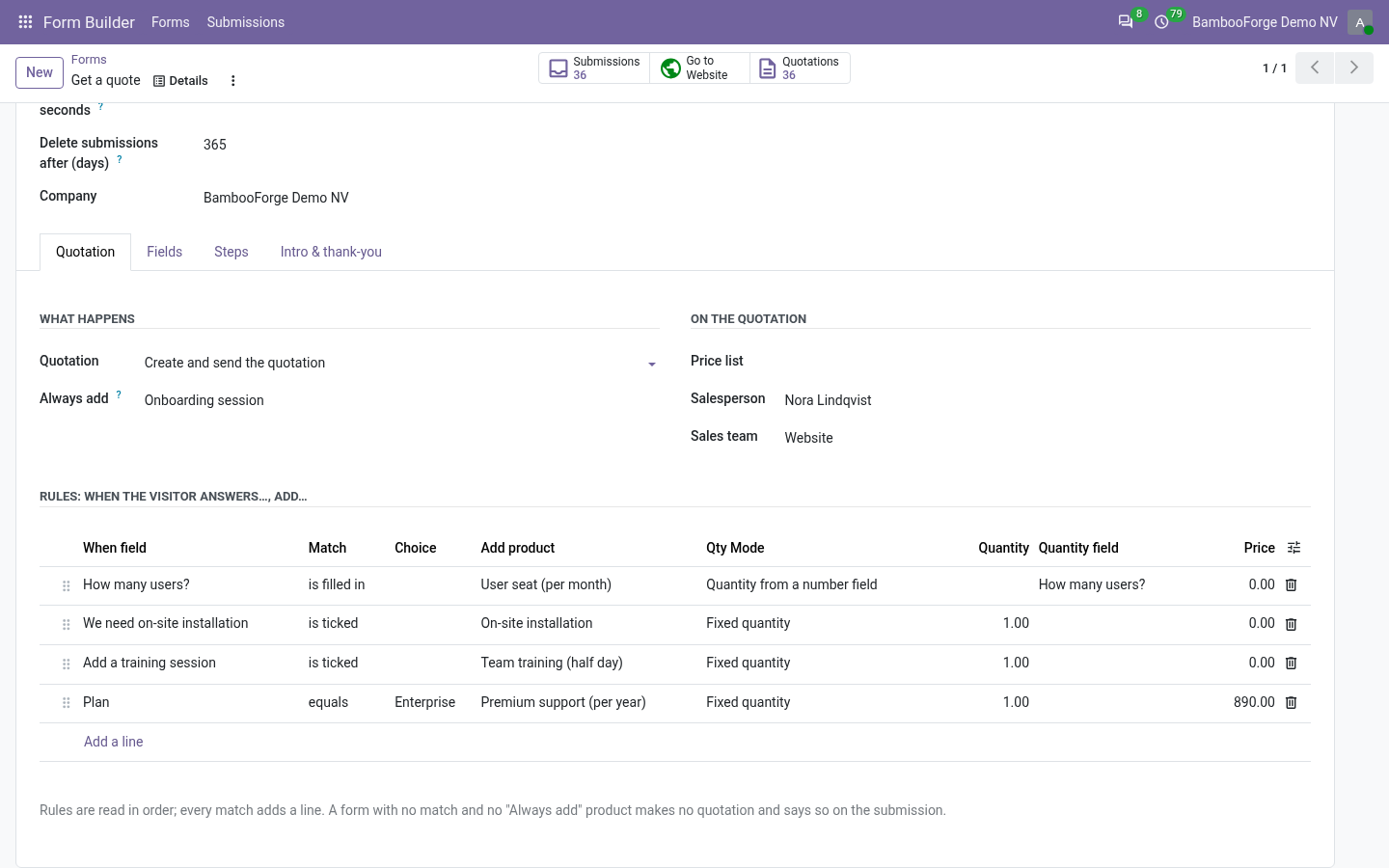
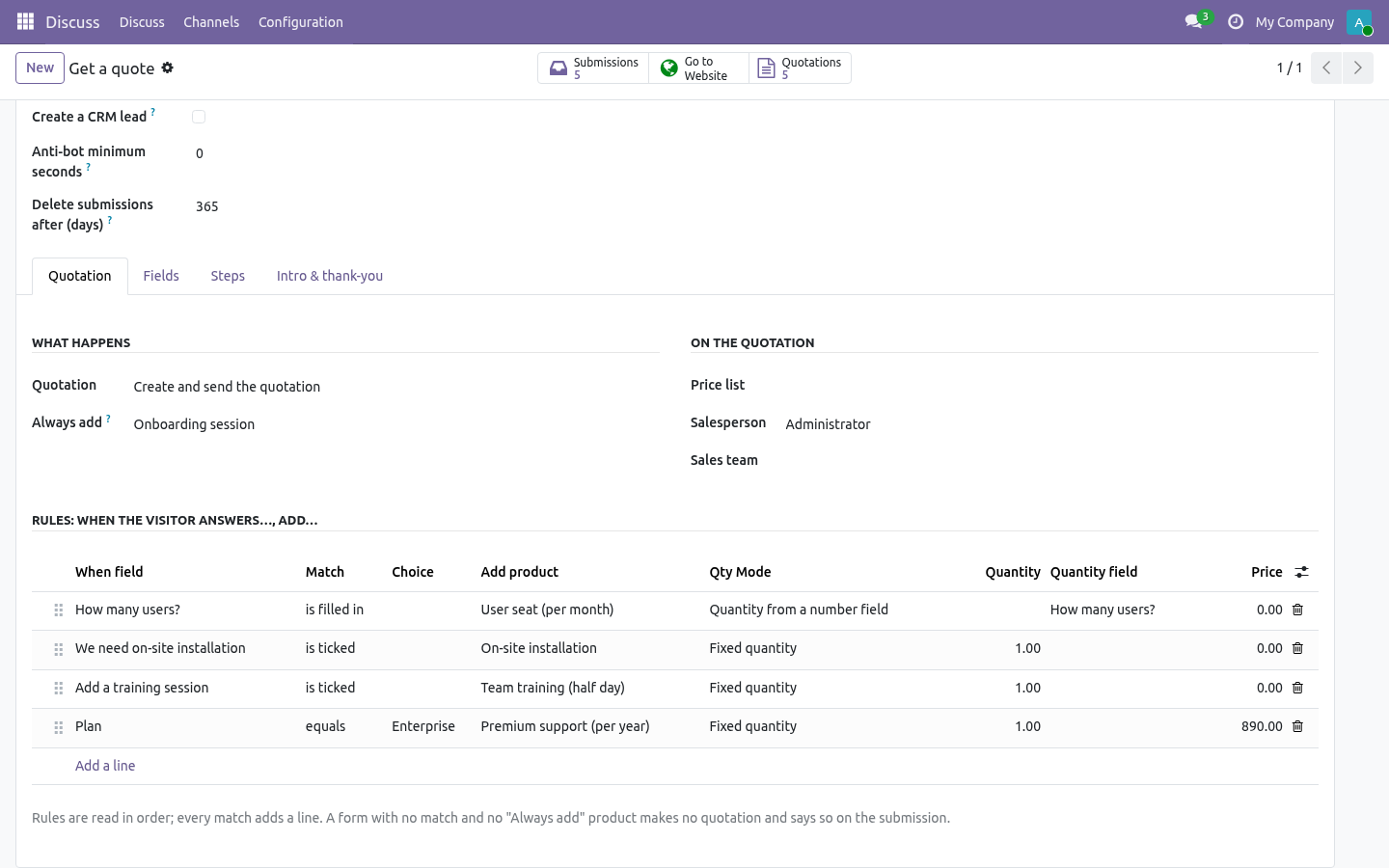
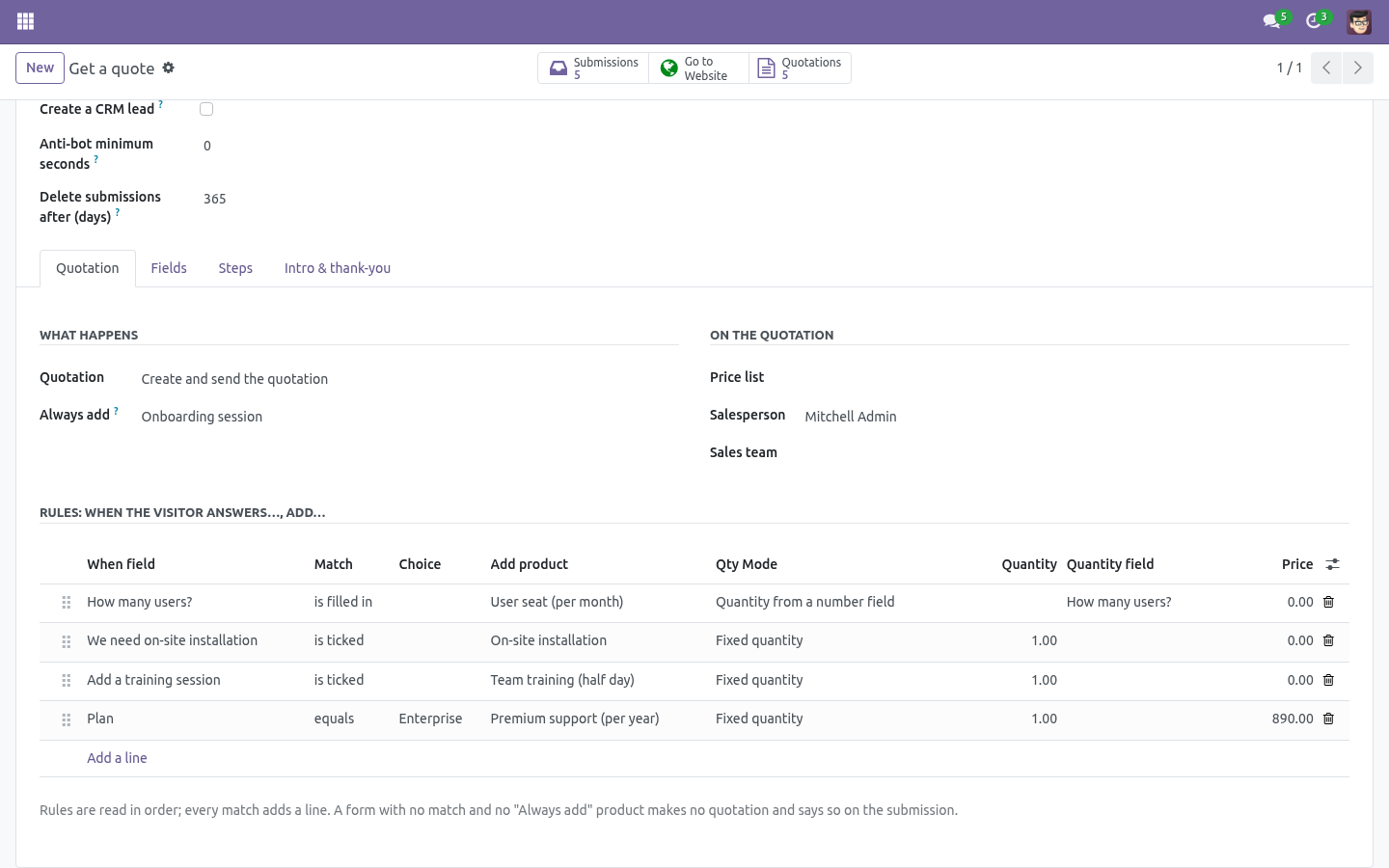
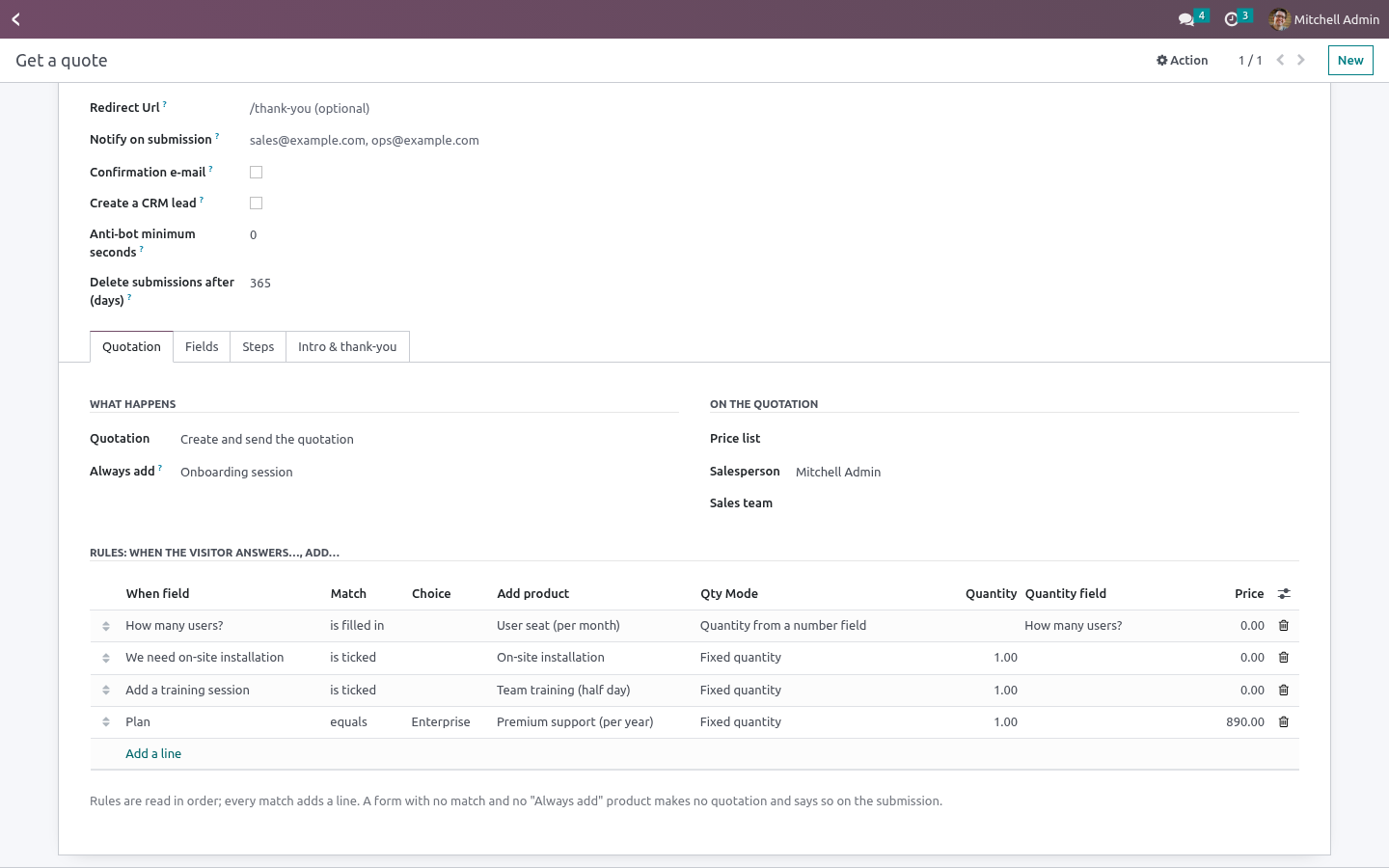
Quotation: No quotation / Create a draft quotation / Create and send the quotation (Odoo's standard quotation e-mail, and the order goes to Quotation Sent). Always add: a product put on every quotation from this form - the service itself, a setup fee. Optional. Price list, Salesperson, Sales team - written on the quotation.
Rules, read in order; every match adds a line: When field - a field of this form. equals a choice (dropdown / radio / text, case-insensitive), is ticked (checkbox), is filled in (anything non-empty). Add product - the product (pick the variant you sell). Fixed quantity, or Quantity from a number field - the number the visitor typed (a zero or empty number adds nothing).
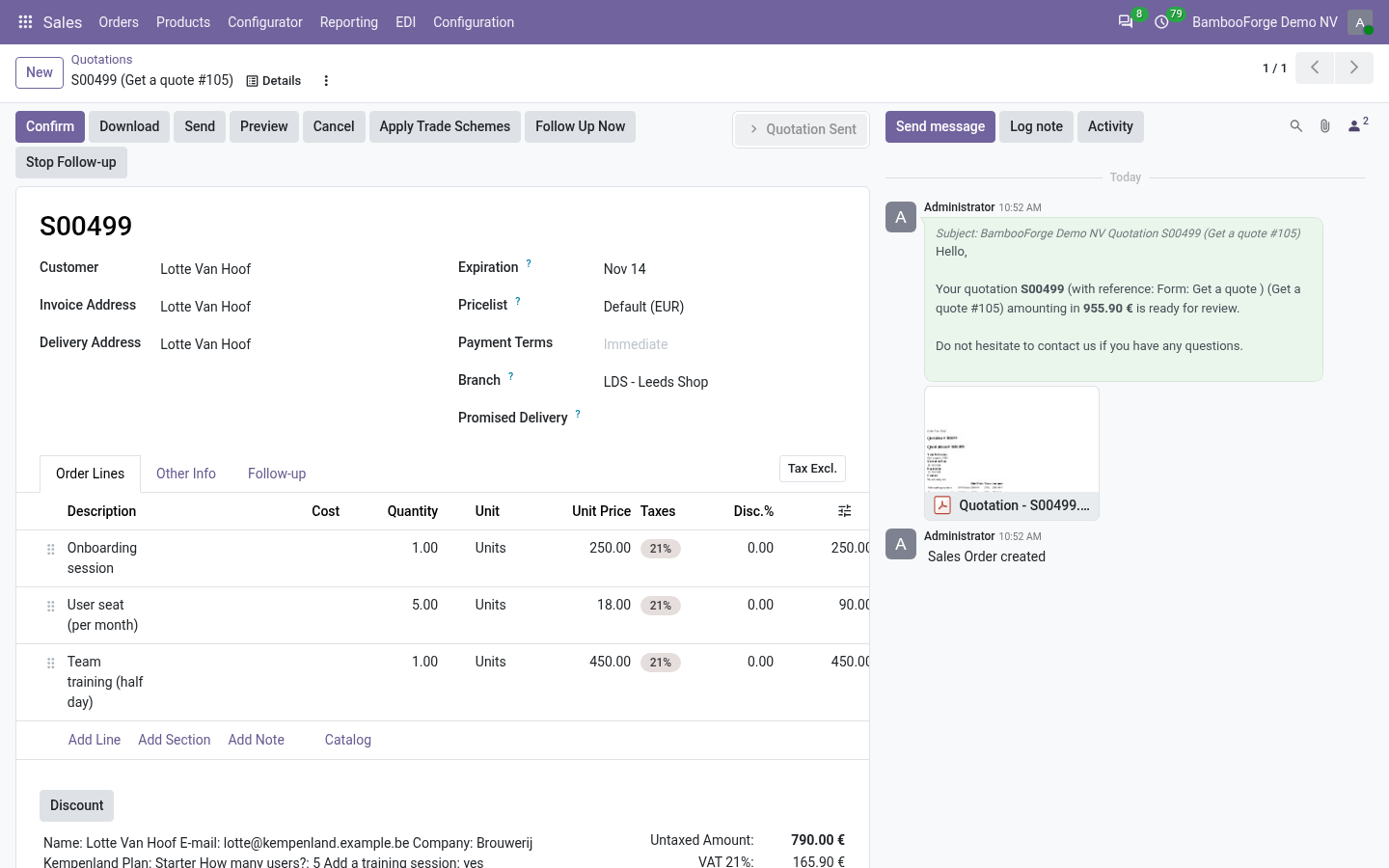
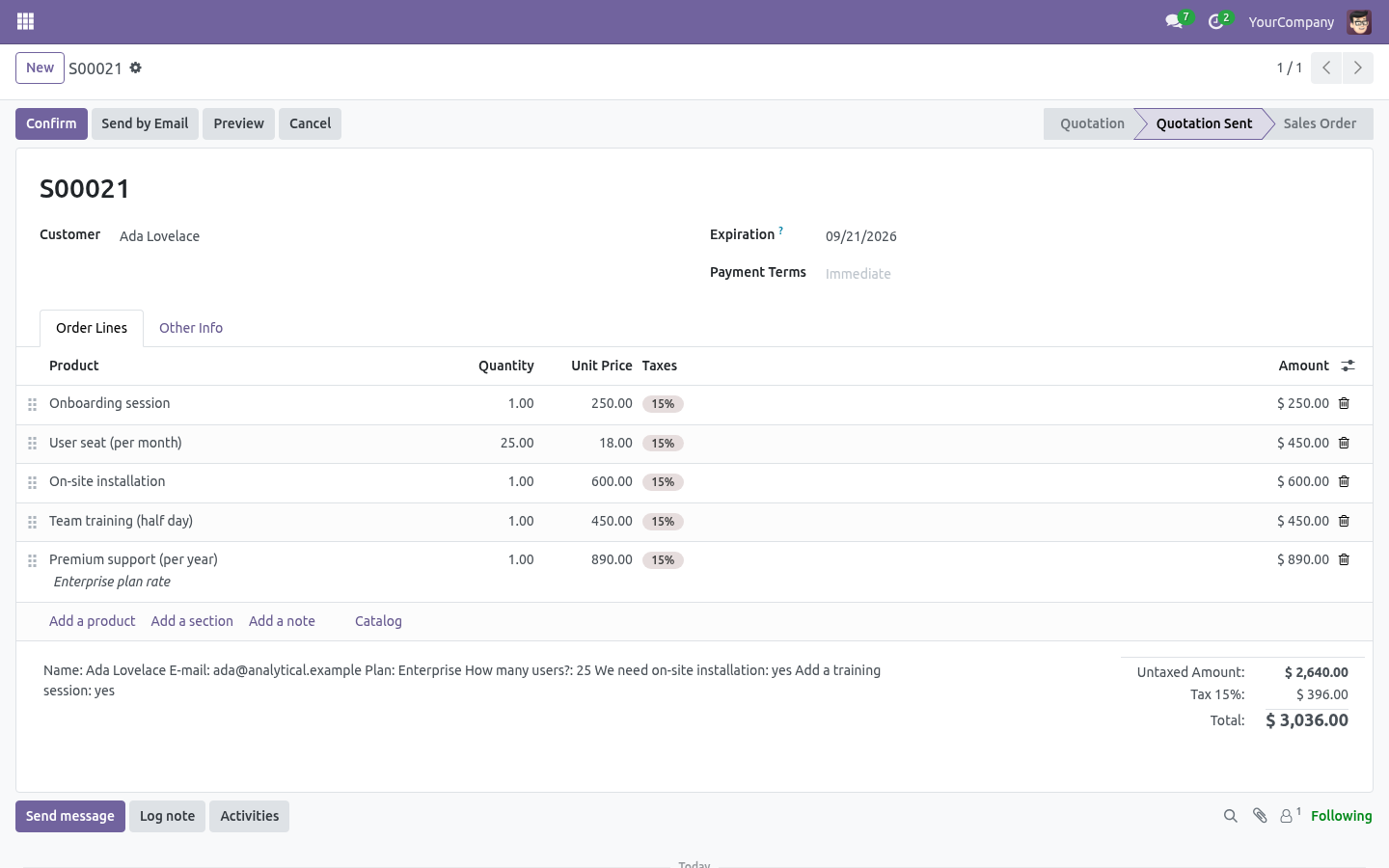
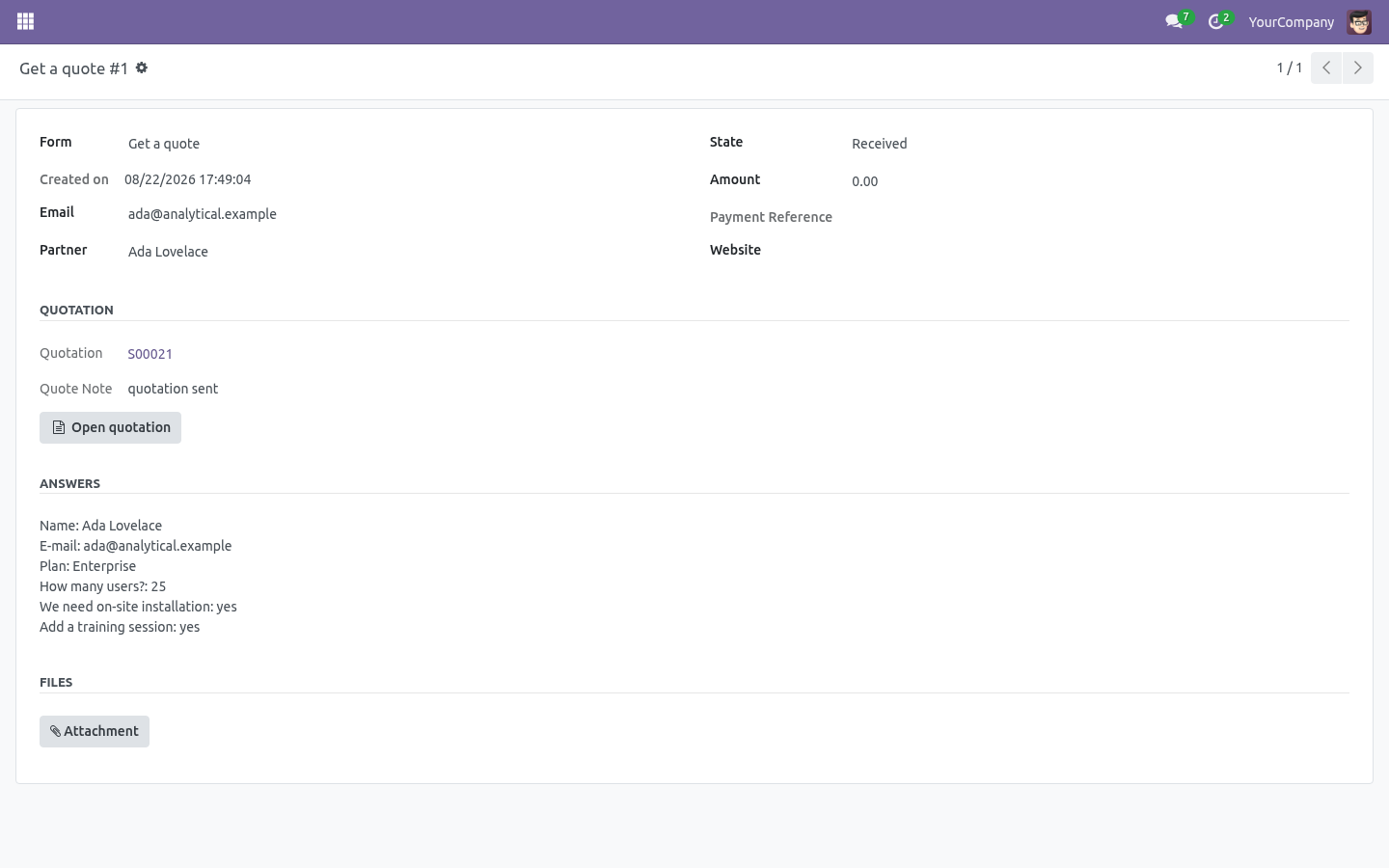
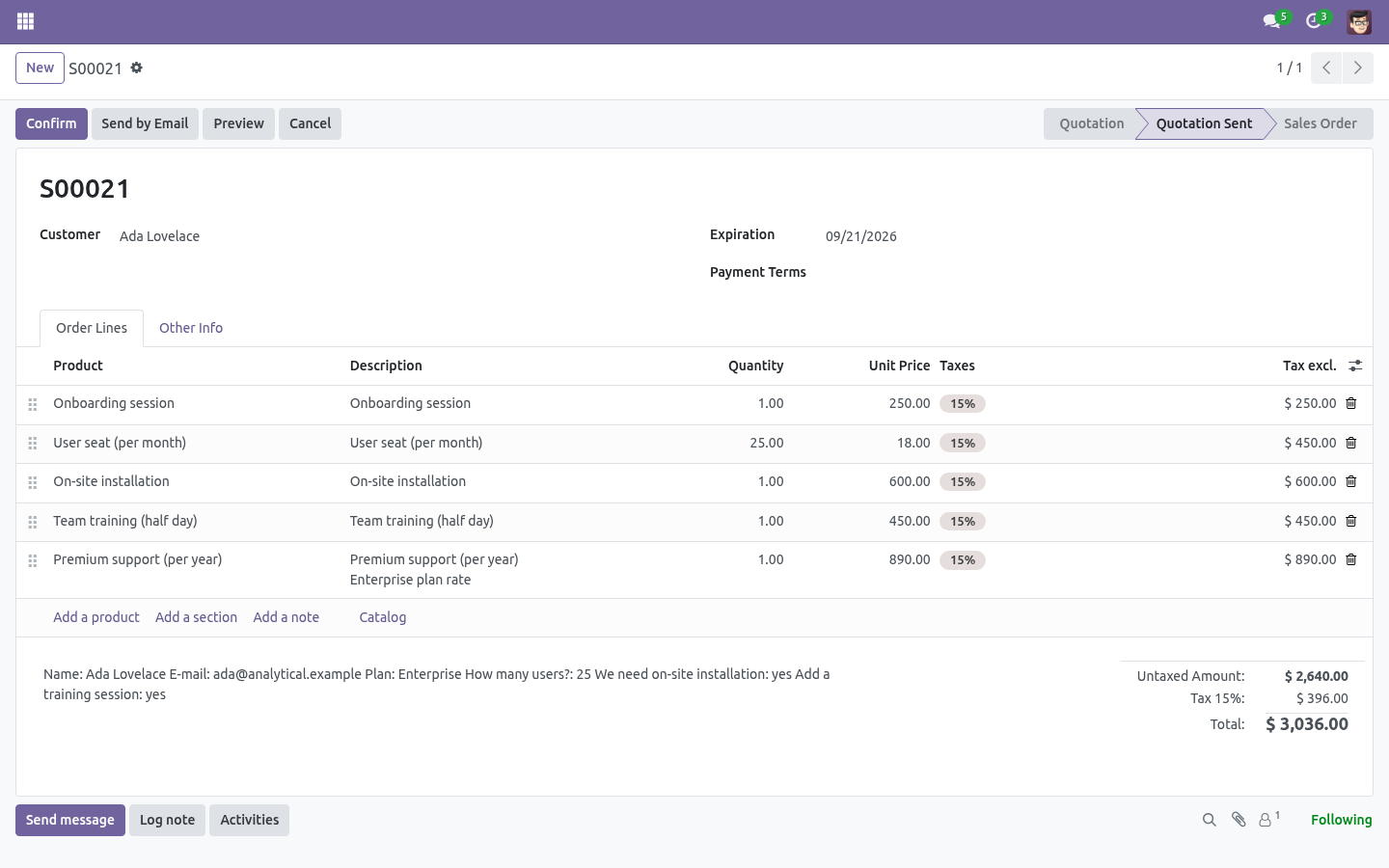
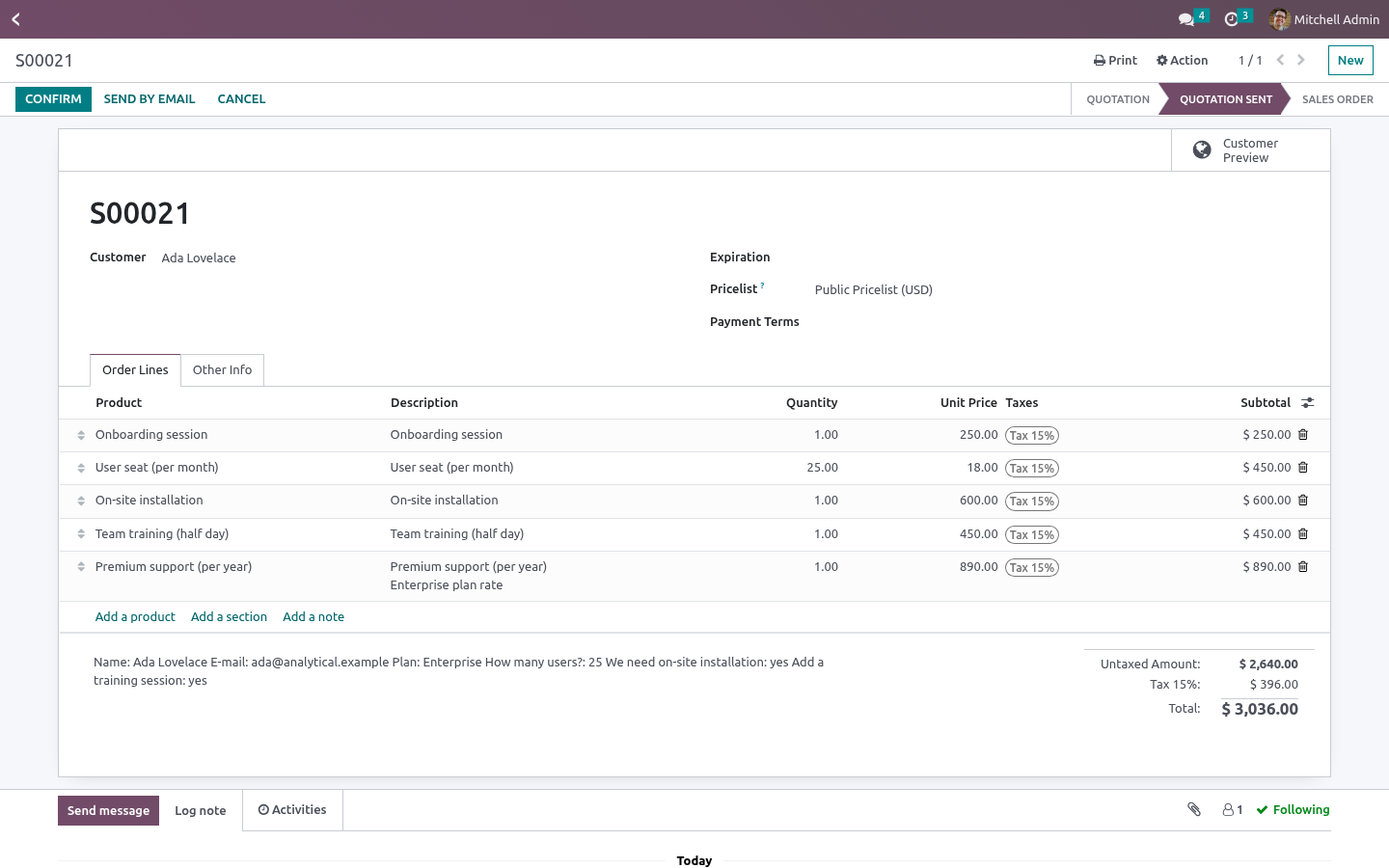
A form with a quotation mode needs at least one rule or an Always add product; it is refused otherwise. What the visitor's submission becomes. When the submission is complete - received, or paid when the form takes payment - the bridge builds the quotation for the contact Form Builder found or created by e-mail (no e-mail → no quotation: no contact on the submission). Lines from Always add and every matched rule; the form's name as Source document; the submission as Customer reference; every answer in the quotation's Terms and conditions / note, so the rep reads the context before calling.
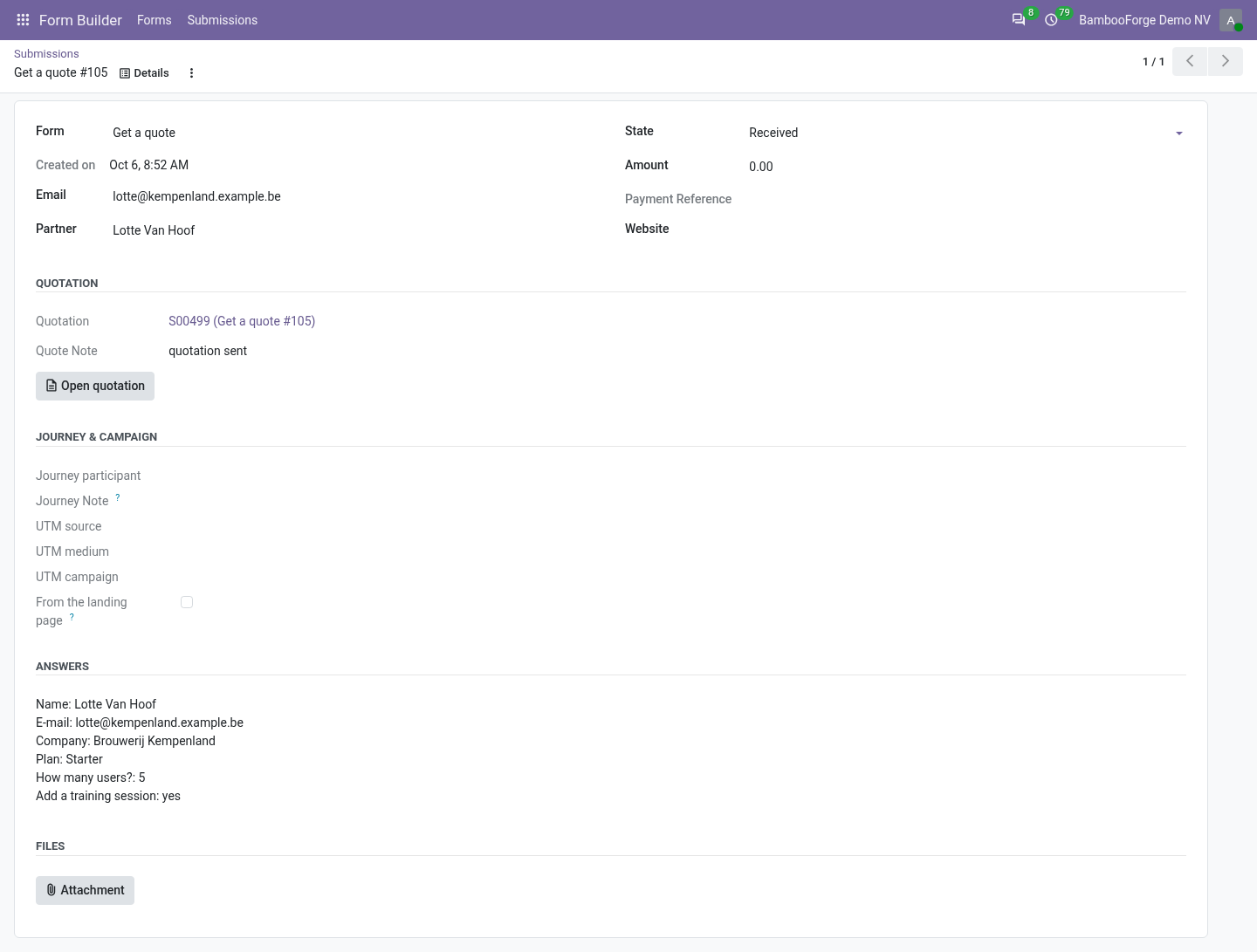
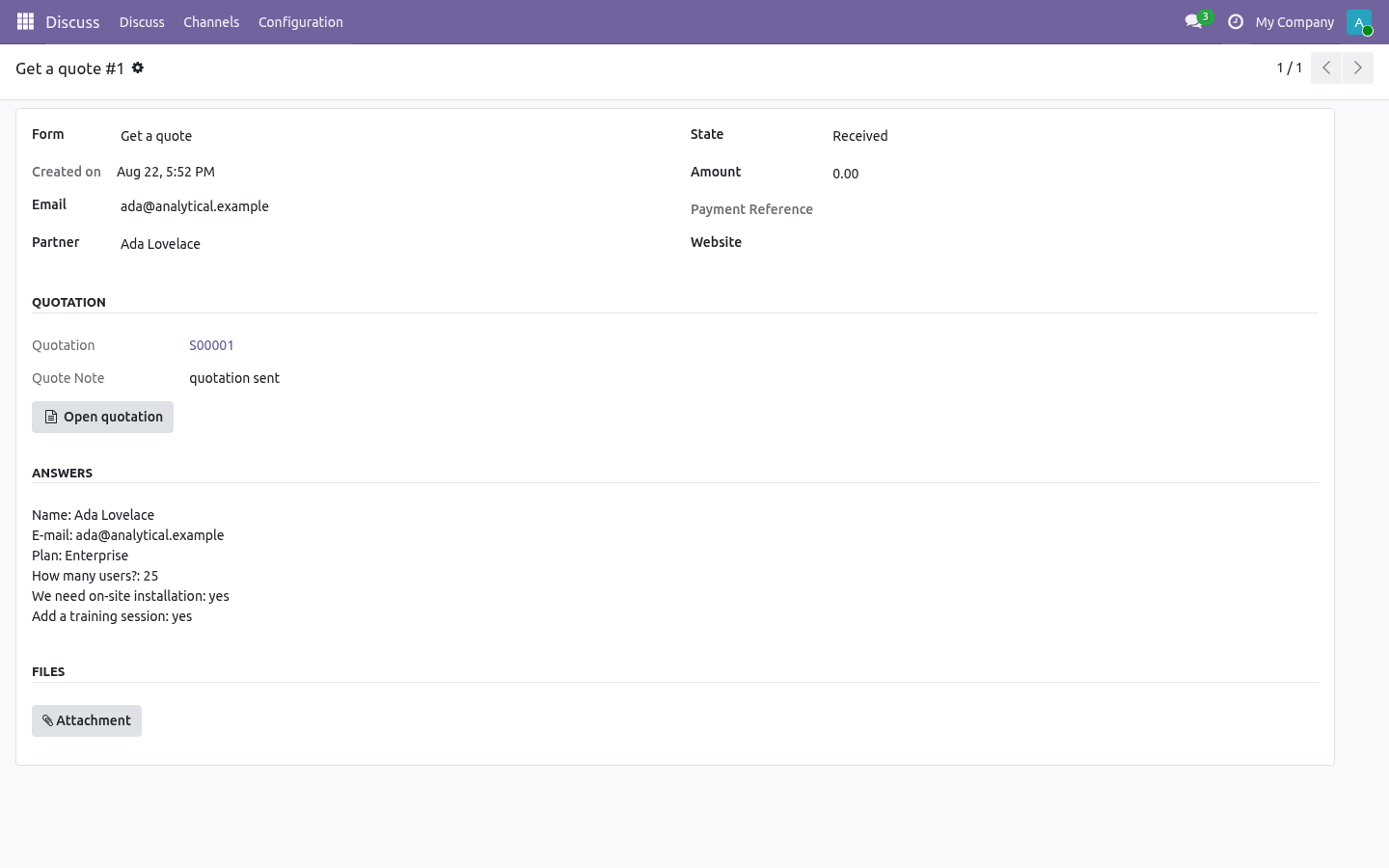
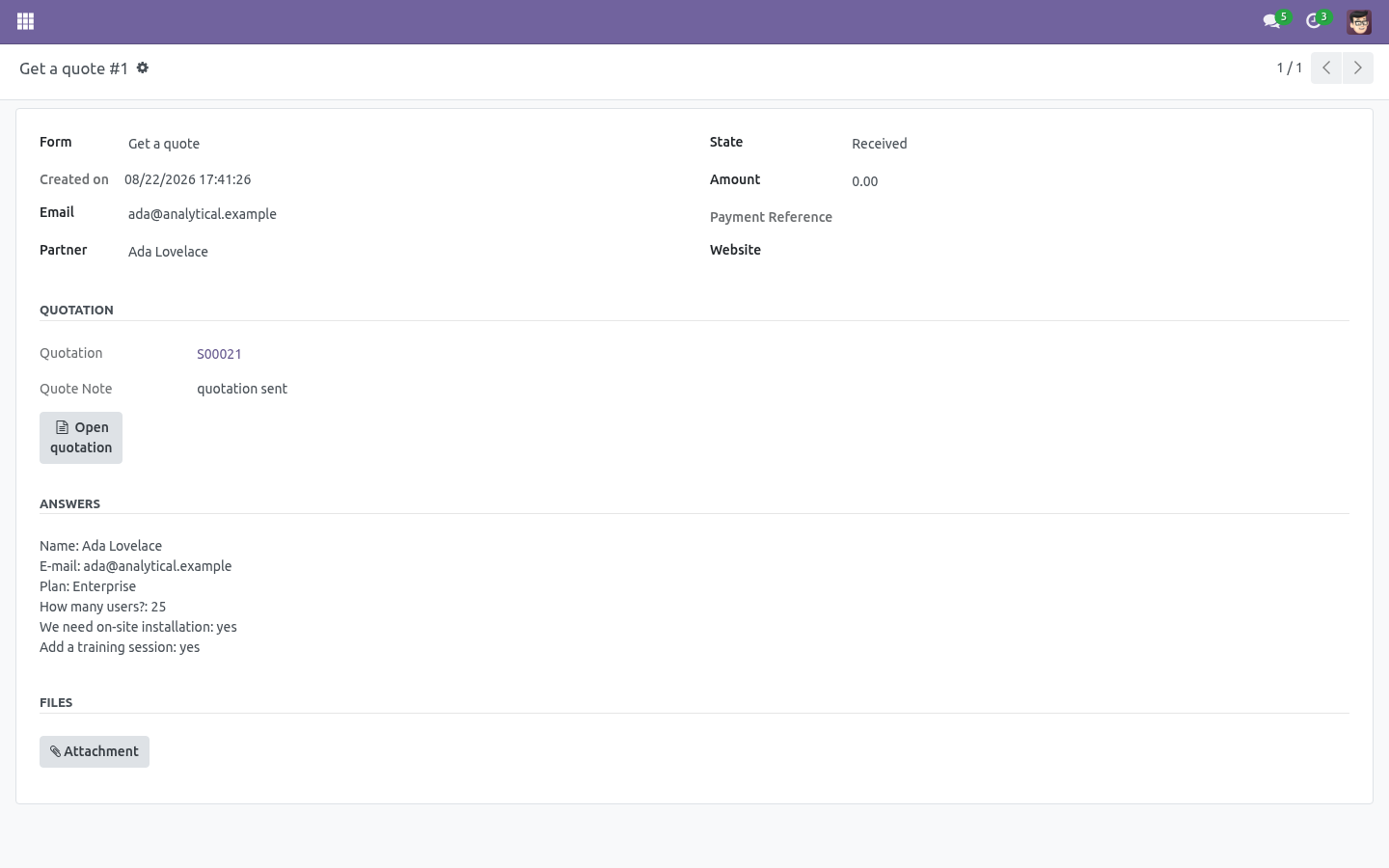
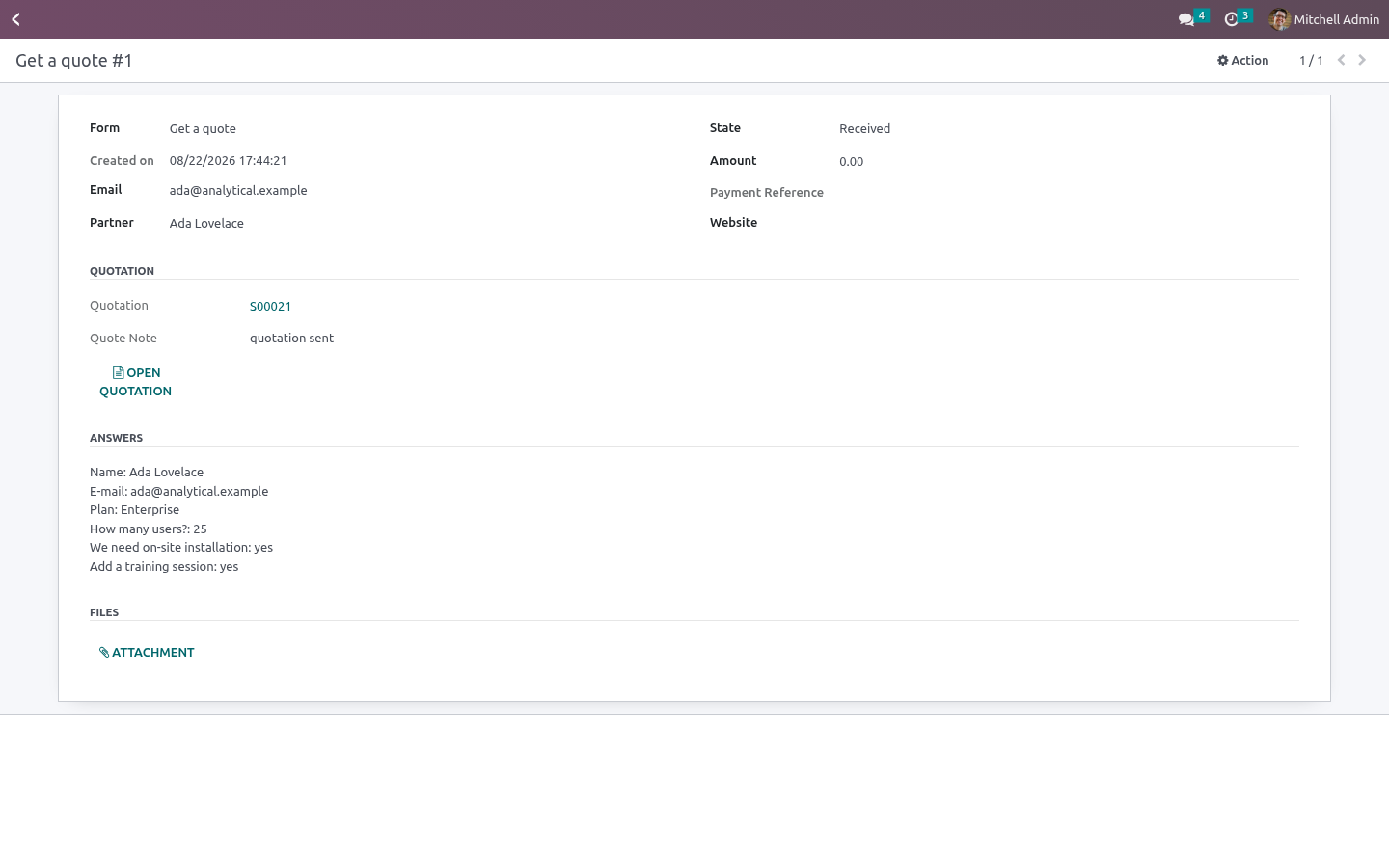
The submission shows the Quotation and a one-line note (draft quotation, quotation sent, no quotation: no rule matched, …); the quotation shows From form submission and From form, and the quotations list has a From a form filter. A quotation failure never fails the visitor: it is logged and written on the submission. Technical notes Uses Form Builder 1.3.0's _after_submit() hook; Sales' standard sale.order create and sale.email_template_edi_sale. sale.order.bf_submission_id (set null on delete) and bf_form_id (related, stored) for reporting.
Community only. Needs the Sales app; no Enterprise module. How we make sure it works. Before every release, 18 automated checks run against this app on Odoo 16, 17, 18, 19 and 20.
Among them: After submit twice does not duplicate. No email means a note not a ghost customer. A broken rule product is noted not raised. Garbage in the number field adds nothing.
No match and no base means no quotation. The complete list is in the source you receive. Questions people ask. Which Odoo versions does it run on?
Odoo 16.0, 17.0, 18.0, 19.0, 20.0, on the series you buy it for; each series is its own listing. Community or Enterprise? Both. It needs no Enterprise app.
Now the part most videos leave out: what this does not do. Options and variants are products - pick the variant you sell; no configurator. Prices come from the price list or the rule's override; no multi-currency arithmetic beyond what the price list does. No optional products, no online signature step - the quotation is Odoo's; everything Sales does next still applies.
The complete manual is at docs dot bambooforge dot dev, the demo database is linked from the store page, and support answers within twenty-four hours. Links are in the description.
Transcript of the walkthrough (Odoo 19)
Form Builder Suite: Web Form to Quotation. Turn a website form into a draft quotation: lines picked by the visitor's answers, quantities from their numbers, a price list and a seller. An add-on for BambooForge Form Builder with Odoo Sales (17.0). A public form becomes a draft quotation - lines picked by the visitor's answers, quantities from their numbers, a price list, a salesperson - and, if you say so, sent on the spot.
Form Builder ▸ Forms ▸ your form ▸ Quotation tab. In the next few minutes: form builder suite: web form to quotation, then set it up on the form, then what the visitor's submission becomes, then technical notes. Then what this app deliberately does not do, so you can tell before you buy whether it fits. Form Builder Suite: Web Form to Quotation.
An add-on for BambooForge Form Builder with Odoo Sales (17.0). A public form becomes a draft quotation - lines picked by the visitor's answers, quantities from their numbers, a price list, a salesperson - and, if you say so, sent on the spot. Set it up on the form. Form Builder ▸ Forms ▸ your form ▸ Quotation tab.
Quotation: No quotation / Create a draft quotation / Create and send the quotation (Odoo's standard quotation e-mail, and the order goes to Quotation Sent). Always add: a product put on every quotation from this form - the service itself, a setup fee. Optional. Price list, Salesperson, Sales team - written on the quotation.
Rules, read in order; every match adds a line: When field - a field of this form. equals a choice (dropdown / radio / text, case-insensitive), is ticked (checkbox), is filled in (anything non-empty). Add product - the product (pick the variant you sell). Fixed quantity, or Quantity from a number field - the number the visitor typed (a zero or empty number adds nothing).
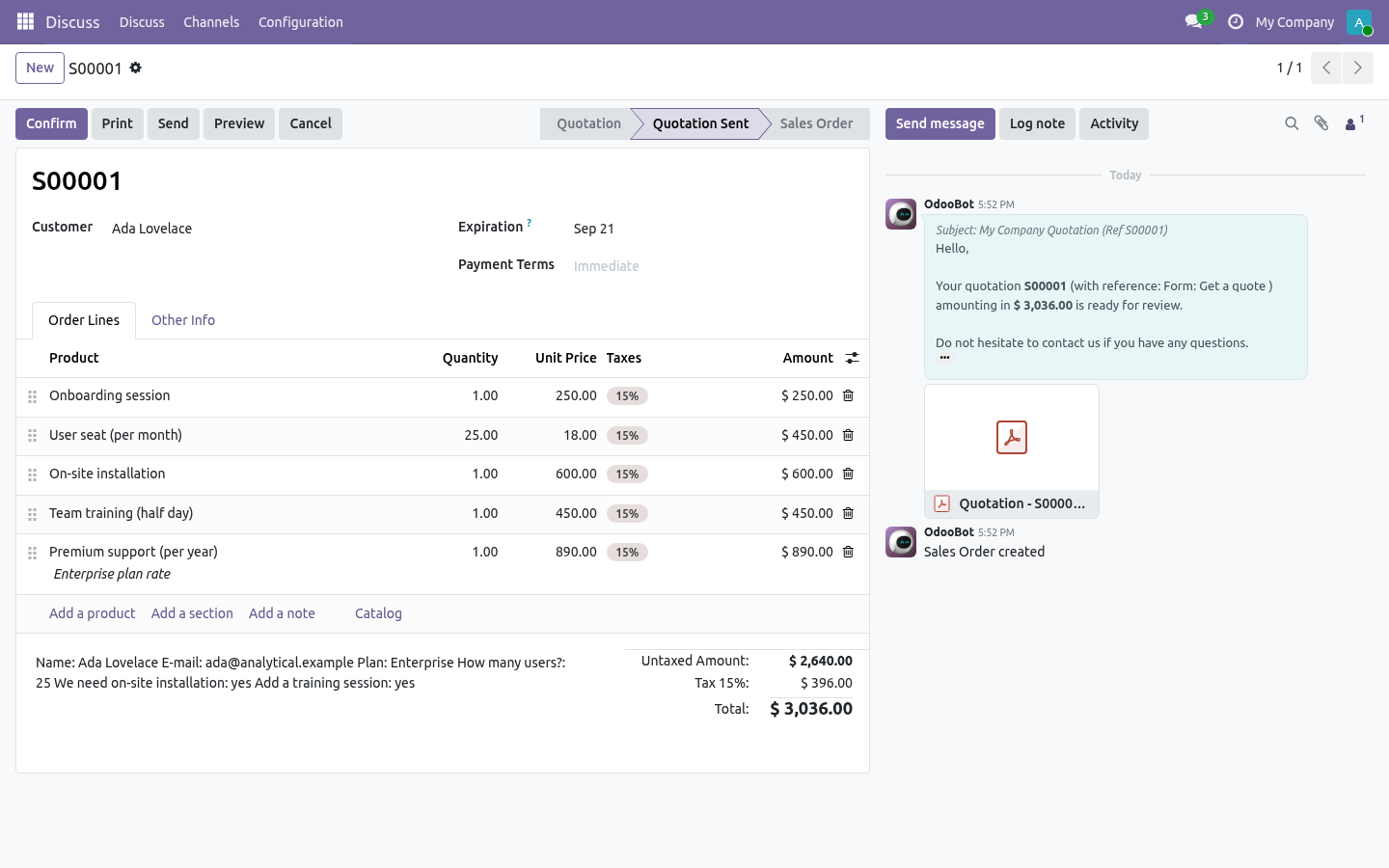
A form with a quotation mode needs at least one rule or an Always add product; it is refused otherwise. What the visitor's submission becomes. When the submission is complete - received, or paid when the form takes payment - the bridge builds the quotation for the contact Form Builder found or created by e-mail (no e-mail → no quotation: no contact on the submission). Lines from Always add and every matched rule; the form's name as Source document; the submission as Customer reference; every answer in the quotation's Terms and conditions / note, so the rep reads the context before calling.
The submission shows the Quotation and a one-line note (draft quotation, quotation sent, no quotation: no rule matched, …); the quotation shows From form submission and From form, and the quotations list has a From a form filter. A quotation failure never fails the visitor: it is logged and written on the submission. Technical notes Uses Form Builder 1.3.0's _after_submit() hook; Sales' standard sale.order create and sale.email_template_edi_sale. sale.order.bf_submission_id (set null on delete) and bf_form_id (related, stored) for reporting.
Community only. Needs the Sales app; no Enterprise module. Now the part most videos leave out: what this does not do. Options and variants are products - pick the variant you sell; no configurator.
Prices come from the price list or the rule's override; no multi-currency arithmetic beyond what the price list does. No optional products, no online signature step - the quotation is Odoo's; everything Sales does next still applies. The complete manual is at docs dot bambooforge dot dev, the demo database is linked from the store page, and support answers within twenty-four hours. Links are in the description.
Transcript of the walkthrough (Odoo 18)
Form Builder Suite: Web Form to Quotation. Turn a website form into a draft quotation: lines picked by the visitor's answers, quantities from their numbers, a price list and a seller. An add-on for BambooForge Form Builder with Odoo Sales (17.0). A public form becomes a draft quotation - lines picked by the visitor's answers, quantities from their numbers, a price list, a salesperson - and, if you say so, sent on the spot.
Form Builder ▸ Forms ▸ your form ▸ Quotation tab. In the next few minutes: form builder suite: web form to quotation, then set it up on the form, then what the visitor's submission becomes, then technical notes. Then what this app deliberately does not do, so you can tell before you buy whether it fits. Form Builder Suite: Web Form to Quotation.
An add-on for BambooForge Form Builder with Odoo Sales (17.0). A public form becomes a draft quotation - lines picked by the visitor's answers, quantities from their numbers, a price list, a salesperson - and, if you say so, sent on the spot. Set it up on the form. Form Builder ▸ Forms ▸ your form ▸ Quotation tab.
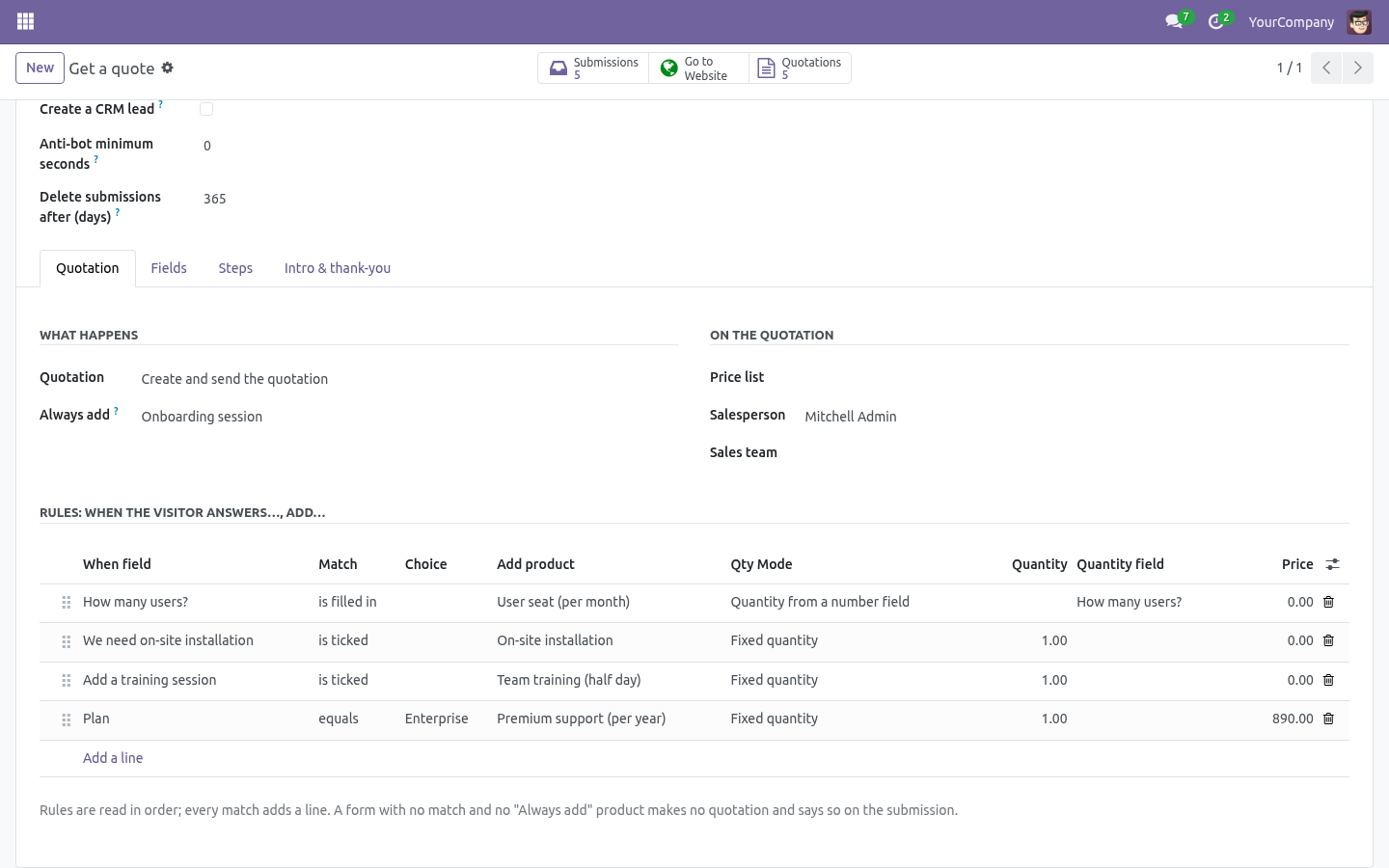
Quotation: No quotation / Create a draft quotation / Create and send the quotation (Odoo's standard quotation e-mail, and the order goes to Quotation Sent). Always add: a product put on every quotation from this form - the service itself, a setup fee. Optional. Price list, Salesperson, Sales team - written on the quotation.
Rules, read in order; every match adds a line: When field - a field of this form. equals a choice (dropdown / radio / text, case-insensitive), is ticked (checkbox), is filled in (anything non-empty). Add product - the product (pick the variant you sell). Fixed quantity, or Quantity from a number field - the number the visitor typed (a zero or empty number adds nothing).
A form with a quotation mode needs at least one rule or an Always add product; it is refused otherwise. What the visitor's submission becomes. When the submission is complete - received, or paid when the form takes payment - the bridge builds the quotation for the contact Form Builder found or created by e-mail (no e-mail → no quotation: no contact on the submission). Lines from Always add and every matched rule; the form's name as Source document; the submission as Customer reference; every answer in the quotation's Terms and conditions / note, so the rep reads the context before calling.
The submission shows the Quotation and a one-line note (draft quotation, quotation sent, no quotation: no rule matched, …); the quotation shows From form submission and From form, and the quotations list has a From a form filter. A quotation failure never fails the visitor: it is logged and written on the submission. Technical notes Uses Form Builder 1.3.0's _after_submit() hook; Sales' standard sale.order create and sale.email_template_edi_sale. sale.order.bf_submission_id (set null on delete) and bf_form_id (related, stored) for reporting.
Community only. Needs the Sales app; no Enterprise module. Now the part most videos leave out: what this does not do. Options and variants are products - pick the variant you sell; no configurator.
Prices come from the price list or the rule's override; no multi-currency arithmetic beyond what the price list does. No optional products, no online signature step - the quotation is Odoo's; everything Sales does next still applies. The complete manual is at docs dot bambooforge dot dev, the demo database is linked from the store page, and support answers within twenty-four hours. Links are in the description.
Transcript of the walkthrough (Odoo 17)
Form Builder Suite: Web Form to Quotation. Turn a website form into a draft quotation: lines picked by the visitor's answers, quantities from their numbers, a price list and a seller. An add-on for BambooForge Form Builder with Odoo Sales (17.0). A public form becomes a draft quotation - lines picked by the visitor's answers, quantities from their numbers, a price list, a salesperson - and, if you say so, sent on the spot.
Form Builder ▸ Forms ▸ your form ▸ Quotation tab. In the next few minutes: form builder suite: web form to quotation, then set it up on the form, then what the visitor's submission becomes, then technical notes. Then what this app deliberately does not do, so you can tell before you buy whether it fits. Form Builder Suite: Web Form to Quotation.
An add-on for BambooForge Form Builder with Odoo Sales (17.0). A public form becomes a draft quotation - lines picked by the visitor's answers, quantities from their numbers, a price list, a salesperson - and, if you say so, sent on the spot. Set it up on the form. Form Builder ▸ Forms ▸ your form ▸ Quotation tab.
Quotation: No quotation / Create a draft quotation / Create and send the quotation (Odoo's standard quotation e-mail, and the order goes to Quotation Sent). Always add: a product put on every quotation from this form - the service itself, a setup fee. Optional. Price list, Salesperson, Sales team - written on the quotation.
Rules, read in order; every match adds a line: When field - a field of this form. equals a choice (dropdown / radio / text, case-insensitive), is ticked (checkbox), is filled in (anything non-empty). Add product - the product (pick the variant you sell). Fixed quantity, or Quantity from a number field - the number the visitor typed (a zero or empty number adds nothing).
A form with a quotation mode needs at least one rule or an Always add product; it is refused otherwise. What the visitor's submission becomes. When the submission is complete - received, or paid when the form takes payment - the bridge builds the quotation for the contact Form Builder found or created by e-mail (no e-mail → no quotation: no contact on the submission). Lines from Always add and every matched rule; the form's name as Source document; the submission as Customer reference; every answer in the quotation's Terms and conditions / note, so the rep reads the context before calling.
The submission shows the Quotation and a one-line note (draft quotation, quotation sent, no quotation: no rule matched, …); the quotation shows From form submission and From form, and the quotations list has a From a form filter. A quotation failure never fails the visitor: it is logged and written on the submission. Technical notes Uses Form Builder 1.3.0's _after_submit() hook; Sales' standard sale.order create and sale.email_template_edi_sale. sale.order.bf_submission_id (set null on delete) and bf_form_id (related, stored) for reporting.
Community only. Needs the Sales app; no Enterprise module. Now the part most videos leave out: what this does not do. Options and variants are products - pick the variant you sell; no configurator.
Prices come from the price list or the rule's override; no multi-currency arithmetic beyond what the price list does. No optional products, no online signature step - the quotation is Odoo's; everything Sales does next still applies. The complete manual is at docs dot bambooforge dot dev, the demo database is linked from the store page, and support answers within twenty-four hours. Links are in the description.
Transcript of the walkthrough (Odoo 16)
Form Builder Suite: Web Form to Quotation. Turn a website form into a draft quotation: lines picked by the visitor's answers, quantities from their numbers, a price list and a seller. An add-on for BambooForge Form Builder with Odoo Sales (17.0). A public form becomes a draft quotation - lines picked by the visitor's answers, quantities from their numbers, a price list, a salesperson - and, if you say so, sent on the spot.
Form Builder ▸ Forms ▸ your form ▸ Quotation tab. In the next few minutes: form builder suite: web form to quotation, then set it up on the form, then what the visitor's submission becomes, then technical notes. Then what this app deliberately does not do, so you can tell before you buy whether it fits. Form Builder Suite: Web Form to Quotation.
An add-on for BambooForge Form Builder with Odoo Sales (17.0). A public form becomes a draft quotation - lines picked by the visitor's answers, quantities from their numbers, a price list, a salesperson - and, if you say so, sent on the spot. Set it up on the form. Form Builder ▸ Forms ▸ your form ▸ Quotation tab.
Quotation: No quotation / Create a draft quotation / Create and send the quotation (Odoo's standard quotation e-mail, and the order goes to Quotation Sent). Always add: a product put on every quotation from this form - the service itself, a setup fee. Optional. Price list, Salesperson, Sales team - written on the quotation.
Rules, read in order; every match adds a line: When field - a field of this form. equals a choice (dropdown / radio / text, case-insensitive), is ticked (checkbox), is filled in (anything non-empty). Add product - the product (pick the variant you sell). Fixed quantity, or Quantity from a number field - the number the visitor typed (a zero or empty number adds nothing).
A form with a quotation mode needs at least one rule or an Always add product; it is refused otherwise. What the visitor's submission becomes. When the submission is complete - received, or paid when the form takes payment - the bridge builds the quotation for the contact Form Builder found or created by e-mail (no e-mail → no quotation: no contact on the submission). Lines from Always add and every matched rule; the form's name as Source document; the submission as Customer reference; every answer in the quotation's Terms and conditions / note, so the rep reads the context before calling.
The submission shows the Quotation and a one-line note (draft quotation, quotation sent, no quotation: no rule matched, …); the quotation shows From form submission and From form, and the quotations list has a From a form filter. A quotation failure never fails the visitor: it is logged and written on the submission. Technical notes Uses Form Builder 1.3.0's _after_submit() hook; Sales' standard sale.order create and sale.email_template_edi_sale. sale.order.bf_submission_id (set null on delete) and bf_form_id (related, stored) for reporting.
Community only. Needs the Sales app; no Enterprise module. Now the part most videos leave out: what this does not do. Options and variants are products - pick the variant you sell; no configurator.
Prices come from the price list or the rule's override; no multi-currency arithmetic beyond what the price list does. No optional products, no online signature step - the quotation is Odoo's; everything Sales does next still applies. The complete manual is at docs dot bambooforge dot dev, the demo database is linked from the store page, and support answers within twenty-four hours. Links are in the description.
Key facts
- What it is
- Turn a website form into a draft quotation: lines picked by the visitor's answers, quantities from their numbers, a price list and a seller.
- For
- Website
- Odoo versions
- 16.0, 17.0, 18.0, 19.0, 20.0 - Community and Enterprise
- Runs on
- Odoo.sh or Odoo you host yourself - not Odoo Online, which accepts no third-party apps
- Price
- 158 EUR, one-time, on the Odoo Apps Store
- Technical name
- bambooforge_form_quote
- Not for
- Options and variants are products - pick the variant you sell; no configurator.; Prices come from the price list or the rule's override; no multi-currency arithmetic beyond what the price list does.; No optional products, no online signature step - the quotation is Odoo's; everything Sales does next still applies.
- Manual last updated
- 2026-10-15
Form Builder All in One with Web Form to Quote
An add-on for BambooForge Form Builder with Odoo Sales (17.0). A public form becomes a draft quotation - lines picked by the visitor's answers, quantities from their numbers, a price list, a salesperson - and, if you say so, sent on the spot.
Set it up on the form
Form Builder ▸ Forms ▸ your form ▸ Quotation tab.
Quotation: No quotation / Create a draft quotation / Create and send the quotation (Odoo's standard quotation e-mail, and the order goes to Quotation Sent).
Always add: a product put on every quotation from this form - the service itself, a setup fee. Optional.
Price list, Salesperson, Sales team - written on the quotation.
Rules, read in order; every match adds a line:
When field - a field of this form.
equals a choice (dropdown / radio / text, case-insensitive), is ticked (checkbox), is filled in (anything non-empty).
Add product - the product (pick the variant you sell).
Fixed quantity, or Quantity from a number field - the number the visitor typed (a zero or empty number adds nothing).
Price - leave 0 for the price list / product price; set to override.
Note - appended to the line description.
A form with a quotation mode needs at least one rule or an Always add product; it is refused otherwise.
What the visitor's submission becomes
When the submission is complete - received, or paid when the form takes payment - the bridge builds the quotation for the contact Form Builder found or created by e-mail (no e-mail → no quotation: no contact on the submission). Lines from Always add and every matched rule; the form's name as Source document; the submission as Customer reference; every answer in the quotation's Terms and conditions / note, so the rep reads the context before calling. The submission shows the Quotation and a one-line note (draft quotation, quotation sent, no quotation: no rule matched, …); the quotation shows From form submission and From form, and the quotations list has a From a form filter.
A quotation failure never fails the visitor: it is logged and written on the submission.
Honest about limits
Options and variants are products - pick the variant you sell; no configurator.
Prices come from the price list or the rule's override; no multi-currency arithmetic beyond what the price list does.
No optional products, no online signature step - the quotation is Odoo's; everything Sales does next still applies.
Technical notes
Uses Form Builder 1.3.0's _after_submit() hook; Sales' standard sale.order create and sale.email_template_edi_sale.
sale.order.bf_submission_id (set null on delete) and bf_form_id (related, stored) for reporting.
Community only. Needs the Sales app; no Enterprise module.
How we make sure it works
Before every release, 18 automated checks run against this app on Odoo 16, 17, 18, 19 and 20. Among them:
After submit twice does not duplicate.
No email means a note not a ghost customer.
A broken rule product is noted not raised.
Garbage in the number field adds nothing.
No match and no base means no quotation.
The complete list is in the source you receive.
Install
Copy bambooforge_form_quote into your addons path and update the app list, or install the ZIP from the Odoo Apps Store.
Install Form Builder Suite: Web Form to Quotation.
Questions people ask
- Which Odoo versions does it run on?
Odoo 16.0, 17.0, 18.0, 19.0, 20.0, on the series you buy it for; each series is its own listing.
- Community or Enterprise?
Both. It needs no Enterprise app.
- What does it need?
The standard Sales; form builder (BambooForge) must be installed first app. No extra Python package.
- Does anything leave my server?
No. It makes no call outside your Odoo server: no telemetry, no licence check, no third-party service.
- What happens if I uninstall it?
Odoo drops the app's own tables and fields; the standard records it worked on (contacts, orders, products) stay as they are.