 BambooForge Labs
Form Builder for Website with Payment
Multi-step website forms with conditional fields, file uploads, an optional payment step, spam protection without CAPTCHAs and CSV export.
Available for Odoo 16.0, Odoo 17.0, Odoo 18.0, Odoo 19.0, Odoo 20.0. Technical name bambooforge_form_builder.
Transcript of the walkthrough (Odoo 20)
Form Builder for Website with Payment. Multi-step website forms with conditional fields, file uploads, an optional payment step, spam protection without CAPTCHAs and CSV export. The forms your Odoo 20 website actually needs: multi-step wizards with a progress bar, 10 field types including capped file uploads, conditional fields ("visible when field X has value Y") enforced in the browser and on the server, server-side validation of everything, spam protection without CAPTCHAs (an invisible honeypot plus a single-use, HMAC-signed render token), an optional payment step for deposits, donations and paid applications, and a real submissions inbox — searchable, groupable, exportable, with instant e-mail notifications, an optional confirmation copy to the visitor and an optional CRM lead per submission. In the next few minutes: form builder for website with payment, then building a form, then after the visitor submits, then working with submissions, then taking payments.
Then what this app deliberately does not do, so you can tell before you buy whether it fits. Everything lives under Form Builder then Forms then Submissions. Form Builder for Website with Payment. The forms your Odoo 20 website actually needs: multi-step wizards with a progress bar, 10 field types including capped file uploads, conditional fields ("visible when field X has value Y") enforced in the browser and on the server, server-side validation of everything, spam protection without CAPTCHAs (an invisible honeypot plus a single-use, HMAC-signed render token), an optional payment step for deposits, donations and paid applications, and a real submissions inbox — searchable, groupable, exportable, with instant e-mail notifications, an optional confirmation copy to the visitor and an optional CRM lead per submission.
This page is the complete manual. Follow it top to bottom and you can install, build your first form, publish it and fix the common issues without contacting support. Building a form. Steps.
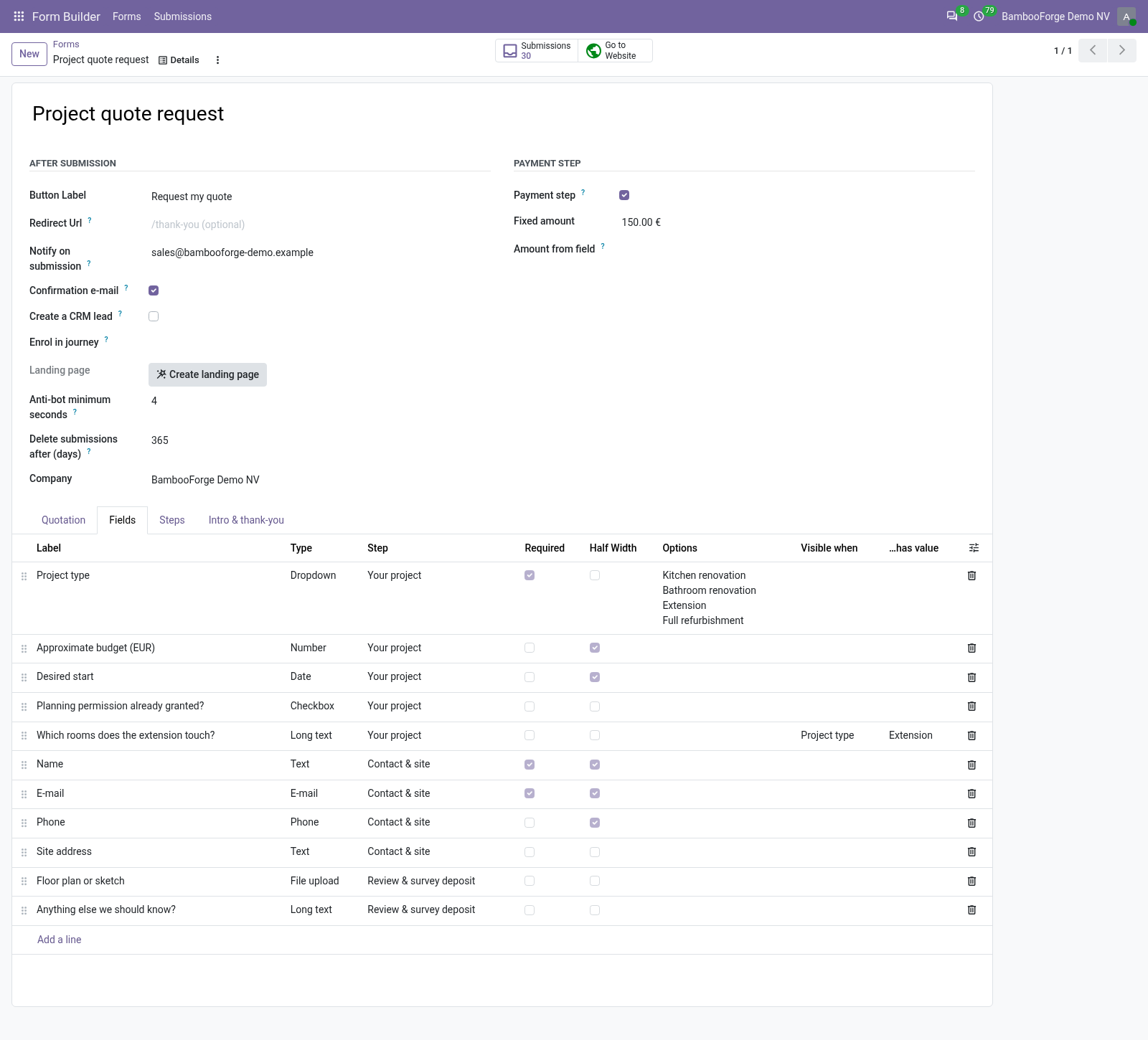
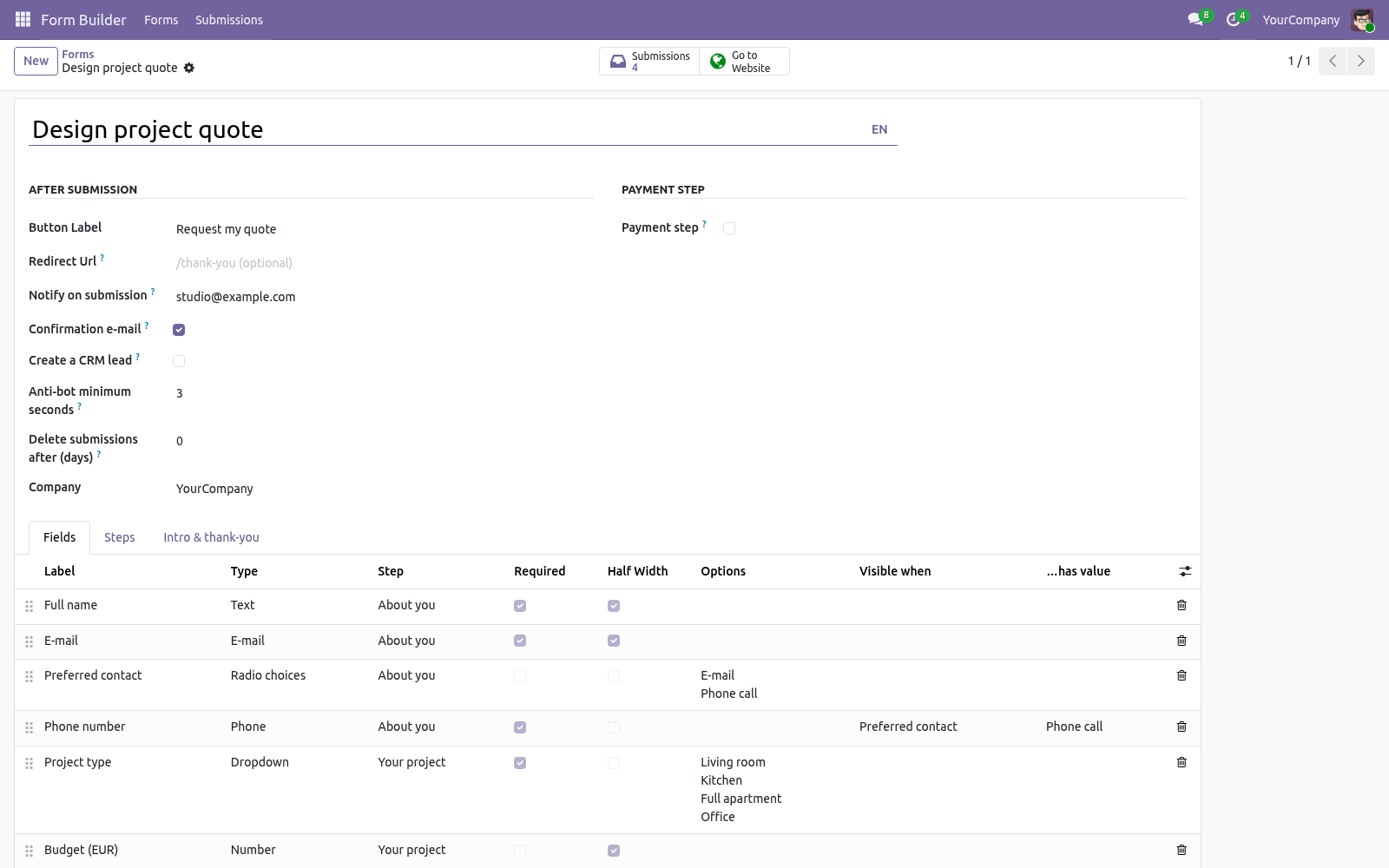
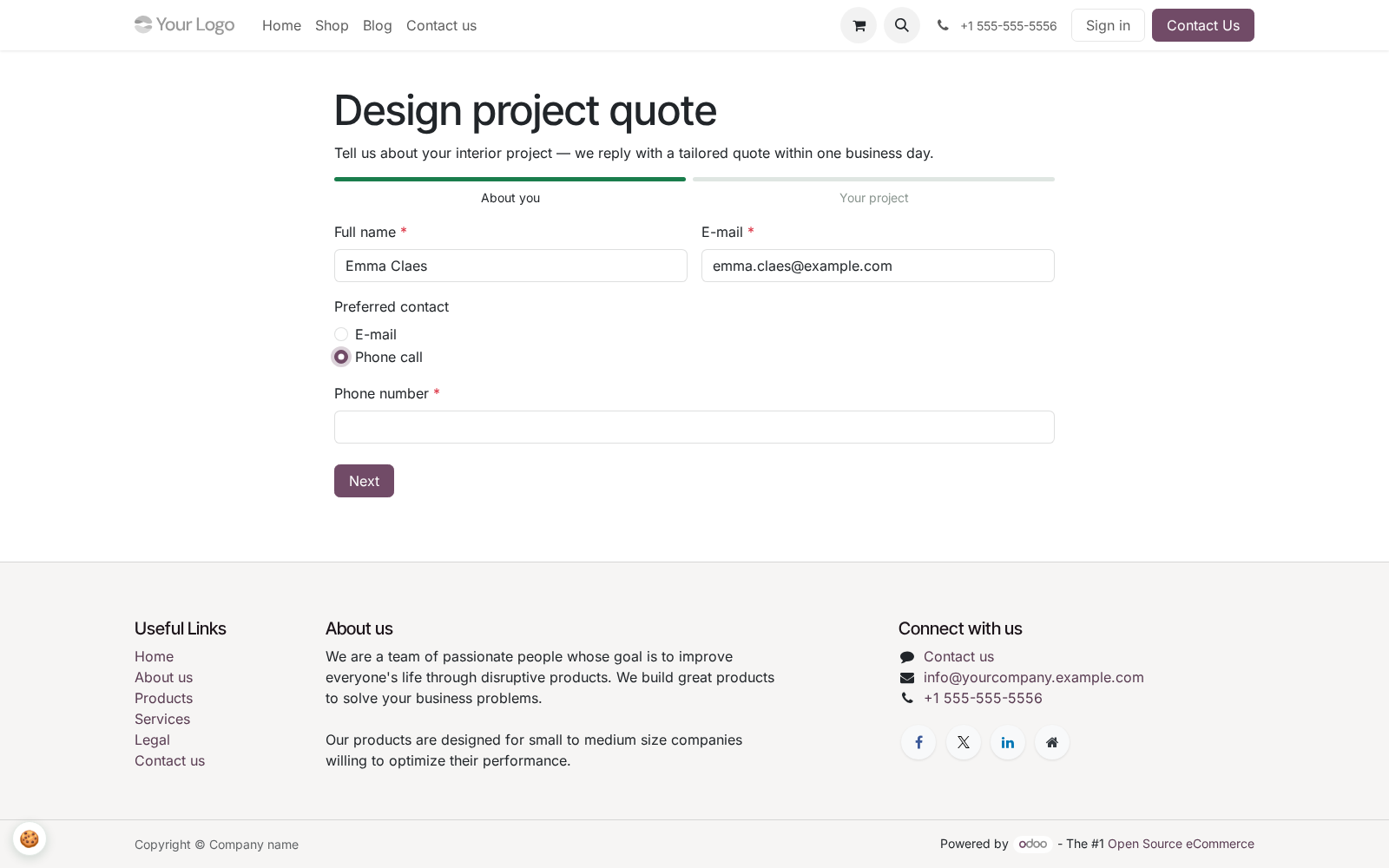
Add one line per step — title (shown in the progress bar) and optional description. Order with the drag handle. Fields without a step land on the first step, so a single-page form needs no steps at all. Fields.
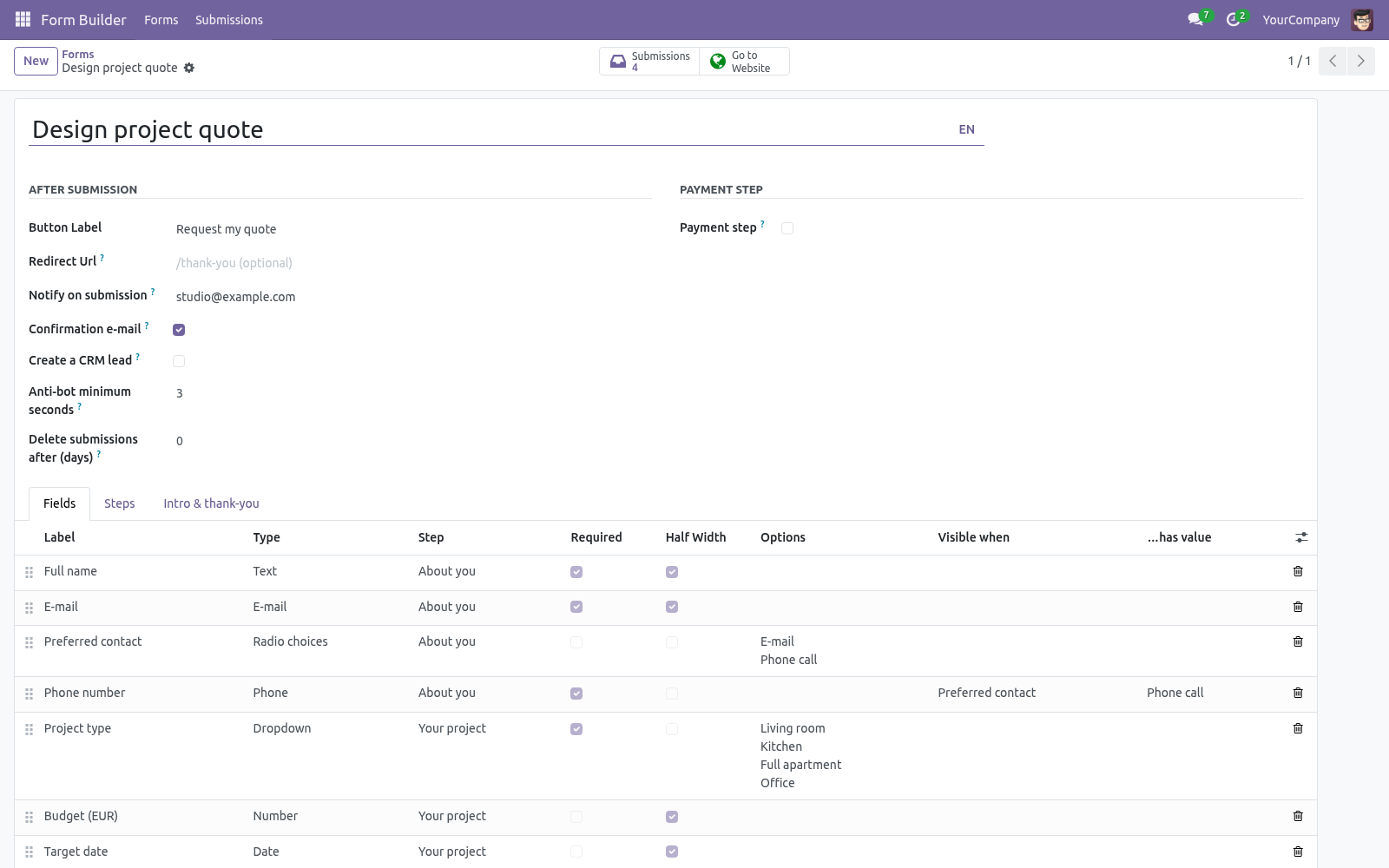
One line per field: label, type, step, required, placeholder. Half width renders two consecutive half-width fields side by side on wide screens. For Dropdown and Radio choices, enter the choices in Options — one per line; the server refuses any submitted value that is not in the list. After the visitor submits.
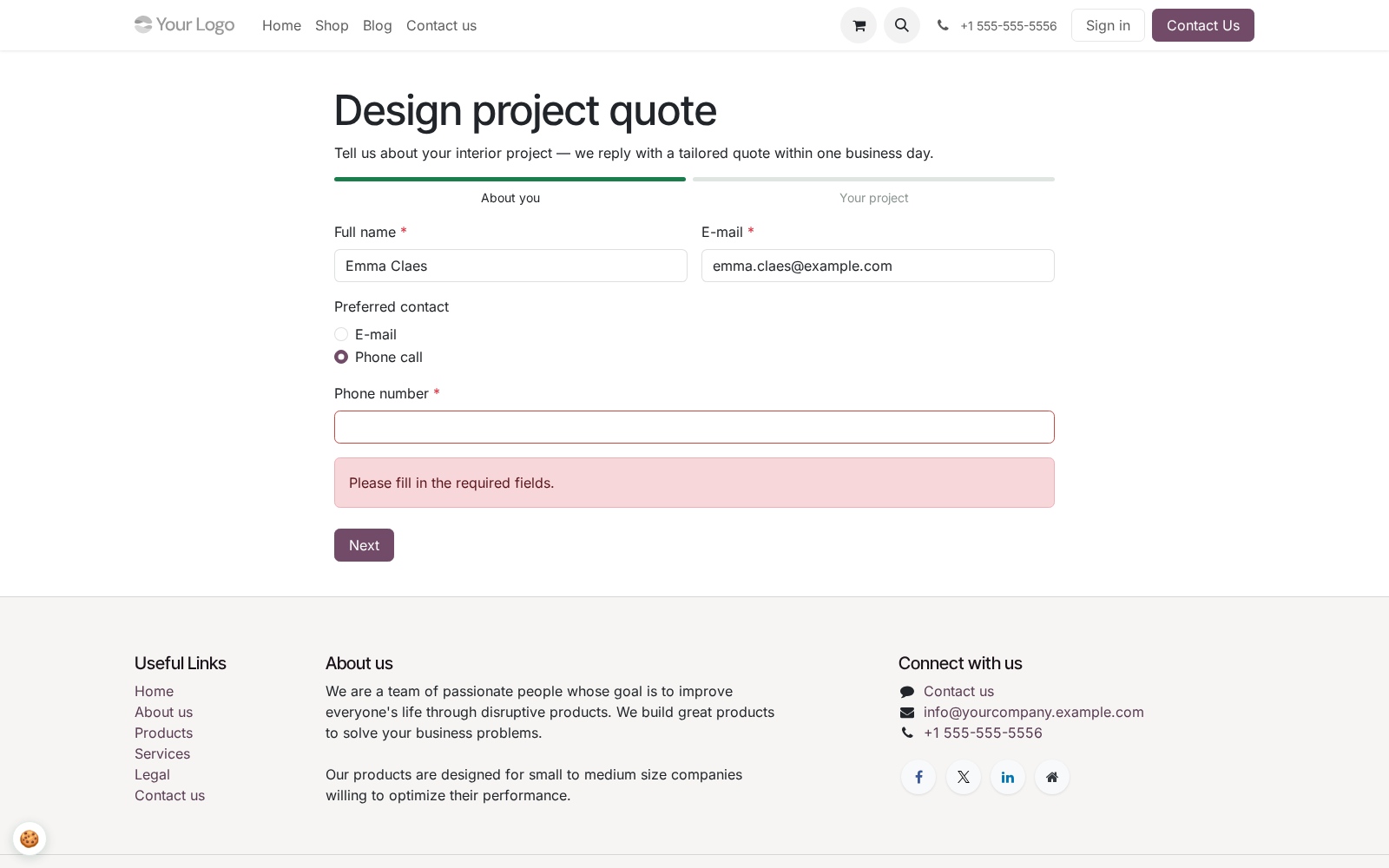
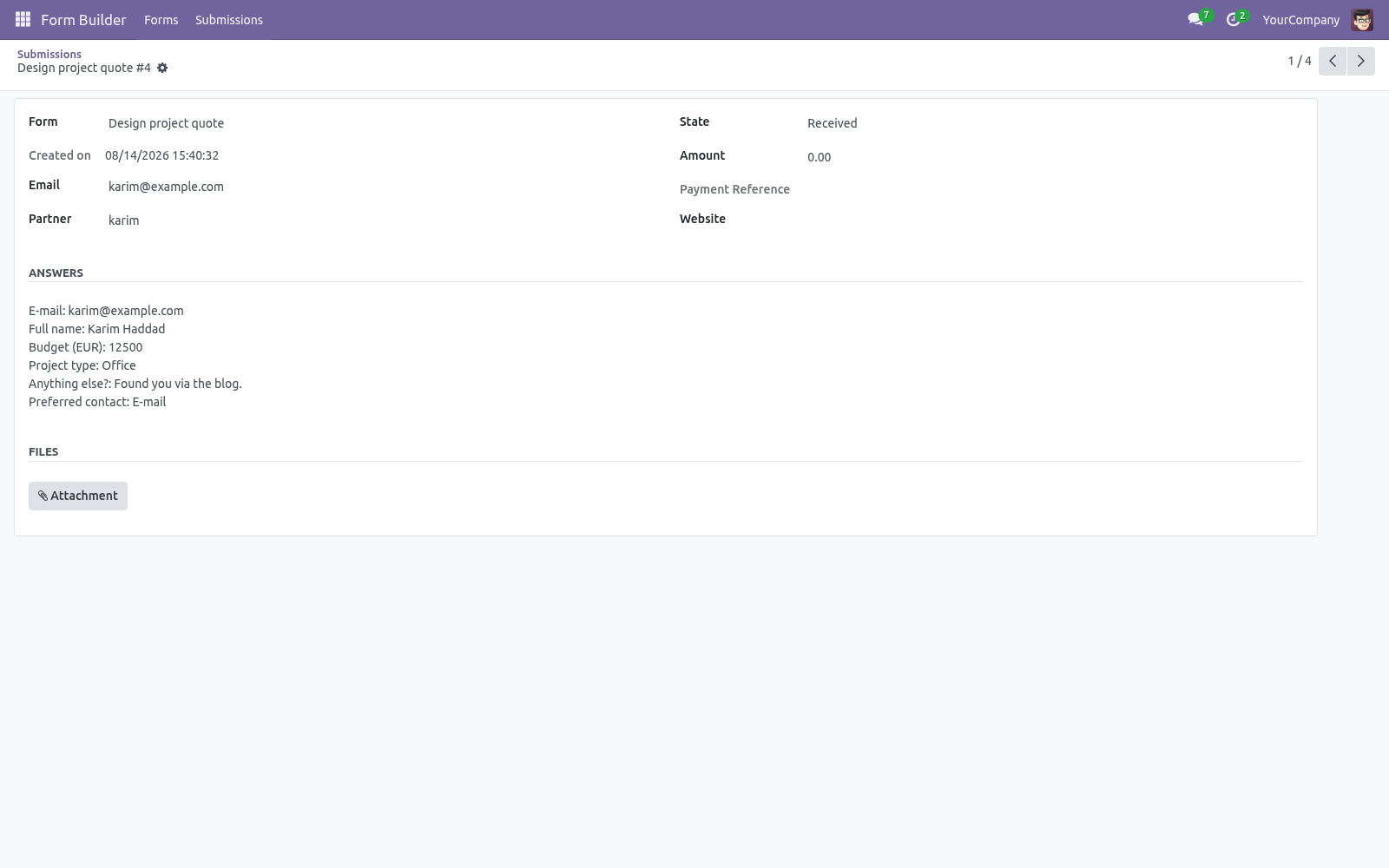
With a payment step, the flow changes after validation: the submission is stored as Awaiting payment, the visitor is redirected to /payment/pay with the amount pre-filled, and the notification e-mails are only sent once the cron has confirmed the transaction and moved the submission to Paid. The answers are validated server-side; any error is shown inline and nothing is stored until the submission is clean. A submission is created with the answers, the uploaded files as attachments and the first E-mail field as the sender address. The sender is matched to an existing contact by e-mail (case-insensitive) or a new contact is created.
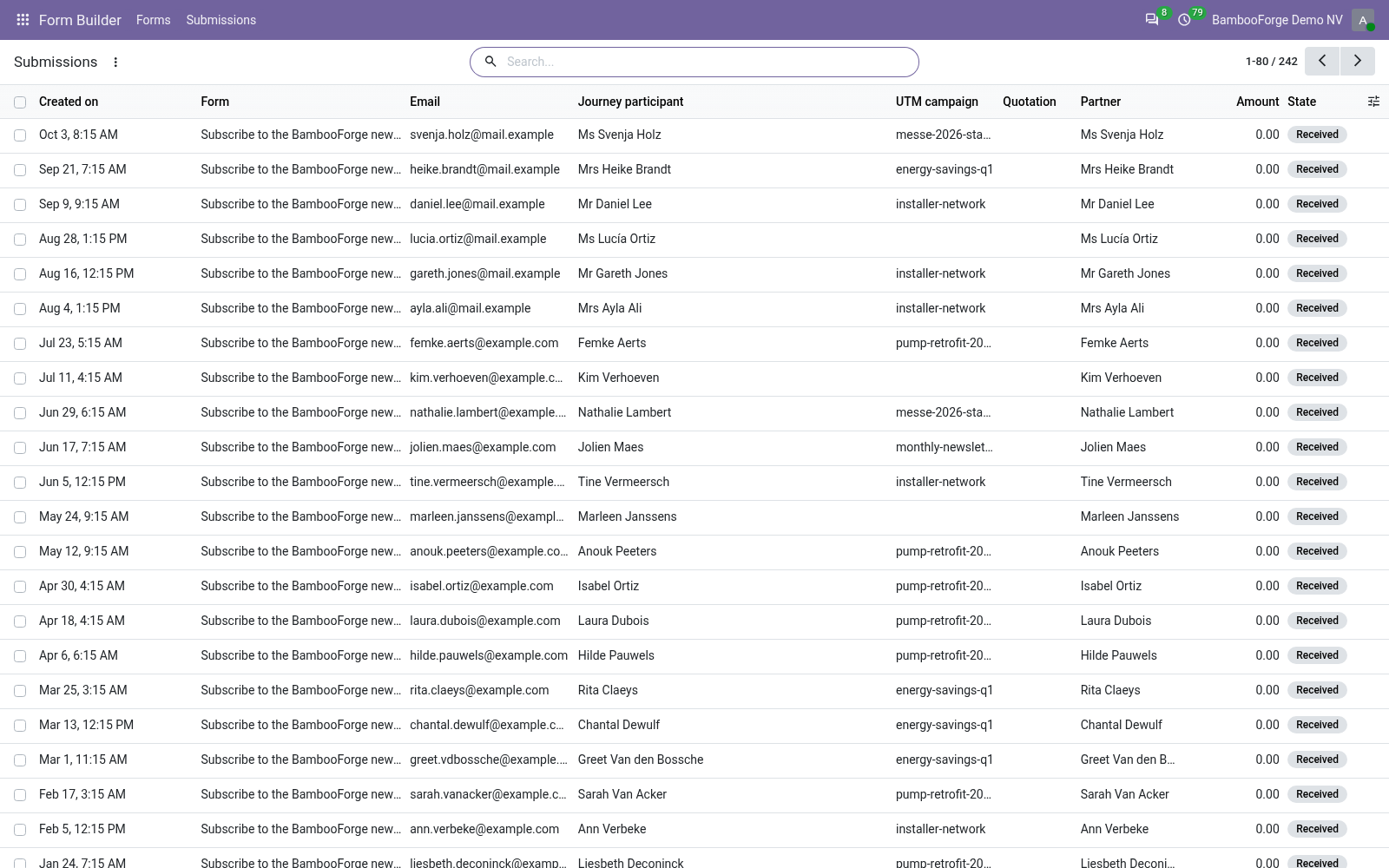
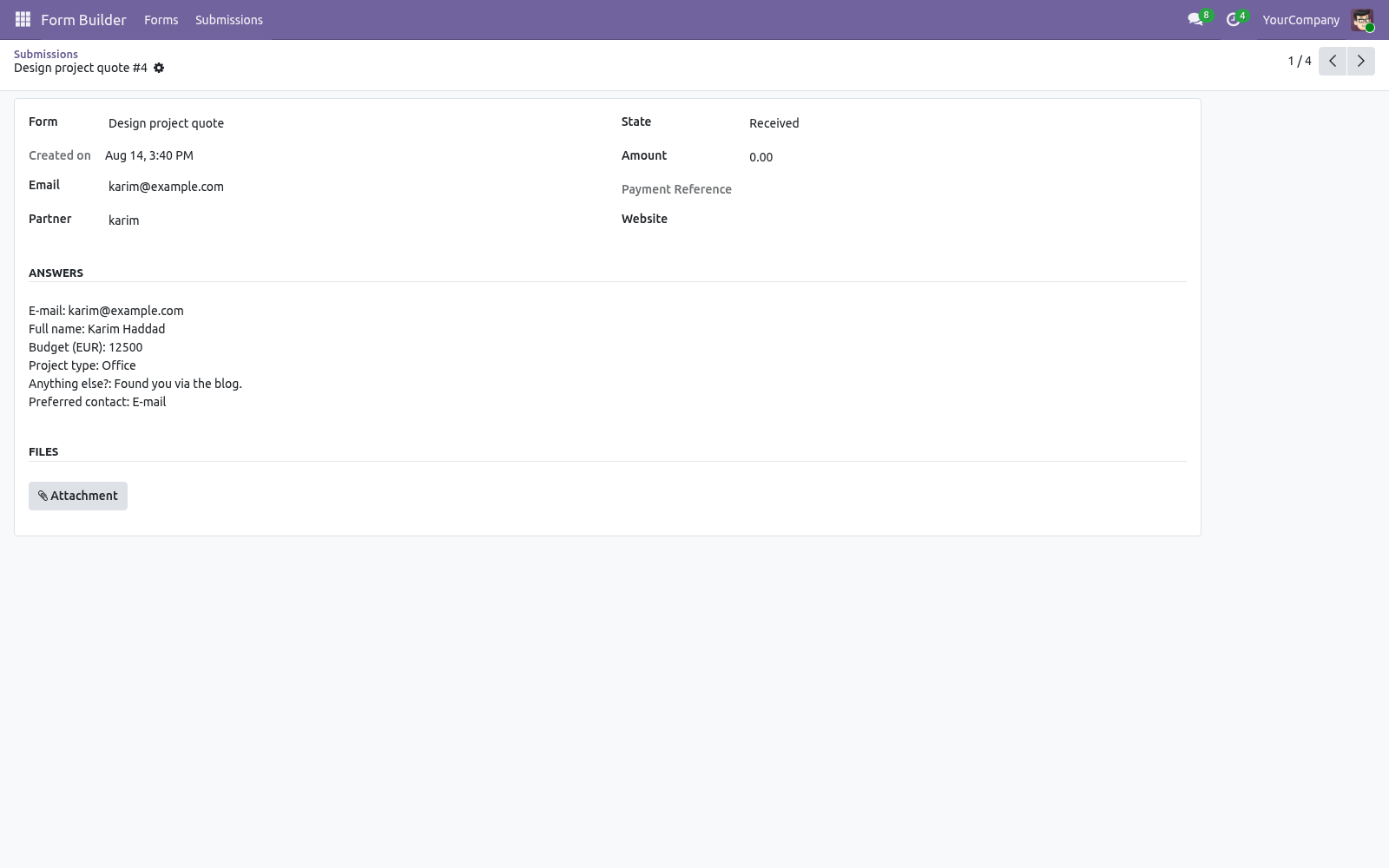
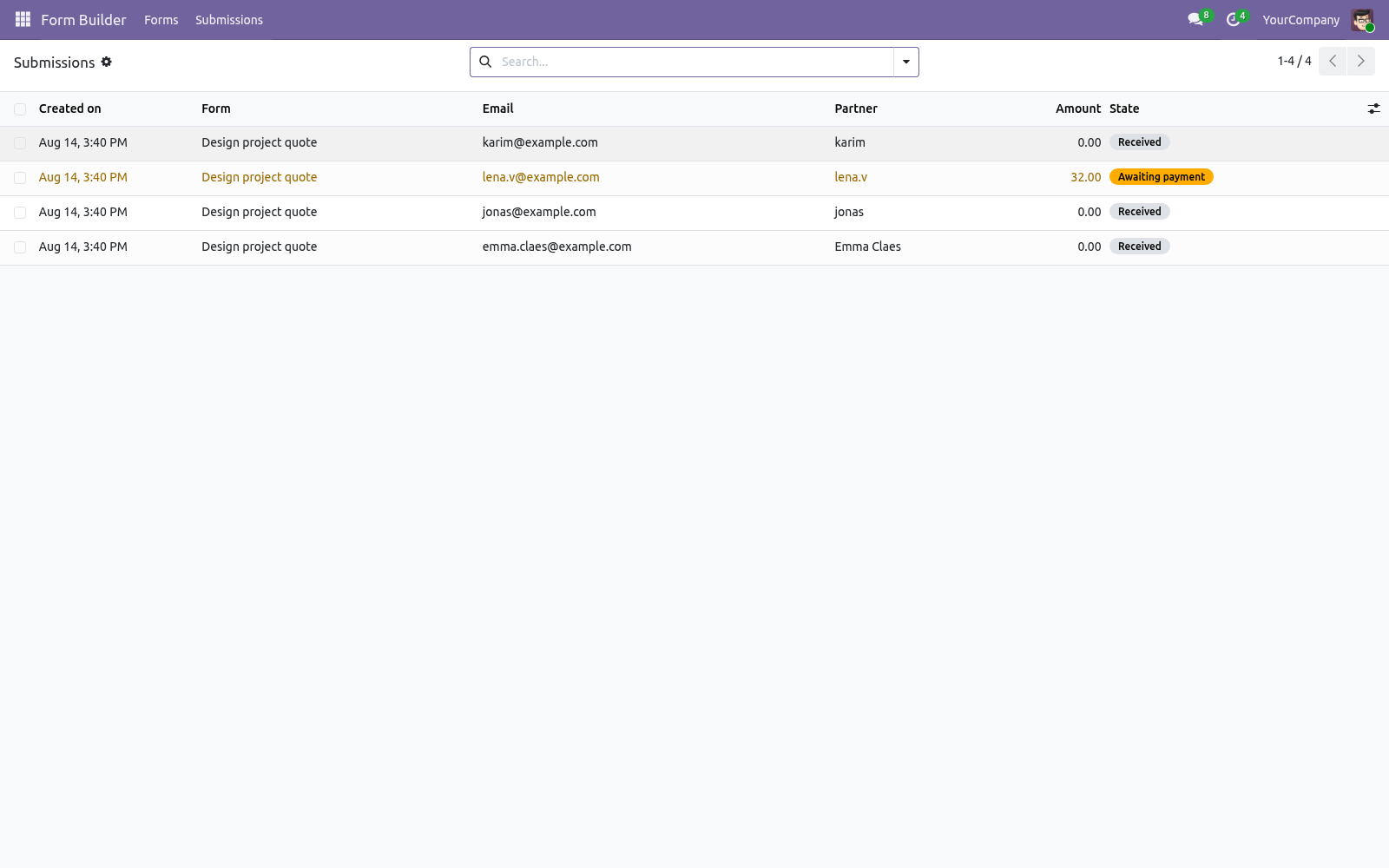
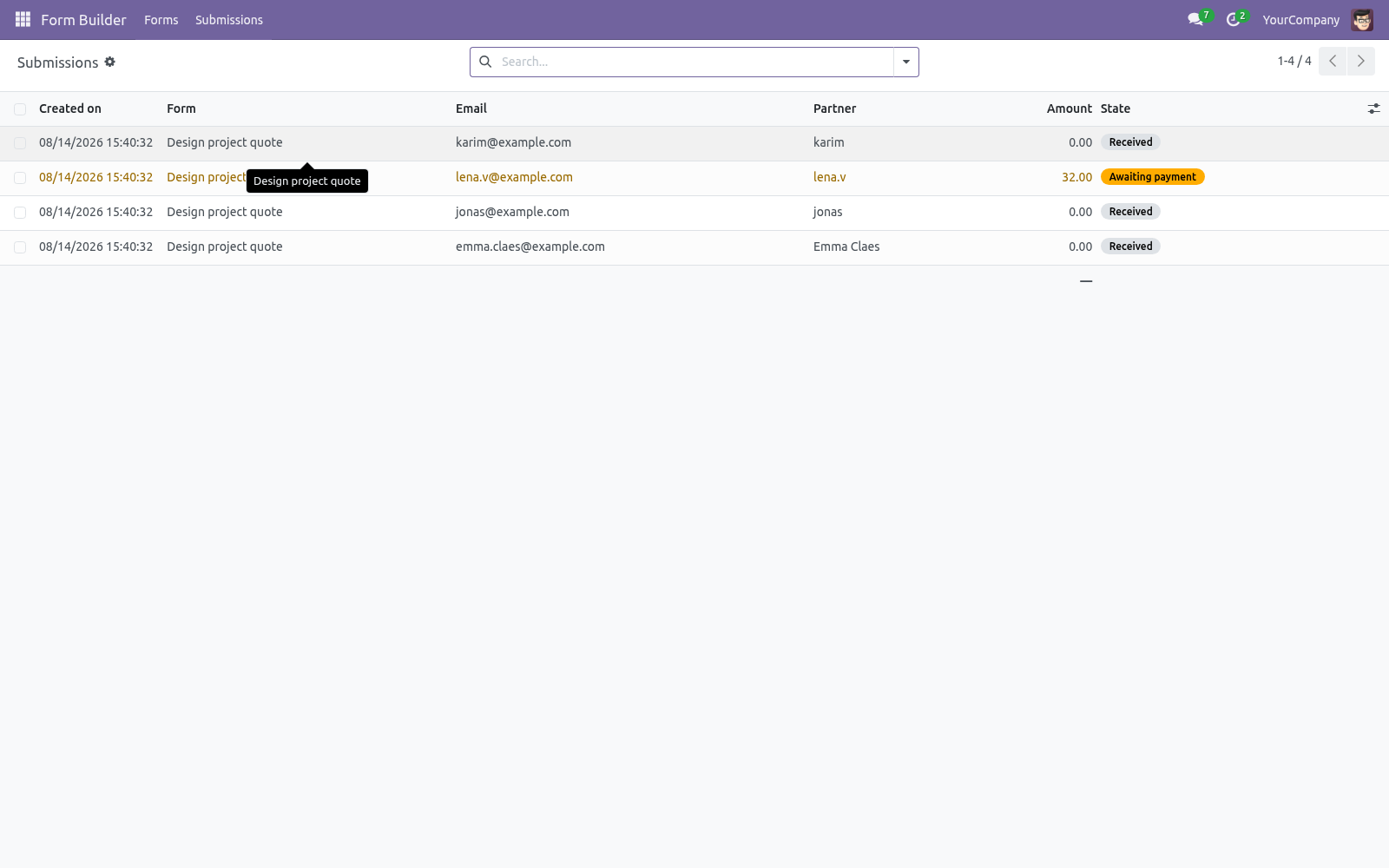
The internal notification e-mails go out immediately; the visitor gets a confirmation copy if enabled; a CRM lead is created if enabled and CRM is installed. The visitor sees your thank-you message inline — or is sent to the redirect URL if you set one. Working with submissions. Form Builder ▸ Submissions is the inbox: filter by form or status (Received / Awaiting payment / Paid), group by form, status or day, and export the selection with the native list export.
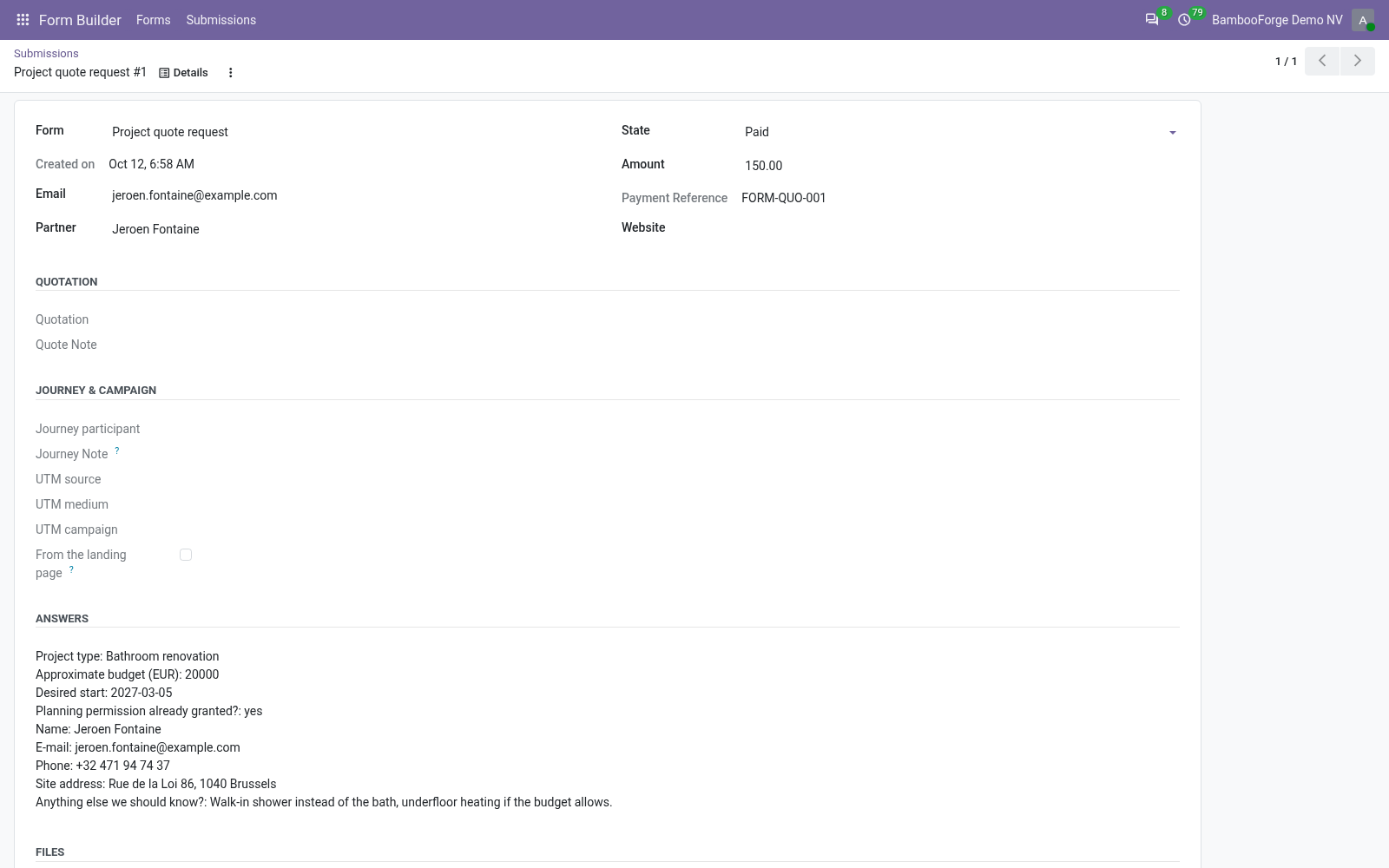
Each submission shows the readable answers, the linked contact, the attachments and — for payment forms — the amount, currency and payment reference. From a form, the Submissions smart button opens its own submissions directly. Taking payments. #.
Install the Payment app and enable at least one provider (Stripe, PayPal, Adyen, wire transfer…). #. On the form, tick Payment step, then either set a Fixed amount or pick Amount from field — a Number field of the same form, so the visitor chooses the amount (donations, deposits). One of the two is required; saving refuses a payment form with neither.
#. The visitor pays through Odoo's standard payment page — your provider configuration and branding apply unchanged. The cron BambooForge Form Builder: confirm paid submissions runs every 10 minutes and marks the submission Paid as soon as the transaction is done, then sends the notifications. An amount of zero (e.g.
an empty optional Number field) skips the payment step and stores the submission as Received directly. Stopping spam Keeping submissions only as long as you need. Delete submissions after (days) sets a retention window per form. Leave it at 0 and submissions are kept forever (the previous behaviour).
Set it to, say, 90 and the daily job BambooForge Form Builder: retention cleanup deletes every submission of that form older than 90 days together with its uploaded files. Deletion is permanent — export what you need first. Access rights. Website visitors need no account: the form page and the submit endpoint are public, protected by the honeypot, the signed token and the server-side validation.
Form Builder Pro / User — read forms, manage and export submissions. Form Builder Pro / Manager — additionally create and design forms, steps and fields. FAQ. How is this different from Odoo's standard form snippet?
The standard website form snippet posts one page of fields into a single model and stops there: no steps, no progress bar, no conditional visibility, no payment step, no file-size control and no submission browser — answers end up in whatever model the snippet wrote to. Form Builder Pro is a form engine: multi-step, conditional, payable, with every submission stored with its files in a searchable, exportable inbox. Which payment providers can I use? Any provider enabled in your Odoo's Payment app — Stripe, PayPal, Adyen, bank wire… The payment step hands the visitor to Odoo's own /payment/pay page, so your existing provider configuration, credentials and branding apply unchanged.
How we make sure it works. Before every release, 36 automated checks run against this app on Odoo 16, 17, 18, 19 and 20. Among them: A replayed nonce is refused by the database. A plain employee does not see the menu.
The agent builds nothing. A plain employee never reads the inbox. The visitor sees only published forms. The complete list is in the source you receive.
The complete manual is at docs dot bambooforge dot dev, the demo database is linked from the store page, and support answers within twenty-four hours. Links are in the description.
Transcript of the walkthrough (Odoo 19)
Form Builder for Website with Payment. Multi-step website forms with conditional fields, file uploads, an optional payment step, spam protection without CAPTCHAs and CSV export. The forms your Odoo 19 website actually needs: multi-step wizards with a progress bar, 10 field types including capped file uploads, conditional fields ("visible when field X has value Y") enforced in the browser and on the server, server-side validation of everything, spam protection without CAPTCHAs (an invisible honeypot plus a single-use, HMAC-signed render token), an optional payment step for deposits, donations and paid applications, and a real submissions inbox — searchable, groupable, exportable, with instant e-mail notifications, an optional confirmation copy to the visitor and an optional CRM lead per submission. In the next few minutes: form builder for website with payment, then building a form, then after the visitor submits, then working with submissions, then taking payments.
Then what this app deliberately does not do, so you can tell before you buy whether it fits. Everything lives under Form Builder then Forms then Submissions. Form Builder for Website with Payment. The forms your Odoo 19 website actually needs: multi-step wizards with a progress bar, 10 field types including capped file uploads, conditional fields ("visible when field X has value Y") enforced in the browser and on the server, server-side validation of everything, spam protection without CAPTCHAs (an invisible honeypot plus a single-use, HMAC-signed render token), an optional payment step for deposits, donations and paid applications, and a real submissions inbox — searchable, groupable, exportable, with instant e-mail notifications, an optional confirmation copy to the visitor and an optional CRM lead per submission.
This page is the complete manual. Follow it top to bottom and you can install, build your first form, publish it and fix the common issues without contacting support. Building a form. Steps.
Add one line per step — title (shown in the progress bar) and optional description. Order with the drag handle. Fields without a step land on the first step, so a single-page form needs no steps at all. Fields.
One line per field: label, type, step, required, placeholder. Half width renders two consecutive half-width fields side by side on wide screens. For Dropdown and Radio choices, enter the choices in Options — one per line; the server refuses any submitted value that is not in the list. After the visitor submits.
With a payment step, the flow changes after validation: the submission is stored as Awaiting payment, the visitor is redirected to /payment/pay with the amount pre-filled, and the notification e-mails are only sent once the cron has confirmed the transaction and moved the submission to Paid. The answers are validated server-side; any error is shown inline and nothing is stored until the submission is clean. A submission is created with the answers, the uploaded files as attachments and the first E-mail field as the sender address. The sender is matched to an existing contact by e-mail (case-insensitive) or a new contact is created.
The internal notification e-mails go out immediately; the visitor gets a confirmation copy if enabled; a CRM lead is created if enabled and CRM is installed. The visitor sees your thank-you message inline — or is sent to the redirect URL if you set one. Working with submissions. Form Builder ▸ Submissions is the inbox: filter by form or status (Received / Awaiting payment / Paid), group by form, status or day, and export the selection with the native list export.
Each submission shows the readable answers, the linked contact, the attachments and — for payment forms — the amount, currency and payment reference. From a form, the Submissions smart button opens its own submissions directly. Taking payments. #.
Install the Payment app and enable at least one provider (Stripe, PayPal, Adyen, wire transfer…). #. On the form, tick Payment step, then either set a Fixed amount or pick Amount from field — a Number field of the same form, so the visitor chooses the amount (donations, deposits). One of the two is required; saving refuses a payment form with neither.
#. The visitor pays through Odoo's standard payment page — your provider configuration and branding apply unchanged. The cron BambooForge Form Builder: confirm paid submissions runs every 10 minutes and marks the submission Paid as soon as the transaction is done, then sends the notifications. An amount of zero (e.g.
an empty optional Number field) skips the payment step and stores the submission as Received directly. Stopping spam Keeping submissions only as long as you need. Delete submissions after (days) sets a retention window per form. Leave it at 0 and submissions are kept forever (the previous behaviour).
Set it to, say, 90 and the daily job BambooForge Form Builder: retention cleanup deletes every submission of that form older than 90 days together with its uploaded files. Deletion is permanent — export what you need first. Form options - Option (per form) Text of the submit button (default Submit). - Thank-you message Shown inline after a successful submission.
If set, the visitor is sent here instead of the message. - Notify on submission Comma-separated internal e-mails that receive every submission. Visible to Form Builder Pro / Manager only. - Confirmation e-mail Field types Validation on submit - Text / Long text Required if flagged.
Must be a valid e-mail address; the first E-mail field becomes the sender address of the submission. Free text input with a phone keyboard on mobile. Must parse as a number (comma or dot decimals accepted); can feed the payment amount. Native date picker.
- Dropdown / Radio choices Access rights. Website visitors need no account: the form page and the submit endpoint are public, protected by the honeypot, the signed token and the server-side validation. Form Builder Pro / User — read forms, manage and export submissions. Form Builder Pro / Manager — additionally create and design forms, steps and fields.
The complete manual is at docs dot bambooforge dot dev, the demo database is linked from the store page, and support answers within twenty-four hours. Links are in the description.
Transcript of the walkthrough (Odoo 18)
Form Builder for Website with Payment. Multi-step website forms with conditional fields, file uploads, an optional payment step, spam protection without CAPTCHAs and CSV export. The forms your Odoo 18 website actually needs: multi-step wizards with a progress bar, 10 field types including capped file uploads, conditional fields ("visible when field X has value Y") enforced in the browser and on the server, server-side validation of everything, spam protection without CAPTCHAs (an invisible honeypot plus a single-use, HMAC-signed render token), an optional payment step for deposits, donations and paid applications, and a real submissions inbox — searchable, groupable, exportable, with instant e-mail notifications, an optional confirmation copy to the visitor and an optional CRM lead per submission. In the next few minutes: form builder for website with payment, then building a form, then after the visitor submits, then working with submissions, then taking payments.
Then what this app deliberately does not do, so you can tell before you buy whether it fits. Everything lives under Form Builder then Forms then Submissions. Form Builder for Website with Payment. The forms your Odoo 18 website actually needs: multi-step wizards with a progress bar, 10 field types including capped file uploads, conditional fields ("visible when field X has value Y") enforced in the browser and on the server, server-side validation of everything, spam protection without CAPTCHAs (an invisible honeypot plus a single-use, HMAC-signed render token), an optional payment step for deposits, donations and paid applications, and a real submissions inbox — searchable, groupable, exportable, with instant e-mail notifications, an optional confirmation copy to the visitor and an optional CRM lead per submission.
This page is the complete manual. Follow it top to bottom and you can install, build your first form, publish it and fix the common issues without contacting support. Building a form. Steps.
Add one line per step — title (shown in the progress bar) and optional description. Order with the drag handle. Fields without a step land on the first step, so a single-page form needs no steps at all. Fields.
One line per field: label, type, step, required, placeholder. Half width renders two consecutive half-width fields side by side on wide screens. For Dropdown and Radio choices, enter the choices in Options — one per line; the server refuses any submitted value that is not in the list. After the visitor submits.
With a payment step, the flow changes after validation: the submission is stored as Awaiting payment, the visitor is redirected to /payment/pay with the amount pre-filled, and the notification e-mails are only sent once the cron has confirmed the transaction and moved the submission to Paid. The answers are validated server-side; any error is shown inline and nothing is stored until the submission is clean. A submission is created with the answers, the uploaded files as attachments and the first E-mail field as the sender address. The sender is matched to an existing contact by e-mail (case-insensitive) or a new contact is created.
The internal notification e-mails go out immediately; the visitor gets a confirmation copy if enabled; a CRM lead is created if enabled and CRM is installed. The visitor sees your thank-you message inline — or is sent to the redirect URL if you set one. Working with submissions. Form Builder ▸ Submissions is the inbox: filter by form or status (Received / Awaiting payment / Paid), group by form, status or day, and export the selection with the native list export.
Each submission shows the readable answers, the linked contact, the attachments and — for payment forms — the amount, currency and payment reference. From a form, the Submissions smart button opens its own submissions directly. Taking payments. #.
Install the Payment app and enable at least one provider (Stripe, PayPal, Adyen, wire transfer…). #. On the form, tick Payment step, then either set a Fixed amount or pick Amount from field — a Number field of the same form, so the visitor chooses the amount (donations, deposits). One of the two is required; saving refuses a payment form with neither.
#. The visitor pays through Odoo's standard payment page — your provider configuration and branding apply unchanged. The cron BambooForge Form Builder: confirm paid submissions runs every 10 minutes and marks the submission Paid as soon as the transaction is done, then sends the notifications. An amount of zero (e.g.
an empty optional Number field) skips the payment step and stores the submission as Received directly. Stopping spam Keeping submissions only as long as you need. Delete submissions after (days) sets a retention window per form. Leave it at 0 and submissions are kept forever (the previous behaviour).
Set it to, say, 90 and the daily job BambooForge Form Builder: retention cleanup deletes every submission of that form older than 90 days together with its uploaded files. Deletion is permanent — export what you need first. Form options - Option (per form) Text of the submit button (default Submit). - Thank-you message Shown inline after a successful submission.
If set, the visitor is sent here instead of the message. - Notify on submission Comma-separated internal e-mails that receive every submission. Visible to Form Builder Pro / Manager only. - Confirmation e-mail Field types Validation on submit - Text / Long text Required if flagged.
Must be a valid e-mail address; the first E-mail field becomes the sender address of the submission. Free text input with a phone keyboard on mobile. Must parse as a number (comma or dot decimals accepted); can feed the payment amount. Native date picker.
- Dropdown / Radio choices Access rights. Website visitors need no account: the form page and the submit endpoint are public, protected by the honeypot, the signed token and the server-side validation. Form Builder Pro / User — read forms, manage and export submissions. Form Builder Pro / Manager — additionally create and design forms, steps and fields.
The complete manual is at docs dot bambooforge dot dev, the demo database is linked from the store page, and support answers within twenty-four hours. Links are in the description.
Transcript of the walkthrough (Odoo 17)
Form Builder for Website with Payment. Multi-step website forms with conditional fields, file uploads, an optional payment step, spam protection without CAPTCHAs and CSV export. The forms your Odoo 17 website actually needs: multi-step wizards with a progress bar, 10 field types including capped file uploads, conditional fields ("visible when field X has value Y") enforced in the browser and on the server, server-side validation of everything, spam protection without CAPTCHAs (an invisible honeypot plus a single-use, HMAC-signed render token), an optional payment step for deposits, donations and paid applications, and a real submissions inbox — searchable, groupable, exportable, with instant e-mail notifications, an optional confirmation copy to the visitor and an optional CRM lead per submission. In the next few minutes: form builder for website with payment, then building a form, then after the visitor submits, then working with submissions, then taking payments.
Then what this app deliberately does not do, so you can tell before you buy whether it fits. Everything lives under Form Builder then Forms then Submissions. Form Builder for Website with Payment. The forms your Odoo 17 website actually needs: multi-step wizards with a progress bar, 10 field types including capped file uploads, conditional fields ("visible when field X has value Y") enforced in the browser and on the server, server-side validation of everything, spam protection without CAPTCHAs (an invisible honeypot plus a single-use, HMAC-signed render token), an optional payment step for deposits, donations and paid applications, and a real submissions inbox — searchable, groupable, exportable, with instant e-mail notifications, an optional confirmation copy to the visitor and an optional CRM lead per submission.
This page is the complete manual. Follow it top to bottom and you can install, build your first form, publish it and fix the common issues without contacting support. Building a form. Steps.
Add one line per step — title (shown in the progress bar) and optional description. Order with the drag handle. Fields without a step land on the first step, so a single-page form needs no steps at all. Fields.
One line per field: label, type, step, required, placeholder. Half width renders two consecutive half-width fields side by side on wide screens. For Dropdown and Radio choices, enter the choices in Options — one per line; the server refuses any submitted value that is not in the list. After the visitor submits.
With a payment step, the flow changes after validation: the submission is stored as Awaiting payment, the visitor is redirected to /payment/pay with the amount pre-filled, and the notification e-mails are only sent once the cron has confirmed the transaction and moved the submission to Paid. The answers are validated server-side; any error is shown inline and nothing is stored until the submission is clean. A submission is created with the answers, the uploaded files as attachments and the first E-mail field as the sender address. The sender is matched to an existing contact by e-mail (case-insensitive) or a new contact is created.
The internal notification e-mails go out immediately; the visitor gets a confirmation copy if enabled; a CRM lead is created if enabled and CRM is installed. The visitor sees your thank-you message inline — or is sent to the redirect URL if you set one. Working with submissions. Form Builder ▸ Submissions is the inbox: filter by form or status (Received / Awaiting payment / Paid), group by form, status or day, and export the selection with the native list export.
Each submission shows the readable answers, the linked contact, the attachments and — for payment forms — the amount, currency and payment reference. From a form, the Submissions smart button opens its own submissions directly. Taking payments. #.
Install the Payment app and enable at least one provider (Stripe, PayPal, Adyen, wire transfer…). #. On the form, tick Payment step, then either set a Fixed amount or pick Amount from field — a Number field of the same form, so the visitor chooses the amount (donations, deposits). One of the two is required; saving refuses a payment form with neither.
#. The visitor pays through Odoo's standard payment page — your provider configuration and branding apply unchanged. The cron BambooForge Form Builder: confirm paid submissions runs every 10 minutes and marks the submission Paid as soon as the transaction is done, then sends the notifications. An amount of zero (e.g.
an empty optional Number field) skips the payment step and stores the submission as Received directly. Stopping spam Keeping submissions only as long as you need. Delete submissions after (days) sets a retention window per form. Leave it at 0 and submissions are kept forever (the previous behaviour).
Set it to, say, 90 and the daily job BambooForge Form Builder: retention cleanup deletes every submission of that form older than 90 days together with its uploaded files. Deletion is permanent — export what you need first. Form options - Option (per form) Text of the submit button (default Submit). - Thank-you message Shown inline after a successful submission.
If set, the visitor is sent here instead of the message. - Notify on submission Comma-separated internal e-mails that receive every submission. Visible to Form Builder Pro / Manager only. - Confirmation e-mail Field types Validation on submit - Text / Long text Required if flagged.
Must be a valid e-mail address; the first E-mail field becomes the sender address of the submission. Free text input with a phone keyboard on mobile. Must parse as a number (comma or dot decimals accepted); can feed the payment amount. Native date picker.
- Dropdown / Radio choices Access rights. Website visitors need no account: the form page and the submit endpoint are public, protected by the honeypot, the signed token and the server-side validation. Form Builder Pro / User — read forms, manage and export submissions. Form Builder Pro / Manager — additionally create and design forms, steps and fields.
The complete manual is at docs dot bambooforge dot dev, the demo database is linked from the store page, and support answers within twenty-four hours. Links are in the description.
Transcript of the walkthrough (Odoo 16)
Form Builder for Website with Payment. Multi-step website forms with conditional fields, file uploads, an optional payment step, spam protection without CAPTCHAs and CSV export. The forms your Odoo 16 website actually needs: multi-step wizards with a progress bar, 10 field types including capped file uploads, conditional fields ("visible when field X has value Y") enforced in the browser and on the server, server-side validation of everything, spam protection without CAPTCHAs (an invisible honeypot plus a single-use, HMAC-signed render token), an optional payment step for deposits, donations and paid applications, and a real submissions inbox — searchable, groupable, exportable, with instant e-mail notifications, an optional confirmation copy to the visitor and an optional CRM lead per submission. In the next few minutes: form builder for website with payment, then building a form, then after the visitor submits, then working with submissions, then taking payments.
Then what this app deliberately does not do, so you can tell before you buy whether it fits. Everything lives under Form Builder then Forms then Submissions. Form Builder for Website with Payment. The forms your Odoo 16 website actually needs: multi-step wizards with a progress bar, 10 field types including capped file uploads, conditional fields ("visible when field X has value Y") enforced in the browser and on the server, server-side validation of everything, spam protection without CAPTCHAs (an invisible honeypot plus a single-use, HMAC-signed render token), an optional payment step for deposits, donations and paid applications, and a real submissions inbox — searchable, groupable, exportable, with instant e-mail notifications, an optional confirmation copy to the visitor and an optional CRM lead per submission.
This page is the complete manual. Follow it top to bottom and you can install, build your first form, publish it and fix the common issues without contacting support. Building a form. Steps.
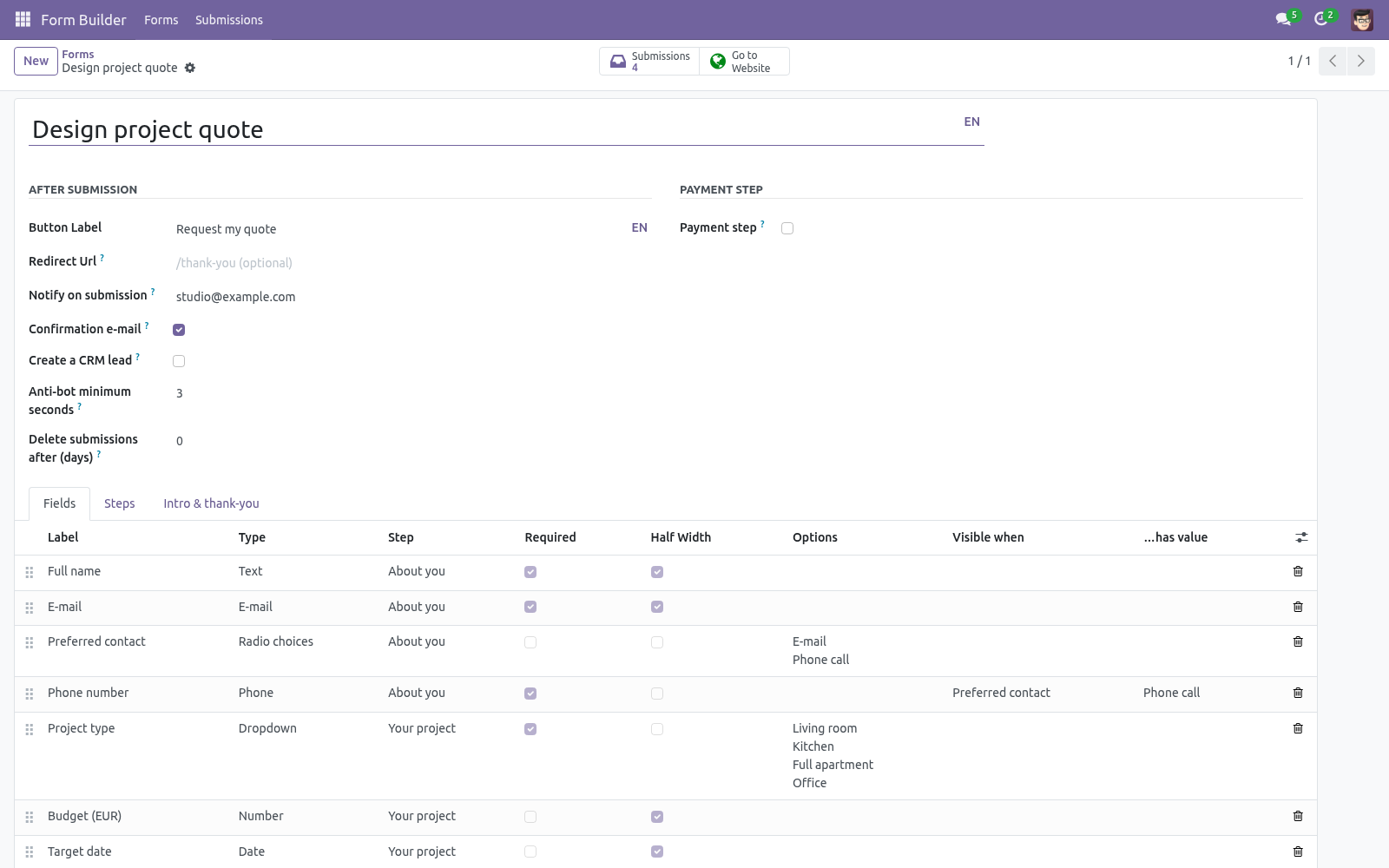
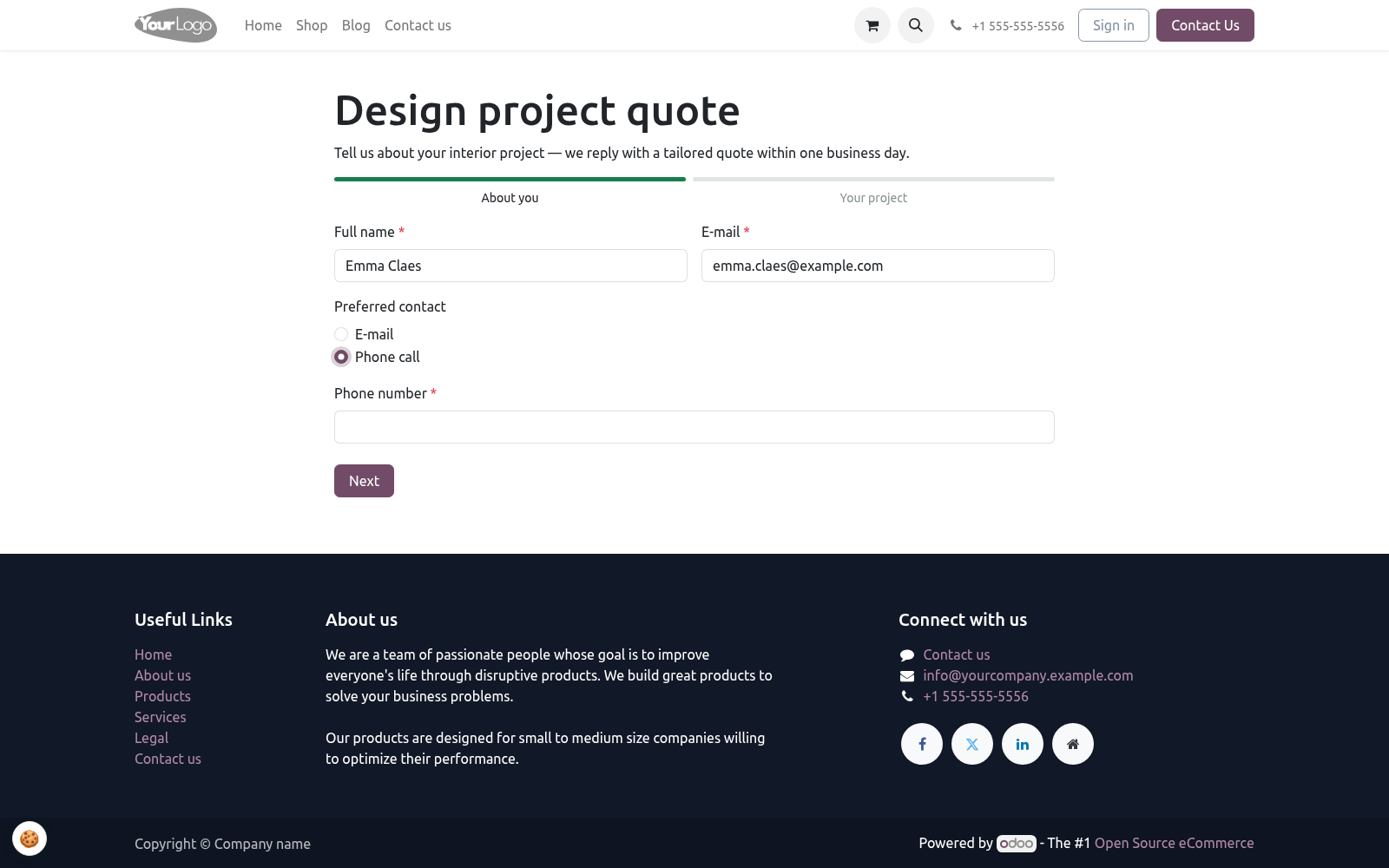
Add one line per step — title (shown in the progress bar) and optional description. Order with the drag handle. Fields without a step land on the first step, so a single-page form needs no steps at all. Fields.
One line per field: label, type, step, required, placeholder. Half width renders two consecutive half-width fields side by side on wide screens. For Dropdown and Radio choices, enter the choices in Options — one per line; the server refuses any submitted value that is not in the list. After the visitor submits.
With a payment step, the flow changes after validation: the submission is stored as Awaiting payment, the visitor is redirected to /payment/pay with the amount pre-filled, and the notification e-mails are only sent once the cron has confirmed the transaction and moved the submission to Paid. The answers are validated server-side; any error is shown inline and nothing is stored until the submission is clean. A submission is created with the answers, the uploaded files as attachments and the first E-mail field as the sender address. The sender is matched to an existing contact by e-mail (case-insensitive) or a new contact is created.
The internal notification e-mails go out immediately; the visitor gets a confirmation copy if enabled; a CRM lead is created if enabled and CRM is installed. The visitor sees your thank-you message inline — or is sent to the redirect URL if you set one. Working with submissions. Form Builder ▸ Submissions is the inbox: filter by form or status (Received / Awaiting payment / Paid), group by form, status or day, and export the selection with the native list export.
Each submission shows the readable answers, the linked contact, the attachments and — for payment forms — the amount, currency and payment reference. From a form, the Submissions smart button opens its own submissions directly. Taking payments. #.
Install the Payment app and enable at least one provider (Stripe, PayPal, Adyen, wire transfer…). #. On the form, tick Payment step, then either set a Fixed amount or pick Amount from field — a Number field of the same form, so the visitor chooses the amount (donations, deposits). One of the two is required; saving refuses a payment form with neither.
#. The visitor pays through Odoo's standard payment page — your provider configuration and branding apply unchanged. The cron BambooForge Form Builder: confirm paid submissions runs every 10 minutes and marks the submission Paid as soon as the transaction is done, then sends the notifications. An amount of zero (e.g.
an empty optional Number field) skips the payment step and stores the submission as Received directly. Stopping spam Keeping submissions only as long as you need. Delete submissions after (days) sets a retention window per form. Leave it at 0 and submissions are kept forever (the previous behaviour).
Set it to, say, 90 and the daily job BambooForge Form Builder: retention cleanup deletes every submission of that form older than 90 days together with its uploaded files. Deletion is permanent — export what you need first. Form options - Option (per form) Text of the submit button (default Submit). - Thank-you message Shown inline after a successful submission.
If set, the visitor is sent here instead of the message. - Notify on submission Comma-separated internal e-mails that receive every submission. Visible to Form Builder Pro / Manager only. - Confirmation e-mail Field types Validation on submit - Text / Long text Required if flagged.
Must be a valid e-mail address; the first E-mail field becomes the sender address of the submission. Free text input with a phone keyboard on mobile. Must parse as a number (comma or dot decimals accepted); can feed the payment amount. Native date picker.
- Dropdown / Radio choices Access rights. Website visitors need no account: the form page and the submit endpoint are public, protected by the honeypot, the signed token and the server-side validation. Form Builder Pro / User — read forms, manage and export submissions. Form Builder Pro / Manager — additionally create and design forms, steps and fields.
The complete manual is at docs dot bambooforge dot dev, the demo database is linked from the store page, and support answers within twenty-four hours. Links are in the description.
Key facts
- What it is
- Multi-step website forms with conditional fields, file uploads, an optional payment step, spam protection without CAPTCHAs and CSV export.
- For
- Website
- Odoo versions
- 16.0, 17.0, 18.0, 19.0, 20.0 - Community and Enterprise
- Runs on
- Odoo.sh or Odoo you host yourself - not Odoo Online, which accepts no third-party apps
- Price
- 99 EUR, one-time, on the Odoo Apps Store
- Technical name
- bambooforge_form_builder
- Not for
- Said before you buy, because it is the half that decides whether the app fits:; Use a third-party form service: every form is rendered and stored in your Odoo.; Show a progress bar on a single-step form.; Depend on a page builder: the frontend is plain JavaScript on Bootstrap classes.
- Manual last updated
- 2026-09-23
Form Builder for Website with Payment
The forms your Odoo 20 website actually needs: multi-step wizards with a progress bar, 10 field types including capped file uploads, conditional fields ("visible when field X has value Y") enforced in the browser and on the server, server-side validation of everything, spam protection without CAPTCHAs (an invisible honeypot plus a single-use, HMAC-signed render token), an optional payment step for deposits, donations and paid applications, and a real submissions inbox — searchable, groupable, exportable, with instant e-mail notifications, an optional confirmation copy to the visitor and an optional CRM lead per submission.
This page is the complete manual. Follow it top to bottom and you can install, build your first form, publish it and fix the common issues without contacting support.
Overview
Forms — a form is a name, an optional description shown above it, a submit button label, and what happens afterwards: an inline thank-you message or a redirect URL. Each form is published per website (multi-website mixin) as its own page at /form/<id> with SEO metadata (title, description, keywords), rendered inside your theme's layout.
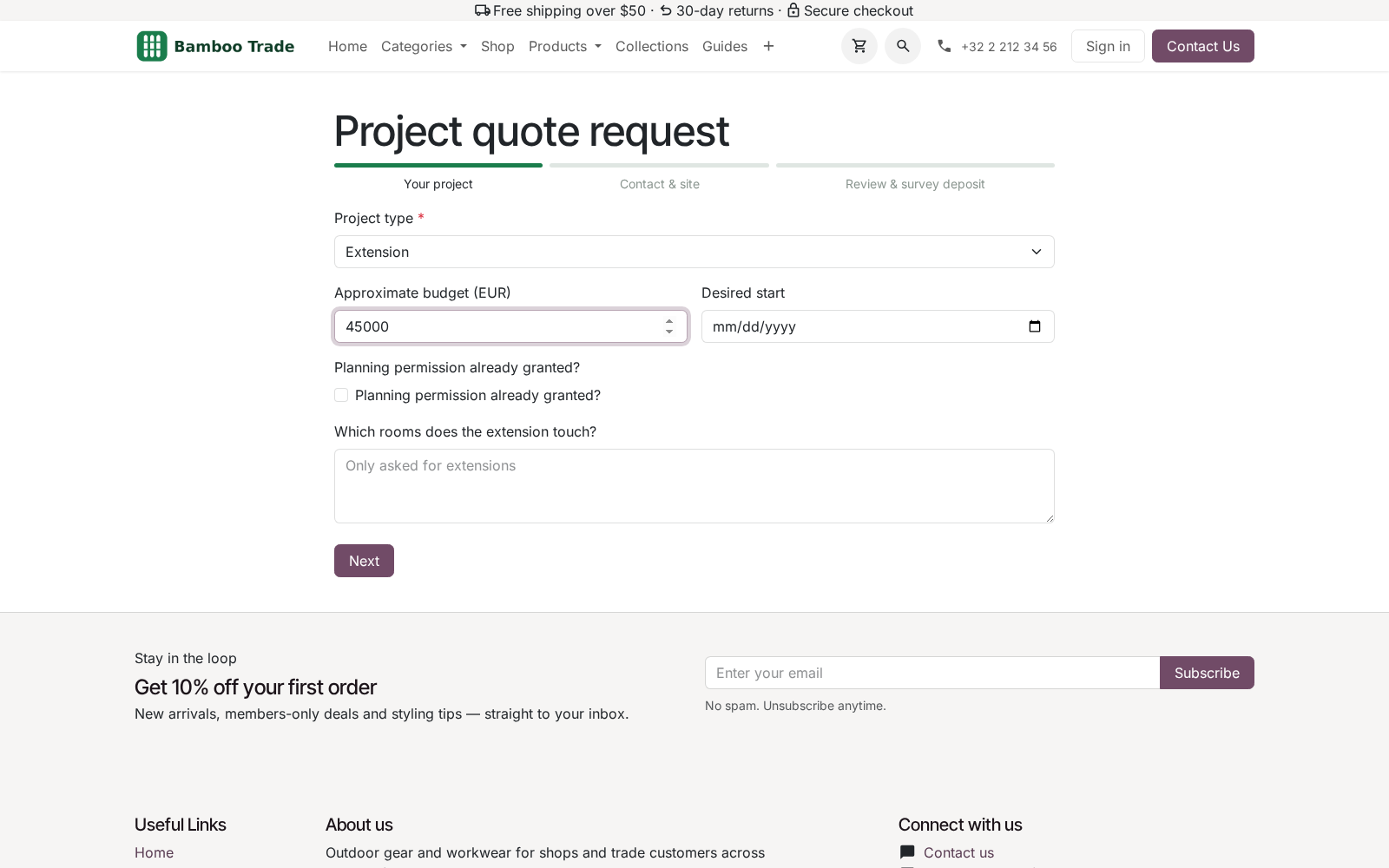
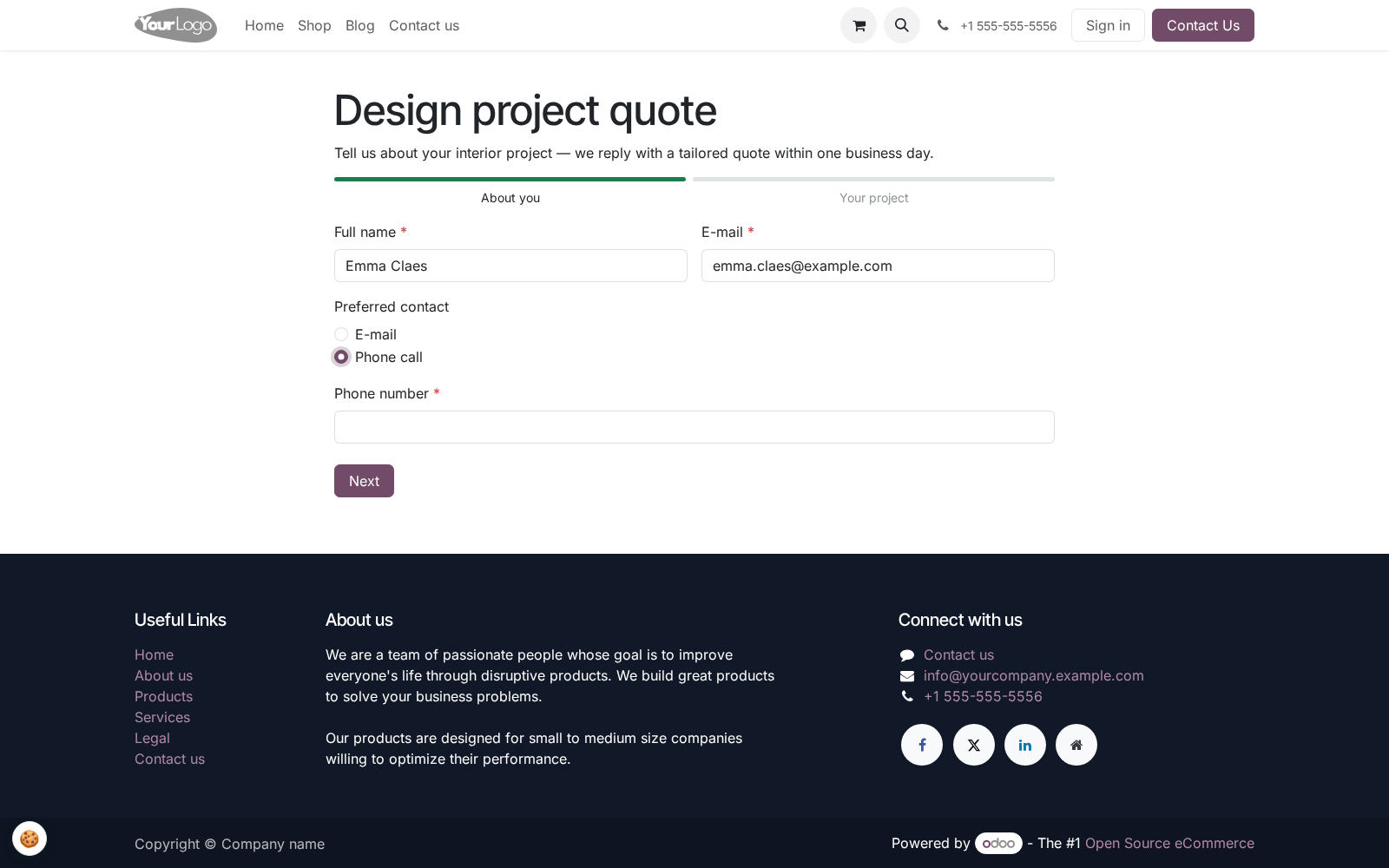
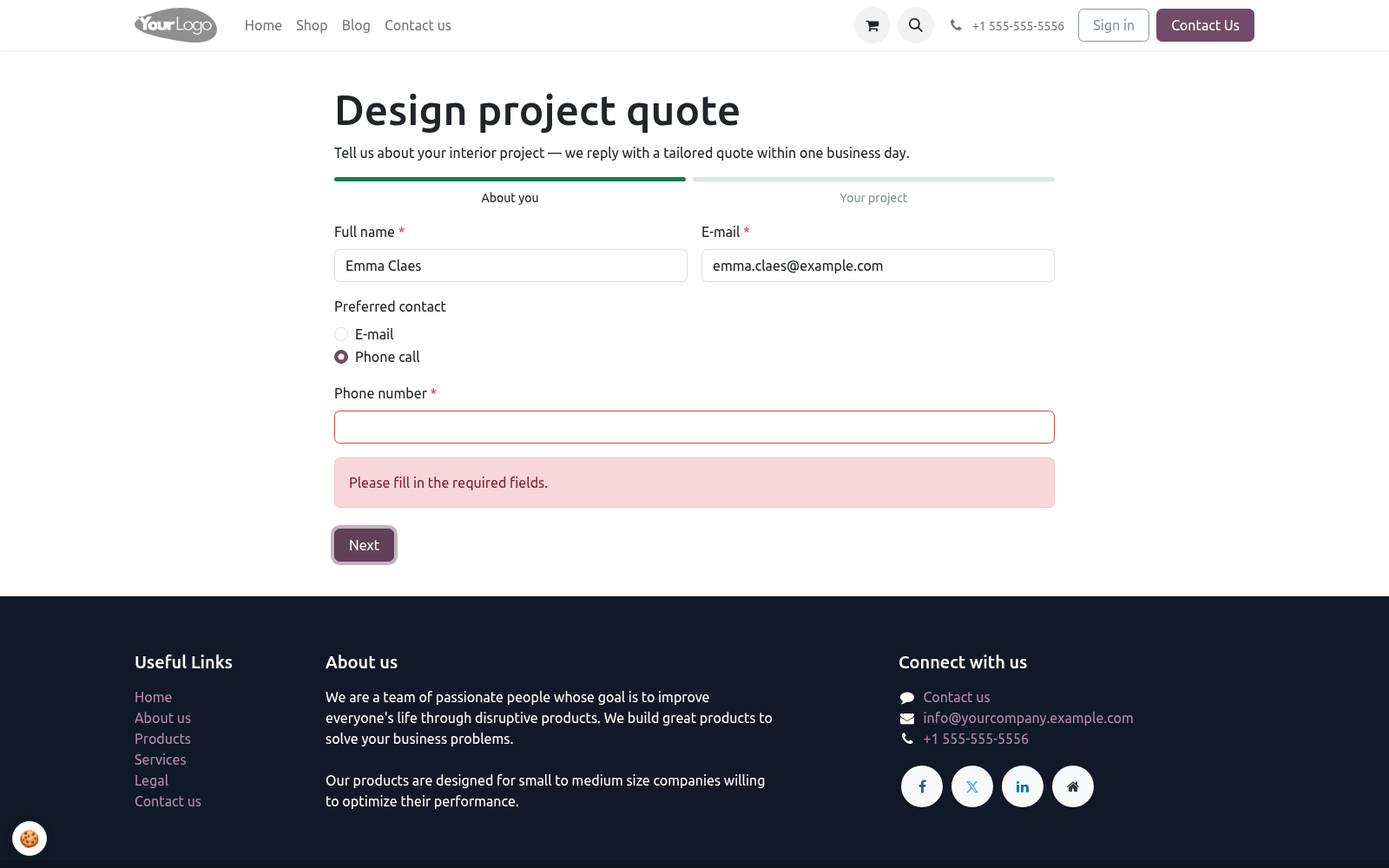
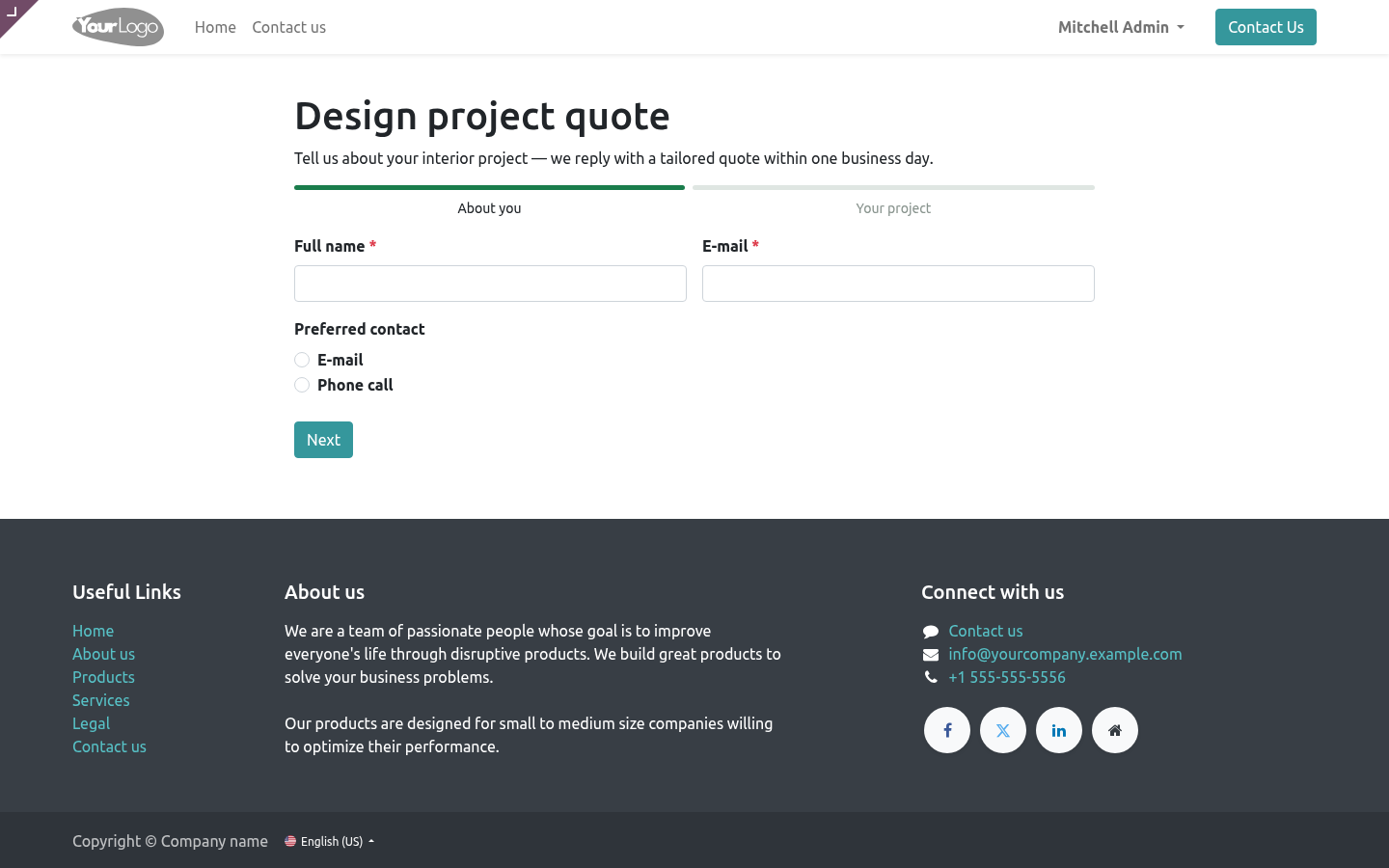
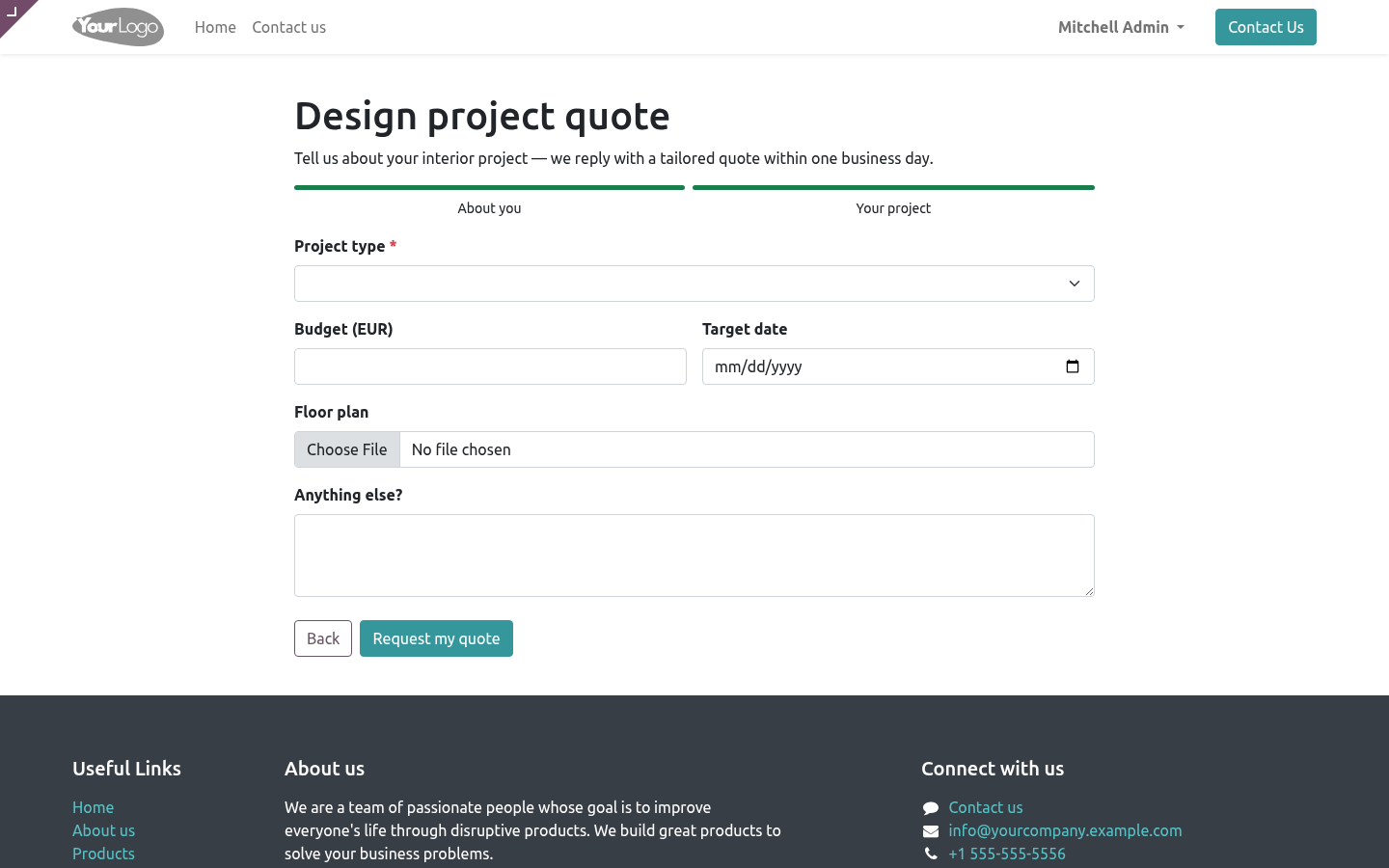
Steps — split a long form into steps, each with a title and an optional description. Visitors see a progress bar and move with Next / Back; every step is checked before they advance. A form with a single step shows no progress bar. Steps are ordered by drag handle in the backend.
Fields — 10 types: text, long text, e-mail, phone, number, date, dropdown, radio choices, checkbox and file upload. Per field: label, placeholder, required flag, the step it belongs to (empty = first step), an optional half-width layout to put two fields side by side, and for dropdown/radio the choices — one per line. Fields are ordered by drag handle too.
Conditional fields — any field can be visible when field X has value Y. The rule is evaluated in the browser (the field appears and disappears as the visitor types) and again on the server: a hidden required field never blocks a submission, and a visible one is always enforced — even against a hand-crafted request that bypasses the JavaScript.
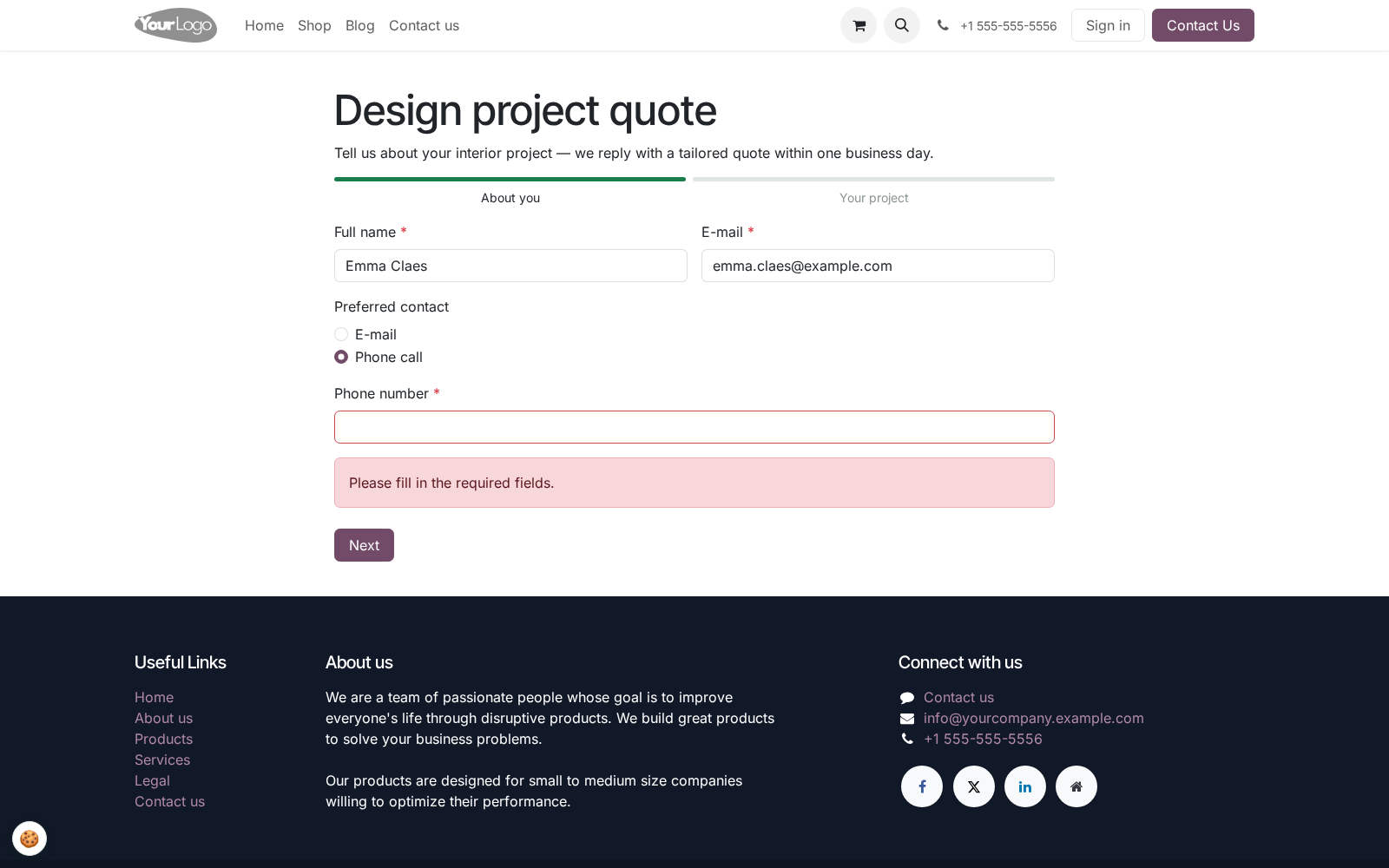
Server-side validation — every submission is re-validated in Python: required fields, e-mail format, numbers that parse, dropdown and radio answers that match the configured choices, required checkboxes and required files. The browser checks are a courtesy; the server is the law.
Spam protection, no CAPTCHA — an invisible honeypot field rejects naive bots, and every page render carries an HMAC-signed token (signed with your database secret): submissions faster than the form's minimum seconds (default 3) are rejected — bots fill forms instantly — and tokens expire after 24 hours. The token is single-use: one rendered page can be submitted once, a replay of the same token is refused with This form was already submitted, and reloading the page issues a fresh one. No third-party service, no visitor friction.
File uploads — up to 3 MB per file, checked server-side, stored as standard Odoo attachments (ir.attachment) on the submission. Oversized uploads are rejected on their encoded size, before the file is decoded into memory. Required file fields are enforced.
Retention (optional) — set Delete submissions after (days) on a form and a daily job removes submissions older than that, together with their uploaded files. 0 (the default) keeps them forever.
Payment step (optional) — charge a fixed amount or take the amount from a Number field of the form (donations, deposits, paid applications). The submission is stored as Awaiting payment and the visitor is sent to Odoo's standard /payment/pay flow with your enabled providers; a 10-minute cron marks the submission Paid once the transaction succeeds. Needs the Payment app.
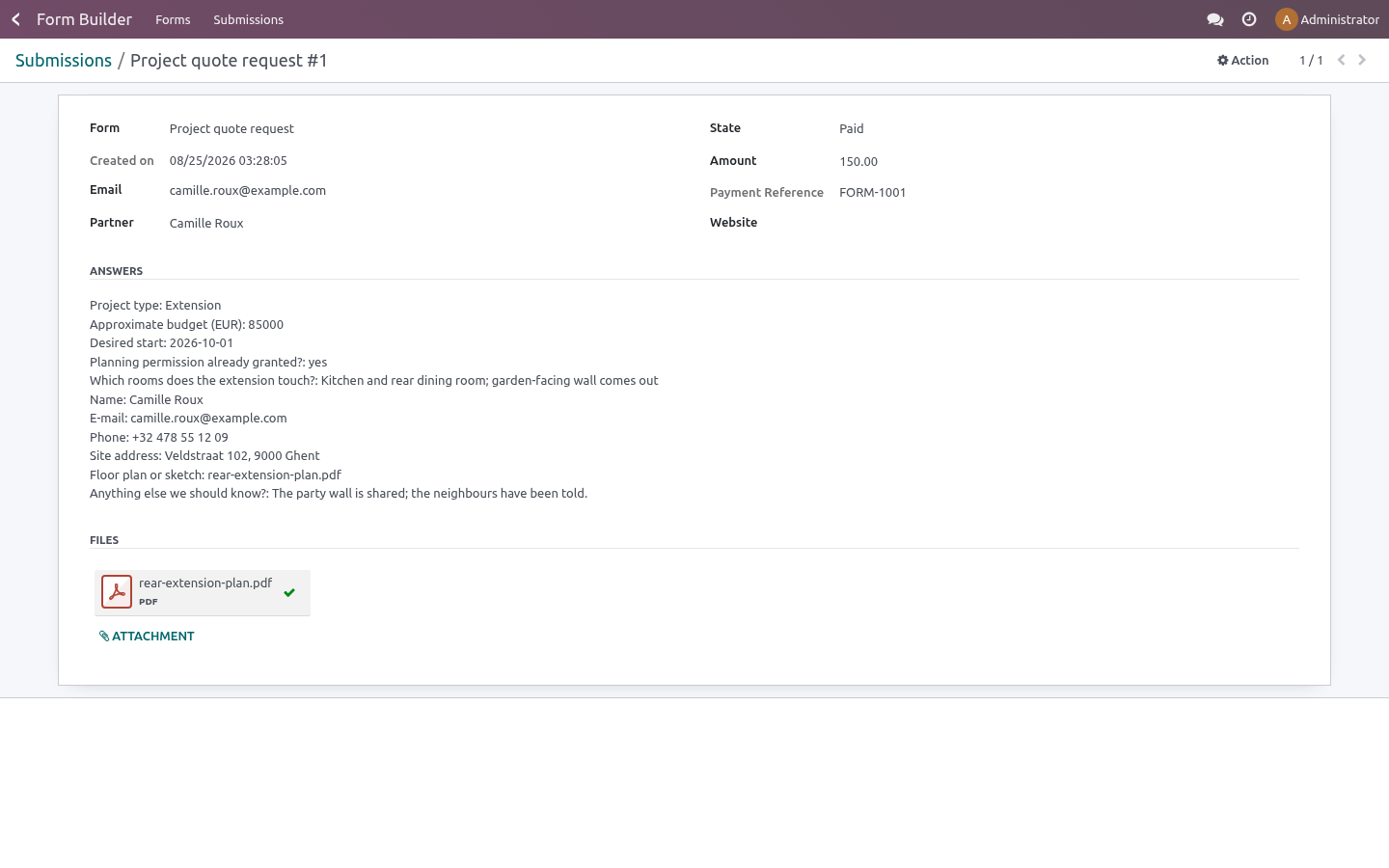
Submissions — stored with all answers and files; the sender is matched to an existing contact by e-mail, or a new contact is created. Search, filter, group by form, status or day, and export from the list view (native list export). Your team gets an instant e-mail notification at the addresses you configure; the visitor can receive a confirmation copy of their answers; each submission can create a CRM lead (needs CRM).
Access rights — Form Builder Pro / User reads forms and manages submissions; Form Builder Pro / Manager additionally designs forms, steps and fields. The internal notification address list is readable and editable by Managers only.
Frontend — framework-free JavaScript on plain Bootstrap classes: no OWL, no jQuery, no page-builder dependency. If your theme renders a website page, it renders these forms.
Tested — 23 automated tests, including a real-browser multi-step tour, green on each of Odoo 16, 17, 18, 19 and 20.
Getting started
Install BambooForge Form Builder Pro (Community or Enterprise; only the standard website app is required).
Open Form Builder ▸ Forms and create a form: name, description, button label, thank-you message.
Add steps (optional — skip for a single-page form) and fields: pick the type, tick Required where needed, drag the handles into order.
Set who is told: Notify on submission (comma-separated internal e-mails), optionally Confirmation e-mail to the visitor and Create a CRM lead.
Publish the form (the Go to Website button opens /form/<id>; the publish toggle is per website).
Submit it once yourself, then open Form Builder ▸ Submissions — your answers are there, grouped and exportable.
Usage
Building a form
Steps. Add one line per step — title (shown in the progress bar) and optional description. Order with the drag handle. Fields without a step land on the first step, so a single-page form needs no steps at all.
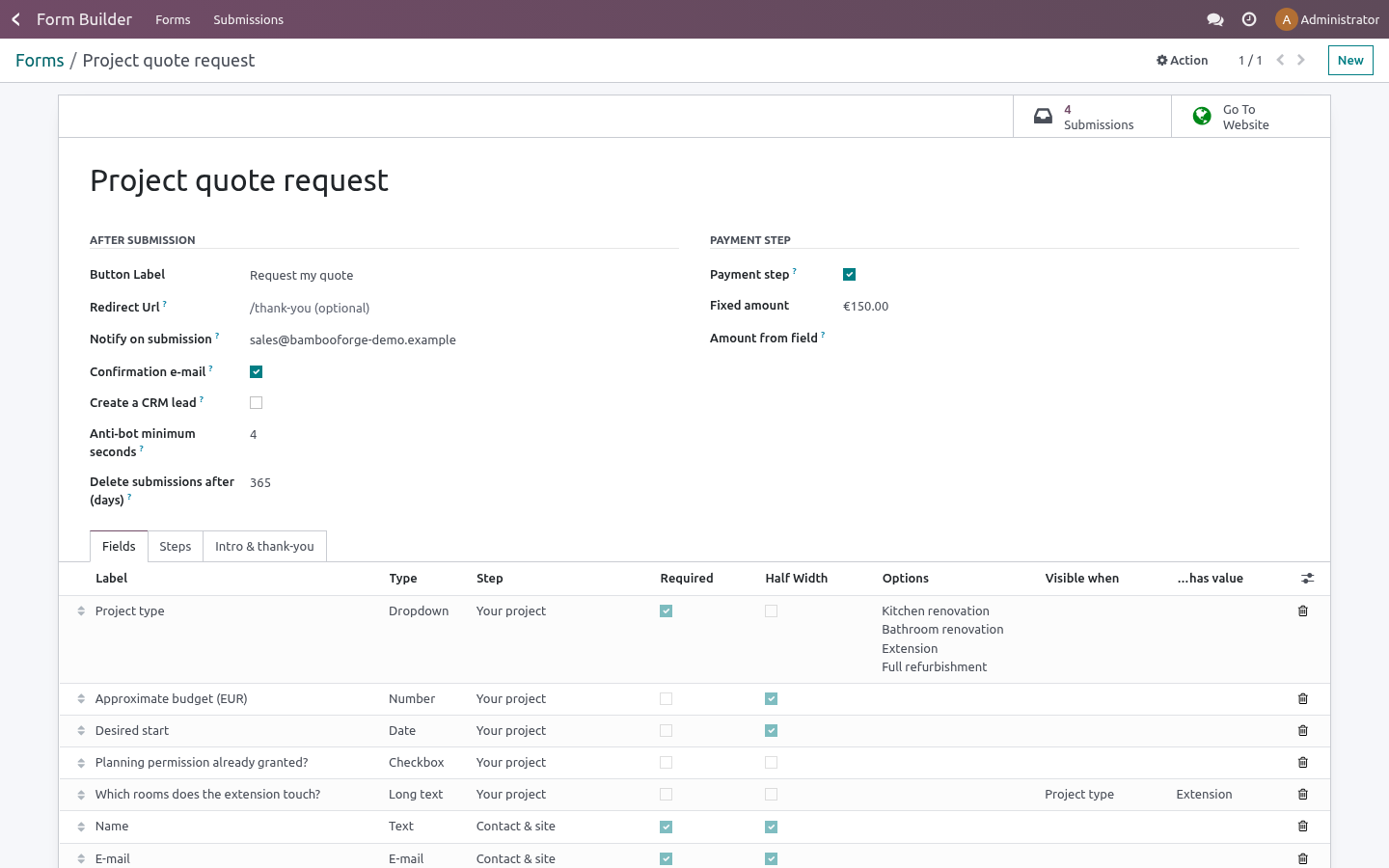
Fields. One line per field: label, type, step, required, placeholder. Half width renders two consecutive half-width fields side by side on wide screens. For Dropdown and Radio choices, enter the choices in Options — one per line; the server refuses any submitted value that is not in the list.
Conditions. Set Visible when to another field of the same form and …has value to the exact answer that reveals the field (for a checkbox use yes). The field appears live in the browser as the visitor answers and the same rule is re-checked server-side: hidden required fields never block, visible ones are always enforced. A field cannot depend on itself or on a field of another form — both are refused at save time.
After the visitor submits
The answers are validated server-side; any error is shown inline and nothing is stored until the submission is clean.
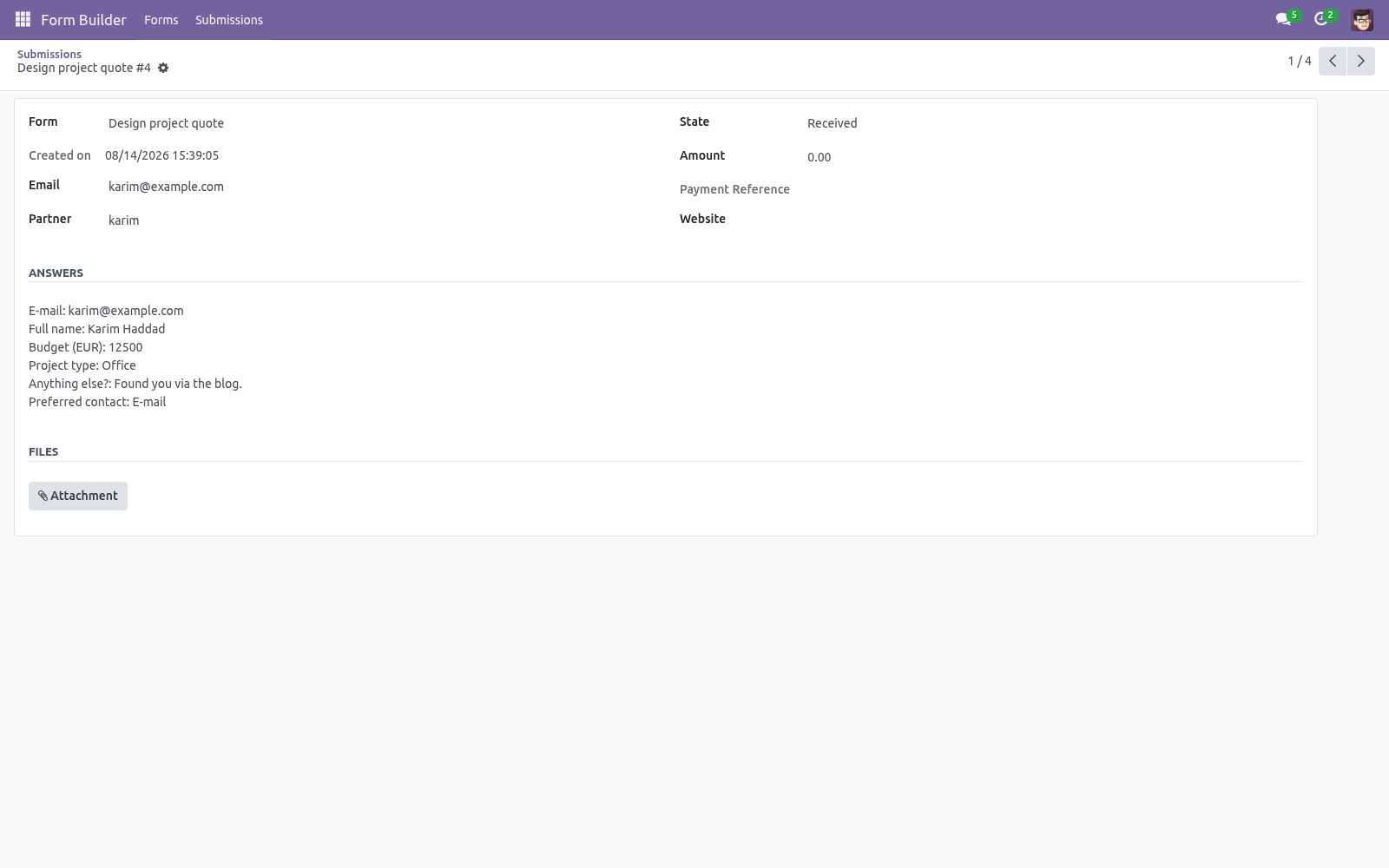
A submission is created with the answers, the uploaded files as attachments and the first E-mail field as the sender address. The sender is matched to an existing contact by e-mail (case-insensitive) or a new contact is created.
The internal notification e-mails go out immediately; the visitor gets a confirmation copy if enabled; a CRM lead is created if enabled and CRM is installed.
The visitor sees your thank-you message inline — or is sent to the redirect URL if you set one.
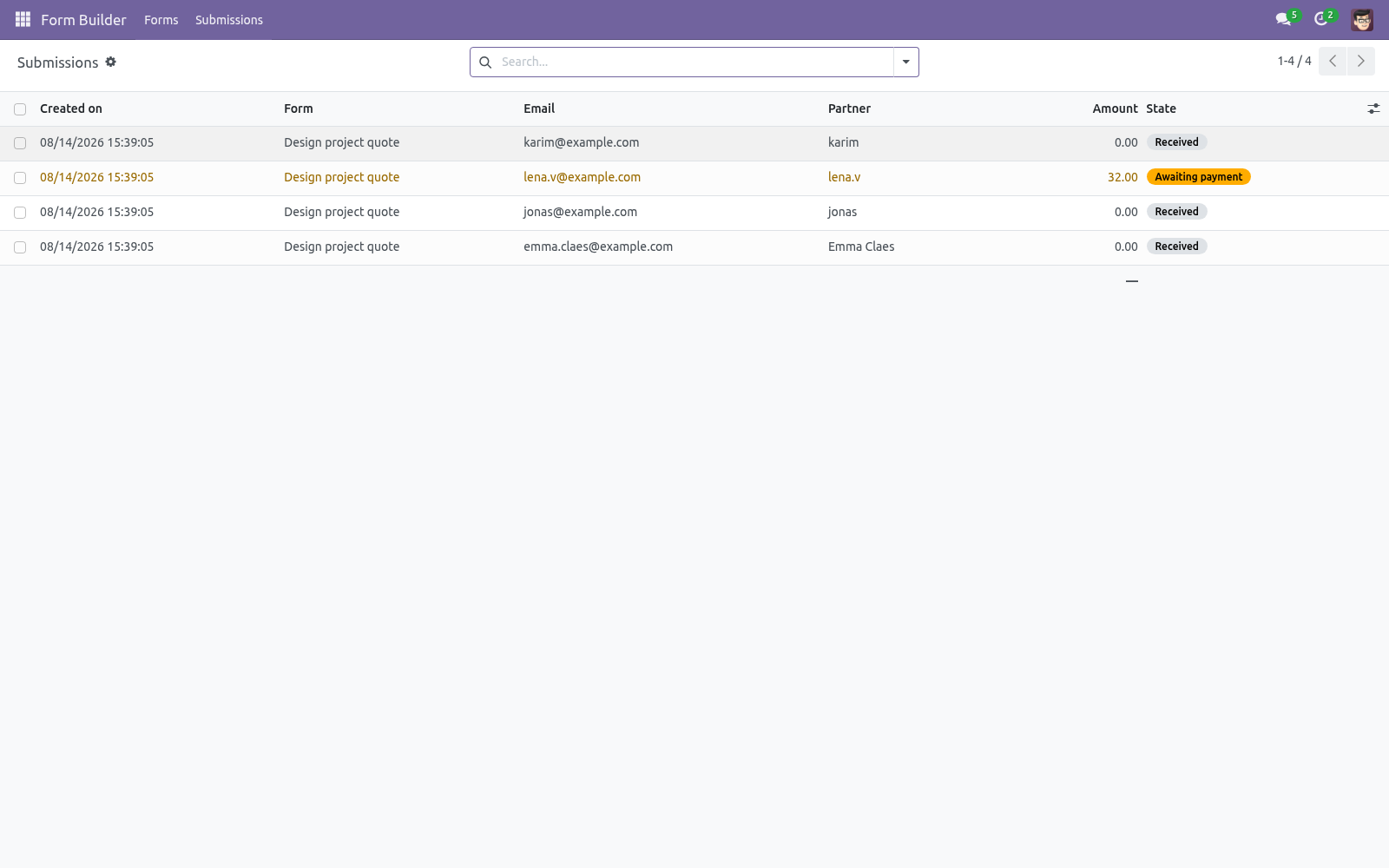
With a payment step, the flow changes after validation: the submission is stored as Awaiting payment, the visitor is redirected to /payment/pay with the amount pre-filled, and the notification e-mails are only sent once the cron has confirmed the transaction and moved the submission to Paid.
Working with submissions
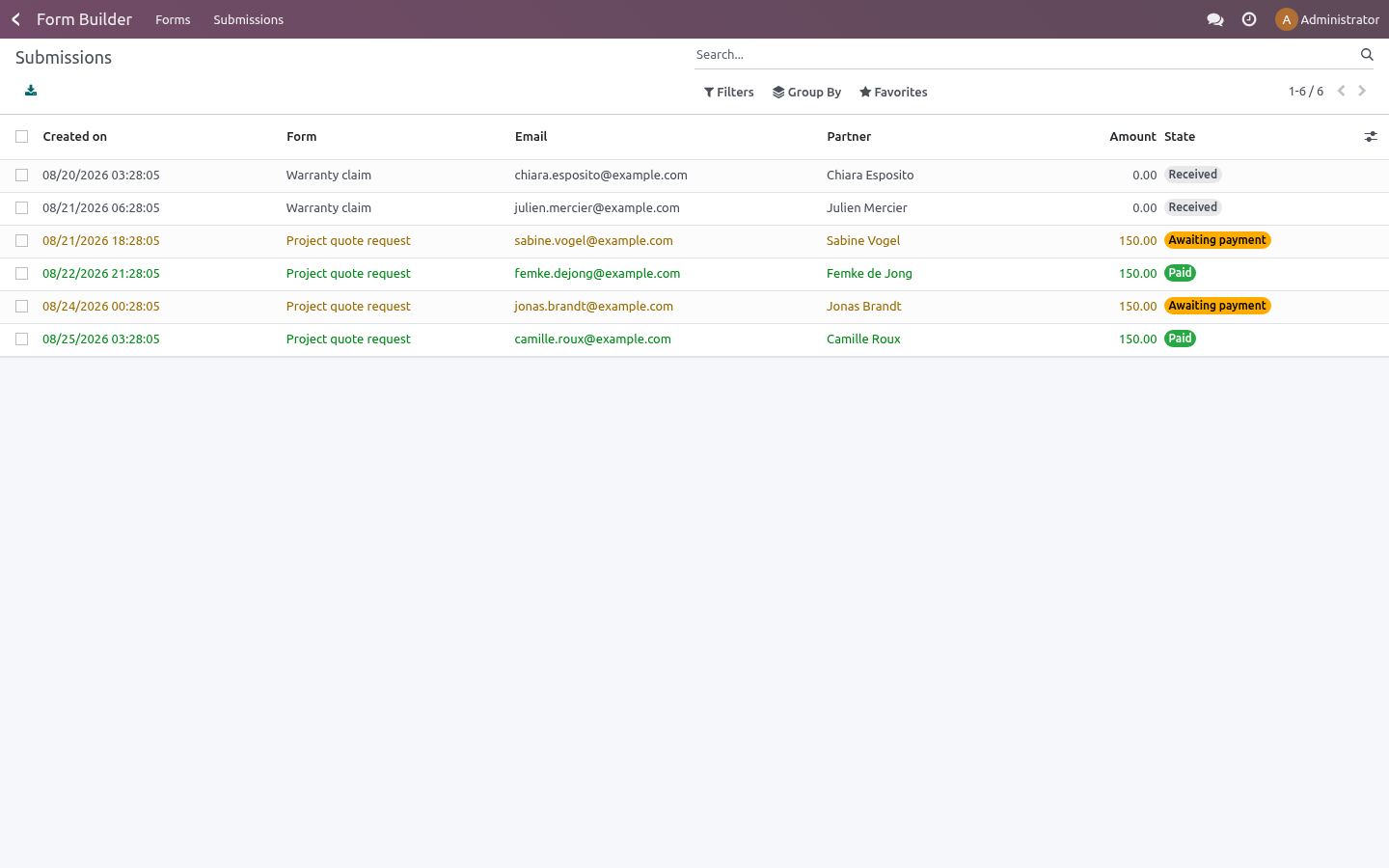
Form Builder ▸ Submissions is the inbox: filter by form or status (Received / Awaiting payment / Paid), group by form, status or day, and export the selection with the native list export. Each submission shows the readable answers, the linked contact, the attachments and — for payment forms — the amount, currency and payment reference. From a form, the Submissions smart button opens its own submissions directly.
Taking payments
Install the Payment app and enable at least one provider (Stripe, PayPal, Adyen, wire transfer…).
On the form, tick Payment step, then either set a Fixed amount or pick Amount from field — a Number field of the same form, so the visitor chooses the amount (donations, deposits). One of the two is required; saving refuses a payment form with neither.
The visitor pays through Odoo's standard payment page — your provider configuration and branding apply unchanged. The cron BambooForge Form Builder: confirm paid submissions runs every 10 minutes and marks the submission Paid as soon as the transaction is done, then sends the notifications.
An amount of zero (e.g. an empty optional Number field) skips the payment step and stores the submission as Received directly.
Stopping spam
Nothing to configure for the honeypot — it ships enabled and invisible. The timing check is per form: Anti-bot minimum seconds (default 3) is the minimum time between the page render and the submission; anything faster is rejected with a polite message. The render token is signed with your database secret and expires after 24 hours, so a form left open overnight simply needs a reload. It is also single-use: the page a visitor loaded can be submitted once — posting the same token again (a stuck Submit button, a replayed request, a bot hammering one captured page) is refused with This form was already submitted, and reloading the page hands out a fresh token. If a legitimate audience fills a tiny form very fast, lower the minimum; if a form attracts bots, raise it.
Keeping submissions only as long as you need
Delete submissions after (days) sets a retention window per form. Leave it at 0 and submissions are kept forever (the previous behaviour). Set it to, say, 90 and the daily job BambooForge Form Builder: retention cleanup deletes every submission of that form older than 90 days together with its uploaded files. Deletion is permanent — export what you need first.
Configuration
Form options
Option (per form) |
Effect |
|---|---|
Button label |
Text of the submit button (default Submit). |
Thank-you message |
Shown inline after a successful submission. |
Redirect URL |
If set, the visitor is sent here instead of the message. |
Notify on submission |
Comma-separated internal e-mails that receive every submission. Visible to Form Builder Pro / Manager only. |
Confirmation e-mail |
Send the visitor a copy of their answers (uses the first E-mail field). |
Create a CRM lead |
One lead per submission, with the answers in the description. Needs CRM. |
Anti-bot minimum seconds |
Submissions faster than this after the page rendered are rejected (default 3). The render token is single-use on top of that, so one page can only be submitted once. |
Delete submissions after (days) |
Retention window: a daily job deletes submissions of this form older than this, with their uploaded files. 0 (the default) keeps them forever. |
Company |
The company the form (and every submission it collects) belongs to. |
Payment step / Fixed amount / Amount from field |
Enable the payment flow; set a fixed amount or point at a Number field. Needs the Payment app. |
Field types
Type |
Validation on submit |
|---|---|
Text / Long text |
Required if flagged. |
Must be a valid e-mail address; the first E-mail field becomes the sender address of the submission. |
|
Phone |
Free text input with a phone keyboard on mobile. |
Number |
Must parse as a number (comma or dot decimals accepted); can feed the payment amount. |
Date |
Native date picker. |
Dropdown / Radio choices |
The answer must be one of the configured options. |
Checkbox |
Stored as yes when ticked; a required checkbox must be ticked. |
File upload |
Up to 3 MB, stored as an attachment; required files are enforced. |
Access rights
Form Builder Pro / User — read forms, manage and export submissions.
Form Builder Pro / Manager — additionally create and design forms, steps and fields.
Website visitors need no account: the form page and the submit endpoint are public, protected by the honeypot, the signed token and the server-side validation.
FAQ
- How is this different from Odoo's standard form snippet?
The standard website form snippet posts one page of fields into a single model and stops there: no steps, no progress bar, no conditional visibility, no payment step, no file-size control and no submission browser — answers end up in whatever model the snippet wrote to. Form Builder Pro is a form engine: multi-step, conditional, payable, with every submission stored with its files in a searchable, exportable inbox.
- Which payment providers can I use?
Any provider enabled in your Odoo's Payment app — Stripe, PayPal, Adyen, bank wire… The payment step hands the visitor to Odoo's own /payment/pay page, so your existing provider configuration, credentials and branding apply unchanged.
- Where are uploaded files stored?
As standard Odoo attachments (ir.attachment) linked to the submission — the same storage and filestore your documents use, covered by your existing backups. Files are capped at 3 MB each, checked server-side.
- What about GDPR?
Submissions live in your database only. Answers, files and e-mail addresses are never routed through BambooForge or any third-party form or CAPTCHA service — the spam protection is entirely local. Deleting a submission deletes its answers; you remain the only controller of the data your forms collect. For data minimisation you can now set an automatic retention window per form (Delete submissions after (days)): a daily job removes older submissions and their uploaded files for you.
- Does it work with my website theme?
Yes. The form page renders inside your theme's layout, the markup uses plain Bootstrap classes, and the frontend is framework-free JavaScript — no OWL, no jQuery, no page-builder dependency.
- Why was a fast test submission rejected?
That is the anti-bot timing check: submissions faster than the form's Anti-bot minimum seconds (default 3) after the page rendered are refused. Wait a few seconds and submit again, or lower the minimum on the form.
- Can a visitor skip a required field?
Only when the field is genuinely hidden by its visibility condition — a hidden required field never blocks. Every visible required field is enforced server-side, even against requests that bypass the browser checks.
- Is it tested?
Yes: 23 automated tests — field validation of every type, the hidden-required rule, honeypot and timing rejections, file upload, the payment flow, the unpublished-form guard — including a real-browser multi-step tour, on each of Odoo 16, 17, 18, 19 and 20.
How we make sure it works
Before every release, 36 automated checks run against this app on Odoo 16, 17, 18, 19 and 20. Among them:
A replayed nonce is refused by the database.
A plain employee does not see the menu.
The agent builds nothing.
A plain employee never reads the inbox.
The visitor sees only published forms.
The complete list is in the source you receive.
Support
E-mail — support@bambooforge.dev. Every request is answered within 24 hours, setup help included.
What to send — your Odoo version and edition, the form's configuration (steps, field types, payment options) and for submission issues the exact error message shown on the website or the server log around bf_form.
Money-back guarantee — report a bug within 2 months of purchase; if we cannot resolve it within 15 days, you get a full refund.
Source — the complete OPL-1 source is included; extend it your way.
What it does not do
Said before you buy, because it is the half that decides whether the app fits:
Use a third-party form service: every form is rendered and stored in your Odoo.
Show a progress bar on a single-step form.
Depend on a page builder: the frontend is plain JavaScript on Bootstrap classes.
Install
Copy bambooforge_form_builder into your addons path and update the app list, or install the ZIP from the Odoo Apps Store.
Install Form Builder for Website with Payment.
Open Form Builder - its menus are Forms, Submissions.
Changelog
20.0.1.3.3
Built for Odoo 20: record rules and access rights rewritten onto Odoo 20's single ir.access model, the screens rebuilt on Owl 3, and every icon moved to the icon set Odoo 20 ships.
20.0.1.1.0 (2026-08-15)
Anti-bot: the HMAC-signed render token is now single-use. A rendered page can be submitted once; posting the same token again is refused with This form was already submitted, and reloading the page issues a fresh token.
New per-form Delete submissions after (days) setting with a daily job that removes expired submissions and their uploaded files. 0 (the default) keeps everything, as before.
The internal notification address list (Notify on submission) is now visible to Form Builder Pro / Manager only.
Uploads are rejected on their encoded size before being decoded — the 3 MB cap is unchanged, it is simply enforced earlier.
New Company on the form; submissions carry it too.
20.0.1.0.0 (2026-08-14)
Initial release: multi-step forms with progress bar, drag-handle ordering of steps and fields; 10 field types (text, long text, e-mail, phone, number, date, dropdown, radio, checkbox, file upload up to 3 MB stored as attachments); conditional visibility evaluated in the browser and re-enforced server-side; full server-side validation (required, e-mail format, numbers, dropdown/radio choices); CAPTCHA-free spam protection with an invisible honeypot and an HMAC-signed render timestamp (configurable minimum seconds, 24-hour token expiry); optional payment step with fixed or field-driven amount through the standard /payment/pay flow and a 10-minute confirmation cron; submissions with answers, files and contact matching by e-mail, searchable, groupable and exportable; instant internal e-mail notifications, optional confirmation copy to the visitor and optional CRM lead per submission; inline thank-you message or redirect URL; per-website publishing with SEO metadata at /form/<id>; User and Manager access groups; 23 automated tests including a real-browser multi-step tour on each of Odoo 16, 17, 18, 19 and 20.