 BambooForge Labs
Financial Reports Builder: P&L and Balance Sheet
Build a P&L, balance sheet or any statement your accountant asks for from account prefixes and formulas, and drill down to the entries.
Available for Odoo 16.0, Odoo 17.0, Odoo 18.0, Odoo 19.0, Odoo 20.0. Technical name bambooforge_fin_reports.
Transcript of the walkthrough (Odoo 20)
Financial Reports Builder: P&L and Balance Sheet. Build a P&L, balance sheet or any statement your accountant asks for from account prefixes and formulas, and drill down to the entries. Said before you buy, because it is the half that decides whether the app fits: In the next few minutes: financial reports builder: p&l and balance sheet, then a line is a handful of account codes, then …or a handful of account types, then formulas, over lines and nothing else, then branches count. Then what this app deliberately does not do, so you can tell before you buy whether it fits.
Everything lives under Financial Reports then Report Builder. 1. Copy bambooforge_fin_reports into your addons path and update the app list, or install the ZIP from the Odoo Apps Store. 2.
Install Financial Reports Builder: P&L and Balance Sheet. 3. Open Financial Reports - its menus are Report Builder. Financial Reports Builder: P&L and Balance Sheet.
Odoo Community ships a trial balance and a general ledger. The statements a business is actually run on — a profit and loss laid out the way the owner reads it, a balance sheet in the local format, a contribution report per branch — are in Enterprise. This builds them out of two things anybody in finance already thinks in: account prefixes, and formulas over other lines. A line is a handful of account codes.
Accounting › Reporting › Report Builder › Financial Reports. Each line names accounts the way people say them out loud: …or a handful of account types. Every chart of accounts in the world numbers its accounts differently. They all carry the same Odoo account types.
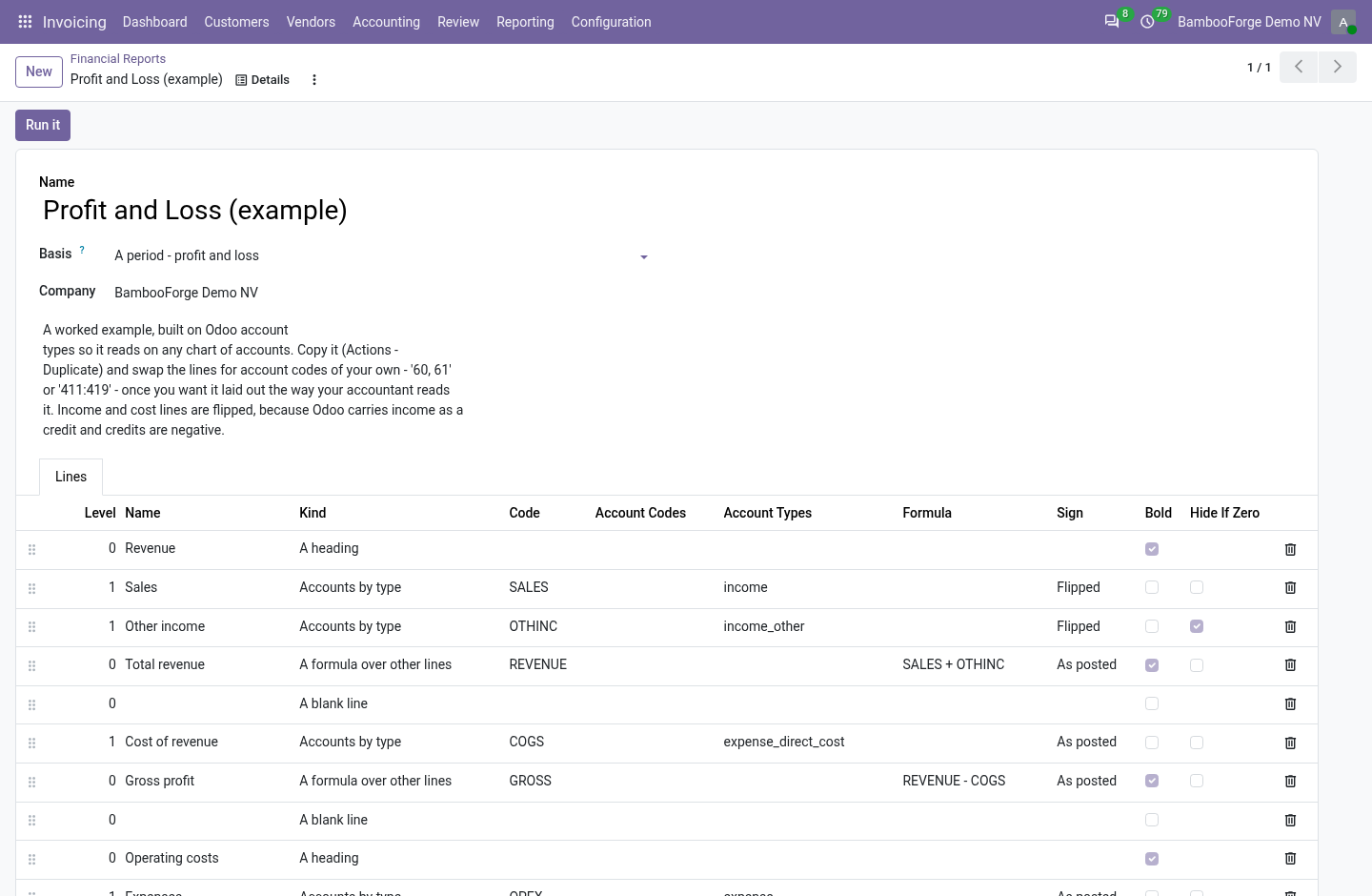
A line of kind Accounts by type takes income, income_other and reads the same on a French chart, a US chart and a Brazilian one. A trailing star takes the family: expense is every expense type this version has — and every expense type a later version adds. 19.0 added expense_other; a report written on expense in 16.0 picks it up without being touched. Formulas, over lines and nothing else.
Give a line a code — GROSS, OPEX — and write arithmetic on the next one. A formula may name a line further down; the run resolves in passes. What it may not do is reach anything except those figures. The namespace it evaluates in holds floats and nothing else — no record, no environment, no cursor.
That restraint is deliberate and worth stating plainly: Odoo's safe_eval restricts bytecode and dunder names, but it does not wrap the objects handed to it. A live recordset in that namespace is read and write access to the whole database for anybody who can edit a report line — and a report definition is exactly the kind of thing people export and email to each other. Branches count. A branch is not another company — it posts under its own company_id while sharing its parent's chart of accounts, and Odoo installs no chart for it at all.
(Branch accounting arrived with 17.0; on 16.0 an entry like that is refused by Odoo itself.) A statement for the parent counts what its branches posted, and a statement written for a branch finds the chart it actually posts on. Filtering on equality instead would make a group report short by exactly the branch, with nothing on the page to say so. It tells you what it left out. This is the failure mode of every hand-built statement, and the reason they are quietly distrusted: somebody opens account 6035, it falls in nobody's prefix, and the report still foots — because the totals are formulas over the lines that do exist.
Every run checks which accounts moved in the period and landed on no line, and says so at the top, with a button straight to the entries. An account on no line is a five-second fix once you know about it and a wrong board pack for a year if you don't. A period, or a position. A profit and loss covers a period: the figures run from the start date to the end date.
A balance sheet is a position: it is everything the company holds as at the end date, opening balance and all. A report says which it is, and the run obeys it — a position ignores the start date entirely. This is the one mistake in this trade that nobody catches by looking. A balance sheet run as a period shows the movement of the year under a title that says balance sheet: the bank line is the year's net cash flow, the capital line is empty in every year but the first, and every figure on it is wrong in a way that reads perfectly.
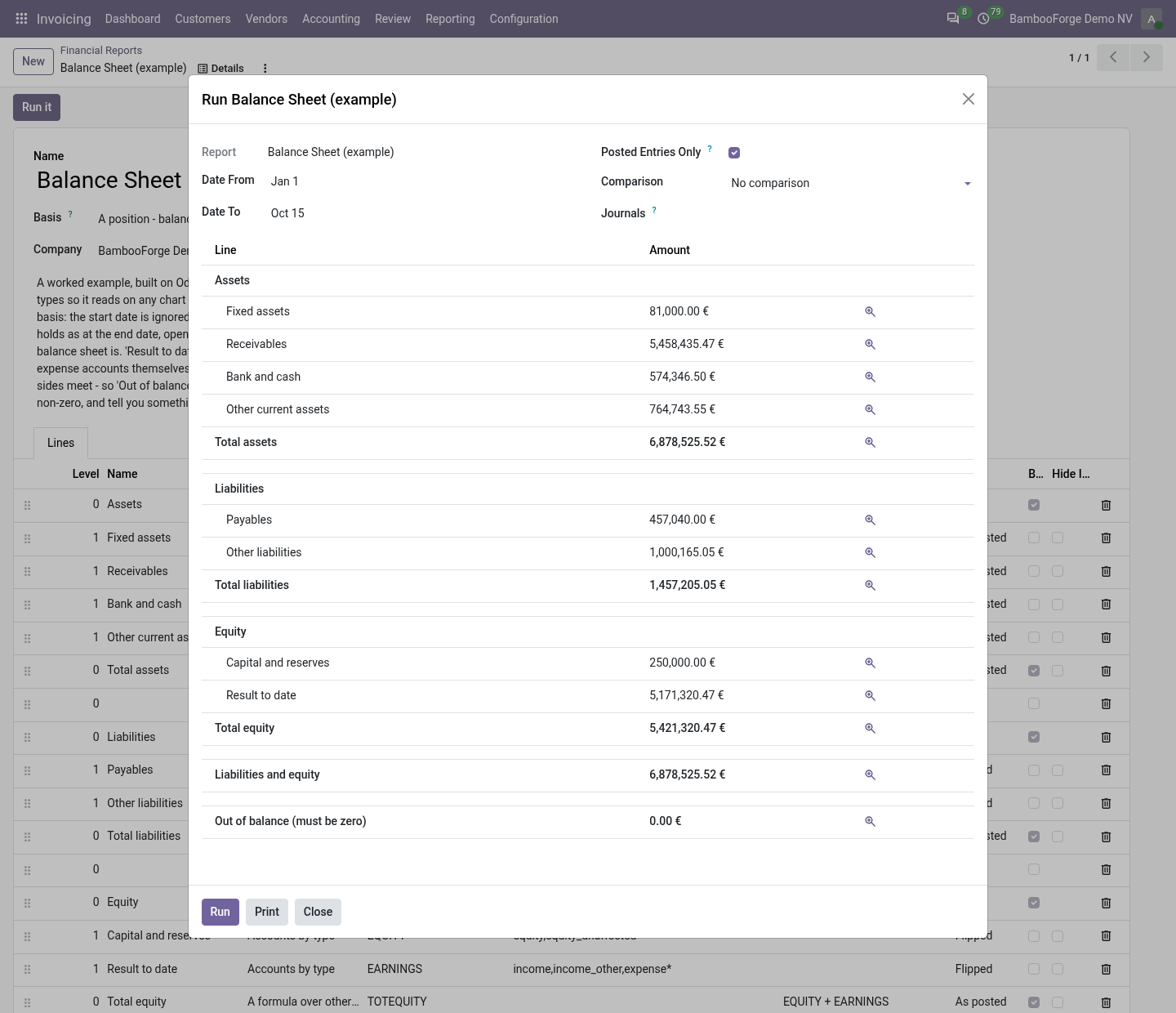
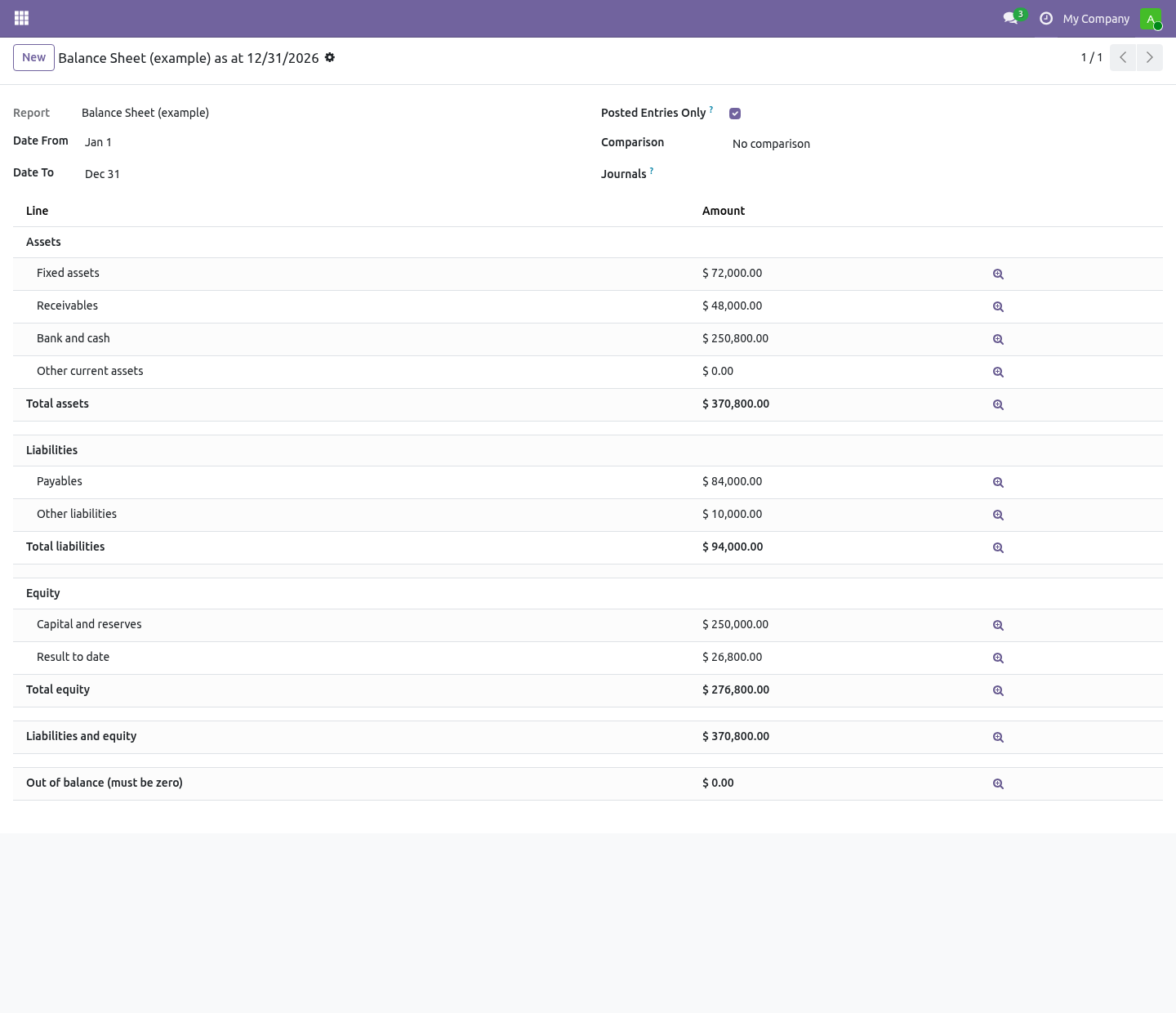
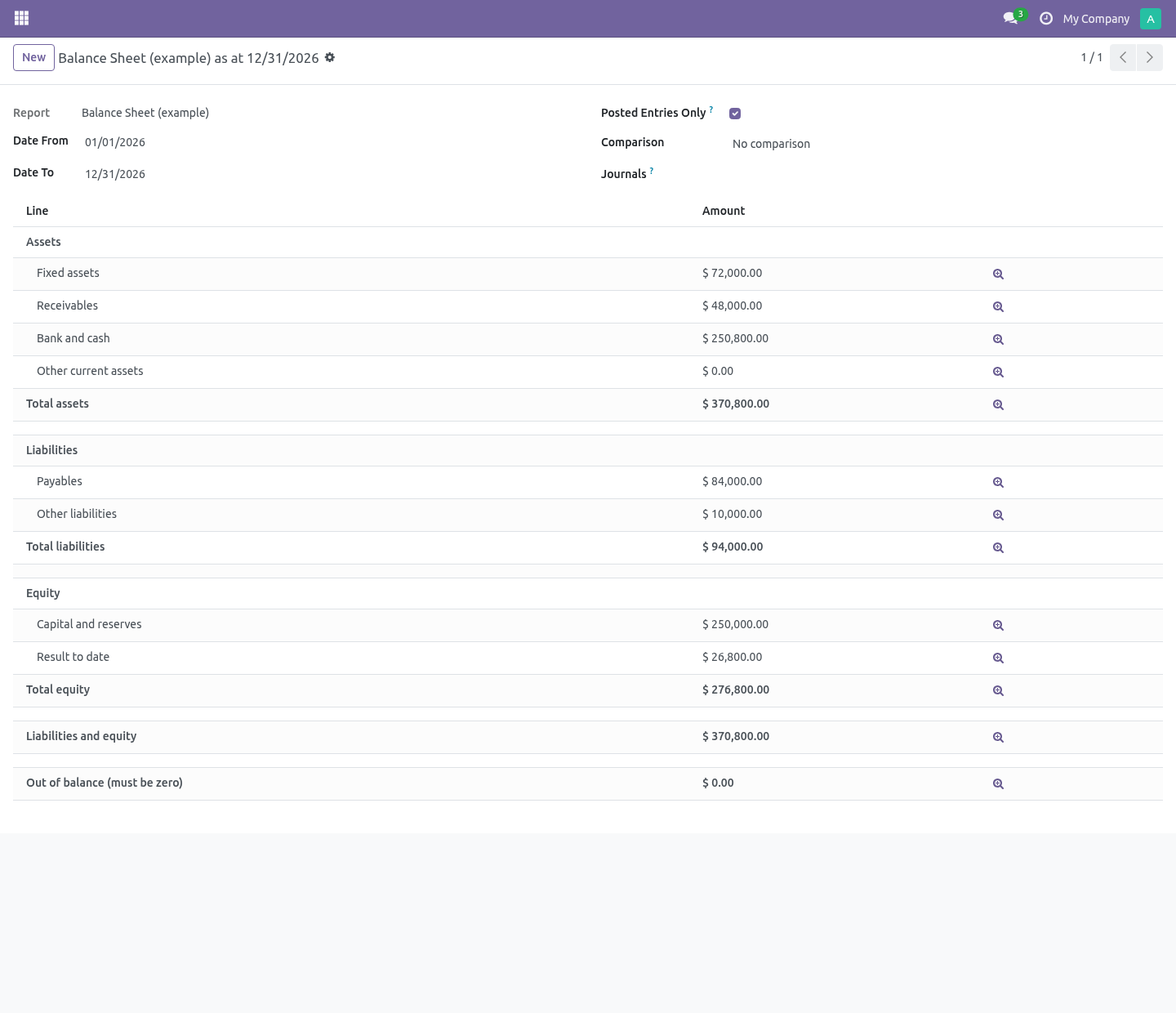
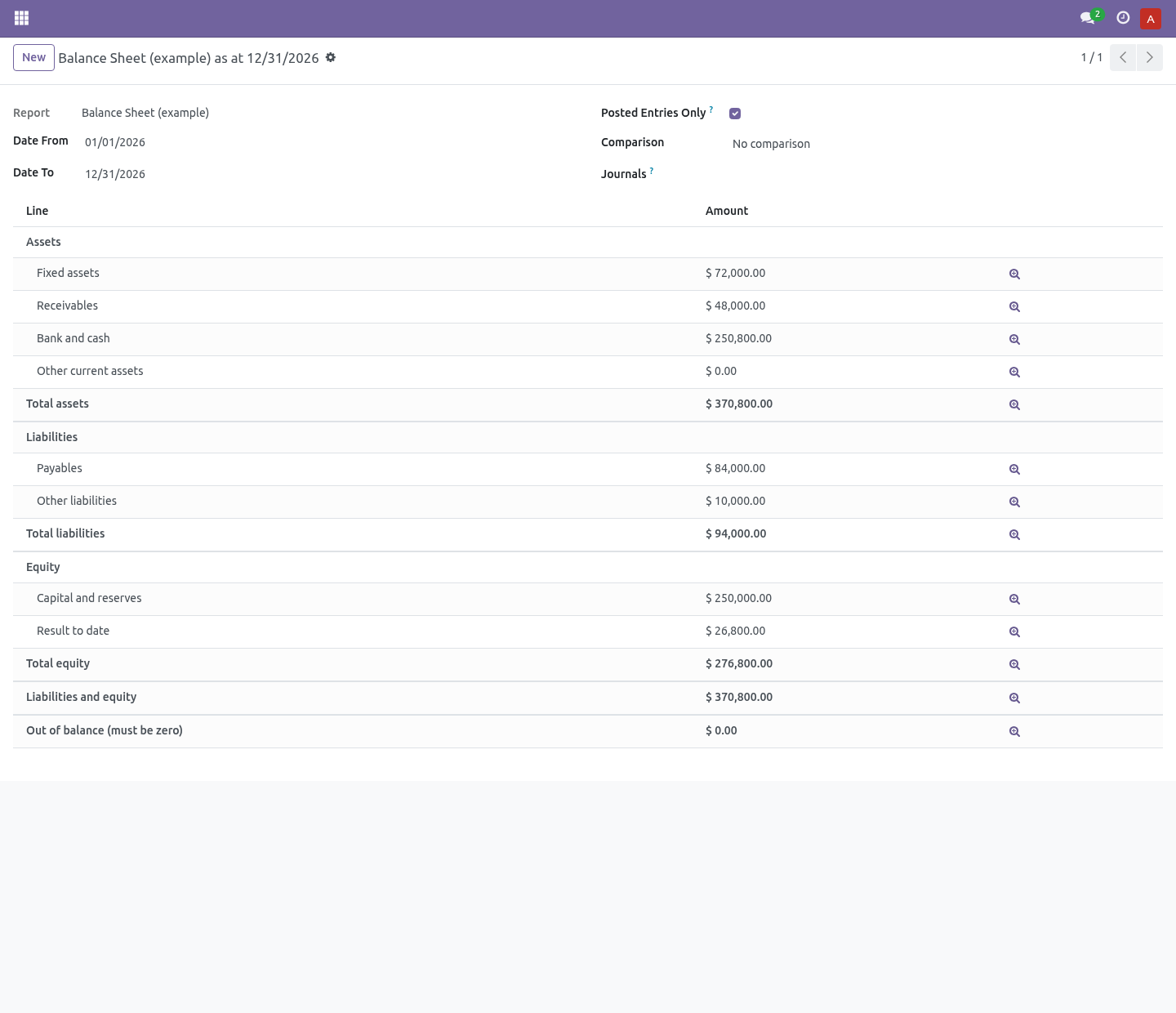
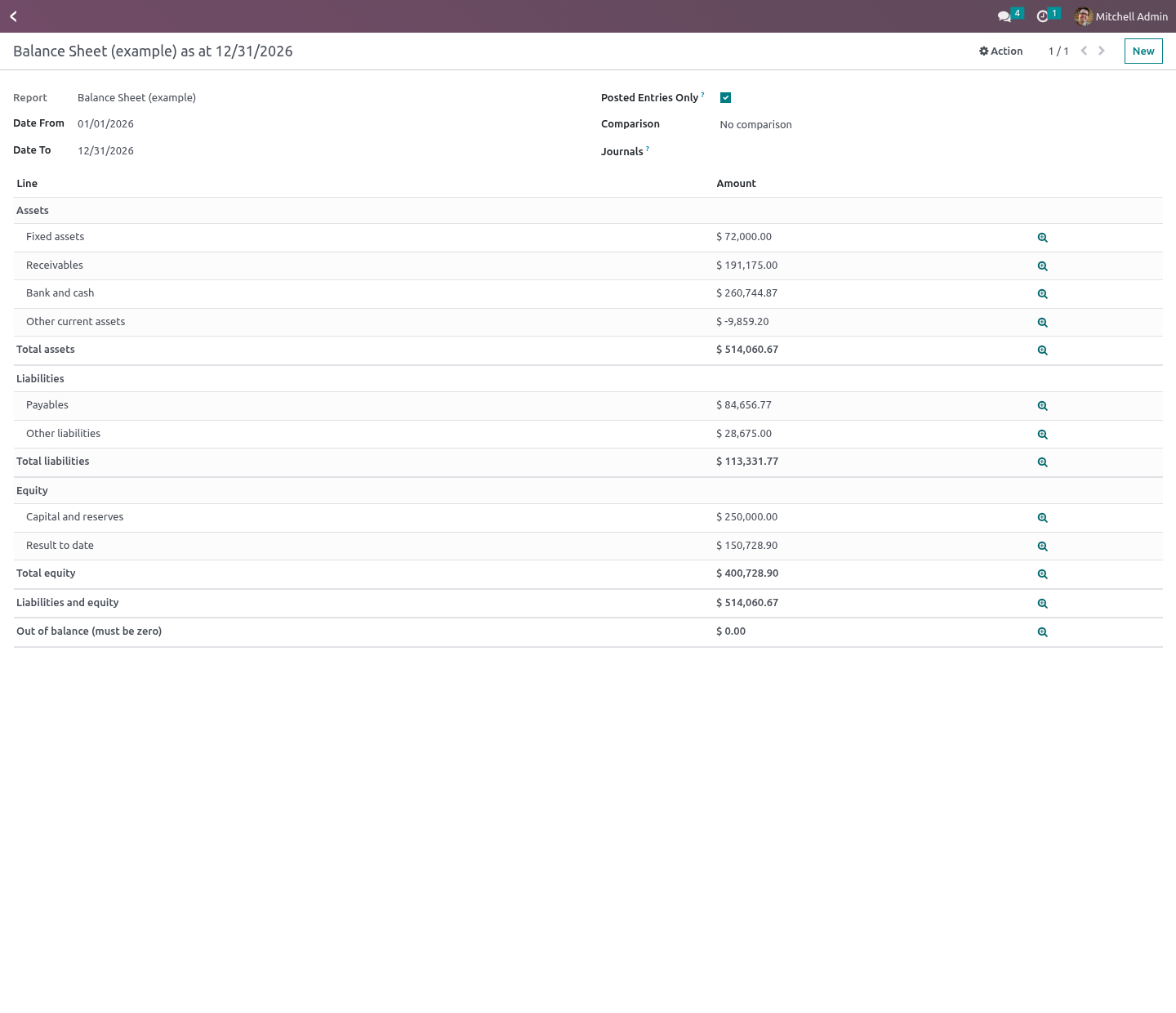
The balance sheet shipped with the module is set to position. It can tell you it does not balance. The last line of the example balance sheet is Out of balance (must be zero), and the result above it is worked out from the income and expense accounts themselves. That is a deliberate choice against the easy one.
A "result for the period" computed as assets less liabilities less equity is not a result — it is whatever makes the two sides meet. A balance sheet built that way cannot come out wrong, which means it cannot come out right either: the day somebody lays their sheet out on their own prefixes and forgets 47, seven thousand in suspense disappears into the plug and the statement still foots. Worked out honestly, the last line is non-zero and somebody goes and looks. Compare, drill, print Posted only, or including drafts — off is what you want while closing and never what you want when reporting, so it is on by default and printed on the PDF when it is off.
Per journal and per company. Print a PDF that keeps the indentation and the bold. Who can do what. A formula is checked before it is saved: it takes + - / and abs, min, max, round, sum over other lines' codes.
Raising to a power is left out deliberately — 999*9 is nine characters and occupies a worker until somebody kills it, and writing report lines is one of the lower rights here. Financial Report Designer can write the definitions everybody else runs, and implies the reader. Report definitions are fenced per company. A run belongs to the person who ran it — including the numbers it produced, which is not everybody's business.
The complete manual is at docs dot bambooforge dot dev, the demo database is linked from the store page, and support answers within twenty-four hours. Links are in the description.
Transcript of the walkthrough (Odoo 19)
Financial Reports Builder: P&L and Balance Sheet. Build a P&L, balance sheet or any statement your accountant asks for from account prefixes and formulas, and drill down to the entries. Odoo Community ships a trial balance and a general ledger. The statements a business is actually run on — a profit and loss laid out the way the owner reads it, a balance sheet in the local format, a contribution report per branch — are in Enterprise.
In the next few minutes: financial reports builder: p&l and balance sheet, then a line is a handful of account codes, then …or a handful of account types, then formulas, over lines and nothing else, then branches count. Then what this app deliberately does not do, so you can tell before you buy whether it fits. Everything lives under Financial Reports then Report Builder. Financial Reports Builder: P&L and Balance Sheet.
Odoo Community ships a trial balance and a general ledger. The statements a business is actually run on — a profit and loss laid out the way the owner reads it, a balance sheet in the local format, a contribution report per branch — are in Enterprise. This builds them out of two things anybody in finance already thinks in: account prefixes, and formulas over other lines. A line is a handful of account codes.
Accounting › Reporting › Report Builder › Financial Reports. Each line names accounts the way people say them out loud: …or a handful of account types. Every chart of accounts in the world numbers its accounts differently. They all carry the same Odoo account types.
A line of kind Accounts by type takes income, income_other and reads the same on a French chart, a US chart and a Brazilian one. A trailing star takes the family: expense is every expense type this version has — and every expense type a later version adds. 19.0 added expense_other; a report written on expense in 16.0 picks it up without being touched. Formulas, over lines and nothing else.
A formula may name a line further down; the run resolves in passes. What it may not do is reach anything except those figures. The namespace it evaluates in holds floats and nothing else — no record, no environment, no cursor. That restraint is deliberate and worth stating plainly: Odoo's safe_eval restricts bytecode and dunder names, but it does not wrap the objects handed to it.
A live recordset in that namespace is read and write access to the whole database for anybody who can edit a report line — and a report definition is exactly the kind of thing people export and email to each other. Branches count. A branch is not another company — it posts under its own company_id while sharing its parent's chart of accounts, and Odoo installs no chart for it at all. (Branch accounting arrived with 17.0; on 16.0 an entry like that is refused by Odoo itself.) A statement for the parent counts what its branches posted, and a statement written for a branch finds the chart it actually posts on.
Filtering on equality instead would make a group report short by exactly the branch, with nothing on the page to say so. It tells you what it left out. This is the failure mode of every hand-built statement, and the reason they are quietly distrusted: somebody opens account 6035, it falls in nobody's prefix, and the report still foots — because the totals are formulas over the lines that do exist. Every run checks which accounts moved in the period and landed on no line, and says so at the top, with a button straight to the entries.
An account on no line is a five-second fix once you know about it and a wrong board pack for a year if you don't. A period, or a position. A profit and loss covers a period: the figures run from the start date to the end date. A balance sheet is a position: it is everything the company holds as at the end date, opening balance and all.
A report says which it is, and the run obeys it — a position ignores the start date entirely. This is the one mistake in this trade that nobody catches by looking. A balance sheet run as a period shows the movement of the year under a title that says balance sheet: the bank line is the year's net cash flow, the capital line is empty in every year but the first, and every figure on it is wrong in a way that reads perfectly. The balance sheet shipped with the module is set to position.
It can tell you it does not balance. The last line of the example balance sheet is Out of balance (must be zero), and the result above it is worked out from the income and expense accounts themselves. That is a deliberate choice against the easy one. A "result for the period" computed as assets less liabilities less equity is not a result — it is whatever makes the two sides meet.
A balance sheet built that way cannot come out wrong, which means it cannot come out right either: the day somebody lays their sheet out on their own prefixes and forgets 47, seven thousand in suspense disappears into the plug and the statement still foots. Worked out honestly, the last line is non-zero and somebody goes and looks. Compare, drill, print Posted only, or including drafts — off is what you want while closing and never what you want when reporting, so it is on by default and printed on the PDF when it is off. Per journal and per company.
Print a PDF that keeps the indentation and the bold. Who can do what. A formula is checked before it is saved: it takes + - / and abs, min, max, round, sum over other lines' codes. Raising to a power is left out deliberately — 999*9 is nine characters and occupies a worker until somebody kills it, and writing report lines is one of the lower rights here.
Financial Report Designer can write the definitions everybody else runs, and implies the reader. Report definitions are fenced per company. A run belongs to the person who ran it — including the numbers it produced, which is not everybody's business. The complete manual is at docs dot bambooforge dot dev, the demo database is linked from the store page, and support answers within twenty-four hours.
Links are in the description.
Transcript of the walkthrough (Odoo 18)
Financial Reports Builder: P&L and Balance Sheet. Build a P&L, balance sheet or any statement your accountant asks for from account prefixes and formulas, and drill down to the entries. Odoo Community ships a trial balance and a general ledger. The statements a business is actually run on — a profit and loss laid out the way the owner reads it, a balance sheet in the local format, a contribution report per branch — are in Enterprise.
In the next few minutes: financial reports builder: p&l and balance sheet, then a line is a handful of account codes, then …or a handful of account types, then formulas, over lines and nothing else, then branches count. Then what this app deliberately does not do, so you can tell before you buy whether it fits. Everything lives under Financial Reports then Report Builder. Financial Reports Builder: P&L and Balance Sheet.
Odoo Community ships a trial balance and a general ledger. The statements a business is actually run on — a profit and loss laid out the way the owner reads it, a balance sheet in the local format, a contribution report per branch — are in Enterprise. This builds them out of two things anybody in finance already thinks in: account prefixes, and formulas over other lines. A line is a handful of account codes.
Accounting › Reporting › Report Builder › Financial Reports. Each line names accounts the way people say them out loud: …or a handful of account types. Every chart of accounts in the world numbers its accounts differently. They all carry the same Odoo account types.
A line of kind Accounts by type takes income, income_other and reads the same on a French chart, a US chart and a Brazilian one. A trailing star takes the family: expense is every expense type this version has — and every expense type a later version adds. 19.0 added expense_other; a report written on expense in 16.0 picks it up without being touched. Formulas, over lines and nothing else.
A formula may name a line further down; the run resolves in passes. What it may not do is reach anything except those figures. The namespace it evaluates in holds floats and nothing else — no record, no environment, no cursor. That restraint is deliberate and worth stating plainly: Odoo's safe_eval restricts bytecode and dunder names, but it does not wrap the objects handed to it.
A live recordset in that namespace is read and write access to the whole database for anybody who can edit a report line — and a report definition is exactly the kind of thing people export and email to each other. Branches count. A branch is not another company — it posts under its own company_id while sharing its parent's chart of accounts, and Odoo installs no chart for it at all. (Branch accounting arrived with 17.0; on 16.0 an entry like that is refused by Odoo itself.) A statement for the parent counts what its branches posted, and a statement written for a branch finds the chart it actually posts on.
Filtering on equality instead would make a group report short by exactly the branch, with nothing on the page to say so. It tells you what it left out. This is the failure mode of every hand-built statement, and the reason they are quietly distrusted: somebody opens account 6035, it falls in nobody's prefix, and the report still foots — because the totals are formulas over the lines that do exist. Every run checks which accounts moved in the period and landed on no line, and says so at the top, with a button straight to the entries.
An account on no line is a five-second fix once you know about it and a wrong board pack for a year if you don't. A period, or a position. A profit and loss covers a period: the figures run from the start date to the end date. A balance sheet is a position: it is everything the company holds as at the end date, opening balance and all.
A report says which it is, and the run obeys it — a position ignores the start date entirely. This is the one mistake in this trade that nobody catches by looking. A balance sheet run as a period shows the movement of the year under a title that says balance sheet: the bank line is the year's net cash flow, the capital line is empty in every year but the first, and every figure on it is wrong in a way that reads perfectly. The balance sheet shipped with the module is set to position.
It can tell you it does not balance. The last line of the example balance sheet is Out of balance (must be zero), and the result above it is worked out from the income and expense accounts themselves. That is a deliberate choice against the easy one. A "result for the period" computed as assets less liabilities less equity is not a result — it is whatever makes the two sides meet.
A balance sheet built that way cannot come out wrong, which means it cannot come out right either: the day somebody lays their sheet out on their own prefixes and forgets 47, seven thousand in suspense disappears into the plug and the statement still foots. Worked out honestly, the last line is non-zero and somebody goes and looks. Compare, drill, print Posted only, or including drafts — off is what you want while closing and never what you want when reporting, so it is on by default and printed on the PDF when it is off. Per journal and per company.
Print a PDF that keeps the indentation and the bold. Who can do what. A formula is checked before it is saved: it takes + - / and abs, min, max, round, sum over other lines' codes. Raising to a power is left out deliberately — 999*9 is nine characters and occupies a worker until somebody kills it, and writing report lines is one of the lower rights here.
Financial Report Designer can write the definitions everybody else runs, and implies the reader. Report definitions are fenced per company. A run belongs to the person who ran it — including the numbers it produced, which is not everybody's business. The complete manual is at docs dot bambooforge dot dev, the demo database is linked from the store page, and support answers within twenty-four hours.
Links are in the description.
Transcript of the walkthrough (Odoo 17)
Financial Reports Builder: P&L and Balance Sheet. Build a P&L, balance sheet or any statement your accountant asks for from account prefixes and formulas, and drill down to the entries. Odoo Community ships a trial balance and a general ledger. The statements a business is actually run on — a profit and loss laid out the way the owner reads it, a balance sheet in the local format, a contribution report per branch — are in Enterprise.
In the next few minutes: financial reports builder: p&l and balance sheet, then a line is a handful of account codes, then …or a handful of account types, then formulas, over lines and nothing else, then branches count. Then what this app deliberately does not do, so you can tell before you buy whether it fits. Everything lives under Financial Reports then Report Builder. Financial Reports Builder: P&L and Balance Sheet.
Odoo Community ships a trial balance and a general ledger. The statements a business is actually run on — a profit and loss laid out the way the owner reads it, a balance sheet in the local format, a contribution report per branch — are in Enterprise. This builds them out of two things anybody in finance already thinks in: account prefixes, and formulas over other lines. A line is a handful of account codes.
Accounting › Reporting › Report Builder › Financial Reports. Each line names accounts the way people say them out loud: …or a handful of account types. Every chart of accounts in the world numbers its accounts differently. They all carry the same Odoo account types.
A line of kind Accounts by type takes income, income_other and reads the same on a French chart, a US chart and a Brazilian one. A trailing star takes the family: expense is every expense type this version has — and every expense type a later version adds. 19.0 added expense_other; a report written on expense in 16.0 picks it up without being touched. Formulas, over lines and nothing else.
A formula may name a line further down; the run resolves in passes. What it may not do is reach anything except those figures. The namespace it evaluates in holds floats and nothing else — no record, no environment, no cursor. That restraint is deliberate and worth stating plainly: Odoo's safe_eval restricts bytecode and dunder names, but it does not wrap the objects handed to it.
A live recordset in that namespace is read and write access to the whole database for anybody who can edit a report line — and a report definition is exactly the kind of thing people export and email to each other. Branches count. A branch is not another company — it posts under its own company_id while sharing its parent's chart of accounts, and Odoo installs no chart for it at all. (Branch accounting arrived with 17.0; on 16.0 an entry like that is refused by Odoo itself.) A statement for the parent counts what its branches posted, and a statement written for a branch finds the chart it actually posts on.
Filtering on equality instead would make a group report short by exactly the branch, with nothing on the page to say so. It tells you what it left out. This is the failure mode of every hand-built statement, and the reason they are quietly distrusted: somebody opens account 6035, it falls in nobody's prefix, and the report still foots — because the totals are formulas over the lines that do exist. Every run checks which accounts moved in the period and landed on no line, and says so at the top, with a button straight to the entries.
An account on no line is a five-second fix once you know about it and a wrong board pack for a year if you don't. A period, or a position. A profit and loss covers a period: the figures run from the start date to the end date. A balance sheet is a position: it is everything the company holds as at the end date, opening balance and all.
A report says which it is, and the run obeys it — a position ignores the start date entirely. This is the one mistake in this trade that nobody catches by looking. A balance sheet run as a period shows the movement of the year under a title that says balance sheet: the bank line is the year's net cash flow, the capital line is empty in every year but the first, and every figure on it is wrong in a way that reads perfectly. The balance sheet shipped with the module is set to position.
It can tell you it does not balance. The last line of the example balance sheet is Out of balance (must be zero), and the result above it is worked out from the income and expense accounts themselves. That is a deliberate choice against the easy one. A "result for the period" computed as assets less liabilities less equity is not a result — it is whatever makes the two sides meet.
A balance sheet built that way cannot come out wrong, which means it cannot come out right either: the day somebody lays their sheet out on their own prefixes and forgets 47, seven thousand in suspense disappears into the plug and the statement still foots. Worked out honestly, the last line is non-zero and somebody goes and looks. Compare, drill, print Posted only, or including drafts — off is what you want while closing and never what you want when reporting, so it is on by default and printed on the PDF when it is off. Per journal and per company.
Print a PDF that keeps the indentation and the bold. Who can do what. A formula is checked before it is saved: it takes + - / and abs, min, max, round, sum over other lines' codes. Raising to a power is left out deliberately — 999*9 is nine characters and occupies a worker until somebody kills it, and writing report lines is one of the lower rights here.
Financial Report Designer can write the definitions everybody else runs, and implies the reader. Report definitions are fenced per company. A run belongs to the person who ran it — including the numbers it produced, which is not everybody's business. The complete manual is at docs dot bambooforge dot dev, the demo database is linked from the store page, and support answers within twenty-four hours.
Links are in the description.
Transcript of the walkthrough (Odoo 16)
Financial Reports Builder: P&L and Balance Sheet. Build a P&L, balance sheet or any statement your accountant asks for from account prefixes and formulas, and drill down to the entries. Odoo Community ships a trial balance and a general ledger. The statements a business is actually run on — a profit and loss laid out the way the owner reads it, a balance sheet in the local format, a contribution report per branch — are in Enterprise.
In the next few minutes: financial reports builder: p&l and balance sheet, then a line is a handful of account codes, then …or a handful of account types, then formulas, over lines and nothing else, then branches count. Then what this app deliberately does not do, so you can tell before you buy whether it fits. Everything lives under Financial Reports then Report Builder. Financial Reports Builder: P&L and Balance Sheet.
Odoo Community ships a trial balance and a general ledger. The statements a business is actually run on — a profit and loss laid out the way the owner reads it, a balance sheet in the local format, a contribution report per branch — are in Enterprise. This builds them out of two things anybody in finance already thinks in: account prefixes, and formulas over other lines. A line is a handful of account codes.
Accounting › Reporting › Report Builder › Financial Reports. Each line names accounts the way people say them out loud: …or a handful of account types. Every chart of accounts in the world numbers its accounts differently. They all carry the same Odoo account types.
A line of kind Accounts by type takes income, income_other and reads the same on a French chart, a US chart and a Brazilian one. A trailing star takes the family: expense is every expense type this version has — and every expense type a later version adds. 19.0 added expense_other; a report written on expense in 16.0 picks it up without being touched. Formulas, over lines and nothing else.
A formula may name a line further down; the run resolves in passes. What it may not do is reach anything except those figures. The namespace it evaluates in holds floats and nothing else — no record, no environment, no cursor. That restraint is deliberate and worth stating plainly: Odoo's safe_eval restricts bytecode and dunder names, but it does not wrap the objects handed to it.
A live recordset in that namespace is read and write access to the whole database for anybody who can edit a report line — and a report definition is exactly the kind of thing people export and email to each other. Branches count. A branch is not another company — it posts under its own company_id while sharing its parent's chart of accounts, and Odoo installs no chart for it at all. (Branch accounting arrived with 17.0; on 16.0 an entry like that is refused by Odoo itself.) A statement for the parent counts what its branches posted, and a statement written for a branch finds the chart it actually posts on.
Filtering on equality instead would make a group report short by exactly the branch, with nothing on the page to say so. It tells you what it left out. This is the failure mode of every hand-built statement, and the reason they are quietly distrusted: somebody opens account 6035, it falls in nobody's prefix, and the report still foots — because the totals are formulas over the lines that do exist. Every run checks which accounts moved in the period and landed on no line, and says so at the top, with a button straight to the entries.
An account on no line is a five-second fix once you know about it and a wrong board pack for a year if you don't. A period, or a position. A profit and loss covers a period: the figures run from the start date to the end date. A balance sheet is a position: it is everything the company holds as at the end date, opening balance and all.
A report says which it is, and the run obeys it — a position ignores the start date entirely. This is the one mistake in this trade that nobody catches by looking. A balance sheet run as a period shows the movement of the year under a title that says balance sheet: the bank line is the year's net cash flow, the capital line is empty in every year but the first, and every figure on it is wrong in a way that reads perfectly. The balance sheet shipped with the module is set to position.
It can tell you it does not balance. The last line of the example balance sheet is Out of balance (must be zero), and the result above it is worked out from the income and expense accounts themselves. That is a deliberate choice against the easy one. A "result for the period" computed as assets less liabilities less equity is not a result — it is whatever makes the two sides meet.
A balance sheet built that way cannot come out wrong, which means it cannot come out right either: the day somebody lays their sheet out on their own prefixes and forgets 47, seven thousand in suspense disappears into the plug and the statement still foots. Worked out honestly, the last line is non-zero and somebody goes and looks. Compare, drill, print Posted only, or including drafts — off is what you want while closing and never what you want when reporting, so it is on by default and printed on the PDF when it is off. Per journal and per company.
Print a PDF that keeps the indentation and the bold. Who can do what. A formula is checked before it is saved: it takes + - / and abs, min, max, round, sum over other lines' codes. Raising to a power is left out deliberately — 999*9 is nine characters and occupies a worker until somebody kills it, and writing report lines is one of the lower rights here.
Financial Report Designer can write the definitions everybody else runs, and implies the reader. Report definitions are fenced per company. A run belongs to the person who ran it — including the numbers it produced, which is not everybody's business. The complete manual is at docs dot bambooforge dot dev, the demo database is linked from the store page, and support answers within twenty-four hours.
Links are in the description.
Key facts
- What it is
- Build a P&L, balance sheet or any statement your accountant asks for from account prefixes and formulas, and drill down to the entries.
- For
- Accounting
- Odoo versions
- 16.0, 17.0, 18.0, 19.0, 20.0 - Community and Enterprise
- Runs on
- Odoo.sh or Odoo you host yourself - not Odoo Online, which accepts no third-party apps
- Price
- 119 EUR, one-time, on the Odoo Apps Store
- Technical name
- bambooforge_fin_reports
- Not for
- Said before you buy, because it is the half that decides whether the app fits:; Evaluate anything but numbers: a formula sees floats and nothing else - no records, no environment.; Guess: a formula naming a code no line has, or two lines naming each other, stops the run with an error.
- Manual last updated
- 2026-10-15
Financial Reports Builder: P&L and Balance Sheet
Odoo Community ships a trial balance and a general ledger. The statements a business is actually run on — a profit and loss laid out the way the owner reads it, a balance sheet in the local format, a contribution report per branch — are in Enterprise.
This builds them out of two things anybody in finance already thinks in: account prefixes, and formulas over other lines.
A line is a handful of account codes
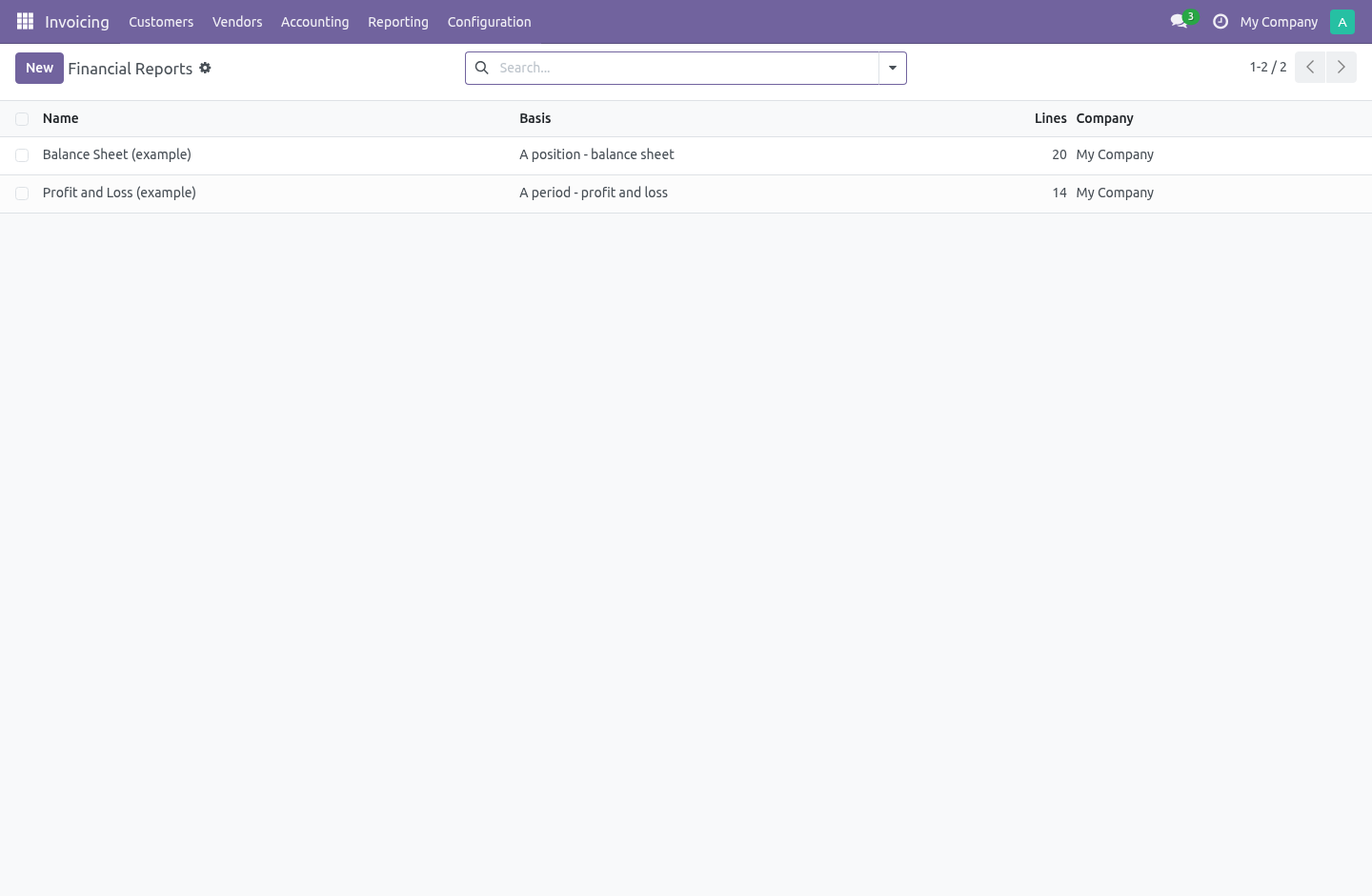
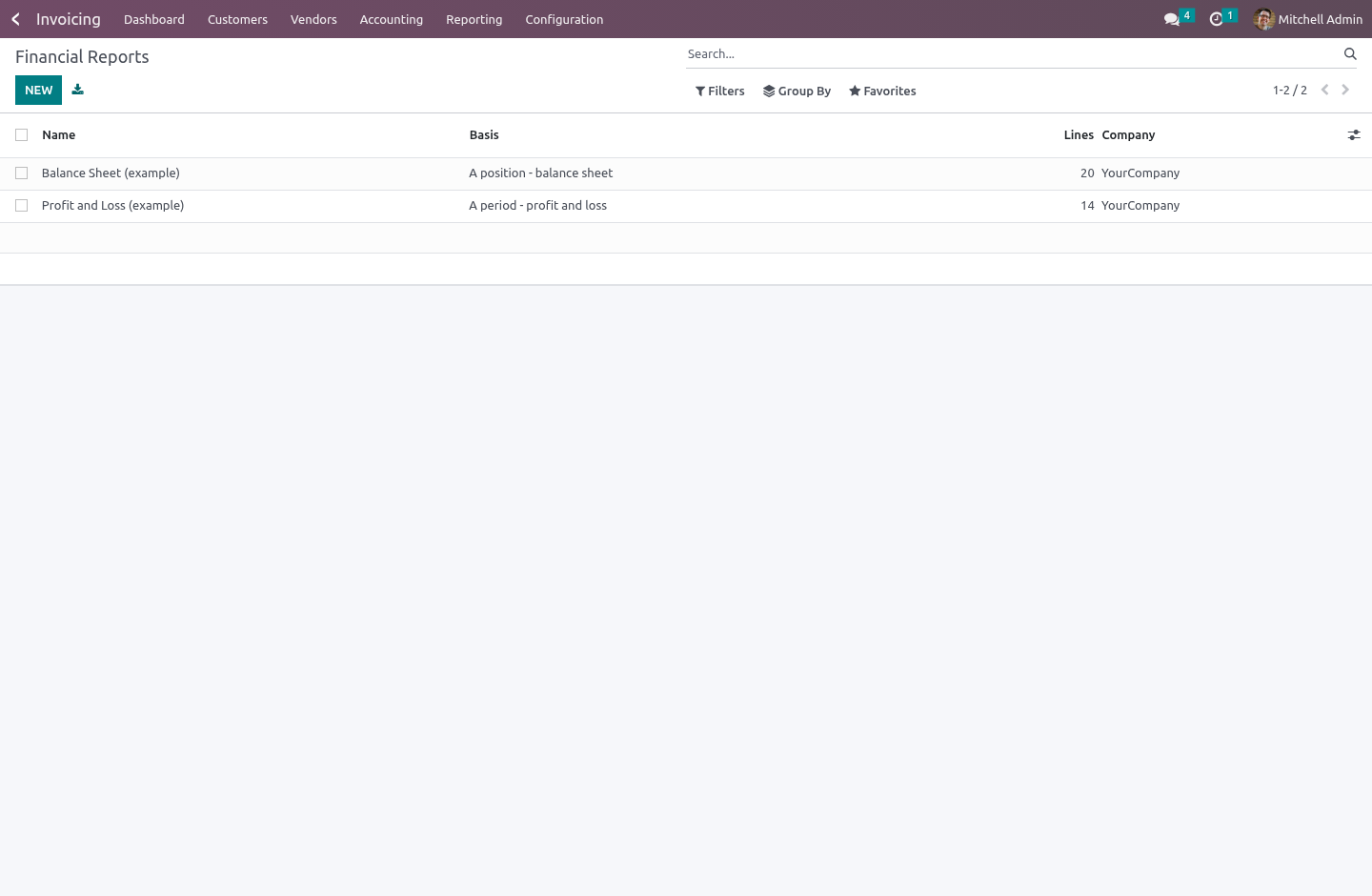
Accounting › Reporting › Report Builder › Financial Reports.
Each line names accounts the way people say them out loud:
60, 61, 62 |
three families |
411:419 |
a range |
6, -603 |
every 6 account except the 603s |
An exclusion beats the prefix that let the account in, so the last one means what it looks like it means. Matching happens against the account code, which is the point: an account somebody opens next April lands on the right line by itself, without anybody remembering to come back here.
…or a handful of account types
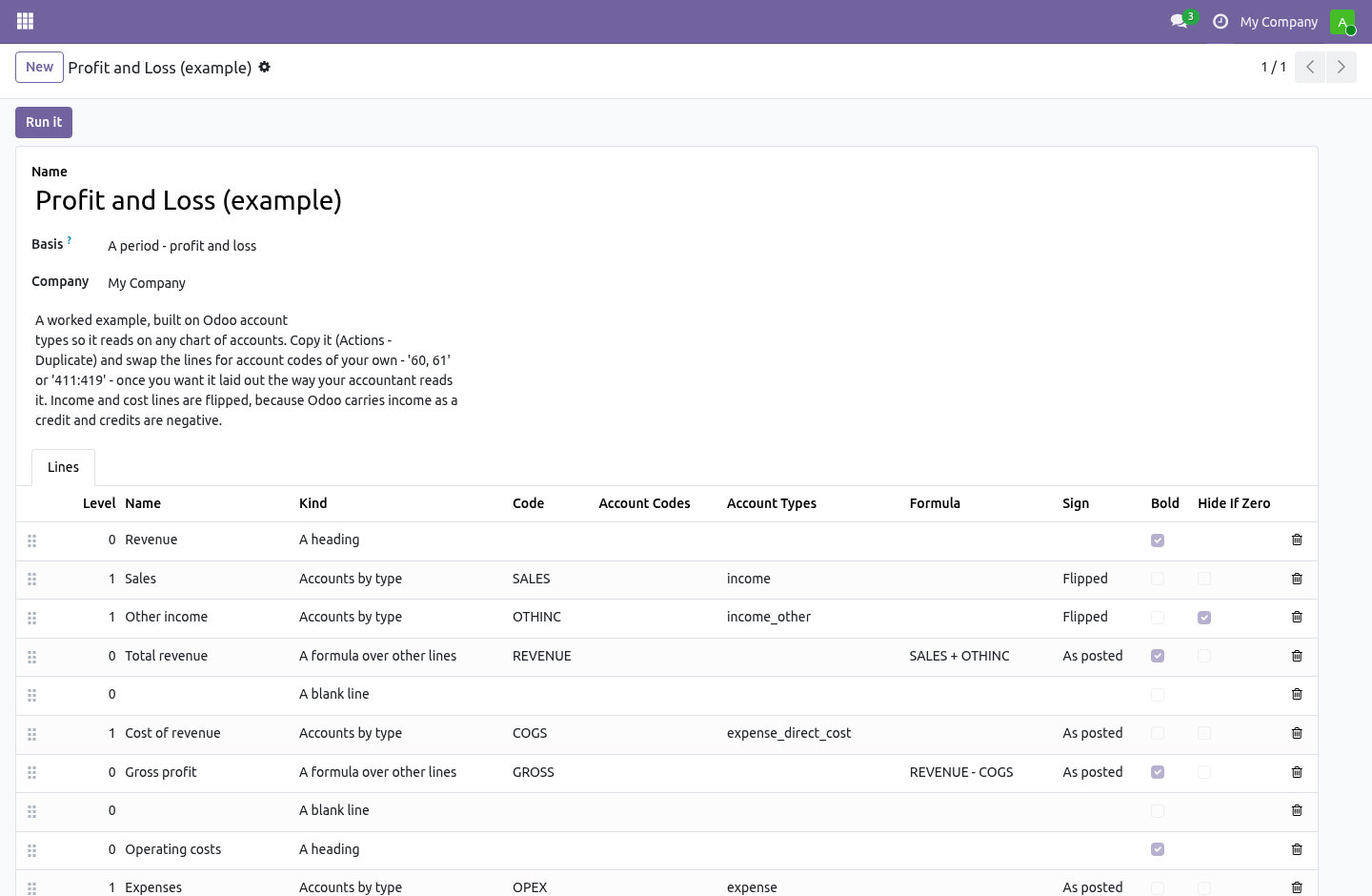
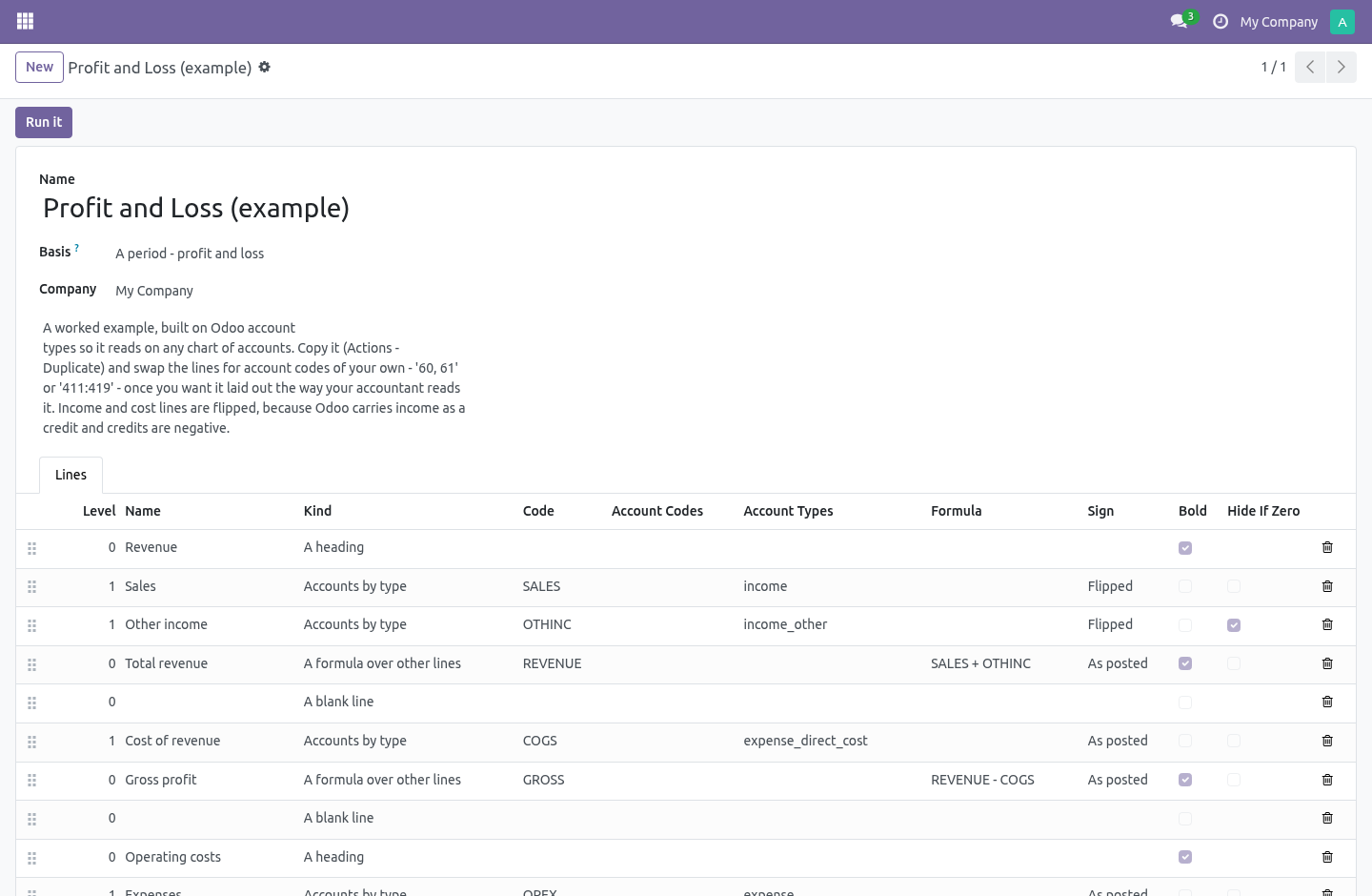
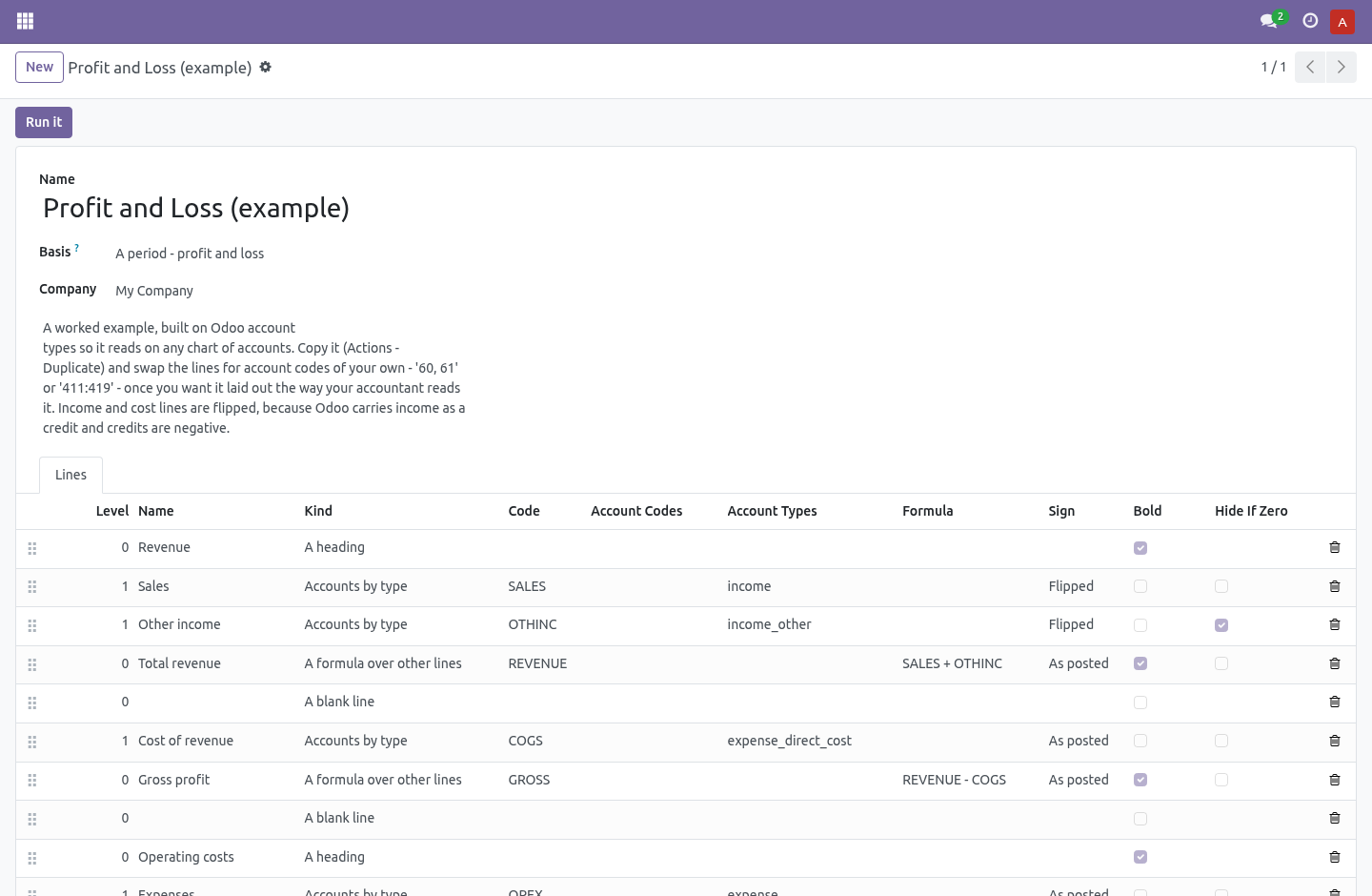
Every chart of accounts in the world numbers its accounts differently. They all carry the same Odoo account types. A line of kind Accounts by type takes income, income_other and reads the same on a French chart, a US chart and a Brazilian one.
A trailing star takes the family: expense* is every expense type this version has — and every expense type a later version adds. 19.0 added expense_other; a report written on expense* in 16.0 picks it up without being touched.
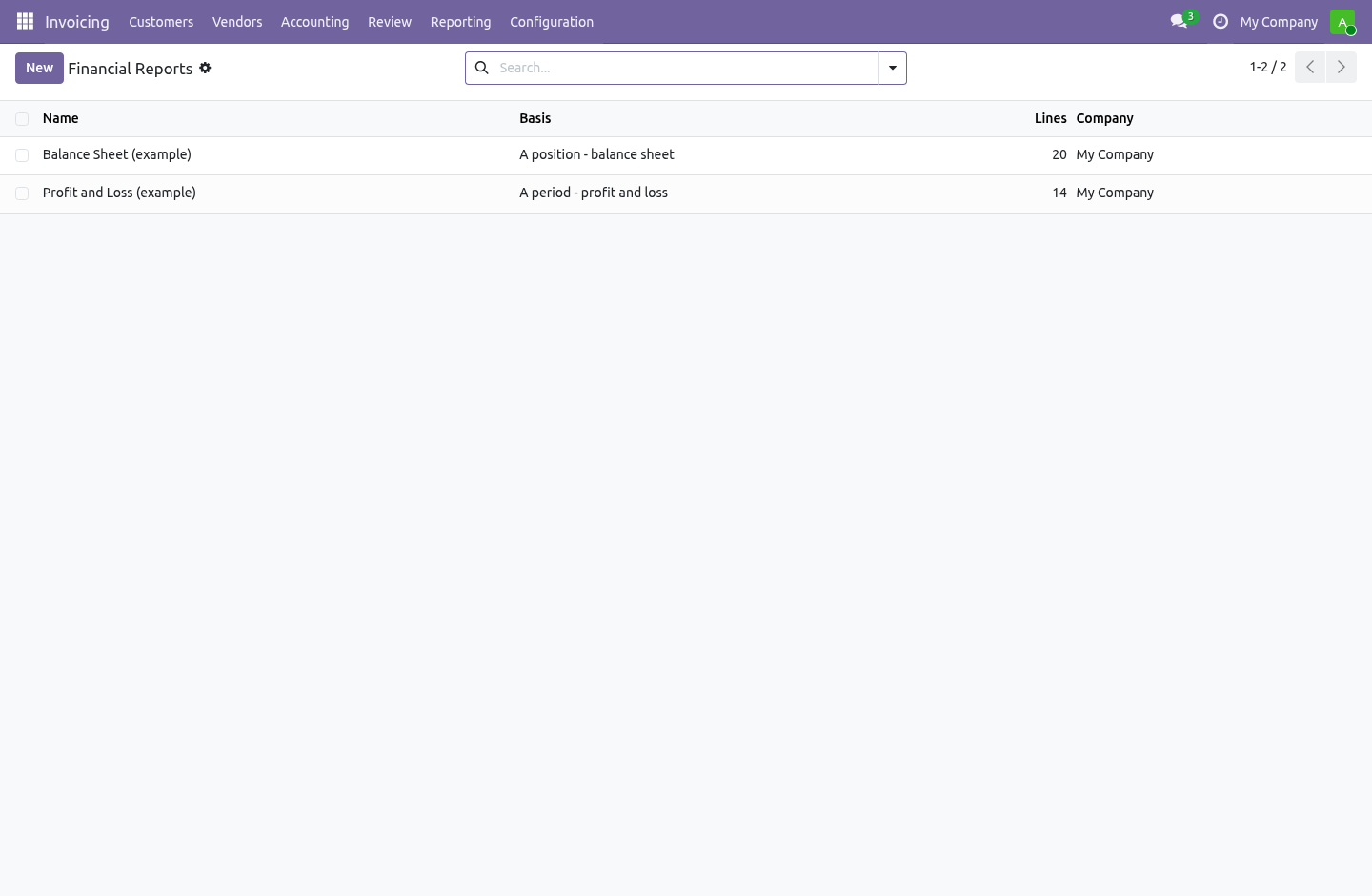
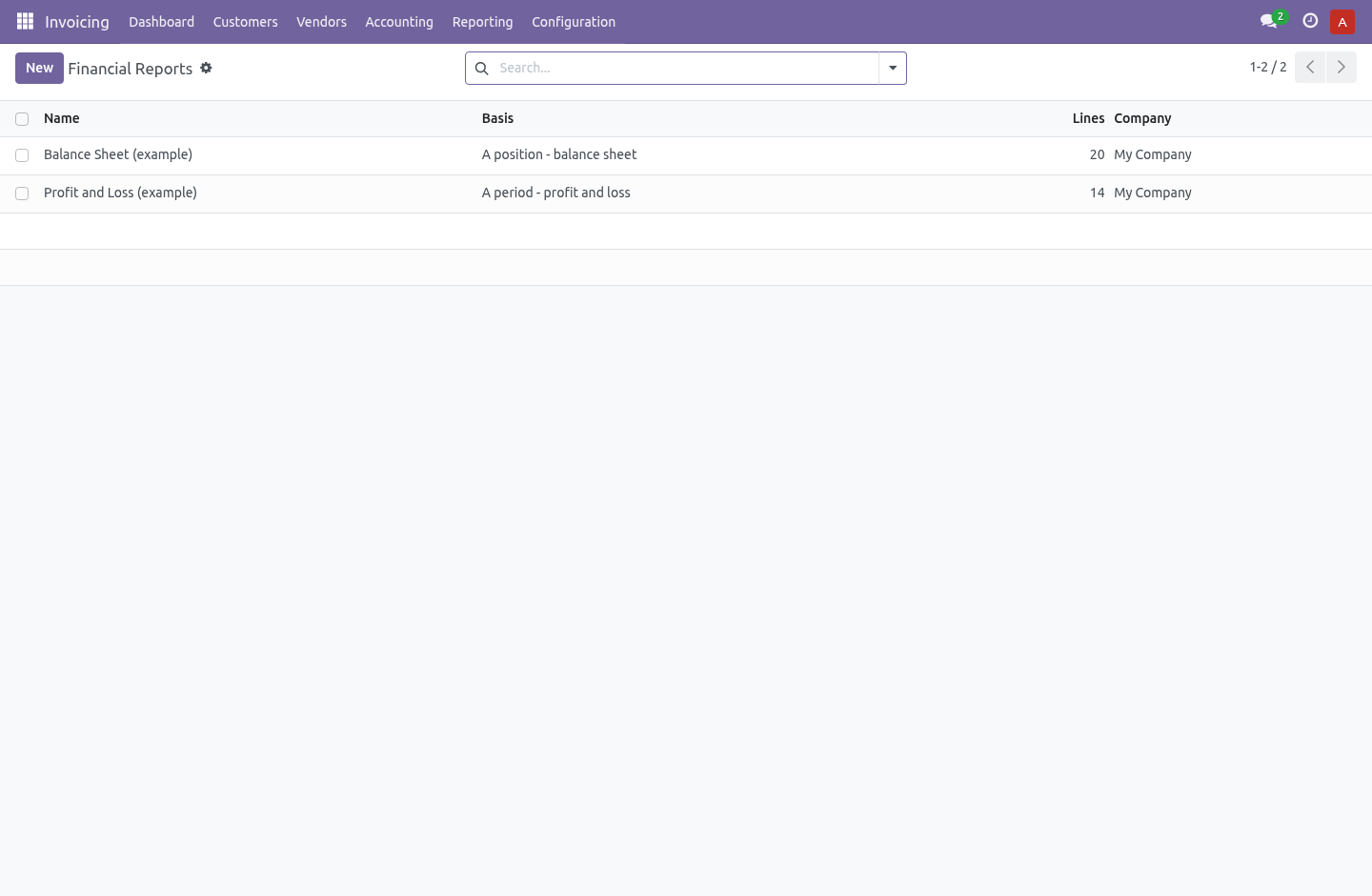
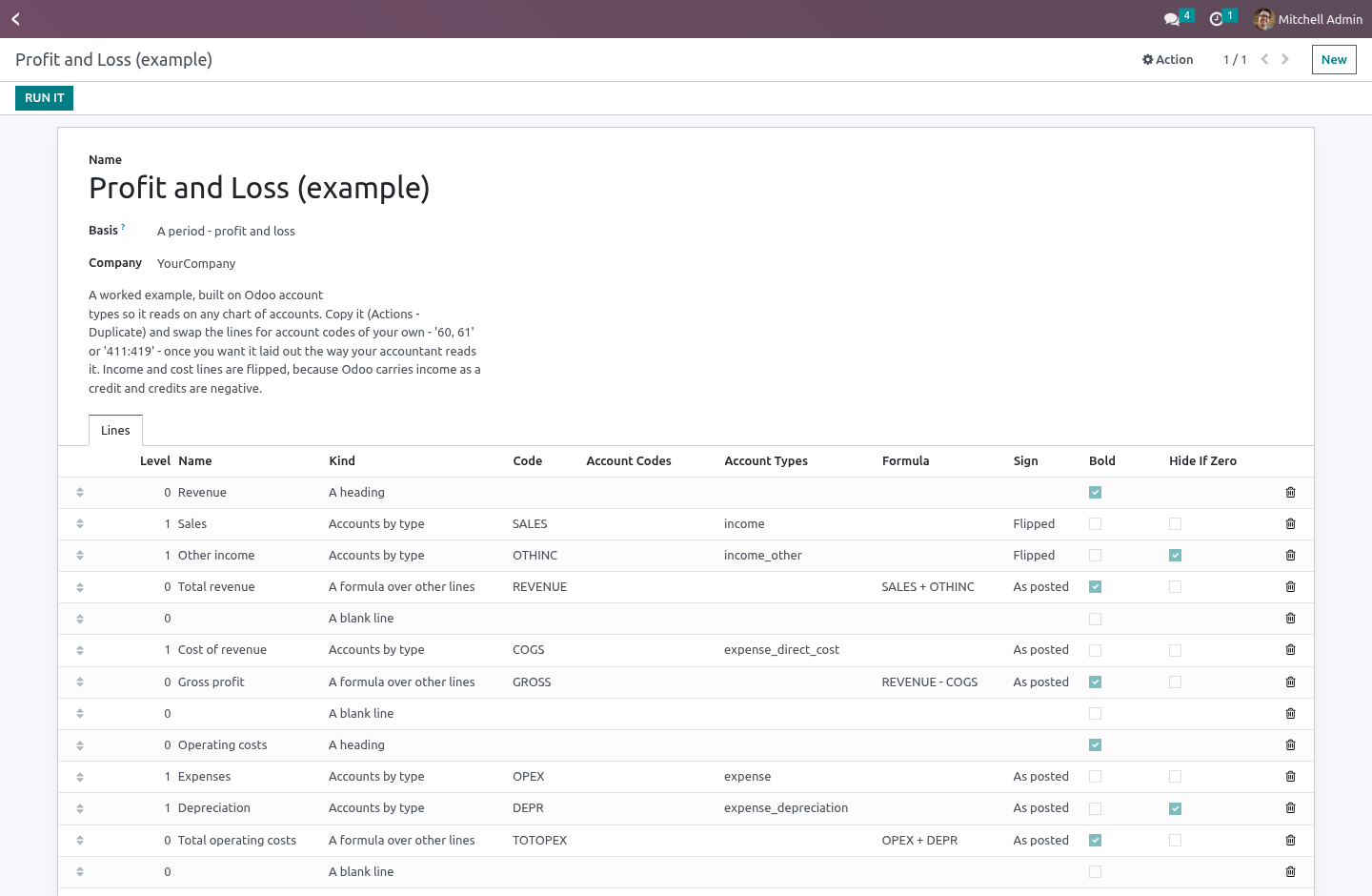
The two reports installed with the module are built this way, so they show real figures on the first run whatever chart you are on.
Formulas, over lines and nothing else
Give a line a code — GROSS, OPEX — and write arithmetic on the next one:
REVENUE - COGS
GROSS - TOTOPEX
A formula may name a line further down; the run resolves in passes. What it may not do is reach anything except those figures. The namespace it evaluates in holds floats and nothing else — no record, no environment, no cursor.
That restraint is deliberate and worth stating plainly: Odoo's safe_eval restricts bytecode and dunder names, but it does not wrap the objects handed to it. A live recordset in that namespace is read and write access to the whole database for anybody who can edit a report line — and a report definition is exactly the kind of thing people export and email to each other.
A formula that names a code no line has, or two lines that name each other in a circle, stop the run with an error. They do not print 0.00. Of the three possible answers that is the worst one, because it looks like a figure.
Branches count
A branch is not another company — it posts under its own company_id while sharing its parent's chart of accounts, and Odoo installs no chart for it at all. (Branch accounting arrived with 17.0; on 16.0 an entry like that is refused by Odoo itself.) A statement for the parent counts what its branches posted, and a statement written for a branch finds the chart it actually posts on. Filtering on equality instead would make a group report short by exactly the branch, with nothing on the page to say so.
It tells you what it left out
This is the failure mode of every hand-built statement, and the reason they are quietly distrusted: somebody opens account 6035, it falls in nobody's prefix, and the report still foots — because the totals are formulas over the lines that do exist.
Every run checks which accounts moved in the period and landed on no line, and says so at the top, with a button straight to the entries. An account on no line is a five-second fix once you know about it and a wrong board pack for a year if you don't.
The check stays inside the statement's own subject. A profit and loss is not supposed to have the bank account on it, so it is not told about it — told instead that four hundred accounts are unaccounted for, people stop reading the warning inside a week, and then the day account 6035 really does fall outside every prefix nobody sees it. The scope is taken from the account groups the report's own lines reach.
A period, or a position
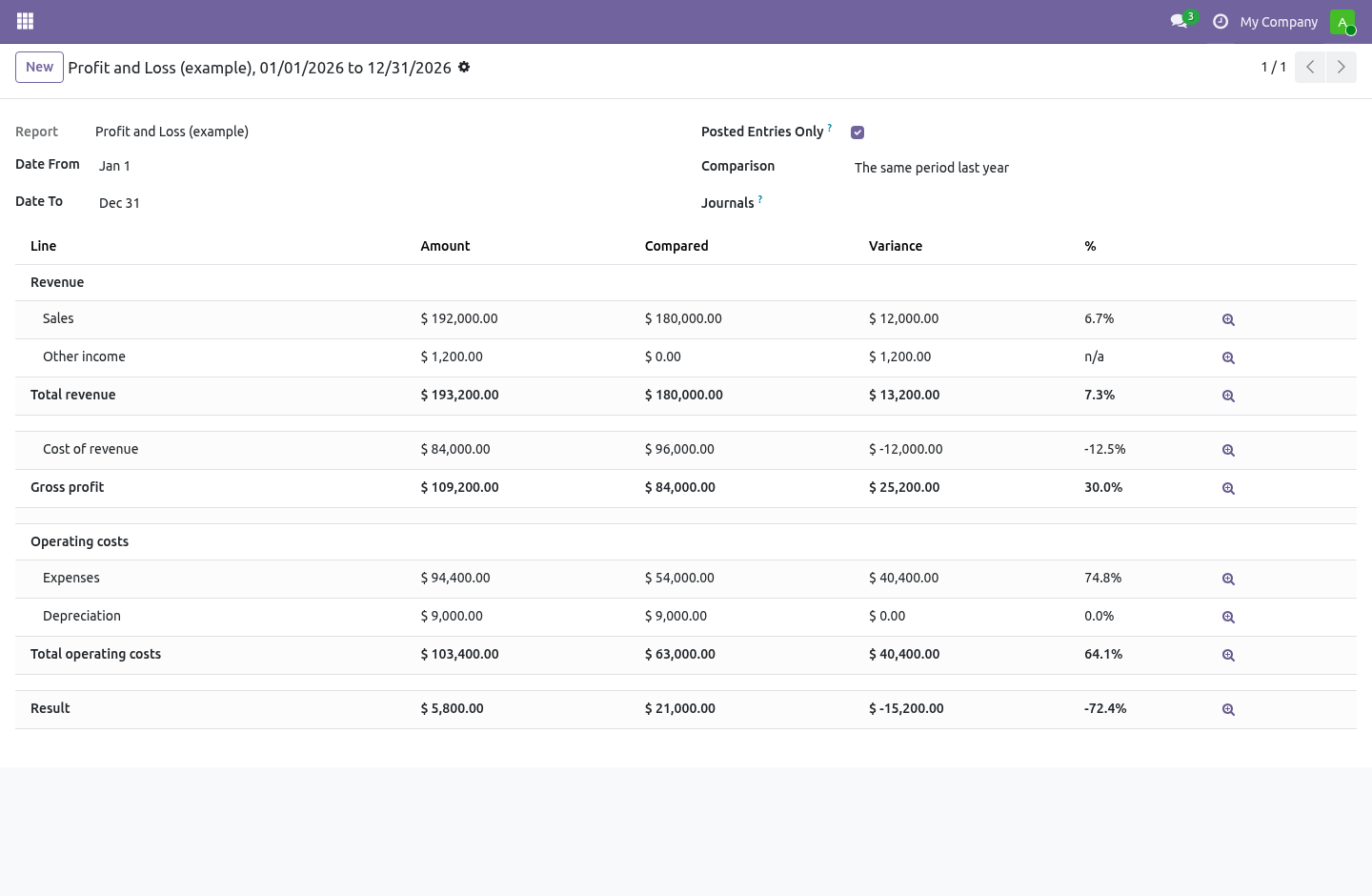
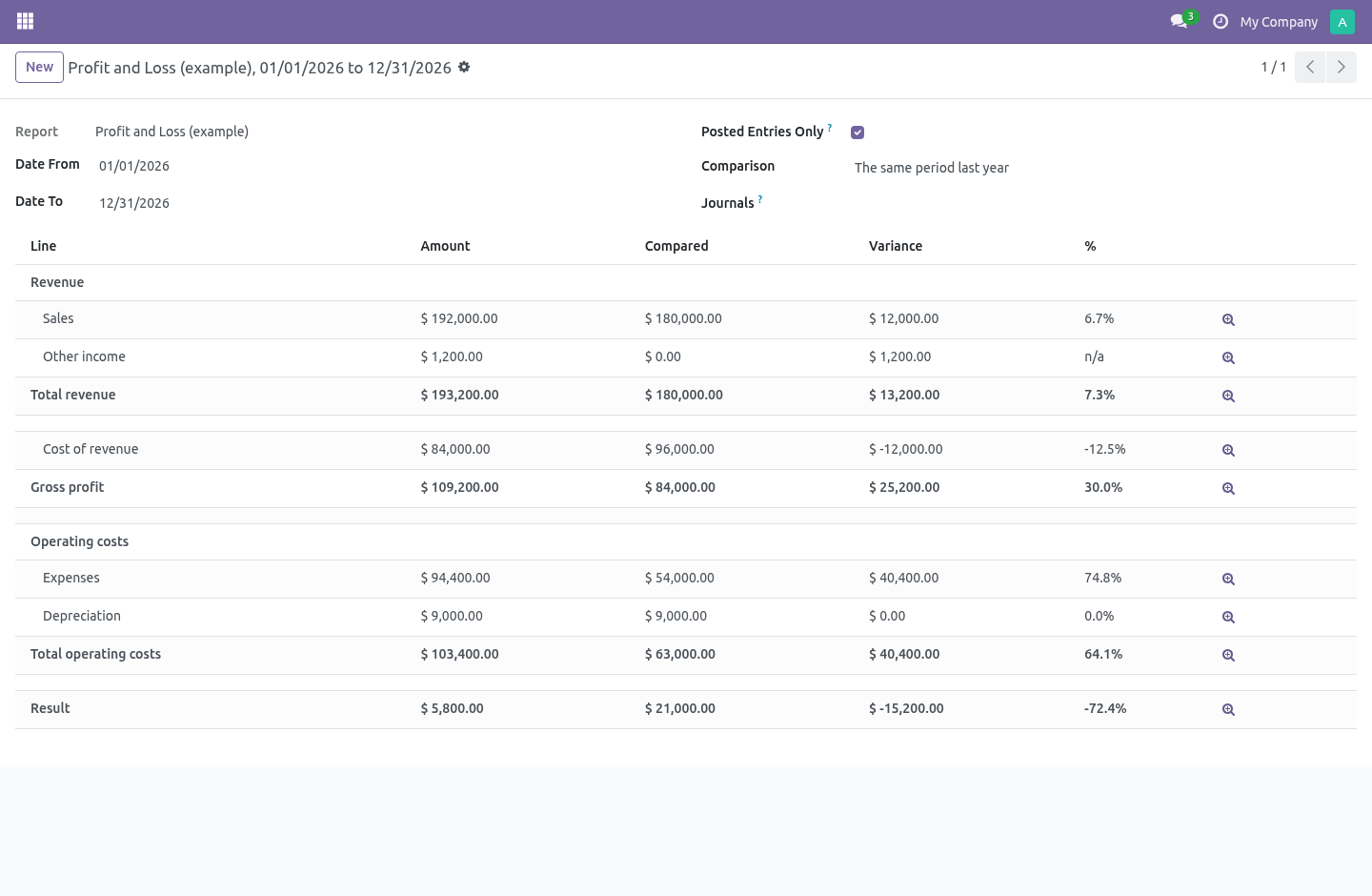
A profit and loss covers a period: the figures run from the start date to the end date. A balance sheet is a position: it is everything the company holds as at the end date, opening balance and all. A report says which it is, and the run obeys it — a position ignores the start date entirely.
This is the one mistake in this trade that nobody catches by looking. A balance sheet run as a period shows the movement of the year under a title that says balance sheet: the bank line is the year's net cash flow, the capital line is empty in every year but the first, and every figure on it is wrong in a way that reads perfectly. The balance sheet shipped with the module is set to position.
The comparison column follows the same rule: on a position it means the position a year ago, not what moved during last year.
It can tell you it does not balance
The last line of the example balance sheet is Out of balance (must be zero), and the result above it is worked out from the income and expense accounts themselves.
That is a deliberate choice against the easy one. A "result for the period" computed as assets less liabilities less equity is not a result — it is whatever makes the two sides meet. A balance sheet built that way cannot come out wrong, which means it cannot come out right either: the day somebody lays their sheet out on their own prefixes and forgets 47, seven thousand in suspense disappears into the plug and the statement still foots. Worked out honestly, the last line is non-zero and somebody goes and looks.
Compare, drill, print
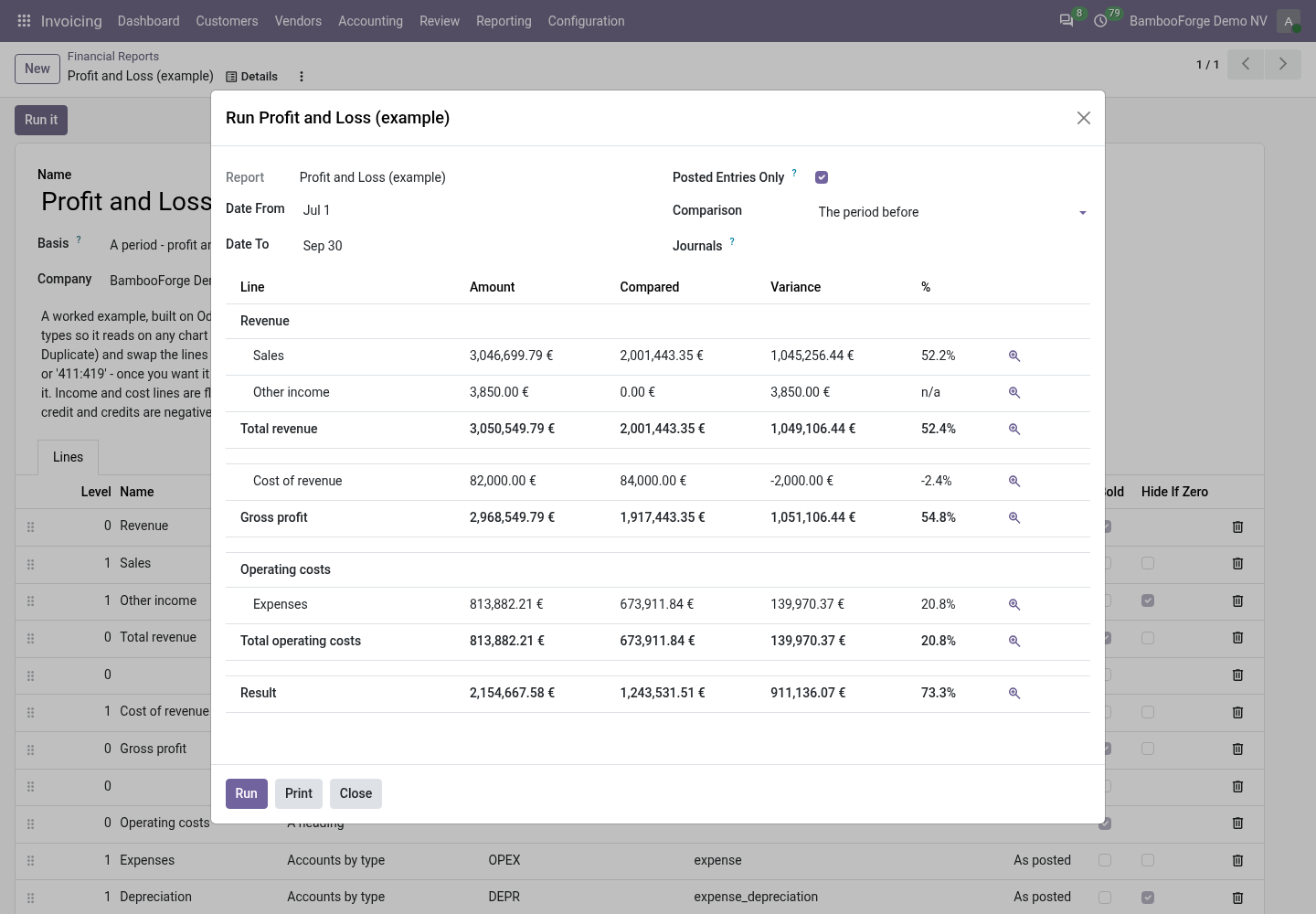
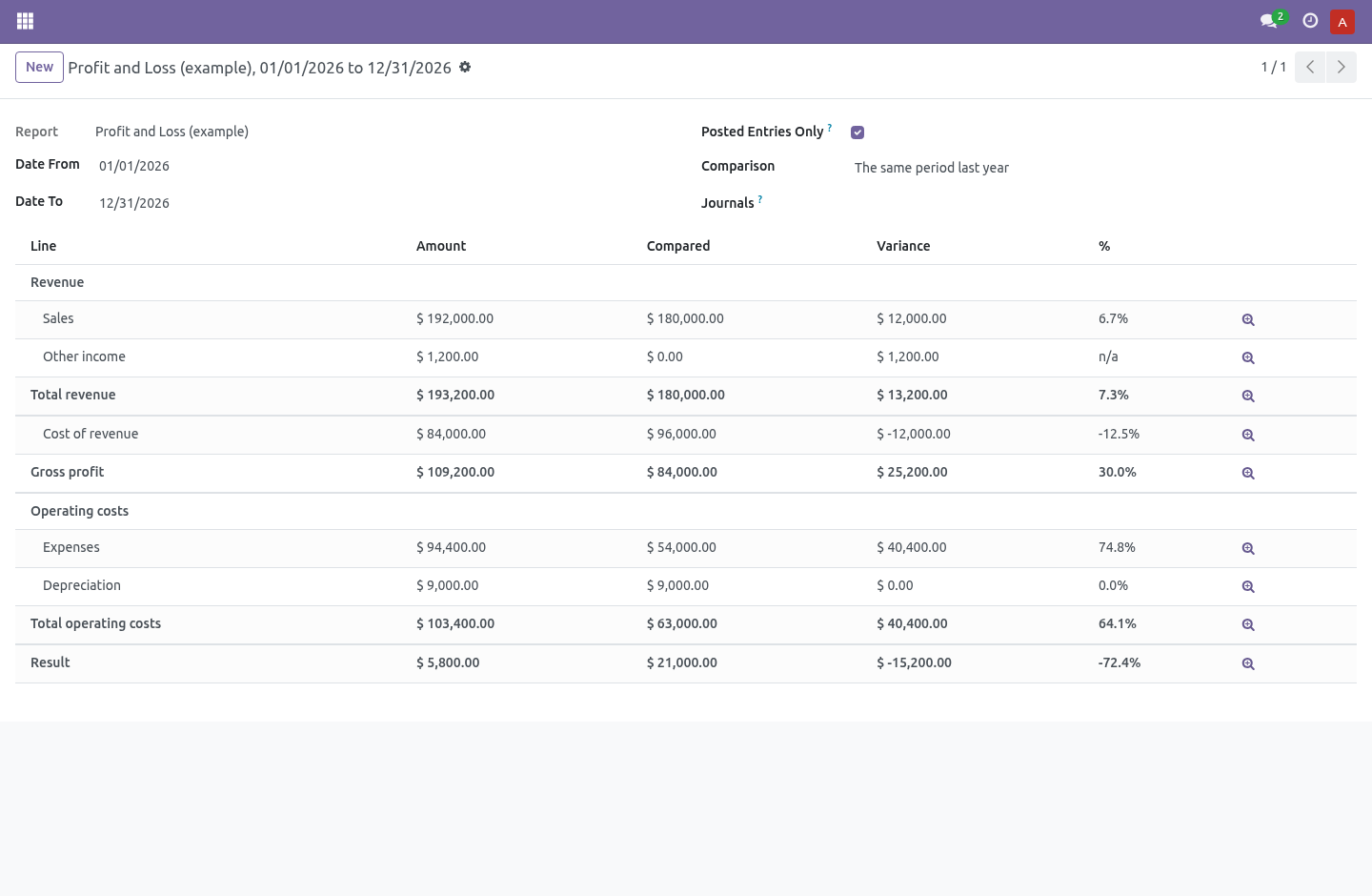
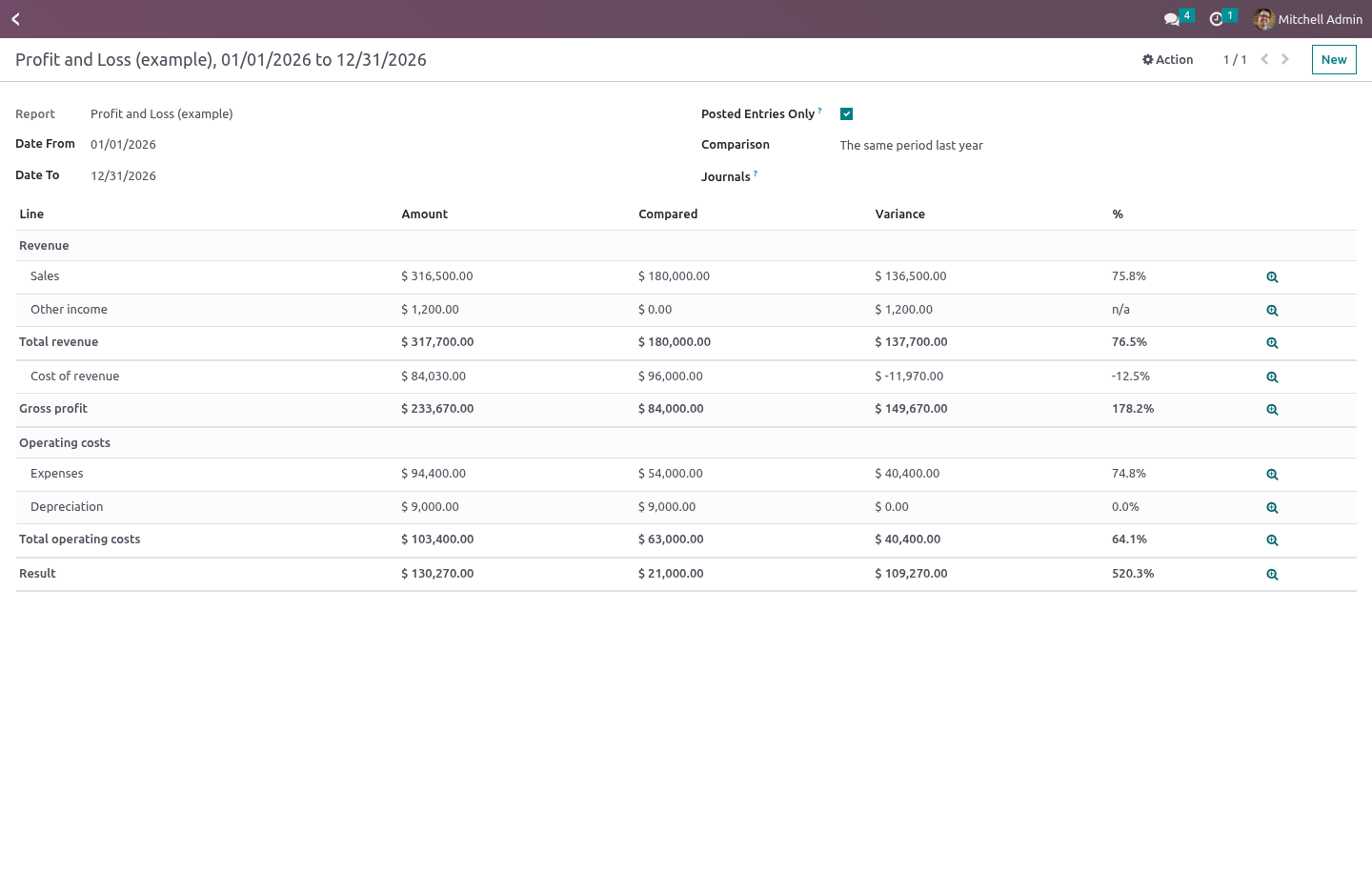
Comparison against the period before or the same period last year — or, on a position, against the position then. A whole number of months is shifted as months, not counted backwards in days: Q2 counted in days starts on 31 December of the year before, and the comparison column then carries the entire year-end close. With the variance in currency and in per cent. Nothing to compare against reads n/a rather than 0.0%: a percentage of nothing is not a percentage, and printing zero puts the biggest movement on the page at the bottom of the sorted column.
Drill from any figure to the journal items behind it, already filtered to the accounts, the dates, the journals and the posted state that produced it — the figures, the drill and the list of accounts on no line are all built from one method, so they cannot drift apart into a discrepancy the screen invented. A formula line says so instead, and points at the lines it adds up.
Posted only, or including drafts — off is what you want while closing and never what you want when reporting, so it is on by default and printed on the PDF when it is off.
Per journal and per company.
Print a PDF that keeps the indentation and the bold.
Who can do what
Financial Report Reader runs a statement and drills into it. This is the one to hand out. Odoo's own read-only accounting group is in the hidden category and cannot be ticked on the Users form, so without this group the only right an administrator could actually give somebody would be Designer — write access to the formulas the whole company reports on.
Financial Report Designer can write the definitions everybody else runs, and implies the reader.
A formula is checked before it is saved: it takes + - * / and abs, min, max, round, sum over other lines' codes. Raising to a power is left out deliberately — 9**9**9**9 is nine characters and occupies a worker until somebody kills it, and writing report lines is one of the lower rights here.
Report definitions are fenced per company. A run belongs to the person who ran it — including the numbers it produced, which is not everybody's business.
Nothing from Enterprise
The module depends on account and on nothing else. It does not require, use or reimplement account_reports. 19.0 ships the account.report tables in Community while the engine and the screen stay in Enterprise; this module keeps to its own models and does not touch them.
How we make sure it works
Before every release, 63 automated checks run against this app on Odoo 16, 17, 18, 19 and 20. Among them:
A reader cannot rewrite the statement everybody reports on.
Drilling into a formula says why it cannot.
Formula that is not a number is refused.
A journal of another company is refused.
A formula cannot hang the server.
The complete list is in the source you receive.
What it does not do
Said before you buy, because it is the half that decides whether the app fits:
Evaluate anything but numbers: a formula sees floats and nothing else - no records, no environment.
Guess: a formula naming a code no line has, or two lines naming each other, stops the run with an error.
Install
Copy bambooforge_fin_reports into your addons path and update the app list, or install the ZIP from the Odoo Apps Store.
Install Financial Reports Builder: P&L and Balance Sheet.
Open Financial Reports - its menus are Report Builder.
Questions people ask
- Which Odoo versions does it run on?
Odoo 16.0, 17.0, 18.0, 19.0, 20.0, on the series you buy it for; each series is its own listing.
- Community or Enterprise?
Both. It needs no Enterprise app.
- What does it need?
The standard Invoicing app. No extra Python package.
- Where does it show up?
Under the Financial Reports menu (Report Builder).
- Does anything leave my server?
No. It makes no call outside your Odoo server: no telemetry, no licence check, no third-party service.
- What happens if I uninstall it?
Odoo drops the app's own tables and fields; the standard records it worked on (contacts, orders, products) stay as they are.