 BambooForge Labs
Field Sales Van Sales: Load, Sell, Deliver and Collect Cash
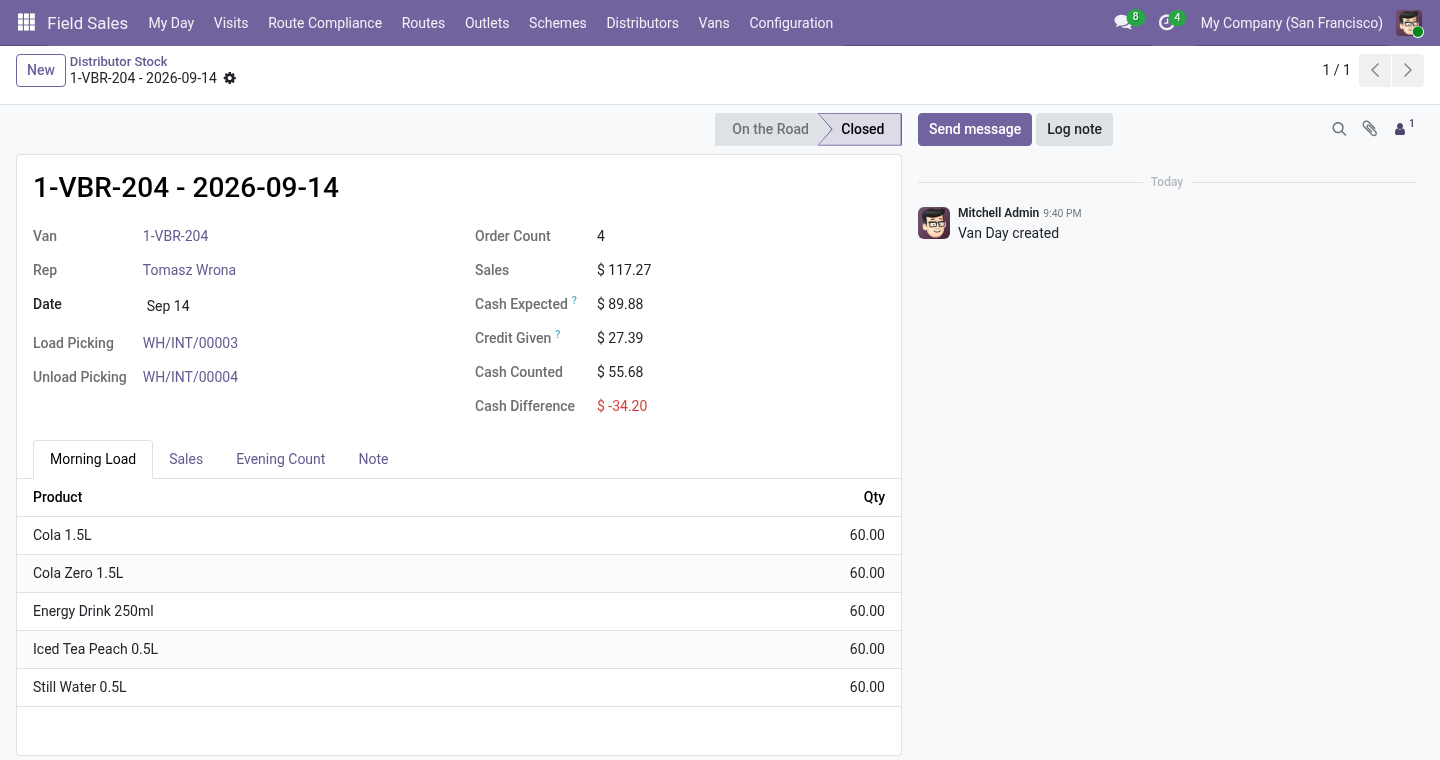
The van is a stock location: loaded in the morning, every order the rep takes is handed over from it on the spot, cash written against the day, the rest unloaded at night. The day closes with stock and cash counted against what the system says.
Available for Odoo 16.0, Odoo 17.0, Odoo 18.0, Odoo 19.0, Odoo 20.0. Technical name bambooforge_field_sales_van.
Transcript of the walkthrough (Odoo 20)
Field Sales Van Sales: Load, Sell, Deliver and Collect Cash. The van is a stock location: loaded in the morning, every order the rep takes is handed over from it on the spot, cash written against the day, the rest unloaded at night. The day closes with stock and cash counted against what the system says. A rep who sells from a van sells what is on the van, hands it over and takes the money.
Without a record of the van, stock leaks and cash is a matter of trust. This add-on to Field Sales and Distribution gives every van a stock location and every day a closing: stock and cash counted against what the system says. In the next few minutes: field sales van sales: load, sell, deliver and collect cash, then what you get, then the day, then uninstalling, then 20.0.1.1.0. Then what this app deliberately does not do, so you can tell before you buy whether it fits.
Everything lives under Van Days then Van to Van then Vans then Vans. Field Sales Van Sales: Load, Sell, Deliver and Collect Cash. A rep who sells from a van sells what is on the van, hands it over and takes the money. Without a record of the van, stock leaks and cash is a matter of trust.
This add-on to Field Sales and Distribution gives every van a stock location and every day a closing: stock and cash counted against what the system says. What you get Vans, one per rep, each an internal stock location of its own. Van days: loaded in the morning from a load list; closed at night with an evening count, the rest unloaded, the cash counted. Sold from the van: the order the rep takes on the phone is confirmed and delivered from the van at once.
What is not on the van cannot be sold from it, and the phone shows what is. Cash written against each order on the phone; the rest is credit given. Differences - units missing, cash short or over - written down for the supervisor. A suggested load from what the day's shops usually take.
Invoices and cash posted at the close, into the van's cash journal. An 80 mm receipt for each van order, from the phone. The day. Morning.
Start the Day on the van (or a new Van Day), fill the Morning Load and press Load the Van: an internal transfer from the warehouse to the van, done at once. Suggest the Load fills the load list for you: for each shop on the rep's route that day, what it took on average over its last three orders, added up, plus the van's load margin, less what is still on the van, rounded up to whole cases where the product has a case size. Change what you like before loading. Uninstalling.
Uninstalling removes vans and van days. Stock moves, sales orders and the van locations stay. 20.0.1.1.0 Built for Odoo 20: record rules and access rights rewritten onto Odoo 20's single ir.access model, the screens rebuilt on Owl 3, and every icon moved to the icon set Odoo 20 ships. 20.0.1.1.0 Suggested load from the day's route; invoices and cash posted at the close into the van's cash journal; an 80 mm receipt per van order; goods taken back ride on the van; van-to-van transfers.
20.0.1.0.1 Units another add-on puts on the order - free goods of a trade scheme - are checked against the van too: an order that does not fit is refused as a whole, and the van never goes below zero. 20.0.1.0.0 How we make sure it works. Before every release, 10 automated checks run against this app on Odoo 16, 17, 18, 19 and 20. Among them: No van no change.
The van is a location and is loaded. Goods taken back ride on the van. Sold from the van on the spot. Units added after the rep count too.
The complete list is in the source you receive. Now the part most videos leave out: what this does not do. Without a cash journal on the van, cash is recorded, not posted: register payments against the invoices the way your accounting does. The suggested load reads the shops' last three orders, not a forecast; a shop that never ordered adds nothing.
A shop served by a distributor (with the Distributors add-on) is not sold from the van. One van per rep, one open day per van. The complete manual is at docs dot bambooforge dot dev, the demo database is linked from the store page, and support answers within twenty-four hours. Links are in the description.
Transcript of the walkthrough (Odoo 19)
Field Sales Van Sales: Load, Sell, Deliver and Collect Cash. The van is a stock location: loaded in the morning, every order the rep takes is handed over from it on the spot, cash written against the day, the rest unloaded at night. The day closes with stock and cash counted against what the system says. A rep who sells from a van sells what is on the van, hands it over and takes the money.
Without a record of the van, stock leaks and cash is a matter of trust. This add-on to Field Sales and Distribution gives every van a stock location and every day a closing: stock and cash counted against what the system says. In the next few minutes: field sales van sales: load, sell, deliver and collect cash, then what you get, then the day, then uninstalling, then 19.0.1.1.0. Then what this app deliberately does not do, so you can tell before you buy whether it fits.
Everything lives under Van Days then Van to Van then Vans then Vans. Field Sales Van Sales: Load, Sell, Deliver and Collect Cash. A rep who sells from a van sells what is on the van, hands it over and takes the money. Without a record of the van, stock leaks and cash is a matter of trust.
This add-on to Field Sales and Distribution gives every van a stock location and every day a closing: stock and cash counted against what the system says. What you get Vans, one per rep, each an internal stock location of its own. Van days: loaded in the morning from a load list; closed at night with an evening count, the rest unloaded, the cash counted. Sold from the van: the order the rep takes on the phone is confirmed and delivered from the van at once.
What is not on the van cannot be sold from it, and the phone shows what is. Cash written against each order on the phone; the rest is credit given. Differences - units missing, cash short or over - written down for the supervisor. A suggested load from what the day's shops usually take.
Invoices and cash posted at the close, into the van's cash journal. An 80 mm receipt for each van order, from the phone. The day. Morning.
Start the Day on the van (or a new Van Day), fill the Morning Load and press Load the Van: an internal transfer from the warehouse to the van, done at once. Suggest the Load fills the load list for you: for each shop on the rep's route that day, what it took on average over its last three orders, added up, plus the van's load margin, less what is still on the van, rounded up to whole cases where the product has a case size. Change what you like before loading. Uninstalling.
Uninstalling removes vans and van days. Stock moves, sales orders and the van locations stay. 19.0.1.1.0 Suggested load from the day's route; invoices and cash posted at the close into the van's cash journal; an 80 mm receipt per van order; goods taken back ride on the van; van-to-van transfers. 19.0.1.0.1 Units another add-on puts on the order - free goods of a trade scheme - are checked against the van too: an order that does not fit is refused as a whole, and the van never goes below zero.
19.0.1.0.0 How we make sure it works. Before every release, 10 automated checks run against this app on Odoo 16, 17, 18 and 19. Among them: No van no change. The van is a location and is loaded.
Goods taken back ride on the van. Sold from the van on the spot. Units added after the rep count too. The complete list is in the source you receive.
Now the part most videos leave out: what this does not do. Without a cash journal on the van, cash is recorded, not posted: register payments against the invoices the way your accounting does. The suggested load reads the shops' last three orders, not a forecast; a shop that never ordered adds nothing. A shop served by a distributor (with the Distributors add-on) is not sold from the van.
One van per rep, one open day per van. The complete manual is at docs dot bambooforge dot dev, the demo database is linked from the store page, and support answers within twenty-four hours. Links are in the description.
Transcript of the walkthrough (Odoo 18)
Field Sales Van Sales: Load, Sell, Deliver and Collect Cash. The van is a stock location: loaded in the morning, every order the rep takes is handed over from it on the spot, cash written against the day, the rest unloaded at night. The day closes with stock and cash counted against what the system says. A rep who sells from a van sells what is on the van, hands it over and takes the money.
Without a record of the van, stock leaks and cash is a matter of trust. This add-on to Field Sales and Distribution gives every van a stock location and every day a closing: stock and cash counted against what the system says. In the next few minutes: field sales van sales: load, sell, deliver and collect cash, then what you get, then the day, then uninstalling, then 18.0.1.1.0. Then what this app deliberately does not do, so you can tell before you buy whether it fits.
Everything lives under Van Days then Van to Van then Vans then Vans. Field Sales Van Sales: Load, Sell, Deliver and Collect Cash. A rep who sells from a van sells what is on the van, hands it over and takes the money. Without a record of the van, stock leaks and cash is a matter of trust.
This add-on to Field Sales and Distribution gives every van a stock location and every day a closing: stock and cash counted against what the system says. What you get Vans, one per rep, each an internal stock location of its own. Van days: loaded in the morning from a load list; closed at night with an evening count, the rest unloaded, the cash counted. Sold from the van: the order the rep takes on the phone is confirmed and delivered from the van at once.
What is not on the van cannot be sold from it, and the phone shows what is. Cash written against each order on the phone; the rest is credit given. Differences - units missing, cash short or over - written down for the supervisor. A suggested load from what the day's shops usually take.
Invoices and cash posted at the close, into the van's cash journal. An 80 mm receipt for each van order, from the phone. The day. Morning.
Start the Day on the van (or a new Van Day), fill the Morning Load and press Load the Van: an internal transfer from the warehouse to the van, done at once. Suggest the Load fills the load list for you: for each shop on the rep's route that day, what it took on average over its last three orders, added up, plus the van's load margin, less what is still on the van, rounded up to whole cases where the product has a case size. Change what you like before loading. Uninstalling.
Uninstalling removes vans and van days. Stock moves, sales orders and the van locations stay. 18.0.1.1.0 Suggested load from the day's route; invoices and cash posted at the close into the van's cash journal; an 80 mm receipt per van order; goods taken back ride on the van; van-to-van transfers. 18.0.1.0.1 Units another add-on puts on the order - free goods of a trade scheme - are checked against the van too: an order that does not fit is refused as a whole, and the van never goes below zero.
18.0.1.0.0 How we make sure it works. Before every release, 10 automated checks run against this app on Odoo 16, 17, 18 and 19. Among them: No van no change. The van is a location and is loaded.
Goods taken back ride on the van. Sold from the van on the spot. Units added after the rep count too. The complete list is in the source you receive.
Now the part most videos leave out: what this does not do. Without a cash journal on the van, cash is recorded, not posted: register payments against the invoices the way your accounting does. The suggested load reads the shops' last three orders, not a forecast; a shop that never ordered adds nothing. A shop served by a distributor (with the Distributors add-on) is not sold from the van.
One van per rep, one open day per van. The complete manual is at docs dot bambooforge dot dev, the demo database is linked from the store page, and support answers within twenty-four hours. Links are in the description.
Transcript of the walkthrough (Odoo 17)
Field Sales Van Sales: Load, Sell, Deliver and Collect Cash. The van is a stock location: loaded in the morning, every order the rep takes is handed over from it on the spot, cash written against the day, the rest unloaded at night. The day closes with stock and cash counted against what the system says. A rep who sells from a van sells what is on the van, hands it over and takes the money.
Without a record of the van, stock leaks and cash is a matter of trust. This add-on to Field Sales and Distribution gives every van a stock location and every day a closing: stock and cash counted against what the system says. In the next few minutes: field sales van sales: load, sell, deliver and collect cash, then what you get, then the day, then uninstalling, then 17.0.1.1.0. Then what this app deliberately does not do, so you can tell before you buy whether it fits.
Everything lives under Van Days then Van to Van then Vans then Vans. Field Sales Van Sales: Load, Sell, Deliver and Collect Cash. A rep who sells from a van sells what is on the van, hands it over and takes the money. Without a record of the van, stock leaks and cash is a matter of trust.
This add-on to Field Sales and Distribution gives every van a stock location and every day a closing: stock and cash counted against what the system says. What you get Vans, one per rep, each an internal stock location of its own. Van days: loaded in the morning from a load list; closed at night with an evening count, the rest unloaded, the cash counted. Sold from the van: the order the rep takes on the phone is confirmed and delivered from the van at once.
What is not on the van cannot be sold from it, and the phone shows what is. Cash written against each order on the phone; the rest is credit given. Differences - units missing, cash short or over - written down for the supervisor. A suggested load from what the day's shops usually take.
Invoices and cash posted at the close, into the van's cash journal. An 80 mm receipt for each van order, from the phone. The day. Morning.
Start the Day on the van (or a new Van Day), fill the Morning Load and press Load the Van: an internal transfer from the warehouse to the van, done at once. Suggest the Load fills the load list for you: for each shop on the rep's route that day, what it took on average over its last three orders, added up, plus the van's load margin, less what is still on the van, rounded up to whole cases where the product has a case size. Change what you like before loading. Uninstalling.
Uninstalling removes vans and van days. Stock moves, sales orders and the van locations stay. 17.0.1.1.0 Suggested load from the day's route; invoices and cash posted at the close into the van's cash journal; an 80 mm receipt per van order; goods taken back ride on the van; van-to-van transfers. 17.0.1.0.1 Units another add-on puts on the order - free goods of a trade scheme - are checked against the van too: an order that does not fit is refused as a whole, and the van never goes below zero.
17.0.1.0.0 How we make sure it works. Before every release, 10 automated checks run against this app on Odoo 16, 17, 18 and 19. Among them: No van no change. The van is a location and is loaded.
Goods taken back ride on the van. Sold from the van on the spot. Units added after the rep count too. The complete list is in the source you receive.
Now the part most videos leave out: what this does not do. Without a cash journal on the van, cash is recorded, not posted: register payments against the invoices the way your accounting does. The suggested load reads the shops' last three orders, not a forecast; a shop that never ordered adds nothing. A shop served by a distributor (with the Distributors add-on) is not sold from the van.
One van per rep, one open day per van. The complete manual is at docs dot bambooforge dot dev, the demo database is linked from the store page, and support answers within twenty-four hours. Links are in the description.
Transcript of the walkthrough (Odoo 16)
Field Sales Van Sales: Load, Sell, Deliver and Collect Cash. The van is a stock location: loaded in the morning, every order the rep takes is handed over from it on the spot, cash written against the day, the rest unloaded at night. The day closes with stock and cash counted against what the system says. A rep who sells from a van sells what is on the van, hands it over and takes the money.
Without a record of the van, stock leaks and cash is a matter of trust. This add-on to Field Sales and Distribution gives every van a stock location and every day a closing: stock and cash counted against what the system says. In the next few minutes: field sales van sales: load, sell, deliver and collect cash, then what you get, then the day, then uninstalling, then 16.0.1.1.0. Then what this app deliberately does not do, so you can tell before you buy whether it fits.
Everything lives under Van Days then Van to Van then Vans then Vans. Field Sales Van Sales: Load, Sell, Deliver and Collect Cash. A rep who sells from a van sells what is on the van, hands it over and takes the money. Without a record of the van, stock leaks and cash is a matter of trust.
This add-on to Field Sales and Distribution gives every van a stock location and every day a closing: stock and cash counted against what the system says. What you get Vans, one per rep, each an internal stock location of its own. Van days: loaded in the morning from a load list; closed at night with an evening count, the rest unloaded, the cash counted. Sold from the van: the order the rep takes on the phone is confirmed and delivered from the van at once.
What is not on the van cannot be sold from it, and the phone shows what is. Cash written against each order on the phone; the rest is credit given. Differences - units missing, cash short or over - written down for the supervisor. A suggested load from what the day's shops usually take.
Invoices and cash posted at the close, into the van's cash journal. An 80 mm receipt for each van order, from the phone. The day. Morning.
Start the Day on the van (or a new Van Day), fill the Morning Load and press Load the Van: an internal transfer from the warehouse to the van, done at once. Suggest the Load fills the load list for you: for each shop on the rep's route that day, what it took on average over its last three orders, added up, plus the van's load margin, less what is still on the van, rounded up to whole cases where the product has a case size. Change what you like before loading. Uninstalling.
Uninstalling removes vans and van days. Stock moves, sales orders and the van locations stay. 16.0.1.1.0 Suggested load from the day's route; invoices and cash posted at the close into the van's cash journal; an 80 mm receipt per van order; goods taken back ride on the van; van-to-van transfers. 16.0.1.0.1 Units another add-on puts on the order - free goods of a trade scheme - are checked against the van too: an order that does not fit is refused as a whole, and the van never goes below zero.
16.0.1.0.0 How we make sure it works. Before every release, 10 automated checks run against this app on Odoo 16, 17, 18 and 19. Among them: No van no change. The van is a location and is loaded.
Goods taken back ride on the van. Sold from the van on the spot. Units added after the rep count too. The complete list is in the source you receive.
Now the part most videos leave out: what this does not do. Without a cash journal on the van, cash is recorded, not posted: register payments against the invoices the way your accounting does. The suggested load reads the shops' last three orders, not a forecast; a shop that never ordered adds nothing. A shop served by a distributor (with the Distributors add-on) is not sold from the van.
One van per rep, one open day per van. The complete manual is at docs dot bambooforge dot dev, the demo database is linked from the store page, and support answers within twenty-four hours. Links are in the description.
Key facts
- What it is
- The van is a stock location: loaded in the morning, every order the rep takes is handed over from it on the spot, cash written against the day, the rest unloaded at night. The day closes with stock and cash counted against what the system says.
- For
- Sales
- Odoo versions
- 16.0, 17.0, 18.0, 19.0, 20.0 - Community and Enterprise
- Runs on
- Odoo.sh or Odoo you host yourself - not Odoo Online, which accepts no third-party apps
- Price
- 478 EUR, one-time, on the Odoo Apps Store
- Technical name
- bambooforge_field_sales_van
- Not for
- Without a cash journal on the van, cash is recorded, not posted: register payments against the invoices the way your accounting does.; The suggested load reads the shops' last three orders, not a forecast; a shop that never ordered adds nothing.; A shop served by a distributor (with the Distributors add-on) is not sold from the van.; One van per rep, one open day per van.
- Live demo
- https://demo20.bambooforge.dev/odoo/action-bambooforge_field_sales_van.bf_fs_van_session_action
- Manual last updated
- 2026-09-21
Field Sales Van Sales: Load, Sell, Deliver and Collect Cash
A rep who sells from a van sells what is on the van, hands it over and takes the money. Without a record of the van, stock leaks and cash is a matter of trust. This add-on to Field Sales and Distribution gives every van a stock location and every day a closing: stock and cash counted against what the system says.
What you get
Vans, one per rep, each an internal stock location of its own.
Van days: loaded in the morning from a load list; closed at night with an evening count, the rest unloaded, the cash counted.
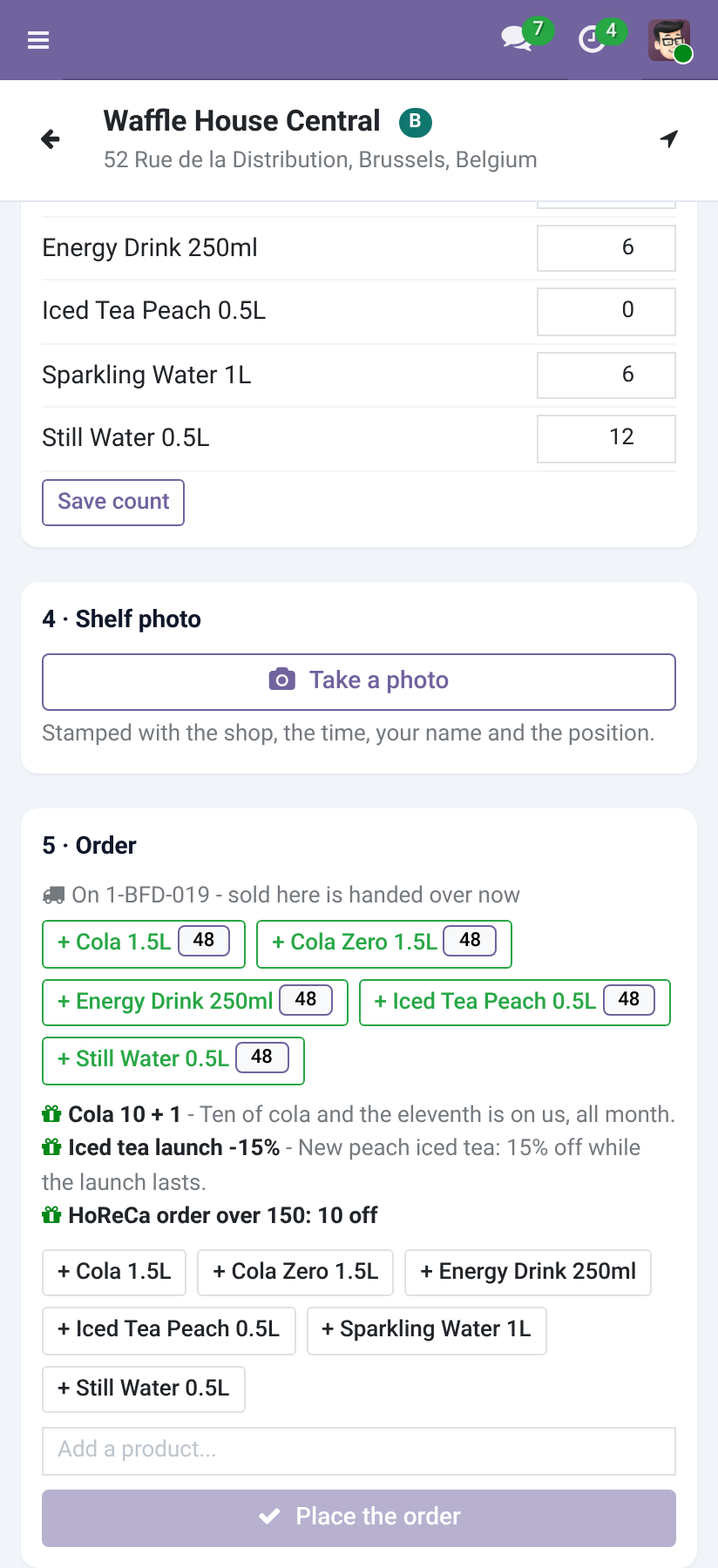
Sold from the van: the order the rep takes on the phone is confirmed and delivered from the van at once. What is not on the van cannot be sold from it, and the phone shows what is.
Cash written against each order on the phone; the rest is credit given.
Differences - units missing, cash short or over - written down for the supervisor.
A suggested load from what the day's shops usually take.
Invoices and cash posted at the close, into the van's cash journal.
An 80 mm receipt for each van order, from the phone.
Goods taken back at a shop ride on the van; van to van hands stock from one van to another on the road.
Requirements
Field Sales and Distribution 1.2 or later, and Odoo's Inventory; Odoo 20.0, Community or Enterprise.
Products sold from a van are storable products.
Reps see their own van days; supervisors see all and set up vans.
Install
Copy bambooforge_field_sales_van next to Field Sales, restart.
Apps, search for Van Sales, Activate.
Field Sales ▸ Vans ▸ Vans: a van per rep (the plate as its name), and the warehouse it loads from. Its stock location is created with it.
Optionally, on the van: a cash journal (closing the day then invoices and posts the cash) and the load margin (10% by default).
The day
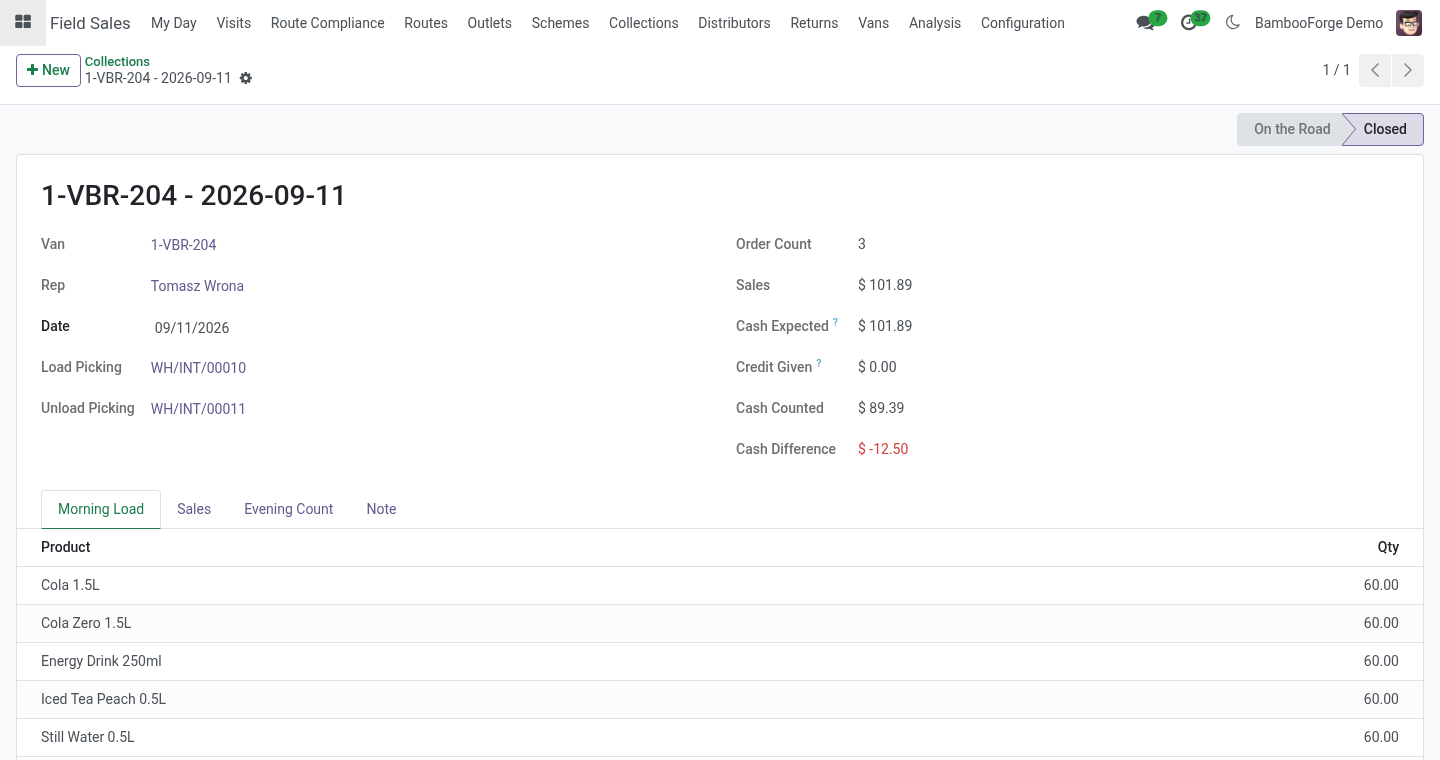
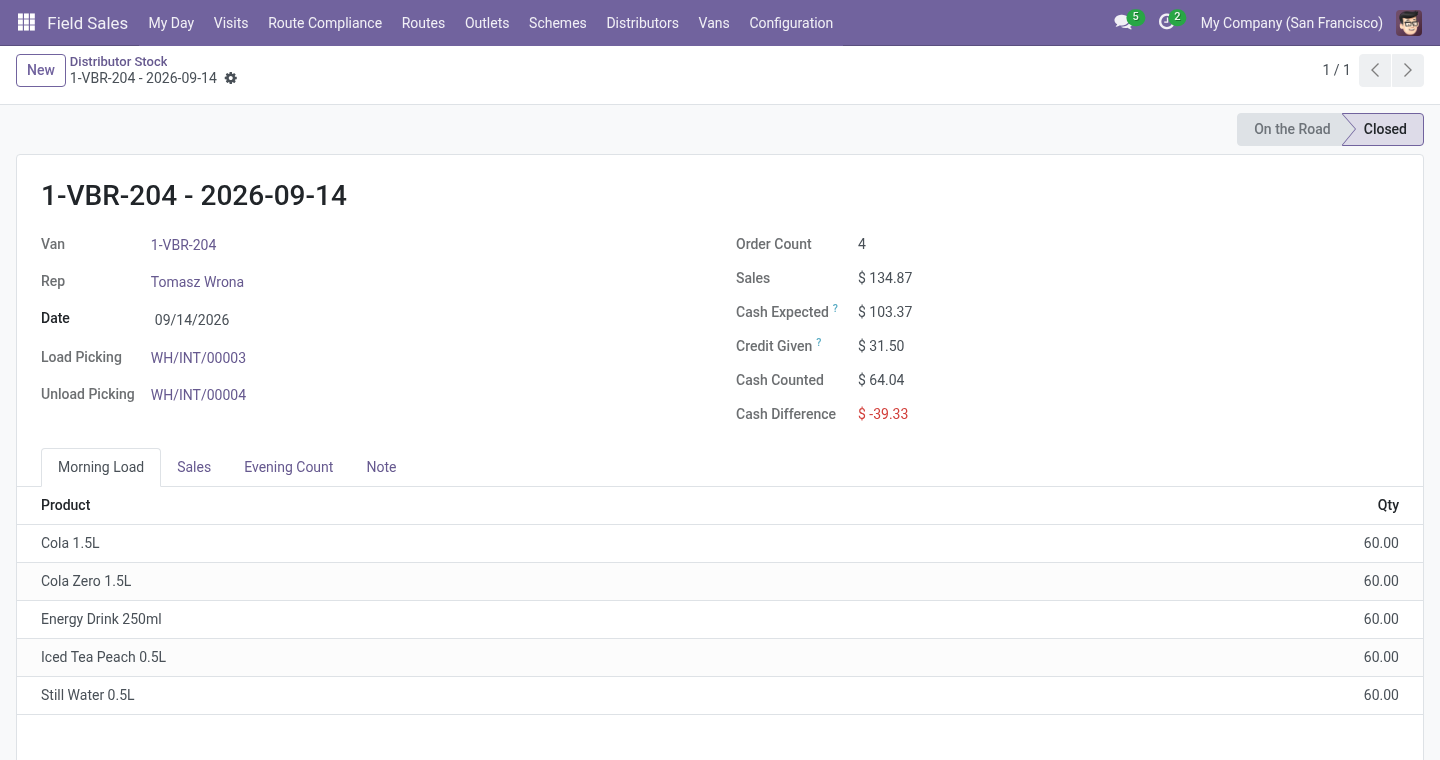
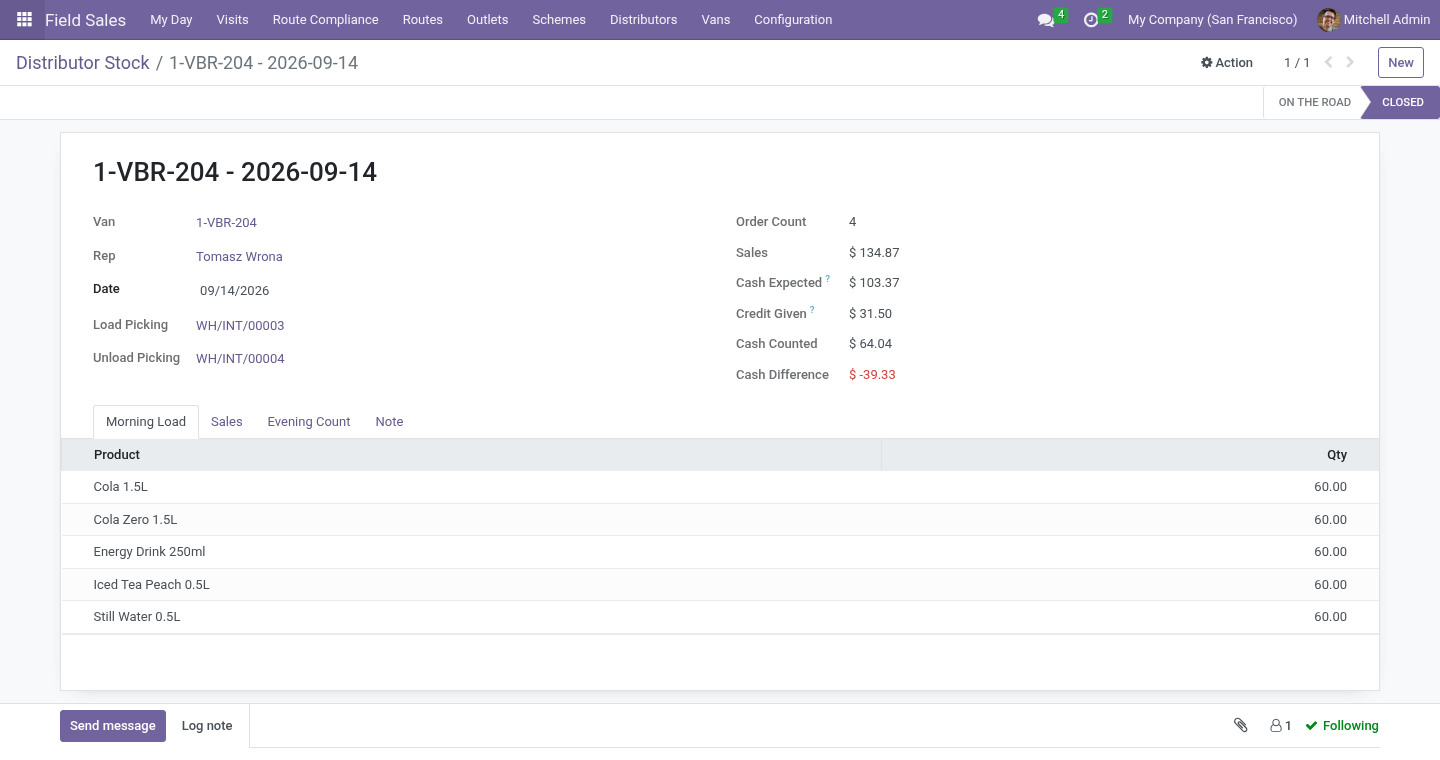
Morning. Start the Day on the van (or a new Van Day), fill the Morning Load and press Load the Van: an internal transfer from the warehouse to the van, done at once.
Suggest the Load fills the load list for you: for each shop on the rep's route that day, what it took on average over its last three orders, added up, plus the van's load margin, less what is still on the van, rounded up to whole cases where the product has a case size. Change what you like before loading.
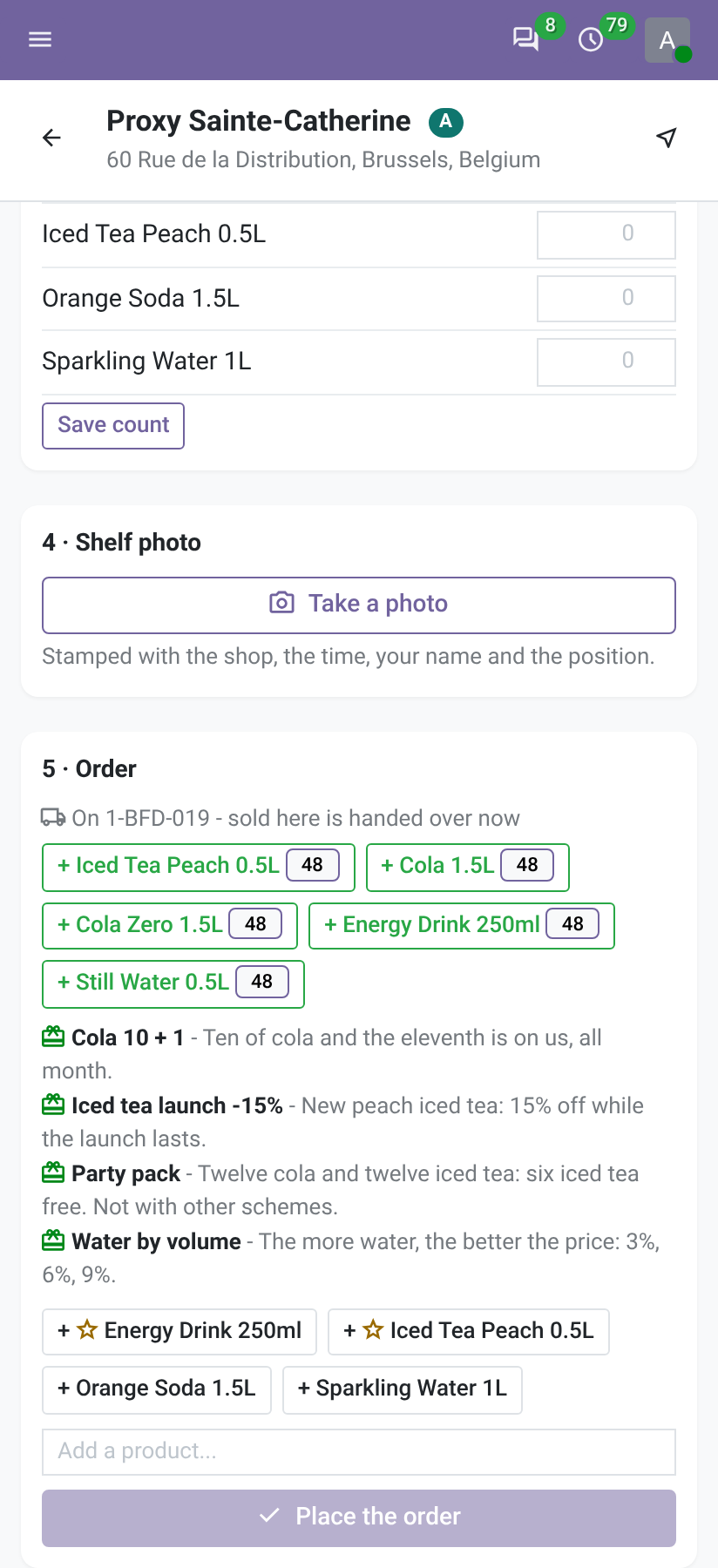
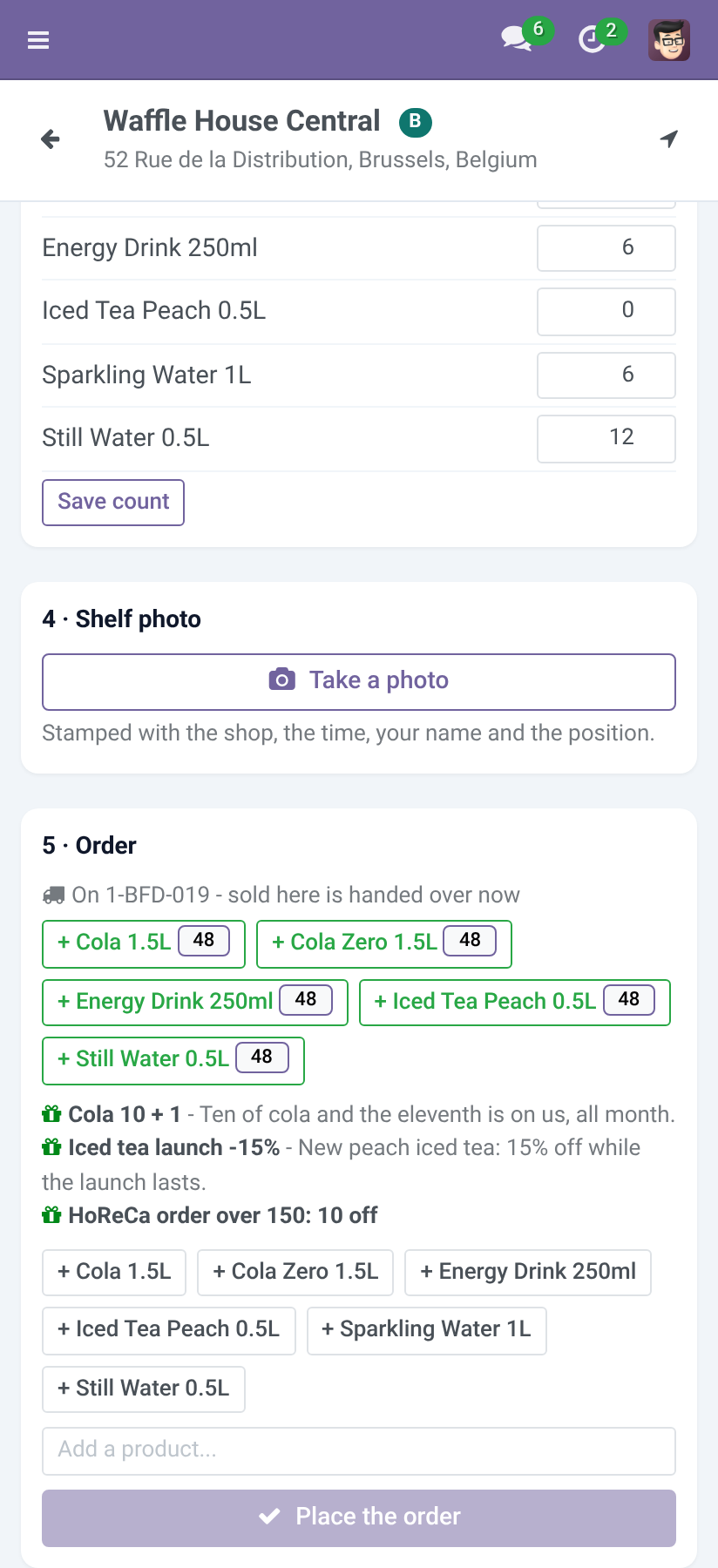
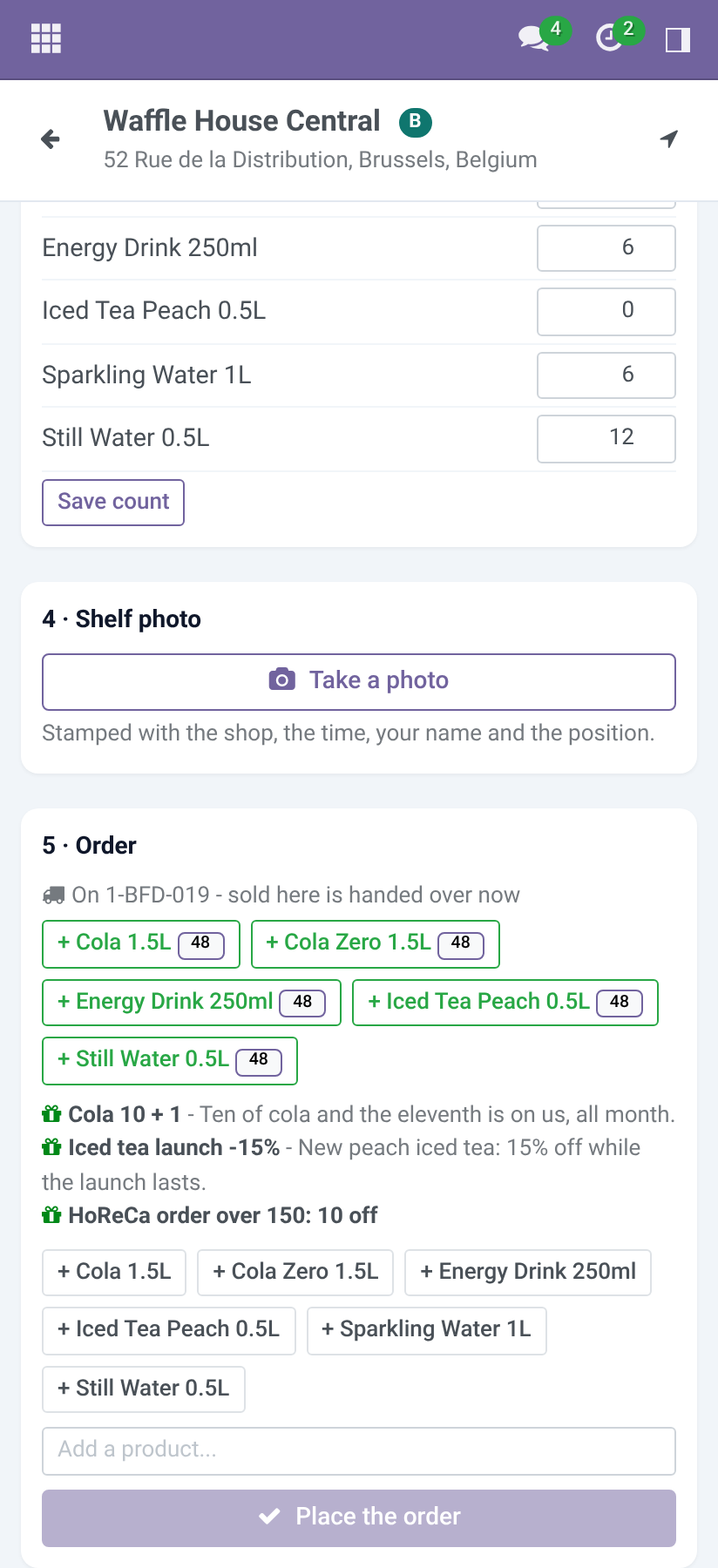
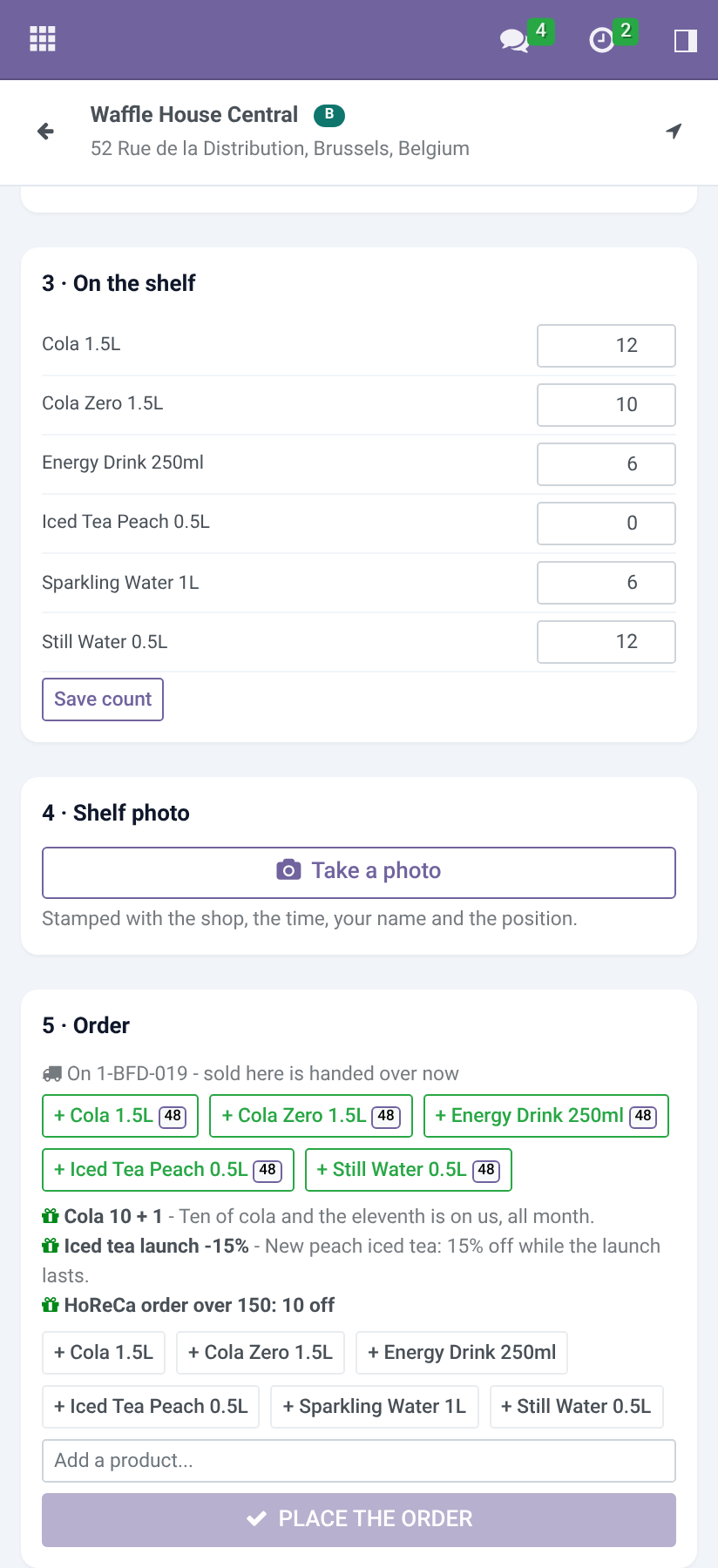
At the shops. On the phone the order card shows what is on the van, with quantities, to add in one tap. Placing the order confirms it and delivers it from the van on the spot; the phone lists the van orders of the visit with a cash field and Paid. A line asking for more than the van holds is refused, with the products named - free goods a trade scheme adds count too, so an order is refused as a whole rather than sending the van below zero. The printer icon next to a van order opens its receipt, 80 mm wide for a mobile printer. Goods the shop hands back (Taken back on the phone) are received into the van and go back to the warehouse with the evening unload.
Van to van. Vans ▸ Van to Van: the van giving, the van receiving, the products; Hand Over moves them if the giving van has them and a day open.
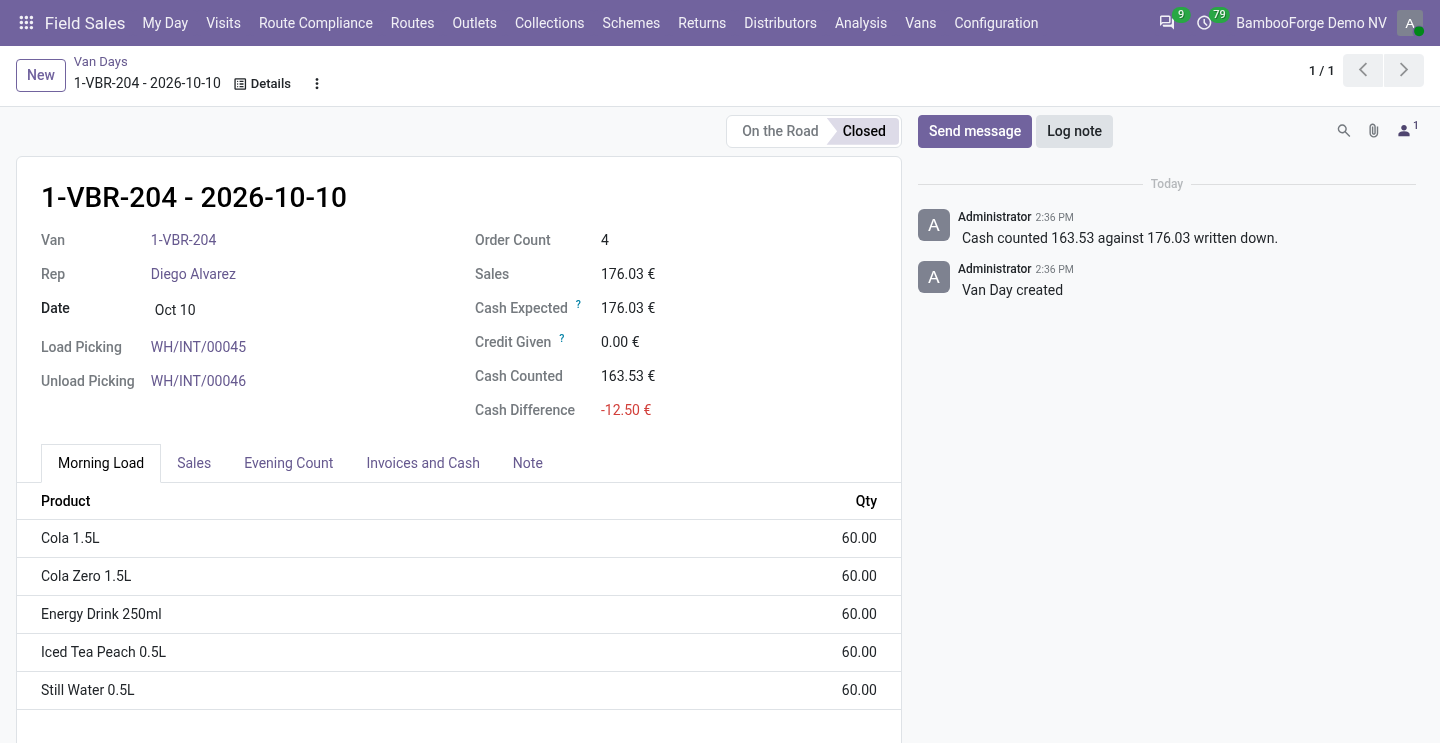
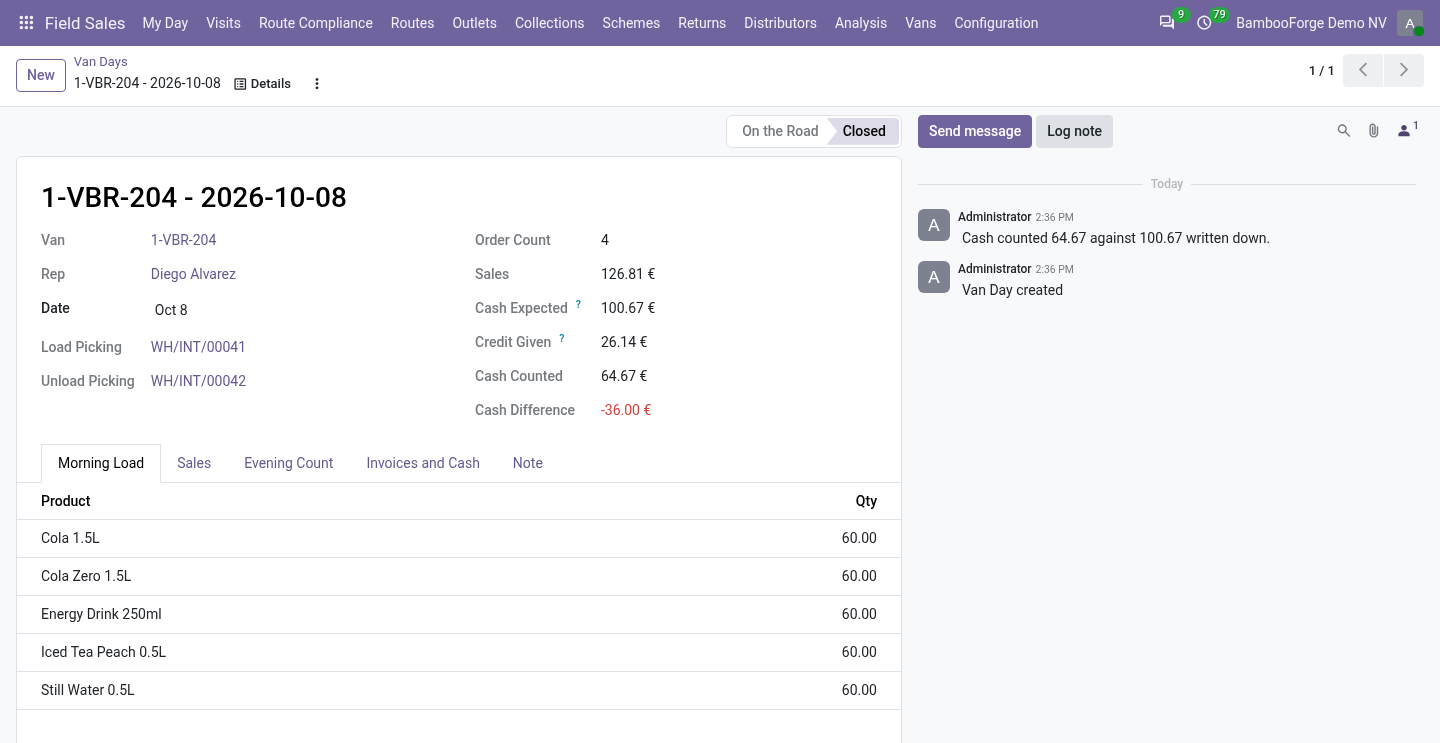
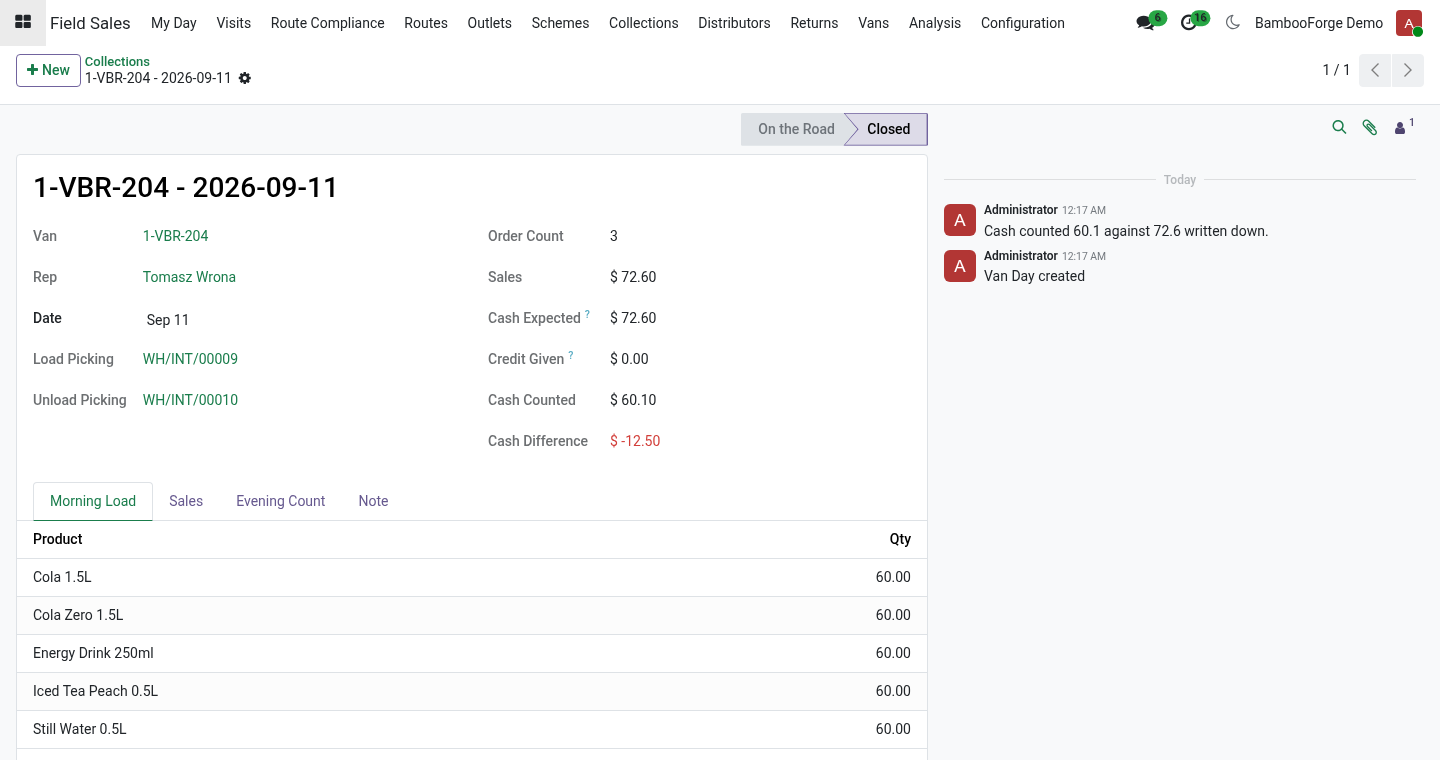
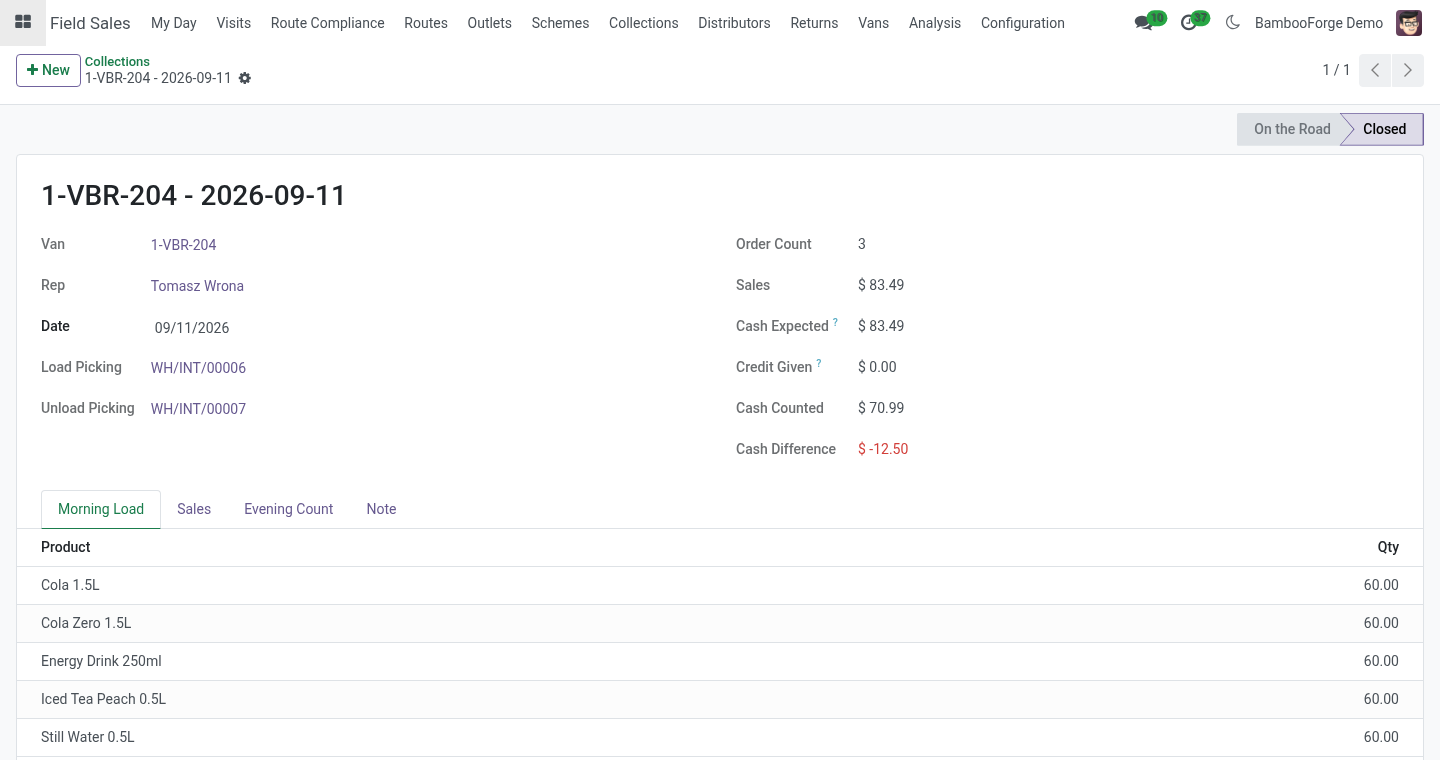
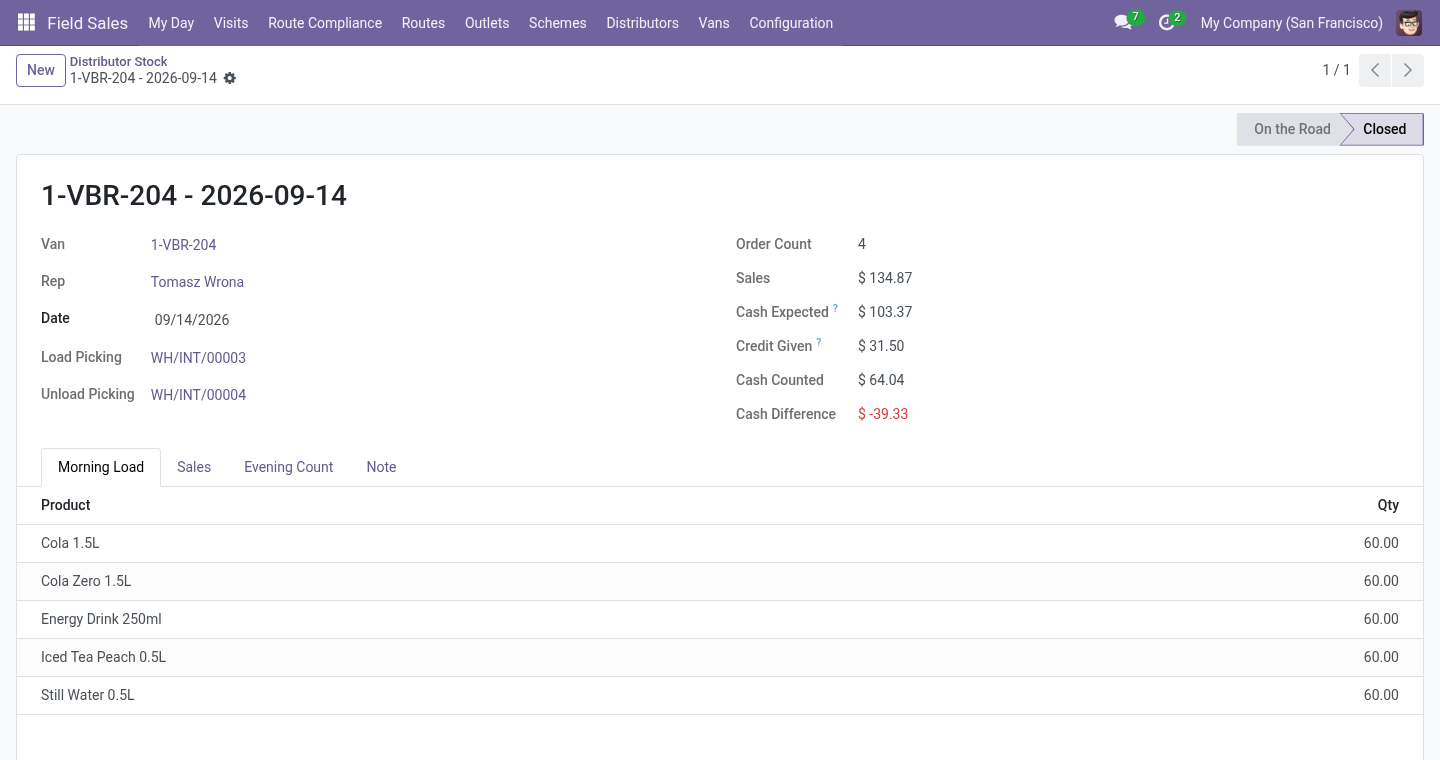
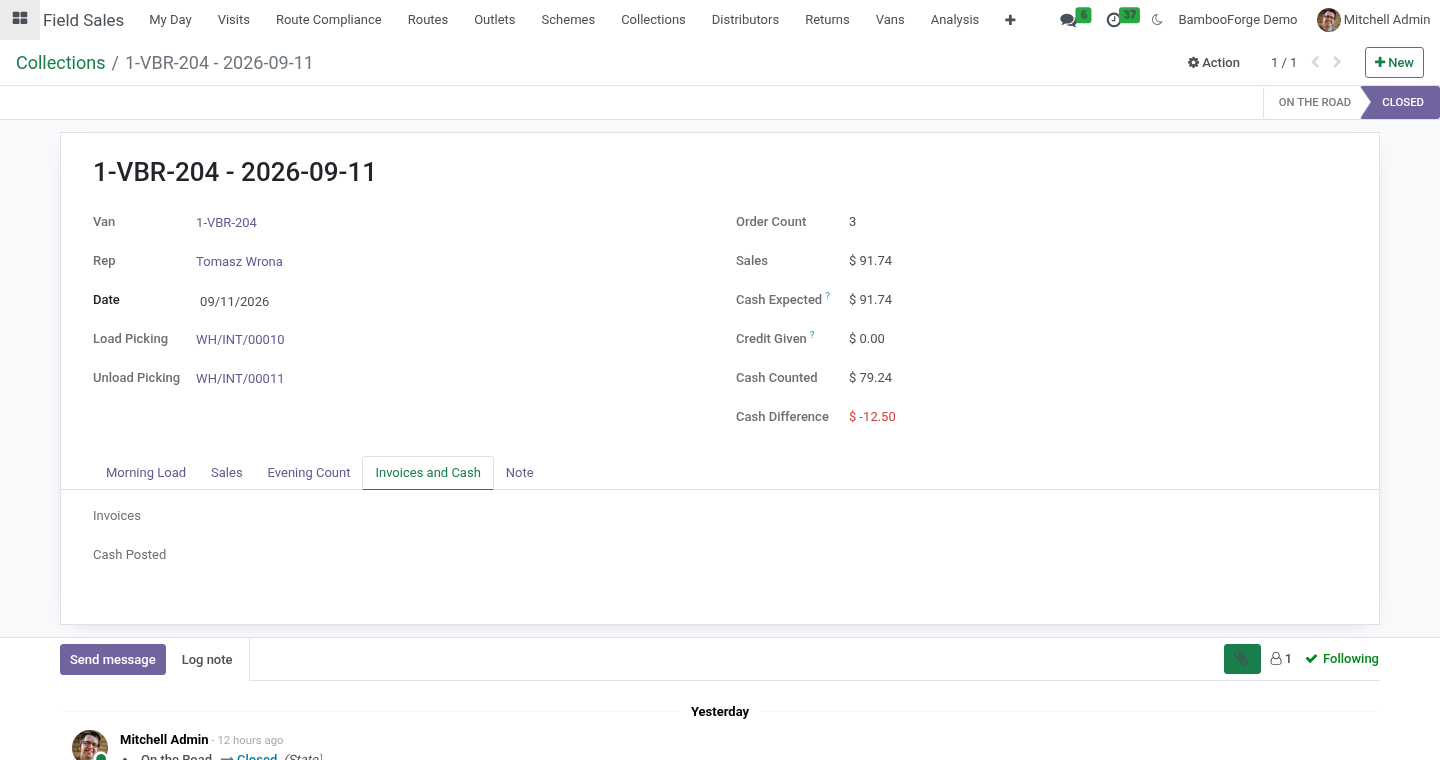
Evening. Evening Count fills in what the van should hold; correct the counted quantities, enter the cash counted, press Close the Day. A unit counted missing is written off in the van, everything left goes back to the warehouse by an internal transfer, and a cash difference is noted in the day's chatter and shown in red in the list.
With a cash journal on the van, closing the day also invoices every van order not invoiced yet, posts the invoices, and registers the cash written against each order as a payment in that journal, against its invoice. What was not paid stays open on the shop's account. The day's Invoices and Cash tab lists both.
Limits, stated plainly
Without a cash journal on the van, cash is recorded, not posted: register payments against the invoices the way your accounting does.
The suggested load reads the shops' last three orders, not a forecast; a shop that never ordered adds nothing.
A shop served by a distributor (with the Distributors add-on) is not sold from the van.
One van per rep, one open day per van.
Uninstalling
Uninstalling removes vans and van days. Stock moves, sales orders and the van locations stay.
Changelog
20.0.1.1.0
Built for Odoo 20: record rules and access rights rewritten onto Odoo 20's single ir.access model, the screens rebuilt on Owl 3, and every icon moved to the icon set Odoo 20 ships.
20.0.1.1.0
Suggested load from the day's route; invoices and cash posted at the close into the van's cash journal; an 80 mm receipt per van order; goods taken back ride on the van; van-to-van transfers.
20.0.1.0.1
Units another add-on puts on the order - free goods of a trade scheme - are checked against the van too: an order that does not fit is refused as a whole, and the van never goes below zero.
20.0.1.0.0
First release.
How we make sure it works
Before every release, 10 automated checks run against this app on Odoo 16, 17, 18, 19 and 20. Among them:
No van no change.
The van is a location and is loaded.
Goods taken back ride on the van.
Sold from the van on the spot.
Units added after the rep count too.
The complete list is in the source you receive.