 BambooForge Labs
Field Sales Trade Schemes and Display Programmes
Trade promotions for field sales: buy-ten-get-one, percent off, amount off - scoped by territory, channel, class or outlet, with a budget that stops the scheme the moment it is spent. Applied to the rep's order on the phone and written down to the cent. Display programmes approved by the supervisor and proved by the visit's photo.
Available for Odoo 16.0, Odoo 17.0, Odoo 18.0, Odoo 19.0, Odoo 20.0. Technical name bambooforge_field_sales_schemes.
Transcript of the walkthrough (Odoo 20)
Field Sales Trade Schemes and Display Programmes. Trade promotions for field sales: buy-ten-get-one, percent off, amount off - scoped by territory, channel, class or outlet, with a budget that stops the scheme the moment it is spent. Applied to the rep's order on the phone and written down to the cent. Display programmes approved by the supervisor and proved by the visit's photo.
A trade scheme is money the brand spends to make a shop buy the way it wants. Spent without a record, it is a discount nobody can account for. This add-on to Field Sales and Distribution gives every scheme a scope, a condition, a reward and a budget, applies it to the rep's order on the phone, and writes every use down with its cost. In the next few minutes: field sales trade schemes and display programmes, then what you get, then setting up a scheme, then on the order, then display programmes.
Then what this app deliberately does not do, so you can tell before you buy whether it fits. Everything lives under Trade Schemes then Scheme Spend then Display Programmes then Schemes. Field Sales Trade Schemes and Display Programmes. A trade scheme is money the brand spends to make a shop buy the way it wants.
Spent without a record, it is a discount nobody can account for. This add-on to Field Sales and Distribution gives every scheme a scope, a condition, a reward and a budget, applies it to the rep's order on the phone, and writes every use down with its cost. What you get Schemes scoped by territory, channel, outlet class, or a named list of outlets; once per outlet if you say so. Conditions: qualifying products, a minimum quantity, a minimum amount.
Rewards: percent off the qualifying lines, percent off by tier, free product for every multiple, or an amount off the order. Bundles: a scheme that asks for each of several products, in its own quantity. Stacking under control: a scheme marked not combinable stands alone on the order it applies to. Free goods at list or at cost: the budget counts free units the way your finance team does.
Budgets: every use is written down with its cost; a scheme that would pass its budget is not applied, and the rep is told why. On the phone: the schemes that fit the shop above the order, and the ones applied when it is placed. Setting up a scheme. Field Sales ▸ Schemes ▸ Trade Schemes ▸ New: When: from and to; the scheme applies to orders dated inside.
For which shops: territories, channels and classes (all empty means every shop); or Only These Outlets. Once per Outlet gives it to an outlet on one order only. Free goods count at: the list price (default) or the product's cost - what a free unit takes from the budget. Not combinable: when this scheme applies to an order, no other scheme does.
Not-combinable schemes are tried first; the first that fits wins. Budget: the most the scheme may cost; 0 for no limit. What the rep says: one sentence shown on the phone. Start it.
Schemes are tried in their sequence order, not-combinable ones first; several combinable schemes can apply to one order. On the order. When a rep places an order on the phone, the running schemes that fit the shop are tried in order. A percent off is set on the qualifying lines; a free product is a line at 100% discount; an amount off is a line of the Trade scheme discount product.
Each use is recorded with its cost - the discount given, the list value of the free units, or the amount - and the rep sees what was applied. An order made in the office gets the same with Apply Trade Schemes on the quotation. Applying again replaces what was applied before; a cancelled order gives its cost back to the budget. Display programmes.
Schemes ▸ Display Programmes: the programme (cooler, end-cap, window), the outlet, the period and the payout per month. A rep requests it; a supervisor approves or refuses. Every visit to the outlet in the period with a photo of kind display counts as proof; the form shows visits, visits with proof, the proof rate and the photos. Approved programmes end by themselves after their date.
Uninstalling. Uninstalling removes schemes, uses and display programmes. Discounts and lines already on orders stay as they are. 20.0.1.1.0 Built for Odoo 20: record rules and access rights rewritten onto Odoo 20's single ir.access model, the screens rebuilt on Owl 3, and every icon moved to the icon set Odoo 20 ships.
20.0.1.1.0 Percent off by tier; bundle conditions; not-combinable schemes; free goods counted at cost or at list price. The scheme engine also serves distributors' secondary orders (with the new Schemes for Distributors module). 20.0.1.0.0 How we make sure it works. Before every release, 10 automated checks run against this app on Odoo 16, 17, 18, 19 and 20.
Among them: Schemes apply to the reps order. Budget stops the scheme. The complete list is in the source you receive. Now the part most videos leave out: what this does not do.
With the Distributors add-on, the small Schemes for Distributors module installs by itself: schemes apply to the distributor's secondary orders too, and what the distributor gave away is claimed back as a credit note. See the Distributors manual. Tiers are read on the qualifying lines of one order, not on a shop's purchases over a month. The free-product reward is the same product line, not a choice of products.
Payouts of display programmes are shown, not paid: pay them the way you pay any customer credit. The complete manual is at docs dot bambooforge dot dev, the demo database is linked from the store page, and support answers within twenty-four hours. Links are in the description.
Transcript of the walkthrough (Odoo 19)
Field Sales Trade Schemes and Display Programmes. Trade promotions for field sales: buy-ten-get-one, percent off, amount off - scoped by territory, channel, class or outlet, with a budget that stops the scheme the moment it is spent. Applied to the rep's order on the phone and written down to the cent. Display programmes approved by the supervisor and proved by the visit's photo.
A trade scheme is money the brand spends to make a shop buy the way it wants. Spent without a record, it is a discount nobody can account for. This add-on to Field Sales and Distribution gives every scheme a scope, a condition, a reward and a budget, applies it to the rep's order on the phone, and writes every use down with its cost. In the next few minutes: field sales trade schemes and display programmes, then what you get, then setting up a scheme, then on the order, then display programmes.
Then what this app deliberately does not do, so you can tell before you buy whether it fits. Everything lives under Trade Schemes then Scheme Spend then Display Programmes then Schemes. Field Sales Trade Schemes and Display Programmes. A trade scheme is money the brand spends to make a shop buy the way it wants.
Spent without a record, it is a discount nobody can account for. This add-on to Field Sales and Distribution gives every scheme a scope, a condition, a reward and a budget, applies it to the rep's order on the phone, and writes every use down with its cost. What you get Schemes scoped by territory, channel, outlet class, or a named list of outlets; once per outlet if you say so. Conditions: qualifying products, a minimum quantity, a minimum amount.
Rewards: percent off the qualifying lines, percent off by tier, free product for every multiple, or an amount off the order. Bundles: a scheme that asks for each of several products, in its own quantity. Stacking under control: a scheme marked not combinable stands alone on the order it applies to. Free goods at list or at cost: the budget counts free units the way your finance team does.
Budgets: every use is written down with its cost; a scheme that would pass its budget is not applied, and the rep is told why. On the phone: the schemes that fit the shop above the order, and the ones applied when it is placed. Setting up a scheme. Field Sales ▸ Schemes ▸ Trade Schemes ▸ New: When: from and to; the scheme applies to orders dated inside.
For which shops: territories, channels and classes (all empty means every shop); or Only These Outlets. Once per Outlet gives it to an outlet on one order only. Free goods count at: the list price (default) or the product's cost - what a free unit takes from the budget. Not combinable: when this scheme applies to an order, no other scheme does.
Not-combinable schemes are tried first; the first that fits wins. Budget: the most the scheme may cost; 0 for no limit. What the rep says: one sentence shown on the phone. Start it.
Schemes are tried in their sequence order, not-combinable ones first; several combinable schemes can apply to one order. On the order. When a rep places an order on the phone, the running schemes that fit the shop are tried in order. A percent off is set on the qualifying lines; a free product is a line at 100% discount; an amount off is a line of the Trade scheme discount product.
Each use is recorded with its cost - the discount given, the list value of the free units, or the amount - and the rep sees what was applied. An order made in the office gets the same with Apply Trade Schemes on the quotation. Applying again replaces what was applied before; a cancelled order gives its cost back to the budget. Display programmes.
Schemes ▸ Display Programmes: the programme (cooler, end-cap, window), the outlet, the period and the payout per month. A rep requests it; a supervisor approves or refuses. Every visit to the outlet in the period with a photo of kind display counts as proof; the form shows visits, visits with proof, the proof rate and the photos. Approved programmes end by themselves after their date.
Uninstalling. Uninstalling removes schemes, uses and display programmes. Discounts and lines already on orders stay as they are. 19.0.1.1.0 Percent off by tier; bundle conditions; not-combinable schemes; free goods counted at cost or at list price.
The scheme engine also serves distributors' secondary orders (with the new Schemes for Distributors module). 19.0.1.0.0 How we make sure it works. Before every release, 10 automated checks run against this app on Odoo 16, 17, 18 and 19. Among them: Schemes apply to the reps order.
Budget stops the scheme. The complete list is in the source you receive. Now the part most videos leave out: what this does not do. With the Distributors add-on, the small Schemes for Distributors module installs by itself: schemes apply to the distributor's secondary orders too, and what the distributor gave away is claimed back as a credit note.
See the Distributors manual. Tiers are read on the qualifying lines of one order, not on a shop's purchases over a month. The free-product reward is the same product line, not a choice of products. Payouts of display programmes are shown, not paid: pay them the way you pay any customer credit.
The complete manual is at docs dot bambooforge dot dev, the demo database is linked from the store page, and support answers within twenty-four hours. Links are in the description.
Transcript of the walkthrough (Odoo 18)
Field Sales Trade Schemes and Display Programmes. Trade promotions for field sales: buy-ten-get-one, percent off, amount off - scoped by territory, channel, class or outlet, with a budget that stops the scheme the moment it is spent. Applied to the rep's order on the phone and written down to the cent. Display programmes approved by the supervisor and proved by the visit's photo.
A trade scheme is money the brand spends to make a shop buy the way it wants. Spent without a record, it is a discount nobody can account for. This add-on to Field Sales and Distribution gives every scheme a scope, a condition, a reward and a budget, applies it to the rep's order on the phone, and writes every use down with its cost. In the next few minutes: field sales trade schemes and display programmes, then what you get, then setting up a scheme, then on the order, then display programmes.
Then what this app deliberately does not do, so you can tell before you buy whether it fits. Everything lives under Trade Schemes then Scheme Spend then Display Programmes then Schemes. Field Sales Trade Schemes and Display Programmes. A trade scheme is money the brand spends to make a shop buy the way it wants.
Spent without a record, it is a discount nobody can account for. This add-on to Field Sales and Distribution gives every scheme a scope, a condition, a reward and a budget, applies it to the rep's order on the phone, and writes every use down with its cost. What you get Schemes scoped by territory, channel, outlet class, or a named list of outlets; once per outlet if you say so. Conditions: qualifying products, a minimum quantity, a minimum amount.
Rewards: percent off the qualifying lines, percent off by tier, free product for every multiple, or an amount off the order. Bundles: a scheme that asks for each of several products, in its own quantity. Stacking under control: a scheme marked not combinable stands alone on the order it applies to. Free goods at list or at cost: the budget counts free units the way your finance team does.
Budgets: every use is written down with its cost; a scheme that would pass its budget is not applied, and the rep is told why. On the phone: the schemes that fit the shop above the order, and the ones applied when it is placed. Setting up a scheme. Field Sales ▸ Schemes ▸ Trade Schemes ▸ New: When: from and to; the scheme applies to orders dated inside.
For which shops: territories, channels and classes (all empty means every shop); or Only These Outlets. Once per Outlet gives it to an outlet on one order only. Free goods count at: the list price (default) or the product's cost - what a free unit takes from the budget. Not combinable: when this scheme applies to an order, no other scheme does.
Not-combinable schemes are tried first; the first that fits wins. Budget: the most the scheme may cost; 0 for no limit. What the rep says: one sentence shown on the phone. Start it.
Schemes are tried in their sequence order, not-combinable ones first; several combinable schemes can apply to one order. On the order. When a rep places an order on the phone, the running schemes that fit the shop are tried in order. A percent off is set on the qualifying lines; a free product is a line at 100% discount; an amount off is a line of the Trade scheme discount product.
Each use is recorded with its cost - the discount given, the list value of the free units, or the amount - and the rep sees what was applied. An order made in the office gets the same with Apply Trade Schemes on the quotation. Applying again replaces what was applied before; a cancelled order gives its cost back to the budget. Display programmes.
Schemes ▸ Display Programmes: the programme (cooler, end-cap, window), the outlet, the period and the payout per month. A rep requests it; a supervisor approves or refuses. Every visit to the outlet in the period with a photo of kind display counts as proof; the form shows visits, visits with proof, the proof rate and the photos. Approved programmes end by themselves after their date.
Uninstalling. Uninstalling removes schemes, uses and display programmes. Discounts and lines already on orders stay as they are. 18.0.1.1.0 Percent off by tier; bundle conditions; not-combinable schemes; free goods counted at cost or at list price.
The scheme engine also serves distributors' secondary orders (with the new Schemes for Distributors module). 00:06:04.1000 --> 00:06:08.216 18.0.1.0.0 How we make sure it works. Before every release, 10 automated checks run against this app on Odoo 16, 17, 18 and 19. Among them: Schemes apply to the reps order.
Budget stops the scheme. The complete list is in the source you receive. Now the part most videos leave out: what this does not do. With the Distributors add-on, the small Schemes for Distributors module installs by itself: schemes apply to the distributor's secondary orders too, and what the distributor gave away is claimed back as a credit note.
See the Distributors manual. Tiers are read on the qualifying lines of one order, not on a shop's purchases over a month. The free-product reward is the same product line, not a choice of products. Payouts of display programmes are shown, not paid: pay them the way you pay any customer credit.
The complete manual is at docs dot bambooforge dot dev, the demo database is linked from the store page, and support answers within twenty-four hours. Links are in the description.
Transcript of the walkthrough (Odoo 17)
Field Sales Trade Schemes and Display Programmes. Trade promotions for field sales: buy-ten-get-one, percent off, amount off - scoped by territory, channel, class or outlet, with a budget that stops the scheme the moment it is spent. Applied to the rep's order on the phone and written down to the cent. Display programmes approved by the supervisor and proved by the visit's photo.
A trade scheme is money the brand spends to make a shop buy the way it wants. Spent without a record, it is a discount nobody can account for. This add-on to Field Sales and Distribution gives every scheme a scope, a condition, a reward and a budget, applies it to the rep's order on the phone, and writes every use down with its cost. In the next few minutes: field sales trade schemes and display programmes, then what you get, then setting up a scheme, then on the order, then display programmes.
Then what this app deliberately does not do, so you can tell before you buy whether it fits. Everything lives under Trade Schemes then Scheme Spend then Display Programmes then Schemes. Field Sales Trade Schemes and Display Programmes. A trade scheme is money the brand spends to make a shop buy the way it wants.
Spent without a record, it is a discount nobody can account for. This add-on to Field Sales and Distribution gives every scheme a scope, a condition, a reward and a budget, applies it to the rep's order on the phone, and writes every use down with its cost. What you get Schemes scoped by territory, channel, outlet class, or a named list of outlets; once per outlet if you say so. Conditions: qualifying products, a minimum quantity, a minimum amount.
Rewards: percent off the qualifying lines, percent off by tier, free product for every multiple, or an amount off the order. Bundles: a scheme that asks for each of several products, in its own quantity. Stacking under control: a scheme marked not combinable stands alone on the order it applies to. Free goods at list or at cost: the budget counts free units the way your finance team does.
Budgets: every use is written down with its cost; a scheme that would pass its budget is not applied, and the rep is told why. On the phone: the schemes that fit the shop above the order, and the ones applied when it is placed. Setting up a scheme. Field Sales ▸ Schemes ▸ Trade Schemes ▸ New: When: from and to; the scheme applies to orders dated inside.
For which shops: territories, channels and classes (all empty means every shop); or Only These Outlets. Once per Outlet gives it to an outlet on one order only. Free goods count at: the list price (default) or the product's cost - what a free unit takes from the budget. Not combinable: when this scheme applies to an order, no other scheme does.
Not-combinable schemes are tried first; the first that fits wins. Budget: the most the scheme may cost; 0 for no limit. What the rep says: one sentence shown on the phone. Start it.
Schemes are tried in their sequence order, not-combinable ones first; several combinable schemes can apply to one order. On the order. When a rep places an order on the phone, the running schemes that fit the shop are tried in order. A percent off is set on the qualifying lines; a free product is a line at 100% discount; an amount off is a line of the Trade scheme discount product.
Each use is recorded with its cost - the discount given, the list value of the free units, or the amount - and the rep sees what was applied. An order made in the office gets the same with Apply Trade Schemes on the quotation. Applying again replaces what was applied before; a cancelled order gives its cost back to the budget. Display programmes.
Schemes ▸ Display Programmes: the programme (cooler, end-cap, window), the outlet, the period and the payout per month. A rep requests it; a supervisor approves or refuses. Every visit to the outlet in the period with a photo of kind display counts as proof; the form shows visits, visits with proof, the proof rate and the photos. Approved programmes end by themselves after their date.
Uninstalling. Uninstalling removes schemes, uses and display programmes. Discounts and lines already on orders stay as they are. 17.0.1.1.0 Percent off by tier; bundle conditions; not-combinable schemes; free goods counted at cost or at list price.
The scheme engine also serves distributors' secondary orders (with the new Schemes for Distributors module). 17.0.1.0.0 How we make sure it works. Before every release, 10 automated checks run against this app on Odoo 16, 17, 18 and 19. Among them: Schemes apply to the reps order.
Budget stops the scheme. The complete list is in the source you receive. Now the part most videos leave out: what this does not do. With the Distributors add-on, the small Schemes for Distributors module installs by itself: schemes apply to the distributor's secondary orders too, and what the distributor gave away is claimed back as a credit note.
See the Distributors manual. Tiers are read on the qualifying lines of one order, not on a shop's purchases over a month. The free-product reward is the same product line, not a choice of products. Payouts of display programmes are shown, not paid: pay them the way you pay any customer credit.
The complete manual is at docs dot bambooforge dot dev, the demo database is linked from the store page, and support answers within twenty-four hours. Links are in the description.
Transcript of the walkthrough (Odoo 16)
Field Sales Trade Schemes and Display Programmes. Trade promotions for field sales: buy-ten-get-one, percent off, amount off - scoped by territory, channel, class or outlet, with a budget that stops the scheme the moment it is spent. Applied to the rep's order on the phone and written down to the cent. Display programmes approved by the supervisor and proved by the visit's photo.
A trade scheme is money the brand spends to make a shop buy the way it wants. Spent without a record, it is a discount nobody can account for. This add-on to Field Sales and Distribution gives every scheme a scope, a condition, a reward and a budget, applies it to the rep's order on the phone, and writes every use down with its cost. In the next few minutes: field sales trade schemes and display programmes, then what you get, then setting up a scheme, then on the order, then display programmes.
Then what this app deliberately does not do, so you can tell before you buy whether it fits. Everything lives under Trade Schemes then Scheme Spend then Display Programmes then Schemes. Field Sales Trade Schemes and Display Programmes. A trade scheme is money the brand spends to make a shop buy the way it wants.
Spent without a record, it is a discount nobody can account for. This add-on to Field Sales and Distribution gives every scheme a scope, a condition, a reward and a budget, applies it to the rep's order on the phone, and writes every use down with its cost. What you get Schemes scoped by territory, channel, outlet class, or a named list of outlets; once per outlet if you say so. Conditions: qualifying products, a minimum quantity, a minimum amount.
Rewards: percent off the qualifying lines, percent off by tier, free product for every multiple, or an amount off the order. Bundles: a scheme that asks for each of several products, in its own quantity. Stacking under control: a scheme marked not combinable stands alone on the order it applies to. Free goods at list or at cost: the budget counts free units the way your finance team does.
Budgets: every use is written down with its cost; a scheme that would pass its budget is not applied, and the rep is told why. On the phone: the schemes that fit the shop above the order, and the ones applied when it is placed. Setting up a scheme. Field Sales ▸ Schemes ▸ Trade Schemes ▸ New: When: from and to; the scheme applies to orders dated inside.
For which shops: territories, channels and classes (all empty means every shop); or Only These Outlets. Once per Outlet gives it to an outlet on one order only. Free goods count at: the list price (default) or the product's cost - what a free unit takes from the budget. Not combinable: when this scheme applies to an order, no other scheme does.
Not-combinable schemes are tried first; the first that fits wins. Budget: the most the scheme may cost; 0 for no limit. What the rep says: one sentence shown on the phone. Start it.
Schemes are tried in their sequence order, not-combinable ones first; several combinable schemes can apply to one order. On the order. When a rep places an order on the phone, the running schemes that fit the shop are tried in order. A percent off is set on the qualifying lines; a free product is a line at 100% discount; an amount off is a line of the Trade scheme discount product.
Each use is recorded with its cost - the discount given, the list value of the free units, or the amount - and the rep sees what was applied. An order made in the office gets the same with Apply Trade Schemes on the quotation. Applying again replaces what was applied before; a cancelled order gives its cost back to the budget. Display programmes.
Schemes ▸ Display Programmes: the programme (cooler, end-cap, window), the outlet, the period and the payout per month. A rep requests it; a supervisor approves or refuses. Every visit to the outlet in the period with a photo of kind display counts as proof; the form shows visits, visits with proof, the proof rate and the photos. Approved programmes end by themselves after their date.
Uninstalling. Uninstalling removes schemes, uses and display programmes. Discounts and lines already on orders stay as they are. 16.0.1.1.0 Percent off by tier; bundle conditions; not-combinable schemes; free goods counted at cost or at list price.
The scheme engine also serves distributors' secondary orders (with the new Schemes for Distributors module). 16.0.1.0.0 How we make sure it works. Before every release, 10 automated checks run against this app on Odoo 16, 17, 18 and 19. Among them: Schemes apply to the reps order.
Budget stops the scheme. The complete list is in the source you receive. Now the part most videos leave out: what this does not do. With the Distributors add-on, the small Schemes for Distributors module installs by itself: schemes apply to the distributor's secondary orders too, and what the distributor gave away is claimed back as a credit note.
See the Distributors manual. Tiers are read on the qualifying lines of one order, not on a shop's purchases over a month. The free-product reward is the same product line, not a choice of products. Payouts of display programmes are shown, not paid: pay them the way you pay any customer credit.
The complete manual is at docs dot bambooforge dot dev, the demo database is linked from the store page, and support answers within twenty-four hours. Links are in the description.
Key facts
- What it is
- Trade promotions for field sales: buy-ten-get-one, percent off, amount off - scoped by territory, channel, class or outlet, with a budget that stops the scheme the moment it is spent. Applied to the rep's order on the phone and written down to the cent. Display programmes approved by the supervisor and proved by the visit's photo.
- For
- Sales
- Odoo versions
- 16.0, 17.0, 18.0, 19.0, 20.0 - Community and Enterprise
- Runs on
- Odoo.sh or Odoo you host yourself - not Odoo Online, which accepts no third-party apps
- Price
- 448 EUR, one-time, on the Odoo Apps Store
- Technical name
- bambooforge_field_sales_schemes
- Not for
- With the Distributors add-on, the small Schemes for Distributors module installs by itself: schemes apply to the distributor's secondary orders too, and what the distributor gave away is claimed back as a credit note. See the Distributors manual.; Tiers are read on the qualifying lines of one order, not on a shop's purchases over a month.; The free-product reward is the same product line, not a choice of products.; Payouts of display programmes are shown, not paid: pay them the way you pay any customer credit.
- Live demo
- https://demo20.bambooforge.dev/odoo/action-bambooforge_field_sales_schemes.bf_fs_scheme_action
- Manual last updated
- 2026-09-21
Field Sales Trade Schemes and Display Programmes
A trade scheme is money the brand spends to make a shop buy the way it wants. Spent without a record, it is a discount nobody can account for. This add-on to Field Sales and Distribution gives every scheme a scope, a condition, a reward and a budget, applies it to the rep's order on the phone, and writes every use down with its cost.
What you get
Schemes scoped by territory, channel, outlet class, or a named list of outlets; once per outlet if you say so.
Conditions: qualifying products, a minimum quantity, a minimum amount.
Rewards: percent off the qualifying lines, percent off by tier, free product for every multiple, or an amount off the order.
Bundles: a scheme that asks for each of several products, in its own quantity.
Stacking under control: a scheme marked not combinable stands alone on the order it applies to.
Free goods at list or at cost: the budget counts free units the way your finance team does.
Budgets: every use is written down with its cost; a scheme that would pass its budget is not applied, and the rep is told why.
On the phone: the schemes that fit the shop above the order, and the ones applied when it is placed.
Display programmes: requested by the rep, approved by a supervisor, proved by the display photos of every visit in the period.
Requirements
Field Sales and Distribution (bambooforge_field_sales) 1.1 or later on the same Odoo series; Odoo 20.0, Community or Enterprise.
Supervisors create and close schemes and approve display programmes; reps read schemes and request display programmes.
Install
Copy bambooforge_field_sales_schemes into your addons path next to Field Sales, restart Odoo.
Apps, search for Trade Schemes, Activate. A service product, Trade scheme discount, is created for amount-off schemes.
Setting up a scheme
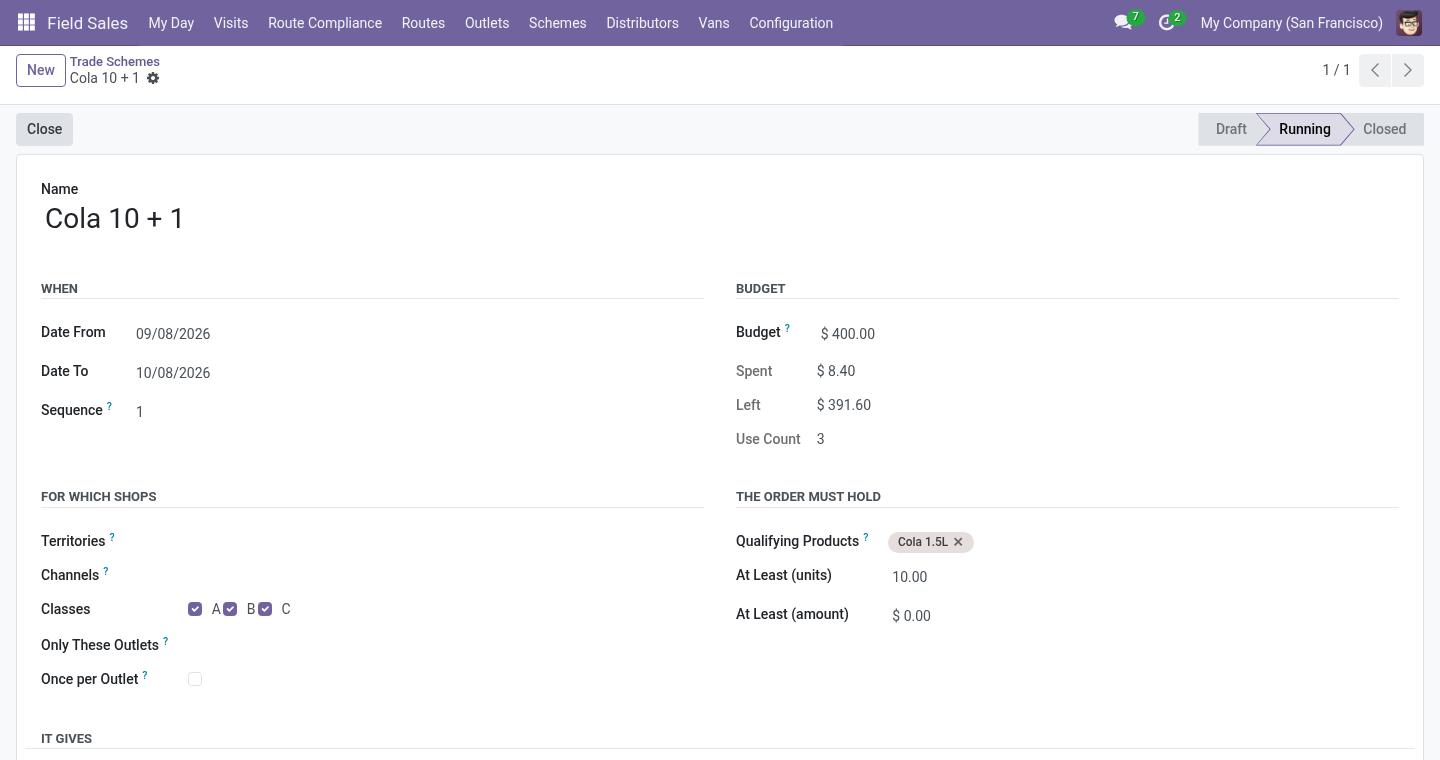
Field Sales ▸ Schemes ▸ Trade Schemes ▸ New:
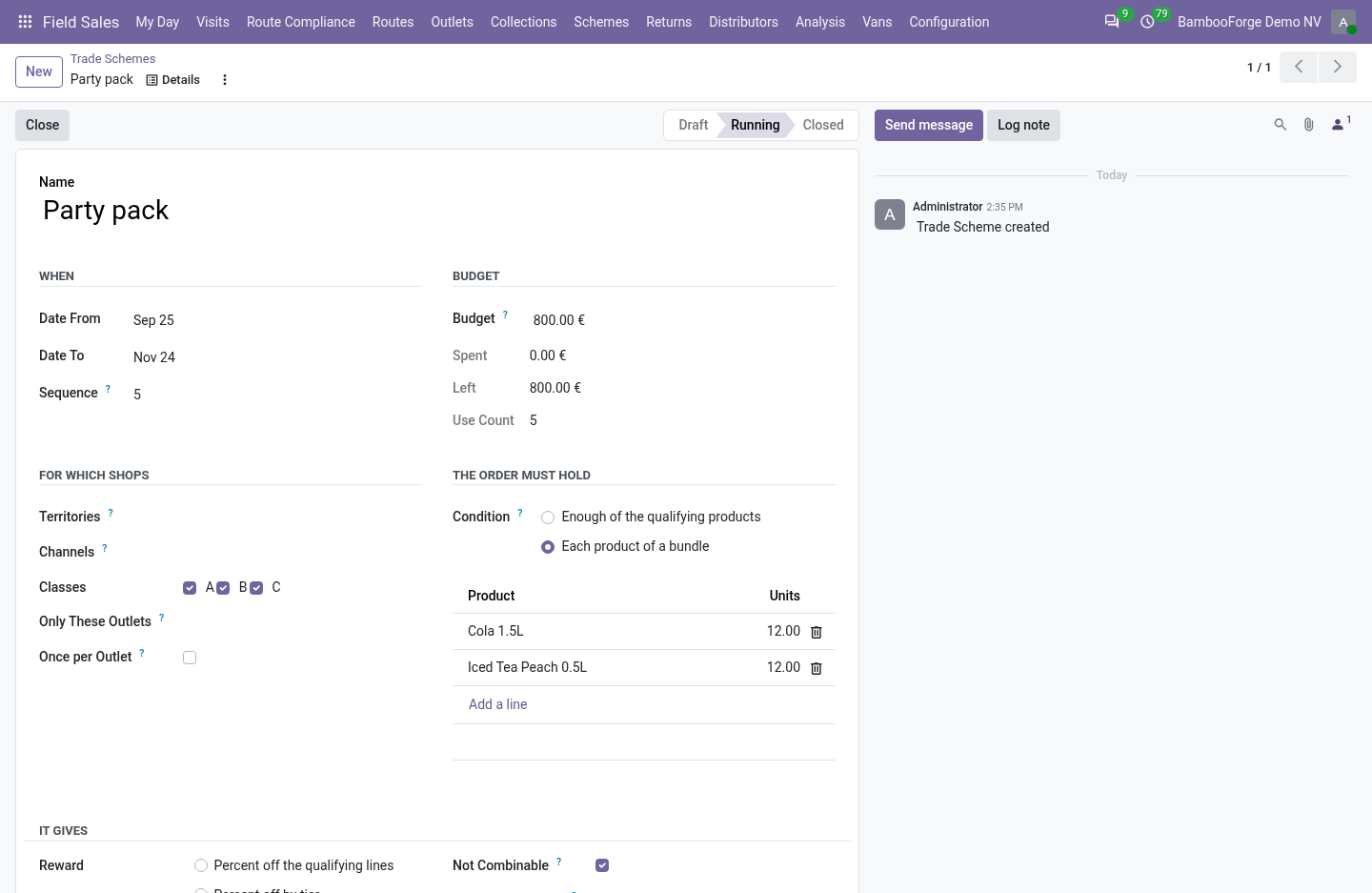
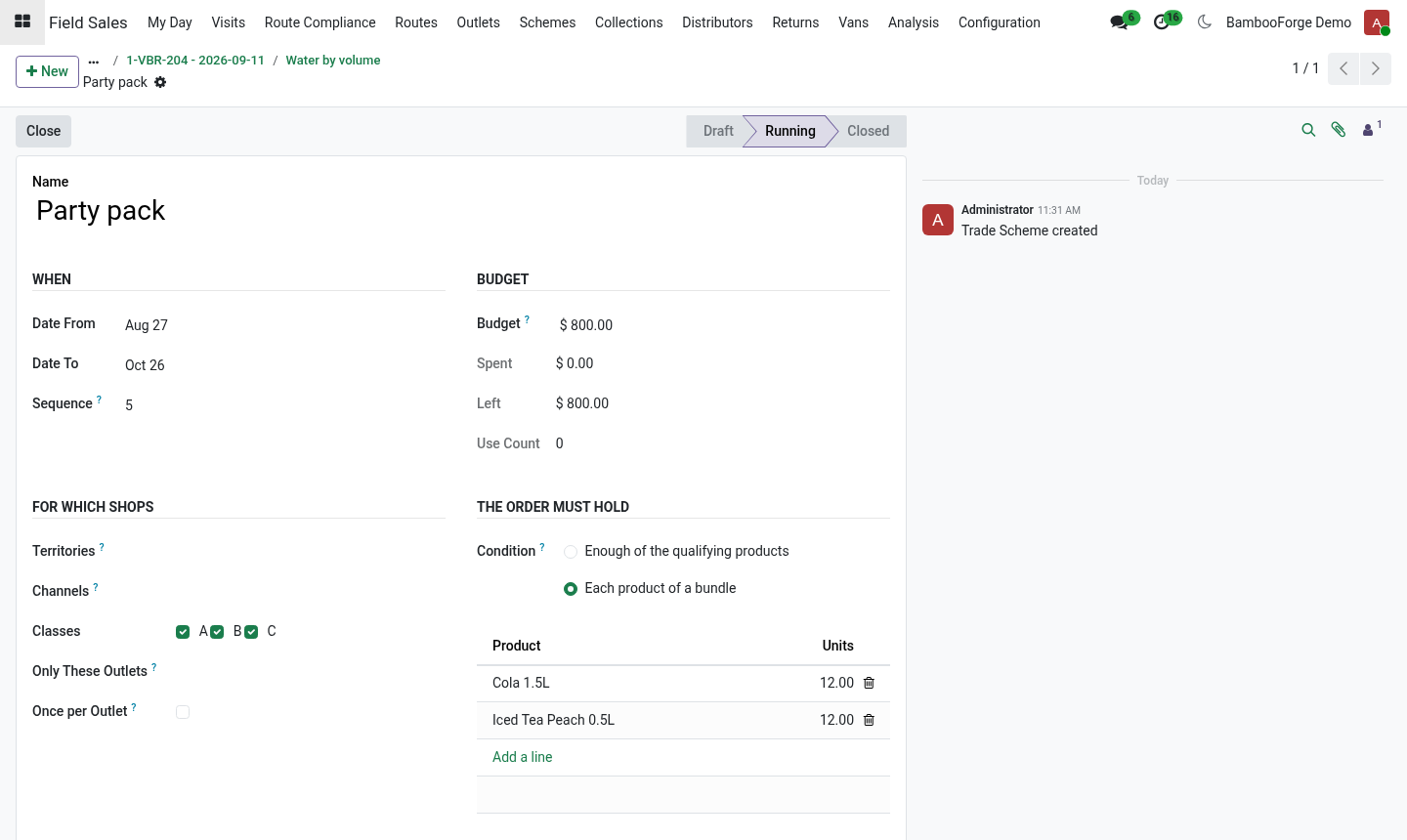
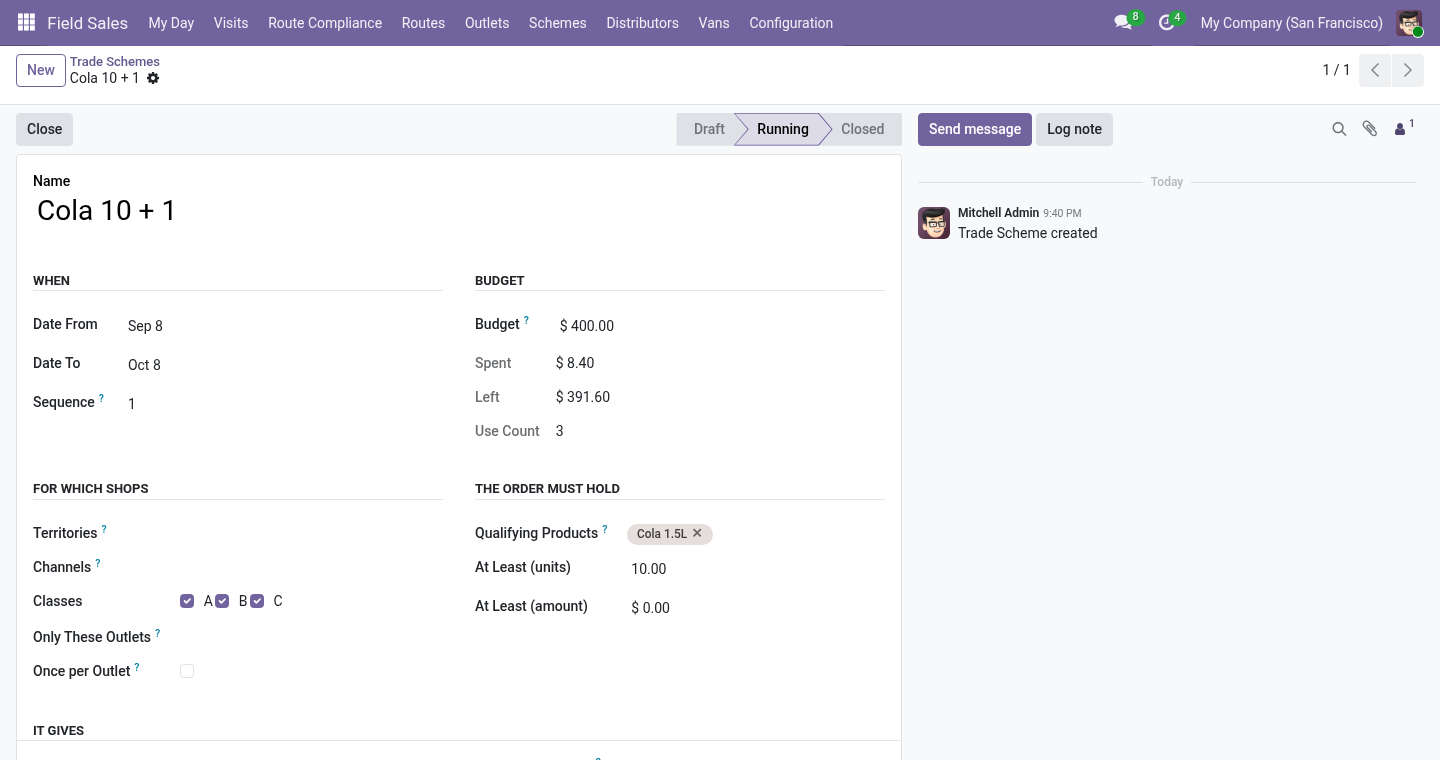
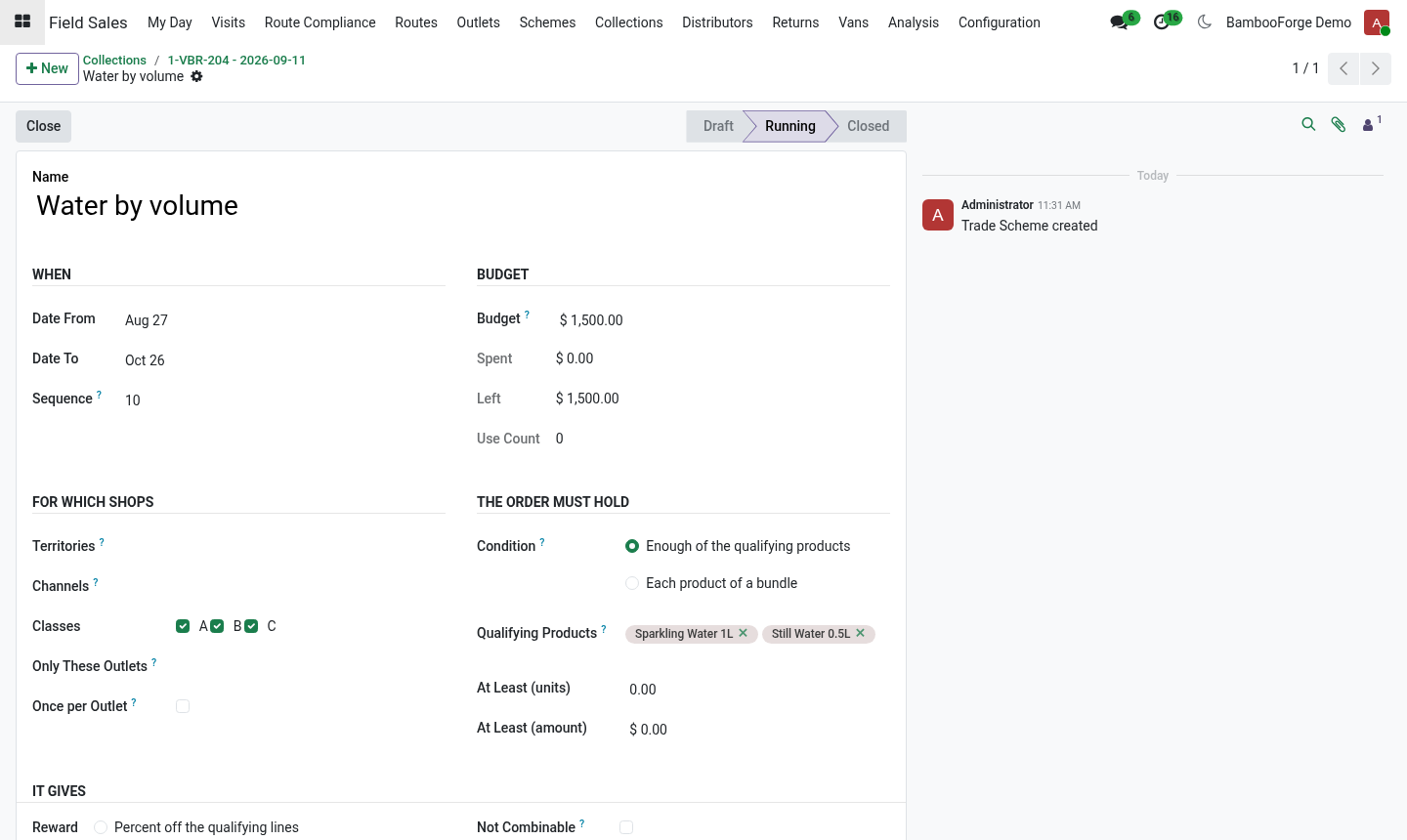
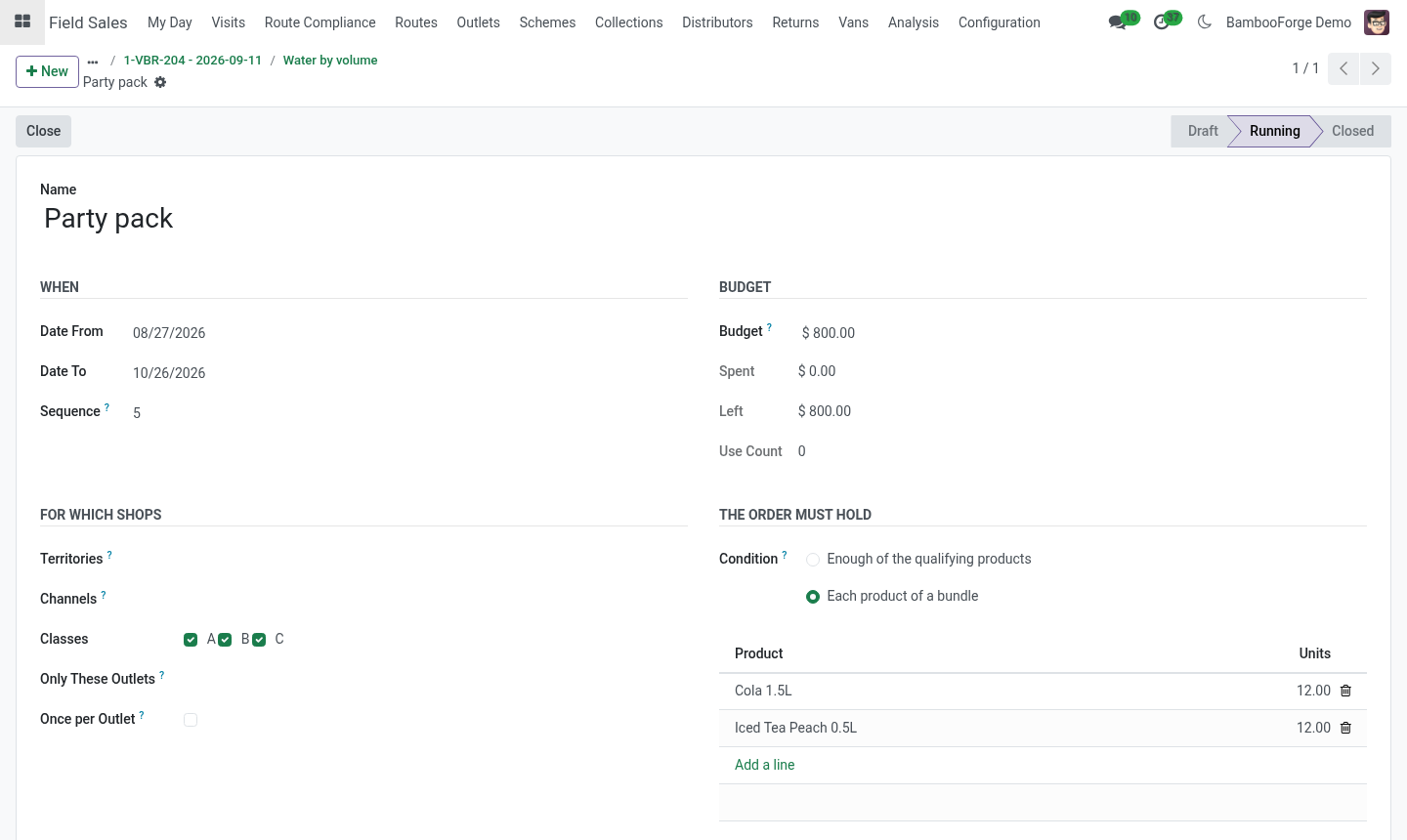
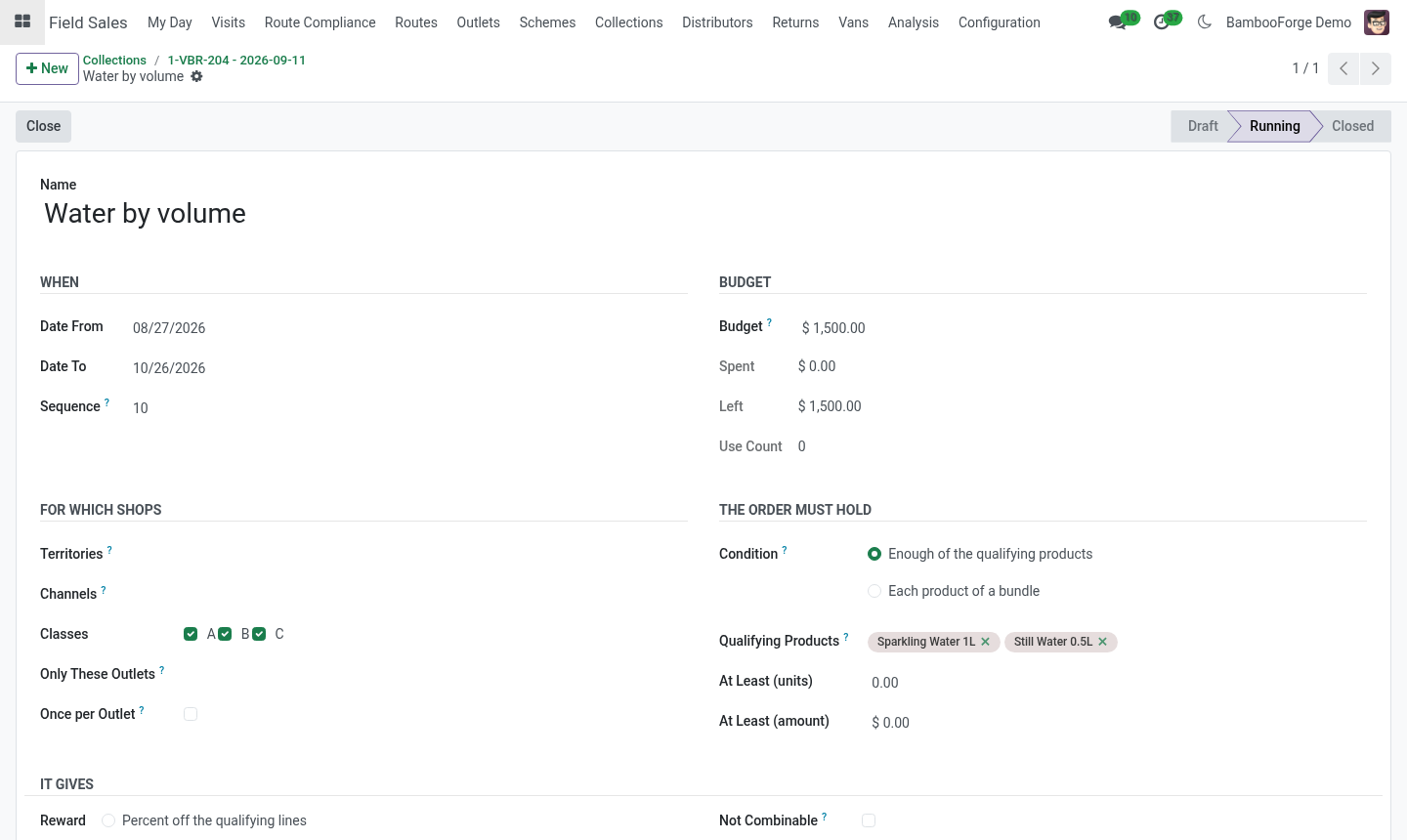
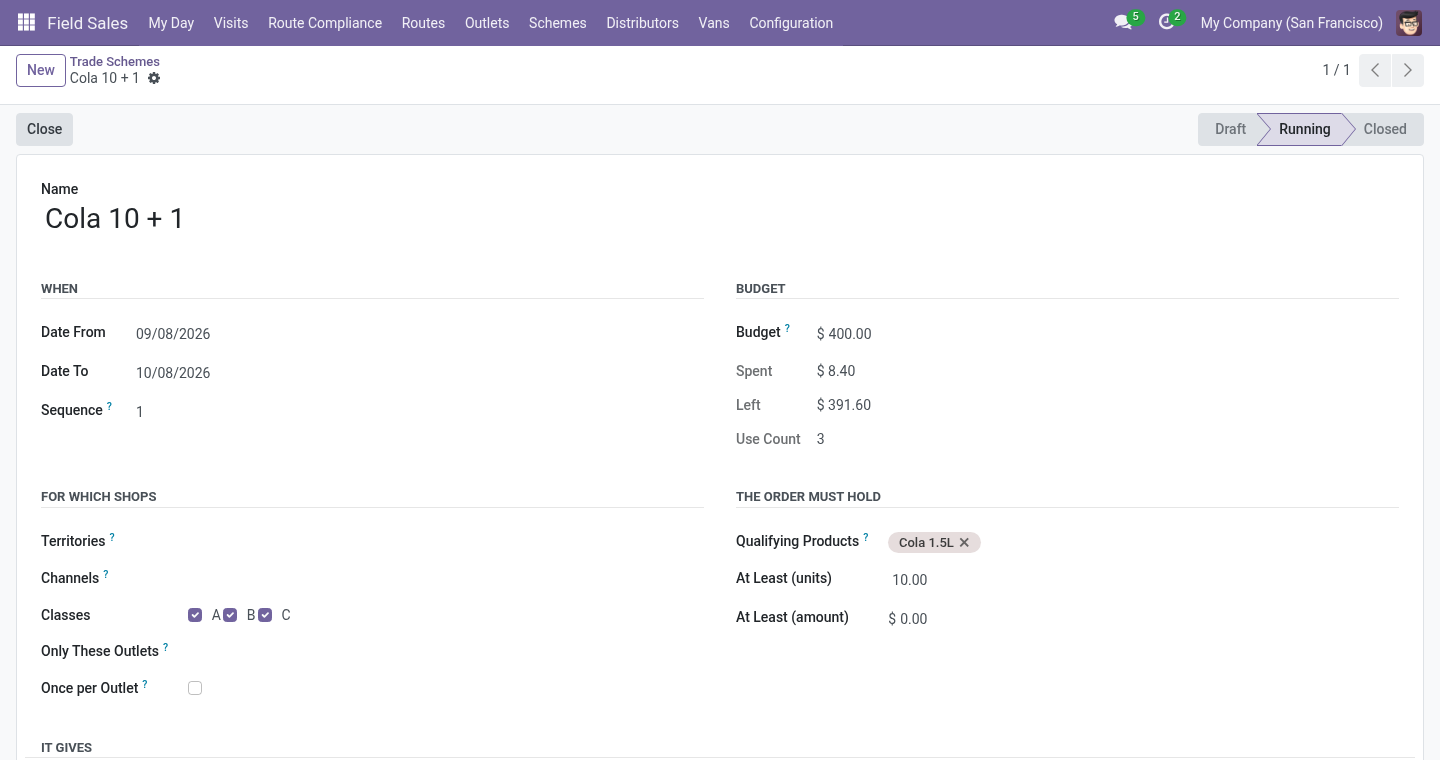
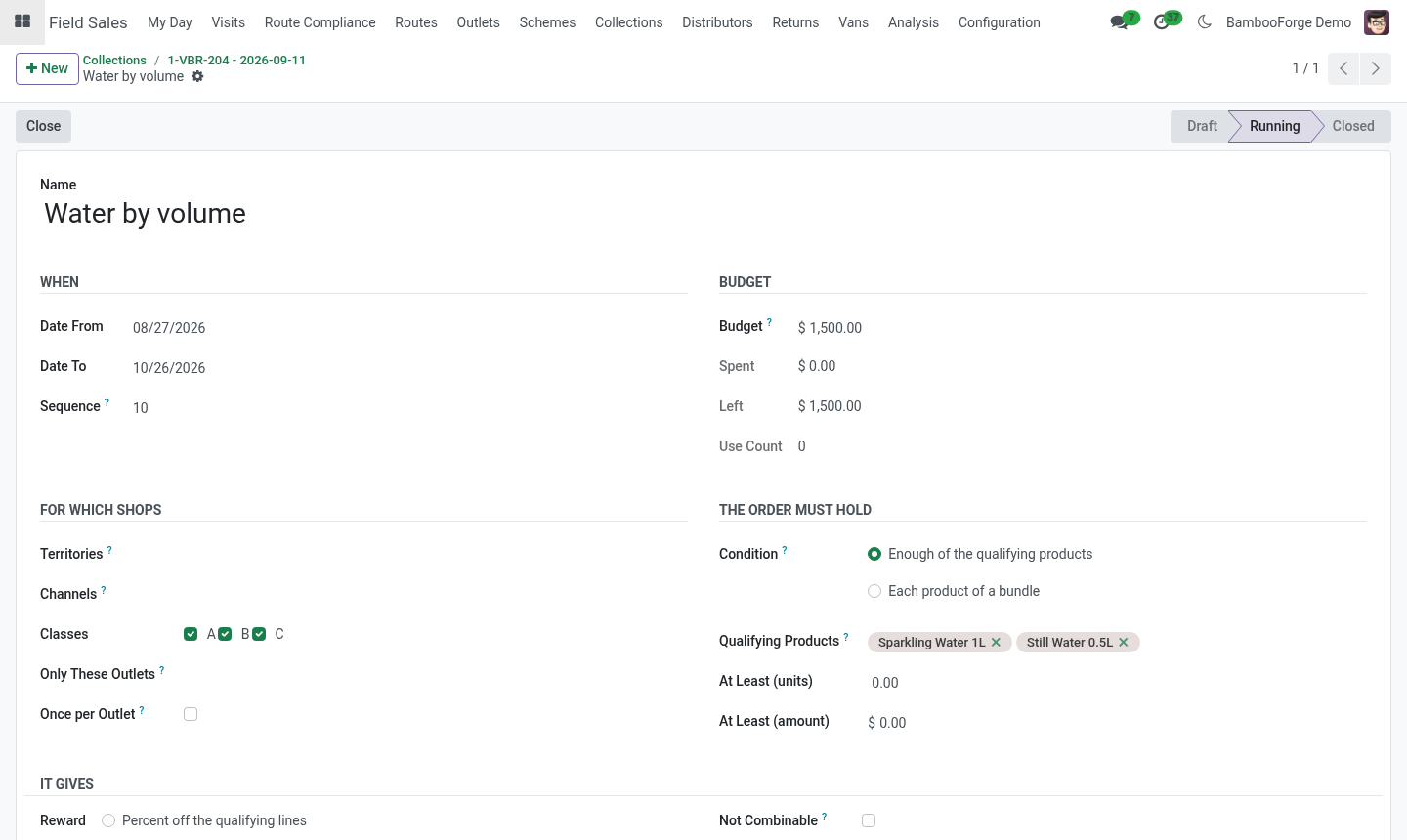
When: from and to; the scheme applies to orders dated inside.
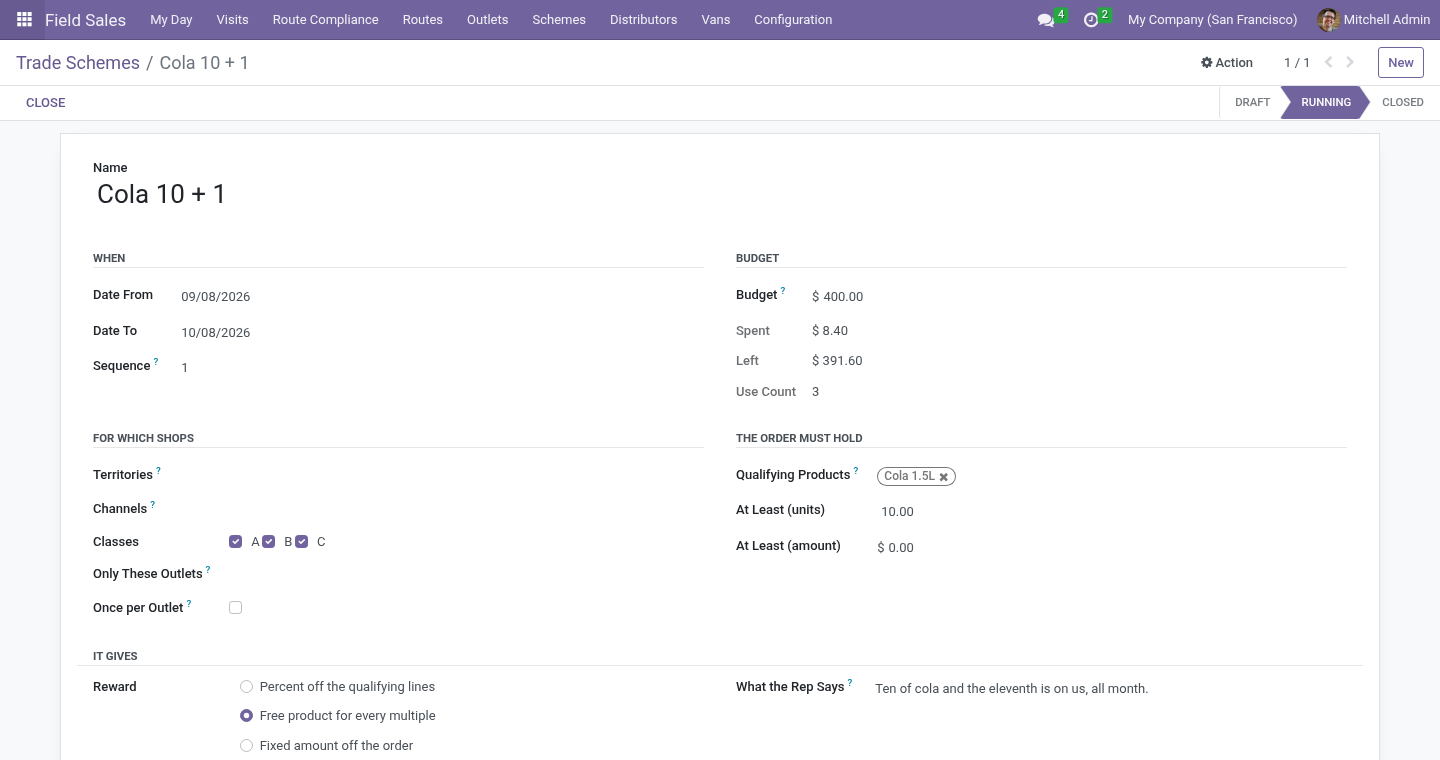
For which shops: territories, channels and classes (all empty means every shop); or Only These Outlets. Once per Outlet gives it to an outlet on one order only.
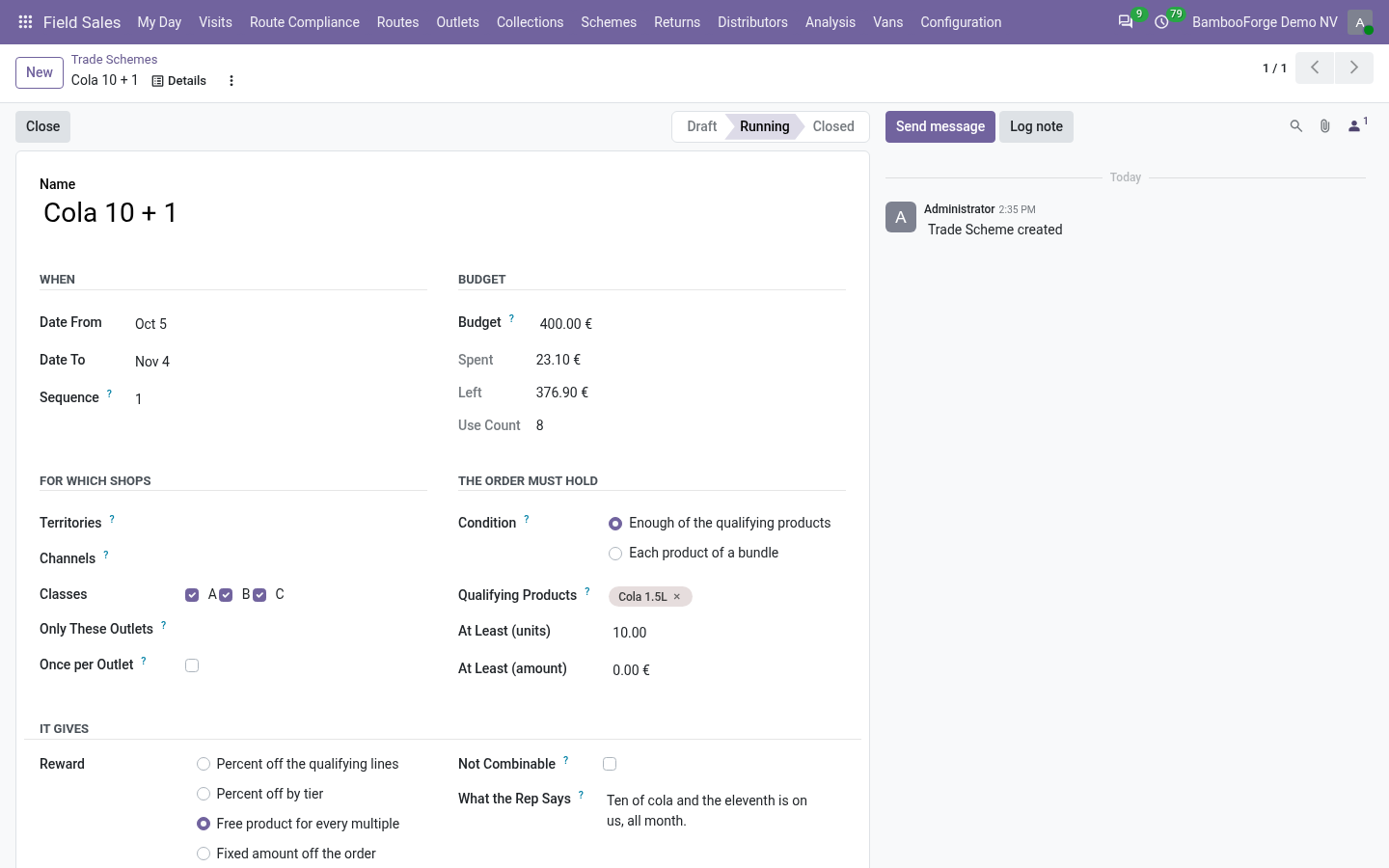
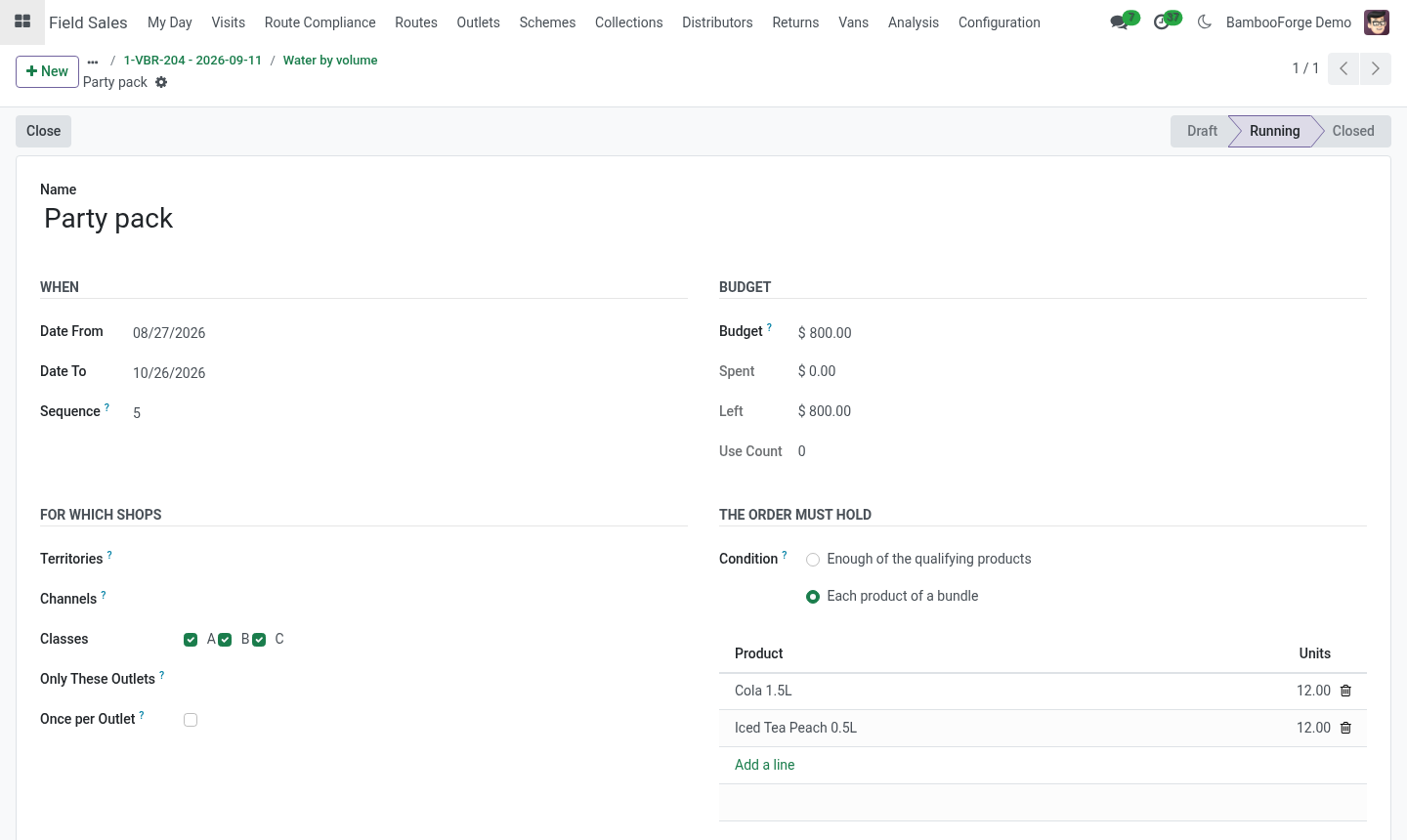
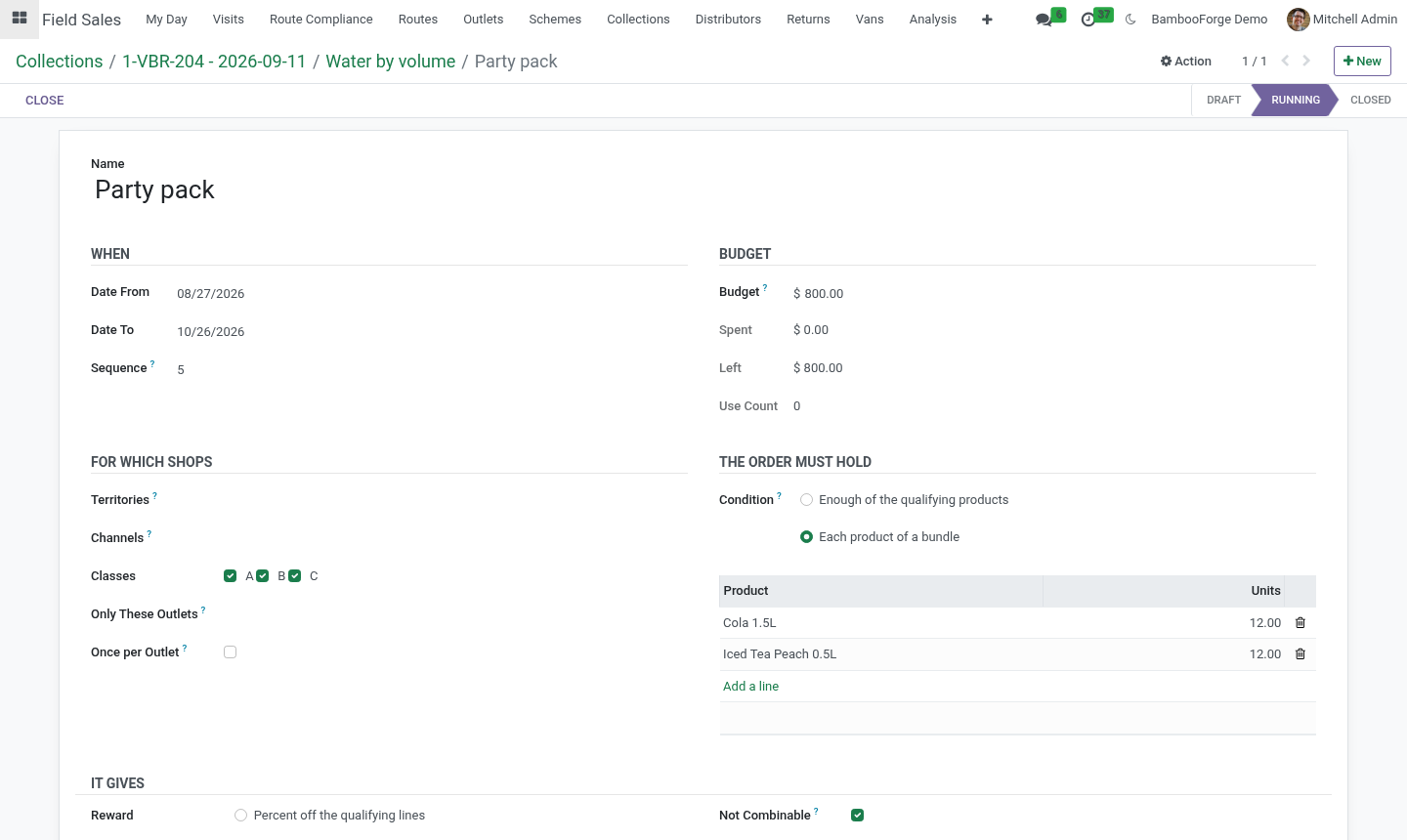
The order must hold: either enough of the qualifying products - qualifying products (empty means every product on the order) and, optionally, a minimum number of units and a minimum amount of those lines - or each product of a bundle: every product listed, each in at least its quantity (six cola and six water). A bundle counts as many times as the order holds it whole.
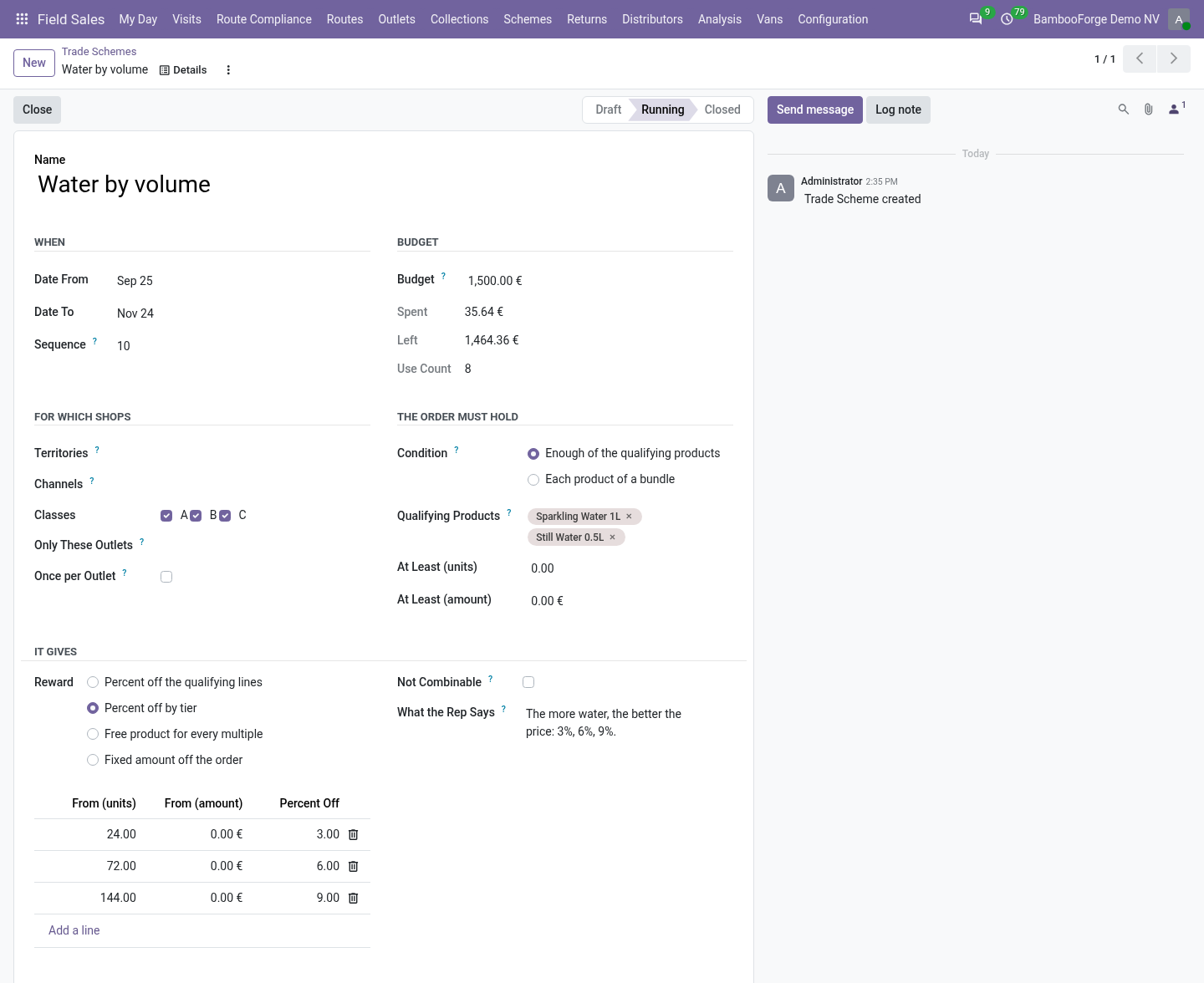
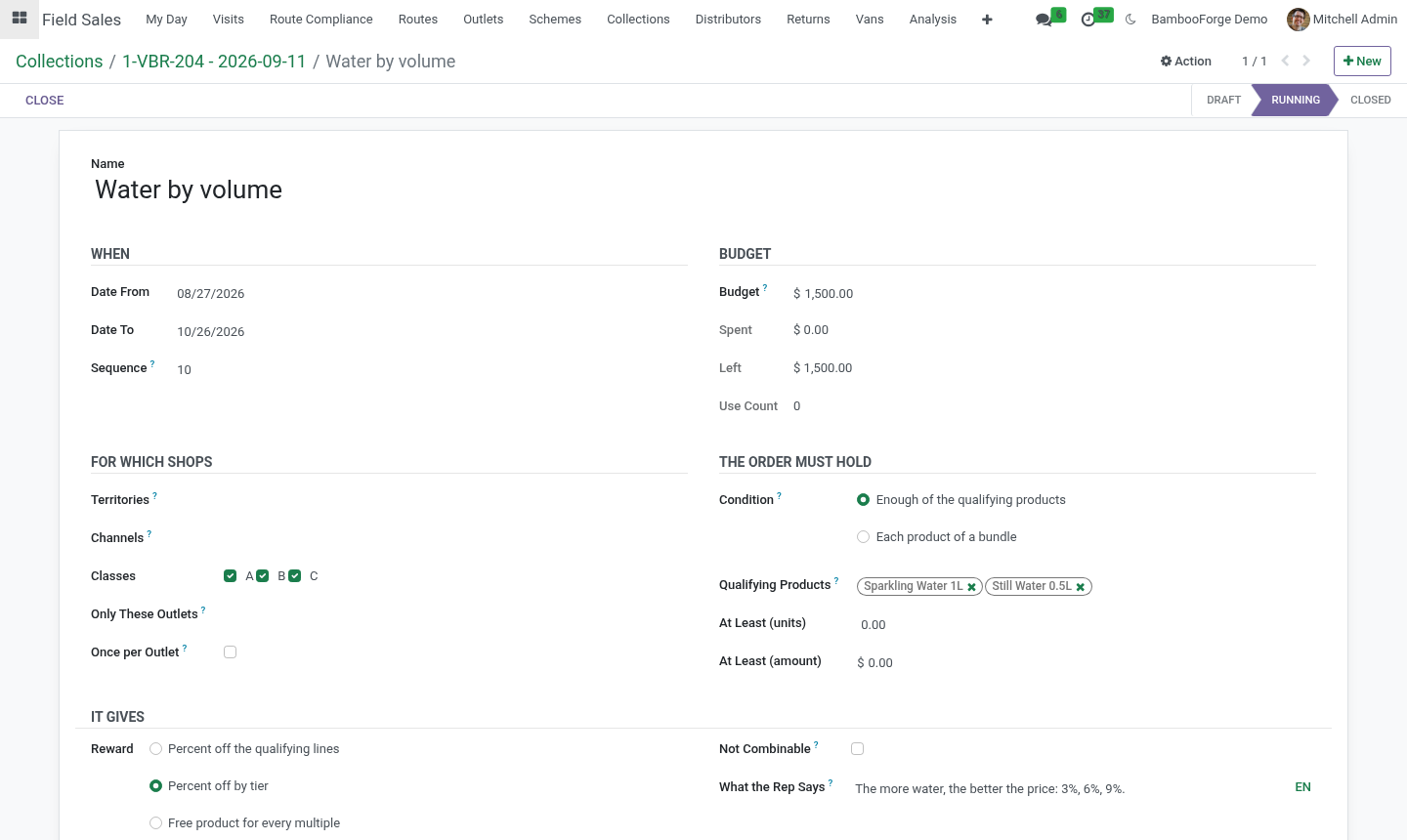
It gives: percent off the qualifying lines; percent off by tier - tiers of units or amount, each with its percent, the highest tier reached applies (3% from 10 units, 6% from 50, 9% from 100); free product - so many units of a product for every multiple of the minimum quantity (ten plus one: minimum 10, one free) or for every whole bundle; or an amount off the order.
Free goods count at: the list price (default) or the product's cost - what a free unit takes from the budget.
Not combinable: when this scheme applies to an order, no other scheme does. Not-combinable schemes are tried first; the first that fits wins.
Budget: the most the scheme may cost; 0 for no limit.
What the rep says: one sentence shown on the phone.
Start it. Schemes are tried in their sequence order, not-combinable ones first; several combinable schemes can apply to one order.
On the order
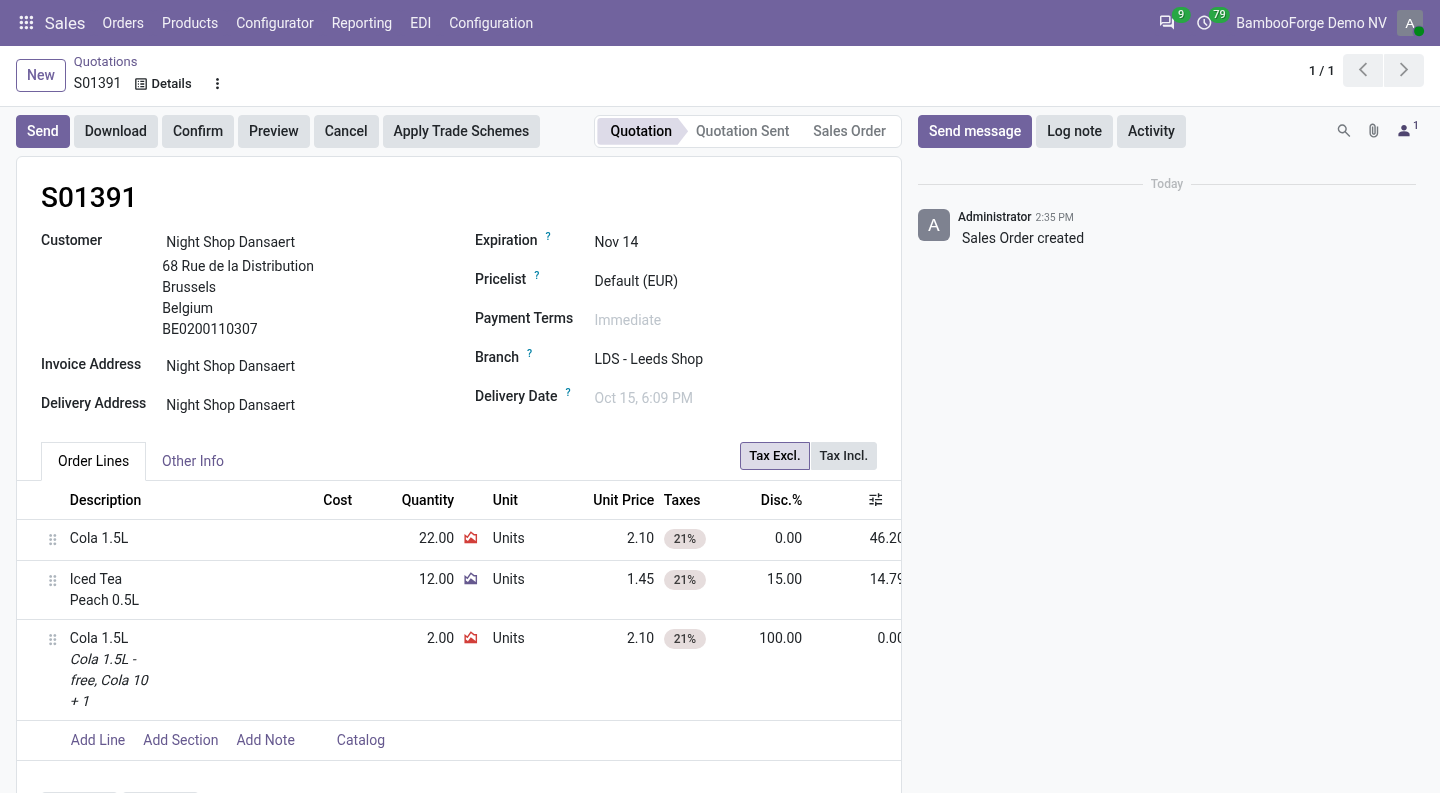
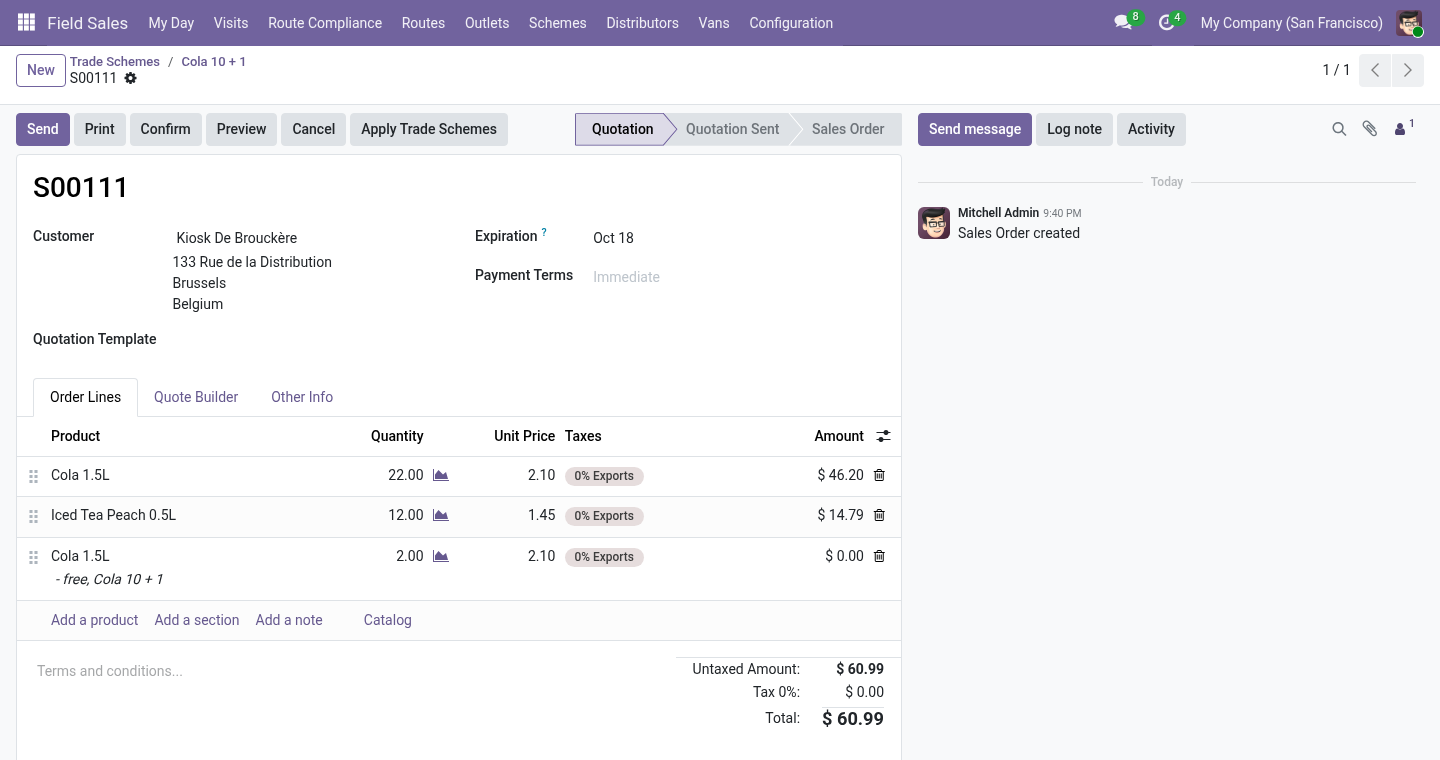
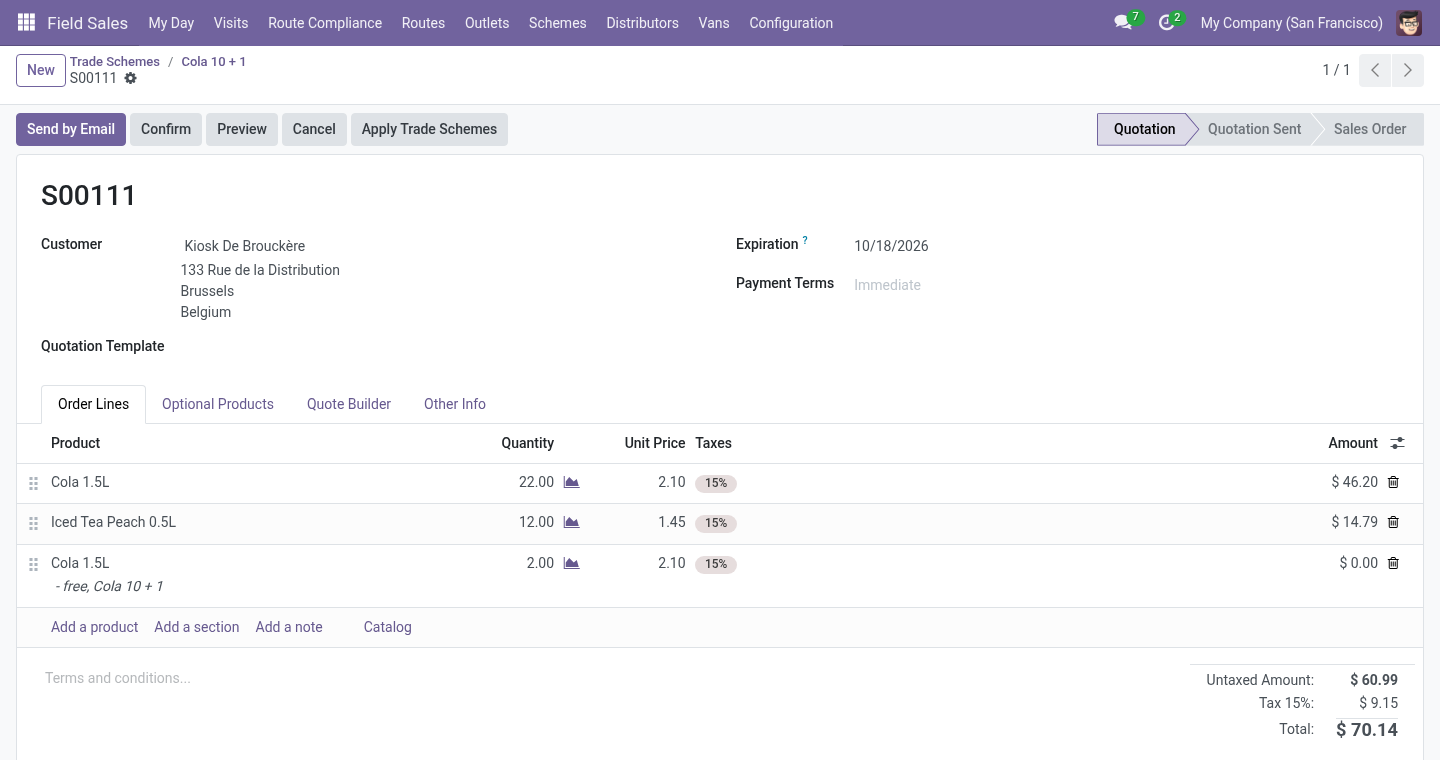
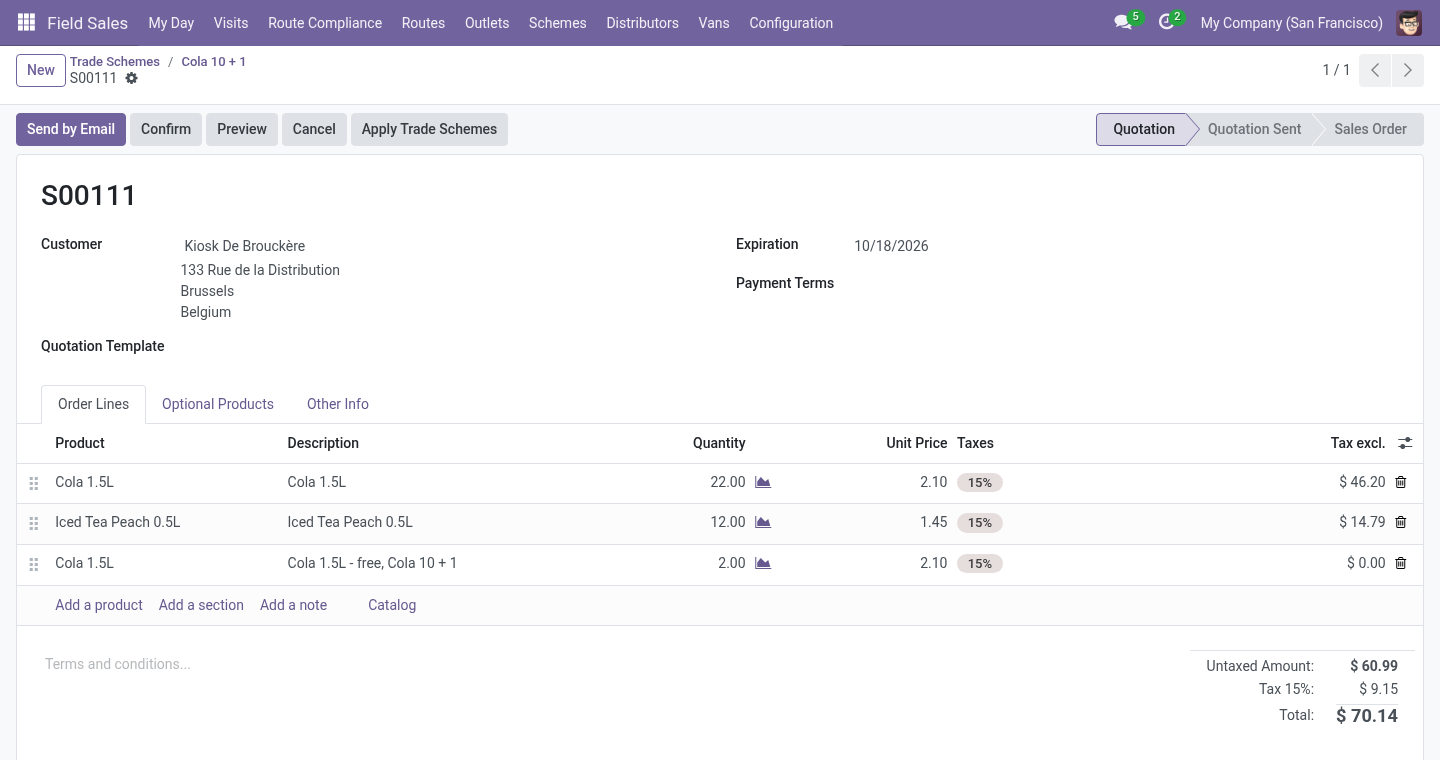
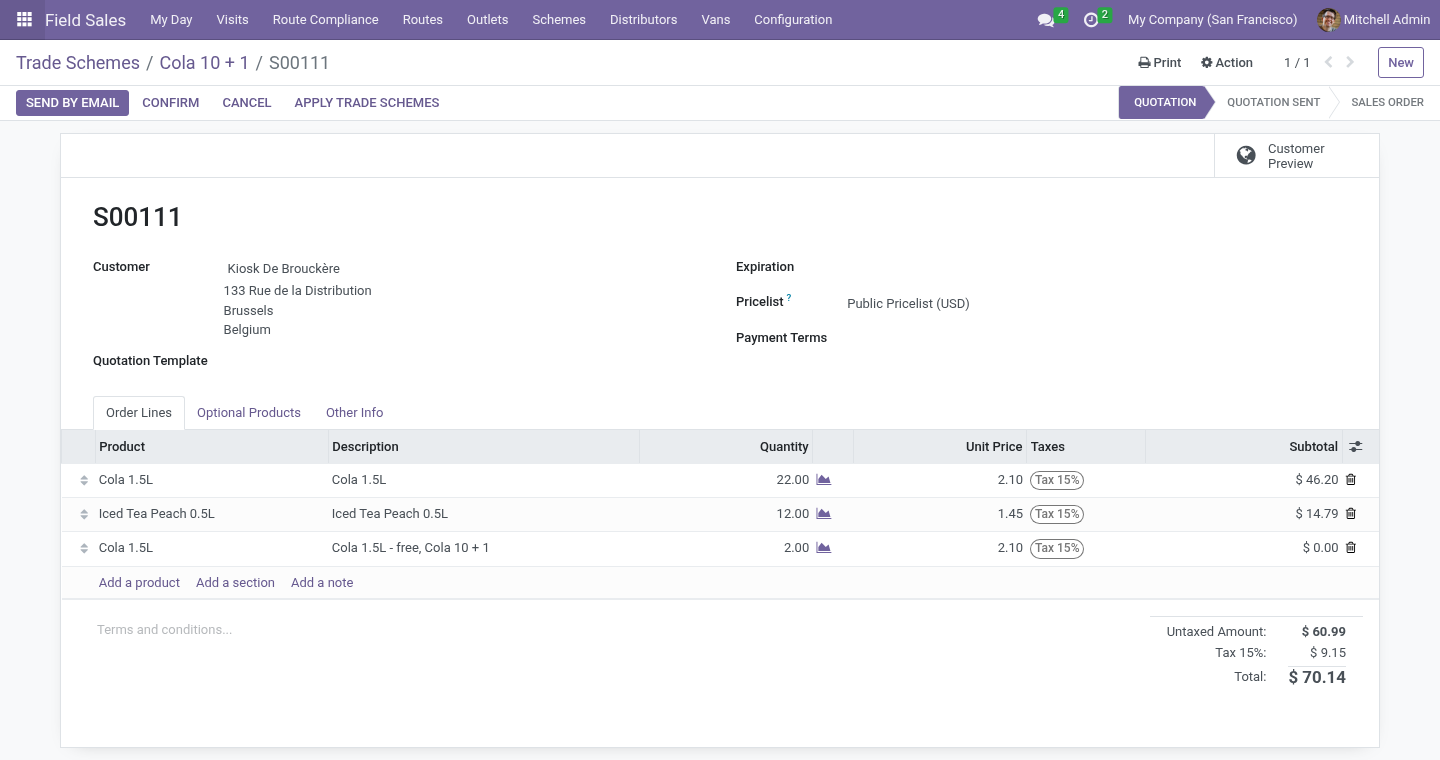
When a rep places an order on the phone, the running schemes that fit the shop are tried in order. A percent off is set on the qualifying lines; a free product is a line at 100% discount; an amount off is a line of the Trade scheme discount product. Each use is recorded with its cost - the discount given, the list value of the free units, or the amount - and the rep sees what was applied.
An order made in the office gets the same with Apply Trade Schemes on the quotation. Applying again replaces what was applied before; a cancelled order gives its cost back to the budget.
Scheme Spend (supervisors) pivots the uses by scheme and month.
Display programmes
Schemes ▸ Display Programmes: the programme (cooler, end-cap, window), the outlet, the period and the payout per month. A rep requests it; a supervisor approves or refuses. Every visit to the outlet in the period with a photo of kind display counts as proof; the form shows visits, visits with proof, the proof rate and the photos. Approved programmes end by themselves after their date.
Limits, stated plainly
With the Distributors add-on, the small Schemes for Distributors module installs by itself: schemes apply to the distributor's secondary orders too, and what the distributor gave away is claimed back as a credit note. See the Distributors manual.
Tiers are read on the qualifying lines of one order, not on a shop's purchases over a month.
The free-product reward is the same product line, not a choice of products.
Payouts of display programmes are shown, not paid: pay them the way you pay any customer credit.
Uninstalling
Uninstalling removes schemes, uses and display programmes. Discounts and lines already on orders stay as they are.
Changelog
20.0.1.1.0
Built for Odoo 20: record rules and access rights rewritten onto Odoo 20's single ir.access model, the screens rebuilt on Owl 3, and every icon moved to the icon set Odoo 20 ships.
20.0.1.1.0
Percent off by tier; bundle conditions; not-combinable schemes; free goods counted at cost or at list price.
The scheme engine also serves distributors' secondary orders (with the new Schemes for Distributors module).
20.0.1.0.0
First release.
How we make sure it works
Before every release, 10 automated checks run against this app on Odoo 16, 17, 18, 19 and 20. Among them:
Schemes apply to the reps order.
Budget stops the scheme.
The complete list is in the source you receive.