 BambooForge Labs
Field Sales Distributors: Secondary Sales and Distributor Stock
The rep takes the shop's order, the distributor fills it: secondary orders, the distributor's stock from sell-in less sell-out corrected by the rep's count, days of cover per product, and a replenishment order suggested to top the distributor up.
Available for Odoo 16.0, Odoo 17.0, Odoo 18.0, Odoo 19.0, Odoo 20.0. Technical name bambooforge_field_sales_distributor.
Transcript of the walkthrough (Odoo 20)
Field Sales Distributors: Secondary Sales and Distributor Stock. The rep takes the shop's order, the distributor fills it: secondary orders, the distributor's stock from sell-in less sell-out corrected by the rep's count, days of cover per product, and a replenishment order suggested to top the distributor up. Most of a brand's goods reach the shops through distributors. The brand sees what it sold to them; what they sold on, and what is left in their warehouse, it guesses.
This add-on to Field Sales and Distribution closes the loop: the rep takes the shop's order, the distributor fills it, and the distributor's stock is known product by product. In the next few minutes: what you get, then setting up, then day to day, then sell-out from the distributor's own system, then performance. Then what this app deliberately does not do, so you can tell before you buy whether it fits. Everything lives under Secondary Orders then Distributor Stock then Distributors then Import Sell-out.
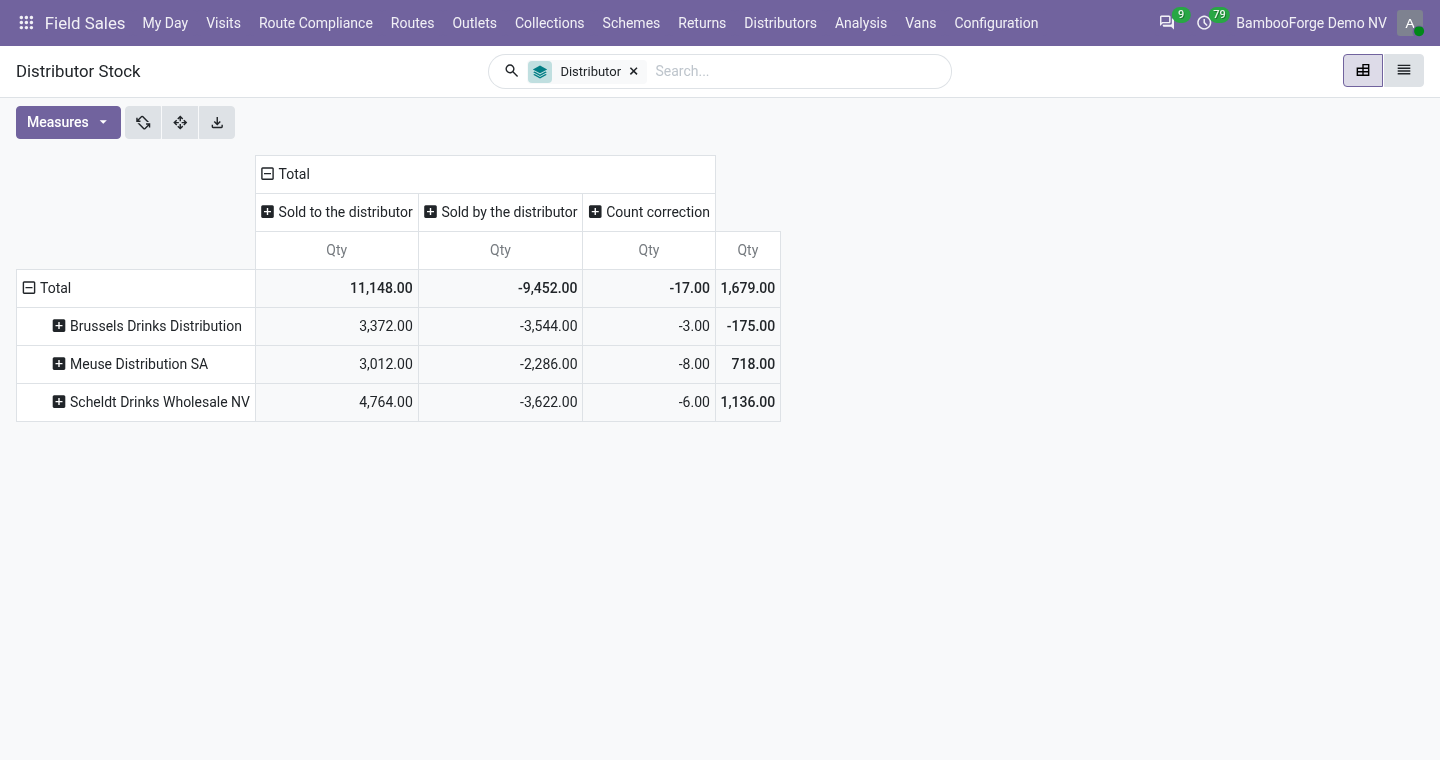
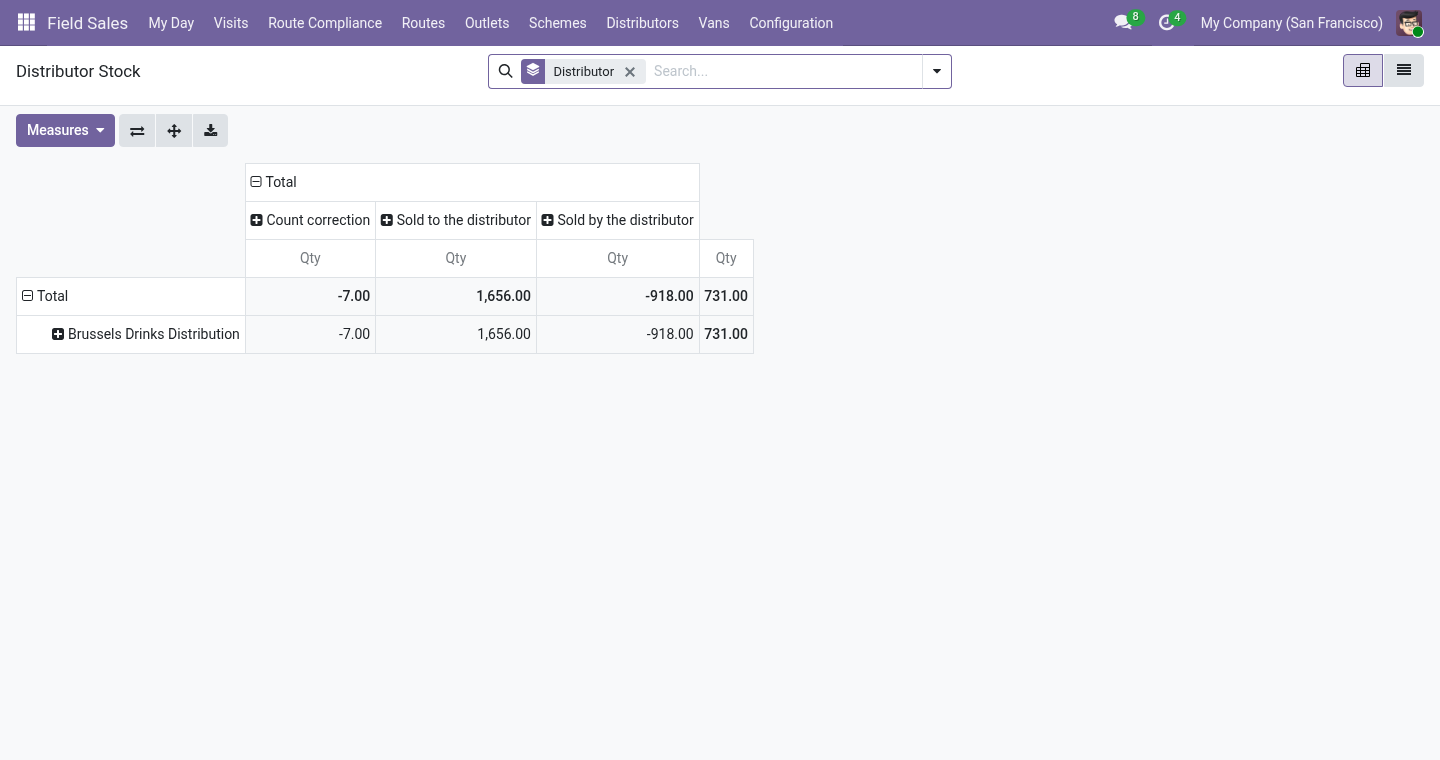
What you get Distributors: contacts marked as such, and outlets marked served by one. Secondary orders: an outlet served by a distributor gets, from the rep's phone, an order for the distributor to fill - new, confirmed, delivered - which counts in the rep's day like any other. The distributor's stock: sell-in (goods delivered to the distributor, or sales orders confirmed to it when Inventory is not installed) less sell-out (secondary orders delivered), corrected by the counts reps make at the distributor's warehouse. Days of cover per product from the last thirty days of sell-out, and a replenishment order suggested to top the distributor up to its target.
Setting up. On a contact, tick Is a Distributor; its Distributor tab holds the target days of cover, the distributor's margin (for reporting) and the price list for the shops - what the distributor charges the outlets it serves (empty: the list price). On an outlet's Field Sales tab, pick the distributor under Served By. The distributor's own login.
Give the distributor's staff a portal user (a contact under the distributor company, Grant portal access): their portal home shows Orders to Fill. Day to day. Taking the order. At an outlet served by a distributor the phone works as always; the order becomes a secondary order numbered SEC/… for the distributor, and the phone says so.
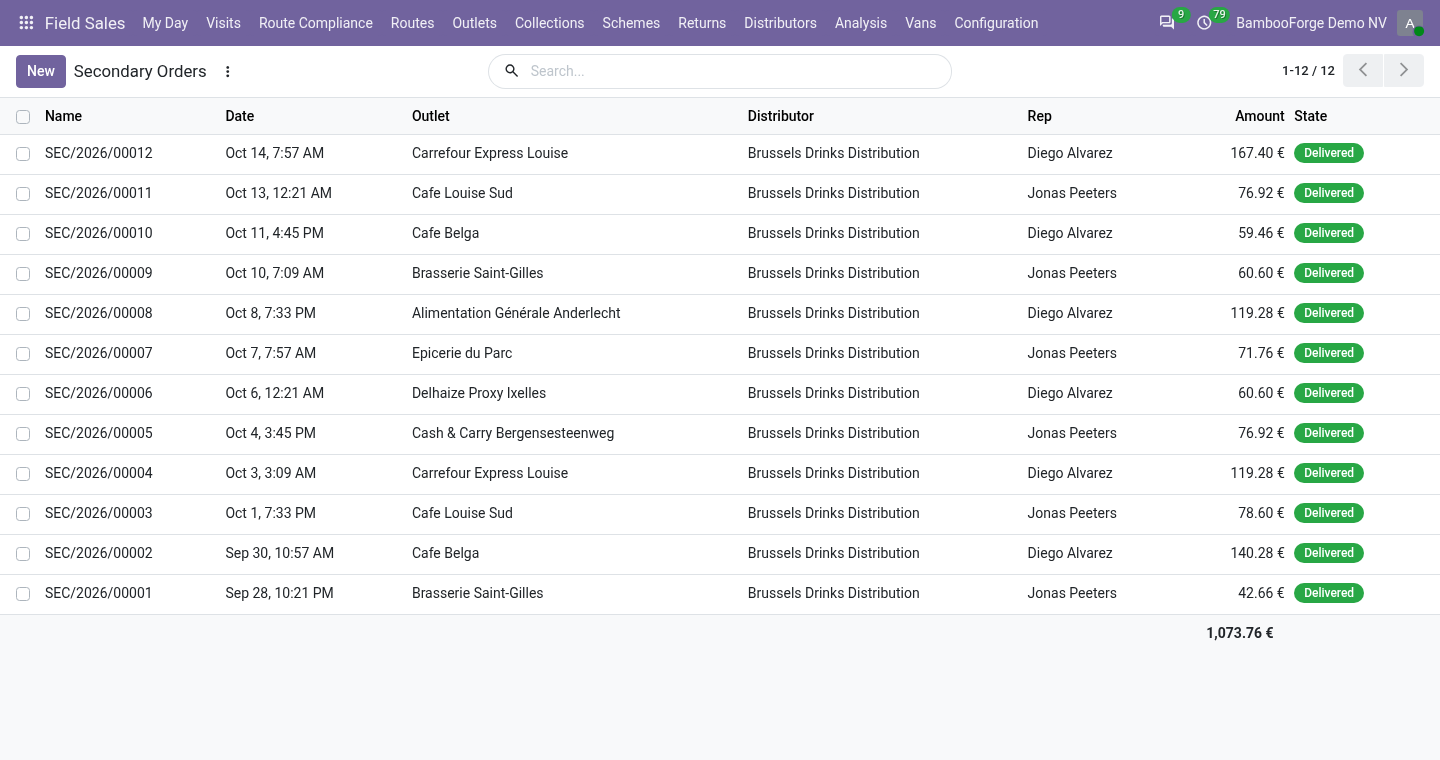
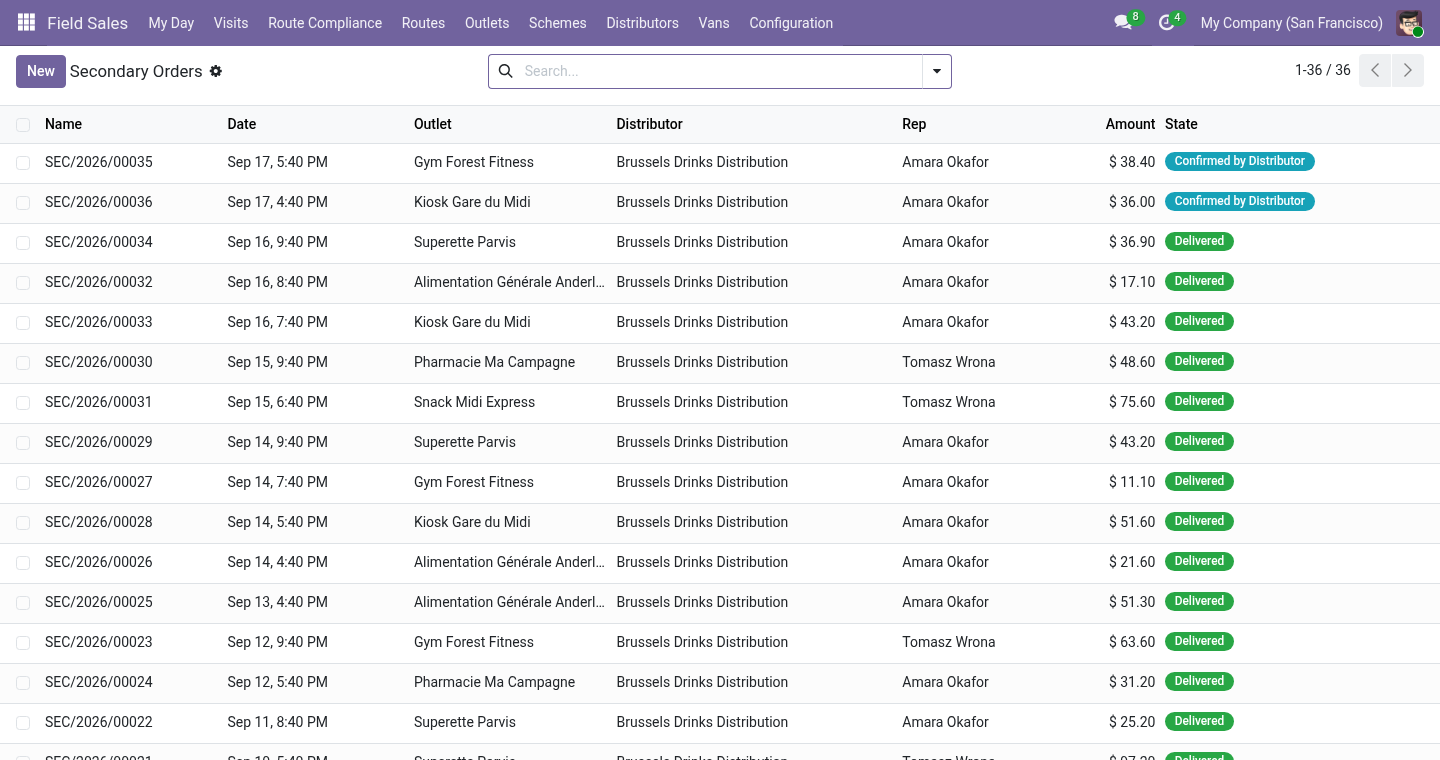
Without Inventory, confirming a sales order to a distributor is the only sign the goods left: its units go into the distributor's stock then, and cancelling the order takes them out. Filling it. Distributors ▸ Secondary Orders: Confirmed by Distributor, then Delivered. Delivery takes the units out of the distributor's stock and stamps the delivery time; cancelling a delivered order puts them back.
The distributor can do both itself on the portal: Orders to Fill lists its orders by state, each with the shop's address and lines, and the buttons We will deliver it and Delivered; the order's chatter says who pressed them. Sell-out from the distributor's own system. A distributor that runs its own software sends its sales as a file. Distributors ▸ Import Sell-out: the distributor, and a CSV (comma, semicolon or tab) or Excel file whose first row names the columns date, product and quantity (code, sku, barcode, qty, units are understood too).
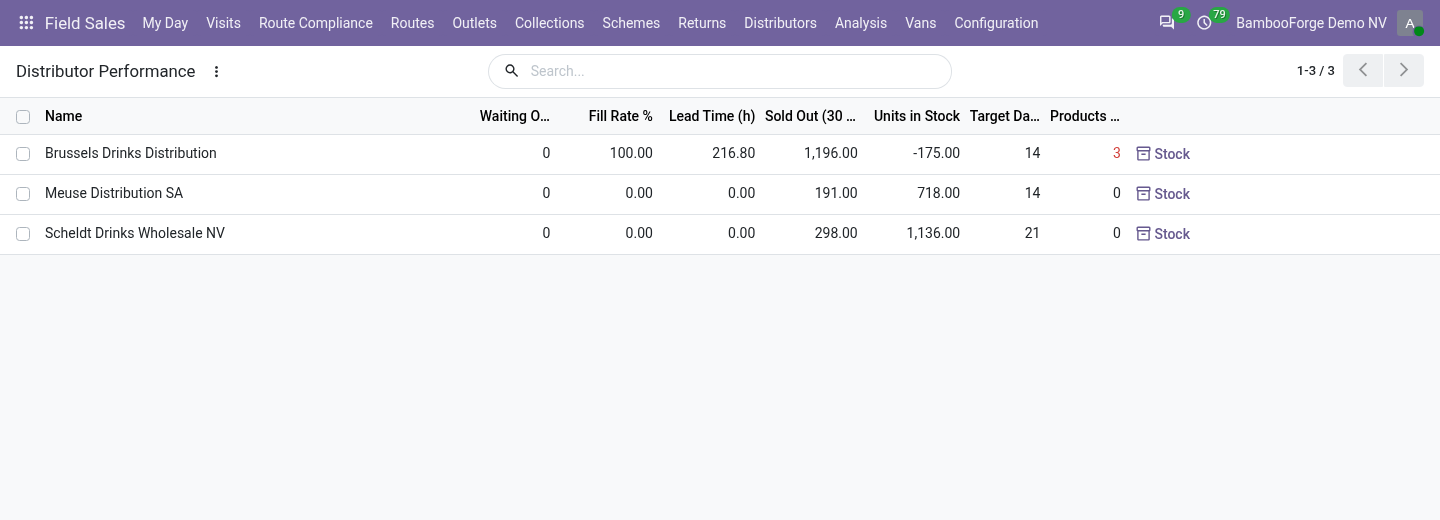
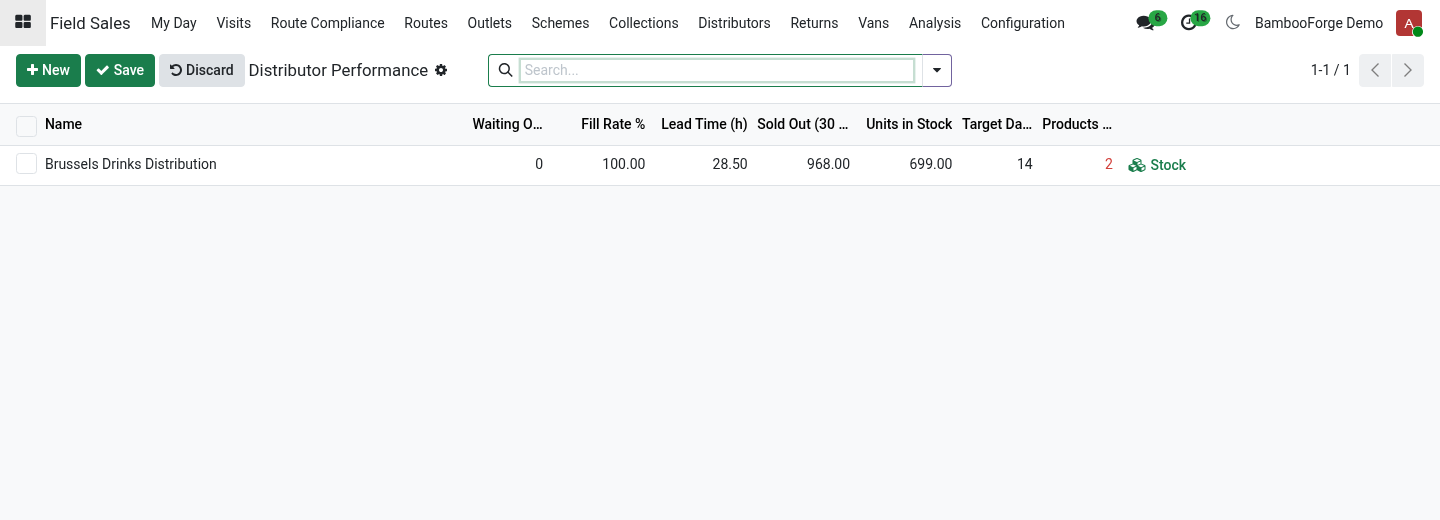
The product is found by internal reference, then barcode, then exact name; dates may be written 2026-09-18, 18/09/2026 or 18.09.2026. Every line read becomes sell-out on the ledger; the lines that could not be read are listed with the reason, and nothing is imported when none could. Performance. Distributors ▸ Distributor Performance: per distributor, the orders waiting, the fill rate (secondary orders of the last 30 days delivered, over those not cancelled), the lead time (hours from the rep's order to the delivery, averaged), units sold out in 30 days, units in stock, and how many products are under the target cover.
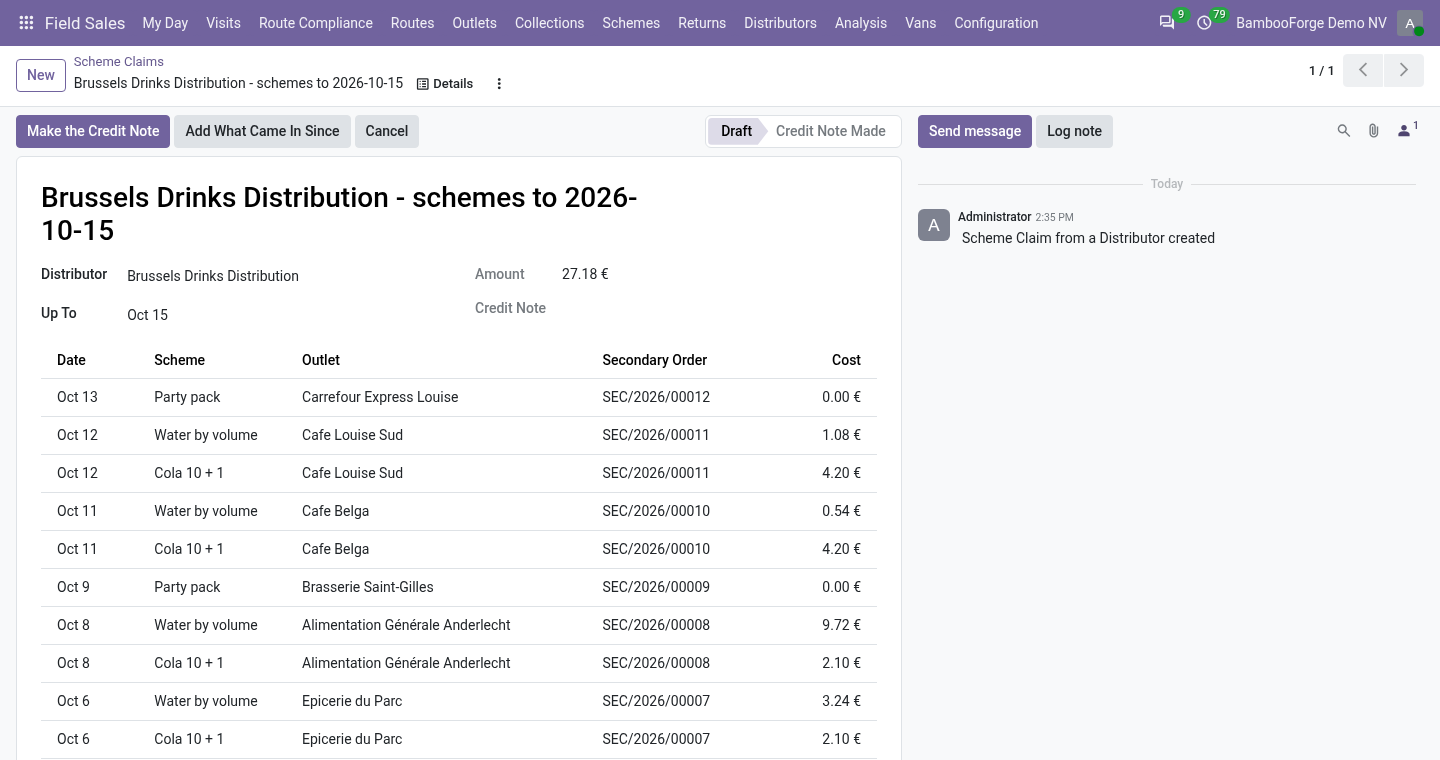
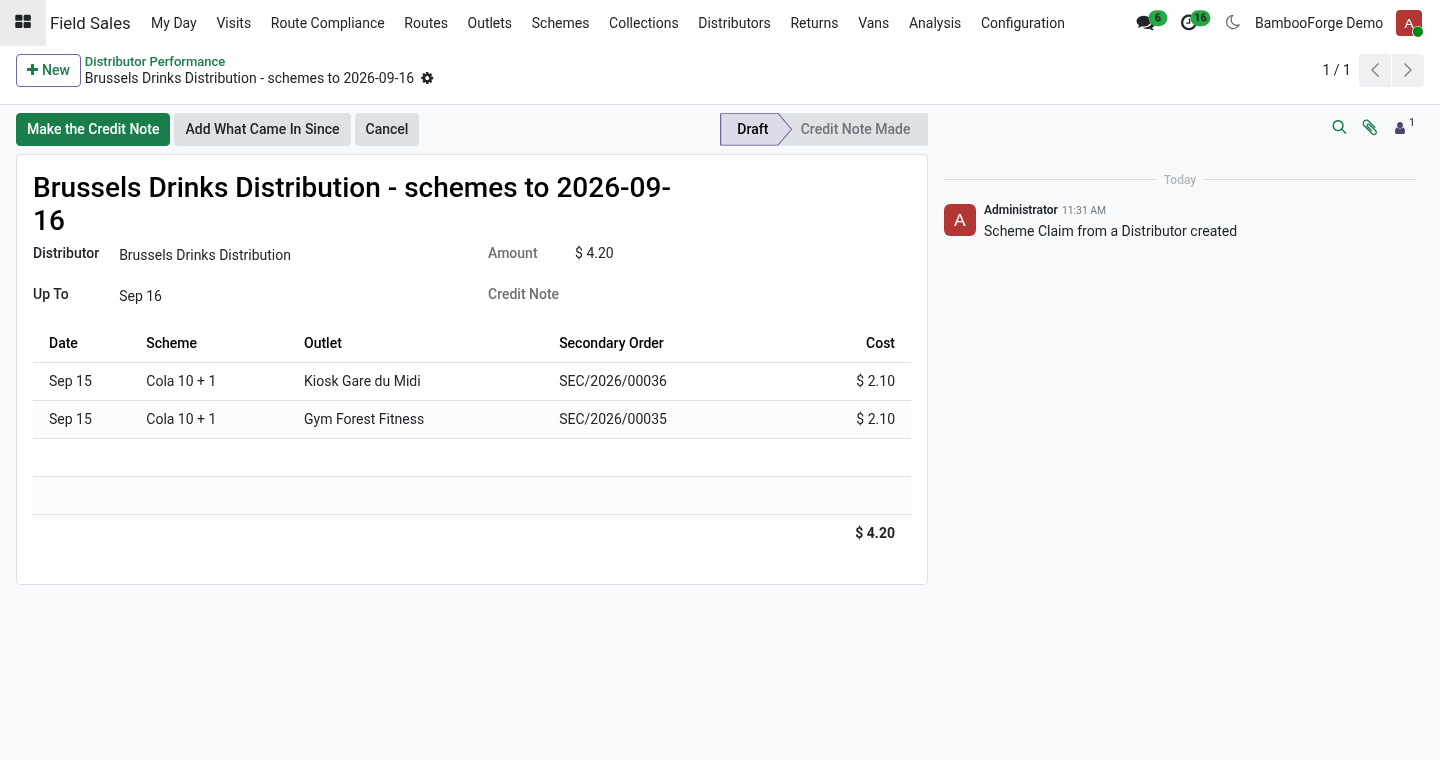
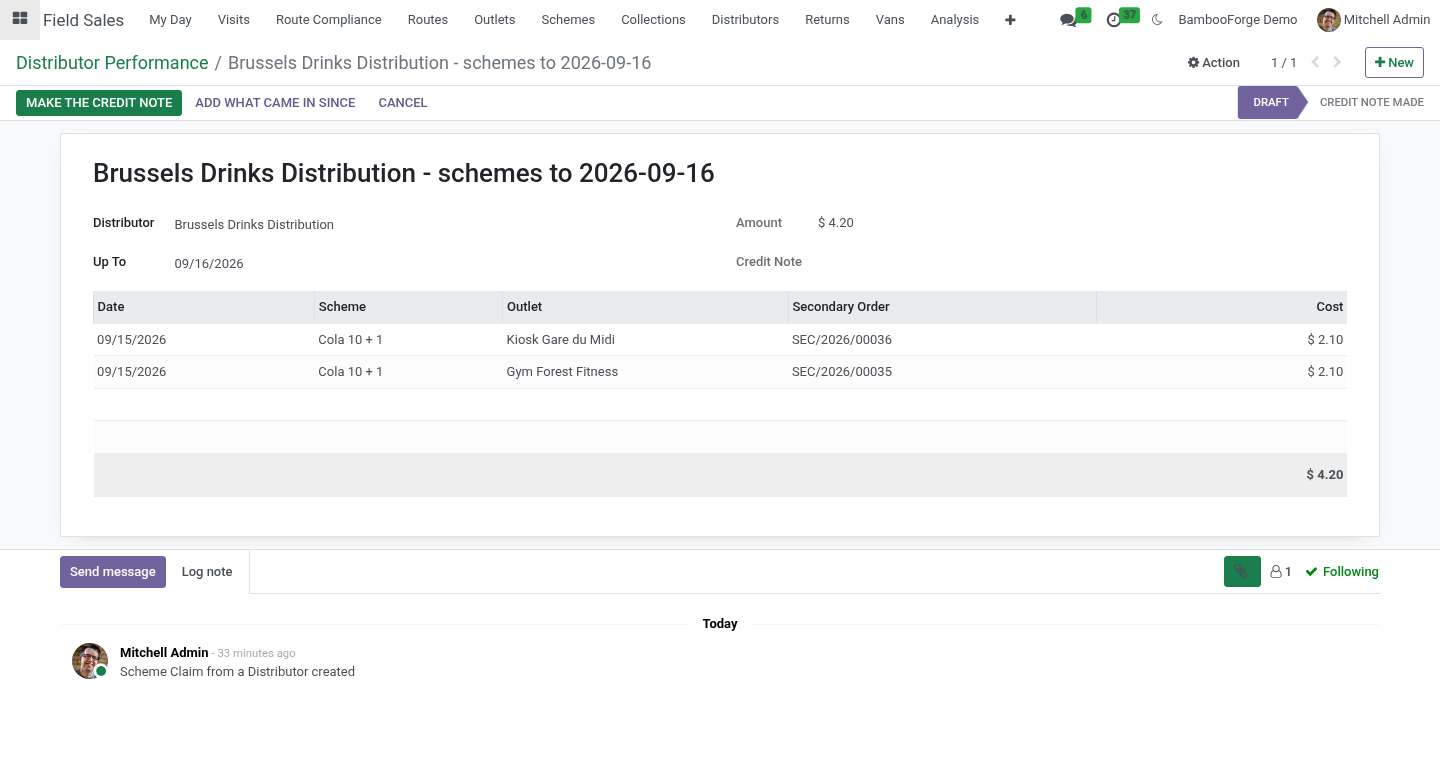
Schemes and claims. With Trade Schemes installed as well, the small Schemes for Distributors module installs by itself. A secondary order then gets the shop's schemes - percent off on its lines, free units as a line at 100%, an amount off - charged to the same budgets; free units leave the distributor's stock with the rest when it delivers. Claim the Schemes Given on the distributor (or Distributors ▸ Scheme Claims) collects every use on its delivered secondary orders not claimed yet; Make the Credit Note turns the claim into a credit note for the distributor, one line per scheme.
A use is claimed once; cancelling a claim frees its uses for the next one. Cover and replenishment. For each product the daily sell-out is the last thirty days' deliveries divided by thirty; days of cover is the stock divided by that. Suggest a Replenishment Order on the distributor creates a draft sales order for every product below its target cover, for the quantity that brings it to the target.
Confirm it - and, with Inventory, deliver it - and it is sell-in. Uninstalling. Uninstalling removes distributors' flags, secondary orders and the stock ledger. Sales orders stay.
20.0.1.1.0 Built for Odoo 20: record rules and access rights rewritten onto Odoo 20's single ir.access model, the screens rebuilt on Owl 3, and every icon moved to the icon set Odoo 20 ships. The portal card is an Odoo 20 portal entry. 20.0.1.1.0 The distributor's price list for the shops; the distributor's portal (Orders to Fill); sell-out imported from CSV or Excel; distributor performance - fill rate, lead time, cover; the delivery time on the secondary order. With Trade Schemes: schemes on secondary orders and claims settled by credit note (new companion module).
Now the part most videos leave out: what this does not do. The distributor's stock is a ledger kept in this database, not the distributor's own system: its accuracy is the counts' accuracy. A secondary order is not an invoice: what the distributor bills the shop stays in the distributor's books. The imported sell-out is taken as the distributor states it; a count at its warehouse is what corrects the ledger.
The complete manual is at docs dot bambooforge dot dev, the demo database is linked from the store page, and support answers within twenty-four hours. Links are in the description.
Transcript of the walkthrough (Odoo 19)
Field Sales Distributors: Secondary Sales and Distributor Stock. The rep takes the shop's order, the distributor fills it: secondary orders, the distributor's stock from sell-in less sell-out corrected by the rep's count, days of cover per product, and a replenishment order suggested to top the distributor up. Most of a brand's goods reach the shops through distributors. The brand sees what it sold to them; what they sold on, and what is left in their warehouse, it guesses.
This add-on to Field Sales and Distribution closes the loop: the rep takes the shop's order, the distributor fills it, and the distributor's stock is known product by product. In the next few minutes: what you get, then setting up, then day to day, then sell-out from the distributor's own system, then performance. Then what this app deliberately does not do, so you can tell before you buy whether it fits. Everything lives under Secondary Orders then Distributor Stock then Distributors then Import Sell-out.
What you get Distributors: contacts marked as such, and outlets marked served by one. Secondary orders: an outlet served by a distributor gets, from the rep's phone, an order for the distributor to fill - new, confirmed, delivered - which counts in the rep's day like any other. The distributor's stock: sell-in (goods delivered to the distributor, or sales orders confirmed to it when Inventory is not installed) less sell-out (secondary orders delivered), corrected by the counts reps make at the distributor's warehouse. Days of cover per product from the last thirty days of sell-out, and a replenishment order suggested to top the distributor up to its target.
Setting up. On a contact, tick Is a Distributor; its Distributor tab holds the target days of cover, the distributor's margin (for reporting) and the price list for the shops - what the distributor charges the outlets it serves (empty: the list price). On an outlet's Field Sales tab, pick the distributor under Served By. The distributor's own login.
Give the distributor's staff a portal user (a contact under the distributor company, Grant portal access): their portal home shows Orders to Fill. Day to day. Taking the order. At an outlet served by a distributor the phone works as always; the order becomes a secondary order numbered SEC/… for the distributor, and the phone says so.
Without Inventory, confirming a sales order to a distributor is the only sign the goods left: its units go into the distributor's stock then, and cancelling the order takes them out. Filling it. Distributors ▸ Secondary Orders: Confirmed by Distributor, then Delivered. Delivery takes the units out of the distributor's stock and stamps the delivery time; cancelling a delivered order puts them back.
The distributor can do both itself on the portal: Orders to Fill lists its orders by state, each with the shop's address and lines, and the buttons We will deliver it and Delivered; the order's chatter says who pressed them. Sell-out from the distributor's own system. A distributor that runs its own software sends its sales as a file. Distributors ▸ Import Sell-out: the distributor, and a CSV (comma, semicolon or tab) or Excel file whose first row names the columns date, product and quantity (code, sku, barcode, qty, units are understood too).
The product is found by internal reference, then barcode, then exact name; dates may be written 2026-09-18, 18/09/2026 or 18.09.2026. Every line read becomes sell-out on the ledger; the lines that could not be read are listed with the reason, and nothing is imported when none could. Performance. Distributors ▸ Distributor Performance: per distributor, the orders waiting, the fill rate (secondary orders of the last 30 days delivered, over those not cancelled), the lead time (hours from the rep's order to the delivery, averaged), units sold out in 30 days, units in stock, and how many products are under the target cover.
Schemes and claims. With Trade Schemes installed as well, the small Schemes for Distributors module installs by itself. A secondary order then gets the shop's schemes - percent off on its lines, free units as a line at 100%, an amount off - charged to the same budgets; free units leave the distributor's stock with the rest when it delivers. Claim the Schemes Given on the distributor (or Distributors ▸ Scheme Claims) collects every use on its delivered secondary orders not claimed yet; Make the Credit Note turns the claim into a credit note for the distributor, one line per scheme.
A use is claimed once; cancelling a claim frees its uses for the next one. Cover and replenishment. For each product the daily sell-out is the last thirty days' deliveries divided by thirty; days of cover is the stock divided by that. Suggest a Replenishment Order on the distributor creates a draft sales order for every product below its target cover, for the quantity that brings it to the target.
Confirm it - and, with Inventory, deliver it - and it is sell-in. Uninstalling. Uninstalling removes distributors' flags, secondary orders and the stock ledger. Sales orders stay.
19.0.1.1.0 The distributor's price list for the shops; the distributor's portal (Orders to Fill); sell-out imported from CSV or Excel; distributor performance - fill rate, lead time, cover; the delivery time on the secondary order. With Trade Schemes: schemes on secondary orders and claims settled by credit note (new companion module). 19.0.1.0.1 With Inventory, sell-in is written when the delivery is validated, not when the order is confirmed; returns come off (new companion module Field Sales Distributors with Inventory, installed by itself). Order lines in another unit (dozens, cases) count in the product's unit.
Now the part most videos leave out: what this does not do. The distributor's stock is a ledger kept in this database, not the distributor's own system: its accuracy is the counts' accuracy. A secondary order is not an invoice: what the distributor bills the shop stays in the distributor's books. The imported sell-out is taken as the distributor states it; a count at its warehouse is what corrects the ledger.
The complete manual is at docs dot bambooforge dot dev, the demo database is linked from the store page, and support answers within twenty-four hours. Links are in the description.
Transcript of the walkthrough (Odoo 18)
Field Sales Distributors: Secondary Sales and Distributor Stock. The rep takes the shop's order, the distributor fills it: secondary orders, the distributor's stock from sell-in less sell-out corrected by the rep's count, days of cover per product, and a replenishment order suggested to top the distributor up. Most of a brand's goods reach the shops through distributors. The brand sees what it sold to them; what they sold on, and what is left in their warehouse, it guesses.
This add-on to Field Sales and Distribution closes the loop: the rep takes the shop's order, the distributor fills it, and the distributor's stock is known product by product. In the next few minutes: what you get, then setting up, then day to day, then sell-out from the distributor's own system, then performance. Then what this app deliberately does not do, so you can tell before you buy whether it fits. Everything lives under Secondary Orders then Distributor Stock then Distributors then Import Sell-out.
What you get Distributors: contacts marked as such, and outlets marked served by one. Secondary orders: an outlet served by a distributor gets, from the rep's phone, an order for the distributor to fill - new, confirmed, delivered - which counts in the rep's day like any other. The distributor's stock: sell-in (goods delivered to the distributor, or sales orders confirmed to it when Inventory is not installed) less sell-out (secondary orders delivered), corrected by the counts reps make at the distributor's warehouse. Days of cover per product from the last thirty days of sell-out, and a replenishment order suggested to top the distributor up to its target.
Setting up. On a contact, tick Is a Distributor; its Distributor tab holds the target days of cover, the distributor's margin (for reporting) and the price list for the shops - what the distributor charges the outlets it serves (empty: the list price). On an outlet's Field Sales tab, pick the distributor under Served By. The distributor's own login.
Give the distributor's staff a portal user (a contact under the distributor company, Grant portal access): their portal home shows Orders to Fill. Day to day. Taking the order. At an outlet served by a distributor the phone works as always; the order becomes a secondary order numbered SEC/… for the distributor, and the phone says so.
Without Inventory, confirming a sales order to a distributor is the only sign the goods left: its units go into the distributor's stock then, and cancelling the order takes them out. Filling it. Distributors ▸ Secondary Orders: Confirmed by Distributor, then Delivered. Delivery takes the units out of the distributor's stock and stamps the delivery time; cancelling a delivered order puts them back.
The distributor can do both itself on the portal: Orders to Fill lists its orders by state, each with the shop's address and lines, and the buttons We will deliver it and Delivered; the order's chatter says who pressed them. Sell-out from the distributor's own system. A distributor that runs its own software sends its sales as a file. Distributors ▸ Import Sell-out: the distributor, and a CSV (comma, semicolon or tab) or Excel file whose first row names the columns date, product and quantity (code, sku, barcode, qty, units are understood too).
The product is found by internal reference, then barcode, then exact name; dates may be written 2026-09-18, 18/09/2026 or 18.09.2026. Every line read becomes sell-out on the ledger; the lines that could not be read are listed with the reason, and nothing is imported when none could. Performance. Distributors ▸ Distributor Performance: per distributor, the orders waiting, the fill rate (secondary orders of the last 30 days delivered, over those not cancelled), the lead time (hours from the rep's order to the delivery, averaged), units sold out in 30 days, units in stock, and how many products are under the target cover.
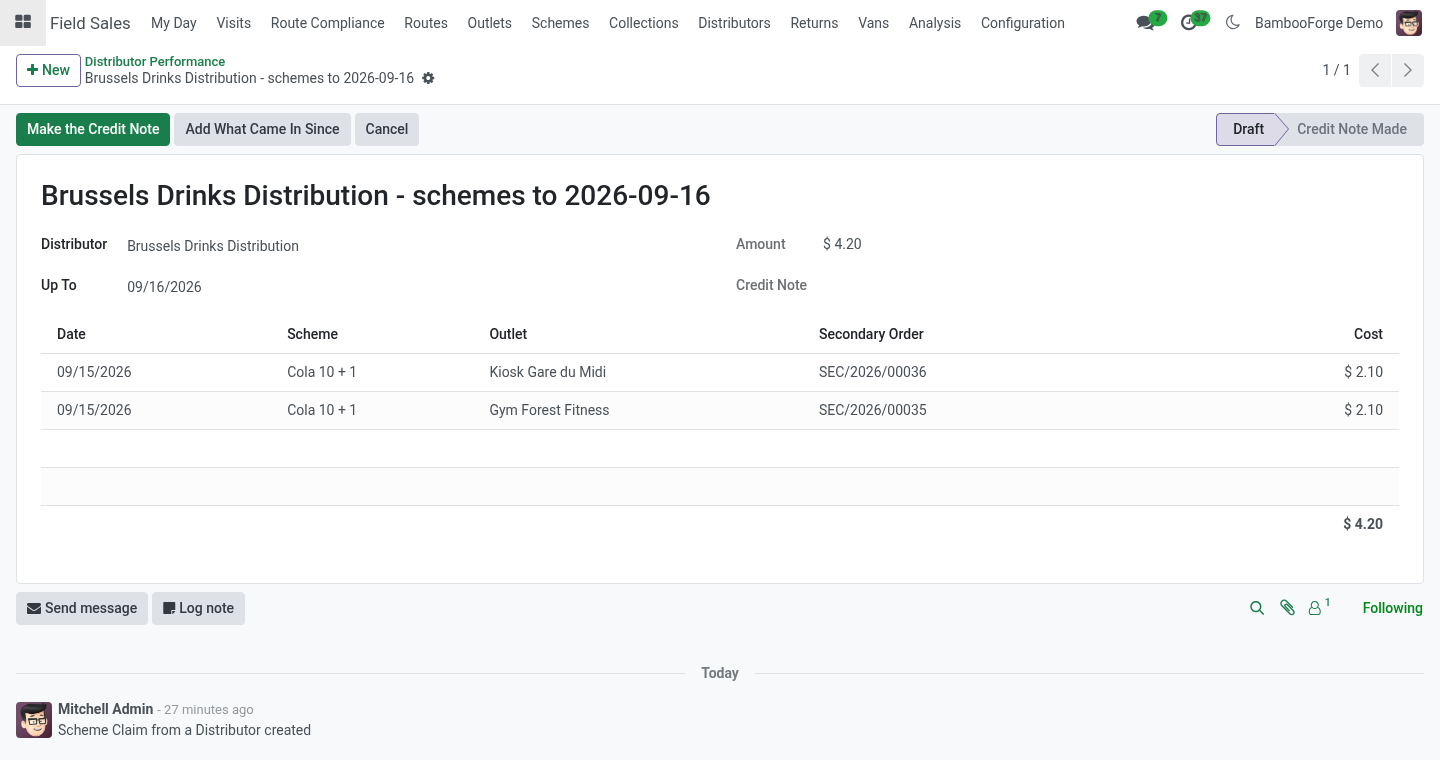
Schemes and claims. With Trade Schemes installed as well, the small Schemes for Distributors module installs by itself. A secondary order then gets the shop's schemes - percent off on its lines, free units as a line at 100%, an amount off - charged to the same budgets; free units leave the distributor's stock with the rest when it delivers. Claim the Schemes Given on the distributor (or Distributors ▸ Scheme Claims) collects every use on its delivered secondary orders not claimed yet; Make the Credit Note turns the claim into a credit note for the distributor, one line per scheme.
A use is claimed once; cancelling a claim frees its uses for the next one. Cover and replenishment. For each product the daily sell-out is the last thirty days' deliveries divided by thirty; days of cover is the stock divided by that. Suggest a Replenishment Order on the distributor creates a draft sales order for every product below its target cover, for the quantity that brings it to the target.
Confirm it - and, with Inventory, deliver it - and it is sell-in. Uninstalling. Uninstalling removes distributors' flags, secondary orders and the stock ledger. Sales orders stay.
18.0.1.1.0 The distributor's price list for the shops; the distributor's portal (Orders to Fill); sell-out imported from CSV or Excel; distributor performance - fill rate, lead time, cover; the delivery time on the secondary order. With Trade Schemes: schemes on secondary orders and claims settled by credit note (new companion module). 18.0.1.0.1 With Inventory, sell-in is written when the delivery is validated, not when the order is confirmed; returns come off (new companion module Field Sales Distributors with Inventory, installed by itself). Order lines in another unit (dozens, cases) count in the product's unit.
Now the part most videos leave out: what this does not do. The distributor's stock is a ledger kept in this database, not the distributor's own system: its accuracy is the counts' accuracy. A secondary order is not an invoice: what the distributor bills the shop stays in the distributor's books. The imported sell-out is taken as the distributor states it; a count at its warehouse is what corrects the ledger.
The complete manual is at docs dot bambooforge dot dev, the demo database is linked from the store page, and support answers within twenty-four hours. Links are in the description.
Transcript of the walkthrough (Odoo 17)
Field Sales Distributors: Secondary Sales and Distributor Stock. The rep takes the shop's order, the distributor fills it: secondary orders, the distributor's stock from sell-in less sell-out corrected by the rep's count, days of cover per product, and a replenishment order suggested to top the distributor up. Most of a brand's goods reach the shops through distributors. The brand sees what it sold to them; what they sold on, and what is left in their warehouse, it guesses.
This add-on to Field Sales and Distribution closes the loop: the rep takes the shop's order, the distributor fills it, and the distributor's stock is known product by product. In the next few minutes: what you get, then setting up, then day to day, then sell-out from the distributor's own system, then performance. Then what this app deliberately does not do, so you can tell before you buy whether it fits. Everything lives under Secondary Orders then Distributor Stock then Distributors then Import Sell-out.
What you get Distributors: contacts marked as such, and outlets marked served by one. Secondary orders: an outlet served by a distributor gets, from the rep's phone, an order for the distributor to fill - new, confirmed, delivered - which counts in the rep's day like any other. The distributor's stock: sell-in (goods delivered to the distributor, or sales orders confirmed to it when Inventory is not installed) less sell-out (secondary orders delivered), corrected by the counts reps make at the distributor's warehouse. Days of cover per product from the last thirty days of sell-out, and a replenishment order suggested to top the distributor up to its target.
Setting up. On a contact, tick Is a Distributor; its Distributor tab holds the target days of cover, the distributor's margin (for reporting) and the price list for the shops - what the distributor charges the outlets it serves (empty: the list price). On an outlet's Field Sales tab, pick the distributor under Served By. The distributor's own login.
Give the distributor's staff a portal user (a contact under the distributor company, Grant portal access): their portal home shows Orders to Fill. Day to day. Taking the order. At an outlet served by a distributor the phone works as always; the order becomes a secondary order numbered SEC/… for the distributor, and the phone says so.
Without Inventory, confirming a sales order to a distributor is the only sign the goods left: its units go into the distributor's stock then, and cancelling the order takes them out. Filling it. Distributors ▸ Secondary Orders: Confirmed by Distributor, then Delivered. Delivery takes the units out of the distributor's stock and stamps the delivery time; cancelling a delivered order puts them back.
The distributor can do both itself on the portal: Orders to Fill lists its orders by state, each with the shop's address and lines, and the buttons We will deliver it and Delivered; the order's chatter says who pressed them. Sell-out from the distributor's own system. A distributor that runs its own software sends its sales as a file. Distributors ▸ Import Sell-out: the distributor, and a CSV (comma, semicolon or tab) or Excel file whose first row names the columns date, product and quantity (code, sku, barcode, qty, units are understood too).
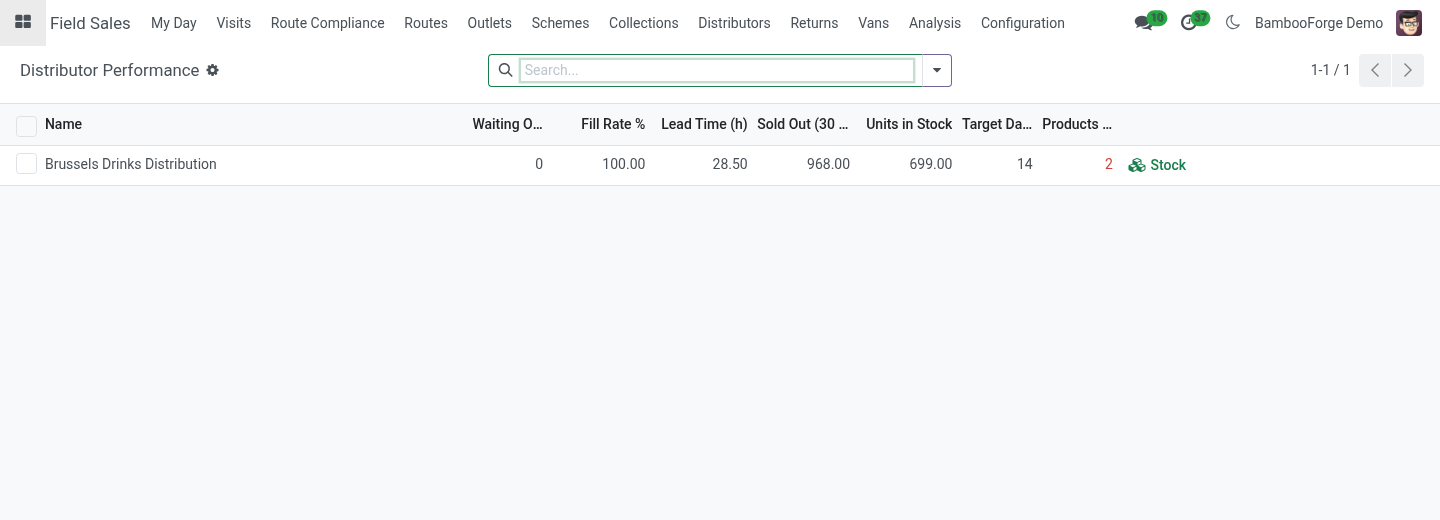
The product is found by internal reference, then barcode, then exact name; dates may be written 2026-09-18, 18/09/2026 or 18.09.2026. Every line read becomes sell-out on the ledger; the lines that could not be read are listed with the reason, and nothing is imported when none could. Performance. Distributors ▸ Distributor Performance: per distributor, the orders waiting, the fill rate (secondary orders of the last 30 days delivered, over those not cancelled), the lead time (hours from the rep's order to the delivery, averaged), units sold out in 30 days, units in stock, and how many products are under the target cover.
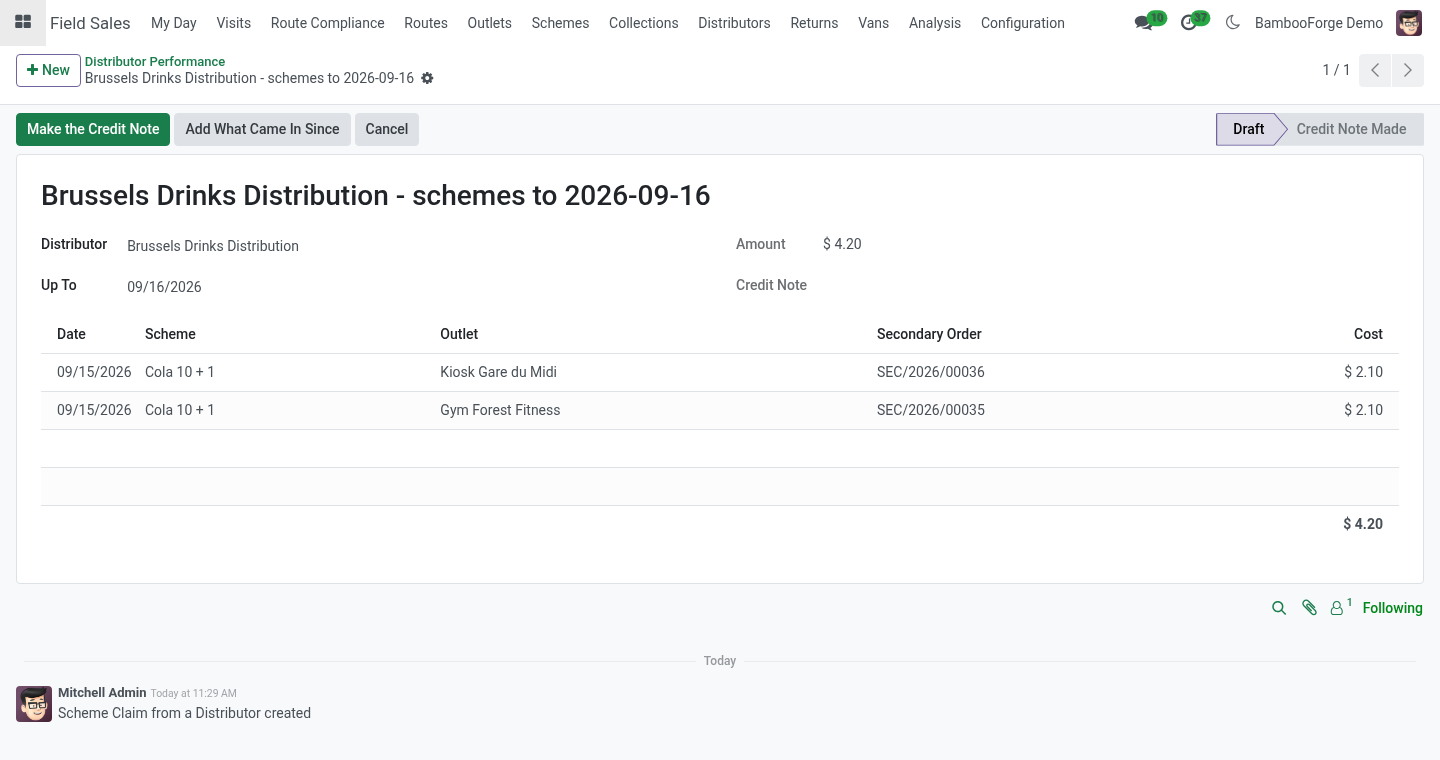
Schemes and claims. With Trade Schemes installed as well, the small Schemes for Distributors module installs by itself. A secondary order then gets the shop's schemes - percent off on its lines, free units as a line at 100%, an amount off - charged to the same budgets; free units leave the distributor's stock with the rest when it delivers. Claim the Schemes Given on the distributor (or Distributors ▸ Scheme Claims) collects every use on its delivered secondary orders not claimed yet; Make the Credit Note turns the claim into a credit note for the distributor, one line per scheme.
A use is claimed once; cancelling a claim frees its uses for the next one. Cover and replenishment. For each product the daily sell-out is the last thirty days' deliveries divided by thirty; days of cover is the stock divided by that. Suggest a Replenishment Order on the distributor creates a draft sales order for every product below its target cover, for the quantity that brings it to the target.
Confirm it - and, with Inventory, deliver it - and it is sell-in. Uninstalling. Uninstalling removes distributors' flags, secondary orders and the stock ledger. Sales orders stay.
17.0.1.1.0 The distributor's price list for the shops; the distributor's portal (Orders to Fill); sell-out imported from CSV or Excel; distributor performance - fill rate, lead time, cover; the delivery time on the secondary order. With Trade Schemes: schemes on secondary orders and claims settled by credit note (new companion module). 17.0.1.0.1 With Inventory, sell-in is written when the delivery is validated, not when the order is confirmed; returns come off (new companion module Field Sales Distributors with Inventory, installed by itself). Order lines in another unit (dozens, cases) count in the product's unit.
Now the part most videos leave out: what this does not do. The distributor's stock is a ledger kept in this database, not the distributor's own system: its accuracy is the counts' accuracy. A secondary order is not an invoice: what the distributor bills the shop stays in the distributor's books. The imported sell-out is taken as the distributor states it; a count at its warehouse is what corrects the ledger.
The complete manual is at docs dot bambooforge dot dev, the demo database is linked from the store page, and support answers within twenty-four hours. Links are in the description.
Transcript of the walkthrough (Odoo 16)
Field Sales Distributors: Secondary Sales and Distributor Stock. The rep takes the shop's order, the distributor fills it: secondary orders, the distributor's stock from sell-in less sell-out corrected by the rep's count, days of cover per product, and a replenishment order suggested to top the distributor up. Most of a brand's goods reach the shops through distributors. The brand sees what it sold to them; what they sold on, and what is left in their warehouse, it guesses.
This add-on to Field Sales and Distribution closes the loop: the rep takes the shop's order, the distributor fills it, and the distributor's stock is known product by product. In the next few minutes: what you get, then setting up, then day to day, then sell-out from the distributor's own system, then performance. Then what this app deliberately does not do, so you can tell before you buy whether it fits. Everything lives under Secondary Orders then Distributor Stock then Distributors then Import Sell-out.
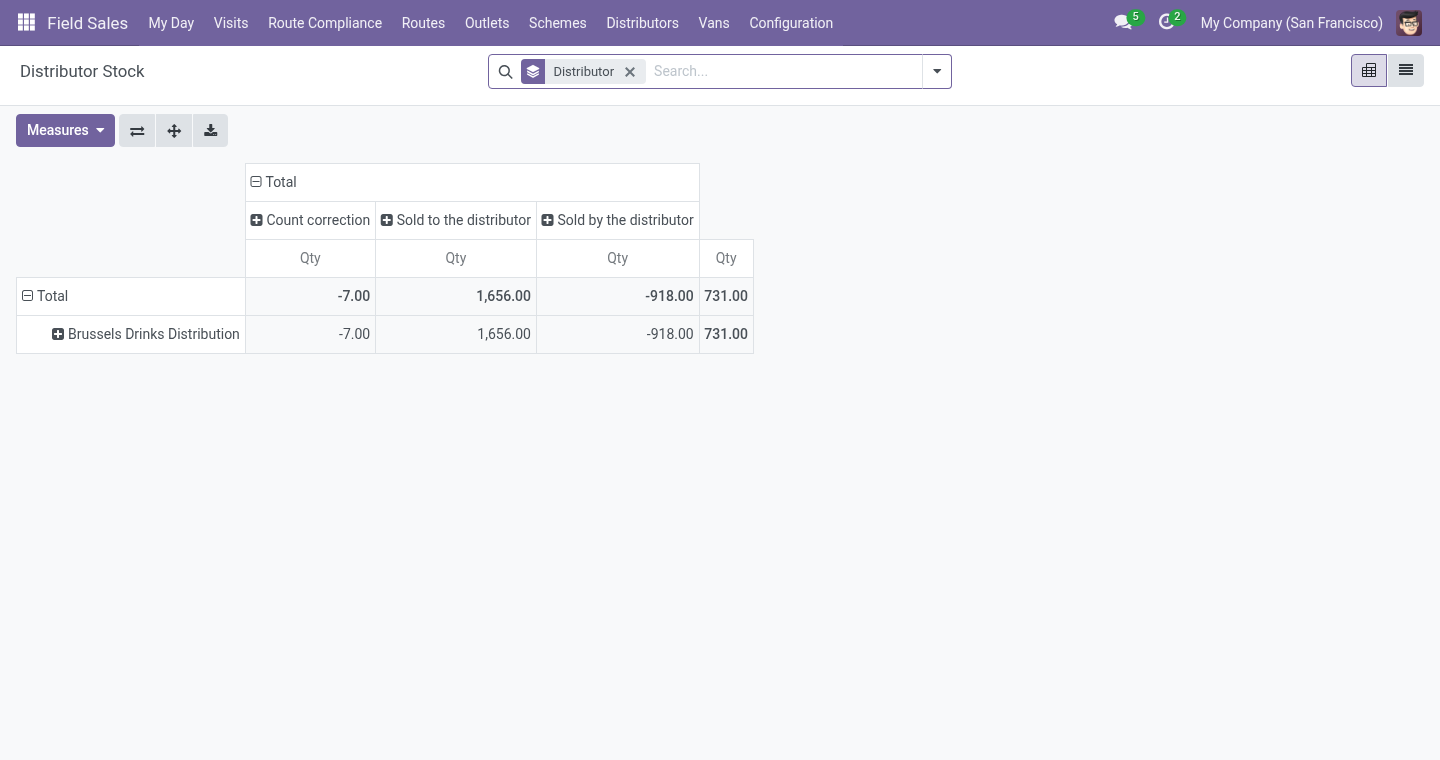
What you get Distributors: contacts marked as such, and outlets marked served by one. Secondary orders: an outlet served by a distributor gets, from the rep's phone, an order for the distributor to fill - new, confirmed, delivered - which counts in the rep's day like any other. The distributor's stock: sell-in (goods delivered to the distributor, or sales orders confirmed to it when Inventory is not installed) less sell-out (secondary orders delivered), corrected by the counts reps make at the distributor's warehouse. Days of cover per product from the last thirty days of sell-out, and a replenishment order suggested to top the distributor up to its target.
Setting up. On a contact, tick Is a Distributor; its Distributor tab holds the target days of cover, the distributor's margin (for reporting) and the price list for the shops - what the distributor charges the outlets it serves (empty: the list price). On an outlet's Field Sales tab, pick the distributor under Served By. The distributor's own login.
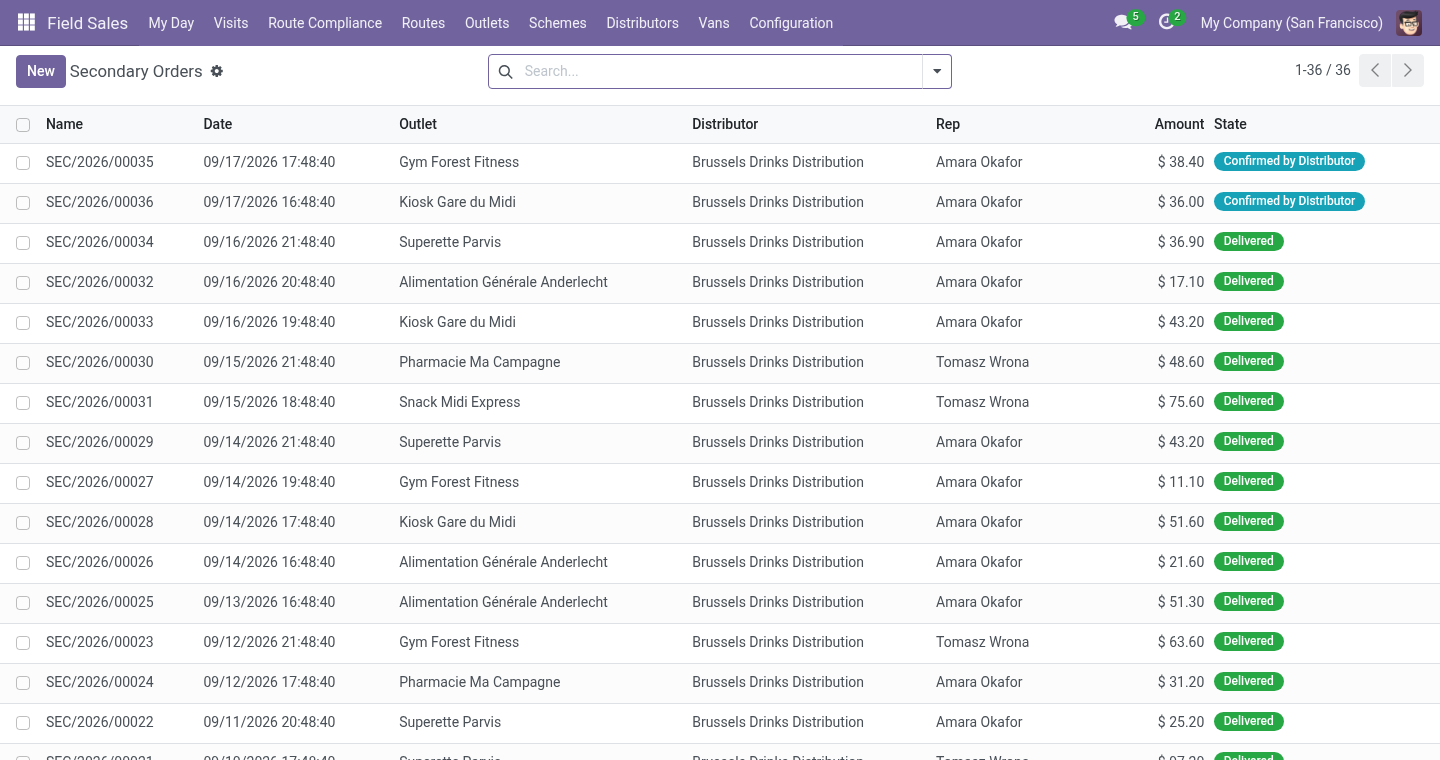
Give the distributor's staff a portal user (a contact under the distributor company, Grant portal access): their portal home shows Orders to Fill. Day to day. Taking the order. At an outlet served by a distributor the phone works as always; the order becomes a secondary order numbered SEC/… for the distributor, and the phone says so.
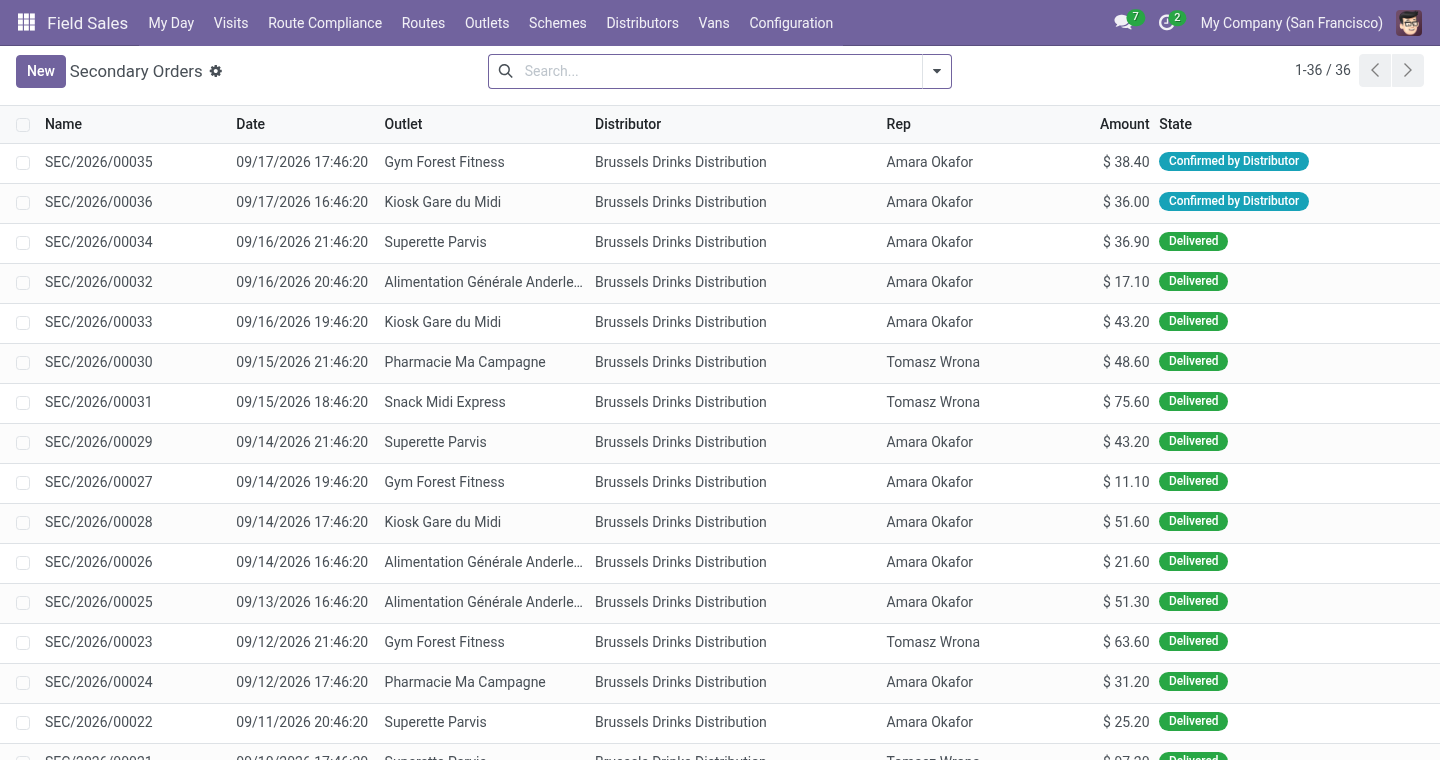
Without Inventory, confirming a sales order to a distributor is the only sign the goods left: its units go into the distributor's stock then, and cancelling the order takes them out. Filling it. Distributors ▸ Secondary Orders: Confirmed by Distributor, then Delivered. Delivery takes the units out of the distributor's stock and stamps the delivery time; cancelling a delivered order puts them back.
The distributor can do both itself on the portal: Orders to Fill lists its orders by state, each with the shop's address and lines, and the buttons We will deliver it and Delivered; the order's chatter says who pressed them. Sell-out from the distributor's own system. A distributor that runs its own software sends its sales as a file. Distributors ▸ Import Sell-out: the distributor, and a CSV (comma, semicolon or tab) or Excel file whose first row names the columns date, product and quantity (code, sku, barcode, qty, units are understood too).
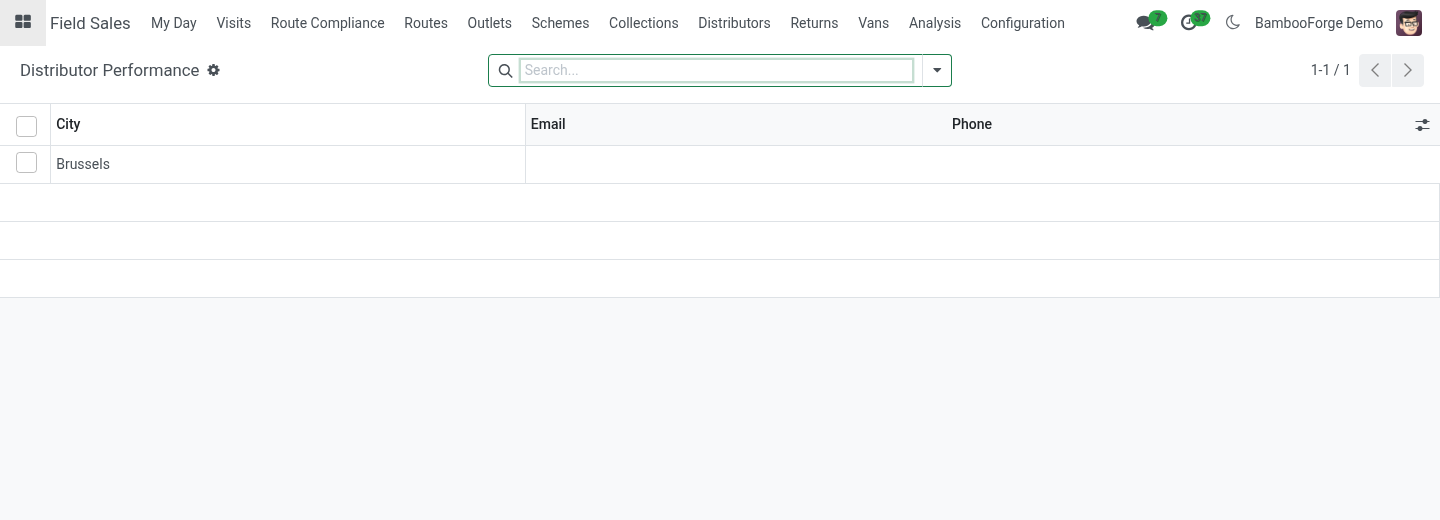
The product is found by internal reference, then barcode, then exact name; dates may be written 2026-09-18, 18/09/2026 or 18.09.2026. Every line read becomes sell-out on the ledger; the lines that could not be read are listed with the reason, and nothing is imported when none could. Performance. Distributors ▸ Distributor Performance: per distributor, the orders waiting, the fill rate (secondary orders of the last 30 days delivered, over those not cancelled), the lead time (hours from the rep's order to the delivery, averaged), units sold out in 30 days, units in stock, and how many products are under the target cover.
Schemes and claims. With Trade Schemes installed as well, the small Schemes for Distributors module installs by itself. A secondary order then gets the shop's schemes - percent off on its lines, free units as a line at 100%, an amount off - charged to the same budgets; free units leave the distributor's stock with the rest when it delivers. Claim the Schemes Given on the distributor (or Distributors ▸ Scheme Claims) collects every use on its delivered secondary orders not claimed yet; Make the Credit Note turns the claim into a credit note for the distributor, one line per scheme.
A use is claimed once; cancelling a claim frees its uses for the next one. Cover and replenishment. For each product the daily sell-out is the last thirty days' deliveries divided by thirty; days of cover is the stock divided by that. Suggest a Replenishment Order on the distributor creates a draft sales order for every product below its target cover, for the quantity that brings it to the target.
Confirm it - and, with Inventory, deliver it - and it is sell-in. Uninstalling. Uninstalling removes distributors' flags, secondary orders and the stock ledger. Sales orders stay.
16.0.1.1.0 The distributor's price list for the shops; the distributor's portal (Orders to Fill); sell-out imported from CSV or Excel; distributor performance - fill rate, lead time, cover; the delivery time on the secondary order. With Trade Schemes: schemes on secondary orders and claims settled by credit note (new companion module). 16.0.1.0.1 With Inventory, sell-in is written when the delivery is validated, not when the order is confirmed; returns come off (new companion module Field Sales Distributors with Inventory, installed by itself). Order lines in another unit (dozens, cases) count in the product's unit.
Now the part most videos leave out: what this does not do. The distributor's stock is a ledger kept in this database, not the distributor's own system: its accuracy is the counts' accuracy. A secondary order is not an invoice: what the distributor bills the shop stays in the distributor's books. The imported sell-out is taken as the distributor states it; a count at its warehouse is what corrects the ledger.
The complete manual is at docs dot bambooforge dot dev, the demo database is linked from the store page, and support answers within twenty-four hours. Links are in the description.
Key facts
- What it is
- The rep takes the shop's order, the distributor fills it: secondary orders, the distributor's stock from sell-in less sell-out corrected by the rep's count, days of cover per product, and a replenishment order suggested to top the distributor up.
- For
- Sales
- Odoo versions
- 16.0, 17.0, 18.0, 19.0, 20.0 - Community and Enterprise
- Runs on
- Odoo.sh or Odoo you host yourself - not Odoo Online, which accepts no third-party apps
- Price
- 478 EUR, one-time, on the Odoo Apps Store
- Technical name
- bambooforge_field_sales_distributor
- Not for
- The distributor's stock is a ledger kept in this database, not the distributor's own system: its accuracy is the counts' accuracy.; A secondary order is not an invoice: what the distributor bills the shop stays in the distributor's books.; The imported sell-out is taken as the distributor states it; a count at its warehouse is what corrects the ledger.
- Manual last updated
- 2026-09-21
Field Sales Distributors: Secondary Sales and Distributor Stock
Most of a brand's goods reach the shops through distributors. The brand sees what it sold to them; what they sold on, and what is left in their warehouse, it guesses. This add-on to Field Sales and Distribution closes the loop: the rep takes the shop's order, the distributor fills it, and the distributor's stock is known product by product.
What you get
Distributors: contacts marked as such, and outlets marked served by one.
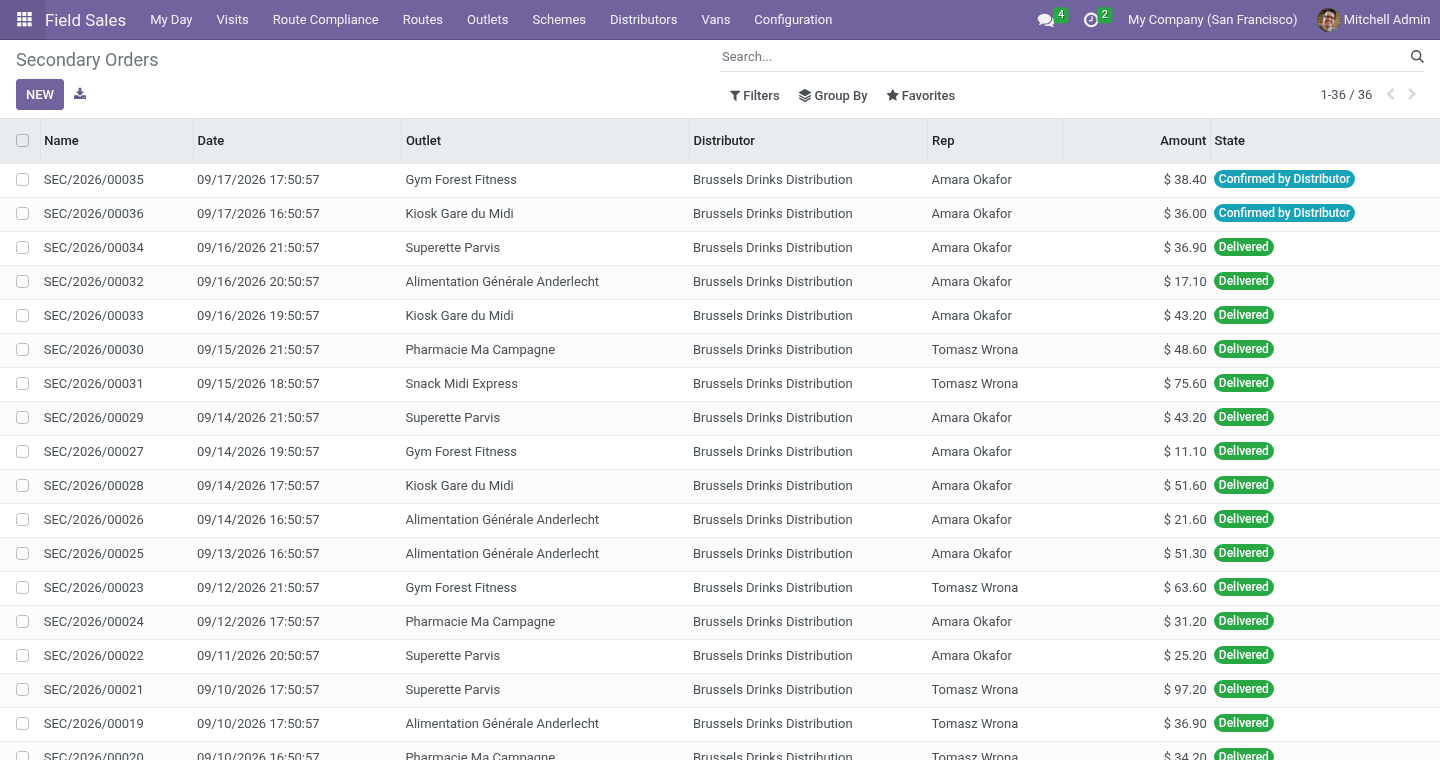
Secondary orders: an outlet served by a distributor gets, from the rep's phone, an order for the distributor to fill - new, confirmed, delivered - which counts in the rep's day like any other.
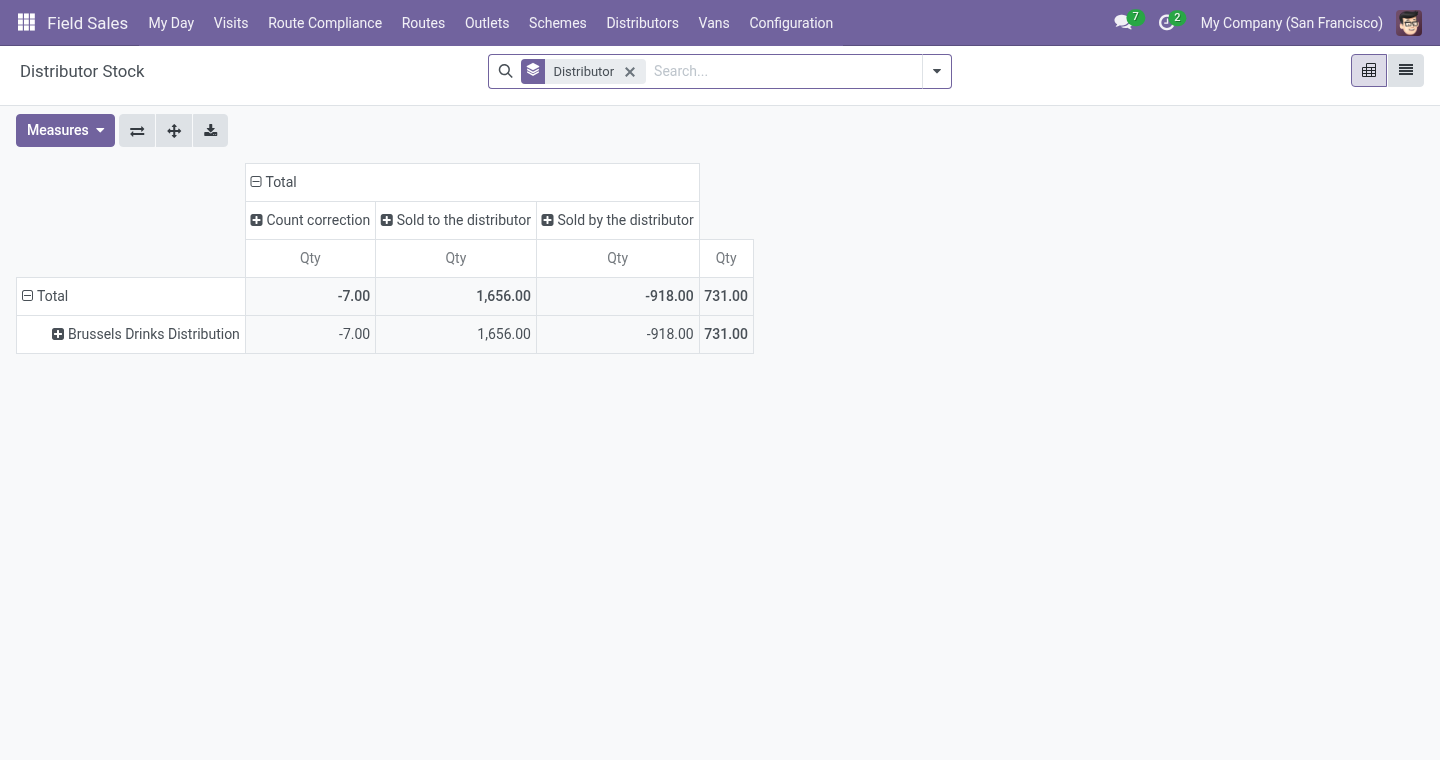
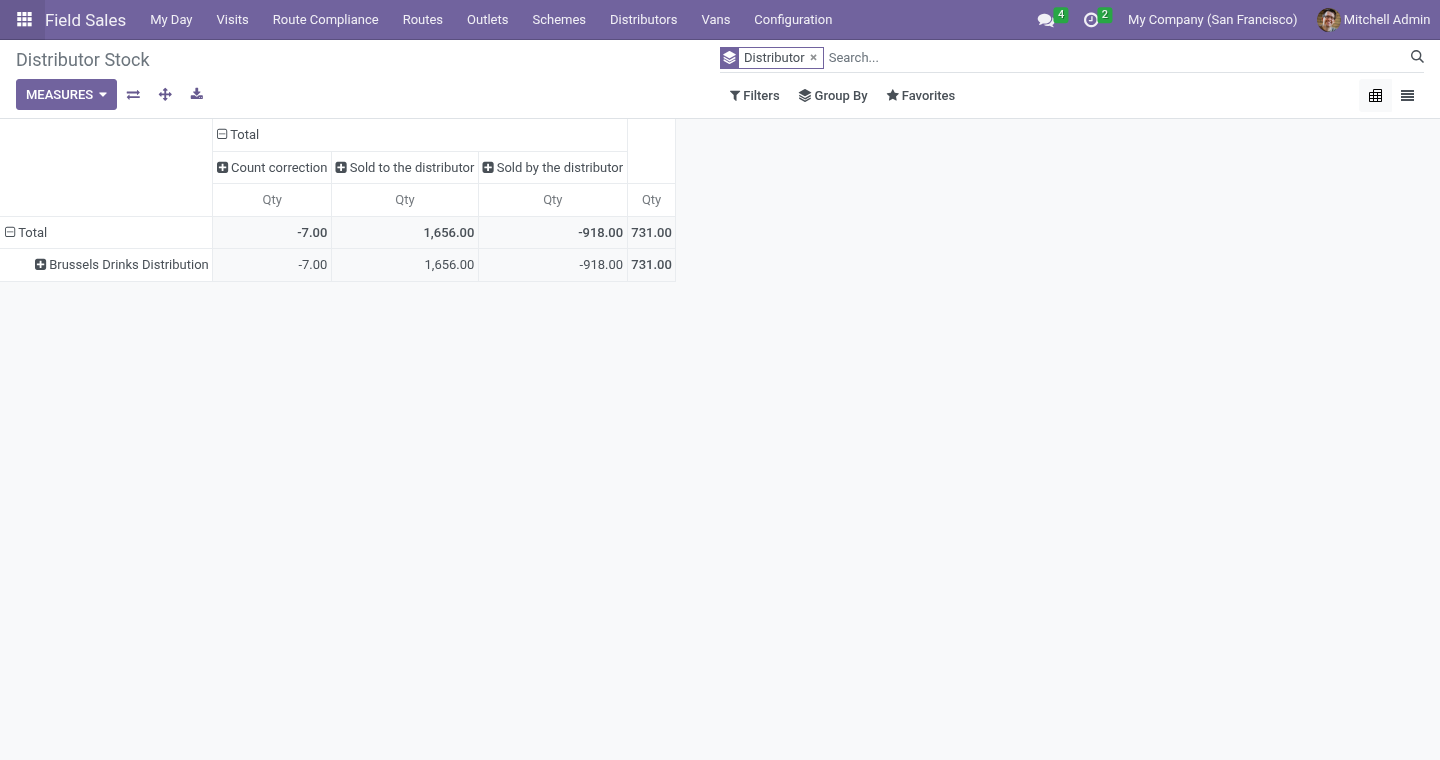
The distributor's stock: sell-in (goods delivered to the distributor, or sales orders confirmed to it when Inventory is not installed) less sell-out (secondary orders delivered), corrected by the counts reps make at the distributor's warehouse.
Days of cover per product from the last thirty days of sell-out, and a replenishment order suggested to top the distributor up to its target.
Requirements
Field Sales and Distribution 1.1 or later on the same Odoo series; Odoo 20.0, Community or Enterprise.
Reps see their own secondary orders; supervisors see all, the stock and the distributors.
Install
Copy bambooforge_field_sales_distributor next to Field Sales, restart.
Apps, search for Distributors, Activate.
Setting up
On a contact, tick Is a Distributor; its Distributor tab holds the target days of cover, the distributor's margin (for reporting) and the price list for the shops - what the distributor charges the outlets it serves (empty: the list price). On an outlet's Field Sales tab, pick the distributor under Served By.
The distributor's own login. Give the distributor's staff a portal user (a contact under the distributor company, Grant portal access): their portal home shows Orders to Fill.
A distributor can be an outlet too (tick Is an Outlet and put it on a route): a rep visiting its warehouse counts its shelves with the ordinary shelf count.
Day to day
Taking the order. At an outlet served by a distributor the phone works as always; the order becomes a secondary order numbered SEC/… for the distributor, and the phone says so.
Filling it. Distributors ▸ Secondary Orders: Confirmed by Distributor, then Delivered. Delivery takes the units out of the distributor's stock and stamps the delivery time; cancelling a delivered order puts them back. The distributor can do both itself on the portal: Orders to Fill lists its orders by state, each with the shop's address and lines, and the buttons We will deliver it and Delivered; the order's chatter says who pressed them.
Prices. A secondary order is priced on the distributor's price list for the shops, or at the list price when it has none. With Trade Schemes installed the shop's schemes apply to it as to a direct order (see below).
Sell-in. When the goods reach the distributor depends on what else is installed:
With Inventory, the small Sell-in at Delivery module installs by itself and the sell-in is the delivery: each validated delivery to the distributor adds what it carried - a part delivery adds the part - and a return takes it off. A confirmed order still waiting in your warehouse is not in the distributor's stock. Orders confirmed before it was installed are recounted from what they actually delivered.
Without Inventory, confirming a sales order to a distributor is the only sign the goods left: its units go into the distributor's stock then, and cancelling the order takes them out.
Either way the ledger counts in the product's unit: two dozen on the order are 24 units.
Counting. A shelf count at the distributor's warehouse writes the difference to the ledger as a count correction - only the difference.
Sell-out from the distributor's own system
A distributor that runs its own software sends its sales as a file. Distributors ▸ Import Sell-out: the distributor, and a CSV (comma, semicolon or tab) or Excel file whose first row names the columns date, product and quantity (code, sku, barcode, qty, units are understood too). The product is found by internal reference, then barcode, then exact name; dates may be written 2026-09-18, 18/09/2026 or 18.09.2026. Every line read becomes sell-out on the ledger; the lines that could not be read are listed with the reason, and nothing is imported when none could.
Performance
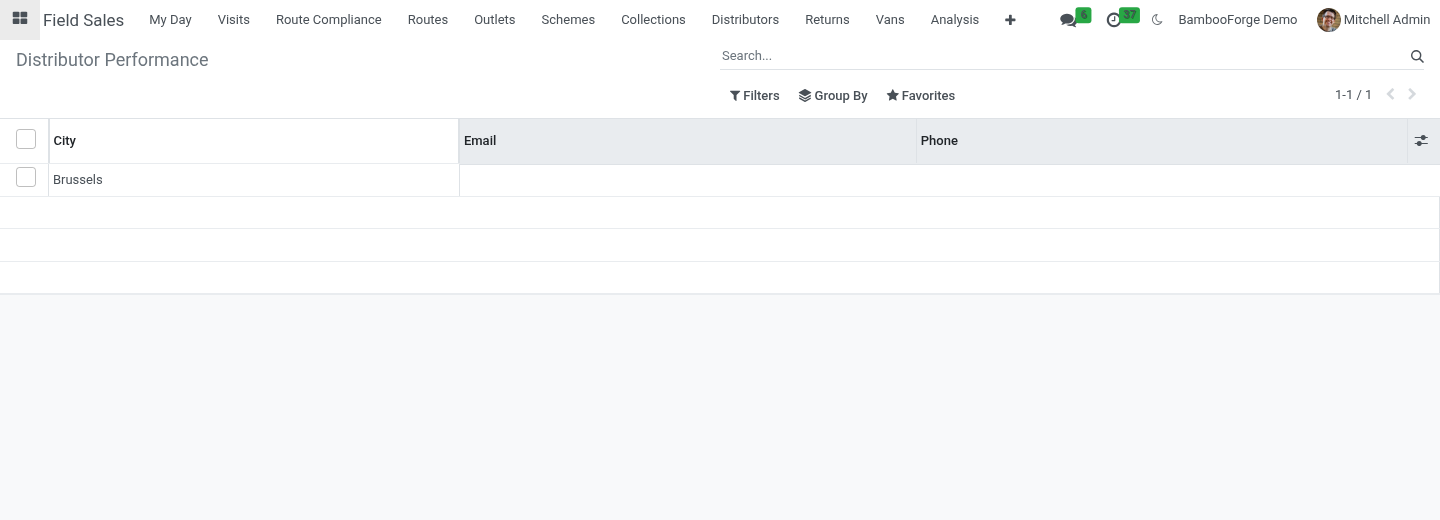
Distributors ▸ Distributor Performance: per distributor, the orders waiting, the fill rate (secondary orders of the last 30 days delivered, over those not cancelled), the lead time (hours from the rep's order to the delivery, averaged), units sold out in 30 days, units in stock, and how many products are under the target cover.
Schemes and claims
With Trade Schemes installed as well, the small Schemes for Distributors module installs by itself. A secondary order then gets the shop's schemes - percent off on its lines, free units as a line at 100%, an amount off - charged to the same budgets; free units leave the distributor's stock with the rest when it delivers. Claim the Schemes Given on the distributor (or Distributors ▸ Scheme Claims) collects every use on its delivered secondary orders not claimed yet; Make the Credit Note turns the claim into a credit note for the distributor, one line per scheme. A use is claimed once; cancelling a claim frees its uses for the next one.
Cover and replenishment
For each product the daily sell-out is the last thirty days' deliveries divided by thirty; days of cover is the stock divided by that. Suggest a Replenishment Order on the distributor creates a draft sales order for every product below its target cover, for the quantity that brings it to the target. Confirm it - and, with Inventory, deliver it - and it is sell-in.
Limits, stated plainly
The distributor's stock is a ledger kept in this database, not the distributor's own system: its accuracy is the counts' accuracy.
A secondary order is not an invoice: what the distributor bills the shop stays in the distributor's books.
The imported sell-out is taken as the distributor states it; a count at its warehouse is what corrects the ledger.
Uninstalling
Uninstalling removes distributors' flags, secondary orders and the stock ledger. Sales orders stay.
Changelog
20.0.1.1.0
Built for Odoo 20: record rules and access rights rewritten onto Odoo 20's single ir.access model, the screens rebuilt on Owl 3, and every icon moved to the icon set Odoo 20 ships. The portal card is an Odoo 20 portal entry.
20.0.1.1.0
The distributor's price list for the shops; the distributor's portal (Orders to Fill); sell-out imported from CSV or Excel; distributor performance - fill rate, lead time, cover; the delivery time on the secondary order.
With Trade Schemes: schemes on secondary orders and claims settled by credit note (new companion module).
20.0.1.0.1
With Inventory, sell-in is written when the delivery is validated, not when the order is confirmed; returns come off (new companion module Field Sales Distributors with Inventory, installed by itself).
Order lines in another unit (dozens, cases) count in the product's unit.
20.0.1.0.0
First release.
How we make sure it works
Before every release, 8 automated checks run against this app on Odoo 16, 17, 18, 19 and 20. Among them:
The shops order is the distributors to fill.
Count corrects the ledger.
The distributors price list.
The complete list is in the source you receive.