 BambooForge Labs
Field Sales and Distribution All in One with Routes and GPS
Beat plans, GPS check-in inside the shop's fence, shelf count, stamped photos, orders on the phone, check-out - and a route compliance report the supervisor reads on Monday. What did not add up is flagged on the visit: a check-in far from the shop, a different phone, two minutes in the shop, a visit nobody planned.
Available for Odoo 16.0, Odoo 17.0, Odoo 18.0, Odoo 19.0, Odoo 20.0. Technical name bambooforge_field_sales.
Transcript of the walkthrough (Odoo 20)
Field Sales and Distribution All in One with Routes and GPS. Beat plans, GPS check-in inside the shop's fence, shelf count, stamped photos, orders on the phone, check-out - and a route compliance report the supervisor reads on Monday. What did not add up is flagged on the visit: a check-in far from the shop, a different phone, two minutes in the shop, a visit nobody planned. A rep who calls on forty shops a week runs on habit and memory, and the office finds out what happened at the end of the month.
This app gives the rep a day and the supervisor a record: routes, a phone screen for the six steps in the shop, orders that are real sales orders, and a route compliance report with everything that did not add up flagged on the visit. In the next few minutes: field sales and distribution all in one with routes and gps, then what you get, then setting up, then the rep's day, then without a signal. Then what this app deliberately does not do, so you can tell before you buy whether it fits. Everything lives under Field Sales then My Day then Visits then Route Compliance.
Field Sales and Distribution All in One with Routes and GPS. A rep who calls on forty shops a week runs on habit and memory, and the office finds out what happened at the end of the month. This app gives the rep a day and the supervisor a record: routes, a phone screen for the six steps in the shop, orders that are real sales orders, and a route compliance report with everything that did not add up flagged on the visit. What you get Outlets: contacts with a channel, a class, a territory, a pin on the map, a check-in fence, a credit limit, an assortment.
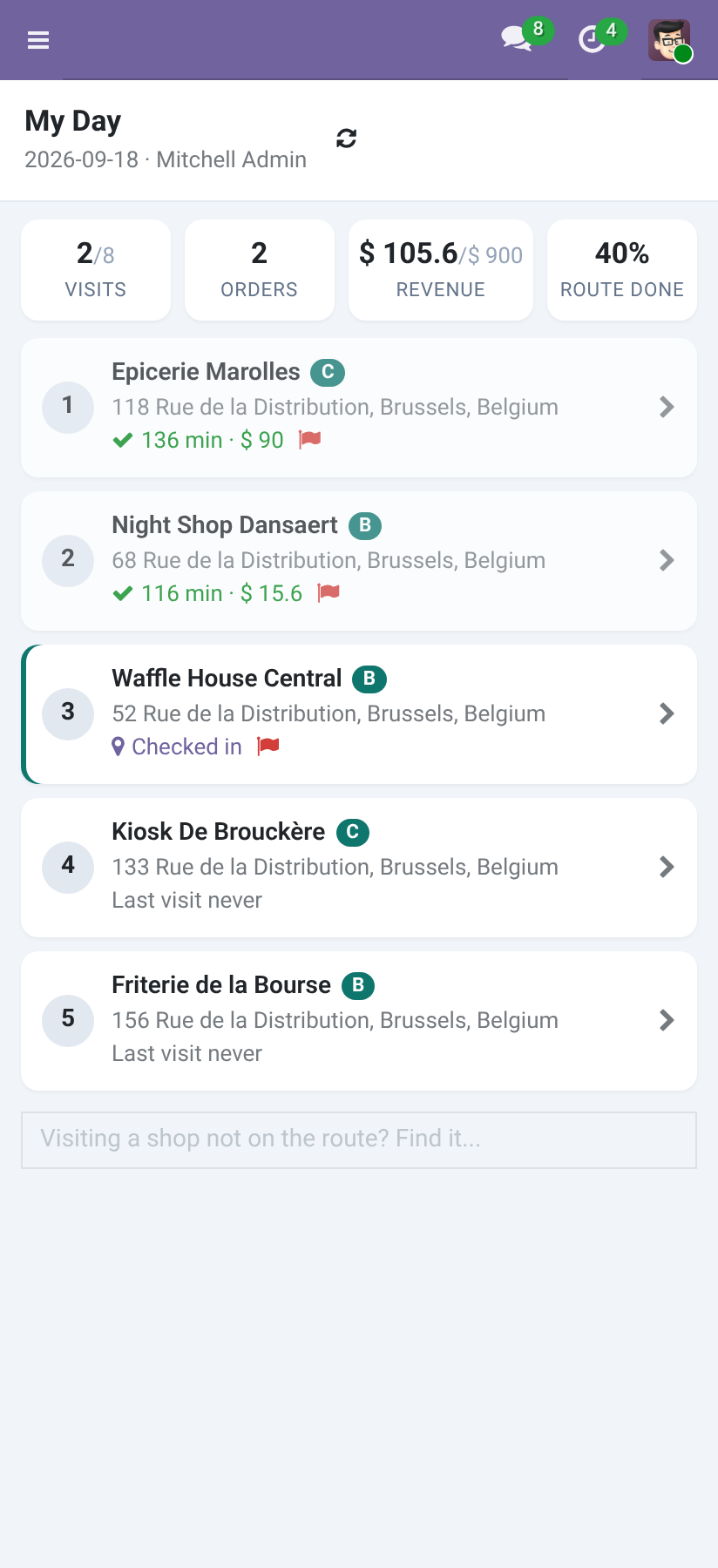
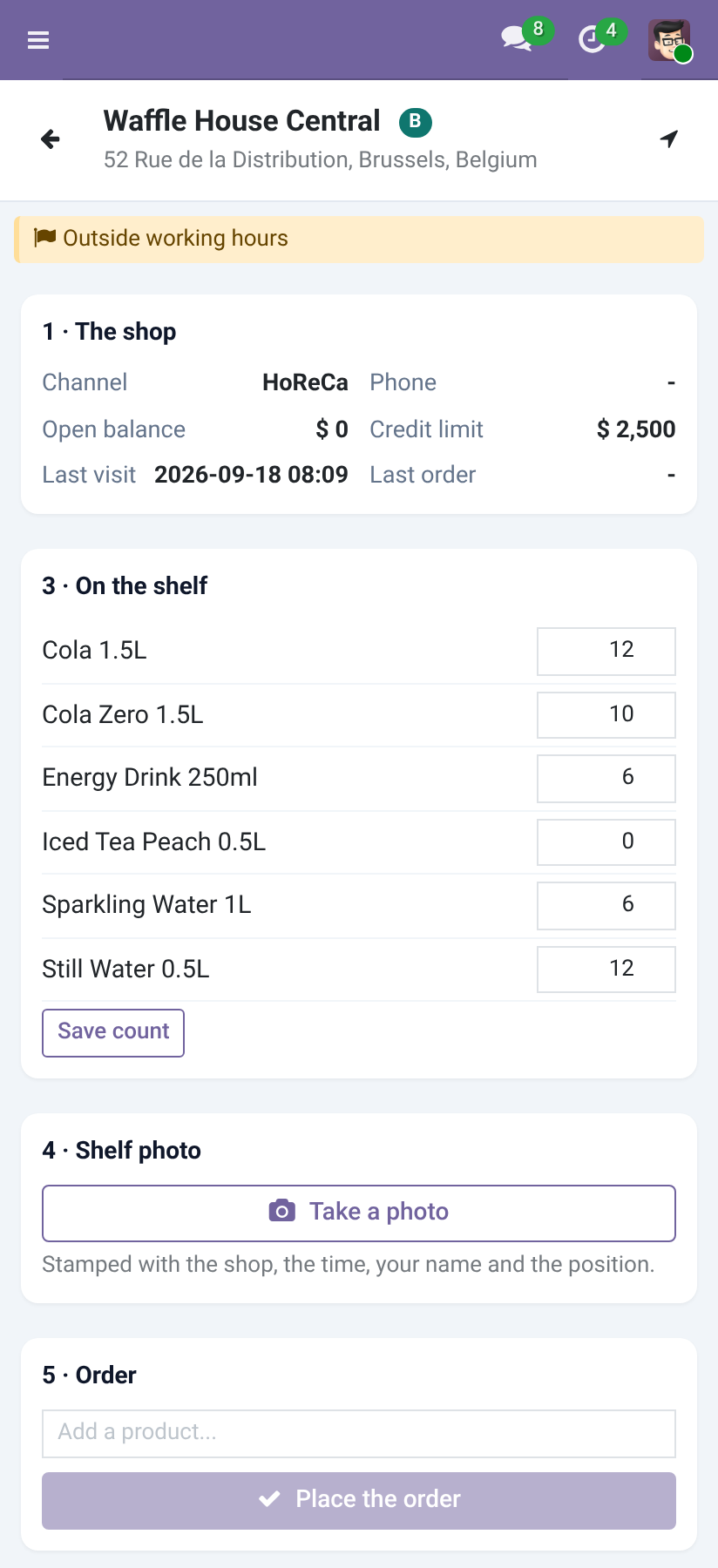
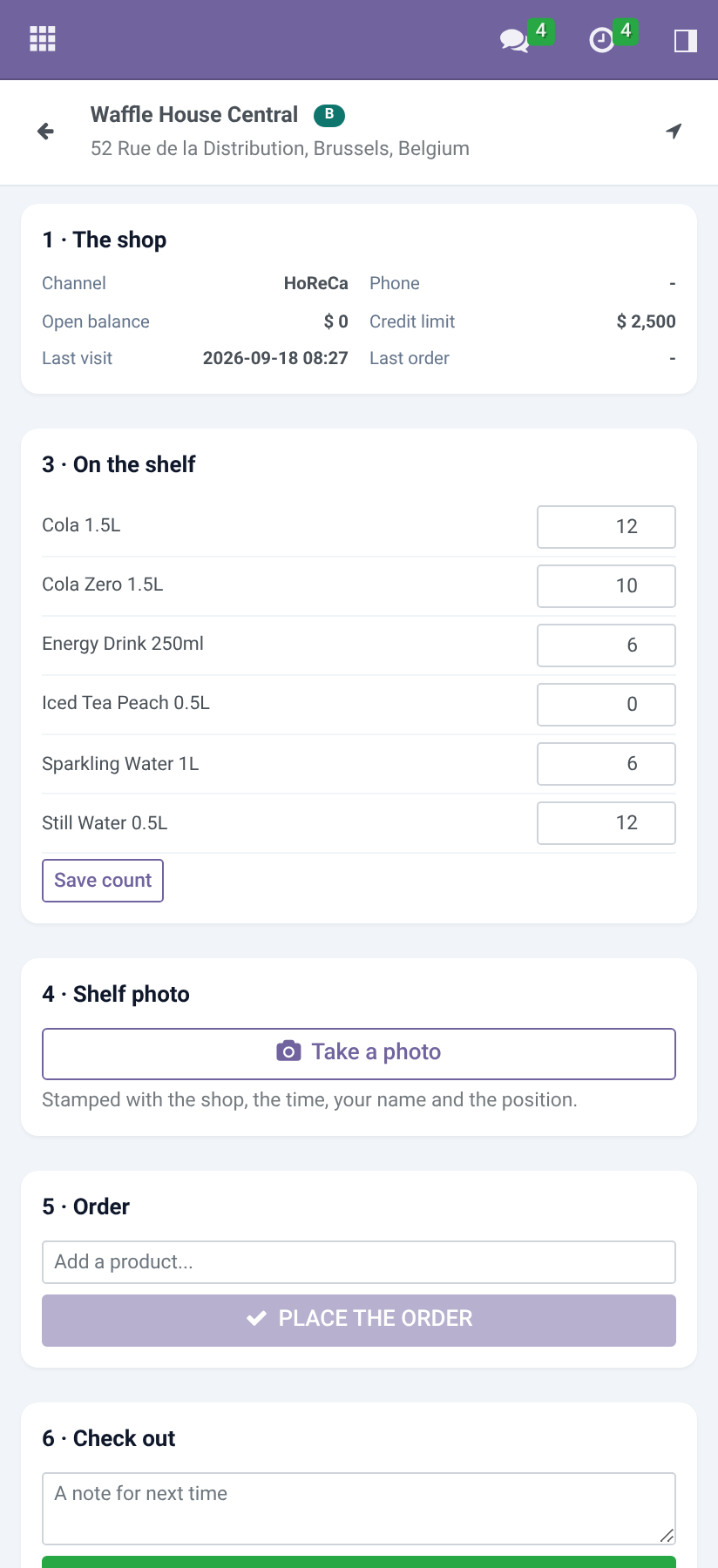
Routes: a rep's day - the outlets in the order they are driven, on a weekday, every week, two or four. Tonight's job plans tomorrow. My Day on the phone: the visits in order, targets against the day so far, and the six steps at each shop - the shop's card, check in, shelf count, stamped photo, order, check out. A shop not on the route can be added and is marked as such.
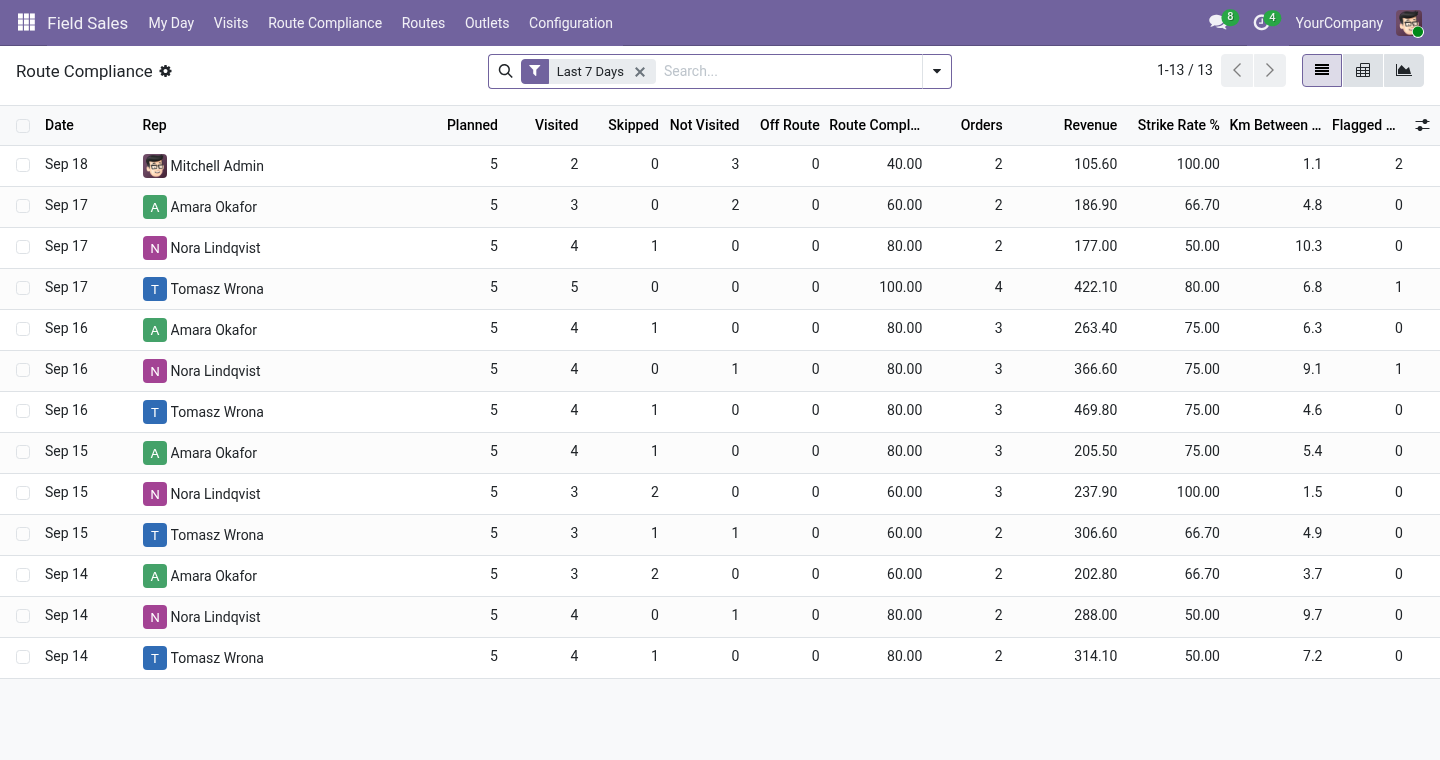
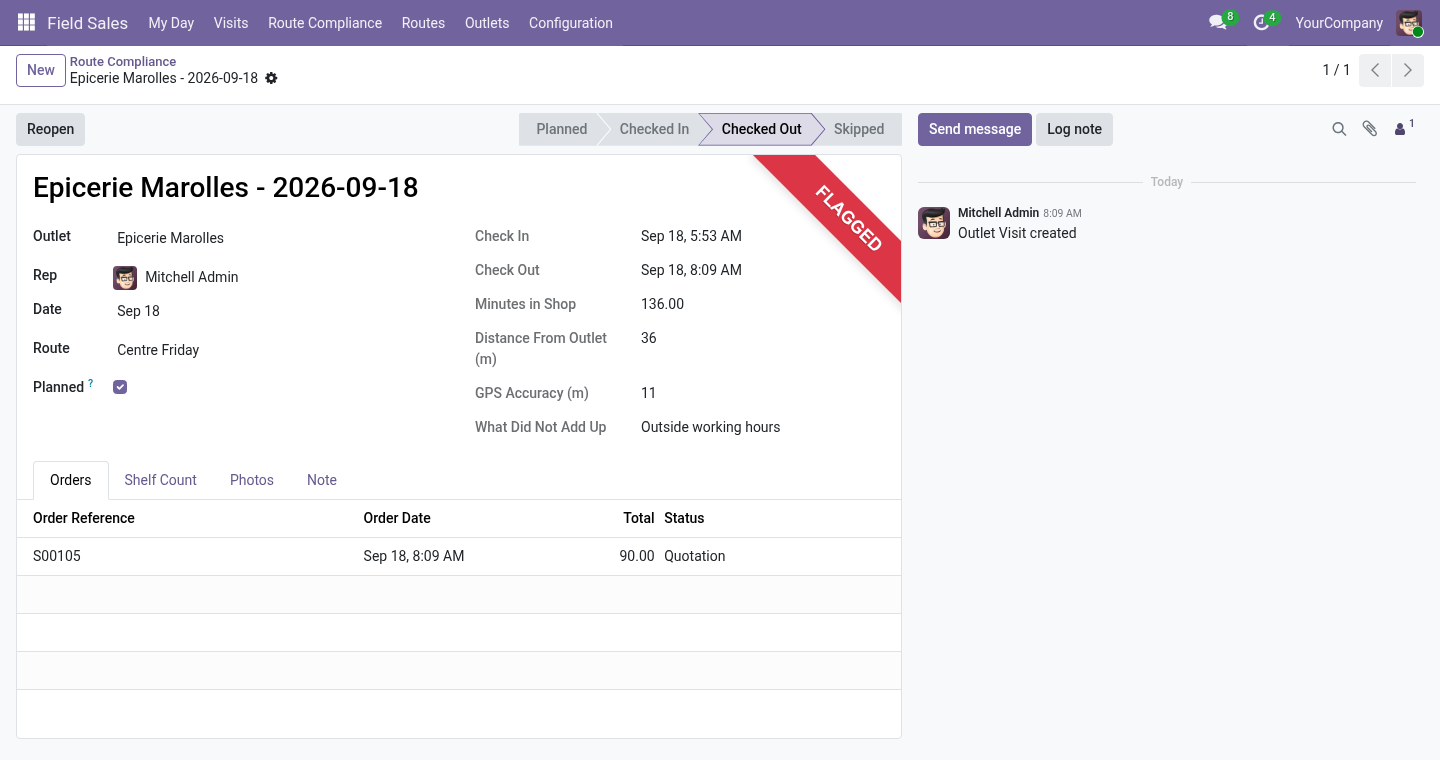
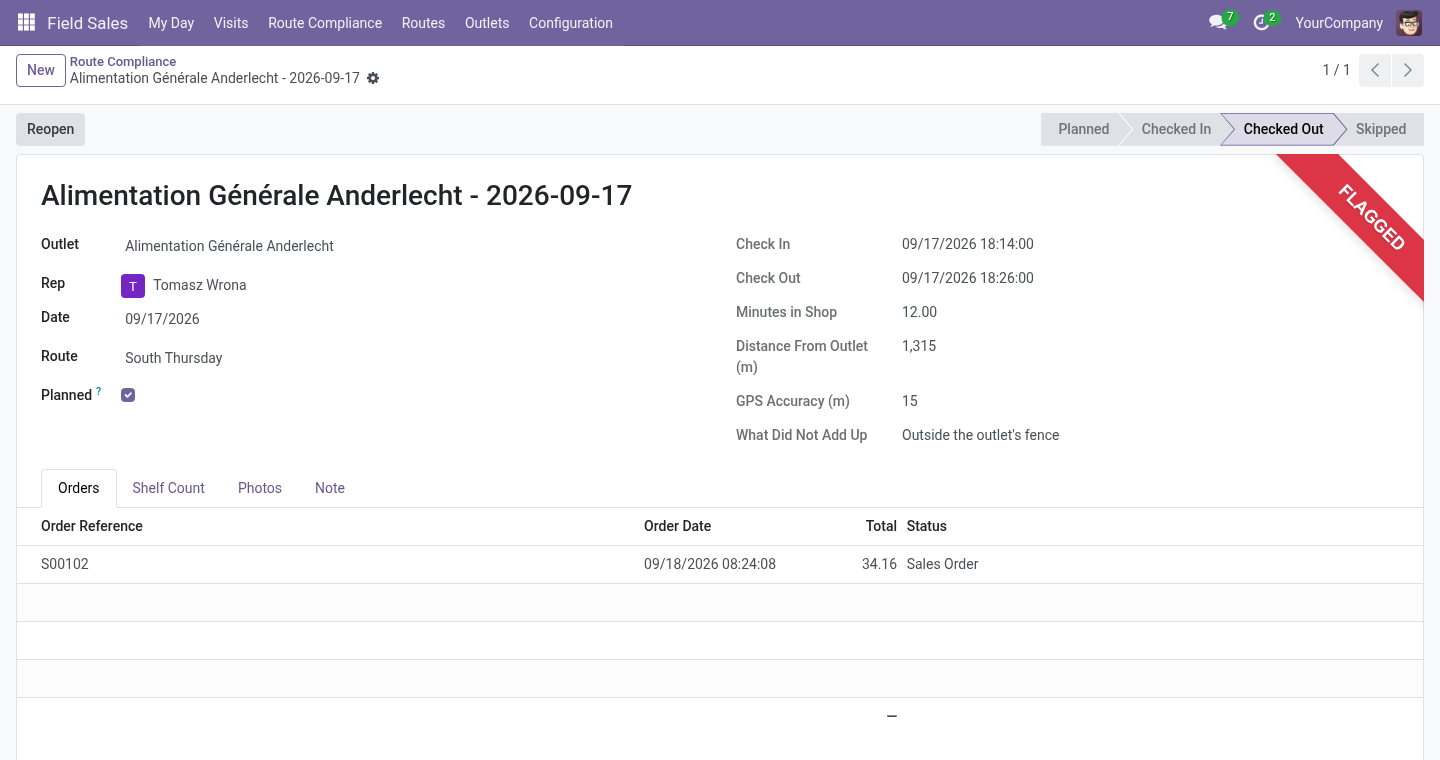
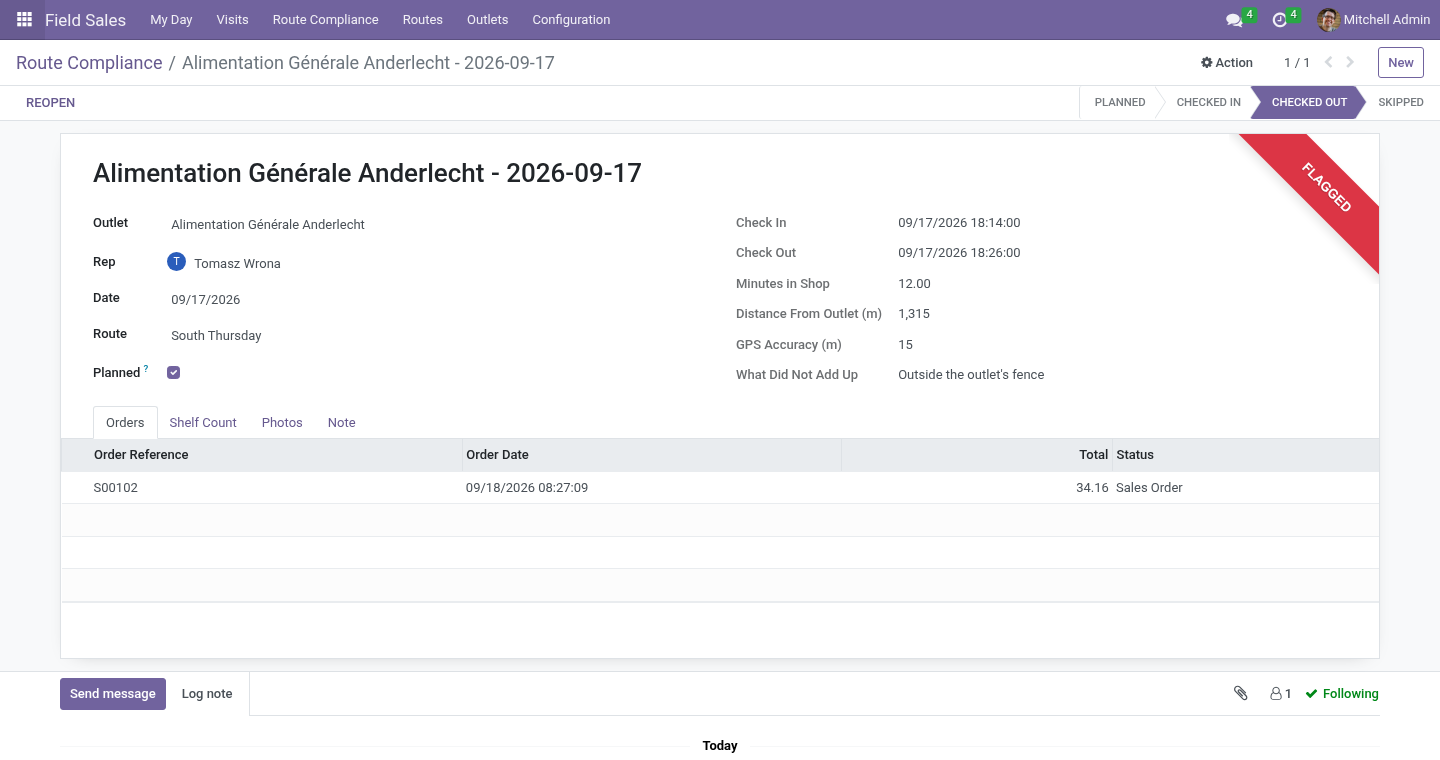
Flags, not walls: a check-in outside the fence, poor GPS accuracy, a phone that is not the rep's usual one, a visit outside working hours, under two minutes in the shop, a visit nobody planned - each written on the visit for the supervisor. Route compliance: one line per rep per day - planned, visited, skipped, missed, off-route, compliance, strike rate, orders, revenue, minutes in shops, kilometres between check-ins, flags, targets. Odoo's own sales orders, on the outlet's pricelist, linked to the visit and the route. Money and goods at the counter: collect cash, a cheque or a transfer reference against the shop's open invoices and print an 80 mm receipt; take back damaged, expired, unsold goods and empties as a draft credit note at the price the shop paid.
Cases and units: a product sold by the case of 6, 12 or 24 is ordered by the case, by the unit or both. Setting up. Outlets. Any contact with Is an Outlet ticked, on its Field Sales tab: channel, class (A, B, C), territory, latitude and longitude (the pin the check-in is measured against; the Geolocalize module fills them from the address), the check-in fence in metres, a credit limit (0: none), and the assortment - the products the shelf count asks about.
Routes. A name, the rep, the weekday, the rhythm (every week, every two weeks, every four weeks, counted from a date), and the stops in driving order. Plan Today creates today's visits at once; the nightly job plans every route for tomorrow and closes yesterday's numbers. The rep's day.
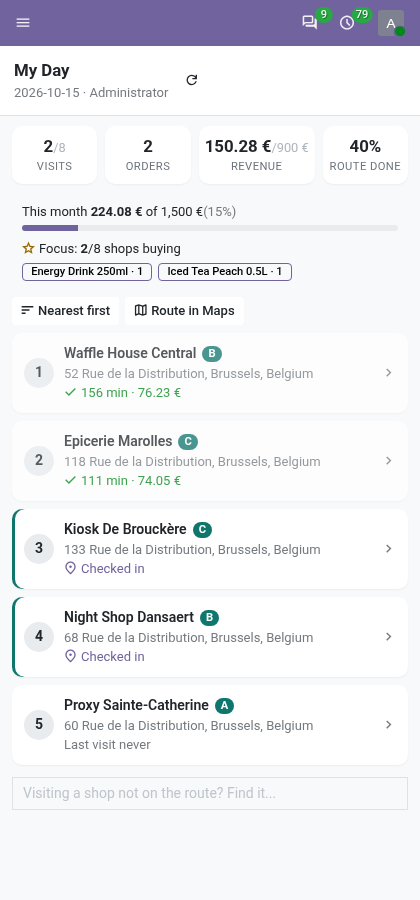
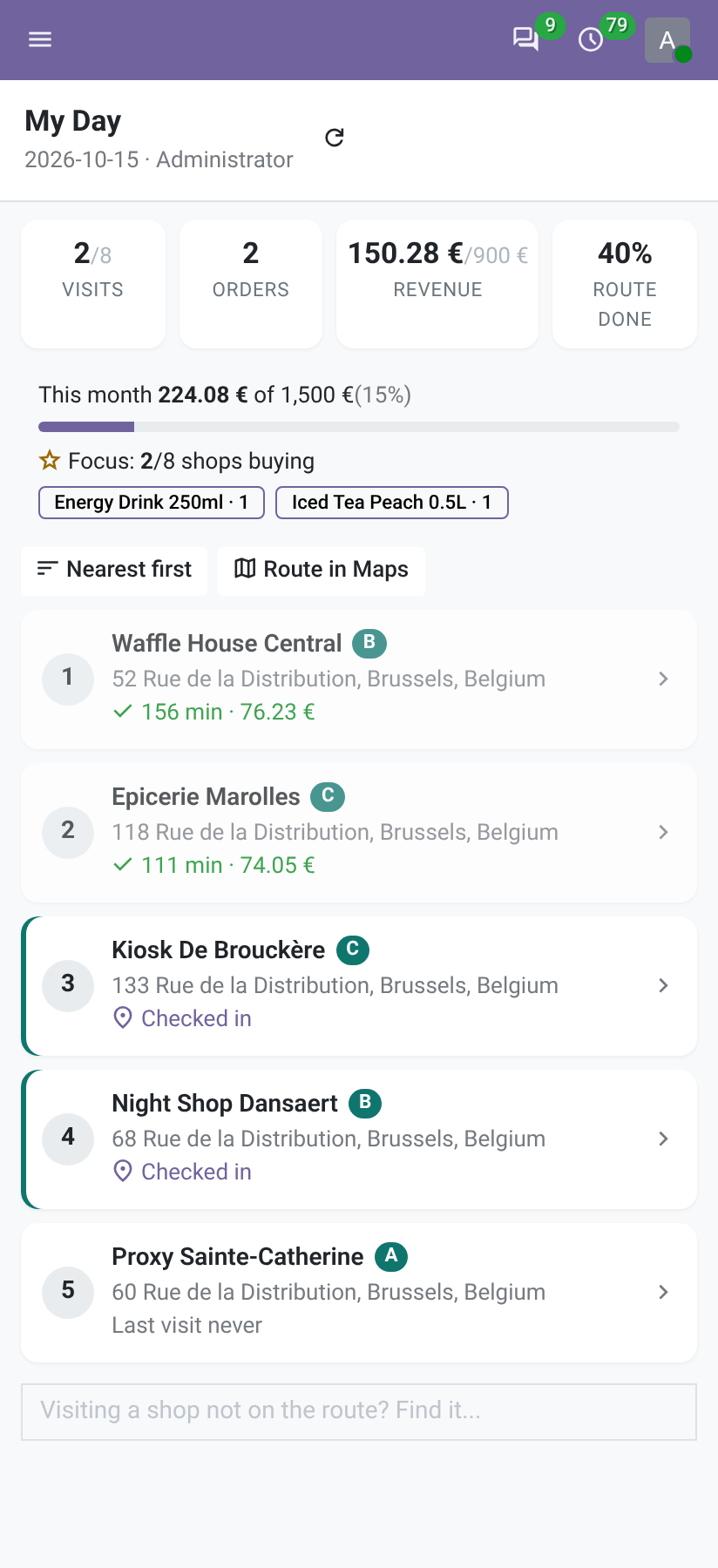
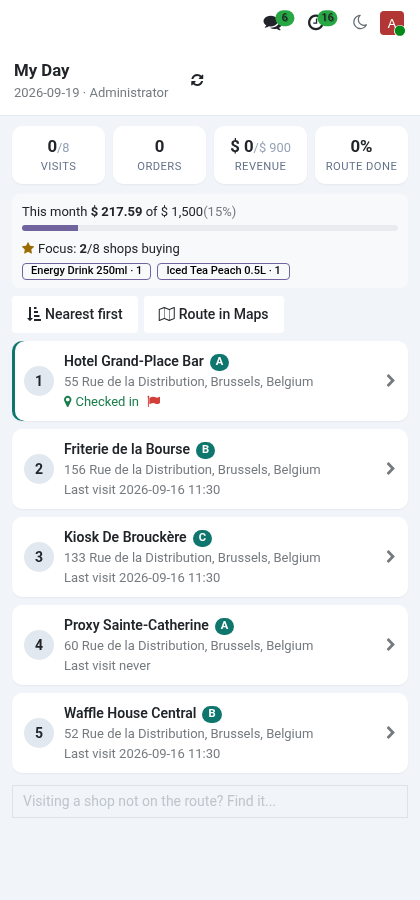
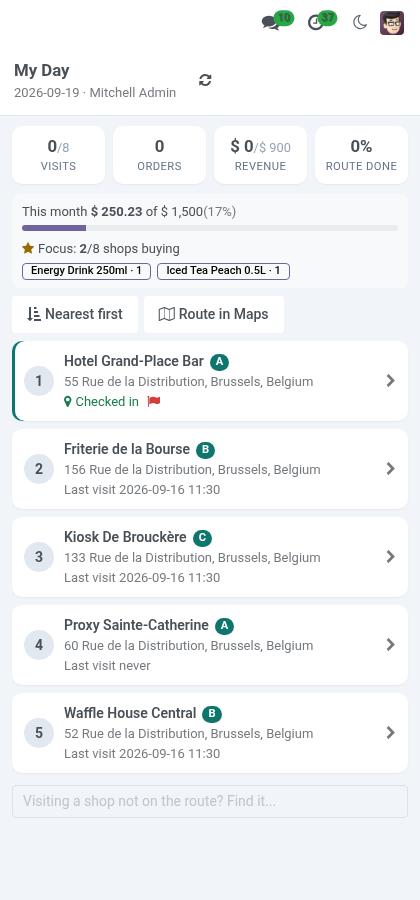
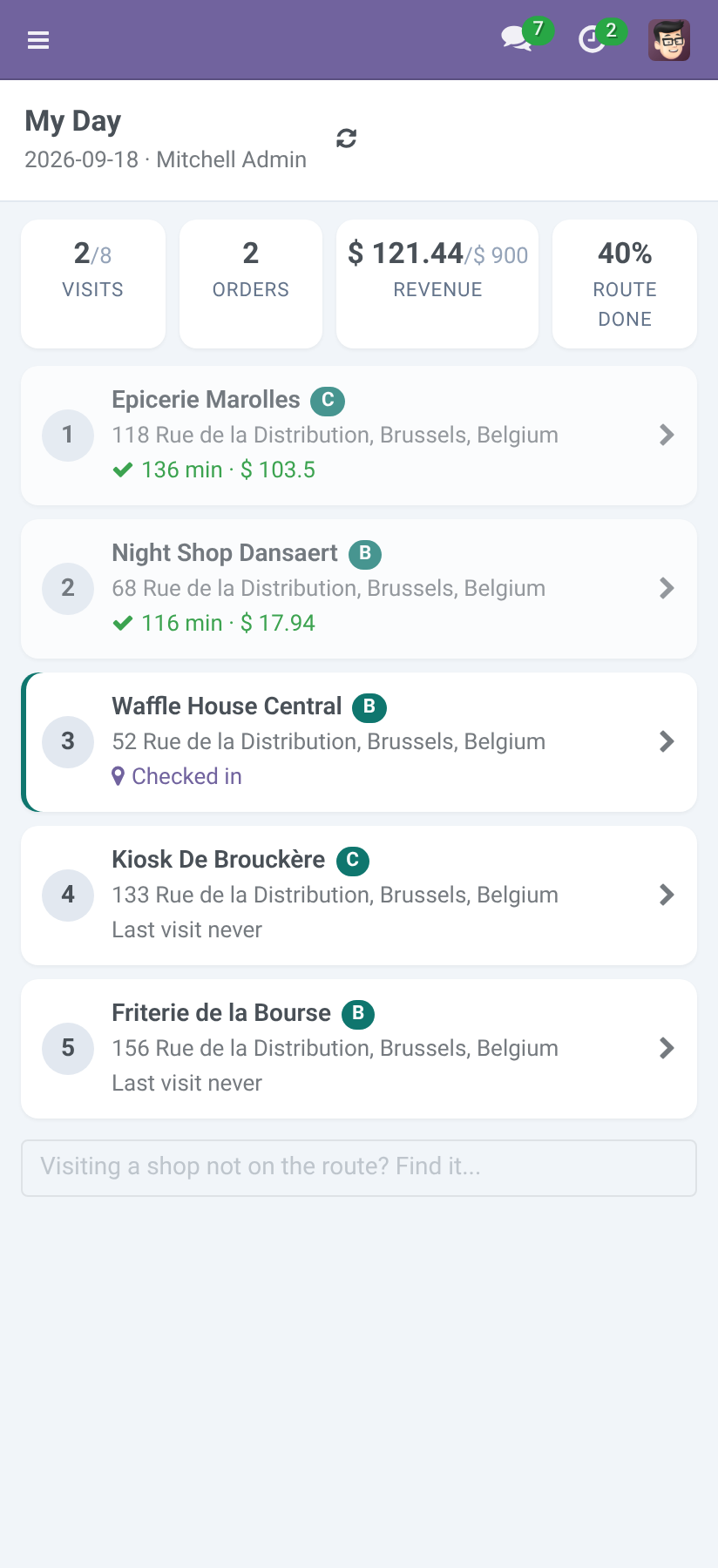
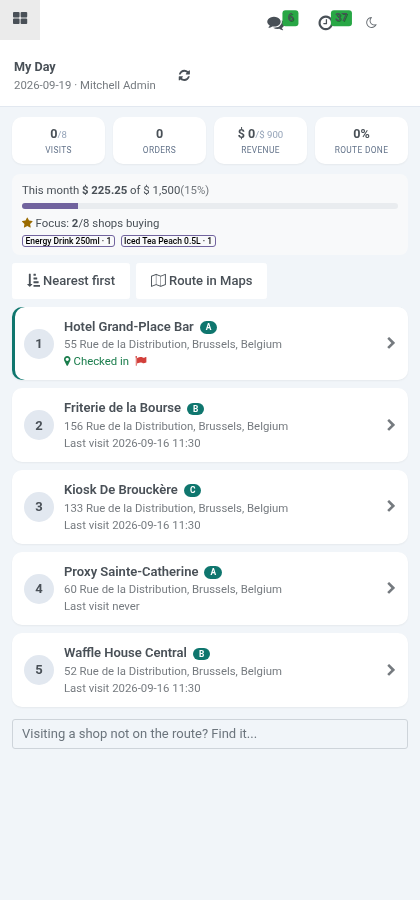
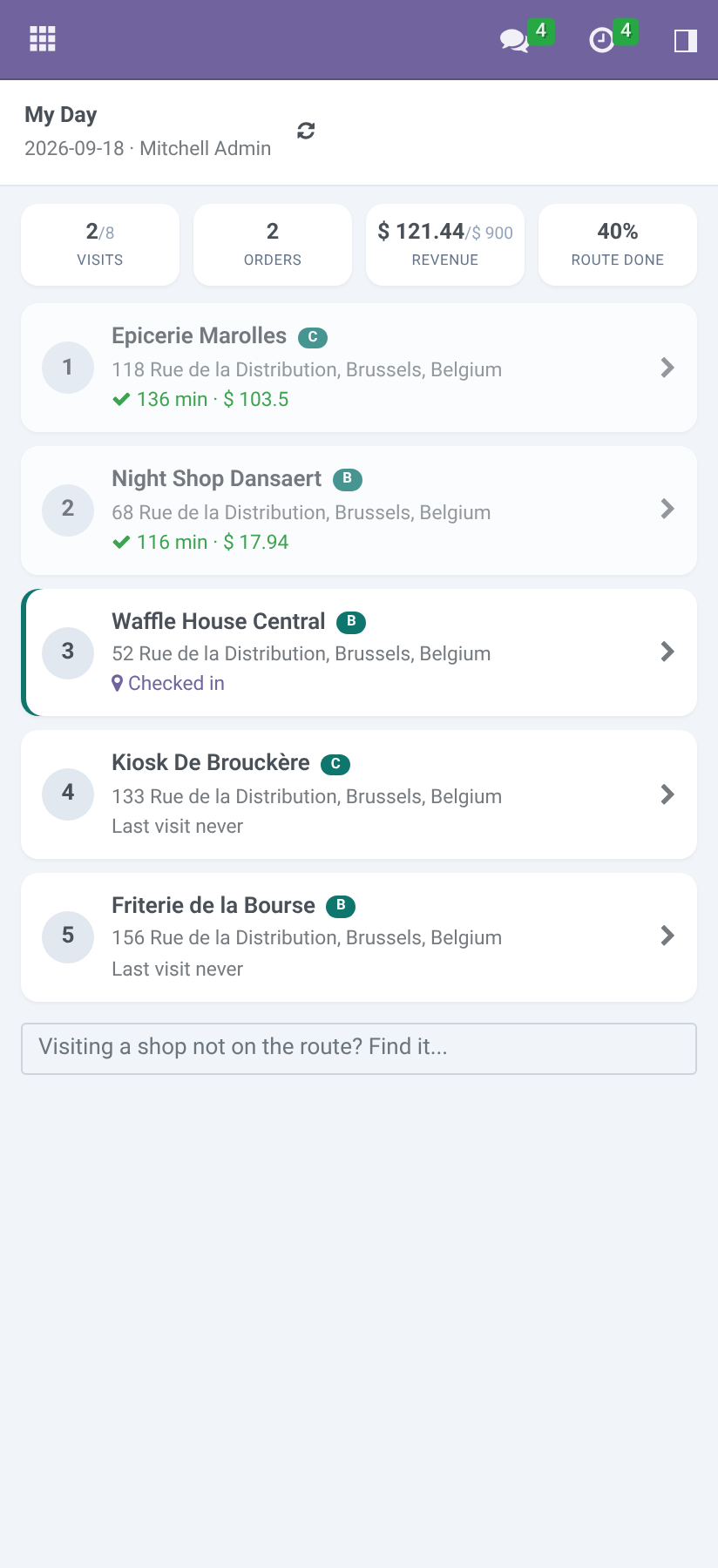
Field Sales ▸ My Day on the phone. The top shows visits made against the target, orders, revenue and route compliance so far; below, the visits in route order, done ones greyed. A shop not on the route: search it at the bottom and it is added, marked off route. The top also shows the month: revenue against the monthly target, and the focus products with the number of shops that bought each.
Nearest first reorders the shops still to visit from where the phone is (the last check-in when the phone gives no position); Route in Maps opens the next ten as one Google Maps trip. Without a signal. Basements, industrial estates, the countryside: the phone keeps working. The day is kept on the phone each time it is loaded; opened without a signal, My Day shows it as last seen, with a band saying so.
Check in, shelf count, photo, order, check out, skip done without a signal are kept on the phone, in order, and shown as done. The band counts them; they are sent by themselves when the signal returns (or with Send now). Collections, returns and survey answers are kept like the rest; the receipt is printed once they have reached the server. If an action cannot be applied when it arrives - the visit was reopened meanwhile, for instance - the phone says which one and why; the others are applied.
Every action kept on the phone carries its own key. If the signal drops after the server did the work but before the phone heard back, the phone sends it again and the server answers without doing it twice: no second order, no second shop. Add-ons. Three add-ons build on this app, each on its own: Trade Schemes and Display Programmes - promotions applied to the rep's order with a budget, and display programmes proved by photos.
Distributors - the shop's order becomes the distributor's to fill; the distributor's stock, cover and replenishment. Van Sales - load, sell and deliver from the van, collect cash, close the day. What the supervisor sees. Visits: every visit with check-in, minutes, distance from the outlet, orders and flags; filters for today, flagged, off-route, with an order; group by rep, day, outlet.
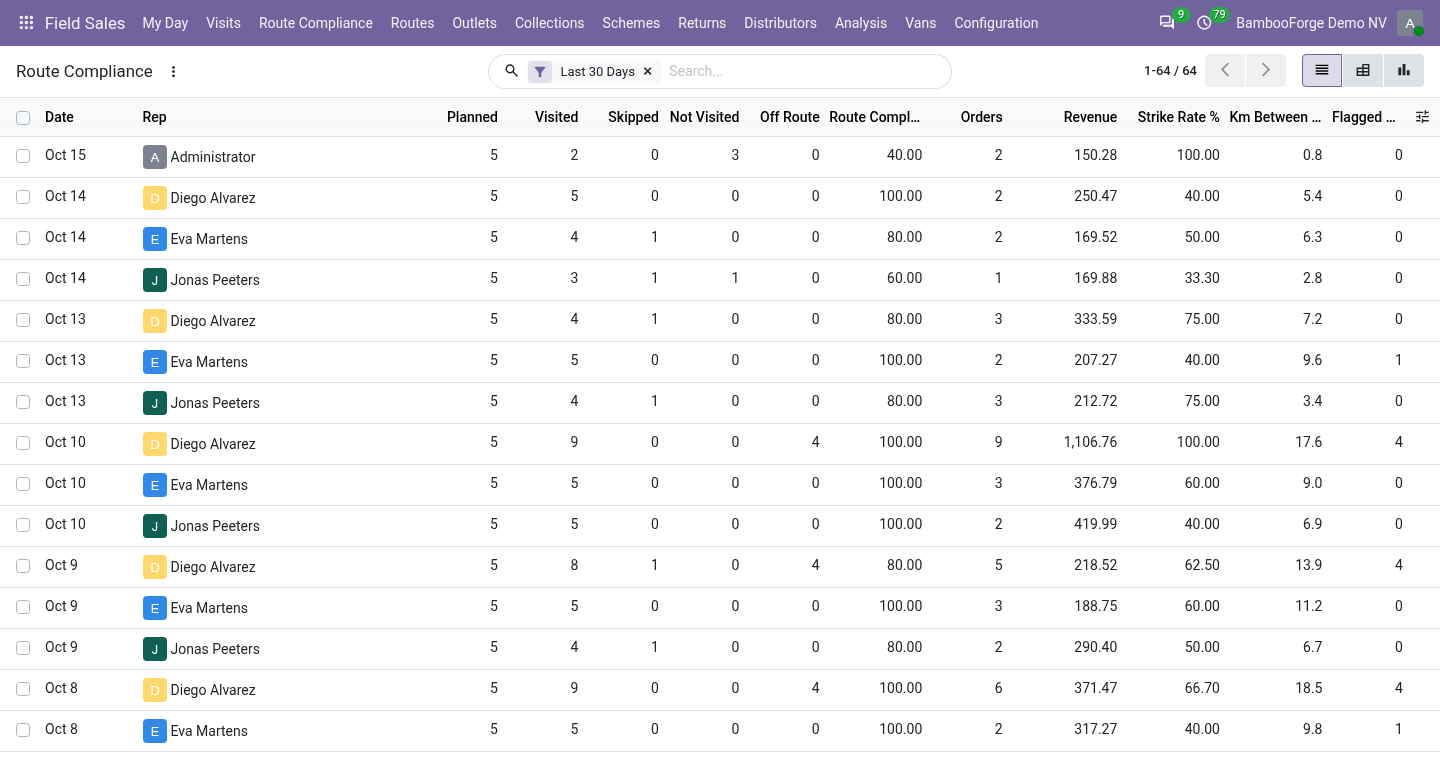
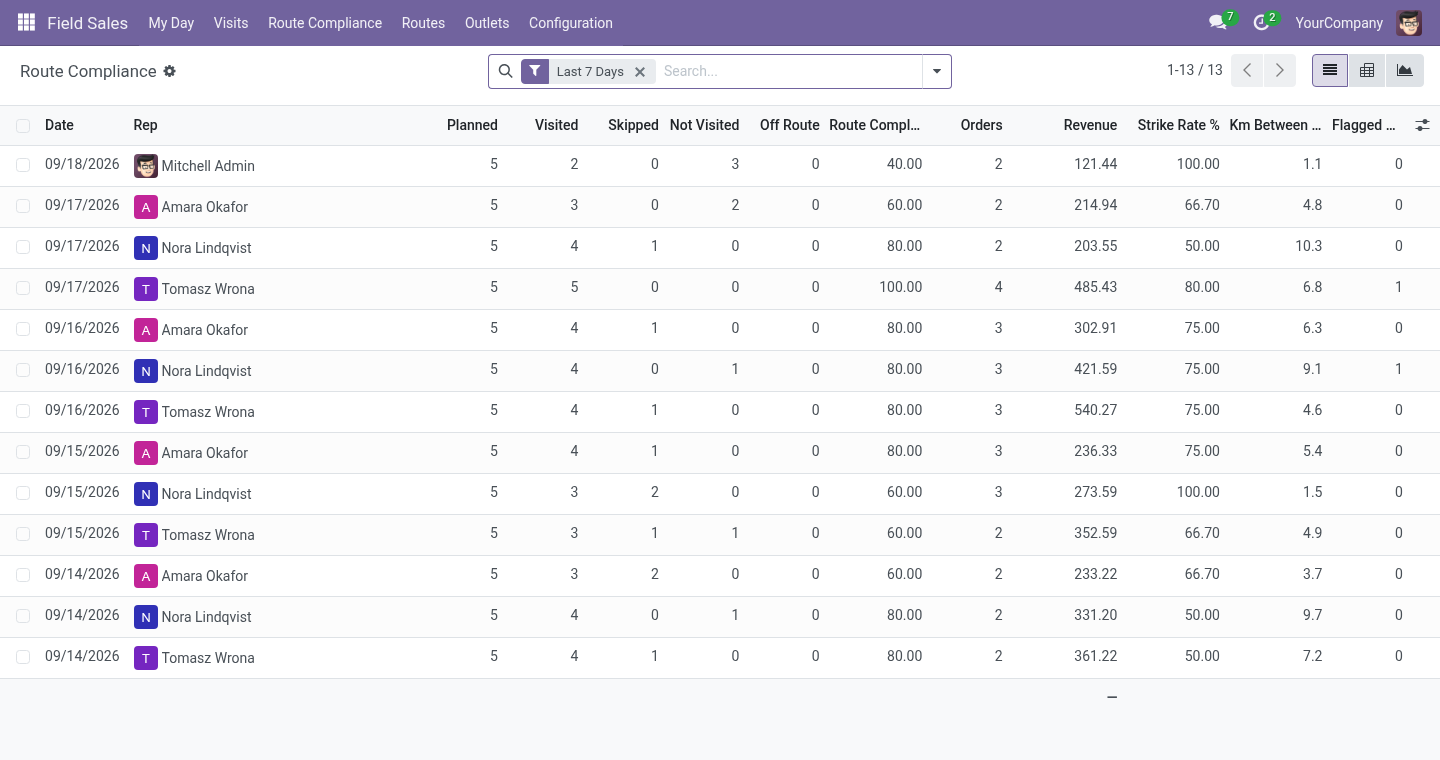
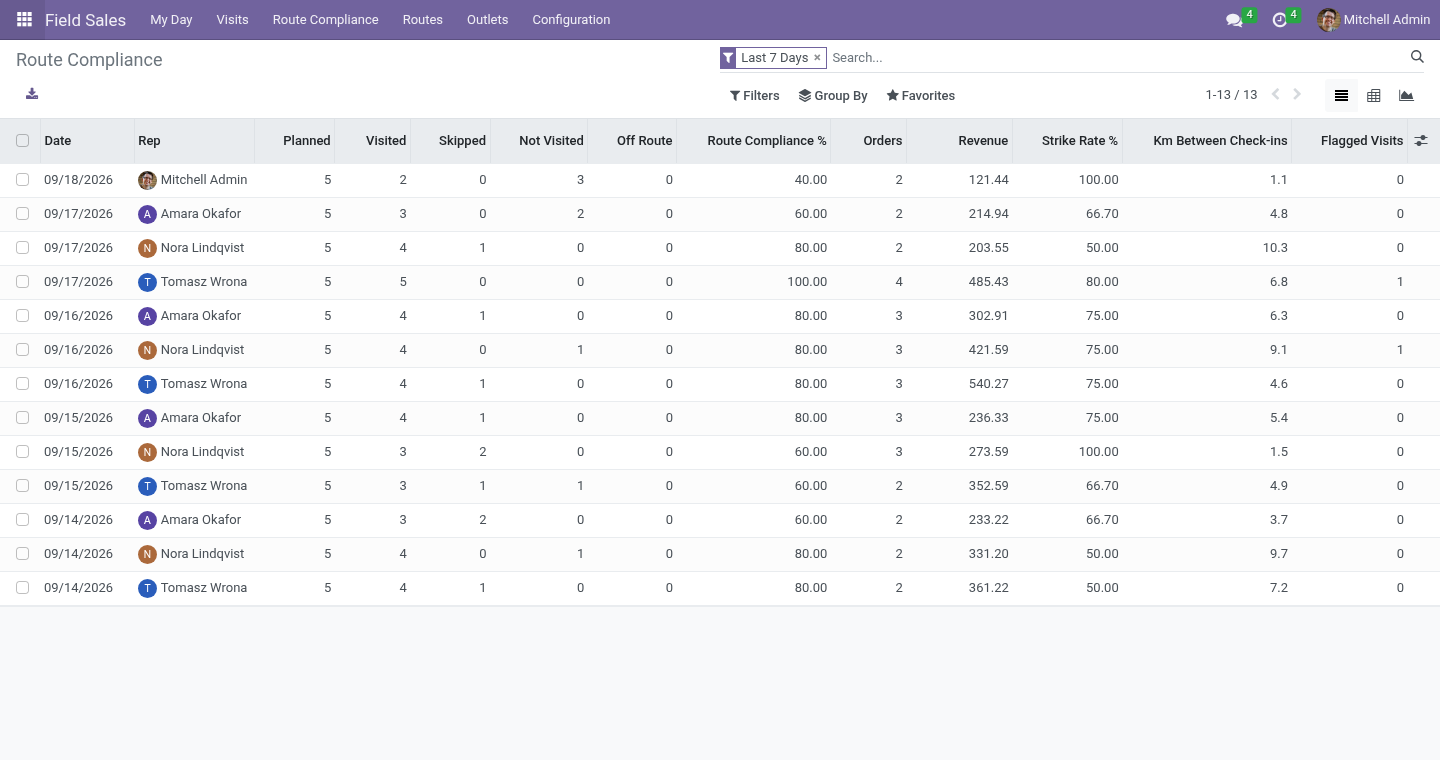
A supervisor can reopen a skipped or checked-out visit. Route Compliance: a line per rep per day. Planned is the route; visited, skipped and missed add up to it; off-route visits are counted apart. Compliance is planned visits made over planned; strike rate is visits with an order over visits made.
Kilometres are the straight lines between consecutive check-ins - not a GPS track, a plausibility figure. Pivot by week and territory; Compliance Under 80% filters the days to talk about. Uninstalling. Uninstalling removes territories, channels, routes, visits, shelf counts, photos and rep days, and the outlet fields on contacts.
Sales orders stay, without their link to the visit. 20.0.1.2.0 Built for Odoo 20: record rules and access rights rewritten onto Odoo 20's single ir.access model, the screens rebuilt on Owl 3, and every icon moved to the icon set Odoo 20 ships. 20.0.1.2.0 Collections on the route against open invoices, with an 80 mm receipt and posting to a journal per method. Returns, damaged goods and empties at the visit, as a draft credit note.
Sell by the case; monthly targets and focus products on the phone; surveys; nearest-first route order and a Google Maps trip; the product catalogue kept on the phone for searching without a signal. Now the part most videos leave out: what this does not do. Without a signal the phone keeps what was done for up to three days; clearing the browser's storage before the signal returns loses it. The position is what the browser reports.
A rogue app that fakes the phone's position cannot be detected from a browser; the fence, the accuracy, the phone and the times are the evidence, and they are for a supervisor to weigh. Trade promotions, distributor stock and van sales are separate add-ons. Kilometres are straight lines between check-ins, not a route track. The complete manual is at docs dot bambooforge dot dev, the demo database is linked from the store page, and support answers within twenty-four hours.
Links are in the description.
Transcript of the walkthrough (Odoo 19)
Field Sales and Distribution All in One with Routes and GPS. Beat plans, GPS check-in inside the shop's fence, shelf count, stamped photos, orders on the phone, check-out - and a route compliance report the supervisor reads on Monday. What did not add up is flagged on the visit: a check-in far from the shop, a different phone, two minutes in the shop, a visit nobody planned. A rep who calls on forty shops a week runs on habit and memory, and the office finds out what happened at the end of the month.
This app gives the rep a day and the supervisor a record: routes, a phone screen for the six steps in the shop, orders that are real sales orders, and a route compliance report with everything that did not add up flagged on the visit. In the next few minutes: field sales and distribution all in one with routes and gps, then what you get, then setting up, then the rep's day, then without a signal. Then what this app deliberately does not do, so you can tell before you buy whether it fits. Everything lives under Field Sales then My Day then Visits then Route Compliance.
Field Sales and Distribution All in One with Routes and GPS. A rep who calls on forty shops a week runs on habit and memory, and the office finds out what happened at the end of the month. This app gives the rep a day and the supervisor a record: routes, a phone screen for the six steps in the shop, orders that are real sales orders, and a route compliance report with everything that did not add up flagged on the visit. What you get Outlets: contacts with a channel, a class, a territory, a pin on the map, a check-in fence, a credit limit, an assortment.
Routes: a rep's day - the outlets in the order they are driven, on a weekday, every week, two or four. Tonight's job plans tomorrow. My Day on the phone: the visits in order, targets against the day so far, and the six steps at each shop - the shop's card, check in, shelf count, stamped photo, order, check out. A shop not on the route can be added and is marked as such.
Flags, not walls: a check-in outside the fence, poor GPS accuracy, a phone that is not the rep's usual one, a visit outside working hours, under two minutes in the shop, a visit nobody planned - each written on the visit for the supervisor. Route compliance: one line per rep per day - planned, visited, skipped, missed, off-route, compliance, strike rate, orders, revenue, minutes in shops, kilometres between check-ins, flags, targets. Odoo's own sales orders, on the outlet's pricelist, linked to the visit and the route. Money and goods at the counter: collect cash, a cheque or a transfer reference against the shop's open invoices and print an 80 mm receipt; take back damaged, expired, unsold goods and empties as a draft credit note at the price the shop paid.
Cases and units: a product sold by the case of 6, 12 or 24 is ordered by the case, by the unit or both. Setting up. Outlets. Any contact with Is an Outlet ticked, on its Field Sales tab: channel, class (A, B, C), territory, latitude and longitude (the pin the check-in is measured against; the Geolocalize module fills them from the address), the check-in fence in metres, a credit limit (0: none), and the assortment - the products the shelf count asks about.
Routes. A name, the rep, the weekday, the rhythm (every week, every two weeks, every four weeks, counted from a date), and the stops in driving order. Plan Today creates today's visits at once; the nightly job plans every route for tomorrow and closes yesterday's numbers. The rep's day.
Field Sales ▸ My Day on the phone. The top shows visits made against the target, orders, revenue and route compliance so far; below, the visits in route order, done ones greyed. A shop not on the route: search it at the bottom and it is added, marked off route. The top also shows the month: revenue against the monthly target, and the focus products with the number of shops that bought each.
Nearest first reorders the shops still to visit from where the phone is (the last check-in when the phone gives no position); Route in Maps opens the next ten as one Google Maps trip. Without a signal. Basements, industrial estates, the countryside: the phone keeps working. The day is kept on the phone each time it is loaded; opened without a signal, My Day shows it as last seen, with a band saying so.
Check in, shelf count, photo, order, check out, skip done without a signal are kept on the phone, in order, and shown as done. The band counts them; they are sent by themselves when the signal returns (or with Send now). Collections, returns and survey answers are kept like the rest; the receipt is printed once they have reached the server. If an action cannot be applied when it arrives - the visit was reopened meanwhile, for instance - the phone says which one and why; the others are applied.
Every action kept on the phone carries its own key. If the signal drops after the server did the work but before the phone heard back, the phone sends it again and the server answers without doing it twice: no second order, no second shop. Add-ons. Three add-ons build on this app, each on its own: Trade Schemes and Display Programmes - promotions applied to the rep's order with a budget, and display programmes proved by photos.
Distributors - the shop's order becomes the distributor's to fill; the distributor's stock, cover and replenishment. Van Sales - load, sell and deliver from the van, collect cash, close the day. What the supervisor sees. Visits: every visit with check-in, minutes, distance from the outlet, orders and flags; filters for today, flagged, off-route, with an order; group by rep, day, outlet.
A supervisor can reopen a skipped or checked-out visit. Route Compliance: a line per rep per day. Planned is the route; visited, skipped and missed add up to it; off-route visits are counted apart. Compliance is planned visits made over planned; strike rate is visits with an order over visits made.
Kilometres are the straight lines between consecutive check-ins - not a GPS track, a plausibility figure. Pivot by week and territory; Compliance Under 80% filters the days to talk about. Uninstalling. Uninstalling removes territories, channels, routes, visits, shelf counts, photos and rep days, and the outlet fields on contacts.
Sales orders stay, without their link to the visit. 19.0.1.2.0 Collections on the route against open invoices, with an 80 mm receipt and posting to a journal per method. Returns, damaged goods and empties at the visit, as a draft credit note. Sell by the case; monthly targets and focus products on the phone; surveys; nearest-first route order and a Google Maps trip; the product catalogue kept on the phone for searching without a signal.
19.0.1.1.1 The offline queue moved to IndexedDB (localStorage overflowed after a few photos and the queue was lost); photos scaled on the phone. An action sent twice is done once. Now the part most videos leave out: what this does not do. Without a signal the phone keeps what was done for up to three days; clearing the browser's storage before the signal returns loses it.
The position is what the browser reports. A rogue app that fakes the phone's position cannot be detected from a browser; the fence, the accuracy, the phone and the times are the evidence, and they are for a supervisor to weigh. Trade promotions, distributor stock and van sales are separate add-ons. Kilometres are straight lines between check-ins, not a route track.
The complete manual is at docs dot bambooforge dot dev, the demo database is linked from the store page, and support answers within twenty-four hours. Links are in the description.
Transcript of the walkthrough (Odoo 18)
Field Sales and Distribution All in One with Routes and GPS. Beat plans, GPS check-in inside the shop's fence, shelf count, stamped photos, orders on the phone, check-out - and a route compliance report the supervisor reads on Monday. What did not add up is flagged on the visit: a check-in far from the shop, a different phone, two minutes in the shop, a visit nobody planned. A rep who calls on forty shops a week runs on habit and memory, and the office finds out what happened at the end of the month.
This app gives the rep a day and the supervisor a record: routes, a phone screen for the six steps in the shop, orders that are real sales orders, and a route compliance report with everything that did not add up flagged on the visit. In the next few minutes: field sales and distribution all in one with routes and gps, then what you get, then setting up, then the rep's day, then without a signal. Then what this app deliberately does not do, so you can tell before you buy whether it fits. Everything lives under Field Sales then My Day then Visits then Route Compliance.
Field Sales and Distribution All in One with Routes and GPS. A rep who calls on forty shops a week runs on habit and memory, and the office finds out what happened at the end of the month. This app gives the rep a day and the supervisor a record: routes, a phone screen for the six steps in the shop, orders that are real sales orders, and a route compliance report with everything that did not add up flagged on the visit. What you get Outlets: contacts with a channel, a class, a territory, a pin on the map, a check-in fence, a credit limit, an assortment.
Routes: a rep's day - the outlets in the order they are driven, on a weekday, every week, two or four. Tonight's job plans tomorrow. My Day on the phone: the visits in order, targets against the day so far, and the six steps at each shop - the shop's card, check in, shelf count, stamped photo, order, check out. A shop not on the route can be added and is marked as such.
Flags, not walls: a check-in outside the fence, poor GPS accuracy, a phone that is not the rep's usual one, a visit outside working hours, under two minutes in the shop, a visit nobody planned - each written on the visit for the supervisor. Route compliance: one line per rep per day - planned, visited, skipped, missed, off-route, compliance, strike rate, orders, revenue, minutes in shops, kilometres between check-ins, flags, targets. Odoo's own sales orders, on the outlet's pricelist, linked to the visit and the route. Money and goods at the counter: collect cash, a cheque or a transfer reference against the shop's open invoices and print an 80 mm receipt; take back damaged, expired, unsold goods and empties as a draft credit note at the price the shop paid.
Cases and units: a product sold by the case of 6, 12 or 24 is ordered by the case, by the unit or both. Setting up. Outlets. Any contact with Is an Outlet ticked, on its Field Sales tab: channel, class (A, B, C), territory, latitude and longitude (the pin the check-in is measured against; the Geolocalize module fills them from the address), the check-in fence in metres, a credit limit (0: none), and the assortment - the products the shelf count asks about.
Routes. A name, the rep, the weekday, the rhythm (every week, every two weeks, every four weeks, counted from a date), and the stops in driving order. Plan Today creates today's visits at once; the nightly job plans every route for tomorrow and closes yesterday's numbers. The rep's day.
Field Sales ▸ My Day on the phone. The top shows visits made against the target, orders, revenue and route compliance so far; below, the visits in route order, done ones greyed. A shop not on the route: search it at the bottom and it is added, marked off route. The top also shows the month: revenue against the monthly target, and the focus products with the number of shops that bought each.
Nearest first reorders the shops still to visit from where the phone is (the last check-in when the phone gives no position); Route in Maps opens the next ten as one Google Maps trip. Without a signal. Basements, industrial estates, the countryside: the phone keeps working. The day is kept on the phone each time it is loaded; opened without a signal, My Day shows it as last seen, with a band saying so.
Check in, shelf count, photo, order, check out, skip done without a signal are kept on the phone, in order, and shown as done. The band counts them; they are sent by themselves when the signal returns (or with Send now). Collections, returns and survey answers are kept like the rest; the receipt is printed once they have reached the server. If an action cannot be applied when it arrives - the visit was reopened meanwhile, for instance - the phone says which one and why; the others are applied.
Every action kept on the phone carries its own key. If the signal drops after the server did the work but before the phone heard back, the phone sends it again and the server answers without doing it twice: no second order, no second shop. Add-ons. Three add-ons build on this app, each on its own: Trade Schemes and Display Programmes - promotions applied to the rep's order with a budget, and display programmes proved by photos.
Distributors - the shop's order becomes the distributor's to fill; the distributor's stock, cover and replenishment. Van Sales - load, sell and deliver from the van, collect cash, close the day. What the supervisor sees. Visits: every visit with check-in, minutes, distance from the outlet, orders and flags; filters for today, flagged, off-route, with an order; group by rep, day, outlet.
A supervisor can reopen a skipped or checked-out visit. Route Compliance: a line per rep per day. Planned is the route; visited, skipped and missed add up to it; off-route visits are counted apart. Compliance is planned visits made over planned; strike rate is visits with an order over visits made.
Kilometres are the straight lines between consecutive check-ins - not a GPS track, a plausibility figure. Pivot by week and territory; Compliance Under 80% filters the days to talk about. Uninstalling. Uninstalling removes territories, channels, routes, visits, shelf counts, photos and rep days, and the outlet fields on contacts.
Sales orders stay, without their link to the visit. 18.0.1.2.0 Collections on the route against open invoices, with an 80 mm receipt and posting to a journal per method. Returns, damaged goods and empties at the visit, as a draft credit note. Sell by the case; monthly targets and focus products on the phone; surveys; nearest-first route order and a Google Maps trip; the product catalogue kept on the phone for searching without a signal.
18.0.1.1.1 The offline queue moved to IndexedDB (localStorage overflowed after a few photos and the queue was lost); photos scaled on the phone. An action sent twice is done once. Now the part most videos leave out: what this does not do. Without a signal the phone keeps what was done for up to three days; clearing the browser's storage before the signal returns loses it.
The position is what the browser reports. A rogue app that fakes the phone's position cannot be detected from a browser; the fence, the accuracy, the phone and the times are the evidence, and they are for a supervisor to weigh. Trade promotions, distributor stock and van sales are separate add-ons. Kilometres are straight lines between check-ins, not a route track.
The complete manual is at docs dot bambooforge dot dev, the demo database is linked from the store page, and support answers within twenty-four hours. Links are in the description.
Transcript of the walkthrough (Odoo 17)
Field Sales and Distribution All in One with Routes and GPS. Beat plans, GPS check-in inside the shop's fence, shelf count, stamped photos, orders on the phone, check-out - and a route compliance report the supervisor reads on Monday. What did not add up is flagged on the visit: a check-in far from the shop, a different phone, two minutes in the shop, a visit nobody planned. A rep who calls on forty shops a week runs on habit and memory, and the office finds out what happened at the end of the month.
This app gives the rep a day and the supervisor a record: routes, a phone screen for the six steps in the shop, orders that are real sales orders, and a route compliance report with everything that did not add up flagged on the visit. In the next few minutes: field sales and distribution all in one with routes and gps, then what you get, then setting up, then the rep's day, then without a signal. Then what this app deliberately does not do, so you can tell before you buy whether it fits. Everything lives under Field Sales then My Day then Visits then Route Compliance.
Field Sales and Distribution All in One with Routes and GPS. A rep who calls on forty shops a week runs on habit and memory, and the office finds out what happened at the end of the month. This app gives the rep a day and the supervisor a record: routes, a phone screen for the six steps in the shop, orders that are real sales orders, and a route compliance report with everything that did not add up flagged on the visit. What you get Outlets: contacts with a channel, a class, a territory, a pin on the map, a check-in fence, a credit limit, an assortment.
Routes: a rep's day - the outlets in the order they are driven, on a weekday, every week, two or four. Tonight's job plans tomorrow. My Day on the phone: the visits in order, targets against the day so far, and the six steps at each shop - the shop's card, check in, shelf count, stamped photo, order, check out. A shop not on the route can be added and is marked as such.
Flags, not walls: a check-in outside the fence, poor GPS accuracy, a phone that is not the rep's usual one, a visit outside working hours, under two minutes in the shop, a visit nobody planned - each written on the visit for the supervisor. Route compliance: one line per rep per day - planned, visited, skipped, missed, off-route, compliance, strike rate, orders, revenue, minutes in shops, kilometres between check-ins, flags, targets. Odoo's own sales orders, on the outlet's pricelist, linked to the visit and the route. Money and goods at the counter: collect cash, a cheque or a transfer reference against the shop's open invoices and print an 80 mm receipt; take back damaged, expired, unsold goods and empties as a draft credit note at the price the shop paid.
Cases and units: a product sold by the case of 6, 12 or 24 is ordered by the case, by the unit or both. Setting up. Outlets. Any contact with Is an Outlet ticked, on its Field Sales tab: channel, class (A, B, C), territory, latitude and longitude (the pin the check-in is measured against; the Geolocalize module fills them from the address), the check-in fence in metres, a credit limit (0: none), and the assortment - the products the shelf count asks about.
Routes. A name, the rep, the weekday, the rhythm (every week, every two weeks, every four weeks, counted from a date), and the stops in driving order. Plan Today creates today's visits at once; the nightly job plans every route for tomorrow and closes yesterday's numbers. The rep's day.
Field Sales ▸ My Day on the phone. The top shows visits made against the target, orders, revenue and route compliance so far; below, the visits in route order, done ones greyed. A shop not on the route: search it at the bottom and it is added, marked off route. The top also shows the month: revenue against the monthly target, and the focus products with the number of shops that bought each.
Nearest first reorders the shops still to visit from where the phone is (the last check-in when the phone gives no position); Route in Maps opens the next ten as one Google Maps trip. Without a signal. Basements, industrial estates, the countryside: the phone keeps working. The day is kept on the phone each time it is loaded; opened without a signal, My Day shows it as last seen, with a band saying so.
Check in, shelf count, photo, order, check out, skip done without a signal are kept on the phone, in order, and shown as done. The band counts them; they are sent by themselves when the signal returns (or with Send now). Collections, returns and survey answers are kept like the rest; the receipt is printed once they have reached the server. If an action cannot be applied when it arrives - the visit was reopened meanwhile, for instance - the phone says which one and why; the others are applied.
Every action kept on the phone carries its own key. If the signal drops after the server did the work but before the phone heard back, the phone sends it again and the server answers without doing it twice: no second order, no second shop. Add-ons. Three add-ons build on this app, each on its own: Trade Schemes and Display Programmes - promotions applied to the rep's order with a budget, and display programmes proved by photos.
Distributors - the shop's order becomes the distributor's to fill; the distributor's stock, cover and replenishment. Van Sales - load, sell and deliver from the van, collect cash, close the day. What the supervisor sees. Visits: every visit with check-in, minutes, distance from the outlet, orders and flags; filters for today, flagged, off-route, with an order; group by rep, day, outlet.
A supervisor can reopen a skipped or checked-out visit. Route Compliance: a line per rep per day. Planned is the route; visited, skipped and missed add up to it; off-route visits are counted apart. Compliance is planned visits made over planned; strike rate is visits with an order over visits made.
Kilometres are the straight lines between consecutive check-ins - not a GPS track, a plausibility figure. Pivot by week and territory; Compliance Under 80% filters the days to talk about. Uninstalling. Uninstalling removes territories, channels, routes, visits, shelf counts, photos and rep days, and the outlet fields on contacts.
Sales orders stay, without their link to the visit. 17.0.1.2.0 Collections on the route against open invoices, with an 80 mm receipt and posting to a journal per method. Returns, damaged goods and empties at the visit, as a draft credit note. Sell by the case; monthly targets and focus products on the phone; surveys; nearest-first route order and a Google Maps trip; the product catalogue kept on the phone for searching without a signal.
17.0.1.1.1 The offline queue moved to IndexedDB (localStorage overflowed after a few photos and the queue was lost); photos scaled on the phone. An action sent twice is done once. Now the part most videos leave out: what this does not do. Without a signal the phone keeps what was done for up to three days; clearing the browser's storage before the signal returns loses it.
The position is what the browser reports. A rogue app that fakes the phone's position cannot be detected from a browser; the fence, the accuracy, the phone and the times are the evidence, and they are for a supervisor to weigh. Trade promotions, distributor stock and van sales are separate add-ons. Kilometres are straight lines between check-ins, not a route track.
The complete manual is at docs dot bambooforge dot dev, the demo database is linked from the store page, and support answers within twenty-four hours. Links are in the description.
Transcript of the walkthrough (Odoo 16)
Field Sales and Distribution All in One with Routes and GPS. Beat plans, GPS check-in inside the shop's fence, shelf count, stamped photos, orders on the phone, check-out - and a route compliance report the supervisor reads on Monday. What did not add up is flagged on the visit: a check-in far from the shop, a different phone, two minutes in the shop, a visit nobody planned. A rep who calls on forty shops a week runs on habit and memory, and the office finds out what happened at the end of the month.
This app gives the rep a day and the supervisor a record: routes, a phone screen for the six steps in the shop, orders that are real sales orders, and a route compliance report with everything that did not add up flagged on the visit. In the next few minutes: field sales and distribution all in one with routes and gps, then what you get, then setting up, then the rep's day, then without a signal. Then what this app deliberately does not do, so you can tell before you buy whether it fits. Everything lives under Field Sales then My Day then Visits then Route Compliance.
Field Sales and Distribution All in One with Routes and GPS. A rep who calls on forty shops a week runs on habit and memory, and the office finds out what happened at the end of the month. This app gives the rep a day and the supervisor a record: routes, a phone screen for the six steps in the shop, orders that are real sales orders, and a route compliance report with everything that did not add up flagged on the visit. What you get Outlets: contacts with a channel, a class, a territory, a pin on the map, a check-in fence, a credit limit, an assortment.
Routes: a rep's day - the outlets in the order they are driven, on a weekday, every week, two or four. Tonight's job plans tomorrow. My Day on the phone: the visits in order, targets against the day so far, and the six steps at each shop - the shop's card, check in, shelf count, stamped photo, order, check out. A shop not on the route can be added and is marked as such.
Flags, not walls: a check-in outside the fence, poor GPS accuracy, a phone that is not the rep's usual one, a visit outside working hours, under two minutes in the shop, a visit nobody planned - each written on the visit for the supervisor. Route compliance: one line per rep per day - planned, visited, skipped, missed, off-route, compliance, strike rate, orders, revenue, minutes in shops, kilometres between check-ins, flags, targets. Odoo's own sales orders, on the outlet's pricelist, linked to the visit and the route. Money and goods at the counter: collect cash, a cheque or a transfer reference against the shop's open invoices and print an 80 mm receipt; take back damaged, expired, unsold goods and empties as a draft credit note at the price the shop paid.
Cases and units: a product sold by the case of 6, 12 or 24 is ordered by the case, by the unit or both. Setting up. Outlets. Any contact with Is an Outlet ticked, on its Field Sales tab: channel, class (A, B, C), territory, latitude and longitude (the pin the check-in is measured against; the Geolocalize module fills them from the address), the check-in fence in metres, a credit limit (0: none), and the assortment - the products the shelf count asks about.
Routes. A name, the rep, the weekday, the rhythm (every week, every two weeks, every four weeks, counted from a date), and the stops in driving order. Plan Today creates today's visits at once; the nightly job plans every route for tomorrow and closes yesterday's numbers. The rep's day.
Field Sales ▸ My Day on the phone. The top shows visits made against the target, orders, revenue and route compliance so far; below, the visits in route order, done ones greyed. A shop not on the route: search it at the bottom and it is added, marked off route. The top also shows the month: revenue against the monthly target, and the focus products with the number of shops that bought each.
Nearest first reorders the shops still to visit from where the phone is (the last check-in when the phone gives no position); Route in Maps opens the next ten as one Google Maps trip. Without a signal. Basements, industrial estates, the countryside: the phone keeps working. The day is kept on the phone each time it is loaded; opened without a signal, My Day shows it as last seen, with a band saying so.
Check in, shelf count, photo, order, check out, skip done without a signal are kept on the phone, in order, and shown as done. The band counts them; they are sent by themselves when the signal returns (or with Send now). Collections, returns and survey answers are kept like the rest; the receipt is printed once they have reached the server. If an action cannot be applied when it arrives - the visit was reopened meanwhile, for instance - the phone says which one and why; the others are applied.
Every action kept on the phone carries its own key. If the signal drops after the server did the work but before the phone heard back, the phone sends it again and the server answers without doing it twice: no second order, no second shop. Add-ons. Three add-ons build on this app, each on its own: Trade Schemes and Display Programmes - promotions applied to the rep's order with a budget, and display programmes proved by photos.
Distributors - the shop's order becomes the distributor's to fill; the distributor's stock, cover and replenishment. Van Sales - load, sell and deliver from the van, collect cash, close the day. What the supervisor sees. Visits: every visit with check-in, minutes, distance from the outlet, orders and flags; filters for today, flagged, off-route, with an order; group by rep, day, outlet.
A supervisor can reopen a skipped or checked-out visit. Route Compliance: a line per rep per day. Planned is the route; visited, skipped and missed add up to it; off-route visits are counted apart. Compliance is planned visits made over planned; strike rate is visits with an order over visits made.
Kilometres are the straight lines between consecutive check-ins - not a GPS track, a plausibility figure. Pivot by week and territory; Compliance Under 80% filters the days to talk about. Uninstalling. Uninstalling removes territories, channels, routes, visits, shelf counts, photos and rep days, and the outlet fields on contacts.
Sales orders stay, without their link to the visit. 16.0.1.2.0 Collections on the route against open invoices, with an 80 mm receipt and posting to a journal per method. Returns, damaged goods and empties at the visit, as a draft credit note. Sell by the case; monthly targets and focus products on the phone; surveys; nearest-first route order and a Google Maps trip; the product catalogue kept on the phone for searching without a signal.
16.0.1.1.1 The offline queue moved to IndexedDB (localStorage overflowed after a few photos and the queue was lost); photos scaled on the phone. An action sent twice is done once. Now the part most videos leave out: what this does not do. Without a signal the phone keeps what was done for up to three days; clearing the browser's storage before the signal returns loses it.
The position is what the browser reports. A rogue app that fakes the phone's position cannot be detected from a browser; the fence, the accuracy, the phone and the times are the evidence, and they are for a supervisor to weigh. Trade promotions, distributor stock and van sales are separate add-ons. Kilometres are straight lines between check-ins, not a route track.
The complete manual is at docs dot bambooforge dot dev, the demo database is linked from the store page, and support answers within twenty-four hours. Links are in the description.
Key facts
- What it is
- Beat plans, GPS check-in inside the shop's fence, shelf count, stamped photos, orders on the phone, check-out - and a route compliance report the supervisor reads on Monday. What did not add up is flagged on the visit: a check-in far from the shop, a different phone, two minutes in the shop, a visit nobody planned.
- For
- Sales
- Odoo versions
- 16.0, 17.0, 18.0, 19.0, 20.0 - Community and Enterprise
- Runs on
- Odoo.sh or Odoo you host yourself - not Odoo Online, which accepts no third-party apps
- Price
- 349 EUR, one-time, on the Odoo Apps Store
- Technical name
- bambooforge_field_sales
- Not for
- Without a signal the phone keeps what was done for up to three days; clearing the browser's storage before the signal returns loses it.; The position is what the browser reports. A rogue app that fakes the phone's position cannot be detected from a browser; the fence, the accuracy, the phone and the times are the evidence, and they are for a supervisor to weigh.; Trade promotions, distributor stock and van sales are separate add-ons.; Kilometres are straight lines between check-ins, not a route track.; Nearest first orders by straight-line distance, not by road; Google Maps takes ten stops in one trip, so a longer round opens in parts.; A collection is a record of money received until it is posted; posting needs a journal per method and invoicing rights. The receipt is not a fiscal document.; A return's credit note is left in draft for the accountant. Returned goods are not received into a warehouse by this app (the Van Sales add-on takes them onto the van).
- Manual last updated
- 2026-10-15
Field Sales and Distribution All in One with Routes and GPS
A rep who calls on forty shops a week runs on habit and memory, and the office finds out what happened at the end of the month. This app gives the rep a day and the supervisor a record: routes, a phone screen for the six steps in the shop, orders that are real sales orders, and a route compliance report with everything that did not add up flagged on the visit.
What you get
Outlets: contacts with a channel, a class, a territory, a pin on the map, a check-in fence, a credit limit, an assortment.
Routes: a rep's day - the outlets in the order they are driven, on a weekday, every week, two or four. Tonight's job plans tomorrow.
My Day on the phone: the visits in order, targets against the day so far, and the six steps at each shop - the shop's card, check in, shelf count, stamped photo, order, check out. A shop not on the route can be added and is marked as such.
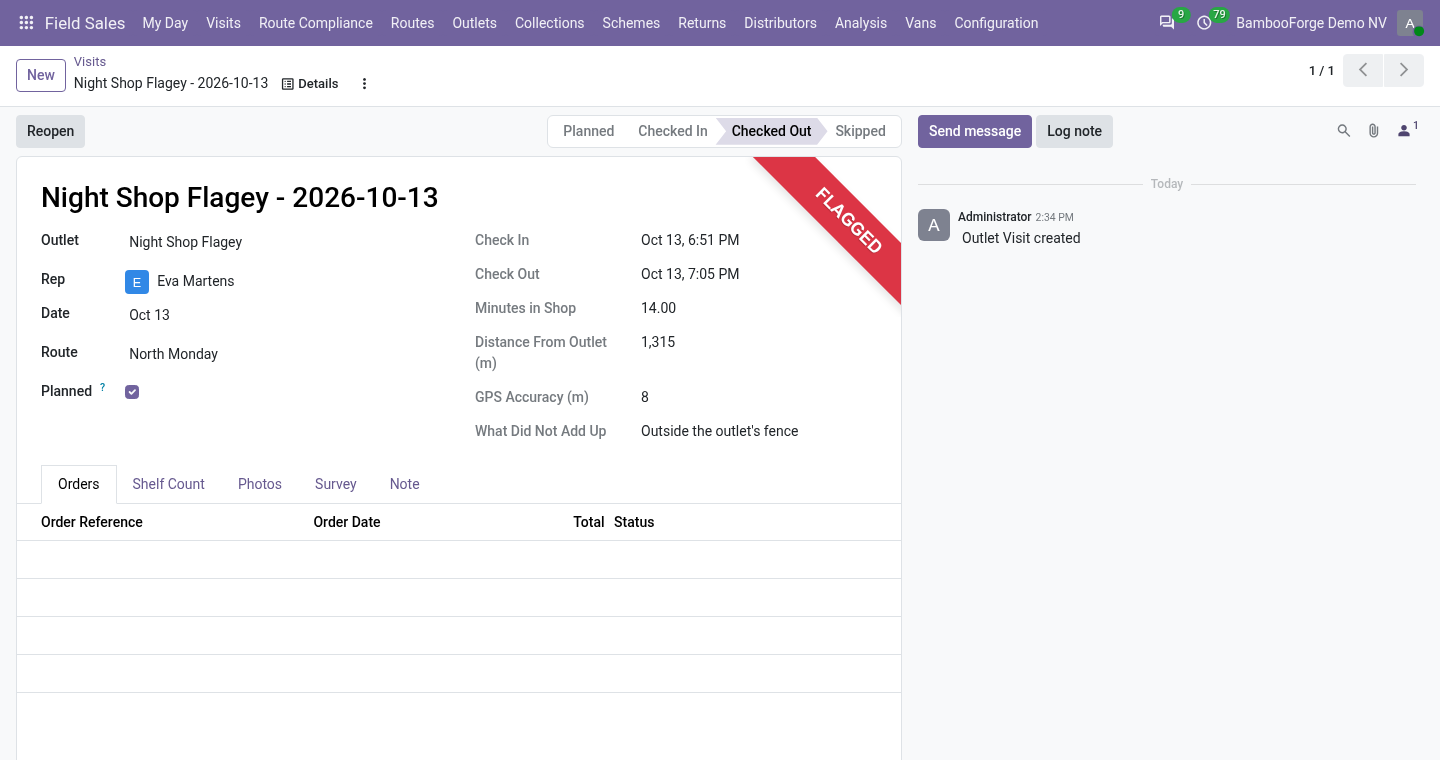
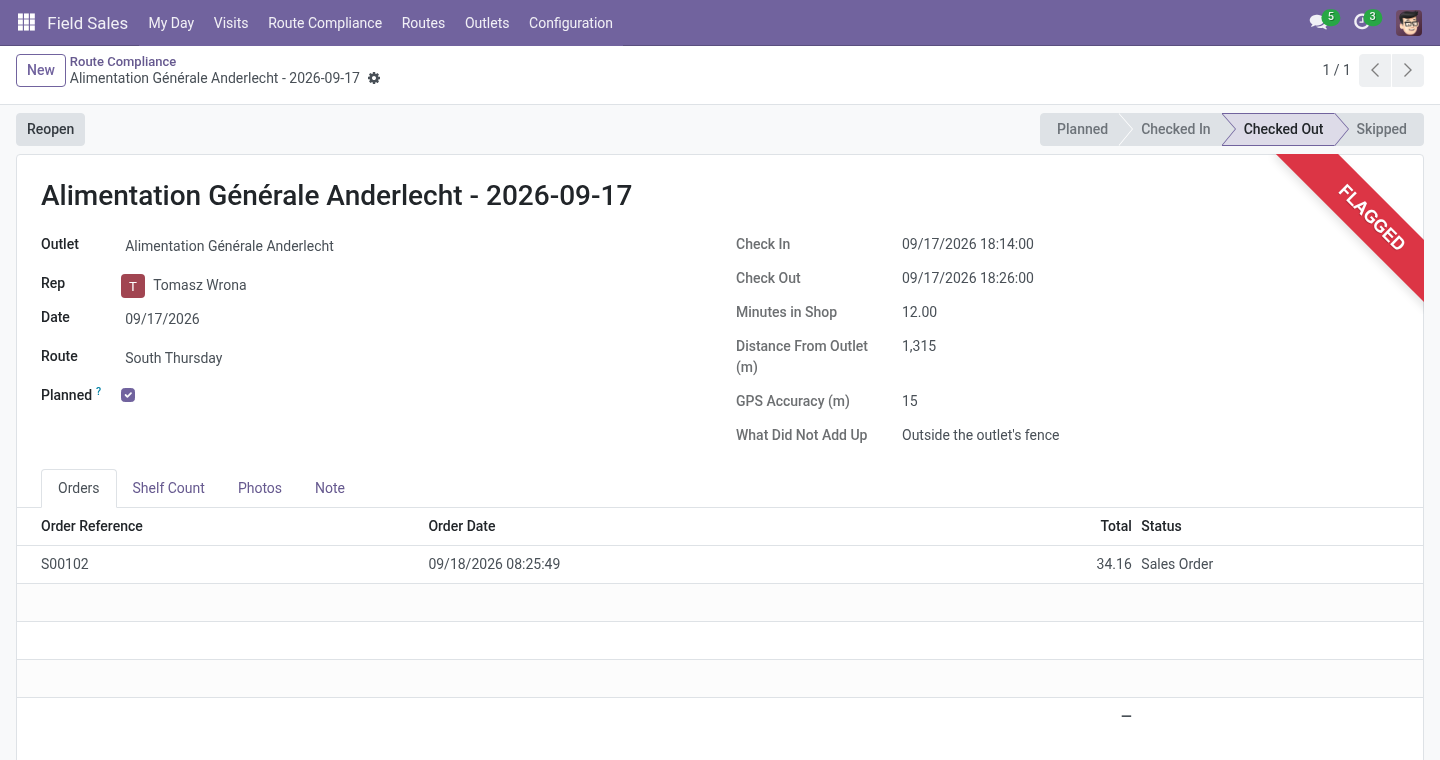
Flags, not walls: a check-in outside the fence, poor GPS accuracy, a phone that is not the rep's usual one, a visit outside working hours, under two minutes in the shop, a visit nobody planned - each written on the visit for the supervisor.
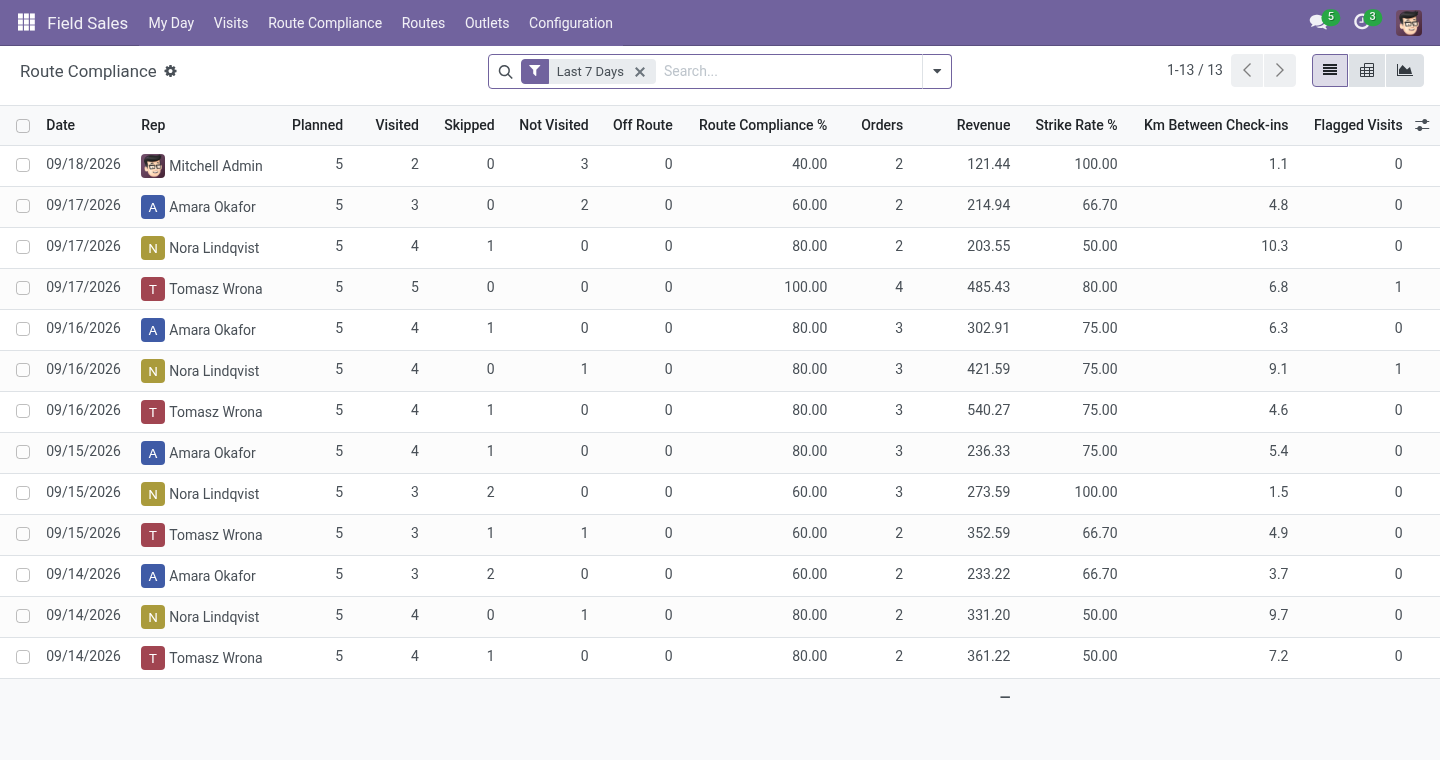
Route compliance: one line per rep per day - planned, visited, skipped, missed, off-route, compliance, strike rate, orders, revenue, minutes in shops, kilometres between check-ins, flags, targets.
Odoo's own sales orders, on the outlet's pricelist, linked to the visit and the route.
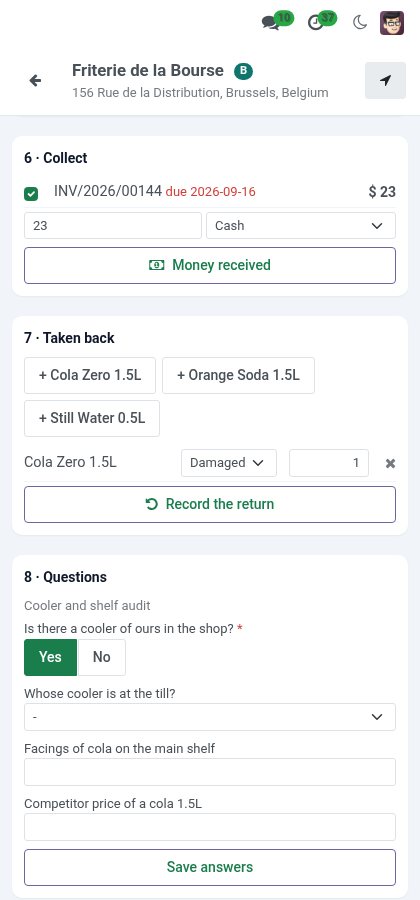
Money and goods at the counter: collect cash, a cheque or a transfer reference against the shop's open invoices and print an 80 mm receipt; take back damaged, expired, unsold goods and empties as a draft credit note at the price the shop paid.
Cases and units: a product sold by the case of 6, 12 or 24 is ordered by the case, by the unit or both.
The month and the focus products: revenue against the rep's monthly target, and how many shops bought the products pushed this month.
Surveys: a few questions put to every shop of a channel - yes/no, numbers, one of a list, text - analysed in a pivot.
The route in order: the shops left, nearest first from where the rep stands, and the whole round as one Google Maps trip.
Works without a signal: check-in, shelf count, photo, order, money, returns, answers, check-out and skip are kept on the phone and sent when the signal comes back, with the time they happened; products are searched in a catalogue kept on the phone.
Requirements
Odoo: 20.0, Community or Enterprise, with Sales installed.
A phone with a browser and, for check-ins, location enabled. Odoo must be served over HTTPS for the browser to give its position.
Access: a Rep sees their own routes, visits and days and takes orders; a Supervisor sets up territories, outlets and routes, sees every rep, reopens visits. Reps need the Sales User: Own Documents Only right to create orders.
Install
Copy bambooforge_field_sales into your addons path and restart Odoo.
Apps ▸ Update Apps List, search for Field Sales, Activate.
Field Sales ▸ Configuration: territories and channels. Then outlets, then routes. Give each rep the Rep group and targets on their user form.
Setting up
Outlets. Any contact with Is an Outlet ticked, on its Field Sales tab: channel, class (A, B, C), territory, latitude and longitude (the pin the check-in is measured against; the Geolocalize module fills them from the address), the check-in fence in metres, a credit limit (0: none), and the assortment - the products the shelf count asks about.
Routes. A name, the rep, the weekday, the rhythm (every week, every two weeks, every four weeks, counted from a date), and the stops in driving order. Plan Today creates today's visits at once; the nightly job plans every route for tomorrow and closes yesterday's numbers.
Reps. On the user form, Field Sales tab: targets a day (visits, revenue) and the rep's usual phone, set at their first check-in - Forget this phone when they get a new one.
Monthly targets. Configuration ▸ Monthly Targets: per rep and month, a revenue target, the month's focus products and how many shops should buy one of them. Any day of the month may be typed; the month is kept.
Cases. On the product, Units per Case: above 1, the phone offers the product by the case and by the unit. The order and the stock count units.
Collections and returns. Configuration ▸ Collections and Returns: the journal for cash, for cheques and for transfers; whether a collection is posted at once or waits for the office; whether a return makes a credit note.
Surveys. Configuration ▸ Surveys: a name, the dates it runs, the channels it is for (none: every shop), and the questions - yes/no, a number, one of a list (the answers separated by commas), or text; a question may be required.
The rep's day
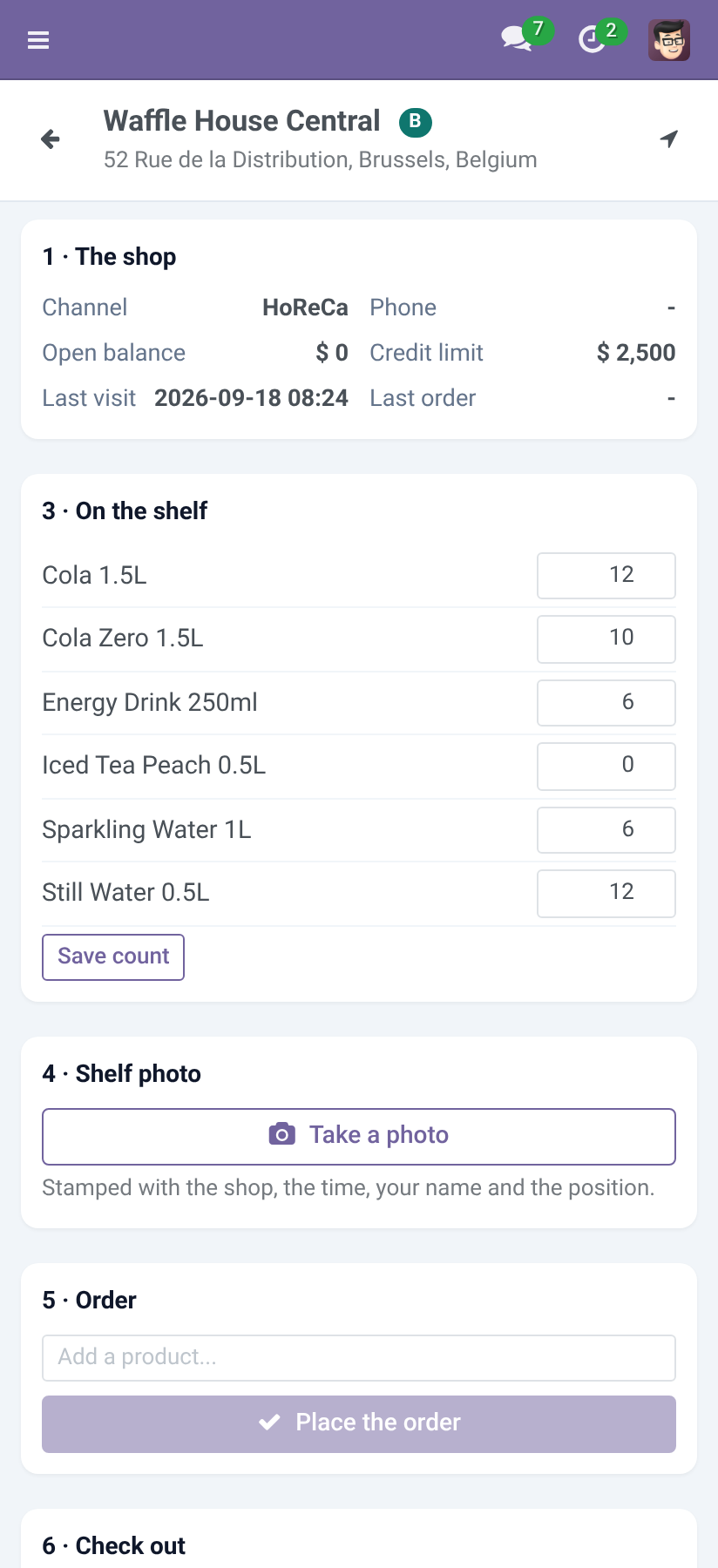
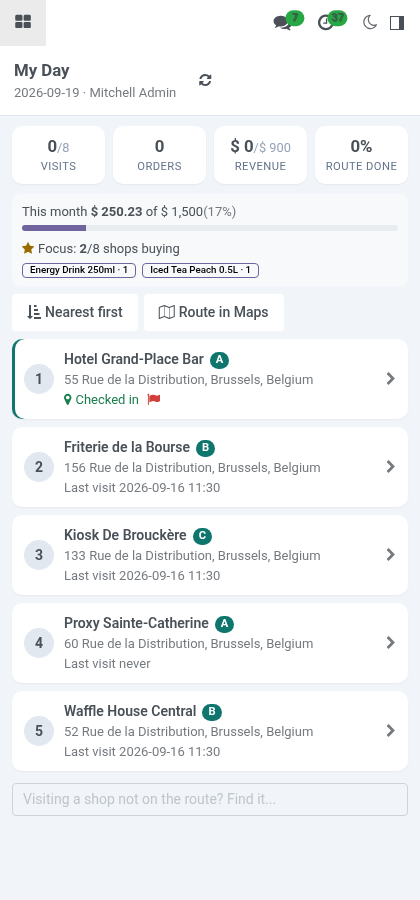
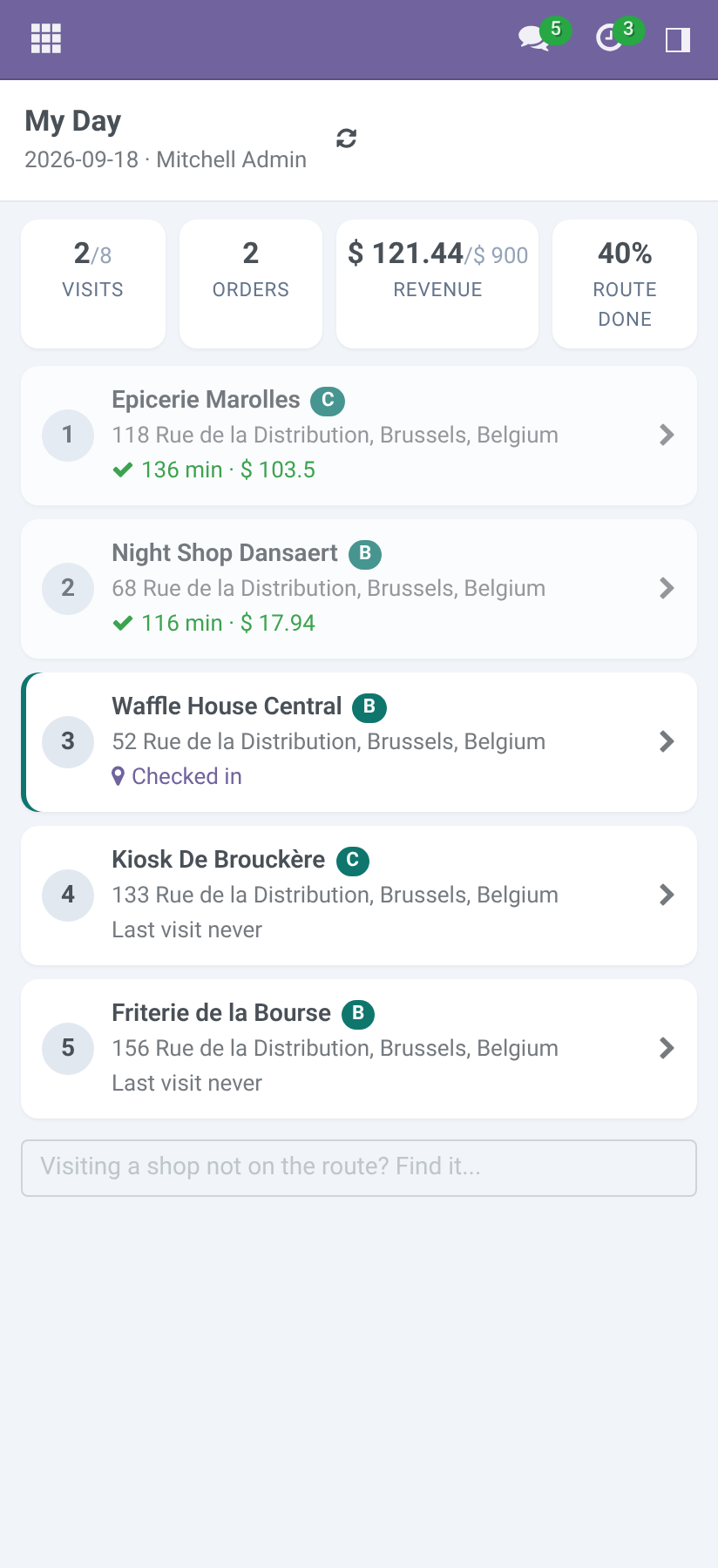
Field Sales ▸ My Day on the phone. The top shows visits made against the target, orders, revenue and route compliance so far; below, the visits in route order, done ones greyed. A shop not on the route: search it at the bottom and it is added, marked off route.
The top also shows the month: revenue against the monthly target, and the focus products with the number of shops that bought each. Nearest first reorders the shops still to visit from where the phone is (the last check-in when the phone gives no position); Route in Maps opens the next ten as one Google Maps trip.
At a shop:
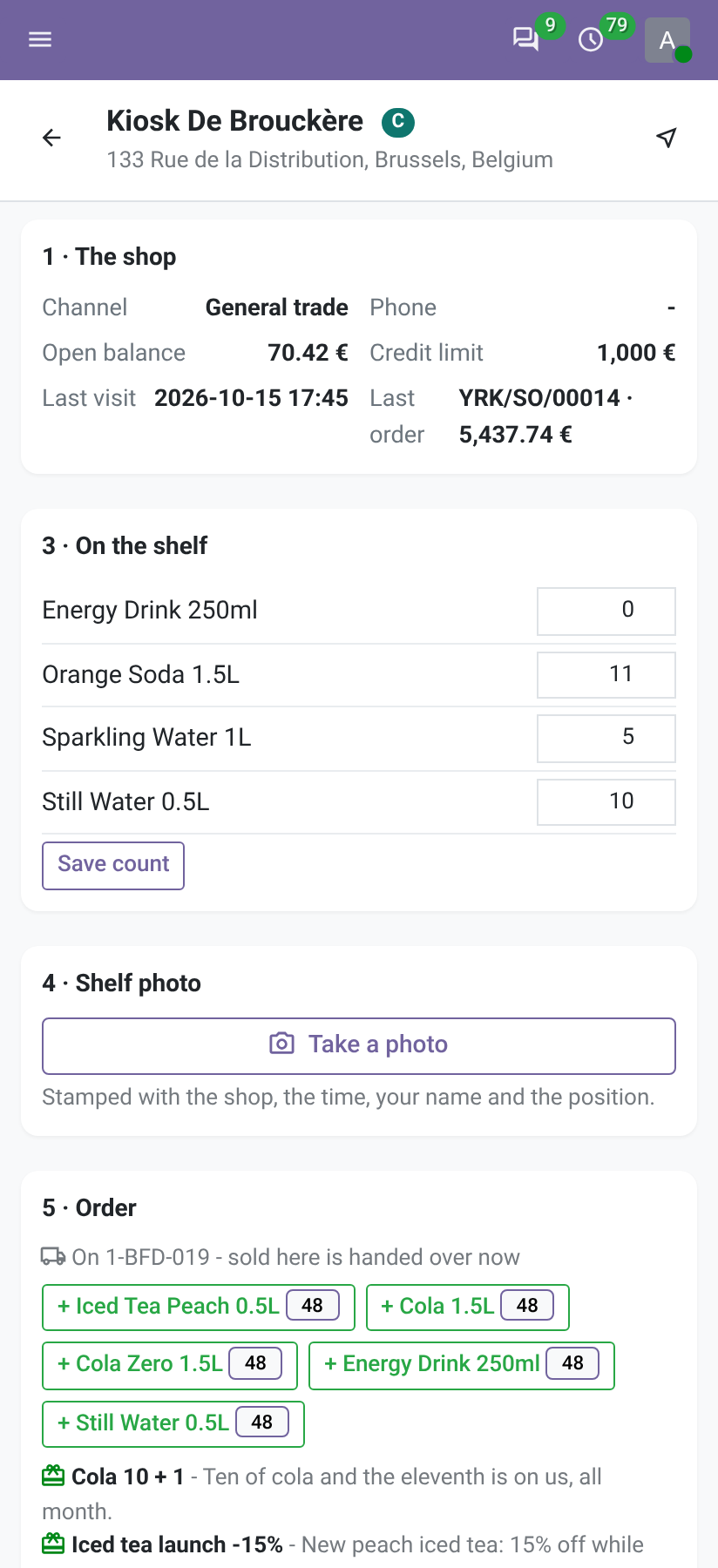
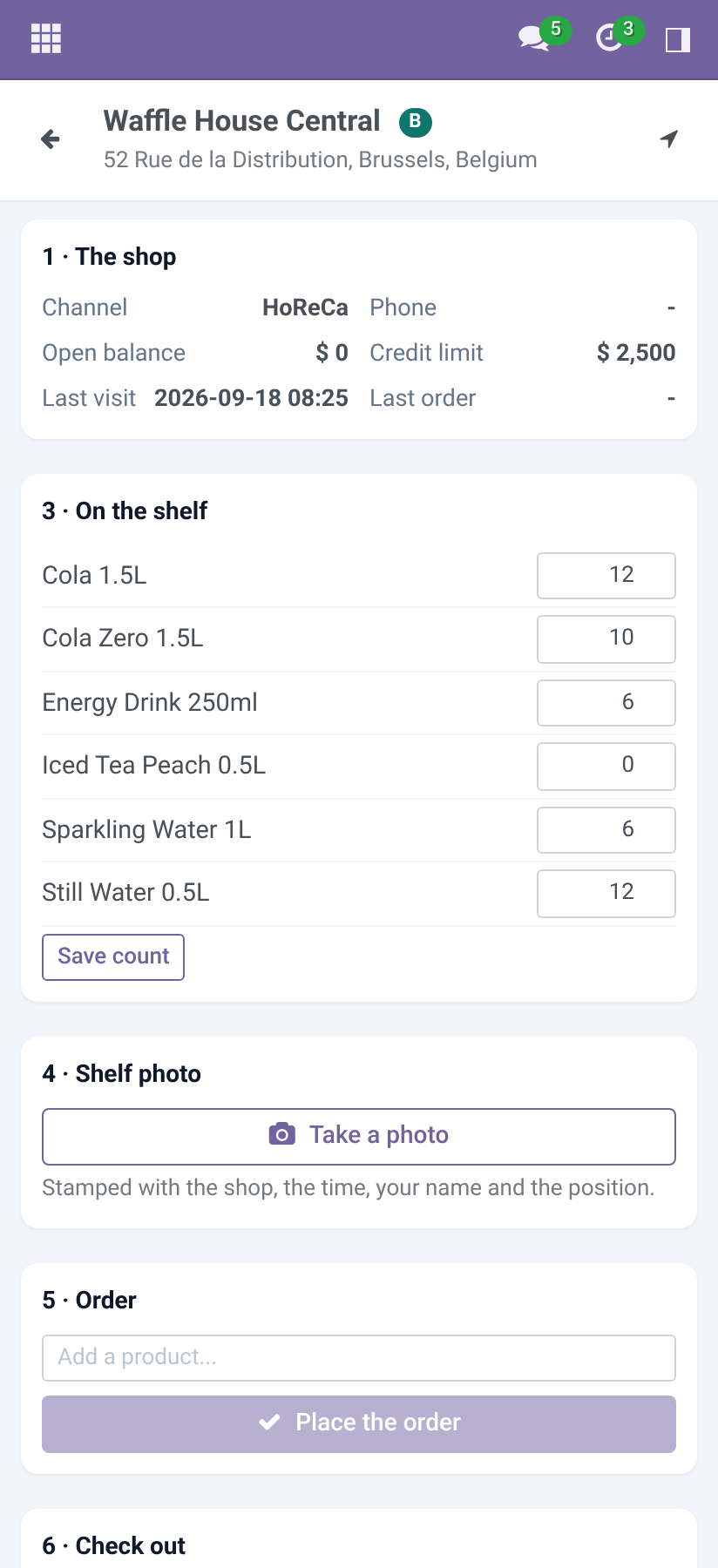
The shop - channel, phone, open balance, credit limit, last visit, last order. The arrow at the top opens navigation to the pin.
Check in - the phone's position is measured against the pin; farther than the fence (plus the GPS accuracy) is flagged, not refused. Cannot visit today skips the shop with a reason.
On the shelf - a count for each product of the assortment.
Shelf photo - stamped with the shop, the time, the rep and the position, so that a picture from another day is not this day's.
Order - Same as last time copies the last confirmed order's lines; or add products one by one - a star marks this month's focus products, and a product sold by the case gets a cs and a un box. The order is a quotation on the outlet's pricelist, linked to the visit; if the outlet's open balance plus the order passes its credit limit, the screen says so - and the order is still taken, for the office to decide.
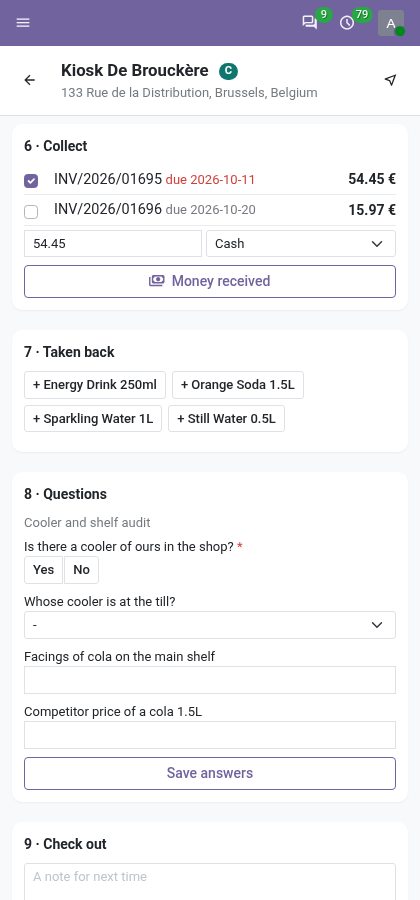
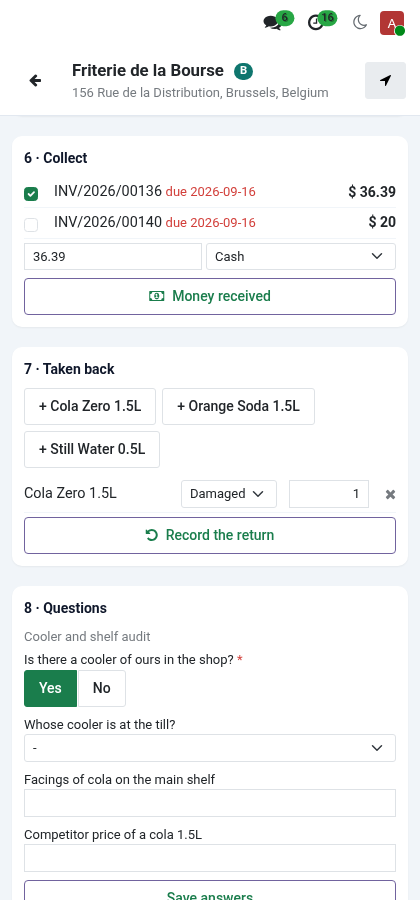
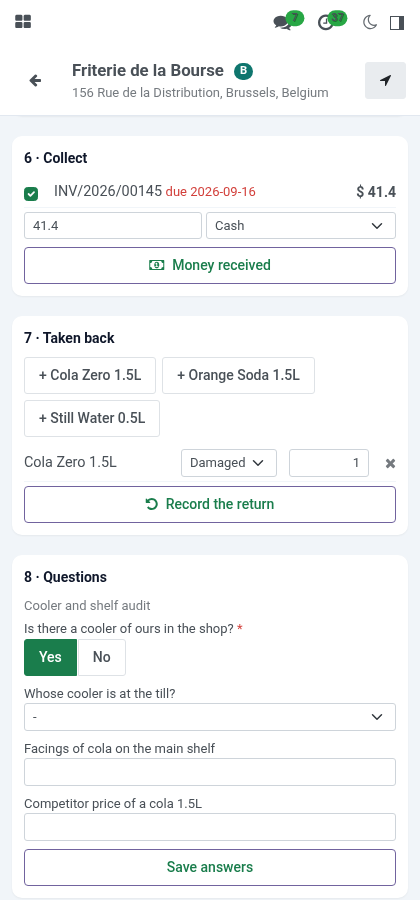
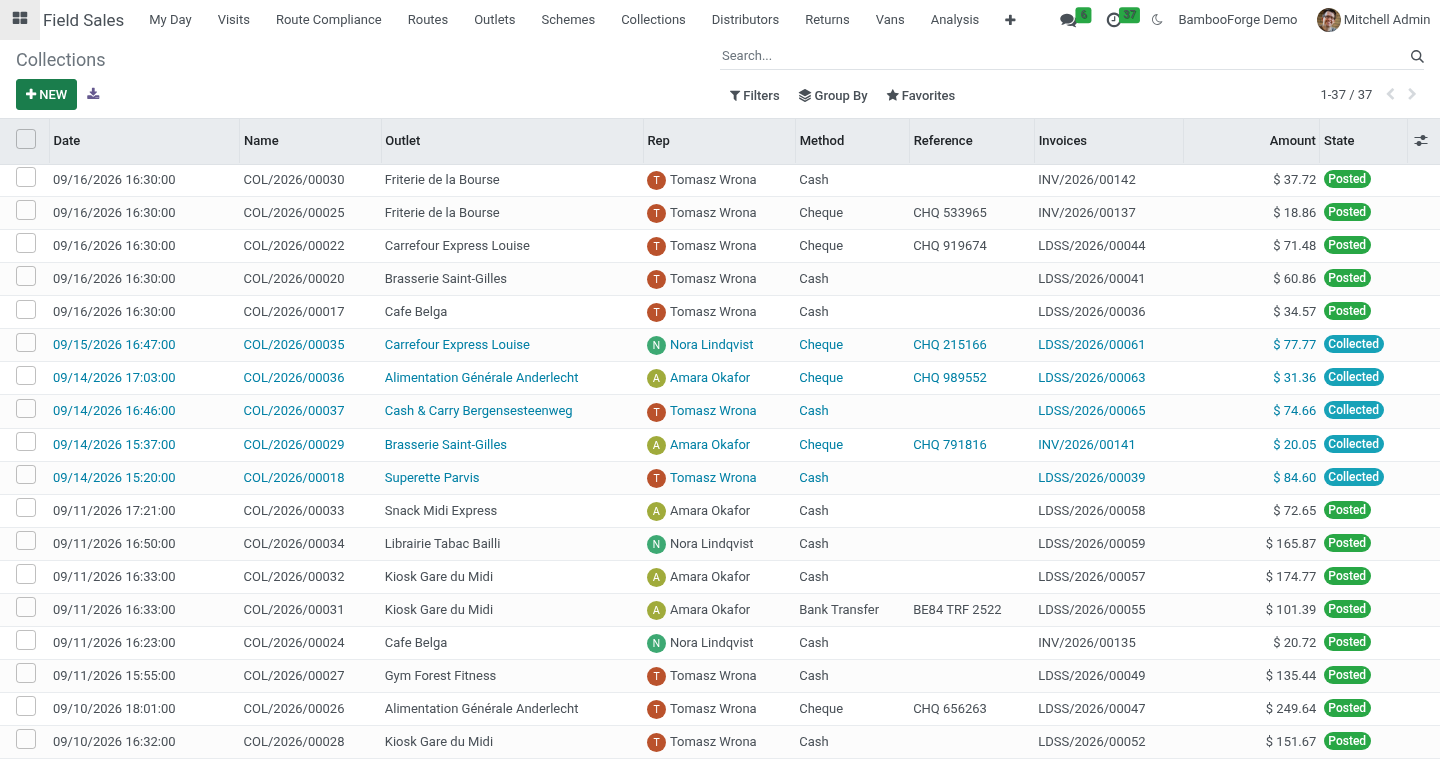
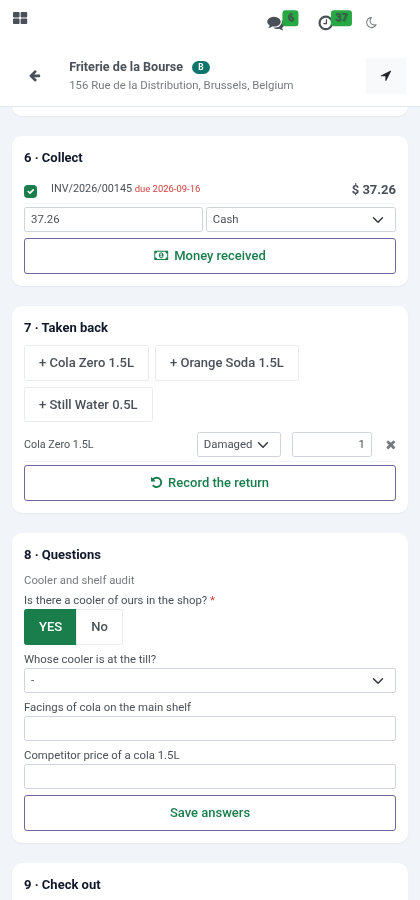
Collect - the shop's open invoices, oldest due first, late ones in red. Tick the ones being paid (the amount fills in), or type any amount; cash, cheque (with its number) or transfer (with the reference). Money received records it and offers the receipt, an 80 mm slip for a mobile printer or a PDF to show. The office posts it as a payment in the method's journal, against the invoices ticked - or the shop's oldest - one invoice after the other; more than is owed stays on the account as an advance. With Post Collections at Once it is posted there and then.
Taken back - products from the assortment, each with a reason: damaged, expired, empties, unsold, other. Record the return writes a draft credit note for the shop, priced at what it last paid (net of its discount), the list price if it never bought the product.
Questions - the surveys running for the shop's channel. Answering again replaces; the phone says which required questions are still open.
Check out - with a note for next time. Under two minutes in the shop is flagged.
Without a signal
Basements, industrial estates, the countryside: the phone keeps working.
The day is kept on the phone each time it is loaded; opened without a signal, My Day shows it as last seen, with a band saying so.
Check in, shelf count, photo, order, check out, skip done without a signal are kept on the phone, in order, and shown as done. The band counts them; they are sent by themselves when the signal returns (or with Send now).
Each is sent with the time it was done on the phone, so a check-in at 9:14 in a cellar is 9:14, not the time the rep came back up. The visit is marked Recorded Offline. A phone time more than ten minutes in the future or more than three days old is not believed: the server's time is used and the visit is flagged phone clock far from the server's.
A shop not on the route can still be added without a signal when it was found before the signal dropped. Product search works without a signal too: the catalogue of products for sale is kept on the phone and refreshed once a day (up to 5,000 products; beyond that, a search that finds nothing on the phone asks the server when there is a signal).
Collections, returns and survey answers are kept like the rest; the receipt is printed once they have reached the server.
If an action cannot be applied when it arrives - the visit was reopened meanwhile, for instance - the phone says which one and why; the others are applied.
What waits is kept in the browser's database (IndexedDB), not in its small key store: a morning of shelf photos fits. Photos are scaled to 1600 px and saved as JPEG on the phone before they are sent or kept, a few hundred kilobytes instead of several megabytes. Should the phone's storage be full all the same, the rep is told to keep the screen open until the signal is back.
Every action kept on the phone carries its own key. If the signal drops after the server did the work but before the phone heard back, the phone sends it again and the server answers without doing it twice: no second order, no second shop.
Add-ons
Three add-ons build on this app, each on its own:
Trade Schemes and Display Programmes - promotions applied to the rep's order with a budget, and display programmes proved by photos.
Distributors - the shop's order becomes the distributor's to fill; the distributor's stock, cover and replenishment.
Van Sales - load, sell and deliver from the van, collect cash, close the day.
What the supervisor sees
Visits: every visit with check-in, minutes, distance from the outlet, orders and flags; filters for today, flagged, off-route, with an order; group by rep, day, outlet. A supervisor can reopen a skipped or checked-out visit.
Route Compliance: a line per rep per day. Planned is the route; visited, skipped and missed add up to it; off-route visits are counted apart. Compliance is planned visits made over planned; strike rate is visits with an order over visits made. Kilometres are the straight lines between consecutive check-ins - not a GPS track, a plausibility figure. Pivot by week and territory; Compliance Under 80% filters the days to talk about.
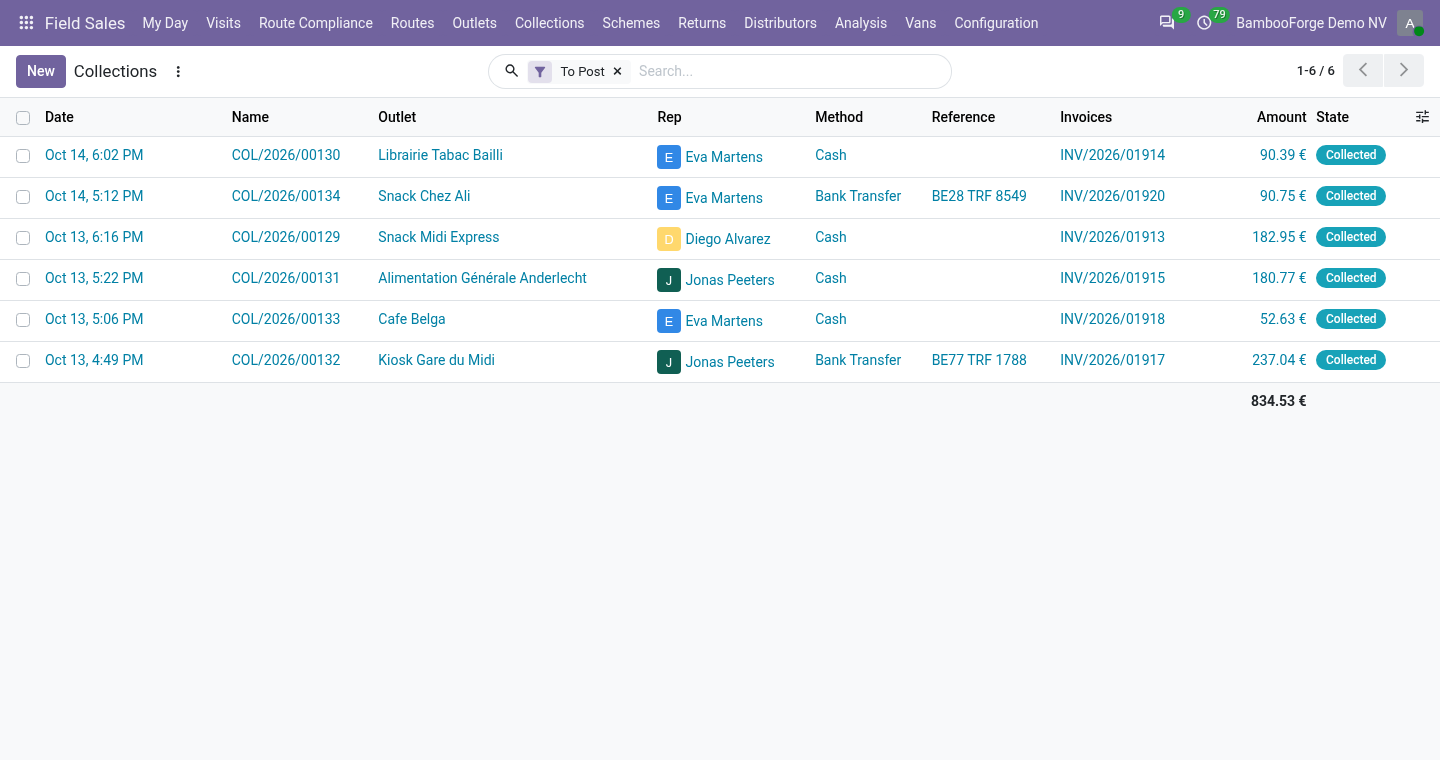
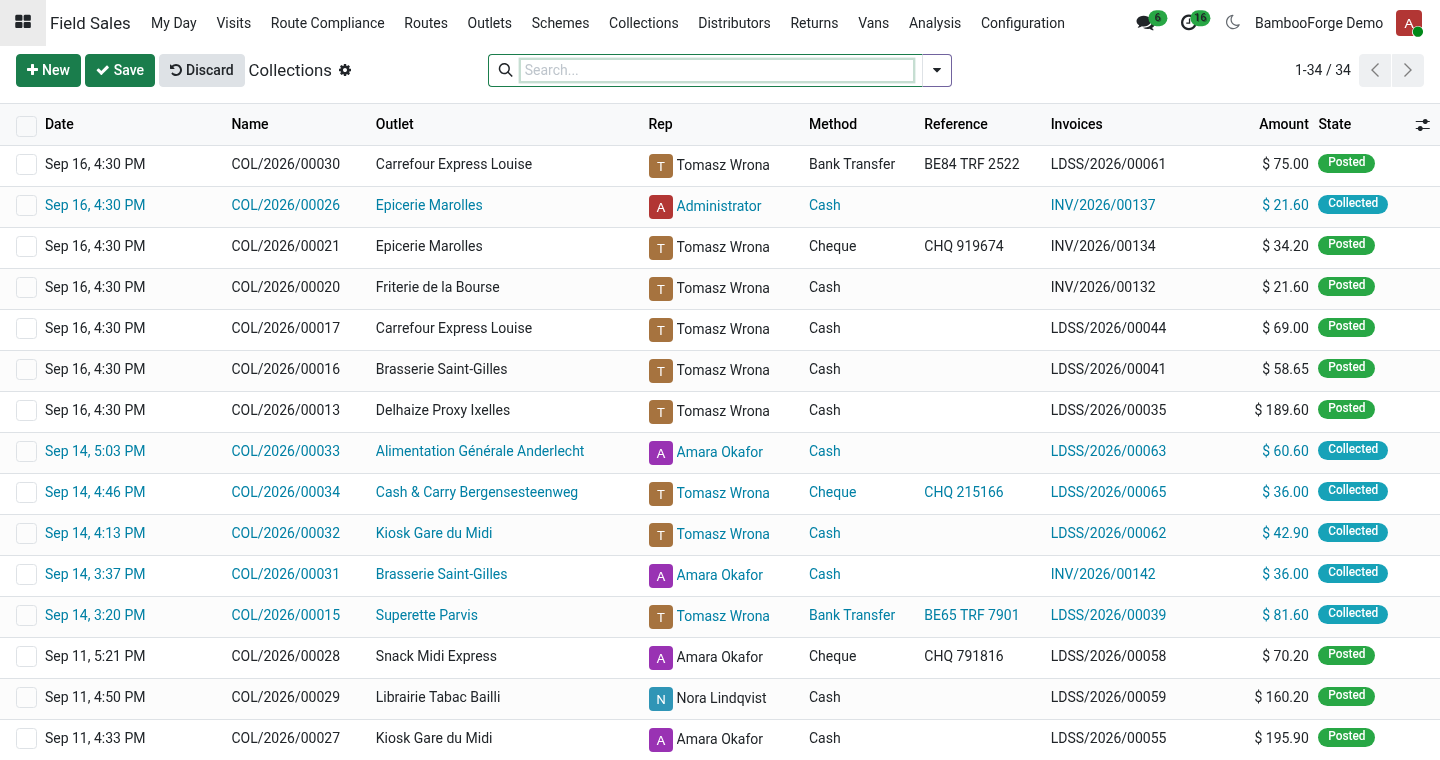
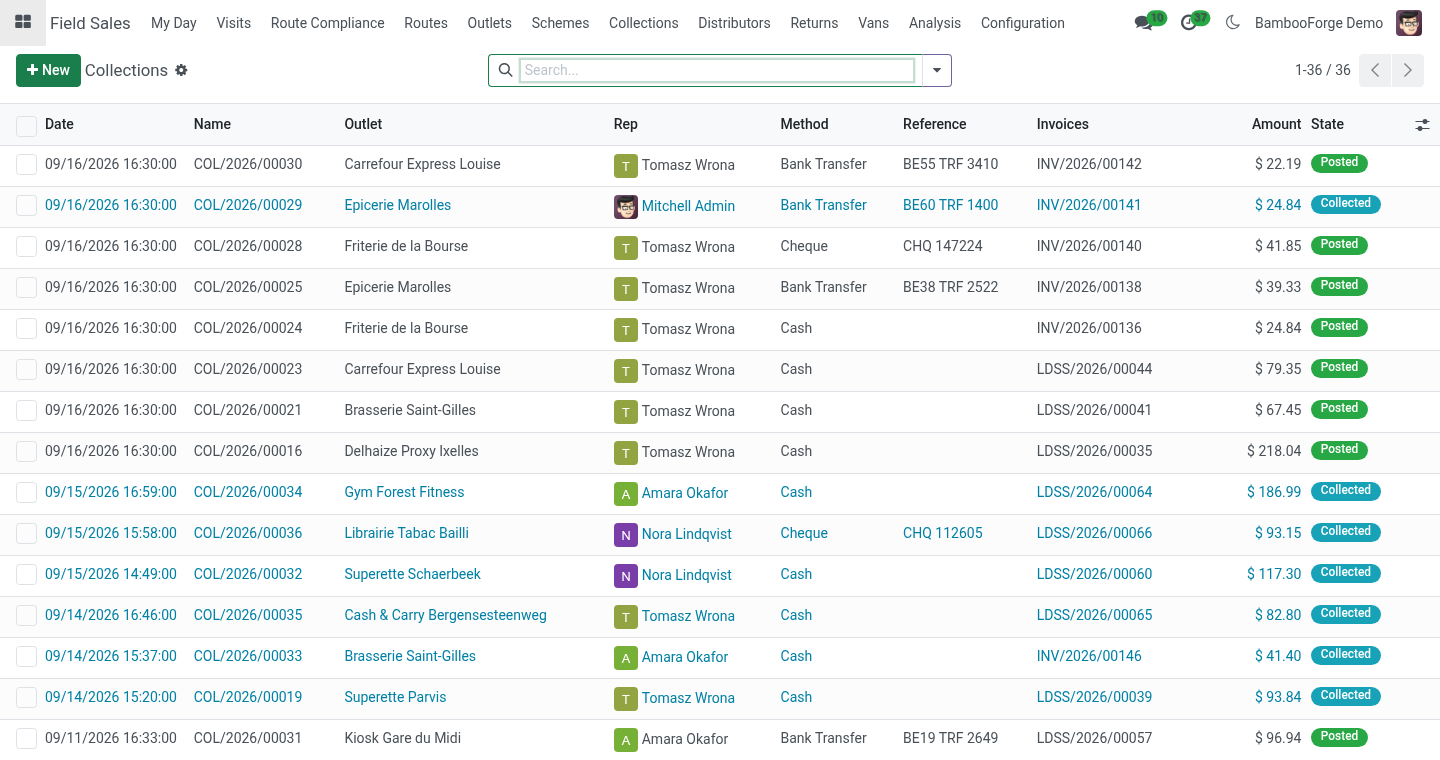
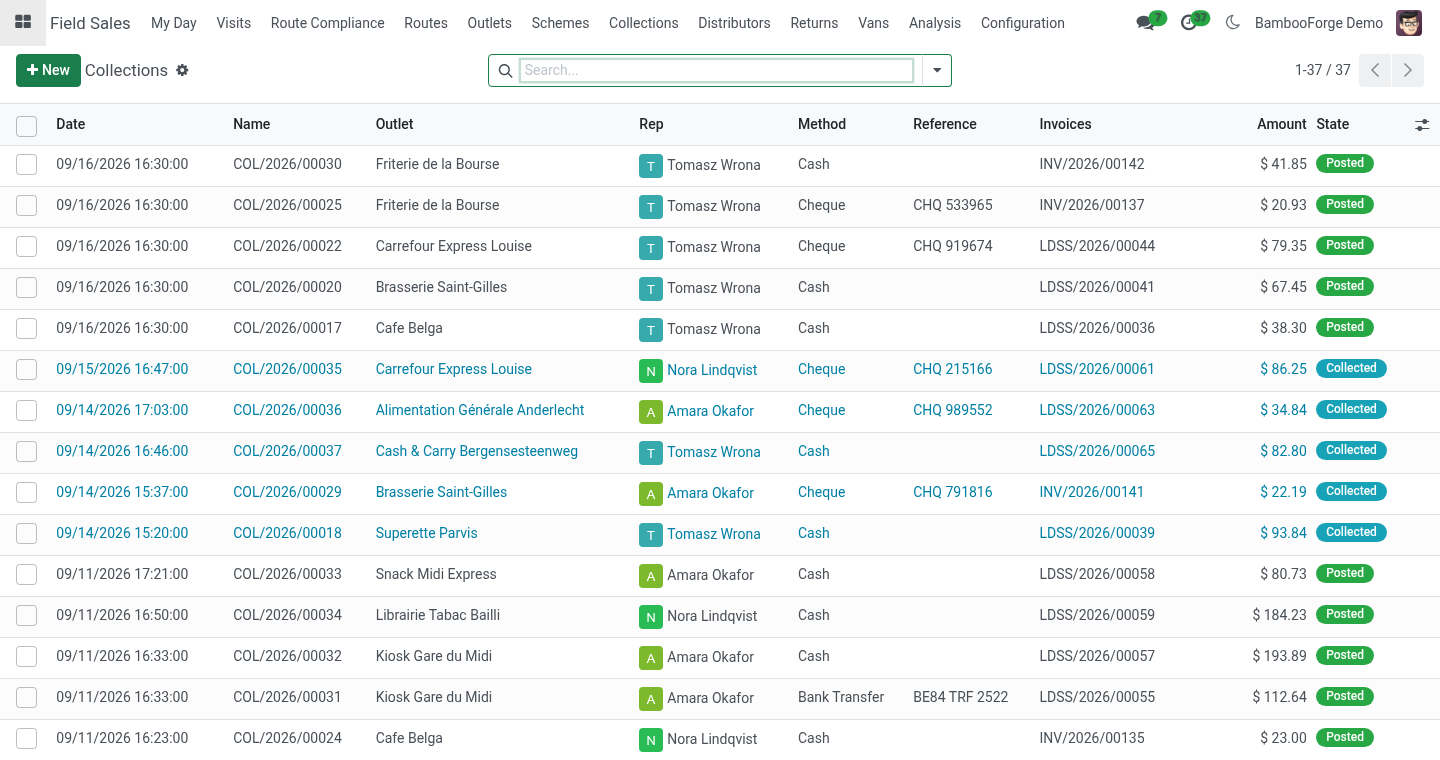
Collections: what reps took, To Post by default, by rep, method and day; Post the Payment (invoicing rights) and Print Receipt. Returns: each with its credit note; Analysis ▸ Returned Goods pivots products by reason. Survey Answers: a pivot of answers per question; numbers and yes/no also average.
Flags on a visit: outside the fence, poor GPS accuracy (over 300 m), a different phone, outside working hours (before 6 or after 22 in the rep's timezone), no position sent, under two minutes, not on the day's route.
Limits, stated plainly
Without a signal the phone keeps what was done for up to three days; clearing the browser's storage before the signal returns loses it.
The position is what the browser reports. A rogue app that fakes the phone's position cannot be detected from a browser; the fence, the accuracy, the phone and the times are the evidence, and they are for a supervisor to weigh.
Trade promotions, distributor stock and van sales are separate add-ons.
Kilometres are straight lines between check-ins, not a route track.
Nearest first orders by straight-line distance, not by road; Google Maps takes ten stops in one trip, so a longer round opens in parts.
A collection is a record of money received until it is posted; posting needs a journal per method and invoicing rights. The receipt is not a fiscal document.
A return's credit note is left in draft for the accountant. Returned goods are not received into a warehouse by this app (the Van Sales add-on takes them onto the van).
Uninstalling
Uninstalling removes territories, channels, routes, visits, shelf counts, photos and rep days, and the outlet fields on contacts. Sales orders stay, without their link to the visit.
Changelog
20.0.1.2.0
Built for Odoo 20: record rules and access rights rewritten onto Odoo 20's single ir.access model, the screens rebuilt on Owl 3, and every icon moved to the icon set Odoo 20 ships.
20.0.1.2.0
Collections on the route against open invoices, with an 80 mm receipt and posting to a journal per method.
Returns, damaged goods and empties at the visit, as a draft credit note.
Sell by the case; monthly targets and focus products on the phone; surveys; nearest-first route order and a Google Maps trip; the product catalogue kept on the phone for searching without a signal.
20.0.1.1.1
The offline queue moved to IndexedDB (localStorage overflowed after a few photos and the queue was lost); photos scaled on the phone.
An action sent twice is done once.
20.0.1.1.0
Works without a signal: actions kept on the phone and sent with their own time; the day cached on the phone; Recorded Offline on the visit; a phone clock flag.
Hooks for the Trade Schemes, Distributors and Van Sales add-ons.
20.0.1.0.0
First release.
How we make sure it works
Before every release, 24 automated checks run against this app on Odoo 16, 17, 18, 19 and 20. Among them:
What does not add up is flagged not refused.
Returns without credit note.
Returns at last sold price become a credit note.
A queue sent twice is done once.
Collect refuses nonsense and needs a journal.
The complete list is in the source you receive.