 BambooForge Labs
EPCIS Traceability for Supply Chain
Record what happened to which lot, where and why, in the GS1 EPCIS vocabulary your trading partners already read - and trace it end to end.
Available for Odoo 16.0, Odoo 17.0, Odoo 18.0, Odoo 19.0, Odoo 20.0. Technical name bambooforge_epcis.
Transcript of the walkthrough (Odoo 20)
EPCIS Traceability for Supply Chain. Record what happened to which lot, where and why, in the GS1 EPCIS vocabulary your trading partners already read - and trace it end to end. Odoo records that stock moved. EPCIS is what a trading partner, a regulator or a recall needs instead: the same movement expressed as what happened, to which serialised items, where, and for what business reason — in a vocabulary everybody else in the chain reads the same way.
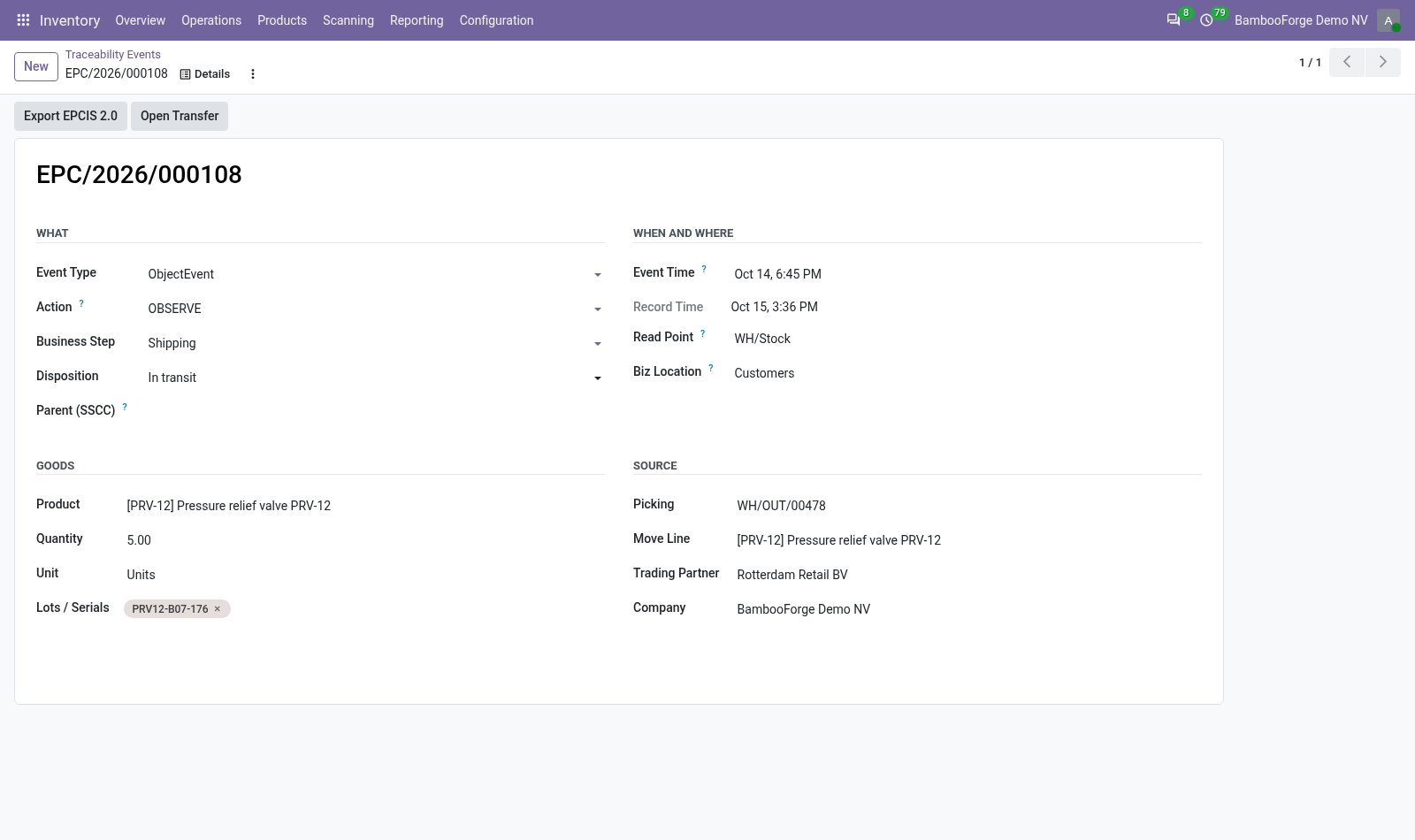
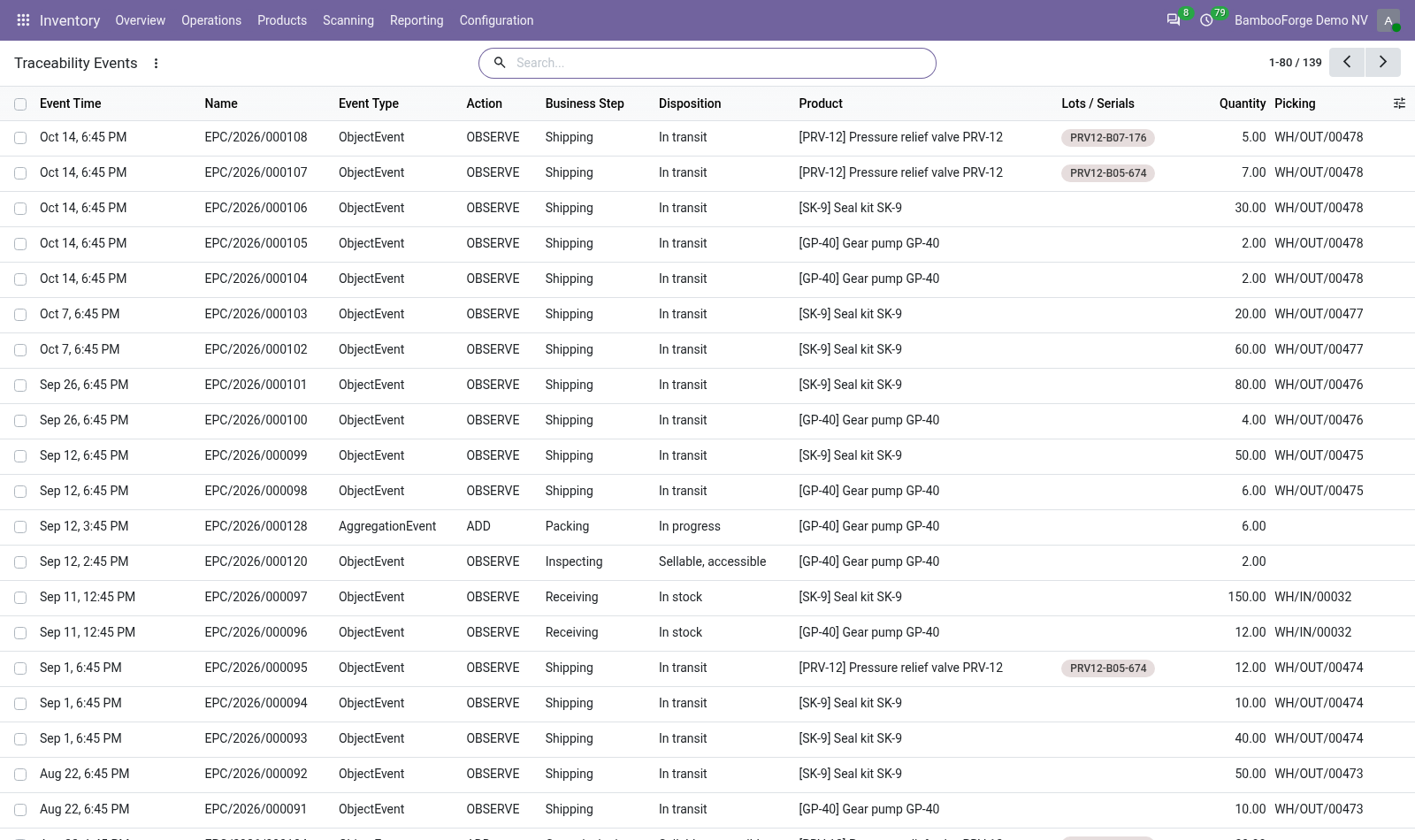
A validated receipt or delivery becomes one event per lot moved, with the GS1 business step and disposition that match the transfer: receiving into stock, shipping into transit. In the next few minutes: what this is for, then capturing, then tracing, then exporting, then how we make sure it works. Then what this app deliberately does not do, so you can tell before you buy whether it fits. Everything lives under Traceability Events.
1. Copy bambooforge_epcis into your addons path and update the app list, or install the ZIP from the Odoo Apps Store. 2. Install EPCIS Traceability for Supply Chain.
3. Open Traceability Events. What this is for. Odoo records that stock moved.
EPCIS is what a trading partner, a regulator or a recall needs instead: the same movement expressed as what happened, to which serialised items, where, and for what business reason — in a vocabulary everybody else in the chain reads the same way. Capturing. A validated receipt or delivery becomes one event per lot moved, with the GS1 business step and disposition that match the transfer: receiving into stock, shipping into transit. A transfer without lots still produces one event for the transfer as a whole.
Quantity-level traceability is worth less than serialised traceability, but refusing to record it is how a traceability project dies in month two. Tracing. The Trace button on a lot lists every event that ever touched it, oldest first. That is the query a recall runs, and the reason the events exist at all.
Exporting. Select events and run Export EPCIS 2.0. The file is an EPCIS 2.0 JSON document — the shape a partner's system imports — with the CBV vocabulary spelled out in full (urn:epcglobal:cbv:bizstep:shipping) rather than in Odoo's own words. Serialised events carry an epcList; unserialised ones carry a quantityList instead, which is what the standard expects.
How we make sure it works. Before every release, 11 automated checks run against this app on Odoo 16, 17, 18, 19 and 20. Among them: Capturing twice does not duplicate. Event of another company is not readable.
Event of another company is not searchable. An event without lots still reports a quantity. An unvalidated transfer is refused. The complete list is in the source you receive.
Questions people ask. Which Odoo versions does it run on? Odoo 16.0, 17.0, 18.0, 19.0, 20.0, on the series you buy it for; each series is its own listing. Community or Enterprise?
Both. It needs no Enterprise app. Now the part most videos leave out: what this does not do. Events are captured from transfers.
Manufacturing (transformation events) and aggregation onto pallets are modelled but not captured automatically — the fields are there for a customisation or a manual record. Identifiers are built from the product barcode or internal reference. A company with real GS1 company prefixes should map them properly before sending anything to a partner. This produces and reads the events.
It is not an EPCIS repository and does not answer EPCIS queries over HTTP. The complete manual is at docs dot bambooforge dot dev, the demo database is linked from the store page, and support answers within twenty-four hours. Links are in the description.
Transcript of the walkthrough (Odoo 19)
EPCIS Traceability for Supply Chain. Record what happened to which lot, where and why, in the GS1 EPCIS vocabulary your trading partners already read - and trace it end to end. Odoo records that stock moved. EPCIS is what a trading partner, a regulator or a recall needs instead: the same movement expressed as what happened, to which serialised items, where, and for what business reason — in a vocabulary everybody else in the chain reads the same way.
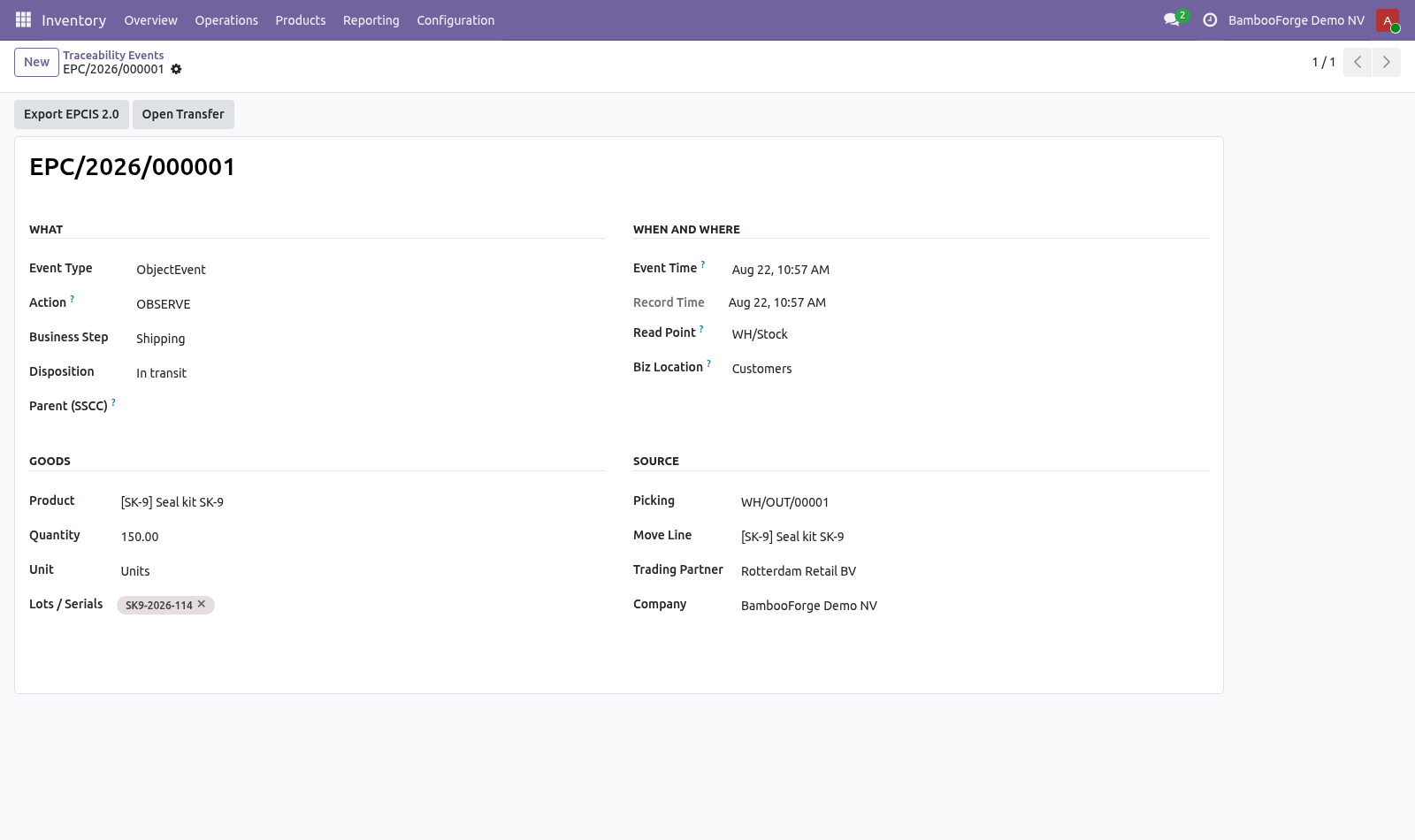
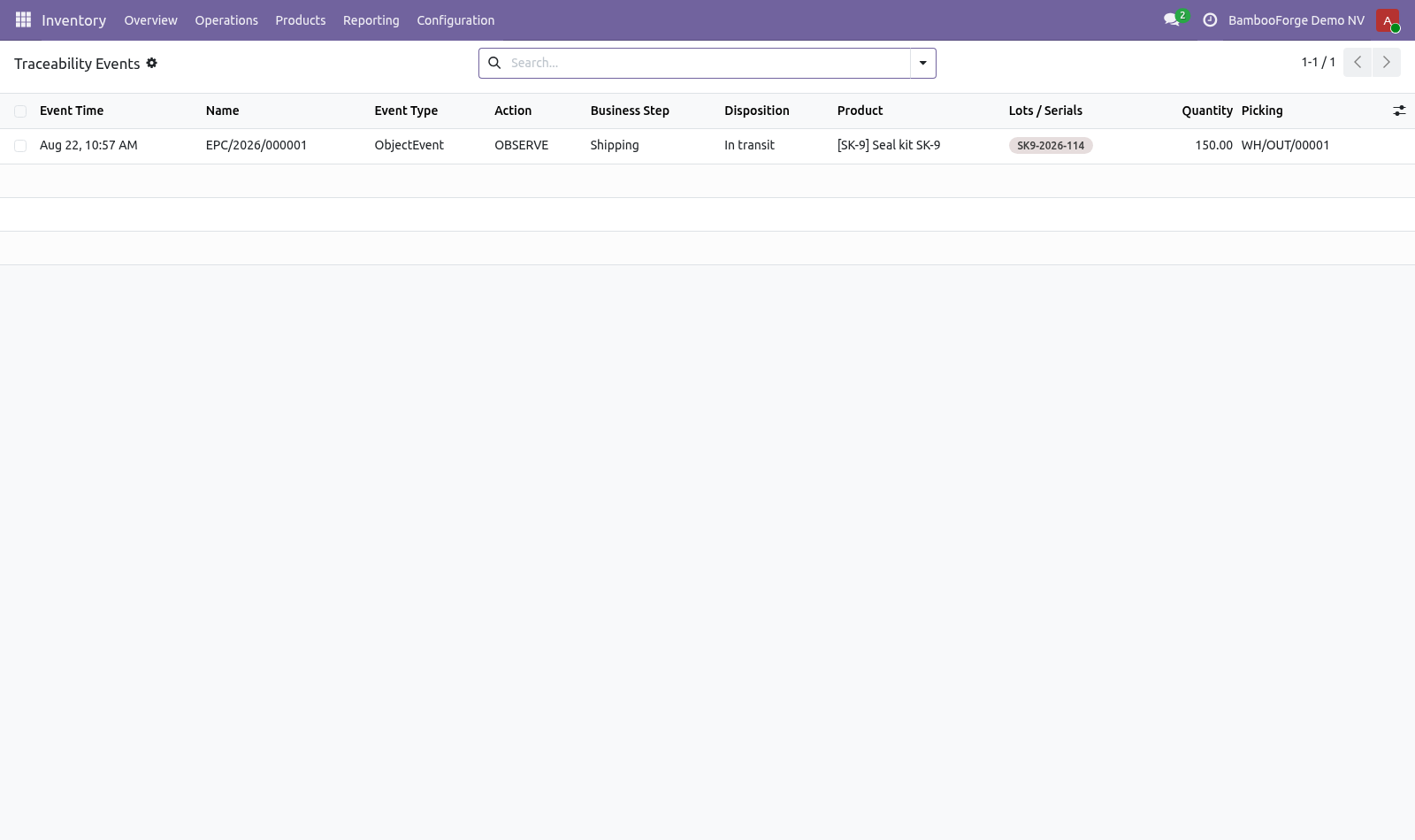
A validated receipt or delivery becomes one event per lot moved, with the GS1 business step and disposition that match the transfer: receiving into stock, shipping into transit. In the next few minutes: what this is for, then capturing, then tracing, then exporting. Then what this app deliberately does not do, so you can tell before you buy whether it fits. Everything lives under Traceability Events.
What this is for. Odoo records that stock moved. EPCIS is what a trading partner, a regulator or a recall needs instead: the same movement expressed as what happened, to which serialised items, where, and for what business reason — in a vocabulary everybody else in the chain reads the same way. Capturing.
A validated receipt or delivery becomes one event per lot moved, with the GS1 business step and disposition that match the transfer: receiving into stock, shipping into transit. A transfer without lots still produces one event for the transfer as a whole. Quantity-level traceability is worth less than serialised traceability, but refusing to record it is how a traceability project dies in month two. Tracing.
The Trace button on a lot lists every event that ever touched it, oldest first. That is the query a recall runs, and the reason the events exist at all. Exporting. Select events and run Export EPCIS 2.0.
The file is an EPCIS 2.0 JSON document — the shape a partner's system imports — with the CBV vocabulary spelled out in full (urn:epcglobal:cbv:bizstep:shipping) rather than in Odoo's own words. Serialised events carry an epcList; unserialised ones carry a quantityList instead, which is what the standard expects. Now the part most videos leave out: what this does not do. Events are captured from transfers.
Manufacturing (transformation events) and aggregation onto pallets are modelled but not captured automatically — the fields are there for a customisation or a manual record. Identifiers are built from the product barcode or internal reference. A company with real GS1 company prefixes should map them properly before sending anything to a partner. This produces and reads the events.
It is not an EPCIS repository and does not answer EPCIS queries over HTTP. The complete manual is at docs dot bambooforge dot dev, the demo database is linked from the store page, and support answers within twenty-four hours. Links are in the description.
Transcript of the walkthrough (Odoo 18)
EPCIS Traceability for Supply Chain. Record what happened to which lot, where and why, in the GS1 EPCIS vocabulary your trading partners already read - and trace it end to end. Odoo records that stock moved. EPCIS is what a trading partner, a regulator or a recall needs instead: the same movement expressed as what happened, to which serialised items, where, and for what business reason — in a vocabulary everybody else in the chain reads the same way.
A validated receipt or delivery becomes one event per lot moved, with the GS1 business step and disposition that match the transfer: receiving into stock, shipping into transit. In the next few minutes: what this is for, then capturing, then tracing, then exporting. Then what this app deliberately does not do, so you can tell before you buy whether it fits. Everything lives under Traceability Events.
What this is for. Odoo records that stock moved. EPCIS is what a trading partner, a regulator or a recall needs instead: the same movement expressed as what happened, to which serialised items, where, and for what business reason — in a vocabulary everybody else in the chain reads the same way. Capturing.
A validated receipt or delivery becomes one event per lot moved, with the GS1 business step and disposition that match the transfer: receiving into stock, shipping into transit. A transfer without lots still produces one event for the transfer as a whole. Quantity-level traceability is worth less than serialised traceability, but refusing to record it is how a traceability project dies in month two. Tracing.
The Trace button on a lot lists every event that ever touched it, oldest first. That is the query a recall runs, and the reason the events exist at all. Exporting. Select events and run Export EPCIS 2.0.
The file is an EPCIS 2.0 JSON document — the shape a partner's system imports — with the CBV vocabulary spelled out in full (urn:epcglobal:cbv:bizstep:shipping) rather than in Odoo's own words. Serialised events carry an epcList; unserialised ones carry a quantityList instead, which is what the standard expects. Now the part most videos leave out: what this does not do. Events are captured from transfers.
Manufacturing (transformation events) and aggregation onto pallets are modelled but not captured automatically — the fields are there for a customisation or a manual record. Identifiers are built from the product barcode or internal reference. A company with real GS1 company prefixes should map them properly before sending anything to a partner. This produces and reads the events.
It is not an EPCIS repository and does not answer EPCIS queries over HTTP. The complete manual is at docs dot bambooforge dot dev, the demo database is linked from the store page, and support answers within twenty-four hours. Links are in the description.
Transcript of the walkthrough (Odoo 17)
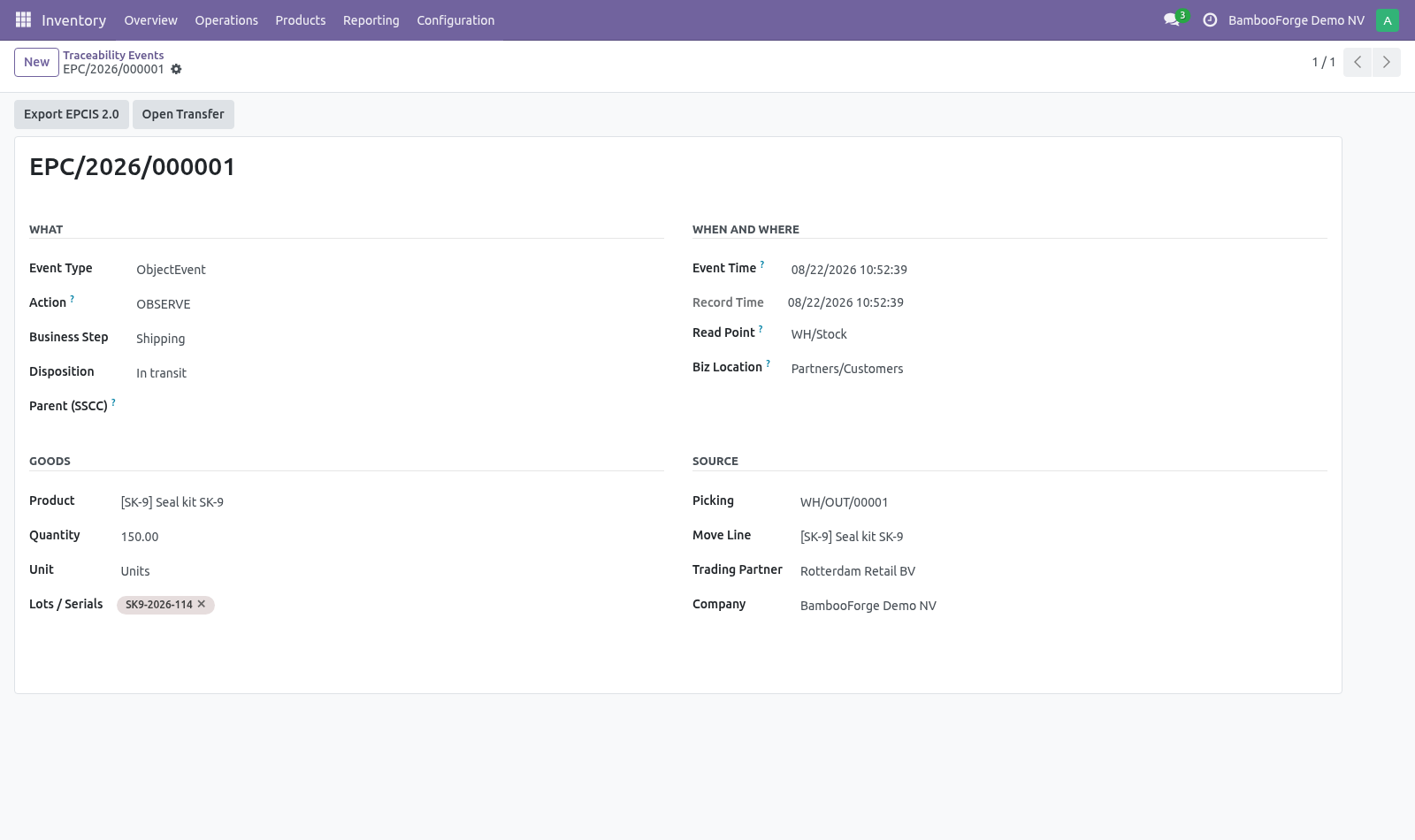
EPCIS Traceability for Supply Chain. Record what happened to which lot, where and why, in the GS1 EPCIS vocabulary your trading partners already read - and trace it end to end. Odoo records that stock moved. EPCIS is what a trading partner, a regulator or a recall needs instead: the same movement expressed as what happened, to which serialised items, where, and for what business reason — in a vocabulary everybody else in the chain reads the same way.
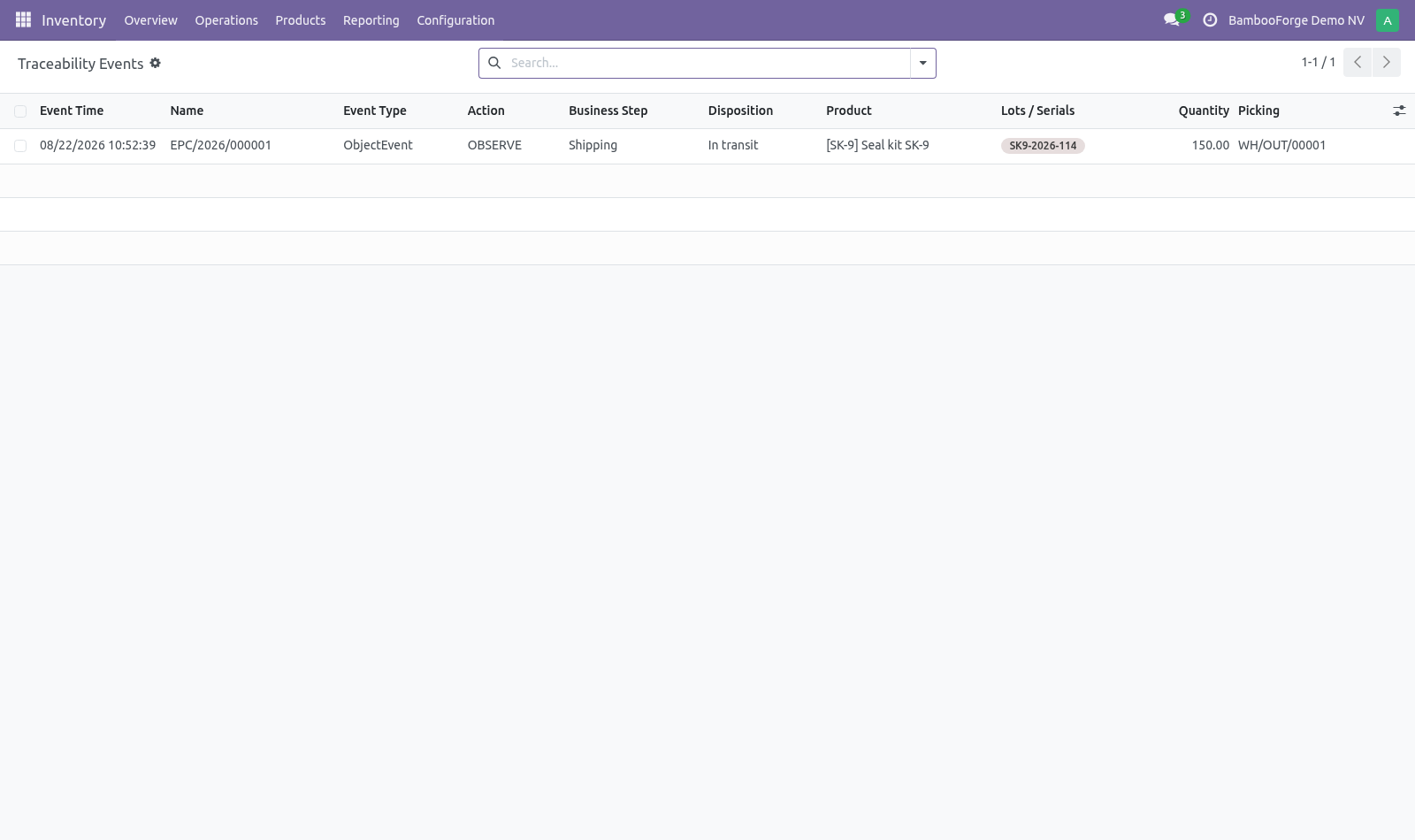
A validated receipt or delivery becomes one event per lot moved, with the GS1 business step and disposition that match the transfer: receiving into stock, shipping into transit. In the next few minutes: what this is for, then capturing, then tracing, then exporting. Then what this app deliberately does not do, so you can tell before you buy whether it fits. Everything lives under Traceability Events.
What this is for. Odoo records that stock moved. EPCIS is what a trading partner, a regulator or a recall needs instead: the same movement expressed as what happened, to which serialised items, where, and for what business reason — in a vocabulary everybody else in the chain reads the same way. Capturing.
A validated receipt or delivery becomes one event per lot moved, with the GS1 business step and disposition that match the transfer: receiving into stock, shipping into transit. A transfer without lots still produces one event for the transfer as a whole. Quantity-level traceability is worth less than serialised traceability, but refusing to record it is how a traceability project dies in month two. Tracing.
The Trace button on a lot lists every event that ever touched it, oldest first. That is the query a recall runs, and the reason the events exist at all. Exporting. Select events and run Export EPCIS 2.0.
The file is an EPCIS 2.0 JSON document — the shape a partner's system imports — with the CBV vocabulary spelled out in full (urn:epcglobal:cbv:bizstep:shipping) rather than in Odoo's own words. Serialised events carry an epcList; unserialised ones carry a quantityList instead, which is what the standard expects. Now the part most videos leave out: what this does not do. Events are captured from transfers.
Manufacturing (transformation events) and aggregation onto pallets are modelled but not captured automatically — the fields are there for a customisation or a manual record. Identifiers are built from the product barcode or internal reference. A company with real GS1 company prefixes should map them properly before sending anything to a partner. This produces and reads the events.
It is not an EPCIS repository and does not answer EPCIS queries over HTTP. The complete manual is at docs dot bambooforge dot dev, the demo database is linked from the store page, and support answers within twenty-four hours. Links are in the description.
Transcript of the walkthrough (Odoo 16)
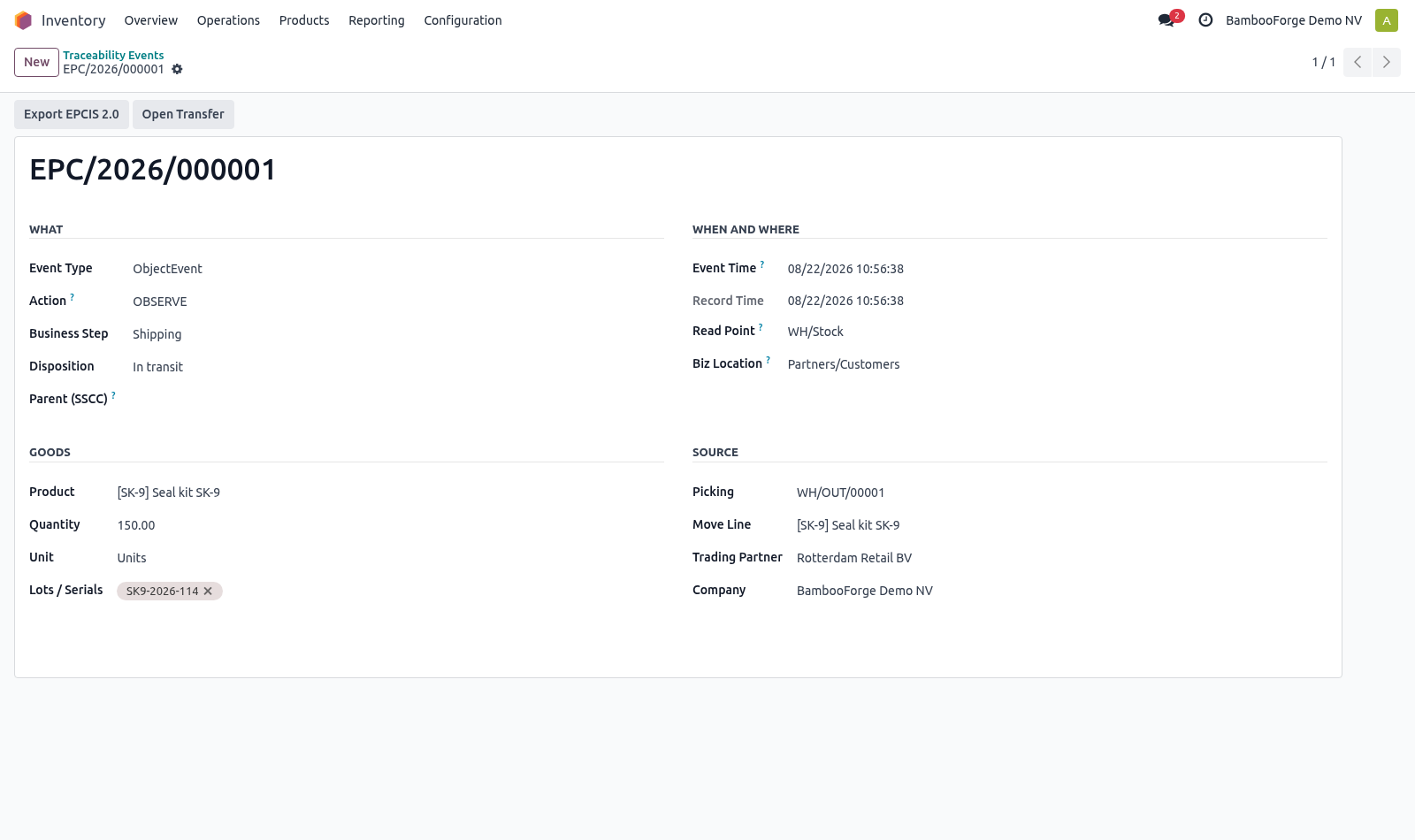
EPCIS Traceability for Supply Chain. Record what happened to which lot, where and why, in the GS1 EPCIS vocabulary your trading partners already read - and trace it end to end. Odoo records that stock moved. EPCIS is what a trading partner, a regulator or a recall needs instead: the same movement expressed as what happened, to which serialised items, where, and for what business reason — in a vocabulary everybody else in the chain reads the same way.
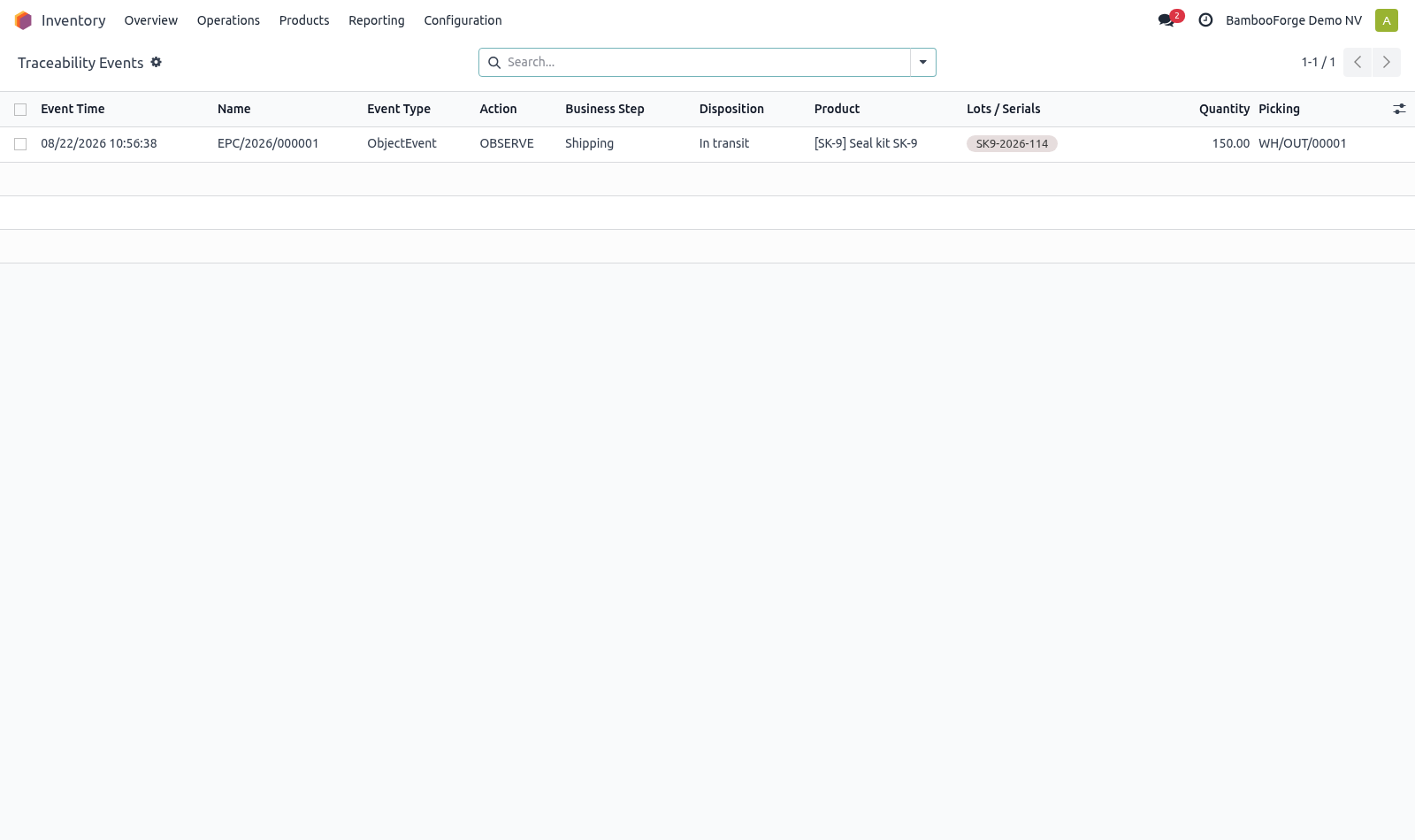
A validated receipt or delivery becomes one event per lot moved, with the GS1 business step and disposition that match the transfer: receiving into stock, shipping into transit. In the next few minutes: what this is for, then capturing, then tracing, then exporting. Then what this app deliberately does not do, so you can tell before you buy whether it fits. Everything lives under Traceability Events.
What this is for. Odoo records that stock moved. EPCIS is what a trading partner, a regulator or a recall needs instead: the same movement expressed as what happened, to which serialised items, where, and for what business reason — in a vocabulary everybody else in the chain reads the same way. Capturing.
A validated receipt or delivery becomes one event per lot moved, with the GS1 business step and disposition that match the transfer: receiving into stock, shipping into transit. A transfer without lots still produces one event for the transfer as a whole. Quantity-level traceability is worth less than serialised traceability, but refusing to record it is how a traceability project dies in month two. Tracing.
The Trace button on a lot lists every event that ever touched it, oldest first. That is the query a recall runs, and the reason the events exist at all. Exporting. Select events and run Export EPCIS 2.0.
The file is an EPCIS 2.0 JSON document — the shape a partner's system imports — with the CBV vocabulary spelled out in full (urn:epcglobal:cbv:bizstep:shipping) rather than in Odoo's own words. Serialised events carry an epcList; unserialised ones carry a quantityList instead, which is what the standard expects. Now the part most videos leave out: what this does not do. Events are captured from transfers.
Manufacturing (transformation events) and aggregation onto pallets are modelled but not captured automatically — the fields are there for a customisation or a manual record. Identifiers are built from the product barcode or internal reference. A company with real GS1 company prefixes should map them properly before sending anything to a partner. This produces and reads the events.
It is not an EPCIS repository and does not answer EPCIS queries over HTTP. The complete manual is at docs dot bambooforge dot dev, the demo database is linked from the store page, and support answers within twenty-four hours. Links are in the description.
Key facts
- What it is
- Record what happened to which lot, where and why, in the GS1 EPCIS vocabulary your trading partners already read - and trace it end to end.
- For
- Warehouse
- Odoo versions
- 16.0, 17.0, 18.0, 19.0, 20.0 - Community and Enterprise
- Runs on
- Odoo.sh or Odoo you host yourself - not Odoo Online, which accepts no third-party apps
- Price
- 249 EUR, one-time, on the Odoo Apps Store
- Technical name
- bambooforge_epcis
- Not for
- Events are captured from transfers. Manufacturing (transformation events) and aggregation onto pallets are modelled but not captured automatically — the fields are there for a customisation or a manual record.; Identifiers are built from the product barcode or internal reference. A company with real GS1 company prefixes should map them properly before sending anything to a partner.; This produces and reads the events. It is not an EPCIS repository and does not answer EPCIS queries over HTTP.
- Manual last updated
- 2026-09-21
EPCIS Traceability for Supply Chain
What this is for
Odoo records that stock moved. EPCIS is what a trading partner, a regulator or a recall needs instead: the same movement expressed as what happened, to which serialised items, where, and for what business reason — in a vocabulary everybody else in the chain reads the same way.
Capturing
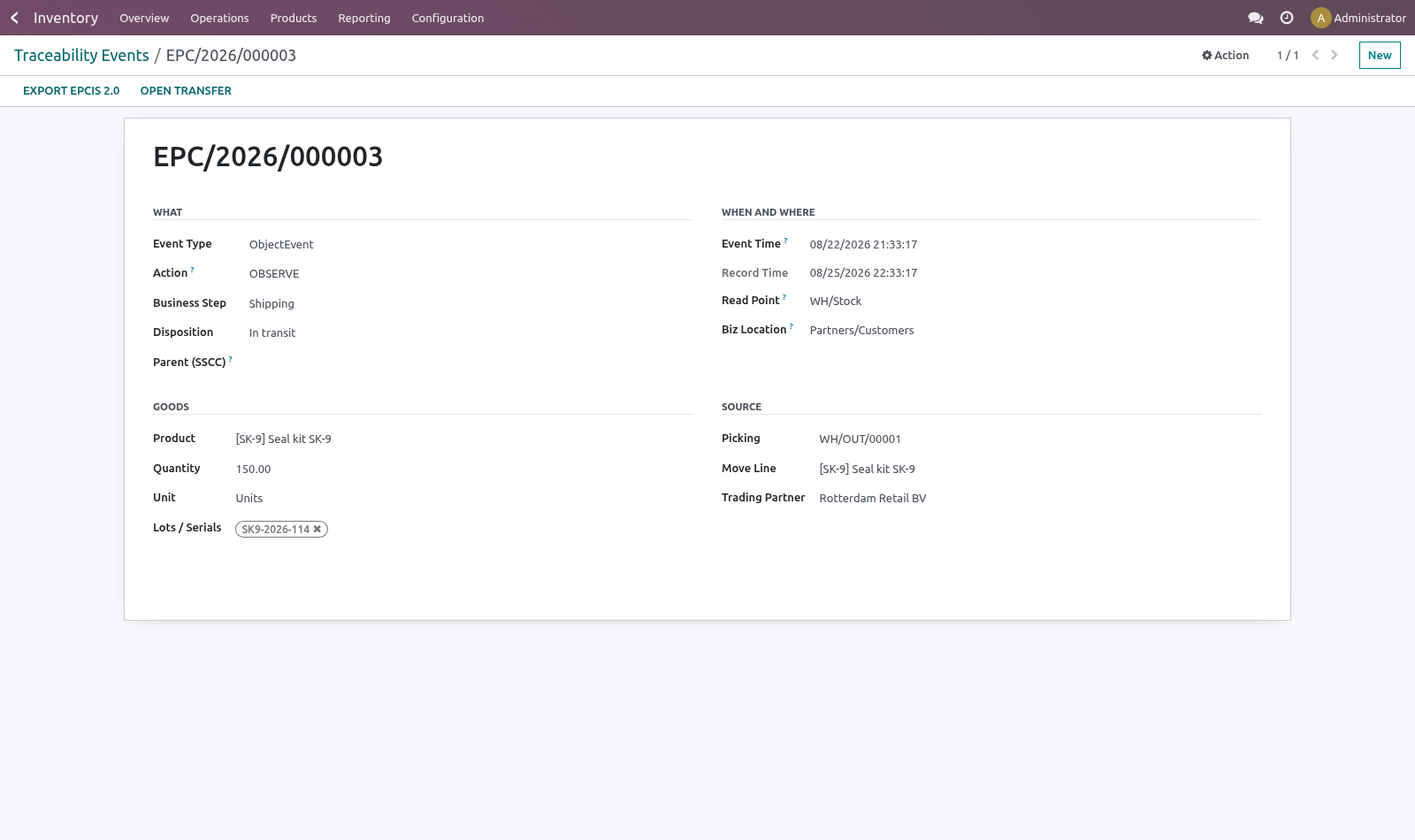
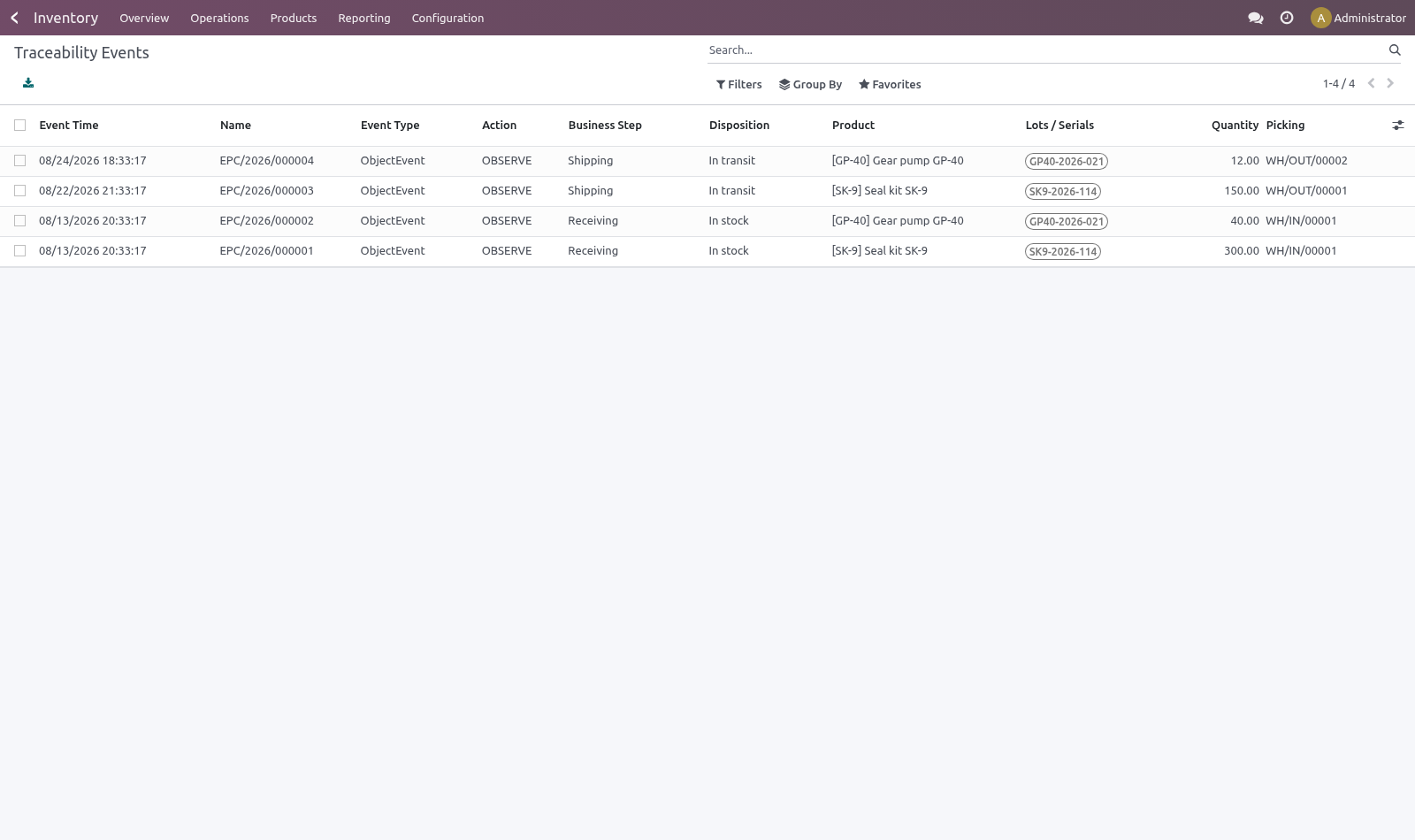
A validated receipt or delivery becomes one event per lot moved, with the GS1 business step and disposition that match the transfer: receiving into stock, shipping into transit.
A transfer without lots still produces one event for the transfer as a whole. Quantity-level traceability is worth less than serialised traceability, but refusing to record it is how a traceability project dies in month two.
Capture runs hourly on a schedule, not on validation. Traceability must not sit on the hottest write path in the warehouse — a slow put-away costs more every day than a one-hour delay in a record nobody reads until there is a recall.
The button on the transfer captures immediately when somebody needs it now.
Tracing
The Trace button on a lot lists every event that ever touched it, oldest first. That is the query a recall runs, and the reason the events exist at all.
Exporting
Select events and run Export EPCIS 2.0. The file is an EPCIS 2.0 JSON document — the shape a partner's system imports — with the CBV vocabulary spelled out in full (urn:epcglobal:cbv:bizstep:shipping) rather than in Odoo's own words.
Serialised events carry an epcList; unserialised ones carry a quantityList instead, which is what the standard expects.
Known limits
Events are captured from transfers. Manufacturing (transformation events) and aggregation onto pallets are modelled but not captured automatically — the fields are there for a customisation or a manual record.
Identifiers are built from the product barcode or internal reference. A company with real GS1 company prefixes should map them properly before sending anything to a partner.
This produces and reads the events. It is not an EPCIS repository and does not answer EPCIS queries over HTTP.
How we make sure it works
Before every release, 11 automated checks run against this app on Odoo 16, 17, 18, 19 and 20. Among them:
Capturing twice does not duplicate.
Event of another company is not readable.
Event of another company is not searchable.
An event without lots still reports a quantity.
An unvalidated transfer is refused.
The complete list is in the source you receive.
Install
Copy bambooforge_epcis into your addons path and update the app list, or install the ZIP from the Odoo Apps Store.
Install EPCIS Traceability for Supply Chain.
Open Traceability Events.
Questions people ask
- Which Odoo versions does it run on?
Odoo 16.0, 17.0, 18.0, 19.0, 20.0, on the series you buy it for; each series is its own listing.
- Community or Enterprise?
Both. It needs no Enterprise app.
- What does it need?
The standard Inventory app. No extra Python package.
- Where does it show up?
Under the Traceability Events menu.
- Does anything leave my server?
No. It makes no call outside your Odoo server: no telemetry, no licence check, no third-party service.
- What happens if I uninstall it?
Odoo drops the app's own tables and fields; the standard records it worked on (contacts, orders, products) stay as they are.